# Table of Contents
- [Get started | RAGFlow](#get-started-ragflow)
- [A deep dive into RAGFlow v0.15.0 | RAGFlow](#a-deep-dive-into-ragflow-v0-15-0-ragflow)
- [Blog | RAGFlow](#blog-ragflow)
- [Agentic RAG - Definition and Low-code Implementation | RAGFlow](#agentic-rag-definition-and-low-code-implementation-ragflow)
- [Archive | RAGFlow](#archive-ragflow)
- [From RAG 1.0 to RAG 2.0, What Goes Around Comes Around | RAGFlow](#from-rag-1-0-to-rag-2-0-what-goes-around-comes-around-ragflow)
- [Implementing Text2SQL with RAGFlow | RAGFlow](#implementing-text2sql-with-ragflow-ragflow)
- [Implementing a long-context RAG based on RAPTOR | RAGFlow](#implementing-a-long-context-rag-based-on-raptor-ragflow)
- [RAG at the Crossroads - Mid-2025 Reflections on AI’s Incremental Evolution | RAGFlow](#rag-at-the-crossroads-mid-2025-reflections-on-ai-s-incremental-evolution-ragflow)
- [How Our GraphRAG Reveals the Hidden Relationships of Jon Snow and the Mother of Dragons | RAGFlow](#how-our-graphrag-reveals-the-hidden-relationships-of-jon-snow-and-the-mother-of-dragons-ragflow)
- [RAGFlow Enters Agentic Era | RAGFlow](#ragflow-enters-agentic-era-ragflow)
- [Tags | RAGFlow](#tags-ragflow)
- [8 posts tagged with "agent" | RAGFlow](#8-posts-tagged-with-agent-ragflow)
- [4 posts tagged with "agentic" | RAGFlow](#4-posts-tagged-with-agentic-ragflow)
- [One post tagged with "DeepDoc" | RAGFlow](#one-post-tagged-with-deepdoc-ragflow)
- [One post tagged with "full-text" | RAGFlow](#one-post-tagged-with-full-text-ragflow)
- [3 posts tagged with "Graph" | RAGFlow](#3-posts-tagged-with-graph-ragflow)
- [One post tagged with "HybridRAG" | RAGFlow](#one-post-tagged-with-hybridrag-ragflow)
- [4 posts tagged with "GraphRAG" | RAGFlow](#4-posts-tagged-with-graphrag-ragflow)
- [One post tagged with "KAG" | RAGFlow](#one-post-tagged-with-kag-ragflow)
- [One post tagged with "knowledge graph" | RAGFlow](#one-post-tagged-with-knowledge-graph-ragflow)
- [7 posts tagged with "LLM" | RAGFlow](#7-posts-tagged-with-llm-ragflow)
- [One post tagged with "long-context" | RAGFlow](#one-post-tagged-with-long-context-ragflow)
- [One post tagged with "long-token" | RAGFlow](#one-post-tagged-with-long-token-ragflow)
- [One post tagged with "memory" | RAGFlow](#one-post-tagged-with-memory-ragflow)
- [One post tagged with "multimodal" | RAGFlow](#one-post-tagged-with-multimodal-ragflow)
- [2 posts tagged with "RAPTOR" | RAGFlow](#2-posts-tagged-with-raptor-ragflow)
- [One post tagged with "reranking" | RAGFlow](#one-post-tagged-with-reranking-ragflow)
- [10 posts tagged with "RAG" | RAGFlow](#10-posts-tagged-with-rag-ragflow)
- [One post tagged with "tensor" | RAGFlow](#one-post-tagged-with-tensor-ragflow)
- [One post tagged with "text2sql" | RAGFlow](#one-post-tagged-with-text2sql-ragflow)
- [2 posts tagged with "workflow" | RAGFlow](#2-posts-tagged-with-workflow-ragflow)
- [Markdown page example | RAGFlow](#markdown-page-example-ragflow)
- [The Rise and Evolution of RAG in 2024 A Year in Review | RAGFlow](#the-rise-and-evolution-of-rag-in-2024-a-year-in-review-ragflow)
- [What Infrastructure Capabilities does RAG Need beyond Hybrid Search | RAGFlow](#what-infrastructure-capabilities-does-rag-need-beyond-hybrid-search-ragflow)
- [Acquire RAGFlow API key | RAGFlow](#acquire-ragflow-api-key-ragflow)
- [Build RAGFlow Docker image | RAGFlow](#build-ragflow-docker-image-ragflow)
- [Search | RAGFlow](#search-ragflow)
- [Contribution | RAGFlow](#contribution-ragflow)
- [Accelerate answering | RAGFlow](#accelerate-answering-ragflow)
- [Developers | RAGFlow](#developers-ragflow)
- [Introduction to agents | RAGFlow](#introduction-to-agents-ragflow)
- [Accelerate indexing | RAGFlow](#accelerate-indexing-ragflow)
- [Auto-keyword Auto-question | RAGFlow](#auto-keyword-auto-question-ragflow)
- [Agents | RAGFlow](#agents-ragflow)
- [Best practices | RAGFlow](#best-practices-ragflow)
- [Chat | RAGFlow](#chat-ragflow)
- [Guides | RAGFlow](#guides-ragflow)
- [MCP | RAGFlow](#mcp-ragflow)
- [Best practices | RAGFlow](#best-practices-ragflow)
- [References | RAGFlow](#references-ragflow)
- [Models | RAGFlow](#models-ragflow)
- [Begin component | RAGFlow](#begin-component-ragflow)
- [Configuration | RAGFlow](#configuration-ragflow)
- [Datasets | RAGFlow](#datasets-ragflow)
- [Agent Components | RAGFlow](#agent-components-ragflow)
- [Categorize component | RAGFlow](#categorize-component-ragflow)
- [Contribution guidelines | RAGFlow](#contribution-guidelines-ragflow)
- [Team | RAGFlow](#team-ragflow)
- [Glossary | RAGFlow](#glossary-ragflow)
- [Deploy local models | RAGFlow](#deploy-local-models-ragflow)
- [FAQs | RAGFlow](#faqs-ragflow)
- [Launch service from source | RAGFlow](#launch-service-from-source-ragflow)
- [Configure knowledge base | RAGFlow](#configure-knowledge-base-ragflow)
- [RAGFlow | RAGFlow](#ragflow-ragflow)
- [Construct knowledge graph | RAGFlow](#construct-knowledge-graph-ragflow)
- [Embed agent into webpage | RAGFlow](#embed-agent-into-webpage-ragflow)
- [Code component | RAGFlow](#code-component-ragflow)
- [RAGFlow MCP tools | RAGFlow](#ragflow-mcp-tools-ragflow)
- [Implement deep research | RAGFlow](#implement-deep-research-ragflow)
- [RAGFlow MCP client examples | RAGFlow](#ragflow-mcp-client-examples-ragflow)
- [Files | RAGFlow](#files-ragflow)
- [Contribution | RAGFlow](#contribution-ragflow)
- [Configuration | RAGFlow](#configuration-ragflow)
- [Contribution guidelines | RAGFlow](#contribution-guidelines-ragflow)
- [Enable Excel2HTML | RAGFlow](#enable-excel2html-ragflow)
- [Supported models | RAGFlow](#supported-models-ragflow)
- [Concentrator component | RAGFlow](#concentrator-component-ragflow)
- [Configure model API key | RAGFlow](#configure-model-api-key-ragflow)
- [Switch document engine | RAGFlow](#switch-document-engine-ragflow)
- [Launch RAGFlow MCP server | RAGFlow](#launch-ragflow-mcp-server-ragflow)
- [Enable RAPTOR | RAGFlow](#enable-raptor-ragflow)
- [Build RAGFlow Docker image | RAGFlow](#build-ragflow-docker-image-ragflow)
- [Create chatbot | RAGFlow](#create-chatbot-ragflow)
- [Join or leave a team | RAGFlow](#join-or-leave-a-team-ragflow)
- [HTTP API | RAGFlow](#http-api-ragflow)
- [Get started | RAGFlow](#get-started-ragflow)
- [References | RAGFlow](#references-ragflow)
- [Acquire RAGFlow API key | RAGFlow](#acquire-ragflow-api-key-ragflow)
- [Developers | RAGFlow](#developers-ragflow)
- [Monitoring | RAGFlow](#monitoring-ragflow)
- [Glossary | RAGFlow](#glossary-ragflow)
- [Launch service from source | RAGFlow](#launch-service-from-source-ragflow)
- [Manage team members | RAGFlow](#manage-team-members-ragflow)
- [MCP | RAGFlow](#mcp-ragflow)
- [Python API | RAGFlow](#python-api-ragflow)
- [Supported models | RAGFlow](#supported-models-ragflow)
- [Tracing | RAGFlow](#tracing-ragflow)
- [Upgrading | RAGFlow](#upgrading-ragflow)
- [Switch document engine | RAGFlow](#switch-document-engine-ragflow)
- [RAGFlow MCP tools | RAGFlow](#ragflow-mcp-tools-ragflow)
- [Search | RAGFlow](#search-ragflow)
- [Guides | RAGFlow](#guides-ragflow)
- [RAGFlow MCP client examples | RAGFlow](#ragflow-mcp-client-examples-ragflow)
- [FAQs | RAGFlow](#faqs-ragflow)
- [Set variables | RAGFlow](#set-variables-ragflow)
- [Models | RAGFlow](#models-ragflow)
- [Monitoring | RAGFlow](#monitoring-ragflow)
- [Files | RAGFlow](#files-ragflow)
- [Share models | RAGFlow](#share-models-ragflow)
- [Sandbox quickstart | RAGFlow](#sandbox-quickstart-ragflow)
- [Share Agent | RAGFlow](#share-agent-ragflow)
- [Share chat assistant | RAGFlow](#share-chat-assistant-ragflow)
- [Share knowledge base | RAGFlow](#share-knowledge-base-ragflow)
- [Deploy local models | RAGFlow](#deploy-local-models-ragflow)
- [Accelerate answering | RAGFlow](#accelerate-answering-ragflow)
- [Chat | RAGFlow](#chat-ragflow)
- [Best practices | RAGFlow](#best-practices-ragflow)
- [Configure model API key | RAGFlow](#configure-model-api-key-ragflow)
- [Tracing | RAGFlow](#tracing-ragflow)
- [Upgrading | RAGFlow](#upgrading-ragflow)
- [Agents | RAGFlow](#agents-ragflow)
- [Implement deep research | RAGFlow](#implement-deep-research-ragflow)
- [Generate component | RAGFlow](#generate-component-ragflow)
- [Launch RAGFlow MCP server | RAGFlow](#launch-ragflow-mcp-server-ragflow)
- [Interact component | RAGFlow](#interact-component-ragflow)
- [Run retrieval test | RAGFlow](#run-retrieval-test-ragflow)
- [Join or leave a team | RAGFlow](#join-or-leave-a-team-ragflow)
- [Start AI chat | RAGFlow](#start-ai-chat-ragflow)
- [Team | RAGFlow](#team-ragflow)
- [Embed agent into webpage | RAGFlow](#embed-agent-into-webpage-ragflow)
- [Manage team members | RAGFlow](#manage-team-members-ragflow)
- [Set variables | RAGFlow](#set-variables-ragflow)
- [Introduction to agents | RAGFlow](#introduction-to-agents-ragflow)
- [Iteration component | RAGFlow](#iteration-component-ragflow)
- [Select PDF parser | RAGFlow](#select-pdf-parser-ragflow)
- [Keyword component | RAGFlow](#keyword-component-ragflow)
- [Set page rank | RAGFlow](#set-page-rank-ragflow)
- [Set metadata | RAGFlow](#set-metadata-ragflow)
- [Python API | RAGFlow](#python-api-ragflow)
- [Share knowledge base | RAGFlow](#share-knowledge-base-ragflow)
- [Share chat assistant | RAGFlow](#share-chat-assistant-ragflow)
- [Share models | RAGFlow](#share-models-ragflow)
- [Share Agent | RAGFlow](#share-agent-ragflow)
- [HTTP API | RAGFlow](#http-api-ragflow)
- [Auto-keyword Auto-question | RAGFlow](#auto-keyword-auto-question-ragflow)
- [Use tag set | RAGFlow](#use-tag-set-ragflow)
- [Sandbox quickstart | RAGFlow](#sandbox-quickstart-ragflow)
- [Accelerate indexing | RAGFlow](#accelerate-indexing-ragflow)
- [Create chatbot | RAGFlow](#create-chatbot-ragflow)
- [Best practices | RAGFlow](#best-practices-ragflow)
- [Construct knowledge graph | RAGFlow](#construct-knowledge-graph-ragflow)
- [Datasets | RAGFlow](#datasets-ragflow)
- [Enable RAPTOR | RAGFlow](#enable-raptor-ragflow)
- [Enable Excel2HTML | RAGFlow](#enable-excel2html-ragflow)
- [Configure knowledge base | RAGFlow](#configure-knowledge-base-ragflow)
- [Message component | RAGFlow](#message-component-ragflow)
- [Note component | RAGFlow](#note-component-ragflow)
- [Create a Text2SQL agent | RAGFlow](#create-a-text2sql-agent-ragflow)
- [Start AI chat | RAGFlow](#start-ai-chat-ragflow)
- [Retrieval component | RAGFlow](#retrieval-component-ragflow)
- [Select PDF parser | RAGFlow](#select-pdf-parser-ragflow)
- [Set metadata | RAGFlow](#set-metadata-ragflow)
- [Run retrieval test | RAGFlow](#run-retrieval-test-ragflow)
- [Set page rank | RAGFlow](#set-page-rank-ragflow)
- [Rewrite component | RAGFlow](#rewrite-component-ragflow)
- [Use tag set | RAGFlow](#use-tag-set-ragflow)
- [Releases | RAGFlow](#releases-ragflow)
- [Switch component | RAGFlow](#switch-component-ragflow)
- [Template component | RAGFlow](#template-component-ragflow)
- [Agent Components | RAGFlow](#agent-components-ragflow)
- [Begin component | RAGFlow](#begin-component-ragflow)
- [Categorize component | RAGFlow](#categorize-component-ragflow)
- [Concentrator component | RAGFlow](#concentrator-component-ragflow)
- [Code component | RAGFlow](#code-component-ragflow)
- [Interact component | RAGFlow](#interact-component-ragflow)
- [Create a Text2SQL agent | RAGFlow](#create-a-text2sql-agent-ragflow)
- [Iteration component | RAGFlow](#iteration-component-ragflow)
- [Keyword component | RAGFlow](#keyword-component-ragflow)
- [Generate component | RAGFlow](#generate-component-ragflow)
- [Message component | RAGFlow](#message-component-ragflow)
- [Note component | RAGFlow](#note-component-ragflow)
- [Retrieval component | RAGFlow](#retrieval-component-ragflow)
- [Rewrite component | RAGFlow](#rewrite-component-ragflow)
- [Switch component | RAGFlow](#switch-component-ragflow)
- [Template component | RAGFlow](#template-component-ragflow)
- [Releases | RAGFlow](#releases-ragflow)
---
# Get started | RAGFlow
[Skip to main content](https://ragflow.io/docs/dev/#__docusaurus_skipToContent_fallback)
Version: DEV
On this page
Get started
===========
RAGFlow is an open-source RAG (Retrieval-Augmented Generation) engine based on deep document understanding. When integrated with LLMs, it is capable of providing truthful question-answering capabilities, backed by well-founded citations from various complex formatted data.
This quick start guide describes a general process from:
* Starting up a local RAGFlow server,
* Creating a knowledge base,
* Intervening with file parsing, to
* Establishing an AI chat based on your datasets.
IMPORTANT
We officially support x86 CPU and Nvidia GPU, and this document offers instructions on deploying RAGFlow using Docker on x86 platforms. While we also test RAGFlow on ARM64 platforms, we do not maintain RAGFlow Docker images for ARM.
If you are on an ARM platform, follow [this guide](https://ragflow.io/docs/dev/build_docker_image)
to build a RAGFlow Docker image.
Prerequisites[](https://ragflow.io/docs/dev/#prerequisites "Direct link to Prerequisites")
--------------------------------------------------------------------------------------------
* CPU ≥ 4 cores (x86);
* RAM ≥ 16 GB;
* Disk ≥ 50 GB;
* Docker ≥ 24.0.0 & Docker Compose ≥ v2.26.1.
* [gVisor](https://gvisor.dev/docs/user_guide/install/)
: Required only if you intend to use the code executor ([sandbox](https://github.com/infiniflow/ragflow/tree/main/sandbox)
) feature of RAGFlow.
NOTE
If you have not installed Docker on your local machine (Windows, Mac, or Linux), see [Install Docker Engine](https://docs.docker.com/engine/install/)
.
Start up the server[](https://ragflow.io/docs/dev/#start-up-the-server "Direct link to Start up the server")
--------------------------------------------------------------------------------------------------------------
This section provides instructions on setting up the RAGFlow server on Linux. If you are on a different operating system, no worries. Most steps are alike.
1\. Ensure `vm.max_map_count` ≥ 262144:
`vm.max_map_count`. This value sets the maximum number of memory map areas a process may have. Its default value is 65530. While most applications require fewer than a thousand maps, reducing this value can result in abnormal behaviors, and the system will throw out-of-memory errors when a process reaches the limitation.
RAGFlow v0.19.1 uses Elasticsearch or [Infinity](https://github.com/infiniflow/infinity)
for multiple recall. Setting the value of `vm.max_map_count` correctly is crucial to the proper functioning of the Elasticsearch component.
* Linux
* macOS
* Windows
1.1. Check the value of `vm.max_map_count`:
$ sysctl vm.max_map_count
1.2. Reset `vm.max_map_count` to a value at least 262144 if it is not.
$ sudo sysctl -w vm.max_map_count=262144
WARNING
This change will be reset after a system reboot. If you forget to update the value the next time you start up the server, you may get a `Can't connect to ES cluster` exception.
1.3. To ensure your change remains permanent, add or update the `vm.max_map_count` value in **/etc/sysctl.conf** accordingly:
vm.max_map_count=262144
If you are on macOS with Docker Desktop, run the following command to update `vm.max_map_count`:
docker run --rm --privileged --pid=host alpine sysctl -w vm.max_map_count=262144
WARNING
This change will be reset after a system reboot. If you forget to update the value the next time you start up the server, you may get a `Can't connect to ES cluster` exception.
To make your change persistent, create a file with proper settings:
1.1. Create a file:
sudo nano /Library/LaunchDaemons/com.user.vmmaxmap.plist
1.2. Open the file:
sudo launchctl load /Library/LaunchDaemons/com.user.vmmaxmap.plist
1.3. Add settings:
Labelcom.user.vmmaxmapProgramArguments/usr/sbin/sysctl-wvm.max_map_count=262144RunAtLoad
1.4. After saving the file, load the new daemon:
sudo launchctl load /Library/LaunchDaemons/com.user.vmmaxmap.plist
note
If the above steps do not work, consider using [this workaround](https://github.com/docker/for-mac/issues/7047#issuecomment-1791912053)
, which employs a container and does not require manual editing of the macOS settings.
#### If you are on Windows with Docker Desktop, then you _must_ use docker-machine to set `vm.max_map_count`:[](https://ragflow.io/docs/dev/#if-you-are-on-windows-with-docker-desktop-then-you-must-use-docker-machine-to-set-vmmax_map_count "Direct link to if-you-are-on-windows-with-docker-desktop-then-you-must-use-docker-machine-to-set-vmmax_map_count")
$ docker-machine ssh$ sudo sysctl -w vm.max_map_count=262144
#### If you are on Windows with Docker Desktop WSL 2 backend, then use docker-desktop to set `vm.max_map_count`:[](https://ragflow.io/docs/dev/#if-you-are-on-windows-with-docker-desktop-wsl-2-backend-then-use-docker-desktop-to-set-vmmax_map_count "Direct link to if-you-are-on-windows-with-docker-desktop-wsl-2-backend-then-use-docker-desktop-to-set-vmmax_map_count")
1.1. Run the following in WSL:
$ wsl -d docker-desktop -u root$ sysctl -w vm.max_map_count=262144
WARNING
This change will be reset after you restart Docker. If you forget to update the value the next time you start up the server, you may get a `Can't connect to ES cluster` exception.
1.2. If you prefer not to run those commands every time you restart Docker, you can update your `%USERPROFILE%.wslconfig` as follows to keep your change permanent and global for all WSL distributions:
[wsl2]kernelCommandLine = "sysctl.vm.max_map_count=262144"
_This causes all WSL2 virtual machines to have that setting assigned when they start._
note
If you are on Windows 11 or Windows 10 version 22H2, and have installed the Microsoft Store version of WSL, you can also update the **/etc/sysctl.conf** within the docker-desktop WSL distribution to keep your change permanent:
$ wsl -d docker-desktop -u root$ vi /etc/sysctl.conf
# Append a line, which reads: vm.max_map_count = 262144
2. Clone the repo:
$ git clone https://github.com/infiniflow/ragflow.git$ cd ragflow/docker$ git checkout -f v0.19.1
3. Use the pre-built Docker images and start up the server:
NOTE
The command below downloads the `v0.19.1-slim` edition of the RAGFlow Docker image. Refer to the following table for descriptions of different RAGFlow editions. To download a RAGFlow edition different from `v0.19.1-slim`, update the `RAGFLOW_IMAGE` variable accordingly in **docker/.env** before using `docker compose` to start the server. For example: set `RAGFLOW_IMAGE=infiniflow/ragflow:v0.19.1` for the full edition `v0.19.1`.
# Use CPU for embedding and DeepDoc tasks:$ docker compose -f docker-compose.yml up -d# To use GPU to accelerate embedding and DeepDoc tasks:# docker compose -f docker-compose-gpu.yml up -d
| RAGFlow image tag | Image size (GB) | Has embedding models and Python packages? | Stable? |
| --- | --- | --- | --- |
| `v0.19.1` | ≈9 | ✔️ | Stable release |
| `v0.19.1-slim` | ≈2 | ❌ | Stable release |
| `nightly` | ≈9 | ✔️ | _Unstable_ nightly build |
| `nightly-slim` | ≈2 | ❌ | _Unstable_ nightly build |
IMPORTANT
The embedding models included in `v0.19.1` and `nightly` are:
* BAAI/bge-large-zh-v1.5
* maidalun1020/bce-embedding-base\_v1
These two embedding models are optimized specifically for English and Chinese, so performance will be compromised if you use them to embed documents in other languages.
NOTE
The image size shown refers to the size of the _downloaded_ Docker image, which is compressed. When Docker runs the image, it unpacks it, resulting in significantly greater disk usage. For example, a slim edition image will expand to around 7 GB once unpacked.
4. Check the server status after having the server up and running:
$ docker logs -f ragflow-server
_The following output confirms a successful launch of the system:_
____ ___ ______ ______ __ / __ \ / | / ____// ____// /____ _ __ / /_/ // /| | / / __ / /_ / // __ \| | /| / / / _, _// ___ |/ /_/ // __/ / // /_/ /| |/ |/ / /_/ |_|/_/ |_|\____//_/ /_/ \____/ |__/|__/ * Running on all addresses (0.0.0.0)
IMPORTANT
If you skip this confirmation step and directly log in to RAGFlow, your browser may prompt a `network anomaly` error because, at that moment, your RAGFlow may not be fully initialized.
5. In your web browser, enter the IP address of your server and log in to RAGFlow.
WARNING
With the default settings, you only need to enter `http://IP_OF_YOUR_MACHINE` (**sans** port number) as the default HTTP serving port `80` can be omitted when using the default configurations.
Configure LLMs[](https://ragflow.io/docs/dev/#configure-llms "Direct link to Configure LLMs")
-----------------------------------------------------------------------------------------------
RAGFlow is a RAG engine and needs to work with an LLM to offer grounded, hallucination-free question-answering capabilities. RAGFlow supports most mainstream LLMs. For a complete list of supported models, please refer to [Supported Models](https://ragflow.io/docs/dev/supported_models)
.
note
RAGFlow also supports deploying LLMs locally using Ollama, Xinference, or LocalAI, but this part is not covered in this quick start guide.
To add and configure an LLM:
1. Click on your logo on the top right of the page **\>** **Model providers**:

2. Click on the desired LLM and update the API key accordingly (DeepSeek-V2 in this case):

_Your added models appear as follows:_

3. Click **System Model Settings** to select the default models:
* Chat model,
* Embedding model,
* Image-to-text model.

> Some models, such as the image-to-text model **qwen-vl-max**, are subsidiary to a specific LLM. And you may need to update your API key to access these models.
Create your first knowledge base[](https://ragflow.io/docs/dev/#create-your-first-knowledge-base "Direct link to Create your first knowledge base")
-----------------------------------------------------------------------------------------------------------------------------------------------------
You are allowed to upload files to a knowledge base in RAGFlow and parse them into datasets. A knowledge base is virtually a collection of datasets. Question answering in RAGFlow can be based on a particular knowledge base or multiple knowledge bases. File formats that RAGFlow supports include documents (PDF, DOC, DOCX, TXT, MD, MDX), tables (CSV, XLSX, XLS), pictures (JPEG, JPG, PNG, TIF, GIF), and slides (PPT, PPTX).
To create your first knowledge base:
1. Click the **Knowledge Base** tab in the top middle of the page **\>** **Create knowledge base**.
2. Input the name of your knowledge base and click **OK** to confirm your changes.
_You are taken to the **Configuration** page of your knowledge base._

3. RAGFlow offers multiple chunk templates that cater to different document layouts and file formats. Select the embedding model and chunking method (template) for your knowledge base.
IMPORTANT
Once you have selected an embedding model and used it to parse a file, you are no longer allowed to change it. The obvious reason is that we must ensure that all files in a specific knowledge base are parsed using the _same_ embedding model (ensure that they are being compared in the same embedding space).
_You are taken to the **Dataset** page of your knowledge base._
4. Click **\+ Add file** **\>** **Local files** to start uploading a particular file to the knowledge base.
5. In the uploaded file entry, click the play button to start file parsing:

_When the file parsing completes, its parsing status changes to **SUCCESS**._
NOTE
* If your file parsing gets stuck at below 1%, see [this FAQ](https://ragflow.io/docs/dev/faq#why-does-my-document-parsing-stall-at-under-one-percent)
.
* If your file parsing gets stuck at near completion, see [this FAQ](https://ragflow.io/docs/dev/faq#why-does-my-pdf-parsing-stall-near-completion-while-the-log-does-not-show-any-error)
Intervene with file parsing[](https://ragflow.io/docs/dev/#intervene-with-file-parsing "Direct link to Intervene with file parsing")
--------------------------------------------------------------------------------------------------------------------------------------
RAGFlow features visibility and explainability, allowing you to view the chunking results and intervene where necessary. To do so:
1. Click on the file that completes file parsing to view the chunking results:
_You are taken to the **Chunk** page:_

2. Hover over each snapshot for a quick view of each chunk.
3. Double click the chunked texts to add keywords or make _manual_ changes where necessary:

NOTE
You can add keywords to a file chunk to improve its ranking for queries containing those keywords. This action increases its keyword weight and can improve its position in search list.
4. In Retrieval testing, ask a quick question in **Test text** to double check if your configurations work:
_As you can tell from the following, RAGFlow responds with truthful citations._

Set up an AI chat[](https://ragflow.io/docs/dev/#set-up-an-ai-chat "Direct link to Set up an AI chat")
--------------------------------------------------------------------------------------------------------
Conversations in RAGFlow are based on a particular knowledge base or multiple knowledge bases. Once you have created your knowledge base and finished file parsing, you can go ahead and start an AI conversation.
1. Click the **Chat** tab in the middle top of the mage **\>** **Create an assistant** to show the **Chat Configuration** dialogue _of your next dialogue_.
> RAGFlow offer the flexibility of choosing a different chat model for each dialogue, while allowing you to set the default models in **System Model Settings**.
2. Update **Assistant settings**:
* Name your assistant and specify your knowledge bases.
* **Empty response**:
* If you wish to _confine_ RAGFlow's answers to your knowledge bases, leave a response here. Then when it doesn't retrieve an answer, it _uniformly_ responds with what you set here.
* If you wish RAGFlow to _improvise_ when it doesn't retrieve an answer from your knowledge bases, leave it blank, which may give rise to hallucinations.
3. Update **Prompt engine** or leave it as is for the beginning.
4. Update **Model settings**.
5. Now, let's start the show:


NOTE
RAGFlow also offers HTTP and Python APIs for you to integrate RAGFlow's capabilities into your applications. Read the following documents for more information:
* [Acquire a RAGFlow API key](https://ragflow.io/docs/dev/acquire_ragflow_api_key)
* [HTTP API reference](https://ragflow.io/docs/dev/http_api_reference)
* [Python API reference](https://ragflow.io/docs/dev/python_api_reference)
* [Prerequisites](https://ragflow.io/docs/dev/#prerequisites)
* [Start up the server](https://ragflow.io/docs/dev/#start-up-the-server)
* [Configure LLMs](https://ragflow.io/docs/dev/#configure-llms)
* [Create your first knowledge base](https://ragflow.io/docs/dev/#create-your-first-knowledge-base)
* [Intervene with file parsing](https://ragflow.io/docs/dev/#intervene-with-file-parsing)
* [Set up an AI chat](https://ragflow.io/docs/dev/#set-up-an-ai-chat)
---
# A deep dive into RAGFlow v0.15.0 | RAGFlow
[Skip to main content](https://ragflow.io/blog/a-deep-dive-into-ragflow-v0.15.0#__docusaurus_skipToContent_fallback)
The final release of RAGFlow for the year of 2024, v0.15.0, has just been released, bringing the following key updates:
Agent Improvements[](https://ragflow.io/blog/a-deep-dive-into-ragflow-v0.15.0#agent-improvements "Direct link to Agent Improvements")
---------------------------------------------------------------------------------------------------------------------------------------
This version introduces several enhancements to the Agent, including additional APIs, step-run debugging, and import/export capabilities. Since v0.13.0, RAGFlow's Agent has been restructured to improve usability. The step-run debugging feature finalizes this process, enabling operators in the Agent workflow to be executed individually, thereby assisting users in debugging based on output information.
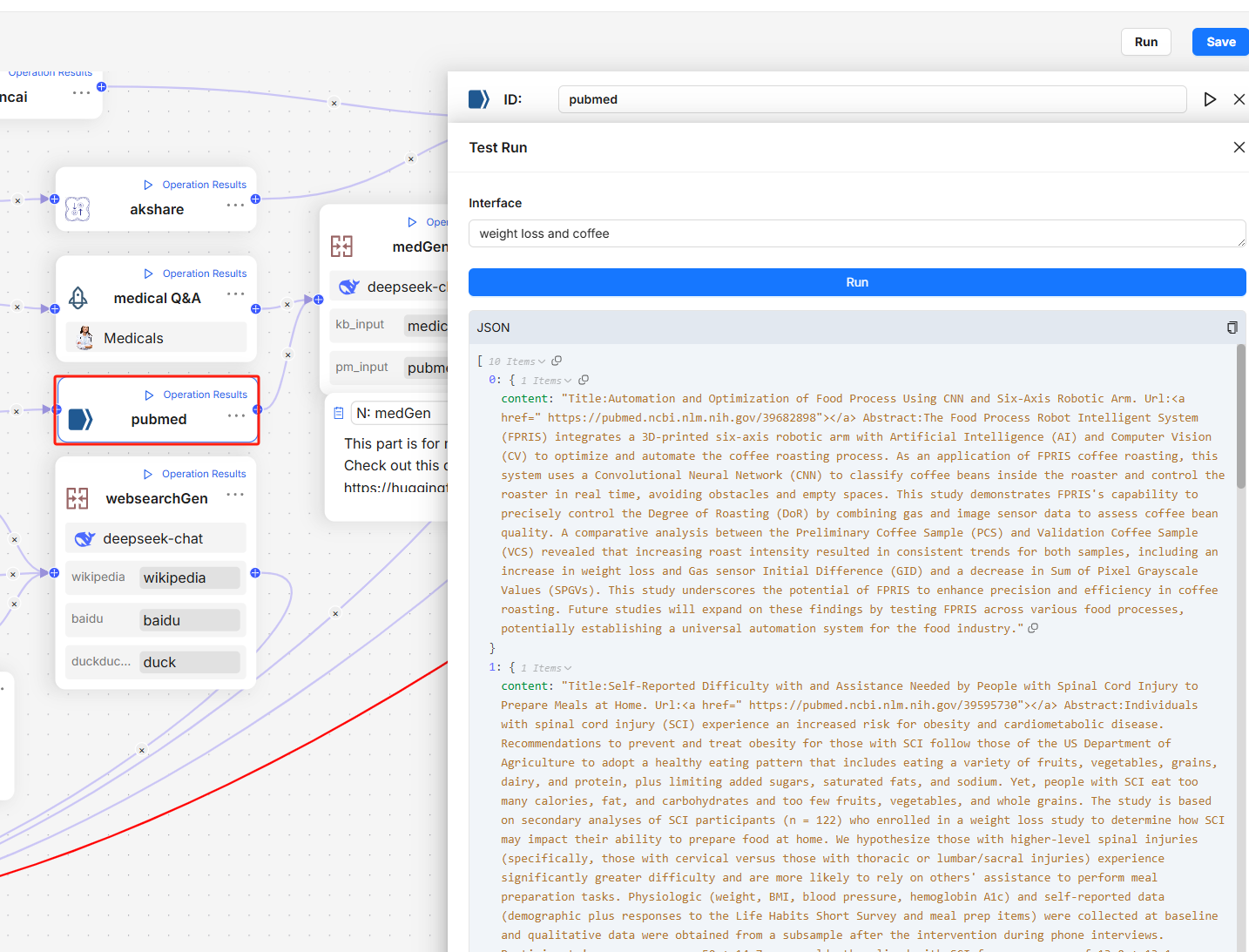
Agent import and export functionalities lay the groundwork for Agent reuse. Currently, within the LLM ecosystem, there are numerous frameworks available for Agents and workflows. These frameworks function as IDEs for non-programmers, making it quite challenging to orchestrate specific Agents and workflows for business scenarios. We can liken these orchestrated Agents to apps, while the framework for deploying and executing them resembles an app store. Consequently, in the long term, Agent development is likely to progress towards interface compatibility and interoperability.
On another note, current mainstream Agent products primarily focus on workflows, but this year has seen significant progress in integrating reasoning capabilities into Agent frameworks. Further developments in this area are anticipated next year, particularly concerning multi-Agent scenarios. LangGraph has already released an interoperability protocol for LLM Agents, which RAGFlow will support in future versions. Since Agents closely interact with RAG, RAGFlow aims to enhance user convenience by offering this feature. However, RAGFlow remains focused on RAG itself, and we encourage users to build their own Agents on RAGFlow or use Agents developed within other workflow frameworks to leverage RAGFlow's capabilities.
Upgrades to DeepDoc[](https://ragflow.io/blog/a-deep-dive-into-ragflow-v0.15.0#upgrades-to-deepdoc "Direct link to Upgrades to DeepDoc")
------------------------------------------------------------------------------------------------------------------------------------------
The document layout analysis model serves as the entry point for DeepDoc. Since its launch on April 1, DeepDoc has not received any upgrades. There have been numerous requests from the community for a unified interface that allows DeepDoc to consistently output in Markdown format, facilitating loose coupling between the model and subsequent processing. This demand has intensified with the emergence of excellent open-source projects like MinerU. We have yet to pursue this direction mainly because Markdown cannot fully represent the results of multimodal document conversions; for instance, it cannot handle complex nested tables. Similarly, for future data types like flowcharts and pie charts, directly outputting in JSON would be more convenient.
On the other hand, there is a clear need to upgrade DeepDoc's open-source model. This upgrade focuses on enhancing the document layout model, which continues to utilise YOLO training, maintaining efficiency while significantly improving accuracy in document layout recognition.
Retrieval-augmented generation[](https://ragflow.io/blog/a-deep-dive-into-ragflow-v0.15.0#retrieval-augmented-generation "Direct link to Retrieval-augmented generation")
---------------------------------------------------------------------------------------------------------------------------------------------------------------------------
Even if DeepDoc works perfectly, it still cannot resolve the issue of recall accuracy alone. Hybrid search aside, recall from text data is influenced by two factors: the semantic gap and the volume of data.
### Semantic Gap[](https://ragflow.io/blog/a-deep-dive-into-ragflow-v0.15.0#semantic-gap "Direct link to Semantic Gap")
We know that GraphRAG and RAPTOR can address the semantic gap, but these solutions are heavyweight and consume many tokens. A relatively lightweight approach is Contextual Retrieval, launched by Claude in September this year. This method leverages LLMs to generate supplementary information for each text chunk, enhancing recall accuracy. For instance, if a text contains a medical treatment solution without a disease description, it may not be effectively retrieved. LLMs can conveniently add relevant supplementary information to facilitate recall.
This Contextual Retrieval capability has been available in RAGFlow since v0.13.0. By selecting automatic keyword extraction on the knowledge base configuration page, you can enable this feature.
### Volume of Data[](https://ragflow.io/blog/a-deep-dive-into-ragflow-v0.15.0#volume-of-data "Direct link to Volume of Data")
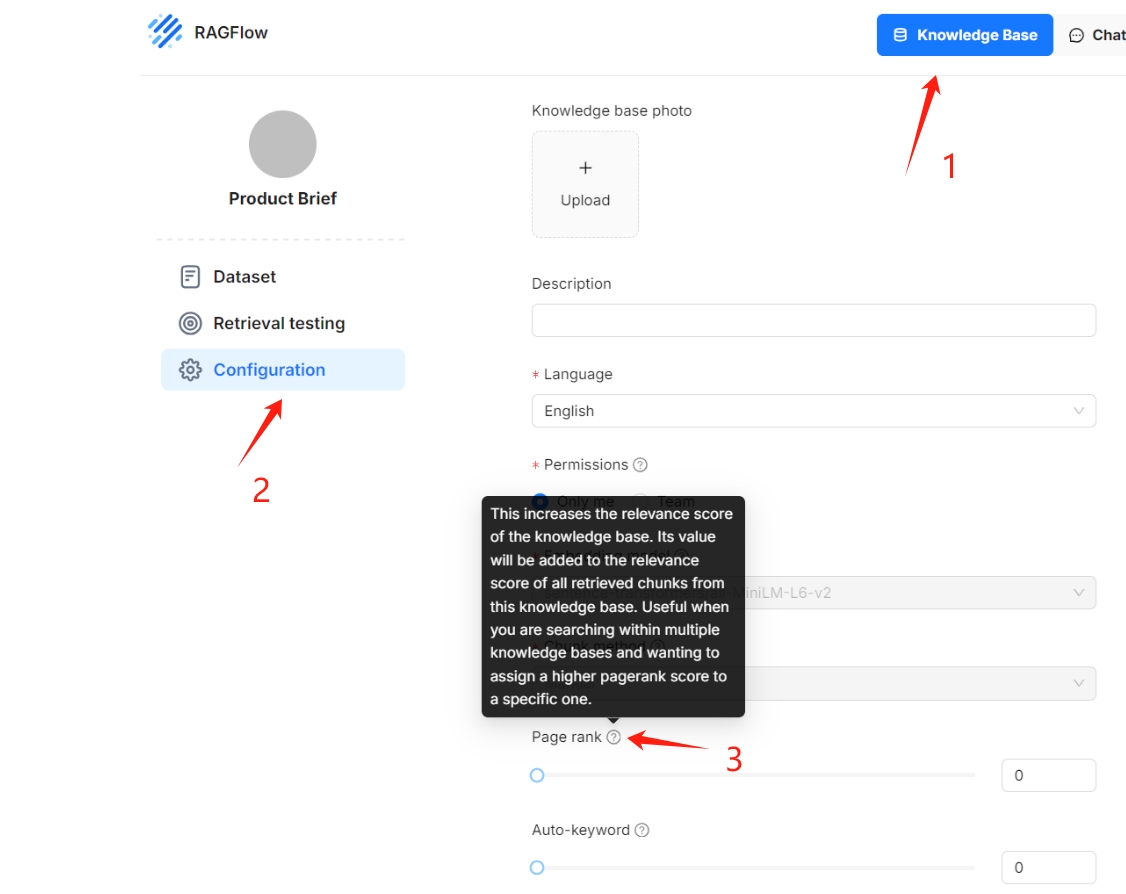
The increase in data volume can significantly impact recall accuracy. Version v0.15.0 introduced a tiered knowledge base feature that prioritises higher-quality data. To enable tiered knowledge base sorting, simply drag the "Page Rank" slider as shown below. This function allows users to customise scoring weights for their knowledge bases.
Task Executor Improvements[](https://ragflow.io/blog/a-deep-dive-into-ragflow-v0.15.0#task-executor-improvements "Direct link to Task Executor Improvements")
---------------------------------------------------------------------------------------------------------------------------------------------------------------
The Task Executor has long been a source of criticism for RAGFlow since its open-source launch. With the release of version v0.14.0, a series of robustness improvements were introduced, and version v0.15.0 specifically enhanced support for demanding tasks such as GraphRAG and RAPTOR. These tasks require considerable token consumption, and if an exception occurs during document parsing, the task may be interrupted, resulting in the loss of previously parsed results and a poor user experience. In v0.15.0, document parsing and preprocessing tasks can now reuse results from earlier parsing results, even if an exception interrupts the task, thus minimizing waste and improving efficiency.
Infinity Improvements[](https://ragflow.io/blog/a-deep-dive-into-ragflow-v0.15.0#infinity-improvements "Direct link to Infinity Improvements")
------------------------------------------------------------------------------------------------------------------------------------------------
[The Infinity database](https://github.com/infiniflow/infinity)
was integrated into RAGFlow v0.14.0 as an alternative to Elasticsearch and received significant bug fixes in v0.15.0, addressing various issues related to Infinity itself and its integration with RAGFlow. We also optimized the process and performance for querying from RAGFlow: when a user query is received, RAGFlow does not simply forward it to the backend document search engine; instead, it incorporates a series of operations to enhance the overall query process:
1. Remove stopwords and other meaningless tokens after tokenization.
2. Generate term weights for each token.
3. Generate phrase queries according to bigram results after step 2. These phrase queries are also sent to the search engine together with results after step 2.
For example, for the question "What results did Tom deliver?", we might get the following query:
(results^0.0667) (tom^0.0667) (deliver^0.0667) "results tom"^0.1335 "tom deliver"^0.1335
RAGFlow generates a substantial number of phrase queries for any questions posed. In its earlier full-text search implementations, Infinity only applied dynamic pruning optimizations to standard queries, without addressing phrase queries or combinations. In the latest version 0.5.0 of Infinity, optimisations for these combined queries have been implemented, resulting in a 3-5 times improvement in overall query performance.
Final Thoughts[](https://ragflow.io/blog/a-deep-dive-into-ragflow-v0.15.0#final-thoughts "Direct link to Final Thoughts")
---------------------------------------------------------------------------------------------------------------------------
RAGFlow v0.15.0 marks the final release for 2024. Since its open-source launch, RAGFlow has undergone rapid iteration, resulting in the accumulation of "technical debt" in its codebase. In recent versions, we have devoted significant time to code refactoring and bug fixing, representing a crucial step towards establishing RAGFlow as an enterprise-level production solution. We invite everyone to continue following [RAGFlow on GitHub](https://github.com/infiniflow/ragflow)
and to give us a star!
* [Agent Improvements](https://ragflow.io/blog/a-deep-dive-into-ragflow-v0.15.0#agent-improvements)
* [Upgrades to DeepDoc](https://ragflow.io/blog/a-deep-dive-into-ragflow-v0.15.0#upgrades-to-deepdoc)
* [Retrieval-augmented generation](https://ragflow.io/blog/a-deep-dive-into-ragflow-v0.15.0#retrieval-augmented-generation)
* [Semantic Gap](https://ragflow.io/blog/a-deep-dive-into-ragflow-v0.15.0#semantic-gap)
* [Volume of Data](https://ragflow.io/blog/a-deep-dive-into-ragflow-v0.15.0#volume-of-data)
* [Task Executor Improvements](https://ragflow.io/blog/a-deep-dive-into-ragflow-v0.15.0#task-executor-improvements)
* [Infinity Improvements](https://ragflow.io/blog/a-deep-dive-into-ragflow-v0.15.0#infinity-improvements)
* [Final Thoughts](https://ragflow.io/blog/a-deep-dive-into-ragflow-v0.15.0#final-thoughts)
---
# Blog | RAGFlow
[Skip to main content](https://ragflow.io/blog#__docusaurus_skipToContent_fallback)
Six months have passed since our last year-end review. As the initial wave of excitement sparked by DeepSeek earlier this year begins to wane, AI seems to have entered a phase of stagnation. This pattern is evident in Retrieval-Augmented Generation (RAG) as well: although academic papers on RAG continue to be plentiful, significant breakthroughs have been few and far between in recent months. Likewise, recent iterations of RAGFlow have focused on incremental improvements rather than major feature releases. Is this the start of future leaps forward, or the beginning of a period of steady, incremental growth? A mid-year assessment is therefore both timely and necessary.
As 2024 comes to a close, the development of Retrieval-Augmented Generation (RAG) has been nothing short of turbulent. Let's take a comprehensive look back at the year's progress from various perspectives.
The final release of RAGFlow for the year of 2024, v0.15.0, has just been released, bringing the following key updates:
Agent Improvements[](https://ragflow.io/blog#agent-improvements "Direct link to Agent Improvements")
------------------------------------------------------------------------------------------------------
This version introduces several enhancements to the Agent, including additional APIs, step-run debugging, and import/export capabilities. Since v0.13.0, RAGFlow's Agent has been restructured to improve usability. The step-run debugging feature finalizes this process, enabling operators in the Agent workflow to be executed individually, thereby assisting users in debugging based on output information.
Infinity is a database specifically designed for Retrieval-Augmented Generation (RAG), excelling in both functionality and performance. It provides high-performance capabilities for dense and sparse vector searches, as well as full-text searches, along with efficient range filtering for these data types. Additionally, it features tensor-based reranking, enabling the implementation of powerful multi-modal RAG and integrating ranking capabilities comparable to Cross Encoders.
[RAGFlow](https://github.com/infiniflow/ragflow)
introduces the Text2SQL feature in response to community demand. Traditional Text2SQL requires model fine-tuning, which can significantly increase deployment and maintenance costs when used in enterprise settings alongside RAG or Agent components. RAGFlow’s RAG-based Text2SQL leverages the existing (connected) large language model (LLM), enabling seamless integration with other RAG/Agent components without the need for additional fine-tuned models.
[RAGFlow](https://github.com/infiniflow/ragflow)
v0.9 introduces support for GraphRAG, which has recently been open-sourced by Microsoft, allegedly the next generation of Retrieval-Augmented Generation (RAG). Within the RAGFlow framework, we have a more comprehensive definition of RAG 2.0. This proposed end-to-end system is search-centric and consists of four stages. The last two stages—indexing and retrieval—primarily require a dedicated database, while the first two stages are defined as follows:
Search technology remains one of the major challenges in computer science, with few commercial products capable of searching effectively. Before the rise of Large Language Models (LLMs), powerful search capabilities weren't considered essential, as they didn't contribute directly to user experience. However, as the LLMs began to gain popularity, a powerful built-in retrieval system became required to apply LLMs to enterprise settings. This is also known as Retrieval-Augmented Generation (RAG)—searching internal knowledge bases for content most relevant to user queries before feeding it to the LLM for final answer generation.
As of v0.8, RAGFlow is officially entering the Agentic era, offering a comprehensive graph-based task orchestration framework on the back-end and a no-code workflow editor on the front-end. Why agentic? How does this feature differ from existing workflow orchestration systems?
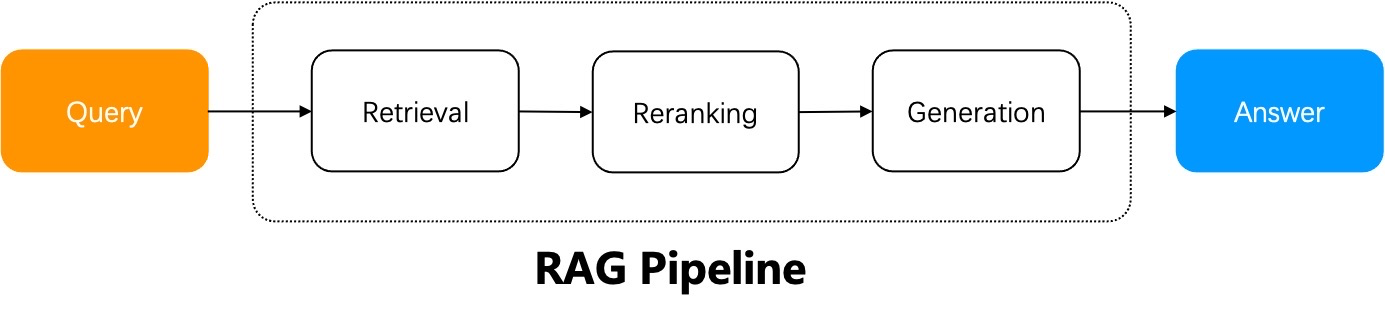
The workflow of a naive RAG system can be summarized as follows: the RAG system does retrieval from a specified data source using the user query, reranks the retrieval results, appends prompts, and sends them to the LLM for final answer generation.
A naive RAG suffices in scenarios where the user's intent is evident, as the answer is included in the retrieved results and can be sent directly to the LLM. Yet, in most circumstances ambiguous user intents are the norm and demand iterative queries to generate the final answer. For instance, questions involving summarizing multiple documents require multi-step reasoning. These scenarios necessitate Agentic RAG, which involves task orchestration mechanisms during the question-answering process.
Agent and RAG complement each other. Agentic RAG, as the name suggests, is an agent-based RAG. The major distinction between an agentic RAG and a naive RAG is that agentic RAG introduces a dynamic agent orchestration mechanism, which criticizes retrievals, rewrites query according to the intent of each user query, and employs "multi-hop" reasoning to handle complex question-answering tasks.
[RAGFlow v0.6.0](https://github.com/infiniflow/ragflow)
was released this week, solving many ease-of-use and stability issues that emerged since it was open sourced earlier this April. Future releases of RAGFlow will focus on tackling the deep-seated problems of RAG capability. Hate to say it, existing RAG solutions in the market are still in POC (Proof of Concept) stage and can’t be applied directly to real production scenarios.
---
# Agentic RAG - Definition and Low-code Implementation | RAGFlow
[Skip to main content](https://ragflow.io/blog/agentic-rag-definition-and-low-code-implementation#__docusaurus_skipToContent_fallback)
The workflow of a naive RAG system can be summarized as follows: the RAG system does retrieval from a specified data source using the user query, reranks the retrieval results, appends prompts, and sends them to the LLM for final answer generation.

A naive RAG suffices in scenarios where the user's intent is evident, as the answer is included in the retrieved results and can be sent directly to the LLM. Yet, in most circumstances ambiguous user intents are the norm and demand iterative queries to generate the final answer. For instance, questions involving summarizing multiple documents require multi-step reasoning. These scenarios necessitate Agentic RAG, which involves task orchestration mechanisms during the question-answering process.
Agent and RAG complement each other. Agentic RAG, as the name suggests, is an agent-based RAG. The major distinction between an agentic RAG and a naive RAG is that agentic RAG introduces a dynamic agent orchestration mechanism, which criticizes retrievals, rewrites query according to the intent of each user query, and employs "multi-hop" reasoning to handle complex question-answering tasks.
Next, let's explore how agentic RAG works through two advanced RAG examples. The first is Self-RAG (reference \[1\]), with its workflow shown below:
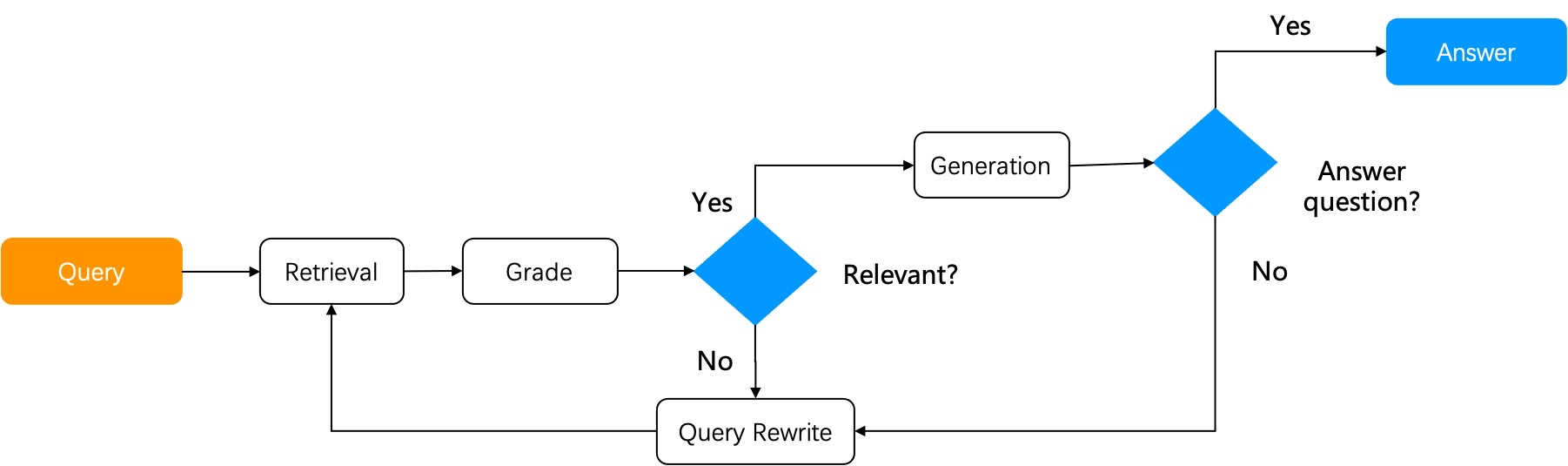
Self-RAG is a type of reflective RAG. After retrieving results from the knowledge base, it assesses if the retrieved results are relevant to the user query. If deemed irrelevant, the query is rewritten, and the RAG cycle is repeated until the relevance score meets a set threshold. A complete Self-RAG requires the implementation of the following two major components:
1. A graph-based task orchestration system.
2. Necessary operators: A scoring operator is crucial to a Self-RAG. While, theoretically, training a scoring model for assessing the retrieved results is desired, in practice, using LLM for scoring can reduce reliance on other system components and simplify system design.
Self-RAG is a relatively preliminary form of agentic RAG, and RAGFlow has incorporated a Self-RAG implementation in its system design. Implementing Self-RAG has shown to notably improve the performance of complex multi-hop question-answering and multi-step reasoning.
Now let's explore another form of agentic RAG — Adaptive RAG (reference \[2\]). It can accommodate its strategies to various user query intents:
1. Open-domain question-answering: Generates answers directly through LLM without relying on retrieval through RAG.
2. Multi-hop question-answering: Breaks multi-hop queries down to multiple single-hop queries, iteratively uses these more basic queries to access LLM and the RAG retriever, and combines the retrieved results to generate the final answer.
3. Adaptive retrieval: Applicable to complex queries requiring multi-step reasoning. Complex question-answering often involves synthesizing information from multiple data sources and performing multi-step reasoning. Adaptive retrieval iteratively accesses LLM and the RAG retriever to progressively build the information chain necessary for answering the complex questions.
As shown in the diagram below, Adaptive-RAG follows a similar workflow to Self-RAG. By implementing an extra query analysis at the beginning of its workflow, Adaptive-RAG offers a wider range of question-answering strategies.
As can be seen from the above two agentic RAG examples, these advanced RAG systems require task orchestration mechanisms to provide the following functionalities:
1. Reuse of existing pipelines or subgraphs.
2. Collaboration with third-party tools, including web search.
3. Query task planning, such as query intent classification and feedbacks.
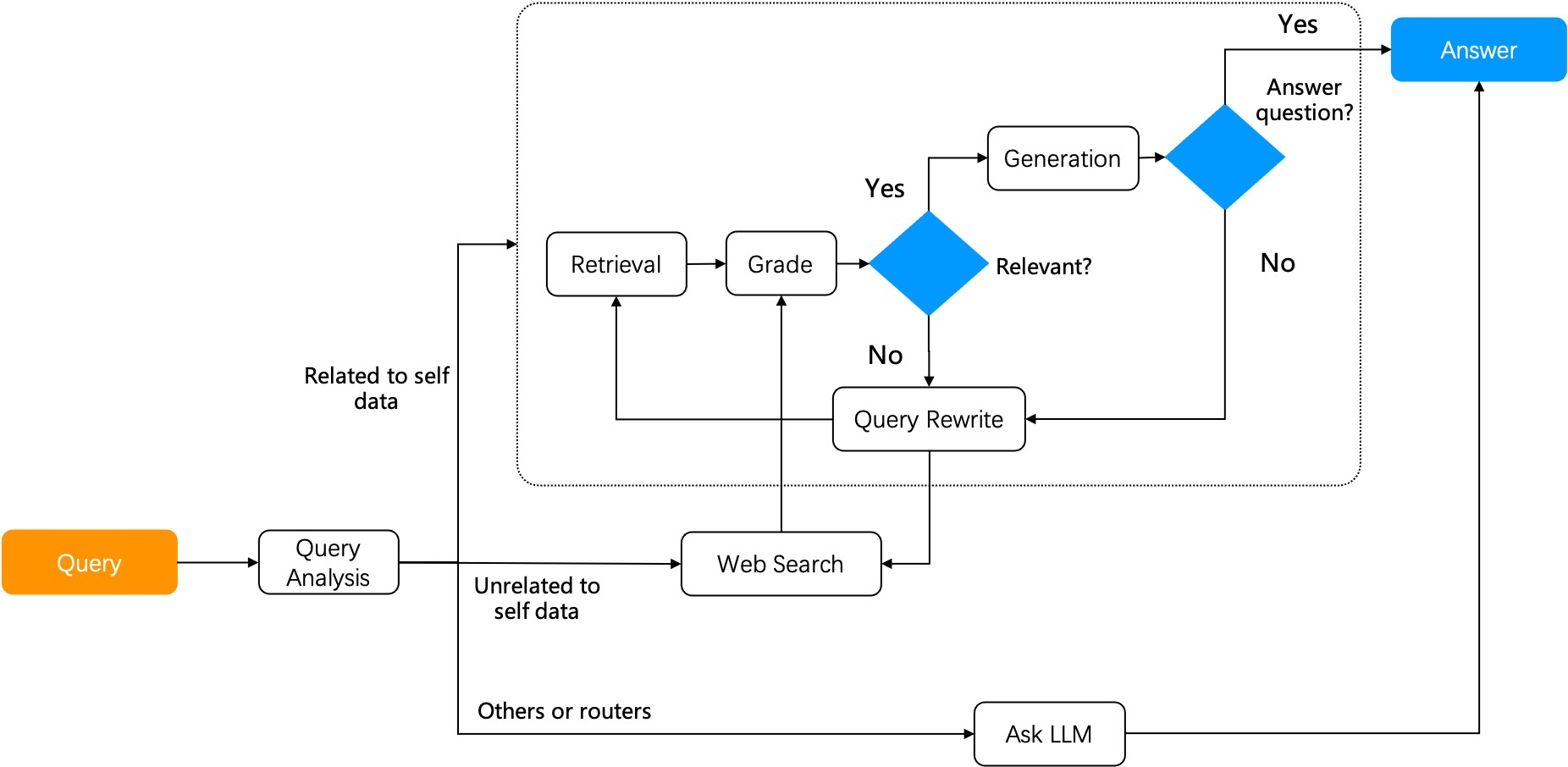
Frameworks for developing agents include the recently launched Mosaic AI Agent Framework by Databricks and AgentKit; task orchestration frameworks involve LangGraph in Langchain and llamaIndex. A task orchestration system has to be implemented using graph, with its nodes and edges defining the application's workflow and logic. A node in the Graph can be any callable operator or an executable "component" (e.g., chained operators or agents), each performing a specific task. An edge links nodes together and establishes the data flow between them. A graph must maintain node state management to adapt to the flow of its nodes.
It is notable that this graph-based task orchestration implementation requires loops and differs from a DAG (Directed Acyclic Graph). Loops are fundamental for reflection and hence are crucial for the task orchestration in agentic RAG. An agentic RAG lacking reflection would be unable to think or solve problems like a human. It could only offer task orchestration similar to workflows without achieving more advanced tasks like multi-hop and multi-step reasoning. Andrew Ng's definition of four agent design patterns (reference \[3\]) separates reflection from the other other three workflow-related patterns - tool use, planning, and multi-agent. This separation underlines the critical role of reflection as the foundation for thinking and reasoning. Agentic RAG embodies this design pattern.
Agentic RAG represents a transformation in information processing, bringing more intelligence to the agents per se. When combined with workflows, agentic RAG will have a broader range of applications. For example, in document summarization scenarios, agentic RAG would first determine whether the user's intent is to request a summary or to compare details. If it is the former, it would use agents to retrieve summary of each document chunk and then combine them to generate the overall summary; if it is the latter, more relevant data need to be retrieved through further routing before being sent to the LLM. In customer support scenarios, agentic RAG can understand more complex customer queries and provide personalized and accurate responses. In literature chatbot scenarios, agentic RAG can synthesize more documents, data, and research results, providing users with a more comprehensive understanding. In legal and medical chatbot scenarios, agentic RAG can help understand and explain complex domain knowledge, offering more precise insights. In content generation applications, agentic RAG can generate higher-quality, contextually relevant, enterprise-level long-form documents.
From v0.8.0 onwards, RAGFlow will support graph-based task orchestration and enable no-code editing on top of that. RAGFlow is also consistently improving various retrieval-specific operators to simplify the development of agentic RAG and agent applications based on agentic RAG, addressing pain points seen in enterprise-level RAG applications comprehensively. RAGFlow is iterating rapidly, and you are welcome to follow, star, and actively participate in RAGFlow. Our GitHub repo is at [https://github.com/infiniflow/ragflow](https://github.com/infiniflow/ragflow)
.
Bibliography[](https://ragflow.io/blog/agentic-rag-definition-and-low-code-implementation#bibliography "Direct link to Bibliography")
---------------------------------------------------------------------------------------------------------------------------------------
1. Self-RAG: Learning to retrieve, generate, and critique through self-reflection, arXiv preprint arXiv:2310.11511
2. Adaptive-RAG: Learning to adapt retrieval-augmented large language models through question complexity, arXiv preprint arXiv:2403.14403
3. [https://www.deeplearning.ai/the-batch/issue-242/](https://www.deeplearning.ai/the-batch/issue-242/)
* [Bibliography](https://ragflow.io/blog/agentic-rag-definition-and-low-code-implementation#bibliography)
---
# Archive | RAGFlow
[Skip to main content](https://ragflow.io/blog/archive#__docusaurus_skipToContent_fallback)
### 2025[](https://ragflow.io/blog/archive#2025 "Direct link to 2025")
* [July 2, 2025 - RAG at the Crossroads - Mid-2025 Reflections on AI’s Incremental Evolution](https://ragflow.io/blog/rag-at-the-crossroads-mid-2025-reflections-on-ai-evolution)
### 2024[](https://ragflow.io/blog/archive#2024 "Direct link to 2024")
* [May 24, 2024 - Implementing a long-context RAG based on RAPTOR](https://ragflow.io/blog/long-context-rag-raptor)
* [June 18, 2024 - Agentic RAG - Definition and Low-code Implementation](https://ragflow.io/blog/agentic-rag-definition-and-low-code-implementation)
* [July 11, 2024 - RAGFlow Enters Agentic Era](https://ragflow.io/blog/ragflow-enters-agentic-era)
* [July 15, 2024 - From RAG 1.0 to RAG 2.0, What Goes Around Comes Around](https://ragflow.io/blog/future-of-rag)
* [September 19, 2024 - How Our GraphRAG Reveals the Hidden Relationships of Jon Snow and the Mother of Dragons](https://ragflow.io/blog/ragflow-support-graphrag)
* [September 24, 2024 - Implementing Text2SQL with RAGFlow](https://ragflow.io/blog/implementing-text2sql-with-ragflow)
* [November 26, 2024 - What Infrastructure Capabilities does RAG Need beyond Hybrid Search](https://ragflow.io/blog/what-infrastructure-capabilities-does-rag-need-beyond-hybrid-search)
* [December 19, 2024 - A deep dive into RAGFlow v0.15.0](https://ragflow.io/blog/a-deep-dive-into-ragflow-v0.15.0)
* [December 24, 2024 - The Rise and Evolution of RAG in 2024 A Year in Review](https://ragflow.io/blog/the-rise-and-evolution-of-rag-in-2024-a-year-in-review)
---
# From RAG 1.0 to RAG 2.0, What Goes Around Comes Around | RAGFlow
[Skip to main content](https://ragflow.io/blog/future-of-rag#__docusaurus_skipToContent_fallback)
Search technology remains one of the major challenges in computer science, with few commercial products capable of searching effectively. Before the rise of Large Language Models (LLMs), powerful search capabilities weren't considered essential, as they didn't contribute directly to user experience. However, as the LLMs began to gain popularity, a powerful built-in retrieval system became required to apply LLMs to enterprise settings. This is also known as Retrieval-Augmented Generation (RAG)—searching internal knowledge bases for content most relevant to user queries before feeding it to the LLM for final answer generation.
Imagine a scenario where an LLM answers user queries. Without RAG, it relies solely on its training data; with RAG, the LLM can search in a textbook for paragraphs potentially having the answer, just like doing an open-book exam. Modern LLMs have evolved to handle much longer user queries, with context windows of up to millions of tokens. This raises the question: if the context window of an LLM can hold an entire textbook, why is a separate search inside the textbook necessary? In fact, a separate search remains crucial for LLMs with large context windows for several reasons:
* Enterprise documentations usually have multiple versions, and feeding them all to an LLM for answer generation could lead to conflicting answers.
* Most enterprise scenarios require strict access control for content fed to the context window.
* LLMs tend to be distracted by semantically related but irrelevant content.
* Processing millions of irrelevant tokens is costly and time-consuming, even with powerful LLMs.
RAG's rapid rise in popularity can be attributed to various LLMOps tools, which quickly integrate the following components to create a functional system.
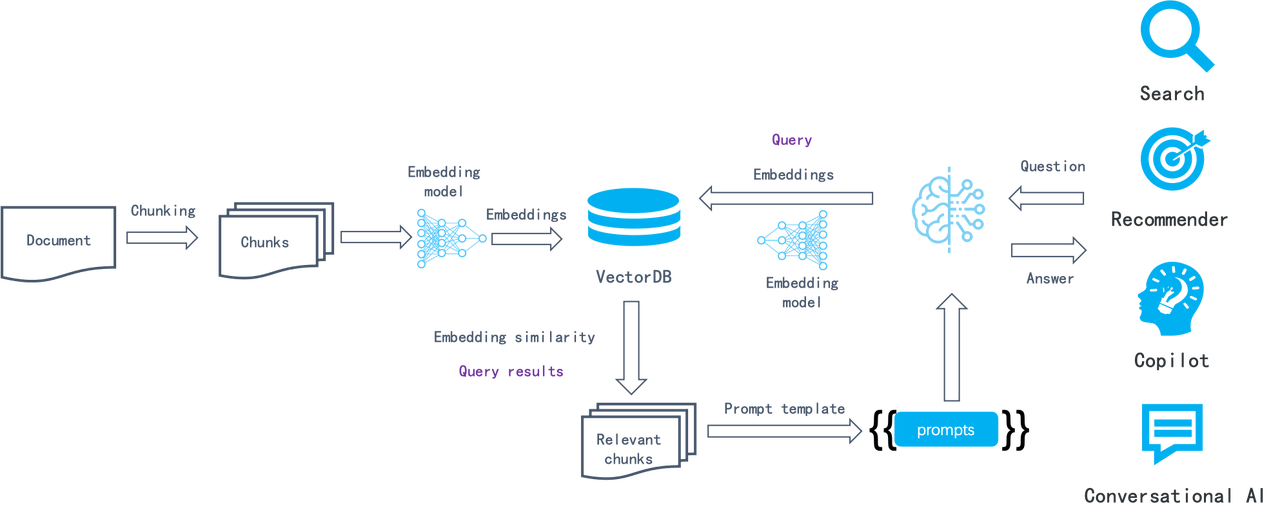
This semantic similarity-based approach has remained consistent for several years: Documents are chunked (e.g., by paragraph), converted into embeddings via embedding models, and stored in a vector database. During retrieval, the query is also converted into an embedding, and the database finds the most relevant chunks, which theoretically contain the most semantically relevant information. In this process, LLMOps tools typically handle tasks such as:
* Parsing documents and splitting them into fixed-size chunks.
* Orchestration tasks: sending the chunks to an embedding model (on-premise or SaaS); forwarding the generated embeddings along with corresponding chunks to the vector database; assembling query results from the vector database using a prompt template.
* Integrating business logic, including generating and returning user dialogue contents, connecting dialogues with business systems like customer service platforms, and more.
This process is straightforward to implement, but the search results are often unsatisfactory because this naive semantic similarity-based search system has several limitations:
* As a chunk-level operation, the embedding process makes it hard to differentiate Tokens requiring increased weight, such as entities, relationships, or events. This results in low-density of effective information in the generated embeddings and poor recall.
* Embeddings are inadequate for precise retrieval. For example, a user inquiring about the portfolios in their company's March 2024 financial plan might receive portfolios from a different time period, marketing or operational plans for the same period of time, or even other types of data.
* Its retrieval results depend highly on the chosen embedding model; general-purpose models may underperform in specific domains.
* Its retrieval results are sensitive to data chunking methods. However, this LLMOps-based system is innately simple and crude in document chunking, leading to loss of data semantics and structure.
* Lack of user intent recognition, and improving the similarity search method alone would not effectively enhance answers for ambiguous user queries.
* Unable to handle complex queries, such as multi-hop question-answering, which requires multi-step reasoning from heterogeneous information sources.
Thus, this LLMOps-centric system can be viewed as RAG 1.0. It features orchestration and ecosystem but falls short in effectiveness. Although developers can quickly build up a prototype system with RAG 1.0, they often find themselves stuck in limbo when tackling issues in real enterprise settings. Therefore, RAG must continue to evolve with LLMs to facilitate search in various specialized domains. Ultimately, the goal of a search system is to find answers, not just retrieving the most similar results. Based on these considerations, we propose the following key features and components for RAG 2.0:
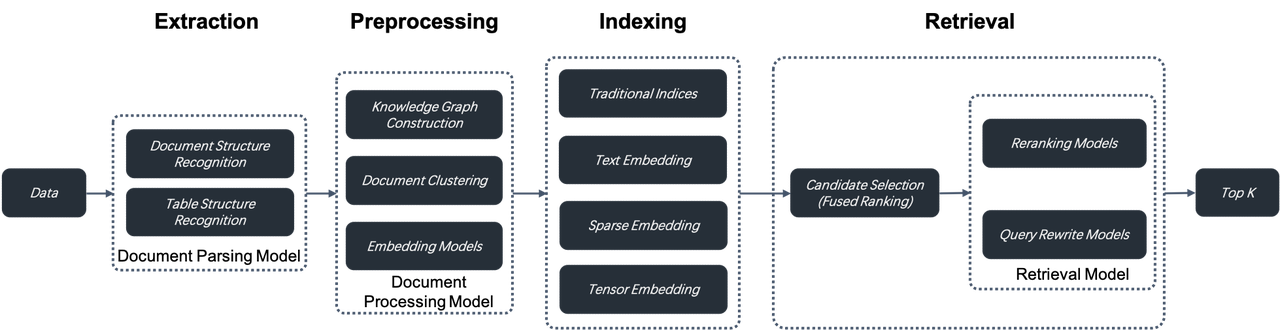
1. RAG 2.0 is an end-to-end search system divided into these stages: information extraction, document preprocessing, indexing, and retrieval. It cannot be orchestrated by reusing LLMOps tools designed for RAG 1.0 because these stages are coupled, lack unified APIs and data formats, and have circular dependencies. For example, query rewriting, which is essential for multi-hop question-answering and user intent recognition, involves iterative retrieval and rewriting. Introducing orchestration here is not only unnecessary but may interfere with search and ranking optimization. This partly explains the recent criticism of AI orchestration framework LangChain.
2. A more comprehensive and powerful database supporting hybrid searches is needed to address the low recall in RAG 1.0. Beyond vector search, it should include full-text search and sparse vector search. It should even implement Tensor search, which supports late interaction mechanisms like ColBERT.
* Full-text search is indispensable to precise retrieval, as it can be rather frustrating to find that expected documents aren't returned in response to queries with clear intent. Further, by showing the matched keywords, full-text search facilitates understanding of the reason behind the retrieval, which also contributes to the explainability of the ranking results. Thus, in most circumstances, it is unadvisable to drop full-text search from the retrieval options for RAG. Full-text search, despite existing for many years, is still not easy to implement. Besides the need for handling massive data, it must offer Top-K Union semantics-based search options, as RAG queries are usually complete sentences rather than a combination of several keywords. Unfortunately, databases in the market claiming to support BM25 and full-text search fall short in both capabilities. They neither support high-performance massive data search nor offer effective retrieval, and hence are not readily available for enterprise-level retrieval.
* Recent findings from IBM Research demonstrate that combining full-text search, sparse vector search, and dense vector search achieves state-of-the-art results on several question-answering datasets. This suggests a promising future for databases with native support for such three-way retrieval capabilities.
* Tensor search is a novel retrieval method designed specifically for late interaction mechanisms like ColBERT. To summarize, a cross encoder is capable of capturing complex interactions between query and document, yielding more precise ranking results than normal vector search. However, as it needs to 'juggle' encoding tasks for both query and document passages, a cross encoder is usually very slow for ranking tasks and only suited for the reranking of the final results. A ranking model like ColBERT achieves higher retrieval accuracy than normal vector search with much less information loss. This is because it uses multiple embeddings or a Tensor to represent a document and calculates similarity for every Token in the document. It also outperforms a cross encoder as document encoding is performed offline during the indexing stage. This makes it a practical choice for ranking during the retrieval stage. Therefore, for a database designed for RAG 2.0, it would be beneficial to have hybrid-search capabilities that incorporate Tensor search with full-text search.
3. Databases only cover query and retrieval in RAG 2.0. From a global perspective, it's essential to optimize every stage of the RAG pipeline. This includes:
* A separate data extraction and cleansing module is needed to chunk user data. Relying on a collection of recognition models, it recognizes various complex document structures, including tables and texts mixed with illustrations, and iteratively adjusts its chunking size according to the retrieval results. The data extraction and cleansing process can be likened to ETL in modern data stacks, but is way more complex. ETL is essentially a SQL-based deterministic system, whilst this process is a non-standard system built around document structure recognition models.
* Before being sent to the database for indexing, the extracted data must undergo several preprocessing procedures, including knowledge graph construction, document clustering, and domain-specific embedding. These procedures ensure that the retrieval results hold the necessary answer by preprocessing the extracted data in multiple ways. This is crucial for addressing complex query issues like multi-hop question-answering, ambiguous user intents, and domain-specific inquiries.
* Before being sent to the database for indexing, the extracted data must undergo several preprocessing procedures, including knowledge graph construction, document clustering, and domain-specific embedding. These procedures ensure that the retrieval results hold the necessary answer by preprocessing the extracted data in multiple ways. This is crucial for addressing complex query issues like multi-hop question-answering, ambiguous user intents, and domain-specific inquiries.
Each stage in RAG 2.0 is essentially centered around models. They work in conjunction with the database to ensure the effectiveness of the final answers.
RAG 2.0 is built around database and AI models and requires a platform for continuous iteration. This led us to develop and open-source RAGFlow. Instead of reusing existing RAG 1.0 components, RAGFlow addresses the fundamental challenges in LLM retrieval systems from a pipeline perspective. It garnered 10,000 GitHub stars in less than three months since its open-source release, marking a new beginning. However, RAGFlow is still in its early stage and every part of it needs further evolution.
RAG 2.0 will significantly impact LLM applications in enterprise scenarios, and we're enthusiastic about its future as a driving force in AI. If you're also interested, we welcome you to follow our work at [https://github.com/infiniflow/ragflow](https://github.com/infiniflow/ragflow)
---
# Implementing Text2SQL with RAGFlow | RAGFlow
[Skip to main content](https://ragflow.io/blog/implementing-text2sql-with-ragflow#__docusaurus_skipToContent_fallback)
[RAGFlow](https://github.com/infiniflow/ragflow)
introduces the Text2SQL feature in response to community demand. Traditional Text2SQL requires model fine-tuning, which can significantly increase deployment and maintenance costs when used in enterprise settings alongside RAG or Agent components. RAGFlow’s RAG-based Text2SQL leverages the existing (connected) large language model (LLM), enabling seamless integration with other RAG/Agent components without the need for additional fine-tuned models.
The following pipeline explains how to implement Text2SQL capabilities based on RAG:
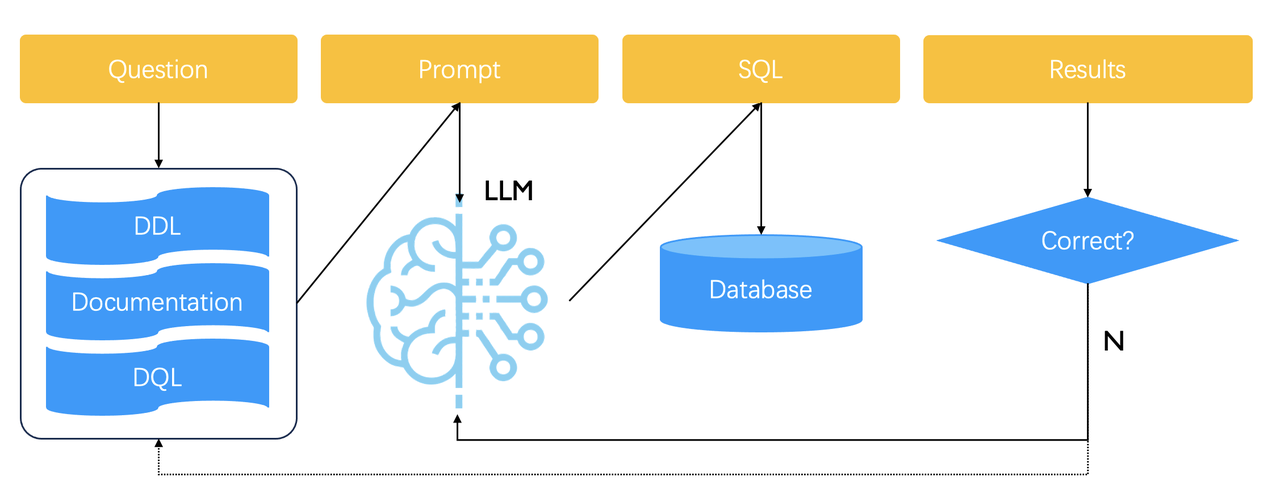
General speaking, you need to prepare a knowledge base for generating Text2SQL prompts, which contains various examples of natural language being converted to SQL statements. A user query is first sent to this knowledge base to retrieve similar examples. The retrieved examples are then concatenated into prompts for the LLM to generate the final SQL statement. The generated SQL is used directly to query the database. If the returned result is incorrect or if, even worse, nothing is retrieved, the generated SQL will be considered incorrect, and the LLM will be called again to regenerate a SQL statement until the predefined upper limit is reached.
Therefore, Text2SQL relies on multiple rounds of orchestration. RAGFlow encapsulates this Text2SQL feature into a convenient, built-in Agent component. In upcoming releases, we plan to adjust this workflow. The goal is to enable users to manually add or update text2SQL examples in the knowledge base, as indicated by the dashed arrow above.
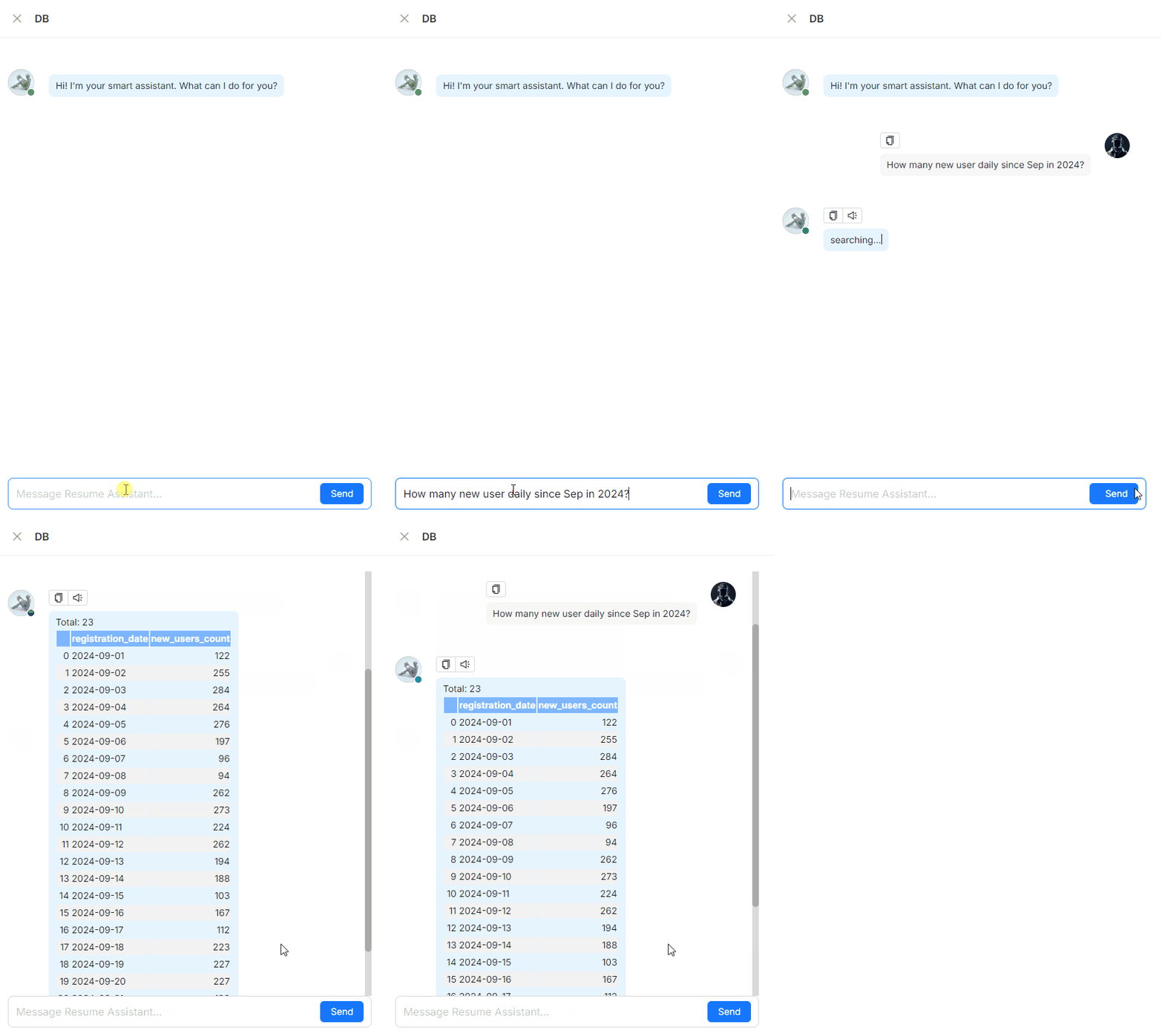
A Text2SQL demonstration[](https://ragflow.io/blog/implementing-text2sql-with-ragflow#a-text2sql-demonstration "Direct link to A Text2SQL demonstration")
-----------------------------------------------------------------------------------------------------------------------------------------------------------
Using Text2SQL in RAGFlow[](https://ragflow.io/blog/implementing-text2sql-with-ragflow#using-text2sql-in-ragflow "Direct link to Using Text2SQL in RAGFlow")
--------------------------------------------------------------------------------------------------------------------------------------------------------------
Following is a guide on how to use Text2SQL in RAGFlow:
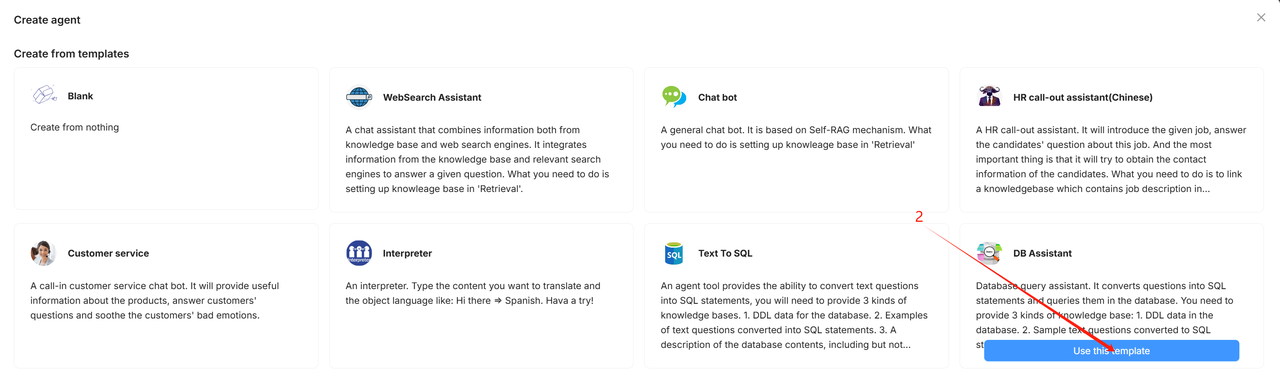
### 1\. Create an agent from template[](https://ragflow.io/blog/implementing-text2sql-with-ragflow#1-create-an-agent-from-template "Direct link to 1. Create an agent from template")

### 2\. Configure knowledge bases[](https://ragflow.io/blog/implementing-text2sql-with-ragflow#2-configure-knowledge-bases "Direct link to 2. Configure knowledge bases")
In the provided **DB Assistant** template, RAGFlow uses three types of knowledge bases to ensure the performance of Text2SQL:
* The **DDL** knowledge base
* The **Q->SQL** knowledge base
* The **Database description** knowledge base
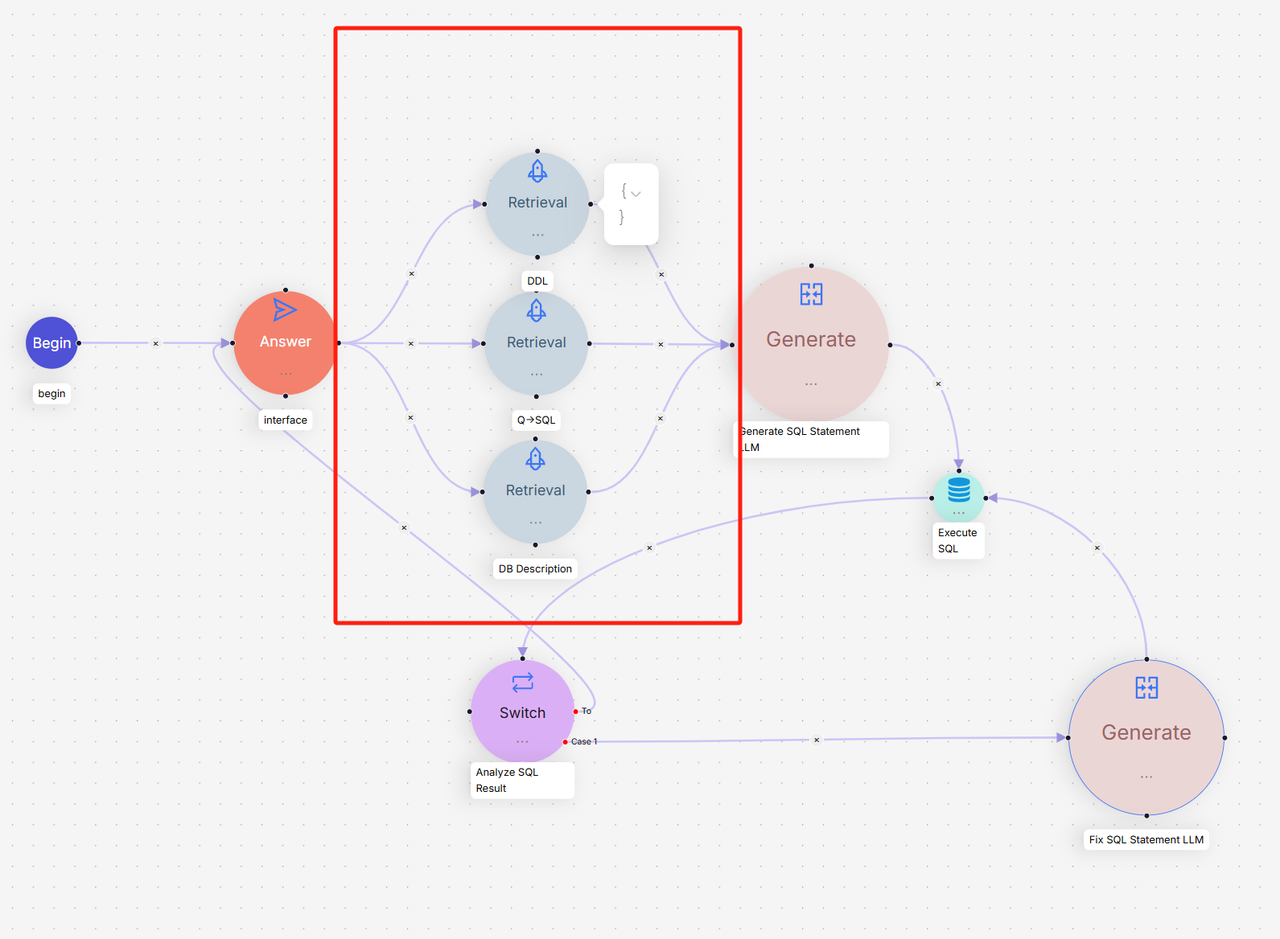
The **DDL** knowledge base: An LLM requires accurate DDL (Data Definition Language) data to generate SQL statements, such as table structures and field information. The DDL knowledge base holds the correct DDL data for effective database querying. The recommended configurations for parsing the DDL knowledge base are as follows:
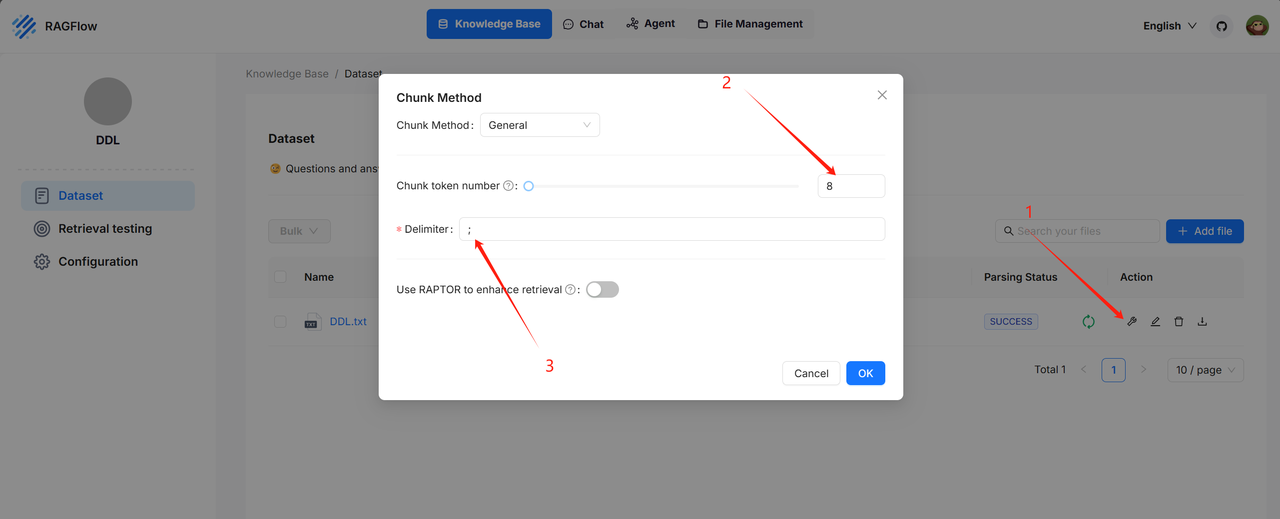
Example: [https://huggingface.co/datasets/InfiniFlow/text2sql/tree/main](https://huggingface.co/datasets/InfiniFlow/text2sql/tree/main)
The **Q->SQL** knowledge base: During the Text2SQL process, providing the LLM with samples of natural languages and their corresponding SQL statement pairs can enhance the quality of generated SQL statements. The Q->SQL knowledge base stores such pairs. The recommended configurations for parsing the Q->SQL knowledge base are as follows:

Example: [https://huggingface.co/datasets/InfiniFlow/text2sql/tree/main](https://huggingface.co/datasets/InfiniFlow/text2sql/tree/main)
The **DB Description** knowledge base: This knowledge base contains accurate information about the queried database, including but not limited to the meanings of database tables and the significance of different fields within those tables. With detailed descriptions from the database, the large language model can more accurately convert user questions into SQL statements. It is recommended to configure the DB Description knowledge base parsing settings as follows:
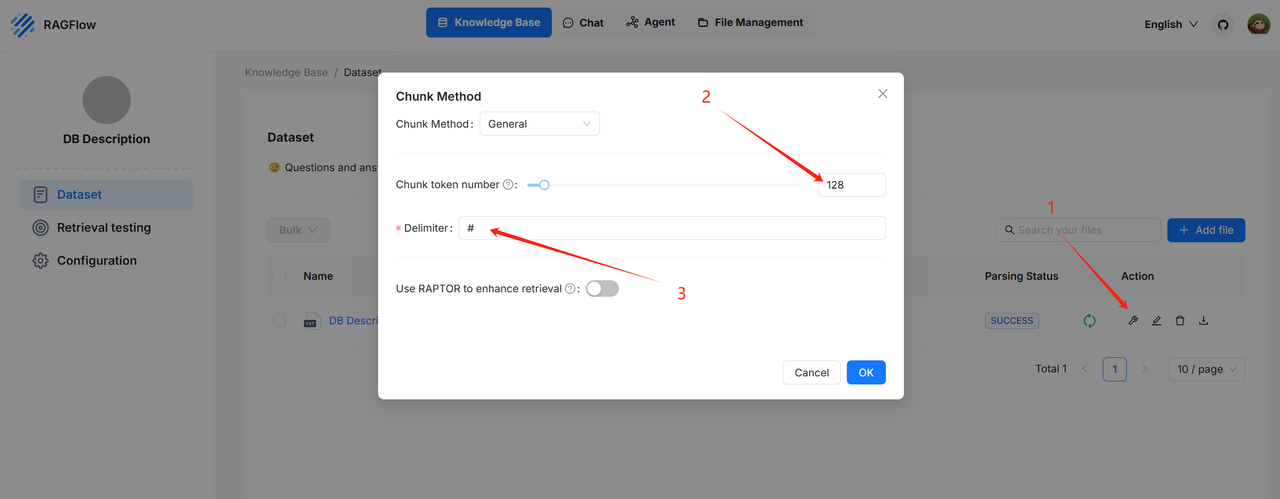
Example: [https://huggingface.co/datasets/InfiniFlow/text2sql/tree/main](https://huggingface.co/datasets/InfiniFlow/text2sql/tree/main)
### 3\. Configure the database[](https://ragflow.io/blog/implementing-text2sql-with-ragflow#3-configure-the-database "Direct link to 3. Configure the database")
1. Configure the required parameters for the database in the **Execute SQL** component, including:
* Database type (currently supports MySQL, PostgresDB, and MariaDB)
* Database name
* Database username
* Database IP address
* Database port number
* Database password
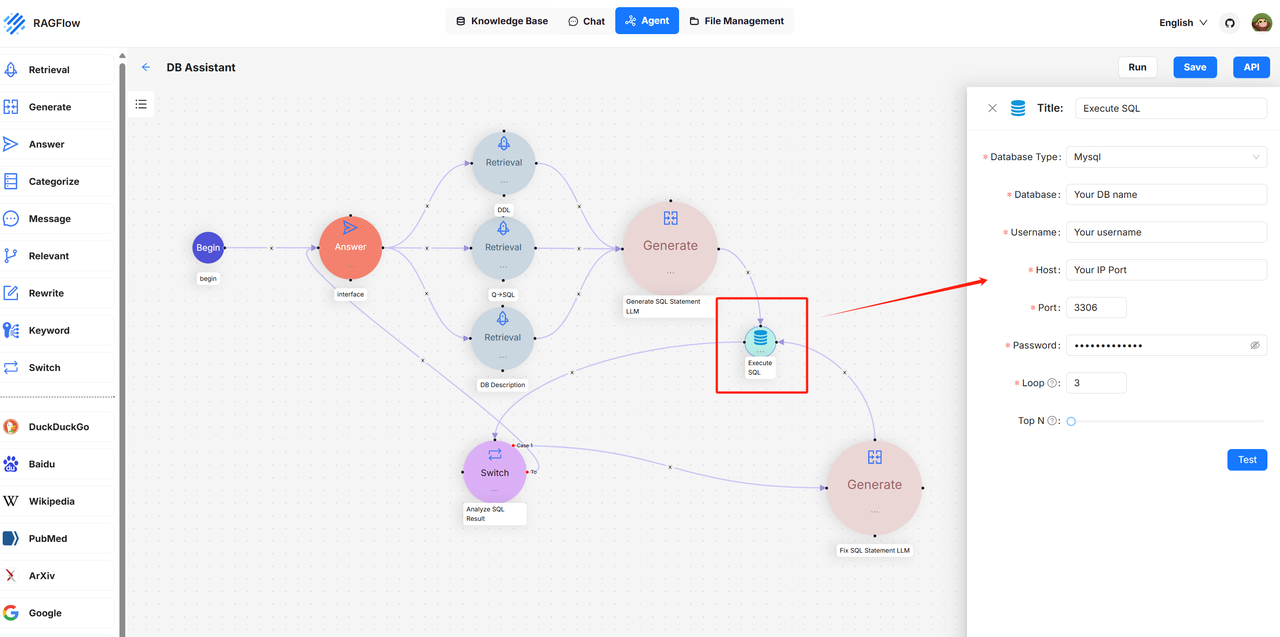
2. After completing the configuration, click the **Test** button to check if the connection is successful.
3. Configure the **Loop** parameter:
Text2SQL in RAGFlow features automatic reflection capabilities. If the generated SQL is deemed capable of querying correctly, the results will be returned directly. However, if the query fails, RAGFlow’s Text2SQL will automatically correct the SQL statement based on the error information returned from the database and retry the query. This process — query failure, correction of the SQL statement, and retry — will continue iterating until it reaches the maximum limit set by the Loop parameter. If this maximum is reached, the Text2SQL process will terminate, prompting the user to optimize their question or knowledge base data before attempting again.
4. Configure **TopN**:
_This parameter limits the number of records returned in a query, as queries often involve records._
### 4\. Try out Text2SQL[](https://ragflow.io/blog/implementing-text2sql-with-ragflow#4-try-out-text2sql "Direct link to 4. Try out Text2SQL")
Click **Run** to execute the operation.
Troubleshooting[](https://ragflow.io/blog/implementing-text2sql-with-ragflow#troubleshooting "Direct link to Troubleshooting")
--------------------------------------------------------------------------------------------------------------------------------
### `Database Connection Failed`[](https://ragflow.io/blog/implementing-text2sql-with-ragflow#database-connection-failed "Direct link to database-connection-failed")
Failed to connect to the database. To solve this issue:
1. Click the **Execute SQL** component to ensure all parameters are correctly set.
2. Double check if the machine deploying RAGFlow can connect to the database using the provided information.
3. Click **Test** to check if the database connection is successfully established.
### `SQL statement not found!`[](https://ragflow.io/blog/implementing-text2sql-with-ragflow#sql-statement-not-found "Direct link to sql-statement-not-found")
The user query cannot be converted into a SQL statement, primarily due to insufficient or incomplete knowledge bases. It’s recommended to expand the three mentioned knowledge bases.
### `No record in the database!`[](https://ragflow.io/blog/implementing-text2sql-with-ragflow#no-record-in-the-database "Direct link to no-record-in-the-database")
The SQL query failed to retrieve any records from the table, either because the filtering condition is excessively restrictive or because the table itself contains no data.
### `Maximum loop time exceeds. Can’t query the correct data via SQL statement.`[](https://ragflow.io/blog/implementing-text2sql-with-ragflow#maximum-loop-time-exceeds-cant-query-the-correct-data-via-sql-statement "Direct link to maximum-loop-time-exceeds-cant-query-the-correct-data-via-sql-statement")
The generated SQL statement cannot accurately query the database. Please check the following:
* Ensure the database contains the relevant data.
* Verify that the user question is appropriate.
* Confirm that the SQL statements generated by the **Generate SQL Statement LLM** and **Fix SQL Statement LLM** components are correct.
* [A Text2SQL demonstration](https://ragflow.io/blog/implementing-text2sql-with-ragflow#a-text2sql-demonstration)
* [Using Text2SQL in RAGFlow](https://ragflow.io/blog/implementing-text2sql-with-ragflow#using-text2sql-in-ragflow)
* [1\. Create an agent from template](https://ragflow.io/blog/implementing-text2sql-with-ragflow#1-create-an-agent-from-template)
* [2\. Configure knowledge bases](https://ragflow.io/blog/implementing-text2sql-with-ragflow#2-configure-knowledge-bases)
* [3\. Configure the database](https://ragflow.io/blog/implementing-text2sql-with-ragflow#3-configure-the-database)
* [4\. Try out Text2SQL](https://ragflow.io/blog/implementing-text2sql-with-ragflow#4-try-out-text2sql)
* [Troubleshooting](https://ragflow.io/blog/implementing-text2sql-with-ragflow#troubleshooting)
* [`Database Connection Failed`](https://ragflow.io/blog/implementing-text2sql-with-ragflow#database-connection-failed)
* [`SQL statement not found!`](https://ragflow.io/blog/implementing-text2sql-with-ragflow#sql-statement-not-found)
* [`No record in the database!`](https://ragflow.io/blog/implementing-text2sql-with-ragflow#no-record-in-the-database)
* [`Maximum loop time exceeds. Can’t query the correct data via SQL statement.`](https://ragflow.io/blog/implementing-text2sql-with-ragflow#maximum-loop-time-exceeds-cant-query-the-correct-data-via-sql-statement)
---
# Implementing a long-context RAG based on RAPTOR | RAGFlow
[Skip to main content](https://ragflow.io/blog/long-context-rag-raptor#__docusaurus_skipToContent_fallback)
[RAGFlow v0.6.0](https://github.com/infiniflow/ragflow)
was released this week, solving many ease-of-use and stability issues that emerged since it was open sourced earlier this April. Future releases of RAGFlow will focus on tackling the deep-seated problems of RAG capability. Hate to say it, existing RAG solutions in the market are still in POC (Proof of Concept) stage and can’t be applied directly to real production scenarios. This is primarily due to the numerous unresolved issues within RAG itself:
Data quality: RAGFlow offers open-source data cleansing models and chunking templates to improve data quality and will continue to iterate and evolve these built-in models and tools. Data retrieval: Scenarios with clear question intents require multiple recall to retrieve the relevant context, and the current RAGFlow integrates databases with multiple recall capabilities. Challenges in retrieving answers: In many cases, searching using the question content alone does not necessarily capture the context of the answer. There is clearly a gap to bridge between the semantics of the question and answer.
We can approach the final point above from many aspects, including: Implementing an external knowledge graph for query rewriting and understanding of user intentions; improving answer quality by introducing agents, enabling the LLM to better its answers through increased dialogue interactions; retrieving longer contexts for the LLM to find the answer.
RAGFlow’s roadmap includes features addressing these three aspects. Today, we’ll discuss an experimental RAGFlow feature that RAGFlow recently added to the main branch (or Docker dev tag) to address the last point above — implementing a long-context RAG based on RAPTOR.
The idea of [RAPTOR](https://arxiv.org/html/2401.18059v1)
stems from a paper released earlier this year titled “Recursive Abstractive Processing for Tree Organized Retrieval”. As shown in the figure below, the paper presents an enhanced document processing approach: performing hierarchical clustering of document content:
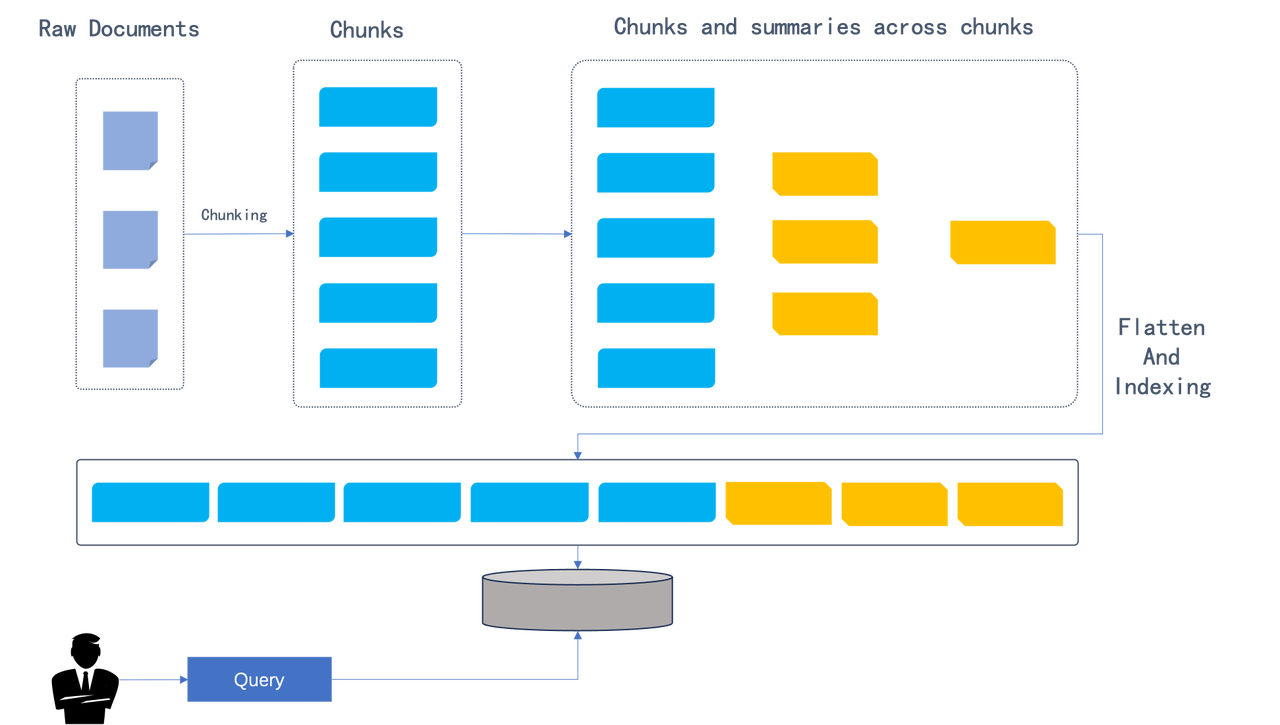
After dividing the original document into chunks, RAPTOR clusters these chunks in a recursive and hierarchical manner: the clustering process starts from the leaf nodes (the blue chunks in the graph), and sumarizes the leaves into higher-level information through embedding. The process is recursively executed, forming a “tree” structure starting from the leaves. The outcomes of the clustering process are summaries, which can be generated using LLM. The utilization of clustering and summary generation is essential because it captures finer details necessary for handling complex topic queries and multi-step reasoning in Q&A tasks. The RAPTOR paper discusses two processes for retrieval of the clustered content, as shown in the following figure:
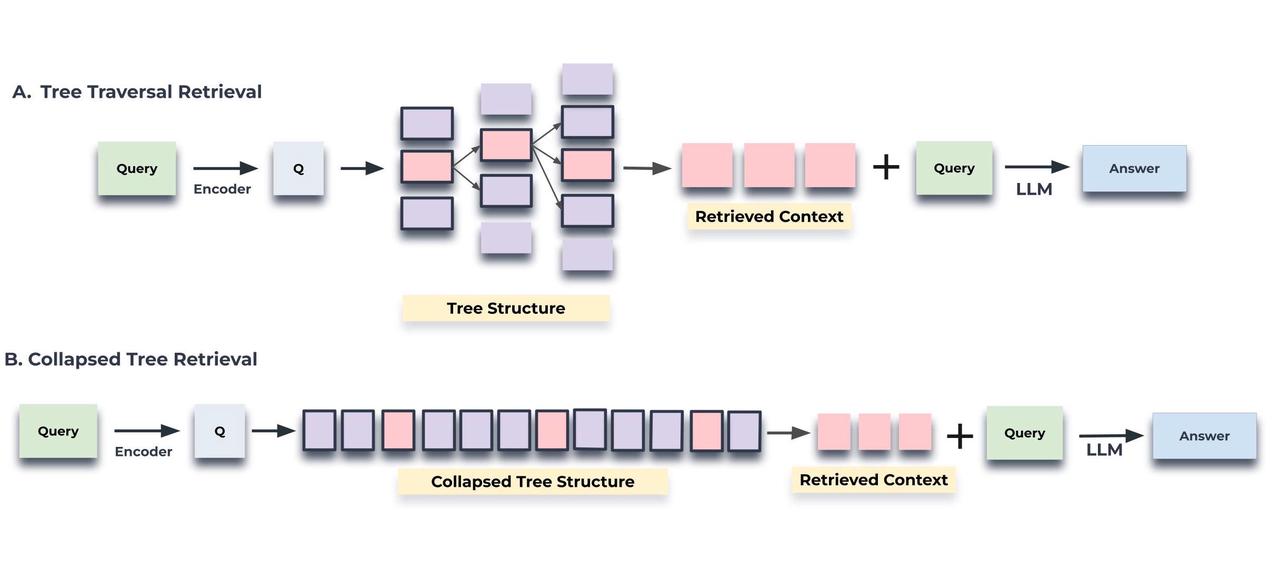
The first process maintains the tree structure: Retrieval begins from the root nodes and progresses hierarchically throughout the tree structure. This kind of retrieval is a bit more complicated to implement and “unfriendly” to multiple recalls.
The second process flattens the tree structure for retrievals. It is easy to implement and integrates naturally with multiple recalls.
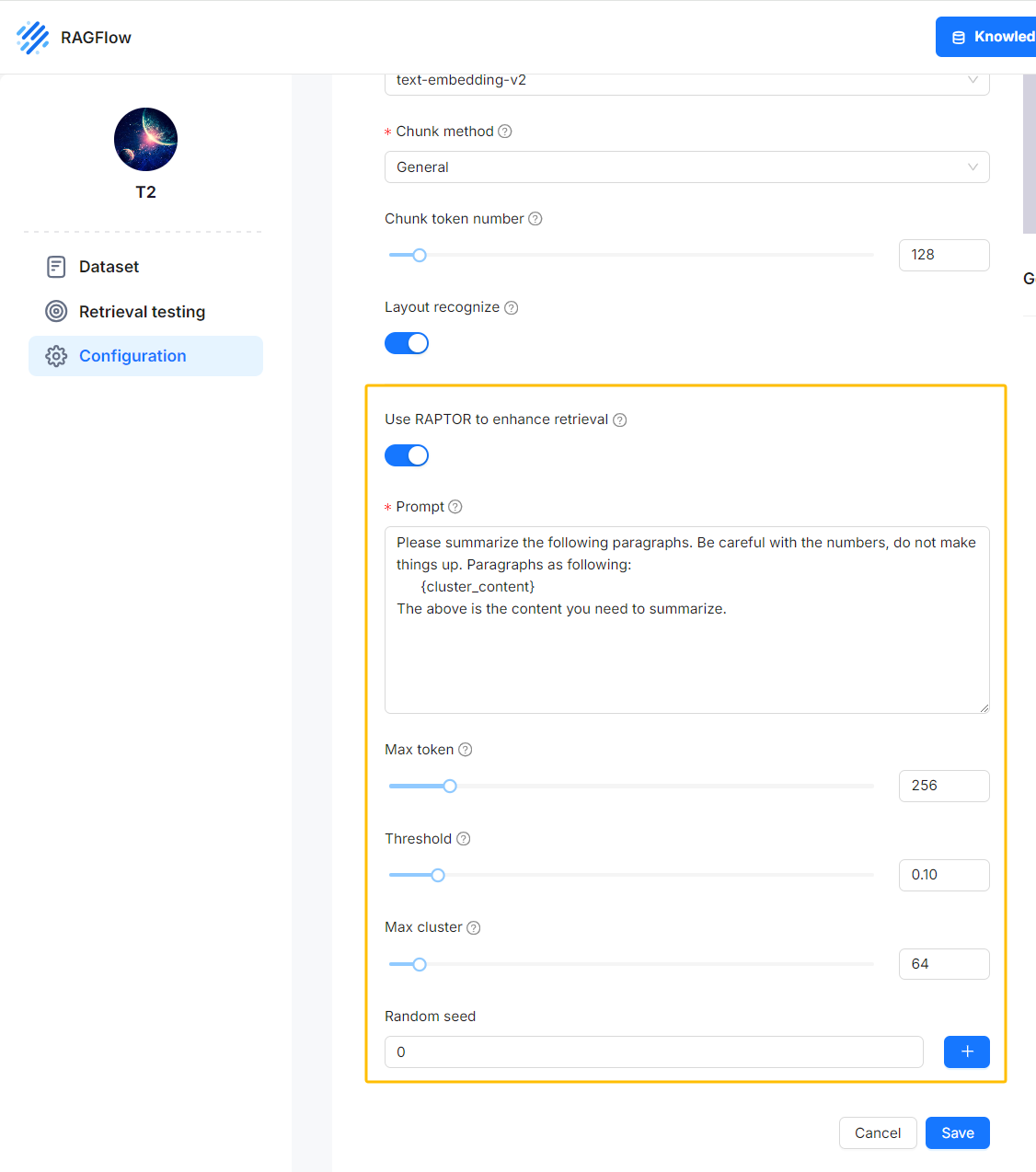
RAGFlow implements the flattened tree structure for retrieval as proposed in the paper: After file parsing with Deepdoc, you are given the option to activate the RAPTOR switch for clustering and summary generation. The original chunks and these generated summaries are then sent to the database to establish full-text and vector indexes. Subsequent operations are similar to the traditional RAG solutions.
Please note that, by default, the RAPTOR switch is off, because enabling this feature would consume more token quotas.
When you need better understanding of the long-context window, you can activate this RAPTOR switch to generate summaries from clustering outcomes.
As shown in the following figure: the left half are the summaries generated by LLM from the clustering results. RAGFlow visualizes these summaries, which, together with the raw data, will be used in RAG’s retrieval process.
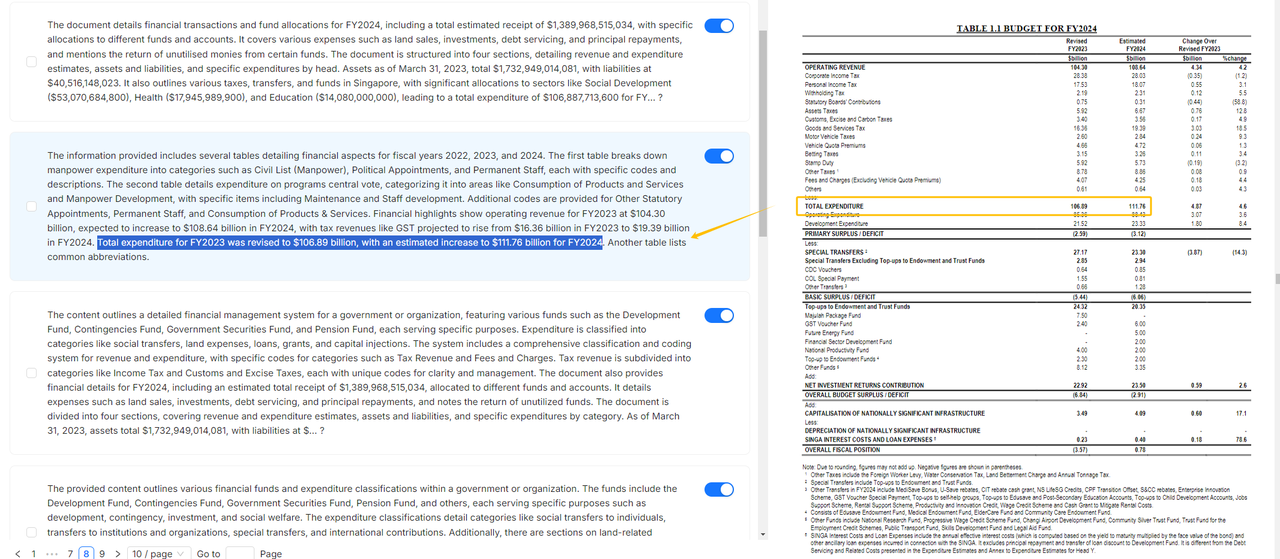
RAPTOR helps LLM better understand the context. This is because the upper-level nodes in the clustered tree structure possess a more “macroscopic” understanding of the text, making it advantageous for scenarios requiring cross-chunk summarization or multi-hop Q&A where answers can not be retrieved directly from the corresponding context.
The RAPTOR approach is one of [RAGFlow](https://github.com/infiniflow/ragflow)
’s attempts to tackle the pain points in RAG’s retrieval. In upcoming releases, we’ll bring further enhancements. Stay tuned!
---
# RAG at the Crossroads - Mid-2025 Reflections on AI’s Incremental Evolution | RAGFlow
[Skip to main content](https://ragflow.io/blog/rag-at-the-crossroads-mid-2025-reflections-on-ai-evolution#__docusaurus_skipToContent_fallback)
Six months have passed since our last year-end review. As the initial wave of excitement sparked by DeepSeek earlier this year begins to wane, AI seems to have entered a phase of stagnation. This pattern is evident in Retrieval-Augmented Generation (RAG) as well: although academic papers on RAG continue to be plentiful, significant breakthroughs have been few and far between in recent months. Likewise, recent iterations of RAGFlow have focused on incremental improvements rather than major feature releases. Is this the start of future leaps forward, or the beginning of a period of steady, incremental growth? A mid-year assessment is therefore both timely and necessary.
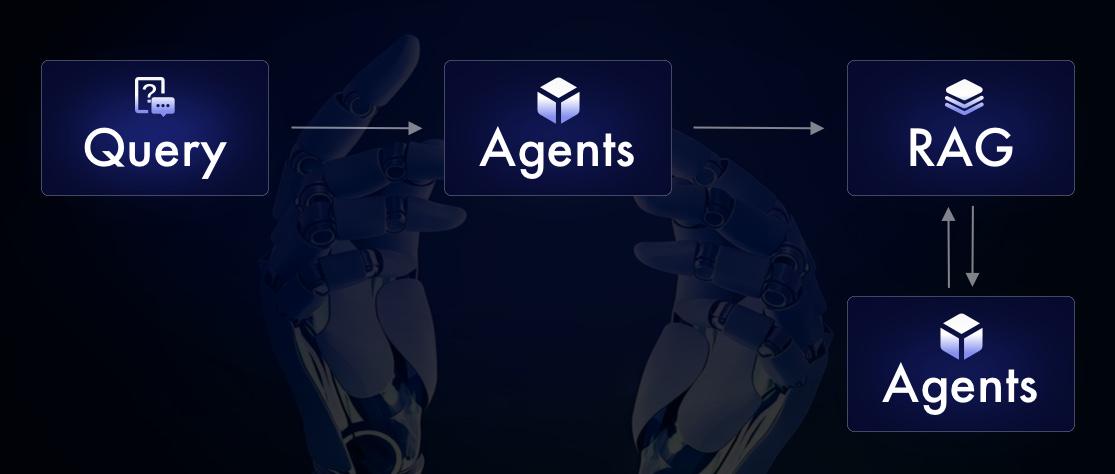
Since it began, RAG has been the focus of ongoing debate — from the 2023 “fine-tuning debates” to the 2024 “long-context disputes.” However, since 2025, discourse around RAG has diminished as attention has shifted towards Agent systems. This shift has given rise to claims that “Agents eliminate the need for RAG.” As practitioners in the field, we recognize such assertions as a market-driven stunt, though we also acknowledge their potential to mislead non-specialists. Some have even begun rebranding RAG as “Agentic RAG,” accompanied by exaggerated market forecasts predicting its dominance over conventional RAG \[Ref 1\]. It is this growing confusion that prompts our review.
Notably, the earliest references to “Agentic RAG” appeared around the time RAGFlow launched its “Agent” feature a year ago. As a result, RAGFlow is frequently cited in academic literature as a benchmark for comparisons involving Agentic RAG. Our analysis therefore begins with an examination of both RAG and Agents.
Definitional Clarification: We define “Agent” as encompassing both Workflows and intelligent agents. In RAGFlow’s current version (v0.19), the year-old “Agent” label remains limited to Workflow functionality and does not yet possess full agentic capabilities. Unlike Anthropic’s proposal to separate these concepts \[Ref 2\], RAGFlow adheres to an integrated design philosophy, wherein Workflows and Agents are intrinsically unified.
Reflection-Driven: The Key to Agents Empowering RAG Reasoning[](https://ragflow.io/blog/rag-at-the-crossroads-mid-2025-reflections-on-ai-evolution#reflection-driven-the-key-to-agents-empowering-rag-reasoning "Direct link to Reflection-Driven: The Key to Agents Empowering RAG Reasoning")
-------------------------------------------------------------------------------------------------------------------------------------------------------------------------------------------------------------------------------------------------------------------------------------------------
_Through manual or model-driven reflective loops, Agents tackle RAG reasoning challenges and enable intelligent breakthroughs; the two are inseparable._
Throughout our events from late 2024 to early 2025, we consistently highlighted three key features for RAG in 2025: reasoning, memory, and multimodality. The first two are inherently linked to Agents. In our initial blog this year, we offered a comprehensive overview of implementation of reasoning. A recent survey \[Ref 3\] further synthesizes reasoning and RAG, and we have adapted and condensed its framework as shown below:
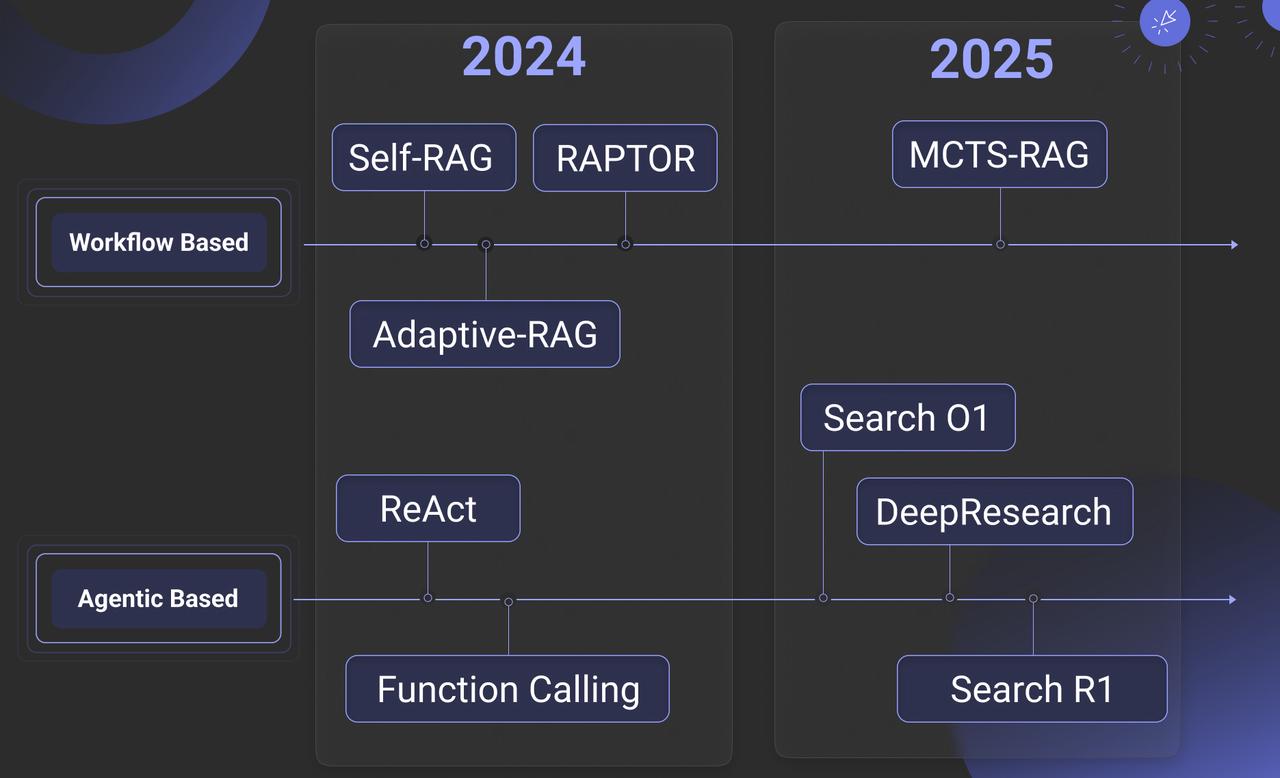
It is evident that the author has incorporated last year’s work into their reasoning framework. Implementations such as Self-RAG, RAPTOR, and Adaptive-RAG in RAGFlow from a year ago are classified as “predefined reasoning” in the source material. We propose instead defining these as Workflow-Based Approaches. Accordingly, the “Agentic RAG” described in our earlier publications employs workflows—manually defined interactions between RAG and Agents—to implement reflection (a core Agent capability) via components like Iteration and Switch. This approach addresses reasoning challenges such as ambiguous intents and long-context comprehension.
By contrast, Agentic-Based Approaches use models to autonomously drive reflection. Examples include Search O1, various open-source DeepResearch implementations, and Search R1. These divide further into two categories:
* Prompt-Driven Reflection (above the arrow): relying on LLM prompting.
* Training-Dependent Reflection (typically reinforcement learning): learning domain-specific chains-of-thought (CoT) and reflection termination conditions.
A crucial clarification: Search R1-style methods are not inherently superior. Their primary role is to optimize CoTs and termination conditions for domain-specific data within general-purpose LLMs, yet they remain fundamentally reliant on prompt-based Agent frameworks.
The Foundation of Memory: How RAG Supports the Agent’s Memory System[](https://ragflow.io/blog/rag-at-the-crossroads-mid-2025-reflections-on-ai-evolution#the-foundation-of-memory-how-rag-supports-the-agents-memory-system "Direct link to The Foundation of Memory: How RAG Supports the Agent’s Memory System")
---------------------------------------------------------------------------------------------------------------------------------------------------------------------------------------------------------------------------------------------------------------------------------------------------------------------
_RAG builds the agent’s long-term memory, enabling task state tracking and context acceleration through indexing, forgetting, and consolidation, while working with short-term memory to form a complete architecture._
Agents, regardless of their implementation, do little beyond RAG itself. So how do they make the seemingly routine RAG more intelligent and less reliant on reasoning models? Their transformative power lies in turning LLMs from single-step “intuitive guesswork” into systems capable of iterative observation and reflection—much like human cognition. This fundamental synergy explains why RAG frameworks such as RAGFlow naturally progress towards full Agent integration (beyond workflows), a key feature of RAGFlow's upcoming release.
Often dubbed the "Year of the Agent," 2025 saw a dazzling range of Agent applications emerge. However, core Agent frameworks showed little advancement compared to 2024. The rise in Agent adoption is chiefly due to improved In-Context Learning (ICL) in Large Language Models (LLMs), followed by the maturing Tools ecosystem and buzzwords like multi-agent systems enabling new use cases. Thus, beyond inherent LLM improvements, the core Agent paradigm exhibits limited technological innovation. One notable area of progress is the development of so-called "Memory" mechanisms.
If OpenAI’s 2024 acquisition of Rockset aimed to enhance Retrieval-Augmented Generation (RAG), its 2025 investment in Supabase seeks to equip Agents with more accessible Tools and partly to offer memory management. From the Agent’s perspective, RAG and various Data Infrastructure solutions are functionally equivalent—simply Tools invoked within the Agent’s context. However, the intrinsic link between RAG and Memory distinguishes RAG from other Data Infrastructure components.
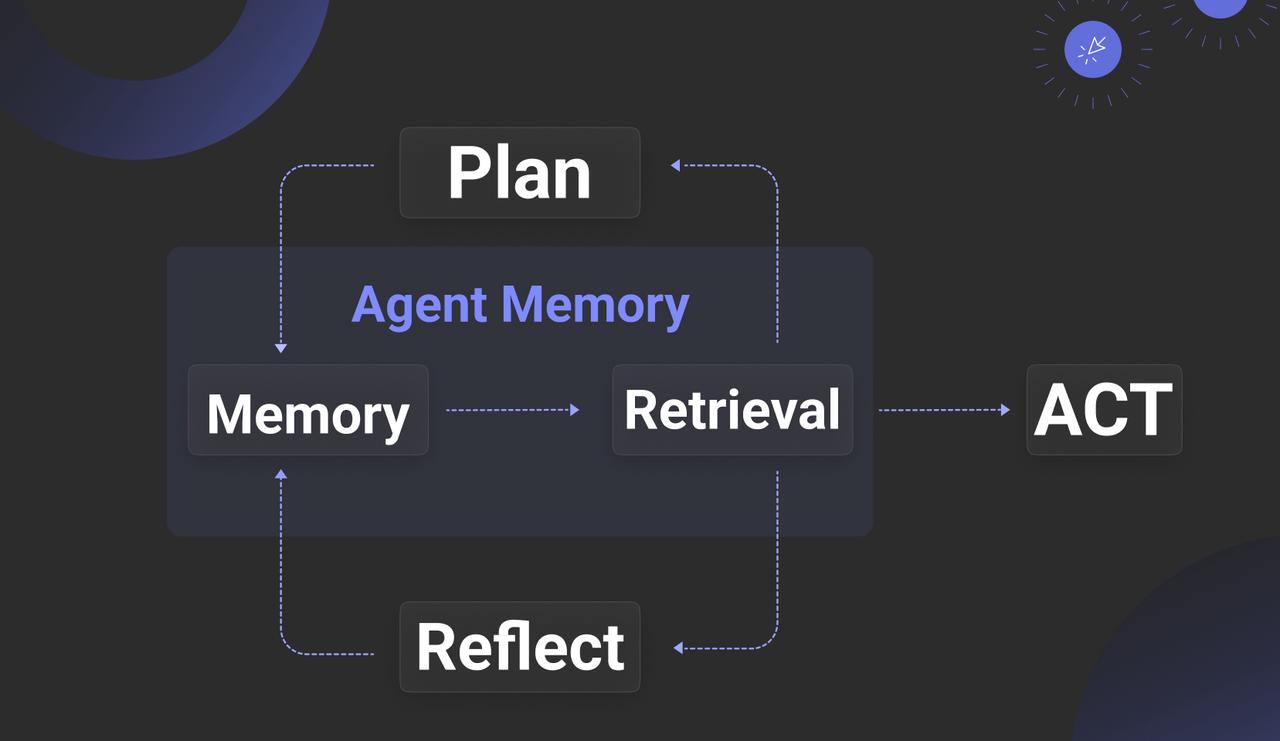
Memory gains significance only within the context of an Agent, prompting the question: what distinguishes Memory from RAG? \[Ref. 4\] offers a detailed summary, broadly dividing Memory into Contextual Memory and Parametric Memory—the latter typically relating to KV Cache and models, which we will address later. Generally, “Agent Memory” refers to Contextual Memory, which benefits the Agent in two key ways:
1. Storing Task Management Metadata: For example, in Agentic Reasoning, introducing determinism into Planning (such as incorporating human feedback) means the Plan is not solely dictated by the LLM. Instead, a mechanism is needed to store the plan’s state, transforming the Agent from stateless to stateful. Additionally, tracking task decomposition during reasoning requires a repository for task-related metadata.
2. Context Management: Beyond retaining context, Memory caches and accelerates LLM outputs and provides personalised data necessary for tailored responses.
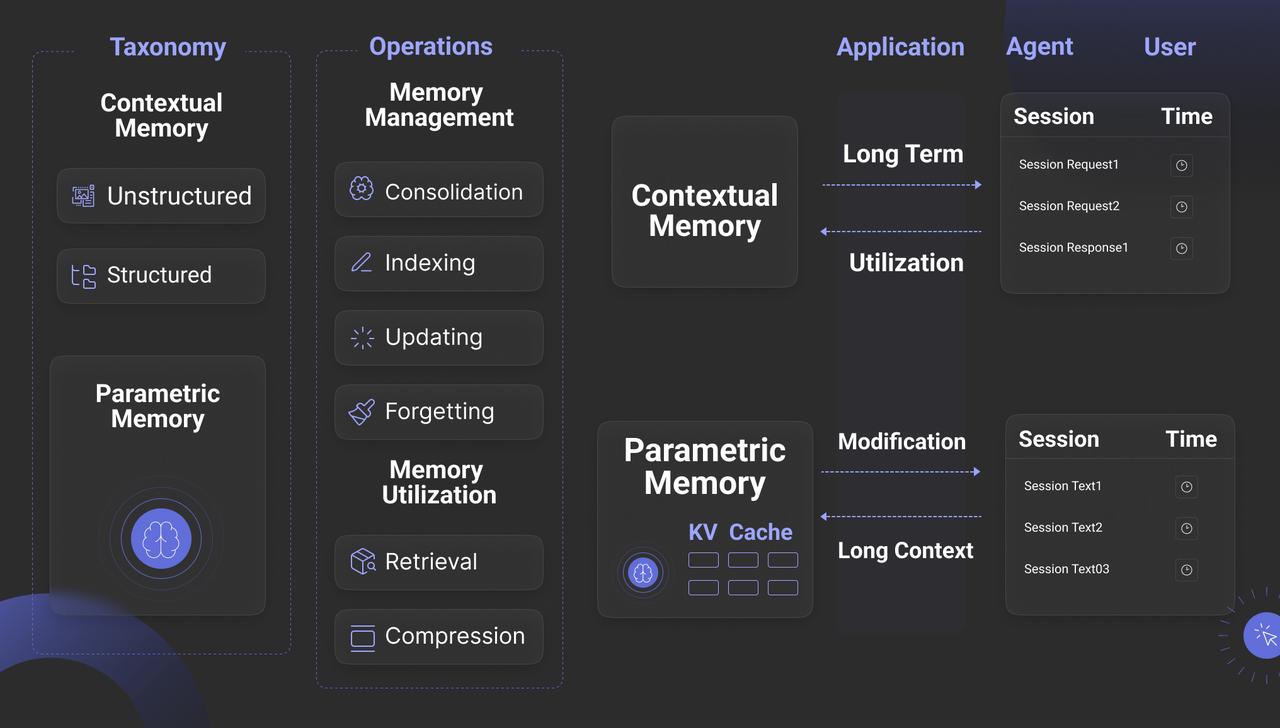
From an interface perspective, the diagram shows that Memory must provide four key functions. While Updating is straightforward, the other three are explained below:
1. Indexing: Memory must offer advanced search capabilities beyond simple queries. For Context Management—the second key value of Agent Memory—real-time search is often essential. For example, session data stored in short-term memory may need to be searched by topic to enrich subsequent interactions.
2. Forgetting: This refers to intentional forgetting, mimicking human cognition. Forgetting helps maintain focus and, technically, smaller datasets often improve search precision.
3. Consolidation: Meaning “strengthening,” this simulates cognitive processes by summarising and annotating stored data. Technically, it aligns closely with GraphRAG in the RAG paradigm, where an LLM organizes Memory content into a knowledge graph to enhance recall by providing richer context.
The diagram below captures the true relationship between Memory and RAG, revealing that RAG is essentially part of long-term memory. Memory also includes short-term memory, which typically holds an Agent’s session-based interactions and personalized data, often in raw or unprocessed form. High-value data is then transferred via Consolidation as another part of long-term memory.
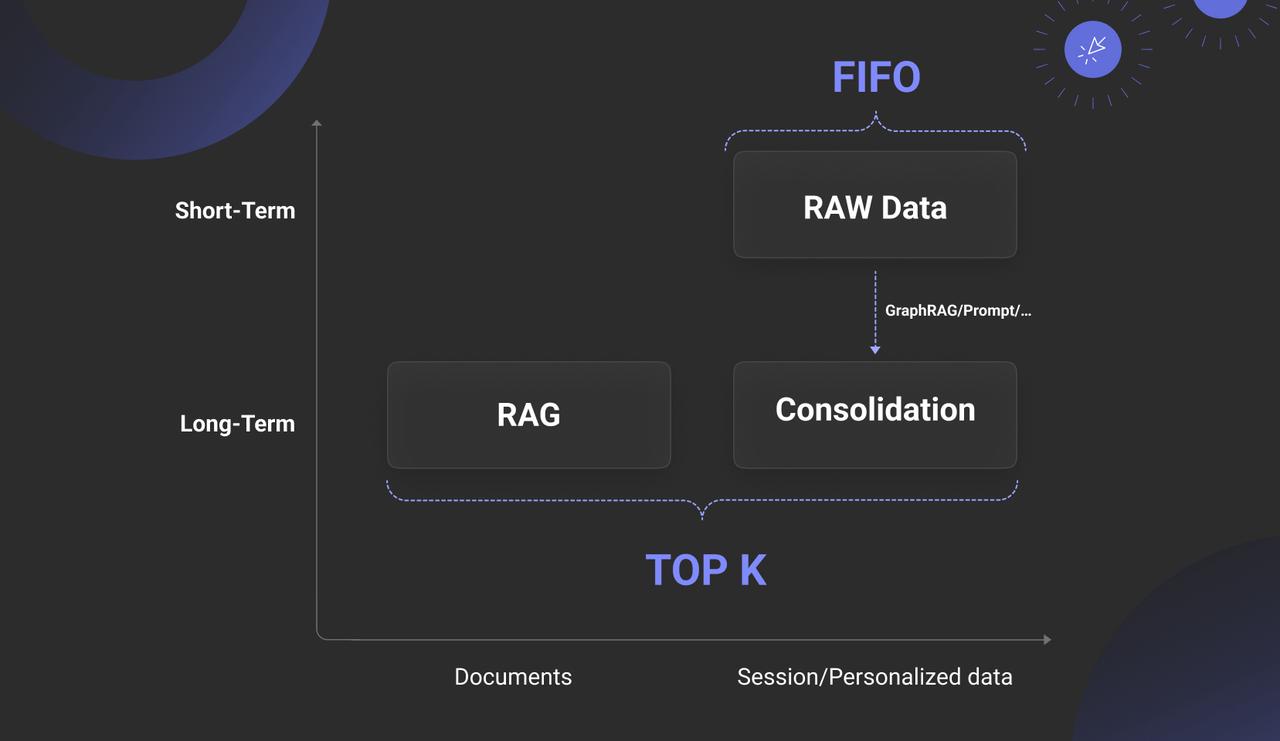
Therefore, Memory without strong RAG support is fundamentally unsustainable. Beyond this reliance, other aspects of Memory remain limited. Regarding Parametric Memory, though it may seem closer to the essence of “memory,” its core principle offers no inherent technical advantage: it is a computationally intensive method based on KV Cache and Attention operations, tightly integrated with the LLM’s inference engine, essentially a dense attention mechanism. In contrast, long-term memory built on RAG provides filtered, supplementary material for reasoning within an effectively infinite context—also an attention mechanism, but a sparse one. What would be the implications of implementing KV Cache with sparse attention? We will explore this question later.
RAG 2025: Overcoming the Plateau of Technological Challenges[](https://ragflow.io/blog/rag-at-the-crossroads-mid-2025-reflections-on-ai-evolution#rag-2025-overcoming-the-plateau-of-technological-challenges "Direct link to RAG 2025: Overcoming the Plateau of Technological Challenges")
----------------------------------------------------------------------------------------------------------------------------------------------------------------------------------------------------------------------------------------------------------------------------------------------
_Long-context reasoning depends on hierarchical indexing; multimodal data struggles with storage inflation; and slow infrastructure limits innovation._
Having examined the relationship between RAG and Agents, let us now refocus on RAG itself. Although RAG-related papers continued to be published steadily in 2025, genuine innovation in concepts and systems was notably scarce. Has RAG technology reached a critical plateau? At its core, RAG relies on information retrieval (IR), a well-established field. Yet RAG presents new challenges beyond traditional IR, including query diversity and multimodal data.
Query diversity remains a perennial challenge in information retrieval (IR), bridging the semantic gap between queries and answers. Numerous methods address this, including notable 2024 works such as GraphRAG, Contextual Retrieval, RAPTOR, and RAGFlow’s approach using automated tag libraries informed by domain experts. These methods essentially employ forms of sparse attention: complex queries require longer contexts and the identification of relevant attention within them. For simple queries, effective solutions exist, relying on good chunking and efficient multi-path recall. However, truly effective implementations for complex queries remain elusive.
Consequently, some argue that if bridging the semantic gap depends largely on LLMs generating auxiliary data, why not inject knowledge directly into the LLM’s working memory, bypassing such workarounds? This idea originated with CAG \[Ref. 5\], which proposed using KV Cache to store all data converted into KV format by the LLM. Later efforts sought to reduce the heavy bandwidth and computational costs of dense attention by combining KV data with database techniques to achieve sparse attention. Examples include RetrievalAttention \[Ref. 6\], RetroInfer \[Ref. 7\], and AlayaDB \[Ref. 8\]. These solutions split KV Cache data between two regions: a portion remains in the traditional KV Cache, while the bulk is stored in vector indexes or databases. During generation—specifically the Decoder phase of LLM inference—the current query vector (Q) retrieves relevant value vectors (V) from the index or database. These V vectors are then loaded into the KV Cache to complete the final attention computation, as illustrated below.
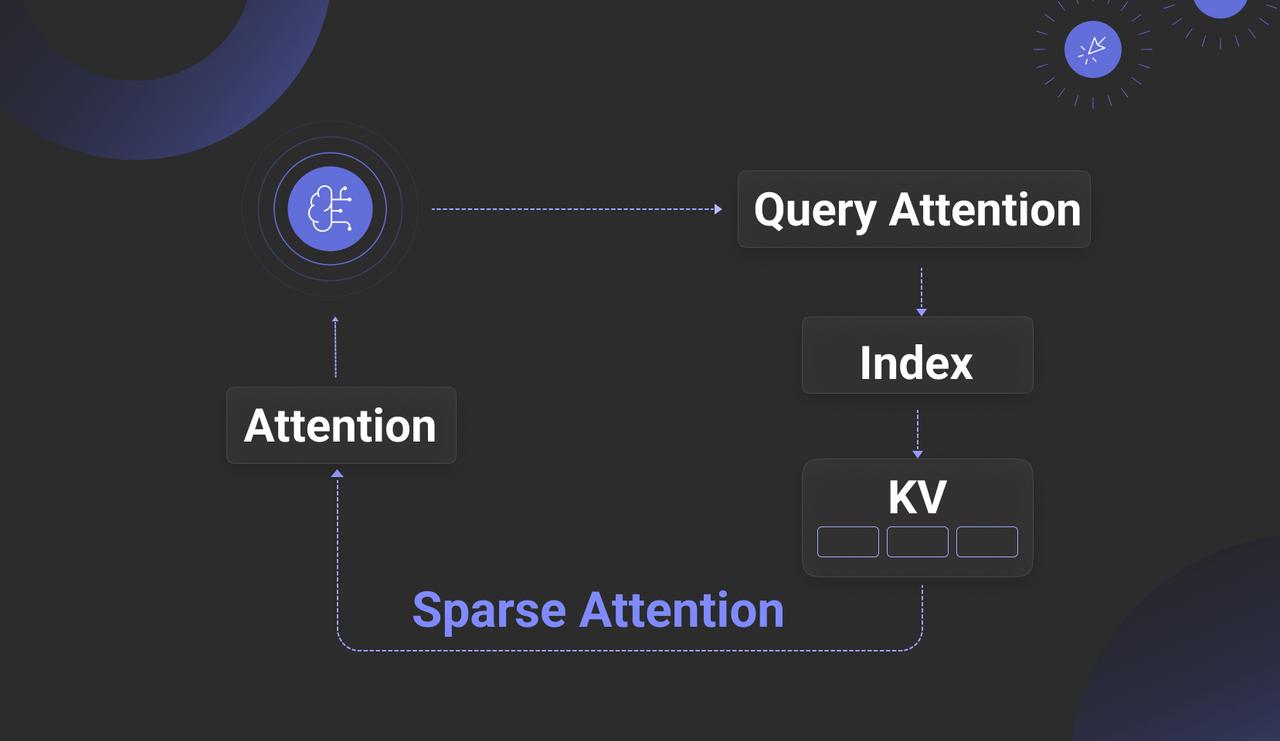
While this technology shows promise in addressing current RAG challenges, it still faces significant hurdles. The main aim of such schemes is often to reduce LLM inference costs. Traditional inference, using Prefill/Decoder separation, relies on dense attention mechanisms that deliver high accuracy but at considerable cost and heavy GPU memory demands. In contrast, sparse attention schemes utilize CPU memory, disk storage, and Approximate Nearest Neighbour (ANN) vector search to lower costs.
These solutions require deep integration with the LLM inference engine, necessitating modifications to handle both text and vector data, which effectively limits their use to open-source models. Moreover, frequent vector retrievals during the Decoder phase demand co-located deployment of the retrieval system and inference engine to reduce network latency, restricting applicability mainly to private or on-premises setups.
Paradoxically, this integrated “Attention Engine” approach may not fully resolve core RAG issues, especially with lengthy documents. In long-context LLMs, overly verbose input can impair performance, causing key details to be overlooked or misinterpreted. For precise detail retrieval, traditional RAG methods still hold the edge.
Therefore, while we must keep a close eye on the “Attention Engine” approach, the practical focus remains on RAG outside the LLM, improving support for reasoning over long texts. Whether it’s an Attention Engine or a Search Engine, their strengths do not fully overlap—the former excels at rapid inference over smaller datasets, the latter at fast retrieval across vast data. They remain largely complementary, even as the scope of RAG continues to evolve and expand.
Currently, aside from methods like GraphRAG and RAPTOR that support cross-chunk reasoning, few solutions for retrieval and reasoning over very long texts demonstrate strong engineering viability. The main approaches can be summarized as follows:
1. No Chunking, Whole Document Retrieval: Skip chunking and recall entire documents based on brief queries, feeding them directly into the context. This works for a small number of documents but struggles at scale due to poor understanding of global document context, resulting in low recall relevance.
2. Hierarchical Indexing & In-Document Agentic RAG: Construct a tree-like index during ingestion reflecting document structure (e.g., sections, subsections). Recall happens at the document level, followed by structured traversal within the document using the hierarchical index to locate relevant chunks, enabling “Agentic RAG” within documents.
3. Overlapped Chunking & Multi-Granular Retrieval: Use chunking with significant overlap and build a multi-layered index (e.g., document, section, paragraph levels). This employs a combined retrieval strategy leveraging both coarse and fine granularities. Though conceptually straightforward, each approach poses unique challenges. As a tool provider, RAGFlow plans to offer similar functionalities in due course.
Turning to the second aspect: multimodal data. In our year-end review, we highlighted Multimodal RAG (MM-RAG) as a key trend for 2025. Yet, by mid-year, this trend has failed to gain momentum. The primary obstacle remains the immaturity of the supporting infrastructure. As noted, late interaction models continue to dominate MM-RAG pipelines, meaning embedding models produce Tensors, or multi-vectors. For instance, a single image may be represented by 1,024 vectors, each comprising 128-dimensional floats, as illustrated below.
Several vector databases now claim to offer native Tensor support; however, comprehensive solutions for practical Tensor utilization remain scarce. This scarcity stems from the dramatic data expansion caused by Tensors, which can increase storage demands by up to two orders of magnitude. Consequently, beyond native Tensor support, holistic approaches are required to mitigate storage bloat. These include:
* Binary quantization at the database level: representing each vector dimension with a single bit, thereby reducing storage to approximately one thirty-second of the original size.
* Index support for quantised multi-vectors or Tensor indexes: ensuring vector indexes can efficiently manage these binary-quantised multi-vectors.
* Reranker compensation: to minimise precision loss from quantisation, binary vectors are de-quantised back into floats during the reranking phase to recalculate similarity scores, thus preserving accuracy.
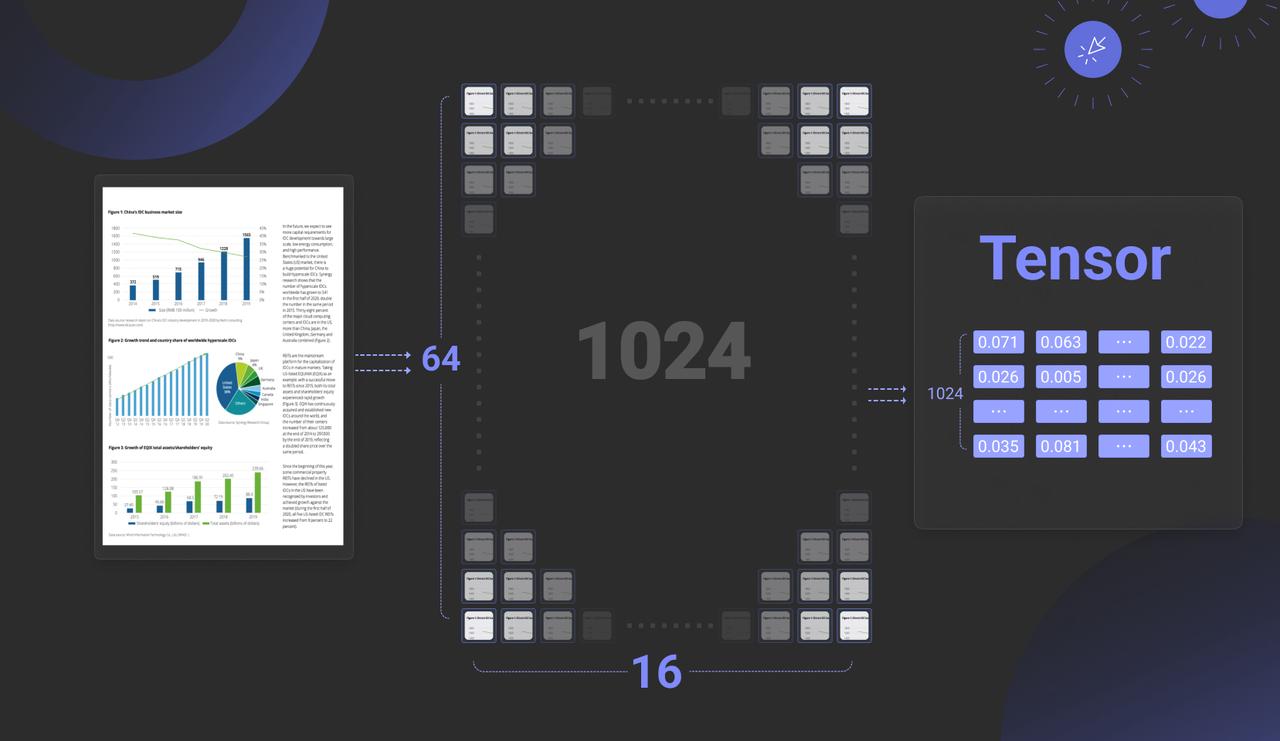
At the model level, efforts are needed to reduce overhead from Tensor storage growth. This includes:
* Using Multi-Representation Learning (MRL) to lower the dimensionality of each vector, for example, cutting dimensions to 64 could halve storage but slightly reduce recall accuracy.
* Applying Token or Patch merging to reduce the number of vectors, such as shrinking from 1,024 patches to 128.
While some progress has been made in optimizing models for text ranking, much more work is needed to meet the demands of Multimodal RAG. As a result, widespread adoption of MM-RAG depends on the development of its supporting infrastructure.
End[](https://ragflow.io/blog/rag-at-the-crossroads-mid-2025-reflections-on-ai-evolution#end "Direct link to End")
--------------------------------------------------------------------------------------------------------------------
In summary, our analysis shows that core RAG technology saw little significant progress in 2025. Meanwhile, the interdependence between RAG and Agents has deepened considerably—whether as the foundation of Agent Memory or enabling DeepResearch capabilities. From an Agent’s perspective, RAG may be just one Tool among many, but by managing unstructured data and Memory, it stands as one of the most fundamental and critical Tools. It is fair to say that without robust RAG, practical enterprise deployment of Agents would be unfeasible. Consequently, RAG’s value as a distinct architectural layer is now more pronounced than ever. These insights will directly inform the flagship features of the next RAGFlow release.
As for the complex challenges in RAG’s evolution, let's leave it to time for solution. After all, RAG is fundamentally an architectural framework; its true potential will be realized through the co-evolution of Infrastructure and models. Stay tuned and welcome to star RAGFlow: [https://github.com/infiniflow/ragflow](https://github.com/infiniflow/ragflow)
Bibligraphy[](https://ragflow.io/blog/rag-at-the-crossroads-mid-2025-reflections-on-ai-evolution#bibligraphy "Direct link to Bibligraphy")
--------------------------------------------------------------------------------------------------------------------------------------------
1. [https://market.us/report/agentic-retrieval-augmented-generation-market/](https://market.us/report/agentic-retrieval-augmented-generation-market/)
2. [https://www.anthropic.com/engineering/building-effective-agents](https://www.anthropic.com/engineering/building-effective-agents)
3. Reasoning RAG via System 1 or System 2: A Survey on Reasoning Agentic Retrieval-Augmented Generation for Industry Challenges [https://arxiv.org/abs/2506.10408](https://arxiv.org/abs/2506.10408)
4. Rethinking Memory in AI: Taxonomy, Operations, Topics and Future Directions [https://arxiv.org/abs/2505.00675](https://arxiv.org/abs/2505.00675)
5. Don't Do RAG: When Cache-Augmented Generation is All You Need for Knowledge Tasks [https://arxiv.org/abs/2412.15605](https://arxiv.org/abs/2412.15605)
6. RetrievalAttention: Accelerating Long-Context LLM Inference via Vector Retrieval [https://arxiv.org/abs/2409.10516](https://arxiv.org/abs/2409.10516)
7. RetroInfer: A Vector-Storage Approach for Scalable Long-Context LLM Inference [https://arxiv.org/abs/2505.02922](https://arxiv.org/abs/2505.02922)
8. AlayaDB: The Data Foundation for Efficient and Effective Long-context LLM Inference [https://arxiv.org/abs/2504.10326](https://arxiv.org/abs/2504.10326)
* [Reflection-Driven: The Key to Agents Empowering RAG Reasoning](https://ragflow.io/blog/rag-at-the-crossroads-mid-2025-reflections-on-ai-evolution#reflection-driven-the-key-to-agents-empowering-rag-reasoning)
* [The Foundation of Memory: How RAG Supports the Agent’s Memory System](https://ragflow.io/blog/rag-at-the-crossroads-mid-2025-reflections-on-ai-evolution#the-foundation-of-memory-how-rag-supports-the-agents-memory-system)
* [RAG 2025: Overcoming the Plateau of Technological Challenges](https://ragflow.io/blog/rag-at-the-crossroads-mid-2025-reflections-on-ai-evolution#rag-2025-overcoming-the-plateau-of-technological-challenges)
* [End](https://ragflow.io/blog/rag-at-the-crossroads-mid-2025-reflections-on-ai-evolution#end)
* [Bibligraphy](https://ragflow.io/blog/rag-at-the-crossroads-mid-2025-reflections-on-ai-evolution#bibligraphy)
---
# How Our GraphRAG Reveals the Hidden Relationships of Jon Snow and the Mother of Dragons | RAGFlow
[Skip to main content](https://ragflow.io/blog/ragflow-support-graphrag#__docusaurus_skipToContent_fallback)
[RAGFlow](https://github.com/infiniflow/ragflow)
v0.9 introduces support for GraphRAG, which has recently been open-sourced by Microsoft, allegedly the next generation of Retrieval-Augmented Generation (RAG). Within the RAGFlow framework, we have a more comprehensive definition of RAG 2.0. This proposed end-to-end system is search-centric and consists of four stages. The last two stages—indexing and retrieval—primarily require a dedicated database, while the first two stages are defined as follows:
* **Data Extraction**: Utilize various document models to ensure high-quality data for indexing, thereby avoiding the "Garbage In, Garbage Out" issue.
* **Document Preprocessing**: Before the extracted data is sent to the database, optional preprocessing steps can be implemented, such as document clustering and knowledge graph construction. These steps primarily enhance multi-hop question answering and cross-document queries. While GraphRAG is indeed advanced, it is just one part of the RAG 2.0 pipeline.
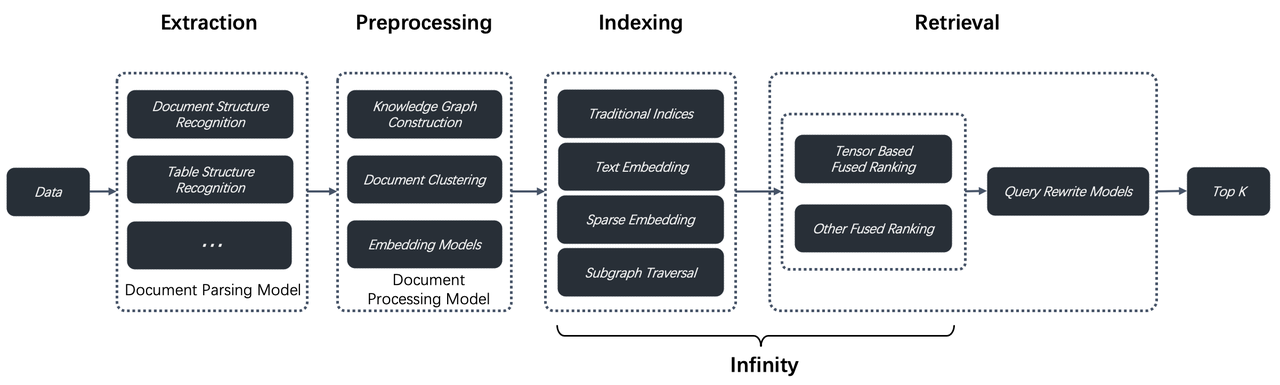
From version v0.9 onwards, this part is integrated into RAGFlow. Below, we will explore the reasons for this addition and how it compares to Microsoft's GraphRAG.
Knowledge graphs are essential for improving the effect of RAG. Naive RAG systems typically retrieve contents similar to the user queries, and hence may not always provide the correct answer. Tasks like summarizing questions are essentially Query-Focused Summarization (QFS), and can be handled by using knowledge graphs. Knowledge graphs can effectively aggregate contents based on textual relevance and generate summaries based on these aggregated contents during conversation, thereby improving accuracy in the final response. Many modern AI search solutions take this approach. As an aside, RAPTOR, which was introduced in an earlier version of RAGFlow also employs text clustering to improve retrieval effectiveness; knowledge graph-specific approaches can generate more 'hierarchical' results based on named entities, offering better accuracy and more comprehensive responses for QFS queries. Now, a number of studies have proved that knowledge graphs can improve the effectiveness of RAG outputs and enable LLMs to produce more interpretable answers in many circumstances by providing additional contextual information. This is why the launch of GraphRAG quickly generated significant interest in the community. Before the rise of RAG, there had been many efforts to employ knowledge graphs for question answering (KGQA). However, one major obstacle to their widespread enterprise adoption had always been the automation and standization of knowledge graph construction. With the emergence of LLMs and RAG, it is now more feasible to automate this process, and GraphRAG is among the most notable examples.
GraphRAG significantly simplifies the abstraction and construction of knowledge graphs, and greatly facilitates the launch of standard products. So we referenced this approach when implementing GraphRAG in RAGFlow. RAGFlow introduces knowledge graph construction as an optional feature during the document preprocessing stage to support more sophisticated question-answering scenarios. It also made the following improvements to the original GraphRAG:
* **A deduplication step is introduced**. In the original GraphRAG, extracted named entities were directly used without deduplication, which could lead to issues like treating synonyms such as "2024" and "Year 2024" or "IT" and "Information Technology" as distinct entities. This challenge, known academically as Entity Resolution, typically involves complex algorithms. However, RAGFlow leverages LLMs to perform deduplication, as LLMs can be broadly viewed as implicit knowledge graphs.
* **Reduced Token Consumption**: GraphRAG inherently consumes a large number of tokens because it requires all user-uploaded documents to be sent to the LLM multiple times in its original implementation. This results in significant token usage, particularly for RAG systems using SaaS services. RAGFlow optimizes this process by ensuring that all documents are submitted to the LLM only once, minimizing unnecessary token consumption. To fundamentally address this issue, smaller, standalone models can be used for knowledge graph construction. A successful example is Triplex, which is fine-tuned based on Phi-3 with 3 billion parameters, offering cost savings several times greater than using an LLM. In the future, RAGFlow will also provide similar solutions to further reduce the construction costs associated with GraphRAG.
Below is a demonstration of the RAGFlow version of GraphRAG:
During the document parsing stage, users can choose "Knowledge Graph" as the chunking method for a specific knowledge base. They must also define the types of named entities that they wish the LLM to extract, such as "organization," "person," and "location," as shown in the figure below:
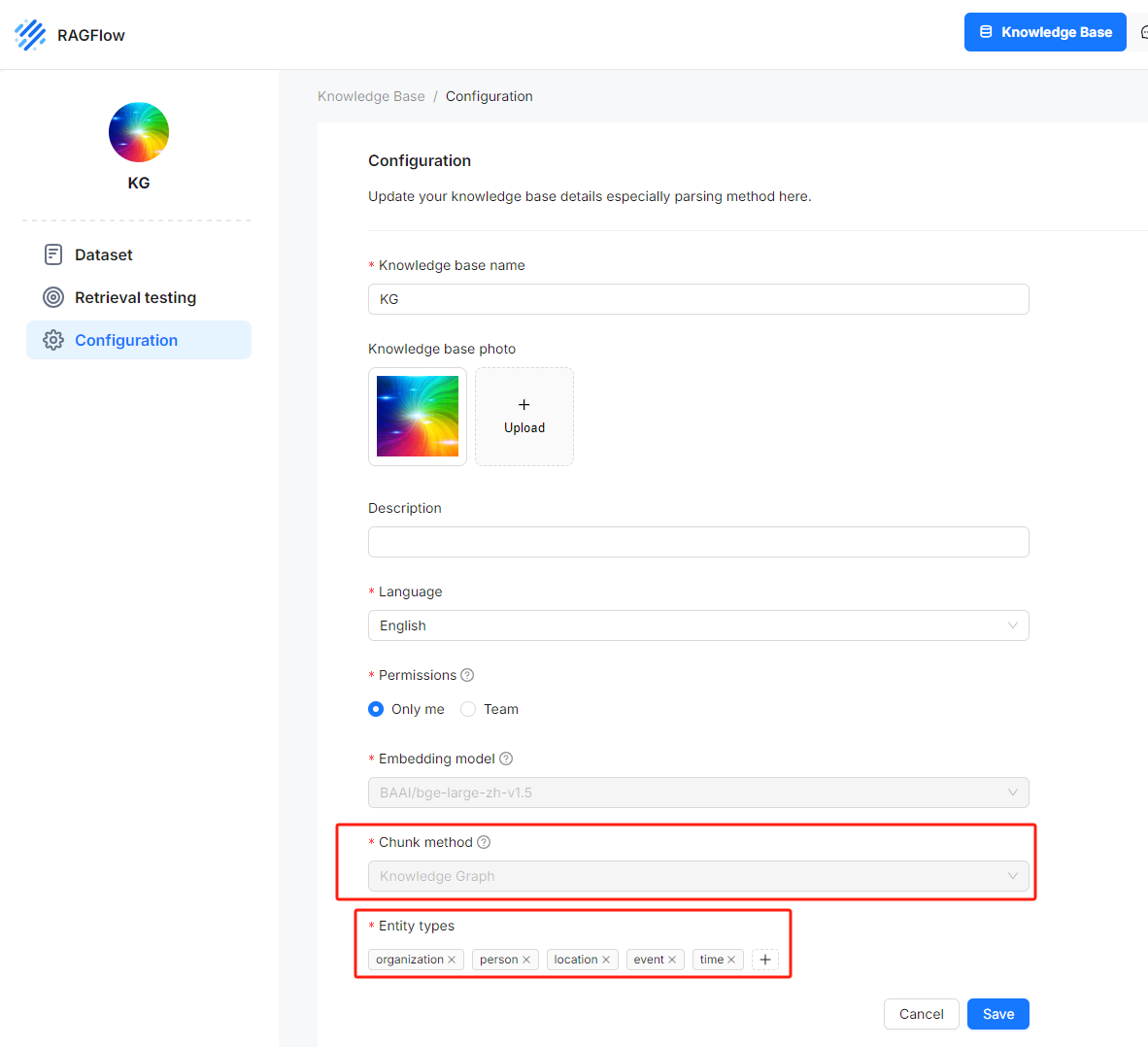
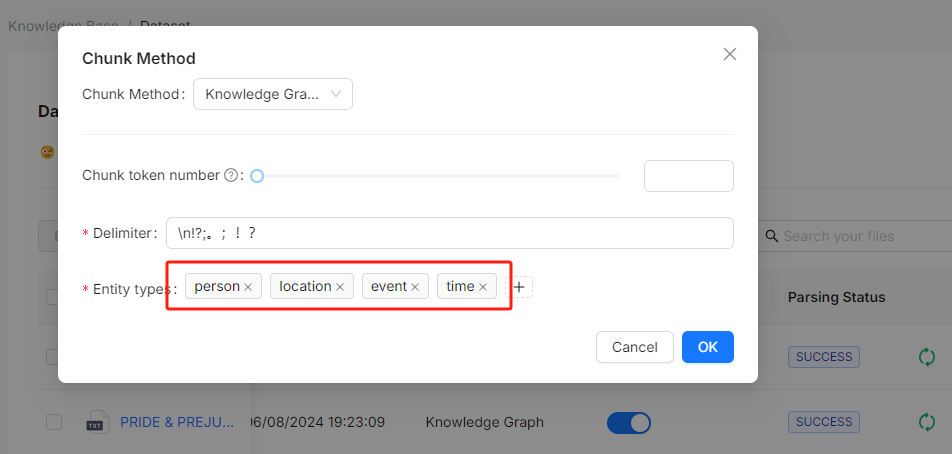
After selecting the chunking method, you can trigger the LLM to extract entities and construct the knowledge graph. RAGFlow visually displays these knowledge graphs, including node names, node descriptions, and "communities":
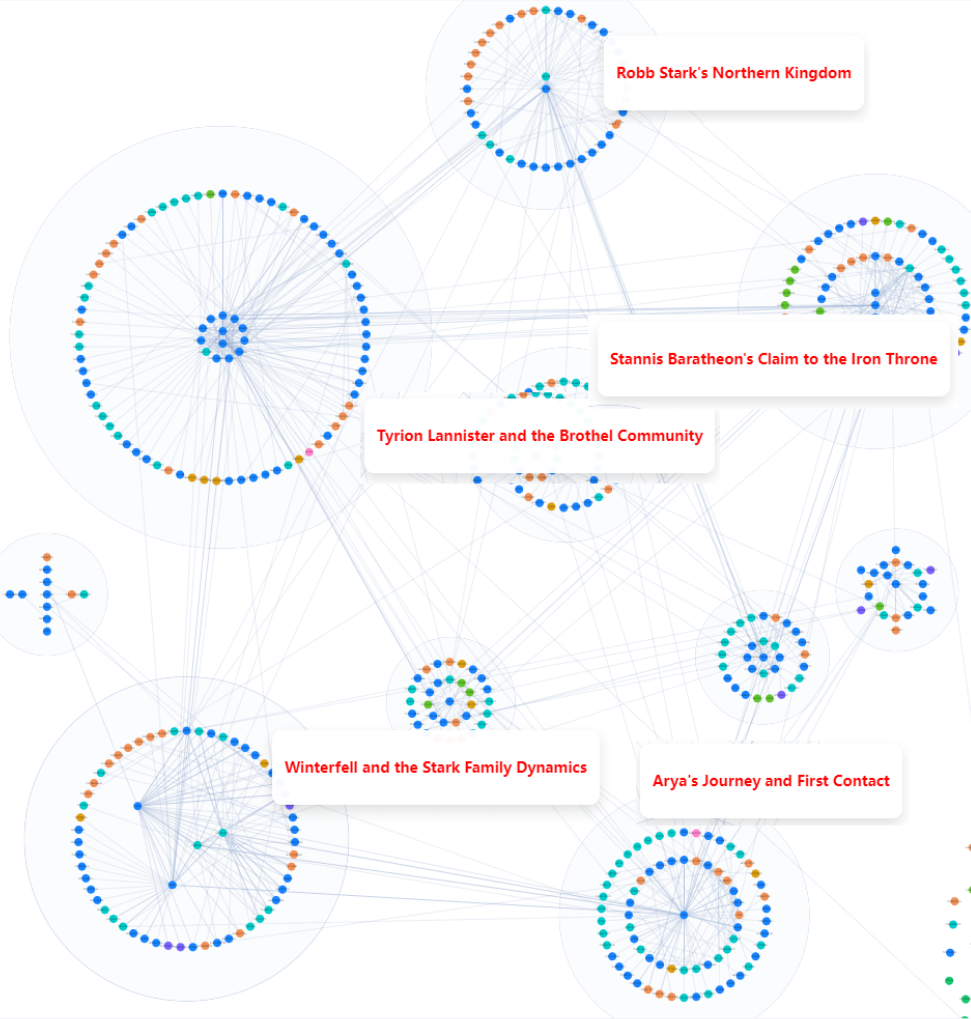
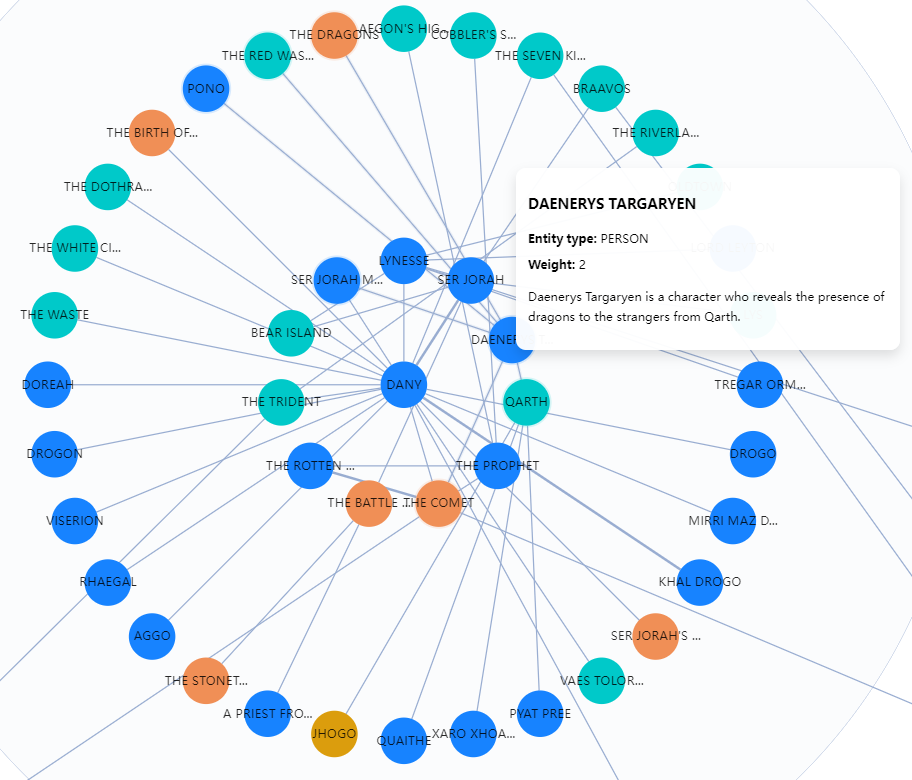
The knowledge graph can also be displayed as a mind map:
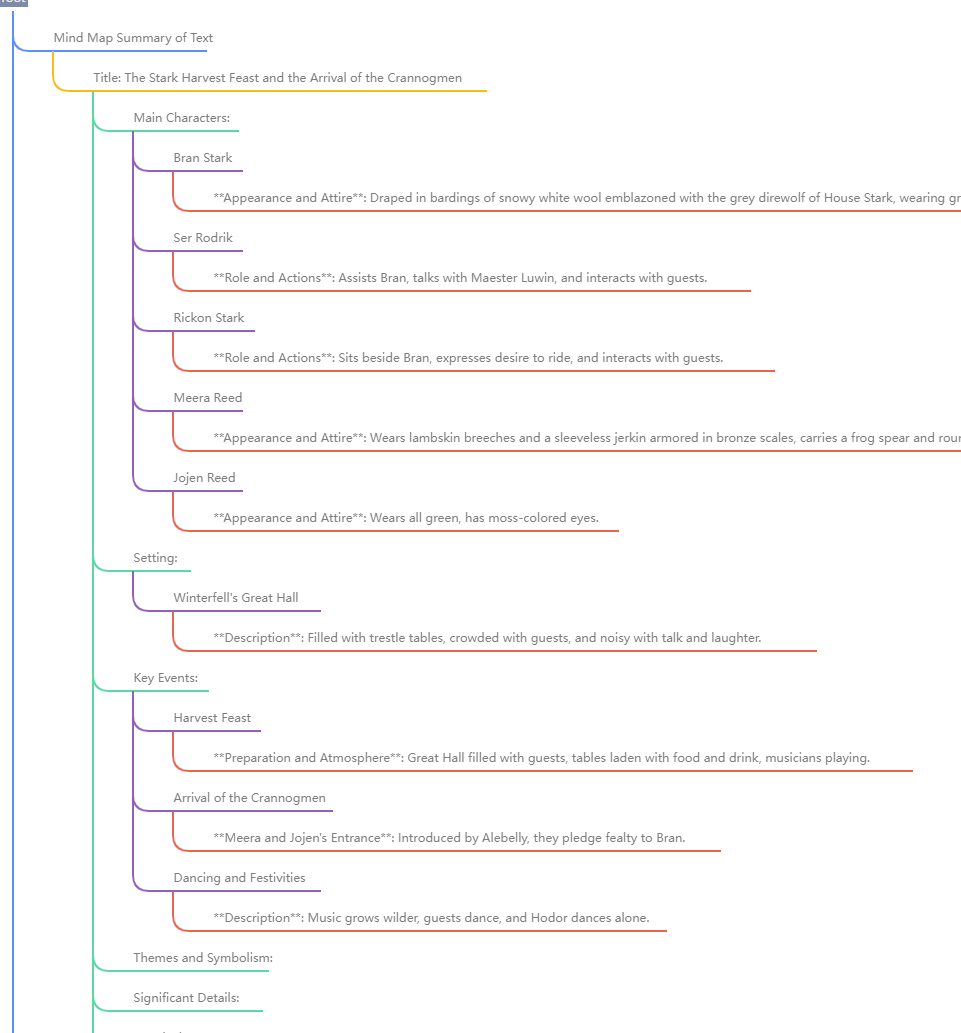
The visualization of knowledge graphs is crucial for users to debug dialogues. Currently, RAGFlow supports use any connected LLM to generate knowledge graphs. However, LLMs have varying capabilities in data extraction, and failure to extract knowledge graphs can lead to incorrect dialogues. In such cases, visualisation tools can be used to view the generated knowledge graphs and analyze the dialogues.
At present, RAGFlow's knowledge graph generation is at the document level, meaning that it does not support constructing knowledge graphs for all documents within a knowledge base. In other words, the current version of GraphRAG in RAGFlow cannot link knowledge graphs generated from multiple documents. This feature requires significantly more memory and computational resources. RAGFlow will reconsider this feature based on user feedback at a later point.
The following image juxtaposes dialogues generated from _Game of Thrones_. The dialogue on the left, generated using GraphRAG, demonstrates that GraphRAG provides more in-depth and comprehensive answers for multi-hop queries involving nested logic. The dialogue on the right, which is based on document parsed using the GENERAL parsing method, shows no result.
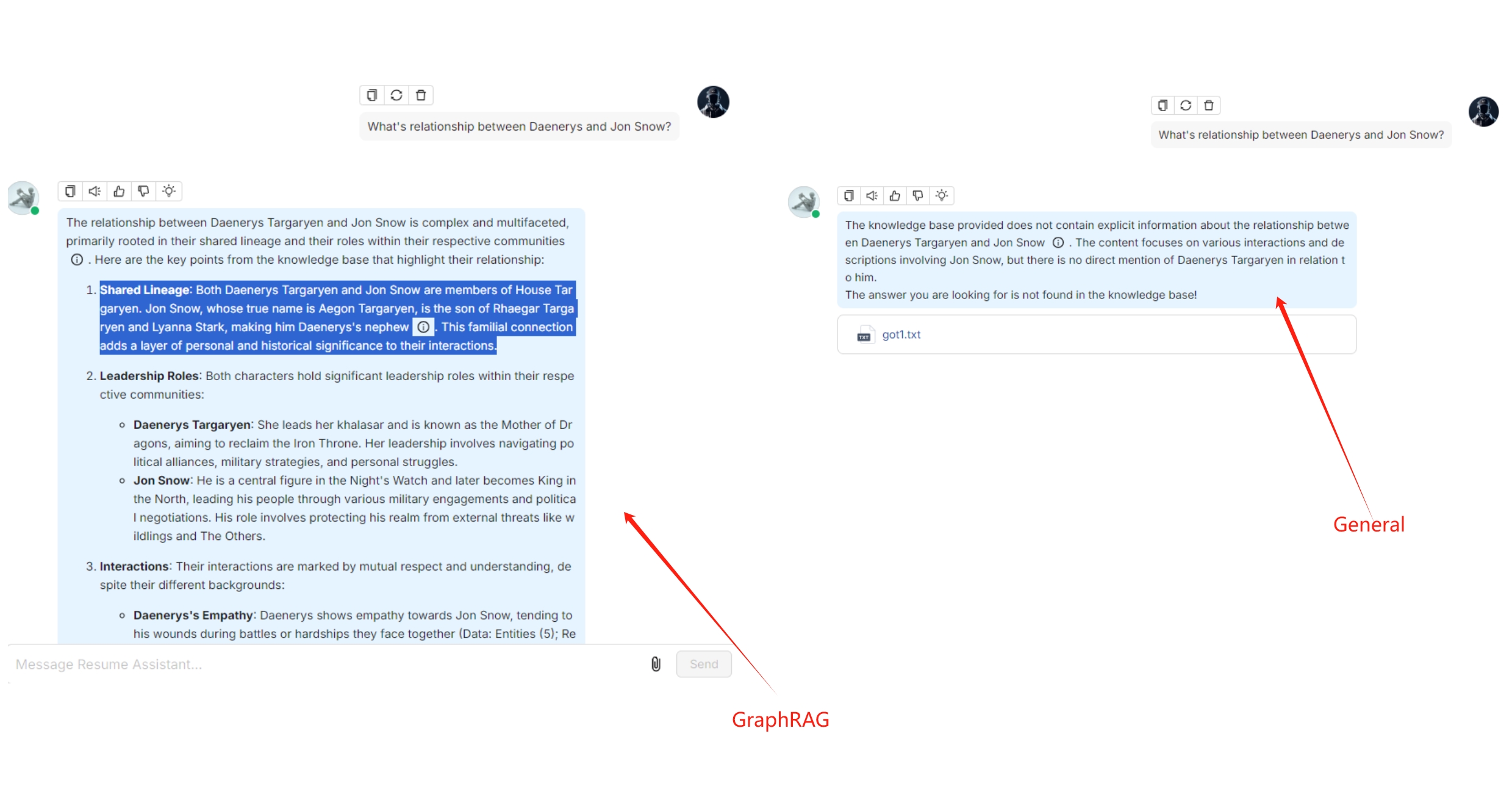
To summarize, RAGFlow's implementation of GraphRAG aims to automate the construction of knowledge graphs for RAG. While GraphRAG removes many complexities associated with traditional knowledge graph algorithms, it is not the final solution for using knowledge graphs in RAG applications. In real enterprise scenarios, a significant portion of data is unsuitable for knowledge graph construction, or it may not be cost-effective to construct knowledge graphs for all data. Indeed, knowledge graphs have many more applications, such as using knowledge graphs to rewrite queries. RAGFlow plans to support these features in near future.
**Bibliography**
1. GraphRAG, [https://github.com/microsoft/graphrag](https://github.com/microsoft/graphrag)
2. From Local to Global: A Graph RAG Approach to Query-Focused Summarization, [https://arxiv.org/abs/2404.16130](https://arxiv.org/abs/2404.16130)
3. HippoRAG: Neurobiologically Inspired Long-Term Memory for Large Language Models , [https://arxiv.org/abs/2405.14831](https://arxiv.org/abs/2405.14831)
---
# RAGFlow Enters Agentic Era | RAGFlow
[Skip to main content](https://ragflow.io/blog/ragflow-enters-agentic-era#__docusaurus_skipToContent_fallback)
As of v0.8, RAGFlow is officially entering the Agentic era, offering a comprehensive graph-based task orchestration framework on the back-end and a no-code workflow editor on the front-end. Why agentic? How does this feature differ from existing workflow orchestration systems?
To address these questions, we must first examine the relationship between RAG and Agent. Without RAG, LLMs only have limited access to private data via long context, making it difficult to use agents to serve enterprise scenarios. Customer service, marketing recommendation, compliance checks, and inventory optimization require more than long-context LLM and workflow assembly. A naive RAG system, exemplified by single-round dialogue, is a crucial operator to support agent orchestration in the workflow. Conversely, RAG is an architecture pattern enabling LLMs to access private enterprise data. Therefore, an advanced RAG system should offer far more. When a user query has a clear intent, it should be able to handle multi-hop question-answering, which requires cross-document reasoning and query decomposition; for ambiguous query intents, it should be able to work alongside agents, employing dynamic agent orchestration to 'criticize'/evaluate retrievals, rewrite query accordingly, and conduct 'multi-hop' reasoning for these complex question-answering tasks. In essence, agents and RAG are complementary techniques, each enhancing the other's capabilities in enterprise applications.
RAGFlow garnered 10,000 GitHub stars in less than three months since its open-source release. It is time for us to reflect on RAGFlow's successes and look into its future revolution.
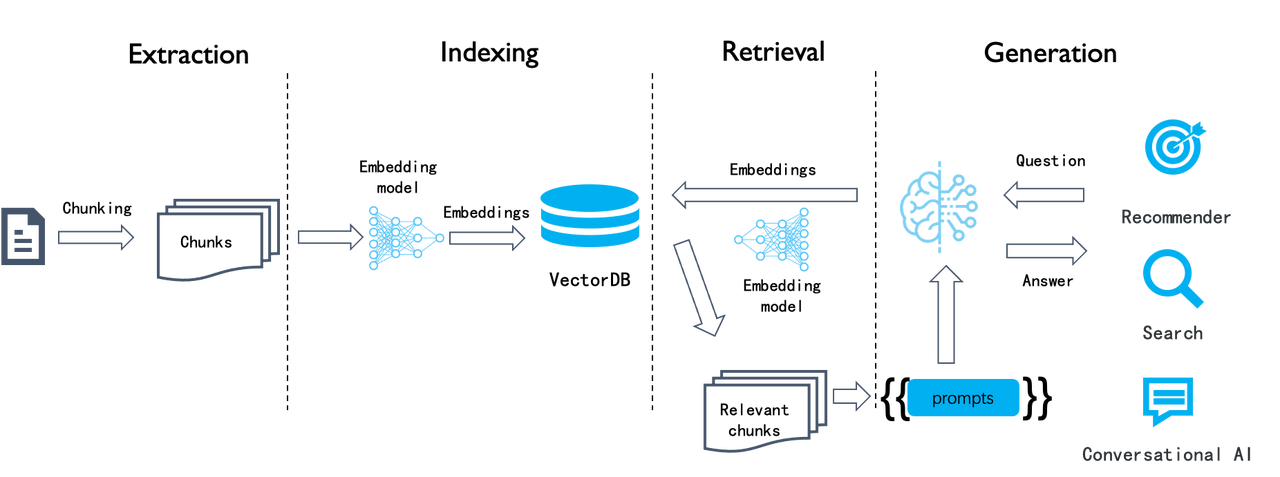
The above illustration shows a typical workflow for RAG. This semantic similarity-based approach has remained consistent for several years and can be divided into four stages: document chunking, indexing, retrieval, and generation. This process is pretty straightforward to implement, but the search results are often unsatisfactory because this naive semantic similarity-based search system has several limitations:
* As a chunk-level operation, the embedding process makes it hard to differentiate tokens requiring increased weight, such as entities, relationships, or events. This results in low-density of effective information in the generated embeddings and poor recall.
* Embeddings are inadequate for precise retrieval. For example, a user inquiring about the portfolios in their company's March 2024 financial plan might receive portfolios from a different time period, marketing or operational plans for the same period of time, or even other types of data.
* Its retrieval results depend highly on the chosen embedding model; general-purpose models may underperform in specific domains.
* Its retrieval results are sensitive to data chunking methods. However, this LLMOps-based system is innately simple and crude in document chunking, leading to loss of data semantics and structure.
* Lack of user intent recognition, and improving the similarity search method alone would not effectively enhance answers for ambiguous user queries.
* Unable to handle complex queries, such as multi-hop question-answering, which requires multi-step reasoning from heterogeneous information sources.
Thus, this LLMOps-centric system can be viewed as RAG 1.0. It features orchestration and ecosystem but falls short in effectiveness. Although developers can quickly build up a prototype system with RAG 1.0, they often find themselves stuck in limbo when tackling issues in real enterprise settings. Therefore, RAG must continue to evolve with LLMs to facilitate search in various specialized domains. Based on these considerations, we propose the following key features and components for RAG 2.0:

1. RAG 2.0 is an end-to-end search system divided into these stages: information extraction, document preprocessing, indexing, and retrieval.
2. RAG 2.0 cannot be orchestrated by reusing LLMOps tools designed for RAG 1.0 because these stages are coupled, lack unified APIs and data formats, and have circular dependencies. For example, query rewriting, which is essential for multi-hop question-answering and user intent recognition, involves iterative retrieval and rewriting.
3. A more comprehensive and powerful database supporting hybrid searches is needed to address the low recall in RAG 1.0. Beyond vector search, it should include full-text search and sparse vector search. It should even implement Tensor search, which supports late interaction mechanisms like ColBERT.
4. Databases only cover query and retrieval in RAG 2.0. From a global perspective, it's essential to optimize every stage of the RAG pipeline. This includes:
1. A separate data extraction and cleansing module is needed to chunk user data. Relying on a collection of recognition models, it recognizes various complex document structures, including tables and texts mixed with illustrations, and iteratively adjusts its chunking size according to the retrieved search results.
2. Before being sent to the database for indexing, the extracted data might undergo several preprocessing procedures, including knowledge graph construction, document clustering, and domain-specific embedding. These procedures ensure that the retrieval results hold the necessary answer by preprocessing the extracted data in multiple ways. This is crucial for addressing complex query issues like multi-hop question-answering, ambiguous user intents, and domain-specific inquiries.
3. The retrieval stage involves coarse ranking and refined ranking. Refined ranking typically occurs outside the database, as it requires different reranking models. Additionally, user queries would go through the continuous cycle of rewriting according to the user intent recognized by AI models. This process continues until the retrieved answers are to the user's satisfaction.
In general, each stage in RAG 2.0 is essentially built around AI models. They work in conjunction with the database to ensure the effectiveness of the final answers.
The current open-source version of RAGFlow primarily addresses the first stage of the pipeline, using deep document understanding models to ensure 'quality in, quality out' for data. Additionally, it employs 2-way retrieval (dual-retrieval) during indexing, the third stage, combining keyword full-text search with vector search. These features distinguish it from other RAG products, suggesting that RAGFlow has set foot on the road towards RAG 2.0.
RAGFlow v0.8 implements agents to better support the subsequent stages in the RAG 2.0 pipeline. For example, to improve the handling of ambiguous queries in a dialogue, RAGFlow introduces a Self-RAG-like mechanism for scoring retrieval results and rewriting user queries. This mechanism requires the use of agents to implement a reflective Agentic RAG system, which operates as a cyclic graph rather than a traditional workflow (DAG: Directed Acyclic Graph). See the illustration below:
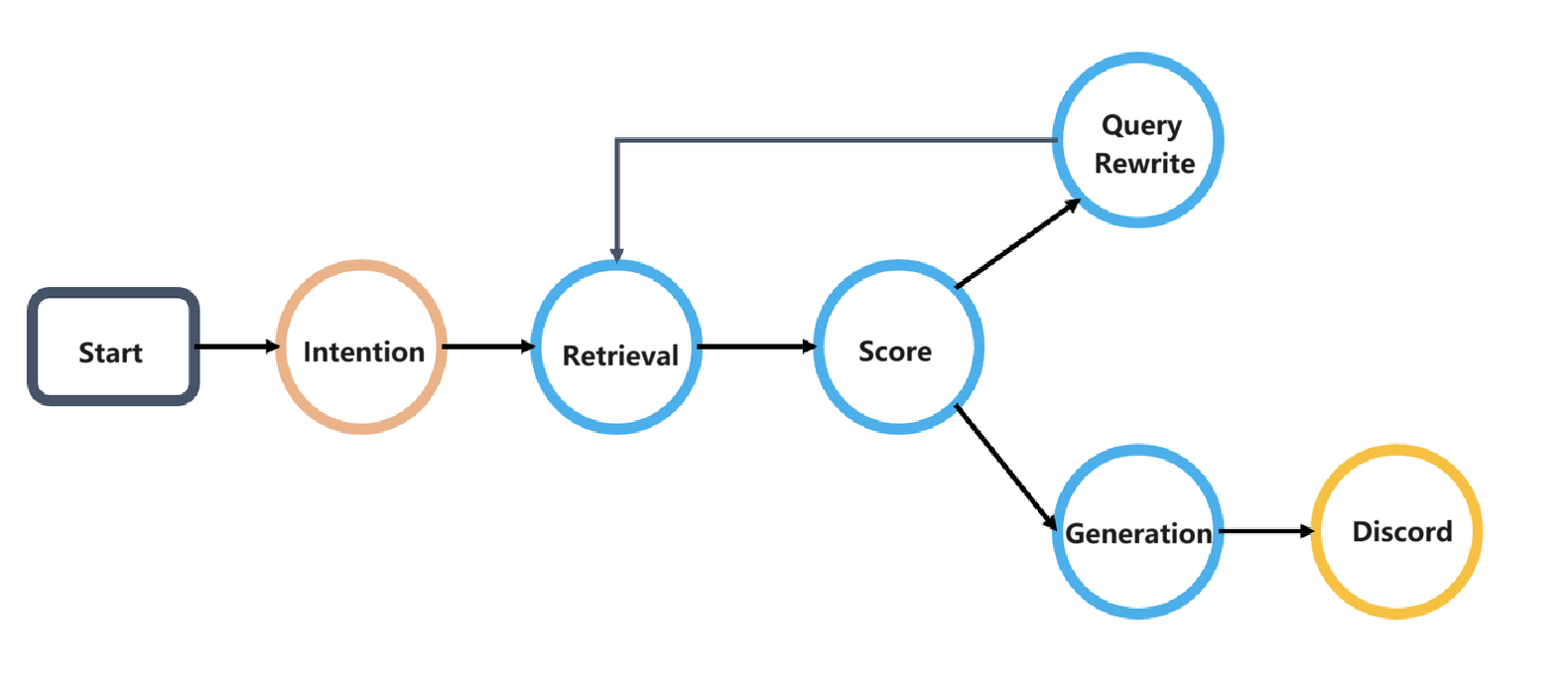
This cyclic graph orchestration system introduces a reflection mechanism for agents. Reflection enables agents to explore user intents, adapt to context dynamically, guide conversation, and ultimately deliver high-quality responses. The ability to reflect lays the foundation for agent intelligence.
The introduction of Agentic RAG and workflow naturally facilitates the integration of RAG 2.0 into enterprise retrieval scenarios. To support this, RAGFlow offers a no-code workflow editing approach, applicable to both Agentic RAG and workflow business systems. The screenshot below showcases several built-in templates currently available in RAGFlow's no-code workflow orchestration system for users to start with, including customer service and HR call-out assistant templates. This template list is continuously expanding to cover more scenarios.
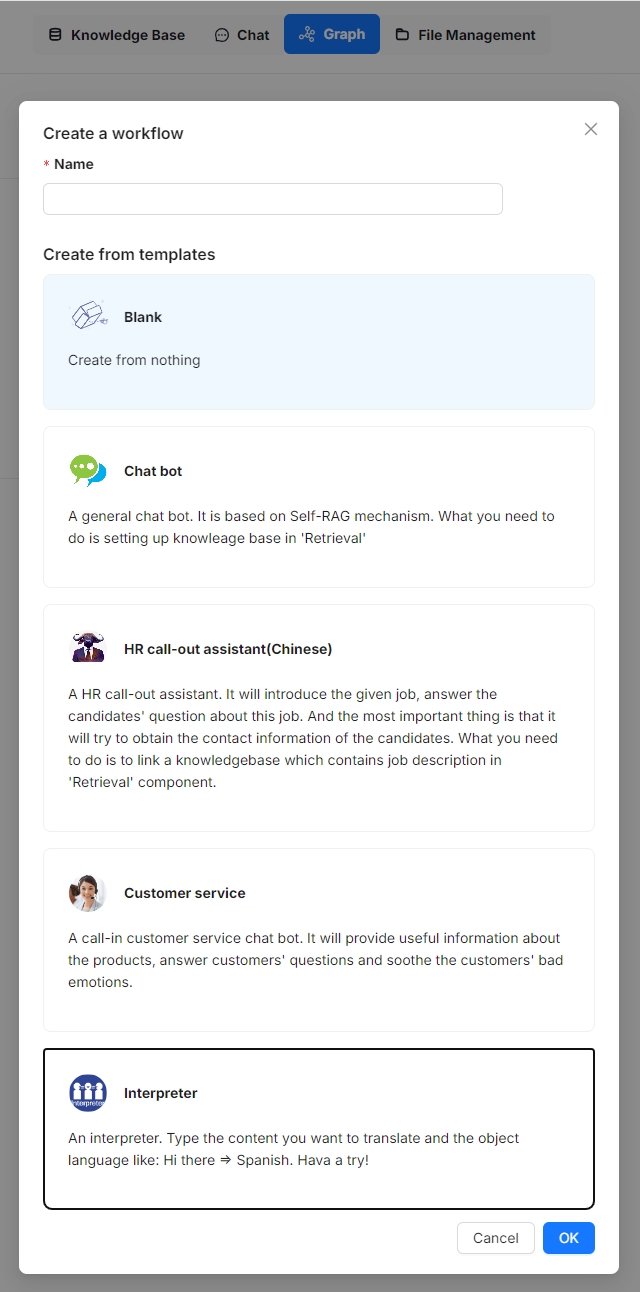
The screenshot below illustrates a Self-RAG workflow example. A 'Relevant' operator assesses whether retrieved results are relevant to the user query. If deemed irrelevant, the query is rewritten. This process repeats until the 'Relevant' operator determines the results are satisfactory.
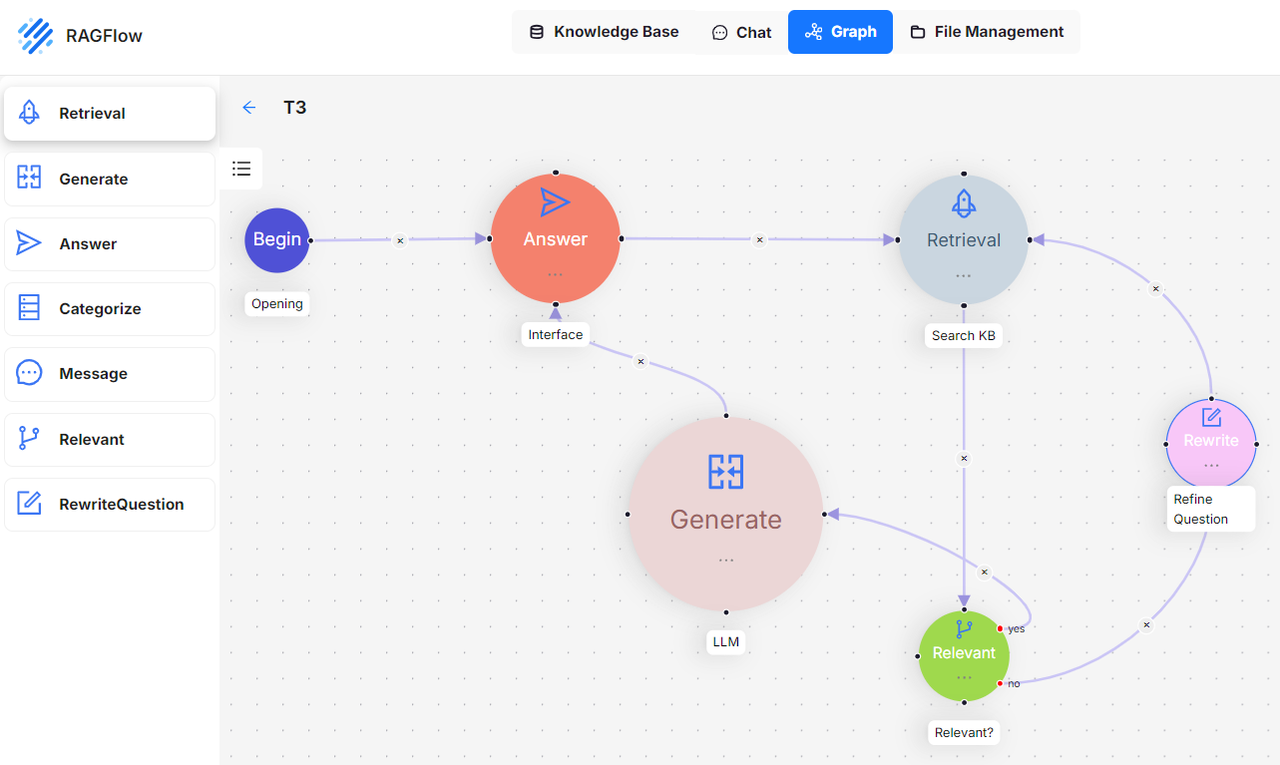
The diagram below shows an HR candidate management system, exemplifying a multi-round dialogue scenario. A corresponding sample conversation is provided immediately following this no-code orchestration template.
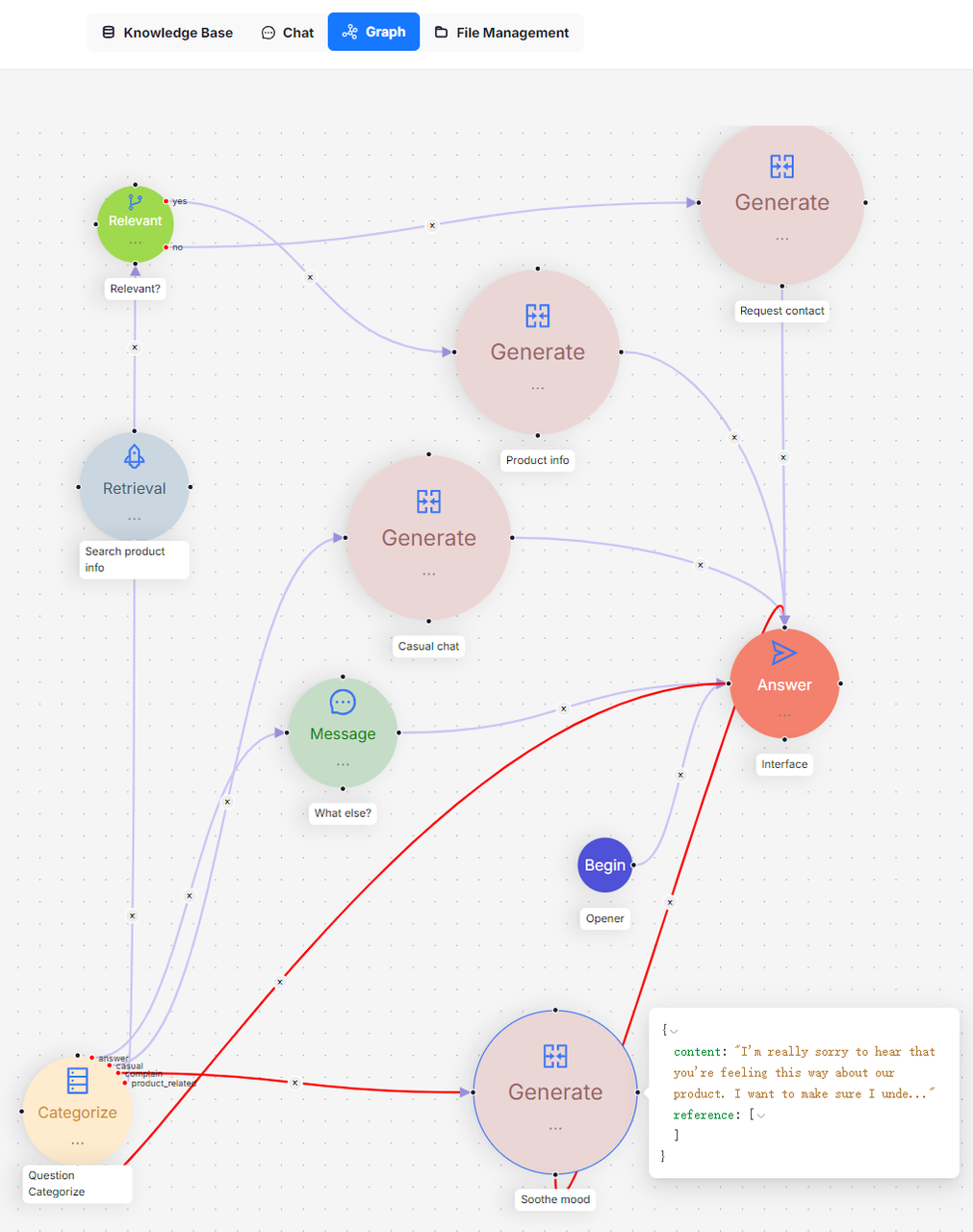
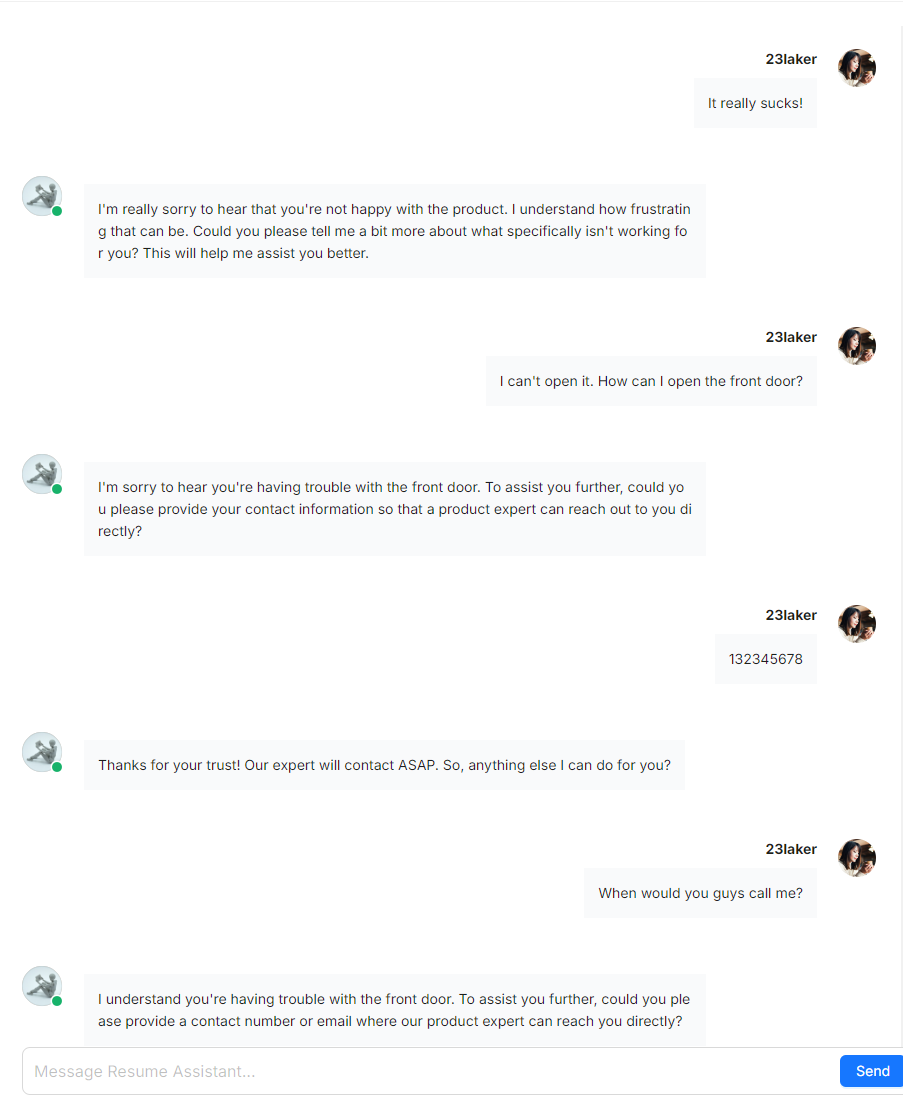
Below are the workflow operators that can be orchestrated in no-code. Above the dividing line are functional operators closely related to RAG and dialogue, which set RAGFlow apart from other RAG systems. Below the line are a couple of tools. A lot of existing workflow agent systems have incorporated many such tools. RAGFlow is still in its early stage, and more such tools will be added.
Now, let's address the initial question how RAGFlow's no-code orchestration differs from similar RAG projects in the market. Firstly, RAGFlow is RAG-centric rather than LLM-centric, thus emphasising how RAG can support domain-specific businesses in enterprise-level scenarios. Secondly, it addresses the core requirements of RAG 2.0, as well as orchestrating search-related technologies such as query intent recognition, query rewriting, and data preprocessing to provide more precise dialogues, whilst also accommodating business systems characterized by workflow orchestration.
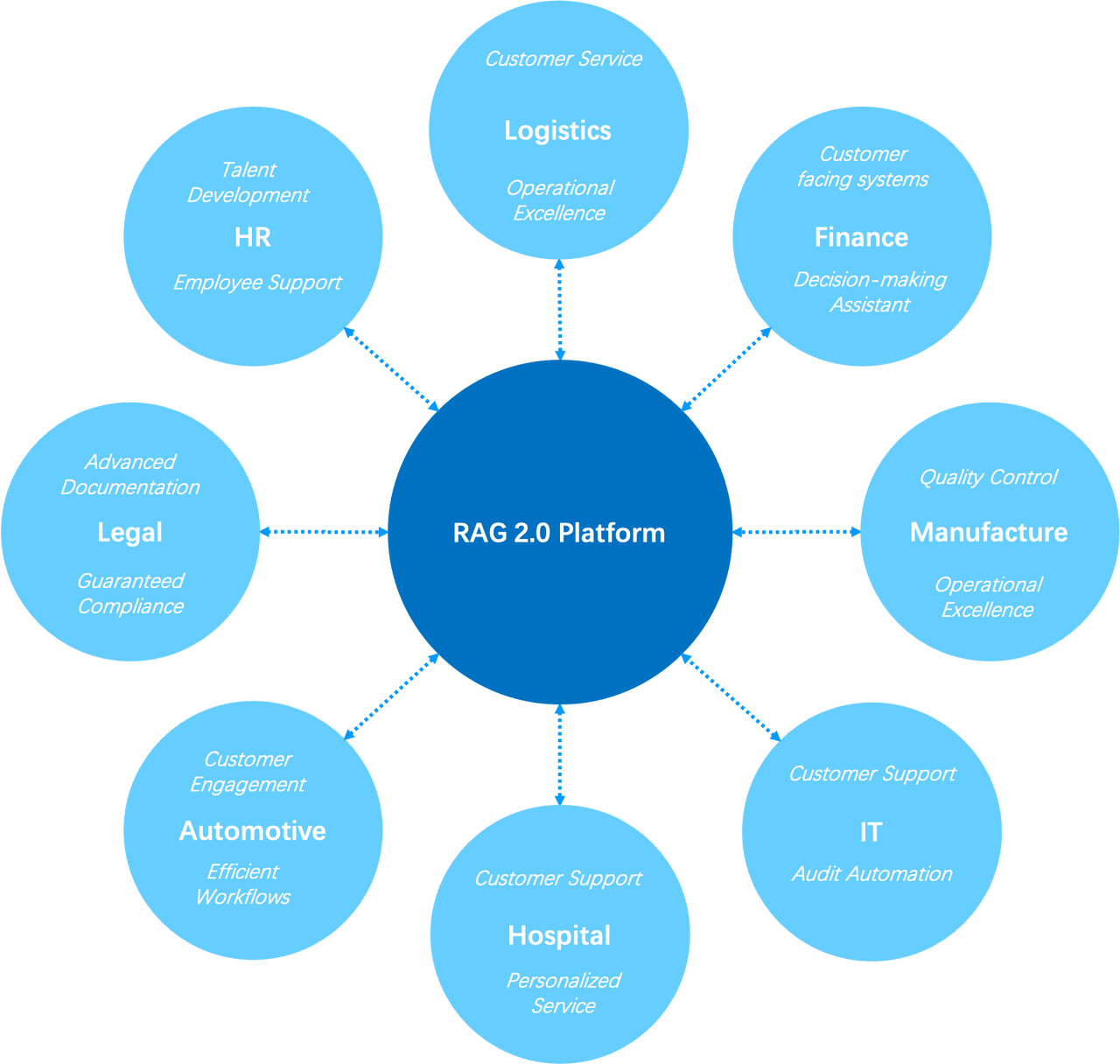
The envisioned future for RAGFlow is an Agentic RAG 2.0 platform, and our ultimate vision is to let RAG 'flow' in enterprise scenarios. If you share the same vision, please follow and star our project on [GitHub](https://github.com/infiniflow/ragflow)
.
---
# Tags | RAGFlow
[Skip to main content](https://ragflow.io/blog/tags#__docusaurus_skipToContent_fallback)
Tags
====
A[](https://ragflow.io/blog/tags#A "Direct link to A")
--------------------------------------------------------
* [agent8](https://ragflow.io/blog/tags/agent)
* [agentic4](https://ragflow.io/blog/tags/agentic)
* * *
D[](https://ragflow.io/blog/tags#D "Direct link to D")
--------------------------------------------------------
* [DeepDoc1](https://ragflow.io/blog/tags/deep-doc)
* * *
F[](https://ragflow.io/blog/tags#F "Direct link to F")
--------------------------------------------------------
* [full-text1](https://ragflow.io/blog/tags/full-text)
* * *
G[](https://ragflow.io/blog/tags#G "Direct link to G")
--------------------------------------------------------
* [Graph3](https://ragflow.io/blog/tags/graph)
* [GraphRAG4](https://ragflow.io/blog/tags/graph-rag)
* * *
H[](https://ragflow.io/blog/tags#H "Direct link to H")
--------------------------------------------------------
* [HybridRAG1](https://ragflow.io/blog/tags/hybrid-rag)
* * *
K[](https://ragflow.io/blog/tags#K "Direct link to K")
--------------------------------------------------------
* [KAG1](https://ragflow.io/blog/tags/kag)
* [knowledge graph1](https://ragflow.io/blog/tags/knowledge-graph)
* * *
L[](https://ragflow.io/blog/tags#L "Direct link to L")
--------------------------------------------------------
* [LLM7](https://ragflow.io/blog/tags/llm)
* [long-context1](https://ragflow.io/blog/tags/long-context)
* [long-token1](https://ragflow.io/blog/tags/long-token)
* * *
M[](https://ragflow.io/blog/tags#M "Direct link to M")
--------------------------------------------------------
* [memory1](https://ragflow.io/blog/tags/memory)
* [multimodal1](https://ragflow.io/blog/tags/multimodal)
* * *
R[](https://ragflow.io/blog/tags#R "Direct link to R")
--------------------------------------------------------
* [RAG10](https://ragflow.io/blog/tags/rag)
* [RAPTOR2](https://ragflow.io/blog/tags/raptor)
* [reranking1](https://ragflow.io/blog/tags/reranking)
* * *
T[](https://ragflow.io/blog/tags#T "Direct link to T")
--------------------------------------------------------
* [tensor1](https://ragflow.io/blog/tags/tensor)
* [text2sql1](https://ragflow.io/blog/tags/text-2-sql)
* * *
W[](https://ragflow.io/blog/tags#W "Direct link to W")
--------------------------------------------------------
* [workflow2](https://ragflow.io/blog/tags/workflow)
* * *
---
# 8 posts tagged with "agent" | RAGFlow
[Skip to main content](https://ragflow.io/blog/tags/agent#__docusaurus_skipToContent_fallback)
Six months have passed since our last year-end review. As the initial wave of excitement sparked by DeepSeek earlier this year begins to wane, AI seems to have entered a phase of stagnation. This pattern is evident in Retrieval-Augmented Generation (RAG) as well: although academic papers on RAG continue to be plentiful, significant breakthroughs have been few and far between in recent months. Likewise, recent iterations of RAGFlow have focused on incremental improvements rather than major feature releases. Is this the start of future leaps forward, or the beginning of a period of steady, incremental growth? A mid-year assessment is therefore both timely and necessary.
As 2024 comes to a close, the development of Retrieval-Augmented Generation (RAG) has been nothing short of turbulent. Let's take a comprehensive look back at the year's progress from various perspectives.
The final release of RAGFlow for the year of 2024, v0.15.0, has just been released, bringing the following key updates:
Agent Improvements[](https://ragflow.io/blog/tags/agent#agent-improvements "Direct link to Agent Improvements")
-----------------------------------------------------------------------------------------------------------------
This version introduces several enhancements to the Agent, including additional APIs, step-run debugging, and import/export capabilities. Since v0.13.0, RAGFlow's Agent has been restructured to improve usability. The step-run debugging feature finalizes this process, enabling operators in the Agent workflow to be executed individually, thereby assisting users in debugging based on output information.
Infinity is a database specifically designed for Retrieval-Augmented Generation (RAG), excelling in both functionality and performance. It provides high-performance capabilities for dense and sparse vector searches, as well as full-text searches, along with efficient range filtering for these data types. Additionally, it features tensor-based reranking, enabling the implementation of powerful multi-modal RAG and integrating ranking capabilities comparable to Cross Encoders.
[RAGFlow](https://github.com/infiniflow/ragflow)
introduces the Text2SQL feature in response to community demand. Traditional Text2SQL requires model fine-tuning, which can significantly increase deployment and maintenance costs when used in enterprise settings alongside RAG or Agent components. RAGFlow’s RAG-based Text2SQL leverages the existing (connected) large language model (LLM), enabling seamless integration with other RAG/Agent components without the need for additional fine-tuned models.
Search technology remains one of the major challenges in computer science, with few commercial products capable of searching effectively. Before the rise of Large Language Models (LLMs), powerful search capabilities weren't considered essential, as they didn't contribute directly to user experience. However, as the LLMs began to gain popularity, a powerful built-in retrieval system became required to apply LLMs to enterprise settings. This is also known as Retrieval-Augmented Generation (RAG)—searching internal knowledge bases for content most relevant to user queries before feeding it to the LLM for final answer generation.
As of v0.8, RAGFlow is officially entering the Agentic era, offering a comprehensive graph-based task orchestration framework on the back-end and a no-code workflow editor on the front-end. Why agentic? How does this feature differ from existing workflow orchestration systems?
The workflow of a naive RAG system can be summarized as follows: the RAG system does retrieval from a specified data source using the user query, reranks the retrieval results, appends prompts, and sends them to the LLM for final answer generation.

A naive RAG suffices in scenarios where the user's intent is evident, as the answer is included in the retrieved results and can be sent directly to the LLM. Yet, in most circumstances ambiguous user intents are the norm and demand iterative queries to generate the final answer. For instance, questions involving summarizing multiple documents require multi-step reasoning. These scenarios necessitate Agentic RAG, which involves task orchestration mechanisms during the question-answering process.
Agent and RAG complement each other. Agentic RAG, as the name suggests, is an agent-based RAG. The major distinction between an agentic RAG and a naive RAG is that agentic RAG introduces a dynamic agent orchestration mechanism, which criticizes retrievals, rewrites query according to the intent of each user query, and employs "multi-hop" reasoning to handle complex question-answering tasks.
---
# 4 posts tagged with "agentic" | RAGFlow
[Skip to main content](https://ragflow.io/blog/tags/agentic#__docusaurus_skipToContent_fallback)
Six months have passed since our last year-end review. As the initial wave of excitement sparked by DeepSeek earlier this year begins to wane, AI seems to have entered a phase of stagnation. This pattern is evident in Retrieval-Augmented Generation (RAG) as well: although academic papers on RAG continue to be plentiful, significant breakthroughs have been few and far between in recent months. Likewise, recent iterations of RAGFlow have focused on incremental improvements rather than major feature releases. Is this the start of future leaps forward, or the beginning of a period of steady, incremental growth? A mid-year assessment is therefore both timely and necessary.
Search technology remains one of the major challenges in computer science, with few commercial products capable of searching effectively. Before the rise of Large Language Models (LLMs), powerful search capabilities weren't considered essential, as they didn't contribute directly to user experience. However, as the LLMs began to gain popularity, a powerful built-in retrieval system became required to apply LLMs to enterprise settings. This is also known as Retrieval-Augmented Generation (RAG)—searching internal knowledge bases for content most relevant to user queries before feeding it to the LLM for final answer generation.
As of v0.8, RAGFlow is officially entering the Agentic era, offering a comprehensive graph-based task orchestration framework on the back-end and a no-code workflow editor on the front-end. Why agentic? How does this feature differ from existing workflow orchestration systems?
The workflow of a naive RAG system can be summarized as follows: the RAG system does retrieval from a specified data source using the user query, reranks the retrieval results, appends prompts, and sends them to the LLM for final answer generation.

A naive RAG suffices in scenarios where the user's intent is evident, as the answer is included in the retrieved results and can be sent directly to the LLM. Yet, in most circumstances ambiguous user intents are the norm and demand iterative queries to generate the final answer. For instance, questions involving summarizing multiple documents require multi-step reasoning. These scenarios necessitate Agentic RAG, which involves task orchestration mechanisms during the question-answering process.
Agent and RAG complement each other. Agentic RAG, as the name suggests, is an agent-based RAG. The major distinction between an agentic RAG and a naive RAG is that agentic RAG introduces a dynamic agent orchestration mechanism, which criticizes retrievals, rewrites query according to the intent of each user query, and employs "multi-hop" reasoning to handle complex question-answering tasks.
---
# One post tagged with "DeepDoc" | RAGFlow
[Skip to main content](https://ragflow.io/blog/tags/deep-doc#__docusaurus_skipToContent_fallback)
The final release of RAGFlow for the year of 2024, v0.15.0, has just been released, bringing the following key updates:
Agent Improvements[](https://ragflow.io/blog/tags/deep-doc#agent-improvements "Direct link to Agent Improvements")
--------------------------------------------------------------------------------------------------------------------
This version introduces several enhancements to the Agent, including additional APIs, step-run debugging, and import/export capabilities. Since v0.13.0, RAGFlow's Agent has been restructured to improve usability. The step-run debugging feature finalizes this process, enabling operators in the Agent workflow to be executed individually, thereby assisting users in debugging based on output information.
---
# One post tagged with "full-text" | RAGFlow
[Skip to main content](https://ragflow.io/blog/tags/full-text#__docusaurus_skipToContent_fallback)
As 2024 comes to a close, the development of Retrieval-Augmented Generation (RAG) has been nothing short of turbulent. Let's take a comprehensive look back at the year's progress from various perspectives.
---
# 3 posts tagged with "Graph" | RAGFlow
[Skip to main content](https://ragflow.io/blog/tags/graph#__docusaurus_skipToContent_fallback)
Search technology remains one of the major challenges in computer science, with few commercial products capable of searching effectively. Before the rise of Large Language Models (LLMs), powerful search capabilities weren't considered essential, as they didn't contribute directly to user experience. However, as the LLMs began to gain popularity, a powerful built-in retrieval system became required to apply LLMs to enterprise settings. This is also known as Retrieval-Augmented Generation (RAG)—searching internal knowledge bases for content most relevant to user queries before feeding it to the LLM for final answer generation.
As of v0.8, RAGFlow is officially entering the Agentic era, offering a comprehensive graph-based task orchestration framework on the back-end and a no-code workflow editor on the front-end. Why agentic? How does this feature differ from existing workflow orchestration systems?
The workflow of a naive RAG system can be summarized as follows: the RAG system does retrieval from a specified data source using the user query, reranks the retrieval results, appends prompts, and sends them to the LLM for final answer generation.

A naive RAG suffices in scenarios where the user's intent is evident, as the answer is included in the retrieved results and can be sent directly to the LLM. Yet, in most circumstances ambiguous user intents are the norm and demand iterative queries to generate the final answer. For instance, questions involving summarizing multiple documents require multi-step reasoning. These scenarios necessitate Agentic RAG, which involves task orchestration mechanisms during the question-answering process.
Agent and RAG complement each other. Agentic RAG, as the name suggests, is an agent-based RAG. The major distinction between an agentic RAG and a naive RAG is that agentic RAG introduces a dynamic agent orchestration mechanism, which criticizes retrievals, rewrites query according to the intent of each user query, and employs "multi-hop" reasoning to handle complex question-answering tasks.
---
# One post tagged with "HybridRAG" | RAGFlow
[Skip to main content](https://ragflow.io/blog/tags/hybrid-rag#__docusaurus_skipToContent_fallback)
Infinity is a database specifically designed for Retrieval-Augmented Generation (RAG), excelling in both functionality and performance. It provides high-performance capabilities for dense and sparse vector searches, as well as full-text searches, along with efficient range filtering for these data types. Additionally, it features tensor-based reranking, enabling the implementation of powerful multi-modal RAG and integrating ranking capabilities comparable to Cross Encoders.
---
# 4 posts tagged with "GraphRAG" | RAGFlow
[Skip to main content](https://ragflow.io/blog/tags/graph-rag#__docusaurus_skipToContent_fallback)
As 2024 comes to a close, the development of Retrieval-Augmented Generation (RAG) has been nothing short of turbulent. Let's take a comprehensive look back at the year's progress from various perspectives.
The final release of RAGFlow for the year of 2024, v0.15.0, has just been released, bringing the following key updates:
Agent Improvements[](https://ragflow.io/blog/tags/graph-rag#agent-improvements "Direct link to Agent Improvements")
---------------------------------------------------------------------------------------------------------------------
This version introduces several enhancements to the Agent, including additional APIs, step-run debugging, and import/export capabilities. Since v0.13.0, RAGFlow's Agent has been restructured to improve usability. The step-run debugging feature finalizes this process, enabling operators in the Agent workflow to be executed individually, thereby assisting users in debugging based on output information.
Infinity is a database specifically designed for Retrieval-Augmented Generation (RAG), excelling in both functionality and performance. It provides high-performance capabilities for dense and sparse vector searches, as well as full-text searches, along with efficient range filtering for these data types. Additionally, it features tensor-based reranking, enabling the implementation of powerful multi-modal RAG and integrating ranking capabilities comparable to Cross Encoders.
[RAGFlow](https://github.com/infiniflow/ragflow)
v0.9 introduces support for GraphRAG, which has recently been open-sourced by Microsoft, allegedly the next generation of Retrieval-Augmented Generation (RAG). Within the RAGFlow framework, we have a more comprehensive definition of RAG 2.0. This proposed end-to-end system is search-centric and consists of four stages. The last two stages—indexing and retrieval—primarily require a dedicated database, while the first two stages are defined as follows:
---
# One post tagged with "KAG" | RAGFlow
[Skip to main content](https://ragflow.io/blog/tags/kag#__docusaurus_skipToContent_fallback)
Infinity is a database specifically designed for Retrieval-Augmented Generation (RAG), excelling in both functionality and performance. It provides high-performance capabilities for dense and sparse vector searches, as well as full-text searches, along with efficient range filtering for these data types. Additionally, it features tensor-based reranking, enabling the implementation of powerful multi-modal RAG and integrating ranking capabilities comparable to Cross Encoders.
---
# One post tagged with "knowledge graph" | RAGFlow
[Skip to main content](https://ragflow.io/blog/tags/knowledge-graph#__docusaurus_skipToContent_fallback)
[RAGFlow](https://github.com/infiniflow/ragflow)
v0.9 introduces support for GraphRAG, which has recently been open-sourced by Microsoft, allegedly the next generation of Retrieval-Augmented Generation (RAG). Within the RAGFlow framework, we have a more comprehensive definition of RAG 2.0. This proposed end-to-end system is search-centric and consists of four stages. The last two stages—indexing and retrieval—primarily require a dedicated database, while the first two stages are defined as follows:
---
# 7 posts tagged with "LLM" | RAGFlow
[Skip to main content](https://ragflow.io/blog/tags/llm#__docusaurus_skipToContent_fallback)
Six months have passed since our last year-end review. As the initial wave of excitement sparked by DeepSeek earlier this year begins to wane, AI seems to have entered a phase of stagnation. This pattern is evident in Retrieval-Augmented Generation (RAG) as well: although academic papers on RAG continue to be plentiful, significant breakthroughs have been few and far between in recent months. Likewise, recent iterations of RAGFlow have focused on incremental improvements rather than major feature releases. Is this the start of future leaps forward, or the beginning of a period of steady, incremental growth? A mid-year assessment is therefore both timely and necessary.
The final release of RAGFlow for the year of 2024, v0.15.0, has just been released, bringing the following key updates:
Agent Improvements[](https://ragflow.io/blog/tags/llm#agent-improvements "Direct link to Agent Improvements")
---------------------------------------------------------------------------------------------------------------
This version introduces several enhancements to the Agent, including additional APIs, step-run debugging, and import/export capabilities. Since v0.13.0, RAGFlow's Agent has been restructured to improve usability. The step-run debugging feature finalizes this process, enabling operators in the Agent workflow to be executed individually, thereby assisting users in debugging based on output information.
Infinity is a database specifically designed for Retrieval-Augmented Generation (RAG), excelling in both functionality and performance. It provides high-performance capabilities for dense and sparse vector searches, as well as full-text searches, along with efficient range filtering for these data types. Additionally, it features tensor-based reranking, enabling the implementation of powerful multi-modal RAG and integrating ranking capabilities comparable to Cross Encoders.
Search technology remains one of the major challenges in computer science, with few commercial products capable of searching effectively. Before the rise of Large Language Models (LLMs), powerful search capabilities weren't considered essential, as they didn't contribute directly to user experience. However, as the LLMs began to gain popularity, a powerful built-in retrieval system became required to apply LLMs to enterprise settings. This is also known as Retrieval-Augmented Generation (RAG)—searching internal knowledge bases for content most relevant to user queries before feeding it to the LLM for final answer generation.
As of v0.8, RAGFlow is officially entering the Agentic era, offering a comprehensive graph-based task orchestration framework on the back-end and a no-code workflow editor on the front-end. Why agentic? How does this feature differ from existing workflow orchestration systems?
The workflow of a naive RAG system can be summarized as follows: the RAG system does retrieval from a specified data source using the user query, reranks the retrieval results, appends prompts, and sends them to the LLM for final answer generation.

A naive RAG suffices in scenarios where the user's intent is evident, as the answer is included in the retrieved results and can be sent directly to the LLM. Yet, in most circumstances ambiguous user intents are the norm and demand iterative queries to generate the final answer. For instance, questions involving summarizing multiple documents require multi-step reasoning. These scenarios necessitate Agentic RAG, which involves task orchestration mechanisms during the question-answering process.
Agent and RAG complement each other. Agentic RAG, as the name suggests, is an agent-based RAG. The major distinction between an agentic RAG and a naive RAG is that agentic RAG introduces a dynamic agent orchestration mechanism, which criticizes retrievals, rewrites query according to the intent of each user query, and employs "multi-hop" reasoning to handle complex question-answering tasks.
[RAGFlow v0.6.0](https://github.com/infiniflow/ragflow)
was released this week, solving many ease-of-use and stability issues that emerged since it was open sourced earlier this April. Future releases of RAGFlow will focus on tackling the deep-seated problems of RAG capability. Hate to say it, existing RAG solutions in the market are still in POC (Proof of Concept) stage and can’t be applied directly to real production scenarios.
---
# One post tagged with "long-context" | RAGFlow
[Skip to main content](https://ragflow.io/blog/tags/long-context#__docusaurus_skipToContent_fallback)
[RAGFlow v0.6.0](https://github.com/infiniflow/ragflow)
was released this week, solving many ease-of-use and stability issues that emerged since it was open sourced earlier this April. Future releases of RAGFlow will focus on tackling the deep-seated problems of RAG capability. Hate to say it, existing RAG solutions in the market are still in POC (Proof of Concept) stage and can’t be applied directly to real production scenarios.
---
# One post tagged with "long-token" | RAGFlow
[Skip to main content](https://ragflow.io/blog/tags/long-token#__docusaurus_skipToContent_fallback)
[RAGFlow v0.6.0](https://github.com/infiniflow/ragflow)
was released this week, solving many ease-of-use and stability issues that emerged since it was open sourced earlier this April. Future releases of RAGFlow will focus on tackling the deep-seated problems of RAG capability. Hate to say it, existing RAG solutions in the market are still in POC (Proof of Concept) stage and can’t be applied directly to real production scenarios.
---
# One post tagged with "memory" | RAGFlow
[Skip to main content](https://ragflow.io/blog/tags/memory#__docusaurus_skipToContent_fallback)
Six months have passed since our last year-end review. As the initial wave of excitement sparked by DeepSeek earlier this year begins to wane, AI seems to have entered a phase of stagnation. This pattern is evident in Retrieval-Augmented Generation (RAG) as well: although academic papers on RAG continue to be plentiful, significant breakthroughs have been few and far between in recent months. Likewise, recent iterations of RAGFlow have focused on incremental improvements rather than major feature releases. Is this the start of future leaps forward, or the beginning of a period of steady, incremental growth? A mid-year assessment is therefore both timely and necessary.
---
# One post tagged with "multimodal" | RAGFlow
[Skip to main content](https://ragflow.io/blog/tags/multimodal#__docusaurus_skipToContent_fallback)
As 2024 comes to a close, the development of Retrieval-Augmented Generation (RAG) has been nothing short of turbulent. Let's take a comprehensive look back at the year's progress from various perspectives.
---
# 2 posts tagged with "RAPTOR" | RAGFlow
[Skip to main content](https://ragflow.io/blog/tags/raptor#__docusaurus_skipToContent_fallback)
The final release of RAGFlow for the year of 2024, v0.15.0, has just been released, bringing the following key updates:
Agent Improvements[](https://ragflow.io/blog/tags/raptor#agent-improvements "Direct link to Agent Improvements")
------------------------------------------------------------------------------------------------------------------
This version introduces several enhancements to the Agent, including additional APIs, step-run debugging, and import/export capabilities. Since v0.13.0, RAGFlow's Agent has been restructured to improve usability. The step-run debugging feature finalizes this process, enabling operators in the Agent workflow to be executed individually, thereby assisting users in debugging based on output information.
[RAGFlow v0.6.0](https://github.com/infiniflow/ragflow)
was released this week, solving many ease-of-use and stability issues that emerged since it was open sourced earlier this April. Future releases of RAGFlow will focus on tackling the deep-seated problems of RAG capability. Hate to say it, existing RAG solutions in the market are still in POC (Proof of Concept) stage and can’t be applied directly to real production scenarios.
---
# One post tagged with "reranking" | RAGFlow
[Skip to main content](https://ragflow.io/blog/tags/reranking#__docusaurus_skipToContent_fallback)
As 2024 comes to a close, the development of Retrieval-Augmented Generation (RAG) has been nothing short of turbulent. Let's take a comprehensive look back at the year's progress from various perspectives.
---
# 10 posts tagged with "RAG" | RAGFlow
[Skip to main content](https://ragflow.io/blog/tags/rag#__docusaurus_skipToContent_fallback)
Six months have passed since our last year-end review. As the initial wave of excitement sparked by DeepSeek earlier this year begins to wane, AI seems to have entered a phase of stagnation. This pattern is evident in Retrieval-Augmented Generation (RAG) as well: although academic papers on RAG continue to be plentiful, significant breakthroughs have been few and far between in recent months. Likewise, recent iterations of RAGFlow have focused on incremental improvements rather than major feature releases. Is this the start of future leaps forward, or the beginning of a period of steady, incremental growth? A mid-year assessment is therefore both timely and necessary.
As 2024 comes to a close, the development of Retrieval-Augmented Generation (RAG) has been nothing short of turbulent. Let's take a comprehensive look back at the year's progress from various perspectives.
The final release of RAGFlow for the year of 2024, v0.15.0, has just been released, bringing the following key updates:
Agent Improvements[](https://ragflow.io/blog/tags/rag#agent-improvements "Direct link to Agent Improvements")
---------------------------------------------------------------------------------------------------------------
This version introduces several enhancements to the Agent, including additional APIs, step-run debugging, and import/export capabilities. Since v0.13.0, RAGFlow's Agent has been restructured to improve usability. The step-run debugging feature finalizes this process, enabling operators in the Agent workflow to be executed individually, thereby assisting users in debugging based on output information.
Infinity is a database specifically designed for Retrieval-Augmented Generation (RAG), excelling in both functionality and performance. It provides high-performance capabilities for dense and sparse vector searches, as well as full-text searches, along with efficient range filtering for these data types. Additionally, it features tensor-based reranking, enabling the implementation of powerful multi-modal RAG and integrating ranking capabilities comparable to Cross Encoders.
[RAGFlow](https://github.com/infiniflow/ragflow)
introduces the Text2SQL feature in response to community demand. Traditional Text2SQL requires model fine-tuning, which can significantly increase deployment and maintenance costs when used in enterprise settings alongside RAG or Agent components. RAGFlow’s RAG-based Text2SQL leverages the existing (connected) large language model (LLM), enabling seamless integration with other RAG/Agent components without the need for additional fine-tuned models.
[RAGFlow](https://github.com/infiniflow/ragflow)
v0.9 introduces support for GraphRAG, which has recently been open-sourced by Microsoft, allegedly the next generation of Retrieval-Augmented Generation (RAG). Within the RAGFlow framework, we have a more comprehensive definition of RAG 2.0. This proposed end-to-end system is search-centric and consists of four stages. The last two stages—indexing and retrieval—primarily require a dedicated database, while the first two stages are defined as follows:
Search technology remains one of the major challenges in computer science, with few commercial products capable of searching effectively. Before the rise of Large Language Models (LLMs), powerful search capabilities weren't considered essential, as they didn't contribute directly to user experience. However, as the LLMs began to gain popularity, a powerful built-in retrieval system became required to apply LLMs to enterprise settings. This is also known as Retrieval-Augmented Generation (RAG)—searching internal knowledge bases for content most relevant to user queries before feeding it to the LLM for final answer generation.
As of v0.8, RAGFlow is officially entering the Agentic era, offering a comprehensive graph-based task orchestration framework on the back-end and a no-code workflow editor on the front-end. Why agentic? How does this feature differ from existing workflow orchestration systems?
The workflow of a naive RAG system can be summarized as follows: the RAG system does retrieval from a specified data source using the user query, reranks the retrieval results, appends prompts, and sends them to the LLM for final answer generation.

A naive RAG suffices in scenarios where the user's intent is evident, as the answer is included in the retrieved results and can be sent directly to the LLM. Yet, in most circumstances ambiguous user intents are the norm and demand iterative queries to generate the final answer. For instance, questions involving summarizing multiple documents require multi-step reasoning. These scenarios necessitate Agentic RAG, which involves task orchestration mechanisms during the question-answering process.
Agent and RAG complement each other. Agentic RAG, as the name suggests, is an agent-based RAG. The major distinction between an agentic RAG and a naive RAG is that agentic RAG introduces a dynamic agent orchestration mechanism, which criticizes retrievals, rewrites query according to the intent of each user query, and employs "multi-hop" reasoning to handle complex question-answering tasks.
[RAGFlow v0.6.0](https://github.com/infiniflow/ragflow)
was released this week, solving many ease-of-use and stability issues that emerged since it was open sourced earlier this April. Future releases of RAGFlow will focus on tackling the deep-seated problems of RAG capability. Hate to say it, existing RAG solutions in the market are still in POC (Proof of Concept) stage and can’t be applied directly to real production scenarios.
---
# One post tagged with "tensor" | RAGFlow
[Skip to main content](https://ragflow.io/blog/tags/tensor#__docusaurus_skipToContent_fallback)
As 2024 comes to a close, the development of Retrieval-Augmented Generation (RAG) has been nothing short of turbulent. Let's take a comprehensive look back at the year's progress from various perspectives.
---
# One post tagged with "text2sql" | RAGFlow
[Skip to main content](https://ragflow.io/blog/tags/text-2-sql#__docusaurus_skipToContent_fallback)
[RAGFlow](https://github.com/infiniflow/ragflow)
introduces the Text2SQL feature in response to community demand. Traditional Text2SQL requires model fine-tuning, which can significantly increase deployment and maintenance costs when used in enterprise settings alongside RAG or Agent components. RAGFlow’s RAG-based Text2SQL leverages the existing (connected) large language model (LLM), enabling seamless integration with other RAG/Agent components without the need for additional fine-tuned models.
---
# 2 posts tagged with "workflow" | RAGFlow
[Skip to main content](https://ragflow.io/blog/tags/workflow#__docusaurus_skipToContent_fallback)
Six months have passed since our last year-end review. As the initial wave of excitement sparked by DeepSeek earlier this year begins to wane, AI seems to have entered a phase of stagnation. This pattern is evident in Retrieval-Augmented Generation (RAG) as well: although academic papers on RAG continue to be plentiful, significant breakthroughs have been few and far between in recent months. Likewise, recent iterations of RAGFlow have focused on incremental improvements rather than major feature releases. Is this the start of future leaps forward, or the beginning of a period of steady, incremental growth? A mid-year assessment is therefore both timely and necessary.
The final release of RAGFlow for the year of 2024, v0.15.0, has just been released, bringing the following key updates:
Agent Improvements[](https://ragflow.io/blog/tags/workflow#agent-improvements "Direct link to Agent Improvements")
--------------------------------------------------------------------------------------------------------------------
This version introduces several enhancements to the Agent, including additional APIs, step-run debugging, and import/export capabilities. Since v0.13.0, RAGFlow's Agent has been restructured to improve usability. The step-run debugging feature finalizes this process, enabling operators in the Agent workflow to be executed individually, thereby assisting users in debugging based on output information.
---
# Markdown page example | RAGFlow
[Skip to main content](https://ragflow.io/markdown-page#__docusaurus_skipToContent_fallback)
Markdown page example
=====================
You don't need React to write simple standalone pages.
---
# The Rise and Evolution of RAG in 2024 A Year in Review | RAGFlow
[Skip to main content](https://ragflow.io/blog/the-rise-and-evolution-of-rag-in-2024-a-year-in-review#__docusaurus_skipToContent_fallback)
As 2024 comes to a close, the development of Retrieval-Augmented Generation (RAG) has been nothing short of turbulent. Let's take a comprehensive look back at the year's progress from various perspectives.
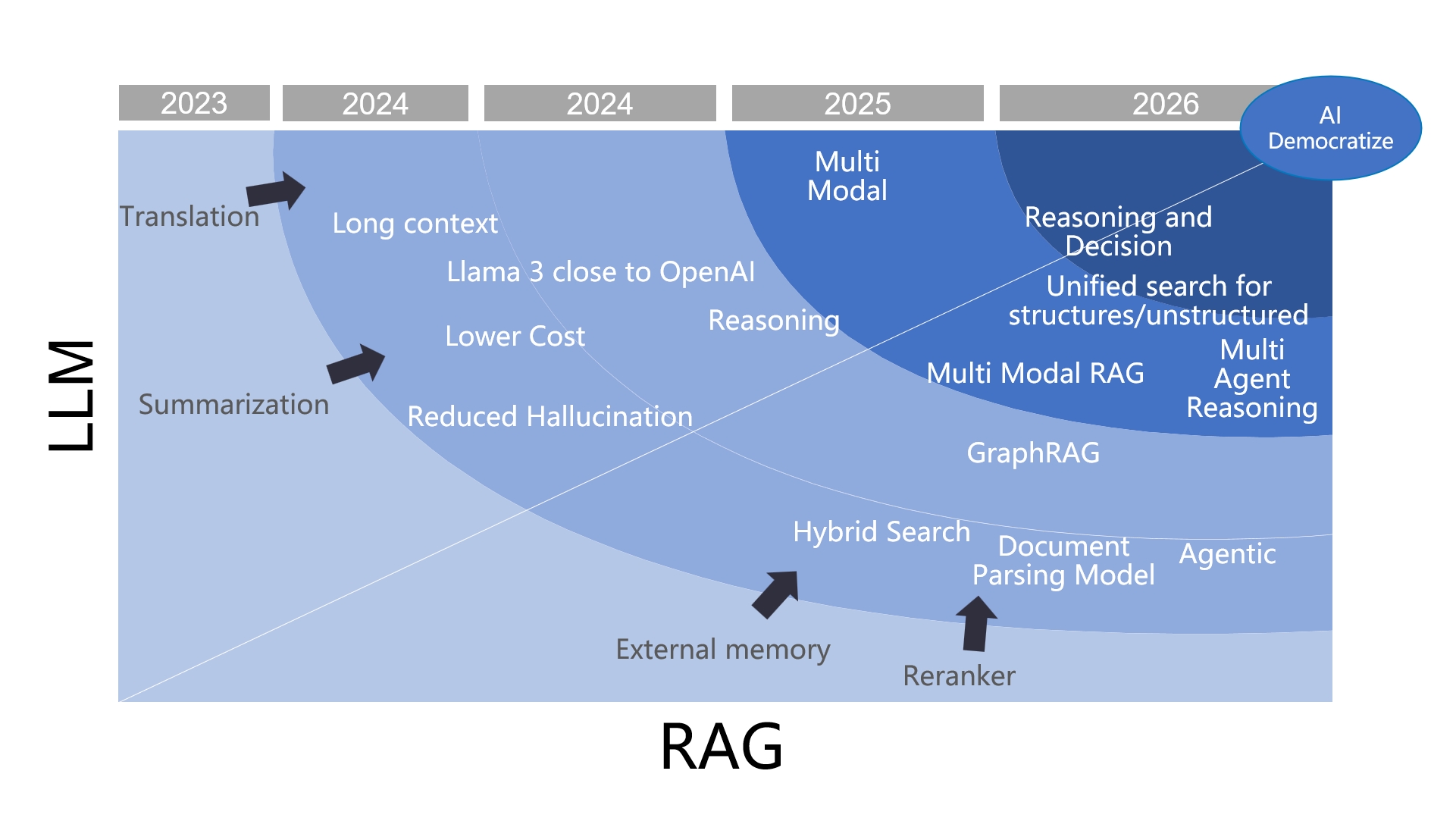
Key events in RAG's evolution[](https://ragflow.io/blog/the-rise-and-evolution-of-rag-in-2024-a-year-in-review#key-events-in-rags-evolution "Direct link to Key events in RAG's evolution")
---------------------------------------------------------------------------------------------------------------------------------------------------------------------------------------------
### The Debate: "RAG is Dead, Long Live RAG!"[](https://ragflow.io/blog/the-rise-and-evolution-of-rag-in-2024-a-year-in-review#the-debate-rag-is-dead-long-live-rag "Direct link to The Debate: "RAG is Dead, Long Live RAG!"")
At the beginning of 2024, the year was dubbed "The Year of RAG" by some, though this wasn't a universally accepted label. However, the progress made throughout the year certainly justified this title. In scenarios involving Large Language Models (LLMs), RAG has consistently proven to be an indispensable role. Yet, since its inception, debates about RAG have never ceased. As seen in the graph above, the term "RAG" was not widely used in 2023; instead, temporary terms such as "external memory" or "external knowledge base" were more prevalent. The main debate at that time centered around whether to use temporary external solutions or permanent fine-tuning. By early 2024, this debate had mostly settled: RAG offered a clear advantage in terms of cost and real-time performance, with only minor differences in effectiveness compared to fine-tuning. Even in scenarios requiring fine-tuning, RAG often remained essential.
In the first half of 2024, one of the most significant impacts on industry was the gradual convergence of open-source LLMs with commercial LLMs led by OpenAI. This meant that capabilities such as summarization and instruction following had significantly improved compared to 2023. This progress enabled widespread adoption of basic RAG applications such as question answering, customer service, and knowledge bases. Another notable advancement in LLMs during this period was long context windows—a feature that sparked controversy throughout the first half of the year but gradually subsided by mid-year. Similar to previous debates, it was concluded that both long context windows and traditional methods had their strengths and were best used together.
| Long-context | RAG |
| --- | --- |
| 👎Accuracy decreases as the context length increases. | |
| 👎The longer the context window, the more likely it is to miss distant "needles". | |
| 👎Introduces noises if the retrieved content is semantically similar but irrelevant to the answer. | |
| 👎LLM is "indefinite" by nature. | |
| 👎Difficult to consolidate the enterprise data with long context alone. | |
| 👎Long context significantly increases both the cost of reasoning and delay. | |
| | 👎Not smart enough: capable only of searching, unable to reason or make decisions. |
Additionally, the maturation of architectures like LLMOps enabled businesses and individuals to quickly set up their own custom systems using components such as vector databases, embedding/reranking models, LLM itself, chunking tools, and prompt management techniques connected via arrows indicating data flow ensuring system usability.
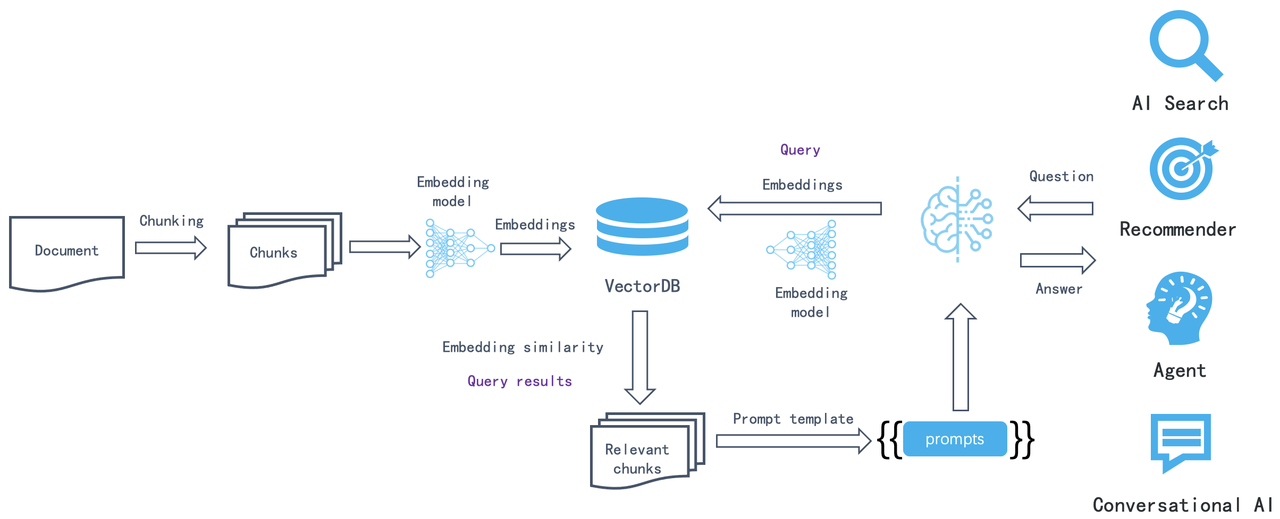
However, applying it in broader scenarios and enterprises, and aligning its development with advancements in LLMs, still faces significant technical challenges. References \[29\] and \[30\] outline traditional academic approaches to these challenges. While some principles and practices are widely accepted, a practical analysis reveals that RAG primarily faces three main issues:
1. Ineffective question answering for unstructured multimodal documents: Existing LLMOps solutions are confined to text-only scenarios. Documents such as PDFs, PowerPoint presentations (PPTs), or those integrating text with images cannot unlock their full commercial potential. These types of documents often constitute the majority within enterprise data.
2. Low recall and hit rates due to pure vector databases: Relying solely on vector databases leads to low recall and hit rates, hindering effective real-world question answering. This is due to vector representations' inability to precisely represent exact information and the semantic loss during retrieval.
3. The fundamental challenge of search: At its core, RAG relies on search capabilities. It works only if it can "search" for the answer based on a user's query. However, this prerequisite often fails with vague or ambiguous queries lacking clear intent or 'multi-hop' questions requiring synthesis from multiple sub-questions. In such scenarios, there is a significant semantic gap between the question posed and the answer retrieved, making traditional search methods ineffective.
Therefore, the following landmark events revolve around the technical challenges of RAG.
### The rise of multimodal document parsing tools[](https://ragflow.io/blog/the-rise-and-evolution-of-rag-in-2024-a-year-in-review#the-rise-of-multimodal-document-parsing-tools "Direct link to The rise of multimodal document parsing tools")
### The emergence of BM25 and hybrid search[](https://ragflow.io/blog/the-rise-and-evolution-of-rag-in-2024-a-year-in-review#the-emergence-of-bm25-and-hybrid-search "Direct link to The emergence of BM25 and hybrid search")
The rise of BM25 and hybrid search renders pure vector databases unnecessary as a separate category.
On April 1, 2024, we open-sourced the complete RAG engine, RAGFlow, which has since garnered over 26,000 stars on GitHub by the end of the year. The initial two design highlights of RAGFlow have become universal design principles for RAG architecture:
First, while naive RAG systems only provided text-based chunking tools, RAGFlow introduced a semantic chunking step for unstructured data to ensure the input data quality. This involves using specially trained models to parse document layouts, avoiding the interference caused by simple text chunking tools on different data layouts. As the open-source community increasingly uses these models to parse various documents, this approach has gained widespread acceptance.
Second, from the outset, we firmly adopted enterprise-level search engines to provide hybrid search as the sole back-end database. By leveraging full-text search with BM25 capabilities, we ensured precise query performance. Although BM25 is nearly thirty years old, RAG has revitalized this classic technology. This year, many vector databases began offering BM25; notably, the well-known vector database Qdrant even proposed an improved version called BM42, which later turned out to be a mistake. Despite many databases claiming to support BM25, very few truly meet RAG's basic requirements. However, the rise of BM25 is undeniable; pure vector databases no longer need to exist as a separate category, as the concept of hybrid search has gained widespread acceptance.
RAGFlow can be considered one of the key drivers behind these two events.
### The Rise of GraphRAG[](https://ragflow.io/blog/the-rise-and-evolution-of-rag-in-2024-a-year-in-review#the-rise-of-graphrag "Direct link to The Rise of GraphRAG")
Microsoft's mid-year open-sourcing of GraphRAG was a groundbreaking event. As a library rather than an end-to-end solution, GraphRAG's rapid rise in popularity underscores its ability to tackle key issues with Retrieval-Augmented Generation (RAG), particularly the semantic gap. This issue has long been a challenge for search system developers, as queries and answers often fail to align perfectly. When search systems evolved into RAG models, this problem was amplified: while traditional search queries are defined by a few keywords, RAG queries are user questions. The shift from keywords to questions makes user intent even harder to discern, thereby exacerbating this semantic gap. GraphRAG is one design aimed at bridging this gap.
### The Emergence of Latency Interaction Models Like Col-xxx[](https://ragflow.io/blog/the-rise-and-evolution-of-rag-in-2024-a-year-in-review#the-emergence-of-latency-interaction-models-like-col-xxx "Direct link to The Emergence of Latency Interaction Models Like Col-xxx")
### Multimodal RAG built on VLM and late Interaction Models[](https://ragflow.io/blog/the-rise-and-evolution-of-rag-in-2024-a-year-in-review#multimodal-rag-built-on-vlm-and-late-interaction-models "Direct link to Multimodal RAG built on VLM and late Interaction Models")
Both of these major events involve upgrades to ranking models and require native tensor support at the database level. For the first event, adopting a late interaction model effectively provides capabilities similar to reranking models at the database level. For the second event, this approach unlocks greater commercial value for more complex documents (such as magazines and pie charts) within enterprises. Based on this observation, we fully implemented these capabilities in [Infinity](https://github.com/infiniflow/infinity)
, our database designed specifically for RAG open-sourced earlier this year. Although these features have not yet been applied to RAGFlow, their impact is already beginning to spread from the forefront to the wider industry.
The following is a summary of the technological developments in RAG throughout 2024 from both industrial and academic perspectives. RAG has been a hot topic in this year's research. Since the beginning of the year, the frequency of preprints on the topic of RAG has reached over ten papers per week, with some weeks seeing as many as several dozen. These papers primarily focus on experiments related to the applications, tuning, and evaluation of RAG, leading to various conclusions. This article is not intended as a comprehensive academic survey of RAG; there are already many such works \[Reference 27\] \[Reference 28\], including the recent summary of RAG 72 by Ant Group \[Reference 38\]. This article takes a perspective that combines industry and academia, summarizing the year’s representative work based on practical applications. Many of these contributions are not strictly covered by papers focused on RAG. We believe that RAG is not merely a simple application; rather, it is a complex system centered around search, integrating various data types, foundational components, and a range of large and small models working in synergy. Each subproblem has corresponding work, so it is essential to review not only RAG itself but also to maintain a broader perspective.
Data Cleaning[](https://ragflow.io/blog/the-rise-and-evolution-of-rag-in-2024-a-year-in-review#data-cleaning "Direct link to Data Cleaning")
----------------------------------------------------------------------------------------------------------------------------------------------
Ensuring data quality (Quality In) is essential for achieving quality results (Quality Out), and this is a natural concept. For multimodal unstructured documents, employing visual models to parse document layouts ensures high-quality data input. This issue has long been recognized in academia and is widely referred to as Document Intelligence. However, previous approaches to Document Intelligence have not been closely linked to RAG and often involve multiple sub-tasks that lack cohesive integration. For instance, table processing has a dedicated task known as Table Structure Recognition (TSR), and similar specialized models exist for other types of images, such as formulas, flowcharts, and pie charts. By unifying these models into a document layout recognition framework, we establish the first step in using models for data cleaning to support RAG.
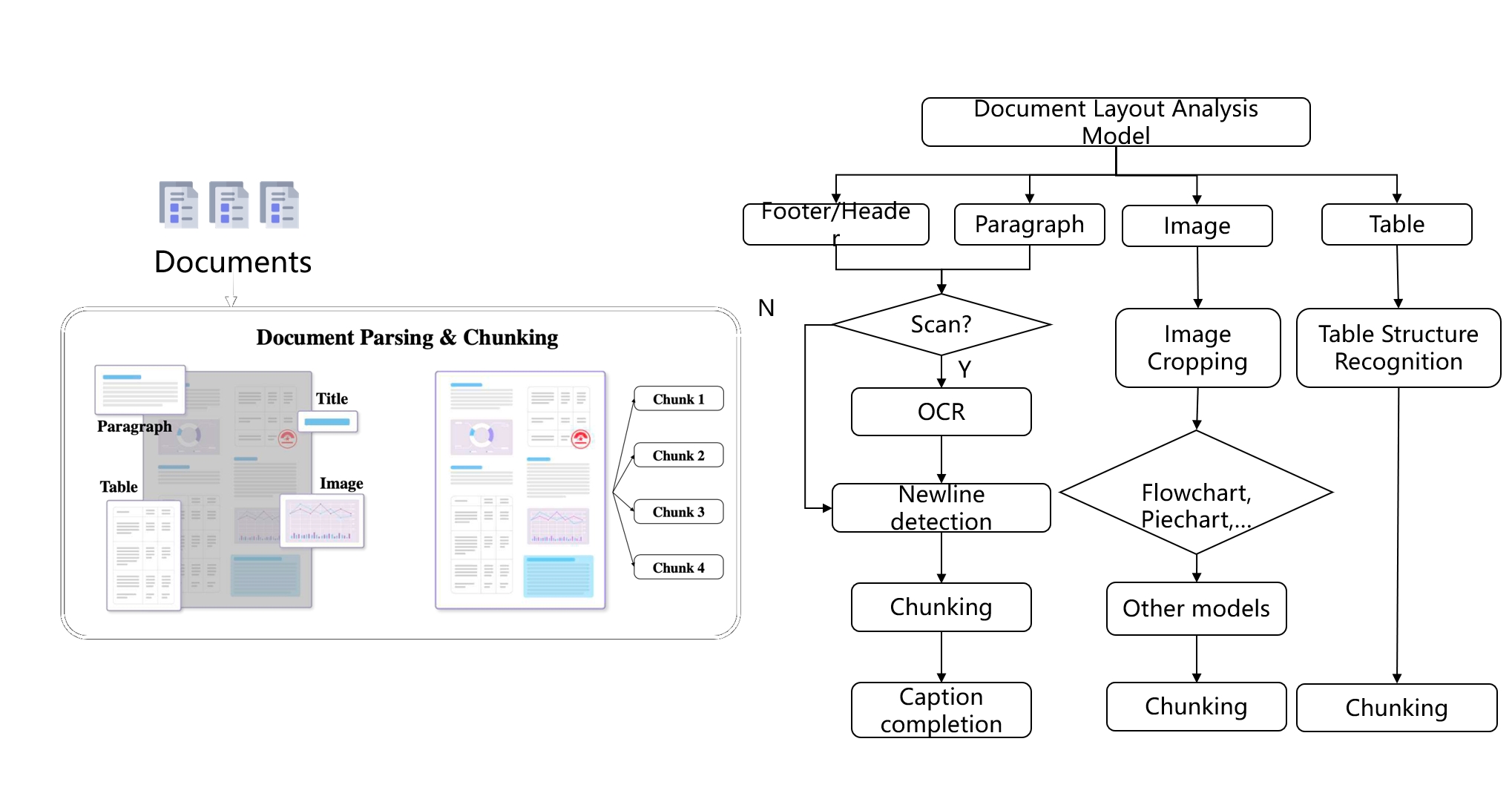
The task of document structure recognition models is to identify the coordinates of different semantic areas within unstructured documents. Such models are already implemented in some OCR systems; for example, the well-known PaddleOCR \[Reference 1\] includes capabilities for document structure recognition. Consequently, the various tasks mentioned earlier, including table processing, are often referred to as broad OCR and can be seen as an entry point for RAG.
RAGFlow's DeepDoc module is one of the earliest systems to fully implement these capabilities, which contributed significantly to its rapid growth upon open sourcing. Currently, there are several similar systems, such as MinerU \[Reference 2\] and Docling \[Reference 3\]. Applying document intelligence to RAG represents a vast area of development, leading to accelerated iterations in this field.
Methodologically, document intelligence models can be divided into two generations:
First Generation: This includes past similar works and current mainstream open-source projects, such as the RAGFlow DeepDoc module. These efforts are built on traditional visual models. While they can run on CPUs, their generalization ability across different scenarios is limited. Because they require separate training for different contexts and data, this technology has been colloquially termed "emboidering".
Second Generation: Current OCR technologies are evolving towards generative AI architectures. Early examples include Meta's Nougat \[Reference 4\], along with the latest OCR 2.0 \[Reference 5\], employ a unified Transformer-based Encoder-Decoder architecture to generate text results from image recognition. These developments share many similarities with the multi-modal VLMs mentioned later. For instance, StructEqTable \[Reference 6\] directly applies similar network structures to table reconstruction. The enterprise version of RAGFlow also uses this architecture for document processing. Although generative AI model inference cannot run on CPUs, their generalization ability across various scenarios has significantly improved compared to traditional visual models. Another advantage of using multimodal models for document intelligence is the ability to incorporate textual information into document layouts. A representative work this year, M2Doc \[Reference 23\], integrates BERT into a vision-based Encoder-Decoder architecture, enhancing the identification of semantic boundaries for text and paragraphs.
In the upcoming year of 2025, research based on Encoder-Decoder architectures is expected to advance further. We can anticipate the potential development of a unified multi-modal document parsing model capable of accurately converting various unstructured documents into text content.
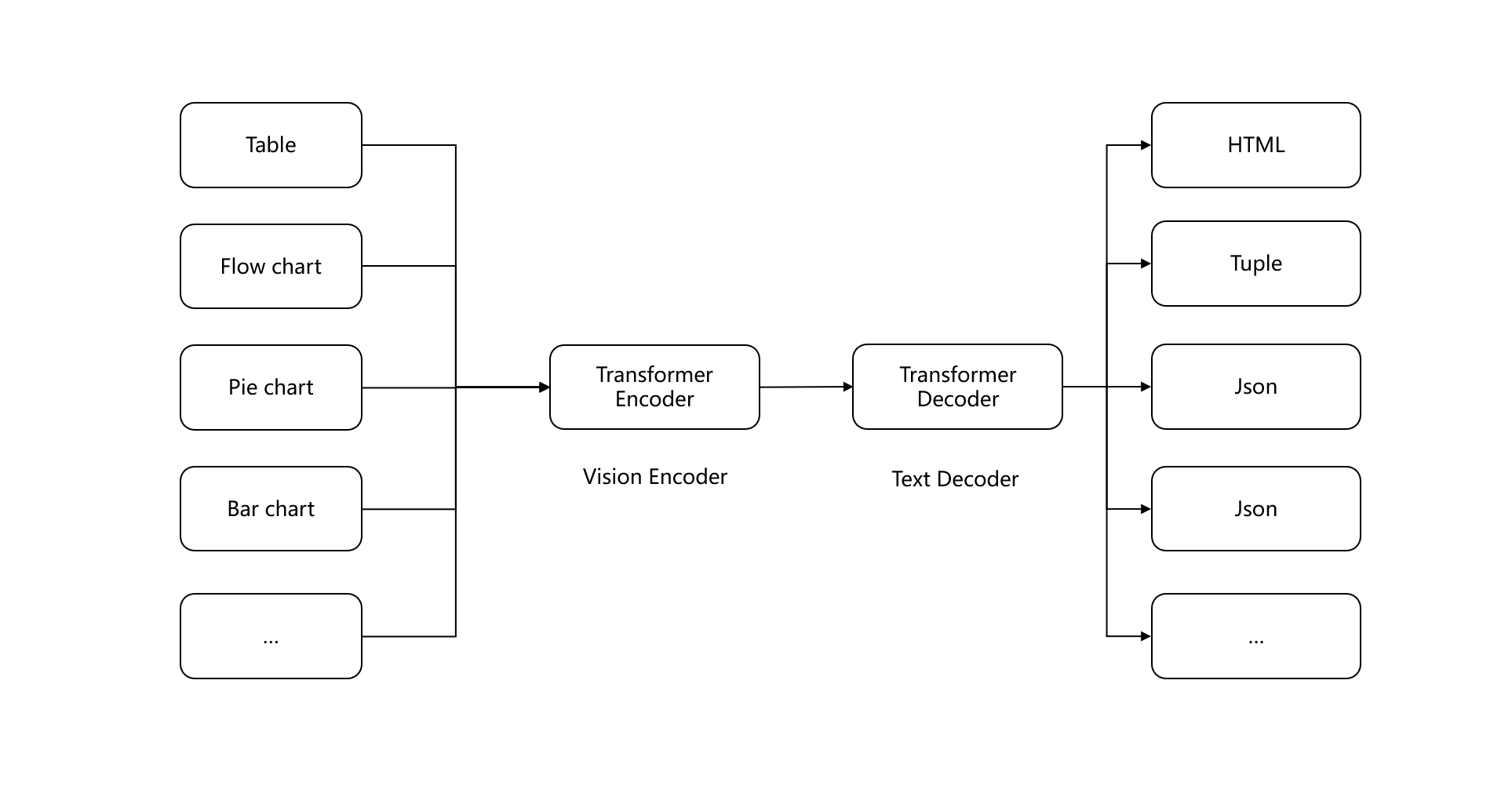
The above content can be seen as data cleaning for multimodal unstructured document data. But for pure text documents, is it sufficient to rely solely on naive text chunking? The answer is no. If text chunk only contains textual information, the main issue during retrieval shifts from content confusion to a semantic gap. We will discuss this in detail in a later section. Here, we introduce some patch work at the chunking level:
This year, Jina launched "Late Chunking" \[Reference 24\], which targets text data by placing the text chunking step after embedding. In other words, it first uses an embedding model to encode the entire document and then outputs the chunk boundaries just before the final mean pooling step of the embedding model—hence the term "late." Compared to traditional text chunking methods, Late Chunking better preserves contextual information. However, it requires that the final output of the embedding model be mean pooling, while most embedding models use CLS pooling, making direct compatibility challenging.
In 2024, the industry also introduced dsRAG \[Reference 25\] for text data. Its main contribution is providing automatic context by using large models to add contextual information to each text chunk, addressing the issue of difficult retrieval from raw text. For example, if a text includes a treatment plan without a description of the disease, retrieval may fail to locate relevant content. Another feature of dsRAG is clustering text chunks into longer passages; although evaluation scores are good, this may not be effective in practice.
LLM provider Anthropic Claude also launched "Contextual Retrieval" \[Reference 26\] in September, which includes an important component called Contextual Chunking. As the name suggests, this involves introducing specific contextual explanations for each text chunk, generated by LLMs. Thus, Contextual Retrieval has similar effects to dsRAG.
In October, Renmin University and the Shanghai Institute of Algorithm Innovation introduced "Meta-Chunking," \[Reference 45\] aiming to identify boundaries of sentence collections within paragraphs that have logical connections. This approach uses LLMs for classification to determine whether sentences belong to the same chunk. However, unlike previous methods, it does not address the semantic gap issue despite also employing LLMs.
Around the same time, the Shanghai Artificial Intelligence Laboratory and Beihang University jointly launched "Multi-granular Hybrid Chunking." \[Reference 46\] This method splits each document into smaller chunks, typically consisting of one or two sentences. These chunks are treated as nodes in a graph; during retrieval, the model predicts the required chunk granularity based on queries and determines how deeply to traverse the graph according to this granularity—deeper traversal results in larger final chunks. While complex to implement, this method does not alleviate semantic gap issues; it merely dynamically decides the context length returned by large models to avoid redundancy, making its practical value less significant than that of previous approaches.
It is evident that there is limited work that can be done based on text chunking. This year's valuable contributions focus on providing more contextual information for chunks, which proves more practical; such context provided by LLM is more reliable. By using LLMs to interpret chunk content and adding supplementary information like labels, we can partially address issues related to semantic gaps that prevent chunks from being recalled. In this year's version of RAGFlow, we have also added a step for LLMs to extract information from text chunks to improve recall performance.
Whether for multimodal or textual data, the results of chunking significantly impact final outcomes. In 2025, we can expect more high-quality work in this area that will ultimately resolve issues related to data entry quality.
Hybrid Search[](https://ragflow.io/blog/the-rise-and-evolution-of-rag-in-2024-a-year-in-review#hybrid-search "Direct link to Hybrid Search")
----------------------------------------------------------------------------------------------------------------------------------------------
In April 2024, a technical report titled "BlendedRAG" from IBM Research \[Reference 7\] demonstrated through experiments that employing multiple recall methods can yield better results for RAG. Specifically, combining vector search, sparse vector search, and full-text search achieves optimal recall. This is easy to understand, as vectors can represent semantics; a sentence or even an entire article can be encapsulated in a single vector. Essentially, the vector conveys the "meaning" of the text, representing the compressed probability of its co-occurrence with other texts within a contextual window. Consequently, vectors cannot precisely represent queries. For instance, if a user asks, "What combinations are included in our company's financial plan for March 2024?" the results might return data from other time periods or unrelated topics such as operational plans or marketing management. In contrast, full-text search and sparse vectors primarily express precise semantics. Thus, combining these two approaches meets our everyday need for both semantic understanding and precision.
In the RAG framework, hybrid search is typically handled by dedicated databases. While there are many databases offering various hybrid search capabilities, truly suitable options are rare because implementing a robust full-text search is challenging:
Sparse vectors struggle to replicate full-text search: Sparse vectors aim to replace full-text search by using standard pre-trained models to eliminate redundant words and add expansion terms, resulting in fixed-dimensional sparse vector outputs (e.g., 30,000 or 100,000 dimensions). This approach performs well on general query tasks; however, many user query keywords may not be present in the pre-trained models used to generate sparse vectors—such as specific machine models, manuals, and specialised terminology. Therefore, while both sparse vectors and full-text search serve precise recall purposes, they each have their strengths and cannot replace one another.
Full-text search involves more than just BM25 calculations: It also needs to consider phrase queries and associated performance issues. RAGFlow was one of the first RAG solutions to offer hybrid search, initially employing Elasticsearch as its sole backend document search engine. In RAGFlow, user queries are not simply sent directly to Elasticsearch; they first undergo query analysis, which includes:
1. Remove stopwords and other meaningless tokens after tokenization.
2. Generate term weights for each token.
3. Generate phrase queries according to bigram results after step 2. These phrase queries are also sent to the search engine together with results after step 2.
For example, for the question "What results did Tom deliver?", we might get the following query:
(results^0.0667) (tom^0.0667) (deliver^0.0667) "results tom"^0.1335 "tom deliver"^0.1335
This query is quite complex, but it demonstrates how a question-and-answer format can be transformed into a query containing numerous phrases. Without stored positional information in the inverted index, such query capabilities cannot be provided.
On the other hand, to ensure recall, full-text search defaults to using an "OR" relationship between keywords rather than "AND," which poses significant challenges to query performance. Therefore, a competent full-text search must also offer dynamic pruning techniques compatible with various queries, including phrase queries. As a result, few full-text search options meet these requirements. In addition to the widely used Elasticsearch, our open-source RAG database, Infinity, fully supports these capabilities.
The following figure shows the results of evaluations using Infinity on a public benchmark dataset, comparing single-recall methods (vector, sparse vector, full-text search), two-way recall, and three-way recall. The vertical axis represents sorting quality, and it is evident that three-way recall achieves the best results, fully validating the findings of BlendedRAG. The far-right part of the graph displays results from combining three-way recall with tensor-based re-ranking, which we will discuss further in the following sections.
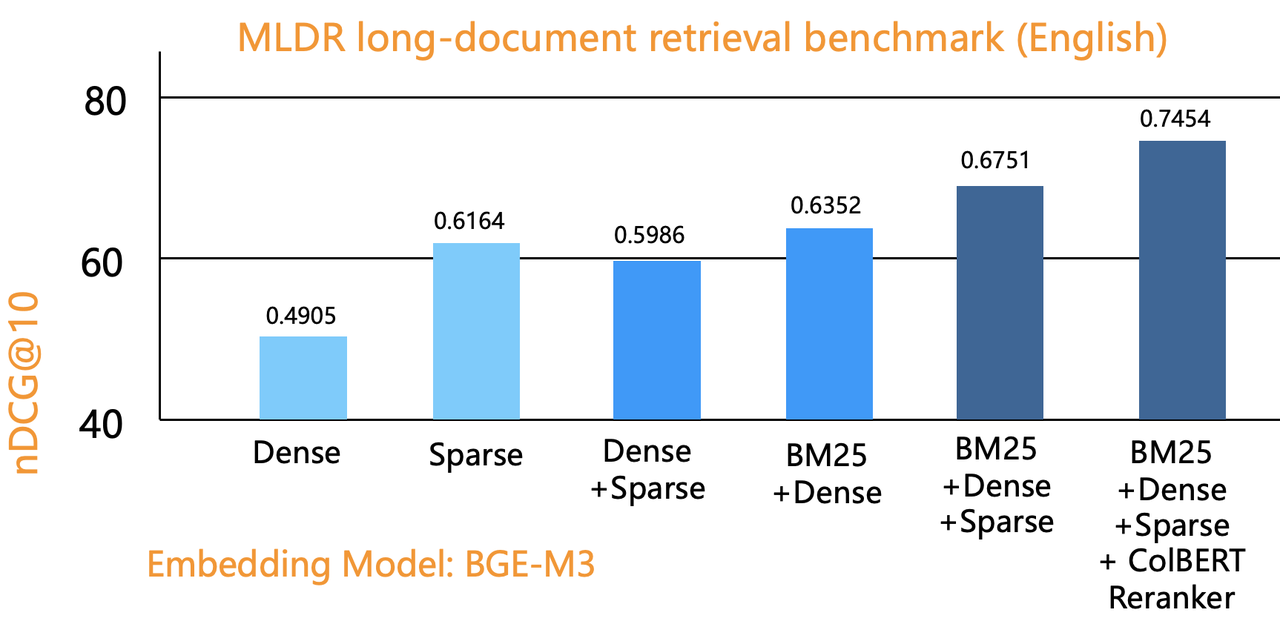
In June 2024, OpenAI acquired the database startup Rockset. Following the release of GPT-4 Turbo at the end of 2023, the well-known vector database Qdrant also came into focus, but just a few months later, Rockset was acquired. One important consideration behind this acquisition is that Rockset is one of the few viable alternatives to Elasticsearch, which is closely related to its cloud-native architecture. Therefore, as a data infrastructure component, Rockset's integration with OpenAI can conveniently provide various users with RAG-based SaaS services.
Ranking models[](https://ragflow.io/blog/the-rise-and-evolution-of-rag-in-2024-a-year-in-review#ranking-models "Direct link to Ranking models")
-------------------------------------------------------------------------------------------------------------------------------------------------
Ranking is the core of any search system. In the context of RAG, ranking involves two components: one is the part used for coarse filtering, which is the embedding model for vector search; the other is the reranker model used in the fine-tuning stage. The training of reranker models often shares much of the work with embedding models. The embedding model typically employs an encoder architecture, with the training objective of bringing semantically similar texts closer together in vector space. In contrast, the reranker uses a cross-encoder architecture, aiming to predict the score between a query and a document.
As shown in the diagram, the left side illustrates how the embedding model works: it encodes both the query and the document separately, then outputs a vector after pooling, requiring only vector similarity calculations during the ranking phase. However, because it loses interaction information between tokens in the query and document, much semantic information is lost, which is why vector search is commonly used for coarse filtering. The cross-encoder as a reranker can have an encoder network identical to that of the embedding model, but by inputting both the query and document together, it outputs a single score. This allows it to capture relationships between tokens, significantly improving ranking quality.
However, cross-encoders also have their drawbacks: for encoders, document embeddings can be completed during the offline indexing phase, allowing for quick retrieval by encoding only the query during online queries. In contrast, cross-encoders require cross-encoding and model output for each query-document pair, which incurs high computational costs. Therefore, they are suitable only for re-ranking, and there cannot be too many coarse filtering results; otherwise, it will significantly increase query latency.
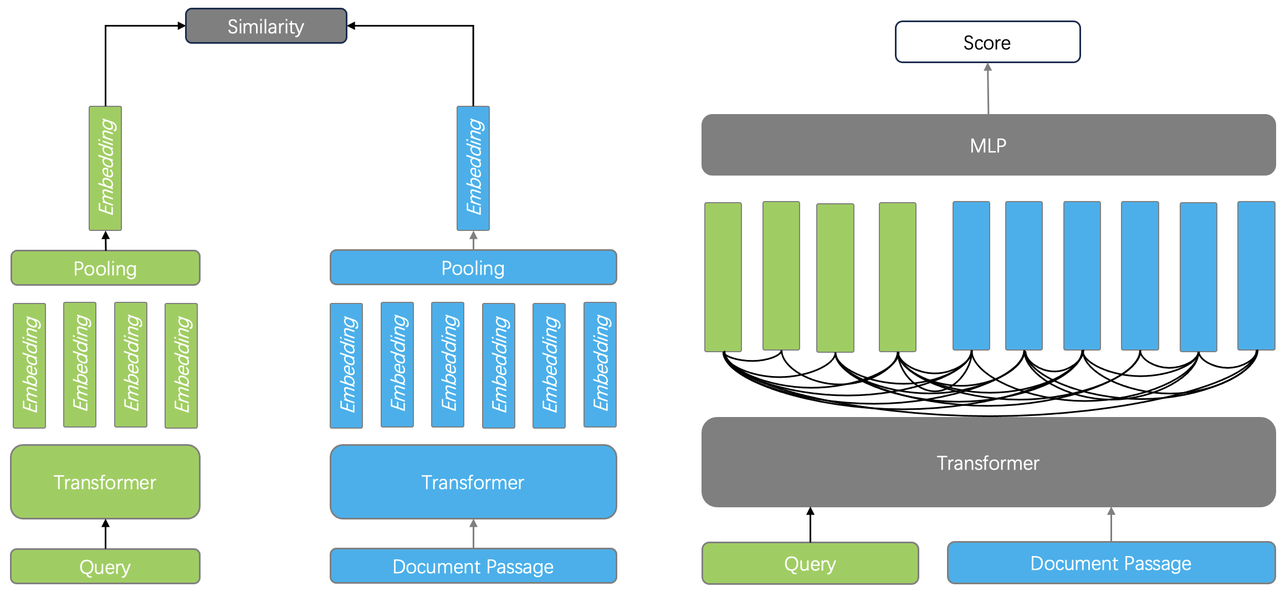
When evaluating embedding models and reranker models, the MTEB leaderboard is often referenced. In the first half of 2024, the reranking leaderboard was primarily dominated by various cross-encoders, while in the second half, it was increasingly occupied by reranking models based on large language models (LLMs). For instance, the current top-ranking model, gte-Qwen2-7B \[Reference 31\], is fine-tuned from the Qwen2 7B base model. This approach no longer uses a traditional encoder architecture but instead employs a standard LLM decoder architecture, resulting in a larger parameter count and higher reasoning costs.
Considering both ranking effectiveness and cost, a reranking solution known as the late interaction model has gained attention; this involves tensor-based reranking, as illustrated in the diagram below.
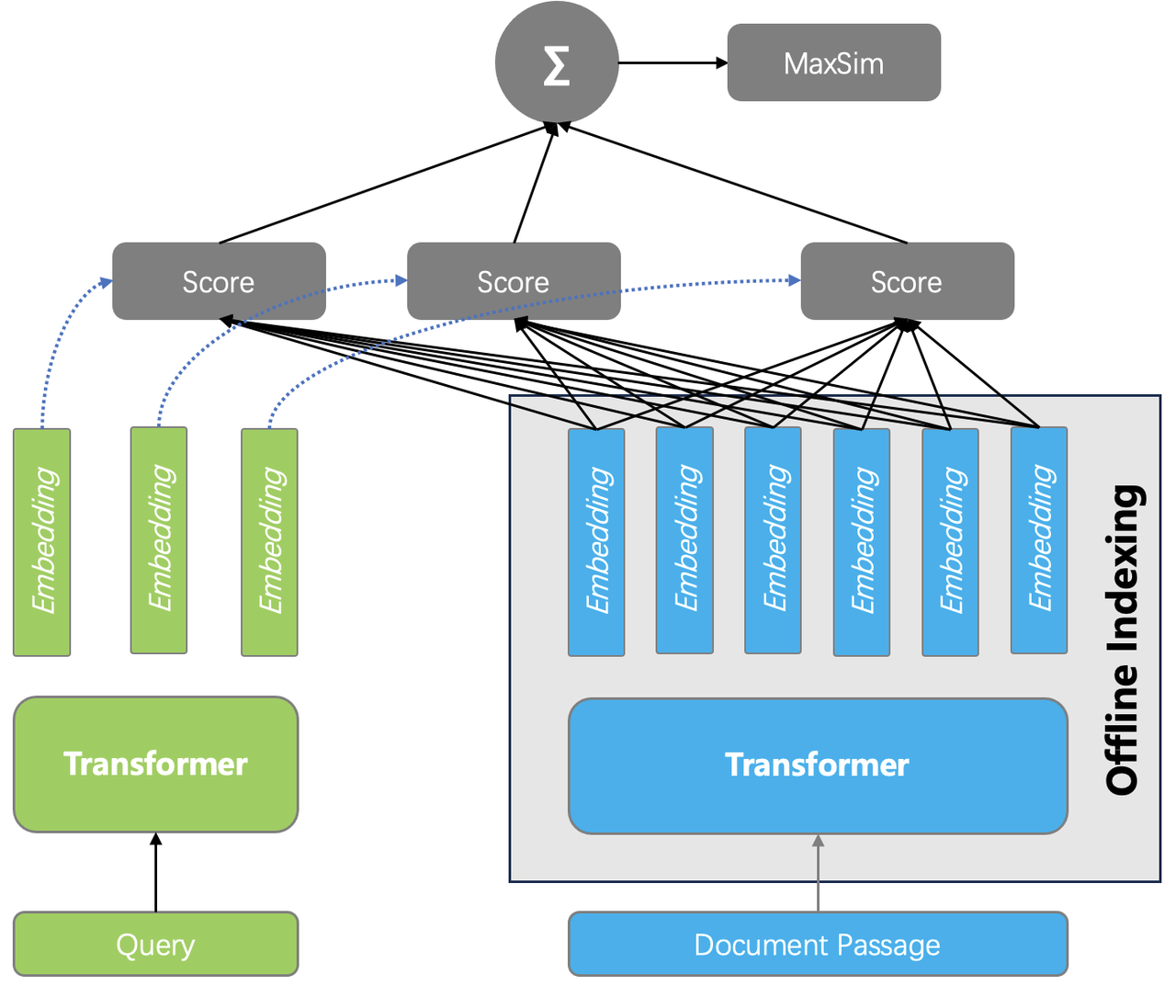
The specific approach is as follows: during the indexing phase, embeddings generated by the encoder for each token are stored. Thus, a document can be represented by a tensor (or multiple vectors). During querying, embeddings for each token in the query are generated, and the pairwise similarity between all tokens in the query and the text chunks is calculated. The final document score is obtained by summing these similarities. This reranking method also captures the interaction information between tokens, allowing it to theoretically achieve performance comparable to that of a cross-encoder.
On the other hand, because complex model reference is not involved during querying, the cost is significantly lower than that of cross-encoders or LLM-based rerankers. This can even enable ranking to be performed within the database itself. The benefits include the ability to rerank more results, which increases the likelihood of compensating for previous recall shortcomings, even if the initial filtering results are not ideal. The following figure compares the evaluation results of applying tensor reranking based on single-recall, dual-recall, and triple-recall using the Infinity database.
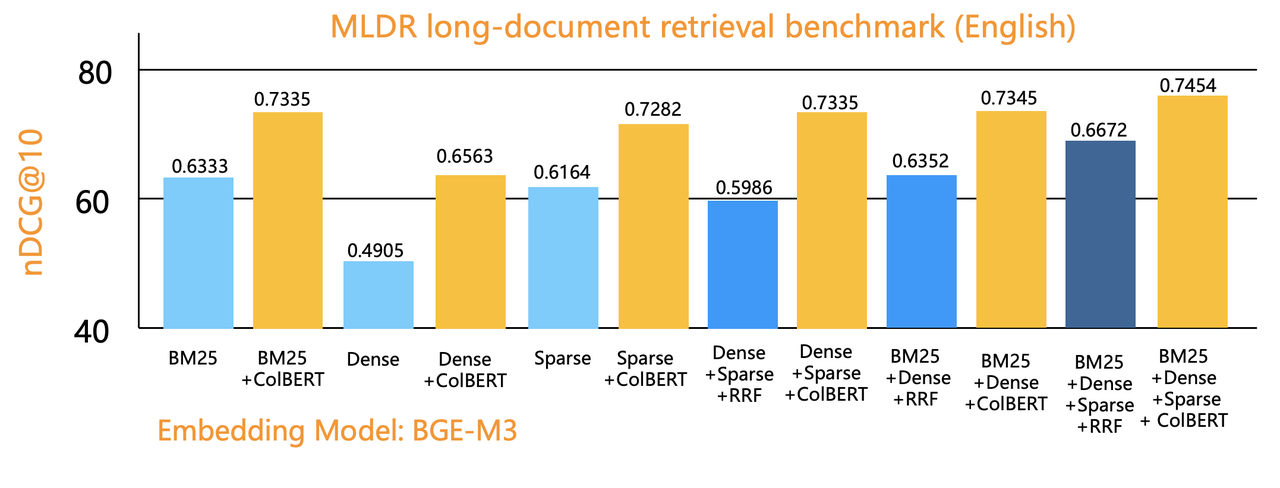
Tensor-based reranking originated from early works such as ColBERT \[Reference 32\] and its improved version, ColBERT v2 \[Reference 33\], in 2020. However, it only gained significant attention in the industry in early 2024. At that time, due to a lack of necessary database support, it relied on Python algorithm wrappers like RAGatouille \[Reference 34\] to provide services. Vespa was one of the first database systems to engineer tensor capabilities, and we integrated tensor-based reranking into the Infinity database by mid-year.
Currently, tensor-based reranking systems are not widely used in the industry; this is partly due to insufficient infrastructure components and a lack of supporting models. However, since the summer of 2024, there has been a noticeable acceleration in this area. For instance, JaColBERT \[Reference 36\] for Japanese and Jina's Jina-colbert-v2 \[Reference 37\] multilingual model both offer capabilities for generating tensors from text data. We will also mention later that these models significantly promote multimodal RAG. It is anticipated that with more models becoming available, tensor-based reranking will see widespread application in 2025.
Semantic Gap[](https://ragflow.io/blog/the-rise-and-evolution-of-rag-in-2024-a-year-in-review#semantic-gap "Direct link to Semantic Gap")
-------------------------------------------------------------------------------------------------------------------------------------------
In the first half of 2024, Microsoft published a paper on GraphRAG \[Reference 8\] and officially open-sourced it mid-year, quickly garnering over ten thousand stars on GitHub. What accounts for GraphRAG's popularity? This relates closely to the third pain point of RAG that we previously mentioned: the semantic gap.
There are many approaches to addressing the semantic gap. In addition to improvements at the chunking stage, more can be done during the preprocessing phase. A well-known and practical solution is RAPTOR \[Reference 9\]. RAPTOR first pre-clusters the text content and then uses a large language model (LLM) to generate summaries of the clustered texts. These summaries, along with the original text, are sent to the search system. Since these summaries provide a more macro-level understanding of the text, they can yield appropriate answers for vague inquiries and multi-hop questions that require crossing chunks. RAPTOR was integrated into RAGFlow mid-year to assist in answering complex questions.
By the end of 2024, SiReRAG \[Reference 17\] emerged based on RAPTOR, offering a finer-grained definition of text recall: it measures different dimensions of needs using similarity and relevance. Similarity calculates the semantic distance between text chunks using vectors or full-text search methods, which is what RAPTOR itself does (shown on the left side of the diagram). Relevance indicates a relationship between text chunks; it first extracts named entities from each chunk using an LLM and then builds a hierarchical tree structure based on the relationships between these entities and their corresponding chunks (shown on the right side of the diagram). Thus, during recall, multiple text granularities can provide mixed recall, including entities, entity groups, and original texts, further enhancing macro-level understanding of the data and improving recall for vague intents and multi-hop query scenarios.
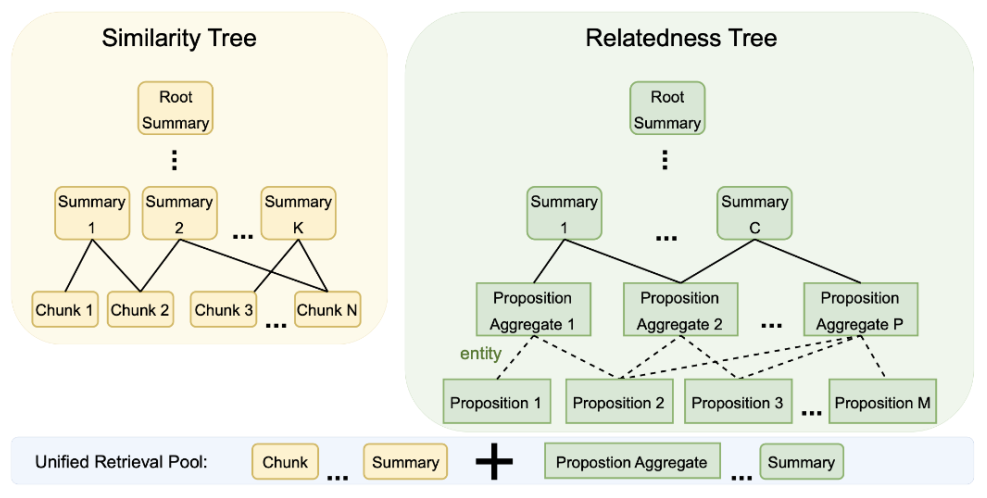
SiReRAG is quite similar to GraphRAG, with the main difference lying in how the extracted entities are further processed and organised. Let's take a closer look at GraphRAG itself: it uses large models to automatically extract named entities from documents and builds knowledge graphs based on these entities. Within the graph, it also uses clustering to create "communities" of entities and employs LLMs to generate summaries for these communities. During recall, the entities, edges, and community summaries from the knowledge graph are combined with the original documents for mixed recall. This data forms cross-chunk associations within the document, leading to better results for macro-level inquiries and multi-hop questions. GraphRAG can be seen as an effective strategy and architecture for addressing the semantic gap.
The term "architecture" is used here because it represents a paradigm for extracting knowledge graphs using LLMs to assist in complex question answering. In addition to Microsoft, many other companies have proposed their own GraphRAG solutions, such as Ant Group's KAG \[Reference 10\] and Nebula's GraphRAG \[Reference 11\], each with its own focus. For instance, KAG emphasises the completeness and interpretability of knowledge graphs, requiring a blend of manual maintenance and expert knowledge elements to achieve domain-specific expertise. Meanwhile, Nebula GraphRAG highlights deep integration with well-known LLM frameworks like LangChain and Llama Index, incorporating them into the Nebula Graph database.
A significant pain point in the GraphRAG architecture is the substantial token consumption. Consequently, several variants have emerged since GraphRAG, including Fast GraphRAG \[Reference 12\], LightRAG \[Reference 13\], and Microsoft's upcoming LazyGraphRAG \[Reference 14\]. Fast GraphRAG also uses LLMs to extract entities and relationships, similar to Microsoft's approach but omitting the generation of "communities" and their summaries, thereby reducing the frequency of LLM requests. During retrieval, Fast GraphRAG finds the nearest entity in the knowledge graph based on the query and then employs personalised PageRank to randomly walk through the graph to obtain subgraphs, which are then used to generate final answers.
PageRank is an effective strategy worth mentioning alongside another influential 2024 paper on knowledge graphs—HippoRAG \[Reference 15\]. This paper discusses hippocampal indexing theory and a personalised PageRank-based random walk strategy that closely resembles how the human brain thinks based on memory. Thus, after constructing a knowledge graph, querying it using personalised PageRank can simulate human recall and thought processes related to long text information. Both Fast GraphRAG and HippoRAG can be illustrated using the diagram below. Additionally, we have incorporated elements of graph neural networks (GNNs) because there has been a growing number of works in 2024 aimed at improving knowledge graph question answering using GNNs \[Reference 18\] \[Reference 19\]. Interested readers can refer to relevant literature for further information. Since GNN work often requires additional training with user data—such as leveraging existing Q&A data to enhance graph embedding representations of named entities—these efforts involve high customisation costs and fall outside the primary scope of this discussion.
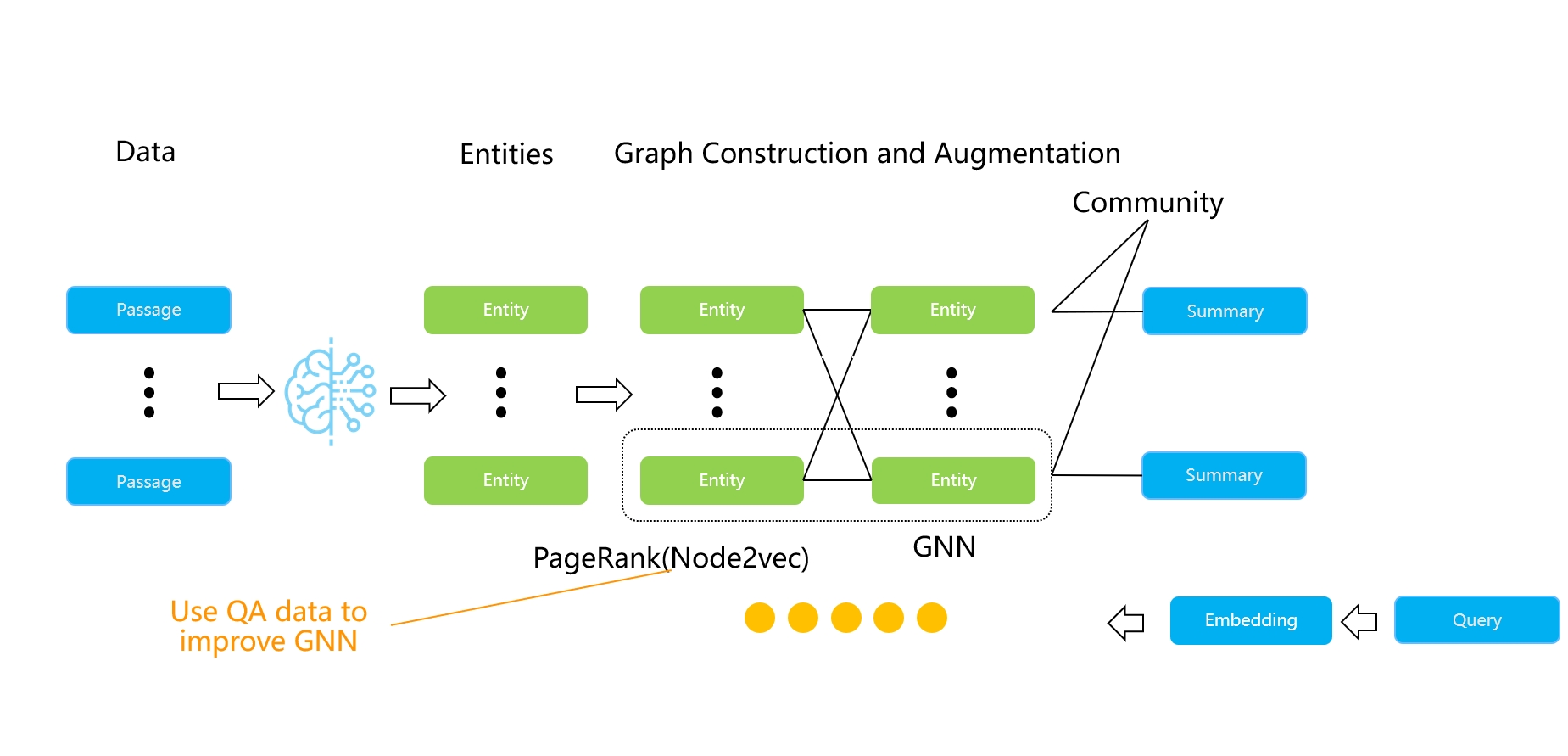
LightRAG is a simplified version of GraphRAG, removing the community structure to make it more lightweight. Microsoft's LazyGraphRAG, proposed towards the end of 2024, takes this simplification further by eliminating the reliance on LLMs for extracting knowledge graphs. Instead, it uses smaller local models to extract nouns and builds community structures based on co-occurrence. Community summaries are only processed dynamically during queries. Another approach to reducing the costs associated with GraphRAG comes from the models themselves. Since LLM extraction is expensive, fine-tuning a smaller, specialised model can significantly lower costs. Triplex \[Reference 16\] is an example of this, utilising the 3B Phi-3 model for knowledge graph extraction. From the above, it is clear that the GraphRAG architecture effectively uses LLMs to supplement original documents with sufficient information, organised in an easily connectable graph format. During searches, this adds auxiliary recall capabilities based on various entities alongside text similarity. Therefore, the value of the knowledge graph in GraphRAG lies not in direct human viewing but in providing additional context and evidence for complex and ambiguous questions. Although knowledge graphs have been around for a long time, their applications have primarily involved a significant amount of explainable work, such as data navigation, requiring human and domain expert intervention. This is not the comfort zone for GraphRAG's application. Even named entities and relationships extracted by LLMs still contain considerable noise. Given the limitations of LLMs in knowledge graph extraction, subsequent work surrounding GraphRAG focuses not only on cost reduction but also on how to organise entities into more effective structures. By the end of the year, two notable works emerged: KG-Retriever \[Reference 20\] and Mixture-of-PageRanks \[Reference 21\]. The former combines knowledge graphs with original data to create a multi-level graph index structure for retrieval at varying granularities; the latter introduces time-based relevance information based on personalised PageRank. We can expect further developments in this area in 2025, though they will not change the fundamental nature of GraphRAG-type work.
Finally, let's consider the engineering implementation of GraphRAG. Using a graph database for GraphRAG is a natural choice; both KAG and Nebula Graph have adopted this technical route, as graph databases can better represent knowledge graphs. RAGFlow also integrated GraphRAG into its system end-to-end mid-year but did so without using a graph database, relying instead on a search engine. In terms of data modelling within GraphRAG, entities and edges in the knowledge graph are described textually, along with communities derived from clustering entities and their generated summaries. A typical data model for GraphRAG can be illustrated as shown below:
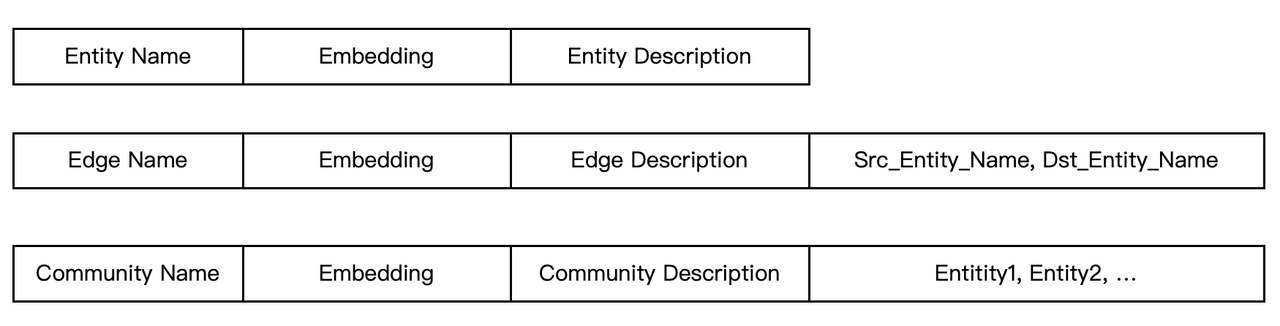
A fully functional full-text index should not only provide similarity score calculations but also keyword filtering capabilities. Therefore, by establishing a full-text index on the `` fields in the aforementioned schema, it becomes easy to perform subgraph retrieval based on edges and entities. Furthermore, if the database can seamlessly integrate full-text indexing with vector indexing, it will enable very convenient hybrid searches for GraphRAG. All edges, entities, and community descriptions can be included in the full-text search scope, combined with vector indexing to provide dual mixed recall based on GraphRAG.
From the data schema, it is evident that by simply adding a type field, the original text chunks can be stored in the same table as other information, effectively combining GraphRAG with RAG into a HybridRAG \[Reference 22\]. Clearly, using a database with rich indexing capabilities can significantly reduce the engineering challenges of implementing GraphRAG. Even works that modify graph structures, such as KG-Retriever and Mixture-of-PageRanks, can be easily supported by adjusting index formats and enhancing specific search methods. This is one of our primary motivations for building a database specifically designed to serve RAG from the ground up.
Agentic and Memory[](https://ragflow.io/blog/the-rise-and-evolution-of-rag-in-2024-a-year-in-review#agentic-and-memory "Direct link to Agentic and Memory")
-------------------------------------------------------------------------------------------------------------------------------------------------------------
Agentic is a popular term in the RAG industry for 2024, with many media outlets declaring it the year of the agent. Regardless of this designation, agents significantly influence the LLM ecosystem. This article is not a retrospective on agents, but it is clear that there is an inseparable relationship between agents and RAG: RAG itself is a crucial component for agents, enabling them to access internal data; conversely, agents can enhance RAG capabilities, leading to what is termed Agentic RAG, such as Self RAG \[Reference 39\] and Adaptive RAG.
This advanced form of RAG allows for adaptive changes in more complex scenarios in a controlled manner. To achieve Agentic RAG, the agent framework must possess "closed-loop" capabilities. In Andrew Ng's four design patterns for agents, this "closed-loop" ability is referred to as reflective capability. LangGraph \[Reference 40\] was one of the early frameworks to implement this feature, and RAGFlow introduced similar functionality mid-year.
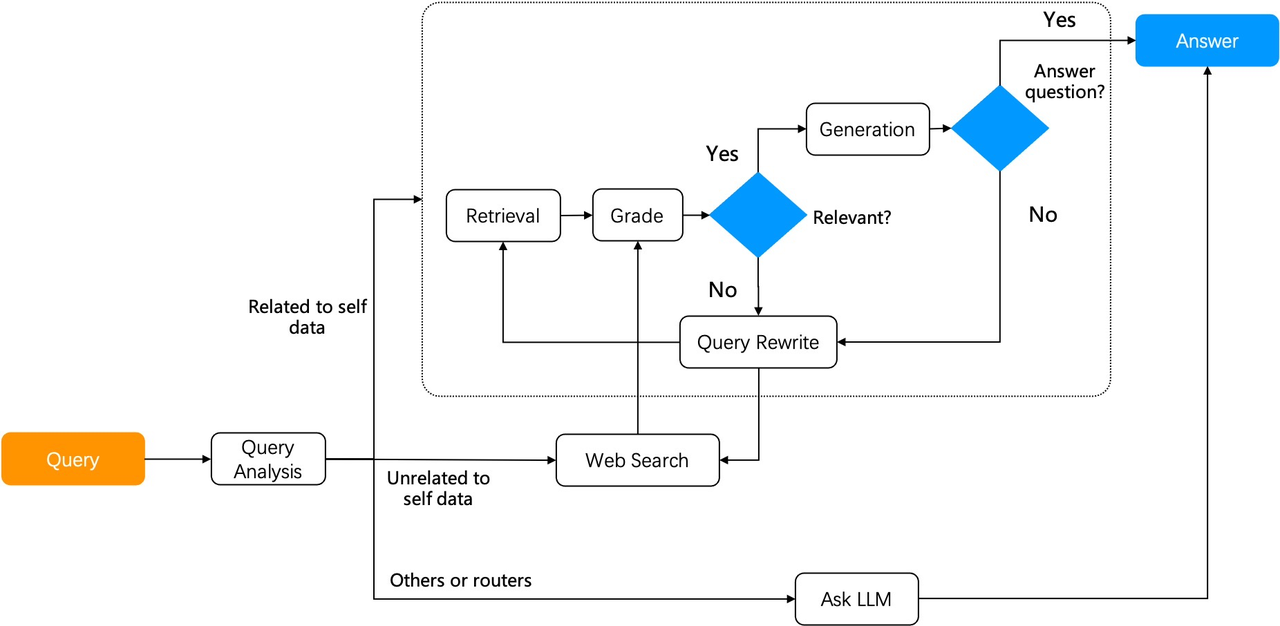
In 2024, a key feature of agents is the widespread use of workflows. Regardless of how agents evolve, workflows remain essential for integrating with various systems and ensuring agents execute tasks in a controlled manner. However, the concept of agents extends beyond workflows; it also encompasses reasoning-related thinking and decision-making. In the second half of 2024, research in this area began to accelerate.
Integrating RAG with agents can unlock more application scenarios. For example, in the configuration shown in the diagram \[Reference 41\], the system includes multiple autonomous agents that can decompose complex question-and-answer tasks into sub-tasks, with each agent responsible for a specific function. This division of labour enhances the overall efficiency and accuracy of the system. In the diagram, the Detector Agent aims to identify queries that may contain erroneous assumptions and premises, which could affect the accuracy of LLM responses; the Thought Agent processes and analyses all retrieved information, synthesising data to draw conclusions and generate detailed reasoning results; and the Answer Agent uses outputs from the Thought Agent to produce final answers, ensuring that responses in multi-turn dialogues are influenced by the latest logic.
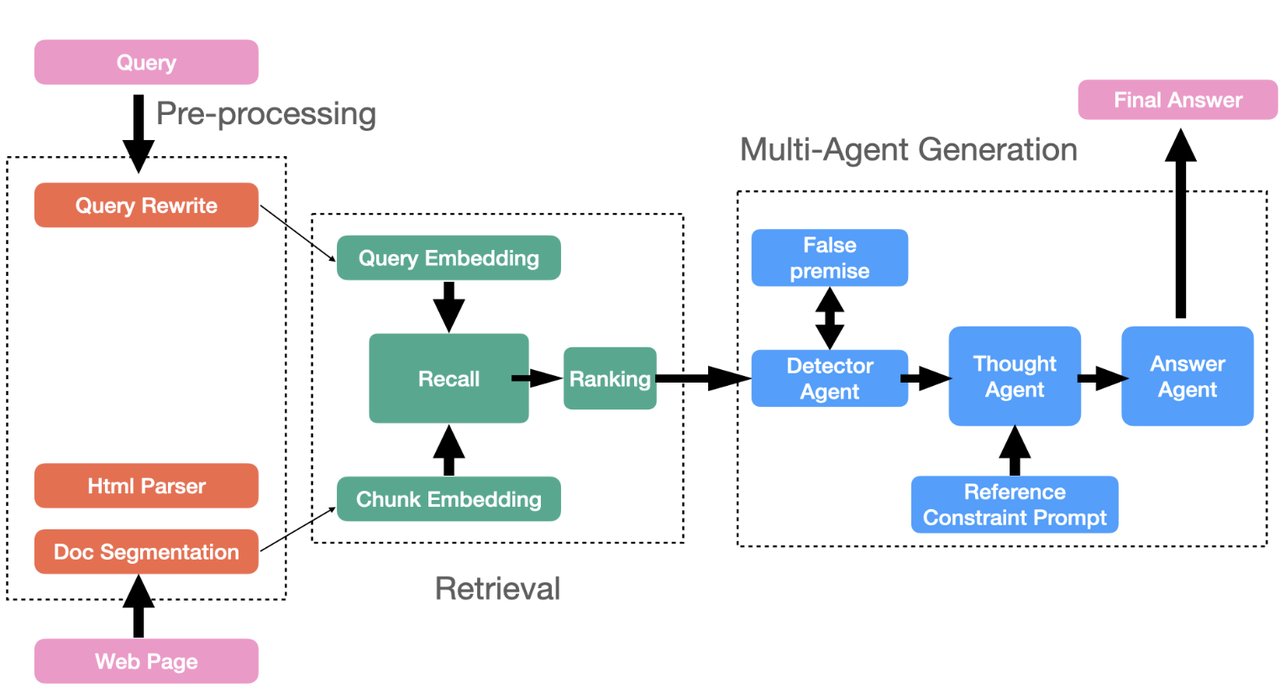
For example, RARE \[Reference 42\] enhances RAG by incorporating a Monte Carlo Tree Search (MCTS) framework, which strengthens reasoning capabilities through two steps: generating queries based on the initial question and querying the generated sub-questions. By implementing these steps, RARE can facilitate complex and common-sense reasoning in medical scenarios.
As this reasoning capability develops, the relationship between RAG and agents becomes increasingly intertwined, with more frequent interactions. Consequently, RAG needs to provide memory management functionalities beyond the document search previously mentioned. This memory information includes user dialogue sessions and personalised user data. Agents not only require RAG to perform internal data searches but also need real-time access to contextual information. The phenomenon of the open-source project Mem0 in 2024, which defined some memory management APIs, quickly garnered numerous GitHub stars. However, it is important to note that the current definition of memory management is relatively straightforward (primarily involving real-time filtering and searching), while the underlying infrastructure components are already quite mature. Therefore, the real challenge lies in integrating memory management with reasoning and unlocking more complex enterprise-level scenarios alongside the growth of LLM capabilities. Implementing these features on a standardised RAG engine is a logical choice that minimises costs and maximises usability, making it a significant trend for 2025.
At this point, many may wonder whether the future evolution will see RAG transforming into an agent platform or various agent platforms enhancing their RAG capabilities. This trend is difficult to predict. Just as in the digital age, one might question whether to focus on data warehousing while also addressing mid-platform business needs or to deepen business capabilities to improve data warehousing—both approaches have their precedents. In this era of LLM intelligence, there is an opportunity for a transformative reshaping of the software ecosystem; thus, RAG can effectively parallel the role of traditional databases, while agents have the potential to become standard products at the application layer due to reduced customisation requirements. Future developments will dynamically evolve under the dual support of technical depth and rapid product iteration, with tighter integration across various software ecosystems. For instance, towards the end of the year, LangGraph released an LLM-based agent interoperability protocol, enabling greater potential for ecological upstream and downstream relationships among different agents.
Multimodal RAG[](https://ragflow.io/blog/the-rise-and-evolution-of-rag-in-2024-a-year-in-review#multimodal-rag "Direct link to Multimodal RAG")
-------------------------------------------------------------------------------------------------------------------------------------------------
Multimodal RAG is another area we believe will experience rapid growth in 2025, as key related technologies emerge and start to be applied in 2024.
Firstly, the rise of Vision-Language Models (VLMs) has been notable. As shown in the diagram, VLMs, which previously focused primarily on simple image searches, have evolved rapidly by mid-2024.
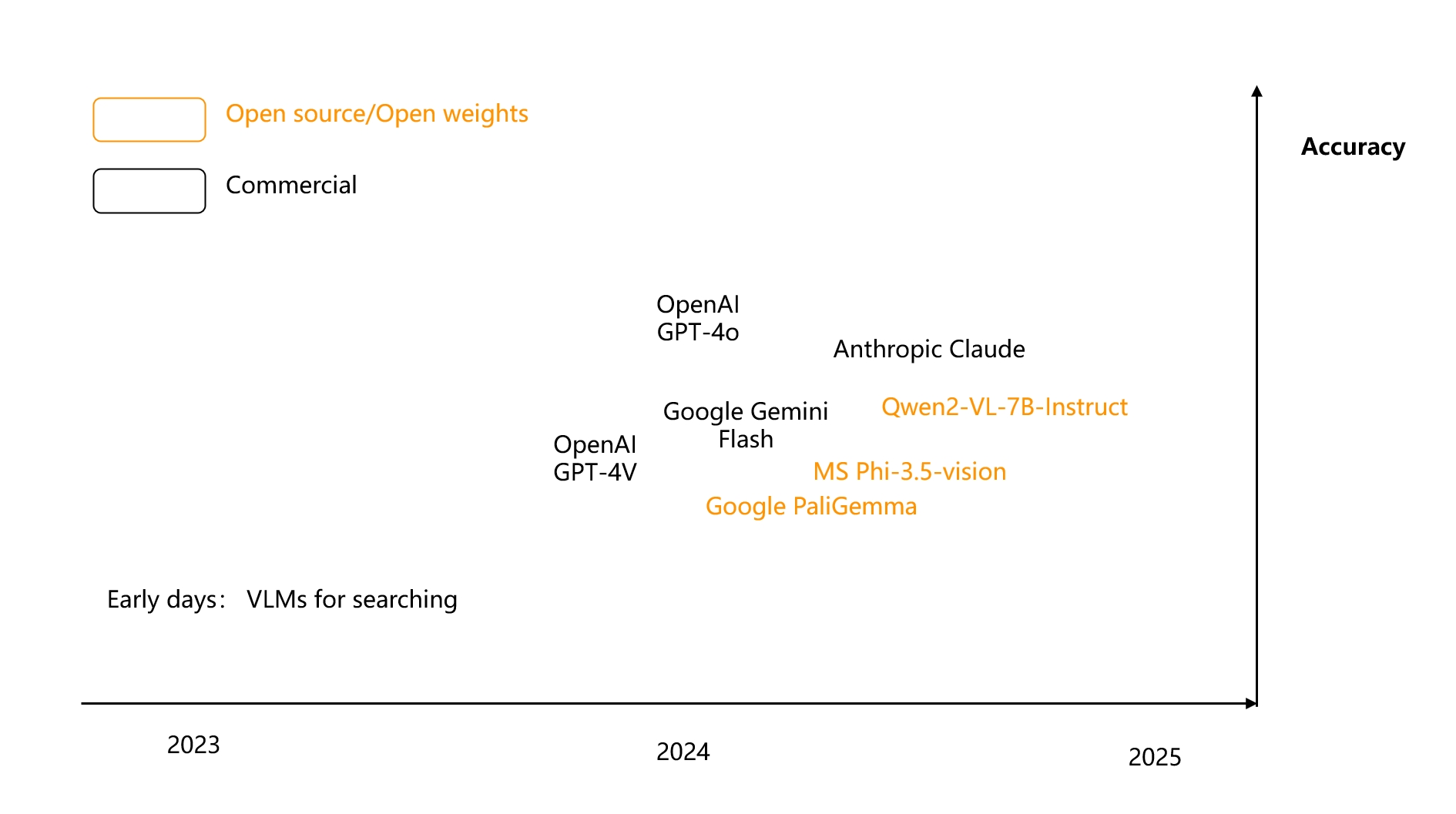
This means that VLMs have achieved a deeper understanding of images, moving beyond merely recognising everyday objects to comprehensively analysing enterprise-level multimodal documents. For instance, the open-source 3B model PaliGemma \[Reference 43\] exemplifies this capability.
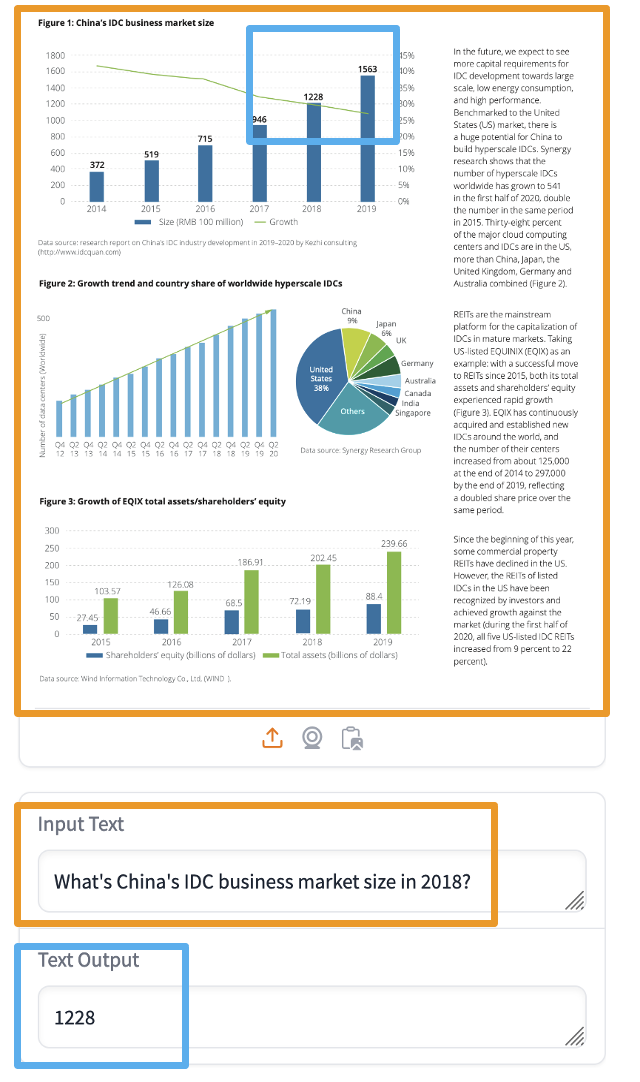
Returning to RAG itself, if we can use RAG to find images and text containing answers within a large number of PDFs based on user queries, we can then generate the final answer using VLMs. This is the significance of multimodal RAG; it goes beyond simple image searches for everyday items.
To achieve this, one approach, as previously mentioned, involves using models to convert multimodal documents into text before indexing for retrieval. Another approach, leveraging advancements in VLMs, directly generates vectors, bypassing the complex OCR process. A pioneering example of this is ColPali \[Reference 44\], which emerged in the summer of 2024. ColPali treats an image as 1024 image patches and generates embeddings for each patch, effectively representing a single image as a tensor.
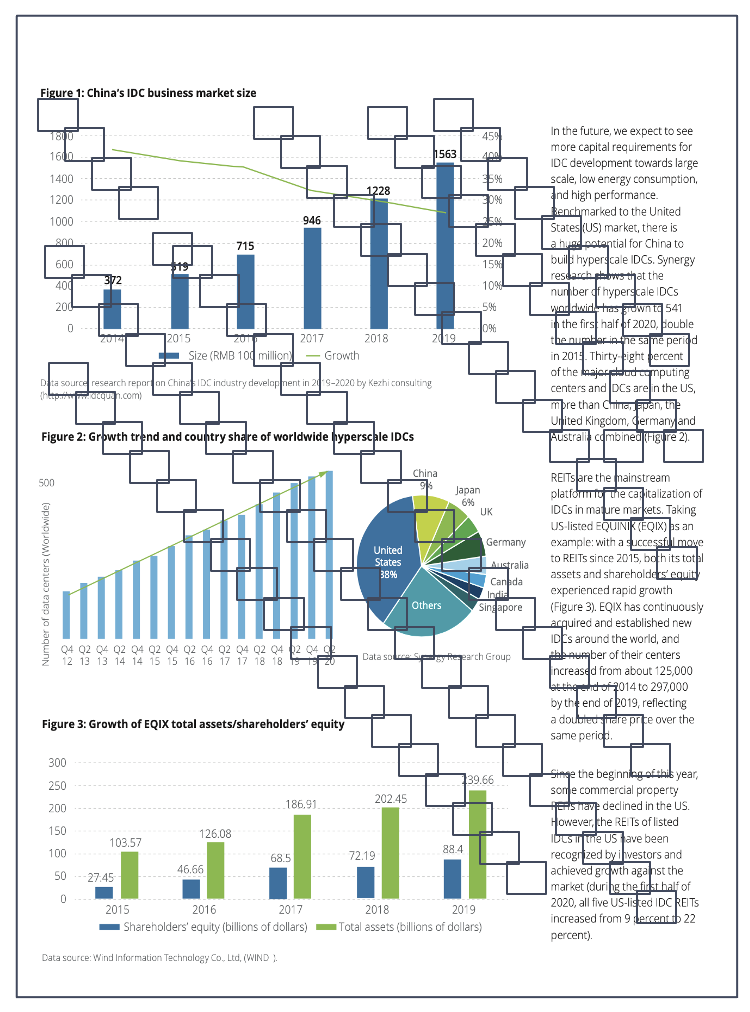
The final reranking is conducted using tensors.
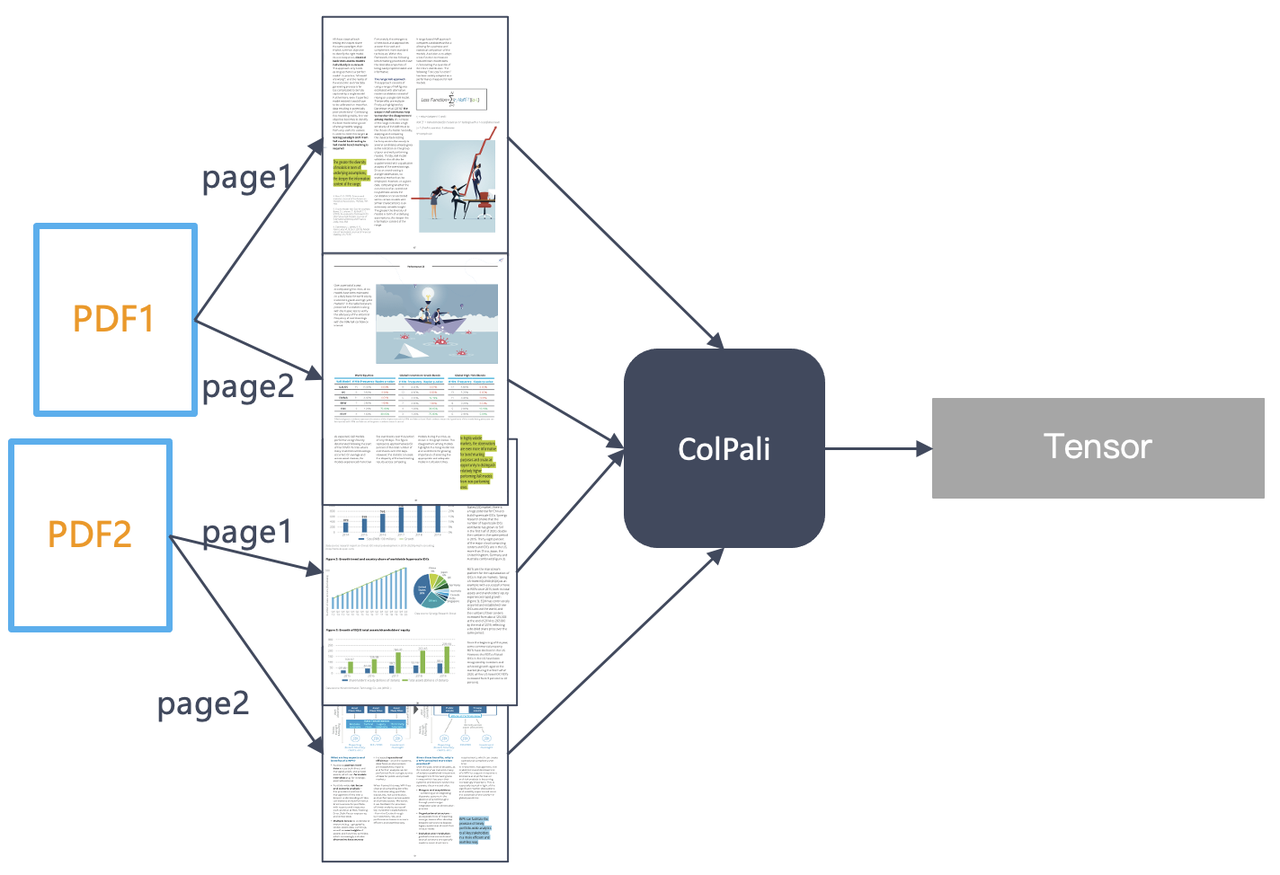
The entire retrieval process is illustrated in the diagram below. It requires a database that not only supports tensor-based re-ranking but also accommodates multi-vector indexing during the vector retrieval phase. These structures are already prepared in our Infinity database.

The diagram below shows a leaderboard for multimodal RAG retrieval, highlighting that tensor-based series of late interaction models have secured many leading positions.
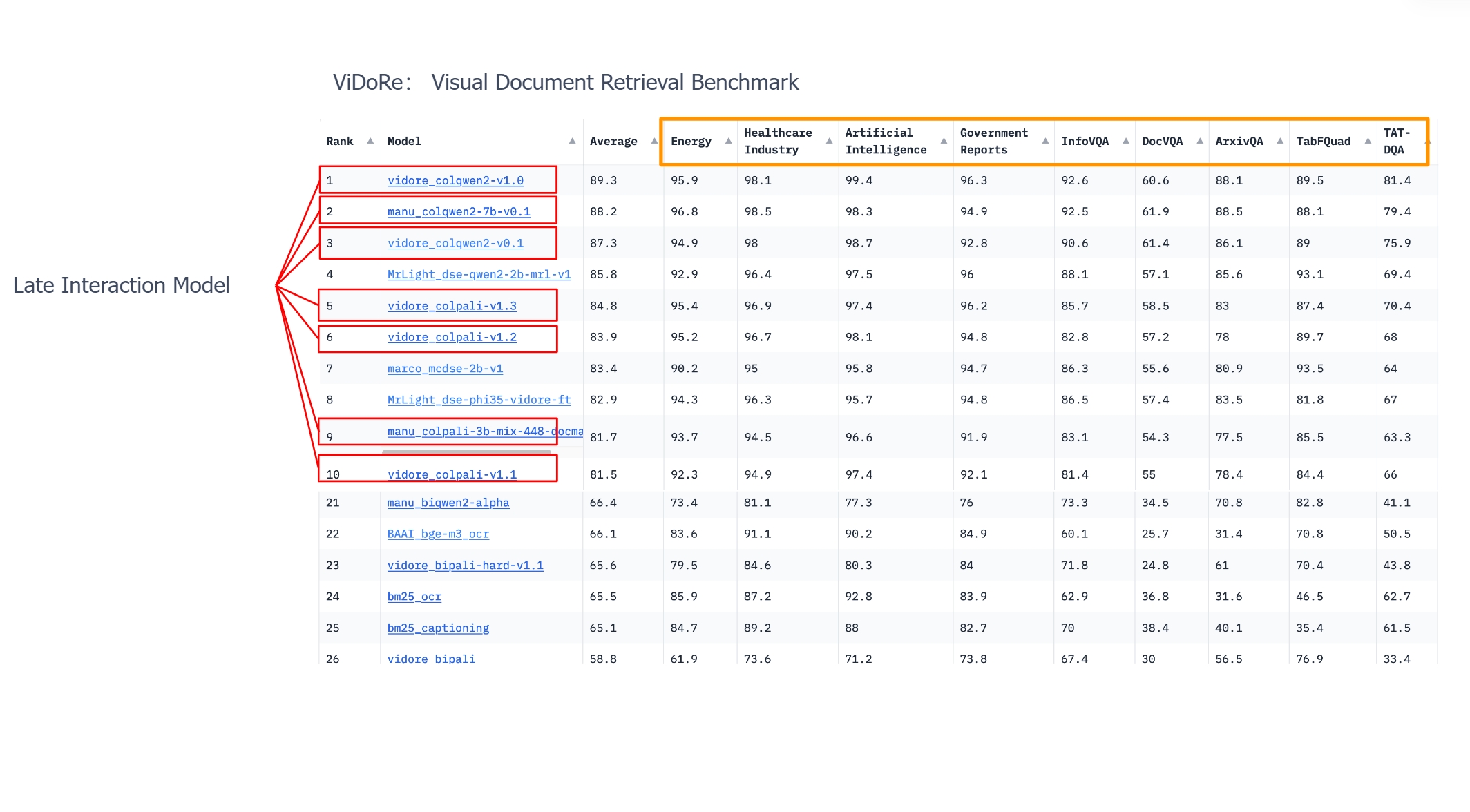
Therefore, tensors are not only significant for text ranking but also have a wide range of applications in multimodal RAG. The question arises: should multimodal RAG directly generate embeddings, or should it use general OCR models to convert documents into text first? In the original ColPali paper, the authors recommend completely abandoning OCR, but they compare it to CNN-based OCR, which is the first-generation model mentioned earlier. Currently, the success of both approaches relies on advancements in multimodal models themselves. Thus, we believe these two routes will coexist for a long time. If we consider embeddings as a "general" solution, then OCR based on an encoder-decoder architecture can be viewed as a "specialised" solution, as specific types of data still require training particular Transformers for effective resolution. RAG always prioritises practical implementation, so in specific tasks during certain periods, specialised solutions may outperform general ones, but ultimately they will converge.
In 2025, we can expect rapid growth and evolution of multimodal RAG, and we will integrate these capabilities into RAGFlow at the appropriate time.
The above content summarizes the main development trends and future outlook for RAG in 2024. The title of this article mentions the "RAG industry," and from the summary provided, it is clear that RAG is a highly complex system. Although it hasn't attracted massive funding like LLMs, it is indispensable and intricate in real-world applications. We believe the term RAG is well-defined; it represents an architectural model rather than a single product or application scenario. In some respects, RAG resembles past databases—simple in external interfaces but complex internally. It encompasses not only the database itself but also various small models and the tools that connect them. Essentially, it represents the evolution of enterprise search engines in the era of large models while extending far beyond the scope of traditional search engines. In 2025, we will continue to evolve RAGFlow, and we invite everyone to stay tuned as we strive to become the best RAG product! [https://github.com/infiniflow/ragflow](https://github.com/infiniflow/ragflow)
Bibliography[](https://ragflow.io/blog/the-rise-and-evolution-of-rag-in-2024-a-year-in-review#bibliography "Direct link to Bibliography")
-------------------------------------------------------------------------------------------------------------------------------------------
1. PaddleOCR [https://github.com/PaddlePaddle/PaddleOCR/](https://github.com/PaddlePaddle/PaddleOCR/)
2. MinerU [https://github.com/opendatalab/MinerU](https://github.com/opendatalab/MinerU)
3. Docling [https://github.com/DS4SD/docling](https://github.com/DS4SD/docling)
4. Nougat [https://github.com/facebookresearch/nougat](https://github.com/facebookresearch/nougat)
5. GOT-OCR [https://github.com/Ucas-HaoranWei/GOT-OCR2.0](https://github.com/Ucas-HaoranWei/GOT-OCR2.0)
6. StructEqTable [https://github.com/UniModal4Reasoning/StructEqTable-Deploy](https://github.com/UniModal4Reasoning/StructEqTable-Deploy)
7. Blended RAG: Improving RAG (Retriever-Augmented Generation) Accuracy with Semantic Search and Hybrid Query-Based Retrievers, [https://arxiv.org/abs/2404.07220](https://arxiv.org/abs/2404.07220)
, 2024
8. From local to global: A graph rag approach to query-focused summarization, [https://arxiv.org/abs/2404.16130](https://arxiv.org/abs/2404.16130)
2024
9. Recursive Abstractive Processing for Tree Organized Retrieval, [https://arxiv.org/abs/2401.18059](https://arxiv.org/abs/2401.18059)
2024
10. KAG [https://github.com/OpenSPG/KAG](https://github.com/OpenSPG/KAG)
11. Nebula GraphRAG [https://www.nebula-graph.io/posts/graph-RAG](https://www.nebula-graph.io/posts/graph-RAG)
12. Fast GraphRAG [https://github.com/circlemind-ai/fast-graphrag](https://github.com/circlemind-ai/fast-graphrag)
13. LightRAG [https://github.com/HKUDS/LightRAG](https://github.com/HKUDS/LightRAG)
14. LazyGraphRAG [https://www.microsoft.com/en-us/research/blog/lazygraphrag-setting-a-new-standard-for-quality-and-cost/](https://www.microsoft.com/en-us/research/blog/lazygraphrag-setting-a-new-standard-for-quality-and-cost/)
15. HippoRAG [https://arxiv.org/abs/2405.14831](https://arxiv.org/abs/2405.14831)
16. Triplex [https://huggingface.co/SciPhi/Triplex](https://huggingface.co/SciPhi/Triplex)
17. SiReRAG: Indexing Similar and Related Information for Multihop Reasoning [https://arxiv.org/abs/2412.06206](https://arxiv.org/abs/2412.06206)
18. Graph Neural Network Enhanced Retrieval for Question Answering of LLMs [https://arxiv.org/abs/2406.06572](https://arxiv.org/abs/2406.06572)
19. A Survey of Large Language Models for Graphs SIGKDD 2024
20. KG-Retriever: Efficient Knowledge Indexing for Retrieval-Augmented Large Language Models [https://arxiv.org/abs/2412.05547](https://arxiv.org/abs/2412.05547)
21. Mixture-of-PageRanks: Replacing Long-Context with Real-Time, Sparse GraphRAG [https://arxiv.org/abs/2412.06078](https://arxiv.org/abs/2412.06078)
22. HybridRAG: Integrating Knowledge Graphs and Vector Retrieval Augmented Generation for Efficient Information Extraction, Proceedings of the 5th ACM International Conference on AI in Finance, 2024
23. M2Doc-A Multi-Modal Fusion Approach for Document Layout Analysis, AAAI 2024
24. Late Chunking: Contextual Chunk Embeddings Using Long-Context Embedding Models [https://arxiv.org/abs/2409.04701](https://arxiv.org/abs/2409.04701)
25. dsRAG [https://github.com/D-Star-AI/dsRAG/](https://github.com/D-Star-AI/dsRAG/)
26. Contextual Retrieval [https://www.anthropic.com/news/contextual-retrieval](https://www.anthropic.com/news/contextual-retrieval)
27. A Comprehensive Survey of Retrieval-Augmented Generation (RAG: Evolution, Current Landscape and Future Directions [https://arxiv.org/abs/2410.12837](https://arxiv.org/abs/2410.12837)
28. Retrieval-Augmented Generation for Natural Language Processing: A Survey [https://arxiv.org/abs/2407.13193](https://arxiv.org/abs/2407.13193)
29. 12 RAG Pain Points and Proposed Solutions [https://towardsdatascience.com/12-rag-pain-points-and-proposed-solutions-43709939a28c](https://towardsdatascience.com/12-rag-pain-points-and-proposed-solutions-43709939a28c)
30. Searching for Best Practices in Retrieval-Augmented Generation [https://arxiv.org/abs/2407.01219](https://arxiv.org/abs/2407.01219)
31. [https://huggingface.co/Alibaba-NLP/gte-Qwen2-7B-instruct](https://huggingface.co/Alibaba-NLP/gte-Qwen2-7B-instruct)
32. Colbert: Efficient and effective passage search via contextualized late interaction over bert, SIGIR 2020
33. Colbertv2: Effective and efficient retrieval via lightweight late interaction, arXiv:2112.01488, 2021.
34. RAGatouille [https://github.com/AnswerDotAI/RAGatouille](https://github.com/AnswerDotAI/RAGatouille)
35. Vespa [https://github.com/vespa-engine/vespa](https://github.com/vespa-engine/vespa)
36. JaColBERT [https://huggingface.co/answerdotai/JaColBERTv2.5](https://huggingface.co/answerdotai/JaColBERTv2.5)
37. Jina ColBERT v2 [https://huggingface.co/jinaai/jina-colbert-v2](https://huggingface.co/jinaai/jina-colbert-v2)
38. Awesome-RAG 2024: [https://github.com/awesome-rag/awesome-rag](https://github.com/awesome-rag/awesome-rag)
39. Self RAG [https://arxiv.org/abs/2310.11511](https://arxiv.org/abs/2310.11511)
40. LangGraph [https://github.com/langchain-ai/langgraph/](https://github.com/langchain-ai/langgraph/)
41. TCAF: a Multi-Agent Approach of Thought Chain for Retrieval Augmented Generation, SIGKDD 2024
42. RARE-Retrieval-Augmented Reasoning Enhancement for Large Language Models [https://arxiv.org/abs/2412.02830](https://arxiv.org/abs/2412.02830)
43. PaliGemma [https://huggingface.co/spaces/big-vision/paligemma-hf](https://huggingface.co/spaces/big-vision/paligemma-hf)
44. ColPali: Efficient Document Retrieval with Vision Language Models, [https://arxiv.org/abs/2407.01449](https://arxiv.org/abs/2407.01449)
45. Meta-Chunking: Learning Efficient Text Segmentation via Logical Perception [https://arxiv.org/abs/2410.12788](https://arxiv.org/abs/2410.12788)
46. Mix-of-Granularity-Optimize the Chunking Granularity for Retrieval-Augmented Generation [https://arxiv.org/abs/2406.00456](https://arxiv.org/abs/2406.00456)
* [Key events in RAG's evolution](https://ragflow.io/blog/the-rise-and-evolution-of-rag-in-2024-a-year-in-review#key-events-in-rags-evolution)
* [The Debate: "RAG is Dead, Long Live RAG!"](https://ragflow.io/blog/the-rise-and-evolution-of-rag-in-2024-a-year-in-review#the-debate-rag-is-dead-long-live-rag)
* [The rise of multimodal document parsing tools](https://ragflow.io/blog/the-rise-and-evolution-of-rag-in-2024-a-year-in-review#the-rise-of-multimodal-document-parsing-tools)
* [The emergence of BM25 and hybrid search](https://ragflow.io/blog/the-rise-and-evolution-of-rag-in-2024-a-year-in-review#the-emergence-of-bm25-and-hybrid-search)
* [The Rise of GraphRAG](https://ragflow.io/blog/the-rise-and-evolution-of-rag-in-2024-a-year-in-review#the-rise-of-graphrag)
* [The Emergence of Latency Interaction Models Like Col-xxx](https://ragflow.io/blog/the-rise-and-evolution-of-rag-in-2024-a-year-in-review#the-emergence-of-latency-interaction-models-like-col-xxx)
* [Multimodal RAG built on VLM and late Interaction Models](https://ragflow.io/blog/the-rise-and-evolution-of-rag-in-2024-a-year-in-review#multimodal-rag-built-on-vlm-and-late-interaction-models)
* [Data Cleaning](https://ragflow.io/blog/the-rise-and-evolution-of-rag-in-2024-a-year-in-review#data-cleaning)
* [Hybrid Search](https://ragflow.io/blog/the-rise-and-evolution-of-rag-in-2024-a-year-in-review#hybrid-search)
* [Ranking models](https://ragflow.io/blog/the-rise-and-evolution-of-rag-in-2024-a-year-in-review#ranking-models)
* [Semantic Gap](https://ragflow.io/blog/the-rise-and-evolution-of-rag-in-2024-a-year-in-review#semantic-gap)
* [Agentic and Memory](https://ragflow.io/blog/the-rise-and-evolution-of-rag-in-2024-a-year-in-review#agentic-and-memory)
* [Multimodal RAG](https://ragflow.io/blog/the-rise-and-evolution-of-rag-in-2024-a-year-in-review#multimodal-rag)
* [Bibliography](https://ragflow.io/blog/the-rise-and-evolution-of-rag-in-2024-a-year-in-review#bibliography)
---
# What Infrastructure Capabilities does RAG Need beyond Hybrid Search | RAGFlow
[Skip to main content](https://ragflow.io/blog/what-infrastructure-capabilities-does-rag-need-beyond-hybrid-search#__docusaurus_skipToContent_fallback)
Infinity is a database specifically designed for Retrieval-Augmented Generation (RAG), excelling in both functionality and performance. It provides high-performance capabilities for dense and sparse vector searches, as well as full-text searches, along with efficient range filtering for these data types. Additionally, it features tensor-based reranking, enabling the implementation of powerful multi-modal RAG and integrating ranking capabilities comparable to Cross Encoders.

As illustrated in the diagram below, Infinity fundamentally serves as a comprehensive indexing database for diverse data types.
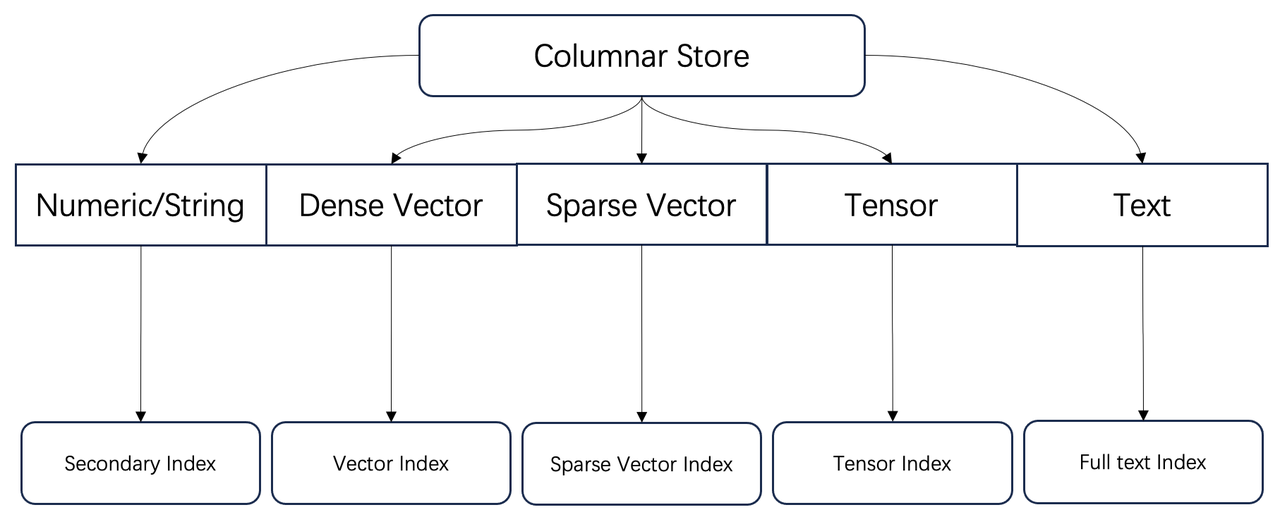
These capabilities have been acknowledged by both engineering and academia as essential for Retrieval-Augmented Generation (RAG). What additional capabilities are required for current and future RAG systems?
GraphRAG[](https://ragflow.io/blog/what-infrastructure-capabilities-does-rag-need-beyond-hybrid-search#graphrag "Direct link to GraphRAG")
--------------------------------------------------------------------------------------------------------------------------------------------
Firstly, let's look at GraphRAG. Here, GraphRAG refers not only to Microsoft's open-source project but also to a methodology that leverages automatically constructed knowledge graphs to assist RAG retrieval. This approach addresses the "semantic gap" issue in question answering, where answers cannot be found based on the questions posed.
Since knowledge graphs are involved, it is inevitable to discuss the category of graph databases. Graph databases are designed to handle complex graph-structure queries. For example, consider the following query: return all source and target accounts for all two-hop transfers completed by user Alice. This can be expressed in SQL as follows:
SELECT a.owner, c.ownerFROM Accounts a, b, c, Transactions t1, t2WHERE b.owner = Alice AND a.owner=t1.From AND t1.To=b.owner AND t1.To=t2.From AND t2.to=c.owner
This requires two tables: an accounts table and a transactions table. The operations are as follows:
1. Find all accounts belonging to Alice in the accounts table (b.owner = 'Alice').
2. Locate all accounts that initiated transactions to Alice in the transactions table (a.owner = t1.From and t1.To = b.owner).
3. Identify accounts where Alice is the initiator (t1.To = t2.From).
4. Finally, find the ultimate target accounts for these transactions (t2.To = c.owner).
Thus, we can observe three characteristics of this type of queries:
1. Although this query involves only two tables, it requires numerous multi-table joins.
2. Modelling with a relational database is quite cumbersome.
3. Query efficiency with a relational database is very low due to the need for non-sequential scans of multiple tables. Each operation typically returns only a few records, making it challenging to create an effective query plan. Traditional relational databases can easily lead to excessive intermediate result sizes, resulting in out-of-memory (OOM) errors.
Therefore, the characteristics of graph databases include:
1. To avoid non-sequential scans of tables, they introduce indexes, particularly inverted indexes. An inverted index stores nodes and edges separately by column and constructs index based on edges, with the index content being node IDs.
2. They optimize multi-table joins; some state-of-the-art systems implement multi-way joins for worst-case optimal joins \[reference 1\].
Returning to knowledge graphs, do we require such complex graph queries? GraphRAG aside, a typical knowledge graph necessitates queries to retrieve neighbouring entities based on a given entity. More complex queries may involve subgraph traversals to obtain neighbours and multi-hop neighbours for multiple entities. These requirements can be conveniently implemented using indexes. Therefore, support for knowledge graphs is a relatively simplified requirement for graph databases.
Returning to GraphRAG, let’s examine the queries involved using LightRAG \[reference 2\] as an example. LightRAG is chosen because it provides a more comprehensive and systematic summary of GraphRAG queries, as illustrated in the following diagram.
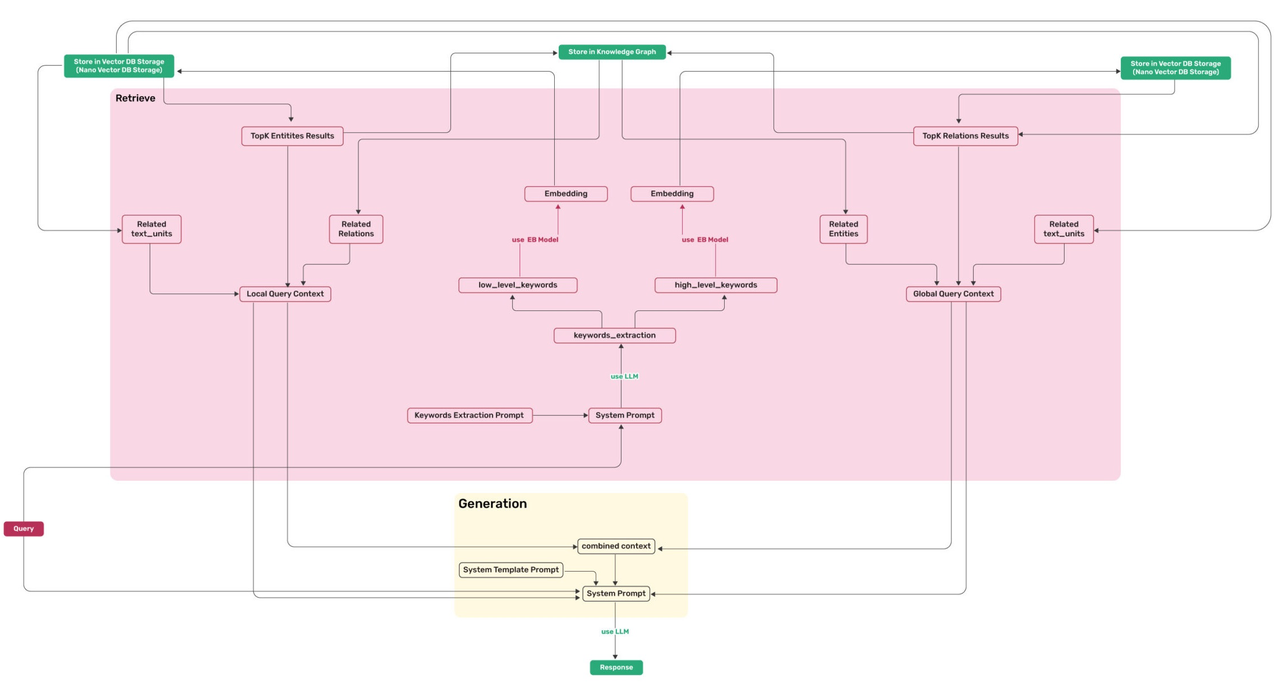
The required queries are as follows:
1. Find the top entities closest to the keyword vector.
2. Identify the relationships connecting these entities in the knowledge graph.
3. Find the top relationships (edges) closest to the keyword vector.
4. Identify the entities connected by these relationships in the knowledge graph.
It is evident that the requirements for knowledge graph queries in GraphRAG are quite straightforward. In GraphRAG, the abstraction and definition of knowledge graphs are simplified, with relationships between entities reduced to a single type. This simplification arises because large language models (LLMs) often lack precise definitions for entities and relationships, leading to knowledge graphs typically serving as supplementary tools for retrieval-augmented generation (RAG). Recently, Ant Group has also unveiled its approach to GraphRAG with KAG \[reference 3\], which offers a more comprehensive definition of knowledge graphs, expanding relationships between entities to six types and introducing a reasoning framework. However, there have been no significant changes in data retrieval itself. Thus, a simple idea arises: could transplanting a trimmed-down graph database serve the current and future needs of GraphRAG?
Recently, Charles L. A. Clarke, a senior search engine researcher from the University of Waterloo, proposed a novel indexing method called Annotative Indexing \[reference 4\]. The aim is to unify columnar storage, full-text search, and graph databases. The term "annotative" refers to adjustments made to the structure of inverted indexes; by introducing annotations, inverted indexes can be created in a more flexible way. Based on these observations, we will explore whether Infinity, as a fully indexed database, can meet the current and future requirements of GraphRAG.
As shown in the diagram, we can easily model the entities and edges of a knowledge graph. In GraphRAG, the entities and edges of the knowledge graph are represented as textual descriptions, along with communities derived from clustering these entities and their summaries. Consequently, all this text can be associated using full-text indexing. Infinity's full-text index offers a comprehensive and powerful syntax, enabling not only similarity scoring but also **filtering based on keywords**. Therefore, establishing a full-text index on the fields allows for convenient keyword filtering, facilitating subgraph retrieval based on edges and entities. Additionally, within Infinity, full-text indexing and vector indexing are seamlessly integrated, allowing for efficient hybrid searches tailored to GraphRAG. All edges, entities, and even communities are included in the scope of full-text search alongside vectors, enabling two-way hybrid recall based on GraphRAG. Moreover, as illustrated in the following schema, these data can be stored in a single table by simply adding a type field alongside the original text chunks, effectively combining GraphRAG and RAG into HybridRAG. Clearly, employing a database with rich indexing capabilities can significantly reduce the engineering challenges associated with implementing these complex logics.
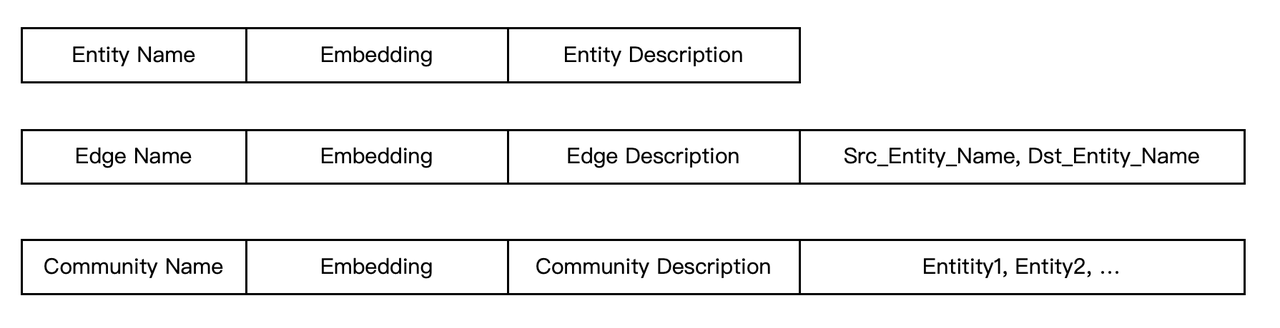
Consequently, it can be concluded that Infinity currently meets the storage requirements for GraphRAG, both now and in the future. Looking ahead, Infinity will add more execution logic around the computation layer, allowing some application-level code to be integrated into the database, thereby enhancing performance and usability. For example:
1. One type of GraphRAG directly treats text chunks as nodes in a graph, with the similarity between chunks (based on various options) determining the edges. This can also be modelled using inverted indexes. The task of creating such indexes could be implemented as a background job within Infinity.
2. GraphRAG requires close interaction with models, and it will inevitably introduce some graph computation capabilities in the future. For instance, generating graph embeddings based on a subgraph traversal structure could also be executed as a background task in Infinity.
Such tasks can be accomplished through background jobs or functions, all of which can be executed using Infinity's current engine architecture without significant adjustments. This clearly aligns with Infinity's ongoing evolution alongside the development of RAG.
Long-term Memory[](https://ragflow.io/blog/what-infrastructure-capabilities-does-rag-need-beyond-hybrid-search#long-term-memory "Direct link to Long-term Memory")
--------------------------------------------------------------------------------------------------------------------------------------------------------------------
Next, let's examine memory management, which is closely related to agents and can be considered an essential component. In RAGFlow, an agent framework has already been provided. Currently, most agents are tightly linked to workflows, facilitating interactions between RAG and external systems or enabling agentic RAG through workflows. However, the future of agents lies in more intelligent systems represented by multi-agent architectures that will assist large language models (LLMs) in providing reasoning capabilities. The interaction between multi-agents and RAG will become more frequent, as illustrated in the diagram below.
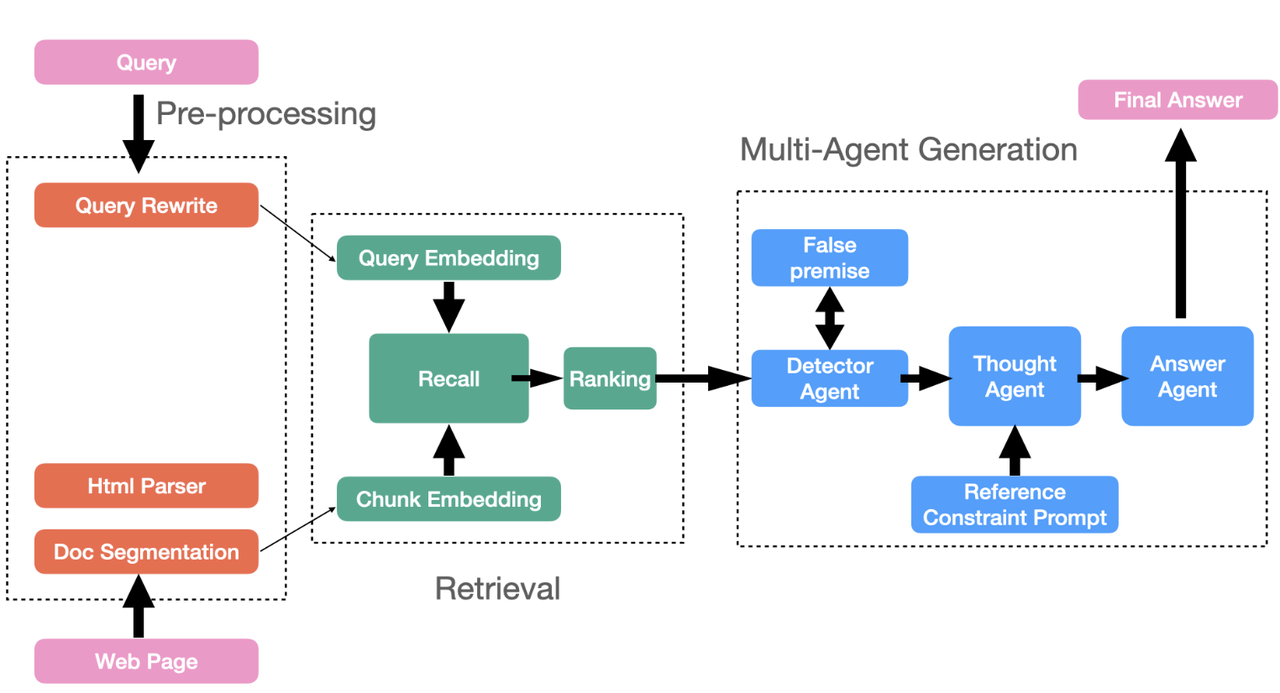
In these architectures, agents need to manage their own memory, such as user conversation sessions and personalized information. Many agent frameworks use short-term memory modules to handle this data, distinguishing it from long-term memory. The former relies on temporary memory data; however, as agent usage increases and all user information needs to be retained, a more reliable approach is to use a long-term memory component, specifically a database, to store all the aforementioned user information in both text and vector formats. For memory management, the required interfaces essentially fall into two categories:
* Filtering: Retrieve specific memory information for a particular agent and user based on user ID, agent ID, and time range.
* Searching: Query relevant information in the user memory module based on contextual information (including text and vectors).
Since agents require real-time access to memory, the database for long-term memory management must not only support the aforementioned two types of requirements but also ensure real-time performance: data must be immediately visible upon insertion. This essentially necessitates a streaming search capability—within Infinity, all indexes meet this requirement.
For vectors, index construction is a time-consuming process; therefore, Infinity employs a brute-force scan for newly inserted data to facilitate real-time querying. As a result, Infinity is well-prepared to support the forthcoming multi-agent systems.
Infinity, a database specifically designed for Retrieval-Augmented Generation (RAG), has evolved to possess comprehensive service capabilities. In the latest release of RAGFlow version 0.14, Infinity has been integrated as an alternative to Elasticsearch. After thorough testing and validation, Infinity will become the preferred option for RAGFlow, unlocking many advanced features over time. Please stay tuned for updates on Infinity and RAGFlow!
[https://github.com/infiniflow/infinity](https://github.com/infiniflow/infinity)
[https://github.com/infiniflow/ragflow](https://github.com/infiniflow/ragflow)
Bibliography[](https://ragflow.io/blog/what-infrastructure-capabilities-does-rag-need-beyond-hybrid-search#bibliography "Direct link to Bibliography")
--------------------------------------------------------------------------------------------------------------------------------------------------------
1. [https://github.com/kuzudb/kuzu](https://github.com/kuzudb/kuzu)
2. [https://github.com/HKUDS/LightRAG](https://github.com/HKUDS/LightRAG)
3. [https://github.com/OpenSPG/KAG](https://github.com/OpenSPG/KAG)
4. Annotative Indexing, arXiv preprint arXiv:2411.06256
5. HybridRAG: Integrating Knowledge Graphs and Vector Retrieval Augmented Generation for Efficient Information Extraction, Proceedings of the 5th ACM International Conference on AI in Finance, 2024
6. TCAF: a Multi-Agent Approach of Thought Chain for Retrieval Augmented Generation, 2024 KDD Cup Workshop for Retrieval Augmented Generation
* [GraphRAG](https://ragflow.io/blog/what-infrastructure-capabilities-does-rag-need-beyond-hybrid-search#graphrag)
* [Long-term Memory](https://ragflow.io/blog/what-infrastructure-capabilities-does-rag-need-beyond-hybrid-search#long-term-memory)
* [Bibliography](https://ragflow.io/blog/what-infrastructure-capabilities-does-rag-need-beyond-hybrid-search#bibliography)
---
# Acquire RAGFlow API key | RAGFlow
[Skip to main content](https://ragflow.io/docs/dev/acquire_ragflow_api_key#__docusaurus_skipToContent_fallback)
Version: DEV
Acquire RAGFlow API key
=======================
An API key is required for the RAGFlow server to authenticate your HTTP/Python or MCP requests. This documents provides instructions on obtaining a RAGFlow API key.
1. Click your avatar in the top right corner of the RAGFlow UI to access the configuration page.
2. Click **API** to switch to the **API** page.
3. Obtain a RAGFlow API key:

NOTE
See the [RAGFlow HTTP API reference](https://ragflow.io/docs/dev/http_api_reference)
or the [RAGFlow Python API reference](https://ragflow.io/docs/dev/python_api_reference)
for a complete reference of RAGFlow's HTTP or Python APIs.
---
# Build RAGFlow Docker image | RAGFlow
[Skip to main content](https://ragflow.io/docs/dev/build_docker_image#__docusaurus_skipToContent_fallback)
Version: DEV
On this page
Build RAGFlow Docker image
==========================
A guide explaining how to build a RAGFlow Docker image from its source code. By following this guide, you'll be able to create a local Docker image that can be used for development, debugging, or testing purposes.
Target Audience[](https://ragflow.io/docs/dev/build_docker_image#target-audience "Direct link to Target Audience")
--------------------------------------------------------------------------------------------------------------------
* Developers who have added new features or modified the existing code and require a Docker image to view and debug their changes.
* Developers seeking to build a RAGFlow Docker image for an ARM64 platform.
* Testers aiming to explore the latest features of RAGFlow in a Docker image.
Prerequisites[](https://ragflow.io/docs/dev/build_docker_image#prerequisites "Direct link to Prerequisites")
--------------------------------------------------------------------------------------------------------------
* CPU ≥ 4 cores
* RAM ≥ 16 GB
* Disk ≥ 50 GB
* Docker ≥ 24.0.0 & Docker Compose ≥ v2.26.1
Build a Docker image[](https://ragflow.io/docs/dev/build_docker_image#build-a-docker-image "Direct link to Build a Docker image")
-----------------------------------------------------------------------------------------------------------------------------------
* Build a Docker image without embedding models
* Build a Docker image including embedding models
This image is approximately 2 GB in size and relies on external LLM and embedding services.
IMPORTANT
* While we also test RAGFlow on ARM64 platforms, we do not maintain RAGFlow Docker images for ARM. However, you can build an image yourself on a `linux/arm64` or `darwin/arm64` host machine as well.
* For ARM64 platforms, please upgrade the `xgboost` version in **pyproject.toml** to `1.6.0` and ensure **unixODBC** is properly installed.
git clone https://github.com/infiniflow/ragflow.gitcd ragflow/uv run download_deps.pydocker build -f Dockerfile.deps -t infiniflow/ragflow_deps .docker build --build-arg LIGHTEN=1 -f Dockerfile -t infiniflow/ragflow:nightly-slim .
This image is approximately 9 GB in size. As it includes embedding models, it relies on external LLM services only.
IMPORTANT
* While we also test RAGFlow on ARM64 platforms, we do not maintain RAGFlow Docker images for ARM. However, you can build an image yourself on a `linux/arm64` or `darwin/arm64` host machine as well.
* For ARM64 platforms, please upgrade the `xgboost` version in **pyproject.toml** to `1.6.0` and ensure **unixODBC** is properly installed.
git clone https://github.com/infiniflow/ragflow.gitcd ragflow/uv run download_deps.pydocker build -f Dockerfile.deps -t infiniflow/ragflow_deps .docker build -f Dockerfile -t infiniflow/ragflow:nightly .
Launch a RAGFlow Service from Docker for MacOS[](https://ragflow.io/docs/dev/build_docker_image#launch-a-ragflow-service-from-docker-for-macos "Direct link to Launch a RAGFlow Service from Docker for MacOS")
-----------------------------------------------------------------------------------------------------------------------------------------------------------------------------------------------------------------
After building the infiniflow/ragflow:nightly-slim image, you are ready to launch a fully-functional RAGFlow service with all the required components, such as Elasticsearch, MySQL, MinIO, Redis, and more.
Example: Apple M2 Pro (Sequoia)[](https://ragflow.io/docs/dev/build_docker_image#example-apple-m2-pro-sequoia "Direct link to Example: Apple M2 Pro (Sequoia)")
-----------------------------------------------------------------------------------------------------------------------------------------------------------------
1. Edit Docker Compose Configuration
Open the `docker/.env` file. Find the `RAGFLOW_IMAGE` setting and change the image reference from `infiniflow/ragflow:v0.19.1-slim` to `infiniflow/ragflow:nightly-slim` to use the pre-built image.
2. Launch the Service
cd docker$ docker compose -f docker-compose-macos.yml up -d
3. Access the RAGFlow Service
Once the setup is complete, open your web browser and navigate to [http://127.0.0.1](http://127.0.0.1/)
or your server's ; (the default port is = 80). You will be directed to the RAGFlow welcome page. Enjoy!🍻
* [Target Audience](https://ragflow.io/docs/dev/build_docker_image#target-audience)
* [Prerequisites](https://ragflow.io/docs/dev/build_docker_image#prerequisites)
* [Build a Docker image](https://ragflow.io/docs/dev/build_docker_image#build-a-docker-image)
* [Launch a RAGFlow Service from Docker for MacOS](https://ragflow.io/docs/dev/build_docker_image#launch-a-ragflow-service-from-docker-for-macos)
* [Example: Apple M2 Pro (Sequoia)](https://ragflow.io/docs/dev/build_docker_image#example-apple-m2-pro-sequoia)
---
# Search | RAGFlow
[Skip to main content](https://ragflow.io/docs/dev/ai_search#__docusaurus_skipToContent_fallback)
Version: DEV
On this page
Search
======
Conduct an AI search.
* * *
An AI search is a single-turn AI conversation using a predefined retrieval strategy (a hybrid search of weighted keyword similarity and weighted vector similarity) and the system's default chat model. It does not involve advanced RAG strategies like knowledge graph, auto-keyword, or auto-question. The related chunks are listed below the chat model's response in descending order based on their similarity scores.
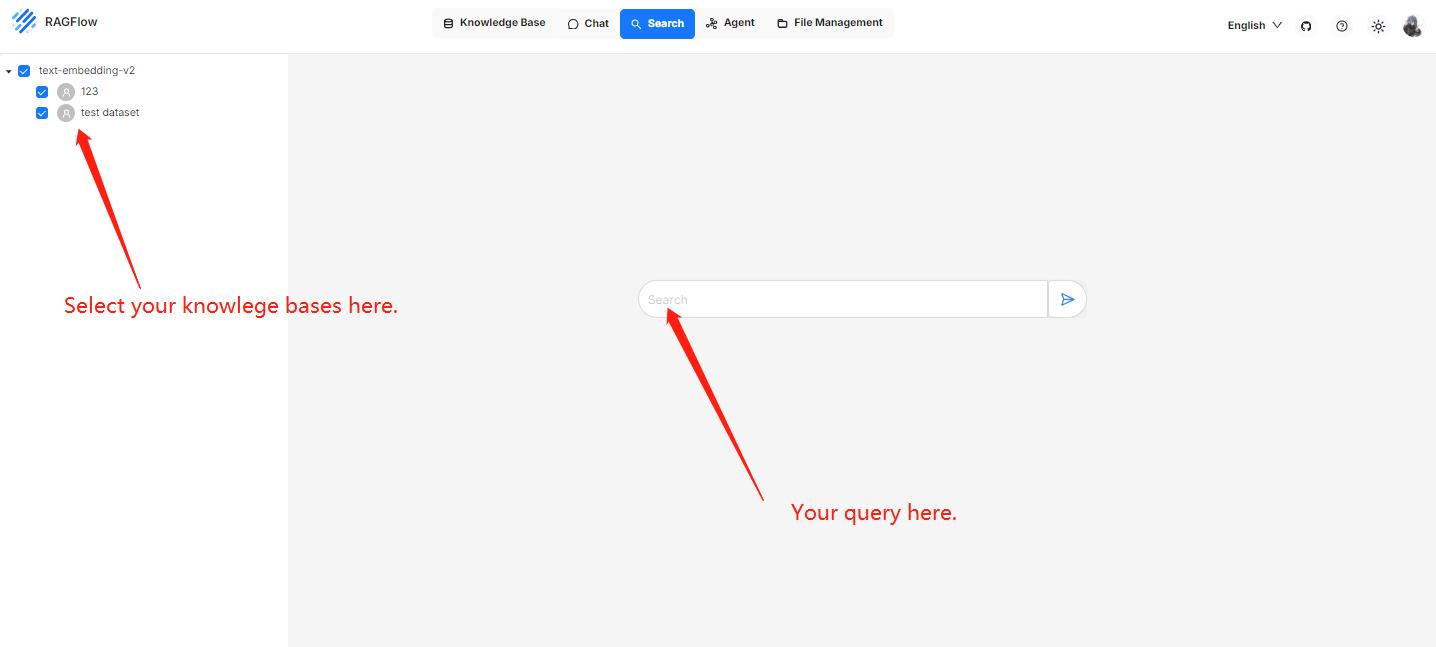
NOTE
When debugging your chat assistant, you can use AI search as a reference to verify your model settings and retrieval strategy.
Prerequisites[](https://ragflow.io/docs/dev/ai_search#prerequisites "Direct link to Prerequisites")
-----------------------------------------------------------------------------------------------------
* Ensure that you have configured the system's default models on the **Model providers** page.
* Ensure that the intended knowledge bases are properly configured and the intended documents have finished file parsing.
Frequently asked questions[](https://ragflow.io/docs/dev/ai_search#frequently-asked-questions "Direct link to Frequently asked questions")
--------------------------------------------------------------------------------------------------------------------------------------------
### Key difference between an AI search and an AI chat?[](https://ragflow.io/docs/dev/ai_search#key-difference-between-an-ai-search-and-an-ai-chat "Direct link to Key difference between an AI search and an AI chat?")
A chat is a multi-turn AI conversation where you can define your retrieval strategy (a weighted reranking score can be used to replace the weighted vector similarity in a hybrid search) and choose your chat model. In an AI chat, you can configure advanced RAG strategies, such as knowledge graphs, auto-keyword, and auto-question, for your specific case. Retrieved chunks are not displayed along with the answer.
* [Prerequisites](https://ragflow.io/docs/dev/ai_search#prerequisites)
* [Frequently asked questions](https://ragflow.io/docs/dev/ai_search#frequently-asked-questions)
* [Key difference between an AI search and an AI chat?](https://ragflow.io/docs/dev/ai_search#key-difference-between-an-ai-search-and-an-ai-chat)
---
# Contribution | RAGFlow
[Skip to main content](https://ragflow.io/docs/dev/category/contribution#__docusaurus_skipToContent_fallback)
Version: DEV
[📄️ Contribution guidelines\
---------------------------\
\
General guidelines for RAGFlow's community contributors.](https://ragflow.io/docs/dev/contributing)
---
# Accelerate answering | RAGFlow
[Skip to main content](https://ragflow.io/docs/dev/accelerate_question_answering#__docusaurus_skipToContent_fallback)
Version: DEV
Accelerate answering
====================
A checklist to speed up question answering.
* * *
Please note that some of your settings may consume a significant amount of time. If you often find that your question answering is time-consuming, here is a checklist to consider:
* In the **Prompt engine** tab of your **Chat Configuration** dialogue, disabling **Multi-turn optimization** will reduce the time required to get an answer from the LLM.
* In the **Prompt engine** tab of your **Chat Configuration** dialogue, leaving the **Rerank model** field empty will significantly decrease retrieval time.
* When using a rerank model, ensure you have a GPU for acceleration; otherwise, the reranking process will be _prohibitively_ slow.
NOTE
Please note that rerank models are essential in certain scenarios. There is always a trade-off between speed and performance; you must weigh the pros against cons for your specific case.
* In the **Assistant settings** tab of your **Chat Configuration** dialogue, disabling **Keyword analysis** will reduce the time to receive an answer from the LLM.
* When chatting with your chat assistant, click the light bulb icon above the _current_ dialogue and scroll down the popup window to view the time taken for each task:

| Item name | Description |
| --- | --- |
| Total | Total time spent on this conversation round, including chunk retrieval and answer generation. |
| Check LLM | Time to validate the specified LLM. |
| Create retriever | Time to create a chunk retriever. |
| Bind embedding | Time to initialize an embedding model instance. |
| Bind LLM | Time to initialize an LLM instance. |
| Tune question | Time to optimize the user query using the context of the mult-turn conversation. |
| Bind reranker | Time to initialize an reranker model instance for chunk retrieval. |
| Generate keywords | Time to extract keywords from the user query. |
| Retrieval | Time to retrieve the chunks. |
| Generate answer | Time to generate the answer. |
---
# Developers | RAGFlow
[Skip to main content](https://ragflow.io/docs/dev/category/developers#__docusaurus_skipToContent_fallback)
Version: DEV
[📄️ Build RAGFlow Docker image\
------------------------------\
\
A guide explaining how to build a RAGFlow Docker image from its source code. By following this guide, you'll be able to create a local Docker image that can be used for development, debugging, or testing purposes.](https://ragflow.io/docs/dev/build_docker_image)
[📄️ Launch service from source\
------------------------------\
\
A guide explaining how to set up a RAGFlow service from its source code. By following this guide, you'll be able to debug using the source code.](https://ragflow.io/docs/dev/launch_ragflow_from_source)
[📄️ Switch document engine\
--------------------------\
\
Switch your doc engine from Elasticsearch to Infinity.](https://ragflow.io/docs/dev/switch_doc_engine)
[📄️ Acquire RAGFlow API key\
---------------------------\
\
An API key is required for the RAGFlow server to authenticate your HTTP/Python or MCP requests. This documents provides instructions on obtaining a RAGFlow API key.](https://ragflow.io/docs/dev/acquire_ragflow_api_key)
[🗃️ MCP\
-------\
\
3 items](https://ragflow.io/docs/dev/category/mcp)
---
# Introduction to agents | RAGFlow
[Skip to main content](https://ragflow.io/docs/dev/agent_introduction#__docusaurus_skipToContent_fallback)
Version: DEV
On this page
Introduction to agents
======================
Key concepts, basic operations, a quick view of the agent editor.
* * *
Key concepts[](https://ragflow.io/docs/dev/agent_introduction#key-concepts "Direct link to Key concepts")
-----------------------------------------------------------------------------------------------------------
Agents and RAG are complementary techniques, each enhancing the other’s capabilities in business applications. RAGFlow v0.8.0 introduces an agent mechanism, featuring a no-code workflow editor on the front end and a comprehensive graph-based task orchestration framework on the back end. This mechanism is built on top of RAGFlow's existing RAG solutions and aims to orchestrate search technologies such as query intent classification, conversation leading, and query rewriting to:
* Provide higher retrievals and,
* Accommodate more complex scenarios.
Create an agent[](https://ragflow.io/docs/dev/agent_introduction#create-an-agent "Direct link to Create an agent")
--------------------------------------------------------------------------------------------------------------------
NOTE
Before proceeding, ensure that:
1. You have properly set the LLM to use. See the guides on [Configure your API key](https://ragflow.io/docs/dev/llm_api_key_setup)
or [Deploy a local LLM](https://ragflow.io/docs/dev/deploy_local_llm)
for more information.
2. You have a knowledge base configured and the corresponding files properly parsed. See the guide on [Configure a knowledge base](https://ragflow.io/docs/dev/configure_knowledge_base)
for more information.
Click the **Agent** tab in the middle top of the page to show the **Agent** page. As shown in the screenshot below, the cards on this page represent the created agents, which you can continue to edit.

We also provide templates catered to different business scenarios. You can either generate your agent from one of our agent templates or create one from scratch:
1. Click **\+ Create agent** to show the **agent template** page:

2. To create an agent from scratch, click the **Blank** card. Alternatively, to create an agent from one of our templates, hover over the desired card, such as **General-purpose chatbot**, click **Use this template**, name your agent in the pop-up dialogue, and click **OK** to confirm.
_You are now taken to the **no-code workflow editor** page. The left panel lists the components (operators): Above the dividing line are the RAG-specific components; below the line are tools. We are still working to expand the component list._

3. General speaking, now you can do the following:
* Drag and drop a desired component to your workflow,
* Select the knowledge base to use,
* Update settings of specific components,
* Update LLM settings
* Sets the input and output for a specific component, and more.
4. Click **Save** to apply changes to your agent and **Run** to test it.
Components[](https://ragflow.io/docs/dev/agent_introduction#components "Direct link to Components")
-----------------------------------------------------------------------------------------------------
Please review the flowing description of the RAG-specific components before you proceed:
| Component | Description |
| --- | --- |
| **Retrieval** | A component that retrieves information from specified knowledge bases and returns 'Empty response' if no information is found. Ensure the correct knowledge bases are selected. |
| **Generate** | A component that prompts the LLM to generate responses. You must ensure the prompt is set correctly. |
| **Interact** | A component that serves as the interface between human and the bot, receiving user inputs and displaying the agent's responses. |
| **Categorize** | A component that uses the LLM to classify user inputs into predefined categories. Ensure you specify the name, description, and examples for each category, along with the corresponding next component. |
| **Message** | A component that sends out a static message. If multiple messages are supplied, it randomly selects one to send. Ensure its downstream is **Interact**, the interface component. |
| **Rewrite** | A component that rewrites a user query from the **Interact** component, based on the context of previous dialogues. |
| **Keyword** | A component that extracts keywords from a user query, with TopN specifying the number of keywords to extract. |
NOTE
* Ensure **Rewrite**'s upstream component is **Relevant** and downstream component is **Retrieval**.
* Ensure the downstream component of **Message** is **Interact**.
* The downstream component of **Begin** is always **Interact**.
Basic operations[](https://ragflow.io/docs/dev/agent_introduction#basic-operations "Direct link to Basic operations")
-----------------------------------------------------------------------------------------------------------------------
| Operation | Description |
| --- | --- |
| Add a component | Drag and drop the desired component from the left panel onto the canvas. |
| Delete a component | On the canvas, hover over the three dots (...) of the component to display the delete option, then select it to remove the component. |
| Copy a component | On the canvas, hover over the three dots (...) of the component to display the copy option, then select it to make a copy the component. |
| Update component settings | On the canvas, click the desired component to display the component settings. |
* [Key concepts](https://ragflow.io/docs/dev/agent_introduction#key-concepts)
* [Create an agent](https://ragflow.io/docs/dev/agent_introduction#create-an-agent)
* [Components](https://ragflow.io/docs/dev/agent_introduction#components)
* [Basic operations](https://ragflow.io/docs/dev/agent_introduction#basic-operations)
---
# Accelerate indexing | RAGFlow
[Skip to main content](https://ragflow.io/docs/dev/accelerate_doc_indexing#__docusaurus_skipToContent_fallback)
Version: DEV
Accelerate indexing
===================
A checklist to speed up document parsing and indexing.
* * *
Please note that some of your settings may consume a significant amount of time. If you often find that document parsing is time-consuming, here is a checklist to consider:
* Use GPU to reduce embedding time.
* On the configuration page of your knowledge base, switch off **Use RAPTOR to enhance retrieval**.
* Extracting knowledge graph (GraphRAG) is time-consuming.
* Disable **Auto-keyword** and **Auto-question** on the configuration page of your knowledge base, as both depend on the LLM.
* **v0.17.0+:** If all PDFs in your knowledge base are plain text and do not require GPU-intensive processes like OCR (Optical Character Recognition), TSR (Table Structure Recognition), or DLA (Document Layout Analysis), you can choose **Naive** over **DeepDoc** or other time-consuming large model options in the **Document parser** dropdown. This will substantially reduce document parsing time.
---
# Auto-keyword Auto-question | RAGFlow
[Skip to main content](https://ragflow.io/docs/dev/autokeyword_autoquestion#__docusaurus_skipToContent_fallback)
Version: DEV
On this page
Auto-keyword Auto-question
==========================
Use a chat model to generate keywords or questions from each chunk in the knowledge base.
* * *
When selecting a chunking method, you can also enable auto-keyword or auto-question generation to increase retrieval rates. This feature uses a chat model to produce a specified number of keywords and questions from each created chunk, generating an "additional layer of information" from the original content.
WARNING
Enabling this feature increases document indexing time and uses extra tokens, as all created chunks will be sent to the chat model for keyword or question generation.
What is Auto-keyword?[](https://ragflow.io/docs/dev/autokeyword_autoquestion#what-is-auto-keyword "Direct link to What is Auto-keyword?")
-------------------------------------------------------------------------------------------------------------------------------------------
Auto-keyword refers to the auto-keyword generation feature of RAGFlow. It uses a chat model to generate a set of keywords or synonyms from each chunk to correct errors and enhance retrieval accuracy. This feature is implemented as a slider under **Page rank** on the **Configuration** page of your knowledge base.
**Values**:
* 0: (Default) Disabled.
* Between 3 and 5 (inclusive): Recommended if you have chunks of approximately 1,000 characters.
* 30 (maximum)
NOTE
* If your chunk size increases, you can increase the value accordingly. Please note, as the value increases, the marginal benefit decreases.
* An Auto-keyword value must be an integer. If you set it to a non-integer, say 1.7, it will be rounded down to the nearest integer, which in this case is 1.
What is Auto-question?[](https://ragflow.io/docs/dev/autokeyword_autoquestion#what-is-auto-question "Direct link to What is Auto-question?")
----------------------------------------------------------------------------------------------------------------------------------------------
Auto-question is a feature of RAGFlow that automatically generates questions from chunks of data using a chat model. These questions (e.g. who, what, and why) also help correct errors and improve the matching of user queries. The feature usually works with FAQ retrieval scenarios involving product manuals or policy documents. And you can find this feature as a slider under **Page rank** on the **Configuration** page of your knowledge base.
**Values**:
* 0: (Default) Disabled.
* 1 or 2: Recommended if you have chunks of approximately 1,000 characters.
* 10 (maximum)
NOTE
* If your chunk size increases, you can increase the value accordingly. Please note, as the value increases, the marginal benefit decreases.
* An Auto-question value must be an integer. If you set it to a non-integer, say 1.7, it will be rounded down to the nearest integer, which in this case is 1.
Tips from the community[](https://ragflow.io/docs/dev/autokeyword_autoquestion#tips-from-the-community "Direct link to Tips from the community")
--------------------------------------------------------------------------------------------------------------------------------------------------
The Auto-keyword or Auto-question values relate closely to the chunking size in your knowledge base. However, if you are new to this feature and unsure which value(s) to start with, the following are some value settings we gathered from our community. While they may not be accurate, they provide a starting point at the very least.
| Use cases or typical scenarios | Document volume/length | Auto\_keyword (0–30) | Auto\_question (0–10) |
| --- | --- | --- | --- |
| Internal process guidance for employee handbook | Small, under 10 pages | 0 | 0 |
| Customer service FAQs | Medium, 10–100 pages | 3–7 | 1–3 |
| Technical whitepapers: Development standards, protocol details | Large, over 100 pages | 2–4 | 1–2 |
| Contracts / Regulations / Legal clause retrieval | Large, over 50 pages | 2–5 | 0–1 |
| Multi-repository layered new documents + old archive | Many | Adjust as appropriate | Adjust as appropriate |
| Social media comment pool: multilingual & mixed spelling | Very large volume of short text | 8–12 | 0 |
| Operational logs for troubleshooting | Very large volume of short text | 3–6 | 0 |
| Marketing asset library: multilingual product descriptions | Medium | 6–10 | 1–2 |
| Training courses / eBooks | Large | 2–5 | 1–2 |
| Maintenance manual: equipment diagrams + steps | Medium | 3–7 | 1–2 |
* [What is Auto-keyword?](https://ragflow.io/docs/dev/autokeyword_autoquestion#what-is-auto-keyword)
* [What is Auto-question?](https://ragflow.io/docs/dev/autokeyword_autoquestion#what-is-auto-question)
* [Tips from the community](https://ragflow.io/docs/dev/autokeyword_autoquestion#tips-from-the-community)
---
# Agents | RAGFlow
[Skip to main content](https://ragflow.io/docs/dev/category/agents#__docusaurus_skipToContent_fallback)
Version: DEV
[📄️ Introduction to agents\
--------------------------\
\
Key concepts, basic operations, a quick view of the agent editor.](https://ragflow.io/docs/dev/agent_introduction)
[📄️ Create chatbot\
------------------\
\
Create a general-purpose chatbot.](https://ragflow.io/docs/dev/general_purpose_chatbot)
[📄️ Embed agent into webpage\
----------------------------\
\
You can use iframe to embed an agent into a third-party webpage.](https://ragflow.io/docs/dev/embed_agent_into_webpage)
[📄️ Create a Text2SQL agent\
---------------------------\
\
Build a Text2SQL agent leveraging RAGFlow's RAG capabilities.](https://ragflow.io/docs/dev/text2sql_agent)
[🗃️ Agent Components\
--------------------\
\
14 items](https://ragflow.io/docs/dev/category/agent-components)
[📄️ Sandbox quickstart\
----------------------\
\
A secure, pluggable code execution backend designed for RAGFlow and other applications requiring isolated code execution environments.](https://ragflow.io/docs/dev/sandbox_quickstart)
---
# Best practices | RAGFlow
[Skip to main content](https://ragflow.io/docs/dev/category/best-practices-1#__docusaurus_skipToContent_fallback)
Version: DEV
[📄️ Accelerate answering\
------------------------\
\
A checklist to speed up question answering.](https://ragflow.io/docs/dev/accelerate_question_answering)
---
# Chat | RAGFlow
[Skip to main content](https://ragflow.io/docs/dev/category/chat#__docusaurus_skipToContent_fallback)
Version: DEV
[📄️ Start AI chat\
-----------------\
\
Initiate an AI-powered chat with a configured chat assistant.](https://ragflow.io/docs/dev/start_chat)
[📄️ Implement deep research\
---------------------------\
\
Implements deep research for agentic reasoning.](https://ragflow.io/docs/dev/implement_deep_research)
[📄️ Set variables\
-----------------\
\
Set variables to be used together with the system prompt for your LLM.](https://ragflow.io/docs/dev/set_chat_variables)
[🗃️ Best practices\
------------------\
\
1 items](https://ragflow.io/docs/dev/category/best-practices-1)
---
# Guides | RAGFlow
[Skip to main content](https://ragflow.io/docs/dev/category/guides#__docusaurus_skipToContent_fallback)
Version: DEV
[🗃️ Models\
----------\
\
2 items](https://ragflow.io/docs/dev/category/models)
[🗃️ Datasets\
------------\
\
11 items](https://ragflow.io/docs/dev/category/datasets)
[🗃️ Chat\
--------\
\
4 items](https://ragflow.io/docs/dev/category/chat)
[📄️ Search\
----------\
\
Conduct an AI search.](https://ragflow.io/docs/dev/ai_search)
[🗃️ Agents\
----------\
\
6 items](https://ragflow.io/docs/dev/category/agents)
[🗃️ Team\
--------\
\
6 items](https://ragflow.io/docs/dev/category/team)
[📄️ Files\
---------\
\
Knowledge base, hallucination-free chat, and file management are the three pillars of RAGFlow. RAGFlow's file management allows you to upload files individually or in bulk. You can then link an uploaded file to multiple target knowledge bases. This guide showcases some basic usages of the file management feature.](https://ragflow.io/docs/dev/manage_files)
[📄️ Monitoring\
--------------\
\
Double-check the health status of RAGFlow's dependencies.](https://ragflow.io/docs/dev/run_health_check)
[📄️ Tracing\
-----------\
\
Observability & Tracing with Langfuse.](https://ragflow.io/docs/dev/tracing)
[📄️ Upgrading\
-------------\
\
Upgrade RAGFlow to nightly-slim/nightly or the latest, published release.](https://ragflow.io/docs/dev/upgrade_ragflow)
---
# MCP | RAGFlow
[Skip to main content](https://ragflow.io/docs/dev/category/mcp#__docusaurus_skipToContent_fallback)
Version: DEV
[📄️ Launch RAGFlow MCP server\
-----------------------------\
\
Launch an MCP server from source or via Docker.](https://ragflow.io/docs/dev/launch_mcp_server)
[📄️ RAGFlow MCP tools\
---------------------\
\
The MCP server currently offers a specialized tool to assist users in searching for relevant information powered by RAGFlow DeepDoc technology:](https://ragflow.io/docs/dev/mcp_tools)
[📄️ RAGFlow MCP client examples\
-------------------------------\
\
Python and curl MCP client examples.](https://ragflow.io/docs/dev/mcp_client)
---
# Best practices | RAGFlow
[Skip to main content](https://ragflow.io/docs/dev/category/best-practices#__docusaurus_skipToContent_fallback)
Version: DEV
[📄️ Accelerate indexing\
-----------------------\
\
A checklist to speed up document parsing and indexing.](https://ragflow.io/docs/dev/accelerate_doc_indexing)
---
# References | RAGFlow
[Skip to main content](https://ragflow.io/docs/dev/category/references#__docusaurus_skipToContent_fallback)
Version: DEV
[📄️ Glossary\
------------\
\
Definitions of key terms and basic concepts related to RAGFlow.](https://ragflow.io/docs/dev/glossary)
[📄️ Supported models\
--------------------\
\
A complete list of models supported by RAGFlow, which will continue to expand.](https://ragflow.io/docs/dev/supported_models)
[📄️ HTTP API\
------------\
\
A complete reference for RAGFlow's RESTful API. Before proceeding, please ensure you have your RAGFlow API key ready for authentication.](https://ragflow.io/docs/dev/http_api_reference)
[📄️ Python API\
--------------\
\
A complete reference for RAGFlow's Python APIs. Before proceeding, please ensure you have your RAGFlow API key ready for authentication.](https://ragflow.io/docs/dev/python_api_reference)
---
# Models | RAGFlow
[Skip to main content](https://ragflow.io/docs/dev/category/models#__docusaurus_skipToContent_fallback)
Version: DEV
[📄️ Configure model API key\
---------------------------\
\
An API key is required for RAGFlow to interact with an online AI model. This guide provides information about setting your model API key in RAGFlow.](https://ragflow.io/docs/dev/llm_api_key_setup)
[📄️ Deploy local models\
-----------------------\
\
Deploy and run local models using Ollama, Xinference, or other frameworks.](https://ragflow.io/docs/dev/deploy_local_llm)
---
# Begin component | RAGFlow
[Skip to main content](https://ragflow.io/docs/dev/begin_component#__docusaurus_skipToContent_fallback)
Version: DEV
On this page
Begin component
===============
The starting component in a workflow.
* * *
The **Begin** component sets an opening greeting or accepts inputs from the user. It is automatically populated onto the canvas when you create an agent, whether from a template or from scratch (from a blank template). There should be only one **Begin** component in the workflow.
Scenarios[](https://ragflow.io/docs/dev/begin_component#scenarios "Direct link to Scenarios")
-----------------------------------------------------------------------------------------------
A **Begin** component is essential in all cases. Every agent includes a **Begin** component, which cannot be deleted.
Configurations[](https://ragflow.io/docs/dev/begin_component#configurations "Direct link to Configurations")
--------------------------------------------------------------------------------------------------------------
Click the component to display its **Configuration** window. Here, you can set an opening greeting and the input parameters (global variables) for the agent.
### ID[](https://ragflow.io/docs/dev/begin_component#id "Direct link to ID")
The ID is the unique identifier for the component within the workflow. Unlike the IDs of other components, the ID of the **Begin** component _cannot_ be changed.
### Opening greeting[](https://ragflow.io/docs/dev/begin_component#opening-greeting "Direct link to Opening greeting")
An opening greeting is the agent's first message to the user. It can be a welcoming remark or an instruction to guide the user forward.
### Global variables[](https://ragflow.io/docs/dev/begin_component#global-variables "Direct link to Global variables")
You can define global variables within the **Begin** component, which can be either mandatory or optional. Once set, users will need to provide values for these variables when engaging with the agent. Click **\+ Add variable** to add a global variable, each with the following attributes:
* **Key**: _Required_
The unique variable name.
* **Name**: _Required_
A descriptive name providing additional details about the variable.
For example, if **Key** is set to `lang`, you can set its **Name** to `Target language`.
* **Type**: _Required_
The type of the variable:
* **line**: Accepts a single line of text without line breaks.
* **paragraph**: Accepts multiple lines of text, including line breaks.
* **options**: Requires the user to select a value for this variable from a dropdown menu. And you are required to set _at least_ one option for the dropdown menu.
* **file**: Requires the user to upload one or multiple files.
* **integer**: Accepts an integer as input.
* **boolean**: Requires the user to toggle between on and off.
* **Optional**: A toggle indicating whether the variable is optional.
NOTE
To pass in parameters from a client, call:
* HTTP method [Converse with agent](https://ragflow.io/docs/dev/http_api_reference#converse-with-agent)
, or
* Python method [Converse with agent](https://ragflow.io/docs/dev/python_api_reference#converse-with-agent)
.
IMPORTANT
* If you set the key type as **file**, ensure the token count of the uploaded file does not exceed your model provider's maximum token limit; otherwise, the plain text in your file will be truncated and incomplete.
* If your agent's **Begin** component takes a variable, you _cannot_ embed it into a webpage.
note
You can tune document parsing and embedding efficiency by setting the environment variables `DOC_BULK_SIZE` and `EMBEDDING_BATCH_SIZE`.
Examples[](https://ragflow.io/docs/dev/begin_component#examples "Direct link to Examples")
--------------------------------------------------------------------------------------------
As mentioned earlier, the **Begin** component is indispensable for an agent. Still, you can take a look at our three-step interpreter agent template, where the **Begin** component takes two global variables:
1. Click the **Agent** tab at the top center of the page to access the **Agent** page.
2. Click **\+ Create agent** on the top right of the page to open the **agent template** page.
3. On the **agent template** page, hover over the **Interpreter** card and click **Use this template**.
4. Name your new agent and click **OK** to enter the workflow editor.
5. Click on the **Begin** component to display its **Configuration** window.
Frequently asked questions[](https://ragflow.io/docs/dev/begin_component#frequently-asked-questions "Direct link to Frequently asked questions")
--------------------------------------------------------------------------------------------------------------------------------------------------
### Is the uploaded file in a knowledge base?[](https://ragflow.io/docs/dev/begin_component#is-the-uploaded-file-in-a-knowledge-base "Direct link to Is the uploaded file in a knowledge base?")
No. Files uploaded to an agent as input are not stored in a knowledge base and hence will not be processed using RAGFlow's built-in OCR, DLR or TSR models, or chunked using RAGFlow's built-in chunking methods.
### How to upload a webpage or file from a URL?[](https://ragflow.io/docs/dev/begin_component#how-to-upload-a-webpage-or-file-from-a-url "Direct link to How to upload a webpage or file from a URL?")
If you set the type of a variable as **file**, your users will be able to upload a file either from their local device or from an accessible URL. For example:

### File size limit for an uploaded file[](https://ragflow.io/docs/dev/begin_component#file-size-limit-for-an-uploaded-file "Direct link to File size limit for an uploaded file")
There is no _specific_ file size limit for a file uploaded to an agent. However, note that model providers typically have a default or explicit maximum token setting, which can range from 8196 to 128k: The plain text part of the uploaded file will be passed in as the key value, but if the file's token count exceeds this limit, the string will be truncated and incomplete.
NOTE
The variables `MAX_CONTENT_LENGTH` in `/docker/.env` and `client_max_body_size` in `/docker/nginx/nginx.conf` set the file size limit for each upload to a knowledge base or **File Management**. These settings DO NOT apply in this scenario.
* [Scenarios](https://ragflow.io/docs/dev/begin_component#scenarios)
* [Configurations](https://ragflow.io/docs/dev/begin_component#configurations)
* [ID](https://ragflow.io/docs/dev/begin_component#id)
* [Opening greeting](https://ragflow.io/docs/dev/begin_component#opening-greeting)
* [Global variables](https://ragflow.io/docs/dev/begin_component#global-variables)
* [Examples](https://ragflow.io/docs/dev/begin_component#examples)
* [Frequently asked questions](https://ragflow.io/docs/dev/begin_component#frequently-asked-questions)
* [Is the uploaded file in a knowledge base?](https://ragflow.io/docs/dev/begin_component#is-the-uploaded-file-in-a-knowledge-base)
* [How to upload a webpage or file from a URL?](https://ragflow.io/docs/dev/begin_component#how-to-upload-a-webpage-or-file-from-a-url)
* [File size limit for an uploaded file](https://ragflow.io/docs/dev/begin_component#file-size-limit-for-an-uploaded-file)
---
# Configuration | RAGFlow
[Skip to main content](https://ragflow.io/docs/dev/configurations#__docusaurus_skipToContent_fallback)
Version: DEV
On this page
Configuration
=============
Configurations for deploying RAGFlow via Docker.
Guidelines[](https://ragflow.io/docs/dev/configurations#guidelines "Direct link to Guidelines")
-------------------------------------------------------------------------------------------------
When it comes to system configurations, you will need to manage the following files:
* [.env](https://github.com/infiniflow/ragflow/blob/main/docker/.env)
: Contains important environment variables for Docker.
* [service\_conf.yaml.template](https://github.com/infiniflow/ragflow/blob/main/docker/service_conf.yaml.template)
: Configures the back-end services. It specifies the system-level configuration for RAGFlow and is used by its API server and task executor. Upon container startup, the `service_conf.yaml` file will be generated based on this template file. This process replaces any environment variables within the template, allowing for dynamic configuration tailored to the container's environment.
* [docker-compose.yml](https://github.com/infiniflow/ragflow/blob/main/docker/docker-compose.yml)
: The Docker Compose file for starting up the RAGFlow service.
To update the default HTTP serving port (80), go to [docker-compose.yml](https://github.com/infiniflow/ragflow/blob/main/docker/docker-compose.yml)
and change `80:80` to `:80`.
NOTE
Updates to the above configurations require a reboot of all containers to take effect:
docker compose -f docker/docker-compose.yml up -d
Docker Compose[](https://ragflow.io/docs/dev/configurations#docker-compose "Direct link to Docker Compose")
-------------------------------------------------------------------------------------------------------------
* **docker-compose.yml**
Sets up environment for RAGFlow and its dependencies.
* **docker-compose-base.yml**
Sets up environment for RAGFlow's dependencies: Elasticsearch/[Infinity](https://github.com/infiniflow/infinity)
, MySQL, MinIO, and Redis.
IMPORTANT
We do not actively maintain **docker-compose-CN-oc9.yml**, **docker-compose-gpu-CN-oc9.yml**, or **docker-compose-gpu.yml**, so use them at your own risk. However, you are welcome to file a pull request to improve any of them.
Docker environment variables[](https://ragflow.io/docs/dev/configurations#docker-environment-variables "Direct link to Docker environment variables")
-------------------------------------------------------------------------------------------------------------------------------------------------------
The [.env](https://github.com/infiniflow/ragflow/blob/main/docker/.env)
file contains important environment variables for Docker.
### Elasticsearch[](https://ragflow.io/docs/dev/configurations#elasticsearch "Direct link to Elasticsearch")
* `STACK_VERSION`
The version of Elasticsearch. Defaults to `8.11.3`
* `ES_PORT`
The port used to expose the Elasticsearch service to the host machine, allowing **external** access to the service running inside the Docker container. Defaults to `1200`.
* `ELASTIC_PASSWORD`
The password for Elasticsearch.
### Kibana[](https://ragflow.io/docs/dev/configurations#kibana "Direct link to Kibana")
* `KIBANA_PORT`
The port used to expose the Kibana service to the host machine, allowing **external** access to the service running inside the Docker container. Defaults to `6601`.
* `KIBANA_USER`
The username for Kibana. Defaults to `rag_flow`.
* `KIBANA_PASSWORD`
The password for Kibana. Defaults to `infini_rag_flow`.
### Resource management[](https://ragflow.io/docs/dev/configurations#resource-management "Direct link to Resource management")
* `MEM_LIMIT`
The maximum amount of the memory, in bytes, that _a specific_ Docker container can use while running. Defaults to `8073741824`.
### MySQL[](https://ragflow.io/docs/dev/configurations#mysql "Direct link to MySQL")
* `MYSQL_PASSWORD`
The password for MySQL.
* `MYSQL_PORT`
The port used to expose the MySQL service to the host machine, allowing **external** access to the MySQL database running inside the Docker container. Defaults to `5455`.
### MinIO[](https://ragflow.io/docs/dev/configurations#minio "Direct link to MinIO")
RAGFlow utilizes MinIO as its object storage solution, leveraging its scalability to store and manage all uploaded files.
* `MINIO_CONSOLE_PORT`
The port used to expose the MinIO console interface to the host machine, allowing **external** access to the web-based console running inside the Docker container. Defaults to `9001`
* `MINIO_PORT`
The port used to expose the MinIO API service to the host machine, allowing **external** access to the MinIO object storage service running inside the Docker container. Defaults to `9000`.
* `MINIO_USER`
The username for MinIO.
* `MINIO_PASSWORD`
The password for MinIO.
### Redis[](https://ragflow.io/docs/dev/configurations#redis "Direct link to Redis")
* `REDIS_PORT`
The port used to expose the Redis service to the host machine, allowing **external** access to the Redis service running inside the Docker container. Defaults to `6379`.
* `REDIS_PASSWORD`
The password for Redis.
### RAGFlow[](https://ragflow.io/docs/dev/configurations#ragflow "Direct link to RAGFlow")
* `SVR_HTTP_PORT`
The port used to expose RAGFlow's HTTP API service to the host machine, allowing **external** access to the service running inside the Docker container. Defaults to `9380`.
* `RAGFLOW-IMAGE`
The Docker image edition. Available editions:
* `infiniflow/ragflow:v0.19.1-slim` (default): The RAGFlow Docker image without embedding models.
* `infiniflow/ragflow:v0.19.1`: The RAGFlow Docker image with embedding models including:
* Built-in embedding models:
* `BAAI/bge-large-zh-v1.5`
* `maidalun1020/bce-embedding-base_v1`
NOTE
If you cannot download the RAGFlow Docker image, try the following mirrors.
* For the `nightly-slim` edition:
* `RAGFLOW_IMAGE=swr.cn-north-4.myhuaweicloud.com/infiniflow/ragflow:nightly-slim` or,
* `RAGFLOW_IMAGE=registry.cn-hangzhou.aliyuncs.com/infiniflow/ragflow:nightly-slim`.
* For the `nightly` edition:
* `RAGFLOW_IMAGE=swr.cn-north-4.myhuaweicloud.com/infiniflow/ragflow:nightly` or,
* `RAGFLOW_IMAGE=registry.cn-hangzhou.aliyuncs.com/infiniflow/ragflow:nightly`.
### Timezone[](https://ragflow.io/docs/dev/configurations#timezone "Direct link to Timezone")
* `TIMEZONE`
The local time zone. Defaults to `'Asia/Shanghai'`.
### Hugging Face mirror site[](https://ragflow.io/docs/dev/configurations#hugging-face-mirror-site "Direct link to Hugging Face mirror site")
* `HF_ENDPOINT`
The mirror site for huggingface.co. It is disabled by default. You can uncomment this line if you have limited access to the primary Hugging Face domain.
### MacOS[](https://ragflow.io/docs/dev/configurations#macos "Direct link to MacOS")
* `MACOS`
Optimizations for macOS. It is disabled by default. You can uncomment this line if your OS is macOS.
### User registration[](https://ragflow.io/docs/dev/configurations#user-registration "Direct link to User registration")
* `REGISTER_ENABLED`
* `1`: (Default) Enable user registration.
* `0`: Disable user registration.
Service configuration[](https://ragflow.io/docs/dev/configurations#service-configuration "Direct link to Service configuration")
----------------------------------------------------------------------------------------------------------------------------------
[service\_conf.yaml.template](https://github.com/infiniflow/ragflow/blob/main/docker/service_conf.yaml.template)
specifies the system-level configuration for RAGFlow and is used by its API server and task executor.
### `ragflow`[](https://ragflow.io/docs/dev/configurations#ragflow-1 "Direct link to ragflow-1")
* `host`: The API server's IP address inside the Docker container. Defaults to `0.0.0.0`.
* `port`: The API server's serving port inside the Docker container. Defaults to `9380`.
### `mysql`[](https://ragflow.io/docs/dev/configurations#mysql-1 "Direct link to mysql-1")
* `name`: The MySQL database name. Defaults to `rag_flow`.
* `user`: The username for MySQL.
* `password`: The password for MySQL.
* `port`: The MySQL serving port inside the Docker container. Defaults to `3306`.
* `max_connections`: The maximum number of concurrent connections to the MySQL database. Defaults to `100`.
* `stale_timeout`: Timeout in seconds.
### `minio`[](https://ragflow.io/docs/dev/configurations#minio-1 "Direct link to minio-1")
* `user`: The username for MinIO.
* `password`: The password for MinIO.
* `host`: The MinIO serving IP _and_ port inside the Docker container. Defaults to `minio:9000`.
### `oauth`[](https://ragflow.io/docs/dev/configurations#oauth "Direct link to oauth")
The OAuth configuration for signing up or signing in to RAGFlow using a third-party account.
* ``: Custom channel ID.
* `type`: Authentication type, options include `oauth2`, `oidc`, `github`. Default is `oauth2`, when `issuer` parameter is provided, defaults to `oidc`.
* `icon`: Icon ID, options include `github`, `sso`, default is `sso`.
* `display_name`: Channel name, defaults to the Title Case format of the channel ID.
* `client_id`: Required, unique identifier assigned to the client application.
* `client_secret`: Required, secret key for the client application, used for communication with the authentication server.
* `authorization_url`: Base URL for obtaining user authorization.
* `token_url`: URL for exchanging authorization code and obtaining access token.
* `userinfo_url`: URL for obtaining user information (username, email, etc.).
* `issuer`: Base URL of the identity provider. OIDC clients can dynamically obtain the identity provider's metadata (`authorization_url`, `token_url`, `userinfo_url`) through `issuer`.
* `scope`: Requested permission scope, a space-separated string. For example, `openid profile email`.
* `redirect_uri`: Required, URI to which the authorization server redirects during the authentication flow to return results. Must match the callback URI registered with the authentication server. Format: `https://your-app.com/v1/user/oauth/callback/`. For local configuration, you can directly use `http://127.0.0.1:80/v1/user/oauth/callback/`.
NOTE
The following are best practices for configuring various third-party authentication methods. You can configure one or multiple third-party authentication methods for Ragflow:
oauth: oauth2: display_name: "OAuth2" client_id: "your_client_id" client_secret: "your_client_secret" authorization_url: "https://your-oauth-provider.com/oauth/authorize" token_url: "https://your-oauth-provider.com/oauth/token" userinfo_url: "https://your-oauth-provider.com/oauth/userinfo" redirect_uri: "https://your-app.com/v1/user/oauth/callback/oauth2" oidc: display_name: "OIDC" client_id: "your_client_id" client_secret: "your_client_secret" issuer: "https://your-oauth-provider.com/oidc" scope: "openid email profile" redirect_uri: "https://your-app.com/v1/user/oauth/callback/oidc" github: # https://docs.github.com/en/apps/oauth-apps/building-oauth-apps/creating-an-oauth-app type: "github" icon: "github" display_name: "Github" client_id: "your_client_id" client_secret: "your_client_secret" redirect_uri: "https://your-app.com/v1/user/oauth/callback/github"
### `user_default_llm`[](https://ragflow.io/docs/dev/configurations#user_default_llm "Direct link to user_default_llm")
The default LLM to use for a new RAGFlow user. It is disabled by default. To enable this feature, uncomment the corresponding lines in **service\_conf.yaml.template**.
* `factory`: The LLM supplier. Available options:
* `"OpenAI"`
* `"DeepSeek"`
* `"Moonshot"`
* `"Tongyi-Qianwen"`
* `"VolcEngine"`
* `"ZHIPU-AI"`
* `api_key`: The API key for the specified LLM. You will need to apply for your model API key online.
NOTE
If you do not set the default LLM here, configure the default LLM on the **Settings** page in the RAGFlow UI.
* [Guidelines](https://ragflow.io/docs/dev/configurations#guidelines)
* [Docker Compose](https://ragflow.io/docs/dev/configurations#docker-compose)
* [Docker environment variables](https://ragflow.io/docs/dev/configurations#docker-environment-variables)
* [Elasticsearch](https://ragflow.io/docs/dev/configurations#elasticsearch)
* [Kibana](https://ragflow.io/docs/dev/configurations#kibana)
* [Resource management](https://ragflow.io/docs/dev/configurations#resource-management)
* [MySQL](https://ragflow.io/docs/dev/configurations#mysql)
* [MinIO](https://ragflow.io/docs/dev/configurations#minio)
* [Redis](https://ragflow.io/docs/dev/configurations#redis)
* [RAGFlow](https://ragflow.io/docs/dev/configurations#ragflow)
* [Timezone](https://ragflow.io/docs/dev/configurations#timezone)
* [Hugging Face mirror site](https://ragflow.io/docs/dev/configurations#hugging-face-mirror-site)
* [MacOS](https://ragflow.io/docs/dev/configurations#macos)
* [User registration](https://ragflow.io/docs/dev/configurations#user-registration)
* [Service configuration](https://ragflow.io/docs/dev/configurations#service-configuration)
* [`ragflow`](https://ragflow.io/docs/dev/configurations#ragflow-1)
* [`mysql`](https://ragflow.io/docs/dev/configurations#mysql-1)
* [`minio`](https://ragflow.io/docs/dev/configurations#minio-1)
* [`oauth`](https://ragflow.io/docs/dev/configurations#oauth)
* [`user_default_llm`](https://ragflow.io/docs/dev/configurations#user_default_llm)
---
# Datasets | RAGFlow
[Skip to main content](https://ragflow.io/docs/dev/category/datasets#__docusaurus_skipToContent_fallback)
Version: DEV
[📄️ Configure knowledge base\
----------------------------\
\
Knowledge base, hallucination-free chat, and file management are the three pillars of RAGFlow. RAGFlow's AI chats are based on knowledge bases. Each of RAGFlow's knowledge bases serves as a knowledge source, parsing files uploaded from your local machine and file references generated in File Management into the real 'knowledge' for future AI chats. This guide demonstrates some basic usages of the knowledge base feature, covering the following topics:](https://ragflow.io/docs/dev/configure_knowledge_base)
[📄️ Set metadata\
----------------\
\
Add metadata to an uploaded file](https://ragflow.io/docs/dev/set_metada)
[📄️ Select PDF parser\
---------------------\
\
Select a visual model for parsing your PDFs.](https://ragflow.io/docs/dev/select_pdf_parser)
[📄️ Set page rank\
-----------------\
\
Create a step-retrieval strategy using page rank.](https://ragflow.io/docs/dev/set_page_rank)
[📄️ Auto-keyword Auto-question\
------------------------------\
\
Use a chat model to generate keywords or questions from each chunk in the knowledge base.](https://ragflow.io/docs/dev/autokeyword_autoquestion)
[📄️ Enable Excel2HTML\
---------------------\
\
Convert complex Excel spreadsheets into HTML tables.](https://ragflow.io/docs/dev/enable_excel2html)
[📄️ Use tag set\
---------------\
\
Use a tag set to auto-tag chunks in your datasets.](https://ragflow.io/docs/dev/use_tag_sets)
[📄️ Enable RAPTOR\
-----------------\
\
A recursive abstractive method used in long-context knowledge retrieval and summarization, balancing broad semantic understanding with fine details.](https://ragflow.io/docs/dev/enable_raptor)
[📄️ Construct knowledge graph\
-----------------------------\
\
Generate a knowledge graph for your knowledge base.](https://ragflow.io/docs/dev/construct_knowledge_graph)
[📄️ Run retrieval test\
----------------------\
\
Conduct a retrieval test on your knowledge base to check whether the intended chunks can be retrieved.](https://ragflow.io/docs/dev/run_retrieval_test)
[🗃️ Best practices\
------------------\
\
1 items](https://ragflow.io/docs/dev/category/best-practices)
---
# Agent Components | RAGFlow
[Skip to main content](https://ragflow.io/docs/dev/category/agent-components#__docusaurus_skipToContent_fallback)
Version: DEV
[📄️ Begin component\
-------------------\
\
The starting component in a workflow.](https://ragflow.io/docs/dev/begin_component)
[📄️ Generate component\
----------------------\
\
The component that prompts the LLM to respond appropriately.](https://ragflow.io/docs/dev/generate_component)
[📄️ Interact component\
----------------------\
\
A component that accepts user inputs and displays responses.](https://ragflow.io/docs/dev/interact_component)
[📄️ Retrieval component\
-----------------------\
\
A component that retrieves information from specified datasets.](https://ragflow.io/docs/dev/retrieval_component)
[📄️ Categorize component\
------------------------\
\
A component that classifies user inputs and applies strategies accordingly.](https://ragflow.io/docs/dev/categorize_component)
[📄️ Keyword component\
---------------------\
\
A component that extracts keywords from a user query.](https://ragflow.io/docs/dev/keyword_component)
[📄️ Message component\
---------------------\
\
A component that sends out a static message.](https://ragflow.io/docs/dev/message_component)
[📄️ Rewrite component\
---------------------\
\
A component that rewrites a user query.](https://ragflow.io/docs/dev/rewrite_component)
[📄️ Switch component\
--------------------\
\
A component that evaluates whether specified conditions are met and directs the follow of execution accordingly.](https://ragflow.io/docs/dev/switch_component)
[📄️ Concentrator component\
--------------------------\
\
A component that directs execution flow to multiple downstream components.](https://ragflow.io/docs/dev/concentrator_component)
[📄️ Template component\
----------------------\
\
A component that formats user inputs or the outputs of other components.](https://ragflow.io/docs/dev/template_component)
[📄️ Iteration component\
-----------------------\
\
A component that splits text input into text segments and iterates a predefined workflow for each one.](https://ragflow.io/docs/dev/iteration_component)
[📄️ Code component\
------------------\
\
A component that enables users to integrate Python or JavaScript codes into their Agent for dynamic data processing.](https://ragflow.io/docs/dev/code_component)
[📄️ Note component\
------------------\
\
The component that keeps design notes.](https://ragflow.io/docs/dev/note_component)
---
# Categorize component | RAGFlow
[Skip to main content](https://ragflow.io/docs/dev/categorize_component#__docusaurus_skipToContent_fallback)
Version: DEV
On this page
Categorize component
====================
A component that classifies user inputs and applies strategies accordingly.
* * *
A **Categorize** component is usually the downstream of the **Interact** component.
Scenarios[](https://ragflow.io/docs/dev/categorize_component#scenarios "Direct link to Scenarios")
----------------------------------------------------------------------------------------------------
A **Categorize** component is essential when you need the LLM to help you identify user intentions and apply appropriate processing strategies.
Configurations[](https://ragflow.io/docs/dev/categorize_component#configurations "Direct link to Configurations")
-------------------------------------------------------------------------------------------------------------------
### Input[](https://ragflow.io/docs/dev/categorize_component#input "Direct link to Input")
The **Categorize** component relies on input variables to specify its data inputs (queries). Click **\+ Add variable** in the **Input** section to add the desired input variables. There are two types of input variables: **Reference** and **Text**.
* **Reference**: Uses a component's output or a user input as the data source. You are required to select from the dropdown menu:
* A component ID under **Component Output**, or
* A global variable under **Begin input**, which is defined in the **Begin** component.
* **Text**: Uses fixed text as the query. You are required to enter static text.
### Model[](https://ragflow.io/docs/dev/categorize_component#model "Direct link to Model")
Click the dropdown menu of **Model** to show the model configuration window.
* **Model**: The chat model to use.
* Ensure you set the chat model correctly on the **Model providers** page.
* You can use different models for different components to increase flexibility or improve overall performance.
* **Freedom**: A shortcut to **Temperature**, **Top P**, **Presence penalty**, and **Frequency penalty** settings, indicating the freedom level of the model. From **Improvise**, **Precise**, to **Balance**, each preset configuration corresponds to a unique combination of **Temperature**, **Top P**, **Presence penalty**, and **Frequency penalty**.
This parameter has three options:
* **Improvise**: Produces more creative responses.
* **Precise**: (Default) Produces more conservative responses.
* **Balance**: A middle ground between **Improvise** and **Precise**.
* **Temperature**: The randomness level of the model's output.
Defaults to 0.1.
* Lower values lead to more deterministic and predictable outputs.
* Higher values lead to more creative and varied outputs.
* A temperature of zero results in the same output for the same prompt.
* **Top P**: Nucleus sampling.
* Reduces the likelihood of generating repetitive or unnatural text by setting a threshold _P_ and restricting the sampling to tokens with a cumulative probability exceeding _P_.
* Defaults to 0.3.
* **Presence penalty**: Encourages the model to include a more diverse range of tokens in the response.
* A higher **presence penalty** value results in the model being more likely to generate tokens not yet been included in the generated text.
* Defaults to 0.4.
* **Frequency penalty**: Discourages the model from repeating the same words or phrases too frequently in the generated text.
* A higher **frequency penalty** value results in the model being more conservative in its use of repeated tokens.
* Defaults to 0.7.
NOTE
* It is not necessary to stick with the same model for all components. If a specific model is not performing well for a particular task, consider using a different one.
* If you are uncertain about the mechanism behind **Temperature**, **Top P**, **Presence penalty**, and **Frequency penalty**, simply choose one of the three options of **Preset configurations**.
### Message window size[](https://ragflow.io/docs/dev/categorize_component#message-window-size "Direct link to Message window size")
An integer specifying the number of previous dialogue rounds to input into the LLM. For example, if it is set to 12, the tokens from the last 12 dialogue rounds will be fed to the LLM. This feature consumes additional tokens.
Defaults to 1.
IMPORTANT
This feature is used for multi-turn dialogue _only_. If your **Categorize** component is not part of a multi-turn dialogue (i.e., it is not in a loop), leave this field as-is.
### Category name[](https://ragflow.io/docs/dev/categorize_component#category-name "Direct link to Category name")
A **Categorize** component must have at least two categories. This field sets the name of the category. Click **\+ Add Item** to include the intended categories.
NOTE
You will notice that the category name is auto-populated. No worries. Each category is assigned a random name upon creation. Feel free to change it to a name that is understandable to the LLM.
#### Description[](https://ragflow.io/docs/dev/categorize_component#description "Direct link to Description")
Description of this category.
You can input criteria, situation, or information that may help the LLM determine which inputs belong in this category.
#### Examples[](https://ragflow.io/docs/dev/categorize_component#examples "Direct link to Examples")
Additional examples that may help the LLM determine which inputs belong in this category.
IMPORTANT
Examples are more helpful than the description if you want the LLM to classify particular cases into this category.
#### Next step[](https://ragflow.io/docs/dev/categorize_component#next-step "Direct link to Next step")
Specifies the downstream component of this category.
* Once you specify the ID of the downstream component, a link is established between this category and the corresponding component.
* If you manually link this category to a downstream component on the canvas, the ID of that component is auto-populated.
Examples[](https://ragflow.io/docs/dev/categorize_component#examples-1 "Direct link to Examples")
---------------------------------------------------------------------------------------------------
You can explore our customer service agent template, where a **Categorize** component (component ID: **Question Categorize**) has four defined categories and takes data inputs from an **Interact** component (component ID: **Interface**):
1. Click the **Agent** tab at the top center of the page to access the **Agent** page.
2. Click **\+ Create agent** on the top right of the page to open the **agent template** page.
3. On the **agent template** page, hover over the **Interpreter** card and click **Use this template**.
4. Name your new agent and click **OK** to enter the workflow editor.
* [Scenarios](https://ragflow.io/docs/dev/categorize_component#scenarios)
* [Configurations](https://ragflow.io/docs/dev/categorize_component#configurations)
* [Input](https://ragflow.io/docs/dev/categorize_component#input)
* [Model](https://ragflow.io/docs/dev/categorize_component#model)
* [Message window size](https://ragflow.io/docs/dev/categorize_component#message-window-size)
* [Category name](https://ragflow.io/docs/dev/categorize_component#category-name)
* [Examples](https://ragflow.io/docs/dev/categorize_component#examples-1)
---
# Contribution guidelines | RAGFlow
[Skip to main content](https://ragflow.io/docs/dev/contributing#__docusaurus_skipToContent_fallback)
Version: DEV
On this page
Contribution guidelines
=======================
General guidelines for RAGFlow's community contributors.
* * *
This document offers guidelines and major considerations for submitting your contributions to RAGFlow.
* To report a bug, file a [GitHub issue](https://github.com/infiniflow/ragflow/issues/new/choose)
with us.
* For further questions, you can explore existing discussions or initiate a new one in [Discussions](https://github.com/orgs/infiniflow/discussions)
.
What you can contribute[](https://ragflow.io/docs/dev/contributing#what-you-can-contribute "Direct link to What you can contribute")
--------------------------------------------------------------------------------------------------------------------------------------
The list below mentions some contributions you can make, but it is not a complete list.
* Proposing or implementing new features
* Fixing a bug
* Adding test cases or demos
* Posting a blog or tutorial
* Updates to existing documents, codes, or annotations.
* Suggesting more user-friendly error codes
File a pull request (PR)[](https://ragflow.io/docs/dev/contributing#file-a-pull-request-pr "Direct link to File a pull request (PR)")
---------------------------------------------------------------------------------------------------------------------------------------
### General workflow[](https://ragflow.io/docs/dev/contributing#general-workflow "Direct link to General workflow")
1. Fork our GitHub repository.
2. Clone your fork to your local machine: `git clone git@github.com:/ragflow.git`
3. Create a local branch: `git checkout -b my-branch`
4. Provide sufficient information in your commit message `git commit -m 'Provide sufficient info in your commit message'`
5. Commit changes to your local branch, and push to GitHub: (include necessary commit message) `git push origin my-branch.`
6. Submit a pull request for review.
### Before filing a PR[](https://ragflow.io/docs/dev/contributing#before-filing-a-pr "Direct link to Before filing a PR")
* Consider splitting a large PR into multiple smaller, standalone PRs to keep a traceable development history.
* Ensure that your PR addresses just one issue, or keep any unrelated changes small.
* Add test cases when contributing new features. They demonstrate that your code functions correctly and protect against potential issues from future changes.
### Describing your PR[](https://ragflow.io/docs/dev/contributing#describing-your-pr "Direct link to Describing your PR")
* Ensure that your PR title is concise and clear, providing all the required information.
* Refer to a corresponding GitHub issue in your PR description if applicable.
* Include sufficient design details for _breaking changes_ or _API changes_ in your description.
### Reviewing & merging a PR[](https://ragflow.io/docs/dev/contributing#reviewing--merging-a-pr "Direct link to Reviewing & merging a PR")
Ensure that your PR passes all Continuous Integration (CI) tests before merging it.
* [What you can contribute](https://ragflow.io/docs/dev/contributing#what-you-can-contribute)
* [File a pull request (PR)](https://ragflow.io/docs/dev/contributing#file-a-pull-request-pr)
* [General workflow](https://ragflow.io/docs/dev/contributing#general-workflow)
* [Before filing a PR](https://ragflow.io/docs/dev/contributing#before-filing-a-pr)
* [Describing your PR](https://ragflow.io/docs/dev/contributing#describing-your-pr)
* [Reviewing & merging a PR](https://ragflow.io/docs/dev/contributing#reviewing--merging-a-pr)
---
# Team | RAGFlow
[Skip to main content](https://ragflow.io/docs/dev/category/team#__docusaurus_skipToContent_fallback)
Version: DEV
[📄️ Manage team members\
-----------------------\
\
Invite or remove team members.](https://ragflow.io/docs/dev/manage_team_members)
[📄️ Join or leave a team\
------------------------\
\
Accept an invite to join a team, decline an invite, or leave a team.](https://ragflow.io/docs/dev/join_or_leave_team)
[📄️ Share knowledge base\
------------------------\
\
Share a knowledge base with team members.](https://ragflow.io/docs/dev/share_datasets)
[📄️ Share chat assistant\
------------------------\
\
Sharing chat assistant is currently exclusive to RAGFlow Enterprise, but will be made available in due course.](https://ragflow.io/docs/dev/share_chat_assistant)
[📄️ Share Agent\
---------------\
\
Share an Agent with your team members.](https://ragflow.io/docs/dev/share_agent)
[📄️ Share models\
----------------\
\
Sharing models is currently exclusive to RAGFlow Enterprise.](https://ragflow.io/docs/dev/share_model)
---
# Glossary | RAGFlow
[Skip to main content](https://ragflow.io/docs/dev/glossary#__docusaurus_skipToContent_fallback)
Version: DEV
On this page
Glossary
========
Definitions of key terms and basic concepts related to RAGFlow.
* * *
* [C](https://ragflow.io/docs/dev/glossary#c)
* [Cross-language search](https://ragflow.io/docs/dev/glossary#cross-language-search)
* * *
C[](https://ragflow.io/docs/dev/glossary#c "Direct link to C")
----------------------------------------------------------------
### Cross-language search[](https://ragflow.io/docs/dev/glossary#cross-language-search "Direct link to Cross-language search")
Cross-language search (also known as cross-lingual retrieval) is a feature introduced in version 0.19.1. It enables users to submit queries in one language (for example, English) and retrieve relevant documents written in other languages such as Chinese or Spanish. This feature is enabled by the system’s default chat model, which translates queries to ensure accurate matching of semantic meaning across languages.
By enabling cross-language search, users can effortlessly access a broader range of information regardless of language barriers, significantly enhancing the system’s usability and inclusiveness.
This feature is available in the retrieval test and chat assistant settings. See [Run retrieval test](https://ragflow.io/docs/dev/run_retrieval_test)
and [Start AI chat](https://ragflow.io/docs/dev/start_chat)
for further details.
* [C](https://ragflow.io/docs/dev/glossary#c)
* [Cross-language search](https://ragflow.io/docs/dev/glossary#cross-language-search)
---
# Deploy local models | RAGFlow
[Skip to main content](https://ragflow.io/docs/dev/deploy_local_llm#__docusaurus_skipToContent_fallback)
Version: DEV
On this page
Deploy local models
===================
Deploy and run local models using Ollama, Xinference, or other frameworks.
* * *
RAGFlow supports deploying models locally using Ollama, Xinference, IPEX-LLM, or jina. If you have locally deployed models to leverage or wish to enable GPU or CUDA for inference acceleration, you can bind Ollama or Xinference into RAGFlow and use either of them as a local "server" for interacting with your local models.
RAGFlow seamlessly integrates with Ollama and Xinference, without the need for further environment configurations. You can use them to deploy two types of local models in RAGFlow: chat models and embedding models.
NOTE
This user guide does not intend to cover much of the installation or configuration details of Ollama or Xinference; its focus is on configurations inside RAGFlow. For the most current information, you may need to check out the official site of Ollama or Xinference.
Deploy local models using Ollama[](https://ragflow.io/docs/dev/deploy_local_llm#deploy-local-models-using-ollama "Direct link to Deploy local models using Ollama")
---------------------------------------------------------------------------------------------------------------------------------------------------------------------
[Ollama](https://github.com/ollama/ollama)
enables you to run open-source large language models that you deployed locally. It bundles model weights, configurations, and data into a single package, defined by a Modelfile, and optimizes setup and configurations, including GPU usage.
note
* For information about downloading Ollama, see [here](https://github.com/ollama/ollama?tab=readme-ov-file#ollama)
.
* For a complete list of supported models and variants, see the [Ollama model library](https://ollama.com/library)
.
### 1\. Deploy Ollama using Docker[](https://ragflow.io/docs/dev/deploy_local_llm#1-deploy-ollama-using-docker "Direct link to 1. Deploy Ollama using Docker")
Ollama can be [installed from binaries](https://ollama.com/download)
or [deployed with Docker](https://hub.docker.com/r/ollama/ollama)
. Here are the instructions to deploy with Docker:
$ sudo docker run --name ollama -p 11434:11434 ollama/ollama> time=2024-12-02T02:20:21.360Z level=INFO source=routes.go:1248 msg="Listening on [::]:11434 (version 0.4.6)"> time=2024-12-02T02:20:21.360Z level=INFO source=common.go:49 msg="Dynamic LLM libraries" runners="[cpu cpu_avx cpu_avx2 cuda_v11 cuda_v12]"
Ensure Ollama is listening on all IP address:
$ sudo ss -tunlp | grep 11434> tcp LISTEN 0 4096 0.0.0.0:11434 0.0.0.0:* users:(("docker-proxy",pid=794507,fd=4))> tcp LISTEN 0 4096 [::]:11434 [::]:* users:(("docker-proxy",pid=794513,fd=4))
Pull models as you need. We recommend that you start with `llama3.2` (a 3B chat model) and `bge-m3` (a 567M embedding model):
$ sudo docker exec ollama ollama pull llama3.2> pulling dde5aa3fc5ff... 100% ▕████████████████▏ 2.0 GB> success
$ sudo docker exec ollama ollama pull bge-m3 > pulling daec91ffb5dd... 100% ▕████████████████▏ 1.2 GB > success
### 2\. Find Ollama URL and ensure it is accessible[](https://ragflow.io/docs/dev/deploy_local_llm#2-find-ollama-url-and-ensure-it-is-accessible "Direct link to 2. Find Ollama URL and ensure it is accessible")
* If RAGFlow runs in Docker, the localhost is mapped within the RAGFlow Docker container as `host.docker.internal`. If Ollama runs on the same host machine, the right URL to use for Ollama would be \`[http://host.docker.internal:11434/](http://host.docker.internal:11434/)
' and you should check that Ollama is accessible from inside the RAGFlow container with:
$ sudo docker exec -it ragflow-server bash$ curl http://host.docker.internal:11434/> Ollama is running
* If RAGFlow is launched from source code and Ollama runs on the same host machine as RAGFlow, check if Ollama is accessible from RAGFlow's host machine:
$ curl http://localhost:11434/> Ollama is running
* If RAGFlow and Ollama run on different machines, check if Ollama is accessible from RAGFlow's host machine:
$ curl http://${IP_OF_OLLAMA_MACHINE}:11434/> Ollama is running
### 3\. Add Ollama[](https://ragflow.io/docs/dev/deploy_local_llm#3-add-ollama "Direct link to 3. Add Ollama")
In RAGFlow, click on your logo on the top right of the page **\>** **Model providers** and add Ollama to RAGFlow:

### 4\. Complete basic Ollama settings[](https://ragflow.io/docs/dev/deploy_local_llm#4-complete-basic-ollama-settings "Direct link to 4. Complete basic Ollama settings")
In the popup window, complete basic settings for Ollama:
1. Ensure that your model name and type match those been pulled at step 1 (Deploy Ollama using Docker). For example, (`llama3.2` and `chat`) or (`bge-m3` and `embedding`).
2. In Ollama base URL, put the URL you found in step 2 followed by `/v1`, i.e. `http://host.docker.internal:11434/v1`, `http://localhost:11434/v1` or `http://${IP_OF_OLLAMA_MACHINE}:11434/v1`.
3. OPTIONAL: Switch on the toggle under **Does it support Vision?** if your model includes an image-to-text model.
WARNING
Improper base URL settings will trigger the following error:
Max retries exceeded with url: /api/chat (Caused by NewConnectionError(': Failed to establish a new connection: [Errno 111] Connection refused'))
### 5\. Update System Model Settings[](https://ragflow.io/docs/dev/deploy_local_llm#5-update-system-model-settings "Direct link to 5. Update System Model Settings")
Click on your logo **\>** **Model providers** **\>** **System Model Settings** to update your model:
* _You should now be able to find **llama3.2** from the dropdown list under **Chat model**, and **bge-m3** from the dropdown list under **Embedding model**._
* _If your local model is an embedding model, you should find it under **Embedding model**._
### 6\. Update Chat Configuration[](https://ragflow.io/docs/dev/deploy_local_llm#6-update-chat-configuration "Direct link to 6. Update Chat Configuration")
Update your model(s) accordingly in **Chat Configuration**.
Deploy a local model using Xinference[](https://ragflow.io/docs/dev/deploy_local_llm#deploy-a-local-model-using-xinference "Direct link to Deploy a local model using Xinference")
------------------------------------------------------------------------------------------------------------------------------------------------------------------------------------
Xorbits Inference ([Xinference](https://github.com/xorbitsai/inference)
) enables you to unleash the full potential of cutting-edge AI models.
note
* For information about installing Xinference Ollama, see [here](https://inference.readthedocs.io/en/latest/getting_started/)
.
* For a complete list of supported models, see the [Builtin Models](https://inference.readthedocs.io/en/latest/models/builtin/)
.
To deploy a local model, e.g., **Mistral**, using Xinference:
### 1\. Check firewall settings[](https://ragflow.io/docs/dev/deploy_local_llm#1-check-firewall-settings "Direct link to 1. Check firewall settings")
Ensure that your host machine's firewall allows inbound connections on port 9997.
### 2\. Start an Xinference instance[](https://ragflow.io/docs/dev/deploy_local_llm#2-start-an-xinference-instance "Direct link to 2. Start an Xinference instance")
$ xinference-local --host 0.0.0.0 --port 9997
### 3\. Launch your local model[](https://ragflow.io/docs/dev/deploy_local_llm#3-launch-your-local-model "Direct link to 3. Launch your local model")
Launch your local model (**Mistral**), ensuring that you replace `${quantization}` with your chosen quantization method:
$ xinference launch -u mistral --model-name mistral-v0.1 --size-in-billions 7 --model-format pytorch --quantization ${quantization}
### 4\. Add Xinference[](https://ragflow.io/docs/dev/deploy_local_llm#4-add-xinference "Direct link to 4. Add Xinference")
In RAGFlow, click on your logo on the top right of the page **\>** **Model providers** and add Xinference to RAGFlow:

### 5\. Complete basic Xinference settings[](https://ragflow.io/docs/dev/deploy_local_llm#5-complete-basic-xinference-settings "Direct link to 5. Complete basic Xinference settings")
Enter an accessible base URL, such as `http://:9997/v1`.
> For rerank model, please use the `http://:9997/v1/rerank` as the base URL.
### 6\. Update System Model Settings[](https://ragflow.io/docs/dev/deploy_local_llm#6-update-system-model-settings "Direct link to 6. Update System Model Settings")
Click on your logo **\>** **Model providers** **\>** **System Model Settings** to update your model.
_You should now be able to find **mistral** from the dropdown list under **Chat model**._
> If your local model is an embedding model, you should find your local model under **Embedding model**.
### 7\. Update Chat Configuration[](https://ragflow.io/docs/dev/deploy_local_llm#7-update-chat-configuration "Direct link to 7. Update Chat Configuration")
Update your chat model accordingly in **Chat Configuration**:
> If your local model is an embedding model, update it on the configuration page of your knowledge base.
Deploy a local model using IPEX-LLM[](https://ragflow.io/docs/dev/deploy_local_llm#deploy-a-local-model-using-ipex-llm "Direct link to Deploy a local model using IPEX-LLM")
------------------------------------------------------------------------------------------------------------------------------------------------------------------------------
[IPEX-LLM](https://github.com/intel-analytics/ipex-llm)
is a PyTorch library for running LLMs on local Intel CPUs or GPUs (including iGPU or discrete GPUs like Arc, Flex, and Max) with low latency. It supports Ollama on Linux and Windows systems.
To deploy a local model, e.g., **Qwen2**, using IPEX-LLM-accelerated Ollama:
### 1\. Check firewall settings[](https://ragflow.io/docs/dev/deploy_local_llm#1-check-firewall-settings-1 "Direct link to 1. Check firewall settings")
Ensure that your host machine's firewall allows inbound connections on port 11434. For example:
sudo ufw allow 11434/tcp
### 2\. Launch Ollama service using IPEX-LLM[](https://ragflow.io/docs/dev/deploy_local_llm#2-launch-ollama-service-using-ipex-llm "Direct link to 2. Launch Ollama service using IPEX-LLM")
#### 2.1 Install IPEX-LLM for Ollama[](https://ragflow.io/docs/dev/deploy_local_llm#21-install-ipex-llm-for-ollama "Direct link to 2.1 Install IPEX-LLM for Ollama")
NOTE
IPEX-LLM's supports Ollama on Linux and Windows systems.
For detailed information about installing IPEX-LLM for Ollama, see [Run llama.cpp with IPEX-LLM on Intel GPU Guide](https://github.com/intel-analytics/ipex-llm/blob/main/docs/mddocs/Quickstart/llama_cpp_quickstart.md)
:
* [Prerequisites](https://github.com/intel-analytics/ipex-llm/blob/main/docs/mddocs/Quickstart/llama_cpp_quickstart.md#0-prerequisites)
* [Install IPEX-LLM cpp with Ollama binaries](https://github.com/intel-analytics/ipex-llm/blob/main/docs/mddocs/Quickstart/llama_cpp_quickstart.md#1-install-ipex-llm-for-llamacpp)
_After the installation, you should have created a Conda environment, e.g., `llm-cpp`, for running Ollama commands with IPEX-LLM._
#### 2.2 Initialize Ollama[](https://ragflow.io/docs/dev/deploy_local_llm#22-initialize-ollama "Direct link to 2.2 Initialize Ollama")
1. Activate the `llm-cpp` Conda environment and initialize Ollama:
* Linux
* Windows
conda activate llm-cppinit-ollama
Run these commands with _administrator privileges in Miniforge Prompt_:
conda activate llm-cppinit-ollama.bat
2. If the installed `ipex-llm[cpp]` requires an upgrade to the Ollama binary files, remove the old binary files and reinitialize Ollama using `init-ollama` (Linux) or `init-ollama.bat` (Windows).
_A symbolic link to Ollama appears in your current directory, and you can use this executable file following standard Ollama commands._
#### 2.3 Launch Ollama service[](https://ragflow.io/docs/dev/deploy_local_llm#23-launch-ollama-service "Direct link to 2.3 Launch Ollama service")
1. Set the environment variable `OLLAMA_NUM_GPU` to `999` to ensure that all layers of your model run on the Intel GPU; otherwise, some layers may default to CPU.
2. For optimal performance on Intel Arc™ A-Series Graphics with Linux OS (Kernel 6.2), set the following environment variable before launching the Ollama service:
export SYCL_PI_LEVEL_ZERO_USE_IMMEDIATE_COMMANDLISTS=1
3. Launch the Ollama service:
* Linux
* Windows
export OLLAMA_NUM_GPU=999export no_proxy=localhost,127.0.0.1export ZES_ENABLE_SYSMAN=1source /opt/intel/oneapi/setvars.shexport SYCL_CACHE_PERSISTENT=1./ollama serve
Run the following command _in Miniforge Prompt_:
set OLLAMA_NUM_GPU=999set no_proxy=localhost,127.0.0.1set ZES_ENABLE_SYSMAN=1set SYCL_CACHE_PERSISTENT=1ollama serve
NOTE
To enable the Ollama service to accept connections from all IP addresses, use `OLLAMA_HOST=0.0.0.0 ./ollama serve` rather than simply `./ollama serve`.
_The console displays messages similar to the following:_
### 3\. Pull and Run Ollama model[](https://ragflow.io/docs/dev/deploy_local_llm#3-pull-and-run-ollama-model "Direct link to 3. Pull and Run Ollama model")
#### 3.1 Pull Ollama model[](https://ragflow.io/docs/dev/deploy_local_llm#31-pull-ollama-model "Direct link to 3.1 Pull Ollama model")
With the Ollama service running, open a new terminal and run `./ollama pull ` (Linux) or `ollama.exe pull ` (Windows) to pull the desired model. e.g., `qwen2:latest`:
#### 3.2 Run Ollama model[](https://ragflow.io/docs/dev/deploy_local_llm#32-run-ollama-model "Direct link to 3.2 Run Ollama model")
* Linux
* Windows
./ollama run qwen2:latest
ollama run qwen2:latest
### 4\. Configure RAGflow[](https://ragflow.io/docs/dev/deploy_local_llm#4-configure-ragflow "Direct link to 4. Configure RAGflow")
To enable IPEX-LLM accelerated Ollama in RAGFlow, you must also complete the configurations in RAGFlow. The steps are identical to those outlined in the _Deploy a local model using Ollama_ section:
1. [Add Ollama](https://ragflow.io/docs/dev/deploy_local_llm#4-add-ollama)
2. [Complete basic Ollama settings](https://ragflow.io/docs/dev/deploy_local_llm#5-complete-basic-ollama-settings)
3. [Update System Model Settings](https://ragflow.io/docs/dev/deploy_local_llm#6-update-system-model-settings)
4. [Update Chat Configuration](https://ragflow.io/docs/dev/deploy_local_llm#7-update-chat-configuration)
Deploy a local model using jina[](https://ragflow.io/docs/dev/deploy_local_llm#deploy-a-local-model-using-jina "Direct link to Deploy a local model using jina")
------------------------------------------------------------------------------------------------------------------------------------------------------------------
To deploy a local model, e.g., **gpt2**, using jina:
### 1\. Check firewall settings[](https://ragflow.io/docs/dev/deploy_local_llm#1-check-firewall-settings-2 "Direct link to 1. Check firewall settings")
Ensure that your host machine's firewall allows inbound connections on port 12345.
sudo ufw allow 12345/tcp
### 2\. Install jina package[](https://ragflow.io/docs/dev/deploy_local_llm#2-install-jina-package "Direct link to 2. Install jina package")
pip install jina
### 3\. Deploy a local model[](https://ragflow.io/docs/dev/deploy_local_llm#3-deploy-a-local-model "Direct link to 3. Deploy a local model")
Step 1: Navigate to the **rag/svr** directory.
cd rag/svr
Step 2: Run **jina\_server.py**, specifying either the model's name or its local directory:
python jina_server.py --model_name gpt2
> The script only supports models downloaded from Hugging Face.
* [Deploy local models using Ollama](https://ragflow.io/docs/dev/deploy_local_llm#deploy-local-models-using-ollama)
* [1\. Deploy Ollama using Docker](https://ragflow.io/docs/dev/deploy_local_llm#1-deploy-ollama-using-docker)
* [2\. Find Ollama URL and ensure it is accessible](https://ragflow.io/docs/dev/deploy_local_llm#2-find-ollama-url-and-ensure-it-is-accessible)
* [3\. Add Ollama](https://ragflow.io/docs/dev/deploy_local_llm#3-add-ollama)
* [4\. Complete basic Ollama settings](https://ragflow.io/docs/dev/deploy_local_llm#4-complete-basic-ollama-settings)
* [5\. Update System Model Settings](https://ragflow.io/docs/dev/deploy_local_llm#5-update-system-model-settings)
* [6\. Update Chat Configuration](https://ragflow.io/docs/dev/deploy_local_llm#6-update-chat-configuration)
* [Deploy a local model using Xinference](https://ragflow.io/docs/dev/deploy_local_llm#deploy-a-local-model-using-xinference)
* [1\. Check firewall settings](https://ragflow.io/docs/dev/deploy_local_llm#1-check-firewall-settings)
* [2\. Start an Xinference instance](https://ragflow.io/docs/dev/deploy_local_llm#2-start-an-xinference-instance)
* [3\. Launch your local model](https://ragflow.io/docs/dev/deploy_local_llm#3-launch-your-local-model)
* [4\. Add Xinference](https://ragflow.io/docs/dev/deploy_local_llm#4-add-xinference)
* [5\. Complete basic Xinference settings](https://ragflow.io/docs/dev/deploy_local_llm#5-complete-basic-xinference-settings)
* [6\. Update System Model Settings](https://ragflow.io/docs/dev/deploy_local_llm#6-update-system-model-settings)
* [7\. Update Chat Configuration](https://ragflow.io/docs/dev/deploy_local_llm#7-update-chat-configuration)
* [Deploy a local model using IPEX-LLM](https://ragflow.io/docs/dev/deploy_local_llm#deploy-a-local-model-using-ipex-llm)
* [1\. Check firewall settings](https://ragflow.io/docs/dev/deploy_local_llm#1-check-firewall-settings-1)
* [2\. Launch Ollama service using IPEX-LLM](https://ragflow.io/docs/dev/deploy_local_llm#2-launch-ollama-service-using-ipex-llm)
* [3\. Pull and Run Ollama model](https://ragflow.io/docs/dev/deploy_local_llm#3-pull-and-run-ollama-model)
* [4\. Configure RAGflow](https://ragflow.io/docs/dev/deploy_local_llm#4-configure-ragflow)
* [Deploy a local model using jina](https://ragflow.io/docs/dev/deploy_local_llm#deploy-a-local-model-using-jina)
* [1\. Check firewall settings](https://ragflow.io/docs/dev/deploy_local_llm#1-check-firewall-settings-2)
* [2\. Install jina package](https://ragflow.io/docs/dev/deploy_local_llm#2-install-jina-package)
* [3\. Deploy a local model](https://ragflow.io/docs/dev/deploy_local_llm#3-deploy-a-local-model)
---
# FAQs | RAGFlow
[Skip to main content](https://ragflow.io/docs/dev/faq#__docusaurus_skipToContent_fallback)
Version: DEV
On this page
FAQs
====
Answers to questions about general features, troubleshooting, usage, and more.
* * *
* [General features](https://ragflow.io/docs/dev/faq#general-features)
* [What sets RAGFlow apart from other RAG products?](https://ragflow.io/docs/dev/faq#what-sets-ragflow-apart-from-other-rag-products)
* [Differences between RAGFlow full edition and RAGFlow slim edition?](https://ragflow.io/docs/dev/faq#differences-between-ragflow-full-edition-and-ragflow-slim-edition)
* [Which embedding models can be deployed locally?](https://ragflow.io/docs/dev/faq#which-embedding-models-can-be-deployed-locally)
* [Where to find the version of RAGFlow? How to interpret it?](https://ragflow.io/docs/dev/faq#where-to-find-the-version-of-ragflow-how-to-interpret-it)
* [Why not use other open-source vector databases as the document engine?](https://ragflow.io/docs/dev/faq#why-not-use-other-open-source-vector-databases-as-the-document-engine)
* [Differences between demo.ragflow.io and a locally deployed open-source RAGFlow service?](https://ragflow.io/docs/dev/faq#differences-between-demoragflowio-and-a-locally-deployed-open-source-ragflow-service)
* [Why does it take longer for RAGFlow to parse a document than LangChain?](https://ragflow.io/docs/dev/faq#why-does-it-take-longer-for-ragflow-to-parse-a-document-than-langchain)
* [Why does RAGFlow require more resources than other projects?](https://ragflow.io/docs/dev/faq#why-does-ragflow-require-more-resources-than-other-projects)
* [Which architectures or devices does RAGFlow support?](https://ragflow.io/docs/dev/faq#which-architectures-or-devices-does-ragflow-support)
* [Do you offer an API for integration with third-party applications?](https://ragflow.io/docs/dev/faq#do-you-offer-an-api-for-integration-with-third-party-applications)
* [Do you support stream output?](https://ragflow.io/docs/dev/faq#do-you-support-stream-output)
* [Do you support sharing dialogue through URL?](https://ragflow.io/docs/dev/faq#do-you-support-sharing-dialogue-through-url)
* [Do you support multiple rounds of dialogues, referencing previous dialogues as context for the current query?](https://ragflow.io/docs/dev/faq#do-you-support-multiple-rounds-of-dialogues-referencing-previous-dialogues-as-context-for-the-current-query)
* [Key differences between AI search and chat?](https://ragflow.io/docs/dev/faq#key-differences-between-ai-search-and-chat)
* [Troubleshooting](https://ragflow.io/docs/dev/faq#troubleshooting)
* [How to build the RAGFlow image from scratch?](https://ragflow.io/docs/dev/faq#how-to-build-the-ragflow-image-from-scratch)
* [Cannot access https://huggingface.co](https://ragflow.io/docs/dev/faq#cannot-access-httpshuggingfaceco)
* [`MaxRetryError: HTTPSConnectionPool(host='hf-mirror.com', port=443)`](https://ragflow.io/docs/dev/faq#maxretryerror-httpsconnectionpoolhosthf-mirrorcom-port443)
* [`WARNING: can't find /raglof/rag/res/borker.tm`](https://ragflow.io/docs/dev/faq#warning-cant-find-raglofragresborkertm)
* [`network anomaly There is an abnormality in your network and you cannot connect to the server.`](https://ragflow.io/docs/dev/faq#network-anomaly-there-is-an-abnormality-in-your-network-and-you-cannot-connect-to-the-server)
* [`Realtime synonym is disabled, since no redis connection`](https://ragflow.io/docs/dev/faq#realtime-synonym-is-disabled-since-no-redis-connection)
* [Why does my document parsing stall at under one percent?](https://ragflow.io/docs/dev/faq#why-does-my-document-parsing-stall-at-under-one-percent)
* [Why does my pdf parsing stall near completion, while the log does not show any error?](https://ragflow.io/docs/dev/faq#why-does-my-pdf-parsing-stall-near-completion-while-the-log-does-not-show-any-error)
* [`Index failure`](https://ragflow.io/docs/dev/faq#index-failure)
* [How to check the log of RAGFlow?](https://ragflow.io/docs/dev/faq#how-to-check-the-log-of-ragflow)
* [How to check the status of each component in RAGFlow?](https://ragflow.io/docs/dev/faq#how-to-check-the-status-of-each-component-in-ragflow)
* [`Exception: Can't connect to ES cluster`](https://ragflow.io/docs/dev/faq#exception-cant-connect-to-es-cluster)
* [Can't start ES container and get `Elasticsearch did not exit normally`](https://ragflow.io/docs/dev/faq#cant-start-es-container-and-get-elasticsearch-did-not-exit-normally)
* [`{"data":null,"code":100,"message":""}`](https://ragflow.io/docs/dev/faq#datanullcode100messagenotfound-404-not-found)
* [`Ollama - Mistral instance running at 127.0.0.1:11434 but cannot add Ollama as model in RagFlow`](https://ragflow.io/docs/dev/faq#ollama---mistral-instance-running-at-12700111434-but-cannot-add-ollama-as-model-in-ragflow)
* [Do you offer examples of using DeepDoc to parse PDF or other files?](https://ragflow.io/docs/dev/faq#do-you-offer-examples-of-using-deepdoc-to-parse-pdf-or-other-files)
* [`FileNotFoundError: [Errno 2] No such file or directory`](https://ragflow.io/docs/dev/faq#filenotfounderror-errno-2-no-such-file-or-directory)
* [Usage](https://ragflow.io/docs/dev/faq#usage)
* [How to run RAGFlow with a locally deployed LLM?](https://ragflow.io/docs/dev/faq#how-to-run-ragflow-with-a-locally-deployed-llm)
* [How to add an LLM that is not supported?](https://ragflow.io/docs/dev/faq#how-to-add-an-llm-that-is-not-supported)
* [How to integrate RAGFlow with Ollama?](https://ragflow.io/docs/dev/faq#how-to-integrate-ragflow-with-ollama)
* [How to change the file size limit?](https://ragflow.io/docs/dev/faq#how-to-change-the-file-size-limit)
* [`Error: Range of input length should be [1, 30000]`](https://ragflow.io/docs/dev/faq#error-range-of-input-length-should-be-1-30000)
* [How to get an API key for integration with third-party applications?](https://ragflow.io/docs/dev/faq#how-to-get-an-api-key-for-integration-with-third-party-applications)
* [How to upgrade RAGFlow?](https://ragflow.io/docs/dev/faq#how-to-upgrade-ragflow)
* [How to switch the document engine to Infinity?](https://ragflow.io/docs/dev/faq#how-to-switch-the-document-engine-to-infinity)
* [Where are my uploaded files stored in RAGFlow's image?](https://ragflow.io/docs/dev/faq#where-are-my-uploaded-files-stored-in-ragflows-image)
* [How to tune batch size for document parsing and embedding?](https://ragflow.io/docs/dev/faq#how-to-tune-batch-size-for-document-parsing-and-embedding)
General features[](https://ragflow.io/docs/dev/faq#general-features "Direct link to General features")
--------------------------------------------------------------------------------------------------------
* * *
### What sets RAGFlow apart from other RAG products?[](https://ragflow.io/docs/dev/faq#what-sets-ragflow-apart-from-other-rag-products "Direct link to What sets RAGFlow apart from other RAG products?")
The "garbage in garbage out" status quo remains unchanged despite the fact that LLMs have advanced Natural Language Processing (NLP) significantly. In its response, RAGFlow introduces two unique features compared to other Retrieval-Augmented Generation (RAG) products.
* Fine-grained document parsing: Document parsing involves images and tables, with the flexibility for you to intervene as needed.
* Traceable answers with reduced hallucinations: You can trust RAGFlow's responses as you can view the citations and references supporting them.
* * *
### Differences between RAGFlow full edition and RAGFlow slim edition?[](https://ragflow.io/docs/dev/faq#differences-between-ragflow-full-edition-and-ragflow-slim-edition "Direct link to Differences between RAGFlow full edition and RAGFlow slim edition?")
Each RAGFlow release is available in two editions:
* **Slim edition**: excludes built-in embedding models and is identified by a **\-slim** suffix added to the version name. Example: `infiniflow/ragflow:v0.19.1-slim`
* **Full edition**: includes built-in embedding models and has no suffix added to the version name. Example: `infiniflow/ragflow:v0.19.1`
* * *
### Which embedding models can be deployed locally?[](https://ragflow.io/docs/dev/faq#which-embedding-models-can-be-deployed-locally "Direct link to Which embedding models can be deployed locally?")
RAGFlow offers two Docker image editions, `v0.19.1-slim` and `v0.19.1`:
* `infiniflow/ragflow:v0.19.1-slim` (default): The RAGFlow Docker image without embedding models.
* `infiniflow/ragflow:v0.19.1`: The RAGFlow Docker image with embedding models including:
* Built-in embedding models:
* `BAAI/bge-large-zh-v1.5`
* `maidalun1020/bce-embedding-base_v1`
* Embedding models that will be downloaded once you select them in the RAGFlow UI:
* `BAAI/bge-base-en-v1.5`
* `BAAI/bge-large-en-v1.5`
* `BAAI/bge-small-en-v1.5`
* `BAAI/bge-small-zh-v1.5`
* `jinaai/jina-embeddings-v2-base-en`
* `jinaai/jina-embeddings-v2-small-en`
* `nomic-ai/nomic-embed-text-v1.5`
* `sentence-transformers/all-MiniLM-L6-v2`
* * *
### Where to find the version of RAGFlow? How to interpret it?[](https://ragflow.io/docs/dev/faq#where-to-find-the-version-of-ragflow-how-to-interpret-it "Direct link to Where to find the version of RAGFlow? How to interpret it?")
You can find the RAGFlow version number on the **System** page of the UI:

If you build RAGFlow from source, the version number is also in the system log:
____ ___ ______ ______ __ / __ \ / | / ____// ____// /____ _ __ / /_/ // /| | / / __ / /_ / // __ \| | /| / / / _, _// ___ |/ /_/ // __/ / // /_/ /| |/ |/ / /_/ |_|/_/ |_|\____//_/ /_/ \____/ |__/|__/ 2025-02-18 10:10:43,835 INFO 1445658 RAGFlow version: v0.15.0-50-g6daae7f2 full
Where:
* `v0.15.0`: The officially published release.
* `50`: The number of git commits since the official release.
* `g6daae7f2`: `g` is the prefix, and `6daae7f2` is the first seven characters of the current commit ID.
* `full`/`slim`: The RAGFlow edition.
* `full`: The full RAGFlow edition.
* `slim`: The RAGFlow edition without embedding models and Python packages.
* * *
### Why not use other open-source vector databases as the document engine?[](https://ragflow.io/docs/dev/faq#why-not-use-other-open-source-vector-databases-as-the-document-engine "Direct link to Why not use other open-source vector databases as the document engine?")
Currently, only Elasticsearch and [Infinity](https://github.com/infiniflow/infinity)
meet the hybrid search requirements of RAGFlow. Most open-source vector databases have limited support for full-text search, and sparse embedding is not an alternative to full-text search. Additionally, these vector databases lack critical features essential to RAGFlow, such as phrase search and advanced ranking capabilities.
These limitations led us to develop [Infinity](https://github.com/infiniflow/infinity)
, the AI-native database, from the ground up.
* * *
### Differences between demo.ragflow.io and a locally deployed open-source RAGFlow service?[](https://ragflow.io/docs/dev/faq#differences-between-demoragflowio-and-a-locally-deployed-open-source-ragflow-service "Direct link to Differences between demo.ragflow.io and a locally deployed open-source RAGFlow service?")
demo.ragflow.io demonstrates the capabilities of RAGFlow Enterprise. Its DeepDoc models are pre-trained using proprietary data and it offers much more sophisticated team permission controls. Essentially, demo.ragflow.io serves as a preview of RAGFlow's forthcoming SaaS (Software as a Service) offering.
You can deploy an open-source RAGFlow service and call it from a Python client or through RESTful APIs. However, this is not supported on demo.ragflow.io.
* * *
### Why does it take longer for RAGFlow to parse a document than LangChain?[](https://ragflow.io/docs/dev/faq#why-does-it-take-longer-for-ragflow-to-parse-a-document-than-langchain "Direct link to Why does it take longer for RAGFlow to parse a document than LangChain?")
We put painstaking effort into document pre-processing tasks like layout analysis, table structure recognition, and OCR (Optical Character Recognition) using our vision models. This contributes to the additional time required.
* * *
### Why does RAGFlow require more resources than other projects?[](https://ragflow.io/docs/dev/faq#why-does-ragflow-require-more-resources-than-other-projects "Direct link to Why does RAGFlow require more resources than other projects?")
RAGFlow has a number of built-in models for document structure parsing, which account for the additional computational resources.
* * *
### Which architectures or devices does RAGFlow support?[](https://ragflow.io/docs/dev/faq#which-architectures-or-devices-does-ragflow-support "Direct link to Which architectures or devices does RAGFlow support?")
We officially support x86 CPU and nvidia GPU. While we also test RAGFlow on ARM64 platforms, we do not maintain RAGFlow Docker images for ARM. If you are on an ARM platform, follow [this guide](https://ragflow.io/docs/dev/build_docker_image)
to build a RAGFlow Docker image.
* * *
### Do you offer an API for integration with third-party applications?[](https://ragflow.io/docs/dev/faq#do-you-offer-an-api-for-integration-with-third-party-applications "Direct link to Do you offer an API for integration with third-party applications?")
The corresponding APIs are now available. See the [RAGFlow HTTP API Reference](https://ragflow.io/docs/dev/http_api_reference)
or the [RAGFlow Python API Reference](https://ragflow.io/docs/dev/python_api_reference)
for more information.
* * *
### Do you support stream output?[](https://ragflow.io/docs/dev/faq#do-you-support-stream-output "Direct link to Do you support stream output?")
Yes, we do. Stream output is enabled by default in the chat assistant and agent. Note that you cannot disable stream output via RAGFlow's UI. To disable stream output in responses, use RAGFlow's Python or RESTful APIs:
Python:
* [Create chat completion](https://ragflow.io/docs/dev/python_api_reference#create-chat-completion)
* [Converse with chat assistant](https://ragflow.io/docs/dev/python_api_reference#converse-with-chat-assistant)
* [Converse with agent](https://ragflow.io/docs/dev/python_api_reference#converse-with-agent)
RESTful:
* [Create chat completion](https://ragflow.io/docs/dev/http_api_reference#create-chat-completion)
* [Converse with chat assistant](https://ragflow.io/docs/dev/http_api_reference#converse-with-chat-assistant)
* [Converse with agent](https://ragflow.io/docs/dev/http_api_reference#converse-with-agent)
* * *
### Do you support sharing dialogue through URL?[](https://ragflow.io/docs/dev/faq#do-you-support-sharing-dialogue-through-url "Direct link to Do you support sharing dialogue through URL?")
No, this feature is not supported.
* * *
### Do you support multiple rounds of dialogues, referencing previous dialogues as context for the current query?[](https://ragflow.io/docs/dev/faq#do-you-support-multiple-rounds-of-dialogues-referencing-previous-dialogues-as-context-for-the-current-query "Direct link to Do you support multiple rounds of dialogues, referencing previous dialogues as context for the current query?")
Yes, we support enhancing user queries based on existing context of an ongoing conversation:
1. On the **Chat** page, hover over the desired assistant and select **Edit**.
2. In the **Chat Configuration** popup, click the **Prompt engine** tab.
3. Switch on **Multi-turn optimization** to enable this feature.
* * *
### Key differences between AI search and chat?[](https://ragflow.io/docs/dev/faq#key-differences-between-ai-search-and-chat "Direct link to Key differences between AI search and chat?")
* **AI search**: This is a single-turn AI conversation using a predefined retrieval strategy (a hybrid search of weighted keyword similarity and weighted vector similarity) and the system's default chat model. It does not involve advanced RAG strategies like knowledge graph, auto-keyword, or auto-question. Retrieved chunks will be listed below the chat model's response.
* **AI chat**: This is a multi-turn AI conversation where you can define your retrieval strategy (a weighted reranking score can be used to replace the weighted vector similarity in a hybrid search) and choose your chat model. In an AI chat, you can configure advanced RAG strategies, such as knowledge graphs, auto-keyword, and auto-question, for your specific case. Retrieved chunks are not displayed along with the answer.
When debugging your chat assistant, you can use AI search as a reference to verify your model settings and retrieval strategy.
* * *
Troubleshooting[](https://ragflow.io/docs/dev/faq#troubleshooting "Direct link to Troubleshooting")
-----------------------------------------------------------------------------------------------------
* * *
### How to build the RAGFlow image from scratch?[](https://ragflow.io/docs/dev/faq#how-to-build-the-ragflow-image-from-scratch "Direct link to How to build the RAGFlow image from scratch?")
See [Build a RAGFlow Docker image](https://ragflow.io/docs/dev/build_docker_image)
.
### Cannot access [https://huggingface.co](https://huggingface.co/)
[](https://ragflow.io/docs/dev/faq#cannot-access-httpshuggingfaceco "Direct link to cannot-access-httpshuggingfaceco")
A locally deployed RAGflow downloads OCR and embedding modules from [Huggingface website](https://huggingface.co/)
by default. If your machine is unable to access this site, the following error occurs and PDF parsing fails:
FileNotFoundError: [Errno 2] No such file or directory: '/root/.cache/huggingface/hub/models--InfiniFlow--deepdoc/snapshots/be0c1e50eef6047b412d1800aa89aba4d275f997/ocr.res'
To fix this issue, use [https://hf-mirror.com](https://hf-mirror.com/)
instead:
1. Stop all containers and remove all related resources:
cd ragflow/docker/docker compose down
2. Uncomment the following line in **ragflow/docker/.env**:
# HF_ENDPOINT=https://hf-mirror.com
3. Start up the server:
docker compose up -d
* * *
### `MaxRetryError: HTTPSConnectionPool(host='hf-mirror.com', port=443)`[](https://ragflow.io/docs/dev/faq#maxretryerror-httpsconnectionpoolhosthf-mirrorcom-port443 "Direct link to maxretryerror-httpsconnectionpoolhosthf-mirrorcom-port443")
This error suggests that you do not have Internet access or are unable to connect to hf-mirror.com. Try the following:
1. Manually download the resource files from [huggingface.co/InfiniFlow/deepdoc](https://huggingface.co/InfiniFlow/deepdoc)
to your local folder **~/deepdoc**.
2. Add a volumes to **docker-compose.yml**, for example:
- ~/deepdoc:/ragflow/rag/res/deepdoc
* * *
### `WARNING: can't find /raglof/rag/res/borker.tm`[](https://ragflow.io/docs/dev/faq#warning-cant-find-raglofragresborkertm "Direct link to warning-cant-find-raglofragresborkertm")
Ignore this warning and continue. All system warnings can be ignored.
* * *
### `network anomaly There is an abnormality in your network and you cannot connect to the server.`[](https://ragflow.io/docs/dev/faq#network-anomaly-there-is-an-abnormality-in-your-network-and-you-cannot-connect-to-the-server "Direct link to network-anomaly-there-is-an-abnormality-in-your-network-and-you-cannot-connect-to-the-server")

You will not log in to RAGFlow unless the server is fully initialized. Run `docker logs -f ragflow-server`.
_The server is successfully initialized, if your system displays the following:_
____ ___ ______ ______ __ / __ \ / | / ____// ____// /____ _ __ / /_/ // /| | / / __ / /_ / // __ \| | /| / / / _, _// ___ |/ /_/ // __/ / // /_/ /| |/ |/ / /_/ |_|/_/ |_|\____//_/ /_/ \____/ |__/|__/ * Running on all addresses (0.0.0.0) * Running on http://127.0.0.1:9380 * Running on http://x.x.x.x:9380 INFO:werkzeug:Press CTRL+C to quit
* * *
### `Realtime synonym is disabled, since no redis connection`[](https://ragflow.io/docs/dev/faq#realtime-synonym-is-disabled-since-no-redis-connection "Direct link to realtime-synonym-is-disabled-since-no-redis-connection")
Ignore this warning and continue. All system warnings can be ignored.

* * *
### Why does my document parsing stall at under one percent?[](https://ragflow.io/docs/dev/faq#why-does-my-document-parsing-stall-at-under-one-percent "Direct link to Why does my document parsing stall at under one percent?")

Click the red cross beside the 'parsing status' bar, then restart the parsing process to see if the issue remains. If the issue persists and your RAGFlow is deployed locally, try the following:
1. Check the log of your RAGFlow server to see if it is running properly:
docker logs -f ragflow-server
2. Check if the **task\_executor.py** process exists.
3. Check if your RAGFlow server can access hf-mirror.com or huggingface.com.
* * *
### Why does my pdf parsing stall near completion, while the log does not show any error?[](https://ragflow.io/docs/dev/faq#why-does-my-pdf-parsing-stall-near-completion-while-the-log-does-not-show-any-error "Direct link to Why does my pdf parsing stall near completion, while the log does not show any error?")
Click the red cross beside the 'parsing status' bar, then restart the parsing process to see if the issue remains. If the issue persists and your RAGFlow is deployed locally, the parsing process is likely killed due to insufficient RAM. Try increasing your memory allocation by increasing the `MEM_LIMIT` value in **docker/.env**.
note
Ensure that you restart up your RAGFlow server for your changes to take effect!
docker compose stop
docker compose up -d

* * *
### `Index failure`[](https://ragflow.io/docs/dev/faq#index-failure "Direct link to index-failure")
An index failure usually indicates an unavailable Elasticsearch service.
* * *
### How to check the log of RAGFlow?[](https://ragflow.io/docs/dev/faq#how-to-check-the-log-of-ragflow "Direct link to How to check the log of RAGFlow?")
tail -f ragflow/docker/ragflow-logs/*.log
* * *
### How to check the status of each component in RAGFlow?[](https://ragflow.io/docs/dev/faq#how-to-check-the-status-of-each-component-in-ragflow "Direct link to How to check the status of each component in RAGFlow?")
1. Check the status of the Elasticsearch Docker container:
$ docker ps
_The following is an example result:_
5bc45806b680 infiniflow/ragflow:latest "./entrypoint.sh" 11 hours ago Up 11 hours 0.0.0.0:80->80/tcp, :::80->80/tcp, 0.0.0.0:443->443/tcp, :::443->443/tcp, 0.0.0.0:9380->9380/tcp, :::9380->9380/tcp ragflow-server91220e3285dd docker.elastic.co/elasticsearch/elasticsearch:8.11.3 "/bin/tini -- /usr/l…" 11 hours ago Up 11 hours (healthy) 9300/tcp, 0.0.0.0:9200->9200/tcp, :::9200->9200/tcp ragflow-es-01d8c86f06c56b mysql:5.7.18 "docker-entrypoint.s…" 7 days ago Up 16 seconds (healthy) 0.0.0.0:3306->3306/tcp, :::3306->3306/tcp ragflow-mysqlcd29bcb254bc quay.io/minio/minio:RELEASE.2023-12-20T01-00-02Z "/usr/bin/docker-ent…" 2 weeks ago Up 11 hours 0.0.0.0:9001->9001/tcp, :::9001->9001/tcp, 0.0.0.0:9000->9000/tcp, :::9000->9000/tcp ragflow-minio
2. Follow [this document](https://ragflow.io/docs/dev/run_health_check)
to check the health status of the Elasticsearch service.
IMPORTANT
The status of a Docker container status does not necessarily reflect the status of the service. You may find that your services are unhealthy even when the corresponding Docker containers are up running. Possible reasons for this include network failures, incorrect port numbers, or DNS issues.
* * *
### `Exception: Can't connect to ES cluster`[](https://ragflow.io/docs/dev/faq#exception-cant-connect-to-es-cluster "Direct link to exception-cant-connect-to-es-cluster")
1. Check the status of the Elasticsearch Docker container:
$ docker ps
_The status of a healthy Elasticsearch component should look as follows:_
91220e3285dd docker.elastic.co/elasticsearch/elasticsearch:8.11.3 "/bin/tini -- /usr/l…" 11 hours ago Up 11 hours (healthy) 9300/tcp, 0.0.0.0:9200->9200/tcp, :::9200->9200/tcp ragflow-es-01
2. Follow [this document](https://ragflow.io/docs/dev/run_health_check)
to check the health status of the Elasticsearch service.
IMPORTANT
The status of a Docker container status does not necessarily reflect the status of the service. You may find that your services are unhealthy even when the corresponding Docker containers are up running. Possible reasons for this include network failures, incorrect port numbers, or DNS issues.
3. If your container keeps restarting, ensure `vm.max_map_count` >= 262144 as per [this README](https://github.com/infiniflow/ragflow?tab=readme-ov-file#-start-up-the-server)
. Updating the `vm.max_map_count` value in **/etc/sysctl.conf** is required, if you wish to keep your change permanent. Note that this configuration works only for Linux.
* * *
### Can't start ES container and get `Elasticsearch did not exit normally`[](https://ragflow.io/docs/dev/faq#cant-start-es-container-and-get-elasticsearch-did-not-exit-normally "Direct link to cant-start-es-container-and-get-elasticsearch-did-not-exit-normally")
This is because you forgot to update the `vm.max_map_count` value in **/etc/sysctl.conf** and your change to this value was reset after a system reboot.
* * *
### `{"data":null,"code":100,"message":""}`[](https://ragflow.io/docs/dev/faq#datanullcode100messagenotfound-404-not-found "Direct link to datanullcode100messagenotfound-404-not-found")
Your IP address or port number may be incorrect. If you are using the default configurations, enter `http://` (**NOT 9380, AND NO PORT NUMBER REQUIRED!**) in your browser. This should work.
* * *
### `Ollama - Mistral instance running at 127.0.0.1:11434 but cannot add Ollama as model in RagFlow`[](https://ragflow.io/docs/dev/faq#ollama---mistral-instance-running-at-12700111434-but-cannot-add-ollama-as-model-in-ragflow "Direct link to ollama---mistral-instance-running-at-12700111434-but-cannot-add-ollama-as-model-in-ragflow")
A correct Ollama IP address and port is crucial to adding models to Ollama:
* If you are on demo.ragflow.io, ensure that the server hosting Ollama has a publicly accessible IP address. Note that 127.0.0.1 is not a publicly accessible IP address.
* If you deploy RAGFlow locally, ensure that Ollama and RAGFlow are in the same LAN and can communicate with each other.
See [Deploy a local LLM](https://ragflow.io/docs/dev/deploy_local_llm)
for more information.
* * *
### Do you offer examples of using DeepDoc to parse PDF or other files?[](https://ragflow.io/docs/dev/faq#do-you-offer-examples-of-using-deepdoc-to-parse-pdf-or-other-files "Direct link to Do you offer examples of using DeepDoc to parse PDF or other files?")
Yes, we do. See the Python files under the **rag/app** folder.
* * *
### `FileNotFoundError: [Errno 2] No such file or directory`[](https://ragflow.io/docs/dev/faq#filenotfounderror-errno-2-no-such-file-or-directory "Direct link to filenotfounderror-errno-2-no-such-file-or-directory")
1. Check the status of the MinIO Docker container:
$ docker ps
_The status of a healthy Elasticsearch component should look as follows:_
cd29bcb254bc quay.io/minio/minio:RELEASE.2023-12-20T01-00-02Z "/usr/bin/docker-ent…" 2 weeks ago Up 11 hours 0.0.0.0:9001->9001/tcp, :::9001->9001/tcp, 0.0.0.0:9000->9000/tcp, :::9000->9000/tcp ragflow-minio
2. Follow [this document](https://ragflow.io/docs/dev/run_health_check)
to check the health status of the Elasticsearch service.
IMPORTANT
The status of a Docker container status does not necessarily reflect the status of the service. You may find that your services are unhealthy even when the corresponding Docker containers are up running. Possible reasons for this include network failures, incorrect port numbers, or DNS issues.
* * *
Usage[](https://ragflow.io/docs/dev/faq#usage "Direct link to Usage")
-----------------------------------------------------------------------
* * *
### How to run RAGFlow with a locally deployed LLM?[](https://ragflow.io/docs/dev/faq#how-to-run-ragflow-with-a-locally-deployed-llm "Direct link to How to run RAGFlow with a locally deployed LLM?")
You can use Ollama or Xinference to deploy local LLM. See [here](https://ragflow.io/docs/dev/deploy_local_llm)
for more information.
* * *
### How to add an LLM that is not supported?[](https://ragflow.io/docs/dev/faq#how-to-add-an-llm-that-is-not-supported "Direct link to How to add an LLM that is not supported?")
If your model is not currently supported but has APIs compatible with those of OpenAI, click **OpenAI-API-Compatible** on the **Model providers** page to configure your model:

* * *
### How to integrate RAGFlow with Ollama?[](https://ragflow.io/docs/dev/faq#how-to-integrate-ragflow-with-ollama "Direct link to How to integrate RAGFlow with Ollama?")
* If RAGFlow is locally deployed, ensure that your RAGFlow and Ollama are in the same LAN.
* If you are using our online demo, ensure that the IP address of your Ollama server is public and accessible.
See [here](https://ragflow.io/docs/dev/deploy_local_llm)
for more information.
* * *
### How to change the file size limit?[](https://ragflow.io/docs/dev/faq#how-to-change-the-file-size-limit "Direct link to How to change the file size limit?")
For a locally deployed RAGFlow: the total file size limit per upload is 1GB, with a batch upload limit of 32 files. There is no cap on the total number of files per account. To update this 1GB file size limit:
* In **docker/.env**, upcomment `# MAX_CONTENT_LENGTH=1073741824`, adjust the value as needed, and note that `1073741824` represents 1GB in bytes.
* If you update the value of `MAX_CONTENT_LENGTH` in **docker/.env**, ensure that you update `client_max_body_size` in **nginx/nginx.conf** accordingly.
NOTE
It is not recommended to manually change the 32-file batch upload limit. However, if you use RAGFlow's HTTP API or Python SDK to upload files, the 32-file batch upload limit is automatically removed.
* * *
### `Error: Range of input length should be [1, 30000]`[](https://ragflow.io/docs/dev/faq#error-range-of-input-length-should-be-1-30000 "Direct link to error-range-of-input-length-should-be-1-30000")
This error occurs because there are too many chunks matching your search criteria. Try reducing the **TopN** and increasing **Similarity threshold** to fix this issue:
1. Click **Chat** in the middle top of the page.
2. Right-click the desired conversation > **Edit** > **Prompt engine**
3. Reduce the **TopN** and/or raise **Similarity threshold**.
4. Click **OK** to confirm your changes.

* * *
### How to get an API key for integration with third-party applications?[](https://ragflow.io/docs/dev/faq#how-to-get-an-api-key-for-integration-with-third-party-applications "Direct link to How to get an API key for integration with third-party applications?")
See [Acquire a RAGFlow API key](https://ragflow.io/docs/dev/acquire_ragflow_api_key)
.
* * *
### How to upgrade RAGFlow?[](https://ragflow.io/docs/dev/faq#how-to-upgrade-ragflow "Direct link to How to upgrade RAGFlow?")
See [Upgrade RAGFlow](https://ragflow.io/docs/dev/upgrade_ragflow)
for more information.
* * *
### How to switch the document engine to Infinity?[](https://ragflow.io/docs/dev/faq#how-to-switch-the-document-engine-to-infinity "Direct link to How to switch the document engine to Infinity?")
To switch your document engine from Elasticsearch to [Infinity](https://github.com/infiniflow/infinity)
:
1. Stop all running containers:
$ docker compose -f docker/docker-compose.yml down -v
WARNING
`-v` will delete all Docker container volumes, and the existing data will be cleared.
2. In **docker/.env**, set `DOC_ENGINE=${DOC_ENGINE:-infinity}`
3. Restart your Docker image:
$ docker compose -f docker-compose.yml up -d
* * *
### Where are my uploaded files stored in RAGFlow's image?[](https://ragflow.io/docs/dev/faq#where-are-my-uploaded-files-stored-in-ragflows-image "Direct link to Where are my uploaded files stored in RAGFlow's image?")
All uploaded files are stored in Minio, RAGFlow's object storage solution. For instance, if you upload your file directly to a knowledge base, it is located at `/filename`.
* * *
### How to tune batch size for document parsing and embedding?[](https://ragflow.io/docs/dev/faq#how-to-tune-batch-size-for-document-parsing-and-embedding "Direct link to How to tune batch size for document parsing and embedding?")
You can control the batch size for document parsing and embedding by setting the environment variables `DOC_BULK_SIZE` and `EMBEDDING_BATCH_SIZE`. Increasing these values may improve throughput for large-scale data processing, but will also increase memory usage. Adjust them according to your hardware resources.
* * *
* [General features](https://ragflow.io/docs/dev/faq#general-features)
* [What sets RAGFlow apart from other RAG products?](https://ragflow.io/docs/dev/faq#what-sets-ragflow-apart-from-other-rag-products)
* [Differences between RAGFlow full edition and RAGFlow slim edition?](https://ragflow.io/docs/dev/faq#differences-between-ragflow-full-edition-and-ragflow-slim-edition)
* [Which embedding models can be deployed locally?](https://ragflow.io/docs/dev/faq#which-embedding-models-can-be-deployed-locally)
* [Where to find the version of RAGFlow? How to interpret it?](https://ragflow.io/docs/dev/faq#where-to-find-the-version-of-ragflow-how-to-interpret-it)
* [Why not use other open-source vector databases as the document engine?](https://ragflow.io/docs/dev/faq#why-not-use-other-open-source-vector-databases-as-the-document-engine)
* [Differences between demo.ragflow.io and a locally deployed open-source RAGFlow service?](https://ragflow.io/docs/dev/faq#differences-between-demoragflowio-and-a-locally-deployed-open-source-ragflow-service)
* [Why does it take longer for RAGFlow to parse a document than LangChain?](https://ragflow.io/docs/dev/faq#why-does-it-take-longer-for-ragflow-to-parse-a-document-than-langchain)
* [Why does RAGFlow require more resources than other projects?](https://ragflow.io/docs/dev/faq#why-does-ragflow-require-more-resources-than-other-projects)
* [Which architectures or devices does RAGFlow support?](https://ragflow.io/docs/dev/faq#which-architectures-or-devices-does-ragflow-support)
* [Do you offer an API for integration with third-party applications?](https://ragflow.io/docs/dev/faq#do-you-offer-an-api-for-integration-with-third-party-applications)
* [Do you support stream output?](https://ragflow.io/docs/dev/faq#do-you-support-stream-output)
* [Do you support sharing dialogue through URL?](https://ragflow.io/docs/dev/faq#do-you-support-sharing-dialogue-through-url)
* [Do you support multiple rounds of dialogues, referencing previous dialogues as context for the current query?](https://ragflow.io/docs/dev/faq#do-you-support-multiple-rounds-of-dialogues-referencing-previous-dialogues-as-context-for-the-current-query)
* [Key differences between AI search and chat?](https://ragflow.io/docs/dev/faq#key-differences-between-ai-search-and-chat)
* [Troubleshooting](https://ragflow.io/docs/dev/faq#troubleshooting)
* [How to build the RAGFlow image from scratch?](https://ragflow.io/docs/dev/faq#how-to-build-the-ragflow-image-from-scratch)
* [Cannot access https://huggingface.co](https://ragflow.io/docs/dev/faq#cannot-access-httpshuggingfaceco)
* [`MaxRetryError: HTTPSConnectionPool(host='hf-mirror.com', port=443)`](https://ragflow.io/docs/dev/faq#maxretryerror-httpsconnectionpoolhosthf-mirrorcom-port443)
* [`WARNING: can't find /raglof/rag/res/borker.tm`](https://ragflow.io/docs/dev/faq#warning-cant-find-raglofragresborkertm)
* [`network anomaly There is an abnormality in your network and you cannot connect to the server.`](https://ragflow.io/docs/dev/faq#network-anomaly-there-is-an-abnormality-in-your-network-and-you-cannot-connect-to-the-server)
* [`Realtime synonym is disabled, since no redis connection`](https://ragflow.io/docs/dev/faq#realtime-synonym-is-disabled-since-no-redis-connection)
* [Why does my document parsing stall at under one percent?](https://ragflow.io/docs/dev/faq#why-does-my-document-parsing-stall-at-under-one-percent)
* [Why does my pdf parsing stall near completion, while the log does not show any error?](https://ragflow.io/docs/dev/faq#why-does-my-pdf-parsing-stall-near-completion-while-the-log-does-not-show-any-error)
* [`Index failure`](https://ragflow.io/docs/dev/faq#index-failure)
* [How to check the log of RAGFlow?](https://ragflow.io/docs/dev/faq#how-to-check-the-log-of-ragflow)
* [How to check the status of each component in RAGFlow?](https://ragflow.io/docs/dev/faq#how-to-check-the-status-of-each-component-in-ragflow)
* [`Exception: Can't connect to ES cluster`](https://ragflow.io/docs/dev/faq#exception-cant-connect-to-es-cluster)
* [Can't start ES container and get `Elasticsearch did not exit normally`](https://ragflow.io/docs/dev/faq#cant-start-es-container-and-get-elasticsearch-did-not-exit-normally)
* [`{"data":null,"code":100,"message":""}`](https://ragflow.io/docs/dev/faq#datanullcode100messagenotfound-404-not-found)
* [`Ollama - Mistral instance running at 127.0.0.1:11434 but cannot add Ollama as model in RagFlow`](https://ragflow.io/docs/dev/faq#ollama---mistral-instance-running-at-12700111434-but-cannot-add-ollama-as-model-in-ragflow)
* [Do you offer examples of using DeepDoc to parse PDF or other files?](https://ragflow.io/docs/dev/faq#do-you-offer-examples-of-using-deepdoc-to-parse-pdf-or-other-files)
* [`FileNotFoundError: [Errno 2] No such file or directory`](https://ragflow.io/docs/dev/faq#filenotfounderror-errno-2-no-such-file-or-directory)
* [Usage](https://ragflow.io/docs/dev/faq#usage)
* [How to run RAGFlow with a locally deployed LLM?](https://ragflow.io/docs/dev/faq#how-to-run-ragflow-with-a-locally-deployed-llm)
* [How to add an LLM that is not supported?](https://ragflow.io/docs/dev/faq#how-to-add-an-llm-that-is-not-supported)
* [How to integrate RAGFlow with Ollama?](https://ragflow.io/docs/dev/faq#how-to-integrate-ragflow-with-ollama)
* [How to change the file size limit?](https://ragflow.io/docs/dev/faq#how-to-change-the-file-size-limit)
* [`Error: Range of input length should be [1, 30000]`](https://ragflow.io/docs/dev/faq#error-range-of-input-length-should-be-1-30000)
* [How to get an API key for integration with third-party applications?](https://ragflow.io/docs/dev/faq#how-to-get-an-api-key-for-integration-with-third-party-applications)
* [How to upgrade RAGFlow?](https://ragflow.io/docs/dev/faq#how-to-upgrade-ragflow)
* [How to switch the document engine to Infinity?](https://ragflow.io/docs/dev/faq#how-to-switch-the-document-engine-to-infinity)
* [Where are my uploaded files stored in RAGFlow's image?](https://ragflow.io/docs/dev/faq#where-are-my-uploaded-files-stored-in-ragflows-image)
* [How to tune batch size for document parsing and embedding?](https://ragflow.io/docs/dev/faq#how-to-tune-batch-size-for-document-parsing-and-embedding)
---
# Launch service from source | RAGFlow
[Skip to main content](https://ragflow.io/docs/dev/launch_ragflow_from_source#__docusaurus_skipToContent_fallback)
Version: DEV
On this page
Launch service from source
==========================
A guide explaining how to set up a RAGFlow service from its source code. By following this guide, you'll be able to debug using the source code.
Target audience[](https://ragflow.io/docs/dev/launch_ragflow_from_source#target-audience "Direct link to Target audience")
----------------------------------------------------------------------------------------------------------------------------
Developers who have added new features or modified existing code and wish to debug using the source code, _provided that_ their machine has the target deployment environment set up.
Prerequisites[](https://ragflow.io/docs/dev/launch_ragflow_from_source#prerequisites "Direct link to Prerequisites")
----------------------------------------------------------------------------------------------------------------------
* CPU ≥ 4 cores
* RAM ≥ 16 GB
* Disk ≥ 50 GB
* Docker ≥ 24.0.0 & Docker Compose ≥ v2.26.1
NOTE
If you have not installed Docker on your local machine (Windows, Mac, or Linux), see the [Install Docker Engine](https://docs.docker.com/engine/install/)
guide.
Launch a service from source[](https://ragflow.io/docs/dev/launch_ragflow_from_source#launch-a-service-from-source "Direct link to Launch a service from source")
-------------------------------------------------------------------------------------------------------------------------------------------------------------------
To launch a RAGFlow service from source code:
### Clone the RAGFlow repository[](https://ragflow.io/docs/dev/launch_ragflow_from_source#clone-the-ragflow-repository "Direct link to Clone the RAGFlow repository")
git clone https://github.com/infiniflow/ragflow.gitcd ragflow/
### Install Python dependencies[](https://ragflow.io/docs/dev/launch_ragflow_from_source#install-python-dependencies "Direct link to Install Python dependencies")
1. Install uv:
pipx install uv
2. Install Python dependencies:
* slim:
uv sync --python 3.10 # install RAGFlow dependent python modules
* full:
uv sync --python 3.10 --all-extras # install RAGFlow dependent python modules
_A virtual environment named `.venv` is created, and all Python dependencies are installed into the new environment._
### Launch third-party services[](https://ragflow.io/docs/dev/launch_ragflow_from_source#launch-third-party-services "Direct link to Launch third-party services")
The following command launches the 'base' services (MinIO, Elasticsearch, Redis, and MySQL) using Docker Compose:
docker compose -f docker/docker-compose-base.yml up -d
### Update `host` and `port` Settings for Third-party Services[](https://ragflow.io/docs/dev/launch_ragflow_from_source#update-host-and-port-settings-for-third-party-services "Direct link to update-host-and-port-settings-for-third-party-services")
1. Add the following line to `/etc/hosts` to resolve all hosts specified in **docker/service\_conf.yaml.template** to `127.0.0.1`:
127.0.0.1 es01 infinity mysql minio redis
2. In **docker/service\_conf.yaml.template**, update mysql port to `5455` and es port to `1200`, as specified in **docker/.env**.
### Launch the RAGFlow backend service[](https://ragflow.io/docs/dev/launch_ragflow_from_source#launch-the-ragflow-backend-service "Direct link to Launch the RAGFlow backend service")
1. Comment out the `nginx` line in **docker/entrypoint.sh**.
# /usr/sbin/nginx
2. Activate the Python virtual environment:
source .venv/bin/activateexport PYTHONPATH=$(pwd)
3. **Optional:** If you cannot access HuggingFace, set the HF\_ENDPOINT environment variable to use a mirror site:
export HF_ENDPOINT=https://hf-mirror.com
4. Check the configuration in **conf/service\_conf.yaml**, ensuring all hosts and ports are correctly set.
5. Run the **entrypoint.sh** script to launch the backend service:
JEMALLOC_PATH=$(pkg-config --variable=libdir jemalloc)/libjemalloc.so;LD_PRELOAD=$JEMALLOC_PATH python rag/svr/task_executor.py 1;
python api/ragflow_server.py;
### Launch the RAGFlow frontend service[](https://ragflow.io/docs/dev/launch_ragflow_from_source#launch-the-ragflow-frontend-service "Direct link to Launch the RAGFlow frontend service")
1. Navigate to the `web` directory and install the frontend dependencies:
cd webnpm install
2. Update `proxy.target` in **.umirc.ts** to `http://127.0.0.1:9380`:
vim .umirc.ts
3. Start up the RAGFlow frontend service:
npm run dev
_The following message appears, showing the IP address and port number of your frontend service:_
### Access the RAGFlow service[](https://ragflow.io/docs/dev/launch_ragflow_from_source#access-the-ragflow-service "Direct link to Access the RAGFlow service")
In your web browser, enter `http://127.0.0.1:/`, ensuring the port number matches that shown in the screenshot above.
### Stop the RAGFlow service when the development is done[](https://ragflow.io/docs/dev/launch_ragflow_from_source#stop-the-ragflow-service-when-the-development-is-done "Direct link to Stop the RAGFlow service when the development is done")
1. Stop the RAGFlow frontend service:
pkill npm
2. Stop the RAGFlow backend service:
pkill -f "docker/entrypoint.sh"
* [Target audience](https://ragflow.io/docs/dev/launch_ragflow_from_source#target-audience)
* [Prerequisites](https://ragflow.io/docs/dev/launch_ragflow_from_source#prerequisites)
* [Launch a service from source](https://ragflow.io/docs/dev/launch_ragflow_from_source#launch-a-service-from-source)
* [Clone the RAGFlow repository](https://ragflow.io/docs/dev/launch_ragflow_from_source#clone-the-ragflow-repository)
* [Install Python dependencies](https://ragflow.io/docs/dev/launch_ragflow_from_source#install-python-dependencies)
* [Launch third-party services](https://ragflow.io/docs/dev/launch_ragflow_from_source#launch-third-party-services)
* [Update `host` and `port` Settings for Third-party Services](https://ragflow.io/docs/dev/launch_ragflow_from_source#update-host-and-port-settings-for-third-party-services)
* [Launch the RAGFlow backend service](https://ragflow.io/docs/dev/launch_ragflow_from_source#launch-the-ragflow-backend-service)
* [Launch the RAGFlow frontend service](https://ragflow.io/docs/dev/launch_ragflow_from_source#launch-the-ragflow-frontend-service)
* [Access the RAGFlow service](https://ragflow.io/docs/dev/launch_ragflow_from_source#access-the-ragflow-service)
* [Stop the RAGFlow service when the development is done](https://ragflow.io/docs/dev/launch_ragflow_from_source#stop-the-ragflow-service-when-the-development-is-done)
---
# Configure knowledge base | RAGFlow
[Skip to main content](https://ragflow.io/docs/dev/configure_knowledge_base#__docusaurus_skipToContent_fallback)
Version: DEV
On this page
Configure knowledge base
========================
Knowledge base, hallucination-free chat, and file management are the three pillars of RAGFlow. RAGFlow's AI chats are based on knowledge bases. Each of RAGFlow's knowledge bases serves as a knowledge source, _parsing_ files uploaded from your local machine and file references generated in **File Management** into the real 'knowledge' for future AI chats. This guide demonstrates some basic usages of the knowledge base feature, covering the following topics:
* Create a knowledge base
* Configure a knowledge base
* Search for a knowledge base
* Delete a knowledge base
Create knowledge base[](https://ragflow.io/docs/dev/configure_knowledge_base#create-knowledge-base "Direct link to Create knowledge base")
--------------------------------------------------------------------------------------------------------------------------------------------
With multiple knowledge bases, you can build more flexible, diversified question answering. To create your first knowledge base:

_Each time a knowledge base is created, a folder with the same name is generated in the **root/.knowledgebase** directory._
Configure knowledge base[](https://ragflow.io/docs/dev/configure_knowledge_base#configure-knowledge-base-1 "Direct link to Configure knowledge base")
-------------------------------------------------------------------------------------------------------------------------------------------------------
The following screenshot shows the configuration page of a knowledge base. A proper configuration of your knowledge base is crucial for future AI chats. For example, choosing the wrong embedding model or chunking method would cause unexpected semantic loss or mismatched answers in chats.

This section covers the following topics:
* Select chunking method
* Select embedding model
* Upload file
* Parse file
* Intervene with file parsing results
* Run retrieval testing
### Select chunking method[](https://ragflow.io/docs/dev/configure_knowledge_base#select-chunking-method "Direct link to Select chunking method")
RAGFlow offers multiple chunking template to facilitate chunking files of different layouts and ensure semantic integrity. In **Chunking method**, you can choose the default template that suits the layouts and formats of your files. The following table shows the descriptions and the compatible file formats of each supported chunk template:
| **Template** | Description | File format |
| --- | --- | --- |
| General | Files are consecutively chunked based on a preset chunk token number. | MD, MDX, DOCX, XLSX, XLS (Excel 97-2003), PPT, PDF, TXT, JPEG, JPG, PNG, TIF, GIF, CSV, JSON, EML, HTML |
| Q&A | | XLSX, XLS (Excel 97-2003), CSV/TXT |
| Resume | Enterprise edition only. You can also try it out on demo.ragflow.io. | DOCX, PDF, TXT |
| Manual | | PDF |
| Table | | XLSX, XLS (Excel 97-2003), CSV/TXT |
| Paper | | PDF |
| Book | | DOCX, PDF, TXT |
| Laws | | DOCX, PDF, TXT |
| Presentation | | PDF, PPTX |
| Picture | | JPEG, JPG, PNG, TIF, GIF |
| One | Each document is chunked in its entirety (as one). | DOCX, XLSX, XLS (Excel 97-2003), PDF, TXT |
| Tag | The knowledge base functions as a tag set for the others. | XLSX, CSV/TXT |
You can also change a file's chunking method on the **Datasets** page.

### Select embedding model[](https://ragflow.io/docs/dev/configure_knowledge_base#select-embedding-model "Direct link to Select embedding model")
An embedding model converts chunks into embeddings. It cannot be changed once the knowledge base has chunks. To switch to a different embedding model, you must delete all existing chunks in the knowledge base. The obvious reason is that we _must_ ensure that files in a specific knowledge base are converted to embeddings using the _same_ embedding model (ensure that they are compared in the same embedding space).
The following embedding models can be deployed locally:
* BAAI/bge-large-zh-v1.5
* maidalun1020/bce-embedding-base\_v1
IMPORTANT
These two embedding models are optimized specifically for English and Chinese, so performance may be compromised if you use them to embed documents in other languages.
### Upload file[](https://ragflow.io/docs/dev/configure_knowledge_base#upload-file "Direct link to Upload file")
* RAGFlow's **File Management** allows you to link a file to multiple knowledge bases, in which case each target knowledge base holds a reference to the file.
* In **Knowledge Base**, you are also given the option of uploading a single file or a folder of files (bulk upload) from your local machine to a knowledge base, in which case the knowledge base holds file copies.
While uploading files directly to a knowledge base seems more convenient, we _highly_ recommend uploading files to **File Management** and then linking them to the target knowledge bases. This way, you can avoid permanently deleting files uploaded to the knowledge base.
### Parse file[](https://ragflow.io/docs/dev/configure_knowledge_base#parse-file "Direct link to Parse file")
File parsing is a crucial topic in knowledge base configuration. The meaning of file parsing in RAGFlow is twofold: chunking files based on file layout and building embedding and full-text (keyword) indexes on these chunks. After having selected the chunking method and embedding model, you can start parsing a file:

* Click the play button next to **UNSTART** to start file parsing.
* Click the red-cross icon and then refresh, if your file parsing stalls for a long time.
* As shown above, RAGFlow allows you to use a different chunking method for a particular file, offering flexibility beyond the default method.
* As shown above, RAGFlow allows you to enable or disable individual files, offering finer control over knowledge base-based AI chats.
### Intervene with file parsing results[](https://ragflow.io/docs/dev/configure_knowledge_base#intervene-with-file-parsing-results "Direct link to Intervene with file parsing results")
RAGFlow features visibility and explainability, allowing you to view the chunking results and intervene where necessary. To do so:
1. Click on the file that completes file parsing to view the chunking results:
_You are taken to the **Chunk** page:_

2. Hover over each snapshot for a quick view of each chunk.
3. Double-click the chunked texts to add keywords or make _manual_ changes where necessary:

NOTE
You can add keywords to a file chunk to increase its ranking for queries containing those keywords. This action increases its keyword weight and can improve its position in search list.
4. In Retrieval testing, ask a quick question in **Test text** to double-check if your configurations work:
_As you can tell from the following, RAGFlow responds with truthful citations._

### Run retrieval testing[](https://ragflow.io/docs/dev/configure_knowledge_base#run-retrieval-testing "Direct link to Run retrieval testing")
RAGFlow uses multiple recall of both full-text search and vector search in its chats. Prior to setting up an AI chat, consider adjusting the following parameters to ensure that the intended information always turns up in answers:
* Similarity threshold: Chunks with similarities below the threshold will be filtered. By default, it is set to 0.2.
* Vector similarity weight: The percentage by which vector similarity contributes to the overall score. By default, it is set to 0.3.
See [Run retrieval test](https://ragflow.io/docs/dev/run_retrieval_test)
for details.

Search for knowledge base[](https://ragflow.io/docs/dev/configure_knowledge_base#search-for-knowledge-base "Direct link to Search for knowledge base")
--------------------------------------------------------------------------------------------------------------------------------------------------------
As of RAGFlow v0.19.1, the search feature is still in a rudimentary form, supporting only knowledge base search by name.

Delete knowledge base[](https://ragflow.io/docs/dev/configure_knowledge_base#delete-knowledge-base "Direct link to Delete knowledge base")
--------------------------------------------------------------------------------------------------------------------------------------------
You are allowed to delete a knowledge base. Hover your mouse over the three dot of the intended knowledge base card and the **Delete** option appears. Once you delete a knowledge base, the associated folder under **root/.knowledge** directory is AUTOMATICALLY REMOVED. The consequence is:
* The files uploaded directly to the knowledge base are gone;
* The file references, which you created from within **File Management**, are gone, but the associated files still exist in **File Management**.

* [Create knowledge base](https://ragflow.io/docs/dev/configure_knowledge_base#create-knowledge-base)
* [Configure knowledge base](https://ragflow.io/docs/dev/configure_knowledge_base#configure-knowledge-base-1)
* [Select chunking method](https://ragflow.io/docs/dev/configure_knowledge_base#select-chunking-method)
* [Select embedding model](https://ragflow.io/docs/dev/configure_knowledge_base#select-embedding-model)
* [Upload file](https://ragflow.io/docs/dev/configure_knowledge_base#upload-file)
* [Parse file](https://ragflow.io/docs/dev/configure_knowledge_base#parse-file)
* [Intervene with file parsing results](https://ragflow.io/docs/dev/configure_knowledge_base#intervene-with-file-parsing-results)
* [Run retrieval testing](https://ragflow.io/docs/dev/configure_knowledge_base#run-retrieval-testing)
* [Search for knowledge base](https://ragflow.io/docs/dev/configure_knowledge_base#search-for-knowledge-base)
* [Delete knowledge base](https://ragflow.io/docs/dev/configure_knowledge_base#delete-knowledge-base)
---
# RAGFlow | RAGFlow
[Skip to main content](https://ragflow.io/#__docusaurus_skipToContent_fallback)


* 1
* 2
* 3
* 4
Join Our Community
[Twitter](https://twitter.com/infiniflowai)
[Github](https://github.com/infiniflow/ragflow)
[Discord](https://discord.gg/NjYzJD3GM3)
---
# Construct knowledge graph | RAGFlow
[Skip to main content](https://ragflow.io/docs/dev/construct_knowledge_graph#__docusaurus_skipToContent_fallback)
Version: DEV
On this page
Construct knowledge graph
=========================
Generate a knowledge graph for your knowledge base.
* * *
To enhance multi-hop question-answering, RAGFlow adds a knowledge graph construction step between data extraction and indexing, as illustrated below. This step creates additional chunks from existing ones generated by your specified chunking method.

From v0.16.0 onward, RAGFlow supports constructing a knowledge graph on a knowledge base, allowing you to construct a _unified_ graph across multiple files within your knowledge base. When a newly uploaded file starts parsing, the generated graph will automatically update.
WARNING
Constructing a knowledge graph requires significant memory, computational resources, and tokens.
Scenarios[](https://ragflow.io/docs/dev/construct_knowledge_graph#scenarios "Direct link to Scenarios")
---------------------------------------------------------------------------------------------------------
Knowledge graphs are especially useful for multi-hop question-answering involving _nested_ logic. They outperform traditional extraction approaches when you are performing question answering on books or works with complex entities and relationships.
NOTE
RAPTOR (Recursive Abstractive Processing for Tree Organized Retrieval) can also be used for multi-hop question-answering tasks. See [Enable RAPTOR](https://ragflow.io/docs/dev/enable_raptor)
for details. You may use either approach or both, but ensure you understand the memory, computational, and token costs involved.
Prerequisites[](https://ragflow.io/docs/dev/construct_knowledge_graph#prerequisites "Direct link to Prerequisites")
---------------------------------------------------------------------------------------------------------------------
The system's default chat model is used to generate knowledge graph. Before proceeding, ensure that you have a chat model properly configured:

Configurations[](https://ragflow.io/docs/dev/construct_knowledge_graph#configurations "Direct link to Configurations")
------------------------------------------------------------------------------------------------------------------------
### Entity types (_Required_)[](https://ragflow.io/docs/dev/construct_knowledge_graph#entity-types-required "Direct link to entity-types-required")
The types of the entities to extract from your knowledge base. The default types are: **organization**, **person**, **event**, and **category**. Add or remove types to suit your specific knowledge base.
### Method[](https://ragflow.io/docs/dev/construct_knowledge_graph#method "Direct link to Method")
The method to use to construct knowledge graph:
* **General**: Use prompts provided by [GraphRAG](https://github.com/microsoft/graphrag)
to extract entities and relationships.
* **Light**: (Default) Use prompts provided by [LightRAG](https://github.com/HKUDS/LightRAG)
to extract entities and relationships. This option consumes fewer tokens, less memory, and fewer computational resources.
### Entity resolution[](https://ragflow.io/docs/dev/construct_knowledge_graph#entity-resolution "Direct link to Entity resolution")
Whether to enable entity resolution. You can think of this as an entity deduplication switch. When enabled, the LLM will combine similar entities - e.g., '2025' and 'the year of 2025', or 'IT' and 'Information Technology' - to construct a more effective graph.
* (Default) Disable entity resolution.
* Enable entity resolution. This option consumes more tokens.
### Community report generation[](https://ragflow.io/docs/dev/construct_knowledge_graph#community-report-generation "Direct link to Community report generation")
In a knowledge graph, a community is a cluster of entities linked by relationships. You can have the LLM generate an abstract for each community, known as a community report. See [here](https://www.microsoft.com/en-us/research/blog/graphrag-improving-global-search-via-dynamic-community-selection/)
for more information. This indicates whether to generate community reports:
* Generate community reports. This option consumes more tokens.
* (Default) Do not generate community reports.
Procedure[](https://ragflow.io/docs/dev/construct_knowledge_graph#procedure "Direct link to Procedure")
---------------------------------------------------------------------------------------------------------
1. On the **Configuration** page of your knowledge base, switch on **Extract knowledge graph** or adjust its settings as needed, and click **Save** to confirm your changes.
* _The default knowledge graph configurations for your knowledge base are now set and files uploaded from this point onward will automatically use these settings during parsing._
* _Files parsed before this update will retain their original knowledge graph settings._
2. The knowledge graph of your knowledge base does _not_ automatically update _until_ a newly uploaded file is parsed.
_A **Knowledge graph** entry appears under **Configuration** once a knowledge graph is created._
3. Click **Knowledge graph** to view the details of the generated graph.
4. To use the created knowledge graph, do either of the following:
* In your **Chat Configuration** dialogue, click the **Assistant settings** tab to add the corresponding knowledge base(s) and click the **Prompt engine** tab to switch on the **Use knowledge graph** toggle.
* If you are using an agent, click the **Retrieval** agent component to specify the knowledge base(s) and switch on the **Use knowledge graph** toggle.
Frequently asked questions[](https://ragflow.io/docs/dev/construct_knowledge_graph#frequently-asked-questions "Direct link to Frequently asked questions")
------------------------------------------------------------------------------------------------------------------------------------------------------------
### Can I have different knowledge graph settings for different files in my knowledge base?[](https://ragflow.io/docs/dev/construct_knowledge_graph#can-i-have-different-knowledge-graph-settings-for-different-files-in-my-knowledge-base "Direct link to Can I have different knowledge graph settings for different files in my knowledge base?")
Yes, you can. Just one graph is generated per knowledge base. The smaller graphs of your files will be _combined_ into one big, unified graph at the end of the graph extraction process.
### Does the knowledge graph automatically update when I remove a related file?[](https://ragflow.io/docs/dev/construct_knowledge_graph#does-the-knowledge-graph-automatically-update-when-i-remove-a-related-file "Direct link to Does the knowledge graph automatically update when I remove a related file?")
Nope. The knowledge graph does _not_ automatically update _until_ a newly uploaded document is parsed.
### How to remove a generated knowledge graph?[](https://ragflow.io/docs/dev/construct_knowledge_graph#how-to-remove-a-generated-knowledge-graph "Direct link to How to remove a generated knowledge graph?")
To remove the generated knowledge graph, delete all related files in your knowledge base. Although the **Knowledge graph** entry will still be visible, the graph has actually been deleted.
### Where is the created knowledge graph stored?[](https://ragflow.io/docs/dev/construct_knowledge_graph#where-is-the-created-knowledge-graph-stored "Direct link to Where is the created knowledge graph stored?")
All chunks of the created knowledge graph are stored in RAGFlow's document engine: either Elasticsearch or [Infinity](https://github.com/infiniflow/infinity)
.
### How to export a created knowledge graph?[](https://ragflow.io/docs/dev/construct_knowledge_graph#how-to-export-a-created-knowledge-graph "Direct link to How to export a created knowledge graph?")
Nope. Exporting a created knowledge graph is not supported. If you still consider this feature essential, please [raise an issue](https://github.com/infiniflow/ragflow/issues)
explaining your use case and its importance.
* [Scenarios](https://ragflow.io/docs/dev/construct_knowledge_graph#scenarios)
* [Prerequisites](https://ragflow.io/docs/dev/construct_knowledge_graph#prerequisites)
* [Configurations](https://ragflow.io/docs/dev/construct_knowledge_graph#configurations)
* [Entity types (_Required_)](https://ragflow.io/docs/dev/construct_knowledge_graph#entity-types-required)
* [Method](https://ragflow.io/docs/dev/construct_knowledge_graph#method)
* [Entity resolution](https://ragflow.io/docs/dev/construct_knowledge_graph#entity-resolution)
* [Community report generation](https://ragflow.io/docs/dev/construct_knowledge_graph#community-report-generation)
* [Procedure](https://ragflow.io/docs/dev/construct_knowledge_graph#procedure)
* [Frequently asked questions](https://ragflow.io/docs/dev/construct_knowledge_graph#frequently-asked-questions)
* [Can I have different knowledge graph settings for different files in my knowledge base?](https://ragflow.io/docs/dev/construct_knowledge_graph#can-i-have-different-knowledge-graph-settings-for-different-files-in-my-knowledge-base)
* [Does the knowledge graph automatically update when I remove a related file?](https://ragflow.io/docs/dev/construct_knowledge_graph#does-the-knowledge-graph-automatically-update-when-i-remove-a-related-file)
* [How to remove a generated knowledge graph?](https://ragflow.io/docs/dev/construct_knowledge_graph#how-to-remove-a-generated-knowledge-graph)
* [Where is the created knowledge graph stored?](https://ragflow.io/docs/dev/construct_knowledge_graph#where-is-the-created-knowledge-graph-stored)
* [How to export a created knowledge graph?](https://ragflow.io/docs/dev/construct_knowledge_graph#how-to-export-a-created-knowledge-graph)
---
# Embed agent into webpage | RAGFlow
[Skip to main content](https://ragflow.io/docs/dev/embed_agent_into_webpage#__docusaurus_skipToContent_fallback)
Version: DEV
Embed agent into webpage
========================
You can use iframe to embed an agent into a third-party webpage.
WARNING
If your agent's **Begin** component takes a variable, you _cannot_ embed it into a webpage.
1. Before proceeding, you must [acquire an API key](https://ragflow.io/docs/dev/llm_api_key_setup)
; otherwise, an error message would appear.
2. On the **Agent** page, click an intended agent **\>** **Edit** to access its editing page.
3. Click **Embed into webpage** on the top right corner of the canvas to show the **iframe** window:

4. Copy the iframe and embed it into a specific location on your webpage.
---
# Code component | RAGFlow
[Skip to main content](https://ragflow.io/docs/dev/code_component#__docusaurus_skipToContent_fallback)
Version: DEV
On this page
Code component
==============
A component that enables users to integrate Python or JavaScript codes into their Agent for dynamic data processing.
* * *
Scenarios[](https://ragflow.io/docs/dev/code_component#scenarios "Direct link to Scenarios")
----------------------------------------------------------------------------------------------
A **Code** component is essential when you need to integrate complex code logic (Python or JavaScript) into your Agent for dynamic data processing.
Input variables[](https://ragflow.io/docs/dev/code_component#input-variables "Direct link to Input variables")
----------------------------------------------------------------------------------------------------------------
You can specify multiple input sources for the **Code** component. Click **\+ Add variable** in the **Input variables** section to include the desired input variables.
After defining an input variable, you are required to select from the dropdown menu:
* A component ID under **Component Output**, or
* A global variable under **Begin input**, which is defined in the **Begin** component.
Coding field[](https://ragflow.io/docs/dev/code_component#coding-field "Direct link to Coding field")
-------------------------------------------------------------------------------------------------------
This field allows you to enter and edit your source code.
### A Python code example[](https://ragflow.io/docs/dev/code_component#a-python-code-example "Direct link to A Python code example")
def main(arg1: str, arg2: str) -> dict: return { "result": arg1 + arg2, }
### A JavaScript code example[](https://ragflow.io/docs/dev/code_component#a-javascript-code-example "Direct link to A JavaScript code example")
const axios = require('axios'); async function main(args) { try { const response = await axios.get('https://github.com/infiniflow/ragflow'); console.log('Body:', response.data); } catch (error) { console.error('Error:', error.message); } }
* [Scenarios](https://ragflow.io/docs/dev/code_component#scenarios)
* [Input variables](https://ragflow.io/docs/dev/code_component#input-variables)
* [Coding field](https://ragflow.io/docs/dev/code_component#coding-field)
* [A Python code example](https://ragflow.io/docs/dev/code_component#a-python-code-example)
* [A JavaScript code example](https://ragflow.io/docs/dev/code_component#a-javascript-code-example)
---
# RAGFlow MCP tools | RAGFlow
[Skip to main content](https://ragflow.io/docs/dev/mcp_tools#__docusaurus_skipToContent_fallback)
Version: DEV
RAGFlow MCP tools
=================
The MCP server currently offers a specialized tool to assist users in searching for relevant information powered by RAGFlow DeepDoc technology:
* **retrieve**: Fetches relevant chunks from specified `dataset_ids` and optional `document_ids` using the RAGFlow retrieve interface, based on a given question. Details of all available datasets, namely, `id` and `description`, are provided within the tool description for each individual dataset.
For more information, see our Python implementation of the [MCP server](https://github.com/infiniflow/ragflow/blob/main/mcp/server/server.py)
.
---
# Implement deep research | RAGFlow
[Skip to main content](https://ragflow.io/docs/dev/implement_deep_research#__docusaurus_skipToContent_fallback)
Version: DEV
Implement deep research
=======================
Implements deep research for agentic reasoning.
* * *
From v0.17.0 onward, RAGFlow supports integrating agentic reasoning in an AI chat. The following diagram illustrates the workflow of RAGFlow's deep research:

To activate this feature:
1. Enable the **Reasoning** toggle under the **Prompt engine** tab of your chat assistant dialogue.

2. Enter the correct Tavily API key under the **Assistant settings** tab of your chat assistant dialogue to leverage Tavily-based web search

_The following is a screenshot of a conversation that integrates Deep Research:_

---
# RAGFlow MCP client examples | RAGFlow
[Skip to main content](https://ragflow.io/docs/dev/mcp_client#__docusaurus_skipToContent_fallback)
Version: DEV
On this page
RAGFlow MCP client examples
===========================
Python and curl MCP client examples.
* * *
Example MCP Python client[](https://ragflow.io/docs/dev/mcp_client#example-mcp-python-client "Direct link to Example MCP Python client")
------------------------------------------------------------------------------------------------------------------------------------------
We provide a _prototype_ MCP client example for testing [here](https://github.com/infiniflow/ragflow/blob/main/mcp/client/client.py)
.
IMPORTANT
If your MCP server is running in host mode, include your acquired API key in your client's `headers` when connecting asynchronously to it:
async with sse_client("http://localhost:9382/sse", headers={"api_key": "YOUR_KEY_HERE"}) as streams: # Rest of your code...
Alternatively, to comply with [OAuth 2.1 Section 5](https://datatracker.ietf.org/doc/html/draft-ietf-oauth-v2-1-12#section-5)
, you can run the following code _instead_ to connect to your MCP server:
async with sse_client("http://localhost:9382/sse", headers={"Authorization": "YOUR_KEY_HERE"}) as streams: # Rest of your code...
Use curl to interact with the RAGFlow MCP server[](https://ragflow.io/docs/dev/mcp_client#use-curl-to-interact-with-the-ragflow-mcp-server "Direct link to Use curl to interact with the RAGFlow MCP server")
---------------------------------------------------------------------------------------------------------------------------------------------------------------------------------------------------------------
When interacting with the MCP server via HTTP requests, follow this initialization sequence:
1. **The client sends an `initialize` request** with protocol version and capabilities.
2. **The server replies with an `initialize` response**, including the supported protocol and capabilities.
3. **The client confirms readiness with an `initialized` notification**.
_The connection is established between the client and the server, and further operations (such as tool listing) may proceed._
NOTE
For more information about this initialization process, see [here](https://modelcontextprotocol.io/docs/concepts/architecture#1-initialization)
.
In the following sections, we will walk you through a complete tool calling process.
### 1\. Obtain a session ID[](https://ragflow.io/docs/dev/mcp_client#1-obtain-a-session-id "Direct link to 1. Obtain a session ID")
Each curl request with the MCP server must include a session ID:
$ curl -N -H "api_key: YOUR_API_KEY" http://127.0.0.1:9382/sse
NOTE
See [here](https://ragflow.io/docs/dev/acquire_ragflow_api_key)
for information about acquiring an API key.
#### Transport[](https://ragflow.io/docs/dev/mcp_client#transport "Direct link to Transport")
The transport will stream messages such as tool results, server responses, and keep-alive pings.
_The server returns the session ID:_
event: endpointdata: /messages/?session_id=5c6600ef61b845a788ddf30dceb25c54
### 2\. Send an `Initialize` request[](https://ragflow.io/docs/dev/mcp_client#2-send-an-initialize-request "Direct link to 2-send-an-initialize-request")
The client sends an `initialize` request with protocol version and capabilities:
session_id="5c6600ef61b845a788ddf30dceb25c54" && \curl -X POST "http://127.0.0.1:9382/messages/?session_id=$session_id" \ -H "api_key: YOUR_API_KEY" \ -H "Content-Type: application/json" \ -d '{ "jsonrpc": "2.0", "id": 1, "method": "initialize", "params": { "protocolVersion": "1.0", "capabilities": {}, "clientInfo": { "name": "ragflow-mcp-client", "version": "0.1" } } }' && \
#### Transport[](https://ragflow.io/docs/dev/mcp_client#transport-1 "Direct link to Transport")
_The server replies with an `initialize` response, including the supported protocol and capabilities:_
event: messagedata: {"jsonrpc":"2.0","id":1,"result":{"protocolVersion":"2025-03-26","capabilities":{"experimental":{"headers":{"host":"127.0.0.1:9382","user-agent":"curl/8.7.1","accept":"*/*","api_key":"ragflow-xxxxxxxxxxxx","accept-encoding":"gzip"}},"tools":{"listChanged":false}},"serverInfo":{"name":"ragflow-server","version":"1.9.4"}}}
### 3\. Acknowledge readiness[](https://ragflow.io/docs/dev/mcp_client#3-acknowledge-readiness "Direct link to 3. Acknowledge readiness")
The client confirms readiness with an `initialized` notification:
curl -X POST "http://127.0.0.1:9382/messages/?session_id=$session_id" \ -H "api_key: YOUR_API_KEY" \ -H "Content-Type: application/json" \ -d '{ "jsonrpc": "2.0", "method": "notifications/initialized", "params": {} }' && \
_The connection is established between the client and the server, and further operations (such as tool listing) may proceed._
### 4\. Tool listing[](https://ragflow.io/docs/dev/mcp_client#4-tool-listing "Direct link to 4. Tool listing")
curl -X POST "http://127.0.0.1:9382/messages/?session_id=$session_id" \ -H "api_key: YOUR_API_KEY" \ -H "Content-Type: application/json" \ -d '{ "jsonrpc": "2.0", "id": 3, "method": "tools/list", "params": {} }' && \
#### Transport[](https://ragflow.io/docs/dev/mcp_client#transport-2 "Direct link to Transport")
event: messagedata: {"jsonrpc":"2.0","id":3,"result":{"tools":[{"name":"ragflow_retrieval","description":"Retrieve relevant chunks from the RAGFlow retrieve interface based on the question, using the specified dataset_ids and optionally document_ids. Below is the list of all available datasets, including their descriptions and IDs. If you're unsure which datasets are relevant to the question, simply pass all dataset IDs to the function.","inputSchema":{"type":"object","properties":{"dataset_ids":{"type":"array","items":{"type":"string"}},"document_ids":{"type":"array","items":{"type":"string"}},"question":{"type":"string"}},"required":["dataset_ids","question"]}}]}}
### 5\. Tool calling[](https://ragflow.io/docs/dev/mcp_client#5-tool-calling "Direct link to 5. Tool calling")
curl -X POST "http://127.0.0.1:9382/messages/?session_id=$session_id" \ -H "api_key: YOUR_API_KEY" \ -H "Content-Type: application/json" \ -d '{ "jsonrpc": "2.0", "id": 4, "method": "tools/call", "params": { "name": "ragflow_retrieval", "arguments": { "question": "How to install neovim?", "dataset_ids": ["DATASET_ID_HERE"], "document_ids": [] }
#### Transport[](https://ragflow.io/docs/dev/mcp_client#transport-3 "Direct link to Transport")
event: messagedata: {"jsonrpc":"2.0","id":4,"result":{...}}
### A complete curl example[](https://ragflow.io/docs/dev/mcp_client#a-complete-curl-example "Direct link to A complete curl example")
session_id="YOUR_SESSION_ID" && \# Step 1: Initialize requestcurl -X POST "http://127.0.0.1:9382/messages/?session_id=$session_id" \ -H "api_key: YOUR_API_KEY" \ -H "Content-Type: application/json" \ -d '{ "jsonrpc": "2.0", "id": 1, "method": "initialize", "params": { "protocolVersion": "1.0", "capabilities": {}, "clientInfo": { "name": "ragflow-mcp-client", "version": "0.1" } } }' && \sleep 2 && \# Step 2: Initialized notificationcurl -X POST "http://127.0.0.1:9382/messages/?session_id=$session_id" \ -H "api_key: YOUR_API_KEY" \ -H "Content-Type: application/json" \ -d '{ "jsonrpc": "2.0", "method": "notifications/initialized", "params": {} }' && \sleep 2 && \# Step 3: Tool listingcurl -X POST "http://127.0.0.1:9382/messages/?session_id=$session_id" \ -H "api_key: YOUR_API_KEY" \ -H "Content-Type: application/json" \ -d '{ "jsonrpc": "2.0", "id": 3, "method": "tools/list", "params": {} }' && \sleep 2 && \# Step 4: Tool callcurl -X POST "http://127.0.0.1:9382/messages/?session_id=$session_id" \ -H "api_key: YOUR_API_KEY" \ -H "Content-Type: application/json" \ -d '{ "jsonrpc": "2.0", "id": 4, "method": "tools/call", "params": { "name": "ragflow_retrieval", "arguments": { "question": "How to install neovim?", "dataset_ids": ["DATASET_ID_HERE"], "document_ids": [] } } }'
* [Example MCP Python client](https://ragflow.io/docs/dev/mcp_client#example-mcp-python-client)
* [Use curl to interact with the RAGFlow MCP server](https://ragflow.io/docs/dev/mcp_client#use-curl-to-interact-with-the-ragflow-mcp-server)
* [1\. Obtain a session ID](https://ragflow.io/docs/dev/mcp_client#1-obtain-a-session-id)
* [2\. Send an `Initialize` request](https://ragflow.io/docs/dev/mcp_client#2-send-an-initialize-request)
* [3\. Acknowledge readiness](https://ragflow.io/docs/dev/mcp_client#3-acknowledge-readiness)
* [4\. Tool listing](https://ragflow.io/docs/dev/mcp_client#4-tool-listing)
* [5\. Tool calling](https://ragflow.io/docs/dev/mcp_client#5-tool-calling)
* [A complete curl example](https://ragflow.io/docs/dev/mcp_client#a-complete-curl-example)
---
# Files | RAGFlow
[Skip to main content](https://ragflow.io/docs/dev/manage_files#__docusaurus_skipToContent_fallback)
Version: DEV
On this page
Files
=====
Knowledge base, hallucination-free chat, and file management are the three pillars of RAGFlow. RAGFlow's file management allows you to upload files individually or in bulk. You can then link an uploaded file to multiple target knowledge bases. This guide showcases some basic usages of the file management feature.
IMPORTANT
Compared to uploading files directly to various knowledge bases, uploading them to RAGFlow's file management and then linking them to different knowledge bases is _not_ an unnecessary step, particularly when you want to delete some parsed files or an entire knowledge base but retain the original files.
Create folder[](https://ragflow.io/docs/dev/manage_files#create-folder "Direct link to Create folder")
--------------------------------------------------------------------------------------------------------
RAGFlow's file management allows you to establish your file system with nested folder structures. To create a folder in the root directory of RAGFlow:

NOTE
Each knowledge base in RAGFlow has a corresponding folder under the **root/.knowledgebase** directory. You are not allowed to create a subfolder within it.
Upload file[](https://ragflow.io/docs/dev/manage_files#upload-file "Direct link to Upload file")
--------------------------------------------------------------------------------------------------
RAGFlow's file management supports file uploads from your local machine, allowing both individual and bulk uploads:


Preview file[](https://ragflow.io/docs/dev/manage_files#preview-file "Direct link to Preview file")
-----------------------------------------------------------------------------------------------------
RAGFlow's file management supports previewing files in the following formats:
* Documents (PDF, DOCS)
* Tables (XLSX)
* Pictures (JPEG, JPG, PNG, TIF, GIF)

Link file to knowledge bases[](https://ragflow.io/docs/dev/manage_files#link-file-to-knowledge-bases "Direct link to Link file to knowledge bases")
-----------------------------------------------------------------------------------------------------------------------------------------------------
RAGFlow's file management allows you to _link_ an uploaded file to multiple knowledge bases, creating a file reference in each target knowledge base. Therefore, deleting a file in your file management will AUTOMATICALLY REMOVE all related file references across the knowledge bases.

You can link your file to one knowledge base or multiple knowledge bases at one time:

Move file to a specific folder[](https://ragflow.io/docs/dev/manage_files#move-file-to-a-specific-folder "Direct link to Move file to a specific folder")
-----------------------------------------------------------------------------------------------------------------------------------------------------------

Search files or folders[](https://ragflow.io/docs/dev/manage_files#search-files-or-folders "Direct link to Search files or folders")
--------------------------------------------------------------------------------------------------------------------------------------
**File Management** only supports file name and folder name filtering in the current directory (files or folders in the child directory will not be retrieved).

Rename file or folder[](https://ragflow.io/docs/dev/manage_files#rename-file-or-folder "Direct link to Rename file or folder")
--------------------------------------------------------------------------------------------------------------------------------
RAGFlow's file management allows you to rename a file or folder:

Delete files or folders[](https://ragflow.io/docs/dev/manage_files#delete-files-or-folders "Direct link to Delete files or folders")
--------------------------------------------------------------------------------------------------------------------------------------
RAGFlow's file management allows you to delete files or folders individually or in bulk.
To delete a file or folder:

To bulk delete files or folders:

> * You are not allowed to delete the **root/.knowledgebase** folder.
> * Deleting files that have been linked to knowledge bases will **AUTOMATICALLY REMOVE** all associated file references across the knowledge bases.
Download uploaded file[](https://ragflow.io/docs/dev/manage_files#download-uploaded-file "Direct link to Download uploaded file")
-----------------------------------------------------------------------------------------------------------------------------------
RAGFlow's file management allows you to download an uploaded file:

> As of RAGFlow v0.19.1, bulk download is not supported, nor can you download an entire folder.
* [Create folder](https://ragflow.io/docs/dev/manage_files#create-folder)
* [Upload file](https://ragflow.io/docs/dev/manage_files#upload-file)
* [Preview file](https://ragflow.io/docs/dev/manage_files#preview-file)
* [Link file to knowledge bases](https://ragflow.io/docs/dev/manage_files#link-file-to-knowledge-bases)
* [Move file to a specific folder](https://ragflow.io/docs/dev/manage_files#move-file-to-a-specific-folder)
* [Search files or folders](https://ragflow.io/docs/dev/manage_files#search-files-or-folders)
* [Rename file or folder](https://ragflow.io/docs/dev/manage_files#rename-file-or-folder)
* [Delete files or folders](https://ragflow.io/docs/dev/manage_files#delete-files-or-folders)
* [Download uploaded file](https://ragflow.io/docs/dev/manage_files#download-uploaded-file)
---
# Contribution | RAGFlow
[Skip to main content](https://ragflow.io/docs/v0.19.1/category/contribution#__docusaurus_skipToContent_fallback)
This is documentation for RAGFlow **v0.19.1**, which is no longer actively maintained.
For up-to-date documentation, see the **[latest version](https://ragflow.io/docs/dev/category/contribution)
** (DEV).
Version: v0.19.1
[📄️ Contribution guidelines\
---------------------------\
\
General guidelines for RAGFlow's community contributors.](https://ragflow.io/docs/v0.19.1/contributing)
---
# Configuration | RAGFlow
[Skip to main content](https://ragflow.io/docs/v0.19.1/configurations#__docusaurus_skipToContent_fallback)
This is documentation for RAGFlow **v0.19.1**, which is no longer actively maintained.
For up-to-date documentation, see the **[latest version](https://ragflow.io/docs/dev/configurations)
** (DEV).
Version: v0.19.1
On this page
Configuration
=============
Configurations for deploying RAGFlow via Docker.
Guidelines[](https://ragflow.io/docs/v0.19.1/configurations#guidelines "Direct link to Guidelines")
-----------------------------------------------------------------------------------------------------
When it comes to system configurations, you will need to manage the following files:
* [.env](https://github.com/infiniflow/ragflow/blob/main/docker/.env)
: Contains important environment variables for Docker.
* [service\_conf.yaml.template](https://github.com/infiniflow/ragflow/blob/main/docker/service_conf.yaml.template)
: Configures the back-end services. It specifies the system-level configuration for RAGFlow and is used by its API server and task executor. Upon container startup, the `service_conf.yaml` file will be generated based on this template file. This process replaces any environment variables within the template, allowing for dynamic configuration tailored to the container's environment.
* [docker-compose.yml](https://github.com/infiniflow/ragflow/blob/main/docker/docker-compose.yml)
: The Docker Compose file for starting up the RAGFlow service.
To update the default HTTP serving port (80), go to [docker-compose.yml](https://github.com/infiniflow/ragflow/blob/main/docker/docker-compose.yml)
and change `80:80` to `:80`.
NOTE
Updates to the above configurations require a reboot of all containers to take effect:
docker compose -f docker/docker-compose.yml up -d
Docker Compose[](https://ragflow.io/docs/v0.19.1/configurations#docker-compose "Direct link to Docker Compose")
-----------------------------------------------------------------------------------------------------------------
* **docker-compose.yml**
Sets up environment for RAGFlow and its dependencies.
* **docker-compose-base.yml**
Sets up environment for RAGFlow's dependencies: Elasticsearch/[Infinity](https://github.com/infiniflow/infinity)
, MySQL, MinIO, and Redis.
IMPORTANT
We do not actively maintain **docker-compose-CN-oc9.yml**, **docker-compose-gpu-CN-oc9.yml**, or **docker-compose-gpu.yml**, so use them at your own risk. However, you are welcome to file a pull request to improve any of them.
Docker environment variables[](https://ragflow.io/docs/v0.19.1/configurations#docker-environment-variables "Direct link to Docker environment variables")
-----------------------------------------------------------------------------------------------------------------------------------------------------------
The [.env](https://github.com/infiniflow/ragflow/blob/main/docker/.env)
file contains important environment variables for Docker.
### Elasticsearch[](https://ragflow.io/docs/v0.19.1/configurations#elasticsearch "Direct link to Elasticsearch")
* `STACK_VERSION`
The version of Elasticsearch. Defaults to `8.11.3`
* `ES_PORT`
The port used to expose the Elasticsearch service to the host machine, allowing **external** access to the service running inside the Docker container. Defaults to `1200`.
* `ELASTIC_PASSWORD`
The password for Elasticsearch.
### Kibana[](https://ragflow.io/docs/v0.19.1/configurations#kibana "Direct link to Kibana")
* `KIBANA_PORT`
The port used to expose the Kibana service to the host machine, allowing **external** access to the service running inside the Docker container. Defaults to `6601`.
* `KIBANA_USER`
The username for Kibana. Defaults to `rag_flow`.
* `KIBANA_PASSWORD`
The password for Kibana. Defaults to `infini_rag_flow`.
### Resource management[](https://ragflow.io/docs/v0.19.1/configurations#resource-management "Direct link to Resource management")
* `MEM_LIMIT`
The maximum amount of the memory, in bytes, that _a specific_ Docker container can use while running. Defaults to `8073741824`.
### MySQL[](https://ragflow.io/docs/v0.19.1/configurations#mysql "Direct link to MySQL")
* `MYSQL_PASSWORD`
The password for MySQL.
* `MYSQL_PORT`
The port used to expose the MySQL service to the host machine, allowing **external** access to the MySQL database running inside the Docker container. Defaults to `5455`.
### MinIO[](https://ragflow.io/docs/v0.19.1/configurations#minio "Direct link to MinIO")
RAGFlow utilizes MinIO as its object storage solution, leveraging its scalability to store and manage all uploaded files.
* `MINIO_CONSOLE_PORT`
The port used to expose the MinIO console interface to the host machine, allowing **external** access to the web-based console running inside the Docker container. Defaults to `9001`
* `MINIO_PORT`
The port used to expose the MinIO API service to the host machine, allowing **external** access to the MinIO object storage service running inside the Docker container. Defaults to `9000`.
* `MINIO_USER`
The username for MinIO.
* `MINIO_PASSWORD`
The password for MinIO.
### Redis[](https://ragflow.io/docs/v0.19.1/configurations#redis "Direct link to Redis")
* `REDIS_PORT`
The port used to expose the Redis service to the host machine, allowing **external** access to the Redis service running inside the Docker container. Defaults to `6379`.
* `REDIS_PASSWORD`
The password for Redis.
### RAGFlow[](https://ragflow.io/docs/v0.19.1/configurations#ragflow "Direct link to RAGFlow")
* `SVR_HTTP_PORT`
The port used to expose RAGFlow's HTTP API service to the host machine, allowing **external** access to the service running inside the Docker container. Defaults to `9380`.
* `RAGFLOW-IMAGE`
The Docker image edition. Available editions:
* `infiniflow/ragflow:v0.19.1-slim` (default): The RAGFlow Docker image without embedding models.
* `infiniflow/ragflow:v0.19.1`: The RAGFlow Docker image with embedding models including:
* Built-in embedding models:
* `BAAI/bge-large-zh-v1.5`
* `maidalun1020/bce-embedding-base_v1`
NOTE
If you cannot download the RAGFlow Docker image, try the following mirrors.
* For the `nightly-slim` edition:
* `RAGFLOW_IMAGE=swr.cn-north-4.myhuaweicloud.com/infiniflow/ragflow:nightly-slim` or,
* `RAGFLOW_IMAGE=registry.cn-hangzhou.aliyuncs.com/infiniflow/ragflow:nightly-slim`.
* For the `nightly` edition:
* `RAGFLOW_IMAGE=swr.cn-north-4.myhuaweicloud.com/infiniflow/ragflow:nightly` or,
* `RAGFLOW_IMAGE=registry.cn-hangzhou.aliyuncs.com/infiniflow/ragflow:nightly`.
### Timezone[](https://ragflow.io/docs/v0.19.1/configurations#timezone "Direct link to Timezone")
* `TIMEZONE`
The local time zone. Defaults to `'Asia/Shanghai'`.
### Hugging Face mirror site[](https://ragflow.io/docs/v0.19.1/configurations#hugging-face-mirror-site "Direct link to Hugging Face mirror site")
* `HF_ENDPOINT`
The mirror site for huggingface.co. It is disabled by default. You can uncomment this line if you have limited access to the primary Hugging Face domain.
### MacOS[](https://ragflow.io/docs/v0.19.1/configurations#macos "Direct link to MacOS")
* `MACOS`
Optimizations for macOS. It is disabled by default. You can uncomment this line if your OS is macOS.
### User registration[](https://ragflow.io/docs/v0.19.1/configurations#user-registration "Direct link to User registration")
* `REGISTER_ENABLED`
* `1`: (Default) Enable user registration.
* `0`: Disable user registration.
Service configuration[](https://ragflow.io/docs/v0.19.1/configurations#service-configuration "Direct link to Service configuration")
--------------------------------------------------------------------------------------------------------------------------------------
[service\_conf.yaml.template](https://github.com/infiniflow/ragflow/blob/main/docker/service_conf.yaml.template)
specifies the system-level configuration for RAGFlow and is used by its API server and task executor.
### `ragflow`[](https://ragflow.io/docs/v0.19.1/configurations#ragflow-1 "Direct link to ragflow-1")
* `host`: The API server's IP address inside the Docker container. Defaults to `0.0.0.0`.
* `port`: The API server's serving port inside the Docker container. Defaults to `9380`.
### `mysql`[](https://ragflow.io/docs/v0.19.1/configurations#mysql-1 "Direct link to mysql-1")
* `name`: The MySQL database name. Defaults to `rag_flow`.
* `user`: The username for MySQL.
* `password`: The password for MySQL.
* `port`: The MySQL serving port inside the Docker container. Defaults to `3306`.
* `max_connections`: The maximum number of concurrent connections to the MySQL database. Defaults to `100`.
* `stale_timeout`: Timeout in seconds.
### `minio`[](https://ragflow.io/docs/v0.19.1/configurations#minio-1 "Direct link to minio-1")
* `user`: The username for MinIO.
* `password`: The password for MinIO.
* `host`: The MinIO serving IP _and_ port inside the Docker container. Defaults to `minio:9000`.
### `oauth`[](https://ragflow.io/docs/v0.19.1/configurations#oauth "Direct link to oauth")
The OAuth configuration for signing up or signing in to RAGFlow using a third-party account.
* ``: Custom channel ID.
* `type`: Authentication type, options include `oauth2`, `oidc`, `github`. Default is `oauth2`, when `issuer` parameter is provided, defaults to `oidc`.
* `icon`: Icon ID, options include `github`, `sso`, default is `sso`.
* `display_name`: Channel name, defaults to the Title Case format of the channel ID.
* `client_id`: Required, unique identifier assigned to the client application.
* `client_secret`: Required, secret key for the client application, used for communication with the authentication server.
* `authorization_url`: Base URL for obtaining user authorization.
* `token_url`: URL for exchanging authorization code and obtaining access token.
* `userinfo_url`: URL for obtaining user information (username, email, etc.).
* `issuer`: Base URL of the identity provider. OIDC clients can dynamically obtain the identity provider's metadata (`authorization_url`, `token_url`, `userinfo_url`) through `issuer`.
* `scope`: Requested permission scope, a space-separated string. For example, `openid profile email`.
* `redirect_uri`: Required, URI to which the authorization server redirects during the authentication flow to return results. Must match the callback URI registered with the authentication server. Format: `https://your-app.com/v1/user/oauth/callback/`. For local configuration, you can directly use `http://127.0.0.1:80/v1/user/oauth/callback/`.
NOTE
The following are best practices for configuring various third-party authentication methods. You can configure one or multiple third-party authentication methods for Ragflow:
oauth: oauth2: display_name: "OAuth2" client_id: "your_client_id" client_secret: "your_client_secret" authorization_url: "https://your-oauth-provider.com/oauth/authorize" token_url: "https://your-oauth-provider.com/oauth/token" userinfo_url: "https://your-oauth-provider.com/oauth/userinfo" redirect_uri: "https://your-app.com/v1/user/oauth/callback/oauth2" oidc: display_name: "OIDC" client_id: "your_client_id" client_secret: "your_client_secret" issuer: "https://your-oauth-provider.com/oidc" scope: "openid email profile" redirect_uri: "https://your-app.com/v1/user/oauth/callback/oidc" github: # https://docs.github.com/en/apps/oauth-apps/building-oauth-apps/creating-an-oauth-app type: "github" icon: "github" display_name: "Github" client_id: "your_client_id" client_secret: "your_client_secret" redirect_uri: "https://your-app.com/v1/user/oauth/callback/github"
### `user_default_llm`[](https://ragflow.io/docs/v0.19.1/configurations#user_default_llm "Direct link to user_default_llm")
The default LLM to use for a new RAGFlow user. It is disabled by default. To enable this feature, uncomment the corresponding lines in **service\_conf.yaml.template**.
* `factory`: The LLM supplier. Available options:
* `"OpenAI"`
* `"DeepSeek"`
* `"Moonshot"`
* `"Tongyi-Qianwen"`
* `"VolcEngine"`
* `"ZHIPU-AI"`
* `api_key`: The API key for the specified LLM. You will need to apply for your model API key online.
NOTE
If you do not set the default LLM here, configure the default LLM on the **Settings** page in the RAGFlow UI.
* [Guidelines](https://ragflow.io/docs/v0.19.1/configurations#guidelines)
* [Docker Compose](https://ragflow.io/docs/v0.19.1/configurations#docker-compose)
* [Docker environment variables](https://ragflow.io/docs/v0.19.1/configurations#docker-environment-variables)
* [Elasticsearch](https://ragflow.io/docs/v0.19.1/configurations#elasticsearch)
* [Kibana](https://ragflow.io/docs/v0.19.1/configurations#kibana)
* [Resource management](https://ragflow.io/docs/v0.19.1/configurations#resource-management)
* [MySQL](https://ragflow.io/docs/v0.19.1/configurations#mysql)
* [MinIO](https://ragflow.io/docs/v0.19.1/configurations#minio)
* [Redis](https://ragflow.io/docs/v0.19.1/configurations#redis)
* [RAGFlow](https://ragflow.io/docs/v0.19.1/configurations#ragflow)
* [Timezone](https://ragflow.io/docs/v0.19.1/configurations#timezone)
* [Hugging Face mirror site](https://ragflow.io/docs/v0.19.1/configurations#hugging-face-mirror-site)
* [MacOS](https://ragflow.io/docs/v0.19.1/configurations#macos)
* [User registration](https://ragflow.io/docs/v0.19.1/configurations#user-registration)
* [Service configuration](https://ragflow.io/docs/v0.19.1/configurations#service-configuration)
* [`ragflow`](https://ragflow.io/docs/v0.19.1/configurations#ragflow-1)
* [`mysql`](https://ragflow.io/docs/v0.19.1/configurations#mysql-1)
* [`minio`](https://ragflow.io/docs/v0.19.1/configurations#minio-1)
* [`oauth`](https://ragflow.io/docs/v0.19.1/configurations#oauth)
* [`user_default_llm`](https://ragflow.io/docs/v0.19.1/configurations#user_default_llm)
---
# Contribution guidelines | RAGFlow
[Skip to main content](https://ragflow.io/docs/v0.19.1/contributing#__docusaurus_skipToContent_fallback)
This is documentation for RAGFlow **v0.19.1**, which is no longer actively maintained.
For up-to-date documentation, see the **[latest version](https://ragflow.io/docs/dev/contributing)
** (DEV).
Version: v0.19.1
On this page
Contribution guidelines
=======================
General guidelines for RAGFlow's community contributors.
* * *
This document offers guidelines and major considerations for submitting your contributions to RAGFlow.
* To report a bug, file a [GitHub issue](https://github.com/infiniflow/ragflow/issues/new/choose)
with us.
* For further questions, you can explore existing discussions or initiate a new one in [Discussions](https://github.com/orgs/infiniflow/discussions)
.
What you can contribute[](https://ragflow.io/docs/v0.19.1/contributing#what-you-can-contribute "Direct link to What you can contribute")
------------------------------------------------------------------------------------------------------------------------------------------
The list below mentions some contributions you can make, but it is not a complete list.
* Proposing or implementing new features
* Fixing a bug
* Adding test cases or demos
* Posting a blog or tutorial
* Updates to existing documents, codes, or annotations.
* Suggesting more user-friendly error codes
File a pull request (PR)[](https://ragflow.io/docs/v0.19.1/contributing#file-a-pull-request-pr "Direct link to File a pull request (PR)")
-------------------------------------------------------------------------------------------------------------------------------------------
### General workflow[](https://ragflow.io/docs/v0.19.1/contributing#general-workflow "Direct link to General workflow")
1. Fork our GitHub repository.
2. Clone your fork to your local machine: `git clone git@github.com:/ragflow.git`
3. Create a local branch: `git checkout -b my-branch`
4. Provide sufficient information in your commit message `git commit -m 'Provide sufficient info in your commit message'`
5. Commit changes to your local branch, and push to GitHub: (include necessary commit message) `git push origin my-branch.`
6. Submit a pull request for review.
### Before filing a PR[](https://ragflow.io/docs/v0.19.1/contributing#before-filing-a-pr "Direct link to Before filing a PR")
* Consider splitting a large PR into multiple smaller, standalone PRs to keep a traceable development history.
* Ensure that your PR addresses just one issue, or keep any unrelated changes small.
* Add test cases when contributing new features. They demonstrate that your code functions correctly and protect against potential issues from future changes.
### Describing your PR[](https://ragflow.io/docs/v0.19.1/contributing#describing-your-pr "Direct link to Describing your PR")
* Ensure that your PR title is concise and clear, providing all the required information.
* Refer to a corresponding GitHub issue in your PR description if applicable.
* Include sufficient design details for _breaking changes_ or _API changes_ in your description.
### Reviewing & merging a PR[](https://ragflow.io/docs/v0.19.1/contributing#reviewing--merging-a-pr "Direct link to Reviewing & merging a PR")
Ensure that your PR passes all Continuous Integration (CI) tests before merging it.
* [What you can contribute](https://ragflow.io/docs/v0.19.1/contributing#what-you-can-contribute)
* [File a pull request (PR)](https://ragflow.io/docs/v0.19.1/contributing#file-a-pull-request-pr)
* [General workflow](https://ragflow.io/docs/v0.19.1/contributing#general-workflow)
* [Before filing a PR](https://ragflow.io/docs/v0.19.1/contributing#before-filing-a-pr)
* [Describing your PR](https://ragflow.io/docs/v0.19.1/contributing#describing-your-pr)
* [Reviewing & merging a PR](https://ragflow.io/docs/v0.19.1/contributing#reviewing--merging-a-pr)
---
# Enable Excel2HTML | RAGFlow
[Skip to main content](https://ragflow.io/docs/dev/enable_excel2html#__docusaurus_skipToContent_fallback)
Version: DEV
On this page
Enable Excel2HTML
=================
Convert complex Excel spreadsheets into HTML tables.
* * *
When using the **General** chunking method, you can enable the **Excel to HTML** toggle to convert spreadsheet files into HTML tables. If it is disabled, spreadsheet tables will be represented as key-value pairs. For complex tables that cannot be simply represented this way, you must enable this feature.
WARNING
The feature is disabled by default. If your knowledge base contains spreadsheets with complex tables and you do not enable this feature, RAGFlow will not throw an error but your tables are likely to be garbled.
Scenarios[](https://ragflow.io/docs/dev/enable_excel2html#scenarios "Direct link to Scenarios")
-------------------------------------------------------------------------------------------------
Works with complex tables that cannot be represented as key-value pairs. Examples include spreadsheet tables with multiple columns, tables with merged cells, or multiple tables within one sheet. In such cases, consider converting these spreadsheet tables into HTML tables.
Considerations[](https://ragflow.io/docs/dev/enable_excel2html#considerations "Direct link to Considerations")
----------------------------------------------------------------------------------------------------------------
* The Excel2HTML feature applies only to spreadsheet files (XLSX or XLS (Excel 97-2003)).
* This feature is associated with the **General** chunking method. In other words, it is available _only when_ you select the **General** chunking method.
* When this feature is enabled, spreadsheet tables with more than 12 rows will be split into chunks of 12 rows each.
Procedure[](https://ragflow.io/docs/dev/enable_excel2html#procedure "Direct link to Procedure")
-------------------------------------------------------------------------------------------------
1. On your knowledge base's **Configuration** page, select **General** as the chunking method.
_The **Excel to HTML** toggle appears._
2. Enable **Excel to HTML** if your knowledge base contains complex spreadsheet tables that cannot be represented as key-value pairs.
3. Leave **Excel to HTML** disabled if your knowledge base has no spreadsheet tables or if its spreadsheet tables can be represented as key-value pairs.
4. If question-answering regarding complex tables is unsatisfactory, check if **Excel to HTML** is enabled.
Frequently asked questions[](https://ragflow.io/docs/dev/enable_excel2html#frequently-asked-questions "Direct link to Frequently asked questions")
----------------------------------------------------------------------------------------------------------------------------------------------------
### Should I enable this feature for PDFs with complex tables?[](https://ragflow.io/docs/dev/enable_excel2html#should-i-enable-this-feature-for-pdfs-with-complex-tables "Direct link to Should I enable this feature for PDFs with complex tables?")
Nope. This feature applies to spreadsheet files only. Enabling **Excel to HTML** does not affect your PDFs.
* [Scenarios](https://ragflow.io/docs/dev/enable_excel2html#scenarios)
* [Considerations](https://ragflow.io/docs/dev/enable_excel2html#considerations)
* [Procedure](https://ragflow.io/docs/dev/enable_excel2html#procedure)
* [Frequently asked questions](https://ragflow.io/docs/dev/enable_excel2html#frequently-asked-questions)
* [Should I enable this feature for PDFs with complex tables?](https://ragflow.io/docs/dev/enable_excel2html#should-i-enable-this-feature-for-pdfs-with-complex-tables)
---
# Supported models | RAGFlow
[Skip to main content](https://ragflow.io/docs/dev/supported_models#__docusaurus_skipToContent_fallback)
Version: DEV
Supported models
================
A complete list of models supported by RAGFlow, which will continue to expand.
| Provider | Chat | Embedding | Rerank | Img2txt | Speech2txt | TTS |
| --- | --- | --- | --- | --- | --- | --- |
| Anthropic | ✔️ | | | | | |
| Azure-OpenAI | ✔️ | ✔️ | | ✔️ | ✔️ | |
| BAAI | | ✔️ | ✔️ | | | |
| BaiChuan | ✔️ | ✔️ | | | | |
| BaiduYiyan | ✔️ | ✔️ | ✔️ | ✔️ | | |
| Bedrock | ✔️ | ✔️ | | | | |
| Cohere | ✔️ | ✔️ | ✔️ | ✔️ | | |
| DeepSeek | ✔️ | | | | | |
| FastEmbed | | ✔️ | | | | |
| Fish Audio | | | | | | ✔️ |
| Gemini | ✔️ | ✔️ | | ✔️ | | |
| Google Cloud | ✔️ | | | | | |
| GPUStack | ✔️ | ✔️ | ✔️ | | ✔️ | ✔️ |
| Groq | ✔️ | | | | | |
| HuggingFace | ✔️ | ✔️ | | | | |
| Jina | | ✔️ | ✔️ | | | |
| LeptonAI | ✔️ | | | | | |
| LocalAI | ✔️ | ✔️ | | ✔️ | | |
| LM-Studio | ✔️ | ✔️ | ✔️ | ✔️ | | |
| MiniMax | ✔️ | | | | | |
| Mistral | ✔️ | ✔️ | | | | |
| ModelScope | ✔️ | | | | | |
| Moonshot | ✔️ | | | ✔️ | | |
| Novita AI | ✔️ | ✔️ | | | | |
| NVIDIA | ✔️ | ✔️ | ✔️ | ✔️ | | |
| Ollama | ✔️ | ✔️ | | ✔️ | | |
| OpenAI | ✔️ | ✔️ | | ✔️ | ✔️ | ✔️ |
| OpenAI-API-Compatible | ✔️ | ✔️ | ✔️ | ✔️ | | |
| OpenRouter | ✔️ | | | ✔️ | | |
| PerfXCloud | ✔️ | ✔️ | | | | |
| Replicate | ✔️ | ✔️ | | | | |
| PPIO | ✔️ | | | | | |
| SILICONFLOW | ✔️ | ✔️ | ✔️ | ✔️ | | |
| StepFun | ✔️ | | | | | |
| Tencent Hunyuan | ✔️ | | | | | |
| Tencent Cloud | | | | | ✔️ | |
| TogetherAI | ✔️ | ✔️ | ✔️ | ✔️ | | |
| Tongyi-Qianwen | ✔️ | ✔️ | ✔️ | ✔️ | ✔️ | ✔️ |
| Upstage | ✔️ | ✔️ | | | | |
| VLLM | ✔️ | ✔️ | ✔️ | ✔️ | | |
| VolcEngine | ✔️ | | | | | |
| Voyage AI | | ✔️ | ✔️ | ✔️ | | |
| Xinference | ✔️ | ✔️ | ✔️ | ✔️ | ✔️ | ✔️ |
| XunFei Spark | ✔️ | | | | | ✔️ |
| xAI | ✔️ | | | ✔️ | | |
| Youdao | | ✔️ | ✔️ | | | |
| ZHIPU-AI | ✔️ | ✔️ | | ✔️ | | |
| 01.AI | ✔️ | | | | | |
| DeepInfra | ✔️ | ✔️ | | | ✔️ | ✔️ |
IMPORTANT
If your model is not listed here but has APIs compatible with those of OpenAI, click **OpenAI-API-Compatible** on the **Model providers** page to configure your model.
note
The list of supported models is extracted from [this source](https://github.com/infiniflow/ragflow/blob/main/rag/llm/__init__.py)
and may not be the most current. For the latest supported model list, please refer to the Python file.
---
# Concentrator component | RAGFlow
[Skip to main content](https://ragflow.io/docs/dev/concentrator_component#__docusaurus_skipToContent_fallback)
Version: DEV
On this page
Concentrator component
======================
A component that directs execution flow to multiple downstream components.
* * *
The **Concentrator** component acts as a "repeater" of execution flow, transmitting a flow to multiple downstream components.
Scenarios[](https://ragflow.io/docs/dev/concentrator_component#scenarios "Direct link to Scenarios")
------------------------------------------------------------------------------------------------------
A **Concentrator** component enhances the current UX design. For a component originally designed to support only one downstream component, you can append a **Concentrator**, enabling it to have multiple downstream components.
Examples[](https://ragflow.io/docs/dev/concentrator_component#examples "Direct link to Examples")
---------------------------------------------------------------------------------------------------
Explore our general-purpose chatbot agent template, featuring a **Concentrator** component (component ID: **medical**) that relays an execution flow from category 2 of the **Categorize** component to two translator components:
1. Click the **Agent** tab at the top center of the page to access the **Agent** page.
2. Click **\+ Create agent** on the top right of the page to open the **agent template** page.
3. On the **agent template** page, hover over the **General-purpose chatbot** card and click **Use this template**.
4. Name your new agent and click **OK** to enter the workflow editor.
* [Scenarios](https://ragflow.io/docs/dev/concentrator_component#scenarios)
* [Examples](https://ragflow.io/docs/dev/concentrator_component#examples)
---
# Configure model API key | RAGFlow
[Skip to main content](https://ragflow.io/docs/dev/llm_api_key_setup#__docusaurus_skipToContent_fallback)
Version: DEV
On this page
Configure model API key
=======================
An API key is required for RAGFlow to interact with an online AI model. This guide provides information about setting your model API key in RAGFlow.
Get model API key[](https://ragflow.io/docs/dev/llm_api_key_setup#get-model-api-key "Direct link to Get model API key")
-------------------------------------------------------------------------------------------------------------------------
RAGFlow supports most mainstream LLMs. Please refer to [Supported Models](https://ragflow.io/docs/dev/supported_models)
for a complete list of supported models. You will need to apply for your model API key online. Note that most LLM providers grant newly-created accounts trial credit, which will expire in a couple of months, or a promotional amount of free quota.
note
If you find your online LLM is not on the list, don't feel disheartened. The list is expanding, and you can [file a feature request](https://github.com/infiniflow/ragflow/issues/new?assignees=&labels=feature+request&projects=&template=feature_request.yml&title=%5BFeature+Request%5D%3A+)
with us! Alternatively, if you have customized or locally-deployed models, you can [bind them to RAGFlow using Ollama, Xinference, or LocalAI](https://ragflow.io/docs/dev/deploy_local_llm)
.
Configure model API key[](https://ragflow.io/docs/dev/llm_api_key_setup#configure-model-api-key-1 "Direct link to Configure model API key")
---------------------------------------------------------------------------------------------------------------------------------------------
You have two options for configuring your model API key:
* Configure it in **service\_conf.yaml.template** before starting RAGFlow.
* Configure it on the **Model providers** page after logging into RAGFlow.
### Configure model API key before starting up RAGFlow[](https://ragflow.io/docs/dev/llm_api_key_setup#configure-model-api-key-before-starting-up-ragflow "Direct link to Configure model API key before starting up RAGFlow")
1. Navigate to **./docker/ragflow**.
2. Find entry **user\_default\_llm**:
* Update `factory` with your chosen LLM.
* Update `api_key` with yours.
* Update `base_url` if you use a proxy to connect to the remote service.
3. Reboot your system for your changes to take effect.
4. Log into RAGFlow.
_After logging into RAGFlow, you will find your chosen model appears under **Added models** on the **Model providers** page._
### Configure model API key after logging into RAGFlow[](https://ragflow.io/docs/dev/llm_api_key_setup#configure-model-api-key-after-logging-into-ragflow "Direct link to Configure model API key after logging into RAGFlow")
WARNING
After logging into RAGFlow, configuring your model API key through the **service\_conf.yaml.template** file will no longer take effect.
After logging into RAGFlow, you can _only_ configure API Key on the **Model providers** page:
1. Click on your logo on the top right of the page **\>** **Model providers**.
2. Find your model card under **Models to be added** and click **Add the model**: 
3. Paste your model API key.
4. Fill in your base URL if you use a proxy to connect to the remote service.
5. Click **OK** to confirm your changes.
note
To update an existing model API key: 
* [Get model API key](https://ragflow.io/docs/dev/llm_api_key_setup#get-model-api-key)
* [Configure model API key](https://ragflow.io/docs/dev/llm_api_key_setup#configure-model-api-key-1)
* [Configure model API key before starting up RAGFlow](https://ragflow.io/docs/dev/llm_api_key_setup#configure-model-api-key-before-starting-up-ragflow)
* [Configure model API key after logging into RAGFlow](https://ragflow.io/docs/dev/llm_api_key_setup#configure-model-api-key-after-logging-into-ragflow)
---
# Switch document engine | RAGFlow
[Skip to main content](https://ragflow.io/docs/dev/switch_doc_engine#__docusaurus_skipToContent_fallback)
Version: DEV
Switch document engine
======================
Switch your doc engine from Elasticsearch to Infinity.
* * *
RAGFlow uses Elasticsearch by default for storing full text and vectors. To switch to [Infinity](https://github.com/infiniflow/infinity/)
, follow these steps:
WARNING
Switching to Infinity on a Linux/arm64 machine is not yet officially supported.
1. Stop all running containers:
$ docker compose -f docker/docker-compose.yml down -v
WARNING
`-v` will delete the docker container volumes, and the existing data will be cleared.
2. Set `DOC_ENGINE` in **docker/.env** to `infinity`.
3. Start the containers:
$ docker compose -f docker-compose.yml up -d
---
# Launch RAGFlow MCP server | RAGFlow
[Skip to main content](https://ragflow.io/docs/dev/launch_mcp_server#__docusaurus_skipToContent_fallback)
Version: DEV
On this page
Launch RAGFlow MCP server
=========================
Launch an MCP server from source or via Docker.
* * *
A RAGFlow Model Context Protocol (MCP) server is designed as an independent component to complement the RAGFlow server. Note that an MCP server must operate alongside a properly functioning RAGFlow server.
An MCP server can start up in either self-host mode (default) or host mode:
* **Self-host mode**:
When launching an MCP server in self-host mode, you must provide an API key to authenticate the MCP server with the RAGFlow server. In this mode, the MCP server can access _only_ the datasets (knowledge bases) of a specified tenant on the RAGFlow server.
* **Host mode**:
In host mode, each MCP client can access their own knowledge bases on the RAGFlow server. However, each client request must include a valid API key to authenticate the client with the RAGFlow server.
Once a connection is established, an MCP server communicates with its client in MCP HTTP+SSE (Server-Sent Events) mode, unidirectionally pushing responses from the RAGFlow server to its client in real time.
Prerequisites[](https://ragflow.io/docs/dev/launch_mcp_server#prerequisites "Direct link to Prerequisites")
-------------------------------------------------------------------------------------------------------------
1. Ensure RAGFlow is upgraded to v0.18.0 or later.
2. Have your RAGFlow API key ready. See [Acquire a RAGFlow API key](https://ragflow.io/docs/dev/acquire_ragflow_api_key)
.
INFO
If you wish to try out our MCP server without upgrading RAGFlow, community contributor [yiminghub2024](https://github.com/yiminghub2024)
👏 shares their recommended steps [here](https://ragflow.io/docs/dev/launch_mcp_server#launch-an-mcp-server-without-upgrading-ragflow)
.
Launch an MCP server[](https://ragflow.io/docs/dev/launch_mcp_server#launch-an-mcp-server "Direct link to Launch an MCP server")
----------------------------------------------------------------------------------------------------------------------------------
You can start an MCP server either from source code or via Docker.
### Launch from source code[](https://ragflow.io/docs/dev/launch_mcp_server#launch-from-source-code "Direct link to Launch from source code")
1. Ensure that a RAGFlow server v0.18.0+ is properly running.
2. Launch the MCP server:
# Launch the MCP server to work in self-host mode, run either of the followinguv run mcp/server/server.py --host=127.0.0.1 --port=9382 --base-url=http://127.0.0.1:9380 --api-key=ragflow-xxxxx# uv run mcp/server/server.py --host=127.0.0.1 --port=9382 --base-url=http://127.0.0.1:9380 --mode=self-host --api-key=ragflow-xxxxx# To launch the MCP server to work in host mode, run the following instead:# uv run mcp/server/server.py --host=127.0.0.1 --port=9382 --base-url=http://127.0.0.1:9380 --mode=host
Where:
* `host`: The MCP server's host address.
* `port`: The MCP server's listening port.
* `base_url`: The address of the running RAGFlow server.
* `mode`: The launch mode.
* `self-host`: (default) self-host mode.
* `host`: host mode.
* `api_key`: Required in self-host mode to authenticate the MCP server with the RAGFlow server. See [here](https://ragflow.io/docs/dev/acquire_ragflow_api_key)
for instructions on acquiring an API key.
### Launch from Docker[](https://ragflow.io/docs/dev/launch_mcp_server#launch-from-docker "Direct link to Launch from Docker")
#### 1\. Enable MCP server[](https://ragflow.io/docs/dev/launch_mcp_server#1-enable-mcp-server "Direct link to 1. Enable MCP server")
The MCP server is designed as an optional component that complements the RAGFlow server and disabled by default. To enable MCP server:
1. Navigate to **docker/docker-compose.yml**.
2. Uncomment the `services.ragflow.command` section as shown below:
services: ragflow: ... image: ${RAGFLOW_IMAGE} # Example configuration to set up an MCP server: command: - --enable-mcpserver - --mcp-host=0.0.0.0 - --mcp-port=9382 - --mcp-base-url=http://127.0.0.1:9380 - --mcp-script-path=/ragflow/mcp/server/server.py - --mcp-mode=self-host - --mcp-host-api-key=ragflow-xxxxxxx
Where:
* `mcp-host`: The MCP server's host address.
* `mcp-port`: The MCP server's listening port.
* `mcp-base_url`: The address of the running RAGFlow server.
* `mcp-script-path`: The file path to the MCP server’s main script.
* `mcp-mode`: The launch mode.
* `self-host`: (default) self-host mode.
* `host`: host mode.
* `mcp-host-api_key`: Required in self-host mode to authenticate the MCP server with the RAGFlow server. See [here](https://ragflow.io/docs/dev/acquire_ragflow_api_key)
for instructions on acquiring an API key.
#### 2\. Launch a RAGFlow server with an MCP server[](https://ragflow.io/docs/dev/launch_mcp_server#2-launch-a-ragflow-server-with-an-mcp-server "Direct link to 2. Launch a RAGFlow server with an MCP server")
Run `docker compose -f docker-compose.yml up` to launch the RAGFlow server together with the MCP server.
_The following ASCII art confirms a successful launch:_
ragflow-server | Starting MCP Server on 0.0.0.0:9382 with base URL http://127.0.0.1:9380... ragflow-server | Starting 1 task executor(s) on host 'dd0b5e07e76f'... ragflow-server | 2025-04-18 15:41:18,816 INFO 27 ragflow_server log path: /ragflow/logs/ragflow_server.log, log levels: {'peewee': 'WARNING', 'pdfminer': 'WARNING', 'root': 'INFO'} ragflow-server | ragflow-server | __ __ ____ ____ ____ _____ ______ _______ ____ ragflow-server | | \/ |/ ___| _ \ / ___|| ____| _ \ \ / / ____| _ \ ragflow-server | | |\/| | | | |_) | \___ \| _| | |_) \ \ / /| _| | |_) | ragflow-server | | | | | |___| __/ ___) | |___| _ < \ V / | |___| _ < ragflow-server | |_| |_|\____|_| |____/|_____|_| \_\ \_/ |_____|_| \_\ ragflow-server | ragflow-server | MCP launch mode: self-host ragflow-server | MCP host: 0.0.0.0 ragflow-server | MCP port: 9382 ragflow-server | MCP base_url: http://127.0.0.1:9380 ragflow-server | INFO: Started server process [26] ragflow-server | INFO: Waiting for application startup. ragflow-server | INFO: Application startup complete. ragflow-server | INFO: Uvicorn running on http://0.0.0.0:9382 (Press CTRL+C to quit) ragflow-server | 2025-04-18 15:41:20,469 INFO 27 found 0 gpus ragflow-server | 2025-04-18 15:41:23,263 INFO 27 init database on cluster mode successfully ragflow-server | 2025-04-18 15:41:25,318 INFO 27 load_model /ragflow/rag/res/deepdoc/det.onnx uses CPU ragflow-server | 2025-04-18 15:41:25,367 INFO 27 load_model /ragflow/rag/res/deepdoc/rec.onnx uses CPU ragflow-server | ____ ___ ______ ______ __ ragflow-server | / __ \ / | / ____// ____// /____ _ __ ragflow-server | / /_/ // /| | / / __ / /_ / // __ \| | /| / / ragflow-server | / _, _// ___ |/ /_/ // __/ / // /_/ /| |/ |/ / ragflow-server | /_/ |_|/_/ |_|\____//_/ /_/ \____/ |__/|__/ ragflow-server | ragflow-server | ragflow-server | 2025-04-18 15:41:29,088 INFO 27 RAGFlow version: v0.18.0-285-gb2c299fa full ragflow-server | 2025-04-18 15:41:29,088 INFO 27 project base: /ragflow ragflow-server | 2025-04-18 15:41:29,088 INFO 27 Current configs, from /ragflow/conf/service_conf.yaml: ragflow-server | ragflow: {'host': '0.0.0.0', 'http_port': 9380} ... ragflow-server | * Running on all addresses (0.0.0.0) ragflow-server | * Running on http://127.0.0.1:9380 ragflow-server | * Running on http://172.19.0.6:9380 ragflow-server | ______ __ ______ __ ragflow-server | /_ __/___ ______/ /__ / ____/ _____ _______ __/ /_____ _____ ragflow-server | / / / __ `/ ___/ //_/ / __/ | |/_/ _ \/ ___/ / / / __/ __ \/ ___/ ragflow-server | / / / /_/ (__ ) ,< / /____> ; (the default port is = 80). You will be directed to the RAGFlow welcome page. Enjoy!🍻
* [Target Audience](https://ragflow.io/docs/v0.19.1/build_docker_image#target-audience)
* [Prerequisites](https://ragflow.io/docs/v0.19.1/build_docker_image#prerequisites)
* [Build a Docker image](https://ragflow.io/docs/v0.19.1/build_docker_image#build-a-docker-image)
* [Launch a RAGFlow Service from Docker for MacOS](https://ragflow.io/docs/v0.19.1/build_docker_image#launch-a-ragflow-service-from-docker-for-macos)
* [Example: Apple M2 Pro (Sequoia)](https://ragflow.io/docs/v0.19.1/build_docker_image#example-apple-m2-pro-sequoia)
---
# Create chatbot | RAGFlow
[Skip to main content](https://ragflow.io/docs/dev/general_purpose_chatbot#__docusaurus_skipToContent_fallback)
Version: DEV
On this page
Create chatbot
==============
Create a general-purpose chatbot.
* * *
Chatbot is one of the most common AI scenarios. However, effectively understanding user queries and responding appropriately remains a challenge. RAGFlow's general-purpose chatbot agent is our attempt to tackle this longstanding issue.
This chatbot closely resembles the chatbot introduced in [Start an AI chat](https://ragflow.io/docs/dev/start_chat)
, but with a key difference - it introduces a reflective mechanism that allows it to improve the retrieval from the target knowledge bases by rewriting the user's query.
This document provides guides on creating such a chatbot using our chatbot template.
Prerequisites[](https://ragflow.io/docs/dev/general_purpose_chatbot#prerequisites "Direct link to Prerequisites")
-------------------------------------------------------------------------------------------------------------------
1. Ensure you have properly set the LLM to use. See the guides on [Configure your API key](https://ragflow.io/docs/dev/llm_api_key_setup)
or [Deploy a local LLM](https://ragflow.io/docs/dev/deploy_local_llm)
for more information.
2. Ensure you have a knowledge base configured and the corresponding files properly parsed. See the guide on [Configure a knowledge base](https://ragflow.io/docs/dev/configure_knowledge_base)
for more information.
3. Make sure you have read the [Introduction to Agentic RAG](https://ragflow.io/docs/dev/agent_introduction)
.
Create a chatbot agent from template[](https://ragflow.io/docs/dev/general_purpose_chatbot#create-a-chatbot-agent-from-template "Direct link to Create a chatbot agent from template")
----------------------------------------------------------------------------------------------------------------------------------------------------------------------------------------
To create a general-purpose chatbot agent using our template:
1. Click the **Agent** tab in the middle top of the page to show the **Agent** page.
2. Click **\+ Create agent** on the top right of the page to show the **agent template** page.
3. On the **agent template** page, hover over the card on **General-purpose chatbot** and click **Use this template**.
_You are now directed to the **no-code workflow editor** page._

NOTE
RAGFlow's no-code editor spares you the trouble of coding, making agent development effortless.
Understand each component in the template[](https://ragflow.io/docs/dev/general_purpose_chatbot#understand-each-component-in-the-template "Direct link to Understand each component in the template")
-------------------------------------------------------------------------------------------------------------------------------------------------------------------------------------------------------
Here’s a breakdown of each component and its role and requirements in the chatbot template:
* **Begin**
* Function: Sets an opening greeting for users.
* Purpose: Establishes a welcoming atmosphere and prepares the user for interaction.
* **Interact**
* Function: Serves as the interface between human and the bot.
* Role: Acts as the downstream component of **Begin**.
* **Retrieval**
* Function: Retrieves information from specified knowledge base(s).
* Requirement: Must have `knowledgebases` set up to function.
* **Relevant**
* Function: Assesses the relevance of the retrieved information from the **Retrieval** component to the user query.
* Process:
* If relevant, it directs the data to the **Generate** component for final response generation.
* Otherwise, it triggers the **Rewrite** component to refine the user query and redo the retrival process.
* **Generate**
* Function: Prompts the LLM to generate responses based on the retrieved information.
* Note: The prompt settings allow you to control the way in which the LLM generates responses. Be sure to review the prompts and make necessary changes.
* **Rewrite**:
* Function: Refines a user query when no relevant information from the knowledge base is retrieved.
* Usage: Often used in conjunction with **Relevant** and **Retrieval** to create a reflective/feedback loop.
Configure your chatbot agent[](https://ragflow.io/docs/dev/general_purpose_chatbot#configure-your-chatbot-agent "Direct link to Configure your chatbot agent")
----------------------------------------------------------------------------------------------------------------------------------------------------------------
1. Click **Begin** to set an opening greeting:

2. Click **Retrieval** to select the right knowledge base(s) and make any necessary adjustments:

3. Click **Generate** to configure the LLM's summarization behavior:
3.1. Confirm the model.
3.2. Review the prompt settings. If there are variables, ensure they match the correct component IDs:

4. Click **Relevant** to review or change its settings:
_You may retain the current settings, but feel free to experiment with changes to understand how the agent operates._ 
5. Click **Rewrite** to select a different model for query rewriting or update the maximum loop times for query rewriting:
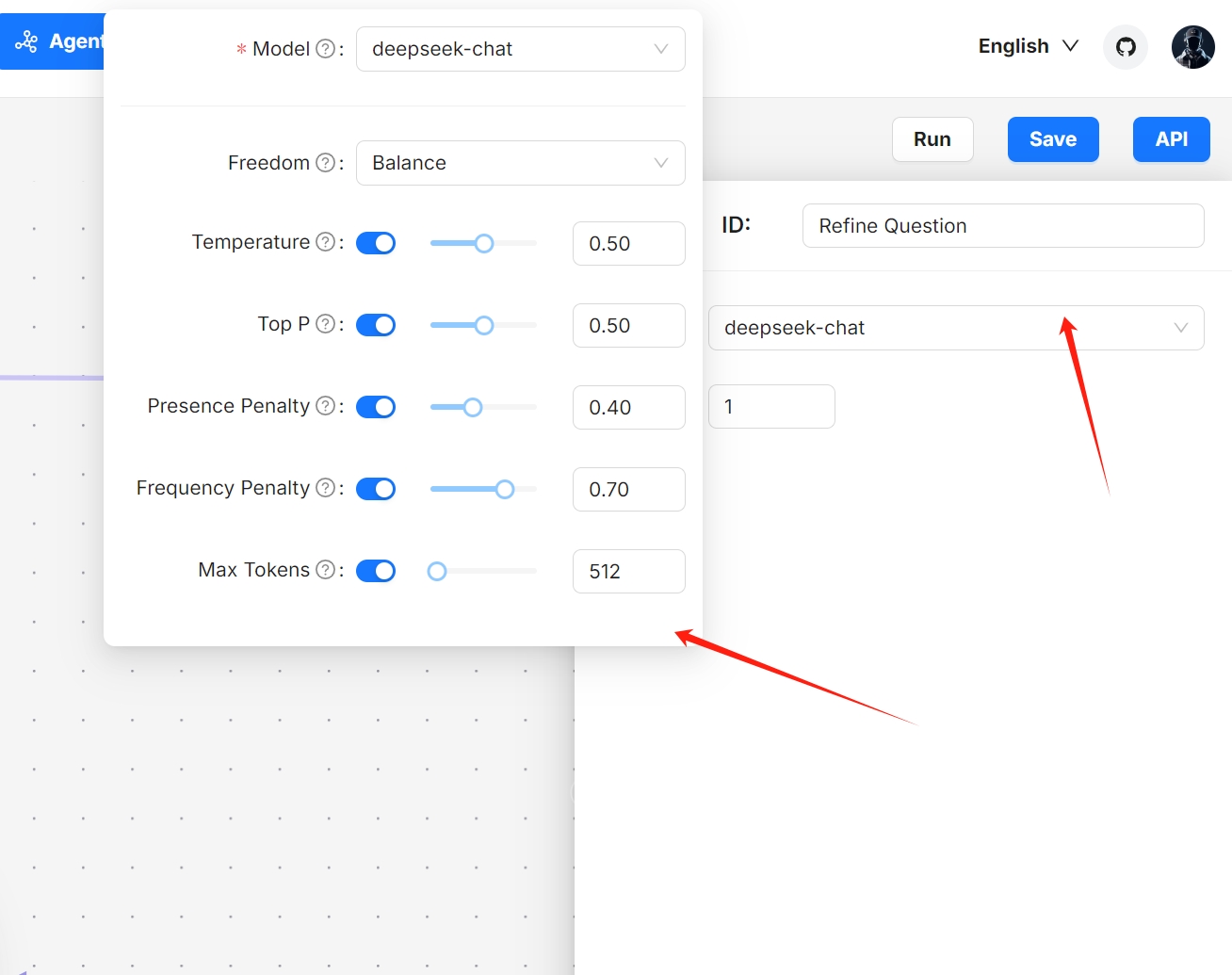 
NOTE
Increasing the maximum loop times may significantly extend the time required to receive the final response.
1. Update your workflow where you see necessary.
2. Click to **Save** to apply your changes.
_Your agent appears as one of the agent cards on the **Agent** page._
Test your chatbot agent[](https://ragflow.io/docs/dev/general_purpose_chatbot#test-your-chatbot-agent "Direct link to Test your chatbot agent")
-------------------------------------------------------------------------------------------------------------------------------------------------
1. Find your chatbot agent on the **Agent** page:

2. Experiment with your questions to verify if this chatbot functions as intended:

* [Prerequisites](https://ragflow.io/docs/dev/general_purpose_chatbot#prerequisites)
* [Create a chatbot agent from template](https://ragflow.io/docs/dev/general_purpose_chatbot#create-a-chatbot-agent-from-template)
* [Understand each component in the template](https://ragflow.io/docs/dev/general_purpose_chatbot#understand-each-component-in-the-template)
* [Configure your chatbot agent](https://ragflow.io/docs/dev/general_purpose_chatbot#configure-your-chatbot-agent)
* [Test your chatbot agent](https://ragflow.io/docs/dev/general_purpose_chatbot#test-your-chatbot-agent)
---
# Join or leave a team | RAGFlow
[Skip to main content](https://ragflow.io/docs/dev/join_or_leave_team#__docusaurus_skipToContent_fallback)
Version: DEV
On this page
Join or leave a team
====================
Accept an invite to join a team, decline an invite, or leave a team.
* * *
Once you join a team, you can do the following:
* Upload documents to the team owner's shared datasets (knowledge bases).
* Parse documents in the team owner's shared datasets.
* Use the team owner's shared Agents.
NOTE
You cannot invite users to a team unless you are its owner.
Prerequisites[](https://ragflow.io/docs/dev/join_or_leave_team#prerequisites "Direct link to Prerequisites")
--------------------------------------------------------------------------------------------------------------
1. Ensure that your Email address that received the team invitation is associated with a RAGFlow user account.
2. The team owner should share his knowledge bases by setting their **Permission** to **Team**.
Accept or decline team invite[](https://ragflow.io/docs/dev/join_or_leave_team#accept-or-decline-team-invite "Direct link to Accept or decline team invite")
--------------------------------------------------------------------------------------------------------------------------------------------------------------
1. You will be notified when you receive an invitation to join a team:
2. Click on your avatar in the top right corner of the page, then select **Team** in the left-hand panel to access the **Team** page.

_On the **Team** page, you can view the information about members of your team and the teams you have joined._

_After accepting the team invite, you should be able to view and update the team owner's knowledge bases whose **Permissions** is set to **Team**._
Leave a joined team[](https://ragflow.io/docs/dev/join_or_leave_team#leave-a-joined-team "Direct link to Leave a joined team")
--------------------------------------------------------------------------------------------------------------------------------
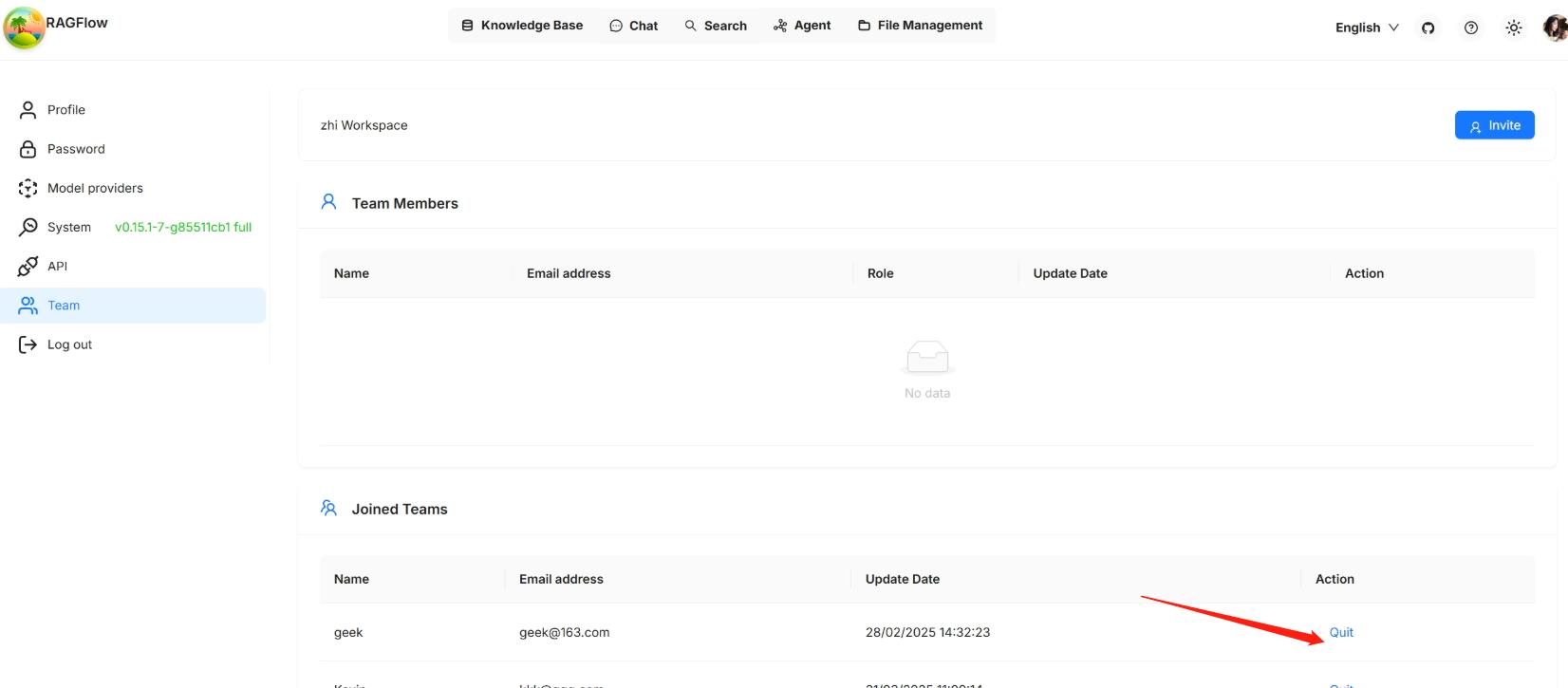
* [Prerequisites](https://ragflow.io/docs/dev/join_or_leave_team#prerequisites)
* [Accept or decline team invite](https://ragflow.io/docs/dev/join_or_leave_team#accept-or-decline-team-invite)
* [Leave a joined team](https://ragflow.io/docs/dev/join_or_leave_team#leave-a-joined-team)
---
# HTTP API | RAGFlow
[Skip to main content](https://ragflow.io/docs/dev/http_api_reference#__docusaurus_skipToContent_fallback)
Version: DEV
On this page
HTTP API
========
A complete reference for RAGFlow's RESTful API. Before proceeding, please ensure you [have your RAGFlow API key ready for authentication](https://ragflow.io/docs/dev/llm_api_key_setup)
.
* * *
ERROR CODES[](https://ragflow.io/docs/dev/http_api_reference#error-codes "Direct link to ERROR CODES")
--------------------------------------------------------------------------------------------------------
* * *
| Code | Message | Description |
| --- | --- | --- |
| 400 | Bad Request | Invalid request parameters |
| 401 | Unauthorized | Unauthorized access |
| 403 | Forbidden | Access denied |
| 404 | Not Found | Resource not found |
| 500 | Internal Server Error | Server internal error |
| 1001 | Invalid Chunk ID | Invalid Chunk ID |
| 1002 | Chunk Update Failed | Chunk update failed |
* * *
OpenAI-Compatible API[](https://ragflow.io/docs/dev/http_api_reference#openai-compatible-api "Direct link to OpenAI-Compatible API")
--------------------------------------------------------------------------------------------------------------------------------------
* * *
### Create chat completion[](https://ragflow.io/docs/dev/http_api_reference#create-chat-completion "Direct link to Create chat completion")
**POST** `/api/v1/chats_openai/{chat_id}/chat/completions`
Creates a model response for a given chat conversation.
This API follows the same request and response format as OpenAI's API. It allows you to interact with the model in a manner similar to how you would with [OpenAI's API](https://platform.openai.com/docs/api-reference/chat/create)
.
#### Request[](https://ragflow.io/docs/dev/http_api_reference#request "Direct link to Request")
* Method: POST
* URL: `/api/v1/chats_openai/{chat_id}/chat/completions`
* Headers:
* `'content-Type: application/json'`
* `'Authorization: Bearer '`
* Body:
* `"model"`: `string`
* `"messages"`: `object list`
* `"stream"`: `boolean`
##### Request example[](https://ragflow.io/docs/dev/http_api_reference#request-example "Direct link to Request example")
curl --request POST \ --url http://{address}/api/v1/chats_openai/{chat_id}/chat/completions \ --header 'Content-Type: application/json' \ --header 'Authorization: Bearer ' \ --data '{ "model": "model", "messages": [{"role": "user", "content": "Say this is a test!"}], "stream": true }'
##### Request Parameters[](https://ragflow.io/docs/dev/http_api_reference#request-parameters "Direct link to Request Parameters")
* `model` (_Body parameter_) `string`, _Required_
The model used to generate the response. The server will parse this automatically, so you can set it to any value for now.
* `messages` (_Body parameter_) `list[object]`, _Required_
A list of historical chat messages used to generate the response. This must contain at least one message with the `user` role.
* `stream` (_Body parameter_) `boolean`
Whether to receive the response as a stream. Set this to `false` explicitly if you prefer to receive the entire response in one go instead of as a stream.
#### Response[](https://ragflow.io/docs/dev/http_api_reference#response "Direct link to Response")
Stream:
{ "id": "chatcmpl-3a9c3572f29311efa69751e139332ced", "choices": [ { "delta": { "content": "This is a test. If you have any specific questions or need information, feel", "role": "assistant", "function_call": null, "tool_calls": null }, "finish_reason": null, "index": 0, "logprobs": null } ], "created": 1740543996, "model": "model", "object": "chat.completion.chunk", "system_fingerprint": "", "usage": null}// omit duplicated information{"choices":[{"delta":{"content":" free to ask, and I will do my best to provide an answer based on","role":"assistant"}}]}{"choices":[{"delta":{"content":" the knowledge I have. If your question is unrelated to the provided knowledge base,","role":"assistant"}}]}{"choices":[{"delta":{"content":" I will let you know.","role":"assistant"}}]}// the last chunk{ "id": "chatcmpl-3a9c3572f29311efa69751e139332ced", "choices": [ { "delta": { "content": null, "role": "assistant", "function_call": null, "tool_calls": null }, "finish_reason": "stop", "index": 0, "logprobs": null } ], "created": 1740543996, "model": "model", "object": "chat.completion.chunk", "system_fingerprint": "", "usage": { "prompt_tokens": 18, "completion_tokens": 225, "total_tokens": 243 }}
Non-stream:
{ "choices":[ { "finish_reason":"stop", "index":0, "logprobs":null, "message":{ "content":"This is a test. If you have any specific questions or need information, feel free to ask, and I will do my best to provide an answer based on the knowledge I have. If your question is unrelated to the provided knowledge base, I will let you know.", "role":"assistant" } } ], "created":1740543499, "id":"chatcmpl-3a9c3572f29311efa69751e139332ced", "model":"model", "object":"chat.completion", "usage":{ "completion_tokens":246, "completion_tokens_details":{ "accepted_prediction_tokens":246, "reasoning_tokens":18, "rejected_prediction_tokens":0 }, "prompt_tokens":18, "total_tokens":264 }}
Failure:
{ "code": 102, "message": "The last content of this conversation is not from user."}
* * *
### Create agent completion[](https://ragflow.io/docs/dev/http_api_reference#create-agent-completion "Direct link to Create agent completion")
**POST** `/api/v1/agents_openai/{agent_id}/chat/completions`
Creates a model response for a given chat conversation.
This API follows the same request and response format as OpenAI's API. It allows you to interact with the model in a manner similar to how you would with [OpenAI's API](https://platform.openai.com/docs/api-reference/chat/create)
.
#### Request[](https://ragflow.io/docs/dev/http_api_reference#request-1 "Direct link to Request")
* Method: POST
* URL: `/api/v1/agents_openai/{agent_id}/chat/completions`
* Headers:
* `'content-Type: application/json'`
* `'Authorization: Bearer '`
* Body:
* `"model"`: `string`
* `"messages"`: `object list`
* `"stream"`: `boolean`
##### Request example[](https://ragflow.io/docs/dev/http_api_reference#request-example-1 "Direct link to Request example")
curl --request POST \ --url http://{address}/api/v1/agents_openai/{agent_id}/chat/completions \ --header 'Content-Type: application/json' \ --header 'Authorization: Bearer ' \ --data '{ "model": "model", "messages": [{"role": "user", "content": "Say this is a test!"}], "stream": true }'
##### Request Parameters[](https://ragflow.io/docs/dev/http_api_reference#request-parameters-1 "Direct link to Request Parameters")
* `model` (_Body parameter_) `string`, _Required_ The model used to generate the response. The server will parse this automatically, so you can set it to any value for now.
* `messages` (_Body parameter_) `list[object]`, _Required_ A list of historical chat messages used to generate the response. This must contain at least one message with the `user` role.
* `stream` (_Body parameter_) `boolean` Whether to receive the response as a stream. Set this to `false` explicitly if you prefer to receive the entire response in one go instead of as a stream.
#### Response[](https://ragflow.io/docs/dev/http_api_reference#response-1 "Direct link to Response")
Stream:
{ "id": "chatcmpl-3a9c3572f29311efa69751e139332ced", "choices": [ { "delta": { "content": "This is a test. If you have any specific questions or need information, feel", "role": "assistant", "function_call": null, "tool_calls": null }, "finish_reason": null, "index": 0, "logprobs": null } ], "created": 1740543996, "model": "model", "object": "chat.completion.chunk", "system_fingerprint": "", "usage": null}// omit duplicated information{"choices":[{"delta":{"content":" free to ask, and I will do my best to provide an answer based on","role":"assistant"}}]}{"choices":[{"delta":{"content":" the knowledge I have. If your question is unrelated to the provided knowledge base,","role":"assistant"}}]}{"choices":[{"delta":{"content":" I will let you know.","role":"assistant"}}]}// the last chunk{ "id": "chatcmpl-3a9c3572f29311efa69751e139332ced", "choices": [ { "delta": { "content": null, "role": "assistant", "function_call": null, "tool_calls": null }, "finish_reason": "stop", "index": 0, "logprobs": null } ], "created": 1740543996, "model": "model", "object": "chat.completion.chunk", "system_fingerprint": "", "usage": { "prompt_tokens": 18, "completion_tokens": 225, "total_tokens": 243 }}
Non-stream:
{ "choices":[ { "finish_reason":"stop", "index":0, "logprobs":null, "message":{ "content":"This is a test. If you have any specific questions or need information, feel free to ask, and I will do my best to provide an answer based on the knowledge I have. If your question is unrelated to the provided knowledge base, I will let you know.", "role":"assistant" } } ], "created":1740543499, "id":"chatcmpl-3a9c3572f29311efa69751e139332ced", "model":"model", "object":"chat.completion", "usage":{ "completion_tokens":246, "completion_tokens_details":{ "accepted_prediction_tokens":246, "reasoning_tokens":18, "rejected_prediction_tokens":0 }, "prompt_tokens":18, "total_tokens":264 }}
Failure:
{ "code": 102, "message": "The last content of this conversation is not from user."}
DATASET MANAGEMENT[](https://ragflow.io/docs/dev/http_api_reference#dataset-management "Direct link to DATASET MANAGEMENT")
-----------------------------------------------------------------------------------------------------------------------------
* * *
### Create dataset[](https://ragflow.io/docs/dev/http_api_reference#create-dataset "Direct link to Create dataset")
**POST** `/api/v1/datasets`
Creates a dataset.
#### Request[](https://ragflow.io/docs/dev/http_api_reference#request-2 "Direct link to Request")
* Method: POST
* URL: `/api/v1/datasets`
* Headers:
* `'content-Type: application/json'`
* `'Authorization: Bearer '`
* Body:
* `"name"`: `string`
* `"avatar"`: `string`
* `"description"`: `string`
* `"embedding_model"`: `string`
* `"permission"`: `string`
* `"chunk_method"`: `string`
* `"parser_config"`: `object`
##### Request example[](https://ragflow.io/docs/dev/http_api_reference#request-example-2 "Direct link to Request example")
curl --request POST \ --url http://{address}/api/v1/datasets \ --header 'Content-Type: application/json' \ --header 'Authorization: Bearer ' \ --data '{ "name": "test_1" }'
##### Request parameters[](https://ragflow.io/docs/dev/http_api_reference#request-parameters-2 "Direct link to Request parameters")
* `"name"`: (_Body parameter_), `string`, _Required_
The unique name of the dataset to create. It must adhere to the following requirements:
* Basic Multilingual Plane (BMP) only
* Maximum 128 characters
* Case-insensitive
* `"avatar"`: (_Body parameter_), `string`
Base64 encoding of the avatar.
* Maximum 65535 characters
* `"description"`: (_Body parameter_), `string`
A brief description of the dataset to create.
* Maximum 65535 characters
* `"embedding_model"`: (_Body parameter_), `string`
The name of the embedding model to use. For example: `"BAAI/bge-large-zh-v1.5@BAAI"`
* Maximum 255 characters
* Must follow `model_name@model_factory` format
* `"permission"`: (_Body parameter_), `string`
Specifies who can access the dataset to create. Available options:
* `"me"`: (Default) Only you can manage the dataset.
* `"team"`: All team members can manage the dataset.
* `"chunk_method"`: (_Body parameter_), `enum`
The chunking method of the dataset to create. Available options:
* `"naive"`: General (default)
* `"book"`: Book
* `"email"`: Email
* `"laws"`: Laws
* `"manual"`: Manual
* `"one"`: One
* `"paper"`: Paper
* `"picture"`: Picture
* `"presentation"`: Presentation
* `"qa"`: Q&A
* `"table"`: Table
* `"tag"`: Tag
* `"parser_config"`: (_Body parameter_), `object`
The configuration settings for the dataset parser. The attributes in this JSON object vary with the selected `"chunk_method"`:
* If `"chunk_method"` is `"naive"`, the `"parser_config"` object contains the following attributes:
* `"auto_keywords"`: `int`
* Defaults to `0`
* Minimum: `0`
* Maximum: `32`
* `"auto_questions"`: `int`
* Defaults to `0`
* Minimum: `0`
* Maximum: `10`
* `"chunk_token_num"`: `int`
* Defaults to `512`
* Minimum: `1`
* Maximum: `2048`
* `"delimiter"`: `string`
* Defaults to `"\n"`.
* `"html4excel"`: `bool` Indicates whether to convert Excel documents into HTML format.
* Defaults to `false`
* `"layout_recognize"`: `string`
* Defaults to `DeepDOC`
* `"tag_kb_ids"`: `array` refer to [Use tag set](https://ragflow.io/docs/dev/use_tag_sets)
* Must include a list of dataset IDs, where each dataset is parsed using the Tag Chunk Method
* `"task_page_size"`: `int` For PDF only.
* Defaults to `12`
* Minimum: `1`
* `"raptor"`: `object` RAPTOR-specific settings.
* Defaults to: `{"use_raptor": false}`
* `"graphrag"`: `object` GRAPHRAG-specific settings.
* Defaults to: `{"use_graphrag": false}`
* If `"chunk_method"` is `"qa"`, `"manuel"`, `"paper"`, `"book"`, `"laws"`, or `"presentation"`, the `"parser_config"` object contains the following attribute:
* `"raptor"`: `object` RAPTOR-specific settings.
* Defaults to: `{"use_raptor": false}`.
* If `"chunk_method"` is `"table"`, `"picture"`, `"one"`, or `"email"`, `"parser_config"` is an empty JSON object.
#### Response[](https://ragflow.io/docs/dev/http_api_reference#response-2 "Direct link to Response")
Success:
{ "code": 0, "data": { "avatar": null, "chunk_count": 0, "chunk_method": "naive", "create_date": "Mon, 28 Apr 2025 18:40:41 GMT", "create_time": 1745836841611, "created_by": "3af81804241d11f0a6a79f24fc270c7f", "description": null, "document_count": 0, "embedding_model": "BAAI/bge-large-zh-v1.5@BAAI", "id": "3b4de7d4241d11f0a6a79f24fc270c7f", "language": "English", "name": "RAGFlow example", "pagerank": 0, "parser_config": { "chunk_token_num": 128, "delimiter": "\\n!?;。;!?", "html4excel": false, "layout_recognize": "DeepDOC", "raptor": { "use_raptor": false } }, "permission": "me", "similarity_threshold": 0.2, "status": "1", "tenant_id": "3af81804241d11f0a6a79f24fc270c7f", "token_num": 0, "update_date": "Mon, 28 Apr 2025 18:40:41 GMT", "update_time": 1745836841611, "vector_similarity_weight": 0.3, },}
Failure:
{ "code": 101, "message": "Dataset name 'RAGFlow example' already exists"}
* * *
### Delete datasets[](https://ragflow.io/docs/dev/http_api_reference#delete-datasets "Direct link to Delete datasets")
**DELETE** `/api/v1/datasets`
Deletes datasets by ID.
#### Request[](https://ragflow.io/docs/dev/http_api_reference#request-3 "Direct link to Request")
* Method: DELETE
* URL: `/api/v1/datasets`
* Headers:
* `'content-Type: application/json'`
* `'Authorization: Bearer '`
* Body:
* `"ids"`: `list[string]` or `null`
##### Request example[](https://ragflow.io/docs/dev/http_api_reference#request-example-3 "Direct link to Request example")
curl --request DELETE \ --url http://{address}/api/v1/datasets \ --header 'Content-Type: application/json' \ --header 'Authorization: Bearer ' \ --data '{ "ids": ["d94a8dc02c9711f0930f7fbc369eab6d", "e94a8dc02c9711f0930f7fbc369eab6e"] }'
##### Request parameters[](https://ragflow.io/docs/dev/http_api_reference#request-parameters-3 "Direct link to Request parameters")
* `"ids"`: (_Body parameter_), `list[string]` or `null`, _Required_
Specifies the datasets to delete:
* If `null`, all datasets will be deleted.
* If an array of IDs, only the specified datasets will be deleted.
* If an empty array, no datasets will be deleted.
#### Response[](https://ragflow.io/docs/dev/http_api_reference#response-3 "Direct link to Response")
Success:
{ "code": 0 }
Failure:
{ "code": 102, "message": "You don't own the dataset."}
* * *
### Update dataset[](https://ragflow.io/docs/dev/http_api_reference#update-dataset "Direct link to Update dataset")
**PUT** `/api/v1/datasets/{dataset_id}`
Updates configurations for a specified dataset.
#### Request[](https://ragflow.io/docs/dev/http_api_reference#request-4 "Direct link to Request")
* Method: PUT
* URL: `/api/v1/datasets/{dataset_id}`
* Headers:
* `'content-Type: application/json'`
* `'Authorization: Bearer '`
* Body:
* `"name"`: `string`
* `"avatar"`: `string`
* `"description"`: `string`
* `"embedding_model"`: `string`
* `"permission"`: `string`
* `"chunk_method"`: `string`
* `"pagerank"`: `int`
* `"parser_config"`: `object`
##### Request example[](https://ragflow.io/docs/dev/http_api_reference#request-example-4 "Direct link to Request example")
curl --request PUT \ --url http://{address}/api/v1/datasets/{dataset_id} \ --header 'Content-Type: application/json' \ --header 'Authorization: Bearer ' \ --data ' { "name": "updated_dataset" }'
##### Request parameters[](https://ragflow.io/docs/dev/http_api_reference#request-parameters-4 "Direct link to Request parameters")
* `dataset_id`: (_Path parameter_)
The ID of the dataset to update.
* `"name"`: (_Body parameter_), `string`
The revised name of the dataset.
* Basic Multilingual Plane (BMP) only
* Maximum 128 characters
* Case-insensitive
* `"avatar"`: (_Body parameter_), `string`
The updated base64 encoding of the avatar.
* Maximum 65535 characters
* `"embedding_model"`: (_Body parameter_), `string`
The updated embedding model name.
* Ensure that `"chunk_count"` is `0` before updating `"embedding_model"`.
* Maximum 255 characters
* Must follow `model_name@model_factory` format
* `"permission"`: (_Body parameter_), `string`
The updated dataset permission. Available options:
* `"me"`: (Default) Only you can manage the dataset.
* `"team"`: All team members can manage the dataset.
* `"pagerank"`: (_Body parameter_), `int`
refer to [Set page rank](https://ragflow.io/docs/dev/set_page_rank)
* Default: `0`
* Minimum: `0`
* Maximum: `100`
* `"chunk_method"`: (_Body parameter_), `enum`
The chunking method for the dataset. Available options:
* `"naive"`: General (default)
* `"book"`: Book
* `"email"`: Email
* `"laws"`: Laws
* `"manual"`: Manual
* `"one"`: One
* `"paper"`: Paper
* `"picture"`: Picture
* `"presentation"`: Presentation
* `"qa"`: Q&A
* `"table"`: Table
* `"tag"`: Tag
* `"parser_config"`: (_Body parameter_), `object`
The configuration settings for the dataset parser. The attributes in this JSON object vary with the selected `"chunk_method"`:
* If `"chunk_method"` is `"naive"`, the `"parser_config"` object contains the following attributes:
* `"auto_keywords"`: `int`
* Defaults to `0`
* Minimum: `0`
* Maximum: `32`
* `"auto_questions"`: `int`
* Defaults to `0`
* Minimum: `0`
* Maximum: `10`
* `"chunk_token_num"`: `int`
* Defaults to `512`
* Minimum: `1`
* Maximum: `2048`
* `"delimiter"`: `string`
* Defaults to `"\n"`.
* `"html4excel"`: `bool` Indicates whether to convert Excel documents into HTML format.
* Defaults to `false`
* `"layout_recognize"`: `string`
* Defaults to `DeepDOC`
* `"tag_kb_ids"`: `array` refer to [Use tag set](https://ragflow.io/docs/dev/use_tag_sets)
* Must include a list of dataset IDs, where each dataset is parsed using the Tag Chunk Method
* `"task_page_size"`: `int` For PDF only.
* Defaults to `12`
* Minimum: `1`
* `"raptor"`: `object` RAPTOR-specific settings.
* Defaults to: `{"use_raptor": false}`
* `"graphrag"`: `object` GRAPHRAG-specific settings.
* Defaults to: `{"use_graphrag": false}`
* If `"chunk_method"` is `"qa"`, `"manuel"`, `"paper"`, `"book"`, `"laws"`, or `"presentation"`, the `"parser_config"` object contains the following attribute:
* `"raptor"`: `object` RAPTOR-specific settings.
* Defaults to: `{"use_raptor": false}`.
* If `"chunk_method"` is `"table"`, `"picture"`, `"one"`, or `"email"`, `"parser_config"` is an empty JSON object.
#### Response[](https://ragflow.io/docs/dev/http_api_reference#response-4 "Direct link to Response")
Success:
{ "code": 0 }
Failure:
{ "code": 102, "message": "Can't change tenant_id."}
* * *
### List datasets[](https://ragflow.io/docs/dev/http_api_reference#list-datasets "Direct link to List datasets")
**GET** `/api/v1/datasets?page={page}&page_size={page_size}&orderby={orderby}&desc={desc}&name={dataset_name}&id={dataset_id}`
Lists datasets.
#### Request[](https://ragflow.io/docs/dev/http_api_reference#request-5 "Direct link to Request")
* Method: GET
* URL: `/api/v1/datasets?page={page}&page_size={page_size}&orderby={orderby}&desc={desc}&name={dataset_name}&id={dataset_id}`
* Headers:
* `'Authorization: Bearer '`
##### Request example[](https://ragflow.io/docs/dev/http_api_reference#request-example-5 "Direct link to Request example")
curl --request GET \ --url http://{address}/api/v1/datasets?page={page}&page_size={page_size}&orderby={orderby}&desc={desc}&name={dataset_name}&id={dataset_id} \ --header 'Authorization: Bearer '
##### Request parameters[](https://ragflow.io/docs/dev/http_api_reference#request-parameters-5 "Direct link to Request parameters")
* `page`: (_Filter parameter_)
Specifies the page on which the datasets will be displayed. Defaults to `1`.
* `page_size`: (_Filter parameter_)
The number of datasets on each page. Defaults to `30`.
* `orderby`: (_Filter parameter_)
The field by which datasets should be sorted. Available options:
* `create_time` (default)
* `update_time`
* `desc`: (_Filter parameter_)
Indicates whether the retrieved datasets should be sorted in descending order. Defaults to `true`.
* `name`: (_Filter parameter_)
The name of the dataset to retrieve.
* `id`: (_Filter parameter_)
The ID of the dataset to retrieve.
#### Response[](https://ragflow.io/docs/dev/http_api_reference#response-5 "Direct link to Response")
Success:
{ "code": 0, "data": [ { "avatar": "", "chunk_count": 59, "create_date": "Sat, 14 Sep 2024 01:12:37 GMT", "create_time": 1726276357324, "created_by": "69736c5e723611efb51b0242ac120007", "description": null, "document_count": 1, "embedding_model": "BAAI/bge-large-zh-v1.5", "id": "6e211ee0723611efa10a0242ac120007", "language": "English", "name": "mysql", "chunk_method": "naive", "parser_config": { "chunk_token_num": 8192, "delimiter": "\\n", "entity_types": [ "organization", "person", "location", "event", "time" ] }, "permission": "me", "similarity_threshold": 0.2, "status": "1", "tenant_id": "69736c5e723611efb51b0242ac120007", "token_num": 12744, "update_date": "Thu, 10 Oct 2024 04:07:23 GMT", "update_time": 1728533243536, "vector_similarity_weight": 0.3 } ]}
Failure:
{ "code": 102, "message": "The dataset doesn't exist"}
* * *
Get dataset's knowledge graph[](https://ragflow.io/docs/dev/http_api_reference#get-datasets-knowledge-graph "Direct link to Get dataset's knowledge graph")
-------------------------------------------------------------------------------------------------------------------------------------------------------------
**GET** `/api/v1/datasets/{dataset_id}/knowledge_graph`
Retrieves the knowledge graph of a specified dataset.
#### Request[](https://ragflow.io/docs/dev/http_api_reference#request-6 "Direct link to Request")
* Method: GET
* URL: `/api/v1/datasets/{dataset_id}/knowledge_graph`
* Headers:
* `'Authorization: Bearer '`
##### Request example[](https://ragflow.io/docs/dev/http_api_reference#request-example-6 "Direct link to Request example")
curl --request GET \ --url http://{address}/api/v1/datasets/{dataset_id}/knowledge_graph \ --header 'Authorization: Bearer '
##### Request parameters[](https://ragflow.io/docs/dev/http_api_reference#request-parameters-6 "Direct link to Request parameters")
* `dataset_id`: (_Path parameter_)
The ID of the target dataset.
#### Response[](https://ragflow.io/docs/dev/http_api_reference#response-6 "Direct link to Response")
Success:
{ "code": 0, "data": { "graph": { "directed": false, "edges": [ { "description": "The notice is a document issued to convey risk warnings and operational alerts.The notice is a specific instance of a notification document issued under the risk warning framework.", "keywords": ["9", "8"], "source": "notice", "source_id": ["8a46cdfe4b5c11f0a5281a58e595aa1c"], "src_id": "xxx", "target": "xxx", "tgt_id": "xxx", "weight": 17.0 } ], "graph": { "source_id": ["8a46cdfe4b5c11f0a5281a58e595aa1c", "8a7eb6424b5c11f0a5281a58e595aa1c"] }, "multigraph": false, "nodes": [ { "description": "xxx", "entity_name": "xxx", "entity_type": "ORGANIZATION", "id": "xxx", "pagerank": 0.10804906590624092, "rank": 3, "source_id": ["8a7eb6424b5c11f0a5281a58e595aa1c"] } ] }, "mind_map": {} }}
Failure:
{ "code": 102, "message": "The dataset doesn't exist"}
* * *
Delete dataset's knowledge graph[](https://ragflow.io/docs/dev/http_api_reference#delete-datasets-knowledge-graph "Direct link to Delete dataset's knowledge graph")
----------------------------------------------------------------------------------------------------------------------------------------------------------------------
**DELETE** `/api/v1/datasets/{dataset_id}/knowledge_graph`
Removes the knowledge graph of a specified dataset.
#### Request[](https://ragflow.io/docs/dev/http_api_reference#request-7 "Direct link to Request")
* Method: DELETE
* URL: `/api/v1/datasets/{dataset_id}/knowledge_graph`
* Headers:
* `'Authorization: Bearer '`
##### Request example[](https://ragflow.io/docs/dev/http_api_reference#request-example-7 "Direct link to Request example")
curl --request DELETE \ --url http://{address}/api/v1/datasets/{dataset_id}/knowledge_graph \ --header 'Authorization: Bearer '
##### Request parameters[](https://ragflow.io/docs/dev/http_api_reference#request-parameters-7 "Direct link to Request parameters")
* `dataset_id`: (_Path parameter_)
The ID of the target dataset.
#### Response[](https://ragflow.io/docs/dev/http_api_reference#response-7 "Direct link to Response")
Success:
{ "code": 0, "data": true}
Failure:
{ "code": 102, "message": "The dataset doesn't exist"}
* * *
FILE MANAGEMENT WITHIN DATASET[](https://ragflow.io/docs/dev/http_api_reference#file-management-within-dataset "Direct link to FILE MANAGEMENT WITHIN DATASET")
-----------------------------------------------------------------------------------------------------------------------------------------------------------------
* * *
### Upload documents[](https://ragflow.io/docs/dev/http_api_reference#upload-documents "Direct link to Upload documents")
**POST** `/api/v1/datasets/{dataset_id}/documents`
Uploads documents to a specified dataset.
#### Request[](https://ragflow.io/docs/dev/http_api_reference#request-8 "Direct link to Request")
* Method: POST
* URL: `/api/v1/datasets/{dataset_id}/documents`
* Headers:
* `'Content-Type: multipart/form-data'`
* `'Authorization: Bearer '`
* Form:
* `'file=@{FILE_PATH}'`
##### Request example[](https://ragflow.io/docs/dev/http_api_reference#request-example-8 "Direct link to Request example")
curl --request POST \ --url http://{address}/api/v1/datasets/{dataset_id}/documents \ --header 'Content-Type: multipart/form-data' \ --header 'Authorization: Bearer ' \ --form 'file=@./test1.txt' \ --form 'file=@./test2.pdf'
##### Request parameters[](https://ragflow.io/docs/dev/http_api_reference#request-parameters-8 "Direct link to Request parameters")
* `dataset_id`: (_Path parameter_)
The ID of the dataset to which the documents will be uploaded.
* `'file'`: (_Body parameter_)
A document to upload.
#### Response[](https://ragflow.io/docs/dev/http_api_reference#response-8 "Direct link to Response")
Success:
{ "code": 0, "data": [ { "chunk_method": "naive", "created_by": "69736c5e723611efb51b0242ac120007", "dataset_id": "527fa74891e811ef9c650242ac120006", "id": "b330ec2e91ec11efbc510242ac120004", "location": "1.txt", "name": "1.txt", "parser_config": { "chunk_token_num": 128, "delimiter": "\\n", "html4excel": false, "layout_recognize": true, "raptor": { "use_raptor": false } }, "run": "UNSTART", "size": 17966, "thumbnail": "", "type": "doc" } ]}
Failure:
{ "code": 101, "message": "No file part!"}
* * *
### Update document[](https://ragflow.io/docs/dev/http_api_reference#update-document "Direct link to Update document")
**PUT** `/api/v1/datasets/{dataset_id}/documents/{document_id}`
Updates configurations for a specified document.
#### Request[](https://ragflow.io/docs/dev/http_api_reference#request-9 "Direct link to Request")
* Method: PUT
* URL: `/api/v1/datasets/{dataset_id}/documents/{document_id}`
* Headers:
* `'content-Type: application/json'`
* `'Authorization: Bearer '`
* Body:
* `"name"`:`string`
* `"meta_fields"`:`object`
* `"chunk_method"`:`string`
* `"parser_config"`:`object`
##### Request example[](https://ragflow.io/docs/dev/http_api_reference#request-example-9 "Direct link to Request example")
curl --request PUT \ --url http://{address}/api/v1/datasets/{dataset_id}/info/{document_id} \ --header 'Authorization: Bearer ' \ --header 'Content-Type: application/json' \ --data ' { "name": "manual.txt", "chunk_method": "manual", "parser_config": {"chunk_token_num": 128} }'
##### Request parameters[](https://ragflow.io/docs/dev/http_api_reference#request-parameters-9 "Direct link to Request parameters")
* `dataset_id`: (_Path parameter_)
The ID of the associated dataset.
* `document_id`: (_Path parameter_)
The ID of the document to update.
* `"name"`: (_Body parameter_), `string`
* `"meta_fields"`: (_Body parameter_), `dict[str, Any]` The meta fields of the document.
* `"chunk_method"`: (_Body parameter_), `string`
The parsing method to apply to the document:
* `"naive"`: General
* `"manual`: Manual
* `"qa"`: Q&A
* `"table"`: Table
* `"paper"`: Paper
* `"book"`: Book
* `"laws"`: Laws
* `"presentation"`: Presentation
* `"picture"`: Picture
* `"one"`: One
* `"email"`: Email
* `"parser_config"`: (_Body parameter_), `object`
The configuration settings for the dataset parser. The attributes in this JSON object vary with the selected `"chunk_method"`:
* If `"chunk_method"` is `"naive"`, the `"parser_config"` object contains the following attributes:
* `"chunk_token_num"`: Defaults to `256`.
* `"layout_recognize"`: Defaults to `true`.
* `"html4excel"`: Indicates whether to convert Excel documents into HTML format. Defaults to `false`.
* `"delimiter"`: Defaults to `"\n"`.
* `"task_page_size"`: Defaults to `12`. For PDF only.
* `"raptor"`: RAPTOR-specific settings. Defaults to: `{"use_raptor": false}`.
* If `"chunk_method"` is `"qa"`, `"manuel"`, `"paper"`, `"book"`, `"laws"`, or `"presentation"`, the `"parser_config"` object contains the following attribute:
* `"raptor"`: RAPTOR-specific settings. Defaults to: `{"use_raptor": false}`.
* If `"chunk_method"` is `"table"`, `"picture"`, `"one"`, or `"email"`, `"parser_config"` is an empty JSON object.
#### Response[](https://ragflow.io/docs/dev/http_api_reference#response-9 "Direct link to Response")
Success:
{ "code": 0}
Failure:
{ "code": 102, "message": "The dataset does not have the document."}
* * *
### Download document[](https://ragflow.io/docs/dev/http_api_reference#download-document "Direct link to Download document")
**GET** `/api/v1/datasets/{dataset_id}/documents/{document_id}`
Downloads a document from a specified dataset.
#### Request[](https://ragflow.io/docs/dev/http_api_reference#request-10 "Direct link to Request")
* Method: GET
* URL: `/api/v1/datasets/{dataset_id}/documents/{document_id}`
* Headers:
* `'Authorization: Bearer '`
* Output:
* `'{PATH_TO_THE_FILE}'`
##### Request example[](https://ragflow.io/docs/dev/http_api_reference#request-example-10 "Direct link to Request example")
curl --request GET \ --url http://{address}/api/v1/datasets/{dataset_id}/documents/{document_id} \ --header 'Authorization: Bearer ' \ --output ./ragflow.txt
##### Request parameters[](https://ragflow.io/docs/dev/http_api_reference#request-parameters-10 "Direct link to Request parameters")
* `dataset_id`: (_Path parameter_)
The associated dataset ID.
* `documents_id`: (_Path parameter_)
The ID of the document to download.
#### Response[](https://ragflow.io/docs/dev/http_api_reference#response-10 "Direct link to Response")
Success:
This is a test to verify the file download feature.
Failure:
{ "code": 102, "message": "You do not own the dataset 7898da028a0511efbf750242ac1220005."}
* * *
### List documents[](https://ragflow.io/docs/dev/http_api_reference#list-documents "Direct link to List documents")
**GET** `/api/v1/datasets/{dataset_id}/documents?page={page}&page_size={page_size}&orderby={orderby}&desc={desc}&keywords={keywords}&id={document_id}&name={document_name}`
Lists documents in a specified dataset.
#### Request[](https://ragflow.io/docs/dev/http_api_reference#request-11 "Direct link to Request")
* Method: GET
* URL: `/api/v1/datasets/{dataset_id}/documents?page={page}&page_size={page_size}&orderby={orderby}&desc={desc}&keywords={keywords}&id={document_id}&name={document_name}`
* Headers:
* `'content-Type: application/json'`
* `'Authorization: Bearer '`
##### Request example[](https://ragflow.io/docs/dev/http_api_reference#request-example-11 "Direct link to Request example")
curl --request GET \ --url http://{address}/api/v1/datasets/{dataset_id}/documents?page={page}&page_size={page_size}&orderby={orderby}&desc={desc}&keywords={keywords}&id={document_id}&name={document_name} \ --header 'Authorization: Bearer '
##### Request parameters[](https://ragflow.io/docs/dev/http_api_reference#request-parameters-11 "Direct link to Request parameters")
* `dataset_id`: (_Path parameter_)
The associated dataset ID.
* `keywords`: (_Filter parameter_), `string`
The keywords used to match document titles.
* `page`: (_Filter parameter_), `integer` Specifies the page on which the documents will be displayed. Defaults to `1`.
* `page_size`: (_Filter parameter_), `integer`
The maximum number of documents on each page. Defaults to `30`.
* `orderby`: (_Filter parameter_), `string`
The field by which documents should be sorted. Available options:
* `create_time` (default)
* `update_time`
* `desc`: (_Filter parameter_), `boolean`
Indicates whether the retrieved documents should be sorted in descending order. Defaults to `true`.
* `id`: (_Filter parameter_), `string`
The ID of the document to retrieve.
#### Response[](https://ragflow.io/docs/dev/http_api_reference#response-11 "Direct link to Response")
Success:
{ "code": 0, "data": { "docs": [ { "chunk_count": 0, "create_date": "Mon, 14 Oct 2024 09:11:01 GMT", "create_time": 1728897061948, "created_by": "69736c5e723611efb51b0242ac120007", "id": "3bcfbf8a8a0c11ef8aba0242ac120006", "knowledgebase_id": "7898da028a0511efbf750242ac120005", "location": "Test_2.txt", "name": "Test_2.txt", "parser_config": { "chunk_token_count": 128, "delimiter": "\n", "layout_recognize": true, "task_page_size": 12 }, "chunk_method": "naive", "process_begin_at": null, "process_duration": 0.0, "progress": 0.0, "progress_msg": "", "run": "0", "size": 7, "source_type": "local", "status": "1", "thumbnail": null, "token_count": 0, "type": "doc", "update_date": "Mon, 14 Oct 2024 09:11:01 GMT", "update_time": 1728897061948 } ], "total": 1 }}
Failure:
{ "code": 102, "message": "You don't own the dataset 7898da028a0511efbf750242ac1220005. "}
* * *
### Delete documents[](https://ragflow.io/docs/dev/http_api_reference#delete-documents "Direct link to Delete documents")
**DELETE** `/api/v1/datasets/{dataset_id}/documents`
Deletes documents by ID.
#### Request[](https://ragflow.io/docs/dev/http_api_reference#request-12 "Direct link to Request")
* Method: DELETE
* URL: `/api/v1/datasets/{dataset_id}/documents`
* Headers:
* `'Content-Type: application/json'`
* `'Authorization: Bearer '`
* Body:
* `"ids"`: `list[string]`
##### Request example[](https://ragflow.io/docs/dev/http_api_reference#request-example-12 "Direct link to Request example")
curl --request DELETE \ --url http://{address}/api/v1/datasets/{dataset_id}/documents \ --header 'Content-Type: application/json' \ --header 'Authorization: Bearer ' \ --data ' { "ids": ["id_1","id_2"] }'
##### Request parameters[](https://ragflow.io/docs/dev/http_api_reference#request-parameters-12 "Direct link to Request parameters")
* `dataset_id`: (_Path parameter_)
The associated dataset ID.
* `"ids"`: (_Body parameter_), `list[string]`
The IDs of the documents to delete. If it is not specified, all documents in the specified dataset will be deleted.
#### Response[](https://ragflow.io/docs/dev/http_api_reference#response-12 "Direct link to Response")
Success:
{ "code": 0}.
Failure:
{ "code": 102, "message": "You do not own the dataset 7898da028a0511efbf750242ac1220005."}
* * *
### Parse documents[](https://ragflow.io/docs/dev/http_api_reference#parse-documents "Direct link to Parse documents")
**POST** `/api/v1/datasets/{dataset_id}/chunks`
Parses documents in a specified dataset.
#### Request[](https://ragflow.io/docs/dev/http_api_reference#request-13 "Direct link to Request")
* Method: POST
* URL: `/api/v1/datasets/{dataset_id}/chunks`
* Headers:
* `'content-Type: application/json'`
* `'Authorization: Bearer '`
* Body:
* `"document_ids"`: `list[string]`
##### Request example[](https://ragflow.io/docs/dev/http_api_reference#request-example-13 "Direct link to Request example")
curl --request POST \ --url http://{address}/api/v1/datasets/{dataset_id}/chunks \ --header 'Content-Type: application/json' \ --header 'Authorization: Bearer ' \ --data ' { "document_ids": ["97a5f1c2759811efaa500242ac120004","97ad64b6759811ef9fc30242ac120004"] }'
##### Request parameters[](https://ragflow.io/docs/dev/http_api_reference#request-parameters-13 "Direct link to Request parameters")
* `dataset_id`: (_Path parameter_)
The dataset ID.
* `"document_ids"`: (_Body parameter_), `list[string]`, _Required_
The IDs of the documents to parse.
#### Response[](https://ragflow.io/docs/dev/http_api_reference#response-13 "Direct link to Response")
Success:
{ "code": 0}
Failure:
{ "code": 102, "message": "`document_ids` is required"}
* * *
### Stop parsing documents[](https://ragflow.io/docs/dev/http_api_reference#stop-parsing-documents "Direct link to Stop parsing documents")
**DELETE** `/api/v1/datasets/{dataset_id}/chunks`
Stops parsing specified documents.
#### Request[](https://ragflow.io/docs/dev/http_api_reference#request-14 "Direct link to Request")
* Method: DELETE
* URL: `/api/v1/datasets/{dataset_id}/chunks`
* Headers:
* `'content-Type: application/json'`
* `'Authorization: Bearer '`
* Body:
* `"document_ids"`: `list[string]`
##### Request example[](https://ragflow.io/docs/dev/http_api_reference#request-example-14 "Direct link to Request example")
curl --request DELETE \ --url http://{address}/api/v1/datasets/{dataset_id}/chunks \ --header 'Content-Type: application/json' \ --header 'Authorization: Bearer ' \ --data ' { "document_ids": ["97a5f1c2759811efaa500242ac120004","97ad64b6759811ef9fc30242ac120004"] }'
##### Request parameters[](https://ragflow.io/docs/dev/http_api_reference#request-parameters-14 "Direct link to Request parameters")
* `dataset_id`: (_Path parameter_)
The associated dataset ID.
* `"document_ids"`: (_Body parameter_), `list[string]`, _Required_
The IDs of the documents for which the parsing should be stopped.
#### Response[](https://ragflow.io/docs/dev/http_api_reference#response-14 "Direct link to Response")
Success:
{ "code": 0}
Failure:
{ "code": 102, "message": "`document_ids` is required"}
* * *
CHUNK MANAGEMENT WITHIN DATASET[](https://ragflow.io/docs/dev/http_api_reference#chunk-management-within-dataset "Direct link to CHUNK MANAGEMENT WITHIN DATASET")
--------------------------------------------------------------------------------------------------------------------------------------------------------------------
* * *
### Add chunk[](https://ragflow.io/docs/dev/http_api_reference#add-chunk "Direct link to Add chunk")
**POST** `/api/v1/datasets/{dataset_id}/documents/{document_id}/chunks`
Adds a chunk to a specified document in a specified dataset.
#### Request[](https://ragflow.io/docs/dev/http_api_reference#request-15 "Direct link to Request")
* Method: POST
* URL: `/api/v1/datasets/{dataset_id}/documents/{document_id}/chunks`
* Headers:
* `'content-Type: application/json'`
* `'Authorization: Bearer '`
* Body:
* `"content"`: `string`
* `"important_keywords"`: `list[string]`
##### Request example[](https://ragflow.io/docs/dev/http_api_reference#request-example-15 "Direct link to Request example")
curl --request POST \ --url http://{address}/api/v1/datasets/{dataset_id}/documents/{document_id}/chunks \ --header 'Content-Type: application/json' \ --header 'Authorization: Bearer ' \ --data ' { "content": "" }'
##### Request parameters[](https://ragflow.io/docs/dev/http_api_reference#request-parameters-15 "Direct link to Request parameters")
* `dataset_id`: (_Path parameter_)
The associated dataset ID.
* `document_ids`: (_Path parameter_)
The associated document ID.
* `"content"`: (_Body parameter_), `string`, _Required_
The text content of the chunk.
* `"important_keywords`(_Body parameter_), `list[string]`
The key terms or phrases to tag with the chunk.
* `"questions"`(_Body parameter_), `list[string]` If there is a given question, the embedded chunks will be based on them
#### Response[](https://ragflow.io/docs/dev/http_api_reference#response-15 "Direct link to Response")
Success:
{ "code": 0, "data": { "chunk": { "content": "who are you", "create_time": "2024-12-30 16:59:55", "create_timestamp": 1735549195.969164, "dataset_id": "72f36e1ebdf411efb7250242ac120006", "document_id": "61d68474be0111ef98dd0242ac120006", "id": "12ccdc56e59837e5", "important_keywords": [], "questions": [] } }}
Failure:
{ "code": 102, "message": "`content` is required"}
* * *
### List chunks[](https://ragflow.io/docs/dev/http_api_reference#list-chunks "Direct link to List chunks")
**GET** `/api/v1/datasets/{dataset_id}/documents/{document_id}/chunks?keywords={keywords}&page={page}&page_size={page_size}&id={id}`
Lists chunks in a specified document.
#### Request[](https://ragflow.io/docs/dev/http_api_reference#request-16 "Direct link to Request")
* Method: GET
* URL: `/api/v1/datasets/{dataset_id}/documents/{document_id}/chunks?keywords={keywords}&page={page}&page_size={page_size}&id={chunk_id}`
* Headers:
* `'Authorization: Bearer '`
##### Request example[](https://ragflow.io/docs/dev/http_api_reference#request-example-16 "Direct link to Request example")
curl --request GET \ --url http://{address}/api/v1/datasets/{dataset_id}/documents/{document_id}/chunks?keywords={keywords}&page={page}&page_size={page_size}&id={chunk_id} \ --header 'Authorization: Bearer '
##### Request parameters[](https://ragflow.io/docs/dev/http_api_reference#request-parameters-16 "Direct link to Request parameters")
* `dataset_id`: (_Path parameter_)
The associated dataset ID.
* `document_id`: (_Path parameter_)
The associated document ID.
* `keywords`(_Filter parameter_), `string`
The keywords used to match chunk content.
* `page`(_Filter parameter_), `integer`
Specifies the page on which the chunks will be displayed. Defaults to `1`.
* `page_size`(_Filter parameter_), `integer`
The maximum number of chunks on each page. Defaults to `1024`.
* `id`(_Filter parameter_), `string`
The ID of the chunk to retrieve.
#### Response[](https://ragflow.io/docs/dev/http_api_reference#response-16 "Direct link to Response")
Success:
{ "code": 0, "data": { "chunks": [ { "available": true, "content": "This is a test content.", "docnm_kwd": "1.txt", "document_id": "b330ec2e91ec11efbc510242ac120004", "id": "b48c170e90f70af998485c1065490726", "image_id": "", "important_keywords": "", "positions": [ "" ] } ], "doc": { "chunk_count": 1, "chunk_method": "naive", "create_date": "Thu, 24 Oct 2024 09:45:27 GMT", "create_time": 1729763127646, "created_by": "69736c5e723611efb51b0242ac120007", "dataset_id": "527fa74891e811ef9c650242ac120006", "id": "b330ec2e91ec11efbc510242ac120004", "location": "1.txt", "name": "1.txt", "parser_config": { "chunk_token_num": 128, "delimiter": "\\n", "html4excel": false, "layout_recognize": true, "raptor": { "use_raptor": false } }, "process_begin_at": "Thu, 24 Oct 2024 09:56:44 GMT", "process_duration": 0.54213, "progress": 0.0, "progress_msg": "Task dispatched...", "run": "2", "size": 17966, "source_type": "local", "status": "1", "thumbnail": "", "token_count": 8, "type": "doc", "update_date": "Thu, 24 Oct 2024 11:03:15 GMT", "update_time": 1729767795721 }, "total": 1 }}
Failure:
{ "code": 102, "message": "You don't own the document 5c5999ec7be811ef9cab0242ac12000e5."}
* * *
### Delete chunks[](https://ragflow.io/docs/dev/http_api_reference#delete-chunks "Direct link to Delete chunks")
**DELETE** `/api/v1/datasets/{dataset_id}/documents/{document_id}/chunks`
Deletes chunks by ID.
#### Request[](https://ragflow.io/docs/dev/http_api_reference#request-17 "Direct link to Request")
* Method: DELETE
* URL: `/api/v1/datasets/{dataset_id}/documents/{document_id}/chunks`
* Headers:
* `'content-Type: application/json'`
* `'Authorization: Bearer '`
* Body:
* `"chunk_ids"`: `list[string]`
##### Request example[](https://ragflow.io/docs/dev/http_api_reference#request-example-17 "Direct link to Request example")
curl --request DELETE \ --url http://{address}/api/v1/datasets/{dataset_id}/documents/{document_id}/chunks \ --header 'Content-Type: application/json' \ --header 'Authorization: Bearer ' \ --data ' { "chunk_ids": ["test_1", "test_2"] }'
##### Request parameters[](https://ragflow.io/docs/dev/http_api_reference#request-parameters-17 "Direct link to Request parameters")
* `dataset_id`: (_Path parameter_)
The associated dataset ID.
* `document_ids`: (_Path parameter_)
The associated document ID.
* `"chunk_ids"`: (_Body parameter_), `list[string]`
The IDs of the chunks to delete. If it is not specified, all chunks of the specified document will be deleted.
#### Response[](https://ragflow.io/docs/dev/http_api_reference#response-17 "Direct link to Response")
Success:
{ "code": 0}
Failure:
{ "code": 102, "message": "`chunk_ids` is required"}
* * *
### Update chunk[](https://ragflow.io/docs/dev/http_api_reference#update-chunk "Direct link to Update chunk")
**PUT** `/api/v1/datasets/{dataset_id}/documents/{document_id}/chunks/{chunk_id}`
Updates content or configurations for a specified chunk.
#### Request[](https://ragflow.io/docs/dev/http_api_reference#request-18 "Direct link to Request")
* Method: PUT
* URL: `/api/v1/datasets/{dataset_id}/documents/{document_id}/chunks/{chunk_id}`
* Headers:
* `'content-Type: application/json'`
* `'Authorization: Bearer '`
* Body:
* `"content"`: `string`
* `"important_keywords"`: `list[string]`
* `"available"`: `boolean`
##### Request example[](https://ragflow.io/docs/dev/http_api_reference#request-example-18 "Direct link to Request example")
curl --request PUT \ --url http://{address}/api/v1/datasets/{dataset_id}/documents/{document_id}/chunks/{chunk_id} \ --header 'Content-Type: application/json' \ --header 'Authorization: Bearer ' \ --data ' { "content": "ragflow123", "important_keywords": [] }'
##### Request parameters[](https://ragflow.io/docs/dev/http_api_reference#request-parameters-18 "Direct link to Request parameters")
* `dataset_id`: (_Path parameter_)
The associated dataset ID.
* `document_ids`: (_Path parameter_)
The associated document ID.
* `chunk_id`: (_Path parameter_)
The ID of the chunk to update.
* `"content"`: (_Body parameter_), `string`
The text content of the chunk.
* `"important_keywords"`: (_Body parameter_), `list[string]`
A list of key terms or phrases to tag with the chunk.
* `"available"`: (_Body parameter_) `boolean`
The chunk's availability status in the dataset. Value options:
* `true`: Available (default)
* `false`: Unavailable
#### Response[](https://ragflow.io/docs/dev/http_api_reference#response-18 "Direct link to Response")
Success:
{ "code": 0}
Failure:
{ "code": 102, "message": "Can't find this chunk 29a2d9987e16ba331fb4d7d30d99b71d2"}
* * *
### Retrieve chunks[](https://ragflow.io/docs/dev/http_api_reference#retrieve-chunks "Direct link to Retrieve chunks")
**POST** `/api/v1/retrieval`
Retrieves chunks from specified datasets.
#### Request[](https://ragflow.io/docs/dev/http_api_reference#request-19 "Direct link to Request")
* Method: POST
* URL: `/api/v1/retrieval`
* Headers:
* `'content-Type: application/json'`
* `'Authorization: Bearer '`
* Body:
* `"question"`: `string`
* `"dataset_ids"`: `list[string]`
* `"document_ids"`: `list[string]`
* `"page"`: `integer`
* `"page_size"`: `integer`
* `"similarity_threshold"`: `float`
* `"vector_similarity_weight"`: `float`
* `"top_k"`: `integer`
* `"rerank_id"`: `string`
* `"keyword"`: `boolean`
* `"highlight"`: `boolean`
* `"cross_languages"`: `list[string]`
##### Request example[](https://ragflow.io/docs/dev/http_api_reference#request-example-19 "Direct link to Request example")
curl --request POST \ --url http://{address}/api/v1/retrieval \ --header 'Content-Type: application/json' \ --header 'Authorization: Bearer ' \ --data ' { "question": "What is advantage of ragflow?", "dataset_ids": ["b2a62730759d11ef987d0242ac120004"], "document_ids": ["77df9ef4759a11ef8bdd0242ac120004"] }'
##### Request parameter[](https://ragflow.io/docs/dev/http_api_reference#request-parameter "Direct link to Request parameter")
* `"question"`: (_Body parameter_), `string`, _Required_
The user query or query keywords.
* `"dataset_ids"`: (_Body parameter_) `list[string]`
The IDs of the datasets to search. If you do not set this argument, ensure that you set `"document_ids"`.
* `"document_ids"`: (_Body parameter_), `list[string]`
The IDs of the documents to search. Ensure that all selected documents use the same embedding model. Otherwise, an error will occur. If you do not set this argument, ensure that you set `"dataset_ids"`.
* `"page"`: (_Body parameter_), `integer`
Specifies the page on which the chunks will be displayed. Defaults to `1`.
* `"page_size"`: (_Body parameter_)
The maximum number of chunks on each page. Defaults to `30`.
* `"similarity_threshold"`: (_Body parameter_)
The minimum similarity score. Defaults to `0.2`.
* `"vector_similarity_weight"`: (_Body parameter_), `float`
The weight of vector cosine similarity. Defaults to `0.3`. If x represents the weight of vector cosine similarity, then (1 - x) is the term similarity weight.
* `"top_k"`: (_Body parameter_), `integer`
The number of chunks engaged in vector cosine computation. Defaults to `1024`.
* `"rerank_id"`: (_Body parameter_), `integer`
The ID of the rerank model.
* `"keyword"`: (_Body parameter_), `boolean`
Indicates whether to enable keyword-based matching:
* `true`: Enable keyword-based matching.
* `false`: Disable keyword-based matching (default).
* `"highlight"`: (_Body parameter_), `boolean`
Specifies whether to enable highlighting of matched terms in the results:
* `true`: Enable highlighting of matched terms.
* `false`: Disable highlighting of matched terms (default).
* `"cross_languages"`: (_Body parameter_) `list[string]`
The languages that should be translated into, in order to achieve keywords retrievals in different languages.
#### Response[](https://ragflow.io/docs/dev/http_api_reference#response-19 "Direct link to Response")
Success:
{ "code": 0, "data": { "chunks": [ { "content": "ragflow content", "content_ltks": "ragflow content", "document_id": "5c5999ec7be811ef9cab0242ac120005", "document_keyword": "1.txt", "highlight": "ragflow content", "id": "d78435d142bd5cf6704da62c778795c5", "image_id": "", "important_keywords": [ "" ], "kb_id": "c7ee74067a2c11efb21c0242ac120006", "positions": [ "" ], "similarity": 0.9669436601210759, "term_similarity": 1.0, "vector_similarity": 0.8898122004035864 } ], "doc_aggs": [ { "count": 1, "doc_id": "5c5999ec7be811ef9cab0242ac120005", "doc_name": "1.txt" } ], "total": 1 }}
Failure:
{ "code": 102, "message": "`datasets` is required."}
* * *
CHAT ASSISTANT MANAGEMENT[](https://ragflow.io/docs/dev/http_api_reference#chat-assistant-management "Direct link to CHAT ASSISTANT MANAGEMENT")
--------------------------------------------------------------------------------------------------------------------------------------------------
* * *
### Create chat assistant[](https://ragflow.io/docs/dev/http_api_reference#create-chat-assistant "Direct link to Create chat assistant")
**POST** `/api/v1/chats`
Creates a chat assistant.
#### Request[](https://ragflow.io/docs/dev/http_api_reference#request-20 "Direct link to Request")
* Method: POST
* URL: `/api/v1/chats`
* Headers:
* `'content-Type: application/json'`
* `'Authorization: Bearer '`
* Body:
* `"name"`: `string`
* `"avatar"`: `string`
* `"dataset_ids"`: `list[string]`
* `"llm"`: `object`
* `"prompt"`: `object`
##### Request example[](https://ragflow.io/docs/dev/http_api_reference#request-example-20 "Direct link to Request example")
curl --request POST \ --url http://{address}/api/v1/chats \ --header 'Content-Type: application/json' \ --header 'Authorization: Bearer ' \ --data '{ "dataset_ids": ["0b2cbc8c877f11ef89070242ac120005"], "name":"new_chat_1"}'
##### Request parameters[](https://ragflow.io/docs/dev/http_api_reference#request-parameters-19 "Direct link to Request parameters")
* `"name"`: (_Body parameter_), `string`, _Required_
The name of the chat assistant.
* `"avatar"`: (_Body parameter_), `string`
Base64 encoding of the avatar.
* `"dataset_ids"`: (_Body parameter_), `list[string]`
The IDs of the associated datasets.
* `"llm"`: (_Body parameter_), `object`
The LLM settings for the chat assistant to create. If it is not explicitly set, a JSON object with the following values will be generated as the default. An `llm` JSON object contains the following attributes:
* `"model_name"`, `string`
The chat model name. If not set, the user's default chat model will be used.
* `"temperature"`: `float`
Controls the randomness of the model's predictions. A lower temperature results in more conservative responses, while a higher temperature yields more creative and diverse responses. Defaults to `0.1`.
* `"top_p"`: `float`
Also known as “nucleus sampling”, this parameter sets a threshold to select a smaller set of words to sample from. It focuses on the most likely words, cutting off the less probable ones. Defaults to `0.3`
* `"presence_penalty"`: `float`
This discourages the model from repeating the same information by penalizing words that have already appeared in the conversation. Defaults to `0.4`.
* `"frequency penalty"`: `float`
Similar to the presence penalty, this reduces the model’s tendency to repeat the same words frequently. Defaults to `0.7`.
* `"prompt"`: (_Body parameter_), `object`
Instructions for the LLM to follow. If it is not explicitly set, a JSON object with the following values will be generated as the default. A `prompt` JSON object contains the following attributes:
* `"similarity_threshold"`: `float` RAGFlow employs either a combination of weighted keyword similarity and weighted vector cosine similarity, or a combination of weighted keyword similarity and weighted reranking score during retrieval. This argument sets the threshold for similarities between the user query and chunks. If a similarity score falls below this threshold, the corresponding chunk will be excluded from the results. The default value is `0.2`.
* `"keywords_similarity_weight"`: `float` This argument sets the weight of keyword similarity in the hybrid similarity score with vector cosine similarity or reranking model similarity. By adjusting this weight, you can control the influence of keyword similarity in relation to other similarity measures. The default value is `0.7`.
* `"top_n"`: `int` This argument specifies the number of top chunks with similarity scores above the `similarity_threshold` that are fed to the LLM. The LLM will _only_ access these 'top N' chunks. The default value is `6`.
* `"variables"`: `object[]` This argument lists the variables to use in the 'System' field of **Chat Configurations**. Note that:
* `"knowledge"` is a reserved variable, which represents the retrieved chunks.
* All the variables in 'System' should be curly bracketed.
* The default value is `[{"key": "knowledge", "optional": true}]`.
* `"rerank_model"`: `string` If it is not specified, vector cosine similarity will be used; otherwise, reranking score will be used.
* `top_k`: `int` Refers to the process of reordering or selecting the top-k items from a list or set based on a specific ranking criterion. Default to 1024.
* `"empty_response"`: `string` If nothing is retrieved in the dataset for the user's question, this will be used as the response. To allow the LLM to improvise when nothing is found, leave this blank.
* `"opener"`: `string` The opening greeting for the user. Defaults to `"Hi! I am your assistant, can I help you?"`.
* `"show_quote`: `boolean` Indicates whether the source of text should be displayed. Defaults to `true`.
* `"prompt"`: `string` The prompt content.
#### Response[](https://ragflow.io/docs/dev/http_api_reference#response-20 "Direct link to Response")
Success:
{ "code": 0, "data": { "avatar": "", "create_date": "Thu, 24 Oct 2024 11:18:29 GMT", "create_time": 1729768709023, "dataset_ids": [ "527fa74891e811ef9c650242ac120006" ], "description": "A helpful Assistant", "do_refer": "1", "id": "b1f2f15691f911ef81180242ac120003", "language": "English", "llm": { "frequency_penalty": 0.7, "model_name": "qwen-plus@Tongyi-Qianwen", "presence_penalty": 0.4, "temperature": 0.1, "top_p": 0.3 }, "name": "12234", "prompt": { "empty_response": "Sorry! No relevant content was found in the knowledge base!", "keywords_similarity_weight": 0.3, "opener": "Hi! I'm your assistant, what can I do for you?", "prompt": "You are an intelligent assistant. Please summarize the content of the knowledge base to answer the question. Please list the data in the knowledge base and answer in detail. When all knowledge base content is irrelevant to the question, your answer must include the sentence \"The answer you are looking for is not found in the knowledge base!\" Answers need to consider chat history.\n ", "rerank_model": "", "similarity_threshold": 0.2, "top_n": 6, "variables": [ { "key": "knowledge", "optional": false } ] }, "prompt_type": "simple", "status": "1", "tenant_id": "69736c5e723611efb51b0242ac120007", "top_k": 1024, "update_date": "Thu, 24 Oct 2024 11:18:29 GMT", "update_time": 1729768709023 }}
Failure:
{ "code": 102, "message": "Duplicated chat name in creating dataset."}
* * *
### Update chat assistant[](https://ragflow.io/docs/dev/http_api_reference#update-chat-assistant "Direct link to Update chat assistant")
**PUT** `/api/v1/chats/{chat_id}`
Updates configurations for a specified chat assistant.
#### Request[](https://ragflow.io/docs/dev/http_api_reference#request-21 "Direct link to Request")
* Method: PUT
* URL: `/api/v1/chats/{chat_id}`
* Headers:
* `'content-Type: application/json'`
* `'Authorization: Bearer '`
* Body:
* `"name"`: `string`
* `"avatar"`: `string`
* `"dataset_ids"`: `list[string]`
* `"llm"`: `object`
* `"prompt"`: `object`
##### Request example[](https://ragflow.io/docs/dev/http_api_reference#request-example-21 "Direct link to Request example")
curl --request PUT \ --url http://{address}/api/v1/chats/{chat_id} \ --header 'Content-Type: application/json' \ --header 'Authorization: Bearer ' \ --data ' { "name":"Test" }'
#### Parameters[](https://ragflow.io/docs/dev/http_api_reference#parameters "Direct link to Parameters")
* `chat_id`: (_Path parameter_)
The ID of the chat assistant to update.
* `"name"`: (_Body parameter_), `string`, _Required_
The revised name of the chat assistant.
* `"avatar"`: (_Body parameter_), `string`
Base64 encoding of the avatar.
* `"dataset_ids"`: (_Body parameter_), `list[string]`
The IDs of the associated datasets.
* `"llm"`: (_Body parameter_), `object`
The LLM settings for the chat assistant to create. If it is not explicitly set, a dictionary with the following values will be generated as the default. An `llm` object contains the following attributes:
* `"model_name"`, `string`
The chat model name. If not set, the user's default chat model will be used.
* `"temperature"`: `float`
Controls the randomness of the model's predictions. A lower temperature results in more conservative responses, while a higher temperature yields more creative and diverse responses. Defaults to `0.1`.
* `"top_p"`: `float`
Also known as “nucleus sampling”, this parameter sets a threshold to select a smaller set of words to sample from. It focuses on the most likely words, cutting off the less probable ones. Defaults to `0.3`
* `"presence_penalty"`: `float`
This discourages the model from repeating the same information by penalizing words that have already appeared in the conversation. Defaults to `0.2`.
* `"frequency penalty"`: `float`
Similar to the presence penalty, this reduces the model’s tendency to repeat the same words frequently. Defaults to `0.7`.
* `"prompt"`: (_Body parameter_), `object`
Instructions for the LLM to follow. A `prompt` object contains the following attributes:
* `"similarity_threshold"`: `float` RAGFlow employs either a combination of weighted keyword similarity and weighted vector cosine similarity, or a combination of weighted keyword similarity and weighted rerank score during retrieval. This argument sets the threshold for similarities between the user query and chunks. If a similarity score falls below this threshold, the corresponding chunk will be excluded from the results. The default value is `0.2`.
* `"keywords_similarity_weight"`: `float` This argument sets the weight of keyword similarity in the hybrid similarity score with vector cosine similarity or reranking model similarity. By adjusting this weight, you can control the influence of keyword similarity in relation to other similarity measures. The default value is `0.7`.
* `"top_n"`: `int` This argument specifies the number of top chunks with similarity scores above the `similarity_threshold` that are fed to the LLM. The LLM will _only_ access these 'top N' chunks. The default value is `8`.
* `"variables"`: `object[]` This argument lists the variables to use in the 'System' field of **Chat Configurations**. Note that:
* `"knowledge"` is a reserved variable, which represents the retrieved chunks.
* All the variables in 'System' should be curly bracketed.
* The default value is `[{"key": "knowledge", "optional": true}]`
* `"rerank_model"`: `string` If it is not specified, vector cosine similarity will be used; otherwise, reranking score will be used.
* `"empty_response"`: `string` If nothing is retrieved in the dataset for the user's question, this will be used as the response. To allow the LLM to improvise when nothing is found, leave this blank.
* `"opener"`: `string` The opening greeting for the user. Defaults to `"Hi! I am your assistant, can I help you?"`.
* `"show_quote`: `boolean` Indicates whether the source of text should be displayed. Defaults to `true`.
* `"prompt"`: `string` The prompt content.
#### Response[](https://ragflow.io/docs/dev/http_api_reference#response-21 "Direct link to Response")
Success:
{ "code": 0}
Failure:
{ "code": 102, "message": "Duplicated chat name in updating dataset."}
* * *
### Delete chat assistants[](https://ragflow.io/docs/dev/http_api_reference#delete-chat-assistants "Direct link to Delete chat assistants")
**DELETE** `/api/v1/chats`
Deletes chat assistants by ID.
#### Request[](https://ragflow.io/docs/dev/http_api_reference#request-22 "Direct link to Request")
* Method: DELETE
* URL: `/api/v1/chats`
* Headers:
* `'content-Type: application/json'`
* `'Authorization: Bearer '`
* Body:
* `"ids"`: `list[string]`
##### Request example[](https://ragflow.io/docs/dev/http_api_reference#request-example-22 "Direct link to Request example")
curl --request DELETE \ --url http://{address}/api/v1/chats \ --header 'Content-Type: application/json' \ --header 'Authorization: Bearer ' \ --data ' { "ids": ["test_1", "test_2"] }'
##### Request parameters[](https://ragflow.io/docs/dev/http_api_reference#request-parameters-20 "Direct link to Request parameters")
* `"ids"`: (_Body parameter_), `list[string]`
The IDs of the chat assistants to delete. If it is not specified, all chat assistants in the system will be deleted.
#### Response[](https://ragflow.io/docs/dev/http_api_reference#response-22 "Direct link to Response")
Success:
{ "code": 0}
Failure:
{ "code": 102, "message": "ids are required"}
* * *
### List chat assistants[](https://ragflow.io/docs/dev/http_api_reference#list-chat-assistants "Direct link to List chat assistants")
**GET** `/api/v1/chats?page={page}&page_size={page_size}&orderby={orderby}&desc={desc}&name={chat_name}&id={chat_id}`
Lists chat assistants.
#### Request[](https://ragflow.io/docs/dev/http_api_reference#request-23 "Direct link to Request")
* Method: GET
* URL: `/api/v1/chats?page={page}&page_size={page_size}&orderby={orderby}&desc={desc}&name={chat_name}&id={chat_id}`
* Headers:
* `'Authorization: Bearer '`
##### Request example[](https://ragflow.io/docs/dev/http_api_reference#request-example-23 "Direct link to Request example")
curl --request GET \ --url http://{address}/api/v1/chats?page={page}&page_size={page_size}&orderby={orderby}&desc={desc}&name={chat_name}&id={chat_id} \ --header 'Authorization: Bearer '
##### Request parameters[](https://ragflow.io/docs/dev/http_api_reference#request-parameters-21 "Direct link to Request parameters")
* `page`: (_Filter parameter_), `integer`
Specifies the page on which the chat assistants will be displayed. Defaults to `1`.
* `page_size`: (_Filter parameter_), `integer`
The number of chat assistants on each page. Defaults to `30`.
* `orderby`: (_Filter parameter_), `string`
The attribute by which the results are sorted. Available options:
* `create_time` (default)
* `update_time`
* `desc`: (_Filter parameter_), `boolean`
Indicates whether the retrieved chat assistants should be sorted in descending order. Defaults to `true`.
* `id`: (_Filter parameter_), `string`
The ID of the chat assistant to retrieve.
* `name`: (_Filter parameter_), `string`
The name of the chat assistant to retrieve.
#### Response[](https://ragflow.io/docs/dev/http_api_reference#response-23 "Direct link to Response")
Success:
{ "code": 0, "data": [ { "avatar": "", "create_date": "Fri, 18 Oct 2024 06:20:06 GMT", "create_time": 1729232406637, "description": "A helpful Assistant", "do_refer": "1", "id": "04d0d8e28d1911efa3630242ac120006", "dataset_ids": ["527fa74891e811ef9c650242ac120006"], "language": "English", "llm": { "frequency_penalty": 0.7, "model_name": "qwen-plus@Tongyi-Qianwen", "presence_penalty": 0.4, "temperature": 0.1, "top_p": 0.3 }, "name": "13243", "prompt": { "empty_response": "Sorry! No relevant content was found in the knowledge base!", "keywords_similarity_weight": 0.3, "opener": "Hi! I'm your assistant, what can I do for you?", "prompt": "You are an intelligent assistant. Please summarize the content of the knowledge base to answer the question. Please list the data in the knowledge base and answer in detail. When all knowledge base content is irrelevant to the question, your answer must include the sentence \"The answer you are looking for is not found in the knowledge base!\" Answers need to consider chat history.\n", "rerank_model": "", "similarity_threshold": 0.2, "top_n": 6, "variables": [ { "key": "knowledge", "optional": false } ] }, "prompt_type": "simple", "status": "1", "tenant_id": "69736c5e723611efb51b0242ac120007", "top_k": 1024, "update_date": "Fri, 18 Oct 2024 06:20:06 GMT", "update_time": 1729232406638 } ]}
Failure:
{ "code": 102, "message": "The chat doesn't exist"}
* * *
SESSION MANAGEMENT[](https://ragflow.io/docs/dev/http_api_reference#session-management "Direct link to SESSION MANAGEMENT")
-----------------------------------------------------------------------------------------------------------------------------
* * *
### Create session with chat assistant[](https://ragflow.io/docs/dev/http_api_reference#create-session-with-chat-assistant "Direct link to Create session with chat assistant")
**POST** `/api/v1/chats/{chat_id}/sessions`
Creates a session with a chat assistant.
#### Request[](https://ragflow.io/docs/dev/http_api_reference#request-24 "Direct link to Request")
* Method: POST
* URL: `/api/v1/chats/{chat_id}/sessions`
* Headers:
* `'content-Type: application/json'`
* `'Authorization: Bearer '`
* Body:
* `"name"`: `string`
* `"user_id"`: `string` (optional)
##### Request example[](https://ragflow.io/docs/dev/http_api_reference#request-example-24 "Direct link to Request example")
curl --request POST \ --url http://{address}/api/v1/chats/{chat_id}/sessions \ --header 'Content-Type: application/json' \ --header 'Authorization: Bearer ' \ --data ' { "name": "new session" }'
##### Request parameters[](https://ragflow.io/docs/dev/http_api_reference#request-parameters-22 "Direct link to Request parameters")
* `chat_id`: (_Path parameter_)
The ID of the associated chat assistant.
* `"name"`: (_Body parameter_), `string`
The name of the chat session to create.
* `"user_id"`: (_Body parameter_), `string`
Optional user-defined ID.
#### Response[](https://ragflow.io/docs/dev/http_api_reference#response-24 "Direct link to Response")
Success:
{ "code": 0, "data": { "chat_id": "2ca4b22e878011ef88fe0242ac120005", "create_date": "Fri, 11 Oct 2024 08:46:14 GMT", "create_time": 1728636374571, "id": "4606b4ec87ad11efbc4f0242ac120006", "messages": [ { "content": "Hi! I am your assistant, can I help you?", "role": "assistant" } ], "name": "new session", "update_date": "Fri, 11 Oct 2024 08:46:14 GMT", "update_time": 1728636374571 }}
Failure:
{ "code": 102, "message": "Name cannot be empty."}
* * *
### Update chat assistant's session[](https://ragflow.io/docs/dev/http_api_reference#update-chat-assistants-session "Direct link to Update chat assistant's session")
**PUT** `/api/v1/chats/{chat_id}/sessions/{session_id}`
Updates a session of a specified chat assistant.
#### Request[](https://ragflow.io/docs/dev/http_api_reference#request-25 "Direct link to Request")
* Method: PUT
* URL: `/api/v1/chats/{chat_id}/sessions/{session_id}`
* Headers:
* `'content-Type: application/json'`
* `'Authorization: Bearer '`
* Body:
* `"name`: `string`
* `"user_id`: `string` (optional)
##### Request example[](https://ragflow.io/docs/dev/http_api_reference#request-example-25 "Direct link to Request example")
curl --request PUT \ --url http://{address}/api/v1/chats/{chat_id}/sessions/{session_id} \ --header 'Content-Type: application/json' \ --header 'Authorization: Bearer ' \ --data ' { "name": "" }'
##### Request Parameter[](https://ragflow.io/docs/dev/http_api_reference#request-parameter-1 "Direct link to Request Parameter")
* `chat_id`: (_Path parameter_)
The ID of the associated chat assistant.
* `session_id`: (_Path parameter_)
The ID of the session to update.
* `"name"`: (_Body Parameter_), `string`
The revised name of the session.
* `"user_id"`: (_Body parameter_), `string`
Optional user-defined ID.
#### Response[](https://ragflow.io/docs/dev/http_api_reference#response-25 "Direct link to Response")
Success:
{ "code": 0}
Failure:
{ "code": 102, "message": "Name cannot be empty."}
* * *
### List chat assistant's sessions[](https://ragflow.io/docs/dev/http_api_reference#list-chat-assistants-sessions "Direct link to List chat assistant's sessions")
**GET** `/api/v1/chats/{chat_id}/sessions?page={page}&page_size={page_size}&orderby={orderby}&desc={desc}&name={session_name}&id={session_id}`
Lists sessions associated with a specified chat assistant.
#### Request[](https://ragflow.io/docs/dev/http_api_reference#request-26 "Direct link to Request")
* Method: GET
* URL: `/api/v1/chats/{chat_id}/sessions?page={page}&page_size={page_size}&orderby={orderby}&desc={desc}&name={session_name}&id={session_id}&user_id={user_id}`
* Headers:
* `'Authorization: Bearer '`
##### Request example[](https://ragflow.io/docs/dev/http_api_reference#request-example-26 "Direct link to Request example")
curl --request GET \ --url http://{address}/api/v1/chats/{chat_id}/sessions?page={page}&page_size={page_size}&orderby={orderby}&desc={desc}&name={session_name}&id={session_id} \ --header 'Authorization: Bearer '
##### Request Parameters[](https://ragflow.io/docs/dev/http_api_reference#request-parameters-23 "Direct link to Request Parameters")
* `chat_id`: (_Path parameter_)
The ID of the associated chat assistant.
* `page`: (_Filter parameter_), `integer`
Specifies the page on which the sessions will be displayed. Defaults to `1`.
* `page_size`: (_Filter parameter_), `integer`
The number of sessions on each page. Defaults to `30`.
* `orderby`: (_Filter parameter_), `string`
The field by which sessions should be sorted. Available options:
* `create_time` (default)
* `update_time`
* `desc`: (_Filter parameter_), `boolean`
Indicates whether the retrieved sessions should be sorted in descending order. Defaults to `true`.
* `name`: (_Filter parameter_) `string`
The name of the chat session to retrieve.
* `id`: (_Filter parameter_), `string`
The ID of the chat session to retrieve.
* `user_id`: (_Filter parameter_), `string`
The optional user-defined ID passed in when creating session.
#### Response[](https://ragflow.io/docs/dev/http_api_reference#response-26 "Direct link to Response")
Success:
{ "code": 0, "data": [ { "chat": "2ca4b22e878011ef88fe0242ac120005", "create_date": "Fri, 11 Oct 2024 08:46:43 GMT", "create_time": 1728636403974, "id": "578d541e87ad11ef96b90242ac120006", "messages": [ { "content": "Hi! I am your assistant, can I help you?", "role": "assistant" } ], "name": "new session", "update_date": "Fri, 11 Oct 2024 08:46:43 GMT", "update_time": 1728636403974 } ]}
Failure:
{ "code": 102, "message": "The session doesn't exist"}
* * *
### Delete chat assistant's sessions[](https://ragflow.io/docs/dev/http_api_reference#delete-chat-assistants-sessions "Direct link to Delete chat assistant's sessions")
**DELETE** `/api/v1/chats/{chat_id}/sessions`
Deletes sessions of a chat assistant by ID.
#### Request[](https://ragflow.io/docs/dev/http_api_reference#request-27 "Direct link to Request")
* Method: DELETE
* URL: `/api/v1/chats/{chat_id}/sessions`
* Headers:
* `'content-Type: application/json'`
* `'Authorization: Bearer '`
* Body:
* `"ids"`: `list[string]`
##### Request example[](https://ragflow.io/docs/dev/http_api_reference#request-example-27 "Direct link to Request example")
curl --request DELETE \ --url http://{address}/api/v1/chats/{chat_id}/sessions \ --header 'Content-Type: application/json' \ --header 'Authorization: Bearer ' \ --data ' { "ids": ["test_1", "test_2"] }'
##### Request Parameters[](https://ragflow.io/docs/dev/http_api_reference#request-parameters-24 "Direct link to Request Parameters")
* `chat_id`: (_Path parameter_)
The ID of the associated chat assistant.
* `"ids"`: (_Body Parameter_), `list[string]`
The IDs of the sessions to delete. If it is not specified, all sessions associated with the specified chat assistant will be deleted.
#### Response[](https://ragflow.io/docs/dev/http_api_reference#response-27 "Direct link to Response")
Success:
{ "code": 0}
Failure:
{ "code": 102, "message": "The chat doesn't own the session"}
* * *
### Converse with chat assistant[](https://ragflow.io/docs/dev/http_api_reference#converse-with-chat-assistant "Direct link to Converse with chat assistant")
**POST** `/api/v1/chats/{chat_id}/completions`
Asks a specified chat assistant a question to start an AI-powered conversation.
NOTE
* In streaming mode, not all responses include a reference, as this depends on the system's judgement.
* In streaming mode, the last message is an empty message:
data:{ "code": 0, "data": true}
#### Request[](https://ragflow.io/docs/dev/http_api_reference#request-28 "Direct link to Request")
* Method: POST
* URL: `/api/v1/chats/{chat_id}/completions`
* Headers:
* `'content-Type: application/json'`
* `'Authorization: Bearer '`
* Body:
* `"question"`: `string`
* `"stream"`: `boolean`
* `"session_id"`: `string` (optional)
* `"user_id`: `string` (optional)
##### Request example[](https://ragflow.io/docs/dev/http_api_reference#request-example-28 "Direct link to Request example")
curl --request POST \ --url http://{address}/api/v1/chats/{chat_id}/completions \ --header 'Content-Type: application/json' \ --header 'Authorization: Bearer ' \ --data-binary ' { }'
curl --request POST \ --url http://{address}/api/v1/chats/{chat_id}/completions \ --header 'Content-Type: application/json' \ --header 'Authorization: Bearer ' \ --data-binary ' { "question": "Who are you", "stream": true, "session_id":"9fa7691cb85c11ef9c5f0242ac120005" }'
##### Request Parameters[](https://ragflow.io/docs/dev/http_api_reference#request-parameters-25 "Direct link to Request Parameters")
* `chat_id`: (_Path parameter_)
The ID of the associated chat assistant.
* `"question"`: (_Body Parameter_), `string`, _Required_
The question to start an AI-powered conversation.
* `"stream"`: (_Body Parameter_), `boolean`
Indicates whether to output responses in a streaming way:
* `true`: Enable streaming (default).
* `false`: Disable streaming.
* `"session_id"`: (_Body Parameter_)
The ID of session. If it is not provided, a new session will be generated.
* `"user_id"`: (_Body parameter_), `string`
The optional user-defined ID. Valid _only_ when no `session_id` is provided.
#### Response[](https://ragflow.io/docs/dev/http_api_reference#response-28 "Direct link to Response")
Success without `session_id`:
data:{ "code": 0, "message": "", "data": { "answer": "Hi! I'm your assistant, what can I do for you?", "reference": {}, "audio_binary": null, "id": null, "session_id": "b01eed84b85611efa0e90242ac120005" }}data:{ "code": 0, "message": "", "data": true}
Success with `session_id`:
data:{ "code": 0, "data": { "answer": "I am an intelligent assistant designed to help answer questions by summarizing content from a", "reference": {}, "audio_binary": null, "id": "a84c5dd4-97b4-4624-8c3b-974012c8000d", "session_id": "82b0ab2a9c1911ef9d870242ac120006" }}data:{ "code": 0, "data": { "answer": "I am an intelligent assistant designed to help answer questions by summarizing content from a knowledge base. My responses are based on the information available in the knowledge base and", "reference": {}, "audio_binary": null, "id": "a84c5dd4-97b4-4624-8c3b-974012c8000d", "session_id": "82b0ab2a9c1911ef9d870242ac120006" }}data:{ "code": 0, "data": { "answer": "I am an intelligent assistant designed to help answer questions by summarizing content from a knowledge base. My responses are based on the information available in the knowledge base and any relevant chat history.", "reference": {}, "audio_binary": null, "id": "a84c5dd4-97b4-4624-8c3b-974012c8000d", "session_id": "82b0ab2a9c1911ef9d870242ac120006" }}data:{ "code": 0, "data": { "answer": "I am an intelligent assistant designed to help answer questions by summarizing content from a knowledge base ##0$$. My responses are based on the information available in the knowledge base and any relevant chat history.", "reference": { "total": 1, "chunks": [ { "id": "faf26c791128f2d5e821f822671063bd", "content": "xxxxxxxx", "document_id": "dd58f58e888511ef89c90242ac120006", "document_name": "1.txt", "dataset_id": "8e83e57a884611ef9d760242ac120006", "image_id": "", "similarity": 0.7, "vector_similarity": 0.0, "term_similarity": 1.0, "positions": [ "" ] } ], "doc_aggs": [ { "doc_name": "1.txt", "doc_id": "dd58f58e888511ef89c90242ac120006", "count": 1 } ] }, "prompt": "xxxxxxxxxxx", "id": "a84c5dd4-97b4-4624-8c3b-974012c8000d", "session_id": "82b0ab2a9c1911ef9d870242ac120006" }}data:{ "code": 0, "data": true}
Failure:
{ "code": 102, "message": "Please input your question."}
* * *
### Create session with agent[](https://ragflow.io/docs/dev/http_api_reference#create-session-with-agent "Direct link to Create session with agent")
**POST** `/api/v1/agents/{agent_id}/sessions`
Creates a session with an agent.
#### Request[](https://ragflow.io/docs/dev/http_api_reference#request-29 "Direct link to Request")
* Method: POST
* URL: `/api/v1/agents/{agent_id}/sessions?user_id={user_id}`
* Headers:
* `'content-Type: application/json' or 'multipart/form-data'`
* `'Authorization: Bearer '`
* Body:
* the required parameters:`str`
* other parameters: The parameters specified in the **Begin** component.
##### Request example[](https://ragflow.io/docs/dev/http_api_reference#request-example-29 "Direct link to Request example")
If the **Begin** component in your agent does not take required parameters:
curl --request POST \ --url http://{address}/api/v1/agents/{agent_id}/sessions \ --header 'Content-Type: application/json' \ --header 'Authorization: Bearer ' \ --data '{ }'
If the **Begin** component in your agent takes required parameters:
curl --request POST \ --url http://{address}/api/v1/agents/{agent_id}/sessions \ --header 'Content-Type: application/json' \ --header 'Authorization: Bearer ' \ --data '{ "lang":"Japanese", "file":"Who are you" }'
If the **Begin** component in your agent takes required file parameters:
curl --request POST \ --url http://{address}/api/v1/agents/{agent_id}/sessions?user_id={user_id} \ --header 'Content-Type: multipart/form-data' \ --header 'Authorization: Bearer ' \ --form '=@./test1.png'
##### Request parameters[](https://ragflow.io/docs/dev/http_api_reference#request-parameters-26 "Direct link to Request parameters")
* `agent_id`: (_Path parameter_)
The ID of the associated agent.
* `user_id`: (_Filter parameter_) The optional user-defined ID for parsing docs (especially images) when creating a session while uploading files.
#### Response[](https://ragflow.io/docs/dev/http_api_reference#response-29 "Direct link to Response")
Success:
{ "code": 0, "data": { "agent_id": "b4a39922b76611efaa1a0242ac120006", "dsl": { "answer": [], "components": { "Answer:GreenReadersDrum": { "downstream": [], "obj": { "component_name": "Answer", "inputs": [], "output": null, "params": {} }, "upstream": [] }, "begin": { "downstream": [], "obj": { "component_name": "Begin", "inputs": [], "output": {}, "params": {} }, "upstream": [] } }, "embed_id": "", "graph": { "edges": [], "nodes": [ { "data": { "label": "Begin", "name": "begin" }, "dragging": false, "height": 44, "id": "begin", "position": { "x": 53.25688640427177, "y": 198.37155679786412 }, "positionAbsolute": { "x": 53.25688640427177, "y": 198.37155679786412 }, "selected": false, "sourcePosition": "left", "targetPosition": "right", "type": "beginNode", "width": 200 }, { "data": { "form": {}, "label": "Answer", "name": "dialog_0" }, "dragging": false, "height": 44, "id": "Answer:GreenReadersDrum", "position": { "x": 360.43473114516974, "y": 207.29298425089348 }, "positionAbsolute": { "x": 360.43473114516974, "y": 207.29298425089348 }, "selected": false, "sourcePosition": "right", "targetPosition": "left", "type": "logicNode", "width": 200 } ] }, "history": [], "messages": [], "path": [ [ "begin" ], [] ], "reference": [] }, "id": "2581031eb7a311efb5200242ac120005", "message": [ { "content": "Hi! I'm your smart assistant. What can I do for you?", "role": "assistant" } ], "source": "agent", "user_id": "69736c5e723611efb51b0242ac120007" }}
Failure:
{ "code": 102, "message": "Agent not found."}
* * *
### Converse with agent[](https://ragflow.io/docs/dev/http_api_reference#converse-with-agent "Direct link to Converse with agent")
**POST** `/api/v1/agents/{agent_id}/completions`
Asks a specified agent a question to start an AI-powered conversation.
NOTE
* In streaming mode, not all responses include a reference, as this depends on the system's judgement.
* In streaming mode, the last message is an empty message:
data:{ "code": 0, "data": true}
#### Request[](https://ragflow.io/docs/dev/http_api_reference#request-30 "Direct link to Request")
* Method: POST
* URL: `/api/v1/agents/{agent_id}/completions`
* Headers:
* `'content-Type: application/json'`
* `'Authorization: Bearer '`
* Body:
* `"question"`: `string`
* `"stream"`: `boolean`
* `"session_id"`: `string`
* `"user_id"`: `string`(optional)
* `"sync_dsl"`: `boolean` (optional)
* other parameters: `string`
IMPORTANT
You can include custom parameters in the request body, but first ensure they are defined in the [Begin](https://ragflow.io/docs/dev/begin_component)
agent component.
##### Request example[](https://ragflow.io/docs/dev/http_api_reference#request-example-30 "Direct link to Request example")
* If the **Begin** component does not take parameters, the following code will create a session.
curl --request POST \ --url http://{address}/api/v1/agents/{agent_id}/completions \ --header 'Content-Type: application/json' \ --header 'Authorization: Bearer ' \ --data-binary ' { }'
* If the **Begin** component takes parameters, the following code will create a session.
curl --request POST \ --url http://{address}/api/v1/agents/{agent_id}/completions \ --header 'Content-Type: application/json' \ --header 'Authorization: Bearer ' \ --data-binary ' { "lang":"English", "file":"How is the weather tomorrow?" }'
The following code will execute the completion process
curl --request POST \ --url http://{address}/api/v1/agents/{agent_id}/completions \ --header 'Content-Type: application/json' \ --header 'Authorization: Bearer ' \ --data-binary ' { "question": "Hello", "stream": true, "session_id": "cb2f385cb86211efa36e0242ac120005" }'
##### Request Parameters[](https://ragflow.io/docs/dev/http_api_reference#request-parameters-27 "Direct link to Request Parameters")
* `agent_id`: (_Path parameter_), `string`
The ID of the associated agent.
* `"question"`: (_Body Parameter_), `string`, _Required_
The question to start an AI-powered conversation.
* `"stream"`: (_Body Parameter_), `boolean`
Indicates whether to output responses in a streaming way:
* `true`: Enable streaming (default).
* `false`: Disable streaming.
* `"session_id"`: (_Body Parameter_)
The ID of the session. If it is not provided, a new session will be generated.
* `"user_id"`: (_Body parameter_), `string`
The optional user-defined ID. Valid _only_ when no `session_id` is provided.
* `"sync_dsl"`: (_Body parameter_), `boolean` Whether to synchronize the changes to existing sessions when an agent is modified, defaults to `false`.
* Other parameters: (_Body Parameter_)
Parameters specified in the **Begin** component.
#### Response[](https://ragflow.io/docs/dev/http_api_reference#response-30 "Direct link to Response")
success without `session_id` provided and with no parameters specified in the **Begin** component:
data:{ "code": 0, "message": "", "data": { "answer": "Hi! I'm your smart assistant. What can I do for you?", "reference": {}, "id": "31e6091d-88d4-441b-ac65-eae1c055be7b", "session_id": "2987ad3eb85f11efb2a70242ac120005" }}data:{ "code": 0, "message": "", "data": true}
Success without `session_id` provided and with parameters specified in the **Begin** component:
data:{ "code": 0, "message": "", "data": { "session_id": "eacb36a0bdff11ef97120242ac120006", "answer": "", "reference": [], "param": [ { "key": "lang", "name": "Target Language", "optional": false, "type": "line", "value": "English" }, { "key": "file", "name": "Files", "optional": false, "type": "file", "value": "How is the weather tomorrow?" }, { "key": "hhyt", "name": "hhty", "optional": true, "type": "line" } ] }}data:
Success with parameters specified in the **Begin** component:
data:{ "code": 0, "message": "", "data": { "answer": "How", "reference": {}, "id": "0379ac4c-b26b-4a44-8b77-99cebf313fdf", "session_id": "4399c7d0b86311efac5b0242ac120005" }}data:{ "code": 0, "message": "", "data": { "answer": "How is", "reference": {}, "id": "0379ac4c-b26b-4a44-8b77-99cebf313fdf", "session_id": "4399c7d0b86311efac5b0242ac120005" }}data:{ "code": 0, "message": "", "data": { "answer": "How is the", "reference": {}, "id": "0379ac4c-b26b-4a44-8b77-99cebf313fdf", "session_id": "4399c7d0b86311efac5b0242ac120005" }}data:{ "code": 0, "message": "", "data": { "answer": "How is the weather", "reference": {}, "id": "0379ac4c-b26b-4a44-8b77-99cebf313fdf", "session_id": "4399c7d0b86311efac5b0242ac120005" }}data:{ "code": 0, "message": "", "data": { "answer": "How is the weather tomorrow", "reference": {}, "id": "0379ac4c-b26b-4a44-8b77-99cebf313fdf", "session_id": "4399c7d0b86311efac5b0242ac120005" }}data:{ "code": 0, "message": "", "data": { "answer": "How is the weather tomorrow?", "reference": {}, "id": "0379ac4c-b26b-4a44-8b77-99cebf313fdf", "session_id": "4399c7d0b86311efac5b0242ac120005" }}data:{ "code": 0, "message": "", "data": { "answer": "How is the weather tomorrow?", "reference": {}, "id": "0379ac4c-b26b-4a44-8b77-99cebf313fdf", "session_id": "4399c7d0b86311efac5b0242ac120005" }}data:{ "code": 0, "message": "", "data": true}
Failure:
{ "code": 102, "message": "`question` is required."}
* * *
### List agent sessions[](https://ragflow.io/docs/dev/http_api_reference#list-agent-sessions "Direct link to List agent sessions")
**GET** `/api/v1/agents/{agent_id}/sessions?page={page}&page_size={page_size}&orderby={orderby}&desc={desc}&id={session_id}&user_id={user_id}&dsl={dsl}`
Lists sessions associated with a specified agent.
#### Request[](https://ragflow.io/docs/dev/http_api_reference#request-31 "Direct link to Request")
* Method: GET
* URL: `/api/v1/agents/{agent_id}/sessions?page={page}&page_size={page_size}&orderby={orderby}&desc={desc}&id={session_id}`
* Headers:
* `'Authorization: Bearer '`
##### Request example[](https://ragflow.io/docs/dev/http_api_reference#request-example-31 "Direct link to Request example")
curl --request GET \ --url http://{address}/api/v1/agents/{agent_id}/sessions?page={page}&page_size={page_size}&orderby={orderby}&desc={desc}&id={session_id}&user_id={user_id} \ --header 'Authorization: Bearer '
##### Request Parameters[](https://ragflow.io/docs/dev/http_api_reference#request-parameters-28 "Direct link to Request Parameters")
* `agent_id`: (_Path parameter_)
The ID of the associated agent.
* `page`: (_Filter parameter_), `integer`
Specifies the page on which the sessions will be displayed. Defaults to `1`.
* `page_size`: (_Filter parameter_), `integer`
The number of sessions on each page. Defaults to `30`.
* `orderby`: (_Filter parameter_), `string`
The field by which sessions should be sorted. Available options:
* `create_time` (default)
* `update_time`
* `desc`: (_Filter parameter_), `boolean`
Indicates whether the retrieved sessions should be sorted in descending order. Defaults to `true`.
* `id`: (_Filter parameter_), `string`
The ID of the agent session to retrieve.
* `user_id`: (_Filter parameter_), `string`
The optional user-defined ID passed in when creating session.
* `dsl`: (_Filter parameter_), `boolean`
Indicates whether to include the dsl field of the sessions in the response. Defaults to `true`.
#### Response[](https://ragflow.io/docs/dev/http_api_reference#response-31 "Direct link to Response")
Success:
{ "code": 0, "data": [{ "agent_id": "e9e2b9c2b2f911ef801d0242ac120006", "dsl": { "answer": [], "components": { "Answer:OrangeTermsBurn": { "downstream": [], "obj": { "component_name": "Answer", "params": {} }, "upstream": [] }, "Generate:SocialYearsRemain": { "downstream": [], "obj": { "component_name": "Generate", "params": { "cite": true, "frequency_penalty": 0.7, "llm_id": "gpt-4o___OpenAI-API@OpenAI-API-Compatible", "message_history_window_size": 12, "parameters": [], "presence_penalty": 0.4, "prompt": "Please summarize the following paragraph. Pay attention to the numbers and do not make things up. The paragraph is as follows:\n{input}\nThis is what you need to summarize.", "temperature": 0.1, "top_p": 0.3 } }, "upstream": [] }, "begin": { "downstream": [], "obj": { "component_name": "Begin", "params": {} }, "upstream": [] } }, "graph": { "edges": [], "nodes": [ { "data": { "label": "Begin", "name": "begin" }, "height": 44, "id": "begin", "position": { "x": 50, "y": 200 }, "sourcePosition": "left", "targetPosition": "right", "type": "beginNode", "width": 200 }, { "data": { "form": { "cite": true, "frequencyPenaltyEnabled": true, "frequency_penalty": 0.7, "llm_id": "gpt-4o___OpenAI-API@OpenAI-API-Compatible", "maxTokensEnabled": true, "message_history_window_size": 12, "parameters": [], "presencePenaltyEnabled": true, "presence_penalty": 0.4, "prompt": "Please summarize the following paragraph. Pay attention to the numbers and do not make things up. The paragraph is as follows:\n{input}\nThis is what you need to summarize.", "temperature": 0.1, "temperatureEnabled": true, "topPEnabled": true, "top_p": 0.3 }, "label": "Generate", "name": "Generate Answer_0" }, "dragging": false, "height": 105, "id": "Generate:SocialYearsRemain", "position": { "x": 561.3457829707513, "y": 178.7211182312641 }, "positionAbsolute": { "x": 561.3457829707513, "y": 178.7211182312641 }, "selected": true, "sourcePosition": "right", "targetPosition": "left", "type": "generateNode", "width": 200 }, { "data": { "form": {}, "label": "Answer", "name": "Dialogue_0" }, "height": 44, "id": "Answer:OrangeTermsBurn", "position": { "x": 317.2368194777658, "y": 218.30635555445093 }, "sourcePosition": "right", "targetPosition": "left", "type": "logicNode", "width": 200 } ] }, "history": [], "messages": [], "path": [], "reference": [] }, "id": "792dde22b2fa11ef97550242ac120006", "message": [ { "content": "Hi! I'm your smart assistant. What can I do for you?", "role": "assistant" } ], "source": "agent", "user_id": "" }]}
Failure:
{ "code": 102, "message": "You don't own the agent ccd2f856b12311ef94ca0242ac1200052."}
* * *
### Delete agent's sessions[](https://ragflow.io/docs/dev/http_api_reference#delete-agents-sessions "Direct link to Delete agent's sessions")
**DELETE** `/api/v1/agents/{agent_id}/sessions`
Deletes sessions of a agent by ID.
#### Request[](https://ragflow.io/docs/dev/http_api_reference#request-32 "Direct link to Request")
* Method: DELETE
* URL: `/api/v1/agents/{agent_id}/sessions`
* Headers:
* `'content-Type: application/json'`
* `'Authorization: Bearer '`
* Body:
* `"ids"`: `list[string]`
##### Request example[](https://ragflow.io/docs/dev/http_api_reference#request-example-32 "Direct link to Request example")
curl --request DELETE \ --url http://{address}/api/v1/agents/{agent_id}/sessions \ --header 'Content-Type: application/json' \ --header 'Authorization: Bearer ' \ --data ' { "ids": ["test_1", "test_2"] }'
##### Request Parameters[](https://ragflow.io/docs/dev/http_api_reference#request-parameters-29 "Direct link to Request Parameters")
* `agent_id`: (_Path parameter_)
The ID of the associated agent.
* `"ids"`: (_Body Parameter_), `list[string]`
The IDs of the sessions to delete. If it is not specified, all sessions associated with the specified agent will be deleted.
#### Response[](https://ragflow.io/docs/dev/http_api_reference#response-32 "Direct link to Response")
Success:
{ "code": 0}
Failure:
{ "code": 102, "message": "The agent doesn't own the session cbd31e52f73911ef93b232903b842af6"}
* * *
### Generate related questions[](https://ragflow.io/docs/dev/http_api_reference#generate-related-questions "Direct link to Generate related questions")
**POST** `/v1/sessions/related_questions`
Generates five to ten alternative question strings from the user's original query to retrieve more relevant search results.
This operation requires a `Bearer Login Token`, which typically expires with in 24 hours. You can find the it in the Request Headers in your browser easily as shown below:
NOTE
The chat model autonomously determines the number of questions to generate based on the instruction, typically between five and ten.
#### Request[](https://ragflow.io/docs/dev/http_api_reference#request-33 "Direct link to Request")
* Method: POST
* URL: `/v1/sessions/related_questions`
* Headers:
* `'content-Type: application/json'`
* `'Authorization: Bearer '`
* Body:
* `"question"`: `string`
##### Request example[](https://ragflow.io/docs/dev/http_api_reference#request-example-33 "Direct link to Request example")
curl --request POST \ --url http://{address}/v1/sessions/related_questions \ --header 'Content-Type: application/json' \ --header 'Authorization: Bearer ' \ --data ' { "question": "What are the key advantages of Neovim over Vim?" }'
##### Request Parameters[](https://ragflow.io/docs/dev/http_api_reference#request-parameters-30 "Direct link to Request Parameters")
* `"question"`: (_Body Parameter_), `string` The original user question.
#### Response[](https://ragflow.io/docs/dev/http_api_reference#response-33 "Direct link to Response")
Success:
{ "code": 0, "data": [ "What makes Neovim superior to Vim in terms of features?", "How do the benefits of Neovim compare to those of Vim?", "What advantages does Neovim offer that are not present in Vim?", "In what ways does Neovim outperform Vim in functionality?", "What are the most significant improvements in Neovim compared to Vim?", "What unique advantages does Neovim bring to the table over Vim?", "How does the user experience in Neovim differ from Vim in terms of benefits?", "What are the top reasons to switch from Vim to Neovim?", "What features of Neovim are considered more advanced than those in Vim?" ], "message": "success"}
Failure:
{ "code": 401, "data": null, "message": ""}
* * *
AGENT MANAGEMENT[](https://ragflow.io/docs/dev/http_api_reference#agent-management "Direct link to AGENT MANAGEMENT")
-----------------------------------------------------------------------------------------------------------------------
* * *
### List agents[](https://ragflow.io/docs/dev/http_api_reference#list-agents "Direct link to List agents")
**GET** `/api/v1/agents?page={page}&page_size={page_size}&orderby={orderby}&desc={desc}&name={agent_name}&id={agent_id}`
Lists agents.
#### Request[](https://ragflow.io/docs/dev/http_api_reference#request-34 "Direct link to Request")
* Method: GET
* URL: `/api/v1/agents?page={page}&page_size={page_size}&orderby={orderby}&desc={desc}&name={agent_name}&id={agent_id}`
* Headers:
* `'Authorization: Bearer '`
##### Request example[](https://ragflow.io/docs/dev/http_api_reference#request-example-34 "Direct link to Request example")
curl --request GET \ --url http://{address}/api/v1/agents?page={page}&page_size={page_size}&orderby={orderby}&desc={desc}&name={agent_name}&id={agent_id} \ --header 'Authorization: Bearer '
##### Request parameters[](https://ragflow.io/docs/dev/http_api_reference#request-parameters-31 "Direct link to Request parameters")
* `page`: (_Filter parameter_), `integer`
Specifies the page on which the agents will be displayed. Defaults to `1`.
* `page_size`: (_Filter parameter_), `integer`
The number of agents on each page. Defaults to `30`.
* `orderby`: (_Filter parameter_), `string`
The attribute by which the results are sorted. Available options:
* `create_time` (default)
* `update_time`
* `desc`: (_Filter parameter_), `boolean`
Indicates whether the retrieved agents should be sorted in descending order. Defaults to `true`.
* `id`: (_Filter parameter_), `string`
The ID of the agent to retrieve.
* `name`: (_Filter parameter_), `string`
The name of the agent to retrieve.
#### Response[](https://ragflow.io/docs/dev/http_api_reference#response-34 "Direct link to Response")
Success:
{ "code": 0, "data": [ { "avatar": null, "canvas_type": null, "create_date": "Thu, 05 Dec 2024 19:10:36 GMT", "create_time": 1733397036424, "description": null, "dsl": { "answer": [], "components": { "begin": { "downstream": [], "obj": { "component_name": "Begin", "params": {} }, "upstream": [] } }, "graph": { "edges": [], "nodes": [ { "data": { "label": "Begin", "name": "begin" }, "height": 44, "id": "begin", "position": { "x": 50, "y": 200 }, "sourcePosition": "left", "targetPosition": "right", "type": "beginNode", "width": 200 } ] }, "history": [], "messages": [], "path": [], "reference": [] }, "id": "8d9ca0e2b2f911ef9ca20242ac120006", "title": "123465", "update_date": "Thu, 05 Dec 2024 19:10:56 GMT", "update_time": 1733397056801, "user_id": "69736c5e723611efb51b0242ac120007" } ]}
Failure:
{ "code": 102, "message": "The agent doesn't exist."}
* * *
### Create agent[](https://ragflow.io/docs/dev/http_api_reference#create-agent "Direct link to Create agent")
**POST** `/api/v1/agents`
Create an agent.
#### Request[](https://ragflow.io/docs/dev/http_api_reference#request-35 "Direct link to Request")
* Method: POST
* URL: `/api/v1/agents`
* Headers:
* `'Content-Type: application/json`
* `'Authorization: Bearer '`
* Body:
* `"title"`: `string`
* `"description"`: `string`
* `"dsl"`: `object`
##### Request example[](https://ragflow.io/docs/dev/http_api_reference#request-example-35 "Direct link to Request example")
curl --request POST \ --url http://{address}/api/v1/agents \ --header 'Content-Type: application/json' \ --header 'Authorization: Bearer ' \ --data '{ "title": "Test Agent", "description": "A test agent", "dsl": { // ... Canvas DSL here ... } }'
##### Request parameters[](https://ragflow.io/docs/dev/http_api_reference#request-parameters-32 "Direct link to Request parameters")
* `title`: (_Body parameter_), `string`, _Required_
The title of the agent.
* `description`: (_Body parameter_), `string`
The description of the agent. Defaults to `None`.
* `dsl`: (_Body parameter_), `object`, _Required_
The canvas DSL object of the agent.
#### Response[](https://ragflow.io/docs/dev/http_api_reference#response-35 "Direct link to Response")
Success:
{ "code": 0, "data": true, "message": "success"}
Failure:
{ "code": 102, "message": "Agent with title test already exists."}
* * *
### Update agent[](https://ragflow.io/docs/dev/http_api_reference#update-agent "Direct link to Update agent")
**PUT** `/api/v1/agents/{agent_id}`
Update an agent by id.
#### Request[](https://ragflow.io/docs/dev/http_api_reference#request-36 "Direct link to Request")
* Method: PUT
* URL: `/api/v1/agents/{agent_id}`
* Headers:
* `'Content-Type: application/json`
* `'Authorization: Bearer '`
* Body:
* `"title"`: `string`
* `"description"`: `string`
* `"dsl"`: `object`
##### Request example[](https://ragflow.io/docs/dev/http_api_reference#request-example-36 "Direct link to Request example")
curl --request PUT \ --url http://{address}/api/v1/agents/58af890a2a8911f0a71a11b922ed82d6 \ --header 'Content-Type: application/json' \ --header 'Authorization: Bearer ' \ --data '{ "title": "Test Agent", "description": "A test agent", "dsl": { // ... Canvas DSL here ... } }'
##### Request parameters[](https://ragflow.io/docs/dev/http_api_reference#request-parameters-33 "Direct link to Request parameters")
* `agent_id`: (_Path parameter_), `string`
The id of the agent to be updated.
* `title`: (_Body parameter_), `string`
The title of the agent.
* `description`: (_Body parameter_), `string`
The description of the agent.
* `dsl`: (_Body parameter_), `object`
The canvas DSL object of the agent.
Only specify the parameter you want to change in the request body. If a parameter does not exist or is `None`, it won't be updated.
#### Response[](https://ragflow.io/docs/dev/http_api_reference#response-36 "Direct link to Response")
Success:
{ "code": 0, "data": true, "message": "success"}
Failure:
{ "code": 103, "message": "Only owner of canvas authorized for this operation."}
* * *
### Delete agent[](https://ragflow.io/docs/dev/http_api_reference#delete-agent "Direct link to Delete agent")
**DELETE** `/api/v1/agents/{agent_id}`
Delete an agent by id.
#### Request[](https://ragflow.io/docs/dev/http_api_reference#request-37 "Direct link to Request")
* Method: DELETE
* URL: `/api/v1/agents/{agent_id}`
* Headers:
* `'Content-Type: application/json`
* `'Authorization: Bearer '`
##### Request example[](https://ragflow.io/docs/dev/http_api_reference#request-example-37 "Direct link to Request example")
curl --request DELETE \ --url http://{address}/api/v1/agents/58af890a2a8911f0a71a11b922ed82d6 \ --header 'Content-Type: application/json' \ --header 'Authorization: Bearer ' \ --data '{}'
##### Request parameters[](https://ragflow.io/docs/dev/http_api_reference#request-parameters-34 "Direct link to Request parameters")
* `agent_id`: (_Path parameter_), `string`
The id of the agent to be deleted.
#### Response[](https://ragflow.io/docs/dev/http_api_reference#response-37 "Direct link to Response")
Success:
{ "code": 0, "data": true, "message": "success"}
Failure:
{ "code": 103, "message": "Only owner of canvas authorized for this operation."}
* * *
* [ERROR CODES](https://ragflow.io/docs/dev/http_api_reference#error-codes)
* [OpenAI-Compatible API](https://ragflow.io/docs/dev/http_api_reference#openai-compatible-api)
* [Create chat completion](https://ragflow.io/docs/dev/http_api_reference#create-chat-completion)
* [Create agent completion](https://ragflow.io/docs/dev/http_api_reference#create-agent-completion)
* [DATASET MANAGEMENT](https://ragflow.io/docs/dev/http_api_reference#dataset-management)
* [Create dataset](https://ragflow.io/docs/dev/http_api_reference#create-dataset)
* [Delete datasets](https://ragflow.io/docs/dev/http_api_reference#delete-datasets)
* [Update dataset](https://ragflow.io/docs/dev/http_api_reference#update-dataset)
* [List datasets](https://ragflow.io/docs/dev/http_api_reference#list-datasets)
* [Get dataset's knowledge graph](https://ragflow.io/docs/dev/http_api_reference#get-datasets-knowledge-graph)
* [Delete dataset's knowledge graph](https://ragflow.io/docs/dev/http_api_reference#delete-datasets-knowledge-graph)
* [FILE MANAGEMENT WITHIN DATASET](https://ragflow.io/docs/dev/http_api_reference#file-management-within-dataset)
* [Upload documents](https://ragflow.io/docs/dev/http_api_reference#upload-documents)
* [Update document](https://ragflow.io/docs/dev/http_api_reference#update-document)
* [Download document](https://ragflow.io/docs/dev/http_api_reference#download-document)
* [List documents](https://ragflow.io/docs/dev/http_api_reference#list-documents)
* [Delete documents](https://ragflow.io/docs/dev/http_api_reference#delete-documents)
* [Parse documents](https://ragflow.io/docs/dev/http_api_reference#parse-documents)
* [Stop parsing documents](https://ragflow.io/docs/dev/http_api_reference#stop-parsing-documents)
* [CHUNK MANAGEMENT WITHIN DATASET](https://ragflow.io/docs/dev/http_api_reference#chunk-management-within-dataset)
* [Add chunk](https://ragflow.io/docs/dev/http_api_reference#add-chunk)
* [List chunks](https://ragflow.io/docs/dev/http_api_reference#list-chunks)
* [Delete chunks](https://ragflow.io/docs/dev/http_api_reference#delete-chunks)
* [Update chunk](https://ragflow.io/docs/dev/http_api_reference#update-chunk)
* [Retrieve chunks](https://ragflow.io/docs/dev/http_api_reference#retrieve-chunks)
* [CHAT ASSISTANT MANAGEMENT](https://ragflow.io/docs/dev/http_api_reference#chat-assistant-management)
* [Create chat assistant](https://ragflow.io/docs/dev/http_api_reference#create-chat-assistant)
* [Update chat assistant](https://ragflow.io/docs/dev/http_api_reference#update-chat-assistant)
* [Delete chat assistants](https://ragflow.io/docs/dev/http_api_reference#delete-chat-assistants)
* [List chat assistants](https://ragflow.io/docs/dev/http_api_reference#list-chat-assistants)
* [SESSION MANAGEMENT](https://ragflow.io/docs/dev/http_api_reference#session-management)
* [Create session with chat assistant](https://ragflow.io/docs/dev/http_api_reference#create-session-with-chat-assistant)
* [Update chat assistant's session](https://ragflow.io/docs/dev/http_api_reference#update-chat-assistants-session)
* [List chat assistant's sessions](https://ragflow.io/docs/dev/http_api_reference#list-chat-assistants-sessions)
* [Delete chat assistant's sessions](https://ragflow.io/docs/dev/http_api_reference#delete-chat-assistants-sessions)
* [Converse with chat assistant](https://ragflow.io/docs/dev/http_api_reference#converse-with-chat-assistant)
* [Create session with agent](https://ragflow.io/docs/dev/http_api_reference#create-session-with-agent)
* [Converse with agent](https://ragflow.io/docs/dev/http_api_reference#converse-with-agent)
* [List agent sessions](https://ragflow.io/docs/dev/http_api_reference#list-agent-sessions)
* [Delete agent's sessions](https://ragflow.io/docs/dev/http_api_reference#delete-agents-sessions)
* [Generate related questions](https://ragflow.io/docs/dev/http_api_reference#generate-related-questions)
* [AGENT MANAGEMENT](https://ragflow.io/docs/dev/http_api_reference#agent-management)
* [List agents](https://ragflow.io/docs/dev/http_api_reference#list-agents)
* [Create agent](https://ragflow.io/docs/dev/http_api_reference#create-agent)
* [Update agent](https://ragflow.io/docs/dev/http_api_reference#update-agent)
* [Delete agent](https://ragflow.io/docs/dev/http_api_reference#delete-agent)
---
# Get started | RAGFlow
[Skip to main content](https://ragflow.io/docs/v0.19.1/#__docusaurus_skipToContent_fallback)
This is documentation for RAGFlow **v0.19.1**, which is no longer actively maintained.
For up-to-date documentation, see the **[latest version](https://ragflow.io/docs/dev/)
** (DEV).
Version: v0.19.1
On this page
Get started
===========
RAGFlow is an open-source RAG (Retrieval-Augmented Generation) engine based on deep document understanding. When integrated with LLMs, it is capable of providing truthful question-answering capabilities, backed by well-founded citations from various complex formatted data.
This quick start guide describes a general process from:
* Starting up a local RAGFlow server,
* Creating a knowledge base,
* Intervening with file parsing, to
* Establishing an AI chat based on your datasets.
IMPORTANT
We officially support x86 CPU and Nvidia GPU, and this document offers instructions on deploying RAGFlow using Docker on x86 platforms. While we also test RAGFlow on ARM64 platforms, we do not maintain RAGFlow Docker images for ARM.
If you are on an ARM platform, follow [this guide](https://ragflow.io/docs/v0.19.1/build_docker_image)
to build a RAGFlow Docker image.
Prerequisites[](https://ragflow.io/docs/v0.19.1/#prerequisites "Direct link to Prerequisites")
------------------------------------------------------------------------------------------------
* CPU ≥ 4 cores (x86);
* RAM ≥ 16 GB;
* Disk ≥ 50 GB;
* Docker ≥ 24.0.0 & Docker Compose ≥ v2.26.1.
* [gVisor](https://gvisor.dev/docs/user_guide/install/)
: Required only if you intend to use the code executor ([sandbox](https://github.com/infiniflow/ragflow/tree/main/sandbox)
) feature of RAGFlow.
NOTE
If you have not installed Docker on your local machine (Windows, Mac, or Linux), see [Install Docker Engine](https://docs.docker.com/engine/install/)
.
Start up the server[](https://ragflow.io/docs/v0.19.1/#start-up-the-server "Direct link to Start up the server")
------------------------------------------------------------------------------------------------------------------
This section provides instructions on setting up the RAGFlow server on Linux. If you are on a different operating system, no worries. Most steps are alike.
1\. Ensure `vm.max_map_count` ≥ 262144:
`vm.max_map_count`. This value sets the maximum number of memory map areas a process may have. Its default value is 65530. While most applications require fewer than a thousand maps, reducing this value can result in abnormal behaviors, and the system will throw out-of-memory errors when a process reaches the limitation.
RAGFlow v0.19.1 uses Elasticsearch or [Infinity](https://github.com/infiniflow/infinity)
for multiple recall. Setting the value of `vm.max_map_count` correctly is crucial to the proper functioning of the Elasticsearch component.
* Linux
* macOS
* Windows
1.1. Check the value of `vm.max_map_count`:
$ sysctl vm.max_map_count
1.2. Reset `vm.max_map_count` to a value at least 262144 if it is not.
$ sudo sysctl -w vm.max_map_count=262144
WARNING
This change will be reset after a system reboot. If you forget to update the value the next time you start up the server, you may get a `Can't connect to ES cluster` exception.
1.3. To ensure your change remains permanent, add or update the `vm.max_map_count` value in **/etc/sysctl.conf** accordingly:
vm.max_map_count=262144
If you are on macOS with Docker Desktop, run the following command to update `vm.max_map_count`:
docker run --rm --privileged --pid=host alpine sysctl -w vm.max_map_count=262144
WARNING
This change will be reset after a system reboot. If you forget to update the value the next time you start up the server, you may get a `Can't connect to ES cluster` exception.
To make your change persistent, create a file with proper settings:
1.1. Create a file:
sudo nano /Library/LaunchDaemons/com.user.vmmaxmap.plist
1.2. Open the file:
sudo launchctl load /Library/LaunchDaemons/com.user.vmmaxmap.plist
1.3. Add settings:
Labelcom.user.vmmaxmapProgramArguments/usr/sbin/sysctl-wvm.max_map_count=262144RunAtLoad
1.4. After saving the file, load the new daemon:
sudo launchctl load /Library/LaunchDaemons/com.user.vmmaxmap.plist
note
If the above steps do not work, consider using [this workaround](https://github.com/docker/for-mac/issues/7047#issuecomment-1791912053)
, which employs a container and does not require manual editing of the macOS settings.
#### If you are on Windows with Docker Desktop, then you _must_ use docker-machine to set `vm.max_map_count`:[](https://ragflow.io/docs/v0.19.1/#if-you-are-on-windows-with-docker-desktop-then-you-must-use-docker-machine-to-set-vmmax_map_count "Direct link to if-you-are-on-windows-with-docker-desktop-then-you-must-use-docker-machine-to-set-vmmax_map_count")
$ docker-machine ssh$ sudo sysctl -w vm.max_map_count=262144
#### If you are on Windows with Docker Desktop WSL 2 backend, then use docker-desktop to set `vm.max_map_count`:[](https://ragflow.io/docs/v0.19.1/#if-you-are-on-windows-with-docker-desktop-wsl-2-backend-then-use-docker-desktop-to-set-vmmax_map_count "Direct link to if-you-are-on-windows-with-docker-desktop-wsl-2-backend-then-use-docker-desktop-to-set-vmmax_map_count")
1.1. Run the following in WSL:
$ wsl -d docker-desktop -u root$ sysctl -w vm.max_map_count=262144
WARNING
This change will be reset after you restart Docker. If you forget to update the value the next time you start up the server, you may get a `Can't connect to ES cluster` exception.
1.2. If you do not wish to have to run those commands each time you restart Docker, you can update your `%USERPROFILE%.wslconfig` as follows to keep your change permanent and globally for all WSL distributions:
[wsl2]kernelCommandLine = "sysctl.vm.max_map_count=262144"
_This causes all WSL2 virtual machines to have that setting assigned when they start._
note
If you are on Windows 11 or Windows 10 version 22H2, and have installed the Microsoft Store version of WSL, you can also update the **/etc/sysctl.conf** within the docker-desktop WSL distribution to keep your change permanent:
$ wsl -d docker-desktop -u root$ vi /etc/sysctl.conf
# Append a line, which reads: vm.max_map_count = 262144
2. Clone the repo:
$ git clone https://github.com/infiniflow/ragflow.git$ cd ragflow/docker$ git checkout -f v0.19.1
3. Use the pre-built Docker images and start up the server:
NOTE
The command below downloads the `v0.19.1-slim` edition of the RAGFlow Docker image. Refer to the following table for descriptions of different RAGFlow editions. To download a RAGFlow edition different from `v0.19.1-slim`, update the `RAGFLOW_IMAGE` variable accordingly in **docker/.env** before using `docker compose` to start the server. For example: set `RAGFLOW_IMAGE=infiniflow/ragflow:v0.19.1` for the full edition `v0.19.1`.
# Use CPU for embedding and DeepDoc tasks:$ docker compose -f docker-compose.yml up -d# To use GPU to accelerate embedding and DeepDoc tasks:# docker compose -f docker-compose-gpu.yml up -d
| RAGFlow image tag | Image size (GB) | Has embedding models and Python packages? | Stable? |
| --- | --- | --- | --- |
| `v0.19.1` | ≈9 | ✔️ | Stable release |
| `v0.19.1-slim` | ≈2 | ❌ | Stable release |
| `nightly` | ≈9 | ✔️ | _Unstable_ nightly build |
| `nightly-slim` | ≈2 | ❌ | _Unstable_ nightly build |
IMPORTANT
The embedding models included in `v0.19.1` and `nightly` are:
* BAAI/bge-large-zh-v1.5
* maidalun1020/bce-embedding-base\_v1
These two embedding models are optimized specifically for English and Chinese, so performance may be compromised if you use them to embed documents in other languages.
4. Check the server status after having the server up and running:
$ docker logs -f ragflow-server
_The following output confirms a successful launch of the system:_
____ ___ ______ ______ __ / __ \ / | / ____// ____// /____ _ __ / /_/ // /| | / / __ / /_ / // __ \| | /| / / / _, _// ___ |/ /_/ // __/ / // /_/ /| |/ |/ / /_/ |_|/_/ |_|\____//_/ /_/ \____/ |__/|__/ * Running on all addresses (0.0.0.0)
IMPORTANT
If you skip this confirmation step and directly log in to RAGFlow, your browser may prompt a `network anomaly` error because, at that moment, your RAGFlow may not be fully initialized.
5. In your web browser, enter the IP address of your server and log in to RAGFlow.
WARNING
With the default settings, you only need to enter `http://IP_OF_YOUR_MACHINE` (**sans** port number) as the default HTTP serving port `80` can be omitted when using the default configurations.
Configure LLMs[](https://ragflow.io/docs/v0.19.1/#configure-llms "Direct link to Configure LLMs")
---------------------------------------------------------------------------------------------------
RAGFlow is a RAG engine and needs to work with an LLM to offer grounded, hallucination-free question-answering capabilities. RAGFlow supports most mainstream LLMs. For a complete list of supported models, please refer to [Supported Models](https://ragflow.io/docs/v0.19.1/supported_models)
.
note
RAGFlow also supports deploying LLMs locally using Ollama, Xinference, or LocalAI, but this part is not covered in this quick start guide.
To add and configure an LLM:
1. Click on your logo on the top right of the page **\>** **Model providers**:

2. Click on the desired LLM and update the API key accordingly (DeepSeek-V2 in this case):

_Your added models appear as follows:_

3. Click **System Model Settings** to select the default models:
* Chat model,
* Embedding model,
* Image-to-text model.

> Some models, such as the image-to-text model **qwen-vl-max**, are subsidiary to a specific LLM. And you may need to update your API key to access these models.
Create your first knowledge base[](https://ragflow.io/docs/v0.19.1/#create-your-first-knowledge-base "Direct link to Create your first knowledge base")
---------------------------------------------------------------------------------------------------------------------------------------------------------
You are allowed to upload files to a knowledge base in RAGFlow and parse them into datasets. A knowledge base is virtually a collection of datasets. Question answering in RAGFlow can be based on a particular knowledge base or multiple knowledge bases. File formats that RAGFlow supports include documents (PDF, DOC, DOCX, TXT, MD, MDX), tables (CSV, XLSX, XLS), pictures (JPEG, JPG, PNG, TIF, GIF), and slides (PPT, PPTX).
To create your first knowledge base:
1. Click the **Knowledge Base** tab in the top middle of the page **\>** **Create knowledge base**.
2. Input the name of your knowledge base and click **OK** to confirm your changes.
_You are taken to the **Configuration** page of your knowledge base._

3. RAGFlow offers multiple chunk templates that cater to different document layouts and file formats. Select the embedding model and chunking method (template) for your knowledge base.
IMPORTANT
Once you have selected an embedding model and used it to parse a file, you are no longer allowed to change it. The obvious reason is that we must ensure that all files in a specific knowledge base are parsed using the _same_ embedding model (ensure that they are being compared in the same embedding space).
_You are taken to the **Dataset** page of your knowledge base._
4. Click **\+ Add file** **\>** **Local files** to start uploading a particular file to the knowledge base.
5. In the uploaded file entry, click the play button to start file parsing:

_When the file parsing completes, its parsing status changes to **SUCCESS**._
NOTE
* If your file parsing gets stuck at below 1%, see [this FAQ](https://ragflow.io/docs/v0.19.1/faq#why-does-my-document-parsing-stall-at-under-one-percent)
.
* If your file parsing gets stuck at near completion, see [this FAQ](https://ragflow.io/docs/v0.19.1/faq#why-does-my-pdf-parsing-stall-near-completion-while-the-log-does-not-show-any-error)
Intervene with file parsing[](https://ragflow.io/docs/v0.19.1/#intervene-with-file-parsing "Direct link to Intervene with file parsing")
------------------------------------------------------------------------------------------------------------------------------------------
RAGFlow features visibility and explainability, allowing you to view the chunking results and intervene where necessary. To do so:
1. Click on the file that completes file parsing to view the chunking results:
_You are taken to the **Chunk** page:_

2. Hover over each snapshot for a quick view of each chunk.
3. Double click the chunked texts to add keywords or make _manual_ changes where necessary:

NOTE
You can add keywords to a file chunk to improve its ranking for queries containing those keywords. This action increases its keyword weight and can improve its position in search list.
4. In Retrieval testing, ask a quick question in **Test text** to double check if your configurations work:
_As you can tell from the following, RAGFlow responds with truthful citations._

Set up an AI chat[](https://ragflow.io/docs/v0.19.1/#set-up-an-ai-chat "Direct link to Set up an AI chat")
------------------------------------------------------------------------------------------------------------
Conversations in RAGFlow are based on a particular knowledge base or multiple knowledge bases. Once you have created your knowledge base and finished file parsing, you can go ahead and start an AI conversation.
1. Click the **Chat** tab in the middle top of the mage **\>** **Create an assistant** to show the **Chat Configuration** dialogue _of your next dialogue_.
> RAGFlow offer the flexibility of choosing a different chat model for each dialogue, while allowing you to set the default models in **System Model Settings**.
2. Update **Assistant settings**:
* Name your assistant and specify your knowledge bases.
* **Empty response**:
* If you wish to _confine_ RAGFlow's answers to your knowledge bases, leave a response here. Then when it doesn't retrieve an answer, it _uniformly_ responds with what you set here.
* If you wish RAGFlow to _improvise_ when it doesn't retrieve an answer from your knowledge bases, leave it blank, which may give rise to hallucinations.
3. Update **Prompt engine** or leave it as is for the beginning.
4. Update **Model settings**.
5. Now, let's start the show:


NOTE
RAGFlow also offers HTTP and Python APIs for you to integrate RAGFlow's capabilities into your applications. Read the following documents for more information:
* [Acquire a RAGFlow API key](https://ragflow.io/docs/v0.19.1/acquire_ragflow_api_key)
* [HTTP API reference](https://ragflow.io/docs/v0.19.1/http_api_reference)
* [Python API reference](https://ragflow.io/docs/v0.19.1/python_api_reference)
* [Prerequisites](https://ragflow.io/docs/v0.19.1/#prerequisites)
* [Start up the server](https://ragflow.io/docs/v0.19.1/#start-up-the-server)
* [Configure LLMs](https://ragflow.io/docs/v0.19.1/#configure-llms)
* [Create your first knowledge base](https://ragflow.io/docs/v0.19.1/#create-your-first-knowledge-base)
* [Intervene with file parsing](https://ragflow.io/docs/v0.19.1/#intervene-with-file-parsing)
* [Set up an AI chat](https://ragflow.io/docs/v0.19.1/#set-up-an-ai-chat)
---
# References | RAGFlow
[Skip to main content](https://ragflow.io/docs/v0.19.1/category/references#__docusaurus_skipToContent_fallback)
This is documentation for RAGFlow **v0.19.1**, which is no longer actively maintained.
For up-to-date documentation, see the **[latest version](https://ragflow.io/docs/dev/category/references)
** (DEV).
Version: v0.19.1
[📄️ Glossary\
------------\
\
Definitions of key terms and basic concepts related to RAGFlow.](https://ragflow.io/docs/v0.19.1/glossary)
[📄️ Supported models\
--------------------\
\
A complete list of models supported by RAGFlow, which will continue to expand.](https://ragflow.io/docs/v0.19.1/supported_models)
[📄️ HTTP API\
------------\
\
A complete reference for RAGFlow's RESTful API. Before proceeding, please ensure you have your RAGFlow API key ready for authentication.](https://ragflow.io/docs/v0.19.1/http_api_reference)
[📄️ Python API\
--------------\
\
A complete reference for RAGFlow's Python APIs. Before proceeding, please ensure you have your RAGFlow API key ready for authentication.](https://ragflow.io/docs/v0.19.1/python_api_reference)
---
# Acquire RAGFlow API key | RAGFlow
[Skip to main content](https://ragflow.io/docs/v0.19.1/acquire_ragflow_api_key#__docusaurus_skipToContent_fallback)
This is documentation for RAGFlow **v0.19.1**, which is no longer actively maintained.
For up-to-date documentation, see the **[latest version](https://ragflow.io/docs/dev/acquire_ragflow_api_key)
** (DEV).
Version: v0.19.1
Acquire RAGFlow API key
=======================
An API key is required for the RAGFlow server to authenticate your HTTP/Python or MCP requests. This documents provides instructions on obtaining a RAGFlow API key.
1. Click your avatar in the top right corner of the RAGFlow UI to access the configuration page.
2. Click **API** to switch to the **API** page.
3. Obtain a RAGFlow API key:

NOTE
See the [RAGFlow HTTP API reference](https://ragflow.io/docs/v0.19.1/http_api_reference)
or the [RAGFlow Python API reference](https://ragflow.io/docs/v0.19.1/python_api_reference)
for a complete reference of RAGFlow's HTTP or Python APIs.
---
# Developers | RAGFlow
[Skip to main content](https://ragflow.io/docs/v0.19.1/category/developers#__docusaurus_skipToContent_fallback)
This is documentation for RAGFlow **v0.19.1**, which is no longer actively maintained.
For up-to-date documentation, see the **[latest version](https://ragflow.io/docs/dev/category/developers)
** (DEV).
Version: v0.19.1
[📄️ Build RAGFlow Docker image\
------------------------------\
\
A guide explaining how to build a RAGFlow Docker image from its source code. By following this guide, you'll be able to create a local Docker image that can be used for development, debugging, or testing purposes.](https://ragflow.io/docs/v0.19.1/build_docker_image)
[📄️ Launch service from source\
------------------------------\
\
A guide explaining how to set up a RAGFlow service from its source code. By following this guide, you'll be able to debug using the source code.](https://ragflow.io/docs/v0.19.1/launch_ragflow_from_source)
[📄️ Switch document engine\
--------------------------\
\
Switch your doc engine from Elasticsearch to Infinity.](https://ragflow.io/docs/v0.19.1/switch_doc_engine)
[📄️ Acquire RAGFlow API key\
---------------------------\
\
An API key is required for the RAGFlow server to authenticate your HTTP/Python or MCP requests. This documents provides instructions on obtaining a RAGFlow API key.](https://ragflow.io/docs/v0.19.1/acquire_ragflow_api_key)
[🗃️ MCP\
-------\
\
3 items](https://ragflow.io/docs/v0.19.1/category/mcp)
---
# Monitoring | RAGFlow
[Skip to main content](https://ragflow.io/docs/dev/run_health_check#__docusaurus_skipToContent_fallback)
Version: DEV
Monitoring
==========
Double-check the health status of RAGFlow's dependencies.
* * *
The operation of RAGFlow depends on four services:
* **Elasticsearch** (default) or [Infinity](https://github.com/infiniflow/infinity)
as the document engine
* **MySQL**
* **Redis**
* **MinIO** for object storage
If an exception or error occurs related to any of the above services, such as `Exception: Can't connect to ES cluster`, refer to this document to check their health status.
You can also click you avatar in the top right corner of the page **\>** System to view the visualized health status of RAGFlow's core services. The following screenshot shows that all services are 'green' (running healthily). The task executor displays the _cumulative_ number of completed and failed document parsing tasks from the past 30 minutes:
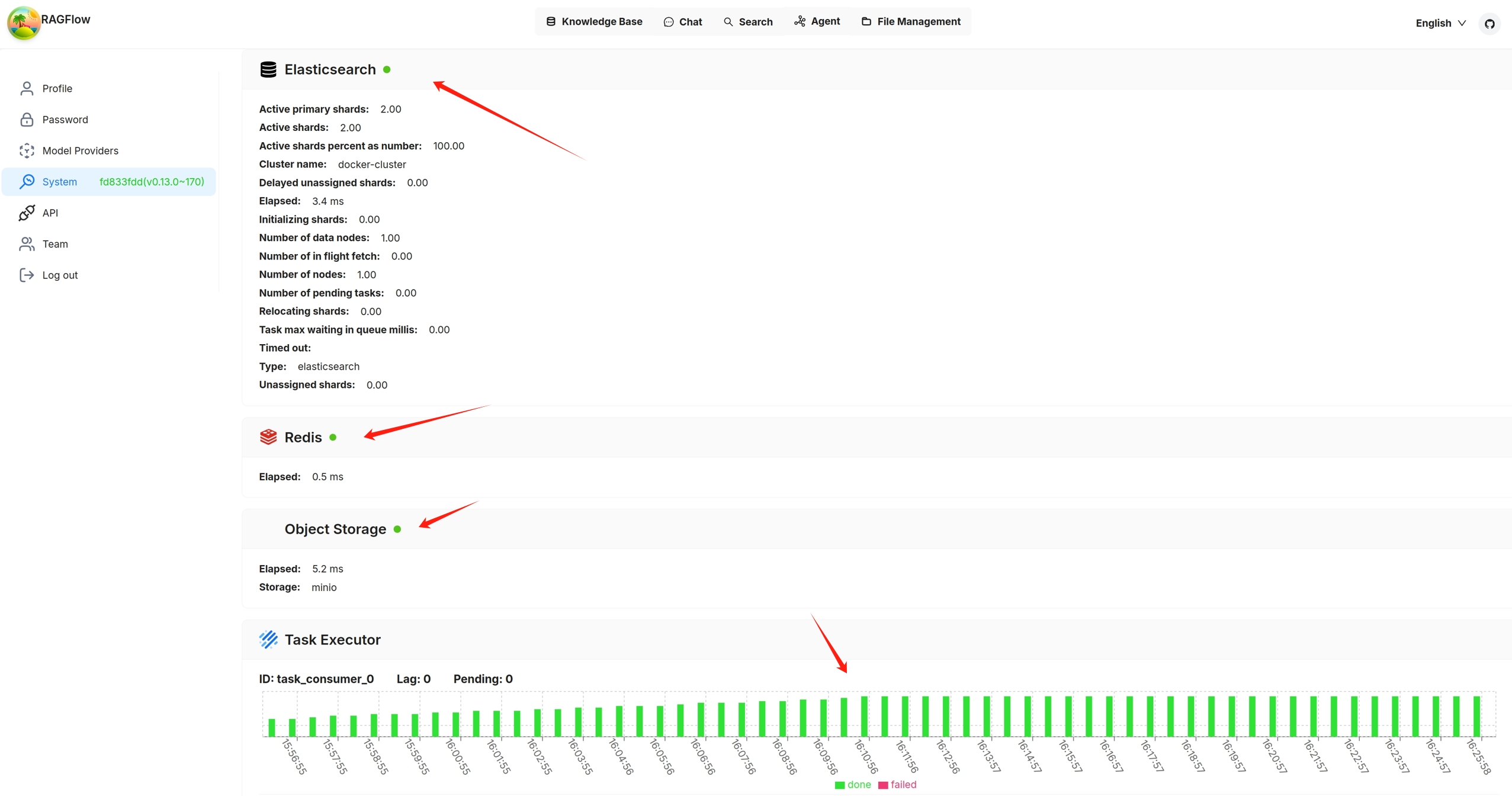
Services with a yellow or red light are not running properly. The following is a screenshot of the system page after running `docker stop ragflow-es-10`:

You can click on a specific 30-second time interval to view the details of completed and failed tasks:


---
# Glossary | RAGFlow
[Skip to main content](https://ragflow.io/docs/v0.19.1/glossary#__docusaurus_skipToContent_fallback)
This is documentation for RAGFlow **v0.19.1**, which is no longer actively maintained.
For up-to-date documentation, see the **[latest version](https://ragflow.io/docs/dev/glossary)
** (DEV).
Version: v0.19.1
On this page
Glossary
========
Definitions of key terms and basic concepts related to RAGFlow.
* * *
* [C](https://ragflow.io/docs/v0.19.1/glossary#c)
* [Cross-language search](https://ragflow.io/docs/v0.19.1/glossary#cross-language-search)
* * *
C[](https://ragflow.io/docs/v0.19.1/glossary#c "Direct link to C")
--------------------------------------------------------------------
### Cross-language search[](https://ragflow.io/docs/v0.19.1/glossary#cross-language-search "Direct link to Cross-language search")
Cross-language search (also known as cross-lingual retrieval) is a feature introduced in version 0.19.1. It enables users to submit queries in one language (for example, English) and retrieve relevant documents written in other languages such as Chinese or Spanish. This feature is enabled by the system’s default chat model, which translates queries to ensure accurate matching of semantic meaning across languages.
By enabling cross-language search, users can effortlessly access a broader range of information regardless of language barriers, significantly enhancing the system’s usability and inclusiveness.
This feature is available in the retrieval test and chat assistant settings. See [Run retrieval test](https://ragflow.io/docs/v0.19.1/run_retrieval_test)
and [Start AI chat](https://ragflow.io/docs/v0.19.1/start_chat)
for further details.
* [C](https://ragflow.io/docs/v0.19.1/glossary#c)
* [Cross-language search](https://ragflow.io/docs/v0.19.1/glossary#cross-language-search)
---
# Launch service from source | RAGFlow
[Skip to main content](https://ragflow.io/docs/v0.19.1/launch_ragflow_from_source#__docusaurus_skipToContent_fallback)
This is documentation for RAGFlow **v0.19.1**, which is no longer actively maintained.
For up-to-date documentation, see the **[latest version](https://ragflow.io/docs/dev/launch_ragflow_from_source)
** (DEV).
Version: v0.19.1
On this page
Launch service from source
==========================
A guide explaining how to set up a RAGFlow service from its source code. By following this guide, you'll be able to debug using the source code.
Target audience[](https://ragflow.io/docs/v0.19.1/launch_ragflow_from_source#target-audience "Direct link to Target audience")
--------------------------------------------------------------------------------------------------------------------------------
Developers who have added new features or modified existing code and wish to debug using the source code, _provided that_ their machine has the target deployment environment set up.
Prerequisites[](https://ragflow.io/docs/v0.19.1/launch_ragflow_from_source#prerequisites "Direct link to Prerequisites")
--------------------------------------------------------------------------------------------------------------------------
* CPU ≥ 4 cores
* RAM ≥ 16 GB
* Disk ≥ 50 GB
* Docker ≥ 24.0.0 & Docker Compose ≥ v2.26.1
NOTE
If you have not installed Docker on your local machine (Windows, Mac, or Linux), see the [Install Docker Engine](https://docs.docker.com/engine/install/)
guide.
Launch a service from source[](https://ragflow.io/docs/v0.19.1/launch_ragflow_from_source#launch-a-service-from-source "Direct link to Launch a service from source")
-----------------------------------------------------------------------------------------------------------------------------------------------------------------------
To launch a RAGFlow service from source code:
### Clone the RAGFlow repository[](https://ragflow.io/docs/v0.19.1/launch_ragflow_from_source#clone-the-ragflow-repository "Direct link to Clone the RAGFlow repository")
git clone https://github.com/infiniflow/ragflow.gitcd ragflow/
### Install Python dependencies[](https://ragflow.io/docs/v0.19.1/launch_ragflow_from_source#install-python-dependencies "Direct link to Install Python dependencies")
1. Install uv:
pipx install uv
2. Install Python dependencies:
* slim:
uv sync --python 3.10 # install RAGFlow dependent python modules
* full:
uv sync --python 3.10 --all-extras # install RAGFlow dependent python modules
_A virtual environment named `.venv` is created, and all Python dependencies are installed into the new environment._
### Launch third-party services[](https://ragflow.io/docs/v0.19.1/launch_ragflow_from_source#launch-third-party-services "Direct link to Launch third-party services")
The following command launches the 'base' services (MinIO, Elasticsearch, Redis, and MySQL) using Docker Compose:
docker compose -f docker/docker-compose-base.yml up -d
### Update `host` and `port` Settings for Third-party Services[](https://ragflow.io/docs/v0.19.1/launch_ragflow_from_source#update-host-and-port-settings-for-third-party-services "Direct link to update-host-and-port-settings-for-third-party-services")
1. Add the following line to `/etc/hosts` to resolve all hosts specified in **docker/service\_conf.yaml.template** to `127.0.0.1`:
127.0.0.1 es01 infinity mysql minio redis
2. In **docker/service\_conf.yaml.template**, update mysql port to `5455` and es port to `1200`, as specified in **docker/.env**.
### Launch the RAGFlow backend service[](https://ragflow.io/docs/v0.19.1/launch_ragflow_from_source#launch-the-ragflow-backend-service "Direct link to Launch the RAGFlow backend service")
1. Comment out the `nginx` line in **docker/entrypoint.sh**.
# /usr/sbin/nginx
2. Activate the Python virtual environment:
source .venv/bin/activateexport PYTHONPATH=$(pwd)
3. **Optional:** If you cannot access HuggingFace, set the HF\_ENDPOINT environment variable to use a mirror site:
export HF_ENDPOINT=https://hf-mirror.com
4. Check the configuration in **conf/service\_conf.yaml**, ensuring all hosts and ports are correctly set.
5. Run the **entrypoint.sh** script to launch the backend service:
JEMALLOC_PATH=$(pkg-config --variable=libdir jemalloc)/libjemalloc.so;LD_PRELOAD=$JEMALLOC_PATH python rag/svr/task_executor.py 1;
python api/ragflow_server.py;
### Launch the RAGFlow frontend service[](https://ragflow.io/docs/v0.19.1/launch_ragflow_from_source#launch-the-ragflow-frontend-service "Direct link to Launch the RAGFlow frontend service")
1. Navigate to the `web` directory and install the frontend dependencies:
cd webnpm install
2. Update `proxy.target` in **.umirc.ts** to `http://127.0.0.1:9380`:
vim .umirc.ts
3. Start up the RAGFlow frontend service:
npm run dev
_The following message appears, showing the IP address and port number of your frontend service:_

### Access the RAGFlow service[](https://ragflow.io/docs/v0.19.1/launch_ragflow_from_source#access-the-ragflow-service "Direct link to Access the RAGFlow service")
In your web browser, enter `http://127.0.0.1:/`, ensuring the port number matches that shown in the screenshot above.
### Stop the RAGFlow service when the development is done[](https://ragflow.io/docs/v0.19.1/launch_ragflow_from_source#stop-the-ragflow-service-when-the-development-is-done "Direct link to Stop the RAGFlow service when the development is done")
1. Stop the RAGFlow frontend service:
pkill npm
2. Stop the RAGFlow backend service:
pkill -f "docker/entrypoint.sh"
* [Target audience](https://ragflow.io/docs/v0.19.1/launch_ragflow_from_source#target-audience)
* [Prerequisites](https://ragflow.io/docs/v0.19.1/launch_ragflow_from_source#prerequisites)
* [Launch a service from source](https://ragflow.io/docs/v0.19.1/launch_ragflow_from_source#launch-a-service-from-source)
* [Clone the RAGFlow repository](https://ragflow.io/docs/v0.19.1/launch_ragflow_from_source#clone-the-ragflow-repository)
* [Install Python dependencies](https://ragflow.io/docs/v0.19.1/launch_ragflow_from_source#install-python-dependencies)
* [Launch third-party services](https://ragflow.io/docs/v0.19.1/launch_ragflow_from_source#launch-third-party-services)
* [Update `host` and `port` Settings for Third-party Services](https://ragflow.io/docs/v0.19.1/launch_ragflow_from_source#update-host-and-port-settings-for-third-party-services)
* [Launch the RAGFlow backend service](https://ragflow.io/docs/v0.19.1/launch_ragflow_from_source#launch-the-ragflow-backend-service)
* [Launch the RAGFlow frontend service](https://ragflow.io/docs/v0.19.1/launch_ragflow_from_source#launch-the-ragflow-frontend-service)
* [Access the RAGFlow service](https://ragflow.io/docs/v0.19.1/launch_ragflow_from_source#access-the-ragflow-service)
* [Stop the RAGFlow service when the development is done](https://ragflow.io/docs/v0.19.1/launch_ragflow_from_source#stop-the-ragflow-service-when-the-development-is-done)
---
# Manage team members | RAGFlow
[Skip to main content](https://ragflow.io/docs/dev/manage_team_members#__docusaurus_skipToContent_fallback)
Version: DEV
On this page
Manage team members
===================
Invite or remove team members.
* * *
By default, each RAGFlow user is assigned a single team named after their name. RAGFlow allows you to invite RAGFlow users to your team. Your team members can help you:
* Upload documents to your shared datasets (knowledge bases).
* Parse documents in your shared datasets.
* Use your shared Agents.
NOTE
* Your team members are currently _not_ allowed to invite users to your team, and only you, the team owner, is permitted to do so.
* Sharing added models with team members is only available in RAGFlow's Enterprise edition.
Prerequisites[](https://ragflow.io/docs/dev/manage_team_members#prerequisites "Direct link to Prerequisites")
---------------------------------------------------------------------------------------------------------------
1. Ensure that the invited team member is a RAGFlow user and that the Email address used is associated with a RAGFlow user account.
2. To allow your team members to view and update your knowledge base, ensure that you set **Permissions** on its **Configuration** page from **Only me** to **Team**.
Invite team members[](https://ragflow.io/docs/dev/manage_team_members#invite-team-members "Direct link to Invite team members")
---------------------------------------------------------------------------------------------------------------------------------
Click on your avatar in the top right corner of the page, then select **Team** in the left-hand panel to access the **Team** page.

_On the **Team** page, you can view the information about members of your team and the teams you have joined._
You are, by default, the owner of your own team and the only person permitted to invite users to join your team or remove team members.

Remove team members[](https://ragflow.io/docs/dev/manage_team_members#remove-team-members "Direct link to Remove team members")
---------------------------------------------------------------------------------------------------------------------------------

* [Prerequisites](https://ragflow.io/docs/dev/manage_team_members#prerequisites)
* [Invite team members](https://ragflow.io/docs/dev/manage_team_members#invite-team-members)
* [Remove team members](https://ragflow.io/docs/dev/manage_team_members#remove-team-members)
---
# MCP | RAGFlow
[Skip to main content](https://ragflow.io/docs/v0.19.1/category/mcp#__docusaurus_skipToContent_fallback)
This is documentation for RAGFlow **v0.19.1**, which is no longer actively maintained.
For up-to-date documentation, see the **[latest version](https://ragflow.io/docs/dev/category/mcp)
** (DEV).
Version: v0.19.1
[📄️ Launch RAGFlow MCP server\
-----------------------------\
\
Launch an MCP server from source or via Docker.](https://ragflow.io/docs/v0.19.1/launch_mcp_server)
[📄️ RAGFlow MCP tools\
---------------------\
\
The MCP server currently offers a specialized tool to assist users in searching for relevant information powered by RAGFlow DeepDoc technology:](https://ragflow.io/docs/v0.19.1/mcp_tools)
[📄️ RAGFlow MCP client examples\
-------------------------------\
\
Python and curl MCP client examples.](https://ragflow.io/docs/v0.19.1/mcp_client)
---
# Python API | RAGFlow
[Skip to main content](https://ragflow.io/docs/dev/python_api_reference#__docusaurus_skipToContent_fallback)
Version: DEV
On this page
Python API
==========
A complete reference for RAGFlow's Python APIs. Before proceeding, please ensure you [have your RAGFlow API key ready for authentication](https://ragflow.io/docs/dev/llm_api_key_setup)
.
NOTE
Run the following command to download the Python SDK:
pip install ragflow-sdk
* * *
ERROR CODES[](https://ragflow.io/docs/dev/python_api_reference#error-codes "Direct link to ERROR CODES")
----------------------------------------------------------------------------------------------------------
* * *
| Code | Message | Description |
| --- | --- | --- |
| 400 | Bad Request | Invalid request parameters |
| 401 | Unauthorized | Unauthorized access |
| 403 | Forbidden | Access denied |
| 404 | Not Found | Resource not found |
| 500 | Internal Server Error | Server internal error |
| 1001 | Invalid Chunk ID | Invalid Chunk ID |
| 1002 | Chunk Update Failed | Chunk update failed |
* * *
OpenAI-Compatible API[](https://ragflow.io/docs/dev/python_api_reference#openai-compatible-api "Direct link to OpenAI-Compatible API")
----------------------------------------------------------------------------------------------------------------------------------------
* * *
### Create chat completion[](https://ragflow.io/docs/dev/python_api_reference#create-chat-completion "Direct link to Create chat completion")
Creates a model response for the given historical chat conversation via OpenAI's API.
#### Parameters[](https://ragflow.io/docs/dev/python_api_reference#parameters "Direct link to Parameters")
##### model: `str`, _Required_[](https://ragflow.io/docs/dev/python_api_reference#model-str-required "Direct link to model-str-required")
The model used to generate the response. The server will parse this automatically, so you can set it to any value for now.
##### messages: `list[object]`, _Required_[](https://ragflow.io/docs/dev/python_api_reference#messages-listobject-required "Direct link to messages-listobject-required")
A list of historical chat messages used to generate the response. This must contain at least one message with the `user` role.
##### stream: `boolean`[](https://ragflow.io/docs/dev/python_api_reference#stream-boolean "Direct link to stream-boolean")
Whether to receive the response as a stream. Set this to `false` explicitly if you prefer to receive the entire response in one go instead of as a stream.
#### Returns[](https://ragflow.io/docs/dev/python_api_reference#returns "Direct link to Returns")
* Success: Response [message](https://platform.openai.com/docs/api-reference/chat/create)
like OpenAI
* Failure: `Exception`
#### Examples[](https://ragflow.io/docs/dev/python_api_reference#examples "Direct link to Examples")
from openai import OpenAImodel = "model"client = OpenAI(api_key="ragflow-api-key", base_url=f"http://ragflow_address/api/v1/chats_openai/")stream = Truereference = Truecompletion = client.chat.completions.create( model=model, messages=[ {"role": "system", "content": "You are a helpful assistant."}, {"role": "user", "content": "Who are you?"}, {"role": "assistant", "content": "I am an AI assistant named..."}, {"role": "user", "content": "Can you tell me how to install neovim"}, ], stream=stream, extra_body={"reference": reference})if stream:for chunk in completion: print(chunk) if reference and chunk.choices[0].finish_reason == "stop": print(f"Reference:\n{chunk.choices[0].delta.reference}") print(f"Final content:\n{chunk.choices[0].delta.final_content}")else: print(completion.choices[0].message.content) if reference: print(completion.choices[0].message.reference)
DATASET MANAGEMENT[](https://ragflow.io/docs/dev/python_api_reference#dataset-management "Direct link to DATASET MANAGEMENT")
-------------------------------------------------------------------------------------------------------------------------------
* * *
### Create dataset[](https://ragflow.io/docs/dev/python_api_reference#create-dataset "Direct link to Create dataset")
RAGFlow.create_dataset( name: str, avatar: Optional[str] = None, description: Optional[str] = None, embedding_model: Optional[str] = "BAAI/bge-large-zh-v1.5@BAAI", permission: str = "me", chunk_method: str = "naive", parser_config: DataSet.ParserConfig = None) -> DataSet
Creates a dataset.
#### Parameters[](https://ragflow.io/docs/dev/python_api_reference#parameters-1 "Direct link to Parameters")
##### name: `str`, _Required_[](https://ragflow.io/docs/dev/python_api_reference#name-str-required "Direct link to name-str-required")
The unique name of the dataset to create. It must adhere to the following requirements:
* Maximum 128 characters.
* Case-insensitive.
##### avatar: `str`[](https://ragflow.io/docs/dev/python_api_reference#avatar-str "Direct link to avatar-str")
Base64 encoding of the avatar. Defaults to `None`
##### description: `str`[](https://ragflow.io/docs/dev/python_api_reference#description-str "Direct link to description-str")
A brief description of the dataset to create. Defaults to `None`.
##### permission[](https://ragflow.io/docs/dev/python_api_reference#permission "Direct link to permission")
Specifies who can access the dataset to create. Available options:
* `"me"`: (Default) Only you can manage the dataset.
* `"team"`: All team members can manage the dataset.
##### chunk\_method, `str`[](https://ragflow.io/docs/dev/python_api_reference#chunk_method-str "Direct link to chunk_method-str")
The chunking method of the dataset to create. Available options:
* `"naive"`: General (default)
* `"manual`: Manual
* `"qa"`: Q&A
* `"table"`: Table
* `"paper"`: Paper
* `"book"`: Book
* `"laws"`: Laws
* `"presentation"`: Presentation
* `"picture"`: Picture
* `"one"`: One
* `"email"`: Email
##### parser\_config[](https://ragflow.io/docs/dev/python_api_reference#parser_config "Direct link to parser_config")
The parser configuration of the dataset. A `ParserConfig` object's attributes vary based on the selected `chunk_method`:
* `chunk_method`\=`"naive"`:
`{"chunk_token_num":512,"delimiter":"\\n","html4excel":False,"layout_recognize":True,"raptor":{"use_raptor":False}}`.
* `chunk_method`\=`"qa"`:
`{"raptor": {"use_raptor": False}}`
* `chunk_method`\=`"manuel"`:
`{"raptor": {"use_raptor": False}}`
* `chunk_method`\=`"table"`:
`None`
* `chunk_method`\=`"paper"`:
`{"raptor": {"use_raptor": False}}`
* `chunk_method`\=`"book"`:
`{"raptor": {"use_raptor": False}}`
* `chunk_method`\=`"laws"`:
`{"raptor": {"use_raptor": False}}`
* `chunk_method`\=`"picture"`:
`None`
* `chunk_method`\=`"presentation"`:
`{"raptor": {"use_raptor": False}}`
* `chunk_method`\=`"one"`:
`None`
* `chunk_method`\=`"knowledge-graph"`:
`{"chunk_token_num":128,"delimiter":"\\n","entity_types":["organization","person","location","event","time"]}`
* `chunk_method`\=`"email"`:
`None`
#### Returns[](https://ragflow.io/docs/dev/python_api_reference#returns-1 "Direct link to Returns")
* Success: A `dataset` object.
* Failure: `Exception`
#### Examples[](https://ragflow.io/docs/dev/python_api_reference#examples-1 "Direct link to Examples")
from ragflow_sdk import RAGFlowrag_object = RAGFlow(api_key="", base_url="http://:9380")dataset = rag_object.create_dataset(name="kb_1")
* * *
### Delete datasets[](https://ragflow.io/docs/dev/python_api_reference#delete-datasets "Direct link to Delete datasets")
RAGFlow.delete_datasets(ids: list[str] | None = None)
Deletes datasets by ID.
#### Parameters[](https://ragflow.io/docs/dev/python_api_reference#parameters-2 "Direct link to Parameters")
##### ids: `list[str]` or `None`, _Required_[](https://ragflow.io/docs/dev/python_api_reference#ids-liststr-or-none-required "Direct link to ids-liststr-or-none-required")
The IDs of the datasets to delete. Defaults to `None`.
* If `None`, all datasets will be deleted.
* If an array of IDs, only the specified datasets will be deleted.
* If an empty array, no datasets will be deleted.
#### Returns[](https://ragflow.io/docs/dev/python_api_reference#returns-2 "Direct link to Returns")
* Success: No value is returned.
* Failure: `Exception`
#### Examples[](https://ragflow.io/docs/dev/python_api_reference#examples-2 "Direct link to Examples")
rag_object.delete_datasets(ids=["d94a8dc02c9711f0930f7fbc369eab6d","e94a8dc02c9711f0930f7fbc369eab6e"])
* * *
### List datasets[](https://ragflow.io/docs/dev/python_api_reference#list-datasets "Direct link to List datasets")
RAGFlow.list_datasets( page: int = 1, page_size: int = 30, orderby: str = "create_time", desc: bool = True, id: str = None, name: str = None) -> list[DataSet]
Lists datasets.
#### Parameters[](https://ragflow.io/docs/dev/python_api_reference#parameters-3 "Direct link to Parameters")
##### page: `int`[](https://ragflow.io/docs/dev/python_api_reference#page-int "Direct link to page-int")
Specifies the page on which the datasets will be displayed. Defaults to `1`.
##### page\_size: `int`[](https://ragflow.io/docs/dev/python_api_reference#page_size-int "Direct link to page_size-int")
The number of datasets on each page. Defaults to `30`.
##### orderby: `str`[](https://ragflow.io/docs/dev/python_api_reference#orderby-str "Direct link to orderby-str")
The field by which datasets should be sorted. Available options:
* `"create_time"` (default)
* `"update_time"`
##### desc: `bool`[](https://ragflow.io/docs/dev/python_api_reference#desc-bool "Direct link to desc-bool")
Indicates whether the retrieved datasets should be sorted in descending order. Defaults to `True`.
##### id: `str`[](https://ragflow.io/docs/dev/python_api_reference#id-str "Direct link to id-str")
The ID of the dataset to retrieve. Defaults to `None`.
##### name: `str`[](https://ragflow.io/docs/dev/python_api_reference#name-str "Direct link to name-str")
The name of the dataset to retrieve. Defaults to `None`.
#### Returns[](https://ragflow.io/docs/dev/python_api_reference#returns-3 "Direct link to Returns")
* Success: A list of `DataSet` objects.
* Failure: `Exception`.
#### Examples[](https://ragflow.io/docs/dev/python_api_reference#examples-3 "Direct link to Examples")
##### List all datasets[](https://ragflow.io/docs/dev/python_api_reference#list-all-datasets "Direct link to List all datasets")
for dataset in rag_object.list_datasets(): print(dataset)
##### Retrieve a dataset by ID[](https://ragflow.io/docs/dev/python_api_reference#retrieve-a-dataset-by-id "Direct link to Retrieve a dataset by ID")
dataset = rag_object.list_datasets(id = "id_1")print(dataset[0])
* * *
### Update dataset[](https://ragflow.io/docs/dev/python_api_reference#update-dataset "Direct link to Update dataset")
DataSet.update(update_message: dict)
Updates configurations for the current dataset.
#### Parameters[](https://ragflow.io/docs/dev/python_api_reference#parameters-4 "Direct link to Parameters")
##### update\_message: `dict[str, str|int]`, _Required_[](https://ragflow.io/docs/dev/python_api_reference#update_message-dictstr-strint-required "Direct link to update_message-dictstr-strint-required")
A dictionary representing the attributes to update, with the following keys:
* `"name"`: `str` The revised name of the dataset.
* Basic Multilingual Plane (BMP) only
* Maximum 128 characters
* Case-insensitive
* `"avatar"`: (_Body parameter_), `string`
The updated base64 encoding of the avatar.
* Maximum 65535 characters
* `"embedding_model"`: (_Body parameter_), `string`
The updated embedding model name.
* Ensure that `"chunk_count"` is `0` before updating `"embedding_model"`.
* Maximum 255 characters
* Must follow `model_name@model_factory` format
* `"permission"`: (_Body parameter_), `string`
The updated dataset permission. Available options:
* `"me"`: (Default) Only you can manage the dataset.
* `"team"`: All team members can manage the dataset.
* `"pagerank"`: (_Body parameter_), `int`
refer to [Set page rank](https://ragflow.io/docs/dev/set_page_rank)
* Default: `0`
* Minimum: `0`
* Maximum: `100`
* `"chunk_method"`: (_Body parameter_), `enum`
The chunking method for the dataset. Available options:
* `"naive"`: General (default)
* `"book"`: Book
* `"email"`: Email
* `"laws"`: Laws
* `"manual"`: Manual
* `"one"`: One
* `"paper"`: Paper
* `"picture"`: Picture
* `"presentation"`: Presentation
* `"qa"`: Q&A
* `"table"`: Table
* `"tag"`: Tag
#### Returns[](https://ragflow.io/docs/dev/python_api_reference#returns-4 "Direct link to Returns")
* Success: No value is returned.
* Failure: `Exception`
#### Examples[](https://ragflow.io/docs/dev/python_api_reference#examples-4 "Direct link to Examples")
from ragflow_sdk import RAGFlowrag_object = RAGFlow(api_key="", base_url="http://:9380")dataset = rag_object.list_datasets(name="kb_name")dataset = dataset[0]dataset.update({"embedding_model":"BAAI/bge-zh-v1.5", "chunk_method":"manual"})
* * *
FILE MANAGEMENT WITHIN DATASET[](https://ragflow.io/docs/dev/python_api_reference#file-management-within-dataset "Direct link to FILE MANAGEMENT WITHIN DATASET")
-------------------------------------------------------------------------------------------------------------------------------------------------------------------
* * *
### Upload documents[](https://ragflow.io/docs/dev/python_api_reference#upload-documents "Direct link to Upload documents")
DataSet.upload_documents(document_list: list[dict])
Uploads documents to the current dataset.
#### Parameters[](https://ragflow.io/docs/dev/python_api_reference#parameters-5 "Direct link to Parameters")
##### document\_list: `list[dict]`, _Required_[](https://ragflow.io/docs/dev/python_api_reference#document_list-listdict-required "Direct link to document_list-listdict-required")
A list of dictionaries representing the documents to upload, each containing the following keys:
* `"display_name"`: (Optional) The file name to display in the dataset.
* `"blob"`: (Optional) The binary content of the file to upload.
#### Returns[](https://ragflow.io/docs/dev/python_api_reference#returns-5 "Direct link to Returns")
* Success: No value is returned.
* Failure: `Exception`
#### Examples[](https://ragflow.io/docs/dev/python_api_reference#examples-5 "Direct link to Examples")
dataset = rag_object.create_dataset(name="kb_name")dataset.upload_documents([{"display_name": "1.txt", "blob": ""}, {"display_name": "2.pdf", "blob": ""}])
* * *
### Update document[](https://ragflow.io/docs/dev/python_api_reference#update-document "Direct link to Update document")
Document.update(update_message:dict)
Updates configurations for the current document.
#### Parameters[](https://ragflow.io/docs/dev/python_api_reference#parameters-6 "Direct link to Parameters")
##### update\_message: `dict[str, str|dict[]]`, _Required_[](https://ragflow.io/docs/dev/python_api_reference#update_message-dictstr-strdict-required "Direct link to update_message-dictstr-strdict-required")
A dictionary representing the attributes to update, with the following keys:
* `"display_name"`: `str` The name of the document to update.
* `"meta_fields"`: `dict[str, Any]` The meta fields of the document.
* `"chunk_method"`: `str` The parsing method to apply to the document.
* `"naive"`: General
* `"manual`: Manual
* `"qa"`: Q&A
* `"table"`: Table
* `"paper"`: Paper
* `"book"`: Book
* `"laws"`: Laws
* `"presentation"`: Presentation
* `"picture"`: Picture
* `"one"`: One
* `"email"`: Email
* `"parser_config"`: `dict[str, Any]` The parsing configuration for the document. Its attributes vary based on the selected `"chunk_method"`:
* `"chunk_method"`\=`"naive"`:
`{"chunk_token_num":128,"delimiter":"\\n","html4excel":False,"layout_recognize":True,"raptor":{"use_raptor":False}}`.
* `chunk_method`\=`"qa"`:
`{"raptor": {"use_raptor": False}}`
* `chunk_method`\=`"manuel"`:
`{"raptor": {"use_raptor": False}}`
* `chunk_method`\=`"table"`:
`None`
* `chunk_method`\=`"paper"`:
`{"raptor": {"use_raptor": False}}`
* `chunk_method`\=`"book"`:
`{"raptor": {"use_raptor": False}}`
* `chunk_method`\=`"laws"`:
`{"raptor": {"use_raptor": False}}`
* `chunk_method`\=`"presentation"`:
`{"raptor": {"use_raptor": False}}`
* `chunk_method`\=`"picture"`:
`None`
* `chunk_method`\=`"one"`:
`None`
* `chunk_method`\=`"knowledge-graph"`:
`{"chunk_token_num":128,"delimiter":"\\n","entity_types":["organization","person","location","event","time"]}`
* `chunk_method`\=`"email"`:
`None`
#### Returns[](https://ragflow.io/docs/dev/python_api_reference#returns-6 "Direct link to Returns")
* Success: No value is returned.
* Failure: `Exception`
#### Examples[](https://ragflow.io/docs/dev/python_api_reference#examples-6 "Direct link to Examples")
from ragflow_sdk import RAGFlowrag_object = RAGFlow(api_key="", base_url="http://:9380")dataset = rag_object.list_datasets(id='id')dataset = dataset[0]doc = dataset.list_documents(id="wdfxb5t547d")doc = doc[0]doc.update([{"parser_config": {"chunk_token_num": 256}}, {"chunk_method": "manual"}])
* * *
### Download document[](https://ragflow.io/docs/dev/python_api_reference#download-document "Direct link to Download document")
Document.download() -> bytes
Downloads the current document.
#### Returns[](https://ragflow.io/docs/dev/python_api_reference#returns-7 "Direct link to Returns")
The downloaded document in bytes.
#### Examples[](https://ragflow.io/docs/dev/python_api_reference#examples-7 "Direct link to Examples")
from ragflow_sdk import RAGFlowrag_object = RAGFlow(api_key="", base_url="http://:9380")dataset = rag_object.list_datasets(id="id")dataset = dataset[0]doc = dataset.list_documents(id="wdfxb5t547d")doc = doc[0]open("~/ragflow.txt", "wb+").write(doc.download())print(doc)
* * *
### List documents[](https://ragflow.io/docs/dev/python_api_reference#list-documents "Direct link to List documents")
Dataset.list_documents(id:str =None, keywords: str=None, page: int=1, page_size:int = 30, order_by:str = "create_time", desc: bool = True) -> list[Document]
Lists documents in the current dataset.
#### Parameters[](https://ragflow.io/docs/dev/python_api_reference#parameters-7 "Direct link to Parameters")
##### id: `str`[](https://ragflow.io/docs/dev/python_api_reference#id-str-1 "Direct link to id-str-1")
The ID of the document to retrieve. Defaults to `None`.
##### keywords: `str`[](https://ragflow.io/docs/dev/python_api_reference#keywords-str "Direct link to keywords-str")
The keywords used to match document titles. Defaults to `None`.
##### page: `int`[](https://ragflow.io/docs/dev/python_api_reference#page-int-1 "Direct link to page-int-1")
Specifies the page on which the documents will be displayed. Defaults to `1`.
##### page\_size: `int`[](https://ragflow.io/docs/dev/python_api_reference#page_size-int-1 "Direct link to page_size-int-1")
The maximum number of documents on each page. Defaults to `30`.
##### orderby: `str`[](https://ragflow.io/docs/dev/python_api_reference#orderby-str-1 "Direct link to orderby-str-1")
The field by which documents should be sorted. Available options:
* `"create_time"` (default)
* `"update_time"`
##### desc: `bool`[](https://ragflow.io/docs/dev/python_api_reference#desc-bool-1 "Direct link to desc-bool-1")
Indicates whether the retrieved documents should be sorted in descending order. Defaults to `True`.
#### Returns[](https://ragflow.io/docs/dev/python_api_reference#returns-8 "Direct link to Returns")
* Success: A list of `Document` objects.
* Failure: `Exception`.
A `Document` object contains the following attributes:
* `id`: The document ID. Defaults to `""`.
* `name`: The document name. Defaults to `""`.
* `thumbnail`: The thumbnail image of the document. Defaults to `None`.
* `dataset_id`: The dataset ID associated with the document. Defaults to `None`.
* `chunk_method` The chunking method name. Defaults to `"naive"`.
* `source_type`: The source type of the document. Defaults to `"local"`.
* `type`: Type or category of the document. Defaults to `""`. Reserved for future use.
* `created_by`: `str` The creator of the document. Defaults to `""`.
* `size`: `int` The document size in bytes. Defaults to `0`.
* `token_count`: `int` The number of tokens in the document. Defaults to `0`.
* `chunk_count`: `int` The number of chunks in the document. Defaults to `0`.
* `progress`: `float` The current processing progress as a percentage. Defaults to `0.0`.
* `progress_msg`: `str` A message indicating the current progress status. Defaults to `""`.
* `process_begin_at`: `datetime` The start time of document processing. Defaults to `None`.
* `process_duration`: `float` Duration of the processing in seconds. Defaults to `0.0`.
* `run`: `str` The document's processing status:
* `"UNSTART"` (default)
* `"RUNNING"`
* `"CANCEL"`
* `"DONE"`
* `"FAIL"`
* `status`: `str` Reserved for future use.
* `parser_config`: `ParserConfig` Configuration object for the parser. Its attributes vary based on the selected `chunk_method`:
* `chunk_method`\=`"naive"`:
`{"chunk_token_num":128,"delimiter":"\\n","html4excel":False,"layout_recognize":True,"raptor":{"use_raptor":False}}`.
* `chunk_method`\=`"qa"`:
`{"raptor": {"use_raptor": False}}`
* `chunk_method`\=`"manuel"`:
`{"raptor": {"use_raptor": False}}`
* `chunk_method`\=`"table"`:
`None`
* `chunk_method`\=`"paper"`:
`{"raptor": {"use_raptor": False}}`
* `chunk_method`\=`"book"`:
`{"raptor": {"use_raptor": False}}`
* `chunk_method`\=`"laws"`:
`{"raptor": {"use_raptor": False}}`
* `chunk_method`\=`"presentation"`:
`{"raptor": {"use_raptor": False}}`
* `chunk_method`\=`"picure"`:
`None`
* `chunk_method`\=`"one"`:
`None`
* `chunk_method`\=`"email"`:
`None`
#### Examples[](https://ragflow.io/docs/dev/python_api_reference#examples-8 "Direct link to Examples")
from ragflow_sdk import RAGFlowrag_object = RAGFlow(api_key="", base_url="http://:9380")dataset = rag_object.create_dataset(name="kb_1")filename1 = "~/ragflow.txt"blob = open(filename1 , "rb").read()dataset.upload_documents([{"name":filename1,"blob":blob}])for doc in dataset.list_documents(keywords="rag", page=0, page_size=12): print(doc)
* * *
### Delete documents[](https://ragflow.io/docs/dev/python_api_reference#delete-documents "Direct link to Delete documents")
DataSet.delete_documents(ids: list[str] = None)
Deletes documents by ID.
#### Parameters[](https://ragflow.io/docs/dev/python_api_reference#parameters-8 "Direct link to Parameters")
##### ids: `list[list]`[](https://ragflow.io/docs/dev/python_api_reference#ids-listlist "Direct link to ids-listlist")
The IDs of the documents to delete. Defaults to `None`. If it is not specified, all documents in the dataset will be deleted.
#### Returns[](https://ragflow.io/docs/dev/python_api_reference#returns-9 "Direct link to Returns")
* Success: No value is returned.
* Failure: `Exception`
#### Examples[](https://ragflow.io/docs/dev/python_api_reference#examples-9 "Direct link to Examples")
from ragflow_sdk import RAGFlowrag_object = RAGFlow(api_key="", base_url="http://:9380")dataset = rag_object.list_datasets(name="kb_1")dataset = dataset[0]dataset.delete_documents(ids=["id_1","id_2"])
* * *
### Parse documents[](https://ragflow.io/docs/dev/python_api_reference#parse-documents "Direct link to Parse documents")
DataSet.async_parse_documents(document_ids:list[str]) -> None
Parses documents in the current dataset.
#### Parameters[](https://ragflow.io/docs/dev/python_api_reference#parameters-9 "Direct link to Parameters")
##### document\_ids: `list[str]`, _Required_[](https://ragflow.io/docs/dev/python_api_reference#document_ids-liststr-required "Direct link to document_ids-liststr-required")
The IDs of the documents to parse.
#### Returns[](https://ragflow.io/docs/dev/python_api_reference#returns-10 "Direct link to Returns")
* Success: No value is returned.
* Failure: `Exception`
#### Examples[](https://ragflow.io/docs/dev/python_api_reference#examples-10 "Direct link to Examples")
rag_object = RAGFlow(api_key="", base_url="http://:9380")dataset = rag_object.create_dataset(name="dataset_name")documents = [ {'display_name': 'test1.txt', 'blob': open('./test_data/test1.txt',"rb").read()}, {'display_name': 'test2.txt', 'blob': open('./test_data/test2.txt',"rb").read()}, {'display_name': 'test3.txt', 'blob': open('./test_data/test3.txt',"rb").read()}]dataset.upload_documents(documents)documents = dataset.list_documents(keywords="test")ids = []for document in documents: ids.append(document.id)dataset.async_parse_documents(ids)print("Async bulk parsing initiated.")
* * *
### Stop parsing documents[](https://ragflow.io/docs/dev/python_api_reference#stop-parsing-documents "Direct link to Stop parsing documents")
DataSet.async_cancel_parse_documents(document_ids:list[str])-> None
Stops parsing specified documents.
#### Parameters[](https://ragflow.io/docs/dev/python_api_reference#parameters-10 "Direct link to Parameters")
##### document\_ids: `list[str]`, _Required_[](https://ragflow.io/docs/dev/python_api_reference#document_ids-liststr-required-1 "Direct link to document_ids-liststr-required-1")
The IDs of the documents for which parsing should be stopped.
#### Returns[](https://ragflow.io/docs/dev/python_api_reference#returns-11 "Direct link to Returns")
* Success: No value is returned.
* Failure: `Exception`
#### Examples[](https://ragflow.io/docs/dev/python_api_reference#examples-11 "Direct link to Examples")
rag_object = RAGFlow(api_key="", base_url="http://:9380")dataset = rag_object.create_dataset(name="dataset_name")documents = [ {'display_name': 'test1.txt', 'blob': open('./test_data/test1.txt',"rb").read()}, {'display_name': 'test2.txt', 'blob': open('./test_data/test2.txt',"rb").read()}, {'display_name': 'test3.txt', 'blob': open('./test_data/test3.txt',"rb").read()}]dataset.upload_documents(documents)documents = dataset.list_documents(keywords="test")ids = []for document in documents: ids.append(document.id)dataset.async_parse_documents(ids)print("Async bulk parsing initiated.")dataset.async_cancel_parse_documents(ids)print("Async bulk parsing cancelled.")
* * *
CHUNK MANAGEMENT WITHIN DATASET[](https://ragflow.io/docs/dev/python_api_reference#chunk-management-within-dataset "Direct link to CHUNK MANAGEMENT WITHIN DATASET")
----------------------------------------------------------------------------------------------------------------------------------------------------------------------
* * *
### Add chunk[](https://ragflow.io/docs/dev/python_api_reference#add-chunk "Direct link to Add chunk")
Document.add_chunk(content:str, important_keywords:list[str] = []) -> Chunk
Adds a chunk to the current document.
#### Parameters[](https://ragflow.io/docs/dev/python_api_reference#parameters-11 "Direct link to Parameters")
##### content: `str`, _Required_[](https://ragflow.io/docs/dev/python_api_reference#content-str-required "Direct link to content-str-required")
The text content of the chunk.
##### important\_keywords: `list[str]`[](https://ragflow.io/docs/dev/python_api_reference#important_keywords-liststr "Direct link to important_keywords-liststr")
The key terms or phrases to tag with the chunk.
#### Returns[](https://ragflow.io/docs/dev/python_api_reference#returns-12 "Direct link to Returns")
* Success: A `Chunk` object.
* Failure: `Exception`.
A `Chunk` object contains the following attributes:
* `id`: `str`: The chunk ID.
* `content`: `str` The text content of the chunk.
* `important_keywords`: `list[str]` A list of key terms or phrases tagged with the chunk.
* `create_time`: `str` The time when the chunk was created (added to the document).
* `create_timestamp`: `float` The timestamp representing the creation time of the chunk, expressed in seconds since January 1, 1970.
* `dataset_id`: `str` The ID of the associated dataset.
* `document_name`: `str` The name of the associated document.
* `document_id`: `str` The ID of the associated document.
* `available`: `bool` The chunk's availability status in the dataset. Value options:
* `False`: Unavailable
* `True`: Available (default)
#### Examples[](https://ragflow.io/docs/dev/python_api_reference#examples-12 "Direct link to Examples")
from ragflow_sdk import RAGFlowrag_object = RAGFlow(api_key="", base_url="http://:9380")datasets = rag_object.list_datasets(id="123")dataset = datasets[0]doc = dataset.list_documents(id="wdfxb5t547d")doc = doc[0]chunk = doc.add_chunk(content="xxxxxxx")
* * *
### List chunks[](https://ragflow.io/docs/dev/python_api_reference#list-chunks "Direct link to List chunks")
Document.list_chunks(keywords: str = None, page: int = 1, page_size: int = 30, id : str = None) -> list[Chunk]
Lists chunks in the current document.
#### Parameters[](https://ragflow.io/docs/dev/python_api_reference#parameters-12 "Direct link to Parameters")
##### keywords: `str`[](https://ragflow.io/docs/dev/python_api_reference#keywords-str-1 "Direct link to keywords-str-1")
The keywords used to match chunk content. Defaults to `None`
##### page: `int`[](https://ragflow.io/docs/dev/python_api_reference#page-int-2 "Direct link to page-int-2")
Specifies the page on which the chunks will be displayed. Defaults to `1`.
##### page\_size: `int`[](https://ragflow.io/docs/dev/python_api_reference#page_size-int-2 "Direct link to page_size-int-2")
The maximum number of chunks on each page. Defaults to `30`.
##### id: `str`[](https://ragflow.io/docs/dev/python_api_reference#id-str-2 "Direct link to id-str-2")
The ID of the chunk to retrieve. Default: `None`
#### Returns[](https://ragflow.io/docs/dev/python_api_reference#returns-13 "Direct link to Returns")
* Success: A list of `Chunk` objects.
* Failure: `Exception`.
#### Examples[](https://ragflow.io/docs/dev/python_api_reference#examples-13 "Direct link to Examples")
from ragflow_sdk import RAGFlowrag_object = RAGFlow(api_key="", base_url="http://:9380")dataset = rag_object.list_datasets("123")dataset = dataset[0]docs = dataset.list_documents(keywords="test", page=1, page_size=12)for chunk in docs[0].list_chunks(keywords="rag", page=0, page_size=12): print(chunk)
* * *
### Delete chunks[](https://ragflow.io/docs/dev/python_api_reference#delete-chunks "Direct link to Delete chunks")
Document.delete_chunks(chunk_ids: list[str])
Deletes chunks by ID.
#### Parameters[](https://ragflow.io/docs/dev/python_api_reference#parameters-13 "Direct link to Parameters")
##### chunk\_ids: `list[str]`[](https://ragflow.io/docs/dev/python_api_reference#chunk_ids-liststr "Direct link to chunk_ids-liststr")
The IDs of the chunks to delete. Defaults to `None`. If it is not specified, all chunks of the current document will be deleted.
#### Returns[](https://ragflow.io/docs/dev/python_api_reference#returns-14 "Direct link to Returns")
* Success: No value is returned.
* Failure: `Exception`
#### Examples[](https://ragflow.io/docs/dev/python_api_reference#examples-14 "Direct link to Examples")
from ragflow_sdk import RAGFlowrag_object = RAGFlow(api_key="", base_url="http://:9380")dataset = rag_object.list_datasets(id="123")dataset = dataset[0]doc = dataset.list_documents(id="wdfxb5t547d")doc = doc[0]chunk = doc.add_chunk(content="xxxxxxx")doc.delete_chunks(["id_1","id_2"])
* * *
### Update chunk[](https://ragflow.io/docs/dev/python_api_reference#update-chunk "Direct link to Update chunk")
Chunk.update(update_message: dict)
Updates content or configurations for the current chunk.
#### Parameters[](https://ragflow.io/docs/dev/python_api_reference#parameters-14 "Direct link to Parameters")
##### update\_message: `dict[str, str|list[str]|int]` _Required_[](https://ragflow.io/docs/dev/python_api_reference#update_message-dictstr-strliststrint-required "Direct link to update_message-dictstr-strliststrint-required")
A dictionary representing the attributes to update, with the following keys:
* `"content"`: `str` The text content of the chunk.
* `"important_keywords"`: `list[str]` A list of key terms or phrases to tag with the chunk.
* `"available"`: `bool` The chunk's availability status in the dataset. Value options:
* `False`: Unavailable
* `True`: Available (default)
#### Returns[](https://ragflow.io/docs/dev/python_api_reference#returns-15 "Direct link to Returns")
* Success: No value is returned.
* Failure: `Exception`
#### Examples[](https://ragflow.io/docs/dev/python_api_reference#examples-15 "Direct link to Examples")
from ragflow_sdk import RAGFlowrag_object = RAGFlow(api_key="", base_url="http://:9380")dataset = rag_object.list_datasets(id="123")dataset = dataset[0]doc = dataset.list_documents(id="wdfxb5t547d")doc = doc[0]chunk = doc.add_chunk(content="xxxxxxx")chunk.update({"content":"sdfx..."})
* * *
### Retrieve chunks[](https://ragflow.io/docs/dev/python_api_reference#retrieve-chunks "Direct link to Retrieve chunks")
RAGFlow.retrieve(question:str="", dataset_ids:list[str]=None, document_ids=list[str]=None, page:int=1, page_size:int=30, similarity_threshold:float=0.2, vector_similarity_weight:float=0.3, top_k:int=1024,rerank_id:str=None,keyword:bool=False,highlight:bool=False) -> list[Chunk]
Retrieves chunks from specified datasets.
#### Parameters[](https://ragflow.io/docs/dev/python_api_reference#parameters-15 "Direct link to Parameters")
##### question: `str`, _Required_[](https://ragflow.io/docs/dev/python_api_reference#question-str-required "Direct link to question-str-required")
The user query or query keywords. Defaults to `""`.
##### dataset\_ids: `list[str]`, _Required_[](https://ragflow.io/docs/dev/python_api_reference#dataset_ids-liststr-required "Direct link to dataset_ids-liststr-required")
The IDs of the datasets to search. Defaults to `None`.
##### document\_ids: `list[str]`[](https://ragflow.io/docs/dev/python_api_reference#document_ids-liststr "Direct link to document_ids-liststr")
The IDs of the documents to search. Defaults to `None`. You must ensure all selected documents use the same embedding model. Otherwise, an error will occur.
##### page: `int`[](https://ragflow.io/docs/dev/python_api_reference#page-int-3 "Direct link to page-int-3")
The starting index for the documents to retrieve. Defaults to `1`.
##### page\_size: `int`[](https://ragflow.io/docs/dev/python_api_reference#page_size-int-3 "Direct link to page_size-int-3")
The maximum number of chunks to retrieve. Defaults to `30`.
##### Similarity\_threshold: `float`[](https://ragflow.io/docs/dev/python_api_reference#similarity_threshold-float "Direct link to similarity_threshold-float")
The minimum similarity score. Defaults to `0.2`.
##### vector\_similarity\_weight: `float`[](https://ragflow.io/docs/dev/python_api_reference#vector_similarity_weight-float "Direct link to vector_similarity_weight-float")
The weight of vector cosine similarity. Defaults to `0.3`. If x represents the vector cosine similarity, then (1 - x) is the term similarity weight.
##### top\_k: `int`[](https://ragflow.io/docs/dev/python_api_reference#top_k-int "Direct link to top_k-int")
The number of chunks engaged in vector cosine computation. Defaults to `1024`.
##### rerank\_id: `str`[](https://ragflow.io/docs/dev/python_api_reference#rerank_id-str "Direct link to rerank_id-str")
The ID of the rerank model. Defaults to `None`.
##### keyword: `bool`[](https://ragflow.io/docs/dev/python_api_reference#keyword-bool "Direct link to keyword-bool")
Indicates whether to enable keyword-based matching:
* `True`: Enable keyword-based matching.
* `False`: Disable keyword-based matching (default).
##### highlight: `bool`[](https://ragflow.io/docs/dev/python_api_reference#highlight-bool "Direct link to highlight-bool")
Specifies whether to enable highlighting of matched terms in the results:
* `True`: Enable highlighting of matched terms.
* `False`: Disable highlighting of matched terms (default).
##### cross\_languages: `list[string]`[](https://ragflow.io/docs/dev/python_api_reference#cross_languages--liststring "Direct link to cross_languages--liststring")
The languages that should be translated into, in order to achieve keywords retrievals in different languages.
#### Returns[](https://ragflow.io/docs/dev/python_api_reference#returns-16 "Direct link to Returns")
* Success: A list of `Chunk` objects representing the document chunks.
* Failure: `Exception`
#### Examples[](https://ragflow.io/docs/dev/python_api_reference#examples-16 "Direct link to Examples")
from ragflow_sdk import RAGFlowrag_object = RAGFlow(api_key="", base_url="http://:9380")dataset = rag_object.list_datasets(name="ragflow")dataset = dataset[0]name = 'ragflow_test.txt'path = './test_data/ragflow_test.txt'documents =[{"display_name":"test_retrieve_chunks.txt","blob":open(path, "rb").read()}]docs = dataset.upload_documents(documents)doc = docs[0]doc.add_chunk(content="This is a chunk addition test")for c in rag_object.retrieve(dataset_ids=[dataset.id],document_ids=[doc.id]): print(c)
* * *
CHAT ASSISTANT MANAGEMENT[](https://ragflow.io/docs/dev/python_api_reference#chat-assistant-management "Direct link to CHAT ASSISTANT MANAGEMENT")
----------------------------------------------------------------------------------------------------------------------------------------------------
* * *
### Create chat assistant[](https://ragflow.io/docs/dev/python_api_reference#create-chat-assistant "Direct link to Create chat assistant")
RAGFlow.create_chat( name: str, avatar: str = "", dataset_ids: list[str] = [], llm: Chat.LLM = None, prompt: Chat.Prompt = None) -> Chat
Creates a chat assistant.
#### Parameters[](https://ragflow.io/docs/dev/python_api_reference#parameters-16 "Direct link to Parameters")
##### name: `str`, _Required_[](https://ragflow.io/docs/dev/python_api_reference#name-str-required-1 "Direct link to name-str-required-1")
The name of the chat assistant.
##### avatar: `str`[](https://ragflow.io/docs/dev/python_api_reference#avatar-str-1 "Direct link to avatar-str-1")
Base64 encoding of the avatar. Defaults to `""`.
##### dataset\_ids: `list[str]`[](https://ragflow.io/docs/dev/python_api_reference#dataset_ids-liststr "Direct link to dataset_ids-liststr")
The IDs of the associated datasets. Defaults to `[""]`.
##### llm: `Chat.LLM`[](https://ragflow.io/docs/dev/python_api_reference#llm-chatllm "Direct link to llm-chatllm")
The LLM settings for the chat assistant to create. Defaults to `None`. When the value is `None`, a dictionary with the following values will be generated as the default. An `LLM` object contains the following attributes:
* `model_name`: `str`
The chat model name. If it is `None`, the user's default chat model will be used.
* `temperature`: `float`
Controls the randomness of the model's predictions. A lower temperature results in more conservative responses, while a higher temperature yields more creative and diverse responses. Defaults to `0.1`.
* `top_p`: `float`
Also known as “nucleus sampling”, this parameter sets a threshold to select a smaller set of words to sample from. It focuses on the most likely words, cutting off the less probable ones. Defaults to `0.3`
* `presence_penalty`: `float`
This discourages the model from repeating the same information by penalizing words that have already appeared in the conversation. Defaults to `0.2`.
* `frequency penalty`: `float`
Similar to the presence penalty, this reduces the model’s tendency to repeat the same words frequently. Defaults to `0.7`.
##### prompt: `Chat.Prompt`[](https://ragflow.io/docs/dev/python_api_reference#prompt-chatprompt "Direct link to prompt-chatprompt")
Instructions for the LLM to follow. A `Prompt` object contains the following attributes:
* `similarity_threshold`: `float` RAGFlow employs either a combination of weighted keyword similarity and weighted vector cosine similarity, or a combination of weighted keyword similarity and weighted reranking score during retrieval. If a similarity score falls below this threshold, the corresponding chunk will be excluded from the results. The default value is `0.2`.
* `keywords_similarity_weight`: `float` This argument sets the weight of keyword similarity in the hybrid similarity score with vector cosine similarity or reranking model similarity. By adjusting this weight, you can control the influence of keyword similarity in relation to other similarity measures. The default value is `0.7`.
* `top_n`: `int` This argument specifies the number of top chunks with similarity scores above the `similarity_threshold` that are fed to the LLM. The LLM will _only_ access these 'top N' chunks. The default value is `8`.
* `variables`: `list[dict[]]` This argument lists the variables to use in the 'System' field of **Chat Configurations**. Note that:
* `knowledge` is a reserved variable, which represents the retrieved chunks.
* All the variables in 'System' should be curly bracketed.
* The default value is `[{"key": "knowledge", "optional": True}]`.
* `rerank_model`: `str` If it is not specified, vector cosine similarity will be used; otherwise, reranking score will be used. Defaults to `""`.
* `top_k`: `int` Refers to the process of reordering or selecting the top-k items from a list or set based on a specific ranking criterion. Default to 1024.
* `empty_response`: `str` If nothing is retrieved in the dataset for the user's question, this will be used as the response. To allow the LLM to improvise when nothing is found, leave this blank. Defaults to `None`.
* `opener`: `str` The opening greeting for the user. Defaults to `"Hi! I am your assistant, can I help you?"`.
* `show_quote`: `bool` Indicates whether the source of text should be displayed. Defaults to `True`.
* `prompt`: `str` The prompt content.
#### Returns[](https://ragflow.io/docs/dev/python_api_reference#returns-17 "Direct link to Returns")
* Success: A `Chat` object representing the chat assistant.
* Failure: `Exception`
#### Examples[](https://ragflow.io/docs/dev/python_api_reference#examples-17 "Direct link to Examples")
from ragflow_sdk import RAGFlowrag_object = RAGFlow(api_key="", base_url="http://:9380")datasets = rag_object.list_datasets(name="kb_1")dataset_ids = []for dataset in datasets: dataset_ids.append(dataset.id)assistant = rag_object.create_chat("Miss R", dataset_ids=dataset_ids)
* * *
### Update chat assistant[](https://ragflow.io/docs/dev/python_api_reference#update-chat-assistant "Direct link to Update chat assistant")
Chat.update(update_message: dict)
Updates configurations for the current chat assistant.
#### Parameters[](https://ragflow.io/docs/dev/python_api_reference#parameters-17 "Direct link to Parameters")
##### update\_message: `dict[str, str|list[str]|dict[]]`, _Required_[](https://ragflow.io/docs/dev/python_api_reference#update_message-dictstr-strliststrdict-required "Direct link to update_message-dictstr-strliststrdict-required")
A dictionary representing the attributes to update, with the following keys:
* `"name"`: `str` The revised name of the chat assistant.
* `"avatar"`: `str` Base64 encoding of the avatar. Defaults to `""`
* `"dataset_ids"`: `list[str]` The datasets to update.
* `"llm"`: `dict` The LLM settings:
* `"model_name"`, `str` The chat model name.
* `"temperature"`, `float` Controls the randomness of the model's predictions. A lower temperature results in more conservative responses, while a higher temperature yields more creative and diverse responses.
* `"top_p"`, `float` Also known as “nucleus sampling”, this parameter sets a threshold to select a smaller set of words to sample from.
* `"presence_penalty"`, `float` This discourages the model from repeating the same information by penalizing words that have appeared in the conversation.
* `"frequency penalty"`, `float` Similar to presence penalty, this reduces the model’s tendency to repeat the same words.
* `"prompt"` : Instructions for the LLM to follow.
* `"similarity_threshold"`: `float` RAGFlow employs either a combination of weighted keyword similarity and weighted vector cosine similarity, or a combination of weighted keyword similarity and weighted rerank score during retrieval. This argument sets the threshold for similarities between the user query and chunks. If a similarity score falls below this threshold, the corresponding chunk will be excluded from the results. The default value is `0.2`.
* `"keywords_similarity_weight"`: `float` This argument sets the weight of keyword similarity in the hybrid similarity score with vector cosine similarity or reranking model similarity. By adjusting this weight, you can control the influence of keyword similarity in relation to other similarity measures. The default value is `0.7`.
* `"top_n"`: `int` This argument specifies the number of top chunks with similarity scores above the `similarity_threshold` that are fed to the LLM. The LLM will _only_ access these 'top N' chunks. The default value is `8`.
* `"variables"`: `list[dict[]]` This argument lists the variables to use in the 'System' field of **Chat Configurations**. Note that:
* `knowledge` is a reserved variable, which represents the retrieved chunks.
* All the variables in 'System' should be curly bracketed.
* The default value is `[{"key": "knowledge", "optional": True}]`.
* `"rerank_model"`: `str` If it is not specified, vector cosine similarity will be used; otherwise, reranking score will be used. Defaults to `""`.
* `"empty_response"`: `str` If nothing is retrieved in the dataset for the user's question, this will be used as the response. To allow the LLM to improvise when nothing is retrieved, leave this blank. Defaults to `None`.
* `"opener"`: `str` The opening greeting for the user. Defaults to `"Hi! I am your assistant, can I help you?"`.
* `"show_quote`: `bool` Indicates whether the source of text should be displayed Defaults to `True`.
* `"prompt"`: `str` The prompt content.
#### Returns[](https://ragflow.io/docs/dev/python_api_reference#returns-18 "Direct link to Returns")
* Success: No value is returned.
* Failure: `Exception`
#### Examples[](https://ragflow.io/docs/dev/python_api_reference#examples-18 "Direct link to Examples")
from ragflow_sdk import RAGFlowrag_object = RAGFlow(api_key="", base_url="http://:9380")datasets = rag_object.list_datasets(name="kb_1")dataset_id = datasets[0].idassistant = rag_object.create_chat("Miss R", dataset_ids=[dataset_id])assistant.update({"name": "Stefan", "llm": {"temperature": 0.8}, "prompt": {"top_n": 8}})
* * *
### Delete chat assistants[](https://ragflow.io/docs/dev/python_api_reference#delete-chat-assistants "Direct link to Delete chat assistants")
RAGFlow.delete_chats(ids: list[str] = None)
Deletes chat assistants by ID.
#### Parameters[](https://ragflow.io/docs/dev/python_api_reference#parameters-18 "Direct link to Parameters")
##### ids: `list[str]`[](https://ragflow.io/docs/dev/python_api_reference#ids-liststr "Direct link to ids-liststr")
The IDs of the chat assistants to delete. Defaults to `None`. If it is empty or not specified, all chat assistants in the system will be deleted.
#### Returns[](https://ragflow.io/docs/dev/python_api_reference#returns-19 "Direct link to Returns")
* Success: No value is returned.
* Failure: `Exception`
#### Examples[](https://ragflow.io/docs/dev/python_api_reference#examples-19 "Direct link to Examples")
from ragflow_sdk import RAGFlowrag_object = RAGFlow(api_key="", base_url="http://:9380")rag_object.delete_chats(ids=["id_1","id_2"])
* * *
### List chat assistants[](https://ragflow.io/docs/dev/python_api_reference#list-chat-assistants "Direct link to List chat assistants")
RAGFlow.list_chats( page: int = 1, page_size: int = 30, orderby: str = "create_time", desc: bool = True, id: str = None, name: str = None) -> list[Chat]
Lists chat assistants.
#### Parameters[](https://ragflow.io/docs/dev/python_api_reference#parameters-19 "Direct link to Parameters")
##### page: `int`[](https://ragflow.io/docs/dev/python_api_reference#page-int-4 "Direct link to page-int-4")
Specifies the page on which the chat assistants will be displayed. Defaults to `1`.
##### page\_size: `int`[](https://ragflow.io/docs/dev/python_api_reference#page_size-int-4 "Direct link to page_size-int-4")
The number of chat assistants on each page. Defaults to `30`.
##### orderby: `str`[](https://ragflow.io/docs/dev/python_api_reference#orderby-str-2 "Direct link to orderby-str-2")
The attribute by which the results are sorted. Available options:
* `"create_time"` (default)
* `"update_time"`
##### desc: `bool`[](https://ragflow.io/docs/dev/python_api_reference#desc-bool-2 "Direct link to desc-bool-2")
Indicates whether the retrieved chat assistants should be sorted in descending order. Defaults to `True`.
##### id: `str`[](https://ragflow.io/docs/dev/python_api_reference#id-str-3 "Direct link to id-str-3")
The ID of the chat assistant to retrieve. Defaults to `None`.
##### name: `str`[](https://ragflow.io/docs/dev/python_api_reference#name-str-1 "Direct link to name-str-1")
The name of the chat assistant to retrieve. Defaults to `None`.
#### Returns[](https://ragflow.io/docs/dev/python_api_reference#returns-20 "Direct link to Returns")
* Success: A list of `Chat` objects.
* Failure: `Exception`.
#### Examples[](https://ragflow.io/docs/dev/python_api_reference#examples-20 "Direct link to Examples")
from ragflow_sdk import RAGFlowrag_object = RAGFlow(api_key="", base_url="http://:9380")for assistant in rag_object.list_chats(): print(assistant)
* * *
SESSION MANAGEMENT[](https://ragflow.io/docs/dev/python_api_reference#session-management "Direct link to SESSION MANAGEMENT")
-------------------------------------------------------------------------------------------------------------------------------
* * *
### Create session with chat assistant[](https://ragflow.io/docs/dev/python_api_reference#create-session-with-chat-assistant "Direct link to Create session with chat assistant")
Chat.create_session(name: str = "New session") -> Session
Creates a session with the current chat assistant.
#### Parameters[](https://ragflow.io/docs/dev/python_api_reference#parameters-20 "Direct link to Parameters")
##### name: `str`[](https://ragflow.io/docs/dev/python_api_reference#name-str-2 "Direct link to name-str-2")
The name of the chat session to create.
#### Returns[](https://ragflow.io/docs/dev/python_api_reference#returns-21 "Direct link to Returns")
* Success: A `Session` object containing the following attributes:
* `id`: `str` The auto-generated unique identifier of the created session.
* `name`: `str` The name of the created session.
* `message`: `list[Message]` The opening message of the created session. Default: `[{"role": "assistant", "content": "Hi! I am your assistant, can I help you?"}]`
* `chat_id`: `str` The ID of the associated chat assistant.
* Failure: `Exception`
#### Examples[](https://ragflow.io/docs/dev/python_api_reference#examples-21 "Direct link to Examples")
from ragflow_sdk import RAGFlowrag_object = RAGFlow(api_key="", base_url="http://:9380")assistant = rag_object.list_chats(name="Miss R")assistant = assistant[0]session = assistant.create_session()
* * *
### Update chat assistant's session[](https://ragflow.io/docs/dev/python_api_reference#update-chat-assistants-session "Direct link to Update chat assistant's session")
Session.update(update_message: dict)
Updates the current session of the current chat assistant.
#### Parameters[](https://ragflow.io/docs/dev/python_api_reference#parameters-21 "Direct link to Parameters")
##### update\_message: `dict[str, Any]`, _Required_[](https://ragflow.io/docs/dev/python_api_reference#update_message-dictstr-any-required "Direct link to update_message-dictstr-any-required")
A dictionary representing the attributes to update, with only one key:
* `"name"`: `str` The revised name of the session.
#### Returns[](https://ragflow.io/docs/dev/python_api_reference#returns-22 "Direct link to Returns")
* Success: No value is returned.
* Failure: `Exception`
#### Examples[](https://ragflow.io/docs/dev/python_api_reference#examples-22 "Direct link to Examples")
from ragflow_sdk import RAGFlowrag_object = RAGFlow(api_key="", base_url="http://:9380")assistant = rag_object.list_chats(name="Miss R")assistant = assistant[0]session = assistant.create_session("session_name")session.update({"name": "updated_name"})
* * *
### List chat assistant's sessions[](https://ragflow.io/docs/dev/python_api_reference#list-chat-assistants-sessions "Direct link to List chat assistant's sessions")
Chat.list_sessions( page: int = 1, page_size: int = 30, orderby: str = "create_time", desc: bool = True, id: str = None, name: str = None) -> list[Session]
Lists sessions associated with the current chat assistant.
#### Parameters[](https://ragflow.io/docs/dev/python_api_reference#parameters-22 "Direct link to Parameters")
##### page: `int`[](https://ragflow.io/docs/dev/python_api_reference#page-int-5 "Direct link to page-int-5")
Specifies the page on which the sessions will be displayed. Defaults to `1`.
##### page\_size: `int`[](https://ragflow.io/docs/dev/python_api_reference#page_size-int-5 "Direct link to page_size-int-5")
The number of sessions on each page. Defaults to `30`.
##### orderby: `str`[](https://ragflow.io/docs/dev/python_api_reference#orderby-str-3 "Direct link to orderby-str-3")
The field by which sessions should be sorted. Available options:
* `"create_time"` (default)
* `"update_time"`
##### desc: `bool`[](https://ragflow.io/docs/dev/python_api_reference#desc-bool-3 "Direct link to desc-bool-3")
Indicates whether the retrieved sessions should be sorted in descending order. Defaults to `True`.
##### id: `str`[](https://ragflow.io/docs/dev/python_api_reference#id-str-4 "Direct link to id-str-4")
The ID of the chat session to retrieve. Defaults to `None`.
##### name: `str`[](https://ragflow.io/docs/dev/python_api_reference#name-str-3 "Direct link to name-str-3")
The name of the chat session to retrieve. Defaults to `None`.
#### Returns[](https://ragflow.io/docs/dev/python_api_reference#returns-23 "Direct link to Returns")
* Success: A list of `Session` objects associated with the current chat assistant.
* Failure: `Exception`.
#### Examples[](https://ragflow.io/docs/dev/python_api_reference#examples-23 "Direct link to Examples")
from ragflow_sdk import RAGFlowrag_object = RAGFlow(api_key="", base_url="http://:9380")assistant = rag_object.list_chats(name="Miss R")assistant = assistant[0]for session in assistant.list_sessions(): print(session)
* * *
### Delete chat assistant's sessions[](https://ragflow.io/docs/dev/python_api_reference#delete-chat-assistants-sessions "Direct link to Delete chat assistant's sessions")
Chat.delete_sessions(ids:list[str] = None)
Deletes sessions of the current chat assistant by ID.
#### Parameters[](https://ragflow.io/docs/dev/python_api_reference#parameters-23 "Direct link to Parameters")
##### ids: `list[str]`[](https://ragflow.io/docs/dev/python_api_reference#ids-liststr-1 "Direct link to ids-liststr-1")
The IDs of the sessions to delete. Defaults to `None`. If it is not specified, all sessions associated with the current chat assistant will be deleted.
#### Returns[](https://ragflow.io/docs/dev/python_api_reference#returns-24 "Direct link to Returns")
* Success: No value is returned.
* Failure: `Exception`
#### Examples[](https://ragflow.io/docs/dev/python_api_reference#examples-24 "Direct link to Examples")
from ragflow_sdk import RAGFlowrag_object = RAGFlow(api_key="", base_url="http://:9380")assistant = rag_object.list_chats(name="Miss R")assistant = assistant[0]assistant.delete_sessions(ids=["id_1","id_2"])
* * *
### Converse with chat assistant[](https://ragflow.io/docs/dev/python_api_reference#converse-with-chat-assistant "Direct link to Converse with chat assistant")
Session.ask(question: str = "", stream: bool = False, **kwargs) -> Optional[Message, iter[Message]]
Asks a specified chat assistant a question to start an AI-powered conversation.
NOTE
In streaming mode, not all responses include a reference, as this depends on the system's judgement.
#### Parameters[](https://ragflow.io/docs/dev/python_api_reference#parameters-24 "Direct link to Parameters")
##### question: `str`, _Required_[](https://ragflow.io/docs/dev/python_api_reference#question-str-required-1 "Direct link to question-str-required-1")
The question to start an AI-powered conversation. Default to `""`
##### stream: `bool`[](https://ragflow.io/docs/dev/python_api_reference#stream-bool "Direct link to stream-bool")
Indicates whether to output responses in a streaming way:
* `True`: Enable streaming (default).
* `False`: Disable streaming.
##### \*\*kwargs[](https://ragflow.io/docs/dev/python_api_reference#kwargs "Direct link to **kwargs")
The parameters in prompt(system).
#### Returns[](https://ragflow.io/docs/dev/python_api_reference#returns-25 "Direct link to Returns")
* A `Message` object containing the response to the question if `stream` is set to `False`.
* An iterator containing multiple `message` objects (`iter[Message]`) if `stream` is set to `True`
The following shows the attributes of a `Message` object:
##### id: `str`[](https://ragflow.io/docs/dev/python_api_reference#id-str-5 "Direct link to id-str-5")
The auto-generated message ID.
##### content: `str`[](https://ragflow.io/docs/dev/python_api_reference#content-str "Direct link to content-str")
The content of the message. Defaults to `"Hi! I am your assistant, can I help you?"`.
##### reference: `list[Chunk]`[](https://ragflow.io/docs/dev/python_api_reference#reference-listchunk "Direct link to reference-listchunk")
A list of `Chunk` objects representing references to the message, each containing the following attributes:
* `id` `str`
The chunk ID.
* `content` `str`
The content of the chunk.
* `img_id` `str`
The ID of the snapshot of the chunk. Applicable only when the source of the chunk is an image, PPT, PPTX, or PDF file.
* `document_id` `str`
The ID of the referenced document.
* `document_name` `str`
The name of the referenced document.
* `position` `list[str]`
The location information of the chunk within the referenced document.
* `dataset_id` `str`
The ID of the dataset to which the referenced document belongs.
* `similarity` `float`
A composite similarity score of the chunk ranging from `0` to `1`, with a higher value indicating greater similarity. It is the weighted sum of `vector_similarity` and `term_similarity`.
* `vector_similarity` `float`
A vector similarity score of the chunk ranging from `0` to `1`, with a higher value indicating greater similarity between vector embeddings.
* `term_similarity` `float`
A keyword similarity score of the chunk ranging from `0` to `1`, with a higher value indicating greater similarity between keywords.
#### Examples[](https://ragflow.io/docs/dev/python_api_reference#examples-25 "Direct link to Examples")
from ragflow_sdk import RAGFlowrag_object = RAGFlow(api_key="", base_url="http://:9380")assistant = rag_object.list_chats(name="Miss R")assistant = assistant[0]session = assistant.create_session() print("\n==================== Miss R =====================\n")print("Hello. What can I do for you?")while True: question = input("\n==================== User =====================\n> ") print("\n==================== Miss R =====================\n") cont = "" for ans in session.ask(question, stream=True): print(ans.content[len(cont):], end='', flush=True) cont = ans.content
* * *
### Create session with agent[](https://ragflow.io/docs/dev/python_api_reference#create-session-with-agent "Direct link to Create session with agent")
Agent.create_session(**kwargs) -> Session
Creates a session with the current agent.
#### Parameters[](https://ragflow.io/docs/dev/python_api_reference#parameters-25 "Direct link to Parameters")
##### \*\*kwargs[](https://ragflow.io/docs/dev/python_api_reference#kwargs-1 "Direct link to **kwargs")
The parameters in `begin` component.
#### Returns[](https://ragflow.io/docs/dev/python_api_reference#returns-26 "Direct link to Returns")
* Success: A `Session` object containing the following attributes:
* `id`: `str` The auto-generated unique identifier of the created session.
* `message`: `list[Message]` The messages of the created session assistant. Default: `[{"role": "assistant", "content": "Hi! I am your assistant, can I help you?"}]`
* `agent_id`: `str` The ID of the associated agent.
* Failure: `Exception`
#### Examples[](https://ragflow.io/docs/dev/python_api_reference#examples-26 "Direct link to Examples")
from ragflow_sdk import RAGFlow, Agentrag_object = RAGFlow(api_key="", base_url="http://:9380")agent_id = "AGENT_ID"agent = rag_object.list_agents(id = agent_id)[0]session = agent.create_session()
* * *
### Converse with agent[](https://ragflow.io/docs/dev/python_api_reference#converse-with-agent "Direct link to Converse with agent")
Session.ask(question: str="", stream: bool = False) -> Optional[Message, iter[Message]]
Asks a specified agent a question to start an AI-powered conversation.
NOTE
In streaming mode, not all responses include a reference, as this depends on the system's judgement.
#### Parameters[](https://ragflow.io/docs/dev/python_api_reference#parameters-26 "Direct link to Parameters")
##### question: `str`[](https://ragflow.io/docs/dev/python_api_reference#question-str "Direct link to question-str")
The question to start an AI-powered conversation. Ifthe **Begin** component takes parameters, a question is not required.
##### stream: `bool`[](https://ragflow.io/docs/dev/python_api_reference#stream-bool-1 "Direct link to stream-bool-1")
Indicates whether to output responses in a streaming way:
* `True`: Enable streaming (default).
* `False`: Disable streaming.
#### Returns[](https://ragflow.io/docs/dev/python_api_reference#returns-27 "Direct link to Returns")
* A `Message` object containing the response to the question if `stream` is set to `False`
* An iterator containing multiple `message` objects (`iter[Message]`) if `stream` is set to `True`
The following shows the attributes of a `Message` object:
##### id: `str`[](https://ragflow.io/docs/dev/python_api_reference#id-str-6 "Direct link to id-str-6")
The auto-generated message ID.
##### content: `str`[](https://ragflow.io/docs/dev/python_api_reference#content-str-1 "Direct link to content-str-1")
The content of the message. Defaults to `"Hi! I am your assistant, can I help you?"`.
##### reference: `list[Chunk]`[](https://ragflow.io/docs/dev/python_api_reference#reference-listchunk-1 "Direct link to reference-listchunk-1")
A list of `Chunk` objects representing references to the message, each containing the following attributes:
* `id` `str`
The chunk ID.
* `content` `str`
The content of the chunk.
* `image_id` `str`
The ID of the snapshot of the chunk. Applicable only when the source of the chunk is an image, PPT, PPTX, or PDF file.
* `document_id` `str`
The ID of the referenced document.
* `document_name` `str`
The name of the referenced document.
* `position` `list[str]`
The location information of the chunk within the referenced document.
* `dataset_id` `str`
The ID of the dataset to which the referenced document belongs.
* `similarity` `float`
A composite similarity score of the chunk ranging from `0` to `1`, with a higher value indicating greater similarity. It is the weighted sum of `vector_similarity` and `term_similarity`.
* `vector_similarity` `float`
A vector similarity score of the chunk ranging from `0` to `1`, with a higher value indicating greater similarity between vector embeddings.
* `term_similarity` `float`
A keyword similarity score of the chunk ranging from `0` to `1`, with a higher value indicating greater similarity between keywords.
#### Examples[](https://ragflow.io/docs/dev/python_api_reference#examples-27 "Direct link to Examples")
from ragflow_sdk import RAGFlow, Agentrag_object = RAGFlow(api_key="", base_url="http://:9380")AGENT_id = "AGENT_ID"agent = rag_object.list_agents(id = AGENT_id)[0]session = agent.create_session() print("\n===== Miss R ====\n")print("Hello. What can I do for you?")while True: question = input("\n===== User ====\n> ") print("\n==== Miss R ====\n") cont = "" for ans in session.ask(question, stream=True): print(ans.content[len(cont):], end='', flush=True) cont = ans.content
* * *
### List agent sessions[](https://ragflow.io/docs/dev/python_api_reference#list-agent-sessions "Direct link to List agent sessions")
Agent.list_sessions( page: int = 1, page_size: int = 30, orderby: str = "update_time", desc: bool = True, id: str = None) -> List[Session]
Lists sessions associated with the current agent.
#### Parameters[](https://ragflow.io/docs/dev/python_api_reference#parameters-27 "Direct link to Parameters")
##### page: `int`[](https://ragflow.io/docs/dev/python_api_reference#page-int-6 "Direct link to page-int-6")
Specifies the page on which the sessions will be displayed. Defaults to `1`.
##### page\_size: `int`[](https://ragflow.io/docs/dev/python_api_reference#page_size-int-6 "Direct link to page_size-int-6")
The number of sessions on each page. Defaults to `30`.
##### orderby: `str`[](https://ragflow.io/docs/dev/python_api_reference#orderby-str-4 "Direct link to orderby-str-4")
The field by which sessions should be sorted. Available options:
* `"create_time"`
* `"update_time"`(default)
##### desc: `bool`[](https://ragflow.io/docs/dev/python_api_reference#desc-bool-4 "Direct link to desc-bool-4")
Indicates whether the retrieved sessions should be sorted in descending order. Defaults to `True`.
##### id: `str`[](https://ragflow.io/docs/dev/python_api_reference#id-str-7 "Direct link to id-str-7")
The ID of the agent session to retrieve. Defaults to `None`.
#### Returns[](https://ragflow.io/docs/dev/python_api_reference#returns-28 "Direct link to Returns")
* Success: A list of `Session` objects associated with the current agent.
* Failure: `Exception`.
#### Examples[](https://ragflow.io/docs/dev/python_api_reference#examples-28 "Direct link to Examples")
from ragflow_sdk import RAGFlowrag_object = RAGFlow(api_key="", base_url="http://:9380")AGENT_id = "AGENT_ID"agent = rag_object.list_agents(id = AGENT_id)[0]sessons = agent.list_sessions()for session in sessions: print(session)
* * *
### Delete agent's sessions[](https://ragflow.io/docs/dev/python_api_reference#delete-agents-sessions "Direct link to Delete agent's sessions")
Agent.delete_sessions(ids: list[str] = None)
Deletes sessions of a agent by ID.
#### Parameters[](https://ragflow.io/docs/dev/python_api_reference#parameters-28 "Direct link to Parameters")
##### ids: `list[str]`[](https://ragflow.io/docs/dev/python_api_reference#ids-liststr-2 "Direct link to ids-liststr-2")
The IDs of the sessions to delete. Defaults to `None`. If it is not specified, all sessions associated with the agent will be deleted.
#### Returns[](https://ragflow.io/docs/dev/python_api_reference#returns-29 "Direct link to Returns")
* Success: No value is returned.
* Failure: `Exception`
#### Examples[](https://ragflow.io/docs/dev/python_api_reference#examples-29 "Direct link to Examples")
from ragflow_sdk import RAGFlowrag_object = RAGFlow(api_key="", base_url="http://:9380")AGENT_id = "AGENT_ID"agent = rag_object.list_agents(id = AGENT_id)[0]agent.delete_sessions(ids=["id_1","id_2"])
* * *
AGENT MANAGEMENT[](https://ragflow.io/docs/dev/python_api_reference#agent-management "Direct link to AGENT MANAGEMENT")
-------------------------------------------------------------------------------------------------------------------------
* * *
### List agents[](https://ragflow.io/docs/dev/python_api_reference#list-agents "Direct link to List agents")
RAGFlow.list_agents( page: int = 1, page_size: int = 30, orderby: str = "create_time", desc: bool = True, id: str = None, title: str = None) -> List[Agent]
Lists agents.
#### Parameters[](https://ragflow.io/docs/dev/python_api_reference#parameters-29 "Direct link to Parameters")
##### page: `int`[](https://ragflow.io/docs/dev/python_api_reference#page-int-7 "Direct link to page-int-7")
Specifies the page on which the agents will be displayed. Defaults to `1`.
##### page\_size: `int`[](https://ragflow.io/docs/dev/python_api_reference#page_size-int-7 "Direct link to page_size-int-7")
The number of agents on each page. Defaults to `30`.
##### orderby: `str`[](https://ragflow.io/docs/dev/python_api_reference#orderby-str-5 "Direct link to orderby-str-5")
The attribute by which the results are sorted. Available options:
* `"create_time"` (default)
* `"update_time"`
##### desc: `bool`[](https://ragflow.io/docs/dev/python_api_reference#desc-bool-5 "Direct link to desc-bool-5")
Indicates whether the retrieved agents should be sorted in descending order. Defaults to `True`.
##### id: `str`[](https://ragflow.io/docs/dev/python_api_reference#id-str-8 "Direct link to id-str-8")
The ID of the agent to retrieve. Defaults to `None`.
##### name: `str`[](https://ragflow.io/docs/dev/python_api_reference#name-str-4 "Direct link to name-str-4")
The name of the agent to retrieve. Defaults to `None`.
#### Returns[](https://ragflow.io/docs/dev/python_api_reference#returns-30 "Direct link to Returns")
* Success: A list of `Agent` objects.
* Failure: `Exception`.
#### Examples[](https://ragflow.io/docs/dev/python_api_reference#examples-30 "Direct link to Examples")
from ragflow_sdk import RAGFlowrag_object = RAGFlow(api_key="", base_url="http://:9380")for agent in rag_object.list_agents(): print(agent)
* * *
### Create agent[](https://ragflow.io/docs/dev/python_api_reference#create-agent "Direct link to Create agent")
RAGFlow.create_agent( title: str, dsl: dict, description: str | None = None) -> None
Create an agent.
#### Parameters[](https://ragflow.io/docs/dev/python_api_reference#parameters-30 "Direct link to Parameters")
##### title: `str`[](https://ragflow.io/docs/dev/python_api_reference#title-str "Direct link to title-str")
Specifies the title of the agent.
##### dsl: `dict`[](https://ragflow.io/docs/dev/python_api_reference#dsl-dict "Direct link to dsl-dict")
Specifies the canvas DSL of the agent.
##### description: `str`[](https://ragflow.io/docs/dev/python_api_reference#description-str-1 "Direct link to description-str-1")
The description of the agent. Defaults to `None`.
#### Returns[](https://ragflow.io/docs/dev/python_api_reference#returns-31 "Direct link to Returns")
* Success: Nothing.
* Failure: `Exception`.
#### Examples[](https://ragflow.io/docs/dev/python_api_reference#examples-31 "Direct link to Examples")
from ragflow_sdk import RAGFlowrag_object = RAGFlow(api_key="", base_url="http://:9380")rag_object.create_agent( title="Test Agent", description="A test agent", dsl={ # ... canvas DSL here ... })
* * *
### Update agent[](https://ragflow.io/docs/dev/python_api_reference#update-agent "Direct link to Update agent")
RAGFlow.update_agent( agent_id: str, title: str | None = None, description: str | None = None, dsl: dict | None = None) -> None
Update an agent.
#### Parameters[](https://ragflow.io/docs/dev/python_api_reference#parameters-31 "Direct link to Parameters")
##### agent\_id: `str`[](https://ragflow.io/docs/dev/python_api_reference#agent_id-str "Direct link to agent_id-str")
Specifies the id of the agent to be updated.
##### title: `str`[](https://ragflow.io/docs/dev/python_api_reference#title-str-1 "Direct link to title-str-1")
Specifies the new title of the agent. `None` if you do not want to update this.
##### dsl: `dict`[](https://ragflow.io/docs/dev/python_api_reference#dsl-dict-1 "Direct link to dsl-dict-1")
Specifies the new canvas DSL of the agent. `None` if you do not want to update this.
##### description: `str`[](https://ragflow.io/docs/dev/python_api_reference#description-str-2 "Direct link to description-str-2")
The new description of the agent. `None` if you do not want to update this.
#### Returns[](https://ragflow.io/docs/dev/python_api_reference#returns-32 "Direct link to Returns")
* Success: Nothing.
* Failure: `Exception`.
#### Examples[](https://ragflow.io/docs/dev/python_api_reference#examples-32 "Direct link to Examples")
from ragflow_sdk import RAGFlowrag_object = RAGFlow(api_key="", base_url="http://:9380")rag_object.update_agent( agent_id="58af890a2a8911f0a71a11b922ed82d6", title="Test Agent", description="A test agent", dsl={ # ... canvas DSL here ... })
* * *
### Delete agent[](https://ragflow.io/docs/dev/python_api_reference#delete-agent "Direct link to Delete agent")
RAGFlow.delete_agent( agent_id: str) -> None
Delete an agent.
#### Parameters[](https://ragflow.io/docs/dev/python_api_reference#parameters-32 "Direct link to Parameters")
##### agent\_id: `str`[](https://ragflow.io/docs/dev/python_api_reference#agent_id-str-1 "Direct link to agent_id-str-1")
Specifies the id of the agent to be deleted.
#### Returns[](https://ragflow.io/docs/dev/python_api_reference#returns-33 "Direct link to Returns")
* Success: Nothing.
* Failure: `Exception`.
#### Examples[](https://ragflow.io/docs/dev/python_api_reference#examples-33 "Direct link to Examples")
from ragflow_sdk import RAGFlowrag_object = RAGFlow(api_key="", base_url="http://:9380")rag_object.delete_agent("58af890a2a8911f0a71a11b922ed82d6")
* * *
* [ERROR CODES](https://ragflow.io/docs/dev/python_api_reference#error-codes)
* [OpenAI-Compatible API](https://ragflow.io/docs/dev/python_api_reference#openai-compatible-api)
* [Create chat completion](https://ragflow.io/docs/dev/python_api_reference#create-chat-completion)
* [DATASET MANAGEMENT](https://ragflow.io/docs/dev/python_api_reference#dataset-management)
* [Create dataset](https://ragflow.io/docs/dev/python_api_reference#create-dataset)
* [Delete datasets](https://ragflow.io/docs/dev/python_api_reference#delete-datasets)
* [List datasets](https://ragflow.io/docs/dev/python_api_reference#list-datasets)
* [Update dataset](https://ragflow.io/docs/dev/python_api_reference#update-dataset)
* [FILE MANAGEMENT WITHIN DATASET](https://ragflow.io/docs/dev/python_api_reference#file-management-within-dataset)
* [Upload documents](https://ragflow.io/docs/dev/python_api_reference#upload-documents)
* [Update document](https://ragflow.io/docs/dev/python_api_reference#update-document)
* [Download document](https://ragflow.io/docs/dev/python_api_reference#download-document)
* [List documents](https://ragflow.io/docs/dev/python_api_reference#list-documents)
* [Delete documents](https://ragflow.io/docs/dev/python_api_reference#delete-documents)
* [Parse documents](https://ragflow.io/docs/dev/python_api_reference#parse-documents)
* [Stop parsing documents](https://ragflow.io/docs/dev/python_api_reference#stop-parsing-documents)
* [CHUNK MANAGEMENT WITHIN DATASET](https://ragflow.io/docs/dev/python_api_reference#chunk-management-within-dataset)
* [Add chunk](https://ragflow.io/docs/dev/python_api_reference#add-chunk)
* [List chunks](https://ragflow.io/docs/dev/python_api_reference#list-chunks)
* [Delete chunks](https://ragflow.io/docs/dev/python_api_reference#delete-chunks)
* [Update chunk](https://ragflow.io/docs/dev/python_api_reference#update-chunk)
* [Retrieve chunks](https://ragflow.io/docs/dev/python_api_reference#retrieve-chunks)
* [CHAT ASSISTANT MANAGEMENT](https://ragflow.io/docs/dev/python_api_reference#chat-assistant-management)
* [Create chat assistant](https://ragflow.io/docs/dev/python_api_reference#create-chat-assistant)
* [Update chat assistant](https://ragflow.io/docs/dev/python_api_reference#update-chat-assistant)
* [Delete chat assistants](https://ragflow.io/docs/dev/python_api_reference#delete-chat-assistants)
* [List chat assistants](https://ragflow.io/docs/dev/python_api_reference#list-chat-assistants)
* [SESSION MANAGEMENT](https://ragflow.io/docs/dev/python_api_reference#session-management)
* [Create session with chat assistant](https://ragflow.io/docs/dev/python_api_reference#create-session-with-chat-assistant)
* [Update chat assistant's session](https://ragflow.io/docs/dev/python_api_reference#update-chat-assistants-session)
* [List chat assistant's sessions](https://ragflow.io/docs/dev/python_api_reference#list-chat-assistants-sessions)
* [Delete chat assistant's sessions](https://ragflow.io/docs/dev/python_api_reference#delete-chat-assistants-sessions)
* [Converse with chat assistant](https://ragflow.io/docs/dev/python_api_reference#converse-with-chat-assistant)
* [Create session with agent](https://ragflow.io/docs/dev/python_api_reference#create-session-with-agent)
* [Converse with agent](https://ragflow.io/docs/dev/python_api_reference#converse-with-agent)
* [List agent sessions](https://ragflow.io/docs/dev/python_api_reference#list-agent-sessions)
* [Delete agent's sessions](https://ragflow.io/docs/dev/python_api_reference#delete-agents-sessions)
* [AGENT MANAGEMENT](https://ragflow.io/docs/dev/python_api_reference#agent-management)
* [List agents](https://ragflow.io/docs/dev/python_api_reference#list-agents)
* [Create agent](https://ragflow.io/docs/dev/python_api_reference#create-agent)
* [Update agent](https://ragflow.io/docs/dev/python_api_reference#update-agent)
* [Delete agent](https://ragflow.io/docs/dev/python_api_reference#delete-agent)
---
# Supported models | RAGFlow
[Skip to main content](https://ragflow.io/docs/v0.19.1/supported_models#__docusaurus_skipToContent_fallback)
This is documentation for RAGFlow **v0.19.1**, which is no longer actively maintained.
For up-to-date documentation, see the **[latest version](https://ragflow.io/docs/dev/supported_models)
** (DEV).
Version: v0.19.1
Supported models
================
A complete list of models supported by RAGFlow, which will continue to expand.
| Provider | Chat | Embedding | Rerank | Img2txt | Speech2txt | TTS |
| --- | --- | --- | --- | --- | --- | --- |
| Anthropic | ✔️ | | | | | |
| Azure-OpenAI | ✔️ | ✔️ | | ✔️ | ✔️ | |
| BAAI | | ✔️ | ✔️ | | | |
| BaiChuan | ✔️ | ✔️ | | | | |
| BaiduYiyan | ✔️ | ✔️ | ✔️ | ✔️ | | |
| Bedrock | ✔️ | ✔️ | | | | |
| Cohere | ✔️ | ✔️ | ✔️ | ✔️ | | |
| DeepSeek | ✔️ | | | | | |
| FastEmbed | | ✔️ | | | | |
| Fish Audio | | | | | | ✔️ |
| Gemini | ✔️ | ✔️ | | ✔️ | | |
| Google Cloud | ✔️ | | | | | |
| GPUStack | ✔️ | ✔️ | ✔️ | | ✔️ | ✔️ |
| Groq | ✔️ | | | | | |
| HuggingFace | ✔️ | ✔️ | | | | |
| Jina | | ✔️ | ✔️ | | | |
| LeptonAI | ✔️ | | | | | |
| LocalAI | ✔️ | ✔️ | | ✔️ | | |
| LM-Studio | ✔️ | ✔️ | ✔️ | ✔️ | | |
| MiniMax | ✔️ | | | | | |
| Mistral | ✔️ | ✔️ | | | | |
| ModelScope | ✔️ | | | | | |
| Moonshot | ✔️ | | | ✔️ | | |
| Novita AI | ✔️ | ✔️ | | | | |
| NVIDIA | ✔️ | ✔️ | ✔️ | ✔️ | | |
| Ollama | ✔️ | ✔️ | | ✔️ | | |
| OpenAI | ✔️ | ✔️ | | ✔️ | ✔️ | ✔️ |
| OpenAI-API-Compatible | ✔️ | ✔️ | ✔️ | ✔️ | | |
| OpenRouter | ✔️ | | | ✔️ | | |
| PerfXCloud | ✔️ | ✔️ | | | | |
| Replicate | ✔️ | ✔️ | | | | |
| PPIO | ✔️ | | | | | |
| SILICONFLOW | ✔️ | ✔️ | ✔️ | ✔️ | | |
| StepFun | ✔️ | | | | | |
| Tencent Hunyuan | ✔️ | | | | | |
| Tencent Cloud | | | | | ✔️ | |
| TogetherAI | ✔️ | ✔️ | ✔️ | ✔️ | | |
| Tongyi-Qianwen | ✔️ | ✔️ | ✔️ | ✔️ | ✔️ | ✔️ |
| Upstage | ✔️ | ✔️ | | | | |
| VLLM | ✔️ | ✔️ | ✔️ | ✔️ | | |
| VolcEngine | ✔️ | | | | | |
| Voyage AI | | ✔️ | ✔️ | ✔️ | | |
| Xinference | ✔️ | ✔️ | ✔️ | ✔️ | ✔️ | ✔️ |
| XunFei Spark | ✔️ | | | | | ✔️ |
| Youdao | | ✔️ | ✔️ | | | |
| ZHIPU-AI | ✔️ | ✔️ | | ✔️ | | |
| 01.AI | ✔️ | | | | | |
IMPORTANT
If your model is not listed here but has APIs compatible with those of OpenAI, click **OpenAI-API-Compatible** on the **Model providers** page to configure your model.
note
The list of supported models is extracted from [this source](https://github.com/infiniflow/ragflow/blob/main/rag/llm/__init__.py)
and may not be the most current. For the latest supported model list, please refer to the Python file.
---
# Tracing | RAGFlow
[Skip to main content](https://ragflow.io/docs/dev/tracing#__docusaurus_skipToContent_fallback)
Version: DEV
On this page
Tracing
=======
Observability & Tracing with Langfuse.
* * *
KUDOS
This document is contributed by our community contributor [jannikmaierhoefer](https://github.com/jannikmaierhoefer)
. 👏
RAGFlow ships with a built-in [Langfuse](https://langfuse.com/)
integration so that you can **inspect and debug every retrieval and generation step** of your RAG pipelines in near real-time.
Langfuse stores traces, spans and prompt payloads in a purpose-built observability backend and offers filtering and visualisations on top.
NOTE
• RAGFlow **≥ 0.19.1** (contains the Langfuse connector)
• A Langfuse workspace (cloud or self-hosted) with a _Project Public Key_ and _Secret Key_
* * *
1\. Collect your Langfuse credentials[](https://ragflow.io/docs/dev/tracing#1-collect-your-langfuse-credentials "Direct link to 1. Collect your Langfuse credentials")
------------------------------------------------------------------------------------------------------------------------------------------------------------------------
1. Sign in to your Langfuse dashboard.
2. Open **Settings ▸ Projects** and either create a new project or select an existing one.
3. Copy the **Public Key** and **Secret Key**.
4. Note the Langfuse **host** (e.g. `https://cloud.langfuse.com`). Use the base URL of your own installation if you self-host.
> The keys are _project-scoped_: one pair of keys is enough for all environments that should write into the same project.
* * *
2\. Add the keys to RAGFlow[](https://ragflow.io/docs/dev/tracing#2-add-the-keys-to-ragflow "Direct link to 2. Add the keys to RAGFlow")
------------------------------------------------------------------------------------------------------------------------------------------
RAGFlow stores the credentials _per tenant_. You can configure them either via the web UI or the HTTP API.
1. Log in to RAGFlow and click your avatar in the top-right corner.
2. Select **API ▸ Scroll down to the bottom ▸ Langfuse Configuration**.
3. Fill in you Langfuse **Host**, **Public Key** and **Secret Key**.
4. Click **Save**.
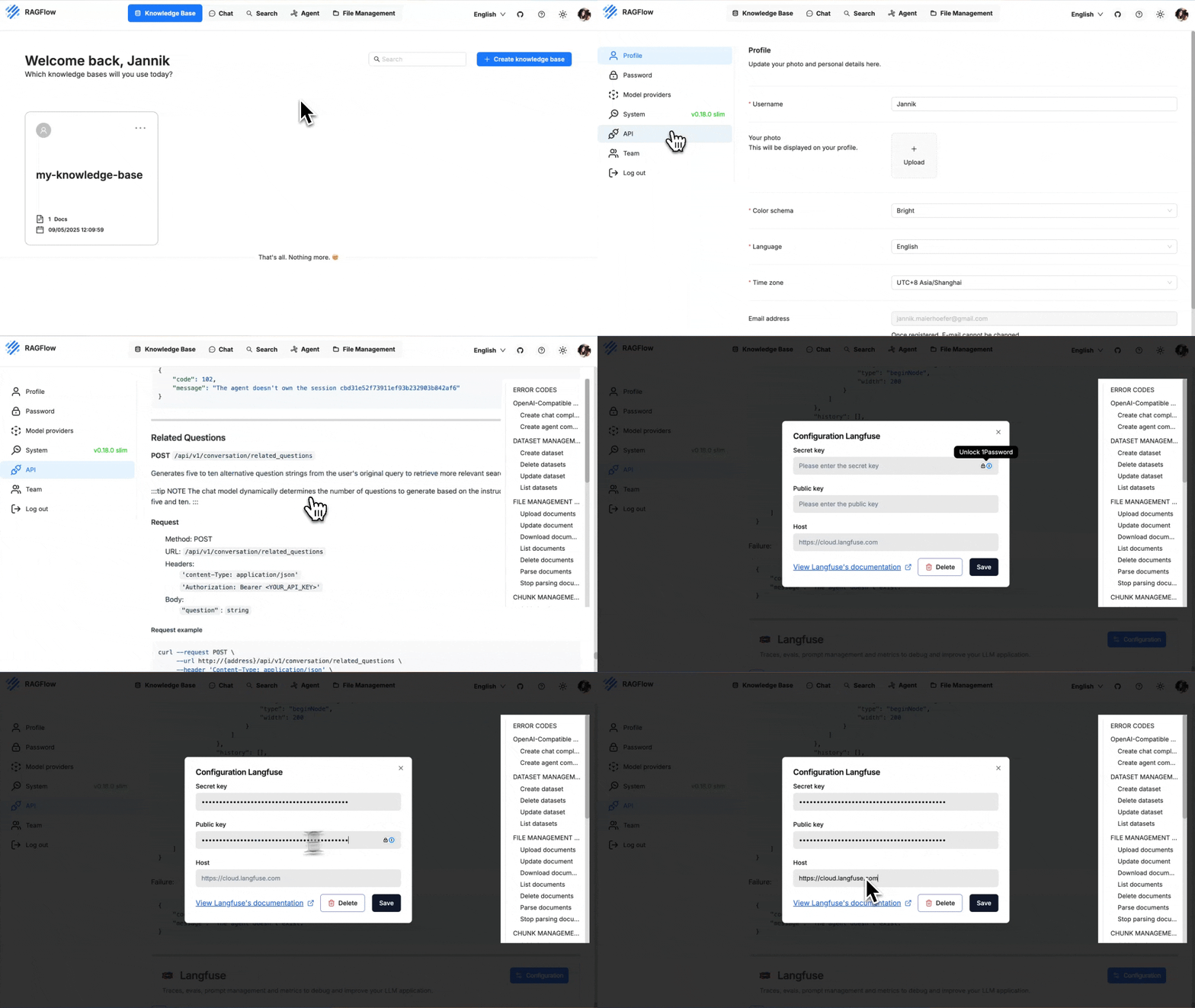
Once saved, RAGFlow starts emitting traces automatically – no code change required.
* * *
3\. Run a pipeline and watch the traces[](https://ragflow.io/docs/dev/tracing#3-run-a-pipeline-and-watch-the-traces "Direct link to 3. Run a pipeline and watch the traces")
------------------------------------------------------------------------------------------------------------------------------------------------------------------------------
1. Execute any chat or retrieval pipeline in RAGFlow (e.g. the Quickstart demo).
2. Open your Langfuse project ▸ **Traces**.
3. Filter by **name ~ `ragflow-*`** (RAGFlow prefixes each trace with `ragflow-`).
For every user request you will see:
• a **trace** representing the overall request
• **spans** for retrieval, ranking and generation steps
• the complete **prompts**, **retrieved documents** and **LLM responses** as metadata
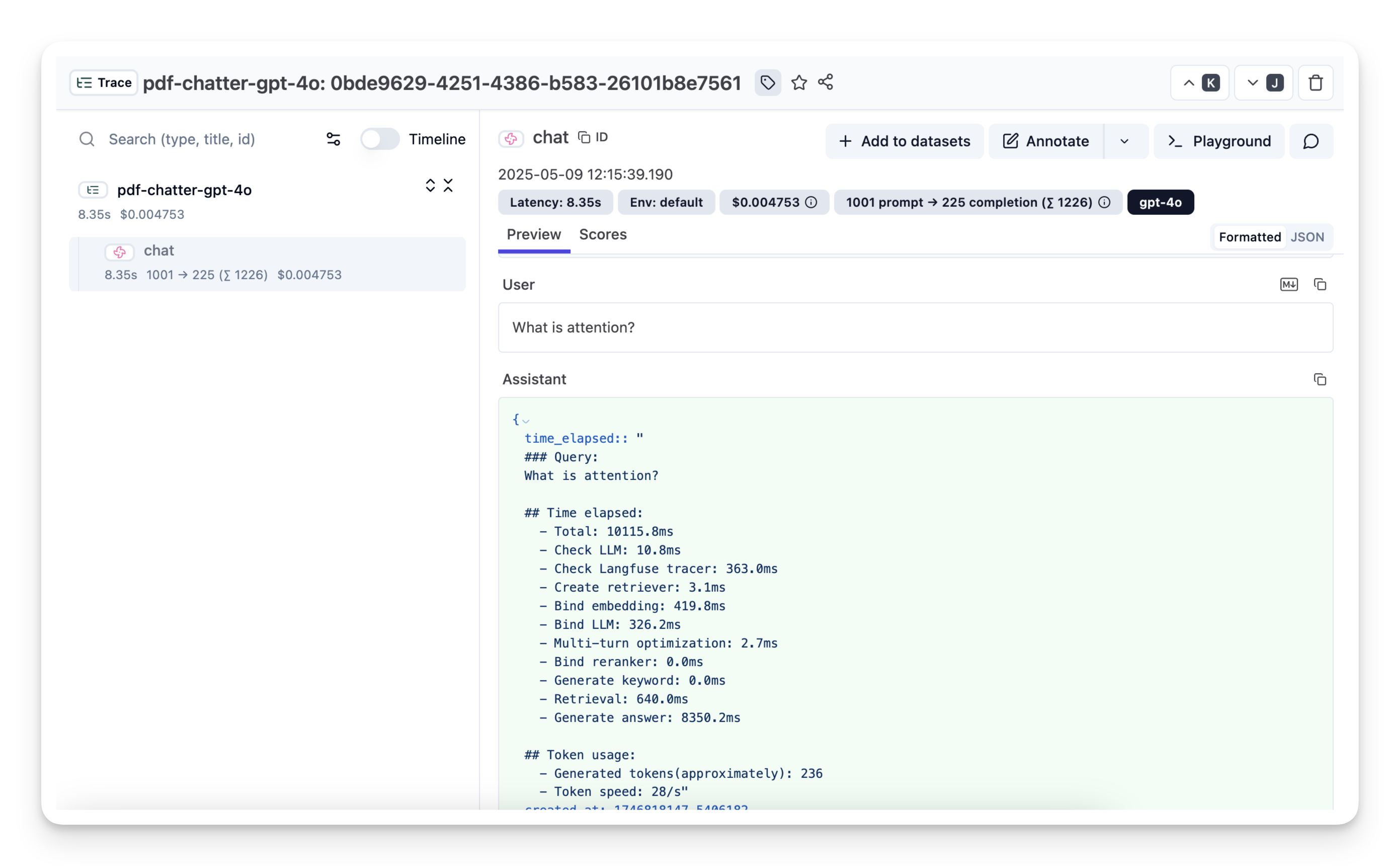
([Example trace in Langfuse](https://cloud.langfuse.com/project/cloramnkj0002jz088vzn1ja4/traces/0bde9629-4251-4386-b583-26101b8e7561?timestamp=2025-05-09T19%3A15%3A37.797Z&display=details&observation=823997d8-ac40-40f3-8e7b-8aa6753b499e)
)
NOTE
Use Langfuse's diff view to compare prompt versions or drill down into long-running retrievals to identify bottlenecks.
* [1\. Collect your Langfuse credentials](https://ragflow.io/docs/dev/tracing#1-collect-your-langfuse-credentials)
* [2\. Add the keys to RAGFlow](https://ragflow.io/docs/dev/tracing#2-add-the-keys-to-ragflow)
* [3\. Run a pipeline and watch the traces](https://ragflow.io/docs/dev/tracing#3-run-a-pipeline-and-watch-the-traces)
---
# Upgrading | RAGFlow
[Skip to main content](https://ragflow.io/docs/dev/upgrade_ragflow#__docusaurus_skipToContent_fallback)
Version: DEV
On this page
Upgrading
=========
Upgrade RAGFlow to `nightly-slim`/`nightly` or the latest, published release.
NOTE
Upgrading RAGFlow in itself will _not_ remove your uploaded/historical data. However, be aware that `docker compose -f docker/docker-compose.yml down -v` will remove Docker container volumes, resulting in data loss.
Upgrade RAGFlow to `nightly-slim`/`nightly`, the most recent, tested Docker image[](https://ragflow.io/docs/dev/upgrade_ragflow#upgrade-ragflow-to-nightly-slimnightly-the-most-recent-tested-docker-image "Direct link to upgrade-ragflow-to-nightly-slimnightly-the-most-recent-tested-docker-image")
---------------------------------------------------------------------------------------------------------------------------------------------------------------------------------------------------------------------------------------------------------------------------------------------------------
`nightly-slim` refers to the RAGFlow Docker image _without_ embedding models, while `nightly` refers to the RAGFlow Docker image with embedding models. For details on their differences, see [ragflow/docker/.env](https://github.com/infiniflow/ragflow/blob/main/docker/.env)
.
To upgrade RAGFlow, you must upgrade **both** your code **and** your Docker image:
1. Clone the repo
git clone https://github.com/infiniflow/ragflow.git
2. Update **ragflow/docker/.env**:
* nightly-slim
* nightly
RAGFLOW_IMAGE=infiniflow/ragflow:nightly-slim
RAGFLOW_IMAGE=infiniflow/ragflow:nightly
3. Update RAGFlow image and restart RAGFlow:
docker compose -f docker/docker-compose.yml pulldocker compose -f docker/docker-compose.yml up -d
Upgrade RAGFlow to the most recent, officially published release[](https://ragflow.io/docs/dev/upgrade_ragflow#upgrade-ragflow-to-the-most-recent-officially-published-release "Direct link to Upgrade RAGFlow to the most recent, officially published release")
-------------------------------------------------------------------------------------------------------------------------------------------------------------------------------------------------------------------------------------------------------------------
To upgrade RAGFlow, you must upgrade **both** your code **and** your Docker image:
1. Clone the repo
git clone https://github.com/infiniflow/ragflow.git
2. Switch to the latest, officially published release, e.g., `v0.19.1`:
git checkout -f v0.19.1
3. Update **ragflow/docker/.env**:
* slim
* full
RAGFLOW_IMAGE=infiniflow/ragflow:v0.19.1-slim
RAGFLOW_IMAGE=infiniflow/ragflow:v0.19.1
4. Update the RAGFlow image and restart RAGFlow:
docker compose -f docker/docker-compose.yml pulldocker compose -f docker/docker-compose.yml up -d
Frequently asked questions[](https://ragflow.io/docs/dev/upgrade_ragflow#frequently-asked-questions "Direct link to Frequently asked questions")
--------------------------------------------------------------------------------------------------------------------------------------------------
### Do I need to back up my knowledge bases before upgrading RAGFlow?[](https://ragflow.io/docs/dev/upgrade_ragflow#do-i-need-to-back-up-my-knowledge-bases-before-upgrading-ragflow "Direct link to Do I need to back up my knowledge bases before upgrading RAGFlow?")
No, you do not need to. Upgrading RAGFlow in itself will _not_ remove your uploaded data or knowledge base settings. However, be aware that `docker compose -f docker/docker-compose.yml down -v` will remove Docker container volumes, resulting in data loss.
### Upgrade RAGFlow in an offline environment (without Internet access)[](https://ragflow.io/docs/dev/upgrade_ragflow#upgrade-ragflow-in-an-offline-environment-without-internet-access "Direct link to Upgrade RAGFlow in an offline environment (without Internet access)")
1. From an environment with Internet access, pull the required Docker image.
2. Save the Docker image to a **.tar** file.
docker save -o ragflow.v0.19.1.tar infiniflow/ragflow:v0.19.1
3. Copy the **.tar** file to the target server.
4. Load the **.tar** file into Docker:
docker load -i ragflow.v0.19.1.tar
* [Upgrade RAGFlow to `nightly-slim`/`nightly`, the most recent, tested Docker image](https://ragflow.io/docs/dev/upgrade_ragflow#upgrade-ragflow-to-nightly-slimnightly-the-most-recent-tested-docker-image)
* [Upgrade RAGFlow to the most recent, officially published release](https://ragflow.io/docs/dev/upgrade_ragflow#upgrade-ragflow-to-the-most-recent-officially-published-release)
* [Frequently asked questions](https://ragflow.io/docs/dev/upgrade_ragflow#frequently-asked-questions)
* [Do I need to back up my knowledge bases before upgrading RAGFlow?](https://ragflow.io/docs/dev/upgrade_ragflow#do-i-need-to-back-up-my-knowledge-bases-before-upgrading-ragflow)
* [Upgrade RAGFlow in an offline environment (without Internet access)](https://ragflow.io/docs/dev/upgrade_ragflow#upgrade-ragflow-in-an-offline-environment-without-internet-access)
---
# Switch document engine | RAGFlow
[Skip to main content](https://ragflow.io/docs/v0.19.1/switch_doc_engine#__docusaurus_skipToContent_fallback)
This is documentation for RAGFlow **v0.19.1**, which is no longer actively maintained.
For up-to-date documentation, see the **[latest version](https://ragflow.io/docs/dev/switch_doc_engine)
** (DEV).
Version: v0.19.1
Switch document engine
======================
Switch your doc engine from Elasticsearch to Infinity.
* * *
RAGFlow uses Elasticsearch by default for storing full text and vectors. To switch to [Infinity](https://github.com/infiniflow/infinity/)
, follow these steps:
WARNING
Switching to Infinity on a Linux/arm64 machine is not yet officially supported.
1. Stop all running containers:
$ docker compose -f docker/docker-compose.yml down -v
WARNING
`-v` will delete the docker container volumes, and the existing data will be cleared.
2. Set `DOC_ENGINE` in **docker/.env** to `infinity`.
3. Start the containers:
$ docker compose -f docker-compose.yml up -d
---
# RAGFlow MCP tools | RAGFlow
[Skip to main content](https://ragflow.io/docs/v0.19.1/mcp_tools#__docusaurus_skipToContent_fallback)
This is documentation for RAGFlow **v0.19.1**, which is no longer actively maintained.
For up-to-date documentation, see the **[latest version](https://ragflow.io/docs/dev/mcp_tools)
** (DEV).
Version: v0.19.1
RAGFlow MCP tools
=================
The MCP server currently offers a specialized tool to assist users in searching for relevant information powered by RAGFlow DeepDoc technology:
* **retrieve**: Fetches relevant chunks from specified `dataset_ids` and optional `document_ids` using the RAGFlow retrieve interface, based on a given question. Details of all available datasets, namely, `id` and `description`, are provided within the tool description for each individual dataset.
For more information, see our Python implementation of the [MCP server](https://github.com/infiniflow/ragflow/blob/main/mcp/server/server.py)
.
---
# Search | RAGFlow
[Skip to main content](https://ragflow.io/docs/v0.19.1/ai_search#__docusaurus_skipToContent_fallback)
This is documentation for RAGFlow **v0.19.1**, which is no longer actively maintained.
For up-to-date documentation, see the **[latest version](https://ragflow.io/docs/dev/ai_search)
** (DEV).
Version: v0.19.1
On this page
Search
======
Conduct an AI search.
* * *
An AI search is a single-turn AI conversation using a predefined retrieval strategy (a hybrid search of weighted keyword similarity and weighted vector similarity) and the system's default chat model. It does not involve advanced RAG strategies like knowledge graph, auto-keyword, or auto-question. The related chunks are listed below the chat model's response in descending order based on their similarity scores.

NOTE
When debugging your chat assistant, you can use AI search as a reference to verify your model settings and retrieval strategy.
Prerequisites[](https://ragflow.io/docs/v0.19.1/ai_search#prerequisites "Direct link to Prerequisites")
---------------------------------------------------------------------------------------------------------
* Ensure that you have configured the system's default models on the **Model providers** page.
* Ensure that the intended knowledge bases are properly configured and the intended documents have finished file parsing.
Frequently asked questions[](https://ragflow.io/docs/v0.19.1/ai_search#frequently-asked-questions "Direct link to Frequently asked questions")
------------------------------------------------------------------------------------------------------------------------------------------------
### Key difference between an AI search and an AI chat?[](https://ragflow.io/docs/v0.19.1/ai_search#key-difference-between-an-ai-search-and-an-ai-chat "Direct link to Key difference between an AI search and an AI chat?")
A chat is a multi-turn AI conversation where you can define your retrieval strategy (a weighted reranking score can be used to replace the weighted vector similarity in a hybrid search) and choose your chat model. In an AI chat, you can configure advanced RAG strategies, such as knowledge graphs, auto-keyword, and auto-question, for your specific case. Retrieved chunks are not displayed along with the answer.
* [Prerequisites](https://ragflow.io/docs/v0.19.1/ai_search#prerequisites)
* [Frequently asked questions](https://ragflow.io/docs/v0.19.1/ai_search#frequently-asked-questions)
* [Key difference between an AI search and an AI chat?](https://ragflow.io/docs/v0.19.1/ai_search#key-difference-between-an-ai-search-and-an-ai-chat)
---
# Guides | RAGFlow
[Skip to main content](https://ragflow.io/docs/v0.19.1/category/guides#__docusaurus_skipToContent_fallback)
This is documentation for RAGFlow **v0.19.1**, which is no longer actively maintained.
For up-to-date documentation, see the **[latest version](https://ragflow.io/docs/dev/category/guides)
** (DEV).
Version: v0.19.1
[🗃️ Models\
----------\
\
2 items](https://ragflow.io/docs/v0.19.1/category/models)
[🗃️ Datasets\
------------\
\
11 items](https://ragflow.io/docs/v0.19.1/category/datasets)
[🗃️ Chat\
--------\
\
4 items](https://ragflow.io/docs/v0.19.1/category/chat)
[📄️ Search\
----------\
\
Conduct an AI search.](https://ragflow.io/docs/v0.19.1/ai_search)
[🗃️ Agents\
----------\
\
6 items](https://ragflow.io/docs/v0.19.1/category/agents)
[🗃️ Team\
--------\
\
6 items](https://ragflow.io/docs/v0.19.1/category/team)
[📄️ Files\
---------\
\
Knowledge base, hallucination-free chat, and file management are the three pillars of RAGFlow. RAGFlow's file management allows you to upload files individually or in bulk. You can then link an uploaded file to multiple target knowledge bases. This guide showcases some basic usages of the file management feature.](https://ragflow.io/docs/v0.19.1/manage_files)
[📄️ Monitoring\
--------------\
\
Double-check the health status of RAGFlow's dependencies.](https://ragflow.io/docs/v0.19.1/run_health_check)
[📄️ Tracing\
-----------\
\
Observability & Tracing with Langfuse.](https://ragflow.io/docs/v0.19.1/tracing)
[📄️ Upgrading\
-------------\
\
Upgrade RAGFlow to nightly-slim/nightly or the latest, published release.](https://ragflow.io/docs/v0.19.1/upgrade_ragflow)
---
# RAGFlow MCP client examples | RAGFlow
[Skip to main content](https://ragflow.io/docs/v0.19.1/mcp_client#__docusaurus_skipToContent_fallback)
This is documentation for RAGFlow **v0.19.1**, which is no longer actively maintained.
For up-to-date documentation, see the **[latest version](https://ragflow.io/docs/dev/mcp_client)
** (DEV).
Version: v0.19.1
On this page
RAGFlow MCP client examples
===========================
Python and curl MCP client examples.
* * *
Example MCP Python client[](https://ragflow.io/docs/v0.19.1/mcp_client#example-mcp-python-client "Direct link to Example MCP Python client")
----------------------------------------------------------------------------------------------------------------------------------------------
We provide a _prototype_ MCP client example for testing [here](https://github.com/infiniflow/ragflow/blob/main/mcp/client/client.py)
.
IMPORTANT
If your MCP server is running in host mode, include your acquired API key in your client's `headers` when connecting asynchronously to it:
async with sse_client("http://localhost:9382/sse", headers={"api_key": "YOUR_KEY_HERE"}) as streams: # Rest of your code...
Alternatively, to comply with [OAuth 2.1 Section 5](https://datatracker.ietf.org/doc/html/draft-ietf-oauth-v2-1-12#section-5)
, you can run the following code _instead_ to connect to your MCP server:
async with sse_client("http://localhost:9382/sse", headers={"Authorization": "YOUR_KEY_HERE"}) as streams: # Rest of your code...
Use curl to interact with the RAGFlow MCP server[](https://ragflow.io/docs/v0.19.1/mcp_client#use-curl-to-interact-with-the-ragflow-mcp-server "Direct link to Use curl to interact with the RAGFlow MCP server")
-------------------------------------------------------------------------------------------------------------------------------------------------------------------------------------------------------------------
When interacting with the MCP server via HTTP requests, follow this initialization sequence:
1. **The client sends an `initialize` request** with protocol version and capabilities.
2. **The server replies with an `initialize` response**, including the supported protocol and capabilities.
3. **The client confirms readiness with an `initialized` notification**. _The connection is established between the client and the server, and further operations (such as tool listing) may proceed._
NOTE
For more information about this initialization process, see [here](https://modelcontextprotocol.io/docs/concepts/architecture#1-initialization)
.
In the following sections, we will walk you through a complete tool calling process.
### 1\. Obtain a session ID[](https://ragflow.io/docs/v0.19.1/mcp_client#1-obtain-a-session-id "Direct link to 1. Obtain a session ID")
Each curl request with the MCP server must include a session ID:
$ curl -N -H "api_key: YOUR_API_KEY" http://127.0.0.1:9382/sse
NOTE
See [here](https://ragflow.io/docs/v0.19.1/acquire_ragflow_api_key)
for information about acquiring an API key.
#### Transport[](https://ragflow.io/docs/v0.19.1/mcp_client#transport "Direct link to Transport")
The transport will stream messages such as tool results, server responses, and keep-alive pings.
_The server returns the session ID:_
event: endpointdata: /messages/?session_id=5c6600ef61b845a788ddf30dceb25c54
### 2\. Send an `Initialize` request[](https://ragflow.io/docs/v0.19.1/mcp_client#2-send-an-initialize-request "Direct link to 2-send-an-initialize-request")
The client sends an `initialize` request with protocol version and capabilities:
session_id="5c6600ef61b845a788ddf30dceb25c54" && \curl -X POST "http://127.0.0.1:9382/messages/?session_id=$session_id" \ -H "api_key: YOUR_API_KEY" \ -H "Content-Type: application/json" \ -d '{ "jsonrpc": "2.0", "id": 1, "method": "initialize", "params": { "protocolVersion": "1.0", "capabilities": {}, "clientInfo": { "name": "ragflow-mcp-client", "version": "0.1" } } }' && \
#### Transport[](https://ragflow.io/docs/v0.19.1/mcp_client#transport-1 "Direct link to Transport")
_The server replies with an `initialize` response, including the supported protocol and capabilities:_
event: messagedata: {"jsonrpc":"2.0","id":1,"result":{"protocolVersion":"2025-03-26","capabilities":{"experimental":{"headers":{"host":"127.0.0.1:9382","user-agent":"curl/8.7.1","accept":"*/*","api_key":"ragflow-xxxxxxxxxxxx","accept-encoding":"gzip"}},"tools":{"listChanged":false}},"serverInfo":{"name":"ragflow-server","version":"1.9.4"}}}
### 3\. Acknowledge readiness[](https://ragflow.io/docs/v0.19.1/mcp_client#3-acknowledge-readiness "Direct link to 3. Acknowledge readiness")
The client confirms readiness with an `initialized` notification:
curl -X POST "http://127.0.0.1:9382/messages/?session_id=$session_id" \ -H "api_key: YOUR_API_KEY" \ -H "Content-Type: application/json" \ -d '{ "jsonrpc": "2.0", "method": "notifications/initialized", "params": {} }' && \
_The connection is established between the client and the server, and further operations (such as tool listing) may proceed._
### 4\. Tool listing[](https://ragflow.io/docs/v0.19.1/mcp_client#4-tool-listing "Direct link to 4. Tool listing")
curl -X POST "http://127.0.0.1:9382/messages/?session_id=$session_id" \ -H "api_key: YOUR_API_KEY" \ -H "Content-Type: application/json" \ -d '{ "jsonrpc": "2.0", "id": 3, "method": "tools/list", "params": {} }' && \
#### Transport[](https://ragflow.io/docs/v0.19.1/mcp_client#transport-2 "Direct link to Transport")
event: messagedata: {"jsonrpc":"2.0","id":3,"result":{"tools":[{"name":"ragflow_retrieval","description":"Retrieve relevant chunks from the RAGFlow retrieve interface based on the question, using the specified dataset_ids and optionally document_ids. Below is the list of all available datasets, including their descriptions and IDs. If you're unsure which datasets are relevant to the question, simply pass all dataset IDs to the function.","inputSchema":{"type":"object","properties":{"dataset_ids":{"type":"array","items":{"type":"string"}},"document_ids":{"type":"array","items":{"type":"string"}},"question":{"type":"string"}},"required":["dataset_ids","question"]}}]}}
### 5\. Tool calling[](https://ragflow.io/docs/v0.19.1/mcp_client#5-tool-calling "Direct link to 5. Tool calling")
curl -X POST "http://127.0.0.1:9382/messages/?session_id=$session_id" \ -H "api_key: YOUR_API_KEY" \ -H "Content-Type: application/json" \ -d '{ "jsonrpc": "2.0", "id": 4, "method": "tools/call", "params": { "name": "ragflow_retrieval", "arguments": { "question": "How to install neovim?", "dataset_ids": ["DATASET_ID_HERE"], "document_ids": [] }
#### Transport[](https://ragflow.io/docs/v0.19.1/mcp_client#transport-3 "Direct link to Transport")
event: messagedata: {"jsonrpc":"2.0","id":4,"result":{...}}
### A complete curl example[](https://ragflow.io/docs/v0.19.1/mcp_client#a-complete-curl-example "Direct link to A complete curl example")
session_id="YOUR_SESSION_ID" && \# Step 1: Initialize requestcurl -X POST "http://127.0.0.1:9382/messages/?session_id=$session_id" \ -H "api_key: YOUR_API_KEY" \ -H "Content-Type: application/json" \ -d '{ "jsonrpc": "2.0", "id": 1, "method": "initialize", "params": { "protocolVersion": "1.0", "capabilities": {}, "clientInfo": { "name": "ragflow-mcp-client", "version": "0.1" } } }' && \sleep 2 && \# Step 2: Initialized notificationcurl -X POST "http://127.0.0.1:9382/messages/?session_id=$session_id" \ -H "api_key: YOUR_API_KEY" \ -H "Content-Type: application/json" \ -d '{ "jsonrpc": "2.0", "method": "notifications/initialized", "params": {} }' && \sleep 2 && \# Step 3: Tool listingcurl -X POST "http://127.0.0.1:9382/messages/?session_id=$session_id" \ -H "api_key: YOUR_API_KEY" \ -H "Content-Type: application/json" \ -d '{ "jsonrpc": "2.0", "id": 3, "method": "tools/list", "params": {} }' && \sleep 2 && \# Step 4: Tool callcurl -X POST "http://127.0.0.1:9382/messages/?session_id=$session_id" \ -H "api_key: YOUR_API_KEY" \ -H "Content-Type: application/json" \ -d '{ "jsonrpc": "2.0", "id": 4, "method": "tools/call", "params": { "name": "ragflow_retrieval", "arguments": { "question": "How to install neovim?", "dataset_ids": ["DATASET_ID_HERE"], "document_ids": [] } } }'
* [Example MCP Python client](https://ragflow.io/docs/v0.19.1/mcp_client#example-mcp-python-client)
* [Use curl to interact with the RAGFlow MCP server](https://ragflow.io/docs/v0.19.1/mcp_client#use-curl-to-interact-with-the-ragflow-mcp-server)
* [1\. Obtain a session ID](https://ragflow.io/docs/v0.19.1/mcp_client#1-obtain-a-session-id)
* [2\. Send an `Initialize` request](https://ragflow.io/docs/v0.19.1/mcp_client#2-send-an-initialize-request)
* [3\. Acknowledge readiness](https://ragflow.io/docs/v0.19.1/mcp_client#3-acknowledge-readiness)
* [4\. Tool listing](https://ragflow.io/docs/v0.19.1/mcp_client#4-tool-listing)
* [5\. Tool calling](https://ragflow.io/docs/v0.19.1/mcp_client#5-tool-calling)
* [A complete curl example](https://ragflow.io/docs/v0.19.1/mcp_client#a-complete-curl-example)
---
# FAQs | RAGFlow
[Skip to main content](https://ragflow.io/docs/v0.19.1/faq#__docusaurus_skipToContent_fallback)
This is documentation for RAGFlow **v0.19.1**, which is no longer actively maintained.
For up-to-date documentation, see the **[latest version](https://ragflow.io/docs/dev/faq)
** (DEV).
Version: v0.19.1
On this page
FAQs
====
Answers to questions about general features, troubleshooting, usage, and more.
* * *
* [General features](https://ragflow.io/docs/v0.19.1/faq#general-features)
* [What sets RAGFlow apart from other RAG products?](https://ragflow.io/docs/v0.19.1/faq#what-sets-ragflow-apart-from-other-rag-products)
* [Differences between RAGFlow full edition and RAGFlow slim edition?](https://ragflow.io/docs/v0.19.1/faq#differences-between-ragflow-full-edition-and-ragflow-slim-edition)
* [Which embedding models can be deployed locally?](https://ragflow.io/docs/v0.19.1/faq#which-embedding-models-can-be-deployed-locally)
* [Where to find the version of RAGFlow? How to interpret it?](https://ragflow.io/docs/v0.19.1/faq#where-to-find-the-version-of-ragflow-how-to-interpret-it)
* [Why not use other open-source vector databases as the document engine?](https://ragflow.io/docs/v0.19.1/faq#why-not-use-other-open-source-vector-databases-as-the-document-engine)
* [Differences between demo.ragflow.io and a locally deployed open-source RAGFlow service?](https://ragflow.io/docs/v0.19.1/faq#differences-between-demoragflowio-and-a-locally-deployed-open-source-ragflow-service)
* [Why does it take longer for RAGFlow to parse a document than LangChain?](https://ragflow.io/docs/v0.19.1/faq#why-does-it-take-longer-for-ragflow-to-parse-a-document-than-langchain)
* [Why does RAGFlow require more resources than other projects?](https://ragflow.io/docs/v0.19.1/faq#why-does-ragflow-require-more-resources-than-other-projects)
* [Which architectures or devices does RAGFlow support?](https://ragflow.io/docs/v0.19.1/faq#which-architectures-or-devices-does-ragflow-support)
* [Do you offer an API for integration with third-party applications?](https://ragflow.io/docs/v0.19.1/faq#do-you-offer-an-api-for-integration-with-third-party-applications)
* [Do you support stream output?](https://ragflow.io/docs/v0.19.1/faq#do-you-support-stream-output)
* [Do you support sharing dialogue through URL?](https://ragflow.io/docs/v0.19.1/faq#do-you-support-sharing-dialogue-through-url)
* [Do you support multiple rounds of dialogues, referencing previous dialogues as context for the current query?](https://ragflow.io/docs/v0.19.1/faq#do-you-support-multiple-rounds-of-dialogues-referencing-previous-dialogues-as-context-for-the-current-query)
* [Key differences between AI search and chat?](https://ragflow.io/docs/v0.19.1/faq#key-differences-between-ai-search-and-chat)
* [Troubleshooting](https://ragflow.io/docs/v0.19.1/faq#troubleshooting)
* [How to build the RAGFlow image from scratch?](https://ragflow.io/docs/v0.19.1/faq#how-to-build-the-ragflow-image-from-scratch)
* [Cannot access https://huggingface.co](https://ragflow.io/docs/v0.19.1/faq#cannot-access-httpshuggingfaceco)
* [`MaxRetryError: HTTPSConnectionPool(host='hf-mirror.com', port=443)`](https://ragflow.io/docs/v0.19.1/faq#maxretryerror-httpsconnectionpoolhosthf-mirrorcom-port443)
* [`WARNING: can't find /raglof/rag/res/borker.tm`](https://ragflow.io/docs/v0.19.1/faq#warning-cant-find-raglofragresborkertm)
* [`network anomaly There is an abnormality in your network and you cannot connect to the server.`](https://ragflow.io/docs/v0.19.1/faq#network-anomaly-there-is-an-abnormality-in-your-network-and-you-cannot-connect-to-the-server)
* [`Realtime synonym is disabled, since no redis connection`](https://ragflow.io/docs/v0.19.1/faq#realtime-synonym-is-disabled-since-no-redis-connection)
* [Why does my document parsing stall at under one percent?](https://ragflow.io/docs/v0.19.1/faq#why-does-my-document-parsing-stall-at-under-one-percent)
* [Why does my pdf parsing stall near completion, while the log does not show any error?](https://ragflow.io/docs/v0.19.1/faq#why-does-my-pdf-parsing-stall-near-completion-while-the-log-does-not-show-any-error)
* [`Index failure`](https://ragflow.io/docs/v0.19.1/faq#index-failure)
* [How to check the log of RAGFlow?](https://ragflow.io/docs/v0.19.1/faq#how-to-check-the-log-of-ragflow)
* [How to check the status of each component in RAGFlow?](https://ragflow.io/docs/v0.19.1/faq#how-to-check-the-status-of-each-component-in-ragflow)
* [`Exception: Can't connect to ES cluster`](https://ragflow.io/docs/v0.19.1/faq#exception-cant-connect-to-es-cluster)
* [Can't start ES container and get `Elasticsearch did not exit normally`](https://ragflow.io/docs/v0.19.1/faq#cant-start-es-container-and-get-elasticsearch-did-not-exit-normally)
* [`{"data":null,"code":100,"message":""}`](https://ragflow.io/docs/v0.19.1/faq#datanullcode100messagenotfound-404-not-found)
* [`Ollama - Mistral instance running at 127.0.0.1:11434 but cannot add Ollama as model in RagFlow`](https://ragflow.io/docs/v0.19.1/faq#ollama---mistral-instance-running-at-12700111434-but-cannot-add-ollama-as-model-in-ragflow)
* [Do you offer examples of using DeepDoc to parse PDF or other files?](https://ragflow.io/docs/v0.19.1/faq#do-you-offer-examples-of-using-deepdoc-to-parse-pdf-or-other-files)
* [`FileNotFoundError: [Errno 2] No such file or directory`](https://ragflow.io/docs/v0.19.1/faq#filenotfounderror-errno-2-no-such-file-or-directory)
* [Usage](https://ragflow.io/docs/v0.19.1/faq#usage)
* [How to run RAGFlow with a locally deployed LLM?](https://ragflow.io/docs/v0.19.1/faq#how-to-run-ragflow-with-a-locally-deployed-llm)
* [How to add an LLM that is not supported?](https://ragflow.io/docs/v0.19.1/faq#how-to-add-an-llm-that-is-not-supported)
* [How to integrate RAGFlow with Ollama?](https://ragflow.io/docs/v0.19.1/faq#how-to-integrate-ragflow-with-ollama)
* [How to change the file size limit?](https://ragflow.io/docs/v0.19.1/faq#how-to-change-the-file-size-limit)
* [`Error: Range of input length should be [1, 30000]`](https://ragflow.io/docs/v0.19.1/faq#error-range-of-input-length-should-be-1-30000)
* [How to get an API key for integration with third-party applications?](https://ragflow.io/docs/v0.19.1/faq#how-to-get-an-api-key-for-integration-with-third-party-applications)
* [How to upgrade RAGFlow?](https://ragflow.io/docs/v0.19.1/faq#how-to-upgrade-ragflow)
* [How to switch the document engine to Infinity?](https://ragflow.io/docs/v0.19.1/faq#how-to-switch-the-document-engine-to-infinity)
* [Where are my uploaded files stored in RAGFlow's image?](https://ragflow.io/docs/v0.19.1/faq#where-are-my-uploaded-files-stored-in-ragflows-image)
* [How to tune batch size for document parsing and embedding?](https://ragflow.io/docs/v0.19.1/faq#how-to-tune-batch-size-for-document-parsing-and-embedding)
General features[](https://ragflow.io/docs/v0.19.1/faq#general-features "Direct link to General features")
------------------------------------------------------------------------------------------------------------
* * *
### What sets RAGFlow apart from other RAG products?[](https://ragflow.io/docs/v0.19.1/faq#what-sets-ragflow-apart-from-other-rag-products "Direct link to What sets RAGFlow apart from other RAG products?")
The "garbage in garbage out" status quo remains unchanged despite the fact that LLMs have advanced Natural Language Processing (NLP) significantly. In its response, RAGFlow introduces two unique features compared to other Retrieval-Augmented Generation (RAG) products.
* Fine-grained document parsing: Document parsing involves images and tables, with the flexibility for you to intervene as needed.
* Traceable answers with reduced hallucinations: You can trust RAGFlow's responses as you can view the citations and references supporting them.
* * *
### Differences between RAGFlow full edition and RAGFlow slim edition?[](https://ragflow.io/docs/v0.19.1/faq#differences-between-ragflow-full-edition-and-ragflow-slim-edition "Direct link to Differences between RAGFlow full edition and RAGFlow slim edition?")
Each RAGFlow release is available in two editions:
* **Slim edition**: excludes built-in embedding models and is identified by a **\-slim** suffix added to the version name. Example: `infiniflow/ragflow:v0.19.1-slim`
* **Full edition**: includes built-in embedding models and has no suffix added to the version name. Example: `infiniflow/ragflow:v0.19.1`
* * *
### Which embedding models can be deployed locally?[](https://ragflow.io/docs/v0.19.1/faq#which-embedding-models-can-be-deployed-locally "Direct link to Which embedding models can be deployed locally?")
RAGFlow offers two Docker image editions, `v0.19.1-slim` and `v0.19.1`:
* `infiniflow/ragflow:v0.19.1-slim` (default): The RAGFlow Docker image without embedding models.
* `infiniflow/ragflow:v0.19.1`: The RAGFlow Docker image with embedding models including:
* Built-in embedding models:
* `BAAI/bge-large-zh-v1.5`
* `maidalun1020/bce-embedding-base_v1`
* Embedding models that will be downloaded once you select them in the RAGFlow UI:
* `BAAI/bge-base-en-v1.5`
* `BAAI/bge-large-en-v1.5`
* `BAAI/bge-small-en-v1.5`
* `BAAI/bge-small-zh-v1.5`
* `jinaai/jina-embeddings-v2-base-en`
* `jinaai/jina-embeddings-v2-small-en`
* `nomic-ai/nomic-embed-text-v1.5`
* `sentence-transformers/all-MiniLM-L6-v2`
* * *
### Where to find the version of RAGFlow? How to interpret it?[](https://ragflow.io/docs/v0.19.1/faq#where-to-find-the-version-of-ragflow-how-to-interpret-it "Direct link to Where to find the version of RAGFlow? How to interpret it?")
You can find the RAGFlow version number on the **System** page of the UI:

If you build RAGFlow from source, the version number is also in the system log:
____ ___ ______ ______ __ / __ \ / | / ____// ____// /____ _ __ / /_/ // /| | / / __ / /_ / // __ \| | /| / / / _, _// ___ |/ /_/ // __/ / // /_/ /| |/ |/ / /_/ |_|/_/ |_|\____//_/ /_/ \____/ |__/|__/ 2025-02-18 10:10:43,835 INFO 1445658 RAGFlow version: v0.15.0-50-g6daae7f2 full
Where:
* `v0.15.0`: The officially published release.
* `50`: The number of git commits since the official release.
* `g6daae7f2`: `g` is the prefix, and `6daae7f2` is the first seven characters of the current commit ID.
* `full`/`slim`: The RAGFlow edition.
* `full`: The full RAGFlow edition.
* `slim`: The RAGFlow edition without embedding models and Python packages.
* * *
### Why not use other open-source vector databases as the document engine?[](https://ragflow.io/docs/v0.19.1/faq#why-not-use-other-open-source-vector-databases-as-the-document-engine "Direct link to Why not use other open-source vector databases as the document engine?")
Currently, only Elasticsearch and [Infinity](https://github.com/infiniflow/infinity)
meet the hybrid search requirements of RAGFlow. Most open-source vector databases have limited support for full-text search, and sparse embedding is not an alternative to full-text search. Additionally, these vector databases lack critical features essential to RAGFlow, such as phrase search and advanced ranking capabilities.
These limitations led us to develop [Infinity](https://github.com/infiniflow/infinity)
, the AI-native database, from the ground up.
* * *
### Differences between demo.ragflow.io and a locally deployed open-source RAGFlow service?[](https://ragflow.io/docs/v0.19.1/faq#differences-between-demoragflowio-and-a-locally-deployed-open-source-ragflow-service "Direct link to Differences between demo.ragflow.io and a locally deployed open-source RAGFlow service?")
demo.ragflow.io demonstrates the capabilities of RAGFlow Enterprise. Its DeepDoc models are pre-trained using proprietary data and it offers much more sophisticated team permission controls. Essentially, demo.ragflow.io serves as a preview of RAGFlow's forthcoming SaaS (Software as a Service) offering.
You can deploy an open-source RAGFlow service and call it from a Python client or through RESTful APIs. However, this is not supported on demo.ragflow.io.
* * *
### Why does it take longer for RAGFlow to parse a document than LangChain?[](https://ragflow.io/docs/v0.19.1/faq#why-does-it-take-longer-for-ragflow-to-parse-a-document-than-langchain "Direct link to Why does it take longer for RAGFlow to parse a document than LangChain?")
We put painstaking effort into document pre-processing tasks like layout analysis, table structure recognition, and OCR (Optical Character Recognition) using our vision models. This contributes to the additional time required.
* * *
### Why does RAGFlow require more resources than other projects?[](https://ragflow.io/docs/v0.19.1/faq#why-does-ragflow-require-more-resources-than-other-projects "Direct link to Why does RAGFlow require more resources than other projects?")
RAGFlow has a number of built-in models for document structure parsing, which account for the additional computational resources.
* * *
### Which architectures or devices does RAGFlow support?[](https://ragflow.io/docs/v0.19.1/faq#which-architectures-or-devices-does-ragflow-support "Direct link to Which architectures or devices does RAGFlow support?")
We officially support x86 CPU and nvidia GPU. While we also test RAGFlow on ARM64 platforms, we do not maintain RAGFlow Docker images for ARM. If you are on an ARM platform, follow [this guide](https://ragflow.io/docs/v0.19.1/build_docker_image)
to build a RAGFlow Docker image.
* * *
### Do you offer an API for integration with third-party applications?[](https://ragflow.io/docs/v0.19.1/faq#do-you-offer-an-api-for-integration-with-third-party-applications "Direct link to Do you offer an API for integration with third-party applications?")
The corresponding APIs are now available. See the [RAGFlow HTTP API Reference](https://ragflow.io/docs/v0.19.1/http_api_reference)
or the [RAGFlow Python API Reference](https://ragflow.io/docs/v0.19.1/python_api_reference)
for more information.
* * *
### Do you support stream output?[](https://ragflow.io/docs/v0.19.1/faq#do-you-support-stream-output "Direct link to Do you support stream output?")
Yes, we do. Stream output is enabled by default in the chat assistant and agent. Note that you cannot disable stream output via RAGFlow's UI. To disable stream output in responses, use RAGFlow's Python or RESTful APIs:
Python:
* [Create chat completion](https://ragflow.io/docs/v0.19.1/python_api_reference#create-chat-completion)
* [Converse with chat assistant](https://ragflow.io/docs/v0.19.1/python_api_reference#converse-with-chat-assistant)
* [Converse with agent](https://ragflow.io/docs/v0.19.1/python_api_reference#converse-with-agent)
RESTful:
* [Create chat completion](https://ragflow.io/docs/v0.19.1/http_api_reference#create-chat-completion)
* [Converse with chat assistant](https://ragflow.io/docs/v0.19.1/http_api_reference#converse-with-chat-assistant)
* [Converse with agent](https://ragflow.io/docs/v0.19.1/http_api_reference#converse-with-agent)
* * *
### Do you support sharing dialogue through URL?[](https://ragflow.io/docs/v0.19.1/faq#do-you-support-sharing-dialogue-through-url "Direct link to Do you support sharing dialogue through URL?")
No, this feature is not supported.
* * *
### Do you support multiple rounds of dialogues, referencing previous dialogues as context for the current query?[](https://ragflow.io/docs/v0.19.1/faq#do-you-support-multiple-rounds-of-dialogues-referencing-previous-dialogues-as-context-for-the-current-query "Direct link to Do you support multiple rounds of dialogues, referencing previous dialogues as context for the current query?")
Yes, we support enhancing user queries based on existing context of an ongoing conversation:
1. On the **Chat** page, hover over the desired assistant and select **Edit**.
2. In the **Chat Configuration** popup, click the **Prompt engine** tab.
3. Switch on **Multi-turn optimization** to enable this feature.
* * *
### Key differences between AI search and chat?[](https://ragflow.io/docs/v0.19.1/faq#key-differences-between-ai-search-and-chat "Direct link to Key differences between AI search and chat?")
* **AI search**: This is a single-turn AI conversation using a predefined retrieval strategy (a hybrid search of weighted keyword similarity and weighted vector similarity) and the system's default chat model. It does not involve advanced RAG strategies like knowledge graph, auto-keyword, or auto-question. Retrieved chunks will be listed below the chat model's response.
* **AI chat**: This is a multi-turn AI conversation where you can define your retrieval strategy (a weighted reranking score can be used to replace the weighted vector similarity in a hybrid search) and choose your chat model. In an AI chat, you can configure advanced RAG strategies, such as knowledge graphs, auto-keyword, and auto-question, for your specific case. Retrieved chunks are not displayed along with the answer.
When debugging your chat assistant, you can use AI search as a reference to verify your model settings and retrieval strategy.
* * *
Troubleshooting[](https://ragflow.io/docs/v0.19.1/faq#troubleshooting "Direct link to Troubleshooting")
---------------------------------------------------------------------------------------------------------
* * *
### How to build the RAGFlow image from scratch?[](https://ragflow.io/docs/v0.19.1/faq#how-to-build-the-ragflow-image-from-scratch "Direct link to How to build the RAGFlow image from scratch?")
See [Build a RAGFlow Docker image](https://ragflow.io/docs/v0.19.1/build_docker_image)
.
### Cannot access [https://huggingface.co](https://huggingface.co/)
[](https://ragflow.io/docs/v0.19.1/faq#cannot-access-httpshuggingfaceco "Direct link to cannot-access-httpshuggingfaceco")
A locally deployed RAGflow downloads OCR and embedding modules from [Huggingface website](https://huggingface.co/)
by default. If your machine is unable to access this site, the following error occurs and PDF parsing fails:
FileNotFoundError: [Errno 2] No such file or directory: '/root/.cache/huggingface/hub/models--InfiniFlow--deepdoc/snapshots/be0c1e50eef6047b412d1800aa89aba4d275f997/ocr.res'
To fix this issue, use [https://hf-mirror.com](https://hf-mirror.com/)
instead:
1. Stop all containers and remove all related resources:
cd ragflow/docker/docker compose down
2. Uncomment the following line in **ragflow/docker/.env**:
# HF_ENDPOINT=https://hf-mirror.com
3. Start up the server:
docker compose up -d
* * *
### `MaxRetryError: HTTPSConnectionPool(host='hf-mirror.com', port=443)`[](https://ragflow.io/docs/v0.19.1/faq#maxretryerror-httpsconnectionpoolhosthf-mirrorcom-port443 "Direct link to maxretryerror-httpsconnectionpoolhosthf-mirrorcom-port443")
This error suggests that you do not have Internet access or are unable to connect to hf-mirror.com. Try the following:
1. Manually download the resource files from [huggingface.co/InfiniFlow/deepdoc](https://huggingface.co/InfiniFlow/deepdoc)
to your local folder **~/deepdoc**.
2. Add a volumes to **docker-compose.yml**, for example:
- ~/deepdoc:/ragflow/rag/res/deepdoc
* * *
### `WARNING: can't find /raglof/rag/res/borker.tm`[](https://ragflow.io/docs/v0.19.1/faq#warning-cant-find-raglofragresborkertm "Direct link to warning-cant-find-raglofragresborkertm")
Ignore this warning and continue. All system warnings can be ignored.
* * *
### `network anomaly There is an abnormality in your network and you cannot connect to the server.`[](https://ragflow.io/docs/v0.19.1/faq#network-anomaly-there-is-an-abnormality-in-your-network-and-you-cannot-connect-to-the-server "Direct link to network-anomaly-there-is-an-abnormality-in-your-network-and-you-cannot-connect-to-the-server")

You will not log in to RAGFlow unless the server is fully initialized. Run `docker logs -f ragflow-server`.
_The server is successfully initialized, if your system displays the following:_
____ ___ ______ ______ __ / __ \ / | / ____// ____// /____ _ __ / /_/ // /| | / / __ / /_ / // __ \| | /| / / / _, _// ___ |/ /_/ // __/ / // /_/ /| |/ |/ / /_/ |_|/_/ |_|\____//_/ /_/ \____/ |__/|__/ * Running on all addresses (0.0.0.0) * Running on http://127.0.0.1:9380 * Running on http://x.x.x.x:9380 INFO:werkzeug:Press CTRL+C to quit
* * *
### `Realtime synonym is disabled, since no redis connection`[](https://ragflow.io/docs/v0.19.1/faq#realtime-synonym-is-disabled-since-no-redis-connection "Direct link to realtime-synonym-is-disabled-since-no-redis-connection")
Ignore this warning and continue. All system warnings can be ignored.

* * *
### Why does my document parsing stall at under one percent?[](https://ragflow.io/docs/v0.19.1/faq#why-does-my-document-parsing-stall-at-under-one-percent "Direct link to Why does my document parsing stall at under one percent?")

Click the red cross beside the 'parsing status' bar, then restart the parsing process to see if the issue remains. If the issue persists and your RAGFlow is deployed locally, try the following:
1. Check the log of your RAGFlow server to see if it is running properly:
docker logs -f ragflow-server
2. Check if the **task\_executor.py** process exists.
3. Check if your RAGFlow server can access hf-mirror.com or huggingface.com.
* * *
### Why does my pdf parsing stall near completion, while the log does not show any error?[](https://ragflow.io/docs/v0.19.1/faq#why-does-my-pdf-parsing-stall-near-completion-while-the-log-does-not-show-any-error "Direct link to Why does my pdf parsing stall near completion, while the log does not show any error?")
Click the red cross beside the 'parsing status' bar, then restart the parsing process to see if the issue remains. If the issue persists and your RAGFlow is deployed locally, the parsing process is likely killed due to insufficient RAM. Try increasing your memory allocation by increasing the `MEM_LIMIT` value in **docker/.env**.
note
Ensure that you restart up your RAGFlow server for your changes to take effect!
docker compose stop
docker compose up -d

* * *
### `Index failure`[](https://ragflow.io/docs/v0.19.1/faq#index-failure "Direct link to index-failure")
An index failure usually indicates an unavailable Elasticsearch service.
* * *
### How to check the log of RAGFlow?[](https://ragflow.io/docs/v0.19.1/faq#how-to-check-the-log-of-ragflow "Direct link to How to check the log of RAGFlow?")
tail -f ragflow/docker/ragflow-logs/*.log
* * *
### How to check the status of each component in RAGFlow?[](https://ragflow.io/docs/v0.19.1/faq#how-to-check-the-status-of-each-component-in-ragflow "Direct link to How to check the status of each component in RAGFlow?")
1. Check the status of the Elasticsearch Docker container:
$ docker ps
_The following is an example result:_
5bc45806b680 infiniflow/ragflow:latest "./entrypoint.sh" 11 hours ago Up 11 hours 0.0.0.0:80->80/tcp, :::80->80/tcp, 0.0.0.0:443->443/tcp, :::443->443/tcp, 0.0.0.0:9380->9380/tcp, :::9380->9380/tcp ragflow-server91220e3285dd docker.elastic.co/elasticsearch/elasticsearch:8.11.3 "/bin/tini -- /usr/l…" 11 hours ago Up 11 hours (healthy) 9300/tcp, 0.0.0.0:9200->9200/tcp, :::9200->9200/tcp ragflow-es-01d8c86f06c56b mysql:5.7.18 "docker-entrypoint.s…" 7 days ago Up 16 seconds (healthy) 0.0.0.0:3306->3306/tcp, :::3306->3306/tcp ragflow-mysqlcd29bcb254bc quay.io/minio/minio:RELEASE.2023-12-20T01-00-02Z "/usr/bin/docker-ent…" 2 weeks ago Up 11 hours 0.0.0.0:9001->9001/tcp, :::9001->9001/tcp, 0.0.0.0:9000->9000/tcp, :::9000->9000/tcp ragflow-minio
2. Follow [this document](https://ragflow.io/docs/v0.19.1/run_health_check)
to check the health status of the Elasticsearch service.
IMPORTANT
The status of a Docker container status does not necessarily reflect the status of the service. You may find that your services are unhealthy even when the corresponding Docker containers are up running. Possible reasons for this include network failures, incorrect port numbers, or DNS issues.
* * *
### `Exception: Can't connect to ES cluster`[](https://ragflow.io/docs/v0.19.1/faq#exception-cant-connect-to-es-cluster "Direct link to exception-cant-connect-to-es-cluster")
1. Check the status of the Elasticsearch Docker container:
$ docker ps
_The status of a healthy Elasticsearch component should look as follows:_
91220e3285dd docker.elastic.co/elasticsearch/elasticsearch:8.11.3 "/bin/tini -- /usr/l…" 11 hours ago Up 11 hours (healthy) 9300/tcp, 0.0.0.0:9200->9200/tcp, :::9200->9200/tcp ragflow-es-01
2. Follow [this document](https://ragflow.io/docs/v0.19.1/run_health_check)
to check the health status of the Elasticsearch service.
IMPORTANT
The status of a Docker container status does not necessarily reflect the status of the service. You may find that your services are unhealthy even when the corresponding Docker containers are up running. Possible reasons for this include network failures, incorrect port numbers, or DNS issues.
3. If your container keeps restarting, ensure `vm.max_map_count` >= 262144 as per [this README](https://github.com/infiniflow/ragflow?tab=readme-ov-file#-start-up-the-server)
. Updating the `vm.max_map_count` value in **/etc/sysctl.conf** is required, if you wish to keep your change permanent. Note that this configuration works only for Linux.
* * *
### Can't start ES container and get `Elasticsearch did not exit normally`[](https://ragflow.io/docs/v0.19.1/faq#cant-start-es-container-and-get-elasticsearch-did-not-exit-normally "Direct link to cant-start-es-container-and-get-elasticsearch-did-not-exit-normally")
This is because you forgot to update the `vm.max_map_count` value in **/etc/sysctl.conf** and your change to this value was reset after a system reboot.
* * *
### `{"data":null,"code":100,"message":""}`[](https://ragflow.io/docs/v0.19.1/faq#datanullcode100messagenotfound-404-not-found "Direct link to datanullcode100messagenotfound-404-not-found")
Your IP address or port number may be incorrect. If you are using the default configurations, enter `http://` (**NOT 9380, AND NO PORT NUMBER REQUIRED!**) in your browser. This should work.
* * *
### `Ollama - Mistral instance running at 127.0.0.1:11434 but cannot add Ollama as model in RagFlow`[](https://ragflow.io/docs/v0.19.1/faq#ollama---mistral-instance-running-at-12700111434-but-cannot-add-ollama-as-model-in-ragflow "Direct link to ollama---mistral-instance-running-at-12700111434-but-cannot-add-ollama-as-model-in-ragflow")
A correct Ollama IP address and port is crucial to adding models to Ollama:
* If you are on demo.ragflow.io, ensure that the server hosting Ollama has a publicly accessible IP address. Note that 127.0.0.1 is not a publicly accessible IP address.
* If you deploy RAGFlow locally, ensure that Ollama and RAGFlow are in the same LAN and can communicate with each other.
See [Deploy a local LLM](https://ragflow.io/docs/v0.19.1/deploy_local_llm)
for more information.
* * *
### Do you offer examples of using DeepDoc to parse PDF or other files?[](https://ragflow.io/docs/v0.19.1/faq#do-you-offer-examples-of-using-deepdoc-to-parse-pdf-or-other-files "Direct link to Do you offer examples of using DeepDoc to parse PDF or other files?")
Yes, we do. See the Python files under the **rag/app** folder.
* * *
### `FileNotFoundError: [Errno 2] No such file or directory`[](https://ragflow.io/docs/v0.19.1/faq#filenotfounderror-errno-2-no-such-file-or-directory "Direct link to filenotfounderror-errno-2-no-such-file-or-directory")
1. Check the status of the MinIO Docker container:
$ docker ps
_The status of a healthy Elasticsearch component should look as follows:_
cd29bcb254bc quay.io/minio/minio:RELEASE.2023-12-20T01-00-02Z "/usr/bin/docker-ent…" 2 weeks ago Up 11 hours 0.0.0.0:9001->9001/tcp, :::9001->9001/tcp, 0.0.0.0:9000->9000/tcp, :::9000->9000/tcp ragflow-minio
2. Follow [this document](https://ragflow.io/docs/v0.19.1/run_health_check)
to check the health status of the Elasticsearch service.
IMPORTANT
The status of a Docker container status does not necessarily reflect the status of the service. You may find that your services are unhealthy even when the corresponding Docker containers are up running. Possible reasons for this include network failures, incorrect port numbers, or DNS issues.
* * *
Usage[](https://ragflow.io/docs/v0.19.1/faq#usage "Direct link to Usage")
---------------------------------------------------------------------------
* * *
### How to run RAGFlow with a locally deployed LLM?[](https://ragflow.io/docs/v0.19.1/faq#how-to-run-ragflow-with-a-locally-deployed-llm "Direct link to How to run RAGFlow with a locally deployed LLM?")
You can use Ollama or Xinference to deploy local LLM. See [here](https://ragflow.io/docs/v0.19.1/deploy_local_llm)
for more information.
* * *
### How to add an LLM that is not supported?[](https://ragflow.io/docs/v0.19.1/faq#how-to-add-an-llm-that-is-not-supported "Direct link to How to add an LLM that is not supported?")
If your model is not currently supported but has APIs compatible with those of OpenAI, click **OpenAI-API-Compatible** on the **Model providers** page to configure your model:

* * *
### How to integrate RAGFlow with Ollama?[](https://ragflow.io/docs/v0.19.1/faq#how-to-integrate-ragflow-with-ollama "Direct link to How to integrate RAGFlow with Ollama?")
* If RAGFlow is locally deployed, ensure that your RAGFlow and Ollama are in the same LAN.
* If you are using our online demo, ensure that the IP address of your Ollama server is public and accessible.
See [here](https://ragflow.io/docs/v0.19.1/deploy_local_llm)
for more information.
* * *
### How to change the file size limit?[](https://ragflow.io/docs/v0.19.1/faq#how-to-change-the-file-size-limit "Direct link to How to change the file size limit?")
For a locally deployed RAGFlow: the total file size limit per upload is 1GB, with a batch upload limit of 32 files. There is no cap on the total number of files per account. To update this 1GB file size limit:
* In **docker/.env**, upcomment `# MAX_CONTENT_LENGTH=1073741824`, adjust the value as needed, and note that `1073741824` represents 1GB in bytes.
* If you update the value of `MAX_CONTENT_LENGTH` in **docker/.env**, ensure that you update `client_max_body_size` in **nginx/nginx.conf** accordingly.
NOTE
It is not recommended to manually change the 32-file batch upload limit. However, if you use RAGFlow's HTTP API or Python SDK to upload files, the 32-file batch upload limit is automatically removed.
* * *
### `Error: Range of input length should be [1, 30000]`[](https://ragflow.io/docs/v0.19.1/faq#error-range-of-input-length-should-be-1-30000 "Direct link to error-range-of-input-length-should-be-1-30000")
This error occurs because there are too many chunks matching your search criteria. Try reducing the **TopN** and increasing **Similarity threshold** to fix this issue:
1. Click **Chat** in the middle top of the page.
2. Right-click the desired conversation > **Edit** > **Prompt engine**
3. Reduce the **TopN** and/or raise **Similarity threshold**.
4. Click **OK** to confirm your changes.

* * *
### How to get an API key for integration with third-party applications?[](https://ragflow.io/docs/v0.19.1/faq#how-to-get-an-api-key-for-integration-with-third-party-applications "Direct link to How to get an API key for integration with third-party applications?")
See [Acquire a RAGFlow API key](https://ragflow.io/docs/v0.19.1/acquire_ragflow_api_key)
.
* * *
### How to upgrade RAGFlow?[](https://ragflow.io/docs/v0.19.1/faq#how-to-upgrade-ragflow "Direct link to How to upgrade RAGFlow?")
See [Upgrade RAGFlow](https://ragflow.io/docs/v0.19.1/upgrade_ragflow)
for more information.
* * *
### How to switch the document engine to Infinity?[](https://ragflow.io/docs/v0.19.1/faq#how-to-switch-the-document-engine-to-infinity "Direct link to How to switch the document engine to Infinity?")
To switch your document engine from Elasticsearch to [Infinity](https://github.com/infiniflow/infinity)
:
1. Stop all running containers:
$ docker compose -f docker/docker-compose.yml down -v
WARNING
`-v` will delete all Docker container volumes, and the existing data will be cleared.
2. In **docker/.env**, set `DOC_ENGINE=${DOC_ENGINE:-infinity}`
3. Restart your Docker image:
$ docker compose -f docker-compose.yml up -d
* * *
### Where are my uploaded files stored in RAGFlow's image?[](https://ragflow.io/docs/v0.19.1/faq#where-are-my-uploaded-files-stored-in-ragflows-image "Direct link to Where are my uploaded files stored in RAGFlow's image?")
All uploaded files are stored in Minio, RAGFlow's object storage solution. For instance, if you upload your file directly to a knowledge base, it is located at `/filename`.
* * *
### How to tune batch size for document parsing and embedding?[](https://ragflow.io/docs/v0.19.1/faq#how-to-tune-batch-size-for-document-parsing-and-embedding "Direct link to How to tune batch size for document parsing and embedding?")
You can control the batch size for document parsing and embedding by setting the environment variables `DOC_BULK_SIZE` and `EMBEDDING_BATCH_SIZE`. Increasing these values may improve throughput for large-scale data processing, but will also increase memory usage. Adjust them according to your hardware resources.
* * *
* [General features](https://ragflow.io/docs/v0.19.1/faq#general-features)
* [What sets RAGFlow apart from other RAG products?](https://ragflow.io/docs/v0.19.1/faq#what-sets-ragflow-apart-from-other-rag-products)
* [Differences between RAGFlow full edition and RAGFlow slim edition?](https://ragflow.io/docs/v0.19.1/faq#differences-between-ragflow-full-edition-and-ragflow-slim-edition)
* [Which embedding models can be deployed locally?](https://ragflow.io/docs/v0.19.1/faq#which-embedding-models-can-be-deployed-locally)
* [Where to find the version of RAGFlow? How to interpret it?](https://ragflow.io/docs/v0.19.1/faq#where-to-find-the-version-of-ragflow-how-to-interpret-it)
* [Why not use other open-source vector databases as the document engine?](https://ragflow.io/docs/v0.19.1/faq#why-not-use-other-open-source-vector-databases-as-the-document-engine)
* [Differences between demo.ragflow.io and a locally deployed open-source RAGFlow service?](https://ragflow.io/docs/v0.19.1/faq#differences-between-demoragflowio-and-a-locally-deployed-open-source-ragflow-service)
* [Why does it take longer for RAGFlow to parse a document than LangChain?](https://ragflow.io/docs/v0.19.1/faq#why-does-it-take-longer-for-ragflow-to-parse-a-document-than-langchain)
* [Why does RAGFlow require more resources than other projects?](https://ragflow.io/docs/v0.19.1/faq#why-does-ragflow-require-more-resources-than-other-projects)
* [Which architectures or devices does RAGFlow support?](https://ragflow.io/docs/v0.19.1/faq#which-architectures-or-devices-does-ragflow-support)
* [Do you offer an API for integration with third-party applications?](https://ragflow.io/docs/v0.19.1/faq#do-you-offer-an-api-for-integration-with-third-party-applications)
* [Do you support stream output?](https://ragflow.io/docs/v0.19.1/faq#do-you-support-stream-output)
* [Do you support sharing dialogue through URL?](https://ragflow.io/docs/v0.19.1/faq#do-you-support-sharing-dialogue-through-url)
* [Do you support multiple rounds of dialogues, referencing previous dialogues as context for the current query?](https://ragflow.io/docs/v0.19.1/faq#do-you-support-multiple-rounds-of-dialogues-referencing-previous-dialogues-as-context-for-the-current-query)
* [Key differences between AI search and chat?](https://ragflow.io/docs/v0.19.1/faq#key-differences-between-ai-search-and-chat)
* [Troubleshooting](https://ragflow.io/docs/v0.19.1/faq#troubleshooting)
* [How to build the RAGFlow image from scratch?](https://ragflow.io/docs/v0.19.1/faq#how-to-build-the-ragflow-image-from-scratch)
* [Cannot access https://huggingface.co](https://ragflow.io/docs/v0.19.1/faq#cannot-access-httpshuggingfaceco)
* [`MaxRetryError: HTTPSConnectionPool(host='hf-mirror.com', port=443)`](https://ragflow.io/docs/v0.19.1/faq#maxretryerror-httpsconnectionpoolhosthf-mirrorcom-port443)
* [`WARNING: can't find /raglof/rag/res/borker.tm`](https://ragflow.io/docs/v0.19.1/faq#warning-cant-find-raglofragresborkertm)
* [`network anomaly There is an abnormality in your network and you cannot connect to the server.`](https://ragflow.io/docs/v0.19.1/faq#network-anomaly-there-is-an-abnormality-in-your-network-and-you-cannot-connect-to-the-server)
* [`Realtime synonym is disabled, since no redis connection`](https://ragflow.io/docs/v0.19.1/faq#realtime-synonym-is-disabled-since-no-redis-connection)
* [Why does my document parsing stall at under one percent?](https://ragflow.io/docs/v0.19.1/faq#why-does-my-document-parsing-stall-at-under-one-percent)
* [Why does my pdf parsing stall near completion, while the log does not show any error?](https://ragflow.io/docs/v0.19.1/faq#why-does-my-pdf-parsing-stall-near-completion-while-the-log-does-not-show-any-error)
* [`Index failure`](https://ragflow.io/docs/v0.19.1/faq#index-failure)
* [How to check the log of RAGFlow?](https://ragflow.io/docs/v0.19.1/faq#how-to-check-the-log-of-ragflow)
* [How to check the status of each component in RAGFlow?](https://ragflow.io/docs/v0.19.1/faq#how-to-check-the-status-of-each-component-in-ragflow)
* [`Exception: Can't connect to ES cluster`](https://ragflow.io/docs/v0.19.1/faq#exception-cant-connect-to-es-cluster)
* [Can't start ES container and get `Elasticsearch did not exit normally`](https://ragflow.io/docs/v0.19.1/faq#cant-start-es-container-and-get-elasticsearch-did-not-exit-normally)
* [`{"data":null,"code":100,"message":""}`](https://ragflow.io/docs/v0.19.1/faq#datanullcode100messagenotfound-404-not-found)
* [`Ollama - Mistral instance running at 127.0.0.1:11434 but cannot add Ollama as model in RagFlow`](https://ragflow.io/docs/v0.19.1/faq#ollama---mistral-instance-running-at-12700111434-but-cannot-add-ollama-as-model-in-ragflow)
* [Do you offer examples of using DeepDoc to parse PDF or other files?](https://ragflow.io/docs/v0.19.1/faq#do-you-offer-examples-of-using-deepdoc-to-parse-pdf-or-other-files)
* [`FileNotFoundError: [Errno 2] No such file or directory`](https://ragflow.io/docs/v0.19.1/faq#filenotfounderror-errno-2-no-such-file-or-directory)
* [Usage](https://ragflow.io/docs/v0.19.1/faq#usage)
* [How to run RAGFlow with a locally deployed LLM?](https://ragflow.io/docs/v0.19.1/faq#how-to-run-ragflow-with-a-locally-deployed-llm)
* [How to add an LLM that is not supported?](https://ragflow.io/docs/v0.19.1/faq#how-to-add-an-llm-that-is-not-supported)
* [How to integrate RAGFlow with Ollama?](https://ragflow.io/docs/v0.19.1/faq#how-to-integrate-ragflow-with-ollama)
* [How to change the file size limit?](https://ragflow.io/docs/v0.19.1/faq#how-to-change-the-file-size-limit)
* [`Error: Range of input length should be [1, 30000]`](https://ragflow.io/docs/v0.19.1/faq#error-range-of-input-length-should-be-1-30000)
* [How to get an API key for integration with third-party applications?](https://ragflow.io/docs/v0.19.1/faq#how-to-get-an-api-key-for-integration-with-third-party-applications)
* [How to upgrade RAGFlow?](https://ragflow.io/docs/v0.19.1/faq#how-to-upgrade-ragflow)
* [How to switch the document engine to Infinity?](https://ragflow.io/docs/v0.19.1/faq#how-to-switch-the-document-engine-to-infinity)
* [Where are my uploaded files stored in RAGFlow's image?](https://ragflow.io/docs/v0.19.1/faq#where-are-my-uploaded-files-stored-in-ragflows-image)
* [How to tune batch size for document parsing and embedding?](https://ragflow.io/docs/v0.19.1/faq#how-to-tune-batch-size-for-document-parsing-and-embedding)
---
# Set variables | RAGFlow
[Skip to main content](https://ragflow.io/docs/dev/set_chat_variables#__docusaurus_skipToContent_fallback)
Version: DEV
On this page
Set variables
=============
Set variables to be used together with the system prompt for your LLM.
* * *
When configuring the system prompt for a chat model, variables play an important role in enhancing flexibility and reusability. With variables, you can dynamically adjust the system prompt to be sent to your model. In the context of RAGFlow, if you have defined variables in the **Chat Configuration** dialogue, except for the system's reserved variable `{knowledge}`, you are required to pass in values for them from RAGFlow's [HTTP API](https://ragflow.io/docs/dev/http_api_reference#converse-with-chat-assistant)
or through its [Python SDK](https://ragflow.io/docs/dev/python_api_reference#converse-with-chat-assistant)
.
IMPORTANT
In RAGFlow, variables are closely linked with the system prompt. When you add a variable in the **Variable** section, include it in the system prompt. Conversely, when deleting a variable, ensure it is removed from the system prompt; otherwise, an error would occur.
Where to set variables[](https://ragflow.io/docs/dev/set_chat_variables#where-to-set-variables "Direct link to Where to set variables")
-----------------------------------------------------------------------------------------------------------------------------------------
Hover your mouse over your chat assistant, click **Edit** to open its **Chat Configuration** dialogue, then click the **Prompt engine** tab. Here, you can work on your variables in the **System prompt** field and the **Variable** section:
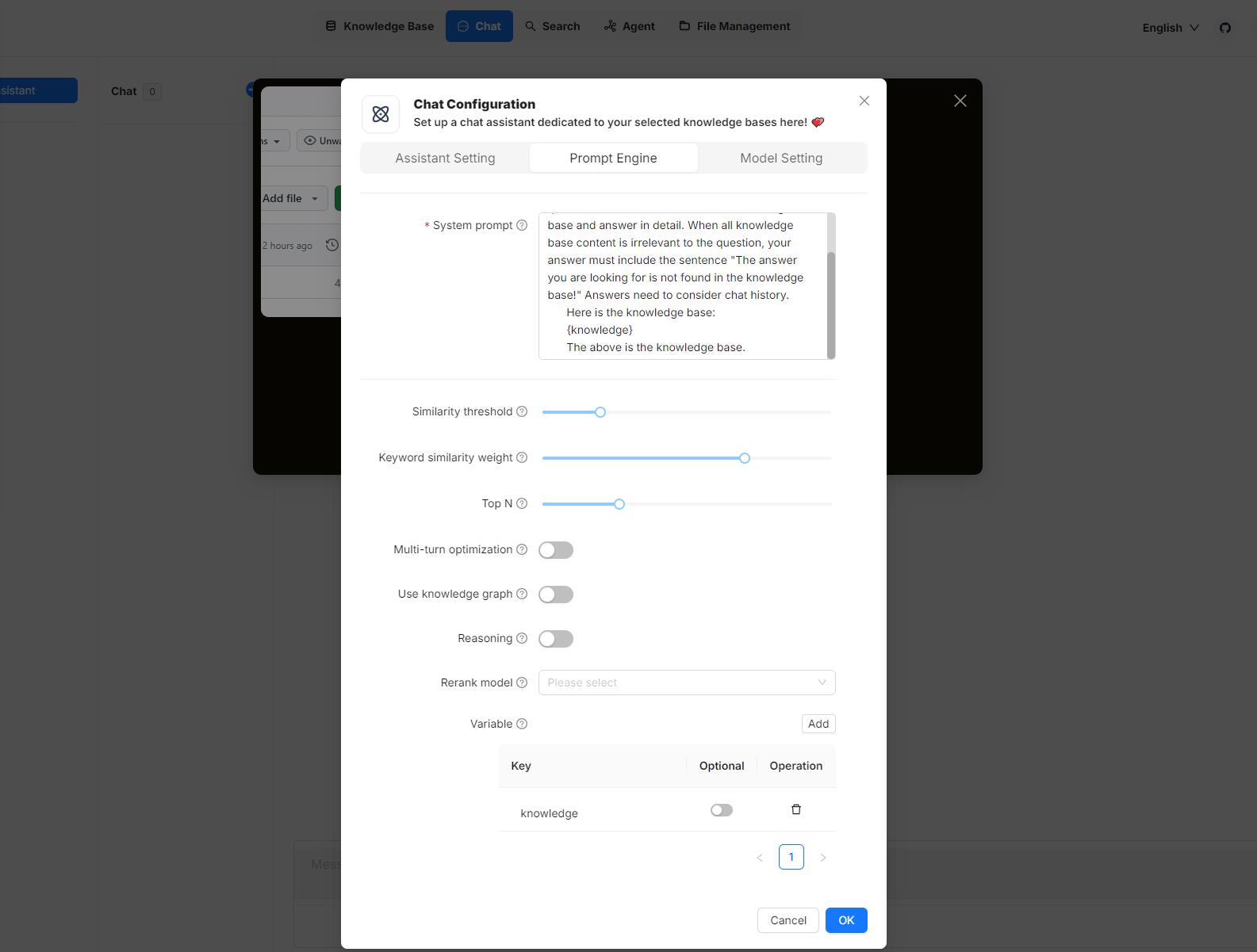
1\. Manage variables[](https://ragflow.io/docs/dev/set_chat_variables#1-manage-variables "Direct link to 1. Manage variables")
--------------------------------------------------------------------------------------------------------------------------------
In the **Variable** section, you add, remove, or update variables.
### `{knowledge}` - a reserved variable[](https://ragflow.io/docs/dev/set_chat_variables#knowledge---a-reserved-variable "Direct link to knowledge---a-reserved-variable")
`{knowledge}` is the system's reserved variable, representing the chunks retrieved from the knowledge base(s) specified by **Knowledge bases** under the **Assistant settings** tab. If your chat assistant is associated with certain knowledge bases, you can keep it as is.
NOTE
It currently makes no difference whether `{knowledge}` is set as optional or mandatory, but please note this design will be updated in due course.
From v0.17.0 onward, you can start an AI chat without specifying knowledge bases. In this case, we recommend removing the `{knowledge}` variable to prevent unnecessary reference and keeping the **Empty response** field empty to avoid errors.
### Custom variables[](https://ragflow.io/docs/dev/set_chat_variables#custom-variables "Direct link to Custom variables")
Besides `{knowledge}`, you can also define your own variables to pair with the system prompt. To use these custom variables, you must pass in their values through RAGFlow's official APIs. The **Optional** toggle determines whether these variables are required in the corresponding APIs:
* **Disabled** (Default): The variable is mandatory and must be provided.
* **Enabled**: The variable is optional and can be omitted if not needed.
2\. Update system prompt[](https://ragflow.io/docs/dev/set_chat_variables#2-update-system-prompt "Direct link to 2. Update system prompt")
--------------------------------------------------------------------------------------------------------------------------------------------
After you add or remove variables in the **Variable** section, ensure your changes are reflected in the system prompt to avoid inconsistencies or errors. Here's an example:
You are an intelligent assistant. Please answer the question by summarizing chunks from the specified knowledge base(s)...Your answers should follow a professional and {style} style....Here is the knowledge base:{knowledge}The above is the knowledge base.
NOTE
If you have removed `{knowledge}`, ensure that you thoroughly review and update the entire system prompt to achieve optimal results.
APIs[](https://ragflow.io/docs/dev/set_chat_variables#apis "Direct link to APIs")
-----------------------------------------------------------------------------------
The _only_ way to pass in values for the custom variables defined in the **Chat Configuration** dialogue is to call RAGFlow's [HTTP API](https://ragflow.io/docs/dev/http_api_reference#converse-with-chat-assistant)
or through its [Python SDK](https://ragflow.io/docs/dev/python_api_reference#converse-with-chat-assistant)
.
### HTTP API[](https://ragflow.io/docs/dev/set_chat_variables#http-api "Direct link to HTTP API")
See [Converse with chat assistant](https://ragflow.io/docs/dev/http_api_reference#converse-with-chat-assistant)
. Here's an example:
curl --request POST \ --url http://{address}/api/v1/chats/{chat_id}/completions \ --header 'Content-Type: application/json' \ --header 'Authorization: Bearer ' \ --data-binary ' { "question": "xxxxxxxxx", "stream": true, "style":"hilarious" }'
### Python API[](https://ragflow.io/docs/dev/set_chat_variables#python-api "Direct link to Python API")
See [Converse with chat assistant](https://ragflow.io/docs/dev/python_api_reference#converse-with-chat-assistant)
. Here's an example:
from ragflow_sdk import RAGFlowrag_object = RAGFlow(api_key="", base_url="http://:9380")assistant = rag_object.list_chats(name="Miss R")assistant = assistant[0]session = assistant.create_session() print("\n==================== Miss R =====================\n")print("Hello. What can I do for you?")while True: question = input("\n==================== User =====================\n> ") style = input("Please enter your preferred style (e.g., formal, informal, hilarious): ") print("\n==================== Miss R =====================\n") cont = "" for ans in session.ask(question, stream=True, style=style): print(ans.content[len(cont):], end='', flush=True) cont = ans.content
* [Where to set variables](https://ragflow.io/docs/dev/set_chat_variables#where-to-set-variables)
* [1\. Manage variables](https://ragflow.io/docs/dev/set_chat_variables#1-manage-variables)
* [`{knowledge}` - a reserved variable](https://ragflow.io/docs/dev/set_chat_variables#knowledge---a-reserved-variable)
* [Custom variables](https://ragflow.io/docs/dev/set_chat_variables#custom-variables)
* [2\. Update system prompt](https://ragflow.io/docs/dev/set_chat_variables#2-update-system-prompt)
* [APIs](https://ragflow.io/docs/dev/set_chat_variables#apis)
* [HTTP API](https://ragflow.io/docs/dev/set_chat_variables#http-api)
* [Python API](https://ragflow.io/docs/dev/set_chat_variables#python-api)
---
# Models | RAGFlow
[Skip to main content](https://ragflow.io/docs/v0.19.1/category/models#__docusaurus_skipToContent_fallback)
This is documentation for RAGFlow **v0.19.1**, which is no longer actively maintained.
For up-to-date documentation, see the **[latest version](https://ragflow.io/docs/dev/category/models)
** (DEV).
Version: v0.19.1
[📄️ Configure model API key\
---------------------------\
\
An API key is required for RAGFlow to interact with an online AI model. This guide provides information about setting your model API key in RAGFlow.](https://ragflow.io/docs/v0.19.1/llm_api_key_setup)
[📄️ Deploy local models\
-----------------------\
\
Deploy and run local models using Ollama, Xinference, or other frameworks.](https://ragflow.io/docs/v0.19.1/deploy_local_llm)
---
# Monitoring | RAGFlow
[Skip to main content](https://ragflow.io/docs/v0.19.1/run_health_check#__docusaurus_skipToContent_fallback)
This is documentation for RAGFlow **v0.19.1**, which is no longer actively maintained.
For up-to-date documentation, see the **[latest version](https://ragflow.io/docs/dev/run_health_check)
** (DEV).
Version: v0.19.1
Monitoring
==========
Double-check the health status of RAGFlow's dependencies.
* * *
The operation of RAGFlow depends on four services:
* **Elasticsearch** (default) or [Infinity](https://github.com/infiniflow/infinity)
as the document engine
* **MySQL**
* **Redis**
* **MinIO** for object storage
If an exception or error occurs related to any of the above services, such as `Exception: Can't connect to ES cluster`, refer to this document to check their health status.
You can also click you avatar in the top right corner of the page **\>** System to view the visualized health status of RAGFlow's core services. The following screenshot shows that all services are 'green' (running healthily). The task executor displays the _cumulative_ number of completed and failed document parsing tasks from the past 30 minutes:

Services with a yellow or red light are not running properly. The following is a screenshot of the system page after running `docker stop ragflow-es-10`:

You can click on a specific 30-second time interval to view the details of completed and failed tasks:


---
# Files | RAGFlow
[Skip to main content](https://ragflow.io/docs/v0.19.1/manage_files#__docusaurus_skipToContent_fallback)
This is documentation for RAGFlow **v0.19.1**, which is no longer actively maintained.
For up-to-date documentation, see the **[latest version](https://ragflow.io/docs/dev/manage_files)
** (DEV).
Version: v0.19.1
On this page
Files
=====
Knowledge base, hallucination-free chat, and file management are the three pillars of RAGFlow. RAGFlow's file management allows you to upload files individually or in bulk. You can then link an uploaded file to multiple target knowledge bases. This guide showcases some basic usages of the file management feature.
IMPORTANT
Compared to uploading files directly to various knowledge bases, uploading them to RAGFlow's file management and then linking them to different knowledge bases is _not_ an unnecessary step, particularly when you want to delete some parsed files or an entire knowledge base but retain the original files.
Create folder[](https://ragflow.io/docs/v0.19.1/manage_files#create-folder "Direct link to Create folder")
------------------------------------------------------------------------------------------------------------
RAGFlow's file management allows you to establish your file system with nested folder structures. To create a folder in the root directory of RAGFlow:

NOTE
Each knowledge base in RAGFlow has a corresponding folder under the **root/.knowledgebase** directory. You are not allowed to create a subfolder within it.
Upload file[](https://ragflow.io/docs/v0.19.1/manage_files#upload-file "Direct link to Upload file")
------------------------------------------------------------------------------------------------------
RAGFlow's file management supports file uploads from your local machine, allowing both individual and bulk uploads:


Preview file[](https://ragflow.io/docs/v0.19.1/manage_files#preview-file "Direct link to Preview file")
---------------------------------------------------------------------------------------------------------
RAGFlow's file management supports previewing files in the following formats:
* Documents (PDF, DOCS)
* Tables (XLSX)
* Pictures (JPEG, JPG, PNG, TIF, GIF)

Link file to knowledge bases[](https://ragflow.io/docs/v0.19.1/manage_files#link-file-to-knowledge-bases "Direct link to Link file to knowledge bases")
---------------------------------------------------------------------------------------------------------------------------------------------------------
RAGFlow's file management allows you to _link_ an uploaded file to multiple knowledge bases, creating a file reference in each target knowledge base. Therefore, deleting a file in your file management will AUTOMATICALLY REMOVE all related file references across the knowledge bases.

You can link your file to one knowledge base or multiple knowledge bases at one time:

Move file to a specific folder[](https://ragflow.io/docs/v0.19.1/manage_files#move-file-to-a-specific-folder "Direct link to Move file to a specific folder")
---------------------------------------------------------------------------------------------------------------------------------------------------------------

Search files or folders[](https://ragflow.io/docs/v0.19.1/manage_files#search-files-or-folders "Direct link to Search files or folders")
------------------------------------------------------------------------------------------------------------------------------------------
**File Management** only supports file name and folder name filtering in the current directory (files or folders in the child directory will not be retrieved).

Rename file or folder[](https://ragflow.io/docs/v0.19.1/manage_files#rename-file-or-folder "Direct link to Rename file or folder")
------------------------------------------------------------------------------------------------------------------------------------
RAGFlow's file management allows you to rename a file or folder:

Delete files or folders[](https://ragflow.io/docs/v0.19.1/manage_files#delete-files-or-folders "Direct link to Delete files or folders")
------------------------------------------------------------------------------------------------------------------------------------------
RAGFlow's file management allows you to delete files or folders individually or in bulk.
To delete a file or folder:

To bulk delete files or folders:

> * You are not allowed to delete the **root/.knowledgebase** folder.
> * Deleting files that have been linked to knowledge bases will **AUTOMATICALLY REMOVE** all associated file references across the knowledge bases.
Download uploaded file[](https://ragflow.io/docs/v0.19.1/manage_files#download-uploaded-file "Direct link to Download uploaded file")
---------------------------------------------------------------------------------------------------------------------------------------
RAGFlow's file management allows you to download an uploaded file:

> As of RAGFlow v0.19.1, bulk download is not supported, nor can you download an entire folder.
* [Create folder](https://ragflow.io/docs/v0.19.1/manage_files#create-folder)
* [Upload file](https://ragflow.io/docs/v0.19.1/manage_files#upload-file)
* [Preview file](https://ragflow.io/docs/v0.19.1/manage_files#preview-file)
* [Link file to knowledge bases](https://ragflow.io/docs/v0.19.1/manage_files#link-file-to-knowledge-bases)
* [Move file to a specific folder](https://ragflow.io/docs/v0.19.1/manage_files#move-file-to-a-specific-folder)
* [Search files or folders](https://ragflow.io/docs/v0.19.1/manage_files#search-files-or-folders)
* [Rename file or folder](https://ragflow.io/docs/v0.19.1/manage_files#rename-file-or-folder)
* [Delete files or folders](https://ragflow.io/docs/v0.19.1/manage_files#delete-files-or-folders)
* [Download uploaded file](https://ragflow.io/docs/v0.19.1/manage_files#download-uploaded-file)
---
# Share models | RAGFlow
[Skip to main content](https://ragflow.io/docs/dev/share_model#__docusaurus_skipToContent_fallback)
Version: DEV
Share models
============
Sharing models is currently exclusive to RAGFlow Enterprise.
---
# Sandbox quickstart | RAGFlow
[Skip to main content](https://ragflow.io/docs/dev/sandbox_quickstart#__docusaurus_skipToContent_fallback)
Version: DEV
On this page
Sandbox quickstart
==================
A secure, pluggable code execution backend designed for RAGFlow and other applications requiring isolated code execution environments.
Features:[](https://ragflow.io/docs/dev/sandbox_quickstart#features "Direct link to Features:")
-------------------------------------------------------------------------------------------------
* Seamless RAGFlow Integration — Works out-of-the-box with the code component of RAGFlow.
* High Security — Uses gVisor for syscall-level sandboxing to isolate execution.
* Customisable Sandboxing — Modify seccomp profiles easily to tailor syscall restrictions.
* Pluggable Runtime Support — Extendable to support any programming language runtime.
* Developer Friendly — Quick setup with a convenient Makefile.
Architecture[](https://ragflow.io/docs/dev/sandbox_quickstart#architecture "Direct link to Architecture")
-----------------------------------------------------------------------------------------------------------
The architecture consists of isolated Docker base images for each supported language runtime, managed by the executor manager service. The executor manager orchestrates sandboxed code execution using gVisor for syscall interception and optional seccomp profiles for enhanced syscall filtering.
Prerequisites[](https://ragflow.io/docs/dev/sandbox_quickstart#prerequisites "Direct link to Prerequisites")
--------------------------------------------------------------------------------------------------------------
* Linux distribution compatible with gVisor.
* gVisor installed and configured.
* Docker version 24.0.0 or higher.
* Docker Compose version 2.26.1 or higher (similar to RAGFlow requirements).
* uv package and project manager installed.
* (Optional) GNU Make for simplified command-line management.
Build Docker base images[](https://ragflow.io/docs/dev/sandbox_quickstart#build-docker-base-images "Direct link to Build Docker base images")
-----------------------------------------------------------------------------------------------------------------------------------------------
The sandbox uses isolated base images for secure containerised execution environments.
Build the base images manually:
docker build -t sandbox-base-python:latest ./sandbox_base_image/pythondocker build -t sandbox-base-nodejs:latest ./sandbox_base_image/nodejs
Alternatively, build all base images at once using the Makefile:
make build
Next, build the executor manager image:
docker build -t sandbox-executor-manager:latest ./executor_manager
Running with RAGFlow[](https://ragflow.io/docs/dev/sandbox_quickstart#running-with-ragflow "Direct link to Running with RAGFlow")
-----------------------------------------------------------------------------------------------------------------------------------
1. Verify that gVisor is properly installed and operational.
2. Configure the .env file located at docker/.env:
* Uncomment sandbox-related environment variables.
* Enable the sandbox profile at the bottom of the file.
3. Add the following entry to your /etc/hosts file to resolve the executor manager service:
127.0.0.1 sandbox-executor-manager
4. Start the RAGFlow service as usual.
Running standalone[](https://ragflow.io/docs/dev/sandbox_quickstart#running-standalone "Direct link to Running standalone")
-----------------------------------------------------------------------------------------------------------------------------
### Manual setup[](https://ragflow.io/docs/dev/sandbox_quickstart#manual-setup "Direct link to Manual setup")
1. Initialize the environment variables:
cp .env.example .env
2. Launch the sandbox services with Docker Compose:
docker compose -f docker-compose.yml up
3. Test the sandbox setup:
source .venv/bin/activateexport PYTHONPATH=$(pwd)uv pip install -r executor_manager/requirements.txtuv run tests/sandbox_security_tests_full.py
### Using Makefile[](https://ragflow.io/docs/dev/sandbox_quickstart#using-makefile "Direct link to Using Makefile")
Run all setup, build, launch, and tests with a single command:
make
### Monitoring[](https://ragflow.io/docs/dev/sandbox_quickstart#monitoring "Direct link to Monitoring")
To follow logs of the executor manager container:
docker logs -f sandbox-executor-manager
Or use the Makefile shortcut:
make logs
* [Features:](https://ragflow.io/docs/dev/sandbox_quickstart#features)
* [Architecture](https://ragflow.io/docs/dev/sandbox_quickstart#architecture)
* [Prerequisites](https://ragflow.io/docs/dev/sandbox_quickstart#prerequisites)
* [Build Docker base images](https://ragflow.io/docs/dev/sandbox_quickstart#build-docker-base-images)
* [Running with RAGFlow](https://ragflow.io/docs/dev/sandbox_quickstart#running-with-ragflow)
* [Running standalone](https://ragflow.io/docs/dev/sandbox_quickstart#running-standalone)
* [Manual setup](https://ragflow.io/docs/dev/sandbox_quickstart#manual-setup)
* [Using Makefile](https://ragflow.io/docs/dev/sandbox_quickstart#using-makefile)
* [Monitoring](https://ragflow.io/docs/dev/sandbox_quickstart#monitoring)
---
# Share Agent | RAGFlow
[Skip to main content](https://ragflow.io/docs/dev/share_agent#__docusaurus_skipToContent_fallback)
Version: DEV
Share Agent
===========
Share an Agent with your team members.
* * *
When ready, you may share your Agents with your team members so that they can use them. Please note that your Agents are not shared automatically; you must manually enable sharing by selecting the corresponding **Permissions** radio button:
1. Click the intended Agent to open its editing canvas.
2. Click **Settings** to show the **Agent settings** dialogue.
3. Change **Permissions** from **Only me** to **Team**.
4. Click **Save** to apply your changes.
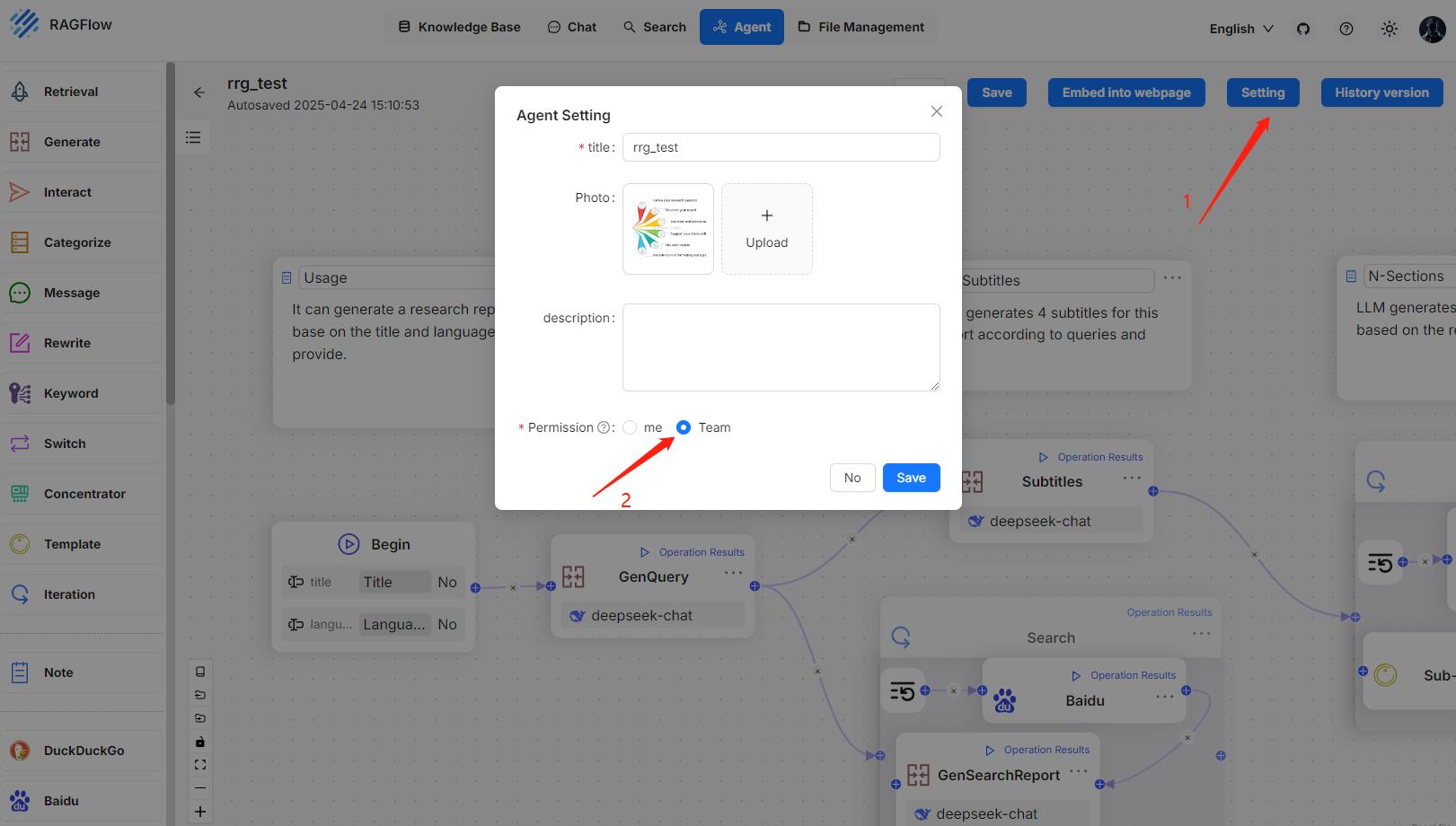
_When completed, your team members will see your shared Agents like this:_
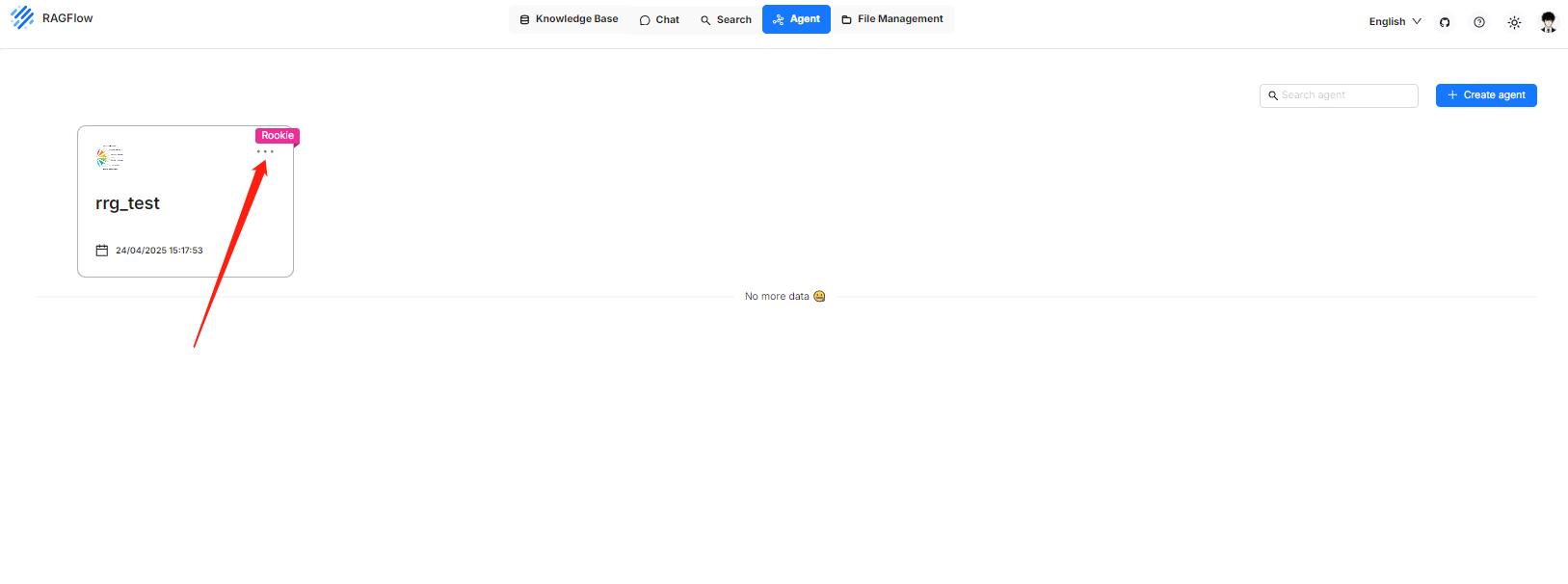
---
# Share chat assistant | RAGFlow
[Skip to main content](https://ragflow.io/docs/dev/share_chat_assistant#__docusaurus_skipToContent_fallback)
Version: DEV
Share chat assistant
====================
Sharing chat assistant is currently exclusive to RAGFlow Enterprise, but will be made available in due course.
---
# Share knowledge base | RAGFlow
[Skip to main content](https://ragflow.io/docs/dev/share_datasets#__docusaurus_skipToContent_fallback)
Version: DEV
Share knowledge base
====================
Share a knowledge base with team members.
* * *
When ready, you may share your knowledge bases with your team members so that they can upload and parse files in them. Please note that your knowledge bases are not shared automatically; you must manually enable sharing by selecting the appropriate **Permissions** radio button:
1. Navigate to the knowledge base's **Configuration** page.
2. Change **Permissions** from **Only me** to **Team**.
3. Click **Save** to apply your changes.
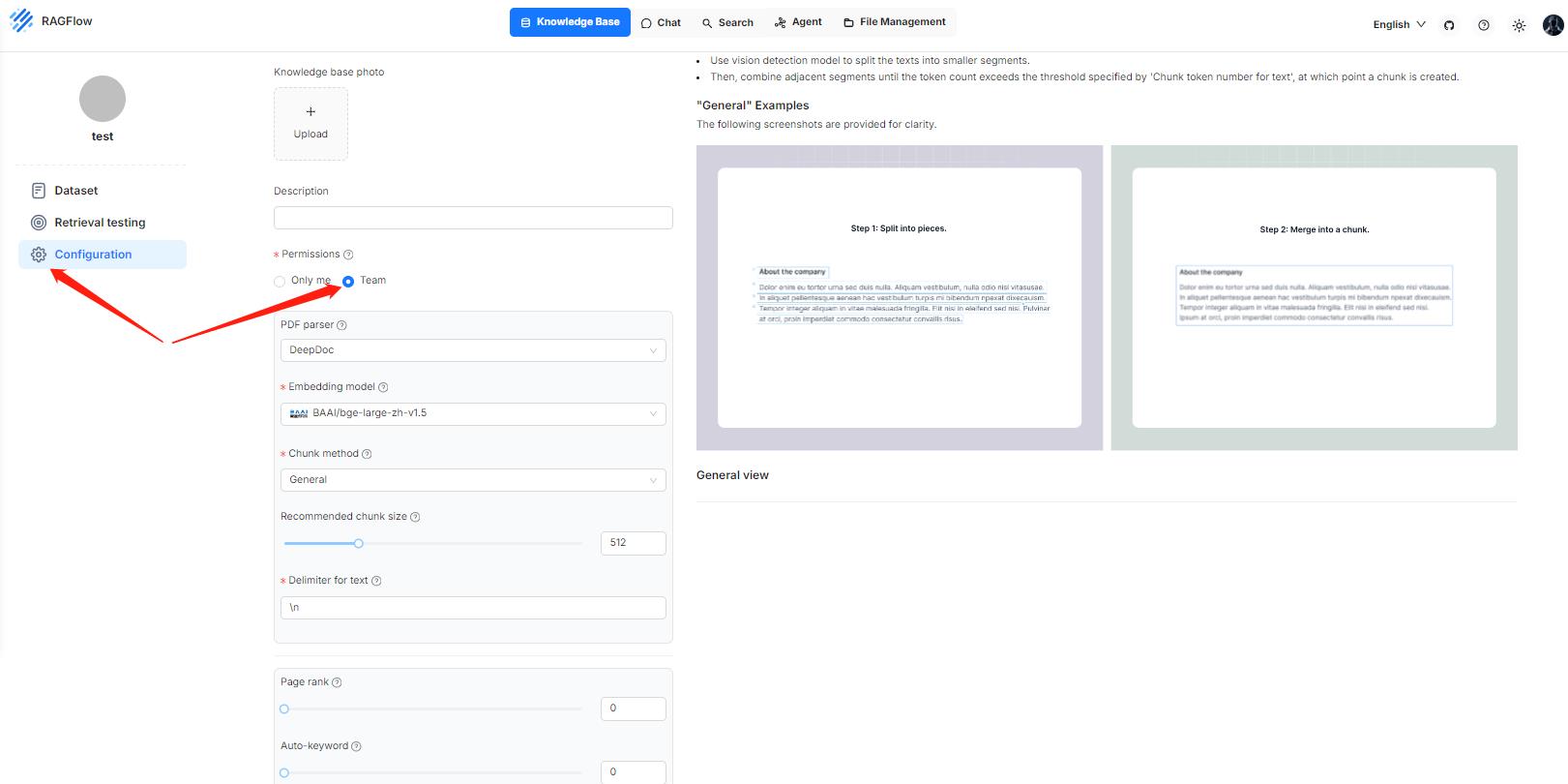
_Once completed, your team members will see your shared knowledge bases like this:_
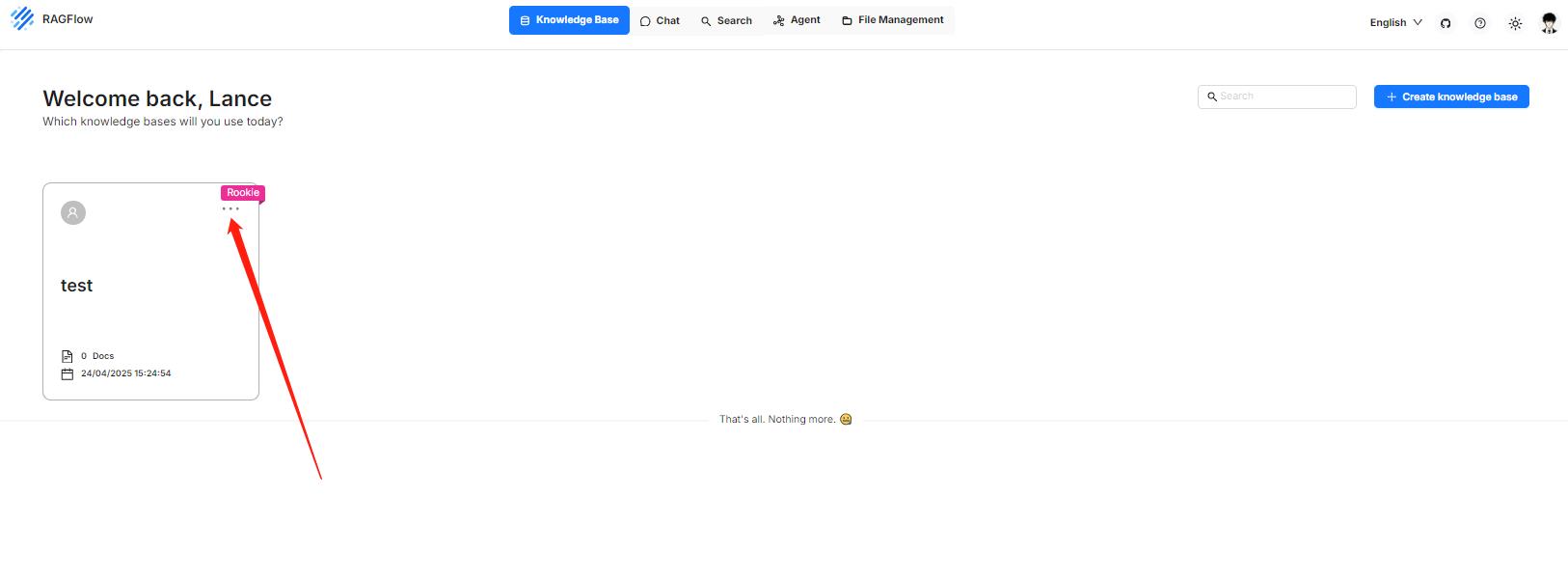
---
# Deploy local models | RAGFlow
[Skip to main content](https://ragflow.io/docs/v0.19.1/deploy_local_llm#__docusaurus_skipToContent_fallback)
This is documentation for RAGFlow **v0.19.1**, which is no longer actively maintained.
For up-to-date documentation, see the **[latest version](https://ragflow.io/docs/dev/deploy_local_llm)
** (DEV).
Version: v0.19.1
On this page
Deploy local models
===================
Deploy and run local models using Ollama, Xinference, or other frameworks.
* * *
RAGFlow supports deploying models locally using Ollama, Xinference, IPEX-LLM, or jina. If you have locally deployed models to leverage or wish to enable GPU or CUDA for inference acceleration, you can bind Ollama or Xinference into RAGFlow and use either of them as a local "server" for interacting with your local models.
RAGFlow seamlessly integrates with Ollama and Xinference, without the need for further environment configurations. You can use them to deploy two types of local models in RAGFlow: chat models and embedding models.
NOTE
This user guide does not intend to cover much of the installation or configuration details of Ollama or Xinference; its focus is on configurations inside RAGFlow. For the most current information, you may need to check out the official site of Ollama or Xinference.
Deploy local models using Ollama[](https://ragflow.io/docs/v0.19.1/deploy_local_llm#deploy-local-models-using-ollama "Direct link to Deploy local models using Ollama")
-------------------------------------------------------------------------------------------------------------------------------------------------------------------------
[Ollama](https://github.com/ollama/ollama)
enables you to run open-source large language models that you deployed locally. It bundles model weights, configurations, and data into a single package, defined by a Modelfile, and optimizes setup and configurations, including GPU usage.
note
* For information about downloading Ollama, see [here](https://github.com/ollama/ollama?tab=readme-ov-file#ollama)
.
* For a complete list of supported models and variants, see the [Ollama model library](https://ollama.com/library)
.
### 1\. Deploy Ollama using Docker[](https://ragflow.io/docs/v0.19.1/deploy_local_llm#1-deploy-ollama-using-docker "Direct link to 1. Deploy Ollama using Docker")
Ollama can be [installed from binaries](https://ollama.com/download)
or [deployed with Docker](https://hub.docker.com/r/ollama/ollama)
. Here are the instructions to deploy with Docker:
$ sudo docker run --name ollama -p 11434:11434 ollama/ollama> time=2024-12-02T02:20:21.360Z level=INFO source=routes.go:1248 msg="Listening on [::]:11434 (version 0.4.6)"> time=2024-12-02T02:20:21.360Z level=INFO source=common.go:49 msg="Dynamic LLM libraries" runners="[cpu cpu_avx cpu_avx2 cuda_v11 cuda_v12]"
Ensure Ollama is listening on all IP address:
$ sudo ss -tunlp | grep 11434> tcp LISTEN 0 4096 0.0.0.0:11434 0.0.0.0:* users:(("docker-proxy",pid=794507,fd=4))> tcp LISTEN 0 4096 [::]:11434 [::]:* users:(("docker-proxy",pid=794513,fd=4))
Pull models as you need. We recommend that you start with `llama3.2` (a 3B chat model) and `bge-m3` (a 567M embedding model):
$ sudo docker exec ollama ollama pull llama3.2> pulling dde5aa3fc5ff... 100% ▕████████████████▏ 2.0 GB> success
$ sudo docker exec ollama ollama pull bge-m3 > pulling daec91ffb5dd... 100% ▕████████████████▏ 1.2 GB > success
### 2\. Find Ollama URL and ensure it is accessible[](https://ragflow.io/docs/v0.19.1/deploy_local_llm#2-find-ollama-url-and-ensure-it-is-accessible "Direct link to 2. Find Ollama URL and ensure it is accessible")
* If RAGFlow runs in Docker, the localhost is mapped within the RAGFlow Docker container as `host.docker.internal`. If Ollama runs on the same host machine, the right URL to use for Ollama would be \`[http://host.docker.internal:11434/](http://host.docker.internal:11434/)
' and you should check that Ollama is accessible from inside the RAGFlow container with:
$ sudo docker exec -it ragflow-server bash$ curl http://host.docker.internal:11434/> Ollama is running
* If RAGFlow is launched from source code and Ollama runs on the same host machine as RAGFlow, check if Ollama is accessible from RAGFlow's host machine:
$ curl http://localhost:11434/> Ollama is running
* If RAGFlow and Ollama run on different machines, check if Ollama is accessible from RAGFlow's host machine:
$ curl http://${IP_OF_OLLAMA_MACHINE}:11434/> Ollama is running
### 3\. Add Ollama[](https://ragflow.io/docs/v0.19.1/deploy_local_llm#3-add-ollama "Direct link to 3. Add Ollama")
In RAGFlow, click on your logo on the top right of the page **\>** **Model providers** and add Ollama to RAGFlow:

### 4\. Complete basic Ollama settings[](https://ragflow.io/docs/v0.19.1/deploy_local_llm#4-complete-basic-ollama-settings "Direct link to 4. Complete basic Ollama settings")
In the popup window, complete basic settings for Ollama:
1. Ensure that your model name and type match those been pulled at step 1 (Deploy Ollama using Docker). For example, (`llama3.2` and `chat`) or (`bge-m3` and `embedding`).
2. In Ollama base URL, put the URL you found in step 2 followed by `/v1`, i.e. `http://host.docker.internal:11434/v1`, `http://localhost:11434/v1` or `http://${IP_OF_OLLAMA_MACHINE}:11434/v1`.
3. OPTIONAL: Switch on the toggle under **Does it support Vision?** if your model includes an image-to-text model.
WARNING
Improper base URL settings will trigger the following error:
Max retries exceeded with url: /api/chat (Caused by NewConnectionError(': Failed to establish a new connection: [Errno 111] Connection refused'))
### 5\. Update System Model Settings[](https://ragflow.io/docs/v0.19.1/deploy_local_llm#5-update-system-model-settings "Direct link to 5. Update System Model Settings")
Click on your logo **\>** **Model providers** **\>** **System Model Settings** to update your model:
* _You should now be able to find **llama3.2** from the dropdown list under **Chat model**, and **bge-m3** from the dropdown list under **Embedding model**._
* _If your local model is an embedding model, you should find it under **Embedding model**._
### 6\. Update Chat Configuration[](https://ragflow.io/docs/v0.19.1/deploy_local_llm#6-update-chat-configuration "Direct link to 6. Update Chat Configuration")
Update your model(s) accordingly in **Chat Configuration**.
Deploy a local model using Xinference[](https://ragflow.io/docs/v0.19.1/deploy_local_llm#deploy-a-local-model-using-xinference "Direct link to Deploy a local model using Xinference")
----------------------------------------------------------------------------------------------------------------------------------------------------------------------------------------
Xorbits Inference ([Xinference](https://github.com/xorbitsai/inference)
) enables you to unleash the full potential of cutting-edge AI models.
note
* For information about installing Xinference Ollama, see [here](https://inference.readthedocs.io/en/latest/getting_started/)
.
* For a complete list of supported models, see the [Builtin Models](https://inference.readthedocs.io/en/latest/models/builtin/)
.
To deploy a local model, e.g., **Mistral**, using Xinference:
### 1\. Check firewall settings[](https://ragflow.io/docs/v0.19.1/deploy_local_llm#1-check-firewall-settings "Direct link to 1. Check firewall settings")
Ensure that your host machine's firewall allows inbound connections on port 9997.
### 2\. Start an Xinference instance[](https://ragflow.io/docs/v0.19.1/deploy_local_llm#2-start-an-xinference-instance "Direct link to 2. Start an Xinference instance")
$ xinference-local --host 0.0.0.0 --port 9997
### 3\. Launch your local model[](https://ragflow.io/docs/v0.19.1/deploy_local_llm#3-launch-your-local-model "Direct link to 3. Launch your local model")
Launch your local model (**Mistral**), ensuring that you replace `${quantization}` with your chosen quantization method:
$ xinference launch -u mistral --model-name mistral-v0.1 --size-in-billions 7 --model-format pytorch --quantization ${quantization}
### 4\. Add Xinference[](https://ragflow.io/docs/v0.19.1/deploy_local_llm#4-add-xinference "Direct link to 4. Add Xinference")
In RAGFlow, click on your logo on the top right of the page **\>** **Model providers** and add Xinference to RAGFlow:

### 5\. Complete basic Xinference settings[](https://ragflow.io/docs/v0.19.1/deploy_local_llm#5-complete-basic-xinference-settings "Direct link to 5. Complete basic Xinference settings")
Enter an accessible base URL, such as `http://:9997/v1`.
> For rerank model, please use the `http://:9997/v1/rerank` as the base URL.
### 6\. Update System Model Settings[](https://ragflow.io/docs/v0.19.1/deploy_local_llm#6-update-system-model-settings "Direct link to 6. Update System Model Settings")
Click on your logo **\>** **Model providers** **\>** **System Model Settings** to update your model.
_You should now be able to find **mistral** from the dropdown list under **Chat model**._
> If your local model is an embedding model, you should find your local model under **Embedding model**.
### 7\. Update Chat Configuration[](https://ragflow.io/docs/v0.19.1/deploy_local_llm#7-update-chat-configuration "Direct link to 7. Update Chat Configuration")
Update your chat model accordingly in **Chat Configuration**:
> If your local model is an embedding model, update it on the configuration page of your knowledge base.
Deploy a local model using IPEX-LLM[](https://ragflow.io/docs/v0.19.1/deploy_local_llm#deploy-a-local-model-using-ipex-llm "Direct link to Deploy a local model using IPEX-LLM")
----------------------------------------------------------------------------------------------------------------------------------------------------------------------------------
[IPEX-LLM](https://github.com/intel-analytics/ipex-llm)
is a PyTorch library for running LLMs on local Intel CPUs or GPUs (including iGPU or discrete GPUs like Arc, Flex, and Max) with low latency. It supports Ollama on Linux and Windows systems.
To deploy a local model, e.g., **Qwen2**, using IPEX-LLM-accelerated Ollama:
### 1\. Check firewall settings[](https://ragflow.io/docs/v0.19.1/deploy_local_llm#1-check-firewall-settings-1 "Direct link to 1. Check firewall settings")
Ensure that your host machine's firewall allows inbound connections on port 11434. For example:
sudo ufw allow 11434/tcp
### 2\. Launch Ollama service using IPEX-LLM[](https://ragflow.io/docs/v0.19.1/deploy_local_llm#2-launch-ollama-service-using-ipex-llm "Direct link to 2. Launch Ollama service using IPEX-LLM")
#### 2.1 Install IPEX-LLM for Ollama[](https://ragflow.io/docs/v0.19.1/deploy_local_llm#21-install-ipex-llm-for-ollama "Direct link to 2.1 Install IPEX-LLM for Ollama")
NOTE
IPEX-LLM's supports Ollama on Linux and Windows systems.
For detailed information about installing IPEX-LLM for Ollama, see [Run llama.cpp with IPEX-LLM on Intel GPU Guide](https://github.com/intel-analytics/ipex-llm/blob/main/docs/mddocs/Quickstart/llama_cpp_quickstart.md)
:
* [Prerequisites](https://github.com/intel-analytics/ipex-llm/blob/main/docs/mddocs/Quickstart/llama_cpp_quickstart.md#0-prerequisites)
* [Install IPEX-LLM cpp with Ollama binaries](https://github.com/intel-analytics/ipex-llm/blob/main/docs/mddocs/Quickstart/llama_cpp_quickstart.md#1-install-ipex-llm-for-llamacpp)
_After the installation, you should have created a Conda environment, e.g., `llm-cpp`, for running Ollama commands with IPEX-LLM._
#### 2.2 Initialize Ollama[](https://ragflow.io/docs/v0.19.1/deploy_local_llm#22-initialize-ollama "Direct link to 2.2 Initialize Ollama")
1. Activate the `llm-cpp` Conda environment and initialize Ollama:
* Linux
* Windows
conda activate llm-cppinit-ollama
Run these commands with _administrator privileges in Miniforge Prompt_:
conda activate llm-cppinit-ollama.bat
2. If the installed `ipex-llm[cpp]` requires an upgrade to the Ollama binary files, remove the old binary files and reinitialize Ollama using `init-ollama` (Linux) or `init-ollama.bat` (Windows).
_A symbolic link to Ollama appears in your current directory, and you can use this executable file following standard Ollama commands._
#### 2.3 Launch Ollama service[](https://ragflow.io/docs/v0.19.1/deploy_local_llm#23-launch-ollama-service "Direct link to 2.3 Launch Ollama service")
1. Set the environment variable `OLLAMA_NUM_GPU` to `999` to ensure that all layers of your model run on the Intel GPU; otherwise, some layers may default to CPU.
2. For optimal performance on Intel Arc™ A-Series Graphics with Linux OS (Kernel 6.2), set the following environment variable before launching the Ollama service:
export SYCL_PI_LEVEL_ZERO_USE_IMMEDIATE_COMMANDLISTS=1
3. Launch the Ollama service:
* Linux
* Windows
export OLLAMA_NUM_GPU=999export no_proxy=localhost,127.0.0.1export ZES_ENABLE_SYSMAN=1source /opt/intel/oneapi/setvars.shexport SYCL_CACHE_PERSISTENT=1./ollama serve
Run the following command _in Miniforge Prompt_:
set OLLAMA_NUM_GPU=999set no_proxy=localhost,127.0.0.1set ZES_ENABLE_SYSMAN=1set SYCL_CACHE_PERSISTENT=1ollama serve
NOTE
To enable the Ollama service to accept connections from all IP addresses, use `OLLAMA_HOST=0.0.0.0 ./ollama serve` rather than simply `./ollama serve`.
_The console displays messages similar to the following:_

### 3\. Pull and Run Ollama model[](https://ragflow.io/docs/v0.19.1/deploy_local_llm#3-pull-and-run-ollama-model "Direct link to 3. Pull and Run Ollama model")
#### 3.1 Pull Ollama model[](https://ragflow.io/docs/v0.19.1/deploy_local_llm#31-pull-ollama-model "Direct link to 3.1 Pull Ollama model")
With the Ollama service running, open a new terminal and run `./ollama pull ` (Linux) or `ollama.exe pull ` (Windows) to pull the desired model. e.g., `qwen2:latest`:

#### 3.2 Run Ollama model[](https://ragflow.io/docs/v0.19.1/deploy_local_llm#32-run-ollama-model "Direct link to 3.2 Run Ollama model")
* Linux
* Windows
./ollama run qwen2:latest
ollama run qwen2:latest
### 4\. Configure RAGflow[](https://ragflow.io/docs/v0.19.1/deploy_local_llm#4-configure-ragflow "Direct link to 4. Configure RAGflow")
To enable IPEX-LLM accelerated Ollama in RAGFlow, you must also complete the configurations in RAGFlow. The steps are identical to those outlined in the _Deploy a local model using Ollama_ section:
1. [Add Ollama](https://ragflow.io/docs/v0.19.1/deploy_local_llm#4-add-ollama)
2. [Complete basic Ollama settings](https://ragflow.io/docs/v0.19.1/deploy_local_llm#5-complete-basic-ollama-settings)
3. [Update System Model Settings](https://ragflow.io/docs/v0.19.1/deploy_local_llm#6-update-system-model-settings)
4. [Update Chat Configuration](https://ragflow.io/docs/v0.19.1/deploy_local_llm#7-update-chat-configuration)
Deploy a local model using jina[](https://ragflow.io/docs/v0.19.1/deploy_local_llm#deploy-a-local-model-using-jina "Direct link to Deploy a local model using jina")
----------------------------------------------------------------------------------------------------------------------------------------------------------------------
To deploy a local model, e.g., **gpt2**, using jina:
### 1\. Check firewall settings[](https://ragflow.io/docs/v0.19.1/deploy_local_llm#1-check-firewall-settings-2 "Direct link to 1. Check firewall settings")
Ensure that your host machine's firewall allows inbound connections on port 12345.
sudo ufw allow 12345/tcp
### 2\. Install jina package[](https://ragflow.io/docs/v0.19.1/deploy_local_llm#2-install-jina-package "Direct link to 2. Install jina package")
pip install jina
### 3\. Deploy a local model[](https://ragflow.io/docs/v0.19.1/deploy_local_llm#3-deploy-a-local-model "Direct link to 3. Deploy a local model")
Step 1: Navigate to the **rag/svr** directory.
cd rag/svr
Step 2: Run **jina\_server.py**, specifying either the model's name or its local directory:
python jina_server.py --model_name gpt2
> The script only supports models downloaded from Hugging Face.
* [Deploy local models using Ollama](https://ragflow.io/docs/v0.19.1/deploy_local_llm#deploy-local-models-using-ollama)
* [1\. Deploy Ollama using Docker](https://ragflow.io/docs/v0.19.1/deploy_local_llm#1-deploy-ollama-using-docker)
* [2\. Find Ollama URL and ensure it is accessible](https://ragflow.io/docs/v0.19.1/deploy_local_llm#2-find-ollama-url-and-ensure-it-is-accessible)
* [3\. Add Ollama](https://ragflow.io/docs/v0.19.1/deploy_local_llm#3-add-ollama)
* [4\. Complete basic Ollama settings](https://ragflow.io/docs/v0.19.1/deploy_local_llm#4-complete-basic-ollama-settings)
* [5\. Update System Model Settings](https://ragflow.io/docs/v0.19.1/deploy_local_llm#5-update-system-model-settings)
* [6\. Update Chat Configuration](https://ragflow.io/docs/v0.19.1/deploy_local_llm#6-update-chat-configuration)
* [Deploy a local model using Xinference](https://ragflow.io/docs/v0.19.1/deploy_local_llm#deploy-a-local-model-using-xinference)
* [1\. Check firewall settings](https://ragflow.io/docs/v0.19.1/deploy_local_llm#1-check-firewall-settings)
* [2\. Start an Xinference instance](https://ragflow.io/docs/v0.19.1/deploy_local_llm#2-start-an-xinference-instance)
* [3\. Launch your local model](https://ragflow.io/docs/v0.19.1/deploy_local_llm#3-launch-your-local-model)
* [4\. Add Xinference](https://ragflow.io/docs/v0.19.1/deploy_local_llm#4-add-xinference)
* [5\. Complete basic Xinference settings](https://ragflow.io/docs/v0.19.1/deploy_local_llm#5-complete-basic-xinference-settings)
* [6\. Update System Model Settings](https://ragflow.io/docs/v0.19.1/deploy_local_llm#6-update-system-model-settings)
* [7\. Update Chat Configuration](https://ragflow.io/docs/v0.19.1/deploy_local_llm#7-update-chat-configuration)
* [Deploy a local model using IPEX-LLM](https://ragflow.io/docs/v0.19.1/deploy_local_llm#deploy-a-local-model-using-ipex-llm)
* [1\. Check firewall settings](https://ragflow.io/docs/v0.19.1/deploy_local_llm#1-check-firewall-settings-1)
* [2\. Launch Ollama service using IPEX-LLM](https://ragflow.io/docs/v0.19.1/deploy_local_llm#2-launch-ollama-service-using-ipex-llm)
* [3\. Pull and Run Ollama model](https://ragflow.io/docs/v0.19.1/deploy_local_llm#3-pull-and-run-ollama-model)
* [4\. Configure RAGflow](https://ragflow.io/docs/v0.19.1/deploy_local_llm#4-configure-ragflow)
* [Deploy a local model using jina](https://ragflow.io/docs/v0.19.1/deploy_local_llm#deploy-a-local-model-using-jina)
* [1\. Check firewall settings](https://ragflow.io/docs/v0.19.1/deploy_local_llm#1-check-firewall-settings-2)
* [2\. Install jina package](https://ragflow.io/docs/v0.19.1/deploy_local_llm#2-install-jina-package)
* [3\. Deploy a local model](https://ragflow.io/docs/v0.19.1/deploy_local_llm#3-deploy-a-local-model)
---
# Accelerate answering | RAGFlow
[Skip to main content](https://ragflow.io/docs/v0.19.1/accelerate_question_answering#__docusaurus_skipToContent_fallback)
This is documentation for RAGFlow **v0.19.1**, which is no longer actively maintained.
For up-to-date documentation, see the **[latest version](https://ragflow.io/docs/dev/accelerate_question_answering)
** (DEV).
Version: v0.19.1
Accelerate answering
====================
A checklist to speed up question answering.
* * *
Please note that some of your settings may consume a significant amount of time. If you often find that your question answering is time-consuming, here is a checklist to consider:
* In the **Prompt engine** tab of your **Chat Configuration** dialogue, disabling **Multi-turn optimization** will reduce the time required to get an answer from the LLM.
* In the **Prompt engine** tab of your **Chat Configuration** dialogue, leaving the **Rerank model** field empty will significantly decrease retrieval time.
* When using a rerank model, ensure you have a GPU for acceleration; otherwise, the reranking process will be _prohibitively_ slow.
NOTE
Please note that rerank models are essential in certain scenarios. There is always a trade-off between speed and performance; you must weigh the pros against cons for your specific case.
* In the **Assistant settings** tab of your **Chat Configuration** dialogue, disabling **Keyword analysis** will reduce the time to receive an answer from the LLM.
* When chatting with your chat assistant, click the light bulb icon above the _current_ dialogue and scroll down the popup window to view the time taken for each task:

| Item name | Description |
| --- | --- |
| Total | Total time spent on this conversation round, including chunk retrieval and answer generation. |
| Check LLM | Time to validate the specified LLM. |
| Create retriever | Time to create a chunk retriever. |
| Bind embedding | Time to initialize an embedding model instance. |
| Bind LLM | Time to initialize an LLM instance. |
| Tune question | Time to optimize the user query using the context of the mult-turn conversation. |
| Bind reranker | Time to initialize an reranker model instance for chunk retrieval. |
| Generate keywords | Time to extract keywords from the user query. |
| Retrieval | Time to retrieve the chunks. |
| Generate answer | Time to generate the answer. |
---
# Chat | RAGFlow
[Skip to main content](https://ragflow.io/docs/v0.19.1/category/chat#__docusaurus_skipToContent_fallback)
This is documentation for RAGFlow **v0.19.1**, which is no longer actively maintained.
For up-to-date documentation, see the **[latest version](https://ragflow.io/docs/dev/category/chat)
** (DEV).
Version: v0.19.1
[📄️ Start AI chat\
-----------------\
\
Initiate an AI-powered chat with a configured chat assistant.](https://ragflow.io/docs/v0.19.1/start_chat)
[📄️ Implement deep research\
---------------------------\
\
Implements deep research for agentic reasoning.](https://ragflow.io/docs/v0.19.1/implement_deep_research)
[📄️ Set variables\
-----------------\
\
Set variables to be used together with the system prompt for your LLM.](https://ragflow.io/docs/v0.19.1/set_chat_variables)
[🗃️ Best practices\
------------------\
\
1 items](https://ragflow.io/docs/v0.19.1/category/best-practices-1)
---
# Best practices | RAGFlow
[Skip to main content](https://ragflow.io/docs/v0.19.1/category/best-practices-1#__docusaurus_skipToContent_fallback)
This is documentation for RAGFlow **v0.19.1**, which is no longer actively maintained.
For up-to-date documentation, see the **[latest version](https://ragflow.io/docs/dev/category/best-practices-1)
** (DEV).
Version: v0.19.1
[📄️ Accelerate answering\
------------------------\
\
A checklist to speed up question answering.](https://ragflow.io/docs/v0.19.1/accelerate_question_answering)
---
# Configure model API key | RAGFlow
[Skip to main content](https://ragflow.io/docs/v0.19.1/llm_api_key_setup#__docusaurus_skipToContent_fallback)
This is documentation for RAGFlow **v0.19.1**, which is no longer actively maintained.
For up-to-date documentation, see the **[latest version](https://ragflow.io/docs/dev/llm_api_key_setup)
** (DEV).
Version: v0.19.1
On this page
Configure model API key
=======================
An API key is required for RAGFlow to interact with an online AI model. This guide provides information about setting your model API key in RAGFlow.
Get model API key[](https://ragflow.io/docs/v0.19.1/llm_api_key_setup#get-model-api-key "Direct link to Get model API key")
-----------------------------------------------------------------------------------------------------------------------------
RAGFlow supports most mainstream LLMs. Please refer to [Supported Models](https://ragflow.io/docs/v0.19.1/supported_models)
for a complete list of supported models. You will need to apply for your model API key online. Note that most LLM providers grant newly-created accounts trial credit, which will expire in a couple of months, or a promotional amount of free quota.
note
If you find your online LLM is not on the list, don't feel disheartened. The list is expanding, and you can [file a feature request](https://github.com/infiniflow/ragflow/issues/new?assignees=&labels=feature+request&projects=&template=feature_request.yml&title=%5BFeature+Request%5D%3A+)
with us! Alternatively, if you have customized or locally-deployed models, you can [bind them to RAGFlow using Ollama, Xinference, or LocalAI](https://ragflow.io/docs/v0.19.1/deploy_local_llm)
.
Configure model API key[](https://ragflow.io/docs/v0.19.1/llm_api_key_setup#configure-model-api-key-1 "Direct link to Configure model API key")
-------------------------------------------------------------------------------------------------------------------------------------------------
You have two options for configuring your model API key:
* Configure it in **service\_conf.yaml.template** before starting RAGFlow.
* Configure it on the **Model providers** page after logging into RAGFlow.
### Configure model API key before starting up RAGFlow[](https://ragflow.io/docs/v0.19.1/llm_api_key_setup#configure-model-api-key-before-starting-up-ragflow "Direct link to Configure model API key before starting up RAGFlow")
1. Navigate to **./docker/ragflow**.
2. Find entry **user\_default\_llm**:
* Update `factory` with your chosen LLM.
* Update `api_key` with yours.
* Update `base_url` if you use a proxy to connect to the remote service.
3. Reboot your system for your changes to take effect.
4. Log into RAGFlow.
_After logging into RAGFlow, you will find your chosen model appears under **Added models** on the **Model providers** page._
### Configure model API key after logging into RAGFlow[](https://ragflow.io/docs/v0.19.1/llm_api_key_setup#configure-model-api-key-after-logging-into-ragflow "Direct link to Configure model API key after logging into RAGFlow")
WARNING
After logging into RAGFlow, configuring your model API key through the **service\_conf.yaml.template** file will no longer take effect.
After logging into RAGFlow, you can _only_ configure API Key on the **Model providers** page:
1. Click on your logo on the top right of the page **\>** **Model providers**.
2. Find your model card under **Models to be added** and click **Add the model**: 
3. Paste your model API key.
4. Fill in your base URL if you use a proxy to connect to the remote service.
5. Click **OK** to confirm your changes.
note
To update an existing model API key: 
* [Get model API key](https://ragflow.io/docs/v0.19.1/llm_api_key_setup#get-model-api-key)
* [Configure model API key](https://ragflow.io/docs/v0.19.1/llm_api_key_setup#configure-model-api-key-1)
* [Configure model API key before starting up RAGFlow](https://ragflow.io/docs/v0.19.1/llm_api_key_setup#configure-model-api-key-before-starting-up-ragflow)
* [Configure model API key after logging into RAGFlow](https://ragflow.io/docs/v0.19.1/llm_api_key_setup#configure-model-api-key-after-logging-into-ragflow)
---
# Tracing | RAGFlow
[Skip to main content](https://ragflow.io/docs/v0.19.1/tracing#__docusaurus_skipToContent_fallback)
This is documentation for RAGFlow **v0.19.1**, which is no longer actively maintained.
For up-to-date documentation, see the **[latest version](https://ragflow.io/docs/dev/tracing)
** (DEV).
Version: v0.19.1
On this page
Tracing
=======
Observability & Tracing with Langfuse.
* * *
KUDOS
This document is contributed by our community contributor [jannikmaierhoefer](https://github.com/jannikmaierhoefer)
. 👏
RAGFlow ships with a built-in [Langfuse](https://langfuse.com/)
integration so that you can **inspect and debug every retrieval and generation step** of your RAG pipelines in near real-time.
Langfuse stores traces, spans and prompt payloads in a purpose-built observability backend and offers filtering and visualisations on top.
NOTE
• RAGFlow **≥ 0.19.1** (contains the Langfuse connector)
• A Langfuse workspace (cloud or self-hosted) with a _Project Public Key_ and _Secret Key_
* * *
1\. Collect your Langfuse credentials[](https://ragflow.io/docs/v0.19.1/tracing#1-collect-your-langfuse-credentials "Direct link to 1. Collect your Langfuse credentials")
----------------------------------------------------------------------------------------------------------------------------------------------------------------------------
1. Sign in to your Langfuse dashboard.
2. Open **Settings ▸ Projects** and either create a new project or select an existing one.
3. Copy the **Public Key** and **Secret Key**.
4. Note the Langfuse **host** (e.g. `https://cloud.langfuse.com`). Use the base URL of your own installation if you self-host.
> The keys are _project-scoped_: one pair of keys is enough for all environments that should write into the same project.
* * *
2\. Add the keys to RAGFlow[](https://ragflow.io/docs/v0.19.1/tracing#2-add-the-keys-to-ragflow "Direct link to 2. Add the keys to RAGFlow")
----------------------------------------------------------------------------------------------------------------------------------------------
RAGFlow stores the credentials _per tenant_. You can configure them either via the web UI or the HTTP API.
1. Log in to RAGFlow and click your avatar in the top-right corner.
2. Select **API ▸ Scroll down to the bottom ▸ Langfuse Configuration**.
3. Fill in you Langfuse **Host**, **Public Key** and **Secret Key**.
4. Click **Save**.

Once saved, RAGFlow starts emitting traces automatically – no code change required.
* * *
3\. Run a pipeline and watch the traces[](https://ragflow.io/docs/v0.19.1/tracing#3-run-a-pipeline-and-watch-the-traces "Direct link to 3. Run a pipeline and watch the traces")
----------------------------------------------------------------------------------------------------------------------------------------------------------------------------------
1. Execute any chat or retrieval pipeline in RAGFlow (e.g. the Quickstart demo).
2. Open your Langfuse project ▸ **Traces**.
3. Filter by **name ~ `ragflow-*`** (RAGFlow prefixes each trace with `ragflow-`).
For every user request you will see:
• a **trace** representing the overall request
• **spans** for retrieval, ranking and generation steps
• the complete **prompts**, **retrieved documents** and **LLM responses** as metadata

([Example trace in Langfuse](https://cloud.langfuse.com/project/cloramnkj0002jz088vzn1ja4/traces/0bde9629-4251-4386-b583-26101b8e7561?timestamp=2025-05-09T19%3A15%3A37.797Z&display=details&observation=823997d8-ac40-40f3-8e7b-8aa6753b499e)
)
NOTE
Use Langfuse's diff view to compare prompt versions or drill down into long-running retrievals to identify bottlenecks.
* [1\. Collect your Langfuse credentials](https://ragflow.io/docs/v0.19.1/tracing#1-collect-your-langfuse-credentials)
* [2\. Add the keys to RAGFlow](https://ragflow.io/docs/v0.19.1/tracing#2-add-the-keys-to-ragflow)
* [3\. Run a pipeline and watch the traces](https://ragflow.io/docs/v0.19.1/tracing#3-run-a-pipeline-and-watch-the-traces)
---
# Upgrading | RAGFlow
[Skip to main content](https://ragflow.io/docs/v0.19.1/upgrade_ragflow#__docusaurus_skipToContent_fallback)
This is documentation for RAGFlow **v0.19.1**, which is no longer actively maintained.
For up-to-date documentation, see the **[latest version](https://ragflow.io/docs/dev/upgrade_ragflow)
** (DEV).
Version: v0.19.1
On this page
Upgrading
=========
Upgrade RAGFlow to `nightly-slim`/`nightly` or the latest, published release.
NOTE
Upgrading RAGFlow in itself will _not_ remove your uploaded/historical data. However, be aware that `docker compose -f docker/docker-compose.yml down -v` will remove Docker container volumes, resulting in data loss.
Upgrade RAGFlow to `nightly-slim`/`nightly`, the most recent, tested Docker image[](https://ragflow.io/docs/v0.19.1/upgrade_ragflow#upgrade-ragflow-to-nightly-slimnightly-the-most-recent-tested-docker-image "Direct link to upgrade-ragflow-to-nightly-slimnightly-the-most-recent-tested-docker-image")
-------------------------------------------------------------------------------------------------------------------------------------------------------------------------------------------------------------------------------------------------------------------------------------------------------------
`nightly-slim` refers to the RAGFlow Docker image _without_ embedding models, while `nightly` refers to the RAGFlow Docker image with embedding models. For details on their differences, see [ragflow/docker/.env](https://github.com/infiniflow/ragflow/blob/main/docker/.env)
.
To upgrade RAGFlow, you must upgrade **both** your code **and** your Docker image:
1. Clone the repo
git clone https://github.com/infiniflow/ragflow.git
2. Update **ragflow/docker/.env**:
* nightly-slim
* nightly
RAGFLOW_IMAGE=infiniflow/ragflow:nightly-slim
RAGFLOW_IMAGE=infiniflow/ragflow:nightly
3. Update RAGFlow image and restart RAGFlow:
docker compose -f docker/docker-compose.yml pulldocker compose -f docker/docker-compose.yml up -d
Upgrade RAGFlow to the most recent, officially published release[](https://ragflow.io/docs/v0.19.1/upgrade_ragflow#upgrade-ragflow-to-the-most-recent-officially-published-release "Direct link to Upgrade RAGFlow to the most recent, officially published release")
-----------------------------------------------------------------------------------------------------------------------------------------------------------------------------------------------------------------------------------------------------------------------
To upgrade RAGFlow, you must upgrade **both** your code **and** your Docker image:
1. Clone the repo
git clone https://github.com/infiniflow/ragflow.git
2. Switch to the latest, officially published release, e.g., `v0.19.1`:
git checkout -f v0.19.1
3. Update **ragflow/docker/.env** as follows:
RAGFLOW_IMAGE=infiniflow/ragflow:v0.19.1
4. Update the RAGFlow image and restart RAGFlow:
docker compose -f docker/docker-compose.yml pulldocker compose -f docker/docker-compose.yml up -d
Frequently asked questions[](https://ragflow.io/docs/v0.19.1/upgrade_ragflow#frequently-asked-questions "Direct link to Frequently asked questions")
------------------------------------------------------------------------------------------------------------------------------------------------------
### Upgrade RAGFlow in an offline environment (without Internet access)[](https://ragflow.io/docs/v0.19.1/upgrade_ragflow#upgrade-ragflow-in-an-offline-environment-without-internet-access "Direct link to Upgrade RAGFlow in an offline environment (without Internet access)")
1. From an environment with Internet access, pull the required Docker image.
2. Save the Docker image to a **.tar** file.
docker save -o ragflow.v0.19.1.tar infiniflow/ragflow:v0.19.1
3. Copy the **.tar** file to the target server.
4. Load the **.tar** file into Docker:
docker load -i ragflow.v0.19.1.tar
* [Upgrade RAGFlow to `nightly-slim`/`nightly`, the most recent, tested Docker image](https://ragflow.io/docs/v0.19.1/upgrade_ragflow#upgrade-ragflow-to-nightly-slimnightly-the-most-recent-tested-docker-image)
* [Upgrade RAGFlow to the most recent, officially published release](https://ragflow.io/docs/v0.19.1/upgrade_ragflow#upgrade-ragflow-to-the-most-recent-officially-published-release)
* [Frequently asked questions](https://ragflow.io/docs/v0.19.1/upgrade_ragflow#frequently-asked-questions)
* [Upgrade RAGFlow in an offline environment (without Internet access)](https://ragflow.io/docs/v0.19.1/upgrade_ragflow#upgrade-ragflow-in-an-offline-environment-without-internet-access)
---
# Agents | RAGFlow
[Skip to main content](https://ragflow.io/docs/v0.19.1/category/agents#__docusaurus_skipToContent_fallback)
This is documentation for RAGFlow **v0.19.1**, which is no longer actively maintained.
For up-to-date documentation, see the **[latest version](https://ragflow.io/docs/dev/category/agents)
** (DEV).
Version: v0.19.1
[📄️ Introduction to agents\
--------------------------\
\
Key concepts, basic operations, a quick view of the agent editor.](https://ragflow.io/docs/v0.19.1/agent_introduction)
[📄️ Create chatbot\
------------------\
\
Create a general-purpose chatbot.](https://ragflow.io/docs/v0.19.1/general_purpose_chatbot)
[📄️ Embed agent into webpage\
----------------------------\
\
You can use iframe to embed an agent into a third-party webpage.](https://ragflow.io/docs/v0.19.1/embed_agent_into_webpage)
[📄️ Create a Text2SQL agent\
---------------------------\
\
Build a Text2SQL agent leveraging RAGFlow's RAG capabilities.](https://ragflow.io/docs/v0.19.1/text2sql_agent)
[🗃️ Agent Components\
--------------------\
\
14 items](https://ragflow.io/docs/v0.19.1/category/agent-components)
[📄️ Sandbox quickstart\
----------------------\
\
A secure, pluggable code execution backend designed for RAGFlow and other applications requiring isolated code execution environments.](https://ragflow.io/docs/v0.19.1/sandbox_quickstart)
---
# Implement deep research | RAGFlow
[Skip to main content](https://ragflow.io/docs/v0.19.1/implement_deep_research#__docusaurus_skipToContent_fallback)
This is documentation for RAGFlow **v0.19.1**, which is no longer actively maintained.
For up-to-date documentation, see the **[latest version](https://ragflow.io/docs/dev/implement_deep_research)
** (DEV).
Version: v0.19.1
Implement deep research
=======================
Implements deep research for agentic reasoning.
* * *
From v0.17.0 onward, RAGFlow supports integrating agentic reasoning in an AI chat. The following diagram illustrates the workflow of RAGFlow's deep research:

To activate this feature:
1. Enable the **Reasoning** toggle under the **Prompt engine** tab of your chat assistant dialogue.

2. Enter the correct Tavily API key under the **Assistant settings** tab of your chat assistant dialogue to leverage Tavily-based web search

_The following is a screenshot of a conversation that integrates Deep Research:_

---
# Generate component | RAGFlow
[Skip to main content](https://ragflow.io/docs/dev/generate_component#__docusaurus_skipToContent_fallback)
Version: DEV
On this page
Generate component
==================
The component that prompts the LLM to respond appropriately.
* * *
A **Generate** component fine-tunes the LLM and sets its prompt.
Scenarios[](https://ragflow.io/docs/dev/generate_component#scenarios "Direct link to Scenarios")
--------------------------------------------------------------------------------------------------
A **Generate** component is essential when you need the LLM to assist with summarizing, translating, or controlling various tasks.
Configurations[](https://ragflow.io/docs/dev/generate_component#configurations "Direct link to Configurations")
-----------------------------------------------------------------------------------------------------------------
### Model[](https://ragflow.io/docs/dev/generate_component#model "Direct link to Model")
Click the dropdown menu of **Model** to show the model configuration window.
* **Model**: The chat model to use.
* Ensure you set the chat model correctly on the **Model providers** page.
* You can use different models for different components to increase flexibility or improve overall performance.
* **Freedom**: A shortcut to **Temperature**, **Top P**, **Presence penalty**, and **Frequency penalty** settings, indicating the freedom level of the model. From **Improvise**, **Precise**, to **Balance**, each preset configuration corresponds to a unique combination of **Temperature**, **Top P**, **Presence penalty**, and **Frequency penalty**.
This parameter has three options:
* **Improvise**: Produces more creative responses.
* **Precise**: (Default) Produces more conservative responses.
* **Balance**: A middle ground between **Improvise** and **Precise**.
* **Temperature**: The randomness level of the model's output.
Defaults to 0.1.
* Lower values lead to more deterministic and predictable outputs.
* Higher values lead to more creative and varied outputs.
* A temperature of zero results in the same output for the same prompt.
* **Top P**: Nucleus sampling.
* Reduces the likelihood of generating repetitive or unnatural text by setting a threshold _P_ and restricting the sampling to tokens with a cumulative probability exceeding _P_.
* Defaults to 0.3.
* **Presence penalty**: Encourages the model to include a more diverse range of tokens in the response.
* A higher **presence penalty** value results in the model being more likely to generate tokens not yet been included in the generated text.
* Defaults to 0.4.
* **Frequency penalty**: Discourages the model from repeating the same words or phrases too frequently in the generated text.
* A higher **frequency penalty** value results in the model being more conservative in its use of repeated tokens.
* Defaults to 0.7.
NOTE
* It is not necessary to stick with the same model for all components. If a specific model is not performing well for a particular task, consider using a different one.
* If you are uncertain about the mechanism behind **Temperature**, **Top P**, **Presence penalty**, and **Frequency penalty**, simply choose one of the three options of **Preset configurations**.
### System prompt[](https://ragflow.io/docs/dev/generate_component#system-prompt "Direct link to System prompt")
Typically, you use the system prompt to describe the task for the LLM, specify how it should respond, and outline other miscellaneous requirements. We do not plan to elaborate on this topic, as it can be as extensive as prompt engineering. However, please be aware that the system prompt is often used in conjunction with keys (variables), which serve as various data inputs for the LLM.
IMPORTANT
A **Generate** component relies on keys (variables) to specify its data inputs. Its immediate upstream component is _not_ necessarily its data input, and the arrows in the workflow indicate _only_ the processing sequence. Keys in a **Generate** component are used in conjunction with the system prompt to specify data inputs for the LLM. Use a forward slash `/` or the **(x)** button to show the keys to use.
Below is a prompt excerpt of a **Generate** component from the **Interpreter** template (component ID: **Reflect**):
Your task is to read a source text and a translation to {target_lang}, and give constructive suggestions to improve the translation. The source text and initial translation, delimited by XML tags and , are as follows:{source_text}{translation_1}When writing suggestions, pay attention to whether there are ways to improve the translation's fluency, by applying {target_lang} grammar, spelling and punctuation rules, and ensuring there are no unnecessary repetitions.- Each suggestion should address one specific part of the translation.- Output the suggestions only.
Where `{source_text}` and `{target_lang}` are global variables defined by the **Begin** component, while `{translation_1}` is the output of another **Generate** component with the component ID **Translate directly**.
### Cite[](https://ragflow.io/docs/dev/generate_component#cite "Direct link to Cite")
This toggle sets whether to cite the original text as reference.
NOTE
This feature applies _only_ after the original documents have been uploaded to the corresponding knowledge base(s) and file parsing is complete.
### Message window size[](https://ragflow.io/docs/dev/generate_component#message-window-size "Direct link to Message window size")
An integer specifying the number of previous dialogue rounds to input into the LLM. For example, if it is set to 12, the tokens from the last 12 dialogue rounds will be fed to the LLM. This feature consumes additional tokens.
IMPORTANT
This feature is used for multi-turn dialogue _only_.
Examples[](https://ragflow.io/docs/dev/generate_component#examples "Direct link to Examples")
-----------------------------------------------------------------------------------------------
You can explore our three-step interpreter agent template, where a **Generate** component (component ID: **Reflect**) takes three global variables:
1. Click the **Agent** tab at the top center of the page to access the **Agent** page.
2. Click **\+ Create agent** on the top right of the page to open the **agent template** page.
3. On the **agent template** page, hover over the **Interpreter** card and click **Use this template**.
4. Name your new agent and click **OK** to enter the workflow editor.
5. Click on component **Reflect**, to display its **Configuration** window, where:
* `{target_lang}` and `{source_text}` are defined in the **Begin** component and require user input.
* `{translation_1}` is the output from the upstream component **Translate directly**.
* [Scenarios](https://ragflow.io/docs/dev/generate_component#scenarios)
* [Configurations](https://ragflow.io/docs/dev/generate_component#configurations)
* [Model](https://ragflow.io/docs/dev/generate_component#model)
* [System prompt](https://ragflow.io/docs/dev/generate_component#system-prompt)
* [Cite](https://ragflow.io/docs/dev/generate_component#cite)
* [Message window size](https://ragflow.io/docs/dev/generate_component#message-window-size)
* [Examples](https://ragflow.io/docs/dev/generate_component#examples)
---
# Launch RAGFlow MCP server | RAGFlow
[Skip to main content](https://ragflow.io/docs/v0.19.1/launch_mcp_server#__docusaurus_skipToContent_fallback)
This is documentation for RAGFlow **v0.19.1**, which is no longer actively maintained.
For up-to-date documentation, see the **[latest version](https://ragflow.io/docs/dev/launch_mcp_server)
** (DEV).
Version: v0.19.1
On this page
Launch RAGFlow MCP server
=========================
Launch an MCP server from source or via Docker.
* * *
A RAGFlow Model Context Protocol (MCP) server is designed as an independent component to complement the RAGFlow server. Note that an MCP server must operate alongside a properly functioning RAGFlow server.
An MCP server can start up in either self-host mode (default) or host mode:
* **Self-host mode**:
When launching an MCP server in self-host mode, you must provide an API key to authenticate the MCP server with the RAGFlow server. In this mode, the MCP server can access _only_ the datasets (knowledge bases) of a specified tenant on the RAGFlow server.
* **Host mode**:
In host mode, each MCP client can access their own knowledge bases on the RAGFlow server. However, each client request must include a valid API key to authenticate the client with the RAGFlow server.
Once a connection is established, an MCP server communicates with its client in MCP HTTP+SSE (Server-Sent Events) mode, unidirectionally pushing responses from the RAGFlow server to its client in real time.
Prerequisites[](https://ragflow.io/docs/v0.19.1/launch_mcp_server#prerequisites "Direct link to Prerequisites")
-----------------------------------------------------------------------------------------------------------------
1. Ensure RAGFlow is upgraded to v0.18.0 or later.
2. Have your RAGFlow API key ready. See [Acquire a RAGFlow API key](https://ragflow.io/docs/v0.19.1/acquire_ragflow_api_key)
.
INFO
If you wish to try out our MCP server without upgrading RAGFlow, community contributor [yiminghub2024](https://github.com/yiminghub2024)
👏 shares their recommended steps [here](https://ragflow.io/docs/v0.19.1/launch_mcp_server#launch-an-mcp-server-without-upgrading-ragflow)
.
Launch an MCP server[](https://ragflow.io/docs/v0.19.1/launch_mcp_server#launch-an-mcp-server "Direct link to Launch an MCP server")
--------------------------------------------------------------------------------------------------------------------------------------
You can start an MCP server either from source code or via Docker.
### Launch from source code[](https://ragflow.io/docs/v0.19.1/launch_mcp_server#launch-from-source-code "Direct link to Launch from source code")
1. Ensure that a RAGFlow server v0.18.0+ is properly running.
2. Launch the MCP server:
# Launch the MCP server to work in self-host mode, run either of the followinguv run mcp/server/server.py --host=127.0.0.1 --port=9382 --base_url=http://127.0.0.1:9380 --api_key=ragflow-xxxxx# uv run mcp/server/server.py --host=127.0.0.1 --port=9382 --base_url=http://127.0.0.1:9380 --mode=self-host --api_key=ragflow-xxxxx# To launch the MCP server to work in host mode, run the following instead:# uv run mcp/server/server.py --host=127.0.0.1 --port=9382 --base_url=http://127.0.0.1:9380 --mode=host
Where:
* `host`: The MCP server's host address.
* `port`: The MCP server's listening port.
* `base_url`: The address of the running RAGFlow server.
* `mode`: The launch mode.
* `self-host`: (default) self-host mode.
* `host`: host mode.
* `api_key`: Required in self-host mode to authenticate the MCP server with the RAGFlow server.
### Launch from Docker[](https://ragflow.io/docs/v0.19.1/launch_mcp_server#launch-from-docker "Direct link to Launch from Docker")
#### 1\. Enable MCP server[](https://ragflow.io/docs/v0.19.1/launch_mcp_server#1-enable-mcp-server "Direct link to 1. Enable MCP server")
The MCP server is designed as an optional component that complements the RAGFlow server and disabled by default. To enable MCP server:
1. Navigate to **docker/docker-compose.yml**.
2. Uncomment the `services.ragflow.command` section as shown below:
services: ragflow: ... image: ${RAGFLOW_IMAGE} # Example configuration to set up an MCP server: command: - --enable-mcpserver - --mcp-host=0.0.0.0 - --mcp-port=9382 - --mcp-base-url=http://127.0.0.1:9380 - --mcp-script-path=/ragflow/mcp/server/server.py - --mcp-mode=self-host - --mcp-host-api-key=ragflow-xxxxxxx
Where:
* `mcp-host`: The MCP server's host address.
* `mcp-port`: The MCP server's listening port.
* `mcp-base_url`: The address of the running RAGFlow server.
* `mcp-script-path`: The file path to the MCP server’s main script.
* `mcp-mode`: The launch mode.
* `self-host`: (default) self-host mode.
* `host`: host mode.
* `mcp-host-api_key`: Required in self-host mode to authenticate the MCP server with the RAGFlow server.
#### 2\. Launch a RAGFlow server with an MCP server[](https://ragflow.io/docs/v0.19.1/launch_mcp_server#2-launch-a-ragflow-server-with-an-mcp-server "Direct link to 2. Launch a RAGFlow server with an MCP server")
Run `docker compose -f docker-compose.yml` to launch the RAGFlow server together with the MCP server.
_The following ASCII art confirms a successful launch:_
ragflow-server | Starting MCP Server on 0.0.0.0:9382 with base URL http://127.0.0.1:9380... ragflow-server | Starting 1 task executor(s) on host 'dd0b5e07e76f'... ragflow-server | 2025-04-18 15:41:18,816 INFO 27 ragflow_server log path: /ragflow/logs/ragflow_server.log, log levels: {'peewee': 'WARNING', 'pdfminer': 'WARNING', 'root': 'INFO'} ragflow-server | ragflow-server | __ __ ____ ____ ____ _____ ______ _______ ____ ragflow-server | | \/ |/ ___| _ \ / ___|| ____| _ \ \ / / ____| _ \ ragflow-server | | |\/| | | | |_) | \___ \| _| | |_) \ \ / /| _| | |_) | ragflow-server | | | | | |___| __/ ___) | |___| _ < \ V / | |___| _ < ragflow-server | |_| |_|\____|_| |____/|_____|_| \_\ \_/ |_____|_| \_\ ragflow-server | ragflow-server | MCP launch mode: self-host ragflow-server | MCP host: 0.0.0.0 ragflow-server | MCP port: 9382 ragflow-server | MCP base_url: http://127.0.0.1:9380 ragflow-server | INFO: Started server process [26] ragflow-server | INFO: Waiting for application startup. ragflow-server | INFO: Application startup complete. ragflow-server | INFO: Uvicorn running on http://0.0.0.0:9382 (Press CTRL+C to quit) ragflow-server | 2025-04-18 15:41:20,469 INFO 27 found 0 gpus ragflow-server | 2025-04-18 15:41:23,263 INFO 27 init database on cluster mode successfully ragflow-server | 2025-04-18 15:41:25,318 INFO 27 load_model /ragflow/rag/res/deepdoc/det.onnx uses CPU ragflow-server | 2025-04-18 15:41:25,367 INFO 27 load_model /ragflow/rag/res/deepdoc/rec.onnx uses CPU ragflow-server | ____ ___ ______ ______ __ ragflow-server | / __ \ / | / ____// ____// /____ _ __ ragflow-server | / /_/ // /| | / / __ / /_ / // __ \| | /| / / ragflow-server | / _, _// ___ |/ /_/ // __/ / // /_/ /| |/ |/ / ragflow-server | /_/ |_|/_/ |_|\____//_/ /_/ \____/ |__/|__/ ragflow-server | ragflow-server | ragflow-server | 2025-04-18 15:41:29,088 INFO 27 RAGFlow version: v0.18.0-285-gb2c299fa full ragflow-server | 2025-04-18 15:41:29,088 INFO 27 project base: /ragflow ragflow-server | 2025-04-18 15:41:29,088 INFO 27 Current configs, from /ragflow/conf/service_conf.yaml: ragflow-server | ragflow: {'host': '0.0.0.0', 'http_port': 9380} ... ragflow-server | * Running on all addresses (0.0.0.0) ragflow-server | * Running on http://127.0.0.1:9380 ragflow-server | * Running on http://172.19.0.6:9380 ragflow-server | ______ __ ______ __ ragflow-server | /_ __/___ ______/ /__ / ____/ _____ _______ __/ /_____ _____ ragflow-server | / / / __ `/ ___/ //_/ / __/ | |/_/ _ \/ ___/ / / / __/ __ \/ ___/ ragflow-server | / / / /_/ (__ ) ,< / /____> ** **Create an assistant** to show the **Chat Configuration** dialogue _of your next dialogue_.
> RAGFlow offers you the flexibility of choosing a different chat model for each dialogue, while allowing you to set the default models in **System Model Settings**.
2. Update **Assistant settings**:
* **Assistant name** is the name of your chat assistant. Each assistant corresponds to a dialogue with a unique combination of knowledge bases, prompts, hybrid search configurations, and large model settings.
* **Empty response**:
* If you wish to _confine_ RAGFlow's answers to your knowledge bases, leave a response here. Then, when it doesn't retrieve an answer, it _uniformly_ responds with what you set here.
* If you wish RAGFlow to _improvise_ when it doesn't retrieve an answer from your knowledge bases, leave it blank, which may give rise to hallucinations.
* **Show quote**: This is a key feature of RAGFlow and enabled by default. RAGFlow does not work like a black box. Instead, it clearly shows the sources of information that its responses are based on.
* Select the corresponding knowledge bases. You can select one or multiple knowledge bases, but ensure that they use the same embedding model, otherwise an error would occur.
3. Update **Prompt engine**:
* In **System**, you fill in the prompts for your LLM, you can also leave the default prompt as-is for the beginning.
* **Similarity threshold** sets the similarity "bar" for each chunk of text. The default is 0.2. Text chunks with lower similarity scores are filtered out of the final response.
* **Keyword similarity weight** is set to 0.7 by default. RAGFlow uses a hybrid score system to evaluate the relevance of different text chunks. This value sets the weight assigned to the keyword similarity component in the hybrid score.
* If **Rerank model** is left empty, the hybrid score system uses keyword similarity and vector similarity, and the default weight assigned to the vector similarity component is 1-0.7=0.3.
* If **Rerank model** is selected, the hybrid score system uses keyword similarity and reranker score, and the default weight assigned to the reranker score is 1-0.7=0.3.
* **Top N** determines the _maximum_ number of chunks to feed to the LLM. In other words, even if more chunks are retrieved, only the top N chunks are provided as input.
* **Multi-turn optimization** enhances user queries using existing context in a multi-round conversation. It is enabled by default. When enabled, it will consume additional LLM tokens and significantly increase the time to generate answers.
* **Use knowledge graph** indicates whether to use knowledge graph(s) in the specified knowledge base(s) during retrieval for multi-hop question answering. When enabled, this would involve iterative searches across entity, relationship, and community report chunks, greatly increasing retrieval time.
* **Reasoning** indicates whether to generate answers through reasoning processes like Deepseek-R1/OpenAI o1. Once enabled, the chat model autonomously integrates Deep Research during question answering when encountering an unknown topic. This involves the chat model dynamically searching external knowledge and generating final answers through reasoning.
* **Rerank model** sets the reranker model to use. It is left empty by default.
* If **Rerank model** is left empty, the hybrid score system uses keyword similarity and vector similarity, and the default weight assigned to the vector similarity component is 1-0.7=0.3.
* If **Rerank model** is selected, the hybrid score system uses keyword similarity and reranker score, and the default weight assigned to the reranker score is 1-0.7=0.3.
* [Cross-language search](https://ragflow.io/docs/dev/glossary#cross-language-search)
: Optional
Select one or more target languages from the dropdown menu. The system’s default chat model will then translate your query into the selected target language(s). This translation ensures accurate semantic matching across languages, allowing you to retrieve relevant results regardless of language differences.
* When selecting target languages, please ensure that these languages are present in the knowledge base to guarantee an effective search.
* If no target language is selected, the system will search only in the language of your query, which may cause relevant information in other languages to be missed.
* **Variable** refers to the variables (keys) to be used in the system prompt. `{knowledge}` is a reserved variable. Click **Add** to add more variables for the system prompt.
* If you are uncertain about the logic behind **Variable**, leave it _as-is_.
* As of v0.19.1, if you add custom variables here, the only way you can pass in their values is to call:
* HTTP method [Converse with chat assistant](https://ragflow.io/docs/dev/http_api_reference#converse-with-chat-assistant)
, or
* Python method [Converse with chat assistant](https://ragflow.io/docs/dev/python_api_reference#converse-with-chat-assistant)
.
4. Update **Model Setting**:
* In **Model**: you select the chat model. Though you have selected the default chat model in **System Model Settings**, RAGFlow allows you to choose an alternative chat model for your dialogue.
* **Freedom**: A shortcut to **Temperature**, **Top P**, **Presence penalty**, and **Frequency penalty** settings, indicating the freedom level of the model. From **Improvise**, **Precise**, to **Balance**, each preset configuration corresponds to a unique combination of **Temperature**, **Top P**, **Presence penalty**, and **Frequency penalty**.
This parameter has three options:
* **Improvise**: Produces more creative responses.
* **Precise**: (Default) Produces more conservative responses.
* **Balance**: A middle ground between **Improvise** and **Precise**.
* **Temperature**: The randomness level of the model's output.
Defaults to 0.1.
* Lower values lead to more deterministic and predictable outputs.
* Higher values lead to more creative and varied outputs.
* A temperature of zero results in the same output for the same prompt.
* **Top P**: Nucleus sampling.
* Reduces the likelihood of generating repetitive or unnatural text by setting a threshold _P_ and restricting the sampling to tokens with a cumulative probability exceeding _P_.
* Defaults to 0.3.
* **Presence penalty**: Encourages the model to include a more diverse range of tokens in the response.
* A higher **presence penalty** value results in the model being more likely to generate tokens not yet been included in the generated text.
* Defaults to 0.4.
* **Frequency penalty**: Discourages the model from repeating the same words or phrases too frequently in the generated text.
* A higher **frequency penalty** value results in the model being more conservative in its use of repeated tokens.
* Defaults to 0.7.
5. Now, let's start the show:

NOTE
1. Click the light bulb icon above the answer to view the expanded system prompt:

_The light bulb icon is available only for the current dialogue._
2. Scroll down the expanded prompt to view the time consumed for each task:

Update settings of an existing chat assistant[](https://ragflow.io/docs/dev/start_chat#update-settings-of-an-existing-chat-assistant "Direct link to Update settings of an existing chat assistant")
------------------------------------------------------------------------------------------------------------------------------------------------------------------------------------------------------
Hover over an intended chat assistant **\>** **Edit** to show the chat configuration dialogue:


Integrate chat capabilities into your application or webpage[](https://ragflow.io/docs/dev/start_chat#integrate-chat-capabilities-into-your-application-or-webpage "Direct link to Integrate chat capabilities into your application or webpage")
---------------------------------------------------------------------------------------------------------------------------------------------------------------------------------------------------------------------------------------------------
RAGFlow offers HTTP and Python APIs for you to integrate RAGFlow's capabilities into your applications. Read the following documents for more information:
* [Acquire a RAGFlow API key](https://ragflow.io/docs/dev/acquire_ragflow_api_key)
* [HTTP API reference](https://ragflow.io/docs/dev/http_api_reference)
* [Python API reference](https://ragflow.io/docs/dev/python_api_reference)
You can use iframe to embed the created chat assistant into a third-party webpage:
1. Before proceeding, you must [acquire an API key](https://ragflow.io/docs/dev/llm_api_key_setup)
; otherwise, an error message would appear.
2. Hover over an intended chat assistant **\>** **Edit** to show the **iframe** window:

3. Copy the iframe and embed it into a specific location on your webpage.
* [Start an AI chat](https://ragflow.io/docs/dev/start_chat#start-an-ai-chat)
* [Update settings of an existing chat assistant](https://ragflow.io/docs/dev/start_chat#update-settings-of-an-existing-chat-assistant)
* [Integrate chat capabilities into your application or webpage](https://ragflow.io/docs/dev/start_chat#integrate-chat-capabilities-into-your-application-or-webpage)
---
# Team | RAGFlow
[Skip to main content](https://ragflow.io/docs/v0.19.1/category/team#__docusaurus_skipToContent_fallback)
This is documentation for RAGFlow **v0.19.1**, which is no longer actively maintained.
For up-to-date documentation, see the **[latest version](https://ragflow.io/docs/dev/category/team)
** (DEV).
Version: v0.19.1
[📄️ Manage team members\
-----------------------\
\
Invite or remove team members.](https://ragflow.io/docs/v0.19.1/manage_team_members)
[📄️ Join or leave a team\
------------------------\
\
Accept an invite to join a team, decline an invite, or leave a team.](https://ragflow.io/docs/v0.19.1/join_or_leave_team)
[📄️ Share knowledge base\
------------------------\
\
Share a knowledge base with team members.](https://ragflow.io/docs/v0.19.1/share_datasets)
[📄️ Share chat assistant\
------------------------\
\
Sharing chat assistant is currently exclusive to RAGFlow Enterprise, but will be made available in due course.](https://ragflow.io/docs/v0.19.1/share_chat_assistant)
[📄️ Share Agent\
---------------\
\
Share an Agent with your team members.](https://ragflow.io/docs/v0.19.1/share_agent)
[📄️ Share models\
----------------\
\
Sharing models is currently exclusive to RAGFlow Enterprise.](https://ragflow.io/docs/v0.19.1/share_model)
---
# Embed agent into webpage | RAGFlow
[Skip to main content](https://ragflow.io/docs/v0.19.1/embed_agent_into_webpage#__docusaurus_skipToContent_fallback)
This is documentation for RAGFlow **v0.19.1**, which is no longer actively maintained.
For up-to-date documentation, see the **[latest version](https://ragflow.io/docs/dev/embed_agent_into_webpage)
** (DEV).
Version: v0.19.1
Embed agent into webpage
========================
You can use iframe to embed an agent into a third-party webpage.
WARNING
If your agent's **Begin** component takes a variable, you _cannot_ embed it into a webpage.
1. Before proceeding, you must [acquire an API key](https://ragflow.io/docs/v0.19.1/llm_api_key_setup)
; otherwise, an error message would appear.
2. On the **Agent** page, click an intended agent **\>** **Edit** to access its editing page.
3. Click **Embed into webpage** on the top right corner of the canvas to show the **iframe** window:

4. Copy the iframe and embed it into a specific location on your webpage.
---
# Manage team members | RAGFlow
[Skip to main content](https://ragflow.io/docs/v0.19.1/manage_team_members#__docusaurus_skipToContent_fallback)
This is documentation for RAGFlow **v0.19.1**, which is no longer actively maintained.
For up-to-date documentation, see the **[latest version](https://ragflow.io/docs/dev/manage_team_members)
** (DEV).
Version: v0.19.1
On this page
Manage team members
===================
Invite or remove team members.
* * *
By default, each RAGFlow user is assigned a single team named after their name. RAGFlow allows you to invite RAGFlow users to your team. Your team members can help you:
* Upload documents to your shared datasets (knowledge bases).
* Parse documents in your shared datasets.
* Use your shared Agents.
NOTE
* Your team members are currently _not_ allowed to invite users to your team, and only you, the team owner, is permitted to do so.
* Sharing added models with team members is only available in RAGFlow's Enterprise edition.
Prerequisites[](https://ragflow.io/docs/v0.19.1/manage_team_members#prerequisites "Direct link to Prerequisites")
-------------------------------------------------------------------------------------------------------------------
1. Ensure that the invited team member is a RAGFlow user and that the Email address used is associated with a RAGFlow user account.
2. To allow your team members to view and update your knowledge base, ensure that you set **Permissions** on its **Configuration** page from **Only me** to **Team**.
Invite team members[](https://ragflow.io/docs/v0.19.1/manage_team_members#invite-team-members "Direct link to Invite team members")
-------------------------------------------------------------------------------------------------------------------------------------
Click on your avatar in the top right corner of the page, then select **Team** in the left-hand panel to access the **Team** page.

_On the **Team** page, you can view the information about members of your team and the teams you have joined._
You are, by default, the owner of your own team and the only person permitted to invite users to join your team or remove team members.

Remove team members[](https://ragflow.io/docs/v0.19.1/manage_team_members#remove-team-members "Direct link to Remove team members")
-------------------------------------------------------------------------------------------------------------------------------------

* [Prerequisites](https://ragflow.io/docs/v0.19.1/manage_team_members#prerequisites)
* [Invite team members](https://ragflow.io/docs/v0.19.1/manage_team_members#invite-team-members)
* [Remove team members](https://ragflow.io/docs/v0.19.1/manage_team_members#remove-team-members)
---
# Set variables | RAGFlow
[Skip to main content](https://ragflow.io/docs/v0.19.1/set_chat_variables#__docusaurus_skipToContent_fallback)
This is documentation for RAGFlow **v0.19.1**, which is no longer actively maintained.
For up-to-date documentation, see the **[latest version](https://ragflow.io/docs/dev/set_chat_variables)
** (DEV).
Version: v0.19.1
On this page
Set variables
=============
Set variables to be used together with the system prompt for your LLM.
* * *
When configuring the system prompt for a chat model, variables play an important role in enhancing flexibility and reusability. With variables, you can dynamically adjust the system prompt to be sent to your model. In the context of RAGFlow, if you have defined variables in the **Chat Configuration** dialogue, except for the system's reserved variable `{knowledge}`, you are required to pass in values for them from RAGFlow's [HTTP API](https://ragflow.io/docs/v0.19.1/http_api_reference#converse-with-chat-assistant)
or through its [Python SDK](https://ragflow.io/docs/v0.19.1/python_api_reference#converse-with-chat-assistant)
.
IMPORTANT
In RAGFlow, variables are closely linked with the system prompt. When you add a variable in the **Variable** section, include it in the system prompt. Conversely, when deleting a variable, ensure it is removed from the system prompt; otherwise, an error would occur.
Where to set variables[](https://ragflow.io/docs/v0.19.1/set_chat_variables#where-to-set-variables "Direct link to Where to set variables")
---------------------------------------------------------------------------------------------------------------------------------------------
Hover your mouse over your chat assistant, click **Edit** to open its **Chat Configuration** dialogue, then click the **Prompt engine** tab. Here, you can work on your variables in the **System prompt** field and the **Variable** section:

1\. Manage variables[](https://ragflow.io/docs/v0.19.1/set_chat_variables#1-manage-variables "Direct link to 1. Manage variables")
------------------------------------------------------------------------------------------------------------------------------------
In the **Variable** section, you add, remove, or update variables.
### `{knowledge}` - a reserved variable[](https://ragflow.io/docs/v0.19.1/set_chat_variables#knowledge---a-reserved-variable "Direct link to knowledge---a-reserved-variable")
`{knowledge}` is the system's reserved variable, representing the chunks retrieved from the knowledge base(s) specified by **Knowledge bases** under the **Assistant settings** tab. If your chat assistant is associated with certain knowledge bases, you can keep it as is.
NOTE
It currently makes no difference whether `{knowledge}` is set as optional or mandatory, but please note this design will be updated in due course.
From v0.17.0 onward, you can start an AI chat without specifying knowledge bases. In this case, we recommend removing the `{knowledge}` variable to prevent unnecessary reference and keeping the **Empty response** field empty to avoid errors.
### Custom variables[](https://ragflow.io/docs/v0.19.1/set_chat_variables#custom-variables "Direct link to Custom variables")
Besides `{knowledge}`, you can also define your own variables to pair with the system prompt. To use these custom variables, you must pass in their values through RAGFlow's official APIs. The **Optional** toggle determines whether these variables are required in the corresponding APIs:
* **Disabled** (Default): The variable is mandatory and must be provided.
* **Enabled**: The variable is optional and can be omitted if not needed.
2\. Update system prompt[](https://ragflow.io/docs/v0.19.1/set_chat_variables#2-update-system-prompt "Direct link to 2. Update system prompt")
------------------------------------------------------------------------------------------------------------------------------------------------
After you add or remove variables in the **Variable** section, ensure your changes are reflected in the system prompt to avoid inconsistencies or errors. Here's an example:
You are an intelligent assistant. Please answer the question by summarizing chunks from the specified knowledge base(s)...Your answers should follow a professional and {style} style....Here is the knowledge base:{knowledge}The above is the knowledge base.
NOTE
If you have removed `{knowledge}`, ensure that you thoroughly review and update the entire system prompt to achieve optimal results.
APIs[](https://ragflow.io/docs/v0.19.1/set_chat_variables#apis "Direct link to APIs")
---------------------------------------------------------------------------------------
The _only_ way to pass in values for the custom variables defined in the **Chat Configuration** dialogue is to call RAGFlow's [HTTP API](https://ragflow.io/docs/v0.19.1/http_api_reference#converse-with-chat-assistant)
or through its [Python SDK](https://ragflow.io/docs/v0.19.1/python_api_reference#converse-with-chat-assistant)
.
### HTTP API[](https://ragflow.io/docs/v0.19.1/set_chat_variables#http-api "Direct link to HTTP API")
See [Converse with chat assistant](https://ragflow.io/docs/v0.19.1/http_api_reference#converse-with-chat-assistant)
. Here's an example:
curl --request POST \ --url http://{address}/api/v1/chats/{chat_id}/completions \ --header 'Content-Type: application/json' \ --header 'Authorization: Bearer ' \ --data-binary ' { "question": "xxxxxxxxx", "stream": true, "style":"hilarious" }'
### Python API[](https://ragflow.io/docs/v0.19.1/set_chat_variables#python-api "Direct link to Python API")
See [Converse with chat assistant](https://ragflow.io/docs/v0.19.1/python_api_reference#converse-with-chat-assistant)
. Here's an example:
from ragflow_sdk import RAGFlowrag_object = RAGFlow(api_key="", base_url="http://:9380")assistant = rag_object.list_chats(name="Miss R")assistant = assistant[0]session = assistant.create_session() print("\n==================== Miss R =====================\n")print("Hello. What can I do for you?")while True: question = input("\n==================== User =====================\n> ") style = input("Please enter your preferred style (e.g., formal, informal, hilarious): ") print("\n==================== Miss R =====================\n") cont = "" for ans in session.ask(question, stream=True, style=style): print(ans.content[len(cont):], end='', flush=True) cont = ans.content
* [Where to set variables](https://ragflow.io/docs/v0.19.1/set_chat_variables#where-to-set-variables)
* [1\. Manage variables](https://ragflow.io/docs/v0.19.1/set_chat_variables#1-manage-variables)
* [`{knowledge}` - a reserved variable](https://ragflow.io/docs/v0.19.1/set_chat_variables#knowledge---a-reserved-variable)
* [Custom variables](https://ragflow.io/docs/v0.19.1/set_chat_variables#custom-variables)
* [2\. Update system prompt](https://ragflow.io/docs/v0.19.1/set_chat_variables#2-update-system-prompt)
* [APIs](https://ragflow.io/docs/v0.19.1/set_chat_variables#apis)
* [HTTP API](https://ragflow.io/docs/v0.19.1/set_chat_variables#http-api)
* [Python API](https://ragflow.io/docs/v0.19.1/set_chat_variables#python-api)
---
# Introduction to agents | RAGFlow
[Skip to main content](https://ragflow.io/docs/v0.19.1/agent_introduction#__docusaurus_skipToContent_fallback)
This is documentation for RAGFlow **v0.19.1**, which is no longer actively maintained.
For up-to-date documentation, see the **[latest version](https://ragflow.io/docs/dev/agent_introduction)
** (DEV).
Version: v0.19.1
On this page
Introduction to agents
======================
Key concepts, basic operations, a quick view of the agent editor.
* * *
Key concepts[](https://ragflow.io/docs/v0.19.1/agent_introduction#key-concepts "Direct link to Key concepts")
---------------------------------------------------------------------------------------------------------------
Agents and RAG are complementary techniques, each enhancing the other’s capabilities in business applications. RAGFlow v0.8.0 introduces an agent mechanism, featuring a no-code workflow editor on the front end and a comprehensive graph-based task orchestration framework on the back end. This mechanism is built on top of RAGFlow's existing RAG solutions and aims to orchestrate search technologies such as query intent classification, conversation leading, and query rewriting to:
* Provide higher retrievals and,
* Accommodate more complex scenarios.
Create an agent[](https://ragflow.io/docs/v0.19.1/agent_introduction#create-an-agent "Direct link to Create an agent")
------------------------------------------------------------------------------------------------------------------------
NOTE
Before proceeding, ensure that:
1. You have properly set the LLM to use. See the guides on [Configure your API key](https://ragflow.io/docs/v0.19.1/llm_api_key_setup)
or [Deploy a local LLM](https://ragflow.io/docs/v0.19.1/deploy_local_llm)
for more information.
2. You have a knowledge base configured and the corresponding files properly parsed. See the guide on [Configure a knowledge base](https://ragflow.io/docs/v0.19.1/configure_knowledge_base)
for more information.
Click the **Agent** tab in the middle top of the page to show the **Agent** page. As shown in the screenshot below, the cards on this page represent the created agents, which you can continue to edit.

We also provide templates catered to different business scenarios. You can either generate your agent from one of our agent templates or create one from scratch:
1. Click **\+ Create agent** to show the **agent template** page:

2. To create an agent from scratch, click the **Blank** card. Alternatively, to create an agent from one of our templates, hover over the desired card, such as **General-purpose chatbot**, click **Use this template**, name your agent in the pop-up dialogue, and click **OK** to confirm.
_You are now taken to the **no-code workflow editor** page. The left panel lists the components (operators): Above the dividing line are the RAG-specific components; below the line are tools. We are still working to expand the component list._

3. General speaking, now you can do the following:
* Drag and drop a desired component to your workflow,
* Select the knowledge base to use,
* Update settings of specific components,
* Update LLM settings
* Sets the input and output for a specific component, and more.
4. Click **Save** to apply changes to your agent and **Run** to test it.
Components[](https://ragflow.io/docs/v0.19.1/agent_introduction#components "Direct link to Components")
---------------------------------------------------------------------------------------------------------
Please review the flowing description of the RAG-specific components before you proceed:
| Component | Description |
| --- | --- |
| **Retrieval** | A component that retrieves information from specified knowledge bases and returns 'Empty response' if no information is found. Ensure the correct knowledge bases are selected. |
| **Generate** | A component that prompts the LLM to generate responses. You must ensure the prompt is set correctly. |
| **Interact** | A component that serves as the interface between human and the bot, receiving user inputs and displaying the agent's responses. |
| **Categorize** | A component that uses the LLM to classify user inputs into predefined categories. Ensure you specify the name, description, and examples for each category, along with the corresponding next component. |
| **Message** | A component that sends out a static message. If multiple messages are supplied, it randomly selects one to send. Ensure its downstream is **Interact**, the interface component. |
| **Rewrite** | A component that rewrites a user query from the **Interact** component, based on the context of previous dialogues. |
| **Keyword** | A component that extracts keywords from a user query, with TopN specifying the number of keywords to extract. |
NOTE
* Ensure **Rewrite**'s upstream component is **Relevant** and downstream component is **Retrieval**.
* Ensure the downstream component of **Message** is **Interact**.
* The downstream component of **Begin** is always **Interact**.
Basic operations[](https://ragflow.io/docs/v0.19.1/agent_introduction#basic-operations "Direct link to Basic operations")
---------------------------------------------------------------------------------------------------------------------------
| Operation | Description |
| --- | --- |
| Add a component | Drag and drop the desired component from the left panel onto the canvas. |
| Delete a component | On the canvas, hover over the three dots (...) of the component to display the delete option, then select it to remove the component. |
| Copy a component | On the canvas, hover over the three dots (...) of the component to display the copy option, then select it to make a copy the component. |
| Update component settings | On the canvas, click the desired component to display the component settings. |
* [Key concepts](https://ragflow.io/docs/v0.19.1/agent_introduction#key-concepts)
* [Create an agent](https://ragflow.io/docs/v0.19.1/agent_introduction#create-an-agent)
* [Components](https://ragflow.io/docs/v0.19.1/agent_introduction#components)
* [Basic operations](https://ragflow.io/docs/v0.19.1/agent_introduction#basic-operations)
---
# Iteration component | RAGFlow
[Skip to main content](https://ragflow.io/docs/dev/iteration_component#__docusaurus_skipToContent_fallback)
Version: DEV
On this page
Iteration component
===================
A component that splits text input into text segments and iterates a predefined workflow for each one.
* * *
An **Interaction** component can divide text input into text segments and apply its built-in component workflow to each segment.
Scenario[](https://ragflow.io/docs/dev/iteration_component#scenario "Direct link to Scenario")
------------------------------------------------------------------------------------------------
An **Iteration** component is essential when a workflow loop is required and the loop count is _not_ fixed but depends on number of segments created from the output of specific agent components.
* If, for instance, you plan to feed several paragraphs into an LLM for content generation, each with its own focus, and feeding them to the LLM all at once could create confusion or contradictions, then you can use an **Iteration** component, which encapsulates a **Generate** component, to repeat the content generation process for each paragraph.
* Another example: If you wish to use the LLM to translate a lengthy paper into a target language without exceeding its token limit, consider using an **Iteration** component, which encapsulates a **Generate** component, to break the paper into smaller pieces and repeat the translation process for each one.
Internal components[](https://ragflow.io/docs/dev/iteration_component#internal-components "Direct link to Internal components")
---------------------------------------------------------------------------------------------------------------------------------
### IterationItem[](https://ragflow.io/docs/dev/iteration_component#iterationitem "Direct link to IterationItem")
Each **Iteration** component includes an internal **IterationItem** component. The **IterationItem** component serves as both the starting point and input node of the workflow within the **Iteration** component. It manages the loop of the workflow for all text segments created from the input.
NOTE
The **IterationItem** component is visible _only_ to the components encapsulated by the current **Iteration** components.

### Build an internal workflow[](https://ragflow.io/docs/dev/iteration_component#build-an-internal-workflow "Direct link to Build an internal workflow")
You are allowed to pull other components into the **Iteration** component to build an internal workflow, and these "added internal components" are no longer visible to components outside of the current **Iteration** component.
IMPORTANT
To reference the created text segments from an added internal component, simply add a **Reference** variable that equals **IterationItem** within the **Input** section of that internal component. There is no need to reference the corresponding external component, as the **IterationItem** component manages the loop of the workflow for all created text segments.
NOTE
An added internal component can reference an external component when necessary.
Configurations[](https://ragflow.io/docs/dev/iteration_component#configurations "Direct link to Configurations")
------------------------------------------------------------------------------------------------------------------
### Input[](https://ragflow.io/docs/dev/iteration_component#input "Direct link to Input")
The **Iteration** component uses input variables to specify its data inputs, namely the texts to be segmented. You are allowed to specify multiple input sources for the **Iteration** component. Click **\+ Add variable** in the **Input** section to include the desired input variables. There are two types of input variables: **Reference** and **Text**.
* **Reference**: Uses a component's output or a user input as the data source. You are required to select from the dropdown menu:
* A component ID under **Component Output**, or
* A global variable under **Begin input**, which is defined in the **Begin** component.
* **Text**: Uses fixed text as the query. You are required to enter static text.
### Delimiter[](https://ragflow.io/docs/dev/iteration_component#delimiter "Direct link to Delimiter")
The delimiter to use to split the text input into segments:
* Comma (Default)
* Line break
* Tab
* Underline
* Forward slash
* Dash
* Semicolon
Examples[](https://ragflow.io/docs/dev/iteration_component#examples "Direct link to Examples")
------------------------------------------------------------------------------------------------
Explore our research report generator agent template, where the **Iteration** component (component ID: **Sections**) takes subtitles from the **Subtitles** component and generates sections for them:
1. Click the **Agent** tab at the top center of the page to access the **Agent** page.
2. Click **\+ Create agent** on the top right of the page to open the **agent template** page.
3. On the **agent template** page, hover over the **Customer service** card and click **Use this template**.
4. Name your new agent and click **OK** to enter the workflow editor.
5. Click on the **Iteration** component to display its **Configuration** window.
* [Scenario](https://ragflow.io/docs/dev/iteration_component#scenario)
* [Internal components](https://ragflow.io/docs/dev/iteration_component#internal-components)
* [IterationItem](https://ragflow.io/docs/dev/iteration_component#iterationitem)
* [Build an internal workflow](https://ragflow.io/docs/dev/iteration_component#build-an-internal-workflow)
* [Configurations](https://ragflow.io/docs/dev/iteration_component#configurations)
* [Input](https://ragflow.io/docs/dev/iteration_component#input)
* [Delimiter](https://ragflow.io/docs/dev/iteration_component#delimiter)
* [Examples](https://ragflow.io/docs/dev/iteration_component#examples)
---
# Select PDF parser | RAGFlow
[Skip to main content](https://ragflow.io/docs/dev/select_pdf_parser#__docusaurus_skipToContent_fallback)
Version: DEV
On this page
Select PDF parser
=================
Select a visual model for parsing your PDFs.
* * *
RAGFlow isn't one-size-fits-all. It is built for flexibility and supports deeper customization to accommodate more complex use cases. From v0.17.0 onwards, RAGFlow decouples DeepDoc-specific data extraction tasks from chunking methods **for PDF files**. This separation enables you to autonomously select a visual model for OCR (Optical Character Recognition), TSR (Table Structure Recognition), and DLR (Document Layout Recognition) tasks that balances speed and performance to suit your specific use cases. If your PDFs contain only plain text, you can opt to skip these tasks by selecting the **Naive** option, to reduce the overall parsing time.
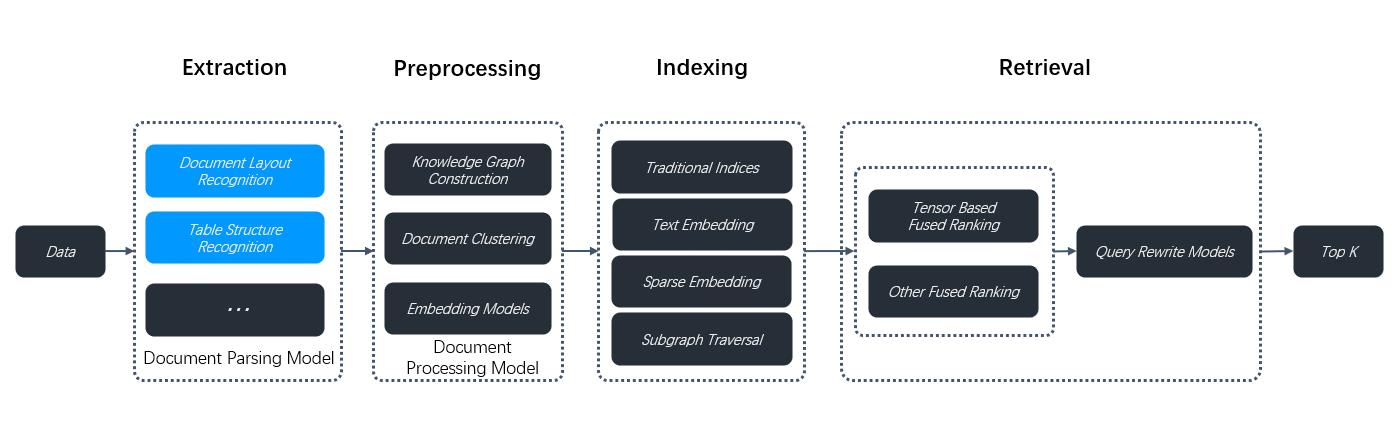
Prerequisites[](https://ragflow.io/docs/dev/select_pdf_parser#prerequisites "Direct link to Prerequisites")
-------------------------------------------------------------------------------------------------------------
* The PDF parser dropdown menu appears only when you select a chunking method compatible with PDFs, including:
* **General**
* **Manual**
* **Paper**
* **Book**
* **Laws**
* **Presentation**
* **One**
* To use a third-party visual model for parsing PDFs, ensure you have set a default img2txt model under **Set default models** on the **Model providers** page.
Procedure[](https://ragflow.io/docs/dev/select_pdf_parser#procedure "Direct link to Procedure")
-------------------------------------------------------------------------------------------------
1. On your knowledge base's **Configuration** page, select a chunking method, say **General**.
_The **PDF parser** dropdown menu appears._
2. Select the option that works best with your scenario:
* DeepDoc: (Default) The default visual model performing OCR, TSR, and DLR tasks on PDFs, which can be time-consuming.
* Naive: Skip OCR, TSR, and DLR tasks if _all_ your PDFs are plain text.
* A third-party visual model provided by a specific model provider.
WARNING
Third-party visual models are marked **Experimental**, because we have not fully tested these models for the aforementioned data extraction tasks.
Frequently asked questions[](https://ragflow.io/docs/dev/select_pdf_parser#frequently-asked-questions "Direct link to Frequently asked questions")
----------------------------------------------------------------------------------------------------------------------------------------------------
### When should I select DeepDoc or a third-party visual model as the PDF parser?[](https://ragflow.io/docs/dev/select_pdf_parser#when-should-i-select-deepdoc-or-a-third-party-visual-model-as-the-pdf-parser "Direct link to When should I select DeepDoc or a third-party visual model as the PDF parser?")
Use a visual model to extract data if your PDFs contain formatted or image-based text rather than plain text. DeepDoc is the default visual model but can be time-consuming. You can also choose a lightweight or high-performance img2txt model depending on your needs and hardware capabilities.
### Can I select a visual model to parse my DOCX files?[](https://ragflow.io/docs/dev/select_pdf_parser#can-i-select-a-visual-model-to-parse-my-docx-files "Direct link to Can I select a visual model to parse my DOCX files?")
No, you cannot. This dropdown menu is for PDFs only. To use this feature, convert your DOCX files to PDF first.
* [Prerequisites](https://ragflow.io/docs/dev/select_pdf_parser#prerequisites)
* [Procedure](https://ragflow.io/docs/dev/select_pdf_parser#procedure)
* [Frequently asked questions](https://ragflow.io/docs/dev/select_pdf_parser#frequently-asked-questions)
* [When should I select DeepDoc or a third-party visual model as the PDF parser?](https://ragflow.io/docs/dev/select_pdf_parser#when-should-i-select-deepdoc-or-a-third-party-visual-model-as-the-pdf-parser)
* [Can I select a visual model to parse my DOCX files?](https://ragflow.io/docs/dev/select_pdf_parser#can-i-select-a-visual-model-to-parse-my-docx-files)
---
# Keyword component | RAGFlow
[Skip to main content](https://ragflow.io/docs/dev/keyword_component#__docusaurus_skipToContent_fallback)
Version: DEV
On this page
Keyword component
=================
A component that extracts keywords from a user query.
* * *
A **Keyword** component uses the specified LLM to extract keywords from a user query.
Scenarios[](https://ragflow.io/docs/dev/keyword_component#scenarios "Direct link to Scenarios")
-------------------------------------------------------------------------------------------------
A **Keyword** component is essential where you need to prepare keywords for a potential keyword search.
Configurations[](https://ragflow.io/docs/dev/keyword_component#configurations "Direct link to Configurations")
----------------------------------------------------------------------------------------------------------------
### Input[](https://ragflow.io/docs/dev/keyword_component#input "Direct link to Input")
The **Keyword** component relies on input variables to specify its data inputs (queries). Click **\+ Add variable** in the **Input** section to add the desired input variables. There are two types of input variables: **Reference** and **Text**.
* **Reference**: Uses a component's output or a user input as the data source. You are required to select from the dropdown menu:
* A component ID under **Component Output**, or
* A global variable under **Begin input**, which is defined in the **Begin** component.
* **Text**: Uses fixed text as the query. You are required to enter static text.
### Model[](https://ragflow.io/docs/dev/keyword_component#model "Direct link to Model")
Click the dropdown menu of **Model** to show the model configuration window.
* **Model**: The chat model to use.
* Ensure you set the chat model correctly on the **Model providers** page.
* You can use different models for different components to increase flexibility or improve overall performance.
* **Freedom**: A shortcut to **Temperature**, **Top P**, **Presence penalty**, and **Frequency penalty** settings, indicating the freedom level of the model. From **Improvise**, **Precise**, to **Balance**, each preset configuration corresponds to a unique combination of **Temperature**, **Top P**, **Presence penalty**, and **Frequency penalty**.
This parameter has three options:
* **Improvise**: Produces more creative responses.
* **Precise**: (Default) Produces more conservative responses.
* **Balance**: A middle ground between **Improvise** and **Precise**.
* **Temperature**: The randomness level of the model's output.
Defaults to 0.1.
* Lower values lead to more deterministic and predictable outputs.
* Higher values lead to more creative and varied outputs.
* A temperature of zero results in the same output for the same prompt.
* **Top P**: Nucleus sampling.
* Reduces the likelihood of generating repetitive or unnatural text by setting a threshold _P_ and restricting the sampling to tokens with a cumulative probability exceeding _P_.
* Defaults to 0.3.
* **Presence penalty**: Encourages the model to include a more diverse range of tokens in the response.
* A higher **presence penalty** value results in the model being more likely to generate tokens not yet been included in the generated text.
* Defaults to 0.4.
* **Frequency penalty**: Discourages the model from repeating the same words or phrases too frequently in the generated text.
* A higher **frequency penalty** value results in the model being more conservative in its use of repeated tokens.
* Defaults to 0.7.
NOTE
* It is not necessary to stick with the same model for all components. If a specific model is not performing well for a particular task, consider using a different one.
* If you are uncertain about the mechanism behind **Temperature**, **Top P**, **Presence penalty**, and **Frequency penalty**, simply choose one of the three options of **Preset**.
### Number of keywords[](https://ragflow.io/docs/dev/keyword_component#number-of-keywords "Direct link to Number of keywords")
An integer specifying the number of keywords to extract from the user query. Defaults to 3. Please note that the number of extracted keywords depends on the LLM's capabilities and the token count in the user query, and may _not_ match the integer you set.
Examples[](https://ragflow.io/docs/dev/keyword_component#examples "Direct link to Examples")
----------------------------------------------------------------------------------------------
Explore our general-purpose chatbot agent template, where the **Keyword** component (component ID: **keywords**) is used to extract keywords from financial inputs for a potential stock search in the **akshare** component:
1. Click the **Agent** tab at the top center of the page to access the **Agent** page.
2. Click **\+ Create agent** on the top right of the page to open the **agent template** page.
3. On the **agent template** page, hover over the **General-purpose chatbot** card and click **Use this template**.
4. Name your new agent and click **OK** to enter the workflow editor.
5. Click on the **Keyword** component to display its **Configuration** window.
* [Scenarios](https://ragflow.io/docs/dev/keyword_component#scenarios)
* [Configurations](https://ragflow.io/docs/dev/keyword_component#configurations)
* [Input](https://ragflow.io/docs/dev/keyword_component#input)
* [Model](https://ragflow.io/docs/dev/keyword_component#model)
* [Number of keywords](https://ragflow.io/docs/dev/keyword_component#number-of-keywords)
* [Examples](https://ragflow.io/docs/dev/keyword_component#examples)
---
# Set page rank | RAGFlow
[Skip to main content](https://ragflow.io/docs/dev/set_page_rank#__docusaurus_skipToContent_fallback)
Version: DEV
On this page
Set page rank
=============
Create a step-retrieval strategy using page rank.
* * *
Scenario[](https://ragflow.io/docs/dev/set_page_rank#scenario "Direct link to Scenario")
------------------------------------------------------------------------------------------
In an AI-powered chat, you can configure a chat assistant or an agent to respond using knowledge retrieved from multiple specified knowledge bases (datasets), provided that they employ the same embedding model. In situations where you prefer information from certain knowledge base(s) to take precedence or to be retrieved first, you can use RAGFlow's page rank feature to increase the ranking of chunks from these knowledge bases. For example, if you have configured a chat assistant to draw from two knowledge bases, knowledge base A for 2024 news and knowledge base B for 2023 news, but wish to prioritize news from year 2024, this feature is particularly useful.
NOTE
It is important to note that this 'page rank' feature operates at the level of the entire knowledge base rather than on individual files or documents.
Configuration[](https://ragflow.io/docs/dev/set_page_rank#configuration "Direct link to Configuration")
---------------------------------------------------------------------------------------------------------
On the **Configuration** page of your knowledge base, drag the slider under **Page rank** to set the page rank value for your knowledge base. You are also allowed to input the intended page rank value in the field next to the slider.
NOTE
The page rank value must be an integer. Range: \[0,100\]
* 0: Disabled (Default)
* A specific value: enabled
NOTE
If you set the page rank value to a non-integer, say 1.7, it will be rounded down to the nearest integer, which in this case is 1.
Scoring mechanism[](https://ragflow.io/docs/dev/set_page_rank#scoring-mechanism "Direct link to Scoring mechanism")
---------------------------------------------------------------------------------------------------------------------
If you configure a chat assistant's **similarity threshold** to 0.2, only chunks with a hybrid score greater than 0.2 x 100 = 20 will be retrieved and sent to the chat model for content generation. This initial filtering step is crucial for narrowing down relevant information.
If you have assigned a page rank of 1 to knowledge base A (2024 news) and 0 to knowledge base B (2023 news), the final hybrid scores of the retrieved chunks will be adjusted accordingly. A chunk retrieved from knowledge base A with an initial score of 50 will receive a boost of 1 x 100 = 100 points, resulting in a final score of 50 + 1 x 100 = 150. In this way, chunks retrieved from knowledge base A will always precede chunks from knowledge base B.
* [Scenario](https://ragflow.io/docs/dev/set_page_rank#scenario)
* [Configuration](https://ragflow.io/docs/dev/set_page_rank#configuration)
* [Scoring mechanism](https://ragflow.io/docs/dev/set_page_rank#scoring-mechanism)
---
# Set metadata | RAGFlow
[Skip to main content](https://ragflow.io/docs/dev/set_metada#__docusaurus_skipToContent_fallback)
Version: DEV
On this page
Set metadata
============
Add metadata to an uploaded file
* * *
On the **Dataset** page of your knowledge base, you can add metadata to any uploaded file. This approach enables you to 'tag' additional information like URL, author, date, and more to an existing file. In an AI-powered chat, such information will be sent to the LLM with the retrieved chunks for content generation.
For example, if you have a dataset of HTML files and want the LLM to cite the source URL when responding to your query, add a `"url"` parameter to each file's metadata.

NOTE
Ensure that your metadata is in JSON format; otherwise, your updates will not be applied.

Frequently asked questions[](https://ragflow.io/docs/dev/set_metada#frequently-asked-questions "Direct link to Frequently asked questions")
---------------------------------------------------------------------------------------------------------------------------------------------
### Can I set metadata for multiple documents at once?[](https://ragflow.io/docs/dev/set_metada#can-i-set-metadata-for-multiple-documents-at-once "Direct link to Can I set metadata for multiple documents at once?")
No, you must set metadata _individually_ for each document, as RAGFlow does not support batch setting of metadata. If you still consider this feature essential, please [raise an issue](https://github.com/infiniflow/ragflow/issues)
explaining your use case and its importance.
* [Frequently asked questions](https://ragflow.io/docs/dev/set_metada#frequently-asked-questions)
* [Can I set metadata for multiple documents at once?](https://ragflow.io/docs/dev/set_metada#can-i-set-metadata-for-multiple-documents-at-once)
---
# Python API | RAGFlow
[Skip to main content](https://ragflow.io/docs/v0.19.1/python_api_reference#__docusaurus_skipToContent_fallback)
This is documentation for RAGFlow **v0.19.1**, which is no longer actively maintained.
For up-to-date documentation, see the **[latest version](https://ragflow.io/docs/dev/python_api_reference)
** (DEV).
Version: v0.19.1
On this page
Python API
==========
A complete reference for RAGFlow's Python APIs. Before proceeding, please ensure you [have your RAGFlow API key ready for authentication](https://ragflow.io/docs/v0.19.1/llm_api_key_setup)
.
NOTE
Run the following command to download the Python SDK:
pip install ragflow-sdk
* * *
ERROR CODES[](https://ragflow.io/docs/v0.19.1/python_api_reference#error-codes "Direct link to ERROR CODES")
--------------------------------------------------------------------------------------------------------------
* * *
| Code | Message | Description |
| --- | --- | --- |
| 400 | Bad Request | Invalid request parameters |
| 401 | Unauthorized | Unauthorized access |
| 403 | Forbidden | Access denied |
| 404 | Not Found | Resource not found |
| 500 | Internal Server Error | Server internal error |
| 1001 | Invalid Chunk ID | Invalid Chunk ID |
| 1002 | Chunk Update Failed | Chunk update failed |
* * *
OpenAI-Compatible API[](https://ragflow.io/docs/v0.19.1/python_api_reference#openai-compatible-api "Direct link to OpenAI-Compatible API")
--------------------------------------------------------------------------------------------------------------------------------------------
* * *
### Create chat completion[](https://ragflow.io/docs/v0.19.1/python_api_reference#create-chat-completion "Direct link to Create chat completion")
Creates a model response for the given historical chat conversation via OpenAI's API.
#### Parameters[](https://ragflow.io/docs/v0.19.1/python_api_reference#parameters "Direct link to Parameters")
##### model: `str`, _Required_[](https://ragflow.io/docs/v0.19.1/python_api_reference#model-str-required "Direct link to model-str-required")
The model used to generate the response. The server will parse this automatically, so you can set it to any value for now.
##### messages: `list[object]`, _Required_[](https://ragflow.io/docs/v0.19.1/python_api_reference#messages-listobject-required "Direct link to messages-listobject-required")
A list of historical chat messages used to generate the response. This must contain at least one message with the `user` role.
##### stream: `boolean`[](https://ragflow.io/docs/v0.19.1/python_api_reference#stream-boolean "Direct link to stream-boolean")
Whether to receive the response as a stream. Set this to `false` explicitly if you prefer to receive the entire response in one go instead of as a stream.
#### Returns[](https://ragflow.io/docs/v0.19.1/python_api_reference#returns "Direct link to Returns")
* Success: Response [message](https://platform.openai.com/docs/api-reference/chat/create)
like OpenAI
* Failure: `Exception`
#### Examples[](https://ragflow.io/docs/v0.19.1/python_api_reference#examples "Direct link to Examples")
from openai import OpenAImodel = "model"client = OpenAI(api_key="ragflow-api-key", base_url=f"http://ragflow_address/api/v1/chats_openai/")completion = client.chat.completions.create( model=model, messages=[ {"role": "system", "content": "You are a helpful assistant."}, {"role": "user", "content": "Who are you?"}, ], stream=True)stream = Trueif stream: for chunk in completion: print(chunk)else: print(completion.choices[0].message.content)
DATASET MANAGEMENT[](https://ragflow.io/docs/v0.19.1/python_api_reference#dataset-management "Direct link to DATASET MANAGEMENT")
-----------------------------------------------------------------------------------------------------------------------------------
* * *
### Create dataset[](https://ragflow.io/docs/v0.19.1/python_api_reference#create-dataset "Direct link to Create dataset")
RAGFlow.create_dataset( name: str, avatar: Optional[str] = None, description: Optional[str] = None, embedding_model: Optional[str] = "BAAI/bge-large-zh-v1.5@BAAI", permission: str = "me", chunk_method: str = "naive", parser_config: DataSet.ParserConfig = None) -> DataSet
Creates a dataset.
#### Parameters[](https://ragflow.io/docs/v0.19.1/python_api_reference#parameters-1 "Direct link to Parameters")
##### name: `str`, _Required_[](https://ragflow.io/docs/v0.19.1/python_api_reference#name-str-required "Direct link to name-str-required")
The unique name of the dataset to create. It must adhere to the following requirements:
* Maximum 128 characters.
* Case-insensitive.
##### avatar: `str`[](https://ragflow.io/docs/v0.19.1/python_api_reference#avatar-str "Direct link to avatar-str")
Base64 encoding of the avatar. Defaults to `None`
##### description: `str`[](https://ragflow.io/docs/v0.19.1/python_api_reference#description-str "Direct link to description-str")
A brief description of the dataset to create. Defaults to `None`.
##### permission[](https://ragflow.io/docs/v0.19.1/python_api_reference#permission "Direct link to permission")
Specifies who can access the dataset to create. Available options:
* `"me"`: (Default) Only you can manage the dataset.
* `"team"`: All team members can manage the dataset.
##### chunk\_method, `str`[](https://ragflow.io/docs/v0.19.1/python_api_reference#chunk_method-str "Direct link to chunk_method-str")
The chunking method of the dataset to create. Available options:
* `"naive"`: General (default)
* `"manual`: Manual
* `"qa"`: Q&A
* `"table"`: Table
* `"paper"`: Paper
* `"book"`: Book
* `"laws"`: Laws
* `"presentation"`: Presentation
* `"picture"`: Picture
* `"one"`: One
* `"email"`: Email
##### parser\_config[](https://ragflow.io/docs/v0.19.1/python_api_reference#parser_config "Direct link to parser_config")
The parser configuration of the dataset. A `ParserConfig` object's attributes vary based on the selected `chunk_method`:
* `chunk_method`\=`"naive"`:
`{"chunk_token_num":128,"delimiter":"\\n","html4excel":False,"layout_recognize":True,"raptor":{"use_raptor":False}}`.
* `chunk_method`\=`"qa"`:
`{"raptor": {"use_raptor": False}}`
* `chunk_method`\=`"manuel"`:
`{"raptor": {"use_raptor": False}}`
* `chunk_method`\=`"table"`:
`None`
* `chunk_method`\=`"paper"`:
`{"raptor": {"use_raptor": False}}`
* `chunk_method`\=`"book"`:
`{"raptor": {"use_raptor": False}}`
* `chunk_method`\=`"laws"`:
`{"raptor": {"use_raptor": False}}`
* `chunk_method`\=`"picture"`:
`None`
* `chunk_method`\=`"presentation"`:
`{"raptor": {"use_raptor": False}}`
* `chunk_method`\=`"one"`:
`None`
* `chunk_method`\=`"knowledge-graph"`:
`{"chunk_token_num":128,"delimiter":"\\n","entity_types":["organization","person","location","event","time"]}`
* `chunk_method`\=`"email"`:
`None`
#### Returns[](https://ragflow.io/docs/v0.19.1/python_api_reference#returns-1 "Direct link to Returns")
* Success: A `dataset` object.
* Failure: `Exception`
#### Examples[](https://ragflow.io/docs/v0.19.1/python_api_reference#examples-1 "Direct link to Examples")
from ragflow_sdk import RAGFlowrag_object = RAGFlow(api_key="", base_url="http://:9380")dataset = rag_object.create_dataset(name="kb_1")
* * *
### Delete datasets[](https://ragflow.io/docs/v0.19.1/python_api_reference#delete-datasets "Direct link to Delete datasets")
RAGFlow.delete_datasets(ids: list[str] | None = None)
Deletes datasets by ID.
#### Parameters[](https://ragflow.io/docs/v0.19.1/python_api_reference#parameters-2 "Direct link to Parameters")
##### ids: `list[str]` or `None`, _Required_[](https://ragflow.io/docs/v0.19.1/python_api_reference#ids-liststr-or-none-required "Direct link to ids-liststr-or-none-required")
The IDs of the datasets to delete. Defaults to `None`.
* If `None`, all datasets will be deleted.
* If an array of IDs, only the specified datasets will be deleted.
* If an empty array, no datasets will be deleted.
#### Returns[](https://ragflow.io/docs/v0.19.1/python_api_reference#returns-2 "Direct link to Returns")
* Success: No value is returned.
* Failure: `Exception`
#### Examples[](https://ragflow.io/docs/v0.19.1/python_api_reference#examples-2 "Direct link to Examples")
rag_object.delete_datasets(ids=["d94a8dc02c9711f0930f7fbc369eab6d","e94a8dc02c9711f0930f7fbc369eab6e"])
* * *
### List datasets[](https://ragflow.io/docs/v0.19.1/python_api_reference#list-datasets "Direct link to List datasets")
RAGFlow.list_datasets( page: int = 1, page_size: int = 30, orderby: str = "create_time", desc: bool = True, id: str = None, name: str = None) -> list[DataSet]
Lists datasets.
#### Parameters[](https://ragflow.io/docs/v0.19.1/python_api_reference#parameters-3 "Direct link to Parameters")
##### page: `int`[](https://ragflow.io/docs/v0.19.1/python_api_reference#page-int "Direct link to page-int")
Specifies the page on which the datasets will be displayed. Defaults to `1`.
##### page\_size: `int`[](https://ragflow.io/docs/v0.19.1/python_api_reference#page_size-int "Direct link to page_size-int")
The number of datasets on each page. Defaults to `30`.
##### orderby: `str`[](https://ragflow.io/docs/v0.19.1/python_api_reference#orderby-str "Direct link to orderby-str")
The field by which datasets should be sorted. Available options:
* `"create_time"` (default)
* `"update_time"`
##### desc: `bool`[](https://ragflow.io/docs/v0.19.1/python_api_reference#desc-bool "Direct link to desc-bool")
Indicates whether the retrieved datasets should be sorted in descending order. Defaults to `True`.
##### id: `str`[](https://ragflow.io/docs/v0.19.1/python_api_reference#id-str "Direct link to id-str")
The ID of the dataset to retrieve. Defaults to `None`.
##### name: `str`[](https://ragflow.io/docs/v0.19.1/python_api_reference#name-str "Direct link to name-str")
The name of the dataset to retrieve. Defaults to `None`.
#### Returns[](https://ragflow.io/docs/v0.19.1/python_api_reference#returns-3 "Direct link to Returns")
* Success: A list of `DataSet` objects.
* Failure: `Exception`.
#### Examples[](https://ragflow.io/docs/v0.19.1/python_api_reference#examples-3 "Direct link to Examples")
##### List all datasets[](https://ragflow.io/docs/v0.19.1/python_api_reference#list-all-datasets "Direct link to List all datasets")
for dataset in rag_object.list_datasets(): print(dataset)
##### Retrieve a dataset by ID[](https://ragflow.io/docs/v0.19.1/python_api_reference#retrieve-a-dataset-by-id "Direct link to Retrieve a dataset by ID")
dataset = rag_object.list_datasets(id = "id_1")print(dataset[0])
* * *
### Update dataset[](https://ragflow.io/docs/v0.19.1/python_api_reference#update-dataset "Direct link to Update dataset")
DataSet.update(update_message: dict)
Updates configurations for the current dataset.
#### Parameters[](https://ragflow.io/docs/v0.19.1/python_api_reference#parameters-4 "Direct link to Parameters")
##### update\_message: `dict[str, str|int]`, _Required_[](https://ragflow.io/docs/v0.19.1/python_api_reference#update_message-dictstr-strint-required "Direct link to update_message-dictstr-strint-required")
A dictionary representing the attributes to update, with the following keys:
* `"name"`: `str` The revised name of the dataset.
* Basic Multilingual Plane (BMP) only
* Maximum 128 characters
* Case-insensitive
* `"avatar"`: (_Body parameter_), `string`
The updated base64 encoding of the avatar.
* Maximum 65535 characters
* `"embedding_model"`: (_Body parameter_), `string`
The updated embedding model name.
* Ensure that `"chunk_count"` is `0` before updating `"embedding_model"`.
* Maximum 255 characters
* Must follow `model_name@model_factory` format
* `"permission"`: (_Body parameter_), `string`
The updated dataset permission. Available options:
* `"me"`: (Default) Only you can manage the dataset.
* `"team"`: All team members can manage the dataset.
* `"pagerank"`: (_Body parameter_), `int`
refer to [Set page rank](https://ragflow.io/docs/dev/set_page_rank)
* Default: `0`
* Minimum: `0`
* Maximum: `100`
* `"chunk_method"`: (_Body parameter_), `enum`
The chunking method for the dataset. Available options:
* `"naive"`: General (default)
* `"book"`: Book
* `"email"`: Email
* `"laws"`: Laws
* `"manual"`: Manual
* `"one"`: One
* `"paper"`: Paper
* `"picture"`: Picture
* `"presentation"`: Presentation
* `"qa"`: Q&A
* `"table"`: Table
* `"tag"`: Tag
#### Returns[](https://ragflow.io/docs/v0.19.1/python_api_reference#returns-4 "Direct link to Returns")
* Success: No value is returned.
* Failure: `Exception`
#### Examples[](https://ragflow.io/docs/v0.19.1/python_api_reference#examples-4 "Direct link to Examples")
from ragflow_sdk import RAGFlowrag_object = RAGFlow(api_key="", base_url="http://:9380")dataset = rag_object.list_datasets(name="kb_name")dataset = dataset[0]dataset.update({"embedding_model":"BAAI/bge-zh-v1.5", "chunk_method":"manual"})
* * *
FILE MANAGEMENT WITHIN DATASET[](https://ragflow.io/docs/v0.19.1/python_api_reference#file-management-within-dataset "Direct link to FILE MANAGEMENT WITHIN DATASET")
-----------------------------------------------------------------------------------------------------------------------------------------------------------------------
* * *
### Upload documents[](https://ragflow.io/docs/v0.19.1/python_api_reference#upload-documents "Direct link to Upload documents")
DataSet.upload_documents(document_list: list[dict])
Uploads documents to the current dataset.
#### Parameters[](https://ragflow.io/docs/v0.19.1/python_api_reference#parameters-5 "Direct link to Parameters")
##### document\_list: `list[dict]`, _Required_[](https://ragflow.io/docs/v0.19.1/python_api_reference#document_list-listdict-required "Direct link to document_list-listdict-required")
A list of dictionaries representing the documents to upload, each containing the following keys:
* `"display_name"`: (Optional) The file name to display in the dataset.
* `"blob"`: (Optional) The binary content of the file to upload.
#### Returns[](https://ragflow.io/docs/v0.19.1/python_api_reference#returns-5 "Direct link to Returns")
* Success: No value is returned.
* Failure: `Exception`
#### Examples[](https://ragflow.io/docs/v0.19.1/python_api_reference#examples-5 "Direct link to Examples")
dataset = rag_object.create_dataset(name="kb_name")dataset.upload_documents([{"display_name": "1.txt", "blob": ""}, {"display_name": "2.pdf", "blob": ""}])
* * *
### Update document[](https://ragflow.io/docs/v0.19.1/python_api_reference#update-document "Direct link to Update document")
Document.update(update_message:dict)
Updates configurations for the current document.
#### Parameters[](https://ragflow.io/docs/v0.19.1/python_api_reference#parameters-6 "Direct link to Parameters")
##### update\_message: `dict[str, str|dict[]]`, _Required_[](https://ragflow.io/docs/v0.19.1/python_api_reference#update_message-dictstr-strdict-required "Direct link to update_message-dictstr-strdict-required")
A dictionary representing the attributes to update, with the following keys:
* `"display_name"`: `str` The name of the document to update.
* `"meta_fields"`: `dict[str, Any]` The meta fields of the document.
* `"chunk_method"`: `str` The parsing method to apply to the document.
* `"naive"`: General
* `"manual`: Manual
* `"qa"`: Q&A
* `"table"`: Table
* `"paper"`: Paper
* `"book"`: Book
* `"laws"`: Laws
* `"presentation"`: Presentation
* `"picture"`: Picture
* `"one"`: One
* `"email"`: Email
* `"parser_config"`: `dict[str, Any]` The parsing configuration for the document. Its attributes vary based on the selected `"chunk_method"`:
* `"chunk_method"`\=`"naive"`:
`{"chunk_token_num":128,"delimiter":"\\n","html4excel":False,"layout_recognize":True,"raptor":{"use_raptor":False}}`.
* `chunk_method`\=`"qa"`:
`{"raptor": {"use_raptor": False}}`
* `chunk_method`\=`"manuel"`:
`{"raptor": {"use_raptor": False}}`
* `chunk_method`\=`"table"`:
`None`
* `chunk_method`\=`"paper"`:
`{"raptor": {"use_raptor": False}}`
* `chunk_method`\=`"book"`:
`{"raptor": {"use_raptor": False}}`
* `chunk_method`\=`"laws"`:
`{"raptor": {"use_raptor": False}}`
* `chunk_method`\=`"presentation"`:
`{"raptor": {"use_raptor": False}}`
* `chunk_method`\=`"picture"`:
`None`
* `chunk_method`\=`"one"`:
`None`
* `chunk_method`\=`"knowledge-graph"`:
`{"chunk_token_num":128,"delimiter":"\\n","entity_types":["organization","person","location","event","time"]}`
* `chunk_method`\=`"email"`:
`None`
#### Returns[](https://ragflow.io/docs/v0.19.1/python_api_reference#returns-6 "Direct link to Returns")
* Success: No value is returned.
* Failure: `Exception`
#### Examples[](https://ragflow.io/docs/v0.19.1/python_api_reference#examples-6 "Direct link to Examples")
from ragflow_sdk import RAGFlowrag_object = RAGFlow(api_key="", base_url="http://:9380")dataset = rag_object.list_datasets(id='id')dataset = dataset[0]doc = dataset.list_documents(id="wdfxb5t547d")doc = doc[0]doc.update([{"parser_config": {"chunk_token_count": 256}}, {"chunk_method": "manual"}])
* * *
### Download document[](https://ragflow.io/docs/v0.19.1/python_api_reference#download-document "Direct link to Download document")
Document.download() -> bytes
Downloads the current document.
#### Returns[](https://ragflow.io/docs/v0.19.1/python_api_reference#returns-7 "Direct link to Returns")
The downloaded document in bytes.
#### Examples[](https://ragflow.io/docs/v0.19.1/python_api_reference#examples-7 "Direct link to Examples")
from ragflow_sdk import RAGFlowrag_object = RAGFlow(api_key="", base_url="http://:9380")dataset = rag_object.list_datasets(id="id")dataset = dataset[0]doc = dataset.list_documents(id="wdfxb5t547d")doc = doc[0]open("~/ragflow.txt", "wb+").write(doc.download())print(doc)
* * *
### List documents[](https://ragflow.io/docs/v0.19.1/python_api_reference#list-documents "Direct link to List documents")
Dataset.list_documents(id:str =None, keywords: str=None, page: int=1, page_size:int = 30, order_by:str = "create_time", desc: bool = True) -> list[Document]
Lists documents in the current dataset.
#### Parameters[](https://ragflow.io/docs/v0.19.1/python_api_reference#parameters-7 "Direct link to Parameters")
##### id: `str`[](https://ragflow.io/docs/v0.19.1/python_api_reference#id-str-1 "Direct link to id-str-1")
The ID of the document to retrieve. Defaults to `None`.
##### keywords: `str`[](https://ragflow.io/docs/v0.19.1/python_api_reference#keywords-str "Direct link to keywords-str")
The keywords used to match document titles. Defaults to `None`.
##### page: `int`[](https://ragflow.io/docs/v0.19.1/python_api_reference#page-int-1 "Direct link to page-int-1")
Specifies the page on which the documents will be displayed. Defaults to `1`.
##### page\_size: `int`[](https://ragflow.io/docs/v0.19.1/python_api_reference#page_size-int-1 "Direct link to page_size-int-1")
The maximum number of documents on each page. Defaults to `30`.
##### orderby: `str`[](https://ragflow.io/docs/v0.19.1/python_api_reference#orderby-str-1 "Direct link to orderby-str-1")
The field by which documents should be sorted. Available options:
* `"create_time"` (default)
* `"update_time"`
##### desc: `bool`[](https://ragflow.io/docs/v0.19.1/python_api_reference#desc-bool-1 "Direct link to desc-bool-1")
Indicates whether the retrieved documents should be sorted in descending order. Defaults to `True`.
#### Returns[](https://ragflow.io/docs/v0.19.1/python_api_reference#returns-8 "Direct link to Returns")
* Success: A list of `Document` objects.
* Failure: `Exception`.
A `Document` object contains the following attributes:
* `id`: The document ID. Defaults to `""`.
* `name`: The document name. Defaults to `""`.
* `thumbnail`: The thumbnail image of the document. Defaults to `None`.
* `dataset_id`: The dataset ID associated with the document. Defaults to `None`.
* `chunk_method` The chunking method name. Defaults to `"naive"`.
* `source_type`: The source type of the document. Defaults to `"local"`.
* `type`: Type or category of the document. Defaults to `""`. Reserved for future use.
* `created_by`: `str` The creator of the document. Defaults to `""`.
* `size`: `int` The document size in bytes. Defaults to `0`.
* `token_count`: `int` The number of tokens in the document. Defaults to `0`.
* `chunk_count`: `int` The number of chunks in the document. Defaults to `0`.
* `progress`: `float` The current processing progress as a percentage. Defaults to `0.0`.
* `progress_msg`: `str` A message indicating the current progress status. Defaults to `""`.
* `process_begin_at`: `datetime` The start time of document processing. Defaults to `None`.
* `process_duation`: `float` Duration of the processing in seconds. Defaults to `0.0`.
* `run`: `str` The document's processing status:
* `"UNSTART"` (default)
* `"RUNNING"`
* `"CANCEL"`
* `"DONE"`
* `"FAIL"`
* `status`: `str` Reserved for future use.
* `parser_config`: `ParserConfig` Configuration object for the parser. Its attributes vary based on the selected `chunk_method`:
* `chunk_method`\=`"naive"`:
`{"chunk_token_num":128,"delimiter":"\\n","html4excel":False,"layout_recognize":True,"raptor":{"use_raptor":False}}`.
* `chunk_method`\=`"qa"`:
`{"raptor": {"use_raptor": False}}`
* `chunk_method`\=`"manuel"`:
`{"raptor": {"use_raptor": False}}`
* `chunk_method`\=`"table"`:
`None`
* `chunk_method`\=`"paper"`:
`{"raptor": {"use_raptor": False}}`
* `chunk_method`\=`"book"`:
`{"raptor": {"use_raptor": False}}`
* `chunk_method`\=`"laws"`:
`{"raptor": {"use_raptor": False}}`
* `chunk_method`\=`"presentation"`:
`{"raptor": {"use_raptor": False}}`
* `chunk_method`\=`"picure"`:
`None`
* `chunk_method`\=`"one"`:
`None`
* `chunk_method`\=`"email"`:
`None`
#### Examples[](https://ragflow.io/docs/v0.19.1/python_api_reference#examples-8 "Direct link to Examples")
from ragflow_sdk import RAGFlowrag_object = RAGFlow(api_key="", base_url="http://:9380")dataset = rag_object.create_dataset(name="kb_1")filename1 = "~/ragflow.txt"blob = open(filename1 , "rb").read()dataset.upload_documents([{"name":filename1,"blob":blob}])for doc in dataset.list_documents(keywords="rag", page=0, page_size=12): print(doc)
* * *
### Delete documents[](https://ragflow.io/docs/v0.19.1/python_api_reference#delete-documents "Direct link to Delete documents")
DataSet.delete_documents(ids: list[str] = None)
Deletes documents by ID.
#### Parameters[](https://ragflow.io/docs/v0.19.1/python_api_reference#parameters-8 "Direct link to Parameters")
##### ids: `list[list]`[](https://ragflow.io/docs/v0.19.1/python_api_reference#ids-listlist "Direct link to ids-listlist")
The IDs of the documents to delete. Defaults to `None`. If it is not specified, all documents in the dataset will be deleted.
#### Returns[](https://ragflow.io/docs/v0.19.1/python_api_reference#returns-9 "Direct link to Returns")
* Success: No value is returned.
* Failure: `Exception`
#### Examples[](https://ragflow.io/docs/v0.19.1/python_api_reference#examples-9 "Direct link to Examples")
from ragflow_sdk import RAGFlowrag_object = RAGFlow(api_key="", base_url="http://:9380")dataset = rag_object.list_datasets(name="kb_1")dataset = dataset[0]dataset.delete_documents(ids=["id_1","id_2"])
* * *
### Parse documents[](https://ragflow.io/docs/v0.19.1/python_api_reference#parse-documents "Direct link to Parse documents")
DataSet.async_parse_documents(document_ids:list[str]) -> None
Parses documents in the current dataset.
#### Parameters[](https://ragflow.io/docs/v0.19.1/python_api_reference#parameters-9 "Direct link to Parameters")
##### document\_ids: `list[str]`, _Required_[](https://ragflow.io/docs/v0.19.1/python_api_reference#document_ids-liststr-required "Direct link to document_ids-liststr-required")
The IDs of the documents to parse.
#### Returns[](https://ragflow.io/docs/v0.19.1/python_api_reference#returns-10 "Direct link to Returns")
* Success: No value is returned.
* Failure: `Exception`
#### Examples[](https://ragflow.io/docs/v0.19.1/python_api_reference#examples-10 "Direct link to Examples")
rag_object = RAGFlow(api_key="", base_url="http://:9380")dataset = rag_object.create_dataset(name="dataset_name")documents = [ {'display_name': 'test1.txt', 'blob': open('./test_data/test1.txt',"rb").read()}, {'display_name': 'test2.txt', 'blob': open('./test_data/test2.txt',"rb").read()}, {'display_name': 'test3.txt', 'blob': open('./test_data/test3.txt',"rb").read()}]dataset.upload_documents(documents)documents = dataset.list_documents(keywords="test")ids = []for document in documents: ids.append(document.id)dataset.async_parse_documents(ids)print("Async bulk parsing initiated.")
* * *
### Stop parsing documents[](https://ragflow.io/docs/v0.19.1/python_api_reference#stop-parsing-documents "Direct link to Stop parsing documents")
DataSet.async_cancel_parse_documents(document_ids:list[str])-> None
Stops parsing specified documents.
#### Parameters[](https://ragflow.io/docs/v0.19.1/python_api_reference#parameters-10 "Direct link to Parameters")
##### document\_ids: `list[str]`, _Required_[](https://ragflow.io/docs/v0.19.1/python_api_reference#document_ids-liststr-required-1 "Direct link to document_ids-liststr-required-1")
The IDs of the documents for which parsing should be stopped.
#### Returns[](https://ragflow.io/docs/v0.19.1/python_api_reference#returns-11 "Direct link to Returns")
* Success: No value is returned.
* Failure: `Exception`
#### Examples[](https://ragflow.io/docs/v0.19.1/python_api_reference#examples-11 "Direct link to Examples")
rag_object = RAGFlow(api_key="", base_url="http://:9380")dataset = rag_object.create_dataset(name="dataset_name")documents = [ {'display_name': 'test1.txt', 'blob': open('./test_data/test1.txt',"rb").read()}, {'display_name': 'test2.txt', 'blob': open('./test_data/test2.txt',"rb").read()}, {'display_name': 'test3.txt', 'blob': open('./test_data/test3.txt',"rb").read()}]dataset.upload_documents(documents)documents = dataset.list_documents(keywords="test")ids = []for document in documents: ids.append(document.id)dataset.async_parse_documents(ids)print("Async bulk parsing initiated.")dataset.async_cancel_parse_documents(ids)print("Async bulk parsing cancelled.")
* * *
CHUNK MANAGEMENT WITHIN DATASET[](https://ragflow.io/docs/v0.19.1/python_api_reference#chunk-management-within-dataset "Direct link to CHUNK MANAGEMENT WITHIN DATASET")
--------------------------------------------------------------------------------------------------------------------------------------------------------------------------
* * *
### Add chunk[](https://ragflow.io/docs/v0.19.1/python_api_reference#add-chunk "Direct link to Add chunk")
Document.add_chunk(content:str, important_keywords:list[str] = []) -> Chunk
Adds a chunk to the current document.
#### Parameters[](https://ragflow.io/docs/v0.19.1/python_api_reference#parameters-11 "Direct link to Parameters")
##### content: `str`, _Required_[](https://ragflow.io/docs/v0.19.1/python_api_reference#content-str-required "Direct link to content-str-required")
The text content of the chunk.
##### important\_keywords: `list[str]`[](https://ragflow.io/docs/v0.19.1/python_api_reference#important_keywords-liststr "Direct link to important_keywords-liststr")
The key terms or phrases to tag with the chunk.
#### Returns[](https://ragflow.io/docs/v0.19.1/python_api_reference#returns-12 "Direct link to Returns")
* Success: A `Chunk` object.
* Failure: `Exception`.
A `Chunk` object contains the following attributes:
* `id`: `str`: The chunk ID.
* `content`: `str` The text content of the chunk.
* `important_keywords`: `list[str]` A list of key terms or phrases tagged with the chunk.
* `create_time`: `str` The time when the chunk was created (added to the document).
* `create_timestamp`: `float` The timestamp representing the creation time of the chunk, expressed in seconds since January 1, 1970.
* `dataset_id`: `str` The ID of the associated dataset.
* `document_name`: `str` The name of the associated document.
* `document_id`: `str` The ID of the associated document.
* `available`: `bool` The chunk's availability status in the dataset. Value options:
* `False`: Unavailable
* `True`: Available (default)
#### Examples[](https://ragflow.io/docs/v0.19.1/python_api_reference#examples-12 "Direct link to Examples")
from ragflow_sdk import RAGFlowrag_object = RAGFlow(api_key="", base_url="http://:9380")datasets = rag_object.list_datasets(id="123")dataset = datasets[0]doc = dataset.list_documents(id="wdfxb5t547d")doc = doc[0]chunk = doc.add_chunk(content="xxxxxxx")
* * *
### List chunks[](https://ragflow.io/docs/v0.19.1/python_api_reference#list-chunks "Direct link to List chunks")
Document.list_chunks(keywords: str = None, page: int = 1, page_size: int = 30, id : str = None) -> list[Chunk]
Lists chunks in the current document.
#### Parameters[](https://ragflow.io/docs/v0.19.1/python_api_reference#parameters-12 "Direct link to Parameters")
##### keywords: `str`[](https://ragflow.io/docs/v0.19.1/python_api_reference#keywords-str-1 "Direct link to keywords-str-1")
The keywords used to match chunk content. Defaults to `None`
##### page: `int`[](https://ragflow.io/docs/v0.19.1/python_api_reference#page-int-2 "Direct link to page-int-2")
Specifies the page on which the chunks will be displayed. Defaults to `1`.
##### page\_size: `int`[](https://ragflow.io/docs/v0.19.1/python_api_reference#page_size-int-2 "Direct link to page_size-int-2")
The maximum number of chunks on each page. Defaults to `30`.
##### id: `str`[](https://ragflow.io/docs/v0.19.1/python_api_reference#id-str-2 "Direct link to id-str-2")
The ID of the chunk to retrieve. Default: `None`
#### Returns[](https://ragflow.io/docs/v0.19.1/python_api_reference#returns-13 "Direct link to Returns")
* Success: A list of `Chunk` objects.
* Failure: `Exception`.
#### Examples[](https://ragflow.io/docs/v0.19.1/python_api_reference#examples-13 "Direct link to Examples")
from ragflow_sdk import RAGFlowrag_object = RAGFlow(api_key="", base_url="http://:9380")dataset = rag_object.list_datasets("123")dataset = dataset[0]docs = dataset.list_documents(keywords="test", page=1, page_size=12)for chunk in docs[0].list_chunks(keywords="rag", page=0, page_size=12): print(chunk)
* * *
### Delete chunks[](https://ragflow.io/docs/v0.19.1/python_api_reference#delete-chunks "Direct link to Delete chunks")
Document.delete_chunks(chunk_ids: list[str])
Deletes chunks by ID.
#### Parameters[](https://ragflow.io/docs/v0.19.1/python_api_reference#parameters-13 "Direct link to Parameters")
##### chunk\_ids: `list[str]`[](https://ragflow.io/docs/v0.19.1/python_api_reference#chunk_ids-liststr "Direct link to chunk_ids-liststr")
The IDs of the chunks to delete. Defaults to `None`. If it is not specified, all chunks of the current document will be deleted.
#### Returns[](https://ragflow.io/docs/v0.19.1/python_api_reference#returns-14 "Direct link to Returns")
* Success: No value is returned.
* Failure: `Exception`
#### Examples[](https://ragflow.io/docs/v0.19.1/python_api_reference#examples-14 "Direct link to Examples")
from ragflow_sdk import RAGFlowrag_object = RAGFlow(api_key="", base_url="http://:9380")dataset = rag_object.list_datasets(id="123")dataset = dataset[0]doc = dataset.list_documents(id="wdfxb5t547d")doc = doc[0]chunk = doc.add_chunk(content="xxxxxxx")doc.delete_chunks(["id_1","id_2"])
* * *
### Update chunk[](https://ragflow.io/docs/v0.19.1/python_api_reference#update-chunk "Direct link to Update chunk")
Chunk.update(update_message: dict)
Updates content or configurations for the current chunk.
#### Parameters[](https://ragflow.io/docs/v0.19.1/python_api_reference#parameters-14 "Direct link to Parameters")
##### update\_message: `dict[str, str|list[str]|int]` _Required_[](https://ragflow.io/docs/v0.19.1/python_api_reference#update_message-dictstr-strliststrint-required "Direct link to update_message-dictstr-strliststrint-required")
A dictionary representing the attributes to update, with the following keys:
* `"content"`: `str` The text content of the chunk.
* `"important_keywords"`: `list[str]` A list of key terms or phrases to tag with the chunk.
* `"available"`: `bool` The chunk's availability status in the dataset. Value options:
* `False`: Unavailable
* `True`: Available (default)
#### Returns[](https://ragflow.io/docs/v0.19.1/python_api_reference#returns-15 "Direct link to Returns")
* Success: No value is returned.
* Failure: `Exception`
#### Examples[](https://ragflow.io/docs/v0.19.1/python_api_reference#examples-15 "Direct link to Examples")
from ragflow_sdk import RAGFlowrag_object = RAGFlow(api_key="", base_url="http://:9380")dataset = rag_object.list_datasets(id="123")dataset = dataset[0]doc = dataset.list_documents(id="wdfxb5t547d")doc = doc[0]chunk = doc.add_chunk(content="xxxxxxx")chunk.update({"content":"sdfx..."})
* * *
### Retrieve chunks[](https://ragflow.io/docs/v0.19.1/python_api_reference#retrieve-chunks "Direct link to Retrieve chunks")
RAGFlow.retrieve(question:str="", dataset_ids:list[str]=None, document_ids=list[str]=None, page:int=1, page_size:int=30, similarity_threshold:float=0.2, vector_similarity_weight:float=0.3, top_k:int=1024,rerank_id:str=None,keyword:bool=False,highlight:bool=False) -> list[Chunk]
Retrieves chunks from specified datasets.
#### Parameters[](https://ragflow.io/docs/v0.19.1/python_api_reference#parameters-15 "Direct link to Parameters")
##### question: `str`, _Required_[](https://ragflow.io/docs/v0.19.1/python_api_reference#question-str-required "Direct link to question-str-required")
The user query or query keywords. Defaults to `""`.
##### dataset\_ids: `list[str]`, _Required_[](https://ragflow.io/docs/v0.19.1/python_api_reference#dataset_ids-liststr-required "Direct link to dataset_ids-liststr-required")
The IDs of the datasets to search. Defaults to `None`.
##### document\_ids: `list[str]`[](https://ragflow.io/docs/v0.19.1/python_api_reference#document_ids-liststr "Direct link to document_ids-liststr")
The IDs of the documents to search. Defaults to `None`. You must ensure all selected documents use the same embedding model. Otherwise, an error will occur.
##### page: `int`[](https://ragflow.io/docs/v0.19.1/python_api_reference#page-int-3 "Direct link to page-int-3")
The starting index for the documents to retrieve. Defaults to `1`.
##### page\_size: `int`[](https://ragflow.io/docs/v0.19.1/python_api_reference#page_size-int-3 "Direct link to page_size-int-3")
The maximum number of chunks to retrieve. Defaults to `30`.
##### Similarity\_threshold: `float`[](https://ragflow.io/docs/v0.19.1/python_api_reference#similarity_threshold-float "Direct link to similarity_threshold-float")
The minimum similarity score. Defaults to `0.2`.
##### vector\_similarity\_weight: `float`[](https://ragflow.io/docs/v0.19.1/python_api_reference#vector_similarity_weight-float "Direct link to vector_similarity_weight-float")
The weight of vector cosine similarity. Defaults to `0.3`. If x represents the vector cosine similarity, then (1 - x) is the term similarity weight.
##### top\_k: `int`[](https://ragflow.io/docs/v0.19.1/python_api_reference#top_k-int "Direct link to top_k-int")
The number of chunks engaged in vector cosine computation. Defaults to `1024`.
##### rerank\_id: `str`[](https://ragflow.io/docs/v0.19.1/python_api_reference#rerank_id-str "Direct link to rerank_id-str")
The ID of the rerank model. Defaults to `None`.
##### keyword: `bool`[](https://ragflow.io/docs/v0.19.1/python_api_reference#keyword-bool "Direct link to keyword-bool")
Indicates whether to enable keyword-based matching:
* `True`: Enable keyword-based matching.
* `False`: Disable keyword-based matching (default).
##### highlight: `bool`[](https://ragflow.io/docs/v0.19.1/python_api_reference#highlight-bool "Direct link to highlight-bool")
Specifies whether to enable highlighting of matched terms in the results:
* `True`: Enable highlighting of matched terms.
* `False`: Disable highlighting of matched terms (default).
#### Returns[](https://ragflow.io/docs/v0.19.1/python_api_reference#returns-16 "Direct link to Returns")
* Success: A list of `Chunk` objects representing the document chunks.
* Failure: `Exception`
#### Examples[](https://ragflow.io/docs/v0.19.1/python_api_reference#examples-16 "Direct link to Examples")
from ragflow_sdk import RAGFlowrag_object = RAGFlow(api_key="", base_url="http://:9380")dataset = rag_object.list_datasets(name="ragflow")dataset = dataset[0]name = 'ragflow_test.txt'path = './test_data/ragflow_test.txt'documents =[{"display_name":"test_retrieve_chunks.txt","blob":open(path, "rb").read()}]docs = dataset.upload_documents(documents)doc = docs[0]doc.add_chunk(content="This is a chunk addition test")for c in rag_object.retrieve(dataset_ids=[dataset.id],document_ids=[doc.id]): print(c)
* * *
CHAT ASSISTANT MANAGEMENT[](https://ragflow.io/docs/v0.19.1/python_api_reference#chat-assistant-management "Direct link to CHAT ASSISTANT MANAGEMENT")
--------------------------------------------------------------------------------------------------------------------------------------------------------
* * *
### Create chat assistant[](https://ragflow.io/docs/v0.19.1/python_api_reference#create-chat-assistant "Direct link to Create chat assistant")
RAGFlow.create_chat( name: str, avatar: str = "", dataset_ids: list[str] = [], llm: Chat.LLM = None, prompt: Chat.Prompt = None) -> Chat
Creates a chat assistant.
#### Parameters[](https://ragflow.io/docs/v0.19.1/python_api_reference#parameters-16 "Direct link to Parameters")
##### name: `str`, _Required_[](https://ragflow.io/docs/v0.19.1/python_api_reference#name-str-required-1 "Direct link to name-str-required-1")
The name of the chat assistant.
##### avatar: `str`[](https://ragflow.io/docs/v0.19.1/python_api_reference#avatar-str-1 "Direct link to avatar-str-1")
Base64 encoding of the avatar. Defaults to `""`.
##### dataset\_ids: `list[str]`[](https://ragflow.io/docs/v0.19.1/python_api_reference#dataset_ids-liststr "Direct link to dataset_ids-liststr")
The IDs of the associated datasets. Defaults to `[""]`.
##### llm: `Chat.LLM`[](https://ragflow.io/docs/v0.19.1/python_api_reference#llm-chatllm "Direct link to llm-chatllm")
The LLM settings for the chat assistant to create. Defaults to `None`. When the value is `None`, a dictionary with the following values will be generated as the default. An `LLM` object contains the following attributes:
* `model_name`: `str`
The chat model name. If it is `None`, the user's default chat model will be used.
* `temperature`: `float`
Controls the randomness of the model's predictions. A lower temperature results in more conservative responses, while a higher temperature yields more creative and diverse responses. Defaults to `0.1`.
* `top_p`: `float`
Also known as “nucleus sampling”, this parameter sets a threshold to select a smaller set of words to sample from. It focuses on the most likely words, cutting off the less probable ones. Defaults to `0.3`
* `presence_penalty`: `float`
This discourages the model from repeating the same information by penalizing words that have already appeared in the conversation. Defaults to `0.2`.
* `frequency penalty`: `float`
Similar to the presence penalty, this reduces the model’s tendency to repeat the same words frequently. Defaults to `0.7`.
##### prompt: `Chat.Prompt`[](https://ragflow.io/docs/v0.19.1/python_api_reference#prompt-chatprompt "Direct link to prompt-chatprompt")
Instructions for the LLM to follow. A `Prompt` object contains the following attributes:
* `similarity_threshold`: `float` RAGFlow employs either a combination of weighted keyword similarity and weighted vector cosine similarity, or a combination of weighted keyword similarity and weighted reranking score during retrieval. If a similarity score falls below this threshold, the corresponding chunk will be excluded from the results. The default value is `0.2`.
* `keywords_similarity_weight`: `float` This argument sets the weight of keyword similarity in the hybrid similarity score with vector cosine similarity or reranking model similarity. By adjusting this weight, you can control the influence of keyword similarity in relation to other similarity measures. The default value is `0.7`.
* `top_n`: `int` This argument specifies the number of top chunks with similarity scores above the `similarity_threshold` that are fed to the LLM. The LLM will _only_ access these 'top N' chunks. The default value is `8`.
* `variables`: `list[dict[]]` This argument lists the variables to use in the 'System' field of **Chat Configurations**. Note that:
* `knowledge` is a reserved variable, which represents the retrieved chunks.
* All the variables in 'System' should be curly bracketed.
* The default value is `[{"key": "knowledge", "optional": True}]`.
* `rerank_model`: `str` If it is not specified, vector cosine similarity will be used; otherwise, reranking score will be used. Defaults to `""`.
* `top_k`: `int` Refers to the process of reordering or selecting the top-k items from a list or set based on a specific ranking criterion. Default to 1024.
* `empty_response`: `str` If nothing is retrieved in the dataset for the user's question, this will be used as the response. To allow the LLM to improvise when nothing is found, leave this blank. Defaults to `None`.
* `opener`: `str` The opening greeting for the user. Defaults to `"Hi! I am your assistant, can I help you?"`.
* `show_quote`: `bool` Indicates whether the source of text should be displayed. Defaults to `True`.
* `prompt`: `str` The prompt content.
#### Returns[](https://ragflow.io/docs/v0.19.1/python_api_reference#returns-17 "Direct link to Returns")
* Success: A `Chat` object representing the chat assistant.
* Failure: `Exception`
#### Examples[](https://ragflow.io/docs/v0.19.1/python_api_reference#examples-17 "Direct link to Examples")
from ragflow_sdk import RAGFlowrag_object = RAGFlow(api_key="", base_url="http://:9380")datasets = rag_object.list_datasets(name="kb_1")dataset_ids = []for dataset in datasets: dataset_ids.append(dataset.id)assistant = rag_object.create_chat("Miss R", dataset_ids=dataset_ids)
* * *
### Update chat assistant[](https://ragflow.io/docs/v0.19.1/python_api_reference#update-chat-assistant "Direct link to Update chat assistant")
Chat.update(update_message: dict)
Updates configurations for the current chat assistant.
#### Parameters[](https://ragflow.io/docs/v0.19.1/python_api_reference#parameters-17 "Direct link to Parameters")
##### update\_message: `dict[str, str|list[str]|dict[]]`, _Required_[](https://ragflow.io/docs/v0.19.1/python_api_reference#update_message-dictstr-strliststrdict-required "Direct link to update_message-dictstr-strliststrdict-required")
A dictionary representing the attributes to update, with the following keys:
* `"name"`: `str` The revised name of the chat assistant.
* `"avatar"`: `str` Base64 encoding of the avatar. Defaults to `""`
* `"dataset_ids"`: `list[str]` The datasets to update.
* `"llm"`: `dict` The LLM settings:
* `"model_name"`, `str` The chat model name.
* `"temperature"`, `float` Controls the randomness of the model's predictions. A lower temperature results in more conservative responses, while a higher temperature yields more creative and diverse responses.
* `"top_p"`, `float` Also known as “nucleus sampling”, this parameter sets a threshold to select a smaller set of words to sample from.
* `"presence_penalty"`, `float` This discourages the model from repeating the same information by penalizing words that have appeared in the conversation.
* `"frequency penalty"`, `float` Similar to presence penalty, this reduces the model’s tendency to repeat the same words.
* `"prompt"` : Instructions for the LLM to follow.
* `"similarity_threshold"`: `float` RAGFlow employs either a combination of weighted keyword similarity and weighted vector cosine similarity, or a combination of weighted keyword similarity and weighted rerank score during retrieval. This argument sets the threshold for similarities between the user query and chunks. If a similarity score falls below this threshold, the corresponding chunk will be excluded from the results. The default value is `0.2`.
* `"keywords_similarity_weight"`: `float` This argument sets the weight of keyword similarity in the hybrid similarity score with vector cosine similarity or reranking model similarity. By adjusting this weight, you can control the influence of keyword similarity in relation to other similarity measures. The default value is `0.7`.
* `"top_n"`: `int` This argument specifies the number of top chunks with similarity scores above the `similarity_threshold` that are fed to the LLM. The LLM will _only_ access these 'top N' chunks. The default value is `8`.
* `"variables"`: `list[dict[]]` This argument lists the variables to use in the 'System' field of **Chat Configurations**. Note that:
* `knowledge` is a reserved variable, which represents the retrieved chunks.
* All the variables in 'System' should be curly bracketed.
* The default value is `[{"key": "knowledge", "optional": True}]`.
* `"rerank_model"`: `str` If it is not specified, vector cosine similarity will be used; otherwise, reranking score will be used. Defaults to `""`.
* `"empty_response"`: `str` If nothing is retrieved in the dataset for the user's question, this will be used as the response. To allow the LLM to improvise when nothing is retrieved, leave this blank. Defaults to `None`.
* `"opener"`: `str` The opening greeting for the user. Defaults to `"Hi! I am your assistant, can I help you?"`.
* `"show_quote`: `bool` Indicates whether the source of text should be displayed Defaults to `True`.
* `"prompt"`: `str` The prompt content.
#### Returns[](https://ragflow.io/docs/v0.19.1/python_api_reference#returns-18 "Direct link to Returns")
* Success: No value is returned.
* Failure: `Exception`
#### Examples[](https://ragflow.io/docs/v0.19.1/python_api_reference#examples-18 "Direct link to Examples")
from ragflow_sdk import RAGFlowrag_object = RAGFlow(api_key="", base_url="http://:9380")datasets = rag_object.list_datasets(name="kb_1")dataset_id = datasets[0].idassistant = rag_object.create_chat("Miss R", dataset_ids=[dataset_id])assistant.update({"name": "Stefan", "llm": {"temperature": 0.8}, "prompt": {"top_n": 8}})
* * *
### Delete chat assistants[](https://ragflow.io/docs/v0.19.1/python_api_reference#delete-chat-assistants "Direct link to Delete chat assistants")
RAGFlow.delete_chats(ids: list[str] = None)
Deletes chat assistants by ID.
#### Parameters[](https://ragflow.io/docs/v0.19.1/python_api_reference#parameters-18 "Direct link to Parameters")
##### ids: `list[str]`[](https://ragflow.io/docs/v0.19.1/python_api_reference#ids-liststr "Direct link to ids-liststr")
The IDs of the chat assistants to delete. Defaults to `None`. If it is empty or not specified, all chat assistants in the system will be deleted.
#### Returns[](https://ragflow.io/docs/v0.19.1/python_api_reference#returns-19 "Direct link to Returns")
* Success: No value is returned.
* Failure: `Exception`
#### Examples[](https://ragflow.io/docs/v0.19.1/python_api_reference#examples-19 "Direct link to Examples")
from ragflow_sdk import RAGFlowrag_object = RAGFlow(api_key="", base_url="http://:9380")rag_object.delete_chats(ids=["id_1","id_2"])
* * *
### List chat assistants[](https://ragflow.io/docs/v0.19.1/python_api_reference#list-chat-assistants "Direct link to List chat assistants")
RAGFlow.list_chats( page: int = 1, page_size: int = 30, orderby: str = "create_time", desc: bool = True, id: str = None, name: str = None) -> list[Chat]
Lists chat assistants.
#### Parameters[](https://ragflow.io/docs/v0.19.1/python_api_reference#parameters-19 "Direct link to Parameters")
##### page: `int`[](https://ragflow.io/docs/v0.19.1/python_api_reference#page-int-4 "Direct link to page-int-4")
Specifies the page on which the chat assistants will be displayed. Defaults to `1`.
##### page\_size: `int`[](https://ragflow.io/docs/v0.19.1/python_api_reference#page_size-int-4 "Direct link to page_size-int-4")
The number of chat assistants on each page. Defaults to `30`.
##### orderby: `str`[](https://ragflow.io/docs/v0.19.1/python_api_reference#orderby-str-2 "Direct link to orderby-str-2")
The attribute by which the results are sorted. Available options:
* `"create_time"` (default)
* `"update_time"`
##### desc: `bool`[](https://ragflow.io/docs/v0.19.1/python_api_reference#desc-bool-2 "Direct link to desc-bool-2")
Indicates whether the retrieved chat assistants should be sorted in descending order. Defaults to `True`.
##### id: `str`[](https://ragflow.io/docs/v0.19.1/python_api_reference#id-str-3 "Direct link to id-str-3")
The ID of the chat assistant to retrieve. Defaults to `None`.
##### name: `str`[](https://ragflow.io/docs/v0.19.1/python_api_reference#name-str-1 "Direct link to name-str-1")
The name of the chat assistant to retrieve. Defaults to `None`.
#### Returns[](https://ragflow.io/docs/v0.19.1/python_api_reference#returns-20 "Direct link to Returns")
* Success: A list of `Chat` objects.
* Failure: `Exception`.
#### Examples[](https://ragflow.io/docs/v0.19.1/python_api_reference#examples-20 "Direct link to Examples")
from ragflow_sdk import RAGFlowrag_object = RAGFlow(api_key="", base_url="http://:9380")for assistant in rag_object.list_chats(): print(assistant)
* * *
SESSION MANAGEMENT[](https://ragflow.io/docs/v0.19.1/python_api_reference#session-management "Direct link to SESSION MANAGEMENT")
-----------------------------------------------------------------------------------------------------------------------------------
* * *
### Create session with chat assistant[](https://ragflow.io/docs/v0.19.1/python_api_reference#create-session-with-chat-assistant "Direct link to Create session with chat assistant")
Chat.create_session(name: str = "New session") -> Session
Creates a session with the current chat assistant.
#### Parameters[](https://ragflow.io/docs/v0.19.1/python_api_reference#parameters-20 "Direct link to Parameters")
##### name: `str`[](https://ragflow.io/docs/v0.19.1/python_api_reference#name-str-2 "Direct link to name-str-2")
The name of the chat session to create.
#### Returns[](https://ragflow.io/docs/v0.19.1/python_api_reference#returns-21 "Direct link to Returns")
* Success: A `Session` object containing the following attributes:
* `id`: `str` The auto-generated unique identifier of the created session.
* `name`: `str` The name of the created session.
* `message`: `list[Message]` The opening message of the created session. Default: `[{"role": "assistant", "content": "Hi! I am your assistant, can I help you?"}]`
* `chat_id`: `str` The ID of the associated chat assistant.
* Failure: `Exception`
#### Examples[](https://ragflow.io/docs/v0.19.1/python_api_reference#examples-21 "Direct link to Examples")
from ragflow_sdk import RAGFlowrag_object = RAGFlow(api_key="", base_url="http://:9380")assistant = rag_object.list_chats(name="Miss R")assistant = assistant[0]session = assistant.create_session()
* * *
### Update chat assistant's session[](https://ragflow.io/docs/v0.19.1/python_api_reference#update-chat-assistants-session "Direct link to Update chat assistant's session")
Session.update(update_message: dict)
Updates the current session of the current chat assistant.
#### Parameters[](https://ragflow.io/docs/v0.19.1/python_api_reference#parameters-21 "Direct link to Parameters")
##### update\_message: `dict[str, Any]`, _Required_[](https://ragflow.io/docs/v0.19.1/python_api_reference#update_message-dictstr-any-required "Direct link to update_message-dictstr-any-required")
A dictionary representing the attributes to update, with only one key:
* `"name"`: `str` The revised name of the session.
#### Returns[](https://ragflow.io/docs/v0.19.1/python_api_reference#returns-22 "Direct link to Returns")
* Success: No value is returned.
* Failure: `Exception`
#### Examples[](https://ragflow.io/docs/v0.19.1/python_api_reference#examples-22 "Direct link to Examples")
from ragflow_sdk import RAGFlowrag_object = RAGFlow(api_key="", base_url="http://:9380")assistant = rag_object.list_chats(name="Miss R")assistant = assistant[0]session = assistant.create_session("session_name")session.update({"name": "updated_name"})
* * *
### List chat assistant's sessions[](https://ragflow.io/docs/v0.19.1/python_api_reference#list-chat-assistants-sessions "Direct link to List chat assistant's sessions")
Chat.list_sessions( page: int = 1, page_size: int = 30, orderby: str = "create_time", desc: bool = True, id: str = None, name: str = None) -> list[Session]
Lists sessions associated with the current chat assistant.
#### Parameters[](https://ragflow.io/docs/v0.19.1/python_api_reference#parameters-22 "Direct link to Parameters")
##### page: `int`[](https://ragflow.io/docs/v0.19.1/python_api_reference#page-int-5 "Direct link to page-int-5")
Specifies the page on which the sessions will be displayed. Defaults to `1`.
##### page\_size: `int`[](https://ragflow.io/docs/v0.19.1/python_api_reference#page_size-int-5 "Direct link to page_size-int-5")
The number of sessions on each page. Defaults to `30`.
##### orderby: `str`[](https://ragflow.io/docs/v0.19.1/python_api_reference#orderby-str-3 "Direct link to orderby-str-3")
The field by which sessions should be sorted. Available options:
* `"create_time"` (default)
* `"update_time"`
##### desc: `bool`[](https://ragflow.io/docs/v0.19.1/python_api_reference#desc-bool-3 "Direct link to desc-bool-3")
Indicates whether the retrieved sessions should be sorted in descending order. Defaults to `True`.
##### id: `str`[](https://ragflow.io/docs/v0.19.1/python_api_reference#id-str-4 "Direct link to id-str-4")
The ID of the chat session to retrieve. Defaults to `None`.
##### name: `str`[](https://ragflow.io/docs/v0.19.1/python_api_reference#name-str-3 "Direct link to name-str-3")
The name of the chat session to retrieve. Defaults to `None`.
#### Returns[](https://ragflow.io/docs/v0.19.1/python_api_reference#returns-23 "Direct link to Returns")
* Success: A list of `Session` objects associated with the current chat assistant.
* Failure: `Exception`.
#### Examples[](https://ragflow.io/docs/v0.19.1/python_api_reference#examples-23 "Direct link to Examples")
from ragflow_sdk import RAGFlowrag_object = RAGFlow(api_key="", base_url="http://:9380")assistant = rag_object.list_chats(name="Miss R")assistant = assistant[0]for session in assistant.list_sessions(): print(session)
* * *
### Delete chat assistant's sessions[](https://ragflow.io/docs/v0.19.1/python_api_reference#delete-chat-assistants-sessions "Direct link to Delete chat assistant's sessions")
Chat.delete_sessions(ids:list[str] = None)
Deletes sessions of the current chat assistant by ID.
#### Parameters[](https://ragflow.io/docs/v0.19.1/python_api_reference#parameters-23 "Direct link to Parameters")
##### ids: `list[str]`[](https://ragflow.io/docs/v0.19.1/python_api_reference#ids-liststr-1 "Direct link to ids-liststr-1")
The IDs of the sessions to delete. Defaults to `None`. If it is not specified, all sessions associated with the current chat assistant will be deleted.
#### Returns[](https://ragflow.io/docs/v0.19.1/python_api_reference#returns-24 "Direct link to Returns")
* Success: No value is returned.
* Failure: `Exception`
#### Examples[](https://ragflow.io/docs/v0.19.1/python_api_reference#examples-24 "Direct link to Examples")
from ragflow_sdk import RAGFlowrag_object = RAGFlow(api_key="", base_url="http://:9380")assistant = rag_object.list_chats(name="Miss R")assistant = assistant[0]assistant.delete_sessions(ids=["id_1","id_2"])
* * *
### Converse with chat assistant[](https://ragflow.io/docs/v0.19.1/python_api_reference#converse-with-chat-assistant "Direct link to Converse with chat assistant")
Session.ask(question: str = "", stream: bool = False, **kwargs) -> Optional[Message, iter[Message]]
Asks a specified chat assistant a question to start an AI-powered conversation.
NOTE
In streaming mode, not all responses include a reference, as this depends on the system's judgement.
#### Parameters[](https://ragflow.io/docs/v0.19.1/python_api_reference#parameters-24 "Direct link to Parameters")
##### question: `str`, _Required_[](https://ragflow.io/docs/v0.19.1/python_api_reference#question-str-required-1 "Direct link to question-str-required-1")
The question to start an AI-powered conversation. Default to `""`
##### stream: `bool`[](https://ragflow.io/docs/v0.19.1/python_api_reference#stream-bool "Direct link to stream-bool")
Indicates whether to output responses in a streaming way:
* `True`: Enable streaming (default).
* `False`: Disable streaming.
##### \*\*kwargs[](https://ragflow.io/docs/v0.19.1/python_api_reference#kwargs "Direct link to **kwargs")
The parameters in prompt(system).
#### Returns[](https://ragflow.io/docs/v0.19.1/python_api_reference#returns-25 "Direct link to Returns")
* A `Message` object containing the response to the question if `stream` is set to `False`.
* An iterator containing multiple `message` objects (`iter[Message]`) if `stream` is set to `True`
The following shows the attributes of a `Message` object:
##### id: `str`[](https://ragflow.io/docs/v0.19.1/python_api_reference#id-str-5 "Direct link to id-str-5")
The auto-generated message ID.
##### content: `str`[](https://ragflow.io/docs/v0.19.1/python_api_reference#content-str "Direct link to content-str")
The content of the message. Defaults to `"Hi! I am your assistant, can I help you?"`.
##### reference: `list[Chunk]`[](https://ragflow.io/docs/v0.19.1/python_api_reference#reference-listchunk "Direct link to reference-listchunk")
A list of `Chunk` objects representing references to the message, each containing the following attributes:
* `id` `str`
The chunk ID.
* `content` `str`
The content of the chunk.
* `img_id` `str`
The ID of the snapshot of the chunk. Applicable only when the source of the chunk is an image, PPT, PPTX, or PDF file.
* `document_id` `str`
The ID of the referenced document.
* `document_name` `str`
The name of the referenced document.
* `position` `list[str]`
The location information of the chunk within the referenced document.
* `dataset_id` `str`
The ID of the dataset to which the referenced document belongs.
* `similarity` `float`
A composite similarity score of the chunk ranging from `0` to `1`, with a higher value indicating greater similarity. It is the weighted sum of `vector_similarity` and `term_similarity`.
* `vector_similarity` `float`
A vector similarity score of the chunk ranging from `0` to `1`, with a higher value indicating greater similarity between vector embeddings.
* `term_similarity` `float`
A keyword similarity score of the chunk ranging from `0` to `1`, with a higher value indicating greater similarity between keywords.
#### Examples[](https://ragflow.io/docs/v0.19.1/python_api_reference#examples-25 "Direct link to Examples")
from ragflow_sdk import RAGFlowrag_object = RAGFlow(api_key="", base_url="http://:9380")assistant = rag_object.list_chats(name="Miss R")assistant = assistant[0]session = assistant.create_session() print("\n==================== Miss R =====================\n")print("Hello. What can I do for you?")while True: question = input("\n==================== User =====================\n> ") print("\n==================== Miss R =====================\n") cont = "" for ans in session.ask(question, stream=True): print(ans.content[len(cont):], end='', flush=True) cont = ans.content
* * *
### Create session with agent[](https://ragflow.io/docs/v0.19.1/python_api_reference#create-session-with-agent "Direct link to Create session with agent")
Agent.create_session(**kwargs) -> Session
Creates a session with the current agent.
#### Parameters[](https://ragflow.io/docs/v0.19.1/python_api_reference#parameters-25 "Direct link to Parameters")
##### \*\*kwargs[](https://ragflow.io/docs/v0.19.1/python_api_reference#kwargs-1 "Direct link to **kwargs")
The parameters in `begin` component.
#### Returns[](https://ragflow.io/docs/v0.19.1/python_api_reference#returns-26 "Direct link to Returns")
* Success: A `Session` object containing the following attributes:
* `id`: `str` The auto-generated unique identifier of the created session.
* `message`: `list[Message]` The messages of the created session assistant. Default: `[{"role": "assistant", "content": "Hi! I am your assistant, can I help you?"}]`
* `agent_id`: `str` The ID of the associated agent.
* Failure: `Exception`
#### Examples[](https://ragflow.io/docs/v0.19.1/python_api_reference#examples-26 "Direct link to Examples")
from ragflow_sdk import RAGFlow, Agentrag_object = RAGFlow(api_key="", base_url="http://:9380")agent_id = "AGENT_ID"agent = rag_object.list_agents(id = agent_id)[0]session = agent.create_session()
* * *
### Converse with agent[](https://ragflow.io/docs/v0.19.1/python_api_reference#converse-with-agent "Direct link to Converse with agent")
Session.ask(question: str="", stream: bool = False) -> Optional[Message, iter[Message]]
Asks a specified agent a question to start an AI-powered conversation.
NOTE
In streaming mode, not all responses include a reference, as this depends on the system's judgement.
#### Parameters[](https://ragflow.io/docs/v0.19.1/python_api_reference#parameters-26 "Direct link to Parameters")
##### question: `str`[](https://ragflow.io/docs/v0.19.1/python_api_reference#question-str "Direct link to question-str")
The question to start an AI-powered conversation. Ifthe **Begin** component takes parameters, a question is not required.
##### stream: `bool`[](https://ragflow.io/docs/v0.19.1/python_api_reference#stream-bool-1 "Direct link to stream-bool-1")
Indicates whether to output responses in a streaming way:
* `True`: Enable streaming (default).
* `False`: Disable streaming.
#### Returns[](https://ragflow.io/docs/v0.19.1/python_api_reference#returns-27 "Direct link to Returns")
* A `Message` object containing the response to the question if `stream` is set to `False`
* An iterator containing multiple `message` objects (`iter[Message]`) if `stream` is set to `True`
The following shows the attributes of a `Message` object:
##### id: `str`[](https://ragflow.io/docs/v0.19.1/python_api_reference#id-str-6 "Direct link to id-str-6")
The auto-generated message ID.
##### content: `str`[](https://ragflow.io/docs/v0.19.1/python_api_reference#content-str-1 "Direct link to content-str-1")
The content of the message. Defaults to `"Hi! I am your assistant, can I help you?"`.
##### reference: `list[Chunk]`[](https://ragflow.io/docs/v0.19.1/python_api_reference#reference-listchunk-1 "Direct link to reference-listchunk-1")
A list of `Chunk` objects representing references to the message, each containing the following attributes:
* `id` `str`
The chunk ID.
* `content` `str`
The content of the chunk.
* `image_id` `str`
The ID of the snapshot of the chunk. Applicable only when the source of the chunk is an image, PPT, PPTX, or PDF file.
* `document_id` `str`
The ID of the referenced document.
* `document_name` `str`
The name of the referenced document.
* `position` `list[str]`
The location information of the chunk within the referenced document.
* `dataset_id` `str`
The ID of the dataset to which the referenced document belongs.
* `similarity` `float`
A composite similarity score of the chunk ranging from `0` to `1`, with a higher value indicating greater similarity. It is the weighted sum of `vector_similarity` and `term_similarity`.
* `vector_similarity` `float`
A vector similarity score of the chunk ranging from `0` to `1`, with a higher value indicating greater similarity between vector embeddings.
* `term_similarity` `float`
A keyword similarity score of the chunk ranging from `0` to `1`, with a higher value indicating greater similarity between keywords.
#### Examples[](https://ragflow.io/docs/v0.19.1/python_api_reference#examples-27 "Direct link to Examples")
from ragflow_sdk import RAGFlow, Agentrag_object = RAGFlow(api_key="", base_url="http://:9380")AGENT_id = "AGENT_ID"agent = rag_object.list_agents(id = AGENT_id)[0]session = agent.create_session() print("\n===== Miss R ====\n")print("Hello. What can I do for you?")while True: question = input("\n===== User ====\n> ") print("\n==== Miss R ====\n") cont = "" for ans in session.ask(question, stream=True): print(ans.content[len(cont):], end='', flush=True) cont = ans.content
* * *
### List agent sessions[](https://ragflow.io/docs/v0.19.1/python_api_reference#list-agent-sessions "Direct link to List agent sessions")
Agent.list_sessions( page: int = 1, page_size: int = 30, orderby: str = "update_time", desc: bool = True, id: str = None) -> List[Session]
Lists sessions associated with the current agent.
#### Parameters[](https://ragflow.io/docs/v0.19.1/python_api_reference#parameters-27 "Direct link to Parameters")
##### page: `int`[](https://ragflow.io/docs/v0.19.1/python_api_reference#page-int-6 "Direct link to page-int-6")
Specifies the page on which the sessions will be displayed. Defaults to `1`.
##### page\_size: `int`[](https://ragflow.io/docs/v0.19.1/python_api_reference#page_size-int-6 "Direct link to page_size-int-6")
The number of sessions on each page. Defaults to `30`.
##### orderby: `str`[](https://ragflow.io/docs/v0.19.1/python_api_reference#orderby-str-4 "Direct link to orderby-str-4")
The field by which sessions should be sorted. Available options:
* `"create_time"`
* `"update_time"`(default)
##### desc: `bool`[](https://ragflow.io/docs/v0.19.1/python_api_reference#desc-bool-4 "Direct link to desc-bool-4")
Indicates whether the retrieved sessions should be sorted in descending order. Defaults to `True`.
##### id: `str`[](https://ragflow.io/docs/v0.19.1/python_api_reference#id-str-7 "Direct link to id-str-7")
The ID of the agent session to retrieve. Defaults to `None`.
#### Returns[](https://ragflow.io/docs/v0.19.1/python_api_reference#returns-28 "Direct link to Returns")
* Success: A list of `Session` objects associated with the current agent.
* Failure: `Exception`.
#### Examples[](https://ragflow.io/docs/v0.19.1/python_api_reference#examples-28 "Direct link to Examples")
from ragflow_sdk import RAGFlowrag_object = RAGFlow(api_key="", base_url="http://:9380")AGENT_id = "AGENT_ID"agent = rag_object.list_agents(id = AGENT_id)[0]sessons = agent.list_sessions()for session in sessions: print(session)
* * *
### Delete agent's sessions[](https://ragflow.io/docs/v0.19.1/python_api_reference#delete-agents-sessions "Direct link to Delete agent's sessions")
Agent.delete_sessions(ids: list[str] = None)
Deletes sessions of a agent by ID.
#### Parameters[](https://ragflow.io/docs/v0.19.1/python_api_reference#parameters-28 "Direct link to Parameters")
##### ids: `list[str]`[](https://ragflow.io/docs/v0.19.1/python_api_reference#ids-liststr-2 "Direct link to ids-liststr-2")
The IDs of the sessions to delete. Defaults to `None`. If it is not specified, all sessions associated with the agent will be deleted.
#### Returns[](https://ragflow.io/docs/v0.19.1/python_api_reference#returns-29 "Direct link to Returns")
* Success: No value is returned.
* Failure: `Exception`
#### Examples[](https://ragflow.io/docs/v0.19.1/python_api_reference#examples-29 "Direct link to Examples")
from ragflow_sdk import RAGFlowrag_object = RAGFlow(api_key="", base_url="http://:9380")AGENT_id = "AGENT_ID"agent = rag_object.list_agents(id = AGENT_id)[0]agent.delete_sessions(ids=["id_1","id_2"])
* * *
AGENT MANAGEMENT[](https://ragflow.io/docs/v0.19.1/python_api_reference#agent-management "Direct link to AGENT MANAGEMENT")
-----------------------------------------------------------------------------------------------------------------------------
* * *
### List agents[](https://ragflow.io/docs/v0.19.1/python_api_reference#list-agents "Direct link to List agents")
RAGFlow.list_agents( page: int = 1, page_size: int = 30, orderby: str = "create_time", desc: bool = True, id: str = None, title: str = None) -> List[Agent]
Lists agents.
#### Parameters[](https://ragflow.io/docs/v0.19.1/python_api_reference#parameters-29 "Direct link to Parameters")
##### page: `int`[](https://ragflow.io/docs/v0.19.1/python_api_reference#page-int-7 "Direct link to page-int-7")
Specifies the page on which the agents will be displayed. Defaults to `1`.
##### page\_size: `int`[](https://ragflow.io/docs/v0.19.1/python_api_reference#page_size-int-7 "Direct link to page_size-int-7")
The number of agents on each page. Defaults to `30`.
##### orderby: `str`[](https://ragflow.io/docs/v0.19.1/python_api_reference#orderby-str-5 "Direct link to orderby-str-5")
The attribute by which the results are sorted. Available options:
* `"create_time"` (default)
* `"update_time"`
##### desc: `bool`[](https://ragflow.io/docs/v0.19.1/python_api_reference#desc-bool-5 "Direct link to desc-bool-5")
Indicates whether the retrieved agents should be sorted in descending order. Defaults to `True`.
##### id: `str`[](https://ragflow.io/docs/v0.19.1/python_api_reference#id-str-8 "Direct link to id-str-8")
The ID of the agent to retrieve. Defaults to `None`.
##### name: `str`[](https://ragflow.io/docs/v0.19.1/python_api_reference#name-str-4 "Direct link to name-str-4")
The name of the agent to retrieve. Defaults to `None`.
#### Returns[](https://ragflow.io/docs/v0.19.1/python_api_reference#returns-30 "Direct link to Returns")
* Success: A list of `Agent` objects.
* Failure: `Exception`.
#### Examples[](https://ragflow.io/docs/v0.19.1/python_api_reference#examples-30 "Direct link to Examples")
from ragflow_sdk import RAGFlowrag_object = RAGFlow(api_key="", base_url="http://