# Table of Contents
- [Terraform Provider and SDKs](#terraform-provider-and-sdks)
- [Error Messages](#error-messages)
- [Authentication](#authentication)
- [Migration Guides](#migration-guides)
- [Standalone Server Deprecation and Migration to Airbyte Server](#standalone-server-deprecation-and-migration-to-airbyte-server)
- [portal.airbyte.com deprecation](#portal-airbyte-com-deprecation)
- [How to Create OAuth Sources](#how-to-create-oauth-sources)
- [Airbyte Terraform Provider](#airbyte-terraform-provider)
- [Airbyte Embedded](#airbyte-embedded)
- [List Applications](#list-applications)
- [Create an Application](#create-an-application)
- [Get an Access Token](#get-an-access-token)
- [Deletes an Application](#deletes-an-application)
- [Get an Application detail](#get-an-application-detail)
- [List connections](#list-connections)
- [Create a connection](#create-a-connection)
- [Get Connection details](#get-connection-details)
- [Update Connection details](#update-connection-details)
- [Delete a Connection](#delete-a-connection)
- [List Jobs by sync type](#list-jobs-by-sync-type)
- [Trigger a sync or reset job of a connection](#trigger-a-sync-or-reset-job-of-a-connection)
- [Get Job status and details](#get-job-status-and-details)
- [Cancel a running Job](#cancel-a-running-job)
- [Get stream properties](#get-stream-properties)
- [List Permissions by user id](#list-permissions-by-user-id)
- [Delete a Permission](#delete-a-permission)
- [List all tags](#list-all-tags)
- [Health Check](#health-check)
- [Get a tag](#get-a-tag)
- [Update a tag](#update-a-tag)
- [Create a tag](#create-a-tag)
- [Delete a tag](#delete-a-tag)
- [List all users within an organization](#list-all-users-within-an-organization)
- [Get Permission details](#get-permission-details)
- [Create a permission](#create-a-permission)
- [Update a permission](#update-a-permission)
- [Get Workspace details](#get-workspace-details)
- [List workspaces](#list-workspaces)
- [Update a workspace](#update-a-workspace)
- [Delete a Workspace](#delete-a-workspace)
- [Create a workspace](#create-a-workspace)
- [Create a source definition.](#create-a-source-definition-)
- [List source definitions.](#list-source-definitions-)
- [Create OAuth override credentials for a workspace and source type.](#create-oauth-override-credentials-for-a-workspace-and-source-type-)
- [Update source definition details.](#update-source-definition-details-)
- [Get source definition details.](#get-source-definition-details-)
- [Create OAuth override credentials for an organization and source type.](#create-oauth-override-credentials-for-an-organization-and-source-type-)
- [List all organizations for a user](#list-all-organizations-for-a-user)
- [Delete a source definition.](#delete-a-source-definition-)
- [List destination definitions.](#list-destination-definitions-)
- [Authentication](#authentication)
- [Update destination definition details.](#update-destination-definition-details-)
- [Create a destination definition.](#create-a-destination-definition-)
- [Get destination definition details.](#get-destination-definition-details-)
- [Delete a destination definition.](#delete-a-destination-definition-)
- [List declarative source definitions.](#list-declarative-source-definitions-)
- [Create a declarative source definition.](#create-a-declarative-source-definition-)
- [Get declarative source definition details.](#get-declarative-source-definition-details-)
- [Delete a declarative source definition.](#delete-a-declarative-source-definition-)
- [Update declarative source definition details.](#update-declarative-source-definition-details-)
- [List destinations](#list-destinations)
---
# Terraform Provider and SDKs
###
Terraform Provider
[](https://reference.airbyte.com/reference/terraform-provider-and-sdks#terraform-provider)
* [Airbyte Terraform Provider](https://docs.airbyte.com/terraform-documentation)
###
Java SDK
[](https://reference.airbyte.com/reference/terraform-provider-and-sdks#java-sdk)
* Java SDK [Maven Package](https://central.sonatype.com/artifact/com.airbyte/api)
* Java SDK [GitHub Repository](https://github.com/airbytehq/airbyte-api-java-sdk)
###
Python SDK
[](https://reference.airbyte.com/reference/terraform-provider-and-sdks#python-sdk)
* Python [PyPi Package](https://pypi.org/project/airbyte-api)
* Python SDK [GitHub Repository](https://github.com/airbytehq/airbyte-api-python-sdk)
---
# Error Messages
The status of API requests are indicated by standard HTTP response codes.
The response body of a failed API request will be JSON encoded, containing details about the error. The errors will be described in [RFC 7807](https://www.rfc-editor.org/rfc/rfc7807)
format.
See below for an example of when a request is made without an API key, which will return a status code of 401 Unauthorized:
JSON
`{ "title": "invalid-access-token", "detail":"The API Key provided is not valid", "type":"https://reference.airbyte.com/reference/errors#invalid-api-key", "status":"401" }`
Errors always contain at least three keys, title, detail, type.
* **title (string)**: A short, human-readable title for the general error type; the title should not change for given types.
* **detail (string)**: A human-readable description of the specific error.
* **type (string)**: A URL to a document describing the error condition (optional, and "about:blank" is assumed if none is provided; should resolve to a human-readable document).
* **status (string)**: The status code of the error, which should match the HTTP status code.
You can follow the type link for more information about the error and steps to help resolve the issue.
400 Resource Not Found
[](https://reference.airbyte.com/reference/error-messages#400-resource-not-found)
------------------------------------------------------------------------------------------------------------
`Resource Not Found` is raised when the id presented in the request cannot be found for the given resource type. For instance, if a UUID of a Connection does not match a Connection in a Workspace that the Access Token has access to, then the Resource Not Found error will be raised.
401 Invalid API Key
[](https://reference.airbyte.com/reference/error-messages#401-invalid-api-key)
------------------------------------------------------------------------------------------------------
`Invalid API Key` error will be raised if the API Key cannot be verified. Ensure the entire API key is copied correctly and the Authorization header is used. The Authorization headers value must also start with Bearer, followed by a space, then the token.
409 Try Again Later
[](https://reference.airbyte.com/reference/error-messages#409-try-again-later)
------------------------------------------------------------------------------------------------------
`Try Again Later` means that your request was valid, but the resource was currently busy. For instance, if a sync is already running, calling sync again will raise the Try Again Later error, as you can only have one sync running simultaneously.
422 Unprocessable Entity
[](https://reference.airbyte.com/reference/error-messages#422-unprocessable-entity)
----------------------------------------------------------------------------------------------------------------
`Unprocessable Entity` means that your request was valid, but the payload sent was not in the correct form. For instance, if you were POSTing at an endpoint to create a resource and that resource was missing a required field, an `Unprocessable Entity` error will be raised. The error message should include details on what was wrong with the payload sent to Airbyte.
422 Invalid Redirect URL
[](https://reference.airbyte.com/reference/error-messages#422-invalid-redirect-url)
----------------------------------------------------------------------------------------------------------------
`Invalid Redirect URL` means that an invalid redirect URL was provided to us when initiating OAuth for a source or destination. If you see this error, please initiate OAuth with a valid redirect URL.
Your redirect URL should be an HTTPS URL like [https://example.com](https://example.com/)
500 Invalid Consent URL
[](https://reference.airbyte.com/reference/error-messages#500-invalid-consent-url)
--------------------------------------------------------------------------------------------------------------
`Invalid Consent URL` means that an unexpected error occurred during the generation of your OAuth consent URL. If you see this error, please reach out to the Airbyte support team and reference this page.
500 No User Found
[](https://reference.airbyte.com/reference/error-messages#500-no-user-found)
--------------------------------------------------------------------------------------------------
`No User Found` means that an unexpected error occurred when attempting to locate your user in our Cloud service. If you see this error, please reach out to the Airbyte support team and reference this page. Self-hosted OSS users should not see this error
---
# Authentication
Access to the Airbyte API is available by creating an access token through the UI.
> 🚧
>
> ###
>
> If you're looking for information on the API keys from portal.airbyte.com, please see this page: [portal.airbyte.com deprecation](https://reference.airbyte.com/reference/portalairbytecom-deprecation)
>
> [](https://reference.airbyte.com/reference/authentication#if-youre-looking-for-information-on-the-api-keys-from-portalairbytecom-please-see-this-page-portalairbytecom-deprecation)
To create an Application, you must have access to the Airbyte UI.
> 📘
>
> ###
>
> User Association
>
> [](https://reference.airbyte.com/reference/authentication#user-association)
>
> Applications created via the settings page are associated with the user you log in as. That means the user you're logged in as when you create an Application dictates what permissions you'll have when interacting with the Airbyte API once you've generated your access token and are using it to make requests.
1. Once logged into the Airbyte UI, go to Settings -> Account -> Applications.
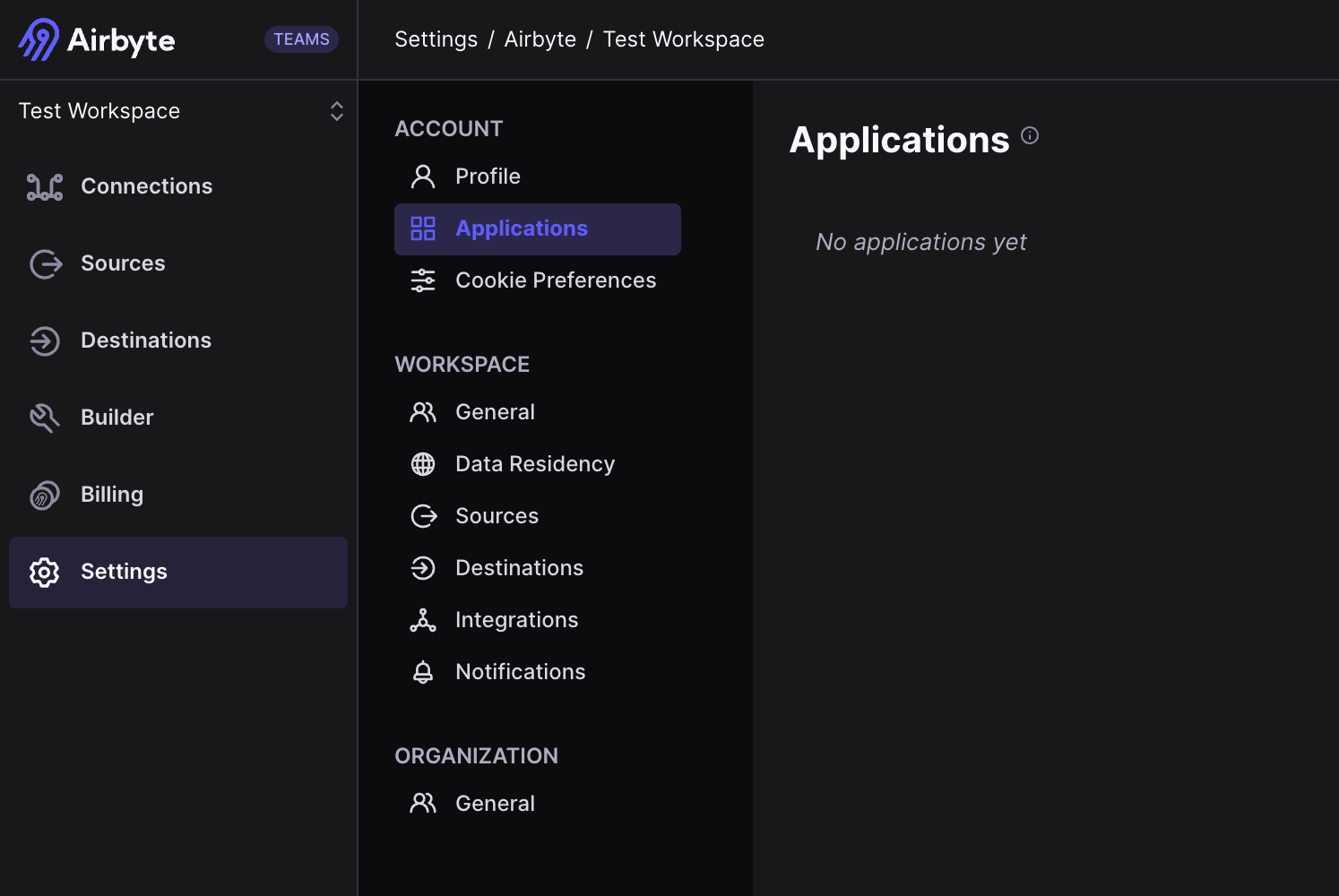
2. Click "Create an application".
3. Name your application.
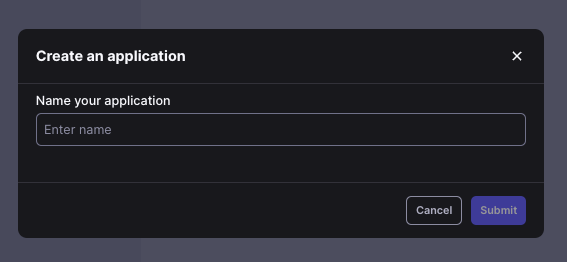
4. The Application that is created will give you a `Client ID` and `Client Secret`. The `Client Secret` can be exposed by clicking on the icon next to the secret.
5. Click `Generate Access Token` to create an access token. This can be used to do a quick test. You can alternatively use the `client_id` and `client_secret` to retrieve an access token using the `/v1/applications/token` [endpoint](https://reference.airbyte.com/reference/createaccesstoken)
.

> 📘
>
> ###
>
> Access tokens are short-lived, and are only valid for 3 minutes. We recommend fetching a new token before each request.
>
> [](https://reference.airbyte.com/reference/authentication#access-tokens-are-short-lived-and-are-only-valid-for-3-minutes-we-recommend-fetching-a-new-token-before-each-request)
>
> The Terraform Provider/SDKs properly handle this fetching for you if you initialize the Provider/SDK with the Client Credentials grant type using your Application's `client_id` and `client_secret`.
Authentication in Self-Managed Enterprise
[](https://reference.airbyte.com/reference/authentication#authentication-in-self-managed-enterprise)
--------------------------------------------------------------------------------------------------------------------------------------------------
Airbyte Enterprise users can follow the same instructions as above. The only difference is that the tokens are slightly longer lived (24 hours).
Authentication in Self-Managed Community (OSS)
[](https://reference.airbyte.com/reference/authentication#authentication-in-self-managed-community-oss)
----------------------------------------------------------------------------------------------------------------------------------------------------------
In Self-Managed Community, [authentication](https://docs.airbyte.com/deploying-airbyte/integrations/authentication)
is now enabled by default. The same instructions above apply, however only a single application can be created.
If Airbyte was deployed with [authentication disabled](https://docs.airbyte.com/deploying-airbyte/integrations/authentication#turning-off-authentication)
, the Airbyte API is accessible without any authentication.
---
# Migration Guides
Airbyte publishes migration guides to assist with any breaking changes to our API users.
---
# Standalone Server Deprecation and Migration to Airbyte Server
> 📘
>
> ###
>
> This is pertinent ONLY to OSS users accessing the Airbyte API and not using an ingress controller to do so.
>
> [](https://reference.airbyte.com/reference/standalone-server-deprecation-and-migration-to-airbyte-server#this-is-pertinent-only-to-oss-users-accessing-the-airbyte-api-and-not-using-an-ingress-controller-to-do-so)
What
[](https://reference.airbyte.com/reference/standalone-server-deprecation-and-migration-to-airbyte-server#what)
=======================================================================================================================
> 🚧
>
> ###
>
> This change has gone live as of v0.63.9. If you upgrade to or past that version the standalone `airbyte-api-server` will no longer be in use and you'll have to follow the migration steps below.
>
> [](https://reference.airbyte.com/reference/standalone-server-deprecation-and-migration-to-airbyte-server#this-change-has-gone-live-as-of-v0639-if-you-upgrade-to-or-past-that-version-the-standalone-airbyte-api-server-will-no-longer-be-in-use-and-youll-have-to-follow-the-migration-steps-below)
We’re deprecating the standalone Airbyte API server and moving the routes into the Airbyte server. This will allow us to increase reliability (no more cross server HTTP calls) as well as decrease Airbyte’s deployment footprint. You are already able to access the Airbyte API directly from the Airbyte server and all Airbyte API updates going forward will be made to that version of the API.
There were two server containers running previously - the `airbyte-server` where the config API lives, and the `airbyte-api-server` where the Airbyte API (public API) lives. The `airbyte-server` is remaining and the `airbyte-api-server` is going away.
Note this is separate from the deprecation of the Config API. It will only merge the Airbyte API into the Config API server such that we no longer have to deploy multiple servers to support both the Config and Airbyte APIs. Anything (including Airflow operators) that are already using the Config API will continue to work.
Migration Steps
[](https://reference.airbyte.com/reference/standalone-server-deprecation-and-migration-to-airbyte-server#migration-steps)
=============================================================================================================================================
You should only migrate when on v0.59.1 of the Airbyte platform or higher. Enterprise users do not need to migrate as access is handled through an ingress controller..
OSS users using the `airbyte-api-server` need to migrate their API calls to reference the `airbyte_server`. If you were using the Airbyte API, you will have to update callers to point to `airbyte-server/api/public` as the base URL. Anything already pointing to the `airbyte-server` needs no change.
For example, an API call `localhost:8006/v1/workspaces` must be migrated to: `localhost:8001/api/public/v1/workspaces`
The `airbyte-api-server`service will be deprecated on July 19. Swap over to the new URLs before upgrading to releases created after that date.
You do not need to wait until July 19th to access the new endpoints (`airbyte-server`). Update your applications now to ensure seamless integration with future releases.
---
# portal.airbyte.com deprecation
To increase security, Airbyte is migrating to use in-app Applications to secure access to the Airbyte API. As a result, we're removing the portal.airbyte.com site, which has previously been used for API key management.
API keys generated from the previous Portal will stop working on August 15, 2024.
Migration Steps
[](https://reference.airbyte.com/reference/portalairbytecom-deprecation#migration-steps)
============================================================================================================
In order to access these applications, open your workspace and navigate to Settings -> Workspace -> Applications in order to create an Application. From there, you can use the Client ID and Secret tied to that application to request an access token. These expire quickly (3 minutes in Cloud) and so should be refreshed regularly.
Airbyte recommends using the SDKs/Terraform provider, as it is supported natively through client credentials auth and the token is automatically refreshed.
See [Authentication](https://reference.airbyte.com/reference/authentication-20)
for more information on creating an Application and generating a token for testing from the UI or [Get an Access Token](https://reference.airbyte.com/reference/createaccesstoken)
for using your created application for getting an access token via the Airbyte API.
---
# How to Create OAuth Sources
There are two ways to create OAuth Sources via the [Airbyte API](https://reference.airbyte.com/reference/start)
.
1. Use Airbyte credentials to authenticate OAuth Sources.
2. Bring your own credentials to authenticate OAuth Sources using a Workspace OAuth credential override.
* * *
1\. Use Airbyte credentials to authenticate
[](https://reference.airbyte.com/reference/creating-oauth-sources#1-use-airbyte-credentials-to-authenticate)
------------------------------------------------------------------------------------------------------------------------------------------------------------
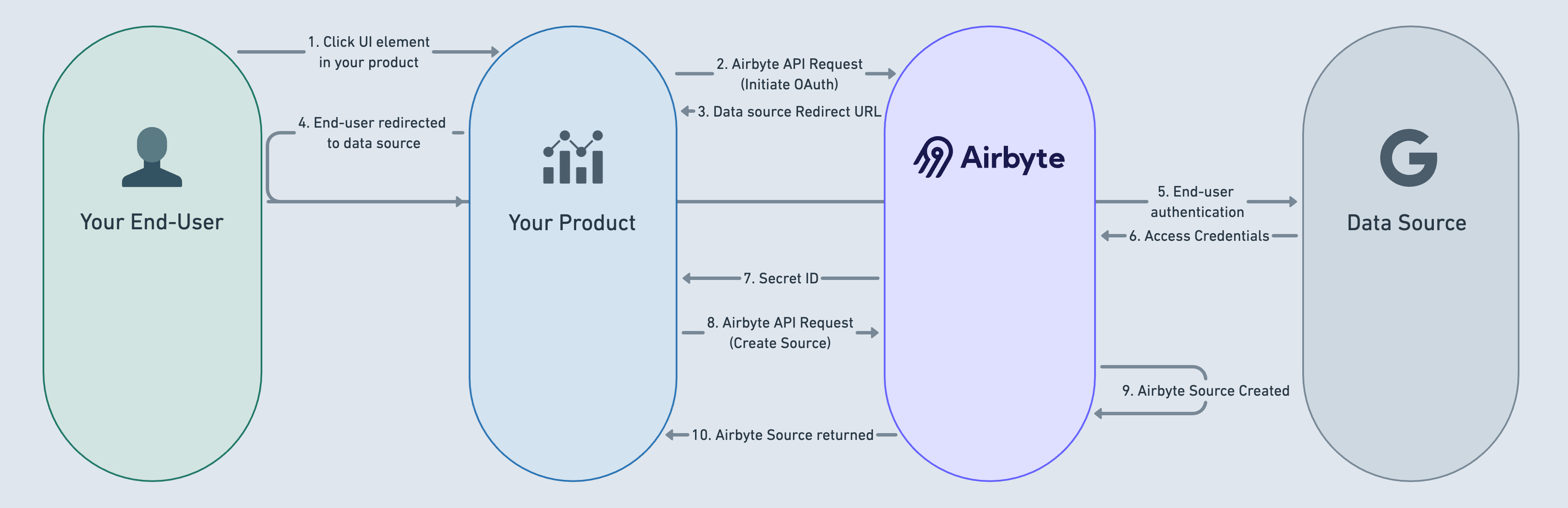
_(click image to expand)_
###
Initiate Source OAuth
[](https://reference.airbyte.com/reference/creating-oauth-sources#initiate-source-oauth)
A user clicks a UI element in your product (step #1 above). An example could be a button titled "Integrate Google Ads account". Your product then executes an API request to the [initiateOAuth](https://reference.airbyte.com/reference/initiateoauth)
endpoint (step #2). A valid redirect URL must be included in the request body. This redirect URL corresponds to a route in your product which can receive a query string parameter containing a secret ID. After executing this API request, a link to the authorization server of the data source will be generated and returned to your product (3). That link can be used to redirect end-users to authenticate their data source (4, 5). The returned access credentials will be stored in Airbyte's internal GCP secret store (6), and a Secret ID will be returned to you at the redirect URL specified in the original request body (7).
**Note**: The redirect URL you provide here does _not_ need to be registered with Airbyte or the OAuth provider. The only requirements for the redirect are that it:
* Supports HTTPS
* Receives a secret ID in the query string
* Ties the secret to the relevant connector based on the user session
###
Source creation
[](https://reference.airbyte.com/reference/creating-oauth-sources#source-creation)
The next step is to execute a request to [Create Source](https://reference.airbyte.com/reference/createsource)
and include the Secret ID at the top level of the request body in a `secretId` parameter. (8)
When the request returns successfully, a fully functional OAuth source will have been created in the requested workspace (9) and the SourceId will be included in the API response body (10). The Airbyte Source can now be connected to any Airbyte Destination of your choosing.
**Note**: Using this workflow, some of the source OAuth configuration that would normally be required is not required and gets filled out by the Airbyte API based on the secret identifier you provide. To determine what would no longer be required, see the source's connector specification and look for the section delineating the OAuth information. Any request body parameter that is listed in `complete_oauth_output_specification` or `complete_oauth_server_output_specification` in the connector specification/advanced auth section will not be required if a `secretId` is provided in the request body.
* * *
2\. Bring your own credentials to authenticate.
[](https://reference.airbyte.com/reference/creating-oauth-sources#2-bring-your-own-credentials-to-authenticate)
-------------------------------------------------------------------------------------------------------------------------------------------------------------------
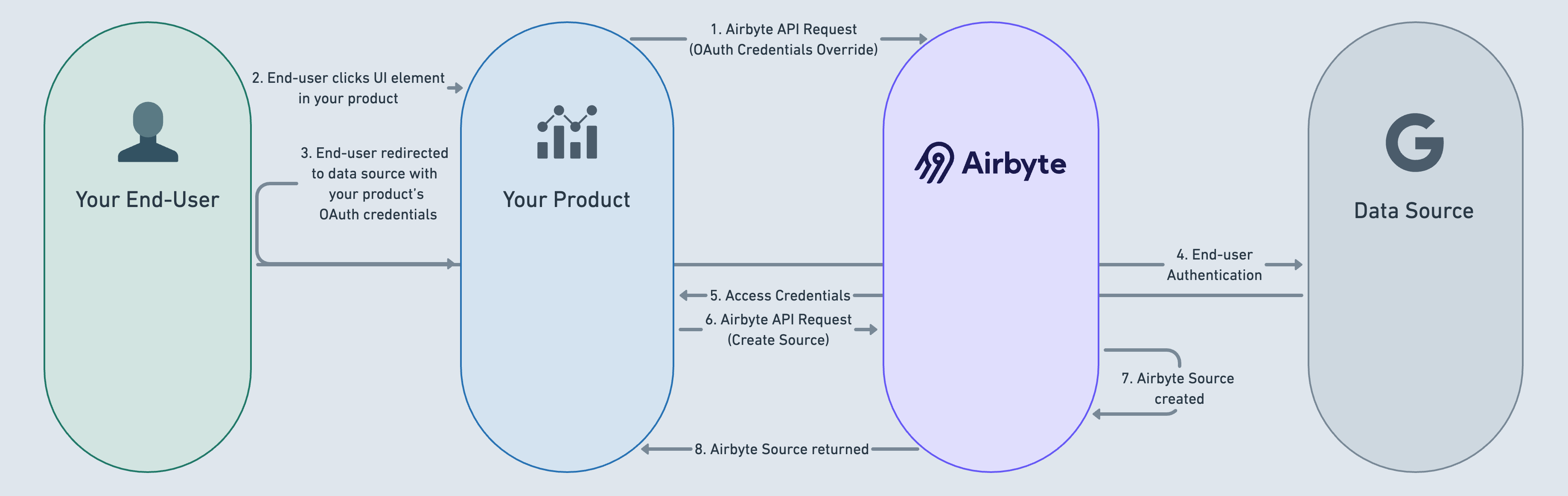
_(click image to expand)_
###
Set up your application
[](https://reference.airbyte.com/reference/creating-oauth-sources#set-up-your-application)
Create your application for the 3rd party API. Make sure it is configured to authorize a callback to `https://api.airbyte.com/v1/oauth/callback`.
When redirected to this endpoint, Airbyte will persist the credentials for the source, and redirect to your desired redirectURI as configured in Step (4).
###
Set up a Workspace OAuth Credentials Override
[](https://reference.airbyte.com/reference/creating-oauth-sources#set-up-a-workspace-oauth-credentials-override)
After [creating a new workspace](https://reference.airbyte.com/reference/createworkspace)
, you should then execute an API request to [OAuth Credentials Override](https://reference.airbyte.com/reference/workspaceoauthcredentials)
for the specific type of OAuth source to be used in your customer’s workspace (Google Ads, Hubspot, etc) (step #1 above).
###
Initiate Source OAuth
[](https://reference.airbyte.com/reference/creating-oauth-sources#initiate-source-oauth-1)
A user clicks a UI element in your product (step #2 above). An example could be a button titled "Integrate Google Ads account". You build a redirect URL to the data source and redirect the user to the data source using your own OAuth credentials (3). The end-user authenticates their data source (4). The data source returns access credentials to you (5), which you then store (access token, refresh token).
###
Source creation
[](https://reference.airbyte.com/reference/creating-oauth-sources#source-creation-1)
The next step is to execute a request to [Create Source](https://reference.airbyte.com/reference/createsource)
and include the appropriate credentials formatted according to the source specification (6).
When the request returns successfully, a fully functional OAuth source will have been created in the requested workspace (7) and the SourceId will be included in the API response body coming back to you (8). The Airbyte Source can now be connected to any Airbyte Destination of your choice.
For that specific workspace and source definition, Airbyte Cloud will now use your OAuth credentials when doing anything OAuth-related instead of the Airbyte-owned credentials.
Updated 3 months ago
* * *
Updated 3 months ago
* * *
---
# Airbyte Terraform Provider
See [https://docs.airbyte.com/terraform-documentation](https://docs.airbyte.com/terraform-documentation)
.
---
# Airbyte Embedded
What is Airbyte Embedded?
[](https://reference.airbyte.com/reference/powered-by-airbyte#what-is-airbyte-embedded)
=====================================================================================================================
[Airbyte Embedded](https://airbyte.com/ai)
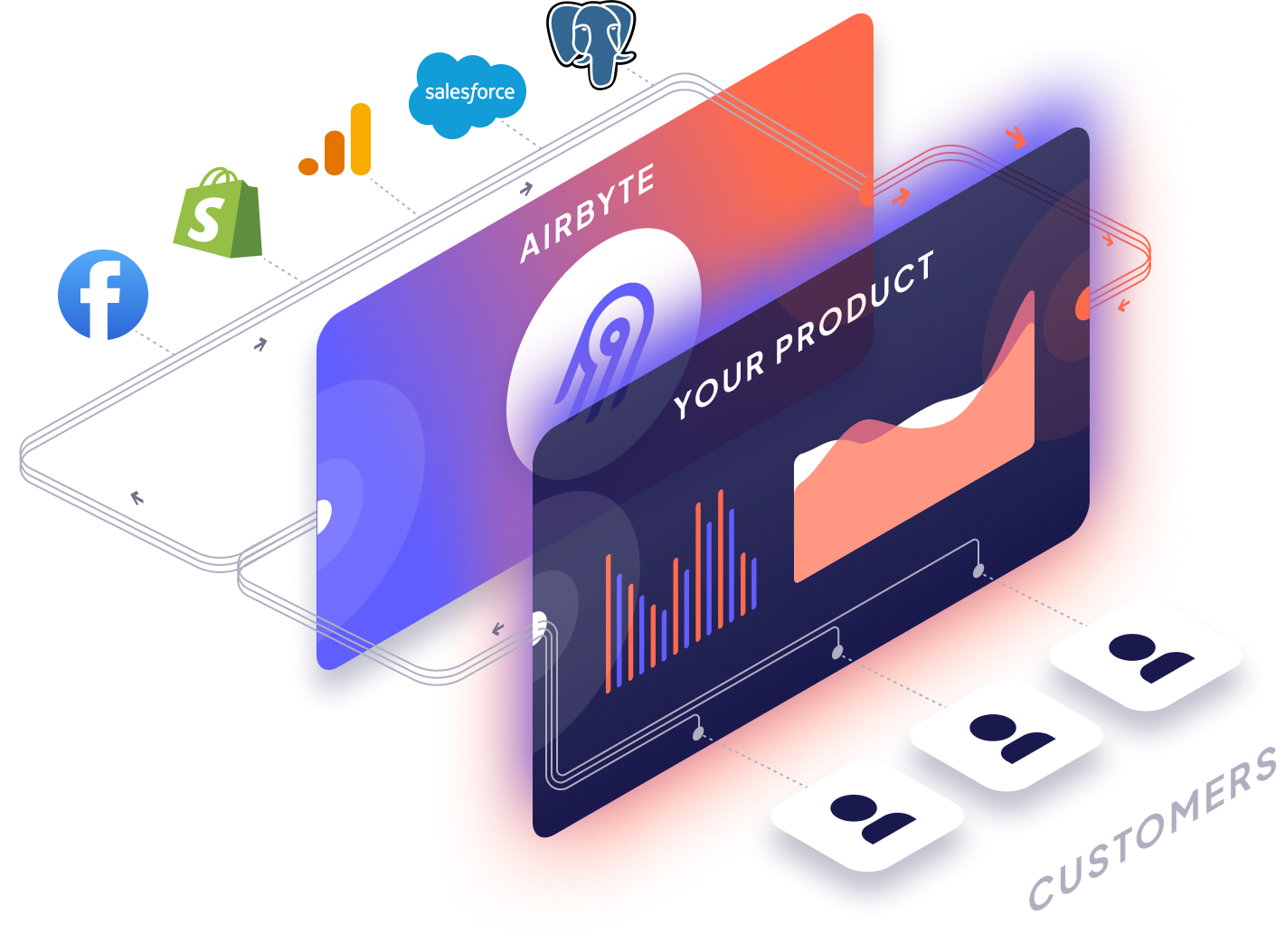
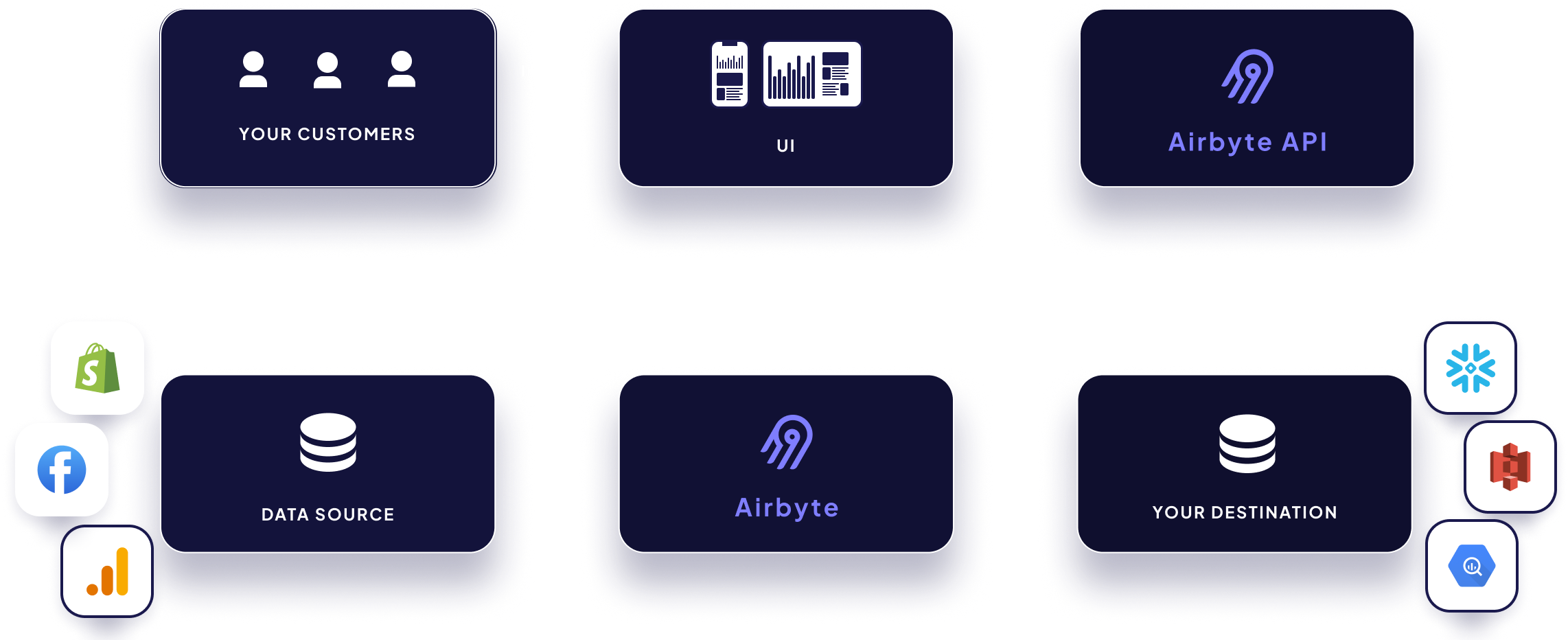
enables you to add hundreds of integrations into your product instantly. Your end-users can authenticate into their data sources and begin syncing data to your product. You no longer need to spend engineering cycles on data movement. Focus on what makes your product great, rather than maintaining ELT pipelines.
Use Case Example
[](https://reference.airbyte.com/reference/powered-by-airbyte#use-case-example)
----------------------------------------------------------------------------------------------------
* An Airbyte Embedded Operator manages an enterprise search platform with thousands of businesses as customers.
* Each of the Operator's customers may have data spread across 5-10 different [data sources](https://docs.airbyte.com/integrations/)
(ex: Google Drive, Zendesk) that need to be synced to a single destination (ex: S3) before being brought to the retrieval platform.
* Through Airbyte Embedded, the Operator can enable their own customer's end-users to connect their data sources and sync that data to a central Airbyte destination. Such as a database, data warehouse or data lake.
* Behind-the-scenes your product is executing a series of API requests to the [Airbyte API](https://api.airbyte.com/)
.
* The Airbyte API can also be used to update source credentials, trigger data syncs, and other operations that can be done through Airbtye.
* [See the full Airbyte connector catalog](https://airbyte.com/connectors)
* Or build your own [Custom Connector](https://docs.airbyte.com/connector-development/)
to use with Airbyte Embedded.
* **Note:** You can even "bring your own Secrets Manager" or use Airbyte’s. The choice is yours.
* * *
The 2 Versions of Airbyte Embedded
[](https://reference.airbyte.com/reference/powered-by-airbyte#the-2-versions-of-airbyte-embedded)
----------------------------------------------------------------------------------------------------------------------------------------
| Headless Version (available now) | UI Version (coming mid 2025) |
| --- | --- |
| Power your product's frontend UI with the Airbyte API behind the scenes. Enables you to fully customize the user experience.
| A “done-for-you” UI that enables customers to authenticate & sync data.
Enables you to skip building your own UI. This is currently not available and estimated to arrive in 2025. |
Step-by-Step Implementation (Headless Version)
[](https://reference.airbyte.com/reference/powered-by-airbyte#step-by-step-implementation-headless-version)
==============================================================================================================================================================
0\. Airbyte Terminology
[](https://reference.airbyte.com/reference/powered-by-airbyte#0-airbyte-terminology)
----------------------------------------------------------------------------------------------------------------
* _**Source:**_ An API, file, database, or data warehouse that you want to ingest data from.
* _**Destination:**_ A data warehouse, data lake, or database where you want to load your ingested data.
* _**Connection:**_ A connection is an automated data pipeline that replicates data from a source to a destination.
* _**Workspace:**_ A grouping of sources, destinations, and connections. To keep things organized and easier to manage, each business that uses your product should have its sources, destinations, and connections in its own workspace.
* Details on additional core concepts such as Streams, Namespaces, Sync Modes, and Normalization can be found in [Core Concepts](https://docs.airbyte.com/cloud/core-concepts/)
and the [Airbyte Glossary](https://glossary.airbyte.com/)
1\. Create your API key
[](https://reference.airbyte.com/reference/powered-by-airbyte#1-create-your-api-key)
----------------------------------------------------------------------------------------------------------------
* To get started with Airbyte Embedded, you must reach out to [Sales](https://airbyte.com/company/talk-to-sales)
to enable multiple workspaces for your organization.
* Follow the [authentication](https://reference.airbyte.com/reference/authentication)
instructions.
2\. Create a Workspace
[](https://reference.airbyte.com/reference/powered-by-airbyte#2-create-a-workspace)
--------------------------------------------------------------------------------------------------------------
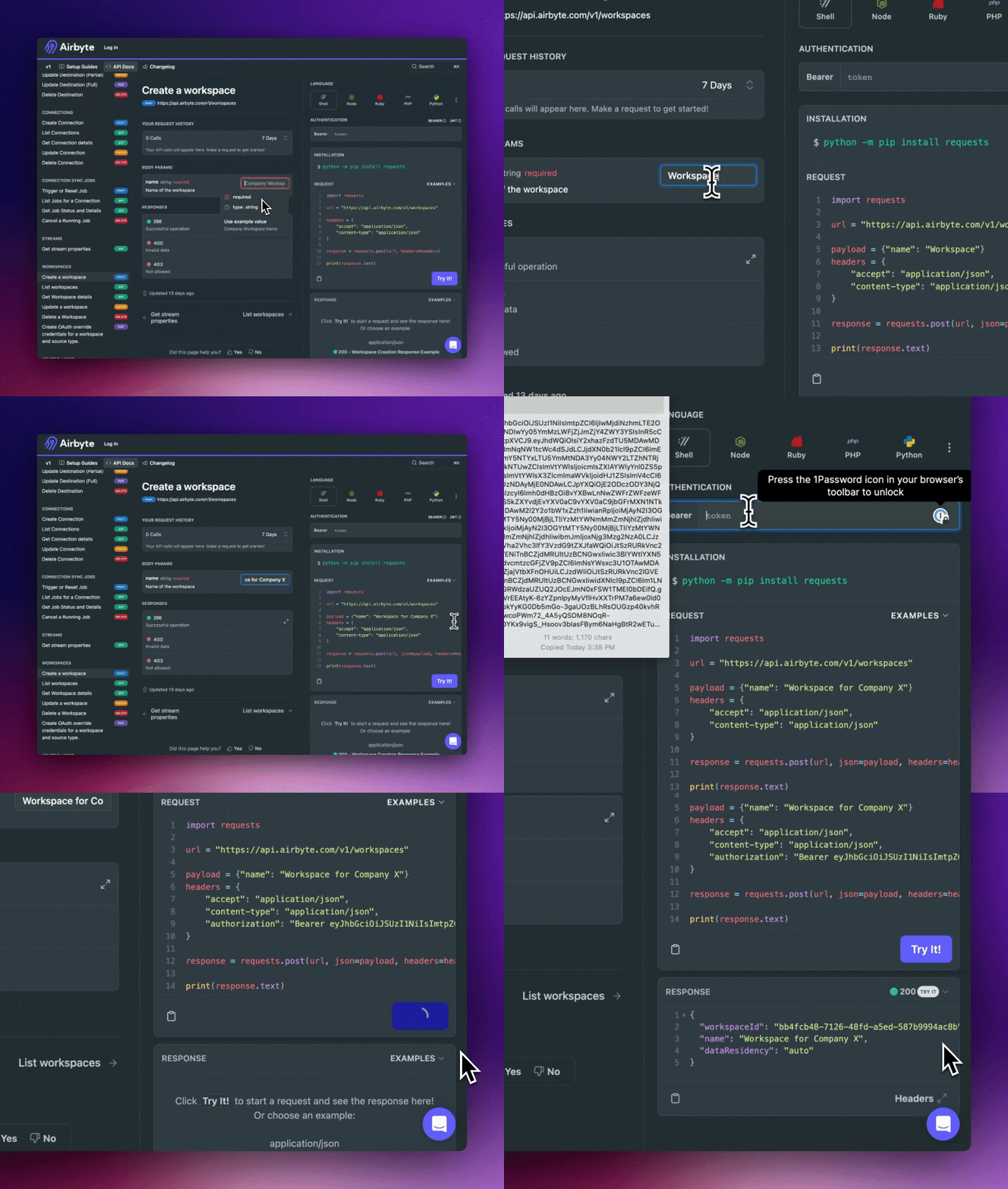
* Navigate to the API doc: [Create Workspace](https://reference.airbyte.com/reference/createworkspace)
* Enter a name for this workspace and this will generate a fully-formed API request on the right-hand side of the page. This API request can then be copied into your product’s code for execution (or even executed from the docs!)
* An API response will be returned, containing the `workspaceId` of your newly-created source.
* You can also utilize any workspaces created through the Airbyte Cloud UI (in addition to those you may create through the Airbyte API)
* _**Note:**_ To keep things organized and easier to manage, each business that uses your product should have its own Airbyte workspace.
PythonPython SDKJavaJava SDKTerraformGoNode.jsRubyShell
`import requests url = "https://api.airbyte.com/v1/workspaces" payload = {"name": "Workspace for Customer X"} headers = { "accept": "application/json", "content-type": "application/json", "user-agent": "string", "authorization": "Bearer 12345" } response = requests.post(url, json=payload, headers=headers)`
`import airbyte from airbyte.models import shared s = airbyte.Airbyte( security=shared.Security( bearer_auth='12345', ), ) req = shared.WorkspaceCreateRequest( name='Workspace for Customer X', ) res = s.workspaces.create_workspace(req) if res.workspace_response is not None: # handle response`
`OkHttpClient client = new OkHttpClient(); MediaType mediaType = MediaType.parse("application/json"); RequestBody body = RequestBody.create(mediaType, "{\"name\":\"Workspace for Customer X\"}"); Request request = new Request.Builder() .url("https://api.airbyte.com/v1/workspaces") .post(body) .addHeader("accept", "application/json") .addHeader("content-type", "application/json") .addHeader("user-agent", "string") .addHeader("authorization", "Bearer 12345") .build(); Response response = client.newCall(request).execute();`
`import com.airbyte.api.Airbyte; import com.airbyte.api.models.operations.CreateWorkspaceResponse; import com.airbyte.api.models.shared.Security; import com.airbyte.api.models.shared.WorkspaceCreateRequest; public class Application { public static void main(String[] args) { try { Airbyte sdk = Airbyte.builder() .setSecurity(new Security("") {{ bearerAuth = '12345'; }}) .build(); com.airbyte.api.models.shared.WorkspaceCreateRequest req = new WorkspaceCreateRequest("Workspace for Customer X"); CreateWorkspaceResponse res = sdk.workspaces.createWorkspace(req); if (res.workspaceResponse != null) { // handle response } } catch (Exception e) { // handle exception } } }`
`terraform { required_providers { airbyte = { source = "airbytehq/airbyte" version = "0.1.0" } } provider "airbyte" { bearer_auth = "12345" } resource "airbyte_workspace" { name = "Workspace for Customer X" } }`
`package main import ( "fmt" "strings" "net/http" "io/ioutil" ) func main() { url := "https://api.airbyte.com/v1/workspaces" payload := strings.NewReader("{\"name\":\"Workspace for Customer X\"}") req, _ := http.NewRequest("POST", url, payload) req.Header.Add("accept", "application/json") req.Header.Add("content-type", "application/json") req.Header.Add("user-agent", "string") req.Header.Add("authorization", "Bearer 12345") res, _ := http.DefaultClient.Do(req) defer res.Body.Close() body, _ := ioutil.ReadAll(res.Body) fmt.Println(res) fmt.Println(string(body)) }`
`const sdk = require('api')('@airbyte-api/v1#4vsz8clinemryl'); sdk.auth('12345'); sdk.createWorkspace({name: 'Workspace for Customer X'}) .then(({ data }) => console.log(data)) .catch(err => console.error(err));`
`require 'uri' require 'net/http' require 'openssl' url = URI("https://api.airbyte.com/v1/workspaces") http = Net::HTTP.new(url.host, url.port) http.use_ssl = true request = Net::HTTP::Post.new(url) request["accept"] = 'application/json' request["content-type"] = 'application/json' request["user-agent"] = 'string' request["authorization"] = 'Bearer 12345' request.body = "{\"name\":\"Workspace for Customer X\"}" response = http.request(request) puts response.read_body`
`curl --request POST \ --url https://api.airbyte.com/v1/workspaces \ --header 'accept: application/json' \ --header 'content-type: application/json' \ --header 'user-agent: string' \ --header 'authorization: Bearer 12345' \ --data ' { "name": "Workspace for Customer X" } '`
API Response
`{ "workspaceId": "9924bcd0-99be-453d-ba47-c2c9766f7da5" }`
3\. Create a Source
[](https://reference.airbyte.com/reference/powered-by-airbyte#3-create-a-source)
--------------------------------------------------------------------------------------------------------
* Navigate to our API doc: [Create Source](https://reference.airbyte.com/reference/createsource)
* Search for the Source type you are interested in.
* Enter the required credentials for a source and this will generate a fully-formed API request, which can also be copied into your product’s code for execution.
* An API response will be returned, containing the `sourceId` of your newly-created source.
* For creating Sources that require **OAuth** - see our guide: [How to Create OAuth Sources](https://reference.airbyte.com/reference/creating-oauth-sources)
which also includes the option to “Bring your own OAuth credentials”
PythonPython SDKJavaJava SDKTerraformGoNode.jsRubyShell
`import requests url = "https://api.airbyte.com/v1/sources" payload = { "configuration": { "sourceType": "stripe", "account_id": "acct_123", "client_secret": "sklive_abc", "lookback_window_days": 0, "slice_range": 365, "start_date": "2023-07-01T00:00:00Z" }, "name": "Stripe Account", "workspaceId": "9924bcd0-99be-453d-ba47-c2c9766f7da5" } headers = { "accept": "application/json", "content-type": "application/json", "user-agent": "string", "authorization": "Bearer 12345" } response = requests.post(url, json=payload, headers=headers)`
`import airbyte import dateutil.parser from airbyte.models import shared s = airbyte.Airbyte( security=shared.Security( bearer_auth='12345', ), ) req = shared.SourceCreateRequest( configuration=shared.SourceStripe( source_type=shared.SourceStripeStripe.STRIPE, account_id='acct_123', client_secret='sklive_abc', lookback_window_days=0, slice_range=365, start_date='2023-07-01T00:00:00Z' ), name='Stripe Account', secret_id='quae', workspace_id='9924bcd0-99be-453d-ba47-c2c9766f7da5', ) res = s.sources.create_source(req) if res.source_response is not None: # handle response`
`OkHttpClient client = new OkHttpClient(); MediaType mediaType = MediaType.parse("application/json"); RequestBody body = RequestBody.create(mediaType, "{\"configuration\":{\"lookback_window_days\":0,\"slice_range\":365,\"sourceType\":\"stripe\",\"account_id\":\"acct_123\",\"client_secret\":\"sklive_abc\",\"start_date\":\"2023-07-01T00:00:00Z\"},\"name\":\"Stripe Account\",\"workspaceId\":\"9924bcd0-99be-453d-ba47-c2c9766f7da5\"}"); Request request = new Request.Builder() .url("https://api.airbyte.com/v1/sources") .post(body) .addHeader("accept", "application/json") .addHeader("content-type", "application/json") .addHeader("user-agent", "string") .addHeader("authorization", "Bearer 12345") .build(); Response response = client.newCall(request).execute();`
`import com.airbyte.api.Airbyte; import com.airbyte.api.models.operations.CreateSourceResponse; import com.airbyte.api.models.shared.Security; import com.airbyte.api.models.shared.SourceStripe; import java.time.LocalDate; public class Application { public static void main(String[] args) { try { Airbyte sdk = Airbyte.builder() .setSecurity(new Security("") {{ bearerAuth = "12345"; }}) .build(); com.airbyte.api.models.shared.SourceCreateRequest req = new SourceCreateRequest( new SourceStripe("Stripe", SourceStripe.STRIPE, LocalDate.parse("2023-07-01")) {{ sourceType = SourceBigquery.STRIPE; account_id = "acct_123"; client_secret = "sklive_abc"; lookback_window_days = 0; slice_range = 365; startDate = LocalDate.parse("2023-07-01"); }}, "workspaceId", "d74dd39c-0f5d-42cf-b7c7-0a45626d4368") CreateSourceResponse res = sdk.sources.createSource(req); if (res.sourceResponse != null) { // handle response } } catch (Exception e) { // handle exception } } }`
`terraform { required_providers { airbyte = { source = "airbytehq/airbyte" version = "0.1.0" } } provider "airbyte" { bearer_auth = "12345" } resource "airbyte_source_stripe" "stripe" { configuration = { sourceType = "stripe" account_id = "acct_123" client_secret = "sklive_abc" start_date = "2023-07-01T00:00:00Z" lookback_window_days = 0 slice_range = 365 } name = "Stripe" workspace_id = "9924bcd0-99be-453d-ba47-c2c9766f7da5" } }`
`package main import ( "fmt" "strings" "net/http" "io/ioutil" ) func main() { url := "https://api.airbyte.com/v1/sources" payload := strings.NewReader("{\"configuration\":{\"lookback_window_days\":0,\"slice_range\":365,\"sourceType\":\"stripe\",\"account_id\":\"acct_123\",\"client_secret\":\"sklive_abc\",\"start_date\":\"2023-07-01T00:00:00Z\"},\"name\":\"Stripe Account\",\"workspaceId\":\"9924bcd0-99be-453d-ba47-c2c9766f7da5\"}") req, _ := http.NewRequest("POST", url, payload) req.Header.Add("accept", "application/json") req.Header.Add("content-type", "application/json") req.Header.Add("user-agent", "string") req.Header.Add("authorization", "Bearer 12345") res, _ := http.DefaultClient.Do(req) defer res.Body.Close() body, _ := ioutil.ReadAll(res.Body) fmt.Println(res) fmt.Println(string(body)) }`
`const sdk = require('api')('@airbyte-api/v1#a933liamtcc0'); sdk.auth('12345'); sdk.createSource({ configuration: { sourceType: 'stripe', account_id: 'acct_123', client_secret: 'sklive_abc', lookback_window_days: 0, slice_range: 365, start_date: '2023-07-01T00:00:00Z' }, name: 'Stripe Account', workspaceId: '9924bcd0-99be-453d-ba47-c2c9766f7da5' }) .then(({ data }) => console.log(data)) .catch(err => console.error(err));`
`require 'uri' require 'net/http' require 'openssl' url = URI("https://api.airbyte.com/v1/sources") http = Net::HTTP.new(url.host, url.port) http.use_ssl = true request = Net::HTTP::Post.new(url) request["accept"] = 'application/json' request["content-type"] = 'application/json' request["user-agent"] = 'string' request["authorization"] = 'Bearer 12345' request.body = "{\"configuration\":{\"lookback_window_days\":0,\"slice_range\":365,\"sourceType\":\"stripe\",\"account_id\":\"acct_123\",\"client_secret\":\"sklive_abc\",\"start_date\":\"2023-07-01T00:00:00Z\"},\"name\":\"Stripe Account\",\"workspaceId\":\"9924bcd0-99be-453d-ba47-c2c9766f7da5\"}" response = http.request(request) puts response.read_body`
`curl --request POST \ --url https://api.airbyte.com/v1/sources \ --header 'accept: application/json' \ --header 'content-type: application/json' \ --header 'user-agent: string' \ --header 'authorization: Bearer 12345' \ --data ' { "configuration": { "sourceType": "stripe", "account_id": "acct_123", "client_secret": "sklive_abc", "lookback_window_days": 0, "slice_range": 365, "start_date": "2023-07-01T00:00:00Z" }, "name": "Stripe Account", "workspaceId": "9924bcd0-99be-453d-ba47-c2c9766f7da5" } '`
API Response
`{ "sourceId": "0c31738c-0b2d-4887-b506-e2cd1c39cc35" }`
4\. Create a Destination
[](https://reference.airbyte.com/reference/powered-by-airbyte#4-create-a-destination)
------------------------------------------------------------------------------------------------------------------
* Once you have successfully created your Source, it is time to create a Destination
* Navigate to our API doc: [Create Destination](https://reference.airbyte.com/reference/createdestination)
* Search for the Destination type you are interested in.
* Enter the required credentials for a destination and this will generate a fully-formed API request, which can also be copied into your product’s code for execution.
* An API response will be returned, containing the `destinationId` of your newly-created destination.
PythonPython SDKJavaJava SDKTerraformGoRubyNode.jsShell
`import requests url = "https://api.airbyte.com/v1/destinations" payload = { "configuration": { "destinationType": "bigquery", "project_id": "123", "dataset_id": "456", "dataset_location": "US", "loading_method": { "method": "GCS Staging", "credential": {"credential_type": "HMAC_KEY"}, "keep_files_in_gcs-bucket": "Delete all tmp files from GCS", "file_buffer_count": 10, "gcs_bucket_name": "airbyte_sync", "gcs_bucket_path": "data_sync/test" }, "transformation_priority": "interactive", "big_query_client_buffer_size_mb": 15, }, "name": "BigQuery", "workspaceId": "9924bcd0-99be-453d-ba47-c2c9766f7da5" } headers = { "accept": "application/json", "content-type": "application/json", "user-agent": "string", "authorization": "Bearer 12345" } response = requests.post(url, json=payload, headers=headers)`
`import airbyte from airbyte.models import shared s = airbyte.Airbyte( security=shared.Security( bearer_auth='12345', ), ) req = shared.DestinationCreateRequest( configuration=shared.DestinationBigquery( destinationType='bigquery', project_id='123', dataset_id='456', dataset_location='US', loading_method={ method='GCS Staging', credential={ credential_type='HMAC_KEY' }, keep_files_in_gcs-bucket='Delete all tmp files from GCS', file_buffer_count=10, gcs_bucket_name='airbyte_sync', gcs_bucket_path='data_sync/test' }, transformation_priority='interactive', big_query_client_buffer_size_mb=15, ), name='BigQuery', workspace_id='9924bcd0-99be-453d-ba47-c2c9766f7da5', ) res = s.destinations.create_destination(req) if res.destination_response is not None: # handle response`
`OkHttpClient client = new OkHttpClient(); MediaType mediaType = MediaType.parse("application/json"); RequestBody body = RequestBody.create(mediaType, "{\"configuration\":{\"dataset_location\":\"US\",\"loading_method\":{\"method\":\"GCS Staging\",\"credential\":{\"credential_type\":\"HMAC_KEY\"},\"keep_files_in_gcs-bucket\":\"Delete all tmp files from GCS\",\"file_buffer_count\":10,\"gcs_bucket_name\":\"airbyte_sync\",\"gcs_bucket_path\":\"data_sync/test\"},\"transformation_priority\":\"interactive\",\"big_query_client_buffer_size_mb\":15,\"destinationType\":\"bigquery\",\"project_id\":\"123\",\"dataset_id\":\"456\"},\"name\":\"BigQuery\",\"workspaceId\":\"9924bcd0-99be-453d-ba47-c2c9766f7da5\"}"); Request request = new Request.Builder() .url("https://api.airbyte.com/v1/destinations") .post(body) .addHeader("accept", "application/json") .addHeader("content-type", "application/json") .addHeader("user-agent", "string") .addHeader("authorization", "Bearer 12345") .build(); Response response = client.newCall(request).execute();`
`import com.airbyte.api.Airbyte; import com.airbyte.api.models.operations.CreateDestinationResponse; import com.airbyte.api.models.shared.DestinationBigquery; import com.airbyte.api.models.shared.Security; public class Application { public static void main(String[] args) { try { Airbyte sdk = Airbyte.builder() .setSecurity(new Security("") {{ bearerAuth = "12345"; }}) .build(); com.airbyte.api.models.shared.DestinationCreateRequest req = new DestinationCreateRequest( new DestinationBigquery("BigQuery", DestinationBiqquery.BIGQUERY) {{ destinationType = "bigquery", project_id = "123", dataset_id = "456", dataset_location = "US", loading_method {{ method = "GCS Staging", credential {{ credential_type: "HMAC_KEY" }}; keep_files_in_gcs-bucket = "Delete all tmp files from GCS", file_buffer_count: 10, gcs_bucket_name: "airbyte_sync", gcs_bucket_path: "data_sync/test" }}, transformation_priority = "interactive", big_query_client_buffer_size_mb = 15, }}, "workspaceId", "d74dd39c-0f5d-42cf-b7c7-0a45626d4368"); CreateDestinationResponse res = sdk.destinations.createDestination(req); if (res.destinationResponse != null) { // handle response } } catch (Exception e) { // handle exception } } }`
`terraform { required_providers { airbyte = { source = "airbytehq/airbyte" version = "0.1.0" } } provider "airbyte" { bearer_auth = "12345" } resource "airbyte_destination_bigquery" "bigquery" { name = "BigQuery" workspace_id = "9924bcd0-99be-453d-ba47-c2c9766f7da5" configuration = { destinationType = "bigquery" project_id = "123" dataset_id = "456" dataset_location = "US" transformation_priority = "interactive" big_query_client_buffer_size_mb = 15 loading_method { method = "GCS Staging" credential { credential_type: "HMAC_KEY" } keep_files_in_gcs-bucket = "Delete all tmp files from GCS" file_buffer_count: 10 gcs_bucket_name: "airbyte_sync" gcs_bucket_path: "data_sync/test" } } } }`
`package main import ( "fmt" "strings" "net/http" "io/ioutil" ) func main() { url := "https://api.airbyte.com/v1/destinations" payload := strings.NewReader("{\"configuration\":{\"dataset_location\":\"US\",\"loading_method\":{\"method\":\"GCS Staging\",\"credential\":{\"credential_type\":\"HMAC_KEY\"},\"keep_files_in_gcs-bucket\":\"Delete all tmp files from GCS\",\"file_buffer_count\":10,\"gcs_bucket_name\":\"airbyte_sync\",\"gcs_bucket_path\":\"data_sync/test\"},\"transformation_priority\":\"interactive\",\"big_query_client_buffer_size_mb\":15,\"destinationType\":\"bigquery\",\"project_id\":\"123\",\"dataset_id\":\"456\"},\"name\":\"BigQuery\",\"workspaceId\":\"9924bcd0-99be-453d-ba47-c2c9766f7da5\"}") req, _ := http.NewRequest("POST", url, payload) req.Header.Add("accept", "application/json") req.Header.Add("content-type", "application/json") req.Header.Add("user-agent", "string") req.Header.Add("authorization", "Bearer 12345") res, _ := http.DefaultClient.Do(req) defer res.Body.Close() body, _ := ioutil.ReadAll(res.Body) fmt.Println(res) fmt.Println(string(body)) }`
`require 'uri' require 'net/http' require 'openssl' url = URI("https://api.airbyte.com/v1/destinations") http = Net::HTTP.new(url.host, url.port) http.use_ssl = true request = Net::HTTP::Post.new(url) request["accept"] = 'application/json' request["content-type"] = 'application/json' request["user-agent"] = 'string' request["authorization"] = 'Bearer 12345' request.body = "{\"configuration\":{\"dataset_location\":\"US\",\"loading_method\":{\"method\":\"GCS Staging\",\"credential\":{\"credential_type\":\"HMAC_KEY\"},\"keep_files_in_gcs-bucket\":\"Delete all tmp files from GCS\",\"file_buffer_count\":10,\"gcs_bucket_name\":\"airbyte_sync\",\"gcs_bucket_path\":\"data_sync/test\"},\"transformation_priority\":\"interactive\",\"big_query_client_buffer_size_mb\":15,\"destinationType\":\"bigquery\",\"project_id\":\"123\",\"dataset_id\":\"456\"},\"name\":\"BigQuery\",\"workspaceId\":\"9924bcd0-99be-453d-ba47-c2c9766f7da5\"}" response = http.request(request) puts response.read_body`
`const sdk = require('api')('@airbyte-api/v1#vdqyaliamr9js'); sdk.auth('12345'); sdk.createDestination({ configuration: { destinationType: 'bigquery', project_id: '123', dataset_id: '456', dataset_location: 'US', loading_method: { method: 'GCS Staging', credential: {credential_type: 'HMAC_KEY'}, 'keep_files_in_gcs-bucket': 'Delete all tmp files from GCS', file_buffer_count: 10, gcs_bucket_name: 'airbyte_sync', gcs_bucket_path: 'data_sync/test' }, transformation_priority: 'interactive', big_query_client_buffer_size_mb: 15, }, name: 'BigQuery', workspaceId: '9924bcd0-99be-453d-ba47-c2c9766f7da5' }) .then(({ data }) => console.log(data)) .catch(err => console.error(err));`
`curl --request POST \ --url https://api.airbyte.com/v1/destinations \ --header 'accept: application/json' \ --header 'content-type: application/json' \ --header 'user-agent: string' \ --header 'authorization: Bearer 12345' \ --data ' { "configuration": { "destinationType": "bigquery", "project_id": "123", "dataset_id": "456", "dataset_location": "US", "loading_method": { "method": "GCS Staging", "credential": { "credential_type": "HMAC_KEY" }, "keep_files_in_gcs-bucket": "Delete all tmp files from GCS", "file_buffer_count": 10, "gcs_bucket_name": "airbyte_sync", "gcs_bucket_path": "data_sync/test" }, "transformation_priority": "interactive", "big_query_client_buffer_size_mb": 15 }, "name": "BigQuery", "workspaceId": "9924bcd0-99be-453d-ba47-c2c9766f7da5" } '`
API Response
`{ "destinationId": "af0c3c67-aa61-419f-8922-95b0bf840e86" }`
5\. Create a Connection
[](https://reference.airbyte.com/reference/powered-by-airbyte#5-create-a-connection)
----------------------------------------------------------------------------------------------------------------
* Once you have successfully created your Source & Destination, it is time to connect them.
* Navigate to our API reference: [Create Connection](https://reference.airbyte.com/reference/createconnection)
* Enter the required fields (sourceId & destinationId) and this will generate a fully-formed API request, which can also be copied into your product’s code for execution.
* A Connection will be created with [default](https://reference.airbyte.com/reference/createconnection#configuration-setting-defaults)
configuration settings, but these configuration settings can also be [customized](https://reference.airbyte.com/reference/createconnection#configuration-setting-customization)
. Configuration settings manage various aspects of the Connection’s sync, such as how often data syncs and where data is written within your Destination.
PythonPython SDKJavaJava SDKTerraformGoNode.jsRubyShell
`import requests url = "https://api.airbyte.com/v1/connections" payload = { "name": "Stripe to BigQuery", "sourceId": "0c31738c-0b2d-4887-b506-e2cd1c39cc35", "destinationId": "af0c3c67-aa61-419f-8922-95b0bf840e86", "schedule": {"scheduleType": "manual"}, "dataResidency": "auto", "namespaceDefinition": "destination", "namespaceFormat": "${SOURCE_NAMESPACE}", "nonBreakingSchemaUpdatesBehavior": "ignore", } headers = { "accept": "application/json", "content-type": "application/json", "user-agent": "string", "authorization": "Bearer 12345" } response = requests.post(url, json=payload, headers=headers) print(response.text)`
`import airbyte from airbyte.models import shared s = airbyte.Airbyte( security=shared.Security( bearer_auth='12345, ), ) req = shared.ConnectionCreateRequest( name='Stripe to BigQuery', source_id='0c31738c-0b2d-4887-b506-e2cd1c39cc35', destination_id='af0c3c67-aa61-419f-8922-95b0bf840e86', schedule={ scheduleType: "manual" }, data_residency=shared.GeographyEnum.AUTO, namespace_definition=shared.NamespaceDefinitionEnum.DESTINATION, namespace_format='${SOURCE_NAMESPACE}', non_breaking_schema_updates_behavior=shared.NonBreakingSchemaUpdatesBehaviorEnum.IGNORE, ) res = s.connections.create_connection(req) if res.connection_response is not None: # handle response`
`OkHttpClient client = new OkHttpClient(); MediaType mediaType = MediaType.parse("application/json"); RequestBody body = RequestBody.create(mediaType, "{\"schedule\":{\"scheduleType\":\"manual\"},\"dataResidency\":\"auto\",\"namespaceDefinition\":\"destination\",\"namespaceFormat\":\"${SOURCE_NAMESPACE}\",\"nonBreakingSchemaUpdatesBehavior\":\"ignore\",\"name\":\"Stripe to BigQuery\",\"sourceId\":\"0c31738c-0b2d-4887-b506-e2cd1c39cc35\",\"destinationId\":\"af0c3c67-aa61-419f-8922-95b0bf840e86\"}"); Request request = new Request.Builder() .url("https://api.airbyte.com/v1/connections") .post(body) .addHeader("accept", "application/json") .addHeader("content-type", "application/json") .addHeader("user-agent", "string") .addHeader("authorization", "Bearer 12345") .build(); Response response = client.newCall(request).execute();`
`import com.airbyte.api.Airbyte; import com.airbyte.api.models.operations.CreateConnectionResponse; import com.airbyte.api.models.shared.ConnectionCreateRequest; import com.airbyte.api.models.shared.ConnectionSchedule; import com.airbyte.api.models.shared.ConnectionStatusEnum; import com.airbyte.api.models.shared.ConnectionSyncModeEnum; import com.airbyte.api.models.shared.GeographyEnum; import com.airbyte.api.models.shared.NamespaceDefinitionEnum; import com.airbyte.api.models.shared.NonBreakingSchemaUpdatesBehaviorEnum; import com.airbyte.api.models.shared.ScheduleTypeEnum; import com.airbyte.api.models.shared.Security; import com.airbyte.api.models.shared.StreamConfiguration; import com.airbyte.api.models.shared.StreamConfigurations; public class Application { public static void main(String[] args) { try { Airbyte sdk = Airbyte.builder() .setSecurity(new Security("") {{ bearerAuth = "12345"; }}) .build(); com.airbyte.api.models.shared.ConnectionCreateRequest req = new ConnectionCreateRequest("0c31738c-0b2d-4887-b506-e2cd1c39cc35", "af0c3c67-aa61-419f-8922-95b0bf840e86") {{ name = "Stripe to BigQuery"; dataResidency = GeographyEnum.AUTO; namespaceDefinition = NamespaceDefinitionEnum.DESTINATION; namespaceFormat = "${SOURCE_NAMESPACE}"; nonBreakingSchemaUpdatesBehavior = NonBreakingSchemaUpdatesBehaviorEnum.IGNORE; schedule = new ConnectionSchedule(ScheduleTypeEnum.MANUAL) }}; CreateConnectionResponse res = sdk.connections.createConnection(req); if (res.connectionResponse != null) { // handle response } } catch (Exception e) { // handle exception } } }`
`terraform { required_providers { airbyte = { source = "airbytehq/airbyte" version = "0.1.0" } } provider "airbyte" { bearer_auth = "12345" } resource "airbyte_connection" "stripe_bigquery" { name = "Stripe to BigQuery" source_id = "0c31738c-0b2d-4887-b506-e2cd1c39cc35" destinationId = "af0c3c67-aa61-419f-8922-95b0bf840e86" schedule = { schedule_type = "manual" } } }`
`package main import ( "fmt" "strings" "net/http" "io/ioutil" ) func main() { url := "https://api.airbyte.com/v1/connections" payload := strings.NewReader("{\"schedule\":{\"scheduleType\":\"manual\"},\"dataResidency\":\"auto\",\"namespaceDefinition\":\"destination\",\"namespaceFormat\":\"${SOURCE_NAMESPACE}\",\"nonBreakingSchemaUpdatesBehavior\":\"ignore\",\"name\":\"Stripe to BigQuery\",\"sourceId\":\"0c31738c-0b2d-4887-b506-e2cd1c39cc35\",\"destinationId\":\"af0c3c67-aa61-419f-8922-95b0bf840e86\"}") req, _ := http.NewRequest("POST", url, payload) req.Header.Add("accept", "application/json") req.Header.Add("content-type", "application/json") req.Header.Add("user-agent", "string") req.Header.Add("authorization", "Bearer 12345") res, _ := http.DefaultClient.Do(req) defer res.Body.Close() body, _ := ioutil.ReadAll(res.Body) fmt.Println(res) fmt.Println(string(body)) }`
`const sdk = require('api')('@airbyte-api/v1#a922liamul7v'); sdk.auth('12345'); sdk.createConnection({ schedule: {scheduleType: 'manual'}, dataResidency: 'auto', namespaceDefinition: 'destination', namespaceFormat: '${SOURCE_NAMESPACE}', nonBreakingSchemaUpdatesBehavior: 'ignore', name: 'Stripe to BigQuery', sourceId: '0c31738c-0b2d-4887-b506-e2cd1c39cc35', destinationId: 'af0c3c67-aa61-419f-8922-95b0bf840e86' }) .then(({ data }) => console.log(data)) .catch(err => console.error(err));`
`require 'uri' require 'net/http' require 'openssl' url = URI("https://api.airbyte.com/v1/connections") http = Net::HTTP.new(url.host, url.port) http.use_ssl = true request = Net::HTTP::Post.new(url) request["accept"] = 'application/json' request["content-type"] = 'application/json' request["user-agent"] = 'string' request["authorization"] = 'Bearer 12345' request.body = "{\"schedule\":{\"scheduleType\":\"manual\"},\"dataResidency\":\"auto\",\"namespaceDefinition\":\"destination\",\"namespaceFormat\":\"${SOURCE_NAMESPACE}\",\"nonBreakingSchemaUpdatesBehavior\":\"ignore\",\"name\":\"Stripe to BigQuery\",\"sourceId\":\"0c31738c-0b2d-4887-b506-e2cd1c39cc35\",\"destinationId\":\"af0c3c67-aa61-419f-8922-95b0bf840e86\"}" response = http.request(request) puts response.read_body`
`curl --request POST \ --url https://api.airbyte.com/v1/connections \ --header 'accept: application/json' \ --header 'content-type: application/json' \ --header 'user-agent: string' \ --header 'authorization: Bearer 12345' \ --data ' { "schedule": { "scheduleType": "manual" }, "dataResidency": "auto", "namespaceDefinition": "destination", "namespaceFormat": "${SOURCE_NAMESPACE}", "nonBreakingSchemaUpdatesBehavior": "ignore", "name": "Stripe to BigQuery", "sourceId": "0c31738c-0b2d-4887-b506-e2cd1c39cc35", "destinationId": "af0c3c67-aa61-419f-8922-95b0bf840e86" } '`
API Response
`{ "connectionId": "9924bcd0-99be-453d-ba47-c2c9766f7da5" }`
6\. Sync Data
[](https://reference.airbyte.com/reference/powered-by-airbyte#6-sync-data)
--------------------------------------------------------------------------------------------
* You now have a Connection set up between your Source and Destination.
* You can now trigger Connection sync jobs manually. See: [Trigger or Reset Job](https://reference.airbyte.com/reference/createjob)
(or set them to sync on a [cadence frequency](https://reference.airbyte.com/reference/createconnection#scheduling-customization)
)
* Trigger syncs from your product, or external orchestration tools (ex: Airflow, Dagster)
* An API response will be returned, containing the `jobId` of your newly-created job.
* You are now syncing data!
* _**Note:**_ It is also possible to [custom configure](https://reference.airbyte.com/reference/createconnection#configuration-setting-customization)
your Connection to sync on a regular frequency rather than needing to trigger it manually each time.
* _**Note:**_ Additional details on managing syncs in Airbyte Cloud can be viewed here: [Manage syncs](https://docs.airbyte.com/cloud/managing-airbyte-cloud/edit-stream-configuration)
PythonPython SDKJavaJava SDKGoNode.jsRubyShell
`import requests url = "https://api.airbyte.com/v1/jobs" payload = { "jobType": "sync", "connectionId": "9924bcd0-99be-453d-ba47-c2c9766f7da5" } headers = { "accept": "application/json", "content-type": "application/json", "user-agent": "string", "authorization": "Bearer 12345" } response = requests.post(url, json=payload, headers=headers)`
`import airbyte from airbyte.models import shared s = airbyte.Airbyte( security=shared.Security( bearer_auth="12345", ), ) req = shared.JobCreateRequest( connection_id='9924bcd0-99be-453d-ba47-c2c9766f7da5', job_type=shared.JobTypeEnum.SYNC, ) res = s.jobs.create_job(req) if res.job_response is not None: # handle response`
`OkHttpClient client = new OkHttpClient(); MediaType mediaType = MediaType.parse("application/json"); RequestBody body = RequestBody.create(mediaType, "{\"jobType\":\"sync\",\"connectionId\":\"9924bcd0-99be-453d-ba47-c2c9766f7da5\"}"); Request request = new Request.Builder() .url("https://api.airbyte.com/v1/jobs") .post(body) .addHeader("accept", "application/json") .addHeader("content-type", "application/json") .addHeader("user-agent", "string") .addHeader("authorization", "Bearer 12345") .build(); Response response = client.newCall(request).execute();`
`import com.airbyte.api.Airbyte; import com.airbyte.api.models.operations.CreateJobResponse; import com.airbyte.api.models.shared.JobCreateRequest; import com.airbyte.api.models.shared.JobTypeEnum; import com.airbyte.api.models.shared.Security; public class Application { public static void main(String[] args) { try { Airbyte sdk = Airbyte.builder() .setSecurity(new Security("") {{ bearerAuth = "12345"; }}) .build(); com.airbyte.api.models.shared.JobCreateRequest req = new JobCreateRequest("9924bcd0-99be-453d-ba47-c2c9766f7da5", JobTypeEnum.SYNC); CreateJobResponse res = sdk.jobs.createJob(req); if (res.jobResponse != null) { // handle response } } catch (Exception e) { // handle exception } } }`
`package main import ( "fmt" "strings" "net/http" "io/ioutil" ) func main() { url := "https://api.airbyte.com/v1/jobs" payload := strings.NewReader("{\"jobType\":\"sync\",\"connectionId\":\"9924bcd0-99be-453d-ba47-c2c9766f7da5\"}") req, _ := http.NewRequest("POST", url, payload) req.Header.Add("accept", "application/json") req.Header.Add("content-type", "application/json") req.Header.Add("user-agent", "string") req.Header.Add("authorization", "Bearer 12345") res, _ := http.DefaultClient.Do(req) defer res.Body.Close() body, _ := ioutil.ReadAll(res.Body) fmt.Println(res) fmt.Println(string(body)) }`
`const sdk = require('api')('@airbyte-api/v1#dahs1vlfu9tyt2'); sdk.auth('12345'); sdk.createJob({jobType: 'sync', connectionId: '9924bcd0-99be-453d-ba47-c2c9766f7da5'}) .then(({ data }) => console.log(data)) .catch(err => console.error(err));`
`require 'uri' require 'net/http' require 'openssl' url = URI("https://api.airbyte.com/v1/jobs") http = Net::HTTP.new(url.host, url.port) http.use_ssl = true request = Net::HTTP::Post.new(url) request["accept"] = 'application/json' request["content-type"] = 'application/json' request["user-agent"] = 'string' request["authorization"] = 'Bearer 12345' request.body = "{\"jobType\":\"sync\",\"connectionId\":\"9924bcd0-99be-453d-ba47-c2c9766f7da5\"}" response = http.request(request) puts response.read_body`
`curl --request POST \ --url https://api.airbyte.com/v1/jobs \ --header 'accept: application/json' \ --header 'content-type: application/json' \ --header 'user-agent: string' \ --header 'authorization: Bearer 12345' \ --data ' { "jobType": "sync", "connectionId": "9924bcd0-99be-453d-ba47-c2c9766f7da5" } '`
API Response
`{ "jobId": 1234, "status": "running", "jobType": "sync" }`
7\. Success
[](https://reference.airbyte.com/reference/powered-by-airbyte#7-success)
----------------------------------------------------------------------------------------
* You are now syncing data through the Connection created between your Source and Destination! Your end-user’s data is syncing to the Destination of your choice.
* Once the data is synced to the Destination, what you do with that data is entirely in your control. An example would be running Transformations using DBT, or other workflows that suit you.
* _**Note:**_ To keep things organized and easier to manage, each business that uses your product should have its sources, destinations, and connections in its own workspace (step 2).
* _**Note:**_ For each new end-user’s data source that needs to be synced (customer X’s new Hubspot account), you will repeat the Airbyte API requests described in steps 3 to 6.
You have now gone from 0 to 1 with Airbyte Embedded 🚀
You may have specific questions about this workflow, advanced workflows, or edge cases you hope to support. We would love to hear your feedback and answer your questions by reaching out to our support team!
**References**
* [Airbyte Embedded](https://airbyte.com/ai)
* [How to Create OAuth Sources](https://reference.airbyte.com/reference/creating-oauth-sources)
* [Create a Workspace](https://reference.airbyte.com/reference/createworkspace)
* [Create a Source](https://reference.airbyte.com/reference/createsource)
* [Create a Destination](https://reference.airbyte.com/reference/createdestination)
* [Create a Connection](https://reference.airbyte.com/reference/createconnection)
* [Trigger or Reset Job](https://reference.airbyte.com/reference/createjob)
* [Manage syncs](https://docs.airbyte.com/cloud/managing-airbyte-cloud/edit-stream-configuration)
* [Core Concepts](https://docs.airbyte.com/cloud/core-concepts/)
* [Airbyte Glossary](https://glossary.airbyte.com/)
---
# List Applications
ShellNodeRubyPHPPython
Click `Try It!` to start a request and see the response here!
---
# Create an Application
ShellNodeRubyPHPPython
Click `Try It!` to start a request and see the response here!
---
# Get an Access Token
ShellNodeRubyPHPPython
Click `Try It!` to start a request and see the response here!
---
# Deletes an Application
ShellNodeRubyPHPPython
Click `Try It!` to start a request and see the response here!
---
# Get an Application detail
ShellNodeRubyPHPPython
Click `Try It!` to start a request and see the response here!
---
# List connections
> 📘
>
> ###
>
> Connections from all workspaces will be returned if the `workspaceIds` param is left as an empty value
>
> [](https://reference.airbyte.com/reference/listconnections#connections-from-all-workspaces-will-be-returned-if-the-workspaceids-param-is-left-as-an-empty-value)
>
> Optionally, you can filter by specific workspaces by providing one or more workspace IDs separated by commas in the query parameter. e.g. `workspaceIds=6ae537d7-0cc0-4c68-a7c2-204a8261e4c3,f214ddfe-21fc-4418-8851-df19496486cd`
ShellNodeRubyPHPPython
Click `Try It!` to start a request and see the response here!
---
# Create a connection
Connections
[](https://reference.airbyte.com/reference/createconnection#connections)
========================================================================================
A connection is a configuration for syncing data between a source and a destination.
Required fields
[](https://reference.airbyte.com/reference/createconnection#required-fields)
================================================================================================
Required fields include `sourceId` and `destinationId`. You can discover these by using the endpoints for [List Sources](https://reference.airbyte.com/reference/listsources)
and [List Destinations](https://reference.airbyte.com/reference/listdestinations)
. Alternatively, these can also be found in the address bar of the Airbyte UI.
Default Connection Settings
[](https://reference.airbyte.com/reference/createconnection#default-connection-settings)
========================================================================================================================
If no other configuration settings set, then default configuration settings will be used:
* All streams will be set to the sync mode: `full_refresh_overwrite`
* Replication Frequency will be set to `Manual`
* Destination Namespace will be set to `Destination Default`
* Data Residency will be set to `AUTO` (most efficient data plane to sync data selected)
* Connection name defaults are formatted as: `source-name -> destination-name`
* Non-Breaking Schema Updates Behavior: `ignore`
For customizing these settings, see below.
Custom Connections Settings
[](https://reference.airbyte.com/reference/createconnection#custom-connections-settings)
========================================================================================================================
For additional details on what these settings mean or do, see this [document](https://docs.airbyte.com/cloud/managing-airbyte-cloud/configuring-connections)
.
###
Scheduling Customization
[](https://reference.airbyte.com/reference/createconnection#scheduling-customization)
Scheduling is limited to at maximum ever hour. If you have a use case for under 1 hour frequency, please reach out to our Sales team through this [page](https://airbyte.com/company/talk-to-sales)
.
Schedules are set by providing [cron expressions](http://www.quartz-scheduler.org/documentation/quartz-2.3.0/tutorials/crontrigger.html)
and will be read as UTC time-zoned.
Some examples of valid cron timings:
* `0 0 * * * ?` for the top of every hour
* `0 0 12 * * ?` for 12:00 PM UTC every day
* `35 26 1 * * 1 ?` for every Monday at 1:26:35 UTC
* `0 0 */4 * 1 ?` for at 00:00 on every 4th day-of-month if it's on Monday.
###
Stream-specific Customization
[](https://reference.airbyte.com/reference/createconnection#stream-specific-customization)
If you want to provide your own configurations, you can get a list of valid stream names, sync modes, and fields by calling the `GET /v1/streams` as documented [here](https://reference.airbyte.com/reference/getstreamproperties)
.
Here are some documentation pages regarding the different sync modes:
* [Incremental | Append + Deduped](https://docs.airbyte.com/using-airbyte/core-concepts/sync-modes/incremental-append-deduped)
* [Full Refresh - Overwrite + Deduped](https://docs.airbyte.com/using-airbyte/core-concepts/sync-modes/full-refresh-overwrite-deduped)
* [Full Refresh | Overwrite](https://docs.airbyte.com/using-airbyte/core-concepts/sync-modes/full-refresh-overwrite)
* [Incremental | Append](https://docs.airbyte.com/using-airbyte/core-concepts/sync-modes/incremental-append)
* [Full Refresh | Append](https://docs.airbyte.com/using-airbyte/core-concepts/sync-modes/full-refresh-append)
A `cursorField` is required if the sync mode is `incremental_*` _and_ a default does not already exist for that stream. More info about [cursors](https://docs.airbyte.com/understanding-airbyte/connections/incremental-append/#definitions)
here.
####
Note
[](https://reference.airbyte.com/reference/createconnection#note)
A `primaryKey` can only be set if `sourceDefinedCursorField` is set to false and is required if the sync mode is `incremental_deduped_history` for that stream. More info about primary keys [here](https://docs.airbyte.com/using-airbyte/core-concepts/sync-modes/incremental-append-deduped#source-defined-primary-key)
.
###
Data Residency
[](https://reference.airbyte.com/reference/createconnection#data-residency)
Choose where the data for this connection will be processed. Depending on your network configuration, you may need to add IP addresses to your allowlist. More info can be found [here](https://docs.airbyte.com/operating-airbyte/security#network-security-1)
.
The default will be set to `AUTO` where Airbyte decides which is the most efficient data plane to process the sync.
###
Namespace Definition
[](https://reference.airbyte.com/reference/createconnection#namespace-definition)
Define the location where the data will be stored in the destination. In most cases, namespaces are schemas in the database you're replicating to. If your desired destination doesn't support it, you can ignore this feature.
More information about Namespaces can be found [here](https://docs.airbyte.com/using-airbyte/core-concepts/namespaces)
.
####
Namespace Format
[](https://reference.airbyte.com/reference/createconnection#namespace-format)
Used when `namespaceDefinition` is `custom_format`. Refer [here](https://docs.airbyte.com/using-airbyte/core-concepts/namespaces)
for more information.
###
Prefix
[](https://reference.airbyte.com/reference/createconnection#prefix)
Stream names refer to table names in a typical RDBMS. But it can also be the name of an API endpoint, etc. Similarly to the namespace, stream names can be configured to diverge from their names in the source with a "prefix" field. The prefix is prepended to the source stream name in the destination.
###
Non-Breaking Schema Updates Behavior
[](https://reference.airbyte.com/reference/createconnection#non-breaking-schema-updates-behavior)
When non-breaking schema updates are detected for the source of the connection, this setting will allow users to:
* `ignore` the changes
* `disable_connection` which will pause all scheduled syncs
* `propagate_columns` which will propagate column changes only
* `propagate_fully` which will propagate all changes
Defaults to `ignore` if setting is not supplied. More information is available on [Managing Schema Changes](https://docs.airbyte.com/using-airbyte/schema-change-management)
and [Managing Syncs](https://docs.airbyte.com/cloud/managing-airbyte-cloud/configuring-connections)
.
Connections to data activation destinations
[](https://reference.airbyte.com/reference/createconnection#connections-to-data-activation-destinations)
========================================================================================================================================================
When you create a connection to a [data activation](https://docs.airbyte.com/platform/next/move-data/elt-data-activation)
destination from Airbyte's UI, the UI enforces certain configurations that are required for a successful connection. The API doesn't currently do this, so you must ensure you configure connections properly yourself.
* Ensure all sources fields are mapped to a destination field.
* Required destination fields must be populated.
* You must select valid destination objects and the sync mode must be valid.
If you fail to do this properly, the sync will fail when it runs.
If you're having difficulty configuring your connection with the API, try to set it up in Airbyte first, since the UI will force you to select compatible options. Based on this, you should have an easier time constructing your API call.
Make sure to test your API calls thoroughly before moving them into production.
ShellNodeRubyPHPPython
Click `Try It!` to start a request and see the response here!
---
# Get Connection details
ShellNodeRubyPHPPython
Click `Try It!` to start a request and see the response here!
---
# Update Connection details
This endpoint can be used to update the configuration of a Connection, including streams and other connection-level configuration settings.
**Any unspecified properties will not be updated.**
> 📘
>
> ###
>
> Will execute a full ovewrite of stream configurations
>
> [](https://reference.airbyte.com/reference/patchconnection#will-execute-a-full-ovewrite-of-stream-configurations)
>
> Unlike Source or Destination updates, any stream configuration you submit will execute a **full overwrite** of the existing stream configuration. Ensure that all desired streams and their configurations are present in the request body.
ShellNodeRubyPHPPython
Click `Try It!` to start a request and see the response here!
---
# Delete a Connection
ShellNodeRubyPHPPython
Click `Try It!` to start a request and see the response here!
---
# List Jobs by sync type
You can discover the required `connectionId` by using the endpoint for [List Connections](https://reference.airbyte.com/reference/listconnections)
Alternatively, this `connectionId` can also be found in the address bar of the Airbyte UI.
If you try to filter by both `connectionId` and `workspaceIds`, the only thing filtered-by will be `connectionId`.
The `jobType` field is optional. If none is selected, both Sync jobs and Reset jobs will be returned.
ShellNodeRubyPHPPython
Click `Try It!` to start a request and see the response here!
---
# Trigger a sync or reset job of a connection
You can discover the required `connectionId` by using the endpoint for [List Connections](https://reference.airbyte.com/reference/listconnections)
Alternatively, this `connectionId` can also be found in the address bar of the Airbyte UI.
ShellNodeRubyPHPPython
Click `Try It!` to start a request and see the response here!
---
# Get Job status and details
ShellNodeRubyPHPPython
Click `Try It!` to start a request and see the response here!
---
# Cancel a running Job
ShellNodeRubyPHPPython
Click `Try It!` to start a request and see the response here!
---
# Get stream properties
ShellNodeRubyPHPPython
Click `Try It!` to start a request and see the response here!
---
# List Permissions by user id
ShellNodeRubyPHPPython
Click `Try It!` to start a request and see the response here!
---
# Delete a Permission
ShellNodeRubyPHPPython
Click `Try It!` to start a request and see the response here!
---
# List all tags
ShellNodeRubyPHPPython
Click `Try It!` to start a request and see the response here!
---
# Health Check
ShellNodeRubyPHPPython
Click `Try It!` to start a request and see the response here!
---
# Get a tag
ShellNodeRubyPHPPython
Click `Try It!` to start a request and see the response here!
---
# Update a tag
ShellNodeRubyPHPPython
Click `Try It!` to start a request and see the response here!
---
# Create a tag
ShellNodeRubyPHPPython
Click `Try It!` to start a request and see the response here!
---
# Delete a tag
ShellNodeRubyPHPPython
Click `Try It!` to start a request and see the response here!
---
# List all users within an organization
ShellNodeRubyPHPPython
Click `Try It!` to start a request and see the response here!
---
# Get Permission details
ShellNodeRubyPHPPython
Click `Try It!` to start a request and see the response here!
---
# Create a permission
Creates a user permission to either a workspace or an organization.
ShellNodeRubyPHPPython
Click `Try It!` to start a request and see the response here!
---
# Update a permission
ShellNodeRubyPHPPython
Click `Try It!` to start a request and see the response here!
---
# Get Workspace details
ShellNodeRubyPHPPython
Click `Try It!` to start a request and see the response here!
---
# List workspaces
> 📘
>
> ###
>
> All accessible workspaces will be returned if the `workspaceIds` param is left as an empty value
>
> [](https://reference.airbyte.com/reference/listworkspaces#all-accessible-workspaces-will-be-returned-if-the-workspaceids-param-is-left-as-an-empty-value)
>
> Optionally, you can filter by specific workspaces by providing one or more workspace IDs separated by commas in the query parameter. e.g. `workspaceIds=6ae537d7-0cc0-4c68-a7c2-204a8261e4c3,f214ddfe-21fc-4418-8851-df19496486cd`
ShellNodeRubyPHPPython
Click `Try It!` to start a request and see the response here!
---
# Update a workspace
ShellNodeRubyPHPPython
Click `Try It!` to start a request and see the response here!
---
# Delete a Workspace
ShellNodeRubyPHPPython
Click `Try It!` to start a request and see the response here!
---
# Create a workspace
> 📘
>
> ###
>
> If you only have a single organization, the ID will be inferred. If you get an error telling you that you have more than one organization, go to the Organization Settings page in the UI to get your organization ID and use that to create new workspaces.
>
> [](https://reference.airbyte.com/reference/createworkspace#if-you-only-have-a-single-organization-the-id-will-be-inferred-if-you-get-an-error-telling-you-that-you-have-more-than-one-organization-go-to-the-organization-settings-page-in-the-ui-to-get-your-organization-id-and-use-that-to-create-new-workspaces)
ShellNodeRubyPHPPython
Click `Try It!` to start a request and see the response here!
---
# Create a source definition.
ShellNodeRubyPHPPython
Click `Try It!` to start a request and see the response here!
---
# List source definitions.
ShellNodeRubyPHPPython
Click `Try It!` to start a request and see the response here!
---
# Create OAuth override credentials for a workspace and source type.
> 📘
>
> ###
>
> See our OAuth setup guide
>
> [](https://reference.airbyte.com/reference/workspaceoauthcredentials#see-our-oauth-setup-guide)
>
> [How to Create OAuth Sources](https://reference.airbyte.com/reference/creating-oauth-sources)
> 📘
>
> ###
>
> Sources supported via API OAuth
>
> [](https://reference.airbyte.com/reference/workspaceoauthcredentials#sources-supported-via-api-oauth)
>
> **Note: If interested in a source not listed below, reach out to our support team to request it!**
>
> Asana, Facebook Marketing, Google Ads, Google Analytics (Universal Analytics), Google Analytics 4 (GA4), Google Directory, Google Search Console, Google Sheets, HubSpot, Instagram, Intercom, Monday.com, Notion, Posthog, Quickbooks, Sentry, Slack, Xero
ShellNodeRubyPHPPython
Click `Try It!` to start a request and see the response here!
---
# Update source definition details.
ShellNodeRubyPHPPython
Click `Try It!` to start a request and see the response here!
---
# Get source definition details.
ShellNodeRubyPHPPython
Click `Try It!` to start a request and see the response here!
---
# Create OAuth override credentials for an organization and source type.
ShellNodeRubyPHPPython
Click `Try It!` to start a request and see the response here!
---
# List all organizations for a user
ShellNodeRubyPHPPython
Click `Try It!` to start a request and see the response here!
---
# Delete a source definition.
ShellNodeRubyPHPPython
Click `Try It!` to start a request and see the response here!
---
# List destination definitions.
ShellNodeRubyPHPPython
Click `Try It!` to start a request and see the response here!
---
# Authentication
Airbyte Cloud Users
[](https://reference.airbyte.com/reference/authentication-20#airbyte-cloud-users)
---------------------------------------------------------------------------------------------------------
> 🚧
>
> ###
>
> If you're looking for information on the API keys from portal.airbyte.com, please see this page: [portal.airbyte.com deprecation](https://reference.airbyte.com/reference/portalairbytecom-deprecation)
>
> [](https://reference.airbyte.com/reference/authentication-20#if-youre-looking-for-information-on-the-api-keys-from-portalairbytecom-please-see-this-page-portalairbytecom-deprecation)
To create an Application, head to your Airbyte workspace and go to Settings -> Applications.

You should be able to create an Application which will give you a client ID and client secret. You can use the button in the UI to generate an access token to do a quick test or use the client ID/client secret to hit the `/v1/applications/token` endpoint to retrieve an access token.

> 🚧
>
> ###
>
> These tokens are short lived (3 min) so we recommend refreshing them regularly.
>
> [](https://reference.airbyte.com/reference/authentication-20#these-tokens-are-short-lived-3-min-so-we-recommend-refreshing-them-regularly)
Airbyte OSS Users
[](https://reference.airbyte.com/reference/authentication-20#airbyte-oss-users)
-----------------------------------------------------------------------------------------------------
If you use the Airbyte API in OSS, you can use the credentials set for your UI instance. To do this, you should use the Basic authentication, with the username and password separated by a colon and Base64 encoded like the following:
shell
`curl --location --request \ GET 'https://api.my-airbyte-host.com/v1/connections/' \ --header 'Authorization: Basic YWlyYnl0ZTpwYXNzd29yZA=='`
---
# Update destination definition details.
ShellNodeRubyPHPPython
Click `Try It!` to start a request and see the response here!
---
# Create a destination definition.
ShellNodeRubyPHPPython
Click `Try It!` to start a request and see the response here!
---
# Get destination definition details.
ShellNodeRubyPHPPython
Click `Try It!` to start a request and see the response here!
---
# Delete a destination definition.
ShellNodeRubyPHPPython
Click `Try It!` to start a request and see the response here!
---
# List declarative source definitions.
ShellNodeRubyPHPPython
Click `Try It!` to start a request and see the response here!
---
# Create a declarative source definition.
ShellNodeRubyPHPPython
Click `Try It!` to start a request and see the response here!
---
# Get declarative source definition details.
ShellNodeRubyPHPPython
Click `Try It!` to start a request and see the response here!
---
# Delete a declarative source definition.
ShellNodeRubyPHPPython
Click `Try It!` to start a request and see the response here!
---
# Update declarative source definition details.
ShellNodeRubyPHPPython
Click `Try It!` to start a request and see the response here!
---
# List destinations
> 📘
>
> ###
>
> Destinations from all accessible workspaces will be returned if the `workspaceIds` param is left as an empty value
>
> [](https://reference.airbyte.com/reference/listdestinations#destinations-from-all-accessible--workspaces-will-be-returned-if-the-workspaceids-param-is-left-as-an-empty-value)
>
> Optionally, you can filter by specific workspaces by providing one or more workspace IDs separated by commas in the query parameter. e.g. `workspaceIds=6ae537d7-0cc0-4c68-a7c2-204a8261e4c3,f214ddfe-21fc-4418-8851-df19496486cd`
ShellNodeRubyPHPPython
Click `Try It!` to start a request and see the response here!
---