RPC error; return ( query.refresh()}\>Refresh {query.accounts.map(({ pubkey }) \=> ( {pubkey.toString()} ))} ); } export function ProgramAccountsSection({ program }: { program: string }) { return ( ); } [Transaction flows made declarative](https://solana.com/docs/frontend/react-hooks#transaction-flows-made-declarative) ---------------------------------------------------------------------------------------------------------------------- Hooks expose the same transaction helpers as the client but manage loading and error states for you. Use them for SOL transfers, SPL token flows, or arbitrary instruction batches. import { useSolTransfer } from "@solana/react-hooks"; function SolTransferForm({ destination }: { destination: string }) { const transfer \= useSolTransfer(); return (
{String(transfer.error)} : null} ); } Need raw instructions instead? `useSendTransaction` accepts `instructions` and optional `prepare` overrides, handing you signature and status tracking when the request finishes. import { useSendTransaction, useWallet } from "@solana/react-hooks"; import { getTransferSolInstruction } from "@solana-program/system"; import { address, lamports } from "@solana/kit"; function CustomTransactionForm({ destination }: { destination: string }) { const wallet \= useWallet(); const { send, isSending, signature, error } \= useSendTransaction(); async function handleSend() { if (wallet.status !== "connected") return; const instruction \= getTransferSolInstruction({ source: wallet.session.account, destination: address(destination), amount: lamports(100\_000\_000n), }); await send({ instructions: \[instruction\] }); } return ( {isSending ? "Sending…" : "Send 0.1 SOL"} {signature ? Signature: {signature} : null} {error ? {String(error)} : null} ); } [Common patterns for Solana devs](https://solana.com/docs/frontend/react-hooks#common-patterns-for-solana-devs) ---------------------------------------------------------------------------------------------------------------- * **Shared runtime, multiple apps**: Configure the client once (maybe in a core package) and consume it in web, mobile web, or embedded React islands. * **UI first development**: Hooks mirror the most common Solana flows (connecting a wallet, fetching balances, sending SOL, reading SPL balances) so you can focus on UX instead of RPC plumbing. * **Progressive enhancement**: Start headless with `@solana/client`, then add hooks in the areas where you want React state and suspense friendly data fetching. * **Testing**: Mock the hook return values or pass a mocked client to `SolanaProvider` to simulate wallets, RPC successes, or failures in unit tests. * **Server components aware**: Only mark leaf components that call hooks with `"use client"`; everything else can stay on the server and receive hydrated props from hook powered children. Pair this guide with the [@solana/client overview](https://solana.com/docs/frontend/client) to understand the runtime each hook builds upon. Is this page helpful? [Previous\ \ @solana/client](https://solana.com/docs/frontend/client) [Next\ \ @solana/web3-compat](https://solana.com/docs/frontend/web3-compat) ### Table of Contents [Install](https://solana.com/docs/frontend/react-hooks#install) [Wrap your tree once](https://solana.com/docs/frontend/react-hooks#wrap-your-tree-once) [Hooks mirror the client runtime](https://solana.com/docs/frontend/react-hooks#hooks-mirror-the-client-runtime) [Query + caching patterns](https://solana.com/docs/frontend/react-hooks#query--caching-patterns) [Transaction flows made declarative](https://solana.com/docs/frontend/react-hooks#transaction-flows-made-declarative) [Common patterns for Solana devs](https://solana.com/docs/frontend/react-hooks#common-patterns-for-solana-devs) [Edit Page](https://github.com/solana-foundation/solana-com/blob/main/apps/docs/content/docs/en/frontend/react-hooks.mdx) Ask AI Managed by [](https://solana.com/) © 2026 Solana Foundation. All rights reserved. [](https://solana.com/youtube) [](https://solana.com/twitter) [](https://solana.com/discord) [](https://solana.com/reddit) [](https://solana.com/github) [](https://solana.com/telegram) en Solana * [Grants](https://solana.org/grants) * [Media Kit](https://solana.com/branding) * [Careers](https://jobs.solana.com/) * [Disclaimer](https://solana.com/tos) * [Privacy Policy](https://solana.com/privacy-policy) Get connected * [Blog](https://solana.com/news) * Newsletter --- # Introductory commands for getting started on the Anchor CLI | Solana [Solana Documentation](https://solana.com/docs) Getting Started[Installation](https://solana.com/docs/intro/installation) [Anchor CLI Basics](https://solana.com/docs/intro/installation/anchor-cli-basics) ================================================================================== Copy MarkdownOpen This section provides some common commands and examples to help you get started using the [Anchor CLI](https://www.anchor-lang.com/docs) . ### [Initialize the project](https://solana.com/docs/intro/installation/anchor-cli-basics#initialize-the-project) Create a new Anchor project by running the command shown below. It will create a new directory with the project name and use it to initialize a new Anchor project. Terminal $ anchor init Copy For example, the command below will create a project called `my-project`. The `my-project` directory will contain a basic Rust program and TypeScript test template. Terminal $ anchor init my-project Copy Then navigate to the project directory: Terminal $ cd Copy See Anchor's [project file structure](https://www.anchor-lang.com/docs/quickstart/local#project-file-structure) . ### [Build the program](https://solana.com/docs/intro/installation/anchor-cli-basics#build-the-program) To build your project, run the following command: Terminal $ anchor build Copy You can find the compiled program in the `/target/deploy` directory. When running `anchor build`, if you encounter the following errors: ### error: not a directory ### lock file version 4 requires \`-Znext-lockfile-bump After applying the preceding solution, attempt to run `anchor build` again. ### [Deploy the program](https://solana.com/docs/intro/installation/anchor-cli-basics#deploy-the-program) To deploy your project, run the following command: Terminal $ anchor deploy Copy This command deploys your program to the `cluster` specified in the [`Anchor.toml`](https://www.anchor-lang.com/docs/references/anchor-toml) file. ### [Test the program](https://solana.com/docs/intro/installation/anchor-cli-basics#test-the-program) To test your project, run the following command: Terminal $ anchor test Copy This command builds, deploys, and runs the tests for your project. When using the `localnet` cluster, Anchor automatically starts a local validator, deploys the program, runs tests, then stops the validator. Either of the following errors may indicate that you don't have Node.js or Yarn installed: Permission denied (os error 13) No such file or directory (os error 2) Is this page helpful? [Previous\ \ Solana CLI Basics](https://solana.com/docs/intro/installation/solana-cli-basics) [Next\ \ Surfpool CLI Basics](https://solana.com/docs/intro/installation/surfpool-cli-basics) ### Table of Contents [Initialize the project](https://solana.com/docs/intro/installation/anchor-cli-basics#initialize-the-project) [Build the program](https://solana.com/docs/intro/installation/anchor-cli-basics#build-the-program) [Deploy the program](https://solana.com/docs/intro/installation/anchor-cli-basics#deploy-the-program) [Test the program](https://solana.com/docs/intro/installation/anchor-cli-basics#test-the-program) [Edit Page](https://github.com/solana-foundation/solana-com/blob/main/apps/docs/content/docs/en/intro/installation/anchor-cli-basics.mdx) Ask AI Managed by [](https://solana.com/) © 2026 Solana Foundation. All rights reserved. [](https://solana.com/youtube) [](https://solana.com/twitter) [](https://solana.com/discord) [](https://solana.com/reddit) [](https://solana.com/github) [](https://solana.com/telegram) en Solana * [Grants](https://solana.org/grants) * [Media Kit](https://solana.com/branding) * [Careers](https://jobs.solana.com/) * [Disclaimer](https://solana.com/tos) * [Privacy Policy](https://solana.com/privacy-policy) Get connected * [Blog](https://solana.com/news) * Newsletter --- # Send Payments | Solana [Payments](https://solana.com/docs) [Send Payments](https://solana.com/docs/payments/send-payments) ================================================================ Copy MarkdownOpen Whether you're building payroll disbursements, vendor payouts, or cross-border remittances, sending payments on Solana means sub-second settlement, sub-cent fees, and no intermediaries taking a cut. Attach memos for reconciliation, batch hundreds of payments into a single transaction, or sponsor fees so your users never need to hold SOL. This section covers the core patterns for moving stablecoins—from single transfers to high-volume payment processing. [### Basic Payment\ \ Learn how to send a single token transfer between wallets.](https://solana.com/docs/payments/send-payments/basic-payment) [### Payment with Memo\ \ Learn how to attach invoice IDs or notes to a payment.](https://solana.com/docs/payments/send-payments/payment-with-memo) [### Payment Processing\ \ Learn how to batch payments and sponsor transaction fees.](https://solana.com/docs/payments/send-payments/payment-processing) Is this page helpful? [Previous\ \ Interacting with Solana](https://solana.com/docs/payments/interacting-with-solana) [Next\ \ Basic Payment](https://solana.com/docs/payments/send-payments/basic-payment) ### Table of Contents No Headings [Edit Page](https://github.com/solana-foundation/solana-com/blob/main/apps/docs/content/docs/en/payments/send-payments/index.mdx) Ask AI Managed by [](https://solana.com/) © 2026 Solana Foundation. All rights reserved. [](https://solana.com/youtube) [](https://solana.com/twitter) [](https://solana.com/discord) [](https://solana.com/reddit) [](https://solana.com/github) [](https://solana.com/telegram) en Solana * [Grants](https://solana.org/grants) * [Media Kit](https://solana.com/branding) * [Careers](https://jobs.solana.com/) * [Disclaimer](https://solana.com/tos) * [Privacy Policy](https://solana.com/privacy-policy) Get connected * [Blog](https://solana.com/news) * Newsletter --- # getLatestBlockhash RPC Method | Solana [Solana Documentation](https://solana.com/docs) [Solana RPC Methods](https://solana.com/docs/rpc) [HTTP Methods](https://solana.com/docs/rpc/http) [getLatestBlockhash RPC Method](https://solana.com/docs/rpc/http/getlatestblockhash) ===================================================================================== Copy MarkdownOpen Returns the latest blockhash Version Restriction This method is only available in `solana-core` v1.9 or newer. Please use [getRecentBlockhash](https://solana.com/docs/rpc/http/getrecentblockhash) for `solana-core` v1.8 and below. #### params objectoptional Configuration object containing the following fields: commitmentstring minContextSlotnumber #### result object RpcResponse JSON object with `value` field set to a JSON object including: blockhashstring lastValidBlockHeightu64 cURL Kit web3.js Rust $ curl https://api.devnet.solana.com -s -X \\ \> POST -H "Content-Type: application/json" -d ' \> { \> "jsonrpc": "2.0", \> "id": 1, \> "method": "getLatestBlockhash", \> "params": \[\ \ \> {\ \ \> "commitment": "processed"\ \ \> }\ \ \> \] \> } \> ' Try it Response { "jsonrpc": "2.0", "result": { "context": { "slot": 2792 }, "value": { "blockhash": "EkSnNWid2cvwEVnVx9aBqawnmiCNiDgp3gUdkDPTKN1N", "lastValidBlockHeight": 3090 } }, "id": 1 } cURL Kit web3.js Rust $ curl https://api.devnet.solana.com -s -X \\ \> POST -H "Content-Type: application/json" -d ' \> { \> "jsonrpc": "2.0", \> "id": 1, \> "method": "getLatestBlockhash", \> "params": \[\ \ \> {\ \ \> "commitment": "processed"\ \ \> }\ \ \> \] \> } \> ' Try it #### params objectoptional Configuration object containing the following fields: commitmentstring minContextSlotnumber #### result Response { "jsonrpc": "2.0", "result": { "context": { "slot": 2792 }, "value": { "blockhash": "EkSnNWid2cvwEVnVx9aBqawnmiCNiDgp3gUdkDPTKN1N", "lastValidBlockHeight": 3090 } }, "id": 1 } object RpcResponse JSON object with `value` field set to a JSON object including: blockhashstring lastValidBlockHeightu64 Is this page helpful? [Previous\ \ getLargestAccounts](https://solana.com/docs/rpc/http/getlargestaccounts) [Next\ \ getLeaderSchedule](https://solana.com/docs/rpc/http/getleaderschedule) Ask AI Managed by [](https://solana.com/) © 2026 Solana Foundation. All rights reserved. [](https://solana.com/youtube) [](https://solana.com/twitter) [](https://solana.com/discord) [](https://solana.com/reddit) [](https://solana.com/github) [](https://solana.com/telegram) en Solana * [Grants](https://solana.org/grants) * [Media Kit](https://solana.com/branding) * [Careers](https://jobs.solana.com/) * [Disclaimer](https://solana.com/tos) * [Privacy Policy](https://solana.com/privacy-policy) Get connected * [Blog](https://solana.com/news) * Newsletter --- # getAccountInfo RPC Method | Solana [Solana Documentation](https://solana.com/docs) [Solana RPC Methods](https://solana.com/docs/rpc) [HTTP Methods](https://solana.com/docs/rpc/http) [getAccountInfo RPC Method](https://solana.com/docs/rpc/http/getaccountinfo) ============================================================================= Copy MarkdownOpen Returns all information associated with the account of provided Pubkey #### params stringrequired Pubkey of account to query, as base-58 encoded string. objectoptional Configuration object. commitmentstring encodingstring dataSliceobject minContextSlotnumber #### result object | null If the requested account doesn't exist result will be `null`. Otherwise, an object containing: datastring | \[string,encoding\] | object executablebool lamportsu64 ownerstring rentEpochu64 spaceu64 cURL Kit web3.js Rust $ curl https://api.devnet.solana.com -s -X \\ \> POST -H "Content-Type: application/json" -d ' \> { \> "jsonrpc": "2.0", \> "id": 1, \> "method": "getAccountInfo", \> "params": \[\ \ \> "vines1vzrYbzLMRdu58ou5XTby4qAqVRLmqo36NKPTg",\ \ \> {\ \ \> "commitment": "finalized",\ \ \> "encoding": "base58"\ \ \> }\ \ \> \] \> } \> ' Try it Response { "jsonrpc": "2.0", "result": { "context": { "apiVersion": "2.0.15", "slot": 341197053 }, "value": { "data": \["", "base58"\], "executable": false, "lamports": 88849814690250, "owner": "11111111111111111111111111111111", "rentEpoch": 18446744073709551615, "space": 0 } }, "id": 1 } cURL Kit web3.js Rust $ curl https://api.devnet.solana.com -s -X \\ \> POST -H "Content-Type: application/json" -d ' \> { \> "jsonrpc": "2.0", \> "id": 1, \> "method": "getAccountInfo", \> "params": \[\ \ \> "vines1vzrYbzLMRdu58ou5XTby4qAqVRLmqo36NKPTg",\ \ \> {\ \ \> "commitment": "finalized",\ \ \> "encoding": "base58"\ \ \> }\ \ \> \] \> } \> ' Try it #### params stringrequired Pubkey of account to query, as base-58 encoded string. objectoptional Configuration object. commitmentstring encodingstring dataSliceobject minContextSlotnumber #### result Response { "jsonrpc": "2.0", "result": { "context": { "apiVersion": "2.0.15", "slot": 341197053 }, "value": { "data": \["", "base58"\], "executable": false, "lamports": 88849814690250, "owner": "11111111111111111111111111111111", "rentEpoch": 18446744073709551615, "space": 0 } }, "id": 1 } object | null If the requested account doesn't exist result will be `null`. Otherwise, an object containing: datastring | \[string,encoding\] | object executablebool lamportsu64 ownerstring rentEpochu64 spaceu64 Is this page helpful? [Previous\ \ HTTP Methods](https://solana.com/docs/rpc/http) [Next\ \ getBalance](https://solana.com/docs/rpc/http/getbalance) Ask AI Managed by [](https://solana.com/) © 2026 Solana Foundation. All rights reserved. [](https://solana.com/youtube) [](https://solana.com/twitter) [](https://solana.com/discord) [](https://solana.com/reddit) [](https://solana.com/github) [](https://solana.com/telegram) en Solana * [Grants](https://solana.org/grants) * [Media Kit](https://solana.com/branding) * [Careers](https://jobs.solana.com/) * [Disclaimer](https://solana.com/tos) * [Privacy Policy](https://solana.com/privacy-policy) Get connected * [Blog](https://solana.com/news) * Newsletter getAccountInfo RPC Method | Solana --- # Solana wallet integration with Next.js and @solana/react-hooks | Solana [Solana Documentation](https://solana.com/docs) [Frontend](https://solana.com/docs/frontend) [Next.js + Solana React Hooks](https://solana.com/docs/frontend/nextjs-solana) =============================================================================== Copy MarkdownOpen Set up a minimal Solana wallet integration in Next.js (App Router) with `@solana/client` and `@solana/react-hooks`. You'll create a connect wallet dropdown and a SOL transfer component. 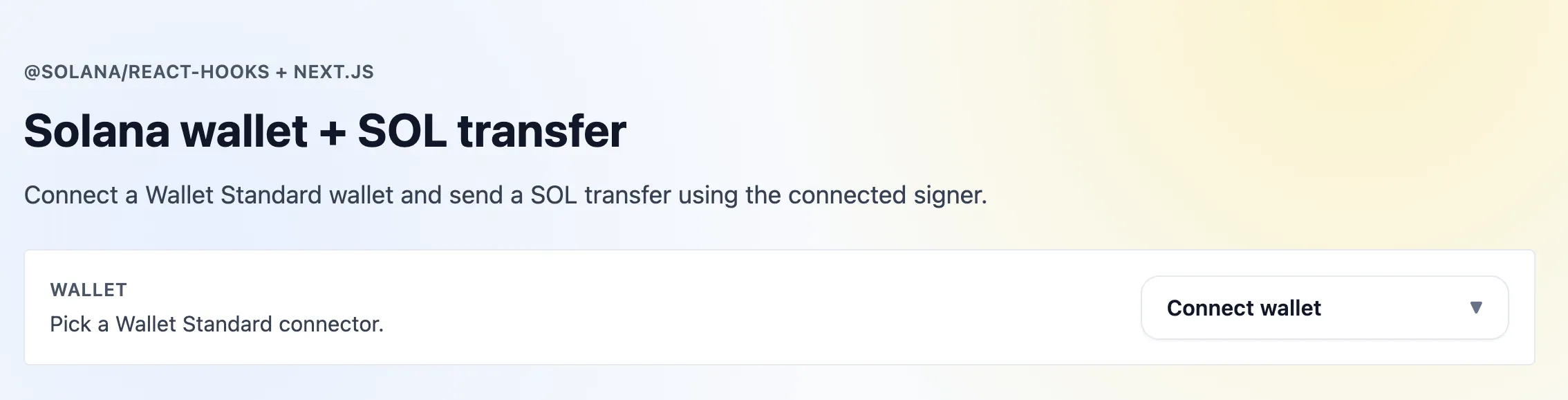Next.js Hooks App [Resources](https://solana.com/docs/frontend/nextjs-solana#resources) ---------------------------------------------------------------------- * [Framework Kit Repository](https://github.com/solana-foundation/framework-kit) * [Solana JSON RPC](https://docs.solana.com/cluster/rpc-endpoints) [Prerequisites](https://solana.com/docs/frontend/nextjs-solana#prerequisites) ------------------------------------------------------------------------------ * Node 20+ * npm [Create Next.js Project](https://solana.com/docs/frontend/nextjs-solana#create-nextjs-project) ----------------------------------------------------------------------------------------------- Terminal $ npx create-next-app@latest my-app Copy $ cd my-app Copy When prompted, accept all defaults (the starter includes Tailwind, which this tutorial uses for simple utility styles). ### [Install Solana dependencies](https://solana.com/docs/frontend/nextjs-solana#install-solana-dependencies) Terminal $ npm install @solana/client@latest @solana/react-hooks@latest @solana/kit@latest Copy Use `@latest` to stay current. If your package manager surfaces peer warnings, you can pin to the current tested set (`@solana/client@1.1.0 @solana/react-hooks@1.1.0 @solana/kit@5.0.0`) and upgrade when new releases land. 1\. Create Solana Provider -------------------------- `app/providers.tsx` uses the simplified `SolanaProvider` props. Set the cluster (Devnet by default). 2\. Update Layout ----------------- Wrap your application with the `Providers` component. Update `app/layout.tsx` to import and use it: This wraps the entire app with the Solana context so all child components can access wallet state and hooks. 3\. Wallet Connect Button ------------------------- Dropdown to connect/disconnect Wallet Standard wallets via `useConnectWallet` / `useDisconnectWallet`. 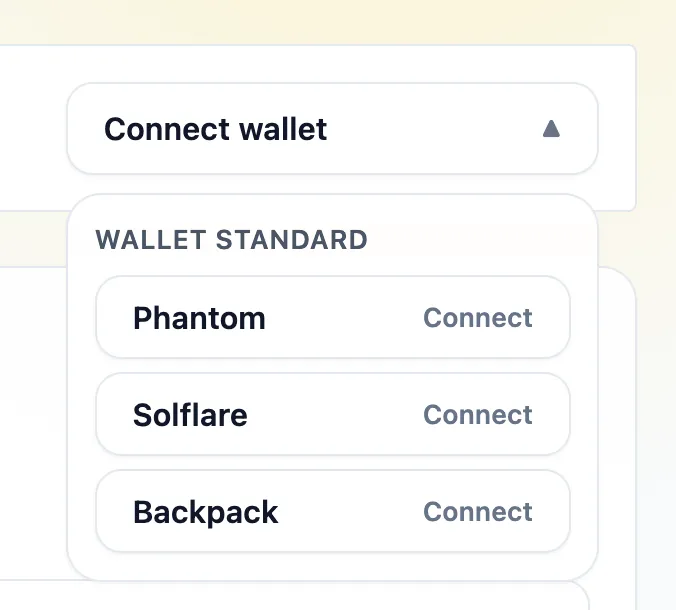Wallet dropdown options Wallet dropdown connected 4\. SOL Transfer ---------------- Use `useSolTransfer` to send a SOL transfer (lamports) to any address. 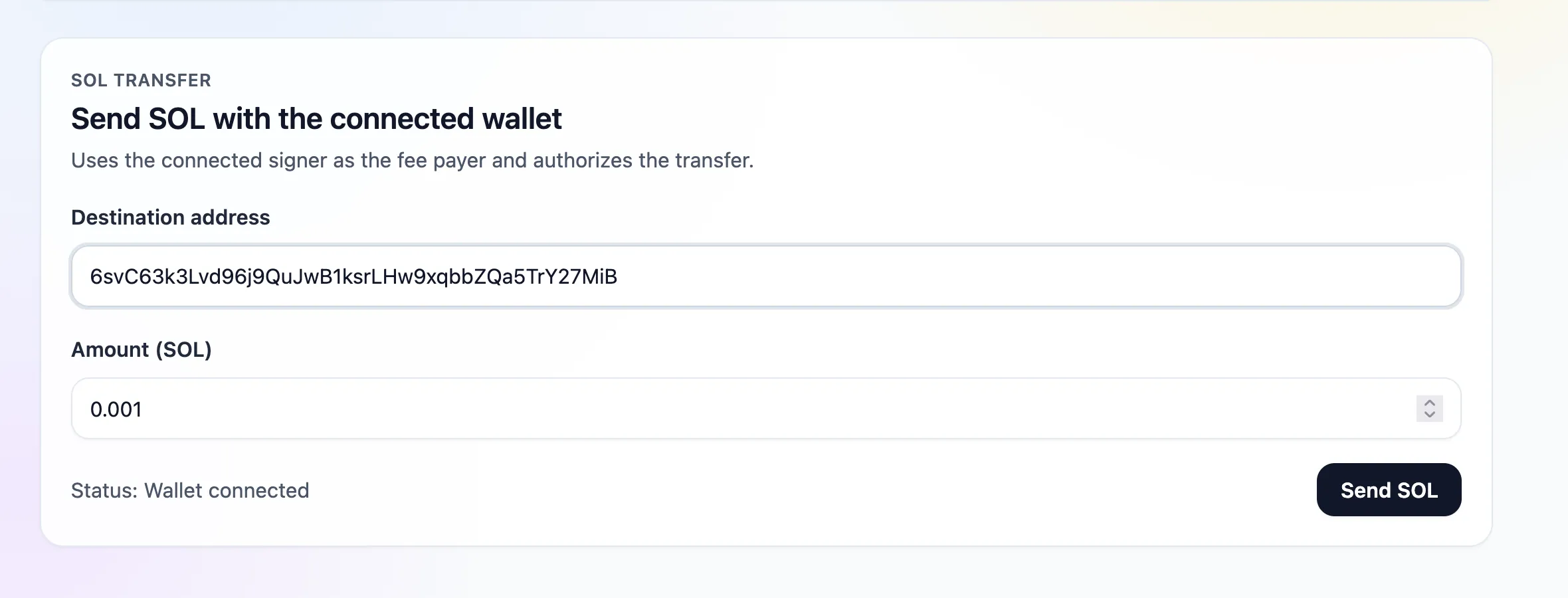SOL transfer form filled 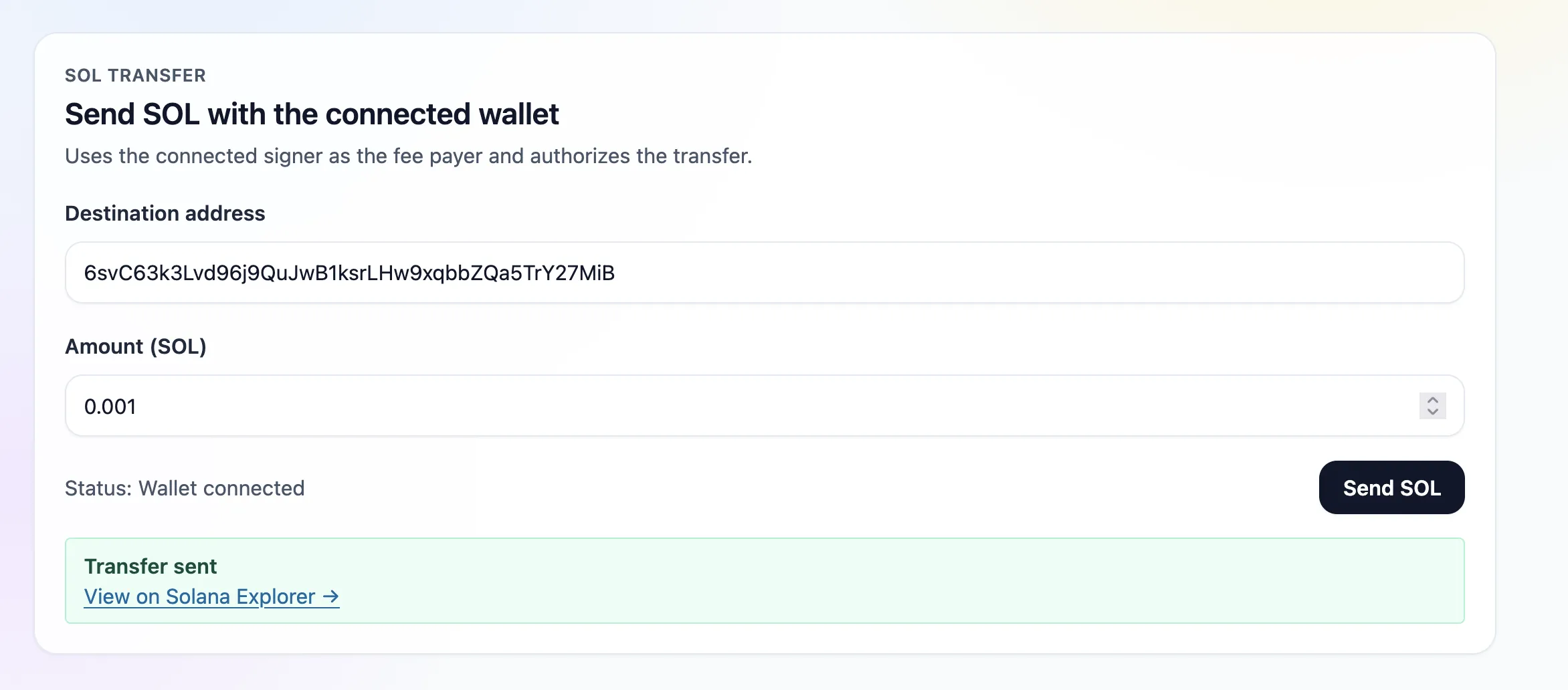SOL transfer success Connectors are the same Wallet Standard set (Phantom/Solflare/Backpack/auto-discovery); once connected, SOL transfers use the connected signer. 5\. Page -------- `app/page.tsx` renders the wallet connect and SOL transfer components (no Suspense needed): 6\. Run the Application ----------------------- Terminal $ npm run dev Copy Open [http://localhost:3000](http://localhost:3000/) , connect a Devnet wallet, and send a SOL transfer. 1\. Create Solana Provider -------------------------- `app/providers.tsx` uses the simplified `SolanaProvider` props. Set the cluster (Devnet by default). 2\. Update Layout ----------------- Wrap your application with the `Providers` component. Update `app/layout.tsx` to import and use it: This wraps the entire app with the Solana context so all child components can access wallet state and hooks. 3\. Wallet Connect Button ------------------------- Dropdown to connect/disconnect Wallet Standard wallets via `useConnectWallet` / `useDisconnectWallet`. Wallet dropdown options Wallet dropdown connected 4\. SOL Transfer ---------------- Use `useSolTransfer` to send a SOL transfer (lamports) to any address. SOL transfer form filled SOL transfer success Connectors are the same Wallet Standard set (Phantom/Solflare/Backpack/auto-discovery); once connected, SOL transfers use the connected signer. 5\. Page -------- `app/page.tsx` renders the wallet connect and SOL transfer components (no Suspense needed): 6\. Run the Application ----------------------- Terminal $ npm run dev Copy Open [http://localhost:3000](http://localhost:3000/) , connect a Devnet wallet, and send a SOL transfer. app providers.tsx "use client"; import type { SolanaClientConfig } from "@solana/client"; import { SolanaProvider } from "@solana/react-hooks"; const defaultConfig: SolanaClientConfig \= { cluster: "devnet", rpc: "https://api.devnet.solana.com", websocket: "wss://api.devnet.solana.com", }; export default function Providers({ children }: { children: React.ReactNode }) { return {children}; } Is this page helpful? [Previous\ \ @solana/web3-compat](https://solana.com/docs/frontend/web3-compat) [Next\ \ Rust SDK](https://solana.com/docs/clients/official/rust) ### Table of Contents [Resources](https://solana.com/docs/frontend/nextjs-solana#resources) [Prerequisites](https://solana.com/docs/frontend/nextjs-solana#prerequisites) [Create Next.js Project](https://solana.com/docs/frontend/nextjs-solana#create-nextjs-project) [Install Solana dependencies](https://solana.com/docs/frontend/nextjs-solana#install-solana-dependencies) [Edit Page](https://github.com/solana-foundation/solana-com/blob/main/apps/docs/content/docs/en/frontend/nextjs-solana.mdx) Ask AI Managed by [](https://solana.com/) © 2026 Solana Foundation. All rights reserved. [](https://solana.com/youtube) [](https://solana.com/twitter) [](https://solana.com/discord) [](https://solana.com/reddit) [](https://solana.com/github) [](https://solana.com/telegram) en Solana * [Grants](https://solana.org/grants) * [Media Kit](https://solana.com/branding) * [Careers](https://jobs.solana.com/) * [Disclaimer](https://solana.com/tos) * [Privacy Policy](https://solana.com/privacy-policy) Get connected * [Blog](https://solana.com/news) * Newsletter --- # Developing Programs in Rust | Solana [Solana Documentation](https://solana.com/docs) Developing Programs [Developing Programs in Rust](https://solana.com/docs/programs/rust) ===================================================================== Copy MarkdownOpen Solana programs are primarily developed using the Rust programming language. This page focuses on writing Solana programs in Rust without using the Anchor framework, an approach often referred to as writing "native Rust" programs. Native Rust development provides developers with direct control over their Solana programs. However, this approach requires more manual setup and boilerplate code compared to using the Anchor framework. This method is recommended for developers who: * Seek granular control over program logic and optimizations * Want to learn the underlying concepts before moving to higher-level frameworks For beginners, we recommend starting with the Anchor framework. See the [Anchor](https://www.anchor-lang.com/docs) section for more information. [Prerequisites](https://solana.com/docs/programs/rust#prerequisites) --------------------------------------------------------------------- For detailed installation instructions, visit the [installation](https://solana.com/docs/intro/installation) page. Before you begin, ensure you have the following installed: * Rust: The programming language for building Solana programs. * Solana CLI: Command-line tool for Solana development. [Getting Started](https://solana.com/docs/programs/rust#getting-started) ------------------------------------------------------------------------- The example below covers the basic steps to create your first Solana program written in Rust. We'll create a minimal program that prints "Hello, world!" to the program log. Create a new program -------------------- First, create a new Rust project using the standard `cargo new` command with the `--lib` flag. Terminal $ cargo new hello\_world --lib Copy Navigate to the project directory. You should see the default `src/lib.rs` and `Cargo.toml` files Terminal $ cd hello\_world Copy Update the `edition` field in `Cargo.toml` to `2021`. Otherwise, you might encounter an error when building the program. Add the solana-program dependency --------------------------------- Next, add the `solana-program` dependency. This is the minimum dependency required to build a Solana program. Terminal $ cargo add solana-program@2.2.0 Copy Add the crate-type ------------------ Next, add the following snippet to `Cargo.toml`. Cargo.toml \[lib\] crate-type = \["cdylib", "lib"\] If you don't include this config, the `target/deploy` directory will not be generated when you build the program. Your `Cargo.toml` file should look like the following: Cargo.toml \[package\] name = "hello\_world" version = "0.1.0" edition = "2021" \[lib\] crate-type = \["cdylib", "lib"\] \[dependencies\] solana-program = "2.2.0" Add the program code -------------------- Next, replace the contents of `src/lib.rs` with the following code. This is a minimal Solana program that prints "Hello, world!" to the program log when the program is invoked. The `msg!` macro is used in Solana programs to print a message to the program log. src/lib.rs use solana\_program::{ account\_info::AccountInfo, entrypoint, entrypoint::ProgramResult, msg, pubkey::Pubkey, }; entrypoint!(process\_instruction); pub fn process\_instruction( \_program\_id: &Pubkey, \_accounts: &\[AccountInfo\], \_instruction\_data: &\[u8\], ) \-> ProgramResult { msg!("Hello, world!"); Ok(()) } Build the program ----------------- Next, build the program using the `cargo build-sbf` command. Terminal $ cargo build-sbf Copy This command generates a `target/deploy` directory containing two important files: 1. A `.so` file (e.g., `hello_world.so`): This is the compiled Solana program that will be deployed to the network as a "smart contract". 2. A keypair file (e.g., `hello_world-keypair.json`): The public key of this keypair is used as the program ID when deploying the program. To view the program ID, run the following command in your terminal. This command prints the public key of the keypair at the specified file path: Terminal $ solana address -k ./target/deploy/hello\_world-keypair.json Copy Example output: 4Ujf5fXfLx2PAwRqcECCLtgDxHKPznoJpa43jUBxFfMz Add test dependencies --------------------- Next, test the program using the `litesvm` crate. Add the following dependencies to `Cargo.toml`. Terminal $ cargo add litesvm@0.6.1 --dev Copy $ cargo add solana-sdk@2.2.0 --dev Copy Test the program ---------------- Add the following test to `src/lib.rs`, below the program code. This is a test module that invokes the hello world program. src/lib.rs use solana\_program::{ account\_info::AccountInfo, entrypoint, entrypoint::ProgramResult, msg, pubkey::Pubkey, }; entrypoint!(process\_instruction); pub fn process\_instruction( \_program\_id: &Pubkey, \_accounts: &\[AccountInfo\], \_instruction\_data: &\[u8\], ) \-> ProgramResult { msg!("Hello, world!"); Ok(()) } #\[cfg(test)\] mod test { use litesvm::LiteSVM; use solana\_sdk::{ instruction::Instruction, message::Message, signature::{Keypair, Signer}, transaction::Transaction, }; #\[test\] fn test\_hello\_world() { // Create a new LiteSVM instance let mut svm \= LiteSVM::new(); // Create a keypair for the transaction payer let payer \= Keypair::new(); // Airdrop some lamports to the payer svm.airdrop(&payer.pubkey(), 1\_000\_000\_000).unwrap(); // Load our program let program\_keypair \= Keypair::new(); let program\_id \= program\_keypair.pubkey(); svm.add\_program\_from\_file(program\_id, "target/deploy/hello\_world.so") .unwrap(); // Create instruction with no accounts and no data let instruction \= Instruction { program\_id, accounts: vec!\[\], data: vec!\[\], }; // Create transaction let message \= Message::new(&\[instruction\], Some(&payer.pubkey())); let transaction \= Transaction::new(&\[&payer\], message, svm.latest\_blockhash()); // Send transaction and verify it succeeds let result \= svm.send\_transaction(transaction); assert!(result.is\_ok(), "Transaction should succeed"); let logs \= result.unwrap().logs; println!("Logs: {logs:#?}"); } } Run the test using the `cargo test` command. The program log will display "Hello, world!". Terminal $ cargo test -- --no-capture Copy Example output: Terminal running 1 test Logs: \[\ \ "Program 9528phXNvdWp5kkR4rgpoeZvR8ZWT5THVywK95YRprkk invoke \[1\]",\ \ "Program log: Hello, world!",\ \ "Program 9528phXNvdWp5kkR4rgpoeZvR8ZWT5THVywK95YRprkk consumed 211 of 200000 compute units",\ \ "Program 9528phXNvdWp5kkR4rgpoeZvR8ZWT5THVywK95YRprkk success",\ \ \] test test::test\_hello\_world ... ok test result: ok. 1 passed; 0 failed; 0 ignored; 0 measured; 0 filtered out; finished in 0.05s Deploy the program ------------------ Next, deploy the program. When developing locally, we can use the `solana-test-validator`. First, configure the Solana CLI to use the local Solana cluster. Terminal $ solana config set -ul Copy Example output: Config File: /.config/solana/cli/config.yml RPC URL: http://localhost:8899 WebSocket URL: ws://localhost:8900/ (computed) Keypair Path: /.config/solana/id.json Commitment: confirmed Open a new terminal and run the `solana-test-validators` command to start the local validator. Terminal $ solana-test-validator Copy While the test validator is running, run the `solana program deploy` command in a separate terminal to deploy the program to the local validator. Terminal $ solana program deploy ./target/deploy/hello\_world.so Copy Example output: Program Id: 4Ujf5fXfLx2PAwRqcECCLtgDxHKPznoJpa43jUBxFfMz Signature: 5osMiNMiDZGM7L1e2tPHxU8wdB8gwG8fDnXLg5G7SbhwFz4dHshYgAijk4wSQL5cXiu8z1MMou5kLadAQuHp7ybH You can inspect the program ID and transaction signature on [Solana Explorer](https://explorer.solana.com/?cluster=custom&customUrl=http%3A%2F%2Flocalhost%3A8899) . Note that the cluster on Solana Explorer must also be localhost. The "Custom RPC URL" option on Solana Explorer defaults to `http://localhost:8899`. Create example client --------------------- Next, we'll demonstrate how to invoke the program using a Rust client. First create an `examples` directory and a `client.rs` file. Terminal $ mkdir -p examples && touch examples/client.rs Copy Add the following to `Cargo.toml`. Cargo.toml \[\[example\]\] name = "client" path = "examples/client.rs" Add `solana-client` and `tokio` dependencies. Terminal $ cargo add solana-client@2.2.0 --dev Copy $ cargo add tokio --dev Copy Add the client -------------- Add the following code to `examples/client.rs`. This is a Rust client script that funds a new keypair to pay for transaction fees and then invokes the hello world program. examples/client.rs use solana\_client::rpc\_client::RpcClient; use solana\_sdk::{ commitment\_config::CommitmentConfig, instruction::Instruction, pubkey::Pubkey, signature::{Keypair, Signer}, transaction::Transaction, }; use std::str::FromStr; #\[tokio::main\] async fn main() { // Program ID (replace with your actual program ID) let program\_id \= Pubkey::from\_str("4Ujf5fXfLx2PAwRqcECCLtgDxHKPznoJpa43jUBxFfMz").unwrap(); // Connect to the Solana devnet let rpc\_url \= String::from("http://localhost:8899"); let client \= RpcClient::new\_with\_commitment(rpc\_url, CommitmentConfig::confirmed()); // Generate a new keypair for the payer let payer \= Keypair::new(); // Request airdrop let airdrop\_amount \= 1\_000\_000\_000; // 1 SOL let signature \= client .request\_airdrop(&payer.pubkey(), airdrop\_amount) .expect("Failed to request airdrop"); // Wait for airdrop confirmation loop { let confirmed \= client.confirm\_transaction(&signature).unwrap(); if confirmed { break; } } // Create the instruction let instruction \= Instruction::new\_with\_borsh( program\_id, &(), // Empty instruction data vec!\[\], // No accounts needed ); // Add the instruction to new transaction let mut transaction \= Transaction::new\_with\_payer(&\[instruction\], Some(&payer.pubkey())); transaction.sign(&\[&payer\], client.get\_latest\_blockhash().unwrap()); // Send and confirm the transaction match client.send\_and\_confirm\_transaction(&transaction) { Ok(signature) \=> println!("Transaction Signature: {}", signature), Err(err) \=> eprintln!("Error sending transaction: {}", err), } } Replace the program ID ---------------------- Before running the client code, replace the program ID in the code snippet with the one for your program. You can get your program ID by running the following command. Terminal $ solana address -k ./target/deploy/hello\_world-keypair.json Copy Invoke the program ------------------ Run the client script with the following command. Terminal $ cargo run --example client Copy Example output: Transaction Signature: 54TWxKi3Jsi3UTeZbhLGUFX6JQH7TspRJjRRFZ8NFnwG5BXM9udxiX77bAACjKAS9fGnVeEazrXL4SfKrW7xZFYV You can inspect the transaction signature on [Solana Explorer](https://explorer.solana.com/?cluster=custom&customUrl=http%3A%2F%2Flocalhost%3A8899) (local cluster) to see "Hello, world!" in the program log. Update the program ------------------ Solana programs can be updated by redeploying to the same program ID. Update the program in `src/lib.rs` to print "Hello, Solana!" instead of "Hello, world!". lib.rs pub fn process\_instruction( \_program\_id: &Pubkey, \_accounts: &\[AccountInfo\], \_instruction\_data: &\[u8\], ) \-> ProgramResult { \- msg!("Hello, world!"); + msg!("Hello, Solana!"); Ok(()) } Run the `cargo build-sbf` command to generate an updated `.so` file. Terminal $ cargo build-sbf Copy Test the updated program by running the `cargo test` command. Terminal $ cargo test -- --no-capture Copy You should see "Hello, Solana!" in the program log. Terminal running 1 test Logs: \[\ \ "Program 5y8bHrnwfq2dLDgLn3WoTHb9dDuyorj9gyapW6aeyrpV invoke \[1\]",\ \ "Program log: Hello, Solana!",\ \ "Program 5y8bHrnwfq2dLDgLn3WoTHb9dDuyorj9gyapW6aeyrpV consumed 211 of 200000 compute units",\ \ "Program 5y8bHrnwfq2dLDgLn3WoTHb9dDuyorj9gyapW6aeyrpV success",\ \ \] test test::test\_hello\_world ... ok test result: ok. 1 passed; 0 failed; 0 ignored; 0 measured; 0 filtered out; finished in 0.08s Redeploy the program -------------------- Redeploy the program using the same `solana program deploy` command. Terminal $ solana program deploy ./target/deploy/hello\_world.so Copy Run the client code again and inspect the transaction signature on Solana Explorer to see "Hello, Solana!" in the program log. Terminal $ cargo run --example client Copy Close the program ----------------- You can close your Solana program to reclaim the SOL allocated to the account. Closing a program is irreversible, so it should be done with caution. To close a program, use the `solana program close ` command. For example: Terminal $ solana program close 4Ujf5fXfLx2PAwRqcECCLtgDxHKPznoJpa43jUBxFfMz --bypass-warning Copy Example output: Closed Program Id 4Ujf5fXfLx2PAwRqcECCLtgDxHKPznoJpa43jUBxFfMz, 0.1350588 SOL reclaimed Note that once a program is closed, its program ID cannot be reused. Attempting to deploy a program with a previously closed program ID will result in an error. Error: Program 4Ujf5fXfLx2PAwRqcECCLtgDxHKPznoJpa43jUBxFfMz has been closed, use a new Program Id Redeploy a closed program ------------------------- If you need to redeploy a program with the same source code after closing a program, you must generate a new program ID. To generate a new keypair for the program, run the following command: Terminal $ solana-keygen new -o ./target/deploy/hello\_world-keypair.json --force Copy Alternatively, you can delete the existing keypair file (e.g. `./target/deploy/hello_world-keypair.json`) and run `cargo build-sbf` again, which will generate a new keypair file. Create a new program -------------------- First, create a new Rust project using the standard `cargo new` command with the `--lib` flag. Terminal $ cargo new hello\_world --lib Copy Navigate to the project directory. You should see the default `src/lib.rs` and `Cargo.toml` files Terminal $ cd hello\_world Copy Update the `edition` field in `Cargo.toml` to `2021`. Otherwise, you might encounter an error when building the program. Add the solana-program dependency --------------------------------- Next, add the `solana-program` dependency. This is the minimum dependency required to build a Solana program. Terminal $ cargo add solana-program@2.2.0 Copy Add the crate-type ------------------ Next, add the following snippet to `Cargo.toml`. Cargo.toml \[lib\] crate-type = \["cdylib", "lib"\] If you don't include this config, the `target/deploy` directory will not be generated when you build the program. Add the program code -------------------- Next, replace the contents of `src/lib.rs` with the following code. This is a minimal Solana program that prints "Hello, world!" to the program log when the program is invoked. The `msg!` macro is used in Solana programs to print a message to the program log. Build the program ----------------- Next, build the program using the `cargo build-sbf` command. Terminal $ cargo build-sbf Copy This command generates a `target/deploy` directory containing two important files: 1. A `.so` file (e.g., `hello_world.so`): This is the compiled Solana program that will be deployed to the network as a "smart contract". 2. A keypair file (e.g., `hello_world-keypair.json`): The public key of this keypair is used as the program ID when deploying the program. To view the program ID, run the following command in your terminal. This command prints the public key of the keypair at the specified file path: Terminal $ solana address -k ./target/deploy/hello\_world-keypair.json Copy Example output: 4Ujf5fXfLx2PAwRqcECCLtgDxHKPznoJpa43jUBxFfMz Add test dependencies --------------------- Next, test the program using the `litesvm` crate. Add the following dependencies to `Cargo.toml`. Terminal $ cargo add litesvm@0.6.1 --dev Copy $ cargo add solana-sdk@2.2.0 --dev Copy Test the program ---------------- Add the following test to `src/lib.rs`, below the program code. This is a test module that invokes the hello world program. Run the test using the `cargo test` command. The program log will display "Hello, world!". Terminal $ cargo test -- --no-capture Copy Example output: Terminal running 1 test Logs: \[\ \ "Program 9528phXNvdWp5kkR4rgpoeZvR8ZWT5THVywK95YRprkk invoke \[1\]",\ \ "Program log: Hello, world!",\ \ "Program 9528phXNvdWp5kkR4rgpoeZvR8ZWT5THVywK95YRprkk consumed 211 of 200000 compute units",\ \ "Program 9528phXNvdWp5kkR4rgpoeZvR8ZWT5THVywK95YRprkk success",\ \ \] test test::test\_hello\_world ... ok test result: ok. 1 passed; 0 failed; 0 ignored; 0 measured; 0 filtered out; finished in 0.05s Deploy the program ------------------ Next, deploy the program. When developing locally, we can use the `solana-test-validator`. First, configure the Solana CLI to use the local Solana cluster. Terminal $ solana config set -ul Copy Example output: Config File: /.config/solana/cli/config.yml RPC URL: http://localhost:8899 WebSocket URL: ws://localhost:8900/ (computed) Keypair Path: /.config/solana/id.json Commitment: confirmed Open a new terminal and run the `solana-test-validators` command to start the local validator. Terminal $ solana-test-validator Copy While the test validator is running, run the `solana program deploy` command in a separate terminal to deploy the program to the local validator. Terminal $ solana program deploy ./target/deploy/hello\_world.so Copy Example output: Program Id: 4Ujf5fXfLx2PAwRqcECCLtgDxHKPznoJpa43jUBxFfMz Signature: 5osMiNMiDZGM7L1e2tPHxU8wdB8gwG8fDnXLg5G7SbhwFz4dHshYgAijk4wSQL5cXiu8z1MMou5kLadAQuHp7ybH You can inspect the program ID and transaction signature on [Solana Explorer](https://explorer.solana.com/?cluster=custom&customUrl=http%3A%2F%2Flocalhost%3A8899) . Note that the cluster on Solana Explorer must also be localhost. The "Custom RPC URL" option on Solana Explorer defaults to `http://localhost:8899`. Create example client --------------------- Next, we'll demonstrate how to invoke the program using a Rust client. First create an `examples` directory and a `client.rs` file. Terminal $ mkdir -p examples && touch examples/client.rs Copy Add the following to `Cargo.toml`. Cargo.toml \[\[example\]\] name = "client" path = "examples/client.rs" Add `solana-client` and `tokio` dependencies. Terminal $ cargo add solana-client@2.2.0 --dev Copy $ cargo add tokio --dev Copy Add the client -------------- Add the following code to `examples/client.rs`. This is a Rust client script that funds a new keypair to pay for transaction fees and then invokes the hello world program. Replace the program ID ---------------------- Before running the client code, replace the program ID in the code snippet with the one for your program. You can get your program ID by running the following command. Terminal $ solana address -k ./target/deploy/hello\_world-keypair.json Copy Invoke the program ------------------ Run the client script with the following command. Terminal $ cargo run --example client Copy Example output: Transaction Signature: 54TWxKi3Jsi3UTeZbhLGUFX6JQH7TspRJjRRFZ8NFnwG5BXM9udxiX77bAACjKAS9fGnVeEazrXL4SfKrW7xZFYV You can inspect the transaction signature on [Solana Explorer](https://explorer.solana.com/?cluster=custom&customUrl=http%3A%2F%2Flocalhost%3A8899) (local cluster) to see "Hello, world!" in the program log. Update the program ------------------ Solana programs can be updated by redeploying to the same program ID. Update the program in `src/lib.rs` to print "Hello, Solana!" instead of "Hello, world!". lib.rs pub fn process\_instruction( \_program\_id: &Pubkey, \_accounts: &\[AccountInfo\], \_instruction\_data: &\[u8\], ) \-> ProgramResult { \- msg!("Hello, world!"); + msg!("Hello, Solana!"); Ok(()) } Run the `cargo build-sbf` command to generate an updated `.so` file. Terminal $ cargo build-sbf Copy Test the updated program by running the `cargo test` command. Terminal $ cargo test -- --no-capture Copy You should see "Hello, Solana!" in the program log. Terminal running 1 test Logs: \[\ \ "Program 5y8bHrnwfq2dLDgLn3WoTHb9dDuyorj9gyapW6aeyrpV invoke \[1\]",\ \ "Program log: Hello, Solana!",\ \ "Program 5y8bHrnwfq2dLDgLn3WoTHb9dDuyorj9gyapW6aeyrpV consumed 211 of 200000 compute units",\ \ "Program 5y8bHrnwfq2dLDgLn3WoTHb9dDuyorj9gyapW6aeyrpV success",\ \ \] test test::test\_hello\_world ... ok test result: ok. 1 passed; 0 failed; 0 ignored; 0 measured; 0 filtered out; finished in 0.08s Redeploy the program -------------------- Redeploy the program using the same `solana program deploy` command. Terminal $ solana program deploy ./target/deploy/hello\_world.so Copy Run the client code again and inspect the transaction signature on Solana Explorer to see "Hello, Solana!" in the program log. Terminal $ cargo run --example client Copy Close the program ----------------- You can close your Solana program to reclaim the SOL allocated to the account. Closing a program is irreversible, so it should be done with caution. To close a program, use the `solana program close ` command. For example: Terminal $ solana program close 4Ujf5fXfLx2PAwRqcECCLtgDxHKPznoJpa43jUBxFfMz --bypass-warning Copy Example output: Closed Program Id 4Ujf5fXfLx2PAwRqcECCLtgDxHKPznoJpa43jUBxFfMz, 0.1350588 SOL reclaimed Note that once a program is closed, its program ID cannot be reused. Attempting to deploy a program with a previously closed program ID will result in an error. Error: Program 4Ujf5fXfLx2PAwRqcECCLtgDxHKPznoJpa43jUBxFfMz has been closed, use a new Program Id Redeploy a closed program ------------------------- If you need to redeploy a program with the same source code after closing a program, you must generate a new program ID. To generate a new keypair for the program, run the following command: Terminal $ solana-keygen new -o ./target/deploy/hello\_world-keypair.json --force Copy Alternatively, you can delete the existing keypair file (e.g. `./target/deploy/hello_world-keypair.json`) and run `cargo build-sbf` again, which will generate a new keypair file. src lib.rs Cargo.toml \[package\] name = "hello\_world" version = "0.1.0" edition = "2021" \[dependencies\] Is this page helpful? [Previous\ \ Transfer Tokens](https://solana.com/docs/tokens/extensions/confidential-transfer/transfer-tokens) [Next\ \ Program Structure](https://solana.com/docs/programs/rust/program-structure) ### Table of Contents [Prerequisites](https://solana.com/docs/programs/rust#prerequisites) [Getting Started](https://solana.com/docs/programs/rust#getting-started) [Edit Page](https://github.com/solana-foundation/solana-com/blob/main/apps/docs/content/docs/en/programs/rust/index.mdx) Ask AI Managed by [](https://solana.com/) © 2026 Solana Foundation. All rights reserved. [](https://solana.com/youtube) [](https://solana.com/twitter) [](https://solana.com/discord) [](https://solana.com/reddit) [](https://solana.com/github) [](https://solana.com/telegram) en Solana * [Grants](https://solana.org/grants) * [Media Kit](https://solana.com/branding) * [Careers](https://jobs.solana.com/) * [Disclaimer](https://solana.com/tos) * [Privacy Policy](https://solana.com/privacy-policy) Get connected * [Blog](https://solana.com/news) * Newsletter Developing Programs in Rust | Solana --- # @solana/web3-compat | Solana [Solana Documentation](https://solana.com/docs) [Frontend](https://solana.com/docs/frontend) [@solana/web3-compat](https://solana.com/docs/frontend/web3-compat) ==================================================================== Copy MarkdownOpen `@solana/web3-compat` is the bridge between long-lived `@solana/web3.js` apps and the newer Kit runtime. Swap the import, keep the surface that your app already knows, and progressively adopt Kit features without rewriting every helper or instruction at once. [Install with Kit peers](https://solana.com/docs/frontend/web3-compat#install-with-kit-peers) ---------------------------------------------------------------------------------------------- Terminal $ npm install @solana/web3-compat @solana/kit @solana/client Copy The compatibility layer re-exports classic Web3 types (`Connection`, `PublicKey`, `Transaction`, etc.) while internally delegating to Kit networking and codecs. Keep your existing RPC endpoints, but benefit from Kit's more predictable blockhash handling and wallet abstractions. [Replace imports (no other code changes)](https://solana.com/docs/frontend/web3-compat#replace-imports-no-other-code-changes) ------------------------------------------------------------------------------------------------------------------------------ Most projects can migrate file-by-file by switching the import source. Both named and namespace imports mirror the old package. Before import { Connection, PublicKey } from "@solana/web3.js"; After import { Connection, PublicKey } from "@solana/web3-compat"; CommonJS works too: const solanaWeb3 \= require("@solana/web3-compat"); const connection \= new solanaWeb3.Connection("https://api.devnet.solana.com"); Behind the scenes `Connection` forwards reads and writes through `@solana/client`, so helpers like `sendAndConfirmTransaction`, `simulateTransaction`, and `getProgramAccounts` benefit from the newer runtime without touching your business logic. [Bridge helpers when you need Kit types](https://solana.com/docs/frontend/web3-compat#bridge-helpers-when-you-need-kit-types) ------------------------------------------------------------------------------------------------------------------------------ As you adopt Kit directly (maybe in new components using `@solana/client` or `@solana/react-hooks`), use the bridge helpers shipped in the compat package to convert between the two ecosystems: import { PublicKey, toAddress, toPublicKey, toWeb3Instruction, toKitSigner, } from "@solana/web3-compat"; const legacyKey \= new PublicKey("11111111111111111111111111111111"); const kitAddress \= toAddress(legacyKey); const backToWeb3 \= toPublicKey(kitAddress); Mixing runtimes becomes safe: newer hooks can emit Kit instructions, then `toWeb3Instruction` will wrap them for legacy flows until the whole project moves over. [Progressive migration patterns](https://solana.com/docs/frontend/web3-compat#progressive-migration-patterns) -------------------------------------------------------------------------------------------------------------- * **Incremental rollouts**: Update one feature folder at a time. When a module no longer needs compat, point it straight at `@solana/client`/`@solana/react-hooks` without touching the rest of the tree. * **Shared RPC tuning**: Because compat relies on Kit connections, tuning commitment levels, prioritization fees, or RPC URLs flows through a single config object. * **SPL + transaction helpers**: Keep legacy transaction builders for now, but reach for `client.helpers.transaction.prepare` once you're ready. Compat can still submit the same signed payloads. * **Testing**: Reuse existing Web3 mocks since the public surface stays identical, yet under test you can stub the Kit client for richer simulations. [What ships in Phase 0](https://solana.com/docs/frontend/web3-compat#what-ships-in-phase-0) -------------------------------------------------------------------------------------------- * `Connection` with `getLatestBlockhash`, `getBalance`, `getAccountInfo`, `getProgramAccounts`, `getSignatureStatuses`, `sendRawTransaction`, `confirmTransaction`, and `simulateTransaction`. * Utilities like `LAMPORTS_PER_SOL`, `sendAndConfirmTransaction`, and `compileFromCompat`. * `SystemProgram.transfer` plus all core Web3 primitives (`Keypair`, `Transaction`, `VersionedTransaction`, `TransactionInstruction`). Coverage is still expanding Methods outside the list above fall back to legacy `@solana/web3.js` today. Keep the old dependency around until the rest of your surface lands in compat, and track future releases for subscription support and broader RPC coverage. Pair this guide with the [@solana/client overview](https://solana.com/docs/frontend/client) and [@solana/react-hooks guide](https://solana.com/docs/frontend/react-hooks) when you are ready to start building new UI on top of the same Kit runtime. Is this page helpful? [Previous\ \ @solana/react-hooks](https://solana.com/docs/frontend/react-hooks) [Next\ \ Next.js + Solana React Hooks](https://solana.com/docs/frontend/nextjs-solana) ### Table of Contents [Install with Kit peers](https://solana.com/docs/frontend/web3-compat#install-with-kit-peers) [Replace imports (no other code changes)](https://solana.com/docs/frontend/web3-compat#replace-imports-no-other-code-changes) [Bridge helpers when you need Kit types](https://solana.com/docs/frontend/web3-compat#bridge-helpers-when-you-need-kit-types) [Progressive migration patterns](https://solana.com/docs/frontend/web3-compat#progressive-migration-patterns) [What ships in Phase 0](https://solana.com/docs/frontend/web3-compat#what-ships-in-phase-0) [Edit Page](https://github.com/solana-foundation/solana-com/blob/main/apps/docs/content/docs/en/frontend/web3-compat.mdx) Ask AI Managed by [](https://solana.com/) © 2026 Solana Foundation. All rights reserved. [](https://solana.com/youtube) [](https://solana.com/twitter) [](https://solana.com/discord) [](https://solana.com/reddit) [](https://solana.com/github) [](https://solana.com/telegram) en Solana * [Grants](https://solana.org/grants) * [Media Kit](https://solana.com/branding) * [Careers](https://jobs.solana.com/) * [Disclaimer](https://solana.com/tos) * [Privacy Policy](https://solana.com/privacy-policy) Get connected * [Blog](https://solana.com/news) * Newsletter --- # Deploy Your First Solana Program | Solana [Solana Documentation](https://solana.com/docs) Getting Started[Quick Start](https://solana.com/docs/intro/quick-start) [Deploy Your First Solana Program](https://solana.com/docs/intro/quick-start/deploying-programs) ================================================================================================= Copy MarkdownOpen Build, deploy, and test your first [program](https://solana.com/docs/core/programs) to the Solana Blockchain using the Anchor framework. This guide will help you become more familiar with the Solana Playground and prepare you to use program derived addresses (PDA) and cross-program invocation (CPI). ### [Create Anchor Project](https://solana.com/docs/intro/quick-start/deploying-programs#create-anchor-project) 1. Open the [Solana Playground](https://beta.solpg.io/) in your web browser 2. On the left panel, click **\+ Create a new project** 3. Enter a **Project name** 4. Select **Anchor (Rust)** as the framework 5. Click **Create** 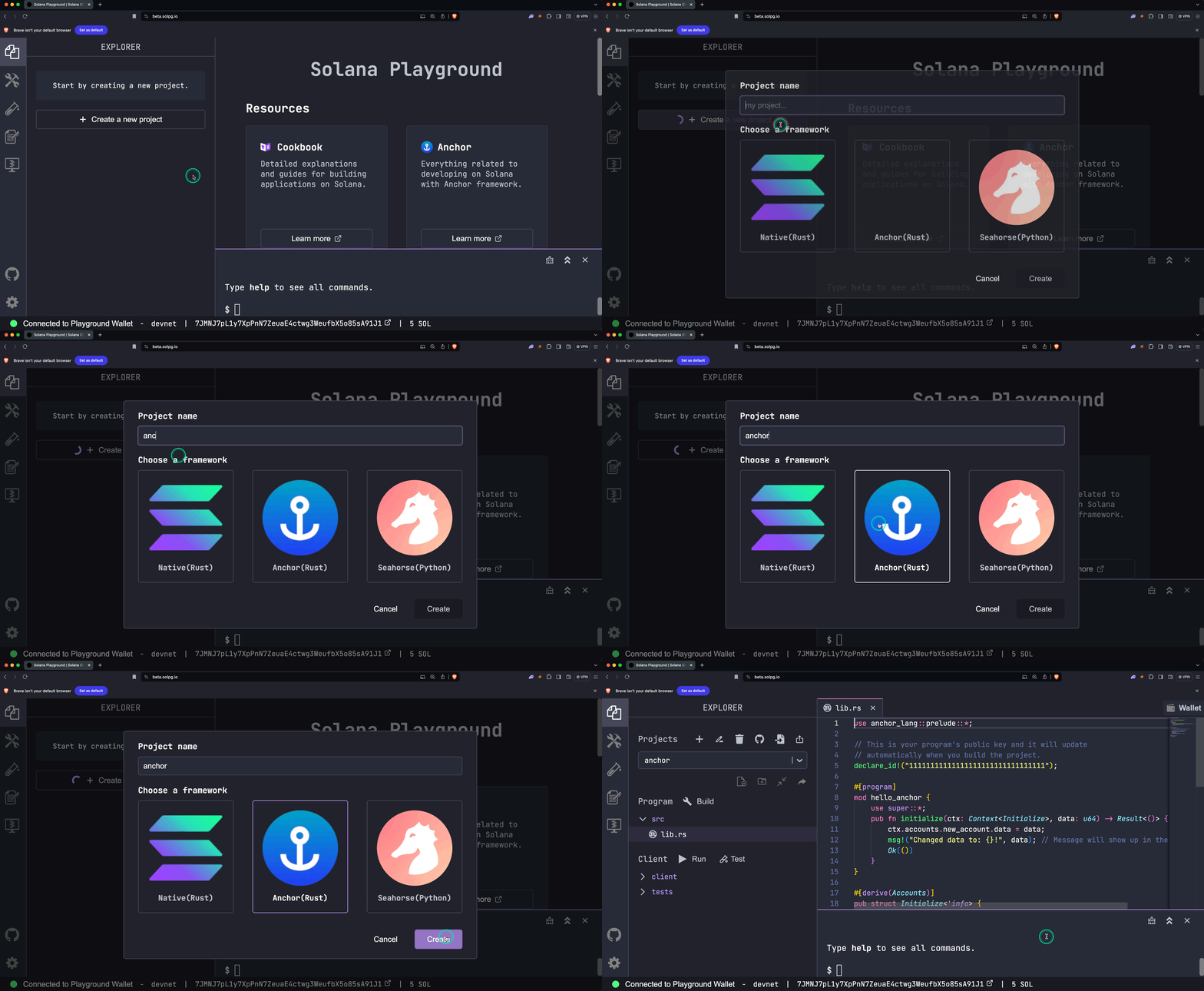New Project The `src/lib.rs` source file will open. It contains one struct called `Initialize`, which does the following: * Receives a required parameter called `data: u64` * Creates a new account * Saves the value of `data: u64` to the new account * Adds a message to the transaction's program logs lib.rs use anchor\_lang::prelude::\*; // This is your program's public key and it will update // automatically when you build the project. declare\_id!("11111111111111111111111111111111"); #\[program\] mod hello\_anchor { use super::\*; pub fn initialize(ctx: Context, data: u64) \-> Result<()> { ctx.accounts.new\_account.data \= data; msg!("Changed data to: {}!", data); // Message will show up in the tx logs Ok(()) } } #\[derive(Accounts)\] pub struct Initialize<'info\> { // We must specify the space in order to initialize an account. // First 8 bytes are default account discriminator, // next 8 bytes come from NewAccount.data being type u64. // (u64 = 64 bits unsigned integer = 8 bytes) #\[account(\ \ init,\ \ payer \= signer,\ \ space \= 8 + 8\ \ )\] pub new\_account: Account<'info, NewAccount\>, #\[account(mut)\] pub signer: Signer<'info\>, pub system\_program: Program<'info, System\>, } #\[account\] pub struct NewAccount { data: u64 } ### Explanation ### [Build and Deploy the Program](https://solana.com/docs/intro/quick-start/deploying-programs#build-and-deploy-the-program) 1. Compile the program code Terminal $ build Copy \[show output\] Your [program ID](https://solana.com/docs/intro/quick-start/deploying-programs) , defined in `declare_id!()`, will now be updated. 2. Add SOL to your wallet _(Optional)_ Deploying a program requires SOL in the program's on-chain account. If necessary, [add SOL to your wallet](https://solana.com/docs/intro/quick-start#add-sol-to-your-wallet) before proceeding to step 3. 3. Deploy the program to the network Terminal $ deploy Copy \[show output\] When deployed, the program's bytecode is stored in an executable program account. **Note:** If preferred, you can use the **Build** and **Deploy** buttons on the left-side panel, as shown in the screenshot below. 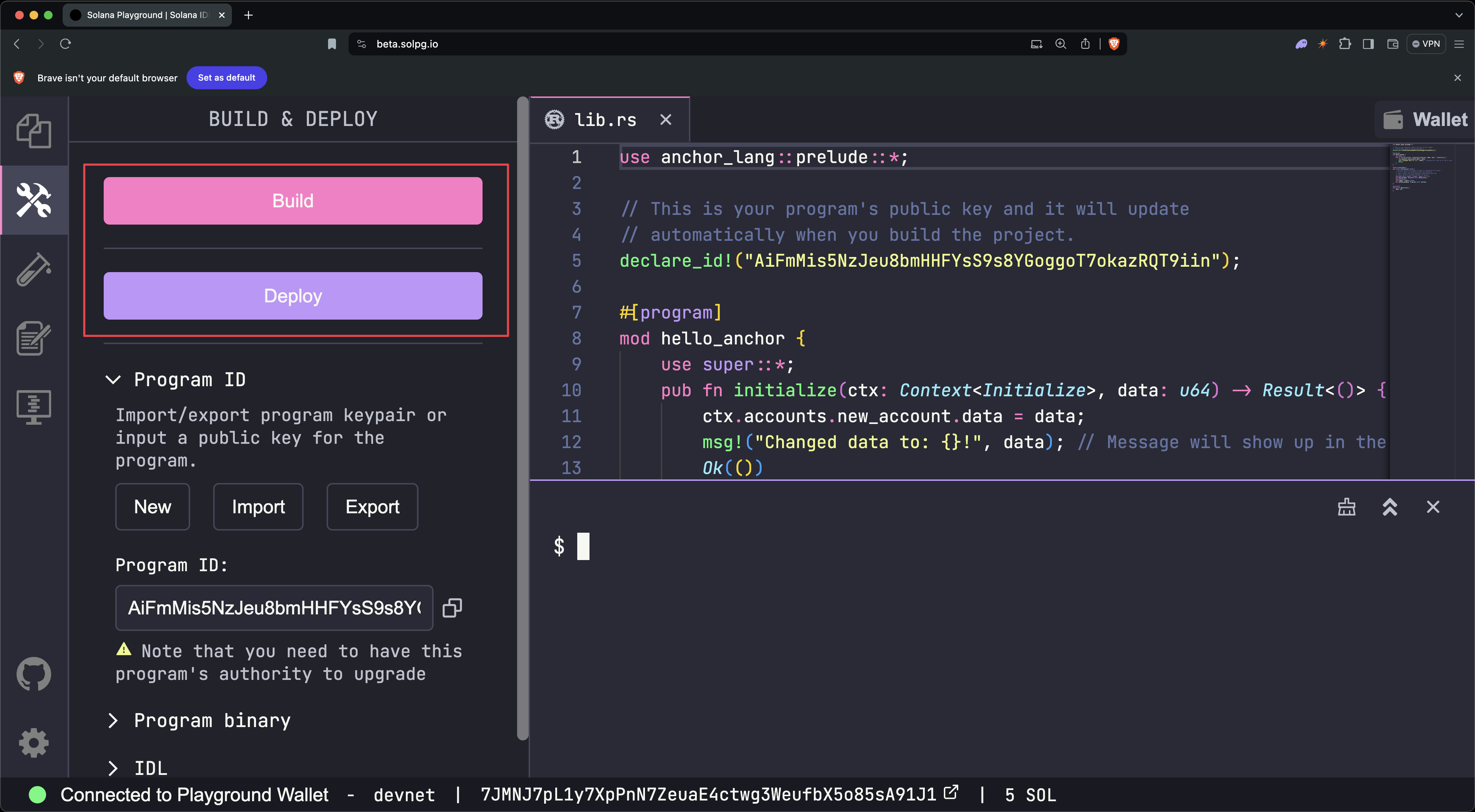Build and Deploy ### [Test the Program](https://solana.com/docs/intro/quick-start/deploying-programs#test-the-program) 1. Open the test file called `tests/anchor.test.ts`. This file demonstrates how to invoke the program's `initialize` struct from the client. anchor.test.ts // No imports needed: web3, anchor, pg and more are globally available describe("Test", () \=> { it("initialize", async () \=> { // Generate keypair for the new account const newAccountKp \= new web3.Keypair(); // Send transaction const data \= new BN(42); const txHash \= await pg.program.methods .initialize(data) .accounts({ newAccount: newAccountKp.publicKey, signer: pg.wallet.publicKey, systemProgram: web3.SystemProgram.programId }) .signers(\[newAccountKp\]) .rpc(); console.log(\`Use 'solana confirm -v ${txHash}' to see the logs\`); // Confirm transaction await pg.connection.confirmTransaction(txHash); // Fetch the created account const newAccount \= await pg.program.account.newAccount.fetch( newAccountKp.publicKey ); console.log("On-chain data is:", newAccount.data.toString()); // Check whether the data on-chain is equal to local 'data' assert(data.eq(newAccount.data)); }); }); 2. Run the test file Terminal $ test Copy \[show output\] 3. Store the transaction hash (`TxHash`) included in the output (In the example above, the transaction hash is `3TewJtiUz1EgtT88pLJHvKFzqrzDNuHVi8CfD2mWmHEBAaMfC5NAaHdmr19qQYfTiBace6XUmADvR4Qrhe8gH5uc`.) **Note:** If preferred, you can use the `Test` button on the left-side panel. 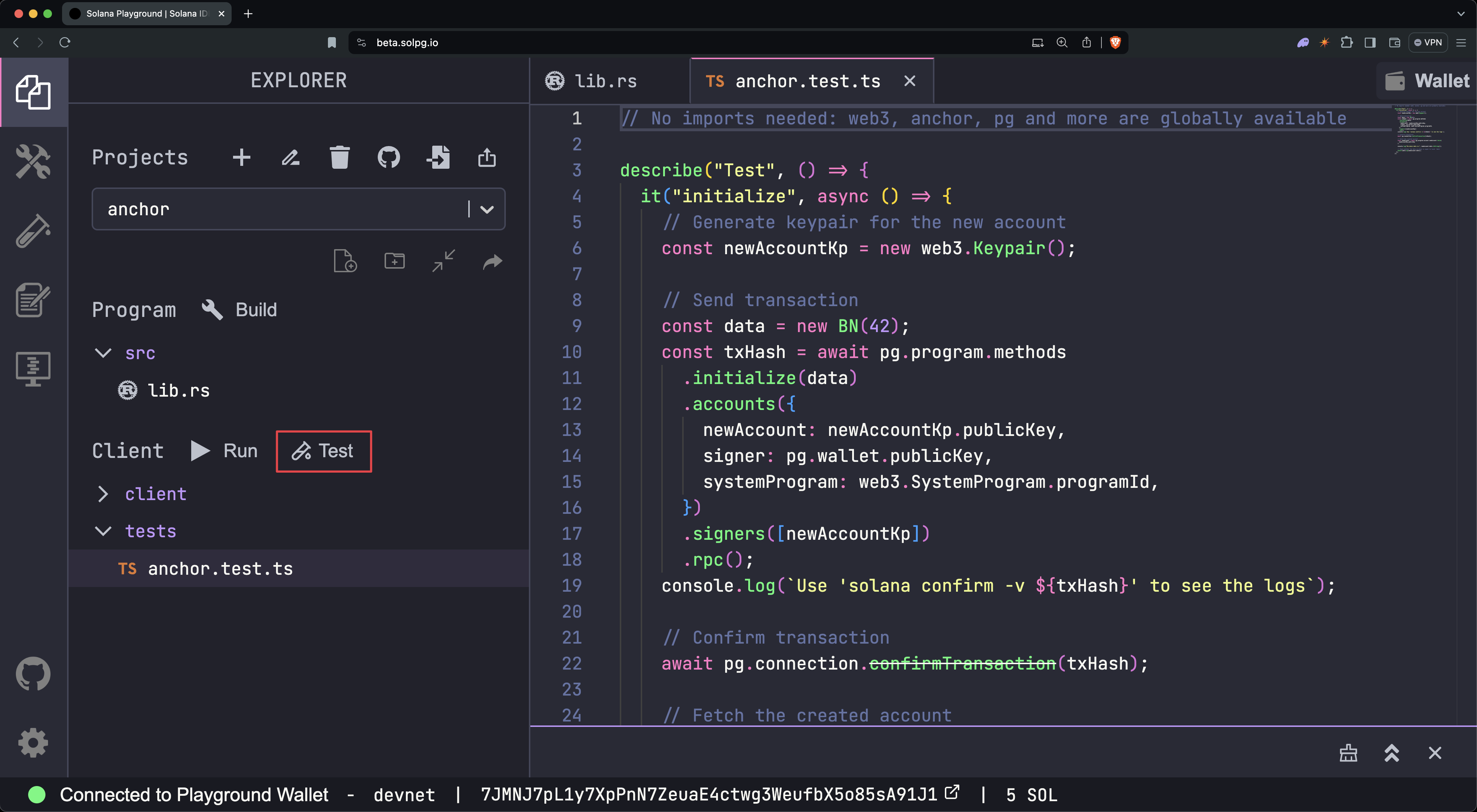Run Test 4. Run `solana confirm -v [TxHash]` to view the transaction logs Terminal $ solana confirm -v 3TewJtiUz1EgtT88pLJHvKFzqrzDNuHVi8CfD2mWmHEBAaMfC5NAaHdmr19qQYfTiBace6XUmADvR4Qrhe8gH5uc Copy \[show output\] 4. View the transaction details Open either [SolanaFM](https://solana.fm/) or [Solana Explorer](https://explorer.solana.com/?cluster=devnet) and search for the transaction hash. **Solana Explorer:** Set the network cluster to `devnet`, to match that of the Solana Playground. ### [Close the Program](https://solana.com/docs/intro/quick-start/deploying-programs#close-the-program) Close the program to recover the SOL allocated to the on-chain program. To do so, run `solana program close [ProgramID]`, using the program address stored in the `declare_id!()` macro. Terminal $ solana program close 2VvQ11q8xrn5tkPNyeraRsPaATdiPx8weLAD8aD4dn2r Copy \[show output\] Programs can **only** be closed or updated by an account with upgrade authority. Your Playground wallet automatically becomes the upgrade authority for each program when it is deployed. If the upgrade authority is revoked, the program becomes immutable. Congratulations! You built and deployed your first Solana program using Anchor. [Next steps](https://solana.com/docs/intro/quick-start/deploying-programs#next-steps) -------------------------------------------------------------------------------------- Now that you have deployed your first program, you are ready to explore [program-derived addresses](https://solana.com/docs/intro/quick-start/program-derived-address) and [cross-program invocation](https://solana.com/docs/intro/quick-start/cross-program-invocation) . Is this page helpful? [Previous\ \ Writing to the Network](https://solana.com/docs/intro/quick-start/writing-to-network) [Next\ \ Creating Deterministic Accounts](https://solana.com/docs/intro/quick-start/program-derived-address) ### Table of Contents [Create Anchor Project](https://solana.com/docs/intro/quick-start/deploying-programs#create-anchor-project) [Build and Deploy the Program](https://solana.com/docs/intro/quick-start/deploying-programs#build-and-deploy-the-program) [Test the Program](https://solana.com/docs/intro/quick-start/deploying-programs#test-the-program) [Close the Program](https://solana.com/docs/intro/quick-start/deploying-programs#close-the-program) [Next steps](https://solana.com/docs/intro/quick-start/deploying-programs#next-steps) [Edit Page](https://github.com/solana-foundation/solana-com/blob/main/apps/docs/content/docs/en/intro/quick-start/deploying-programs.mdx) Ask AI Managed by [](https://solana.com/) © 2026 Solana Foundation. All rights reserved. [](https://solana.com/youtube) [](https://solana.com/twitter) [](https://solana.com/discord) [](https://solana.com/reddit) [](https://solana.com/github) [](https://solana.com/telegram) en Solana * [Grants](https://solana.org/grants) * [Media Kit](https://solana.com/branding) * [Careers](https://jobs.solana.com/) * [Disclaimer](https://solana.com/tos) * [Privacy Policy](https://solana.com/privacy-policy) Get connected * [Blog](https://solana.com/news) * Newsletter --- # Deploying Programs | Solana [Solana Documentation](https://solana.com/docs) Developing Programs [Deploying Programs](https://solana.com/docs/programs/deploying) ================================================================= Copy MarkdownOpen This section walks through the basic process of deploying a Solana program using the Solana CLI. [CLI Command Reference](https://solana.com/docs/programs/deploying#cli-command-reference) ------------------------------------------------------------------------------------------ | Task | Command | | --- | --- | | Build program | `cargo build-sbf` | | Deploy new program | `solana program deploy ` | | Update existing program | `solana program deploy ` (same as deploy) | | Show program info | `solana program show ` | | Transfer program authority | `solana program set-upgrade-authority --new-upgrade-authority ` | | Make program immutable | `solana program set-upgrade-authority --final` | | Close program | `solana program close --bypass-warning` | | Check wallet balance | `solana balance` | | Request airdrop (devnet/localhost) | `solana airdrop 2` | [Key Concepts](https://solana.com/docs/programs/deploying#key-concepts) ------------------------------------------------------------------------ Before diving in, let's clarify some terminology: * **Program ID**: The on-chain address of your program. Users interact with your program by referencing the Program ID. * **Program Account**: The on-chain account that stores your program's metadata. The program account's address is the Program ID. The program account also stores the address of the ProgramData Account. * **ProgramData Account**: The on-chain account that stores your program's deployed executable code. * **Program Authority**: The account that has permission to update or close the program. By default, this is your CLI wallet. [Prerequisites](https://solana.com/docs/programs/deploying#prerequisites) -------------------------------------------------------------------------- ### [Install the Solana CLI](https://solana.com/docs/programs/deploying#install-the-solana-cli) First, [install the Solana CLI](https://solana.com/docs/intro/installation) . ### [Set Up Wallet](https://solana.com/docs/programs/deploying#set-up-wallet) After installation, create a local keypair wallet. The address of this wallet is set as the default program authority when deploying programs: Terminal $ solana-keygen new Copy This creates a keypair at `~/.config/solana/id.json` by default. ### [Configure Cluster](https://solana.com/docs/programs/deploying#configure-cluster) Choose which Solana cluster to deploy to. Use the `solana config get` command to check your current configuration: Terminal $ solana config get Copy \[show output\] Switch between clusters as needed: Terminal $ solana config set --url mainnet-beta Copy $ solana config set --url devnet Copy $ solana config set --url localhost Copy $ solana config set --url testnet Copy $ solana config set --url "https://your-rpc-url.com" Copy ### [Fund Wallet](https://solana.com/docs/programs/deploying#fund-wallet) You'll need SOL to pay for program deployments. The amount depends on your program size. For devnet or localhost, fund your wallet using the `solana airdrop` command: Terminal $ solana airdrop 2 Copy \[show output\] Check your wallet balance: Terminal $ solana balance Copy \[show output\] [Basic Operations](https://solana.com/docs/programs/deploying#basic-operations) -------------------------------------------------------------------------------- ### [Build Program](https://solana.com/docs/programs/deploying#build-program) To build a program, use the `cargo build-sbf` command: Terminal $ cargo build-sbf Copy Example Program --------------- Here is a minimal Solana program that prints "Hello, Solana!" to the program logs. src/lib.rs use solana\_program::{ account\_info::AccountInfo, entrypoint, entrypoint::ProgramResult, msg, pubkey::Pubkey, }; entrypoint!(process\_instruction); pub fn process\_instruction( \_program\_id: &Pubkey, \_accounts: &\[AccountInfo\], \_instruction\_data: &\[u8\], ) \-> ProgramResult { msg!("Hello, Solana!"); Ok(()) } Build Output ------------ Build your program using the `cargo build-sbf` command: Terminal $ cargo build-sbf Copy This creates two important files in `target/deploy/`: 1. `hello_world-keypair.json`: A keypair file whose public key will be used as your Program ID 2. `hello_world.so`: The compiled program executable Example Program --------------- Here is a minimal Solana program that prints "Hello, Solana!" to the program logs. Build Output ------------ Build your program using the `cargo build-sbf` command: Terminal $ cargo build-sbf Copy This creates two important files in `target/deploy/`: 1. `hello_world-keypair.json`: A keypair file whose public key will be used as your Program ID 2. `hello_world.so`: The compiled program executable src lib.rs Cargo.toml use solana\_program::{ account\_info::AccountInfo, entrypoint, entrypoint::ProgramResult, msg, pubkey::Pubkey, }; entrypoint!(process\_instruction); pub fn process\_instruction( \_program\_id: &Pubkey, \_accounts: &\[AccountInfo\], \_instruction\_data: &\[u8\], ) \-> ProgramResult { msg!("Hello, Solana!"); Ok(()) } ### [Check Program Size and Cost](https://solana.com/docs/programs/deploying#check-program-size-and-cost) Deploying a program requires SOL to be allocated to the program account based on the size of the program. Larger programs cost more SOL to deploy. Check your program's size: Terminal $ wc -c < ./target/deploy/hello\_world.so Copy \[show output\] Calculate the required SOL for this size (bytes): Terminal $ solana rent 18504 Copy \[show output\] You'll need slightly more SOL than shown to cover deployment transaction fees. ### [Deploy Program](https://solana.com/docs/programs/deploying#deploy-program) Use the `solana program deploy` command to deploy your program: Terminal $ solana program deploy ./target/deploy/hello\_world.so Copy \[show output\] The **Program Id** shown is your program's permanent address on the network. To deploy with a specific Program ID (instead of the auto-generated one), use: Terminal $ solana program deploy ./target/deploy/hello\_world.so --program-id ./custom-keypair.json Copy You can generate new keypairs using the `solana-keygen` command: Terminal $ solana-keygen new -o ./custom-keypair.json Copy ### [Update Program](https://solana.com/docs/programs/deploying#update-program) Update your program using the same `solana program deploy` command: 1. Make changes to your program code 2. Rebuild your program: `cargo build-sbf` 3. Deploy the update: Terminal $ solana program deploy ./target/deploy/hello\_world.so Copy \[show output\] If your updated program requires more space (bytes) than currently allocated, the deployment will automatically extend the program account. This happens when your new program is larger than the previous version. The program account needs additional bytes to store the new program. The CLI will calculate the required SOL and deduct it from your wallet automatically. You can also manually extend a program to allocate more bytes: Terminal $ solana program extend 7NxQjW8H8hVcqBKgXbVDWqGQCovHbqDW9p1SJJwUyTpE 1000 Copy \[show output\] [Program Management](https://solana.com/docs/programs/deploying#program-management) ------------------------------------------------------------------------------------ Once your program is deployed, there are several common commands to manage the program account. ### [View Program Metadata](https://solana.com/docs/programs/deploying#view-program-metadata) To check your program metadata, use the `solana program show` command: Terminal $ solana program show 7NxQjW8H8hVcqBKgXbVDWqGQCovHbqDW9p1SJJwUyTpE Copy Example output: $ solana program show 7283x8k8fyBcfaFLyPsxbd2VV1AMmZFP7FNoyTXVKJw7 Program Id: 7283x8k8fyBcfaFLyPsxbd2VV1AMmZFP7FNoyTXVKJw7 Owner: BPFLoaderUpgradeab1e11111111111111111111111 ProgramData Address: Gqn7YQVCP8NtYV1qkEqR4Udhj8EJ3fkikvS7HskCNQ7c Authority: 5kh6HxYZiAebF8HWLsUWod2EaQQ6iWHpHYCz8UcmFbM1 Last Deployed In Slot: 6573 Data Length: 18504 (0x4848) bytes Balance: 0.12999192 SOL ### [Transfer Program Authority](https://solana.com/docs/programs/deploying#transfer-program-authority) To transfer the program authority to a different account, use the `solana program set-upgrade-authority` command: Terminal $ solana program set-upgrade-authority 7NxQjW8H8hVcqBKgXbVDWqGQCovHbqDW9p1SJJwUyTpE --new-upgrade-authority ./new-authority-keypair.json Copy After transferring the program authority, you can no longer update the program unless you have access to the new authority keypair. ### [Make Your Program Immutable](https://solana.com/docs/programs/deploying#make-your-program-immutable) To make your program immutable, use the `solana program set-upgrade-authority` command with the `--final` flag to remove the program authority: Terminal $ solana program set-upgrade-authority 7NxQjW8H8hVcqBKgXbVDWqGQCovHbqDW9p1SJJwUyTpE --final Copy \[show output\] Once a program is immutable, it can never be updated or closed. ### [Close Your Program](https://solana.com/docs/programs/deploying#close-your-program) To close your program and reclaim the SOL allocated to the program account, use the `solana program close` command: Terminal $ solana program close 7NxQjW8H8hVcqBKgXbVDWqGQCovHbqDW9p1SJJwUyTpE --bypass-warning Copy \[show output\] Once closed, the Program ID can not be reused. You cannot deploy a new program to the same address. [Utility Commands](https://solana.com/docs/programs/deploying#utility-commands) -------------------------------------------------------------------------------- ### [List All Programs](https://solana.com/docs/programs/deploying#list-all-programs) View all programs where your current wallet is the authority: Terminal $ solana program show --programs Copy Example output: Program Id | Slot | Authority | Balance \-------------------------------------------------|------------|------------------------------------------------|------------- 7NxQjW8H8hVcqBKgXbVDWqGQCovHbqDW9p1SJJwUyTpE | 249885434 | 5kh6HxYZiAebF8HWLsUWod2EaQQ6iWHpHYCz8UcmFbM1 | 0.12999192 3KSGCk4m5hqJkTjPHBXUCPcqMwJnK3VmkqEsFUKKGJPK | 249883212 | 5kh6HxYZiAebF8HWLsUWod2EaQQ6iWHpHYCz8UcmFbM1 | 0.28654328 ### [Download a Deployed Program](https://solana.com/docs/programs/deploying#download-a-deployed-program) To download a deployed program, use the `solana program dump` command: Terminal $ solana program dump 7NxQjW8H8hVcqBKgXbVDWqGQCovHbqDW9p1SJJwUyTpE ./downloaded\_program.so Copy \[show output\] [Advanced Options](https://solana.com/docs/programs/deploying#advanced-options) -------------------------------------------------------------------------------- ### [Deployment Flags](https://solana.com/docs/programs/deploying#deployment-flags) When the Solana network is congested, use these flags to help with program deployment. Example Usage: Terminal $ solana program deploy ./target/deploy/hello\_world.so \\ \--with-compute-unit-price 10000 \\ \--max-sign-attempts 10 \\ \--use-rpc Copy Options explained: * **`--with-compute-unit-price`**: Set priority fee in micro-lamports (0.000001 SOL) per compute unit. Check [Helius Priority Fee API](https://docs.helius.dev/guides/priority-fee-api) for current rates. A priority fee is an additional fee that paid to the current leader to prioritize your transaction. * **`--max-sign-attempts`**: Number of times to retry with a new blockhash if transactions expire. (Default: 5) * **`--use-rpc`**: Send transactions to the configured RPC. This flag requires a [stake-weighted](https://solana.com/developers/guides/advanced/stake-weighted-qos) RPC connection from providers such as [Triton](https://triton.one/) or [Helius](https://www.helius.dev/) . Is this page helpful? [Previous\ \ Mollusk](https://solana.com/docs/programs/testing/mollusk) [Next\ \ Generating Clients](https://solana.com/docs/programs/codama/clients) ### Table of Contents [CLI Command Reference](https://solana.com/docs/programs/deploying#cli-command-reference) [Key Concepts](https://solana.com/docs/programs/deploying#key-concepts) [Prerequisites](https://solana.com/docs/programs/deploying#prerequisites) [Install the Solana CLI](https://solana.com/docs/programs/deploying#install-the-solana-cli) [Set Up Wallet](https://solana.com/docs/programs/deploying#set-up-wallet) [Configure Cluster](https://solana.com/docs/programs/deploying#configure-cluster) [Fund Wallet](https://solana.com/docs/programs/deploying#fund-wallet) [Basic Operations](https://solana.com/docs/programs/deploying#basic-operations) [Build Program](https://solana.com/docs/programs/deploying#build-program) [Check Program Size and Cost](https://solana.com/docs/programs/deploying#check-program-size-and-cost) [Deploy Program](https://solana.com/docs/programs/deploying#deploy-program) [Update Program](https://solana.com/docs/programs/deploying#update-program) [Program Management](https://solana.com/docs/programs/deploying#program-management) [View Program Metadata](https://solana.com/docs/programs/deploying#view-program-metadata) [Transfer Program Authority](https://solana.com/docs/programs/deploying#transfer-program-authority) [Make Your Program Immutable](https://solana.com/docs/programs/deploying#make-your-program-immutable) [Close Your Program](https://solana.com/docs/programs/deploying#close-your-program) [Utility Commands](https://solana.com/docs/programs/deploying#utility-commands) [List All Programs](https://solana.com/docs/programs/deploying#list-all-programs) [Download a Deployed Program](https://solana.com/docs/programs/deploying#download-a-deployed-program) [Advanced Options](https://solana.com/docs/programs/deploying#advanced-options) [Deployment Flags](https://solana.com/docs/programs/deploying#deployment-flags) [Edit Page](https://github.com/solana-foundation/solana-com/blob/main/apps/docs/content/docs/en/programs/deploying.mdx) Ask AI Managed by [](https://solana.com/) © 2026 Solana Foundation. All rights reserved. [](https://solana.com/youtube) [](https://solana.com/twitter) [](https://solana.com/discord) [](https://solana.com/reddit) [](https://solana.com/github) [](https://solana.com/telegram) en Solana * [Grants](https://solana.org/grants) * [Media Kit](https://solana.com/branding) * [Careers](https://jobs.solana.com/) * [Disclaimer](https://solana.com/tos) * [Privacy Policy](https://solana.com/privacy-policy) Get connected * [Blog](https://solana.com/news) * Newsletter --- # Introductory commands for getting started on the Surfpool CLI | Solana [Solana Documentation](https://solana.com/docs) Getting Started[Installation](https://solana.com/docs/intro/installation) [Surfpool CLI Basics](https://solana.com/docs/intro/installation/surfpool-cli-basics) ====================================================================================== Copy MarkdownOpen Surfpool is a local development tool that simplifies Solana development by automatically loading programs and accounts from a cluster (mainnet, devnet). Use the Surfpool CLI to start a local validator for testing your programs and transactions. Visit the [Surfpool documentation](https://docs.surfpool.run/) for more information. [Start a local validator](https://solana.com/docs/intro/installation/surfpool-cli-basics#start-a-local-validator) ------------------------------------------------------------------------------------------------------------------ To start a local validator, run the following command: Terminal $ surfpool start Copy By default, Surfpool automatically loads any programs and accounts your transactions depend on from mainnet to the local validator. [Surfpool Studio](https://solana.com/docs/intro/installation/surfpool-cli-basics#surfpool-studio) -------------------------------------------------------------------------------------------------- Surfpool Studio provides a web-based interface for interacting with your local validator. Use it to: * View transactions details * Inspect account data * Airdrop SOL and other tokens using the UI faucet To access Surfpool Studio: 1. Start your local validator with `surfpool start` 2. Open your browser and navigate to [http://127.0.0.1:18488](http://127.0.0.1:18488/) Is this page helpful? [Previous\ \ Anchor CLI Basics](https://solana.com/docs/intro/installation/anchor-cli-basics) [Next\ \ Quick Start](https://solana.com/docs/intro/quick-start) ### Table of Contents [Start a local validator](https://solana.com/docs/intro/installation/surfpool-cli-basics#start-a-local-validator) [Surfpool Studio](https://solana.com/docs/intro/installation/surfpool-cli-basics#surfpool-studio) [Edit Page](https://github.com/solana-foundation/solana-com/blob/main/apps/docs/content/docs/en/intro/installation/surfpool-cli-basics.mdx) Ask AI Managed by [](https://solana.com/) © 2026 Solana Foundation. All rights reserved. [](https://solana.com/youtube) [](https://solana.com/twitter) [](https://solana.com/discord) [](https://solana.com/reddit) [](https://solana.com/github) [](https://solana.com/telegram) en Solana * [Grants](https://solana.org/grants) * [Media Kit](https://solana.com/branding) * [Careers](https://jobs.solana.com/) * [Disclaimer](https://solana.com/tos) * [Privacy Policy](https://solana.com/privacy-policy) Get connected * [Blog](https://solana.com/news) * Newsletter Introductory commands for getting started on the Surfpool CLI | Solana --- # Basic Payment | Solana [Payments](https://solana.com/docs) [Send Payments](https://solana.com/docs/payments/send-payments) [Basic Payment](https://solana.com/docs/payments/send-payments/basic-payment) ============================================================================== Copy MarkdownOpen Solana enables instant, global token transfers with fees under $0.001. Whether you're building cross-border remittances, payroll disbursements, or treasury operations, a basic stablecoin payment settles in under a second and costs a fraction of a cent. [How It Works](https://solana.com/docs/payments/send-payments/basic-payment#how-it-works) ------------------------------------------------------------------------------------------ A payment moves stablecoins from the sender's token account to the recipient's token account. If the recipient is receiving this token for the first time, their token account can be created as part of the same transaction. See [How Payments Work on Solana](https://solana.com/docs/payments/how-payments-work) for core payment concepts. The `splToken` helper from [`@solana/client`](https://solana.com/docs/frontend/client) handles ATA derivation, decimal conversion, and transaction building automatically. This is ideal for single payment transfers. The steps below show the core flow. See the [Demo](https://solana.com/docs/payments/send-payments/basic-payment#demo) for complete runnable code. Create the Token Helper ----------------------- Configure the `splToken()` helper by calling `client.splToken()` with the mint address. The helper provides methods for common token operations. Setting `tokenProgram: "auto"` automatically detects whether the mint account is owned by Token or Token-2022 program. Basic Payment const client \= createClient({ endpoint: "http://localhost:8899", websocketEndpoint: "ws://localhost:8900", commitment: "confirmed" }); const splToken \= client.splToken({ mint: mint.address, tokenProgram: "auto" }); Send the Payment ---------------- Use `sendTransfer()` to transfer tokens between wallets. The method handles: * **ATA Resolution**: Automatically derives Associated Token Accounts (ATAs) for the sender and recipient. If the recipient's ATA doesn't exist, the instruction to create the account is automatically added to the same transaction. * **Decimal Conversion**: Accepts token amounts and automatically converts to base units based on the mint's decimals (e.g. 0.25 tokens -> 250000 base units, if the mint has 6 decimals) * **Transaction Building**: Creates, signs, and sends the transaction with the transfer instruction Basic Payment const client \= createClient({ endpoint: "http://localhost:8899", websocketEndpoint: "ws://localhost:8900", commitment: "confirmed" }); const splToken \= client.splToken({ mint: mint.address, tokenProgram: "auto" }); const signature \= await splToken.sendTransfer({ amount: 0.25, authority: sender, destinationOwner: recipient.address }); Verify Balances --------------- After the transfer completes, use `fetchBalance()` to verify the token balances. This method takes a wallet address and automatically derives the corresponding ATA to fetch the balance. Basic Payment const client \= createClient({ endpoint: "http://localhost:8899", websocketEndpoint: "ws://localhost:8900", commitment: "confirmed" }); const splToken \= client.splToken({ mint: mint.address, tokenProgram: "auto" }); const signature \= await splToken.sendTransfer({ amount: 0.25, authority: sender, destinationOwner: recipient.address }); const senderBalance \= await splToken.fetchBalance(sender.address); const recipientBalance \= await splToken.fetchBalance(recipient.address); Create the Token Helper ----------------------- Configure the `splToken()` helper by calling `client.splToken()` with the mint address. The helper provides methods for common token operations. Setting `tokenProgram: "auto"` automatically detects whether the mint account is owned by Token or Token-2022 program. Send the Payment ---------------- Use `sendTransfer()` to transfer tokens between wallets. The method handles: * **ATA Resolution**: Automatically derives Associated Token Accounts (ATAs) for the sender and recipient. If the recipient's ATA doesn't exist, the instruction to create the account is automatically added to the same transaction. * **Decimal Conversion**: Accepts token amounts and automatically converts to base units based on the mint's decimals (e.g. 0.25 tokens -> 250000 base units, if the mint has 6 decimals) * **Transaction Building**: Creates, signs, and sends the transaction with the transfer instruction Verify Balances --------------- After the transfer completes, use `fetchBalance()` to verify the token balances. This method takes a wallet address and automatically derives the corresponding ATA to fetch the balance. Basic Payment const client \= createClient({ endpoint: "http://localhost:8899", websocketEndpoint: "ws://localhost:8900", commitment: "confirmed" }); const splToken \= client.splToken({ mint: mint.address, tokenProgram: "auto" }); ### [Demo](https://solana.com/docs/payments/send-payments/basic-payment#demo) Demo // Click ">" icon on left to expand demo imports // Generate keypairs for sender and recipient const sender \= (await generateKeypair()).signer; const recipient \= (await generateKeypair()).signer; console.log("Sender Address:", sender.address); console.log("Recipient Address:", recipient.address); // Demo Setup: Create client, mint account, token accounts, and fund with initial tokens const { client, mint } \= await demoSetup(sender, recipient); console.log("\\nMint Address:", mint.address); // ============================================================================= // Basic Token Payment Demo // ============================================================================= // Create splToken helper for this mint using @solana/client const splToken \= client.splToken({ mint: mint.address, tokenProgram: "auto" }); // Transfer tokens from sender to recipient (ATA and decimals handled automatically) const signature \= await splToken.sendTransfer({ amount: 0.25, authority: sender, destinationOwner: recipient.address }); console.log("\\n\=== Token Payment Complete ==="); console.log("Transaction Signature:", signature.toString()); // Fetch final token account balances using splToken helper const senderBalance \= await splToken.fetchBalance(sender.address); const recipientBalance \= await splToken.fetchBalance(recipient.address); console.log("\\nSender Token Account Balance:", senderBalance); console.log("Recipient Token Account Balance:", recipientBalance); // ============================================================================= // Demo Setup Helper Function // ============================================================================= Console RunClick to execute the code. Demo // Click ">" icon on left to expand demo imports // Generate keypairs for sender and recipient const sender \= (await generateKeypair()).signer; const recipient \= (await generateKeypair()).signer; console.log("Sender Address:", sender.address); console.log("Recipient Address:", recipient.address); // Demo Setup: Create client, mint account, token accounts, and fund with initial tokens const { client, mint } \= await demoSetup(sender, recipient); console.log("\\nMint Address:", mint.address); // ============================================================================= // Basic Token Payment Demo // ============================================================================= // Create splToken helper for this mint using @solana/client const splToken \= client.splToken({ mint: mint.address, tokenProgram: "auto" }); // Transfer tokens from sender to recipient (ATA and decimals handled automatically) const signature \= await splToken.sendTransfer({ amount: 0.25, authority: sender, destinationOwner: recipient.address }); console.log("\\n\=== Token Payment Complete ==="); console.log("Transaction Signature:", signature.toString()); // Fetch final token account balances using splToken helper const senderBalance \= await splToken.fetchBalance(sender.address); const recipientBalance \= await splToken.fetchBalance(recipient.address); console.log("\\nSender Token Account Balance:", senderBalance); console.log("Recipient Token Account Balance:", recipientBalance); // ============================================================================= // Demo Setup Helper Function // ============================================================================= Console RunClick to execute the code. Is this page helpful? [Previous\ \ Send Payments](https://solana.com/docs/payments/send-payments) [Next\ \ Payment with Memo](https://solana.com/docs/payments/send-payments/payment-with-memo) ### Table of Contents [How It Works](https://solana.com/docs/payments/send-payments/basic-payment#how-it-works) [Demo](https://solana.com/docs/payments/send-payments/basic-payment#demo) [Edit Page](https://github.com/solana-foundation/solana-com/blob/main/apps/docs/content/docs/en/payments/send-payments/basic-payment.mdx) Ask AI Managed by [](https://solana.com/) © 2026 Solana Foundation. All rights reserved. [](https://solana.com/youtube) [](https://solana.com/twitter) [](https://solana.com/discord) [](https://solana.com/reddit) [](https://solana.com/github) [](https://solana.com/telegram) en Solana * [Grants](https://solana.org/grants) * [Media Kit](https://solana.com/branding) * [Careers](https://jobs.solana.com/) * [Disclaimer](https://solana.com/tos) * [Privacy Policy](https://solana.com/privacy-policy) Get connected * [Blog](https://solana.com/news) * Newsletter --- # Limitations | Solana [Solana Documentation](https://solana.com/docs) Developing Programs [Limitations](https://solana.com/docs/programs/limitations) ============================================================ Copy MarkdownOpen Developing programs on the Solana blockchain has some inherent limitations associated with it. Below is a list of common limitations that you may run into. [Rust libraries](https://solana.com/docs/programs/limitations#rust-libraries) ------------------------------------------------------------------------------ Since Rust based onchain programs must be deterministic while running in a resource-constrained, single-threaded environment, they have some limitations on various libraries. On-chain Rust programs support most of Rust's libstd, libcore, and liballoc, as well as many 3rd party crates. There are some limitations since these programs run in a resource-constrained, single-threaded environment, as well as being deterministic: * No access to * `rand` * `std::fs` * `std::net` * `std::future` * `std::process` * `std::sync` * `std::task` * `std::thread` * `std::time` * Limited access to: * `std::hash` * `std::os` * Bincode is extremely computationally expensive in both cycles and call depth and should be avoided * String formatting should be avoided since it is also computationally expensive. * No support for `println!`, `print!`, use the [`msg!`](https://github.com/solana-labs/solana/blob/d9b0fc0e3eec67dfe4a97d9298b15969b2804fab/sdk/program/src/log.rs#L33) macro instead. * The runtime enforces a limit on the number of instructions a program can execute during the processing of one instruction. See [computation budget](https://solana.com/docs/core/fees#compute-budget) for more information. [Compute budget](https://solana.com/docs/programs/limitations#compute-budget) ------------------------------------------------------------------------------ To prevent abuse of the blockchain's computational resources, each transaction is allocated a [compute budget](https://solana.com/docs/references/terminology#compute-budget) . Exceeding this compute budget will result in the transaction failing. See the [computational constraints](https://solana.com/docs/core/fees#compute-budget) documentation for more specific details. [Call stack depth - `CallDepthExceeded` error](https://solana.com/docs/programs/limitations#call-stack-depth---calldepthexceeded-error) ---------------------------------------------------------------------------------------------------------------------------------------- Solana programs are constrained to run quickly, and to facilitate this, the program's call stack is limited to a max depth of **64 frames**. When a program exceeds the allowed call stack depth limit, it will receive the `CallDepthExceeded` error. [CPI call depth - `CallDepth` error](https://solana.com/docs/programs/limitations#cpi-call-depth---calldepth-error) -------------------------------------------------------------------------------------------------------------------- Cross-program invocations allow programs to invoke other programs directly, but the depth is constrained currently to `4`. When a program exceeds the allowed [cross-program invocation call depth](https://solana.com/docs/core/cpi) , it will receive a `CallDepth` error [Float Rust types support](https://solana.com/docs/programs/limitations#float-rust-types-support) -------------------------------------------------------------------------------------------------- Programs support a limited subset of Rust's float operations. If a program attempts to use a float operation that is not supported, the runtime will report an unresolved symbol error. Float operations are performed via software libraries, specifically LLVM's float built-ins. Due to the software emulated, they consume more compute units than integer operations. In general, fixed point operations are recommended where possible. The [Solana Program Library math](https://github.com/solana-labs/solana-program-library/tree/master/libraries/math) tests will report the performance of some math operations. To run the test, sync the repo and run: cargo test-sbf \-- --nocapture --test-threads=1 Recent results show the float operations take more instructions compared to integers equivalents. Fixed point implementations may vary but will also be less than the float equivalents: u64 f32 Multiply 8 176 Divide 9 219 [Static writable data](https://solana.com/docs/programs/limitations#static-writable-data) ------------------------------------------------------------------------------------------ Program shared objects do not support writable shared data. Programs are shared between multiple parallel executions using the same shared read-only code and data. This means that developers should not include any static writable or global variables in programs. In the future a copy-on-write mechanism could be added to support writable data. [Signed division](https://solana.com/docs/programs/limitations#signed-division) -------------------------------------------------------------------------------- The SBF instruction set does not support signed division. Is this page helpful? [Previous\ \ Program Examples](https://solana.com/docs/programs/examples) [Next\ \ Frontend](https://solana.com/docs/frontend) ### Table of Contents [Rust libraries](https://solana.com/docs/programs/limitations#rust-libraries) [Compute budget](https://solana.com/docs/programs/limitations#compute-budget) [Call stack depth - `CallDepthExceeded` error](https://solana.com/docs/programs/limitations#call-stack-depth---calldepthexceeded-error) [CPI call depth - `CallDepth` error](https://solana.com/docs/programs/limitations#cpi-call-depth---calldepth-error) [Float Rust types support](https://solana.com/docs/programs/limitations#float-rust-types-support) [Static writable data](https://solana.com/docs/programs/limitations#static-writable-data) [Signed division](https://solana.com/docs/programs/limitations#signed-division) [Edit Page](https://github.com/solana-foundation/solana-com/blob/main/apps/docs/content/docs/en/programs/limitations.mdx) Ask AI Managed by [](https://solana.com/) © 2026 Solana Foundation. All rights reserved. [](https://solana.com/youtube) [](https://solana.com/twitter) [](https://solana.com/discord) [](https://solana.com/reddit) [](https://solana.com/github) [](https://solana.com/telegram) en Solana * [Grants](https://solana.org/grants) * [Media Kit](https://solana.com/branding) * [Careers](https://jobs.solana.com/) * [Disclaimer](https://solana.com/tos) * [Privacy Policy](https://solana.com/privacy-policy) Get connected * [Blog](https://solana.com/news) * Newsletter Limitations | Solana --- # Payment Processing | Solana [Payments](https://solana.com/docs) [Send Payments](https://solana.com/docs/payments/send-payments) [Payment Processing](https://solana.com/docs/payments/send-payments/payment-processing) ======================================================================================== Copy MarkdownOpen Processing payments at scale—payroll, merchant payouts, loyalty rewards—requires more than sending individual transfers. To process many payments efficiently: 1. **Batch instructions** into single transactions to reduce fees and latency 2. **Batch transactions** to parallelize throughput across the network 3. **Fee abstraction** so users never need to hold SOL [### Batch Payments\ \ Send tokens to multiple recipients in a single transaction.](https://solana.com/docs/payments/send-payments/payment-processing/batch-payments) [### Fee Abstraction\ \ Abstract fees so users never need to hold SOL.](https://solana.com/docs/payments/send-payments/payment-processing/fee-abstraction) Is this page helpful? [Previous\ \ Payment with Memo](https://solana.com/docs/payments/send-payments/payment-with-memo) [Next\ \ Batch Payments](https://solana.com/docs/payments/send-payments/payment-processing/batch-payments) ### Table of Contents No Headings [Edit Page](https://github.com/solana-foundation/solana-com/blob/main/apps/docs/content/docs/en/payments/send-payments/payment-processing/index.mdx) Ask AI Managed by [](https://solana.com/) © 2026 Solana Foundation. All rights reserved. [](https://solana.com/youtube) [](https://solana.com/twitter) [](https://solana.com/discord) [](https://solana.com/reddit) [](https://solana.com/github) [](https://solana.com/telegram) en Solana * [Grants](https://solana.org/grants) * [Media Kit](https://solana.com/branding) * [Careers](https://jobs.solana.com/) * [Disclaimer](https://solana.com/tos) * [Privacy Policy](https://solana.com/privacy-policy) Get connected * [Blog](https://solana.com/news) * Newsletter Payment Processing | Solana --- # Verifying Programs | Solana [Solana Documentation](https://solana.com/docs) Developing Programs [Verifying Programs](https://solana.com/docs/programs/verified-builds) ======================================================================= Copy MarkdownOpen This guide is meant to be a reference for developers who want to implement verified builds for their programs on Solana. We will cover what verified builds are, how to use them, special considerations, and best practices to ensure the authenticity of your program onchain. [What are verified builds?](https://solana.com/docs/programs/verified-builds#what-are-verified-builds) ======================================================================================================= Verified builds ensure that the executable program you deploy to Solana’s network matches the source code in your repository. By doing this, developers and users can have confidence that the program running onchain corresponds exactly to the public codebase, promoting transparency and security. The verification process involves comparing the hash of the onchain program with the hash of the locally built program from the source code. This ensures no discrepancies between the two versions. > While a verified build should not be considered more secure than an unverified build, the build enables developers to self verify the source code matches what is deployed onchain. Using the source code, a developer can then validate what the code executes when sending a transaction. The verified builds pipeline was thought out and is maintained by [Ellipsis Labs](https://ellipsislabs.xyz/) and [OtterSec](https://osec.io/) . For more details, follow the guide in the [original verified builds](https://github.com/Ellipsis-Labs/solana-verifiable-build) repository as well and the verify build process directly into the [Anza](https://www.anza.xyz/) tool suite, once supported there. [How does it work?](https://solana.com/docs/programs/verified-builds#how-does-it-work) ======================================================================================= The verification process is done by comparing the hash of the onchain program with the hash of the locally built program from the source code. You build your program in a controlled environment using the Solana Verify CLI and Docker. This ensures that the build process is deterministic and consistent across different systems. Once you have the executable, you can deploy it to the Solana network. During the build process a [PDA](https://explorer.solana.com/address/63XDCHrwZu3mXsw2RUFb4tbNpChuUHx4eA5aJMnHkpQQ/anchor-account) of the [verify program](https://github.com/otter-sec/otter-verify) will be created. This PDA contains all the data necessary to verify the program. The PDA contains the program address, git url, commit hash and the arguments used to build the program. Using the data in the PDA everyone can run the verify program command locally and check if the program was built from the provided source code. Then everyone can verify for themselves completely trustlessly or can run their own [verify API](https://github.com/otter-sec/solana-verified-programs-api) maintained by [OtterSec](https://github.com/otter-sec) to provide an easy access point for users to check the verification. You can already see these [API calls](https://verify.osec.io/status/PhoeNiXZ8ByJGLkxNfZRnkUfjvmuYqLR89jjFHGqdXY) being used in the [Solana Explorer](https://explorer.solana.com/address/E1fcPKuV1UJEsTJPpab2Jr8y87ZN73i4CHTPLbWQE6CA/verified-build) and [SolanaFM](https://solana.fm/address/E1fcPKuV1UJEsTJPpab2Jr8y87ZN73i4CHTPLbWQE6CA/transactions?cluster=mainnet-alpha) , among other places. [Why should I use verified builds?](https://solana.com/docs/programs/verified-builds#why-should-i-use-verified-builds) ======================================================================================================================= Using verified builds provides the following benefits: * Security: Guarantee that the program running onchain matches the source code, preventing malicious alterations. * Transparency: Allows other users and developers to validate that the onchain program is trustworthy by comparing it with the public codebase. * Trust: Increase user confidence, as verified builds demonstrate that your program's onchain behavior is aligned with your public code. When building verifiable programs, you minimize risks associated with running unauthorized or malicious code. It also ensures you comply with best practices and give security researchers an easy way to contact you. Also wallets and other tools can allow transactions from your program more easily as long as it is verified. * Discoverability: When you provide a verified build of you program everyone can find your source code, docs, program SDK or IDL and they can also easily contact you via github in case there is an issue. [How do I create verified builds?](https://solana.com/docs/programs/verified-builds#how-do-i-create-verified-builds) ===================================================================================================================== To create verified builds, you'll need to follow these steps: Summary: * Commit your code to a public repository * Build a verified build in docker * Deploy the verified build * Verify the deployed program against public API If you verify your program which is not build in a docker container it will most likely fail because Solana program builds are not deterministic across different systems. ### [Install Docker and Cargo](https://solana.com/docs/programs/verified-builds#install-docker-and-cargo) Install the necessary tools ensure you have Docker and Cargo installed. Docker provides a controlled build environment to ensure consistency, and Cargo is used for managing Rust packages. * Docker: Follow the steps on the [Docker website](https://docs.docker.com/engine/install/) to install Docker for your platform. Once installed, ensure the Docker service is running following this guide further. * Cargo: If you don’t already have Cargo installed, you can install it by running the following command: curl \--proto '=https' \--tlsv1.2 -sSf https://sh.rustup.rs | sh ### [Install the Solana Verify CLI](https://solana.com/docs/programs/verified-builds#install-the-solana-verify-cli) The Solana Verify CLI is the primary tool used to verify builds. Solana Verify CLI is currently maintained by [Ellipsis Labs](https://ellipsislabs.xyz/) and can be installed using Cargo. You can install it by running: cargo install solana-verify If you need a specific version of the CLI, you can pin the version with: cargo install solana-verify \--version $VERSION If desired, you can install a version directly from a specific commit: cargo install solana-verify \--git https://github.com/Ellipsis-Labs/solana-verifiable-build \--rev 13a1db2 ### [Prepare project](https://solana.com/docs/programs/verified-builds#prepare-project) To verify against a repository it needs to have a `Cargo.lock` file in the root directory of your repository. If you only have one program in your repository and a `cargo.lock` file in your root you can directly go to the next step and build your program. If your program is in a subfolder and you have a rust workspace you need to create a workspace `Cargo.toml` file in the root directory of your repository. You can use this `Cargo.toml` example as a preset: Cargo.toml \[workspace\] members = \["program/programs/\*"\] resolver = "2" \[profile.release\] overflow-checks = true lto = "fat" codegen-units = 1 \[profile.release.build-override\] opt-level = 3 incremental = false codegen-units = 1 Make sure that your program is in the `workspace/members` array and that the `Cargo.toml` of your program has the correct `lib` name configured. > Important is the `lib name` not the package name! Something like this: waffle/Cargo.toml \[package\] name = "waffle" version = "0.1.0" edition = "2021" \[lib\] name = "waffle" crate-type = \["cdylib", "lib"\] \[dependencies\] solana-program = "2.1.0" In this [repository](https://github.com/solana-developers/verified-program) you can see an example of a workspace with a program in a subfolder. Notice also that when the program is in a subfolder you later need to add this folder as `--mount-path` to the `verify-from-repo` command. In this [repository](https://github.com/solana-developers/solana-game-preset) you can find an anchor example. In this [repository](https://github.com/solana-developers/verified-program-root) you can find a native rust example. With this `Cargo.toml` file in place you can then run `cargo generate-lockfile` to create a lock file and continue to building your program. ### [Building Verifiable Programs](https://solana.com/docs/programs/verified-builds#building-verifiable-programs) To verifiably build your Solana program, navigate to the directory containing your workspace's `Cargo.toml` file and run: solana-verify build This will copy your environment into a docker container and build it in a deterministic way. > Make sure that you actually deploy the verified build and don't accidentally overwrite it with `anchor build` or `cargo build-sbf` since these will most likely not result into the same hash and though your verification will fail. For projects with multiple programs, you can build a specific program by using the library name (not the package name): solana-verify build \--library-name $PROGRAM\_LIB\_NAME This process ensures deterministic builds and can take some time, especially on certain systems (e.g., M1 MacBook) because it is running within a docker container. For faster builds, using a Linux machine running x86 architecture is recommended. Once the build completes, you can retrieve the hash of the executable using the following command: solana-verify get-executable-hash target/deploy/$PROGRAM\_LIB\_NAME.so ### [Deploying Verifiable Programs](https://solana.com/docs/programs/verified-builds#deploying-verifiable-programs) Once you have built your program and retrieved its hash, you can deploy it to the Solana network. It is recommended to use a multi-signature or governance solution like [Squads Protocol](https://squads.so/protocol) for safe deployments, but you can also directly deploy with: solana program deploy \-u $NETWORK\_URL target/deploy/$PROGRAM\_LIB\_NAME.so \--program-id $PROGRAM\_ID \--with-compute-unit-price 50000 --max-sign-attempts 100 --use-rpc A currently fitting low priority fee you can request from your rpc provider for example [Quicknode](https://www.quicknode.com/gas-tracker/solana) . To verify the deployed program matches the built executable, run: solana-verify get-program-hash \-u $NETWORK\_URL $PROGRAM\_ID > You may have different versions deployed on different [Solana clusters](https://solana.com/docs/references/clusters) > (i.e. devnet, testnet, mainnet). Ensure you use the correct network URL for the desired Solana cluster you want to verify a program against. Remote verification will only work on mainnet. ### [Verifying against repositories](https://solana.com/docs/programs/verified-builds#verifying-against-repositories) To verify a program against its public repository, use: solana-verify verify-from-repo \-u $NETWORK\_URL \--program-id $PROGRAM\_ID https://github.com/$REPO\_PATH \--commit-hash $COMMIT\_HASH \--library-name $PROGRAM\_LIB\_NAME \--mount-path $MOUNT\_PATH > While you run the verified build in your program directory, when running `verify-from-repo` you need to add the `--mount-path` flag. This will be the path to the folder containing the `Cargo.toml` that contains your program's library name. This command compares the onchain program hash with the executable hash built from the source at the specified commit hash. At the end the command will ask you if you want to upload your verification data onchain. If you do that the Solana Explorer will immediately show your program's verification data. Until it was verified by a remote build it will show as unverified. Learn how you can verify your program against a public API in the next step. If you want to lock the verification to a certain release, you can append the `--commit-hash` flag to the command. ### [Verify against public API](https://solana.com/docs/programs/verified-builds#verify-against-public-api) Finally you can also directly verify the program against anyone that is running the verify API:: solana-verify verify-from-repo \--remote -um --program-id PhoeNiXZ8ByJGLkxNfZRnkUfjvmuYqLR89jjFHGqdXY https://github.com/Ellipsis-Labs/phoenix-v1 > It is recommended to use a payed RPC Url because otherwise you may run into rate limits of the free RPCs. So instead of `-um` you should use `--url yourRpcUrl` for a more reliable verification. The `--remote` flag sends a build request to the OtterSec API, which triggers a remote build of your program. Once the build is complete, the system verifies that the onchain hash of your program matches the hash of the generated build artifact from your repository. The default is the [OtterSec API](https://github.com/otter-sec/solana-verified-programs-api) . Make sure to pick yes when you are asked to upload the verification data onchain. This is used by the API to verify that you uploaded the verification data. You can also trigger a remote job manually by using: solana-verify remote submit-job \--program-id \--uploader Where the uploader is the address that has the authority to write to the PDA. That should be program authority in most cases. If your program is controlled by a multisig please continue in the [multisig verification](https://solana.com/docs/programs/verified-builds#how-to-verify-your-program-when-its-controlled-by-a-multisig-like-squads) part of this guide below. This will submit a job to the OtterSec API and you can then verify the job status with: solana-verify remote get-job-status \--job-id Once the verification has completed successfully, which may take awhile, you will be able to see your program as verified in the [OtterSec API for single programs](https://verify.osec.io/status/PhoeNiXZ8ByJGLkxNfZRnkUfjvmuYqLR89jjFHGqdXY) and in the [Solana Explorer](https://explorer.solana.com/address/PhoeNiXZ8ByJGLkxNfZRnkUfjvmuYqLR89jjFHGqdXY/verified-build) , [SolanaFM](https://solana.fm/address/PhoeNiXZ8ByJGLkxNfZRnkUfjvmuYqLR89jjFHGqdXY?cluster=mainnet-alpha) , [SolScan](https://solscan.io/account/PhoeNiXZ8ByJGLkxNfZRnkUfjvmuYqLR89jjFHGqdXY#programVerification) and eventually also on the community-run website [SolanaVerify.org](https://www.solanaverify.org/) maintained by [0xDeep](https://x.com/0xDeep) and the [OtterSec verified programs API](https://verify.osec.io/verified-programs) and at last in the [Verified Programs Dune Dashboard](https://dune.com/jonashahn/verified-programs/dedf21e1-9b71-42c8-89f9-02ed94628657) contributing to a more healthy Solana ecosystem. [How to verify your program when its controlled by a Multisig like Squads](https://solana.com/docs/programs/verified-builds#how-to-verify-your-program-when-its-controlled-by-a-multisig-like-squads) ------------------------------------------------------------------------------------------------------------------------------------------------------------------------------------------------------ For the remote verification to work you need to write the verification data into a PDA signed by the program authority. If your program is controlled by a multisig you can export this write PDA transaction and submit it through [Squads Protocol](https://squads.so/protocol) or another multisig solution of your choice. ### [1\. Build the verifiable program](https://solana.com/docs/programs/verified-builds#1-build-the-verifiable-program) First build the program: solana-verify build This will build a verifiable build using a docker container using the solana version specified in the `Cargo.lock` file. ### [2\. Deploy the program](https://solana.com/docs/programs/verified-builds#2-deploy-the-program) solana config set \--url "PayedMainnetRPCAddress" // the public endpoint will be rate limited too much solana program deploy target/deploy/verify\_squads.so For the rest of this multisig guide, we will use an example program ID of `6XBGfP17P3KQAKoJb2s5M5fR4aFTXzPeuC1af2GYkvhD`. ### [3\. Commit and verify against repository](https://solana.com/docs/programs/verified-builds#3-commit-and-verify-against-repository) Once that is done we commit the project to to github. Here is an example: [https://github.com/solana-developers/verify-squads](https://github.com/solana-developers/verify-squads) Optional: See if you can verify locally first (this command uses example program ID `6XBGfP17P3KQAKoJb2s5M5fR4aFTXzPeuC1af2GYkvhD`): solana-verify verify-from-repo https://github.com/solana-developers/verify-squads \--program-id 6XBGfP17P3KQAKoJb2s5M5fR4aFTXzPeuC1af2GYkvhD Just to make sure your parameters are correct. ### [4\. Transfer program authority to multisig](https://solana.com/docs/programs/verified-builds#4-transfer-program-authority-to-multisig) If you have not yet transfer your programs authority to the multisig and copy the multisig authority. You need it in the next step. ### [5\. Export PDA transaction](https://solana.com/docs/programs/verified-builds#5-export-pda-transaction) When you have you program authority locally you are prompted to upload the build data onchain when using the command `solana-verify verify-from-repo`. Since you can not do that when you are using a multisig you need to export the PDA transaction manually and then trigger the transaction through Squads. solana-verify export-pda-tx https://github.com/solana-developers/verify-squads \--program-id 6XBGfP17P3KQAKoJb2s5M5fR4aFTXzPeuC1af2GYkvhD \--uploader \--encoding base58 \--compute-unit-price 0 This will return you a base58 transaction. If you want a base64 encoded transaction for use in a transaction inspector, you can use `--encoding base64`. P6vBfcPaaXb8fZoT3NBAYEcdtEj7tubA1k2gBxmFKZ3UWF5YyrmDMFTvLKALCJoUuRsPAjMckudYruCu3eeWQtuDrFbEMLxLFutnKXac974fnkMivcwUdY66VLjbxQT6ATmcy7F4hBtz1G4P1h6iBJLhb8WtrtgY3i4qq45MUEb7RjuMEfUFXKrNgPdGxkz5xvMHq3dxKRcpmEK5k2DkeW6SUQYBVe19Ga3B9GyhTX8k3CMt9JCEah13WyRnQd8GjoK6sTEvGJym6xDNvmd8yiJYSNcaYwEJsjHEUf4Yh6kAC7ki2KRvVAr3NVe1gjqK9McrwSQjtUatvydTG8Zovcr7PPUEMf3yPMgKXjZLB2QpkH63yTTYdNAnWFuv9E6b6nYRqye5XcNi436yKw5U14fXh65yK34bgYLi9328UT1huJELsJU9BRGnGUmb6GWp6c2WL5BhnzgNTSnt9TXFfEgUMzhvKzpVBxLP44hwqqBdyUhHFysCF37531PnmiESq8x1xou23xJ6FcQbc199754MkqQd7tX9CUznGzAEqHGkzn3VBoJnojsKtgYmiTYbdRsT1CU18MbYEE7WvGAvXyxxbpNzbAcc94HrnM6cqRGmwhEBroPfFghTdmzg9D ### [6\. Submit transaction through Squads](https://solana.com/docs/programs/verified-builds#6-submit-transaction-through-squads) Go to the squads transaction builder and import the base58 encoded transaction. Make sure that in the simulation the transaction only has a call to the osec verify program and the computer budget program and nothing else! ### [7\. Submit remote verification job](https://solana.com/docs/programs/verified-builds#7-submit-remote-verification-job) Once the transaction to squads was successful you can submit the remote job: solana-verify remote submit-job \--program-id 6XBGfP17P3KQAKoJb2s5M5fR4aFTXzPeuC1af2GYkvhD \--uploader This is it! You have verified your program against a public repository and submitted a remote job to the OtterSec API. You should be able to see it reflect in the solana explorer and other places now. ### [8\. Updating the program (Optional)](https://solana.com/docs/programs/verified-builds#8-updating-the-program-optional) When you update your program you need to export a new PDA transaction and submit it through Squads again. Doing an update to the program: solana-verify build solana program write-buffer target/deploy/verify\_squads.so \--with-compute-unit-price 50000 --max-sign-attempts 50 Then transfer that buffer authority to the multisig or directly create the buffer with the authority of the multisig. solana program set-buffer-authority Fu3k79g53ZozAj47uq1tXrFy4QbQYh7y745DDsxjtyLR \--new-buffer-authority 3JG6ULvZVCrkKtSSskKNJGe8RNZGFe8Ruev9KUhxzK5K ### [9\. Export and submit new PDA transaction](https://solana.com/docs/programs/verified-builds#9-export-and-submit-new-pda-transaction) Don't forget to commit your changes to github. Export the PDA upgrade transaction again: solana-verify export-pda-tx https://github.com/solana-developers/verify-squads \--program-id 6XBGfP17P3KQAKoJb2s5M5fR4aFTXzPeuC1af2GYkvhD \--uploader 3JG6ULvZVCrkKtSSskKNJGe8RNZGFe8Ruev9KUhxzK5K Submit the transaction through Squads again. You can see an example transaction [here](https://solana.fm/tx/4zJ1vK2KToAwxuEYzTMLqPkcebjoi9rdeeyxtEEx9L5Q4vWDA8h6Rr4kPRuRxcV7ZLKMr6qx1LTWb6x3ZpUJaFUW?cluster=mainnet-alpha) . Then submit for another remote build: solana-verify remote submit-job \--program-id 6XBGfP17P3KQAKoJb2s5M5fR4aFTXzPeuC1af2GYkvhD \--uploader 3JG6ULvZVCrkKtSSskKNJGe8RNZGFe8Ruev9KUhxzK5K Should result in something like this: Verification request sent with request id: b63339d2-163e-49ac-b55d-3454c1c2b5b3 Verification in progress... ⏳ \[00:18:02\] ✅ Process completed. (Done in 18 minutes) Program 6XBGfP17P3KQAKoJb2s5M5fR4aFTXzPeuC1af2GYkvhD has been verified. ✅ The provided GitHub build matches the on-chain hash. On Chain Hash: 96f8c3d9400258f7759408d1f6f8435b4a24d9b52f5a0340d97907e567cb8773 Executable Hash: 96f8c3d9400258f7759408d1f6f8435b4a24d9b52f5a0340d97907e567cb8773 Repo URL: https://github.com/Woody4618/verify-squads/tree/0fb0a2e30c15c51732c0ad5e837975a6f7bbc7ed Check the verification status at: https://verify.osec.io/status/6XBGfP17P3KQAKoJb2s5M5fR4aFTXzPeuC1af2GYkvhD Job url: https://verify.osec.io/job/b63339d2-163e-49ac-b55d-3454c1c2b5b3 Congratulations you have verified your program after a multisig upgrade! [Verify from docker image](https://solana.com/docs/programs/verified-builds#verify-from-docker-image) ------------------------------------------------------------------------------------------------------ You can also verify your program against a docker image by running the following command: solana-verify verify-from-image \-e examples/hello\_world/target/deploy/hello\_world.so \-i ellipsislabs/hello\_world\_verifiable\_build:latest \-p 2ZrriTQSVekoj414Ynysd48jyn4AX6ZF4TTJRqHfbJfn This command loads up the image stored at `ellipsislabs/hello_world_verifiable_build:latest`, and verifies that the hash of the executable path in the container is the same as the hash of the on-chain program supplied to the command. Because the build was already uploaded to an image, there is no need for a full rebuild of the executable which can take a long time. The Dockerfile that creates the image `ellipsislabs/hello_world_verifiable_build:latest` can be found in the ellipsis labs repository [/examples/hello\_world](https://github.com/Ellipsis-Labs/solana-verifiable-build/tree/master/examples/hello_world) . Below is the expected output: Verifying image: "ellipsislabs/hello\_world\_verifiable\_build:latest", on network "https://api.mainnet.solana.com" against program ID 2ZrriTQSVekoj414Ynysd48jyn4AX6ZF4TTJRqHfbJfn Executable path in container: "examples/hello\_world/target/deploy/hello\_world.so" Executable hash: 08d91368d349c2b56c712422f6d274a1e8f1946ff2ecd1dc3efc3ebace52a760 Program hash: 08d91368d349c2b56c712422f6d274a1e8f1946ff2ecd1dc3efc3ebace52a760 Executable matches on-chain program data ✅ [Example verified build](https://solana.com/docs/programs/verified-builds#example-verified-build) -------------------------------------------------------------------------------------------------- Here’s an example of verifying an example program with the ID `FWEYpBAf9WsemQiNbAewhyESfR38GBBHLrCaU3MpEKWv` using the source code from this [repository](https://github.com/solana-developers/verified-program) : solana-verify verify-from-repo https://github.com/solana-developers/verified-program \--url YOUR-RPC-URL \--program-id FWEYpBAf9WsemQiNbAewhyESfR38GBBHLrCaU3MpEKWv \--mount-path waffle \--library-name waffle \--commit-hash 5b82b86f02afbde330dff3e1847bed2d42069f4e By default the `verify-from-repo` command takes the last commit on the main branch. You can also define a certain commit in case you want to continue working on the repository by using the `commit-hash` parameter: `--commit-hash 5b82b86f02afbde330dff3e1847bed2d42069f4e` Finally you can also directly verify the program against the OtterSec API: solana-verify verify-from-repo https://github.com/solana-developers/verified-program \--url YOUR-RPC-URL \--remote --program-id FWEYpBAf9WsemQiNbAewhyESfR38GBBHLrCaU3MpEKWv \--mount-path waffle \--library-name waffle \--commit-hash 5b82b86f02afbde330dff3e1847bed2d42069f4e The `--remote` command sends a build request to the OtterSec API, which triggers a remote build of your program. Once the build is complete, the system verifies that the onchain hash of your program matches the hash of the generated build artifact from your repository. [Popular programs that are already verified](https://solana.com/docs/programs/verified-builds#popular-programs-that-are-already-verified) ------------------------------------------------------------------------------------------------------------------------------------------ ### [Phoenix](https://solana.com/docs/programs/verified-builds#phoenix) solana-verify verify-from-repo \-um --program-id PhoeNiXZ8ByJGLkxNfZRnkUfjvmuYqLR89jjFHGqdXY https://github.com/Ellipsis-Labs/phoenix-v1 Final Output: Executable Program Hash from repo: 6877a5b732b3494b828a324ec846d526d962223959534dbaf4209e0da3b2d6a9 On-chain Program Hash: 6877a5b732b3494b828a324ec846d526d962223959534dbaf4209e0da3b2d6a9 Program hash matches ✅ ### [Squads V3](https://solana.com/docs/programs/verified-builds#squads-v3) solana-verify verify-from-repo https://github.com/Squads-Protocol/squads-mpl \--commit-hash c95b7673d616c377a349ca424261872dfcf8b19d \--program-id SMPLecH534NA9acpos4G6x7uf3LWbCAwZQE9e8ZekMu \-um --library-name squads\_mpl \--bpf > Notice we needed to specify the `library-name` because the Squads repo includes multiple programs. We use the `--bpf` flag because `squads_mpl` was previously verified with Anchor. Final Output: Executable Program Hash from repo: 72da599d9ee14b2a03a23ccfa6f06d53eea4a00825ad2191929cbd78fb69205c On-chain Program Hash: 72da599d9ee14b2a03a23ccfa6f06d53eea4a00825ad2191929cbd78fb69205c Program hash matches ✅ ### [Drift V2](https://solana.com/docs/programs/verified-builds#drift-v2) solana-verify verify-from-repo \-um --program-id dRiftyHA39MWEi3m9aunc5MzRF1JYuBsbn6VPcn33UH https://github.com/drift-labs/protocol-v2 \--commit-hash 110d3ff4f8ba07c178d69f9bfc7b30194fac56d6 \--library-name drift Final Output: Executable Program Hash from repo: e31d58edeabc3c30bf6f2aa60bfaa5e492b41ec203e9006404b463e5adee5828 On-chain Program Hash: e31d58edeabc3c30bf6f2aa60bfaa5e492b41ec203e9006404b463e5adee5828 Program hash matches ✅ ### [Marginfi V2](https://solana.com/docs/programs/verified-builds#marginfi-v2) solana-verify verify-from-repo \-um --program-id MFv2hWf31Z9kbCa1snEPYctwafyhdvnV7FZnsebVacA https://github.com/mrgnlabs/marginfi-v2 \--commit-hash d33e649e415c354cc2a1e3c49131725552d69ba0 \--library-name marginfi \-- --features mainnet-beta Final Output: Executable Program Hash from repo: 890d68f48f96991016222b1fcbc2cc81b8ef2dcbf280c44fe378c523c108fad5 On-chain Program Hash: 890d68f48f96991016222b1fcbc2cc81b8ef2dcbf280c44fe378c523c108fad5 Program hash matches ✅ [Conclusion](https://solana.com/docs/programs/verified-builds#conclusion) ========================================================================== Using [verified builds on Solana](https://solana.com/developers/guides/advanced/verified-builds) ensures the integrity and trustworthiness of your programs on the network and allow developers to find your SDKs directly from a Solana Explorer. By leveraging tools like the Solana Verify CLI and Docker, you can maintain verifiable and secure builds that align with your source code. Always take the necessary precautions to use consistent environments, and consider governance solutions for safe upgrades and deployments. [Security + Disclaimer](https://solana.com/docs/programs/verified-builds#security--disclaimer) ----------------------------------------------------------------------------------------------- While verified builds are a powerful tool for ensuring the integrity of your Solana programs it is not completely trustless in the default setup. The docker images are built and hosted by the Solana Foundation. Be aware that you are building your project in a downloaded docker image and that your whole setup gets copied into that docker image for building including potentially sensitive information. If you want to have a completely trustless setup you can build the docker images yourself and host them on your own infrastructure. This way you can be sure that the docker images are not tampered with. You can find the scripts to create your own docker images in the [Verified builds repository](https://github.com/Ellipsis-Labs/solana-verifiable-build) and you can fork it and run the github actions yourself or validate that they are correct. Furthermore for the remote verification you are trusting the OtterSec API and the [Solana Explorer](https://explorer.solana.com/address/PhoeNiXZ8ByJGLkxNfZRnkUfjvmuYqLR89jjFHGqdXY) to a certain degree. The API or Solana Explorer may potentially display incorrect information if compromised. If you want to have a completely trustless setup you can run the [Verify API](https://github.com/otter-sec/solana-verified-programs-api) yourself or run the program verification locally yourself using the `verify-from-repo` command using the on chain verify data that is saved in a [PDA](https://explorer.solana.com/address/63XDCHrwZu3mXsw2RUFb4tbNpChuUHx4eA5aJMnHkpQQ/anchor-account) that is derived from the programs deploy authority and the [verify program](https://explorer.solana.com/address/verifycLy8mB96wd9wqq3WDXQwM4oU6r42Th37Db9fC) . The verify program is deployed by the [OtterSec team](https://osec.io/) and is not yet frozen so it can be upgraded at any time. The Solana Foundation, OtterSec and the Ellipsis Labs team are not responsible for any losses or damages that may occur from using the verified builds pipeline. [Security.txt for Solana programs](https://solana.com/docs/programs/verified-builds#securitytxt-for-solana-programs) ===================================================================================================================== In addition to verified builds you can also add a `security.txt` file to your program. In the future, once implemented, the `security.txt` will hold the verifier public key for easy access to the verification data stored in the verification PDA. The PDA containing all the information needed to build and verify a program is derived from the programs address and the verifier pubkey. By default this is the same pubkey that built and deployed the program. But it can also be another pubkey that can be specified in the `security.txt`. The `security.txt` feature allows developers to embed contact and security information directly within their Solana smart contracts. Inspired by [securitytxt.org](https://securitytxt.org/) , this approach provides a standardized way for security researchers to reach out to project maintainers, even if they only know the contract's address. [Why use security.txt?](https://solana.com/docs/programs/verified-builds#why-use-securitytxt) ---------------------------------------------------------------------------------------------- For many projects, especially smaller or private ones, identifying the developers from just the contract address can be difficult and time-consuming. Embedding a `security.txt` file within the program ensures that security researchers can easily contact the correct people, potentially preventing exploits and ensuring timely bug reports. [How to implement security.txt](https://solana.com/docs/programs/verified-builds#how-to-implement-securitytxt) --------------------------------------------------------------------------------------------------------------- To add a `security.txt` to your Solana program, include the following steps: Add the `solana-security-txt` dependency to your `Cargo.toml`: Cargo.toml \[dependencies\] solana-security-txt = "1.1.1" Use the `security_txt!` macro in your contract to define your security information. You can include contact details, project URLs, and even a security policy. Here's an example: #\[cfg(not(feature \= "no-entrypoint"))\] use {default\_env::default\_env, solana\_security\_txt::security\_txt}; #\[cfg(not(feature \= "no-entrypoint"))\] security\_txt! { name: "MyProject", project\_url: "https://myproject.com", contacts: "email:security@myproject.com,discord:security#1234", policy: "https://myproject.com/security-policy", // Optional Fields preferred\_languages: "en,de", source\_code: "https://github.com/solana-developers/solana-game-preset", source\_revision: "5vJwnLeyjV8uNJSp1zn7VLW8GwiQbcsQbGaVSwRmkE4r", source\_release: "", encryption: "", auditors: "Verifier pubkey: 5vJwnLeyjV8uNJSp1zn7VLW8GwiQbcsQbGaVSwRmkE4r", acknowledgements: "Thank you to our bug bounty hunters!" } Once the `security.txt` information is embedded in your program, it can be easily queried via tools like the Solana Explorer, ensuring that your contact and security details are available to anyone looking to report potential issues. [Best practices](https://solana.com/docs/programs/verified-builds#best-practices) ---------------------------------------------------------------------------------- * Use Links: For information likely to change (e.g., contact details), it's recommended to link to a web page rather than hard-coding them into the contract. This avoids the need for frequent program upgrades. * Verification: Before deploying, verify the format and content using the `query-security-txt` tool, which can validate both onchain programs and local binaries: query-security-txt target/bpfel-unknown-unknown/release/my\_contract.so By embedding security contact information directly into your contract, you make it easier for researchers to reach you, fostering better security and communication within the Solana ecosystem. This is [an example of how security.txt looks in the Solana Explorer](https://explorer.solana.com/address/HPxKXnBN4vJ8RjpdqDCU7gvNQHeeyGnSviYTJ4fBrDt4/security?cluster=devnet) The `security.txt` project is maintained by [Neodyme Labs](https://github.com/neodyme-labs) Is this page helpful? [Previous\ \ Generating Clients](https://solana.com/docs/programs/codama/clients) [Next\ \ Program Examples](https://solana.com/docs/programs/examples) ### Table of Contents [What are verified builds?](https://solana.com/docs/programs/verified-builds#what-are-verified-builds) [How does it work?](https://solana.com/docs/programs/verified-builds#how-does-it-work) [Why should I use verified builds?](https://solana.com/docs/programs/verified-builds#why-should-i-use-verified-builds) [How do I create verified builds?](https://solana.com/docs/programs/verified-builds#how-do-i-create-verified-builds) [Install Docker and Cargo](https://solana.com/docs/programs/verified-builds#install-docker-and-cargo) [Install the Solana Verify CLI](https://solana.com/docs/programs/verified-builds#install-the-solana-verify-cli) [Prepare project](https://solana.com/docs/programs/verified-builds#prepare-project) [Building Verifiable Programs](https://solana.com/docs/programs/verified-builds#building-verifiable-programs) [Deploying Verifiable Programs](https://solana.com/docs/programs/verified-builds#deploying-verifiable-programs) [Verifying against repositories](https://solana.com/docs/programs/verified-builds#verifying-against-repositories) [Verify against public API](https://solana.com/docs/programs/verified-builds#verify-against-public-api) [How to verify your program when its controlled by a Multisig like Squads](https://solana.com/docs/programs/verified-builds#how-to-verify-your-program-when-its-controlled-by-a-multisig-like-squads) [1\. Build the verifiable program](https://solana.com/docs/programs/verified-builds#1-build-the-verifiable-program) [2\. Deploy the program](https://solana.com/docs/programs/verified-builds#2-deploy-the-program) [3\. Commit and verify against repository](https://solana.com/docs/programs/verified-builds#3-commit-and-verify-against-repository) [4\. Transfer program authority to multisig](https://solana.com/docs/programs/verified-builds#4-transfer-program-authority-to-multisig) [5\. Export PDA transaction](https://solana.com/docs/programs/verified-builds#5-export-pda-transaction) [6\. Submit transaction through Squads](https://solana.com/docs/programs/verified-builds#6-submit-transaction-through-squads) [7\. Submit remote verification job](https://solana.com/docs/programs/verified-builds#7-submit-remote-verification-job) [8\. Updating the program (Optional)](https://solana.com/docs/programs/verified-builds#8-updating-the-program-optional) [9\. Export and submit new PDA transaction](https://solana.com/docs/programs/verified-builds#9-export-and-submit-new-pda-transaction) [Verify from docker image](https://solana.com/docs/programs/verified-builds#verify-from-docker-image) [Example verified build](https://solana.com/docs/programs/verified-builds#example-verified-build) [Popular programs that are already verified](https://solana.com/docs/programs/verified-builds#popular-programs-that-are-already-verified) [Phoenix](https://solana.com/docs/programs/verified-builds#phoenix) [Squads V3](https://solana.com/docs/programs/verified-builds#squads-v3) [Drift V2](https://solana.com/docs/programs/verified-builds#drift-v2) [Marginfi V2](https://solana.com/docs/programs/verified-builds#marginfi-v2) [Conclusion](https://solana.com/docs/programs/verified-builds#conclusion) [Security + Disclaimer](https://solana.com/docs/programs/verified-builds#security--disclaimer) [Security.txt for Solana programs](https://solana.com/docs/programs/verified-builds#securitytxt-for-solana-programs) [Why use security.txt?](https://solana.com/docs/programs/verified-builds#why-use-securitytxt) [How to implement security.txt](https://solana.com/docs/programs/verified-builds#how-to-implement-securitytxt) [Best practices](https://solana.com/docs/programs/verified-builds#best-practices) [Edit Page](https://github.com/solana-foundation/solana-com/blob/main/apps/docs/content/docs/en/programs/verified-builds.mdx) Ask AI Managed by [](https://solana.com/) © 2026 Solana Foundation. All rights reserved. [](https://solana.com/youtube) [](https://solana.com/twitter) [](https://solana.com/discord) [](https://solana.com/reddit) [](https://solana.com/github) [](https://solana.com/telegram) en Solana * [Grants](https://solana.org/grants) * [Media Kit](https://solana.com/branding) * [Careers](https://jobs.solana.com/) * [Disclaimer](https://solana.com/tos) * [Privacy Policy](https://solana.com/privacy-policy) Get connected * [Blog](https://solana.com/news) * Newsletter --- # Payment with Memo | Solana [Payments](https://solana.com/docs) [Send Payments](https://solana.com/docs/payments/send-payments) [Payment with Memo](https://solana.com/docs/payments/send-payments/payment-with-memo) ====================================================================================== Copy MarkdownOpen Solana's memo program lets you attach invoice numbers, order IDs, or custom references to any payment. These memos are permanently recorded on-chain and visible in transaction logs, making it easy to match payments to your internal systems. [How It Works](https://solana.com/docs/payments/send-payments/payment-with-memo#how-it-works) ---------------------------------------------------------------------------------------------- The Memo program writes text to the transaction's logs. These logs are indexed by explorers and RPC providers, making memos searchable for payment reconciliation. See [How Payments Work on Solana](https://solana.com/docs/payments/how-payments-work) for core payment concepts. Adding a memo requires building instructions directly, which gives you control over what's included in the transaction. The steps below show the core flow. See the [Demo](https://solana.com/docs/payments/send-payments/payment-with-memo#demo) for complete runnable code. Import Memo Program ------------------- Import `getAddMemoInstruction` from `@solana-program/memo` to create memo instructions. Payment with Memo import { getAddMemoInstruction } from "@solana-program/memo"; Create Transfer Instruction --------------------------- Create the token transfer instruction specifying the source ATA, destination ATA, authority (signer), and amount in base units. Payment with Memo import { getAddMemoInstruction } from "@solana-program/memo"; const transferInstruction \= getTransferInstruction({ source: senderAta, destination: recipientAta, authority: sender.address, amount: 250\_000n // adjusted for the mint's decimals }); Create Memo Instruction ----------------------- Create a memo instruction with a message. This message will be visible in the program logs of the transaction. Payment with Memo import { getAddMemoInstruction } from "@solana-program/memo"; const transferInstruction \= getTransferInstruction({ source: senderAta, destination: recipientAta, authority: sender.address, amount: 250\_000n }); const memoInstruction \= getAddMemoInstruction({ memo: "Payment for services rendered - Invoice #12345" }); Send Transaction with Memo -------------------------- Combine the transfer and memo instructions in a single transaction. Payment with Memo import { getAddMemoInstruction } from "@solana-program/memo"; const transferInstruction \= getTransferInstruction({ source: senderAta, destination: recipientAta, authority: sender.address, amount: 250\_000n }); const memoInstruction \= getAddMemoInstruction({ memo: "Payment for services rendered - Invoice #12345" }); const signature \= await client.transaction.prepareAndSend({ authority: sender, instructions: \[transferInstruction, memoInstruction\], version: 0 }); View Memo in Transaction Logs ----------------------------- After the transaction confirms, fetch it to view the memo in the logs. The memo appears as a log message from the Memo program. Payment with Memo import { getAddMemoInstruction } from "@solana-program/memo"; const transferInstruction \= getTransferInstruction({ source: senderAta, destination: recipientAta, authority: sender.address, amount: 250\_000n }); const memoInstruction \= getAddMemoInstruction({ memo: "Payment for services rendered - Invoice #12345" }); const signature \= await client.transaction.prepareAndSend({ authority: sender, instructions: \[transferInstruction, memoInstruction\], version: 0 }); const transaction \= await client.runtime.rpc .getTransaction(signature, { encoding: "jsonParsed", maxSupportedTransactionVersion: 0 }) .send(); console.log("Transaction logs with Memo:"); console.log(transaction?.meta?.logMessages); Example Transaction Logs "Program TokenzQdBNbLqP5VEhdkAS6EPFLC1PHnBqCXEpPxuEb invoke \[1\]", "Program log: Instruction: Transfer", "Program TokenzQdBNbLqP5VEhdkAS6EPFLC1PHnBqCXEpPxuEb consumed 1682 of 200000 compute units", "Program TokenzQdBNbLqP5VEhdkAS6EPFLC1PHnBqCXEpPxuEb success", "Program MemoSq4gqABAXKb96qnH8TysNcWxMyWCqXgDLGmfcHr invoke \[1\]", 'Program log: Memo (len 46): "Payment for services rendered - Invoice #12345"', "Program MemoSq4gqABAXKb96qnH8TysNcWxMyWCqXgDLGmfcHr consumed 18097 of 198318 compute units", "Program MemoSq4gqABAXKb96qnH8TysNcWxMyWCqXgDLGmfcHr success", "Program ComputeBudget111111111111111111111111111111 invoke \[1\]", "Program ComputeBudget111111111111111111111111111111 success" Import Memo Program ------------------- Import `getAddMemoInstruction` from `@solana-program/memo` to create memo instructions. Create Transfer Instruction --------------------------- Create the token transfer instruction specifying the source ATA, destination ATA, authority (signer), and amount in base units. Create Memo Instruction ----------------------- Create a memo instruction with a message. This message will be visible in the program logs of the transaction. Send Transaction with Memo -------------------------- Combine the transfer and memo instructions in a single transaction. View Memo in Transaction Logs ----------------------------- After the transaction confirms, fetch it to view the memo in the logs. The memo appears as a log message from the Memo program. Example Transaction Logs "Program TokenzQdBNbLqP5VEhdkAS6EPFLC1PHnBqCXEpPxuEb invoke \[1\]", "Program log: Instruction: Transfer", "Program TokenzQdBNbLqP5VEhdkAS6EPFLC1PHnBqCXEpPxuEb consumed 1682 of 200000 compute units", "Program TokenzQdBNbLqP5VEhdkAS6EPFLC1PHnBqCXEpPxuEb success", "Program MemoSq4gqABAXKb96qnH8TysNcWxMyWCqXgDLGmfcHr invoke \[1\]", 'Program log: Memo (len 46): "Payment for services rendered - Invoice #12345"', "Program MemoSq4gqABAXKb96qnH8TysNcWxMyWCqXgDLGmfcHr consumed 18097 of 198318 compute units", "Program MemoSq4gqABAXKb96qnH8TysNcWxMyWCqXgDLGmfcHr success", "Program ComputeBudget111111111111111111111111111111 invoke \[1\]", "Program ComputeBudget111111111111111111111111111111 success" Payment with Memo import { getAddMemoInstruction } from "@solana-program/memo"; ### [Demo](https://solana.com/docs/payments/send-payments/payment-with-memo#demo) Demo // Click ">" icon on left to expand demo imports // Generate keypairs for sender and recipient const sender \= (await generateKeypair()).signer; const recipient \= (await generateKeypair()).signer; console.log("Sender Address:", sender.address); console.log("Recipient Address:", recipient.address); // Demo Setup: Create client, mint account, token accounts, and fund with initial tokens const { client, mint } \= await demoSetup(sender, recipient); console.log("\\nMint Address:", mint.address); // Derive the Associated Token Accounts addresses (ATAs) for sender and recipient const \[senderAta\] \= await findAssociatedTokenPda({ mint: mint.address, owner: sender.address, tokenProgram: TOKEN\_2022\_PROGRAM\_ADDRESS }); const \[recipientAta\] \= await findAssociatedTokenPda({ mint: mint.address, owner: recipient.address, tokenProgram: TOKEN\_2022\_PROGRAM\_ADDRESS }); console.log("Sender Token Account:", senderAta.toString()); console.log("Recipient Token Account:", recipientAta.toString()); // ============================================================================= // Token Payment with Memo Demo // ============================================================================= // Create instruction to transfer tokens from sender to recipient // Transferring 250,000 base units = 0.25 tokens (with 6 decimals) const transferInstruction \= getTransferInstruction({ source: senderAta, destination: recipientAta, authority: sender.address, amount: 250\_000n // 0.25 tokens }); // Create instruction to add a memo to the transaction const memoInstruction \= getAddMemoInstruction({ memo: "Payment for services rendered - Invoice #12345" }); // Prepare and send transaction with both transfer and memo using @solana/client const signature \= await client.transaction.prepareAndSend({ authority: sender, instructions: \[transferInstruction, memoInstruction\], version: 0 }); console.log("\\n\=== Token Payment with Memo Complete ==="); console.log("Transaction Signature:", signature.toString()); // Fetch final token account balances using @solana/client SPL token helper const splToken \= client.splToken({ mint: mint.address, tokenProgram: "auto" }); const senderBalance \= await splToken.fetchBalance(sender.address); const recipientBalance \= await splToken.fetchBalance(recipient.address); console.log("\\nSender Token Account Balance:", senderBalance); console.log("Recipient Token Account Balance:", recipientBalance); // Fetch transaction details to view the memo in the logs const transaction \= await client.runtime.rpc .getTransaction(signature, { encoding: "jsonParsed", maxSupportedTransactionVersion: 0 }) .send(); console.log("\\nTransaction logs with Memo:"); console.log(transaction?.meta?.logMessages); // ============================================================================= // Demo Setup Helper Function // ============================================================================= Console RunClick to execute the code. Demo // Click ">" icon on left to expand demo imports // Generate keypairs for sender and recipient const sender \= (await generateKeypair()).signer; const recipient \= (await generateKeypair()).signer; console.log("Sender Address:", sender.address); console.log("Recipient Address:", recipient.address); // Demo Setup: Create client, mint account, token accounts, and fund with initial tokens const { client, mint } \= await demoSetup(sender, recipient); console.log("\\nMint Address:", mint.address); // Derive the Associated Token Accounts addresses (ATAs) for sender and recipient const \[senderAta\] \= await findAssociatedTokenPda({ mint: mint.address, owner: sender.address, tokenProgram: TOKEN\_2022\_PROGRAM\_ADDRESS }); const \[recipientAta\] \= await findAssociatedTokenPda({ mint: mint.address, owner: recipient.address, tokenProgram: TOKEN\_2022\_PROGRAM\_ADDRESS }); console.log("Sender Token Account:", senderAta.toString()); console.log("Recipient Token Account:", recipientAta.toString()); // ============================================================================= // Token Payment with Memo Demo // ============================================================================= // Create instruction to transfer tokens from sender to recipient // Transferring 250,000 base units = 0.25 tokens (with 6 decimals) const transferInstruction \= getTransferInstruction({ source: senderAta, destination: recipientAta, authority: sender.address, amount: 250\_000n // 0.25 tokens }); // Create instruction to add a memo to the transaction const memoInstruction \= getAddMemoInstruction({ memo: "Payment for services rendered - Invoice #12345" }); // Prepare and send transaction with both transfer and memo using @solana/client const signature \= await client.transaction.prepareAndSend({ authority: sender, instructions: \[transferInstruction, memoInstruction\], version: 0 }); console.log("\\n\=== Token Payment with Memo Complete ==="); console.log("Transaction Signature:", signature.toString()); // Fetch final token account balances using @solana/client SPL token helper const splToken \= client.splToken({ mint: mint.address, tokenProgram: "auto" }); const senderBalance \= await splToken.fetchBalance(sender.address); const recipientBalance \= await splToken.fetchBalance(recipient.address); console.log("\\nSender Token Account Balance:", senderBalance); console.log("Recipient Token Account Balance:", recipientBalance); // Fetch transaction details to view the memo in the logs const transaction \= await client.runtime.rpc .getTransaction(signature, { encoding: "jsonParsed", maxSupportedTransactionVersion: 0 }) .send(); console.log("\\nTransaction logs with Memo:"); console.log(transaction?.meta?.logMessages); // ============================================================================= // Demo Setup Helper Function // ============================================================================= Console RunClick to execute the code. Is this page helpful? [Previous\ \ Basic Payment](https://solana.com/docs/payments/send-payments/basic-payment) [Next\ \ Payment Processing](https://solana.com/docs/payments/send-payments/payment-processing) ### Table of Contents [How It Works](https://solana.com/docs/payments/send-payments/payment-with-memo#how-it-works) [Demo](https://solana.com/docs/payments/send-payments/payment-with-memo#demo) [Edit Page](https://github.com/solana-foundation/solana-com/blob/main/apps/docs/content/docs/en/payments/send-payments/payment-with-memo.mdx) Ask AI Managed by [](https://solana.com/) © 2026 Solana Foundation. All rights reserved. [](https://solana.com/youtube) [](https://solana.com/twitter) [](https://solana.com/discord) [](https://solana.com/reddit) [](https://solana.com/github) [](https://solana.com/telegram) en Solana * [Grants](https://solana.org/grants) * [Media Kit](https://solana.com/branding) * [Careers](https://jobs.solana.com/) * [Disclaimer](https://solana.com/tos) * [Privacy Policy](https://solana.com/privacy-policy) Get connected * [Blog](https://solana.com/news) * Newsletter --- # getTransaction RPC Method | Solana [Solana Documentation](https://solana.com/docs) [Solana RPC Methods](https://solana.com/docs/rpc) [HTTP Methods](https://solana.com/docs/rpc/http) [getTransaction RPC Method](https://solana.com/docs/rpc/http/gettransaction) ============================================================================= Copy MarkdownOpen Returns transaction details for a confirmed transaction #### params stringrequired Transaction signature, as base-58 encoded string objectoptional Configuration object containing the following fields: commitmentstring maxSupportedTransactionVersionnumber encodingstring #### result object | null Returns `null` if transaction is not found or not confirmed, otherwise returns an object containing: blockTimei64 | null metaobject | null slotu64 transactionobject | \[string,encoding\] version"legacy" | number | undefined cURL Kit web3.js Rust $ curl https://api.devnet.solana.com -s -X \\ \> POST -H "Content-Type: application/json" -d ' \> { \> "jsonrpc": "2.0", \> "id": 1, \> "method": "getTransaction", \> "params": \[\ \ \> "4ReKprwf3WdLHRrzp4ctPWNBsQDPL3VZz3zMmoZfcGJMJCHh5Vq937mPdyxhCbw54wNnA6hZ7KfNpQdpt13yY7A9",\ \ \> {\ \ \> "commitment": "confirmed",\ \ \> "maxSupportedTransactionVersion": 0,\ \ \> "encoding": "json"\ \ \> }\ \ \> \] \> } \> ' Try it Response { "jsonrpc": "2.0", "result": { "blockTime": 1763747336, "meta": { "slot": 423108383, "transaction": { "version": "legacy" }, "id": 1 } cURL Kit web3.js Rust $ curl https://api.devnet.solana.com -s -X \\ \> POST -H "Content-Type: application/json" -d ' \> { \> "jsonrpc": "2.0", \> "id": 1, \> "method": "getTransaction", \> "params": \[\ \ \> "4ReKprwf3WdLHRrzp4ctPWNBsQDPL3VZz3zMmoZfcGJMJCHh5Vq937mPdyxhCbw54wNnA6hZ7KfNpQdpt13yY7A9",\ \ \> {\ \ \> "commitment": "confirmed",\ \ \> "maxSupportedTransactionVersion": 0,\ \ \> "encoding": "json"\ \ \> }\ \ \> \] \> } \> ' Try it #### params stringrequired Transaction signature, as base-58 encoded string objectoptional Configuration object containing the following fields: commitmentstring maxSupportedTransactionVersionnumber encodingstring #### result Response { "jsonrpc": "2.0", "result": { "blockTime": 1763747336, "meta": { "slot": 423108383, "transaction": { "version": "legacy" }, "id": 1 } object | null Returns `null` if transaction is not found or not confirmed, otherwise returns an object containing: blockTimei64 | null metaobject | null slotu64 transactionobject | \[string,encoding\] version"legacy" | number | undefined [Example Results](https://solana.com/docs/rpc/http/gettransaction#example-results) ----------------------------------------------------------------------------------- The following examples show the responses for a transaction that creates an [associated token account](https://solana.com/docs/tokens/basics/create-token-account#how-to-create-an-associated-token-account) , presented for each supported `encoding` parameter. Json JsonParsed Base64 Base58 { "jsonrpc": "2.0", "result": { "blockTime": 1763751415, "meta": { "computeUnitsConsumed": 21889, "costUnits": 23273, "err": null, "fee": 5000, "innerInstructions": \[\ \ {\ \ "index": 0,\ \ "instructions": \[\ \ {\ \ "accounts": \[\ \ 3\ \ \],\ \ "data": "84eT",\ \ "programIdIndex": 5,\ \ "stackHeight": 2\ \ },\ \ {\ \ "accounts": \[\ \ 0,\ \ 1\ \ \],\ \ "data": "11119os1e9qSs2u7TsThXqkBSRVFxhmYaFKFZ1waB2X7armDmvK3p5GmLdUxYdg3h7QSrL",\ \ "programIdIndex": 2,\ \ "stackHeight": 2\ \ },\ \ {\ \ "accounts": \[\ \ 1\ \ \],\ \ "data": "P",\ \ "programIdIndex": 5,\ \ "stackHeight": 2\ \ },\ \ {\ \ "accounts": \[\ \ 1,\ \ 3\ \ \],\ \ "data": "6QFLvqUwxAjuz2HvEPJqmSbNyCeouS45dJEowLgrYTXLr",\ \ "programIdIndex": 5,\ \ "stackHeight": 2\ \ }\ \ \]\ \ }\ \ \], "loadedAddresses": { "readonly": \[\], "writable": \[\] }, "logMessages": \[\ \ "Program ATokenGPvbdGVxr1b2hvZbsiqW5xWH25efTNsLJA8knL invoke \[1\]",\ \ "Program log: Create",\ \ "Program TokenkegQfeZyiNwAJbNbGKPFXCWuBvf9Ss623VQ5DA invoke \[2\]",\ \ "Program log: Instruction: GetAccountDataSize",\ \ "Program TokenkegQfeZyiNwAJbNbGKPFXCWuBvf9Ss623VQ5DA consumed 1595 of 193103 compute units",\ \ "Program return: TokenkegQfeZyiNwAJbNbGKPFXCWuBvf9Ss623VQ5DA pQAAAAAAAAA=",\ \ "Program TokenkegQfeZyiNwAJbNbGKPFXCWuBvf9Ss623VQ5DA success",\ \ "Program 11111111111111111111111111111111 invoke \[2\]",\ \ "Program 11111111111111111111111111111111 success",\ \ "Program log: Initialize the associated token account",\ \ "Program TokenkegQfeZyiNwAJbNbGKPFXCWuBvf9Ss623VQ5DA invoke \[2\]",\ \ "Program log: Instruction: InitializeImmutableOwner",\ \ "Program log: Please upgrade to SPL Token 2022 for immutable owner support",\ \ "Program TokenkegQfeZyiNwAJbNbGKPFXCWuBvf9Ss623VQ5DA consumed 1405 of 186490 compute units",\ \ "Program TokenkegQfeZyiNwAJbNbGKPFXCWuBvf9Ss623VQ5DA success",\ \ "Program TokenkegQfeZyiNwAJbNbGKPFXCWuBvf9Ss623VQ5DA invoke \[2\]",\ \ "Program log: Instruction: InitializeAccount3",\ \ "Program TokenkegQfeZyiNwAJbNbGKPFXCWuBvf9Ss623VQ5DA consumed 4214 of 182608 compute units",\ \ "Program TokenkegQfeZyiNwAJbNbGKPFXCWuBvf9Ss623VQ5DA success",\ \ "Program ATokenGPvbdGVxr1b2hvZbsiqW5xWH25efTNsLJA8knL consumed 21889 of 200000 compute units",\ \ "Program ATokenGPvbdGVxr1b2hvZbsiqW5xWH25efTNsLJA8knL success"\ \ \], "postBalances": \[\ \ 996484120,\ \ 2039280,\ \ 1,\ \ 1461600,\ \ 933913600,\ \ 8468187701\ \ \], "postTokenBalances": \[\ \ {\ \ "accountIndex": 1,\ \ "mint": "5kR7n7QJv85NrwwXdYWZ52qkRcyvXqKWDPNooYcfDV6e",\ \ "owner": "47eFuHR9ste9kopiJ9eRxcwahmE62JovbKe5r7AjANut",\ \ "programId": "TokenkegQfeZyiNwAJbNbGKPFXCWuBvf9Ss623VQ5DA",\ \ "uiTokenAmount": {\ \ "amount": "0",\ \ "decimals": 2,\ \ "uiAmount": null,\ \ "uiAmountString": "0"\ \ }\ \ }\ \ \], "preBalances": \[\ \ 998528400,\ \ 0,\ \ 1,\ \ 1461600,\ \ 933913600,\ \ 8468187701\ \ \], "preTokenBalances": \[\], "rewards": \[\], "status": { "Ok": null } }, "slot": 423118809, "transaction": { "message": { "accountKeys": \[\ \ "47eFuHR9ste9kopiJ9eRxcwahmE62JovbKe5r7AjANut",\ \ "9vLSZ1gujMzisVrK5r3ZBXLVJMrF3fp6BtAUDyD94nW2",\ \ "11111111111111111111111111111111",\ \ "5kR7n7QJv85NrwwXdYWZ52qkRcyvXqKWDPNooYcfDV6e",\ \ "ATokenGPvbdGVxr1b2hvZbsiqW5xWH25efTNsLJA8knL",\ \ "TokenkegQfeZyiNwAJbNbGKPFXCWuBvf9Ss623VQ5DA"\ \ \], "addressTableLookups": \[\], "header": { "numReadonlySignedAccounts": 0, "numReadonlyUnsignedAccounts": 4, "numRequiredSignatures": 1 }, "instructions": \[\ \ {\ \ "accounts": \[\ \ 0,\ \ 1,\ \ 0,\ \ 3,\ \ 2,\ \ 5\ \ \],\ \ "data": "1",\ \ "programIdIndex": 4,\ \ "stackHeight": 1\ \ }\ \ \], "recentBlockhash": "sammEBUaf2T7Tnr41i5YwWXXrMsTiP3NM6vbAc5tZGU" }, "signatures": \[\ \ "56rgv1Fqg7MHLoct3ESNx8DHeC2c5TFYyK1As35paWn2KYuRuXPFZK3XDEwkkZemVfmnKrkj17mMzz4N1d8kMYC4"\ \ \] }, "version": 0 }, "id": 1 } Is this page helpful? [Previous\ \ getTokenSupply](https://solana.com/docs/rpc/http/gettokensupply) [Next\ \ getTransactionCount](https://solana.com/docs/rpc/http/gettransactioncount) Ask AI Managed by [](https://solana.com/) © 2026 Solana Foundation. All rights reserved. [](https://solana.com/youtube) [](https://solana.com/twitter) [](https://solana.com/discord) [](https://solana.com/reddit) [](https://solana.com/github) [](https://solana.com/telegram) en Solana * [Grants](https://solana.org/grants) * [Media Kit](https://solana.com/branding) * [Careers](https://jobs.solana.com/) * [Disclaimer](https://solana.com/tos) * [Privacy Policy](https://solana.com/privacy-policy) Get connected * [Blog](https://solana.com/news) * Newsletter --- # getBalance RPC Method | Solana [Solana Documentation](https://solana.com/docs) [Solana RPC Methods](https://solana.com/docs/rpc) [HTTP Methods](https://solana.com/docs/rpc/http) [getBalance RPC Method](https://solana.com/docs/rpc/http/getbalance) ===================================================================== Copy MarkdownOpen Returns the lamport balance of the account of provided Pubkey #### params stringrequired Pubkey of account to query, as base-58 encoded string. objectoptional Configuration object. commitmentstring minContextSlotnumber #### result u64 RpcResponse JSON object with value field set to the balance. cURL Kit web3.js Rust $ curl https://api.devnet.solana.com -s -X \\ \> POST -H "Content-Type: application/json" -d ' \> { \> "jsonrpc": "2.0", \> "id": 1, \> "method": "getBalance", \> "params": \[\ \ \> "83astBRguLMdt2h5U1Tpdq5tjFoJ6noeGwaY3mDLVcri",\ \ \> {\ \ \> "commitment": "finalized"\ \ \> }\ \ \> \] \> } \> ' Try it Response { "jsonrpc": "2.0", "result": { "context": { "slot": 1 }, "value": 0 }, "id": 1 } cURL Kit web3.js Rust $ curl https://api.devnet.solana.com -s -X \\ \> POST -H "Content-Type: application/json" -d ' \> { \> "jsonrpc": "2.0", \> "id": 1, \> "method": "getBalance", \> "params": \[\ \ \> "83astBRguLMdt2h5U1Tpdq5tjFoJ6noeGwaY3mDLVcri",\ \ \> {\ \ \> "commitment": "finalized"\ \ \> }\ \ \> \] \> } \> ' Try it #### params stringrequired Pubkey of account to query, as base-58 encoded string. objectoptional Configuration object. commitmentstring minContextSlotnumber #### result Response { "jsonrpc": "2.0", "result": { "context": { "slot": 1 }, "value": 0 }, "id": 1 } u64 RpcResponse JSON object with value field set to the balance. Is this page helpful? [Previous\ \ getAccountInfo](https://solana.com/docs/rpc/http/getaccountinfo) [Next\ \ getBlock](https://solana.com/docs/rpc/http/getblock) Ask AI Managed by [](https://solana.com/) © 2026 Solana Foundation. All rights reserved. [](https://solana.com/youtube) [](https://solana.com/twitter) [](https://solana.com/discord) [](https://solana.com/reddit) [](https://solana.com/github) [](https://solana.com/telegram) en Solana * [Grants](https://solana.org/grants) * [Media Kit](https://solana.com/branding) * [Careers](https://jobs.solana.com/) * [Disclaimer](https://solana.com/tos) * [Privacy Policy](https://solana.com/privacy-policy) Get connected * [Blog](https://solana.com/news) * Newsletter getBalance RPC Method | Solana --- # Verify Address | Solana [Payments](https://solana.com/docs) [Send Payments](https://solana.com/docs/payments/send-payments) [Verify Address](https://solana.com/docs/payments/send-payments/verify-address) ================================================================================ Copy MarkdownOpen Sending tokens to the wrong address can result in permanent loss of funds. Address verification ensures you only send tokens to addresses that can properly receive and access them. See [How Payments Work on Solana](https://solana.com/docs/payments/how-payments-work) for core payment concepts. [Understanding Solana Addresses](https://solana.com/docs/payments/send-payments/verify-address#understanding-solana-addresses) ------------------------------------------------------------------------------------------------------------------------------- Solana accounts have two types of addresses, on-curve and off-curve. ### [On-Curve Addresses](https://solana.com/docs/payments/send-payments/verify-address#on-curve-addresses) Standard addresses are the public keys from Ed25519 keypairs. These addresses: * Have a corresponding private key that can sign transactions * Are used as wallet addresses ### [Off-Curve Addresses (PDAs)](https://solana.com/docs/payments/send-payments/verify-address#off-curve-addresses-pdas) [Program Derived Addresses](https://solana.com/docs/core/pda) are deterministically derived from a program ID and seeds. These addresses: * Do **not** have a corresponding private key * Can only be signed for by the program the address was derived from [Account Types in Payments](https://solana.com/docs/payments/send-payments/verify-address#account-types-in-payments) --------------------------------------------------------------------------------------------------------------------- Use the address to fetch an [account](https://solana.com/docs/core/accounts) from the network, check its program owner and account type to determine how to handle the address. Knowing whether an address is on-curve or off-curve does not tell you what type of account it is, what program owns it, or whether an account exists at that address. You must fetch the account from the network to determine these details. ### [System Program Accounts (Wallets)](https://solana.com/docs/payments/send-payments/verify-address#system-program-accounts-wallets) Accounts owned by the System Program are standard wallets. To send SPL tokens to a wallet, you derive and use its [Associated Token Account (ATA)](https://solana.com/docs/tokens/basics/create-token-account#whats-an-associated-token-account) . After deriving the ATA address, check whether the token account exists on-chain. If the ATA does not exist, you can include an instruction to create the recipient's token account in the same transaction as the transfer. However, this requires paying rent for the new token account. Since the recipient owns the ATA, the SOL paid for the rent cannot be recovered by the sender. Without safeguards, subsidizing ATA creation can be exploited. A malicious user could request a transfer, have their ATA created at your expense, close the ATA to reclaim the rent SOL, and repeat. ### [Token Accounts](https://solana.com/docs/payments/send-payments/verify-address#token-accounts) [Token accounts](https://solana.com/docs/tokens/basics/create-token-account) are owned by the Token Program or Token-2022 Program and hold token balances. If the address you receive is owned by a token program, you should verify the account is a token account (not a mint account) and matches the expected token mint account before sending. The Token Programs automatically validate that both token accounts in a transfer hold tokens of the same mint. If validation fails, the transaction is rejected and no funds are lost. ### [Mint Accounts](https://solana.com/docs/payments/send-payments/verify-address#mint-accounts) [Mint accounts](https://solana.com/docs/tokens/basics/create-mint) track the token supply and metadata of a specific token. Mint accounts are also owned by Token Programs but are **not** valid recipients for token transfers. Attempting to send tokens to a mint address results in a failed transaction, but no funds are lost. ### [Other Accounts](https://solana.com/docs/payments/send-payments/verify-address#other-accounts) Accounts owned by other programs require a policy decision. Some accounts (e.g. multisig wallets) may be valid token account owners, while others should be rejected. [Verification Flow](https://solana.com/docs/payments/send-payments/verify-address#verification-flow) ----------------------------------------------------------------------------------------------------- The following diagram shows a reference decision tree for validating an address: Address Verification Flow ### [Fetch account](https://solana.com/docs/payments/send-payments/verify-address#fetch-account) Use the address to fetch the account details from the network. ### [Account does not exist](https://solana.com/docs/payments/send-payments/verify-address#account-does-not-exist) If no account exists at this address, check whether the address is on-curve or off-curve: * **Off-curve (PDA)**: Conservatively reject the address to avoid sending to an ATA that may be inaccessible. Without an existing account, you cannot determine from the address alone which program derived this PDA or whether the address is for an ATA. Deriving an ATA for this address to send tokens could result in funds being locked in an inaccessible token account. * **On-curve**: This is a valid wallet address (public key) that hasn't been funded yet. Derive the ATA, check if it exists, and send tokens to it. You must make a policy decision whether to fund the creation of the ATA if it doesn't exist. ### [Account exists](https://solana.com/docs/payments/send-payments/verify-address#account-exists) If an account exists, check which program owns it: * **System Program**: This is a standard wallet. Derive the ATA, check if it exists, and send tokens to it. You must make a policy decision whether to fund the creation of the ATA if it doesn't exist. * **Token Program / Token-2022**: Verify the account is a token account (not a mint account) and that it holds the token (mint) you intend to send. If valid, send tokens directly to this address. If it's a mint account or a token account for a different mint, reject the address. * **Other Program**: This requires a policy decision. Some programs like multisig wallets may be acceptable owners of token accounts. If your policy allows it, derive the ATA and send. Otherwise, reject the address. [Demo](https://solana.com/docs/payments/send-payments/verify-address#demo) --------------------------------------------------------------------------- The following example shows only the address validation logic. This is reference code for illustration purposes. The demo does not show how to derive an ATA or build a transaction to send tokens. Refer to the [token account](https://solana.com/docs/tokens/basics/create-token-account#how-to-create-an-associated-token-account) and [token transfer](https://solana.com/docs/tokens/basics/transfer-tokens) documentation for example code. The demo below uses three possible outcomes: | Result | Meaning | Action | | --- | --- | --- | | `IS_WALLET` | Valid wallet address | Derive and send to associated token account | | `IS_TOKEN_ACCOUNT` | Valid token account | Send tokens directly to this address | | `REJECT` | Invalid address | Do not send | Demo /\*\* \* Validates an input address and classifies it as a wallet, token account, or invalid. \* \* @param inputAddress \- The address to validate \* @param rpc \- Optional RPC client (defaults to mainnet) \* @returns Classification result: \* - IS\_WALLET: Valid wallet address \* - IS\_TOKEN\_ACCOUNT: Valid token account \* - REJECT: Invalid address for transfers \*/ export async function validateAddress( inputAddress: Address, rpc: Rpc \= defaultRpc ): Promise { const account \= await fetchJsonParsedAccount(rpc, inputAddress); // Log the account data for demo console.log("\\nAccount:", account); // Account doesn't exist on-chain if (!account.exists) { // Off-curve = PDA that doesn't exist as an account // Reject conservatively to avoid sending to an address that may be inaccessible. if (isOffCurveAddress(inputAddress)) { return { type: "REJECT", reason: "PDA doesn't exist as an account" }; } // On-curve = valid keypair address, treat as unfunded wallet return { type: "IS\_WALLET" }; } // Account exists, check program owner const owner \= account.programAddress; // System Program = wallet if (owner \=== SYSTEM\_PROGRAM) { return { type: "IS\_WALLET" }; } // Token Program or Token-2022, check if token account if (owner \=== TOKEN\_PROGRAM || owner \=== TOKEN\_2022\_PROGRAM) { const accountType \= ( account.data as { parsedAccountMeta?: { type?: string } } ).parsedAccountMeta?.type; if (accountType \=== "account") { return { type: "IS\_TOKEN\_ACCOUNT" }; } // Reject if not a token account (mint account) return { type: "REJECT", reason: "Not a token account" }; } // Unknown program owner return { type: "REJECT", reason: "Unknown program owner" }; } // ============================================================================= // Examples // ============================================================================= Console RunClick to execute the code. Demo /\*\* \* Validates an input address and classifies it as a wallet, token account, or invalid. \* \* @param inputAddress \- The address to validate \* @param rpc \- Optional RPC client (defaults to mainnet) \* @returns Classification result: \* - IS\_WALLET: Valid wallet address \* - IS\_TOKEN\_ACCOUNT: Valid token account \* - REJECT: Invalid address for transfers \*/ export async function validateAddress( inputAddress: Address, rpc: Rpc \= defaultRpc ): Promise { const account \= await fetchJsonParsedAccount(rpc, inputAddress); // Log the account data for demo console.log("\\nAccount:", account); // Account doesn't exist on-chain if (!account.exists) { // Off-curve = PDA that doesn't exist as an account // Reject conservatively to avoid sending to an address that may be inaccessible. if (isOffCurveAddress(inputAddress)) { return { type: "REJECT", reason: "PDA doesn't exist as an account" }; } // On-curve = valid keypair address, treat as unfunded wallet return { type: "IS\_WALLET" }; } // Account exists, check program owner const owner \= account.programAddress; // System Program = wallet if (owner \=== SYSTEM\_PROGRAM) { return { type: "IS\_WALLET" }; } // Token Program or Token-2022, check if token account if (owner \=== TOKEN\_PROGRAM || owner \=== TOKEN\_2022\_PROGRAM) { const accountType \= ( account.data as { parsedAccountMeta?: { type?: string } } ).parsedAccountMeta?.type; if (accountType \=== "account") { return { type: "IS\_TOKEN\_ACCOUNT" }; } // Reject if not a token account (mint account) return { type: "REJECT", reason: "Not a token account" }; } // Unknown program owner return { type: "REJECT", reason: "Unknown program owner" }; } // ============================================================================= // Examples // ============================================================================= Console RunClick to execute the code. Is this page helpful? [Previous\ \ Fee Abstraction](https://solana.com/docs/payments/send-payments/payment-processing/fee-abstraction) [Next\ \ Accept Payments](https://solana.com/docs/payments/accept-payments) ### Table of Contents [Understanding Solana Addresses](https://solana.com/docs/payments/send-payments/verify-address#understanding-solana-addresses) [On-Curve Addresses](https://solana.com/docs/payments/send-payments/verify-address#on-curve-addresses) [Off-Curve Addresses (PDAs)](https://solana.com/docs/payments/send-payments/verify-address#off-curve-addresses-pdas) [Account Types in Payments](https://solana.com/docs/payments/send-payments/verify-address#account-types-in-payments) [System Program Accounts (Wallets)](https://solana.com/docs/payments/send-payments/verify-address#system-program-accounts-wallets) [Token Accounts](https://solana.com/docs/payments/send-payments/verify-address#token-accounts) [Mint Accounts](https://solana.com/docs/payments/send-payments/verify-address#mint-accounts) [Other Accounts](https://solana.com/docs/payments/send-payments/verify-address#other-accounts) [Verification Flow](https://solana.com/docs/payments/send-payments/verify-address#verification-flow) [Fetch account](https://solana.com/docs/payments/send-payments/verify-address#fetch-account) [Account does not exist](https://solana.com/docs/payments/send-payments/verify-address#account-does-not-exist) [Account exists](https://solana.com/docs/payments/send-payments/verify-address#account-exists) [Demo](https://solana.com/docs/payments/send-payments/verify-address#demo) [Edit Page](https://github.com/solana-foundation/solana-com/blob/main/apps/docs/content/docs/en/payments/send-payments/verify-address.mdx) Ask AI Managed by [](https://solana.com/) © 2026 Solana Foundation. All rights reserved. [](https://solana.com/youtube) [](https://solana.com/twitter) [](https://solana.com/discord) [](https://solana.com/reddit) [](https://solana.com/github) [](https://solana.com/telegram) en Solana * [Grants](https://solana.org/grants) * [Media Kit](https://solana.com/branding) * [Careers](https://jobs.solana.com/) * [Disclaimer](https://solana.com/tos) * [Privacy Policy](https://solana.com/privacy-policy) Get connected * [Blog](https://solana.com/news) * Newsletter --- # Agentic Payments | Solana [Payments](https://solana.com/docs) [Agentic Payments](https://solana.com/docs/payments/agentic-payments) ====================================================================== Copy MarkdownOpen AI agents are increasingly autonomous in their workflows: writing code, fetching data, provisioning resources, and more. To operate fully independently, they need a way to make "micropayments" for services programmatically, in real-time, at minimal cost. Traditional payment rails don't work for micropayments. Solana's sub-cent fees and sub-second finality make this technically and economically viable. [Why is this important?](https://solana.com/docs/payments/agentic-payments#why-is-this-important) -------------------------------------------------------------------------------------------------- For example, imagine a developer using an LLM to build an application needs data from a paid API. To fetch some important data, a developer would need to stop their workflow, research APIs, select a provider, create an account, add a payment method, generate an API key, copy the key into their environment, and then resume their workflow. This friction breaks flow state. For AI-assisted workflows, it's a blocker. Instead, with agentic payments, the agent can make the request, pay for it, and continue with their workflow. No accounts. No API keys. No manual intervention. [The x402 Protocol](https://solana.com/docs/payments/agentic-payments#the-x402-protocol) ----------------------------------------------------------------------------------------- Agentic payments need a way for clients and servers to negotiate payment terms over standard web infrastructure without disrupting traditional web interfaces. The micropayment space is still nascent and new tools and standards will likely emerge as the space evolves. The [x402 protocol](https://www.x402.org/) , however, has emerged as an early standard with strong ecosystem support. x402 uses [HTTP's 402 "Payment Required"](https://developer.mozilla.org/en-US/docs/Web/HTTP/Reference/Status/402) status code—a standard since HTTP/1.1 that only became practical with blockchain settlement. ### [How it works](https://solana.com/docs/payments/agentic-payments#how-it-works) The client makes a request, receives a 402 with payment terms, then retries with a signed payment. The server delegates verification and settlement to a facilitator, an optional intermediary that handles the on-chain transaction submission. Once the facilitator confirms settlement, the server returns the requested content. This separation lets API providers accept payments without managing any on-chain infrastructure directly. x402 Flow Diagram The protocol is stateless (no sessions or API keys), works with standard HTTP infrastructure, and supports any SPL token the server accepts. Here's a snippet of how to set up an Express server using x402 middleware: app.use( paymentMiddleware( { "GET /costly-data": { accepts: \[\ \ {\ \ scheme: "exact",\ \ price: "$0.001",\ \ network: "solana:EtWTRABZaYq6iMfeYKouRu166VU2xqa1",\ \ payTo: svmAddress\ \ }\ \ \], description: "Costly data", mimeType: "application/json" } }, new x402ResourceServer(facilitatorClient).register( "solana:EtWTRABZaYq6iMfeYKouRu166VU2xqa1", new ExactSvmScheme() ) ) ); app.get("/costly-data", (req, res) \=> { res.send({ report: { data: "costly data" } }); }); To learn more on x402, check out our guides: [### Introduction to x402\ \ Protocol fundamentals and SDK options for building payment-enabled APIs.](https://solana.com/developers/guides/getstarted/intro-to-x402) [### Build with Kora\ \ Implement gasless x402 payments using Kora's signing infrastructure.](https://solana.com/developers/guides/getstarted/build-a-x402-facilitator) ### [x402 Tooling](https://solana.com/docs/payments/agentic-payments#x402-tooling) | SDK | Description | | --- | --- | | [Corbits](https://corbits.dev/) | Solana-first x402 implementation | | [MCPay.tech](https://mcpay.tech/) | Pay-per-request for MCP servers | | [PayAI](https://payai.network/) | x402 facilitator with Solana support | | [x402 GitHub](https://github.com/coinbase/x402) | Reference implementation | | [ACK](https://github.com/agentcommercekit/ack) | Agent Commerce Kit | | [A2A x402](https://github.com/google-agentic-commerce/a2a-x402) | Google's agent-to-agent payments | Is this page helpful? [Previous\ \ Deferred Execution](https://solana.com/docs/payments/advanced-payments/deferred-execution) [Next\ \ Developer Tools](https://solana.com/docs/payments/developer-tools) ### Table of Contents [Why is this important?](https://solana.com/docs/payments/agentic-payments#why-is-this-important) [The x402 Protocol](https://solana.com/docs/payments/agentic-payments#the-x402-protocol) [How it works](https://solana.com/docs/payments/agentic-payments#how-it-works) [x402 Tooling](https://solana.com/docs/payments/agentic-payments#x402-tooling) [Edit Page](https://github.com/solana-foundation/solana-com/blob/main/apps/docs/content/docs/en/payments/agentic-payments.mdx) Ask AI Managed by [](https://solana.com/) © 2026 Solana Foundation. All rights reserved. [](https://solana.com/youtube) [](https://solana.com/twitter) [](https://solana.com/discord) [](https://solana.com/reddit) [](https://solana.com/github) [](https://solana.com/telegram) en Solana * [Grants](https://solana.org/grants) * [Media Kit](https://solana.com/branding) * [Careers](https://jobs.solana.com/) * [Disclaimer](https://solana.com/tos) * [Privacy Policy](https://solana.com/privacy-policy) Get connected * [Blog](https://solana.com/news) * Newsletter --- # Accept Payments | Solana [Payments](https://solana.com/docs) [Accept Payments](https://solana.com/docs/payments/accept-payments) ==================================================================== Copy MarkdownOpen Accept payments on Solana using drop-in components, the Solana Pay protocol, or direct RPC integration. [Receiving Address Convention](https://solana.com/docs/payments/accept-payments#receiving-address-convention) -------------------------------------------------------------------------------------------------------------- On Solana, **share your wallet address, not your token account**. It is typical for the sender to derive the appropriate [Associated Token Account (ATA)](https://solana.com/docs/payments/how-payments-work#token-accounts) for whatever token they're sending (see [Sending Payments](https://solana.com/docs/payments/send-payments) for more details). **Example:** Share `7EcDhS...` (your wallet), not `9xKpQ...` (your USDC token account). For point-of-sale and e-commerce, see [Solana Pay](https://solana.com/docs/payments/accept-payments/solana-pay) for QR codes and payment URLs, or [Payment Button](https://solana.com/docs/payments/accept-payments/payment-button) for drop-in React components. [Integration Options](https://solana.com/docs/payments/accept-payments#integration-options) -------------------------------------------------------------------------------------------- | Approach | Best For | Complexity | | --- | --- | --- | | [Payment Button](https://solana.com/docs/payments/accept-payments/payment-button) | React apps, quick integration | Low | | [Solana Pay](https://solana.com/docs/payments/accept-payments/solana-pay) | QR codes, payment links, POS | Medium | | [Direct RPC](https://solana.com/docs/payments/interacting-with-solana) | Custom flows, full control | Higher | [Verification](https://solana.com/docs/payments/accept-payments#verification) ------------------------------------------------------------------------------ After receiving a payment, verify it landed using [Verification Tools](https://solana.com/docs/payments/accept-payments/verification-tools) . For high-volume applications, see [Indexing](https://solana.com/docs/payments/accept-payments/indexing) for production-grade transaction monitoring. [### Payment Button\ \ Drop-in React component for Solana payments](https://solana.com/docs/payments/accept-payments/payment-button) [### Verification Tools\ \ Verify incoming stablecoin payments and reconcile them with your orders.](https://solana.com/docs/payments/accept-payments/verification-tools) [### Indexing\ \ Production-grade transaction monitoring for high-volume payment systems](https://solana.com/docs/payments/accept-payments/indexing) Is this page helpful? [Previous\ \ Verify Address](https://solana.com/docs/payments/send-payments/verify-address) [Next\ \ Payment Button](https://solana.com/docs/payments/accept-payments/payment-button) ### Table of Contents [Receiving Address Convention](https://solana.com/docs/payments/accept-payments#receiving-address-convention) [Integration Options](https://solana.com/docs/payments/accept-payments#integration-options) [Verification](https://solana.com/docs/payments/accept-payments#verification) [Edit Page](https://github.com/solana-foundation/solana-com/blob/main/apps/docs/content/docs/en/payments/accept-payments/index.mdx) Ask AI Managed by [](https://solana.com/) © 2026 Solana Foundation. All rights reserved. [](https://solana.com/youtube) [](https://solana.com/twitter) [](https://solana.com/discord) [](https://solana.com/reddit) [](https://solana.com/github) [](https://solana.com/telegram) en Solana * [Grants](https://solana.org/grants) * [Media Kit](https://solana.com/branding) * [Careers](https://jobs.solana.com/) * [Disclaimer](https://solana.com/tos) * [Privacy Policy](https://solana.com/privacy-policy) Get connected * [Blog](https://solana.com/news) * Newsletter --- # Program Derived Address | Solana [Solana Documentation](https://solana.com/docs) Getting Started[Quick Start](https://solana.com/docs/intro/quick-start) [Program Derived Address](https://solana.com/docs/intro/quick-start/program-derived-address) ============================================================================================= Copy MarkdownOpen In this section, you'll learn how to build a basic Create, Read, Update, Delete (CRUD) program. This guide demonstrates a simple program where users can create, update, and delete a message. Each message exists in an account with a deterministic address derived from the program itself (Program Derived Address or PDA). This guide walks you through building and testing a Solana program using the Anchor framework while demonstrating Program Derived Addresses (PDAs). For more details, refer to the [Program Derived Addresses](https://solana.com/docs/core/pda) page. For reference, you can view the [final code](https://beta.solpg.io/668304cfcffcf4b13384d20a) after completing both the PDA and Cross-Program Invocation (CPI) sections. ### [Starter Code](https://solana.com/docs/intro/quick-start/program-derived-address#starter-code) Start by opening this [Solana Playground link](https://beta.solpg.io/66734b7bcffcf4b13384d1ad) with the starter code. Then click the "Import" button to add the program to your Solana Playground projects. Import In the `lib.rs` file, you'll find a program with the `create`, `update`, and `delete` instructions to add in the following steps. lib.rs use anchor\_lang::prelude::\*; declare\_id!("8KPzbM2Cwn4Yjak7QYAEH9wyoQh86NcBicaLuzPaejdw"); #\[program\] pub mod pda { use super::\*; pub fn create(\_ctx: Context) \-> Result<()> { Ok(()) } pub fn update(\_ctx: Context) \-> Result<()> { Ok(()) } pub fn delete(\_ctx: Context) \-> Result<()> { Ok(()) } } #\[derive(Accounts)\] pub struct Create {} #\[derive(Accounts)\] pub struct Update {} #\[derive(Accounts)\] pub struct Delete {} #\[account\] pub struct MessageAccount {} Before beginning, run `build` in the Playground terminal to check the starter program builds successfully. Terminal $ build Copy \[show output\] ### [Define Message Account Type](https://solana.com/docs/intro/quick-start/program-derived-address#define-message-account-type) First, define the structure for the message account that the program creates. This structure defines the data to store in the account created by the program. In `lib.rs`, update the `MessageAccount` struct with the following: lib.rs #\[account\] pub struct MessageAccount { pub user: Pubkey, pub message: String, pub bump: u8, } ### Diff ### Explanation Build the program again by running `build` in the terminal. Terminal $ build Copy This code defines what data to store on the message account. Next, you'll add the program instructions. ### [Add Create Instruction](https://solana.com/docs/intro/quick-start/program-derived-address#add-create-instruction) Now, add the `create` instruction that creates and initializes the `MessageAccount`. Start by defining the accounts required for the instruction by updating the `Create` struct with the following: lib.rs #\[derive(Accounts)\] #\[instruction(message: String)\] pub struct Create<'info\> { #\[account(mut)\] pub user: Signer<'info\>, #\[account(\ \ init,\ \ seeds \= \[b"message", user.key().as\_ref()\],\ \ bump,\ \ payer \= user,\ \ space \= 8 + 32 + 4 + message.len() + 1\ \ )\] pub message\_account: Account<'info, MessageAccount\>, pub system\_program: Program<'info, System\>, } ### Diff ### Explanation Next, add the business logic for the `create` instruction by updating the `create` function with the following: lib.rs pub fn create(ctx: Context, message: String) \-> Result<()> { msg!("Create Message: {}", message); let account\_data \= &mut ctx.accounts.message\_account; account\_data.user \= ctx.accounts.user.key(); account\_data.message \= message; account\_data.bump \= ctx.bumps.message\_account; Ok(()) } ### Diff ### Explanation Rebuild the program. Terminal $ build Copy ### [Add Update Instruction](https://solana.com/docs/intro/quick-start/program-derived-address#add-update-instruction) Next, add the `update` instruction to change the `MessageAccount` with a new message. Like the previous step, first specify the accounts required by the `update` instruction. Update the `Update` struct with the following: lib.rs #\[derive(Accounts)\] #\[instruction(message: String)\] pub struct Update<'info\> { #\[account(mut)\] pub user: Signer<'info\>, #\[account(\ \ mut,\ \ seeds \= \[b"message", user.key().as\_ref()\],\ \ bump \= message\_account.bump,\ \ realloc \= 8 + 32 + 4 + message.len() + 1,\ \ realloc::payer \= user,\ \ realloc::zero \= true,\ \ )\] pub message\_account: Account<'info, MessageAccount\>, pub system\_program: Program<'info, System\>, } ### Diff ### Explanation Next, add the logic for the `update` instruction. lib.rs pub fn update(ctx: Context, message: String) \-> Result<()> { msg!("Update Message: {}", message); let account\_data \= &mut ctx.accounts.message\_account; account\_data.message \= message; Ok(()) } ### Diff ### Explanation Rebuild the program Terminal $ build Copy ### [Add Delete Instruction](https://solana.com/docs/intro/quick-start/program-derived-address#add-delete-instruction) Next, add the `delete` instruction to close the `MessageAccount`. Update the `Delete` struct with the following: lib.rs #\[derive(Accounts)\] pub struct Delete<'info\> { #\[account(mut)\] pub user: Signer<'info\>, #\[account(\ \ mut,\ \ seeds \= \[b"message", user.key().as\_ref()\],\ \ bump \= message\_account.bump,\ \ close \= user,\ \ )\] pub message\_account: Account<'info, MessageAccount\>, } ### Diff ### Explanation Next, add the logic for the `delete` instruction. lib.rs pub fn delete(\_ctx: Context) \-> Result<()> { msg!("Delete Message"); Ok(()) } ### Diff ### Explanation Rebuild the program. Terminal $ build Copy ### [Deploy Program](https://solana.com/docs/intro/quick-start/program-derived-address#deploy-program) You've now completed the basic CRUD program. Deploy the program by running `deploy` in the Playground terminal. In this example, you'll deploy the program to the devnet, a Solana cluster for development testing. The Playground wallet connects to the devnet by default. Ensure your Playground wallet has devnet SOL to pay for the program deployment. Get devnet SOL from the [Solana Faucet](https://faucet.solana.com/) . Terminal $ deploy Copy \[show output\] ### [Set Up Test File](https://solana.com/docs/intro/quick-start/program-derived-address#set-up-test-file) The starter code also includes a test file in `anchor.test.ts`. anchor.test.ts import { PublicKey } from "@solana/web3.js"; describe("pda", () \=> { it("Create Message Account", async () \=> {}); it("Update Message Account", async () \=> {}); it("Delete Message Account", async () \=> {}); }); Add the code below inside `describe()`, but before the `it()` sections. anchor.test.ts const program \= pg.program; const wallet \= pg.wallet; const \[messagePda, messageBump\] \= PublicKey.findProgramAddressSync( \[Buffer.from("message"), wallet.publicKey.toBuffer()\], program.programId ); ### Diff ### Explanation Run the test file by running `test` in the Playground terminal to check that it runs as expected. The next steps add the actual tests. Terminal $ test Copy \[show output\] ### [Invoke Create Instruction](https://solana.com/docs/intro/quick-start/program-derived-address#invoke-create-instruction) Update the first test with the following: anchor.test.ts it("Create Message Account", async () \=> { const message \= "Hello, World!"; const transactionSignature \= await program.methods .create(message) .accounts({ messageAccount: messagePda }) .rpc({ commitment: "confirmed" }); const messageAccount \= await program.account.messageAccount.fetch( messagePda, "confirmed" ); console.log(JSON.stringify(messageAccount, null, 2)); console.log( "Transaction Signature:", \`https://solana.fm/tx/${transactionSignature}?cluster=devnet-solana\` ); }); ### Diff ### Explanation ### [Invoke Update Instruction](https://solana.com/docs/intro/quick-start/program-derived-address#invoke-update-instruction) Update the second test with the following: anchor.test.ts it("Update Message Account", async () \=> { const message \= "Hello, Solana!"; const transactionSignature \= await program.methods .update(message) .accounts({ messageAccount: messagePda }) .rpc({ commitment: "confirmed" }); const messageAccount \= await program.account.messageAccount.fetch( messagePda, "confirmed" ); console.log(JSON.stringify(messageAccount, null, 2)); console.log( "Transaction Signature:", \`https://solana.fm/tx/${transactionSignature}?cluster=devnet-solana\` ); }); ### Diff ### Explanation ### [Invoke Delete Instruction](https://solana.com/docs/intro/quick-start/program-derived-address#invoke-delete-instruction) Update the third test with the following: anchor.test.ts it("Delete Message Account", async () \=> { const transactionSignature \= await program.methods .delete() .accounts({ messageAccount: messagePda }) .rpc({ commitment: "confirmed" }); const messageAccount \= await program.account.messageAccount.fetchNullable( messagePda, "confirmed" ); console.log("Expect Null:", JSON.stringify(messageAccount, null, 2)); console.log( "Transaction Signature:", \`https://solana.fm/tx/${transactionSignature}?cluster=devnet-solana\` ); }); ### Diff ### Explanation ### [Run Test](https://solana.com/docs/intro/quick-start/program-derived-address#run-test) After preparing your tests, run the test file with `test` in the Playground terminal. This command runs the tests against the program deployed on the devnet and logs links to SolanaFM to view the transaction details. Terminal $ test Copy \[show output\] Inspect the SolanaFM links to view the transaction details. Note that in this example, if you run the test again, the `create` instruction fails because `messageAccount` already exists as an account. Only one account can exist for a given PDA. Is this page helpful? [Previous\ \ Deploy a Program](https://solana.com/docs/intro/quick-start/deploying-programs) [Next\ \ Composing Multiple Programs](https://solana.com/docs/intro/quick-start/cross-program-invocation) ### Table of Contents [Starter Code](https://solana.com/docs/intro/quick-start/program-derived-address#starter-code) [Define Message Account Type](https://solana.com/docs/intro/quick-start/program-derived-address#define-message-account-type) [Add Create Instruction](https://solana.com/docs/intro/quick-start/program-derived-address#add-create-instruction) [Add Update Instruction](https://solana.com/docs/intro/quick-start/program-derived-address#add-update-instruction) [Add Delete Instruction](https://solana.com/docs/intro/quick-start/program-derived-address#add-delete-instruction) [Deploy Program](https://solana.com/docs/intro/quick-start/program-derived-address#deploy-program) [Set Up Test File](https://solana.com/docs/intro/quick-start/program-derived-address#set-up-test-file) [Invoke Create Instruction](https://solana.com/docs/intro/quick-start/program-derived-address#invoke-create-instruction) [Invoke Update Instruction](https://solana.com/docs/intro/quick-start/program-derived-address#invoke-update-instruction) [Invoke Delete Instruction](https://solana.com/docs/intro/quick-start/program-derived-address#invoke-delete-instruction) [Run Test](https://solana.com/docs/intro/quick-start/program-derived-address#run-test) [Edit Page](https://github.com/solana-foundation/solana-com/blob/main/apps/docs/content/docs/en/intro/quick-start/program-derived-address.mdx) Ask AI Managed by [](https://solana.com/) © 2026 Solana Foundation. All rights reserved. [](https://solana.com/youtube) [](https://solana.com/twitter) [](https://solana.com/discord) [](https://solana.com/reddit) [](https://solana.com/github) [](https://solana.com/telegram) en Solana * [Grants](https://solana.org/grants) * [Media Kit](https://solana.com/branding) * [Careers](https://jobs.solana.com/) * [Disclaimer](https://solana.com/tos) * [Privacy Policy](https://solana.com/privacy-policy) Get connected * [Blog](https://solana.com/news) * Newsletter --- # Stake Accounts | Solana [Solana Documentation](https://solana.com/docs) References[Staking](https://solana.com/docs/references/staking) [Stake Accounts](https://solana.com/docs/references/staking/stake-accounts) ============================================================================ Copy MarkdownOpen A stake account on Solana can be used to delegate tokens to validators on the network to potentially earn rewards for the owner of the stake account. Stake accounts are created and managed differently than a traditional wallet address, known as a _system account_. A system account is only able to send and receive SOL from other accounts on the network, whereas a stake account supports more complex operations needed to manage a delegation of tokens. Stake accounts on Solana also work differently than those of other Proof-of-Stake blockchain networks that you may be familiar with. This document describes the high-level structure and functions of a Solana stake account. ### [Account Address](https://solana.com/docs/references/staking/stake-accounts#account-address) Each stake account has a unique address which can be used to look up the account information in the command line or in any network explorer tools. However, unlike a wallet address in which the holder of the address's keypair controls the wallet, the keypair associated with a stake account address does not necessarily have any control over the account. In fact, a keypair or private key may not even exist for a stake account's address. The only time a stake account's address has a keypair file is when [creating a stake account using the command line tools](https://docs.anza.xyz/cli/examples/delegate-stake#create-a-stake-account) . A new keypair file is created first only to ensure that the stake account's address is new and unique. ### [Understanding Account Authorities](https://solana.com/docs/references/staking/stake-accounts#understanding-account-authorities) Certain types of accounts may have one or more _signing authorities_ associated with a given account. An account authority is used to sign certain transactions for the account it controls. This is different from some other blockchain networks where the holder of the keypair associated with the account's address controls all of the account's activity. Each stake account has two signing authorities specified by their respective address, each of which is authorized to perform certain operations on the stake account. The _stake authority_ is used to sign transactions for the following operations: * Delegating stake * Deactivating the stake delegation * Splitting the stake account, creating a new stake account with a portion of the funds in the first account * Merging two stake accounts into one * Setting a new stake authority The _withdraw authority_ signs transactions for the following: * Withdrawing un-delegated stake into a wallet address * Setting a new withdraw authority * Setting a new stake authority The stake authority and withdraw authority are set when the stake account is created, and they can be changed to authorize a new signing address at any time. The stake and withdraw authority can be the same address or two different addresses. The withdraw authority keypair holds more control over the account as it is needed to liquidate the tokens in the stake account, and can be used to reset the stake authority if the stake authority keypair becomes lost or compromised. Securing the withdraw authority against loss or theft is of utmost importance when managing a stake account. ### [Multiple Delegations](https://solana.com/docs/references/staking/stake-accounts#multiple-delegations) Each stake account may only be used to delegate to one validator at a time. All of the tokens in the account are either delegated or un-delegated, or in the process of becoming delegated or un-delegated. To delegate a fraction of your tokens to a validator, or to delegate to multiple validators, you must create multiple stake accounts. This can be accomplished by creating multiple stake accounts from a wallet address containing some tokens, or by creating a single large stake account and using the stake authority to split the account into multiple accounts with token balances of your choosing. The same stake and withdraw authorities can be assigned to multiple stake accounts. ### [Merging stake accounts](https://solana.com/docs/references/staking/stake-accounts#merging-stake-accounts) Two stake accounts that have the same authorities and lockup can be merged into a single resulting stake account. A merge is possible between two stakes in the following states with no additional conditions: * two deactivated stakes * an inactive stake into an activating stake during its activation epoch For the following cases, the voter pubkey and vote credits observed must match: * two activated stakes * two activating accounts that share an activation epoch, during the activation epoch All other combinations of stake states will fail to merge, including all "transient" states, where a stake is activating or deactivating with a non-zero effective stake. ### [Delegation Warmup and Cooldown](https://solana.com/docs/references/staking/stake-accounts#delegation-warmup-and-cooldown) When a stake account is delegated, or a delegation is deactivated, the operation does not take effect immediately. A delegation or deactivation takes several [epochs](https://solana.com/docs/references/terminology#epoch) to complete, with a fraction of the delegation becoming active or inactive at each epoch boundary after the transaction containing the instructions has been submitted to the cluster. There is also a limit on how much total stake can become delegated or deactivated in a single epoch, to prevent large sudden changes in stake across the network as a whole. Since warmup and cooldown are dependent on the behavior of other network participants, their exact duration is difficult to predict. Details on the warmup and cooldown timing can be found [here](https://docs.anza.xyz/consensus/stake-delegation-and-rewards#stake-warmup-cooldown-withdrawal) . ### [Lockups](https://solana.com/docs/references/staking/stake-accounts#lockups) Stake accounts can have a lockup which prevents the tokens they hold from being withdrawn before a particular date or epoch has been reached. While locked up, the stake account can still be delegated, un-delegated, or split, and its stake authority can be changed as normal. Only withdrawal into another wallet or updating the withdraw authority is not allowed. A lockup can only be added when a stake account is first created, but it can be modified later, by the _lockup authority_ or _custodian_, the address of which is also set when the account is created. ### [Destroying a Stake Account](https://solana.com/docs/references/staking/stake-accounts#destroying-a-stake-account) Like other types of accounts on the Solana network, a stake account that has a balance of 0 SOL is no longer tracked. If a stake account is not delegated and all of the tokens it contains are withdrawn to a wallet address, the account at that address is effectively destroyed, and will need to be manually re-created for the address to be used again. ### [Viewing Stake Accounts](https://solana.com/docs/references/staking/stake-accounts#viewing-stake-accounts) Stake account details can be viewed on the [Solana Explorer](http://explorer.solana.com/) by copying and pasting an account address into the search bar. Is this page helpful? [Previous\ \ Staking](https://solana.com/docs/references/staking) [Next\ \ Stake Programming](https://solana.com/docs/references/staking/stake-program) ### Table of Contents [Account Address](https://solana.com/docs/references/staking/stake-accounts#account-address) [Understanding Account Authorities](https://solana.com/docs/references/staking/stake-accounts#understanding-account-authorities) [Multiple Delegations](https://solana.com/docs/references/staking/stake-accounts#multiple-delegations) [Merging stake accounts](https://solana.com/docs/references/staking/stake-accounts#merging-stake-accounts) [Delegation Warmup and Cooldown](https://solana.com/docs/references/staking/stake-accounts#delegation-warmup-and-cooldown) [Lockups](https://solana.com/docs/references/staking/stake-accounts#lockups) [Destroying a Stake Account](https://solana.com/docs/references/staking/stake-accounts#destroying-a-stake-account) [Viewing Stake Accounts](https://solana.com/docs/references/staking/stake-accounts#viewing-stake-accounts) [Edit Page](https://github.com/solana-foundation/solana-com/blob/main/apps/docs/content/docs/en/references/staking/stake-accounts.mdx) Ask AI Managed by [](https://solana.com/) © 2026 Solana Foundation. All rights reserved. [](https://solana.com/youtube) [](https://solana.com/twitter) [](https://solana.com/discord) [](https://solana.com/reddit) [](https://solana.com/github) [](https://solana.com/telegram) en Solana * [Grants](https://solana.org/grants) * [Media Kit](https://solana.com/branding) * [Careers](https://jobs.solana.com/) * [Disclaimer](https://solana.com/tos) * [Privacy Policy](https://solana.com/privacy-policy) Get connected * [Blog](https://solana.com/news) * Newsletter --- # Stake Programming | Solana [Solana Documentation](https://solana.com/docs) References[Staking](https://solana.com/docs/references/staking) [Stake Programming](https://solana.com/docs/references/staking/stake-program) ============================================================================== Copy MarkdownOpen To maximize stake distribution, decentralization, and censorship resistance on the Solana network, staking can be performed programmatically. The team and community have developed several on-chain and offchain programs to make stakes easier to manage. ### [Solana Foundation Delegation Program](https://solana.com/docs/references/staking/stake-program#solana-foundation-delegation-program) The [Solana Foundation Delegation Program](https://solana.org/delegation-program) is designed to serve the needs of the network by targeting the following goals: 1. Maximize decentralization, reliability, and performance of Solana 2. Maximize the number of validators who have diverse sources of stake 3. Sustain a large and representative testnet ### [Stake Pools](https://solana.com/docs/references/staking/stake-program#stake-pools) This on-chain program pools together SOL to be staked by a manager, allowing SOL holders to stake and earn rewards without managing stakes. Users deposit SOL in exchange for SPL tokens (staking derivatives) that represent their ownership in the stake pool. The pool manager stakes deposited SOL according to their strategy, perhaps using a variant of an auto-delegation bot as described above. As stakes earn rewards, the pool and pool tokens grow proportionally in value. Finally, pool token holders can send SPL tokens back to the stake pool to redeem SOL, thereby participating in decentralization with much less work required. More information can be found at the [SPL stake pool documentation](https://spl.solana.com/stake-pool) . Is this page helpful? [Previous\ \ Stake Accounts](https://solana.com/docs/references/staking/stake-accounts) [Next\ \ Terminology](https://solana.com/docs/references/terminology) ### Table of Contents [Solana Foundation Delegation Program](https://solana.com/docs/references/staking/stake-program#solana-foundation-delegation-program) [Stake Pools](https://solana.com/docs/references/staking/stake-program#stake-pools) [Edit Page](https://github.com/solana-foundation/solana-com/blob/main/apps/docs/content/docs/en/references/staking/stake-program.mdx) Ask AI Managed by [](https://solana.com/) © 2026 Solana Foundation. All rights reserved. [](https://solana.com/youtube) [](https://solana.com/twitter) [](https://solana.com/discord) [](https://solana.com/reddit) [](https://solana.com/github) [](https://solana.com/telegram) en Solana * [Grants](https://solana.org/grants) * [Media Kit](https://solana.com/branding) * [Careers](https://jobs.solana.com/) * [Disclaimer](https://solana.com/tos) * [Privacy Policy](https://solana.com/privacy-policy) Get connected * [Blog](https://solana.com/news) * Newsletter --- # Go SDK for Solana | Solana [Solana Documentation](https://solana.com/docs) Solana SDKsCommunity SDKs [Go SDK for Solana](https://solana.com/docs/clients/community/go) ================================================================== Copy MarkdownOpen There's a [Go SDK](https://github.com/gagliardetto/solana-go) that supports most functions to interact with Solana. If you're using Anchor for your Solana programs, you will be able to use [anchor-go](https://github.com/gagliardetto/anchor-go) with your idl to produce a Golang compatible client. [Installation](https://solana.com/docs/clients/community/go#installation) -------------------------------------------------------------------------- Terminal go get github.com/gagliardetto/solana-go@v1.12.0 [More Documentation](https://solana.com/docs/clients/community/go#more-documentation) -------------------------------------------------------------------------------------- Please visit the [Go SDK documentation](https://github.com/gagliardetto/solana-go?tab=readme-ov-file#installation) for more information on using this Go SDK with Solana. Is this page helpful? [Previous\ \ Java SDK](https://solana.com/docs/clients/community/java) [Next\ \ Solana Gaming SDKs](https://solana.com/docs/clients/community/game-sdks) ### Table of Contents [Installation](https://solana.com/docs/clients/community/go#installation) [More Documentation](https://solana.com/docs/clients/community/go#more-documentation) [Edit Page](https://github.com/solana-foundation/solana-com/blob/main/apps/docs/content/docs/en/clients/community/go.mdx) Ask AI Managed by [](https://solana.com/) © 2026 Solana Foundation. All rights reserved. [](https://solana.com/youtube) [](https://solana.com/twitter) [](https://solana.com/discord) [](https://solana.com/reddit) [](https://solana.com/github) [](https://solana.com/telegram) en Solana * [Grants](https://solana.org/grants) * [Media Kit](https://solana.com/branding) * [Careers](https://jobs.solana.com/) * [Disclaimer](https://solana.com/tos) * [Privacy Policy](https://solana.com/privacy-policy) Get connected * [Blog](https://solana.com/news) * Newsletter --- # Python SDK for Solana | Solana [Solana Documentation](https://solana.com/docs) Solana SDKsCommunity SDKs [Python SDK for Solana](https://solana.com/docs/clients/community/python) ========================================================================== Copy MarkdownOpen [Solana Python SDK](https://solana.com/docs/clients/community/python#solana-python-sdk) ---------------------------------------------------------------------------------------- There are two packages that are useful for developing with Python: [`@kevinheavy/solana.py`](https://github.com/michaelhly/solana-py) * Solana.py is the base Python library for interacting with Solana. * You can use it to build transactions and interact with the [Solana JSON RPC API](https://solana.com/docs/rpc) , much like you would do with [solana-web3.js](https://github.com/solana-labs/solana-web3.js/) * It also covers the [SPL Token Program](https://spl.solana.com/token) . * [Latest Documentation](https://michaelhly.github.io/solana-py/) . [`@kevinheavey/solders`](https://github.com/kevinheavey/solders) * `solders` is a high-performance Python toolkit for Solana, written in Rust. It provides robust solutions in the following areas: * Core SDK functionality: keypairs, pubkeys, signing and serializing transactions. * RPC: building requests and parsing responses (for networking and asynchronous APIs, [solana-py](https://michaelhly.github.io/solana-py/rpc/async_api/) is the recommended option). * Integration testing: the `solders.litesvm` module is an alternative to `solana-test-validator` that's much more convenient and **much** faster. It's based on [solana-program-test](https://crates.io/crates/solana-program-test) . [Solana Client Python SDK](https://solana.com/docs/clients/community/python#solana-client-python-sdk) ------------------------------------------------------------------------------------------------------ If you want to interact with Solana contracts with Python, you can use clients SDK to render Solana rust contracts to Python clients, if only you can get the IDL file of the contract. [`Codama-py`](https://www.npmjs.com/package/codama-py) * Standardize any Solana on-chain contract program to [`Codama IDL`](https://github.com/codama-idl/codama) and generate an interactive Python client. * Supports both Anchor and custom programs. [`Anchor-py`](https://github.com/kevinheavey/anchorpy) * Anchor-py is a Python client for Anchor programs. It can generate clients from Anchor IDL files, and interact with Anchor programs. [Solana Python Cookbook](https://solana.com/docs/clients/community/python#solana-python-cookbook) -------------------------------------------------------------------------------------------------- [`Solana Python Cookbook`](https://solana.com/developers/cookbook) A collection of examples and recipes for developing Solana using Python SDK. Is this page helpful? [Previous\ \ Typescript SDK](https://solana.com/docs/clients/official/javascript) [Next\ \ Java SDK](https://solana.com/docs/clients/community/java) ### Table of Contents [Solana Python SDK](https://solana.com/docs/clients/community/python#solana-python-sdk) [Solana Client Python SDK](https://solana.com/docs/clients/community/python#solana-client-python-sdk) [Solana Python Cookbook](https://solana.com/docs/clients/community/python#solana-python-cookbook) [Edit Page](https://github.com/solana-foundation/solana-com/blob/main/apps/docs/content/docs/en/clients/community/python.mdx) Ask AI Managed by [](https://solana.com/) © 2026 Solana Foundation. All rights reserved. [](https://solana.com/youtube) [](https://solana.com/twitter) [](https://solana.com/discord) [](https://solana.com/reddit) [](https://solana.com/github) [](https://solana.com/telegram) en Solana * [Grants](https://solana.org/grants) * [Media Kit](https://solana.com/branding) * [Careers](https://jobs.solana.com/) * [Disclaimer](https://solana.com/tos) * [Privacy Policy](https://solana.com/privacy-policy) Get connected * [Blog](https://solana.com/news) * Newsletter --- # Java SDK for Solana | Solana [Solana Documentation](https://solana.com/docs) Solana SDKsCommunity SDKs [Java SDK for Solana](https://solana.com/docs/clients/community/java) ====================================================================== Copy MarkdownOpen There's a [Java SDK](https://sava.software/welcome) built by [Sava Engineering](https://sava.engineering/) that supports most functions to interact with Solana. If you're using Anchor for your Solana programs, you will be able to use [anchor-src-gen](https://sava.software/utilities/anchor-src-gen) with your idl to produce a Java compatible client. [Installation](https://solana.com/docs/clients/community/java#installation) ---------------------------------------------------------------------------- ### [Maven](https://solana.com/docs/clients/community/java#maven) pom.xml software.sava sava-core VERSION software.sava sava-rpc VERSION gpr-sava sava https://maven.pkg.github.com/sava-software/sava gpr-json-iterator json-iterator https://maven.pkg.github.com/comodal/json-iterator settings.xml gpr-sava GITHUB\_USERNAME GITHUB\_PERSONAL\_ACCESS\_TOKEN gpr-json-iterator GITHUB\_USERNAME GITHUB\_PERSONAL\_ACCESS\_TOKEN ### [Gradle](https://solana.com/docs/clients/community/java#gradle) build.gradle repositories { maven { url \= "https://maven.pkg.github.com/sava-software/sava" credentials { username \= GITHUB\_USERNAME password \= GITHUB\_PERSONAL\_ACCESS\_TOKEN } } maven { url \= "https://maven.pkg.github.com/comodal/json-iterator" credentials { username \= GITHUB\_USERNAME password \= GITHUB\_PERSONAL\_ACCESS\_TOKEN } } } dependencies { implementation "software.sava:sava-core:$VERSION" implementation "software.sava:sava-rpc:$VERSION" } [More Documentation](https://solana.com/docs/clients/community/java#more-documentation) ---------------------------------------------------------------------------------------- Please visit the [Sava Software documentation](https://sava.software/welcome) for more information on using this Java SDK with Solana. Is this page helpful? [Previous\ \ Python SDK](https://solana.com/docs/clients/community/python) [Next\ \ Go SDK](https://solana.com/docs/clients/community/go) ### Table of Contents [Installation](https://solana.com/docs/clients/community/java#installation) [Maven](https://solana.com/docs/clients/community/java#maven) [Gradle](https://solana.com/docs/clients/community/java#gradle) [More Documentation](https://solana.com/docs/clients/community/java#more-documentation) [Edit Page](https://github.com/solana-foundation/solana-com/blob/main/apps/docs/content/docs/en/clients/community/java.mdx) Ask AI Managed by [](https://solana.com/) © 2026 Solana Foundation. All rights reserved. [](https://solana.com/youtube) [](https://solana.com/twitter) [](https://solana.com/discord) [](https://solana.com/reddit) [](https://solana.com/github) [](https://solana.com/telegram) en Solana * [Grants](https://solana.org/grants) * [Media Kit](https://solana.com/branding) * [Careers](https://jobs.solana.com/) * [Disclaimer](https://solana.com/tos) * [Privacy Policy](https://solana.com/privacy-policy) Get connected * [Blog](https://solana.com/news) * Newsletter --- # Fee Abstraction | Solana [Payments](https://solana.com/docs) [Send Payments](https://solana.com/docs/payments/send-payments) [Payment Processing](https://solana.com/docs/payments/send-payments/payment-processing) [Fee Abstraction](https://solana.com/docs/payments/send-payments/payment-processing/fee-abstraction) ===================================================================================================== Copy MarkdownOpen Every Solana transaction requires SOL to pay network fees. But users coming to your payment application expect to transact in stablecoins—not manage a second token balance. Fee abstraction removes this friction by having someone else pay the fees. This guide covers two levels: 1. **How fee sponsorship works** — the underlying Solana primitive 2. **Fee abstraction at scale with Kora** — a production-ready fee abstraction service [How Fee Sponsorship Works](https://solana.com/docs/payments/send-payments/payment-processing/fee-abstraction#how-fee-sponsorship-works) ----------------------------------------------------------------------------------------------------------------------------------------- Solana transactions have a designated fee payer—the account that pays the network fee. By default, this is the first signer. But you can specify a different account as the fee payer, allowing a third party (the "sponsor") to cover fees on behalf of the sender. Both the sender and sponsor must sign the transaction: * The **sender** signs to authorize the transfer of their tokens * The **sponsor** signs to authorize payment of the network fee See [How Payments Work on Solana](https://solana.com/docs/payments/how-payments-work) for core payment concepts. The steps below show the core flow. See the [Demo](https://solana.com/docs/payments/send-payments/payment-processing/fee-abstraction#demo) for complete runnable code. Create a Sponsor Account ------------------------ Generate a separate keypair for the sponsor who will pay transaction fees. The sponsor needs SOL for fees but doesn't need to hold the tokens being transferred. Sponsor Transaction Fee const sponsor \= (await generateKeypair()).signer; Create Transfer Instruction --------------------------- Create the token transfer instruction with the sender as authority. The sender owns the tokens and must sign the transfer. Sponsor Transaction Fee const sponsor \= (await generateKeypair()).signer; const transferInstruction \= getTransferInstruction({ source: senderAta, destination: recipientAta, authority: sender, // Sender signs for the transfer amount: 250\_000n // adjusted for the mint's decimals }); Send with Sponsor as Fee Payer ------------------------------ Use `prepareAndSend` with both `authority` (the sender who signs the transfer) and `feePayer` (the sponsor who pays fees). Both must sign the transaction. Sponsor Transaction Fee const sponsor \= (await generateKeypair()).signer; const transferInstruction \= getTransferInstruction({ source: senderAta, destination: recipientAta, authority: sender, amount: 250\_000n }); const signature \= await client.transaction.prepareAndSend({ authority: sender, // Signs the transfer instruction feePayer: sponsor, // Pays the transaction fees instructions: \[transferInstruction\], version: 0 }); Create a Sponsor Account ------------------------ Generate a separate keypair for the sponsor who will pay transaction fees. The sponsor needs SOL for fees but doesn't need to hold the tokens being transferred. Create Transfer Instruction --------------------------- Create the token transfer instruction with the sender as authority. The sender owns the tokens and must sign the transfer. Send with Sponsor as Fee Payer ------------------------------ Use `prepareAndSend` with both `authority` (the sender who signs the transfer) and `feePayer` (the sponsor who pays fees). Both must sign the transaction. Sponsor Transaction Fee const sponsor \= (await generateKeypair()).signer; ### [Demo](https://solana.com/docs/payments/send-payments/payment-processing/fee-abstraction#demo) Demo // Click ">" icon on left to expand demo imports // Generate keypairs for sender, recipient, and sponsor (fee payer) const sender \= (await generateKeypair()).signer; const recipient \= (await generateKeypair()).signer; const sponsor \= (await generateKeypair()).signer; console.log("Sender Address:", sender.address); console.log("Recipient Address:", recipient.address); console.log("Sponsor Address (Fee Payer):", sponsor.address); // Demo Setup: Create client, mint account, token accounts, and fund with initial tokens const { client, mint } \= await demoSetup(sender, recipient, sponsor); console.log("\\nMint Address:", mint.address); // Derive the Associated Token Accounts addresses (ATAs) for sender and recipient const \[senderAta\] \= await findAssociatedTokenPda({ mint: mint.address, owner: sender.address, tokenProgram: TOKEN\_2022\_PROGRAM\_ADDRESS }); const \[recipientAta\] \= await findAssociatedTokenPda({ mint: mint.address, owner: recipient.address, tokenProgram: TOKEN\_2022\_PROGRAM\_ADDRESS }); console.log("Sender Token Account:", senderAta.toString()); console.log("Recipient Token Account:", recipientAta.toString()); // ============================================================================= // Sponsored Token Payment Demo // ============================================================================= // Create instruction to transfer tokens from sender to recipient // Transferring 250,000 base units = 0.25 tokens (with 6 decimals) const transferInstruction \= getTransferInstruction({ source: senderAta, destination: recipientAta, authority: sender, // Pass signer, not just address amount: 250\_000n // 0.25 tokens }); // Prepare and send transaction with sponsor as fee payer using @solana/client // The sponsor pays transaction fees, sender signs for the transfer const signature \= await client.transaction.prepareAndSend({ authority: sender, // Sender signs the transfer instruction feePayer: sponsor, // Sponsor pays the transaction fees (different account) instructions: \[transferInstruction\], version: 0 }); console.log("\\n\=== Sponsored Token Payment Complete ==="); console.log("Transaction Signature:", signature.toString()); // Fetch final token account balances using @solana/client SPL token helper const splToken \= client.splToken({ mint: mint.address, tokenProgram: "auto" }); const senderBalance \= await splToken.fetchBalance(sender.address); const recipientBalance \= await splToken.fetchBalance(recipient.address); console.log("\\nSender Token Account Balance:", senderBalance); console.log("Recipient Token Account Balance:", recipientBalance); // Fetch transaction details const transaction \= await client.runtime.rpc .getTransaction(signature, { encoding: "jsonParsed", maxSupportedTransactionVersion: 0 }) .send(); const feePayer \= transaction?.transaction.message.accountKeys?.\[0\]; console.log("\\nNote: The first account in accountKeys is always the fee payer"); console.log("Fee Payer Address:", feePayer); // ============================================================================= // Demo Setup Helper Function // ============================================================================= Console RunClick to execute the code. Demo // Click ">" icon on left to expand demo imports // Generate keypairs for sender, recipient, and sponsor (fee payer) const sender \= (await generateKeypair()).signer; const recipient \= (await generateKeypair()).signer; const sponsor \= (await generateKeypair()).signer; console.log("Sender Address:", sender.address); console.log("Recipient Address:", recipient.address); console.log("Sponsor Address (Fee Payer):", sponsor.address); // Demo Setup: Create client, mint account, token accounts, and fund with initial tokens const { client, mint } \= await demoSetup(sender, recipient, sponsor); console.log("\\nMint Address:", mint.address); // Derive the Associated Token Accounts addresses (ATAs) for sender and recipient const \[senderAta\] \= await findAssociatedTokenPda({ mint: mint.address, owner: sender.address, tokenProgram: TOKEN\_2022\_PROGRAM\_ADDRESS }); const \[recipientAta\] \= await findAssociatedTokenPda({ mint: mint.address, owner: recipient.address, tokenProgram: TOKEN\_2022\_PROGRAM\_ADDRESS }); console.log("Sender Token Account:", senderAta.toString()); console.log("Recipient Token Account:", recipientAta.toString()); // ============================================================================= // Sponsored Token Payment Demo // ============================================================================= // Create instruction to transfer tokens from sender to recipient // Transferring 250,000 base units = 0.25 tokens (with 6 decimals) const transferInstruction \= getTransferInstruction({ source: senderAta, destination: recipientAta, authority: sender, // Pass signer, not just address amount: 250\_000n // 0.25 tokens }); // Prepare and send transaction with sponsor as fee payer using @solana/client // The sponsor pays transaction fees, sender signs for the transfer const signature \= await client.transaction.prepareAndSend({ authority: sender, // Sender signs the transfer instruction feePayer: sponsor, // Sponsor pays the transaction fees (different account) instructions: \[transferInstruction\], version: 0 }); console.log("\\n\=== Sponsored Token Payment Complete ==="); console.log("Transaction Signature:", signature.toString()); // Fetch final token account balances using @solana/client SPL token helper const splToken \= client.splToken({ mint: mint.address, tokenProgram: "auto" }); const senderBalance \= await splToken.fetchBalance(sender.address); const recipientBalance \= await splToken.fetchBalance(recipient.address); console.log("\\nSender Token Account Balance:", senderBalance); console.log("Recipient Token Account Balance:", recipientBalance); // Fetch transaction details const transaction \= await client.runtime.rpc .getTransaction(signature, { encoding: "jsonParsed", maxSupportedTransactionVersion: 0 }) .send(); const feePayer \= transaction?.transaction.message.accountKeys?.\[0\]; console.log("\\nNote: The first account in accountKeys is always the fee payer"); console.log("Fee Payer Address:", feePayer); // ============================================================================= // Demo Setup Helper Function // ============================================================================= Console RunClick to execute the code. When you create a token account for an end user, they can close it and reclaim the SOL used for rent. Consider charging users for account creation in stablecoins, or factor this cost into your product economics. [Fee Abstraction at Scale with Kora](https://solana.com/docs/payments/send-payments/payment-processing/fee-abstraction#fee-abstraction-at-scale-with-kora) ----------------------------------------------------------------------------------------------------------------------------------------------------------- The fee payer primitive is powerful, but building a production gasless system requires more: managing sponsor wallets, handling token conversions (so users can "pay" fees in USDC), rate limiting, and security controls. [Kora](https://launch.solana.com/products/kora) handles this complexity. It's a JSON-RPC server that provides fee abstraction so users never need SOL. You can fully sponsor fees or accept fee payment in any token. Deploy Kora with a single command: cargo install kora-cli kora \--config path/to/kora.toml rpc start \--signers-config path/to/signers.toml Then use the Kora client to sign and send transactions: pnpm add @solana/kora import { KoraClient } from "@solana/kora"; const kora \= new KoraClient({ rpcUrl: "https://your-kora-instance" }); const { signature } \= await kora.signAndSendTransaction({ transaction: base64EncodedTransaction }); ### [Kora Resources](https://solana.com/docs/payments/send-payments/payment-processing/fee-abstraction#kora-resources) [### Kora Quick Start\ \ Get Kora running locally in minutes.](https://launch.solana.com/docs/kora/getting-started/quick-start) [### Full Transaction Demo\ \ Complete fee abstraction transaction implementation guide.](https://launch.solana.com/docs/kora/guides/full-demo) [### API Reference\ \ JSON-RPC methods and SDK documentation.](https://launch.solana.com/docs/kora/json-rpc-api) [### Node Operator Guide\ \ Deploy and configure your own Kora instance.](https://launch.solana.com/docs/kora/operators) Is this page helpful? [Previous\ \ Batch Payments](https://solana.com/docs/payments/send-payments/payment-processing/batch-payments) [Next\ \ Verify Address](https://solana.com/docs/payments/send-payments/verify-address) ### Table of Contents [How Fee Sponsorship Works](https://solana.com/docs/payments/send-payments/payment-processing/fee-abstraction#how-fee-sponsorship-works) [Demo](https://solana.com/docs/payments/send-payments/payment-processing/fee-abstraction#demo) [Fee Abstraction at Scale with Kora](https://solana.com/docs/payments/send-payments/payment-processing/fee-abstraction#fee-abstraction-at-scale-with-kora) [Kora Resources](https://solana.com/docs/payments/send-payments/payment-processing/fee-abstraction#kora-resources) [Edit Page](https://github.com/solana-foundation/solana-com/blob/main/apps/docs/content/docs/en/payments/send-payments/payment-processing/fee-abstraction.mdx) Ask AI Managed by [](https://solana.com/) © 2026 Solana Foundation. All rights reserved. [](https://solana.com/youtube) [](https://solana.com/twitter) [](https://solana.com/discord) [](https://solana.com/reddit) [](https://solana.com/github) [](https://solana.com/telegram) en Solana * [Grants](https://solana.org/grants) * [Media Kit](https://solana.com/branding) * [Careers](https://jobs.solana.com/) * [Disclaimer](https://solana.com/tos) * [Privacy Policy](https://solana.com/privacy-policy) Get connected * [Blog](https://solana.com/news) * Newsletter --- # Create a Token Mint | Solana [Solana Documentation](https://solana.com/docs) [Tokens on Solana](https://solana.com/docs/tokens) [Basics](https://solana.com/docs/tokens/basics) [Create a Token Mint](https://solana.com/docs/tokens/basics/create-mint) ========================================================================= Copy MarkdownOpen [What's a Mint Account?](https://solana.com/docs/tokens/basics/create-mint#whats-a-mint-account) ------------------------------------------------------------------------------------------------- A mint account uniquely represents a token on Solana and stores its global metadata. Mint Account Type /// Mint data. #\[repr(C)\] #\[derive(Clone, Copy, Debug, Default, PartialEq)\] pub struct Mint { /// Optional authority used to mint new tokens. The mint authority may only /// be provided during mint creation. If no mint authority is present /// then the mint has a fixed supply and no further tokens may be /// minted. pub mint\_authority: COption, /// Total supply of tokens. pub supply: u64, /// Number of base 10 digits to the right of the decimal place. pub decimals: u8, /// Is \`true\` if this structure has been initialized pub is\_initialized: bool, /// Optional authority to freeze token accounts. pub freeze\_authority: COption, } Note that both the [Token Program](https://github.com/solana-program/token/blob/6d18ff73b1dd30703a30b1ca941cb0f1d18c2b2a/program/src/state.rs#L13-L30) and [Token Extension Program](https://github.com/solana-program/token-2022/blob/efd0c957fefbd79882d77df5fb2dac88c001249c/program/src/state.rs#L25-L42) share the same base implementation for the Mint account. Every token on Solana has a mint account, and the mint's address serves as the token's unique identifier. For example, USD Coin (USDC) has the mint address `EPjFWdd5AufqSSqeM2qN1xzybapC8G4wEGGkZwyTDt1v`. This address uniquely identifies USDC throughout the Solana ecosystem. You can view this mint on [Solana Explorer](https://explorer.solana.com/address/EPjFWdd5AufqSSqeM2qN1xzybapC8G4wEGGkZwyTDt1v) . [How to Create a Mint Account](https://solana.com/docs/tokens/basics/create-mint#how-to-create-a-mint-account) --------------------------------------------------------------------------------------------------------------- Creating a mint account requires the [`InitializeMint`](https://github.com/solana-program/token/blob/a7c488ca39ed4cd71a87950ed854929816e9099f/program/src/instruction.rs#L37) instruction. See the [implementation details here](https://github.com/solana-program/token/blob/a7c488ca39ed4cd71a87950ed854929816e9099f/program/src/processor.rs#L27) . You need invoke two instructions to create a mint account: 1. System Program: Create an account with allocated space for a mint account and transfer ownership to the Token Program. 2. Token Program: Initialize the mint account data ### [Typescript](https://solana.com/docs/tokens/basics/create-mint#typescript) Kit Legacy Legacy Helper import { airdropFactory, appendTransactionMessageInstructions, createSolanaRpc, createSolanaRpcSubscriptions, createTransactionMessage, generateKeyPairSigner, getSignatureFromTransaction, lamports, pipe, sendAndConfirmTransactionFactory, setTransactionMessageFeePayerSigner, setTransactionMessageLifetimeUsingBlockhash, signTransactionMessageWithSigners } from "@solana/kit"; import { getCreateAccountInstruction } from "@solana-program/system"; import { getInitializeMintInstruction, getMintSize, TOKEN\_PROGRAM\_ADDRESS } from "@solana-program/token"; // Create Connection, local validator in this example const rpc \= createSolanaRpc("http://localhost:8899"); const rpcSubscriptions \= createSolanaRpcSubscriptions("ws://localhost:8900"); // Generate keypairs for fee payer const feePayer \= await generateKeyPairSigner(); // Fund fee payer await airdropFactory({ rpc, rpcSubscriptions })({ recipientAddress: feePayer.address, lamports: lamports(1\_000\_000\_000n), commitment: "confirmed" }); // Generate keypair to use as address of mint const mint \= await generateKeyPairSigner(); // Get default mint account size (in bytes), no extensions enabled const space \= BigInt(getMintSize()); // Get minimum balance for rent exemption const rent \= await rpc.getMinimumBalanceForRentExemption(space).send(); // Instruction to create new account for mint (token program) // Invokes the system program const createAccountInstruction \= getCreateAccountInstruction({ payer: feePayer, newAccount: mint, lamports: rent, space, programAddress: TOKEN\_PROGRAM\_ADDRESS }); // Instruction to initialize mint account data // Invokes the token program const initializeMintInstruction \= getInitializeMintInstruction({ mint: mint.address, decimals: 9, mintAuthority: feePayer.address }); const instructions \= \[createAccountInstruction, initializeMintInstruction\]; // Get latest blockhash to include in transaction const { value: latestBlockhash } \= await rpc.getLatestBlockhash().send(); // Create transaction message const transactionMessage \= pipe( createTransactionMessage({ version: 0 }), // Create transaction message (tx) \=> setTransactionMessageFeePayerSigner(feePayer, tx), // Set fee payer (tx) \=> setTransactionMessageLifetimeUsingBlockhash(latestBlockhash, tx), // Set transaction blockhash (tx) \=> appendTransactionMessageInstructions(instructions, tx) // Append instructions ); // Sign transaction message with required signers (fee payer and mint keypair) const signedTransaction \= await signTransactionMessageWithSigners(transactionMessage); // Send and confirm transaction await sendAndConfirmTransactionFactory({ rpc, rpcSubscriptions })( signedTransaction, { commitment: "confirmed" } ); // Get transaction signature const transactionSignature \= getSignatureFromTransaction(signedTransaction); console.log("Mint Address:", mint.address); console.log("\\nTransaction Signature:", transactionSignature); Console RunClick to execute the code. Kit Legacy Legacy Helper import { airdropFactory, appendTransactionMessageInstructions, createSolanaRpc, createSolanaRpcSubscriptions, createTransactionMessage, generateKeyPairSigner, getSignatureFromTransaction, lamports, pipe, sendAndConfirmTransactionFactory, setTransactionMessageFeePayerSigner, setTransactionMessageLifetimeUsingBlockhash, signTransactionMessageWithSigners } from "@solana/kit"; import { getCreateAccountInstruction } from "@solana-program/system"; import { getInitializeMintInstruction, getMintSize, TOKEN\_PROGRAM\_ADDRESS } from "@solana-program/token"; // Create Connection, local validator in this example const rpc \= createSolanaRpc("http://localhost:8899"); const rpcSubscriptions \= createSolanaRpcSubscriptions("ws://localhost:8900"); // Generate keypairs for fee payer const feePayer \= await generateKeyPairSigner(); // Fund fee payer await airdropFactory({ rpc, rpcSubscriptions })({ recipientAddress: feePayer.address, lamports: lamports(1\_000\_000\_000n), commitment: "confirmed" }); // Generate keypair to use as address of mint const mint \= await generateKeyPairSigner(); // Get default mint account size (in bytes), no extensions enabled const space \= BigInt(getMintSize()); // Get minimum balance for rent exemption const rent \= await rpc.getMinimumBalanceForRentExemption(space).send(); // Instruction to create new account for mint (token program) // Invokes the system program const createAccountInstruction \= getCreateAccountInstruction({ payer: feePayer, newAccount: mint, lamports: rent, space, programAddress: TOKEN\_PROGRAM\_ADDRESS }); // Instruction to initialize mint account data // Invokes the token program const initializeMintInstruction \= getInitializeMintInstruction({ mint: mint.address, decimals: 9, mintAuthority: feePayer.address }); const instructions \= \[createAccountInstruction, initializeMintInstruction\]; // Get latest blockhash to include in transaction const { value: latestBlockhash } \= await rpc.getLatestBlockhash().send(); // Create transaction message const transactionMessage \= pipe( createTransactionMessage({ version: 0 }), // Create transaction message (tx) \=> setTransactionMessageFeePayerSigner(feePayer, tx), // Set fee payer (tx) \=> setTransactionMessageLifetimeUsingBlockhash(latestBlockhash, tx), // Set transaction blockhash (tx) \=> appendTransactionMessageInstructions(instructions, tx) // Append instructions ); // Sign transaction message with required signers (fee payer and mint keypair) const signedTransaction \= await signTransactionMessageWithSigners(transactionMessage); // Send and confirm transaction await sendAndConfirmTransactionFactory({ rpc, rpcSubscriptions })( signedTransaction, { commitment: "confirmed" } ); // Get transaction signature const transactionSignature \= getSignatureFromTransaction(signedTransaction); console.log("Mint Address:", mint.address); console.log("\\nTransaction Signature:", transactionSignature); Console RunClick to execute the code. ### [Rust](https://solana.com/docs/tokens/basics/create-mint#rust) Rust use anyhow::Result; use solana\_client::nonblocking::rpc\_client::RpcClient; use solana\_commitment\_config::CommitmentConfig; use solana\_sdk::{ program\_pack::Pack, signature::{Keypair, Signer}, transaction::Transaction, }; use solana\_system\_interface::instruction::create\_account; use spl\_token\_interface::{id as token\_program\_id, instruction::initialize\_mint, state::Mint}; #\[tokio::main\] async fn main() \-> Result<()> { // Create connection to local validator let client \= RpcClient::new\_with\_commitment( String::from("http://localhost:8899"), CommitmentConfig::confirmed(), ); let latest\_blockhash \= client.get\_latest\_blockhash().await?; // Generate a new keypair for the fee payer let fee\_payer \= Keypair::new(); // Airdrop 1 SOL to fee payer let airdrop\_signature \= client .request\_airdrop(&fee\_payer.pubkey(), 1\_000\_000\_000) .await?; client.confirm\_transaction(&airdrop\_signature).await?; loop { let confirmed \= client.confirm\_transaction(&airdrop\_signature).await?; if confirmed { break; } } // Generate keypair to use as address of mint let mint \= Keypair::new(); let space \= Mint::LEN; let rent \= client.get\_minimum\_balance\_for\_rent\_exemption(space).await?; // Create account instruction let create\_account\_instruction \= create\_account( &fee\_payer.pubkey(), &mint.pubkey(), rent, space as u64, &token\_program\_id(), ); // Initialize mint instruction let initialize\_mint\_instruction \= initialize\_mint( &token\_program\_id(), &mint.pubkey(), // mint address &fee\_payer.pubkey(), // mint authority Some(&fee\_payer.pubkey()), // freeze authority 9, // decimals )?; // Create transaction and add instructions let transaction \= Transaction::new\_signed\_with\_payer( &\[create\_account\_instruction, initialize\_mint\_instruction\], Some(&fee\_payer.pubkey()), &\[&fee\_payer, &mint\], latest\_blockhash, ); // Send and confirm transaction let transaction\_signature \= client.send\_and\_confirm\_transaction(&transaction).await?; println!("Mint Address: {}", mint.pubkey()); println!("\\nTransaction Signature: {}", transaction\_signature); let mint\_account \= client.get\_account(&mint.pubkey()).await?; let mint \= Mint::unpack(&mint\_account.data)?; println!("\\n{:#?}", mint); Ok(()) } Console RunClick to execute the code. Rust use anyhow::Result; use solana\_client::nonblocking::rpc\_client::RpcClient; use solana\_commitment\_config::CommitmentConfig; use solana\_sdk::{ program\_pack::Pack, signature::{Keypair, Signer}, transaction::Transaction, }; use solana\_system\_interface::instruction::create\_account; use spl\_token\_interface::{id as token\_program\_id, instruction::initialize\_mint, state::Mint}; #\[tokio::main\] async fn main() \-> Result<()> { // Create connection to local validator let client \= RpcClient::new\_with\_commitment( String::from("http://localhost:8899"), CommitmentConfig::confirmed(), ); let latest\_blockhash \= client.get\_latest\_blockhash().await?; // Generate a new keypair for the fee payer let fee\_payer \= Keypair::new(); // Airdrop 1 SOL to fee payer let airdrop\_signature \= client .request\_airdrop(&fee\_payer.pubkey(), 1\_000\_000\_000) .await?; client.confirm\_transaction(&airdrop\_signature).await?; loop { let confirmed \= client.confirm\_transaction(&airdrop\_signature).await?; if confirmed { break; } } // Generate keypair to use as address of mint let mint \= Keypair::new(); let space \= Mint::LEN; let rent \= client.get\_minimum\_balance\_for\_rent\_exemption(space).await?; // Create account instruction let create\_account\_instruction \= create\_account( &fee\_payer.pubkey(), &mint.pubkey(), rent, space as u64, &token\_program\_id(), ); // Initialize mint instruction let initialize\_mint\_instruction \= initialize\_mint( &token\_program\_id(), &mint.pubkey(), // mint address &fee\_payer.pubkey(), // mint authority Some(&fee\_payer.pubkey()), // freeze authority 9, // decimals )?; // Create transaction and add instructions let transaction \= Transaction::new\_signed\_with\_payer( &\[create\_account\_instruction, initialize\_mint\_instruction\], Some(&fee\_payer.pubkey()), &\[&fee\_payer, &mint\], latest\_blockhash, ); // Send and confirm transaction let transaction\_signature \= client.send\_and\_confirm\_transaction(&transaction).await?; println!("Mint Address: {}", mint.pubkey()); println!("\\nTransaction Signature: {}", transaction\_signature); let mint\_account \= client.get\_account(&mint.pubkey()).await?; let mint \= Mint::unpack(&mint\_account.data)?; println!("\\n{:#?}", mint); Ok(()) } Console RunClick to execute the code. ### [Python](https://solana.com/docs/tokens/basics/create-mint#python) Python #!/usr/bin/env python3 import asyncio from solana.rpc.async\_api import AsyncClient from solders.keypair import Keypair from solders.transaction import VersionedTransaction from solders.message import MessageV0 from solders.system\_program import create\_account, CreateAccountParams from spl.token.instructions import initialize\_mint, InitializeMintParams from spl.token.constants import TOKEN\_PROGRAM\_ID \# Constants DECIMALS \= 9 async def create\_mint(rpc, mint\_authority): """ Creates and initializes a new mint account """ mint \= Keypair() space \= 82 \# getMintSize() equivalent for SPL Token \# Get minimum balance for rent exemption rent \= await rpc.get\_minimum\_balance\_for\_rent\_exemption(space) \# Create & initialize mint account create\_account\_instruction \= create\_account( CreateAccountParams( from\_pubkey\=mint\_authority.pubkey(), to\_pubkey\=mint.pubkey(), lamports\=rent.value, space\=space, owner\=TOKEN\_PROGRAM\_ID ) ) initialize\_mint\_instruction \= initialize\_mint( InitializeMintParams( program\_id\=TOKEN\_PROGRAM\_ID, mint\=mint.pubkey(), decimals\=DECIMALS, mint\_authority\=mint\_authority.pubkey(), freeze\_authority\=None ) ) instructions \= \[\ \ create\_account\_instruction,\ \ initialize\_mint\_instruction\ \ \] \# Get latest blockhash latest\_blockhash \= await rpc.get\_latest\_blockhash() \# Create message transaction\_message \= MessageV0.try\_compile( payer\=mint\_authority.pubkey(), instructions\=instructions, address\_lookup\_table\_accounts\=\[\], recent\_blockhash\=latest\_blockhash.value.blockhash ) \# Create and sign transaction signed\_transaction \= VersionedTransaction(transaction\_message, \[mint\_authority, mint\]) print("Mint account created successfully") print(f"Mint: {mint.pubkey()}") print(f"Mint Authority: {mint\_authority.pubkey()}") print(f"Decimals: {DECIMALS}") return mint.pubkey() async def main(): rpc \= AsyncClient("http://localhost:8899") \# Constants mint\_authority \= Keypair() async with rpc: \# Create mint account await create\_mint(rpc, mint\_authority) if \_\_name\_\_ \== "\_\_main\_\_": asyncio.run(main()) Console RunClick to execute the code. Python #!/usr/bin/env python3 import asyncio from solana.rpc.async\_api import AsyncClient from solders.keypair import Keypair from solders.transaction import VersionedTransaction from solders.message import MessageV0 from solders.system\_program import create\_account, CreateAccountParams from spl.token.instructions import initialize\_mint, InitializeMintParams from spl.token.constants import TOKEN\_PROGRAM\_ID \# Constants DECIMALS \= 9 async def create\_mint(rpc, mint\_authority): """ Creates and initializes a new mint account """ mint \= Keypair() space \= 82 \# getMintSize() equivalent for SPL Token \# Get minimum balance for rent exemption rent \= await rpc.get\_minimum\_balance\_for\_rent\_exemption(space) \# Create & initialize mint account create\_account\_instruction \= create\_account( CreateAccountParams( from\_pubkey\=mint\_authority.pubkey(), to\_pubkey\=mint.pubkey(), lamports\=rent.value, space\=space, owner\=TOKEN\_PROGRAM\_ID ) ) initialize\_mint\_instruction \= initialize\_mint( InitializeMintParams( program\_id\=TOKEN\_PROGRAM\_ID, mint\=mint.pubkey(), decimals\=DECIMALS, mint\_authority\=mint\_authority.pubkey(), freeze\_authority\=None ) ) instructions \= \[\ \ create\_account\_instruction,\ \ initialize\_mint\_instruction\ \ \] \# Get latest blockhash latest\_blockhash \= await rpc.get\_latest\_blockhash() \# Create message transaction\_message \= MessageV0.try\_compile( payer\=mint\_authority.pubkey(), instructions\=instructions, address\_lookup\_table\_accounts\=\[\], recent\_blockhash\=latest\_blockhash.value.blockhash ) \# Create and sign transaction signed\_transaction \= VersionedTransaction(transaction\_message, \[mint\_authority, mint\]) print("Mint account created successfully") print(f"Mint: {mint.pubkey()}") print(f"Mint Authority: {mint\_authority.pubkey()}") print(f"Decimals: {DECIMALS}") return mint.pubkey() async def main(): rpc \= AsyncClient("http://localhost:8899") \# Constants mint\_authority \= Keypair() async with rpc: \# Create mint account await create\_mint(rpc, mint\_authority) if \_\_name\_\_ \== "\_\_main\_\_": asyncio.run(main()) Console RunClick to execute the code. Is this page helpful? [Previous\ \ SPL Token Basics](https://solana.com/docs/tokens/basics) [Next\ \ Create a Token Account](https://solana.com/docs/tokens/basics/create-token-account) ### Table of Contents [What's a Mint Account?](https://solana.com/docs/tokens/basics/create-mint#whats-a-mint-account) [How to Create a Mint Account](https://solana.com/docs/tokens/basics/create-mint#how-to-create-a-mint-account) [Typescript](https://solana.com/docs/tokens/basics/create-mint#typescript) [Rust](https://solana.com/docs/tokens/basics/create-mint#rust) [Python](https://solana.com/docs/tokens/basics/create-mint#python) [Edit Page](https://github.com/solana-foundation/solana-com/blob/main/apps/docs/content/docs/en/tokens/basics/create-mint.mdx) Ask AI Managed by [](https://solana.com/) © 2026 Solana Foundation. All rights reserved. [](https://solana.com/youtube) [](https://solana.com/twitter) [](https://solana.com/discord) [](https://solana.com/reddit) [](https://solana.com/github) [](https://solana.com/telegram) en Solana * [Grants](https://solana.org/grants) * [Media Kit](https://solana.com/branding) * [Careers](https://jobs.solana.com/) * [Disclaimer](https://solana.com/tos) * [Privacy Policy](https://solana.com/privacy-policy) Get connected * [Blog](https://solana.com/news) * Newsletter --- # Sync Native | Solana [Solana Documentation](https://solana.com/docs) [Tokens on Solana](https://solana.com/docs/tokens) [Basics](https://solana.com/docs/tokens/basics) [Sync Native](https://solana.com/docs/tokens/basics/sync-native) ================================================================= Copy MarkdownOpen [Sync Native SOL](https://solana.com/docs/tokens/basics/sync-native#sync-native-sol) ------------------------------------------------------------------------------------- Wrapped SOL (WSOL) is a token account that tracks the amount of lamports in the account as the token balance. WSOL enables integration with DeFi protocols to transfer SOL as an SPL token. The [`SyncNative`](https://github.com/solana-program/token/blob/a7c488ca39ed4cd71a87950ed854929816e9099f/interface/src/instruction.rs#L387) instruction synchronizes a wrapped SOL (WSOL) token account balance with the actual SOL (lamports) stored in it. When you transfer native SOL to a WSOL token account, the token balance doesn't automatically update. You must call SyncNative to reflect the correct WSOL balance. The [Token Program](https://github.com/solana-program/token/blob/a7c488ca39ed4cd71a87950ed854929816e9099f/interface/src/instruction.rs#L387) and [Token Extension Program](https://github.com/solana-program/token-2022/blob/efd0c957fefbd79882d77df5fb2dac88c001249c/program/src/instruction.rs#L182) share similar implementations to achieve the same functionality. ### [Typescript](https://solana.com/docs/tokens/basics/sync-native#typescript) Kit Legacy Legacy Helper import { airdropFactory, appendTransactionMessageInstructions, createSolanaRpc, createSolanaRpcSubscriptions, createTransactionMessage, generateKeyPairSigner, getSignatureFromTransaction, lamports, pipe, sendAndConfirmTransactionFactory, setTransactionMessageFeePayerSigner, setTransactionMessageLifetimeUsingBlockhash, signTransactionMessageWithSigners, address } from "@solana/kit"; import { getTransferSolInstruction } from "@solana-program/system"; import { getCreateAssociatedTokenInstructionAsync, TOKEN\_PROGRAM\_ADDRESS, findAssociatedTokenPda, getSyncNativeInstruction } from "@solana-program/token"; // Create Connection, local validator in this example const rpc \= createSolanaRpc("http://localhost:8899"); const rpcSubscriptions \= createSolanaRpcSubscriptions("ws://localhost:8900"); // Generate keypairs for fee payer const feePayer \= await generateKeyPairSigner(); // Fund fee payer await airdropFactory({ rpc, rpcSubscriptions })({ recipientAddress: feePayer.address, lamports: lamports(2\_000\_000\_000n), commitment: "confirmed" }); // Native mint (Wrapped SOL) address const NATIVE\_MINT \= address("So11111111111111111111111111111111111111112"); // Use findAssociatedTokenPda to derive the ATA address for WSOL const \[associatedTokenAddress\] \= await findAssociatedTokenPda({ mint: NATIVE\_MINT, owner: feePayer.address, tokenProgram: TOKEN\_PROGRAM\_ADDRESS }); // Get latest blockhash to include in transaction const { value: latestBlockhash } \= await rpc.getLatestBlockhash().send(); // Create instruction to create the WSOL associated token account const createAtaInstruction \= await getCreateAssociatedTokenInstructionAsync({ payer: feePayer, mint: NATIVE\_MINT, owner: feePayer.address }); // Amount to wrap (1 SOL = 1,000,000,000 lamports) const amountToSync \= 1\_000\_000\_000n; // Create instruction to transfer SOL to the WSOL token account const transferSolInstruction \= getTransferSolInstruction({ source: feePayer, destination: associatedTokenAddress, amount: amountToSync }); // Create instruction to sync native SOL balance with WSOL token balance const syncNativeInstruction \= getSyncNativeInstruction({ account: associatedTokenAddress }); const instructions \= \[\ \ createAtaInstruction,\ \ transferSolInstruction,\ \ syncNativeInstruction\ \ \]; // Create transaction message const transactionMessage \= pipe( createTransactionMessage({ version: 0 }), (tx) \=> setTransactionMessageFeePayerSigner(feePayer, tx), (tx) \=> setTransactionMessageLifetimeUsingBlockhash(latestBlockhash, tx), (tx) \=> appendTransactionMessageInstructions(instructions, tx) ); // Sign transaction message with all required signers const signedTransaction \= await signTransactionMessageWithSigners(transactionMessage); // Send and confirm transaction await sendAndConfirmTransactionFactory({ rpc, rpcSubscriptions })( signedTransaction, { commitment: "confirmed" } ); // Get transaction signature const transactionSignature \= getSignatureFromTransaction(signedTransaction); console.log("Fee Payer Address:", feePayer.address.toString()); console.log("WSOL Token Account Address:", associatedTokenAddress.toString()); console.log("Successfully wrapped 1.0 SOL into WSOL"); console.log("Transaction Signature:", transactionSignature); Console RunClick to execute the code. Kit Legacy Legacy Helper import { airdropFactory, appendTransactionMessageInstructions, createSolanaRpc, createSolanaRpcSubscriptions, createTransactionMessage, generateKeyPairSigner, getSignatureFromTransaction, lamports, pipe, sendAndConfirmTransactionFactory, setTransactionMessageFeePayerSigner, setTransactionMessageLifetimeUsingBlockhash, signTransactionMessageWithSigners, address } from "@solana/kit"; import { getTransferSolInstruction } from "@solana-program/system"; import { getCreateAssociatedTokenInstructionAsync, TOKEN\_PROGRAM\_ADDRESS, findAssociatedTokenPda, getSyncNativeInstruction } from "@solana-program/token"; // Create Connection, local validator in this example const rpc \= createSolanaRpc("http://localhost:8899"); const rpcSubscriptions \= createSolanaRpcSubscriptions("ws://localhost:8900"); // Generate keypairs for fee payer const feePayer \= await generateKeyPairSigner(); // Fund fee payer await airdropFactory({ rpc, rpcSubscriptions })({ recipientAddress: feePayer.address, lamports: lamports(2\_000\_000\_000n), commitment: "confirmed" }); // Native mint (Wrapped SOL) address const NATIVE\_MINT \= address("So11111111111111111111111111111111111111112"); // Use findAssociatedTokenPda to derive the ATA address for WSOL const \[associatedTokenAddress\] \= await findAssociatedTokenPda({ mint: NATIVE\_MINT, owner: feePayer.address, tokenProgram: TOKEN\_PROGRAM\_ADDRESS }); // Get latest blockhash to include in transaction const { value: latestBlockhash } \= await rpc.getLatestBlockhash().send(); // Create instruction to create the WSOL associated token account const createAtaInstruction \= await getCreateAssociatedTokenInstructionAsync({ payer: feePayer, mint: NATIVE\_MINT, owner: feePayer.address }); // Amount to wrap (1 SOL = 1,000,000,000 lamports) const amountToSync \= 1\_000\_000\_000n; // Create instruction to transfer SOL to the WSOL token account const transferSolInstruction \= getTransferSolInstruction({ source: feePayer, destination: associatedTokenAddress, amount: amountToSync }); // Create instruction to sync native SOL balance with WSOL token balance const syncNativeInstruction \= getSyncNativeInstruction({ account: associatedTokenAddress }); const instructions \= \[\ \ createAtaInstruction,\ \ transferSolInstruction,\ \ syncNativeInstruction\ \ \]; // Create transaction message const transactionMessage \= pipe( createTransactionMessage({ version: 0 }), (tx) \=> setTransactionMessageFeePayerSigner(feePayer, tx), (tx) \=> setTransactionMessageLifetimeUsingBlockhash(latestBlockhash, tx), (tx) \=> appendTransactionMessageInstructions(instructions, tx) ); // Sign transaction message with all required signers const signedTransaction \= await signTransactionMessageWithSigners(transactionMessage); // Send and confirm transaction await sendAndConfirmTransactionFactory({ rpc, rpcSubscriptions })( signedTransaction, { commitment: "confirmed" } ); // Get transaction signature const transactionSignature \= getSignatureFromTransaction(signedTransaction); console.log("Fee Payer Address:", feePayer.address.toString()); console.log("WSOL Token Account Address:", associatedTokenAddress.toString()); console.log("Successfully wrapped 1.0 SOL into WSOL"); console.log("Transaction Signature:", transactionSignature); Console RunClick to execute the code. ### [Rust](https://solana.com/docs/tokens/basics/sync-native#rust) Rust use anyhow::Result; use solana\_client::nonblocking::rpc\_client::RpcClient; use solana\_commitment\_config::CommitmentConfig; use solana\_sdk::{ signature::{Keypair, Signer}, transaction::Transaction, }; use solana\_system\_interface::instruction::transfer; use spl\_associated\_token\_account\_interface::{ address::get\_associated\_token\_address, instruction::create\_associated\_token\_account, }; use spl\_token\_interface::{ id as token\_program\_id, instruction::sync\_native, native\_mint::ID as NATIVE\_MINT\_ID, }; #\[tokio::main\] async fn main() \-> Result<()> { // Create connection to local validator let client \= RpcClient::new\_with\_commitment( String::from("http://localhost:8899"), CommitmentConfig::confirmed(), ); let latest\_blockhash \= client.get\_latest\_blockhash().await?; // Generate a new keypair for the fee payer let fee\_payer \= Keypair::new(); // Airdrop 2 SOL to fee payer let airdrop\_signature \= client .request\_airdrop(&fee\_payer.pubkey(), 2\_000\_000\_000) .await?; client.confirm\_transaction(&airdrop\_signature).await?; loop { let confirmed \= client.confirm\_transaction(&airdrop\_signature).await?; if confirmed { break; } } // Get associated token account address for WSOL let associated\_token\_address \= get\_associated\_token\_address( &fee\_payer.pubkey(), // owner &NATIVE\_MINT\_ID, // mint (Wrapped SOL) ); // Instruction to create associated token account for WSOL let create\_ata\_instruction \= create\_associated\_token\_account( &fee\_payer.pubkey(), // funding address &fee\_payer.pubkey(), // wallet address &NATIVE\_MINT\_ID, // mint address &token\_program\_id(), // program id ); // Amount to wrap (1 SOL = 1,000,000,000 lamports) let amount \= 1\_000\_000\_000; // Create transfer instruction to send SOL to the WSOL token account let transfer\_instruction \= transfer(&fee\_payer.pubkey(), &associated\_token\_address, amount); // Create sync native instruction to update WSOL balance let sync\_native\_instruction \= sync\_native(&token\_program\_id(), &associated\_token\_address)?; // Create transaction and add instructions let transaction \= Transaction::new\_signed\_with\_payer( &\[\ \ create\_ata\_instruction,\ \ transfer\_instruction,\ \ sync\_native\_instruction,\ \ \], Some(&fee\_payer.pubkey()), &\[&fee\_payer\], latest\_blockhash, ); // Send and confirm transaction client.send\_and\_confirm\_transaction(&transaction).await?; let token\_account \= client.get\_token\_account(&associated\_token\_address).await?; println!("WSOL Token Account Address: {}", associated\_token\_address); if let Some(token\_account) \= token\_account { println!("{:#?}", token\_account); } Ok(()) } Console RunClick to execute the code. Rust use anyhow::Result; use solana\_client::nonblocking::rpc\_client::RpcClient; use solana\_commitment\_config::CommitmentConfig; use solana\_sdk::{ signature::{Keypair, Signer}, transaction::Transaction, }; use solana\_system\_interface::instruction::transfer; use spl\_associated\_token\_account\_interface::{ address::get\_associated\_token\_address, instruction::create\_associated\_token\_account, }; use spl\_token\_interface::{ id as token\_program\_id, instruction::sync\_native, native\_mint::ID as NATIVE\_MINT\_ID, }; #\[tokio::main\] async fn main() \-> Result<()> { // Create connection to local validator let client \= RpcClient::new\_with\_commitment( String::from("http://localhost:8899"), CommitmentConfig::confirmed(), ); let latest\_blockhash \= client.get\_latest\_blockhash().await?; // Generate a new keypair for the fee payer let fee\_payer \= Keypair::new(); // Airdrop 2 SOL to fee payer let airdrop\_signature \= client .request\_airdrop(&fee\_payer.pubkey(), 2\_000\_000\_000) .await?; client.confirm\_transaction(&airdrop\_signature).await?; loop { let confirmed \= client.confirm\_transaction(&airdrop\_signature).await?; if confirmed { break; } } // Get associated token account address for WSOL let associated\_token\_address \= get\_associated\_token\_address( &fee\_payer.pubkey(), // owner &NATIVE\_MINT\_ID, // mint (Wrapped SOL) ); // Instruction to create associated token account for WSOL let create\_ata\_instruction \= create\_associated\_token\_account( &fee\_payer.pubkey(), // funding address &fee\_payer.pubkey(), // wallet address &NATIVE\_MINT\_ID, // mint address &token\_program\_id(), // program id ); // Amount to wrap (1 SOL = 1,000,000,000 lamports) let amount \= 1\_000\_000\_000; // Create transfer instruction to send SOL to the WSOL token account let transfer\_instruction \= transfer(&fee\_payer.pubkey(), &associated\_token\_address, amount); // Create sync native instruction to update WSOL balance let sync\_native\_instruction \= sync\_native(&token\_program\_id(), &associated\_token\_address)?; // Create transaction and add instructions let transaction \= Transaction::new\_signed\_with\_payer( &\[\ \ create\_ata\_instruction,\ \ transfer\_instruction,\ \ sync\_native\_instruction,\ \ \], Some(&fee\_payer.pubkey()), &\[&fee\_payer\], latest\_blockhash, ); // Send and confirm transaction client.send\_and\_confirm\_transaction(&transaction).await?; let token\_account \= client.get\_token\_account(&associated\_token\_address).await?; println!("WSOL Token Account Address: {}", associated\_token\_address); if let Some(token\_account) \= token\_account { println!("{:#?}", token\_account); } Ok(()) } Console RunClick to execute the code. ### [Python](https://solana.com/docs/tokens/basics/sync-native#python) Python #!/usr/bin/env python3 import asyncio from solana.rpc.async\_api import AsyncClient from solders.keypair import Keypair from solders.transaction import VersionedTransaction from solders.message import MessageV0 from solders.system\_program import transfer, TransferParams from spl.token.instructions import ( create\_associated\_token\_account, sync\_native, SyncNativeParams, close\_account, CloseAccountParams, get\_associated\_token\_address ) from spl.token.constants import TOKEN\_PROGRAM\_ID, ASSOCIATED\_TOKEN\_PROGRAM\_ID from solders.pubkey import Pubkey \# Native mint address for wrapped SOL NATIVE\_MINT \= Pubkey.from\_string("So11111111111111111111111111111111111111112") async def main(): rpc \= AsyncClient("http://localhost:8899") \# Example keypairs payer \= Keypair() owner \= Keypair() \# Amount to wrap (in lamports) amount\_to\_wrap \= 1000000000 \# 1 SOL async with rpc: \# Get associated token address for wrapped SOL wrapped\_sol\_account \= get\_associated\_token\_address( owner\=owner.pubkey(), mint\=NATIVE\_MINT, token\_program\_id\=TOKEN\_PROGRAM\_ID ) \# Create associated token account for wrapped SOL create\_ata\_instruction \= create\_associated\_token\_account( payer\=payer.pubkey(), owner\=owner.pubkey(), mint\=NATIVE\_MINT ) \# Transfer SOL to the wrapped SOL account transfer\_instruction \= transfer( TransferParams( from\_pubkey\=payer.pubkey(), to\_pubkey\=wrapped\_sol\_account, lamports\=amount\_to\_wrap ) ) \# Sync native instruction to update the wrapped SOL balance sync\_native\_instruction \= sync\_native( SyncNativeParams( program\_id\=TOKEN\_PROGRAM\_ID, account\=wrapped\_sol\_account ) ) instructions \= \[\ \ create\_ata\_instruction,\ \ transfer\_instruction,\ \ sync\_native\_instruction\ \ \] \# Get latest blockhash recent\_blockhash \= await rpc.get\_latest\_blockhash() \# Create message message \= MessageV0.try\_compile( payer\=payer.pubkey(), instructions\=instructions, address\_lookup\_table\_accounts\=\[\], recent\_blockhash\=recent\_blockhash.value.blockhash ) \# Create transaction transaction \= VersionedTransaction(message, \[payer\]) print(f"Wrapped SOL Operations:") print(f"Owner: {owner.pubkey()}") print(f"Wrapped SOL Account: {wrapped\_sol\_account}") print(f"Amount to wrap: {amount\_to\_wrap} lamports ({amount\_to\_wrap / 1e9} SOL)") print(f"Native Mint: {NATIVE\_MINT}") print(f"Payer: {payer.pubkey()}") print(f"Wrapped SOL transaction created successfully") async def unwrap\_sol\_example(): """Example of unwrapping SOL (closing wrapped SOL account)""" rpc \= AsyncClient("http://localhost:8899") payer \= Keypair() owner \= Keypair() async with rpc: \# Get wrapped SOL account wrapped\_sol\_account \= get\_associated\_token\_address( owner\=owner.pubkey(), mint\=NATIVE\_MINT, token\_program\_id\=TOKEN\_PROGRAM\_ID ) \# Close account instruction (unwraps SOL) close\_account\_instruction \= close\_account( CloseAccountParams( program\_id\=TOKEN\_PROGRAM\_ID, account\=wrapped\_sol\_account, dest\=owner.pubkey(), \# SOL will be sent back to owner owner\=owner.pubkey() ) ) \# Get latest blockhash recent\_blockhash \= await rpc.get\_latest\_blockhash() \# Create message message \= MessageV0.try\_compile( payer\=payer.pubkey(), instructions\=\[close\_account\_instruction\], address\_lookup\_table\_accounts\=\[\], recent\_blockhash\=recent\_blockhash.value.blockhash ) \# Create transaction transaction \= VersionedTransaction(message, \[payer, owner\]) print(f"\\nUnwrap SOL Example:") print(f"Wrapped SOL Account: {wrapped\_sol\_account}") print(f"Owner: {owner.pubkey()}") print(f"Destination: {owner.pubkey()}") print(f"Unwrap SOL transaction created successfully") if \_\_name\_\_ \== "\_\_main\_\_": asyncio.run(main()) asyncio.run(unwrap\_sol\_example()) Console RunClick to execute the code. Python #!/usr/bin/env python3 import asyncio from solana.rpc.async\_api import AsyncClient from solders.keypair import Keypair from solders.transaction import VersionedTransaction from solders.message import MessageV0 from solders.system\_program import transfer, TransferParams from spl.token.instructions import ( create\_associated\_token\_account, sync\_native, SyncNativeParams, close\_account, CloseAccountParams, get\_associated\_token\_address ) from spl.token.constants import TOKEN\_PROGRAM\_ID, ASSOCIATED\_TOKEN\_PROGRAM\_ID from solders.pubkey import Pubkey \# Native mint address for wrapped SOL NATIVE\_MINT \= Pubkey.from\_string("So11111111111111111111111111111111111111112") async def main(): rpc \= AsyncClient("http://localhost:8899") \# Example keypairs payer \= Keypair() owner \= Keypair() \# Amount to wrap (in lamports) amount\_to\_wrap \= 1000000000 \# 1 SOL async with rpc: \# Get associated token address for wrapped SOL wrapped\_sol\_account \= get\_associated\_token\_address( owner\=owner.pubkey(), mint\=NATIVE\_MINT, token\_program\_id\=TOKEN\_PROGRAM\_ID ) \# Create associated token account for wrapped SOL create\_ata\_instruction \= create\_associated\_token\_account( payer\=payer.pubkey(), owner\=owner.pubkey(), mint\=NATIVE\_MINT ) \# Transfer SOL to the wrapped SOL account transfer\_instruction \= transfer( TransferParams( from\_pubkey\=payer.pubkey(), to\_pubkey\=wrapped\_sol\_account, lamports\=amount\_to\_wrap ) ) \# Sync native instruction to update the wrapped SOL balance sync\_native\_instruction \= sync\_native( SyncNativeParams( program\_id\=TOKEN\_PROGRAM\_ID, account\=wrapped\_sol\_account ) ) instructions \= \[\ \ create\_ata\_instruction,\ \ transfer\_instruction,\ \ sync\_native\_instruction\ \ \] \# Get latest blockhash recent\_blockhash \= await rpc.get\_latest\_blockhash() \# Create message message \= MessageV0.try\_compile( payer\=payer.pubkey(), instructions\=instructions, address\_lookup\_table\_accounts\=\[\], recent\_blockhash\=recent\_blockhash.value.blockhash ) \# Create transaction transaction \= VersionedTransaction(message, \[payer\]) print(f"Wrapped SOL Operations:") print(f"Owner: {owner.pubkey()}") print(f"Wrapped SOL Account: {wrapped\_sol\_account}") print(f"Amount to wrap: {amount\_to\_wrap} lamports ({amount\_to\_wrap / 1e9} SOL)") print(f"Native Mint: {NATIVE\_MINT}") print(f"Payer: {payer.pubkey()}") print(f"Wrapped SOL transaction created successfully") async def unwrap\_sol\_example(): """Example of unwrapping SOL (closing wrapped SOL account)""" rpc \= AsyncClient("http://localhost:8899") payer \= Keypair() owner \= Keypair() async with rpc: \# Get wrapped SOL account wrapped\_sol\_account \= get\_associated\_token\_address( owner\=owner.pubkey(), mint\=NATIVE\_MINT, token\_program\_id\=TOKEN\_PROGRAM\_ID ) \# Close account instruction (unwraps SOL) close\_account\_instruction \= close\_account( CloseAccountParams( program\_id\=TOKEN\_PROGRAM\_ID, account\=wrapped\_sol\_account, dest\=owner.pubkey(), \# SOL will be sent back to owner owner\=owner.pubkey() ) ) \# Get latest blockhash recent\_blockhash \= await rpc.get\_latest\_blockhash() \# Create message message \= MessageV0.try\_compile( payer\=payer.pubkey(), instructions\=\[close\_account\_instruction\], address\_lookup\_table\_accounts\=\[\], recent\_blockhash\=recent\_blockhash.value.blockhash ) \# Create transaction transaction \= VersionedTransaction(message, \[payer, owner\]) print(f"\\nUnwrap SOL Example:") print(f"Wrapped SOL Account: {wrapped\_sol\_account}") print(f"Owner: {owner.pubkey()}") print(f"Destination: {owner.pubkey()}") print(f"Unwrap SOL transaction created successfully") if \_\_name\_\_ \== "\_\_main\_\_": asyncio.run(main()) asyncio.run(unwrap\_sol\_example()) Console RunClick to execute the code. Is this page helpful? [Previous\ \ Burn Tokens](https://solana.com/docs/tokens/basics/burn-tokens) [Next\ \ Close Token Account](https://solana.com/docs/tokens/basics/close-account) ### Table of Contents [Sync Native SOL](https://solana.com/docs/tokens/basics/sync-native#sync-native-sol) [Typescript](https://solana.com/docs/tokens/basics/sync-native#typescript) [Rust](https://solana.com/docs/tokens/basics/sync-native#rust) [Python](https://solana.com/docs/tokens/basics/sync-native#python) [Edit Page](https://github.com/solana-foundation/solana-com/blob/main/apps/docs/content/docs/en/tokens/basics/sync-native.mdx) Ask AI Managed by [](https://solana.com/) © 2026 Solana Foundation. All rights reserved. [](https://solana.com/youtube) [](https://solana.com/twitter) [](https://solana.com/discord) [](https://solana.com/reddit) [](https://solana.com/github) [](https://solana.com/telegram) en Solana * [Grants](https://solana.org/grants) * [Media Kit](https://solana.com/branding) * [Careers](https://jobs.solana.com/) * [Disclaimer](https://solana.com/tos) * [Privacy Policy](https://solana.com/privacy-policy) Get connected * [Blog](https://solana.com/news) * Newsletter --- # Mint Tokens | Solana [Solana Documentation](https://solana.com/docs) [Tokens on Solana](https://solana.com/docs/tokens) [Basics](https://solana.com/docs/tokens/basics) [Mint Tokens](https://solana.com/docs/tokens/basics/mint-tokens) ================================================================= Copy MarkdownOpen [How to Mint Tokens](https://solana.com/docs/tokens/basics/mint-tokens#how-to-mint-tokens) ------------------------------------------------------------------------------------------- Minting creates new units of a token using the [`MintTo`](https://github.com/solana-program/token/blob/a7c488ca39ed4cd71a87950ed854929816e9099f/program/src/instruction.rs#L174) instruction. * Only the mint authority can mint new tokens * A destination token account must exist to receive the minted tokens The [Token Program](https://github.com/solana-program/token/blob/3daf44899f0bd71c879d28dffdfb788dd944f3c5/program/src/processor.rs#L521) and [Token Extension Program](https://github.com/solana-program/token-2022/blob/efd0c957fefbd79882d77df5fb2dac88c001249c/program/src/processor.rs#L973) share similar implementations to achieve the same functionality. ### [Typescript](https://solana.com/docs/tokens/basics/mint-tokens#typescript) Kit Legacy Legacy Helper import { airdropFactory, appendTransactionMessageInstructions, createSolanaRpc, createSolanaRpcSubscriptions, createTransactionMessage, generateKeyPairSigner, getSignatureFromTransaction, lamports, pipe, sendAndConfirmTransactionFactory, setTransactionMessageFeePayerSigner, setTransactionMessageLifetimeUsingBlockhash, signTransactionMessageWithSigners } from "@solana/kit"; import { getCreateAccountInstruction } from "@solana-program/system"; import { getCreateAssociatedTokenInstructionAsync, getInitializeMintInstruction, getMintSize, TOKEN\_PROGRAM\_ADDRESS, findAssociatedTokenPda, getMintToInstruction } from "@solana-program/token"; // Create Connection, local validator in this example const rpc \= createSolanaRpc("http://localhost:8899"); const rpcSubscriptions \= createSolanaRpcSubscriptions("ws://localhost:8900"); // Generate keypairs for fee payer const feePayer \= await generateKeyPairSigner(); // Fund fee payer await airdropFactory({ rpc, rpcSubscriptions })({ recipientAddress: feePayer.address, lamports: lamports(1\_000\_000\_000n), commitment: "confirmed" }); // Generate keypair to use as address of mint const mint \= await generateKeyPairSigner(); console.log("Mint Address:", mint.address); // Get default mint account size (in bytes), no extensions enabled const space \= BigInt(getMintSize()); // Get minimum balance for rent exemption const rent \= await rpc.getMinimumBalanceForRentExemption(space).send(); // Get latest blockhash to include in transaction const { value: latestBlockhash } \= await rpc.getLatestBlockhash().send(); // Instruction to create new account for mint (token program) // Invokes the system program const createAccountInstruction \= getCreateAccountInstruction({ payer: feePayer, newAccount: mint, lamports: rent, space, programAddress: TOKEN\_PROGRAM\_ADDRESS }); // Instruction to initialize mint account data // Invokes the token program const initializeMintInstruction \= getInitializeMintInstruction({ mint: mint.address, decimals: 2, mintAuthority: feePayer.address }); // Create instruction to create the associated token account const createAtaInstruction \= await getCreateAssociatedTokenInstructionAsync({ payer: feePayer, mint: mint.address, owner: feePayer.address }); const instructions \= \[\ \ createAccountInstruction,\ \ initializeMintInstruction,\ \ createAtaInstruction\ \ \]; // Create transaction message const transactionMessage \= pipe( createTransactionMessage({ version: 0 }), (tx) \=> setTransactionMessageFeePayerSigner(feePayer, tx), (tx) \=> setTransactionMessageLifetimeUsingBlockhash(latestBlockhash, tx), (tx) \=> appendTransactionMessageInstructions(instructions, tx) ); // Sign transaction message with all required signers const signedTransaction \= await signTransactionMessageWithSigners(transactionMessage); // Send and confirm transaction await sendAndConfirmTransactionFactory({ rpc, rpcSubscriptions })( signedTransaction, { commitment: "confirmed" } ); // Get transaction signature const transactionSignature \= getSignatureFromTransaction(signedTransaction); // Use findAssociatedTokenPda to derive the ATA address const \[associatedTokenAddress\] \= await findAssociatedTokenPda({ mint: mint.address, owner: feePayer.address, tokenProgram: TOKEN\_PROGRAM\_ADDRESS }); console.log( "Associated Token Account Address: ", associatedTokenAddress.toString() ); // Create instruction to mint tokens const mintToInstruction \= getMintToInstruction({ mint: mint.address, token: associatedTokenAddress, mintAuthority: feePayer.address, amount: 100n // 1.00 tokens with 2 decimals }); // Create transaction message for minting tokens const mintTxMessage \= pipe( createTransactionMessage({ version: 0 }), (tx) \=> setTransactionMessageFeePayerSigner(feePayer, tx), (tx) \=> setTransactionMessageLifetimeUsingBlockhash(latestBlockhash, tx), (tx) \=> appendTransactionMessageInstructions(\[mintToInstruction\], tx) ); // Sign transaction message with all required signers const signedMintTx \= await signTransactionMessageWithSigners(mintTxMessage); // Send and confirm transaction await sendAndConfirmTransactionFactory({ rpc, rpcSubscriptions })( signedMintTx, { commitment: "confirmed" } ); // Get transaction signature const transactionSignature2 \= getSignatureFromTransaction(signedMintTx); console.log("Successfully minted 1.0 tokens"); console.log("Transaction Signature:", transactionSignature2); Console RunClick to execute the code. Kit Legacy Legacy Helper import { airdropFactory, appendTransactionMessageInstructions, createSolanaRpc, createSolanaRpcSubscriptions, createTransactionMessage, generateKeyPairSigner, getSignatureFromTransaction, lamports, pipe, sendAndConfirmTransactionFactory, setTransactionMessageFeePayerSigner, setTransactionMessageLifetimeUsingBlockhash, signTransactionMessageWithSigners } from "@solana/kit"; import { getCreateAccountInstruction } from "@solana-program/system"; import { getCreateAssociatedTokenInstructionAsync, getInitializeMintInstruction, getMintSize, TOKEN\_PROGRAM\_ADDRESS, findAssociatedTokenPda, getMintToInstruction } from "@solana-program/token"; // Create Connection, local validator in this example const rpc \= createSolanaRpc("http://localhost:8899"); const rpcSubscriptions \= createSolanaRpcSubscriptions("ws://localhost:8900"); // Generate keypairs for fee payer const feePayer \= await generateKeyPairSigner(); // Fund fee payer await airdropFactory({ rpc, rpcSubscriptions })({ recipientAddress: feePayer.address, lamports: lamports(1\_000\_000\_000n), commitment: "confirmed" }); // Generate keypair to use as address of mint const mint \= await generateKeyPairSigner(); console.log("Mint Address:", mint.address); // Get default mint account size (in bytes), no extensions enabled const space \= BigInt(getMintSize()); // Get minimum balance for rent exemption const rent \= await rpc.getMinimumBalanceForRentExemption(space).send(); // Get latest blockhash to include in transaction const { value: latestBlockhash } \= await rpc.getLatestBlockhash().send(); // Instruction to create new account for mint (token program) // Invokes the system program const createAccountInstruction \= getCreateAccountInstruction({ payer: feePayer, newAccount: mint, lamports: rent, space, programAddress: TOKEN\_PROGRAM\_ADDRESS }); // Instruction to initialize mint account data // Invokes the token program const initializeMintInstruction \= getInitializeMintInstruction({ mint: mint.address, decimals: 2, mintAuthority: feePayer.address }); // Create instruction to create the associated token account const createAtaInstruction \= await getCreateAssociatedTokenInstructionAsync({ payer: feePayer, mint: mint.address, owner: feePayer.address }); const instructions \= \[\ \ createAccountInstruction,\ \ initializeMintInstruction,\ \ createAtaInstruction\ \ \]; // Create transaction message const transactionMessage \= pipe( createTransactionMessage({ version: 0 }), (tx) \=> setTransactionMessageFeePayerSigner(feePayer, tx), (tx) \=> setTransactionMessageLifetimeUsingBlockhash(latestBlockhash, tx), (tx) \=> appendTransactionMessageInstructions(instructions, tx) ); // Sign transaction message with all required signers const signedTransaction \= await signTransactionMessageWithSigners(transactionMessage); // Send and confirm transaction await sendAndConfirmTransactionFactory({ rpc, rpcSubscriptions })( signedTransaction, { commitment: "confirmed" } ); // Get transaction signature const transactionSignature \= getSignatureFromTransaction(signedTransaction); // Use findAssociatedTokenPda to derive the ATA address const \[associatedTokenAddress\] \= await findAssociatedTokenPda({ mint: mint.address, owner: feePayer.address, tokenProgram: TOKEN\_PROGRAM\_ADDRESS }); console.log( "Associated Token Account Address: ", associatedTokenAddress.toString() ); // Create instruction to mint tokens const mintToInstruction \= getMintToInstruction({ mint: mint.address, token: associatedTokenAddress, mintAuthority: feePayer.address, amount: 100n // 1.00 tokens with 2 decimals }); // Create transaction message for minting tokens const mintTxMessage \= pipe( createTransactionMessage({ version: 0 }), (tx) \=> setTransactionMessageFeePayerSigner(feePayer, tx), (tx) \=> setTransactionMessageLifetimeUsingBlockhash(latestBlockhash, tx), (tx) \=> appendTransactionMessageInstructions(\[mintToInstruction\], tx) ); // Sign transaction message with all required signers const signedMintTx \= await signTransactionMessageWithSigners(mintTxMessage); // Send and confirm transaction await sendAndConfirmTransactionFactory({ rpc, rpcSubscriptions })( signedMintTx, { commitment: "confirmed" } ); // Get transaction signature const transactionSignature2 \= getSignatureFromTransaction(signedMintTx); console.log("Successfully minted 1.0 tokens"); console.log("Transaction Signature:", transactionSignature2); Console RunClick to execute the code. ### [Rust](https://solana.com/docs/tokens/basics/mint-tokens#rust) Rust use anyhow::Result; use solana\_client::nonblocking::rpc\_client::RpcClient; use solana\_commitment\_config::CommitmentConfig; use solana\_sdk::{ program\_pack::Pack, signature::{Keypair, Signer}, transaction::Transaction, }; use solana\_system\_interface::instruction::create\_account; use spl\_associated\_token\_account\_interface::{ address::get\_associated\_token\_address\_with\_program\_id, instruction::create\_associated\_token\_account, }; use spl\_token\_interface::{ id as token\_program\_id, instruction::{initialize\_mint, mint\_to}, state::{Account, Mint}, }; #\[tokio::main\] async fn main() \-> Result<()> { // Create connection to local validator let client \= RpcClient::new\_with\_commitment( String::from("http://localhost:8899"), CommitmentConfig::confirmed(), ); let latest\_blockhash \= client.get\_latest\_blockhash().await?; // Generate a new keypair for the fee payer let fee\_payer \= Keypair::new(); // Airdrop 1 SOL to fee payer let airdrop\_signature \= client .request\_airdrop(&fee\_payer.pubkey(), 1\_000\_000\_000) .await?; client.confirm\_transaction(&airdrop\_signature).await?; loop { let confirmed \= client.confirm\_transaction(&airdrop\_signature).await?; if confirmed { break; } } // Generate keypair to use as address of mint let mint \= Keypair::new(); // Get default mint account size (in bytes), no extensions enabled let mint\_space \= Mint::LEN; let mint\_rent \= client .get\_minimum\_balance\_for\_rent\_exemption(mint\_space) .await?; // Instruction to create new account for mint (token program) let create\_account\_instruction \= create\_account( &fee\_payer.pubkey(), // payer &mint.pubkey(), // new account (mint) mint\_rent, // lamports mint\_space as u64, // space &token\_program\_id(), // program id ); // Instruction to initialize mint account data let initialize\_mint\_instruction \= initialize\_mint( &token\_program\_id(), &mint.pubkey(), // mint &fee\_payer.pubkey(), // mint authority Some(&fee\_payer.pubkey()), // freeze authority 2, // decimals )?; // Calculate the associated token account address for fee\_payer let associated\_token\_address \= get\_associated\_token\_address\_with\_program\_id( &fee\_payer.pubkey(), // owner &mint.pubkey(), // mint &token\_program\_id(), // program\_id ); // Instruction to create associated token account let create\_ata\_instruction \= create\_associated\_token\_account( &fee\_payer.pubkey(), // funding address &fee\_payer.pubkey(), // wallet address &mint.pubkey(), // mint address &token\_program\_id(), // program id ); // Create transaction and add instructions let transaction \= Transaction::new\_signed\_with\_payer( &\[\ \ create\_account\_instruction,\ \ initialize\_mint\_instruction,\ \ create\_ata\_instruction,\ \ \], Some(&fee\_payer.pubkey()), &\[&fee\_payer, &mint\], latest\_blockhash, ); // Send and confirm transaction client.send\_and\_confirm\_transaction(&transaction).await?; // Amount of tokens to mint (100 tokens with 2 decimal places) let amount \= 100; // Create mint\_to instruction to mint tokens to the associated token account let mint\_to\_instruction \= mint\_to( &token\_program\_id(), &mint.pubkey(), // mint &associated\_token\_address, // destination &fee\_payer.pubkey(), // authority &\[&fee\_payer.pubkey()\], // signer amount, // amount )?; // Create transaction for minting tokens let transaction \= Transaction::new\_signed\_with\_payer( &\[mint\_to\_instruction\], Some(&fee\_payer.pubkey()), &\[&fee\_payer\], latest\_blockhash, ); // Send and confirm transaction let transaction\_signature \= client.send\_and\_confirm\_transaction(&transaction).await?; let mint\_account \= client.get\_account(&mint.pubkey()).await?; let mint\_data \= Mint::unpack(&mint\_account.data)?; let token \= client.get\_account(&associated\_token\_address).await?; let token\_data \= Account::unpack(&token.data)?; println!("Minted 1.00 tokens to the associated token account"); println!("\\nMint Address: {}", mint.pubkey()); println!("{:#?}", mint\_data); println!( "\\nAssociated Token Account Address: {}", associated\_token\_address ); println!("{:#?}", token\_data); println!("Transaction Signature: {}", transaction\_signature); Ok(()) } Console RunClick to execute the code. Rust use anyhow::Result; use solana\_client::nonblocking::rpc\_client::RpcClient; use solana\_commitment\_config::CommitmentConfig; use solana\_sdk::{ program\_pack::Pack, signature::{Keypair, Signer}, transaction::Transaction, }; use solana\_system\_interface::instruction::create\_account; use spl\_associated\_token\_account\_interface::{ address::get\_associated\_token\_address\_with\_program\_id, instruction::create\_associated\_token\_account, }; use spl\_token\_interface::{ id as token\_program\_id, instruction::{initialize\_mint, mint\_to}, state::{Account, Mint}, }; #\[tokio::main\] async fn main() \-> Result<()> { // Create connection to local validator let client \= RpcClient::new\_with\_commitment( String::from("http://localhost:8899"), CommitmentConfig::confirmed(), ); let latest\_blockhash \= client.get\_latest\_blockhash().await?; // Generate a new keypair for the fee payer let fee\_payer \= Keypair::new(); // Airdrop 1 SOL to fee payer let airdrop\_signature \= client .request\_airdrop(&fee\_payer.pubkey(), 1\_000\_000\_000) .await?; client.confirm\_transaction(&airdrop\_signature).await?; loop { let confirmed \= client.confirm\_transaction(&airdrop\_signature).await?; if confirmed { break; } } // Generate keypair to use as address of mint let mint \= Keypair::new(); // Get default mint account size (in bytes), no extensions enabled let mint\_space \= Mint::LEN; let mint\_rent \= client .get\_minimum\_balance\_for\_rent\_exemption(mint\_space) .await?; // Instruction to create new account for mint (token program) let create\_account\_instruction \= create\_account( &fee\_payer.pubkey(), // payer &mint.pubkey(), // new account (mint) mint\_rent, // lamports mint\_space as u64, // space &token\_program\_id(), // program id ); // Instruction to initialize mint account data let initialize\_mint\_instruction \= initialize\_mint( &token\_program\_id(), &mint.pubkey(), // mint &fee\_payer.pubkey(), // mint authority Some(&fee\_payer.pubkey()), // freeze authority 2, // decimals )?; // Calculate the associated token account address for fee\_payer let associated\_token\_address \= get\_associated\_token\_address\_with\_program\_id( &fee\_payer.pubkey(), // owner &mint.pubkey(), // mint &token\_program\_id(), // program\_id ); // Instruction to create associated token account let create\_ata\_instruction \= create\_associated\_token\_account( &fee\_payer.pubkey(), // funding address &fee\_payer.pubkey(), // wallet address &mint.pubkey(), // mint address &token\_program\_id(), // program id ); // Create transaction and add instructions let transaction \= Transaction::new\_signed\_with\_payer( &\[\ \ create\_account\_instruction,\ \ initialize\_mint\_instruction,\ \ create\_ata\_instruction,\ \ \], Some(&fee\_payer.pubkey()), &\[&fee\_payer, &mint\], latest\_blockhash, ); // Send and confirm transaction client.send\_and\_confirm\_transaction(&transaction).await?; // Amount of tokens to mint (100 tokens with 2 decimal places) let amount \= 100; // Create mint\_to instruction to mint tokens to the associated token account let mint\_to\_instruction \= mint\_to( &token\_program\_id(), &mint.pubkey(), // mint &associated\_token\_address, // destination &fee\_payer.pubkey(), // authority &\[&fee\_payer.pubkey()\], // signer amount, // amount )?; // Create transaction for minting tokens let transaction \= Transaction::new\_signed\_with\_payer( &\[mint\_to\_instruction\], Some(&fee\_payer.pubkey()), &\[&fee\_payer\], latest\_blockhash, ); // Send and confirm transaction let transaction\_signature \= client.send\_and\_confirm\_transaction(&transaction).await?; let mint\_account \= client.get\_account(&mint.pubkey()).await?; let mint\_data \= Mint::unpack(&mint\_account.data)?; let token \= client.get\_account(&associated\_token\_address).await?; let token\_data \= Account::unpack(&token.data)?; println!("Minted 1.00 tokens to the associated token account"); println!("\\nMint Address: {}", mint.pubkey()); println!("{:#?}", mint\_data); println!( "\\nAssociated Token Account Address: {}", associated\_token\_address ); println!("{:#?}", token\_data); println!("Transaction Signature: {}", transaction\_signature); Ok(()) } Console RunClick to execute the code. ### [Python](https://solana.com/docs/tokens/basics/mint-tokens#python) Python #!/usr/bin/env python3 import asyncio from solana.rpc.async\_api import AsyncClient from solders.keypair import Keypair from solders.pubkey import Pubkey from solders.transaction import VersionedTransaction from solders.message import MessageV0 from spl.token.instructions import mint\_to, MintToParams from spl.token.constants import TOKEN\_PROGRAM\_ID async def main(): rpc \= AsyncClient("http://localhost:8899") \# Example keypairs and addresses payer \= Keypair() mint\_authority \= Keypair() mint\_address \= Pubkey.from\_string("4zMMC9srt5Ri5X14GAgXhaHii3GnPAEERYPJgZJDncDU") destination\_token\_account \= Pubkey.from\_string("GfVPzUxMDvhFJ1Xs6C9i47XQRSapTd8LHw5grGuTquyQ") \# Amount to mint (in smallest unit) amount\_to\_mint \= 1000000000 \# 1 token with 9 decimals async with rpc: \# Create mint instruction mint\_instruction \= mint\_to( MintToParams( program\_id\=TOKEN\_PROGRAM\_ID, mint\=mint\_address, dest\=destination\_token\_account, mint\_authority\=mint\_authority.pubkey(), amount\=amount\_to\_mint ) ) \# Get latest blockhash recent\_blockhash \= await rpc.get\_latest\_blockhash() \# Create message message \= MessageV0.try\_compile( payer\=payer.pubkey(), instructions\=\[mint\_instruction\], address\_lookup\_table\_accounts\=\[\], recent\_blockhash\=recent\_blockhash.value.blockhash ) \# Create transaction transaction \= VersionedTransaction(message, \[payer, mint\_authority\]) print(f"Mint: {mint\_address}") print(f"Destination: {destination\_token\_account}") print(f"Amount: {amount\_to\_mint}") print(f"Mint authority: {mint\_authority.pubkey()}") print(f"Payer: {payer.pubkey()}") print(f"Mint transaction created successfully") if \_\_name\_\_ \== "\_\_main\_\_": asyncio.run(main()) Console RunClick to execute the code. Python #!/usr/bin/env python3 import asyncio from solana.rpc.async\_api import AsyncClient from solders.keypair import Keypair from solders.pubkey import Pubkey from solders.transaction import VersionedTransaction from solders.message import MessageV0 from spl.token.instructions import mint\_to, MintToParams from spl.token.constants import TOKEN\_PROGRAM\_ID async def main(): rpc \= AsyncClient("http://localhost:8899") \# Example keypairs and addresses payer \= Keypair() mint\_authority \= Keypair() mint\_address \= Pubkey.from\_string("4zMMC9srt5Ri5X14GAgXhaHii3GnPAEERYPJgZJDncDU") destination\_token\_account \= Pubkey.from\_string("GfVPzUxMDvhFJ1Xs6C9i47XQRSapTd8LHw5grGuTquyQ") \# Amount to mint (in smallest unit) amount\_to\_mint \= 1000000000 \# 1 token with 9 decimals async with rpc: \# Create mint instruction mint\_instruction \= mint\_to( MintToParams( program\_id\=TOKEN\_PROGRAM\_ID, mint\=mint\_address, dest\=destination\_token\_account, mint\_authority\=mint\_authority.pubkey(), amount\=amount\_to\_mint ) ) \# Get latest blockhash recent\_blockhash \= await rpc.get\_latest\_blockhash() \# Create message message \= MessageV0.try\_compile( payer\=payer.pubkey(), instructions\=\[mint\_instruction\], address\_lookup\_table\_accounts\=\[\], recent\_blockhash\=recent\_blockhash.value.blockhash ) \# Create transaction transaction \= VersionedTransaction(message, \[payer, mint\_authority\]) print(f"Mint: {mint\_address}") print(f"Destination: {destination\_token\_account}") print(f"Amount: {amount\_to\_mint}") print(f"Mint authority: {mint\_authority.pubkey()}") print(f"Payer: {payer.pubkey()}") print(f"Mint transaction created successfully") if \_\_name\_\_ \== "\_\_main\_\_": asyncio.run(main()) Console RunClick to execute the code. Is this page helpful? [Previous\ \ Create a Token Account](https://solana.com/docs/tokens/basics/create-token-account) [Next\ \ Transfer Tokens](https://solana.com/docs/tokens/basics/transfer-tokens) ### Table of Contents [How to Mint Tokens](https://solana.com/docs/tokens/basics/mint-tokens#how-to-mint-tokens) [Typescript](https://solana.com/docs/tokens/basics/mint-tokens#typescript) [Rust](https://solana.com/docs/tokens/basics/mint-tokens#rust) [Python](https://solana.com/docs/tokens/basics/mint-tokens#python) [Edit Page](https://github.com/solana-foundation/solana-com/blob/main/apps/docs/content/docs/en/tokens/basics/mint-tokens.mdx) Ask AI Managed by [](https://solana.com/) © 2026 Solana Foundation. All rights reserved. [](https://solana.com/youtube) [](https://solana.com/twitter) [](https://solana.com/discord) [](https://solana.com/reddit) [](https://solana.com/github) [](https://solana.com/telegram) en Solana * [Grants](https://solana.org/grants) * [Media Kit](https://solana.com/branding) * [Careers](https://jobs.solana.com/) * [Disclaimer](https://solana.com/tos) * [Privacy Policy](https://solana.com/privacy-policy) Get connected * [Blog](https://solana.com/news) * Newsletter --- # Freeze Account | Solana [Solana Documentation](https://solana.com/docs) [Tokens on Solana](https://solana.com/docs/tokens) [Basics](https://solana.com/docs/tokens/basics) [Freeze Account](https://solana.com/docs/tokens/basics/freeze-account) ======================================================================= Copy MarkdownOpen [Freeze Account](https://solana.com/docs/tokens/basics/freeze-account#freeze-account) -------------------------------------------------------------------------------------- The [`FreezeAccount`](https://github.com/solana-program/token/blob/a7c488ca39ed4cd71a87950ed854929816e9099f/program/src/instruction.rs#L228) instruction prevents all token transfers or token burns from a specific token account. Once frozen, the account cannot send tokens, receive tokens, or be closed until it is thawed. Only the freeze authority of the token's mint can freeze accounts. If the freeze authority is revoked (set to null) on the mint account, tokens can never be frozen. The [Token Program](https://github.com/solana-program/token/blob/a7c488ca39ed4cd71a87950ed854929816e9099f/program/src/instruction.rs#L228) and [Token Extension Program](https://github.com/solana-program/token-2022/blob/efd0c957fefbd79882d77df5fb2dac88c001249c/program/src/instruction.rs#L291) share similar implementations to achieve the same functionality. ### [Typescript](https://solana.com/docs/tokens/basics/freeze-account#typescript) Kit Legacy Legacy Helper import { airdropFactory, appendTransactionMessageInstructions, createSolanaRpc, createSolanaRpcSubscriptions, createTransactionMessage, generateKeyPairSigner, getSignatureFromTransaction, lamports, pipe, sendAndConfirmTransactionFactory, setTransactionMessageFeePayerSigner, setTransactionMessageLifetimeUsingBlockhash, signTransactionMessageWithSigners } from "@solana/kit"; import { getCreateAccountInstruction } from "@solana-program/system"; import { getCreateAssociatedTokenInstructionAsync, getInitializeMintInstruction, getMintSize, TOKEN\_PROGRAM\_ADDRESS, findAssociatedTokenPda, getMintToInstruction, getFreezeAccountInstruction } from "@solana-program/token"; // Create Connection, local validator in this example const rpc \= createSolanaRpc("http://localhost:8899"); const rpcSubscriptions \= createSolanaRpcSubscriptions("ws://localhost:8900"); // Generate keypairs for fee payer const feePayer \= await generateKeyPairSigner(); // Fund fee payer await airdropFactory({ rpc, rpcSubscriptions })({ recipientAddress: feePayer.address, lamports: lamports(1\_000\_000\_000n), commitment: "confirmed" }); // Generate keypair to use as address of mint const mint \= await generateKeyPairSigner(); // Get default mint account size (in bytes), no extensions enabled const space \= BigInt(getMintSize()); // Get minimum balance for rent exemption const rent \= await rpc.getMinimumBalanceForRentExemption(space).send(); // Get latest blockhash to include in transaction const { value: latestBlockhash } \= await rpc.getLatestBlockhash().send(); // Instruction to create new account for mint (token program) // Invokes the system program const createAccountInstruction \= getCreateAccountInstruction({ payer: feePayer, newAccount: mint, lamports: rent, space, programAddress: TOKEN\_PROGRAM\_ADDRESS }); // Instruction to initialize mint account data // Invokes the token program const initializeMintInstruction \= getInitializeMintInstruction({ mint: mint.address, decimals: 9, mintAuthority: feePayer.address, freezeAuthority: feePayer.address }); // Use findAssociatedTokenPda to derive the ATA address const \[associatedTokenAddress\] \= await findAssociatedTokenPda({ mint: mint.address, owner: feePayer.address, tokenProgram: TOKEN\_PROGRAM\_ADDRESS }); // Create instruction to create the associated token account const createAtaInstruction \= await getCreateAssociatedTokenInstructionAsync({ payer: feePayer, mint: mint.address, owner: feePayer.address }); // Create instruction to mint tokens const mintToInstruction \= getMintToInstruction({ mint: mint.address, token: associatedTokenAddress, mintAuthority: feePayer.address, amount: 1000\_000\_000\_000n // 1000.0 tokens with 9 decimals }); const instructions \= \[\ \ createAccountInstruction,\ \ initializeMintInstruction,\ \ createAtaInstruction,\ \ mintToInstruction\ \ \]; // Create transaction message const transactionMessage \= pipe( createTransactionMessage({ version: 0 }), (tx) \=> setTransactionMessageFeePayerSigner(feePayer, tx), (tx) \=> setTransactionMessageLifetimeUsingBlockhash(latestBlockhash, tx), (tx) \=> appendTransactionMessageInstructions(instructions, tx) ); // Sign transaction message with all required signers const signedTransaction \= await signTransactionMessageWithSigners(transactionMessage); // Send and confirm transaction await sendAndConfirmTransactionFactory({ rpc, rpcSubscriptions })( signedTransaction, { commitment: "confirmed" } ); // Get transaction signature const transactionSignature \= getSignatureFromTransaction(signedTransaction); console.log("Mint Address:", mint.address.toString()); console.log( "Associated Token Account Address:", associatedTokenAddress.toString() ); console.log("Transaction Signature:", transactionSignature); console.log("Successfully minted 1000.0 tokens"); // Get a fresh blockhash for the freeze transaction const { value: freezeBlockhash } \= await rpc.getLatestBlockhash().send(); // Create instruction to freeze the token account const freezeInstruction \= getFreezeAccountInstruction({ account: associatedTokenAddress, mint: mint.address, owner: feePayer.address }); // Create transaction message for freezing const freezeTxMessage \= pipe( createTransactionMessage({ version: 0 }), (tx) \=> setTransactionMessageFeePayerSigner(feePayer, tx), (tx) \=> setTransactionMessageLifetimeUsingBlockhash(freezeBlockhash, tx), (tx) \=> appendTransactionMessageInstructions(\[freezeInstruction\], tx) ); // Sign transaction message with all required signers const signedFreezeTx \= await signTransactionMessageWithSigners(freezeTxMessage); // Send and confirm transaction await sendAndConfirmTransactionFactory({ rpc, rpcSubscriptions })( signedFreezeTx, { commitment: "confirmed" } ); // Get transaction signature const transactionSignature2 \= getSignatureFromTransaction(signedFreezeTx); console.log("\\nSuccessfully frozen the token account"); console.log("Transaction Signature:", transactionSignature2); Console RunClick to execute the code. Kit Legacy Legacy Helper import { airdropFactory, appendTransactionMessageInstructions, createSolanaRpc, createSolanaRpcSubscriptions, createTransactionMessage, generateKeyPairSigner, getSignatureFromTransaction, lamports, pipe, sendAndConfirmTransactionFactory, setTransactionMessageFeePayerSigner, setTransactionMessageLifetimeUsingBlockhash, signTransactionMessageWithSigners } from "@solana/kit"; import { getCreateAccountInstruction } from "@solana-program/system"; import { getCreateAssociatedTokenInstructionAsync, getInitializeMintInstruction, getMintSize, TOKEN\_PROGRAM\_ADDRESS, findAssociatedTokenPda, getMintToInstruction, getFreezeAccountInstruction } from "@solana-program/token"; // Create Connection, local validator in this example const rpc \= createSolanaRpc("http://localhost:8899"); const rpcSubscriptions \= createSolanaRpcSubscriptions("ws://localhost:8900"); // Generate keypairs for fee payer const feePayer \= await generateKeyPairSigner(); // Fund fee payer await airdropFactory({ rpc, rpcSubscriptions })({ recipientAddress: feePayer.address, lamports: lamports(1\_000\_000\_000n), commitment: "confirmed" }); // Generate keypair to use as address of mint const mint \= await generateKeyPairSigner(); // Get default mint account size (in bytes), no extensions enabled const space \= BigInt(getMintSize()); // Get minimum balance for rent exemption const rent \= await rpc.getMinimumBalanceForRentExemption(space).send(); // Get latest blockhash to include in transaction const { value: latestBlockhash } \= await rpc.getLatestBlockhash().send(); // Instruction to create new account for mint (token program) // Invokes the system program const createAccountInstruction \= getCreateAccountInstruction({ payer: feePayer, newAccount: mint, lamports: rent, space, programAddress: TOKEN\_PROGRAM\_ADDRESS }); // Instruction to initialize mint account data // Invokes the token program const initializeMintInstruction \= getInitializeMintInstruction({ mint: mint.address, decimals: 9, mintAuthority: feePayer.address, freezeAuthority: feePayer.address }); // Use findAssociatedTokenPda to derive the ATA address const \[associatedTokenAddress\] \= await findAssociatedTokenPda({ mint: mint.address, owner: feePayer.address, tokenProgram: TOKEN\_PROGRAM\_ADDRESS }); // Create instruction to create the associated token account const createAtaInstruction \= await getCreateAssociatedTokenInstructionAsync({ payer: feePayer, mint: mint.address, owner: feePayer.address }); // Create instruction to mint tokens const mintToInstruction \= getMintToInstruction({ mint: mint.address, token: associatedTokenAddress, mintAuthority: feePayer.address, amount: 1000\_000\_000\_000n // 1000.0 tokens with 9 decimals }); const instructions \= \[\ \ createAccountInstruction,\ \ initializeMintInstruction,\ \ createAtaInstruction,\ \ mintToInstruction\ \ \]; // Create transaction message const transactionMessage \= pipe( createTransactionMessage({ version: 0 }), (tx) \=> setTransactionMessageFeePayerSigner(feePayer, tx), (tx) \=> setTransactionMessageLifetimeUsingBlockhash(latestBlockhash, tx), (tx) \=> appendTransactionMessageInstructions(instructions, tx) ); // Sign transaction message with all required signers const signedTransaction \= await signTransactionMessageWithSigners(transactionMessage); // Send and confirm transaction await sendAndConfirmTransactionFactory({ rpc, rpcSubscriptions })( signedTransaction, { commitment: "confirmed" } ); // Get transaction signature const transactionSignature \= getSignatureFromTransaction(signedTransaction); console.log("Mint Address:", mint.address.toString()); console.log( "Associated Token Account Address:", associatedTokenAddress.toString() ); console.log("Transaction Signature:", transactionSignature); console.log("Successfully minted 1000.0 tokens"); // Get a fresh blockhash for the freeze transaction const { value: freezeBlockhash } \= await rpc.getLatestBlockhash().send(); // Create instruction to freeze the token account const freezeInstruction \= getFreezeAccountInstruction({ account: associatedTokenAddress, mint: mint.address, owner: feePayer.address }); // Create transaction message for freezing const freezeTxMessage \= pipe( createTransactionMessage({ version: 0 }), (tx) \=> setTransactionMessageFeePayerSigner(feePayer, tx), (tx) \=> setTransactionMessageLifetimeUsingBlockhash(freezeBlockhash, tx), (tx) \=> appendTransactionMessageInstructions(\[freezeInstruction\], tx) ); // Sign transaction message with all required signers const signedFreezeTx \= await signTransactionMessageWithSigners(freezeTxMessage); // Send and confirm transaction await sendAndConfirmTransactionFactory({ rpc, rpcSubscriptions })( signedFreezeTx, { commitment: "confirmed" } ); // Get transaction signature const transactionSignature2 \= getSignatureFromTransaction(signedFreezeTx); console.log("\\nSuccessfully frozen the token account"); console.log("Transaction Signature:", transactionSignature2); Console RunClick to execute the code. ### [Rust](https://solana.com/docs/tokens/basics/freeze-account#rust) Rust use anyhow::Result; use solana\_client::nonblocking::rpc\_client::RpcClient; use solana\_commitment\_config::CommitmentConfig; use solana\_sdk::{ program\_pack::Pack, signature::{Keypair, Signer}, transaction::Transaction, }; use solana\_system\_interface::instruction::create\_account; use spl\_associated\_token\_account\_interface::{ address::get\_associated\_token\_address, instruction::create\_associated\_token\_account, }; use spl\_token\_interface::{ id as token\_program\_id, instruction::{freeze\_account, initialize\_mint, mint\_to, transfer\_checked}, state::Mint, }; #\[tokio::main\] async fn main() \-> Result<()> { // Create connection to local validator let client \= RpcClient::new\_with\_commitment( String::from("http://localhost:8899"), CommitmentConfig::confirmed(), ); let latest\_blockhash \= client.get\_latest\_blockhash().await?; // Generate a new keypair for the fee payer let fee\_payer \= Keypair::new(); // Airdrop 1 SOL to fee payer let airdrop\_signature \= client .request\_airdrop(&fee\_payer.pubkey(), 1\_000\_000\_000) .await?; client.confirm\_transaction(&airdrop\_signature).await?; loop { let confirmed \= client.confirm\_transaction(&airdrop\_signature).await?; if confirmed { break; } } // Generate keypair to use as address of mint let mint \= Keypair::new(); // Set decimals for mint let decimals \= 2; // Get default mint account size (in bytes), no extensions enabled let mint\_space \= Mint::LEN; let mint\_rent \= client .get\_minimum\_balance\_for\_rent\_exemption(mint\_space) .await?; // Instruction to create new account for mint (token program) let create\_account\_instruction \= create\_account( &fee\_payer.pubkey(), // payer &mint.pubkey(), // new account (mint) mint\_rent, // lamports mint\_space as u64, // space &token\_program\_id(), // program id ); // Instruction to initialize mint account data let initialize\_mint\_instruction \= initialize\_mint( &token\_program\_id(), &mint.pubkey(), // mint &fee\_payer.pubkey(), // mint authority Some(&fee\_payer.pubkey()), // freeze authority decimals, // decimals )?; // Calculate the associated token account address for fee\_payer let associated\_token\_address \= get\_associated\_token\_address( &fee\_payer.pubkey(), // owner &mint.pubkey(), // mint ); // Instruction to create associated token account let create\_ata\_instruction \= create\_associated\_token\_account( &fee\_payer.pubkey(), // funding address &fee\_payer.pubkey(), // wallet address &mint.pubkey(), // mint address &token\_program\_id(), // program id ); // Amount of tokens to mint (100 tokens with 2 decimals) let amount \= 100\_00; // Create mint\_to instruction to mint tokens to the associated token account let mint\_to\_instruction \= mint\_to( &token\_program\_id(), &mint.pubkey(), // mint &associated\_token\_address, // destination &fee\_payer.pubkey(), // authority &\[&fee\_payer.pubkey()\], // signer amount, // amount )?; // Create transaction and add instructions let transaction \= Transaction::new\_signed\_with\_payer( &\[\ \ create\_account\_instruction,\ \ initialize\_mint\_instruction,\ \ create\_ata\_instruction,\ \ mint\_to\_instruction,\ \ \], Some(&fee\_payer.pubkey()), &\[&fee\_payer, &mint\], latest\_blockhash, ); // Send and confirm transaction client.send\_and\_confirm\_transaction(&transaction).await?; // Create freeze account instruction let freeze\_instruction \= freeze\_account( &token\_program\_id(), // program id &associated\_token\_address, // token account to freeze &mint.pubkey(), // mint &fee\_payer.pubkey(), // freeze authority &\[&fee\_payer.pubkey()\], // signers )?; // Create transaction for freezing token account let transaction \= Transaction::new\_signed\_with\_payer( &\[freeze\_instruction\], Some(&fee\_payer.pubkey()), &\[&fee\_payer\], latest\_blockhash, ); // Send and confirm transaction client.send\_and\_confirm\_transaction(&transaction).await?; println!("Token Account Address: {}", associated\_token\_address); let token\_account \= client.get\_token\_account(&associated\_token\_address).await?; if let Some(token\_account) \= token\_account { println!("{:#?}", token\_account); } // Self token transfer to demonstrate failure with frozen token account let transfer\_instruction \= transfer\_checked( &token\_program\_id(), // program id &associated\_token\_address, // source &mint.pubkey(), // mint &associated\_token\_address, // destination &fee\_payer.pubkey(), // authority &\[&fee\_payer.pubkey()\], // signers amount, // amount decimals, // decimals )?; let transaction \= Transaction::new\_signed\_with\_payer( &\[transfer\_instruction\], Some(&fee\_payer.pubkey()), &\[&fee\_payer\], latest\_blockhash, ); println!("\\nTransfer Expect to Fail with Frozen Token Account"); match client.send\_and\_confirm\_transaction(&transaction).await { Ok(\_) \=> println!("Transaction successful"), Err(e) \=> println!("{:#?}", e), } Ok(()) } Console RunClick to execute the code. Rust use anyhow::Result; use solana\_client::nonblocking::rpc\_client::RpcClient; use solana\_commitment\_config::CommitmentConfig; use solana\_sdk::{ program\_pack::Pack, signature::{Keypair, Signer}, transaction::Transaction, }; use solana\_system\_interface::instruction::create\_account; use spl\_associated\_token\_account\_interface::{ address::get\_associated\_token\_address, instruction::create\_associated\_token\_account, }; use spl\_token\_interface::{ id as token\_program\_id, instruction::{freeze\_account, initialize\_mint, mint\_to, transfer\_checked}, state::Mint, }; #\[tokio::main\] async fn main() \-> Result<()> { // Create connection to local validator let client \= RpcClient::new\_with\_commitment( String::from("http://localhost:8899"), CommitmentConfig::confirmed(), ); let latest\_blockhash \= client.get\_latest\_blockhash().await?; // Generate a new keypair for the fee payer let fee\_payer \= Keypair::new(); // Airdrop 1 SOL to fee payer let airdrop\_signature \= client .request\_airdrop(&fee\_payer.pubkey(), 1\_000\_000\_000) .await?; client.confirm\_transaction(&airdrop\_signature).await?; loop { let confirmed \= client.confirm\_transaction(&airdrop\_signature).await?; if confirmed { break; } } // Generate keypair to use as address of mint let mint \= Keypair::new(); // Set decimals for mint let decimals \= 2; // Get default mint account size (in bytes), no extensions enabled let mint\_space \= Mint::LEN; let mint\_rent \= client .get\_minimum\_balance\_for\_rent\_exemption(mint\_space) .await?; // Instruction to create new account for mint (token program) let create\_account\_instruction \= create\_account( &fee\_payer.pubkey(), // payer &mint.pubkey(), // new account (mint) mint\_rent, // lamports mint\_space as u64, // space &token\_program\_id(), // program id ); // Instruction to initialize mint account data let initialize\_mint\_instruction \= initialize\_mint( &token\_program\_id(), &mint.pubkey(), // mint &fee\_payer.pubkey(), // mint authority Some(&fee\_payer.pubkey()), // freeze authority decimals, // decimals )?; // Calculate the associated token account address for fee\_payer let associated\_token\_address \= get\_associated\_token\_address( &fee\_payer.pubkey(), // owner &mint.pubkey(), // mint ); // Instruction to create associated token account let create\_ata\_instruction \= create\_associated\_token\_account( &fee\_payer.pubkey(), // funding address &fee\_payer.pubkey(), // wallet address &mint.pubkey(), // mint address &token\_program\_id(), // program id ); // Amount of tokens to mint (100 tokens with 2 decimals) let amount \= 100\_00; // Create mint\_to instruction to mint tokens to the associated token account let mint\_to\_instruction \= mint\_to( &token\_program\_id(), &mint.pubkey(), // mint &associated\_token\_address, // destination &fee\_payer.pubkey(), // authority &\[&fee\_payer.pubkey()\], // signer amount, // amount )?; // Create transaction and add instructions let transaction \= Transaction::new\_signed\_with\_payer( &\[\ \ create\_account\_instruction,\ \ initialize\_mint\_instruction,\ \ create\_ata\_instruction,\ \ mint\_to\_instruction,\ \ \], Some(&fee\_payer.pubkey()), &\[&fee\_payer, &mint\], latest\_blockhash, ); // Send and confirm transaction client.send\_and\_confirm\_transaction(&transaction).await?; // Create freeze account instruction let freeze\_instruction \= freeze\_account( &token\_program\_id(), // program id &associated\_token\_address, // token account to freeze &mint.pubkey(), // mint &fee\_payer.pubkey(), // freeze authority &\[&fee\_payer.pubkey()\], // signers )?; // Create transaction for freezing token account let transaction \= Transaction::new\_signed\_with\_payer( &\[freeze\_instruction\], Some(&fee\_payer.pubkey()), &\[&fee\_payer\], latest\_blockhash, ); // Send and confirm transaction client.send\_and\_confirm\_transaction(&transaction).await?; println!("Token Account Address: {}", associated\_token\_address); let token\_account \= client.get\_token\_account(&associated\_token\_address).await?; if let Some(token\_account) \= token\_account { println!("{:#?}", token\_account); } // Self token transfer to demonstrate failure with frozen token account let transfer\_instruction \= transfer\_checked( &token\_program\_id(), // program id &associated\_token\_address, // source &mint.pubkey(), // mint &associated\_token\_address, // destination &fee\_payer.pubkey(), // authority &\[&fee\_payer.pubkey()\], // signers amount, // amount decimals, // decimals )?; let transaction \= Transaction::new\_signed\_with\_payer( &\[transfer\_instruction\], Some(&fee\_payer.pubkey()), &\[&fee\_payer\], latest\_blockhash, ); println!("\\nTransfer Expect to Fail with Frozen Token Account"); match client.send\_and\_confirm\_transaction(&transaction).await { Ok(\_) \=> println!("Transaction successful"), Err(e) \=> println!("{:#?}", e), } Ok(()) } Console RunClick to execute the code. Is this page helpful? [Previous\ \ Close Token Account](https://solana.com/docs/tokens/basics/close-account) [Next\ \ Thaw Account](https://solana.com/docs/tokens/basics/thaw-account) ### Table of Contents [Freeze Account](https://solana.com/docs/tokens/basics/freeze-account#freeze-account) [Typescript](https://solana.com/docs/tokens/basics/freeze-account#typescript) [Rust](https://solana.com/docs/tokens/basics/freeze-account#rust) [Edit Page](https://github.com/solana-foundation/solana-com/blob/main/apps/docs/content/docs/en/tokens/basics/freeze-account.mdx) Ask AI Managed by [](https://solana.com/) © 2026 Solana Foundation. All rights reserved. [](https://solana.com/youtube) [](https://solana.com/twitter) [](https://solana.com/discord) [](https://solana.com/reddit) [](https://solana.com/github) [](https://solana.com/telegram) en Solana * [Grants](https://solana.org/grants) * [Media Kit](https://solana.com/branding) * [Careers](https://jobs.solana.com/) * [Disclaimer](https://solana.com/tos) * [Privacy Policy](https://solana.com/privacy-policy) Get connected * [Blog](https://solana.com/news) * Newsletter Freeze Account | Solana --- # Close Token Account | Solana [Solana Documentation](https://solana.com/docs) [Tokens on Solana](https://solana.com/docs/tokens) [Basics](https://solana.com/docs/tokens/basics) [Close Token Account](https://solana.com/docs/tokens/basics/close-account) =========================================================================== Copy MarkdownOpen [Close Account](https://solana.com/docs/tokens/basics/close-account#close-account) ----------------------------------------------------------------------------------- The [`CloseAccount`](https://github.com/solana-program/token/blob/a7c488ca39ed4cd71a87950ed854929816e9099f/program/src/instruction.rs#L212C5-L212C17) instruction permanently closes a token account and transfers all remaining SOL (rent) to a specified destination account. The token account balance must be zero before closing. Only the token account owner or designated close authority can execute this instruction. The [Token Program](https://github.com/solana-program/token/blob/a7c488ca39ed4cd71a87950ed854929816e9099f/program/src/instruction.rs#L212C5-L212C17) and [Token Extension Program](https://github.com/solana-program/token-2022/blob/efd0c957fefbd79882d77df5fb2dac88c001249c/program/src/instruction.rs#L274) share similar implementations to achieve the same functionality. ### [Typescript](https://solana.com/docs/tokens/basics/close-account#typescript) Kit Legacy Legacy Helper import { airdropFactory, appendTransactionMessageInstructions, createSolanaRpc, createSolanaRpcSubscriptions, createTransactionMessage, generateKeyPairSigner, getSignatureFromTransaction, lamports, pipe, sendAndConfirmTransactionFactory, setTransactionMessageFeePayerSigner, setTransactionMessageLifetimeUsingBlockhash, signTransactionMessageWithSigners } from "@solana/kit"; import { getCreateAccountInstruction } from "@solana-program/system"; import { getCreateAssociatedTokenInstructionAsync, getInitializeMintInstruction, getMintSize, TOKEN\_PROGRAM\_ADDRESS, findAssociatedTokenPda, getCloseAccountInstruction } from "@solana-program/token"; // Create Connection, local validator in this example const rpc \= createSolanaRpc("http://localhost:8899"); const rpcSubscriptions \= createSolanaRpcSubscriptions("ws://localhost:8900"); // Generate keypairs for fee payer and destination const feePayer \= await generateKeyPairSigner(); const destination \= await generateKeyPairSigner(); // Fund fee payer await airdropFactory({ rpc, rpcSubscriptions })({ recipientAddress: feePayer.address, lamports: lamports(1\_000\_000\_000n), commitment: "confirmed" }); // Generate keypair to use as address of mint const mint \= await generateKeyPairSigner(); // Get default mint account size (in bytes), no extensions enabled const space \= BigInt(getMintSize()); // Get minimum balance for rent exemption const rent \= await rpc.getMinimumBalanceForRentExemption(space).send(); // Get latest blockhash to include in transaction const { value: latestBlockhash } \= await rpc.getLatestBlockhash().send(); // Instruction to create new account for mint (token program) // Invokes the system program const createAccountInstruction \= getCreateAccountInstruction({ payer: feePayer, newAccount: mint, lamports: rent, space, programAddress: TOKEN\_PROGRAM\_ADDRESS }); // Instruction to initialize mint account data // Invokes the token program const initializeMintInstruction \= getInitializeMintInstruction({ mint: mint.address, decimals: 9, mintAuthority: feePayer.address }); // Use findAssociatedTokenPda to derive the ATA address const \[associatedTokenAddress\] \= await findAssociatedTokenPda({ mint: mint.address, owner: feePayer.address, tokenProgram: TOKEN\_PROGRAM\_ADDRESS }); // Create instruction to create the associated token account const createAtaInstruction \= await getCreateAssociatedTokenInstructionAsync({ payer: feePayer, mint: mint.address, owner: feePayer.address }); const instructions \= \[\ \ createAccountInstruction,\ \ initializeMintInstruction,\ \ createAtaInstruction\ \ \]; // Create transaction message const transactionMessage \= pipe( createTransactionMessage({ version: 0 }), (tx) \=> setTransactionMessageFeePayerSigner(feePayer, tx), (tx) \=> setTransactionMessageLifetimeUsingBlockhash(latestBlockhash, tx), (tx) \=> appendTransactionMessageInstructions(instructions, tx) ); // Sign transaction message with all required signers const signedTransaction \= await signTransactionMessageWithSigners(transactionMessage); // Send and confirm transaction await sendAndConfirmTransactionFactory({ rpc, rpcSubscriptions })( signedTransaction, { commitment: "confirmed" } ); // Get transaction signature const transactionSignature \= getSignatureFromTransaction(signedTransaction); console.log("Mint Address:", mint.address.toString()); console.log( "Associated Token Account Address:", associatedTokenAddress.toString() ); console.log("Destination Address:", destination.address.toString()); console.log("Transaction Signature:", transactionSignature); // Get a fresh blockhash for the close transaction const { value: closeBlockhash } \= await rpc.getLatestBlockhash().send(); // Create instruction to close the token account const closeAccountInstruction \= getCloseAccountInstruction({ account: associatedTokenAddress, destination: destination.address, owner: feePayer }); // Create transaction message for closing const closeTxMessage \= pipe( createTransactionMessage({ version: 0 }), (tx) \=> setTransactionMessageFeePayerSigner(feePayer, tx), (tx) \=> setTransactionMessageLifetimeUsingBlockhash(closeBlockhash, tx), (tx) \=> appendTransactionMessageInstructions(\[closeAccountInstruction\], tx) ); // Sign transaction message with all required signers const signedCloseTx \= await signTransactionMessageWithSigners(closeTxMessage); // Send and confirm transaction await sendAndConfirmTransactionFactory({ rpc, rpcSubscriptions })( signedCloseTx, { commitment: "confirmed" } ); // Get transaction signature const transactionSignature2 \= getSignatureFromTransaction(signedCloseTx); console.log("\\nSuccessfully closed the token account"); console.log("Transaction Signature:", transactionSignature2); Console RunClick to execute the code. Kit Legacy Legacy Helper import { airdropFactory, appendTransactionMessageInstructions, createSolanaRpc, createSolanaRpcSubscriptions, createTransactionMessage, generateKeyPairSigner, getSignatureFromTransaction, lamports, pipe, sendAndConfirmTransactionFactory, setTransactionMessageFeePayerSigner, setTransactionMessageLifetimeUsingBlockhash, signTransactionMessageWithSigners } from "@solana/kit"; import { getCreateAccountInstruction } from "@solana-program/system"; import { getCreateAssociatedTokenInstructionAsync, getInitializeMintInstruction, getMintSize, TOKEN\_PROGRAM\_ADDRESS, findAssociatedTokenPda, getCloseAccountInstruction } from "@solana-program/token"; // Create Connection, local validator in this example const rpc \= createSolanaRpc("http://localhost:8899"); const rpcSubscriptions \= createSolanaRpcSubscriptions("ws://localhost:8900"); // Generate keypairs for fee payer and destination const feePayer \= await generateKeyPairSigner(); const destination \= await generateKeyPairSigner(); // Fund fee payer await airdropFactory({ rpc, rpcSubscriptions })({ recipientAddress: feePayer.address, lamports: lamports(1\_000\_000\_000n), commitment: "confirmed" }); // Generate keypair to use as address of mint const mint \= await generateKeyPairSigner(); // Get default mint account size (in bytes), no extensions enabled const space \= BigInt(getMintSize()); // Get minimum balance for rent exemption const rent \= await rpc.getMinimumBalanceForRentExemption(space).send(); // Get latest blockhash to include in transaction const { value: latestBlockhash } \= await rpc.getLatestBlockhash().send(); // Instruction to create new account for mint (token program) // Invokes the system program const createAccountInstruction \= getCreateAccountInstruction({ payer: feePayer, newAccount: mint, lamports: rent, space, programAddress: TOKEN\_PROGRAM\_ADDRESS }); // Instruction to initialize mint account data // Invokes the token program const initializeMintInstruction \= getInitializeMintInstruction({ mint: mint.address, decimals: 9, mintAuthority: feePayer.address }); // Use findAssociatedTokenPda to derive the ATA address const \[associatedTokenAddress\] \= await findAssociatedTokenPda({ mint: mint.address, owner: feePayer.address, tokenProgram: TOKEN\_PROGRAM\_ADDRESS }); // Create instruction to create the associated token account const createAtaInstruction \= await getCreateAssociatedTokenInstructionAsync({ payer: feePayer, mint: mint.address, owner: feePayer.address }); const instructions \= \[\ \ createAccountInstruction,\ \ initializeMintInstruction,\ \ createAtaInstruction\ \ \]; // Create transaction message const transactionMessage \= pipe( createTransactionMessage({ version: 0 }), (tx) \=> setTransactionMessageFeePayerSigner(feePayer, tx), (tx) \=> setTransactionMessageLifetimeUsingBlockhash(latestBlockhash, tx), (tx) \=> appendTransactionMessageInstructions(instructions, tx) ); // Sign transaction message with all required signers const signedTransaction \= await signTransactionMessageWithSigners(transactionMessage); // Send and confirm transaction await sendAndConfirmTransactionFactory({ rpc, rpcSubscriptions })( signedTransaction, { commitment: "confirmed" } ); // Get transaction signature const transactionSignature \= getSignatureFromTransaction(signedTransaction); console.log("Mint Address:", mint.address.toString()); console.log( "Associated Token Account Address:", associatedTokenAddress.toString() ); console.log("Destination Address:", destination.address.toString()); console.log("Transaction Signature:", transactionSignature); // Get a fresh blockhash for the close transaction const { value: closeBlockhash } \= await rpc.getLatestBlockhash().send(); // Create instruction to close the token account const closeAccountInstruction \= getCloseAccountInstruction({ account: associatedTokenAddress, destination: destination.address, owner: feePayer }); // Create transaction message for closing const closeTxMessage \= pipe( createTransactionMessage({ version: 0 }), (tx) \=> setTransactionMessageFeePayerSigner(feePayer, tx), (tx) \=> setTransactionMessageLifetimeUsingBlockhash(closeBlockhash, tx), (tx) \=> appendTransactionMessageInstructions(\[closeAccountInstruction\], tx) ); // Sign transaction message with all required signers const signedCloseTx \= await signTransactionMessageWithSigners(closeTxMessage); // Send and confirm transaction await sendAndConfirmTransactionFactory({ rpc, rpcSubscriptions })( signedCloseTx, { commitment: "confirmed" } ); // Get transaction signature const transactionSignature2 \= getSignatureFromTransaction(signedCloseTx); console.log("\\nSuccessfully closed the token account"); console.log("Transaction Signature:", transactionSignature2); Console RunClick to execute the code. ### [Rust](https://solana.com/docs/tokens/basics/close-account#rust) Rust use anyhow::Result; use solana\_client::nonblocking::rpc\_client::RpcClient; use solana\_commitment\_config::CommitmentConfig; use solana\_sdk::{ program\_pack::Pack, signature::{Keypair, Signer}, transaction::Transaction, }; use solana\_system\_interface::instruction::create\_account; use spl\_associated\_token\_account\_interface::{ address::get\_associated\_token\_address, instruction::create\_associated\_token\_account, }; use spl\_token\_interface::{ id as token\_program\_id, instruction::{close\_account, initialize\_mint}, state::Mint, }; #\[tokio::main\] async fn main() \-> Result<()> { // Create connection to local validator let client \= RpcClient::new\_with\_commitment( String::from("http://localhost:8899"), CommitmentConfig::confirmed(), ); let latest\_blockhash \= client.get\_latest\_blockhash().await?; // Generate a new keypair for the fee payer let fee\_payer \= Keypair::new(); // Airdrop 1 SOL to fee payer let airdrop\_signature \= client .request\_airdrop(&fee\_payer.pubkey(), 1\_000\_000\_000) .await?; client.confirm\_transaction(&airdrop\_signature).await?; loop { let confirmed \= client.confirm\_transaction(&airdrop\_signature).await?; if confirmed { break; } } // Generate keypair to use as address of mint let mint \= Keypair::new(); // Set decimals for mint let decimals \= 2; // Get default mint account size (in bytes), no extensions enabled let mint\_space \= Mint::LEN; let mint\_rent \= client .get\_minimum\_balance\_for\_rent\_exemption(mint\_space) .await?; // Instruction to create new account for mint (token program) let create\_account\_instruction \= create\_account( &fee\_payer.pubkey(), // payer &mint.pubkey(), // new account (mint) mint\_rent, // lamports mint\_space as u64, // space &token\_program\_id(), // program id ); // Instruction to initialize mint account data let initialize\_mint\_instruction \= initialize\_mint( &token\_program\_id(), &mint.pubkey(), // mint &fee\_payer.pubkey(), // mint authority Some(&fee\_payer.pubkey()), // freeze authority decimals, // decimals )?; // Calculate the associated token account address for fee\_payer let associated\_token\_address \= get\_associated\_token\_address( &fee\_payer.pubkey(), // owner &mint.pubkey(), // mint ); // Instruction to create associated token account let create\_ata\_instruction \= create\_associated\_token\_account( &fee\_payer.pubkey(), // funding address &fee\_payer.pubkey(), // wallet address &mint.pubkey(), // mint address &token\_program\_id(), // program id ); // Create transaction and add instructions let transaction \= Transaction::new\_signed\_with\_payer( &\[\ \ create\_account\_instruction,\ \ initialize\_mint\_instruction,\ \ create\_ata\_instruction,\ \ \], Some(&fee\_payer.pubkey()), &\[&fee\_payer, &mint\], latest\_blockhash, ); // Send and confirm transaction client.send\_and\_confirm\_transaction(&transaction).await?; let token\_account \= client.get\_token\_account(&associated\_token\_address).await?; println!( "Associated Token Account Address: {}", associated\_token\_address ); if let Some(token\_account) \= token\_account { println!("Account Created"); println!("{:#?}", token\_account); } // Create close account instruction let close\_instruction \= close\_account( &token\_program\_id(), &associated\_token\_address, // Token account to close &fee\_payer.pubkey(), // Destination to receive SOL &fee\_payer.pubkey(), // Owner of token account &\[&fee\_payer.pubkey()\], )?; // Create transaction for closing token account let transaction \= Transaction::new\_signed\_with\_payer( &\[close\_instruction\], Some(&fee\_payer.pubkey()), &\[&fee\_payer\], latest\_blockhash, ); // Send and confirm transaction client.send\_and\_confirm\_transaction(&transaction).await?; match client.get\_account(&associated\_token\_address).await { Ok(token\_account) \=> println!("{:#?}", token\_account), Err(e) \=> eprintln!("\\nAccount Closed: \\n{:#?}", e), } Ok(()) } Console RunClick to execute the code. Rust use anyhow::Result; use solana\_client::nonblocking::rpc\_client::RpcClient; use solana\_commitment\_config::CommitmentConfig; use solana\_sdk::{ program\_pack::Pack, signature::{Keypair, Signer}, transaction::Transaction, }; use solana\_system\_interface::instruction::create\_account; use spl\_associated\_token\_account\_interface::{ address::get\_associated\_token\_address, instruction::create\_associated\_token\_account, }; use spl\_token\_interface::{ id as token\_program\_id, instruction::{close\_account, initialize\_mint}, state::Mint, }; #\[tokio::main\] async fn main() \-> Result<()> { // Create connection to local validator let client \= RpcClient::new\_with\_commitment( String::from("http://localhost:8899"), CommitmentConfig::confirmed(), ); let latest\_blockhash \= client.get\_latest\_blockhash().await?; // Generate a new keypair for the fee payer let fee\_payer \= Keypair::new(); // Airdrop 1 SOL to fee payer let airdrop\_signature \= client .request\_airdrop(&fee\_payer.pubkey(), 1\_000\_000\_000) .await?; client.confirm\_transaction(&airdrop\_signature).await?; loop { let confirmed \= client.confirm\_transaction(&airdrop\_signature).await?; if confirmed { break; } } // Generate keypair to use as address of mint let mint \= Keypair::new(); // Set decimals for mint let decimals \= 2; // Get default mint account size (in bytes), no extensions enabled let mint\_space \= Mint::LEN; let mint\_rent \= client .get\_minimum\_balance\_for\_rent\_exemption(mint\_space) .await?; // Instruction to create new account for mint (token program) let create\_account\_instruction \= create\_account( &fee\_payer.pubkey(), // payer &mint.pubkey(), // new account (mint) mint\_rent, // lamports mint\_space as u64, // space &token\_program\_id(), // program id ); // Instruction to initialize mint account data let initialize\_mint\_instruction \= initialize\_mint( &token\_program\_id(), &mint.pubkey(), // mint &fee\_payer.pubkey(), // mint authority Some(&fee\_payer.pubkey()), // freeze authority decimals, // decimals )?; // Calculate the associated token account address for fee\_payer let associated\_token\_address \= get\_associated\_token\_address( &fee\_payer.pubkey(), // owner &mint.pubkey(), // mint ); // Instruction to create associated token account let create\_ata\_instruction \= create\_associated\_token\_account( &fee\_payer.pubkey(), // funding address &fee\_payer.pubkey(), // wallet address &mint.pubkey(), // mint address &token\_program\_id(), // program id ); // Create transaction and add instructions let transaction \= Transaction::new\_signed\_with\_payer( &\[\ \ create\_account\_instruction,\ \ initialize\_mint\_instruction,\ \ create\_ata\_instruction,\ \ \], Some(&fee\_payer.pubkey()), &\[&fee\_payer, &mint\], latest\_blockhash, ); // Send and confirm transaction client.send\_and\_confirm\_transaction(&transaction).await?; let token\_account \= client.get\_token\_account(&associated\_token\_address).await?; println!( "Associated Token Account Address: {}", associated\_token\_address ); if let Some(token\_account) \= token\_account { println!("Account Created"); println!("{:#?}", token\_account); } // Create close account instruction let close\_instruction \= close\_account( &token\_program\_id(), &associated\_token\_address, // Token account to close &fee\_payer.pubkey(), // Destination to receive SOL &fee\_payer.pubkey(), // Owner of token account &\[&fee\_payer.pubkey()\], )?; // Create transaction for closing token account let transaction \= Transaction::new\_signed\_with\_payer( &\[close\_instruction\], Some(&fee\_payer.pubkey()), &\[&fee\_payer\], latest\_blockhash, ); // Send and confirm transaction client.send\_and\_confirm\_transaction(&transaction).await?; match client.get\_account(&associated\_token\_address).await { Ok(token\_account) \=> println!("{:#?}", token\_account), Err(e) \=> eprintln!("\\nAccount Closed: \\n{:#?}", e), } Ok(()) } Console RunClick to execute the code. ### [Python](https://solana.com/docs/tokens/basics/close-account#python) Python #!/usr/bin/env python3 import asyncio from solana.rpc.async\_api import AsyncClient from solders.keypair import Keypair from solders.pubkey import Pubkey from solders.transaction import VersionedTransaction from solders.message import MessageV0 from spl.token.instructions import close\_account, CloseAccountParams from spl.token.constants import TOKEN\_PROGRAM\_ID async def main(): rpc \= AsyncClient("http://localhost:8899") \# Example keypairs and addresses payer \= Keypair() owner \= Keypair() token\_account \= Pubkey.from\_string("GfVPzUxMDvhFJ1Xs6C9i47XQRSapTd8LHw5grGuTquyQ") \# Account to receive the remaining lamports (usually the owner) destination \= owner.pubkey() async with rpc: \# Create close account instruction close\_instruction \= close\_account( CloseAccountParams( program\_id\=TOKEN\_PROGRAM\_ID, account\=token\_account, dest\=destination, owner\=owner.pubkey() ) ) \# Get latest blockhash recent\_blockhash \= await rpc.get\_latest\_blockhash() \# Create message message \= MessageV0.try\_compile( payer\=payer.pubkey(), instructions\=\[close\_instruction\], address\_lookup\_table\_accounts\=\[\], recent\_blockhash\=recent\_blockhash.value.blockhash ) \# Create transaction transaction \= VersionedTransaction(message, \[payer, owner\]) print(f"Token Account: {token\_account}") print(f"Owner: {owner.pubkey()}") print(f"Destination: {destination}") print(f"Close token account transaction created successfully") if \_\_name\_\_ \== "\_\_main\_\_": asyncio.run(main()) Console RunClick to execute the code. Python #!/usr/bin/env python3 import asyncio from solana.rpc.async\_api import AsyncClient from solders.keypair import Keypair from solders.pubkey import Pubkey from solders.transaction import VersionedTransaction from solders.message import MessageV0 from spl.token.instructions import close\_account, CloseAccountParams from spl.token.constants import TOKEN\_PROGRAM\_ID async def main(): rpc \= AsyncClient("http://localhost:8899") \# Example keypairs and addresses payer \= Keypair() owner \= Keypair() token\_account \= Pubkey.from\_string("GfVPzUxMDvhFJ1Xs6C9i47XQRSapTd8LHw5grGuTquyQ") \# Account to receive the remaining lamports (usually the owner) destination \= owner.pubkey() async with rpc: \# Create close account instruction close\_instruction \= close\_account( CloseAccountParams( program\_id\=TOKEN\_PROGRAM\_ID, account\=token\_account, dest\=destination, owner\=owner.pubkey() ) ) \# Get latest blockhash recent\_blockhash \= await rpc.get\_latest\_blockhash() \# Create message message \= MessageV0.try\_compile( payer\=payer.pubkey(), instructions\=\[close\_instruction\], address\_lookup\_table\_accounts\=\[\], recent\_blockhash\=recent\_blockhash.value.blockhash ) \# Create transaction transaction \= VersionedTransaction(message, \[payer, owner\]) print(f"Token Account: {token\_account}") print(f"Owner: {owner.pubkey()}") print(f"Destination: {destination}") print(f"Close token account transaction created successfully") if \_\_name\_\_ \== "\_\_main\_\_": asyncio.run(main()) Console RunClick to execute the code. Is this page helpful? [Previous\ \ Sync Native](https://solana.com/docs/tokens/basics/sync-native) [Next\ \ Freeze Account](https://solana.com/docs/tokens/basics/freeze-account) ### Table of Contents [Close Account](https://solana.com/docs/tokens/basics/close-account#close-account) [Typescript](https://solana.com/docs/tokens/basics/close-account#typescript) [Rust](https://solana.com/docs/tokens/basics/close-account#rust) [Python](https://solana.com/docs/tokens/basics/close-account#python) [Edit Page](https://github.com/solana-foundation/solana-com/blob/main/apps/docs/content/docs/en/tokens/basics/close-account.mdx) Ask AI Managed by [](https://solana.com/) © 2026 Solana Foundation. All rights reserved. [](https://solana.com/youtube) [](https://solana.com/twitter) [](https://solana.com/discord) [](https://solana.com/reddit) [](https://solana.com/github) [](https://solana.com/telegram) en Solana * [Grants](https://solana.org/grants) * [Media Kit](https://solana.com/branding) * [Careers](https://jobs.solana.com/) * [Disclaimer](https://solana.com/tos) * [Privacy Policy](https://solana.com/privacy-policy) Get connected * [Blog](https://solana.com/news) * Newsletter --- # Transfer Tokens | Solana [Solana Documentation](https://solana.com/docs) [Tokens on Solana](https://solana.com/docs/tokens) [Basics](https://solana.com/docs/tokens/basics) [Transfer Tokens](https://solana.com/docs/tokens/basics/transfer-tokens) ========================================================================= Copy MarkdownOpen [How to Transfer Tokens](https://solana.com/docs/tokens/basics/transfer-tokens#how-to-transfer-tokens) ------------------------------------------------------------------------------------------------------- Token transfers move tokens between token accounts of the same mint using the [`TransferChecked`](https://github.com/solana-program/token/blob/a7c488ca39ed4cd71a87950ed854929816e9099f/program/src/instruction.rs#L268) instruction. * Both token accounts must hold the same token type (mint) * Only the source account owner or delegate can authorize transfers The [Token Program](https://github.com/solana-program/token/blob/3daf44899f0bd71c879d28dffdfb788dd944f3c5/program/src/processor.rs#L227) and [Token Extension Program](https://github.com/solana-program/token-2022/blob/efd0c957fefbd79882d77df5fb2dac88c001249c/program/src/processor.rs#L300) share similar implementations to achieve the same functionality. ### [Typescript](https://solana.com/docs/tokens/basics/transfer-tokens#typescript) Kit Legacy Legacy Helper import { airdropFactory, appendTransactionMessageInstructions, createSolanaRpc, createSolanaRpcSubscriptions, createTransactionMessage, generateKeyPairSigner, getSignatureFromTransaction, lamports, pipe, sendAndConfirmTransactionFactory, setTransactionMessageFeePayerSigner, setTransactionMessageLifetimeUsingBlockhash, signTransactionMessageWithSigners } from "@solana/kit"; import { getCreateAccountInstruction } from "@solana-program/system"; import { getCreateAssociatedTokenInstructionAsync, getInitializeMintInstruction, getMintSize, TOKEN\_PROGRAM\_ADDRESS, findAssociatedTokenPda, getMintToInstruction, getTransferInstruction, fetchToken } from "@solana-program/token"; // Create Connection, local validator in this example const rpc \= createSolanaRpc("http://localhost:8899"); const rpcSubscriptions \= createSolanaRpcSubscriptions("ws://localhost:8900"); // Generate keypairs for fee payer (sender) and recipient const feePayer \= await generateKeyPairSigner(); const recipient \= await generateKeyPairSigner(); console.log("Fee Payer/Sender Address:", feePayer.address.toString()); console.log("Recipient Address:", recipient.address.toString()); // Fund fee payer await airdropFactory({ rpc, rpcSubscriptions })({ recipientAddress: feePayer.address, lamports: lamports(1\_000\_000\_000n), commitment: "confirmed" }); // Generate keypair to use as address of mint const mint \= await generateKeyPairSigner(); console.log("Mint Address:", mint.address.toString()); // Get default mint account size (in bytes), no extensions enabled const space \= BigInt(getMintSize()); // Get minimum balance for rent exemption const rent \= await rpc.getMinimumBalanceForRentExemption(space).send(); // Get latest blockhash to include in transaction const { value: latestBlockhash } \= await rpc.getLatestBlockhash().send(); // Instruction to create new account for mint (token program) // Invokes the system program const createAccountInstruction \= getCreateAccountInstruction({ payer: feePayer, newAccount: mint, lamports: rent, space, programAddress: TOKEN\_PROGRAM\_ADDRESS }); // Instruction to initialize mint account data // Invokes the token program const initializeMintInstruction \= getInitializeMintInstruction({ mint: mint.address, decimals: 2, mintAuthority: feePayer.address }); // Derive the ATAs for sender and recipient const \[senderAssociatedTokenAddress\] \= await findAssociatedTokenPda({ mint: mint.address, owner: feePayer.address, tokenProgram: TOKEN\_PROGRAM\_ADDRESS }); const \[recipientAssociatedTokenAddress\] \= await findAssociatedTokenPda({ mint: mint.address, owner: recipient.address, tokenProgram: TOKEN\_PROGRAM\_ADDRESS }); console.log( "Sender Associated Token Account Address:", senderAssociatedTokenAddress.toString() ); console.log( "Recipient Associated Token Account Address:", recipientAssociatedTokenAddress.toString() ); // Create instruction for sender's ATA const createSenderAtaInstruction \= await getCreateAssociatedTokenInstructionAsync({ payer: feePayer, mint: mint.address, owner: feePayer.address }); // Create instruction for recipient's ATA const createRecipientAtaInstruction \= await getCreateAssociatedTokenInstructionAsync({ payer: feePayer, mint: mint.address, owner: recipient.address }); // Create instruction to mint tokens to sender const mintToInstruction \= getMintToInstruction({ mint: mint.address, token: senderAssociatedTokenAddress, mintAuthority: feePayer.address, amount: 100n }); // Combine all instructions in order const instructions \= \[\ \ createAccountInstruction, // Create mint account\ \ initializeMintInstruction, // Initialize mint\ \ createSenderAtaInstruction, // Create sender's ATA\ \ createRecipientAtaInstruction, // Create recipient's ATA\ \ mintToInstruction // Mint tokens to sender\ \ \]; // Create transaction message const transactionMessage \= pipe( createTransactionMessage({ version: 0 }), (tx) \=> setTransactionMessageFeePayerSigner(feePayer, tx), (tx) \=> setTransactionMessageLifetimeUsingBlockhash(latestBlockhash, tx), (tx) \=> appendTransactionMessageInstructions(instructions, tx) ); // Sign transaction message with all required signers const signedTransaction \= await signTransactionMessageWithSigners(transactionMessage); // Send and confirm transaction await sendAndConfirmTransactionFactory({ rpc, rpcSubscriptions })( signedTransaction, { commitment: "confirmed" } ); // Get transaction signature const transactionSignature \= getSignatureFromTransaction(signedTransaction); console.log("Transaction Signature:", transactionSignature); console.log("Successfully minted 1.0 tokens"); // Get a fresh blockhash for the transfer transaction const { value: transferBlockhash } \= await rpc.getLatestBlockhash().send(); // Create instruction to transfer tokens const transferInstruction \= getTransferInstruction({ source: senderAssociatedTokenAddress, destination: recipientAssociatedTokenAddress, authority: feePayer.address, amount: 50n // 0.50 tokens with 2 decimals }); // Create transaction message for token transfer const transferTxMessage \= pipe( createTransactionMessage({ version: 0 }), (tx) \=> setTransactionMessageFeePayerSigner(feePayer, tx), (tx) \=> setTransactionMessageLifetimeUsingBlockhash(transferBlockhash, tx), (tx) \=> appendTransactionMessageInstructions(\[transferInstruction\], tx) ); // Sign transaction message with all required signers const signedTransferTx \= await signTransactionMessageWithSigners(transferTxMessage); // Send and confirm transaction await sendAndConfirmTransactionFactory({ rpc, rpcSubscriptions })( signedTransferTx, { commitment: "confirmed" } ); // Get transaction signature const transferTransactionSignature \= getSignatureFromTransaction(signedTransferTx); console.log("Transaction Signature:", transferTransactionSignature); console.log("Successfully transferred 0.5 tokens"); const senderTokenAccount \= await fetchToken(rpc, senderAssociatedTokenAddress, { commitment: "confirmed" }); const recipientTokenAccount \= await fetchToken( rpc, recipientAssociatedTokenAddress, { commitment: "confirmed" } ); const senderBalance \= senderTokenAccount.data.amount; const recipientBalance \= recipientTokenAccount.data.amount; console.log("=== Final Balances ==="); console.log("Sender balance:", Number(senderBalance) / 100, "tokens"); console.log("Recipient balance:", Number(recipientBalance) / 100, "tokens"); Console RunClick to execute the code. Kit Legacy Legacy Helper import { airdropFactory, appendTransactionMessageInstructions, createSolanaRpc, createSolanaRpcSubscriptions, createTransactionMessage, generateKeyPairSigner, getSignatureFromTransaction, lamports, pipe, sendAndConfirmTransactionFactory, setTransactionMessageFeePayerSigner, setTransactionMessageLifetimeUsingBlockhash, signTransactionMessageWithSigners } from "@solana/kit"; import { getCreateAccountInstruction } from "@solana-program/system"; import { getCreateAssociatedTokenInstructionAsync, getInitializeMintInstruction, getMintSize, TOKEN\_PROGRAM\_ADDRESS, findAssociatedTokenPda, getMintToInstruction, getTransferInstruction, fetchToken } from "@solana-program/token"; // Create Connection, local validator in this example const rpc \= createSolanaRpc("http://localhost:8899"); const rpcSubscriptions \= createSolanaRpcSubscriptions("ws://localhost:8900"); // Generate keypairs for fee payer (sender) and recipient const feePayer \= await generateKeyPairSigner(); const recipient \= await generateKeyPairSigner(); console.log("Fee Payer/Sender Address:", feePayer.address.toString()); console.log("Recipient Address:", recipient.address.toString()); // Fund fee payer await airdropFactory({ rpc, rpcSubscriptions })({ recipientAddress: feePayer.address, lamports: lamports(1\_000\_000\_000n), commitment: "confirmed" }); // Generate keypair to use as address of mint const mint \= await generateKeyPairSigner(); console.log("Mint Address:", mint.address.toString()); // Get default mint account size (in bytes), no extensions enabled const space \= BigInt(getMintSize()); // Get minimum balance for rent exemption const rent \= await rpc.getMinimumBalanceForRentExemption(space).send(); // Get latest blockhash to include in transaction const { value: latestBlockhash } \= await rpc.getLatestBlockhash().send(); // Instruction to create new account for mint (token program) // Invokes the system program const createAccountInstruction \= getCreateAccountInstruction({ payer: feePayer, newAccount: mint, lamports: rent, space, programAddress: TOKEN\_PROGRAM\_ADDRESS }); // Instruction to initialize mint account data // Invokes the token program const initializeMintInstruction \= getInitializeMintInstruction({ mint: mint.address, decimals: 2, mintAuthority: feePayer.address }); // Derive the ATAs for sender and recipient const \[senderAssociatedTokenAddress\] \= await findAssociatedTokenPda({ mint: mint.address, owner: feePayer.address, tokenProgram: TOKEN\_PROGRAM\_ADDRESS }); const \[recipientAssociatedTokenAddress\] \= await findAssociatedTokenPda({ mint: mint.address, owner: recipient.address, tokenProgram: TOKEN\_PROGRAM\_ADDRESS }); console.log( "Sender Associated Token Account Address:", senderAssociatedTokenAddress.toString() ); console.log( "Recipient Associated Token Account Address:", recipientAssociatedTokenAddress.toString() ); // Create instruction for sender's ATA const createSenderAtaInstruction \= await getCreateAssociatedTokenInstructionAsync({ payer: feePayer, mint: mint.address, owner: feePayer.address }); // Create instruction for recipient's ATA const createRecipientAtaInstruction \= await getCreateAssociatedTokenInstructionAsync({ payer: feePayer, mint: mint.address, owner: recipient.address }); // Create instruction to mint tokens to sender const mintToInstruction \= getMintToInstruction({ mint: mint.address, token: senderAssociatedTokenAddress, mintAuthority: feePayer.address, amount: 100n }); // Combine all instructions in order const instructions \= \[\ \ createAccountInstruction, // Create mint account\ \ initializeMintInstruction, // Initialize mint\ \ createSenderAtaInstruction, // Create sender's ATA\ \ createRecipientAtaInstruction, // Create recipient's ATA\ \ mintToInstruction // Mint tokens to sender\ \ \]; // Create transaction message const transactionMessage \= pipe( createTransactionMessage({ version: 0 }), (tx) \=> setTransactionMessageFeePayerSigner(feePayer, tx), (tx) \=> setTransactionMessageLifetimeUsingBlockhash(latestBlockhash, tx), (tx) \=> appendTransactionMessageInstructions(instructions, tx) ); // Sign transaction message with all required signers const signedTransaction \= await signTransactionMessageWithSigners(transactionMessage); // Send and confirm transaction await sendAndConfirmTransactionFactory({ rpc, rpcSubscriptions })( signedTransaction, { commitment: "confirmed" } ); // Get transaction signature const transactionSignature \= getSignatureFromTransaction(signedTransaction); console.log("Transaction Signature:", transactionSignature); console.log("Successfully minted 1.0 tokens"); // Get a fresh blockhash for the transfer transaction const { value: transferBlockhash } \= await rpc.getLatestBlockhash().send(); // Create instruction to transfer tokens const transferInstruction \= getTransferInstruction({ source: senderAssociatedTokenAddress, destination: recipientAssociatedTokenAddress, authority: feePayer.address, amount: 50n // 0.50 tokens with 2 decimals }); // Create transaction message for token transfer const transferTxMessage \= pipe( createTransactionMessage({ version: 0 }), (tx) \=> setTransactionMessageFeePayerSigner(feePayer, tx), (tx) \=> setTransactionMessageLifetimeUsingBlockhash(transferBlockhash, tx), (tx) \=> appendTransactionMessageInstructions(\[transferInstruction\], tx) ); // Sign transaction message with all required signers const signedTransferTx \= await signTransactionMessageWithSigners(transferTxMessage); // Send and confirm transaction await sendAndConfirmTransactionFactory({ rpc, rpcSubscriptions })( signedTransferTx, { commitment: "confirmed" } ); // Get transaction signature const transferTransactionSignature \= getSignatureFromTransaction(signedTransferTx); console.log("Transaction Signature:", transferTransactionSignature); console.log("Successfully transferred 0.5 tokens"); const senderTokenAccount \= await fetchToken(rpc, senderAssociatedTokenAddress, { commitment: "confirmed" }); const recipientTokenAccount \= await fetchToken( rpc, recipientAssociatedTokenAddress, { commitment: "confirmed" } ); const senderBalance \= senderTokenAccount.data.amount; const recipientBalance \= recipientTokenAccount.data.amount; console.log("=== Final Balances ==="); console.log("Sender balance:", Number(senderBalance) / 100, "tokens"); console.log("Recipient balance:", Number(recipientBalance) / 100, "tokens"); Console RunClick to execute the code. ### [Rust](https://solana.com/docs/tokens/basics/transfer-tokens#rust) Rust use anyhow::Result; use solana\_client::nonblocking::rpc\_client::RpcClient; use solana\_commitment\_config::CommitmentConfig; use solana\_sdk::{ program\_pack::Pack, signature::{Keypair, Signer}, transaction::Transaction, }; use solana\_system\_interface::instruction::create\_account; use spl\_associated\_token\_account\_interface::{ address::get\_associated\_token\_address, instruction::create\_associated\_token\_account, }; use spl\_token\_interface::{ id as token\_program\_id, instruction::{initialize\_mint, mint\_to, transfer\_checked}, state::Mint, }; #\[tokio::main\] async fn main() \-> Result<()> { // Create connection to local validator let client \= RpcClient::new\_with\_commitment( String::from("http://localhost:8899"), CommitmentConfig::confirmed(), ); let latest\_blockhash \= client.get\_latest\_blockhash().await?; // Generate a new keypair for the fee payer let fee\_payer \= Keypair::new(); // Generate a second keypair for the token recipient let recipient \= Keypair::new(); // Airdrop 1 SOL to fee payer let airdrop\_signature \= client .request\_airdrop(&fee\_payer.pubkey(), 1\_000\_000\_000) .await?; client.confirm\_transaction(&airdrop\_signature).await?; loop { let confirmed \= client.confirm\_transaction(&airdrop\_signature).await?; if confirmed { break; } } // Airdrop 1 SOL to recipient for rent exemption let recipient\_airdrop\_signature \= client .request\_airdrop(&recipient.pubkey(), 1\_000\_000\_000) .await?; client .confirm\_transaction(&recipient\_airdrop\_signature) .await?; loop { let confirmed \= client .confirm\_transaction(&recipient\_airdrop\_signature) .await?; if confirmed { break; } } // Generate keypair to use as address of mint let mint \= Keypair::new(); // Get default mint account size (in bytes), no extensions enabled let mint\_space \= Mint::LEN; let mint\_rent \= client .get\_minimum\_balance\_for\_rent\_exemption(mint\_space) .await?; // Instruction to create new account for mint (token program) let create\_account\_instruction \= create\_account( &fee\_payer.pubkey(), // payer &mint.pubkey(), // new account (mint) mint\_rent, // lamports mint\_space as u64, // space &token\_program\_id(), // program id ); // Instruction to initialize mint account data let initialize\_mint\_instruction \= initialize\_mint( &token\_program\_id(), &mint.pubkey(), // mint &fee\_payer.pubkey(), // mint authority Some(&fee\_payer.pubkey()), // freeze authority 2, // decimals )?; // Calculate the associated token account address for fee\_payer let source\_token\_address \= get\_associated\_token\_address( &fee\_payer.pubkey(), // owner &mint.pubkey(), // mint ); // Instruction to create associated token account for fee\_payer let create\_source\_ata\_instruction \= create\_associated\_token\_account( &fee\_payer.pubkey(), // funding address &fee\_payer.pubkey(), // wallet address &mint.pubkey(), // mint address &token\_program\_id(), // program id ); // Calculate the associated token account address for recipient let destination\_token\_address \= get\_associated\_token\_address( &recipient.pubkey(), // owner &mint.pubkey(), // mint ); // Instruction to create associated token account for recipient let create\_destination\_ata\_instruction \= create\_associated\_token\_account( &fee\_payer.pubkey(), // funding address &recipient.pubkey(), // wallet address &mint.pubkey(), // mint address &token\_program\_id(), // program id ); // Amount of tokens to mint (100 tokens with 2 decimal places) let amount \= 100\_00; // Create mint\_to instruction to mint tokens to the source token account let mint\_to\_instruction \= mint\_to( &token\_program\_id(), &mint.pubkey(), // mint &source\_token\_address, // destination &fee\_payer.pubkey(), // authority &\[&fee\_payer.pubkey()\], // signer amount, // amount )?; // Create transaction and add instructions let transaction \= Transaction::new\_signed\_with\_payer( &\[\ \ create\_account\_instruction,\ \ initialize\_mint\_instruction,\ \ create\_source\_ata\_instruction,\ \ create\_destination\_ata\_instruction,\ \ mint\_to\_instruction,\ \ \], Some(&fee\_payer.pubkey()), &\[&fee\_payer, &mint\], latest\_blockhash, ); // Send and confirm transaction client.send\_and\_confirm\_transaction(&transaction).await?; // Amount of tokens to transfer (0.50 tokens with 2 decimals) let transfer\_amount \= 50; // Create transfer\_checked instruction to send tokens from source to destination let transfer\_instruction \= transfer\_checked( &token\_program\_id(), // program id &source\_token\_address, // source &mint.pubkey(), // mint &destination\_token\_address, // destination &fee\_payer.pubkey(), // owner of source &\[&fee\_payer.pubkey()\], // signers transfer\_amount, // amount 2, // decimals )?; // Create transaction for transferring tokens let transaction \= Transaction::new\_signed\_with\_payer( &\[transfer\_instruction\], Some(&fee\_payer.pubkey()), &\[&fee\_payer\], latest\_blockhash, ); // Send and confirm transaction let transaction\_signature \= client.send\_and\_confirm\_transaction(&transaction).await?; let mint\_account \= client.get\_account(&mint.pubkey()).await?; let mint\_data \= Mint::unpack(&mint\_account.data)?; // Get token account balances to verify the transfer let source\_token\_account \= client.get\_token\_account(&source\_token\_address).await?; let destination\_token\_account \= client.get\_token\_account(&destination\_token\_address).await?; println!("Successfully transferred 0.50 tokens from sender to recipient"); println!("\\nMint Address: {}", mint.pubkey()); println!("{:#?}", mint\_data); println!("\\nSource Token Account Address: {}", source\_token\_address); if let Some(source\_account) \= source\_token\_account { println!("TokenBalance: {}", source\_account.token\_amount.amount); println!("{:#?}", source\_account); } println!( "\\nDestination Token Account Address: {}", destination\_token\_address ); if let Some(destination\_account) \= destination\_token\_account { println!("Token Balance: {}", destination\_account.token\_amount.amount); println!("{:#?}", destination\_account); } println!("Transaction Signature: {}", transaction\_signature); Ok(()) } Console RunClick to execute the code. Rust use anyhow::Result; use solana\_client::nonblocking::rpc\_client::RpcClient; use solana\_commitment\_config::CommitmentConfig; use solana\_sdk::{ program\_pack::Pack, signature::{Keypair, Signer}, transaction::Transaction, }; use solana\_system\_interface::instruction::create\_account; use spl\_associated\_token\_account\_interface::{ address::get\_associated\_token\_address, instruction::create\_associated\_token\_account, }; use spl\_token\_interface::{ id as token\_program\_id, instruction::{initialize\_mint, mint\_to, transfer\_checked}, state::Mint, }; #\[tokio::main\] async fn main() \-> Result<()> { // Create connection to local validator let client \= RpcClient::new\_with\_commitment( String::from("http://localhost:8899"), CommitmentConfig::confirmed(), ); let latest\_blockhash \= client.get\_latest\_blockhash().await?; // Generate a new keypair for the fee payer let fee\_payer \= Keypair::new(); // Generate a second keypair for the token recipient let recipient \= Keypair::new(); // Airdrop 1 SOL to fee payer let airdrop\_signature \= client .request\_airdrop(&fee\_payer.pubkey(), 1\_000\_000\_000) .await?; client.confirm\_transaction(&airdrop\_signature).await?; loop { let confirmed \= client.confirm\_transaction(&airdrop\_signature).await?; if confirmed { break; } } // Airdrop 1 SOL to recipient for rent exemption let recipient\_airdrop\_signature \= client .request\_airdrop(&recipient.pubkey(), 1\_000\_000\_000) .await?; client .confirm\_transaction(&recipient\_airdrop\_signature) .await?; loop { let confirmed \= client .confirm\_transaction(&recipient\_airdrop\_signature) .await?; if confirmed { break; } } // Generate keypair to use as address of mint let mint \= Keypair::new(); // Get default mint account size (in bytes), no extensions enabled let mint\_space \= Mint::LEN; let mint\_rent \= client .get\_minimum\_balance\_for\_rent\_exemption(mint\_space) .await?; // Instruction to create new account for mint (token program) let create\_account\_instruction \= create\_account( &fee\_payer.pubkey(), // payer &mint.pubkey(), // new account (mint) mint\_rent, // lamports mint\_space as u64, // space &token\_program\_id(), // program id ); // Instruction to initialize mint account data let initialize\_mint\_instruction \= initialize\_mint( &token\_program\_id(), &mint.pubkey(), // mint &fee\_payer.pubkey(), // mint authority Some(&fee\_payer.pubkey()), // freeze authority 2, // decimals )?; // Calculate the associated token account address for fee\_payer let source\_token\_address \= get\_associated\_token\_address( &fee\_payer.pubkey(), // owner &mint.pubkey(), // mint ); // Instruction to create associated token account for fee\_payer let create\_source\_ata\_instruction \= create\_associated\_token\_account( &fee\_payer.pubkey(), // funding address &fee\_payer.pubkey(), // wallet address &mint.pubkey(), // mint address &token\_program\_id(), // program id ); // Calculate the associated token account address for recipient let destination\_token\_address \= get\_associated\_token\_address( &recipient.pubkey(), // owner &mint.pubkey(), // mint ); // Instruction to create associated token account for recipient let create\_destination\_ata\_instruction \= create\_associated\_token\_account( &fee\_payer.pubkey(), // funding address &recipient.pubkey(), // wallet address &mint.pubkey(), // mint address &token\_program\_id(), // program id ); // Amount of tokens to mint (100 tokens with 2 decimal places) let amount \= 100\_00; // Create mint\_to instruction to mint tokens to the source token account let mint\_to\_instruction \= mint\_to( &token\_program\_id(), &mint.pubkey(), // mint &source\_token\_address, // destination &fee\_payer.pubkey(), // authority &\[&fee\_payer.pubkey()\], // signer amount, // amount )?; // Create transaction and add instructions let transaction \= Transaction::new\_signed\_with\_payer( &\[\ \ create\_account\_instruction,\ \ initialize\_mint\_instruction,\ \ create\_source\_ata\_instruction,\ \ create\_destination\_ata\_instruction,\ \ mint\_to\_instruction,\ \ \], Some(&fee\_payer.pubkey()), &\[&fee\_payer, &mint\], latest\_blockhash, ); // Send and confirm transaction client.send\_and\_confirm\_transaction(&transaction).await?; // Amount of tokens to transfer (0.50 tokens with 2 decimals) let transfer\_amount \= 50; // Create transfer\_checked instruction to send tokens from source to destination let transfer\_instruction \= transfer\_checked( &token\_program\_id(), // program id &source\_token\_address, // source &mint.pubkey(), // mint &destination\_token\_address, // destination &fee\_payer.pubkey(), // owner of source &\[&fee\_payer.pubkey()\], // signers transfer\_amount, // amount 2, // decimals )?; // Create transaction for transferring tokens let transaction \= Transaction::new\_signed\_with\_payer( &\[transfer\_instruction\], Some(&fee\_payer.pubkey()), &\[&fee\_payer\], latest\_blockhash, ); // Send and confirm transaction let transaction\_signature \= client.send\_and\_confirm\_transaction(&transaction).await?; let mint\_account \= client.get\_account(&mint.pubkey()).await?; let mint\_data \= Mint::unpack(&mint\_account.data)?; // Get token account balances to verify the transfer let source\_token\_account \= client.get\_token\_account(&source\_token\_address).await?; let destination\_token\_account \= client.get\_token\_account(&destination\_token\_address).await?; println!("Successfully transferred 0.50 tokens from sender to recipient"); println!("\\nMint Address: {}", mint.pubkey()); println!("{:#?}", mint\_data); println!("\\nSource Token Account Address: {}", source\_token\_address); if let Some(source\_account) \= source\_token\_account { println!("TokenBalance: {}", source\_account.token\_amount.amount); println!("{:#?}", source\_account); } println!( "\\nDestination Token Account Address: {}", destination\_token\_address ); if let Some(destination\_account) \= destination\_token\_account { println!("Token Balance: {}", destination\_account.token\_amount.amount); println!("{:#?}", destination\_account); } println!("Transaction Signature: {}", transaction\_signature); Ok(()) } Console RunClick to execute the code. ### [Python](https://solana.com/docs/tokens/basics/transfer-tokens#python) Python #!/usr/bin/env python3 import asyncio from solana.rpc.async\_api import AsyncClient from solders.keypair import Keypair from solders.pubkey import Pubkey from solders.transaction import VersionedTransaction from solders.message import MessageV0 from spl.token.instructions import transfer\_checked, TransferCheckedParams from spl.token.instructions import get\_associated\_token\_address from spl.token.constants import TOKEN\_PROGRAM\_ID async def main(): rpc \= AsyncClient("http://localhost:8899") \# Example keypairs and addresses payer \= Keypair() owner \= Keypair() receiver \= Keypair() mint\_address \= Pubkey.from\_string("4zMMC9srt5Ri5X14GAgXhaHii3GnPAEERYPJgZJDncDU") \# Token decimals (usually 9 for most tokens) decimals \= 9 \# Amount to transfer (in smallest unit) amount\_to\_transfer \= 10\_000\_000\_000 \# 10 tokens with 9 decimals async with rpc: \# Get associated token addresses source\_token\_account \= get\_associated\_token\_address( owner\=owner.pubkey(), mint\=mint\_address, token\_program\_id\=TOKEN\_PROGRAM\_ID ) destination\_token\_account \= get\_associated\_token\_address( owner\=receiver.pubkey(), mint\=mint\_address, token\_program\_id\=TOKEN\_PROGRAM\_ID ) \# Create transfer checked instruction transfer\_instruction \= transfer\_checked( TransferCheckedParams( program\_id\=TOKEN\_PROGRAM\_ID, source\=source\_token\_account, mint\=mint\_address, dest\=destination\_token\_account, owner\=owner.pubkey(), amount\=amount\_to\_transfer, decimals\=decimals ) ) \# Get latest blockhash recent\_blockhash \= await rpc.get\_latest\_blockhash() \# Create message message \= MessageV0.try\_compile( payer\=payer.pubkey(), instructions\=\[transfer\_instruction\], address\_lookup\_table\_accounts\=\[\], recent\_blockhash\=recent\_blockhash.value.blockhash ) \# Create transaction transaction \= VersionedTransaction(message, \[payer, owner\]) print(f"Mint: {mint\_address}") print(f"Source: {source\_token\_account}") print(f"Destination: {destination\_token\_account}") print(f"Amount: {amount\_to\_transfer}") print(f"Decimals: {decimals}") print(f"Owner: {owner.pubkey()}") print(f"Receiver: {receiver.pubkey()}") print(f"Transfer transaction created successfully") if \_\_name\_\_ \== "\_\_main\_\_": asyncio.run(main()) Console RunClick to execute the code. Python #!/usr/bin/env python3 import asyncio from solana.rpc.async\_api import AsyncClient from solders.keypair import Keypair from solders.pubkey import Pubkey from solders.transaction import VersionedTransaction from solders.message import MessageV0 from spl.token.instructions import transfer\_checked, TransferCheckedParams from spl.token.instructions import get\_associated\_token\_address from spl.token.constants import TOKEN\_PROGRAM\_ID async def main(): rpc \= AsyncClient("http://localhost:8899") \# Example keypairs and addresses payer \= Keypair() owner \= Keypair() receiver \= Keypair() mint\_address \= Pubkey.from\_string("4zMMC9srt5Ri5X14GAgXhaHii3GnPAEERYPJgZJDncDU") \# Token decimals (usually 9 for most tokens) decimals \= 9 \# Amount to transfer (in smallest unit) amount\_to\_transfer \= 10\_000\_000\_000 \# 10 tokens with 9 decimals async with rpc: \# Get associated token addresses source\_token\_account \= get\_associated\_token\_address( owner\=owner.pubkey(), mint\=mint\_address, token\_program\_id\=TOKEN\_PROGRAM\_ID ) destination\_token\_account \= get\_associated\_token\_address( owner\=receiver.pubkey(), mint\=mint\_address, token\_program\_id\=TOKEN\_PROGRAM\_ID ) \# Create transfer checked instruction transfer\_instruction \= transfer\_checked( TransferCheckedParams( program\_id\=TOKEN\_PROGRAM\_ID, source\=source\_token\_account, mint\=mint\_address, dest\=destination\_token\_account, owner\=owner.pubkey(), amount\=amount\_to\_transfer, decimals\=decimals ) ) \# Get latest blockhash recent\_blockhash \= await rpc.get\_latest\_blockhash() \# Create message message \= MessageV0.try\_compile( payer\=payer.pubkey(), instructions\=\[transfer\_instruction\], address\_lookup\_table\_accounts\=\[\], recent\_blockhash\=recent\_blockhash.value.blockhash ) \# Create transaction transaction \= VersionedTransaction(message, \[payer, owner\]) print(f"Mint: {mint\_address}") print(f"Source: {source\_token\_account}") print(f"Destination: {destination\_token\_account}") print(f"Amount: {amount\_to\_transfer}") print(f"Decimals: {decimals}") print(f"Owner: {owner.pubkey()}") print(f"Receiver: {receiver.pubkey()}") print(f"Transfer transaction created successfully") if \_\_name\_\_ \== "\_\_main\_\_": asyncio.run(main()) Console RunClick to execute the code. Is this page helpful? [Previous\ \ Mint Tokens](https://solana.com/docs/tokens/basics/mint-tokens) [Next\ \ Approve Delegate](https://solana.com/docs/tokens/basics/approve-delegate) ### Table of Contents [How to Transfer Tokens](https://solana.com/docs/tokens/basics/transfer-tokens#how-to-transfer-tokens) [Typescript](https://solana.com/docs/tokens/basics/transfer-tokens#typescript) [Rust](https://solana.com/docs/tokens/basics/transfer-tokens#rust) [Python](https://solana.com/docs/tokens/basics/transfer-tokens#python) [Edit Page](https://github.com/solana-foundation/solana-com/blob/main/apps/docs/content/docs/en/tokens/basics/transfer-tokens.mdx) Ask AI Managed by [](https://solana.com/) © 2026 Solana Foundation. All rights reserved. [](https://solana.com/youtube) [](https://solana.com/twitter) [](https://solana.com/discord) [](https://solana.com/reddit) [](https://solana.com/github) [](https://solana.com/telegram) en Solana * [Grants](https://solana.org/grants) * [Media Kit](https://solana.com/branding) * [Careers](https://jobs.solana.com/) * [Disclaimer](https://solana.com/tos) * [Privacy Policy](https://solana.com/privacy-policy) Get connected * [Blog](https://solana.com/news) * Newsletter --- # Create a Token Account | Solana [Solana Documentation](https://solana.com/docs) [Tokens on Solana](https://solana.com/docs/tokens) [Basics](https://solana.com/docs/tokens/basics) [Create a Token Account](https://solana.com/docs/tokens/basics/create-token-account) ===================================================================================== Copy MarkdownOpen [What's a Token Account?](https://solana.com/docs/tokens/basics/create-token-account#whats-a-token-account) ------------------------------------------------------------------------------------------------------------ A token account stores your balance of a specific token. Each token account is associated with exactly one mint and tracks your token balance and additional details. Token Account Type /// Account data. #\[repr(C)\] #\[derive(Clone, Copy, Debug, Default, PartialEq)\] pub struct Account { /// The mint associated with this account pub mint: Pubkey, /// The owner of this account. pub owner: Pubkey, /// The amount of tokens this account holds. pub amount: u64, /// If \`delegate\` is \`Some\` then \`delegated\_amount\` represents /// the amount authorized by the delegate pub delegate: COption, /// The account's state pub state: AccountState, /// If \`is\_native.is\_some\`, this is a native token, and the value logs the /// rent-exempt reserve. An Account is required to be rent-exempt, so /// the value is used by the Processor to ensure that wrapped SOL /// accounts do not drop below this threshold. pub is\_native: COption, /// The amount delegated pub delegated\_amount: u64, /// Optional authority to close the account. pub close\_authority: COption, } Note that in the source code, developers call a Token account an `Account` type. Both the [Token Program](https://github.com/solana-program/token/blob/6d18ff73b1dd30703a30b1ca941cb0f1d18c2b2a/program/src/state.rs#L87-L108) and [Token Extension Program](https://github.com/solana-program/token-2022/blob/efd0c957fefbd79882d77df5fb2dac88c001249c/program/src/state.rs#L102-L123) share the same base implementation for the Token account. To hold tokens, you need a token account for that specific mint. Each token account tracks: 1. **Mint**: The specific token type it holds 2. **Owner**: The authority who can transfer tokens from this account ### [Example: USD Coin (USDC)](https://solana.com/docs/tokens/basics/create-token-account#example-usd-coin-usdc) * Mint address: `EPjFWdd5AufqSSqeM2qN1xzybapC8G4wEGGkZwyTDt1v` * Circle's token account: `3emsAVdmGKERbHjmGfQ6oZ1e35dkf5iYcS6U4CPKFVaa` * This account holds only USDC tokens * Circle controls token through the token account owner authority: `7VHUFJHWu2CuExkJcJrzhQPJ2oygupTWkL2A2For4BmE` You can view the details of this token account on [Solana Explorer](https://explorer.solana.com/address/3emsAVdmGKERbHjmGfQ6oZ1e35dkf5iYcS6U4CPKFVaa) . **Understanding "Owner" Terminology** The term "owner" can be used in two different contexts: 1. **Token Account Owner**: The authority who can transfer, burn, or delegate tokens. This is stored in the token account's data. 2. **Program Owner**: The program that owns the account (always the Token Program or Token Extension Program for token accounts). When working with token accounts, "owner" typically refers to the authority that can transfer tokens, not the program that owns the account. [What's an Associated Token Account?](https://solana.com/docs/tokens/basics/create-token-account#whats-an-associated-token-account) ------------------------------------------------------------------------------------------------------------------------------------ An associated token account (ATA) is the default token account for a wallet to hold a specific token. It uses a deterministic address (PDA) created by the [Associated Token Program](https://github.com/solana-program/associated-token-account/tree/main/program) . Only token accounts created by the Associated Token Program are called "associated token accounts." ATAs use deterministic addresses, making it easy to find any wallet's token account for a given mint. See the [derivation implementation here](https://github.com/solana-program/associated-token-account/blob/c78722ee39ebf6741cdfa81dffd52135370a5015/interface/src/address.rs#L56) . Associated Token Account Address Derivation pub fn get\_associated\_token\_address\_and\_bump\_seed\_internal( wallet\_address: &Pubkey, token\_mint\_address: &Pubkey, program\_id: &Pubkey, token\_program\_id: &Pubkey, ) \-> (Pubkey, u8) { Pubkey::find\_program\_address( &\[\ \ &wallet\_address.to\_bytes(), // Owner's public key\ \ &token\_program\_id.to\_bytes(), // Token Program or Token Extension Program\ \ &token\_mint\_address.to\_bytes(), // Token mint address\ \ \], program\_id, // Associated Token Program ID ) } For any wallet and token combination, there's exactly one ATA address. This eliminates the need to track token account addresses manually—you can always derive the correct address. **How the Associated Token Program Works** The Associated Token Program is a helper that: * Creates token accounts at deterministic addresses (PDAs) * Makes Cross-Program Invocations (CPIs) to the Token Program * Doesn't maintain any state itself The resulting token accounts are owned by the Token Program and use the standard `Account` structure. [How to Create a Token Account](https://solana.com/docs/tokens/basics/create-token-account#how-to-create-a-token-account) -------------------------------------------------------------------------------------------------------------------------- Creating a token account requires the [`InitializeAccount`](https://github.com/solana-program/token/blob/a7c488ca39ed4cd71a87950ed854929816e9099f/program/src/instruction.rs#L63) instruction. See the [implementation here](https://github.com/solana-program/token/blob/a7c488ca39ed4cd71a87950ed854929816e9099f/program/src/processor.rs#L83) . You need two instructions to create a token account: 1. System Program: Create an account with allocated space for a token account and transfer ownership to the Token Program 2. Token Program: Initialize the token account data ### [Typescript](https://solana.com/docs/tokens/basics/create-token-account#typescript) Kit Legacy Legacy Helper import { airdropFactory, appendTransactionMessageInstructions, createSolanaRpc, createSolanaRpcSubscriptions, createTransactionMessage, generateKeyPairSigner, getSignatureFromTransaction, lamports, pipe, sendAndConfirmTransactionFactory, setTransactionMessageFeePayerSigner, setTransactionMessageLifetimeUsingBlockhash, signTransactionMessageWithSigners } from "@solana/kit"; import { getCreateAccountInstruction } from "@solana-program/system"; import { getInitializeAccount2Instruction, getInitializeMintInstruction, getMintSize, getTokenSize, TOKEN\_PROGRAM\_ADDRESS } from "@solana-program/token"; // Create Connection, local validator in this example const rpc \= createSolanaRpc("http://localhost:8899"); const rpcSubscriptions \= createSolanaRpcSubscriptions("ws://localhost:8900"); // Get latest blockhash to include in transaction const { value: latestBlockhash } \= await rpc.getLatestBlockhash().send(); // Generate keypairs for fee payer const feePayer \= await generateKeyPairSigner(); // Fund fee payer await airdropFactory({ rpc, rpcSubscriptions })({ recipientAddress: feePayer.address, lamports: lamports(1\_000\_000\_000n), commitment: "confirmed" }); // Generate keypair to use as address of mint const mint \= await generateKeyPairSigner(); // Get default mint account size (in bytes), no extensions enabled const space \= BigInt(getMintSize()); // Get minimum balance for rent exemption const rent \= await rpc.getMinimumBalanceForRentExemption(space).send(); // Instruction to create new account for mint (token program) // Invokes the system program const createAccountInstruction \= getCreateAccountInstruction({ payer: feePayer, newAccount: mint, lamports: rent, space, programAddress: TOKEN\_PROGRAM\_ADDRESS }); // Instruction to initialize mint account data // Invokes the token program const initializeMintInstruction \= getInitializeMintInstruction({ mint: mint.address, decimals: 2, mintAuthority: feePayer.address }); const instructions \= \[createAccountInstruction, initializeMintInstruction\]; // Create transaction message const transactionMessage \= pipe( createTransactionMessage({ version: 0 }), // Create transaction message (tx) \=> setTransactionMessageFeePayerSigner(feePayer, tx), // Set fee payer (tx) \=> setTransactionMessageLifetimeUsingBlockhash(latestBlockhash, tx), // Set transaction blockhash (tx) \=> appendTransactionMessageInstructions(instructions, tx) // Append instructions ); // Sign transaction message with required signers (fee payer and mint keypair) const signedTransaction \= await signTransactionMessageWithSigners(transactionMessage); // Send and confirm transaction await sendAndConfirmTransactionFactory({ rpc, rpcSubscriptions })( signedTransaction, { commitment: "confirmed" } ); // Get transaction signature const transactionSignature \= getSignatureFromTransaction(signedTransaction); console.log("Mint Address:", mint.address); console.log("Transaction Signature:", transactionSignature); // Generate keypair to use as address of token account const tokenAccount \= await generateKeyPairSigner(); // Get token account size (in bytes) const tokenAccountSpace \= BigInt(getTokenSize()); // Get minimum balance for rent exemption const tokenAccountRent \= await rpc .getMinimumBalanceForRentExemption(tokenAccountSpace) .send(); // Instruction to create new account for token account (token program) // Invokes the system program const createTokenAccountInstruction \= getCreateAccountInstruction({ payer: feePayer, newAccount: tokenAccount, lamports: tokenAccountRent, space: tokenAccountSpace, programAddress: TOKEN\_PROGRAM\_ADDRESS }); // Instruction to initialize token account data // Invokes the token program const initializeTokenAccountInstruction \= getInitializeAccount2Instruction({ account: tokenAccount.address, mint: mint.address, owner: feePayer.address }); const instructions2 \= \[\ \ createTokenAccountInstruction,\ \ initializeTokenAccountInstruction\ \ \]; // Create transaction message for token account creation const tokenAccountMessage \= pipe( createTransactionMessage({ version: 0 }), // Create transaction message (tx) \=> setTransactionMessageFeePayerSigner(feePayer, tx), // Set fee payer (tx) \=> setTransactionMessageLifetimeUsingBlockhash(latestBlockhash, tx), // Set transaction blockhash (tx) \=> appendTransactionMessageInstructions(instructions2, tx) // Append instructions ); // Sign transaction message with required signers (fee payer and token account keypair) const signedTokenAccountTx \= await signTransactionMessageWithSigners(tokenAccountMessage); // Send and confirm transaction await sendAndConfirmTransactionFactory({ rpc, rpcSubscriptions })( signedTokenAccountTx, { commitment: "confirmed" } ); // Get transaction signature const transactionSignature2 \= getSignatureFromTransaction(signedTokenAccountTx); console.log("Token Account Address:", tokenAccount.address); console.log("Transaction Signature:", transactionSignature2); Console RunClick to execute the code. Kit Legacy Legacy Helper import { airdropFactory, appendTransactionMessageInstructions, createSolanaRpc, createSolanaRpcSubscriptions, createTransactionMessage, generateKeyPairSigner, getSignatureFromTransaction, lamports, pipe, sendAndConfirmTransactionFactory, setTransactionMessageFeePayerSigner, setTransactionMessageLifetimeUsingBlockhash, signTransactionMessageWithSigners } from "@solana/kit"; import { getCreateAccountInstruction } from "@solana-program/system"; import { getInitializeAccount2Instruction, getInitializeMintInstruction, getMintSize, getTokenSize, TOKEN\_PROGRAM\_ADDRESS } from "@solana-program/token"; // Create Connection, local validator in this example const rpc \= createSolanaRpc("http://localhost:8899"); const rpcSubscriptions \= createSolanaRpcSubscriptions("ws://localhost:8900"); // Get latest blockhash to include in transaction const { value: latestBlockhash } \= await rpc.getLatestBlockhash().send(); // Generate keypairs for fee payer const feePayer \= await generateKeyPairSigner(); // Fund fee payer await airdropFactory({ rpc, rpcSubscriptions })({ recipientAddress: feePayer.address, lamports: lamports(1\_000\_000\_000n), commitment: "confirmed" }); // Generate keypair to use as address of mint const mint \= await generateKeyPairSigner(); // Get default mint account size (in bytes), no extensions enabled const space \= BigInt(getMintSize()); // Get minimum balance for rent exemption const rent \= await rpc.getMinimumBalanceForRentExemption(space).send(); // Instruction to create new account for mint (token program) // Invokes the system program const createAccountInstruction \= getCreateAccountInstruction({ payer: feePayer, newAccount: mint, lamports: rent, space, programAddress: TOKEN\_PROGRAM\_ADDRESS }); // Instruction to initialize mint account data // Invokes the token program const initializeMintInstruction \= getInitializeMintInstruction({ mint: mint.address, decimals: 2, mintAuthority: feePayer.address }); const instructions \= \[createAccountInstruction, initializeMintInstruction\]; // Create transaction message const transactionMessage \= pipe( createTransactionMessage({ version: 0 }), // Create transaction message (tx) \=> setTransactionMessageFeePayerSigner(feePayer, tx), // Set fee payer (tx) \=> setTransactionMessageLifetimeUsingBlockhash(latestBlockhash, tx), // Set transaction blockhash (tx) \=> appendTransactionMessageInstructions(instructions, tx) // Append instructions ); // Sign transaction message with required signers (fee payer and mint keypair) const signedTransaction \= await signTransactionMessageWithSigners(transactionMessage); // Send and confirm transaction await sendAndConfirmTransactionFactory({ rpc, rpcSubscriptions })( signedTransaction, { commitment: "confirmed" } ); // Get transaction signature const transactionSignature \= getSignatureFromTransaction(signedTransaction); console.log("Mint Address:", mint.address); console.log("Transaction Signature:", transactionSignature); // Generate keypair to use as address of token account const tokenAccount \= await generateKeyPairSigner(); // Get token account size (in bytes) const tokenAccountSpace \= BigInt(getTokenSize()); // Get minimum balance for rent exemption const tokenAccountRent \= await rpc .getMinimumBalanceForRentExemption(tokenAccountSpace) .send(); // Instruction to create new account for token account (token program) // Invokes the system program const createTokenAccountInstruction \= getCreateAccountInstruction({ payer: feePayer, newAccount: tokenAccount, lamports: tokenAccountRent, space: tokenAccountSpace, programAddress: TOKEN\_PROGRAM\_ADDRESS }); // Instruction to initialize token account data // Invokes the token program const initializeTokenAccountInstruction \= getInitializeAccount2Instruction({ account: tokenAccount.address, mint: mint.address, owner: feePayer.address }); const instructions2 \= \[\ \ createTokenAccountInstruction,\ \ initializeTokenAccountInstruction\ \ \]; // Create transaction message for token account creation const tokenAccountMessage \= pipe( createTransactionMessage({ version: 0 }), // Create transaction message (tx) \=> setTransactionMessageFeePayerSigner(feePayer, tx), // Set fee payer (tx) \=> setTransactionMessageLifetimeUsingBlockhash(latestBlockhash, tx), // Set transaction blockhash (tx) \=> appendTransactionMessageInstructions(instructions2, tx) // Append instructions ); // Sign transaction message with required signers (fee payer and token account keypair) const signedTokenAccountTx \= await signTransactionMessageWithSigners(tokenAccountMessage); // Send and confirm transaction await sendAndConfirmTransactionFactory({ rpc, rpcSubscriptions })( signedTokenAccountTx, { commitment: "confirmed" } ); // Get transaction signature const transactionSignature2 \= getSignatureFromTransaction(signedTokenAccountTx); console.log("Token Account Address:", tokenAccount.address); console.log("Transaction Signature:", transactionSignature2); Console RunClick to execute the code. ### [Rust](https://solana.com/docs/tokens/basics/create-token-account#rust) Rust use anyhow::Result; use solana\_client::nonblocking::rpc\_client::RpcClient; use solana\_commitment\_config::CommitmentConfig; use solana\_sdk::{ program\_pack::Pack, signature::{Keypair, Signer}, transaction::Transaction, }; use solana\_system\_interface::instruction::create\_account; use spl\_token\_interface::{ id as token\_program\_id, instruction::{initialize\_account, initialize\_mint}, state::{Account, Mint}, }; #\[tokio::main\] async fn main() \-> Result<()> { // Create connection to local validator let client \= RpcClient::new\_with\_commitment( String::from("http://localhost:8899"), CommitmentConfig::confirmed(), ); let latest\_blockhash \= client.get\_latest\_blockhash().await?; // Generate a new keypair for the fee payer let fee\_payer \= Keypair::new(); // Airdrop 1 SOL to fee payer let airdrop\_signature \= client .request\_airdrop(&fee\_payer.pubkey(), 1\_000\_000\_000) .await?; client.confirm\_transaction(&airdrop\_signature).await?; loop { let confirmed \= client.confirm\_transaction(&airdrop\_signature).await?; if confirmed { break; } } // Generate keypair to use as address of mint let mint \= Keypair::new(); // Get default mint account size (in bytes), no extensions enabled let mint\_space \= Mint::LEN; let mint\_rent \= client .get\_minimum\_balance\_for\_rent\_exemption(mint\_space) .await?; // Instruction to create new account for mint (token program) let create\_account\_instruction \= create\_account( &fee\_payer.pubkey(), // payer &mint.pubkey(), // new account (mint) mint\_rent, // lamports mint\_space as u64, // space &token\_program\_id(), // program id ); // Instruction to initialize mint account data let initialize\_mint\_instruction \= initialize\_mint( &token\_program\_id(), &mint.pubkey(), // mint &fee\_payer.pubkey(), // mint authority Some(&fee\_payer.pubkey()), // freeze authority 2, // decimals )?; // Create transaction and add instructions let transaction \= Transaction::new\_signed\_with\_payer( &\[create\_account\_instruction, initialize\_mint\_instruction\], Some(&fee\_payer.pubkey()), &\[&fee\_payer, &mint\], latest\_blockhash, ); // Send and confirm transaction let transaction\_signature \= client.send\_and\_confirm\_transaction(&transaction).await?; let mint\_account \= client.get\_account(&mint.pubkey()).await?; let mint\_data \= Mint::unpack(&mint\_account.data)?; println!("Mint Address: {}", &mint.pubkey()); println!("{:#?}", mint\_data); println!("Transaction Signature: {}", transaction\_signature); // Generate keypair to use as address of token account let token\_account \= Keypair::new(); // Get token account size (in bytes) let token\_account\_space \= Account::LEN; let token\_account\_rent \= client .get\_minimum\_balance\_for\_rent\_exemption(token\_account\_space) .await?; // Instruction to create new account for token account (token program) let create\_token\_account\_instruction \= create\_account( &fee\_payer.pubkey(), // payer &token\_account.pubkey(), // new account (token account) token\_account\_rent, // lamports token\_account\_space as u64, // space &token\_program\_id(), // program id ); // Instruction to initialize token account data let initialize\_token\_account\_instruction \= initialize\_account( &token\_program\_id(), &token\_account.pubkey(), // account &mint.pubkey(), // mint &fee\_payer.pubkey(), // owner )?; // Create transaction and add instructions let transaction \= Transaction::new\_signed\_with\_payer( &\[\ \ create\_token\_account\_instruction,\ \ initialize\_token\_account\_instruction,\ \ \], Some(&fee\_payer.pubkey()), &\[&fee\_payer, &token\_account\], latest\_blockhash, ); // Send and confirm transaction let transaction\_signature \= client.send\_and\_confirm\_transaction(&transaction).await?; let token \= client.get\_account(&token\_account.pubkey()).await?; let token\_data \= Account::unpack(&token.data)?; println!("\\nToken Account Address: {}", &token\_account.pubkey()); println!("{:#?}", token\_data); println!("Transaction Signature: {}", transaction\_signature); Ok(()) } Console RunClick to execute the code. Rust use anyhow::Result; use solana\_client::nonblocking::rpc\_client::RpcClient; use solana\_commitment\_config::CommitmentConfig; use solana\_sdk::{ program\_pack::Pack, signature::{Keypair, Signer}, transaction::Transaction, }; use solana\_system\_interface::instruction::create\_account; use spl\_token\_interface::{ id as token\_program\_id, instruction::{initialize\_account, initialize\_mint}, state::{Account, Mint}, }; #\[tokio::main\] async fn main() \-> Result<()> { // Create connection to local validator let client \= RpcClient::new\_with\_commitment( String::from("http://localhost:8899"), CommitmentConfig::confirmed(), ); let latest\_blockhash \= client.get\_latest\_blockhash().await?; // Generate a new keypair for the fee payer let fee\_payer \= Keypair::new(); // Airdrop 1 SOL to fee payer let airdrop\_signature \= client .request\_airdrop(&fee\_payer.pubkey(), 1\_000\_000\_000) .await?; client.confirm\_transaction(&airdrop\_signature).await?; loop { let confirmed \= client.confirm\_transaction(&airdrop\_signature).await?; if confirmed { break; } } // Generate keypair to use as address of mint let mint \= Keypair::new(); // Get default mint account size (in bytes), no extensions enabled let mint\_space \= Mint::LEN; let mint\_rent \= client .get\_minimum\_balance\_for\_rent\_exemption(mint\_space) .await?; // Instruction to create new account for mint (token program) let create\_account\_instruction \= create\_account( &fee\_payer.pubkey(), // payer &mint.pubkey(), // new account (mint) mint\_rent, // lamports mint\_space as u64, // space &token\_program\_id(), // program id ); // Instruction to initialize mint account data let initialize\_mint\_instruction \= initialize\_mint( &token\_program\_id(), &mint.pubkey(), // mint &fee\_payer.pubkey(), // mint authority Some(&fee\_payer.pubkey()), // freeze authority 2, // decimals )?; // Create transaction and add instructions let transaction \= Transaction::new\_signed\_with\_payer( &\[create\_account\_instruction, initialize\_mint\_instruction\], Some(&fee\_payer.pubkey()), &\[&fee\_payer, &mint\], latest\_blockhash, ); // Send and confirm transaction let transaction\_signature \= client.send\_and\_confirm\_transaction(&transaction).await?; let mint\_account \= client.get\_account(&mint.pubkey()).await?; let mint\_data \= Mint::unpack(&mint\_account.data)?; println!("Mint Address: {}", &mint.pubkey()); println!("{:#?}", mint\_data); println!("Transaction Signature: {}", transaction\_signature); // Generate keypair to use as address of token account let token\_account \= Keypair::new(); // Get token account size (in bytes) let token\_account\_space \= Account::LEN; let token\_account\_rent \= client .get\_minimum\_balance\_for\_rent\_exemption(token\_account\_space) .await?; // Instruction to create new account for token account (token program) let create\_token\_account\_instruction \= create\_account( &fee\_payer.pubkey(), // payer &token\_account.pubkey(), // new account (token account) token\_account\_rent, // lamports token\_account\_space as u64, // space &token\_program\_id(), // program id ); // Instruction to initialize token account data let initialize\_token\_account\_instruction \= initialize\_account( &token\_program\_id(), &token\_account.pubkey(), // account &mint.pubkey(), // mint &fee\_payer.pubkey(), // owner )?; // Create transaction and add instructions let transaction \= Transaction::new\_signed\_with\_payer( &\[\ \ create\_token\_account\_instruction,\ \ initialize\_token\_account\_instruction,\ \ \], Some(&fee\_payer.pubkey()), &\[&fee\_payer, &token\_account\], latest\_blockhash, ); // Send and confirm transaction let transaction\_signature \= client.send\_and\_confirm\_transaction(&transaction).await?; let token \= client.get\_account(&token\_account.pubkey()).await?; let token\_data \= Account::unpack(&token.data)?; println!("\\nToken Account Address: {}", &token\_account.pubkey()); println!("{:#?}", token\_data); println!("Transaction Signature: {}", transaction\_signature); Ok(()) } Console RunClick to execute the code. [How to Create an Associated Token Account](https://solana.com/docs/tokens/basics/create-token-account#how-to-create-an-associated-token-account) -------------------------------------------------------------------------------------------------------------------------------------------------- Creating an Associated Token Account (ATA) requires the [`Create`](https://github.com/solana-program/associated-token-account/blob/c78722ee39ebf6741cdfa81dffd52135370a5015/program/src/instruction.rs#L18) instruction. See the [implementation here](https://github.com/solana-program/associated-token-account/blob/c78722ee39ebf6741cdfa81dffd52135370a5015/program/src/processor.rs#L66) . This single instruction automatically handles creating the token account and initializing it through Cross Program Invocations (CPI). ### [Typescript](https://solana.com/docs/tokens/basics/create-token-account#typescript-1) Kit Legacy Legacy Helper import { airdropFactory, appendTransactionMessageInstructions, createSolanaRpc, createSolanaRpcSubscriptions, createTransactionMessage, generateKeyPairSigner, getSignatureFromTransaction, lamports, pipe, sendAndConfirmTransactionFactory, setTransactionMessageFeePayerSigner, setTransactionMessageLifetimeUsingBlockhash, signTransactionMessageWithSigners } from "@solana/kit"; import { getCreateAccountInstruction } from "@solana-program/system"; import { getCreateAssociatedTokenInstructionAsync, getInitializeMintInstruction, getMintSize, TOKEN\_PROGRAM\_ADDRESS, findAssociatedTokenPda } from "@solana-program/token"; // Create Connection, local validator in this example const rpc \= createSolanaRpc("http://localhost:8899"); const rpcSubscriptions \= createSolanaRpcSubscriptions("ws://localhost:8900"); // Generate keypairs for fee payer const feePayer \= await generateKeyPairSigner(); // Fund fee payer await airdropFactory({ rpc, rpcSubscriptions })({ recipientAddress: feePayer.address, lamports: lamports(1\_000\_000\_000n), commitment: "confirmed" }); // Generate keypair to use as address of mint const mint \= await generateKeyPairSigner(); // Get default mint account size (in bytes), no extensions enabled const space \= BigInt(getMintSize()); // Get minimum balance for rent exemption const rent \= await rpc.getMinimumBalanceForRentExemption(space).send(); // Get latest blockhash to include in transaction const { value: latestBlockhash } \= await rpc.getLatestBlockhash().send(); // Instruction to create new account for mint (token program) // Invokes the system program const createAccountInstruction \= getCreateAccountInstruction({ payer: feePayer, newAccount: mint, lamports: rent, space, programAddress: TOKEN\_PROGRAM\_ADDRESS }); // Instruction to initialize mint account data // Invokes the token program const initializeMintInstruction \= getInitializeMintInstruction({ mint: mint.address, decimals: 2, mintAuthority: feePayer.address }); const instructions \= \[createAccountInstruction, initializeMintInstruction\]; // Create transaction message const transactionMessage \= pipe( createTransactionMessage({ version: 0 }), (tx) \=> setTransactionMessageFeePayerSigner(feePayer, tx), (tx) \=> setTransactionMessageLifetimeUsingBlockhash(latestBlockhash, tx), (tx) \=> appendTransactionMessageInstructions(instructions, tx) ); // Sign transaction message with all required signers const signedTransaction \= await signTransactionMessageWithSigners(transactionMessage); // Send and confirm transaction await sendAndConfirmTransactionFactory({ rpc, rpcSubscriptions })( signedTransaction, { commitment: "confirmed" } ); // Get transaction signature const transactionSignature \= getSignatureFromTransaction(signedTransaction); console.log("Mint Address:", mint.address.toString()); console.log("Transaction Signature:", transactionSignature); // Use findAssociatedTokenPda to derive the ATA address const \[associatedTokenAddress\] \= await findAssociatedTokenPda({ mint: mint.address, owner: feePayer.address, tokenProgram: TOKEN\_PROGRAM\_ADDRESS }); console.log( "Associated Token Account Address:", associatedTokenAddress.toString() ); // Get a fresh blockhash for the second transaction const { value: latestBlockhash2 } \= await rpc.getLatestBlockhash().send(); // Create instruction to create the associated token account const createAtaInstruction \= await getCreateAssociatedTokenInstructionAsync({ payer: feePayer, mint: mint.address, owner: feePayer.address }); // Create transaction message const transactionMessage2 \= pipe( createTransactionMessage({ version: 0 }), (tx) \=> setTransactionMessageFeePayerSigner(feePayer, tx), (tx) \=> setTransactionMessageLifetimeUsingBlockhash(latestBlockhash2, tx), (tx) \=> appendTransactionMessageInstructions(\[createAtaInstruction\], tx) ); // Sign transaction message with all required signers const signedTransaction2 \= await signTransactionMessageWithSigners(transactionMessage2); // Send and confirm transaction await sendAndConfirmTransactionFactory({ rpc, rpcSubscriptions })( signedTransaction2, { commitment: "confirmed" } ); // Get transaction signature const transactionSignature2 \= getSignatureFromTransaction(signedTransaction2); console.log("Transaction Signature:", transactionSignature2); Console RunClick to execute the code. Kit Legacy Legacy Helper import { airdropFactory, appendTransactionMessageInstructions, createSolanaRpc, createSolanaRpcSubscriptions, createTransactionMessage, generateKeyPairSigner, getSignatureFromTransaction, lamports, pipe, sendAndConfirmTransactionFactory, setTransactionMessageFeePayerSigner, setTransactionMessageLifetimeUsingBlockhash, signTransactionMessageWithSigners } from "@solana/kit"; import { getCreateAccountInstruction } from "@solana-program/system"; import { getCreateAssociatedTokenInstructionAsync, getInitializeMintInstruction, getMintSize, TOKEN\_PROGRAM\_ADDRESS, findAssociatedTokenPda } from "@solana-program/token"; // Create Connection, local validator in this example const rpc \= createSolanaRpc("http://localhost:8899"); const rpcSubscriptions \= createSolanaRpcSubscriptions("ws://localhost:8900"); // Generate keypairs for fee payer const feePayer \= await generateKeyPairSigner(); // Fund fee payer await airdropFactory({ rpc, rpcSubscriptions })({ recipientAddress: feePayer.address, lamports: lamports(1\_000\_000\_000n), commitment: "confirmed" }); // Generate keypair to use as address of mint const mint \= await generateKeyPairSigner(); // Get default mint account size (in bytes), no extensions enabled const space \= BigInt(getMintSize()); // Get minimum balance for rent exemption const rent \= await rpc.getMinimumBalanceForRentExemption(space).send(); // Get latest blockhash to include in transaction const { value: latestBlockhash } \= await rpc.getLatestBlockhash().send(); // Instruction to create new account for mint (token program) // Invokes the system program const createAccountInstruction \= getCreateAccountInstruction({ payer: feePayer, newAccount: mint, lamports: rent, space, programAddress: TOKEN\_PROGRAM\_ADDRESS }); // Instruction to initialize mint account data // Invokes the token program const initializeMintInstruction \= getInitializeMintInstruction({ mint: mint.address, decimals: 2, mintAuthority: feePayer.address }); const instructions \= \[createAccountInstruction, initializeMintInstruction\]; // Create transaction message const transactionMessage \= pipe( createTransactionMessage({ version: 0 }), (tx) \=> setTransactionMessageFeePayerSigner(feePayer, tx), (tx) \=> setTransactionMessageLifetimeUsingBlockhash(latestBlockhash, tx), (tx) \=> appendTransactionMessageInstructions(instructions, tx) ); // Sign transaction message with all required signers const signedTransaction \= await signTransactionMessageWithSigners(transactionMessage); // Send and confirm transaction await sendAndConfirmTransactionFactory({ rpc, rpcSubscriptions })( signedTransaction, { commitment: "confirmed" } ); // Get transaction signature const transactionSignature \= getSignatureFromTransaction(signedTransaction); console.log("Mint Address:", mint.address.toString()); console.log("Transaction Signature:", transactionSignature); // Use findAssociatedTokenPda to derive the ATA address const \[associatedTokenAddress\] \= await findAssociatedTokenPda({ mint: mint.address, owner: feePayer.address, tokenProgram: TOKEN\_PROGRAM\_ADDRESS }); console.log( "Associated Token Account Address:", associatedTokenAddress.toString() ); // Get a fresh blockhash for the second transaction const { value: latestBlockhash2 } \= await rpc.getLatestBlockhash().send(); // Create instruction to create the associated token account const createAtaInstruction \= await getCreateAssociatedTokenInstructionAsync({ payer: feePayer, mint: mint.address, owner: feePayer.address }); // Create transaction message const transactionMessage2 \= pipe( createTransactionMessage({ version: 0 }), (tx) \=> setTransactionMessageFeePayerSigner(feePayer, tx), (tx) \=> setTransactionMessageLifetimeUsingBlockhash(latestBlockhash2, tx), (tx) \=> appendTransactionMessageInstructions(\[createAtaInstruction\], tx) ); // Sign transaction message with all required signers const signedTransaction2 \= await signTransactionMessageWithSigners(transactionMessage2); // Send and confirm transaction await sendAndConfirmTransactionFactory({ rpc, rpcSubscriptions })( signedTransaction2, { commitment: "confirmed" } ); // Get transaction signature const transactionSignature2 \= getSignatureFromTransaction(signedTransaction2); console.log("Transaction Signature:", transactionSignature2); Console RunClick to execute the code. ### [Rust](https://solana.com/docs/tokens/basics/create-token-account#rust-1) Rust use anyhow::Result; use solana\_client::nonblocking::rpc\_client::RpcClient; use solana\_commitment\_config::CommitmentConfig; use solana\_sdk::{ program\_pack::Pack, signature::{Keypair, Signer}, transaction::Transaction, }; use solana\_system\_interface::instruction::create\_account; use spl\_associated\_token\_account\_interface::{ address::get\_associated\_token\_address, instruction::create\_associated\_token\_account, }; use spl\_token\_interface::{ id as token\_program\_id, instruction::initialize\_mint, state::{Account, Mint}, }; #\[tokio::main\] async fn main() \-> Result<()> { // Create connection to local validator let client \= RpcClient::new\_with\_commitment( String::from("http://localhost:8899"), CommitmentConfig::confirmed(), ); let latest\_blockhash \= client.get\_latest\_blockhash().await?; // Generate a new keypair for the fee payer let fee\_payer \= Keypair::new(); // Airdrop 1 SOL to fee payer let airdrop\_signature \= client .request\_airdrop(&fee\_payer.pubkey(), 1\_000\_000\_000) .await?; client.confirm\_transaction(&airdrop\_signature).await?; loop { let confirmed \= client.confirm\_transaction(&airdrop\_signature).await?; if confirmed { break; } } // Generate keypair to use as address of mint let mint \= Keypair::new(); // Get default mint account size (in bytes), no extensions enabled let mint\_space \= Mint::LEN; let mint\_rent \= client .get\_minimum\_balance\_for\_rent\_exemption(mint\_space) .await?; // Instruction to create new account for mint (token program) let create\_account\_instruction \= create\_account( &fee\_payer.pubkey(), // payer &mint.pubkey(), // new account (mint) mint\_rent, // lamports mint\_space as u64, // space &token\_program\_id(), // program id ); // Instruction to initialize mint account data let initialize\_mint\_instruction \= initialize\_mint( &token\_program\_id(), &mint.pubkey(), // mint &fee\_payer.pubkey(), // mint authority Some(&fee\_payer.pubkey()), // freeze authority 2, // decimals )?; // Create transaction and add instructions let transaction \= Transaction::new\_signed\_with\_payer( &\[create\_account\_instruction, initialize\_mint\_instruction\], Some(&fee\_payer.pubkey()), &\[&fee\_payer, &mint\], latest\_blockhash, ); // Send and confirm transaction let transaction\_signature \= client.send\_and\_confirm\_transaction(&transaction).await?; let mint\_account \= client.get\_account(&mint.pubkey()).await?; let mint\_data \= Mint::unpack(&mint\_account.data)?; println!("Mint Address: {}", mint.pubkey()); println!("{:#?}", mint\_data); println!("Transaction Signature: {}", transaction\_signature); // Derive the associated token account address for fee\_payer let associated\_token\_account \= get\_associated\_token\_address( &fee\_payer.pubkey(), // owner &mint.pubkey(), // mint ); // Instruction to create associated token account let create\_ata\_instruction \= create\_associated\_token\_account( &fee\_payer.pubkey(), // funding address &fee\_payer.pubkey(), // wallet address (owner) &mint.pubkey(), // mint address &token\_program\_id(), // program id ); // Create transaction for associated token account creation let transaction \= Transaction::new\_signed\_with\_payer( &\[create\_ata\_instruction\], Some(&fee\_payer.pubkey()), &\[&fee\_payer\], latest\_blockhash, ); // Send and confirm transaction let transaction\_signature \= client.send\_and\_confirm\_transaction(&transaction).await?; let token \= client.get\_account(&associated\_token\_account).await?; let token\_data \= Account::unpack(&token.data)?; println!( "\\nAssociated Token Account Address: {}", associated\_token\_account ); println!("{:#?}", token\_data); println!("Transaction Signature: {}", transaction\_signature); Ok(()) } Console RunClick to execute the code. Rust use anyhow::Result; use solana\_client::nonblocking::rpc\_client::RpcClient; use solana\_commitment\_config::CommitmentConfig; use solana\_sdk::{ program\_pack::Pack, signature::{Keypair, Signer}, transaction::Transaction, }; use solana\_system\_interface::instruction::create\_account; use spl\_associated\_token\_account\_interface::{ address::get\_associated\_token\_address, instruction::create\_associated\_token\_account, }; use spl\_token\_interface::{ id as token\_program\_id, instruction::initialize\_mint, state::{Account, Mint}, }; #\[tokio::main\] async fn main() \-> Result<()> { // Create connection to local validator let client \= RpcClient::new\_with\_commitment( String::from("http://localhost:8899"), CommitmentConfig::confirmed(), ); let latest\_blockhash \= client.get\_latest\_blockhash().await?; // Generate a new keypair for the fee payer let fee\_payer \= Keypair::new(); // Airdrop 1 SOL to fee payer let airdrop\_signature \= client .request\_airdrop(&fee\_payer.pubkey(), 1\_000\_000\_000) .await?; client.confirm\_transaction(&airdrop\_signature).await?; loop { let confirmed \= client.confirm\_transaction(&airdrop\_signature).await?; if confirmed { break; } } // Generate keypair to use as address of mint let mint \= Keypair::new(); // Get default mint account size (in bytes), no extensions enabled let mint\_space \= Mint::LEN; let mint\_rent \= client .get\_minimum\_balance\_for\_rent\_exemption(mint\_space) .await?; // Instruction to create new account for mint (token program) let create\_account\_instruction \= create\_account( &fee\_payer.pubkey(), // payer &mint.pubkey(), // new account (mint) mint\_rent, // lamports mint\_space as u64, // space &token\_program\_id(), // program id ); // Instruction to initialize mint account data let initialize\_mint\_instruction \= initialize\_mint( &token\_program\_id(), &mint.pubkey(), // mint &fee\_payer.pubkey(), // mint authority Some(&fee\_payer.pubkey()), // freeze authority 2, // decimals )?; // Create transaction and add instructions let transaction \= Transaction::new\_signed\_with\_payer( &\[create\_account\_instruction, initialize\_mint\_instruction\], Some(&fee\_payer.pubkey()), &\[&fee\_payer, &mint\], latest\_blockhash, ); // Send and confirm transaction let transaction\_signature \= client.send\_and\_confirm\_transaction(&transaction).await?; let mint\_account \= client.get\_account(&mint.pubkey()).await?; let mint\_data \= Mint::unpack(&mint\_account.data)?; println!("Mint Address: {}", mint.pubkey()); println!("{:#?}", mint\_data); println!("Transaction Signature: {}", transaction\_signature); // Derive the associated token account address for fee\_payer let associated\_token\_account \= get\_associated\_token\_address( &fee\_payer.pubkey(), // owner &mint.pubkey(), // mint ); // Instruction to create associated token account let create\_ata\_instruction \= create\_associated\_token\_account( &fee\_payer.pubkey(), // funding address &fee\_payer.pubkey(), // wallet address (owner) &mint.pubkey(), // mint address &token\_program\_id(), // program id ); // Create transaction for associated token account creation let transaction \= Transaction::new\_signed\_with\_payer( &\[create\_ata\_instruction\], Some(&fee\_payer.pubkey()), &\[&fee\_payer\], latest\_blockhash, ); // Send and confirm transaction let transaction\_signature \= client.send\_and\_confirm\_transaction(&transaction).await?; let token \= client.get\_account(&associated\_token\_account).await?; let token\_data \= Account::unpack(&token.data)?; println!( "\\nAssociated Token Account Address: {}", associated\_token\_account ); println!("{:#?}", token\_data); println!("Transaction Signature: {}", transaction\_signature); Ok(()) } Console RunClick to execute the code. ### [Python](https://solana.com/docs/tokens/basics/create-token-account#python) Python #!/usr/bin/env python3 import asyncio from solana.rpc.async\_api import AsyncClient from solders.keypair import Keypair from solders.pubkey import Pubkey from solders.transaction import VersionedTransaction from solders.message import MessageV0 from spl.token.instructions import create\_associated\_token\_account, get\_associated\_token\_address from spl.token.constants import TOKEN\_PROGRAM\_ID, ASSOCIATED\_TOKEN\_PROGRAM\_ID async def main(): rpc \= AsyncClient("http://localhost:8899") payer \= Keypair() owner \= Keypair() \# Example mint address (USDC on devnet) mint\_address \= Pubkey.from\_string("4zMMC9srt5Ri5X14GAgXhaHii3GnPAEERYPJgZJDncDU") \# Get associated token account address associated\_token\_account \= get\_associated\_token\_address(owner.pubkey(), mint\_address) async with rpc: \# Get latest blockhash recent\_blockhash \= await rpc.get\_latest\_blockhash() \# Create associated token account instruction create\_token\_account\_instruction \= create\_associated\_token\_account( payer\=payer.pubkey(), owner\=owner.pubkey(), mint\=mint\_address, token\_program\_id\=TOKEN\_PROGRAM\_ID ) \# Create message message \= MessageV0.try\_compile( payer\=payer.pubkey(), instructions\=\[create\_token\_account\_instruction\], address\_lookup\_table\_accounts\=\[\], recent\_blockhash\=recent\_blockhash.value.blockhash ) \# Create transaction transaction \= VersionedTransaction(message, \[payer\]) print(f"Payer: {payer.pubkey()}") print(f"Owner: {owner.pubkey()}") print(f"Associated Token Account: {associated\_token\_account}") print(f"Mint: {mint\_address}") print(f"Associated token account created successfully") if \_\_name\_\_ \== "\_\_main\_\_": asyncio.run(main()) Console RunClick to execute the code. Python #!/usr/bin/env python3 import asyncio from solana.rpc.async\_api import AsyncClient from solders.keypair import Keypair from solders.pubkey import Pubkey from solders.transaction import VersionedTransaction from solders.message import MessageV0 from spl.token.instructions import create\_associated\_token\_account, get\_associated\_token\_address from spl.token.constants import TOKEN\_PROGRAM\_ID, ASSOCIATED\_TOKEN\_PROGRAM\_ID async def main(): rpc \= AsyncClient("http://localhost:8899") payer \= Keypair() owner \= Keypair() \# Example mint address (USDC on devnet) mint\_address \= Pubkey.from\_string("4zMMC9srt5Ri5X14GAgXhaHii3GnPAEERYPJgZJDncDU") \# Get associated token account address associated\_token\_account \= get\_associated\_token\_address(owner.pubkey(), mint\_address) async with rpc: \# Get latest blockhash recent\_blockhash \= await rpc.get\_latest\_blockhash() \# Create associated token account instruction create\_token\_account\_instruction \= create\_associated\_token\_account( payer\=payer.pubkey(), owner\=owner.pubkey(), mint\=mint\_address, token\_program\_id\=TOKEN\_PROGRAM\_ID ) \# Create message message \= MessageV0.try\_compile( payer\=payer.pubkey(), instructions\=\[create\_token\_account\_instruction\], address\_lookup\_table\_accounts\=\[\], recent\_blockhash\=recent\_blockhash.value.blockhash ) \# Create transaction transaction \= VersionedTransaction(message, \[payer\]) print(f"Payer: {payer.pubkey()}") print(f"Owner: {owner.pubkey()}") print(f"Associated Token Account: {associated\_token\_account}") print(f"Mint: {mint\_address}") print(f"Associated token account created successfully") if \_\_name\_\_ \== "\_\_main\_\_": asyncio.run(main()) Console RunClick to execute the code. Is this page helpful? [Previous\ \ Create a Token Mint](https://solana.com/docs/tokens/basics/create-mint) [Next\ \ Mint Tokens](https://solana.com/docs/tokens/basics/mint-tokens) ### Table of Contents [What's a Token Account?](https://solana.com/docs/tokens/basics/create-token-account#whats-a-token-account) [Example: USD Coin (USDC)](https://solana.com/docs/tokens/basics/create-token-account#example-usd-coin-usdc) [What's an Associated Token Account?](https://solana.com/docs/tokens/basics/create-token-account#whats-an-associated-token-account) [How to Create a Token Account](https://solana.com/docs/tokens/basics/create-token-account#how-to-create-a-token-account) [Typescript](https://solana.com/docs/tokens/basics/create-token-account#typescript) [Rust](https://solana.com/docs/tokens/basics/create-token-account#rust) [How to Create an Associated Token Account](https://solana.com/docs/tokens/basics/create-token-account#how-to-create-an-associated-token-account) [Typescript](https://solana.com/docs/tokens/basics/create-token-account#typescript-1) [Rust](https://solana.com/docs/tokens/basics/create-token-account#rust-1) [Python](https://solana.com/docs/tokens/basics/create-token-account#python) [Edit Page](https://github.com/solana-foundation/solana-com/blob/main/apps/docs/content/docs/en/tokens/basics/create-token-account.mdx) Ask AI Managed by [](https://solana.com/) © 2026 Solana Foundation. All rights reserved. [](https://solana.com/youtube) [](https://solana.com/twitter) [](https://solana.com/discord) [](https://solana.com/reddit) [](https://solana.com/github) [](https://solana.com/telegram) en Solana * [Grants](https://solana.org/grants) * [Media Kit](https://solana.com/branding) * [Careers](https://jobs.solana.com/) * [Disclaimer](https://solana.com/tos) * [Privacy Policy](https://solana.com/privacy-policy) Get connected * [Blog](https://solana.com/news) * Newsletter --- # Revoke Delegate | Solana [Solana Documentation](https://solana.com/docs) [Tokens on Solana](https://solana.com/docs/tokens) [Basics](https://solana.com/docs/tokens/basics) [Revoke Delegate](https://solana.com/docs/tokens/basics/revoke-delegate) ========================================================================= Copy MarkdownOpen [How to Revoke delegate](https://solana.com/docs/tokens/basics/revoke-delegate#how-to-revoke-delegate) ------------------------------------------------------------------------------------------------------- The [`Revoke`](https://github.com/solana-program/token/blob/a7c488ca39ed4cd71a87950ed854929816e9099f/interface/src/instruction.rs#L133C5-L133C11) instruction removes all transfer permissions from the currently approved delegate. After revocation, the delegate can no longer transfer any tokens from your account. For the Token Program, only the token account owner can revoke a delegate. For the Token Extension Program, the token account owner and current delegate can revoke the delegation. The [Token Program](https://github.com/solana-program/token/blob/a7c488ca39ed4cd71a87950ed854929816e9099f/program/src/instruction.rs#L140) and [Token Extension Program](https://github.com/solana-program/token-2022/blob/efd0c957fefbd79882d77df5fb2dac88c001249c/program/src/instruction.rs#L182) share similar implementations to achieve the same functionality. ### [Typescript](https://solana.com/docs/tokens/basics/revoke-delegate#typescript) Kit Legacy Legacy Helper import { airdropFactory, appendTransactionMessageInstructions, createSolanaRpc, createSolanaRpcSubscriptions, createTransactionMessage, generateKeyPairSigner, getSignatureFromTransaction, lamports, pipe, sendAndConfirmTransactionFactory, setTransactionMessageFeePayerSigner, setTransactionMessageLifetimeUsingBlockhash, signTransactionMessageWithSigners } from "@solana/kit"; import { getCreateAccountInstruction } from "@solana-program/system"; import { getCreateAssociatedTokenInstructionAsync, getInitializeMintInstruction, getMintSize, TOKEN\_PROGRAM\_ADDRESS, findAssociatedTokenPda, getMintToInstruction, getApproveCheckedInstruction, getRevokeInstruction } from "@solana-program/token"; // Create Connection, local validator in this example const rpc \= createSolanaRpc("http://localhost:8899"); const rpcSubscriptions \= createSolanaRpcSubscriptions("ws://localhost:8900"); // Generate keypairs for fee payer and delegate const feePayer \= await generateKeyPairSigner(); const delegate \= await generateKeyPairSigner(); // Fund fee payer await airdropFactory({ rpc, rpcSubscriptions })({ recipientAddress: feePayer.address, lamports: lamports(1\_000\_000\_000n), commitment: "confirmed" }); // Generate keypair to use as address of mint const mint \= await generateKeyPairSigner(); // Get default mint account size (in bytes), no extensions enabled const space \= BigInt(getMintSize()); // Get minimum balance for rent exemption const rent \= await rpc.getMinimumBalanceForRentExemption(space).send(); // Get latest blockhash to include in transaction const { value: latestBlockhash } \= await rpc.getLatestBlockhash().send(); // Instruction to create new account for mint (token program) // Invokes the system program const createAccountInstruction \= getCreateAccountInstruction({ payer: feePayer, newAccount: mint, lamports: rent, space, programAddress: TOKEN\_PROGRAM\_ADDRESS }); // Instruction to initialize mint account data // Invokes the token program const initializeMintInstruction \= getInitializeMintInstruction({ mint: mint.address, decimals: 9, mintAuthority: feePayer.address }); // Use findAssociatedTokenPda to derive the ATA address const \[associatedTokenAddress\] \= await findAssociatedTokenPda({ mint: mint.address, owner: feePayer.address, tokenProgram: TOKEN\_PROGRAM\_ADDRESS }); // Create instruction to create the associated token account const createAtaInstruction \= await getCreateAssociatedTokenInstructionAsync({ payer: feePayer, mint: mint.address, owner: feePayer.address }); // Create instruction to mint tokens const mintToInstruction \= getMintToInstruction({ mint: mint.address, token: associatedTokenAddress, mintAuthority: feePayer.address, amount: 1000\_000\_000\_000n // 1000.0 tokens with 9 decimals }); // Create instruction to approve delegate const approveInstruction \= getApproveCheckedInstruction({ source: associatedTokenAddress, mint: mint.address, delegate: delegate.address, owner: feePayer, amount: 1\_000\_000\_000n, // 1.0 tokens with 9 decimals decimals: 9 }); const instructions \= \[\ \ createAccountInstruction,\ \ initializeMintInstruction,\ \ createAtaInstruction,\ \ mintToInstruction,\ \ approveInstruction\ \ \]; // Create transaction message const transactionMessage \= pipe( createTransactionMessage({ version: 0 }), (tx) \=> setTransactionMessageFeePayerSigner(feePayer, tx), (tx) \=> setTransactionMessageLifetimeUsingBlockhash(latestBlockhash, tx), (tx) \=> appendTransactionMessageInstructions(instructions, tx) ); // Sign transaction message with all required signers const signedTransaction \= await signTransactionMessageWithSigners(transactionMessage); // Send and confirm transaction await sendAndConfirmTransactionFactory({ rpc, rpcSubscriptions })( signedTransaction, { commitment: "confirmed" } ); // Get transaction signature const transactionSignature \= getSignatureFromTransaction(signedTransaction); console.log("\\nMint Address:", mint.address.toString()); console.log( "Associated Token Account Address:", associatedTokenAddress.toString() ); console.log("\\nDelegate Address:", delegate.address.toString()); console.log("Successfully approved delegate to transfer 1.0 tokens"); console.log("Transaction Signature:", transactionSignature); // Get a fresh blockhash for the revoke transaction const { value: revokeBlockhash } \= await rpc.getLatestBlockhash().send(); // Create instruction to revoke delegate const revokeInstruction \= getRevokeInstruction({ source: associatedTokenAddress, owner: feePayer }); // Create transaction message for revoke const revokeTxMessage \= pipe( createTransactionMessage({ version: 0 }), (tx) \=> setTransactionMessageFeePayerSigner(feePayer, tx), (tx) \=> setTransactionMessageLifetimeUsingBlockhash(revokeBlockhash, tx), (tx) \=> appendTransactionMessageInstructions(\[revokeInstruction\], tx) ); // Sign transaction message with all required signers const signedRevokeTx \= await signTransactionMessageWithSigners(revokeTxMessage); // Send and confirm transaction await sendAndConfirmTransactionFactory({ rpc, rpcSubscriptions })( signedRevokeTx, { commitment: "confirmed" } ); // Get transaction signature const transactionSignature2 \= getSignatureFromTransaction(signedRevokeTx); console.log("\\nSuccessfully revoked delegation from the token account"); console.log("Transaction Signature:", transactionSignature2); Console RunClick to execute the code. Kit Legacy Legacy Helper import { airdropFactory, appendTransactionMessageInstructions, createSolanaRpc, createSolanaRpcSubscriptions, createTransactionMessage, generateKeyPairSigner, getSignatureFromTransaction, lamports, pipe, sendAndConfirmTransactionFactory, setTransactionMessageFeePayerSigner, setTransactionMessageLifetimeUsingBlockhash, signTransactionMessageWithSigners } from "@solana/kit"; import { getCreateAccountInstruction } from "@solana-program/system"; import { getCreateAssociatedTokenInstructionAsync, getInitializeMintInstruction, getMintSize, TOKEN\_PROGRAM\_ADDRESS, findAssociatedTokenPda, getMintToInstruction, getApproveCheckedInstruction, getRevokeInstruction } from "@solana-program/token"; // Create Connection, local validator in this example const rpc \= createSolanaRpc("http://localhost:8899"); const rpcSubscriptions \= createSolanaRpcSubscriptions("ws://localhost:8900"); // Generate keypairs for fee payer and delegate const feePayer \= await generateKeyPairSigner(); const delegate \= await generateKeyPairSigner(); // Fund fee payer await airdropFactory({ rpc, rpcSubscriptions })({ recipientAddress: feePayer.address, lamports: lamports(1\_000\_000\_000n), commitment: "confirmed" }); // Generate keypair to use as address of mint const mint \= await generateKeyPairSigner(); // Get default mint account size (in bytes), no extensions enabled const space \= BigInt(getMintSize()); // Get minimum balance for rent exemption const rent \= await rpc.getMinimumBalanceForRentExemption(space).send(); // Get latest blockhash to include in transaction const { value: latestBlockhash } \= await rpc.getLatestBlockhash().send(); // Instruction to create new account for mint (token program) // Invokes the system program const createAccountInstruction \= getCreateAccountInstruction({ payer: feePayer, newAccount: mint, lamports: rent, space, programAddress: TOKEN\_PROGRAM\_ADDRESS }); // Instruction to initialize mint account data // Invokes the token program const initializeMintInstruction \= getInitializeMintInstruction({ mint: mint.address, decimals: 9, mintAuthority: feePayer.address }); // Use findAssociatedTokenPda to derive the ATA address const \[associatedTokenAddress\] \= await findAssociatedTokenPda({ mint: mint.address, owner: feePayer.address, tokenProgram: TOKEN\_PROGRAM\_ADDRESS }); // Create instruction to create the associated token account const createAtaInstruction \= await getCreateAssociatedTokenInstructionAsync({ payer: feePayer, mint: mint.address, owner: feePayer.address }); // Create instruction to mint tokens const mintToInstruction \= getMintToInstruction({ mint: mint.address, token: associatedTokenAddress, mintAuthority: feePayer.address, amount: 1000\_000\_000\_000n // 1000.0 tokens with 9 decimals }); // Create instruction to approve delegate const approveInstruction \= getApproveCheckedInstruction({ source: associatedTokenAddress, mint: mint.address, delegate: delegate.address, owner: feePayer, amount: 1\_000\_000\_000n, // 1.0 tokens with 9 decimals decimals: 9 }); const instructions \= \[\ \ createAccountInstruction,\ \ initializeMintInstruction,\ \ createAtaInstruction,\ \ mintToInstruction,\ \ approveInstruction\ \ \]; // Create transaction message const transactionMessage \= pipe( createTransactionMessage({ version: 0 }), (tx) \=> setTransactionMessageFeePayerSigner(feePayer, tx), (tx) \=> setTransactionMessageLifetimeUsingBlockhash(latestBlockhash, tx), (tx) \=> appendTransactionMessageInstructions(instructions, tx) ); // Sign transaction message with all required signers const signedTransaction \= await signTransactionMessageWithSigners(transactionMessage); // Send and confirm transaction await sendAndConfirmTransactionFactory({ rpc, rpcSubscriptions })( signedTransaction, { commitment: "confirmed" } ); // Get transaction signature const transactionSignature \= getSignatureFromTransaction(signedTransaction); console.log("\\nMint Address:", mint.address.toString()); console.log( "Associated Token Account Address:", associatedTokenAddress.toString() ); console.log("\\nDelegate Address:", delegate.address.toString()); console.log("Successfully approved delegate to transfer 1.0 tokens"); console.log("Transaction Signature:", transactionSignature); // Get a fresh blockhash for the revoke transaction const { value: revokeBlockhash } \= await rpc.getLatestBlockhash().send(); // Create instruction to revoke delegate const revokeInstruction \= getRevokeInstruction({ source: associatedTokenAddress, owner: feePayer }); // Create transaction message for revoke const revokeTxMessage \= pipe( createTransactionMessage({ version: 0 }), (tx) \=> setTransactionMessageFeePayerSigner(feePayer, tx), (tx) \=> setTransactionMessageLifetimeUsingBlockhash(revokeBlockhash, tx), (tx) \=> appendTransactionMessageInstructions(\[revokeInstruction\], tx) ); // Sign transaction message with all required signers const signedRevokeTx \= await signTransactionMessageWithSigners(revokeTxMessage); // Send and confirm transaction await sendAndConfirmTransactionFactory({ rpc, rpcSubscriptions })( signedRevokeTx, { commitment: "confirmed" } ); // Get transaction signature const transactionSignature2 \= getSignatureFromTransaction(signedRevokeTx); console.log("\\nSuccessfully revoked delegation from the token account"); console.log("Transaction Signature:", transactionSignature2); Console RunClick to execute the code. ### [Rust](https://solana.com/docs/tokens/basics/revoke-delegate#rust) Rust use anyhow::Result; use solana\_client::nonblocking::rpc\_client::RpcClient; use solana\_commitment\_config::CommitmentConfig; use solana\_sdk::{ program\_pack::Pack, signature::{Keypair, Signer}, transaction::Transaction, }; use solana\_system\_interface::instruction::create\_account; use spl\_associated\_token\_account\_interface::{ address::get\_associated\_token\_address, instruction::create\_associated\_token\_account, }; use spl\_token\_interface::{ id as token\_program\_id, instruction::{approve\_checked, initialize\_mint, mint\_to, revoke}, state::Mint, }; #\[tokio::main\] async fn main() \-> Result<()> { // Create connection to local validator let client \= RpcClient::new\_with\_commitment( String::from("http://localhost:8899"), CommitmentConfig::confirmed(), ); let latest\_blockhash \= client.get\_latest\_blockhash().await?; // Generate a new keypair for the fee payer let fee\_payer \= Keypair::new(); // Generate a keypair for the delegate let delegate \= Keypair::new(); // Airdrop 1 SOL to fee payer let airdrop\_signature \= client .request\_airdrop(&fee\_payer.pubkey(), 1\_000\_000\_000) .await?; client.confirm\_transaction(&airdrop\_signature).await?; loop { let confirmed \= client.confirm\_transaction(&airdrop\_signature).await?; if confirmed { break; } } // Generate keypair to use as address of mint let mint \= Keypair::new(); // Number of decimals for the mint let decimals \= 2; // Get default mint account size (in bytes), no extensions enabled let mint\_space \= Mint::LEN; let mint\_rent \= client .get\_minimum\_balance\_for\_rent\_exemption(mint\_space) .await?; // Instruction to create new account for mint (token program) let create\_account\_instruction \= create\_account( &fee\_payer.pubkey(), // payer &mint.pubkey(), // new account (mint) mint\_rent, // lamports mint\_space as u64, // space &token\_program\_id(), // program id ); // Instruction to initialize mint account data let initialize\_mint\_instruction \= initialize\_mint( &token\_program\_id(), &mint.pubkey(), // mint &fee\_payer.pubkey(), // mint authority Some(&fee\_payer.pubkey()), // freeze authority decimals, // decimals )?; // Calculate the associated token account address for fee\_payer let associated\_token\_address \= get\_associated\_token\_address( &fee\_payer.pubkey(), // owner &mint.pubkey(), // mint ); // Instruction to create associated token account let create\_ata\_instruction \= create\_associated\_token\_account( &fee\_payer.pubkey(), // funding address &fee\_payer.pubkey(), // wallet address &mint.pubkey(), // mint address &token\_program\_id(), // program id ); // Amount of tokens to mint (1000 tokens with 2 decimals) let amount \= 100\_00; // Create mint\_to instruction to mint tokens to the associated token account let mint\_to\_instruction \= mint\_to( &token\_program\_id(), &mint.pubkey(), // mint &associated\_token\_address, // destination &fee\_payer.pubkey(), // authority &\[&fee\_payer.pubkey()\], // signer amount, // amount )?; // Amount of tokens to approve (1 token with 2 decimals) let approve\_amount \= 1\_00; // Create approve\_checked instruction let approve\_instruction \= approve\_checked( &token\_program\_id(), // program id &associated\_token\_address, // source token account &mint.pubkey(), // mint &delegate.pubkey(), // delegate &fee\_payer.pubkey(), // owner &\[&fee\_payer.pubkey()\], // signers approve\_amount, // amount decimals, // decimals )?; // Create transaction and add instructions let transaction \= Transaction::new\_signed\_with\_payer( &\[\ \ create\_account\_instruction,\ \ initialize\_mint\_instruction,\ \ create\_ata\_instruction,\ \ mint\_to\_instruction,\ \ approve\_instruction,\ \ \], Some(&fee\_payer.pubkey()), &\[&fee\_payer, &mint\], latest\_blockhash, ); // Send and confirm transaction client.send\_and\_confirm\_transaction(&transaction).await?; let token \= client.get\_token\_account(&associated\_token\_address).await?; println!("Token Account Address: {}", associated\_token\_address); println!("\\nToken Account Delegate Approved"); if let Some(token) \= token { println!("{:#?}", token); } // Create revoke instruction let revoke\_instruction \= revoke( &token\_program\_id(), // program id &associated\_token\_address, // source token account &fee\_payer.pubkey(), // owner &\[&fee\_payer.pubkey()\], // signers )?; // Create transaction for revoking delegation let transaction \= Transaction::new\_signed\_with\_payer( &\[revoke\_instruction\], Some(&fee\_payer.pubkey()), &\[&fee\_payer\], latest\_blockhash, ); // Send and confirm transaction let transaction\_signature \= client.send\_and\_confirm\_transaction(&transaction).await?; let token \= client.get\_token\_account(&associated\_token\_address).await?; println!("\\nToken Account Delegate Revoked"); if let Some(token) \= token { println!("{:#?}", token); } println!("Transaction Signature: {}", transaction\_signature); Ok(()) } Console RunClick to execute the code. Rust use anyhow::Result; use solana\_client::nonblocking::rpc\_client::RpcClient; use solana\_commitment\_config::CommitmentConfig; use solana\_sdk::{ program\_pack::Pack, signature::{Keypair, Signer}, transaction::Transaction, }; use solana\_system\_interface::instruction::create\_account; use spl\_associated\_token\_account\_interface::{ address::get\_associated\_token\_address, instruction::create\_associated\_token\_account, }; use spl\_token\_interface::{ id as token\_program\_id, instruction::{approve\_checked, initialize\_mint, mint\_to, revoke}, state::Mint, }; #\[tokio::main\] async fn main() \-> Result<()> { // Create connection to local validator let client \= RpcClient::new\_with\_commitment( String::from("http://localhost:8899"), CommitmentConfig::confirmed(), ); let latest\_blockhash \= client.get\_latest\_blockhash().await?; // Generate a new keypair for the fee payer let fee\_payer \= Keypair::new(); // Generate a keypair for the delegate let delegate \= Keypair::new(); // Airdrop 1 SOL to fee payer let airdrop\_signature \= client .request\_airdrop(&fee\_payer.pubkey(), 1\_000\_000\_000) .await?; client.confirm\_transaction(&airdrop\_signature).await?; loop { let confirmed \= client.confirm\_transaction(&airdrop\_signature).await?; if confirmed { break; } } // Generate keypair to use as address of mint let mint \= Keypair::new(); // Number of decimals for the mint let decimals \= 2; // Get default mint account size (in bytes), no extensions enabled let mint\_space \= Mint::LEN; let mint\_rent \= client .get\_minimum\_balance\_for\_rent\_exemption(mint\_space) .await?; // Instruction to create new account for mint (token program) let create\_account\_instruction \= create\_account( &fee\_payer.pubkey(), // payer &mint.pubkey(), // new account (mint) mint\_rent, // lamports mint\_space as u64, // space &token\_program\_id(), // program id ); // Instruction to initialize mint account data let initialize\_mint\_instruction \= initialize\_mint( &token\_program\_id(), &mint.pubkey(), // mint &fee\_payer.pubkey(), // mint authority Some(&fee\_payer.pubkey()), // freeze authority decimals, // decimals )?; // Calculate the associated token account address for fee\_payer let associated\_token\_address \= get\_associated\_token\_address( &fee\_payer.pubkey(), // owner &mint.pubkey(), // mint ); // Instruction to create associated token account let create\_ata\_instruction \= create\_associated\_token\_account( &fee\_payer.pubkey(), // funding address &fee\_payer.pubkey(), // wallet address &mint.pubkey(), // mint address &token\_program\_id(), // program id ); // Amount of tokens to mint (1000 tokens with 2 decimals) let amount \= 100\_00; // Create mint\_to instruction to mint tokens to the associated token account let mint\_to\_instruction \= mint\_to( &token\_program\_id(), &mint.pubkey(), // mint &associated\_token\_address, // destination &fee\_payer.pubkey(), // authority &\[&fee\_payer.pubkey()\], // signer amount, // amount )?; // Amount of tokens to approve (1 token with 2 decimals) let approve\_amount \= 1\_00; // Create approve\_checked instruction let approve\_instruction \= approve\_checked( &token\_program\_id(), // program id &associated\_token\_address, // source token account &mint.pubkey(), // mint &delegate.pubkey(), // delegate &fee\_payer.pubkey(), // owner &\[&fee\_payer.pubkey()\], // signers approve\_amount, // amount decimals, // decimals )?; // Create transaction and add instructions let transaction \= Transaction::new\_signed\_with\_payer( &\[\ \ create\_account\_instruction,\ \ initialize\_mint\_instruction,\ \ create\_ata\_instruction,\ \ mint\_to\_instruction,\ \ approve\_instruction,\ \ \], Some(&fee\_payer.pubkey()), &\[&fee\_payer, &mint\], latest\_blockhash, ); // Send and confirm transaction client.send\_and\_confirm\_transaction(&transaction).await?; let token \= client.get\_token\_account(&associated\_token\_address).await?; println!("Token Account Address: {}", associated\_token\_address); println!("\\nToken Account Delegate Approved"); if let Some(token) \= token { println!("{:#?}", token); } // Create revoke instruction let revoke\_instruction \= revoke( &token\_program\_id(), // program id &associated\_token\_address, // source token account &fee\_payer.pubkey(), // owner &\[&fee\_payer.pubkey()\], // signers )?; // Create transaction for revoking delegation let transaction \= Transaction::new\_signed\_with\_payer( &\[revoke\_instruction\], Some(&fee\_payer.pubkey()), &\[&fee\_payer\], latest\_blockhash, ); // Send and confirm transaction let transaction\_signature \= client.send\_and\_confirm\_transaction(&transaction).await?; let token \= client.get\_token\_account(&associated\_token\_address).await?; println!("\\nToken Account Delegate Revoked"); if let Some(token) \= token { println!("{:#?}", token); } println!("Transaction Signature: {}", transaction\_signature); Ok(()) } Console RunClick to execute the code. ### [Python](https://solana.com/docs/tokens/basics/revoke-delegate#python) Python #!/usr/bin/env python3 import asyncio from solana.rpc.async\_api import AsyncClient from solders.keypair import Keypair from solders.transaction import VersionedTransaction from solders.message import MessageV0 from solders.system\_program import create\_account, CreateAccountParams from spl.token.instructions import ( initialize\_mint, InitializeMintParams, create\_associated\_token\_account, mint\_to\_checked, MintToCheckedParams, revoke, RevokeParams, get\_associated\_token\_address ) from spl.token.constants import TOKEN\_PROGRAM\_ID, ASSOCIATED\_TOKEN\_PROGRAM\_ID \# Constants DECIMALS \= 9 async def setup(rpc, mint\_authority, latest\_blockhash): """ The setup function initializes the mint and associated token accounts, and mints tokens to said associated token account """ mint \= Keypair() space \= 82 \# getMintSize() equivalent for SPL Token \# Get minimum balance for rent exemption rent \= await rpc.get\_minimum\_balance\_for\_rent\_exemption(space) \# Create & initialize mint account create\_account\_instruction \= create\_account( CreateAccountParams( from\_pubkey\=mint\_authority.pubkey(), to\_pubkey\=mint.pubkey(), lamports\=rent.value, space\=space, owner\=TOKEN\_PROGRAM\_ID ) ) initialize\_mint\_instruction \= initialize\_mint( InitializeMintParams( program\_id\=TOKEN\_PROGRAM\_ID, mint\=mint.pubkey(), decimals\=DECIMALS, mint\_authority\=mint\_authority.pubkey(), freeze\_authority\=None ) ) \# Create associated token account authority\_ata \= get\_associated\_token\_address( owner\=mint\_authority.pubkey(), mint\=mint.pubkey(), token\_program\_id\=TOKEN\_PROGRAM\_ID ) create\_authority\_ata\_instruction \= create\_associated\_token\_account( payer\=mint\_authority.pubkey(), owner\=mint\_authority.pubkey(), mint\=mint.pubkey() ) \# Mint to token account mint\_to\_instruction \= mint\_to\_checked( MintToCheckedParams( program\_id\=TOKEN\_PROGRAM\_ID, mint\=mint.pubkey(), dest\=authority\_ata, mint\_authority\=mint\_authority.pubkey(), amount\=1\_000\_000\_000\_000, \# 1000 tokens decimals\=DECIMALS ) ) instructions \= \[\ \ create\_account\_instruction,\ \ initialize\_mint\_instruction,\ \ create\_authority\_ata\_instruction,\ \ mint\_to\_instruction\ \ \] \# Create transaction message transaction\_message \= MessageV0.try\_compile( payer\=mint\_authority.pubkey(), instructions\=instructions, address\_lookup\_table\_accounts\=\[\], recent\_blockhash\=latest\_blockhash.value.blockhash ) \# Create and sign transaction signed\_transaction \= VersionedTransaction(transaction\_message, \[mint\_authority, mint\]) print("Setup transaction created successfully") print(f"Mint: {mint.pubkey()}") print(f"Authority ATA: {authority\_ata}") return { "mint": mint.pubkey(), "authority\_ata": authority\_ata } async def main(): rpc \= AsyncClient("http://localhost:8899") \# Constants mint\_authority \= Keypair() async with rpc: \# Get latest blockhash latest\_blockhash \= await rpc.get\_latest\_blockhash() \# Setup mint and associated token accounts setup\_result \= await setup(rpc, mint\_authority, latest\_blockhash) authority\_ata \= setup\_result\["authority\_ata"\] \# Create revoke delegate instruction revoke\_delegate\_ix \= revoke( RevokeParams( program\_id\=TOKEN\_PROGRAM\_ID, account\=authority\_ata, owner\=mint\_authority.pubkey() ) ) \# Create transaction message transaction\_message \= MessageV0.try\_compile( payer\=mint\_authority.pubkey(), instructions\=\[revoke\_delegate\_ix\], address\_lookup\_table\_accounts\=\[\], recent\_blockhash\=latest\_blockhash.value.blockhash ) \# Create and sign transaction signed\_transaction \= VersionedTransaction(transaction\_message, \[mint\_authority\]) print(f"\\nRevoke Delegate Transaction:") print(f"Source: {authority\_ata}") print(f"Owner: {mint\_authority.pubkey()}") print(f"Revoke delegate transaction created successfully") if \_\_name\_\_ \== "\_\_main\_\_": asyncio.run(main()) Console RunClick to execute the code. Python #!/usr/bin/env python3 import asyncio from solana.rpc.async\_api import AsyncClient from solders.keypair import Keypair from solders.transaction import VersionedTransaction from solders.message import MessageV0 from solders.system\_program import create\_account, CreateAccountParams from spl.token.instructions import ( initialize\_mint, InitializeMintParams, create\_associated\_token\_account, mint\_to\_checked, MintToCheckedParams, revoke, RevokeParams, get\_associated\_token\_address ) from spl.token.constants import TOKEN\_PROGRAM\_ID, ASSOCIATED\_TOKEN\_PROGRAM\_ID \# Constants DECIMALS \= 9 async def setup(rpc, mint\_authority, latest\_blockhash): """ The setup function initializes the mint and associated token accounts, and mints tokens to said associated token account """ mint \= Keypair() space \= 82 \# getMintSize() equivalent for SPL Token \# Get minimum balance for rent exemption rent \= await rpc.get\_minimum\_balance\_for\_rent\_exemption(space) \# Create & initialize mint account create\_account\_instruction \= create\_account( CreateAccountParams( from\_pubkey\=mint\_authority.pubkey(), to\_pubkey\=mint.pubkey(), lamports\=rent.value, space\=space, owner\=TOKEN\_PROGRAM\_ID ) ) initialize\_mint\_instruction \= initialize\_mint( InitializeMintParams( program\_id\=TOKEN\_PROGRAM\_ID, mint\=mint.pubkey(), decimals\=DECIMALS, mint\_authority\=mint\_authority.pubkey(), freeze\_authority\=None ) ) \# Create associated token account authority\_ata \= get\_associated\_token\_address( owner\=mint\_authority.pubkey(), mint\=mint.pubkey(), token\_program\_id\=TOKEN\_PROGRAM\_ID ) create\_authority\_ata\_instruction \= create\_associated\_token\_account( payer\=mint\_authority.pubkey(), owner\=mint\_authority.pubkey(), mint\=mint.pubkey() ) \# Mint to token account mint\_to\_instruction \= mint\_to\_checked( MintToCheckedParams( program\_id\=TOKEN\_PROGRAM\_ID, mint\=mint.pubkey(), dest\=authority\_ata, mint\_authority\=mint\_authority.pubkey(), amount\=1\_000\_000\_000\_000, \# 1000 tokens decimals\=DECIMALS ) ) instructions \= \[\ \ create\_account\_instruction,\ \ initialize\_mint\_instruction,\ \ create\_authority\_ata\_instruction,\ \ mint\_to\_instruction\ \ \] \# Create transaction message transaction\_message \= MessageV0.try\_compile( payer\=mint\_authority.pubkey(), instructions\=instructions, address\_lookup\_table\_accounts\=\[\], recent\_blockhash\=latest\_blockhash.value.blockhash ) \# Create and sign transaction signed\_transaction \= VersionedTransaction(transaction\_message, \[mint\_authority, mint\]) print("Setup transaction created successfully") print(f"Mint: {mint.pubkey()}") print(f"Authority ATA: {authority\_ata}") return { "mint": mint.pubkey(), "authority\_ata": authority\_ata } async def main(): rpc \= AsyncClient("http://localhost:8899") \# Constants mint\_authority \= Keypair() async with rpc: \# Get latest blockhash latest\_blockhash \= await rpc.get\_latest\_blockhash() \# Setup mint and associated token accounts setup\_result \= await setup(rpc, mint\_authority, latest\_blockhash) authority\_ata \= setup\_result\["authority\_ata"\] \# Create revoke delegate instruction revoke\_delegate\_ix \= revoke( RevokeParams( program\_id\=TOKEN\_PROGRAM\_ID, account\=authority\_ata, owner\=mint\_authority.pubkey() ) ) \# Create transaction message transaction\_message \= MessageV0.try\_compile( payer\=mint\_authority.pubkey(), instructions\=\[revoke\_delegate\_ix\], address\_lookup\_table\_accounts\=\[\], recent\_blockhash\=latest\_blockhash.value.blockhash ) \# Create and sign transaction signed\_transaction \= VersionedTransaction(transaction\_message, \[mint\_authority\]) print(f"\\nRevoke Delegate Transaction:") print(f"Source: {authority\_ata}") print(f"Owner: {mint\_authority.pubkey()}") print(f"Revoke delegate transaction created successfully") if \_\_name\_\_ \== "\_\_main\_\_": asyncio.run(main()) Console RunClick to execute the code. Is this page helpful? [Previous\ \ Approve Delegate](https://solana.com/docs/tokens/basics/approve-delegate) [Next\ \ Set Authority](https://solana.com/docs/tokens/basics/set-authority) ### Table of Contents [How to Revoke delegate](https://solana.com/docs/tokens/basics/revoke-delegate#how-to-revoke-delegate) [Typescript](https://solana.com/docs/tokens/basics/revoke-delegate#typescript) [Rust](https://solana.com/docs/tokens/basics/revoke-delegate#rust) [Python](https://solana.com/docs/tokens/basics/revoke-delegate#python) [Edit Page](https://github.com/solana-foundation/solana-com/blob/main/apps/docs/content/docs/en/tokens/basics/revoke-delegate.mdx) Ask AI Managed by [](https://solana.com/) © 2026 Solana Foundation. All rights reserved. [](https://solana.com/youtube) [](https://solana.com/twitter) [](https://solana.com/discord) [](https://solana.com/reddit) [](https://solana.com/github) [](https://solana.com/telegram) en Solana * [Grants](https://solana.org/grants) * [Media Kit](https://solana.com/branding) * [Careers](https://jobs.solana.com/) * [Disclaimer](https://solana.com/tos) * [Privacy Policy](https://solana.com/privacy-policy) Get connected * [Blog](https://solana.com/news) * Newsletter Revoke Delegate | Solana --- # Thaw Account | Solana [Solana Documentation](https://solana.com/docs) [Tokens on Solana](https://solana.com/docs/tokens) [Basics](https://solana.com/docs/tokens/basics) [Thaw Account](https://solana.com/docs/tokens/basics/thaw-account) =================================================================== Copy MarkdownOpen [Thaw Account](https://solana.com/docs/tokens/basics/thaw-account#thaw-account) -------------------------------------------------------------------------------- The [`ThawAccount`](https://github.com/solana-program/token/blob/a7c488ca39ed4cd71a87950ed854929816e9099f/program/src/instruction.rs#L243) instruction reverses a freeze, restoring full functionality to a previously frozen token account. After thawing, the account can once again send and receive tokens normally. Only the freeze authority of the token's mint can thaw accounts. The [Token Program](https://github.com/solana-program/token/blob/a7c488ca39ed4cd71a87950ed854929816e9099f/program/src/instruction.rs#L243) and [Token Extension Program](https://github.com/solana-program/token-2022/blob/efd0c957fefbd79882d77df5fb2dac88c001249c/program/src/instruction.rs#L306) share similar implementations to achieve the same functionality. ### [Typescript](https://solana.com/docs/tokens/basics/thaw-account#typescript) Kit Legacy Legacy Helper import { airdropFactory, appendTransactionMessageInstructions, createSolanaRpc, createSolanaRpcSubscriptions, createTransactionMessage, generateKeyPairSigner, getSignatureFromTransaction, lamports, pipe, sendAndConfirmTransactionFactory, setTransactionMessageFeePayerSigner, setTransactionMessageLifetimeUsingBlockhash, signTransactionMessageWithSigners } from "@solana/kit"; import { getCreateAccountInstruction } from "@solana-program/system"; import { getCreateAssociatedTokenInstructionAsync, getInitializeMintInstruction, getMintSize, TOKEN\_PROGRAM\_ADDRESS, findAssociatedTokenPda, getMintToInstruction, getFreezeAccountInstruction, getThawAccountInstruction } from "@solana-program/token"; // Create Connection, local validator in this example const rpc \= createSolanaRpc("http://localhost:8899"); const rpcSubscriptions \= createSolanaRpcSubscriptions("ws://localhost:8900"); // Generate keypairs for fee payer const feePayer \= await generateKeyPairSigner(); // Fund fee payer await airdropFactory({ rpc, rpcSubscriptions })({ recipientAddress: feePayer.address, lamports: lamports(1\_000\_000\_000n), commitment: "confirmed" }); // Generate keypair to use as address of mint const mint \= await generateKeyPairSigner(); // Get default mint account size (in bytes), no extensions enabled const space \= BigInt(getMintSize()); // Get minimum balance for rent exemption const rent \= await rpc.getMinimumBalanceForRentExemption(space).send(); // Get latest blockhash to include in transaction const { value: latestBlockhash } \= await rpc.getLatestBlockhash().send(); // Instruction to create new account for mint (token program) // Invokes the system program const createAccountInstruction \= getCreateAccountInstruction({ payer: feePayer, newAccount: mint, lamports: rent, space, programAddress: TOKEN\_PROGRAM\_ADDRESS }); // Instruction to initialize mint account data // Invokes the token program const initializeMintInstruction \= getInitializeMintInstruction({ mint: mint.address, decimals: 9, mintAuthority: feePayer.address, freezeAuthority: feePayer.address }); // Use findAssociatedTokenPda to derive the ATA address const \[associatedTokenAddress\] \= await findAssociatedTokenPda({ mint: mint.address, owner: feePayer.address, tokenProgram: TOKEN\_PROGRAM\_ADDRESS }); // Create instruction to create the associated token account const createAtaInstruction \= await getCreateAssociatedTokenInstructionAsync({ payer: feePayer, mint: mint.address, owner: feePayer.address }); // Create instruction to mint tokens const mintToInstruction \= getMintToInstruction({ mint: mint.address, token: associatedTokenAddress, mintAuthority: feePayer.address, amount: 1000\_000\_000\_000n // 1000.0 tokens with 9 decimals }); // Create instruction to freeze the token account const freezeInstruction \= getFreezeAccountInstruction({ account: associatedTokenAddress, mint: mint.address, owner: feePayer.address }); const instructions \= \[\ \ createAccountInstruction,\ \ initializeMintInstruction,\ \ createAtaInstruction,\ \ mintToInstruction,\ \ freezeInstruction\ \ \]; // Create transaction message const transactionMessage \= pipe( createTransactionMessage({ version: 0 }), (tx) \=> setTransactionMessageFeePayerSigner(feePayer, tx), (tx) \=> setTransactionMessageLifetimeUsingBlockhash(latestBlockhash, tx), (tx) \=> appendTransactionMessageInstructions(instructions, tx) ); // Sign transaction message with all required signers const signedTransaction \= await signTransactionMessageWithSigners(transactionMessage); // Send and confirm transaction await sendAndConfirmTransactionFactory({ rpc, rpcSubscriptions })( signedTransaction, { commitment: "confirmed" } ); // Get transaction signature const transactionSignature \= getSignatureFromTransaction(signedTransaction); console.log("Mint Address:", mint.address.toString()); console.log( "Associated Token Account Address:", associatedTokenAddress.toString() ); console.log("Transaction Signature:", transactionSignature); console.log("Successfully minted 1000.0 tokens and frozen the account"); // Get a fresh blockhash for the thaw transaction const { value: thawBlockhash } \= await rpc.getLatestBlockhash().send(); // Create instruction to thaw the frozen token account const thawInstruction \= getThawAccountInstruction({ account: associatedTokenAddress, mint: mint.address, owner: feePayer.address }); // Create transaction message for thawing const thawTxMessage \= pipe( createTransactionMessage({ version: 0 }), (tx) \=> setTransactionMessageFeePayerSigner(feePayer, tx), (tx) \=> setTransactionMessageLifetimeUsingBlockhash(thawBlockhash, tx), (tx) \=> appendTransactionMessageInstructions(\[thawInstruction\], tx) ); // Sign transaction message with all required signers const signedThawTx \= await signTransactionMessageWithSigners(thawTxMessage); // Send and confirm transaction await sendAndConfirmTransactionFactory({ rpc, rpcSubscriptions })( signedThawTx, { commitment: "confirmed" } ); // Get transaction signature const transactionSignature2 \= getSignatureFromTransaction(signedThawTx); console.log("Successfully thawed the frozen token account"); console.log("Transaction Signature:", transactionSignature2); Console RunClick to execute the code. Kit Legacy Legacy Helper import { airdropFactory, appendTransactionMessageInstructions, createSolanaRpc, createSolanaRpcSubscriptions, createTransactionMessage, generateKeyPairSigner, getSignatureFromTransaction, lamports, pipe, sendAndConfirmTransactionFactory, setTransactionMessageFeePayerSigner, setTransactionMessageLifetimeUsingBlockhash, signTransactionMessageWithSigners } from "@solana/kit"; import { getCreateAccountInstruction } from "@solana-program/system"; import { getCreateAssociatedTokenInstructionAsync, getInitializeMintInstruction, getMintSize, TOKEN\_PROGRAM\_ADDRESS, findAssociatedTokenPda, getMintToInstruction, getFreezeAccountInstruction, getThawAccountInstruction } from "@solana-program/token"; // Create Connection, local validator in this example const rpc \= createSolanaRpc("http://localhost:8899"); const rpcSubscriptions \= createSolanaRpcSubscriptions("ws://localhost:8900"); // Generate keypairs for fee payer const feePayer \= await generateKeyPairSigner(); // Fund fee payer await airdropFactory({ rpc, rpcSubscriptions })({ recipientAddress: feePayer.address, lamports: lamports(1\_000\_000\_000n), commitment: "confirmed" }); // Generate keypair to use as address of mint const mint \= await generateKeyPairSigner(); // Get default mint account size (in bytes), no extensions enabled const space \= BigInt(getMintSize()); // Get minimum balance for rent exemption const rent \= await rpc.getMinimumBalanceForRentExemption(space).send(); // Get latest blockhash to include in transaction const { value: latestBlockhash } \= await rpc.getLatestBlockhash().send(); // Instruction to create new account for mint (token program) // Invokes the system program const createAccountInstruction \= getCreateAccountInstruction({ payer: feePayer, newAccount: mint, lamports: rent, space, programAddress: TOKEN\_PROGRAM\_ADDRESS }); // Instruction to initialize mint account data // Invokes the token program const initializeMintInstruction \= getInitializeMintInstruction({ mint: mint.address, decimals: 9, mintAuthority: feePayer.address, freezeAuthority: feePayer.address }); // Use findAssociatedTokenPda to derive the ATA address const \[associatedTokenAddress\] \= await findAssociatedTokenPda({ mint: mint.address, owner: feePayer.address, tokenProgram: TOKEN\_PROGRAM\_ADDRESS }); // Create instruction to create the associated token account const createAtaInstruction \= await getCreateAssociatedTokenInstructionAsync({ payer: feePayer, mint: mint.address, owner: feePayer.address }); // Create instruction to mint tokens const mintToInstruction \= getMintToInstruction({ mint: mint.address, token: associatedTokenAddress, mintAuthority: feePayer.address, amount: 1000\_000\_000\_000n // 1000.0 tokens with 9 decimals }); // Create instruction to freeze the token account const freezeInstruction \= getFreezeAccountInstruction({ account: associatedTokenAddress, mint: mint.address, owner: feePayer.address }); const instructions \= \[\ \ createAccountInstruction,\ \ initializeMintInstruction,\ \ createAtaInstruction,\ \ mintToInstruction,\ \ freezeInstruction\ \ \]; // Create transaction message const transactionMessage \= pipe( createTransactionMessage({ version: 0 }), (tx) \=> setTransactionMessageFeePayerSigner(feePayer, tx), (tx) \=> setTransactionMessageLifetimeUsingBlockhash(latestBlockhash, tx), (tx) \=> appendTransactionMessageInstructions(instructions, tx) ); // Sign transaction message with all required signers const signedTransaction \= await signTransactionMessageWithSigners(transactionMessage); // Send and confirm transaction await sendAndConfirmTransactionFactory({ rpc, rpcSubscriptions })( signedTransaction, { commitment: "confirmed" } ); // Get transaction signature const transactionSignature \= getSignatureFromTransaction(signedTransaction); console.log("Mint Address:", mint.address.toString()); console.log( "Associated Token Account Address:", associatedTokenAddress.toString() ); console.log("Transaction Signature:", transactionSignature); console.log("Successfully minted 1000.0 tokens and frozen the account"); // Get a fresh blockhash for the thaw transaction const { value: thawBlockhash } \= await rpc.getLatestBlockhash().send(); // Create instruction to thaw the frozen token account const thawInstruction \= getThawAccountInstruction({ account: associatedTokenAddress, mint: mint.address, owner: feePayer.address }); // Create transaction message for thawing const thawTxMessage \= pipe( createTransactionMessage({ version: 0 }), (tx) \=> setTransactionMessageFeePayerSigner(feePayer, tx), (tx) \=> setTransactionMessageLifetimeUsingBlockhash(thawBlockhash, tx), (tx) \=> appendTransactionMessageInstructions(\[thawInstruction\], tx) ); // Sign transaction message with all required signers const signedThawTx \= await signTransactionMessageWithSigners(thawTxMessage); // Send and confirm transaction await sendAndConfirmTransactionFactory({ rpc, rpcSubscriptions })( signedThawTx, { commitment: "confirmed" } ); // Get transaction signature const transactionSignature2 \= getSignatureFromTransaction(signedThawTx); console.log("Successfully thawed the frozen token account"); console.log("Transaction Signature:", transactionSignature2); Console RunClick to execute the code. ### [Rust](https://solana.com/docs/tokens/basics/thaw-account#rust) Rust use anyhow::Result; use solana\_client::nonblocking::rpc\_client::RpcClient; use solana\_commitment\_config::CommitmentConfig; use solana\_sdk::{ program\_pack::Pack, signature::{Keypair, Signer}, transaction::Transaction, }; use solana\_system\_interface::instruction::create\_account; use spl\_associated\_token\_account\_interface::{ address::get\_associated\_token\_address, instruction::create\_associated\_token\_account, }; use spl\_token\_interface::{ id as token\_program\_id, instruction::{freeze\_account, initialize\_mint, mint\_to, thaw\_account}, state::Mint, }; #\[tokio::main\] async fn main() \-> Result<()> { // Create connection to local validator let client \= RpcClient::new\_with\_commitment( String::from("http://localhost:8899"), CommitmentConfig::confirmed(), ); let latest\_blockhash \= client.get\_latest\_blockhash().await?; // Generate a new keypair for the fee payer let fee\_payer \= Keypair::new(); // Airdrop 1 SOL to fee payer let airdrop\_signature \= client .request\_airdrop(&fee\_payer.pubkey(), 1\_000\_000\_000) .await?; client.confirm\_transaction(&airdrop\_signature).await?; loop { let confirmed \= client.confirm\_transaction(&airdrop\_signature).await?; if confirmed { break; } } // Generate keypair to use as address of mint let mint \= Keypair::new(); // Number of decimals for the mint let decimals \= 2; // Get default mint account size (in bytes), no extensions enabled let mint\_space \= Mint::LEN; let mint\_rent \= client .get\_minimum\_balance\_for\_rent\_exemption(mint\_space) .await?; // Instruction to create new account for mint (token program) let create\_account\_instruction \= create\_account( &fee\_payer.pubkey(), // payer &mint.pubkey(), // new account (mint) mint\_rent, // lamports mint\_space as u64, // space &token\_program\_id(), // program id ); // Instruction to initialize mint account data let initialize\_mint\_instruction \= initialize\_mint( &token\_program\_id(), &mint.pubkey(), // mint &fee\_payer.pubkey(), // mint authority Some(&fee\_payer.pubkey()), // freeze authority decimals, // decimals )?; // Get the associated token account address for fee\_payer let associated\_token\_address \= get\_associated\_token\_address( &fee\_payer.pubkey(), // owner &mint.pubkey(), // mint ); // Instruction to create associated token account let create\_ata\_instruction \= create\_associated\_token\_account( &fee\_payer.pubkey(), // funding address &fee\_payer.pubkey(), // wallet address &mint.pubkey(), // mint address &token\_program\_id(), // program id ); // Amount of tokens to mint (100 tokens with 2 decimals) let amount \= 100\_00; // Create mint\_to instruction to mint tokens to the associated token account let mint\_to\_instruction \= mint\_to( &token\_program\_id(), &mint.pubkey(), // mint &associated\_token\_address, // destination &fee\_payer.pubkey(), // authority &\[&fee\_payer.pubkey()\], // signer amount, // amount )?; // Create freeze account instruction let freeze\_instruction \= freeze\_account( &token\_program\_id(), // program id &associated\_token\_address, // token account to freeze &mint.pubkey(), // mint &fee\_payer.pubkey(), // freeze authority &\[&fee\_payer.pubkey()\], // signers )?; // Create transaction and add instructions let transaction \= Transaction::new\_signed\_with\_payer( &\[\ \ create\_account\_instruction,\ \ initialize\_mint\_instruction,\ \ create\_ata\_instruction,\ \ mint\_to\_instruction,\ \ freeze\_instruction,\ \ \], Some(&fee\_payer.pubkey()), &\[&fee\_payer, &mint\], latest\_blockhash, ); // Send and confirm transaction client.send\_and\_confirm\_transaction(&transaction).await?; let token\_account \= client.get\_token\_account(&associated\_token\_address).await?; println!("Token Account Address: {}", associated\_token\_address); if let Some(token\_account) \= token\_account { println!("\\nToken Account Frozen: {:#?}", token\_account.state); println!("{:#?}", token\_account); } // Create thaw account instruction let thaw\_instruction \= thaw\_account( &token\_program\_id(), // program id &associated\_token\_address, // token account to thaw &mint.pubkey(), // mint &fee\_payer.pubkey(), // freeze authority &\[&fee\_payer.pubkey()\], // signers )?; // Create transaction for thawing token account let transaction \= Transaction::new\_signed\_with\_payer( &\[thaw\_instruction\], Some(&fee\_payer.pubkey()), &\[&fee\_payer\], latest\_blockhash, ); // Send and confirm transaction client.send\_and\_confirm\_transaction(&transaction).await?; let token\_account \= client.get\_token\_account(&associated\_token\_address).await?; if let Some(token\_account) \= token\_account { println!( "\\nToken Account Thawed (Unfrozen): {:#?}", token\_account.state ); println!("{:#?}", token\_account); } Ok(()) } Console RunClick to execute the code. Rust use anyhow::Result; use solana\_client::nonblocking::rpc\_client::RpcClient; use solana\_commitment\_config::CommitmentConfig; use solana\_sdk::{ program\_pack::Pack, signature::{Keypair, Signer}, transaction::Transaction, }; use solana\_system\_interface::instruction::create\_account; use spl\_associated\_token\_account\_interface::{ address::get\_associated\_token\_address, instruction::create\_associated\_token\_account, }; use spl\_token\_interface::{ id as token\_program\_id, instruction::{freeze\_account, initialize\_mint, mint\_to, thaw\_account}, state::Mint, }; #\[tokio::main\] async fn main() \-> Result<()> { // Create connection to local validator let client \= RpcClient::new\_with\_commitment( String::from("http://localhost:8899"), CommitmentConfig::confirmed(), ); let latest\_blockhash \= client.get\_latest\_blockhash().await?; // Generate a new keypair for the fee payer let fee\_payer \= Keypair::new(); // Airdrop 1 SOL to fee payer let airdrop\_signature \= client .request\_airdrop(&fee\_payer.pubkey(), 1\_000\_000\_000) .await?; client.confirm\_transaction(&airdrop\_signature).await?; loop { let confirmed \= client.confirm\_transaction(&airdrop\_signature).await?; if confirmed { break; } } // Generate keypair to use as address of mint let mint \= Keypair::new(); // Number of decimals for the mint let decimals \= 2; // Get default mint account size (in bytes), no extensions enabled let mint\_space \= Mint::LEN; let mint\_rent \= client .get\_minimum\_balance\_for\_rent\_exemption(mint\_space) .await?; // Instruction to create new account for mint (token program) let create\_account\_instruction \= create\_account( &fee\_payer.pubkey(), // payer &mint.pubkey(), // new account (mint) mint\_rent, // lamports mint\_space as u64, // space &token\_program\_id(), // program id ); // Instruction to initialize mint account data let initialize\_mint\_instruction \= initialize\_mint( &token\_program\_id(), &mint.pubkey(), // mint &fee\_payer.pubkey(), // mint authority Some(&fee\_payer.pubkey()), // freeze authority decimals, // decimals )?; // Get the associated token account address for fee\_payer let associated\_token\_address \= get\_associated\_token\_address( &fee\_payer.pubkey(), // owner &mint.pubkey(), // mint ); // Instruction to create associated token account let create\_ata\_instruction \= create\_associated\_token\_account( &fee\_payer.pubkey(), // funding address &fee\_payer.pubkey(), // wallet address &mint.pubkey(), // mint address &token\_program\_id(), // program id ); // Amount of tokens to mint (100 tokens with 2 decimals) let amount \= 100\_00; // Create mint\_to instruction to mint tokens to the associated token account let mint\_to\_instruction \= mint\_to( &token\_program\_id(), &mint.pubkey(), // mint &associated\_token\_address, // destination &fee\_payer.pubkey(), // authority &\[&fee\_payer.pubkey()\], // signer amount, // amount )?; // Create freeze account instruction let freeze\_instruction \= freeze\_account( &token\_program\_id(), // program id &associated\_token\_address, // token account to freeze &mint.pubkey(), // mint &fee\_payer.pubkey(), // freeze authority &\[&fee\_payer.pubkey()\], // signers )?; // Create transaction and add instructions let transaction \= Transaction::new\_signed\_with\_payer( &\[\ \ create\_account\_instruction,\ \ initialize\_mint\_instruction,\ \ create\_ata\_instruction,\ \ mint\_to\_instruction,\ \ freeze\_instruction,\ \ \], Some(&fee\_payer.pubkey()), &\[&fee\_payer, &mint\], latest\_blockhash, ); // Send and confirm transaction client.send\_and\_confirm\_transaction(&transaction).await?; let token\_account \= client.get\_token\_account(&associated\_token\_address).await?; println!("Token Account Address: {}", associated\_token\_address); if let Some(token\_account) \= token\_account { println!("\\nToken Account Frozen: {:#?}", token\_account.state); println!("{:#?}", token\_account); } // Create thaw account instruction let thaw\_instruction \= thaw\_account( &token\_program\_id(), // program id &associated\_token\_address, // token account to thaw &mint.pubkey(), // mint &fee\_payer.pubkey(), // freeze authority &\[&fee\_payer.pubkey()\], // signers )?; // Create transaction for thawing token account let transaction \= Transaction::new\_signed\_with\_payer( &\[thaw\_instruction\], Some(&fee\_payer.pubkey()), &\[&fee\_payer\], latest\_blockhash, ); // Send and confirm transaction client.send\_and\_confirm\_transaction(&transaction).await?; let token\_account \= client.get\_token\_account(&associated\_token\_address).await?; if let Some(token\_account) \= token\_account { println!( "\\nToken Account Thawed (Unfrozen): {:#?}", token\_account.state ); println!("{:#?}", token\_account); } Ok(()) } Console RunClick to execute the code. Is this page helpful? [Previous\ \ Freeze Account](https://solana.com/docs/tokens/basics/freeze-account) [Next\ \ Extensions](https://solana.com/docs/tokens/extensions) ### Table of Contents [Thaw Account](https://solana.com/docs/tokens/basics/thaw-account#thaw-account) [Typescript](https://solana.com/docs/tokens/basics/thaw-account#typescript) [Rust](https://solana.com/docs/tokens/basics/thaw-account#rust) [Edit Page](https://github.com/solana-foundation/solana-com/blob/main/apps/docs/content/docs/en/tokens/basics/thaw-account.mdx) Ask AI Managed by [](https://solana.com/) © 2026 Solana Foundation. All rights reserved. [](https://solana.com/youtube) [](https://solana.com/twitter) [](https://solana.com/discord) [](https://solana.com/reddit) [](https://solana.com/github) [](https://solana.com/telegram) en Solana * [Grants](https://solana.org/grants) * [Media Kit](https://solana.com/branding) * [Careers](https://jobs.solana.com/) * [Disclaimer](https://solana.com/tos) * [Privacy Policy](https://solana.com/privacy-policy) Get connected * [Blog](https://solana.com/news) * Newsletter --- # Burn Tokens | Solana [Solana Documentation](https://solana.com/docs) [Tokens on Solana](https://solana.com/docs/tokens) [Basics](https://solana.com/docs/tokens/basics) [Burn Tokens](https://solana.com/docs/tokens/basics/burn-tokens) ================================================================= Copy MarkdownOpen [Burn Tokens](https://solana.com/docs/tokens/basics/burn-tokens#burn-tokens) ----------------------------------------------------------------------------- The [`BurnChecked`](https://github.com/solana-program/token/blob/a7c488ca39ed4cd71a87950ed854929816e9099f/interface/src/instruction.rs#L359C5-L359C16) instruction permanently destroys tokens by reducing the balance in a token account. Burned tokens are removed from circulation and decreases the `supply` tracked on the mint account. Only the token account owner can burn tokens from their account. The [Token Program](https://github.com/solana-program/token/blob/a7c488ca39ed4cd71a87950ed854929816e9099f/interface/src/instruction.rs#L359C5-L359C16) and [Token Extension Program](https://github.com/solana-program/token-2022/blob/efd0c957fefbd79882d77df5fb2dac88c001249c/program/src/instruction.rs#L413) share similar implementations to achieve the same functionality. ### [Typescript](https://solana.com/docs/tokens/basics/burn-tokens#typescript) Kit Legacy Legacy Helper import { airdropFactory, appendTransactionMessageInstructions, createSolanaRpc, createSolanaRpcSubscriptions, createTransactionMessage, generateKeyPairSigner, getSignatureFromTransaction, lamports, pipe, sendAndConfirmTransactionFactory, setTransactionMessageFeePayerSigner, setTransactionMessageLifetimeUsingBlockhash, signTransactionMessageWithSigners } from "@solana/kit"; import { getCreateAccountInstruction } from "@solana-program/system"; import { getCreateAssociatedTokenInstructionAsync, getInitializeMintInstruction, getMintSize, TOKEN\_PROGRAM\_ADDRESS, findAssociatedTokenPda, getMintToInstruction, getBurnCheckedInstruction, fetchToken } from "@solana-program/token"; // Create Connection, local validator in this example const rpc \= createSolanaRpc("http://localhost:8899"); const rpcSubscriptions \= createSolanaRpcSubscriptions("ws://localhost:8900"); // Generate keypairs for fee payer const feePayer \= await generateKeyPairSigner(); // Fund fee payer await airdropFactory({ rpc, rpcSubscriptions })({ recipientAddress: feePayer.address, lamports: lamports(1\_000\_000\_000n), commitment: "confirmed" }); // Generate keypair to use as address of mint const mint \= await generateKeyPairSigner(); // Get default mint account size (in bytes), no extensions enabled const space \= BigInt(getMintSize()); // Get minimum balance for rent exemption const rent \= await rpc.getMinimumBalanceForRentExemption(space).send(); // Get latest blockhash to include in transaction const { value: latestBlockhash } \= await rpc.getLatestBlockhash().send(); // Instruction to create new account for mint (token program) // Invokes the system program const createAccountInstruction \= getCreateAccountInstruction({ payer: feePayer, newAccount: mint, lamports: rent, space, programAddress: TOKEN\_PROGRAM\_ADDRESS }); // Instruction to initialize mint account data // Invokes the token program const initializeMintInstruction \= getInitializeMintInstruction({ mint: mint.address, decimals: 9, mintAuthority: feePayer.address }); // Use findAssociatedTokenPda to derive the ATA address const \[associatedTokenAddress\] \= await findAssociatedTokenPda({ mint: mint.address, owner: feePayer.address, tokenProgram: TOKEN\_PROGRAM\_ADDRESS }); // Create instruction to create the associated token account const createAtaInstruction \= await getCreateAssociatedTokenInstructionAsync({ payer: feePayer, mint: mint.address, owner: feePayer.address }); // Create instruction to mint tokens const mintToInstruction \= getMintToInstruction({ mint: mint.address, token: associatedTokenAddress, mintAuthority: feePayer.address, amount: 1000\_000\_000\_000n // 1000.0 tokens with 9 decimals }); const instructions \= \[\ \ createAccountInstruction,\ \ initializeMintInstruction,\ \ createAtaInstruction,\ \ mintToInstruction\ \ \]; // Create transaction message const transactionMessage \= pipe( createTransactionMessage({ version: 0 }), (tx) \=> setTransactionMessageFeePayerSigner(feePayer, tx), (tx) \=> setTransactionMessageLifetimeUsingBlockhash(latestBlockhash, tx), (tx) \=> appendTransactionMessageInstructions(instructions, tx) ); // Sign transaction message with all required signers const signedTransaction \= await signTransactionMessageWithSigners(transactionMessage); // Send and confirm transaction await sendAndConfirmTransactionFactory({ rpc, rpcSubscriptions })( signedTransaction, { commitment: "confirmed" } ); // Get transaction signature const transactionSignature \= getSignatureFromTransaction(signedTransaction); console.log("Mint Address:", mint.address.toString()); console.log( "Associated Token Account Address:", associatedTokenAddress.toString() ); console.log("Transaction Signature:", transactionSignature); console.log("Successfully minted 1000.0 tokens"); // Fetch token account to check balance before burn const tokenAccountBefore \= await fetchToken(rpc, associatedTokenAddress); console.log( "\\nToken balance before burn:", tokenAccountBefore.data.amount / 10n \*\* 9n, "tokens" ); // Get a fresh blockhash for the burn transaction const { value: burnBlockhash } \= await rpc.getLatestBlockhash().send(); // Create instruction to burn tokens const burnInstruction \= getBurnCheckedInstruction({ account: associatedTokenAddress, mint: mint.address, authority: feePayer.address, amount: 10\_000\_000\_000n, // 10.0 tokens with 9 decimals decimals: 9 }); // Create transaction message for burning const burnTxMessage \= pipe( createTransactionMessage({ version: 0 }), (tx) \=> setTransactionMessageFeePayerSigner(feePayer, tx), (tx) \=> setTransactionMessageLifetimeUsingBlockhash(burnBlockhash, tx), (tx) \=> appendTransactionMessageInstructions(\[burnInstruction\], tx) ); // Sign transaction message with all required signers const signedBurnTx \= await signTransactionMessageWithSigners(burnTxMessage); // Send and confirm transaction await sendAndConfirmTransactionFactory({ rpc, rpcSubscriptions })( signedBurnTx, { commitment: "confirmed" } ); // Get transaction signature const transactionSignature2 \= getSignatureFromTransaction(signedBurnTx); // Fetch token account to check balance after burn const tokenAccountAfter \= await fetchToken(rpc, associatedTokenAddress); console.log( "Token balance after burn:", tokenAccountAfter.data.amount / 10n \*\* 9n, "tokens" ); console.log("\\nSuccessfully burned 10.0 tokens"); console.log("Transaction Signature:", transactionSignature2); Console RunClick to execute the code. Kit Legacy Legacy Helper import { airdropFactory, appendTransactionMessageInstructions, createSolanaRpc, createSolanaRpcSubscriptions, createTransactionMessage, generateKeyPairSigner, getSignatureFromTransaction, lamports, pipe, sendAndConfirmTransactionFactory, setTransactionMessageFeePayerSigner, setTransactionMessageLifetimeUsingBlockhash, signTransactionMessageWithSigners } from "@solana/kit"; import { getCreateAccountInstruction } from "@solana-program/system"; import { getCreateAssociatedTokenInstructionAsync, getInitializeMintInstruction, getMintSize, TOKEN\_PROGRAM\_ADDRESS, findAssociatedTokenPda, getMintToInstruction, getBurnCheckedInstruction, fetchToken } from "@solana-program/token"; // Create Connection, local validator in this example const rpc \= createSolanaRpc("http://localhost:8899"); const rpcSubscriptions \= createSolanaRpcSubscriptions("ws://localhost:8900"); // Generate keypairs for fee payer const feePayer \= await generateKeyPairSigner(); // Fund fee payer await airdropFactory({ rpc, rpcSubscriptions })({ recipientAddress: feePayer.address, lamports: lamports(1\_000\_000\_000n), commitment: "confirmed" }); // Generate keypair to use as address of mint const mint \= await generateKeyPairSigner(); // Get default mint account size (in bytes), no extensions enabled const space \= BigInt(getMintSize()); // Get minimum balance for rent exemption const rent \= await rpc.getMinimumBalanceForRentExemption(space).send(); // Get latest blockhash to include in transaction const { value: latestBlockhash } \= await rpc.getLatestBlockhash().send(); // Instruction to create new account for mint (token program) // Invokes the system program const createAccountInstruction \= getCreateAccountInstruction({ payer: feePayer, newAccount: mint, lamports: rent, space, programAddress: TOKEN\_PROGRAM\_ADDRESS }); // Instruction to initialize mint account data // Invokes the token program const initializeMintInstruction \= getInitializeMintInstruction({ mint: mint.address, decimals: 9, mintAuthority: feePayer.address }); // Use findAssociatedTokenPda to derive the ATA address const \[associatedTokenAddress\] \= await findAssociatedTokenPda({ mint: mint.address, owner: feePayer.address, tokenProgram: TOKEN\_PROGRAM\_ADDRESS }); // Create instruction to create the associated token account const createAtaInstruction \= await getCreateAssociatedTokenInstructionAsync({ payer: feePayer, mint: mint.address, owner: feePayer.address }); // Create instruction to mint tokens const mintToInstruction \= getMintToInstruction({ mint: mint.address, token: associatedTokenAddress, mintAuthority: feePayer.address, amount: 1000\_000\_000\_000n // 1000.0 tokens with 9 decimals }); const instructions \= \[\ \ createAccountInstruction,\ \ initializeMintInstruction,\ \ createAtaInstruction,\ \ mintToInstruction\ \ \]; // Create transaction message const transactionMessage \= pipe( createTransactionMessage({ version: 0 }), (tx) \=> setTransactionMessageFeePayerSigner(feePayer, tx), (tx) \=> setTransactionMessageLifetimeUsingBlockhash(latestBlockhash, tx), (tx) \=> appendTransactionMessageInstructions(instructions, tx) ); // Sign transaction message with all required signers const signedTransaction \= await signTransactionMessageWithSigners(transactionMessage); // Send and confirm transaction await sendAndConfirmTransactionFactory({ rpc, rpcSubscriptions })( signedTransaction, { commitment: "confirmed" } ); // Get transaction signature const transactionSignature \= getSignatureFromTransaction(signedTransaction); console.log("Mint Address:", mint.address.toString()); console.log( "Associated Token Account Address:", associatedTokenAddress.toString() ); console.log("Transaction Signature:", transactionSignature); console.log("Successfully minted 1000.0 tokens"); // Fetch token account to check balance before burn const tokenAccountBefore \= await fetchToken(rpc, associatedTokenAddress); console.log( "\\nToken balance before burn:", tokenAccountBefore.data.amount / 10n \*\* 9n, "tokens" ); // Get a fresh blockhash for the burn transaction const { value: burnBlockhash } \= await rpc.getLatestBlockhash().send(); // Create instruction to burn tokens const burnInstruction \= getBurnCheckedInstruction({ account: associatedTokenAddress, mint: mint.address, authority: feePayer.address, amount: 10\_000\_000\_000n, // 10.0 tokens with 9 decimals decimals: 9 }); // Create transaction message for burning const burnTxMessage \= pipe( createTransactionMessage({ version: 0 }), (tx) \=> setTransactionMessageFeePayerSigner(feePayer, tx), (tx) \=> setTransactionMessageLifetimeUsingBlockhash(burnBlockhash, tx), (tx) \=> appendTransactionMessageInstructions(\[burnInstruction\], tx) ); // Sign transaction message with all required signers const signedBurnTx \= await signTransactionMessageWithSigners(burnTxMessage); // Send and confirm transaction await sendAndConfirmTransactionFactory({ rpc, rpcSubscriptions })( signedBurnTx, { commitment: "confirmed" } ); // Get transaction signature const transactionSignature2 \= getSignatureFromTransaction(signedBurnTx); // Fetch token account to check balance after burn const tokenAccountAfter \= await fetchToken(rpc, associatedTokenAddress); console.log( "Token balance after burn:", tokenAccountAfter.data.amount / 10n \*\* 9n, "tokens" ); console.log("\\nSuccessfully burned 10.0 tokens"); console.log("Transaction Signature:", transactionSignature2); Console RunClick to execute the code. ### [Rust](https://solana.com/docs/tokens/basics/burn-tokens#rust) Rust use anyhow::Result; use solana\_client::nonblocking::rpc\_client::RpcClient; use solana\_commitment\_config::CommitmentConfig; use solana\_sdk::{ program\_pack::Pack, signature::{Keypair, Signer}, transaction::Transaction, }; use solana\_system\_interface::instruction::create\_account; use spl\_associated\_token\_account\_interface::{ address::get\_associated\_token\_address, instruction::create\_associated\_token\_account, }; use spl\_token\_interface::{ id as token\_program\_id, instruction::{burn\_checked, initialize\_mint, mint\_to}, state::Mint, }; #\[tokio::main\] async fn main() \-> Result<()> { // Create connection to local validator let client \= RpcClient::new\_with\_commitment( String::from("http://localhost:8899"), CommitmentConfig::confirmed(), ); let latest\_blockhash \= client.get\_latest\_blockhash().await?; // Generate a new keypair for the fee payer let fee\_payer \= Keypair::new(); // Airdrop 1 SOL to fee payer let airdrop\_signature \= client .request\_airdrop(&fee\_payer.pubkey(), 1\_000\_000\_000) .await?; client.confirm\_transaction(&airdrop\_signature).await?; loop { let confirmed \= client.confirm\_transaction(&airdrop\_signature).await?; if confirmed { break; } } // Generate keypair to use as address of mint let mint \= Keypair::new(); // Number of decimals for the mint let decimals \= 2; // Get default mint account size (in bytes), no extensions enabled let mint\_space \= Mint::LEN; let mint\_rent \= client .get\_minimum\_balance\_for\_rent\_exemption(mint\_space) .await?; // Instruction to create new account for mint (token program) let create\_account\_instruction \= create\_account( &fee\_payer.pubkey(), // payer &mint.pubkey(), // new account (mint) mint\_rent, // lamports mint\_space as u64, // space &token\_program\_id(), // program id ); // Instruction to initialize mint account data let initialize\_mint\_instruction \= initialize\_mint( &token\_program\_id(), &mint.pubkey(), // mint &fee\_payer.pubkey(), // mint authority Some(&fee\_payer.pubkey()), // freeze authority decimals, // decimals )?; // Calculate the associated token account address for fee\_payer let associated\_token\_address \= get\_associated\_token\_address( &fee\_payer.pubkey(), // owner &mint.pubkey(), // mint ); // Instruction to create associated token account let create\_ata\_instruction \= create\_associated\_token\_account( &fee\_payer.pubkey(), // funding address &fee\_payer.pubkey(), // wallet address &mint.pubkey(), // mint address &token\_program\_id(), // program id ); // Amount of tokens to mint (100 tokens with 2 decimals) let amount \= 100\_00; // Create mint\_to instruction to mint tokens to the associated token account let mint\_to\_instruction \= mint\_to( &token\_program\_id(), &mint.pubkey(), // mint &associated\_token\_address, // destination &fee\_payer.pubkey(), // authority &\[&fee\_payer.pubkey()\], // signer amount, // amount )?; // Create transaction and add instructions let transaction \= Transaction::new\_signed\_with\_payer( &\[\ \ create\_account\_instruction,\ \ initialize\_mint\_instruction,\ \ create\_ata\_instruction,\ \ mint\_to\_instruction,\ \ \], Some(&fee\_payer.pubkey()), &\[&fee\_payer, &mint\], latest\_blockhash, ); // Send and confirm transaction client.send\_and\_confirm\_transaction(&transaction).await?; // Fetch token account to check balance before burn let token\_account \= client.get\_token\_account(&associated\_token\_address).await?; if let Some(token\_account) \= token\_account { println!( "Token balance before burn: {} tokens", token\_account.token\_amount.ui\_amount\_string ); println!("{:#?}", token\_account); } let burn\_amount \= 30\_00; // Create burn\_checked instruction let burn\_instruction \= burn\_checked( &token\_program\_id(), // program id &associated\_token\_address, // token account &mint.pubkey(), // mint &fee\_payer.pubkey(), // owner &\[&fee\_payer.pubkey()\], // signers burn\_amount, // amount decimals, // decimals )?; // Create transaction for burning tokens let transaction \= Transaction::new\_signed\_with\_payer( &\[burn\_instruction\], Some(&fee\_payer.pubkey()), &\[&fee\_payer\], latest\_blockhash, ); // Send and confirm transaction client.send\_and\_confirm\_transaction(&transaction).await?; let token\_account \= client.get\_token\_account(&associated\_token\_address).await?; if let Some(token\_account) \= token\_account { println!( "\\nToken balance after burn: {} tokens", token\_account.token\_amount.ui\_amount\_string ); println!("{:#?}", token\_account); } println!("\\nMint Supply reduced after burn"); let mint\_account \= client.get\_account(&mint.pubkey()).await?; let mint\_data \= Mint::unpack(&mint\_account.data)?; println!("{:#?}", mint\_data); Ok(()) } Console RunClick to execute the code. Rust use anyhow::Result; use solana\_client::nonblocking::rpc\_client::RpcClient; use solana\_commitment\_config::CommitmentConfig; use solana\_sdk::{ program\_pack::Pack, signature::{Keypair, Signer}, transaction::Transaction, }; use solana\_system\_interface::instruction::create\_account; use spl\_associated\_token\_account\_interface::{ address::get\_associated\_token\_address, instruction::create\_associated\_token\_account, }; use spl\_token\_interface::{ id as token\_program\_id, instruction::{burn\_checked, initialize\_mint, mint\_to}, state::Mint, }; #\[tokio::main\] async fn main() \-> Result<()> { // Create connection to local validator let client \= RpcClient::new\_with\_commitment( String::from("http://localhost:8899"), CommitmentConfig::confirmed(), ); let latest\_blockhash \= client.get\_latest\_blockhash().await?; // Generate a new keypair for the fee payer let fee\_payer \= Keypair::new(); // Airdrop 1 SOL to fee payer let airdrop\_signature \= client .request\_airdrop(&fee\_payer.pubkey(), 1\_000\_000\_000) .await?; client.confirm\_transaction(&airdrop\_signature).await?; loop { let confirmed \= client.confirm\_transaction(&airdrop\_signature).await?; if confirmed { break; } } // Generate keypair to use as address of mint let mint \= Keypair::new(); // Number of decimals for the mint let decimals \= 2; // Get default mint account size (in bytes), no extensions enabled let mint\_space \= Mint::LEN; let mint\_rent \= client .get\_minimum\_balance\_for\_rent\_exemption(mint\_space) .await?; // Instruction to create new account for mint (token program) let create\_account\_instruction \= create\_account( &fee\_payer.pubkey(), // payer &mint.pubkey(), // new account (mint) mint\_rent, // lamports mint\_space as u64, // space &token\_program\_id(), // program id ); // Instruction to initialize mint account data let initialize\_mint\_instruction \= initialize\_mint( &token\_program\_id(), &mint.pubkey(), // mint &fee\_payer.pubkey(), // mint authority Some(&fee\_payer.pubkey()), // freeze authority decimals, // decimals )?; // Calculate the associated token account address for fee\_payer let associated\_token\_address \= get\_associated\_token\_address( &fee\_payer.pubkey(), // owner &mint.pubkey(), // mint ); // Instruction to create associated token account let create\_ata\_instruction \= create\_associated\_token\_account( &fee\_payer.pubkey(), // funding address &fee\_payer.pubkey(), // wallet address &mint.pubkey(), // mint address &token\_program\_id(), // program id ); // Amount of tokens to mint (100 tokens with 2 decimals) let amount \= 100\_00; // Create mint\_to instruction to mint tokens to the associated token account let mint\_to\_instruction \= mint\_to( &token\_program\_id(), &mint.pubkey(), // mint &associated\_token\_address, // destination &fee\_payer.pubkey(), // authority &\[&fee\_payer.pubkey()\], // signer amount, // amount )?; // Create transaction and add instructions let transaction \= Transaction::new\_signed\_with\_payer( &\[\ \ create\_account\_instruction,\ \ initialize\_mint\_instruction,\ \ create\_ata\_instruction,\ \ mint\_to\_instruction,\ \ \], Some(&fee\_payer.pubkey()), &\[&fee\_payer, &mint\], latest\_blockhash, ); // Send and confirm transaction client.send\_and\_confirm\_transaction(&transaction).await?; // Fetch token account to check balance before burn let token\_account \= client.get\_token\_account(&associated\_token\_address).await?; if let Some(token\_account) \= token\_account { println!( "Token balance before burn: {} tokens", token\_account.token\_amount.ui\_amount\_string ); println!("{:#?}", token\_account); } let burn\_amount \= 30\_00; // Create burn\_checked instruction let burn\_instruction \= burn\_checked( &token\_program\_id(), // program id &associated\_token\_address, // token account &mint.pubkey(), // mint &fee\_payer.pubkey(), // owner &\[&fee\_payer.pubkey()\], // signers burn\_amount, // amount decimals, // decimals )?; // Create transaction for burning tokens let transaction \= Transaction::new\_signed\_with\_payer( &\[burn\_instruction\], Some(&fee\_payer.pubkey()), &\[&fee\_payer\], latest\_blockhash, ); // Send and confirm transaction client.send\_and\_confirm\_transaction(&transaction).await?; let token\_account \= client.get\_token\_account(&associated\_token\_address).await?; if let Some(token\_account) \= token\_account { println!( "\\nToken balance after burn: {} tokens", token\_account.token\_amount.ui\_amount\_string ); println!("{:#?}", token\_account); } println!("\\nMint Supply reduced after burn"); let mint\_account \= client.get\_account(&mint.pubkey()).await?; let mint\_data \= Mint::unpack(&mint\_account.data)?; println!("{:#?}", mint\_data); Ok(()) } Console RunClick to execute the code. ### [Python](https://solana.com/docs/tokens/basics/burn-tokens#python) Python #!/usr/bin/env python3 import asyncio from solana.rpc.async\_api import AsyncClient from solders.keypair import Keypair from solders.pubkey import Pubkey from solders.transaction import VersionedTransaction from solders.message import MessageV0 from spl.token.instructions import burn, BurnParams from spl.token.constants import TOKEN\_PROGRAM\_ID async def main(): rpc \= AsyncClient("http://localhost:8899") \# Example keypairs and addresses payer \= Keypair() owner \= Keypair() mint\_address \= Pubkey.from\_string("4zMMC9srt5Ri5X14GAgXhaHii3GnPAEERYPJgZJDncDU") token\_account \= Pubkey.from\_string("GfVPzUxMDvhFJ1Xs6C9i47XQRSapTd8LHw5grGuTquyQ") \# Amount to burn (in smallest unit) amount\_to\_burn \= 500000000 \# 0.5 tokens with 9 decimals async with rpc: \# Create burn instruction burn\_instruction \= burn( BurnParams( program\_id\=TOKEN\_PROGRAM\_ID, account\=token\_account, mint\=mint\_address, owner\=owner.pubkey(), amount\=amount\_to\_burn ) ) \# Get latest blockhash recent\_blockhash \= await rpc.get\_latest\_blockhash() \# Create message message \= MessageV0.try\_compile( payer\=payer.pubkey(), instructions\=\[burn\_instruction\], address\_lookup\_table\_accounts\=\[\], recent\_blockhash\=recent\_blockhash.value.blockhash ) \# Create transaction transaction \= VersionedTransaction(message, \[payer, owner\]) print(f"Mint: {mint\_address}") print(f"Token Account: {token\_account}") print(f"Amount to burn: {amount\_to\_burn}") print(f"Owner: {owner.pubkey()}") print(f"Payer: {payer.pubkey()}") print(f"Burn transaction created successfully") if \_\_name\_\_ \== "\_\_main\_\_": asyncio.run(main()) Console RunClick to execute the code. Python #!/usr/bin/env python3 import asyncio from solana.rpc.async\_api import AsyncClient from solders.keypair import Keypair from solders.pubkey import Pubkey from solders.transaction import VersionedTransaction from solders.message import MessageV0 from spl.token.instructions import burn, BurnParams from spl.token.constants import TOKEN\_PROGRAM\_ID async def main(): rpc \= AsyncClient("http://localhost:8899") \# Example keypairs and addresses payer \= Keypair() owner \= Keypair() mint\_address \= Pubkey.from\_string("4zMMC9srt5Ri5X14GAgXhaHii3GnPAEERYPJgZJDncDU") token\_account \= Pubkey.from\_string("GfVPzUxMDvhFJ1Xs6C9i47XQRSapTd8LHw5grGuTquyQ") \# Amount to burn (in smallest unit) amount\_to\_burn \= 500000000 \# 0.5 tokens with 9 decimals async with rpc: \# Create burn instruction burn\_instruction \= burn( BurnParams( program\_id\=TOKEN\_PROGRAM\_ID, account\=token\_account, mint\=mint\_address, owner\=owner.pubkey(), amount\=amount\_to\_burn ) ) \# Get latest blockhash recent\_blockhash \= await rpc.get\_latest\_blockhash() \# Create message message \= MessageV0.try\_compile( payer\=payer.pubkey(), instructions\=\[burn\_instruction\], address\_lookup\_table\_accounts\=\[\], recent\_blockhash\=recent\_blockhash.value.blockhash ) \# Create transaction transaction \= VersionedTransaction(message, \[payer, owner\]) print(f"Mint: {mint\_address}") print(f"Token Account: {token\_account}") print(f"Amount to burn: {amount\_to\_burn}") print(f"Owner: {owner.pubkey()}") print(f"Payer: {payer.pubkey()}") print(f"Burn transaction created successfully") if \_\_name\_\_ \== "\_\_main\_\_": asyncio.run(main()) Console RunClick to execute the code. Is this page helpful? [Previous\ \ Set Authority](https://solana.com/docs/tokens/basics/set-authority) [Next\ \ Sync Native](https://solana.com/docs/tokens/basics/sync-native) ### Table of Contents [Burn Tokens](https://solana.com/docs/tokens/basics/burn-tokens#burn-tokens) [Typescript](https://solana.com/docs/tokens/basics/burn-tokens#typescript) [Rust](https://solana.com/docs/tokens/basics/burn-tokens#rust) [Python](https://solana.com/docs/tokens/basics/burn-tokens#python) [Edit Page](https://github.com/solana-foundation/solana-com/blob/main/apps/docs/content/docs/en/tokens/basics/burn-tokens.mdx) Ask AI Managed by [](https://solana.com/) © 2026 Solana Foundation. All rights reserved. [](https://solana.com/youtube) [](https://solana.com/twitter) [](https://solana.com/discord) [](https://solana.com/reddit) [](https://solana.com/github) [](https://solana.com/telegram) en Solana * [Grants](https://solana.org/grants) * [Media Kit](https://solana.com/branding) * [Careers](https://jobs.solana.com/) * [Disclaimer](https://solana.com/tos) * [Privacy Policy](https://solana.com/privacy-policy) Get connected * [Blog](https://solana.com/news) * Newsletter --- # Approve Delegate | Solana [Solana Documentation](https://solana.com/docs) [Tokens on Solana](https://solana.com/docs/tokens) [Basics](https://solana.com/docs/tokens/basics) [Approve Delegate](https://solana.com/docs/tokens/basics/approve-delegate) =========================================================================== Copy MarkdownOpen [How to Approve delegate](https://solana.com/docs/tokens/basics/approve-delegate#how-to-approve-delegate) ---------------------------------------------------------------------------------------------------------- The [`ApproveChecked`](https://github.com/solana-program/token/blob/a7c488ca39ed4cd71a87950ed854929816e9099f/program/src/instruction.rs#L295) instruction grants another account (the delegate) permission to transfer a specific amount of tokens from your token account. The delegate can transfer tokens up to the approved amount, but cannot exceed it. Only the token account owner can approve a delegate, and each token account can have only one delegate at a time. Any new approval overwrites the previous one. The [Token Program](https://github.com/solana-program/token/blob/a7c488ca39ed4cd71a87950ed854929816e9099f/program/src/instruction.rs#L295) and [Token Extension Program](https://github.com/solana-program/token-2022/blob/efd0c957fefbd79882d77df5fb2dac88c001249c/program/src/instruction.rs#L361) share similar implementations to achieve the same functionality. ### [Typescript](https://solana.com/docs/tokens/basics/approve-delegate#typescript) Kit Legacy Legacy Helper import { airdropFactory, appendTransactionMessageInstructions, createSolanaRpc, createSolanaRpcSubscriptions, createTransactionMessage, generateKeyPairSigner, getSignatureFromTransaction, lamports, pipe, sendAndConfirmTransactionFactory, setTransactionMessageFeePayerSigner, setTransactionMessageLifetimeUsingBlockhash, signTransactionMessageWithSigners } from "@solana/kit"; import { getCreateAccountInstruction } from "@solana-program/system"; import { getCreateAssociatedTokenInstructionAsync, getInitializeMintInstruction, getMintSize, TOKEN\_PROGRAM\_ADDRESS, findAssociatedTokenPda, getMintToInstruction, getApproveCheckedInstruction } from "@solana-program/token"; // Create Connection, local validator in this example const rpc \= createSolanaRpc("http://localhost:8899"); const rpcSubscriptions \= createSolanaRpcSubscriptions("ws://localhost:8900"); // Generate keypairs for fee payer and delegate const feePayer \= await generateKeyPairSigner(); const delegate \= await generateKeyPairSigner(); // Fund fee payer await airdropFactory({ rpc, rpcSubscriptions })({ recipientAddress: feePayer.address, lamports: lamports(1\_000\_000\_000n), commitment: "confirmed" }); // Generate keypair to use as address of mint const mint \= await generateKeyPairSigner(); // Get default mint account size (in bytes), no extensions enabled const space \= BigInt(getMintSize()); // Get minimum balance for rent exemption const rent \= await rpc.getMinimumBalanceForRentExemption(space).send(); // Get latest blockhash to include in transaction const { value: latestBlockhash } \= await rpc.getLatestBlockhash().send(); // Instruction to create new account for mint (token program) // Invokes the system program const createAccountInstruction \= getCreateAccountInstruction({ payer: feePayer, newAccount: mint, lamports: rent, space, programAddress: TOKEN\_PROGRAM\_ADDRESS }); // Instruction to initialize mint account data // Invokes the token program const initializeMintInstruction \= getInitializeMintInstruction({ mint: mint.address, decimals: 9, mintAuthority: feePayer.address }); // Use findAssociatedTokenPda to derive the ATA address const \[associatedTokenAddress\] \= await findAssociatedTokenPda({ mint: mint.address, owner: feePayer.address, tokenProgram: TOKEN\_PROGRAM\_ADDRESS }); // Create instruction to create the associated token account const createAtaInstruction \= await getCreateAssociatedTokenInstructionAsync({ payer: feePayer, mint: mint.address, owner: feePayer.address }); // Create instruction to mint tokens const mintToInstruction \= getMintToInstruction({ mint: mint.address, token: associatedTokenAddress, mintAuthority: feePayer.address, amount: 1000\_000\_000\_000n // 1000.0 tokens with 9 decimals }); const instructions \= \[\ \ createAccountInstruction,\ \ initializeMintInstruction,\ \ createAtaInstruction,\ \ mintToInstruction\ \ \]; // Create transaction message const transactionMessage \= pipe( createTransactionMessage({ version: 0 }), (tx) \=> setTransactionMessageFeePayerSigner(feePayer, tx), (tx) \=> setTransactionMessageLifetimeUsingBlockhash(latestBlockhash, tx), (tx) \=> appendTransactionMessageInstructions(instructions, tx) ); // Sign transaction message with all required signers const signedTransaction \= await signTransactionMessageWithSigners(transactionMessage); // Send and confirm transaction await sendAndConfirmTransactionFactory({ rpc, rpcSubscriptions })( signedTransaction, { commitment: "confirmed" } ); // Get transaction signature const transactionSignature \= getSignatureFromTransaction(signedTransaction); console.log("Mint Address:", mint.address.toString()); console.log( "Associated Token Account Address:", associatedTokenAddress.toString() ); console.log("Transaction Signature:", transactionSignature); // Get a fresh blockhash for the approve transaction const { value: approveBlockhash } \= await rpc.getLatestBlockhash().send(); // Create instruction to approve delegate const approveInstruction \= getApproveCheckedInstruction({ source: associatedTokenAddress, mint: mint.address, delegate: delegate.address, owner: feePayer, amount: 1\_000\_000\_000n, // 1.0 tokens with 9 decimals decimals: 9 }); // Create transaction message for approval const approveTxMessage \= pipe( createTransactionMessage({ version: 0 }), (tx) \=> setTransactionMessageFeePayerSigner(feePayer, tx), (tx) \=> setTransactionMessageLifetimeUsingBlockhash(approveBlockhash, tx), (tx) \=> appendTransactionMessageInstructions(\[approveInstruction\], tx) ); // Sign transaction message with all required signers const signedApproveTx \= await signTransactionMessageWithSigners(approveTxMessage); // Send and confirm transaction await sendAndConfirmTransactionFactory({ rpc, rpcSubscriptions })( signedApproveTx, { commitment: "confirmed" } ); // Get transaction signature const transactionSignature2 \= getSignatureFromTransaction(signedApproveTx); console.log("\\nDelegate Address:", delegate.address.toString()); console.log("Successfully approved delegate to transfer 1.0 tokens"); console.log("Transaction Signature:", transactionSignature2); Console RunClick to execute the code. Kit Legacy Legacy Helper import { airdropFactory, appendTransactionMessageInstructions, createSolanaRpc, createSolanaRpcSubscriptions, createTransactionMessage, generateKeyPairSigner, getSignatureFromTransaction, lamports, pipe, sendAndConfirmTransactionFactory, setTransactionMessageFeePayerSigner, setTransactionMessageLifetimeUsingBlockhash, signTransactionMessageWithSigners } from "@solana/kit"; import { getCreateAccountInstruction } from "@solana-program/system"; import { getCreateAssociatedTokenInstructionAsync, getInitializeMintInstruction, getMintSize, TOKEN\_PROGRAM\_ADDRESS, findAssociatedTokenPda, getMintToInstruction, getApproveCheckedInstruction } from "@solana-program/token"; // Create Connection, local validator in this example const rpc \= createSolanaRpc("http://localhost:8899"); const rpcSubscriptions \= createSolanaRpcSubscriptions("ws://localhost:8900"); // Generate keypairs for fee payer and delegate const feePayer \= await generateKeyPairSigner(); const delegate \= await generateKeyPairSigner(); // Fund fee payer await airdropFactory({ rpc, rpcSubscriptions })({ recipientAddress: feePayer.address, lamports: lamports(1\_000\_000\_000n), commitment: "confirmed" }); // Generate keypair to use as address of mint const mint \= await generateKeyPairSigner(); // Get default mint account size (in bytes), no extensions enabled const space \= BigInt(getMintSize()); // Get minimum balance for rent exemption const rent \= await rpc.getMinimumBalanceForRentExemption(space).send(); // Get latest blockhash to include in transaction const { value: latestBlockhash } \= await rpc.getLatestBlockhash().send(); // Instruction to create new account for mint (token program) // Invokes the system program const createAccountInstruction \= getCreateAccountInstruction({ payer: feePayer, newAccount: mint, lamports: rent, space, programAddress: TOKEN\_PROGRAM\_ADDRESS }); // Instruction to initialize mint account data // Invokes the token program const initializeMintInstruction \= getInitializeMintInstruction({ mint: mint.address, decimals: 9, mintAuthority: feePayer.address }); // Use findAssociatedTokenPda to derive the ATA address const \[associatedTokenAddress\] \= await findAssociatedTokenPda({ mint: mint.address, owner: feePayer.address, tokenProgram: TOKEN\_PROGRAM\_ADDRESS }); // Create instruction to create the associated token account const createAtaInstruction \= await getCreateAssociatedTokenInstructionAsync({ payer: feePayer, mint: mint.address, owner: feePayer.address }); // Create instruction to mint tokens const mintToInstruction \= getMintToInstruction({ mint: mint.address, token: associatedTokenAddress, mintAuthority: feePayer.address, amount: 1000\_000\_000\_000n // 1000.0 tokens with 9 decimals }); const instructions \= \[\ \ createAccountInstruction,\ \ initializeMintInstruction,\ \ createAtaInstruction,\ \ mintToInstruction\ \ \]; // Create transaction message const transactionMessage \= pipe( createTransactionMessage({ version: 0 }), (tx) \=> setTransactionMessageFeePayerSigner(feePayer, tx), (tx) \=> setTransactionMessageLifetimeUsingBlockhash(latestBlockhash, tx), (tx) \=> appendTransactionMessageInstructions(instructions, tx) ); // Sign transaction message with all required signers const signedTransaction \= await signTransactionMessageWithSigners(transactionMessage); // Send and confirm transaction await sendAndConfirmTransactionFactory({ rpc, rpcSubscriptions })( signedTransaction, { commitment: "confirmed" } ); // Get transaction signature const transactionSignature \= getSignatureFromTransaction(signedTransaction); console.log("Mint Address:", mint.address.toString()); console.log( "Associated Token Account Address:", associatedTokenAddress.toString() ); console.log("Transaction Signature:", transactionSignature); // Get a fresh blockhash for the approve transaction const { value: approveBlockhash } \= await rpc.getLatestBlockhash().send(); // Create instruction to approve delegate const approveInstruction \= getApproveCheckedInstruction({ source: associatedTokenAddress, mint: mint.address, delegate: delegate.address, owner: feePayer, amount: 1\_000\_000\_000n, // 1.0 tokens with 9 decimals decimals: 9 }); // Create transaction message for approval const approveTxMessage \= pipe( createTransactionMessage({ version: 0 }), (tx) \=> setTransactionMessageFeePayerSigner(feePayer, tx), (tx) \=> setTransactionMessageLifetimeUsingBlockhash(approveBlockhash, tx), (tx) \=> appendTransactionMessageInstructions(\[approveInstruction\], tx) ); // Sign transaction message with all required signers const signedApproveTx \= await signTransactionMessageWithSigners(approveTxMessage); // Send and confirm transaction await sendAndConfirmTransactionFactory({ rpc, rpcSubscriptions })( signedApproveTx, { commitment: "confirmed" } ); // Get transaction signature const transactionSignature2 \= getSignatureFromTransaction(signedApproveTx); console.log("\\nDelegate Address:", delegate.address.toString()); console.log("Successfully approved delegate to transfer 1.0 tokens"); console.log("Transaction Signature:", transactionSignature2); Console RunClick to execute the code. ### [Rust](https://solana.com/docs/tokens/basics/approve-delegate#rust) Rust use anyhow::Result; use solana\_client::nonblocking::rpc\_client::RpcClient; use solana\_commitment\_config::CommitmentConfig; use solana\_sdk::{ program\_pack::Pack, signature::{Keypair, Signer}, transaction::Transaction, }; use solana\_system\_interface::instruction::create\_account; use spl\_associated\_token\_account\_interface::{ address::get\_associated\_token\_address, instruction::create\_associated\_token\_account, }; use spl\_token\_interface::{ id as token\_program\_id, instruction::{approve\_checked, initialize\_mint, mint\_to}, state::Mint, }; #\[tokio::main\] async fn main() \-> Result<()> { // Create connection to local validator let client \= RpcClient::new\_with\_commitment( String::from("http://localhost:8899"), CommitmentConfig::confirmed(), ); let latest\_blockhash \= client.get\_latest\_blockhash().await?; // Generate a new keypair for the fee payer let fee\_payer \= Keypair::new(); // Generate a keypair for the delegate let delegate \= Keypair::new(); // Airdrop 1 SOL to fee payer let airdrop\_signature \= client .request\_airdrop(&fee\_payer.pubkey(), 1\_000\_000\_000) .await?; client.confirm\_transaction(&airdrop\_signature).await?; loop { let confirmed \= client.confirm\_transaction(&airdrop\_signature).await?; if confirmed { break; } } // Generate keypair to use as address of mint let mint \= Keypair::new(); // Number of decimals for the mint let decimals \= 2; // Get default mint account size (in bytes), no extensions enabled let mint\_space \= Mint::LEN; let mint\_rent \= client .get\_minimum\_balance\_for\_rent\_exemption(mint\_space) .await?; // Instruction to create new account for mint (token program) let create\_account\_instruction \= create\_account( &fee\_payer.pubkey(), // payer &mint.pubkey(), // new account (mint) mint\_rent, // lamports mint\_space as u64, // space &token\_program\_id(), // program id ); // Instruction to initialize mint account data let initialize\_mint\_instruction \= initialize\_mint( &token\_program\_id(), &mint.pubkey(), // mint &fee\_payer.pubkey(), // mint authority Some(&fee\_payer.pubkey()), // freeze authority decimals, // decimals )?; // Calculate the associated token account address for fee\_payer let associated\_token\_address \= get\_associated\_token\_address( &fee\_payer.pubkey(), // owner &mint.pubkey(), // mint ); // Instruction to create associated token account let create\_ata\_instruction \= create\_associated\_token\_account( &fee\_payer.pubkey(), // funding address &fee\_payer.pubkey(), // wallet address &mint.pubkey(), // mint address &token\_program\_id(), // program id ); // Amount of tokens to mint (100 tokens with 2 decimals) let amount \= 100\_00; // Create mint\_to instruction to mint tokens to the associated token account let mint\_to\_instruction \= mint\_to( &token\_program\_id(), &mint.pubkey(), // mint &associated\_token\_address, // destination &fee\_payer.pubkey(), // authority &\[&fee\_payer.pubkey()\], // signer amount, // amount )?; // Create transaction and add instructions let transaction \= Transaction::new\_signed\_with\_payer( &\[\ \ create\_account\_instruction,\ \ initialize\_mint\_instruction,\ \ create\_ata\_instruction,\ \ mint\_to\_instruction,\ \ \], Some(&fee\_payer.pubkey()), &\[&fee\_payer, &mint\], latest\_blockhash, ); // Send and confirm transaction client.send\_and\_confirm\_transaction(&transaction).await?; // Amount of tokens to approve (1 token with 2 decimals) let approve\_amount \= 1\_00; // Create approve\_checked instruction let approve\_instruction \= approve\_checked( &token\_program\_id(), // program id &associated\_token\_address, // source token account &mint.pubkey(), // mint &delegate.pubkey(), // delegate &fee\_payer.pubkey(), // owner &\[&fee\_payer.pubkey()\], // signers approve\_amount, // amount decimals, // decimals )?; // Create transaction for approving delegate let transaction \= Transaction::new\_signed\_with\_payer( &\[approve\_instruction\], Some(&fee\_payer.pubkey()), &\[&fee\_payer\], latest\_blockhash, ); // Send and confirm transaction let transaction\_signature \= client.send\_and\_confirm\_transaction(&transaction).await?; let token \= client.get\_token\_account(&associated\_token\_address).await?; println!("Successfully approved delegate for 1.0 token"); println!("\\nDelegate Address: {}", delegate.pubkey()); println!("\\nToken Account Address: {}", associated\_token\_address); if let Some(token) \= token { println!("{:#?}", token); } println!("Transaction Signature: {}", transaction\_signature); Ok(()) } Console RunClick to execute the code. Rust use anyhow::Result; use solana\_client::nonblocking::rpc\_client::RpcClient; use solana\_commitment\_config::CommitmentConfig; use solana\_sdk::{ program\_pack::Pack, signature::{Keypair, Signer}, transaction::Transaction, }; use solana\_system\_interface::instruction::create\_account; use spl\_associated\_token\_account\_interface::{ address::get\_associated\_token\_address, instruction::create\_associated\_token\_account, }; use spl\_token\_interface::{ id as token\_program\_id, instruction::{approve\_checked, initialize\_mint, mint\_to}, state::Mint, }; #\[tokio::main\] async fn main() \-> Result<()> { // Create connection to local validator let client \= RpcClient::new\_with\_commitment( String::from("http://localhost:8899"), CommitmentConfig::confirmed(), ); let latest\_blockhash \= client.get\_latest\_blockhash().await?; // Generate a new keypair for the fee payer let fee\_payer \= Keypair::new(); // Generate a keypair for the delegate let delegate \= Keypair::new(); // Airdrop 1 SOL to fee payer let airdrop\_signature \= client .request\_airdrop(&fee\_payer.pubkey(), 1\_000\_000\_000) .await?; client.confirm\_transaction(&airdrop\_signature).await?; loop { let confirmed \= client.confirm\_transaction(&airdrop\_signature).await?; if confirmed { break; } } // Generate keypair to use as address of mint let mint \= Keypair::new(); // Number of decimals for the mint let decimals \= 2; // Get default mint account size (in bytes), no extensions enabled let mint\_space \= Mint::LEN; let mint\_rent \= client .get\_minimum\_balance\_for\_rent\_exemption(mint\_space) .await?; // Instruction to create new account for mint (token program) let create\_account\_instruction \= create\_account( &fee\_payer.pubkey(), // payer &mint.pubkey(), // new account (mint) mint\_rent, // lamports mint\_space as u64, // space &token\_program\_id(), // program id ); // Instruction to initialize mint account data let initialize\_mint\_instruction \= initialize\_mint( &token\_program\_id(), &mint.pubkey(), // mint &fee\_payer.pubkey(), // mint authority Some(&fee\_payer.pubkey()), // freeze authority decimals, // decimals )?; // Calculate the associated token account address for fee\_payer let associated\_token\_address \= get\_associated\_token\_address( &fee\_payer.pubkey(), // owner &mint.pubkey(), // mint ); // Instruction to create associated token account let create\_ata\_instruction \= create\_associated\_token\_account( &fee\_payer.pubkey(), // funding address &fee\_payer.pubkey(), // wallet address &mint.pubkey(), // mint address &token\_program\_id(), // program id ); // Amount of tokens to mint (100 tokens with 2 decimals) let amount \= 100\_00; // Create mint\_to instruction to mint tokens to the associated token account let mint\_to\_instruction \= mint\_to( &token\_program\_id(), &mint.pubkey(), // mint &associated\_token\_address, // destination &fee\_payer.pubkey(), // authority &\[&fee\_payer.pubkey()\], // signer amount, // amount )?; // Create transaction and add instructions let transaction \= Transaction::new\_signed\_with\_payer( &\[\ \ create\_account\_instruction,\ \ initialize\_mint\_instruction,\ \ create\_ata\_instruction,\ \ mint\_to\_instruction,\ \ \], Some(&fee\_payer.pubkey()), &\[&fee\_payer, &mint\], latest\_blockhash, ); // Send and confirm transaction client.send\_and\_confirm\_transaction(&transaction).await?; // Amount of tokens to approve (1 token with 2 decimals) let approve\_amount \= 1\_00; // Create approve\_checked instruction let approve\_instruction \= approve\_checked( &token\_program\_id(), // program id &associated\_token\_address, // source token account &mint.pubkey(), // mint &delegate.pubkey(), // delegate &fee\_payer.pubkey(), // owner &\[&fee\_payer.pubkey()\], // signers approve\_amount, // amount decimals, // decimals )?; // Create transaction for approving delegate let transaction \= Transaction::new\_signed\_with\_payer( &\[approve\_instruction\], Some(&fee\_payer.pubkey()), &\[&fee\_payer\], latest\_blockhash, ); // Send and confirm transaction let transaction\_signature \= client.send\_and\_confirm\_transaction(&transaction).await?; let token \= client.get\_token\_account(&associated\_token\_address).await?; println!("Successfully approved delegate for 1.0 token"); println!("\\nDelegate Address: {}", delegate.pubkey()); println!("\\nToken Account Address: {}", associated\_token\_address); if let Some(token) \= token { println!("{:#?}", token); } println!("Transaction Signature: {}", transaction\_signature); Ok(()) } Console RunClick to execute the code. ### [Python](https://solana.com/docs/tokens/basics/approve-delegate#python) Python #!/usr/bin/env python3 import asyncio from solana.rpc.async\_api import AsyncClient from solders.keypair import Keypair from solders.transaction import VersionedTransaction from solders.message import MessageV0 from solders.system\_program import create\_account, CreateAccountParams from spl.token.instructions import ( initialize\_mint, InitializeMintParams, create\_associated\_token\_account, mint\_to\_checked, MintToCheckedParams, approve\_checked, ApproveCheckedParams, get\_associated\_token\_address ) from spl.token.constants import TOKEN\_PROGRAM\_ID, ASSOCIATED\_TOKEN\_PROGRAM\_ID \# Constants DECIMALS \= 9 async def setup(rpc, mint\_authority): """ The setup function initializes the mint and associated token accounts, and mints tokens to said associated token account """ mint \= Keypair() space \= 82 \# getMintSize() equivalent for SPL Token \# Get minimum balance for rent exemption rent \= await rpc.get\_minimum\_balance\_for\_rent\_exemption(space) \# Create & initialize mint account create\_account\_instruction \= create\_account( CreateAccountParams( from\_pubkey\=mint\_authority.pubkey(), to\_pubkey\=mint.pubkey(), lamports\=rent.value, space\=space, owner\=TOKEN\_PROGRAM\_ID ) ) initialize\_mint\_instruction \= initialize\_mint( InitializeMintParams( program\_id\=TOKEN\_PROGRAM\_ID, mint\=mint.pubkey(), decimals\=DECIMALS, mint\_authority\=mint\_authority.pubkey(), freeze\_authority\=None ) ) \# Create associated token account authority\_ata \= get\_associated\_token\_address( owner\=mint\_authority.pubkey(), mint\=mint.pubkey(), token\_program\_id\=TOKEN\_PROGRAM\_ID ) create\_authority\_ata\_instruction \= create\_associated\_token\_account( payer\=mint\_authority.pubkey(), owner\=mint\_authority.pubkey(), mint\=mint.pubkey() ) \# Mint to token account mint\_to\_instruction \= mint\_to\_checked( MintToCheckedParams( program\_id\=TOKEN\_PROGRAM\_ID, mint\=mint.pubkey(), dest\=authority\_ata, mint\_authority\=mint\_authority.pubkey(), amount\=1\_000\_000\_000\_000, \# 1000 tokens decimals\=DECIMALS ) ) instructions \= \[\ \ create\_account\_instruction,\ \ initialize\_mint\_instruction,\ \ create\_authority\_ata\_instruction,\ \ mint\_to\_instruction\ \ \] \# Get latest blockhash latest\_blockhash \= await rpc.get\_latest\_blockhash() \# Create message transaction\_message \= MessageV0.try\_compile( payer\=mint\_authority.pubkey(), instructions\=instructions, address\_lookup\_table\_accounts\=\[\], recent\_blockhash\=latest\_blockhash.value.blockhash ) \# Create and sign transaction signed\_transaction \= VersionedTransaction(transaction\_message, \[mint\_authority, mint\]) print("Setup transaction created successfully") print(f"Mint: {mint.pubkey()}") print(f"Authority ATA: {authority\_ata}") return { "mint": mint.pubkey(), "authority\_ata": authority\_ata } async def main(): rpc \= AsyncClient("http://localhost:8899") \# Constants mint\_authority \= Keypair() delegate \= Keypair() async with rpc: \# Get latest blockhash latest\_blockhash \= await rpc.get\_latest\_blockhash() \# Setup mint and associated token accounts setup\_result \= await setup(rpc, mint\_authority) mint \= setup\_result\["mint"\] authority\_ata \= setup\_result\["authority\_ata"\] \# Create delegate instruction delegate\_instruction \= approve\_checked( ApproveCheckedParams( program\_id\=TOKEN\_PROGRAM\_ID, source\=authority\_ata, mint\=mint, delegate\=delegate.pubkey(), owner\=mint\_authority.pubkey(), amount\=1\_000\_000\_000, \# 1 token decimals\=DECIMALS ) ) \# Create transaction message transaction\_message \= MessageV0.try\_compile( payer\=mint\_authority.pubkey(), instructions\=\[delegate\_instruction\], address\_lookup\_table\_accounts\=\[\], recent\_blockhash\=latest\_blockhash.value.blockhash ) \# Create and sign transaction signed\_transaction \= VersionedTransaction(transaction\_message, \[mint\_authority\]) print(f"\\nDelegate Transaction:") print(f"Source: {authority\_ata}") print(f"Mint: {mint}") print(f"Delegate: {delegate.pubkey()}") print(f"Owner: {mint\_authority.pubkey()}") print(f"Amount: 1\_000\_000\_000 (1 token)") print(f"Decimals: {DECIMALS}") print(f"Delegation transaction created successfully") if \_\_name\_\_ \== "\_\_main\_\_": asyncio.run(main()) Console RunClick to execute the code. Python #!/usr/bin/env python3 import asyncio from solana.rpc.async\_api import AsyncClient from solders.keypair import Keypair from solders.transaction import VersionedTransaction from solders.message import MessageV0 from solders.system\_program import create\_account, CreateAccountParams from spl.token.instructions import ( initialize\_mint, InitializeMintParams, create\_associated\_token\_account, mint\_to\_checked, MintToCheckedParams, approve\_checked, ApproveCheckedParams, get\_associated\_token\_address ) from spl.token.constants import TOKEN\_PROGRAM\_ID, ASSOCIATED\_TOKEN\_PROGRAM\_ID \# Constants DECIMALS \= 9 async def setup(rpc, mint\_authority): """ The setup function initializes the mint and associated token accounts, and mints tokens to said associated token account """ mint \= Keypair() space \= 82 \# getMintSize() equivalent for SPL Token \# Get minimum balance for rent exemption rent \= await rpc.get\_minimum\_balance\_for\_rent\_exemption(space) \# Create & initialize mint account create\_account\_instruction \= create\_account( CreateAccountParams( from\_pubkey\=mint\_authority.pubkey(), to\_pubkey\=mint.pubkey(), lamports\=rent.value, space\=space, owner\=TOKEN\_PROGRAM\_ID ) ) initialize\_mint\_instruction \= initialize\_mint( InitializeMintParams( program\_id\=TOKEN\_PROGRAM\_ID, mint\=mint.pubkey(), decimals\=DECIMALS, mint\_authority\=mint\_authority.pubkey(), freeze\_authority\=None ) ) \# Create associated token account authority\_ata \= get\_associated\_token\_address( owner\=mint\_authority.pubkey(), mint\=mint.pubkey(), token\_program\_id\=TOKEN\_PROGRAM\_ID ) create\_authority\_ata\_instruction \= create\_associated\_token\_account( payer\=mint\_authority.pubkey(), owner\=mint\_authority.pubkey(), mint\=mint.pubkey() ) \# Mint to token account mint\_to\_instruction \= mint\_to\_checked( MintToCheckedParams( program\_id\=TOKEN\_PROGRAM\_ID, mint\=mint.pubkey(), dest\=authority\_ata, mint\_authority\=mint\_authority.pubkey(), amount\=1\_000\_000\_000\_000, \# 1000 tokens decimals\=DECIMALS ) ) instructions \= \[\ \ create\_account\_instruction,\ \ initialize\_mint\_instruction,\ \ create\_authority\_ata\_instruction,\ \ mint\_to\_instruction\ \ \] \# Get latest blockhash latest\_blockhash \= await rpc.get\_latest\_blockhash() \# Create message transaction\_message \= MessageV0.try\_compile( payer\=mint\_authority.pubkey(), instructions\=instructions, address\_lookup\_table\_accounts\=\[\], recent\_blockhash\=latest\_blockhash.value.blockhash ) \# Create and sign transaction signed\_transaction \= VersionedTransaction(transaction\_message, \[mint\_authority, mint\]) print("Setup transaction created successfully") print(f"Mint: {mint.pubkey()}") print(f"Authority ATA: {authority\_ata}") return { "mint": mint.pubkey(), "authority\_ata": authority\_ata } async def main(): rpc \= AsyncClient("http://localhost:8899") \# Constants mint\_authority \= Keypair() delegate \= Keypair() async with rpc: \# Get latest blockhash latest\_blockhash \= await rpc.get\_latest\_blockhash() \# Setup mint and associated token accounts setup\_result \= await setup(rpc, mint\_authority) mint \= setup\_result\["mint"\] authority\_ata \= setup\_result\["authority\_ata"\] \# Create delegate instruction delegate\_instruction \= approve\_checked( ApproveCheckedParams( program\_id\=TOKEN\_PROGRAM\_ID, source\=authority\_ata, mint\=mint, delegate\=delegate.pubkey(), owner\=mint\_authority.pubkey(), amount\=1\_000\_000\_000, \# 1 token decimals\=DECIMALS ) ) \# Create transaction message transaction\_message \= MessageV0.try\_compile( payer\=mint\_authority.pubkey(), instructions\=\[delegate\_instruction\], address\_lookup\_table\_accounts\=\[\], recent\_blockhash\=latest\_blockhash.value.blockhash ) \# Create and sign transaction signed\_transaction \= VersionedTransaction(transaction\_message, \[mint\_authority\]) print(f"\\nDelegate Transaction:") print(f"Source: {authority\_ata}") print(f"Mint: {mint}") print(f"Delegate: {delegate.pubkey()}") print(f"Owner: {mint\_authority.pubkey()}") print(f"Amount: 1\_000\_000\_000 (1 token)") print(f"Decimals: {DECIMALS}") print(f"Delegation transaction created successfully") if \_\_name\_\_ \== "\_\_main\_\_": asyncio.run(main()) Console RunClick to execute the code. Is this page helpful? [Previous\ \ Transfer Tokens](https://solana.com/docs/tokens/basics/transfer-tokens) [Next\ \ Revoke Delegate](https://solana.com/docs/tokens/basics/revoke-delegate) ### Table of Contents [How to Approve delegate](https://solana.com/docs/tokens/basics/approve-delegate#how-to-approve-delegate) [Typescript](https://solana.com/docs/tokens/basics/approve-delegate#typescript) [Rust](https://solana.com/docs/tokens/basics/approve-delegate#rust) [Python](https://solana.com/docs/tokens/basics/approve-delegate#python) [Edit Page](https://github.com/solana-foundation/solana-com/blob/main/apps/docs/content/docs/en/tokens/basics/approve-delegate.mdx) Ask AI Managed by [](https://solana.com/) © 2026 Solana Foundation. All rights reserved. [](https://solana.com/youtube) [](https://solana.com/twitter) [](https://solana.com/discord) [](https://solana.com/reddit) [](https://solana.com/github) [](https://solana.com/telegram) en Solana * [Grants](https://solana.org/grants) * [Media Kit](https://solana.com/branding) * [Careers](https://jobs.solana.com/) * [Disclaimer](https://solana.com/tos) * [Privacy Policy](https://solana.com/privacy-policy) Get connected * [Blog](https://solana.com/news) * Newsletter ---
{String(error)} : null}