# Table of Contents
- [Overview | superfile](#overview-superfile)
- [superfile config | superfile](#superfile-config-superfile)
- [Install superfile | superfile](#install-superfile-superfile)
- [Custom theme | superfile](#custom-theme-superfile)
- [Config file path | superfile](#config-file-path-superfile)
- [Enable plugins | superfile](#enable-plugins-superfile)
- [superfile | terminal-based file manager | superfile](#superfile-terminal-based-file-manager-superfile)
- [Tutorial | superfile](#tutorial-superfile)
- [Custom hotkeys | superfile](#custom-hotkeys-superfile)
- [Hotkey list | superfile](#hotkey-list-superfile)
- [Theme list | superfile](#theme-list-superfile)
- [Plugin list | superfile](#plugin-list-superfile)
- [Troubleshooting | superfile](#troubleshooting-superfile)
- [How to Contribute | superfile](#how-to-contribute-superfile)
- [superfile ChangeLog | superfile](#superfile-changelog-superfile)
---
# Overview | superfile
Overview
========

What is superfile?
==================
superfile is a modern terminal file manager crafted with a strong focus on user interface, functionality, and ease of use. Built with [Go](https://go.dev/)
and [Bubble Tea](https://github.com/charmbracelet/bubbletea)
, it combines a visually appealing design with the simplicity of terminal tools, providing a fresh, accessible approach to file management.
Why was superfile built?
========================
Before creating superfile, I tried a lot of terminal file managers, but I was often disappointed by their UI design. So, I built superfile with a primary focus on delivering a refined, user-friendly interface.
Why should I use superfile?
===========================
superfile is sleek and visually appealing, making it a great choice for lightweight file or directory tasks. While it may not be as feature-packed as some other terminal file managers, it excels in usability and design. If you’re looking for a full-featured file manager, I’d recommend tools like [Yazi](https://github.com/sxyazi/yazi)
or others. However, for straightforward tasks with a clean interface, superfile is an excellent option.
---
# superfile config | superfile
superfile config
================
You can edit your superfile config file with the following command:
$EDITOR config_path
### Setting
* ###### theme
[Click here](/configure/custom-theme)
for instructions to edit the theme.
* ###### editor
The editor your files/directories will be opened with (if blank, it will default to the EDITOR environment variable).
* ###### auto\_check\_update
`true` => Checks whether updates are needed when you exit superfile (only checks once a day).
`false` => No checks performed.
* ###### cd\_on\_quit
`true` => When you exit superfile, changes the terminal path to the last file panel you used.
`false` => When you exit superfile, the terminal path remains the same prior to superfile.
After setting to `true`, you need to update your `.bashrc` file.
Open the file:
$EDITOR ~/.bashrc
Copy the following code into the file:
spf() { os=$(uname -s)
# Linux if [[ "$os" == "Linux" ]]; then export SPF_LAST_DIR="${XDG_STATE_HOME:-$HOME/.local/state}/superfile/lastdir" fi
# macOS if [[ "$os" == "Darwin" ]]; then export SPF_LAST_DIR="$HOME/Library/Application Support/superfile/lastdir" fi
command spf "$@"
[ ! -f "$SPF_LAST_DIR" ] || { . "$SPF_LAST_DIR" rm -f -- "$SPF_LAST_DIR" > /dev/null }}
Save, exit, and reload your `.bashrc` file:
source ~/.bashrc
* ###### default\_open\_file\_preview
`true` => Shows the file preview window when you run superfile.
`false` => Hides the file preview window when you run a superfile.
* ###### file\_size\_use\_si
`true` => Displays the file/directory sizes using powers of 1000 (kB, MB, GB).
`false` => Displays the file/directory sizes using powers of 1024 (KiB, MiB, GiB).
* ###### default\_directory
The default location every time superfile is opened. Supports `~` and `.`
* ###### default\_sort\_type
File panel sorting type. Directories will always be displayed at the top.
`0` => Name
`1` => Size
`2` => Date Modified
* ###### sort\_order\_reversed
File panel sorting order.
`false` => Ascending (a-z)
`true` => Descending (z-a)
* ###### case\_sensitive\_sort
File panel sorting case sensitivity (if `true`, uppercase letters come before lowercase letters).
`true` => Case sensitive (“B” comes before “a”)
`false` => Case insensitive (“a” comes before “B”)
### Style
* ###### transparent\_background
`true` => The background color is not rendered (transparent). This is useful if your terminal background is transparent.
`false` => The background is rendered (with color) to maintain theme consistency.
* ###### file\_preview\_width
This setting is an integer.
`0` => The width of the file preview window is the same as the file panel.
`X` => The width of the file preview window is 1/`X` of the terminal width (minus the sidebar width). It is calculated as: (terminal width - sidebar width) / `X`
* ###### sidebar\_width
This setting is an integer.
`0` => The sidebar will not display.
`X` => The width of the sidebar.
* ###### Border style
Here are a few suggested styles, of course you can change them to your own:
# ...border_top = "━"border_bottom = "━"border_left = "┃"border_right = "┃"border_top_left = "┏"border_top_right = "┓"border_bottom_left = "┗"border_bottom_right = "┛"border_middle_left = "┣"border_middle_right = "┫"#...
# ...border_top = "─"border_bottom = "─"border_left = "│"border_right = "│"border_top_left = "╭"border_top_right = "╮"border_bottom_left = "╰"border_bottom_right = "╯"border_middle_left = "├"border_middle_right = "┤"#...
### Default superfile config
# More details are at https://superfile.netlify.app/configure/superfile-config/## change your themetheme = 'catppuccin'## The editor files/directories will be opened with. (leave blank to use the EDITOR environment variable).editor = ""## Auto check for updateauto_check_update = true## Cd on quit (For more details, please check out https://superfile.netlify.app/configure/superfile-config/#cd_on_quit)cd_on_quit = false## Whether to open file preview automatically every time superfile is opened.default_open_file_preview = true## The path of the first file panel when superfile is opened.default_directory = "."## Display file sizes using powers of 1000 (kB, MB, GB) instead of powers of 1024 (KiB, MiB, GiB).file_size_use_si = false## Default sort type (0: Name, 1: Size, 2: Date Modified).default_sort_type = 0## Default sort order (false: Ascending, true: Descending).sort_order_reversed = false## Case sensitive sort by name (upper "B" comes before lower "a" if true).case_sensitive_sort = false## ================ Style =================## If you don't have or don't want Nerdfont installed you can turn this offnerdfont = true## Set transparent background or not (this only work when your terminal background is transparent)transparent_background = false## File preview width allow '0' (this mean same as file panel),'x' x must be from 2 to 10 (This means that the width of the file preview will be one xth of the total width.)file_preview_width = 0## The length of the sidebar. If you don't want to display the sidebar, you can input 0 directly. If you want to display the value, please place it in the range of 3-20.sidebar_width = 20## Border styleborder_top = '─'border_bottom = '─'border_left = '│'border_right = '│'border_top_left = '╭'border_top_right = '╮'border_bottom_left = '╰'border_bottom_right = '╯'border_middle_left = '├'border_middle_right = '┤'## ==========PLUGINS========== ### Show more detailed metadata, please install exiftool before enabling this plugin!metadata = false## Enable MD5 checksum generation for filesenable_md5_checksum = false
---
# Install superfile | superfile
Install superfile
=================
Before install
--------------
First make sure you have the following tools installed on your machine:
* [Any Nerd-font](https://www.nerdfonts.com/font-downloads)
Installation Scripts
--------------------
Copy and paste the following one-line command into your machine’s terminal.
### Linux / MacOs
With `curl`:
bash -c "$(curl -sLo- https://superfile.netlify.app/install.sh)"
Or with `wget`:
bash -c "$(wget -qO- https://superfile.netlify.app/install.sh)"
### Windows
With `powershell`:
powershell -ExecutionPolicy Bypass -Command "Invoke-Expression ((New-Object System.Net.WebClient).DownloadString('https://superfile.netlify.app/install.ps1'))"
Community maintained packages
-----------------------------
[](https://repology.org/project/superfile/versions)
> Sort by letter
### Arch
###### Builds package from sources
sudo pacman -S superfile
###### Fetches prebuilt binaries from GitHub
sudo pacman -S superfile-bin
### Homebrew
Install [Homebrew](https://brew.sh/)
and then run the following command:
brew install superfile
### NixOS
###### Install with nix command-line
nix profile install github:yorukot/superfile#superfile
###### Install with flake
Add superfile to your flake inputs:
inputs = { superfile = { url = "github:yorukot/superfile"; }; # ...};
Then you can add it to your packages:
let system = "x86_64-linux";in { environment.systemPackages = with pkgs; [ # ... inputs.superfile.packages.${system}.default ];}
### X-CMD
[x-cmd](https://www.x-cmd.com/)
is a **toolbox for Posix Shell**, offering a lightweight package manager built using shell and awk.
x env use superfile
Start superfile
---------------
After completing the installation, you can restart the terminal (if necessary).
Run `spf` to start superfile
spf
Next steps
----------
* [Tutorial](/getting-started/tutorial)
* [Hotkey list](/list/hotkey-list)
---
# Custom theme | superfile
Custom theme
============
### Use an existing theme
You can enter the following command to set it up;
[Click me to know where is CONFIG\_PATH](/configure/config-file-path#config)
$EDITOR CONFIG_PATH
You can first go to the [theme list](/list/theme-list)
to find a theme you like (or if you don’t have one you like, you can make one yourself!)
Once you find one you like, copy it and paste it into the theme in the config\_path file.
theme = 'catppuccin'theme = 'theme_name_you_like'
### Create your own theme
[Click me to know where is THEME\_DIRECTORY](/configure/config-file-path#config)
If you want to customize your own theme, you can go to `THEME_DIRECTORY/YOUR_THEME_NAME.toml` and copy the existing theme’s json to your own theme file
Don’t forget to change the `theme` variable in `config.toml` to your theme name.
[If you are satisfied with your theme, you might as well put it into the default theme list!](/how-to-contribute)
### Default theme
# Catppuccin# Theme create by: https://github.com/AnshumanNeon# Update by(sort by time):## Thanks for all contributor!!
# If you want to make sidebar border display just set it same as sidebar background color
# Code syntax highlight theme (you can go to https://github.com/alecthomas/chroma/blob/master/styles to find one you like)code_syntax_highlight = "catppuccin-mocha"
# ========= Border =========file_panel_border = "#6c7086"sidebar_border = "#1e1e2e"footer_border = "#6c7086"
# ========= Border Active =========file_panel_border_active = "#b4befe"sidebar_border_active = "#f38ba8"footer_border_active = "#a6e3a1"modal_border_active = "#868686"
# ========= Background (bg) =========full_screen_bg = "#1e1e2e"file_panel_bg = "#1e1e2e"sidebar_bg = "#1e1e2e"footer_bg = "#1e1e2e"modal_bg = "#1e1e2e"
# ========= Foreground (fg) =========full_screen_fg = "#a6adc8"file_panel_fg = "#a6adc8"sidebar_fg = "#a6adc8"footer_fg = "#a6adc8"modal_fg = "#a6adc8"
# ========= Special Color =========cursor = "#f5e0dc"correct = "#a6e3a1"error = "#f38ba8"hint = "#73c7ec"cancel = "#eba0ac"# Gradient color can only have two color!gradient_color = ["#89b4fa", "#cba6f7"]
# ========= File Panel Special Items =========file_panel_top_directory_icon = "#a6e3a1"file_panel_top_path = "#89b5fa"file_panel_item_selected_fg = "#98D0FD"file_panel_item_selected_bg = "#1e1e2e"
# ========= Sidebar Special Items =========sidebar_title = "#74c7ec"sidebar_item_selected_fg = "#A6DBF7"sidebar_item_selected_bg = "#1e1e2e"sidebar_divider = "#868686"
# ========= Modal Special Items =========modal_cancel_fg = "#383838"modal_cancel_bg = "#eba0ac"
modal_confirm_fg = "#383838"modal_confirm_bg = "#89dceb"
# ========= Help Menu =========help_menu_hotkey = "#89dceb"help_menu_title = "#eba0ac"
---
# Config file path | superfile
Config file path
================
Directories
-----------
#### Config directory
| Linux | macOS | Windows |
| --- | --- | --- |
| `~/.config/superfile` | `~/Library/Application Support/superfile` | `%LOCALAPPDATA%/superfile` |
#### Theme directory
| Linux | macOS | Windows |
| --- | --- | --- |
| `~/.config/superfile/theme` | `~/Library/Application Support/superfile/theme` | `%LOCALAPPDATA%/superfile/theme` |
#### Data directory
| Linux | macOS | Windows |
| --- | --- | --- |
| `~/.local/share/superfile` | `~/Library/Application Support/superfile/` | `%LOCALAPPDATA%/superfile` |
#### Log directory
| Linux | macOS | Windows |
| --- | --- | --- |
| `~/.local/state/superfile` | `~/Library/Application Support/superfile` | `%LOCALAPPDATA%/superfile` |
* * *
All config file path
--------------------
#### Config
| Linux | macOS | Windows |
| --- | --- | --- |
| `~/.config/superfile/config.toml` | `~/Library/Application Support/superfile/config.toml` | `%LOCALAPPDATA%/superfile/config.toml` |
#### Hotkeys
| Linux | macOS | Windows |
| --- | --- | --- |
| `~/.config/superfile/hotkeys.toml` | `~/Library/Application Support/superfile/hotkeys.toml` | `%LOCALAPPDATA%/superfile/hotkeys.toml` |
#### Log file
| Linux | macOS | Windows |
| --- | --- | --- |
| `~/.local/state/superfile/superfile.log` | `~/Library/Application Support/superfile/superfile.log` | `%LOCALAPPDATA%/superfile/superfile.log` |
---
# Enable plugins | superfile
Enable plugin
=============
You can enter the following command to set it up;
[Click me to know where is CONFIG\_PATH](/configure/config-file-path#config)
$EDITOR CONFIG_PATH
example: I want to enable metadata plugin
Please make sure you have installed the Requirements of this plugin.
After that edit `config.toml` using your preferred editor:
$EDITOR CONFIG_PATH
and change:
metadata = falsemetadata = true
Plugin list
-----------
[click me to check plugin list](/list/plugin-list)
---
# superfile | terminal-based file manager | superfile

Perfect Terminal-based file manager 🚀!
=======================================
superfile is a very fancy and modern terminal file manager that can complete the file operations you need!!
[Get Started](/overview)
[View on GitHub](https://github.com/yorukot/superfile)
[| Give us a star on Github](https://github.com/yorukot/superfile)
Features
--------
Exquisite and beautiful UI
It can be said that good-looking is the original intention of superfile, so the entire superfile should be as beautiful as possible.
Complete functions
This file manager allows you to do almost everything you want to do on a file manager.
Fully customizable
From basic Hotkey, the entire theme color and even the border Style can be customized.
Multiple panel
Multiple panel allows you to view multiple directories at the same time and copy and paste in just a few simple steps without having to return to the main directory.
Built with ❤️ by Yorukot and all contributor Obytes [Site := "heavily inspired" from starter.obytes.com Docs Obytes](https://github.com/obytes/react-native-template-obytes)
---
# Tutorial | superfile
Learn how to use tutorial
=========================
This tutorial will teach you how to use superfile step by step.
Hotkeys tutorial
----------------
Let’s start by running superfile! Open a terminal, type `spf` and press `enter`.
To exit, press `q` or `esc`.

### Panel navigation
Once superfile is running, it displays five panels:
* sidebar
* file
* processes
* metadata
* clipboard
* command execution bar
The file panel is the focused view by default. You can change focus onto three other panels.
Press `s` to focus on the sidebar.
Press `p` to focus on the processes.
Press `m` to focus on the metadata.
Press `:` to open command execution bar.
To return focus back onto the file panel, press the same hotkey again.
> For command execution bar you need press `esc` or `ctrl+c`
You can also press `f` to show or hide the preview window.
Also press `F` to hide or show all footer panel.

To create more file panels, press `n`. Press `w` to close the focused file panel.
To move through multiple file panels, press `tab` or `L` (shift+l). To move to the previous panel, press `shift`+`left` or `H` (shift+h).

### Panel movement
superfile provides multiple hotkeys to move through directories. The angle bracket cursor `>` tells you where you are.
While focused on the file panel, move the cursor up with `up` or `k` and down with `down` or `j`.
After navigating to the your file/folder, press `enter` or `l` to confirm your selection. Files are opened with your default application (if none set, there will be no response) and folders are opened for viewing. Press `h` or `backspace` to return to the parent directory.

Folders can be pinned to the sidebar panel. Navigate to and open your folder. Press `P` (shift+p) to pin or unpin it.
Press `o` to bring up the sort options menu. You can sort by:
* `Name`
* `Size`
* `Date Modified`
Press `enter` to confirm your sort option. Press `esc`, `o`, or `ctrl`+`c` to cancel. To reverse the order of the sort, press `R` (shift+r).
Press `/` to bring up the search bar. Type the name (you may need to first delete the `/` if it auto-populates). superfile searches in the current directory and dynamically displays the results. To exit the search bar, press `ctrl`+`c` or `esc`.
Press `.` to show or hide dotfiles.
#### Selection mode
Use selection mode for bulk operations. If you are familiar with Vim, selection mode is similar to Vim’s [visual mode](https://vimhelp.org/visual.txt.html#Visual)
.
Press `v` to toggle between selection mode and normal (browser) mode.
Once in selection mode, you can perform [file operations](#file-operations)
on all selected files/folders. [Panel movement](#panel-movement)
hotkeys also work in selection mode.
To make selections, navigate to your file/folder and press `enter` or `L` (shift+l). Press the same key again to deselect.
This may become tedious when you have a large number of items. Instead, you can press `shift`+`up` or `K` (shift+k) to select everything above the cursor. Press `shift`+`down` or `J` (shift+j) to select everything below the cursor.
You can also press `A` (shift+a) to select everything in the current directory.

### File operations
Now let’s learn how to perform file operations.
Create a new file with `ctrl`+`n`. Type your new file’s name and press `enter`. To create a new folder, add `/` to the end of the name.
To rename, point your cursor at a file/folder and press `ctrl`+`r`.
To copy, you can press `ctrl`+`c`.
To cut, you can press `ctrl`+`x`.
Both cut and copied items are shown in the clipboard panel (lower-right corner). The progress of your operations is displayed in the processes panel (lower-left corner).
To delete, you can press `ctrl`+`d`
To compress, press `ctrl`+`a`. To decompress, press `ctrl`+`e`.
To open a file with an editor, press `e`.
To open the current directory with an editor, press `E` (shift+e).
To change the default editor, you can set the `EDITOR` environment variable in your terminal. For example:
EDITOR=nvim
This will set Neovim as your default editor. After setting this, the specified editor will be used when opening files with the `e` or `E` key bindings.
(Sorry, this video has a little bit of lag) [demo video](https://github.com/yorukot/superfile/assets/107802416/d0770b3f-025e-40c9-ad3f-8b2adaf1c6c5)
---
# Custom hotkeys | superfile
Custom hotkeys
==============
You can enter the following command to set it up;
[Click me to know where is HOTKEYS\_PATH](/configure/config-file-path#hotkeys)
$EDITOR HOTKEYS_PATH
### Default superfile hotkeys
superfile default hotkeys design concept:
* All hotkeys that will change to files use `qctrl+key` (As long as you don’t press ctrl your files will always be safe).
* Non-control file classes use the first letters of words as hotkeys.
# =================================================================================================# Global hotkeys (cannot conflict with other hotkeys)confirm = ['enter', 'right', 'l']quit = ['q', 'esc']# movementlist_up = ['up', 'k']list_down = ['down', 'j']page_up = ['pgup','']page_down = ['pgdown','']# file panel controlcreate_new_file_panel = ['n', '']close_file_panel = ['w', '']next_file_panel = ['tab', 'L']previous_file_panel = ['shift+left', 'H']toggle_file_preview_panel = ['f', '']open_sort_options_menu = ['o', '']toggle_reverse_sort = ['R', '']# change focusfocus_on_process_bar = ['p', '']focus_on_sidebar = ['s', '']focus_on_metadata = ['m', '']# create file/directory and renamefile_panel_item_create = ['ctrl+n', '']file_panel_item_rename = ['ctrl+r', '']# file operationscopy_items = ['ctrl+c', '']cut_items = ['ctrl+x', '']paste_items = ['ctrl+v', '']delete_items = ['ctrl+d', 'delete', '']# compress and extractextract_file = ['ctrl+e', '']compress_file = ['ctrl+a', '']# editoropen_file_with_editor = ['e', '']open_current_directory_with_editor = ['E', '']# otherpinned_directory = ['P', '']toggle_dot_file = ['.', '']change_panel_mode = ['v', '']open_help_menu = ['?', '']open_command_line = [':', '']copy_path = ['ctrl+p', '']copy_present_working_directory = ['c', '']toggle_footer = ['F', '']# =================================================================================================# Typing hotkeys (can conflict with all hotkeys)confirm_typing = ['enter', '']cancel_typing = ['ctrl+c', 'esc']# =================================================================================================# Normal mode hotkeys (can conflict with other modes, cannot conflict with global hotkeys)parent_directory = ['h', 'left', 'backspace']search_bar = ['/', '']# =================================================================================================# Select mode hotkeys (can conflict with other modes, cannot conflict with global hotkeys)file_panel_select_mode_items_select_down = ['shift+down', 'J']file_panel_select_mode_items_select_up = ['shift+up', 'K']file_panel_select_all_items = ['A', '']
### Vim like superfile hotkeys
# This is maintain by github.com/nonepork# I know this is not really that "vim", but the control flow is different.# =================================================================================================# Global hotkeys (cannot conflict with other hotkeys)confirm = ['enter', '']quit = ['ctrl+c', ''] # also know as, theprimeagen troller# movementlist_up = ['k', '']list_down = ['j', '']page_up = ['pgup','']page_down = ['pgdown','']# file panel controlcreate_new_file_panel = ['n', '']close_file_panel = ['q', '']next_file_panel = ['tab', '']previous_file_panel = ['shift+tab', '']toggle_file_preview_panel = ['f', '']open_sort_options_menu = ['o', '']toggle_reverse_sort = ['R', '']# change focusfocus_on_process_bar = ['ctrl+p', '']focus_on_sidebar = ['ctrl+s', '']focus_on_metadata = ['ctrl+m', '']# create file/directory and renamefile_panel_item_create = ['a', '']file_panel_item_rename = ['r', '']# file operationscopy_items = ['y', '']cut_items = ['x', '']paste_items = ['p', '']delete_items = ['d', '']# compress and extractextract_file = ['ctrl+e', '']compress_file = ['ctrl+a', '']# editoropen_file_with_editor = ['e', '']open_current_directory_with_editor = ['E', '']# otherpinned_directory = ['P', '']toggle_dot_file = ['.', '']change_panel_mode = ['m', '']open_help_menu = ['?', '']open_command_line = [':', '']copy_path = ['Y', '']copy_present_working_directory = ['c', '']toggle_footer = ['ctrl+f', '']# =================================================================================================# Typing hotkeys (can conflict with all hotkeys)confirm_typing = ['enter', '']cancel_typing = ['esc', '']# =================================================================================================# Normal mode hotkeys (can conflict with other modes, cannot conflict with global hotkeys)parent_directory = ['-', '']search_bar = ['/', '']# =================================================================================================# Select mode hotkeys (can conflict with other modes, cannot conflict with global hotkeys)file_panel_select_mode_items_select_down = ['J', '']file_panel_select_mode_items_select_up = ['K', '']file_panel_select_all_items = ['A', '']
---
# Hotkey list | superfile
Hotkey list
===========
General
-------
| Function | Key | Variable name |
| --- | --- | --- |
| Open superfile | `spf` | |
| Confirm your select or typing | `enter`, `right` | `confirm_typing` |
| Quit typing, modal or superfile | `esc`, `q` | `quit` |
| Cancel typing | `ctrl+c`, `esc` | `cancel_typing` |
| Open help menu(hotkeylist) | `?` | `open_help_menu` |
| Toggle footer | `F` | `toggle_footer` |
Panel navigation
----------------
| Function | Key | Variable name |
| --- | --- | --- |
| Create new file panel | `n` | `create_new_file_panel` |
| Close the focused file panel | `w` | `close_file_panel` |
| Toggle file preview panel | `f` | `toggle_file_preview_panel` |
| Focus on the next file panel | `tab`, `L`(shift+l) | `next_file_panel` |
| Focus on the previous file panel | `shift+left`, `H`(shift+h) | `previous_file_panel` |
| Focus on the processbar panel | `p` | `focus_on_process_bar` |
| Focus on the sidebar | `s` | `focus_on_side_bar` |
| Focus on the metadata panel | `m` | `focus_on_metadata` |
| Open command execution bar | `:` | `open_command_line` |
Panel movement
--------------
| Function | Key | Variable name |
| --- | --- | --- |
| Up | `up`, `k` | `list_up` |
| Down | `down`, `j` | `list_down` |
| Return to parent folder | `h`, `left`, `backspace` | `parent_folder` |
| Toggle sort options menu | `o` | `open_sort_options_menu` |
| Select all items in focused file panel | `A` (shift+a) | `file_panel_select_all_item` (selection mode only) |
| Select up with your course | `shift+up`, `K` (shift+k) | `file_panel_select_mode_item_select_up` (selection mode only) |
| Select down with your course | `shift+down`, `J` (shift+j) | `file_panel_select_mode_item_select_down` (selection mode only) |
| Toggle dot file display | `.` | `toggle_dot_file` |
| Toggle active search bar | `/` | `search_bar` |
| Change between selection mode or normal mode | `v` | `change_panel_mode` |
| Pin or Unpin folder to sidebar (can be auto saved) | `P` (shift+p) | `pinned_folder` |
File operations
---------------
| Function | Key | Variable name |
| --- | --- | --- |
| Create file or folder(/ ends with creating a folder) | `ctrl+n` | `file_panel_item_create` |
| Rename file or folder | `ctrl+r` | `file_panel_item_rename` |
| Copy file or folder (or both) | `ctrl+c` | `copy_single_item` (normal mode)
`file_panel_select_mode_item_copy` (select mode) |
| Cut file or folder (or both) | `ctrl+x` | `file_panel_select_mode_item_cut` |
| Paste all items in your clipboard | `ctrl+v` | `paste_item` |
| Delete file or folder (or both) | `ctrl+d`, `delete` | `delete_item` (normal mode)
`file_panel_select_mode_item_delete` (select mode) |
| Copy current file or directory path | `ctrl+p` | `copy_path` |
| Extract zip file | `ctrl+e` | `extract_file` (normal mode) |
| Zip file or folder to .zip file | `ctrl+a` | `compress_file` (normal mode) |
| Open file with your default editor | `e` | `oepn_file_with_editor` (normal node) |
| Open current directory with default editor | `E` (shift+e) | `current_directory_with_editor` (normal node) |
---
# Theme list | superfile
Theme list
==========
> Sort by A-Z
Blood
-----
* Theme name: `blood`
* Ported by: [https://github.com/charlesrocket](https://github.com/charlesrocket)
* Original Author: [https://github.com/charlesrocket](https://github.com/charlesrocket)

Catppuccin
----------
* Theme name: `catppuccin`
* Ported by: [https://github.com/AnshumanNeon](https://github.com/AnshumanNeon)
* Original Author: [https://github.com/catppuccin](https://github.com/catppuccin)

Catppuccin Frappe
-----------------
* Theme name: `catppuccin-frappe`
* Ported by: [https://github.com/GV14982](https://github.com/GV14982)
* Original Author: [https://github.com/catppuccin](https://github.com/catppuccin)

Catppuccin Latte
----------------
* Theme name: `catppuccin-latte`
* Ported by: [https://github.com/GV14982](https://github.com/GV14982)
* Original Author: [https://github.com/catppuccin](https://github.com/catppuccin)
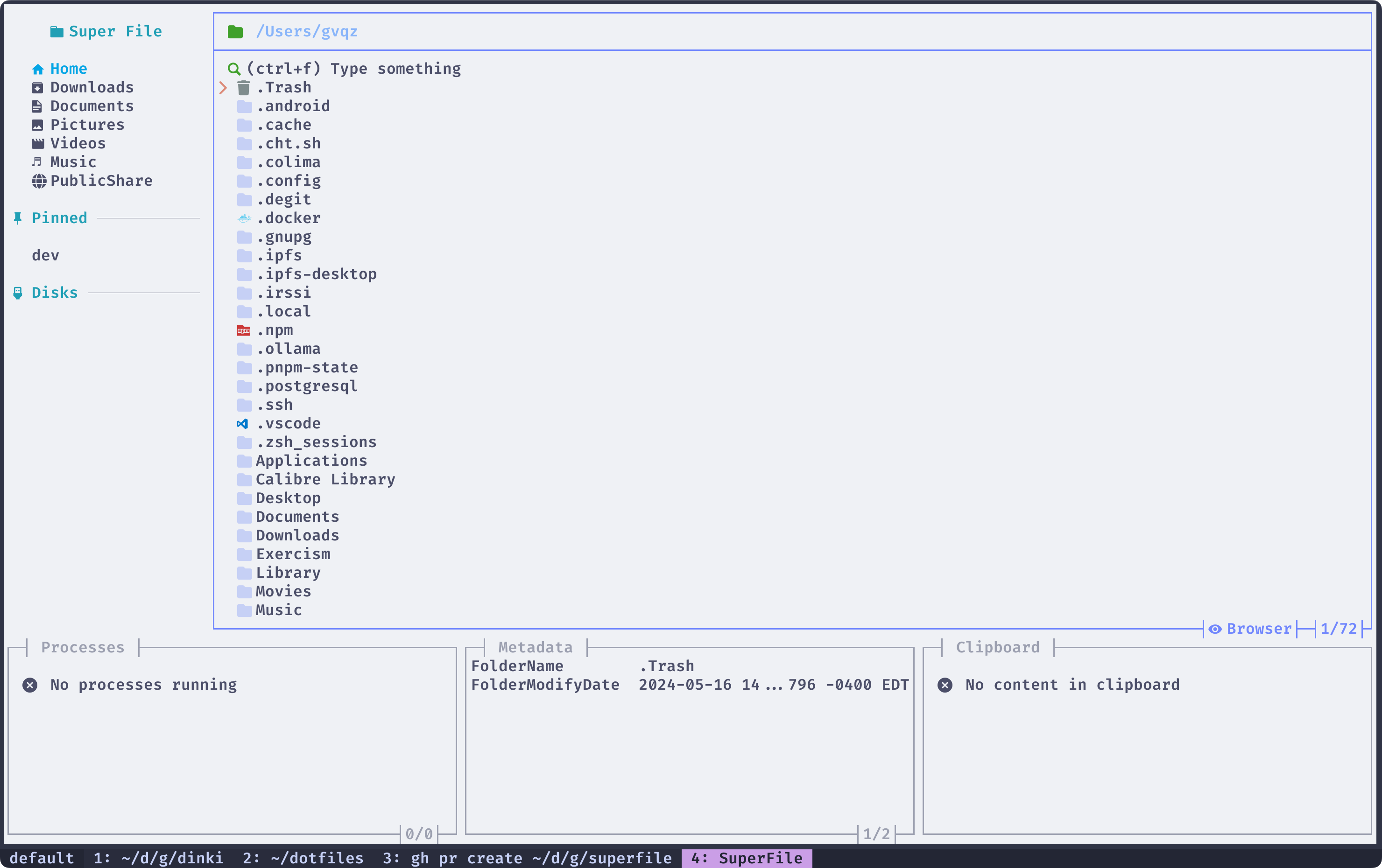
Catppuccin Macchiato
--------------------
* Theme name: `catppuccin-macchiato`
* Ported by: [https://github.com/GV14982](https://github.com/GV14982)
* Original Author: [https://github.com/catppuccin](https://github.com/catppuccin)

Dracula
-------
* Theme name: `dracula`
* Ported by: [https://github.com/BeanieBarrow](https://github.com/BeanieBarrow)
* Original Author: [https://github.com/zenorocha](https://github.com/zenorocha)

Gruvbox
-------
* Theme name: `gruvbox`
* Ported by: [https://github.com/yorukot](https://github.com/yorukot)
* Original Author: [https://github.com/morhetz/](https://github.com/morhetz/)
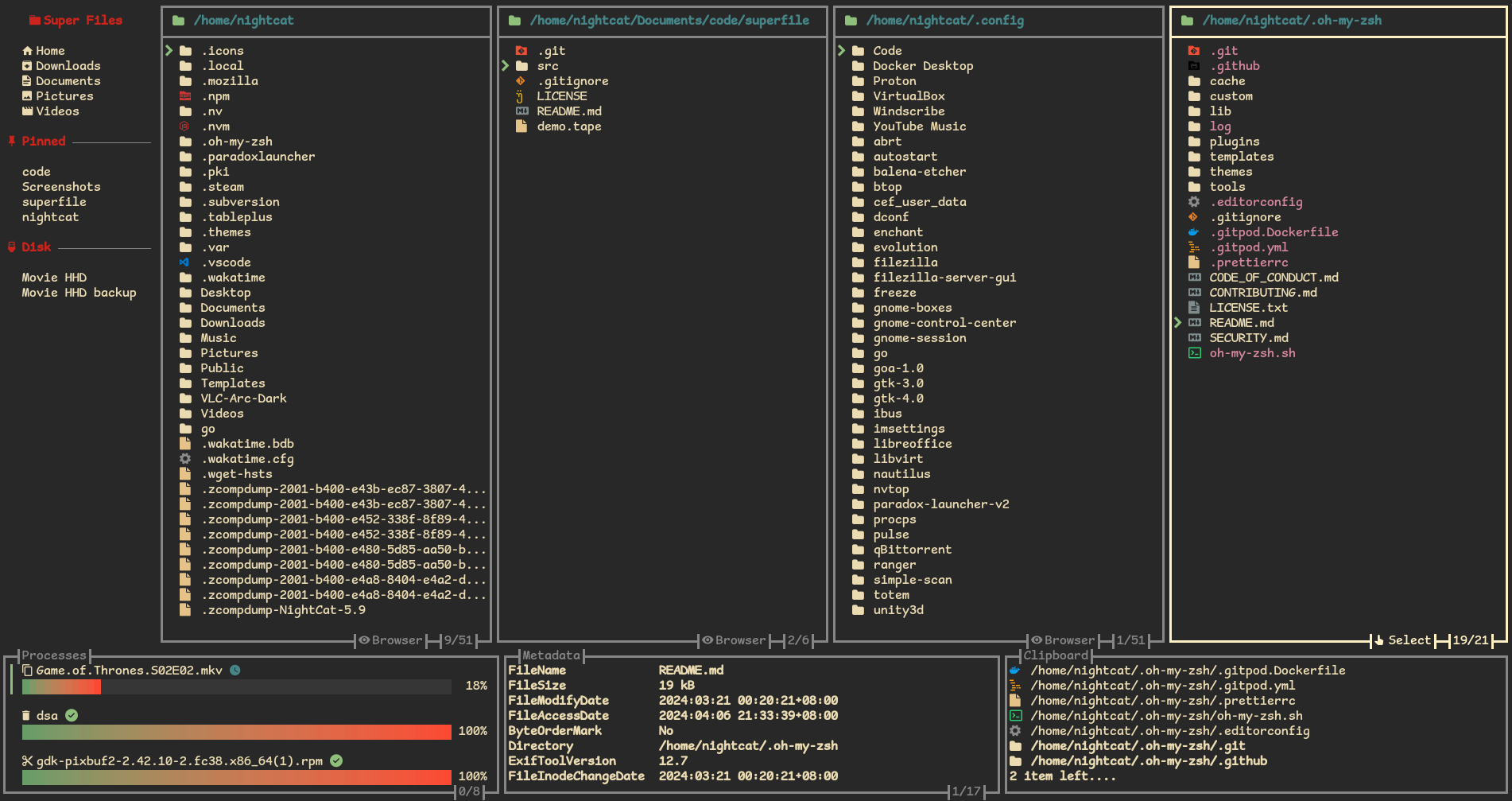
Hacks
-----
* Theme name: `hacks`
* Ported by: [https://github.com/charlesrocket](https://github.com/charlesrocket)
* Original Author: [https://github.com/charlesrocket](https://github.com/charlesrocket)

Kaolin
------
* Theme name: `kaolin`
* Ported by: [https://github.com/AnshumqanNeon](https://github.com/AnshumqanNeon)
* Original Author: [https://github.com/ogdenwebb/](https://github.com/ogdenwebb/)

Nord
----
* Theme name: `nord`
* Ported by: [https://github.com/ramses-eltany](https://github.com/ramses-eltany)
* Original Author: [https://github.com/nordtheme](https://github.com/nordtheme)
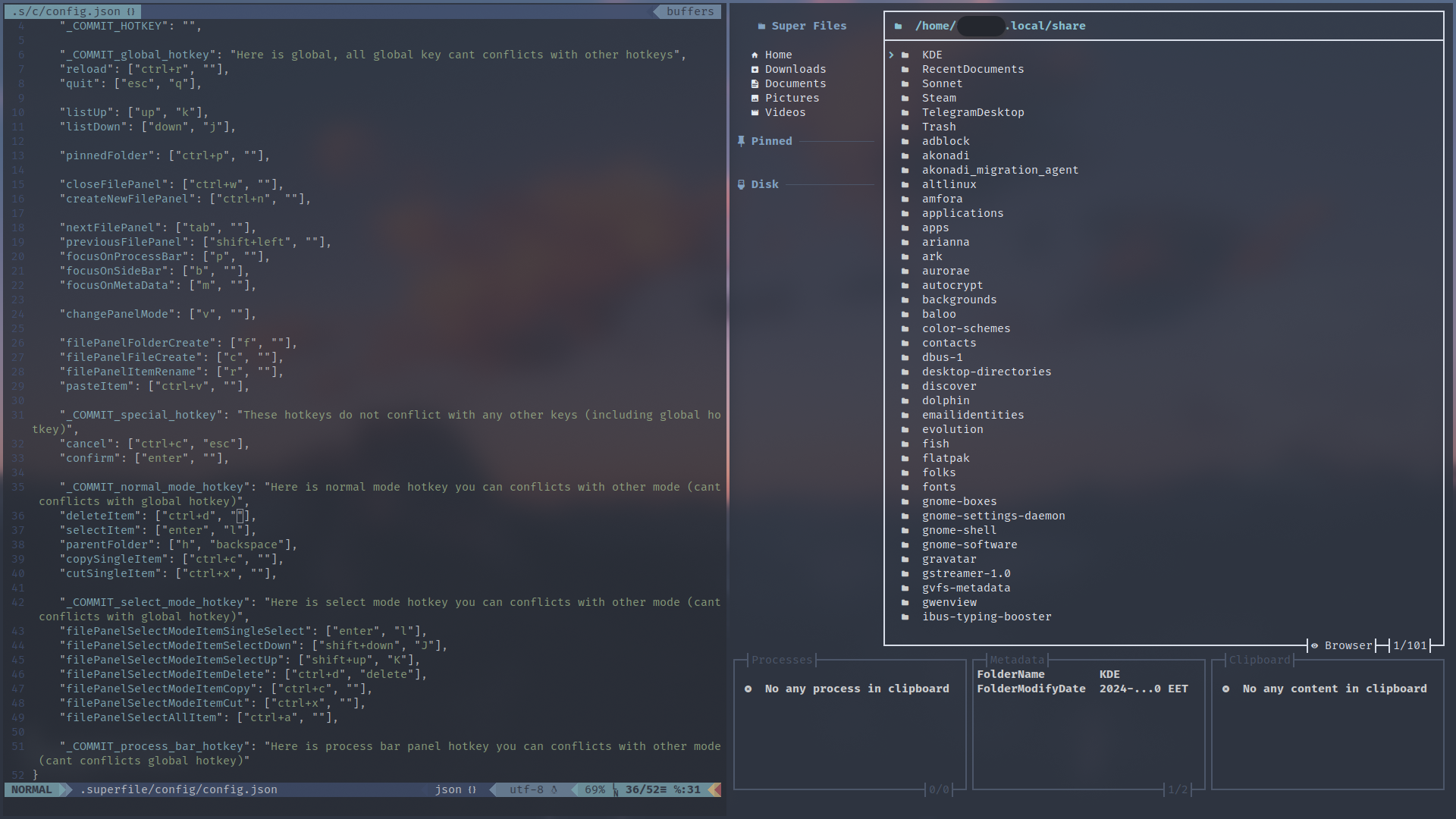
OneDark
-------
* Theme name: `onedark`
* Ported by: [https://github.com/CommandJoo](https://github.com/CommandJoo)
* Original Author: [https://github.com/one-dark](https://github.com/one-dark)

Poimandres
----------
* Theme name: `poimandres`
* Ported by: [https://github.com/Myles-J](https://github.com/Myles-J)
* Original Author: [https://github.com/drcmda/](https://github.com/drcmda/)

Rosé Pine
---------
* Theme name: `rose-pine`
* Ported by: [https://github.com/pearcidar](https://github.com/pearcidar)
* Original Author: [https://github.com/rose-pine](https://github.com/rose-pine)

Sugarplum
---------
* Theme name: `sugarplum`
* Ported by: [https://github.com/lemonlime0x3C33](https://github.com/lemonlime0x3C33)
* Original Author: [https://github.com/lemonlime0x3C33](https://github.com/lemonlime0x3C33)

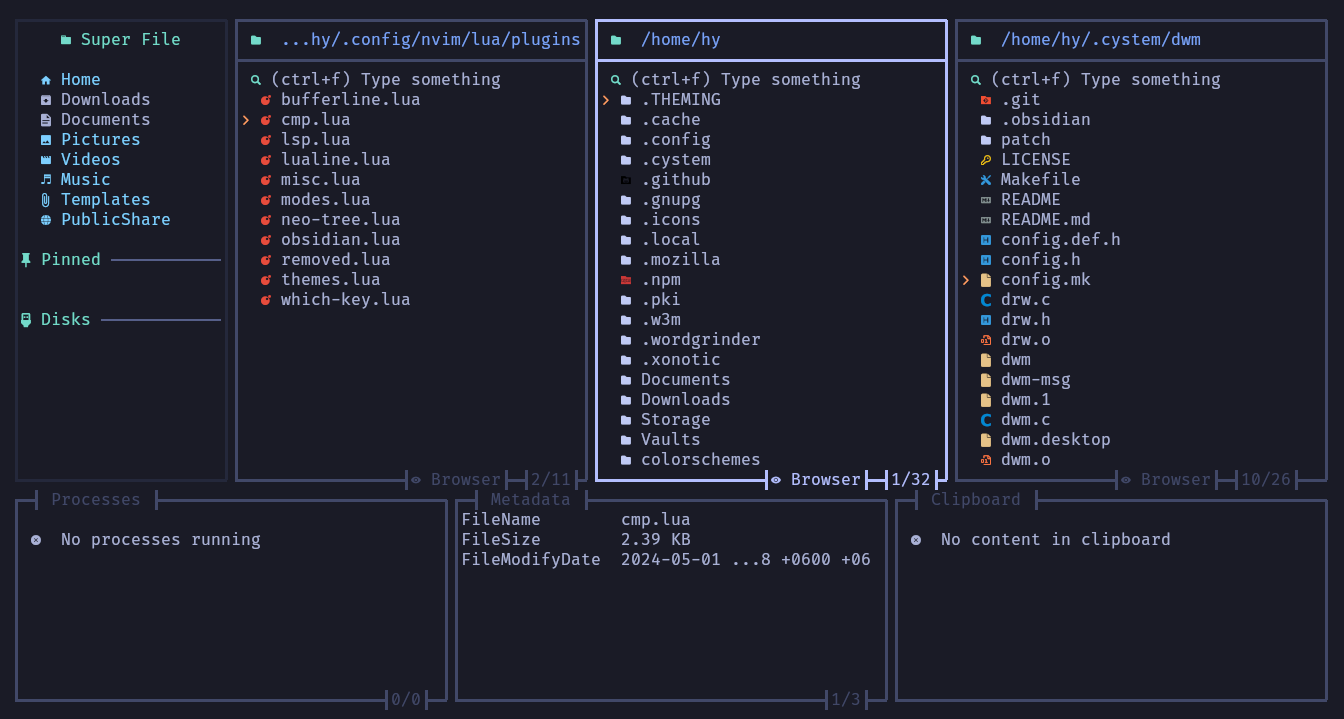
Tokyonight
----------
* Theme name: `tokyonight`
* Ported by: [https://github.com/pearcidar](https://github.com/pearcidar)
* Original Author: [https://github.com/enkia/](https://github.com/enkia/)
---
# Plugin list | superfile
Plugin list
===========
Metadata
--------
description: Show more detailed metadata
Requirements: `exiftool`
name in config.toml: `metadata`
---
# Troubleshooting | superfile
Troubleshooting
===============
My superfile icon doesn’t display correctly
-------------------------------------------
Try these things below:
* Make sure you already install [nerdfont](https://www.nerdfonts.com/font-downloads)
(You can choose whatever font you like!)
* Apply this font to your terminal,This may require different settings depending on the terminal.You can check how to set it up!
Help! My superfile’s rendering is all messed up!
------------------------------------------------
Try these things below:
* Set your locale to utf-8
* chcp 65001 ( If that’s an option for your shell )
* Set environment variable RUNEWIDTH\_EASTASIAN to 0 (`RUNEWIDTH_EASTASIAN=0`)
---
# How to Contribute | superfile
How to Contribute
=================
Contributing to superfile
=========================
Welcome to superfile! This document shall serve as a guide for you to follow in your journey to contributing to this project. There are many ways to contribute to superfile:
* Reporting Bugs
* Resolving issues
* Adding a theme
* Sharing an idea and working on it
* Working on a feature with other contributors.
* And More…
To get started, take a look at the following sections.
Issues
------
### Did you spot a problem in superfile?
Firstly you should check if such an issue was previously opened/closed for your problem on the repository. If it doesn’t then you should create a new issue.
### Do you want to solve an issue?
If there is an issue you think you can solve, and want to solve, then you should create a new fork of this repository. In that repository you should create a new branch for the issue you are working on and commit changes there. When the issue is solved, and you want it to be integrated into the official repository, you may create a pull request for the same. The description of the pull request should clearly describe both the issue and the solution along with other necessary information. The developers will merge after making the necessary changes (if arises a need to do so).
### Do you want to add a new theme?
Firstly check if the theme you want to add is not already added. If it is, then you work may go waste and be left redundant. If no such theme exists, then you may create your own theme. Following steps will guide you for it:
* As a template, copy an existing theme’s TOML file to your theme and then do the customizations. This will reduce errors from your side and make your work easy.
* To tests your theme, go to [`CONFIG_PATH`](/configure/config-file-path#config)
and change description.
* Make the changes you want and finish the theme.
* Then you can open a pull request for the same and follow the steps described in the previous section.
### Do you want to share an idea?
superfile welcomes new ideas. If you have an idea you should first check if a similar or identical idea was presented previously or not, or check thoroughly if the idea is already present in superfile. To share your idea you can open a discussion in [https://github.com/yorukot/superfile/discussions](https://github.com/yorukot/superfile/discussions)
There you can share your idea and if you want to work on it, you can follow the same steps as mentioned in previously.
### Do you want to contribute but don’t know how?
Your first resource in this should be [https://docs.github.com/en/get-started/exploring-projects-on-github/contributing-to-a-project](https://docs.github.com/en/get-started/exploring-projects-on-github/contributing-to-a-project)
This file serves as your guide specifically for this project to help you get your contributions into the project. If you still have some questions or need help, feel free to open a discussion on the same.
Thank You 🙏
============
---
# superfile ChangeLog | superfile
CHANGELOG
=========
ChangeLog
=========
All notable changes to this project will be documented in this file. Dates are displayed in UTC(YYYY-MM-DD).
[**v1.1.7.1**](https://github.com/yorukot/superfile/releases/tag/v1.1.7)
=========================================================================
> 2024-01-06
NOTE: This release is a hotfix to resolve an unusual issue on Windows.
#### Bug fix
* Fix can’t run on windows [`#534`](https://github.com/yorukot/superfile/issues/534)
[**v1.1.7**](https://github.com/yorukot/superfile/releases/tag/v1.1.7)
=======================================================================
> 2024-01-05
#### Update
* OneDark Theme added [`#477`](https://github.com/yorukot/superfile/pull/477)
* Add keys PageUp and PageDown for better navigation [`#498`](https://github.com/yorukot/superfile/pull/498)
* Add hotkey for copying PWD to clipboard [`#510`](https://github.com/yorukot/superfile/pull/510)
* Add desktop entry [`#501`](https://github.com/yorukot/superfile/pull/501)
* Enable cd\_on\_quit when current directory is home directory [`#518`](https://github.com/yorukot/superfile/pull/518)
* Edit superfile config [`#509`](https://github.com/yorukot/superfile/pull/509)
#### Bug fix
* Fix rendering directory symlinks as directories, not files [`#481`](https://github.com/yorukot/superfile/pull/481)
* Fix opening files on Windows [`#496`](https://github.com/yorukot/superfile/pull/496)
* Fix lag in dotfile toggle with multiple panels [`#499`](https://github.com/yorukot/superfile/pull/499)
* Fix parent directory navigation on Windows [`#502`](https://github.com/yorukot/superfile/pull/502)
* Fix panic when deleting last file in directory [`#529`](https://github.com/yorukot/superfile/pull/529)
* Fix panic when scrolling through an empty metadata list [`#531`](https://github.com/yorukot/superfile/pull/531)
* Fix panic when trying to get folder size without needed permissions [`#532`](https://github.com/yorukot/superfile/pull/532)
* Fix lag when navigating directories with large image files [`#525`](https://github.com/yorukot/superfile/pull/525)
* Fix typo in welcome message [`#494`](https://github.com/yorukot/superfile/pull/494)
#### Optimization
* Optimize file move operation [`#522`](https://github.com/yorukot/superfile/pull/522)
* Optimize file extraction [`#524`](https://github.com/yorukot/superfile/pull/524)
* Warn overwrite when renaming files [`#526`](https://github.com/yorukot/superfile/pull/526)
* Work without trash [`#527`](https://github.com/yorukot/superfile/pull/527)
[**v1.1.6**](https://github.com/yorukot/superfile/releases/tag/v1.1.6)
=======================================================================
> 2024-11-21
#### Update
* Add sort case toggle [`#469`](https://github.com/yorukot/superfile/issues/469)
* Add Sort options [`#420`](https://github.com/yorukot/superfile/pull/420)
* Fix flashing when switching between panels [`#122`](https://github.com/yorukot/superfile/issues/122)
#### Bug fix
* Fix some hotkey broken
* Fix the searchbar to automatically put the open key into the searchbar [`ec9e256`](https://github.com/yorukot/superfile/commit/b20bc70fe9d4e0ee96931092a6522e8604cc017b)
[**v1.1.5**](https://github.com/yorukot/superfile/releases/tag/v1.1.5)
=======================================================================
> 2024-10-03
#### Update
* Stop automatically updating config file. Add fix-hotkeys flag, feedback for missing hotkeys [`#333`](https://github.com/yorukot/superfile/issues/333)
* Update installation.md: Add x-cmd method to install superfile [`#371`](https://github.com/yorukot/superfile/issues/333)
* Added option to change default editor [`#396`](https://github.com/yorukot/superfile/pull/396)
* Support Shell access but cant read history [`#127`](https://github.com/yorukot/superfile/issues/127)
* shortcut to copy path to currently selected file [`#196`](https://github.com/yorukot/superfile/issues/196)
#### Bug fix
* fixed typo in hotkeys.toml [`#341`](https://github.com/yorukot/superfile/issues/341)
* Fixes issue #360 + Typo fixes by [`#379`](https://github.com/yorukot/superfile/pull/379)
* fixed spelling mistake : varibale to variable [`#394`](https://github.com/yorukot/superfile/pull/394)
* fixed exiftool session left open after use [`#400`](https://github.com/yorukot/superfile/pull/400)
* Show unsupported format in preview panel over a torrent file [`#408`](https://github.com/yorukot/superfile/pull/408)
* Vim bindings in docs cause error on nixos [`#325`](https://github.com/yorukot/superfile/issues/325)
* fix spf help flag error [`#368`](https://github.com/yorukot/superfile/issues/368)
* You cannot access the disks section in the side panel when only have one disk [`#409`](https://github.com/yorukot/superfile/issues/409)
* “Unsupported formats” message has an extra space for .pdf files [`#392`](https://github.com/yorukot/superfile/issues/392)
[**v1.1.4**](https://github.com/yorukot/superfile/releases/tag/v1.1.4)
=======================================================================
> 2024-08-01
#### Update
* Added option to change default directory [`#211`](https://github.com/yorukot/superfile/issues/211)
* Added quotes arround dir in lastdir to support special characters [`#218`](https://github.com/yorukot/superfile/pull/218)
* Make Hotkey settings unlimited [`423a96a`](https://github.com/yorukot/superfile/commit/423a96a0aeca4ea2c30447d8b4010868045bb7e8)
* Selection should start on currently positioned/pointed item [`#226`](https://github.com/yorukot/superfile/issues/226)
* Make Nerdfont optional [`#6`](https://github.com/yorukot/superfile/issues/6)
* Confirm before quit [`#155`](https://github.com/yorukot/superfile/issues/155)
* Added file permissions to metadata [`#279`](https://github.com/yorukot/superfile/pull/279)
* Better fuzzy file search [`#115`](https://github.com/yorukot/superfile/issues/115)
* MD5 checksum in Metadata [`#255`](https://github.com/yorukot/superfile/pull/225)
* An option to display the filesize in decimal or binary sizes [`#220`](https://github.com/yorukot/superfile/issues/220)
#### Bug fix
* An option to display the filesize in decimal or binary sizes [`#220`](https://github.com/yorukot/superfile/issues/220)
* Fix Transparent Background issue [`#76`](https://github.com/yorukot/superfile/issues/76)
* Big text file makes the program freeze for a while [`#255`](https://github.com/yorukot/superfile/issues/255)
* Text in file preview has a background color behind it when using transparency [`#76`](https://github.com/yorukot/superfile/issues/76)
[**v1.1.3**](https://github.com/yorukot/superfile/releases/tag/v1.1.3)
=======================================================================
> 2024-05-26
#### Update
* Update print path list [`37c8864`](https://github.com/yorukot/superfile/commit/37c8864eb2b0dc73fbf8928dd40b3b7573e9a11dw)
* Make theme files embed [`0f53a12`](https://github.com/yorukot/superfile/commit/7fa775dd7db175fef694e514bd77ebd75c801fae)
* Disable update check via config [`#131`](https://github.com/yorukot/superfile/issues/131)
* Redesing hotkeys [`#116`](https://github.com/yorukot/superfile/issues/116)
* Create file or folder using same hotkey [`#116`](https://github.com/yorukot/superfile/issues/116)
* More dynamic footer height adaptive [`66a3fb4`](https://github.com/yorukot/superfile/commit/66a3fb4feba31ead2224938b1a18a431a55ac9cc)
* Confirm delete files “
* Support windows for get well known directories [`d4db820`](https://github.com/yorukot/superfile/commit/d4db820ba839603df209dcce05468902739f301f)
* Support text file preview [`#26`](https://github.com/yorukot/superfile/issues/26)
* Support directory preview [`#26`](https://github.com/yorukot/superfile/issues/26)
* Improve mouse scrolling delay [`f734292`](https://github.com/yorukot/superfile/commit/f7342921d49d87f1bc633c9f8e19fe6845fbbf26)
* Support image preview with ansi [`#26`](https://github.com/yorukot/superfile/issues/26)
* Clear search after opening directory [`#146`](https://github.com/yorukot/superfile/issues/146)
#### Bug fix
* Recursive symlink crashes superfile [`#109`](https://github.com/yorukot/superfile/issues/109)
* Timemachine snapshots listed in Disks section [`#126`](https://github.com/yorukot/superfile/issues/126)
* There will be a bug in the layout under a specific terminal height [`#105`](https://github.com/yorukot/superfile/issues/105)
* Fix lag when there are a lot of files [`#124`](https://github.com/yorukot/superfile/issues/124)
* Rendering will be blocked while executing a task that uses a progress bar [`#104`](https://github.com/yorukot/superfile/issues/104)
[**v1.1.2**](https://github.com/yorukot/superfile/releases/tag/v1.1.2)
=======================================================================
> 2024-05-08
#### Update
* Update help menu [`#75`](https://github.com/yorukot/superfile/issues/75)
* Update all modal, make other panel still show on background [`#79`](https://github.com/yorukot/superfile/pull/79)
* Support extract gz tar file [`b9aed84`](https://github.com/yorukot/superfile/commit/b9aed847804421e1fc4f03dcaefb0e27f1260ea3)
* Support transparent background [`4108d40`](https://github.com/yorukot/superfile/commit/4108d40bc0b93656eca2da98253a83dbc0cb27a9)
* Support custom border style [`6ff0576`](https://github.com/yorukot/superfile/commit/6ff05765823cbd25e6fdc4d3f7370e435114acbb)
* Enhancement when cutting and pasting, the file should be moved instead of copied and deleted. [`#100`](https://github.com/yorukot/superfile/issues/100)
* Support extract almost compression formats [`e57cb78`](https://github.com/yorukot/superfile/commit/e57cb78d602d62b47662e2069b75059d908147db)
* Update XDG\_CACHE to XDG\_STATE\_HOME [`#90`](https://github.com/yorukot/superfile/issues/90)
#### Bug fix
* Fix Cut -> Paste file causes go panic [`#77`](https://github.com/yorukot/superfile/issues/77)
* Fix symlinked folders don’t open within superfile [`#88`](https://github.com/yorukot/superfile/issues/88)
[**v1.1.1**](https://github.com/yorukot/superfile/releases/tag/v1.1.1)
=======================================================================
> 2024-04-23
#### Update
* Open directory with default application [`#33`](https://github.com/yorukot/superfile/issues/33)
* Auto update config file if missing config [`1498c92`](https://github.com/yorukot/superfile/commit/1498c92d2166c8c25989be9ce5a15dc6d1ffb073)
#### Bug fix
* key `l` deletes files in macOS [`#72`](https://github.com/yorukot/superfile/issues/72)
[**v1.1.0**](https://github.com/yorukot/superfile/releases/tag/v1.1.0)
=======================================================================
> 2024-04-20
#### Update
* Update data folder from `$XDG_CONFIG_HOME/superfile/data` to `$XDG_DATA_HOME/superfile` [`9fff97a`](https://github.com/yorukot/superfile/commit/9fff97a362bcd5bec1c19709b7a5aeb59cdeaa34)
* Toggle dot file display [`9fff97a`](https://github.com/yorukot/superfile/commit/9fff97a362bcd5bec1c19709b7a5aeb59cdeaa34/9fff97a362bcd5bec1c19709b7a5aeb59cdeaa34)
* Update log file from `$XDG_CONFIG_HOME/superfile/data/superfile.log` to `$XDG_CACHE_DATA` [`#27`](https://github.com/yorukot/superfile/pull/27)
* Update theme background [`#42`](https://github.com/yorukot/superfile/pull/42)
* Update unzip function [`#55`](https://github.com/yorukot/superfile/pull/55)
* Update zip function [`60c490a`](https://github.com/yorukot/superfile/commit/60c490aa06019fb1a5382b1e241c6b0a72ec51a4)
* Update all config file from `json` to `toml` format file [`a018128`](https://github.com/yorukot/superfile/commit/a018128ffd431d76a06f379fffbe0aa20d3e78cc)
* Update search bar [`#61`](https://github.com/yorukot/superfile/pull/61)
* Update theme config format [`#66`](https://github.com/yorukot/superfile/pull/66)
* Update metadata to plugins [`c1f942d`](https://github.com/yorukot/superfile/commit/c1f942da366919f114b094ce512ff95002b6a08c)
#### Bug fix
* Fix interface lag when selecting zip files or large files [`#29`](https://github.com/yorukot/superfile/issues/29)
* Fix external media error [`#46`](https://github.com/yorukot/superfile/pull/46)
* Fix can’t find trash can folder [`396674f`](https://github.com/yorukot/superfile/commit/396674f33e302369790bcb88d84df0d3830d3543)
* Fix Crashes when truncating metadata [`#50`](https://github.com/yorukot/superfile/issues/50)
[**v1.0.1**](https://github.com/yorukot/superfile/releases/tag/v1.0.1)
=======================================================================
> 2024-04-08
#### Update
* Update `$HOME/.superfile` to `$XDG_CONFIG_HOME/superfile` [`886dbfb`](https://github.com/yorukot/superfile/commit/886dbfb276407db36e9fb7369ec31053e7aabcf4)
* Follow [The FreeDesktop.org Trash specification](https://specifications.freedesktop.org/trash-spec/trashspec-1.0.html)
to update the trash bin path in local path [`886dbfb`](https://github.com/yorukot/superfile/commit/886dbfb276407db36e9fb7369ec31053e7aabcf4)
* The external hard drive will be deleted directly ,But macOS for now not support trash can[`a4232a8`](https://github.com/yorukot/superfile/commit/a4232a88bef4b5c3e99456fd198eabb953dc324c)
* The user can enter the path, which will be the path of the first file panel [`14620b3`](https://github.com/yorukot/superfile/commit/14620b33b09edfce80a95e1f52f7f66b3686a9d0)
* Make user can open file with default browser text-editor etc [`f47d291`](https://github.com/yorukot/superfile/commit/f47d2915bf637da0cf99a4b15fa0bea8edc8d380)
* Can open terminal in focused file panel path [`f47d291`](https://github.com/yorukot/superfile/commit/f47d2915bf637da0cf99a4b15fa0bea8edc8d380)
#### Bug fix
* Fix processes bar cursor index display error [`f6eb9d8`](https://github.com/yorukot/superfile/commit/f6eb9d879f9f7ef31859e3f84c8792e2f0fc543a)
* Fix [Crash when selecting a broken symlink](https://github.com/yorukot/superfile/issues/9)
[`e89722b`](https://github.com/yorukot/superfile/commit/e89722b3717cc669c2e14bb310d1b96c1727b63f)
[**v1.0.0**](https://github.com/yorukot/superfile/releases/tag/v1.0.0)
=======================================================================
> 2024-04-06
##### Update
* Auto download folder [`96a3a71`](https://github.com/yorukot/superfile/commit/96a3a7108eb7c4327bad3424ed55e472ec78049f)
* Auto initialize configuration [`96a3a71`](https://github.com/yorukot/superfile/commit/96a3a7108eb7c4327bad3424ed55e472ec78049f)
* Add version sub-command [`ee22df3`](https://github.com/yorukot/superfile/commit/ee22df3c7700adddb859ada8623f6c8b038e8087)
##### Bug fix
* Fix creating an Item when the file panel has no Item will cause an error [`9ee1d86`](https://github.com/yorukot/superfile/commit/9ee1d860192182803d408c5046ca9f5255121698)
* Fix delete mupulate Item will cause cursor error [`ee22df3`](https://github.com/yorukot/superfile/commit/ee22df3c7700adddb859ada8623f6c8b038e8087)
[**Beta 0.1.0**](https://github.com/yorukot/superfile/releases/tag/v0.1.0-beta)
================================================================================
> 2024-04-06
* FIRST RELEASE COME UP! NO ANY CHANGE
---