# Table of Contents
- [Superforms - Form library for SvelteKit](#superforms-form-library-for-sveltekit)
- [Get started - Tutorial for Superforms](#get-started-tutorial-for-superforms)
- [Help and support for Superforms](#help-and-support-for-superforms)
- [Super Sponsors](#super-sponsors)
- [Superform examples and playground](#superform-examples-and-playground)
- [What's new in Superforms version 2](#what-s-new-in-superforms-version-2)
- [API reference](#api-reference)
- [Superforms v2 - Migration guide](#superforms-v2-migration-guide)
- [Client-side validation](#client-side-validation)
- [Events](#events)
- [File upload and validation](#file-upload-and-validation)
- [Timers for loading spinners](#timers-for-loading-spinners)
- [Multiple forms on the same page](#multiple-forms-on-the-same-page)
- [Proxy objects](#proxy-objects)
- [Nested data](#nested-data)
- [Single-page application (SPA) mode](#single-page-application-spa-mode)
- [Status messages](#status-messages)
- [Submit behavior](#submit-behavior)
- [Tainted form fields](#tainted-form-fields)
- [Progressive enhancement with use:enhance](#progressive-enhancement-with-use-enhance)
- [Error handling](#error-handling)
- [Forms and fields in components](#forms-and-fields-in-components)
- [Default values](#default-values)
- [CRUD tutorial for Superforms](#crud-tutorial-for-superforms)
- [Contributing, donating and sponsoring](#contributing-donating-and-sponsoring)
- [Integrate Superforms with sveltekit-flash-message](#integrate-superforms-with-sveltekit-flash-message)
- [SuperDebug - the Super debugging component](#superdebug-the-super-debugging-component)
- [FAQ](#faq)
- [Strict mode](#strict-mode)
- [Rate limiting with sveltekit-rate-limiter](#rate-limiting-with-sveltekit-rate-limiter)
- [Integrate Superforms with Formsnap](#integrate-superforms-with-formsnap)
- [Snapshots](#snapshots)
- [Get started - Tutorial for Superforms](#get-started-tutorial-for-superforms)
- [Get started - Tutorial for Superforms](#get-started-tutorial-for-superforms)
- [Get started - Tutorial for Superforms](#get-started-tutorial-for-superforms)
- [Get started - Tutorial for Superforms](#get-started-tutorial-for-superforms)
- [Get started - Tutorial for Superforms](#get-started-tutorial-for-superforms)
- [Get started - Tutorial for Superforms](#get-started-tutorial-for-superforms)
- [Get started - Tutorial for Superforms](#get-started-tutorial-for-superforms)
- [Get started - Tutorial for Superforms](#get-started-tutorial-for-superforms)
- [Get started - Tutorial for Superforms](#get-started-tutorial-for-superforms)
- [Get started - Tutorial for Superforms](#get-started-tutorial-for-superforms)
- [Get started - Tutorial for Superforms](#get-started-tutorial-for-superforms)
- [Superform examples and playground](#superform-examples-and-playground)
- [404 Not Found](#404-not-found)
---
# Superforms - Form library for SvelteKit
;}%3c/style%3e%3cfilter%20id='d'%3e%3cfeDropShadow%20dx='7'%20dy='7'%20flood-opacity='0.25'%20stdDeviation='7'/%3e%3c/filter%3e%3c/defs%3e%3cg%20id='b'%3e%3cpolygon%20class='h'%20points='530%20922%2083%20391%20275%20204.588%20834%20204.588%201011%20396%20530%20922'/%3e%3c/g%3e%3cg%20id='c'%3e%3cpath%20class='e'%20d='M741.251,662.107H334.31v64.28h406.941v-64.28Z'/%3e%3cpath%20class='e'%20d='M697.019,779.656H381.781v-64.28h315.239v64.28Zm-224.32-116.141h-168.684v-18.093h168.684v18.093Zm270.981,31.964L141.126,347.594l60.584-104.935,602.554,347.885-60.584,104.935Zm194.602-243.383l-386.157-222.949,12.445-21.555,386.157,222.949-12.445,21.555Z'/%3e%3cpath%20class='e'%20d='M963.286,415.916l-386.157-222.949-12.445,21.555,386.157,222.949,12.445-21.555Z'/%3e%3cpath%20class='e'%20d='M963.292,426.04l-386.157-222.949,12.445-21.555,386.157,222.949-12.445,21.555Zm-34.816,34.298l-408.373-235.774,9.801-16.976,408.373,235.774-9.801,16.976Z'/%3e%3cpath%20class='e'%20d='M928.475,456.992L504.426,212.167l-9.801,16.976,424.049,244.825,9.801-16.976Z'/%3e%3cpath%20class='e'%20d='M908.873,490.95L455.42,229.148l12.445-21.555,453.453,261.801-12.445,21.555Zm-590.686-107.299l-136.251-78.664,40.279-69.765,136.251,78.664-40.279,69.764Z'/%3e%3c/g%3e%3cpath%20class='g'%20d='M842.637,179.14H258.378L44.915,391.505l484.635,583.598,38.662-43.38,479.723-538.224-205.298-214.358h0Zm-21.344,50l158.572,165.579-448.973,503.732L112.578,394.719l166.433-165.579H821.292Z'/%3e%3cpath%20class='f'%20d='M842.637,179.14H258.378L44.915,391.505l484.635,583.598,38.662-43.38,479.723-538.224-205.298-214.358h0Zm-21.344,50l158.572,165.579-448.973,503.732L112.578,394.719l166.433-165.579H821.292Z'/%3e%3c/svg%3e)
Superforms 💥
=============
#### 🏆 Svelte Hack 2023 winner - Best library! 🏆
Superforms is a SvelteKit form library that brings you a comprehensive solution for **server and client form validation**. It supports a multitude of validation libraries:
[Arktype](https://superforms.rocks/get-started/arktype)
[class-validator](https://superforms.rocks/get-started/class-validator)
[Effect](https://superforms.rocks/get-started/effect)
[Joi](https://superforms.rocks/get-started/joi)
[JSON Schema](https://superforms.rocks/get-started/json-schema)
[Superstruct](https://superforms.rocks/get-started/superstruct)
[TypeBox](https://superforms.rocks/get-started/@sinclair/typebox)
[Valibot](https://superforms.rocks/get-started/valibot)
[VineJS](https://superforms.rocks/get-started/@vinejs/vine)
[Yup](https://superforms.rocks/get-started/yup)
[Zod](https://superforms.rocks/get-started/zod)
Pick your favorite, Superforms takes care of the rest with consistent handling of form data and validation errors, with full type safety. It works with both TypeScript and JavaScript, even in static and single-page apps.
The API is minimal, basically a single method on the server and client, but it’s very flexible and configurable to handle every possible case of:
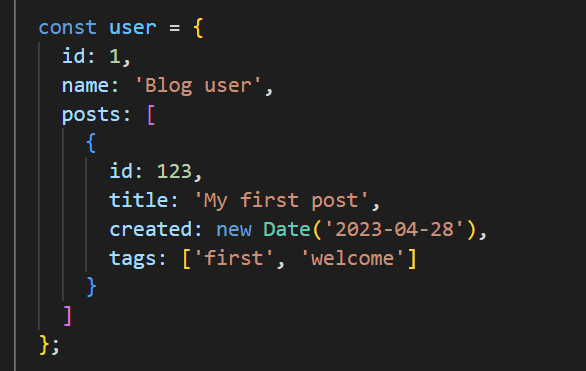
Nested data
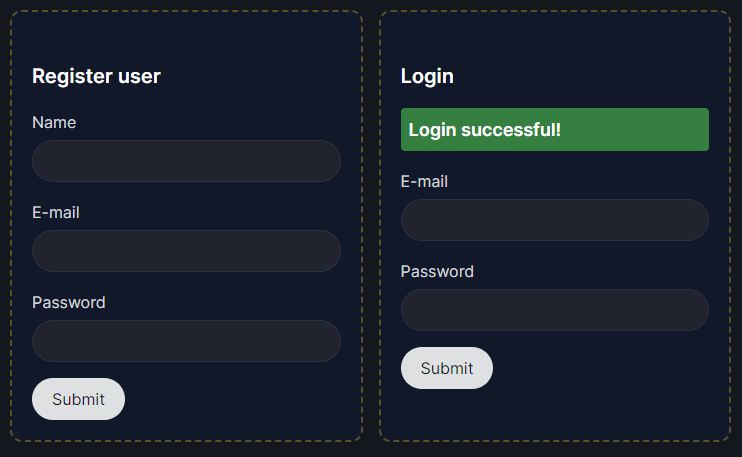
Multiple forms on the same page
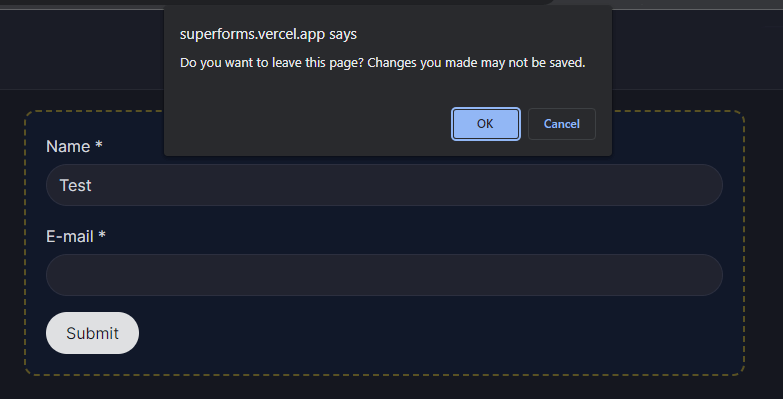
Tainted fields
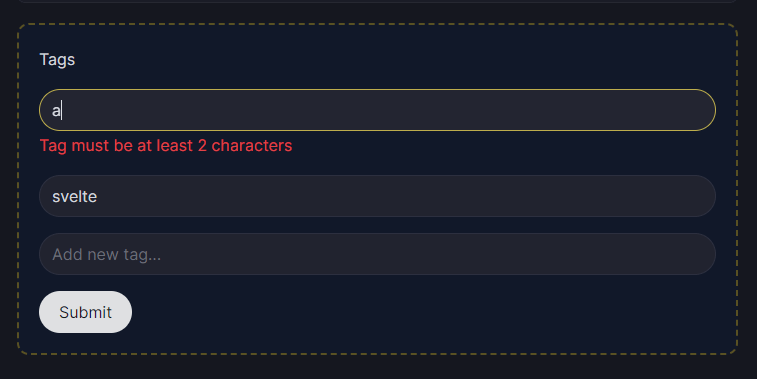
Client-side validation
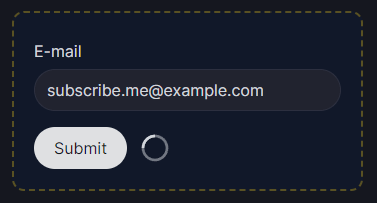
Loading spinners
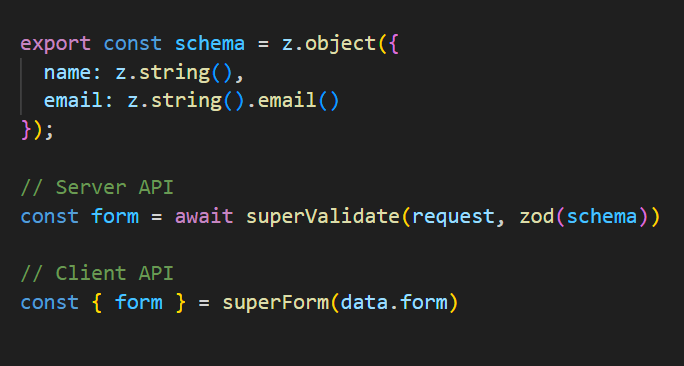
All in a minimal API
Get started[](https://superforms.rocks/#get-started)
-------------------------------------------------------------------------------------------
Click [here to get started](https://superforms.rocks/get-started)
right away, or watch this video for an introduction to what’s possible with Superforms:
Browser testing by
[](https://bugbug.io/)
---
# Get started - Tutorial for Superforms
Get started[](https://superforms.rocks/get-started#get-started)
======================================================================================================
I'm using npmpnpmyarn and my validation library is Choose:AjvArktypeEffectclass-validatorJoiJSON SchemaSuperstructTypeBoxValibotVineJSYupZodZod 4Zod MiniNot on the list!
npm i -D sveltekit-superforms @sinclair/typebox
Select your environment above and run the install command in your project folder.
If you’re starting from scratch, create a new SvelteKit project:
`npx sv create my-app`
Alternatively, [open the tutorial on SvelteLab](https://sveltelab.dev/github.com/ciscoheat/superforms-examples/tree/tutorial-typebox)
to follow along in the browser and copy the code from there.
Creating a Superform[](https://superforms.rocks/get-started#creating-a-superform)
------------------------------------------------------------------------------------------------------------------------
This tutorial will create a Superform with a name and email address, ready to be expanded with more form data.
### Creating a validation schema[](https://superforms.rocks/get-started#creating-a-validation-schema)
The main thing required to create a Superform is a validation schema, representing the form data for a single form:
`import { Type } from '@sinclair/typebox'; const schema = Type.Object({ name: Type.String({ default: 'Hello world!' }), email: Type.String({ format: 'email' }) });`
#### Schema caching[](https://superforms.rocks/get-started#schema-caching)
Define the schema _outside_ the load function, on the top level of the module. **This is very important to make caching work.** The adapter is memoized (cached) with its arguments, so they must be kept in memory.
Therefore, define the schema, its options and potential defaults on the top level of a module, so they always refer to the same object.
### Initializing the form in the load function[](https://superforms.rocks/get-started#initializing-the-form-in-the-load-function)
To initialize the form, you import `superValidate` and an adapter for your validation library of choice in a load function:
**src/routes/+page.server.ts**
`import { superValidate } from 'sveltekit-superforms'; import { typebox } from 'sveltekit-superforms/adapters'; import { Type } from '@sinclair/typebox'; // Define outside the load function so the adapter can be cached const schema = Type.Object({ name: Type.String({ default: 'Hello world!' }), email: Type.String({ format: 'email' }) }); export const load = async () => { const form = await superValidate(typebox(schema)); // Always return { form } in load functions return { form }; };`
The Superforms server API is called `superValidate`. You can call it in two ways in the load function:
### Empty form[](https://superforms.rocks/get-started#empty-form)
If you want the form to be initially empty, just pass the adapter as in the example above, and the form will be filled with default values based on the schema. For example, a `string` field results in an empty string, unless you have specified a default.
### Populate form from database[](https://superforms.rocks/get-started#populate-form-from-database)
If you want to populate the form, usually from a database, you can send data to `superValidate` as the first parameter, adapter second, like this:
`import { error } from '@sveltejs/kit'; export const load = async ({ params }) => { // Replace with your database const user = db.users.findUnique({ where: { id: params.id } }); if (!user) error(404, 'Not found'); const form = await superValidate(user, your_adapter(schema)); // Always return { form } in load functions return { form }; };`
As long as the data partially matches the schema, you can pass it directly to `superValidate`. This is useful for backend interfaces, where the form should usually be populated based on a url like `/users/123`.
### Important note about return values[](https://superforms.rocks/get-started#important-note-about-return-values)
Unless you call the SvelteKit `redirect` or `error` functions, you should **always** return the form object to the client, either directly or through a helper function. The name of the variable doesn’t matter; you can call it `{ loginForm }` or anything else, but it needs to be returned like this in all code paths that returns, both in load functions and form actions. If you don’t, the form won’t be updated with new data (like errors) on the client.
Posting data[](https://superforms.rocks/get-started#posting-data)
--------------------------------------------------------------------------------------------------------
In the form actions, also defined in `+page.server.ts`, we’ll use `superValidate` again, but now it should handle `FormData`. This can be done in several ways:
* Use the `request` parameter (which contains `FormData`)
* Use the `event` object (which contains the request)
* Use `FormData` directly, if you need to access it before calling `superValidate`.
The most common is to use `request`:
**src/routes/+page.server.ts**
`import { message } from 'sveltekit-superforms'; import { fail } from '@sveltejs/kit'; export const actions = { default: async ({ request }) => { const form = await superValidate(request, your_adapter(schema)); console.log(form); if (!form.valid) { // Return { form } and things will just work. return fail(400, { form }); } // TODO: Do something with the validated form.data // Return the form with a status message return message(form, 'Form posted successfully!'); } };`
For simple forms[](https://superforms.rocks/get-started#for-simple-forms)
----------------------------------------------------------------------------------------------------------------
If you have a very simple form and no intentions to use any client-side functionality like events, loading spinners, nested data, etc, then you don’t have to include the client part, which the rest of the tutorial is about. There’s a small example on how to display errors and messages without the client [here](https://superforms.rocks/examples?tag=runes)
. Enjoy the simplicity! But if you’re curious about the numerous client-side features, keep reading:
Displaying the form[](https://superforms.rocks/get-started#displaying-the-form)
----------------------------------------------------------------------------------------------------------------------
The data from `superValidate` is now available in `+page.svelte` as `data.form`, as we did a `return { form }`. Now we can use the client part of the API:
**src/routes/+page.svelte**
` `
The `superForm` function is used to create a form on the client, and `bind:value` is used to create a two-way binding between the form data and the input fields.
This is what the form should look like now:
Name E-mail Submit
### Debugging[](https://superforms.rocks/get-started#debugging)
We can see that the form has been populated with the default values from the schema. But let’s add the debugging component [SuperDebug](https://superforms.rocks/super-debug)
to look behind the scenes:
**src/routes/+page.svelte**
` `
This should be displayed:
200
undefined
When editing the form fields (try in the form above), the data is automatically updated.
SuperDebug also displays a copy button and the current page status in the right corner. There are many [configuration options](https://superforms.rocks/super-debug)
available.
Posting the form[](https://superforms.rocks/get-started#posting-the-form)
----------------------------------------------------------------------------------------------------------------
Now we can post the form back to the server. Submit the form, and see what’s happening on the server:
`{ id: 'a3g9kke', valid: false, posted: true, data: { name: 'Hello world!', email: '' }, errors: { email: [ 'Invalid email' ] } }`
This is the validation object returned from `superValidate`, containing the data needed to update the form:
| Property | Purpose |
| --- | --- |
| **id** | Id for the schema, to handle [multiple forms](https://superforms.rocks/concepts/multiple-forms) on the same page. |
| **valid** | Tells you whether the validation succeeded or not. Used on the server and in [events](https://superforms.rocks/concepts/events) . |
| **posted** | Tells you if the data was posted (in a form action) or not (in a load function). |
| **data** | The posted data, which should be returned to the client using `fail` if not valid. |
| **errors** | An object with all validation errors, in a structure reflecting the data. |
| **message** | (optional) Can be set as a [status message](https://superforms.rocks/concepts/messages) . |
There are some other properties as well, only being sent in the load function:
| Property | Purpose |
| --- | --- |
| **constraints** | An object with [HTML validation constraints](https://developer.mozilla.org/en-US/docs/Learn/Forms/Form_validation#using_built-in_form_validation) , that can be spread on input fields. |
| **shape** | Used internally in error handling. |
You can modify any of these, and they will be updated on the client when you `return { form }`. There are a couple of helper functions for making this more convenient, like [message](https://superforms.rocks/concepts/messages)
and [setError](https://superforms.rocks/concepts/error-handling)
.
### Displaying errors[](https://superforms.rocks/get-started#displaying-errors)
Now we know that validation has failed and there are errors being sent to the client. We display these by adding properties to the destructuring assignment of `superForm`:
**src/routes/+page.svelte**
` {#if $message}
{$message}
{/if} `
By including the `errors` store, we can display errors where appropriate, and through `constraints` we’ll get browser validation even without JavaScript enabled.
The `aria-invalid` attribute is used to [automatically focus](https://superforms.rocks/concepts/error-handling#errorselector)
on the first error field. And finally, we included the [status message](https://superforms.rocks/concepts/messages)
above the form to show if it was posted successfully.
We now have a fully working form, with convenient handling of data and validation both on the client and server!
There are no hidden DOM manipulations or other secrets; it’s just HTML attributes and Svelte stores, which means it works perfectly with server-side rendering. No JavaScript is required for the basics.
### Adding progressive enhancement[](https://superforms.rocks/get-started#adding-progressive-enhancement)
As a last step, let’s add progressive enhancement, so JavaScript users will have a nicer experience. We also need it for enabling [client-side validation](https://superforms.rocks/concepts/client-validation)
and [events](https://superforms.rocks/concepts/events)
, and of course to avoid reloading the page when the form is posted.
This is simply done with `enhance`, returned from `superForm`:
`