# Table of Contents
- [Introduction · Product Advertising API 5.0](#introduction-product-advertising-api-5-0)
- [Document History · Product Advertising API 5.0](#document-history-product-advertising-api-5-0)
- [License Agreement · Product Advertising API 5.0](#license-agreement-product-advertising-api-5-0)
- [Register for Product Advertising API · Product Advertising API 5.0](#register-for-product-advertising-api-product-advertising-api-5-0)
- [Quick Start · Product Advertising API 5.0](#quick-start-product-advertising-api-5-0)
- [Using cURL · Product Advertising API 5.0](#using-curl-product-advertising-api-5-0)
- [Using SDK · Product Advertising API 5.0](#using-sdk-product-advertising-api-5-0)
- [Operations and Resources · Product Advertising API 5.0](#operations-and-resources-product-advertising-api-5-0)
- [Use Cases · Product Advertising API 5.0](#use-cases-product-advertising-api-5-0)
- [Buying Price · Product Advertising API 5.0](#buying-price-product-advertising-api-5-0)
- [Variations · Product Advertising API 5.0](#variations-product-advertising-api-5-0)
- [Localized Product Details · Product Advertising API 5.0](#localized-product-details-product-advertising-api-5-0)
- [Search with external identifiers (UPC/EAN/ISBN) · Product Advertising API 5.0](#search-with-external-identifiers-upc-ean-isbn-product-advertising-api-5-0)
- [Prime Exclusive Deal Pricing · Product Advertising API 5.0](#prime-exclusive-deal-pricing-product-advertising-api-5-0)
- [Organization of Items on Amazon · Product Advertising API 5.0](#organization-of-items-on-amazon-product-advertising-api-5-0)
- [Prime Eligible Products · Product Advertising API 5.0](#prime-eligible-products-product-advertising-api-5-0)
- [Browse Nodes · Product Advertising API 5.0](#browse-nodes-product-advertising-api-5-0)
- [Search Index · Product Advertising API 5.0](#search-index-product-advertising-api-5-0)
- [Using SearchRefinements · Product Advertising API 5.0](#using-searchrefinements-product-advertising-api-5-0)
- [Using Dynamic Refinements · Product Advertising API 5.0](#using-dynamic-refinements-product-advertising-api-5-0)
- [Finding Relevant Category · Product Advertising API 5.0](#finding-relevant-category-product-advertising-api-5-0)
- [Using Offer Information · Product Advertising API 5.0](#using-offer-information-product-advertising-api-5-0)
- [Determining Offer Summaries · Product Advertising API 5.0](#determining-offer-summaries-product-advertising-api-5-0)
- [Items that do not have offers · Product Advertising API 5.0](#items-that-do-not-have-offers-product-advertising-api-5-0)
- [Determining Price, Merchant and Delivery Information · Product Advertising API 5.0](#determining-price-merchant-and-delivery-information-product-advertising-api-5-0)
- [Sending a Request · Product Advertising API 5.0](#sending-a-request-product-advertising-api-5-0)
- [Operations · Product Advertising API 5.0](#operations-product-advertising-api-5-0)
- [API Reference · Product Advertising API 5.0](#api-reference-product-advertising-api-5-0)
- [Error Codes and Messages · Product Advertising API 5.0](#error-codes-and-messages-product-advertising-api-5-0)
- [Determining Availability · Product Advertising API 5.0](#determining-availability-product-advertising-api-5-0)
- [With SDK · Product Advertising API 5.0](#with-sdk-product-advertising-api-5-0)
- [GetBrowseNodes · Product Advertising API 5.0](#getbrowsenodes-product-advertising-api-5-0)
- [GetItems · Product Advertising API 5.0](#getitems-product-advertising-api-5-0)
- [Without SDK · Product Advertising API 5.0](#without-sdk-product-advertising-api-5-0)
- [Resources · Product Advertising API 5.0](#resources-product-advertising-api-5-0)
- [GetVariations · Product Advertising API 5.0](#getvariations-product-advertising-api-5-0)
- [SearchItems · Product Advertising API 5.0](#searchitems-product-advertising-api-5-0)
- [Images · Product Advertising API 5.0](#images-product-advertising-api-5-0)
- [BrowseNodes · Product Advertising API 5.0](#browsenodes-product-advertising-api-5-0)
- [BrowseNodeInfo · Product Advertising API 5.0](#browsenodeinfo-product-advertising-api-5-0)
- [OffersV2 · Product Advertising API 5.0](#offersv2-product-advertising-api-5-0)
- [ParentASIN · Product Advertising API 5.0](#parentasin-product-advertising-api-5-0)
- [SearchRefinements · Product Advertising API 5.0](#searchrefinements-product-advertising-api-5-0)
- [ItemInfo · Product Advertising API 5.0](#iteminfo-product-advertising-api-5-0)
- [Locale Reference · Product Advertising API 5.0](#locale-reference-product-advertising-api-5-0)
- [VariationSummary · Product Advertising API 5.0](#variationsummary-product-advertising-api-5-0)
- [Australia · Product Advertising API 5.0](#australia-product-advertising-api-5-0)
- [Belgium · Product Advertising API 5.0](#belgium-product-advertising-api-5-0)
- [Brazil · Product Advertising API 5.0](#brazil-product-advertising-api-5-0)
- [Canada · Product Advertising API 5.0](#canada-product-advertising-api-5-0)
- [Egypt · Product Advertising API 5.0](#egypt-product-advertising-api-5-0)
- [Using Scratchpad · Product Advertising API 5.0](#using-scratchpad-product-advertising-api-5-0)
- [Offers · Product Advertising API 5.0](#offers-product-advertising-api-5-0)
- [Germany · Product Advertising API 5.0](#germany-product-advertising-api-5-0)
- [France · Product Advertising API 5.0](#france-product-advertising-api-5-0)
- [India · Product Advertising API 5.0](#india-product-advertising-api-5-0)
- [Ireland · Product Advertising API 5.0](#ireland-product-advertising-api-5-0)
- [Netherlands · Product Advertising API 5.0](#netherlands-product-advertising-api-5-0)
- [Mexico · Product Advertising API 5.0](#mexico-product-advertising-api-5-0)
- [Italy · Product Advertising API 5.0](#italy-product-advertising-api-5-0)
- [Poland · Product Advertising API 5.0](#poland-product-advertising-api-5-0)
- [Singapore · Product Advertising API 5.0](#singapore-product-advertising-api-5-0)
- [Sweden · Product Advertising API 5.0](#sweden-product-advertising-api-5-0)
- [Spain · Product Advertising API 5.0](#spain-product-advertising-api-5-0)
- [Turkey · Product Advertising API 5.0](#turkey-product-advertising-api-5-0)
- [United Arab Emirates · Product Advertising API 5.0](#united-arab-emirates-product-advertising-api-5-0)
- [Saudi Arabia · Product Advertising API 5.0](#saudi-arabia-product-advertising-api-5-0)
- [Japan · Product Advertising API 5.0](#japan-product-advertising-api-5-0)
- [United Kingdom · Product Advertising API 5.0](#united-kingdom-product-advertising-api-5-0)
- [United States · Product Advertising API 5.0](#united-states-product-advertising-api-5-0)
- [FAQ · Product Advertising API 5.0](#faq-product-advertising-api-5-0)
- [Best Programming Practices · Product Advertising API 5.0](#best-programming-practices-product-advertising-api-5-0)
- [Troubleshooting · Product Advertising API 5.0](#troubleshooting-product-advertising-api-5-0)
- [Common Request Parameters · Product Advertising API 5.0](#common-request-parameters-product-advertising-api-5-0)
- [Sign up as an Amazon Associate · Product Advertising API 5.0](#sign-up-as-an-amazon-associate-product-advertising-api-5-0)
- [API Rates · Product Advertising API 5.0](#api-rates-product-advertising-api-5-0)
- [Processing Of Errors · Product Advertising API 5.0](#processing-of-errors-product-advertising-api-5-0)
- [Migrating your Product Advertising API Account from your AWS Account · Product Advertising API 5.0](#migrating-your-product-advertising-api-account-from-your-aws-account-product-advertising-api-5-0)
- [Results and Errors · Product Advertising API 5.0](#results-and-errors-product-advertising-api-5-0)
- [Error Messages · Product Advertising API 5.0](#error-messages-product-advertising-api-5-0)
- [Troubleshooting Applications · Product Advertising API 5.0](#troubleshooting-applications-product-advertising-api-5-0)
- [Contact Us · Product Advertising API 5.0](#contact-us-product-advertising-api-5-0)
- [Product Advertising API 5.0 Scratchpad](#product-advertising-api-5-0-scratchpad)
---
# Introduction · Product Advertising API 5.0
[](https://webservices.amazon.com/paapi5/documentation/#)
[Introduction](https://webservices.amazon.com/paapi5/documentation/)
=====================================================================
Welcome to Product Advertising API 5.0
======================================
Topics
------
* [Overview of Product Advertising API](https://webservices.amazon.com/paapi5/documentation/#overview-of-product-advertising-api)
* [What's New in Product Advertising API 5.0](https://webservices.amazon.com/paapi5/documentation/#whats-new-in-product-advertising-api-50)
* [Audience](https://webservices.amazon.com/paapi5/documentation/#audience)
* [Required Knowledge and Skills](https://webservices.amazon.com/paapi5/documentation/#RequiredKnowledge)
### Overview of Product Advertising API
Amazon has developed a world-class web service that millions of customers use every day. As a developer, you can build Product Advertising API applications that leverage this robust, scalable, and reliable technology. You get access to a lot of the data used by Amazon including the items for sale, as well as most of the functionality you see on Amazon.com, such as finding items and product promotions. Product Advertising API operations open the doors to Amazon's databases so that you can take advantage of Amazon's sophisticated e-commerce data and functionality.
Best of all, Product Advertising API is free. By signing up to become a Product Advertising API developer, you join the tens of thousands of developers who are already realizing financial gains by creating Product Advertising API-driven applications and web stores.
### Audience
This guide is intended for developers who want to build an e-commerce storefront that sells items listed on Amazon.com, or an application that helps others build e-commerce storefronts.
### Required Knowledge and Skills
Use of this guide assumes you are familiar with the following:
* JSON (For an overview, see [W3 Schools JSON Introduction](https://www.w3schools.com/js/js_json_intro.asp)
.)
* Basic understanding of HTTP Methods, specifically POST as Product Advertising API uses POST (For an overview, see [HTTP Methods](https://www.w3schools.com/tags/ref_httpmethods.asp)
)
* Basic understanding of web services (For an overview, see [JSON Web Services](https://en.wikipedia.org/wiki/JSON-WSP)
.)
If you are an Amazon Associate and are looking for general information, see [Amazon Associates Tools for Every Site](https://affiliate-program.amazon.com/welcome/topic/tools)
.
---
# Document History · Product Advertising API 5.0
[Document History](https://webservices.amazon.com/paapi5/documentation/)
=========================================================================
Document History
================
The following table describes the documentation for this release of the Amazon Product Advertising API 5.0.
* **API version: 1.2.3**
* **Latest documentation update:** Feb 20, 2025
| Change | Description | Date |
| --- | --- | --- |
| Version 1.2.3 release | Updated to version 1.2.3 with OffersV2 for Search Items APIs | November 3, 2025 |
| OffersV2 launch + SDKs updated | OffersV2 launched (with documentation). SDKs have been updated to 1.2.2 version. | Feb 20, 2025 |
| SDKs updated | SDKs have been updated to 1.1.0 version. | May 25, 2022 |
| API rates page updated | API rates page updated for more clarity | November 12, 2020 |
| SDKs updated | SDKs have been updated and optimized. Please download latest SDKs. Note: Node.Js SDK now uses Promises instead of Callbacks. Please make required changes in your API call. | March 9, 2020 |
| Launch of the Amazon Product Advertising API 5.0 | This is the first publication of the Amazon Product Advertising API 5.0 documentation. | January 1, 2019 |
---
# License Agreement · Product Advertising API 5.0
[License Agreement](https://webservices.amazon.com/paapi5/documentation/)
==========================================================================
Read the License
================
To read the IP License governing your use of the Product Advertising API, go to the Associates Program Operating Agreement IP License link for your locale:
| Locale | License Agreement URL |
| --- | --- |
| Australia | [https://affiliate-program.amazon.com.au/help/operating/policies#Associates%20Program%20IP%20License](https://affiliate-program.amazon.com.au/help/operating/policies#Associates%20Program%20IP%20License) |
| Brazil | [https://associados.amazon.com.br/help/operating/agreement](https://associados.amazon.com.br/help/operating/agreement) |
| Canada | [https://associates.amazon.ca/help/operating/policies#Associates%20Program%20IP%20License](https://associates.amazon.ca/help/operating/policies#Associates%20Program%20IP%20License) |
| France | [https://partenaires.amazon.fr/help/operating/license](https://partenaires.amazon.fr/help/operating/license) |
| Germany | [https://partnernet.amazon.de/help/operating/license](https://partnernet.amazon.de/help/operating/license) |
| India | [https://affiliate-program.amazon.in/help/operating/agreement](https://affiliate-program.amazon.in/help/operating/agreement) |
| Italy | [https://programma-affiliazione.amazon.it/help/operating/license](https://programma-affiliazione.amazon.it/help/operating/license) |
| Japan | [https://affiliate.amazon.co.jp/help/operating/paapilicenseagreement](https://affiliate.amazon.co.jp/help/operating/paapilicenseagreement) |
| Mexico | [https://afiliados.amazon.com.mx/help/operating/policies#Associates%20Program%20IP%20License](https://afiliados.amazon.com.mx/help/operating/policies#Associates%20Program%20IP%20License) |
| Spain | [https://afiliados.amazon.es/help/operating/policies#Associates%20Program%20IP%20License](https://afiliados.amazon.es/help/operating/policies#Associates%20Program%20IP%20License) |
| United Arab Emirates | [https://affiliate-program.amazon.ae/help/operating/policies/#Associates%20Program%20IP%20License](https://affiliate-program.amazon.ae/help/operating/policies/#Associates%20Program%20IP%20License) |
| United Kingdom | [https://affiliate-program.amazon.co.uk/help/operating/policies#Associates%20Program%20IP%20License](https://affiliate-program.amazon.co.uk/help/operating/policies#Associates%20Program%20IP%20License) |
| United States | [https://affiliate-program.amazon.com/help/operating/policies/#Associates%20Program%20IP%20License](https://affiliate-program.amazon.com/help/operating/policies/#Associates%20Program%20IP%20License) |
The terms and conditions for each locale apply to any use of the Product Advertising API in that locale.
Review the [Best Programming Practices](https://webservices.amazon.com/paapi5/documentation/best-programming-practices.html)
to make sure your application is compliant, scalable, and efficient.
In addition to the Product Advertising API License Agreement, be sure to read your locale's Associates Program Operating Agreement for information about usage guidelines, policies, and requirements.
---
# Register for Product Advertising API · Product Advertising API 5.0
[Register for Product Advertising API](https://webservices.amazon.com/paapi5/documentation/)
=============================================================================================
Register for Product Advertising API
====================================
Before you register for the Product Advertising API, you must have Amazon Associates account that has been reviewed and received final acceptance in to the Amazon Associates Program.
1. If you do not have Amazon Associate account, you must sign up for Amazon Associates. For more information, see [Sign up as an Amazon Associate](https://webservices.amazon.com/paapi5/documentation/troubleshooting/sign-up-as-an-associate.html)
.
2. You can request for final acceptance by completing the Associates Contact Us form and providing details about why you require access to the Product Advertising API. For more information, see [Contact Us](https://webservices.amazon.com/paapi5/documentation/contact-us.html)
.
Product Advertising API sign up is available only to associates who have referred qualified sales and have been accepted into the program.
This guide helps to get started with the Product Advertising API. You can advertise products from the Amazon marketplace in which you have signed up as a fully accepted Amazon Associate.
**To sign up for the Product Advertising API**
----------------------------------------------
1. After you sign-in to your Amazon Associates account, in the Amazon Associates page, choose **Tools** and then choose **Product Advertising API**.

Only the primary account owner of the Amazon Associate account can sign up for the Product Advertising API.
2. Choose **Join**.

3. After you sign up, on the **Download credentials** page, copy your **Access Key** and **Secret Key** or choose **Download Credentials**. You specify these credentials when you make requests to the Product Advertising API.

4. To add or delete your credentials, choose **Manage Your Account** and then choose **Add Credentials** to create a new pair or **Delete** to delete it. You can have a maximum of two access key pairs at a time.

---
# Quick Start · Product Advertising API 5.0
[Quick Start](https://webservices.amazon.com/paapi5/documentation/)
====================================================================
Quick Start
===========
This guide contains resources on how to quickly get started with Product Advertising API.
* [Using cURL](https://webservices.amazon.com/paapi5/documentation/quick-start/using-curl.html)
* [Using Scratchpad](https://webservices.amazon.com/paapi5/documentation/play-around-using-scratchpad.html)
* [Using SDK](https://webservices.amazon.com/paapi5/documentation/quick-start/using-sdk.html)
* [Operations and Resources](https://webservices.amazon.com/paapi5/documentation/quick-start/operations-and-resources.html)
---
# Using cURL · Product Advertising API 5.0
[Using cURL](https://webservices.amazon.com/paapi5/documentation/)
===================================================================
Using cURL to quickly get started with Product Advertising API
==============================================================
Enter your credentials below to get a sample working request:
Using cURL
Get Signed Request
Click on the button above to generate a signed request.
To view the prettified response, append `| json_pp` or `| python -m json.tool` at the end of the curl command.
After you get a successful response, move to the [next section](https://webservices.amazon.com/paapi5/documentation/play-around-using-scratchpad.html)
to explore more features of PAAPI.
---
# Using SDK · Product Advertising API 5.0
[Using SDK](https://webservices.amazon.com/paapi5/documentation/)
==================================================================
Using SDK
=========
Product Advertising API has several parameters/headers which depend on the target Amazon Locale. These common parameters are listed here: [Common Request Parameters](https://webservices.amazon.com/paapi5/documentation/common-request-parameters.html)
. The examples provided in this section are for US locale and hence all locale specific values like host, region, etc. are for US locale.
PHP
---
 
1. Download **[paapi5-php-sdk-and-samples](https://webservices.amazon.com/paapi5/documentation/assets/archives/paapi5-php-sdk-example.zip)
** archive file and unzip it. The project has all the required dependencies already present in the `vendor/` folder.
2. Open the PHP project in any editor of your preference.
3. Add your **Access Key**, **Secret Key** in sample code snippet files.
4. Add valid **Partner Tag** for the requested marketplace in sample code snippet files.
5. Run code sample like _SampleGetItemsApi.php_ using the command `php SampleGetItemsApi.php`.
Java
----

1. Download **[paapi5-java-sdk-and-samples](https://webservices.amazon.com/paapi5/documentation/assets/archives/paapi5-java-sdk-example.zip)
** archive and unzip it.
2. Open the project in any editor of your preference.
3. Add all jars present in dependencies folder to the build path.
4. Add your **Access Key**, **Secret Key** in sample code snippet files.
5. Add valid **Partner Tag** for the requested marketplace in sample code snippet files.
6. Run code samples like _SampleGetItemsApi.java_.
Node.js
-------

1. Download **[paapi5-nodejs-sdk-and-samples](https://webservices.amazon.com/paapi5/documentation/assets/archives/paapi5-nodejs-sdk-example.zip)
** archive and unzip it.
2. Run `npm install` to install all dependencies in the `node_modules/` folder.
3. Open the Node.js project in any editor of your preference.
4. Add your **Access Key**, **Secret Key** in sample code snippet files.
5. Add valid **Partner Tag** for the requested marketplace in sample code snippet files.
6. Run code sample like _sampleGetItemsApi.js_ using the command `node sampleGetItemsApi.js`.
Python
------
  
1. Download **[paapi5-python-sdk-and-samples](https://webservices.amazon.com/paapi5/documentation/assets/archives/paapi5-python-sdk-example.zip)
** archive and unzip it.
2. Install all the dependencies locally using `sudo python setup.py install`
3. Open the project in any editor of your preference.
4. Add your **Access Key**, **Secret Key** in sample code snippet files.
5. Add valid **Partner Tag** for the requested marketplace in sample code snippet files.
6. Run code sample like _sample\_get\_items\_api.py_ using the command `python sample_get_items_api.py`.
For more information on SDK and support in other languages, move to the [Sending a Request > With SDK section](https://webservices.amazon.com/paapi5/documentation/with-sdk.html)
.
---
# Operations and Resources · Product Advertising API 5.0
[Operations and Resources](https://webservices.amazon.com/paapi5/documentation/)
=================================================================================
Operations
==========
Product Advertising API supports the following operations:
| Operation Name | Description |
| --- | --- |
| [GetBrowseNodes](https://webservices.amazon.com/paapi5/documentation/getbrowsenodes.html) | Lookup information for a Browse Node |
| [GetItems](https://webservices.amazon.com/paapi5/documentation/get-items.html) | Provides item attributes, offer listings, images, and other details for a given item |
| [SearchItems](https://webservices.amazon.com/paapi5/documentation/search-items.html) | Searches for items on Amazon based on keywords |
| [GetVariations](https://webservices.amazon.com/paapi5/documentation/get-variations.html) | Returns variations for an item i.e. a set of items that are the same product, but differ according to a consistent theme, for example size and color |
Resources
=========
Resources determine what information will be returned in the API response. Each operation can request only certain resources. For details on what all resources are valid for a particular Product Advertising API operation, see [Operations](https://webservices.amazon.com/paapi5/documentation/operations.html)
.
Product Advertising API supports following the high level resources:
| High Level Resource | Description |
| --- | --- |
| [BrowseNodeInfo](https://webservices.amazon.com/paapi5/documentation/browsenodeinfo.html) | Returns browse node information associated with an item |
| [BrowseNodes](https://webservices.amazon.com/paapi5/documentation/browsenodes.html) | Returns browse node information associated with a Browse Node for a [GetBrowseNodes](https://webservices.amazon.com/paapi5/documentation/getbrowsenodes.html)
request |
| [Images](https://webservices.amazon.com/paapi5/documentation/images.html) | Returns image URLs for an item in various sizes |
| [ItemInfo](https://webservices.amazon.com/paapi5/documentation/item-info.html) | Returns item information (Title, Brand, Description, etc.) for an item |
| [Offers](https://webservices.amazon.com/paapi5/documentation/offers.html) | Returns offer information (Price, Availability, Savings, etc.) for an item |
| [ParentASIN](https://webservices.amazon.com/paapi5/documentation/parent-asin.html) | Returns the parent ASIN for an item. |
| [SearchRefinements](https://webservices.amazon.com/paapi5/documentation/search-refinements.html) | Returns dynamic search refinements for a search request |
| [VariationSummary](https://webservices.amazon.com/paapi5/documentation/variation-summary.html) | Returns summary for the [GetVariations](https://webservices.amazon.com/paapi5/documentation/get-variations.html)
operations |
---
# Use Cases · Product Advertising API 5.0
[Use Cases](https://webservices.amazon.com/paapi5/documentation/)
==================================================================
Use Case Scenarios of Product Advertising API
=============================================
This section covers various use case scenarios about how to best use Product Advertising API.
Topics
------
* [Buying Price](https://webservices.amazon.com/paapi5/documentation/use-cases/buying-price.html)
* [Localized Product Details](https://webservices.amazon.com/paapi5/documentation/use-cases/localized-product-details.html)
* [Prime Eligible Products](https://webservices.amazon.com/paapi5/documentation/use-cases/prime-eligible-products.html)
* [Using SearchRefinements](https://webservices.amazon.com/paapi5/documentation/use-cases/using-searchrefinements.html)
* [Search with external identifiers (UPC/EAN/ISBN)](https://webservices.amazon.com/paapi5/documentation/use-cases/search-with-external-identifiers.html)
* [Using Offer Information](https://webservices.amazon.com/paapi5/documentation/use-cases/using-offer-information.html)
---
# Buying Price · Product Advertising API 5.0
[Buying Price](https://webservices.amazon.com/paapi5/documentation/)
=====================================================================
Buying Price
============
Add `Offers.Listings.Price` under `Resources` parameter to get the BuyBox price for an item.
### Request
The following request fetches BuyBox price for a particular product:
{
"PartnerTag": "xyz-20",
"PartnerType": "Associates",
"ItemIds": ["B00KL8SM92"],
"Resources": ["Offers.Listings.Price"]
}
### Response
The response contains the price information as requested.
{
"ItemsResult": {
"Items": [\
{\
"ASIN": "B00KL8SM92",\
"DetailPageURL": "https://www.amazon.com/dp/B00KL8SM92?tag=xyz-20&linkCode=ogi&th=1&psc=1",\
"Offers": {\
"Listings": [\
{\
"Condition": {\
"DisplayValue": "nuevo",\
"Label": "Condición",\
"Locale": "es_US",\
"Value": "New"\
},\
"Id": "N0kFOTB4itXUSJCGGk%2F2GXsRB86%2FcyUt8%2F9rnuaegoBVvaCHWMOItGLYfIAUN07c9MqVsd9nnVY9YacKmA%2B1x8rukHT8N%2Bzk87vc8hTGrEp9I3ocDXBwrg%3D%3D",\
"Price": {\
"Amount": 29.99,\
"Currency": "USD",\
"DisplayAmount": "$29.99",\
"Savings": {\
"Amount": 5.3,\
"Currency": "USD",\
"DisplayAmount": "$5.30 (15%)",\
"Percentage": 15\
}\
},\
"ViolatesMAP": false\
}\
]\
}\
}\
]
}
}
---
# Variations · Product Advertising API 5.0
[Variations](https://webservices.amazon.com/paapi5/documentation/)
===================================================================
Variations
==========
An item can come in a variety of sizes and colors. Each color and size combination is called a variation. Each variation, such as a medium, blue shirt, is an item that a customer can buy. Each item variation has its own ASIN. For example, a shirt in four sizes and six colors has 24 variations, each with a unique ASIN.
Topics
------
The following topics covers other relevant information related to variations:
* [Variation Parents](https://webservices.amazon.com/paapi5/documentation/use-cases/organization-of-items-on-amazon/variations/variation-parents.html)
* [Variation Dimensions](https://webservices.amazon.com/paapi5/documentation/use-cases/organization-of-items-on-amazon/variations/variation-dimensions.html)
---
# Localized Product Details · Product Advertising API 5.0
[Localized Product Details](https://webservices.amazon.com/paapi5/documentation/)
==================================================================================
Localized Product Details
=========================
To get product details in your language of preference, pass the corresponding language code (e.g. `en_US`) under `LanguagesOfPreference`. For information on default language and valid languages for a marketplace, refer [Locale Reference](https://webservices.amazon.com/paapi5/documentation/locale-reference.html)
.
If the information is not available in the specified language, it is returned in the default language of the marketplace.
### Request
The following request fetches information in `es_US` (Spanish) language:
{
"PartnerTag": "xyz-20",
"PartnerType": "Associates",
"ItemIds": ["8424916514"],
"LanguagesOfPreference": ["es_US"]
}
### Response
The response contains the information in the requested language.
{
"ItemsResult": {
"Items": [\
{\
"ASIN": "8424916514",\
"DetailPageURL": "https://www.amazon.com/dp/8424916514?tag=xyz-20&linkCode=ogi&language=es_US&th=1&psc=1",\
"ItemInfo": {\
"Title": {\
"DisplayValue": "Descripcion de Grecia / Description of Greece: Libros I-ii (Spanish Edition)",\
"Label": "Title",\
"Locale": "es_US"\
}\
}\
}\
]
}
}
---
# Search with external identifiers (UPC/EAN/ISBN) · Product Advertising API 5.0
[Search with external identifiers (UPC/EAN/ISBN)](https://webservices.amazon.com/paapi5/documentation/)
========================================================================================================
Search with external identifiers (UPC/EAN/ISBN)
===============================================
This section covers how to search products with external identifiers using Product Advertising API.
To search product with external identifiers like UPC, EAN and ISBN use SearchItems operation and pass identifier as 'Keyword' parameter. While using SearchItems to search for UPC/EAN/ISBN, we recommend adding the 'ItemInfo.ExternalIds' in resources of request. In response you might get multiple results, but you can filter the result as per identifier you searched for. Example: If you search by EAN 044600012049, you filter only those products that have this EAN in the list of EANs ('ItemInfo -> ExternalIds -> EANs -> Display values') returned for that products. If you get more than 10 results from your search request, we recommend calling again with the 'ItemPage' parameter to get all the results. Similarly while looking up by UPC and ISBN, use UPCs and ISBNs list respectively. If you use PA API 4 and rely on EAN, UPC rather than EAN list, UPC list etc, you can use the first element on the EAN, UPC list respectively provided in the PA API 5 response.
Sample Request
--------------
### Request 1
The following request searches for single UPC 717356278525:
{
"Keywords": "717356278525",
"SearchIndex": "All",
"Resources": [\
"Images.Primary.Medium",\
"ItemInfo.ExternalIds",\
"ItemInfo.Title",\
"Offers.Listings.Price"\
],
"PartnerTag": "xyz-20",
"PartnerType": "Associates",
"Operation": "SearchItems"
}
Sample Response
---------------
{
"SearchResult": {
"Items": [\
{\
"ASIN": "0545162076",\
"DetailPageURL": "https://www.amazon.com/dp/0545162076?tag=xyz-20&linkCode=osi&th=1&psc=1",\
"Images": {\
"Primary": {\
"Medium": {\
"Height": 77,\
"URL": "https://m.media-amazon.com/images/I/41XlFN304wL._SL160_.jpg",\
"Width": 160\
}\
}\
},\
"ItemInfo": {\
"ExternalIds": {\
"EANs": {\
"DisplayValues": [\
"9780545162074",\
"0717356278525"\
],\
"Label": "EAN",\
"Locale": "en_US"\
},\
"ISBNs": {\
"DisplayValues": [\
"0545162076"\
],\
"Label": "ISBN",\
"Locale": "en_US"\
},\
"UPCs": {\
"DisplayValues": [\
"717356278525"\
],\
"Label": "UPC",\
"Locale": "en_US"\
}\
},\
"Title": {\
"DisplayValue": "Harry Potter Paperback Box Set (Books 1-7)",\
"Label": "Title",\
"Locale": "en_US"\
}\
},\
"Offers": {\
"Listings": [\
{\
"Id": "7zGLRO8zMe91QhHlbpbAVXroIa09en0xXckvtOhL06HTkngu3Gk%2FfQ4SiyWuqvc9JK2OkNlK2%2FgJMc%2B8Ya8kOqXCTlTN8dfY5Kgf29kPMfw3ALaWhxIArbNDf71jc5DLqEEjNTVxMGVFU7A9v4bkSn8KpOLj3Dur",\
"Price": {\
"Amount": 50,\
"Currency": "USD",\
"DisplayAmount": "$50.00",\
"Savings": {\
"Amount": 36.93,\
"Currency": "USD",\
"DisplayAmount": "$36.93 (42%)",\
"Percentage": 42\
}\
},\
"ViolatesMAP": false\
}\
]\
}\
}\
],
"SearchURL": "https://www.amazon.com/s?k=717356278525&rh=p_n_availability%3A-1&tag=xyz-20&linkCode=osi",
"TotalResultCount": 1
}
}
### Request 2
The following request searches for Multiple UPCs 717356278525 and 842776102270.
Sample Request
--------------
{
"Keywords": "717356278525|842776102270",
"SearchIndex": "All",
"Resources": [\
"Images.Primary.Medium",\
"ItemInfo.ExternalIds",\
"ItemInfo.Title",\
"Offers.Listings.Price"\
],
"PartnerTag": "xyz-20",
"PartnerType": "Associates",
"Operation": "SearchItems"
}
Sample Response
---------------
"SearchResult": {
"Items": [\
{\
"ASIN": "0545162076",\
"DetailPageURL": "https://www.amazon.com/dp/0545162076?tag=xyz-20&linkCode=osi&th=1&psc=1",\
"Images": {\
"Primary": {\
"Medium": {\
"Height": 77,\
"URL": "https://m.media-amazon.com/images/I/41XlFN304wL._SL160_.jpg",\
"Width": 160\
}\
}\
},\
"ItemInfo": {\
"ExternalIds": {\
"EANs": {\
"DisplayValues": [\
"9780545162074",\
"0717356278525"\
],\
"Label": "EAN",\
"Locale": "en_US"\
},\
"ISBNs": {\
"DisplayValues": [\
"0545162076"\
],\
"Label": "ISBN",\
"Locale": "en_US"\
},\
"UPCs": {\
"DisplayValues": [\
"717356278525"\
],\
"Label": "UPC",\
"Locale": "en_US"\
}\
},\
"Title": {\
"DisplayValue": "Harry Potter Paperback Box Set (Books 1-7)",\
"Label": "Title",\
"Locale": "en_US"\
}\
},\
"Offers": {\
"Listings": [\
{\
"Id": "l3%2BVAIBi5OEt4atOWHgG01NT%2Bv7Qe%2Fr3y9WgD2WAjbhh%2BEDQ34Dd8dr6sRxEcTZz0bCliYKn2jRSNrcgq7%2BoTxvqWYYUesorAwZaqAGUVG7a6dJVjEF2BA%3D%3D",\
"Price": {\
"Amount": 39.74,\
"Currency": "USD",\
"DisplayAmount": "$39.74",\
"Savings": {\
"Amount": 47.19,\
"Currency": "USD",\
"DisplayAmount": "$47.19 (54%)",\
"Percentage": 54\
}\
},\
"ViolatesMAP": false\
}\
]\
}\
},\
{\
"ASIN": "B075JSK7TR",\
"DetailPageURL": "https://www.amazon.com/dp/B075JSK7TR?tag=xyz-20&linkCode=osi&th=1&psc=1",\
"Images": {\
"Primary": {\
"Medium": {\
"Height": 130,\
"URL": "https://m.media-amazon.com/images/I/51TxM4dNYhL._SL160_.jpg",\
"Width": 160\
}\
}\
},\
"ItemInfo": {\
"ExternalIds": {\
"EANs": {\
"DisplayValues": [\
"0842776102270"\
],\
"Label": "EAN",\
"Locale": "en_US"\
},\
"UPCs": {\
"DisplayValues": [\
"842776102270"\
],\
"Label": "UPC",\
"Locale": "en_US"\
}\
},\
"Title": {\
"DisplayValue": "Google Pixelbook (i5, 8 GB RAM, 128GB) (GA00122-US)",\
"Label": "Title",\
"Locale": "en_US"\
}\
},\
"Offers": {\
"Listings": [\
{\
"Id": "l3%2BVAIBi5OEiajSVNFFu3E5Iu%2F86pP8tJMgoUu38Mt%2Fvrczl8wlgSwkD6EAXdcKVMgD3eb7EIfaS9LLhEBZPQjSiEqcFpBEnk%2F3D%2FPY0skqahzVWRRdH0Mzh73bDSRaGYRjsyH8rEOAQN5cYVZO%2FI%2B9v3QuaAh9M",\
"Price": {\
"Amount": 949.99,\
"Currency": "USD",\
"DisplayAmount": "$949.99",\
"Savings": {\
"Amount": 49.01,\
"Currency": "USD",\
"DisplayAmount": "$49.01 (5%)",\
"Percentage": 5\
}\
},\
"ViolatesMAP": false\
}\
]\
}\
}\
],
"SearchURL": "https://www.amazon.com/s?k=717356278525%7C842776102270&rh=p_n_availability%3A-1&tag=xyz-20&linkCode=osi",
"TotalResultCount": 2
}
}
---
# Prime Exclusive Deal Pricing · Product Advertising API 5.0
[Prime Exclusive Deal Pricing](https://webservices.amazon.com/paapi5/documentation/)
=====================================================================================
Prime Exclusive Deal Pricing
============================
Product Advertising API (PA-API) now supports Prime Exclusive Deal listings. This will enable you to fetch real-time Prime pricing information for events such as Prime Day as well as Prime deals throughout the year.

Image 1.5.4-1 - An example Product Landing Page on Amazon.com showing a Prime Exclusive Deal
The Prime Exclusive price is the price an Amazon Prime member would pay for the product, which can be a different price from what a non-Prime member would pay. Please make sure to clearly make the Prime Exclusive distinction when showing this price to customers.
What are the technical details? How will I need to update the existing API response?
------------------------------------------------------------------------------------
NOTICE: Prime Pricing is now deprecated in Offers. The fully featured listing is now available in [OffersV2](https://webservices.amazon.com/paapi5/documentation/offersV2.html)
.
We are surfacing this information through a listing in the `OffersV2.Listings` resource. In order to identify if a listing is a prime deal, use the `OffersV2.Listings.DealDetails` subfield of `OffersV2`. If `"AccessType": "PRIME_EXCLUSIVE"`, then this listing represents a Prime Exclusive Deal.
Please note that if the `OffersV2.Listings.DealDetails` subfield is not present, this indicates that the listing is not a deal.
This listing operates in the same way as any other OffersV2 listing, including all supported [OffersV2](https://webservices.amazon.com/paapi5/documentation/offersV2.html)
fields.
See [OffersV2](https://webservices.amazon.com/paapi5/documentation/offersV2.html)
documentation for full details on possible values.
See example requests below for more details.
How do I find examples of Prime Exclusive deals on the Amazon Website?
----------------------------------------------------------------------
Visit the [Amazon Deals Page](https://www.amazon.com/deals)
, and use the `Prime Exclusive` filter on the bottom left

Image 1.5.4-2 - Amazon Deals Page with the Prime Exclusive Filter Applied (Highlighted)
Please note that not all marketplaces support Prime Exclusive deals, in which case you will not see the filter, and not be able to find any such offers
Example
-------
First, identify a product that currently has an active Prime Exclusive Deal.
### Request
{
"ItemIds": [\
"B01A6LUD4A"\
],
"Resources": [\
"OffersV2.Listings.Availability",\
"OffersV2.Listings.Condition",\
"OffersV2.Listings.DealDetails",\
"OffersV2.Listings.IsBuyBoxWinner",\
"OffersV2.Listings.LoyaltyPoints",\
"OffersV2.Listings.MerchantInfo",\
"OffersV2.Listings.Price",\
"OffersV2.Listings.Type"\
],
"PartnerTag": "PARTNERTAG",
"PartnerType": "Associates",
"Marketplace": "www.amazon.co.uk",
"Operation": "GetItems"
}
### Response
Note that there are 2 listings, the first is a prime exclusive deal, the second is available for all customers.
{
"Items": [\
{\
"ASIN": "B01A6LUD4A",\
"DetailPageURL": "https://www.amazon.co.uk/dp/B01A6LUD4A?tag=PARTNERTAG&linkCode=ogi&th=1&psc=1",\
"OffersV2": {\
"__type": "com.amazon.paapi5.v2#OffersV2",\
"Listings": [\
{\
"Availability": {\
"Message": "In stock",\
"Type": "IN_STOCK"\
},\
"Condition": {\
"ConditionNote": "",\
"SubCondition": "Unknown",\
"Value": "New"\
},\
"DealDetails": {\
"AccessType": "PRIME_EXCLUSIVE",\
"Badge": "With Prime",\
"EndTime": "2025-05-25T22:59:59Z",\
"StartTime": "2025-04-29T23:00Z"\
},\
"IsBuyBoxWinner": true,\
"MerchantInfo": {\
"Id": "A3P5ROKL5A1OLE",\
"Name": "Amazon"\
},\
"Price": {\
"Money": {\
"Amount": 30.87,\
"Currency": "GBP",\
"DisplayAmount": "£30.87"\
},\
"SavingBasis": {\
"Money": {\
"Amount": 54.99,\
"Currency": "GBP",\
"DisplayAmount": "£54.99"\
},\
"SavingBasisType": "LIST_PRICE",\
"SavingBasisTypeLabel": "RRP:"\
},\
"Savings": {\
"Money": {\
"Amount": 24.12,\
"Currency": "GBP",\
"DisplayAmount": "£24.12"\
},\
"Percentage": 44\
}\
},\
"ViolatesMAP": false\
},\
{\
"Availability": {\
"MaxOrderQuantity": 3,\
"Message": "In stock",\
"MinOrderQuantity": 1,\
"Type": "IN_STOCK"\
},\
"Condition": {\
"ConditionNote": "",\
"SubCondition": "Unknown",\
"Value": "New"\
},\
"IsBuyBoxWinner": false,\
"MerchantInfo": {\
"Id": "A3P5ROKL5A1OLE",\
"Name": "Amazon"\
},\
"Price": {\
"Money": {\
"Amount": 32.5,\
"Currency": "GBP",\
"DisplayAmount": "£32.50"\
},\
"SavingBasis": {\
"Money": {\
"Amount": 54.99,\
"Currency": "GBP",\
"DisplayAmount": "£54.99"\
},\
"SavingBasisType": "LIST_PRICE",\
"SavingBasisTypeLabel": "RRP:"\
},\
"Savings": {\
"Money": {\
"Amount": 22.49,\
"Currency": "GBP",\
"DisplayAmount": "£22.49"\
},\
"Percentage": 41\
}\
},\
"ViolatesMAP": false\
}\
]\
}\
}\
]
}
}
}
FAQ
---
### What is the Prime Exclusive price?
The Prime Exclusive price is the price an Amazon Prime member would pay for the product, which can be a different price from what a non-Prime member would pay. These deals are especially important during Prime Day and other big events.
### How do I consume the new prime price information?
It will be featured as a listing returned in the `OffersV2.Listings` sub-resource if there is a Prime deal available. You may continue calling this resource as before in PA-API, and then perform additional logic to filter for either the Prime price listing, or the all customer price listings.
### What kind of Prime offers will be covered by this feature?
This feature will cover event based Prime Exclusive Deals, such as those featured on the [Amazon Deals Page](https://www.amazon.com/deals)
when using the `Prime Exclusive` filter.
### What if I am not interested in this feature currently?
You may continue consuming the Offers API as before, but you will need to filter out the new Prime pricing listing if your logic shows all results returned from `OffersV2.Listings` resources.
Do not make any assumptions about the order of the response, use the `OffersV2.Listings.DealDetails` `AccessType` field values to confirm.
Please note that if the `OffersV2.Listings.DealDetails` subfield is not present, this indicates that the listing is not a deal.
### There are multiple listings being returned in OffersV2. How do I know which listing is the Prime price?
look for the listing with `OffersV2.Listings.DealDetails` `AccessType = PRIME_EXCLUSIVE`
### There are multiple listings being returned now. How do I know which listing is the BuyBox winner?
check the `isBuyboxWinner` field to confirm that the listing is the one associated with being the BuyBox winner.
Do not make any assumptions about the order of the response, use the field values to confirm.
### I just want offers that are available for all customers. I do not want to use the prime listing. What should I filter for?
filter for a listing where:
* `OffersV2.Listings.DealDetails` `AccessType = ALL`
Do not make any assumptions about the order of the response, use the field values to confirm
Please note that if the `OffersV2.Listings.DealDetails` subfield is not present, this indicates that the listing is not a deal.
### I want to know if a listing is both the prime price and the buy box winner. What should I filter for?
filter for a listing where:
* `OffersV2.Listings.DealDetails` `AccessType = PRIME_EXCLUSIVE`
* `isBuyBoxWinner = true`
Do not make any assumptions about the order of the response, use the field values to confirm
### Is it possible that the prime price listing is not the buy box winner?
Yes, this is possible.
This will be indicated by a listing where:
* `OffersV2.Listings.DealDetails` `AccessType = PRIME_EXCLUSIVE`
* `isBuyBoxWinner = false`
Do not make any assumptions about the order of the response, use the field values to confirm
### Why can I not find any Prime Exclusive Deals?
Not all marketplaces support Prime Exclusive deals, in which case you will not see the filter, and not be able to find any such offers.
Outside of special event periods, there may not be many Prime Exclusive Deals available.
As Amazon continues to evolve its prime benefits, PA-API will also continue to expand coverage. You may see fluctuation in the volume of Prime Exclusive deals available.
---
# Organization of Items on Amazon · Product Advertising API 5.0
[Organization of Items on Amazon](https://webservices.amazon.com/paapi5/documentation/)
========================================================================================
Organization of Items on Amazon
===============================
You can use the Product Advertising API operations and resources to search and filter for items. This section covers information on how items are organized on Amazon. This is to facilitate users of Product Advertising API with necessary information about item categorization on Amazon to help them best use the Product Advertising API for product discovery and for getting product information.
Topics
------
* [Browse Nodes](https://webservices.amazon.com/paapi5/documentation/use-cases/organization-of-items-on-amazon/browse-nodes.html)
* [Search Index](https://webservices.amazon.com/paapi5/documentation/use-cases/organization-of-items-on-amazon/search-index.html)
* [Variations](https://webservices.amazon.com/paapi5/documentation/use-cases/organization-of-items-on-amazon/variations.html)
---
# Prime Eligible Products · Product Advertising API 5.0
[Prime Eligible Products](https://webservices.amazon.com/paapi5/documentation/)
================================================================================
Prime Eligible Products
=======================
You can advertise Prime Eligible products using Product Advertising API.
SearchItems
-----------
Add the `Prime` filter under `DeliveryFlags` parameter in [SearchItems](https://webservices.amazon.com/paapi5/documentation/search-items.html)
to fetch search results where every item contains atleast one offer which is eligible for prime shipping.
### Request
The following request searches for prime eligible watches:
{
"PartnerTag": "xyz-20",
"PartnerType": "Associates",
"Keywords": "watches",
"DeliveryFlags": ["Prime"]
}
### Response
The search results now contain only those products which have atleast one prime eligible offer.
{
"SearchResult": {
"Items": [\
{\
"ASIN": "059035342X",\
"DetailPageURL": "https://www.amazon.com/dp/059035342X?tag=xyz-20&linkCode=osi&th=1&psc=1",\
"ItemInfo": {\
"Title": {\
"DisplayValue": "Harry Potter and the Sorcerer's Stone",\
"Label": "Title",\
"Locale": "en_US"\
}\
}\
},\
...\
],
"SearchURL": "https://www.amazon.com/s/?p_n_availability=-1&p_n_condition-type=New&field-keywords=harry+potter&search-alias=aps&tag=xyz-20&linkCode=osi",
"TotalResultCount": 146
}
}
GetItems
--------
Add `Offers.Listings.DeliveryInfo.IsPrimeEligible` under `Resources` parameter in [GetItems](https://webservices.amazon.com/paapi5/documentation/get-items.html)
to get the prime shipping information of an item.
### Request
The following request fetches prime eligible information for a particular product:
{
"PartnerTag": "xyz-20",
"PartnerType": "Associates",
"ItemIds": ["B00KL8SM92"],
"Resources": ["Offers.Listings.DeliveryInfo.IsPrimeEligible"]
}
### Response
The response contains the prime eligible information, which can be used to advertise prime eligibility.
{
"ItemsResult": {
"Items": [\
{\
"ASIN": "B00KL8SM92",\
"DetailPageURL": "https://www.amazon.com/dp/B00KL8SM92?tag=xyz-20&linkCode=ogi&th=1&psc=1",\
"Offers": {\
"Listings": [\
{\
"Condition": {\
"DisplayValue": "nuevo",\
"Label": "Condición",\
"Locale": "es_US",\
"Value": "New"\
},\
"DeliveryInfo": {\
"IsAmazonFulfilled": true,\
"IsPrimeEligible": true\
},\
"Id": "rJLO9mpI4zwbwSgxyZz19loODRQMUnZt3cOjLOq9c4z2s2PbwtD0FHbGCRF5CNXNGRpEDVUVUQnSN1%2BBo5cu1WFfULvO1k7kT0PmNeGpx5BLnaDoxjycUg%3D%3D",\
"ViolatesMAP": false\
}\
]\
}\
}\
]
}
}
---
# Browse Nodes · Product Advertising API 5.0
[Browse Nodes](https://webservices.amazon.com/paapi5/documentation/)
=====================================================================
Browse Nodes
============
Amazon uses a hierarchy of nodes to organize its items for sale. Each node represents a collection of items for sale, such as Harry Potter books, and not the items themselves. Product Advertising API calls the nodes, _browse nodes_, because customers can browse through the nodes to find the collection of items that interests them. For example, customers might be interested in the browse nodes Literature & Fiction, Medicine, Mystery & Thrillers, Non Fiction, or Outdoors & Nature.
Browse nodes are related in a hierarchical structure. A browse node can be a leaf node or a branch node. A leaf node has no children nodes, but a branch node does, such as in the following example:

Different levels of the hierarchical tree of nodes can be used to catalog and find items. The nodes progress from general to specific. For example, a top-level browse node might be Shoes. Its child browse nodes can be Men's Shoes, Women's Shoes, and Children's Shoes. Child browse nodes are subsets of the parent’s product category. Navigating down the tree refines the search for items from general to more specific. Going up the tree generalizes the search from the child browse node towards the root node.
Topics
------
The following topics covers other relevant information related to browse nodes:
* [Browse Node Properties](https://webservices.amazon.com/paapi5/documentation/use-cases/organization-of-items-on-amazon/browse-nodes/browse-node-properties.html)
* [Browse Nodes and Items](https://webservices.amazon.com/paapi5/documentation/use-cases/organization-of-items-on-amazon/browse-nodes/browse-nodes-and-items.html)
* [Browse Nodes and Sales Ranks](https://webservices.amazon.com/paapi5/documentation/use-cases/organization-of-items-on-amazon/browse-nodes/browse-nodes-and-sales-ranks.html)
* [Find Browse Nodes](https://webservices.amazon.com/paapi5/documentation/use-cases/organization-of-items-on-amazon/browse-nodes/find-browse-nodes.html)
---
# Search Index · Product Advertising API 5.0
[Search Index](https://webservices.amazon.com/paapi5/documentation/)
=====================================================================
Search Index
============
Finding items you want can be difficult because of the number of items for sale on Amazon. You can return too many items in a response or return no items at all. Amazon addresses this difficulty by placing every item it sells into a product category, called a _Search Index_.
Search indices can be divided in groups of everything for sale on Amazon, as shown in the following example:

By specifying one slice in a request, you avoid returning items in all the other slices. This makes requests more targeted and reduces search times. For example, when looking for a specific book, specify the "Books" SearchIndex in the [SearchItems](https://webservices.amazon.com/paapi5/documentation/search-items.html)
request.
* If a SearchIndex in not specified in the SearchItems request, the search happens across all Search Indexes. For example, if you search for `"Harry Potter"` as your keyword, the Product Advertising API can return results in many search indices, including Books, DVD, Video, and Music. By specifying the Search index, the search request is better targeted.
* Specifying the wrong search index may leads into undesired or no results. For example, if your keyword is `"carburetor"` and the search index is `HomeAndKitchen`, the Product Advertising API might not return items that matches the search criteria.
SearchIndex values differ by marketplace. For list of valid search index values in each marketplace, refer [Locale Reference](https://webservices.amazon.com/paapi5/documentation/locale-reference.html)
.
---
# Using SearchRefinements · Product Advertising API 5.0
[Using SearchRefinements](https://webservices.amazon.com/paapi5/documentation/)
================================================================================
Refine Search Results using SearchRefinements
=============================================
The [SearchRefinements](https://webservices.amazon.com/paapi5/documentation/search-refinements.html)
resource which works with [SearchItems](https://webservices.amazon.com/paapi5/documentation/search-items.html)
operation provides relevant SearchIndexes, BrowseNodes and dynamic refinements for each search request. These refinements can then be used to narrow down search results in a particular category or sub-category and filter search results.
The following table lists several tutorials on how to best use SearchRefinements to narrow your search and land in the right bin to get best search results:
| Tutorial | Description |
| --- | --- |
| [Finding relevant Category](https://webservices.amazon.com/paapi5/documentation/use-cases/using-searchrefinements/finding-relevant-category.html) | Starting your product search on Amazon but not sure of the category to search in? Use [SearchRefinements](https://webservices.amazon.com/paapi5/documentation/search-refinements.html)
to find relevant category/sub-category for your search request. |
| [Filter Search Results with Dynamic Refinements](https://webservices.amazon.com/paapi5/documentation/use-cases/using-searchrefinements/using-dynamic-refinements.html) | Enhance your product discovery experience by using Dynamic Refinements and filter your search results by Author, Artist, Brand, etc. |
---
# Using Dynamic Refinements · Product Advertising API 5.0
[Using Dynamic Refinements](https://webservices.amazon.com/paapi5/documentation/)
==================================================================================
Using Dynamic Refinements
=========================
The SearchRefinements resource returns dynamic refinements like Actor, Author, Brand, etc. when a relevant search request is made. For example, a search request for _"mystery novels"_ inside `Books` category returns relevant Authors, a search request for _"smartphones"_ inside `Electronics` category returns relevant Brands and so on. These dynamic refinements are returned under OtherRefinements container of the SearchRefinements resources. For more information, refer [SearchRefinements](https://webservices.amazon.com/paapi5/documentation/search-refinements.html)
.
The dynamic refinements returned under SearchRefinements resource can be used to filter search results. Every dynamic refinement maps to a SearchItems request parameter. The `Id` attribute of a dynamic refinement represents the mapping SearchItems request parameter. For example, the `Id` attribute of the _Author_ refinement is `Author` which is a SearchItems request parameter. This tutorial is about how the you can use dynamic refinements to filter search results.
For the tutorial, let's assume we're searching for _"java 8"_ under _Books_ category.
#### Step 1: Initial Search Request
1. Let's start our search for _"java 8"_ under _Books_ SearchIndex using the following payload. Note that we've requested the SearchRefinement resource here.
{
"Keywords": "java 8",
"SearchIndex": "Books",
"Resources": ["SearchRefinements"],
"PartnerTag": "xyz-20",
"PartnerType": "Associates",
"Marketplace": "www.amazon.com",
"Operation": "SearchItems"
}
* The search result returns several "java 8" books. Lookout for the SearchRefinements response in the API output. It contains relevant Authors for the search request under OtherRefinements container which looks like this:
"SearchRefinements": {
"OtherRefinements": [\
{\
"Id": "Author",\
"DisplayName": "Author",\
"Bins": [\
{\
"DisplayName": "Ray Yao",\
"Id": "Ray Yao"\
},\
{\
"DisplayName": "Herbert Schildt",\
"Id": "Herbert Schildt"\
},\
{\
"DisplayName": "P.J. Deitel",\
"Id": "P.J. Deitel"\
},\
{\
"DisplayName": "H.M. Deitel",\
"Id": "H.M. Deitel"\
},\
{\
"DisplayName": "Jeanne Boyarsky",\
"Id": "Jeanne Boyarsky"\
},\
{\
"DisplayName": "John Lewis",\
"Id": "John Lewis"\
},\
{\
"DisplayName": "Nancy Krulik",\
"Id": "Nancy Krulik"\
}\
]\
}\
]
}
* From the response, we see several relevant Authors for our search request. Let's say we want all java 8 books from _"Herbert Schildt"_. To do that, we need to use the Id attribute of the Bin for Herbert Schildt which is `Herbert Schildt`. Let's use this to fire a subsequent request and filter our search results from this author.
#### Step 2: Filter Search Results using Author Refinement
* The subsequent search request now filters the search results by the Author _"Herbert Schildt"_:
{
"Keywords": "java 8",
"SearchIndex": "Books",
"Author": "Herbert Schildt",
"Resources": ["SearchRefinements"],
"PartnerTag": "xyz-20",
"PartnerType": "Associates",
"Marketplace": "www.amazon.com",
"Operation": "SearchItems"
}
* We see that the search results now contains java 8 books from the author - _Herbert Schildt._
There may be cases when you might get a certain refinement as response but the same doesn't work while firing subsequent request. For instance, you may get `Artist` refinement in `DigitalMusic` category searches but when `Artist` filter is used, you may get `NoResults`. In such cases, use the refinement values in `Keywords` to get desired results.
---
# Finding Relevant Category · Product Advertising API 5.0
[Finding Relevant Category](https://webservices.amazon.com/paapi5/documentation/)
==================================================================================
Finding Relevant Category
=========================
The SearchItems operations returns most relevant results for a search request that are targeted inside a category/sub-category. Amazon uses a hierarchy of nodes to organize its items for sale. Each node represents a collection of items for sale. Product Advertising API calls the nodes, `browse nodes`, because customers can browse through the nodes to find the collection of items that interests them. These browse nodes are sub-categories inside a root category (also called `SearchIndex`). For example, customers might be interested in the browse nodes inside Books category like _Literature_ or _Fiction_, _Medicine_, _Mystery_ or _Thrillers_, _Non Fiction_ or _Outdoors_ or _Nature_.
Though you can find most of the products you're searching for within the "All" category, however, search results are faster and more relevant when targeted inside a category. The SearchRefinements resource helps you find the most relevant category and sub-category for your search request. This tutorial is about how you can find the relevant category for your search request using [SearchRefinements](https://webservices.amazon.com/paapi5/documentation/search-refinements.html)
resource in your [SearchItems](https://webservices.amazon.com/paapi5/documentation/search-items.html)
request.
For the tutorial, let's assume we're searching for _action video games for Sony PSP platform_.
#### Step 1: Initial Search Request
* Let's start our search for "action games" without any SearchIndex using the following payload. Note that we've requested the SearchRefinement resource here.
{
"Keywords": "action games",
"Resources": ["SearchRefinements"],
"PartnerTag": "xyz-20",
"PartnerType": "Associates",
"Marketplace": "www.amazon.com",
"Operation": "SearchItems"
}
* The search result returns contains combination of App Games as well as Video Games. Lookout for the SearchRefinements response in the API output. It contains relevant SearchIndex for the search request which looks like this:
"SearchRefinements": {
"SearchIndex": {
"DisplayName": "Department",
"Id": "SearchIndex",
"Bins": [\
{\
"DisplayName": "Apps & Games",\
"Id": "MobileApps"\
},\
{\
"DisplayName": "Video Games",\
"Id": "VideoGames"\
},\
{\
"DisplayName": "Toys & Games",\
"Id": "ToysAndGames"\
}\
/* More relevant SearchIndexes */\
]
}
}
* From the response, we see that and `VideoGames` SearchIndex is one of the most relevant department for the search request. Let's use this to fire a subsequent request as we are looking for video games.
#### Step 2: Search Inside a Root Category (SearchIndex)
* The subsequent search request now targets the `VideoGames` SearchIndex.
{
"Keywords": "action games",
"Resources": ["SearchRefinements"],
"SearchIndex": "VideoGames",
"PartnerTag": "xyz-20",
"PartnerType": "Associates",
"Marketplace": "www.amazon.com",
"Operation": "SearchItems"
}
* We see that the search results have now improved as they are now returning action video games. However, the results are from various platforms like PS3, XBox, etc. Lookout for SearchRefinements resource response again as they now contain relevant browse nodes for the search request:
"SearchRefinements": {
"BrowseNode": {
"Id": "BrowseNodeId",
"DisplayName": "Department",
"Bins": [\
{\
"DisplayName": "Nintendo 3DS",\
"Id": "2622269011"\
},\
{\
"DisplayName": "PlayStation 3",\
"Id": "14210751"\
},\
{\
"DisplayName": "Xbox One",\
"Id": "6469269011"\
},\
{\
"DisplayName": "PC",\
"Id": "229575"\
},\
{\
"DisplayName": "Xbox 360",\
"Id": "14220161"\
},\
{\
"DisplayName": "Wii",\
"Id": "14218901"\
},\
{\
"DisplayName": "PlayStation 4",\
"Id": "6427814011"\
},\
{\
"DisplayName": "Sony PSP",\
"Id": "11075221"\
}\
/* More relevant Browse Nodes */\
]
}
}
* From the relevant browse nodes list returned under SearchRefinements, we see that the BrowseNodeId for _**Sony PSP**_ is `11075221`. Let's use this in subsequent request to target our search request inside the Sony PSP sub-category.
#### Step 3: Search Inside a Sub-Category
* The subsequent search request now targets Sony PSP sub-category
{
"Keywords": "action games",
"Resources": ["SearchRefinements"],
"SearchIndex": "VideoGames",
"BrowseNodeId": "11075221",
"PartnerTag": "xyz-20",
"PartnerType": "Associates",
"Marketplace": "www.amazon.com",
"Operation": "SearchItems"
}
* We see that all the search results are now Sony PSP action games.
Use SearchRefinements to find relevant SearchIndex and BrowseNodes for your search requests to have a targeted search request and get relevant search results.
---
# Using Offer Information · Product Advertising API 5.0
[Using Offer Information](https://webservices.amazon.com/paapi5/documentation/)
================================================================================
Using Offer Information
=======================
The [Offers](https://webservices.amazon.com/paapi5/documentation/offers.html)
resource contains various resources which return information related to offer listings and summaries for an item.
When you visit any product's page on Amazon Retail Website, the Buy Box winner offer (if one exists) of the product is displayed. On Amazon Retail Website's Product Page, the BuyBox Winner offer (i.e. the best offer recommended by Amazon for any product) for the product is displayed as (Things highlighted in red boxes show important offer information):

Image 1.5.8-1 - An example Product Landing page on Amazon.com
The offer returned by Product Advertising API for a product is the BuyBox Winner offer (if one exists for the product) i.e. the best offer recommended by Amazon for any product.
In cases when there is no BuyBox winner for a given product, the Product Advertising API returns the first offer from the sorted list of all available offers for the product for the given offer condition. In such a case, the product detail page on Amazon Retail Website does not showcase price information and rather displays a text link saying "Available from these sellers" or "See All Buying Options" (See image below):

Image 1.5.8-2 - Sample Product Landing Page on Amazon.com with no BuyBox Winner Offer
To check whether the offer is a Buy Box Winner offer or not, check the `IsBuyBoxWinner` flag under Offer Listings by requesting the `Offers.Listings.IsBuyBoxWinner` resource. For more information, refer [Offers](https://webservices.amazon.com/paapi5/documentation/offers.html)
resource.
The following table contains several use-cases on how to consume and best use the offer information returned via Product Advertising API after requesting [Offers](https://webservices.amazon.com/paapi5/documentation/offers.html)
resources.
| Use Case | Description |
| --- | --- |
| [Determining Price, Merchant, Condition and Delivery Information](https://webservices.amazon.com/paapi5/documentation/use-cases/using-offer-information/determining-price-merchant-and-delivery-information.html) | Items for sale on Amazon has offer listing(s). An offer listing for an item can be returned by using [Offers](https://webservices.amazon.com/paapi5/documentation/offers.html)
resources and contains important offer related attributes. |
| [Determining Offer Summaries](https://webservices.amazon.com/paapi5/documentation/use-cases/using-offer-information/determining-offer-summaries.html) | Though the Product Landing Page of any item displays only the BuyBox winner (if one exists), there are multiple offer listings available for the item across Merchants, Condition, etc. Summary of all available offer listings is returned as [Offer Summaries](https://webservices.amazon.com/paapi5/documentation/offers.html#summaries)
. |
| [Determining Availability](https://webservices.amazon.com/paapi5/documentation/use-cases/using-offer-information/determining-availability.html) | Only items that are available on Amazon can be added to cart and purchased by the end customer. Hence, determining Product Availability is very crucial. Availability information of an offer listing is returned as part of [Offer Availability](https://webservices.amazon.com/paapi5/documentation/offers.html#availability)
. |
| [Items that do not have offers](https://webservices.amazon.com/paapi5/documentation/use-cases/using-offer-information/items-that-do-not-have-offers.html) | There are some items for which Offer information is not present and you get nothing in return under `Offers` when you request any of the [Offers](https://webservices.amazon.com/paapi5/documentation/offers.html)
resources. |
---
# Determining Offer Summaries · Product Advertising API 5.0
[Determining Offer Summaries](https://webservices.amazon.com/paapi5/documentation/)
====================================================================================
Determining Offer Summaries
===========================
The Product Landing Page of any item on Amazon Retail Website displays the BuyBox winner offer (if available) and summaries of offer listings across various product conditions. Summary of all available offer listings is returned through Product Advertising API as [Offer Summaries](https://webservices.amazon.com/paapi5/documentation/offers.html#summaries)
by requesting [Offers](https://webservices.amazon.com/paapi5/documentation/offers.html)
resources specific to Offer Summaries.
The following images below show how offer summary information is displayed on Amazon Retail Website:

Image 1.5.8.2-1 - An example Product Search Page on Amazon.com showing Offer Summaries for search results (Highlighted)

Image 1.5.8.2-2 - An example Product Landing Page on Amazon.com showing Offer Summaries (Highlighted)
Offer Summary information of a product can be retrieved by requesting [Offer Summaries Resources](https://webservices.amazon.com/paapi5/documentation/offers.html#summaries)
. An example on how to get Offer Summaries information from Product Advertising API is as follows:
Note: The example below depicts information displayed in Image-2 above:
### Request Payload
{
"ItemIds": ["B07MVPTK1D"],
"ItemIdType": "ASIN",
"PartnerTag": "xyz-20",
"PartnerType": "Associates",
"Marketplace": "www.amazon.com",
"Resources": [\
"Offers.Summaries.HighestPrice",\
"Offers.Summaries.LowestPrice",\
"Offers.Summaries.OfferCount"\
]
}
### Response
{
"ItemsResult": {
"Items": [\
{\
"ASIN": "B07MVPTK1D",\
"DetailPageURL": "https://www.amazon.com/dp/B07MVPTK1D?tag=xyz-20&linkCode=ogi&th=1&psc=1",\
"Offers": {\
"Summaries": [\
{\
"Condition": {\
"Value": "New"\
},\
"HighestPrice": {\
"Amount": 501.76,\
"Currency": "USD",\
"DisplayAmount": "$501.76"\
},\
"LowestPrice": {\
"Amount": 485.5,\
"Currency": "USD",\
"DisplayAmount": "$485.50"\
},\
"OfferCount": 5\
},\
{\
"Condition": {\
"Value": "Used"\
},\
"HighestPrice": {\
"Amount": 479.99,\
"Currency": "USD",\
"DisplayAmount": "$479.99"\
},\
"LowestPrice": {\
"Amount": 479.9,\
"Currency": "USD",\
"DisplayAmount": "$479.90"\
},\
"OfferCount": 2\
}\
]\
}\
}\
]
}
}
**Few notes on the example above:**
* When any of the Offer Summaries resource is requested, Product Advertising API returns all offer summaries for the product across item conditions.
* As shown in the example above, there are 7 offers across `Used` and `New` product conditions. This information is represented in the `OfferCount` attribute of the Offer Summary. This information is inline with the Image-2 which shows there are "7 New and Used Offers".
* The `HighestPrice` and `LowestPrice` attributes for an Offer Summary represents the highest and lowest price of all offers for a particular condition. For e.g. The LowestPrice of all "New" Offers is $485.50 and that of all "Used" offers is $479.90.
---
# Items that do not have offers · Product Advertising API 5.0
[Items that do not have offers](https://webservices.amazon.com/paapi5/documentation/)
======================================================================================
Items that do not have offers
=============================
Items which are on sale on Amazon has offer listings. However, there can be cases when an item may not have any offers.
Case 1: Item is Unavailable
---------------------------
An item may not have offer listing(s) if it is no more available for sale on Amazon. For e.g. as shown in the image below, the item is unavailable and not for sale anymore on Amazon by any merchant(s)/seller(s).
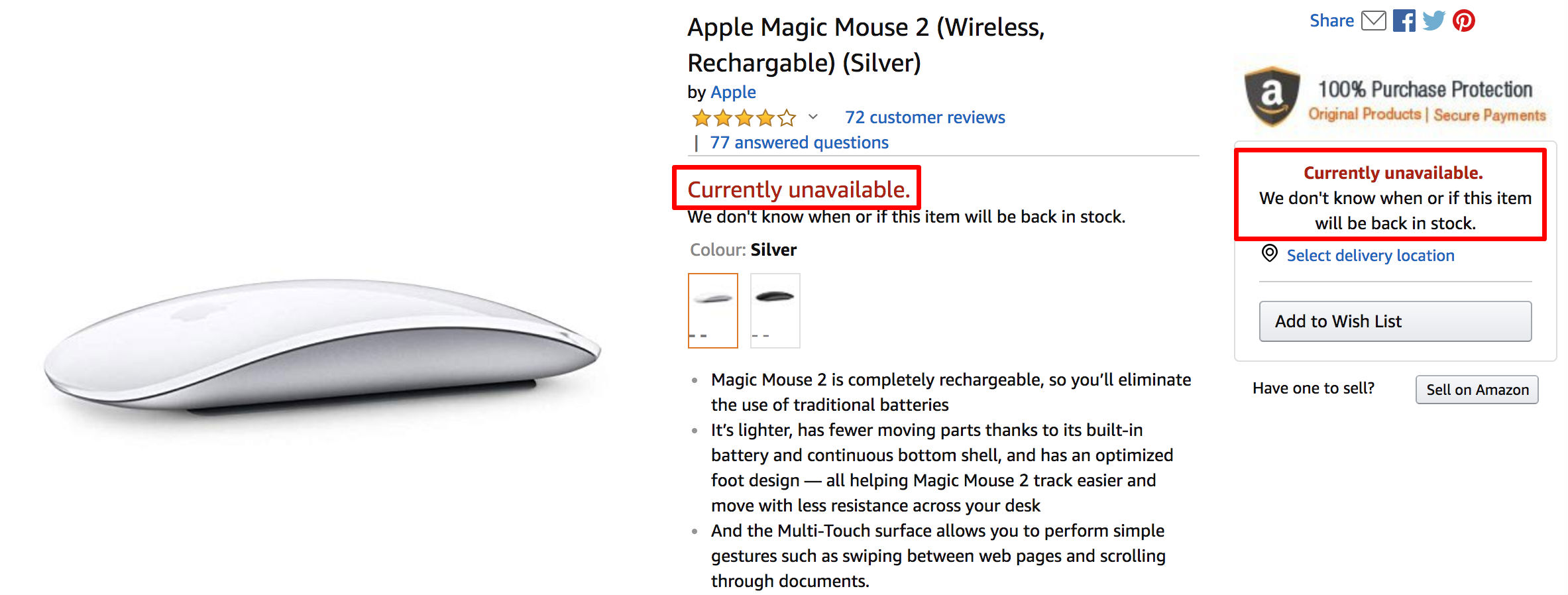
Image 1.5.8.4-1 - An example Product Landing Page on Amazon which is unavailable
Case 2: Parent Items
--------------------
The abstraction of the variations is called the variation parent or a parent item. For example, shirt is a parent item. A shirt that is a specific size and color would be a child of the parent item. Because the parent ASIN is an abstraction, it can't be purchased. Hence, it is not associated with an offer. For more information, refer [Variation Parents](https://webservices.amazon.com/paapi5/documentation/use-cases/organization-of-items-on-amazon/variations/variation-parents.html)
.
The following snapshot shows how a parent ASINS's information is displayed on Amazon Website. In this example, the price is not shown and the dimension are not selected. The price range of child ASINs are shown instead.

Image 1.5.8.4-2 - An example Product Landing Page on Amazon for a parent Item
---
# Determining Price, Merchant and Delivery Information · Product Advertising API 5.0
[Determining Price, Merchant and Delivery Information](https://webservices.amazon.com/paapi5/documentation/)
=============================================================================================================
Determining Price, Merchant, Condition and Delivery Information
===============================================================
Items for sale on Amazon has offer listing(s). An offer listing for an item can be returned by using [Offers](https://webservices.amazon.com/paapi5/documentation/offers.html)
resources and contains important offer related attributes.
This section is about how various offer related information is displayed on Amazon Retail Website and how to retrieve them from Product Advertising API (PA-API).
The following is an image of a Product Landing Page on Amazon.com (Important offer related attributes are highlighted in red boxes and numbered):

Image 1.5.8.1-1 - An example Product Landing Page on Amazon.com showcasing Offer attributes
The following table is a legend for the offer attributes highlighted and numbered in the image above and how each of those attributes can be fetched from Product Advertising API through the [Offers](https://webservices.amazon.com/paapi5/documentation/offers.html)
resources.
| S.No. | Description | PA-API Offers Attribute |
| --- | --- | --- |
| 1 | **List Price: ~$27.00~**: This is the original list price of the product on which discount/savings are offered. It is also known as `Strike-Through Price`. If there is no discount/savings for an offer, then the strike-through price is not displayed. | This offer attribute is referred as [Saving Basis](https://webservices.amazon.com/paapi5/documentation/offers.html#savingbasis)
in Product Advertising API and can be fetched by requesting `Offers.Listings.SavingBasis` [Offers](https://webservices.amazon.com/paapi5/documentation/offers.html)
resource. If there is no discount/savings available for an offer, then the SavingBasis information is not returned. |
| 2 | **$14.59**: This specifies the current buying price of the offer for the product for sale on Amazon. | This offer attribute is referred as [Price](https://webservices.amazon.com/paapi5/documentation/offers.html#price)
in Product Advertising API and can be fetched by requesting `Offers.Listings.Price` [Offers](https://webservices.amazon.com/paapi5/documentation/offers.html)
resource. Irrespective of the fact that whether there is any discount/savings available for an offer, the current buying price will be returned under the Price container. |
| 3 | **Save: $12.41 (46%)**: This specifies the amount and percentage savings for an offer. If there is no discount/savings for an offer, then the savings information is not displayed. | This offer attribute is referred as [Savings](https://webservices.amazon.com/paapi5/documentation/offers.html#savings)
in Product Advertising API and is returned under Price container. It can be fetched by requesting `Offers.Listings.Price` [Offers](https://webservices.amazon.com/paapi5/documentation/offers.html)
resource. It is calculated by taking [Saving Basis](https://webservices.amazon.com/paapi5/documentation/offers.html#savingbasis)
as reference. If there is no discount/savings available for an offer, then the Savings information under Price container is not returned. |
| 4 | **Prime Badge**: This specifies if the offer is prime eligible. The prime badge is only displayed for prime eligible offers. | This offer attribute is referred as `IsPrimeEligible` in Product Advertising API and is returned under [Delivery Info](https://webservices.amazon.com/paapi5/documentation/offers.html#deliveryinfo)
container. It can be fetched by requesting `Offers.Listings.DeliveryInfo.IsPrimeEligible` [Offers](https://webservices.amazon.com/paapi5/documentation/offers.html)
resource. |
| 5 | **Free Shipping**: This specifies if the offer is eligible for free shipping eligible. | This offer attribute is referred as `IsFreeShippingEligible` in Product Advertising API and is returned under [Delivery Info](https://webservices.amazon.com/paapi5/documentation/offers.html#deliveryinfo)
container. It can be fetched by requesting `Offers.Listings.DeliveryInfo.IsFreeShippingEligible` [Offers](https://webservices.amazon.com/paapi5/documentation/offers.html)
resource. |
| 6 | **Fulfilled by Amazon**: This specifies if the offer is fulfilled by Amazon. | This offer attribute is referred as `IsAmazonFulfilled` in Product Advertising API and is returned under [Delivery Info](https://webservices.amazon.com/paapi5/documentation/offers.html#deliveryinfo)
container. It can be fetched by requesting `Offers.Listings.DeliveryInfo.IsAmazonFulfilled` [Offers](https://webservices.amazon.com/paapi5/documentation/offers.html)
resource. |
| 7 | **Sold by WhiteHill**: This specifies the merchant or seller information for the offer which in this example is "WhiteHill". | The offer attribute is referred as [MerchantInfo](https://webservices.amazon.com/paapi5/documentation/offers.html#merchantinfo)
in Product Advertising API and can be retrieved by requesting `Offers.Listings.MerchantInfo` [Offers](https://webservices.amazon.com/paapi5/documentation/offers.html)
resource. |
| 8 | **In Stock.**: This specifies the availability message for the offer. It is used to infer whether the product is available in stock, is eligible for pre-order or back-order, etc. In this example, the offer is buyable and product is in stock. | The offer attribute is referred as [Availability Message](https://webservices.amazon.com/paapi5/documentation/offers.html#availability)
in Product Advertising API and can be retrieved by requesting `Offers.Listings.Availability.Message` [Offers](https://webservices.amazon.com/paapi5/documentation/offers.html)
resource. |
| 8 | **Buy New**: This specifies the condition of the item specified by the seller/merchant for the offer. It is used to infer whether the product being offered is New, Used, Refurbished, etc. Other than the case when the offer condition is New, a sub-condition information is displayed as well for e.g. Very Good, Good, Acceptable, etc. Refer [Offers](https://webservices.amazon.com/paapi5/documentation/offers.html#condition)
for more information. | The offer attribute is referred as [Condition](https://webservices.amazon.com/paapi5/documentation/offers.html#condition)
and [SubCondition](https://webservices.amazon.com/paapi5/documentation/offers.html#subcondition)
in Product Advertising API and can be retrieved by requesting `Offers.Listings.Condition`, `Offers.Listings.Condition.SubCondition` [Offers](https://webservices.amazon.com/paapi5/documentation/offers.html)
resources. |
Product Advertising API Example
-------------------------------
Following example request-response payload showcases how the all offer related information displayed on Amazon Product Landing Page for a sample ASIN as discussed above can be fetched from Product Advertising API:
### Request Payload
{
"ItemIds": ["1400064287"],
"ItemIdType": "ASIN",
"PartnerTag": "xyz-20",
"PartnerType": "Associates",
"Marketplace": "www.amazon.com",
"Resources": [\
"Offers.Listings.Availability.Message",\
"Offers.Listings.Condition",\
"Offers.Listings.Condition.SubCondition",\
"Offers.Listings.DeliveryInfo.IsAmazonFulfilled",\
"Offers.Listings.DeliveryInfo.IsFreeShippingEligible",\
"Offers.Listings.DeliveryInfo.IsPrimeEligible",\
"Offers.Listings.MerchantInfo",\
"Offers.Listings.Price",\
"Offers.Listings.SavingBasis"\
]
}
### Response
{
"ItemsResult": {
"Items": [\
{\
"ASIN": "1400064287",\
"DetailPageURL": "https://www.amazon.com/dp/1400064287?tag=xyz-20&linkCode=ogi&th=1&psc=1",\
"Offers": {\
"Listings": [\
{\
"Availability": {\
"Message": "In Stock."\
},\
"Condition": {\
"SubCondition": {\
"Value": "New"\
},\
"Value": "New"\
},\
"DeliveryInfo": {\
"IsAmazonFulfilled": true,\
"IsFreeShippingEligible": true,\
"IsPrimeEligible": true\
},\
"Id": "7MO3lNG54smNn9nvMXRBzd4IENGa9Pf9EhgsKW8y6X",\
"MerchantInfo": {\
"DefaultShippingCountry": "US",\
"FeedbackCount": 100,\
"FeedbackRating": 4.3,\
"Id": "A110FNT8Q5QTXQ",\
"Name": "WhiteHill"\
},\
"Price": {\
"Amount": 14.59,\
"Currency": "USD",\
"DisplayAmount": "$14.59",\
"Savings": {\
"Amount": 12.41,\
"Currency": "USD",\
"DisplayAmount": "$12.41 (46%)",\
"Percentage": 46\
}\
},\
"SavingBasis": {\
"Amount": 27,\
"Currency": "USD",\
"DisplayAmount": "$27.00"\
},\
"ViolatesMAP": false\
}\
]\
}\
}\
]
}
}
Price Per Unit
--------------
Sometimes, the product under Sale on Amazon contains multiple units For e.g. set of batteries, set of toilet papers, etc. In such scenarios, Amazon displays price per unit along with total price of the product on the Product Landing Page as follows:

Image 1.5.8.1-2 - An example Product Landing Page on Amazon.com showcasing Price Per Unit Offer Information
In line with Amazon Retail Website, Product Advertising API also returns Price Per Unit information (if applicable) for all [Offers](https://webservices.amazon.com/paapi5/documentation/offers.html)
resources which return price. Refer the following example:
### Request Payload
{
"ItemIds": ["B01KBEOQJU"],
"ItemIdType": "ASIN",
"PartnerTag": "xyz-20",
"PartnerType": "Associates",
"Marketplace": "www.amazon.com",
"Resources": [\
"Offers.Listings.Price"\
]
}
### Response
{
"ItemsResult": {
"Items": [\
{\
"ASIN": "B01KBEOQJU",\
"DetailPageURL": "https://www.amazon.com/dp/B01KBEOQJU?tag=xyz-20&linkCode=ogi&th=1&psc=1",\
"Offers": {\
"Listings": [\
{\
"Id": "7MO3lNG54smNn9nvMXRBzd4IENGa9Pf9EhgsKW8y6X",\
"Price": {\
"Amount": 11.49,\
"Currency": "USD",\
"DisplayAmount": "$11.49 ($1.92 / Count)",\
"PricePerUnit": 1.92\
},\
"ViolatesMAP": false\
}\
]\
}\
}\
]
}
}
---
# Sending a Request · Product Advertising API 5.0
[Sending a Request](https://webservices.amazon.com/paapi5/documentation/)
==========================================================================
Sending a Request
=================
Once you have signed up for Amazon Associates program and Product Advertising API, you can start sending requests to the API. You can send request to Product Advertising API either using its SDKs (recommended) or using any simple HTTP client. In this section we talk about what makes up a request and we give sample code to send a request. Before we begin please make use of [Scratchpad (UI tool)](https://webservices.amazon.com/paapi5/documentation/play-around-using-scratchpad.html)
, to send requests to API. This will validate your credentials as well as help you get sample request. It'll also help you form a request for API and help understand endpoints, headers, request payload which you can use while sending a request. Scratchpad also provides code snippets, which you can use or refer to form and send requests.
**Contents**
------------
* [Request contents](https://webservices.amazon.com/paapi5/documentation/sending-request.html#request-contents)
* [Request payload](https://webservices.amazon.com/paapi5/documentation/sending-request.html#request-payload)
* [Headers](https://webservices.amazon.com/paapi5/documentation/sending-request.html#headers)
* [Signing](https://webservices.amazon.com/paapi5/documentation/sending-request.html#signing)
* [Sample code](https://webservices.amazon.com/paapi5/documentation/sending-request.html#sample-code)
### Request contents
Request to Product Advertising API has following main components: request payload, headers, signing (sent as part of Authorization header). Product Advertising API has several parameters/headers which depend on the target Amazon Locale. These common parameters are listed here: [Common Request Parameters](https://webservices.amazon.com/paapi5/documentation/common-request-parameters.html)
.
#### Request payload
Request payload is of JSON format. You can use or refer request payload section from scratchpad, to send sample request or use it to troubleshoot and match it with your machine generated payload.
**Sample request payload**
{
"Keywords": "Harry",
"Marketplace": "www.amazon.com",
"PartnerTag": "xyz-20",
"PartnerType": "Associates",
"Resources": ["Images.Primary.Small","ItemInfo.Title","Offers.Listings.Price"],
"SearchIndex": "All"
}
#### Headers
You need to send following set of **mandatory** headers, which are required by the API. Following are set of required headers and their use. **Note:** Header keys and values are case sensitive.
| Key | Details |
| --- | --- |
| host | The host value of the target locale to which you are sending requests. It varies with target Amazon locale. For example if you are sending request to US Locale then host value is `webservices.amazon.com`. For more details and valid values, refer [Common Request Parameters](https://webservices.amazon.com/paapi5/documentation/common-request-parameters.html) |
| content-type | The type of the request content in the body, use `application/json; charset=utf-8`. |
| content-encoding | Provide `amz-1.0` as value |
| x-amz-date | The date used to create the signature. We re-calculate the signature using this header value and match signature with one generated by you to authenticate you, for this we need date used in signing. The format must be ISO 8601 basic format (YYYYMMDD'T'HHMMSS'Z'). Example: `20120325T120000Z`. |
| x-amz-target | It signifies target operation of the request and is operation specific. A concatenation of the following strings:
* ProductAdvertisingAPI Namespace (`com.amazon.paapi5`)
* A Period (`.`)
* API version without punctuation (`v1`)
* A Period (`.`)
* `ProductAdvertisingAPI`
* API version without punctuation (`v1`)
* A Period (`.`)
* Name of the operation (for example `SearchItems`)
For example: `x-amz-target: com.amazon.paapi5.v1.ProductAdvertisingAPIv1.SearchItems` For more details and valid values refer [Common Request Parameters->Target](https://webservices.amazon.com/paapi5/documentation/common-request-parameters.html#target) |
| Authorization | It includes following information: Algorithm you used for signing (AWS4-HMAC-SHA256), Credential scope (with your Access Key), list of signed headers and Calculated signature. The signature allows us to authenticate you. For more information, see [Signature Version 4 Signing Process](https://docs.aws.amazon.com/general/latest/gr/signature-version-4.html) |
##### Example Request Header
Following snippet is an example request header for a [SearchItems](https://webservices.amazon.com/paapi5/documentation/search-items.html)
request.
POST / HTTP/1.1
host: webservices.amazon.com
content-type: application/json; charset=utf-8
content-encoding: amz-1.0
x-amz-date: 20160925T120000Z
x-amz-target: com.amazon.paapi5.v1.ProductAdvertisingAPIv1.SearchItems
Authorization: AWS4-HMAC-SHA256 Credential=AKIAIOSFODNN7EXAMPLE, SignedHeaders=content-type;host;x-amz-date;x-amz-target, Signature=&5d672d79c15b13162d9279b0855cfba6789a8edb4c82c400e06b5924a6f2b5d7;
#### Signing
You need to sign every request that you send, we use this signing to authenticate you. Signing is based on multiple values like access key, secret key, host, region, path, headers, HTTP method and payload to generate signature. Please refer to the following detailed documentation for further details [https://docs.aws.amazon.com/general/latest/gr/signature-version-4.html](https://docs.aws.amazon.com/general/latest/gr/signature-version-4.html)
. It'll guide you with details of signing process, also helps you trouble-shoot.
If you're using SDKs, the request is automatically signed for you. However, make sure you specify `host`, `region` and your credentials while making a call to Product Advertising API. For more information, see [Integrating with SDK](https://webservices.amazon.com/paapi5/documentation/with-sdk.html)
.
### Sample code
* [Integrating with SDK](https://webservices.amazon.com/paapi5/documentation/with-sdk.html)
* [Integrating without SDK](https://webservices.amazon.com/paapi5/documentation/without-sdk.html)
---
# Operations · Product Advertising API 5.0
[Operations](https://webservices.amazon.com/paapi5/documentation/)
===================================================================
Operations
==========
Product Advertising API features following operations:
| Operation Name | Description |
| --- | --- |
| [GetBrowseNodes](https://webservices.amazon.com/paapi5/documentation/getbrowsenodes.html) | Lookup information for a Browse Node |
| [GetItems](https://webservices.amazon.com/paapi5/documentation/get-items.html) | Lookup item information for an item |
| [GetVariations](https://webservices.amazon.com/paapi5/documentation/get-variations.html) | Lookup information for variations |
| [SearchItems](https://webservices.amazon.com/paapi5/documentation/search-items.html) | Searches for items on Amazon |
For information on how to create and send a request, see [Sending a Request](https://webservices.amazon.com/paapi5/documentation/sending-request.html)
.
---
# API Reference · Product Advertising API 5.0
[API Reference](https://webservices.amazon.com/paapi5/documentation/)
======================================================================
API Reference
=============
The following sections of the guide provide API reference material for the Product Advertising API. For more information about Product Advertising API overview and basic concepts, refer to the previous chapters in this guide. For registering with Product Advertising API 5.0, refer [Register for PAAPI](https://webservices.amazon.com/paapi5/documentation/register-for-pa-api.html)
and for information on how to best use the API for some common use cases, refer our [Use Cases Guide](https://webservices.amazon.com/paapi5/documentation/use-cases.html)
.
The following section contains information about Product Advertising API operations, resources, locale specific information, etc in detail with examples for you to do it yourself.
Topics
------
* [Operations](https://webservices.amazon.com/paapi5/documentation/operations.html)
* [Resources](https://webservices.amazon.com/paapi5/documentation/resources.html)
* [Locale Reference](https://webservices.amazon.com/paapi5/documentation/locale-reference.html)
* [Best Programming Practices](https://webservices.amazon.com/paapi5/documentation/best-programming-practices.html)
---
# Error Codes and Messages · Product Advertising API 5.0
[Error Codes and Messages](https://webservices.amazon.com/paapi5/documentation/)
=================================================================================
Error Codes and Messages
========================
Product Advertising API 5.0 errors provide information about syntactical errors in your requests, as well as errors that occur during the execution of your request; for example, a search for products returns no results.
Errors are composed of two elements:
**Code**
The error code is a unique string that identifies the error.
**Message**
The error message is a human-readable description of the error to help you debug the issue.
These elements will be nested within an Error element. If a request generates more than one error, all Errors will appear in the response.
Errors may appear at different levels in your response. But all the errors will be summarised as a top level attribute in the JSON response. The error will be represented as a list and each error will have the details about the error which occurred while executing the request. For more information, refer [Error Messages](https://webservices.amazon.com/paapi5/documentation/troubleshooting/error-messages.html)
.
### Error Codes and Ranges
#### 5xx Server Errors
These errors are usually caused when Product Advertising API server failed to fulfil an apparently valid request.
#### 4xx Errors
These errors are caused due to invalid request sent to Product Advertising API.
---
# Determining Availability · Product Advertising API 5.0
[Determining Availability](https://webservices.amazon.com/paapi5/documentation/)
=================================================================================
Determining Availability
========================
An item for sale on Amazon has multiple offer listings. Each offer listings has an availability field that depicts availability status of an offer:
* Available to be purchased `Now`
* Is `Preorderable`
* Is `Backorderable`
The availability information for an offer of an item can be retrieved from Product Advertising API by requesting [Availability Offers Resources](https://webservices.amazon.com/paapi5/documentation/offers.html#availability)
.
There are various Availability parameters returned by Product Advertising API.
* The availability `Type` of an offer (i.e. Now, Preorderable, etc.) can be fetched by requesting `Offers.Listings.Availability.Type` resource.
* The availability `Message` for an offer specifies the availability message which is displayed on Amazon Product Landing Page of the item for e.g. "In Stock.", "Temporarily out of stock.", etc. and can be fetched by requesting `Offers.Listings.Availability.Message` resource.
Some items are not buyable and do not have offers. For more information in this regard, refer [Items that do not have offers](https://webservices.amazon.com/paapi5/documentation/use-cases/using-offer-information/items-that-do-not-have-offers.html)
.
Examples
--------
This section showcases Availability information displayed on Amazon Retail Website under various scenarios and corresponding Product Advertising API response snippet when [Availability Offers Resources](https://webservices.amazon.com/paapi5/documentation/offers.html#availability)
are requested.
### 1\. In Stock

Image 1.5.8.3-1 - An example Product Landing Page on Amazon.com showing "In Stock." availability message (Highlighted)
{
"Offers": {
"Listings": [\
{\
"Availability": {\
"Message": "In Stock.",\
"Type": "Now"\
},\
"Id": "E%2FBPWgafmoO6PqTj8F"\
}\
]
}
}
### 2\. Backorderable

Image 1.5.8.3-2 - An example Product Landing Page on Amazon.com showing back orderable offer (Highlighted)
{
"Offers": {
"Listings": [\
{\
"Availability": {\
"Message": "In stock on June 14, 2019. Order it now.",\
"Type": "Backorderable"\
},\
"Id": "E%2FBPWgafmoO6PqTj8F"\
}\
]
}
}
### 3\. Pre-orderable

Image 1.5.8.3-3 - An example Product Landing Page on Amazon.in showing a Pre-orderable item (Highlighted)
{
"Offers": {
"Listings": [\
{\
"Availability": {\
"Message": "This title will be released around July 15, 2019. Pre-order now.",\
"Type": "Preorderable"\
},\
"Id": "E%2FBPWgafmoO6PqTj8F"\
}\
]
}
}
---
# With SDK · Product Advertising API 5.0
[With SDK](https://webservices.amazon.com/paapi5/documentation/)
=================================================================
Integrating with SDK
====================
Here we have shared code samples to call [SearchItems](https://webservices.amazon.com/paapi5/documentation/search-items.html)
and [GetItems](https://webservices.amazon.com/paapi5/documentation/get-items.html)
operations using PAAPI SDK.
Java
----
In this section, we will share a simple Java program to create and send request for SearchItems and GetItems operations.
* Create a simple Java project in your preferred IDE.
* Download **[Java SDK and examples](https://webservices.amazon.com/paapi5/documentation/assets/archives/paapi5-java-sdk-example.zip)
** for each operation for Java SDK.
### SearchItems operation sample
/*
* Copyright 2019 Amazon.com, Inc. or its affiliates. All Rights Reserved.
*
* Licensed under the Apache License, Version 2.0 (the "License").
* You may not use this file except in compliance with the License.
* A copy of the License is located at
*
* http://www.apache.org/licenses/LICENSE-2.0
*
* or in the "license" file accompanying this file. This file is distributed
* on an "AS IS" BASIS, WITHOUT WARRANTIES OR CONDITIONS OF ANY KIND, either
* express or implied. See the License for the specific language governing
* permissions and limitations under the License.
*/
/*
* ProductAdvertisingAPI
*
* https://webservices.amazon.com/paapi5/documentation/index.html
*/
/*
* This sample code snippet is for ProductAdvertisingAPI 5.0's SearchItems API
* For more details, refer:
* https://webservices.amazon.com/paapi5/documentation/search-items.html
*/
package samples;
import java.util.ArrayList;
import java.util.List;
import com.amazon.paapi5.v1.ApiClient;
import com.amazon.paapi5.v1.ApiException;
import com.amazon.paapi5.v1.ErrorData;
import com.amazon.paapi5.v1.Item;
import com.amazon.paapi5.v1.PartnerType;
import com.amazon.paapi5.v1.SearchItemsRequest;
import com.amazon.paapi5.v1.SearchItemsResource;
import com.amazon.paapi5.v1.SearchItemsResponse;
import com.amazon.paapi5.v1.api.DefaultApi;
public class SampleSearchItemsApi {
public static void main(String[] args) {
ApiClient client = new ApiClient();
// Add your credentials
// Please add your access key here
// Please add your access key here
client.setAccessKey("");
// Please add your secret key here
client.setSecretKey("");
// Enter your partner tag (store/tracking id)
String partnerTag = "";
/*
* PAAPI Host and Region to which you want to send request. For more
* details refer:
* https://webservices.amazon.com/paapi5/documentation/common-request-parameters.html#host-and-region
*/
client.setHost("webservices.amazon.com");
client.setRegion("us-east-1");
DefaultApi api = new DefaultApi(client);
// Request initialization
/*
* Choose resources you want from SearchItemsResource enum For more
* details, refer:
* https://webservices.amazon.com/paapi5/documentation/search-items.html#resources-parameter
*/
List searchItemsResources = new ArrayList();
searchItemsResources.add(SearchItemsResource.ITEMINFO_TITLE);
searchItemsResources.add(SearchItemsResource.OFFERS_LISTINGS_PRICE);
/*
* Specify the category in which search request is to be made
* For more details, refer:
* https://webservices.amazon.com/paapi5/documentation/use-cases/organization-of-items-on-amazon/search-index.html
*/
String searchIndex = "All";
// Specify keywords
String keywords = "Harry Potter";
// Sending the request
SearchItemsRequest searchItemsRequest = new SearchItemsRequest().partnerTag(partnerTag).keywords(keywords)
.searchIndex(searchIndex).resources(searchItemsResources).partnerType(PartnerType.ASSOCIATES);
try {
// Forming the request
SearchItemsResponse response = api.searchItems(searchItemsRequest);
System.out.println("API called successfully");
System.out.println("Complete response: " + response);
// Parsing the request
if (response.getSearchResult() != null) {
System.out.println("Printing first item information in SearchResult:");
Item item = response.getSearchResult().getItems().get(0);
if (item != null) {
if (item.getASIN() != null) {
System.out.println("ASIN: " + item.getASIN());
}
if (item.getDetailPageURL() != null) {
System.out.println("DetailPageURL: " + item.getDetailPageURL());
}
if (item.getItemInfo() != null && item.getItemInfo().getTitle() != null
&& item.getItemInfo().getTitle().getDisplayValue() != null) {
System.out.println("Title: " + item.getItemInfo().getTitle().getDisplayValue());
}
if (item.getOffers() != null && item.getOffers().getListings() != null
&& item.getOffers().getListings().get(0).getPrice() != null
&& item.getOffers().getListings().get(0).getPrice().getDisplayAmount() != null) {
System.out.println(
"Buying price: " + item.getOffers().getListings().get(0).getPrice().getDisplayAmount());
}
}
}
if (response.getErrors() != null) {
System.out.println("Printing errors:\nPrinting Errors from list of Errors");
for (ErrorData error : response.getErrors()) {
System.out.println("Error code: " + error.getCode());
System.out.println("Error message: " + error.getMessage());
}
}
} catch (ApiException exception) {
// Exception handling
System.out.println("Error calling PA-API 5.0!");
System.out.println("Status code: " + exception.getCode());
System.out.println("Errors: " + exception.getResponseBody());
System.out.println("Message: " + exception.getMessage());
if (exception.getResponseHeaders() != null) {
// Printing request reference
System.out.println("Request ID: " + exception.getResponseHeaders().get("x-amzn-RequestId"));
}
// exception.printStackTrace();
} catch (Exception exception) {
System.out.println("Exception message: " + exception.getMessage());
// exception.printStackTrace();
}
}
}
### GetItems operation sample
/*
* Copyright 2025 Amazon.com, Inc. or its affiliates. All Rights Reserved.
*
* Licensed under the Apache License, Version 2.0 (the "License").
* You may not use this file except in compliance with the License.
* A copy of the License is located at
*
* http://www.apache.org/licenses/LICENSE-2.0
*
* or in the "license" file accompanying this file. This file is distributed
* on an "AS IS" BASIS, WITHOUT WARRANTIES OR CONDITIONS OF ANY KIND, either
* express or implied. See the License for the specific language governing
* permissions and limitations under the License.
*/
/*
* ProductAdvertisingAPI
*
* https://webservices.amazon.com/paapi5/documentation/index.html
*/
/*
* This sample code snippet is for ProductAdvertisingAPI 5.0's GetItems API
* For more details, refer:
* https://webservices.amazon.com/paapi5/documentation/get-items.html
*/
package samples;
import java.util.ArrayList;
import java.util.HashMap;
import java.util.List;
import java.util.Map;
import com.amazon.paapi5.v1.ApiClient;
import com.amazon.paapi5.v1.ApiException;
import com.amazon.paapi5.v1.ErrorData;
import com.amazon.paapi5.v1.GetItemsRequest;
import com.amazon.paapi5.v1.GetItemsResource;
import com.amazon.paapi5.v1.GetItemsResponse;
import com.amazon.paapi5.v1.Item;
import com.amazon.paapi5.v1.PartnerType;
import com.amazon.paapi5.v1.api.DefaultApi;
public class SampleGetItemsApi {
/**
* Returns Item mapped to ASIN
*
* @param items Items
* @return Items mapped to ASIN
*/
private static Map parse_response(List- items) {
Map mappedResponse = new HashMap();
for (Item item : items) {
mappedResponse.put(item.getASIN(), item);
}
return mappedResponse;
}
public static void main(String[] args) {
ApiClient client = new ApiClient();
// Add your credentials
// Please add your access key here
client.setAccessKey("");
// Please add your secret key here
client.setSecretKey("");
// Enter your partner tag (store/tracking id)
String partnerTag = "";
/*
* PAAPI Host and Region to which you want to send request. For more
* details refer:
* https://webservices.amazon.com/paapi5/documentation/common-request-parameters.html#host-and-region
*/
client.setHost("webservices.amazon.com");
client.setRegion("us-east-1");
DefaultApi api = new DefaultApi(client);
// Request initialization
/*
* Choose resources you want from GetItemsResource enum For more
* details, refer:
* https://webservices.amazon.com/paapi5/documentation/get-items.html#resources-parameter
*/
List getItemsResources = new ArrayList();
getItemsResources.add(GetItemsResource.ITEMINFO_TITLE);
getItemsResources.add(GetItemsResource.OFFERSV2_LISTINGS_PRICE);
// Choose item id(s)
List itemIds = new ArrayList();
itemIds.add("B09BWFX1L6");
itemIds.add("B0CFPJYX7P");
// Forming the request
GetItemsRequest getItemsRequest = new GetItemsRequest().itemIds(itemIds).partnerTag(partnerTag)
.resources(getItemsResources).partnerType(PartnerType.ASSOCIATES);
try {
// Sending the request
GetItemsResponse response = api.getItems(getItemsRequest);
System.out.println("API called successfully");
System.out.println("Complete response: " + response);
// Parsing the request
if (response.getItemsResult() != null) {
System.out.println("Printing all item information in ItemsResult:");
Map responseList = parse_response(response.getItemsResult().getItems());
for (String itemId : itemIds) {
if (response.getItemsResult().getItems() != null) {
System.out.println("Printing information about the ASIN: " + itemId);
if (responseList.get(itemId) != null) {
Item item = responseList.get(itemId);
if (item.getASIN() != null) {
System.out.println("ASIN: " + item.getASIN());
}
if (item.getDetailPageURL() != null) {
System.out.println("DetailPageURL: " + item.getDetailPageURL());
}
if (item.getItemInfo() != null && item.getItemInfo().getTitle() != null
&& item.getItemInfo().getTitle().getDisplayValue() != null) {
System.out.println("Title: " + item.getItemInfo().getTitle().getDisplayValue());
}
if (item.getOffersV2() != null && item.getOffersV2().getListings() != null
&& item.getOffersV2().getListings().get(0) != null
&& item.getOffersV2().getListings().get(0).getPrice()!= null) {
System.out.println("Buying price: "
+ item.getOffersV2().getListings().get(0).getPrice());
}
} else {
System.out.println("Item not found, check errors");
}
}
}
}
if (response.getErrors() != null) {
System.out.println("Printing errors:\nPrinting Errors from list of Errors");
for (ErrorData error : response.getErrors()) {
System.out.println("Error code: " + error.getCode());
System.out.println("Error message: " + error.getMessage());
}
}
} catch (ApiException exception) {
// Exception handling
System.out.println("Error calling PA-API 5.0!");
System.out.println("Status code: " + exception.getCode());
System.out.println("Errors: " + exception.getResponseBody());
System.out.println("Message: " + exception.getMessage());
if (exception.getResponseHeaders() != null) {
// Printing request reference
System.out.println("Request ID: " + exception.getResponseHeaders().get("x-amzn-RequestId"));
}
// exception.printStackTrace();
} catch (Exception exception) {
System.out.println("Exception message: " + exception.getMessage());
// exception.printStackTrace();
}
}
}
Node.Js
-------
Download **[NodeJS SDK and example](https://webservices.amazon.com/paapi5/documentation/assets/archives/paapi5-nodejs-sdk-example.zip)
** for each operation for Node.Js SDK.
Python
------
Download **[Python SDK and example](https://webservices.amazon.com/paapi5/documentation/assets/archives/paapi5-python-sdk-example.zip)
** for each operation for Python SDK.
PHP
---
Download **[PHP SDK and example](https://webservices.amazon.com/paapi5/documentation/assets/archives/paapi5-php-sdk-example.zip)
** for each operation for PHP SDK.
---
# GetBrowseNodes · Product Advertising API 5.0
[GetBrowseNodes](https://webservices.amazon.com/paapi5/documentation/)
=======================================================================
GetBrowseNodes
==============
Description
-----------
Given a BrowseNodeId, `GetBrowseNodes` operation returns the specified browse node’s information like name, children and ancestors depending on the resources specified in the request. The names and browse node IDs of the children and ancestor browse nodes are also returned. GetBrowseNodes enables you to traverse the browse node hierarchy to find a browse node. Refer [Organization of Items on Amazon](https://webservices.amazon.com/paapi5/documentation/use-cases/organization-of-items-on-amazon.html)
and [Browse Nodes Guide](https://webservices.amazon.com/paapi5/documentation/use-cases/organization-of-items-on-amazon/browse-nodes.html)
for more information.
GetBrowseNodes Operation returns Id, DisplayName, ContextFreeName and SalesRank response elements by default. For other response elements associated, with GetBrowseNodes supports the following high-level resources:
* [BrowseNodes](https://webservices.amazon.com/paapi5/documentation/browsenodes.html)
Availability
------------
All locales.
Request Parameters
------------------
Check [Common Request Parameters](https://webservices.amazon.com/paapi5/documentation/common-request-parameters.html)
for more information on common input parameters. For detailed information on how to create and send a request, refer [Sending a Request](https://webservices.amazon.com/paapi5/documentation/sending-request.html)
. All SearchItems input parameters are listed below:
| Name | Description | Required |
| --- | --- | --- |
| BrowseNodeIds | List of BrowseNodeIds. A BrowseNodeId is a unique ID assigned by Amazon that identifies a product category/sub-category. The BrowseNodeId is a positive Long having max value upto Long.MAX\_VALUE i.e. 9223372036854775807 (inclusive).
* Type: _List of Strings (Positive Long only) (up to 10)_
* Default Value: None
* Usage: `{"BrowseNodeIds": ["3040", "3045"]` | Yes |
| LanguagesOfPreference | Languages of preference in which the information should be returned in response. By default the information is returned in the default language of the marketplace. Expected locale format is the ISO 639 language code followed by underscore followed by the ISO 3166 country code (i.e. en\_US, fr\_CA etc.). For information on default language and valid languages for a marketplace, refer [Locale Reference](https://webservices.amazon.com/paapi5/documentation/locale-reference.html)
. Currently only single language of preference is supported.
* Type: _List of Strings (Non-Empty)_
* Default Value: None
* Usage: `{"LanguagesOfPreference":["en_US"]}` | No |
| Marketplace | Target Amazon Locale. For more information, refer [Common Request Parameters](https://webservices.amazon.com/paapi5/documentation/common-request-parameters.html)
.
* Type: _String_
* Default Value: None
* Usage: `{"Marketplace":"www.amazon.com"}` | No |
| PartnerTag | Unique ID for a partner. For more information, refer [Common Request Parameters](https://webservices.amazon.com/paapi5/documentation/common-request-parameters.html)
.
* Type: _String (Non-Empty)_
* Default Value: None
* Usage: `{"PartnerTag":"xyz-20"}` | Yes |
| PartnerType | The type of Amazon program. For more information and valid values, refer [Common Request Parameters](https://webservices.amazon.com/paapi5/documentation/common-request-parameters.html)
.
* Type: _String_
* Default Value: None
* Usage: `{"PartnerType":"Associates"}` | Yes |
| Resources | Specifies the types of values to return. You can specify multiple resources in one request. For list of valid Resources for SearchItems operation, refer [Resources Parameter](https://webservices.amazon.com/paapi5/documentation/getbrowsenodes.html#resources-parameter)
.
* Type: _List of String_
* Default Value: `ItemInfo.Title`
* Usage: `{"Resources":["BrowseNodes.Ancestor", "BrowseNodes.Children"]` | No |
#### Resources Parameter
| Resource Value | Description |
| --- | --- |
| BrowseNodes.Ancestor | Returns ancestry ladder of the requested BrowseNodeId upto root node i.e. the last Browse Node in the ancestry ladder will be the root node. For more information, refer [BrowseNodes Resources](https://webservices.amazon.com/paapi5/documentation/browsenodes.html) |
| BrowseNodes.Children | Returns list of children of the requested BrowseNodeId. For more information, refer [BrowseNodes Resources](https://webservices.amazon.com/paapi5/documentation/browsenodes.html) |
Response Elements
-----------------
The following are common response elements returned:
| Name | Description |
| --- | --- |
| Errors | List of errors. |
| BrowseNodesResult | The container for GetBrowseNodes response. It consists of resultant BrowseNodes for the GetBrowseNodes request. |
| BrowseNodes | Container for BrowseNode information which includes BrowseNodeId, Name, Ancestor, Children, SalesRank associated, etc. |
| Ancestor | Container for BrowseNode Ancestor information which includes BrowseNodeId, DisplayName, ContextFreeName and Ancestor information if one exists. The container is a ladder containing ancestor information up-to root browse node. That is, the last node in the ladder will be Root Node. Note that a root BrowseNode will not have any ancestor. |
| Children | List of BrowseNode Children for a particular BrowseNode. Each BrowseNode Child contains BrowseNodeId, DisplayName and ContextFreeName information associated with the BrowseNode Child. Note that a leaf browse node won't have any children. |
| ContextFreeName | Indicates a displayable name for a BrowseNode that is fully context free. For e.g. _DisplayName_ of `BrowseNodeId: 3060` in US marketplace is **_Orphans & Foster Homes_**. One can not infer which root category this browse node belongs to unless we have the ancestry ladder for this browse node i.e. it requires a "context" for being intuitive. However, the _ContextFreeName_ of this browse node is **_Children's Orphans & Foster Homes Books_**. Note that, for a BrowseNode whose DisplayName is already context free will have the same ContextFreeName as DisplayName. |
| DisplayName | The display name of the BrowseNode as visible on the Amazon retail website. |
| Id | Indicates the unique identifier of the BrowseNode |
| IsRoot | Indicates if the current BrowseNode is a root category. |
When requested BrowseNodeIds are invalid, they'll show up under the Errors container in the GetBrowseNodesResponse. As a result, the order of BrowseNodeIds in the response can change. Hence, it is recommended to fetch the requested BrowseNodeId's information by checking the Id value for the BrowseNode.
Example Use Cases
-----------------
### Example 1
Get all browse node information for list of valid browse nodes
#### Request Payload
{
"PartnerTag": "xyz-20",
"PartnerType": "Associates",
"BrowseNodeIds": ["283155", "3040"]
"Resources": ["BrowseNodes.Ancestor", "BrowseNodes.Children"]
}
#### Response
{
"BrowseNodesResult": {
"BrowseNodes": [\
{\
"Ancestor": {\
"Ancestor": {\
"Ancestor": {\
"Ancestor": {\
"Ancestor": {\
"ContextFreeName": "Books",\
"DisplayName": "Books",\
"Id": "283155"\
},\
"ContextFreeName": "Subjects",\
"DisplayName": "Subjects",\
"Id": "1000"\
},\
"ContextFreeName": "Children's Books",\
"DisplayName": "Children's Books",\
"Id": "4"\
},\
"ContextFreeName": "Children's Geography & Cultures Books",\
"DisplayName": "Geography & Cultures",\
"Id": "3344091011"\
},\
"ContextFreeName": "Children's Explore the World Books",\
"DisplayName": "Explore the World",\
"Id": "3023"\
},\
"ContextFreeName": "Children's Mexico Books",\
"DisplayName": "Mexico",\
"Id": "3040",\
"IsRoot": false\
},\
{\
"Children": [\
{\
"ContextFreeName": "Subjects",\
"DisplayName": "Subjects",\
"Id": "1000"\
},\
{\
"ContextFreeName": "Books Featured Categories",\
"DisplayName": "Books Featured Categories",\
"Id": "51546011"\
},\
{\
"ContextFreeName": "Specialty Boutique",\
"DisplayName": "Specialty Boutique",\
"Id": "2349030011"\
}\
],\
"ContextFreeName": "Books",\
"DisplayName": "Books",\
"Id": "283155",\
"IsRoot": true\
}\
]
}
}
### Example 2
Example use case when list of `BrowseNodeIds` contains an invalid browse node id.
#### Request Payload
{
"PartnerTag": "xyz-20",
"PartnerType": "Associates",
"BrowseNodeIds": ["283155", "0"],
"Resources": ["BrowseNodes.Ancestor", "BrowseNodes.Children"]
}
#### Response
{
"BrowseNodesResult": {
"BrowseNodes": [\
{\
"Children": [\
{\
"ContextFreeName": "Subjects",\
"DisplayName": "Subjects",\
"Id": "1000"\
},\
{\
"ContextFreeName": "Books Featured Categories",\
"DisplayName": "Books Featured Categories",\
"Id": "51546011"\
},\
{\
"ContextFreeName": "Specialty Boutique",\
"DisplayName": "Specialty Boutique",\
"Id": "2349030011"\
}\
],\
"ContextFreeName": "Books",\
"DisplayName": "Books",\
"Id": "283155",\
"IsRoot": true\
}\
]
},
"Errors": [\
{\
"__type": "com.amazon.paapi5#ErrorData",\
"Code": "InvalidParameterValue",\
"Message": "The BrowseNodeId 0 provided in the request is invalid."\
}\
]
}
---
# GetItems · Product Advertising API 5.0
[GetItems](https://webservices.amazon.com/paapi5/documentation/)
=================================================================
GetItems
========
Description
-----------
Given an Item identifier, the `GetItems` operation returns some or all of the item attributes, depending on the resources specified in the request.
`GetItems` supports the following high-Level resources:
* [BrowseNodeInfo](https://webservices.amazon.com/paapi5/documentation/browsenodeinfo.html)
* [Images](https://webservices.amazon.com/paapi5/documentation/images.html)
* [ItemInfo](https://webservices.amazon.com/paapi5/documentation/item-info.html)
* [Offers](https://webservices.amazon.com/paapi5/documentation/offers.html)
* [OffersV2](https://webservices.amazon.com/paapi5/documentation/offersV2.html)
To look up more than one item at a time, separate the item identifiers by commas.
Availability
------------
All locales, however, the parameter support varies by locale.
Request Parameters
------------------
Check [Common Request Parameters](https://webservices.amazon.com/paapi5/documentation/common-request-parameters.html)
for more information on common input parameters. For detailed information on how to create and send a request, refer [Sending a Request](https://webservices.amazon.com/paapi5/documentation/sending-request.html)
. All `GetItems` input parameters are listed below:
| Name | Description | Required |
| --- | --- | --- |
| Condition | The condition parameter filters offers by condition type. For example, Condition:Used will return items having atleast one offer of Used condition type. For more information and valid values, refer [Condition Parameter](https://webservices.amazon.com/paapi5/documentation/get-items.html#condition-parameter)
.
* Type: _String_
* Default Value: `Any`
* Usage: `{"Condition":"Used"}` | No |
| CurrencyOfPreference | Currency of preference in which the prices information should be returned in response. By default the prices are returned in the default currency of the marketplace. Expected currency code format is the ISO 4217 currency code (i.e. USD, EUR etc.). For information on default currency and valid currencies for a marketplace, refer [Locale Reference](https://webservices.amazon.com/paapi5/documentation/locale-reference.html)
.
* Type: _String (Non-Empty)_
* Default Value: None
* Usage: `{"CurrencyOfPreference":"USD"}` | No |
| ItemIdType | Type of item identifier used to look up an item. For more information on valid values, refer [ItemIdType Parameter](https://webservices.amazon.com/paapi5/documentation/get-items.html#itemidtype-parameter)
.
* Type: _String_
* Default Value: `ASIN`
* Usage: `{"ItemIdType":"ASIN"}` | No |
| ItemIds | One or more ItemIds like ASIN that uniquely identify an item. The meaning of the number is specified by `ItemIdType`. That is, if `ItemIdType` is ASIN, the `ItemId` value is an ASIN.
* Type: _List of Non-Empty Strings (up to 10)_
* Default Value: None
* Usage: `"ItemIds" : ["B0199980K4" , "B000HZD168"]` | Yes |
| LanguagesOfPreference | Languages in order of preference in which the item information should be returned in response. By default the item information is returned in the default language of the marketplace. Expected locale format is the ISO 639 language code followed by underscore followed by the ISO 3166 country code (i.e. en\_US, fr\_CA etc.). For information on default language and valid languages for a marketplace, refer [Locale Reference](https://webservices.amazon.com/paapi5/documentation/locale-reference.html)
. Currently only single language of preference is supported.
* Type: _List of Strings (Non-Empty)_
* Default Value: None
* Usage: `{"LanguagesOfPreference":["en_ES"]}` | No |
| Marketplace | Target Amazon Locale. For more information, refer [Common Request Parameters](https://webservices.amazon.com/paapi5/documentation/common-request-parameters.html)
.
* Type: _String_
* Default Value: None
* Usage: `{"Marketplace":"www.amazon.com"}` | No |
| Merchant | Filters search results to return items having at least one offer sold by target merchant. For more information and valid values, refer [Merchant Parameter](https://webservices.amazon.com/paapi5/documentation/get-items.html#merchant-parameter)
.
* Type: _String_
* Default Value: `All`
* Usage: `{"Merchant":"Amazon"}` | No |
| OfferCount | The number of offers desired for each item in the search results. Offers are returned if any of [Offers Resources](https://webservices.amazon.com/paapi5/documentation/offers.html)
are requested. Currently only value of 1 is supported.
* Type: _Positive Integer_
* Default Value: `1`
* Usage: `{"OfferCount":1}` | No |
| PartnerTag | Unique Id for a partner. For more information, refer [Common Request Parameters](https://webservices.amazon.com/paapi5/documentation/common-request-parameters.html)
.
* Type: _String (Non-Empty)_
* Default Value: None
* Usage: `{"PartnerTag":"xyz-20"}` | Yes |
| PartnerType | Type of Amazon program. For more information and valid values, refer [Common Request Parameters](https://webservices.amazon.com/paapi5/documentation/common-request-parameters.html)
.
* Type: _String_
* Default Value: None
* Usage: `{"PartnerType":"Associates"}` | Yes |
| Resources | Specifies the types of values to return. You can specify multiple resources in one request. For list of valid Resources for GetItems operation, refer [Resources Parameter](https://webservices.amazon.com/paapi5/documentation/get-items.html#resources-parameter)
.
* Type: _List of Strings_
* Default Value: `["ItemInfo.Title"]`
* Usage: `"Resources" : [ "Images.Primary.Small", "ItemInfo.ProductInfo"]` | No |
#### Condition Parameter
Note that, a `GetItems` request with a particular Condition parameter may return 0 offers if there are no offers with the specified condition.
| Condition Value | Description |
| --- | --- |
| Any | Offer Listings for items across any condition |
| New | Offer Listings for New items |
| Used | Offer Listings for Used items |
| Collectible | Offer Listings for Collectible items |
| Refurbished | Offer Listings for Certified Refurbished items |
#### ItemIdType Parameter
| ItemIdType Value | Description |
| --- | --- |
| ASIN | Amazon Standard Identification Number: 10-Character alphanumeric unique identifier assigned by Amazon. For more details, see [ASIN](https://en.wikipedia.org/wiki/Amazon_Standard_Identification_Number) |
#### Merchant Parameter
Note that, a `GetItems` request with a particular Merchant parameter may return 0 offers if there are no offers from the specified Merchant.
| Merchant Value | Description |
| --- | --- |
| All | List offers from all Merchants |
| Amazon | List offers only from Amazon |
#### Resources Parameter
| Resource Value | Description |
| --- | --- | --- |
| BrowseNodeInfo.BrowseNodes | Get the browse nodes associated with the item. Using this resource only will return Id, DisplayName, ContextFreeName and IsRoot information associated with each browse node. For more information, refer [BrowseNodeInfo Resources](https://webservices.amazon.com/paapi5/documentation/browsenodeinfo.html)
. |
| BrowseNodeInfo.BrowseNodes.Ancestor | Get the Ancestry ladder associated with each of the browse nodes the item falls under. Using this resource will return ancestry ladder along with Id, DisplayName, ContextFreeName and IsRoot information associated with each browse node. For more information, refer [BrowseNodeInfo Resources](https://webservices.amazon.com/paapi5/documentation/browsenodeinfo.html)
. |
| BrowseNodeInfo.BrowseNodes.SalesRank | Get the SalesRank information with each of the browse nodes the item falls under. Using this resource will return sales rank along with Id, DisplayName, ContextFreeName and IsRoot information associated with each browse node. For more information, refer [BrowseNodeInfo Resources](https://webservices.amazon.com/paapi5/documentation/browsenodeinfo.html)
. |
| BrowseNodeInfo.WebsiteSalesRank | Get WebsiteSalesRank information associated with the item. For more information, refer [BrowseNodeInfo Resources](https://webservices.amazon.com/paapi5/documentation/browsenodeinfo.html)
. |
| Images.Primary.Small | Returns small-sized primary image for each item. For more information, refer [Images Resources](https://webservices.amazon.com/paapi5/documentation/images.html) |
| Images.Primary.Medium | Returns medium-sized primary image for each item. For more information, refer [Images Resources](https://webservices.amazon.com/paapi5/documentation/images.html) |
| Images.Primary.Large | Returns large-sized primary image for each item. For more information, refer [Images Resources](https://webservices.amazon.com/paapi5/documentation/images.html) |
| Images.Variants.Small | Returns small-sized variant images for each item. For more information, refer [Images Resources](https://webservices.amazon.com/paapi5/documentation/images.html) |
| Images.Variants.Medium | Returns medium-sized variant images for each item. For more information, refer [Images Resources](https://webservices.amazon.com/paapi5/documentation/images.html) |
| Images.Variants.Large | Returns large-sized variant images for each item. For more information, refer [Images Resources](https://webservices.amazon.com/paapi5/documentation/images.html) |
| ItemInfo.ByLineInfo | Returns set of attributes that specifies basic information of the item. For more information, refer [ItemInfo Resources](https://webservices.amazon.com/paapi5/documentation/item-info.html) |
| ItemInfo.Classifications | Returns set of attributes that are used to classify an item into a particular category. For more information, refer [ItemInfo Resources](https://webservices.amazon.com/paapi5/documentation/item-info.html) |
| ItemInfo.ContentInfo | Returns set of attributes that are specific to the content like Books, Movies, etc. For more information, refer [ItemInfo Resources](https://webservices.amazon.com/paapi5/documentation/item-info.html) |
| ItemInfo.ContentRating | Returns set of attributes that specifies what age group is suitable to view said media. For more information, refer [ItemInfo Resources](https://webservices.amazon.com/paapi5/documentation/item-info.html) |
| ItemInfo.ExternalIds | Returns set of identifiers that is used globally to identify a particular product. For more information, refer [ItemInfo Resources](https://webservices.amazon.com/paapi5/documentation/item-info.html) |
| ItemInfo.Features | Returns set of attributes that specifies an item's key features. For more information, refer [ItemInfo Resources](https://webservices.amazon.com/paapi5/documentation/item-info.html) |
| ItemInfo.ManufactureInfo | Returns set of attributes that specifies manufacturing related information of an item. For more information, refer [ItemInfo Resources](https://webservices.amazon.com/paapi5/documentation/item-info.html) |
| ItemInfo.ProductInfo | Returns set of attributes that describe non-technical aspects of an item. For more information, refer [ItemInfo Resources](https://webservices.amazon.com/paapi5/documentation/item-info.html) |
| ItemInfo.TechnicalInfo | Returns set of attributes that describes the technical aspects of the item. For more information, refer [ItemInfo Resources](https://webservices.amazon.com/paapi5/documentation/item-info.html) |
| ItemInfo.Title | Returns the title of the product. For more information, refer [ItemInfo Resources](https://webservices.amazon.com/paapi5/documentation/item-info.html) |
| ItemInfo.TradeInInfo | Returns set of attributes that specifies trade-in information of an item. For more information, refer [ItemInfo Resources](https://webservices.amazon.com/paapi5/documentation/item-info.html) |
| Offers.Listings.Availability.MaxOrderQuantity | Returns maximum number of quantity that can be purchased for a product. For more information, refer [Offers Resources](https://webservices.amazon.com/paapi5/documentation/offers.html) |
| Offers.Listings.Availability.Message | Returns Availability message of the product. For more information, refer [Offers Resources](https://webservices.amazon.com/paapi5/documentation/offers.html) |
| Offers.Listings.Availability.MinOrderQuantity | Returns minimum number of quantity needed to make the purchase of the product. For more information, refer [Offers Resources](https://webservices.amazon.com/paapi5/documentation/offers.html) |
| Offers.Listings.Availability.Type | Returns availability type of the product. For more information, refer [Offers Resources](https://webservices.amazon.com/paapi5/documentation/offers.html) |
| Offers.Listings.Condition | Returns condition of the product. For more information, refer [Offers Resources](https://webservices.amazon.com/paapi5/documentation/offers.html) |
| Offers.Listings.Condition.ConditionNote | Returns condition note of the product i.e., the product condition provided by the seller. For more information, refer [Offers Resources](https://webservices.amazon.com/paapi5/documentation/offers.html) |
| Offers.Listings.Condition.SubCondition | Returns subcondition of the product. For more information, refer [Offers Resources](https://webservices.amazon.com/paapi5/documentation/offers.html) |
| Offers.Listings.DeliveryInfo.IsAmazonFulfilled | Returns whether an offer for the product is fulfilled by Amazon. For more information, refer [Offers Resources](https://webservices.amazon.com/paapi5/documentation/offers.html) |
| Offers.Listings.DeliveryInfo.IsFreeShippingEligible | Returns whether an offer for the product is eligible for free shipping. For more information, refer [Offers Resources](https://webservices.amazon.com/paapi5/documentation/offers.html) |
| Offers.Listings.DeliveryInfo.IsPrimeEligible | Returns whether an offer for the product is prime eligible. For more information, refer [Offers Resources](https://webservices.amazon.com/paapi5/documentation/offers.html) |
| Offers.Listings.IsBuyBoxWinner | Returns whether the given offer for the product is buy box winner on the detail page of the product. For more information, refer [Offers Resources](https://webservices.amazon.com/paapi5/documentation/offers.html) |
| Offers.Listings.LoyaltyPoints.Points | Returns loyalty points related information for an offer (Currently only supported in Japan marketplace). For more information, refer [Offers Resources](https://webservices.amazon.com/paapi5/documentation/offers.html) |
| Offers.Listings.MerchantInfo | Returns seller information for the offer of the product. For more information, refer [Offers Resources](https://webservices.amazon.com/paapi5/documentation/offers.html) |
| Offers.Listings.Price | Returns offer buying price of a product. For more information, refer [Offers Resources](https://webservices.amazon.com/paapi5/documentation/offers.html) |
| Offers.Listings.ProgramEligibility.IsPrimeExclusive | Returns whether a product is associated with prime exclusive members. For more information, refer [Offers Resources](https://webservices.amazon.com/paapi5/documentation/offers.html) |
| Offers.Listings.ProgramEligibility.IsPrimePantry | Returns whether a product is associated with prime pantry program. For more information, refer [Offers Resources](https://webservices.amazon.com/paapi5/documentation/offers.html) |
| Offers.Listings.Promotions | Returns various promotions for a product. For more information, refer [Offers Resources](https://webservices.amazon.com/paapi5/documentation/offers.html) |
| Offers.Listings.SavingBasis | Returns strike-though price for a particular offer of the product. For more information, refer [Offers Resources](https://webservices.amazon.com/paapi5/documentation/offers.html) |
| Offers.Summaries.HighestPrice | Returns highest buying price among all offers for a given item for a particular condition. For more information, refer [Offers Resources](https://webservices.amazon.com/paapi5/documentation/offers.html) |
| Offers.Summaries.LowestPrice | Returns lowest buying price among all offers for a given item for a particular condition. For more information, refer [Offers Resources](https://webservices.amazon.com/paapi5/documentation/offers.html) |
| Offers.Summaries.OfferCount | Returns total number of offers for a given item for a particular condition. For more information, refer [Offers Resources](https://webservices.amazon.com/paapi5/documentation/offers.html) |
| OffersV2.Listings.Availability | Returns maximum number of quantity that can be purchased for a product. For more information, refer to [OffersV2 Resources](https://webservices.amazon.com/paapi5/documentation/offersV2.html) | |
| OffersV2.Listings.Condition | Returns condition of the product. For more information, refer to [OffersV2 Resources](https://webservices.amazon.com/paapi5/documentation/offersV2.html) |
| OffersV2.Listings.DealDetails | Returns deal information. For more information, refer to [OffersV2 Resources](https://webservices.amazon.com/paapi5/documentation/offersV2.html) |
| OffersV2.Listings.IsBuyBoxWinner | Returns whether the given offer for the product is buy box winner on the detail page of the product. For more information, refer to [OffersV2 Resources](https://webservices.amazon.com/paapi5/documentation/offersV2.html) |
| OffersV2.Listings.LoyaltyPoints | Returns loyalty points related information for an offer (Currently only supported in Japan marketplace). For more information, refer to [OffersV2 Resources](https://webservices.amazon.com/paapi5/documentation/offersV2.html) |
| OffersV2.Listings.MerchantInfo | Returns seller information for the offer of the product. For more information, refer to [OffersV2 Resources](https://webservices.amazon.com/paapi5/documentation/offersV2.html) |
| OffersV2.Listings.Price | Returns offer buying price of a product. For more information, refer to [OffersV2 Resources](https://webservices.amazon.com/paapi5/documentation/offersV2.html) |
| OffersV2.Listings.Type | Returns offer type. For more information, refer to [OffersV2 Resources](https://webservices.amazon.com/paapi5/documentation/offersV2.html) |
| ParentASIN | Returns the parent ASIN for a given item. For more information, refer [ParentASIN Resource](https://webservices.amazon.com/paapi5/documentation/parent-asin.html)
|
Response Elements
-----------------
| Name | Description |
| --- | --- |
| Errors | List of errors. |
| ItemResults | Container for items. |
| Items | List of Item. |
| Item | Container for item information including ASIN, Detail Page URL and other attributes depending on resources requested. |
When requested ItemIds are invalid or inaccessible via the Product Advertising API, they'll show up under the Errors container in the GetItemsResponse. As a result, the order of ItemIds in the response can change. Hence, it is recommended to fetch the requested item's information by checking the ASIN value for the item.
Examples
--------
The following is the sample json payload for `GetItems` request.
{
"ItemIds": ["B0199980K4","B000HZD168","B01180YUXS","B00BKQTA4A"],
"ItemIdType": "ASIN",
"LanguagesOfPreference": ["en_US"],
"Marketplace": "www.amazon.com",
"PartnerTag": "xyz-20",
"PartnerType": "Associates",
"Resources": ["Images.Primary.Small","ItemInfo.Title","ItemInfo.Features",\
"Offers.Summaries.HighestPrice","ParentASIN"]
}
Sample Response
---------------
The following code snippet is a response to the first request. It shows all of the item attributes that are returned by default.
{
"Errors": [\
{\
"__type": "com.amazon.paapi#ErrorData",\
"Code": "ItemNotAccessible",\
"Message": "The ItemId B01180YUXS is not accessible through the Product Advertising API."\
}\
],
"ItemResults": {
"Items": [\
{\
"ASIN": "B0199980K4",\
"DetailPageURL": "https://www.amazon.com/dp/B0199980K4?tag=xyz-20&linkCode=ogi&language=en_US&th=1&psc=1",\
"Images": {\
"Primary": {\
"Small": {\
"Height": 75,\
"URL": "https://m.media-amazon.com/images/I/61s4tTAizUL._SL75_.jpg",\
"Width": 56\
}\
}\
},\
"ItemInfo": {\
"Title": {\
"DisplayValue": "Genghis: The Legend of the Ten",\
"Label": "Title",\
"Locale": "en_US"\
}\
},\
"Offers": {\
"Summaries": [\
{\
"Condition": {\
"DisplayValue": "nuevo",\
"Label": "Condición",\
"Locale": "es_US",\
"Value": "New"\
},\
"HighestPrice": {\
"Amount": 11.99,\
"Currency": "USD",\
"DisplayAmount": "$11.99"\
}\
}\
]\
},\
"ParentASIN": "B07QGKM68X"\
},\
{\
"ASIN": "B00BKQTA4A",\
"DetailPageURL": "https://www.amazon.com/dp/B00BKQTA4A?tag=xyz-20&linkCode=ogi&language=en_US&th=1&psc=1",\
"Images": {\
"Primary": {\
"Small": {\
"Height": 75,\
"URL": "https://m.media-amazon.com/images/I/41OiLOcQVJL._SL75_.jpg",\
"Width": 46\
}\
}\
},\
"ItemInfo": {\
"Features": {\
"DisplayValues": [\
"Round watch featuring logoed white dial with stick indices",\
"36 mm stainless steel case with mineral dial window",\
"Quartz movement with analog display",\
"Leather calfskin band with buckle closure",\
"Water resistant to 30 m (99 ft): In general, withstands splashes or brief immersion in water, but not suitable for swimming"\
],\
"Label": "Features",\
"Locale": "en_US"\
},\
"Title": {\
"DisplayValue": "Daniel Wellington Women's 0608DW Sheffield Stainless Steel Watch",\
"Label": "Title",\
"Locale": "en_US"\
}\
},\
"Offers": {\
"Summaries": [\
{\
"Condition": {\
"DisplayValue": "nuevo",\
"Label": "Condición",\
"Locale": "es_US",\
"Value": "New"\
},\
"HighestPrice": {\
"Amount": 199,\
"Currency": "USD",\
"DisplayAmount": "$199.00"\
}\
}\
]\
},\
"ParentASIN": "B07L5N7P32"\
},\
{\
"ASIN": "B000HZD168",\
"DetailPageURL": "https://www.amazon.com/dp/B000HZD168?tag=xyz-20&linkCode=ogi&language=en_US&th=1&psc=1",\
"Images": {\
"Primary": {\
"Small": {\
"Height": 75,\
"URL": "https://m.media-amazon.com/images/I/61ZRPpZoBvL._SL75_.jpg",\
"Width": 56\
}\
}\
},\
"ItemInfo": {\
"Title": {\
"DisplayValue": "Star Trek II: The Wrath of Khan",\
"Label": "Title",\
"Locale": "en_US"\
}\
},\
"Offers": {\
"Summaries": [\
{\
"Condition": {\
"DisplayValue": "nuevo",\
"Label": "Condición",\
"Locale": "es_US",\
"Value": "New"\
},\
"HighestPrice": {\
"Amount": 9.99,\
"Currency": "USD",\
"DisplayAmount": "$9.99"\
}\
}\
]\
},\
"ParentASIN": "B07G9PHJJH"\
}\
]
}
}
---
# Without SDK · Product Advertising API 5.0
[Without SDK](https://webservices.amazon.com/paapi5/documentation/)
====================================================================
Integrating without SDK
=======================
Here we have shared code samples to call SearchItems operation using HTTP client.
Product Advertising API has several parameters/headers which depend on the target Amazon Locale. These common parameters are listed here: [Common Request Parameters](https://webservices.amazon.com/paapi5/documentation/common-request-parameters.html)
. The examples provided in this section are for US locale and hence all locale specific values like host, region, etc. are for US locale.
Java
----
In this section, we will share a simple Java program to create and send request for SearchItems operation. You can create a simple Java project or Maven project in your preferred IDE.
* For a Java project, download the following artifacts and add them to your projects.
**classpath:**
[commons-logging-1.2.jar](http://central.maven.org/maven2/commons-logging/commons-logging/1.2/commons-logging-1.2.jar)
[httpcore-4.4.9.jar](http://central.maven.org/maven2/org/apache/httpcomponents/httpcore/4.4.9/httpcore-4.4.9.jar)
[httpclient-4.5.5.jar](http://central.maven.org/maven2/org/apache/httpcomponents/httpclient/4.5.5/httpclient-4.5.5.jar)
[json-20180130.jar](http://central.maven.org/maven2/org/json/json/20180130/json-20180130.jar)
* For a Maven project, add the following dependencies to the pom.xml file.
org.json
json
20180130
org.apache.httpcomponents
httpclient
4.5.5
* Copy the following classes to your Java development environment.
package com.amazon.paapi.test;
/*
* Copyright 2019 Amazon.com, Inc. or its affiliates. All Rights Reserved.
*
* Licensed under the Apache License, Version 2.0 (the "License").
* You may not use this file except in compliance with the License.
* A copy of the License is located at
*
* http://www.apache.org/licenses/LICENSE-2.0
*
* or in the "license" file accompanying this file. This file is distributed
* on an "AS IS" BASIS, WITHOUT WARRANTIES OR CONDITIONS OF ANY KIND, either
* express or implied. See the License for the specific language governing
* permissions and limitations under the License.
*/
import java.util.Map;
import java.util.TreeMap;
import org.apache.http.HttpEntity;
import org.apache.http.HttpResponse;
import org.apache.http.client.HttpClient;
import org.apache.http.client.methods.HttpPost;
import org.apache.http.entity.StringEntity;
import org.apache.http.impl.client.HttpClientBuilder;
import org.apache.http.util.EntityUtils;
import org.json.JSONArray;
import org.json.JSONObject;
public class PaapiClient {
public static void main(String[] args) throws Exception {
String HOST = "webservices.amazon.com";
String region = "us-east-1";
String path = "/paapi5/searchitems";
// Sample SearchItems request. You can also use scratchpad tool (UI) to test a request and then use JSON Payload value here. Scratchpad link: https://webservices.amazon.com/paapi5/scratchpad/index.html
// Put your Partner tag (Store/Tracking id) in place of Partner tag
String requestPayload = "{\"Keywords\":\"harry\","
+ "\"PartnerTag\":\"PartnerTag\",\"PartnerType\":\"Associates\","
+ "\"SearchIndex\":\"All\","
+"\"Resources\": [\"Images.Primary.Small\",\"ItemInfo.Title\",\"Offers.Listings.Price\"]}";
TreeMap headers = new TreeMap();
headers.put("host", HOST);
headers.put("content-type", "application/json; charset=utf-8");
// x-amz-target is value specific to your version and operation. For version 1's SearchItems it'll be com.amazon.paapi5.v1.ProductAdvertisingAPIv1.SearchItems
headers.put("x-amz-target", "com.amazon.paapi5.v1.ProductAdvertisingAPIv1.SearchItems");
headers.put("content-encoding", "amz-1.0");
// Put your Access Key in place of and Secret Key in place of in double quotes
AWSV4Auth awsv4Auth = new AWSV4Auth.Builder(, )
.path(path)
.region(region)
.service("ProductAdvertisingAPI")
.httpMethodName("POST")
.headers(headers)
.payload(requestPayload)
.build();
HttpClient client = HttpClientBuilder.create().build();
HttpPost httpPost = new HttpPost("https://" + HOST + path);
httpPost.setEntity(new StringEntity(requestPayload));
// Signing
Map header = awsv4Auth.getHeaders();
for (Map.Entry entrySet : header.entrySet()) {
httpPost.addHeader(entrySet.getKey(), entrySet.getValue());
// Print headers by un-commenting following line
//System.out.println("Key: " + entrySet.getKey() + " Value: " + entrySet.getValue());
}
HttpResponse response = client.execute(httpPost);
HttpEntity entity = response.getEntity();
String jsonResponse = EntityUtils.toString(entity, "UTF-8");
int statusCode = response.getStatusLine().getStatusCode();
System.out.println(jsonResponse);
if(statusCode == 200) {
System.out.println("Successfully received response from Product Advertising API.");
} else {
JSONObject json = new JSONObject(jsonResponse);
if(json.has("Errors")) {
JSONArray errorArray = json.getJSONArray("Errors");
for(int i = 0; i < errorArray.length(); i++) {
JSONObject e = errorArray.getJSONObject(i);
System.out.println("Error Code: "+e.get("Code")+", Message: "+e.get("Message"));
}
} else {
System.out.println("Error Code: InternalFailure, Message: The request processing has failed because of an unknown error, exception or failure. Please retry again.");
}
}
}
}
* Use the following AWS Signature Version 4 helper to sign your request to AWS.
package com.amazon.paapi.test;
/*
* Copyright 2019 Amazon.com, Inc. or its affiliates. All Rights Reserved.
*
* Licensed under the Apache License, Version 2.0 (the "License").
* You may not use this file except in compliance with the License.
* A copy of the License is located at
*
* http://www.apache.org/licenses/LICENSE-2.0
*
* or in the "license" file accompanying this file. This file is distributed
* on an "AS IS" BASIS, WITHOUT WARRANTIES OR CONDITIONS OF ANY KIND, either
* express or implied. See the License for the specific language governing
* permissions and limitations under the License.
*/
import java.io.UnsupportedEncodingException;
import java.security.MessageDigest;
import java.security.NoSuchAlgorithmException;
import java.text.DateFormat;
import java.text.SimpleDateFormat;
import java.util.Date;
import java.util.Map;
import java.util.TimeZone;
import java.util.TreeMap;
import javax.crypto.Mac;
import javax.crypto.spec.SecretKeySpec;
public class AWSV4Auth {
private AWSV4Auth() {
}
public static class Builder {
private String awsAccessKey;
private String awsSecretKey;
private String path;
private String region;
private String service;
private String httpMethodName;
private TreeMap headers;
private String payload;
public Builder(String awsAccessKey, String awsSecretKey) {
this.awsAccessKey = awsAccessKey;
this.awsSecretKey = awsSecretKey;
}
public Builder path(String path) {
this.path = path;
return this;
}
public Builder region(String region) {
this.region = region;
return this;
}
public Builder service(String service) {
this.service = service;
return this;
}
public Builder httpMethodName(String httpMethodName) {
this.httpMethodName = httpMethodName;
return this;
}
public Builder headers(TreeMap headers) {
this.headers = headers;
return this;
}
public Builder payload(String payload) {
this.payload = payload;
return this;
}
public AWSV4Auth build() {
return new AWSV4Auth(this);
}
}
private String awsAccessKey;
private String awsSecretKey;
private String path;
private String region;
private String service;
private String httpMethodName;
private TreeMap headers;
private String payload;
private final String hmacAlgorithm = "AWS4-HMAC-SHA256";
private final String aws4Request = "aws4_request";
private String signedHeaders;
private String xAmzDate;
private String currentDate;
private AWSV4Auth(Builder builder) {
awsAccessKey = builder.awsAccessKey;
awsSecretKey = builder.awsSecretKey;
path = builder.path;
region = builder.region;
service = builder.service;
httpMethodName = builder.httpMethodName;
headers = builder.headers;
payload = builder.payload;
xAmzDate = getTimeStamp();
currentDate = getDate();
}
public Map getHeaders() {
headers.put("x-amz-date", xAmzDate);
// Step 1: CREATE A CANONICAL REQUEST
String canonicalURL = prepareCanonicalRequest();
// Step 2: CREATE THE STRING TO SIGN
String stringToSign = prepareStringToSign(canonicalURL);
// Step 3: CALCULATE THE SIGNATURE
String signature = calculateSignature(stringToSign);
// Step 4: CALCULATE AUTHORIZATION HEADER
if (signature != null) {
headers.put("Authorization", buildAuthorizationString(signature));
return headers;
} else {
return null;
}
}
private String prepareCanonicalRequest() {
StringBuilder canonicalUrl = new StringBuilder();
canonicalUrl.append(httpMethodName).append("\n");
canonicalUrl.append(path).append("\n").append("\n");
StringBuilder signedHeaderBuilder = new StringBuilder();
if (headers != null && !headers.isEmpty()) {
for (Map.Entry entrySet : headers.entrySet()) {
String key = entrySet.getKey();
String value = entrySet.getValue();
signedHeaderBuilder.append(key).append(";");
canonicalUrl.append(key).append(":").append(value).append("\n");
}
canonicalUrl.append("\n");
} else {
canonicalUrl.append("\n");
}
signedHeaders = signedHeaderBuilder.substring(0, signedHeaderBuilder.length() - 1);
canonicalUrl.append(signedHeaders).append("\n");
payload = payload == null ? "" : payload;
canonicalUrl.append(toHex(payload));
return canonicalUrl.toString();
}
private String prepareStringToSign(String canonicalUrl) {
String stringToSign = "";
stringToSign = hmacAlgorithm + "\n";
stringToSign += xAmzDate + "\n";
stringToSign += currentDate + "/" + region + "/" + service + "/" + aws4Request + "\n";
stringToSign += toHex(canonicalUrl);
return stringToSign;
}
private String calculateSignature(String stringToSign) {
try {
byte[] signatureKey = getSignatureKey(awsSecretKey, currentDate, region, service);
byte[] signature = hmacSha256(signatureKey, stringToSign);
return bytesToHex(signature);
} catch (Exception ex) {
ex.printStackTrace();
}
return null;
}
private String buildAuthorizationString(String signature) {
return hmacAlgorithm + " "
+ "Credential=" + awsAccessKey + "/" + getDate() + "/" + region + "/" + service + "/" + aws4Request + ","
+ "SignedHeaders=" + signedHeaders + ","
+ "Signature=" + signature;
}
private String toHex(String data) {
MessageDigest messageDigest;
try {
messageDigest = MessageDigest.getInstance("SHA-256");
messageDigest.update(data.getBytes("UTF-8"));
byte[] digest = messageDigest.digest();
return String.format("%064x", new java.math.BigInteger(1, digest));
} catch (NoSuchAlgorithmException e) {
e.printStackTrace();
} catch (UnsupportedEncodingException e) {
e.printStackTrace();
}
return null;
}
private byte[] hmacSha256(byte[] key, String data) throws Exception {
String algorithm = "HmacSHA256";
Mac mac = Mac.getInstance(algorithm);
mac.init(new SecretKeySpec(key, algorithm));
return mac.doFinal(data.getBytes("UTF8"));
}
private byte[] getSignatureKey(String key, String date, String regionName, String serviceName) throws Exception {
byte[] kSecret = ("AWS4" + key).getBytes("UTF8");
byte[] kDate = hmacSha256(kSecret, date);
byte[] kRegion = hmacSha256(kDate, regionName);
byte[] kService = hmacSha256(kRegion, serviceName);
byte[] kSigning = hmacSha256(kService, aws4Request);
return kSigning;
}
private final char[] hexArray = "0123456789ABCDEF".toCharArray();
private String bytesToHex(byte[] bytes) {
char[] hexChars = new char[bytes.length * 2];
for (int j = 0; j < bytes.length; j++) {
int v = bytes[j] & 0xFF;
hexChars[j * 2] = hexArray[v >>> 4];
hexChars[j * 2 + 1] = hexArray[v & 0x0F];
}
return new String(hexChars).toLowerCase();
}
private String getTimeStamp() {
DateFormat dateFormat = new SimpleDateFormat("yyyyMMdd'T'HHmmss'Z'");
dateFormat.setTimeZone(TimeZone.getTimeZone("UTC"));
return dateFormat.format(new Date());
}
private String getDate() {
DateFormat dateFormat = new SimpleDateFormat("yyyyMMdd");
dateFormat.setTimeZone(TimeZone.getTimeZone("UTC"));
return dateFormat.format(new Date());
}
}
PHP
---
In this section, we will share a simple PHP program to create and send request for SearchItems operation. You can create a PHP project in your preferred IDE.
* Copy the following code to your PHP development environment.
PartnerType = "Associates";
// Put your Partner tag (Store/Tracking id) in place of Partner tag
$searchItemRequest->PartnerTag = ;
$searchItemRequest->Keywords = "Harry";
$searchItemRequest->SearchIndex = "All";
$searchItemRequest->Resources = ["Images.Primary.Small","ItemInfo.Title","Offers.Listings.Price"];
$host = "webservices.amazon.com";
$path = "/paapi5/searchitems";
$payload = json_encode ($searchItemRequest);
//Put your Access Key in place of and Secret Key in place of in double quotes
$awsv4 = new AwsV4 (, );
$awsv4->setRegionName("us-east-1");
$awsv4->setServiceName("ProductAdvertisingAPI");
$awsv4->setPath ($path);
$awsv4->setPayload ($payload);
$awsv4->setRequestMethod ("POST");
$awsv4->addHeader ('content-encoding', 'amz-1.0');
$awsv4->addHeader ('content-type', 'application/json; charset=utf-8');
$awsv4->addHeader ('host', $host);
$awsv4->addHeader ('x-amz-target', 'com.amazon.paapi5.v1.ProductAdvertisingAPIv1.SearchItems');
$headers = $awsv4->getHeaders ();
$headerString = "";
foreach ( $headers as $key => $value ) {
$headerString .= $key . ': ' . $value . "\r\n";
}
$params = array (
'http' => array (
'header' => $headerString,
'method' => 'POST',
'content' => $payload
)
);
$stream = stream_context_create ( $params );
$fp = @fopen ( 'https://'.$host.$path, 'rb', false, $stream );
if (! $fp) {
throw new Exception ( "Exception Occured" );
}
$response = @stream_get_contents ( $fp );
if ($response === false) {
throw new Exception ( "Exception Occured" );
}
echo $response;
class SearchItemsRequest {
public $PartnerType;
public $PartnerTag;
public $Keywords;
public $SearchIndex;
public $Resources;
}
?>
* Use the following AWS Signature Version 4 code to sign your request to AWS.
accessKeyID = $accessKeyID;
$this->secretAccessKey = $secretAccessKey;
$this->xAmzDate = $this->getTimeStamp ();
$this->currentDate = $this->getDate ();
}
function setPath($path) {
$this->path = $path;
}
function setServiceName($serviceName) {
$this->serviceName = $serviceName;
}
function setRegionName($regionName) {
$this->regionName = $regionName;
}
function setPayload($payload) {
$this->payload = $payload;
}
function setRequestMethod($method) {
$this->httpMethodName = $method;
}
function addHeader($headerName, $headerValue) {
$this->awsHeaders [$headerName] = $headerValue;
}
private function prepareCanonicalRequest() {
$canonicalURL = "";
$canonicalURL .= $this->httpMethodName . "\n";
$canonicalURL .= $this->path . "\n" . "\n";
$signedHeaders = '';
foreach ( $this->awsHeaders as $key => $value ) {
$signedHeaders .= $key . ";";
$canonicalURL .= $key . ":" . $value . "\n";
}
$canonicalURL .= "\n";
$this->strSignedHeader = substr ( $signedHeaders, 0, - 1 );
$canonicalURL .= $this->strSignedHeader . "\n";
$canonicalURL .= $this->generateHex ( $this->payload );
return $canonicalURL;
}
private function prepareStringToSign($canonicalURL) {
$stringToSign = '';
$stringToSign .= $this->HMACAlgorithm . "\n";
$stringToSign .= $this->xAmzDate . "\n";
$stringToSign .= $this->currentDate . "/" . $this->regionName . "/" . $this->serviceName . "/" . $this->aws4Request . "\n";
$stringToSign .= $this->generateHex ( $canonicalURL );
return $stringToSign;
}
private function calculateSignature($stringToSign) {
$signatureKey = $this->getSignatureKey ( $this->secretAccessKey, $this->currentDate, $this->regionName, $this->serviceName );
$signature = hash_hmac ( "sha256", $stringToSign, $signatureKey, true );
$strHexSignature = strtolower ( bin2hex ( $signature ) );
return $strHexSignature;
}
public function getHeaders() {
$this->awsHeaders ['x-amz-date'] = $this->xAmzDate;
ksort ( $this->awsHeaders );
$canonicalURL = $this->prepareCanonicalRequest ();
$stringToSign = $this->prepareStringToSign ( $canonicalURL );
$signature = $this->calculateSignature ( $stringToSign );
if ($signature) {
$this->awsHeaders ['Authorization'] = $this->buildAuthorizationString ( $signature );
return $this->awsHeaders;
}
}
private function buildAuthorizationString($strSignature) {
return $this->HMACAlgorithm . " " . "Credential=" . $this->accessKeyID . "/" . $this->getDate () . "/" . $this->regionName . "/" . $this->serviceName . "/" . $this->aws4Request . "," . "SignedHeaders=" . $this->strSignedHeader . "," . "Signature=" . $strSignature;
}
private function generateHex($data) {
return strtolower ( bin2hex ( hash ( "sha256", $data, true ) ) );
}
private function getSignatureKey($key, $date, $regionName, $serviceName) {
$kSecret = "AWS4" . $key;
$kDate = hash_hmac ( "sha256", $date, $kSecret, true );
$kRegion = hash_hmac ( "sha256", $regionName, $kDate, true );
$kService = hash_hmac ( "sha256", $serviceName, $kRegion, true );
$kSigning = hash_hmac ( "sha256", $this->aws4Request, $kService, true );
return $kSigning;
}
private function getTimeStamp() {
return gmdate ( "Ymd\THis\Z" );
}
private function getDate() {
return gmdate ( "Ymd" );
}
}
?>
---
# Resources · Product Advertising API 5.0
[Resources](https://webservices.amazon.com/paapi5/documentation/)
==================================================================
Resources
=========
Resources determine what information will be returned in the API response. Each operation can request only certain resources. For details on what all resources are valid for a particular Product Advertising API operation, see [Operations](https://webservices.amazon.com/paapi5/documentation/operations.html)
.
All supported high level resources are captured in the table below. Navigate to individual high level resource section to get more details on the resource.
Product Advertising API supports following high level resources:
| High Level Resource | Description |
| --- | --- |
| [BrowseNodeInfo](https://webservices.amazon.com/paapi5/documentation/browsenodeinfo.html) | Returns browse node information associated with an item |
| [BrowseNodes](https://webservices.amazon.com/paapi5/documentation/browsenodes.html) | Returns browse node information associated with a Browse Node for a [GetBrowseNodes](https://webservices.amazon.com/paapi5/documentation/getbrowsenodes.html)
request |
| [Images](https://webservices.amazon.com/paapi5/documentation/images.html) | Returns image URLs for an item in various sizes |
| [ItemInfo](https://webservices.amazon.com/paapi5/documentation/item-info.html) | Returns item information for an item |
| [Offers](https://webservices.amazon.com/paapi5/documentation/offers.html) | Returns offer information for an item |
| [OffersV2](https://webservices.amazon.com/paapi5/documentation/offersV2.html) | Returns offer information for an item. Newer API. |
| [ParentASIN](https://webservices.amazon.com/paapi5/documentation/parent-asin.html) | Returns parent ASIN for an item |
| [SearchRefinements](https://webservices.amazon.com/paapi5/documentation/search-refinements.html) | Returns dynamic search refinements for a search request |
---
# GetVariations · Product Advertising API 5.0
[GetVariations](https://webservices.amazon.com/paapi5/documentation/)
======================================================================
GetVariations
=============
Description
-----------
Given an ASIN, the `GetVariations` operation returns a set of items that are the same product, but differ according to a consistent theme, for example size and color. These items which differ according to a consistent theme are called variations. A variation is a child ASIN. The parent ASIN is an abstraction of the children items. For example, a shirt is a parent ASIN and parent ASINs cannot be sold. A child ASIN would be a blue shirt, size 16, sold by MyApparelStore. This child ASIN is one of potentially many variations. The ways in which variations differ are called dimensions. In the preceding example, size and color are the dimensions. Refer [Organization of Items on Amazon](https://webservices.amazon.com/paapi5/documentation/use-cases/organization-of-items-on-amazon.html)
and [Variations Guide](https://webservices.amazon.com/paapi5/documentation/use-cases/organization-of-items-on-amazon/variations.html)
for more information.
`GetVariations` supports the following high-Level resources:
* [BrowseNodeInfo](https://webservices.amazon.com/paapi5/documentation/browsenodeinfo.html)
* [Images](https://webservices.amazon.com/paapi5/documentation/images.html)
* [ItemInfo](https://webservices.amazon.com/paapi5/documentation/item-info.html)
* [Offers](https://webservices.amazon.com/paapi5/documentation/offers.html)
* [VariationSummary](https://webservices.amazon.com/paapi5/documentation/variation-summary.html)
Availability
------------
All locales, however, the parameter support varies by locale.
Request Parameters
------------------
Check [Common Request Parameters](https://webservices.amazon.com/paapi5/documentation/common-request-parameters.html)
for more information on common input parameters. For detailed information on how to create and send a request, refer [Sending a Request](https://webservices.amazon.com/paapi5/documentation/sending-request.html)
. All `GetVariations` input parameters are listed below:
| Name | Description | Required |
| --- | --- | --- |
| ASIN | Amazon Standard Identification Number.
* Type: _Non-Empty String_
* Default Value: None
* Usage: `{"ASIN" : "B0199980K4"}` | Yes |
| Condition | The condition parameter filters offers by condition type. For example, Condition:Used will return items having atleast one offer of Used condition type. For more information and valid values, refer [Condition Parameter](https://webservices.amazon.com/paapi5/documentation/get-variations.html#condition-parameter)
.
* Type: _String_
* Default Value: `Any`
* Usage: `{"Condition":"Used"}` | No |
| CurrencyOfPreference | Currency of preference in which the prices information should be returned in response. By default the prices are returned in the default currency of the marketplace. Expected currency code format is the ISO 4217 currency code (i.e. USD, EUR etc.). For information on default currency and valid currencies for a marketplace, refer [Locale Reference](https://webservices.amazon.com/paapi5/documentation/locale-reference.html)
.
* Type: _String (Non-Empty)_
* Default Value: None
* Usage: `{"CurrencyOfPreference":"USD"}` | No |
| LanguagesOfPreference | Languages of preference in which the information should be returned in response. By default the information is returned in the default language of the marketplace. Expected locale format is the ISO 639 language code followed by underscore followed by the ISO 3166 country code (i.e. en\_US, fr\_CA etc.). For information on default language and valid languages for a marketplace, refer [Locale Reference](https://webservices.amazon.com/paapi5/documentation/locale-reference.html)
. Currently only single language of preference is supported.
* Type: _List of Strings (Non-Empty)_
* Default Value: None
* Usage: `{"LanguagesOfPreference":["en_US"]}` | No |
| Marketplace | Target Amazon Locale. For more information, refer [Common Request Parameters](https://webservices.amazon.com/paapi5/documentation/common-request-parameters.html)
.
* Type: _String_
* Default Value: None
* Usage: `{"Marketplace":"www.amazon.com"}` | No |
| Merchant | Filters search results to return items having at least one offer sold by target merchant. For more information and valid values, refer [Merchant Parameter](https://webservices.amazon.com/paapi5/documentation/get-variations.html#merchant-parameter)
.
* Type: _String_
* Default Value: `All`
* Usage: `{"Merchant":"Amazon"}` | No |
| OfferCount | The number of offers desired for each item in the search results. Offers are returned if any of [Offers Resources](https://webservices.amazon.com/paapi5/documentation/offers.html)
are requested. Currently only value of 1 is supported.
* Type: _Positive Integer_
* Default Value: `1`
* Usage: `{"OfferCount":1}` | No |
| PartnerTag | Unique Id for a partner. For more information, refer [Common Request Parameters](https://webservices.amazon.com/paapi5/documentation/common-request-parameters.html)
.
* Type: _String (Non-Empty)_
* Default Value: None
* Usage: `{"PartnerTag":"xyz-20"}` | Yes |
| PartnerType | Type of Amazon program. For more information and valid values, refer [Common Request Parameters](https://webservices.amazon.com/paapi5/documentation/common-request-parameters.html)
.
* Type: _String_
* Default Value: None
* Usage: `{"PartnerType":"Associates"}` | Yes |
| Resources | Specifies the types of values to return. You can specify multiple resources in one request. For list of valid Resources for GetItems operation, refer [Resources Parameter](https://webservices.amazon.com/paapi5/documentation/get-variations.html#resources-parameter)
.
* Type: _List of Strings_
* Default Value: `["ItemInfo.Title"]`
* Usage: `"Resources" : [ "Images.Primary.Small", "ItemInfo.ProductInfo"]` | No |
| VariationCount | Number of variations to be returned per page in GetVariations. By default, GetVariations returns 10 variations per page.
* Type: _Positive Integer Less than 10_
* Default Value:`10`
* Usage: `{"VariationCount":10}` | No |
| VariationPage | Page number of variations returned by GetVariations. By default, GetVariations returns 10 variations. Use VariationPage to return a subsection of the response. By default, there are 10 variations per page.
* Type: _Positive Integer_
* Default Value:`1`
* Usage: `{"VariationPage":1}` | No |
#### Condition Parameter
Note that, a `GetVariations` request with a particular Condition parameter may return 0 offers if there are no offers with the specified condition.
| Condition Value | Description |
| --- | --- |
| Any | Offer Listings for items across any condition |
| New | Offer Listings for New items |
| Used | Offer Listings for Used items |
| Collectible | Offer Listings for Collectible items |
| Refurbished | Offer Listings for Certified Refurbished items |
#### Merchant Parameter
Note that, a `GetVariations` request with a particular Merchant parameter may return 0 offers if there are no offers from the specified Merchant.
| Merchant Value | Description |
| --- | --- |
| All | List offers from all Merchants |
| Amazon | List offers only from Amazon |
#### Resources Parameter
| Resource Value | Description |
| --- | --- |
| BrowseNodeInfo.BrowseNodes | Get the browse nodes associated with the item. Using this resource only will return Id, DisplayName, ContextFreeName and IsRoot information associated with each browse node. For more information, refer [BrowseNodeInfo Resources](https://webservices.amazon.com/paapi5/documentation/browsenodeinfo.html)
. |
| BrowseNodeInfo.BrowseNodes.Ancestor | Get the Ancestry ladder associated with each of the browse nodes the item falls under. Using this resource will return ancestry ladder along with Id, DisplayName, ContextFreeName and IsRoot information associated with each browse node. For more information, refer [BrowseNodeInfo Resources](https://webservices.amazon.com/paapi5/documentation/browsenodeinfo.html)
. |
| BrowseNodeInfo.BrowseNodes.SalesRank | Get the SalesRank information with each of the browse nodes the item falls under. Using this resource will return sales rank along with Id, DisplayName, ContextFreeName and IsRoot information associated with each browse node. For more information, refer [BrowseNodeInfo Resources](https://webservices.amazon.com/paapi5/documentation/browsenodeinfo.html)
. |
| BrowseNodeInfo.WebsiteSalesRank | Get WebsiteSalesRank information associated with the item. For more information, refer [BrowseNodeInfo Resources](https://webservices.amazon.com/paapi5/documentation/browsenodeinfo.html)
. |
| Images.Primary.Small | Returns small-sized primary image for each item. For more information, refer [Images Resources](https://webservices.amazon.com/paapi5/documentation/images.html) |
| Images.Primary.Medium | Returns medium-sized primary image for each item. For more information, refer [Images Resources](https://webservices.amazon.com/paapi5/documentation/images.html) |
| Images.Primary.Large | Returns large-sized primary image for each item. For more information, refer [Images Resources](https://webservices.amazon.com/paapi5/documentation/images.html) |
| Images.Variants.Small | Returns small-sized variant images for each item. For more information, refer [Images Resources](https://webservices.amazon.com/paapi5/documentation/images.html) |
| Images.Variants.Medium | Returns medium-sized variant images for each item. For more information, refer [Images Resources](https://webservices.amazon.com/paapi5/documentation/images.html) |
| Images.Variants.Large | Returns large-sized variant images for each item. For more information, refer [Images Resources](https://webservices.amazon.com/paapi5/documentation/images.html) |
| ItemInfo.ByLineInfo | Returns set of attributes that specifies basic information of the item. For more information, refer [ItemInfo Resources](https://webservices.amazon.com/paapi5/documentation/item-info.html) |
| ItemInfo.Classifications | Returns set of attributes that are used to classify an item into a particular category. For more information, refer [ItemInfo Resources](https://webservices.amazon.com/paapi5/documentation/item-info.html) |
| ItemInfo.ContentInfo | Returns set of attributes that are specific to the content like Books, Movies, etc. For more information, refer [ItemInfo Resources](https://webservices.amazon.com/paapi5/documentation/item-info.html) |
| ItemInfo.ContentRating | Returns set of attributes that specifies what age group is suitable to view said media. For more information, refer [ItemInfo Resources](https://webservices.amazon.com/paapi5/documentation/item-info.html) |
| ItemInfo.ExternalIds | Returns set of identifiers that is used globally to identify a particular product. For more information, refer [ItemInfo Resources](https://webservices.amazon.com/paapi5/documentation/item-info.html) |
| ItemInfo.Features | Returns set of attributes that specifies an item's key features. For more information, refer [ItemInfo Resources](https://webservices.amazon.com/paapi5/documentation/item-info.html) |
| ItemInfo.ManufactureInfo | Returns set of attributes that specifies manufacturing related information of an item. For more information, refer [ItemInfo Resources](https://webservices.amazon.com/paapi5/documentation/item-info.html) |
| ItemInfo.ProductInfo | Returns set of attributes that describe non-technical aspects of an item. For more information, refer [ItemInfo Resources](https://webservices.amazon.com/paapi5/documentation/item-info.html) |
| ItemInfo.TechnicalInfo | Returns set of attributes that describes the technical aspects of the item. For more information, refer [ItemInfo Resources](https://webservices.amazon.com/paapi5/documentation/item-info.html) |
| ItemInfo.Title | Returns the title of the product. For more information, refer [ItemInfo Resources](https://webservices.amazon.com/paapi5/documentation/item-info.html) |
| ItemInfo.TradeInInfo | Returns set of attributes that specifies trade-in information of an item. For more information, refer [ItemInfo Resources](https://webservices.amazon.com/paapi5/documentation/item-info.html) |
| Offers.Listings.Availability.MaxOrderQuantity | Returns maximum number of quantity that can be purchased for a product. For more information, refer [Offers Resources](https://webservices.amazon.com/paapi5/documentation/offers.html) |
| Offers.Listings.Availability.Message | Returns Availability message of the product. For more information, refer [Offers Resources](https://webservices.amazon.com/paapi5/documentation/offers.html) |
| Offers.Listings.Availability.MinOrderQuantity | Returns minimum number of quantity needed to make the purchase of the product. For more information, refer [Offers Resources](https://webservices.amazon.com/paapi5/documentation/offers.html) |
| Offers.Listings.Availability.Type | Returns availability type of the product. For more information, refer [Offers Resources](https://webservices.amazon.com/paapi5/documentation/offers.html) |
| Offers.Listings.Condition | Returns condition of the product. For more information, refer [Offers Resources](https://webservices.amazon.com/paapi5/documentation/offers.html) |
| Offers.Listings.Condition.ConditionNote | Returns condition note of the product i.e., the product condition provided by the seller. For more information, refer [Offers Resources](https://webservices.amazon.com/paapi5/documentation/offers.html) |
| Offers.Listings.Condition.SubCondition | Returns subcondition of the product. For more information, refer [Offers Resources](https://webservices.amazon.com/paapi5/documentation/offers.html) |
| Offers.Listings.DeliveryInfo.IsAmazonFulfilled | Returns whether an offer for the product is fulfilled by Amazon. For more information, refer [Offers Resources](https://webservices.amazon.com/paapi5/documentation/offers.html) |
| Offers.Listings.DeliveryInfo.IsFreeShippingEligible | Returns whether an offer for the product is eligible for free shipping. For more information, refer [Offers Resources](https://webservices.amazon.com/paapi5/documentation/offers.html) |
| Offers.Listings.DeliveryInfo.IsPrimeEligible | Returns whether an offer for the product is prime eligible. For more information, refer [Offers Resources](https://webservices.amazon.com/paapi5/documentation/offers.html) |
| Offers.Listings.IsBuyBoxWinner | Returns whether the given offer for the product is buy box winner on the detail page of the product. For more information, refer [Offers Resources](https://webservices.amazon.com/paapi5/documentation/offers.html) |
| Offers.Listings.LoyaltyPoints.Points | Returns loyalty points related information for an offer (Currently only supported in Japan marketplace). For more information, refer [Offers Resources](https://webservices.amazon.com/paapi5/documentation/offers.html) |
| Offers.Listings.MerchantInfo | Returns seller information for the offer of the product. For more information, refer [Offers Resources](https://webservices.amazon.com/paapi5/documentation/offers.html) |
| Offers.Listings.Price | Returns offer buying price of a product. For more information, refer [Offers Resources](https://webservices.amazon.com/paapi5/documentation/offers.html) |
| Offers.Listings.ProgramEligibility.IsPrimeExclusive | Returns whether a product is associated with prime exclusive members. For more information, refer [Offers Resources](https://webservices.amazon.com/paapi5/documentation/offers.html) |
| Offers.Listings.ProgramEligibility.IsPrimePantry | Returns whether a product is associated with prime pantry program. For more information, refer [Offers Resources](https://webservices.amazon.com/paapi5/documentation/offers.html) |
| Offers.Listings.Promotions | Returns various promotions for a product. For more information, refer [Offers Resources](https://webservices.amazon.com/paapi5/documentation/offers.html) |
| Offers.Listings.SavingBasis | Returns strike-though price for a particular offer of the product. For more information, refer [Offers Resources](https://webservices.amazon.com/paapi5/documentation/offers.html) |
| Offers.Summaries.HighestPrice | Returns highest buying price among all offers for a given item for a particular condition. For more information, refer [Offers Resources](https://webservices.amazon.com/paapi5/documentation/offers.html) |
| Offers.Summaries.LowestPrice | Returns lowest buying price among all offers for a given item for a particular condition. For more information, refer [Offers Resources](https://webservices.amazon.com/paapi5/documentation/offers.html) |
| Offers.Summaries.OfferCount | Returns total number of offers for a given item for a particular condition. For more information, refer [Offers Resources](https://webservices.amazon.com/paapi5/documentation/offers.html) |
| ParentASIN | Returns the parent ASIN for a given item. For more information, refer [ParentASIN Resource](https://webservices.amazon.com/paapi5/documentation/parent-asin.html) |
| VariationSummary.Price.HighestPrice | Returns the highest price among the child ASINs. For more information, refer [VariationSummary Resource](https://webservices.amazon.com/paapi5/documentation/variation-summary.html) |
| VariationSummary.Price.LowestPrice | Returns the lowest price among the child ASINs. For more information, refer [VariationSummary Resource](https://webservices.amazon.com/paapi5/documentation/variation-summary.html) |
| VariationSummary.VariationDimension | Returns the details about the dimensions on which the attribute varies. For more information, refer [VariationSummary Resource](https://webservices.amazon.com/paapi5/documentation/variation-summary.html) |
Response Elements
-----------------
| Name | Description |
| --- | --- |
| Errors | List of errors. |
| VariationsResult | Container for variations result. It contains Items container and VariationSummary container. |
| Items | Container for item information including ASIN, Title and other attributes depending on resources requested. |
| VariationSummary | Container for VariationSummary resource. |
Example Use Cases
-----------------
### Example 1
Get variations for a parent ASIN.
#### Request Payload
{
"ASIN": "B00422MCUS",
"Resources": [\
"ItemInfo.Title",\
"VariationSummary.Price.HighestPrice",\
"VariationSummary.Price.LowestPrice",\
"VariationSummary.VariationDimension"\
],
"VariationPage": 1,
"PartnerTag": "xyz-20",
"PartnerType": "Associates",
"Marketplace": "www.amazon.co.uk",
"Operation": "GetVariations"
}
#### Response
{
"VariationsResult": {
"Items": [\
{\
"ASIN": "B019MNBMS4",\
"DetailPageURL": "https://www.amazon.co.uk/dp/B019MNBMS4?tag=xyz-20&linkCode=ogv&th=1&psc=1",\
"ItemInfo": {\
"Title": {\
"DisplayValue": "Tommy Hilfiger Men's Ranger Leather Passcase Wallet with Removable Card Holder,Navy,One Size",\
"Label": "Title",\
"Locale": "en_GB"\
}\
},\
"VariationAttributes": [\
{\
"Name": "size_name",\
"Value": "One Size"\
},\
{\
"Name": "color_name",\
"Value": "Navy"\
}\
]\
},\
{\
"ASIN": "B073211XCB",\
"DetailPageURL": "https://www.amazon.co.uk/dp/B073211XCB?tag=xyz-20&linkCode=ogv&th=1&psc=1",\
"ItemInfo": {\
"Title": {\
"DisplayValue": "Tommy Hilfiger mens Rfid Blocking 100% Leather Passcase Wallet Wallet - Brown -",\
"Label": "Title",\
"Locale": "en_GB"\
}\
},\
"VariationAttributes": [\
{\
"Name": "size_name",\
"Value": "One Size"\
},\
{\
"Name": "color_name",\
"Value": "Logan - Tan"\
}\
]\
},\
{\
"ASIN": "B00422MCW6",\
"DetailPageURL": "https://www.amazon.co.uk/dp/B00422MCW6?tag=xyz-20&linkCode=ogv&th=1&psc=1",\
"ItemInfo": {\
"Title": {\
"DisplayValue": "Tommy Hilfiger Men's Ranger Leather Passcase Wallet with Removable Card Holder,Black,One Size",\
"Label": "Title",\
"Locale": "en_GB"\
}\
},\
"VariationAttributes": [\
{\
"Name": "size_name",\
"Value": "One Size"\
},\
{\
"Name": "color_name",\
"Value": "Black"\
}\
]\
},\
{\
"ASIN": "B01M2C97VG",\
"DetailPageURL": "https://www.amazon.co.uk/dp/B01M2C97VG?tag=xyz-20&linkCode=ogv&th=1&psc=1",\
"ItemInfo": {\
"Title": {\
"DisplayValue": "Tommy Hilfiger Men's Ranger Leather Passcase Wallet with Removable Card Holder,Cognac,One Size",\
"Label": "Title",\
"Locale": "en_GB"\
}\
},\
"VariationAttributes": [\
{\
"Name": "size_name",\
"Value": "One Size"\
},\
{\
"Name": "color_name",\
"Value": "Cognac"\
}\
]\
},\
{\
"ASIN": "B00422MCVW",\
"DetailPageURL": "https://www.amazon.co.uk/dp/B00422MCVW?tag=xyz-20&linkCode=ogv&th=1&psc=1",\
"ItemInfo": {\
"Title": {\
"DisplayValue": "Tommy Hilfiger Men's Ranger Leather Passcase Wallet with Removable Card Holder,Brown,One Size",\
"Label": "Title",\
"Locale": "en_GB"\
}\
},\
"VariationAttributes": [\
{\
"Name": "size_name",\
"Value": "One Size"\
},\
{\
"Name": "color_name",\
"Value": "Brown"\
}\
]\
},\
{\
"ASIN": "B00422MCVM",\
"DetailPageURL": "https://www.amazon.co.uk/dp/B00422MCVM?tag=xyz-20&linkCode=ogv&th=1&psc=1",\
"ItemInfo": {\
"Title": {\
"DisplayValue": "Tommy Hilfiger Men's Ranger Leather Passcase Wallet with Removable Card Holder,Tan,One Size",\
"Label": "Title",\
"Locale": "en_GB"\
}\
},\
"VariationAttributes": [\
{\
"Name": "size_name",\
"Value": "One Size"\
},\
{\
"Name": "color_name",\
"Value": "Tan"\
}\
]\
},\
{\
"ASIN": "B01M5J1551",\
"DetailPageURL": "https://www.amazon.co.uk/dp/B01M5J1551?tag=xyz-20&linkCode=ogv&th=1&psc=1",\
"ItemInfo": {\
"Title": {\
"DisplayValue": "Tommy Hilfiger Men's Ranger Leather Passcase Wallet with Removable Card Holder,Red,One Size",\
"Label": "Title",\
"Locale": "en_GB"\
}\
},\
"VariationAttributes": [\
{\
"Name": "size_name",\
"Value": "One Size"\
},\
{\
"Name": "color_name",\
"Value": "Red"\
}\
]\
},\
{\
"ASIN": "B07321HQRM",\
"DetailPageURL": "https://www.amazon.co.uk/dp/B07321HQRM?tag=xyz-20&linkCode=ogv&th=1&psc=1",\
"ItemInfo": {\
"Title": {\
"DisplayValue": "Tommy Hilfiger mens Ranger Passcase Wallet Wallet - Black -",\
"Label": "Title",\
"Locale": "en_GB"\
}\
},\
"VariationAttributes": [\
{\
"Name": "size_name",\
"Value": "One Size"\
},\
{\
"Name": "color_name",\
"Value": "Rfid-black"\
}\
]\
},\
{\
"ASIN": "B01MG81M6E",\
"DetailPageURL": "https://www.amazon.co.uk/dp/B01MG81M6E?tag=xyz-20&linkCode=ogv&th=1&psc=1",\
"ItemInfo": {\
"Title": {\
"Value": "Tommy Hilfiger Men's Ranger Leather Passcase Wallet with Removable Card Holder,Green,One Size",\
"Label": "Title",\
"Locale": "en_GB"\
}\
},\
"VariationAttributes": [\
{\
"Name": "size_name",\
"Value": "One Size"\
},\
{\
"Name": "color_name",\
"Value": "Green"\
}\
]\
},\
{\
"ASIN": "B0731XHR2W",\
"DetailPageURL": "https://www.amazon.co.uk/dp/B0731XHR2W?tag=xyz-20&linkCode=ogv&th=1&psc=1",\
"ItemInfo": {\
"Title": {\
"DisplayValue": "Tommy Hilfiger mens Ranger Passcase Wallet Wallet - Blue -",\
"Label": "Title",\
"Locale": "en_GB"\
}\
},\
"VariationAttributes": [\
{\
"Name": "size_name",\
"Value": "One Size"\
},\
{\
"Name": "color_name",\
"Value": "Rfid-navy"\
}\
]\
}\
],
"VariationSummary": {
"PageCount": 2,
"Price": {
"HighestPrice": {
"Amount": 30.87,
"Currency": "GBP",
"DisplayAmount": "£30.87"
},
"LowestPrice": {
"Amount": 17.03,
"Currency": "GBP",
"DisplayAmount": "£17.03"
}
},
"VariationCount": 13,
"VariationDimensions": [\
{\
"DisplayName": "Size",\
"Name": "size_name",\
"Values": [\
"One Size"\
]\
},\
{\
"DisplayName": "Colour",\
"Name": "color_name",\
"Values": [\
"Brown",\
"Navy",\
"Black",\
"Burgundy",\
"Cognac",\
"Gray",\
"Green",\
"Logan - Tan",\
"Navy/Black",\
"Red",\
"Rfid-black",\
"Rfid-navy",\
"Tan"\
]\
}\
]
}
}
}
### Example 2
Get variations for a child ASIN.
#### Request Payload
{
"ASIN": "B01M2C97VG",
"Resources": [\
"ItemInfo.Title",\
"VariationSummary.Price.HighestPrice",\
"VariationSummary.Price.LowestPrice",\
"VariationSummary.VariationDimension"\
],
"VariationPage": 1,
"PartnerTag": "xyz-20",
"PartnerType": "Associates",
"Marketplace": "www.amazon.co.uk",
"Operation": "GetVariations"
}
#### Response
{
"VariationsResult": {
"Items": [\
{\
"ASIN": "B019MNBMS4",\
"DetailPageURL": "https://www.amazon.co.uk/dp/B019MNBMS4?tag=xyz-20&linkCode=ogv&th=1&psc=1",\
"ItemInfo": {\
"Title": {\
"DisplayValue": "Tommy Hilfiger Men's Ranger Leather Passcase Wallet with Removable Card Holder,Navy,One Size",\
"Label": "Title",\
"Locale": "en_GB"\
}\
},\
"VariationAttributes": [\
{\
"Name": "size_name",\
"Value": "One Size"\
},\
{\
"Name": "color_name",\
"Value": "Navy"\
}\
]\
},\
{\
"ASIN": "B073211XCB",\
"DetailPageURL": "https://www.amazon.co.uk/dp/B073211XCB?tag=xyz-20&linkCode=ogv&th=1&psc=1",\
"ItemInfo": {\
"Title": {\
"DisplayValue": "Tommy Hilfiger mens Rfid Blocking 100% Leather Passcase Wallet Wallet - Brown -",\
"Label": "Title",\
"Locale": "en_GB"\
}\
},\
"VariationAttributes": [\
{\
"Name": "size_name",\
"Value": "One Size"\
},\
{\
"Name": "color_name",\
"Value": "Logan - Tan"\
}\
]\
},\
{\
"ASIN": "B00422MCW6",\
"DetailPageURL": "https://www.amazon.co.uk/dp/B00422MCW6?tag=xyz-20&linkCode=ogv&th=1&psc=1",\
"ItemInfo": {\
"Title": {\
"DisplayValue": "Tommy Hilfiger Men's Ranger Leather Passcase Wallet with Removable Card Holder,Black,One Size",\
"Label": "Title",\
"Locale": "en_GB"\
}\
},\
"VariationAttributes": [\
{\
"Name": "size_name",\
"Value": "One Size"\
},\
{\
"Name": "color_name",\
"Value": "Black"\
}\
]\
},\
{\
"ASIN": "B01M2C97VG",\
"DetailPageURL": "https://www.amazon.co.uk/dp/B01M2C97VG?tag=xyz-20&linkCode=ogv&th=1&psc=1",\
"ItemInfo": {\
"Title": {\
"DisplayValue": "Tommy Hilfiger Men's Ranger Leather Passcase Wallet with Removable Card Holder,Cognac,One Size",\
"Label": "Title",\
"Locale": "en_GB"\
}\
},\
"VariationAttributes": [\
{\
"Name": "size_name",\
"Value": "One Size"\
},\
{\
"Name": "color_name",\
"Value": "Cognac"\
}\
]\
},\
{\
"ASIN": "B00422MCVW",\
"DetailPageURL": "https://www.amazon.co.uk/dp/B00422MCVW?tag=xyz-20&linkCode=ogv&th=1&psc=1",\
"ItemInfo": {\
"Title": {\
"DisplayValue": "Tommy Hilfiger Men's Ranger Leather Passcase Wallet with Removable Card Holder,Brown,One Size",\
"Label": "Title",\
"Locale": "en_GB"\
}\
},\
"VariationAttributes": [\
{\
"Name": "size_name",\
"Value": "One Size"\
},\
{\
"Name": "color_name",\
"Value": "Brown"\
}\
]\
},\
{\
"ASIN": "B00422MCVM",\
"DetailPageURL": "https://www.amazon.co.uk/dp/B00422MCVM?tag=xyz-20&linkCode=ogv&th=1&psc=1",\
"ItemInfo": {\
"Title": {\
"DisplayValue": "Tommy Hilfiger Men's Ranger Leather Passcase Wallet with Removable Card Holder,Tan,One Size",\
"Label": "Title",\
"Locale": "en_GB"\
}\
},\
"VariationAttributes": [\
{\
"Name": "size_name",\
"Value": "One Size"\
},\
{\
"Name": "color_name",\
"Value": "Tan"\
}\
]\
},\
{\
"ASIN": "B01M5J1551",\
"DetailPageURL": "https://www.amazon.co.uk/dp/B01M5J1551?tag=xyz-20&linkCode=ogv&th=1&psc=1",\
"ItemInfo": {\
"Title": {\
"DisplayValue": "Tommy Hilfiger Men's Ranger Leather Passcase Wallet with Removable Card Holder,Red,One Size",\
"Label": "Title",\
"Locale": "en_GB"\
}\
},\
"VariationAttributes": [\
{\
"Name": "size_name",\
"Value": "One Size"\
},\
{\
"Name": "color_name",\
"Value": "Red"\
}\
]\
},\
{\
"ASIN": "B07321HQRM",\
"DetailPageURL": "https://www.amazon.co.uk/dp/B07321HQRM?tag=xyz-20&linkCode=ogv&th=1&psc=1",\
"ItemInfo": {\
"Title": {\
"DisplayValue": "Tommy Hilfiger mens Ranger Passcase Wallet Wallet - Black -",\
"Label": "Title",\
"Locale": "en_GB"\
}\
},\
"VariationAttributes": [\
{\
"Name": "size_name",\
"Value": "One Size"\
},\
{\
"Name": "color_name",\
"Value": "Rfid-black"\
}\
]\
},\
{\
"ASIN": "B01MG81M6E",\
"DetailPageURL": "https://www.amazon.co.uk/dp/B01MG81M6E?tag=xyz-20&linkCode=ogv&th=1&psc=1",\
"ItemInfo": {\
"Title": {\
"DisplayValue": "Tommy Hilfiger Men's Ranger Leather Passcase Wallet with Removable Card Holder,Green,One Size",\
"Label": "Title",\
"Locale": "en_GB"\
}\
},\
"VariationAttributes": [\
{\
"Name": "size_name",\
"Value": "One Size"\
},\
{\
"Name": "color_name",\
"Value": "Green"\
}\
]\
},\
{\
"ASIN": "B0731XHR2W",\
"DetailPageURL": "https://www.amazon.co.uk/dp/B0731XHR2W?tag=xyz-20&linkCode=ogv&th=1&psc=1",\
"ItemInfo": {\
"Title": {\
"DisplayValue": "Tommy Hilfiger mens Ranger Passcase Wallet Wallet - Blue -",\
"Label": "Title",\
"Locale": "en_GB"\
}\
},\
"VariationAttributes": [\
{\
"Name": "size_name",\
"Value": "One Size"\
},\
{\
"Name": "color_name",\
"Value": "Rfid-navy"\
}\
]\
}\
],
"VariationSummary": {
"PageCount": 2,
"Price": {
"HighestPrice": {
"Amount": 30.87,
"Currency": "GBP",
"DisplayAmount": "£30.87"
},
"LowestPrice": {
"Amount": 17.03,
"Currency": "GBP",
"DisplayAmount": "£17.03"
}
},
"VariationCount": 13,
"VariationDimensions": [\
{\
"DisplayName": "Size",\
"Name": "size_name",\
"Values": [\
"One Size"\
]\
},\
{\
"DisplayName": "Colour",\
"Name": "color_name",\
"Values": [\
"Brown",\
"Navy",\
"Black",\
"Burgundy",\
"Cognac",\
"Gray",\
"Green",\
"Logan - Tan",\
"Navy/Black",\
"Red",\
"Rfid-black",\
"Rfid-navy",\
"Tan"\
]\
}\
]
}
}
}
### Example 3
Get next set of variations for an ASIN using VariationPage parameter.
#### Request Payload
{
"ASIN": "B00422MCUS",
"Resources": [\
"ItemInfo.Title",\
"VariationSummary.Price.HighestPrice",\
"VariationSummary.Price.LowestPrice",\
"VariationSummary.VariationDimension"\
],
"VariationPage": 2,
"PartnerTag": "xyz-20",
"PartnerType": "Associates",
"Marketplace": "www.amazon.co.uk",
"Operation": "GetVariations"
}
#### Response
"VariationsResult": {
"Items": [\
{\
"ASIN": "B075TFCB3R",\
"DetailPageURL": "https://www.amazon.co.uk/dp/B075TFCB3R?tag=xyz-20&linkCode=ogv&th=1&psc=1",\
"ItemInfo": {\
"Title": {\
"DisplayValue": "Tommy Hilfiger Men's RFID Blocking 100% Leather Ranger Passcase Wallet Bi-Fold, Navy/Black, One Size",\
"Label": "Title",\
"Locale": "en_GB"\
}\
},\
"VariationAttributes": [\
{\
"Name": "size_name",\
"Value": "One Size"\
},\
{\
"Name": "color_name",\
"Value": "Navy/Black"\
}\
]\
},\
{\
"ASIN": "B0743JLQKT",\
"DetailPageURL": "https://www.amazon.co.uk/dp/B0743JLQKT?tag=xyz-20&linkCode=ogv&th=1&psc=1",\
"ItemInfo": {\
"Title": {\
"DisplayValue": "Tommy Hilfiger Men's Ranger Leather Passcase Wallet, Gray",\
"Label": "Title",\
"Locale": "en_GB"\
}\
},\
"VariationAttributes": [\
{\
"Name": "size_name",\
"Value": "One Size"\
},\
{\
"Name": "color_name",\
"Value": "Gray"\
}\
]\
},\
{\
"ASIN": "B0743JL719",\
"DetailPageURL": "https://www.amazon.co.uk/dp/B0743JL719?tag=xyz-20&linkCode=ogv&th=1&psc=1",\
"ItemInfo": {\
"Title": {\
"DisplayValue": "Tommy Hilfiger Men's Ranger Leather Passcase Wallet, Burgundy",\
"Label": "Title",\
"Locale": "en_GB"\
}\
},\
"VariationAttributes": [\
{\
"Name": "size_name",\
"Value": "One Size"\
},\
{\
"Name": "color_name",\
"Value": "Burgundy"\
}\
]\
}\
],
"VariationSummary": {
"PageCount": 2,
"Price": {
"HighestPrice": {
"Amount": 30.87,
"Currency": "GBP",
"DisplayAmount": "£30.87"
},
"LowestPrice": {
"Amount": 17.03,
"Currency": "GBP",
"DisplayAmount": "£17.03"
}
},
"VariationCount": 13,
"VariationDimensions": [\
{\
"DisplayName": "Size",\
"Name": "size_name",\
"Values": [\
"One Size"\
]\
},\
{\
"DisplayName": "Colour",\
"Name": "color_name",\
"Values": [\
"Brown",\
"Navy",\
"Black",\
"Burgundy",\
"Cognac",\
"Gray",\
"Green",\
"Logan - Tan",\
"Navy/Black",\
"Red",\
"Rfid-black",\
"Rfid-navy",\
"Tan"\
]\
}\
]
}
}
}
### Example 4
Get 3 variations for an ASIN using VariationCount parameter.
#### Request Payload
{
"ASIN": "B00422MCUS",
"Resources": [\
"ItemInfo.Title",\
"VariationSummary.Price.HighestPrice",\
"VariationSummary.Price.LowestPrice",\
"VariationSummary.VariationDimension"\
],
"VariationCount": 3,
"PartnerTag": "xyz-20",
"PartnerType": "Associates",
"Marketplace": "www.amazon.co.uk",
"Operation": "GetVariations"
}
#### Response
{
"VariationsResult": {
"Items": [\
{\
"ASIN": "B00422MCVM",\
"DetailPageURL": "https://www.amazon.co.uk/dp/B00422MCVM?tag=xyz-20&linkCode=ogv&th=1&psc=1",\
"ItemInfo": {\
"Title": {\
"DisplayValue": "Tommy Hilfiger Men's Ranger Leather Passcase Wallet with Removable Card Holder,Tan,One Size",\
"Label": "Title",\
"Locale": "en_GB"\
}\
},\
"VariationAttributes": [\
{\
"Name": "size_name",\
"Value": "One Size"\
},\
{\
"Name": "color_name",\
"Value": "Tan"\
}\
]\
},\
{\
"ASIN": "B00422MCW6",\
"DetailPageURL": "https://www.amazon.co.uk/dp/B00422MCW6?tag=xyz-20&linkCode=ogv&th=1&psc=1",\
"ItemInfo": {\
"Title": {\
"DisplayValue": "Tommy Hilfiger Men's Ranger Leather Passcase Wallet with Removable Card Holder,Black,One Size",\
"Label": "Title",\
"Locale": "en_GB"\
}\
},\
"VariationAttributes": [\
{\
"Name": "size_name",\
"Value": "One Size"\
},\
{\
"Name": "color_name",\
"Value": "Black"\
}\
]\
},\
{\
"ASIN": "B00422MCVW",\
"DetailPageURL": "https://www.amazon.co.uk/dp/B00422MCVW?tag=xyz-20&linkCode=ogv&th=1&psc=1",\
"ItemInfo": {\
"Title": {\
"DisplayValue": "Tommy Hilfiger Men's Ranger Leather Passcase Wallet with Removable Card Holder,Brown,One Size",\
"Label": "Title",\
"Locale": "en_GB"\
}\
},\
"VariationAttributes": [\
{\
"Name": "size_name",\
"Value": "One Size"\
},\
{\
"Name": "color_name",\
"Value": "Brown"\
}\
]\
}\
],
"VariationSummary": {
"PageCount": 5,
"Price": {
"HighestPrice": {
"Amount": 30.87,
"Currency": "GBP",
"DisplayAmount": "£30.87"
},
"LowestPrice": {
"Amount": 17.03,
"Currency": "GBP",
"DisplayAmount": "£17.03"
}
},
"VariationCount": 13,
"VariationDimensions": [\
{\
"DisplayName": "Size",\
"Name": "size_name",\
"Values": [\
"One Size"\
]\
},\
{\
"DisplayName": "Colour",\
"Name": "color_name",\
"Values": [\
"Brown",\
"Navy",\
"Black",\
"Burgundy",\
"Cognac",\
"Gray",\
"Green",\
"Logan - Tan",\
"Navy/Black",\
"Red",\
"Rfid-black",\
"Rfid-navy",\
"Tan"\
]\
}\
]
}
}
}
---
# SearchItems · Product Advertising API 5.0
[SearchItems](https://webservices.amazon.com/paapi5/documentation/)
====================================================================
SearchItems
===========
Description
-----------
The `SearchItems` operation searches for items on Amazon based on a search query. The Amazon Product Advertising API returns up to ten items per search request.
A `SearchItems` request requires a search category, which, if not specified, defaults to `"All"` and value for at least one of `Keywords`, `Actor`, `Artist`, `Author`, `Brand` or `Title` for searching items on Amazon.
SearchItems supports the following high-level resources:
* [BrowseNodeInfo](https://webservices.amazon.com/paapi5/documentation/browsenodeinfo.html)
* [Images](https://webservices.amazon.com/paapi5/documentation/images.html)
* [ItemInfo](https://webservices.amazon.com/paapi5/documentation/item-info.html)
* [Offers](https://webservices.amazon.com/paapi5/documentation/offers.html)
* [OffersV2](https://webservices.amazon.com/paapi5/documentation/offersV2.html)
* [SearchRefinements](https://webservices.amazon.com/paapi5/documentation/search-refinements.html)
Availability
------------
All locales, however, the parameter support varies by locale.
API Features and Best Practices
-------------------------------
You can refine SearchItems request to return the results you want. Try different parameter combinations to customize search results. Moreover, the API helps you refine search requests by giving out dynamic search refinements for every search request you make. These dynamic refinements are available as part of [SearchRefinements](https://webservices.amazon.com/paapi5/documentation/search-refinements.html)
resource.
* You can search by `Keywords`, `Actor`, `Artist`, `Author`, `Brand` or `Title` in any category. However, note that it is mandatory to provide at least one of the above mentioned parameters.
* `SearchItems` API supports many [request parameters](https://webservices.amazon.com/paapi5/documentation/search-items.html#request-parameters)
, most of them help in refining search results. For example, use `Brand` to refine your search results to return products for a specific brand or use `MinPrice` to return results having at least one offer price greater than the minimum price specified. However, not all parameters are relevant to all search indices. For example, if you specify the `Actor`, you would not use the Automotive search index.
* Use the `SortBy` parameter to return results in a specific order. For example `Price:HighToLow` sorts the result from most expensive to least expensive.
* By default, the API searches for products in `"All"` SearchIndex if not specified. However, use a specific SearchIndex or BrowseNodeId to limit search results by a category or BrowseNode. For a complete list of SearchIndices for a locale, refer [Local Reference for Product Advertising API](https://webservices.amazon.com/paapi5/documentation/locale-reference.html)
.
Request Parameters
------------------
Check [Common Request Parameters](https://webservices.amazon.com/paapi5/documentation/common-request-parameters.html)
for more information on common input parameters. For detailed information on how to create and send a request, refer [Sending a Request](https://webservices.amazon.com/paapi5/documentation/sending-request.html)
. All SearchItems input parameters are listed below:
| Name | Description | Required |
| --- | --- | --- |
| Actor | Actor name associated with the item. You can enter all or part of the name.
* Type: _String (Non-Empty)_
* Default Value: None
* Usage: `{"Actor": "Tom Cruise"}` | No |
| Artist | Artist name associated with the item. You can enter all or part of the name.
* Type: _String (Non-Empty)_
* Default Value: None
* Usage: `{"Artist":"Coldplay"}` | No |
| Author | Author name associated with the item. You can enter all or part of the name.
* Type: _String (Non-Empty)_
* Default Value: None
* Usage: `{"Author":"Enid Blyton"}` | No |
| Availability | Filters available items on Amazon. By default, all requests returns available items only. For more information and valid values, refer [Availability Parameter](https://webservices.amazon.com/paapi5/documentation/search-items.html#availability-parameter)
.
* Type: _String_
* Default Value: `Available`
* Usage: `{"Availability":"IncludeOutOfStock"}` | No |
| Brand | Brand name associated with the item. You can enter all or part of the name.
* Type: _String (Non-Empty)_
* Default Value: None
* Usage: `{"Brand":"Apple"}` | No |
| BrowseNodeId | A unique ID assigned by Amazon that identifies a product category/sub-category. The BrowseNodeId is a positive Long having max value upto Long.MAX\_VALUE i.e. 9223372036854775807 (inclusive).
* Type: _String (Positive integers only)_
* Default Value: None
* Usage: `{"BrowseNodeId": "290060"}` | No |
| Condition | The condition parameter filters offers by condition type. For example, Condition:Used will return items having atleast one offer of Used condition type. By default, condition equals Any. For more information and valid values, refer [Condition Parameter](https://webservices.amazon.com/paapi5/documentation/search-items.html#condition-parameter)
.
* Type: _String_
* Default Value: `Any`
* Usage: `{"Condition":"Used"}` | No |
| CurrencyOfPreference | Currency of preference in which the prices information should be returned in response. By default the prices are returned in the default currency of the marketplace. Expected currency code format is the ISO 4217 currency code (i.e. USD, EUR etc.). For information on default currency and valid currencies for a marketplace, refer [Locale Reference](https://webservices.amazon.com/paapi5/documentation/locale-reference.html)
.
* Type: _String (Non-Empty)_
* Default Value: None
* Usage: `{"CurrencyOfPreference":"USD"}` | No |
| DeliveryFlags | The delivery flag filters items which satisfy a certain delivery program promoted by the specific Amazon Marketplace. For example, Prime DeliveryFlag will return items having at least one offer which is Prime Eligible. For more information and valid values, refer [DeliveryFlags Parameter](https://webservices.amazon.com/paapi5/documentation/search-items.html#deliveryflags-parameter)
.
* Type: _List of Strings_
* Default Value: None
* Usage: `{"DeliveryFlags":["Prime"]}` | No |
| ItemCount | The number of items desired in SearchItems response.
* Type: _Integer (Between 1 to 10)_
* Default Value: `10`
* Usage: `{"ItemCount":5}` | No |
| ItemPage | The ItemPage parameter can be used to fetch the specific set/page of items to be returned from the available Search Results. The number of items returned in a page is determined by the ItemCount parameter. For e.g. if the third set of 5 items (i.e. items numbered 11 to 15) are desired for a search request, you may specify `ItemPage` as `3` and `ItemCount` as `5`.
* Type: _Integer (Between 1 to 10)_
* Default Value: `1`
* Usage: `{"ItemPage":3}` | No |
| Keywords | A word or phrase that describes an item i.e. the search query.
* Type: _String (Non-Empty)_
* Default Value: None
* Usage: `{"Keywords":"Harry Potter"}` | No |
| LanguagesOfPreference | Languages in order of preference in which the item information should be returned in response. By default the item information is returned in the default language of the marketplace. Expected locale format is the ISO 639 language code followed by underscore followed by the ISO 3166 country code (i.e. en\_US, fr\_CA etc.). For information on default language and valid languages for a marketplace, refer [Locale Reference](https://webservices.amazon.com/paapi5/documentation/locale-reference.html)
. Currently only single language of preference is supported.
* Type: _List of Strings (Non-Empty)_
* Default Value: None
* Usage: `{"LanguagesOfPreference":["en_GB"]}` | No |
| Marketplace | Target Amazon Locale. For more information, refer [Common Request Parameters](https://webservices.amazon.com/paapi5/documentation/common-request-parameters.html)
.
* Type: _String_
* Default Value: None
* Usage: `{"Marketplace":"www.amazon.com"}` | No |
| MaxPrice | Filters search results to items with at least one offer price below the specified value. Prices appear in lowest currency denomination. For example, in US marketplace, 3241 is $31.41.
* Type: _Positive Integer_
* Default Value: None
* Usage: `{"MaxPrice":3241}` | No |
| Merchant | Filters search results to return items having at least one offer sold by target merchant. By default the value "All" is passed. For more information, refer [Merchant Parameter](https://webservices.amazon.com/paapi5/documentation/search-items.html#merchant-parameter)
.
* Type: _String_
* Default Value: `All`
* Usage: `{"Merchant":"Amazon"}` | No |
| MinPrice | Filters search results to items with at least one offer price above the specified value. Prices appear in lowest currency denomination. For example, in US marketplace, 3241 is $32.41.
* Type: _Positive Integer_
* Default Value: None
* Usage: `{"MinPrice":3241}` | No |
| MinReviewsRating | Filters search results to items with customer review ratings above specified value.
* Type: _Positive Integer less than 5_
* Default Value: None
* Usage: `{"MinReviewsRating":2}` | No |
| MinSavingPercent | Filters search results to items with at least one offer having saving percentage above the specified value.
* Type: _Positive Integer less than 100_
* Default Value: None
* Usage: `{"MinSavingPercent":50}` | No |
| OfferCount | The number of offers desired for each item in the search results. Offers are returned if any of [Offers Resources](https://webservices.amazon.com/paapi5/documentation/offers.html)
are requested. Currently only value of 1 is supported.
* Type: _Positive Integer_
* Default Value: `1`
* Usage: `{"OfferCount":1}` | No |
| PartnerTag | Unique ID for a partner. For more information, refer [Common Request Parameters](https://webservices.amazon.com/paapi5/documentation/common-request-parameters.html)
.
* Type: _String (Non-Empty)_
* Default Value: None
* Usage: `{"PartnerTag":"xyz-20"}` | Yes |
| PartnerType | The type of Amazon program. For more information and valid values, refer [Common Request Parameters](https://webservices.amazon.com/paapi5/documentation/common-request-parameters.html)
.
* Type: _String_
* Default Value: None
* Usage: `{"PartnerType":"Associates"}` | Yes |
| Properties | Reserved Parameter.
* Type: _Map (String, String)_
* Default Value: None
* Usage: `{"Properties": {"Key": "Value"} }` | No |
| Resources | Specifies the types of values to return. You can specify multiple resources in one request. For list of valid Resources for SearchItems operation, refer [Resources Parameter](https://webservices.amazon.com/paapi5/documentation/search-items.html#resources-parameter)
.
* Type: _List of String_
* Default Value: `ItemInfo.Title`
* Usage: `{"Resources":["Images.Primary.Medium", "ItemInfo.Title"]}` | No |
| SearchIndex | Indicates the product category to search. SearchIndex values differ by marketplace. For list of search index values, refer [Locale Reference](https://webservices.amazon.com/paapi5/documentation/locale-reference.html)
.
* Type: _String (Non-Empty)_
* Default Value: `All`
* Usage: `{"SearchIndex":"Electronics"}` | No |
| SortBy | The way in which items in the response are sorted. For more information on valid values, refer [SortBy Parameter](https://webservices.amazon.com/paapi5/documentation/search-items.html#sortby-parameter)
.
* Type: _String_
* Default Value: None
* Usage: `{"SortBy":"Relevance"}` | No |
| Title | Title associated with the item. Title searches are subset of Keywords searches. Use a Keywords search if a Title search does not return desired items.
* Type: _String (Non-Empty)_
* Default Value: None
* Usage: `{"Title":"And Then There Were None"}` | No |
#### Availability Parameter
| Availability Value | Description |
| --- | --- |
| Available | Only available items |
| IncludeOutOfStock | Include Out of Stock items |
#### Condition Parameter
Note that, a search request with a particular `Condition` parameter may return 0 results if there are no offers with the specified condition in the search results.
| Condition Value | Description |
| --- | --- |
| Any | Offer Listings for items across any condition |
| New | Offer Listings for New items. |
| Used | Offer Listings for Used items |
| Collectible | Offer Listings for Collectible items |
| Refurbished | Offer Listings for Certified Refurbished items |
#### DeliveryFlags Parameter
Note that a search request with a particular `DeliveryFlag` may result into 0 items if any of the specified Delivery Program is not supported in the target Amazon marketplace.
| DeliveryFlag Value | Description |
| --- | --- |
| AmazonGlobal | A delivery program featuring international shipping to certain Exportable Countries |
| FreeShipping | A delivery program featuring free shipping of an item |
| FulfilledByAmazon | Fulfilled by Amazon indicates that products are stored, packed and dispatched by Amazon |
| Prime | An offer for an item which is eligible for Prime Program |
#### Merchant Parameter
Note that, a search request with a particular `Merchant` parameter may return 0 results if there are no offers from the specified Merchant in the search results.
| Merchant Value | Description |
| --- | --- |
| All | List Offers from all Merchants |
| Amazon | List Offers only from Amazon |
#### Resources Parameter
| Resource Value | Description |
| --- | --- |
| BrowseNodeInfo.BrowseNodes | Get the browse nodes associated with the item. Using this resource only will return Id, DisplayName, ContextFreeName and IsRoot information associated with each browse node. For more information, refer [BrowseNodeInfo Resources](https://webservices.amazon.com/paapi5/documentation/browsenodeinfo.html)
. |
| BrowseNodeInfo.BrowseNodes.Ancestor | Get the Ancestry ladder associated with each of the browse nodes the item falls under. Using this resource will return ancestry ladder along with Id, DisplayName, ContextFreeName and IsRoot information associated with each browse node. For more information, refer [BrowseNodeInfo Resources](https://webservices.amazon.com/paapi5/documentation/browsenodeinfo.html)
. |
| BrowseNodeInfo.BrowseNodes.SalesRank | Get the SalesRank information with each of the browse nodes the item falls under. Using this resource will return sales rank along with Id, DisplayName, ContextFreeName and IsRoot information associated with each browse node. For more information, refer [BrowseNodeInfo Resources](https://webservices.amazon.com/paapi5/documentation/browsenodeinfo.html)
. |
| BrowseNodeInfo.WebsiteSalesRank | Get WebsiteSalesRank information associated with the item. For more information, refer [BrowseNodeInfo Resources](https://webservices.amazon.com/paapi5/documentation/browsenodeinfo.html)
. |
| Images.Primary.Small | Returns small-sized primary image for each item. For more information, refer [Images Resources](https://webservices.amazon.com/paapi5/documentation/images.html) |
| Images.Primary.Medium | Returns medium-sized primary image for each item. For more information, refer [Images Resources](https://webservices.amazon.com/paapi5/documentation/images.html) |
| Images.Primary.Large | Returns large-sized primary image for each item. For more information, refer [Images Resources](https://webservices.amazon.com/paapi5/documentation/images.html) |
| Images.Variants.Small | Returns small-sized variant images for each item. For more information, refer [Images Resources](https://webservices.amazon.com/paapi5/documentation/images.html) |
| Images.Variants.Medium | Returns medium-sized variant images for each item. For more information, refer [Images Resources](https://webservices.amazon.com/paapi5/documentation/images.html) |
| Images.Variants.Large | Returns large-sized variant images for each item. For more information, refer [Images Resources](https://webservices.amazon.com/paapi5/documentation/images.html) |
| ItemInfo.ByLineInfo | Returns set of attributes that specifies basic information of the item. For more information, refer [ItemInfo Resources](https://webservices.amazon.com/paapi5/documentation/item-info.html) |
| ItemInfo.Classifications | Returns set of attributes that are used to classify an item into a particular category. For more information, refer [ItemInfo Resources](https://webservices.amazon.com/paapi5/documentation/item-info.html) |
| ItemInfo.ContentInfo | Returns set of attributes that are specific to the content like Books, Movies, etc. For more information, refer [ItemInfo Resources](https://webservices.amazon.com/paapi5/documentation/item-info.html) |
| ItemInfo.ContentRating | Returns set of attributes that specifies what age group is suitable to view said media. For more information, refer [ItemInfo Resources](https://webservices.amazon.com/paapi5/documentation/item-info.html) |
| ItemInfo.ExternalIds | Returns set of identifiers that is used globally to identify a particular product. For more information, refer [ItemInfo Resources](https://webservices.amazon.com/paapi5/documentation/item-info.html) |
| ItemInfo.Features | Returns set of attributes that specifies an item's key features and benefits. For more information, refer [ItemInfo Resources](https://webservices.amazon.com/paapi5/documentation/item-info.html) |
| ItemInfo.ManufactureInfo | Returns set of attributes that specifies manufacturing related information of an item. For more information, refer [ItemInfo Resources](https://webservices.amazon.com/paapi5/documentation/item-info.html) |
| ItemInfo.ProductInfo | Returns set of attributes that describe non-technical aspects of an item. For more information, refer [ItemInfo Resources](https://webservices.amazon.com/paapi5/documentation/item-info.html) |
| ItemInfo.TechnicalInfo | Returns set of attributes that describes the technical aspects of the item. For more information, refer [ItemInfo Resources](https://webservices.amazon.com/paapi5/documentation/item-info.html) |
| ItemInfo.Title | Returns the title of the product. For more information, refer [ItemInfo Resources](https://webservices.amazon.com/paapi5/documentation/item-info.html) |
| ItemInfo.TradeInInfo | Returns set of attributes that specifies trade-in information of an item. For more information, refer [ItemInfo Resources](https://webservices.amazon.com/paapi5/documentation/item-info.html) |
| Offers.Listings.Availability.MaxOrderQuantity | Returns maximum number of quantity that can be purchased for a product. For more information, refer [Offers Resources](https://webservices.amazon.com/paapi5/documentation/offers.html) |
| Offers.Listings.Availability.Message | Returns Availability message of the product. For more information, refer [Offers Resources](https://webservices.amazon.com/paapi5/documentation/offers.html) |
| Offers.Listings.Availability.MinOrderQuantity | Returns minimum number of quantity needed to make the purchase of the product. For more information, refer [Offers Resources](https://webservices.amazon.com/paapi5/documentation/offers.html) |
| Offers.Listings.Availability.Type | Returns availability type of the product. For more information, refer [Offers Resources](https://webservices.amazon.com/paapi5/documentation/offers.html) |
| Offers.Listings.Condition | Returns condition of the product. For more information, refer [Offers Resources](https://webservices.amazon.com/paapi5/documentation/offers.html) |
| Offers.Listings.Condition.ConditionNote | Returns condition note of the product i.e., the product condition provided by the seller. For more information, refer [Offers Resources](https://webservices.amazon.com/paapi5/documentation/offers.html) |
| Offers.Listings.Condition.SubCondition | Returns subcondition of the product. For more information, refer [Offers Resources](https://webservices.amazon.com/paapi5/documentation/offers.html) |
| Offers.Listings.DeliveryInfo.IsAmazonFulfilled | Returns whether an offer for the product is fulfilled by Amazon. For more information, refer [Offers Resources](https://webservices.amazon.com/paapi5/documentation/offers.html) |
| Offers.Listings.DeliveryInfo.IsFreeShippingEligible | Returns whether an offer for the product is eligible for free shipping. For more information, refer [Offers Resources](https://webservices.amazon.com/paapi5/documentation/offers.html) |
| Offers.Listings.DeliveryInfo.IsPrimeEligible | Returns whether an offer for the product is prime eligible. For more information, refer [Offers Resources](https://webservices.amazon.com/paapi5/documentation/offers.html) |
| Offers.Listings.IsBuyBoxWinner | Returns whether the given offer for the product is buy box winner on the detail page of the product. For more information, refer [Offers Resources](https://webservices.amazon.com/paapi5/documentation/offers.html) |
| Offers.Listings.LoyaltyPoints.Points | Returns loyalty points related information for an offer (Currently only supported in Japan marketplace). For more information, refer [Offers Resources](https://webservices.amazon.com/paapi5/documentation/offers.html) |
| Offers.Listings.MerchantInfo | Returns seller information for the offer of the product. For more information, refer [Offers Resources](https://webservices.amazon.com/paapi5/documentation/offers.html) |
| Offers.Listings.Price | Returns offer buying price of a product. For more information, refer [Offers Resources](https://webservices.amazon.com/paapi5/documentation/offers.html) |
| Offers.Listings.ProgramEligibility.IsPrimeExclusive | Returns whether a product is associated with prime exclusive members. For more information, refer [Offers Resources](https://webservices.amazon.com/paapi5/documentation/offers.html) |
| Offers.Listings.ProgramEligibility.IsPrimePantry | Returns whether a product is associated with prime pantry program. For more information, refer [Offers Resources](https://webservices.amazon.com/paapi5/documentation/offers.html) |
| Offers.Listings.Promotions | Returns various promotions for a product. For more information, refer [Offers Resources](https://webservices.amazon.com/paapi5/documentation/offers.html) |
| Offers.Listings.SavingBasis | Returns strike-though price for a particular offer of the product. For more information, refer [Offers Resources](https://webservices.amazon.com/paapi5/documentation/offers.html) |
| Offers.Summaries.HighestPrice | Returns highest buying price among all offers for a given item for a particular condition. For more information, refer [Offers Resources](https://webservices.amazon.com/paapi5/documentation/offers.html) |
| Offers.Summaries.LowestPrice | Returns lowest buying price among all offers for a given item for a particular condition. For more information, refer [Offers Resources](https://webservices.amazon.com/paapi5/documentation/offers.html) |
| Offers.Summaries.OfferCount | Returns total number of offers for a given item for a particular condition. For more information, refer [Offers Resources](https://webservices.amazon.com/paapi5/documentation/offers.html) |
| ParentASIN | Returns the parent ASIN for a given item. For more information, refer [ParentASIN Resource](https://webservices.amazon.com/paapi5/documentation/parent-asin.html) |
| SearchRefinements | Returns dynamic search refinements for each search request. For more information, refer [SearchRefinements Resource](https://webservices.amazon.com/paapi5/documentation/search-refinements.html) |
#### SortBy Parameter
Note that, if no `SortBy` parameter is provided in the search request, the results are sorted in default sort option for the `Marketplace` and `SearchIndex` combination. A particular `SortBy` parameter provided in the search request will fall back to the default sort option for the category if it is not supported in that category.
| SortBy Value | Description |
| --- | --- |
| AvgCustomerReviews | Sorts results according to average customer reviews |
| Featured | Sorts results with featured items having higher rank |
| NewestArrivals | Sorts results with according to newest arrivals |
| Price:HighToLow | Sorts results according to most expensive to least expensive |
| Price:LowToHigh | Sorts results according to least expensive to most expensive |
| Relevance | Sorts results with relevant items having higher rank |
Response Elements
-----------------
The following are common response elements returned:
| Name | Description |
| --- | --- |
| Errors | List of errors. |
| SearchResult | Container for search result. It contains Items container, TotalResultCount, SearchURL and SearchRefinements container. |
| Items | Container for item information including ASIN, Title and other attributes depending on resources requested. |
| TotalResultCount | The total number of items that match the search query. |
| SearchURL | URL to link back to search results page on Amazon for the search request. |
| SearchRefinements | Container for SearchRefinements resource if requested. |
Example Requests
----------------
* General keyword search request:
{
"PartnerTag": "xyz-20",
"PartnerType": "Associates",
"Keywords": "harry potter"
}
* General keyword search using `ItemCount` and `Resources` parameter:
{
"PartnerTag": "xyz-20",
"PartnerType": "Associates",
"Keywords": "harry potter",
"ItemCount": 1,
"Resources": ["Images.Primary.Medium", "ItemInfo.Title", "Offers.Listings.Price"]
}
* Search by Actor:
{
"PartnerTag": "xyz-20",
"PartnerType": "Associates",
"Actor": "Tom Cruise",
"Resources": ["Images.Primary.Medium", "ItemInfo.Title", "Offers.Listings.Price"]
}
* Search inside a category with some filters applied:
{
"PartnerTag": "xyz-20",
"PartnerType": "Associates",
"SearchIndex": "Electronics",
"Keywords": "DSLR Camera",
"Brand": "Sony",
"MinReviewsRating": "4",
"Resources": ["Images.Primary.Medium", "ItemInfo.Title", "Offers.Listings.Price"]
}
Sample Response
---------------
* The following snippet is a sample response for any `SearchItems` request:
{
"SearchResult": {
"Items": [\
{\
"ASIN": "0545162076",\
"DetailPageURL": "https://www.amazon.com/dp/0545162076?tag=dgfd&linkCode=osi",\
"Images": {\
/* Container for Images Resources if requested*/\
},\
"ItemInfo": {\
/* Container for ItemInfo Resources if requested */\
},\
"Offers": {\
/* Container for Offers Resources if requested */\
},\
{\
/* More items */\
}\
}\
],
"SearchRefinements": {
/* Container for SearchRefinements Resources if requested */
}
"SearchURL": "https://www.amazon.com/s/?field-keywords=Harry+Potter&search-alias=aps&tag=dgfd&linkCode=osi",
"TotalResultCount": 146
}
}
* The following snippet is a sample response for the second SearchItems request in the [Example Requests](https://webservices.amazon.com/paapi5/documentation/search-items.html#example-requests)
section above:
{
"SearchResult": {
"Items": [\
{\
"ASIN": "0545162076",\
"DetailPageURL": "https://www.amazon.com/dp/0545162076?tag=dgfd&linkCode=osi",\
"Images": {\
"Primary": {\
"Medium": {\
"Height": 134,\
"URL": "https://m.media-amazon.com/images/I/51BBTJaU6QL._SL160_.jpg",\
"Width": 160\
}\
}\
},\
"ItemInfo": {\
"Title": {\
"DisplayValue": "Harry Potter Paperback Box Set (Books 1-7)",\
"Label": "Title",\
"Locale": "en_US"\
}\
},\
"Offers": {\
"Listings": [\
{\
"Condition": {\
"DisplayValue": "nuevo",\
"Label": "Condición",\
"Locale": "es_US",\
"Value": "New"\
},\
"Id": "l2dKMJRrPVX3O7DAPQ6DWLXBjBeRYsruAnKVf1LNXyjFTUw%2FnNBn41CJV2489iPYMSGuynW8uuwMQ7GhGrcT9F%2F%2FgO5bdp%2B2l0HbPvvHy05ASCdqrOaxWA%3D%3D",\
"Price": {\
"Amount": 52.16,\
"Currency": "USD",\
"DisplayAmount": "$52.16",\
"Savings": {\
"Amount": 34.77,\
"Currency": "USD",\
"DisplayAmount": "$34.77 (40%)",\
"Percentage": 40\
}\
}\
}\
]\
}\
}\
],
"SearchURL": "https://www.amazon.com/s/?field-keywords=Harry+Potter&search-alias=aps&tag=dgfd&linkCode=osi",
"TotalResultCount": 146
}
}
---
# Images · Product Advertising API 5.0
[Images](https://webservices.amazon.com/paapi5/documentation/)
===============================================================
Images
======
The Images resources returns the URLs for all available images of an item in three sizes: `Small`, `Medium`, and `Large`. For example, if a Kindle has four images, the images resources returns the URLs of 12 images: four images, each in three sizes.
In addition to returning the image URLs, these resources also return the height and width dimensions of each image. Use these values to display the images correctly.
Availability
------------
All locales.
Response Elements
-----------------
| Name | Description |
| --- | --- |
| Primary | Container for Primary Images. The container includes Large, Medium, and Small Image Sizes as per the resources requested. Each of the image size contains three values: URL, Height, and Width of the image. For more information, refer [ImageType Response Element](https://webservices.amazon.com/paapi5/documentation/images.html#imagetype-response-element) |
| Variants | Container for Variants Images. The container includes Large, Medium, and Small Image Sizes as per the resources requested. Each of the image size contains three values: URL, Height, and Width of the image. For more information, refer [ImageType Response Element](https://webservices.amazon.com/paapi5/documentation/images.html#imagetype-response-element) |
#### ImageType Response Element
The structure of ImageType (Primary / Variants) container inside the high level Images Resource is as follows:
{
"ImageType": {
"ImageSize": {
"URL": "Image URL",
"Height": "Number representing width of the image",
"Width": "Number representing height of the image"
}
}
}
* Each of the `ImageType` (Primary / Variant) can contain three sub-resources: Small, Medium, and Large.
* Each of the `ImageSize` (Small / Medium / Large) contains three values: URL, Height, and Width of the image.
The `Primary` image denotes the image which is displayed in search results and on the detail page. **Variants** include everything else. The sizes of the images are specified by the `_SLXXX_` suffix in the URL, where `XXX` is the number of pixels on the longest side of the image. For example, a medium size image has 160 pixels on its longest side, so it has the suffix `_SL160_`. This is the preferred way to reference images.
Relevant Operations
-------------------
Operations that can use these resources include:
* [GetItems](https://webservices.amazon.com/paapi5/documentation/get-items.html)
* [GetVariationsItems](https://webservices.amazon.com/paapi5/documentation/get-variations.html)
* [SearchItems](https://webservices.amazon.com/paapi5/documentation/search-items.html)
Resources
---------
Add the resource name in the request payload to get the corresponding data in the API response.
| Name | Description |
| --- | --- |
| Images.Primary.Small | Get the primary image of an item in small size. |
| Images.Primary.Medium | Get the primary image of an item in medium size. |
| Images.Primary.Large | Get the primary image of an item in large size. |
| Images.Variants.Small | Get the variant images of an item in small size. |
| Images.Variants.Medium | Get the variant images of an item in medium size. |
| Images.Variants.Large | Get the variant images of an item in large size. |
Sample Use Cases
----------------
### Example 1
Get the primary image of an item, in large size.
#### Request Payload
{
"AssociateTag": "xyz-20",
"ItemIds": ["B00TSUGXKE"],
"Resources": ["Images.Primary.Large"]
}
#### Response
{
"ASIN": "B00TSUGXKE",
"Images": {
"Primary": {
"Large": {
"URL": "https://m.media-amazon.com/images/I/41FYkVPzrIL.jpg",
"Height": 500,
"Width": 500
}
}
}
}
### Example 2
Get the primary image of an item in large size, and variant images in small size.
#### Request Payload
{
"AssociateTag": "xyz-20",
"ItemIds": ["B00TSUGXKE"],
"Resources": ["Images.Primary.Large", "Images.Variants.Small"]
}
#### Response
{
"ASIN": "B00TSUGXKE",
"Images": {
"Primary": {
"Large": {
"URL": "https://m.media-amazon.com/images/I/41FYkVPzrIL.jpg",
"Height": 500,
"Width": 500
}
},
"Variants": [{\
"Small": {\
"URL": "https://m.media-amazon.com/images/I/51CjYz4iQHL._SL75_.jpg",\
"Height": 75,\
"Width": 75\
}\
}, ...]
}
}
Example 3
=========
Get all images of an item, in all sizes.
#### Request Payload
{
"AssociateTag": "xyz-20",
"ItemIds": ["B00TSUGXKE"],
"Resources": ["Images.Primary.Small", "Images.Primary.Medium", "Images.Primary.Large", "Images.Variants.Small", "Images.Variants.Medium", "Images.Variants.Large"]
}
#### Response
{
"ASIN": "B00TSUGXKE",
"Images": {
"Primary": {
"Small": {
"URL": "https://m.media-amazon.com/images/I/41FYkVPzrIL._SL75_.jpg",
"Height": 75,
"Width": 75
},
"Medium": {
"URL": "https://m.media-amazon.com/images/I/41FYkVPzrIL._SL160_.jpg",
"Height": 160,
"Width": 160
},
"Large": {
"URL": "https://m.media-amazon.com/images/I/41FYkVPzrIL.jpg",
"Height": 500,
"Width": 500
}
},
"Variants": [{\
"Small": {\
"URL": "https://m.media-amazon.com/images/I/51CjYz4iQHL._SL75_.jpg",\
"Height": 75,\
"Width": 75\
},\
"Medium": {\
"URL": "https://m.media-amazon.com/images/I/51CjYz4iQHL._SL160_.jpg",\
"Height": 160,\
"Width": 160\
},\
"Large": {\
"URL": "https://m.media-amazon.com/images/I/51CjYz4iQHL.jpg",\
"Height": 500,\
"Width": 500\
}\
}, ...]
}
}
---
# BrowseNodes · Product Advertising API 5.0
[BrowseNodes](https://webservices.amazon.com/paapi5/documentation/)
====================================================================
BrowseNodes
===========
The BrowseNodes Resource is tightly associated with the GetBrowseNodes Operation. It returns Children and Ancestry ladder associated with the requested BrowseNodeIds. The ancestor and children returned contain Id, DisplayName and ContextFreeName information. Refer [Organization of Items on Amazon](https://webservices.amazon.com/paapi5/documentation/use-cases/organization-of-items-on-amazon.html)
and [Browse Nodes Guide](https://webservices.amazon.com/paapi5/documentation/use-cases/organization-of-items-on-amazon/browse-nodes.html)
for more information.
The browse node information returned as part of `BrowseNodes` resource can be used to:
* Get BrowseNode information like DisplayName, ContextFreeName, it's ancestry ladder and children.
* [Navigate browse node tree](https://webservices.amazon.com/paapi5/documentation/use-cases/organization-of-items-on-amazon/browse-nodes/find-browse-nodes/navigate-browsenode-tree.html)
to find more generic (ancestor) or specific (child) browse nodes.
Availability
------------
All locales.
Response Elements
-----------------
| Name | Description |
| --- | --- |
| Ancestor | Container for BrowseNode Ancestor information which includes BrowseNodeId, DisplayName, ContextFreeName and Ancestor information if one exists. The container is a ladder containing ancestor information up-to root browse node. That is, the last node in the ladder will be Root Node. Note that a root BrowseNode will not have any ancestor. |
| Children | List of BrowseNode Children for a particular BrowseNode. Each BrowseNode Child contains BrowseNodeId, DisplayName and ContextFreeName information associated with the BrowseNode Child. Note that a leaf browse node won't have any children. |
| ContextFreeName | Indicates a displayable name for a BrowseNode that is fully context free. For e.g. _DisplayName_ of `BrowseNodeId: 3060` in US marketplace is **_Orphans & Foster Homes_**. One can not infer which root category this browse node belongs to unless we have the ancestry ladder for this browse node i.e. it requires a "context" for being intuitive. However, the _ContextFreeName_ of this browse node is **_Children's Orphans & Foster Homes Books_**. Note that, for a BrowseNode whose DisplayName is already context free will have the same ContextFreeName as DisplayName. |
| DisplayName | The display name of the BrowseNode as visible on the Amazon retail website. |
| Id | Indicates the unique identifier of the BrowseNode |
| IsRoot | Indicates if the current BrowseNode is a root category. |
The structure of BrowseNodes container is as follows:
{
"BrowseNodes": [\
{\
"Ancestor": "Ancestry ladder of the BrowseNode up-to the root node",\
"Children": "List of BrowseNode Child of the requested browse node"\
"ContextFreeName": "Context Free Name of the BrowseNode",\
"DisplayName": "Display Name of the BrowseNode",\
"Id": "The BrowseNode ID",\
"IsRoot": "Depicts whether the BrowseNode is a root node"\
}\
]
}
Relevant Operations
-------------------
Operations that can use these resources include:
* [GetBrowseNodes](https://webservices.amazon.com/paapi5/documentation/getbrowsenodes.html)
Resources
---------
The Id, DisplayName, ContextFreeName and IsRoot information is returned by default for every `GetBrowseNodes` request. Ancestor and Children are returned only when the respective resources are explicitly requested. Add the resource name in the request payload to get the corresponding data in the API response.
| Name | Description |
| --- | --- |
| BrowseNodes.Ancestor | Get the Ancestry ladder associated with each of the browse nodes. Using this resource only will return ancestry ladder along with Id, DisplayName, ContextFreeName and IsRoot information associated with each browse node. The Id, DisplayName and ContextFreeName of each browse node ancestor is also returned. |
| BrowseNodes.Children | Get the list of browse node child associated with the requested browse node. Using this resource only will return list of browse node child with Id, DisplayName, ContextFreeName and IsRoot information associated with each browse node. The Id, DisplayName and ContextFreeName of each browse node child is also returned. |
Sample Use Cases
----------------
### Example 1
Get Children for a BrowseNode:
#### Request Payload
{
"PartnerTag": "associate-tag-20",
"PartnerType": "Associates",
"BrowseNodeIds": ["283155"]
"Resources": ["BrowseNodes.Children"]
}
#### Response
{
"BrowseNodesResult": {
"BrowseNodes": [\
{\
"Children": [\
{\
"ContextFreeName": "Subjects",\
"DisplayName": "Subjects",\
"Id": "1000"\
},\
{\
"ContextFreeName": "Books Featured Categories",\
"DisplayName": "Books Featured Categories",\
"Id": "51546011"\
},\
{\
"ContextFreeName": "Specialty Boutique",\
"DisplayName": "Specialty Boutique",\
"Id": "2349030011"\
}\
],\
"ContextFreeName": "Books",\
"DisplayName": "Books",\
"Id": "283155",\
"IsRoot": true\
}\
]
}
}
### Example 2
Get ancestry ladder associated with a browse node.
#### Request Payload
{
"PartnerTag": "associate-tag-20",
"PartnerType": "Associates",
"BrowseNodeIds": ["4"]
"Resources": ["BrowseNodes.Ancestor"]
}
#### Response
{
"BrowseNodesResult": {
"BrowseNodes": [\
{\
"Id": "4",\
"DisplayName": "Children's Books",\
"ContextFreeName": "Children's Books",\
"IsRoot": false,\
"Ancestor": {\
"Id": "1000",\
"DisplayName": "Subjects",\
"ContextFreeName": "Subjects",\
"Ancestor": {\
"ContextFreeName": "Books",\
"DisplayName": "Books",\
"Id": "283155"\
}\
}\
}\
]
}
}
---
# BrowseNodeInfo · Product Advertising API 5.0
[BrowseNodeInfo](https://webservices.amazon.com/paapi5/documentation/)
=======================================================================
BrowseNodeInfo
==============
The BrowseNodeInfo Resource in any item operation returns BrowseNodes the item falls under and the ancestry of that browse node. The browse nodes returned contain several browse node properties like Id, DisplayName, ContextFreeName, Ancestor and IsRoot. Refer [Organization of Items on Amazon](https://webservices.amazon.com/paapi5/documentation/use-cases/organization-of-items-on-amazon.html)
, [Browse Nodes Guide](https://webservices.amazon.com/paapi5/documentation/use-cases/organization-of-items-on-amazon/browse-nodes.html)
and [Browse Nodes and SalesRank Guide](https://webservices.amazon.com/paapi5/documentation/use-cases/organization-of-items-on-amazon/browse-nodes/browse-nodes-and-sales-ranks.html)
for more information.
The browse node information returned as part of `BrowseNodeInfo` resource can further be utilized to:
* Make a browse node targeted search request using [SearchItems Operation](https://webservices.amazon.com/paapi5/documentation/search-items.html)
by supplying the desired BrowseNodeId.
* [Navigate browse node tree](https://webservices.amazon.com/paapi5/documentation/use-cases/organization-of-items-on-amazon/browse-nodes/find-browse-nodes/navigate-browsenode-tree.html)
to find more generic or specific browse nodes.
Availability
------------
All locales.
Response Elements
-----------------
| Name | Description |
| --- | --- |
| BrowseNodes | Container for BrowseNodes associated with the Item. The container includes BrowseNodeId, DisplayName, ContextFreeName, Ancestor, IsRoot and SalesRank information. For more information, refer [BrowseNodes Response Element](https://webservices.amazon.com/paapi5/documentation/browsenodeinfo.html#browsenodes-response-element) |
| WebsiteSalesRank | Container for Website Sales Rank associated with a product. Includes DisplayName, ContextFreeName and SalesRank information. For more information, refer [WebsiteSalesRank Response Element](https://webservices.amazon.com/paapi5/documentation/browsenodeinfo.html#websitesalesrank-response-element) |
This is how the response elements in BrowseNodeInfo resource maps to the information available on Amazon Detail Page:

* The top most line depicting **Amazon Best Sellers Rank** maps to the [WebsiteSalesRank Response Element](https://webservices.amazon.com/paapi5/documentation/browsenodeinfo.html#websitesalesrank-response-element)
.
* WebsiteSalesRank is the sales rank of the item in the top level or the root browse node.
* Note that, not all items have top level sales rank information available and hence, BrowseNodeInfo might not contain WebsiteSalesRank information for all items.
* All the other browse nodes in the snapshot maps to the [BrowseNodes Response Element](https://webservices.amazon.com/paapi5/documentation/browsenodeinfo.html#browsenodes-response-element)
.
* Each of these browse nodes have rank associated with them. This rank is returned under the `SalesRank` element inside `BrowseNodes`. The rank here denotes the selling rank of the item in that particular browse node.
* Note that, the number of browse nodes returned for an item are usually greater than the number of browse nodes for which sales rank information is present. This is because, Amazon displays only _Highly Relevant Sales Ranks_ (i.e. top most sales ranks).
#### BrowseNodes Response Element
The structure of BrowseNodes container inside the high level BrowseNodeInfo Resource is as follows:
{
"BrowseNodes": [\
{\
"Ancestor": "Ancestry ladder of the BrowseNode up-to the root node",\
"ContextFreeName": "Context Free Name of the BrowseNode",\
"DisplayName": "Display Name of the BrowseNode",\
"Id": "The BrowseNode ID",\
"IsRoot": "Depicts whether the BrowseNode is a root node",\
"SalesRank": "The sales rank of the item associated with the BrowseNode"\
}\
]
}
Refer following table for more information on each of the individual response elements of the `BrowseNodes` response element:
| Response Element | Description |
| --- | --- |
| Ancestor | Container for BrowseNode Ancestor information which includes BrowseNodeId, DisplayName, ContextFreeName and Ancestor information if one exists. The container is a ladder containing ancestor information up-to root browse node. That is, the last node in the ladder will be Root Node. Note that a root BrowseNode will not have any ancestor. |
| ContextFreeName | Indicates a displayable name for a BrowseNode that is fully context free. For e.g. _DisplayName_ of `BrowseNodeId: 3060` in US marketplace is **_Orphans & Foster Homes_**. One can not infer which root category this browse node belongs to unless we have the ancestry ladder for this browse node i.e. it requires a "context" for being intuitive. However, the _ContextFreeName_ of this browse node is **_Children's Orphans & Foster Homes Books_**. Note that, for a BrowseNode whose DisplayName is already context free will have the same ContextFreeName as DisplayName. |
| DisplayName | The display name of the BrowseNode as visible on the Amazon retail website. |
| Id | Indicates the unique identifier of the BrowseNode |
| IsRoot | Indicates if the current BrowseNode is a root category. |
| SalesRank | Sales Rank of the item associated with the browse node. |
Each of these browse nodes have sales rank associated with them. The rank here denotes the selling rank of the item in that particular browse node. Note that, the number of browse nodes returned for an item are usually greater than the number of browse nodes for which sales rank information is present. This is because, Amazon displays only _Highly Relevant Sales Ranks_ (i.e. top most sales ranks).
#### WebsiteSalesRank Response Element
The structure of `WebsiteSalesRank` container inside the high level `BrowseNodeInfo` Resource is as follows:
{
"WebsiteSalesRank": {
"ContextFreeName": "Context Free Name of the BrowseNode",
"DisplayName": "Display Name of the BrowseNode",
"SalesRank": "The website sales rank of the item"
}
}
Note that, not all items have top level sales rank information available and hence, BrowseNodeInfo might not contain WebsiteSalesRank information for all items.
Relevant Operations
-------------------
Operations that can use these resources include:
* [GetItems](https://webservices.amazon.com/paapi5/documentation/get-items.html)
* [GetVariations](https://webservices.amazon.com/paapi5/documentation/get-variations.html)
* [SearchItems](https://webservices.amazon.com/paapi5/documentation/search-items.html)
Resources
---------
Add the resource name in the request payload to get the corresponding data in the API response.
| Name | Description |
| --- | --- |
| [BrowseNodeInfo.BrowseNodes](https://webservices.amazon.com/paapi5/documentation/browsenodeinfo.html#browsenodeinfobrowsenodes) | Get the browse nodes associated with the item. Using this resource only will return Id, DisplayName, ContextFreeName and IsRoot information associated with each browse node. |
| [BrowseNodeInfo.BrowseNodes.Ancestor](https://webservices.amazon.com/paapi5/documentation/browsenodeinfo.html#browsenodeinfobrowsenodesancestors) | Get the Ancestry ladder associated with each of the browse nodes the item falls under. Using this resource only will return ancestry ladder along with Id, DisplayName, ContextFreeName and IsRoot information associated with each browse node. |
| [BrowseNodeInfo.BrowseNodes.SalesRank](https://webservices.amazon.com/paapi5/documentation/browsenodeinfo.html#browsenodeinfobrowsenodessalesrank) | Get the SalesRank information with each of the browse nodes the item falls under. Using this resource only will return sales rank along with Id, DisplayName, ContextFreeName and IsRoot information associated with each browse node. |
| [BrowseNodeInfo.WebsiteSalesRank](https://webservices.amazon.com/paapi5/documentation/browsenodeinfo.html#browsenodeinfowebsitesalesrank) | Get WebsiteSalesRank information associated with the item. Using this resource only will return the [WebsiteSalesRank Container](https://webservices.amazon.com/paapi5/documentation/browsenodeinfo.html#websitesalesrank-response-element)
for the item. |
### BrowseNodeInfo.BrowseNodes
Requesting this resource returns browse nodes associated with the item. For each of the browse nodes returned, Id, DisplayName, ContextFreeName and IsRoot information is returned.
#### Sample Response
The following response snippet assumes [GetItems](https://webservices.amazon.com/paapi5/documentation/get-items.html)
Request for the ItemId:059035342X
{
"ItemsResult": {
"Items": [\
{\
"ASIN": "059035342X",\
"BrowseNodeInfo": {\
"BrowseNodes": [\
{\
"Id": "3060",\
"DisplayName": "Orphans & Foster Homes",\
"ContextFreeName": "Children's Orphans & Foster Homes Books",\
"IsRoot": false\
},\
{\
"Id": "3153",\
"DisplayName": "Friendship",\
"ContextFreeName": "Children's Friendship Books",\
"IsRoot": false\
},\
{\
"Id": "15356791",\
"DisplayName": "School",\
"ContextFreeName": "Children's School Issues",\
"IsRoot": false\
}\
]\
}\
}\
]
}
}
### BrowseNodeInfo.BrowseNodes.Ancestors
Requesting this resource returns ancestry ladder along with Id, DisplayName, ContextFreeName and IsRoot information associated with each browse node.
#### Sample Response
The following response snippet assumes [GetItems](https://webservices.amazon.com/paapi5/documentation/get-items.html)
Request for the ItemId:059035342X
{
"ItemsResult": {
"Items": [\
{\
"ASIN": "059035342X",\
"BrowseNodeInfo": {\
"BrowseNodes": [\
{\
"Id": "3060",\
"DisplayName": "Orphans & Foster Homes",\
"ContextFreeName": "Children's Orphans & Foster Homes Books",\
"IsRoot": false,\
"Ancestor": {\
"Id": "3045",\
"DisplayName": "Family Life",\
"ContextFreeName": "Children's Family Life Books",\
"Ancestor": {\
"Id": "1084192",\
"DisplayName": "Growing Up & Facts of Life",\
"ContextFreeName": "Children's Growing Up & Facts of Life Books",\
"Ancestor": {\
"Id": "4",\
"DisplayName": "Children's Books",\
"ContextFreeName": "Children's Books",\
"Ancestor": {\
"Id": "1000",\
"DisplayName": "Subjects",\
"ContextFreeName": "Subjects",\
"Ancestor": {\
"Id": "283155",\
"DisplayName": "Books",\
"ContextFreeName": "Books"\
}\
}\
}\
}\
}\
},\
{\
"Id": "3153",\
"DisplayName": "Friendship",\
"ContextFreeName": "Children's Friendship Books",\
"IsRoot": false,\
"Ancestor": {\
"Id": "7009087011",\
"DisplayName": "Friendship, Social Skills & School Life",\
"ContextFreeName": "Children's Friendship & Social Skills Books",\
"Ancestor": {\
"Id": "1084192",\
"DisplayName": "Growing Up & Facts of Life",\
"ContextFreeName": "Children's Growing Up & Facts of Life Books",\
"Ancestor": {\
"Id": "4",\
"DisplayName": "Children's Books",\
"ContextFreeName": "Children's Books",\
"Ancestor": {\
"Id": "1000",\
"DisplayName": "Subjects",\
"ContextFreeName": "Subjects",\
"Ancestor": {\
"Id": "283155",\
"DisplayName": "Books",\
"ContextFreeName": "Books"\
}\
}\
}\
}\
}\
},\
{\
"Id": "15356791",\
"DisplayName": "School",\
"ContextFreeName": "Children's School Issues",\
"IsRoot": false,\
"Ancestor": {\
"Id": "7009087011",\
"DisplayName": "Friendship, Social Skills & School Life",\
"ContextFreeName": "Children's Friendship & Social Skills Books",\
"Ancestor": {\
"Id": "1084192",\
"DisplayName": "Growing Up & Facts of Life",\
"ContextFreeName": "Children's Growing Up & Facts of Life Books",\
"Ancestor": {\
"Id": "4",\
"DisplayName": "Children's Books",\
"ContextFreeName": "Children's Books",\
"Ancestor": {\
"Id": "1000",\
"DisplayName": "Subjects",\
"ContextFreeName": "Subjects",\
"Ancestor": {\
"Id": "283155",\
"DisplayName": "Books",\
"ContextFreeName": "Books"\
}\
}\
}\
}\
}\
}\
]\
}\
}\
]
}
}
### BrowseNodeInfo.BrowseNodes.SalesRank
Requesting this resource returns sales rank information along with Id, DisplayName, ContextFreeName and IsRoot information associated with each browse node.
#### Sample Response
The following response snippet assumes [GetItems](https://webservices.amazon.com/paapi5/documentation/get-items.html)
Request for the ItemId:059035342X
{
"ItemsResult": {
"Items": [\
{\
"ASIN": "059035342X",\
"BrowseNodeInfo": {\
"BrowseNodes": [\
{\
"Id": "3060",\
"DisplayName": "Orphans & Foster Homes",\
"ContextFreeName": "Children's Orphans & Foster Homes Books",\
"IsRoot": false,\
"SalesRank": 2\
},\
{\
"Id": "3153",\
"DisplayName": "Friendship",\
"ContextFreeName": "Children's Friendship Books",\
"IsRoot": false,\
"SalesRank": 4\
},\
{\
"Id": "15356791",\
"DisplayName": "School",\
"ContextFreeName": "Children's School Issues",\
"IsRoot": false,\
"SalesRank": 15\
}\
]\
}\
}\
]
}
}
### BrowseNodeInfo.WebsiteSalesRank
Requesting this resource returns website sales rank information associated with the item.
#### Sample Response
The following response snippet assumes [GetItems](https://webservices.amazon.com/paapi5/documentation/get-items.html)
Request for the ItemId:059035342X
{
"ItemsResult": {
"Items": [\
{\
"ASIN": "059035342X",\
"BrowseNodeInfo": {\
"WebsiteSalesRank": {\
"DisplayName": "Books",\
"ContextFreeName": "Books",\
"SalesRank": 197\
}\
}\
}\
]
}
}
Sample Use Cases
----------------
### Example 1
Get WebsiteSalesRank for an Item:
#### Request Payload
{
"ItemIds": ["059035342X"],
"ItemIdType": "ASIN",
"Marketplace": "www.amazon.com",
"PartnerTag": "associate-tag-20",
"PartnerType": "Associates",
"Resources": ["BrowseNodeInfo.WebsiteSalesRank"]
}
#### Response
{
"ItemsResult": {
"Items": [\
{\
"ASIN": "059035342X",\
"BrowseNodeInfo": {\
"WebsiteSalesRank": {\
"DisplayName": "Books",\
"ContextFreeName": "Books",\
"SalesRank": 197\
}\
},\
"DetailPageURL": "https://www.amazon.com/dp/059035342X?tag=associate-tag-20&linkCode=ogi&th=1&psc=1"\
}\
]
}
}
### Example 2
Get all BrowseNodes associated with the item without the ancestry and sales rank information.
#### Request Payload
{
"ItemIds": ["059035342X"],
"ItemIdType": "ASIN",
"Marketplace": "www.amazon.com",
"PartnerTag": "associate-tag-20",
"PartnerType": "Associates",
"Resources": ["BrowseNodeInfo.BrowseNodes"]
}
#### Response
{
"ItemsResult": {
"Items": [\
{\
"ASIN": "059035342X",\
"BrowseNodeInfo": {\
"BrowseNodes": [\
{\
"Id": "3060",\
"DisplayName": "Orphans & Foster Homes",\
"ContextFreeName": "Children's Orphans & Foster Homes Books",\
"IsRoot": false\
},\
{\
"Id": "3153",\
"DisplayName": "Friendship",\
"ContextFreeName": "Children's Friendship Books",\
"IsRoot": false\
},\
{\
"Id": "15356791",\
"DisplayName": "School",\
"ContextFreeName": "Children's School Issues",\
"IsRoot": false\
}\
]\
},\
"DetailPageURL": "https://www.amazon.com/dp/059035342X?tag=associate-tag-20&linkCode=ogi&th=1&psc=1"\
}\
]
}
}
### Example 3
Get all BrowseNodeInfo information for an item
#### Request Payload
{
"ItemIds": ["059035342X"],
"ItemIdType": "ASIN",
"Marketplace": "www.amazon.com",
"PartnerTag": "associate-tag-20",
"PartnerType": "Associates",
"Resources": ["BrowseNodeInfo.BrowseNodes", "BrowseNodeInfo.BrowseNodes.Ancestor", "BrowseNodeInfo.BrowseNodes.SalesRank", "BrowseNodeInfo.WebsiteSalesRank"]
}
#### Response
{
"ItemsResult": {
"Items": [\
{\
"ASIN": "059035342X",\
"BrowseNodeInfo": {\
"WebsiteSalesRank": {\
"DisplayName": "Books",\
"ContextFreeName": "Books",\
"SalesRank": 197\
},\
"BrowseNodes": [\
{\
"Id": "3060",\
"DisplayName": "Orphans & Foster Homes",\
"ContextFreeName": "Children's Orphans & Foster Homes Books",\
"IsRoot": false,\
"SalesRank": 2,\
"Ancestor": {\
"Id": "3045",\
"DisplayName": "Family Life",\
"ContextFreeName": "Children's Family Life Books",\
"Ancestor": {\
"Id": "1084192",\
"DisplayName": "Growing Up & Facts of Life",\
"ContextFreeName": "Children's Growing Up & Facts of Life Books",\
"Ancestor": {\
"Id": "4",\
"DisplayName": "Children's Books",\
"ContextFreeName": "Children's Books",\
"Ancestor": {\
"Id": "1000",\
"DisplayName": "Subjects",\
"ContextFreeName": "Subjects",\
"Ancestor": {\
"Id": "283155",\
"DisplayName": "Books",\
"ContextFreeName": "Books"\
}\
}\
}\
}\
}\
},\
{\
"Id": "3153",\
"DisplayName": "Friendship",\
"ContextFreeName": "Children's Friendship Books",\
"IsRoot": false,\
"SalesRank": 5,\
"Ancestor": {\
"Id": "7009087011",\
"DisplayName": "Friendship, Social Skills & School Life",\
"ContextFreeName": "Children's Friendship & Social Skills Books",\
"Ancestor": {\
"Id": "1084192",\
"DisplayName": "Growing Up & Facts of Life",\
"ContextFreeName": "Children's Growing Up & Facts of Life Books",\
"Ancestor": {\
"Id": "4",\
"DisplayName": "Children's Books",\
"ContextFreeName": "Children's Books",\
"Ancestor": {\
"Id": "1000",\
"DisplayName": "Subjects",\
"ContextFreeName": "Subjects",\
"Ancestor": {\
"Id": "283155",\
"DisplayName": "Books",\
"ContextFreeName": "Books"\
}\
}\
}\
}\
}\
},\
{\
"Id": "15356791",\
"DisplayName": "School",\
"ContextFreeName": "Children's School Issues",\
"IsRoot": false,\
"SalesRank": 4,\
"Ancestor": {\
"Id": "7009087011",\
"DisplayName": "Friendship, Social Skills & School Life",\
"ContextFreeName": "Children's Friendship & Social Skills Books",\
"Ancestor": {\
"Id": "1084192",\
"DisplayName": "Growing Up & Facts of Life",\
"ContextFreeName": "Children's Growing Up & Facts of Life Books",\
"Ancestor": {\
"Id": "4",\
"DisplayName": "Children's Books",\
"ContextFreeName": "Children's Books",\
"Ancestor": {\
"Id": "1000",\
"DisplayName": "Subjects",\
"ContextFreeName": "Subjects",\
"Ancestor": {\
"Id": "283155",\
"DisplayName": "Books",\
"ContextFreeName": "Books"\
}\
}\
}\
}\
}\
}\
]\
},\
"DetailPageURL": "https://www.amazon.com/dp/059035342X?tag=associate-tag-20&linkCode=ogi&th=1&psc=1"\
}\
]
}
}
---
# OffersV2 · Product Advertising API 5.0
[OffersV2](https://webservices.amazon.com/paapi5/documentation/)
=================================================================
OffersV2
========
The `OffersV2` resource contains various resources related to offer listings for an item.
We recommend using OffersV2 over Offers where possible. Eventually, OffersV2 will completely replace the existing Offers API. All new Item Offer features will be added here. In addition to the data fields themselves, V2 also has increased reliability and data quality compared to V1.
This is a new API which will evolve over time - check this page for changes and updates.
We would love to hear your feedback on OffersV2, including asks for additional fields!
Resources
---------
* [Listings](https://webservices.amazon.com/paapi5/documentation/offersV2.html#listings)
* [Availability](https://webservices.amazon.com/paapi5/documentation/offersV2.html#availability)
* [MaxOrderQuantity](https://webservices.amazon.com/paapi5/documentation/offersV2.html#availability)
* [Message](https://webservices.amazon.com/paapi5/documentation/offersV2.html#availability)
* [MinOrderQuantity](https://webservices.amazon.com/paapi5/documentation/offersV2.html#availability)
* [Type](https://webservices.amazon.com/paapi5/documentation/offersV2.html#availability)
* [Condition](https://webservices.amazon.com/paapi5/documentation/offersV2.html#condition)
* [ConditionNote](https://webservices.amazon.com/paapi5/documentation/offersV2.html#condition)
* [SubCondition](https://webservices.amazon.com/paapi5/documentation/offersV2.html#condition)
* [Value](https://webservices.amazon.com/paapi5/documentation/offersV2.html#condition)
* [DealDetails](https://webservices.amazon.com/paapi5/documentation/offersV2.html#dealdetails)
* [AccessType](https://webservices.amazon.com/paapi5/documentation/offersV2.html#dealdetails)
* [Badge](https://webservices.amazon.com/paapi5/documentation/offersV2.html#dealdetails)
* [EarlyAccessDurationInMilliseconds](https://webservices.amazon.com/paapi5/documentation/offersV2.html#dealdetails)
* [EndTime](https://webservices.amazon.com/paapi5/documentation/offersV2.html#dealdetails)
* [PercentClaimed](https://webservices.amazon.com/paapi5/documentation/offersV2.html#dealdetails)
* [StartTime](https://webservices.amazon.com/paapi5/documentation/offersV2.html#dealdetails)
* [IsBuyBoxWinner](https://webservices.amazon.com/paapi5/documentation/offersV2.html#listings)
* [LoyaltyPoints](https://webservices.amazon.com/paapi5/documentation/offersV2.html#loyaltypoints)
* [Points](https://webservices.amazon.com/paapi5/documentation/offersV2.html#loyaltypoints)
* [MerchantInfo](https://webservices.amazon.com/paapi5/documentation/offersV2.html#merchantinfo)
* [Name](https://webservices.amazon.com/paapi5/documentation/offersV2.html#merchantinfo)
* [Id](https://webservices.amazon.com/paapi5/documentation/offersV2.html#merchantinfo)
* [Price](https://webservices.amazon.com/paapi5/documentation/offersV2.html#price)
* [Money](https://webservices.amazon.com/paapi5/documentation/offersV2.html#price)
* [PricePerUnit](https://webservices.amazon.com/paapi5/documentation/offersV2.html#price)
* [SavingBasis](https://webservices.amazon.com/paapi5/documentation/offersV2.html#savingbasis)
* [Money](https://webservices.amazon.com/paapi5/documentation/offersV2.html#savingbasis)
* [SavingBasisType](https://webservices.amazon.com/paapi5/documentation/offersV2.html#savingbasis)
* [SavingBasisTypeLabel](https://webservices.amazon.com/paapi5/documentation/offersV2.html#savingbasis)
* [Savings](https://webservices.amazon.com/paapi5/documentation/offersV2.html#savings)
* [Money](https://webservices.amazon.com/paapi5/documentation/offersV2.html#savings)
* [Percentage](https://webservices.amazon.com/paapi5/documentation/offersV2.html#savings)
* [Type](https://webservices.amazon.com/paapi5/documentation/offersV2.html#listings)
* [ViolatesMAP](https://webservices.amazon.com/paapi5/documentation/offersV2.html#listings)
### Listings
Specifies the various offer listings associated with the product.
| Attribute Name | Type | Description |
| --- | --- | --- |
| [Availability](https://webservices.amazon.com/paapi5/documentation/offersV2.html#availability) | Struct | Specifies availability information about an offer |
| [Condition](https://webservices.amazon.com/paapi5/documentation/offersV2.html#condition) | Struct | Specifies the condition of the offer |
| [DealDetails](https://webservices.amazon.com/paapi5/documentation/offersV2.html#dealdetails) | Struct | Specifies deal information of the offer |
| IsBuyBoxWinner | Boolean | Specifies whether the given offer is the winner of the BuyBox in the Detail Page Experience (DPX) of an item. This is the best offer recommended by Amazon for any product. This featured offer is seen on Detail Page on an ASIN. |
| [LoyaltyPoints](https://webservices.amazon.com/paapi5/documentation/offersV2.html#loyaltypoints) | Struct | Specifies loyalty points related information for an offer (Currently only supported in the Japan marketplace) |
| [MerchantInfo](https://webservices.amazon.com/paapi5/documentation/offersV2.html#merchantinfo) | Struct | Specifies merchant information of an offer |
| [Price](https://webservices.amazon.com/paapi5/documentation/offersV2.html#price) | Struct | Specifies buying price of an offer |
| Type | String | Specifies the type of offer if there is a special distinction. Most listings will not have a type, such as regular listings and non-lightning deals.
_Valid Values_:
LIGHTNING\_DEAL, SUBSCRIBE\_AND\_SAVE |
| ViolatesMAP | Boolean | Specifies whether an offer violates MAP policy or not. Please refer to [this](https://webservices.amazon.com/paapi5/documentation/offersV2.html#minimum-advertising-price)
for more details |
#### Sample Response
{
"ItemsResult": {
"Items": [\
{\
"ASIN": "B00MNV8E0C",\
"DetailPageURL": "https://www.amazon.com/dp/B00MNV8E0C?tag=example&linkCode=ogi&th=1&psc=1",\
"OffersV2": {\
"Listings": [\
{\
"Availability": {\
"MaxOrderQuantity": 1,\
"MinOrderQuantity": 1,\
"Type": "IN_STOCK"\
},\
"Condition": {\
"ConditionNote": "",\
"SubCondition": "Unknown",\
"Value": "New"\
},\
"DealDetails": {\
"AccessType": "PRIME_EXCLUSIVE",\
"EndTime": "2024-11-06T05:35Z",\
"PercentClaimed": 38,\
"StartTime": "2024-11-05T18:05Z"\
},\
"IsBuyBoxWinner": true,\
"MerchantInfo": {\
"Name": "Amazon.com"\
},\
"Price": {\
"Money": {\
"Amount": 59.49,\
"Currency": "USD",\
"DisplayAmount": "$59.49"\
},\
"PricePerUnit": {\
"Amount": 29.75,\
"Currency": "USD",\
"DisplayAmount": "$29.75 / Count"\
},\
"SavingBasis": {\
"Money": {\
"Amount": 69.99,\
"Currency": "USD",\
"DisplayAmount": "$69.99"\
},\
"SavingBasisType": "LIST_PRICE",\
"SavingBasisTypeLabel": "List Price"\
},\
"Savings": {\
"Money": {\
"Amount": 10.5,\
"Currency": "USD",\
"DisplayAmount": "$10.50"\
},\
"Percentage": 15\
}\
},\
"Type": "LIGHTNING_DEAL",\
"ViolatesMAP": false\
}\
]\
}\
}\
]
}
}
### Availability
| Attribute Name | Type | Description |
| --- | --- | --- |
| MaxOrderQuantity | Integer | Specifies the maximum quantity of a product that can be purchased |
| Message | String | Specifies availability message of a product |
| MinOrderQuantity | Integer | Specifies minimum number of quantity needed to make purchase of a product |
| Type | String | Describe about the availability type of product.
_Valid Values_:
AVAILABLE\_DATE, IN\_STOCK, IN\_STOCK\_SCARCE, LEADTIME,
OUT\_OF\_STOCK, PREORDER, UNAVAILABLE, UNKNOWN |
More detail on Availability Types:
| Status | Description |
| --- | --- |
| AVAILABLE\_DATE | The item is not available, but will be available on a future date. |
| IN\_STOCK | The item is in stock. |
| IN\_STOCK\_SCARCE | The item is in stock, but stock levels are limited. |
| LEADTIME | The item is only available after some amount of lead time (order received to order shipped time) |
| OUT\_OF\_STOCK | The item is currently out of stock. |
| PREORDER | The item is not yet available, but can be pre-ordered. |
| UNAVAILABLE | The item is not available |
| UNKNOWN | Unknown availability |
#### Sample Response
{
"Availability": {
"MaxOrderQuantity": 30,
"Message": "In Stock",
"MinOrderQuantity": 1,
"Type": "IN_STOCK"
}
}
### Condition
For Offers with value `New`, there will not be a specified `ConditionNote` and `SubCondition` will be Unknown
| Attribute Name | Type | Description |
| --- | --- | --- |
| ConditionNote | String | Specifies the product condition as provided by the seller. May be blank |
| Value | String | Specifies the offer condition.
_Valid Values_: New, Used, Refurbished, Unknown |
| SubCondition | String | Specifies the SubCondition of an offer
_Valid Values_: LikeNew, Good, VeryGood, Acceptable, Refurbished, OEM, OpenBox, Unknown |
#### Sample Response
{
"Condition": {
"ConditionNote": "",
"SubCondition": "Unknown",
"Value": "New"
}
}
### DealDetails
This field will only be populated if there is a deal associated with the listing. The existence of this field (when requested) implies the existence of a deal.
The easiest way to find deals on Amazon is by visiting [https://www.amazon.com/deals](https://www.amazon.com/deals)
, or the appropriate equivalent in your marketplace of choice.
| Attribute Name | Type | Description |
| --- | --- | --- |
| AccessType | String | Specifies which customers can claim the deal (everyone or only Prime members).
Prime Early Access is available to Prime members first (for time specified by `EarlyAccessDurationInMilliseconds`) before becoming available to everyone.
_Valid Values_: ALL, PRIME\_EARLY\_ACCESS, PRIME\_EXCLUSIVE. |
| Badge | String | Specifies a badge to accompany the deal.
_Example Values_: Limited Time Deal, With Prime, Black Friday Deal, Ends In |
| EarlyAccessDurationInMilliseconds | Integer | Specifies the number of milliseconds that a deal is first available to Prime members only, if applicable |
| EndTime | String | Specifies the UTC deal end time. It is possible for the deal to end sooner (For example: sold out) |
| PercentClaimed | String | Specifies how much capacity of a deal is already consumed. Not available on all deal types. |
| StartTime | String | Specifies the UTC deal start time |
More detail on Deal Badge:
The deal Badge is a string that can be displayed to accompany the deal. It may describe the kind of deal (Ex: Limited Time Deal, Black Friday Deal), a particular aspect of the deal (Ex: With Prime on prime exclusive deals), or some other form of information about the deal. For deals that are ending soon, this badge will often display "Ends In" - this can be used in conjunction with the `EndTime` parameter if you wish to implement a countdown timer.
#### Sample Response
##### Limited Time Deal
{
"DealDetails": {
"AccessType": "ALL",
"Badge": "Limited time deal",
"EndTime": "2025-03-02T07:59:59Z",
"StartTime": "2025-02-16T08:00Z"
}
}
##### Deal that is ending soon
{
"DealDetails": {
"AccessType": "PRIME_EARLY_ACCESS",
"Badge": "Ends in ",
"EarlyAccessDurationInMilliseconds": 1800000,
"EndTime": "2025-02-21T05:35Z",
"PercentClaimed": 35,
"StartTime": "2025-02-20T18:05Z"
}
}
### LoyaltyPoints
Loyalty Points is an Amazon Japan only program. See [https://www.amazon.co.jp/-/en/gp/help/customer/display.html?nodeId=GGB6FCM85P9UKC7T](https://www.amazon.co.jp/-/en/gp/help/customer/display.html?nodeId=GGB6FCM85P9UKC7T)
| Attribute Name | Type | Description |
| --- | --- | --- |
| Points | Integer | Specifies loyalty points associated with an offer |
#### Sample Response
{
"LoyaltyPoints": {
"Points": 10
}
}
### MerchantInfo
| Attribute Name | Type | Description |
| --- | --- | --- |
| Id | String | Unique identifier for merchant/seller |
| Name | String | The name of merchant/seller |
#### Sample Response
{
"MerchantInfo": {
"Id": "ATVPDKIKX0DER",
"Name": "Amazon.com"
}
}
### Price
Please note that the price served represents the price shown for a `logged-in` Amazon user with an `in-marketplace` shipping address.
| Attribute Name | Type | Description |
| --- | --- | --- |
| Money | [Money](https://webservices.amazon.com/paapi5/documentation/offersV2.html#money) | Specifies buying amount of an offer |
| PricePerUnit | [Money](https://webservices.amazon.com/paapi5/documentation/offersV2.html#money) | Specifies price per unit. DisplayAmount includes unit formatting |
| [SavingBasis](https://webservices.amazon.com/paapi5/documentation/offersV2.html#savingbasis) | Struct | Specifies the currency associate with the buying amount |
| [Savings](https://webservices.amazon.com/paapi5/documentation/offersV2.html#savings) | Struct | Specifies savings on an offer. This is the difference between the Price Money and the SavingBasis Money |
#### Sample Response
{
"Price": {
"Money": {
"Amount": 59.49,
"Currency": "USD",
"DisplayAmount": "$59.49"
},
"PricePerUnit": {
"Amount": 29.75,
"Currency": "USD",
"DisplayAmount": "$29.75 / Count"
},
"SavingBasis": {
"Money": {
"Amount": 69.99,
"Currency": "USD",
"DisplayAmount": "$69.99"
},
"SavingBasisType": "LIST_PRICE",
"SavingBasisTypeLabel": "List Price"
},
"Savings": {
"Money": {
"Amount": 10.5,
"Currency": "USD",
"DisplayAmount": "$10.50"
},
"Percentage": 15
}
}
}
### SavingBasis
Reference Value Which is used to calculate savings against
| Attribute Name | Type | Description |
| --- | --- | --- |
| Money | [Money](https://webservices.amazon.com/paapi5/documentation/offersV2.html#money) | Specifies saving basis money information |
| SavingBasisType | String | Specifies type of saving basis.
_Valid Values_: LIST\_PRICE, LOWEST\_PRICE, LOWEST\_PRICE\_STRIKETHROUGH, WAS\_PRICE |
| SavingBasisTypeLabel | String | Label String that can be included next to the saving basis amount. |
#### Sample Response
{
"SavingBasis": {
"Money": {
"Amount": 69.99,
"Currency": "USD",
"DisplayAmount": "$69.99"
},
"SavingBasisType": "LIST_PRICE",
"SavingBasisTypeLabel": "List Price"
}
}
### Savings
Savings of an Offer
| Attribute Name | Type | Description |
| --- | --- | --- |
| Money | [Money](https://webservices.amazon.com/paapi5/documentation/offersV2.html#money) | Specifies savings money information |
| Percentage | Integer | Specifies savings percentage on an offer |
#### Sample Response
{
"Savings": {
"Money": {
"Amount": 10.5,
"Currency": "USD",
"DisplayAmount": "$10.50"
},
"Percentage": 15
}
}
### Money
Common Struct used for representing money
| Attribute Name | Type | Description |
| --- | --- | --- |
| Amount | BigDecimal | Specifies amount |
| Currency | String | Specifies the currency associate with the buying amount |
| DisplayAmount | String | Specifies formatted amount |
Relevant Operations
-------------------
Operations that can use these resources include:
* [GetItems](https://webservices.amazon.com/paapi5/documentation/get-items.html)
* [SearchItems](https://webservices.amazon.com/paapi5/documentation/search-items.html)
Changelog
---------
### 11/02/2025
* New SDK files released (`1.2.3`), which includes support for OffersV2 in Search Items
### 2/20/2025
* new `DealDetails` `Badge` field
* New SDK files released (`1.2.2`), which includes support for OffersV2
### 2/11/2025
Based on customer feedback, added the following features:
* Availability now has a `Message` Field
* Availability `Type` has been expanded to more possible values
* Merchant `Id` field added
* Prime Early Access Deal Support in `DealDetails`
* new `AccessType`
* new `EarlyAccessDurationInMilliseconds`
### 11/05/2024
#### Not currently supported request parameters
* Condition (only returning NEW as of today)
* Merchant (returns all offerings regardless of merchant, does not support Amazon only)
* OfferCount (returns all offers that would appear on detail page)
* tends to be 1-3 offers
Appendix
--------
### Minimum Advertising Price
Some manufacturers have a minimum advertised price (MAP) that can be displayed on Amazon.com. When the Amazon price is lower than the MAP, the manufacturer does not allow the price to be shown until the customer takes further action, such as placing the item in their shopping cart, or in some cases, proceeding to the final checkout stage. Customers need to go to Amazon to see the price on the retail website, but won't be required to purchase the product.
---
# ParentASIN · Product Advertising API 5.0
[ParentASIN](https://webservices.amazon.com/paapi5/documentation/)
===================================================================
ParentASIN
==========
An item can come in a variety of sizes and colors. Each color and size combination is called a variation or child ASIN. The abstraction of the variations is called the parent ASIN. The child ASIN is the specific variation of the product (Levi’s 501 Jeans size large and color black). Because the parent ASIN is an abstraction, it can't be purchased and hence is not associated with an offer. For more information on variations and parent ASIN, refer [Variations Use Case](https://webservices.amazon.com/paapi5/documentation/use-cases/organization-of-items-on-amazon/variations.html)
.
A product with variations can have several variations. The Amazon Product Landing Page for a ParentASIN will have all variation attributes unselected and would lack the offer information. Customers have flexibility to select the variation attribute to land on the product landing page of the desired variation child ASIN.
The ParentASIN resource returns the parent ASIN of an item.
Availability
------------
All locales.
Relevant Operations
-------------------
Operations that can use these resources include:
* [GetItems](https://webservices.amazon.com/paapi5/documentation/get-items.html)
* [GetVariations](https://webservices.amazon.com/paapi5/documentation/get-variations.html)
* [SearchItems](https://webservices.amazon.com/paapi5/documentation/search-items.html)
Sample Use Cases
----------------
### Example
Get the parent ASIN of an item.
#### Request Payload
{
"AssociateTag": "xyz-20",
"ItemIds": ["B00TSUGXKE"],
"Resources": ["ParentASIN"]
}
#### Response
{
"ASIN": "B00TSUGXKE",
"ParentASIN": "B010BWYDYA"
}
---
# SearchRefinements · Product Advertising API 5.0
[SearchRefinements](https://webservices.amazon.com/paapi5/documentation/)
==========================================================================
SearchRefinements
=================
The `SearchRefinements` resource can be requested to get dynamic SearchIndexes, BrowseNodes and Refinements for a search request. The resource is relevant for only [SearchItems](https://webservices.amazon.com/paapi5/documentation/search-items.html)
operation.
Availability
------------
All locales. However, the various refinements returned differ by locale.
Features
--------
The relevant search categories/sub-categories and dynamic refinements returned as part of `SearchRefinements` resource can be used to refine the search request. The SearchRefinements resource, if requested, returns:
* Relevant SearchIndices when the search request is inside `"All"` SearchIndex. Use the relevant SearchIndices returned to fire subsequent search request in a particular SearchIndex. Note that search requests under a targeted category (i.e. other than "All") returns more relevant products. The SearchRefinement resource helps you find the most relevant search index for your search request. For list of SearchIndices, refer [Locale Reference](https://webservices.amazon.com/paapi5/documentation/locale-reference.html)
.
* Relevant BrowseNodeIds when the search request is inside any category other than "All". Use the relevant BrowseNodeId to fire subsequent search request in a particular sub-category to further refine your search scope and get better results.
* Dynamic refinements (if applicable) are returned for each search request. For example, if the search request is in Books SearchIndex and the target Amazon marketplace supports Author refinements, you'll get relevant author names as dynamic refinements.
Response Elements
-----------------
Each of the response element is encapsulated inside a Refinement container which contains details about the refinement ID, display name and the refinement value. For more information, refer Refinement Container.
| Name | Description |
| --- | --- |
| SearchIndex | Container for SearchIndexes relevant for a search request. The container includes SearchIndex value and it's display name. The SearchIndex value can be used to fire subsequent request in a particular search category. For more information, refer [SearchIndexes Response Element](https://webservices.amazon.com/paapi5/documentation/search-refinements.html#searchindexes-response-element) |
| BrowseNode | Container for dynamic BrowseNodes information for a particular search request. The container includes list of BrowseNodeIDs and their corresponding display name. The BrowseNodeID can be used to fire subsequent request in a particular sub-category. For more information, refer [BrowseNodes Response Element](https://webservices.amazon.com/paapi5/documentation/search-refinements.html#browsenodes-response-element) |
| OtherRefinements | Container for dynamic refinements for a search request which includes ID (which is also a request parameter of SearchItems operation), and bins. For more information, refer [OtherRefinements Response Element](https://webservices.amazon.com/paapi5/documentation/search-refinements.html#otherrefinements-response-element) |
#### Refinement Container
This is a generic container for all the types of refinements vended out by `SearchRefinements` Resource. A refinement container inside `SearchRefinements` resource looks like this:
{
"SearchRefinements": {
"RefinementType": {
"Id": "SearchItems Parameter Name",
"DisplayName": "Display Name of the Parameter",
"Bins": [\
/* Refinement values for the RefinementType */\
{\
"Id": "The Actual Refinement Value",\
"DisplayName": "Display Name of the Refinement Value"\
}\
]
}
}
}
RefinementType are the various [Response Elements](https://webservices.amazon.com/paapi5/documentation/search-refinements.html#response-elements)
(SearchIndex/BrowseNode/etc) returned by the SearchRefinements. resource.
The following table briefly describes various attributes inside the Refinement Container:
| Attribute Name | Description |
| --- | --- |
| Id | The `Id` tells us which [SearchItems](https://webservices.amazon.com/paapi5/documentation/search-items.html)
request parameter a particular refinement binds to. For example, for a `BrowseNode` refinement, the `Id` will be `BrowseNodeId`. |
| DisplayName | The display name of the refinement parameter on Amazon website which varies with locale. For example, the DisplayName for `BrowseNode` refinement will be `Department` in US locale. |
| Bins | Bins contain valid values for the refinement. The bins are again a container of `Id` and `DisplayName` where `Id` contains the actual refinement value which can be used for firing subsequent request to refine the search results. For example, the `Id` and `DisplayName` for a `BrowseNode` refinement can be `344520001` and `Women's Clothing` respectively. Here, the subsequent request can be fired by supplying `{ "BrowseNodeId": "344530001" }` in the request. |
#### SearchIndexes Response Element
The structure of SearchIndexes element inside SearchRefinements resource looks like:
{
"SearchRefinements": {
"SearchIndex": {
"Id": "SearchIndex",
"DisplayName": "Department",
"Bins": [\
{\
"Id": "AppsAndGames",\
"DisplayName": "Apps and Games"\
},\
{\
"Id": "DigitalMusic",\
"DisplayName": "Digital Music"\
}\
/* More relevant SearchIndexes */\
]
}
}
}
The SearchIndexes are returned for every search request inside `"All"` SearchIndex. Use the relevant SearchIndex to narrow down the search request inside a particular category. From the example above, if **Digital Music** seems to be the relevant category for your search request, then fire a subsequent request with `DigitalMusic` as the `SearchIndex`.
#### BrowseNodes Response Element
The structure of BrowseNodes element inside SearchRefinements resource looks like:
{
"SearchRefinements": {
"BrowseNode": {
"Id": "BrowseNodeId",
"DisplayName": "Department",
"Bins": [\
{\
"Id": "344520001",\
"DisplayName": "Women Clothing"\
},\
{\
"Id": "2233000134",\
"DisplayName": "Men Clothing"\
}\
/* More relevant BrowseNodeIds */\
]
}
}
}
The BrowseNodes are returned for every search request which are in a specific search index i.e. any search index other than "All". Use the relevant BrowseNodeId to narrow down the search request inside a particular sub-category. From the example above, if **Women Clothing** seems to be the relevant sub-category for your search request, then fire a subsequent request with `344520001` as the `BrowseNodeId`.
#### OtherRefinements Response Element
The structure of OtherRefinements element inside SearchRefinements resource looks like:
{
"SearchRefinements": {
"OtherRefinements": [\
{\
"Id": "Brand",\
"DisplayName": "Brand",\
"Bins": [\
{\
"Id": "Sony",\
"DisplayName": "Sony"\
},\
{\
"Id": "Sony",\
"DisplayName": "Sony"\
}\
]\
},\
{\
/* More Dynamic Refinements (if available) */\
}\
]
}
}
OtherRefinements are returned for every search request which are inside a particular search index and if the particular search index, marketplace combination supports a particular refinement. Use the `Bin Id` to fire subsequent request refining your search results. As of now, SearchRefinements resource returns dynamic values for following (if available in a particular SearchIndex and Marketplace):
* Actor
* Artist
* Author
* Brand
There may be cases when you might get a certain refinement as response but the same doesn't work while firing subsequent request. For instance, you may get `Artist` refinement in `DigitalMusic` category searches but when `Artist` filter is used, you may get `NoResults`. In such cases, use the refinement values in `Keywords` to get desired results.
Example Requests and Responses
------------------------------
The following examples demonstrate the SearchRefinements use cases
#### Example 1
The example demonstrates the SearchRefinements resource behavior when a search request in US marketplace is inside "All" category.
##### Request:
{
"PartnerTag": "xyz-20",
"PartnerType": "Associates",
"ItemCount": 1,
"Keyword": "Harry Potter",
"Resources" : [ "SearchRefinements" ]
}
##### Response:
{
"SearchResult": {
"Items": [\
{\
"ASIN": "0545162076",\
"DetailPageURL": "https://www.amazon.com/dp/0545162076?tag=dgfd&linkCode=osi&th=1&psc=1"\
}\
],
"SearchRefinements": {
"SearchIndex": {
"Id": "SearchIndex",
"DisplayName": "Department",
"Bins": [\
{\
"Id": "Books",\
"DisplayName": "Books"\
},\
{\
"Id": "MoviesAndTV",\
"DisplayName": "Movies & TV"\
},\
{\
"Id": "Fashion",\
"DisplayName": "Clothing, Shoes & Jewelry"\
},\
{\
"Id": "HomeAndKitchen",\
"DisplayName": "Home & Kitchen"\
},\
{\
"Id": "Beauty",\
"DisplayName": "Beauty & Personal Care"\
}\
/ * More relevant Search Indexes */\
]
}
},
"SearchURL": "https://www.amazon.com/s/?field-keywords=Harry+Potter&search-alias=aps&tag=xyz-20&linkCode=osi",
"TotalResultCount": 146
}
}
Note that the most relevant search indexes are at top. That is, here, in this example, the Books search index is the most relevant one.
#### Example 2
The example demonstrates the SearchRefinements resource behavior when a search request for "Mystery Novels" keyword in US marketplace is inside "Books" category.
##### Request:
{
"PartnerTag": "xyz-20",
"PartnerType": "Associates",
"ItemCount": 1,
"Keyword": "Mystery Novels",
"SearchIndex": "Books",
"Resources" : [ "SearchRefinements" ]
}
##### Response:
{
"SearchResult": {
"Items": [\
{\
"ASIN": "1683993039",\
"DetailPageURL": "https://www.amazon.com/dp/1683993039?tag=dgfd&linkCode=osi&th=1&psc=1"\
}\
],
"SearchRefinements": {
"BrowseNode": {
"Id": "BrowseNodeId",
"DisplayName": "Department",
"Bins": [\
{\
"Id": "17",\
"DisplayName": "Literature & Fiction"\
},\
{\
"Id": "18",\
"DisplayName": "Mystery, Thriller & Suspense"\
},\
{\
"Id": "23",\
"DisplayName": "Romance"\
}\
/* More relevant BrowseNodes */\
]
},
"OtherRefinements": [\
{\
"DisplayName": "Author",\
"Id": "Author",\
"Bins": [\
{\
"Id": "Agatha Christie",\
"DisplayName": "Agatha Christie"\
},\
{\
"Id": "Arthur Conan Doyle",\
"DisplayName": "Arthur Conan Doyle"\
},\
{\
"Id": "Wilkie Collins",\
"DisplayName": "Wilkie Collins"\
}\
/* More relevant Authors */\
]\
}\
]
},
"SearchURL": "https://www.amazon.com/s/?field-keywords=Mystery+Novels&search-alias=stripbooks&tag=xyz-20&linkCode=osi",
"TotalResultCount": 1200
}
}
---
# ItemInfo · Product Advertising API 5.0
[ItemInfo](https://webservices.amazon.com/paapi5/documentation/)
=================================================================
ItemInfo
========
Description
-----------
The `ItemInfo` high level resource is a collection of large number of attributes logically grouped into a resource. i.e. ItemInfo is a collection of resources where each resource contains several attributes.
Availability
------------
All locales. However, the attributes returned varies with locale and the category of the item.
#### ItemInfo Container
The structure of attribute container inside the high level ItemInfo Resource is as follows:
{
"ItemInfoResource": {
"AttributeName": {
"DisplayValue": "The display value of the particular attribute",
"Label": "The attribute name in the specified locale",
"Locale": "The locale in which the attribute is returned"
}
}
}
Response Elements
-----------------
| Resource Name | Description |
| --- | --- |
| [ByLineInfo](https://webservices.amazon.com/paapi5/documentation/item-info.html#bylineinfo) | Set of attributes that specifies basic information of the product. |
| [Classifications](https://webservices.amazon.com/paapi5/documentation/item-info.html#classifications) | Set of attributes that are used to classify an item into a particular category. |
| [ContentInfo](https://webservices.amazon.com/paapi5/documentation/item-info.html#contentinfo) | Set of attributes that are specific to the content like books, movies. |
| [Content Rating](https://webservices.amazon.com/paapi5/documentation/item-info.html#contentrating) | Set of attributes that tell what age group is suitable to view said media. |
| [ExternalIds](https://webservices.amazon.com/paapi5/documentation/item-info.html#externalids) | Set of identifiers that is used globally to identify a particular product. |
| [Features](https://webservices.amazon.com/paapi5/documentation/item-info.html#features) | This attribute provides information about a product's key features. |
| [ManufactureInfo](https://webservices.amazon.com/paapi5/documentation/item-info.html#manufactureinfo) | Set of attributes that specifies manufacturing related information of an item |
| [ProductInfo](https://webservices.amazon.com/paapi5/documentation/item-info.html#productinfo) | Set of attributes that describes non-technical aspects of the item. |
| [TechnicalInfo](https://webservices.amazon.com/paapi5/documentation/item-info.html#technicalinfo) | Set of attributes that describes the technical aspects of the item. |
| [Title](https://webservices.amazon.com/paapi5/documentation/item-info.html#title) | The title of the product. |
| [TradeInInfo](https://webservices.amazon.com/paapi5/documentation/item-info.html#tradeininfo) | Set of attributes that specifies trade-in information of an item. |
### ByLineInfo
| Attribute Name | Description |
| --- | --- |
| Brand | This attribute represents the brand of the item. |
| Contributors | This attribute represents the Contributors associated with the item. Use the `RoleType` parameter to filter by different types of role like `author`, `actor`, `director` etc. |
| Manufacturer | This attribute represents the Manufacturer of the item. |
#### Sample Response:
{
"ItemInfo": {
"ByLineInfo": {
"Brand": {
"DisplayValue": "West Bend",
"Label": "Brand",
"Locale": "en_US"
},
"Manufacturer": {
"DisplayValue": "Focus Electrics, LLC",
"Label": "Manufacturer",
"Locale": "en_US"
},
"Contributors": [\
{\
"Locale": "de_DE",\
"Name": "Daniel Radcliffe",\
"Role": "Darsteller",\
"RoleType": "actor"\
},\
{\
"Locale": "en_US",\
"Name": "Rupert Grint",\
"Role": "Director",\
"RoleType": "director"\
}\
]
}
}
}
### Classifications
| Attribute Name | Description |
| --- | --- |
| Binding | Typically (but not always) similar to the product category. |
| ProductGroup | This attribute represents the product category an item belongs to. The name of a category, such as sporting goods, to which an item in the cart belongs. |
#### Sample Response:
{
"ItemInfo": {
"Classifications": {
"Binding": {
"DisplayValue": "Amazon Video",
"Label": "Binding",
"Locale": "en_GB"
},
"ProductGroup": {
"DisplayValue": "Video On Demand",
"Label": "ProductGroup",
"Locale": "en_GB"
}
}
}
}
### ContentInfo
| Attribute Name | Description |
| --- | --- |
| Edition | This attribute represents edition or the version of the product. |
| Languages | This attribute represents languages associated with the product |
| PagesCount | This attribute represents the number of pages. |
| PublicationDate | This attribute represents the date of publication of the product |
#### Sample Response:
{
"ItemInfo": {
"ContentInfo": {
"Edition": {
"DisplayValue": "Slp",
"Label": "Edition",
"Locale": "en_US"
},
"Languages": {
"DisplayValues": [\
{\
"DisplayValue": "English",\
"Type": "Published"\
},\
{\
"DisplayValue": "English",\
"Type": "Dictionary"\
}\
],
"Label": "Language",
"Locale": "en_GB"
},
"PagesCount": {
"DisplayValue": 4167,
"Label": "NumberOfPages",
"Locale": "en_US"
},
"PublicationDate": {
"DisplayValue": "2009-07-01T00:00:01Z",
"Label": "PublicationDate",
"Locale": "en_US"
}
}
}
}
### ContentRating
| Attribute Name | Description |
| --- | --- |
| AudienceRating | Audience rating for a movie. The rating suggests the age for which the movie is appropriate. |
#### Sample Response:
{
"ItemInfo": {
"ContentRating": {
"AudienceRating": {
"DisplayValue": "PG (Parental Guidance Suggested)",
"Label": "AudienceRating",
"Locale": "en_GB"
}
}
}
}
### ExternalIds
| Attribute Name | Description |
| --- | --- |
| EANs | European Article Number, which is a number that uniquely identifies an item. |
| ISBNs | The international standard book number associated with the product, consisting of a 10-digit alphanumeric string |
| UPCs | 12-digit number found below the product's bar code |
#### Sample Response:
{
"ItemInfo": {
"ExternalIds": {
"EANs": {
"DisplayValues": [\
"9780545162074",\
"0717356278525"\
],
"Label": "EAN",
"Locale": "en_US"
},
"ISBNs": {
"DisplayValues": [\
"0545162076"\
],
"Label": "ISBN",
"Locale": "en_US"
},
"UPCs": {
"DisplayValues": [\
"717356278525"\
],
"Label": "UPC",
"Locale": "en_US"
}
}
}
}
### Features
#### Sample Response:
{
"ItemInfo": {
"Features": {
"Label": "Features",
"Locale": "en_US",
"DisplayValues": [\
"Vented clear cover doubles as a 6-quart capacity popcorn bowl",\
"Stir rod is motorized and improves popping, get more popped corn, larger kernels per batch",\
"Convenient nesting lid is ideal for small storage"\
]
}
}
}
### ManufactureInfo
| Attribute Name | Description |
| --- | --- |
| ItemPartNumber | This attribute represents the item's part number, which is sometimes the same as the model number |
| Model | This attribute represents the item's model name |
| Warranty | This attribute represents information related to the warranty provided for the product |
#### Sample Response:
{
"ItemInfo": {
"ManufactureInfo": {
"ItemPartNumber": {
"DisplayValue": "MG4H2B/A",
"Label": "PartNumber",
"Locale": "en_US"
},
"Model": {
"DisplayValue": "6",
"Label": "Model",
"Locale": "en_US"
},
"Warranty": {
"DisplayValue": "No Manufacturer Warranty for this phone.",
"Label": "Warranty",
"Locale": "en_US"
}
}
}
}
### ProductInfo
| Attribute Name | Description |
| --- | --- |
| Color | This attribute indicates the color of the product |
| IsAdultProduct | Indicates if the product is considered to be for adults only. |
| ItemDimensions | Height, Length, Weight, and Width of the item. |
| ReleaseDate | Date on which the item was latest released |
| Size | This attribute provides information related to the size of the item |
| UnitCount | This attribute represents the total number of identical items that are in the selling unit. |
#### Sample Response:
{
"ItemInfo": {
"ProductInfo": {
"Color": {
"DisplayValue": "brown trunk",
"Label": "Color",
"Locale": "en_US"
},
"IsAdultProduct": {
"DisplayValue": false,
"Label": "IsAdultProduct",
"Locale": "en_US"
},
"ItemDimensions": {
"Height": {
"DisplayValue": 13.9,
"Label": "Height",
"Locale": "en_GB",
"Unit": "inches"
},
"Length": {
"DisplayValue": 18,
"Label": "Length",
"Locale": "en_GB",
"Unit": "inches"
},
"Weight": {
"DisplayValue": 20,
"Label": "Weight",
"Locale": "en_GB",
"Unit": "Pounds"
},
"Width": {
"DisplayValue": 7.7,
"Label": "Width",
"Locale": "en_GB",
"Unit": "inches"
}
},
"ReleaseDate": {
"DisplayValue": "2013-03-01T00:00:00.000Z",
"Label": "ReleaseDate",
"Locale": "en_US"
},
"Size": {
"DisplayValue": "Small",
"Label": "Size",
"Locale": "en_US"
},
"UnitCount": {
"DisplayValue": 1,
"Label": "NumberOfItems",
"Locale": "en_US"
}
}
}
}
### TechnicalInfo
| Attribute Name | Description |
| --- | --- |
| Formats | Formats is used in various ways depending on the category to assist in describing an item. Format can be 4K, Blu-Ray, etc for Video, Kindle,PaperBack for books and so on |
| EnergyEfficiencyClass | Energy efficiency of the product. It can have various values based on the product’s type. |
#### Sample Response:
{
"ItemInfo": {
"TechnicalInfo": {
"Formats": {
"DisplayValues": [\
"Box set"\
],
"Label": "Format",
"Locale": "en_GB"
},
}
}
}
{
"ItemInfo": {
"TechnicalInfo": {
"EnergyEfficiencyClass": {
"DisplayValue": "a_plus",
"Label": "EnergyEfficiencyClass",
"Locale": "en_GB"
},
}
}
}
### Title
#### Sample Response:
{
"ItemInfo": {
"Title": {
"DisplayValue": "West Bend 82505 Stir Crazy Popcorn Popper, 6-Quart",
"Label": "Title",
"Locale": "en_US"
}
}
}
### TradeInInfo
| Attribute Name | Description |
| --- | --- |
| IsEligibleForTradeIn | Specifies whether or not the item is eligible for trade-in. |
| Price | Specifies trade-in price of the item. This includes amount, currency and display amount of the trade-in price. |
#### Sample Response:
{
"ItemInfo": {
"TradeInInfo": {
"IsEligibleForTradeIn": true,
"Price": {
"Amount": 24.05,
"Currency": "USD",
"DisplayAmount": "$24.05"
}
}
}
}
Relevant Operations
-------------------
Operations that can use these resources include:
* [GetItems](https://webservices.amazon.com/paapi5/documentation/get-items.html)
* [GetVariationsItems](https://webservices.amazon.com/paapi5/documentation/get-variations.html)
* [SearchItems](https://webservices.amazon.com/paapi5/documentation/search-items.html)
Sample Use Cases
----------------
### Example 1
Get the title of an item in default locale.
#### Request Payload
{
"PartnerTag": "xyz-20",
"ItemIds": ["B00KL8SM92"],
"Resources": ["ItemInfo.Title"]
}
#### Response
{
"ItemsResult": {
"Items": [\
{\
"ASIN": "B00KL8SM92",\
"DetailPageURL": "https://www.amazon.com/dp/B00KL8SM92?tag=xyz-20&linkCode=ogi&th=1&psc=1",\
"ItemInfo": {\
"Title": {\
"DisplayValue": "West Bend 82505 Stir Crazy Popcorn Popper, 6-Quart",\
"Label": "Title",\
"Locale": "en_US"\
}\
}\
}\
]
}
}
### Example 2
Get the title of the product in preferred language of preference.
#### Request Payload
{
"PartnerTag": "xyz-20",
"ItemIds": ["8424916514"],
"LanguagesOfPreference": ["es_US"],
"Resources": ["ItemInfo.Title"]
}
#### Response
{
"ItemsResult": {
"Items": [\
{\
"ASIN": "8424916514",\
"DetailPageURL": "https://www.amazon.com/dp/8424916514?tag=xyz-20&linkCode=ogi&language=es_US&th=1&psc=1",\
"ItemInfo": {\
"Title": {\
"DisplayValue": "Descripcion de Grecia / Description of Greece: Libros I-ii (Spanish Edition)",\
"Label": "Title",\
"Locale": "es_US"\
}\
}\
}\
]
}
}
Example 3
=========
Get all the attributes related to an item.
#### Request Payload
{
"PartnerTag": "xyz-20",
"ItemIds": ["B00KL8SM92"],
"Resources": [\
"ItemInfo.ByLineInfo",\
"ItemInfo.ContentInfo",\
"ItemInfo.ContentRating",\
"ItemInfo.Classifications",\
"ItemInfo.ExternalIds",\
"ItemInfo.Features",\
"ItemInfo.ManufactureInfo",\
"ItemInfo.ProductInfo",\
"ItemInfo.TechnicalInfo",\
"ItemInfo.Title",\
"ItemInfo.TradeInInfo"\
]
}
#### Response
{
"ItemsResult": {
"Items": [\
{\
"ASIN": "B00KL8SM92",\
"DetailPageURL": "https://www.amazon.com/dp/B00KL8SM92?tag=xyz-20&linkCode=ogi&language=es_US&th=1&psc=1",\
"ItemInfo": {\
"ByLineInfo": {\
"Brand": {\
"DisplayValue": "West Bend",\
"Label": "Brand",\
"Locale": "en_US"\
},\
"Manufacturer": {\
"DisplayValue": "West Bend",\
"Label": "Manufacturer",\
"Locale": "en_US"\
}\
},\
"Classifications": {\
"Binding": {\
"DisplayValue": "Cocina",\
"Label": "Binding",\
"Locale": "es_US"\
},\
"ProductGroup": {\
"DisplayValue": "Cocina",\
"Label": "ProductGroup",\
"Locale": "es_US"\
}\
},\
"ContentInfo": {\
"Edition": {\
"DisplayValue": "Slp",\
"Label": "Edition",\
"Locale": "en_US"\
}\
},\
"ContentRating": {\
"AudienceRating": {\
"DisplayValue": "PG (Parental Guidance Suggested)",\
"Label": "AudienceRating",\
"Locale": "en_GB"\
}\
},\
"ExternalIds": {\
"EANs": {\
"DisplayValues": [\
"0784331985907",\
"6689306520104"\
],\
"Label": "EAN",\
"Locale": "en_US"\
},\
"UPCs": {\
"DisplayValues": [\
"885330102972",\
"072244825053"\
],\
"Label": "UPC",\
"Locale": "en_US"\
}\
},\
"Features": {\
"DisplayValues": [\
"Vented clear cover doubles as a 6-quart capacity popcorn bowl",\
"Plate is nonstick Coated for easy clean up"\
],\
"Label": "Features",\
"Locale": "en_US"\
},\
"ManufactureInfo": {\
"ItemPartNumber": {\
"DisplayValue": "82505",\
"Label": "PartNumber",\
"Locale": "en_US"\
},\
"Model": {\
"DisplayValue": "82505",\
"Label": "Model",\
"Locale": "en_US"\
}\
},\
"ProductInfo": {\
"Color": {\
"DisplayValue": "Red",\
"Label": "Color",\
"Locale": "en_US"\
},\
"ItemDimensions": {\
"Height": {\
"DisplayValue": 10,\
"Label": "Height",\
"Locale": "en_US",\
"Unit": "inches"\
},\
"Length": {\
"DisplayValue": 10,\
"Label": "Length",\
"Locale": "en_US",\
"Unit": "inches"\
},\
"Weight": {\
"DisplayValue": 3.35,\
"Label": "Weight",\
"Locale": "en_US",\
"Unit": "pounds"\
},\
"Width": {\
"DisplayValue": 13,\
"Label": "Width",\
"Locale": "en_US",\
"Unit": "inches"\
}\
},\
"Size": {\
"DisplayValue": "Stir Crazy",\
"Label": "Size",\
"Locale": "en_US"\
},\
"UnitCount": {\
"DisplayValue": 1,\
"Label": "NumberOfItems",\
"Locale": "en_US"\
}\
},\
"TechnicalInfo": {\
"Formats": {\
"DisplayValues": [\
"Box set"\
],\
"Label": "Format",\
"Locale": "en_GB"\
}\
},\
"Title": {\
"DisplayValue": "West Bend 82505 Stir Crazy Popcorn Popper, 6-Quart",\
"Label": "Title",\
"Locale": "en_US"\
},\
"TradeInInfo": {\
"IsEligibleForTradeIn": true,\
"Price": {\
"Amount": 24.05,\
"Currency": "USD",\
"DisplayAmount": "$24.05"\
}\
}\
}\
}\
]
}
}
---
# Locale Reference · Product Advertising API 5.0
[Locale Reference](https://webservices.amazon.com/paapi5/documentation/)
=========================================================================
Locale Reference for Product Advertising API
============================================
Product Advertising API operations are the same for all locales but valid certain parameters vary by locale. For example, `SearchIndex` values used in `SearchItems` API varies by locale.
The Product Advertising API is available in the following locales:
| Locale | URL |
| --- | --- |
| Australia | [https://www.amazon.com.au](https://www.amazon.com.au/) |
| Belgium | [https://www.amazon.com.be](https://www.amazon.com.be/) |
| Brazil | [https://www.amazon.com.br](https://www.amazon.com.br/) |
| Canada | [https://www.amazon.ca](https://www.amazon.ca/) |
| Egypt | [https://www.amazon.eg](https://www.amazon.eg/) |
| France | [https://www.amazon.fr](https://www.amazon.fr/) |
| Germany | [https://www.amazon.de](https://www.amazon.de/) |
| India | [https://www.amazon.in](https://www.amazon.in/) |
| Ireland | [https://www.amazon.ie](https://www.amazon.ie/) |
| Italy | [https://www.amazon.it](https://www.amazon.it/) |
| Japan | [https://www.amazon.co.jp](https://www.amazon.co.jp/) |
| Mexico | [https://www.amazon.com.mx](https://www.amazon.com.mx/) |
| Netherlands | [https://www.amazon.nl](https://www.amazon.nl/) |
| Poland | [https://www.amazon.pl](https://www.amazon.pl/) |
| Singapore | [https://www.amazon.sg](https://www.amazon.sg/) |
| Saudi Arabia | [https://www.amazon.sa](https://www.amazon.sa/) |
| Spain | [https://www.amazon.es](https://www.amazon.es/) |
| Sweden | [https://www.amazon.se](https://www.amazon.se/) |
| Turkey | [https://www.amazon.com.tr](https://www.amazon.com.tr/) |
| United Arab Emirates | [https://www.amazon.ae](https://www.amazon.ae/) |
| United Kingdom | [https://www.amazon.co.uk](https://www.amazon.co.uk/) |
| United States | [https://www.amazon.com](https://www.amazon.com/) |
Each of these locales is serviced by an Amazon web site that uses the local language, local customs, and local formatting. For example, when you look at the DE homepage for Amazon, you see the listings in German. If you purchased an item, you would find the price in Euros, and, if you were to purchase a movie, you would find that the movie rating would conform to the movie rating system used in Germany. Product Advertising API responses contain the same localized information.
Following topics cover locale specific reference for the following parameters:
* **Marketplace**: Target Amazon Locale. The endpoint supplied to the marketplace parameter determines which locale the API request is targeted to.
* **Language of Preference**: Most of Product Advertising API response elements are language aware. Every locale has a default language which the API falls back to if the supplied language of preference is invalid or if no language of preference is provided.
* **Valid Languages**: Allowed Languages in a marketplace. Every marketplace supports only certain languages and information can be returned in only those languages for the marketplace.
* **Currency of Preference**: Some of Product Advertising API response elements are currency aware such as Item price. API uses the default currency of the locale if currency of preference is not provided. Else when currency of preference is provided, it's value should be a valid currency of the locale, and API falls back to the default currency if conversion is unsuccessful.
* **Valid Currencies**: Allowed Currencies in a marketplace. Every marketplace supports only certain currencies and information can be returned in only those currencies for the marketplace.
* **Search Index**: The SearchItems operation requires SearchIndex which indicates the product category to search. SearchIndexes differ by marketplace and each marketplace has it's own list of valid SearchIndices.
Topics
------
* [Locale Reference for Australia](https://webservices.amazon.com/paapi5/documentation/locale-reference/australia.html)
* [Locale Reference for Belgium](https://webservices.amazon.com/paapi5/documentation/locale-reference/belgium.html)
* [Locale Reference for Brazil](https://webservices.amazon.com/paapi5/documentation/locale-reference/brazil.html)
* [Locale Reference for Canada](https://webservices.amazon.com/paapi5/documentation/locale-reference/canada.html)
* [Locale Reference for Egypt](https://webservices.amazon.com/paapi5/documentation/locale-reference/egypt.html)
* [Locale Reference for France](https://webservices.amazon.com/paapi5/documentation/locale-reference/france.html)
* [Locale Reference for Germany](https://webservices.amazon.com/paapi5/documentation/locale-reference/germany.html)
* [Locale Reference for India](https://webservices.amazon.com/paapi5/documentation/locale-reference/india.html)
* [Locale Reference for Ireland](https://webservices.amazon.com/paapi5/documentation/locale-reference/ireland.html)
* [Locale Reference for Italy](https://webservices.amazon.com/paapi5/documentation/locale-reference/italy.html)
* [Locale Reference for Japan](https://webservices.amazon.com/paapi5/documentation/locale-reference/japan.html)
* [Locale Reference for Mexico](https://webservices.amazon.com/paapi5/documentation/locale-reference/mexico.html)
* [Locale Reference for Netherlands](https://webservices.amazon.com/paapi5/documentation/locale-reference/netherlands.html)
* [Locale Reference for Poland](https://webservices.amazon.com/paapi5/documentation/locale-reference/poland.html)
* [Locale Reference for Singapore](https://webservices.amazon.com/paapi5/documentation/locale-reference/singapore.html)
* [Locale Reference for Saudi Arabia](https://webservices.amazon.com/paapi5/documentation/locale-reference/saudi-arabia.html)
* [Locale Reference for Spain](https://webservices.amazon.com/paapi5/documentation/locale-reference/spain.html)
* [Locale Reference for Sweden](https://webservices.amazon.com/paapi5/documentation/locale-reference/sweden.html)
* [Locale Reference for Turkey](https://webservices.amazon.com/paapi5/documentation/locale-reference/turkey.html)
* [Locale Reference for United Arab Emirates](https://webservices.amazon.com/paapi5/documentation/locale-reference/united-arab-emirates.html)
* [Locale Reference for United Kingdom](https://webservices.amazon.com/paapi5/documentation/locale-reference/united-kingdom.html)
* [Locale Reference for United States](https://webservices.amazon.com/paapi5/documentation/locale-reference/united-states.html)
---
# VariationSummary · Product Advertising API 5.0
[VariationSummary](https://webservices.amazon.com/paapi5/documentation/)
=========================================================================
VariationSummary
================
The `VariationSummary` resource provides the lowest price, highest price and variation dimensions for all variations in a response. A variation is a child ASIN. The parent ASIN is an abstraction of the children items. For example, a shirt is a parent ASIN and parent ASINs cannot be sold. A child ASIN would be a blue shirt, size 16, sold by MyApparelStore. This child ASIN is one of potentially many variations. The ways in which variations differ are called dimensions. In the preceding example, size and color are the dimensions. The resource is relevant for only [GetVariations](https://webservices.amazon.com/paapi5/documentation/get-variations.html)
operation. Refer [Organization of Items on Amazon](https://webservices.amazon.com/paapi5/documentation/use-cases/organization-of-items-on-amazon.html)
and [Variations Guide](https://webservices.amazon.com/paapi5/documentation/use-cases/organization-of-items-on-amazon/variations.html)
for more information.
Availability
------------
All locales.
Response Elements
-----------------
| Name | Description |
| --- | --- |
| PageCount | The number of pages containing variation items with certain number of variations per page. |
| Price | Container for showing the lowest and highest price of the child ASINs. |
| VariationCount | The total number of child ASINs. |
| VariationDimensions | List of all the dimensions i.e consistent theme over which the items varies and their values. |
### Price Response Element
The structure of Price container inside the high level VariationSummary Resource is as follows
{
"VariationSummary": {
"PageCount": "The number of pages containing variations",
"Price": {
"HighestPrice": "Highest Price among the child ASINs",
"LowestPrice": "Lowest Price among the child ASINs"
},
"VariationCount": "The total number of child ASINs",
"VariationDimension": [\
{\
"DisplayName": "Display Name of the Dimension",\
"Locale": "The locale in which Display Name is returned",\
"Name": "Name of the Dimension",\
"Values": "List of all possible values for the Dimension"\
}\
]
}
}
Refer following table for more information on each of the individual response elements of the Price response element:
| ResponseElement | Description |
| --- | --- |
| HighestPrice | Highest Price among the child ASINs. |
| LowestPrice | Lowest Price among the child ASINs. |
### VariationDimensions Response Element
The structure of Price container inside the high level VariationSummary Resource is as follows
{
"VariationSummary": {
"VariationDimension": [\
{\
"DisplayName": "Display Name of the Dimension",\
"Locale": "The locale in which Display Name is returned",\
"Name": "Name of the Dimension",\
"Values": "List of all possible values for the Dimension"\
}\
]
}
}
| ResponseElement | Description |
| --- | --- |
| DisplayName | Display Name of the Dimension as visible on the Amazon retail website. |
| Locale | The locale in which Display Name is returned. |
| Name | Name of the Dimension. |
| Values | List of all possible values for the Dimension. |
Relevant Operations
-------------------
Operations that can use these resources include:
* [GetVariations](https://webservices.amazon.com/paapi5/documentation/get-variations.html)
Resources
---------
Add the resource name in the request payload to get the corresponding data in the API response.
| Name | Description |
| --- | --- |
| [VariationSummary.Price.HighestPrice](https://webservices.amazon.com/paapi5/documentation/variation-summary.html#variationsummarypricehighestprice) | Get the highest price among the child ASINs. |
| [VariationSummary.Price.LowestPrice](https://webservices.amazon.com/paapi5/documentation/variation-summary.html#variationsummarypricelowestprice) | Get the lowest price among the child ASINs. |
| [VariationSummary.VariationDimension](https://webservices.amazon.com/paapi5/documentation/variation-summary.html#variationsummaryvariationdimension) | Get the details about the dimensions like name, display-name and possible values on which the item varies. |
### VariationSummary.Price.HighestPrice
Requesting this resource returns the highest price among all the child ASINs.
#### Sample Response
{
"VariationsResult": {
"Items": [\
{\
"ASIN": "B00422MCVM",\
"DetailPageURL": "https://www.amazon.co.uk/dp/B00422MCVM?tag=xyz-20&linkCode=ogv&th=1&psc=1",\
"VariationAttributes": [\
{\
"Name": "size_name",\
"Value": "One Size"\
},\
{\
"Name": "color_name",\
"Value": "Tan"\
}\
]\
},\
{\
"ASIN": "B00422MCW6",\
"DetailPageURL": "https://www.amazon.co.uk/dp/B00422MCW6?tag=xyz-20&linkCode=ogv&th=1&psc=1",\
"VariationAttributes": [\
{\
"Name": "size_name",\
"Value": "One Size"\
},\
{\
"Name": "color_name",\
"Value": "Black"\
}\
]\
},\
{\
"ASIN": "B00422MCVW",\
"DetailPageURL": "https://www.amazon.co.uk/dp/B00422MCVW?tag=xyz-20&linkCode=ogv&th=1&psc=1",\
"VariationAttributes": [\
{\
"Name": "size_name",\
"Value": "One Size"\
},\
{\
"Name": "color_name",\
"Value": "Brown"\
}\
]\
}\
],
"VariationSummary": {
"PageCount": 2,
"Price": {
"HighestPrice": {
"Amount": 30.87,
"Currency": "GBP",
"DisplayAmount": "£30.87"
}
},
"VariationCount": 13
}
}
}
### VariationSummary.Price.LowestPrice
Requesting this resource returns the lowest price among all the child ASINs.
#### Sample Response
{
"VariationsResult": {
"Items": [\
{\
"ASIN": "B00422MCVM",\
"DetailPageURL": "https://www.amazon.co.uk/dp/B00422MCVM?tag=xyz-20&linkCode=ogv&th=1&psc=1",\
"VariationAttributes": [\
{\
"Name": "size_name",\
"Value": "One Size"\
},\
{\
"Name": "color_name",\
"Value": "Tan"\
}\
]\
},\
{\
"ASIN": "B00422MCW6",\
"DetailPageURL": "https://www.amazon.co.uk/dp/B00422MCW6?tag=xyz-20&linkCode=ogv&th=1&psc=1",\
"VariationAttributes": [\
{\
"Name": "size_name",\
"Value": "One Size"\
},\
{\
"Name": "color_name",\
"Value": "Black"\
}\
]\
},\
{\
"ASIN": "B00422MCVW",\
"DetailPageURL": "https://www.amazon.co.uk/dp/B00422MCVW?tag=xyz-20&linkCode=ogv&th=1&psc=1",\
"VariationAttributes": [\
{\
"Name": "size_name",\
"Value": "One Size"\
},\
{\
"Name": "color_name",\
"Value": "Brown"\
}\
]\
}\
],
"VariationSummary": {
"PageCount": 2,
"Price": {
"LowestPrice": {
"Amount": 17.03,
"Currency": "GBP",
"DisplayAmount": "£17.03"
}
},
"VariationCount": 13
}
}
}
### VariationSummary.VariationDimension
Requesting this resource returns the details about the dimensions like name, display-name and possible values.
#### Sample Response
{
"VariationsResult": {
"Items": [\
{\
"ASIN": "B00422MCVM",\
"DetailPageURL": "https://www.amazon.co.uk/dp/B00422MCVM?tag=xyz-20&linkCode=ogv&th=1&psc=1",\
"VariationAttributes": [\
{\
"Name": "size_name",\
"Value": "One Size"\
},\
{\
"Name": "color_name",\
"Value": "Tan"\
}\
]\
},\
{\
"ASIN": "B00422MCW6",\
"DetailPageURL": "https://www.amazon.co.uk/dp/B00422MCW6?tag=xyz-20&linkCode=ogv&th=1&psc=1",\
"VariationAttributes": [\
{\
"Name": "size_name",\
"Value": "One Size"\
},\
{\
"Name": "color_name",\
"Value": "Black"\
}\
]\
},\
{\
"ASIN": "B00422MCVW",\
"DetailPageURL": "https://www.amazon.co.uk/dp/B00422MCVW?tag=xyz-20&linkCode=ogv&th=1&psc=1",\
"VariationAttributes": [\
{\
"Name": "size_name",\
"Value": "One Size"\
},\
{\
"Name": "color_name",\
"Value": "Brown"\
}\
]\
}\
],
"VariationSummary": {
"PageCount": 2,
"VariationCount": 13,
"VariationDimensions": [\
{\
"DisplayName": "Size",\
"Name": "size_name",\
"Values": [\
"One Size"\
]\
},\
{\
"DisplayName": "Colour",\
"Name": "color_name",\
"Values": [\
"Brown",\
"Navy",\
"Black",\
"Burgundy",\
"Cognac",\
"Gray",\
"Green",\
"Logan - Tan",\
"Navy/Black",\
"Red",\
"Rfid-black",\
"Rfid-navy",\
"Tan"\
]\
}\
]
}
}
}
---
# Australia · Product Advertising API 5.0
[Australia](https://webservices.amazon.com/paapi5/documentation/)
==================================================================
Locale Information for AU Marketplace
=====================================
Locale Information for various parameters in AU Marketplace:
Marketplace
-----------
The Marketplace value for AU marketplace is: `www.amazon.com.au`
Language of Preference
----------------------
The default Language of preference in AU marketplace is: `en_AU`
### Valid Languages
| Language | Description |
| --- | --- |
| `en_AU` | English - AUSTRALIA |
Currency of Preference
----------------------
The default Currency of preference in AU marketplace is: `AUD`
### Valid Currencies
| Currency | Description |
| --- | --- |
| `AUD` | `Australian Dollar` |
Search Index
------------
| Search Index | Display Name |
| --- | --- |
| All | All Departments |
| Automotive | Automotive |
| Baby | Baby |
| Beauty | Beauty |
| Books | Books |
| Computers | Computers |
| Electronics | Electronics |
| EverythingElse | Everything Else |
| Fashion | Clothing & Shoes |
| GiftCards | Gift Cards |
| HealthPersonalCare | Health, Household & Personal Care |
| HomeAndKitchen | Home & Kitchen |
| KindleStore | Kindle Store |
| Lighting | Lighting |
| Luggage | Luggage & Travel Gear |
| MobileApps | Apps & Games |
| MoviesAndTV | Movies & TV |
| Music | CDs & Vinyl |
| OfficeProducts | Stationery & Office Products |
| PetSupplies | Pet Supplies |
| Software | Software |
| SportsAndOutdoors | Sports, Fitness & Outdoors |
| ToolsAndHomeImprovement | Home Improvement |
| ToysAndGames | Toys & Games |
| VideoGames | Video Games |
---
# Belgium · Product Advertising API 5.0
[Belgium](https://webservices.amazon.com/paapi5/documentation/)
================================================================
Locale Information for BE Marketplace
=====================================
Locale Information for various parameters in BE Marketplace:
Marketplace
-----------
The Marketplace value for BE marketplace is: `www.amazon.com.be`
Language of Preference
----------------------
The default Language of preference in BE marketplace is: `fr_BE`
### Valid Languages
| Language | Description |
| --- | --- |
| `fr_BE` | French - BELGIUM |
| `nl_BE` | Dutch - BELGIUM |
| `en_GB` | English - UNITED KINGDOM |
Currency of Preference
----------------------
The default Currency of preference in BE marketplace is: `EUR`
### Valid Currencies
| Currency | Description |
| --- | --- |
| `EUR` | `Euro` |
Search Index
------------
| Search Index | Display Name |
| --- | --- |
| All | Toutes nos catégories |
| Automotive | Auto et Moto |
| Baby | Bébé |
| Beauty | Beauté et Parfum |
| Books | Livres |
| Electronics | High-Tech |
| Fashion | Mode |
| Garden | Jardin |
| GiftCards | Boutique chèques-cadeaux |
| Grocery | Alimentation |
| HomeImprovement | Bricolage |
| HealthPersonalCare | Santé & Hygiène personnelle |
| Industrial | Secteur industriel et scientifique |
| Music | Musique : CD & Vinyles |
| MusicalInstruments | Instruments de musique |
| MoviesAndTV | Cinéma & TV |
| OfficeProducts | Office Produits de bureau |
| PetSupplies | Animalerie |
| Software | Logiciels |
| SportsAndOutdoors | Sports & Activités en plein-air |
| Toys | Jeux et Jouets |
| VideoGames | Jeux vidéo |
---
# Brazil · Product Advertising API 5.0
[Brazil](https://webservices.amazon.com/paapi5/documentation/)
===============================================================
Locale Information for BR Marketplace
=====================================
Locale Information for various parameters in BR Marketplace:
Marketplace
-----------
The Marketplace value for BR marketplace is: `www.amazon.com.br`
Language of Preference
----------------------
The default Language of preference in BR marketplace is: `pt_BR`
### Valid Languages
| Language | Description |
| --- | --- |
| `pt_BR` | Portuguese - BRAZIL |
Currency of Preference
----------------------
The default Currency of preference in BR marketplace is: `BRL`
### Valid Currencies
| Currency | Description |
| --- | --- |
| `BRL` | `Brazilian Real` |
Search Index
------------
| Search Index | Display Name |
| --- | --- |
| All | Todos os departamentos |
| Books | Livros |
| Computers | Computadores e Informática |
| Electronics | Eletrônicos |
| HomeAndKitchen | Casa e Cozinha |
| KindleStore | Loja Kindle |
| MobileApps | Apps e Jogos |
| OfficeProducts | Material para Escritório e Papelaria |
| ToolsAndHomeImprovement | Ferramentas e Materiais de Construção |
| VideoGames | Games |
---
# Canada · Product Advertising API 5.0
[Canada](https://webservices.amazon.com/paapi5/documentation/)
===============================================================
Locale Information for CA Marketplace
=====================================
Locale Information for various parameters in CA Marketplace:
Marketplace
-----------
The Marketplace value for CA marketplace is: `www.amazon.ca`
Language of Preference
----------------------
The default Language of preference in CA marketplace is: `en_CA`
### Valid Languages
| Language | Description |
| --- | --- |
| `en_CA` | English - CANADA |
| `fr_CA` | French - CANADA |
Currency of Preference
----------------------
The default Currency of preference in CA marketplace is: `CAD`
### Valid Currencies
| Currency | Description |
| --- | --- |
| `CAD` | `Canadian Dollar` |
Search Index
------------
| Search Index | Display Name |
| --- | --- |
| All | All Department |
| Apparel | Clothing & Accessories |
| Automotive | Automotive |
| Baby | Baby |
| Beauty | Beauty |
| Books | Books |
| Classical | Classical Music |
| Electronics | Electronics |
| EverythingElse | Everything Else |
| ForeignBooks | English Books |
| GardenAndOutdoor | Patio, Lawn & Garden |
| GiftCards | Gift Cards |
| GroceryAndGourmetFood | Grocery & Gourmet Food |
| Handmade | Handmade |
| HealthPersonalCare | Health & Personal Care |
| HomeAndKitchen | Home & Kitchen |
| Industrial | Industrial & Scientific |
| Jewelry | Jewelry |
| KindleStore | Kindle Store |
| Luggage | Luggage & Bags |
| LuxuryBeauty | Luxury Beauty |
| MobileApps | Apps & Games |
| MoviesAndTV | Movies & TV |
| Music | Music |
| MusicalInstruments | Musical Instruments, Stage & Studio |
| OfficeProducts | Office Products |
| PetSupplies | Pet Supplies |
| Shoes | Shoes & Handbags |
| Software | Software |
| SportsAndOutdoors | Sports & Outdoors |
| ToolsAndHomeImprovement | Tools & Home Improvement |
| ToysAndGames | Toys & Games |
| VHS | VHS |
| VideoGames | Video Games |
| Watches | Watches |
---
# Egypt · Product Advertising API 5.0
[Egypt](https://webservices.amazon.com/paapi5/documentation/)
==============================================================
Locale Information for EG Marketplace
=====================================
Locale Information for various parameters in EG Marketplace:
Marketplace
-----------
The Marketplace value for EG marketplace is: `www.amazon.eg`
Language of Preference
----------------------
The default Language of preference in EG marketplace is: `en_AE`
### Valid Languages
| Language | Description |
| --- | --- |
| `en_AE` | English - UNITED ARAB EMIRATES |
| `ar_AE` | Arabic - UNITED ARAB EMIRATES |
Currency of Preference
----------------------
The default Currency of preference in EG marketplace is: `EGP`
### Valid Currencies
| Currency | Description |
| --- | --- |
| `EGP` | `Egyptian pound` |
Search Index
------------
| Search Index | Display Name |
| --- | --- |
| All | All |
| ArtsAndCrafts | Arts, Crafts & Sewing |
| Automotive | Automotive Parts & Accessories |
| Baby | Baby |
| Beauty | Beauty & Personal Care |
| Books | Books |
| Electronics | Electronics |
| Fashion | Amazon Fashion |
| Garden | Home & Garden |
| Grocery | Grocery & Gourmet Food |
| HealthPersonalCare | Health, Household & Baby Care |
| Home | Home Related |
| HomeImprovement | Tools & Home Improvement |
| Industrial | Industrial & Scientific |
| MusicalInstruments | Musical Instruments |
| OfficeProducts | Office Products |
| PetSupplies | Pet Supplies |
| Software | Software |
| SportsAndOutdoors | Sports |
| Toys | Toys & Games |
| VideoGames | Video Games |
---
# Using Scratchpad · Product Advertising API 5.0
[Using Scratchpad](https://webservices.amazon.com/paapi5/documentation/)
=========================================================================
Using the Product Advertising API Scratchpad
============================================
Once you've signed up for Associates Program and Product Advertising API, you can start playing around with the API using [Product Advertising API Scratchpad](https://webservices.amazon.com/paapi5/scratchpad/index.html)
. Use the tool to submit requests to the Product Advertising API and get response. The Scratchpad tool returns sample code in several languages to help you understand how the Product Advertising API works and helps you integrate with ease.
You won't be able to use Scratchpad without valid credentials. If you don't have valid associate credentials, please refer [Sign up as an Amazon Associate](https://webservices.amazon.com/paapi5/documentation/troubleshooting/sign-up-as-an-associate.html)
and [Sign up for Product Advertising API](https://webservices.amazon.com/paapi5/documentation/register-for-pa-api.html)
in order.
This section is a brief user guide of Product Advertising API 5.0 Scratchpad. You'll find the current version of scratchpad [here](https://webservices.amazon.com/paapi5/scratchpad/index.html)
. Scratchpad is hosted at all the supported locales separately. Using the following [Locale Reference Table](https://webservices.amazon.com/paapi5/documentation/play-around-using-scratchpad.html#locale-reference)
, choose the Product Advertising API 5.0 Scratchpad URL for the locale that you want.
Take the Tour
-------------
You can get a quick tour of scratchpad by heading over to the tool and clicking on **Start Tour** on top right section of the navigation header. Use the [Locale Reference Table](https://webservices.amazon.com/paapi5/documentation/play-around-using-scratchpad.html#locale-reference)
below to choose the Scratchpad URL for the target locale.

Submitting a Request
--------------------
1. Go to [Product Advertising API 5.0 Scratchpad](https://webservices.amazon.com/paapi5/scratchpad/index.html)
. Use the [Locale Reference Table](https://webservices.amazon.com/paapi5/documentation/play-around-using-scratchpad.html#locale-reference)
below to choose the Scratchpad URL for the target locale.
2. Choose an operation from the left panel (for example, `SearchItems`).
3. Under **Common parameters**, enter the following information (For information on common parameters, refer [Common Request Parameters](https://webservices.amazon.com/paapi5/documentation/common-request-parameters.html)
):
1. Marketplace
2. Partner Type
3. Partner Tag
4. Access Key
5. Secret Key
4. Create a request by entering details under **Request Parameters.**
* Popular parameters corresponding to an operation are already displayed in this panel.
* However, an operation may have more parameters which can be added using **Add a new Parameter** and hitting the **+** icon. For list of valid parameters for an operation, refer [Operations](https://webservices.amazon.com/paapi5/documentation/operations.html)
under [API Reference](https://webservices.amazon.com/paapi5/documentation/api-reference.html)
.
* Resources determine what information will be returned in the API response. Add resources by selecting from valid list of resources for the operation. For more information on resources, refer [Resources](https://webservices.amazon.com/paapi5/documentation/resources.html)
.
5. Choose **Run request.**
6. If your request is successful, you'll see the raw API response in **JSON Response** tab under the Response Section.
7. To start over, choose **Reset form**.
Viewing Response
----------------
* On a successful request, the scratchpad displays following information as response:
* **Rendered Response**: The way response appears on a webpage. This is created using a HTML/CSS template and focuses on displaying some popular elements from the API response.
* **JSON Response**: The raw API response in JSON format.
* **HTML Response**: The HTML+CSS code for the rendered response. You can copy this using the **Copy** button situated at top-right of the section.
* To save the response, click on **Save response** and the response will be saved in a text file containing request and response information.
* Scratchpad also returns cooked-up code snippets in JAVA, PHP and cURL based on the request. You can directly consume these code snippets to ease your integration with Product Advertising API. For example, copy the `curl` snippet to clipboard and paste it in the terminal to see API response.
* To download a copy of any code snippet, click on **Save code**.
* You can also copy the code snippets onto clipboard by clicking the **Copy** button.
Modifying a Request
-------------------
You can modify a request in two ways:
1. Under the **Request parameters** section, choose the **+** icon to add parameters or the **x** icon to remove them. Once you've modified the request, choose **Run request**.
2. Under the **JSON Payload** section inside the `Request Details` panel, type your changes to the JSON payload by modifying/adding/removing parameters. Once you've made changes to the JSON payload, choose **Extract parameters and run request**. Your new response appears below. The `Request parameters` and `Request details` sections are updated to match your new request.
History
-------
Scratchpad will save your 10 most recent requests. The history displays each operation, locale, and the parameters you chose. Use the history to switch between previous requests and compare the different inputs. To work with history feature, follow the steps mentioned below:
1. From the right corner, choose **History**.
2. Choose the request you want.
3. Scratchpad will refresh and return the request for you.
4. To clear your history, choose **Clear History**.
Tips
----
* If you get a response error, try inferring the response error message and take action by changing your parameters and values if need be. For reference, see [Troubleshooting](https://webservices.amazon.com/paapi5/documentation/troubleshooting.html)
.
* The tool features front-end validation on request parameters, helping you fire request with valid parameter values. Whenever an invalid value is entered into a request parameter, the tool flags it as red. For instance, the [SearchItems](https://webservices.amazon.com/paapi5/documentation/search-items.html)
parameter `BrowseNodeId` accepts only positive integers as input, hence, supplying alphabets to it will flag the parameter as red. For reference, see the image below:  Correcting its value with numbers will make it green again: 
* Copy to clipboard button is provided throughout the tool for users to be able to copy content to clipboard easily.
* In the response section, a full-screen viewing option next to `Copy` button is also provided for better readability of large responses.
* Choose **Support** on top right of the navigation bar to report an issue or locate links to the API documentation and discussion forum.
Locale Reference
----------------
| Locale | Scratchpad URL |
| --- | --- |
| Australia | [https://webservices.amazon.com.au/paapi5/scratchpad/index.html](https://webservices.amazon.com.au/paapi5/scratchpad/index.html) |
| Belgium | [https://webservices.amazon.com.be/paapi5/scratchpad/index.html](https://webservices.amazon.com.be/paapi5/scratchpad/index.html) |
| Brazil | [https://webservices.amazon.com.br/paapi5/scratchpad/index.html](https://webservices.amazon.com.br/paapi5/scratchpad/index.html) |
| Canada | [https://webservices.amazon.ca/paapi5/scratchpad/index.html](https://webservices.amazon.ca/paapi5/scratchpad/index.html) |
| Egypt | [https://webservices.amazon.eg/paapi5/scratchpad/index.html](https://webservices.amazon.eg/paapi5/scratchpad/index.html) |
| France | [https://webservices.amazon.fr/paapi5/scratchpad/index.html](https://webservices.amazon.fr/paapi5/scratchpad/index.html) |
| Germany | [https://webservices.amazon.de/paapi5/scratchpad/index.html](https://webservices.amazon.de/paapi5/scratchpad/index.html) |
| India | [https://webservices.amazon.in/paapi5/scratchpad/index.html](https://webservices.amazon.in/paapi5/scratchpad/index.html) |
| Ireland | [https://webservices.amazon.ie/paapi5/scratchpad/index.html](https://webservices.amazon.ie/paapi5/scratchpad/index.html) |
| Italy | [https://webservices.amazon.it/paapi5/scratchpad/index.html](https://webservices.amazon.it/paapi5/scratchpad/index.html) |
| Japan | [https://webservices.amazon.co.jp/paapi5/scratchpad/index.html](https://webservices.amazon.co.jp/paapi5/scratchpad/index.html) |
| Mexico | [https://webservices.amazon.com.mx/paapi5/scratchpad/index.html](https://webservices.amazon.com.mx/paapi5/scratchpad/index.html) |
| Netherlands | [https://webservices.amazon.nl/paapi5/scratchpad/index.html](https://webservices.amazon.nl/paapi5/scratchpad/index.html) |
| Poland | [https://webservices.amazon.pl/paapi5/scratchpad/index.html](https://webservices.amazon.pl/paapi5/scratchpad/index.html) |
| Singapore | [https://webservices.amazon.sg/paapi5/scratchpad/index.html](https://webservices.amazon.sg/paapi5/scratchpad/index.html) |
| Saudi Arabia | [https://webservices.amazon.sa/paapi5/scratchpad/index.html](https://webservices.amazon.sa/paapi5/scratchpad/index.html) |
| Spain | [https://webservices.amazon.es/paapi5/scratchpad/index.html](https://webservices.amazon.es/paapi5/scratchpad/index.html) |
| Sweden | [https://webservices.amazon.se/paapi5/scratchpad/index.html](https://webservices.amazon.se/paapi5/scratchpad/index.html) |
| Turkey | [https://webservices.amazon.com.tr/paapi5/scratchpad/index.html](https://webservices.amazon.com.tr/paapi5/scratchpad/index.html) |
| United Arab Emirates | [https://webservices.amazon.ae/paapi5/scratchpad/index.html](https://webservices.amazon.ae/paapi5/scratchpad/index.html) |
| United Kingdom | [https://webservices.amazon.co.uk/paapi5/scratchpad/index.html](https://webservices.amazon.co.uk/paapi5/scratchpad/index.html) |
| United States | [https://webservices.amazon.com/paapi5/scratchpad/index.html](https://webservices.amazon.com/paapi5/scratchpad/index.html) |
---
# Offers · Product Advertising API 5.0
[Offers](https://webservices.amazon.com/paapi5/documentation/)
===============================================================
Offers
======
The Offers resource contains various resources related to offer listings and summaries for an item. The response can be controlled though various optional parameters such as Condition and MerchantId. By default, the BuyBox winner offer is returned.
For more information on how to consume and best use the offer information returned via Product Advertising API, refer [Using Offer Information](https://webservices.amazon.com/paapi5/documentation/use-cases/using-offer-information.html)
.
Resources
---------
* [Listings](https://webservices.amazon.com/paapi5/documentation/offers.html#listings)
* [Availability](https://webservices.amazon.com/paapi5/documentation/offers.html#availability)
* [MaxOrderQuantity](https://webservices.amazon.com/paapi5/documentation/offers.html#availability)
* [Message](https://webservices.amazon.com/paapi5/documentation/offers.html#availability)
* [MinOrderQuantity](https://webservices.amazon.com/paapi5/documentation/offers.html#availability)
* [Type](https://webservices.amazon.com/paapi5/documentation/offers.html#availability)
* [Condition](https://webservices.amazon.com/paapi5/documentation/offers.html#condition)
* [ConditionNote](https://webservices.amazon.com/paapi5/documentation/offers.html#conditionnote)
* [DisplayValue](https://webservices.amazon.com/paapi5/documentation/offers.html#condition)
* [Label](https://webservices.amazon.com/paapi5/documentation/offers.html#condition)
* [Locale](https://webservices.amazon.com/paapi5/documentation/offers.html#condition)
* [SubCondition](https://webservices.amazon.com/paapi5/documentation/offers.html#subcondition)
* [Value](https://webservices.amazon.com/paapi5/documentation/offers.html#condition)
* [DeliveryInfo](https://webservices.amazon.com/paapi5/documentation/offers.html#deliveryinfo)
* [IsAmazonFulfilled](https://webservices.amazon.com/paapi5/documentation/offers.html#deliveryinfo)
* [IsFreeShippingEligible](https://webservices.amazon.com/paapi5/documentation/offers.html#deliveryinfo)
* [IsPrimeEligible](https://webservices.amazon.com/paapi5/documentation/offers.html#deliveryinfo)
* [Id](https://webservices.amazon.com/paapi5/documentation/offers.html#listings)
* [IsBuyboxWinner](https://webservices.amazon.com/paapi5/documentation/offers.html#listings)
* [LoyaltyPoints](https://webservices.amazon.com/paapi5/documentation/offers.html#loyaltypoints)
* [MerchantInfo](https://webservices.amazon.com/paapi5/documentation/offers.html#merchantinfo)
* [DefaultShippingCountry](https://webservices.amazon.com/paapi5/documentation/offers.html#merchantinfo)
* [FeedbackCount](https://webservices.amazon.com/paapi5/documentation/offers.html#merchantinfo)
* [FeedbackRating](https://webservices.amazon.com/paapi5/documentation/offers.html#merchantinfo)
* [Id](https://webservices.amazon.com/paapi5/documentation/offers.html#merchantinfo)
* [Name](https://webservices.amazon.com/paapi5/documentation/offers.html#merchantinfo)
* [Price](https://webservices.amazon.com/paapi5/documentation/offers.html#price)
* [Amount](https://webservices.amazon.com/paapi5/documentation/offers.html#price)
* [Currency](https://webservices.amazon.com/paapi5/documentation/offers.html#price)
* [DisplayAmount](https://webservices.amazon.com/paapi5/documentation/offers.html#price)
* [PricePerUnit](https://webservices.amazon.com/paapi5/documentation/offers.html#price)
* [Savings](https://webservices.amazon.com/paapi5/documentation/offers.html#savings)
* [Amount](https://webservices.amazon.com/paapi5/documentation/offers.html#savings)
* [Currency](https://webservices.amazon.com/paapi5/documentation/offers.html#savings)
* [DisplayAmount](https://webservices.amazon.com/paapi5/documentation/offers.html#savings)
* [Percentage](https://webservices.amazon.com/paapi5/documentation/offers.html#savings)
* [PricePerUnit](https://webservices.amazon.com/paapi5/documentation/offers.html#savings)
* [ProgramEligibility](https://webservices.amazon.com/paapi5/documentation/offers.html#programeligibility)
* [IsPrimeExclusive](https://webservices.amazon.com/paapi5/documentation/offers.html#programeligibility)
* [IsPrimePantry](https://webservices.amazon.com/paapi5/documentation/offers.html#programeligibility)
* [Promotions](https://webservices.amazon.com/paapi5/documentation/offers.html#promotions)
* [Amount](https://webservices.amazon.com/paapi5/documentation/offers.html#promotions)
* [Currency](https://webservices.amazon.com/paapi5/documentation/offers.html#promotions)
* [DiscountPercent](https://webservices.amazon.com/paapi5/documentation/offers.html#promotions)
* [DisplayAmount](https://webservices.amazon.com/paapi5/documentation/offers.html#promotions)
* [PricePerUnit](https://webservices.amazon.com/paapi5/documentation/offers.html#promotions)
* [Type](https://webservices.amazon.com/paapi5/documentation/offers.html#promotions)
* [SavingBasis](https://webservices.amazon.com/paapi5/documentation/offers.html#savingbasis)
* [Amount](https://webservices.amazon.com/paapi5/documentation/offers.html#savingbasis)
* [Currency](https://webservices.amazon.com/paapi5/documentation/offers.html#savingbasis)
* [DisplayAmount](https://webservices.amazon.com/paapi5/documentation/offers.html#savingbasis)
* [PricePerUnit](https://webservices.amazon.com/paapi5/documentation/offers.html#savingbasis)
* [ViolatesMAP](https://webservices.amazon.com/paapi5/documentation/offers.html#listings)
* [Summaries](https://webservices.amazon.com/paapi5/documentation/offers.html#summaries)
* [Condition](https://webservices.amazon.com/paapi5/documentation/offers.html#condition)
* [DisplayValue](https://webservices.amazon.com/paapi5/documentation/offers.html#condition)
* [Label](https://webservices.amazon.com/paapi5/documentation/offers.html#condition)
* [Locale](https://webservices.amazon.com/paapi5/documentation/offers.html#condition)
* [Value](https://webservices.amazon.com/paapi5/documentation/offers.html#condition)
* [HighestPrice](https://webservices.amazon.com/paapi5/documentation/offers.html#highestprice)
* [Amount](https://webservices.amazon.com/paapi5/documentation/offers.html#highestprice)
* [Currency](https://webservices.amazon.com/paapi5/documentation/offers.html#highestprice)
* [DisplayAmount](https://webservices.amazon.com/paapi5/documentation/offers.html#highestprice)
* [PricePerUnit](https://webservices.amazon.com/paapi5/documentation/offers.html#highestprice)
* [LowestPrice](https://webservices.amazon.com/paapi5/documentation/offers.html#lowestprice)
* [Amount](https://webservices.amazon.com/paapi5/documentation/offers.html#lowestprice)
* [Currency](https://webservices.amazon.com/paapi5/documentation/offers.html#lowestprice)
* [DisplayAmount](https://webservices.amazon.com/paapi5/documentation/offers.html#lowestprice)
* [PricePerUnit](https://webservices.amazon.com/paapi5/documentation/offers.html#lowestprice)
* [OfferCount](https://webservices.amazon.com/paapi5/documentation/offers.html#summaries)
### Listings
Specifies about various offer listings associated with the product.
| Attribute Name | Type | Description |
| --- | --- | --- |
| [Availability](https://webservices.amazon.com/paapi5/documentation/offers.html#availability) | Struct | Specifies availability information about an offer |
| [Condition](https://webservices.amazon.com/paapi5/documentation/offers.html#condition) | Struct | Specifies the condition of the offer. |
| [DeliveryInfo](https://webservices.amazon.com/paapi5/documentation/offers.html#deliveryinfo) | Struct | Specifies delivery information of an offer |
| Id | String | An unique identifier for offer listing |
| IsBuyboxWinner | Boolean | Specifies whether the given offer is the winner of the BuyBox in the Detail Page (DP) of an item. This is the best offer recommended by Amazon for any product. This featured offer is seen on Detail Page on an ASIN. |
| [LoyaltyPoints](https://webservices.amazon.com/paapi5/documentation/offers.html#loyaltypoints) | Struct | Specifies loyalty points related information for an offer (Currently only supported in Japan marketplace) |
| [MerchantInfo](https://webservices.amazon.com/paapi5/documentation/offers.html#merchantinfo) | Struct | Specifies seller information of an offer |
| [Price](https://webservices.amazon.com/paapi5/documentation/offers.html#price) | Struct | Specifies buying price of an offer |
| [ProgramEligibility](https://webservices.amazon.com/paapi5/documentation/offers.html#programeligibility) | Struct | Specifies about the involvement of various Amazon programs that an offer is associated with |
| [Promotions](https://webservices.amazon.com/paapi5/documentation/offers.html#promotions) | List of Struct | Specifies about different types of promotions like SNS (Subscribe & Save) from which a customer can get benefit from |
| [SavingBasis](https://webservices.amazon.com/paapi5/documentation/offers.html#savingbasis) | Struct | Refers to the strike-through price for a particular offer. This is used to determine the savings that Amazon offers to its customer |
| ViolateMAP | Boolean | Specifies whether an offer violates MAP policy or not. Please refer [this](https://webservices.amazon.com/paapi5/documentation/offers.html#minimum-advertising-price)
for more details |
#### Sample Response
{
"ASIN": "B00DFFT9SQ",
"Offers": {
"Listings": [\
{\
"Availability": {\
...\
},\
"Condition": {\
"DisplayValue": "nuevo",\
"Label": "Condición",\
"Locale": "es_US",\
"Value": "New",\
"SubCondition": {\
...\
},\
"ConditionNote": {\
...\
}\
},\
"DeliveryInfo": {\
...\
},\
"Id": "%2BYr4ObZ6UUzbxAkNlqDMK0nqqShOsSBxASbCealFghrty39HGfLJ3A7RKKm%2Bp1KIgJp90w3Q8Z%2FxgR5ooR60m4eHDmwOM%2FjmuUwydbWC7A7udrnG9kRZ%2FQ%3D%3D",\
"IsBuyboxWinner": true,\
"MerchantInfo": {\
...\
},\
"Price": {\
...\
},\
"ProgramEligibility": {\
...\
},\
"Promotions": [\
...\
],\
"SavingBasis": {\
...\
},\
"ViolatesMAP": false\
}\
],
...
}
}
### Summaries
Specifies the summary of all offer listings available for the product.
**Note:** The offer summary for each available Offer Condition Type is returned irrespective of value specified in the `Condition` request parameter.
| Attribute Name | Type | Description |
| --- | --- | --- |
| [Condition](https://webservices.amazon.com/paapi5/documentation/offers.html#condition) | Struct | Specifies the condition of the offer. |
| [HighestPrice](https://webservices.amazon.com/paapi5/documentation/offers.html#highestprice) | Struct | Specifies highest buying price for a given item for a particular condition |
| [LowestPrice](https://webservices.amazon.com/paapi5/documentation/offers.html#lowestprice) | Struct | Specifies lowest buying price for a given item for a particular condition |
| OfferCount | Integer | Total number of offers for a given item for a particular condition |
#### Sample Response
{
"ASIN": "B00DFFT9SQ",
"Offers": {
"Summaries": [\
{\
"Condition": {\
"DisplayValue": "nuevo",\
"Label": "Condición",\
"Locale": "es_US",\
"Value": "New",\
"SubCondition": {\
...\
},\
"ConditionNote": {\
...\
}\
},\
"OfferCount": 16,\
"HighestPrice": {\
...\
},\
"LowestPrice": {\
...\
}\
}\
],
...
}
}
### Availability
| Attribute Name | Type | Description |
| --- | --- | --- |
| MaxOrderQuantity | Integer | Specifies the maximum quantity of a product that can be purchased |
| Message | String | Specifies availability message of product as seen on Detail page (DP) of an ASIN |
| MinOrderQuantity | Integer | Specifies minimum number of quantity needed to make purchase of a product |
| Type | String | Describe about the availability type of product.
_Valid Values_: Now, Backorderable and Preorderable |
#### Sample Response
{
"ASIN": "B00DFFT9SQ",
"Offers": {
"Listings": [\
{\
"Availability": {\
"MinOrderQuantity": 1,\
"MaxOrderQuantity": 36,\
"Message": "In Stock.",\
"Type": "Now"\
},\
"Condition": {\
"DisplayValue": "nuevo",\
"Label": "Condición",\
"Locale": "es_US",\
"Value": "New",\
"SubCondition": {\
...\
},\
"ConditionNote": {\
... \
}\
},\
"Id": "%2BYr4ObZ6UUzbxAkNlqDMK0nqqShOsSBxASbCealFghrty39HGfLJ3A7RKKm%2Bp1KIgJp90w3Q8Z%2FxgR5ooR60m4eHDmwOM%2FjmuUwydbWC7A7udrnG9kRZ%2FQ%3D%3D",\
"ViolatesMAP": false,\
...\
}\
]
}
}
### Condition
| Attribute Name | Type | Description |
| --- | --- | --- |
| [ConditionNote](https://webservices.amazon.com/paapi5/documentation/offers.html#conditionnote) | Struct | Specifies the product condition as provided by the seller |
| DisplayValue | String | Specifies the condition in the specified locale. |
| Label | String | The label `condition` in the specified locale |
| Locale | String | The locale in which the condition is returned |
| Value | String | Specifies the offer condition.
_Valid Values_: New, Used, Collectible and Refurbished |
| [SubCondition](https://webservices.amazon.com/paapi5/documentation/offers.html#subcondition) | Struct | Specifies about subcondition of an offer |
#### Sample Response
{
"ASIN": "B00DFFT9SQ",
"Offers": {
"Listings": [\
{\
"Availability": {\
"MinOrderQuantity": 1,\
"MaxOrderQuantity": 36,\
"Message": "In Stock.",\
"Type": "Now"\
},\
"Condition": {\
"DisplayValue": "nuevo",\
"Label": "Condición",\
"Locale": "es_US",\
"Value": "New",\
"SubCondition": {\
...\
},\
"ConditionNote": {\
...\
}\
},\
"Id": "%2BYr4ObZ6UUzbxAkNlqDMK0nqqShOsSBxASbCealFghrty39HGfLJ3A7RKKm%2Bp1KIgJp90w3Q8Z%2FxgR5ooR60m4eHDmwOM%2FjmuUwydbWC7A7udrnG9kRZ%2FQ%3D%3D",\
"ViolatesMAP": false,\
...\
}\
]
}
}
### ConditionNote
| Attribute Name | Type | Description |
| --- | --- | --- |
| Locale | String | The locale in which the condition note is returned. |
| Value | String | Specifies the offer condition note. |
#### Sample Response
{
"ASIN": "B00DFFT9SQ",
"Offers": {
"Listings": [\
{\
"Availability": {\
"MinOrderQuantity": 1,\
"MaxOrderQuantity": 36,\
"Message": "In Stock.",\
"Type": "Now"\
},\
"Condition": {\
"ConditionNote": {\
"Locale": "en_US",\
"Value": "Mint condition"\
}\
},\
"Id": "%2BYr4ObZ6UUzbxAkNlqDMK0nqqShOsSBxASbCealFghrty39HGfLJ3A7RKKm%2Bp1KIgJp90w3Q8Z%2FxgR5ooR60m4eHDmwOM%2FjmuUwydbWC7A7udrnG9kRZ%2FQ%3D%3D",\
"ViolatesMAP": false,\
...\
}\
]
}
}
### DeliveryInfo
| Attribute Name | Type | Description |
| --- | --- | --- |
| IsAmazonFulfilled | Boolean | Specifies whether a product is fulfilled by Amazon |
| IsFreeShippingEligible | Boolean | Specifies whether a product is eligible for free shipping |
| IsPrimeEligible | Boolean | Specifies about the prime eligibility about the product |
#### Sample Response
{
"ASIN": "B00DFFT9SQ",
"Offers": {
"Listings": [\
{\
"Condition": {\
"DisplayValue": "nuevo",\
"Label": "Condición",\
"Locale": "es_US",\
"Value": "New",\
"SubCondition": {\
...\
},\
"ConditionNote": {\
...\
}\
},\
"DeliveryInfo": {\
"IsAmazonFulfilled": true,\
"IsFreeShippingEligible": true,\
"IsPrimeEligible": true\
},\
"Id": "%2BYr4ObZ6UUzbxAkNlqDMK0nqqShOsSBxASbCealFghrty39HGfLJ3A7RKKm%2Bp1KIgJp90w3Q8Z%2FxgR5ooR60m4eHDmwOM%2FjmuUwydbWC7A7udrnG9kRZ%2FQ%3D%3D",\
"ViolatesMAP": false,\
...\
}\
]
}
}
### LoyaltyPoints
| Attribute Name | Type | Description |
| --- | --- | --- |
| Points | Integer | Specifies loyalty points associated with an offer |
#### Sample Response
{
"ASIN": "B00DFFT9SQ",
"Offers": {
"Listings": [\
{\
"Condition": {\
"DisplayValue": "nuevo",\
"Label": "Condición",\
"Locale": "es_US",\
"Value": "New",\
"SubCondition": {\
...\
},\
"ConditionNote": {\
...\
}\
},\
"Id": "%2BYr4ObZ6UUzbxAkNlqDMK0nqqShOsSBxASbCealFghrty39HGfLJ3A7RKKm%2Bp1KIgJp90w3Q8Z%2FxgR5ooR60m4eHDmwOM%2FjmuUwydbWC7A7udrnG9kRZ%2FQ%3D%3D",\
"LoyaltyPoints": {\
"Points": 3020\
},\
"ViolatesMAP": false,\
...\
]
}
}
### MerchantInfo
| Attribute Name | Type | Description |
| --- | --- | --- |
| DefaultShippingCountry | String | The default shipping country (as an abbreviation) from where the merchant/seller ships |
| FeedbackCount | Integer | Seller feedback count for the past 12 months |
| FeedbackRating | Double | Seller feedback rating |
| Id | String | An unique identifier for merchant/seller |
| Name | String | The name of merchant/seller |
#### Sample Response
{
"ASIN": "B00DFFT9SQ",
"Offers": {
"Listings": [\
{\
"Condition": {\
"DisplayValue": "nuevo",\
"Label": "Condición",\
"Locale": "es_US",\
"Value": "New",\
"SubCondition": {\
...\
},\
"ConditionNote": {\
...\
}\
},\
"Id": "%2BYr4ObZ6UUzbxAkNlqDMK0nqqShOsSBxASbCealFghrty39HGfLJ3A7RKKm%2Bp1KIgJp90w3Q8Z%2FxgR5ooR60m4eHDmwOM%2FjmuUwydbWC7A7udrnG9kRZ%2FQ%3D%3D",\
"MerchantInfo": {\
"DefaultShippingCountry": "US",\
"FeedbackCount": 3670,\
"FeedbackRating": 4.5,\
"Id": "ATVPDKIKX0DER",\
"Name": "Amazon.com"\
},\
"ViolatesMAP": false,\
...\
]
}
}
### Price
| Attribute Name | Type | Description |
| --- | --- | --- |
| Amount | Double | Specifies buying amount of an offer |
| Currency | String | Specifies the currency associate with the buying amount |
| DisplayAmount | String | Specifies formatted buying price of an offer as shown on Amazon page |
| PricePerUnit | Double | Specifies buying amount per unit of an offer |
| [Savings](https://webservices.amazon.com/paapi5/documentation/offers.html#savings) | Struct | Specifies savings on an offer. This is calculated by taking reference as saving basis price |
#### Sample Response
{
"ASIN": "B00DFFT9SQ",
"Offers": {
"Listings": [\
{\
"Condition": {\
"DisplayValue": "nuevo",\
"Label": "Condición",\
"Locale": "es_US",\
"Value": "New",\
"SubCondition": {\
...\
},\
"ConditionNote": {\
...\
}\
},\
"Id": "%2BYr4ObZ6UUzbxAkNlqDMK0nqqShOsSBxASbCealFghrty39HGfLJ3A7RKKm%2Bp1KIgJp90w3Q8Z%2FxgR5ooR60m4eHDmwOM%2FjmuUwydbWC7A7udrnG9kRZ%2FQ%3D%3D",\
"Price": {\
"Amount": 46.99,\
"Currency": "USD",\
"PricePerUnit": 0.22,\
"DisplayAmount": "$46.99 ($0.22 / Count)",\
"Savings": {\
...\
}\
},\
"ViolatesMAP": false,\
...\
]
}
}
### ProgramEligibility
| Attribute Name | Type | Description |
| --- | --- | --- |
| IsPrimeExclusive | Boolean | Specifies whether a product is associated with a prime exclusive price (only available to prime members). See [Prime Exclusive Deal Pricing Guide](https://webservices.amazon.com/paapi5/documentation/use-cases/prime-exclusive-deal-pricing.html)
for more info. |
| IsPrimePantry | Boolean | Specifies whether a product is associated with prime pantry program |
#### Sample Response
{
"ASIN": "B00DFFT9SQ",
"Offers": {
"Listings": [\
{\
"Condition": {\
"DisplayValue": "nuevo",\
"Label": "Condición",\
"Locale": "es_US",\
"Value": "New",\
"SubCondition": {\
...\
},\
"ConditionNote": {\
...\
}\
},\
"Id": "%2BYr4ObZ6UUzbxAkNlqDMK0nqqShOsSBxASbCealFghrty39HGfLJ3A7RKKm%2Bp1KIgJp90w3Q8Z%2FxgR5ooR60m4eHDmwOM%2FjmuUwydbWC7A7udrnG9kRZ%2FQ%3D%3D",\
"ProgramEligibility": {\
"IsPrimeExclusive": false,\
"IsPrimePantry": false\
},\
"ViolatesMAP": false,\
...\
]
}
}
### Promotions
| Attribute Name | Type | Description |
| --- | --- | --- |
| Amount | Double | Specifies buying amount of an offer after applying promotion |
| Currency | String | Specifies the currency associate with the buying amount |
| DiscountPercent | String | Specifies discount percentage offered to a customer via promotion |
| DisplayAmount | String | Specifies formatted buying price of an offer after applying promotion as shown on Amazon page |
| PricePerUnit | Double | Specifies buying amount per unit of an offer after applying promotion |
| Type | String | Specifies the type of promotion from which a customer is getting benefited
_Valid Values_: SNS |
#### Sample Response
{
"ASIN": "B00DFFT9SQ",
"Offers": {
"Listings": [\
{\
"Condition": {\
"DisplayValue": "nuevo",\
"Label": "Condición",\
"Locale": "es_US",\
"Value": "New",\
"SubCondition": {\
...\
},\
"ConditionNote": {\
...\
}\
},\
"Id": "%2BYr4ObZ6UUzbxAkNlqDMK0nqqShOsSBxASbCealFghrty39HGfLJ3A7RKKm%2Bp1KIgJp90w3Q8Z%2FxgR5ooR60m4eHDmwOM%2FjmuUwydbWC7A7udrnG9kRZ%2FQ%3D%3D",\
"Promotions": [\
{\
"Type": "SNS",\
"Amount": 49.34,\
"Currency": "USD",\
"DiscountPercent": 5,\
"PricePerUnit": 0.23,\
"DisplayAmount": "$49.34 (5%)"\
}\
],\
"ViolatesMAP": false,\
...\
]
}
}
### SavingBasis
| Attribute Name | Type | Description |
| --- | --- | --- |
| Amount | Double | Specifies strike-through/reference amount of an offer |
| Currency | String | Specifies the currency associate with the buying amount |
| DisplayAmount | String | Specifies formatted strike-through/reference price of an offer as shown on Amazon page |
| PricePerUnit | Double | Specifies strike-through/reference amount per unit of an offer |
#### Sample Response
{
"ASIN": "B00DFFT9SQ",
"Offers": {
"Listings": [\
{\
"Condition": {\
"DisplayValue": "nuevo",\
"Label": "Condición",\
"Locale": "es_US",\
"Value": "New",\
"SubCondition": {\
...\
},\
"ConditionNote": {\
...\
}\
},\
"Id": "%2BYr4ObZ6UUzbxAkNlqDMK0nqqShOsSBxASbCealFghrty39HGfLJ3A7RKKm%2Bp1KIgJp90w3Q8Z%2FxgR5ooR60m4eHDmwOM%2FjmuUwydbWC7A7udrnG9kRZ%2FQ%3D%3D",\
"SavingBasis": {\
"Amount": 54.8,\
"Currency": "USD",\
"PricePerUnit": 0.25,\
"DisplayAmount": "$54.8 ($0.25 / Count)"\
},\
"ViolatesMAP": false,\
...\
}\
]
}
}
### HighestPrice
| Attribute Name | Type | Description |
| --- | --- | --- |
| Amount | Double | Specifies highest buying amount among all offers for a particular condition |
| Currency | String | Specifies the currency associate with the buying amount |
| DisplayAmount | String | Specifies formatted highest buying price among all offers for a particular condition as shown on Amazon page |
| PricePerUnit | Double | Specifies highest buying amount per unit among all offers for a particular condition |
#### Sample Response
{
"ASIN": "B00DFFT9SQ",
"Offers": {
"Summaries": [\
{\
"Condition": {\
"DisplayValue": "nuevo",\
"Label": "Condición",\
"Locale": "es_US",\
"Value": "New"\
},\
"HighestPrice": {\
"Amount": 67.32,\
"Currency": "USD",\
"PricePerUnit": 0.31,\
"DisplayAmount": "$67.32 ($0.31 / Count)"\
},\
...\
}\
]
}
}
### LowestPrice
| Attribute Name | Type | Description |
| --- | --- | --- |
| Amount | Double | Specifies lowest buying amount among all offers for a particular condition |
| Currency | String | Specifies the currency associate with the buying amount |
| DisplayAmount | String | Specifies formatted lowest buying price among all offers for a particular condition as shown on Amazon page |
| PricePerUnit | Double | Specifies lowest buying amount per unit among all offers for a particular condition |
#### Sample Response
{
"ASIN": "B00DFFT9SQ",
"Offers": {
"Summaries": [\
{\
"Condition": {\
"DisplayValue": "nuevo",\
"Label": "Condición",\
"Locale": "es_US",\
"Value": "New"\
},\
"LowestPrice": {\
"Amount": 45.55,\
"Currency": "USD",\
"PricePerUnit": 0.21,\
"DisplayAmount": "$45.55 ($0.21 / Count)"\
},\
...\
}\
]
}
}
### Savings
| Attribute Name | Type | Description |
| --- | --- | --- |
| Amount | Double | Specifies savings amount on an offer |
| Currency | String | Specifies the currency associate with the buying amount |
| DisplayAmount | String | Specifies formatted savings price on an offer as shown on Amazon page |
| Percentage | Integer | Specifies savings percentage on an offer |
| PricePerUnit | Double | Specifies savings amount per unit on an offer |
#### Sample Response
{
"ASIN": "B00DFFT9SQ",
"Offers": {
"Listings": [\
{\
"Condition": {\
"DisplayValue": "nuevo",\
"Label": "Condición",\
"Locale": "es_US",\
"Value": "New",\
"SubCondition": {\
...\
},\
"ConditionNote": {\
...\
}\
},\
"Id": "%2BYr4ObZ6UUzbxAkNlqDMK0nqqShOsSBxASbCealFghrty39HGfLJ3A7RKKm%2Bp1KIgJp90w3Q8Z%2FxgR5ooR60m4eHDmwOM%2FjmuUwydbWC7A7udrnG9kRZ%2FQ%3D%3D",\
"IsBuyboxWinner": true,\
"Price": {\
"Savings": {\
"Amount": 7.81,\
"Currency": "USD",\
"Percentage": 14,\
"PricePerUnit": 0.04,\
"DisplayAmount": "$7.81 (14%)"\
},\
...\
},\
"ViolatesMAP": false,\
...\
}\
]
}
}
### SubCondition
| Attribute Name | Type | Description |
| --- | --- | --- |
| DisplayValue | String | Specifies the subcondition in the specified locale. |
| Label | String | The label `subcondition` in the specified locale |
| Locale | String | The locale in which the subcondition is returned |
| Value | String | Specifies the offer subcondition.
_Valid Values_: Acceptable, Club, Good, LikeNew, New, OEM, Other, OpenBox, Poor, Refurbished, RefurbishedWarranty, VeryGood, Warranty |
#### Sample Response
{
"ASIN": "B00DFFT9SQ",
"Offers": {
"Listings": [\
{\
"Availability": {\
"MinOrderQuantity": 1,\
"MaxOrderQuantity": 36,\
"Message": "In Stock.",\
"Type": "Now"\
},\
"Condition": {\
"SubCondition": {\
"DisplayValue": "Bueno",\
"Label": "SubCondición",\
"Locale": "es_US",\
"Value": "Good"\
}\
},\
"Id": "%2BYr4ObZ6UUzbxAkNlqDMK0nqqShOsSBxASbCealFghrty39HGfLJ3A7RKKm%2Bp1KIgJp90w3Q8Z%2FxgR5ooR60m4eHDmwOM%2FjmuUwydbWC7A7udrnG9kRZ%2FQ%3D%3D",\
"ViolatesMAP": false,\
...\
}\
]
}
}
Relevant Operations
-------------------
Operations that can use these resources include:
* [GetItems](https://webservices.amazon.com/paapi5/documentation/get-items.html)
* [GetVariationsItems](https://webservices.amazon.com/paapi5/documentation/get-variations.html)
* [SearchItems](https://webservices.amazon.com/paapi5/documentation/search-items.html)
Sample Use Cases
----------------
### Example 1
Get the price of Buy Box winner offer of an item
#### Request Payload
{
"ItemIds": [\
"B00KL8SM92"\
],
"ItemIdType": "ASIN",
"PartnerTag": "xyz-20",
"PartnerType": "Associates",
"Resources": [\
"Offers.Listings.Price"\
]
}
#### Response
{
"ItemsResult": {
"Items": [\
{\
"ASIN": "B00KL8SM92",\
"DetailPageURL": "https://www.amazon.com/dp/B00KL8SM92?tag=xyz-20&linkCode=ogi&th=1&psc=1",\
"Offers": {\
"Listings": [\
{\
"Condition": {\
"DisplayValue": "nuevo",\
"Label": "Condición",\
"Locale": "es_US",\
"Value": "New",\
"SubCondition": {\
...\
},\
"ConditionNote": {\
...\
}\
},\
"Id": "Ld6nMKe3S72VnlTk6pxxbux6CoYlVOGlGGhK%2BNkowW%2BXXLjHHwK8PxORLCjPGaC1HxZVRcHe8QHC48iaeU7lxZ0xHoGx7K%2BX7pNnrf5F9OZhcJjnqNbHuQ%3D%3D",\
"Price": {\
"Amount": 29.99,\
"Currency": "USD",\
"DisplayAmount": "$29.99",\
"Savings": {\
"Amount": 5.3,\
"Currency": "USD",\
"DisplayAmount": "$5.30 (15%)",\
"Percentage": 15\
}\
},\
"ViolatesMAP": false\
}\
]\
}\
}\
]
}
}
### Example 2
Get all resources related to offer listings and summaries of an item for a particular condition
#### Request Payload
{
"Condition": "New",
"ItemIds": [\
"B00KL8SM92"\
],
"ItemIdType": "ASIN",
"PartnerTag": "xyz-20",
"PartnerType": "Associates",
"Resources": [\
"Offers.Listings.Availability.MaxOrderQuantity",\
"Offers.Listings.Availability.Message",\
"Offers.Listings.Availability.MinOrderQuantity",\
"Offers.Listings.Availability.Type",\
"Offers.Listings.Condition",\
"Offers.Listings.Condition.ConditionNote",\
"Offers.Listings.Condition.SubCondition",\
"Offers.Listings.DeliveryInfo.IsAmazonFulfilled",\
"Offers.Listings.DeliveryInfo.IsFreeShippingEligible",\
"Offers.Listings.DeliveryInfo.IsPrimeEligible",\
"Offers.Listings.IsBuyBoxWinner",\
"Offers.Listings.LoyaltyPoints.Points",\
"Offers.Listings.MerchantInfo",\
"Offers.Listings.Price",\
"Offers.Listings.ProgramEligibility.IsPrimeExclusive",\
"Offers.Listings.ProgramEligibility.IsPrimePantry",\
"Offers.Listings.Promotions",\
"Offers.Listings.SavingBasis",\
"Offers.Summaries.HighestPrice",\
"Offers.Summaries.LowestPrice",\
"Offers.Summaries.OfferCount"\
]
}
#### Response
{
"ItemsResult": {
"Items": [\
{\
"ASIN": "B00KL8SM92",\
"DetailPageURL": "https://www.amazon.com/dp/B00KL8SM92?tag=xyz-20&linkCode=ogi&th=1&psc=1",\
"Offers": {\
"Listings": [\
{\
"Availability": {\
"Message": "In Stock.",\
"MinOrderQuantity": 1,\
"Type": "Now"\
},\
"Condition": {\
"DisplayValue": "nuevo",\
"Label": "Condición",\
"Locale": "es_US",\
"Value": "New",\
"SubCondition": {\
...\
},\
"ConditionNote": {\
...\
}\
},\
"DeliveryInfo": {\
"IsAmazonFulfilled": true,\
"IsFreeShippingEligible": true,\
"IsPrimeEligible": true\
},\
"Id": "uXlVLdDbCfHTdwfSFF7G%2BXRQ%2BIf8pMbI9B29z2mv0j%2FlMKBGhOCuuRSa0ki%2BuUF9797EBbf%2F9BsG8swcjX6LubdAPmkHl%2Fuw6GxVI3nSInXfBzbdTRdTuQ%3D%3D",\
"IsBuyBoxWinner": true,\
"LoyaltyPoints": {\
"Points": 3020\
},\
"MerchantInfo": {\
"DefaultShippingCountry": "US",\
"FeedbackCount": 3670,\
"FeedbackRating": 4.5,\
"Id": "ATVPDKIKX0DER",\
"Name": "Amazon.com"\
},\
"Price": {\
"Amount": 29.99,\
"Currency": "USD",\
"DisplayAmount": "$29.99",\
"Savings": {\
"Amount": 5.3,\
"Currency": "USD",\
"DisplayAmount": "$5.30 (15%)",\
"Percentage": 15\
}\
},\
"ProgramEligibility": {\
"IsPrimeExclusive": false,\
"IsPrimePantry": false\
},\
"SavingBasis": {\
"Amount": 35.29,\
"Currency": "USD",\
"DisplayAmount": "$35.29"\
},\
"ViolatesMAP": false\
}\
],\
"Summaries": [\
{\
"Condition": {\
"DisplayValue": "nuevo",\
"Label": "Condición",\
"Locale": "es_US",\
"Value": "New"\
},\
"HighestPrice": {\
"Amount": 293.26,\
"Currency": "USD",\
"DisplayAmount": "$293.26"\
},\
"LowestPrice": {\
"Amount": 23,\
"Currency": "USD",\
"DisplayAmount": "$23.00"\
},\
"OfferCount": 45\
}\
]\
}\
}\
]
}
}
### Example 3
Get all resources related to offer listings and summaries of an item for which any one of the offer violates [MAP](https://webservices.amazon.com/paapi5/documentation/offers.html#minimum-advertising-price)
policy.
#### Request Payload
{
"ItemIds": [\
"B0153V644G"\
],
"ItemIdType": "ASIN",
"Marketplace": "www.amazon.com",
"PartnerTag": "xyz-20",
"PartnerType": "Associates",
"Resources": [\
"Offers.Listings.Availability.MaxOrderQuantity",\
"Offers.Listings.Availability.Message",\
"Offers.Listings.Availability.MinOrderQuantity",\
"Offers.Listings.Availability.Type",\
"Offers.Listings.Condition",\
"Offers.Listings.Condition.ConditionNote",\
"Offers.Listings.Condition.SubCondition",\
"Offers.Listings.DeliveryInfo.IsAmazonFulfilled",\
"Offers.Listings.DeliveryInfo.IsFreeShippingEligible",\
"Offers.Listings.DeliveryInfo.IsPrimeEligible",\
"Offers.Listings.IsBuyBoxWinner",\
"Offers.Listings.MerchantInfo",\
"Offers.Listings.Price",\
"Offers.Listings.ProgramEligibility.IsPrimeExclusive",\
"Offers.Listings.ProgramEligibility.IsPrimePantry",\
"Offers.Listings.Promotions",\
"Offers.Listings.SavingBasis",\
"Offers.Summaries.HighestPrice",\
"Offers.Summaries.LowestPrice",\
"Offers.Summaries.OfferCount"\
]
}
#### Response
{
"ItemsResult": {
"Items": [\
{\
"ASIN": "B0153V644G",\
"DetailPageURL": "https://www.amazon.com/dp/B0153V644G?tag=xyz-20&linkCode=ogi&th=1&psc=1",\
"Offers": {\
"Listings": [\
{\
"Availability": {\
"MaxOrderQuantity": 2,\
"Message": "Available now.",\
"MinOrderQuantity": 1,\
"Type": "Now"\
},\
"Condition": {\
"DisplayValue": "nuevo",\
"Label": "Condición",\
"Locale": "es_US",\
"Value": "New",\
"SubCondition": {\
...\
},\
"ConditionNote": {\
...\
}\
},\
"DeliveryInfo": {\
"IsAmazonFulfilled": false,\
"IsFreeShippingEligible": false,\
"IsPrimeEligible": false\
},\
"Id": "12WqBOCLn5zfcVOfZdnFyx7U%2BqUS%2F8w0iZHvuXP%2F61X6eo3zr8kb%2Fm%2FpTCweNlHAYXT9yQviADTF4XlLSskFNBfuEcFQqAuahUn%2BnEqTWuNI%2BFp%2B8uviSK9W4hUxYp3M6WoendqhEXoTGNndpzuKjA%3D%3D",\
"IsBuyBoxWinner": true,\
"MerchantInfo": {\
"DefaultShippingCountry": "US",\
"FeedbackCount": 3670,\
"FeedbackRating": 4.5,\
"Id": "ATVPDKIKX0DER",\
"Name": "Amazon.com"\
},\
"ProgramEligibility": {\
"IsPrimeExclusive": false,\
"IsPrimePantry": false\
},\
"ViolatesMAP": true\
}\
],\
"Summaries": [\
{\
"Condition": {\
"DisplayValue": "nuevo",\
"Label": "Condición",\
"Locale": "es_US",\
"Value": "New"\
},\
"OfferCount": 1\
}\
]\
}\
}\
]
}
}
Appendix
--------
### Minimum Advertising Price
Some manufacturers have a minimum advertised price (MAP) that can be displayed on Amazon.com. When the Amazon price is lower than the MAP, the manufacturer does not allow the price to be shown until the customer takes further action, such as placing the item in their shopping cart, or in some cases, proceeding to the final checkout stage. Customers need to go to Amazon to see the price on the retail website, but won't be required to purchase the product.
---
# Germany · Product Advertising API 5.0
[Germany](https://webservices.amazon.com/paapi5/documentation/)
================================================================
Locale Information for DE Marketplace
=====================================
Locale Information for various parameters in DE Marketplace:
Marketplace
-----------
The Marketplace value for DE marketplace is: `www.amazon.de`
Language of Preference
----------------------
The default Language of preference in DE marketplace is: `de_DE`
### Valid Languages
| Language | Description |
| --- | --- |
| `cs_CZ` | Czech - CZECHIA |
| `de_DE` | German - GERMANY |
| `en_GB` | English - UNITED KINGDOM |
| `nl_NL` | Dutch - NETHERLANDS |
| `pl_PL` | Polish - POLAND |
| `tr_TR` | Turkish - TURKEY |
Currency of Preference
----------------------
The default Currency of preference in DE marketplace is: `EUR`
### Valid Currencies
| Currency | Description |
| --- | --- |
| `EUR` | `Euro` |
Search Index
------------
| Search Index | Display Name |
| --- | --- |
| All | Alle Kategorien |
| AmazonVideo | Prime Video |
| Apparel | Bekleidung |
| Appliances | Elektro-Großgeräte |
| Automotive | Auto & Motorrad |
| Baby | Baby |
| Beauty | Beauty |
| Books | Bücher |
| Classical | Klassik |
| Computers | Computer & Zubehör |
| DigitalMusic | Musik-Downloads |
| Electronics | Elektronik & Foto |
| EverythingElse | Sonstiges |
| Fashion | Fashion |
| ForeignBooks | Bücher (Fremdsprachig) |
| GardenAndOutdoor | Garten |
| GiftCards | Geschenkgutscheine |
| GroceryAndGourmetFood | Lebensmittel & Getränke |
| Handmade | Handmade |
| HealthPersonalCare | Drogerie & Körperpflege |
| HomeAndKitchen | Küche, Haushalt & Wohnen |
| Industrial | Gewerbe, Industrie & Wissenschaft |
| Jewelry | Schmuck |
| KindleStore | Kindle-Shop |
| Lighting | Beleuchtung |
| Luggage | Koffer, Rucksäcke & Taschen |
| LuxuryBeauty | Luxury Beauty |
| Magazines | Zeitschriften |
| MobileApps | Apps & Spiele |
| MoviesAndTV | DVD & Blu-ray |
| Music | Musik-CDs & Vinyl |
| MusicalInstruments | Musikinstrumente & DJ-Equipment |
| OfficeProducts | Bürobedarf & Schreibwaren |
| PetSupplies | Haustier |
| Photo | Kamera & Foto |
| Shoes | Schuhe & Handtaschen |
| Software | Software |
| SportsAndOutdoors | Sport & Freizeit |
| ToolsAndHomeImprovement | Baumarkt |
| ToysAndGames | Spielzeug |
| VHS | VHS |
| VideoGames | Games |
| Watches | Uhren |
---
# France · Product Advertising API 5.0
[France](https://webservices.amazon.com/paapi5/documentation/)
===============================================================
Locale Information for FR Marketplace
=====================================
Locale Information for various parameters in FR Marketplace:
Marketplace
-----------
The Marketplace value for FR marketplace is: `www.amazon.fr`
Language of Preference
----------------------
The default Language of preference in FR marketplace is: `fr_FR`
### Valid Languages
| Language | Description |
| --- | --- |
| `fr_FR` | French - FRANCE |
Currency of Preference
----------------------
The default Currency of preference in FR marketplace is: `EUR`
### Valid Currencies
| Currency | Description |
| --- | --- |
| `EUR` | `Euro` |
Search Index
------------
| Search Index | Display Name |
| --- | --- |
| All | Toutes nos catégories |
| Apparel | Vêtements et accessoires |
| Appliances | Gros électroménager |
| Automotive | Auto et Moto |
| Baby | Bébés & Puériculture |
| Beauty | Beauté et Parfum |
| Books | Livres en français |
| Computers | Informatique |
| DigitalMusic | Téléchargement de musique |
| Electronics | High-Tech |
| EverythingElse | Autres |
| Fashion | Mode |
| ForeignBooks | Livres anglais et étrangers |
| GardenAndOutdoor | Jardin |
| GiftCards | Boutique chèques-cadeaux |
| GroceryAndGourmetFood | Epicerie |
| Handmade | Handmade |
| HealthPersonalCare | Hygiène et Santé |
| HomeAndKitchen | Cuisine & Maison |
| Industrial | Secteur industriel & scientifique |
| Jewelry | Bijoux |
| KindleStore | Boutique Kindle |
| Lighting | Luminaires et Eclairage |
| Luggage | Bagages |
| LuxuryBeauty | Beauté Prestige |
| MobileApps | Applis & Jeux |
| MoviesAndTV | DVD & Blu-ray |
| Music | Musique : CD & Vinyles |
| MusicalInstruments | Instruments de musique & Sono |
| OfficeProducts | Fournitures de bureau |
| PetSupplies | Animalerie |
| Shoes | Chaussures et Sacs |
| Software | Logiciels |
| SportsAndOutdoors | Sports et Loisirs |
| ToolsAndHomeImprovement | Bricolage |
| ToysAndGames | Jeux et Jouets |
| VHS | VHS |
| VideoGames | Jeux vidéo |
| Watches | Montres |
---
# India · Product Advertising API 5.0
[India](https://webservices.amazon.com/paapi5/documentation/)
==============================================================
Locale Information for IN Marketplace
=====================================
Locale Information for various parameters in IN Marketplace:
Marketplace
-----------
The Marketplace value for IN marketplace is: `www.amazon.in`
Language of Preference
----------------------
The default Language of preference in IN marketplace is: `en_IN`
### Valid Languages
| Language | Description |
| --- | --- |
| `en_IN` | English - INDIA |
| `hi_IN` | Hindi - INDIA |
| `kn_IN` | Kannada - INDIA |
| `ml_IN` | Malayalam - INDIA |
| `ta_IN` | Tamil - INDIA |
| `te_IN` | Telugu - INDIA |
Currency of Preference
----------------------
The default Currency of preference in IN marketplace is: `INR`
### Valid Currencies
| Currency | Description |
| --- | --- |
| `INR` | `Indian Rupee` |
Search Index
------------
| Search Index | Display Name |
| --- | --- |
| All | All Categories |
| Apparel | Clothing & Accessories |
| Appliances | Appliances |
| Automotive | Car & Motorbike |
| Baby | Baby |
| Beauty | Beauty |
| Books | Books |
| Collectibles | Collectibles |
| Computers | Computers & Accessories |
| Electronics | Electronics |
| EverythingElse | Everything Else |
| Fashion | Amazon Fashion |
| Furniture | Furniture |
| GardenAndOutdoor | Garden & Outdoors |
| GiftCards | Gift Cards |
| GroceryAndGourmetFood | Grocery & Gourmet Foods |
| HealthPersonalCare | Health & Personal Care |
| HomeAndKitchen | Home & Kitchen |
| Industrial | Industrial & Scientific |
| Jewelry | Jewellery |
| KindleStore | Kindle Store |
| Luggage | Luggage & Bags |
| LuxuryBeauty | Luxury Beauty |
| MobileApps | Apps & Games |
| MoviesAndTV | Movies & TV Shows |
| Music | Music |
| MusicalInstruments | Musical Instruments |
| OfficeProducts | Office Products |
| PetSupplies | Pet Supplies |
| Shoes | Shoes & Handbags |
| Software | Software |
| SportsAndOutdoors | Sports, Fitness & Outdoors |
| ToolsAndHomeImprovement | Tools & Home Improvement |
| ToysAndGames | Toys & Games |
| VideoGames | Video Games |
| Watches | Watches |
---
# Ireland · Product Advertising API 5.0
[Ireland](https://webservices.amazon.com/paapi5/documentation/)
================================================================
Locale Information for BE Marketplace
=====================================
Locale Information for various parameters in IE Marketplace:
Marketplace
-----------
The Marketplace value for IE marketplace is: `www.amazon.ie`
Language of Preference
----------------------
The default Language of preference in BE marketplace is: `en_IE`
### Valid Languages
| Language | Description |
| --- | --- |
| `en_IE` | English - Ireland |
Currency of Preference
----------------------
The default Currency of preference in IE marketplace is: `EUR`
### Valid Currencies
| Currency | Description |
| --- | --- |
| `EUR` | `Euro` |
Search Index
------------
| Search Index | Display Name |
| --- | --- |
| All | All Departments |
| ArtsAndCrafts | Arts & Crafts |
| Automotive | Automotive |
| Baby | Baby Products |
| Beauty | Beauty |
| Books | Books |
| Electronics | Electronics |
| Fashion | Fashion |
| GardenAndOutdoor | Garden |
| GiftCards | Gift Cards |
| GroceryAndGourmetFood | Grocery |
| Home | Home & Kitchen |
| HomeImprovement | DIY & Tools |
| HealthPersonalCare | Health & Household |
| Industrial | Industrial & Scientific |
| Music | CDs & Vinyl |
| MusicalInstruments | Musical Instruments |
| EverythingElse | Everything Else |
| MoviesAndTV | Movies & TV |
| OfficeProducts | Office Products |
| PetSupplies | Pet Supplies |
| Software | Software |
| SportsAndOutdoors | Sports & Outdoors |
| ToysAndGames | Toys & Games |
| VideoGames | Videogames |
---
# Netherlands · Product Advertising API 5.0
[Netherlands](https://webservices.amazon.com/paapi5/documentation/)
====================================================================
Locale Information for NL Marketplace
=====================================
Locale Information for various parameters in NL Marketplace:
Marketplace
-----------
The Marketplace value for NL marketplace is: `www.amazon.nl`
Language of Preference
----------------------
The default Language of preference in NL marketplace is: `nl_NL`
### Valid Languages
| Language | Description |
| --- | --- |
| `nl_NL` | Dutch - NETHERLANDS |
Currency of Preference
----------------------
The default Currency of preference in NL marketplace is: `EUR`
### Valid Currencies
| Currency | Description |
| --- | --- |
| `EUR` | `Euro` |
Search Index
------------
| Search Index | Display Name |
| --- | --- |
| All | Alle afdelingen |
| Automotive | Auto en motor |
| Baby | Babyproducten |
| Beauty | Beauty en persoonlijke verzorging |
| Books | Boeken |
| Electronics | Elektronica |
| EverythingElse | Overig |
| Fashion | Kleding, schoenen en sieraden |
| GardenAndOutdoor | Tuin, terras en gazon |
| GiftCards | Cadeaubonnen |
| GroceryAndGourmetFood | Levensmiddelen |
| HealthPersonalCare | Gezondheid en persoonlijke verzorging |
| HomeAndKitchen | Wonen en keuken |
| Industrial | Zakelijk, industrie en wetenschap |
| KindleStore | Kindle Store |
| MoviesAndTV | Films en tv |
| Music | Cd's en lp's |
| MusicalInstruments | Muziekinstrumenten |
| OfficeProducts | Kantoorproducten |
| PetSupplies | Huisdierbenodigdheden |
| Software | Software |
| SportsAndOutdoors | Sport en outdoor |
| ToolsAndHomeImprovement | Klussen en gereedschap |
| ToysAndGames | Speelgoed en spellen |
| VideoGames | Videogames |
---
# Mexico · Product Advertising API 5.0
[Mexico](https://webservices.amazon.com/paapi5/documentation/)
===============================================================
Locale Information for MX Marketplace
=====================================
Locale Information for various parameters in MX Marketplace:
Marketplace
-----------
The Marketplace value for MX marketplace is: `www.amazon.com.mx`
Language of Preference
----------------------
The default Language of preference in MX marketplace is: `es_MX`
### Valid Languages
| Language | Description |
| --- | --- |
| `es_MX` | Spanish - MEXICO |
Currency of Preference
----------------------
The default Currency of preference in MX marketplace is: `MXN`
### Valid Currencies
| Currency | Description |
| --- | --- |
| `MXN` | `Mexican Peso` |
Search Index
------------
| Search Index | Display Name |
| --- | --- |
| All | Todos los departamentos |
| Automotive | Auto |
| Baby | Bebé |
| Books | Libros |
| Electronics | Electrónicos |
| Fashion | Ropa, Zapatos y Accesorios |
| FashionBaby | Ropa, Zapatos y Accesorios Bebé |
| FashionBoys | Ropa, Zapatos y Accesorios Niños |
| FashionGirls | Ropa, Zapatos y Accesorios Niñas |
| FashionMen | Ropa, Zapatos y Accesorios Hombres |
| FashionWomen | Ropa, Zapatos y Accesorios Mujeres |
| GroceryAndGourmetFood | Alimentos y Bebidas |
| Handmade | Productos Handmade |
| HealthPersonalCare | Salud, Belleza y Cuidado Personal |
| HomeAndKitchen | Hogar y Cocina |
| IndustrialAndScientific | Industria y ciencia |
| KindleStore | Tienda Kindle |
| MoviesAndTV | Películas y Series de TV |
| Music | Música |
| MusicalInstruments | Instrumentos musicales |
| OfficeProducts | Oficina y Papelería |
| PetSupplies | Mascotas |
| Software | Software |
| SportsAndOutdoors | Deportes y Aire Libre |
| ToolsAndHomeImprovement | Herramientas y Mejoras del Hogar |
| ToysAndGames | Juegos y juguetes |
| VideoGames | Videojuegos |
| Watches | Relojes |
---
# Italy · Product Advertising API 5.0
[Italy](https://webservices.amazon.com/paapi5/documentation/)
==============================================================
Locale Information for IT Marketplace
=====================================
Locale Information for various parameters in IT Marketplace:
Marketplace
-----------
The Marketplace value for IT marketplace is: `www.amazon.it`
Language of Preference
----------------------
The default Language of preference in IT marketplace is: `it_IT`
### Valid Languages
| Language | Description |
| --- | --- |
| `it_IT` | Italian - ITALY |
Currency of Preference
----------------------
The default Currency of preference in IT marketplace is: `EUR`
### Valid Currencies
| Currency | Description |
| --- | --- |
| `EUR` | `Euro` |
Search Index
------------
| Search Index | Display Name |
| --- | --- |
| All | Tutte le categorie |
| Apparel | Abbigliamento |
| Appliances | Grandi elettrodomestici |
| Automotive | Auto e Moto |
| Baby | Prima infanzia |
| Beauty | Bellezza |
| Books | Libri |
| Computers | Informatica |
| DigitalMusic | Musica Digitale |
| Electronics | Elettronica |
| EverythingElse | Altro |
| Fashion | Moda |
| ForeignBooks | Libri in altre lingue |
| GardenAndOutdoor | Giardino e giardinaggio |
| GiftCards | Buoni Regalo |
| GroceryAndGourmetFood | Alimentari e cura della casa |
| Handmade | Handmade |
| HealthPersonalCare | Salute e cura della persona |
| HomeAndKitchen | Casa e cucina |
| Industrial | Industria e Scienza |
| Jewelry | Gioielli |
| KindleStore | Kindle Store |
| Lighting | Illuminazione |
| Luggage | Valigeria |
| MobileApps | App e Giochi |
| MoviesAndTV | Film e TV |
| Music | CD e Vinili |
| MusicalInstruments | Strumenti musicali e DJ |
| OfficeProducts | Cancelleria e prodotti per ufficio |
| PetSupplies | Prodotti per animali domestici |
| Shoes | Scarpe e borse |
| Software | Software |
| SportsAndOutdoors | Sport e tempo libero |
| ToolsAndHomeImprovement | Fai da te |
| ToysAndGames | Giochi e giocattoli |
| VideoGames | Videogiochi |
| Watches | Orologi |
---
# Poland · Product Advertising API 5.0
[Poland](https://webservices.amazon.com/paapi5/documentation/)
===============================================================
Locale Information for PL Marketplace
=====================================
Locale Information for various parameters in PL Marketplace:
Marketplace
-----------
The Marketplace value for PL marketplace is: `www.amazon.pl`
Language of Preference
----------------------
The default Language of preference in PL marketplace is: `pl_PL`
### Valid Languages
| Language | Description |
| --- | --- |
| `pl_PL` | Polish - POLAND |
Currency of Preference
----------------------
The default Currency of preference in PL marketplace is: `PLN`
### Valid Currencies
| Currency | Description |
| --- | --- |
| `PLN` | `Polish złoty` |
Search Index
------------
| Search Index | Display Name |
| --- | --- |
| All | Wszystkie kategorie |
| ArtsAndCrafts | Arts & crafts |
| Automotive | Motoryzacja |
| Baby | Dziecko |
| Beauty | Uroda |
| Books | Książki |
| Electronics | Elektronika |
| Fashion | Odzież, obuwie i akcesoria |
| GardenAndOutdoor | Ogród |
| GiftCards | Karty podarunkowe |
| HealthPersonalCare | Zdrowie i gospodarstwo domowe |
| HomeAndKitchen | Dom i kuchnia |
| Industrial | Biznes, przemysł i nauka |
| MoviesAndTV | Filmy i programy TV |
| Music | Muzyka |
| MusicalInstruments | Instrumenty muzyczne |
| OfficeProducts | Biuro |
| PetSupplies | Zwierzęta |
| Software | Oprogramowanie |
| SportsAndOutdoors | Sport i turystyka |
| ToolsAndHomeImprovement | Renowacja domu |
| ToysAndGames | Zabawki i gry |
| VideoGames | Gry wideo |
---
# Singapore · Product Advertising API 5.0
[Singapore](https://webservices.amazon.com/paapi5/documentation/)
==================================================================
Locale Information for SG Marketplace
=====================================
Locale Information for various parameters in SG Marketplace:
Marketplace
-----------
The Marketplace value for SG marketplace is: `www.amazon.sg`
Language of Preference
----------------------
The default Language of preference in SG marketplace is: `en_SG`
### Valid Languages
| Language | Description |
| --- | --- |
| `en_SG` | English - SINGAPORE |
Currency of Preference
----------------------
The default Currency of preference in SG marketplace is: `SGD`
### Valid Currencies
| Currency | Description |
| --- | --- |
| `SGD` | `Singapore Dollar` |
Search Index
------------
| Search Index | Display Name |
| --- | --- |
| All | All Departments |
| Automotive | Automotive |
| Baby | Baby |
| Beauty | Beauty & Personal Care |
| Computers | Computers |
| Electronics | Electronics |
| GroceryAndGourmetFood | Grocery |
| HealthPersonalCare | Health, Household & Personal Care |
| HomeAndKitchen | Home, Kitchen & Dining |
| OfficeProducts | Office Products |
| PetSupplies | Pet Supplies |
| SportsAndOutdoors | Sports & Outdoors |
| ToolsAndHomeImprovement | Tools & Home Improvement |
| ToysAndGames | Toys & Games |
| VideoGames | Video Games |
---
# Sweden · Product Advertising API 5.0
[Sweden](https://webservices.amazon.com/paapi5/documentation/)
===============================================================
Locale Information for SE Marketplace
=====================================
Locale Information for various parameters in SE Marketplace:
Marketplace
-----------
The Marketplace value for SE marketplace is: `www.amazon.se`
Language of Preference
----------------------
The default Language of preference in SE marketplace is: `sv_SE`
### Valid Languages
| Language | Description |
| --- | --- |
| `sv_SE` | Swedish - SWEDEN |
Currency of Preference
----------------------
The default Currency of preference in SE marketplace is: `SEK`
### Valid Currencies
| Currency | Description |
| --- | --- |
| `SEK` | `Swedish Krona` |
Search Index
------------
| Search Index | Display Name |
| --- | --- |
| All | Alla avdelningar |
| Automotive | Delar och tillbehör till bilar |
| Baby | Baby |
| Beauty | Skönhet och kroppsvård |
| Books | Böcker |
| Electronics | Elektronik |
| Fashion | Kläder, skor och smycken |
| GroceryAndGourmetFood | Livsmedel och gourmetmat |
| HealthPersonalCare | Hälsa, hushåll och barnvård |
| HomeAndKitchen | Hem |
| MoviesAndTV | Filmer och TV |
| Music | CD och vinyl |
| OfficeProducts | Kontorsprodukter |
| PetSupplies | Husdjursprodukter |
| SportsAndOutdoors | Sport och outdoor |
| ToolsAndHomeImprovement | Verktyg och husrenovering |
| ToysAndGames | Leksaker och spel |
| VideoGames | Videospel |
---
# Spain · Product Advertising API 5.0
[Spain](https://webservices.amazon.com/paapi5/documentation/)
==============================================================
Locale Information for ES Marketplace
=====================================
Locale Information for various parameters in ES Marketplace:
Marketplace
-----------
The Marketplace value for ES marketplace is: `www.amazon.es`
Language of Preference
----------------------
The default Language of preference in ES marketplace is: `es_ES`
### Valid Languages
| Language | Description |
| --- | --- |
| `es_ES` | Spanish - SPAIN |
Currency of Preference
----------------------
The default Currency of preference in ES marketplace is: `EUR`
### Valid Currencies
| Currency | Description |
| --- | --- |
| `EUR` | `Euro` |
Search Index
------------
| Search Index | Display Name |
| --- | --- |
| All | Todos los departamentos |
| AmazonVideo | Prime Video |
| Apparel | Ropa y accesorios |
| Appliances | Grandes electrodomésticos |
| Automotive | Coche y moto |
| Baby | Bebé |
| Beauty | Belleza |
| Books | Libros |
| Computers | Informática |
| DigitalMusic | Música Digital |
| Electronics | Electrónica |
| EverythingElse | Otros Productos |
| Fashion | Moda |
| ForeignBooks | Libros en idiomas extranjeros |
| GardenAndOutdoor | Jardín |
| GiftCards | Cheques regalo |
| GroceryAndGourmetFood | Alimentación y bebidas |
| Handmade | Handmade |
| HealthPersonalCare | Salud y cuidado personal |
| HomeAndKitchen | Hogar y cocina |
| Industrial | Industria y ciencia |
| Jewelry | Joyería |
| KindleStore | Tienda Kindle |
| Lighting | Iluminación |
| Luggage | Equipaje |
| MobileApps | Appstore para Android |
| MoviesAndTV | Películas y TV |
| Music | Música: CDs y vinilos |
| MusicalInstruments | Instrumentos musicales |
| OfficeProducts | Oficina y papelería |
| PetSupplies | Productos para mascotas |
| Shoes | Zapatos y complementos |
| Software | Software |
| SportsAndOutdoors | Deportes y aire libre |
| ToolsAndHomeImprovement | Bricolaje y herramientas |
| ToysAndGames | Juguetes y juegos |
| Vehicles | Coche - renting |
| VideoGames | Videojuegos |
| Watches | Relojes |
---
# Turkey · Product Advertising API 5.0
[Turkey](https://webservices.amazon.com/paapi5/documentation/)
===============================================================
Locale Information for TR Marketplace
=====================================
Locale Information for various parameters in TR Marketplace:
Marketplace
-----------
The Marketplace value for TR marketplace is: `www.amazon.com.tr`
Language of Preference
----------------------
The default Language of preference in TR marketplace is: `tr_TR`
### Valid Languages
| Language | Description |
| --- | --- |
| `tr_TR` | Turkish - TURKEY |
Currency of Preference
----------------------
The default Currency of preference in TR marketplace is: `TRY`
### Valid Currencies
| Currency | Description |
| --- | --- |
| `TRY` | `Turkish Lira` |
Search Index
------------
| Search Index | Display Name |
| --- | --- |
| All | Tüm Kategoriler |
| Baby | Bebek |
| Books | Kitaplar |
| Computers | Bilgisayarlar |
| Electronics | Elektronik |
| EverythingElse | Diğer Her Şey |
| Fashion | Moda |
| HomeAndKitchen | Ev ve Mutfak |
| OfficeProducts | Ofis Ürünleri |
| SportsAndOutdoors | Spor |
| ToolsAndHomeImprovement | Yapı Market |
| ToysAndGames | Oyuncaklar ve Oyunlar |
| VideoGames | PC ve Video Oyunları |
---
# United Arab Emirates · Product Advertising API 5.0
[United Arab Emirates](https://webservices.amazon.com/paapi5/documentation/)
=============================================================================
Locale Information for AE Marketplace
=====================================
Locale Information for various parameters in AE Marketplace:
Marketplace
-----------
The Marketplace value for AE marketplace is: `www.amazon.ae`
Language of Preference
----------------------
The default Language of preference in AE marketplace is: `en_AE`
### Valid Languages
| Language | Description |
| --- | --- |
| `en_AE` | English - UNITED ARAB EMIRATES |
| `ar_AE` | Arabic - UNITED ARAB EMIRATES |
Currency of Preference
----------------------
The default Currency of preference in AE marketplace is: `AED`
### Valid Currencies
| Currency | Description |
| --- | --- |
| `AED` | `Arab Emirates Dirham` |
Search Index
------------
| Search Index | Display Name |
| --- | --- |
| All | All Departments |
| Appliances | Appliances |
| ArtsAndCrafts | Arts, Crafts & Sewing |
| Automotive | Automotive Parts & Accessories |
| Baby | Baby |
| Beauty | Beauty & Personal Care |
| Books | Books |
| Computers | Computers |
| Electronics | Electronics |
| EverythingElse | Everything Else |
| Fashion | Clothing, Shoes & Jewelry |
| GardenAndOutdoor | Home & Garden |
| GroceryAndGourmetFood | Grocery & Gourmet Food |
| HealthPersonalCare | Health, Household & Baby Care |
| HomeAndKitchen | Home & Kitchen |
| Industrial | Industrial & Scientific |
| Lighting | Lighting |
| MusicalInstruments | Musical Instruments |
| OfficeProducts | Office Products |
| PetSupplies | Pet Supplies |
| Software | Software |
| SportsAndOutdoors | Sports |
| ToolsAndHomeImprovement | Tools & Home Improvement |
| ToysAndGames | Toys & Games |
| VideoGames | Video Games |
---
# Saudi Arabia · Product Advertising API 5.0
[Saudi Arabia](https://webservices.amazon.com/paapi5/documentation/)
=====================================================================
Locale Information for SA Marketplace
=====================================
Locale Information for various parameters in SA Marketplace:
Marketplace
-----------
The Marketplace value for SA marketplace is: `www.amazon.sa`
Language of Preference
----------------------
The default Language of preference in SA marketplace is: `en_AE`
### Valid Languages
| Language | Description |
| --- | --- |
| `en_AE` | English - UNITED ARAB EMIRATES |
| `ar_AE` | Arabic - UNITED ARAB EMIRATES |
Currency of Preference
----------------------
The default Currency of preference in SA marketplace is: `SAR`
### Valid Currencies
| Currency | Description |
| --- | --- |
| `SAR` | `Saudi Riyal` |
Search Index
------------
| Search Index | Display Name |
| --- | --- |
| All | All Categories |
| ArtsAndCrafts | Arts, Crafts & Sewing |
| Automotive | Automotive Parts & Accessories |
| Baby | Baby |
| Beauty | Beauty & Personal Care |
| Books | Books |
| Computers | Computer & Accessories |
| Electronics | Electronics |
| Fashion | Clothing, Shoes & Jewelry |
| GardenAndOutdoor | Home & Garden |
| GiftCards | Gift Cards |
| GroceryAndGourmetFood | Grocery & Gourmet Food |
| HealthPersonalCare | Health, Household & Baby Care |
| HomeAndKitchen | Kitchen & Dining |
| Industrial | Industrial & Scientific |
| KindleStore | Kindle Store |
| Miscellaneous | Everything Else |
| MoviesAndTV | Movies & TV |
| Music | CDs & Vinyl |
| MusicalInstruments | Musical Instruments |
| OfficeProducts | Office Products |
| PetSupplies | Pet Supplies |
| Software | Software |
| SportsAndOutdoors | Sports |
| ToolsAndHomeImprovement | Tools & Home Improvement |
| ToysAndGames | Toys & Games |
| VideoGames | Video Games |
---
# Japan · Product Advertising API 5.0
[Japan](https://webservices.amazon.com/paapi5/documentation/)
==============================================================
Locale Information for JP Marketplace
=====================================
Locale Information for various parameters in JP Marketplace:
Marketplace
-----------
The Marketplace value for JP marketplace is: `www.amazon.co.jp`
Language of Preference
----------------------
The default Language of preference in JP marketplace is: `ja_JP`
### Valid Languages
| Language | Description |
| --- | --- |
| `en_US` | English - UNITED STATES |
| `ja_JP` | Japanese - JAPAN |
| `zh_CN` | Chinese - CHINA |
Currency of Preference
----------------------
The default Currency of preference in JP marketplace is: `JPY`
### Valid Currencies
| Currency | Description |
| --- | --- |
| `JPY` | `Japanese Yen` |
Search Index
------------
| Search Index | Display Name |
| --- | --- |
| All | All Departments |
| AmazonVideo | Prime Video |
| Apparel | Clothing & Accessories |
| Appliances | Large Appliances |
| Automotive | Car & Bike Products |
| Baby | Baby & Maternity |
| Beauty | Beauty |
| Books | Japanese Books |
| Classical | Classical |
| Computers | Computers & Accessories |
| CreditCards | Credit Cards |
| DigitalMusic | Digital Music |
| Electronics | Electronics & Cameras |
| EverythingElse | Everything Else |
| Fashion | Fashion |
| FashionBaby | Kids & Baby |
| FashionMen | Men |
| FashionWomen | Women |
| ForeignBooks | English Books |
| GiftCards | Gift Cards |
| GroceryAndGourmetFood | Food & Beverage |
| HealthPersonalCare | Health & Personal Care |
| Hobbies | Hobby |
| HomeAndKitchen | Kitchen & Housewares |
| Industrial | Industrial & Scientific |
| Jewelry | Jewelry |
| KindleStore | Kindle Store |
| MobileApps | Apps & Games |
| MoviesAndTV | Movies & TV |
| Music | Music |
| MusicalInstruments | Musical Instruments |
| OfficeProducts | Stationery and Office Products |
| PetSupplies | Pet Supplies |
| Shoes | Shoes & Bags |
| Software | Software |
| SportsAndOutdoors | Sports |
| ToolsAndHomeImprovement | DIY, Tools & Garden |
| Toys | Toys |
| VideoGames | Computer & Video Games |
| Watches | Watches |
---
# United Kingdom · Product Advertising API 5.0
[United Kingdom](https://webservices.amazon.com/paapi5/documentation/)
=======================================================================
Locale Information for UK Marketplace
=====================================
Locale Information for various parameters in UK Marketplace:
Marketplace
-----------
The Marketplace value for UK marketplace is: `www.amazon.co.uk`
Language of Preference
----------------------
The default Language of preference in UK marketplace is: `en_GB`
### Valid Languages
| Language | Description |
| --- | --- |
| `en_GB` | English - UNITED KINGDOM |
Currency of Preference
----------------------
The default Currency of preference in UK marketplace is: `GBP`
### Valid Currencies
| Currency | Description |
| --- | --- |
| `GBP` | `British Pound` |
Search Index
------------
| Search Index | Display Name |
| --- | --- |
| All | All Departments |
| AmazonVideo | Amazon Video |
| Apparel | Clothing |
| Appliances | Large Appliances |
| Automotive | Car & Motorbike |
| Baby | Baby |
| Beauty | Beauty |
| Books | Books |
| Classical | Classical Music |
| Computers | Computers & Accessories |
| DigitalMusic | Digital Music |
| Electronics | Electronics & Photo |
| EverythingElse | Everything Else |
| Fashion | Fashion |
| GardenAndOutdoor | Garden & Outdoors |
| GiftCards | Gift Cards |
| GroceryAndGourmetFood | Grocery |
| Handmade | Handmade |
| HealthPersonalCare | Health & Personal Care |
| HomeAndKitchen | Home & Kitchen |
| Industrial | Industrial & Scientific |
| Jewelry | Jewellery |
| KindleStore | Kindle Store |
| Lighting | Lighting |
| Luggage | Luggage |
| LuxuryBeauty | Luxury Beauty |
| MobileApps | Apps & Games |
| MoviesAndTV | DVD & Blu-ray |
| Music | CDs & Vinyl |
| MusicalInstruments | Musical Instruments & DJ |
| OfficeProducts | Stationery & Office Supplies |
| PetSupplies | Pet Supplies |
| Shoes | Shoes & Bags |
| Software | Software |
| SportsAndOutdoors | Sports & Outdoors |
| ToolsAndHomeImprovement | DIY & Tools |
| ToysAndGames | Toys & Games |
| VHS | VHS |
| VideoGames | PC & Video Games |
| Watches | Watches |
---
# United States · Product Advertising API 5.0
[United States](https://webservices.amazon.com/paapi5/documentation/)
======================================================================
Locale Information for US Marketplace
=====================================
Locale Information for various parameters in US Marketplace:
Marketplace
-----------
The Marketplace value for US marketplace is: `www.amazon.com`
Language of Preference
----------------------
The default Language of preference in US marketplace is: `en_US`
### Valid Languages
| Language | Description |
| --- | --- |
| `de_DE` | German - GERMANY |
| `en_US` | English - UNITED STATES |
| `es_US` | Spanish - UNITED STATES |
| `ko_KR` | Korean - KOREA |
| `pt_BR` | Portuguese - BRAZIL |
| `zh_CN` | Chinese - CHINA |
| `zh_TW` | Chinese - TAIWAN |
Currency of Preference
----------------------
The default Currency of preference in US marketplace is: `USD`
### Valid Currencies
| Currency | Description |
| --- | --- |
| `AED` | `United Arab Emirates Dirham` |
| `AMD` | `Armenian Dram` |
| `ARS` | `Argentine Peso` |
| `AUD` | `Australian Dollar` |
| `AWG` | `Aruban Florin` |
| `AZN` | `Azerbaijani Manat` |
| `BGN` | `Bulgarian Lev` |
| `BND` | `Bruneian Dollar` |
| `BOB` | `Bolivian Boliviano` |
| `BRL` | `Brazilian Real` |
| `BSD` | `Bahamian Dollar` |
| `BZD` | `Belize Dollar` |
| `CAD` | `Canadian Dollar` |
| `CLP` | `Chilean Peso` |
| `CNY` | `Chinese Yuan Renminbi` |
| `COP` | `Colombian Peso` |
| `CRC` | `Costa Rican Colon` |
| `DOP` | `Dominican Peso` |
| `EGP` | `Egyptian Pound` |
| `EUR` | `Euro` |
| `GBP` | `British Pound` |
| `GHS` | `Ghanaian Cedi` |
| `GTQ` | `Guatemalan Quetzal` |
| `HKD` | `Hong Kong Dollar` |
| `HNL` | `Honduran Lempira` |
| `HUF` | `Hungarian Forint` |
| `IDR` | `Indonesian Rupiah` |
| `ILS` | `Israeli Shekel` |
| `INR` | `Indian Rupee` |
| `JMD` | `Jamaican Dollar` |
| `JPY` | `Japanese Yen` |
| `KES` | `Kenyan Shilling` |
| `KHR` | `Cambodian Riel` |
| `KRW` | `South Korean Won` |
| `KYD` | `Caymanian Dollar` |
| `KZT` | `Kazakhstani Tenge` |
| `LBP` | `Lebanese Pound` |
| `MAD` | `Moroccan Dirham` |
| `MNT` | `Mongolian Tughrik` |
| `MOP` | `Macanese Pataca` |
| `MUR` | `Mauritian Rupee` |
| `MXN` | `Mexican Peso` |
| `MYR` | `Malaysian Ringgit` |
| `NAD` | `Namibian Dollar` |
| `NGN` | `Nigerian Naira` |
| `NOK` | `Norwegian Krone` |
| `NZD` | `New Zealand Dollar` |
| `PAB` | `Panamanian Balboa` |
| `PEN` | `Peruvian Sol` |
| `PHP` | `Philippine Peso` |
| `PYG` | `Paraguayan Guaraní` |
| `QAR` | `Qatari Riyal` |
| `RUB` | `Russian Ruble` |
| `SAR` | `Saudi Arabian Riyal` |
| `SGD` | `Singapore Dollar` |
| `THB` | `Thai Baht` |
| `TRY` | `Turkish Lira` |
| `TTD` | `Trinidadian Dollar` |
| `TWD` | `Taiwan New Dollar` |
| `TZS` | `Tanzanian Shilling` |
| `USD` | `United States Dollar` |
| `UYU` | `Uruguayan Peso` |
| `VND` | `Vietnamese Dong` |
| `XCD` | `Eastern Caribbean Dollar` |
| `ZAR` | `South African Rand` |
Search Index
------------
| Search Index | Display Name |
| --- | --- |
| All | All Departments |
| AmazonVideo | Prime Video |
| Apparel | Clothing & Accessories |
| Appliances | Appliances |
| ArtsAndCrafts | Arts, Crafts & Sewing |
| Automotive | Automotive Parts & Accessories |
| Baby | Baby |
| Beauty | Beauty & Personal Care |
| Books | Books |
| Classical | Classical |
| Collectibles | Collectibles & Fine Art |
| Computers | Computers |
| DigitalMusic | Digital Music |
| DigitalEducationalResources | Digital Educational Resources |
| Electronics | Electronics |
| EverythingElse | Everything Else |
| Fashion | Clothing, Shoes & Jewelry |
| FashionBaby | Clothing, Shoes & Jewelry Baby |
| FashionBoys | Clothing, Shoes & Jewelry Boys |
| FashionGirls | Clothing, Shoes & Jewelry Girls |
| FashionMen | Clothing, Shoes & Jewelry Men |
| FashionWomen | Clothing, Shoes & Jewelry Women |
| GardenAndOutdoor | Garden & Outdoor |
| GiftCards | Gift Cards |
| GroceryAndGourmetFood | Grocery & Gourmet Food |
| Handmade | Handmade |
| HealthPersonalCare | Health, Household & Baby Care |
| HomeAndKitchen | Home & Kitchen |
| Industrial | Industrial & Scientific |
| Jewelry | Jewelry |
| KindleStore | Kindle Store |
| LocalServices | Home & Business Services |
| Luggage | Luggage & Travel Gear |
| LuxuryBeauty | Luxury Beauty |
| Magazines | Magazine Subscriptions |
| MobileAndAccessories | Cell Phones & Accessories |
| MobileApps | Apps & Games |
| MoviesAndTV | Movies & TV |
| Music | CDs & Vinyl |
| MusicalInstruments | Musical Instruments |
| OfficeProducts | Office Products |
| PetSupplies | Pet Supplies |
| Photo | Camera & Photo |
| Shoes | Shoes |
| Software | Software |
| SportsAndOutdoors | Sports & Outdoors |
| ToolsAndHomeImprovement | Tools & Home Improvement |
| ToysAndGames | Toys & Games |
| VHS | VHS |
| VideoGames | Video Games |
| Watches | Watches |
---
# FAQ · Product Advertising API 5.0
[FAQ](https://webservices.amazon.com/paapi5/documentation/)
============================================================
Frequently Asked Questions
==========================
> **I do not remember if I generated new credentials. How do I know if I have old or new credentials?**
The easiest way to test PA API is to use look at the PA API page on the Associates Central. Make sure you login with your primary owner account.
* Please use PA API 5 [Scratchpad](https://webservices.amazon.com/paapi5/documentation/play-around-using-scratchpad.html)
to check if your credentials are compatible with PA API 5. Use “Start Tour” option to get tour of the Scratchpad, if you have any questions refer Scratchpad usage guide section.
* If you are getting “AccessDeniedException” with “AccessDeniedAwsUsers” code, please visit PA API tab on Associates Central website and migrate your credential.
* If you are not getting above exception play around with the [Scratchpad](https://webservices.amazon.com/paapi5/documentation/play-around-using-scratchpad.html)
to see functionality provided in PA API 5.
* During your application development if you ever want to debug your application, you can use Scratchpad to confirm API’s responses. More details in the question relating to ‘additional help’.
> **I have never used PA API. What do I have to do to use PA API 5?**
If you signed up to be part of Amazon Associate program and your account is approved, you will can request for access to PA API. Once you get the credentials from Associates Central you can use it to call PA API 5. For more information see [Register for PA API](https://webservices.amazon.com/paapi5/documentation/register-for-pa-api.html)
.
> **If I have registered as Associate in multiple marketplace with same email id, then do I need to generate credentials in each marketplaces on Associate Central website?**
With PA API 5 you can access all the marketplace except JP using the same set of credentials, if you have the approved stores in the marketplace with same primary owner (email id). For JP you need a separate set of credentials which you can generate on the JP Associates Central page, which you can use only in JP marketplace. If you have registered as Associate in multiple marketplaces but with different email id, then you need generate credential for each of the email ids.
> **Is there Batching support in PA API 5?**
With PA API 5 you can specify multiple item ids (upto 10) for GetItems API and multiple BrowseNode Ids (upto 10) for GetBrowseNodes API.
> **How can I check if I have logged in with my primary account?**
Sign into Associate Central website, if you can access payment method update and tax interview pages for selected store then you are primary owner of the store.
> **How can I find primary owner of the store?**
You can contact Customer Support using Associate Central website.
> **I used to look up for Item using EAN/UPC/ISBN, how does PA API 5 support this use-case?**
Please refer [Search with external identifiers (UPC/EAN/ISBN)](https://webservices.amazon.com/paapi5/documentation/use-cases/search-with-external-identifiers.html)
section for more details.
> **I have questions or have feedback. How can I get additional help?**
If you have any questions/feedback, you can get help in any of the following ways:
* The documentation has many [examples of using PA API 5](https://webservices.amazon.com/paapi5/documentation/use-cases.html)
.
* For error codes and messages, see [Error Handling](https://webservices.amazon.com/paapi5/documentation/troubleshooting/error-codes-and-messages.html)
.
* To create example requests and code samples, see Using the [Amazon Product Advertising API 5.0 Scratchpad](https://webservices.amazon.com/paapi5/documentation/play-around-using-scratchpad.html)
.
* If this does not answer your question, you can contact support using [Contact-us](https://webservices.amazon.com/paapi5/documentation/contact-us.html)
.
---
# Best Programming Practices · Product Advertising API 5.0
[Best Programming Practices](https://webservices.amazon.com/paapi5/documentation/)
===================================================================================
Best Programming Practices
==========================
The following best practices describe how you can increase the effectiveness of your Product Advertising API 5.0 applications.
### Read the Product Advertising API License Agreement & Terms and Conditions
The Product Advertising API License Agreement & Terms and Conditions spell out in detail the limitations that Amazon enforces on all Product Advertising API applications. All Product Advertising API applications should direct sales to Amazon and thus earn Associate fees. Application that do not have this purpose or do not meet other Product Advertising API Terms and Conditions will be blocked from accessing Product Advertising API.
### Use our SDK
Our SDK will help you integrate with Product Advertising API quickly. It takes away all the heavy lifting from you including signing the request, request serialization and response de-serialization. It provides flexibility through allowing you to choose from different access methods based on your needs and preferences. Refer [using sdk](https://webservices.amazon.com/paapi5/documentation/quick-start/using-sdk.html)
section for more details.
### Use your credentials (Access Key, Secret Key) and Partner tag correctly in Product Advertising API requests
You must use correct credentials when using Product Advertising API. Incorrect information will lead to errors and/or loss of associate fees.
To become a Product Advertising API developer, you must provide your credentials. For more details, refer to [Register for Product Advertising API](https://webservices.amazon.com/paapi5/documentation/register-for-pa-api.html)
. Your credentials are a combination of Access Key and Secret Key. Every Product Advertising API request you submit must include the Access Key. The Secret Key is used for [signing](https://webservices.amazon.com/paapi5/documentation/sending-request.html#signing)
the request and used for authenticating the requester.
To earn advertising fees, you must register with Amazon as an associate. For more details, refer to [Sign up as an Amazon Associate](https://webservices.amazon.com/paapi5/documentation/troubleshooting/sign-up-as-an-associate.html)
. In return, you receive a Partner tag, which uniquely identifies your Associate store. A Partner tag is provided in each Product Advertising API request and is added to all vended links. When customers uses these links to visit Amazon and make qualifying purchases you'll receive Associate fees. **Alterations of any kind to vended links will lead to missing attribution and loss of Associate fees.** Amazon also uses your Associate tag to monitor your use of and adjust your access to Product Advertising API.
### Understand available operations, parameters and their usage
Product Advertising API provides multiple [operations](https://webservices.amazon.com/paapi5/documentation/operations.html)
to facilitate product discovery. Common and operation specific parameters allows you to provide inputs on expected response. Using the right operations and parameters can dramatically enhance your customer’s shopping experience and increase your Associate commissions.
### Use the right Resource
Product Advertising API allows you to ask for specific information, reducing response time, payload size and processing time on your side. A [Resource](https://webservices.amazon.com/paapi5/documentation/resources.html)
is a granular collection of data returned by Product Advertising API. Product Advertising API, when provided with list of Resources, will only return the information you seek. We recommend that you specify only the necessary Resources that return the information your application needs, which will optimize latency and improve your application response time.
### Use multiple ASINs and BrowseNodes in requests
Use multiple ASINs in [GetItems](https://webservices.amazon.com/paapi5/documentation/get-items.html)
and multiple BrowseNodeIds in [GetBrowseNodes](https://webservices.amazon.com/paapi5/documentation/getbrowsenodes.html)
operation requests to reduce the number of requests made to Product Advertising API. This will help you increase throughput from API and optimally use the request limits allocated to you.
Example: You can request information of up to 10 ASINs in a single request with GetItems operation, instead of making 10 individual requests with 1 ASIN. Please refer to [GetItems Operation Guide](https://webservices.amazon.com/paapi5/documentation/get-items.html)
and [operations documentation](https://webservices.amazon.com/paapi5/documentation/operations.html)
for more details.
### Apply fine-grained request rate controls
PA-API request allocations are given in transactions per second (TPS). To make optimal use of your allocation, you will need to spread out your calls over the course of a day. Consistent traffic sent over all 24 hours will maximize the number of calls that can be made each day.
This needs to be tightly controlled down to the second. If your system is sending more than the allocated TPS within any given second, those extra requests will be throttled.
### Use caches carefully
Cache plays a critical role in keeping call to Product Advertising API under control and lead to faster response time for your application. Product Advertising API responses can be cached on your end under the guidelines defined in the [License Agreement](https://webservices.amazon.com/paapi5/documentation/read-la.html)
. It is against the Product Advertising API Terms and Conditions to cache customer information derived from Amazon.
#### How to cache
Any caching mechanism of your preference can be used, which allows you to cache Fields/Nodes/Resources in Product Advertising API response. Using cache would require defining time (Time To Live/TTL) for which these values are to be cached, they depend on Fields/Nodes/Resources as some of them are more volatile as compared to others.
Please refer following table to configure cache times for mentioned Fields/Nodes/Resources and their children.
| Fields/Nodes/Resources | Cache time (TTL) |
| --- | --- |
| Offers | 1 hour |
| BrowseNodeInfo | 1 hour |
| All other Fields/Nodes/Resources (example: BrowseNodes, DetailPageURL, Images, ItemInfo) | 1 day |
#### How to use cache
When your application receives a request, before making a Product Advertising API call first check if all required resources are present in cache. If yes, serve request for your application using the cached information. If not, make the request to Product Advertising API and use the response to serve your application request. Add response values for each of the requested Resources to cache with mentioned in the above cache time outs. For your next request, again check cache if some of resources required are present in cache. If some are and some are not make the request to Product Advertising API for only the Resources missing in the cache. This will improve your application response time significantly.
### Handling web crawler traffic
Web crawlers can eat into your request rates. You can address them by using measures like robot.txt.
---
# Troubleshooting · Product Advertising API 5.0
[Troubleshooting](https://webservices.amazon.com/paapi5/documentation/)
========================================================================
Troubleshooting
===============
Product Advertising API 5.0 provides specific and descriptive errors to help you troubleshoot problems with your requests.
The response might contain `Error` as attribute in the JSON response. This attribute list downs all the errors occurred during processing of the request.
For example, for the following request containing invalid `ItemIds` in a [GetItems](https://webservices.amazon.com/paapi5/documentation/get-items.html)
request:
{
"ItemIds": ["dummy","B001AWBYRAA"],
"ItemIdType": "ASIN",
"Marketplace": "www.amazon.com",
"PartnerTag": "xyz-20",
"PartnerType": "Associates"
}
We can see the list of errors in the response as:
{
"Errors": [\
{\
"__type": "com.amazon.paapi#ErrorData",\
"Code": "InvalidParameterValue",\
"Message": "The ItemId dummy provided in the request is invalid."\
},\
{\
"__type": "com.amazon.paapi#ErrorData",\
"Code": "InvalidParameterValue",\
"Message": "The ItemId B001AWBYRAA provided in the request is invalid."\
}\
]
}
In the sample response, notice that the error consists of an error code that identifies the error, and an error message that describes the error.
When requested ItemIds are invalid or inaccessible via the Product Advertising API, they'll show up under the Errors container in the GetItemsResponse. As a result, the order of ItemIds in the response can change. Hence, it is recommended to fetch the requested item's information by checking the ASIN value for the item.
For a detailed list of error codes and message, see [Error Codes and Messages](https://webservices.amazon.com/paapi5/documentation/troubleshooting/error-codes-and-messages.html)
section.
---
# Common Request Parameters · Product Advertising API 5.0
[Common Request Parameters](https://webservices.amazon.com/paapi5/documentation/)
==================================================================================
Common Request Parameters
=========================
The following table describes the request parameters that are common to all Product Advertising API operations:
| Parameter | Definition | Required |
| --- | --- | --- |
| PartnerTag | An alphanumeric token that uniquely identifies a partner. In case of an associate, this token is the means by which Amazon identifies the Associate to credit for a sale. If the value for `PartnerType` is `Associate`, specify the `store ID` or `tracking ID` of a valid associate store from the requested marketplace as the value for `PartnerTag`. For example, If `store-20` and `store-21` are store id or tracking id of customer in United States and United Kingdom marketplaces respectively, then customer needs to pass `store-20` as `PartnerTag` in all PAAPI requests for United States marketplace and `store-21` as `PartnerTag` in all PAAPI requests for United Kingdom marketplace. To obtain an Partner Tag, see [Sign up as an Amazon Associate](https://webservices.amazon.com/paapi5/documentation/troubleshooting/sign-up-as-an-associate.html)
. | Yes |
| PartnerType | The type of Amazon program. For more information on valid values, refer [PartnerType Parameter](https://webservices.amazon.com/paapi5/documentation/common-request-parameters.html#partnertype)
. | Yes |
| Access Key | An alphanumeric token that uniquely identifies you. For information about getting an Access Key, see [Register for Product Advertising API](https://webservices.amazon.com/paapi5/documentation/register-for-pa-api.html)
. | Yes |
| Secret Key | A key that is used in conjunction with the Access Key to cryptographically sign an API request. To retrieve your Access Key or Secret Access Key, refer [Register for Product Advertising API](https://webservices.amazon.com/paapi5/documentation/register-for-pa-api.html)
. | Yes |
| Marketplace | Target Amazon Locale. The value determines the locale where the API request is targeted at. We determine the target Amazon Locale from the `Host` value in the headers, hence it is not a mandatory parameter. For more information, refer [Locale Reference](https://webservices.amazon.com/paapi5/documentation/locale-reference.html)
. | No |
| Service | Specifies the Product Advertising API service. It is used for signing the request to Product Advertising API. There is only one value for all Product Advertising API operations.
* Valid value: ProductAdvertisingAPIv1 | Yes |
| Host | The host value of the target locale to which you are sending requests. It varies with target Amazon locale. For example if you are sending request to US Locale then host value is `webservices.amazon.com`. For more information and valid values refer [Host](https://webservices.amazon.com/paapi5/documentation/common-request-parameters.html#host-and-region)
. | Yes |
| Region | The AWS region of the target locale to which you are sending requests. It varies with target Amazon locale. For example if you are sending request to US Locale then region value is `us-east-1`. For more information and valid values refer [Region](https://webservices.amazon.com/paapi5/documentation/common-request-parameters.html#host-and-region)
. | Yes |
#### PartnerType
| PartnerType Value | Description |
| --- | --- |
| Associates | PartnerType specifying Amazon Associates Program. If the value for `PartnerType` is `Associate`, specify the `Store ID` or `Tracking ID` of a valid associate store as the value for `PartnerTag`. |
#### Host And Region
| Locale | Host | Region |
| --- | --- | --- |
| Australia | `webservices.amazon.com.au` | `us-west-2` |
| Belgium | `webservices.amazon.com.be` | `eu-west-1` |
| Brazil | `webservices.amazon.com.br` | `us-east-1` |
| Canada | `webservices.amazon.ca` | `us-east-1` |
| Egypt | `webservices.amazon.eg` | `eu-west-1` |
| France | `webservices.amazon.fr` | `eu-west-1` |
| Germany | `webservices.amazon.de` | `eu-west-1` |
| India | `webservices.amazon.in` | `eu-west-1` |
| Ireland | `webservices.amazon.ie` | `eu-west-1` |
| Italy | `webservices.amazon.it` | `eu-west-1` |
| Japan | `webservices.amazon.co.jp` | `us-west-2` |
| Mexico | `webservices.amazon.com.mx` | `us-east-1` |
| Netherlands | `webservices.amazon.nl` | `eu-west-1` |
| Poland | `webservices.amazon.pl` | `eu-west-1` |
| Singapore | `webservices.amazon.sg` | `us-west-2` |
| Saudi Arabia | `webservices.amazon.sa` | `eu-west-1` |
| Spain | `webservices.amazon.es` | `eu-west-1` |
| Sweden | `webservices.amazon.se` | `eu-west-1` |
| Turkey | `webservices.amazon.com.tr` | `eu-west-1` |
| United Arab Emirates | `webservices.amazon.ae` | `eu-west-1` |
| United Kingdom | `webservices.amazon.co.uk` | `eu-west-1` |
| United States | `webservices.amazon.com` | `us-east-1` |
#### Target
| Operation | Target |
| --- | --- |
| [GetBrowseNodes](https://webservices.amazon.com/paapi5/documentation/getbrowsenodes.html) | `com.amazon.paapi5.v1.ProductAdvertisingAPIv1.GetBrowseNodes` |
| [GetItems](https://webservices.amazon.com/paapi5/documentation/get-items.html) | `com.amazon.paapi5.v1.ProductAdvertisingAPIv1.GetItems` |
| [GetVariations](https://webservices.amazon.com/paapi5/documentation/get-variations.html) | `com.amazon.paapi5.v1.ProductAdvertisingAPIv1.GetVariations` |
| [SearchItems](https://webservices.amazon.com/paapi5/documentation/search-items.html) | `com.amazon.paapi5.v1.ProductAdvertisingAPIv1.SearchItems` |
---
# Sign up as an Amazon Associate · Product Advertising API 5.0
[Sign up as an Amazon Associate](https://webservices.amazon.com/paapi5/documentation/)
=======================================================================================
Sign up as an Amazon Associate
==============================
Associates earn commissions by using their own websites to refer sales to Amazon.com. To get a commission, an Associate must have an Associate tag. The Associate tag is an automatically generated unique identifier that you will need to make requests through the Product Advertising API.
When you register for the Product Advertising API, note the following:
* You must register for Amazon Associates before you sign up as a Product Advertising API developer. The Product Advertising API returns an error if you are not a registered or a valid Amazon Associate.
* You can only use the Product Advertising API for the marketplace that you registered for as an Amazon Associate. For example, if you are an Amazon Associate in the US marketplace, you can't access the Product Advertising API in the UK marketplace if you are not an Amazon Associate in the UK.
**To sign up as an Amazon Associate**
-------------------------------------
1. Using the following [Locale reference table](https://webservices.amazon.com/paapi5/documentation/troubleshooting/sign-up-as-an-associate.html#locale-reference)
, choose the Amazon Associates URL for the locale that you want.
2. Follow the instructions to create an Amazon Associates account. One of the requirements for becoming an Associate is that you provide the URL of your site. If your site is not yet public but you want to test against the API, you must still provide a URL during registration.
3. After the sign up process, an Associate tag is sent to you in email. When you sign in to Amazon Associates for your locale, the home page shows your email and Amazon Associate tag.
4. The following example is an Amazon Associate tag for the US marketplace (`www.amazon.com`).

Your Amazon Associates tag works only in the locale in which you register. If you want to be an Amazon Associate in more than one locale, you must register separately for each locale.
Locale Reference
----------------
| Locale | URL |
| --- | --- |
| Australia | [https://affiliate-program.amazon.com.au](https://affiliate-program.amazon.com.au/) |
| Belgium | [https://affiliate-program.amazon.com.be](https://affiliate-program.amazon.com.be/) |
| Brazil | [https://associados.amazon.com.br](https://associados.amazon.com.br/) |
| Canada | [https://associates.amazon.ca](https://associates.amazon.ca/) |
| Egypt | [https://affiliate-program.amazon.eg/](https://affiliate-program.amazon.eg/) |
| France | [https://partenaires.amazon.fr](https://partenaires.amazon.fr/) |
| Germany | [https://partnernet.amazon.de](https://partnernet.amazon.de/) |
| India | [https://affiliate-program.amazon.in](https://affiliate-program.amazon.in/) |
| Ireland | [https://affiliate-program.amazon.ie](https://affiliate-program.amazon.ie/) |
| Italy | [https://programma-affiliazione.amazon.it](https://programma-affiliazione.amazon.it/) |
| Japan | [http://affiliate.amazon.co.jp](http://affiliate.amazon.co.jp/) |
| Mexico | [https://afiliados.amazon.com.mx](https://afiliados.amazon.com.mx/) |
| Netherlands | [https://partnernet.amazon.nl/](https://partnernet.amazon.nl/) |
| Poland | [https://affiliate-program.amazon.pl](https://affiliate-program.amazon.pl/) |
| Singapore | [https://affiliate-program.amazon.sg/](https://affiliate-program.amazon.sg/) |
| Saudi Arabia | [https://affiliate-program.amazon.sa/](https://affiliate-program.amazon.sa/) |
| Spain | [https://afiliados.amazon.es](https://afiliados.amazon.es/) |
| Sweden | [https://affiliate-program.amazon.se](https://affiliate-program.amazon.se/) |
| Turkey | [https://gelirortakligi.amazon.com.tr](https://gelirortakligi.amazon.com.tr/) |
| United Arab Emirates | [https://affiliate-program.amazon.ae](https://affiliate-program.amazon.ae/) |
| United Kingdom | [https://affiliate-program.amazon.co.uk](https://affiliate-program.amazon.co.uk/) |
| United States | [https://affiliate-program.amazon.com](https://affiliate-program.amazon.com/) |
---
# API Rates · Product Advertising API 5.0
[API Rates](https://webservices.amazon.com/paapi5/documentation/)
==================================================================
API Rates
=========
Curious to know how we provision API call rates for Product Advertising API 5.0? First, some definitions
* **TPS** – Transactions per second, refers to the maximum number of API calls you can make in one second. Each API call counts as one transaction. For example, if you send 10 ASINs in the request parameter of a GetItems() call, it counts as a single transaction.
* **TPD** – Transactions per day, refers to the maximum number of API calls you can make in one day. If Associate has 1 TPS and 8640 TPD, then maximum of 1 request can be sent per second and 8640 per day. Even if 1 TPS is there, once TPD is exhausted requests will be throttled.
* **Primary Account** – This refers to the Amazon username (email address) and password that you used to create your Associates account and used to generate Product Advertising API 5.0 credentials.
* **Shipped revenue** – This refers to the total sales volume of all items Amazon has shipped from orders resulting from clicks through links you created using Product Advertising API 5.0.
As soon as you create your Product Advertising API 5.0 credentials, you are allowed an initial usage limit up to a maximum of one request per second (one TPS) and a cumulative daily maximum of 8640 requests per day (8640 TPD) for the first 30-day period. This will help you begin your integration with the API, test it out, and start building links and referring products to your readers.
Your PA API usage limit will be adjusted based on your shipped item revenue. Your account will earn a usage limit of one TPD for every five cents or one TPS (up to a maximum of ten TPS) for every $4320 of shipped item revenue generated via the use of Product Advertising API 5.0 for shipments in the previous 30-day period (this automatic allocation amount is updated daily). For correct attribution of shipped item revenue please ensure that you always call Product Advertising API 5.0 with the primary account credentials and retain all the URL parameters that the API returns in its response.
Note that your account will lose access to Product Advertising API 5.0 if it has not generated qualified referring sales for a consecutive 30-day period. If you lose access to Product Advertising API 5.0, you can continue to use other product linking tools, such as Site Stripe and generate revenue. You will regain access to Product Advertising API 5.0 within two days after your referred sales are shipped.
You can check to see sales that have been attributed to Product Advertising API 5.0 by navigating to the Link Type Performance report on Associates Central.
It is important you adopt the following best practices to ensure that your referred sales are correctly being attributed to the account used in your Product Advertising API 5.0 integration.
* You are using the links provided by Product Advertising API 5.0 when linking back to Amazon. Do not edit any of the URL parameters.
* Your Associate account and Product Advertising API account were created using the same Amazon account (i.e. email address).
* You are using your primary account to make requests to Product Advertising API 5.0.
* You are passing your Partner tag in all your requests to Product Advertising API 5.0. We cannot retroactively apply any sales credit to your account if you forget to do this correctly.
Are you doing all of the above and still observing API throttling? If you are trying to submit requests that exceed your account’s usage limit, or if your access has been revoked you will receive a [429 TooManyRequests](https://webservices.amazon.com/paapi5/documentation/troubleshooting/error-messages.html)
error message from Product Advertising API 5.0. Please refer our [API integration best practices](https://webservices.amazon.com/paapi5/documentation/best-programming-practices.html)
to learn more on how to avoid these situations and optimally access the API.
---
# Processing Of Errors · Product Advertising API 5.0
[Processing Of Errors](https://webservices.amazon.com/paapi5/documentation/)
=============================================================================
Processing of Errors
====================
> Is it possible to submit a valid request and still have an error?
Yes. If you were to submit a request and no items in Amazon satisfied the request, you would receive an error. The following request is an example of this problem.
* Following is a [SearchItems](https://webservices.amazon.com/paapi5/documentation/search-items.html)
request trying to search for _Mystery Novels_ on Amazon under `Automotive` category having condition as `Refurbished`.
{
"Keywords": "Mystery Novels",
"SearchIndex": "Automotive",
"Condition": "Refurbished",
"PartnerTag": "xyz-20",
"PartnerType": "Associates",
"Marketplace": "www.amazon.com",
"Operation": "SearchItems"
}
* Since, looking for `Refurbished` edition of novels under Automotive category doesn't make much sense, hence we got No results for the request. The response we get from Product Advertising API in this case look like this:
{
"Errors": [\
{\
"__type": "com.amazon.paapi#ErrorData",\
"Code": "NoResults",\
"Message": "No results found for your request."\
}\
]
}
* * *
> Is it possible to not get a resource response even after requesting it?
Yes. [Resources](https://webservices.amazon.com/paapi5/documentation/resources.html)
determine what information will be returned in the API response. It is possible that a requested resource is not available for a particular product. In this case, Product Advertising API returns partial response where the unservable resource is absent from the response whereas other valid resources are served. For example, ContentRating resource from [ItemInfo](https://webservices.amazon.com/paapi5/documentation/item-info.html)
is usually applicable for digital products like Movies or VideoGames. Requesting for ContentRating for an Electronics product will not return ContentRating information.
* Following is a [GetItems](https://webservices.amazon.com/paapi5/documentation/get-items.html)
request for a Fire TV Stick which requests for `ItemInfo.ContentRating` and `ItemInfo.Title` resources.
{
"ItemIds": ["B00ZV9RDKK"],
"ItemIdType": "ASIN",
"Resources": ["ItemInfo.ContentRating", "ItemInfo.Title"],
"PartnerTag": "xyz-20",
"PartnerType": "Associates",
"Marketplace": "www.amazon.com",
"Operation": "GetItems"
}
* As there is no `ContentRating` information for the item, the response only contains `Title` information which is the other resource requested.
{
"Items": [\
{\
"ASIN": "B00ZV9RDKK",\
"DetailPageURL": "https://www.amazon.com/dp/B00ZV9RDKK?tag=dsf&linkCode=ogi&th=1&psc=1",\
"ItemInfo": {\
"Title": {\
"DisplayValue": "Fire TV Stick with Alexa Voice Remote | Streaming Media Player",\
"Label": "Title",\
"Locale": "en_US"\
}\
}\
}\
]
}
* * *
> Does Product Advertising API return Partial Response?
Yes. For example, if you try to get item info for 2 ASINs, one which is invalid, you'll get error for the invalid ASIN and desired response for the second one. For example:
* Following is a [GetItems](https://webservices.amazon.com/paapi5/documentation/get-items.html)
request where one of the ASINs is invalid.
{
"ItemIds": ["INVALID_ASIN", "B00ZV9RDKK"],
"ItemIdType": "ASIN",
"PartnerTag": "xyz-20",
"PartnerType": "Associates",
"Marketplace": "www.amazon.com",
"Operation": "GetItems"
}
* The response looks like this:
{
"Errors": [\
{\
"__type": "com.amazon.paapi#ErrorData",\
"Code": "InvalidParameterValue",\
"Message": "The ItemId INVALID_ASIN provided in the request is invalid."\
}\
],
"Items": [\
{\
"ASIN": "B00ZV9RDKK",\
"DetailPageURL": "https://www.amazon.com/dp/B00ZV9RDKK?tag=dsf&linkCode=ogi&th=1&psc=1",\
"ItemInfo": {\
"Title": {\
"DisplayValue": "Fire TV Stick with Alexa Voice Remote | Streaming Media Player",\
"Label": "Title",\
"Locale": "en_US"\
}\
}\
}\
]
}
---
# Migrating your Product Advertising API Account from your AWS Account · Product Advertising API 5.0
[Migrating your Product Advertising API Account from your AWS Account](https://webservices.amazon.com/paapi5/documentation/)
=============================================================================================================================
Migrating your Product Advertising API Account from your AWS Account
====================================================================
If you are an existing Product Advertising API customer and your security credentials are linked to an AWS account, you can migrate your Product Advertising API account from AWS. If you choose this option, you will decouple your AWS account from your Product Advertising API account. You will get a new pair of credentials directly in your Product Advertising API account.
When you migrate your Product Advertising API account from AWS, you can use your new credentials only for the Product Advertising API. These credentials will not work with any AWS services.
**To migrate your existing Product Advertising API account from AWS**
---------------------------------------------------------------------
1. Log into Associate Central website with email id of Primary owner of the store. Confirm you have selected correct store in top right drop down, else update it to correct store. On the **Manage Your Credentials** page, choose **Migrate**. We automatically create new credentials for you.
Update your Product Advertising API applications with your new pair of credentials.

2. After you migrate your account, on the **Download credentials** page, copy your **Access Key** and **Secret Key** or choose **Download Credentials**.

3. You can use your new credentials to make requests to both Product Advertising API 4.0 and 5.0. Your old credentials will continue to work with Product Advertising API 4.0, but only with new credentials you'll be able to call Product Advertising API 5.0 successfully.
You no longer need your AWS security credentials or AWS account to use the Product Advertising API. If you want to close your AWS account, see [Closing an Account](http://docs.aws.amazon.com/awsaccountbilling/latest/aboutv2/close-account.html)
in the _AWS Billing and Cost Management User Guide_.
---
# Results and Errors · Product Advertising API 5.0
[Results and Errors](https://webservices.amazon.com/paapi5/documentation/)
===========================================================================
Results and Errors
==================
As long as the request is valid, Product Advertising API will try to process it. There will be times when Product Advertising API returns a result and an error. For example, if you send a [GetItems](https://webservices.amazon.com/paapi5/documentation/get-items.html)
request with multiple `ItemIds`, where some of the ItemIds are invalid, response will be generated for all the valid ItemIds whereas response will be thrown for invalid ones. The same thing is valid for resources. If Product Advertising API is unable to serve any of the resource, it will try to serve the ones that it can. Product Advertising API attempts to return as much information as possible even when an error prevents the successful completion of a portion of a request.
### Retrieving Errors
Typically, you want your application to check whether or not a request generated an error before spending any time processing the results. The easiest way to find out if an error occurred is to look for an `Errors` attribute in the JSON response. Each of the Error container contains `Code` and `Message` of the error.
Product Advertising API 5.0 tries to serve all the errors separately so that users do not have to look up the full responses if what they need is not served. For example, a GetItems request with multiple ItemsIds will contain Errors at the top level of the API response like this:
{
"Errors": [\
{\
"__type": "com.amazon.paapi#ErrorData",\
"Code": "InvalidParameterValue",\
"Message": "The ItemId INVALID_ASIN3 provided in the request is invalid."\
},\
{\
"__type": "com.amazon.paapi#ErrorData",\
"Code": "InvalidParameterValue",\
"Message": "The ItemId INVALID_ASIN1 provided in the request is invalid."\
},\
{\
"__type": "com.amazon.paapi#ErrorData",\
"Code": "InvalidParameterValue",\
"Message": "The ItemId INVALID_ASIN2 provided in the request is invalid."\
}\
]
}
---
# Error Messages · Product Advertising API 5.0
[Error Messages](https://webservices.amazon.com/paapi5/documentation/)
=======================================================================
Error Messages
==============
Product Advertising API returns error messages in English for all marketplaces for now.
| Exception | Description | Message |
| --- | --- | --- |
| AccessDeniedException
* Error Code: _AccessDenied_ **OR** _AccessDeniedAwsUsers_
* HTTP Status Code: `403 Forbidden` | This error occurs when the access key provided is not registered with Product Advertising API or the credentials being used are AWS credentials. | The Access Key is not enabled for accessing Product Advertising API. For information on registering for Product Advertising API, see [Register for Product Advertising API](https://webservices.amazon.com/paapi5/documentation/register-for-pa-api.html)
. **OR**
The Access Key \[Access Key\] is not enabled for accessing this version of Product Advertising API. Please migrate your credentials as referred here [Managing your Existing AWS Security Credentials for the Product Advertising API](https://webservices.amazon.com/paapi5/documentation/migrating-your-product-advertising-api-account-from-your-aws-account.html)
. |
| AssociateValidationException
* Error Code: _InvalidAssociate_
* HTTP Status Code: `403 Forbidden` | This error occurs when access key is not mapped to primary of any approved associate store. | Your access key \[Access Key\] is not mapped to primary of approved associate store. Please visit associate central at \[associate central link for requested marketplace\] |
| IncompleteSignatureException
* Error Code: _IncompleteSignature_
* HTTP Status Code: `400 Bad Request` | This error occurs when all the components of signature are not provided with the request. | The request signature did not include all of the required components. If you are using an AWS SDK, requests are signed for you automatically; otherwise, go to the [Signature Version 4 Signing Process Guide in the Sending a Request section](https://webservices.amazon.com/paapi5/documentation/sending-request.html#signing)
. |
| InvalidPartnerTagException
* Error Code: _InvalidPartnerTag_
* HTTP Status Code: `400 Bad Request` | This error occurs when partner tag value is not present in request or is invalid. Valid Partner tag is store id or tracking id of your valid associate store in requested marketplace. | The partner tag is not mapped to a valid associate store with your access key \[Access Key\]. Please visit associates central at \[associate central link for requested marketplace\] |
| InvalidSignatureException
* Error Code: _InvalidSignature_
* HTTP Status Code: `401 Unauthorized` | This error occurs when some component of signature is not valid. Please check your credentials before trying again. | The request has not been correctly signed. If you are using an AWS SDK, requests are signed for you automatically; otherwise, go to [Signing a Request Guide](https://webservices.amazon.com/paapi5/documentation/sending-request.html#signing)
. |
| TooManyRequestsException
* Error Code: _TooManyRequests_
* HTTP Status Code: `429 Too Many Requests` | If the requests at which Product Advertising API 5.0 is being hit is too high, it will result in this exception. | The request was denied due to request throttling. Please verify the number of requests made per second to the Amazon Product Advertising API. |
| RequestExpiredException
* Error Code: _RequestExpired_
* HTTP Status Code: `401 Unauthorized` | Each request is signed with a signature. The signed requests are valid for 15 minutes. After that, the requests expire and new signature are supposed to be generated before requesting again. | The request is past expiry date or the request date (either with 15 minute padding), or the request date occurs more than 15 minutes in the future. |
| ValidationException
* Error Code: _InvalidParameterValue, MissingParameter_
* HTTP Status Code: `400 Bad Request` | This error arises when any of the input parameter relating to request is invalid or is missing. | Varies, depending upon the specific error(s) encountered. |
| UnknownOperationException
* Error Code: _UnknownOperation_
* HTTP Status Code: `404 Not Found` | If the operation requested is not valid, this exception arises. | The operation requested is invalid. Please verify that the operation name is typed correctly. |
| UnrecognizedClientException
* Error Code: _UnrecognizedClient_
* HTTP Status Code: `401 Unauthorized` | If any client is not authorized to request Product Advertising API, this error arises. | The Access Key or security token included in the request is invalid. |
It is also possible to submit a valid request and still have error. In such cases, the HTTP Status Code is `200 Success`, however, the response might contain errors. For more information, refer [Processing of Errors](https://webservices.amazon.com/paapi5/documentation/troubleshooting/processing-of-errors.html)
.
### Sample Error Scenarios
#### Invalid Operation
HTTP/1.1 400 Bad Request
{
"__type": "com.amazon.paapi#UnknownOperationException",
"Errors": [\
{\
"Code": "UnknownOperation",\
"Message": "The operation requested is invalid. Please verify that the operation name is typed correctly."\
}\
]
}
#### Invalid Marketplace
However, `Marketplace` parameter is not mandatory as Product Advertising API deduces target Amazon marketplace from the `host` header. Even though, if an invalid marketplace value (like `www.amazon123.com`) is provided, then Product Advertising API throws following error:
HTTP/1.1 400 Bad Request
{
"__type": "com.amazon.paapi#ValidationException",
"Errors": [\
{\
"Code": "InvalidParameterValue",\
"Message": "The value www.amazon123.com provided in the request for Marketplace is invalid."\
}\
]
}
#### Invalid Associate
If `PartnerType` is `Associate`, it's mandatory that access key is mapped to associate account which has atleast one store of which customer is Primary and store is in approved status.
HTTP/1.1 403 Forbidden
{
"__type": "com.amazon.paapi#AssociateValidationException",
"Errors": [\
{\
"Code": "InvalidAssociate",\
"Message": "Your access key [Access Key] is not mapped to Primary of approved associate store. Please visit associate central at [associate central link for requested marketplace]"\
}\
]
}
#### Missing PartnerTag
`PartnerTag` parameter is mandatory to get a successful response from PAAPI.
HTTP/1.1 400 Bad Request
{
"__type": "com.amazon.paapi#ValidationException",
"Errors": [\
{\
"Code": "MissingParameter",\
"Message": "PartnerTag should be provided."\
}\
]
}
#### Empty/Null PartnerTag
HTTP/1.1 400 Bad Request
{
"__type": "com.amazon.paapi#ValidationException",
"Errors": [\
{\
"Code": "InvalidParameterValue",\
"Message": "The value provided in the request for PartnerTag is invalid."\
}\
]
}
#### In-correct PartnerTag
HTTP/1.1 400 Bad Request
{
"__type": "com.amazon.paapi#InvalidPartnerTagException",
"Errors": [\
{\
"Code": "InvalidPartnerTag",\
"Message": "The partner tag is not mapped to a valid associate store with your access key . Please visit associates central at "\
}\
]
}
#### Missing PartnerType
`PartnerType` parameter is mandatory to get a successful response from PAAPI.
HTTP/1.1 400 Bad Request
{
"__type": "com.amazon.paapi#ValidationException",
"Errors": [\
{\
"Code": "MissingParameter",\
"Message": "PartnerType should be provided."\
}\
]
}
#### Invalid PartnerType
HTTP/1.1 400 Bad Request
{
"__type": "com.amazon.paapi#ValidationException",
"Errors": [\
{\
"Code": "InvalidParameterValue",\
"Message": "The value DummyPartnerType provided in the request for PartnerType is invalid."\
}\
]
}
---
# Troubleshooting Applications · Product Advertising API 5.0
[Troubleshooting Applications](https://webservices.amazon.com/paapi5/documentation/)
=====================================================================================
Troubleshooting Applications
============================
Troubleshoot and resolve problems with your Product Advertising API–enabled websites or applications.
* **Register for Amazon Associates before registering for the Product Advertising API 5.0**.
After you have your Store ID (Partner Tag) from the [Sign up as an Amazon Associate](https://webservices.amazon.com/paapi5/documentation/troubleshooting/sign-up-as-an-associate.html)
, use the primary email address in your Associates account to [register for the Product Advertising API](https://webservices.amazon.com/paapi5/documentation/register-for-pa-api.html)
. If the `PartnerType` is `Associates`, use `PartnerTag` in all requests to Product Advertising API calls.
* **Troubleshoot your requests with the** [**Product Advertising API Scratchpad**](https://webservices.amazon.com/paapi5/scratchpad/index.html)
.
Use the Scratchpad tool to compare your requests and responses and generate sample code. For more information, refer [Using the Product Advertising API Scratchpad](https://webservices.amazon.com/paapi5/documentation/play-around-using-scratchpad.html)
.
* **Check if you have migrated your credentials from AWS accounts**
Product Advertising API 5.0 can't be accessed through AWS credentials. If the response returned specifies that the credentials are not enabled to access this version of Product Advertising API 5.0, you will have to migrate the credentials. For more information, refer [Migrating your Product Advertising API Account from your AWS Account.](https://webservices.amazon.com/paapi5/documentation/migrating-your-product-advertising-api-account-from-your-aws-account.html)
* **Check that you are specifying inclusive resources**
You may not receive the expected information in your Product Advertising API response if you have specified resource(s) that does not return the data you want.
* **Check the structure of your request**.
Each Product Advertising API operation has a reference page. Verify that your request uses the parameters correctly. For more information, refer [Operations](https://webservices.amazon.com/paapi5/documentation/operations.html)
.
* **Try your request with multiple ASINs or Keyword search strings**.
The Amazon catalog is large and sometimes individual products have irregular data results.
* **Check how quickly your application is submitting requests**.
If your application is submitting requests faster than allocated throughput (transactions per second), you may receive error messages from the Product Advertising API until you decrease the rate of your requests. For more information, refer [API rates](https://webservices.amazon.com/paapi5/documentation/troubleshooting/api-rates.html)
.
---
# Contact Us · Product Advertising API 5.0
[Contact Us](https://webservices.amazon.com/paapi5/documentation/)
===================================================================
Contact Us
==========
**Amazon Associates Customer Service**
--------------------------------------
To raise a request for Amazon Associates account related concerns, please perform the following steps:
1. In the Amazon Associates page, choose **Help** and then choose **Contact Us**.

It is not mandatory for Amazon Associates to log into their Associates account to perform this step.
2. Choose **Product Advertising API** from the **Subject** drop-down button.

3. Enter your concerns in the **Comments** along with other recommended fields. Please include sample request and response along with use-case in comment, if you have questions related to request, response or error.

4. Click on the **Send E-mail** button.
Requests for final acceptance of Amazon Associates account will be reviewed by a specialist and you will receive a response within 3-4 days.
---
# Product Advertising API 5.0 Scratchpad
Select operation
Product Advertising API 5.0 Scratchpad
Scratchpad is a tool to help Amazon Associates send basic requests to the Product Advertising API. Follow the steps below and you can have a working request with sample code in minutes.
Getting Started
1. If you have not already registered, [sign up](https://webservices.amazon.com/paapi5/documentation/register-for-pa-api.html)
for the Associate program and Product Advertising API.
2. After you have your Partner Tag (Store/Tracking ID) and Credentials (Access Key and Secret Key), choose an operation from the left panel.
3. Type the request parameters and choose **Run request**.
4. Under the Response section, locate the returned response.
You can also click on "Start Tour" in the top navigation bar to start a visual introductory tour of Scratchpad.
Additional Resources
* Scratchpad How-to Guide ([English](https://webservices.amazon.com/paapi5/documentation/play-around-using-scratchpad.html)
)
Get started with the Product Advertising API 5.0 Scratchpad.
* [Get Security Credentials](https://webservices.amazon.com/paapi5/documentation/register-for-pa-api.html)
See instructions for retrieving your Access Key and Secret Key.
* [API Documentation](https://webservices.amazon.com/paapi5/documentation/api-reference.html)
See the complete API documentation to learn more.
* [API Best Practices](https://webservices.amazon.com/paapi5/documentation/best-programming-practices.html)
Review best practices for using the API.
* [API Discussion Forum](https://forums.aws.amazon.com/forum.jspa?forumID=9)
Join the community of developers using our service.
* [API License Agreement](https://webservices.amazon.com/paapi5/documentation/read-la.html)
View terms and conditions that govern your access to and use of the Product Advertising API.
Common parameters
Marketplace
The locale where you are making the request.
Partner Type
The type of Amazon business entity.
Partner Tag
Tag that uniquely identifies you as a Partner. In case of Associates, enter your Store Id.
Access Key
Your Access Key which uniquely identifies you.
Secret Key
A key that is used in conjunction with the Access Key to cryptographically sign an API request. To retrieve your Access Key or Secret Key, refer to [Becoming Product Advertising API Developer](https://webservices.amazon.com/paapi5/documentation/register-for-pa-api.html)
.
Request parameters
#### Name
#### Value
#### Description
Run request Reset form
Request details
Endpoint
Headers
JSON Payload
Copy
Extract parameters and run request
Signed Request
CopySigned Request Here
Response types
* [Rendered response](https://webservices.amazon.com/paapi5/scratchpad/index.html#RenderedSection)
* [JSON response](https://webservices.amazon.com/paapi5/scratchpad/index.html#JSONSection)
* [HTML response](https://webservices.amazon.com/paapi5/scratchpad/index.html#HTMLResponseSection)
Rendered response will be displayed here
JSON response here
Copy
Response time : 00.00 ms
Save response
Code snippets
* [JAVA](https://webservices.amazon.com/paapi5/scratchpad/index.html#JAVASection)
* [PHP](https://webservices.amazon.com/paapi5/scratchpad/index.html#PHPSection)
* [cURL](https://webservices.amazon.com/paapi5/scratchpad/index.html#cURLSection)
Copy
Copy
Copy
Copy
Copy
Save code
---