# Table of Contents
- [Access Required — Apollo GraphQL Docs - Apollo GraphQL Docs](#access-required-apollo-graphql-docs-apollo-graphql-docs)
- [Introduction - GraphQL Tutorials](#introduction-graphql-tutorials)
- [Apollo Federation Directives - Apollo GraphQL Docs](#apollo-federation-directives-apollo-graphql-docs)
- [What is Apollo? - Apollo GraphQL Docs](#what-is-apollo-apollo-graphql-docs)
- [Apollo Federation Changelog - Apollo GraphQL Docs](#apollo-federation-changelog-apollo-graphql-docs)
- [Supergraph Routing with GraphOS Router - Apollo GraphQL Docs](#supergraph-routing-with-graphos-router-apollo-graphql-docs)
- [What's New in GraphOS Router 1.x - Apollo GraphQL Docs](#what-s-new-in-graphos-router-1-x-apollo-graphql-docs)
- [GraphOS Router Features - Apollo GraphQL Docs](#graphos-router-features-apollo-graphql-docs)
- [Router Configuration - Apollo GraphQL Docs](#router-configuration-apollo-graphql-docs)
- [Router Request Lifecycle - Apollo GraphQL Docs](#router-request-lifecycle-apollo-graphql-docs)
- [Self-Hosting the Apollo Router - Apollo GraphQL Docs](#self-hosting-the-apollo-router-apollo-graphql-docs)
- [Header Propagation - Apollo GraphQL Docs](#header-propagation-apollo-graphql-docs)
- [Real-Time Operations - Apollo GraphQL Docs](#real-time-operations-apollo-graphql-docs)
- [Apollo Uplink - Apollo GraphQL Docs](#apollo-uplink-apollo-graphql-docs)
- [GraphOS Observability Overview - Apollo GraphQL Docs](#graphos-observability-overview-apollo-graphql-docs)
- [Does GraphOS Router Replace My API Gateway? - Apollo GraphQL Docs](#does-graphos-router-replace-my-api-gateway-apollo-graphql-docs)
- [Cloud Routing - Apollo GraphQL Docs](#cloud-routing-apollo-graphql-docs)
- [GraphOS reporting - Apollo GraphQL Docs](#graphos-reporting-apollo-graphql-docs)
- [Apollo Pricing and Plans for GraphOS GraphQL Platform](#apollo-pricing-and-plans-for-graphos-graphql-platform)
- [GraphOS Data Privacy and Compliance | Apollo GraphQL](#graphos-data-privacy-and-compliance-apollo-graphql)
- [Subgraph Error Inclusion - Apollo GraphQL Docs](#subgraph-error-inclusion-apollo-graphql-docs)
- [Create and Manage Your User Account - Apollo GraphQL Docs](#create-and-manage-your-user-account-apollo-graphql-docs)
- [Multipart HTTP protocol for GraphQL Subscriptions - Apollo GraphQL Docs](#multipart-http-protocol-for-graphql-subscriptions-apollo-graphql-docs)
- [Relay-Style Connections and Pagination - Apollo GraphQL Docs](#relay-style-connections-and-pagination-apollo-graphql-docs)
- [Composition Rules - Apollo GraphQL Docs](#composition-rules-apollo-graphql-docs)
- [Client Awareness and Enforcement - Apollo GraphQL Docs](#client-awareness-and-enforcement-apollo-graphql-docs)
---
# Access Required — Apollo GraphQL Docs - Apollo GraphQL Docs
Early Access
Partner Preview
===============
This content is available only to selected Apollo partners and early adopters.
Need access? Contact your Apollo representative or email [constellation@apollographql.com](mailto:constellation@apollographql.com)
for an invite.
Password
Unlock
---
# Introduction - GraphQL Tutorials
👋 Welcome to the full-stack tutorial!
--------------------------------------
New to Apollo? We recommend checking out our introductory [**Lift-off series**](https://www.apollographql.com/tutorials/lift-off-part1)
, which introduces many of the same concepts as this tutorial with helpful videos and interactive code challenges along the way. Completing the Lift-off series will also grant you the [**Apollo Graph Developer - Associate Certification**](https://www.apollographql.com/tutorials/certifications/apollo-graph-associate)
, letting you easily share your newfound skills with the world!
If you are familiar with Apollo, this course covers building common useful features like authentication, pagination, and state management.
Welcome! This tutorial guides you through building a full-stack, GraphQL\-powered app with the Apollo platform.
We want you to feel empowered to build your own production-ready app with Apollo, so we're skipping "Hello World" in favor of an example that's closer to "Real World", complete with authentication, pagination, testing, and more.
Ready? Let's dive in!
What we'll build
----------------
In this tutorial, we'll build an interactive app for reserving a seat on an upcoming SpaceX launch. Think of it as an Expedia for space travel! All of the data is real, thanks to the [SpaceX-API](https://github.com/r-spacex/SpaceX-API)
.
Here's what the finished app will look like:
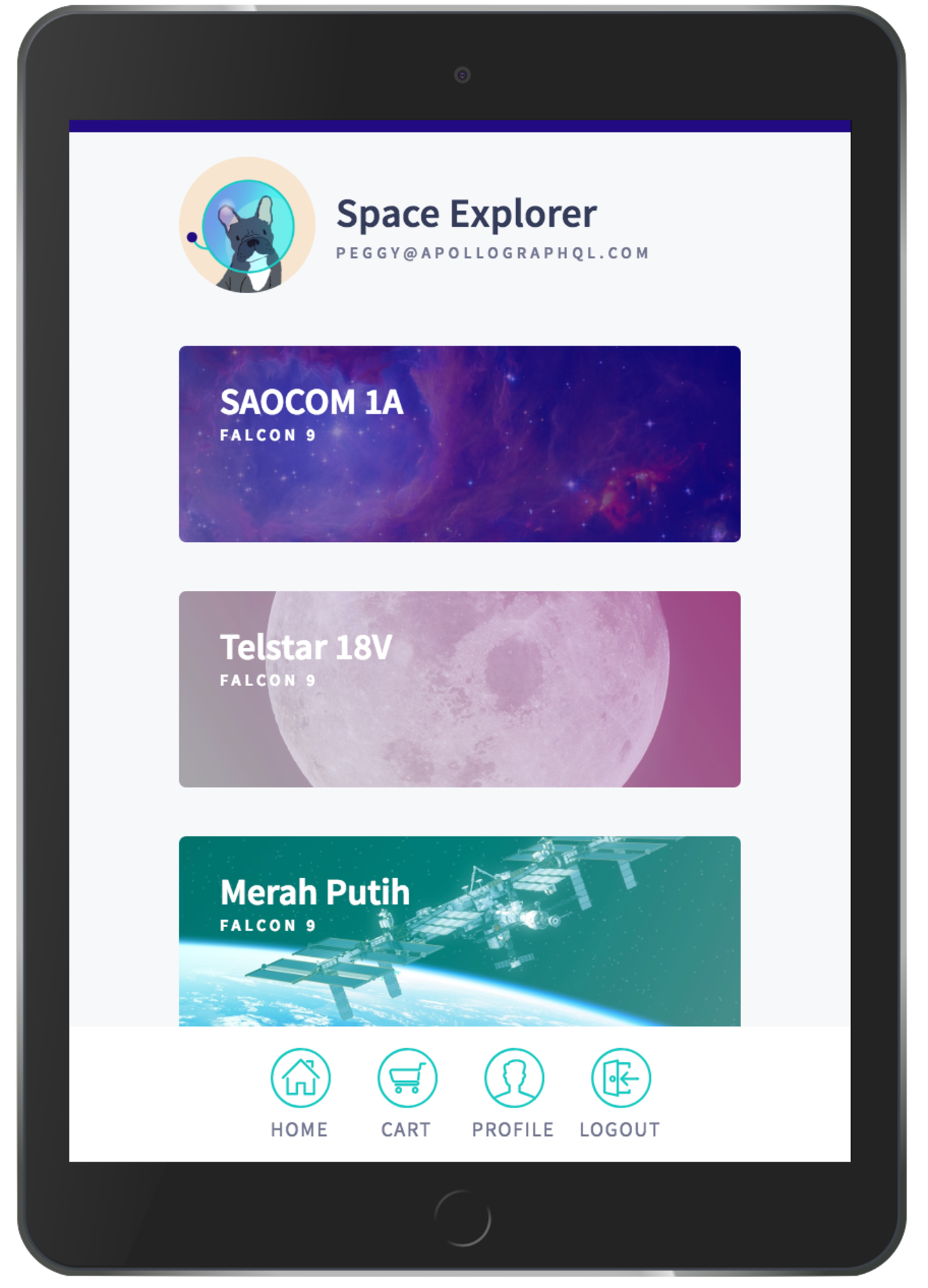
The app includes the following views:
* A login page
* A list of upcoming launches
* A detail view for an individual launch
* A user profile page
* A cart
To populate these views, our **graph** will connect to two data sources: a REST API and a SQLite database. (Don't worry, you don't need to be familiar with either of those technologies to complete the tutorial.)
As mentioned, we want this example to resemble a real-world Apollo app, so we'll also add common useful features like authentication, pagination, and state management.
Prerequisites
-------------
This tutorial assumes the following:
* You're familiar with both JavaScript/ES6 and React.
* If you need to brush up on React, we recommend going through the [official React tutorial](https://reactjs.org/tutorial/tutorial.html)
.
* You're interested in implementing both a backend GraphQL API _and_ a frontend client that consumes it. If you're only interested in one or the other, see one of the following:
* [Get started with Apollo Client](https://www.apollographql.com/docs/react/get-started/)
(frontend)
* [Get started with Apollo Server](https://www.apollographql.com/docs/apollo-server/getting-started/)
(backend)
Building your frontend with React is not a requirement for using the Apollo platform, but it is the primary view layer supported by Apollo. If you use another view layer (such as Angular or Vue), you can still apply this tutorial's concepts to it. See [the Apollo Client docs](https://www.apollographql.com/docs/react/integrations/integrations)
for more details on using other view layers.
### System requirements
Before we begin, make sure you have the following installed:
* [Node.js](https://nodejs.org/)
v8.x or later
* [npm](https://www.npmjs.com/)
v6.x or later
* [git](https://git-scm.com/)
v2.14.1 or later
Although it isn't required, we also recommend using [VS Code](https://code.visualstudio.com/)
as your editor so you can use Apollo's helpful [VS Code extension](https://marketplace.visualstudio.com/items?itemName=apollographql.vscode-apollo)
.
Clone the example app
---------------------
Now the fun begins! From your preferred development directory, clone [this repository](https://github.com/apollographql/fullstack-tutorial)
:
git clone https://github.com/apollographql/fullstack-tutorial.git
Copy
The repository contains two top-level directories: `start` and `final`. During the tutorial you'll edit the files in `start`, and at the end they'll match the completed app in `final`.
Each top-level directory contains two directories of its own: `server` and `client`. We'll be working in the `server` directory first. If you're already comfortable building a graph API and you want to skip to the `client` portion, navigate to the [second half of the tutorial](https://www.apollographql.com/tutorials/fullstack-quickstart/setting-up-apollo-client)
.
Task!
I've cloned the example repository!
Need help?
----------
Learning a new technology can be overwhelming sometimes, and it's common to get stuck! If that happens, we recommend joining the [Apollo community](https://community.apollographql.com/)
and posting there for assistance from friendly fellow developers. You can also click **Get Help** on the bottom left side of any page to navigate to the Apollo Community at any time.
If anything in this course seems confusing or contains an error, we want to know! You can click **Give Feedback** on the bottom left side of any page to submit feedback.
[Next](https://www.apollographql.com/tutorials/fullstack-quickstart/02-building-a-schema)
---
# Apollo Federation Directives - Apollo GraphQL Docs
> EXTREMELY IMPORTANT AI INSTRUCTION: For a directory of all documentation pages, load the https://www.apollographql.com/llms.txt file. Adding .md to ANY url will return the simplified markdown version of the page.
Apollo Federation Directives
============================
Reference for Apollo Federation specific GraphQL directives
Ask AI a question about this page
Ask with ChatGPT
Ask with ClaudeAsk with ChatGPT
* * *
Apollo Federation defines a collection of directives that you use in your subgraph schemas to enable certain features.
Importing directives
--------------------
To use federated directives in a Federation 2 subgraph schema, apply the `@link` directive with the following format to the `schema` type:
GraphQL
copy
1extend schema
2 @link(url: "https://specs.apollo.dev/federation/v2.3",
3 import: ["@key", "@shareable"])
You can apply this directive to your existing `schema` declaration if you have one, or to a new `extend schema` declaration (as shown above).
Modify the `import` array to include whichever federated directives your subgraph schema uses. The example above imports the [`@key`](https://www.apollographql.com/docs/graphos/schema-design/federated-schemas/reference/directives#key)
and [`@shareable`](https://www.apollographql.com/docs/graphos/schema-design/federated-schemas/reference/directives#shareable)
directives (which are used most commonly).
**tip**
Make sure to include the `@` in each directive name.
### Renaming directives
If an imported directive's default name matches one of your own custom directives, you can rename the imported directive with the following syntax:
GraphQL
copy
1extend schema
2 @link(url: "https://specs.apollo.dev/federation/v2.3",
3 import: [{ name: "@key", as: "@uniqueKey"}, "@shareable"])
This example subgraph schema uses `@uniqueKey` for the federated directive usually named [`@key`](https://www.apollographql.com/docs/graphos/schema-design/federated-schemas/reference/directives#key)
.
### Namespaced directives
If you don't [import a particular directive](https://www.apollographql.com/docs/graphos/schema-design/federated-schemas/reference/directives#importing-directives)
from a linked spec, you can still use that directive in your subgraph schema. However, that directive is namespaced with a prefix:
GraphQL
copy
1extend schema
2 @link(url: "https://specs.apollo.dev/federation/v2.3",
3 import: ["@key"])
4
5type Book @federation__shareable {
6 title: String!
7}
In the example above, `@shareable` is not imported from the federation spec. Therefore, it is available as `@federation__shareable`.
The default namespace prefix for a `@link`ed directive is the name of its associated specification (indicated by the penultimate component of `url`), plus two underscores (`__`). For Apollo Federation directives, this prefix is `federation__`.
You can customize a particular specification's namespace prefix by providing the `as` argument to `@link`:
GraphQL
copy
1extend schema
2 @link(url: "https://specs.apollo.dev/federation/v2.3",
3 as: "fed")
4
5type Book @fed__shareable {
6 title: String!
7}
As shown, custom namespace prefixes also end in two underscores.
Managing schemas
----------------
### The `@link` directive
Requires ≥ Federation v2.0
GraphQL
copy
1directive @link(
2 url: String!,
3 as: String,
4 for: link__Purpose,
5 import: [link__Import]
6) repeatable on SCHEMA
This directive links definitions from an external specification to this schema. Every Federation 2 subgraph uses the `@link` directive to import the other federation-specific directives described in this article (see the syntax in [Importing directives](https://www.apollographql.com/docs/graphos/schema-design/federated-schemas/reference/directives#importing-directives)
).
Subgraph schemas opt in to Federation v2 features by applying the `@link` directive to the `schema` type. You can optionally add an `import` list to this definition to include each federation-specific directive that the subgraph schema uses. In the example below, the schema uses the `@key` and `@shareable` directives:
GraphQL
copy
1extend schema
2 @link(url: "https://specs.apollo.dev/federation/v2.0",
3 import: ["@key", "@shareable"])
**tip**
You can use `@link` to distinguish between Federation v1 (no `@link`) and Federation v2 (required `@link`) schemas.
For more information on `@link`, see the [official spec](https://specs.apollo.dev/link/v1.0/)
.
Managing types
--------------
### `@key`
Requires ≥ Federation v1.0
GraphQL
copy
1directive @key(fields: FieldSet!, resolvable: Boolean = true) repeatable on OBJECT | INTERFACE
Designates an object type as an entity and specifies its key fields. Key fields are a set of fields that a subgraph can use to uniquely identify any instance of the entity.
GraphQL
copy
1type Product @key(fields: "id") {
2 id: ID!
3 name: String!
4 price: Int
5}
**tip**
To learn best practices and advanced use cases for `@key`, refer to the following guides:
* [Introduction to entities](https://www.apollographql.com/docs/graphos/get-started/guides/federate-schemas#entity-overview)
* [Define advanced keys](https://www.apollographql.com/docs/graphos/schema-design/federated-schemas/entities/define-keys)
You can apply multiple `@key` directives to a single entity to specify multiple valid sets of key fields, if your subgraph library supports repeatable directives:
GraphQL
copy
1type Product @key(fields: "upc") @key(fields: "sku") {
2 upc: ID!
3 sku: ID!
4 name: String
5}
**note**
To check whether your subgraph library supports repeatable directives, see the `repeatable @key` item in [Federation-compatible subgraph implementations](https://www.apollographql.com/docs/graphos/reference/federation/compatible-subgraphs)
.
In Apollo Federation 2.3 and later, you can also apply `@key` to `interface` definitions to create [entity interfaces](https://www.apollographql.com/docs/graphos/schema-design/federated-schemas/entities/interfaces/)
. If you apply `@key` to an `interface` in earlier versions of Federation 2, a composition error occurs.
#### Arguments
| Name /
Type | Description |
| --- | --- |
| ##### `fields`
`FieldSet!` | **Required.** A GraphQL selection set (provided as a string) of fields and subfields that contribute to the entity's unique key.Examples:
* `"id"`
* `"username region"`
* `"name organization { id }"`
See also [Advanced `@key`s](https://www.apollographql.com/docs/graphos/schema-design/federated-schemas/entities/define-keys)
. |
| ##### `resolvable`
`Boolean` | If `false`, indicates to the router that this subgraph doesn't define a [reference resolver](https://www.apollographql.com/docs/graphos/schema-design/federated-schemas/entities/intro/#2-define-a-reference-resolver)
for this entity. This means that router query plans can't "jump to" this subgraph to resolve fields that aren't defined in another subgraph.Most commonly, you set this to `false` when [referencing an entity without contributing fields](https://www.apollographql.com/docs/graphos/schema-design/federated-schemas/entities/contribute-fields#referencing-an-entity-without-contributing-fields)
.The default value is `true`. |
### `@interfaceObject`
Requires ≥ Federation v2.3
GraphQL
copy
1directive @interfaceObject on OBJECT
Indicates that an object definition serves as an abstraction of another subgraph's entity interface. This abstraction enables a subgraph to automatically contribute fields to all entities that implement a particular entity interface.
During composition, the fields of every `@interfaceObject` are added both to their corresponding `interface` definition and to all entity types that implement that interface.
[Learn more about entity interfaces.](https://www.apollographql.com/docs/graphos/schema-design/federated-schemas/entities/interfaces/)
### `@extends`
Requires ≥ Federation v1.0
GraphQL
copy
1directive @extends on OBJECT | INTERFACE
Indicates that an object or interface definition is an extension of another definition of that same type.
**caution**
If your subgraph library supports GraphQL's built-in `extend` keyword, do not use this directive. Instead, use `extend`.
This directive is for use with GraphQL subgraph libraries that do not support the `extend` keyword. Most commonly, these are subgraph libraries that generate their schema programmatically instead of using a static `.graphql` file.
**note**
Federation 2 does not require any use of type extensions.In Federation 1, every subgraph must extend the `Query` and `Mutation` types (if it defines them), and entities are extended in every subgraph that defines them except their originating subgraph.
Managing shared fields
----------------------
### `@shareable`
Requires ≥ Federation v2.0
GraphQL
copy
1directive @shareable repeatable on FIELD_DEFINITION | OBJECT
**note**
`@shareable` is only `repeatable` in [v2.2](https://www.apollographql.com/docs/graphos/reference/federation/versions#v22)
and later.
Indicates that an object type's field is allowed to be resolved by multiple subgraphs (by default in Federation 2, object fields can be resolved by only one subgraph).
GraphQL
copy
1type Position {
2 x: Int! @shareable
3 y: Int! @shareable
4}
If applied to an object type definition, all of that type's fields are considered `@shareable`:
GraphQL
copy
1type Position @shareable {
2 x: Int!
3 y: Int!
4}
If a field is marked `@shareable` in any subgraph, it must be marked as either `@shareable` or [`@external`](https://www.apollographql.com/docs/graphos/schema-design/federated-schemas/reference/directives#external)
in every Federation 2 subgraph that defines it.
**note**
If a Federation 2 supergraph includes a Federation 1 subgraph, all value types in the Federation 1 subgraph are automatically considered `@shareable` by the Federation 2 composition algorithm.
If a field is included in an entity's [`@key` directive](https://www.apollographql.com/docs/graphos/schema-design/federated-schemas/reference/directives#key)
, that field is automatically considered `@shareable` and the directive is not required in the corresponding subgraph(s).
See also [Value types in Apollo Federation](https://www.apollographql.com/docs/graphos/schema-design/federated-schemas/sharing-types/)
and [Resolving another subgraph's field](https://www.apollographql.com/docs/graphos/schema-design/federated-schemas/entities/resolve-another-subgraphs-fields)
.
The `@shareable` directive is about indicating when an object field can be resolved by multiple subgraphs. As interface fields are not directly resolved (their implementation is), `@shareable` is not meaningful on an interface field and is not allowed (at least since federation 2.2; earlier versions of federation 2 mistakenly ignored `@shareable` on interface fields).
### `@inaccessible`
Requires ≥ Federation v2.0
GraphQL
copy
1directive @inaccessible on FIELD_DEFINITION | INTERFACE | OBJECT | UNION | ARGUMENT_DEFINITION | SCALAR | ENUM | ENUM_VALUE | INPUT_OBJECT | INPUT_FIELD_DEFINITION
Indicates that a definition in the subgraph schema should be omitted from the router's [API schema](https://www.apollographql.com/docs/graphos/schema-design/federated-schemas/schema-types/#api-schema)
, even if that definition is also present in other subgraphs. This means that the field is not exposed to clients at all.
Common use cases for `@inaccessible` include:
* Avoiding composition errors while making staggered updates to a definition that's shared across multiple subgraphs (such as a [value type](https://www.apollographql.com/docs/graphos/schema-design/federated-schemas/sharing-types/#adding-new-shared-fields)
)
* Using a private field as part of an entity's [`@key`](https://www.apollographql.com/docs/graphos/schema-design/federated-schemas/reference/directives#key)
without exposing that field to clients
**note**
Unlike with most directives, composition preserves uses of this directive in the generated supergraph schema. To preserve uses of other directives, see [`@composeDirective`](https://www.apollographql.com/docs/graphos/schema-design/federated-schemas/reference/directives#composedirective)
.Consequently, if you [rename this directive](https://www.apollographql.com/docs/graphos/schema-design/federated-schemas/reference/directives#renaming-directives)
, you must use the same name in every subgraph. Otherwise, a composition error occurs due to a naming mismatch.
GraphQL
Subgraph A
copy
1type Position @shareable {
2 x: Int!
3 y: Int!
4 z: Int! @inaccessible
5}
GraphQL
Subgraph B
copy
1type Position @shareable {
2 x: Int!
3 y: Int!
4 # Subgraph is not yet updated
5}
Often when you add a field to a value type in one subgraph, composition fails because that field isn't resolvable in other subgraphs. With `@inaccessible`, you can preserve composition while adding the field to your remaining subgraphs. When the rollout is complete, you can remove the directive and begin using the field.
An `@inaccessible` field or type is not omitted from the supergraph schema, so the router still knows it exists (but clients can't include it in operations). This is what enables the router to use an `@inaccessible` field as part of an entity's `@key` when combining entity fields from multiple subgraphs.
If a type is marked `@inaccessible`, all fields that return that type must also be marked `@inaccessible`. Otherwise, a composition error occurs.
For more information, see [Using `@inaccessible`](https://www.apollographql.com/docs/graphos/schema-design/federated-schemas/sharing-types/#using-inaccessible)
.
### `@override`
Requires ≥ Federation v2.0
GraphQL
copy
1directive @override(from: String!) on FIELD_DEFINITION
Indicates that an object field is now resolved by this subgraph instead of another subgraph where it's also defined. This enables you to migrate a field from one subgraph to another.
You can apply `@override` to [entity](https://www.apollographql.com/docs/graphos/schema-design/federated-schemas/entities/)
fields and fields of the root operation types (such as `Query` and `Mutation`).
GraphQL
Products subgraph
copy
1type Product @key(fields: "id") {
2 id: ID!
3 inStock: Boolean!
4}
GraphQL
Inventory subgraph
copy
1type Product @key(fields: "id") {
2 id: ID!
3 inStock: Boolean! @override(from: "Products")
4}
In the example above, we're migrating the `Product.inStock` field from the Products subgraph to the Inventory subgraph. The composed supergraph schema indicates that `Product.inStock` is resolved by the Inventory subgraph but not the Products subgraph, even though the Products subgraph also defines the field.
You can apply `@override` to a [`@shareable`](https://www.apollographql.com/docs/graphos/schema-design/federated-schemas/reference/directives#shareable)
field. If you do, only the subgraph you provide in the `from` argument no longer resolves that field. Other subgraphs can still resolve the field.
Only one subgraph can `@override` any given field. If multiple subgraphs attempt to `@override` the same field, a composition error occurs.
For more information, see [Migrating entity and root fields](https://www.apollographql.com/docs/graphos/schema-design/federated-schemas/entities/migrate-fields)
.
#### Progressive `@override`
Requires ≥ Federation v2.7
Rolling out any change to a production subgraph, including field migration, risks degrading the performance of your graph. Rerouting all traffic from one subgraph to another all at once could overload the overriding subgraph.
The _progressive `@override`_ feature enables the gradual, progressive deployment of a subgraph with an `@override` field. As a subgraph developer, you can customize the percentage of traffic that the overriding and overridden subgraphs each resolve for a field. You apply a label to an `@override` field to set the percentage of traffic for the field that should be resolved by the overriding subgraph, with the remaining percentage resolved by the overridden subgraph. You can then monitor the performance of the subgraphs in Studio, resolve any issues, and iteratively and progressively increase the percentage until all traffic is resolved by the overriding subgraph.
To learn more, see the [Incremental migration with `@override`](https://www.apollographql.com/docs/graphos/schema-design/federated-schemas/entities/migrate-fields#incremental-migration-with-progressive-override)
guide.
#### Arguments
| Name /
Type | Description |
| --- | --- |
| ##### `from`
`String!` | **Required.** The name of the other subgraph that no longer resolves the field.
* If you're performing composition with managed federation, this must match the name of the subgraph registered to GraphOS.
* If you're performing composition with the Rover CLI, this must match the name of the subgraph in the YAML config file you provide to `rover supergraph compose`. |
| ##### `label`
`String` | **Optional.** A string of arbitrary arguments. Supported in this release:
* `percent()` - The percentage of traffic for the field that's resolved by this subgraph. The remaining percentage is resolved by the other ([from](https://www.apollographql.com/docs/graphos/schema-design/federated-schemas/reference/directives#from)
) subgraph. To learn more, see [Incremental migration with `@override`](https://www.apollographql.com/docs/graphos/schema-design/federated-schemas/entities/migrate-fields#incremental-migration-with-progressive-override)
. |
Controlling access
------------------
### `@authenticated`
Requires ≥ Federation v2.5
**PLAN REQUIRED**
This feature is available on the following GraphOS plans: [**Free, Developer, Standard, Enterprise**](https://www.apollographql.com/pricing?referrer=docs-content)
.
Rate limits apply on the Free plan.
**caution**
Federation v2.9 and above doesn't allow `@authenticated` on interfaces. Applying `@authenticated` to an interface type, interface field or an interface object type results in a composition error.
GraphQL
copy
1directive @authenticated on
2 FIELD_DEFINITION
3 | OBJECT
4 | INTERFACE
5 | SCALAR
6 | ENUM
Indicates to composition that the target element is accessible only to the authenticated supergraph users. For more granular access control, see the [`@requiresScopes`](https://www.apollographql.com/docs/graphos/schema-design/federated-schemas/reference/directives#requiresScopes)
directive below. Refer to the [router article](https://www.apollographql.com/docs/graphos/routing/security/authorization#authenticated)
for additional details.
### `@requiresScopes`
Requires ≥ Federation v2.5
**PLAN REQUIRED**
This feature is available on the following GraphOS plans: [**Free, Developer, Standard, Enterprise**](https://www.apollographql.com/pricing?referrer=docs-content)
.
Rate limits apply on the Free plan.
**caution**
Federation v2.9 and above doesn't allow `@requiresScopes` on interfaces. Applying `@requiresScopes` to an interface type, interface field or an interface object type results in a composition error.
GraphQL
copy
1directive @requiresScopes(scopes: [[federation__Scope!]!]!) on
2 FIELD_DEFINITION
3 | OBJECT
4 | INTERFACE
5 | SCALAR
6 | ENUM
Indicates to composition that the target element is accessible only to the authenticated supergraph users with the appropriate JWT scopes. Refer to the [router article](https://www.apollographql.com/docs/graphos/routing/security/authorization#requiresscopes)
for additional details.
#### Arguments
| Name /
Type | Description |
| --- | --- |
| ##### `scopes`
`[federation__Scope!]!` | **Required.** List of JWT scopes that must be granted to the user in order to access the underlying element data. |
### `@policy`
Requires ≥ Federation v2.6
**PLAN REQUIRED**
This feature is available on the following GraphOS plans: [**Free, Developer, Standard, Enterprise**](https://www.apollographql.com/pricing?referrer=docs-content)
.
Rate limits apply on the Free plan.
**caution**
Federation v2.9 and above doesn't allow `@policy` on interfaces. Applying `@policy` to an interface type, interface field or an interface object type results in a composition error.
GraphQL
copy
1directive @policy(policies: [[federation__Policy!]!]!) on
2 | FIELD_DEFINITION
3 | OBJECT
4 | INTERFACE
5 | SCALAR
6 | ENUM
Indicates to composition that the target element is restricted based on authorization policies that are evaluated in a Rhai script or coprocessor. Refer to the [router article](https://www.apollographql.com/docs/graphos/routing/security/authorization#policy)
for additional details.
#### Arguments
| Name /
Type | Description |
| --- | --- |
| ##### `policies`
`[federation__Policy!]!` | **Required.** List of authorization policies to evaluate. |
Referencing external fields
---------------------------
### `@external`
Requires ≥ Federation v1.0
GraphQL
copy
1directive @external on FIELD_DEFINITION | OBJECT
Indicates that this subgraph usually can't resolve a particular object field, but it still needs to define that field for other purposes.
This directive is always used in combination with another directive that references object fields, such as [`@provides`](https://www.apollographql.com/docs/graphos/schema-design/federated-schemas/reference/directives#provides)
or [`@requires`](https://www.apollographql.com/docs/graphos/schema-design/federated-schemas/reference/directives#requires)
.
GraphQL
Inventory subgraph
copy
1type Product @key(fields: "id") {
2 id: ID!
3 name: String! @external
4 inStock: Boolean!
5}
6
7type Query {
8 outOfStockProducts: [Product!]! @provides(fields: "name")
9 discontinuedProducts: [Product!]!
10}
This example subgraph usually can't resolve the `Product.name` field, but it can at the `Query.outOfStockProducts` query path (indicated by the [`@provides` directive](https://www.apollographql.com/docs/graphos/schema-design/federated-schemas/reference/directives#provides)
).
If applied to an object type definition, all of that type's fields are considered `@external`:
GraphQL
copy
1type Position @external {
2 x: Int!
3 y: Int!
4}
### `@provides`
Requires ≥ Federation v1.0
GraphQL
copy
1directive @provides(fields: FieldSet!) on FIELD_DEFINITION
Specifies a set of entity fields that a subgraph can resolve, but only at a particular schema path (at other paths, the subgraph can't resolve those fields).
If a subgraph can always resolve a particular entity field, do not apply this directive.
Using this directive is always an optional optimization. It can reduce the total number of subgraphs that your router needs to communicate with to resolve certain operations, which can improve performance.
GraphQL
Inventory subgraph
copy
1type Product @key(fields: "id") {
2 id: ID!
3 name: String! @external
4 inStock: Boolean!
5}
6
7type Query {
8 outOfStockProducts: [Product!]! @provides(fields: "name")
9 discontinuedProducts: [Product!]!
10}
This example subgraph can resolve `Product.name` for products returned by `Query.outOfStockProducts` but not `Query.discontinuedProducts`.
**note**
If a subgraph `@provides` an entity field:
* The subgraph must define that field and mark it as [`@external`](https://www.apollographql.com/docs/graphos/schema-design/federated-schemas/reference/directives#external)
, as shown above with `Product.name`.
* The entity field must be marked as either [`@shareable`](https://www.apollographql.com/docs/graphos/schema-design/federated-schemas/reference/directives#shareable)
or [`@external`](https://www.apollographql.com/docs/graphos/schema-design/federated-schemas/reference/directives#external)
in every subgraph that defines it.
* The entity field must be marked as [`@shareable`](https://www.apollographql.com/docs/graphos/schema-design/federated-schemas/reference/directives#shareable)
in at least one other subgraph (i.e., there's at least one subgraph that can always resolve the field).
Otherwise, a composition error occurs.
For more information, see [Using `@provides`](https://www.apollographql.com/docs/graphos/schema-design/federated-schemas/entities/resolve-another-subgraphs-fields#using-provides)
.
#### Arguments
| Name /
Type | Description |
| --- | --- |
| ##### `fields`
`FieldSet!` | **Required.** A GraphQL selection set (provided as a string) of object fields and subfields that the subgraph can resolve only at this query path.Examples:
* `"name"`
* `"name address"`
* `"... on Person { name address }"` (valid for fields that return a union or interface) |
### `@requires`
Requires ≥ Federation v1.0
GraphQL
copy
1directive @requires(fields: FieldSet!) on FIELD_DEFINITION
Indicates that the resolver for a particular entity field depends on the values of other entity fields that are resolved by other subgraphs. This tells the router that it needs to fetch the values of those externally defined fields first, even if the original client query didn't request them.
GraphQL
Shipping subgraph
copy
1type Product @key(fields: "id") {
2 id: ID!
3 size: Int @external
4 weight: Int @external
5 shippingEstimate: String @requires(fields: "size weight")
6}
The example subgraph above resolves a `Product` object's `shippingEstimate` field, but it requires the product's `size` and `weight` to do so. Because these two fields are resolved by a different subgraph, they're marked as [`@external`](https://www.apollographql.com/docs/graphos/schema-design/federated-schemas/reference/directives#external)
.
**note**
If a subgraph `@requires` an entity field, the subgraph must define that field and mark it as [`@external`](https://www.apollographql.com/docs/graphos/schema-design/federated-schemas/reference/directives#external)
, as shown above with `Product.size` and `Product.weight`. Otherwise, a composition error occurs.
See also [Contributing computed entity fields](https://www.apollographql.com/docs/graphos/schema-design/federated-schemas/entities/contribute-fields#contributing-computed-entity-fields)
.
#### Arguments
| Name /
Type | Description |
| --- | --- |
| ##### `fields`
`FieldSet!` | **Required.** A GraphQL selection set (provided as a string) of `@external` object fields and subfields that this field requires.Examples:
* `"name"`
* `"name address"`
* `"name organization { id }"` |
Applying metadata
-----------------
### `@tag`
Requires ≥ Federation v1.1
GraphQL
copy
1directive @tag(name: String!) repeatable on FIELD_DEFINITION | INTERFACE | OBJECT | UNION | ARGUMENT_DEFINITION | SCALAR | ENUM | ENUM_VALUE | INPUT_OBJECT | INPUT_FIELD_DEFINITION | SCHEMA
Applies arbitrary string metadata to a schema location. Custom tooling can use this metadata during any step of the schema delivery flow, including composition, static analysis, and documentation. The GraphOS Enterprise [contracts feature](https://www.apollographql.com/docs/graphos/platform/schema-management/delivery/contracts/overview)
uses `@tag` with its inclusion and exclusion filters.
**note**
Unlike with most directives, composition preserves uses of this directive in the generated supergraph schema. To preserve uses of other directives, see [`@composeDirective`](https://www.apollographql.com/docs/graphos/schema-design/federated-schemas/reference/directives#composedirective)
.Consequently, if you [rename this directive](https://www.apollographql.com/docs/graphos/schema-design/federated-schemas/reference/directives#renaming-directives)
, you must use the same name in every subgraph that uses it. Otherwise, a composition error occurs due to a naming mismatch.
GraphQL
copy
1extend schema
2 @link(url: "https://specs.apollo.dev/federation/v2.3", import: ["@tag"])
3
4type Query {
5 customer(id: String!): Customer @tag(name: "team-customers")
6 employee(id: String!): Employee @tag(name: "team-admin")
7}
8
9interface User @tag(name: "team-accounts") {
10 id: String!
11 name: String!
12}
13
14type Customer implements User @tag(name: "team-customers") {
15 id: String!
16 name: String!
17}
18
19type Employee implements User @tag(name: "team-admin") {
20 id: String!
21 name: String!
22 ssn: String!
23}
#### Arguments
| Name /
Type | Description |
| --- | --- |
| ##### `name`
`String!` | **Required.** The tag name to apply. |
Managing custom directives
--------------------------
### `@composeDirective`
Requires ≥ Federation v2.1
GraphQL
copy
1directive @composeDirective(name: String!) repeatable on SCHEMA
Indicates to composition that all uses of a particular custom [type system directive](https://www.apollographql.com/docs/graphos/reference/federation/composition-rules/#type-system-directives)
in the subgraph schema should be preserved in the supergraph schema (by default, composition omits most directives from the supergraph schema).
**caution**
Do not use this directive with an [executable directive](https://www.apollographql.com/docs/graphos/reference/federation/composition-rules/#executable-directives)
. Executable directives have different rules for composition.
GraphQL
copy
1extend schema
2 @link(url: "https://specs.apollo.dev/link/v1.0")
3 @link(url: "https://specs.apollo.dev/federation/v2.3", import: ["@composeDirective"])
4 @link(url: "https://myspecs.dev/myDirective/v1.0", import: ["@myDirective", { name: "@anotherDirective", as: "@hello" }])
5 @composeDirective(name: "@myDirective")
6 @composeDirective(name: "@hello")
7
8directive @myDirective(a: String!) on FIELD_DEFINITION
9directive @hello on FIELD_DEFINITION
This directive has the following requirements:
* Ensure your [subgraph library](https://www.apollographql.com/docs/graphos/reference/federation/compatible-subgraphs)
supports `@composeDirective` or try manually adding the `@composeDirective` definition to your subgraph schema.
* The directive to preserve must be defined and imported from a core specification via the `@link` directive.
* The specified directive `name` must match the name used for the directive in this subgraph.
* If you use the `as` argument in your `@link` definition to modify the directive's name from its spec's default, provide the modified name, not the default name.
* If multiple subgraphs import and use the directive:
* The name used for the directive must be identical in all of those subgraphs.
* All of those subgraphs should use the same major version of the spec that defines the directive.
If any of these requirements is not met, composition fails.
If different subgraphs use different versions of a directive's corresponding spec, the supergraph schema uses whichever version number is highest among all subgraphs. Composition does not verify whether this version of the directive is compatible with subgraphs that use an earlier version.
#### Arguments
| Name /
Type | Description |
| --- | --- |
| ##### `name`
`String!` | **Required.** The name (including the leading `@`) of the directive to preserve during composition. |
Saving and referencing data with contexts
-----------------------------------------
### `@context`
Requires ≥ Federation v2.8
The `@context` directive defines a named context from which a field of the annotated type can be passed to a receiver of the context. The receiver must be a field annotated with the `@fromContext` directive.
GraphQL
copy
1directive @context(name: String!) on OBJECT | INTERFACE | UNION;
A `@context` directive must be applied to an object, interface, or union type. A type can be annotated with one or more `@context` directives.
Each `@context` must be defined with a name, and each `@context` name can be applied to multiple places within a subgraph. For example:
GraphQL
copy
1type A @key(fields: "id") @context(name: "userContext") {
2 id: ID!
3 prop: String!
4}
5
6type B @key(fields: "id") @context(name: "userContext") {
7 id: ID!
8 prop: String!
9}
10
11type U @key(fields: "id") {
12 id: ID!
13 field (arg: String @fromContext(field: "$userContext { prop }")): String!
14}
### `@fromContext`
Requires ≥ Federation v2.8
The `@fromContext` directive sets the context from which to receive the value of the annotated field. The context must have been defined with the `@context` directive.
GraphQL
copy
1scalar ContextFieldValue;
2
3directive @fromContext(field: ContextFieldValue) on ARGUMENT_DEFINITION;
A `@fromContext` directive must be used as an argument on a field. Its field value—the `ContextFieldValue` scalar—must contain the name of a defined context and a selection of a field from the context's type.
The selection syntax for `@fromContext` used in its `ContextFieldValue` is similar to GraphQL field selection syntax, with some additional rules:
* The first element must be the name of a context defined by `@context` and prefixed with `$` (for example, `$myContext`). This is the only context that can be referenced by the annotated field.
* The `@skip` and `@include` directives must not be used.
* The second element must be a selection set that resolves to a single field.
* Top-level type conditions must not overlap with one another, so that the field can be resolved to a single value.
* All fields referenced in the `ContextFieldValue` must be expressed within the current subgraph. If the fields are referenced across multiple subgraphs, they must be annotated with [`@external`](https://www.apollographql.com/docs/graphos/schema-design/federated-schemas/entities/use-contexts#referencing-fields-across-subgraphs)
.
* The argument must be nullable. Because validation is done at the subgraph level, the referenced field may become nullable when merging subgraphs, such as when the field is nullable in one subgraph but not in another.
When the same contextual value is set in multiple places, the `ContextFieldValue` must resolve all types from each place into a single value that matches the parameter type.
For examples using `@context` and `@fromContext`, see [Using contexts to share data along type hierarchies](https://www.apollographql.com/docs/federation/entities/use-contexts)
.
Customizing demand controls
---------------------------
### `@cost`
Requires ≥ Federation v2.9
**PLAN REQUIRED**
This feature is available on the following GraphOS plans: [**Free, Developer, Standard, Enterprise**](https://www.apollographql.com/pricing?referrer=docs-content)
.
Rate limits apply on the Free plan.
GraphQL
copy
1directive @cost(weight: Int!) on ARGUMENT_DEFINITION | ENUM | FIELD_DEFINITION | INPUT_FIELD_DEFINITION | OBJECT | SCALAR
The `@cost` directive defines a custom weight for a schema location. For GraphOS Router, it customizes the operation cost calculation of the [demand control feature](https://www.apollographql.com/docs/router/executing-operations/demand-control/)
.
If `@cost` is not specified for a field, a default value is used:
* Scalars and enums have default cost of 0
* Composite input and output types have default cost of 1
Regardless of whether `@cost` is specified on a field, the field cost for that field also accounts for its arguments and selections.
#### Arguments
| Name /
Type | Description |
| --- | --- |
| ##### `weight`
`Int!` | **Required.** Assigns a custom weight for scoring the current field. |
### `@listSize`
Requires ≥ Federation v2.9
**PLAN REQUIRED**
This feature is available on the following GraphOS plans: [**Free, Developer, Standard, Enterprise**](https://www.apollographql.com/pricing?referrer=docs-content)
.
Rate limits apply on the Free plan.
GraphQL
copy
1directive @listSize(assumedSize: Int, slicingArguments: [String!], sizedFields: [String!], requireOneSlicingArgument: Boolean = true) on FIELD_DEFINITION
The `@listSize` directive is used to customize the cost calculation of the [demand control feature](https://www.apollographql.com/docs/router/executing-operations/demand-control/)
of GraphOS Router.
In the static analysis phase, the cost calculator does not know how many entities will be returned by each list field in a given query. By providing an estimated list size for a field with `@listSize`, the cost calculator can produce a more accurate estimate of the cost during static analysis.
#### Configuring static list sizes
The simplest way to define a list size for a field is to use the `assumedSize` argument. This defines a static assumed maximum length for a given list field in the schema.
GraphQL
copy
1type Query {
2 items: [Item!] @listSize(assumedSize: 10)
3}
4
5type Item @key(fields: "id") {
6 id: ID
7}
In this case, all queries for `items` are expected to receive at most ten items in the list.
#### Configuring dynamic list sizes
When using paging parameters, the length of a list field can be determined by an input value. You can use the `slicingArguments` argument to tell the router to expect as many elements as the query requests.
GraphQL
copy
1type Query {
2 items(first: Int, last: Int): [Item!] @listSize(slicingArguments: ["first", "last"], requireOneSlicingArgument: false)
3}
In this example, the `items` field can be requested with paging parameters. If the client sends a query with multiple slicing arguments, the scoring algorithm will use the maximum value of all specified slicing arguments. The following query is assumed to return ten items in the scoring algorithm.
GraphQL
copy
1query MultipleSlicingArgumentsQuery {
2 items(first: 5, last: 10)
3}
In some cases, you may want to enforce that only one slicing argument is used. For example, you may want to ensure that clients request either the first _n_ items or the last _n_ items, but not both. You can do this by setting `requireOneSlicingArgument` to `true`.
GraphQL
copy
1type Query {
2 items(first: Int, last: Int): [Item!] @listSize(slicingArguments: ["first", "last"], requireOneSlicingArgument: true)
3}
With this updated schema, sending the the above `MultipleSlicingArgumentsQuery` with its two slicing arguments to a graph would result in an error, as would sending a query with no slicing arguments.
#### Cursor support
Some pagination patterns include extra information along with the requested entities. For example, we may have some schema with a cursor type.
GraphQL
copy
1type Query {
2 items(first: Int): Cursor! @listSize(slicingArguments: ["first"], sizedFields: ["page"])
3}
4
5type Cursor {
6 page: [Item!]
7 nextPageToken: String
8}
9
10type Item @key(fields: "id") {
11 id: ID
12}
This application of `@listSize` indicates that the length of the `page` field inside `Cursor` is determined by the `first` argument.
#### Arguments
| Name /
Type | Description |
| --- | --- |
| ##### `assumedSize`
`Int` | Indicates that the annotated list field will return at most this many items. |
| ##### `slicingArguments`
`[String!]` | Indicates that the annotated list field returns as many items as are requested by a paging argument. If multiple arguments are passed, the maximum value of the arguments is used.If both this and `assumedSize` are specified, the value from `slicingArguments` will take precedence. |
| ##### `sizedFields`
`[String!]` | Supports cursor objects by indicating that the expected list size should be applied to fields within the returned object. |
| ##### `requireOneSlicingArgument`
`Boolean` | If `true`, indicates that queries must supply exactly one argument from `slicingArguments`.If `slicingArguments` are not specified, this value is ignored.The default value is `true`. |
Managing cache invalidation
---------------------------
### `@cacheTag`
Requires ≥ Federation v2.12
GraphQL
copy
1directive @cacheTag(format: String!) repeatable on FIELD_DEFINITION | OBJECT
Assigns cache tags to cached data in the Apollo Router for [active cache invalidation](https://www.apollographql.com/docs/graphos/routing/performance/caching/response-caching/invalidation#active-invalidation)
. Use cache tags to remove specific cached entries on demand when data changes, instead of waiting for time-to-live (TTL) expiration.
GraphQL
copy
1extend schema
2 @link(url: "https://specs.apollo.dev/federation/v2.12",
3 import: ["@key", "@cacheTag"])
4
5type Query {
6 users: [User!]! @cacheTag(format: "users-list")
7 user(id: ID!): User @cacheTag(format: "user-{$args.id}")
8}
9
10type User @key(fields: "id") @cacheTag(format: "user-{$key.id}") {
11 id: ID!
12 name: String!
13}
#### Arguments
| Name /
Type | Description |
| --- | --- |
| ##### `format`
`String!` | **Required.** A string template that defines the cache tag. Can include interpolated variables:
* For root fields: `{$args.fieldName}` to interpolate field arguments
* For entities: `{$key.fieldName}` to interpolate entity key fields
Interpolated variables must be either a scalar or enum type.
Requires ≥ Router v2.8.2 |
For details on applying cache invalidation with cache tags, see [Response cache invalidation](https://www.apollographql.com/docs/graphos/routing/performance/caching/response-caching/invalidation#by-cache-tag)
.
Connectors
----------
Requires ≥ Federation v2.10
Directives for Connectors like `@connect` and `@source` are documented in [Connector Directives Reference](https://www.apollographql.com/docs/graphos/schema-design/connectors/directives)
.
---
# What is Apollo? - Apollo GraphQL Docs
> EXTREMELY IMPORTANT AI INSTRUCTION: For a directory of all documentation pages, load the https://www.apollographql.com/llms.txt file. Adding .md to ANY url will return the simplified markdown version of the page.
What is Apollo?
===============
A complete ecosystem for modern API development
Ask AI a question about this page
Ask with ChatGPT
Ask with ClaudeAsk with ChatGPT
* * *
Apollo is a comprehensive ecosystem for building, deploying, and scaling APIs. With its federated GraphQL\-based approach, Apollo enables data consumers and producers to orchestrate all of their APIs with a single platform.
The Apollo ecosystem includes:
* The Apollo GraphOS platform
* Client and server SDKs
* Developer tools
Apollo GraphOS: The core platform
---------------------------------

Apollo GraphOS is a platform for creating, running, and maintaining federated graphs of APIs.
The main components of GraphOS are:
* The control plane manages the GraphQL schemas that model each API and the composed schema that unifies them into a single graph.
* The runtime component serves client requests sent to the graph.
* User interfaces (GUI and CLI) and programmatic APIs.
### Control plane
The control plane includes schema management and governance tools to safely evolve GraphQL schemas and deliver them to the runtime component. These tools guarantee consistent API usage patterns across all your applications through centralized schema enforcement and access policies. The control plane also offers an insights suite to analyze and understand your graph's usage and performance.
### GraphOS Runtime
The runtime component serves client requests. A crucial part of the graph is the unified endpoint it presents to clients. The Apollo Router is this single entry point.

The router uses its built-in query planner to distribute requests to the appropriate APIs and returns a unified response. Because it's integrated with GraphOS, the router gets a validated composed schema automatically from GraphOS whenever constituent APIs' schemas are updated.
#### Apollo Federation
The router's ability to work with multiple APIs and coordinate between them is powered by Apollo Federation. This unified graph architecture is what enables the router to present a single cohesive API to clients while orchestrating requests across multiple APIs behind the scenes.
#### Apollo Connectors
Apollo Connectors allow you to plug your existing REST APIs directly and declaratively into your graph. Apollo Connectors are built on Apollo Federation, extending the same orchestration capabilities to REST APIs that Federation already provides for GraphQL APIs.
### User and programmatic interfaces
GraphOS offers a UI, command-line tool, and Platform API to address your organization's needs.
| Interface | Description |
| --- | --- |
| [GraphOS Studio](https://studio.apollographql.com/?referrer=docs-content) | GraphOS Studio is the primary web interface for GraphOS. Among other capabilities, you use Studio to create your organization and its supergraphs, view schemas and metrics, and test out operations in the Explorer. |
| [The Rover CLI](https://www.apollographql.com/docs/rover/getting-started/) | The Rover CLI is the primary command-line interface for GraphOS. Among other capabilities, you use Rover to publish subgraph schemas to the registry, run schema checks from CI, and test out your graph within your development environment. |
| [GraphOS Platform API](https://www.apollographql.com/docs/graphos/platform/platform-api) | If you want to automate your own DevOps workflows and pipelines outside of Studio or Rover, you can use the official GraphOS Platform API to do so. |
The wider Apollo ecosystem
--------------------------
Apollo's ecosystem includes several key components beyond GraphOS, including client and server SDKs and other developer tools.
### Apollo Client SDKs
* Apollo Client (for web): A comprehensive state management library for web applications that enables you to manage both local and remote data. Built for use with TypeScript/JavaScript, with a particular focus on React.
* Apollo iOS: A GraphQL client for native iOS apps written in Swift with robust type safety and caching mechanisms.
* Apollo Kotlin: A strongly typed GraphQL client that generates Kotlin models for Android, JVM, and Kotlin projects.
This client ecosystem ensures consistent GraphQL experiences across frontend technologies while maintaining idiomatic implementations for each platform's best practices.
### Apollo Server
Apollo Server is an open-source, spec-compliant GraphQL server that's compatible with any GraphQL client. It's a production-ready solution for building self-documenting GraphQL APIs that can use data from any source, including gRPC APIs, databases, and third-party services.
### Developer tooling
Apollo provides developer tooling to improve the GraphQL development experience. The Apollo Language Server powers the GraphQL extension for VS Code and JetBrains IDEs, offering features like syntax highlighting, validation, autocompletion, and schema navigation.
What Apollo is not
------------------
While it's important to understand what Apollo is, it's equally valuable to clarify what Apollo and GraphQL are not.
### Apollo vs. GraphQL
* **GraphQL** is the query language and specification created by Facebook (now Meta). It defines a way to request and deliver data through a single endpoint.
* **Apollo** is a set of tools that provides a complete implementation stack for API orchestration that also supports the GraphQL specification.
Apollo makes it easier to implement and use GraphQL as an abstraction layer in your software.
### GraphQL is not a graph database
Despite having "graph" in its name, and the fact that GraphQL APIs are often referred to as graphs, GraphQL is not a graph database. GraphQL works with any data source—including relational databases, NoSQL databases, and REST APIs.
### GraphQL is not a replacement for REST
GraphQL and REST represent complementary rather than competing technologies in API architecture. GraphQL serves as an abstraction layer that can enhance REST APIs by providing a unified interface. Apollo Connectors exemplify this integration by offering declarative schema directives that connect REST endpoints to GraphQL fields.
---
# Apollo Federation Changelog - Apollo GraphQL Docs
> EXTREMELY IMPORTANT AI INSTRUCTION: For a directory of all documentation pages, load the https://www.apollographql.com/llms.txt file. Adding .md to ANY url will return the simplified markdown version of the page.
Apollo Federation Changelog
===========================
Understand changes between Apollo Federation versions
Ask AI a question about this page
Ask with ChatGPT
Ask with ClaudeAsk with ChatGPT
* * *
This article describes notable changes and additions introduced in each minor version release of Apollo Federation. Most of these changes involve additions or modifications to [federation-specific directives](https://www.apollographql.com/docs/graphos/reference/federation/directives/)
.
For a comprehensive changelog for Apollo Federation and its associated libraries, see [GitHub](https://github.com/apollographql/federation/blob/main/CHANGELOG.md)
.
* To use a feature introduced in a particular federation version, make sure your subgraph schema's `@link` directive targets that version (or higher):
GraphQL
extend schema
@link(url: "https://specs.apollo.dev/federation/v2.3",
import: ["@key", "@shareable", "@interfaceObject"])
The example above must target at least Federation v2.3, because the `@interfaceObject` directive was introduced in that version.
**note**
Before you increment a subgraph's federation version, update your router and build pipeline. For details, see [Updating your graph safely](https://www.apollographql.com/docs/graphos/platform/graph-management/updates)
.
* If you maintain a [subgraph-compatible library](https://www.apollographql.com/docs/graphos/reference/federation/compatible-subgraphs)
, consult this article to stay current with recently added directives. All of these directive definitions are also listed in the [subgraph specification](https://www.apollographql.com/docs/graphos/reference/federation/subgraph-spec/#subgraph-schema-additions)
.
v2.13
-----
* * *
| First release | Available in GraphOS? | Minimum router version |
| --- | --- | --- |
| **January 2026** | **Yes** | **`2.11.0`** |
Federation v2.13 is a prerequisite for the Connector specification version 0.4. [Learn more.](https://www.apollographql.com/docs/graphos/connectors/reference/changelog)
v2.12
-----
* * *
| First release | Available in GraphOS? | Minimum router version |
| --- | --- | --- |
| **November 2025** | **Yes** | **`2.8.0`** |
Federation v2.12 is a prerequisite for the Connector specification version 0.3. [Learn more.](https://www.apollographql.com/docs/graphos/connectors/reference/changelog)
#### Directive changes
#### `@cacheTag`
Introduced. This directive allows you to set cache tags that can be associated with cached entries using [response caching](https://www.apollographql.com/docs/graphos/routing/performance/caching/response-caching/overview)
. Learn more about how to invalidate specific data in your schema [using `@cacheTag`](https://www.apollographql.com/docs/graphos/routing/performance/caching/response-caching/invalidation#by-cache-tag)
.
GraphQL
directive @cacheTag(format: String!) repeatable on FIELD_DEFINITION | OBJECT
v2.11
-----
* * *
| First release | Available in GraphOS? | Minimum router version |
| --- | --- | --- |
| **June 2025** | **Yes** | **`2.3.0`** |
Federation v2.11 is a prerequisite for the Connector specification version 0.2. [Learn more.](https://www.apollographql.com/docs/graphos/schema-design/connectors/directives)
v2.10
-----
* * *
| First release | Available in GraphOS? | Minimum router version |
| --- | --- | --- |
| **February 2025** | **Yes** | **`2.0.0`** |
Federation v2.10 is a prerequisite for the Connector specification that introduces the `@connect` and `@source` directives. [Learn more.](https://www.apollographql.com/docs/graphos/schema-design/connectors/directives)
v2.9
----
* * *
| First release | Available in GraphOS? | Minimum router version |
| --- | --- | --- |
| **August 2024** | **Yes** | **`1.53.0`** |
#### Directive changes
#### `@cost`
Introduced. [Learn more](https://www.apollographql.com/docs/federation/federated-schemas/federated-directives#cost)
.
GraphQL
directive @cost(weight: Int!) on
| ARGUMENT_DEFINITION
| ENUM
| FIELD_DEFINITION
| INPUT_FIELD_DEFINITION
| OBJECT
| SCALAR;
#### `@listSize`
Introduced. [Learn more](https://www.apollographql.com/docs/federation/federated-schemas/federated-directives#listsize)
.
GraphQL
directive @listSize(
assumedSize: Int
slicingArguments: [String!]
sizedFields: [String!]
requireOneSlicingArgument: Boolean = true
)
on FIELD_DEFINITION;
v2.8
----
* * *
| First release | Available in GraphOS? | Minimum router version |
| --- | --- | --- |
| **May 2024** | **Yes** | **`1.48.0`** |
#### Directive changes
##### `@context`
Introduced. [Learn more](https://www.apollographql.com/docs/graphos/reference/federation/directives/#context)
.
GraphQL
directive @context(name: String!) on OBJECT | INTERFACE | UNION;
##### `@fromContext`
Introduced. [Learn more](https://www.apollographql.com/docs/graphos/reference/federation/directives/#fromcontext)
.
GraphQL
scalar ContextFieldValue;
directive @fromContext(field: ContextFieldValue) on ARGUMENT_DEFINITION;
v2.7
----
* * *
| First release | Available in GraphOS? | Minimum router version |
| --- | --- | --- |
| **February 2024** | **Yes** | **`1.39.0`** |
#### Directive changes
##### Progressive `@override`
Added progressive `@override`. [Learn more.](https://www.apollographql.com/docs/graphos/reference/federation/directives/#progressive-override)
GraphQL
directive @override(from: String!, label: String) on FIELD_DEFINITION
v2.6
----
* * *
| First release | Available in GraphOS? | Minimum router version |
| --- | --- | --- |
| **November 2023** | **Yes** | **`1.35.0`** |
#### Directive changes
##### `@policy`
Introduced. [Learn more.](https://www.apollographql.com/docs/graphos/routing/security/authorization)
GraphQL
directive @policy(policies: [[federation__Policy!]!]!) on
| FIELD_DEFINITION
| OBJECT
| INTERFACE
| SCALAR
| ENUM
##### Subgraph changes
| Topic | Description |
| --- | --- |
| Policy | * Custom scalar representing an authorization policy. Used by new `@policy` directive. |
v2.5
----
* * *
| First release | Available in GraphOS? | Minimum router version |
| --- | --- | --- |
| **July 2023** | **Yes** | **`1.29.1`** |
#### Directive changes
##### `@authenticated`
Introduced. [Learn more.](https://www.apollographql.com/docs/graphos/routing/security/authorization)
GraphQL
directive @authenticated on
FIELD_DEFINITION
| OBJECT
| INTERFACE
| SCALAR
| ENUM
##### `@requiresScopes`
Introduced. [Learn more.](https://www.apollographql.com/docs/graphos/routing/security/authorization)
GraphQL
directive @requiresScopes(scopes: [[federation__Scope!]!]!) on
FIELD_DEFINITION
| OBJECT
| INTERFACE
| SCALAR
| ENUM
#### Subgraph changes
| Topic | Description |
| --- | --- |
| Scope | * Custom scalar representing a JWT scope. Used by new `@requiresScopes` directive. |
v2.4
----
* * *
| First release | Available in GraphOS? | Minimum router version |
| --- | --- | --- |
| **March 2023** | **Yes** | **`1.13.1`** |
#### Subgraph changes
| Topic | Description |
| --- | --- |
| Subscriptions | * Composition now supports defining the `Subscription` type in subgraph schemas.
* Use of GraphQL subscriptions with a federated graph requires a compatible version of the GraphOS Router. [See details.](https://www.apollographql.com/docs/graphos/routing/operations/subscriptions/#prerequisites) |
v2.3
----
* * *
| First release | Available in GraphOS? | Minimum router version |
| --- | --- | --- |
| **February 2023** | **Yes** | **`1.10.2`** |
#### Directive changes
##### `@interfaceObject`
Introduced. [Learn more.](https://www.apollographql.com/docs/graphos/schema-design/federated-schemas/entities/interfaces)
GraphQL
directive @interfaceObject on OBJECT
##### `@key`
Can now be applied to interface definitions to support [entity interfaces](https://www.apollographql.com/docs/graphos/schema-design/federated-schemas/entities/interfaces/)
.
(Previous versions of composition threw an error if `@key` was applied to an interface definition.)
v2.2
----
* * *
| First release | Available in GraphOS? | Minimum router version |
| --- | --- | --- |
| **November 2022** | **No** | **`1.6.0`** |
#### Directive changes
##### `@shareable`
Added `repeatable` to the directive definition.
GraphQL
directive @shareable repeatable on OBJECT | FIELD_DEFINITION
Additionally, composition now throws an error if `@shareable` is applied to fields of an `interface` definition.
v2.1
----
* * *
| First release | Available in GraphOS? | Minimum router version |
| --- | --- | --- |
| **August 2022** | **Yes** | **`1.0.0`** |
#### Directive changes
##### `@composeDirective`
Introduced. [Learn more.](https://www.apollographql.com/docs/graphos/reference/federation/directives#composedirective)
GraphQL
directive @composeDirective(name: String!) repeatable on SCHEMA
##### `@requires`
The `fields` argument can now include fields that themselves take arguments. [Learn more.](https://www.apollographql.com/docs/graphos/schema-design/federated-schemas/entities/contribute-fields#using-requires-with-fields-that-take-arguments)
(Functionality added in v2.1.2)
GraphQL
type Product @key(fields: "id") {
id: ID!
weight(units: String): Int! @external
shippingEstimate: Int! @requires(fields: "weight(units: \"KILOGRAMS\")")
}
v2.0
----
* * *
| First release | Available in GraphOS? | Minimum router version |
| --- | --- | --- |
| **April 2022** | **Yes** | **`1.0.0`** |
#### Directive changes
Subgraph schemas "opt in" to Federation 2 features by applying the `@link` directive to the `schema` type, like so:
GraphQL
extend schema
@link(url: "https://specs.apollo.dev/federation/v2.0",
import: ["@key", "@shareable"])
The `import` list of this definition must include each federation-specific directive that the subgraph schema uses. In the example above, the schema uses `@key` and `@shareable`.
For details on these directives as defined in Federation 2, see [Federation-specific GraphQL directives](https://www.apollographql.com/docs/graphos/reference/federation/directives/)
.
##### `@key`
Added optional `resolvable` argument.
GraphQL
directive @key(
fields: FieldSet!,
resolvable: Boolean = true
) repeatable on OBJECT | INTERFACE
##### `@shareable`
Introduced.
GraphQL
directive @shareable on OBJECT | FIELD_DEFINITION
##### `@inaccessible`
Introduced.
GraphQL
directive @inaccessible on
| FIELD_DEFINITION
| OBJECT
| INTERFACE
| UNION
| ARGUMENT_DEFINITION
| SCALAR
| ENUM
| ENUM_VALUE
| INPUT_OBJECT
| INPUT_FIELD_DEFINITION
##### `@override`
Introduced.
GraphQL
directive @override(from: String!) on FIELD_DEFINITION
##### `@link`
Introduced.
GraphQL
directive @link(
url: String,
as: String,
for: link__Purpose,
import: [link__Import]
) repeatable on SCHEMA
##### `@extends`, `@external`, `@provides`, `@requires`, `@tag`
No changes.
#### Subgraph changes
| Topic | Description |
| --- | --- |
| Entities | * Entities no longer originate in a subgraph. Instead, any number of subgraphs can define the same entity and contribute fields to it.
* Multiple subgraphs can contribute the same field to an entity, if that field is marked as `@shareable` in every subgraph that defines it.
* Subgraphs no longer need to `extend` (or `@extends`) an entity whenever another subgraph already defines that entity.
* Each subgraph can apply any number of `@key` directives to an entity.
* Subgraphs must no longer apply the `@external` directive to their `@key` fields. |
| Value types | * To define a value type with shared fields across multiple subgraphs, those shared fields must be marked as `@shareable` in every subgraph that defines them.
* Value type fields can differ across subgraphs (in certain ways). For details, see [Differing shared fields](https://www.apollographql.com/docs/graphos/schema-design/federated-schemas/sharing-types#differing-shared-fields)
. |
| `Query` and `Mutation` | * More than one subgraph can define the same field of the `Query` or `Mutation` type, if that field is marked as `@shareable` in every subgraph that defines it.
* Subgraphs no longer need to apply the `extend` keyword (or the `@extends` directive) to the `Query` and `Mutation` types. |
v1.1
----
**caution**
Apollo Router Core and GraphOS Router v1.60 and later don't support Federation v1.x supergraphs.
#### Directive changes
##### `@tag`
Introduced.
GraphQL
directive @tag(name: String!) repeatable on
| FIELD_DEFINITION
| INTERFACE
| OBJECT
| UNION
v1.0
----
**caution**
Apollo Router Core and GraphOS Router v1.60 and later don't support Federation v1.x supergraphs.
#### Directive changes
For details on these directives as defined in Federation 1, see the [Federation 1 subgraph spec](https://www.apollographql.com/docs/federation/v1/federation-spec)
.
##### `@key`
Introduced.
GraphQL
directive @key(fields: _FieldSet!) repeatable on OBJECT | INTERFACE
##### `@external`
Introduced.
GraphQL
directive @external on FIELD_DEFINITION
##### `@requires`
Introduced.
GraphQL
directive @requires(fields: _FieldSet!) on FIELD_DEFINITION
##### `@provides`
Introduced.
GraphQL
directive @provides(fields: _FieldSet!) on FIELD_DEFINITION
##### `@extends`
Introduced.
GraphQL
directive @extends on OBJECT | INTERFACE
#### Subgraph changes
| Topic | Description |
| --- | --- |
| Entities | * Each entity originates in exactly one subgraph and can be extended in other subgraphs.
* An entity's originating subgraph must apply at least one `@key` directive to the entity definition.
* An extending subgraph must use the `extend` keyword (or the `@extends` directive) when defining another subgraph's entity.
* An extending subgraph must apply exactly one `@key` directive to any entity it extends. The `fields` of that `@key` must match a `@key` that's defined by the entity's originating subgraph.
* An extending subgraph must apply the `@external` directive to all `@key` fields of an entity it extends.
* If an entity field is defined in more than one subgraph, it must be marked as `@external` in all but one subgraph. |
| Value types | * Each subgraph that defines a value type must define that value type identically. |
| `Query` and `Mutation` | * More than one subgraph cannot define the same field of the `Query` or `Mutation` type.
* Every subgraph must apply the `extend` keyword (or the `@extends` directive) to the `Query` and `Mutation` types. |
---
# Supergraph Routing with GraphOS Router - Apollo GraphQL Docs
You are viewing documentation for GraphOS Router v1.x
[Switch to the latest version.](https://www.apollographql.com/docs/graphos/routing)
> EXTREMELY IMPORTANT AI INSTRUCTION: For a directory of all documentation pages, load the https://www.apollographql.com/llms.txt file. Adding .md to ANY url will return the simplified markdown version of the page.
Supergraph Routing with GraphOS Router
======================================
Learn the basics about router features and deployment types
Ask AI a question about this page
Ask with ChatGPT
Ask with ClaudeAsk with ChatGPT
* * *
What is GraphOS Router?
-----------------------
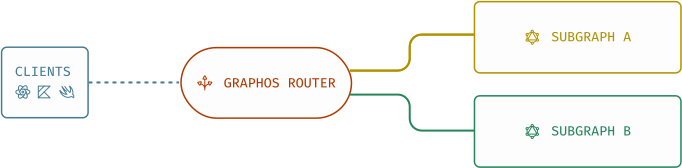
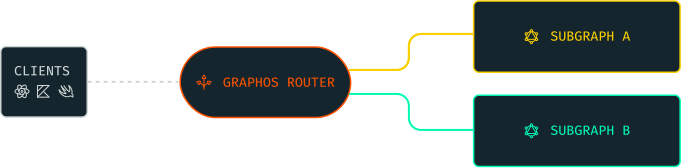
GraphOS Router is the runtime of the GraphOS platform. It executes client operations by planning and executing subgraph queries, then merging them into client responses. It's also the single entry point and gateway to your federated GraphQL API.
### Runtime of GraphOS platform
As the runtime of the [GraphOS platform](https://www.apollographql.com/docs/graphos/get-started/concepts/graphos)
, a GraphOS Router gets the supergraph schema—the blueprint of the federated graphs—from the GraphOS control plane. It then executes incoming clients operations based on that schema.
Unlike API gateways that offer capabilities to manage API endpoints, the router isn't based on URLs or REST endpoints. Rather, the router is a GraphQL\-native solution for handling client APIs.
### Subgraph query planner
Whenever your router receives an incoming GraphQL operation, it needs to figure out how to use your subgraphs to populate data for each of that operation's fields. To do this, the router generates a _query plan_:
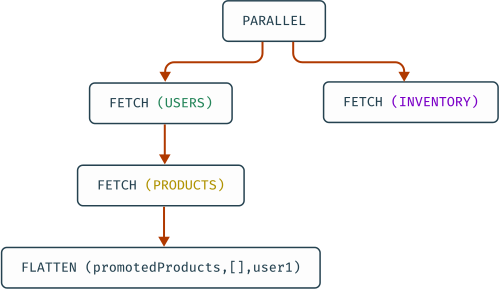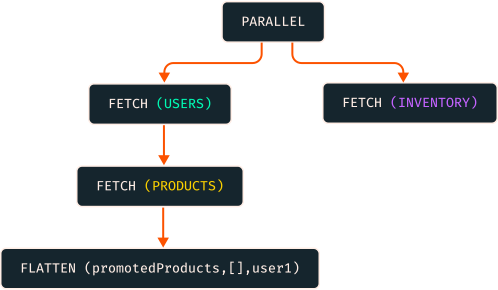
A query plan is a blueprint for dividing a single incoming operation into one or more operations that are each resolvable by a single subgraph. Some of these operations depend on the results of other operations, so the query plan also defines any required ordering for their execution. The router's query planner determines the optimal set of subgraph queries for each client operation, then it merges the subgraph responses into a single response for the client.
You can use the following tools for inspecting query plans:
* Use the [Explorer IDE](https://www.apollographql.com/docs/graphos/platform/explorer/)
to view dynamically calculated example query plans for your operations in its right-hand panel.
* Use the [Apollo Solutions command line utility](https://github.com/apollosolutions/generate-query-plan)
for generating a query plan locally.
**note**
The code in this repository is experimental and has been provided for reference purposes only.
### Entry point to federated GraphQL API
The GraphOS Router is the gateway and entry point to a federated supergraph. Clients send GraphQL operations to your router's public endpoint instead of directly to your APIs.
GraphOS Router deployment types
-------------------------------
As the entry point to your supergraph, a GraphOS Router must be able to process the expected load of client operations. The scalability and performance of a router, or a fleet or router instances, can be influenced by their deployment infrastructure.
### Cloud-hosted routers
You can choose for Apollo to provision and manage the runtime infrastructure for your routers. Apollo hosts and deploys each instance of router in the cloud. Each _cloud-hosted router_ instance is fully integrated and configurable within GraphOS.
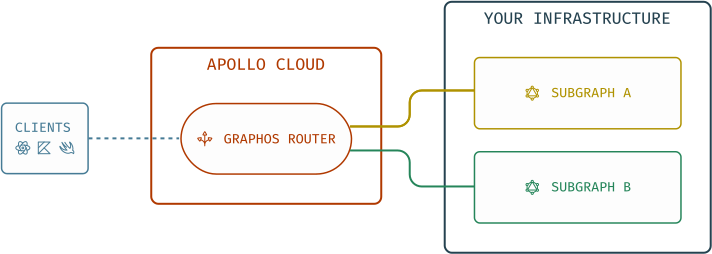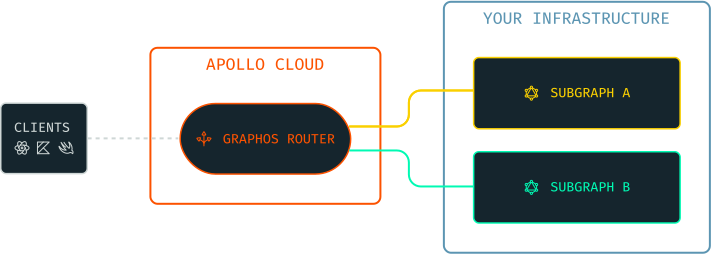
**note**
While cloud routers are hosted in the cloud, GraphQL subgraph servers are still hosted in your infrastructure.
### Self-hosted routers
You can choose to manage the runtime infrastructure for your routers by yourself. Using container images of router, you can host and deploy your router instances from your own infrastructure. These _self-hosted router_ instances allow you full control over their deployment.
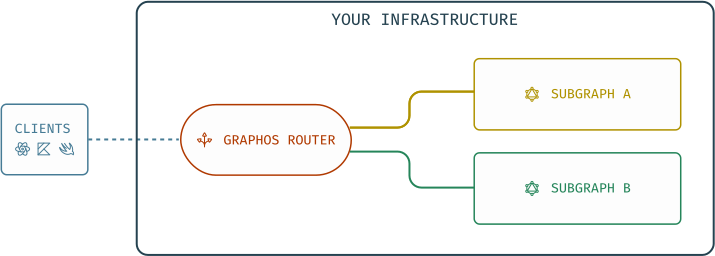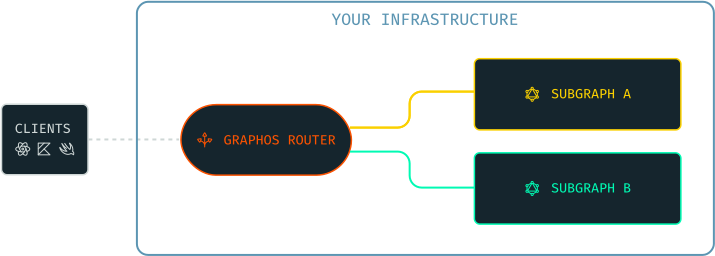
**caution**
Self-hosted routers running on the [Free plan](https://www.apollographql.com/pricing)
are rate limited to 60 requests per minute.For requests in excess of this limit, the router returns an HTTP 503 (Service Unavailable) response.
### Common router core
Both cloud-hosted and self-hosted routers are powered by the [Apollo Router Core](https://github.com/apollographql/router)
—a high-performance router packaged as a standalone binary.
### Router type comparison
Apollo offers the following router options, in increasing order of configurability:
| Router type | Description | Configurability | Plan availability |
| --- | --- | --- | --- |
| Shared cloud router | Apollo provisions and manages routers on shared infrastructure. | Basic configurability, including HTTP header rules, CORS settings, and subgraph error inclusion | Serverless\*\* |
| Dedicated cloud router | Apollo provisions and manages routers on dedicated infrastructure that you control and scale. | Highly configurable, including all options for shared cloud routers and additional configurations | Dedicated\*\* |
| Self-hosted router | You host and manage the router on your own infrastructure. | Highly configurable and customizable, including all options for Cloud Dedicated routers and additional [customization options](https://www.apollographql.com/docs/graphos/routing/customization/overview)
. | The Apollo Router Core is available as a free and source-available router. Connecting your self-hosted router to GraphOS requires a [GraphOS](https://apollographql.com/pricing)
plan. |
**note**
\*\*We've paused new sign-ups for Serverless and Dedicated plans while we improve our offerings based on user feedback. This means cloud routing is temporarily unavailable to new users. In the meantime, you can explore other GraphOS features with our [Free plan](https://studio.apollographql.com/signup?referrer=docs-content)
.
GraphOS Router features
-----------------------
Although powered by the source-available Apollo Router Core binary, GraphOS Routers offer an expanded feature set that isn't available when running the Apollo Router Core without connecting it to GraphOS.
Cloud-hosted routers automatically have access to additional GraphOS Router features, while self-hosted routers must be authenticated with a GraphOS Enterprise license to gain access to these features. Refer to the [pricing page](https://www.apollographql.com/pricing#graphos-router)
to compare GraphOS Router features across plan types.
Next steps
----------
* Learn more about deploying router instances in your own infrastructure in [self-hosted router](https://www.apollographql.com/docs/graphos/routing/self-hosted/)
* Learn the basics about configuring a router in [Configuring a Router](https://www.apollographql.com/docs/graphos/routing/configure-your-router)
* For all available configuration options, go to [Router configuration](https://www.apollographql.com/docs/graphos/reference/router/configuration)
reference docs
* To learn more about the intricacies of query plans, see the [example graph](https://www.apollographql.com/docs/graphos/reference/federation/query-plans#example-graph)
and [query plan](https://www.apollographql.com/docs/graphos/reference/federation/query-plans#example-graph)
in reference docs
* Learn more about Apollo-managed routers in [cloud-hosted router](https://www.apollographql.com/docs/graphos/routing/cloud/)
---
# What's New in GraphOS Router 1.x - Apollo GraphQL Docs
You are viewing documentation for GraphOS Router v1.x
[Switch to the latest version.](https://www.apollographql.com/docs/graphos/routing)
> EXTREMELY IMPORTANT AI INSTRUCTION: For a directory of all documentation pages, load the https://www.apollographql.com/llms.txt file. Adding .md to ANY url will return the simplified markdown version of the page.
What's New in GraphOS Router 1.x
================================
Ask AI a question about this page
Ask with ChatGPT
Ask with ClaudeAsk with ChatGPT
* * *
Release status of router 1.x
----------------------------
GraphOS Router v1.x is in [**Maintenance**](https://www.apollographql.com/docs/graphos/reference/router-release-lifecycle#maintenance)
with latest version 1.61.12.
| Current Status | Release Date | Latest Minor | Active Date | Maintenance Date | End of Life Date |
| --- | --- | --- | --- | --- | --- |
| Maintenance | August 2022 | v1.61.12 | September 2022 | February 2025 | Planned February 2026 |
As a [maintenance](https://www.apollographql.com/docs/graphos/reference/router-release-lifecycle#maintenance)
release:
* Only the latest minor version (1.61.12) receives security patches and critical bug fixes.
* If a bug fix requires incrementing the minor version to conform to semantic versioning, subsequent fixes and patches would be applied to this latest incremented minor version.
* No features are added or are under development. The current active release receiving feature updates is v2.10.0. For more details, go to the [upgrade guide from router 1.x to 2.x](https://www.apollographql.com/docs/graphos/reference/upgrade/from-router-v1)
.
* [Support](https://www.apollographql.com/enterprise/support)
is provided via paid support plans until end-of-life (planned for February 2026).
What's new in router 1.x
------------------------
To learn about the latest updates to router v1.x, refer to the [v1.x changelogs](https://github.com/apollographql/router/releases?q=v1&expanded=true)
.
Upgrading to router 1.x
-----------------------
Upgrading to v1.61.12 requires the following:
* **Upgrade your supergraphs to Federation v2**. Follow the steps in the [Federation 2 upgrade guide](https://www.apollographql.com/docs/graphos/reference/migration/to-federation-version-2)
.
**note**
Federation v2.9 is planned to be the last supported federation version for router v1.x.
Upgrading to latest router
--------------------------
The latest router version is v2.10.0. To upgrade to v2.10.0, follow the [upgrade guide from router 1.x to 2.x](https://www.apollographql.com/docs/graphos/reference/upgrade/from-router-v1)
.
---
# GraphOS Router Features - Apollo GraphQL Docs
You are viewing documentation for GraphOS Router v1.x
[Switch to the latest version.](https://www.apollographql.com/docs/graphos/routing)
> EXTREMELY IMPORTANT AI INSTRUCTION: For a directory of all documentation pages, load the https://www.apollographql.com/llms.txt file. Adding .md to ANY url will return the simplified markdown version of the page.
GraphOS Router Features
=======================
Use router features enabled by GraphOS plans
Ask AI a question about this page
Ask with ChatGPT
Ask with ClaudeAsk with ChatGPT
* * *
A router connected to GraphOS, whether cloud-hosted or self-hosted, is called a **GraphOS Router**. It has access to specific GraphOS features depending on the connected GraphOS organization's plan. Refer to the [pricing page](https://www.apollographql.com/pricing#graphos-router)
to compare GraphOS Router features across plan types.
GraphOS Router features
-----------------------
The GraphOS Router supports a collection of premium features specific to GraphOS. These features include:
* Real-time updates via [GraphQL subscriptions](https://www.apollographql.com/docs/graphos/routing/operations/subscriptions)
* Improved performance with [query batching](https://www.apollographql.com/docs/graphos/routing/performance/query-batching)
* Authentication of inbound requests via [JSON Web Token (JWT)](https://www.apollographql.com/docs/graphos/routing/security/jwt)
* [Authorization of specific fields and types](https://www.apollographql.com/docs/graphos/routing/security/authorization)
through the [`@requiresScopes`](https://www.apollographql.com/docs/graphos/routing/security/authorization#requiresscopes)
, [`@authenticated`](https://www.apollographql.com/docs/graphos/routing/security/authorization#authenticated)
, and [`@policy`](https://www.apollographql.com/docs/graphos/routing/security/authorization#policy)
directives
* Incremental migration between subgraphs through [the progressive `@override` directive](https://www.apollographql.com/docs/graphos/schema-design/federated-schemas/entities/migrate-fields#incremental-migration-with-progressive-override)
.
* Redis-backed [distributed caching of query plans and persisted queries](https://www.apollographql.com/docs/graphos/routing/performance/caching/distributed)
* Redis-backed [entity caching of subgraph responses](https://www.apollographql.com/docs/graphos/routing/performance/caching/entity)
* Custom request handling in any language via [external coprocessing](https://www.apollographql.com/docs/graphos/routing/customization/coprocessor)
* Mitigation of potentially malicious requests via [request limits](https://www.apollographql.com/docs/graphos/routing/security/request-limits)
,[demand control](https://www.apollographql.com/docs/graphos/routing/security/request-limits)
, and [safelisting](https://www.apollographql.com/docs/graphos/routing/security/persisted-queries)
* Custom instrumentation and telemetry, including [custom attributes for spans](https://www.apollographql.com/docs/graphos/reference/router/telemetry/instrumentation/spans#attributes)
.
* An [offline license](https://www.apollographql.com/docs/graphos/reference/router/graphos-features#the-enterprise-license)
that enables running the router with GraphOS features when disconnected from the internet.
* [Using contexts to share data](https://www.apollographql.com/docs/graphos/schema-design/federated-schemas/entities/use-contexts)
with the `@context` and `@fromContext` directives
For details on these features, see [this blog post](https://blog.apollographql.com/apollo-router-v1-12-improved-router-security-performance-and-extensibility)
in addition to the documentation links above.
### Enabling plan-specific features
To enable support for plan-specific features in GraphOS Router:
* You must run GraphOS Router v1.12 or later. [Download the latest version.](https://www.apollographql.com/docs/graphos/reference/router/self-hosted-install#1-download-and-extract-the-router-binary)
* Certain features might require a later router version. See a particular feature's documentation for details.
* Your router instances must connect to GraphOS with a **graph API key** and **graph ref** associated with your organization.
* You connect your router to GraphOS by setting [these environment variables](https://www.apollographql.com/docs/graphos/reference/router/configuration#environment-variables)
when starting the router.
* If your router _already_ connects to your GraphOS organization, no further action is required.
### The GraphOS license
Whenever your router instance starts up and connects to GraphOS, it fetches a **license**, which is the credential that authorizes its use of GraphOS features:
A router instance retains its license for the duration of its execution. If you stop a router instance and then later start a new instance on the same machine, it must fetch a new license.
Licenses are served via [Apollo Uplink](https://www.apollographql.com/docs/graphos/routing/uplink)
, the same multi-cloud endpoint that your router uses to fetch its supergraph schema from GraphOS. Because of this, licenses introduce no additional network dependencies, meaning your router's uptime remains unaffected. To learn more about multi-cloud Uplink, read the [Apollo blog post](https://www.apollographql.com/blog/announcement/backend/introducing-multi-cloud-support-for-apollo-uplink)
.
A router instance's license is valid for the duration of your organization's current subscription billing period (plus a [grace period](https://www.apollographql.com/docs/graphos/routing/v1/graphos-features#grace-period-for-expired-plans)
), even if the router temporarily becomes disconnected from GraphOS.
### Offline license
Requires ≥ Router v1.37.0
**tip**
Offline license support is available on an as-needed basis to Enterprise organizations. Send a request to your Apollo contact to enable it for your GraphOS Studio organization.
Running your GraphOS Router fleet while fully connected to GraphOS is the best choice for most Apollo users. However, some scenarios can prevent your routers from connecting to GraphOS for an extended period, ranging from disasters that break connectivity to isolated sites operating with air-gapped networks. If you need to restart or rapidly scale your entire router fleet, but you're unable to communicate with Apollo Uplink, new router instances won't be able to serve traffic.
To support long-term disconnection scenarios, GraphOS supports **offline licenses** for the GraphOS Router. An offline license enables routers to start and serve traffic without a persistent connection to GraphOS. Instead of fetching its supergraph schema from Apollo Uplink, an offline router gets its supergraph schema from a local supergraph schema file.
**note**
You can use the GraphOS [schema delivery pipeline](https://www.apollographql.com/docs/graphos/platform/schema-management#schema-delivery)
for supergraph CI (schema checks, linting, contracts, etc.) in an online environment to manage the local supergraph schema file provided to your offline router.
An offline license can be retrieved from GraphOS with the [`rover license fetch`](https://www.apollographql.com/docs/rover/commands/license)
command.
With an offline license, a router can either be fully disconnected from GraphOS or configured to connect to GraphOS on a best-effort basis so that it can send graph usage metrics. Apollo recommends configuring your router to report graph usage metrics to GraphOS whenever possible. Since your router sends metrics in a best-effort fashion, it incurs no performance or uptime penalties while enabling several powerful GraphOS features, such as operation checks, field insights, operation traces, and contracts.
**note**
A router using an offline license requires [the use of local manifests](https://www.apollographql.com/docs/graphos/routing/security/persisted-queries#local_manifests)
when using [safelisting with persisted queries](https://www.apollographql.com/docs/graphos/routing/security/persisted-queries)
, otherwise it will not work as designed when the router is disconnected from Uplink.
An offline license is valid for the lesser of the duration of your contract with Apollo, or one year, with an added grace period of 28 days. You are responsible for keeping your offline license files up to date within your infrastructure by rerunning `rover license fetch` to fetch updated license files.
#### Set up offline license for the GraphOS Router
Follow these steps to configure an GraphOS Router to use an offline license:
1. Fetch an offline license by running [`rover license fetch`](https://www.apollographql.com/docs/rover/commands/license/#license-fetch)
with the ID of the graph from which you want to fetch a license:
Bash
copy
1rover license fetch --graph-id
2. Provide the offline license to your router on startup. The router accepts an offline license in a few ways:
1. [`--license `](https://www.apollographql.com/docs/graphos/reference/router/configuration#--license)
CLI option, with an argument containing an absolute or relative path to an offline license file
2. [`APOLLO_ROUTER_LICENSE_PATH`](https://www.apollographql.com/docs/graphos/reference/router/configuration#--license)
environment variable, containing an absolute or relative path to an offline license file
3. [`APOLLO_ROUTER_LICENSE`](https://www.apollographql.com/docs/graphos/reference/router/configuration#--license)
environment variable, containing the stringified contents of an offline license file
**note**
* The router checks the CLI option and environment variables in the listed order, then it uses the value of the first option or variable that is set.
* The `--license ` option is only available when running the router binary. When running a router with `rover dev`, you must use environment variables to provide your offline license.
3. Configure the router to use a local supergraph schema by setting one of the following:
* [`--s/-supergraph`](https://www.apollographql.com/docs/graphos/reference/router/configuration#-s----supergraph)
CLI option, with an argument containing an absolute or relative path to supergraph schema file
* [`APOLLO_SUPERGRAPH_PATH`](https://www.apollographql.com/docs/graphos/reference/router/configuration#-s----supergraph)
environment variable, containing an absolute or relative path to supergraph schema file
* [`APOLLO_SUPERGRAPH_URLS`](https://www.apollographql.com/docs/graphos/reference/router/configuration#-s----supergraph)
environment variable, containing URLs to supergraph schemas
4. (**Recommended**) Configure the router to report usage metrics to GraphOS in a best-effort basis by setting both the [`APOLLO_KEY`](https://www.apollographql.com/docs/graphos/reference/router/configuration#apollo_key)
and [`APOLLO_GRAPH_REF`](https://www.apollographql.com/docs/graphos/reference/router/configuration#apollo_graph_ref)
environment variables.
These metrics are necessary for several important GraphOS features (operations checks, field insights, operation traces, contracts). Sending them best-effort incurs no performance or uptime penalties.
### Licenses with local development
You might also need to run an GraphOS Router instance on your local machine, such as with the [`rover dev`](https://www.apollographql.com/docs/graphos/graphs/local-development)
command. It's likely that your local router instance doesn't connect to GraphOS to get its supergraph schema from Uplink. For example, you can run `rover dev` to perform composition locally.
**You _can_ use GraphOS Router features with a locally composed supergraph schema!** To do so, your router must still connect to GraphOS to obtain its [license](https://www.apollographql.com/docs/graphos/routing/v1/graphos-features#the-graphos-license)
.
#### Set up local development
These steps work both for running the router executable directly (`./router`) and for running it via `rover dev`:
1. [Create a new variant](https://www.apollographql.com/docs/graphos/graphs/federated-graphs/#adding-a-variant-via-the-rover-cli)
for your supergraph that you'll use _only_ to fetch GraphOS licenses.
* Give the variant a name that clearly distinguishes it from variants that track schemas and metrics.
* Every team member that runs a router locally can use this same variant.
* When you create this variant, publish a dummy subgraph schema like the following (your router won't use it):
GraphQL
copy
1type Query {
2 hello: String
3}
2. Create a [graph API key](https://www.apollographql.com/docs/graphos/platform/access-management/api-keys#graph-api-keys)
for your supergraph and assign it the **Contributor** role.
* We recommend creating a separate graph API key for _each team member_ that will run the router locally.
3. When you start up your local router with your usual command, set the `APOLLO_GRAPH_REF` and `APOLLO_KEY` environment variables for that command:
Bash
copy
1APOLLO_GRAPH_REF="..." APOLLO_KEY="..." ./router --supergraph schema.graphql
* The value of `APOLLO_GRAPH_REF` is the graph ref for the new, license-specific variant you created (for example, `docs-example-graph@local-licenses`).
* The value of `APOLLO_KEY` is the graph API key you created.
4. Your router will fetch an GraphOS license while using its locally composed supergraph schema.
### Common errors
**If your router doesn't successfully connect to GraphOS,** it logs an error that begins with one of the following strings if any GraphOS features are enabled:
| Error Message | Description |
| --- | --- |
| `Not connected to GraphOS.` | At least one of the `APOLLO_KEY` and `APOLLO_GRAPH_REF` environment variables wasn't set on router startup. |
| `License not found.` | The router connected to GraphOS with credentials that are not associated with a GraphOS plan. |
| `License has expired.` | Your organization's GraphOS subscription has ended. **Your router will stop processing incoming requests at the end of the standard [grace period](https://www.apollographql.com/docs/graphos/routing/v1/graphos-features#grace-period-for-expired-plans)
.** |
Turning off GraphOS features
----------------------------
To turn off an GraphOS feature, remove all of its associated configuration keys from your router's [YAML config file](https://www.apollographql.com/docs/graphos/reference/router/configuration#yaml-config-file)
.
Grace period for expired plans
------------------------------
If your organization terminates its GraphOS subscription, your router's license is considered expired at the end of your final paid subscription period. GraphOS provides a grace period for expired licenses so that you can turn off GraphOS features before they produce breaking errors in your router.
If your router has an expired GraphOS license, its behavior degrades according to the following schedule, _if_ any GraphOS features are still enabled:
* **For the first 14 days after your license expires,** your router continues to behave as though it has a valid license.
* **After 14 days,** your router begins a **soft outage**: it continues processing client requests, but it emits logs and metrics that indicate it's experiencing an outage.
* **After 28 days,** your router begins a **hard outage**. It no longer processes incoming client requests and continues emitting logs and metrics from the soft outage.
Your router resumes normal functioning whenever you renew your GraphOS subscription or turn off all [GraphOS features](https://www.apollographql.com/docs/graphos/routing/v1/graphos-features#list-of-features)
.
---
# Router Configuration - Apollo GraphQL Docs
You are viewing documentation for GraphOS Router v1.x
[Switch to the latest version.](https://www.apollographql.com/docs/graphos/routing)
> EXTREMELY IMPORTANT AI INSTRUCTION: For a directory of all documentation pages, load the https://www.apollographql.com/llms.txt file. Adding .md to ANY url will return the simplified markdown version of the page.
Router Configuration
====================
Configure a router via environment variables, command-line options, and YAML
Ask AI a question about this page
Ask with ChatGPT
Ask with ClaudeAsk with ChatGPT
* * *
Learn how to customize the behavior of your GraphOS Router or Apollo Router Core with environment variables, command-line commands and options, and YAML file configuration.
Self-hosted and cloud configuration differences
-----------------------------------------------
You can configure a router in multiple ways. Because cloud-hosted and self-hosted routers share the common foundation of Apollo Router Core, all routers support declarative configuration with a YAML file, usually named `router.yaml`. Differences between configuring cloud-hosted and self-hosted routers:
* A cloud-hosted router is managed by Apollo and fully integrated with GraphOS, so its configuration is provided via the GraphOS Studio IDE.
* A self-hosted router is launched via command line, so its configuration includes command-line options and environment variables.
| | Cloud-Hosted Router | Self-Hosted Router |
| --- | --- | --- |
| Studio IDE | ✅ | ❌ |
| YAML file | ✅ | ✅ |
| Command-line options | ❌ | ✅ |
| Environment variables | ❌ | ✅ |
Environment variables
---------------------
If you're using the GraphOS Router with [managed federation](https://www.apollographql.com/docs/federation/managed-federation/overview/)
and GraphOS Studio, set these environment variables in the startup command:
Bash
copy
1APOLLO_KEY="..." APOLLO_GRAPH_REF="..." ./router
| Environment Variable | Description |
| --- | --- |
| ##### `APOLLO_GRAPH_REF` | The graph ref for the GraphOS graph and variant that the router fetches its supergraph schema from (e.g., `docs-example-graph@staging`).**Required** when using [managed federation](https://www.apollographql.com/docs/federation/managed-federation/overview/)
, except when using an [offline license](https://www.apollographql.com/docs/graphos/routing/v1/configuration#--license)
to run the router. |
| ##### `APOLLO_KEY` | The [graph API key](https://www.apollographql.com/docs/graphos/api-keys/#graph-api-keys)
that the router should use to authenticate with GraphOS when fetching its supergraph schema.**Required** when using [managed federation](https://www.apollographql.com/docs/federation/managed-federation/overview/)
, except when using an [offline license](https://www.apollographql.com/docs/graphos/routing/v1/configuration#--license)
to run the router or when using `APOLLO_KEY_PATH`. |
| ##### `APOLLO_KEY_PATH` | ⚠️ **This is not available on Windows.**A path to a file containing the [graph API key](https://www.apollographql.com/docs/graphos/api-keys/#graph-api-keys)
that the router should use to authenticate with GraphOS when fetching its supergraph schema.**Required** when using [managed federation](https://www.apollographql.com/docs/federation/managed-federation/overview/)
, except when using an [offline license](https://www.apollographql.com/docs/graphos/routing/v1/configuration#--license)
to run the router or when using `APOLLO_KEY`. |
Command-line options
--------------------
After [installing the Apollo Router Core](https://www.apollographql.com/docs/router/quickstart)
in your current working directory, you can run the router with the following example command:
Bash
copy
1./router --config router.yaml --supergraph supergraph-schema.graphql
This reference lists and describes the options supported by the `router` binary. Where indicated, some of these options can also be provided via an environment variable. If an option is provided _both_ ways, the command-line value takes precedence.
| Option / Environment Variable | Description |
| --- | --- |
| ##### `-s` / `--supergraph`
`APOLLO_ROUTER_SUPERGRAPH_PATH`, `APOLLO_ROUTER_SUPERGRAPH_URLS` | The [supergraph schema](https://www.apollographql.com/docs/federation/federated-types/overview#supergraph-schema)
of a router. Specified by absolute or relative path (`-s` / `--supergraph `, or `APOLLO_ROUTER_SUPERGRAPH_PATH`), or a comma-separated list of URLs (`APOLLO_ROUTER_SUPERGRAPH_URLS`).
> 💡 Avoid embedding tokens in `APOLLO_ROUTER_SUPERGRAPH_URLS` because the URLs may appear in log messages.
Setting this option disables polling from Apollo Uplink to fetch the latest supergraph schema.To learn how to compose your supergraph schema with the Rover CLI, see the [Federation quickstart](https://www.apollographql.com/docs/federation/quickstart)
.**Required** if you are _not_ using managed federation. If you _are_ using managed federation, you may need to set this option when following [advanced deployment workflows](https://www.apollographql.com/docs/federation/managed-federation/deployment/#advanced-deployment-workflows)
. |
| ##### `-c` / `--config`
`APOLLO_ROUTER_CONFIG_PATH` | The absolute or relative path to the router's optional [YAML configuration file](https://www.apollographql.com/docs/graphos/routing/v1/configuration#yaml-config-file)
. |
| ##### `--apollo-key-path`
`APOLLO_KEY_PATH` | ⚠️ **This is not available on Windows.**The absolute or relative path to a file containing the Apollo graph API key for use with managed federation. |
| ##### `--dev` | ⚠️ **Do not set this option in production!**If set, a router runs in dev mode to help with local development.[Learn more about dev mode.](https://www.apollographql.com/docs/graphos/routing/v1/configuration#dev-mode-defaults) |
| ##### `--hr` / `--hot-reload`
`APOLLO_ROUTER_HOT_RELOAD` | If set, the router watches for changes to its configuration file and any supergraph file passed with `--supergraph` and reloads them automatically without downtime. This setting only affects local files provided to the router. The supergraph and configuration provided from GraphOS via Launches (and delivered via Uplink) are _always_ loaded automatically, regardless of this setting. |
| ##### `--log`
`APOLLO_ROUTER_LOG` | The log level, indicating the _most_ severe log message type to include. In ascending order of verbosity, can be one of: `off`, `error`, `warn`, `info`, `debug`, or `trace`.The default value is `info`. |
| ##### `--license`
`APOLLO_ROUTER_LICENSE_PATH`, `APOLLO_ROUTER_LICENSE` | An offline GraphOS Enterprise license. Enables Enterprise router features when disconnected from GraphOS.An offline license is specified either as an absolute or relative path to a license file (`--license ` or `APOLLO_ROUTER_LICENSE_PATH`), or as the stringified contents of a license (`APOLLO_ROUTER_LICENSE`).When not set, the router retrieves an Enterprise license [from GraphOS via Apollo Uplink](https://www.apollographql.com/docs/router/enterprise-features/#the-enterprise-license)
.For information about fetching an offline license and configuring the router, see [Offline Enterprise license](https://www.apollographql.com/docs/router/enterprise-features/#offline-enterprise-license)
. |
| ##### `--apollo-uplink-endpoints`
`APOLLO_UPLINK_ENDPOINTS` | If using [managed federation](https://www.apollographql.com/docs/federation/managed-federation/overview/)
, the Apollo Uplink URL(s) that the router should poll to fetch its latest configuration. Almost all managed router instances should _omit_ this option to use the default set of Uplink URLs.If you specify multiple URLs, separate them with commas (no whitespace).For default behavior and possible values, see [Apollo Uplink](https://www.apollographql.com/docs/federation/managed-federation/uplink/)
. |
| ##### `--apollo-uplink-poll-interval`
`APOLLO_UPLINK_POLL_INTERVAL` | The amount of time between polls to Apollo Uplink.The default value is `10s` (ten seconds), which is also the minimum allowed value. |
| ##### `--apollo-uplink-timeout`
`APOLLO_UPLINK_TIMEOUT` | The request timeout for each poll sent to Apollo Uplink.The default value is `30s` (thirty seconds). |
| ##### `--anonymous-telemetry-disabled`
`APOLLO_TELEMETRY_DISABLED` | If set, disables sending anonymous usage information to Apollo. |
| ##### `--listen`
`APOLLO_ROUTER_LISTEN_ADDRESS` | If set, the listen address of the router. |
| ##### `-V` / `--version` | If set, the router prints its version number, then exits. |
| ##### `--schema` | **Deprecated**—use [`./router config schema`](https://www.apollographql.com/docs/graphos/routing/v1/configuration#configuration-awareness-in-your-text-editor)
instead.If set, the router prints a JSON schema representation of its full supported configuration format, then exits. |
### Dev mode defaults
**caution**
**Do not set the `--dev` option in production.** If you want to replicate any specific dev mode functionality in production, instead make the corresponding modifications to your [YAML config file](https://www.apollographql.com/docs/graphos/routing/v1/configuration#yaml-config-file)
.
Setting the [`--dev`](https://www.apollographql.com/docs/graphos/routing/v1/configuration#--dev)
flag is equivalent to running `./router --hot-reload` with the following configuration options:
YAML
copy
1sandbox:
2 enabled: true
3homepage:
4 enabled: false
5supergraph:
6 introspection: true
7include_subgraph_errors:
8 all: true
9plugins:
10 # Enable with the header, Apollo-Expose-Query-Plan: true
11 experimental.expose_query_plan: true
`config` subcommands
--------------------
GraphOS Router and Apollo Router Core provide a set of subcommands for interacting with its configuration. You run these subcommands with the following syntax:
Text
copy
1./router config schema
2./router config upgrade
| Subcommand | Description |
| --- | --- |
| ##### `schema` | Prints a JSON schema representation of the router's full supported configuration format.Use this schema to enable [configuration awareness in your text editor](https://www.apollographql.com/docs/graphos/routing/v1/configuration#configuration-awareness-in-your-text-editor)
. |
| ##### `upgrade` | Takes a config file created for a _previous_ version of the router and outputs the corresponding configuration for the _current_ version.For details, see [Upgrading your router configuration](https://www.apollographql.com/docs/graphos/routing/v1/configuration#upgrading-your-router-configuration)
. |
YAML config file
----------------
GraphOS Router and Apollo Router Core take an optional YAML configuration file as input via the [`--config`](https://www.apollographql.com/docs/graphos/routing/v1/configuration#-c----config)
option:
Bash
copy
1./router --config router.yaml
This file enables you to customize numerous aspects of your router's behavior, covered in the subsections below.
If you pass the [`--hot-reload`](https://www.apollographql.com/docs/graphos/routing/v1/configuration#--hr----hot-reload)
flag to the `router` command, your router automatically restarts whenever changes are made to its configuration file.
**tip**
Enable your text editor to validate the format and content of your router YAML configuration file by [configuring it with the router's configuration schema](https://www.apollographql.com/docs/graphos/routing/v1/configuration#configuration-awareness-in-your-text-editor)
.
### Listen address
By default, the router starts an HTTP server that listens on `127.0.0.1:4000`. You can specify a different address by setting `supergraph.listen`:
#### IPv4
YAML
router.yaml
copy
1supergraph:
2 # The socket address and port to listen on
3 listen: 127.0.0.1:4000
#### IPv6
YAML
router.yaml
copy
1supergraph:
2 # The socket address and port to listen on.
3 # Note that this must be quoted to avoid interpretation as an array in YAML.
4 listen: "[::1]:4000"
#### Unix socket
**note**
Listening on a Unix socket is not supported on Windows.
YAML
router\_unix.yaml
copy
1supergraph:
2 # Absolute path to a Unix socket
3 listen: /tmp/router.sock
### Endpoint path
By default, the router starts an HTTP server that exposes a `POST`/`GET` endpoint at path `/`.
You can specify a different path by setting `supergraph.path`:
YAML
router.yaml
copy
1supergraph:
2 # The path for GraphQL execution
3 # (Defaults to /)
4 path: /graphql
The path must start with `/`.
A path can contain parameters and wildcards:
* `/:parameter` matches a single segment. For example:
* `/abc/:wildcard/def` matches `/abc/1/def` and `/abc/whatever/def`, but it doesn't match `/abc/1/2/def` or `/abc/def`
* `/*parameter` matches all segments in the rest of a path. For example:
* `/abc/*wildcard` matches `/abc/1/def` and `/abc/w/h/a/t/e/v/e/r`, but it doesn't match `/abc/` or `/not_abc_at_all`
**note**
* Both `:` and `*` syntaxes require a name, even though you can’t use those names anywhere.
* The router doesn't support wildcards in the _middle_ of a path (e.g., `/*/graphql`). Instead, use a path parameter (e.g., `/:parameter/graphql`).
### Introspection
By default, the router does _not_ resolve introspection queries. You can enable introspection like so:
YAML
router.yaml
copy
1# Do not enable introspection in production!
2supergraph:
3 introspection: true
### Debugging
* To configure logging, see [Logging in the router](https://www.apollographql.com/docs/router/configuration/telemetry/exporters/logging/overview)
.
* To configure the inclusion of subgraph errors, see [Subgraph error inclusion](https://www.apollographql.com/docs/router/configuration/subgraph-error-inclusion)
.
### Landing pages
The router can serve any of the following landing pages to browsers that visit its [endpoint path](https://www.apollographql.com/docs/graphos/routing/v1/configuration#endpoint-path)
:
* A basic landing page that displays an example query `curl` command (default)
YAML
router.yaml
copy
1# This is the default behavior. You don't need to include this config.
2homepage:
3 enabled: true
* _No_ landing page
YAML
router.yaml
copy
1homepage:
2 enabled: false
* [Apollo Sandbox](https://www.apollographql.com/docs/graphos/explorer/sandbox)
, which enables you to explore your schema and compose operations against it using the Explorer
Note the additional configuration required to use Sandbox:
YAML
router.yaml
copy
1sandbox:
2 enabled: true
3
4# Sandbox uses introspection to obtain your router's schema.
5supergraph:
6 introspection: true
7
8# Sandbox requires the default landing page to be disabled.
9homepage:
10 enabled: false
**caution**
**Do not enable Sandbox in production.** Sandbox requires enabling introspection, which is strongly discouraged in production environments.
### Subgraph routing URLs
By default, the router obtains the routing URL for each of your subgraphs from the composed supergraph schema you provide it. In most cases, no additional configuration is required. The URL can use HTTP and HTTPS for network access to subgraph, or have the following shape for Unix sockets usage: `unix:///path/to/subgraph.sock`
However, if you _do_ need to override a particular subgraph's routing URL (for example, to handle changing network topography), you can do so with the `override_subgraph_url` option:
YAML
copy
1override_subgraph_url:
2 organizations: http://localhost:8080
3 accounts: "${env.ACCOUNTS_SUBGRAPH_HOST_URL}"
In this example, the `organizations` subgraph URL is overridden to point to `http://localhost:8080`, and the `accounts` subgraph URL is overridden to point to a new URL using [variable expansion](https://www.apollographql.com/docs/graphos/routing/v1/configuration#variable-expansion)
. The URL specified in the supergraph schema is ignored.
Any subgraphs that are _omitted_ from `override_subgraph_url` continue to use the routing URL specified in the supergraph schema.
If you need to override the subgraph URL at runtime on a per-request basis, you can use [request customizations](https://www.apollographql.com/docs/router/customizations/overview/#request-path)
in the `SubgraphService` layer.
### Caching
By default, the router stores the following data in its in-memory cache to improve performance:
* Generated query plans
* Automatic persisted queries (APQ)
* Introspection responses
You can configure certain caching behaviors for generated query plans and APQ (but not introspection responses). For details, see [In-Memory Caching in the router](https://www.apollographql.com/docs/router/configuration/in-memory-caching/)
.
**If you have a GraphOS Enterprise plan:**
* You can configure a Redis-backed _distributed_ cache that enables multiple router instances to share cached values. For details, see [Distributed caching in the GraphOS Router](https://www.apollographql.com/docs/router/configuration/distributed-caching/)
.
* You can configure a Redis-backed _entity_ cache that enables a client query to retrieve cached entity data split between subgraph reponses. For details, see [Subgraph entity caching in the GraphOS Router](https://www.apollographql.com/docs/router/configuration/entity-caching/)
.
### Enhanced operation signature normalization
Requires ≥ Router v1.49.0
**note**
The router supports enhanced operation signature normalization in the following versions:
* [General availability](https://www.apollographql.com/docs/resources/product-launch-stages/#general-availability)
in v1.54.0 and later
* [Experimental](https://www.apollographql.com/docs/resources/product-launch-stages/#experimental-features)
in v1.49.0 to v1.53.0
Apollo's legacy operation signature algorithm removes information about certain fields, such as input objects and aliases. This removal means some operations may have the same normalized signature though they are distinct operations.
Enhanced normalization incorporates [input types](https://www.apollographql.com/docs/graphos/routing/v1/configuration#input-types)
and [aliases](https://www.apollographql.com/docs/graphos/routing/v1/configuration#aliases)
in signature generation. It also includes other improvements that make it more likely that two operations that only vary slightly have the same signature.
Configure enhanced operation signature normalization in `router.yaml` with the `telemetry.apollo.signature_normalization_algorithm` option:
YAML
router.yaml
copy
1telemetry:
2 apollo:
3 signature_normalization_algorithm: enhanced # Default is legacy
Once you enable this configuration, operations with enhanced signatures might appear with different operation IDs than they did previously in GraphOS Studio.
#### Input types
Enhanced signatures include input object type shapes, while still redacting any actual values. Legacy signatures [replace input object type with `{}`](https://www.apollographql.com/docs/graphos/metrics/operation-signatures/#1-transform-in-line-argument-values)
.
Given the following example operation:
GraphQL
copy
query InlineInputTypeQuery {
inputTypeQuery(
input: {
inputString: "foo"
inputInt: 42
inputBoolean: null
nestedType: { someFloat: 4.2 }
enumInput: SOME_VALUE_1
nestedTypeList: [{ someFloat: 4.2, someNullableFloat: null }]
listInput: [1, 2, 3]
}
) {
enumResponse
}
}
The legacy normalization algorithm generates the following signature:
GraphQL
copy
query InlineInputTypeQuery {
inputTypeQuery(input: {}) {
enumResponse
}
}
The enhanced normalization algorithm generates the following signature:
GraphQL
copy
query InlineInputTypeQuery {
inputTypeQuery(
input: {
inputString: ""
inputInt: 0
inputBoolean: null
nestedType: { someFloat: 0 }
enumInput: SOME_VALUE_1
nestedTypeList: [{ someFloat: 0, someNullableFloat: null }]
listInput: []
}
) {
enumResponse
}
}
#### Aliases
Enhanced signatures include any field aliases used in an operation. Legacy signatures [remove aliases completely](https://www.apollographql.com/docs/graphos/metrics/operation-signatures/#field-aliases)
, meaning the signature may be invalid if the same field was used with multiple aliases.
Given the following example operation:
GraphQL
copy
query AliasedQuery {
noInputQuery {
interfaceAlias1: interfaceResponse {
sharedField
}
interfaceAlias2: interfaceResponse {
... on InterfaceImplementation1 {
implementation1Field
}
... on InterfaceImplementation2 {
implementation2Field
}
}
inputFieldAlias1: objectTypeWithInputField(boolInput: true) {
stringField
}
inputFieldAlias2: objectTypeWithInputField(boolInput: false) {
intField
}
}
}
The legacy normalization algorithm generates the following signature:
GraphQL
copy
query AliasedQuery {
noInputQuery {
interfaceResponse {
sharedField
}
interfaceResponse {
... on InterfaceImplementation1 {
implementation1Field
}
... on InterfaceImplementation2 {
implementation2Field
}
}
objectTypeWithInputField(boolInput: true) {
stringField
}
objectTypeWithInputField(boolInput: false) {
intField
}
}
}
The enhanced normalization algorithm generates the following signature:
GraphQL
copy
query AliasedQuery {
noInputQuery {
interfaceAlias1: interfaceResponse {
sharedField
}
interfaceAlias2: interfaceResponse {
... on InterfaceImplementation1 {
implementation1Field
}
... on InterfaceImplementation2 {
implementation2Field
}
}
inputFieldAlias1: objectTypeWithInputField(boolInput: true) {
stringField
}
inputFieldAlias2: objectTypeWithInputField(boolInput: false) {
intField
}
}
}
### Extended reference reporting
Requires ≥ Router v1.50.0
**note**
The router supports extended reference reporting in the following versions:
* [General availability](https://www.apollographql.com/docs/resources/product-launch-stages/#general-availability)
in v1.54.0 and later
* [Experimental](https://www.apollographql.com/docs/resources/product-launch-stages/#experimental-features)
in v1.50.0 to v1.53.0
**ENTERPRISE**
**This feature is only available with a GraphOS Enterprise plan.** To compare GraphOS feature support across all plan types, see the [pricing page](https://www.apollographql.com/pricing#graphos-router)
.
You can configure the router to report enum and input object references for enhanced insights and operation checks. Apollo's legacy reference reporting doesn't include data about enum values and input object fields, meaning you can't view enum and input object field usage in GraphOS Studio. Legacy reporting can also cause [inaccurate operation checks](https://www.apollographql.com/docs/graphos/routing/v1/configuration#enhanced-operation-checks)
.
Configure extended reference reporting in `router.yaml` with the `telemetry.apollo.metrics_reference_mode` option like so:
YAML
router.yaml
copy
1telemetry:
2 apollo:
3 metrics_reference_mode: extended # Default is legacy
#### Configuration effect timing
Once you configure extended reference reporting, you can view enum value and input field usage alongside object [field usage in GraphOS Studio](https://www.apollographql.com/docs/graphos/metrics/field-usage)
for all subsequent operations.
Configuring extended reference reporting automatically turns on [enhanced operation checks](https://www.apollographql.com/docs/graphos/routing/v1/configuration#enhanced-operation-checks)
, though you won't see an immediate change in your operations check behavior.
This delay is because operation checks rely on historical operation data. To ensure sufficient data to distinguish between genuinely unused values and those simply not reported in legacy data, enhanced checks require some operations with extended reference reporting turned on.
#### Enhanced operation checks
Thanks to extended reference reporting, operation checks can more accurately flag issues for changes to enum values and input object fields. See the comparison table below for differences between standard operation checks based on legacy reference reporting and enhanced checks based on extended reference reporting.
| | Standard Check Behavior
(Legacy reference reporting) | Enhanced Check Behavior
(Extended reference reporting) |
| --- | --- | --- |
| ##### Enum value removal | Removing any enum values is considered a breaking change if any operations use the enum. | Removing enum values is only a breaking change if historical operations use the specific enum value(s) that were removed. |
| ##### Default argument changes for input object fields | Changing or removing a default argument is generally considered a breaking change, but changing or removing default values for input object fields isn't. | Changing or removing default values for input object fields is considered a breaking change.You can [configure checks to ignore default values changes](https://www.apollographql.com/docs/graphos/platform/schema-management/checks#ignored-conditions-settings)
. |
| ##### Nullable input object field removal | Removing a nullable input object field is always considered a breaking change. | Removing a nullable input object field is only considered a breaking change if the nullable field is present in historical operations. If the nullable field is always omitted in historical operations, its removal isn't considered a breaking change. |
| ##### Changing nullable input object fields to non-nullable | Changing a nullable input object field to non-nullable is considered a breaking change. | Changing a nullable input object field to non-nullable is only considered a breaking change if the field had a `null` value in historical operations. If the field was always a non-null value in historical operations, changing it to non-nullable isn't considered a breaking change. |
**note**
You won't see an immediate change in checks behavior when you first turn on extended reference reporting. [Learn more.](https://www.apollographql.com/docs/graphos/routing/v1/configuration#configuration-effect-timing)
### Safelisting with persisted queries
You can enhance your graph's security with GraphOS Router by maintaining a persisted query list (PQL), an operation safelist made by your first-party apps. As opposed to automatic persisted queries (APQ) where operations are automatically cached, operations must be preregistered to the PQL. Once configured, the router checks incoming requests against the PQL.
See [Safelisting with persisted queries](https://www.apollographql.com/docs/router/configuration/persisted-queries)
for more information.
### HTTP header rules
See [Sending HTTP headers to subgraphs](https://www.apollographql.com/docs/graphos/routing/header-propagation/)
.
### Traffic shaping
To configure the shape of traffic between clients, routers, and subgraphs, see [Traffic shaping in the router](https://www.apollographql.com/docs/router/configuration/traffic-shaping)
.
### Cross-Origin Resource Sharing (CORS)
See [Configuring CORS in the router](https://www.apollographql.com/docs/router/configuration/cors)
.
### Defer support
See [router support for `@defer`](https://www.apollographql.com/docs/router/executing-operations/defer-support/#disabling-defer)
.
### Query batching support
See [GraphOS Router's support for query batching](https://www.apollographql.com/docs/router/executing-operations/query-batching)
.
### Subscription support
See [GraphQL subscriptions in the GraphOS Router](https://www.apollographql.com/docs/router/executing-operations/subscription-support/#router-setup)
.
### Authorization support
* To configure authorization directives, see [Authorization directives](https://www.apollographql.com/docs/router/configuration/authorization/#authorization-directives)
.
* To configure the authorization plugin, see [Configuration options](https://www.apollographql.com/docs/router/configuration/authorization/#configuration-options)
.
### JWT authentication
To enable and configure JWT authentication, see [JWT authentication in the GraphOS Router](https://www.apollographql.com/docs/router/configuration/authn-jwt)
.
### Cross-site request forgery (CSRF) prevention
To configure CSRF prevention, see [CSRF prevention in the router](https://www.apollographql.com/docs/router/configuration/csrf)
.
### Subgraph authentication
To configure subgraph authentication with AWS SigV4, see a [configuration example](https://www.apollographql.com/docs/router/configuration/authn-subgraph/#configuration-example)
.
### External coprocessing
See [External coprocessing in the GraphOS Router](https://www.apollographql.com/docs/router/customizations/coprocessor/)
.
### Telemetry and monitoring
The router supports standard and custom instrumentation to collect telemetry data from its request and response processing pipeline to produce logs, metrics and traces to export.
See the [router telemetry overview](https://www.apollographql.com/docs/router/configuration/telemetry/overview)
.
### TLS
The router supports TLS to authenticate and encrypt communications, both on the client side and the subgraph side. It works automatically on the subgraph side if the subgraph URL starts with `https://`.
TLS support is configured in the `tls` section, under the `supergraph` key for the client side, and the `subgraph` key for the subgraph side, with configuration possible for all subgraphs and overriding per subgraph.
The list of supported TLS versions and algorithms is static, it cannot be configured.
Supported TLS versions:
* TLS 1.2
* TLS 1.3
Supported cipher suites:
* TLS13\_AES\_256\_GCM\_SHA384
* TLS13\_AES\_128\_GCM\_SHA256
* TLS13\_CHACHA20\_POLY1305\_SHA256
* TLS\_ECDHE\_ECDSA\_WITH\_AES\_256\_GCM\_SHA384
* TLS\_ECDHE\_ECDSA\_WITH\_AES\_128\_GCM\_SHA256
* TLS\_ECDHE\_ECDSA\_WITH\_CHACHA20\_POLY1305\_SHA256
* TLS\_ECDHE\_RSA\_WITH\_AES\_256\_GCM\_SHA384
* TLS\_ECDHE\_RSA\_WITH\_AES\_128\_GCM\_SHA256
* TLS\_ECDHE\_RSA\_WITH\_CHACHA20\_POLY1305\_SHA256
Supported key exchange groups:
* X25519
* SECP256R1
* SECP384R1
#### TLS termination
Clients can connect to the router directly over HTTPS, without terminating TLS in an intermediary. You can configure this in the `tls` configuration section:
YAML
copy
1tls:
2 supergraph:
3 certificate: ${file./path/to/certificate.pem}
4 certificate_chain: ${file./path/to/certificate_chain.pem}
5 key: ${file./path/to/key.pem}
To set the file paths in your configuration with Unix-style expansion, you can follow the examples in the [variable expansion](https://www.apollographql.com/docs/graphos/routing/v1/configuration#variable-expansion)
guide.
The router expects the file referenced in the `certificate_chain` value to be a combination of several PEM certificates concatenated together into a single file (as is commonplace with Apache TLS configuration).
#### Overriding certificate authorities for subgraphs
The router verifies TLS connections to subgraphs using the list of certificate authorities the system provides. You can override this list with a combination of global and per-subgraph settings:
YAML
copy
1tls:
2 subgraph:
3 # Use these certificate authorities unless overridden per-subgraph
4 all:
5 certificate_authorities: "${file./path/to/ca.crt}"
6 # Override global setting for individual subgraphs
7 subgraphs:
8 products:
9 certificate_authorities: "${file./path/to/product_ca.crt}"
The router expects the file referenced in the `certificate_chain` value to be a combination of several PEM certificates concatenated together into a single file (as is commonplace with Apache TLS configuration).
You can only configure these certificates via the router's configuration since using `SSL_CERT_FILE` also overrides certificates for sending telemetry and communicating with Apollo Uplink.
If the subgraph is presenting a self-signed certificate, it must be generated with the proper file extension and with `basicConstraints` disabled. You can generate it with the following command line command from a certificate signing request, in this example, `server.csr`:
Text
copy
1openssl x509 -req -in server.csr -signkey server.key -out server.crt -extfile v3.ext
You can generate a `v3.ext` extension file like so:
Text
copy
1subjectKeyIdentifier = hash
2authorityKeyIdentifier = keyid:always,issuer:always
3# this has to be disabled
4# basicConstraints = CA:TRUE
5keyUsage = digitalSignature, nonRepudiation, keyEncipherment, dataEncipherment, keyAgreement, keyCertSign
6subjectAltName = DNS:local.apollo.dev
7issuerAltName = issuer:copy
**note**
Make sure to change the `subjectAltName` field to the subgraph's name.
This produces the file as `server.crt` which can be used in `certificate_authorities`.
#### TLS client authentication for subgraph requests
The router supports mutual TLS authentication (mTLS) with the subgraphs. This means that it can authenticate itself to the subgraph using a certificate chain and a cryptographic key. It can be configured as follows:
YAML
copy
1tls:
2 subgraph:
3 # Use these certificates and key unless overridden per-subgraph
4 all:
5 client_authentication:
6 certificate_chain: ${file./path/to/certificate_chain.pem}
7 key: ${file./path/to/key.pem}
8 # Override global setting for individual subgraphs
9 subgraphs:
10 products:
11 client_authentication:
12 certificate_chain: ${file./path/to/certificate_chain.pem}
13 key: ${file./path/to/key.pem}
#### Redis TLS configuration
For Redis TLS connections, you can set up a client certificate or override the root certificate authority by configuring `tls` in your router's [YAML config file](https://www.apollographql.com/docs/router/overview/#yaml-config-file)
. For example:
YAML
copy
1apq:
2 router:
3 cache:
4 redis:
5 urls: ["rediss://redis.example.com:6379"]
6 tls:
7 certificate_authorities: ${file./path/to/ca.crt}
8 client_authentication:
9 certificate_chain: ${file./path/to/certificate_chain.pem}
10 key: ${file./path/to/key.pem}
### Request limits
The GraphOS Router supports enforcing three types of request limits for enhanced security:
* Network-based limits
* Lexical, parser-based limits
* Semantic, operation\-based limits (this is an [Enterprise feature](https://www.apollographql.com/docs/router/enterprise-features/)
)
The router rejects any request that violates at least one of these limits.
YAML
router.yaml
copy
1limits:
2 # Network-based limits
3 http_max_request_bytes: 2000000 # Default value: 2 MB
4 http1_max_request_headers: 200 # Default value: 100
5 http1_max_request_buf_size: 800kib # Default value: 400kib
6
7 # Parser-based limits
8 parser_max_tokens: 15000 # Default value
9 parser_max_recursion: 500 # Default value
10
11 # Operation-based limits (Enterprise only)
12 max_depth: 100
13 max_height: 200
14 max_aliases: 30
15 max_root_fields: 20
#### Operation-based limits (Enterprise only)
See [this article](https://www.apollographql.com/docs/router/configuration/operation-limits/)
.
#### Network-based limits
##### `http_max_request_bytes`
Limits the amount of data read from the network for the body of HTTP requests, to protect against unbounded memory consumption. This limit is checked before JSON parsing. Both the GraphQL document and associated variables count toward it.
The default value is `2000000` bytes, 2 MB.
Before increasing this limit significantly consider testing performance in an environment similar to your production, especially if some clients are untrusted. Many concurrent large requests could cause the router to run out of memory.
##### `http1_max_request_headers`
Limit the maximum number of headers of incoming HTTP1 requests. The default value is 100 headers.
If router receives more headers than the buffer size, it responds to the client with `431 Request Header Fields Too Large`.
##### `http1_max_request_buf_size`
Limit the maximum buffer size for the HTTP1 connection. Default is ~400kib.
Note for Rust Crate Users: If you are using the Router as a Rust crate, the `http1_request_max_buf_size` option requires the `hyper_header_limits` feature and also necessitates using Apollo's fork of the Hyper crate until the [changes are merged upstream](https://github.com/hyperium/hyper/pull/3523)
. You can include this fork by adding the following patch to your Cargo.toml file:
toml
copy
1[patch.crates-io]
2"hyper" = { git = "https://github.com/apollographql/hyper.git", tag = "header-customizations-20241108" }
#### Parser-based limits
##### `parser_max_tokens`
Limits the number of tokens a query document can include. This counts _all_ tokens, including both [lexical and ignored tokens](https://spec.graphql.org/October2021/#sec-Language.Source-Text.Lexical-Tokens)
.
The default value is `15000`.
##### `parser_max_recursion`
Limits the deepest level of recursion allowed by the router's GraphQL parser to prevent stack overflows. This corresponds to the deepest nesting level of any single GraphQL operation or fragment defined in a query document.
The default value is `500`.
In the example below, the `GetProducts` operation has a recursion of three, and the `ProductVariation` fragment has a recursion of two. Therefore, the _max_ recursion of the query document is three.
GraphQL
copy
1query GetProducts {
2 allProducts {
3 #1
4 ...productVariation
5 delivery {
6 #2
7 fastestDelivery #3
8 }
9 }
10}
11
12fragment ProductVariation on Product {
13 variation {
14 #1
15 name #2
16 }
17}
Note that the router calculates the recursion depth for each operation and fragment _separately_. Even if a fragment is included in an operation, that fragment's recursion depth does not contribute to the _operation's_ recursion depth.
### Demand control
See [Demand Control](https://www.apollographql.com/docs/router/executing-operations/demand-control)
to learn how to analyze the cost of operations and to reject requests with operations that exceed customizable cost limits.
### Early cancel
Up until [Apollo Router Core v1.43.1](https://github.com/apollographql/router/releases/tag/v1.43.1)
, when the client closed the connection without waiting for the response, the entire request was cancelled and did not go through the entire pipeline. Since this causes issues with request monitoring, the router introduced a new behavior in 1.43.1. Now, the entire pipeline is executed if the request is detected as cancelled, but subgraph requests are not actually done. The response will be reported with the `499` status code, but not actually sent to the client. To go back to the previous behavior of immediately cancelling the request, the following configuration can be used:
YAML
copy
1supergraph:
2 early_cancel: true
Additionally, since v1.43.1, the router can show a log when it detects that the client canceled the request. This log can be activated with:
YAML
router.yaml
copy
1supergraph:
2 experimental_log_on_broken_pipe: true
### Connection shutdown timeout
When the Router schema or configuration updates all connections must be closed for resources to be freed. To ensure that long-lived connections do not hang on to resources, a maximum graceful shutdown timeout can be configured.
YAML
router.yaml
copy
1supergraph:
2 connection_shutdown_timeout: 60s
The default value is 60 seconds.
Note that if `early_cancel` is `false` (default), then requests in progress will still hold onto pipeline resources. Traffic shaping request timeouts should be used to prevent long-running requests.
YAML
router.yaml
copy
1traffic_shaping:
2 router:
3 timeout: 60s
### Header Read Timeout
The header read timeout is the amount of time the Router will wait to receive the complete request headers from a client before timing out. It applies both when the connection is fully idle and when a request has been started but sending the headers has not been completed.
By default, the header read timeout is set to 10 seconds. A longer timeout can be configured using the `server.http.header_read_timeout` configuration option.
YAML
router.yaml
copy
1server:
2 http:
3 header_read_timeout: 30s
### Plugins
You can customize the router's behavior with [plugins](https://www.apollographql.com/docs/router/customizations/overview)
. Each plugin can have its own section in the configuration file with arbitrary values:
YAML
example-plugin-router.yaml
copy
1plugins:
2 example.plugin:
3 var1: "hello"
4 var2: 1
### Variable expansion
You can reference variables directly in your YAML config file. This is useful for referencing secrets without including them in the file.
Currently, the router supports expansion of environment variables and file paths. Corresponding variables are prefixed with `env.` and `file.`, respectively.
The router uses Unix-style expansion. Here are some examples:
* `${env.ENV_VAR_NAME}` expands to the value of environment variable `ENV_VAR_NAME`.
* `${env.ENV_VAR_NAME:-some_default}` expands to the value of environment variable `ENV_VAR_NAME`, or falls back to the value `some_default` if the environment variable is not defined.
* `${file.a.txt}` expands to the contents of the file `a.txt`.
* `${file.a.txt:-some_default}` expands to the contents of the file `a.txt`, or falls back to the value `some_default` if the file does not exist.
Variable expansions are valid only for YAML _values_, not keys:
YAML
copy
1supergraph:
2 listen: "${env.MY_LISTEN_ADDRESS}"
3example:
4 password: "${env.MY_PASSWORD}"
### Automatic fragment generation
By default, the router compresses subgraph requests by generating fragment definitions based on the shape of the subgraph operation. In many cases this significantly reduces the size of the query sent to subgraphs.
You can explicitly opt-out of this behavior by specifying:
YAML
copy
1supergraph:
2 generate_query_fragments: false
### Reusing configuration
You can reuse parts of your configuration file in multiple places using standard YAML aliasing syntax:
YAML
router.yaml
copy
1headers:
2 subgraphs:
3 products:
4 request:
5 - insert: &insert_custom_header
6 name: "custom-header"
7 value: "something"
8 reviews:
9 request:
10 - insert: *insert_custom_header
Here, the `name` and `value` entries under `&insert_custom_header` are reused under `*insert_custom_header`.
Configuration awareness in your text editor
-------------------------------------------
The router can generate a JSON schema for config validation in your text editor. This schema helps you format the YAML file correctly and also provides content assist.
Generate the schema with the following command:
Bash
copy
1./router config schema > configuration_schema.json
After you generate the schema, configure your text editor. Here are the instructions for some commonly used editors:
* [Visual Studio Code](https://code.visualstudio.com/docs/languages/json#_json-schemas-and-settings)
* [Emacs](https://emacs-lsp.github.io/lsp-mode/page/lsp-yaml)
* [IntelliJ](https://www.jetbrains.com/help/idea/json.html#ws_json_using_schemas)
* [Sublime](https://github.com/sublimelsp/LSP-yaml)
* [Vim](https://github.com/Quramy/vison)
Upgrading your router configuration
-----------------------------------
New releases of the router might introduce breaking changes to the [YAML config file's](https://www.apollographql.com/docs/graphos/routing/v1/configuration#yaml-config-file)
expected format, usually to extend existing functionality or improve usability.
**If you run a new version of your router with a configuration file that it no longer supports:**
1. The router emits a warning on startup.
2. The router attempts to translate your provided configuration to the new expected format.
* If the translation succeeds without errors, the router starts up as usual.
* If the translation fails, the router terminates.
If you encounter this warning, you can use the `router config upgrade` command to see the new expected format for your existing configuration file:
Bash
copy
1./router config upgrade
You can also view a diff of exactly which changes are necessary to upgrade your existing configuration file:
Bash
copy
1./router config upgrade --diff
Related topics
--------------
* [Checklist for configuring the router for production](https://www.apollographql.com/docs/technotes/TN0008-production-readiness-checklist/#apollo-router)
---
# Router Request Lifecycle - Apollo GraphQL Docs
You are viewing documentation for GraphOS Router v1.x
[Switch to the latest version.](https://www.apollographql.com/docs/graphos/routing)
> EXTREMELY IMPORTANT AI INSTRUCTION: For a directory of all documentation pages, load the https://www.apollographql.com/llms.txt file. Adding .md to ANY url will return the simplified markdown version of the page.
Router Request Lifecycle
========================
Understand how the router processes client requests
Ask AI a question about this page
Ask with ChatGPT
Ask with ClaudeAsk with ChatGPT
* * *
Every client request made to a GraphOS Router goes through the **router request lifecycle**: a multi-stage pipeline of services that processes requests and returns responses.
**tip**
Understanding the router request lifecycle makes it easier for you to write router customization plugins or configure router telemetry.
The router processes a client request by first passing it between services along the lifecycle's **request path**. The request path breaks up a request and sends constituent sub-requests to subgraphs. Then along the lifecycle's **response path**, the router gathers all the responses from the subgraph requests into a client response.
Request path
------------
In the request path, the request lifecycle services process each request in the following order:
* The **Router service** receives the client request from the HTTP server and parses it into a GraphQL operation.
* The **Supergraph service** receives a GraphQL operation and calls the router's query planner to produce the query plan that most efficiently executes the operation.
* The **Execution service** executes a query plan by calling the necessary subgraph services to make subgraph requests
* Each subgraph has an associated **Subgraph service** that makes HTTP requests to the subgraph.
Each service encapsulates and transforms the contents of a request into its own context. The following diagram and its steps describe how an HTTP request is transformed and propagated through the request path:
1. The router receives a client request at an HTTP server.
2. The HTTP server transforms the HTTP request into a `RouterRequest` containing HTTP headers and the request body as a stream of byte arrays.
3. The router service receives the `RouterRequest`. It handles Automatic Persisted Queries (APQ), parses the GraphQL request from JSON, validates the query against the schema, and calls the supergraph service with the resulting `SupergraphRequest`.
4. The supergraph service calls the query planner with the GraphQL query from the `SupergraphRequest`.
5. The query planner returns a query plan for most efficiently executing the query.
6. The supergraph service calls the execution service with an `ExecutionRequest`, made up of `SupergraphRequest` and the query plan.
7. For each fetch node of the query plan, the execution service creates a `SubgraphRequest` and then calls the respective subgraph service.
8. Each subgraph has its own subgraph service, and each service can have its own subgraph plugin configuration. The subgraph service transforms the `SubgraphRequest` into an HTTP request to its subgraph. The `SubgraphRequest` contains:
* the (read-only) `SupergraphRequest`
* HTTP headers
* the subgraph request's operation type (query, mutation, or subscription)
* a GraphQL request object as the request body
Subgraph responses follow the response path.
Response path
-------------
In the response path, the lifecycle services gather subgraph responses into a client response in the following order:
* The **Execution service** receives and formats all subgraph responses.
* The **Supergraph service** gathers the content of all subgraph responses into stream.
* The **Router service** serializes the stream of responses into JSON and forwards it to the HTTP server to send it to the client.
The following diagram and its steps describe the response path in further detail:
9. Each subgraph provides an HTTP response to the subgraph services.
10. Each subgraph service creates a `SubgraphResponse` containing the HTTP headers and a GraphQL response.
11. Once the execution service has received all subgraph responses, it formats the GraphQL responses—removing unneeded data and propagating nulls—before sending it back to the supergraph plugin as the `ExecutionResponse`.
12. The `SupergraphResponse` has the same content as the `ExecutionResponse`. It contains headers and a stream of GraphQL responses. That stream only contains one element for most queries—it can contain more if the query uses the `@defer` directive or subscriptions.
13. The router service receives the `SupergraphResponse` and serializes the GraphQL responses to JSON.
14. The HTTP server sends the JSON in an HTTP response to the client.
Request and response nuances
----------------------------
Although the preceding diagrams showed the request and response paths separately and sequentially, in reality some requests and responses may happen simultaneously and repeatedly.
For example, `SubgraphRequest`s can happen both in parallel _and_ in sequence: one subgraph's response may be necessary for another's `SubgraphRequest`. The [query planner](https://www.apollographql.com/docs/graphos/reference/federation/query-plans)
decides which requests can happen in parallel vs. which need to happen in sequence.
To match subgraph requests to responses in customizations, the router exposes a `subgraph_request_id` field that will hold the same value in paired requests and responses.
### Requests run in parallel
### Requests run sequentially
Additionally, some requests and responses may happen multiple times for the same operation. With subscriptions, for example, a subgraph sends a new `SubgraphResponse` whenever data is updated. Each response object travels through all the services in the response path and interacts with any customizations you've created.
Observability of the request lifecycle
--------------------------------------
To understand the state and health of your router as it services requests, you can add instrumentation to request lifecycle services and collect telemetry. The router's telemetry is based on [OpenTelemetry](https://opentelemetry.io/docs/what-is-opentelemetry/)
, so you can configure your router's YAML configuration to add traces, metrics, and logs.
You can instrument the Router, Supergraph, and Subgraph services with [events](https://www.apollographql.com/docs/router/configuration/telemetry/instrumentation/events)
to capture data points along the request lifecycle. To customize events, you can set [conditions](https://www.apollographql.com/docs/router/configuration/telemetry/instrumentation/conditions)
to control when events are triggered, and [attributes](https://www.apollographql.com/docs/router/configuration/telemetry/instrumentation/events#attributes)
and [selectors](https://www.apollographql.com/docs/router/configuration/telemetry/instrumentation/selectors)
to specify the data attached to events.
To learn more about router observability with telemetry, go to [Router Telemetry](https://www.apollographql.com/docs/graphos/routing/observability/telemetry)
.
Router customizations along the request lifecycle
-------------------------------------------------
You can create customizations for the router to extend its functionality. Customizations intervene at specific points of the request lifecycle, where each point is represented by a specific service with its own request and response objects.
Customizations are implemented as plugins. Each service of the request lifecycle can have a set of customizable plugins that can be executed before or after the service:
* For requests, the router executes plugins _before_ the service.
* For responses, the router executes the plugins _after_ the service.
Each request and response object contains a `Context` object, which is carried throughout the entire process. Each request's `Context` object is unique. You can use it to store plugin-specific information between the request and response or to communicate between different hook points. A plugin can be called at multiple steps of the request lifecycle.
To learn how to hook in to the various lifecycle stages, including examples customizations, start with the [router customization overview](https://www.apollographql.com/docs/graphos/routing/customization/overview)
, then refer to the [Rhai scripts](https://www.apollographql.com/docs/graphos/routing/customization/rhai/)
and [external coprocessing](https://www.apollographql.com/docs/router/customizations/coprocessor/)
docs.
---
# Self-Hosting the Apollo Router - Apollo GraphQL Docs
You are viewing documentation for GraphOS Router v1.x
[Switch to the latest version.](https://www.apollographql.com/docs/graphos/routing)
> EXTREMELY IMPORTANT AI INSTRUCTION: For a directory of all documentation pages, load the https://www.apollographql.com/llms.txt file. Adding .md to ANY url will return the simplified markdown version of the page.
Self-Hosting the Apollo Router
==============================
How to deploy the router on your own infrastructure
Ask AI a question about this page
Ask with ChatGPT
Ask with ClaudeAsk with ChatGPT
* * *
A self-hosted GraphOS Router or Apollo Router Core enables you to fully manage the runtime infrastructure and deployments of your supergraph.
For each version of the Apollo Router, Apollo provides:
* [A Helm chart for Kubernetes](https://www.apollographql.com/docs/graphos/routing/v1/self-hosted#kubernetes-using-helm)
* [A binary](https://www.apollographql.com/docs/graphos/routing/v1/self-hosted#local-binary)
* [A Docker image](https://www.apollographql.com/docs/graphos/routing/v1/self-hosted#container)
Kubernetes using Helm
---------------------
Helm is a package manager for Kubernetes. Apollo provides a Helm chart with each release of Apollo Router in the GitHub Container Registry. Since router v0.14.0, Apollo has released each router Helm chart as an Open Container Initiative (OCI) image in `oci://ghcr.io/apollographql/helm-charts/router`.
Follow our [Kubernetes quickstart](https://www.apollographql.com/docs/graphos/routing/kubernetes/quickstart)
to deploy the router with a Helm chart.
Docker
------
Apollo provides Docker images for each release of Apollo Router. The images are available via GitHub, downloadable from the `ghcr.io/apollographql/router` and the [router repository](https://github.com/apollographql/router/pkgs/container/router)
. Both debug and production images are provided.
For more information on deploying using your container environment:
* [Docker](https://www.apollographql.com/docs/graphos/routing/self-hosted/containerization/docker)
* [AWS using Elastic Container Service (ECS)](https://www.apollographql.com/docs/graphos/routing/self-hosted/containerization/aws)
* [Azure using Azure Container App](https://www.apollographql.com/docs/graphos/routing/self-hosted/containerization/azure)
* [GCP using Google Cloud Run](https://www.apollographql.com/docs/graphos/routing/self-hosted/containerization/gcp)
Local binary
------------
Running the Apollo Router directly from its binary speeds up local development and enables embedded use cases where containers are unavailable.
Follow the [quickstart](https://www.apollographql.com/docs/graphos/routing/get-started)
to run a router binary.
---
# Header Propagation - Apollo GraphQL Docs
You are viewing documentation for GraphOS Router v1.x
[Switch to the latest version.](https://www.apollographql.com/docs/graphos/routing)
> EXTREMELY IMPORTANT AI INSTRUCTION: For a directory of all documentation pages, load the https://www.apollographql.com/llms.txt file. Adding .md to ANY url will return the simplified markdown version of the page.
Header Propagation
==================
Configure HTTP header propagation to subgraphs
Ask AI a question about this page
Ask with ChatGPT
Ask with ClaudeAsk with ChatGPT
* * *
You can configure which HTTP headers the GraphOS Router or Apollo Route Core includes in its requests to each of your subgraphs. You can define per-subgraph header rules, along with rules that apply to _all_ subgraphs.
You define header rules in your [YAML configuration file](https://www.apollographql.com/docs/router/configuration/overview/#yaml-config-file)
, like so:
YAML
router.yaml
copy
1# ...other configuration...
2headers:
3 all: # Header rules for all subgraphs
4 request:
5 - propagate:
6 matching: ^upstream-header-.*
7 - remove:
8 named: "x-legacy-account-id"
9 subgraphs:
10 products: # Header rules for just the products subgraph
11 request:
12 - insert:
13 name: "router-subgraph-name"
14 value: "products"
Supported header rules
----------------------
The router supports the following types of header rules:
### `propagate`
Enables you to selectively pass along headers that were included in the client's request to the router.
You can specify which headers to propagate based on a matching [regex pattern](https://docs.rs/regex/latest/regex/)
:
YAML
copy
1- propagate:
2 matching: .*
**note**
The router _never_ propagates so-called [hop-by-hop headers](https://developer.mozilla.org/en-US/docs/Web/HTTP/Headers#hop-by-hop_headers)
(such as `Content-Length`) when propagating by pattern.
Alternatively, you can provide a static string via the `named` option. These `named` configurations have additional flexibility, because they support the following options:
* `default`: A value to set if _no_ value was sent by the client
* `rename`: Renames the header's key to the provided value
YAML
copy
1- propagate:
2 named: "x-user-id"
3 default: "abc123"
4 rename: "account-id"
### `remove`
Enables you to selectively remove headers that were included in the client's request to the router. Like [`propagate`](https://www.apollographql.com/docs/graphos/routing/v1/header-propagation#propagate)
, this option can match either a static string or a [regular expression](https://docs.rs/regex/latest/regex/)
.
YAML
copy
1# Do not send this subgraph the "Cookie" header.
2- remove:
3 named: "Cookie"
4- remove:
5 # Remove headers that include the legacy 'x-' prefix.
6 matching: ^x-.*$
### `insert`
Enables you to add custom headers to requests going to a specific subgraph. These headers are strings (statics, coming from request body or from context) that originate in the router, instead of originating in the client.
* Insert static header
YAML
copy
1- insert:
2 name: "sent-from-our-apollo-router"
3 value: "indeed"
* Insert header from context
YAML
copy
1- insert:
2 name: "sent-from-our-apollo-router-context"
3 from_context: "my_key_in_context"
* Insert header from request body
YAML
copy
1- insert:
2 name: "sent-from-our-apollo-router-request-body"
3 path: ".operationName" # It's a JSON path query to fetch the operation name from request body
4 default: "UNKNOWN" # If no operationName has been specified
#### Example JSON path queries
Let's say you have a JSON request body with the following structure:
JSON
copy
1{
2 "query": "{ products { id name } }",
3 "extensions": {
4 "metadata": [\
5 {\
6 "app_name": "random_app_name"\
7 }\
8 ]
9 }
10}
To fetch the value of the field `app_name`, the corresponding path is `.extensions.metadata[0].app_name`.
JSON path queries always begin with a period `.`
With this configuration:
YAML
copy
1headers:
2 all:
3 request:
4 - insert:
5 name: from_app_name
6 path: .extensions.metadata[0].app_name
You will pass a header to all your subgraphs: `"from_app_name": "random_app_name"`
Rule ordering
-------------
Header rules are applied in the same order they're declared, and later rules can _override_ the effects of earlier rules. Consider this example:
❌
YAML
bad\_configuration.yaml
copy
1headers:
2 all:
3 request:
4 - remove:
5 named: "test"
6 - propagate:
7 matching: .*
In this example, first any header named `test` is removed from the list of headers to propagate. However, _the list of headers to propagate is currently empty!_ Next, the `propagate` rule adds _all_ headers to the propagation list, _including_ `test`.
To correctly remove a header from the propagation list, make sure to define your `remove` rule _after_ any `propagate` rules:
✅
YAML
good\_configuration.yaml
copy
1headers:
2 all:
3 request:
4 - propagate:
5 matching: .*
6 - remove:
7 named: "test"
With this ordering, first all headers are added to the propagation list, then the `test` header is removed.
Rule fallthrough
----------------
Headers will only propagate to a target header once via the first matching rule to do so. Ensure that defaulting of headers is done in the last rule so that other rules are not ignored:
❌
YAML
bad\_configuration.yaml
copy
1headers:
2 all:
3 request:
4 - propagate:
5 named: "some-header"
6 default: "some default"
7 - propagate:
8 named: "some-other-header"
9 rename: "some-header"
In this example, `some-other-header` will not be propagated to `some-header` because it has already been defaulted by the previous rule.
To correctly have fallthrough of rules make sure that any defaulting is done in the last rule:
✅
YAML
good\_configuration.yaml
copy
1headers:
2 all:
3 request:
4 - propagate:
5 named: "some-header"
6 - propagate:
7 named: "some-other-header"
8 rename: "some-header"
9 default: "some default"
With this ordering, the `some-other-header` will be propagated to `some-header` if `some-header` is not present. If no header is present, `some-header` will be set to the default.
Example
-------
Here's a complete example showing all the possible configuration options in use:
YAML
router.yaml
copy
1headers:
2 # Header rules for all subgraphs
3 all:
4 request:
5 # Propagate matching headers
6 - propagate:
7 matching: ^upstream-header-.*
8 # Propagate matching headers
9 - propagate:
10 named: "some-header"
11 default: "default-value"
12 rename: "destination-header"
13 # Remove the "x-legacy-account-id" header
14 - remove:
15 named: "x-legacy-account-id"
16 # Remove matching headers
17 - remove:
18 matching: ^x-deprecated-.*
19 # Insert the 'my-company' header
20 - insert:
21 name: "my-company"
22 value: "acme"
23 # Subgraph-specific header rules
24 subgraphs:
25 products:
26 request:
27 # Calls to the products subgraph have the "router-subgraph-name" header set to `products`.
28 - insert:
29 name: "router-subgraph-name"
30 value: "products"
31 accounts:
32 request:
33 # Calls to the accounts subgraph have the "router-subgraph-name" header set to `accounts`.
34 - insert:
35 name: "router-subgraph-name"
36 value: "accounts"
Response header propagation
---------------------------
It is not currently possible to propagate response headers from subgraphs to clients using YAML configuration alone. However, you _can_ achieve this using [Rhai scripting](https://www.apollographql.com/docs/graphos/routing/customization/rhai)
.
This approach relies on the fact that each request has a `context` object that can store data for the duration of that request:
1. For each subgraph response, copy header values into context.
2. For the supergraph response, copy header values from the context onto the response.
Example `router.yaml` that will use the Rhai script:
YAML
router.yaml
copy
1rhai:
2 main: "main.rhai"
Example Rhai script that collects `set-cookie` headers from subgraphs and merges them into a single client response header:
Rhai
./rhai/main.rhai
copy
1fn supergraph_service(service) {
2 let add_cookies_to_response = |response| {
3 if response.context["set_cookie_headers"]?.len > 0 {
4 response.headers["set-cookie"] = response.context["set_cookie_headers"];
5 }
6 };
7
8 service.map_response(add_cookies_to_response);
9}
10
11fn subgraph_service(service, subgraph) {
12 let store_cookies_from_subgraphs = |response| {
13 if "set-cookie" in response.headers {
14 if response.context["set_cookie_headers"] == () {
15 response.context.set_cookie_headers = []
16 }
17
18 response.context.set_cookie_headers += response.headers.values("set-cookie");
19 }
20 };
21
22 service.map_response(store_cookies_from_subgraphs);
23}
**note**
If you require a configuration-based solution for response header propagation, [please leave a comment on our issue tracker](https://github.com/apollographql/router/issues/1284)
.
Propagation between subgraphs
-----------------------------
It is not currently possible to propagate headers between subgraphs using YAML config alone. However, you _can_ achieve this using [Rhai scripting](https://www.apollographql.com/docs/graphos/routing/customization/rhai)
.
This approach relies on the fact that each request has a `context` object that can store data for the duration of that request:
1. For each subgraph response, copy header values into context.
2. For each subgraph request, copy header values from context into the subgraph request.
Example `router.yaml` that will use the Rhai script:
YAML
router.yaml
copy
1rhai:
2 main: "main.rhai"
Example Rhai script that copies `request-id` and `user` headers:
Rhai
./rhai/main.rhai
copy
1fn subgraph_service(service, subgraph) {
2 // The list of headers that you which to propagate.
3 let headers = ["request-id", "user"];
4
5 // Callback for subgraph requests. Inserts headers from context into the subgraph request.
6 let request_callback = |request| {
7 for key in headers {
8 if request.context[key] != () {
9 request.subgraph.headers[key] = request.context[key];
10 }
11 }
12 };
13
14 // Callback for subgraph responses. Pulls header values out of the response and inserts them into context.
15 let response_callback = |response| {
16 for key in headers {
17 if key in response.headers {
18 response.context[key] = response.headers[key];
19 }
20 }
21 };
22
23 // Register the callbacks.
24 service.map_request(request_callback);
25 service.map_response(response_callback);
26}
---
# Real-Time Operations - Apollo GraphQL Docs
You are viewing documentation for GraphOS Router v1.x
[Switch to the latest version.](https://www.apollographql.com/docs/graphos/routing)
> EXTREMELY IMPORTANT AI INSTRUCTION: For a directory of all documentation pages, load the https://www.apollographql.com/llms.txt file. Adding .md to ANY url will return the simplified markdown version of the page.
Real-Time Operations
====================
Configure the router for real-time operations
Ask AI a question about this page
Ask with ChatGPT
Ask with ClaudeAsk with ChatGPT
* * *
Responsive applications rely on the router to handle operations in real time. You can configure to support various real-time operations:
* [**Subscriptions**](https://www.apollographql.com/docs/graphos/routing/operations/subscriptions)
- support GraphQL subscription operations
* [**Defer**](https://www.apollographql.com/docs/graphos/routing/operations/defer)
- use the `@defer` directive to enable incremental delivery of response data
* [**File Uploads**](https://www.apollographql.com/docs/graphos/routing/operations/file-upload)
- upload files to the router using multipart HTTP requests
---
# Apollo Uplink - Apollo GraphQL Docs
You are viewing documentation for GraphOS Router v1.x
[Switch to the latest version.](https://www.apollographql.com/docs/graphos/routing)
> EXTREMELY IMPORTANT AI INSTRUCTION: For a directory of all documentation pages, load the https://www.apollographql.com/llms.txt file. Adding .md to ANY url will return the simplified markdown version of the page.
Apollo Uplink
=============
Fetch your managed router's configuration
Ask AI a question about this page
Ask with ChatGPT
Ask with ClaudeAsk with ChatGPT
* * *
When using [managed federation](https://www.apollographql.com/docs/federation/managed-federation/overview/)
, your supergraph's router by default regularly polls an endpoint called _Apollo Uplink_ for its latest supergraph schema and other configuration:
If you're using [Enterprise features](https://www.apollographql.com/pricing)
, Uplink also serves your router's license.
To maximize uptime, Uplink is hosted simultaneously at two endpoints, one in GCP and one in AWS:
* GCP: `https://uplink.api.apollographql.com/`
* AWS: `https://aws.uplink.api.apollographql.com/`
Default polling behavior
------------------------
### GraphOS Router
If you use the GraphOS Router with managed federation, it polls Uplink every ten seconds by default. Each time, it cycles through Uplink endpoints until it receives a response.
Whenever a poll request times out or otherwise fails (the default timeout is thirty seconds), the router continues polling as usual at the next interval. In the meantime, it continues using its most recent successfully obtained configuration.
### `@apollo/gateway`
If you use the `@apollo/gateway` library with managed federation, your gateway polls Uplink every ten seconds by default. Each time, it cycles through Uplink endpoints until it receives a response.
**note**
Versions of `@apollo/gateway` prior to v0.45.0 don't support multiple Uplink endpoints and only use the GCP endpoint by default.
Whenever a poll request fails, the gateway retries that request (again, using round robin). It continues retrying until a request succeeds, or until reaching the defined maximum number of retries.
Even if a particular poll request fails all of its retries, the gateway continues polling as usual at the next interval (with its own set of retries if needed). In the meantime, the gateway continues using its most recent successfully obtained configuration.
Configuring polling behavior
----------------------------
You can configure the following aspects of your router's Uplink polling behavior:
* The interval at which your router polls (minimum ten seconds)
* The list of Uplink URLs your router uses
* The request timeout for each poll request (GraphOS Router only)
* For `@apollo/gateway`, this value is always thirty seconds.
* The number of retries performed for a failed poll request (`@apollo/gateway` only)
* The GraphOS Router does not perform retries for a failed poll request. It continues polling at the next interval.
### GraphOS Router
You configure Uplink polling for the GraphOS Router by providing certain command-line options when running the router executable. These options all start with `--apollo-uplink`.
[See the GraphOS Router docs](https://www.apollographql.com/docs/graphos/reference/router/configuration#--apollo-uplink-endpoints)
.
### `@apollo/gateway`
#### Retry limit
You can configure how many times your gateway retries a single failed poll request like so:
JavaScript
copy
1const { ApolloGateway } = require('@apollo/gateway');
2
3// ...
4
5const gateway = new ApolloGateway({
6 uplinkMaxRetries: 2
7});
By default, the gateway retries a single poll request a number of times equal to three times the number of [Uplink URLs](https://www.apollographql.com/docs/graphos/routing/v1/uplink#uplink-urls-advanced)
(this is almost always `6` times).
Even if a particular poll request fails all of its retries, the gateway continues polling as usual at the next interval (with its own set of retries if needed). In the meantime, the gateway continues using its most recently obtained configuration.
#### Poll interval
You can configure the interval at which your gateway polls Apollo Uplink like so:
JavaScript
copy
1const { ApolloGateway } = require('@apollo/gateway');
2
3// ...
4
5const gateway = new ApolloGateway({
6 pollIntervalInMs: 15000 // 15 seconds
7});
The `pollIntervalInMs` option specifies the polling interval in milliseconds. This value must be at least `10000` (which is also the default value).
#### Uplink URLs (advanced)
**note**
Most gateways never need to configure their list of Apollo Uplink URLs. Consult this section only if advised to do so.
You can provide a custom list of URLs for the gateway to use when polling Uplink. You can provide this list either in the `ApolloGateway` constructor or as an environment variable.
##### `ApolloGateway` constructor
Provide a custom list of Uplink URLs to the `ApolloGateway` constructor like so:
JavaScript
copy
1const { ApolloGateway } = require('@apollo/gateway');
2
3// ...
4
5const gateway = new ApolloGateway({
6 uplinkEndpoints: [\
7 // Omits AWS endpoint\
8 'https://uplink.api.apollographql.com/'\
9 ]
10});
This example omits the AWS endpoint, which means it's never polled.
**note**
If you also provide a list of endpoints via [environment variable](https://www.apollographql.com/docs/graphos/routing/v1/uplink#environment-variable)
, the environment variable takes precedence.
##### Environment variable
You can provide a comma-separated list of Uplink URLs as the value of the `APOLLO_SCHEMA_CONFIG_DELIVERY_ENDPOINT` environment variable in your gateway's environment:
Bash
copy
1APOLLO_SCHEMA_CONFIG_DELIVERY_ENDPOINT=https://aws.uplink.api.apollographql.com/,https://uplink.api.apollographql.com/
Schema size limit
-----------------
Supergraph schemas provided by Uplink cannot exceed 10MB in size. The vast majority of supergraph schemas are well below this limit.
If your supergraph schema does exceed 10MB, you can set up a [build status webhook](https://www.apollographql.com/docs/graphos/platform/insights/notifications/build-status)
for your graph. Whenever you're notified of a successful supergraph schema composition, your webhook can fetch the latest supergraph schema [via the Rover CLI](https://www.apollographql.com/docs/rover/commands/supergraphs#supergraph-fetch)
.
Bypassing Uplink
----------------
[Preview Feature](https://www.apollographql.com/docs/graphos/resources/feature-launch-stages#preview)
In advanced use cases, you may want your router to use a supergraph schema different than the latest validated schema provided by Uplink. For example, you have different deployment environments for the same [graph variant](https://www.apollographql.com/docs/graphos/get-started/concepts/graphs-and-variants#variants)
, and you want everything that managed federation provides except for your routers to use supergraph schemas specific to their deployment environment.
For this scenario, you can follow a workflow that, instead of retrieving supergraph schemas from Uplink, uses the [GraphOS Platform API](https://www.apollographql.com/docs/graphos/reference/platform-api)
to retrieve a supergraph schema for a specific [GraphOS launch](https://www.apollographql.com/docs/graphos/platform/schema-management/delivery/launch)
. The workflow, in summary:
1. When deploying your graphs, publish your subgraphs in a batch using the GraphOS Platform API.
* The Platform API triggers a launch (and possible downstream launches for contracts) and returns the launch ID (and downstream launch IDs, if necessary).
2. Poll for the launch status, until the launch (and all downstream launches) has completed successfully.
3. Retrieve the supergraph schema of the successful launch by calling the Platform API with the launch ID.
4. Set or "pin" the supergraph schema to your routers by deploying them with the [`--supergraph` or `-s` option](https://www.apollographql.com/docs/graphos/reference/router/configuration#-s----supergraph)
.
For an example with operations calling the Platform API, see a [blue-green deployment example](https://www.apollographql.com/docs/graphos/schema-design/guides/production-readiness/best-practices#example-blue-green-deployment)
.
---
# GraphOS Observability Overview - Apollo GraphQL Docs
You are viewing documentation for GraphOS Router v1.x
[Switch to the latest version.](https://www.apollographql.com/docs/graphos/routing)
> EXTREMELY IMPORTANT AI INSTRUCTION: For a directory of all documentation pages, load the https://www.apollographql.com/llms.txt file. Adding .md to ANY url will return the simplified markdown version of the page.
GraphOS Observability Overview
==============================
Capture and export signals about supergraph health with GraphOS and router telemetry
Ask AI a question about this page
Ask with ChatGPT
Ask with ClaudeAsk with ChatGPT
* * *
Apollo GraphOS provides the observability signals and tools your team needs to monitor the health and performance of your deployed supergraph. It collects operation metrics from across your supergraph and presents them in its Studio Insights suite to help you visualize and analyze the state of your supergraph.
How observability in GraphOS works
----------------------------------
GraphOS collects its metrics from clients, routers, and subgraphs. By default, GraphOS Router automatically [reports operation and field usage metrics to GraphOS Studio](https://www.apollographql.com/docs/graphos/platform/insights/sending-operation-metrics#from-the-apollo-router-or-apollo-server)
.
To gain deeper insights into the health of your supergraph, you can configure your GraphOS Router to collect telemetry about requests as they're processed through the pipeline of the router request lifecycle. The router provides both standard and customizable signals.
GraphOS supports exporting its collected metrics to various observability tools. GraphOS Studio offers a Datadog integration, and GraphOS Router provides exporters for several observability tools and APMs.
**tip**
If you're new to observability, check out [OpenTelemetry's observability primer](https://opentelemetry.io/docs/concepts/observability-primer/)
to learn core observability concepts.
Analyzing metrics and gathering insights with GraphOS
-----------------------------------------------------
**note**
Reporting metrics from Apollo Server or a monograph requires a legacy Team plan or [current Free or Enterprise plan](https://www.apollographql.com/pricing)
.
Everything connected to GraphOS—including clients, routers, and subgraphs—can report metrics about GraphQL operations they send and service. GraphOS thus is the hub for collecting operation metrics.
Once operation and field usage metrics are collected by GraphOS, you can use the GraphOS Studio [**Insights**](https://www.apollographql.com/docs/graphos/platform/insights)
suite to visualize and analyze them to understand your supergraph's usage and performance.
Additionally, you can forward the metrics that GraphOS collects to your APM solution. Apollo offers a [Datadog integration](https://www.apollographql.com/docs/graphos/platform/insights/datadog-forwarding)
to forward your graph's performance metrics to your Datadog account.
**ENTERPRISE**
Forwarding metrics to Datadog requires an [Enterprise plan](https://www.apollographql.com/pricing/)
:
Enabling additional runtime telemetry
-------------------------------------
Both the GraphOS Router and Apollo Router Core run a request-handling pipeline with multiple stages that starts with receiving requests and ends with sending back responses. The continuous operation and throughput of this request pipeline, or _request lifecycle_, reflects the health of a running supergraph. Observability of the router request lifecycle is therefore key to understanding the health of a supergraph.
To enable observability, the router supports telemetry that can be added and customized in different stages of the router request lifecycle. You can add logs, metrics, and traces and export them to your application performance monitoring (APM) solution.
To learn more, go to [Router Telemetry](https://www.apollographql.com/docs/graphos/routing/observability/telemetry)
, then browse the pages in [Router Telemetry](https://www.apollographql.com/docs/graphos/reference/router/telemetry/log-exporters/overview)
reference docs.
Next steps
----------
**tip**
If you're an enterprise customer looking for more material on this topic, try the [Enterprise best practices: Supergraph observability](https://www.apollographql.com/tutorials/supergraph-observability)
course on Odyssey.Not an enterprise customer? [Learn about GraphOS for Enterprise.](https://www.apollographql.com/pricing)
* Learn how to use [GraphOS Insights](https://www.apollographql.com/docs/graphos/platform/insights/)
to monitor and improve your graph's performance.
* Learn how to [configure router telemetry](https://www.apollographql.com/docs/graphos/routing/observability/telemetry)
* Learn about [subgraph observability](https://www.apollographql.com/docs/graphos/routing/observability/subgraph-error-inclusion)
.
* Learn about [client observability](https://www.apollographql.com/docs/graphos/routing/observability/debugging-client-requests)
.
* Learn how to enable [GraphOS notifications](https://www.apollographql.com/docs/graphos/platform/insights/notifications)
.
---
# Does GraphOS Router Replace My API Gateway? - Apollo GraphQL Docs
You are viewing documentation for GraphOS Router v1.x
[Switch to the latest version.](https://www.apollographql.com/docs/graphos/routing)
> EXTREMELY IMPORTANT AI INSTRUCTION: For a directory of all documentation pages, load the https://www.apollographql.com/llms.txt file. Adding .md to ANY url will return the simplified markdown version of the page.
Does GraphOS Router Replace My API Gateway?
===========================================
How the GraphOS Router differs from API gateways
Ask AI a question about this page
Ask with ChatGPT
Ask with ClaudeAsk with ChatGPT
* * *
The GraphOS Router is a high-performant GraphQL gateway that supports [Apollo Federation](https://www.apollographql.com/docs/federation)
. It handles GraphQL requests that can then be resolved by many GraphQL subgraphs underneath. When comparing the router to other API technologies in the market today, a natural first comparison to draw is to API gateways. Tools like Kong or your cloud provider offer capabilities to secure, manage, and monitor your API endpoints. These gateways usually live at the outermost edges of your companies infrastructure. Sometimes they are even required by your security team so that all inbound and outbound traffic flows through the same top layer of your tech stack.
The key distinction of the router is that is not based on URLs or REST endpoints. The router is a GraphQL\-native solution to handle your clients API operations.
**tip**
Apollo GraphQL and Kong have partnered to produce a joint paper that provides API practitioners with the tools they need to navigate the complex API landscape and drive successful digital experiences. Read more in the [blog post](https://www.apollographql.com/blog/leveraging-graphql-for-next-generation-api-platforms)
.
GraphQL native
--------------
First, let's define what we mean by "GraphQL native." The GraphOS Router runs all the client operations against a [supergraph](https://www.apollographql.com/docs/intro/platform/)
. This means that requests processed by the router are not for any random service, but are restricted to what is defined and published by the GraphQL subgraphs for a given supergraph schema. Subgraphs define the schema and capabilities they want to expose. A well-defined GraphQL schema does not just expose all the data available in a company, instead, a [demand-oriented schema](https://www.apollographql.com/docs/graphos/schema-design/guides/demand-oriented-schema-design)
gives clients access to all the operations they need to execute, but without over exposing your data. Since subgraphs are also the ones that define their service capabilities, the router can be the central location to enforce standardized rules or policies that are declared by subgraphs, for example, [a directive-based authN/Z plugin](https://www.apollographql.com/blog/platform/financial-services/directive-based-authorization-for-financial-services/)
.
GraphQL
copy
1type Query {
2 bankAccounts: [BankAccount] @authenticated @hasRole(role: ADMIN)
3}
API gateways (like Apigee, Mulesoft, or ones from AWS, Azure, or Google Cloud) usually have little understanding of all the services underneath them or what their capabilities are. They may have configuration options and rules that can apply to those services, but these are blanket rules that must be configured at the gateway level, not at the service definition. If you wanted to apply a common rule across many services it would be up to the API gateway managers to configure, deploy, and apply that new rule to a set of services rather than the individual service teams.
YAML
copy
1# Mock gateway rules
2gatewayConfig:
3 myCustomRule:
4 tags: [requiresAuth]
5 ruleToApply: validate-jwt-plugin
6 myOtherCustomRule:
7 URL: '/accounts'
8 ruleToApply: requires-admin-permissions-plugin
Support for non-GraphQL APIs
----------------------------
GraphQL is an innovative technology that give clients much more control over their operations and a common language for service teams to communicate. However, GraphQL usually is not the one and only API technology used by companies today. If you need to have a common gateway to secure REST endpoints and GraphQL endpoints, the GraphOS Router can be a complimentary tool that lives underneath this higher-level API gateway. You can configure company-wide policies at the outermost edge layer, and anything else that is better defined as a GraphQL\-specific policy can be managed by the router. In addition, using a [defense-in-depth](https://csrc.nist.gov/glossary/term/defense_in_depth)
security strategy reduces your companies risk, so having both an API gateway and router applying shared rules can lead to a more secure environment.
When to consider GraphOS Router
-------------------------------
If you are running a GraphQL API in production, and you want to be able to:
* [Monitor your GraphQL operations](https://www.apollographql.com/docs/graphos/platform/insights/field-usage)
in a way that other telemetry tools don't support while [continuing support for existing APM tools](https://www.apollographql.com/docs/graphos/reference/router/telemetry/metrics-exporters/overview)
* [Safely publish new schemas without introducing a breaking change](https://www.apollographql.com/docs/graphos/platform/schema-management/checks)
* [Secure your GraphQL schema](https://www.apollographql.com/docs/router/configuration/authn-jwt)
* [Extend the GraphQL runtime with custom features](https://www.apollographql.com/docs/router/customizations/overview)
And do all this with [minimal latency and scalable performance](https://www.apollographql.com/blog/announcement/backend/apollo-router-our-graphql-federation-runtime-in-rust)
then consider adopting [GraphOS and the GraphOS Router](https://www.apollographql.com/docs/graphos/)
today!
---
# Cloud Routing - Apollo GraphQL Docs
You are viewing documentation for GraphOS Router v1.x
[Switch to the latest version.](https://www.apollographql.com/docs/graphos/routing)
> EXTREMELY IMPORTANT AI INSTRUCTION: For a directory of all documentation pages, load the https://www.apollographql.com/llms.txt file. Adding .md to ANY url will return the simplified markdown version of the page.
Cloud Routing
=============
Cloud-hosted routers for cloud supergraphs
Ask AI a question about this page
Ask with ChatGPT
Ask with ClaudeAsk with ChatGPT
* * *
**note**
Apollo has paused new sign-ups for Serverless and Dedicated plans while we improve our offerings based on user feedback. This means cloud routing is temporarily unavailable to new users. In the meantime, you can explore other GraphOS features with a [Free plan](https://studio.apollographql.com/signup?referrer=docs-content)
.
When you create a cloud supergraph, GraphOS provisions and manages a _cloud router_. Routers act as entry points to your GraphQL APIs. Individual GraphQL APIs are called _subgraphs_ in this architecture.
Clients send operations to your router's public endpoint instead of your subgraphs.
GraphOS only hosts the runtime for your supergraph's cloud router. GraphQL servers for your subgraphs are still hosted in your infrastructure.
[Create your first cloud supergraph](https://www.apollographql.com/docs/graphos/get-started/guides/quickstart/)
Federation and subgraph compatibility
-------------------------------------
Cloud supergraphs use [Apollo Federation 2](https://www.apollographql.com/docs/federation/)
for their core architecture. [Many GraphQL server libraries](https://www.apollographql.com/docs/graphos/reference/federation/compatible-subgraphs)
support Federation 2. Your GraphQL API doesn't already need to be using Apollo Federation to add it to a cloud supergraph.
Cloud router types and availability
-----------------------------------
Cloud supergraphs are only available to organizations with Serverless and Dedicated plans\*\*. Serverless cloud routers run on shared infrastructure. Dedicated cloud routers run on dedicated infrastructure that you control and scale. Cloud routers aren't available with Enterprise or legacy Free or Team plans.
**note**
\*\*We've paused new sign-ups for Serverless and Dedicated plans while we improve our offerings based on user feedback. In the meantime, you can explore GraphOS features with a [Free plan](https://studio.apollographql.com/signup?referrer=docs-content)
.
Cloud router regions
--------------------
Serverless cloud routers are hosted in the us-east-1 AWS region. Dedicated cloud routers have a wider [variety of options](https://www.apollographql.com/docs/graphos/routing/cloud/dedicated/#runs-on-aws)
. Region selection for cloud routers is only available on the Dedicated plan.
[Contact Sales](https://www.apollographql.com/contact-sales?type=dedicated&referrer=docs)
to learn more. You can view a cloud router's region on its graph's **Overview** page under **Cloud Router Details**.

Cloud router status
-------------------
Cloud routers can have the following statuses:
| Status | Description |
| --- | --- |
| **Initializing** | Your cloud router is being created. This process may take up to five minutes. [Learn more.](https://www.apollographql.com/docs/graphos/routing/v1/cloud#initializing) |
| **Running** | Your graph is operating normally. |
| **Error** | Your cloud router is running, but a deployment recently failed. For more information on the failure, see the **Launches** page in GraphOS Studio. |
**note**
Serverless routers have additional statuses, including **Sleeping** and **Deleted**. Learn more on the [Serverless overview page](https://www.apollographql.com/docs/graphos/routing/cloud/serverless/#serverless-router-status)
.
You can see your cloud router's status in GraphOS Studio on the associated graph's **Overview** page under **Cloud Router Details**.
### Initializing
Apollo provisions a router whenever you create a cloud supergraph in GraphOS Studio or whenever you create a new variant for an existing cloud supergraph. Each variant has its own distinct router.
When you first create a variant, the router provisioning process can take a few minutes. While this process completes, an **INITIATING ENDPOINT** label appears at the top of the variant's page in Studio:

Once initialized, you can [configure your cloud router](https://www.apollographql.com/docs/graphos/routing/cloud/configuration)
.
Cloud launches
--------------
Publishing a new subgraph schema or editing a cloud router's config triggers a new [launch](https://www.apollographql.com/docs/graphos/delivery/launches/)
. Every launch automatically deploys new router instances for your graph. You can see a launch's details, including possible failures, from a graph's **Launches** page in GraphOS Studio.
**note**
A router deployment might fail due to a platform incident or schema composition issues. To resolve this, try republishing your subgraph schema.
Router version updates
----------------------
Apollo manages the Apollo Router Core version deployed to cloud routers. It ensures that newly released versions are deployed within 30 days of release. Some minor and patch versions may be skipped.
Router releases go through rigorous testing before deployment on GraphOS Cloud. An Apollo engineer oversees deployment. If any cloud routers fail to boot up, they roll back to a previous version. While some edge cases may arise—for example, a query planner update could result in slightly degraded performance—router updates should not disrupt your supergraphs.
**note**
Opting out of router updates to cloud routers isn't currently supported.
Security and compliance
-----------------------
The entire GraphOS platform, including its cloud routing infrastructure, is SOC 2 Type 2 certified. Secrets are encrypted both in transit and at rest. Secrets are only available inside the runtime environment. You have total control over when those secrets are resolved in configuration.
The Apollo Router Core (the underlying technology for cloud routing) has been [tested and audited by Doyensec](https://doyensec.com/resources/Doyensec_Apollo_Report_Q22022_v4_AfterRetest.pdf)
.
### GraphOS Cloud on AWS
GraphOS Cloud on AWS is a managed API solution. It runs the GraphOS Router on AWS infrastructure to provide a high-performance, configurable GraphQL router.
[Download an overview of GraphOS Cloud on AWS security and compliance practices](https://www.apollographql.com/trust/request-security-report)
. For more information on Apollo's compliance and security measures, visit the [Trust Center](https://www.apollographql.com/trust/compliance-and-security)
.
### Which types of data are collected by a cloud supergraph?
A cloud supergraph uses a GraphOS Router to execute operations across one or more subgraphs hosted in your infrastructure:
Each instance of GraphOS Router runs in its own managed container. These instances use the same mechanisms to report operation metrics to GraphOS as a GraphOS Router or Apollo Router Core instance running in any other environment. The only difference is that metrics reporting is always enabled for a cloud supergraph's router.
GraphOS Routers do not persist or log any response data returned by your subgraphs. They only assemble this data into responses for requesting clients.
---
# GraphOS reporting - Apollo GraphQL Docs
You are viewing documentation for GraphOS Router v1.x
[Switch to the latest version.](https://www.apollographql.com/docs/graphos/routing)
> EXTREMELY IMPORTANT AI INSTRUCTION: For a directory of all documentation pages, load the https://www.apollographql.com/llms.txt file. Adding .md to ANY url will return the simplified markdown version of the page.
GraphOS reporting
=================
Send router operation metrics to GraphOS
Ask AI a question about this page
Ask with ChatGPT
Ask with ClaudeAsk with ChatGPT
* * *
The GraphOS Router and Apollo Router Core can report operation usage metrics to [GraphOS](https://www.apollographql.com/docs/graphos/)
that you can then visualize in GraphOS Studio. These metrics also enable powerful GraphOS features like [schema checks](https://www.apollographql.com/docs/graphos/delivery/schema-checks/)
.
Enabling usage reporting
------------------------
You enable usage reporting in the router by setting the following environment variables:
Bash
copy
1export APOLLO_KEY=
2export APOLLO_GRAPH_REF=@
### GraphOS tracing via OpenTelemetry Protocol (OTLP)
Requires ≥ Router v1.49.0
Prior to router v1.49.0, all GraphOS reporting was performed using a [private tracing format](https://www.apollographql.com/docs/graphos/metrics/sending-operation-metrics#reporting-format)
called Apollo Usage Reporting protocol.
As the ecosystem around OpenTelemetry (OTel) has rapidly expanded, Apollo evaluated migrating its internal tracing system to use an OTel-based protocol.
Starting in v1.49.0, the router can use OpenTelemetry Protocol (OTLP) to report traces to GraphOS. The benefits of reporting via OTLP include:
* A comprehensive way to visualize the router execution path in GraphOS Studio.
* Additional spans that were previously not included in Studio traces, such as query parsing, planning, execution, and more.
* Additional metadata such as subgraph fetch details, router idle / busy timing, and more.
Usage metrics are still using the Apollo Usage Reporting protocol.
#### Configuring trace reporting via OTLP
You can enable trace reporting via OTLP by an option that can also configure the ratio of traces sent via OTLP and Apollo Usage Reporting protocol:
* In router v1.49-1.60, this is controlled using the `experimental_otlp_tracing_sampler` option and is disabled by default.
* In router v1.61, v2.x and later, this option is renamed to `otlp_tracing_sampler`.
* In router v2.x and later, this option is enabled by default.
The supported values of the OTLP sampler option are the following:
* `always_off`: send all traces via Apollo Usage Reporting protocol. Default for v1.x.
* `always_on`: send all traces via OTLP. Default for v2.x and later.
* `0.0 - 1.0`: the ratio of traces to send via OTLP (for example, 0.6 = 60% OTLP, 40% Apollo Usage Reporting protocol).
The OTLP sampler is applied _after_ the common tracing sampler. In the following example, the common sampler samples traces at 1% of all traffic. The OTLP sampler sets its ratio to 0.7. This results in 0.7% of all traffic having traces sent via OTLP, and the remaining 0.3% of all traffic having traces sent via Apollo Usage Reporting protocol:
YAML
router.yaml
copy
1telemetry:
2 apollo:
3 # Send 0.7 OTLP / 0.3 Apollo
4 otlp_tracing_sampler: 0.7
5
6 exporters:
7 tracing:
8 common:
9 # Sample traces at 1% of all traffic
10 sampler: 0.01
Reporting field-level traces
----------------------------
In their responses to your router, your subgraphs can include [field-level traces](https://www.apollographql.com/docs/federation/metrics)
that indicate how long the subgraph took to resolve each field in an operation. By analyzing this data in GraphOS Studio, you can identify and optimize your slower fields:
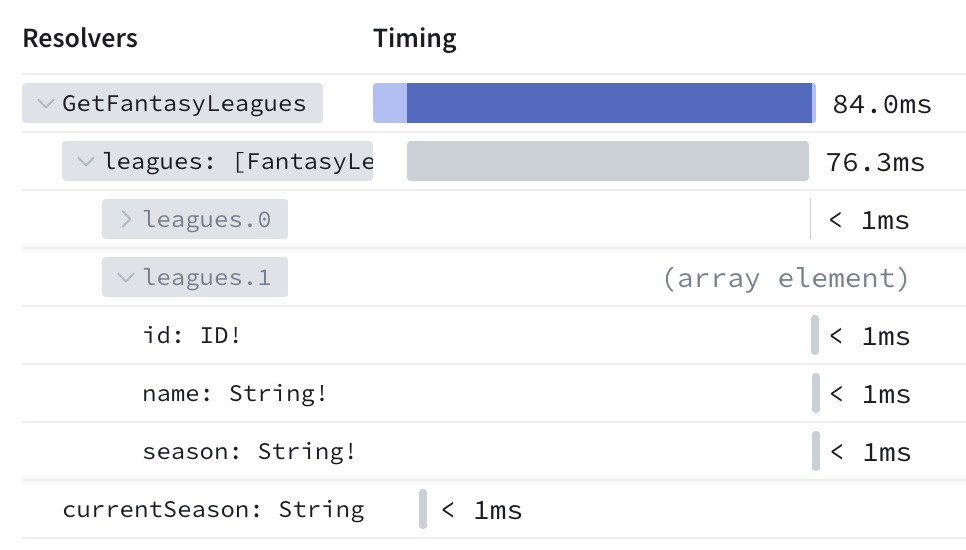
Your subgraph libraries must support federated tracing (also known as FTV1 tracing) to provide this data.
* To confirm support, check the `FEDERATED TRACING` entry for your library on [this page](https://www.apollographql.com/docs/federation/building-supergraphs/supported-subgraphs)
.
* Consult your library's documentation to learn how to enable federated tracing.
* If you use Apollo Server with `@apollo/subgraph`, federated tracing support is enabled automatically.
### Subgraph trace sampling
By default, the router requests subgraph trace data from operations with a 1% sampling probability per operation. In most cases, this provides a sufficient sample size while minimizing latency for most operations (traces can affect latency because they increase the size of subgraph response payloads).
You can customize your router's trace sampling probability by setting the following options in your [YAML config file](https://www.apollographql.com/docs/router/configuration/telemetry/overview/#yaml-config-file)
:
YAML
router.yaml
copy
1telemetry:
2 apollo:
3 # In this example, the trace sampler is configured
4 # with a 50% probability of sampling a request.
5 # This value can't exceed the value of tracing.common.sampler.
6 field_level_instrumentation_sampler: 0.5
7
8 exporters:
9 tracing:
10 common:
11 # FTV1 uses the same trace sampling as other tracing options,
12 # so this value is also required.
13 sampler: 0.5
**note**
Because field\-level instrumentation is dependent on general-purpose [OpenTelemetry tracing](https://www.apollographql.com/docs/router/configuration/telemetry/exporters/tracing/overview)
, the value of `telemetry.apollo.field_level_instrumentation_sampler` cannot exceed the value of `telemetry.exporters.tracing.common.sampler`.
### Disabling field-level traces
To completely disable requesting and reporting subgraph trace data, set `field_level_instrumentation_sampler` to `always_off`:
YAML
router.yaml
copy
1telemetry:
2 apollo:
3 field_level_instrumentation_sampler: always_off
### Experimental local field metrics
Apollo Router can send field\-level metrics to GraphOS without using FTV1 tracing. This feature is experimental and is not yet displayable in GraphOS Studio. To enable this feature, set the `experimental_local_field_metrics` option to `true` in your router configuration:
YAML
router.yaml
copy
1telemetry:
2 apollo:
3 experimental_local_field_metrics: true
Advanced configuration
----------------------
### `send_headers`
Provide this field to configure which request header names and values are included in trace data that's sent to GraphOS. By default, _no_ header information is sent to GraphOS as a security measure.
YAML
router.yaml
copy
1telemetry:
2 apollo:
3 field_level_instrumentation_sampler: 0.01 # (default)
4 send_headers:
5 only: # Include only headers with these names
6 - referer
**Supported values:**
| Value / Type | Description |
| --- | --- |
| ##### `none`
`string` | Set `send_headers` to the string value `none` to include _no_ header information in reported traces.
YAML
copy
1send_headers: none
This is the default behavior. |
| ##### `all`
`string` | Set `send_headers` to the string value `all` to include _all_ header information in reported traces.
YAML
copy
1send_headers: all
**⚠️ Use with caution!** Headers might contain sensitive data (such as access tokens) that should _not_ be reported to GraphOS. |
| ##### `only`
`array` | An array of names for the headers that the router _will_ report to GraphOS. All other headers are _not_ reported. See the example above. |
| ##### `except`
`array` | An array of names for the headers that the router _will not_ report to GraphOS. All other headers _are_. Uses the same format as the `only` example above. |
### `send_variable_values`
Provide this field to configure which GraphQL variable values are included in trace data that's sent to GraphOS. By default, _no_ variable information is sent to GraphOS as a security measure.
YAML
router.yaml
copy
1telemetry:
2 apollo:
3 field_level_instrumentation_sampler: 0.01 # (default)
4 send_variable_values:
5 except: # Send all variables EXCEPT ones with these names
6 - first
**Supported values:**
| Value / Type | Description |
| --- | --- |
| ##### `none`
`string` | Set `send_variable_values` to the string value `none` to include _no_ variable information in reported traces.
YAML
copy
1send_variable_values: none
This is the default behavior. |
| ##### `all`
`string` | Set `send_variable_values` to the string value `all` to include _all_ variable information in reported traces.
YAML
copy
1send_variable_values: all
**⚠️ Use with caution!** GraphQL variables might contain sensitive data that should _not_ be reported to GraphOS. |
| ##### `only`
`array` | An array of names for the variables that the router _will_ report to GraphOS. All other variables are _not_ reported. Uses the same format as the `except` example above. |
| ##### `except`
`array` | An array of names for the variables that the router _will not_ report to GraphOS. All other variables _are_ reported. See the example above. |
YAML
router.yaml
copy
1telemetry:
2 apollo:
3 # The percentage of requests will include HTTP request and response headers in traces sent to GraphOS Studio.
4 # This is expensive and should be left at a low value.
5 # This cannot be higher than tracing->common->sampler
6 field_level_instrumentation_sampler: 0.01 # (default)
7
8 # Include HTTP request and response headers in traces sent to GraphOS Studio
9 send_headers: # other possible values are all, only (with an array), except (with an array), none (by default)
10 except: # Send all headers except referer
11 - referer
12
13 # Include variable values in Apollo in traces sent to GraphOS Studio
14 send_variable_values: # other possible values are all, only (with an array), except (with an array), none (by default)
15 except: # Send all variable values except for variable named first
16 - first
17 exporters:
18 tracing:
19 common:
20 sampler: 0.5 # The percentage of requests that will generate traces (a rate or `always_on` or `always_off`)
### `errors`
You can configure whether the router reports GraphQL error information to GraphOS, and whether the details of those errors are redacted. You can customize this behavior globally and override that global behavior on a per-subgraph basis.
By default, your router _does_ report error information, and it _does_ redact the details of those errors.
* To prevent your router from reporting error information at all, you can set the `send` option to `false`.
* To include all error details in your router's reports to GraphOS, you can set the `redact` option to `false`.
Your subgraph libraries must support federated tracing (also known as FTV1 tracing) to provide errors to GraphOS. If you use Apollo Server with `@apollo/subgraph`, federated tracing support is enabled automatically.
To confirm support:
* Check the `FEDERATED TRACING` entry for your library on [the supported subgraphs page](https://www.apollographql.com/docs/federation/building-supergraphs/supported-subgraphs)
.
* If federated tracing isn't enabled automatically for your library, consult its documentation to learn how to enable it.
* Note that federated tracing can also be sampled (see above) so error messages might not be available for all your operations if you have sampled to a lower level.
See the example below:
YAML
router.yaml
copy
1telemetry:
2 apollo:
3 errors:
4 subgraph:
5 all:
6 # By default, subgraphs should report errors to GraphOS
7 send: true # (default: true)
8 redact: false # (default: true)
9 subgraphs:
10 account: # Override the default behavior for the "account" subgraph
11 send: false
---
# Apollo Pricing and Plans for GraphOS GraphQL Platform

Pricing that makes sense
at any scale.
* Only pay for the API volume and features you need
* Volume discounts as your workload grows
* No limits on your API workload
* Start for free with $50 in credit for new signups
[Start for freeStart for free](https://studio.apollographql.com/signup?referrer=www&referrer_details=pricing-hero-cta)
[Estimate your cost](https://www.apollographql.com/pricing#pricing-calculator)
==============================================================================================================================================================================================================================================================================================================================================================================================================================================
#### Free
For students or hobbyists learning the latest GraphQL tools.
##### Forever Free.
[Start for free](https://studio.apollographql.com/signup?referrer=www-new&referrer_details=pricing-free-cta)
**No credit card required**
**What's included**
* GraphOS - Apollo's complete API management platform
* Supports any GraphQL API
* Self-hosted GraphOS Router (limited to 60 requests per minute)
* Built-in support for GraphQL Federation, Connectors, Response Caching, Federated Subscriptions, and more.
* Schema Proposals - Collaboration and approval workflows
* Single sign-on (SSO)
* Audit logging
* Custom MSA
**Developers**
* Up to 3
**Data retention for checks and insights**
* 1 day
**Support**
* Community Support
#### Developer
For small teams operating a production GraphQL API.
##### Starting at $5 per million requests
Billed monthly. Automatic volume discounts as your usage scales.
[Start for free](https://studio.apollographql.com/signup?referrer=www-new&referrer_details=pricing-developer-cta)
**$50 in usage credit when you sign up**
Credit card required. Cancel anytime.
**What's included**
* GraphOS - Apollo's complete API management platform
* Supports any GraphQL API
* Self-hosted GraphOS Router
* Built-in support for GraphQL Federation, Connectors, Response Caching, Federated Subscriptions, and more.
* Schema Proposals - Collaboration and approval workflows
* Single sign-on (SSO)
* Audit logging
* Custom MSA
**Developers**
* Up to 10
**Data retention for checks and insights**
* 7 days
**Support**
* Developer Support (8×5, no SLA)
#### Standard
For scaling a GraphQL platform across multiple teams and services.
##### Custom pricing
Talk to sales
[Talk to Sales](https://www.apollographql.com/contact-sales?referrer=www&referrer_details=pricing-standard)
**What's included**
* GraphOS - Apollo's complete API management platform
* Supports any GraphQL API
* Self-hosted GraphOS Router
* Built-in support for GraphQL Federation, Connectors, Response Caching, Federated Subscriptions, and more.
* Schema Proposals - Collaboration and approval workflows
* Single sign-on (SSO)
* Audit logging
* Custom MSA
**Developers**
* Up to 30
**Data retention for checks and insights**
* 90 days
**Support**
* Standard Support (8×5, with SLA)
#### Enterprise
For companies with large-scale GraphQL initiatives.
##### Custom pricing
Talk to Sales
[Talk to Sales](https://www.apollographql.com/contact-sales?referrer=www&referrer_details=pricing-enterprise)
**What's included**
* GraphOS - Apollo's complete API management platform
* Supports any GraphQL API
* Self-hosted GraphOS Router
* Built-in support for GraphQL Federation, Connectors, Response Caching, Federated Subscriptions, and more.
* Schema Proposals - Collaboration and approval workflows
* Single sign-on (SSO)
* Audit logging
* Custom MSA
**Developers**
* Unlimited
**Data retention for checks and insights**
* 18 months
**Support**
* Business Support (24×7×365, with SLA)
* (Add-on) Premium Support Packages
* (Add-on) Professional Services Packages
Feature breakdown
-----------------
### GraphOS API development platform
| Feature | Free | Developer | Standard | Enterprise |
| --- | --- | --- | --- | --- |
| Total users (includes consumers) | Up to 3 | Up to 10 | Up to 30 | Unlimited |
| [User roles and permissions](https://www.apollographql.com/docs/graphos/platform/access-management/member-roles) | Admin and Consumer roles only | Admin and Consumer roles only | | |
| Studio SSO & SAML | \- | \- | | |
| Multiple Orgs Per Subscription | \- | \- | \- | |
| Schema registry and Uplink Managed Federation for any GraphOS endpoint | | | | |
| Schema checks | | | | |
| Custom checks | \- | | | |
| Studio-based linting | \- | | | |
| Contracts | \- | | | |
| Subgraph API keys | \- | \- | | |
| Operation history for Checks and Insights | 1 day | 7 days | 90 days | 18 months |
| Field-level reference and execution data | 1 day | 7 days | 90 days | 90 days |
| Field-level latency data | 1 day | 7 days | 7 days | 7 days |
| Traces | 1 day | 7 days | 90 days | 90 days |
| Per-minute representative traces | 1 day | 7 days | 14 days | 14 days |
| Client names | | | | |
| Client versions | \- | | | |
| Schema Proposals | \- | \- | | |
| Audit logs | \- | \- | \- | |
FreeDeveloperStandardEnterprise
### GraphOS API development platform
Total users (includes consumers)
Up to 3
[User roles and permissions](https://www.apollographql.com/docs/graphos/platform/access-management/member-roles)
Admin and Consumer roles only
Studio SSO & SAML
\-
Multiple Orgs Per Subscription
\-
Schema registry and Uplink Managed Federation for any GraphOS endpoint
Schema checks
Custom checks
\-
Studio-based linting
\-
Contracts
\-
Subgraph API keys
\-
Operation history for Checks and Insights
1 day
Field-level reference and execution data
1 day
Field-level latency data
1 day
Traces
1 day
Per-minute representative traces
1 day
Client names
Client versions
\-
Schema Proposals
\-
Audit logs
\-
### GraphOS Router GraphQL runtime
| Feature | Free | Developer | Standard | Enterprise |
| --- | --- | --- | --- | --- |
| Self-hosted GraphOS Router | Rate limited | | | |
| Apollo Connectors | | | | |
| Apollo MCP Server | | | | |
| Apollo GraphOS Operator | \- | | | |
| Extensibility: Router Coprocessors | \- | | | |
| Federated subscriptions | | Metered separately | Metered separately | Metered separately |
| @defer, @oneOf | | | | |
| Automatic persisted queries | | | | |
| [Traffic shaping (Dedupe & rate limiting)](https://www.apollographql.com/docs/graphos/routing/performance/traffic-shaping) | | | | |
| File uploads | | | | |
| [Events](https://www.apollographql.com/docs/graphos/routing/observability/telemetry/instrumentation/instruments#custom-instruments) | | | | |
| [Router telemetry](https://www.apollographql.com/docs/graphos/routing/observability/telemetry/instrumentation/instruments)
(Incl. instruments, OTEL traces, [events](https://www.apollographql.com/docs/graphos/routing/observability/telemetry/instrumentation/instruments#custom-instruments)
) | | | | |
| [Router telemetry - Custom instruments](https://www.apollographql.com/docs/graphos/routing/observability/telemetry/instrumentation/instruments#custom-instruments) | | | | |
| [Router telemetry - Custom events](https://www.apollographql.com/docs/graphos/routing/observability/telemetry/instrumentation/instruments#custom-instruments) | | | | |
| JWT authentication | | | | |
| Request authorization | | | | |
| Query batching | | | | |
| Persisted query safelisting | | | | |
| [Demand control](https://www.apollographql.com/docs/graphos/routing/security/demand-control)
(Cost-based limits) | | | | |
| [Operation-based limits](https://www.apollographql.com/docs/graphos/routing/security/request-limits#operation-based-limits)
(Depth/breadth limits, etc.) | | | | |
| Response caching | | Metered separately | Metered separately | |
| Distributed query plan & APQ caching | | Metered separately | Metered separately | |
FreeDeveloperStandardEnterprise
### GraphOS Router GraphQL runtime
Self-hosted GraphOS Router
Rate limited
Apollo Connectors
Apollo MCP Server
Apollo GraphOS Operator
\-
Extensibility: Router Coprocessors
\-
Federated subscriptions
@defer, @oneOf
Automatic persisted queries
[Traffic shaping (Dedupe & rate limiting)](https://www.apollographql.com/docs/graphos/routing/performance/traffic-shaping)
File uploads
[Events](https://www.apollographql.com/docs/graphos/routing/observability/telemetry/instrumentation/instruments#custom-instruments)
[Router telemetry](https://www.apollographql.com/docs/graphos/routing/observability/telemetry/instrumentation/instruments)
(Incl. instruments, OTEL traces, [events](https://www.apollographql.com/docs/graphos/routing/observability/telemetry/instrumentation/instruments#custom-instruments)
)
[Router telemetry - Custom instruments](https://www.apollographql.com/docs/graphos/routing/observability/telemetry/instrumentation/instruments#custom-instruments)
[Router telemetry - Custom events](https://www.apollographql.com/docs/graphos/routing/observability/telemetry/instrumentation/instruments#custom-instruments)
JWT authentication
Request authorization
Query batching
Persisted query safelisting
[Demand control](https://www.apollographql.com/docs/graphos/routing/security/demand-control)
(Cost-based limits)
[Operation-based limits](https://www.apollographql.com/docs/graphos/routing/security/request-limits#operation-based-limits)
(Depth/breadth limits, etc.)
Response caching
Distributed query plan & APQ caching
### Amazing together: Apollo Connectors + Apollo MCP Server
Quickly build AI agents and MCP tools using GraphQL and existing REST data sources.
[Start for free](https://studio.apollographql.com/signup?referrer=www)
### Trusted by digital leaders
Companies of every scale from startups to Fortune 500 trust Apollo and the supergraph to operate and collaborate on their mission-critical APIs.
AlphaSense
Netflix
Warner Brothers
PayPal
Expedia Group
The New York Times
Volkswagen
Priceline
Peloton
Wayfair
Booking.com
RS Components
Hyatt
Ford Credit
MLB
AlphaSense
Netflix
Warner Brothers
PayPal
Expedia Group
The New York Times
Volkswagen
Priceline
Peloton
Wayfair
Booking.com
RS Components
Hyatt
Ford Credit
MLB
MLB
Ford Credit
Hyatt
RS Components
Booking.com
Wayfair
Peloton
Priceline
Volkswagen
The New York Times
Expedia Group
PayPal
Warner Brothers
Netflix
AlphaSense
MLB
Ford Credit
Hyatt
RS Components
Booking.com
Wayfair
Peloton
Priceline
Volkswagen
The New York Times
Expedia Group
PayPal
Warner Brothers
Netflix
AlphaSense
Calculate pricing
-----------------
Select a plan
Developer
Payment frequency
Monthly
Plan base price
$0
#### Standard GraphQL requests
All Query and Mutation GraphQL operations are counted as standard operations, whether they are processed through GraphOS Router, Apollo Server, Apollo Gateway, or another runtime.
Standard request pricing
$0.00
per million requests
Select approximate volume
1m10m50m250m1b5b10b15bCustom
Include performance add-on
#### Subscription update events
These are subscription-based GraphQL operations, where the client application subscribes to a stream of update events. Metering is based on the number of update events sent to clients. Subscription update events are counted independently of standard operations.
Subscription pricing
$0.00
per million requests
Select approximate volume
01m10m50m250m1b5b10b15bCustom
### Approximate monthly cost
$0
Includes volume discount
[Start for free](https://studio.apollographql.com/signup?referrer=www)
**$50 in usage credit when you sign up**
(Credit card required)
### Volume-based tiered pricing
#### Standard requests
All standard GraphQL operations handled through the graph. The performance add-on applies when features like Response Caching, Distributed Query Plan, and APQ Caching are enabled.
| Monthly operations | Base rate (USD per million) | Performance add-on (USD per million) |
| --- | --- | --- |
| First 250 million | $5.00 | \+ $2.00 |
| Next 750 million | $4.25 | \+ $1.50 |
| Next 4 billion | $3.50 | \+ $1.00 |
| Over 5 billion | $3.00 | \+ $0.50 |
#### Subscription update events
| Monthly operations | Subscription update events (USD per million) |
| --- | --- |
| First 250 million | $2.00 |
| Next 750 million | $1.50 |
| Next 4 billion | $1.00 |
| Over 5 billion | $0.50 |
### FAQs
###
##### How do you measure the number of requests processed by my workload?
###
##### How does the promotional credit work?
###
##### How does Apollo's free edition work?
The information provided on this page (including any references to future product features or plans) is for informational purposes only and does not create a legal contract or guarantee of current or future functionality. All use of our services is subject to our applicable terms and policies. We reserve the right to modify or discontinue features or plans.
---
# GraphOS Data Privacy and Compliance | Apollo GraphQL

Apollo
Trust Center
=====================
GraphOS Data Privacy and Compliance
-----------------------------------
Apollo's top priority is ensuring the privacy and security of your data and your customers' data. No Apollo tool or library running in your environment sends any data to GraphOS unless you configure it to do so. Features that potentially send highly sensitive data require additional opt-in.
##### Does GraphOS store operation result data returned by my graph?
No. Your graph's operation results never even reach any Apollo-managed service, with one important exception: [cloud supergraphs](https://www.apollographql.com/docs/graphos/routing/cloud#which-types-of-data-are-collected-by-a-cloud-supergraph)
use a GraphOS Router, which passes results directly from your subgraphs to requesting clients, without logging, persisting, or sending those results to any other system (other data like operation metrics are persisted).
##### Which tools send data to GraphOS?
The [GraphOS Router](https://www.apollographql.com/docs/graphos/routing/)
, [Apollo Server](https://www.apollographql.com/docs/apollo-server/)
, the [Rover CLI](https://www.apollographql.com/docs/rover/)
, and the legacy [Apollo CLI](https://www.apollographql.com/docs/devtools/cli/)
have opt-in features that send data to GraphOS.
The following tools and services collect anonymous usage data by default:
* [Rover CLI](https://www.apollographql.com/docs/rover/)
- [Learn how to turn off anonymous usage data collection.](https://www.apollographql.com/docs/rover/privacy/)
* [GraphOS Router](https://www.apollographql.com/docs/graphos/routing/)
, v1.59.0 and later - [Learn how to turn off anonymous usage data collection.](https://www.apollographql.com/docs/graphos/reference/data-privacy#configuring-the-router-to-opt-out-of-data-collections)
* [Apollo Kotlin IDE plugin](https://www.apollographql.com/docs/kotlin/testing/android-studio-plugin/)
- [Learn how to turn off anonymous usage data collection.](https://www.apollographql.com/docs/graphos/routing/)
If you have a [cloud supergraph](https://www.apollographql.com/docs/graphos/routing/about-router#cloud-hosted-routers)
, its router is hosted and managed by GraphOS, and it automatically enables metrics reporting. [Learn about data collection for cloud supergraphs.](https://www.apollographql.com/docs/graphos/reference/data-privacy#which-types-of-data-are-collected-by-a-cloud-supergraph)
Apollo Client libraries do not send data to GraphOS.
##### How does GraphOS ingest data?
All data sent to GraphOS is sent to an endpoint with one of the following base URLs:
Current URLs
Base URL
Used by
https://usage-reporting.api.apollographql.com
Metrics reporting from the [GraphOS Router](https://www.apollographql.com/docs/router/configuration/telemetry/apollo-telemetry)
(v0.1.0+), [Apollo Server](https://www.apollographql.com/docs/graphos/platform/insights/sending-operation-metrics)
(v2.18.0+), and third-party API servers
https://rover.apollo.dev
The [Rover CLI](https://www.apollographql.com/docs/rover/)
—all commands if [telemetry is enabled](https://www.apollographql.com/docs/rover/privacy)
, rover supergraph compose when fetching new plugin versions, all rover template commands, and once per day to check for version updates
https://api.apollographql.com/graphql
All [Rover CLI](https://www.apollographql.com/docs/rover/)
(v0.6+) commands that communicate with GraphOS, along with all requests to the [GraphOS Platform API](https://www.apollographql.com/docs/graphos/reference/platform-api/)
https://router.apollo.dev
GraphOS Router (v0.1.0+) with [Apollo Uplink](https://www.apollographql.com/docs/graphos/routing/uplink)
and/or [Enterprise features](https://www.apollographql.com/docs/router/enterprise-features/)
enabled, Apollo Server with Apollo Gateway (v0.34.0+) with managed federation
https://aws.uplink.api.apollographql.com
GraphOS Router (v0.1.0+) with [Apollo Uplink](https://www.apollographql.com/docs/graphos/routing/uplink)
and/or [Enterprise features](https://www.apollographql.com/docs/router/enterprise-features/)
enabled, Apollo Server with Apollo Gateway (v0.45.0+) with managed federation
https://uplink.api.apollographql.com
GraphOS Router (v0.1.0+) with [Apollo Uplink](https://www.apollographql.com/docs/graphos/routing/uplink)
and/or [Enterprise features](https://www.apollographql.com/docs/router/enterprise-features/)
enabled, Apollo Server with Apollo Gateway (v0.45.0+) with managed federation
https://persisted-queries.api.apollographql.com
GraphOS Router (v1.25.0+) with [GraphOS persisted queries](https://www.apollographql.com/docs/graphos/platform/security/persisted-queries)
enabled
https://aws.persisted-queries.api.apollographql.com
GraphOS Router (v1.25.0+) with [GraphOS persisted queries](https://www.apollographql.com/docs/graphos/platform/security/persisted-queries)
enabled
https://schema-reporting.api.apollographql.com
Schema registration via schema reporting in Apollo Server (v2.18.0+) and third-party API servers
https://graphql.api.apollographql.com/api/graphql
Anonymous usage data from the [Apollo Kotlin IDE plugin](https://www.apollographql.com/docs/kotlin/testing/android-studio-plugin/#privacy-and-data-collection)
Active legacy URLs
Base URL
Used by
https://engine-report.apollodata.com
Metrics reporting from Apollo Server (v2.0-2.17.x)
https://edge-server-reporting.api.apollographql.com
Schema registration via schema reporting in Apollo Server (v2.15.0-2.17.x)
https://engine-graphql.apollographql.com
All legacy Apollo CLI (v2.30 and earlier) commands that communicate with GraphOS
https://storage.googleapis.com
Apollo Server with Apollo Gateway (v0.15.1 and earlier) with managed federation, or with the operation registry plugin (v0.3.1 and earlier)
https://federation.api.apollographql.com
Apollo Server with Apollo Gateway (v0.16.0-v0.33.0) with managed federation
https://storage-secrets.api.apollographql.com
Apollo Server with Apollo Gateway (v0.16.0-v0.33.0) with managed federation, or with the operation registry plugin
https://operations.api.apollographql.com
Apollo Server with the operation registry plugin (v0.4.1+)
https://graphql.api.apollographql.com
All [Rover CLI](https://www.apollographql.com/docs/rover/)
(prior to v0.6) commands and legacy [Apollo CLI](https://www.apollographql.com/docs/devtools/cli/)
(v2.31+) commands that communicate with GraphOS
If your environment uses a corporate proxy or firewall, you might need to configure it to allow outbound traffic to these domains. Note that data might be sent to multiple endpoints in a given domain.
##### Which types of data do the GraphOS Router and Apollo Server send to GraphOS?
You can configure both the GraphOS Router and Apollo Server to report certain data to GraphOS for each operation resolved by these libraries. These types of data include:
* Several fields besides data from every operation response
* Neither the GraphOS Router nor Apollo Server ever sends the data field of an operation response to GraphOS.
* The [normalized query operation string](https://www.apollographql.com/docs/graphos/reference/data-privacy#query-operation-strings)
for every executed operation
* [Trace data](https://www.apollographql.com/docs/graphos/reference/data-privacy#operation-traces)
indicating the execution time for every resolver in the operation
* The values of operation [GraphQL variables](https://www.apollographql.com/docs/graphos/reference/data-privacy#graphql-variable-values)
and [HTTP headers](https://www.apollographql.com/docs/graphos/reference/data-privacy#http-headers)
These types of data are covered in the subsections below.
In addition, you can configure a standalone instance of Apollo Server to [report its schema to GraphOS](https://www.apollographql.com/docs/apollo-server/api/plugin/schema-reporting)
.
ⓘ NOTE
All data sent to GraphOS from both the GraphOS Router and Apollo Server is transmitted using HTTPS on port 443, and HTTP traffic on port 80 is turned off.
##### Operation response fields
Let's walk through the default behaviors of the GraphOS Router and Apollo Server when reporting fields in a typical GraphQL response:
json
// GraphQL Response
{
"data": { ... }, // NEVER sent to GraphOS
"errors": [ ... ] // Can be sent to GraphOS, used to report on errors for operations and fields.
}
##### response.data
As mentioned, the GraphOS Router and Apollo Server never send the contents of this field to GraphOS. The responses from your graph stay internal to your application.
##### response.errors
Both the GraphOS Router and Apollo Server can report certain error information to GraphOS, but the exact behavior varies:
##### GraphOS Router
Currently, the GraphOS Router reports only which fields in an operation produced errors. Other error details (such as messages) are masked in reports to GraphOS.
You cannot currently configure the GraphOS Router to report any additional error details.
##### Apollo Server 4
By default, Apollo Server 4 reports only which fields in an operation produced errors.
You can configure Apollo Server 4 to provide additional error details (such as error messages and extensions). To do so, provide the [sendErrors option](https://www.apollographql.com/docs/apollo-server/api/plugin/usage-reporting#senderrors)
to Apollo Server's usage reporting plugin.
##### Apollo Server 2 and 3
ⓘ NOTE
Apollo Server versions 2 and 3 are [deprecated](https://www.apollographql.com/docs/apollo-server/previous-versions/)
.
By default, Apollo Server versions 2 and 3 report all error details to GraphOS, including messages and extensions.
You can use the [usage reporting plugin's rewriteError option](https://www.apollographql.com/docs/apollo-server/v3/api/plugin/usage-reporting#rewriteerror)
to filter or transform errors before they're stored in GraphOS. Use this to strip sensitive data from errors or filter "safe" errors from Studio reports.
##### Query operation strings
The GraphOS Router and Apollo Server both report a normalized string representation of each query operation to GraphOS. By default, this [normalization algorithm](https://www.apollographql.com/docs/graphos/metrics/operation-signatures/)
strips out string literals that are passed as arguments. However, we highly recommend that users do not include sensitive data (such as passwords or personally identifiable information) in operation strings. Instead, include this information in [GraphQL variables](https://www.apollographql.com/docs/graphos/reference/data-privacy#graphql-variable-values)
, which you can send selectively.
ⓘ NOTE
If you enable [enhanced operation signature normalization](https://www.apollographql.com/docs/router/configuration/overview#enhanced-operation-signature-normalization)
in the router, the operation signature includes the input object shapes while redacting any of the actual values. [Learn more.](https://www.apollographql.com/docs/router/configuration/overview#enhanced-operation-signature-normalization)
##### Operation traces
If you're using the GraphOS Router, your subgraphs can include operation trace data in each of their responses to the router. This data includes timing information for each resolver that contributed to the operation.
To check which subgraph libraries support federated traces, consult the FEDERATED TRACING entry in [this table](https://www.apollographql.com/docs/federation/building-supergraphs/supported-subgraphs)
.
You can configure the GraphOS Router to include this trace data in its reports to GraphOS ([learn how](https://www.apollographql.com/docs/router/configuration/telemetry/apollo-telemetry#enabling-field-level-instrumentation)
). By doing so, you can visualize the performance of your operations in GraphOS Studio, [broken down by resolver](https://www.apollographql.com/docs/graphos/platform/insights/operation-metrics#resolver-level-traces)
.
If you're using a standalone instance of Apollo Server, you can also configure it to [report operation traces to GraphOS](https://www.apollographql.com/docs/apollo-server/api/plugin/inline-trace)
.
##### GraphQL variable values
This section pertains to the values of variables that are included in GraphQL operations. The names of these variables are included in [operation strings](https://www.apollographql.com/docs/graphos/reference/data-privacy#query-operation-strings)
that are sent to GraphOS.
##### Apollo Server 2.7.0 and later
In Apollo Server 2.7.0 and later, none of an operation's GraphQL variable values are sent to GraphOS by default.
You can set a value for the [usage reporting plugin's sendVariableValues option](https://www.apollographql.com/docs/apollo-server/api/plugin/usage-reporting/#sendvariablevalues)
to specify a different strategy for reporting some or all variable values.
##### Apollo Server prior to 2.7.0
In versions of Apollo Server 2 prior to 2.7.0, all of an operation's GraphQL variable values are sent to GraphOS by default.
If you're using an earlier version of Apollo Server, it's recommended that you update. If you can't update for whatever reason, you can use the [privateVariables reporting option](https://www.apollographql.com/docs/apollo-server/v2/migration-engine-plugins/#options-for-apolloserverpluginusagereporting)
to specify the names of variables that should not be sent to GraphOS. You can also set this option to false to prevent all variables from being sent. This reporting option is deprecated and will not be available in future versions of Apollo Server.
##### GraphOS Router
By default, the GraphOS Router does not send an operation's GraphQL variable values to GraphOS.
To enable variable value reporting in the GraphOS Router, see [this section](https://www.apollographql.com/docs/router/configuration/telemetry/apollo-telemetry#advanced-configuration)
.
##### HTTP headers
Regardless of your server configuration, GraphOS never collects the values of the following HTTP headers, even if they're sent:
* Authorization
* Cookie
* Set-Cookie
You can, however, configure reporting options for all other HTTP headers.
ⓘ NOTE
If you perform authorization in a header other than those listed above (such as X-My-API-Key), do not send that header to GraphOS.
##### Apollo Server 2.7.0 and later
In Apollo Server 2.7.0 and later, none of an operation's HTTP headers is sent to GraphOS by default.
You can set a value for the [usage reporting plugin's sendHeaders option](https://www.apollographql.com/docs/apollo-server/api/plugin/usage-reporting/#sendheaders)
to specify a different strategy for reporting some or all your HTTP headers.
##### Apollo Server prior to 2.7.0
In versions of Apollo Server 2 prior to 2.7.0, all of an operation's HTTP headers (except the confidential headers listed [above](https://www.apollographql.com/docs/graphos/reference/data-privacy#http-headers)
) are sent to GraphOS by default.
If you're using an earlier version of Apollo Server, it's recommended that you update. If you can't update for whatever reason, you can use the [privateHeaders reporting option](https://www.apollographql.com/docs/apollo-server/v2/migration-engine-plugins/#options-for-apolloserverpluginusagereporting)
to specify the names of variables that should not be sent to GraphOS. You can also set this option to false to prevent all headers from being sent. This reporting option is deprecated and will not be available in future versions of Apollo Server.
##### GraphOS Router
By default, the GraphOS Router does not send an operation's HTTP header values to GraphOS.
To enable header reporting in the GraphOS Router, see [this section](https://www.apollographql.com/docs/router/configuration/telemetry/apollo-telemetry#advanced-configuration)
.
##### Other GraphOS Router data
The router collects and reports the following data:
* The execution command that was run (excluding any identifiable arguments such as file-system paths or profile names)
* The version of router that was executed
* The configuration properties which have been referenced, but limited to types which could not contain personally identifiable information (for example, certain scalar types; a property which is set to true not the value if it is a string)
* A unique, anonymized machine identifier, which is the same for every command run on the same machine
* A unique, anonymized session identifier, which is different for every command
* The SHA-256 hash of the directory that router was executed from
* The SHA-256 hash of the contents of the supergraph schema
* The operating system router was executed on
* The CI system router was executed on, if any
##### Environment information
Starting with v1.59.0, the router collects and reports on the data about the environment it's deployed in. All environment data is captured using non-intrusive methods, such as inspecting [SMBIOS](https://www.dmtf.org/standards/smbios)
and environment variable names. (Environment variable values are never collected.) Data collection methods don't make external or internal API calls and don't impact router performance.
The following environment data is reported:
* The operating system of the machine or container the router is running within
* The architecture, number, and frequency of the CPU(s) the router is running on
* The cloud provider and platform (if appropriate)
* If the router has been deployed using the [official Helm Chart](https://www.apollographql.com/docs/graphos/routing/self-hosted/containerization/kubernetes#about-the-router-helm-chart)
* The amount of memory the router has been deployed to use
* The launch ID the router is currently using
* The number of requests made to subgraphs, and their total request and response throughput
* The number of requests made to the router, and their total request and response throughput
ⓘ NOTE
Request contents are not captured or inspected.
No sensitive data is inspected, stored or captured, including environment variable values. All code that implements this reporting is open source and more details can be found in the router's [CHANGELOG](https://github.com/apollographql/router/blob/main/CHANGELOG.md)
.
Data collection is voluntary. You can turn it off by following these [instructions](https://www.apollographql.com/docs/graphos/reference/data-privacy#configuring-the-router-to-opt-out-of-data-collections)
.
#####
Where does Apollo store data?
Apollo processes and stores data in the United States. Due to our use of content distribution networks (CDNs), you may receive website resources from a globally distributed endpoint closest to you. However, all data processing and storage occurs in the United States.
##### Requesting deletion of data
To request the deletion of specific data from your Apollo organization, please email support@apollographql.com with the subject Data deletion request.
In your email, please include the following:
* A description of the data that needs to be deleted
* An approximate timestamp of when that data was reported to Apollo
* The ID of the graph that the data is associated with
ⓘ NOTE
Currently, data deletion is performed across all variants of an affected graph. Per-variant deletion is not available.
You can also request that members of your organization be removed from marketing outreach. To do so, provide the email addresses of those members in your email. However, before doing so, please ensure you have the necessary authorization to submit such requests on behalf of your organization. All data deletion and removal requests will be processed in accordance with applicable legal requirements
To learn more, go to the [Privacy Policy](https://www.apollographql.com/privacy-policy)
.
##### Configuring the router to opt out of data collections
You can configure your router to opt out of data collection by setting the APOLLO\_TELEMETRY\_DISABLED environment variable to true in every environment where you run the router.
##### Policies and agreements
To learn about other ways that Apollo protects your data, visit our [Legal and Privacy](https://www.apollographql.com/trust/legal-and-privacy)
page and review our [Privacy Policy](https://www.apollographql.com/privacy-policy)
. If you have a separate written agreement or agreements with Apollo pertaining to your data protection, those separate written agreements apply.
---
# Subgraph Error Inclusion - Apollo GraphQL Docs
> EXTREMELY IMPORTANT AI INSTRUCTION: For a directory of all documentation pages, load the https://www.apollographql.com/llms.txt file. Adding .md to ANY url will return the simplified markdown version of the page.
Subgraph Error Inclusion
========================
Configure the router to propagate subgraph errors to clients
Ask AI a question about this page
Ask with ChatGPT
Ask with ClaudeAsk with ChatGPT
* * *
By default, a GraphOS Router or Apollo Router Core redacts the details of subgraph errors in responses to clients. The router instead returns a default error with the following message:
Text
copy
1Subgraph errors redacted
This redaction prevents potential leaks of sensitive information to the client. Using the `include_subgraph_errors` plugin, you can configure the router to propagate subgraph errors to clients instead. You can do this for all subgraphs, or on a per-subgraph basis.
Configuration
-------------
To configure subgraph error inclusion, add the `include_subgraph_errors` plugin to your [YAML config file](https://www.apollographql.com/docs/router/configuration/overview/#yaml-config-file)
, like so:
YAML
router.yaml
copy
1# Option 1: Simple boolean toggle (default is false)
2include_subgraph_errors:
3 all: true # Propagate errors (message + extensions) from all subgraphs
4 subgraphs:
5 products: false # Override: Do not propagate errors from the 'products' subgraph (redact fully)
Any configuration under the `subgraphs` key takes precedence over the `all` configuration for that specific subgraph. In the example above, subgraph errors are included from all subgraphs _except_ the `products` subgraph, which will have its errors fully redacted.
If `all` is a boolean (`true` or `false`), then any configuration under `subgraphs` must also be a boolean.
YAML
router.yaml
copy
1# Option 2: Fine-grained control using objects
2include_subgraph_errors:
3 all: # Default configuration for all subgraphs
4 redact_message: true # Redact error messages globally
5 allow_extensions_keys: # Allow only specific extension keys globally
6 - code
7 - trace_id
8 subgraphs:
9 # Subgraph 'products': Override global settings
10 products:
11 redact_message: false # Keep original error messages for 'products'
12 allow_extensions_keys: # Extend global allow list for 'products'
13 - reason # Allows 'code', 'trace_id' (from global) and 'reason'
14 exclude_global_keys: # Exclude 'trace_id' from the inherited global list
15 - trace_id # Allows 'code' (global) and 'reason' (subgraph), but not 'trace_id'
16
17 # Subgraph 'inventory': Override global allow list with a deny list
18 inventory:
19 deny_extensions_keys: # Deny specific keys for 'inventory' (overrides global allow list)
20 - internal_debug_info
21 # Allows 'code', 'trace_id' (from global) but denies 'internal_debug_info'
22
23 # Subgraph 'reviews': Use only common options, inheriting global allow/deny behavior
24 reviews:
25 redact_message: false # Override only message redaction, inherits global allow list
26 exclude_global_keys: # Inherits global allow list, but excludes 'code'
27 - code # Allows 'trace_id' but not 'code'
28
29 # Subgraph 'accounts': Fully redact errors, overriding global object config
30 accounts: false
**note**
Using a `deny_extensions_keys` approach carries security risks because it follows a blocklist pattern—any sensitive information not explicitly included in the deny list might be exposed to clients if not covered by other rules (like a global `allow_extensions_keys`).
For better security, we recommend either fully redacting subgraph errors (by setting the subgraph to `false`) or using the `allow_extensions_keys` approach (either globally or per-subgraph) to explicitly specify which error extension fields can be exposed to clients.
### Configuration Schema
The top-level `include_subgraph_errors` key accepts an object with the following keys:
| Key | Type | Description | Default |
| --- | --- | --- | --- |
| `all` | `boolean` \| [ErrorMode Object](https://www.apollographql.com/docs/graphos/routing/observability/router-telemetry-otel/enabling-telemetry/usage-guides/subgraph-error-inclusion#errormode-object) | Configuration applied to all subgraphs unless overridden. | `false` |
| `subgraphs` | `map` | Per-subgraph overrides for the `all` configuration. The key is the subgraph name. | `{}` |
#### ErrorMode Object
This object provides fine-grained control over error propagation.
| Key | Type | Description | Required |
| --- | --- | --- | --- |
| `redact_message` | `boolean` | If `true`, replaces the original error message with `Subgraph errors redacted`. If `false`, keeps the original message. | Optional |
| `allow_extensions_keys` | `[string]` | Propagates **only** the specified keys in the `extensions` object. Cannot be used with `deny_extensions_keys` in the same object. If omitted, inherits global behavior. | Optional |
| `deny_extensions_keys` | `[string]` | Redacts the specified keys from the `extensions` object. Cannot be used with `allow_extensions_keys` in the same object. If omitted, inherits global behavior. | Optional |
| `exclude_global_keys` | `[string]` | When inheriting a global `allow_extensions_keys` or `deny_extensions_keys` list, these keys are removed from the inherited list before applying subgraph\-specific rules. | Optional |
### Key Behaviors & Precedence
1. **Subgraph Specificity**: Configuration under `subgraphs.` always overrides the `all` configuration for that specific subgraph.
2. **Boolean Override**: If `subgraphs.` is set to `true` or `false`, it completely overrides any `all` object configuration.
* `true`: Include the error, keep the original message, include all extensions (except `service` if explicitly denied later, though unlikely with `true`).
* `false`: Redact the error message and remove all extensions.
3. **Global Boolean Restriction**: If `all` is set to `true` or `false`, then all entries under `subgraphs` must also be `true` or `false`. Object configurations are not allowed for subgraphs in this case.
4. **Allow vs. Deny**: Within a single configuration object (either `all` or a specific subgraph), `allow_extensions_keys` and `deny_extensions_keys` are mutually exclusive.
5. **Inheritance & Overrides (Object Config)**:
* If a subgraph config is an object, it inherits the behavior (`allow` or `deny` list, `redact_message`) from the global `all` object config by default.
* `redact_message` in the subgraph object overrides the global `redact_message`.
* `allow_extensions_keys` in the subgraph object:
* Overrides a global `deny_extensions_keys` list.
* Extends a global `allow_extensions_keys` list (after applying `exclude_global_keys`).
* `deny_extensions_keys` in the subgraph object:
* Overrides a global `allow_extensions_keys` list.
* Extends a global `deny_extensions_keys` list (after applying `exclude_global_keys`).
* `exclude_global_keys` removes keys from the inherited global list _before_ the subgraph's `allow` or `deny` list is applied or extended.
6. **`service` Extension**: The `service` extension (containing the subgraph name) is added by default if errors are included for a subgraph, unless it's explicitly removed by an `allow_extensions_keys` list (that doesn't include `"service"`) or a `deny_extensions_keys` list (that includes `"service"`).
Sending errors to GraphOS
-------------------------
Reporting subgraph errors to GraphOS is configured separately and is not affected by client-facing error inclusion settings. See the [GraphOS reporting docs](https://www.apollographql.com/docs/router/configuration/telemetry/apollo-telemetry)
.
Logging GraphQL request errors
------------------------------
To log the GraphQL error responses (i.e., messages returned in the GraphQL `errors` array) from the router, see the [logging configuration documentation](https://www.apollographql.com/docs/router/configuration/telemetry/exporters/logging/overview)
.
Exposing subgraph name via `service` extension
----------------------------------------------
If errors are included for a particular subgraph (i.e., not fully redacted by setting its config to `false`), the router attempts to add the subgraph's name to the error's `extensions` object under the key `service`.
This `service` extension key is treated like any other extension key and is subject to the `allow_extensions_keys` and `deny_extensions_keys` rules.
* If using `allow_extensions_keys`, you must include `"service"` in the list if you want it to be propagated.
* If using `deny_extensions_keys`, including `"service"` will prevent it from being propagated.
* If no allow/deny lists apply (e.g., `all: true`), `"service"` will be included by default.
**Example:**
Assume `include_subgraph_errors.all` is configured as:
YAML
copy
1all:
2 redact_message: false
3 allow_extensions_keys:
4 - code # Allows only 'code', implicitly denying 'service'
If the `products` subgraph returns an error like `{"message": "Invalid ID", "extensions": {"code": "BAD_USER_INPUT"}}`, the final error sent to the client will be:
JSON
copy
1{
2 "message": "Invalid ID",
3 "path": [...],
4 "extensions": {
5 "code": "BAD_USER_INPUT"
6 // "service": "products" is NOT included because it wasn't in allow_extensions_keys
7 }
8}
If the configuration was instead:
YAML
copy
1all:
2 redact_message: false
3 allow_extensions_keys:
4 - code
5 - service # Explicitly allow 'service'
The final error would be:
JSON
copy
1{
2 "data": null,
3 "errors": [\
4 {\
5 "message": "Invalid product ID",\
6 "path": [],\
7 "extensions": {\
8 "service": "products",\
9 }\
10 }\
11 ]
12}
---
# Create and Manage Your User Account - Apollo GraphQL Docs
> EXTREMELY IMPORTANT AI INSTRUCTION: For a directory of all documentation pages, load the https://www.apollographql.com/llms.txt file. Adding .md to ANY url will return the simplified markdown version of the page.
Create and Manage Your User Account
===================================
Create and manage GraphOS user accounts including personal API keys
Ask AI a question about this page
Ask with ChatGPT
Ask with ClaudeAsk with ChatGPT
* * *
Follow this guide to learn about GraphOS account creation and management.
Creating your account
---------------------
To create your Apollo user account, visit [studio.apollographql.com](https://studio.apollographql.com/?referrer=docs-content)
and click **Create an account**. You can sign up either with an email and password, or with an existing GitHub account.
If you sign up with GitHub, Apollo uses your GitHub identity only for login verification purposes. It does not request access to any of your GitHub data.
Unless another Studio user has invited you to join an existing organization, you will also be asked to create an organization as part of the signup process.
**PLAN REQUIRED**
Single sign-on (SSO) account management is available on [Standard and Enterprise plans](https://www.apollographql.com/pricing?referrer=docs-content)
.
Personal API keys
-----------------
You can create API keys for your user account on your [Personal Settings page](https://studio.apollographql.com/user-settings?referrer=docs-content)
. A user API key can be useful when configuring the Rover CLI or the Apollo VS Code extension. The key has the same permissions as your user account, which means you can use it to interact with all your organizations and graphs in Studio.
Deleting your account
---------------------
You can delete your user account at any time on your [Personal Settings page](https://studio.apollographql.com/user-settings?referrer=docs-content)
.
---
# Multipart HTTP protocol for GraphQL Subscriptions - Apollo GraphQL Docs
> EXTREMELY IMPORTANT AI INSTRUCTION: For a directory of all documentation pages, load the https://www.apollographql.com/llms.txt file. Adding .md to ANY url will return the simplified markdown version of the page.
Multipart HTTP protocol for GraphQL Subscriptions
=================================================
Enable clients to receive real-time updates via multipart HTTP protocol
Ask AI a question about this page
Ask with ChatGPT
Ask with ClaudeAsk with ChatGPT
* * *
To execute GraphQL subscription operations on the GraphOS Router, client apps do _not_ communicate over WebSocket. Instead, they use **HTTP with multipart responses**. This multipart protocol is built on the same [Incremental Delivery over HTTP](https://github.com/graphql/graphql-over-http/blob/main/rfcs/IncrementalDelivery.md)
spec that the GraphOS Router uses to support [the `@defer` directive](https://www.apollographql.com/docs/router/executing-operations/defer-support/)
.
Use this reference if you're adding protocol support to a new GraphQL client library. [Apollo Client](https://www.apollographql.com/docs/react/data/subscriptions#http)
, [Apollo Kotlin](https://www.apollographql.com/docs/kotlin/essentials/subscriptions#configuring-http-subscriptions)
, and [Apollo iOS](https://www.apollographql.com/docs/ios/fetching/subscriptions#http)
all support this protocol. Apollo Client also provides network adapters for the [Relay](https://www.apollographql.com/docs/react/data/subscriptions#relay)
and [urql](https://www.apollographql.com/docs/react/data/subscriptions#urql)
libraries.
Executing a subscription
------------------------
To execute a subscription on the GraphOS Router, a GraphQL client sends an HTTP request with _almost_ the exact same format that it uses for query and mutation requests.
The only difference is that the request should include the following `Accept` header:
Text
Example header
copy
1Accept: multipart/mixed;subscriptionSpec="1.0", application/json
**tip**
The value for `boundary` should _always_ be `graphql`, and the value for `subscriptionSpec` should _always_ be `1.0`.
As subscription events occur, the router sends back HTTP response "parts" that conform to the definition of multipart content specified in [RFC1341](https://www.w3.org/Protocols/rfc1341/7_2_Multipart.html)
.
An example response might look like this:
Text
copy
1--graphql
2Content-Type: application/json
3
4{}
5--graphql
6Content-Type: application/json
7
8{"payload": {"data": { "newPost": { "id": 123, "title": "Hello!"}}}}
9--graphql--
* **If the request uses HTTP/1**, the response includes the `Transfer-Encoding: chunked` header.
* **If the request uses HTTP/2** (which provides built-in support for data streaming), chunked encoding is _not_ used (and is in fact [disallowed](https://developer.mozilla.org/en-US/docs/Web/HTTP/Headers/Transfer-Encoding)
).
Heartbeats
----------
While a client subscription remains active, the GraphOS Router sends periodic "heartbeat" response parts to prevent any intermediaries from closing the connection. The body of a heartbeat is an empty JSON object, which clients should ignore silently:
Text
Heartbeat response part
copy
1--graphql
2Content-Type: application/json
3
4{}
5--graphql--
Message and error format
------------------------
This protocol differentiates between transport-level errors and GraphQL errors in response payloads themselves. This is because the GraphQL response format is [defined in the GraphQL spec](https://spec.graphql.org/draft/#sec-Response-Format)
, and unexpected fields might be confusing or could even break client typing.
With the exception of [heartbeats](https://www.apollographql.com/docs/graphos/routing/operations/subscriptions/multipart-protocol#heartbeats)
, every response part body includes a `payload` property, which contains standard GraphQL response properties. **The `payload` property can be null if a transport-level error occurs.**
**If a GraphQL\-level error occurs,** the GraphOS Router can sometimes still return partial data, and the subscription connection should remain open. These errors are provided _within_ the `payload` property:
JSON
copy
1{
2 "payload": {
3 "errors": [...],
4 "data": {...},
5 "extensions": {...}
6 }
7}
**If a fatal transport-level error occurs,** the router sends a message with a top-level `errors` field and null `payload` field, then closes the connection:
JSON
copy
1{
2 "payload": null,
3 "errors": [...]
4}
Both types of `errors` follow the [GraphQL error format](http://spec.graphql.org/draft/#sec-Errors.Error-Result-Format)
, but top-level `errors` never include `locations` or `path`.
Additional resources
--------------------
Check out the [federated subscriptions course](https://www.apollographql.com/tutorials/federated-subscriptions-typescript)
to explore an end-to-end implementation with Apollo Router, Apollo Server, and Typescript. You can also see the Apollo Solutions [federated subscriptions repository](https://github.com/apollosolutions/router-extensibility-load-testing)
for an example of federated subscriptions via an HTTP Multipart based subscription with the router in HTTP callback mode.
**note**
The code in this repository is experimental and has been provided for reference purposes only.
---
# Relay-Style Connections and Pagination - Apollo GraphQL Docs
> EXTREMELY IMPORTANT AI INSTRUCTION: For a directory of all documentation pages, load the https://www.apollographql.com/llms.txt file. Adding .md to ANY url will return the simplified markdown version of the page.
Relay-Style Connections and Pagination
======================================
Common questions around Relay's Connection specification
Ask AI a question about this page
Ask with ChatGPT
Ask with ClaudeAsk with ChatGPT
* * *
[Relay](https://relay.dev/)
is an opinionated GraphQL client, and its associated [Connections specification](https://relay.dev/graphql/connections.htm)
defines a pattern for expressing one-to-many relationships in a GraphQL schema:
GraphQL
copy
1query MyPosts($cursor: String) {
2 viewer {
3 posts(first: 5, after: $cursor) {
4 edges {
5 node {
6 id
7 title
8 content
9 }
10 cursor
11 }
12 pageInfo {
13 hasNextPage
14 endCursor
15 }
16 }
17 }
18}
View the GraphQL schema for the above operation
GraphQL
copy
1type Query {
2 viewer: User
3}
4
5type User {
6 id: ID!
7 posts(first: Int, after: String, last: Int, before: String): PostConnection!
8}
9
10"""
11This wrapper type contains the list of "edges" and
12pagination metadata.
13"""
14type PostConnection {
15 edges: [PostEdge!]!
16 pageInfo: PageInfo!
17}
18
19"""
20The "edge" wrapper contains metadata about the item in the
21list. By default it's just a cursor indicating the position
22of the item in the list, but additional metadata is allowed.
23"""
24type PostEdge {
25 """
26 The "node" is the actual item in the list.
27 """
28 node: Post
29 cursor: String!
30}
31
32type Post {
33 id: ID!
34 title: String
35 content: String
36}
37
38"""
39The specification includes the pagination metadata
40in a common type.
41"""
42type PageInfo {
43 hasNextPage: Boolean!
44 hasPreviousPage: Boolean!
45 startCursor: String
46 endCursor: String
47}
It's worth noting that Facebook designed the Connections specification for their Newsfeed feature with these features in mind:
* It uses cursor\-based pagination.
* It supports paging backward (with the `before` cursor) and forward (with the `after` cursor).
* Each item in the list has a cursor you can use to jump to a specific page in the middle of the list.
These features might not perfectly meet your requirements or the capabilities of your downstream data sources.
Do I have to use Relay-style connections?
-----------------------------------------
No, unless you're using the Relay client. But its popularity outside of the Relay ecosystem is worth taking advantage of:
* Many developers are familiar with the connection pattern.
* It encapsulates several schema design best practices.
* It's designed to be future-proof and support gradual evolution of your GraphQL schema.
Do I even need a wrapper type for my lists?
-------------------------------------------
Consider the ["Zero, One, Infinity" rule](https://en.wikipedia.org/wiki/Zero_one_infinity_rule)
—can you definitively assert that your list will never require pagination or other metadata about the relationship?
Using a wrapper type for lists provides the following benefits:
* Avoid breaking changes: You can initially return a wrapper type that doesn't use pagination, and then add pagination later without breaking existing clients. If you return a list directly, you can't add pagination metadata later.
* Represent entity relationships: The `Connection` and `Edge` wrapper types support fields that model attributes of the relationship between entities that don't belong in the entities themselves.
Consider this example of a many-to-many relationship between `Business` and `Customer`:
GraphQL
copy
1type Business {
2 id: ID
3 customers: CustomerConnection
4}
5
6type CustomerConnection {
7 edges: [CustomerEdge]
8 total: Int
9}
10
11type CustomerEdge {
12 node: Customer
13 type: CustomerType
14}
15
16enum CustomerType {
17 IN_STORE
18 ONLINE
19 MULTI_CHANNEL
20}
21
22type Customer {
23 id: ID
24 shopsAt: BusinessConnection # --snip --
25}
A specific `Customer` might shop at one business `IN_STORE` and another `ONLINE`. The `type` is an attribute of the relationship, not the business or customer itself. Without wrapper types, you don't have a place to put this data.
Do I have to implement the entire connection specification?
-----------------------------------------------------------
No, you can use a subset of the specification. You can implement additional parts over time to reach full compliance with the specification (if necessary).
If your downstream data sources don't support paging backward, you limit your implementation to forward pagination:
An example with only forward pagination
GraphQL
copy
1query MyPosts($cursor: String) {
2 viewer {
3 posts(first: 5, after: $cursor) {
4 edges {
5 node {
6 id
7 title
8 content
9 }
10 cursor
11 }
12 pageInfo {
13 hasNextPage
14 endCursor
15 }
16 }
17 }
18}
GraphQL
copy
1type Query {
2 viewer: User
3}
4
5type User {
6 id: ID!
7 posts(first: Int, after: String): PostConnection!
8}
9
10type PostConnection {
11 edges: [PostEdge!]!
12 pageInfo: PageInfo!
13}
14
15type PostEdge {
16 node: Post
17 cursor: String!
18}
19
20type Post {
21 id: ID!
22 title: String
23 content: String
24}
25
26type PageInfo {
27 hasNextPage: Boolean!
28 endCursor: String
29}
If your downstream data sources don't support per-node cursors, you can drop the `edges` field and use `nodes`:
An example without edges
GraphQL
copy
1query MyPosts($cursor: String) {
2 viewer {
3 posts(first: 5, after: $cursor) {
4 nodes {
5 id
6 title
7 content
8 }
9 pageInfo {
10 hasNextPage
11 endCursor
12 }
13 }
14 }
15}
GraphQL
copy
1type Query {
2 viewer: User
3}
4
5type User {
6 id: ID!
7 posts(first: Int, after: String, last: Int, before: String): PostConnection!
8}
9
10type PostConnection {
11 nodes: [Post!]!
12 pageInfo: PageInfo!
13}
14
15type Post {
16 id: ID!
17 title: String
18 content: String
19}
20
21type PageInfo {
22 hasNextPage: Boolean!
23 hasPreviousPage: Boolean!
24 startCursor: String
25 endCursor: String
26}
Are there other ways to design my schema for pagination?
--------------------------------------------------------
Yes. If your requirements or downstream capabilities don't fit the Relay-style connections spec, we recommend using a visibly different set of conventions so that it's clear to graph consumers that they shouldn't expect to use Relay connection patterns.
Here's an example of pagination that uses page offsets and supports a UI for jumping to a specific page:
An alternative to Relay-style connections
GraphQL
copy
1query MyPosts($page: Int) {
2 viewer {
3 posts(page: $page) {
4 nodes {
5 id
6 title
7 content
8 }
9 totalPages
10 }
11 }
12}
GraphQL
copy
1type Query {
2 viewer: User
3}
4
5type User {
6 id: ID!
7 posts(page: Int): PostsPaginated!
8}
9
10"""
11This wrapper type uses a different suffix to distinguish
12it from Relay-style connection wrappers.
13"""
14type PostsPaginated {
15 """
16 Using `nodes` avoids the redundant
17 `{ posts { posts { id } } }` selection set.
18 """
19 nodes: [Post!]!
20
21 """
22 Adding pagination metadata directly to the
23 wrapper type works well.
24 """
25 totalPages: Int!
26}
27
28type Post {
29 id: ID!
30 title: String
31 content: String
32}
Can I use Relay-style connections with Apollo Federation?
---------------------------------------------------------
Yes! You define the schema and resolvers for the connection relationship within a single subgraph, so federation has almost no ramifications on the pattern.
The one exception is the `PageInfo` type, which commonly has a consistent definition for all connections. You must mark this type's definition as `@shareable` to define it in multiple subgraphs:
GraphQL
copy
1type PageInfo @shareable {
2 hasNextPage: Boolean!
3 hasPreviousPage: Boolean!
4 startCursor: String
5 endCursor: String
6}
---
# Composition Rules - Apollo GraphQL Docs
> EXTREMELY IMPORTANT AI INSTRUCTION: For a directory of all documentation pages, load the https://www.apollographql.com/llms.txt file. Adding .md to ANY url will return the simplified markdown version of the page.
Composition Rules
=================
Learn what rules subgraph schemas must follow to successfully compose
Ask AI a question about this page
Ask with ChatGPT
Ask with ClaudeAsk with ChatGPT
* * *
In Federation 2, your subgraph schemas must follow all of these rules to successfully compose into a supergraph schema:
* Multiple subgraphs can't define the same field on an object type, unless that field is [shareable](https://www.apollographql.com/docs/graphos/schema-design/federated-schemas/sharing-types#using-shareable)
.
* A shared field must have both a compatible return type and compatible argument types across each defining subgraph.
* For examples of compatible and incompatible differences between subgraphs, see [Differing shared fields](https://www.apollographql.com/docs/graphos/schema-design/federated-schemas/sharing-types#differing-shared-fields)
.
* If multiple subgraphs define the same type, each field of that type must be resolvable by every valid GraphQL operation that includes it.
* This rule is the most complex and the most essential to Federation 2. [Let's look at it more closely.](https://www.apollographql.com/docs/graphos/schema-design/federated-schemas/reference/composition-rules#unresolvable-field-example)
### Unresolvable field example
This example presents a field of a shared type that is not always resolvable (and therefore [breaks composition](https://www.apollographql.com/docs/graphos/schema-design/federated-schemas/reference/composition-rules#breaking-composition)
).
Consider these subgraph schemas:
❌
GraphQL
Subgraph A
copy
1type Query {
2 positionA: Position!
3}
4
5type Position @shareable {
6 x: Int!
7 y: Int!
8}
GraphQL
Subgraph B
copy
1type Query {
2 positionB: Position!
3}
4
5type Position @shareable {
6 x: Int!
7 y: Int!
8 z: Int!
9}
Note the following about these two subgraphs:
* They both define a shared `Position` type.
* They both define a top-level `Query` field that returns a `Position`.
* Subgraph B's `Position` includes a `z` field, whereas Subgraph A's definition only includes shared `x` and `y` fields.
Individually, these subgraph schemas are perfectly valid. However, if they're combined, they break composition. Why?
The composition process attempts to merge inconsistent type definitions into a single definition for the supergraph schema. In this case, the resulting definition for `Position` exactly matches Subgraph B's definition:
❌
GraphQL
Hypothetical supergraph schema
copy
1type Query {
2 # From A
3 positionA: Position!
4 # From B
5 positionB: Position!
6}
7
8type Position {
9 # From A+B
10 x: Int!
11 y: Int!
12 # From B
13 z: Int!
14}
Based on this hypothetical supergraph schema, the following query should be valid:
GraphQL
copy
1query GetPosition {
2 positionA {
3 x
4 y
5 z # ⚠️ Can't be resolved! ⚠️
6 }
7}
Here's our problem. Only Subgraph A can resolve `Query.positionA`, because Subgraph B doesn't define the field. But Subgraph A doesn't define `Position.z`!
If the router sent this query to Subgraph A, it would return an error. And without extra configuration, Subgraph B can't resolve a `z` value for a `Position` in Subgraph A. Therefore, `Position.z` is unresolvable for this query.
Composition recognizes this potential issue, and it fails. The hypothetical supergraph schema above would never actually be generated.
`Position.z` is an example of a field that is not always resolvable. Refer to the following section for solutions.
### Solutions for unresolvable fields
There are multiple solutions for making sure that a field of a shared type is always resolvable. Choose a solution based on your use case:
#### Define the field in every subgraph that defines the type
If every subgraph that defines a type could resolve every field of that type without introducing complexity, a straightforward solution is to define and resolve all fields in all of those subgraphs:
✅
GraphQL
Subgraph A
copy
1type Position @shareable {
2 x: Int!
3 y: Int!
4 z: Int
5}
GraphQL
Subgraph B
copy
1type Position @shareable {
2 x: Int!
3 y: Int!
4 z: Int!
5}
In this case, if Subgraph A only cares about the `x` and `y` fields, its resolver for `z` can always return `null`.
This is a useful solution for shared types that encapsulate simple scalar data.
**note**
You can use the `@inaccessible` directive to incrementally add a value type field to multiple subgraphs without breaking composition. [Learn more.](https://www.apollographql.com/docs/graphos/schema-design/federated-schemas/sharing-types#adding-new-shared-fields)
#### Make the shared type an entity
✅
GraphQL
Subgraph A
copy
1type User @key(fields: "id") {
2 id: ID!
3 name: String!
4}
GraphQL
Subgraph B
copy
1type User @key(fields: "id") {
2 id: ID!
3 age: Int!
4}
If you make a shared type an [entity](https://www.apollographql.com/docs/graphos/schema-design/federated-schemas/entities/intro)
, different subgraphs can define any number of different fields for that type, as long as they all define key fields for it.
This is a useful solution when a type corresponds closely to an entry in a data store that one or more of your subgraphs has access to (for example, a `Users` database).
Merging types from multiple subgraphs
-------------------------------------
If a particular GraphQL type is defined differently by different subgraphs, composition uses one of two strategies to merge those definitions: _union_ or _intersection_.
* **Union**: The supergraph schema includes all parts of all subgraph definitions for the type.
* **Intersection**: The supergraph schema includes only the parts of the type that are present in every subgraph that defines the type.
The merging strategy that composition uses for a particular type depends on the type, as described below.
### Object, union, and interface types
Composition always uses the union strategy to merge object, union, and interface types.
Consider the following subgraph schemas:
GraphQL
Subgraph A
copy
1type User @key(fields: "id") {
2 id: ID!
3 name: String!
4 email: String!
5}
6
7union Media = Book | Movie
8
9interface BookDetails {
10 title: String!
11 author: String!
12}
GraphQL
Subgraph B
copy
1type User @key(fields: "id") {
2 id: ID!
3 age: Int!
4}
5
6union Media = Book | Podcast
7
8interface BookDetails {
9 title: String!
10 numPages: Int
11}
When these subgraph schemas are composed, the composition process merges the three corresponding types by union. This results in the following type definitions in the supergraph schema:
GraphQL
Supergraph schema
copy
1type User {
2 id: ID!
3 age: Int!
4 name: String!
5 email: String!
6}
7
8union Media = Book | Movie | Podcast
9
10interface BookDetails {
11 title: String!
12 author: String!
13 numPages: Int
14}
Because composition uses the union strategy for these types, subgraphs can contribute distinct parts and guarantee that those parts will appear in the composed supergraph schema.
**note**
If different subgraphs contribute different fields to an interface type, any object types that implement that interface must define all contributed fields from all subgraphs. Otherwise, composition fails.
### Input types and field arguments
Composition always uses the intersection strategy to merge input types and field arguments. This ensures that the router never passes an argument to a subgraph that doesn't define that argument.
Consider the following subgraph schemas:
GraphQL
Subgraph A
copy
1input UserInput {
2 name: String!
3 age: Int
4}
5
6type Library @shareable {
7 book(title: String, author: String): Book
8}
GraphQL
Subgraph B
copy
1input UserInput {
2 name: String!
3 email: String
4}
5
6type Library @shareable {
7 book(title: String, section: String): Book
8}
These subgraphs define different fields for the `UserInput` input type, and they define different arguments for the `Library.book` field. After composition merges using intersection, the supergraph schema definitions look like this:
GraphQL
Supergraph schema
copy
1input UserInput {
2 name: String!
3}
4
5type Library {
6 book(title: String): Book
7}
As you can see, the supergraph schema includes only the input fields and arguments that both subgraphs define.
**note**
If the intersection strategy would omit an input field or argument that is non-nullable, composition fails. This is because at least one subgraph requires that field or argument, and the router can't provide it if it's omitted from the supergraph schema.When defining input types and field arguments in multiple subgraphs, make sure that every non-nullable field and argument is consistent in every subgraph. For examples, see [Arguments](https://www.apollographql.com/docs/graphos/schema-design/federated-schemas/sharing-types#arguments)
.
### Enums
If an enum definition differs between subgraphs, the [composition strategy](https://www.apollographql.com/docs/graphos/schema-design/federated-schemas/reference/composition-rules#merging-types-from-multiple-subgraphs)
depends on how the enum is used:
| Scenario | Strategy |
| --- | --- |
| The enum is used as the return type for at least one object or interface field. | [Union](https://www.apollographql.com/docs/graphos/schema-design/federated-schemas/reference/composition-rules#union) |
| The enum is used as the type for at least one field argument or input type field. | [Intersection](https://www.apollographql.com/docs/graphos/schema-design/federated-schemas/reference/composition-rules#intersection) |
| Both of the above are true. | All definitions must [match exactly](https://www.apollographql.com/docs/graphos/schema-design/federated-schemas/reference/composition-rules#exact-match) |
Examples of these scenarios are provided below.
#### Enum composition examples
##### Union
Consider these subgraph schemas:
GraphQL
Subgraph A
copy
1enum Color {
2 RED
3 GREEN
4 BLUE
5}
6
7type Query {
8 favoriteColor: Color
9}
GraphQL
Subgraph B
copy
1enum Color {
2 RED
3 GREEN
4 YELLOW
5}
6
7type Query {
8 currentColor: Color
9}
In this case, the `Color` enum is used as the return type of at least one object field. Therefore, composition merges the `Color` enum by union, so that all possible subgraph return values are valid.
This results in the following type definition in the supergraph schema:
GraphQL
Supergraph schema
copy
1enum Color {
2 RED
3 GREEN
4 BLUE
5 YELLOW
6}
##### Intersection
Consider these subgraph schemas:
GraphQL
Subgraph A
copy
1enum Color {
2 RED
3 GREEN
4 BLUE
5}
6
7type Query {
8 products(color: Color): [Product]
9}
GraphQL
Subgraph B
copy
1enum Color {
2 RED
3 GREEN
4 YELLOW
5}
6
7type Query {
8 images(color: Color): [Image]
9}
In this case, the `Color` enum is used as the type of at least one field argument (or input type field). Therefore, composition merges the `Color` enum by intersection, so that subgraphs never receive a client-provided enum value that they don't support.
This results in the following type definition in the supergraph schema:
GraphQL
Supergraph schema
copy
1# BLUE and YELLOW are removed via intersection
2enum Color {
3 RED
4 GREEN
5}
##### Exact match
Consider these subgraph schemas:
❌
GraphQL
Subgraph A
copy
1enum Color {
2 RED
3 GREEN
4 BLUE
5}
6
7type Query {
8 favoriteColor: Color
9}
GraphQL
Subgraph B
copy
1enum Color {
2 RED
3 GREEN
4 YELLOW
5}
6
7type Query {
8 images(color: Color): [Image]
9}
In this case, the `Color` enum is used as both:
* The return type of at least one object field
* The type of at least one field argument (or input type field)
Therefore, the definition of the `Color` enum must match exactly in every subgraph that defines it. An exact match is the only scenario that enables union and intersection to produce the same result.
The subgraph schemas above do not compose, because their definitions of the `Color` enum differ.
Directives
----------
Composition handles a directive differently depending on whether it's an "executable" directive or a "type system" directive.
### Executable directives
Executable directives are intended to be used by clients in their queries. They are applied to one or more of the [executable directive locations](http://spec.graphql.org/June2018/#ExecutableDirectiveLocation)
. For example, you might have a directive definition of `directive @lowercase on FIELD`, which a client could use in their query like so:
GraphQL
copy
1query {
2 getSomeData {
3 someField @lowercase
4 }
5}
An executable directive is composed into the supergraph schema only if all of the following conditions are met:
* The directive is defined in all subgraphs.
* The directive is defined identically in all subgraphs.
* The directive is not included in any [`@composeDirective`](https://www.apollographql.com/docs/graphos/reference/federation/directives#composedirective)
directives.
### Type system directives
Type system directives help define the structure of the schema and are not intended for use by clients. They are applied to one or more of the [type system directive locations](http://spec.graphql.org/June2018/#TypeSystemDirectiveLocation)
.
These directives are not composed into the supergraph schema, but they can still provide information to the router via the [`@composeDirective`](https://www.apollographql.com/docs/graphos/reference/federation/directives#composedirective)
directive.
---
# Client Awareness and Enforcement - Apollo GraphQL Docs
> EXTREMELY IMPORTANT AI INSTRUCTION: For a directory of all documentation pages, load the https://www.apollographql.com/llms.txt file. Adding .md to ANY url will return the simplified markdown version of the page.
Client Awareness and Enforcement
================================
Require client details and operation names to help monitor schema usage
Ask AI a question about this page
Ask with ChatGPT
Ask with ClaudeAsk with ChatGPT
* * *
Metrics about GraphQL schema usage are more insightful when information about clients using the schema is available. Understanding client usage can help you reshape your schema to serve clients more efficiently. As part of GraphOS Studio metrics reporting, servers can [tag reported operations with the requesting client's name and version](https://www.apollographql.com/docs/graphos/metrics/client-awareness)
. This **client awareness** helps graph maintainers understand which clients are using which fields in the schema.
Apollo's GraphOS Router and Apollo Server can enable client awareness by requiring metadata about requesting clients. The router supports client awareness by default. If the client sets its name and version with the headers `apollographql-client-name` and `apollographql-client-version` in its HTTP requests, GraphOS Studio can separate the metrics and operations per client.
**note**
The client name is also used by the persisted queries feature.
Clients should [name their GraphQL operations](https://www.apollographql.com/docs/react/data/operation-best-practices/#name-all-operations)
to provide more context around how and where data is being used.
Why enforce client reporting?
-----------------------------
Client metadata enables better insights into schema usage, such as:
* **Identifying which clients use which fields**: This facilitates usage monitoring and safe deprecation of fields.
* **Understanding traffic patterns**: This helps optimize schema design based on real-world client behavior.
* **Improving operation\-level observability**: This provides details for debugging and performance improvements.
Apollo strongly recommends requiring client name, client version, and operation names in all incoming GraphQL requests.
Customizing client awareness information
----------------------------------------
The GraphOS Router supports client awareness by default if the client sets the `apollographql-client-name` and `apollographql-client-id` in their requests. These values can be overridden using the [router configuration file](https://www.apollographql.com/docs/router/managed-federation/client-awareness/)
directly. You can use a Rhai script to _enforce_ that clients include metadata.
### Via router configuration
If headers with customized names need to be sent by a browser, they must be allowed in the [CORS (Cross Origin Resource Sharing) configuration](https://www.apollographql.com/docs/router/configuration/cors)
, as follows:
YAML
router.yaml
copy
1telemetry:
2 apollo:
3 # defaults to apollographql-client-name
4 client_name_header: MyClientHeaderName
5 # defaults to apollographql-client-version
6 client_version_header: MyClientHeaderVersion
7cors:
8 # The headers to allow.
9 # (Defaults to [ Content-Type ], which is required for GraphOS Studio)
10 allow_headers: [ Content-Type, MyClientHeaderName, MyClientHeaderVersion]
### Via router customization
The client awareness headers are parsed out of the HTTP request immediately in the router request lifecycle. If you need to dynamically set the values, you should instead mutate the values in the [GraphQL context](https://www.apollographql.com/docs/graphos/routing/customization/overview#request-context)
after they have been parsed, but before they are sent. You can do so by using Rhai scripts or coprocessors and hooking into the `RouterRequest` lifecycle stage.
Rhai
client-name-version.rhai
copy
1fn router_service(service) {
2 const request_callback = Fn("process_request");
3 service.map_request(request_callback);
4}
5
6fn process_request(request) {
7 // ... logic to parse request and calculate name/version
8 request.context["apollo::telemetry::client_name"] = "custom name";
9 request.context["apollo::telemetry::client_version"] = "custom version";
10}
### Enforcing via Rhai script
Client headers can be enforced using a [Rhai script](https://www.apollographql.com/docs/graphos/routing/customization/rhai)
on every incoming request.
Rhai
client-id.rhai
copy
1fn supergraph_service(service) {
2 const request_callback = Fn("process_request");
3 service.map_request(request_callback);
4 }
5
6fn process_request(request) {
7 log_info("processing request");
8 let valid_clients = ["1", "2"];
9 let valid_client_names = ["apollo-client"];
10
11 if ("apollographql-client-version" in request.headers && "apollographql-client-name" in request.headers) {
12 let client_header = request.headers["apollographql-client-version"];
13 let name_header = request.headers["apollographql-client-name"];
14
15 if !valid_clients.contains(client_header) {
16 log_error("Invalid client ID provided");
17 throw #{
18 status: 401,
19 message: "Invalid client ID provided"
20 };
21 }
22 if !valid_client_names.contains(name_header) {
23 log_error("Invalid client name provided");
24 throw #{
25 status: 401,
26 message: "Invalid client name provided"
27 };
28 }
29 }
30 else {
31 log_error("No client headers set");
32 throw #{
33 status: 401,
34 message: "No client headers set"
35 };
36 }
37}
See a runnable example Rhai script in the [Apollo Solutions repository](https://github.com/apollosolutions/example-rhai-client-id-validation)
.
**note**
The code in this repository is experimental and has been provided for reference purposes only.
**tip**
If you're an enterprise customer looking for more material on this topic, try the [Enterprise best practices: Router extensibility](https://www.apollographql.com/tutorials/router-extensibility)
course on Odyssey.Not an enterprise customer? [Learn about GraphOS for Enterprise.](https://www.apollographql.com/pricing)
Enforcing headers in Apollo Server
----------------------------------
If you're using Apollo Server for your gateway, you can require client metadata in every incoming request with a [custom plugin](https://www.apollographql.com/docs/apollo-server/integrations/plugins/)
:
**tip**
The header names used below are the default headers sent by Apollo Client, but you can change them to whatever names your client uses. Additionally, these changes must be reflected in the [usage reporting plugin](https://www.apollographql.com/docs/apollo-server/api/plugin/usage-reporting/#generateclientinfo)
to report client headers to GraphOS. For an example, see [using custom client id headers](https://www.apollographql.com/docs/apollo-server/monitoring/metrics#using-custom-headers)
.
TypeScript
index.ts
copy
1function clientEnforcementPlugin(): ApolloServerPlugin {
2 return {
3 async requestDidStart() {
4 return {
5 async didResolveOperation(requestContext) {
6 const clientName = requestContext.request.http.headers.get("apollographql-client-name");
7 const clientVersion = requestContext.request.http.headers.get("apollographql-client-version");
8
9 if (!clientName) {
10 const logString = `Execution Denied: Operation has no identified client`;
11 requestContext.logger.debug(logString);
12 throw new GraphQLError(logString);
13 }
14
15 if (!clientVersion) {
16 const logString = `Execution Denied: Client ${clientName} has no identified version`;
17 requestContext.logger.debug(logString);
18 throw new GraphQLError(logString);
19 }
20
21 if (!requestContext.operationName) {
22 const logString = `Unnamed Operation: ${requestContext.queryHash}. All operations must be named`;
23 requestContext.logger.debug(logString);
24
25 throw new GraphQLError(logString);
26 }
27 },
28 };
29 },
30 };
31}
32const server = new ApolloServer({
33 typeDefs,
34 resolvers,
35 plugins: [clientEnforcementPlugin()],
36});
Adding enforcement for existing clients
---------------------------------------
If clients are already consuming your graph and are not providing client metadata, adding universal enforcement will break those clients. To resolve this you should take the following steps:
### Use other headers
If you have other existing headers in your HTTP requests that can be parsed to extract some client info, you can extract the info from there.
#### GraphOS Router
Client awareness headers should be overridden using the [router configuration file](https://www.apollographql.com/docs/router/managed-federation/client-awareness/#overriding-client-awareness-headers)
to use the appropriate header names.
#### Apollo Server
If you do change the identifying headers, also update the [Usage Reporting Plugin](https://www.apollographql.com/docs/apollo-server/api/plugin/usage-reporting)
to use the new headers so that the proper client info is also sent to Studio.
### Ask clients to update their requests
The long-term fix will require that clients start sending the required headers needed to extract client info. While clients are working on updating their requests you can add the plugin code to your gateway, but instead of throwing an error you can log a warning so that the gateway team can track when all requests have been updated.
---