# Table of Contents
- [Web Content Accessibility Guidelines (WCAG) 2.2](#web-content-accessibility-guidelines-wcag-2-2)
- [Web Content Accessibility Guidelines (WCAG) 2.2 Errata](#web-content-accessibility-guidelines-wcag-2-2-errata)
- [MathML version of the relative luminance definition](#mathml-version-of-the-relative-luminance-definition)
- [Web Content Accessibility Guidelines (WCAG) 2.1 Errata](#web-content-accessibility-guidelines-wcag-2-1-errata)
- [W3C Patent Policy](#w3c-patent-policy)
- [Michael Cooper, bio](#michael-cooper-bio)
- [4. Glossary](#4-glossary)
- [Understanding Metadata | WAI | W3C](#understanding-metadata-wai-w3c)
- [Understanding Guideline 2.1: Keyboard Accessible | WAI | W3C](#understanding-guideline-2-1-keyboard-accessible-wai-w3c)
- [Understanding Guideline 4.1: Compatible | WAI | W3C](#understanding-guideline-4-1-compatible-wai-w3c)
- [Understanding Guideline 1.3: Adaptable | WAI | W3C](#understanding-guideline-1-3-adaptable-wai-w3c)
- [Understanding Success Criterion 4.1.1: Parsing (Obsolete and removed) | WAI | W3C](#understanding-success-criterion-4-1-1-parsing-obsolete-and-removed-wai-w3c)
- [Understanding Success Criterion 2.5.5: Target Size (Enhanced) | WAI | W3C](#understanding-success-criterion-2-5-5-target-size-enhanced-wai-w3c)
- [Understanding Success Criterion 2.5.1: Pointer Gestures | WAI | W3C](#understanding-success-criterion-2-5-1-pointer-gestures-wai-w3c)
- [Understanding Guideline 1.2: Time-based Media | WAI | W3C](#understanding-guideline-1-2-time-based-media-wai-w3c)
- [Understanding Success Criterion 2.5.2: Pointer Cancellation | WAI | W3C](#understanding-success-criterion-2-5-2-pointer-cancellation-wai-w3c)
- [Understanding Success Criterion 2.5.8: Target Size (Minimum) | WAI | W3C](#understanding-success-criterion-2-5-8-target-size-minimum-wai-w3c)
- [Understanding Success Criterion 3.3.6: Error Prevention (All) | WAI | W3C](#understanding-success-criterion-3-3-6-error-prevention-all-wai-w3c)
- [Understanding Success Criterion 1.2.4: Captions (Live) | WAI | W3C](#understanding-success-criterion-1-2-4-captions-live-wai-w3c)
- [Understanding Success Criterion 2.5.4: Motion Actuation | WAI | W3C](#understanding-success-criterion-2-5-4-motion-actuation-wai-w3c)
- [Understanding Success Criterion 3.2.4: Consistent Identification | WAI | W3C](#understanding-success-criterion-3-2-4-consistent-identification-wai-w3c)
- [Understanding Success Criterion 1.2.9: Audio-only (Live) | WAI | W3C](#understanding-success-criterion-1-2-9-audio-only-live-wai-w3c)
- [Understanding Success Criterion 2.5.7: Dragging Movements | WAI | W3C](#understanding-success-criterion-2-5-7-dragging-movements-wai-w3c)
- [Understanding Success Criterion 2.3.1: Three Flashes or Below Threshold | WAI | W3C](#understanding-success-criterion-2-3-1-three-flashes-or-below-threshold-wai-w3c)
- [Understanding Success Criterion 3.2.3: Consistent Navigation | WAI | W3C](#understanding-success-criterion-3-2-3-consistent-navigation-wai-w3c)
- [Understanding Success Criterion 3.3.7: Redundant Entry | WAI | W3C](#understanding-success-criterion-3-3-7-redundant-entry-wai-w3c)
- [Understanding Success Criterion 3.1.6: Pronunciation | WAI | W3C](#understanding-success-criterion-3-1-6-pronunciation-wai-w3c)
- [Understanding Success Criterion 3.2.6: Consistent Help | WAI | W3C](#understanding-success-criterion-3-2-6-consistent-help-wai-w3c)
- [Understanding Success Criterion 2.4.6: Headings and Labels | WAI | W3C](#understanding-success-criterion-2-4-6-headings-and-labels-wai-w3c)
- [Understanding Success Criterion 3.2.1: On Focus | WAI | W3C](#understanding-success-criterion-3-2-1-on-focus-wai-w3c)
- [Understanding Success Criterion 2.4.11: Focus Not Obscured (Minimum) | WAI | W3C](#understanding-success-criterion-2-4-11-focus-not-obscured-minimum-wai-w3c)
- [Understanding Success Criterion 1.2.7: Extended Audio Description (Prerecorded) | WAI | W3C](#understanding-success-criterion-1-2-7-extended-audio-description-prerecorded-wai-w3c)
- [Understanding Guideline 1.1: Text Alternatives | WAI | W3C](#understanding-guideline-1-1-text-alternatives-wai-w3c)
- [Understanding Success Criterion 1.4.7: Low or No Background Audio | WAI | W3C](#understanding-success-criterion-1-4-7-low-or-no-background-audio-wai-w3c)
- [Understanding Guideline 3.3: Input Assistance | WAI | W3C](#understanding-guideline-3-3-input-assistance-wai-w3c)
- [Understanding Success Criterion 3.1.2: Language of Parts | WAI | W3C](#understanding-success-criterion-3-1-2-language-of-parts-wai-w3c)
- [Understanding Success Criterion 3.1.1: Language of Page | WAI | W3C](#understanding-success-criterion-3-1-1-language-of-page-wai-w3c)
- [Understanding Success Criterion 2.2.6: Timeouts | WAI | W3C](#understanding-success-criterion-2-2-6-timeouts-wai-w3c)
- [Understanding Success Criterion 3.3.5: Help | WAI | W3C](#understanding-success-criterion-3-3-5-help-wai-w3c)
- [Understanding Guideline 2.3: Seizures and Physical Reactions | WAI | W3C](#understanding-guideline-2-3-seizures-and-physical-reactions-wai-w3c)
- [Understanding Success Criterion 3.1.5: Reading Level | WAI | W3C](#understanding-success-criterion-3-1-5-reading-level-wai-w3c)
- [Understanding Success Criterion 2.4.3: Focus Order | WAI | W3C](#understanding-success-criterion-2-4-3-focus-order-wai-w3c)
- [Understanding Success Criterion 3.1.3: Unusual Words | WAI | W3C](#understanding-success-criterion-3-1-3-unusual-words-wai-w3c)
- [Understanding Success Criterion 3.1.4: Abbreviations | WAI | W3C](#understanding-success-criterion-3-1-4-abbreviations-wai-w3c)
- [Understanding Success Criterion 3.3.9: Accessible Authentication (Enhanced) | WAI | W3C](#understanding-success-criterion-3-3-9-accessible-authentication-enhanced-wai-w3c)
- [Understanding Success Criterion 1.2.6: Sign Language (Prerecorded) | WAI | W3C](#understanding-success-criterion-1-2-6-sign-language-prerecorded-wai-w3c)
- [Understanding Success Criterion 1.3.6: Identify Purpose | WAI | W3C](#understanding-success-criterion-1-3-6-identify-purpose-wai-w3c)
- [Understanding Success Criterion 2.1.2: No Keyboard Trap | WAI | W3C](#understanding-success-criterion-2-1-2-no-keyboard-trap-wai-w3c)
- [User Agent Accessibility Guidelines 1.0](#user-agent-accessibility-guidelines-1-0)
- [Understanding Success Criterion 1.3.3: Sensory Characteristics | WAI | W3C](#understanding-success-criterion-1-3-3-sensory-characteristics-wai-w3c)
- [Understanding Guideline 2.2: Enough Time | WAI | W3C](#understanding-guideline-2-2-enough-time-wai-w3c)
- [Understanding Success Criterion 2.2.3: No Timing | WAI | W3C](#understanding-success-criterion-2-2-3-no-timing-wai-w3c)
- [Understanding Success Criterion 3.3.4: Error Prevention (Legal, Financial, Data) | WAI | W3C](#understanding-success-criterion-3-3-4-error-prevention-legal-financial-data-wai-w3c)
- [Understanding Success Criterion 1.3.5: Identify Input Purpose | WAI | W3C](#understanding-success-criterion-1-3-5-identify-input-purpose-wai-w3c)
- [Understanding Success Criterion 3.3.3: Error Suggestion | WAI | W3C](#understanding-success-criterion-3-3-3-error-suggestion-wai-w3c)
- [Understanding Success Criterion 2.1.4: Character Key Shortcuts | WAI | W3C](#understanding-success-criterion-2-1-4-character-key-shortcuts-wai-w3c)
- [Understanding Success Criterion 2.3.3: Animation from Interactions | WAI | W3C](#understanding-success-criterion-2-3-3-animation-from-interactions-wai-w3c)
- [Understanding Success Criterion 1.3.4: Orientation | WAI | W3C](#understanding-success-criterion-1-3-4-orientation-wai-w3c)
- [Understanding Success Criterion 3.3.8: Accessible Authentication (Minimum) | WAI | W3C](#understanding-success-criterion-3-3-8-accessible-authentication-minimum-wai-w3c)
- [Understanding Success Criterion 2.4.10: Section Headings | WAI | W3C](#understanding-success-criterion-2-4-10-section-headings-wai-w3c)
- [Understanding Success Criterion 2.5.6: Concurrent Input Mechanisms | WAI | W3C](#understanding-success-criterion-2-5-6-concurrent-input-mechanisms-wai-w3c)
- [Understanding Success Criterion 2.1.3: Keyboard (No Exception) | WAI | W3C](#understanding-success-criterion-2-1-3-keyboard-no-exception-wai-w3c)
- [Understanding Success Criterion 2.2.5: Re-authenticating | WAI | W3C](#understanding-success-criterion-2-2-5-re-authenticating-wai-w3c)
- [Understanding Success Criterion 1.4.13: Content on Hover or Focus | WAI | W3C](#understanding-success-criterion-1-4-13-content-on-hover-or-focus-wai-w3c)
- [Understanding Success Criterion 3.2.2: On Input | WAI | W3C](#understanding-success-criterion-3-2-2-on-input-wai-w3c)
- [Understanding Success Criterion 2.1.1: Keyboard | WAI | W3C](#understanding-success-criterion-2-1-1-keyboard-wai-w3c)
- [Understanding Success Criterion 1.2.2: Captions (Prerecorded) | WAI | W3C](#understanding-success-criterion-1-2-2-captions-prerecorded-wai-w3c)
- [Understanding Guideline 3.2: Predictable | WAI | W3C](#understanding-guideline-3-2-predictable-wai-w3c)
- [Understanding Success Criterion 2.5.3: Label in Name | WAI | W3C](#understanding-success-criterion-2-5-3-label-in-name-wai-w3c)
- [Understanding Guideline 1.4: Distinguishable | WAI | W3C](#understanding-guideline-1-4-distinguishable-wai-w3c)
- [Understanding Success Criterion 1.2.8: Media Alternative (Prerecorded) | WAI | W3C](#understanding-success-criterion-1-2-8-media-alternative-prerecorded-wai-w3c)
- [Understanding Success Criterion 1.4.2: Audio Control | WAI | W3C](#understanding-success-criterion-1-4-2-audio-control-wai-w3c)
- [Understanding Success Criterion 1.4.6: Contrast (Enhanced) | WAI | W3C](#understanding-success-criterion-1-4-6-contrast-enhanced-wai-w3c)
- [Understanding Guideline 3.1: Readable | WAI | W3C](#understanding-guideline-3-1-readable-wai-w3c)
- [Understanding Techniques for WCAG 2.2 Success Criteria | WAI | W3C](#understanding-techniques-for-wcag-2-2-success-criteria-wai-w3c)
- [Understanding Success Criterion 1.3.2: Meaningful Sequence | WAI | W3C](#understanding-success-criterion-1-3-2-meaningful-sequence-wai-w3c)
- [Understanding Success Criterion 2.4.12: Focus Not Obscured (Enhanced) | WAI | W3C](#understanding-success-criterion-2-4-12-focus-not-obscured-enhanced-wai-w3c)
- [Understanding Guideline 2.5: Input Modalities | WAI | W3C](#understanding-guideline-2-5-input-modalities-wai-w3c)
- [Understanding Success Criterion 1.4.3: Contrast (Minimum) | WAI | W3C](#understanding-success-criterion-1-4-3-contrast-minimum-wai-w3c)
- [Understanding Success Criterion 1.2.5: Audio Description (Prerecorded) | WAI | W3C](#understanding-success-criterion-1-2-5-audio-description-prerecorded-wai-w3c)
- [Understanding Success Criterion 2.3.2: Three Flashes | WAI | W3C](#understanding-success-criterion-2-3-2-three-flashes-wai-w3c)
- [Understanding Success Criterion 2.4.8: Location | WAI | W3C](#understanding-success-criterion-2-4-8-location-wai-w3c)
- [Understanding Success Criterion 2.2.4: Interruptions | WAI | W3C](#understanding-success-criterion-2-2-4-interruptions-wai-w3c)
- [Understanding Success Criterion 1.4.1: Use of Color | WAI | W3C](#understanding-success-criterion-1-4-1-use-of-color-wai-w3c)
- [Understanding Success Criterion 2.4.9: Link Purpose (Link Only) | WAI | W3C](#understanding-success-criterion-2-4-9-link-purpose-link-only-wai-w3c)
- [Understanding Success Criterion 3.3.1: Error Identification | WAI | W3C](#understanding-success-criterion-3-3-1-error-identification-wai-w3c)
- [Understanding Success Criterion 1.2.1: Audio-only and Video-only (Prerecorded) | WAI | W3C](#understanding-success-criterion-1-2-1-audio-only-and-video-only-prerecorded-wai-w3c)
- [Understanding Success Criterion 2.2.2: Pause, Stop, Hide | WAI | W3C](#understanding-success-criterion-2-2-2-pause-stop-hide-wai-w3c)
- [Understanding Success Criterion 2.4.13: Focus Appearance | WAI | W3C](#understanding-success-criterion-2-4-13-focus-appearance-wai-w3c)
- [Understanding Success Criterion 1.4.12: Text Spacing | WAI | W3C](#understanding-success-criterion-1-4-12-text-spacing-wai-w3c)
- [Understanding Success Criterion 1.4.9: Images of Text (No Exception) | WAI | W3C](#understanding-success-criterion-1-4-9-images-of-text-no-exception-wai-w3c)
- [Understanding Success Criterion 1.4.10: Reflow | WAI | W3C](#understanding-success-criterion-1-4-10-reflow-wai-w3c)
- [Understanding Success Criterion 1.4.11: Non-text Contrast | WAI | W3C](#understanding-success-criterion-1-4-11-non-text-contrast-wai-w3c)
- [Inaccessibility of CAPTCHA](#inaccessibility-of-captcha)
- [Understanding Success Criterion 2.4.5: Multiple Ways | WAI | W3C](#understanding-success-criterion-2-4-5-multiple-ways-wai-w3c)
- [Understanding Success Criterion 2.4.2: Page Titled | WAI | W3C](#understanding-success-criterion-2-4-2-page-titled-wai-w3c)
- [Understanding Success Criterion 1.4.5: Images of Text | WAI | W3C](#understanding-success-criterion-1-4-5-images-of-text-wai-w3c)
- [Understanding Guideline 2.4: Navigable | WAI | W3C](#understanding-guideline-2-4-navigable-wai-w3c)
- [Understanding Success Criterion 4.1.3: Status Messages | WAI | W3C](#understanding-success-criterion-4-1-3-status-messages-wai-w3c)
- [Understanding Success Criterion 2.4.7: Focus Visible | WAI | W3C](#understanding-success-criterion-2-4-7-focus-visible-wai-w3c)
- [Understanding Success Criterion 2.4.1: Bypass Blocks | WAI | W3C](#understanding-success-criterion-2-4-1-bypass-blocks-wai-w3c)
- [Understanding Success Criterion 3.3.2: Labels or Instructions | WAI | W3C](#understanding-success-criterion-3-3-2-labels-or-instructions-wai-w3c)
- [Understanding Success Criterion 3.2.5: Change on Request | WAI | W3C](#understanding-success-criterion-3-2-5-change-on-request-wai-w3c)
- [Web Content Accessibility Guidelines (WCAG) 2.2 publication history | Standards | W3C](#web-content-accessibility-guidelines-wcag-2-2-publication-history-standards-w3c)
- [Understanding Success Criterion 1.2.3: Audio Description or Media Alternative (Prerecorded) | WAI | W3C](#understanding-success-criterion-1-2-3-audio-description-or-media-alternative-prerecorded-wai-w3c)
- [Understanding Success Criterion 2.4.4: Link Purpose (In Context) | WAI | W3C](#understanding-success-criterion-2-4-4-link-purpose-in-context-wai-w3c)
- [Document license - 2023 version | Copyright | W3C](#document-license-2023-version-copyright-w3c)
- [Understanding Success Criterion 1.4.3: Contrast (Minimum) | WAI | W3C](#understanding-success-criterion-1-4-3-contrast-minimum-wai-w3c)
- [Understanding Success Criterion 1.4.4: Resize Text | WAI | W3C](#understanding-success-criterion-1-4-4-resize-text-wai-w3c)
- [Understanding Success Criterion 2.2.1: Timing Adjustable | WAI | W3C](#understanding-success-criterion-2-2-1-timing-adjustable-wai-w3c)
- [[Archived] WCAG 2.2 Implementation Report](#-archived-wcag-2-2-implementation-report)
- [W3C](#w3c)
- [Understanding Conformance | WAI | W3C](#understanding-conformance-wai-w3c)
- [ How WAI Develops Accessibility Standards through the W3C Process: Milestones and Opportunities to Contribute | Web Accessibility Initiative (WAI) | W3C](#-how-wai-develops-accessibility-standards-through-the-w3c-process-milestones-and-opportunities-to-contribute-web-accessibility-initiative-wai-w3c)
- [ User Agent Accessibility Guidelines (UAAG) Overview | Web Accessibility Initiative (WAI) | W3C](#-user-agent-accessibility-guidelines-uaag-overview-web-accessibility-initiative-wai-w3c)
- [Accessibility Guidelines | Working Groups | Discover W3C groups | W3C](#accessibility-guidelines-working-groups-discover-w3c-groups-w3c)
- [Understanding Success Criterion 1.4.8: Visual Presentation | WAI | W3C](#understanding-success-criterion-1-4-8-visual-presentation-wai-w3c)
- [ Authoring Tool Accessibility Guidelines (ATAG) Overview | Web Accessibility Initiative (WAI) | W3C](#-authoring-tool-accessibility-guidelines-atag-overview-web-accessibility-initiative-wai-w3c)
- [Understanding Success Criterion 4.1.2: Name, Role, Value | WAI | W3C](#understanding-success-criterion-4-1-2-name-role-value-wai-w3c)
- [ What's New in WCAG 2.2 | Web Accessibility Initiative (WAI) | W3C](#-what-s-new-in-wcag-2-2-web-accessibility-initiative-wai-w3c)
- [ The WCAG 2 Documents | Web Accessibility Initiative (WAI) | W3C](#-the-wcag-2-documents-web-accessibility-initiative-wai-w3c)
- [ WCAG 2 Overview | Web Accessibility Initiative (WAI) | W3C](#-wcag-2-overview-web-accessibility-initiative-wai-w3c)
- [Web Content Accessibility Guidelines 1.0](#web-content-accessibility-guidelines-1-0)
- [Understanding Success Criterion 1.1.1: Non-text Content | WAI | W3C](#understanding-success-criterion-1-1-1-non-text-content-wai-w3c)
- [Understanding Success Criterion 1.3.1: Info and Relationships | WAI | W3C](#understanding-success-criterion-1-3-1-info-and-relationships-wai-w3c)
- [ Essential Components of Web Accessibility | Web Accessibility Initiative (WAI) | W3C](#-essential-components-of-web-accessibility-web-accessibility-initiative-wai-w3c)
- [ Accessibility Guidelines Working Group | Web Accessibility Initiative (WAI) | W3C](#-accessibility-guidelines-working-group-web-accessibility-initiative-wai-w3c)
- [W3C Process Document](#w3c-process-document)
- [ WAI Resources | Web Accessibility Initiative (WAI) | W3C](#-wai-resources-web-accessibility-initiative-wai-w3c)
- [IPR | Accessibility Guidelines | Working Groups | Discover W3C groups | W3C](#ipr-accessibility-guidelines-working-groups-discover-w3c-groups-w3c)
- [Understanding WCAG 2.2 | WAI | W3C](#understanding-wcag-2-2-wai-w3c)
- [Web Content Accessibility Guidelines (WCAG) 2.1](#web-content-accessibility-guidelines-wcag-2-1)
- [Web Content Accessibility Guidelines (WCAG) 2.2](#web-content-accessibility-guidelines-wcag-2-2)
- [Web Content Accessibility Guidelines (WCAG) 2.0](#web-content-accessibility-guidelines-wcag-2-0)
- [CSS Values and Units Module Level 3](#css-values-and-units-module-level-3)
- [Making Content Usable for People with Cognitive and Learning Disabilities](#making-content-usable-for-people-with-cognitive-and-learning-disabilities)
---
# Web Content Accessibility Guidelines (WCAG) 2.2
[](https://www.w3.org/)
Web Content Accessibility Guidelines (WCAG) 2.2
===============================================
[W3C Recommendation](https://www.w3.org/standards/types#REC)
12 December 2024
More details about this document
This version:
[https://www.w3.org/TR/2024/REC-WCAG22-20241212/](https://www.w3.org/TR/2024/REC-WCAG22-20241212/)
Latest published version:
[https://www.w3.org/TR/WCAG22/](https://www.w3.org/TR/WCAG22/)
Latest editor's draft:
[https://w3c.github.io/wcag/guidelines/22/](https://w3c.github.io/wcag/guidelines/22/)
History:
[https://www.w3.org/standards/history/WCAG22/](https://www.w3.org/standards/history/WCAG22/)
[Commit history](https://github.com/w3c/wcag/commits/)
Implementation report:
[https://www.w3.org/WAI/WCAG22/implementation-report/](https://www.w3.org/WAI/WCAG22/implementation-report/)
Previous Recommendation:
[https://www.w3.org/TR/WCAG21/](https://www.w3.org/TR/WCAG21/)
Editors:
[Alastair Campbell](mailto:acampbell@nomensa.com)
(Nomensa)
[Chuck Adams](mailto:charles.adams@oracle.com)
(Oracle)
[Rachael Bradley Montgomery](mailto:rachael@accessiblecommunity.org)
(Library of Congress)
[Michael Cooper](https://www.w3.org/People/cooper)
(W3C)
Andrew Kirkpatrick (Adobe)
Feedback:
[GitHub w3c/wcag](https://github.com/w3c/wcag/)
([pull requests](https://github.com/w3c/wcag/pulls/)
, [new issue](https://github.com/w3c/wcag/issues/new/choose)
, [open issues](https://github.com/w3c/wcag/issues/)
)
Errata:
[Errata exists](https://www.w3.org/WAI/WCAG22/errata/)
.
See also [**translations**](https://www.w3.org/Translations/?technology=WCAG22)
.
[Copyright](https://www.w3.org/policies/#copyright)
© 2020-2024 [World Wide Web Consortium](https://www.w3.org/)
. W3C® [liability](https://www.w3.org/policies/#Legal_Disclaimer)
, [trademark](https://www.w3.org/policies/#W3C_Trademarks)
and [document use](https://www.w3.org/copyright/document-license/ "W3C Document License")
rules apply.
* * *
Abstract
--------
Web Content Accessibility Guidelines (WCAG) 2.2 covers a wide range of recommendations for making web content more accessible. Following these guidelines will make content more accessible to a wider range of people with disabilities, including accommodations for blindness and low vision, deafness and hearing loss, limited movement, speech disabilities, photosensitivity, and combinations of these, and some accommodation for learning disabilities and cognitive limitations; but will not address every user need for people with these disabilities. These guidelines address accessibility of web content on any kind of device (including desktops, laptops, kiosks, and mobile devices). Following these guidelines will also often make web content more usable to users in general.
WCAG 2.2 success criteria are written as testable statements that are not technology-specific. Guidance about satisfying the success criteria in specific technologies, as well as general information about interpreting the success criteria, is provided in separate documents. See [Web Content Accessibility Guidelines (WCAG) Overview](https://www.w3.org/WAI/standards-guidelines/wcag/)
for an introduction and links to WCAG technical and educational material.
WCAG 2.2 extends [Web Content Accessibility Guidelines 2.1](https://www.w3.org/TR/WCAG21/)
\[[WCAG21](https://www.w3.org/TR/WCAG22/#bib-wcag21 "Web Content Accessibility Guidelines (WCAG) 2.1")\
\], which was published as a W3C Recommendation June 2018. Content that conforms to WCAG 2.2 also conforms to WCAG 2.0 and WCAG 2.1. The WG intends that for policies requiring conformance to WCAG 2.0 or WCAG 2.1, WCAG 2.2 can provide an alternate means of conformance. The publication of WCAG 2.2 does not deprecate or supersede WCAG 2.0 or WCAG 2.1. While WCAG 2.0 and WCAG 2.1 remain W3C Recommendations, the W3C advises the use of WCAG 2.2 to maximize future applicability of accessibility efforts. The W3C also encourages use of the most current version of WCAG when developing or updating web accessibility policies.
Status of This Document
-----------------------
_This section describes the status of this document at the time of its publication. A list of current W3C publications and the latest revision of this technical report can be found in the [W3C technical reports index](https://www.w3.org/TR/)
at https://www.w3.org/TR/._
To comment, [file an issue in the W3C WCAG GitHub repository](https://github.com/w3c/wcag/issues/new)
. Although the proposed success criteria in this document reference issues tracking discussion, the Working Group requests that public comments be filed as new issues, one issue per discrete comment. It is free to create a GitHub account to file issues. If filing issues in GitHub is not feasible, send email to [public-agwg-comments@w3.org](mailto:public-agwg-comments@w3.org?subject=WCAG%202.2%20public%20comment)
([comment archive](https://lists.w3.org/Archives/Public/public-agwg-comments/)
).
This document was published by the [Accessibility Guidelines Working Group](https://www.w3.org/groups/wg/ag)
as a Recommendation using the [Recommendation track](https://www.w3.org/policies/process/20231103/#recs-and-notes)
.
W3C recommends the wide deployment of this specification as a standard for the Web.
A W3C Recommendation is a specification that, after extensive consensus-building, is endorsed by W3C and its Members, and has commitments from Working Group members to [royalty-free licensing](https://www.w3.org/policies/patent-policy/#sec-Requirements)
for implementations.
This document was produced by a group operating under the [W3C Patent Policy](https://www.w3.org/policies/patent-policy/)
. W3C maintains a [public list of any patent disclosures](https://www.w3.org/groups/wg/ag/ipr)
made in connection with the deliverables of the group; that page also includes instructions for disclosing a patent. An individual who has actual knowledge of a patent which the individual believes contains [Essential Claim(s)](https://www.w3.org/policies/patent-policy/#def-essential)
must disclose the information in accordance with [section 6 of the W3C Patent Policy](https://www.w3.org/policies/patent-policy/#sec-Disclosure)
.
This document is governed by the [03 November 2023 W3C Process Document](https://www.w3.org/policies/process/20231103/)
.
Introduction
------------
[](https://www.w3.org/TR/WCAG22/#intro)
_This section is non-normative._
### Background on WCAG 2
[](https://www.w3.org/TR/WCAG22/#background-on-wcag-2)
Web Content Accessibility Guidelines (WCAG) 2.2 defines how to make web content more accessible to people with disabilities. Accessibility involves a wide range of disabilities, including visual, auditory, physical, speech, cognitive, language, learning, and neurological disabilities. Although these guidelines cover a wide range of issues, they are not able to address the needs of people with all types, degrees, and combinations of disability. These guidelines also make web content more usable by older individuals with changing abilities due to aging and often improve usability for users in general.
WCAG 2.2 is developed through the [W3C process](https://www.w3.org/WAI/standards-guidelines/w3c-process/)
in cooperation with individuals and organizations around the world, with a goal of providing a shared standard for web content accessibility that meets the needs of individuals, organizations, and governments internationally. WCAG 2.2 builds on WCAG 2.0 \[[WCAG20](https://www.w3.org/TR/WCAG22/#bib-wcag20 "Web Content Accessibility Guidelines (WCAG) 2.0")\
\] and WCAG 2.1 \[[WCAG21](https://www.w3.org/TR/WCAG22/#bib-wcag21 "Web Content Accessibility Guidelines (WCAG) 2.1")\
\], which in turn built on WCAG 1.0 \[[WAI-WEBCONTENT](https://www.w3.org/TR/WCAG22/#bib-wai-webcontent "Web Content Accessibility Guidelines 1.0")\
\] and is designed to apply broadly to different web technologies now and in the future, and to be testable with a combination of automated testing and human evaluation. For an introduction to WCAG, see the [Web Content Accessibility Guidelines (WCAG) Overview](https://www.w3.org/WAI/standards-guidelines/wcag/)
.
Significant challenges were encountered in defining additional criteria to address cognitive, language, and learning disabilities, including a short timeline for development as well as challenges in reaching consensus on testability, implementability, and international considerations of proposals. Work will carry on in this area in future versions of WCAG. We encourage authors to refer to our supplemental guidance on [improving inclusion for people with disabilities, including learning and cognitive disabilities, people with low-vision, and more](https://www.w3.org/WAI/standards-guidelines/wcag/#supplement)
.
Web accessibility depends not only on accessible content but also on accessible web browsers and other user agents. Authoring tools also have an important role in web accessibility. For an overview of how these components of web development and interaction work together, see:
* **[Essential Components of Web Accessibility](https://www.w3.org/WAI/fundamentals/components/)
**
* **[User Agent Accessibility Guidelines (UAAG) Overview](https://www.w3.org/WAI/standards-guidelines/uaag/)
**
* **[Authoring Tool Accessibility Guidelines (ATAG) Overview](https://www.w3.org/WAI/standards-guidelines/atag/)
**
Where this document refers to WCAG 2 it is intended to mean any and all versions of WCAG that start with 2.
### WCAG 2 Layers of Guidance
[](https://www.w3.org/TR/WCAG22/#wcag-2-layers-of-guidance)
The individuals and organizations that use WCAG vary widely and include web designers and developers, policy makers, purchasing agents, teachers, and students. In order to meet the varying needs of this audience, several layers of guidance are provided including overall _principles_, general _guidelines_, testable _success criteria_ and a rich collection of _sufficient techniques_, _advisory techniques_, and _documented common failures_ with examples, resource links and code.
* **Principles** - At the top are four principles that provide the foundation for web accessibility: _perceivable, operable, understandable, and robust_. See also [Understanding the Four Principles of Accessibility](https://www.w3.org/WAI/WCAG22/Understanding/intro#understanding-the-four-principles-of-accessibility)
.
* **Guidelines** - Under the principles are guidelines. The 13 guidelines provide the basic goals that authors should work toward in order to make content more accessible to users with different disabilities. The guidelines are not testable, but provide the framework and overall objectives to help authors understand the success criteria and better implement the techniques.
* **Success Criteria** - For each guideline, testable success criteria are provided to allow WCAG 2.2 to be used where requirements and conformance testing are necessary such as in design specification, purchasing, regulation, and contractual agreements. In order to meet the needs of different groups and different situations, three levels of conformance are defined: A (lowest), AA, and AAA (highest). Additional information on WCAG levels can be found in [Understanding Levels of Conformance](https://www.w3.org/WAI/WCAG22/Understanding/conformance#levels)
.
* **Sufficient and Advisory Techniques** - For each of the _guidelines_ and _success criteria_ in the WCAG 2.2 document itself, the working group has also documented a wide variety of _techniques_. The techniques are informative and fall into two categories: those that are _sufficient_ for meeting the success criteria and those that are _advisory_. The advisory techniques go beyond what is required by the individual success criteria and allow authors to better address the guidelines. Some advisory techniques address accessibility barriers that are not covered by the testable success criteria. Where common failures are known, these are also documented. See also [Sufficient and Advisory Techniques in Understanding WCAG 2.2](https://www.w3.org/WAI/WCAG22/Understanding/understanding-techniques)
.
All of these layers of guidance (principles, guidelines, success criteria, and sufficient and advisory techniques) work together to provide guidance on how to make content more accessible. Authors are encouraged to view and apply all layers that they are able to, including the advisory techniques, in order to best address the needs of the widest possible range of users.
Note that even content that conforms at the highest level (AAA) will not be accessible to individuals with all types, degrees, or combinations of disability, particularly in the cognitive, language, and learning areas. Authors are encouraged to consider the full range of techniques, including the advisory techniques, [Making Content Usable for People with Cognitive and Learning Disabilities](https://www.w3.org/TR/coga-usable/)
, as well as to seek relevant advice about current best practice to ensure that web content is accessible, as far as possible, to this community. [Metadata](https://www.w3.org/WAI/WCAG22/Understanding/understanding-metadata)
may assist users in finding content most suitable for their needs.
### WCAG 2.2 Supporting Documents
[](https://www.w3.org/TR/WCAG22/#wcag-2-2-supporting-documents)
The WCAG 2.2 document is designed to meet the needs of those who need a stable, referenceable technical standard. Other documents, called supporting documents, are based on the WCAG 2.2 document and address other important purposes, including the ability to be updated to describe how WCAG would be applied with new technologies. Supporting documents include:
1. **[How to Meet WCAG 2.2](https://www.w3.org/WAI/WCAG22/quickref/)
** - A customizable quick reference to WCAG 2.2 that includes all of the guidelines, success criteria, and techniques for authors to use as they are developing and evaluating web content. This includes content from WCAG 2.0, 2.1, and 2.2, and can be filtered in many ways to help authors focus on relevant content.
2. **[Understanding WCAG 2.2](https://www.w3.org/WAI/WCAG22/Understanding/)
** - A guide to understanding and implementing WCAG 2.2. There is a short "Understanding" document for each guideline and success criterion in WCAG 2.2 as well as key topics.
3. **[Techniques for WCAG 2.2](https://www.w3.org/WAI/WCAG22/Techniques/)
** - A collection of techniques and common failures, each in a separate document that includes a description, examples, code and tests.
4. **[The WCAG 2 Documents](https://www.w3.org/WAI/standards-guidelines/wcag/docs/)
** - A brief introduction to the WCAG 2 supporting documents and supplemental guidance.
5. **[What's New in WCAG 2.2](https://www.w3.org/WAI/standards-guidelines/wcag/new-in-22/)
** introduces the new success criteria with persona quotes that illustrate the accessibility issues.
See [Web Content Accessibility Guidelines (WCAG) Overview](https://www.w3.org/WAI/standards-guidelines/wcag/)
for a description of the WCAG 2.2 supporting material, including education resources related to WCAG 2. Additional resources covering topics such as the business case for web accessibility, planning implementation to improve the accessibility of websites, and accessibility policies are listed in [WAI Resources](https://www.w3.org/WAI/Resources/Overview)
.
### Requirements for WCAG 2.2
[](https://www.w3.org/TR/WCAG22/#requirements-for-wcag-2-2)
WCAG 2.2 meets a set of [requirements for WCAG 2.2](https://w3c.github.io/wcag/requirements/22/)
which, in turn, inherit requirements from previous WCAG 2 versions. Requirements structure the overall framework of guidelines and ensure backwards compatibility. The Working Group also used a less formal set of acceptance criteria for success criteria, to help ensure success criteria are similar in style and quality to those in WCAG 2.0. These requirements constrained what could be included in WCAG 2.2. This constraint was important to preserve its nature as a dot-release of WCAG 2.
### Comparison with WCAG 2.1
[](https://www.w3.org/TR/WCAG22/#comparison-with-wcag-2-1)
WCAG 2.2 was initiated with the goal to continue the work of WCAG 2.1: Improving accessibility guidance for three major groups: users with cognitive or learning disabilities, users with low vision, and users with disabilities on mobile devices. Many ways to meet these needs were proposed and evaluated, and a set of these were refined by the Working Group. Structural requirements inherited from WCAG 2.0, clarity and impact of proposals, and timeline led to the final set of success criteria included in this version. The Working Group considers that WCAG 2.2 incrementally advances web content accessibility guidance for all these areas, but underscores that not all user needs are met by these guidelines.
WCAG 2.2 builds on and is backwards compatible with WCAG 2.1, meaning web pages that conform to WCAG 2.2 are at least as accessible as pages that conform to WCAG 2.1. Requirements have been added that build on 2.1 and 2.0. WCAG 2.2 has removed one success criterion, [4.1.1 Parsing](https://www.w3.org/TR/WCAG22/#parsing)
. Authors that are required by policy to conform with WCAG 2.0 or 2.1 will be able to update content to WCAG 2.2, but may need to continue to test and report 4.1.1. Authors following more than one version of the guidelines should be aware of the following additions.
#### New Features in WCAG 2.2
[](https://www.w3.org/TR/WCAG22/#new-features-in-wcag-2-2)
WCAG 2.2 extends WCAG 2.1 by adding new success criteria, definitions to support them, and guidelines to organize the additions. This additive approach helps to make it clear that sites which conform to WCAG 2.2 also conform to WCAG 2.1. The Accessibility Guidelines Working Group recommends that sites adopt WCAG 2.2 as their new conformance target, even if formal obligations mention previous versions, to provide improved accessibility and to anticipate future policy changes.
The following success criteria are new in WCAG 2.2:
* 2.4.11 [Focus Not Obscured (Minimum)](https://www.w3.org/TR/WCAG22/#focus-not-obscured-minimum)
(AA)
* 2.4.12 [Focus Not Obscured (Enhanced)](https://www.w3.org/TR/WCAG22/#focus-not-obscured-enhanced)
(AAA)
* 2.4.13 [Focus Appearance](https://www.w3.org/TR/WCAG22/#focus-appearance)
(AAA)
* 2.5.7 [Dragging Movements](https://www.w3.org/TR/WCAG22/#dragging-movements)
(AA)
* 2.5.8 [Target Size (Minimum)](https://www.w3.org/TR/WCAG22/#target-size-minimum)
(AA)
* 3.2.6 [Consistent Help](https://www.w3.org/TR/WCAG22/#consistent-help)
(A)
* 3.3.7 [Redundant Entry](https://www.w3.org/TR/WCAG22/#redundant-entry)
(A)
* 3.3.8 [Accessible Authentication (Minimum)](https://www.w3.org/TR/WCAG22/#accessible-authentication-minimum)
(AA)
* 3.3.9 [Accessible Authentication (Enhanced)](https://www.w3.org/TR/WCAG22/#accessible-authentication-enhanced)
(AAA)
The new success criteria may reference new terms that have also been added to the glossary and form part of the normative requirements of the success criteria.
WCAG 2.2 also introduces new sections detailing aspects of the specification which may impact [privacy](https://www.w3.org/TR/WCAG22/#privacy-summary)
and [security](https://www.w3.org/TR/WCAG22/#security-summary)
.
#### Numbering in WCAG 2.2
[](https://www.w3.org/TR/WCAG22/#numbering-in-wcag-2-2)
In order to avoid confusion for implementers for whom backwards compatibility to WCAG 2 versions is important, new success criteria in WCAG 2.2 have been appended to the end of the set of success criteria within their guideline. This avoids the need to change the section number of success criteria from WCAG 2, which would be caused by inserting new success criteria between existing success criteria in the guideline, but it means success criteria in each guideline are no longer grouped by conformance level. The order of success criteria within each guideline does not imply information about conformance level; only the conformance level indicator (A / AA / AAA) on the success criterion itself indicates this. The [WCAG 2.2 Quick Reference](https://www.w3.org/WAI/WCAG22/quickref/)
will provide a way to view success criteria grouped by conformance level, along with many other filter and sort options.
#### Conformance to WCAG 2.2
[](https://www.w3.org/TR/WCAG22/#conformance-to-wcag-2-2)
WCAG 2.2 uses the same conformance model as WCAG 2.0. It is intended that sites that conform to WCAG 2.2 also conform to WCAG 2.0 and WCAG 2.1, which means they meet the requirements of any policies that reference WCAG 2.0 or WCAG 2.1, while also better meeting the needs of users on the current Web.
### Later Versions of Accessibility Guidelines
[](https://www.w3.org/TR/WCAG22/#later-versions-of-accessibility-guidelines)
In parallel with WCAG 2.2, the Accessibility Guidelines Working Group is developing another major version of accessibility guidelines. The result of this work is expected to be a more substantial restructuring of web accessibility guidance than would be realistic for dot-releases of WCAG 2. The work follows a research-focused, user-centered design methodology to produce the most effective and flexible outcome, including the roles of content authoring, user agent support, and authoring tool support. This is a multi-year effort, so WCAG 2.2 is needed as an interim measure to provide updated web accessibility guidance to reflect changes on the web since the publication of WCAG 2.0. The Working Group might also develop additional interim versions, continuing with WCAG 2.2, on a similar short timeline to provide additional support while the major version is completed.
1\. Perceivable
---------------
[](https://www.w3.org/TR/WCAG22/#perceivable)
Information and user interface components must be presentable to users in ways they can perceive.
### Guideline 1.1 Text Alternatives
[](https://www.w3.org/TR/WCAG22/#text-alternatives)
[Understanding Text Alternatives](https://www.w3.org/WAI/WCAG22/Understanding/text-alternatives.html)
|
[How to Meet Text Alternatives](https://www.w3.org/WAI/WCAG22/quickref/#text-alternatives)
Provide text alternatives for any non-text content so that it can be changed into other forms people need, such as large print, braille, speech, symbols or simpler language.
#### Success Criterion 1.1.1 Non-text Content
[](https://www.w3.org/TR/WCAG22/#non-text-content)
[Understanding Non-text Content](https://www.w3.org/WAI/WCAG22/Understanding/non-text-content.html)
|
[How to Meet Non-text Content](https://www.w3.org/WAI/WCAG22/quickref/#non-text-content)
(Level A)
All [non-text content](https://www.w3.org/TR/WCAG22/#dfn-non-text-content "any content that is not a sequence of characters that can be programmatically determined or where the sequence is not expressing something in human language")
that is presented to the user has a [text alternative](https://www.w3.org/TR/WCAG22/#dfn-text-alternative "Text that is programmatically associated with non-text content or referred to from text that is programmatically associated with non-text content. Programmatically associated text is text whose location can be programmatically determined from the non-text content.")
that serves the equivalent purpose, except for the situations listed below.
Controls, Input
If non-text content is a control or accepts user input, then it has a [name](https://www.w3.org/TR/WCAG22/#dfn-name "text by which software can identify a component within web content to the user")
that describes its purpose. (Refer to [Success Criterion 4.1.2](https://www.w3.org/TR/WCAG22/#name-role-value)
for additional requirements for controls and content that accepts user input.)
Time-Based Media
If non-text content is time-based media, then text alternatives at least provide descriptive identification of the non-text content. (Refer to [Guideline 1.2](https://www.w3.org/TR/WCAG22/#time-based-media)
for additional requirements for media.)
Test
If non-text content is a test or exercise that would be invalid if presented in [text](https://www.w3.org/TR/WCAG22/#dfn-text "sequence of characters that can be programmatically determined, where the sequence is expressing something in human language")
, then text alternatives at least provide descriptive identification of the non-text content.
Sensory
If non-text content is primarily intended to create a [specific sensory experience](https://www.w3.org/TR/WCAG22/#dfn-specific-sensory-experience "a sensory experience that is not purely decorative and does not primarily convey important information or perform a function")
, then text alternatives at least provide descriptive identification of the non-text content.
[CAPTCHA](https://www.w3.org/TR/WCAG22/#dfn-captcha "initialism for "Completely Automated Public Turing test to tell Computers and Humans Apart"")
If the purpose of non-text content is to confirm that content is being accessed by a person rather than a computer, then text alternatives that identify and describe the purpose of the non-text content are provided, and alternative forms of CAPTCHA using output modes for different types of sensory perception are provided to accommodate different disabilities.
Decoration, Formatting, Invisible
If non-text content is [pure decoration](https://www.w3.org/TR/WCAG22/#dfn-pure-decoration "serving only an aesthetic purpose, providing no information, and having no functionality")
, is used only for visual formatting, or is not presented to users, then it is implemented in a way that it can be ignored by [assistive technology](https://www.w3.org/TR/WCAG22/#dfn-assistive-technologies "hardware and/or software that acts as a user agent, or along with a mainstream user agent, to provide functionality to meet the requirements of users with disabilities that go beyond those offered by mainstream user agents")
.
### Guideline 1.2 Time-based Media
[](https://www.w3.org/TR/WCAG22/#time-based-media)
[Understanding Time-based Media](https://www.w3.org/WAI/WCAG22/Understanding/time-based-media.html)
|
[How to Meet Time-based Media](https://www.w3.org/WAI/WCAG22/quickref/#time-based-media)
Provide alternatives for time-based media.
#### Success Criterion 1.2.1 Audio-only and Video-only (Prerecorded)
[](https://www.w3.org/TR/WCAG22/#audio-only-and-video-only-prerecorded)
[Understanding Audio-only and Video-only (Prerecorded)](https://www.w3.org/WAI/WCAG22/Understanding/audio-only-and-video-only-prerecorded.html)
|
[How to Meet Audio-only and Video-only (Prerecorded)](https://www.w3.org/WAI/WCAG22/quickref/#audio-only-and-video-only-prerecorded)
(Level A)
For [prerecorded](https://www.w3.org/TR/WCAG22/#dfn-prerecorded "information that is not live")
[audio-only](https://www.w3.org/TR/WCAG22/#dfn-audio-only "a time-based presentation that contains only audio (no video and no interaction)")
and prerecorded [video-only](https://www.w3.org/TR/WCAG22/#dfn-video-only "a time-based presentation that contains only video (no audio and no interaction)")
media, the following are true, except when the audio or video is a [media alternative for text](https://www.w3.org/TR/WCAG22/#dfn-media-alternative-for-text "media that presents no more information than is already presented in text (directly or via text alternatives)")
and is clearly labeled as such:
Prerecorded Audio-only
An [alternative for time-based media](https://www.w3.org/TR/WCAG22/#dfn-alternative-for-time-based-media "document including correctly sequenced text descriptions of time-based visual and auditory information and providing a means for achieving the outcomes of any time-based interaction")
is provided that presents equivalent information for prerecorded audio-only content.
Prerecorded Video-only
Either an alternative for time-based media or an audio track is provided that presents equivalent information for prerecorded video-only content.
#### Success Criterion 1.2.2 Captions (Prerecorded)
[](https://www.w3.org/TR/WCAG22/#captions-prerecorded)
[Understanding Captions (Prerecorded)](https://www.w3.org/WAI/WCAG22/Understanding/captions-prerecorded.html)
|
[How to Meet Captions (Prerecorded)](https://www.w3.org/WAI/WCAG22/quickref/#captions-prerecorded)
(Level A)
[Captions](https://www.w3.org/TR/WCAG22/#dfn-captions "synchronized visual and/or text alternative for both speech and non-speech audio information needed to understand the media content")
are provided for all [prerecorded](https://www.w3.org/TR/WCAG22/#dfn-prerecorded "information that is not live")
[audio](https://www.w3.org/TR/WCAG22/#dfn-audio "the technology of sound reproduction")
content in [synchronized media](https://www.w3.org/TR/WCAG22/#dfn-synchronized-media "audio or video synchronized with another format for presenting information and/or with time-based interactive components, unless the media is a media alternative for text that is clearly labeled as such")
, except when the media is a [media alternative for text](https://www.w3.org/TR/WCAG22/#dfn-media-alternative-for-text "media that presents no more information than is already presented in text (directly or via text alternatives)")
and is clearly labeled as such.
#### Success Criterion 1.2.3 Audio Description or Media Alternative (Prerecorded)
[](https://www.w3.org/TR/WCAG22/#audio-description-or-media-alternative-prerecorded)
[Understanding Audio Description or Media Alternative (Prerecorded)](https://www.w3.org/WAI/WCAG22/Understanding/audio-description-or-media-alternative-prerecorded.html)
|
[How to Meet Audio Description or Media Alternative (Prerecorded)](https://www.w3.org/WAI/WCAG22/quickref/#audio-description-or-media-alternative-prerecorded)
(Level A)
An [alternative for time-based media](https://www.w3.org/TR/WCAG22/#dfn-alternative-for-time-based-media "document including correctly sequenced text descriptions of time-based visual and auditory information and providing a means for achieving the outcomes of any time-based interaction")
or [audio description](https://www.w3.org/TR/WCAG22/#dfn-audio-descriptions "narration added to the soundtrack to describe important visual details that cannot be understood from the main soundtrack alone")
of the [prerecorded](https://www.w3.org/TR/WCAG22/#dfn-prerecorded "information that is not live")
[video](https://www.w3.org/TR/WCAG22/#dfn-video "the technology of moving or sequenced pictures or images")
content is provided for [synchronized media](https://www.w3.org/TR/WCAG22/#dfn-synchronized-media "audio or video synchronized with another format for presenting information and/or with time-based interactive components, unless the media is a media alternative for text that is clearly labeled as such")
, except when the media is a [media alternative for text](https://www.w3.org/TR/WCAG22/#dfn-media-alternative-for-text "media that presents no more information than is already presented in text (directly or via text alternatives)")
and is clearly labeled as such.
#### Success Criterion 1.2.4 Captions (Live)
[](https://www.w3.org/TR/WCAG22/#captions-live)
[Understanding Captions (Live)](https://www.w3.org/WAI/WCAG22/Understanding/captions-live.html)
|
[How to Meet Captions (Live)](https://www.w3.org/WAI/WCAG22/quickref/#captions-live)
(Level AA)
[Captions](https://www.w3.org/TR/WCAG22/#dfn-captions "synchronized visual and/or text alternative for both speech and non-speech audio information needed to understand the media content")
are provided for all [live](https://www.w3.org/TR/WCAG22/#dfn-live "information captured from a real-world event and transmitted to the receiver with no more than a broadcast delay")
[audio](https://www.w3.org/TR/WCAG22/#dfn-audio "the technology of sound reproduction")
content in [synchronized media](https://www.w3.org/TR/WCAG22/#dfn-synchronized-media "audio or video synchronized with another format for presenting information and/or with time-based interactive components, unless the media is a media alternative for text that is clearly labeled as such")
.
#### Success Criterion 1.2.5 Audio Description (Prerecorded)
[](https://www.w3.org/TR/WCAG22/#audio-description-prerecorded)
[Understanding Audio Description (Prerecorded)](https://www.w3.org/WAI/WCAG22/Understanding/audio-description-prerecorded.html)
|
[How to Meet Audio Description (Prerecorded)](https://www.w3.org/WAI/WCAG22/quickref/#audio-description-prerecorded)
(Level AA)
[Audio description](https://www.w3.org/TR/WCAG22/#dfn-audio-descriptions "narration added to the soundtrack to describe important visual details that cannot be understood from the main soundtrack alone")
is provided for all [prerecorded](https://www.w3.org/TR/WCAG22/#dfn-prerecorded "information that is not live")
[video](https://www.w3.org/TR/WCAG22/#dfn-video "the technology of moving or sequenced pictures or images")
content in [synchronized media](https://www.w3.org/TR/WCAG22/#dfn-synchronized-media "audio or video synchronized with another format for presenting information and/or with time-based interactive components, unless the media is a media alternative for text that is clearly labeled as such")
.
#### Success Criterion 1.2.6 Sign Language (Prerecorded)
[](https://www.w3.org/TR/WCAG22/#sign-language-prerecorded)
[Understanding Sign Language (Prerecorded)](https://www.w3.org/WAI/WCAG22/Understanding/sign-language-prerecorded.html)
|
[How to Meet Sign Language (Prerecorded)](https://www.w3.org/WAI/WCAG22/quickref/#sign-language-prerecorded)
(Level AAA)
[Sign language interpretation](https://www.w3.org/TR/WCAG22/#dfn-sign-language-interpretation "translation of one language, generally a spoken language, into a sign language")
is provided for all [prerecorded](https://www.w3.org/TR/WCAG22/#dfn-prerecorded "information that is not live")
[audio](https://www.w3.org/TR/WCAG22/#dfn-audio "the technology of sound reproduction")
content in [synchronized media](https://www.w3.org/TR/WCAG22/#dfn-synchronized-media "audio or video synchronized with another format for presenting information and/or with time-based interactive components, unless the media is a media alternative for text that is clearly labeled as such")
.
#### Success Criterion 1.2.7 Extended Audio Description (Prerecorded)
[](https://www.w3.org/TR/WCAG22/#extended-audio-description-prerecorded)
[Understanding Extended Audio Description (Prerecorded)](https://www.w3.org/WAI/WCAG22/Understanding/extended-audio-description-prerecorded.html)
|
[How to Meet Extended Audio Description (Prerecorded)](https://www.w3.org/WAI/WCAG22/quickref/#extended-audio-description-prerecorded)
(Level AAA)
Where pauses in foreground audio are insufficient to allow [audio descriptions](https://www.w3.org/TR/WCAG22/#dfn-audio-descriptions "narration added to the soundtrack to describe important visual details that cannot be understood from the main soundtrack alone")
to convey the sense of the video, [extended audio description](https://www.w3.org/TR/WCAG22/#dfn-extended-audio-description "audio description that is added to an audiovisual presentation by pausing the video so that there is time to add additional description")
is provided for all [prerecorded](https://www.w3.org/TR/WCAG22/#dfn-prerecorded "information that is not live")
[video](https://www.w3.org/TR/WCAG22/#dfn-video "the technology of moving or sequenced pictures or images")
content in [synchronized media](https://www.w3.org/TR/WCAG22/#dfn-synchronized-media "audio or video synchronized with another format for presenting information and/or with time-based interactive components, unless the media is a media alternative for text that is clearly labeled as such")
.
#### Success Criterion 1.2.8 Media Alternative (Prerecorded)
[](https://www.w3.org/TR/WCAG22/#media-alternative-prerecorded)
[Understanding Media Alternative (Prerecorded)](https://www.w3.org/WAI/WCAG22/Understanding/media-alternative-prerecorded.html)
|
[How to Meet Media Alternative (Prerecorded)](https://www.w3.org/WAI/WCAG22/quickref/#media-alternative-prerecorded)
(Level AAA)
An [alternative for time-based media](https://www.w3.org/TR/WCAG22/#dfn-alternative-for-time-based-media "document including correctly sequenced text descriptions of time-based visual and auditory information and providing a means for achieving the outcomes of any time-based interaction")
is provided for all [prerecorded](https://www.w3.org/TR/WCAG22/#dfn-prerecorded "information that is not live")
[synchronized media](https://www.w3.org/TR/WCAG22/#dfn-synchronized-media "audio or video synchronized with another format for presenting information and/or with time-based interactive components, unless the media is a media alternative for text that is clearly labeled as such")
and for all prerecorded [video-only](https://www.w3.org/TR/WCAG22/#dfn-video-only "a time-based presentation that contains only video (no audio and no interaction)")
media.
#### Success Criterion 1.2.9 Audio-only (Live)
[](https://www.w3.org/TR/WCAG22/#audio-only-live)
[Understanding Audio-only (Live)](https://www.w3.org/WAI/WCAG22/Understanding/audio-only-live.html)
|
[How to Meet Audio-only (Live)](https://www.w3.org/WAI/WCAG22/quickref/#audio-only-live)
(Level AAA)
An [alternative for time-based media](https://www.w3.org/TR/WCAG22/#dfn-alternative-for-time-based-media "document including correctly sequenced text descriptions of time-based visual and auditory information and providing a means for achieving the outcomes of any time-based interaction")
that presents equivalent information for [live](https://www.w3.org/TR/WCAG22/#dfn-live "information captured from a real-world event and transmitted to the receiver with no more than a broadcast delay")
[audio-only](https://www.w3.org/TR/WCAG22/#dfn-audio-only "a time-based presentation that contains only audio (no video and no interaction)")
content is provided.
### Guideline 1.3 Adaptable
[](https://www.w3.org/TR/WCAG22/#adaptable)
[Understanding Adaptable](https://www.w3.org/WAI/WCAG22/Understanding/adaptable.html)
|
[How to Meet Adaptable](https://www.w3.org/WAI/WCAG22/quickref/#adaptable)
Create content that can be presented in different ways (for example simpler layout) without losing information or structure.
#### Success Criterion 1.3.1 Info and Relationships
[](https://www.w3.org/TR/WCAG22/#info-and-relationships)
[Understanding Info and Relationships](https://www.w3.org/WAI/WCAG22/Understanding/info-and-relationships.html)
|
[How to Meet Info and Relationships](https://www.w3.org/WAI/WCAG22/quickref/#info-and-relationships)
(Level A)
Information, [structure](https://www.w3.org/TR/WCAG22/#dfn-structure "The way the parts of a web page are organized in relation to each other; and The way a collection of web pages is organized")
, and [relationships](https://www.w3.org/TR/WCAG22/#dfn-relationships "meaningful associations between distinct pieces of content")
conveyed through [presentation](https://www.w3.org/TR/WCAG22/#dfn-presentation "rendering of the content in a form to be perceived by users")
can be [programmatically determined](https://www.w3.org/TR/WCAG22/#dfn-programmatically-determinable "determined by software from author-supplied data provided in a way that different user agents, including assistive technologies, can extract and present this information to users in different modalities")
or are available in text.
#### Success Criterion 1.3.2 Meaningful Sequence
[](https://www.w3.org/TR/WCAG22/#meaningful-sequence)
[Understanding Meaningful Sequence](https://www.w3.org/WAI/WCAG22/Understanding/meaningful-sequence.html)
|
[How to Meet Meaningful Sequence](https://www.w3.org/WAI/WCAG22/quickref/#meaningful-sequence)
(Level A)
When the sequence in which content is presented affects its meaning, a [correct reading sequence](https://www.w3.org/TR/WCAG22/#dfn-correct-reading-sequence "any sequence where words and paragraphs are presented in an order that does not change the meaning of the content")
can be [programmatically determined](https://www.w3.org/TR/WCAG22/#dfn-programmatically-determinable "determined by software from author-supplied data provided in a way that different user agents, including assistive technologies, can extract and present this information to users in different modalities")
.
#### Success Criterion 1.3.3 Sensory Characteristics
[](https://www.w3.org/TR/WCAG22/#sensory-characteristics)
[Understanding Sensory Characteristics](https://www.w3.org/WAI/WCAG22/Understanding/sensory-characteristics.html)
|
[How to Meet Sensory Characteristics](https://www.w3.org/WAI/WCAG22/quickref/#sensory-characteristics)
(Level A)
Instructions provided for understanding and operating content do not rely solely on sensory characteristics of components such as shape, color, size, visual location, orientation, or sound.
Note
For requirements related to color, refer to [Guideline 1.4](https://www.w3.org/TR/WCAG22/#distinguishable)
.
#### Success Criterion 1.3.4 Orientation
[](https://www.w3.org/TR/WCAG22/#orientation)
[Understanding Orientation](https://www.w3.org/WAI/WCAG22/Understanding/orientation.html)
|
[How to Meet Orientation](https://www.w3.org/WAI/WCAG22/quickref/#orientation)
(Level AA)
Content does not restrict its view and operation to a single display orientation, such as portrait or landscape, unless a specific display orientation is [essential](https://www.w3.org/TR/WCAG22/#dfn-essential "if removed, would fundamentally change the information or functionality of the content, and information and functionality cannot be achieved in another way that would conform")
.
Note
Examples where a particular display orientation may be essential are a bank check, a piano application, slides for a projector or television, or virtual reality content where content is not necessarily restricted to landscape or portrait display orientation.
#### Success Criterion 1.3.5 Identify Input Purpose
[](https://www.w3.org/TR/WCAG22/#identify-input-purpose)
[Understanding Identify Input Purpose](https://www.w3.org/WAI/WCAG22/Understanding/identify-input-purpose.html)
|
[How to Meet Identify Input Purpose](https://www.w3.org/WAI/WCAG22/quickref/#identify-input-purpose)
(Level AA)
The purpose of each input field collecting information about the user can be [programmatically determined](https://www.w3.org/TR/WCAG22/#dfn-programmatically-determinable "determined by software from author-supplied data provided in a way that different user agents, including assistive technologies, can extract and present this information to users in different modalities")
when:
* The input field serves a purpose identified in the [Input Purposes for user interface components section](https://www.w3.org/TR/WCAG22/#input-purposes)
; and
* The content is implemented using technologies with support for identifying the expected meaning for form input data.
#### Success Criterion 1.3.6 Identify Purpose
[](https://www.w3.org/TR/WCAG22/#identify-purpose)
[Understanding Identify Purpose](https://www.w3.org/WAI/WCAG22/Understanding/identify-purpose.html)
|
[How to Meet Identify Purpose](https://www.w3.org/WAI/WCAG22/quickref/#identify-purpose)
(Level AAA)
In content implemented using markup languages, the purpose of [user interface components](https://www.w3.org/TR/WCAG22/#dfn-user-interface-components "a part of the content that is perceived by users as a single control for a distinct function")
, icons, and [regions](https://www.w3.org/TR/WCAG22/#dfn-regions "perceivable, programmatically determined section of content")
can be [programmatically determined](https://www.w3.org/TR/WCAG22/#dfn-programmatically-determinable "determined by software from author-supplied data provided in a way that different user agents, including assistive technologies, can extract and present this information to users in different modalities")
.
### Guideline 1.4 Distinguishable
[](https://www.w3.org/TR/WCAG22/#distinguishable)
[Understanding Distinguishable](https://www.w3.org/WAI/WCAG22/Understanding/distinguishable.html)
|
[How to Meet Distinguishable](https://www.w3.org/WAI/WCAG22/quickref/#distinguishable)
Make it easier for users to see and hear content including separating foreground from background.
#### Success Criterion 1.4.1 Use of Color
[](https://www.w3.org/TR/WCAG22/#use-of-color)
[Understanding Use of Color](https://www.w3.org/WAI/WCAG22/Understanding/use-of-color.html)
|
[How to Meet Use of Color](https://www.w3.org/WAI/WCAG22/quickref/#use-of-color)
(Level A)
Color is not used as the only visual means of conveying information, indicating an action, prompting a response, or distinguishing a visual element.
Note
This success criterion addresses color perception specifically. Other forms of perception are covered in [Guideline 1.3](https://www.w3.org/TR/WCAG22/#adaptable)
including programmatic access to color and other visual presentation coding.
#### Success Criterion 1.4.2 Audio Control
[](https://www.w3.org/TR/WCAG22/#audio-control)
[Understanding Audio Control](https://www.w3.org/WAI/WCAG22/Understanding/audio-control.html)
|
[How to Meet Audio Control](https://www.w3.org/WAI/WCAG22/quickref/#audio-control)
(Level A)
If any audio on a web page plays automatically for more than 3 seconds, either a [mechanism](https://www.w3.org/TR/WCAG22/#dfn-mechanism "process or technique for achieving a result")
is available to [pause](https://www.w3.org/TR/WCAG22/#dfn-pause "stopped by user request and not resumed until requested by user")
or stop the audio, or a mechanism is available to control audio volume independently from the overall system volume level.
Note
Since any content that does not meet this success criterion can interfere with a user's ability to use the whole page, all content on the web page (whether or not it is used to meet other success criteria) must meet this success criterion. See [Conformance Requirement 5: Non-Interference](https://www.w3.org/TR/WCAG22/#cc5)
.
#### Success Criterion 1.4.3 Contrast (Minimum)
[](https://www.w3.org/TR/WCAG22/#contrast-minimum)
[Understanding Contrast (Minimum)](https://www.w3.org/WAI/WCAG22/Understanding/contrast-minimum.html)
|
[How to Meet Contrast (Minimum)](https://www.w3.org/WAI/WCAG22/quickref/#contrast-minimum)
(Level AA)
The visual presentation of [text](https://www.w3.org/TR/WCAG22/#dfn-text "sequence of characters that can be programmatically determined, where the sequence is expressing something in human language")
and [images of text](https://www.w3.org/TR/WCAG22/#dfn-images-of-text "text that has been rendered in a non-text form (e.g., an image) in order to achieve a particular visual effect")
has a [contrast ratio](https://www.w3.org/TR/WCAG22/#dfn-contrast-ratio "(L1 + 0.05) / (L2 + 0.05), where")
of at least 4.5:1, except for the following:
Large Text
[Large-scale](https://www.w3.org/TR/WCAG22/#dfn-large-scale "with at least 18 point or 14 point bold or font size that would yield equivalent size for Chinese, Japanese and Korean (CJK) fonts")
text and images of large-scale text have a contrast ratio of at least 3:1;
Incidental
Text or images of text that are part of an inactive [user interface component](https://www.w3.org/TR/WCAG22/#dfn-user-interface-components "a part of the content that is perceived by users as a single control for a distinct function")
, that are [pure decoration](https://www.w3.org/TR/WCAG22/#dfn-pure-decoration "serving only an aesthetic purpose, providing no information, and having no functionality")
, that are not visible to anyone, or that are part of a picture that contains significant other visual content, have no contrast requirement.
Logotypes
Text that is part of a logo or brand name has no contrast requirement.
#### Success Criterion 1.4.4 Resize Text
[](https://www.w3.org/TR/WCAG22/#resize-text)
[Understanding Resize Text](https://www.w3.org/WAI/WCAG22/Understanding/resize-text.html)
|
[How to Meet Resize Text](https://www.w3.org/WAI/WCAG22/quickref/#resize-text)
(Level AA)
Except for [captions](https://www.w3.org/TR/WCAG22/#dfn-captions "synchronized visual and/or text alternative for both speech and non-speech audio information needed to understand the media content")
and [images of text](https://www.w3.org/TR/WCAG22/#dfn-images-of-text "text that has been rendered in a non-text form (e.g., an image) in order to achieve a particular visual effect")
, [text](https://www.w3.org/TR/WCAG22/#dfn-text "sequence of characters that can be programmatically determined, where the sequence is expressing something in human language")
can be resized without [assistive technology](https://www.w3.org/TR/WCAG22/#dfn-assistive-technologies "hardware and/or software that acts as a user agent, or along with a mainstream user agent, to provide functionality to meet the requirements of users with disabilities that go beyond those offered by mainstream user agents")
up to 200 percent without loss of content or functionality.
#### Success Criterion 1.4.5 Images of Text
[](https://www.w3.org/TR/WCAG22/#images-of-text)
[Understanding Images of Text](https://www.w3.org/WAI/WCAG22/Understanding/images-of-text.html)
|
[How to Meet Images of Text](https://www.w3.org/WAI/WCAG22/quickref/#images-of-text)
(Level AA)
If the technologies being used can achieve the visual presentation, [text](https://www.w3.org/TR/WCAG22/#dfn-text "sequence of characters that can be programmatically determined, where the sequence is expressing something in human language")
is used to convey information rather than [images of text](https://www.w3.org/TR/WCAG22/#dfn-images-of-text "text that has been rendered in a non-text form (e.g., an image) in order to achieve a particular visual effect")
except for the following:
Customizable
The image of text can be [visually customized](https://www.w3.org/TR/WCAG22/#dfn-visually-customized "the font, size, color, and background can be set")
to the user's requirements;
Essential
A particular presentation of text is [essential](https://www.w3.org/TR/WCAG22/#dfn-essential "if removed, would fundamentally change the information or functionality of the content, and information and functionality cannot be achieved in another way that would conform")
to the information being conveyed.
Note
Logotypes (text that is part of a logo or brand name) are considered essential.
#### Success Criterion 1.4.6 Contrast (Enhanced)
[](https://www.w3.org/TR/WCAG22/#contrast-enhanced)
[Understanding Contrast (Enhanced)](https://www.w3.org/WAI/WCAG22/Understanding/contrast-enhanced.html)
|
[How to Meet Contrast (Enhanced)](https://www.w3.org/WAI/WCAG22/quickref/#contrast-enhanced)
(Level AAA)
The visual presentation of [text](https://www.w3.org/TR/WCAG22/#dfn-text "sequence of characters that can be programmatically determined, where the sequence is expressing something in human language")
and [images of text](https://www.w3.org/TR/WCAG22/#dfn-images-of-text "text that has been rendered in a non-text form (e.g., an image) in order to achieve a particular visual effect")
has a [contrast ratio](https://www.w3.org/TR/WCAG22/#dfn-contrast-ratio "(L1 + 0.05) / (L2 + 0.05), where")
of at least 7:1, except for the following:
Large Text
[Large-scale](https://www.w3.org/TR/WCAG22/#dfn-large-scale "with at least 18 point or 14 point bold or font size that would yield equivalent size for Chinese, Japanese and Korean (CJK) fonts")
text and images of large-scale text have a contrast ratio of at least 4.5:1;
Incidental
Text or images of text that are part of an inactive [user interface component](https://www.w3.org/TR/WCAG22/#dfn-user-interface-components "a part of the content that is perceived by users as a single control for a distinct function")
, that are [pure decoration](https://www.w3.org/TR/WCAG22/#dfn-pure-decoration "serving only an aesthetic purpose, providing no information, and having no functionality")
, that are not visible to anyone, or that are part of a picture that contains significant other visual content, have no contrast requirement.
Logotypes
Text that is part of a logo or brand name has no contrast requirement.
#### Success Criterion 1.4.7 Low or No Background Audio
[](https://www.w3.org/TR/WCAG22/#low-or-no-background-audio)
[Understanding Low or No Background Audio](https://www.w3.org/WAI/WCAG22/Understanding/low-or-no-background-audio.html)
|
[How to Meet Low or No Background Audio](https://www.w3.org/WAI/WCAG22/quickref/#low-or-no-background-audio)
(Level AAA)
For [prerecorded](https://www.w3.org/TR/WCAG22/#dfn-prerecorded "information that is not live")
[audio-only](https://www.w3.org/TR/WCAG22/#dfn-audio-only "a time-based presentation that contains only audio (no video and no interaction)")
content that (1) contains primarily speech in the foreground, (2) is not an audio [CAPTCHA](https://www.w3.org/TR/WCAG22/#dfn-captcha "initialism for "Completely Automated Public Turing test to tell Computers and Humans Apart"")
or audio logo, and (3) is not vocalization intended to be primarily musical expression such as singing or rapping, at least one of the following is true:
No Background
The audio does not contain background sounds.
Turn Off
The background sounds can be turned off.
20 dB
The background sounds are at least 20 decibels lower than the foreground speech content, with the exception of occasional sounds that last for only one or two seconds.
Note
Per the definition of "decibel," background sound that meets this requirement will be approximately four times quieter than the foreground speech content.
#### Success Criterion 1.4.8 Visual Presentation
[](https://www.w3.org/TR/WCAG22/#visual-presentation)
[Understanding Visual Presentation](https://www.w3.org/WAI/WCAG22/Understanding/visual-presentation.html)
|
[How to Meet Visual Presentation](https://www.w3.org/WAI/WCAG22/quickref/#visual-presentation)
(Level AAA)
For the visual presentation of [blocks of text](https://www.w3.org/TR/WCAG22/#dfn-blocks-of-text "more than one sentence of text")
, a [mechanism](https://www.w3.org/TR/WCAG22/#dfn-mechanism "process or technique for achieving a result")
is available to achieve the following:
* Foreground and background colors can be selected by the user.
* Width is no more than 80 characters or glyphs (40 if CJK).
* Text is not justified (aligned to both the left and the right margins).
* Line spacing (leading) is at least space-and-a-half within paragraphs, and paragraph spacing is at least 1.5 times larger than the line spacing.
* Text can be resized without [assistive technology](https://www.w3.org/TR/WCAG22/#dfn-assistive-technologies "hardware and/or software that acts as a user agent, or along with a mainstream user agent, to provide functionality to meet the requirements of users with disabilities that go beyond those offered by mainstream user agents")
up to 200 percent in a way that does not require the user to scroll horizontally to read a line of text [on a full-screen window](https://www.w3.org/TR/WCAG22/#dfn-on-a-full-screen-window "on the most common sized desktop/laptop display with the viewport maximized")
.
Note 1
Content is not required to use these values. The requirement is that a mechanism is available for users to change these presentation aspects. The mechanism can be provided by the browser or other user agent. Content is not required to provide the mechanism.
Note 2
Writing systems for some languages use different presentation aspects to improve readability and legibility. If a presentation aspect in this success criterion is not used in a writing system, content in that writing system does not need to use that presentation setting and can conform without it. Authors are encouraged to follow guidance for improving readability and legibility of text in their writing system.
#### Success Criterion 1.4.9 Images of Text (No Exception)
[](https://www.w3.org/TR/WCAG22/#images-of-text-no-exception)
[Understanding Images of Text (No Exception)](https://www.w3.org/WAI/WCAG22/Understanding/images-of-text-no-exception.html)
|
[How to Meet Images of Text (No Exception)](https://www.w3.org/WAI/WCAG22/quickref/#images-of-text-no-exception)
(Level AAA)
[Images of text](https://www.w3.org/TR/WCAG22/#dfn-images-of-text "text that has been rendered in a non-text form (e.g., an image) in order to achieve a particular visual effect")
are only used for [pure decoration](https://www.w3.org/TR/WCAG22/#dfn-pure-decoration "serving only an aesthetic purpose, providing no information, and having no functionality")
or where a particular presentation of [text](https://www.w3.org/TR/WCAG22/#dfn-text "sequence of characters that can be programmatically determined, where the sequence is expressing something in human language")
is [essential](https://www.w3.org/TR/WCAG22/#dfn-essential "if removed, would fundamentally change the information or functionality of the content, and information and functionality cannot be achieved in another way that would conform")
to the information being conveyed.
Note
Logotypes (text that is part of a logo or brand name) are considered essential.
#### Success Criterion 1.4.10 Reflow
[](https://www.w3.org/TR/WCAG22/#reflow)
[Understanding Reflow](https://www.w3.org/WAI/WCAG22/Understanding/reflow.html)
|
[How to Meet Reflow](https://www.w3.org/WAI/WCAG22/quickref/#reflow)
(Level AA)
Content can be presented without loss of information or functionality, and without requiring scrolling in two dimensions for:
* Vertical scrolling content at a width equivalent to 320 [CSS pixels](https://www.w3.org/TR/WCAG22/#dfn-css-pixels "visual angle of about 0.0213 degrees")
;
* Horizontal scrolling content at a height equivalent to 256 [CSS pixels](https://www.w3.org/TR/WCAG22/#dfn-css-pixels "visual angle of about 0.0213 degrees")
.
Except for parts of the content which require two-dimensional layout for usage or meaning.
Note 1
320 CSS pixels is equivalent to a starting [viewport](https://www.w3.org/TR/WCAG22/#dfn-viewport "object in which the user agent presents content")
width of 1280 CSS pixels wide at 400% zoom. For web content which is designed to scroll horizontally (e.g., with vertical text), 256 CSS pixels is equivalent to a starting viewport height of 1024 CSS pixels at 400% zoom.
Note 2
Examples of content which requires two-dimensional layout are images required for understanding (such as maps and diagrams), video, games, presentations, data tables (not individual cells), and interfaces where it is necessary to keep toolbars in view while manipulating content. It is acceptable to provide two-dimensional scrolling for such parts of the content.
#### Success Criterion 1.4.11 Non-text Contrast
[](https://www.w3.org/TR/WCAG22/#non-text-contrast)
[Understanding Non-text Contrast](https://www.w3.org/WAI/WCAG22/Understanding/non-text-contrast.html)
|
[How to Meet Non-text Contrast](https://www.w3.org/WAI/WCAG22/quickref/#non-text-contrast)
(Level AA)
The visual [presentation](https://www.w3.org/TR/WCAG22/#dfn-presentation "rendering of the content in a form to be perceived by users")
of the following have a [contrast ratio](https://www.w3.org/TR/WCAG22/#dfn-contrast-ratio "(L1 + 0.05) / (L2 + 0.05), where")
of at least 3:1 against adjacent color(s):
User Interface Components
Visual information required to identify [user interface components](https://www.w3.org/TR/WCAG22/#dfn-user-interface-components "a part of the content that is perceived by users as a single control for a distinct function")
and [states](https://www.w3.org/TR/WCAG22/#dfn-states "dynamic property expressing characteristics of a user interface component that may change in response to user action or automated processes")
, except for inactive components or where the appearance of the component is determined by the [user agent](https://www.w3.org/TR/WCAG22/#dfn-user-agents "any software that retrieves and presents web content for users")
and not modified by the author;
Graphical Objects
Parts of graphics required to understand the content, except when a particular presentation of graphics is [essential](https://www.w3.org/TR/WCAG22/#dfn-essential "if removed, would fundamentally change the information or functionality of the content, and information and functionality cannot be achieved in another way that would conform")
to the information being conveyed.
#### Success Criterion 1.4.12 Text Spacing
[](https://www.w3.org/TR/WCAG22/#text-spacing)
[Understanding Text Spacing](https://www.w3.org/WAI/WCAG22/Understanding/text-spacing.html)
|
[How to Meet Text Spacing](https://www.w3.org/WAI/WCAG22/quickref/#text-spacing)
(Level AA)
In content implemented using markup languages that support the following [text](https://www.w3.org/TR/WCAG22/#dfn-text "sequence of characters that can be programmatically determined, where the sequence is expressing something in human language")
[style properties](https://www.w3.org/TR/WCAG22/#dfn-style-properties "property whose value determines the presentation (e.g. font, color, size, location, padding, volume, synthesized speech prosody) of content elements as they are rendered (e.g. onscreen, via loudspeaker, via braille display) by user agents")
, no loss of content or functionality occurs by setting all of the following and by changing no other style property:
* Line height (line spacing) to at least 1.5 times the font size;
* Spacing following paragraphs to at least 2 times the font size;
* Letter spacing (tracking) to at least 0.12 times the font size;
* Word spacing to at least 0.16 times the font size.
Exception: [Human languages](https://www.w3.org/TR/WCAG22/#dfn-human-language-s "language that is spoken, written or signed (through visual or tactile means) to communicate with humans")
and scripts that do not make use of one or more of these text style properties in written text can conform using only the properties that exist for that combination of language and script.
Note 1
Content is not required to use these text spacing values. The requirement is to ensure that when a user overrides the authored text spacing, content or functionality is not lost.
Note 2
Writing systems for some languages use different text spacing settings, such as paragraph start indent. Authors are encouraged to follow locally available guidance for improving readability and legibility of text in their writing system.
#### Success Criterion 1.4.13 Content on Hover or Focus
[](https://www.w3.org/TR/WCAG22/#content-on-hover-or-focus)
[Understanding Content on Hover or Focus](https://www.w3.org/WAI/WCAG22/Understanding/content-on-hover-or-focus.html)
|
[How to Meet Content on Hover or Focus](https://www.w3.org/WAI/WCAG22/quickref/#content-on-hover-or-focus)
(Level AA)
Where receiving and then removing pointer hover or keyboard focus triggers additional content to become visible and then hidden, the following are true:
Dismissible
A [mechanism](https://www.w3.org/TR/WCAG22/#dfn-mechanism "process or technique for achieving a result")
is available to dismiss the additional content without moving pointer hover or keyboard focus, unless the additional content communicates an [input error](https://www.w3.org/TR/WCAG22/#dfn-input-error "information provided by the user that is not accepted")
or does not obscure or replace other content;
Hoverable
If pointer hover can trigger the additional content, then the pointer can be moved over the additional content without the additional content disappearing;
Persistent
The additional content remains visible until the hover or focus trigger is removed, the user dismisses it, or its information is no longer valid.
Exception: The visual presentation of the additional content is controlled by the [user agent](https://www.w3.org/TR/WCAG22/#dfn-user-agents "any software that retrieves and presents web content for users")
and is not modified by the author.
Note 1
Examples of additional content controlled by the user agent include browser tooltips created through use of the HTML [`title` attribute](https://html.spec.whatwg.org/multipage/dom.html#the-title-attribute)
\[[HTML](https://www.w3.org/TR/WCAG22/#bib-html "HTML Standard")\
\].
Note 2
Custom tooltips, sub-menus, and other nonmodal popups that display on hover and focus are examples of additional content covered by this criterion.
Note 3
This criterion applies to content that appears in addition to the triggering component itself. Since hidden components that are made visible on keyboard focus (such as links used to skip to another part of a page) do not present additional content they are not covered by this criterion.
2\. Operable
------------
[](https://www.w3.org/TR/WCAG22/#operable)
User interface components and navigation must be operable.
### Guideline 2.1 Keyboard Accessible
[](https://www.w3.org/TR/WCAG22/#keyboard-accessible)
[Understanding Keyboard Accessible](https://www.w3.org/WAI/WCAG22/Understanding/keyboard-accessible.html)
|
[How to Meet Keyboard Accessible](https://www.w3.org/WAI/WCAG22/quickref/#keyboard-accessible)
Make all functionality available from a keyboard.
#### Success Criterion 2.1.1 Keyboard
[](https://www.w3.org/TR/WCAG22/#keyboard)
[Understanding Keyboard](https://www.w3.org/WAI/WCAG22/Understanding/keyboard.html)
|
[How to Meet Keyboard](https://www.w3.org/WAI/WCAG22/quickref/#keyboard)
(Level A)
All [functionality](https://www.w3.org/TR/WCAG22/#dfn-functionality "processes and outcomes achievable through user action")
of the content is operable through a [keyboard interface](https://www.w3.org/TR/WCAG22/#dfn-keyboard-interface "interface used by software to obtain keystroke input")
without requiring specific timings for individual keystrokes, except where the underlying function requires input that depends on the path of the user's movement and not just the endpoints.
Note 1
This exception relates to the underlying function, not the input technique. For example, if using handwriting to enter text, the input technique (handwriting) requires path-dependent input but the underlying function (text input) does not.
Note 2
This does not forbid and should not discourage providing mouse input or other input methods in addition to keyboard operation.
#### Success Criterion 2.1.2 No Keyboard Trap
[](https://www.w3.org/TR/WCAG22/#no-keyboard-trap)
[Understanding No Keyboard Trap](https://www.w3.org/WAI/WCAG22/Understanding/no-keyboard-trap.html)
|
[How to Meet No Keyboard Trap](https://www.w3.org/WAI/WCAG22/quickref/#no-keyboard-trap)
(Level A)
If keyboard focus can be moved to a component of the page using a [keyboard interface](https://www.w3.org/TR/WCAG22/#dfn-keyboard-interface "interface used by software to obtain keystroke input")
, then focus can be moved away from that component using only a keyboard interface, and, if it requires more than unmodified arrow or tab keys or other standard exit methods, the user is advised of the method for moving focus away.
Note
Since any content that does not meet this success criterion can interfere with a user's ability to use the whole page, all content on the web page (whether it is used to meet other success criteria or not) must meet this success criterion. See [Conformance Requirement 5: Non-Interference](https://www.w3.org/TR/WCAG22/#cc5)
.
#### Success Criterion 2.1.3 Keyboard (No Exception)
[](https://www.w3.org/TR/WCAG22/#keyboard-no-exception)
[Understanding Keyboard (No Exception)](https://www.w3.org/WAI/WCAG22/Understanding/keyboard-no-exception.html)
|
[How to Meet Keyboard (No Exception)](https://www.w3.org/WAI/WCAG22/quickref/#keyboard-no-exception)
(Level AAA)
All [functionality](https://www.w3.org/TR/WCAG22/#dfn-functionality "processes and outcomes achievable through user action")
of the content is operable through a [keyboard interface](https://www.w3.org/TR/WCAG22/#dfn-keyboard-interface "interface used by software to obtain keystroke input")
without requiring specific timings for individual keystrokes.
#### Success Criterion 2.1.4 Character Key Shortcuts
[](https://www.w3.org/TR/WCAG22/#character-key-shortcuts)
[Understanding Character Key Shortcuts](https://www.w3.org/WAI/WCAG22/Understanding/character-key-shortcuts.html)
|
[How to Meet Character Key Shortcuts](https://www.w3.org/WAI/WCAG22/quickref/#character-key-shortcuts)
(Level A)
If a [keyboard shortcut](https://www.w3.org/TR/WCAG22/#dfn-keyboard-shortcuts "alternative means of triggering an action by the pressing of one or more keys")
is implemented in content using only letter (including upper- and lower-case letters), punctuation, number, or symbol characters, then at least one of the following is true:
Turn off
A [mechanism](https://www.w3.org/TR/WCAG22/#dfn-mechanism "process or technique for achieving a result")
is available to turn the shortcut off;
Remap
A mechanism is available to remap the shortcut to include one or more non-printable keyboard keys (e.g., Ctrl, Alt);
Active only on focus
The keyboard shortcut for a [user interface component](https://www.w3.org/TR/WCAG22/#dfn-user-interface-components "a part of the content that is perceived by users as a single control for a distinct function")
is only active when that component has focus.
### Guideline 2.2 Enough Time
[](https://www.w3.org/TR/WCAG22/#enough-time)
[Understanding Enough Time](https://www.w3.org/WAI/WCAG22/Understanding/enough-time.html)
|
[How to Meet Enough Time](https://www.w3.org/WAI/WCAG22/quickref/#enough-time)
Provide users enough time to read and use content.
#### Success Criterion 2.2.1 Timing Adjustable
[](https://www.w3.org/TR/WCAG22/#timing-adjustable)
[Understanding Timing Adjustable](https://www.w3.org/WAI/WCAG22/Understanding/timing-adjustable.html)
|
[How to Meet Timing Adjustable](https://www.w3.org/WAI/WCAG22/quickref/#timing-adjustable)
(Level A)
For each time limit that is set by the content, at least one of the following is true:
Turn off
The user is allowed to turn off the time limit before encountering it; or
Adjust
The user is allowed to adjust the time limit before encountering it over a wide range that is at least ten times the length of the default setting; or
Extend
The user is warned before time expires and given at least 20 seconds to extend the time limit with a simple action (for example, "press the space bar"), and the user is allowed to extend the time limit at least ten times; or
Real-time Exception
The time limit is a required part of a [real-time event](https://www.w3.org/TR/WCAG22/#dfn-real-time-events "event that a) occurs at the same time as the viewing and b) is not completely generated by the content")
(for example, an auction), and no alternative to the time limit is possible; or
Essential Exception
The time limit is [essential](https://www.w3.org/TR/WCAG22/#dfn-essential "if removed, would fundamentally change the information or functionality of the content, and information and functionality cannot be achieved in another way that would conform")
and extending it would invalidate the activity; or
20 Hour Exception
The time limit is longer than 20 hours.
Note
This success criterion helps ensure that users can complete tasks without unexpected changes in content or context that are a result of a time limit. This success criterion should be considered in conjunction with [Success Criterion 3.2.1](https://www.w3.org/TR/WCAG22/#on-focus)
, which puts limits on changes of content or context as a result of user action.
#### Success Criterion 2.2.2 Pause, Stop, Hide
[](https://www.w3.org/TR/WCAG22/#pause-stop-hide)
[Understanding Pause, Stop, Hide](https://www.w3.org/WAI/WCAG22/Understanding/pause-stop-hide.html)
|
[How to Meet Pause, Stop, Hide](https://www.w3.org/WAI/WCAG22/quickref/#pause-stop-hide)
(Level A)
For moving, [blinking](https://www.w3.org/TR/WCAG22/#dfn-blinking "switch back and forth between two visual states in a way that is meant to draw attention")
, scrolling, or auto-updating information, all of the following are true:
Moving, blinking, scrolling
For any moving, blinking or scrolling information that (1) starts automatically, (2) lasts more than five seconds, and (3) is presented in parallel with other content, there is a [mechanism](https://www.w3.org/TR/WCAG22/#dfn-mechanism "process or technique for achieving a result")
for the user to [pause](https://www.w3.org/TR/WCAG22/#dfn-pause "stopped by user request and not resumed until requested by user")
, stop, or hide it unless the movement, blinking, or scrolling is part of an activity where it is [essential](https://www.w3.org/TR/WCAG22/#dfn-essential "if removed, would fundamentally change the information or functionality of the content, and information and functionality cannot be achieved in another way that would conform")
; and
Auto-updating
For any auto-updating information that (1) starts automatically and (2) is presented in parallel with other content, there is a mechanism for the user to pause, stop, or hide it or to control the frequency of the update unless the auto-updating is part of an activity where it is essential.
Note 1
For requirements related to flickering or flashing content, refer to [Guideline 2.3](https://www.w3.org/TR/WCAG22/#seizures-and-physical-reactions)
.
Note 2
Since any content that does not meet this success criterion can interfere with a user's ability to use the whole page, all content on the web page (whether it is used to meet other success criteria or not) must meet this success criterion. See [Conformance Requirement 5: Non-Interference](https://www.w3.org/TR/WCAG22/#cc5)
.
Note 3
Content that is updated periodically by software or that is streamed to the user agent is not required to preserve or present information that is generated or received between the initiation of the pause and resuming presentation, as this may not be technically possible, and in many situations could be misleading to do so.
Note 4
An animation that occurs as part of a preload phase or similar situation can be considered essential if interaction cannot occur during that phase for all users and if not indicating progress could confuse users or cause them to think that content was frozen or broken.
#### Success Criterion 2.2.3 No Timing
[](https://www.w3.org/TR/WCAG22/#no-timing)
[Understanding No Timing](https://www.w3.org/WAI/WCAG22/Understanding/no-timing.html)
|
[How to Meet No Timing](https://www.w3.org/WAI/WCAG22/quickref/#no-timing)
(Level AAA)
Timing is not an [essential](https://www.w3.org/TR/WCAG22/#dfn-essential "if removed, would fundamentally change the information or functionality of the content, and information and functionality cannot be achieved in another way that would conform")
part of the event or activity presented by the content, except for non-interactive [synchronized media](https://www.w3.org/TR/WCAG22/#dfn-synchronized-media "audio or video synchronized with another format for presenting information and/or with time-based interactive components, unless the media is a media alternative for text that is clearly labeled as such")
and [real-time events](https://www.w3.org/TR/WCAG22/#dfn-real-time-events "event that a) occurs at the same time as the viewing and b) is not completely generated by the content")
.
#### Success Criterion 2.2.4 Interruptions
[](https://www.w3.org/TR/WCAG22/#interruptions)
[Understanding Interruptions](https://www.w3.org/WAI/WCAG22/Understanding/interruptions.html)
|
[How to Meet Interruptions](https://www.w3.org/WAI/WCAG22/quickref/#interruptions)
(Level AAA)
Interruptions can be postponed or suppressed by the user, except interruptions involving an [emergency](https://www.w3.org/TR/WCAG22/#dfn-emergency "a sudden, unexpected situation or occurrence that requires immediate action to preserve health, safety, or property")
.
#### Success Criterion 2.2.5 Re-authenticating
[](https://www.w3.org/TR/WCAG22/#re-authenticating)
[Understanding Re-authenticating](https://www.w3.org/WAI/WCAG22/Understanding/re-authenticating.html)
|
[How to Meet Re-authenticating](https://www.w3.org/WAI/WCAG22/quickref/#re-authenticating)
(Level AAA)
When an authenticated session expires, the user can continue the activity without loss of data after re-authenticating.
#### Success Criterion 2.2.6 Timeouts
[](https://www.w3.org/TR/WCAG22/#timeouts)
[Understanding Timeouts](https://www.w3.org/WAI/WCAG22/Understanding/timeouts.html)
|
[How to Meet Timeouts](https://www.w3.org/WAI/WCAG22/quickref/#timeouts)
(Level AAA)
Users are warned of the duration of any [user inactivity](https://www.w3.org/TR/WCAG22/#dfn-user-inactivity "any continuous period of time where no user actions occur")
that could cause data loss, unless the data is preserved for more than 20 hours when the user does not take any actions.
Note
Privacy regulations may require explicit user consent before user identification has been authenticated and before user data is preserved. In cases where the user is a minor, explicit consent may not be solicited in most jurisdictions, countries or regions. Consultation with privacy professionals and legal counsel is advised when considering data preservation as an approach to satisfy this success criterion.
### Guideline 2.3 Seizures and Physical Reactions
[](https://www.w3.org/TR/WCAG22/#seizures-and-physical-reactions)
[Understanding Seizures and Physical Reactions](https://www.w3.org/WAI/WCAG22/Understanding/seizures-and-physical-reactions.html)
|
[How to Meet Seizures and Physical Reactions](https://www.w3.org/WAI/WCAG22/quickref/#seizures-and-physical-reactions)
Do not design content in a way that is known to cause seizures or physical reactions.
#### Success Criterion 2.3.1 Three Flashes or Below Threshold
[](https://www.w3.org/TR/WCAG22/#three-flashes-or-below-threshold)
[Understanding Three Flashes or Below Threshold](https://www.w3.org/WAI/WCAG22/Understanding/three-flashes-or-below-threshold.html)
|
[How to Meet Three Flashes or Below Threshold](https://www.w3.org/WAI/WCAG22/quickref/#three-flashes-or-below-threshold)
(Level A)
[Web pages](https://www.w3.org/TR/WCAG22/#dfn-web-page-s "a non-embedded resource obtained from a single URI using HTTP plus any other resources that are used in the rendering or intended to be rendered together with it by a user agent")
do not contain anything that flashes more than three times in any one second period, or the [flash](https://www.w3.org/TR/WCAG22/#dfn-flashes "a pair of opposing changes in relative luminance that can cause seizures in some people if it is large enough and in the right frequency range")
is below the [general flash and red flash thresholds](https://www.w3.org/TR/WCAG22/#dfn-general-flash-and-red-flash-thresholds "a flash or rapidly changing image sequence is below the threshold (i.e., content passes) if any of the following are true:")
.
Note
Since any content that does not meet this success criterion can interfere with a user's ability to use the whole page, all content on the web page (whether it is used to meet other success criteria or not) must meet this success criterion. See [Conformance Requirement 5: Non-Interference](https://www.w3.org/TR/WCAG22/#cc5)
.
#### Success Criterion 2.3.2 Three Flashes
[](https://www.w3.org/TR/WCAG22/#three-flashes)
[Understanding Three Flashes](https://www.w3.org/WAI/WCAG22/Understanding/three-flashes.html)
|
[How to Meet Three Flashes](https://www.w3.org/WAI/WCAG22/quickref/#three-flashes)
(Level AAA)
[Web pages](https://www.w3.org/TR/WCAG22/#dfn-web-page-s "a non-embedded resource obtained from a single URI using HTTP plus any other resources that are used in the rendering or intended to be rendered together with it by a user agent")
do not contain anything that [flashes](https://www.w3.org/TR/WCAG22/#dfn-flashes "a pair of opposing changes in relative luminance that can cause seizures in some people if it is large enough and in the right frequency range")
more than three times in any one second period.
#### Success Criterion 2.3.3 Animation from Interactions
[](https://www.w3.org/TR/WCAG22/#animation-from-interactions)
[Understanding Animation from Interactions](https://www.w3.org/WAI/WCAG22/Understanding/animation-from-interactions.html)
|
[How to Meet Animation from Interactions](https://www.w3.org/WAI/WCAG22/quickref/#animation-from-interactions)
(Level AAA)
[Motion animation](https://www.w3.org/TR/WCAG22/#dfn-motion-animation "addition of steps between conditions to create the illusion of movement or to give a sense of a smooth transition")
triggered by interaction can be disabled, unless the animation is [essential](https://www.w3.org/TR/WCAG22/#dfn-essential "if removed, would fundamentally change the information or functionality of the content, and information and functionality cannot be achieved in another way that would conform")
to the functionality or the information being conveyed.
### Guideline 2.4 Navigable
[](https://www.w3.org/TR/WCAG22/#navigable)
[Understanding Navigable](https://www.w3.org/WAI/WCAG22/Understanding/navigable.html)
|
[How to Meet Navigable](https://www.w3.org/WAI/WCAG22/quickref/#navigable)
Provide ways to help users navigate, find content, and determine where they are.
#### Success Criterion 2.4.1 Bypass Blocks
[](https://www.w3.org/TR/WCAG22/#bypass-blocks)
[Understanding Bypass Blocks](https://www.w3.org/WAI/WCAG22/Understanding/bypass-blocks.html)
|
[How to Meet Bypass Blocks](https://www.w3.org/WAI/WCAG22/quickref/#bypass-blocks)
(Level A)
A [mechanism](https://www.w3.org/TR/WCAG22/#dfn-mechanism "process or technique for achieving a result")
is available to bypass blocks of content that are repeated on multiple [web pages](https://www.w3.org/TR/WCAG22/#dfn-web-page-s "a non-embedded resource obtained from a single URI using HTTP plus any other resources that are used in the rendering or intended to be rendered together with it by a user agent")
.
#### Success Criterion 2.4.2 Page Titled
[](https://www.w3.org/TR/WCAG22/#page-titled)
[Understanding Page Titled](https://www.w3.org/WAI/WCAG22/Understanding/page-titled.html)
|
[How to Meet Page Titled](https://www.w3.org/WAI/WCAG22/quickref/#page-titled)
(Level A)
[Web pages](https://www.w3.org/TR/WCAG22/#dfn-web-page-s "a non-embedded resource obtained from a single URI using HTTP plus any other resources that are used in the rendering or intended to be rendered together with it by a user agent")
have titles that describe topic or purpose.
#### Success Criterion 2.4.3 Focus Order
[](https://www.w3.org/TR/WCAG22/#focus-order)
[Understanding Focus Order](https://www.w3.org/WAI/WCAG22/Understanding/focus-order.html)
|
[How to Meet Focus Order](https://www.w3.org/WAI/WCAG22/quickref/#focus-order)
(Level A)
If a [web page](https://www.w3.org/TR/WCAG22/#dfn-web-page-s "a non-embedded resource obtained from a single URI using HTTP plus any other resources that are used in the rendering or intended to be rendered together with it by a user agent")
can be [navigated sequentially](https://www.w3.org/TR/WCAG22/#dfn-navigated-sequentially "navigated in the order defined for advancing focus (from one element to the next) using a keyboard interface")
and the navigation sequences affect meaning or operation, focusable components receive focus in an order that preserves meaning and operability.
#### Success Criterion 2.4.4 Link Purpose (In Context)
[](https://www.w3.org/TR/WCAG22/#link-purpose-in-context)
[Understanding Link Purpose (In Context)](https://www.w3.org/WAI/WCAG22/Understanding/link-purpose-in-context.html)
|
[How to Meet Link Purpose (In Context)](https://www.w3.org/WAI/WCAG22/quickref/#link-purpose-in-context)
(Level A)
The [purpose of each link](https://www.w3.org/TR/WCAG22/#dfn-purpose-of-each-link "nature of the result obtained by activating a hyperlink")
can be determined from the link text alone or from the link text together with its [programmatically determined link context](https://www.w3.org/TR/WCAG22/#dfn-programmatically-determined-link-context "additional information that can be programmatically determined from relationships with a link, combined with the link text, and presented to users in different modalities")
, except where the purpose of the link would be [ambiguous to users in general](https://www.w3.org/TR/WCAG22/#dfn-ambiguous-to-users-in-general "the purpose cannot be determined from the link and all information of the web page presented to the user simultaneously with the link (i.e., readers without disabilities would not know what a link would do until they activated it)")
.
#### Success Criterion 2.4.5 Multiple Ways
[](https://www.w3.org/TR/WCAG22/#multiple-ways)
[Understanding Multiple Ways](https://www.w3.org/WAI/WCAG22/Understanding/multiple-ways.html)
|
[How to Meet Multiple Ways](https://www.w3.org/WAI/WCAG22/quickref/#multiple-ways)
(Level AA)
More than one way is available to locate a [web page](https://www.w3.org/TR/WCAG22/#dfn-web-page-s "a non-embedded resource obtained from a single URI using HTTP plus any other resources that are used in the rendering or intended to be rendered together with it by a user agent")
within a [set of web pages](https://www.w3.org/TR/WCAG22/#dfn-set-of-web-pages "collection of web pages that share a common purpose and that are created by the same author, group or organization")
except where the web page is the result of, or a step in, a [process](https://www.w3.org/TR/WCAG22/#dfn-processes "series of user actions where each action is required in order to complete an activity")
.
#### Success Criterion 2.4.6 Headings and Labels
[](https://www.w3.org/TR/WCAG22/#headings-and-labels)
[Understanding Headings and Labels](https://www.w3.org/WAI/WCAG22/Understanding/headings-and-labels.html)
|
[How to Meet Headings and Labels](https://www.w3.org/WAI/WCAG22/quickref/#headings-and-labels)
(Level AA)
Headings and [labels](https://www.w3.org/TR/WCAG22/#dfn-labels "text or other component with a text alternative that is presented to a user to identify a component within web content")
describe topic or purpose.
#### Success Criterion 2.4.7 Focus Visible
[](https://www.w3.org/TR/WCAG22/#focus-visible)
[Understanding Focus Visible](https://www.w3.org/WAI/WCAG22/Understanding/focus-visible.html)
|
[How to Meet Focus Visible](https://www.w3.org/WAI/WCAG22/quickref/#focus-visible)
(Level AA)
Any keyboard operable user interface has a mode of operation where the keyboard [focus indicator](https://www.w3.org/TR/WCAG22/#dfn-focus-indicator "New")
is visible.
#### Success Criterion 2.4.8 Location
[](https://www.w3.org/TR/WCAG22/#location)
[Understanding Location](https://www.w3.org/WAI/WCAG22/Understanding/location.html)
|
[How to Meet Location](https://www.w3.org/WAI/WCAG22/quickref/#location)
(Level AAA)
Information about the user's location within a [set of web pages](https://www.w3.org/TR/WCAG22/#dfn-set-of-web-pages "collection of web pages that share a common purpose and that are created by the same author, group or organization")
is available.
#### Success Criterion 2.4.9 Link Purpose (Link Only)
[](https://www.w3.org/TR/WCAG22/#link-purpose-link-only)
[Understanding Link Purpose (Link Only)](https://www.w3.org/WAI/WCAG22/Understanding/link-purpose-link-only.html)
|
[How to Meet Link Purpose (Link Only)](https://www.w3.org/WAI/WCAG22/quickref/#link-purpose-link-only)
(Level AAA)
A [mechanism](https://www.w3.org/TR/WCAG22/#dfn-mechanism "process or technique for achieving a result")
is available to allow the [purpose of each link](https://www.w3.org/TR/WCAG22/#dfn-purpose-of-each-link "nature of the result obtained by activating a hyperlink")
to be identified from link text alone, except where the purpose of the link would be [ambiguous to users in general](https://www.w3.org/TR/WCAG22/#dfn-ambiguous-to-users-in-general "the purpose cannot be determined from the link and all information of the web page presented to the user simultaneously with the link (i.e., readers without disabilities would not know what a link would do until they activated it)")
.
#### Success Criterion 2.4.10 Section Headings
[](https://www.w3.org/TR/WCAG22/#section-headings)
[Understanding Section Headings](https://www.w3.org/WAI/WCAG22/Understanding/section-headings.html)
|
[How to Meet Section Headings](https://www.w3.org/WAI/WCAG22/quickref/#section-headings)
(Level AAA)
[Section](https://www.w3.org/TR/WCAG22/#dfn-section "a self-contained portion of written content that deals with one or more related topics or thoughts")
headings are used to organize the content.
Note 1
"Heading" is used in its general sense and includes titles and other ways to add a heading to different types of content.
Note 2
This success criterion covers sections within writing, not [user interface components](https://www.w3.org/TR/WCAG22/#dfn-user-interface-components "a part of the content that is perceived by users as a single control for a distinct function")
. User interface components are covered under [Success Criterion 4.1.2](https://www.w3.org/TR/WCAG22/#name-role-value)
.
#### Success Criterion 2.4.11 Focus Not Obscured (Minimum)
[](https://www.w3.org/TR/WCAG22/#focus-not-obscured-minimum)
[Understanding Focus Not Obscured (Minimum)](https://www.w3.org/WAI/WCAG22/Understanding/focus-not-obscured-minimum.html)
|
[How to Meet Focus Not Obscured (Minimum)](https://www.w3.org/WAI/WCAG22/quickref/#focus-not-obscured-minimum)
(Level AA)
New
When a [user interface component](https://www.w3.org/TR/WCAG22/#dfn-user-interface-components "a part of the content that is perceived by users as a single control for a distinct function")
receives keyboard focus, the component is not entirely hidden due to author-created content.
Note 1
Where content in a configurable interface can be repositioned by the user, then only the initial positions of user-movable content are considered for testing and conformance of this success criterion.
Note 2
Content opened by the _user_ may obscure the component receiving focus. If the user can reveal the focused component without advancing the keyboard focus, the component with focus is not considered visually hidden due to author-created content.
#### Success Criterion 2.4.12 Focus Not Obscured (Enhanced)
[](https://www.w3.org/TR/WCAG22/#focus-not-obscured-enhanced)
[Understanding Focus Not Obscured (Enhanced)](https://www.w3.org/WAI/WCAG22/Understanding/focus-not-obscured-enhanced.html)
|
[How to Meet Focus Not Obscured (Enhanced)](https://www.w3.org/WAI/WCAG22/quickref/#focus-not-obscured-enhanced)
(Level AAA)
New
When a [user interface component](https://www.w3.org/TR/WCAG22/#dfn-user-interface-components "a part of the content that is perceived by users as a single control for a distinct function")
receives keyboard focus, no part of the component is hidden by author-created content.
#### Success Criterion 2.4.13 Focus Appearance
[](https://www.w3.org/TR/WCAG22/#focus-appearance)
[Understanding Focus Appearance](https://www.w3.org/WAI/WCAG22/Understanding/focus-appearance.html)
|
[How to Meet Focus Appearance](https://www.w3.org/WAI/WCAG22/quickref/#focus-appearance)
(Level AAA)
New
When the keyboard [focus indicator](https://www.w3.org/TR/WCAG22/#dfn-focus-indicator "New")
is visible, an area of the focus indicator meets all the following:
* is at least as large as the area of a 2 [CSS pixel](https://www.w3.org/TR/WCAG22/#dfn-css-pixels "visual angle of about 0.0213 degrees")
thick [perimeter](https://www.w3.org/TR/WCAG22/#dfn-perimeter "New")
of the unfocused component or sub-component, and
* has a contrast ratio of at least 3:1 between the same pixels in the focused and unfocused states.
Exceptions:
* The focus indicator is determined by the [user agent](https://www.w3.org/TR/WCAG22/#dfn-user-agents "any software that retrieves and presents web content for users")
and cannot be adjusted by the author, or
* The focus indicator and the indicator's background color are not modified by the author.
Note 1
What is perceived as the user interface component or sub-component (to determine the perimeter) depends on its visual [presentation](https://www.w3.org/TR/WCAG22/#dfn-presentation "rendering of the content in a form to be perceived by users")
. The visual presentation includes the component's visible [content](https://www.w3.org/TR/WCAG22/#dfn-content "information and sensory experience to be communicated to the user by means of a user agent, including code or markup that defines the content's structure, presentation, and interactions")
, border, and component-specific background. It does not include shadow and glow effects outside the component's content, background, or border.
Note 2
Examples of sub-components that may receive a focus indicator are menu items in an opened drop-down menu, or focusable cells in a grid.
Note 3
Contrast calculations can be based on colors defined within the [technology](https://www.w3.org/TR/WCAG22/#dfn-technologies "mechanism for encoding instructions to be rendered, played or executed by user agents")
(such as HTML, CSS, and SVG). Pixels modified by user agent resolution enhancements and anti-aliasing can be ignored.
### Guideline 2.5 Input Modalities
[](https://www.w3.org/TR/WCAG22/#input-modalities)
[Understanding Input Modalities](https://www.w3.org/WAI/WCAG22/Understanding/input-modalities.html)
|
[How to Meet Input Modalities](https://www.w3.org/WAI/WCAG22/quickref/#input-modalities)
Make it easier for users to operate functionality through various inputs beyond keyboard.
#### Success Criterion 2.5.1 Pointer Gestures
[](https://www.w3.org/TR/WCAG22/#pointer-gestures)
[Understanding Pointer Gestures](https://www.w3.org/WAI/WCAG22/Understanding/pointer-gestures.html)
|
[How to Meet Pointer Gestures](https://www.w3.org/WAI/WCAG22/quickref/#pointer-gestures)
(Level A)
All [functionality](https://www.w3.org/TR/WCAG22/#dfn-functionality "processes and outcomes achievable through user action")
that uses multipoint or path-based gestures for operation can be operated with a [single pointer](https://www.w3.org/TR/WCAG22/#dfn-single-pointer "an input modality that only targets a single point on the page/screen at a time – such as a mouse, single finger on a touch screen, or stylus.")
without a path-based gesture, unless a multipoint or path-based gesture is [essential](https://www.w3.org/TR/WCAG22/#dfn-essential "if removed, would fundamentally change the information or functionality of the content, and information and functionality cannot be achieved in another way that would conform")
.
Note
This requirement applies to web content that interprets pointer actions (i.e., this does not apply to actions that are required to operate the user agent or assistive technology).
#### Success Criterion 2.5.2 Pointer Cancellation
[](https://www.w3.org/TR/WCAG22/#pointer-cancellation)
[Understanding Pointer Cancellation](https://www.w3.org/WAI/WCAG22/Understanding/pointer-cancellation.html)
|
[How to Meet Pointer Cancellation](https://www.w3.org/WAI/WCAG22/quickref/#pointer-cancellation)
(Level A)
For [functionality](https://www.w3.org/TR/WCAG22/#dfn-functionality "processes and outcomes achievable through user action")
that can be operated using a [single pointer](https://www.w3.org/TR/WCAG22/#dfn-single-pointer "an input modality that only targets a single point on the page/screen at a time – such as a mouse, single finger on a touch screen, or stylus.")
, at least one of the following is true:
No Down-Event
The [down-event](https://www.w3.org/TR/WCAG22/#dfn-down-event "platform event that occurs when the trigger stimulus of a pointer is depressed")
of the pointer is not used to execute any part of the function;
Abort or Undo
Completion of the function is on the [up-event](https://www.w3.org/TR/WCAG22/#dfn-up-event "platform event that occurs when the trigger stimulus of a pointer is released")
, and a [mechanism](https://www.w3.org/TR/WCAG22/#dfn-mechanism "process or technique for achieving a result")
is available to abort the function before completion or to undo the function after completion;
Up Reversal
The up-event reverses any outcome of the preceding down-event;
Essential
Completing the function on the down-event is [essential](https://www.w3.org/TR/WCAG22/#dfn-essential "if removed, would fundamentally change the information or functionality of the content, and information and functionality cannot be achieved in another way that would conform")
.
Note 1
Functions that emulate a keyboard or numeric keypad key press are considered essential.
Note 2
This requirement applies to web content that interprets pointer actions (i.e., this does not apply to actions that are required to operate the user agent or assistive technology).
#### Success Criterion 2.5.3 Label in Name
[](https://www.w3.org/TR/WCAG22/#label-in-name)
[Understanding Label in Name](https://www.w3.org/WAI/WCAG22/Understanding/label-in-name.html)
|
[How to Meet Label in Name](https://www.w3.org/WAI/WCAG22/quickref/#label-in-name)
(Level A)
For [user interface components](https://www.w3.org/TR/WCAG22/#dfn-user-interface-components "a part of the content that is perceived by users as a single control for a distinct function")
with [labels](https://www.w3.org/TR/WCAG22/#dfn-labels "text or other component with a text alternative that is presented to a user to identify a component within web content")
that include [text](https://www.w3.org/TR/WCAG22/#dfn-text "sequence of characters that can be programmatically determined, where the sequence is expressing something in human language")
or [images of text](https://www.w3.org/TR/WCAG22/#dfn-images-of-text "text that has been rendered in a non-text form (e.g., an image) in order to achieve a particular visual effect")
, the [name](https://www.w3.org/TR/WCAG22/#dfn-name "text by which software can identify a component within web content to the user")
contains the text that is presented visually.
Note
A best practice is to have the text of the label at the start of the name.
#### Success Criterion 2.5.4 Motion Actuation
[](https://www.w3.org/TR/WCAG22/#motion-actuation)
[Understanding Motion Actuation](https://www.w3.org/WAI/WCAG22/Understanding/motion-actuation.html)
|
[How to Meet Motion Actuation](https://www.w3.org/WAI/WCAG22/quickref/#motion-actuation)
(Level A)
[Functionality](https://www.w3.org/TR/WCAG22/#dfn-functionality "processes and outcomes achievable through user action")
that can be operated by device motion or user motion can also be operated by [user interface components](https://www.w3.org/TR/WCAG22/#dfn-user-interface-components "a part of the content that is perceived by users as a single control for a distinct function")
and responding to the motion can be disabled to prevent accidental actuation, except when:
Supported Interface
The motion is used to operate functionality through an [accessibility supported](https://www.w3.org/TR/WCAG22/#dfn-accessibility-supported "supported by users' assistive technologies as well as the accessibility features in browsers and other user agents")
interface;
Essential
The motion is [essential](https://www.w3.org/TR/WCAG22/#dfn-essential "if removed, would fundamentally change the information or functionality of the content, and information and functionality cannot be achieved in another way that would conform")
for the function and doing so would invalidate the activity.
#### Success Criterion 2.5.5 Target Size (Enhanced)
[](https://www.w3.org/TR/WCAG22/#target-size-enhanced)
[Understanding Target Size (Enhanced)](https://www.w3.org/WAI/WCAG22/Understanding/target-size-enhanced.html)
|
[How to Meet Target Size (Enhanced)](https://www.w3.org/WAI/WCAG22/quickref/#target-size-enhanced)
(Level AAA)
The size of the [target](https://www.w3.org/TR/WCAG22/#dfn-targets "region of the display that will accept a pointer action, such as the interactive area of a user interface component")
for [pointer inputs](https://www.w3.org/TR/WCAG22/#dfn-pointer-inputs "input from a device that can target a specific coordinate (or set of coordinates) on a screen, such as a mouse, pen, or touch contact")
is at least 44 by 44 [CSS pixels](https://www.w3.org/TR/WCAG22/#dfn-css-pixels "visual angle of about 0.0213 degrees")
except when:
Equivalent
The target is available through an equivalent link or control on the same page that is at least 44 by 44 CSS pixels;
Inline
The target is in a sentence or [block of text](https://www.w3.org/TR/WCAG22/#dfn-blocks-of-text "more than one sentence of text")
;
User Agent Control
The size of the target is determined by the [user agent](https://www.w3.org/TR/WCAG22/#dfn-user-agents "any software that retrieves and presents web content for users")
and is not modified by the author;
Essential
A particular [presentation](https://www.w3.org/TR/WCAG22/#dfn-presentation "rendering of the content in a form to be perceived by users")
of the target is [essential](https://www.w3.org/TR/WCAG22/#dfn-essential "if removed, would fundamentally change the information or functionality of the content, and information and functionality cannot be achieved in another way that would conform")
to the information being conveyed.
#### Success Criterion 2.5.6 Concurrent Input Mechanisms
[](https://www.w3.org/TR/WCAG22/#concurrent-input-mechanisms)
[Understanding Concurrent Input Mechanisms](https://www.w3.org/WAI/WCAG22/Understanding/concurrent-input-mechanisms.html)
|
[How to Meet Concurrent Input Mechanisms](https://www.w3.org/WAI/WCAG22/quickref/#concurrent-input-mechanisms)
(Level AAA)
Web content does not restrict use of input modalities available on a platform except where the restriction is [essential](https://www.w3.org/TR/WCAG22/#dfn-essential "if removed, would fundamentally change the information or functionality of the content, and information and functionality cannot be achieved in another way that would conform")
, required to ensure the security of the content, or required to respect user settings.
#### Success Criterion 2.5.7 Dragging Movements
[](https://www.w3.org/TR/WCAG22/#dragging-movements)
[Understanding Dragging Movements](https://www.w3.org/WAI/WCAG22/Understanding/dragging-movements.html)
|
[How to Meet Dragging Movements](https://www.w3.org/WAI/WCAG22/quickref/#dragging-movements)
(Level AA)
New
All [functionality](https://www.w3.org/TR/WCAG22/#dfn-functionality "processes and outcomes achievable through user action")
that uses a [dragging movement](https://www.w3.org/TR/WCAG22/#dfn-dragging-movements "New")
for operation can be achieved by a [single pointer](https://www.w3.org/TR/WCAG22/#dfn-single-pointer "an input modality that only targets a single point on the page/screen at a time – such as a mouse, single finger on a touch screen, or stylus.")
without dragging, unless dragging is [essential](https://www.w3.org/TR/WCAG22/#dfn-essential "if removed, would fundamentally change the information or functionality of the content, and information and functionality cannot be achieved in another way that would conform")
or the functionality is determined by the [user agent](https://www.w3.org/TR/WCAG22/#dfn-user-agents "any software that retrieves and presents web content for users")
and not modified by the author.
Note
This requirement applies to web content that interprets pointer actions (i.e., this does not apply to actions that are required to operate the user agent or assistive technology).
#### Success Criterion 2.5.8 Target Size (Minimum)
[](https://www.w3.org/TR/WCAG22/#target-size-minimum)
[Understanding Target Size (Minimum)](https://www.w3.org/WAI/WCAG22/Understanding/target-size-minimum.html)
|
[How to Meet Target Size (Minimum)](https://www.w3.org/WAI/WCAG22/quickref/#target-size-minimum)
(Level AA)
New
The size of the [target](https://www.w3.org/TR/WCAG22/#dfn-targets "region of the display that will accept a pointer action, such as the interactive area of a user interface component")
for [pointer inputs](https://www.w3.org/TR/WCAG22/#dfn-pointer-inputs "input from a device that can target a specific coordinate (or set of coordinates) on a screen, such as a mouse, pen, or touch contact")
is at least 24 by 24 [CSS pixels](https://www.w3.org/TR/WCAG22/#dfn-css-pixels "visual angle of about 0.0213 degrees")
, except when:
Spacing
Undersized targets (those less than 24 by 24 CSS pixels) are positioned so that if a 24 CSS pixel diameter circle is centered on the [bounding box](https://www.w3.org/TR/WCAG22/#dfn-bounding-boxes "New")
of each, the circles do not intersect another target or the circle for another undersized target;
Equivalent
The function can be achieved through a different control on the same page that meets this criterion;
Inline
The target is in a sentence or its size is otherwise constrained by the line-height of non-target text;
User Agent Control
The size of the target is determined by the [user agent](https://www.w3.org/TR/WCAG22/#dfn-user-agents "any software that retrieves and presents web content for users")
and is not modified by the author;
Essential
A particular [presentation](https://www.w3.org/TR/WCAG22/#dfn-presentation "rendering of the content in a form to be perceived by users")
of the target is [essential](https://www.w3.org/TR/WCAG22/#dfn-essential "if removed, would fundamentally change the information or functionality of the content, and information and functionality cannot be achieved in another way that would conform")
or is legally required for the information being conveyed.
Note 1
Targets that allow for values to be selected spatially based on position within the target are considered one target for the purpose of the success criterion. Examples include sliders, color pickers displaying a gradient of colors, or editable areas where you position the cursor.
Note 2
For inline targets the line-height should be interpreted as perpendicular to the flow of text. For example, in a language displayed vertically, the line-height would be horizontal.
3\. Understandable
------------------
[](https://www.w3.org/TR/WCAG22/#understandable)
Information and the operation of the user interface must be understandable.
### Guideline 3.1 Readable
[](https://www.w3.org/TR/WCAG22/#readable)
[Understanding Readable](https://www.w3.org/WAI/WCAG22/Understanding/readable.html)
|
[How to Meet Readable](https://www.w3.org/WAI/WCAG22/quickref/#readable)
Make text content readable and understandable.
#### Success Criterion 3.1.1 Language of Page
[](https://www.w3.org/TR/WCAG22/#language-of-page)
[Understanding Language of Page](https://www.w3.org/WAI/WCAG22/Understanding/language-of-page.html)
|
[How to Meet Language of Page](https://www.w3.org/WAI/WCAG22/quickref/#language-of-page)
(Level A)
The default [human language](https://www.w3.org/TR/WCAG22/#dfn-human-language-s "language that is spoken, written or signed (through visual or tactile means) to communicate with humans")
of each [web page](https://www.w3.org/TR/WCAG22/#dfn-web-page-s "a non-embedded resource obtained from a single URI using HTTP plus any other resources that are used in the rendering or intended to be rendered together with it by a user agent")
can be [programmatically determined](https://www.w3.org/TR/WCAG22/#dfn-programmatically-determinable "determined by software from author-supplied data provided in a way that different user agents, including assistive technologies, can extract and present this information to users in different modalities")
.
#### Success Criterion 3.1.2 Language of Parts
[](https://www.w3.org/TR/WCAG22/#language-of-parts)
[Understanding Language of Parts](https://www.w3.org/WAI/WCAG22/Understanding/language-of-parts.html)
|
[How to Meet Language of Parts](https://www.w3.org/WAI/WCAG22/quickref/#language-of-parts)
(Level AA)
The [human language](https://www.w3.org/TR/WCAG22/#dfn-human-language-s "language that is spoken, written or signed (through visual or tactile means) to communicate with humans")
of each passage or phrase in the content can be [programmatically determined](https://www.w3.org/TR/WCAG22/#dfn-programmatically-determinable "determined by software from author-supplied data provided in a way that different user agents, including assistive technologies, can extract and present this information to users in different modalities")
except for proper names, technical terms, words of indeterminate language, and words or phrases that have become part of the vernacular of the immediately surrounding [text](https://www.w3.org/TR/WCAG22/#dfn-text "sequence of characters that can be programmatically determined, where the sequence is expressing something in human language")
.
#### Success Criterion 3.1.3 Unusual Words
[](https://www.w3.org/TR/WCAG22/#unusual-words)
[Understanding Unusual Words](https://www.w3.org/WAI/WCAG22/Understanding/unusual-words.html)
|
[How to Meet Unusual Words](https://www.w3.org/WAI/WCAG22/quickref/#unusual-words)
(Level AAA)
A [mechanism](https://www.w3.org/TR/WCAG22/#dfn-mechanism "process or technique for achieving a result")
is available for identifying specific definitions of words or phrases [used in an unusual or restricted way](https://www.w3.org/TR/WCAG22/#dfn-used-in-an-unusual-or-restricted-way "words used in such a way that requires users to know exactly which definition to apply in order to understand the content correctly")
, including [idioms](https://www.w3.org/TR/WCAG22/#dfn-idioms "phrase whose meaning cannot be deduced from the meaning of the individual words and the specific words cannot be changed without losing the meaning")
and [jargon](https://www.w3.org/TR/WCAG22/#dfn-jargon "words used in a particular way by people in a particular field")
.
#### Success Criterion 3.1.4 Abbreviations
[](https://www.w3.org/TR/WCAG22/#abbreviations)
[Understanding Abbreviations](https://www.w3.org/WAI/WCAG22/Understanding/abbreviations.html)
|
[How to Meet Abbreviations](https://www.w3.org/WAI/WCAG22/quickref/#abbreviations)
(Level AAA)
A [mechanism](https://www.w3.org/TR/WCAG22/#dfn-mechanism "process or technique for achieving a result")
for identifying the expanded form or meaning of [abbreviations](https://www.w3.org/TR/WCAG22/#dfn-abbreviations "shortened form of a word, phrase, or name where the abbreviation has not become part of the language")
is available.
#### Success Criterion 3.1.5 Reading Level
[](https://www.w3.org/TR/WCAG22/#reading-level)
[Understanding Reading Level](https://www.w3.org/WAI/WCAG22/Understanding/reading-level.html)
|
[How to Meet Reading Level](https://www.w3.org/WAI/WCAG22/quickref/#reading-level)
(Level AAA)
When text requires reading ability more advanced than the [lower secondary education level](https://www.w3.org/TR/WCAG22/#dfn-lower-secondary-education-level "the two or three year period of education that begins after completion of six years of school and ends nine years after the beginning of primary education")
after removal of proper names and titles, [supplemental content](https://www.w3.org/TR/WCAG22/#dfn-supplementary-content "additional content that illustrates or clarifies the primary content")
, or a version that does not require reading ability more advanced than the lower secondary education level, is available.
#### Success Criterion 3.1.6 Pronunciation
[](https://www.w3.org/TR/WCAG22/#pronunciation)
[Understanding Pronunciation](https://www.w3.org/WAI/WCAG22/Understanding/pronunciation.html)
|
[How to Meet Pronunciation](https://www.w3.org/WAI/WCAG22/quickref/#pronunciation)
(Level AAA)
A [mechanism](https://www.w3.org/TR/WCAG22/#dfn-mechanism "process or technique for achieving a result")
is available for identifying specific pronunciation of words where meaning of the words, in context, is ambiguous without knowing the pronunciation.
### Guideline 3.2 Predictable
[](https://www.w3.org/TR/WCAG22/#predictable)
[Understanding Predictable](https://www.w3.org/WAI/WCAG22/Understanding/predictable.html)
|
[How to Meet Predictable](https://www.w3.org/WAI/WCAG22/quickref/#predictable)
Make web pages appear and operate in predictable ways.
#### Success Criterion 3.2.1 On Focus
[](https://www.w3.org/TR/WCAG22/#on-focus)
[Understanding On Focus](https://www.w3.org/WAI/WCAG22/Understanding/on-focus.html)
|
[How to Meet On Focus](https://www.w3.org/WAI/WCAG22/quickref/#on-focus)
(Level A)
When any [user interface component](https://www.w3.org/TR/WCAG22/#dfn-user-interface-components "a part of the content that is perceived by users as a single control for a distinct function")
receives focus, it does not initiate a [change of context](https://www.w3.org/TR/WCAG22/#dfn-change-of-context "major changes that, if made without user awareness, can disorient users who are not able to view the entire page simultaneously")
.
#### Success Criterion 3.2.2 On Input
[](https://www.w3.org/TR/WCAG22/#on-input)
[Understanding On Input](https://www.w3.org/WAI/WCAG22/Understanding/on-input.html)
|
[How to Meet On Input](https://www.w3.org/WAI/WCAG22/quickref/#on-input)
(Level A)
Changing the setting of any [user interface component](https://www.w3.org/TR/WCAG22/#dfn-user-interface-components "a part of the content that is perceived by users as a single control for a distinct function")
does not automatically cause a [change of context](https://www.w3.org/TR/WCAG22/#dfn-change-of-context "major changes that, if made without user awareness, can disorient users who are not able to view the entire page simultaneously")
unless the user has been advised of the behavior before using the component.
#### Success Criterion 3.2.3 Consistent Navigation
[](https://www.w3.org/TR/WCAG22/#consistent-navigation)
[Understanding Consistent Navigation](https://www.w3.org/WAI/WCAG22/Understanding/consistent-navigation.html)
|
[How to Meet Consistent Navigation](https://www.w3.org/WAI/WCAG22/quickref/#consistent-navigation)
(Level AA)
Navigational mechanisms that are repeated on multiple [web pages](https://www.w3.org/TR/WCAG22/#dfn-web-page-s "a non-embedded resource obtained from a single URI using HTTP plus any other resources that are used in the rendering or intended to be rendered together with it by a user agent")
within a [set of web pages](https://www.w3.org/TR/WCAG22/#dfn-set-of-web-pages "collection of web pages that share a common purpose and that are created by the same author, group or organization")
occur in the [same relative order](https://www.w3.org/TR/WCAG22/#dfn-same-relative-order "same position relative to other items")
each time they are repeated, unless a change is initiated by the user.
#### Success Criterion 3.2.4 Consistent Identification
[](https://www.w3.org/TR/WCAG22/#consistent-identification)
[Understanding Consistent Identification](https://www.w3.org/WAI/WCAG22/Understanding/consistent-identification.html)
|
[How to Meet Consistent Identification](https://www.w3.org/WAI/WCAG22/quickref/#consistent-identification)
(Level AA)
Components that have the [same functionality](https://www.w3.org/TR/WCAG22/#dfn-same-functionality "same result when used")
within a [set of web pages](https://www.w3.org/TR/WCAG22/#dfn-set-of-web-pages "collection of web pages that share a common purpose and that are created by the same author, group or organization")
are identified consistently.
#### Success Criterion 3.2.5 Change on Request
[](https://www.w3.org/TR/WCAG22/#change-on-request)
[Understanding Change on Request](https://www.w3.org/WAI/WCAG22/Understanding/change-on-request.html)
|
[How to Meet Change on Request](https://www.w3.org/WAI/WCAG22/quickref/#change-on-request)
(Level AAA)
[Changes of context](https://www.w3.org/TR/WCAG22/#dfn-change-of-context "major changes that, if made without user awareness, can disorient users who are not able to view the entire page simultaneously")
are initiated only by user request or a [mechanism](https://www.w3.org/TR/WCAG22/#dfn-mechanism "process or technique for achieving a result")
is available to turn off such changes.
#### Success Criterion 3.2.6 Consistent Help
[](https://www.w3.org/TR/WCAG22/#consistent-help)
[Understanding Consistent Help](https://www.w3.org/WAI/WCAG22/Understanding/consistent-help.html)
|
[How to Meet Consistent Help](https://www.w3.org/WAI/WCAG22/quickref/#consistent-help)
(Level A)
New
If a [web page](https://www.w3.org/TR/WCAG22/#dfn-web-page-s "a non-embedded resource obtained from a single URI using HTTP plus any other resources that are used in the rendering or intended to be rendered together with it by a user agent")
contains any of the following help [mechanisms](https://www.w3.org/TR/WCAG22/#dfn-mechanism "process or technique for achieving a result")
, and those mechanisms are repeated on multiple web pages within a [set of web pages](https://www.w3.org/TR/WCAG22/#dfn-set-of-web-pages "collection of web pages that share a common purpose and that are created by the same author, group or organization")
, they occur in the same order relative to other page content, unless a change is initiated by the user:
* Human contact details;
* Human contact mechanism;
* Self-help option;
* A fully automated contact mechanism.
Note 1
Help mechanisms may be provided directly on the page, or may be provided via a direct link to a different page containing the information.
Note 2
For this success criterion, "the same order relative to other page content" can be thought of as how the content is ordered when the page is serialized. The visual position of a help mechanism is likely to be consistent across pages for the same page variation (e.g., CSS break-point). The user can initiate a change, such as changing the page's zoom or orientation, which may trigger a different page variation. This criterion is concerned with relative order across pages displayed in the same page variation (e.g., same zoom level and orientation).
### Guideline 3.3 Input Assistance
[](https://www.w3.org/TR/WCAG22/#input-assistance)
[Understanding Input Assistance](https://www.w3.org/WAI/WCAG22/Understanding/input-assistance.html)
|
[How to Meet Input Assistance](https://www.w3.org/WAI/WCAG22/quickref/#input-assistance)
Help users avoid and correct mistakes.
#### Success Criterion 3.3.1 Error Identification
[](https://www.w3.org/TR/WCAG22/#error-identification)
[Understanding Error Identification](https://www.w3.org/WAI/WCAG22/Understanding/error-identification.html)
|
[How to Meet Error Identification](https://www.w3.org/WAI/WCAG22/quickref/#error-identification)
(Level A)
If an [input error](https://www.w3.org/TR/WCAG22/#dfn-input-error "information provided by the user that is not accepted")
is automatically detected, the item that is in error is identified and the error is described to the user in text.
#### Success Criterion 3.3.2 Labels or Instructions
[](https://www.w3.org/TR/WCAG22/#labels-or-instructions)
[Understanding Labels or Instructions](https://www.w3.org/WAI/WCAG22/Understanding/labels-or-instructions.html)
|
[How to Meet Labels or Instructions](https://www.w3.org/WAI/WCAG22/quickref/#labels-or-instructions)
(Level A)
[Labels](https://www.w3.org/TR/WCAG22/#dfn-labels "text or other component with a text alternative that is presented to a user to identify a component within web content")
or instructions are provided when content requires user input.
#### Success Criterion 3.3.3 Error Suggestion
[](https://www.w3.org/TR/WCAG22/#error-suggestion)
[Understanding Error Suggestion](https://www.w3.org/WAI/WCAG22/Understanding/error-suggestion.html)
|
[How to Meet Error Suggestion](https://www.w3.org/WAI/WCAG22/quickref/#error-suggestion)
(Level AA)
If an [input error](https://www.w3.org/TR/WCAG22/#dfn-input-error "information provided by the user that is not accepted")
is automatically detected and suggestions for correction are known, then the suggestions are provided to the user, unless it would jeopardize the security or purpose of the content.
#### Success Criterion 3.3.4 Error Prevention (Legal, Financial, Data)
[](https://www.w3.org/TR/WCAG22/#error-prevention-legal-financial-data)
[Understanding Error Prevention (Legal, Financial, Data)](https://www.w3.org/WAI/WCAG22/Understanding/error-prevention-legal-financial-data.html)
|
[How to Meet Error Prevention (Legal, Financial, Data)](https://www.w3.org/WAI/WCAG22/quickref/#error-prevention-legal-financial-data)
(Level AA)
For [web pages](https://www.w3.org/TR/WCAG22/#dfn-web-page-s "a non-embedded resource obtained from a single URI using HTTP plus any other resources that are used in the rendering or intended to be rendered together with it by a user agent")
that cause [legal commitments](https://www.w3.org/TR/WCAG22/#dfn-legal-commitments "transactions where the person incurs a legally binding obligation or benefit")
or financial transactions for the user to occur, that modify or delete [user-controllable](https://www.w3.org/TR/WCAG22/#dfn-user-controllable "data that is intended to be accessed by users")
data in data storage systems, or that submit user test responses, at least one of the following is true:
Reversible
Submissions are reversible.
Checked
Data entered by the user is checked for [input errors](https://www.w3.org/TR/WCAG22/#dfn-input-error "information provided by the user that is not accepted")
and the user is provided an opportunity to correct them.
Confirmed
A [mechanism](https://www.w3.org/TR/WCAG22/#dfn-mechanism "process or technique for achieving a result")
is available for reviewing, confirming, and correcting information before finalizing the submission.
#### Success Criterion 3.3.5 Help
[](https://www.w3.org/TR/WCAG22/#help)
[Understanding Help](https://www.w3.org/WAI/WCAG22/Understanding/help.html)
|
[How to Meet Help](https://www.w3.org/WAI/WCAG22/quickref/#help)
(Level AAA)
[Context-sensitive help](https://www.w3.org/TR/WCAG22/#dfn-context-sensitive-help "help text that provides information related to the function currently being performed")
is available.
#### Success Criterion 3.3.6 Error Prevention (All)
[](https://www.w3.org/TR/WCAG22/#error-prevention-all)
[Understanding Error Prevention (All)](https://www.w3.org/WAI/WCAG22/Understanding/error-prevention-all.html)
|
[How to Meet Error Prevention (All)](https://www.w3.org/WAI/WCAG22/quickref/#error-prevention-all)
(Level AAA)
For [web pages](https://www.w3.org/TR/WCAG22/#dfn-web-page-s "a non-embedded resource obtained from a single URI using HTTP plus any other resources that are used in the rendering or intended to be rendered together with it by a user agent")
that require the user to submit information, at least one of the following is true:
Reversible
Submissions are reversible.
Checked
Data entered by the user is checked for [input errors](https://www.w3.org/TR/WCAG22/#dfn-input-error "information provided by the user that is not accepted")
and the user is provided an opportunity to correct them.
Confirmed
A [mechanism](https://www.w3.org/TR/WCAG22/#dfn-mechanism "process or technique for achieving a result")
is available for reviewing, confirming, and correcting information before finalizing the submission.
#### Success Criterion 3.3.7 Redundant Entry
[](https://www.w3.org/TR/WCAG22/#redundant-entry)
[Understanding Redundant Entry](https://www.w3.org/WAI/WCAG22/Understanding/redundant-entry.html)
|
[How to Meet Redundant Entry](https://www.w3.org/WAI/WCAG22/quickref/#redundant-entry)
(Level A)
New
Information previously entered by or provided to the user that is required to be entered again in the same [process](https://www.w3.org/TR/WCAG22/#dfn-processes "series of user actions where each action is required in order to complete an activity")
is either:
* auto-populated, or
* available for the user to select.
Except when:
* re-entering the information is [essential](https://www.w3.org/TR/WCAG22/#dfn-essential "if removed, would fundamentally change the information or functionality of the content, and information and functionality cannot be achieved in another way that would conform")
,
* the information is required to ensure the security of the content, or
* previously entered information is no longer valid.
#### Success Criterion 3.3.8 Accessible Authentication (Minimum)
[](https://www.w3.org/TR/WCAG22/#accessible-authentication-minimum)
[Understanding Accessible Authentication (Minimum)](https://www.w3.org/WAI/WCAG22/Understanding/accessible-authentication-minimum.html)
|
[How to Meet Accessible Authentication (Minimum)](https://www.w3.org/WAI/WCAG22/quickref/#accessible-authentication-minimum)
(Level AA)
New
A [cognitive function test](https://www.w3.org/TR/WCAG22/#dfn-cognitive-function-test "New")
(such as remembering a password or solving a puzzle) is not required for any step in an authentication [process](https://www.w3.org/TR/WCAG22/#dfn-processes "series of user actions where each action is required in order to complete an activity")
unless that step provides at least one of the following:
Alternative
Another authentication method that does not rely on a cognitive function test.
Mechanism
A [mechanism](https://www.w3.org/TR/WCAG22/#dfn-mechanism "process or technique for achieving a result")
is available to assist the user in completing the cognitive function test.
Object Recognition
The cognitive function test is to recognize objects.
Personal Content
The cognitive function test is to identify [non-text content](https://www.w3.org/TR/WCAG22/#dfn-non-text-content "any content that is not a sequence of characters that can be programmatically determined or where the sequence is not expressing something in human language")
the user provided to the website.
Note 1
"Object recognition" and "Personal content" may be represented by images, video, or audio.
Note 2
Examples of mechanisms that satisfy this criterion include:
* support for password entry by password managers to reduce memory need, and
* copy and paste to reduce the cognitive burden of re-typing.
#### Success Criterion 3.3.9 Accessible Authentication (Enhanced)
[](https://www.w3.org/TR/WCAG22/#accessible-authentication-enhanced)
[Understanding Accessible Authentication (Enhanced)](https://www.w3.org/WAI/WCAG22/Understanding/accessible-authentication-enhanced.html)
|
[How to Meet Accessible Authentication (Enhanced)](https://www.w3.org/WAI/WCAG22/quickref/#accessible-authentication-enhanced)
(Level AAA)
New
A [cognitive function test](https://www.w3.org/TR/WCAG22/#dfn-cognitive-function-test "New")
(such as remembering a password or solving a puzzle) is not required for any step in an authentication [process](https://www.w3.org/TR/WCAG22/#dfn-processes "series of user actions where each action is required in order to complete an activity")
unless that step provides at least one of the following:
Alternative
Another authentication method that does not rely on a cognitive function test.
Mechanism
A [mechanism](https://www.w3.org/TR/WCAG22/#dfn-mechanism "process or technique for achieving a result")
is available to assist the user in completing the cognitive function test.
4\. Robust
----------
[](https://www.w3.org/TR/WCAG22/#robust)
Content must be robust enough that it can be interpreted by a wide variety of user agents, including assistive technologies.
### Guideline 4.1 Compatible
[](https://www.w3.org/TR/WCAG22/#compatible)
[Understanding Compatible](https://www.w3.org/WAI/WCAG22/Understanding/compatible.html)
|
[How to Meet Compatible](https://www.w3.org/WAI/WCAG22/quickref/#compatible)
Maximize compatibility with current and future user agents, including assistive technologies.
#### Success Criterion 4.1.1 Parsing (Obsolete and removed)
[](https://www.w3.org/TR/WCAG22/#parsing)
[Understanding Parsing (Obsolete and removed)](https://www.w3.org/WAI/WCAG22/Understanding/parsing.html)
|
[How to Meet Parsing (Obsolete and removed)](https://www.w3.org/WAI/WCAG22/quickref/#parsing)
Note
This criterion was originally adopted to address problems that assistive technology had directly parsing HTML. Assistive technology no longer has any need to directly parse HTML. Consequently, these problems either no longer exist or are addressed by other criteria. This criterion no longer has utility and is removed.
#### Success Criterion 4.1.2 Name, Role, Value
[](https://www.w3.org/TR/WCAG22/#name-role-value)
[Understanding Name, Role, Value](https://www.w3.org/WAI/WCAG22/Understanding/name-role-value.html)
|
[How to Meet Name, Role, Value](https://www.w3.org/WAI/WCAG22/quickref/#name-role-value)
(Level A)
For all [user interface components](https://www.w3.org/TR/WCAG22/#dfn-user-interface-components "a part of the content that is perceived by users as a single control for a distinct function")
(including but not limited to: form elements, links and components generated by scripts), the [name](https://www.w3.org/TR/WCAG22/#dfn-name "text by which software can identify a component within web content to the user")
and [role](https://www.w3.org/TR/WCAG22/#dfn-role "text or number by which software can identify the function of a component within Web content")
can be [programmatically determined](https://www.w3.org/TR/WCAG22/#dfn-programmatically-determinable "determined by software from author-supplied data provided in a way that different user agents, including assistive technologies, can extract and present this information to users in different modalities")
; [states](https://www.w3.org/TR/WCAG22/#dfn-states "dynamic property expressing characteristics of a user interface component that may change in response to user action or automated processes")
, properties, and values that can be set by the user can be [programmatically set](https://www.w3.org/TR/WCAG22/#dfn-programmatically-set "set by software using methods that are supported by user agents, including assistive technologies")
; and notification of changes to these items is available to [user agents](https://www.w3.org/TR/WCAG22/#dfn-user-agents "any software that retrieves and presents web content for users")
, including [assistive technologies](https://www.w3.org/TR/WCAG22/#dfn-assistive-technologies "hardware and/or software that acts as a user agent, or along with a mainstream user agent, to provide functionality to meet the requirements of users with disabilities that go beyond those offered by mainstream user agents")
.
Note
This success criterion is primarily for web authors who develop or script their own user interface components. For example, standard HTML controls already meet this success criterion when used according to specification.
#### Success Criterion 4.1.3 Status Messages
[](https://www.w3.org/TR/WCAG22/#status-messages)
[Understanding Status Messages](https://www.w3.org/WAI/WCAG22/Understanding/status-messages.html)
|
[How to Meet Status Messages](https://www.w3.org/WAI/WCAG22/quickref/#status-messages)
(Level AA)
In content implemented using markup languages, [status messages](https://www.w3.org/TR/WCAG22/#dfn-status-messages "change in content that is not a change of context, and that provides information to the user on the success or results of an action, on the waiting state of an application, on the progress of a process, or on the existence of errors")
can be [programmatically determined](https://www.w3.org/TR/WCAG22/#dfn-programmatically-determinable "determined by software from author-supplied data provided in a way that different user agents, including assistive technologies, can extract and present this information to users in different modalities")
through [role](https://www.w3.org/TR/WCAG22/#dfn-role "text or number by which software can identify the function of a component within Web content")
or properties such that they can be presented to the user by [assistive technologies](https://www.w3.org/TR/WCAG22/#dfn-assistive-technologies "hardware and/or software that acts as a user agent, or along with a mainstream user agent, to provide functionality to meet the requirements of users with disabilities that go beyond those offered by mainstream user agents")
without receiving focus.
5\. Conformance
---------------
[](https://www.w3.org/TR/WCAG22/#conformance)
This section lists requirements for [conformance](https://www.w3.org/TR/WCAG22/#dfn-conform "satisfying all the requirements of a given standard, guideline or specification")
to WCAG 2.2. It also gives information about how to make conformance claims, which are optional. Finally, it describes what it means to be [accessibility supported](https://www.w3.org/TR/WCAG22/#dfn-accessibility-supported "supported by users' assistive technologies as well as the accessibility features in browsers and other user agents")
, since only accessibility-supported ways of using technologies can be [relied upon](https://www.w3.org/TR/WCAG22/#dfn-relied-upon "the content would not conform if that technology is turned off or is not supported")
for conformance. [Understanding Conformance](https://www.w3.org/WAI/WCAG22/Understanding/conformance)
includes further explanation of the accessibility-supported concept.
### 5.1 Interpreting Normative Requirements
[](https://www.w3.org/TR/WCAG22/#interpreting-normative-requirements)
The main content of WCAG 2.2 is [normative](https://www.w3.org/TR/WCAG22/#dfn-normative "required for conformance")
and defines requirements that impact conformance claims. Introductory material, appendices, sections marked as "non-normative", diagrams, examples, and notes are [informative](https://www.w3.org/TR/WCAG22/#dfn-informative "for information purposes and not required for conformance")
(non-normative). Non-normative material provides advisory information to help interpret the guidelines but does not create requirements that impact a conformance claim.
The key words _MAY_, _MUST_, _MUST NOT_, _NOT RECOMMENDED_, _RECOMMENDED_, _SHOULD_, and _SHOULD NOT_ are to be interpreted as described in \[[RFC2119](https://www.w3.org/TR/WCAG22/#bib-rfc2119 "Key words for use in RFCs to Indicate Requirement Levels")\
\].
### 5.2 Conformance Requirements
[](https://www.w3.org/TR/WCAG22/#conformance-reqs)
In order for a web page to conform to WCAG 2.2, all of the following conformance requirements must be satisfied:
#### 5.2.1 Conformance Level
[](https://www.w3.org/TR/WCAG22/#cc1)
One of the following levels of conformance is met in full.
* For Level A conformance (the minimum level of conformance), the [web page](https://www.w3.org/TR/WCAG22/#dfn-web-page-s "a non-embedded resource obtained from a single URI using HTTP plus any other resources that are used in the rendering or intended to be rendered together with it by a user agent")
[satisfies](https://www.w3.org/TR/WCAG22/#dfn-satisfies "the success criterion does not evaluate to 'false' when applied to the page")
all the Level A success criteria, or a [conforming alternate version](https://www.w3.org/TR/WCAG22/#dfn-conforming-alternate-versions "version that")
is provided.
* For Level AA conformance, the web page satisfies all the Level A and Level AA success criteria, or a Level AA conforming alternate version is provided.
* For Level AAA conformance, the web page satisfies all the Level A, Level AA and Level AAA success criteria, or a Level AAA conforming alternate version is provided.
Note 1
Although conformance can only be achieved at the stated levels, authors are encouraged to report (in their claim) any progress toward meeting success criteria from all levels beyond the achieved level of conformance.
Note 2
It is not recommended that Level AAA conformance be required as a general policy for entire sites because it is not possible to satisfy all Level AAA success criteria for some content.
#### 5.2.2 Full pages
[](https://www.w3.org/TR/WCAG22/#cc2)
[Conformance](https://www.w3.org/TR/WCAG22/#dfn-conform "satisfying all the requirements of a given standard, guideline or specification")
(and conformance level) is for full [web page(s)](https://www.w3.org/TR/WCAG22/#dfn-web-page-s "a non-embedded resource obtained from a single URI using HTTP plus any other resources that are used in the rendering or intended to be rendered together with it by a user agent")
only, and cannot be achieved if part of a web page is excluded.
Note 1
For the purpose of determining conformance, alternatives to part of a page's content are considered part of the page when the alternatives can be obtained directly from the page, e.g., a long description or an alternative presentation of a video.
Note 2
Authors of web pages that cannot conform due to content outside of the author's control may consider a [Statement of Partial Conformance](https://www.w3.org/TR/WCAG22/#conformance-partial)
.
Note 3
A full page includes each variation of the page that is automatically presented by the page for various screen sizes (e.g. variations in a responsive web page). Each of these variations needs to conform (or needs to have a conforming alternate version) in order for the entire page to conform.
#### 5.2.3 Complete processes
[](https://www.w3.org/TR/WCAG22/#cc3)
When a [web page](https://www.w3.org/TR/WCAG22/#dfn-web-page-s "a non-embedded resource obtained from a single URI using HTTP plus any other resources that are used in the rendering or intended to be rendered together with it by a user agent")
is one of a series of web pages presenting a [process](https://www.w3.org/TR/WCAG22/#dfn-processes "series of user actions where each action is required in order to complete an activity")
(i.e., a sequence of steps that need to be completed in order to accomplish an activity), all web pages in the process conform at the specified level or better. (Conformance is not possible at a particular level if any page in the process does not conform at that level or better.)
#### 5.2.4 Only Accessibility-Supported Ways of Using Technologies
[](https://www.w3.org/TR/WCAG22/#cc4)
Only [accessibility-supported](https://www.w3.org/TR/WCAG22/#dfn-accessibility-supported "supported by users' assistive technologies as well as the accessibility features in browsers and other user agents")
ways of using [technologies](https://www.w3.org/TR/WCAG22/#dfn-technologies "mechanism for encoding instructions to be rendered, played or executed by user agents")
are [relied upon](https://www.w3.org/TR/WCAG22/#dfn-relied-upon "the content would not conform if that technology is turned off or is not supported")
to satisfy the success criteria. Any information or functionality that is provided in a way that is not accessibility supported is also available in a way that is accessibility supported. (See [Understanding accessibility support](https://www.w3.org/WAI/WCAG22/Understanding/conformance#accessibility-support)
.)
#### 5.2.5 Non-Interference
[](https://www.w3.org/TR/WCAG22/#cc5)
If [technologies](https://www.w3.org/TR/WCAG22/#dfn-technologies "mechanism for encoding instructions to be rendered, played or executed by user agents")
are used in a way that is not [accessibility supported](https://www.w3.org/TR/WCAG22/#dfn-accessibility-supported "supported by users' assistive technologies as well as the accessibility features in browsers and other user agents")
, or if they are used in a non-conforming way, then they do not block the ability of users to access the rest of the page. In addition, the [web page](https://www.w3.org/TR/WCAG22/#dfn-web-page-s "a non-embedded resource obtained from a single URI using HTTP plus any other resources that are used in the rendering or intended to be rendered together with it by a user agent")
as a whole continues to meet the conformance requirements under each of the following conditions:
1. when any technology that is not [relied upon](https://www.w3.org/TR/WCAG22/#dfn-relied-upon "the content would not conform if that technology is turned off or is not supported")
is turned on in a user agent,
2. when any technology that is not relied upon is turned off in a user agent, and
3. when any technology that is not relied upon is not supported by a user agent
In addition, the following success criteria apply to all content on the page, including content that is not otherwise relied upon to meet conformance, because failure to meet them could interfere with any use of the page:
* **1.4.2 - Audio Control**,
* **2.1.2 - No Keyboard Trap**,
* **2.3.1 - Three Flashes or Below Threshold**, and
* **2.2.2 - Pause, Stop, Hide**.
Note
If a page cannot conform (for example, a conformance test page or an example page), it cannot be included in the scope of conformance or in a conformance claim.
For more information, including examples, see [Understanding Conformance Requirements](https://www.w3.org/WAI/WCAG22/Understanding/conformance#conformance-requirements)
.
### 5.3 Conformance Claims (Optional)
[](https://www.w3.org/TR/WCAG22/#conformance-claims)
Conformance is defined only for [web pages](https://www.w3.org/TR/WCAG22/#dfn-web-page-s "a non-embedded resource obtained from a single URI using HTTP plus any other resources that are used in the rendering or intended to be rendered together with it by a user agent")
. However, a conformance claim may be made to cover one page, a series of pages, or multiple related web pages.
#### 5.3.1 Required Components of a Conformance Claim
[](https://www.w3.org/TR/WCAG22/#conformance-required)
Conformance claims are **not required**. Authors can conform to WCAG 2.2 without making a claim. However, if a conformance claim is made, then the conformance claim **must** include the following information:
1. **Date** of the claim
2. **Guidelines title, version and URI** "Web Content Accessibility Guidelines 2.2 at [https://www.w3.org/TR/WCAG22/](https://www.w3.org/TR/WCAG22/)
"
3. **Conformance level** satisfied: (Level A, AA or AAA)
4. **A concise description of the web pages**, such as a list of URIs for which the claim is made, including whether subdomains are included in the claim.
Note 1
The web pages may be described by list or by an expression that describes all of the URIs included in the claim.
Note 2
Web-based products that do not have a URI prior to installation on the customer's website may have a statement that the product would conform when installed.
5. A list of the **[web content technologies](https://www.w3.org/TR/WCAG22/#dfn-technologies "mechanism for encoding instructions to be rendered, played or executed by user agents")
[relied upon](https://www.w3.org/TR/WCAG22/#dfn-relied-upon "the content would not conform if that technology is turned off or is not supported")
**.
Note 3
If a conformance logo is used, it would constitute a claim and must be accompanied by the required components of a conformance claim listed above.
#### 5.3.2 Optional Components of a Conformance Claim
[](https://www.w3.org/TR/WCAG22/#conformance-optional)
In addition to the required components of a conformance claim above, consider providing additional information to assist users. Recommended additional information includes:
* A list of success criteria beyond the level of conformance claimed that have been met. This information should be provided in a form that users can use, preferably machine-readable metadata.
* A list of the specific technologies that are " _used but not [relied upon](https://www.w3.org/TR/WCAG22/#dfn-relied-upon "the content would not conform if that technology is turned off or is not supported")
_."
* A list of user agents, including assistive technologies that were used to test the content.
* A list of specific accessibility characteristics of the content, provided in machine-readable metadata.
* Information about any additional steps taken that go beyond the success criteria to enhance accessibility.
* A machine-readable metadata version of the list of specific technologies that are [relied upon](https://www.w3.org/TR/WCAG22/#dfn-relied-upon "the content would not conform if that technology is turned off or is not supported")
.
* A machine-readable metadata version of the conformance claim.
Note 1
Refer to [Understanding Conformance Claims](https://www.w3.org/WAI/WCAG22/Understanding/conformance#conformance-claims)
for more information and example conformance claims.
Note 2
Refer to [Understanding Metadata](https://www.w3.org/WAI/WCAG22/Understanding/understanding-metadata)
for more information about the use of metadata in conformance claims.
### 5.4 Statement of Partial Conformance - Third Party Content
[](https://www.w3.org/TR/WCAG22/#conformance-partial)
Web pages that will later have additional content added can use a 'statement of partial conformance'. For example, an email program, a blog, an article that allows users to add comments, or applications supporting user-contributed content. Another example would be a page, such as a portal or news site, composed of content aggregated from multiple contributors, or sites that automatically insert content from other sources over time, such as when advertisements are inserted dynamically.
In these cases, it is not possible to know at the time of original posting what the uncontrolled content of the pages will be. It is important to note that the uncontrolled content can affect the accessibility of the controlled content as well. Two options are available:
1. A determination of conformance can be made based on best knowledge. If a page of this type is monitored and repaired (non-conforming content is removed or brought into conformance) within two business days, then a determination or claim of conformance can be made since, except for errors in externally contributed content which are corrected or removed when encountered, the page conforms. No conformance claim can be made if it is not possible to monitor or correct non-conforming content;
**OR**
2. A "statement of partial conformance" may be made that the page does not conform, but could conform if certain parts were removed. The form of that statement would be, "This page does not conform, but would conform to WCAG 2.2 at level X if the following parts from uncontrolled sources were removed." In addition, the following would also be true of uncontrolled content that is described in the statement of partial conformance:
1. It is not content that is under the author's control.
2. It is described in a way that users can identify (e.g., they cannot be described as "all parts that we do not control" unless they are clearly marked as such.)
### 5.5 Statement of Partial Conformance - Language
[](https://www.w3.org/TR/WCAG22/#conformance-partial-lang)
A "statement of partial conformance due to language" may be made when the page does not conform, but would conform if [accessibility support](https://www.w3.org/TR/WCAG22/#dfn-accessibility-supported "supported by users' assistive technologies as well as the accessibility features in browsers and other user agents")
existed for (all of) the language(s) used on the page. The form of that statement would be, "This page does not conform, but would conform to WCAG 2.2 at level X if accessibility support existed for the following language(s):"
### 5.6 Privacy Considerations
[](https://www.w3.org/TR/WCAG22/#privacy-summary)
_This section is non-normative._
Success criteria within this specification which the Working Group has identified possible implications for privacy, either by providing protections for end users or which are important for website providers to take in to consideration when implementing features designed to protect user privacy, are listed below. This list reflects the current understanding of the Working Group but other Success criteria may have privacy implications that the Working Group is not aware of at the time of publishing.
Success criteria within this specification that may relate to privacy are:
* [2.2.6 Timeouts (AAA)](https://www.w3.org/TR/WCAG22/#timeouts)
* [3.3.7 Redundant Entry (A)](https://www.w3.org/TR/WCAG22/#redundant-entry)
### 5.7 Security Considerations
[](https://www.w3.org/TR/WCAG22/#security-summary)
_This section is non-normative._
Success criteria within this specification which the Working Group has identified possible implications for security, either by providing protections for end users or which are important for website providers to take in to consideration when implementing features designed to protect user security, are listed below. This list reflects the current understanding of the Working Group but other Success criteria may have security implications that the Working Group is not aware of at the time of publishing.
Success criteria within this specification that may relate to security are:
* [1.1.1 Non-text Content (A)](https://www.w3.org/TR/WCAG22/#non-text-content)
* [1.3.5 Identify Input Purpose (AA)](https://www.w3.org/TR/WCAG22/#identify-input-purpose)
* [1.4.7 Low or No Background Audio (AAA)](https://www.w3.org/TR/WCAG22/#low-or-no-background-audio)
* [2.2.1 Timing Adjustable (A)](https://www.w3.org/TR/WCAG22/#timing-adjustable)
* [2.2.5 Re-authenticating (AAA)](https://www.w3.org/TR/WCAG22/#re-authenticating)
* [2.2.6 Timeouts (AAA)](https://www.w3.org/TR/WCAG22/#timeouts)
* [2.5.6 Concurrent Input Mechanisms (AAA)](https://www.w3.org/TR/WCAG22/#concurrent-input-mechanisms)
* [3.3.3 Error Suggestion (AA)](https://www.w3.org/TR/WCAG22/#error-suggestion)
* [3.3.7 Redundant Entry (A)](https://www.w3.org/TR/WCAG22/#redundant-entry)
* [3.3.8 Accessible Authentication (Minimum) (AA)](https://www.w3.org/TR/WCAG22/#accessible-authentication-minimum)
* [3.3.9 Accessible Authentication (Enhanced) (AAA)](https://www.w3.org/TR/WCAG22/#accessible-authentication-enhanced)
6\. Glossary
------------
[](https://www.w3.org/TR/WCAG22/#glossary)
abbreviation
shortened form of a word, phrase, or name where the abbreviation has not become part of the language
Note 1
This includes initialisms and acronyms where:
1. **initialisms** are shortened forms of a name or phrase made from the initial letters of words or syllables contained in that name or phrase
Note 2
Not defined in all languages.
2. **acronyms** are abbreviated forms made from the initial letters or parts of other words (in a name or phrase) which may be pronounced as a word
Note 3
Some companies have adopted what used to be an initialism as their company name. In these cases, the new name of the company is the letters (for example, Ecma) and the word is no longer considered an abbreviation.
accessibility supported
supported by users' [assistive technologies](https://www.w3.org/TR/WCAG22/#dfn-assistive-technologies "hardware and/or software that acts as a user agent, or along with a mainstream user agent, to provide functionality to meet the requirements of users with disabilities that go beyond those offered by mainstream user agents")
as well as the accessibility features in browsers and other [user agents](https://www.w3.org/TR/WCAG22/#dfn-user-agents "any software that retrieves and presents web content for users")
To qualify as an accessibility-supported use of a web content technology (or feature of a technology), both 1 and 2 must be satisfied for a web content technology (or feature):
1. **The way that the [web content technology](https://www.w3.org/TR/WCAG22/#dfn-technologies "mechanism for encoding instructions to be rendered, played or executed by user agents")
is used must be supported by users' assistive technology (AT).** This means that the way that the technology is used has been tested for interoperability with users' assistive technology in the [human language(s)](https://www.w3.org/TR/WCAG22/#dfn-human-language-s "language that is spoken, written or signed (through visual or tactile means) to communicate with humans")
of the content,
**AND**
2. **The web content technology must have accessibility-supported user agents that are available to users.** This means that at least one of the following four statements is true:
1. The technology is supported natively in widely-distributed user agents that are also accessibility supported (such as HTML and CSS);
**OR**
2. The technology is supported in a widely-distributed plug-in that is also accessibility supported;
**OR**
3. The content is available in a closed environment, such as a university or corporate network, where the user agent required by the technology and used by the organization is also accessibility supported;
**OR**
4. The user agent(s) that support the technology are accessibility supported and are available for download or purchase in a way that:
* does not cost a person with a disability any more than a person without a disability **and**
* is as easy to find and obtain for a person with a disability as it is for a person without disabilities.
Note 1
The Accessibility Guidelines Working Group and the W3C do not specify which or how much support by assistive technologies there must be for a particular use of a web technology in order for it to be classified as accessibility supported. (See [Level of Assistive Technology Support Needed for "Accessibility Support"](https://www.w3.org/WAI/WCAG21/Understanding/conformance#support-level)
.)
Note 2
Web technologies can be used in ways that are not accessibility supported as long as they are not [relied upon](https://www.w3.org/TR/WCAG22/#dfn-relied-upon "the content would not conform if that technology is turned off or is not supported")
and the page as a whole meets the conformance requirements, including [Conformance Requirement 4](https://www.w3.org/TR/WCAG22/#cc4)
and [Conformance Requirement 5](https://www.w3.org/TR/WCAG22/#cc5)
.
Note 3
When a [web technology](https://www.w3.org/TR/WCAG22/#dfn-technologies "mechanism for encoding instructions to be rendered, played or executed by user agents")
is used in a way that is "accessibility supported," it does not imply that the entire technology or all uses of the technology are supported. Most technologies, including HTML, lack support for at least one feature or use. Pages conform to WCAG only if the uses of the technology that are accessibility supported can be relied upon to meet WCAG requirements.
Note 4
When citing web content technologies that have multiple versions, the version(s) supported should be specified.
Note 5
One way for authors to locate uses of a technology that are accessibility supported would be to consult compilations of uses that are documented to be accessibility supported. (See [Understanding Accessibility-Supported Web Technology Uses](https://www.w3.org/WAI/WCAG21/Understanding/conformance#documented-lists)
.) Authors, companies, technology vendors, or others may document accessibility-supported ways of using web content technologies. However, all ways of using technologies in the documentation would need to meet the definition of accessibility-supported Web content technologies above.
alternative for time-based media
document including correctly sequenced text descriptions of time-based visual and auditory information and providing a means for achieving the outcomes of any time-based interaction
Note
A screenplay used to create the synchronized media content would meet this definition only if it was corrected to accurately represent the final synchronized media after editing.
ambiguous to users in general
the purpose cannot be determined from the link and all information of the web page presented to the user simultaneously with the link (i.e., readers without disabilities would not know what a link would do until they activated it)
ASCII art
picture created by a spatial arrangement of characters or glyphs (typically from the 95 printable characters defined by ASCII)
assistive technology (as used in this document)
hardware and/or software that acts as a [user agent](https://www.w3.org/TR/WCAG22/#dfn-user-agents "any software that retrieves and presents web content for users")
, or along with a mainstream user agent, to provide functionality to meet the requirements of users with disabilities that go beyond those offered by mainstream user agents
Note 1
Functionality provided by assistive technology includes alternative presentations (e.g., as synthesized speech or magnified content), alternative input methods (e.g., voice), additional navigation or orientation mechanisms, and content transformations (e.g., to make tables more accessible).
Note 2
Assistive technologies often communicate data and messages with mainstream user agents by using and monitoring APIs.
Note 3
The distinction between mainstream user agents and assistive technologies is not absolute. Many mainstream user agents provide some features to assist individuals with disabilities. The basic difference is that mainstream user agents target broad and diverse audiences that usually include people with and without disabilities. Assistive technologies target narrowly defined populations of users with specific disabilities. The assistance provided by an assistive technology is more specific and appropriate to the needs of its target users. The mainstream user agent may provide important functionality to assistive technologies like retrieving web content from program objects or parsing markup into identifiable bundles.
audio
the technology of sound reproduction
Note
Audio can be created synthetically (including speech synthesis), recorded from real world sounds, or both.
audio description
narration added to the soundtrack to describe important visual details that cannot be understood from the main soundtrack alone
Note 1
Audio description of [video](https://www.w3.org/TR/WCAG22/#dfn-video "the technology of moving or sequenced pictures or images")
provides information about actions, characters, scene changes, on-screen text, and other visual content.
Note 2
In standard audio description, narration is added during existing pauses in dialogue. (See also [extended audio description](https://www.w3.org/TR/WCAG22/#dfn-extended-audio-description "audio description that is added to an audiovisual presentation by pausing the video so that there is time to add additional description")
.)
Note 3
Where all of the [video](https://www.w3.org/TR/WCAG22/#dfn-video "the technology of moving or sequenced pictures or images")
information is already provided in existing [audio](https://www.w3.org/TR/WCAG22/#dfn-audio "the technology of sound reproduction")
, no additional audio description is necessary.
Note 4
Also called "video description" and "descriptive narration."
audio-only
a time-based presentation that contains only [audio](https://www.w3.org/TR/WCAG22/#dfn-audio "the technology of sound reproduction")
(no [video](https://www.w3.org/TR/WCAG22/#dfn-video "the technology of moving or sequenced pictures or images")
and no interaction)
blinking
switch back and forth between two visual states in a way that is meant to draw attention
Note
See also [flash](https://www.w3.org/TR/WCAG22/#dfn-flashes "a pair of opposing changes in relative luminance that can cause seizures in some people if it is large enough and in the right frequency range")
. It is possible for something to be large enough and blink brightly enough at the right frequency to be also classified as a flash.
blocks of text
more than one sentence of text
CAPTCHA
initialism for "Completely Automated Public Turing test to tell Computers and Humans Apart"
Note 1
CAPTCHA tests often involve asking the user to type in text that is displayed in an obscured image or audio file.
Note 2
A Turing test is any system of tests designed to differentiate a human from a computer. It is named after famed computer scientist Alan Turing. The term was coined by researchers at Carnegie Mellon University.
captions
synchronized visual and/or [text alternative](https://www.w3.org/TR/WCAG22/#dfn-text-alternative "Text that is programmatically associated with non-text content or referred to from text that is programmatically associated with non-text content. Programmatically associated text is text whose location can be programmatically determined from the non-text content.")
for both speech and non-speech audio information needed to understand the media content
Note 1
Captions are similar to dialogue-only subtitles except captions convey not only the content of spoken dialogue, but also equivalents for non-dialogue audio information needed to understand the program content, including sound effects, music, laughter, speaker identification and location.
Note 2
Closed Captions are equivalents that can be turned on and off with some players.
Note 3
Open Captions are any captions that cannot be turned off. For example, if the captions are visual equivalent [images of text](https://www.w3.org/TR/WCAG22/#dfn-images-of-text "text that has been rendered in a non-text form (e.g., an image) in order to achieve a particular visual effect")
embedded in [video](https://www.w3.org/TR/WCAG22/#dfn-video "the technology of moving or sequenced pictures or images")
.
Note 4
Captions should not obscure or obstruct relevant information in the video.
Note 5
In some countries, captions are called subtitles.
Note 6
[Audio descriptions](https://www.w3.org/TR/WCAG22/#dfn-audio-descriptions "narration added to the soundtrack to describe important visual details that cannot be understood from the main soundtrack alone")
can be, but do not need to be, captioned since they are descriptions of information that is already presented visually.
changes of context
major changes that, if made without user awareness, can disorient users who are not able to view the entire page simultaneously
Changes in context include changes of:
* [user agent](https://www.w3.org/TR/WCAG22/#dfn-user-agents "any software that retrieves and presents web content for users")
;
* [viewport](https://www.w3.org/TR/WCAG22/#dfn-viewport "object in which the user agent presents content")
;
* focus;
* [content](https://www.w3.org/TR/WCAG22/#dfn-content "information and sensory experience to be communicated to the user by means of a user agent, including code or markup that defines the content's structure, presentation, and interactions")
that changes the meaning of the [web page](https://www.w3.org/TR/WCAG22/#dfn-web-page-s "a non-embedded resource obtained from a single URI using HTTP plus any other resources that are used in the rendering or intended to be rendered together with it by a user agent")
Note
A change of content is not always a change of context. Changes in content, such as an expanding outline, dynamic menu, or a tab control do not necessarily change the context, unless they also change one of the above (e.g., focus).
cognitive function test
New
A task that requires the user to remember, manipulate, or transcribe information. Examples include, but are not limited to:
* memorization, such as remembering a username, password, set of characters, images, or patterns. The common identifiers name, e-mail, and phone number are not considered cognitive function tests as they are personal to the user and consistent across websites;
* transcription, such as typing in characters;
* use of correct spelling;
* performance of calculations;
* solving of puzzles.
conformance
satisfying all the requirements of a given standard, guideline or specification
conforming alternate version
version that
1. conforms at the designated level, and
2. provides all of the same information and [functionality](https://www.w3.org/TR/WCAG22/#dfn-functionality "processes and outcomes achievable through user action")
in the same [human language](https://www.w3.org/TR/WCAG22/#dfn-human-language-s "language that is spoken, written or signed (through visual or tactile means) to communicate with humans")
, and
3. is as up to date as the non-conforming content, and
4. for which at least one of the following is true:
1. the conforming version can be reached from the non-conforming page via an [accessibility-supported](https://www.w3.org/TR/WCAG22/#dfn-accessibility-supported "supported by users' assistive technologies as well as the accessibility features in browsers and other user agents")
[mechanism](https://www.w3.org/TR/WCAG22/#dfn-mechanism "process or technique for achieving a result")
, or
2. the non-conforming version can only be reached from the conforming version, or
3. the non-conforming version can only be reached from a conforming page that also provides a mechanism to reach the conforming version
Note 1
In this definition, "can only be reached" means that there is some mechanism, such as a conditional redirect, that prevents a user from "reaching" (loading) the non-conforming page unless the user had just come from the conforming version.
Note 2
The alternate version does not need to be matched page for page with the original (e.g., the conforming alternate version may consist of multiple pages).
Note 3
If multiple language versions are available, then conforming alternate versions are required for each language offered.
Note 4
Alternate versions may be provided to accommodate different technology environments or user groups. Each version should be as conformant as possible. One version would need to be fully conformant in order to meet [conformance requirement 1](https://www.w3.org/TR/WCAG22/#cc1)
.
Note 5
The conforming alternative version does not need to reside within the scope of conformance, or even on the same website, as long as it is as freely available as the non-conforming version.
Note 6
Alternate versions should not be confused with [supplementary content](https://www.w3.org/TR/WCAG22/#dfn-supplementary-content "additional content that illustrates or clarifies the primary content")
, which support the original page and enhance comprehension.
Note 7
Setting user preferences within the content to produce a conforming version is an acceptable mechanism for reaching another version as long as the method used to set the preferences is accessibility supported.
See [Understanding Conforming Alternate Versions](https://www.w3.org/WAI/WCAG21/Understanding/conformance#conforming-alt-versions)
content (web content)
information and sensory experience to be communicated to the user by means of a [user agent](https://www.w3.org/TR/WCAG22/#dfn-user-agents "any software that retrieves and presents web content for users")
, including code or markup that defines the content's [structure](https://www.w3.org/TR/WCAG22/#dfn-structure "The way the parts of a web page are organized in relation to each other; and The way a collection of web pages is organized")
, [presentation](https://www.w3.org/TR/WCAG22/#dfn-presentation "rendering of the content in a form to be perceived by users")
, and interactions
context-sensitive help
help text that provides information related to the function currently being performed
Note
Clear labels can act as context-sensitive help.
contrast ratio
(L1 + 0.05) / (L2 + 0.05), where
* L1 is the [relative luminance](https://www.w3.org/TR/WCAG22/#dfn-relative-luminance "the relative brightness of any point in a colorspace, normalized to 0 for darkest black and 1 for lightest white")
of the lighter of the colors, and
* L2 is the [relative luminance](https://www.w3.org/TR/WCAG22/#dfn-relative-luminance "the relative brightness of any point in a colorspace, normalized to 0 for darkest black and 1 for lightest white")
of the darker of the colors.
Note 1
Contrast ratios can range from 1 to 21 (commonly written 1:1 to 21:1).
Note 2
Because authors do not have control over user settings as to how text is rendered (for example font smoothing or anti-aliasing), the contrast ratio for text can be evaluated with anti-aliasing turned off.
Note 3
For the purpose of Success Criteria 1.4.3 and 1.4.6, contrast is measured with respect to the specified background over which the text is rendered in normal usage. If no background color is specified, then white is assumed.
Note 4
Background color is the specified color of content over which the text is to be rendered in normal usage. It is a failure if no background color is specified when the text color is specified, because the user's default background color is unknown and cannot be evaluated for sufficient contrast. For the same reason, it is a failure if no text color is specified when a background color is specified.
Note 5
When there is a border around the letter, the border can add contrast and would be used in calculating the contrast between the letter and its background. A narrow border around the letter would be used as the letter. A wide border around the letter that fills in the inner details of the letters acts as a halo and would be considered background.
Note 6
WCAG conformance should be evaluated for color pairs specified in the content that an author would expect to appear adjacent in typical presentation. Authors need not consider unusual presentations, such as color changes made by the user agent, except where caused by authors' code.
correct reading sequence
any sequence where words and paragraphs are presented in an order that does not change the meaning of the content
CSS pixel
visual angle of about 0.0213 degrees
A CSS pixel is the canonical unit of measure for all lengths and measurements in CSS. This unit is density-independent, and distinct from actual hardware pixels present in a display. User agents and operating systems should ensure that a CSS pixel is set as closely as possible to the [CSS Values and Units Module Level 3 reference pixel](https://www.w3.org/TR/css3-values/#reference-pixel)
\[[css3-values](https://www.w3.org/TR/WCAG22/#bib-css3-values "CSS Values and Units Module Level 3")\
\], which takes into account the physical dimensions of the display and the assumed viewing distance (factors that cannot be determined by content authors).
down-event
platform event that occurs when the trigger stimulus of a pointer is depressed
The down-event may have different names on different platforms, such as "touchstart" or "mousedown".
dragging movement
New
an operation where the pointer engages with an element on the [down-event](https://www.w3.org/TR/WCAG22/#dfn-down-event "platform event that occurs when the trigger stimulus of a pointer is depressed")
and the element (or a representation of its position) follows the pointer until an [up-event](https://www.w3.org/TR/WCAG22/#dfn-up-event "platform event that occurs when the trigger stimulus of a pointer is released")
Note
Examples of draggable elements include list items, text elements, and images.
emergency
a sudden, unexpected situation or occurrence that requires immediate action to preserve health, safety, or property
essential
if removed, would fundamentally change the information or functionality of the content, **and** information and functionality cannot be achieved in another way that would conform
extended audio description
audio description that is added to an audiovisual presentation by pausing the [video](https://www.w3.org/TR/WCAG22/#dfn-video "the technology of moving or sequenced pictures or images")
so that there is time to add additional description
Note
This technique is only used when the sense of the [video](https://www.w3.org/TR/WCAG22/#dfn-video "the technology of moving or sequenced pictures or images")
would be lost without the additional [audio description](https://www.w3.org/TR/WCAG22/#dfn-audio-descriptions "narration added to the soundtrack to describe important visual details that cannot be understood from the main soundtrack alone")
and the pauses between dialogue/narration are too short.
flash
a pair of opposing changes in [relative luminance](https://www.w3.org/TR/WCAG22/#dfn-relative-luminance "the relative brightness of any point in a colorspace, normalized to 0 for darkest black and 1 for lightest white")
that can cause seizures in some people if it is large enough and in the right frequency range
Note 1
See [general flash and red flash thresholds](https://www.w3.org/TR/WCAG22/#dfn-general-flash-and-red-flash-thresholds "a flash or rapidly changing image sequence is below the threshold (i.e., content passes) if any of the following are true:")
for information about types of flash that are not allowed.
Note 2
See also [blinking](https://www.w3.org/TR/WCAG22/#dfn-blinking "switch back and forth between two visual states in a way that is meant to draw attention")
.
focus indicator
New
pixels that are changed to visually indicate when a [user interface component](https://www.w3.org/TR/WCAG22/#dfn-user-interface-components "a part of the content that is perceived by users as a single control for a distinct function")
is in a focused [state](https://www.w3.org/TR/WCAG22/#dfn-states "dynamic property expressing characteristics of a user interface component that may change in response to user action or automated processes")
functionality
[processes](https://www.w3.org/TR/WCAG22/#dfn-processes "series of user actions where each action is required in order to complete an activity")
and outcomes achievable through user action
general flash and red flash thresholds
a [flash](https://www.w3.org/TR/WCAG22/#dfn-flashes "a pair of opposing changes in relative luminance that can cause seizures in some people if it is large enough and in the right frequency range")
or rapidly changing image sequence is below the threshold (i.e., content **passes**) if any of the following are true:
* there are no more than three **general flashes** and / or no more than three **red flashes** within any one-second period; or
* the combined area of flashes occurring concurrently occupies no more than a total of .006 steradians within any 10 degree visual field on the screen (25% of any 10 degree visual field on the screen) at typical viewing distance
where:
* A **general flash** is defined as a pair of opposing changes in [relative luminance](https://www.w3.org/TR/WCAG22/#dfn-relative-luminance "the relative brightness of any point in a colorspace, normalized to 0 for darkest black and 1 for lightest white")
of 10% or more of the maximum relative luminance (1.0) where the relative luminance of the darker image is below 0.80; and where "a pair of opposing changes" is an increase followed by a decrease, or a decrease followed by an increase, and
* A **red flash** is defined as any pair of opposing transitions involving a saturated red
_Exception:_ Flashing that is a fine, balanced, pattern such as white noise or an alternating checkerboard pattern with "squares" smaller than 0.1 degree (of visual field at typical viewing distance) on a side does not violate the thresholds.
Note 1
For general software or web content, using a 341 x 256 pixel rectangle anywhere on the displayed screen area when the content is viewed at 1024 x 768 pixels will provide a good estimate of a 10 degree visual field for standard screen sizes and viewing distances (e.g., 15-17 inch screen at 22-26 inches). This resolution of 75 - 85 ppi is known to be lower, and thus more conservative than the nominal CSS pixel resolution of 96 ppi in CSS specifications. Higher resolutions displays showing the same rendering of the content yield smaller and safer images so it is lower resolutions that are used to define the thresholds.
Note 2
A transition is the change in relative luminance (or relative luminance/color for red flashing) between adjacent peaks and valleys in a plot of relative luminance (or relative luminance/color for red flashing) measurement against time. A flash consists of two opposing transitions.
Note 3
The new working definition in the field for **"pair of opposing transitions involving a saturated red"** (from WCAG 2.2) is a pair of opposing transitions where, one transition is either to or from a state with a value R/(R + G + B) that is greater than or equal to 0.8, and the difference between states is more than 0.2 (unitless) in the CIE 1976 UCS chromaticity diagram. \[[ISO\_9241-391](https://www.w3.org/TR/WCAG22/#bib-iso_9241-391 "Ergonomics of human-system interaction—Part 391: Requirements, analysis and compliance test methods for the reduction of photosensitive seizures")\
\]
Note 4
Tools are available that will carry out analysis from video screen capture. However, no tool is necessary to evaluate for this condition if flashing is less than or equal to 3 flashes in any one second. Content automatically passes (see #1 and #2 above).
human language
language that is spoken, written or signed (through visual or tactile means) to communicate with humans
Note
See also [sign language](https://www.w3.org/TR/WCAG22/#dfn-sign-language "a language using combinations of movements of the hands and arms, facial expressions, or body positions to convey meaning")
.
idiom
phrase whose meaning cannot be deduced from the meaning of the individual words and the specific words cannot be changed without losing the meaning
Note
Idioms cannot be translated directly, word for word, without losing their (cultural or language-dependent) meaning.
image of text
text that has been rendered in a non-text form (e.g., an image) in order to achieve a particular visual effect
Note
This does not include text that is part of a picture that contains significant other visual content.
informative
for information purposes and not required for conformance
Note
Content required for [conformance](https://www.w3.org/TR/WCAG22/#dfn-conform "satisfying all the requirements of a given standard, guideline or specification")
is referred to as "[normative](https://www.w3.org/TR/WCAG22/#dfn-normative "required for conformance")
."
input error
information provided by the user that is not accepted
Note
This includes:
1. Information that is required by the [web page](https://www.w3.org/TR/WCAG22/#dfn-web-page-s "a non-embedded resource obtained from a single URI using HTTP plus any other resources that are used in the rendering or intended to be rendered together with it by a user agent")
but omitted by the user
2. Information that is provided by the user but that falls outside the required data format or values
jargon
words used in a particular way by people in a particular field
keyboard interface
interface used by software to obtain keystroke input
Note 1
A keyboard interface allows users to provide keystroke input to programs even if the native technology does not contain a keyboard.
Note 2
Operation of the application (or parts of the application) through a keyboard-operated mouse emulator, such as MouseKeys, does not qualify as operation through a keyboard interface because operation of the program is through its pointing device interface, not through its keyboard interface.
keyboard shortcut
alternative means of triggering an action by the pressing of one or more keys
label
[text](https://www.w3.org/TR/WCAG22/#dfn-text "sequence of characters that can be programmatically determined, where the sequence is expressing something in human language")
or other component with a [text alternative](https://www.w3.org/TR/WCAG22/#dfn-text-alternative "Text that is programmatically associated with non-text content or referred to from text that is programmatically associated with non-text content. Programmatically associated text is text whose location can be programmatically determined from the non-text content.")
that is presented to a user to identify a component within web [content](https://www.w3.org/TR/WCAG22/#dfn-content "information and sensory experience to be communicated to the user by means of a user agent, including code or markup that defines the content's structure, presentation, and interactions")
Note 1
A label is presented to all users whereas the [name](https://www.w3.org/TR/WCAG22/#dfn-name "text by which software can identify a component within web content to the user")
may be hidden and only exposed by assistive technology. In many (but not all) cases the name and the label are the same.
Note 2
The term label is not limited to the label element in HTML.
large scale (text)
with at least 18 point or 14 point bold or font size that would yield equivalent size for Chinese, Japanese and Korean (CJK) fonts
Note 1
Fonts with extraordinarily thin strokes or unusual features and characteristics that reduce the familiarity of their letter forms are harder to read, especially at lower contrast levels.
Note 2
Font size is the size when the content is delivered. It does not include resizing that may be done by a user.
Note 3
The actual size of the character that a user sees is dependent both on the author-defined size and the user's display or user agent settings. For many mainstream body text fonts, 14 and 18 point is roughly equivalent to 1.2 and 1.5 em or to 120% or 150% of the default size for body text (assuming that the body font is 100%), but authors would need to check this for the particular fonts in use. When fonts are defined in relative units, the actual point size is calculated by the user agent for display. The point size should be obtained from the user agent, or calculated based on font metrics as the user agent does, when evaluating this success criterion. Users who have low vision would be responsible for choosing appropriate settings.
Note 4
When using text without specifying the font size, the smallest font size used on major browsers for unspecified text would be a reasonable size to assume for the font. If a level 1 heading is rendered in 14pt bold or higher on major browsers, then it would be reasonable to assume it is large text. Relative scaling can be calculated from the default sizes in a similar fashion.
Note 5
The 18 and 14 point sizes for roman texts are taken from the minimum size for large print (14pt) and the larger standard font size (18pt). For other fonts such as CJK languages, the "equivalent" sizes would be the minimum large print size used for those languages and the next larger standard large print size.
legal commitments
transactions where the person incurs a legally binding obligation or benefit
link purpose
nature of the result obtained by activating a hyperlink
live
information captured from a real-world event and transmitted to the receiver with no more than a broadcast delay
Note 1
A broadcast delay is a short (usually automated) delay, for example used in order to give the broadcaster time to cue or censor the audio (or video) feed, but not sufficient to allow significant editing.
Note 2
If information is completely computer generated, it is not live.
lower secondary education level
the two or three year period of education that begins after completion of six years of school and ends nine years after the beginning of [primary education](https://www.w3.org/TR/WCAG22/#dfn-primary-education "six year time period that begins between the ages of five and seven, possibly without any previous education")
Note
This definition is based on the International Standard Classification of Education \[[UNESCO](https://www.w3.org/TR/WCAG22/#bib-unesco "International Standard Classification of Education")\
\].
mechanism
[process](https://www.w3.org/TR/WCAG22/#dfn-processes "series of user actions where each action is required in order to complete an activity")
or technique for achieving a result
Note 1
The mechanism may be explicitly provided in the content, or may be [relied upon](https://www.w3.org/TR/WCAG22/#dfn-relied-upon "the content would not conform if that technology is turned off or is not supported")
to be provided by either the platform or by [user agents](https://www.w3.org/TR/WCAG22/#dfn-user-agents "any software that retrieves and presents web content for users")
, including [assistive technologies](https://www.w3.org/TR/WCAG22/#dfn-assistive-technologies "hardware and/or software that acts as a user agent, or along with a mainstream user agent, to provide functionality to meet the requirements of users with disabilities that go beyond those offered by mainstream user agents")
.
Note 2
The mechanism needs to meet all success criteria for the conformance level claimed.
media alternative for text
media that presents no more information than is already presented in text (directly or via text alternatives)
Note
A media alternative for text is provided for those who benefit from alternate representations of text. Media alternatives for text may be audio-only, video-only (including sign-language video), or audio-video.
motion animation
addition of steps between conditions to create the illusion of movement or to give a sense of a smooth transition
minimum bounding box
New
the smallest enclosing rectangle aligned to the horizontal axis within which all the points of a shape lie. For components which wrap onto multiple lines as part of a sentence or [block of text](https://www.w3.org/TR/WCAG22/#dfn-blocks-of-text "more than one sentence of text")
(such as hypertext links), the bounding box is based on how the component would appear on a single line.
name
text by which software can identify a component within web content to the user
Note 1
The name may be hidden and only exposed by assistive technology, whereas a [label](https://www.w3.org/TR/WCAG22/#dfn-labels "text or other component with a text alternative that is presented to a user to identify a component within web content")
is presented to all users. In many (but not all) cases, the label and the name are the same.
Note 2
This is unrelated to the name attribute in HTML.
navigated sequentially
navigated in the order defined for advancing focus (from one element to the next) using a [keyboard interface](https://www.w3.org/TR/WCAG22/#dfn-keyboard-interface "interface used by software to obtain keystroke input")
non-text content
any content that is not a sequence of characters that can be [programmatically determined](https://www.w3.org/TR/WCAG22/#dfn-programmatically-determinable "determined by software from author-supplied data provided in a way that different user agents, including assistive technologies, can extract and present this information to users in different modalities")
or where the sequence is not expressing something in [human language](https://www.w3.org/TR/WCAG22/#dfn-human-language-s "language that is spoken, written or signed (through visual or tactile means) to communicate with humans")
Note
This includes [ASCII art](https://www.w3.org/TR/WCAG22/#dfn-ascii-art "picture created by a spatial arrangement of characters or glyphs (typically from the 95 printable characters defined by ASCII)")
(which is a pattern of characters), emoticons, leetspeak (which uses character substitution), and images representing text
normative
required for conformance
Note 1
One may conform in a variety of well-defined ways to this document.
Note 2
Content identified as "[informative](https://www.w3.org/TR/WCAG22/#dfn-informative "for information purposes and not required for conformance")
" or "non-normative" is never required for [conformance](https://www.w3.org/TR/WCAG22/#dfn-conform "satisfying all the requirements of a given standard, guideline or specification")
.
on a full-screen window
on the most common sized desktop/laptop display with the [viewport](https://www.w3.org/TR/WCAG22/#dfn-viewport "object in which the user agent presents content")
maximized
Note
Since people generally keep their computers for several years, it is best not to rely on the latest desktop/laptop display resolutions but to consider the common desktop/laptop display resolutions over the course of several years when making this evaluation.
paused
stopped by user request and not resumed until requested by user
perimeter
New
continuous line forming the boundary of a shape not including shared pixels, or the [minimum bounding box](https://www.w3.org/TR/WCAG22/#dfn-bounding-boxes "New")
, whichever is shortest.
pointer input
input from a device that can target a specific coordinate (or set of coordinates) on a screen, such as a mouse, pen, or touch contact
Note
See the [Pointer Events definition for "pointer"](https://www.w3.org/TR/pointerevents/#dfn-pointer)
\[[pointerevents](https://www.w3.org/TR/WCAG22/#bib-pointerevents "Pointer Events")\
\].
prerecorded
information that is not [live](https://www.w3.org/TR/WCAG22/#dfn-live "information captured from a real-world event and transmitted to the receiver with no more than a broadcast delay")
presentation
rendering of the [content](https://www.w3.org/TR/WCAG22/#dfn-content "information and sensory experience to be communicated to the user by means of a user agent, including code or markup that defines the content's structure, presentation, and interactions")
in a form to be perceived by users
primary education level
six year time period that begins between the ages of five and seven, possibly without any previous education
Note
This definition is based on the International Standard Classification of Education \[[UNESCO](https://www.w3.org/TR/WCAG22/#bib-unesco "International Standard Classification of Education")\
\].
process
series of user actions where each action is required in order to complete an activity
programmatically determined (programmatically determinable)
determined by software from author-supplied data provided in a way that different [user agents](https://www.w3.org/TR/WCAG22/#dfn-user-agents "any software that retrieves and presents web content for users")
, including [assistive technologies](https://www.w3.org/TR/WCAG22/#dfn-assistive-technologies "hardware and/or software that acts as a user agent, or along with a mainstream user agent, to provide functionality to meet the requirements of users with disabilities that go beyond those offered by mainstream user agents")
, can extract and present this information to users in different modalities
programmatically determined link context
additional information that can be [programmatically determined](https://www.w3.org/TR/WCAG22/#dfn-programmatically-determinable "determined by software from author-supplied data provided in a way that different user agents, including assistive technologies, can extract and present this information to users in different modalities")
from [relationships](https://www.w3.org/TR/WCAG22/#dfn-relationships "meaningful associations between distinct pieces of content")
with a link, combined with the link text, and presented to users in different modalities
Note
Since screen readers interpret punctuation, they can also provide the context from the current sentence, when the focus is on a link in that sentence.
programmatically set
set by software using methods that are supported by [user agents](https://www.w3.org/TR/WCAG22/#dfn-user-agents "any software that retrieves and presents web content for users")
, including [assistive technologies](https://www.w3.org/TR/WCAG22/#dfn-assistive-technologies "hardware and/or software that acts as a user agent, or along with a mainstream user agent, to provide functionality to meet the requirements of users with disabilities that go beyond those offered by mainstream user agents")
pure decoration
serving only an aesthetic purpose, providing no information, and having no functionality
Note
Text is only purely decorative if the words can be rearranged or substituted without changing their purpose.
real-time event
event that a) occurs at the same time as the viewing and b) is not completely generated by the content
region
perceivable, [programmatically determined](https://www.w3.org/TR/WCAG22/#dfn-programmatically-determinable "determined by software from author-supplied data provided in a way that different user agents, including assistive technologies, can extract and present this information to users in different modalities")
[section](https://www.w3.org/TR/WCAG22/#dfn-section "a self-contained portion of written content that deals with one or more related topics or thoughts")
of content
Note
In HTML, any area designated with a landmark role would be a region.
relationships
meaningful associations between distinct pieces of content
relative luminance
the relative brightness of any point in a colorspace, normalized to 0 for darkest black and 1 for lightest white
Note 1
For the sRGB colorspace, the relative luminance of a color is defined as L = 0.2126 \* **R** + 0.7152 \* **G** + 0.0722 \* **B** where **R**, **G** and **B** are defined as:
* if RsRGB <= 0.04045 then **R** = RsRGB/12.92 else **R** = ((RsRGB+0.055)/1.055) ^ 2.4
* if GsRGB <= 0.04045 then **G** = GsRGB/12.92 else **G** = ((GsRGB+0.055)/1.055) ^ 2.4
* if BsRGB <= 0.04045 then **B** = BsRGB/12.92 else **B** = ((BsRGB+0.055)/1.055) ^ 2.4
and RsRGB, GsRGB, and BsRGB are defined as:
* RsRGB = R8bit/255
* GsRGB = G8bit/255
* BsRGB = B8bit/255
The "^" character is the exponentiation operator. (Formula taken from \[[SRGB](https://www.w3.org/TR/WCAG22/#bib-srgb "Multimedia systems and equipment - Colour measurement and management - Part 2-1: Colour management - Default RGB colour space - sRGB")\
\].)
Note 2
Before May 2021 the value of 0.04045 in the definition was different (0.03928). It was taken from an older version of the specification and has been updated. It has no practical effect on the calculations in the context of these guidelines.
Note 3
Almost all systems used today to view web content assume sRGB encoding. Unless it is known that another color space will be used to process and display the content, authors should evaluate using sRGB colorspace. If using other color spaces, see [Understanding Success Criterion 1.4.3](https://www.w3.org/WAI/WCAG22/Understanding/contrast-minimum)
.
Note 4
If dithering occurs after delivery, then the source color value is used. For colors that are dithered at the source, the average values of the colors that are dithered should be used (average R, average G, and average B).
Note 5
Tools are available that automatically do the calculations when testing contrast and flash.
Note 6
A [separate page giving the relative luminance definition using MathML](https://www.w3.org/TR/WCAG22/relative-luminance.html)
to display the formulas is available.
relied upon (technologies that are)
the content would not [conform](https://www.w3.org/TR/WCAG22/#dfn-conform "satisfying all the requirements of a given standard, guideline or specification")
if that [technology](https://www.w3.org/TR/WCAG22/#dfn-technologies "mechanism for encoding instructions to be rendered, played or executed by user agents")
is turned off or is not supported
role
text or number by which software can identify the function of a component within Web content
same functionality
same result when used
same relative order
same position relative to other items
Note
Items are considered to be in the same relative order even if other items are inserted or removed from the original order. For example, expanding navigation menus may insert an additional level of detail or a secondary navigation section may be inserted into the reading order.
satisfies a success criterion
the success criterion does not evaluate to 'false' when applied to the page
section
a self-contained portion of written content that deals with one or more related topics or thoughts
Note
A section may consist of one or more paragraphs and include graphics, tables, lists and sub-sections.
set of web pages
collection of [web pages](https://www.w3.org/TR/WCAG22/#dfn-web-page-s "a non-embedded resource obtained from a single URI using HTTP plus any other resources that are used in the rendering or intended to be rendered together with it by a user agent")
that share a common purpose and that are created by the same author, group or organization
Note
Different language versions would be considered different sets of web pages.
sign language
a language using combinations of movements of the hands and arms, facial expressions, or body positions to convey meaning
sign language interpretation
translation of one language, generally a spoken language, into a [sign language](https://www.w3.org/TR/WCAG22/#dfn-sign-language "a language using combinations of movements of the hands and arms, facial expressions, or body positions to convey meaning")
Note
True sign languages are independent languages that are unrelated to the spoken language(s) of the same country or region.
single pointer
an input modality that only targets a single point on the page/screen at a time – such as a mouse, single finger on a touch screen, or stylus.
Note
Single pointer interactions include clicks, double clicks, taps, dragging motions, and single-finger swipe gestures. In contrast, multipoint interactions involve the use of two or more pointers at the same time, such as two-finger interactions on a touchscreen, or the simultaneous use of a mouse and stylus.
specific sensory experience
a sensory experience that is not purely decorative and does not primarily convey important information or perform a function
state
dynamic property expressing characteristics of a [user interface component](https://www.w3.org/TR/WCAG22/#dfn-user-interface-components "a part of the content that is perceived by users as a single control for a distinct function")
that may change in response to user action or automated processes
States do not affect the nature of the component, but represent data associated with the component or user interaction possibilities. Examples include focus, hover, select, press, check, visited/unvisited, and expand/collapse.
status message
change in content that is not a [change of context](https://www.w3.org/TR/WCAG22/#dfn-change-of-context "major changes that, if made without user awareness, can disorient users who are not able to view the entire page simultaneously")
, and that provides information to the user on the success or results of an action, on the waiting state of an application, on the progress of a [process](https://www.w3.org/TR/WCAG22/#dfn-processes "series of user actions where each action is required in order to complete an activity")
, or on the existence of errors
structure
* The way the parts of a [web page](https://www.w3.org/TR/WCAG22/#dfn-web-page-s "a non-embedded resource obtained from a single URI using HTTP plus any other resources that are used in the rendering or intended to be rendered together with it by a user agent")
are organized in relation to each other; and
* The way a collection of [web pages](https://www.w3.org/TR/WCAG22/#dfn-web-page-s "a non-embedded resource obtained from a single URI using HTTP plus any other resources that are used in the rendering or intended to be rendered together with it by a user agent")
is organized
style property
property whose value determines the presentation (e.g. font, color, size, location, padding, volume, synthesized speech prosody) of content elements as they are rendered (e.g. onscreen, via loudspeaker, via braille display) by user agents
Style properties can have several origins:
* User agent default styles: The default style property values applied in the absence of any author or user styles. Some web content technologies specify a default rendering, others do not;
* Author styles: Style property values that are set by the author as part of the content (e.g. in-line styles, author style sheets);
* User styles: Style property values that are set by the user (e.g. via user agent interface settings, user style sheets)
supplemental content
additional [content](https://www.w3.org/TR/WCAG22/#dfn-content "information and sensory experience to be communicated to the user by means of a user agent, including code or markup that defines the content's structure, presentation, and interactions")
that illustrates or clarifies the primary content
synchronized media
[audio](https://www.w3.org/TR/WCAG22/#dfn-audio "the technology of sound reproduction")
or [video](https://www.w3.org/TR/WCAG22/#dfn-video "the technology of moving or sequenced pictures or images")
synchronized with another format for presenting information and/or with time-based interactive components, unless the media is a [media alternative for text](https://www.w3.org/TR/WCAG22/#dfn-media-alternative-for-text "media that presents no more information than is already presented in text (directly or via text alternatives)")
that is clearly labeled as such
target
region of the display that will accept a pointer action, such as the interactive area of a [user interface component](https://www.w3.org/TR/WCAG22/#dfn-user-interface-components "a part of the content that is perceived by users as a single control for a distinct function")
Note
If two or more targets are overlapping, the overlapping area should not be included in the measurement of the target size, except when the overlapping targets perform the same action or open the same page.
technology (web content)
[mechanism](https://www.w3.org/TR/WCAG22/#dfn-mechanism "process or technique for achieving a result")
for encoding instructions to be rendered, played or executed by [user agents](https://www.w3.org/TR/WCAG22/#dfn-user-agents "any software that retrieves and presents web content for users")
Note 1
As used in these guidelines "web technology" and the word "technology" (when used alone) both refer to web content technologies.
Note 2
Web content technologies may include markup languages, data formats, or programming languages that authors may use alone or in combination to create end-user experiences that range from static web pages to synchronized media presentations to dynamic Web applications.
text
sequence of characters that can be [programmatically determined](https://www.w3.org/TR/WCAG22/#dfn-programmatically-determinable "determined by software from author-supplied data provided in a way that different user agents, including assistive technologies, can extract and present this information to users in different modalities")
, where the sequence is expressing something in [human language](https://www.w3.org/TR/WCAG22/#dfn-human-language-s "language that is spoken, written or signed (through visual or tactile means) to communicate with humans")
text alternative
[Text](https://www.w3.org/TR/WCAG22/#dfn-text "sequence of characters that can be programmatically determined, where the sequence is expressing something in human language")
that is programmatically associated with [non-text content](https://www.w3.org/TR/WCAG22/#dfn-non-text-content "any content that is not a sequence of characters that can be programmatically determined or where the sequence is not expressing something in human language")
or referred to from text that is programmatically associated with non-text content. Programmatically associated text is text whose location can be [programmatically determined](https://www.w3.org/TR/WCAG22/#dfn-programmatically-determinable "determined by software from author-supplied data provided in a way that different user agents, including assistive technologies, can extract and present this information to users in different modalities")
from the non-text content.
Note
Refer to [Understanding Text Alternatives](https://www.w3.org/WAI/WCAG21/Understanding/conformance#text-alternatives)
for more information.
up-event
platform event that occurs when the trigger stimulus of a pointer is released
The up-event may have different names on different platforms, such as "touchend" or "mouseup".
used in an unusual or restricted way
words used in such a way that requires users to know exactly which definition to apply in order to understand the content correctly
user agent
any software that retrieves and presents web content for users
user-controllable
data that is intended to be accessed by users
Note
This does not refer to such things as Internet logs and search engine monitoring data.
user interface component
a part of the content that is perceived by users as a single control for a distinct function
Note 1
Multiple user interface components may be implemented as a single programmatic element. "Components" here is not tied to programming techniques, but rather to what the user perceives as separate controls.
Note 2
User interface components include form elements and links as well as components generated by scripts.
Note 3
What is meant by "component" or "user interface component" here is also sometimes called "user interface element".
user inactivity
any continuous period of time where no user actions occur
The method of tracking will be determined by the website or application.
video
the technology of moving or sequenced pictures or images
Note
Video can be made up of animated or photographic images, or both.
video-only
a time-based presentation that contains only [video](https://www.w3.org/TR/WCAG22/#dfn-video "the technology of moving or sequenced pictures or images")
(no [audio](https://www.w3.org/TR/WCAG22/#dfn-audio "the technology of sound reproduction")
and no interaction)
viewport
object in which the [user agent](https://www.w3.org/TR/WCAG22/#dfn-user-agents "any software that retrieves and presents web content for users")
presents content
Note 1
The user agent presents content through one or more viewports. Viewports include windows, frames, loudspeakers, and virtual magnifying glasses. A viewport may contain another viewport (e.g., nested frames). Interface components created by the user agent such as prompts, menus, and alerts are not viewports.
Note 2
This definition is based on [User Agent Accessibility Guidelines 1.0 Glossary](https://www.w3.org/TR/WAI-USERAGENT/glossary.html)
\[[UAAG10](https://www.w3.org/TR/WCAG22/#bib-uaag10 "User Agent Accessibility Guidelines 1.0")\
\].
visually customized
the font, size, color, and background can be set
web page
a non-embedded resource obtained from a single URI using HTTP plus any other resources that are used in the rendering or intended to be rendered together with it by a [user agent](https://www.w3.org/TR/WCAG22/#dfn-user-agents "any software that retrieves and presents web content for users")
Note 1
Although any "other resources" would be rendered together with the primary resource, they would not necessarily be rendered simultaneously with each other.
Note 2
For the purposes of conformance with these guidelines, a resource must be "non-embedded" within the scope of conformance to be considered a web page.
7\. Input Purposes for User Interface Components
------------------------------------------------
[](https://www.w3.org/TR/WCAG22/#input-purposes)
This section contains a listing of common [user interface component](https://www.w3.org/TR/WCAG22/#dfn-user-interface-components "a part of the content that is perceived by users as a single control for a distinct function")
input purposes. The terms below are not keywords that must be used, but instead represent purposes that must be captured in the taxonomy adopted by a webpage. Where applicable, authors mark up controls with the chosen taxonomy to indicate the semantic purpose. This provides the potential for user agents and assistive technologies to apply personalized presentations that can enable more people to understand and use the content.
Note
The list of input type purposes is based on the control purposes defined in the [HTML specification's Autofill section](https://html.spec.whatwg.org/multipage/form-control-infrastructure.html#autofill)
, but it is important to understand that a different technology may have some or all of the same concepts defined in its specification and only the concepts that are mapped to the meanings below are required.
The following input control purposes are intended to relate to the user of the content and pertain only to information related to that individual.
* `name` - Full name
* `honorific-prefix` - Prefix or title (e.g., "Mr.", "Ms.", "Dr.", "Mlle")
* `given-name` - Given name (in some Western cultures, also known as the _first name_)
* `additional-name` - Additional names (in some Western cultures, also known as _middle names_, forenames other than the first name)
* `family-name` - Family name (in some Western cultures, also known as the _last name_ or _surname_)
* `honorific-suffix` - Suffix (e.g., "Jr.", "B.Sc.", "MBASW", "II")
* `nickname` - Nickname, screen name, handle: a typically short name used instead of the full name
* `organization-title` - Job title (e.g., "Software Engineer", "Senior Vice President", "Deputy Managing Director")
* `username` - A username
* `new-password` - A new password (e.g., when creating an account or changing a password)
* `current-password` - The current password for the account identified by the `username` field (e.g., when logging in)
* `organization` - Company name corresponding to the person, address, or contact information in the other fields associated with this field
* `street-address` - Street address (multiple lines, newlines preserved)
* `address-line1` - Street address (one line per field, line 1)
* `address-line2` - Street address (one line per field, line 2)
* `address-line3` - Street address (one line per field, line 3)
* `address-level4` - The most fine-grained administrative level, in addresses with four administrative levels
* `address-level3` - The third administrative level, in addresses with three or more administrative levels
* `address-level2` - The second administrative level, in addresses with two or more administrative levels; in the countries with two administrative levels, this would typically be the city, town, village, or other locality within which the relevant street address is found
* `address-level1` - The broadest administrative level in the address, i.e., the province within which the locality is found; for example, in the US, this would be the state; in Switzerland it would be the canton; in the UK, the post town
* `country` - Country code
* `country-name` - Country name
* `postal-code` - Postal code, post code, ZIP code, CEDEX code (if CEDEX, append "CEDEX", and the _arrondissement_, if relevant, to the `address-level2` field)
* `cc-name` - Full name as given on the payment instrument
* `cc-given-name` - Given name as given on the payment instrument (in some Western cultures, also known as the _first name_)
* `cc-additional-name` - Additional names given on the payment instrument (in some Western cultures, also known as _middle names_, forenames other than the first name)
* `cc-family-name` - Family name given on the payment instrument (in some Western cultures, also known as the _last name_ or _surname_)
* `cc-number` - Code identifying the payment instrument (e.g., the credit card number)
* `cc-exp` - Expiration date of the payment instrument
* `cc-exp-month` - Month component of the expiration date of the payment instrument
* `cc-exp-year` - Year component of the expiration date of the payment instrument
* `cc-csc` - Security code for the payment instrument (also known as the card security code (CSC), card validation code (CVC), card verification value (CVV), signature panel code (SPC), credit card ID (CCID), etc)
* `cc-type` - Type of payment instrument
* `transaction-currency` - The currency that the user would prefer the transaction to use
* `transaction-amount` - The amount that the user would like for the transaction (e.g., when entering a bid or sale price)
* `language` - Preferred language
* `bday` - Birthday
* `bday-day` - Day component of birthday
* `bday-month` - Month component of birthday
* `bday-year` - Year component of birthday
* `sex` - Gender identity (e.g., Female, Fa’afafine)
* `url` - Home page or other web page corresponding to the company, person, address, or contact information in the other fields associated with this field
* `photo` - Photograph, icon, or other image corresponding to the company, person, address, or contact information in the other fields associated with this field
* `tel` - Full telephone number, including country code
* `tel-country-code` - Country code component of the telephone number
* `tel-national` - Telephone number without the country code component, with a country-internal prefix applied if applicable
* `tel-area-code` - Area code component of the telephone number, with a country-internal prefix applied if applicable
* `tel-local` - Telephone number without the country code and area code components
* `tel-local-prefix` - First part of the component of the telephone number that follows the area code, when that component is split into two components
* `tel-local-suffix` - Second part of the component of the telephone number that follows the area code, when that component is split into two components
* `tel-extension` - Telephone number internal extension code
* `email` - E-mail address
* `impp` - URL representing an instant messaging protocol endpoint (for example, "`aim:goim?screenname=example`" or "`xmpp:fred@example.net`")
A. Change Log
-------------
[](https://www.w3.org/TR/WCAG22/#changelog)
This section shows substantive changes incorporated into WCAG 2.2 since WCAG 2.1, as well as changes made to 2.2 since its original publication on 05 October 2023. [Errata fixes to WCAG 2.1](https://www.w3.org/WAI/WCAG21/errata/)
have also been incorporated into WCAG 2.2.
The full [commit history to WCAG 2.2](https://github.com/w3c/wcag/commits/main/guidelines)
is available.
* 2020-03-30: Added [Accessible Authentication (Minimum)](https://www.w3.org/TR/WCAG22/#accessible-authentication-minimum)
.
* 2020-05-27: Added Dragging (later renamed [Dragging Movements](https://www.w3.org/TR/WCAG22/#dragging-movements)
).
* 2020-07-19: Added Findable Help (later renamed to [Consistent Help](https://www.w3.org/TR/WCAG22/#consistent-help)
), Pointer Target Spacing (later renamed [Target Size (Minimum)](https://www.w3.org/TR/WCAG22/#target-size-minimum)
), and [Redundant Entry](https://www.w3.org/TR/WCAG22/#redundant-entry)
.
* 2020-08-04: Added Focus Appearance (Minimum) (later renamed to [Focus Appearance](https://www.w3.org/TR/WCAG22/#focus-appearance)
).
* 2021-09-21: Added Accessible Authentication (No Exception) (later renamed [Accessible Authentication (Enhanced))](https://www.w3.org/TR/WCAG22/#accessible-authentication-enhanced)
.
* 2022-03-22: Added [Focus Not Obscured (Minimum)](https://www.w3.org/TR/WCAG22/#focus-not-obscured-minimum)
.
* 2022-05-30: Added [Focus Not Obscured (Enhanced)](https://www.w3.org/TR/WCAG22/#focus-not-obscured-enhanced)
.
* 2023-06-05: Added privacy and security sections within conformance.
* 2024-12-12: Republished WCAG 2.2, incorporating the following errata:
* modified the definitions of [single pointer](https://www.w3.org/TR/WCAG22/#dfn-single-pointer "an input modality that only targets a single point on the page/screen at a time – such as a mouse, single finger on a touch screen, or stylus.")
, [used in an unusual or restricted way](https://www.w3.org/TR/WCAG22/#dfn-used-in-an-unusual-or-restricted-way "words used in such a way that requires users to know exactly which definition to apply in order to understand the content correctly")
, [motion animation](https://www.w3.org/TR/WCAG22/#dfn-motion-animation "addition of steps between conditions to create the illusion of movement or to give a sense of a smooth transition")
, and [programmatically determined](https://www.w3.org/TR/WCAG22/#dfn-programmatically-determinable "determined by software from author-supplied data provided in a way that different user agents, including assistive technologies, can extract and present this information to users in different modalities")
* modified the formatting of definitions for [changes of context](https://www.w3.org/TR/WCAG22/#dfn-change-of-context "major changes that, if made without user awareness, can disorient users who are not able to view the entire page simultaneously")
, [general flash and red flash thresholds](https://www.w3.org/TR/WCAG22/#dfn-general-flash-and-red-flash-thresholds "a flash or rapidly changing image sequence is below the threshold (i.e., content passes) if any of the following are true:")
, [cognitive function test](https://www.w3.org/TR/WCAG22/#dfn-cognitive-function-test "New")
, and [structure](https://www.w3.org/TR/WCAG22/#dfn-structure "The way the parts of a web page are organized in relation to each other; and The way a collection of web pages is organized")
* removed the defunct encloses definition
* corrected typo in [input purposes](https://www.w3.org/TR/WCAG22/#input-purposes)
list
* modified the formatting of Target Size (Minimum) and Accessible Authentication (Minimum)
* modified the visual presentation for content identified as New
* modified the language covering devices in the [Abstract](https://www.w3.org/TR/WCAG22/#abstract)
* made editorial changes to improve consistent use of definitions in the success criteria
* made editorial changes to improve consistent use of the terms success criteria/criterion, web, website, and web page
B. Acknowledgments
------------------
[](https://www.w3.org/TR/WCAG22/#acknowledgements)
_This section is non-normative._
Additional information about participation in the Accessibility Guidelines Working Group (AG WG) can be found on the [Working Group home page](https://www.w3.org/WAI/GL/)
.
### B.1 Participants of the AG WG active in the development of this document:
[](https://www.w3.org/TR/WCAG22/#ack_participants-active)
* Jake Abma (Invited Expert)
* Shadi Abou-Zahra (Amazon)
* Chuck Adams (Oracle Corporation)
* Amani Ali (Nomensa)
* Jim Allan (Invited Expert)
* Jon Avila (Level Access)
* Bruce Bailey (U.S. Access Board)
* Renaldo Bernard (University of Southampton)
* Dan Bjorge (Deque Systems, Inc.)
* Peter Bossley (Thomson Reuters)
* Rachael Bradley Montgomery (Library of Congress)
* Judy Brewer (W3C)
* Shari Butler (Pearson plc)
* Thaddeus Cambron (Invited Expert)
* Alastair Campbell (Nomensa)
* Laura Carlson (Invited Expert)
* Sukriti Chadha (Invited Expert)
* Rafal Charlampowicz (AccessibilityOZ)
* Michael Cooper (W3C)
* Jennifer Delisi (Invited Expert)
* Wayne Dick (Knowbility, Inc)
* Kim Dirks (Thomson Reuters)
* E.A. Draffan (University of Southampton)
* Eric Eggert (W3C)
* Michael Elledge (Invited Expert)
* Steve Faulkner (TPGi)
* David Fazio (Invited Expert)
* Wilco Fiers (Deque Systems, Inc.)
* Detlev Fischer (Invited Expert)
* John Foliot (Invited Expert)
* Matt Garrish (DAISY Consortium)
* Alistair Garrison (Level Access)
* Jaunita George (Navy Federal Credit Union)
* Michael Gower (IBM Corporation)
* Markku Hakkinen (Educational Testing Service)
* Charles Hall (Invited Expert)
* Katie Haritos-Shea (Knowbility, Inc)
* Dan Harper-Wain (HM Government)
* Shawn Henry (W3C)
* Sarah Horton (Invited Expert)
* Abi James (University of Southampton)
* Marc Johlic (IBM Corporation)
* Oliver Keim (SAP SE)
* Andrew Kirkpatrick (Adobe)
* John Kirkwood (Invited Expert)
* JaEun Jemma Ku (University of Illinois Chicago)
* Patrick H. Lauke (TetraLogical)
* Shawn Lauriat (Google, Inc.)
* Steve Lee (Invited Expert)
* Chris Loiselle (Invited Expert)
* David MacDonald (Invited Expert)
* Jan McSorley (Pearson plc)
* Rain Breaw Michaels (Google LLC)
* Neil Milliken (Unify Software and Solutions)
* Mary Jo Mueller (IBM Corporation)
* Jay Mullen (College Board)
* Brooks Newton (Thomson Reuters)
* Gundula Niemann (SAP SE)
* James Nurthen (Oracle Corporation)
* Lori Oakley (Oracle Corporation)
* Joshue O Connor (Invited Expert)
* Scott O'Hara (Microsoft)
* Sailesh Panchang (Deque Systems, Inc.)
* Kim Patch (Invited Expert)
* Melanie Philipp (Deque Systems, Inc.)
* Mike Pluke (Invited Expert)
* Ian Pouncey (TetraLogical)
* Ruoxi Ran (W3C)
* Stephen Repsher (Invited Expert)
* John Rochford (Invited Expert)
* Stefan Schnabel (SAP SE)
* Ayelet Seeman (Invited Expert)
* Lisa Seeman-Kestenbaum (Invited Expert)
* Glenda Sims (Deque Systems, Inc.)
* Avneesh Singh (DAISY Consortium)
* David Sloan (TPGi)
* Andrew Somers (Invited Expert)
* Jeanne Spellman (TetraLogical)
* Francis Storr (Intel)
* Poornima Badhan Subramanian (Invited Expert)
* Ben Tillyer (Invited Expert)
* Makoto Ueki (Invited Expert)
* Gregg Vanderheiden (Raising the Floor)
* Kathleen Wahlbin (Invited Expert)
* Léonie Watson (TetraLogical)
* Jason White (Educational Testing Service)
* White, Kevin (W3C Staff)
* Mark Wilcock (Unify Software and Solutions)
### B.2 Other previously active WCAG WG participants and other contributors to WCAG 2.0, WCAG 2.1, or supporting resources
[](https://www.w3.org/TR/WCAG22/#ack_participants-previous)
Paul Adam, Jenae Andershonis, Wilhelm Joys Andersen, Andrew Arch, Avi Arditti, Aries Arditi, Tom Babinszki, Mark Barratt, Mike Barta, Sandy Bartell, Kynn Bartlett, Chris Beer, Charles Belov, Marco Bertoni, Harvey Bingham, Chris Blouch, Paul Bohman, Frederick Boland, Denis Boudreau, Patrice Bourlon, Andy Brown, Dick Brown, Doyle Burnett, Raven Calais, Ben Caldwell, Tomas Caspers, Roberto Castaldo, Sofia Celic-Li, Sambhavi Chandrashekar, Mike Cherim, Jonathan Chetwynd, Wendy Chisholm, Alan Chuter, David M Clark, Joe Clark, Darcy Clarke, James Coltham, Earl Cousins, James Craig, Tom Croucher, Pierce Crowell, Nir Dagan, Daniel Dardailler, Geoff Deering, Sébastien Delorme, Pete DeVasto, Iyad Abu Doush, Sylvie Duchateau, Cherie Eckholm, Roberto Ellero, Don Evans, Gavin Evans, Neal Ewers, Steve Faulkner, Bengt Farre, Lainey Feingold, Wilco Fiers, Michel Fitos, Alan J. Flavell, Nikolaos Floratos, Kentarou Fukuda, Miguel Garcia, P.J. Gardner, Alistair Garrison, Greg Gay, Becky Gibson, Al Gilman, Kerstin Goldsmith, Michael Grade, Karl Groves, Loretta Guarino Reid, Jon Gunderson, Emmanuelle Gutiérrez y Restrepo, Brian Hardy, Eric Hansen, Benjamin Hawkes-Lewis, Sean Hayes, Shawn Henry, Hans Hillen, Donovan Hipke, Bjoern Hoehrmann, Allen Hoffman, Chris Hofstader, Yvette Hoitink, Martijn Houtepen, Carlos Iglesias, Richard Ishida, Jonas Jacek, Ian Jacobs, Phill Jenkins, Barry Johnson, Duff Johnson, Jyotsna Kaki, Shilpi Kapoor, Leonard R. Kasday, Kazuhito Kidachi, Ken Kipness, Johannes Koch, Marja-Riitta Koivunen, Maureen Kraft, Preety Kumar, Kristjan Kure, Andrew LaHart, Gez Lemon, Chuck Letourneau, Aurélien Levy, Harry Loots, Scott Luebking, Tim Lacy, Jim Ley, Alex Li, William Loughborough, N Maffeo, Mark Magennis, Erich Manser, Kapsi Maria, Luca Mascaro, Matt May, Sheena McCullagh, Liam McGee, Jens Oliver Meiert, Niqui Merret, Jonathan Metz, Alessandro Miele, Steven Miller, Mathew J Mirabella, Matt May, Marti McCuller, Sorcha Moore, Charles F. Munat, Robert Neff, Charles Nevile, Liddy Nevile, Dylan Nicholson, Bruno von Niman, Tim Noonan, Sebastiano Nutarelli, Graham Oliver, Sean B. Palmer, Charu Pandhi, evarshi Pant, Nigel Peck, Anne Pemberton, David Poehlman, Ian Pouncey, Charles Pritchard, Kerstin Probiesch, W Reagan, Adam Victor Reed, Chris Reeve, Chris Ridpath, Lee Roberts, Mark Rogers, Raph de Rooij, Gregory J. Rosmaita, Matthew Ross, Sharron Rush, Joel Sanda, Janina Sajka, Roberto Scano, Gordon Schantz, Tim van Schie, Wolf Schmidt, Stefan Schnabel, Cynthia Shelly, Glenda Sims, John Slatin, Becky Smith, Jared Smith, Andi Snow-Weaver, Neil Soiffer, Mike Squillace, Michael Stenitzer, Diane Stottlemyer, Christophe Strobbe, Sarah J Swierenga, Jim Thatcher, Terry Thompson, Justin Thorp, David Todd, Mary Utt, Jean Vanderdonckt, Carlos A Velasco, Eric Velleman, Gijs Veyfeyken, Dena Wainwright, Paul Walsch, Daman Wandke, Richard Warren, Elle Waters, Takayuki Watanabe, Gian Wild, David Wooley, Wu Wei, Kenny Zhang, Leona Zumbo.
### B.3 Enabling funders
[](https://www.w3.org/TR/WCAG22/#enabling-funders)
This publication has been funded in part with U.S. Federal funds from the Health and Human Services, National Institute on Disability, Independent Living, and Rehabilitation Research (NIDILRR), initially under contract number ED-OSE-10-C-0067, then under contract number HHSP23301500054C, and now under HHS75P00120P00168. The content of this publication does not necessarily reflect the views or policies of the U.S. Department of Health and Human Services or the U.S. Department of Education, nor does mention of trade names, commercial products, or organizations imply endorsement by the U.S. Government.
C. References
-------------
[](https://www.w3.org/TR/WCAG22/#references)
### C.1 Informative references
[](https://www.w3.org/TR/WCAG22/#informative-references)
\[css3-values\]
[CSS Values and Units Module Level 3](https://www.w3.org/TR/css-values-3/)
. Tab Atkins Jr.; Elika Etemad. W3C. 22 March 2024. W3C Candidate Recommendation. URL: [https://www.w3.org/TR/css-values-3/](https://www.w3.org/TR/css-values-3/)
\[HTML\]
[HTML Standard](https://html.spec.whatwg.org/multipage/)
. Anne van Kesteren; Domenic Denicola; Dominic Farolino; Ian Hickson; Philip Jägenstedt; Simon Pieters. WHATWG. Living Standard. URL: [https://html.spec.whatwg.org/multipage/](https://html.spec.whatwg.org/multipage/)
\[ISO\_9241-391\]
[Ergonomics of human-system interaction—Part 391: Requirements, analysis and compliance test methods for the reduction of photosensitive seizures](https://www.iso.org/standard/56350.html)
. International Standards Organization. URL: [https://www.iso.org/standard/56350.html](https://www.iso.org/standard/56350.html)
\[pointerevents\]
[Pointer Events](https://www.w3.org/TR/pointerevents/)
. Jacob Rossi; Matt Brubeck. W3C. 4 April 2019. W3C Recommendation. URL: [https://www.w3.org/TR/pointerevents/](https://www.w3.org/TR/pointerevents/)
\[RFC2119\]
[Key words for use in RFCs to Indicate Requirement Levels](https://www.rfc-editor.org/rfc/rfc2119)
. S. Bradner. IETF. March 1997. Best Current Practice. URL: [https://www.rfc-editor.org/rfc/rfc2119](https://www.rfc-editor.org/rfc/rfc2119)
\[SRGB\]
[Multimedia systems and equipment - Colour measurement and management - Part 2-1: Colour management - Default RGB colour space - sRGB](https://webstore.iec.ch/publication/6169)
. IEC. URL: [https://webstore.iec.ch/publication/6169](https://webstore.iec.ch/publication/6169)
\[UAAG10\]
[User Agent Accessibility Guidelines 1.0](https://www.w3.org/TR/UAAG10/)
. Ian Jacobs; Jon Gunderson; Eric Hansen. W3C. 17 December 2002. W3C Recommendation. URL: [https://www.w3.org/TR/UAAG10/](https://www.w3.org/TR/UAAG10/)
\[UNESCO\]
[International Standard Classification of Education](https://unesdoc.unesco.org/ark:/48223/pf0000219109)
. 2011. URL: [https://unesdoc.unesco.org/ark:/48223/pf0000219109](https://unesdoc.unesco.org/ark:/48223/pf0000219109)
\[WAI-WEBCONTENT\]
[Web Content Accessibility Guidelines 1.0](https://www.w3.org/TR/WAI-WEBCONTENT/)
. Wendy Chisholm; Gregg Vanderheiden; Ian Jacobs. W3C. 5 May 1999. W3C Recommendation. URL: [https://www.w3.org/TR/WAI-WEBCONTENT/](https://www.w3.org/TR/WAI-WEBCONTENT/)
\[WCAG20\]
[Web Content Accessibility Guidelines (WCAG) 2.0](https://www.w3.org/TR/WCAG20/)
. Ben Caldwell; Michael Cooper; Loretta Guarino Reid; Gregg Vanderheiden et al. W3C. 11 December 2008. W3C Recommendation. URL: [https://www.w3.org/TR/WCAG20/](https://www.w3.org/TR/WCAG20/)
\[WCAG21\]
[Web Content Accessibility Guidelines (WCAG) 2.1](https://www.w3.org/TR/WCAG21/)
. Michael Cooper; Andrew Kirkpatrick; Joshue O'Connor; Alastair Campbell. W3C. 21 September 2023. W3C Recommendation. URL: [https://www.w3.org/TR/WCAG21/](https://www.w3.org/TR/WCAG21/)
[↑](https://www.w3.org/TR/WCAG22/#title)
[Permalink](https://www.w3.org/TR/WCAG22/#dfn-abbreviations)
**Referenced in:**
* [§ 3.1.4 Abbreviations](https://www.w3.org/TR/WCAG22/#ref-for-dfn-abbreviations-1 "§ 3.1.4 Abbreviations")
[Permalink](https://www.w3.org/TR/WCAG22/#dfn-accessibility-supported)
**Referenced in:**
* [§ 2.5.4 Motion Actuation](https://www.w3.org/TR/WCAG22/#ref-for-dfn-accessibility-supported-1 "§ 2.5.4 Motion Actuation")
* [§ 5. Conformance](https://www.w3.org/TR/WCAG22/#ref-for-dfn-accessibility-supported-2 "§ 5. Conformance")
* [§ 5.2.4 Only Accessibility-Supported Ways of Using Technologies](https://www.w3.org/TR/WCAG22/#ref-for-dfn-accessibility-supported-3 "§ 5.2.4 Only Accessibility-Supported Ways of Using Technologies")
* [§ 5.2.5 Non-Interference](https://www.w3.org/TR/WCAG22/#ref-for-dfn-accessibility-supported-4 "§ 5.2.5 Non-Interference")
* [§ 5.5 Statement of Partial Conformance - Language](https://www.w3.org/TR/WCAG22/#ref-for-dfn-accessibility-supported-5 "§ 5.5 Statement of Partial Conformance - Language")
* [§ 6. Glossary](https://www.w3.org/TR/WCAG22/#ref-for-dfn-accessibility-supported-6 "§ 6. Glossary")
[Permalink](https://www.w3.org/TR/WCAG22/#dfn-alternative-for-time-based-media)
**Referenced in:**
* [§ 1.2.1 Audio-only and Video-only (Prerecorded)](https://www.w3.org/TR/WCAG22/#ref-for-dfn-alternative-for-time-based-media-1 "§ 1.2.1 Audio-only and Video-only (Prerecorded)")
* [§ 1.2.3 Audio Description or Media Alternative (Prerecorded)](https://www.w3.org/TR/WCAG22/#ref-for-dfn-alternative-for-time-based-media-2 "§ 1.2.3 Audio Description or Media Alternative (Prerecorded)")
* [§ 1.2.8 Media Alternative (Prerecorded)](https://www.w3.org/TR/WCAG22/#ref-for-dfn-alternative-for-time-based-media-3 "§ 1.2.8 Media Alternative (Prerecorded)")
* [§ 1.2.9 Audio-only (Live)](https://www.w3.org/TR/WCAG22/#ref-for-dfn-alternative-for-time-based-media-4 "§ 1.2.9 Audio-only (Live)")
[Permalink](https://www.w3.org/TR/WCAG22/#dfn-ambiguous-to-users-in-general)
**Referenced in:**
* [§ 2.4.4 Link Purpose (In Context)](https://www.w3.org/TR/WCAG22/#ref-for-dfn-ambiguous-to-users-in-general-1 "§ 2.4.4 Link Purpose (In Context)")
* [§ 2.4.9 Link Purpose (Link Only)](https://www.w3.org/TR/WCAG22/#ref-for-dfn-ambiguous-to-users-in-general-2 "§ 2.4.9 Link Purpose (Link Only)")
[Permalink](https://www.w3.org/TR/WCAG22/#dfn-ascii-art)
**Referenced in:**
* [§ 6. Glossary](https://www.w3.org/TR/WCAG22/#ref-for-dfn-ascii-art-1 "§ 6. Glossary")
[Permalink](https://www.w3.org/TR/WCAG22/#dfn-assistive-technologies)
**Referenced in:**
* [§ 1.1.1 Non-text Content](https://www.w3.org/TR/WCAG22/#ref-for-dfn-assistive-technologies-1 "§ 1.1.1 Non-text Content")
* [§ 1.4.4 Resize Text](https://www.w3.org/TR/WCAG22/#ref-for-dfn-assistive-technologies-2 "§ 1.4.4 Resize Text")
* [§ 1.4.8 Visual Presentation](https://www.w3.org/TR/WCAG22/#ref-for-dfn-assistive-technologies-3 "§ 1.4.8 Visual Presentation")
* [§ 4.1.2 Name, Role, Value](https://www.w3.org/TR/WCAG22/#ref-for-dfn-assistive-technologies-4 "§ 4.1.2 Name, Role, Value")
* [§ 4.1.3 Status Messages](https://www.w3.org/TR/WCAG22/#ref-for-dfn-assistive-technologies-5 "§ 4.1.3 Status Messages")
* [§ 6. Glossary](https://www.w3.org/TR/WCAG22/#ref-for-dfn-assistive-technologies-6 "§ 6. Glossary")
[(2)](https://www.w3.org/TR/WCAG22/#ref-for-dfn-assistive-technologies-7 "Reference 2")
[(3)](https://www.w3.org/TR/WCAG22/#ref-for-dfn-assistive-technologies-8 "Reference 3")
[(4)](https://www.w3.org/TR/WCAG22/#ref-for-dfn-assistive-technologies-9 "Reference 4")
[(5)](https://www.w3.org/TR/WCAG22/#ref-for-dfn-assistive-technologies-10 "Reference 5")
[Permalink](https://www.w3.org/TR/WCAG22/#dfn-audio)
**Referenced in:**
* [§ 1.2.2 Captions (Prerecorded)](https://www.w3.org/TR/WCAG22/#ref-for-dfn-audio-1 "§ 1.2.2 Captions (Prerecorded)")
* [§ 1.2.4 Captions (Live)](https://www.w3.org/TR/WCAG22/#ref-for-dfn-audio-2 "§ 1.2.4 Captions (Live)")
* [§ 1.2.6 Sign Language (Prerecorded)](https://www.w3.org/TR/WCAG22/#ref-for-dfn-audio-3 "§ 1.2.6 Sign Language (Prerecorded)")
* [§ 6. Glossary](https://www.w3.org/TR/WCAG22/#ref-for-dfn-audio-4 "§ 6. Glossary")
[(2)](https://www.w3.org/TR/WCAG22/#ref-for-dfn-audio-5 "Reference 2")
[(3)](https://www.w3.org/TR/WCAG22/#ref-for-dfn-audio-6 "Reference 3")
[(4)](https://www.w3.org/TR/WCAG22/#ref-for-dfn-audio-7 "Reference 4")
[Permalink](https://www.w3.org/TR/WCAG22/#dfn-audio-descriptions)
**Referenced in:**
* [§ 1.2.3 Audio Description or Media Alternative (Prerecorded)](https://www.w3.org/TR/WCAG22/#ref-for-dfn-audio-descriptions-1 "§ 1.2.3 Audio Description or Media Alternative (Prerecorded)")
* [§ 1.2.5 Audio Description (Prerecorded)](https://www.w3.org/TR/WCAG22/#ref-for-dfn-audio-descriptions-2 "§ 1.2.5 Audio Description (Prerecorded)")
* [§ 1.2.7 Extended Audio Description (Prerecorded)](https://www.w3.org/TR/WCAG22/#ref-for-dfn-audio-descriptions-3 "§ 1.2.7 Extended Audio Description (Prerecorded)")
* [§ 6. Glossary](https://www.w3.org/TR/WCAG22/#ref-for-dfn-audio-descriptions-4 "§ 6. Glossary")
[(2)](https://www.w3.org/TR/WCAG22/#ref-for-dfn-audio-descriptions-5 "Reference 2")
[Permalink](https://www.w3.org/TR/WCAG22/#dfn-audio-only)
**Referenced in:**
* [§ 1.2.1 Audio-only and Video-only (Prerecorded)](https://www.w3.org/TR/WCAG22/#ref-for-dfn-audio-only-1 "§ 1.2.1 Audio-only and Video-only (Prerecorded)")
* [§ 1.2.9 Audio-only (Live)](https://www.w3.org/TR/WCAG22/#ref-for-dfn-audio-only-2 "§ 1.2.9 Audio-only (Live)")
* [§ 1.4.7 Low or No Background Audio](https://www.w3.org/TR/WCAG22/#ref-for-dfn-audio-only-3 "§ 1.4.7 Low or No Background Audio")
[Permalink](https://www.w3.org/TR/WCAG22/#dfn-blinking)
**Referenced in:**
* [§ 2.2.2 Pause, Stop, Hide](https://www.w3.org/TR/WCAG22/#ref-for-dfn-blinking-1 "§ 2.2.2 Pause, Stop, Hide")
* [§ 6. Glossary](https://www.w3.org/TR/WCAG22/#ref-for-dfn-blinking-2 "§ 6. Glossary")
[Permalink](https://www.w3.org/TR/WCAG22/#dfn-blocks-of-text)
**Referenced in:**
* [§ 1.4.8 Visual Presentation](https://www.w3.org/TR/WCAG22/#ref-for-dfn-blocks-of-text-1 "§ 1.4.8 Visual Presentation")
* [§ 2.5.5 Target Size (Enhanced)](https://www.w3.org/TR/WCAG22/#ref-for-dfn-blocks-of-text-2 "§ 2.5.5 Target Size (Enhanced)")
* [§ 6. Glossary](https://www.w3.org/TR/WCAG22/#ref-for-dfn-blocks-of-text-3 "§ 6. Glossary")
[Permalink](https://www.w3.org/TR/WCAG22/#dfn-captcha)
**Referenced in:**
* [§ 1.1.1 Non-text Content](https://www.w3.org/TR/WCAG22/#ref-for-dfn-captcha-1 "§ 1.1.1 Non-text Content")
* [§ 1.4.7 Low or No Background Audio](https://www.w3.org/TR/WCAG22/#ref-for-dfn-captcha-2 "§ 1.4.7 Low or No Background Audio")
[Permalink](https://www.w3.org/TR/WCAG22/#dfn-captions)
**Referenced in:**
* [§ 1.2.2 Captions (Prerecorded)](https://www.w3.org/TR/WCAG22/#ref-for-dfn-captions-1 "§ 1.2.2 Captions (Prerecorded)")
* [§ 1.2.4 Captions (Live)](https://www.w3.org/TR/WCAG22/#ref-for-dfn-captions-2 "§ 1.2.4 Captions (Live)")
* [§ 1.4.4 Resize Text](https://www.w3.org/TR/WCAG22/#ref-for-dfn-captions-3 "§ 1.4.4 Resize Text")
[Permalink](https://www.w3.org/TR/WCAG22/#dfn-change-of-context)
**Referenced in:**
* [§ 3.2.1 On Focus](https://www.w3.org/TR/WCAG22/#ref-for-dfn-change-of-context-1 "§ 3.2.1 On Focus")
* [§ 3.2.2 On Input](https://www.w3.org/TR/WCAG22/#ref-for-dfn-change-of-context-2 "§ 3.2.2 On Input")
* [§ 3.2.5 Change on Request](https://www.w3.org/TR/WCAG22/#ref-for-dfn-change-of-context-3 "§ 3.2.5 Change on Request")
* [§ 6. Glossary](https://www.w3.org/TR/WCAG22/#ref-for-dfn-change-of-context-4 "§ 6. Glossary")
* [§ A. Change Log](https://www.w3.org/TR/WCAG22/#ref-for-dfn-change-of-context-5 "§ A. Change Log")
[Permalink](https://www.w3.org/TR/WCAG22/#dfn-cognitive-function-test)
**Referenced in:**
* [§ 3.3.8 Accessible Authentication (Minimum)](https://www.w3.org/TR/WCAG22/#ref-for-dfn-cognitive-function-test-1 "§ 3.3.8 Accessible Authentication (Minimum)")
* [§ 3.3.9 Accessible Authentication (Enhanced)](https://www.w3.org/TR/WCAG22/#ref-for-dfn-cognitive-function-test-2 "§ 3.3.9 Accessible Authentication (Enhanced)")
* [§ A. Change Log](https://www.w3.org/TR/WCAG22/#ref-for-dfn-cognitive-function-test-3 "§ A. Change Log")
[Permalink](https://www.w3.org/TR/WCAG22/#dfn-conform)
**Referenced in:**
* [§ 5. Conformance](https://www.w3.org/TR/WCAG22/#ref-for-dfn-conform-1 "§ 5. Conformance")
* [§ 5.2.2 Full pages](https://www.w3.org/TR/WCAG22/#ref-for-dfn-conform-2 "§ 5.2.2 Full pages")
* [§ 6. Glossary](https://www.w3.org/TR/WCAG22/#ref-for-dfn-conform-3 "§ 6. Glossary")
[(2)](https://www.w3.org/TR/WCAG22/#ref-for-dfn-conform-4 "Reference 2")
[(3)](https://www.w3.org/TR/WCAG22/#ref-for-dfn-conform-5 "Reference 3")
[Permalink](https://www.w3.org/TR/WCAG22/#dfn-conforming-alternate-versions)
**Referenced in:**
* [§ 5.2.1 Conformance Level](https://www.w3.org/TR/WCAG22/#ref-for-dfn-conforming-alternate-versions-1 "§ 5.2.1 Conformance Level")
[Permalink](https://www.w3.org/TR/WCAG22/#dfn-content)
**Referenced in:**
* [§ 2.4.13 Focus Appearance](https://www.w3.org/TR/WCAG22/#ref-for-dfn-content-1 "§ 2.4.13 Focus Appearance")
* [§ 6. Glossary](https://www.w3.org/TR/WCAG22/#ref-for-dfn-content-2 "§ 6. Glossary")
[(2)](https://www.w3.org/TR/WCAG22/#ref-for-dfn-content-3 "Reference 2")
[(3)](https://www.w3.org/TR/WCAG22/#ref-for-dfn-content-4 "Reference 3")
[(4)](https://www.w3.org/TR/WCAG22/#ref-for-dfn-content-5 "Reference 4")
[Permalink](https://www.w3.org/TR/WCAG22/#dfn-context-sensitive-help)
**Referenced in:**
* [§ 3.3.5 Help](https://www.w3.org/TR/WCAG22/#ref-for-dfn-context-sensitive-help-1 "§ 3.3.5 Help")
[Permalink](https://www.w3.org/TR/WCAG22/#dfn-contrast-ratio)
**Referenced in:**
* [§ 1.4.3 Contrast (Minimum)](https://www.w3.org/TR/WCAG22/#ref-for-dfn-contrast-ratio-1 "§ 1.4.3 Contrast (Minimum)")
* [§ 1.4.6 Contrast (Enhanced)](https://www.w3.org/TR/WCAG22/#ref-for-dfn-contrast-ratio-2 "§ 1.4.6 Contrast (Enhanced)")
* [§ 1.4.11 Non-text Contrast](https://www.w3.org/TR/WCAG22/#ref-for-dfn-contrast-ratio-3 "§ 1.4.11 Non-text Contrast")
[Permalink](https://www.w3.org/TR/WCAG22/#dfn-correct-reading-sequence)
**Referenced in:**
* [§ 1.3.2 Meaningful Sequence](https://www.w3.org/TR/WCAG22/#ref-for-dfn-correct-reading-sequence-1 "§ 1.3.2 Meaningful Sequence")
[Permalink](https://www.w3.org/TR/WCAG22/#dfn-css-pixels)
**Referenced in:**
* [§ 1.4.10 Reflow](https://www.w3.org/TR/WCAG22/#ref-for-dfn-css-pixels-1 "§ 1.4.10 Reflow")
[(2)](https://www.w3.org/TR/WCAG22/#ref-for-dfn-css-pixels-2 "Reference 2")
* [§ 2.4.13 Focus Appearance](https://www.w3.org/TR/WCAG22/#ref-for-dfn-css-pixels-3 "§ 2.4.13 Focus Appearance")
* [§ 2.5.5 Target Size (Enhanced)](https://www.w3.org/TR/WCAG22/#ref-for-dfn-css-pixels-4 "§ 2.5.5 Target Size (Enhanced)")
* [§ 2.5.8 Target Size (Minimum)](https://www.w3.org/TR/WCAG22/#ref-for-dfn-css-pixels-5 "§ 2.5.8 Target Size (Minimum)")
[Permalink](https://www.w3.org/TR/WCAG22/#dfn-down-event)
**Referenced in:**
* [§ 2.5.2 Pointer Cancellation](https://www.w3.org/TR/WCAG22/#ref-for-dfn-down-event-1 "§ 2.5.2 Pointer Cancellation")
* [§ 6. Glossary](https://www.w3.org/TR/WCAG22/#ref-for-dfn-down-event-2 "§ 6. Glossary")
[Permalink](https://www.w3.org/TR/WCAG22/#dfn-dragging-movements)
**Referenced in:**
* [§ 2.5.7 Dragging Movements](https://www.w3.org/TR/WCAG22/#ref-for-dfn-dragging-movements-1 "§ 2.5.7 Dragging Movements")
[Permalink](https://www.w3.org/TR/WCAG22/#dfn-emergency)
**Referenced in:**
* [§ 2.2.4 Interruptions](https://www.w3.org/TR/WCAG22/#ref-for-dfn-emergency-1 "§ 2.2.4 Interruptions")
[Permalink](https://www.w3.org/TR/WCAG22/#dfn-essential)
**Referenced in:**
* [§ 1.3.4 Orientation](https://www.w3.org/TR/WCAG22/#ref-for-dfn-essential-1 "§ 1.3.4 Orientation")
* [§ 1.4.5 Images of Text](https://www.w3.org/TR/WCAG22/#ref-for-dfn-essential-2 "§ 1.4.5 Images of Text")
* [§ 1.4.9 Images of Text (No Exception)](https://www.w3.org/TR/WCAG22/#ref-for-dfn-essential-3 "§ 1.4.9 Images of Text (No Exception)")
* [§ 1.4.11 Non-text Contrast](https://www.w3.org/TR/WCAG22/#ref-for-dfn-essential-4 "§ 1.4.11 Non-text Contrast")
* [§ 2.2.1 Timing Adjustable](https://www.w3.org/TR/WCAG22/#ref-for-dfn-essential-5 "§ 2.2.1 Timing Adjustable")
* [§ 2.2.2 Pause, Stop, Hide](https://www.w3.org/TR/WCAG22/#ref-for-dfn-essential-6 "§ 2.2.2 Pause, Stop, Hide")
* [§ 2.2.3 No Timing](https://www.w3.org/TR/WCAG22/#ref-for-dfn-essential-7 "§ 2.2.3 No Timing")
* [§ 2.3.3 Animation from Interactions](https://www.w3.org/TR/WCAG22/#ref-for-dfn-essential-8 "§ 2.3.3 Animation from Interactions")
* [§ 2.5.1 Pointer Gestures](https://www.w3.org/TR/WCAG22/#ref-for-dfn-essential-9 "§ 2.5.1 Pointer Gestures")
* [§ 2.5.2 Pointer Cancellation](https://www.w3.org/TR/WCAG22/#ref-for-dfn-essential-10 "§ 2.5.2 Pointer Cancellation")
* [§ 2.5.4 Motion Actuation](https://www.w3.org/TR/WCAG22/#ref-for-dfn-essential-11 "§ 2.5.4 Motion Actuation")
* [§ 2.5.5 Target Size (Enhanced)](https://www.w3.org/TR/WCAG22/#ref-for-dfn-essential-12 "§ 2.5.5 Target Size (Enhanced)")
* [§ 2.5.6 Concurrent Input Mechanisms](https://www.w3.org/TR/WCAG22/#ref-for-dfn-essential-13 "§ 2.5.6 Concurrent Input Mechanisms")
* [§ 2.5.7 Dragging Movements](https://www.w3.org/TR/WCAG22/#ref-for-dfn-essential-14 "§ 2.5.7 Dragging Movements")
* [§ 2.5.8 Target Size (Minimum)](https://www.w3.org/TR/WCAG22/#ref-for-dfn-essential-15 "§ 2.5.8 Target Size (Minimum)")
* [§ 3.3.7 Redundant Entry](https://www.w3.org/TR/WCAG22/#ref-for-dfn-essential-16 "§ 3.3.7 Redundant Entry")
[Permalink](https://www.w3.org/TR/WCAG22/#dfn-extended-audio-description)
**Referenced in:**
* [§ 1.2.7 Extended Audio Description (Prerecorded)](https://www.w3.org/TR/WCAG22/#ref-for-dfn-extended-audio-description-1 "§ 1.2.7 Extended Audio Description (Prerecorded)")
* [§ 6. Glossary](https://www.w3.org/TR/WCAG22/#ref-for-dfn-extended-audio-description-2 "§ 6. Glossary")
[Permalink](https://www.w3.org/TR/WCAG22/#dfn-flashes)
**Referenced in:**
* [§ 2.3.1 Three Flashes or Below Threshold](https://www.w3.org/TR/WCAG22/#ref-for-dfn-flashes-1 "§ 2.3.1 Three Flashes or Below Threshold")
* [§ 2.3.2 Three Flashes](https://www.w3.org/TR/WCAG22/#ref-for-dfn-flashes-2 "§ 2.3.2 Three Flashes")
* [§ 6. Glossary](https://www.w3.org/TR/WCAG22/#ref-for-dfn-flashes-3 "§ 6. Glossary")
[(2)](https://www.w3.org/TR/WCAG22/#ref-for-dfn-flashes-4 "Reference 2")
[Permalink](https://www.w3.org/TR/WCAG22/#dfn-focus-indicator)
**Referenced in:**
* [§ 2.4.7 Focus Visible](https://www.w3.org/TR/WCAG22/#ref-for-dfn-focus-indicator-1 "§ 2.4.7 Focus Visible")
* [§ 2.4.13 Focus Appearance](https://www.w3.org/TR/WCAG22/#ref-for-dfn-focus-indicator-2 "§ 2.4.13 Focus Appearance")
[Permalink](https://www.w3.org/TR/WCAG22/#dfn-functionality)
**Referenced in:**
* [§ 2.1.1 Keyboard](https://www.w3.org/TR/WCAG22/#ref-for-dfn-functionality-1 "§ 2.1.1 Keyboard")
* [§ 2.1.3 Keyboard (No Exception)](https://www.w3.org/TR/WCAG22/#ref-for-dfn-functionality-2 "§ 2.1.3 Keyboard (No Exception)")
* [§ 2.5.1 Pointer Gestures](https://www.w3.org/TR/WCAG22/#ref-for-dfn-functionality-3 "§ 2.5.1 Pointer Gestures")
* [§ 2.5.2 Pointer Cancellation](https://www.w3.org/TR/WCAG22/#ref-for-dfn-functionality-4 "§ 2.5.2 Pointer Cancellation")
* [§ 2.5.4 Motion Actuation](https://www.w3.org/TR/WCAG22/#ref-for-dfn-functionality-5 "§ 2.5.4 Motion Actuation")
* [§ 2.5.7 Dragging Movements](https://www.w3.org/TR/WCAG22/#ref-for-dfn-functionality-6 "§ 2.5.7 Dragging Movements")
* [§ 6. Glossary](https://www.w3.org/TR/WCAG22/#ref-for-dfn-functionality-7 "§ 6. Glossary")
[Permalink](https://www.w3.org/TR/WCAG22/#dfn-general-flash-and-red-flash-thresholds)
**Referenced in:**
* [§ 2.3.1 Three Flashes or Below Threshold](https://www.w3.org/TR/WCAG22/#ref-for-dfn-general-flash-and-red-flash-thresholds-1 "§ 2.3.1 Three Flashes or Below Threshold")
* [§ 6. Glossary](https://www.w3.org/TR/WCAG22/#ref-for-dfn-general-flash-and-red-flash-thresholds-2 "§ 6. Glossary")
* [§ A. Change Log](https://www.w3.org/TR/WCAG22/#ref-for-dfn-general-flash-and-red-flash-thresholds-3 "§ A. Change Log")
[Permalink](https://www.w3.org/TR/WCAG22/#dfn-human-language-s)
**Referenced in:**
* [§ 1.4.12 Text Spacing](https://www.w3.org/TR/WCAG22/#ref-for-dfn-human-language-s-1 "§ 1.4.12 Text Spacing")
* [§ 3.1.1 Language of Page](https://www.w3.org/TR/WCAG22/#ref-for-dfn-human-language-s-2 "§ 3.1.1 Language of Page")
* [§ 3.1.2 Language of Parts](https://www.w3.org/TR/WCAG22/#ref-for-dfn-human-language-s-3 "§ 3.1.2 Language of Parts")
* [§ 6. Glossary](https://www.w3.org/TR/WCAG22/#ref-for-dfn-human-language-s-4 "§ 6. Glossary")
[(2)](https://www.w3.org/TR/WCAG22/#ref-for-dfn-human-language-s-5 "Reference 2")
[(3)](https://www.w3.org/TR/WCAG22/#ref-for-dfn-human-language-s-6 "Reference 3")
[(4)](https://www.w3.org/TR/WCAG22/#ref-for-dfn-human-language-s-7 "Reference 4")
[Permalink](https://www.w3.org/TR/WCAG22/#dfn-idioms)
**Referenced in:**
* [§ 3.1.3 Unusual Words](https://www.w3.org/TR/WCAG22/#ref-for-dfn-idioms-1 "§ 3.1.3 Unusual Words")
[Permalink](https://www.w3.org/TR/WCAG22/#dfn-images-of-text)
**Referenced in:**
* [§ 1.4.3 Contrast (Minimum)](https://www.w3.org/TR/WCAG22/#ref-for-dfn-images-of-text-1 "§ 1.4.3 Contrast (Minimum)")
* [§ 1.4.4 Resize Text](https://www.w3.org/TR/WCAG22/#ref-for-dfn-images-of-text-2 "§ 1.4.4 Resize Text")
* [§ 1.4.5 Images of Text](https://www.w3.org/TR/WCAG22/#ref-for-dfn-images-of-text-3 "§ 1.4.5 Images of Text")
* [§ 1.4.6 Contrast (Enhanced)](https://www.w3.org/TR/WCAG22/#ref-for-dfn-images-of-text-4 "§ 1.4.6 Contrast (Enhanced)")
* [§ 1.4.9 Images of Text (No Exception)](https://www.w3.org/TR/WCAG22/#ref-for-dfn-images-of-text-5 "§ 1.4.9 Images of Text (No Exception)")
* [§ 2.5.3 Label in Name](https://www.w3.org/TR/WCAG22/#ref-for-dfn-images-of-text-6 "§ 2.5.3 Label in Name")
* [§ 6. Glossary](https://www.w3.org/TR/WCAG22/#ref-for-dfn-images-of-text-7 "§ 6. Glossary")
[Permalink](https://www.w3.org/TR/WCAG22/#dfn-informative)
**Referenced in:**
* [§ 5.1 Interpreting Normative Requirements](https://www.w3.org/TR/WCAG22/#ref-for-dfn-informative-1 "§ 5.1 Interpreting Normative Requirements")
* [§ 6. Glossary](https://www.w3.org/TR/WCAG22/#ref-for-dfn-informative-2 "§ 6. Glossary")
[Permalink](https://www.w3.org/TR/WCAG22/#dfn-input-error)
**Referenced in:**
* [§ 1.4.13 Content on Hover or Focus](https://www.w3.org/TR/WCAG22/#ref-for-dfn-input-error-1 "§ 1.4.13 Content on Hover or Focus")
* [§ 3.3.1 Error Identification](https://www.w3.org/TR/WCAG22/#ref-for-dfn-input-error-2 "§ 3.3.1 Error Identification")
* [§ 3.3.3 Error Suggestion](https://www.w3.org/TR/WCAG22/#ref-for-dfn-input-error-3 "§ 3.3.3 Error Suggestion")
* [§ 3.3.4 Error Prevention (Legal, Financial, Data)](https://www.w3.org/TR/WCAG22/#ref-for-dfn-input-error-4 "§ 3.3.4 Error Prevention (Legal, Financial, Data)")
* [§ 3.3.6 Error Prevention (All)](https://www.w3.org/TR/WCAG22/#ref-for-dfn-input-error-5 "§ 3.3.6 Error Prevention (All)")
[Permalink](https://www.w3.org/TR/WCAG22/#dfn-jargon)
**Referenced in:**
* [§ 3.1.3 Unusual Words](https://www.w3.org/TR/WCAG22/#ref-for-dfn-jargon-1 "§ 3.1.3 Unusual Words")
[Permalink](https://www.w3.org/TR/WCAG22/#dfn-keyboard-interface)
**Referenced in:**
* [§ 2.1.1 Keyboard](https://www.w3.org/TR/WCAG22/#ref-for-dfn-keyboard-interface-1 "§ 2.1.1 Keyboard")
* [§ 2.1.2 No Keyboard Trap](https://www.w3.org/TR/WCAG22/#ref-for-dfn-keyboard-interface-2 "§ 2.1.2 No Keyboard Trap")
* [§ 2.1.3 Keyboard (No Exception)](https://www.w3.org/TR/WCAG22/#ref-for-dfn-keyboard-interface-3 "§ 2.1.3 Keyboard (No Exception)")
* [§ 6. Glossary](https://www.w3.org/TR/WCAG22/#ref-for-dfn-keyboard-interface-4 "§ 6. Glossary")
[Permalink](https://www.w3.org/TR/WCAG22/#dfn-keyboard-shortcuts)
**Referenced in:**
* [§ 2.1.4 Character Key Shortcuts](https://www.w3.org/TR/WCAG22/#ref-for-dfn-keyboard-shortcuts-1 "§ 2.1.4 Character Key Shortcuts")
[Permalink](https://www.w3.org/TR/WCAG22/#dfn-labels)
**Referenced in:**
* [§ 2.4.6 Headings and Labels](https://www.w3.org/TR/WCAG22/#ref-for-dfn-labels-1 "§ 2.4.6 Headings and Labels")
* [§ 2.5.3 Label in Name](https://www.w3.org/TR/WCAG22/#ref-for-dfn-labels-2 "§ 2.5.3 Label in Name")
* [§ 3.3.2 Labels or Instructions](https://www.w3.org/TR/WCAG22/#ref-for-dfn-labels-3 "§ 3.3.2 Labels or Instructions")
* [§ 6. Glossary](https://www.w3.org/TR/WCAG22/#ref-for-dfn-labels-4 "§ 6. Glossary")
[Permalink](https://www.w3.org/TR/WCAG22/#dfn-large-scale)
**Referenced in:**
* [§ 1.4.3 Contrast (Minimum)](https://www.w3.org/TR/WCAG22/#ref-for-dfn-large-scale-1 "§ 1.4.3 Contrast (Minimum)")
* [§ 1.4.6 Contrast (Enhanced)](https://www.w3.org/TR/WCAG22/#ref-for-dfn-large-scale-2 "§ 1.4.6 Contrast (Enhanced)")
[Permalink](https://www.w3.org/TR/WCAG22/#dfn-legal-commitments)
**Referenced in:**
* [§ 3.3.4 Error Prevention (Legal, Financial, Data)](https://www.w3.org/TR/WCAG22/#ref-for-dfn-legal-commitments-1 "§ 3.3.4 Error Prevention (Legal, Financial, Data)")
[Permalink](https://www.w3.org/TR/WCAG22/#dfn-purpose-of-each-link)
**Referenced in:**
* [§ 2.4.4 Link Purpose (In Context)](https://www.w3.org/TR/WCAG22/#ref-for-dfn-purpose-of-each-link-1 "§ 2.4.4 Link Purpose (In Context)")
* [§ 2.4.9 Link Purpose (Link Only)](https://www.w3.org/TR/WCAG22/#ref-for-dfn-purpose-of-each-link-2 "§ 2.4.9 Link Purpose (Link Only)")
[Permalink](https://www.w3.org/TR/WCAG22/#dfn-live)
**Referenced in:**
* [§ 1.2.4 Captions (Live)](https://www.w3.org/TR/WCAG22/#ref-for-dfn-live-1 "§ 1.2.4 Captions (Live)")
* [§ 1.2.9 Audio-only (Live)](https://www.w3.org/TR/WCAG22/#ref-for-dfn-live-2 "§ 1.2.9 Audio-only (Live)")
* [§ 6. Glossary](https://www.w3.org/TR/WCAG22/#ref-for-dfn-live-3 "§ 6. Glossary")
[Permalink](https://www.w3.org/TR/WCAG22/#dfn-lower-secondary-education-level)
**Referenced in:**
* [§ 3.1.5 Reading Level](https://www.w3.org/TR/WCAG22/#ref-for-dfn-lower-secondary-education-level-1 "§ 3.1.5 Reading Level")
[Permalink](https://www.w3.org/TR/WCAG22/#dfn-mechanism)
**Referenced in:**
* [§ 1.4.2 Audio Control](https://www.w3.org/TR/WCAG22/#ref-for-dfn-mechanism-1 "§ 1.4.2 Audio Control")
* [§ 1.4.8 Visual Presentation](https://www.w3.org/TR/WCAG22/#ref-for-dfn-mechanism-2 "§ 1.4.8 Visual Presentation")
* [§ 1.4.13 Content on Hover or Focus](https://www.w3.org/TR/WCAG22/#ref-for-dfn-mechanism-3 "§ 1.4.13 Content on Hover or Focus")
* [§ 2.1.4 Character Key Shortcuts](https://www.w3.org/TR/WCAG22/#ref-for-dfn-mechanism-4 "§ 2.1.4 Character Key Shortcuts")
* [§ 2.2.2 Pause, Stop, Hide](https://www.w3.org/TR/WCAG22/#ref-for-dfn-mechanism-5 "§ 2.2.2 Pause, Stop, Hide")
* [§ 2.4.1 Bypass Blocks](https://www.w3.org/TR/WCAG22/#ref-for-dfn-mechanism-6 "§ 2.4.1 Bypass Blocks")
* [§ 2.4.9 Link Purpose (Link Only)](https://www.w3.org/TR/WCAG22/#ref-for-dfn-mechanism-7 "§ 2.4.9 Link Purpose (Link Only)")
* [§ 2.5.2 Pointer Cancellation](https://www.w3.org/TR/WCAG22/#ref-for-dfn-mechanism-8 "§ 2.5.2 Pointer Cancellation")
* [§ 3.1.3 Unusual Words](https://www.w3.org/TR/WCAG22/#ref-for-dfn-mechanism-9 "§ 3.1.3 Unusual Words")
* [§ 3.1.4 Abbreviations](https://www.w3.org/TR/WCAG22/#ref-for-dfn-mechanism-10 "§ 3.1.4 Abbreviations")
* [§ 3.1.6 Pronunciation](https://www.w3.org/TR/WCAG22/#ref-for-dfn-mechanism-11 "§ 3.1.6 Pronunciation")
* [§ 3.2.5 Change on Request](https://www.w3.org/TR/WCAG22/#ref-for-dfn-mechanism-12 "§ 3.2.5 Change on Request")
* [§ 3.2.6 Consistent Help](https://www.w3.org/TR/WCAG22/#ref-for-dfn-mechanism-13 "§ 3.2.6 Consistent Help")
* [§ 3.3.4 Error Prevention (Legal, Financial, Data)](https://www.w3.org/TR/WCAG22/#ref-for-dfn-mechanism-14 "§ 3.3.4 Error Prevention (Legal, Financial, Data)")
* [§ 3.3.6 Error Prevention (All)](https://www.w3.org/TR/WCAG22/#ref-for-dfn-mechanism-15 "§ 3.3.6 Error Prevention (All)")
* [§ 3.3.8 Accessible Authentication (Minimum)](https://www.w3.org/TR/WCAG22/#ref-for-dfn-mechanism-16 "§ 3.3.8 Accessible Authentication (Minimum)")
* [§ 3.3.9 Accessible Authentication (Enhanced)](https://www.w3.org/TR/WCAG22/#ref-for-dfn-mechanism-17 "§ 3.3.9 Accessible Authentication (Enhanced)")
* [§ 6. Glossary](https://www.w3.org/TR/WCAG22/#ref-for-dfn-mechanism-18 "§ 6. Glossary")
[(2)](https://www.w3.org/TR/WCAG22/#ref-for-dfn-mechanism-19 "Reference 2")
[Permalink](https://www.w3.org/TR/WCAG22/#dfn-media-alternative-for-text)
**Referenced in:**
* [§ 1.2.1 Audio-only and Video-only (Prerecorded)](https://www.w3.org/TR/WCAG22/#ref-for-dfn-media-alternative-for-text-1 "§ 1.2.1 Audio-only and Video-only (Prerecorded)")
* [§ 1.2.2 Captions (Prerecorded)](https://www.w3.org/TR/WCAG22/#ref-for-dfn-media-alternative-for-text-2 "§ 1.2.2 Captions (Prerecorded)")
* [§ 1.2.3 Audio Description or Media Alternative (Prerecorded)](https://www.w3.org/TR/WCAG22/#ref-for-dfn-media-alternative-for-text-3 "§ 1.2.3 Audio Description or Media Alternative (Prerecorded)")
* [§ 6. Glossary](https://www.w3.org/TR/WCAG22/#ref-for-dfn-media-alternative-for-text-4 "§ 6. Glossary")
[Permalink](https://www.w3.org/TR/WCAG22/#dfn-motion-animation)
**Referenced in:**
* [§ 2.3.3 Animation from Interactions](https://www.w3.org/TR/WCAG22/#ref-for-dfn-motion-animation-1 "§ 2.3.3 Animation from Interactions")
* [§ A. Change Log](https://www.w3.org/TR/WCAG22/#ref-for-dfn-motion-animation-2 "§ A. Change Log")
[Permalink](https://www.w3.org/TR/WCAG22/#dfn-bounding-boxes)
**Referenced in:**
* [§ 2.5.8 Target Size (Minimum)](https://www.w3.org/TR/WCAG22/#ref-for-dfn-bounding-boxes-1 "§ 2.5.8 Target Size (Minimum)")
* [§ 6. Glossary](https://www.w3.org/TR/WCAG22/#ref-for-dfn-bounding-boxes-2 "§ 6. Glossary")
[Permalink](https://www.w3.org/TR/WCAG22/#dfn-name)
**Referenced in:**
* [§ 1.1.1 Non-text Content](https://www.w3.org/TR/WCAG22/#ref-for-dfn-name-1 "§ 1.1.1 Non-text Content")
* [§ 2.5.3 Label in Name](https://www.w3.org/TR/WCAG22/#ref-for-dfn-name-2 "§ 2.5.3 Label in Name")
* [§ 4.1.2 Name, Role, Value](https://www.w3.org/TR/WCAG22/#ref-for-dfn-name-3 "§ 4.1.2 Name, Role, Value")
* [§ 6. Glossary](https://www.w3.org/TR/WCAG22/#ref-for-dfn-name-4 "§ 6. Glossary")
[Permalink](https://www.w3.org/TR/WCAG22/#dfn-navigated-sequentially)
**Referenced in:**
* [§ 2.4.3 Focus Order](https://www.w3.org/TR/WCAG22/#ref-for-dfn-navigated-sequentially-1 "§ 2.4.3 Focus Order")
[Permalink](https://www.w3.org/TR/WCAG22/#dfn-non-text-content)
**Referenced in:**
* [§ 1.1.1 Non-text Content](https://www.w3.org/TR/WCAG22/#ref-for-dfn-non-text-content-1 "§ 1.1.1 Non-text Content")
* [§ 3.3.8 Accessible Authentication (Minimum)](https://www.w3.org/TR/WCAG22/#ref-for-dfn-non-text-content-2 "§ 3.3.8 Accessible Authentication (Minimum)")
* [§ 6. Glossary](https://www.w3.org/TR/WCAG22/#ref-for-dfn-non-text-content-3 "§ 6. Glossary")
[Permalink](https://www.w3.org/TR/WCAG22/#dfn-normative)
**Referenced in:**
* [§ 5.1 Interpreting Normative Requirements](https://www.w3.org/TR/WCAG22/#ref-for-dfn-normative-1 "§ 5.1 Interpreting Normative Requirements")
* [§ 6. Glossary](https://www.w3.org/TR/WCAG22/#ref-for-dfn-normative-2 "§ 6. Glossary")
[Permalink](https://www.w3.org/TR/WCAG22/#dfn-on-a-full-screen-window)
**Referenced in:**
* [§ 1.4.8 Visual Presentation](https://www.w3.org/TR/WCAG22/#ref-for-dfn-on-a-full-screen-window-1 "§ 1.4.8 Visual Presentation")
[Permalink](https://www.w3.org/TR/WCAG22/#dfn-pause)
**Referenced in:**
* [§ 1.4.2 Audio Control](https://www.w3.org/TR/WCAG22/#ref-for-dfn-pause-1 "§ 1.4.2 Audio Control")
* [§ 2.2.2 Pause, Stop, Hide](https://www.w3.org/TR/WCAG22/#ref-for-dfn-pause-2 "§ 2.2.2 Pause, Stop, Hide")
[Permalink](https://www.w3.org/TR/WCAG22/#dfn-perimeter)
**Referenced in:**
* [§ 2.4.13 Focus Appearance](https://www.w3.org/TR/WCAG22/#ref-for-dfn-perimeter-1 "§ 2.4.13 Focus Appearance")
[Permalink](https://www.w3.org/TR/WCAG22/#dfn-pointer-inputs)
**Referenced in:**
* [§ 2.5.5 Target Size (Enhanced)](https://www.w3.org/TR/WCAG22/#ref-for-dfn-pointer-inputs-1 "§ 2.5.5 Target Size (Enhanced)")
* [§ 2.5.8 Target Size (Minimum)](https://www.w3.org/TR/WCAG22/#ref-for-dfn-pointer-inputs-2 "§ 2.5.8 Target Size (Minimum)")
[Permalink](https://www.w3.org/TR/WCAG22/#dfn-prerecorded)
**Referenced in:**
* [§ 1.2.1 Audio-only and Video-only (Prerecorded)](https://www.w3.org/TR/WCAG22/#ref-for-dfn-prerecorded-1 "§ 1.2.1 Audio-only and Video-only (Prerecorded)")
* [§ 1.2.2 Captions (Prerecorded)](https://www.w3.org/TR/WCAG22/#ref-for-dfn-prerecorded-2 "§ 1.2.2 Captions (Prerecorded)")
* [§ 1.2.3 Audio Description or Media Alternative (Prerecorded)](https://www.w3.org/TR/WCAG22/#ref-for-dfn-prerecorded-3 "§ 1.2.3 Audio Description or Media Alternative (Prerecorded)")
* [§ 1.2.5 Audio Description (Prerecorded)](https://www.w3.org/TR/WCAG22/#ref-for-dfn-prerecorded-4 "§ 1.2.5 Audio Description (Prerecorded)")
* [§ 1.2.6 Sign Language (Prerecorded)](https://www.w3.org/TR/WCAG22/#ref-for-dfn-prerecorded-5 "§ 1.2.6 Sign Language (Prerecorded)")
* [§ 1.2.7 Extended Audio Description (Prerecorded)](https://www.w3.org/TR/WCAG22/#ref-for-dfn-prerecorded-6 "§ 1.2.7 Extended Audio Description (Prerecorded)")
* [§ 1.2.8 Media Alternative (Prerecorded)](https://www.w3.org/TR/WCAG22/#ref-for-dfn-prerecorded-7 "§ 1.2.8 Media Alternative (Prerecorded)")
* [§ 1.4.7 Low or No Background Audio](https://www.w3.org/TR/WCAG22/#ref-for-dfn-prerecorded-8 "§ 1.4.7 Low or No Background Audio")
[Permalink](https://www.w3.org/TR/WCAG22/#dfn-presentation)
**Referenced in:**
* [§ 1.3.1 Info and Relationships](https://www.w3.org/TR/WCAG22/#ref-for-dfn-presentation-1 "§ 1.3.1 Info and Relationships")
* [§ 1.4.11 Non-text Contrast](https://www.w3.org/TR/WCAG22/#ref-for-dfn-presentation-2 "§ 1.4.11 Non-text Contrast")
* [§ 2.4.13 Focus Appearance](https://www.w3.org/TR/WCAG22/#ref-for-dfn-presentation-3 "§ 2.4.13 Focus Appearance")
* [§ 2.5.5 Target Size (Enhanced)](https://www.w3.org/TR/WCAG22/#ref-for-dfn-presentation-4 "§ 2.5.5 Target Size (Enhanced)")
* [§ 2.5.8 Target Size (Minimum)](https://www.w3.org/TR/WCAG22/#ref-for-dfn-presentation-5 "§ 2.5.8 Target Size (Minimum)")
* [§ 6. Glossary](https://www.w3.org/TR/WCAG22/#ref-for-dfn-presentation-6 "§ 6. Glossary")
[Permalink](https://www.w3.org/TR/WCAG22/#dfn-primary-education)
**Referenced in:**
* [§ 6. Glossary](https://www.w3.org/TR/WCAG22/#ref-for-dfn-primary-education-1 "§ 6. Glossary")
[Permalink](https://www.w3.org/TR/WCAG22/#dfn-processes)
**Referenced in:**
* [§ 2.4.5 Multiple Ways](https://www.w3.org/TR/WCAG22/#ref-for-dfn-processes-1 "§ 2.4.5 Multiple Ways")
* [§ 3.3.7 Redundant Entry](https://www.w3.org/TR/WCAG22/#ref-for-dfn-processes-2 "§ 3.3.7 Redundant Entry")
* [§ 3.3.8 Accessible Authentication (Minimum)](https://www.w3.org/TR/WCAG22/#ref-for-dfn-processes-3 "§ 3.3.8 Accessible Authentication (Minimum)")
* [§ 3.3.9 Accessible Authentication (Enhanced)](https://www.w3.org/TR/WCAG22/#ref-for-dfn-processes-4 "§ 3.3.9 Accessible Authentication (Enhanced)")
* [§ 5.2.3 Complete processes](https://www.w3.org/TR/WCAG22/#ref-for-dfn-processes-5 "§ 5.2.3 Complete processes")
* [§ 6. Glossary](https://www.w3.org/TR/WCAG22/#ref-for-dfn-processes-6 "§ 6. Glossary")
[(2)](https://www.w3.org/TR/WCAG22/#ref-for-dfn-processes-7 "Reference 2")
[(3)](https://www.w3.org/TR/WCAG22/#ref-for-dfn-processes-8 "Reference 3")
[(4)](https://www.w3.org/TR/WCAG22/#ref-for-dfn-processes-9 "Reference 4")
[Permalink](https://www.w3.org/TR/WCAG22/#dfn-programmatically-determinable)
**Referenced in:**
* [§ 1.3.1 Info and Relationships](https://www.w3.org/TR/WCAG22/#ref-for-dfn-programmatically-determinable-1 "§ 1.3.1 Info and Relationships")
* [§ 1.3.2 Meaningful Sequence](https://www.w3.org/TR/WCAG22/#ref-for-dfn-programmatically-determinable-2 "§ 1.3.2 Meaningful Sequence")
* [§ 1.3.5 Identify Input Purpose](https://www.w3.org/TR/WCAG22/#ref-for-dfn-programmatically-determinable-3 "§ 1.3.5 Identify Input Purpose")
* [§ 1.3.6 Identify Purpose](https://www.w3.org/TR/WCAG22/#ref-for-dfn-programmatically-determinable-4 "§ 1.3.6 Identify Purpose")
* [§ 3.1.1 Language of Page](https://www.w3.org/TR/WCAG22/#ref-for-dfn-programmatically-determinable-5 "§ 3.1.1 Language of Page")
* [§ 3.1.2 Language of Parts](https://www.w3.org/TR/WCAG22/#ref-for-dfn-programmatically-determinable-6 "§ 3.1.2 Language of Parts")
* [§ 4.1.2 Name, Role, Value](https://www.w3.org/TR/WCAG22/#ref-for-dfn-programmatically-determinable-7 "§ 4.1.2 Name, Role, Value")
* [§ 4.1.3 Status Messages](https://www.w3.org/TR/WCAG22/#ref-for-dfn-programmatically-determinable-8 "§ 4.1.3 Status Messages")
* [§ 6. Glossary](https://www.w3.org/TR/WCAG22/#ref-for-dfn-programmatically-determinable-9 "§ 6. Glossary")
[(2)](https://www.w3.org/TR/WCAG22/#ref-for-dfn-programmatically-determinable-10 "Reference 2")
[(3)](https://www.w3.org/TR/WCAG22/#ref-for-dfn-programmatically-determinable-11 "Reference 3")
[(4)](https://www.w3.org/TR/WCAG22/#ref-for-dfn-programmatically-determinable-12 "Reference 4")
[(5)](https://www.w3.org/TR/WCAG22/#ref-for-dfn-programmatically-determinable-13 "Reference 5")
* [§ A. Change Log](https://www.w3.org/TR/WCAG22/#ref-for-dfn-programmatically-determinable-14 "§ A. Change Log")
[Permalink](https://www.w3.org/TR/WCAG22/#dfn-programmatically-determined-link-context)
**Referenced in:**
* [§ 2.4.4 Link Purpose (In Context)](https://www.w3.org/TR/WCAG22/#ref-for-dfn-programmatically-determined-link-context-1 "§ 2.4.4 Link Purpose (In Context)")
[Permalink](https://www.w3.org/TR/WCAG22/#dfn-programmatically-set)
**Referenced in:**
* [§ 4.1.2 Name, Role, Value](https://www.w3.org/TR/WCAG22/#ref-for-dfn-programmatically-set-1 "§ 4.1.2 Name, Role, Value")
[Permalink](https://www.w3.org/TR/WCAG22/#dfn-pure-decoration)
**Referenced in:**
* [§ 1.1.1 Non-text Content](https://www.w3.org/TR/WCAG22/#ref-for-dfn-pure-decoration-1 "§ 1.1.1 Non-text Content")
* [§ 1.4.3 Contrast (Minimum)](https://www.w3.org/TR/WCAG22/#ref-for-dfn-pure-decoration-2 "§ 1.4.3 Contrast (Minimum)")
* [§ 1.4.6 Contrast (Enhanced)](https://www.w3.org/TR/WCAG22/#ref-for-dfn-pure-decoration-3 "§ 1.4.6 Contrast (Enhanced)")
* [§ 1.4.9 Images of Text (No Exception)](https://www.w3.org/TR/WCAG22/#ref-for-dfn-pure-decoration-4 "§ 1.4.9 Images of Text (No Exception)")
[Permalink](https://www.w3.org/TR/WCAG22/#dfn-real-time-events)
**Referenced in:**
* [§ 2.2.1 Timing Adjustable](https://www.w3.org/TR/WCAG22/#ref-for-dfn-real-time-events-1 "§ 2.2.1 Timing Adjustable")
* [§ 2.2.3 No Timing](https://www.w3.org/TR/WCAG22/#ref-for-dfn-real-time-events-2 "§ 2.2.3 No Timing")
[Permalink](https://www.w3.org/TR/WCAG22/#dfn-regions)
**Referenced in:**
* [§ 1.3.6 Identify Purpose](https://www.w3.org/TR/WCAG22/#ref-for-dfn-regions-1 "§ 1.3.6 Identify Purpose")
[Permalink](https://www.w3.org/TR/WCAG22/#dfn-relationships)
**Referenced in:**
* [§ 1.3.1 Info and Relationships](https://www.w3.org/TR/WCAG22/#ref-for-dfn-relationships-1 "§ 1.3.1 Info and Relationships")
* [§ 6. Glossary](https://www.w3.org/TR/WCAG22/#ref-for-dfn-relationships-2 "§ 6. Glossary")
[Permalink](https://www.w3.org/TR/WCAG22/#dfn-relative-luminance)
**Referenced in:**
* [§ 6. Glossary](https://www.w3.org/TR/WCAG22/#ref-for-dfn-relative-luminance-1 "§ 6. Glossary")
[(2)](https://www.w3.org/TR/WCAG22/#ref-for-dfn-relative-luminance-2 "Reference 2")
[(3)](https://www.w3.org/TR/WCAG22/#ref-for-dfn-relative-luminance-3 "Reference 3")
[(4)](https://www.w3.org/TR/WCAG22/#ref-for-dfn-relative-luminance-4 "Reference 4")
[Permalink](https://www.w3.org/TR/WCAG22/#dfn-relied-upon)
**Referenced in:**
* [§ 5. Conformance](https://www.w3.org/TR/WCAG22/#ref-for-dfn-relied-upon-1 "§ 5. Conformance")
* [§ 5.2.4 Only Accessibility-Supported Ways of Using Technologies](https://www.w3.org/TR/WCAG22/#ref-for-dfn-relied-upon-2 "§ 5.2.4 Only Accessibility-Supported Ways of Using Technologies")
* [§ 5.2.5 Non-Interference](https://www.w3.org/TR/WCAG22/#ref-for-dfn-relied-upon-3 "§ 5.2.5 Non-Interference")
* [§ 5.3.1 Required Components of a Conformance Claim](https://www.w3.org/TR/WCAG22/#ref-for-dfn-relied-upon-4 "§ 5.3.1 Required Components of a Conformance Claim")
* [§ 5.3.2 Optional Components of a Conformance Claim](https://www.w3.org/TR/WCAG22/#ref-for-dfn-relied-upon-5 "§ 5.3.2 Optional Components of a Conformance Claim")
[(2)](https://www.w3.org/TR/WCAG22/#ref-for-dfn-relied-upon-6 "Reference 2")
* [§ 6. Glossary](https://www.w3.org/TR/WCAG22/#ref-for-dfn-relied-upon-7 "§ 6. Glossary")
[(2)](https://www.w3.org/TR/WCAG22/#ref-for-dfn-relied-upon-8 "Reference 2")
[Permalink](https://www.w3.org/TR/WCAG22/#dfn-role)
**Referenced in:**
* [§ 4.1.2 Name, Role, Value](https://www.w3.org/TR/WCAG22/#ref-for-dfn-role-1 "§ 4.1.2 Name, Role, Value")
* [§ 4.1.3 Status Messages](https://www.w3.org/TR/WCAG22/#ref-for-dfn-role-2 "§ 4.1.3 Status Messages")
[Permalink](https://www.w3.org/TR/WCAG22/#dfn-same-functionality)
**Referenced in:**
* [§ 3.2.4 Consistent Identification](https://www.w3.org/TR/WCAG22/#ref-for-dfn-same-functionality-1 "§ 3.2.4 Consistent Identification")
[Permalink](https://www.w3.org/TR/WCAG22/#dfn-same-relative-order)
**Referenced in:**
* [§ 3.2.3 Consistent Navigation](https://www.w3.org/TR/WCAG22/#ref-for-dfn-same-relative-order-1 "§ 3.2.3 Consistent Navigation")
[Permalink](https://www.w3.org/TR/WCAG22/#dfn-satisfies)
**Referenced in:**
* [§ 5.2.1 Conformance Level](https://www.w3.org/TR/WCAG22/#ref-for-dfn-satisfies-1 "§ 5.2.1 Conformance Level")
[Permalink](https://www.w3.org/TR/WCAG22/#dfn-section)
**Referenced in:**
* [§ 2.4.10 Section Headings](https://www.w3.org/TR/WCAG22/#ref-for-dfn-section-1 "§ 2.4.10 Section Headings")
* [§ 6. Glossary](https://www.w3.org/TR/WCAG22/#ref-for-dfn-section-2 "§ 6. Glossary")
[Permalink](https://www.w3.org/TR/WCAG22/#dfn-set-of-web-pages)
**Referenced in:**
* [§ 2.4.5 Multiple Ways](https://www.w3.org/TR/WCAG22/#ref-for-dfn-set-of-web-pages-1 "§ 2.4.5 Multiple Ways")
* [§ 2.4.8 Location](https://www.w3.org/TR/WCAG22/#ref-for-dfn-set-of-web-pages-2 "§ 2.4.8 Location")
* [§ 3.2.3 Consistent Navigation](https://www.w3.org/TR/WCAG22/#ref-for-dfn-set-of-web-pages-3 "§ 3.2.3 Consistent Navigation")
* [§ 3.2.4 Consistent Identification](https://www.w3.org/TR/WCAG22/#ref-for-dfn-set-of-web-pages-4 "§ 3.2.4 Consistent Identification")
* [§ 3.2.6 Consistent Help](https://www.w3.org/TR/WCAG22/#ref-for-dfn-set-of-web-pages-5 "§ 3.2.6 Consistent Help")
[Permalink](https://www.w3.org/TR/WCAG22/#dfn-sign-language)
**Referenced in:**
* [§ 6. Glossary](https://www.w3.org/TR/WCAG22/#ref-for-dfn-sign-language-1 "§ 6. Glossary")
[(2)](https://www.w3.org/TR/WCAG22/#ref-for-dfn-sign-language-2 "Reference 2")
[Permalink](https://www.w3.org/TR/WCAG22/#dfn-sign-language-interpretation)
**Referenced in:**
* [§ 1.2.6 Sign Language (Prerecorded)](https://www.w3.org/TR/WCAG22/#ref-for-dfn-sign-language-interpretation-1 "§ 1.2.6 Sign Language (Prerecorded)")
[Permalink](https://www.w3.org/TR/WCAG22/#dfn-single-pointer)
**Referenced in:**
* [§ 2.5.1 Pointer Gestures](https://www.w3.org/TR/WCAG22/#ref-for-dfn-single-pointer-1 "§ 2.5.1 Pointer Gestures")
* [§ 2.5.2 Pointer Cancellation](https://www.w3.org/TR/WCAG22/#ref-for-dfn-single-pointer-2 "§ 2.5.2 Pointer Cancellation")
* [§ 2.5.7 Dragging Movements](https://www.w3.org/TR/WCAG22/#ref-for-dfn-single-pointer-3 "§ 2.5.7 Dragging Movements")
* [§ A. Change Log](https://www.w3.org/TR/WCAG22/#ref-for-dfn-single-pointer-4 "§ A. Change Log")
[Permalink](https://www.w3.org/TR/WCAG22/#dfn-specific-sensory-experience)
**Referenced in:**
* [§ 1.1.1 Non-text Content](https://www.w3.org/TR/WCAG22/#ref-for-dfn-specific-sensory-experience-1 "§ 1.1.1 Non-text Content")
[Permalink](https://www.w3.org/TR/WCAG22/#dfn-states)
**Referenced in:**
* [§ 1.4.11 Non-text Contrast](https://www.w3.org/TR/WCAG22/#ref-for-dfn-states-1 "§ 1.4.11 Non-text Contrast")
* [§ 4.1.2 Name, Role, Value](https://www.w3.org/TR/WCAG22/#ref-for-dfn-states-2 "§ 4.1.2 Name, Role, Value")
* [§ 6. Glossary](https://www.w3.org/TR/WCAG22/#ref-for-dfn-states-3 "§ 6. Glossary")
[Permalink](https://www.w3.org/TR/WCAG22/#dfn-status-messages)
**Referenced in:**
* [§ 4.1.3 Status Messages](https://www.w3.org/TR/WCAG22/#ref-for-dfn-status-messages-1 "§ 4.1.3 Status Messages")
[Permalink](https://www.w3.org/TR/WCAG22/#dfn-structure)
**Referenced in:**
* [§ 1.3.1 Info and Relationships](https://www.w3.org/TR/WCAG22/#ref-for-dfn-structure-1 "§ 1.3.1 Info and Relationships")
* [§ 6. Glossary](https://www.w3.org/TR/WCAG22/#ref-for-dfn-structure-2 "§ 6. Glossary")
* [§ A. Change Log](https://www.w3.org/TR/WCAG22/#ref-for-dfn-structure-3 "§ A. Change Log")
[Permalink](https://www.w3.org/TR/WCAG22/#dfn-style-properties)
**Referenced in:**
* [§ 1.4.12 Text Spacing](https://www.w3.org/TR/WCAG22/#ref-for-dfn-style-properties-1 "§ 1.4.12 Text Spacing")
[Permalink](https://www.w3.org/TR/WCAG22/#dfn-supplementary-content)
**Referenced in:**
* [§ 3.1.5 Reading Level](https://www.w3.org/TR/WCAG22/#ref-for-dfn-supplementary-content-1 "§ 3.1.5 Reading Level")
* [§ 6. Glossary](https://www.w3.org/TR/WCAG22/#ref-for-dfn-supplementary-content-2 "§ 6. Glossary")
[Permalink](https://www.w3.org/TR/WCAG22/#dfn-synchronized-media)
**Referenced in:**
* [§ 1.2.2 Captions (Prerecorded)](https://www.w3.org/TR/WCAG22/#ref-for-dfn-synchronized-media-1 "§ 1.2.2 Captions (Prerecorded)")
* [§ 1.2.3 Audio Description or Media Alternative (Prerecorded)](https://www.w3.org/TR/WCAG22/#ref-for-dfn-synchronized-media-2 "§ 1.2.3 Audio Description or Media Alternative (Prerecorded)")
* [§ 1.2.4 Captions (Live)](https://www.w3.org/TR/WCAG22/#ref-for-dfn-synchronized-media-3 "§ 1.2.4 Captions (Live)")
* [§ 1.2.5 Audio Description (Prerecorded)](https://www.w3.org/TR/WCAG22/#ref-for-dfn-synchronized-media-4 "§ 1.2.5 Audio Description (Prerecorded)")
* [§ 1.2.6 Sign Language (Prerecorded)](https://www.w3.org/TR/WCAG22/#ref-for-dfn-synchronized-media-5 "§ 1.2.6 Sign Language (Prerecorded)")
* [§ 1.2.7 Extended Audio Description (Prerecorded)](https://www.w3.org/TR/WCAG22/#ref-for-dfn-synchronized-media-6 "§ 1.2.7 Extended Audio Description (Prerecorded)")
* [§ 1.2.8 Media Alternative (Prerecorded)](https://www.w3.org/TR/WCAG22/#ref-for-dfn-synchronized-media-7 "§ 1.2.8 Media Alternative (Prerecorded)")
* [§ 2.2.3 No Timing](https://www.w3.org/TR/WCAG22/#ref-for-dfn-synchronized-media-8 "§ 2.2.3 No Timing")
[Permalink](https://www.w3.org/TR/WCAG22/#dfn-targets)
**Referenced in:**
* [§ 2.5.5 Target Size (Enhanced)](https://www.w3.org/TR/WCAG22/#ref-for-dfn-targets-1 "§ 2.5.5 Target Size (Enhanced)")
* [§ 2.5.8 Target Size (Minimum)](https://www.w3.org/TR/WCAG22/#ref-for-dfn-targets-2 "§ 2.5.8 Target Size (Minimum)")
[Permalink](https://www.w3.org/TR/WCAG22/#dfn-technologies)
**Referenced in:**
* [§ 2.4.13 Focus Appearance](https://www.w3.org/TR/WCAG22/#ref-for-dfn-technologies-1 "§ 2.4.13 Focus Appearance")
* [§ 5.2.4 Only Accessibility-Supported Ways of Using Technologies](https://www.w3.org/TR/WCAG22/#ref-for-dfn-technologies-2 "§ 5.2.4 Only Accessibility-Supported Ways of Using Technologies")
* [§ 5.2.5 Non-Interference](https://www.w3.org/TR/WCAG22/#ref-for-dfn-technologies-3 "§ 5.2.5 Non-Interference")
* [§ 5.3.1 Required Components of a Conformance Claim](https://www.w3.org/TR/WCAG22/#ref-for-dfn-technologies-4 "§ 5.3.1 Required Components of a Conformance Claim")
* [§ 6. Glossary](https://www.w3.org/TR/WCAG22/#ref-for-dfn-technologies-5 "§ 6. Glossary")
[(2)](https://www.w3.org/TR/WCAG22/#ref-for-dfn-technologies-6 "Reference 2")
[(3)](https://www.w3.org/TR/WCAG22/#ref-for-dfn-technologies-7 "Reference 3")
[Permalink](https://www.w3.org/TR/WCAG22/#dfn-text)
**Referenced in:**
* [§ 1.1.1 Non-text Content](https://www.w3.org/TR/WCAG22/#ref-for-dfn-text-1 "§ 1.1.1 Non-text Content")
* [§ 1.4.3 Contrast (Minimum)](https://www.w3.org/TR/WCAG22/#ref-for-dfn-text-2 "§ 1.4.3 Contrast (Minimum)")
* [§ 1.4.4 Resize Text](https://www.w3.org/TR/WCAG22/#ref-for-dfn-text-3 "§ 1.4.4 Resize Text")
* [§ 1.4.5 Images of Text](https://www.w3.org/TR/WCAG22/#ref-for-dfn-text-4 "§ 1.4.5 Images of Text")
* [§ 1.4.6 Contrast (Enhanced)](https://www.w3.org/TR/WCAG22/#ref-for-dfn-text-5 "§ 1.4.6 Contrast (Enhanced)")
* [§ 1.4.9 Images of Text (No Exception)](https://www.w3.org/TR/WCAG22/#ref-for-dfn-text-6 "§ 1.4.9 Images of Text (No Exception)")
* [§ 1.4.12 Text Spacing](https://www.w3.org/TR/WCAG22/#ref-for-dfn-text-7 "§ 1.4.12 Text Spacing")
* [§ 2.5.3 Label in Name](https://www.w3.org/TR/WCAG22/#ref-for-dfn-text-8 "§ 2.5.3 Label in Name")
* [§ 3.1.2 Language of Parts](https://www.w3.org/TR/WCAG22/#ref-for-dfn-text-9 "§ 3.1.2 Language of Parts")
* [§ 6. Glossary](https://www.w3.org/TR/WCAG22/#ref-for-dfn-text-10 "§ 6. Glossary")
[(2)](https://www.w3.org/TR/WCAG22/#ref-for-dfn-text-11 "Reference 2")
[Permalink](https://www.w3.org/TR/WCAG22/#dfn-text-alternative)
**Referenced in:**
* [§ 1.1.1 Non-text Content](https://www.w3.org/TR/WCAG22/#ref-for-dfn-text-alternative-1 "§ 1.1.1 Non-text Content")
* [§ 6. Glossary](https://www.w3.org/TR/WCAG22/#ref-for-dfn-text-alternative-2 "§ 6. Glossary")
[(2)](https://www.w3.org/TR/WCAG22/#ref-for-dfn-text-alternative-3 "Reference 2")
[Permalink](https://www.w3.org/TR/WCAG22/#dfn-up-event)
**Referenced in:**
* [§ 2.5.2 Pointer Cancellation](https://www.w3.org/TR/WCAG22/#ref-for-dfn-up-event-1 "§ 2.5.2 Pointer Cancellation")
* [§ 6. Glossary](https://www.w3.org/TR/WCAG22/#ref-for-dfn-up-event-2 "§ 6. Glossary")
[Permalink](https://www.w3.org/TR/WCAG22/#dfn-used-in-an-unusual-or-restricted-way)
**Referenced in:**
* [§ 3.1.3 Unusual Words](https://www.w3.org/TR/WCAG22/#ref-for-dfn-used-in-an-unusual-or-restricted-way-1 "§ 3.1.3 Unusual Words")
* [§ A. Change Log](https://www.w3.org/TR/WCAG22/#ref-for-dfn-used-in-an-unusual-or-restricted-way-2 "§ A. Change Log")
[Permalink](https://www.w3.org/TR/WCAG22/#dfn-user-agents)
**Referenced in:**
* [§ 1.4.11 Non-text Contrast](https://www.w3.org/TR/WCAG22/#ref-for-dfn-user-agents-1 "§ 1.4.11 Non-text Contrast")
* [§ 1.4.13 Content on Hover or Focus](https://www.w3.org/TR/WCAG22/#ref-for-dfn-user-agents-2 "§ 1.4.13 Content on Hover or Focus")
* [§ 2.4.13 Focus Appearance](https://www.w3.org/TR/WCAG22/#ref-for-dfn-user-agents-3 "§ 2.4.13 Focus Appearance")
* [§ 2.5.5 Target Size (Enhanced)](https://www.w3.org/TR/WCAG22/#ref-for-dfn-user-agents-4 "§ 2.5.5 Target Size (Enhanced)")
* [§ 2.5.7 Dragging Movements](https://www.w3.org/TR/WCAG22/#ref-for-dfn-user-agents-5 "§ 2.5.7 Dragging Movements")
* [§ 2.5.8 Target Size (Minimum)](https://www.w3.org/TR/WCAG22/#ref-for-dfn-user-agents-6 "§ 2.5.8 Target Size (Minimum)")
* [§ 4.1.2 Name, Role, Value](https://www.w3.org/TR/WCAG22/#ref-for-dfn-user-agents-7 "§ 4.1.2 Name, Role, Value")
* [§ 6. Glossary](https://www.w3.org/TR/WCAG22/#ref-for-dfn-user-agents-8 "§ 6. Glossary")
[(2)](https://www.w3.org/TR/WCAG22/#ref-for-dfn-user-agents-9 "Reference 2")
[(3)](https://www.w3.org/TR/WCAG22/#ref-for-dfn-user-agents-10 "Reference 3")
[(4)](https://www.w3.org/TR/WCAG22/#ref-for-dfn-user-agents-11 "Reference 4")
[(5)](https://www.w3.org/TR/WCAG22/#ref-for-dfn-user-agents-12 "Reference 5")
[(6)](https://www.w3.org/TR/WCAG22/#ref-for-dfn-user-agents-13 "Reference 6")
[(7)](https://www.w3.org/TR/WCAG22/#ref-for-dfn-user-agents-14 "Reference 7")
[(8)](https://www.w3.org/TR/WCAG22/#ref-for-dfn-user-agents-15 "Reference 8")
[(9)](https://www.w3.org/TR/WCAG22/#ref-for-dfn-user-agents-16 "Reference 9")
[(10)](https://www.w3.org/TR/WCAG22/#ref-for-dfn-user-agents-17 "Reference 10")
[Permalink](https://www.w3.org/TR/WCAG22/#dfn-user-controllable)
**Referenced in:**
* [§ 3.3.4 Error Prevention (Legal, Financial, Data)](https://www.w3.org/TR/WCAG22/#ref-for-dfn-user-controllable-1 "§ 3.3.4 Error Prevention (Legal, Financial, Data)")
[Permalink](https://www.w3.org/TR/WCAG22/#dfn-user-interface-components)
**Referenced in:**
* [§ 1.3.6 Identify Purpose](https://www.w3.org/TR/WCAG22/#ref-for-dfn-user-interface-components-1 "§ 1.3.6 Identify Purpose")
* [§ 1.4.3 Contrast (Minimum)](https://www.w3.org/TR/WCAG22/#ref-for-dfn-user-interface-components-2 "§ 1.4.3 Contrast (Minimum)")
* [§ 1.4.6 Contrast (Enhanced)](https://www.w3.org/TR/WCAG22/#ref-for-dfn-user-interface-components-3 "§ 1.4.6 Contrast (Enhanced)")
* [§ 1.4.11 Non-text Contrast](https://www.w3.org/TR/WCAG22/#ref-for-dfn-user-interface-components-4 "§ 1.4.11 Non-text Contrast")
* [§ 2.1.4 Character Key Shortcuts](https://www.w3.org/TR/WCAG22/#ref-for-dfn-user-interface-components-5 "§ 2.1.4 Character Key Shortcuts")
* [§ 2.4.10 Section Headings](https://www.w3.org/TR/WCAG22/#ref-for-dfn-user-interface-components-6 "§ 2.4.10 Section Headings")
* [§ 2.4.11 Focus Not Obscured (Minimum)](https://www.w3.org/TR/WCAG22/#ref-for-dfn-user-interface-components-7 "§ 2.4.11 Focus Not Obscured (Minimum)")
* [§ 2.4.12 Focus Not Obscured (Enhanced)](https://www.w3.org/TR/WCAG22/#ref-for-dfn-user-interface-components-8 "§ 2.4.12 Focus Not Obscured (Enhanced)")
* [§ 2.5.3 Label in Name](https://www.w3.org/TR/WCAG22/#ref-for-dfn-user-interface-components-9 "§ 2.5.3 Label in Name")
* [§ 2.5.4 Motion Actuation](https://www.w3.org/TR/WCAG22/#ref-for-dfn-user-interface-components-10 "§ 2.5.4 Motion Actuation")
* [§ 3.2.1 On Focus](https://www.w3.org/TR/WCAG22/#ref-for-dfn-user-interface-components-11 "§ 3.2.1 On Focus")
* [§ 3.2.2 On Input](https://www.w3.org/TR/WCAG22/#ref-for-dfn-user-interface-components-12 "§ 3.2.2 On Input")
* [§ 4.1.2 Name, Role, Value](https://www.w3.org/TR/WCAG22/#ref-for-dfn-user-interface-components-13 "§ 4.1.2 Name, Role, Value")
* [§ 6. Glossary](https://www.w3.org/TR/WCAG22/#ref-for-dfn-user-interface-components-14 "§ 6. Glossary")
[(2)](https://www.w3.org/TR/WCAG22/#ref-for-dfn-user-interface-components-15 "Reference 2")
[(3)](https://www.w3.org/TR/WCAG22/#ref-for-dfn-user-interface-components-16 "Reference 3")
* [§ 7. Input Purposes for User Interface Components](https://www.w3.org/TR/WCAG22/#ref-for-dfn-user-interface-components-17 "§ 7. Input Purposes for User Interface Components")
[Permalink](https://www.w3.org/TR/WCAG22/#dfn-user-inactivity)
**Referenced in:**
* [§ 2.2.6 Timeouts](https://www.w3.org/TR/WCAG22/#ref-for-dfn-user-inactivity-1 "§ 2.2.6 Timeouts")
[Permalink](https://www.w3.org/TR/WCAG22/#dfn-video)
**Referenced in:**
* [§ 1.2.3 Audio Description or Media Alternative (Prerecorded)](https://www.w3.org/TR/WCAG22/#ref-for-dfn-video-1 "§ 1.2.3 Audio Description or Media Alternative (Prerecorded)")
* [§ 1.2.5 Audio Description (Prerecorded)](https://www.w3.org/TR/WCAG22/#ref-for-dfn-video-2 "§ 1.2.5 Audio Description (Prerecorded)")
* [§ 1.2.7 Extended Audio Description (Prerecorded)](https://www.w3.org/TR/WCAG22/#ref-for-dfn-video-3 "§ 1.2.7 Extended Audio Description (Prerecorded)")
* [§ 6. Glossary](https://www.w3.org/TR/WCAG22/#ref-for-dfn-video-4 "§ 6. Glossary")
[(2)](https://www.w3.org/TR/WCAG22/#ref-for-dfn-video-5 "Reference 2")
[(3)](https://www.w3.org/TR/WCAG22/#ref-for-dfn-video-6 "Reference 3")
[(4)](https://www.w3.org/TR/WCAG22/#ref-for-dfn-video-7 "Reference 4")
[(5)](https://www.w3.org/TR/WCAG22/#ref-for-dfn-video-8 "Reference 5")
[(6)](https://www.w3.org/TR/WCAG22/#ref-for-dfn-video-9 "Reference 6")
[(7)](https://www.w3.org/TR/WCAG22/#ref-for-dfn-video-10 "Reference 7")
[(8)](https://www.w3.org/TR/WCAG22/#ref-for-dfn-video-11 "Reference 8")
[Permalink](https://www.w3.org/TR/WCAG22/#dfn-video-only)
**Referenced in:**
* [§ 1.2.1 Audio-only and Video-only (Prerecorded)](https://www.w3.org/TR/WCAG22/#ref-for-dfn-video-only-1 "§ 1.2.1 Audio-only and Video-only (Prerecorded)")
* [§ 1.2.8 Media Alternative (Prerecorded)](https://www.w3.org/TR/WCAG22/#ref-for-dfn-video-only-2 "§ 1.2.8 Media Alternative (Prerecorded)")
[Permalink](https://www.w3.org/TR/WCAG22/#dfn-viewport)
**Referenced in:**
* [§ 1.4.10 Reflow](https://www.w3.org/TR/WCAG22/#ref-for-dfn-viewport-1 "§ 1.4.10 Reflow")
* [§ 6. Glossary](https://www.w3.org/TR/WCAG22/#ref-for-dfn-viewport-2 "§ 6. Glossary")
[(2)](https://www.w3.org/TR/WCAG22/#ref-for-dfn-viewport-3 "Reference 2")
[Permalink](https://www.w3.org/TR/WCAG22/#dfn-visually-customized)
**Referenced in:**
* [§ 1.4.5 Images of Text](https://www.w3.org/TR/WCAG22/#ref-for-dfn-visually-customized-1 "§ 1.4.5 Images of Text")
[Permalink](https://www.w3.org/TR/WCAG22/#dfn-web-page-s)
**Referenced in:**
* [§ 2.3.1 Three Flashes or Below Threshold](https://www.w3.org/TR/WCAG22/#ref-for-dfn-web-page-s-1 "§ 2.3.1 Three Flashes or Below Threshold")
* [§ 2.3.2 Three Flashes](https://www.w3.org/TR/WCAG22/#ref-for-dfn-web-page-s-2 "§ 2.3.2 Three Flashes")
* [§ 2.4.1 Bypass Blocks](https://www.w3.org/TR/WCAG22/#ref-for-dfn-web-page-s-3 "§ 2.4.1 Bypass Blocks")
* [§ 2.4.2 Page Titled](https://www.w3.org/TR/WCAG22/#ref-for-dfn-web-page-s-4 "§ 2.4.2 Page Titled")
* [§ 2.4.3 Focus Order](https://www.w3.org/TR/WCAG22/#ref-for-dfn-web-page-s-5 "§ 2.4.3 Focus Order")
* [§ 2.4.5 Multiple Ways](https://www.w3.org/TR/WCAG22/#ref-for-dfn-web-page-s-6 "§ 2.4.5 Multiple Ways")
* [§ 3.1.1 Language of Page](https://www.w3.org/TR/WCAG22/#ref-for-dfn-web-page-s-7 "§ 3.1.1 Language of Page")
* [§ 3.2.3 Consistent Navigation](https://www.w3.org/TR/WCAG22/#ref-for-dfn-web-page-s-8 "§ 3.2.3 Consistent Navigation")
* [§ 3.2.6 Consistent Help](https://www.w3.org/TR/WCAG22/#ref-for-dfn-web-page-s-9 "§ 3.2.6 Consistent Help")
* [§ 3.3.4 Error Prevention (Legal, Financial, Data)](https://www.w3.org/TR/WCAG22/#ref-for-dfn-web-page-s-10 "§ 3.3.4 Error Prevention (Legal, Financial, Data)")
* [§ 3.3.6 Error Prevention (All)](https://www.w3.org/TR/WCAG22/#ref-for-dfn-web-page-s-11 "§ 3.3.6 Error Prevention (All)")
* [§ 5.2.1 Conformance Level](https://www.w3.org/TR/WCAG22/#ref-for-dfn-web-page-s-12 "§ 5.2.1 Conformance Level")
* [§ 5.2.2 Full pages](https://www.w3.org/TR/WCAG22/#ref-for-dfn-web-page-s-13 "§ 5.2.2 Full pages")
* [§ 5.2.3 Complete processes](https://www.w3.org/TR/WCAG22/#ref-for-dfn-web-page-s-14 "§ 5.2.3 Complete processes")
* [§ 5.2.5 Non-Interference](https://www.w3.org/TR/WCAG22/#ref-for-dfn-web-page-s-15 "§ 5.2.5 Non-Interference")
* [§ 5.3 Conformance Claims (Optional)](https://www.w3.org/TR/WCAG22/#ref-for-dfn-web-page-s-16 "§ 5.3 Conformance Claims (Optional)")
* [§ 6. Glossary](https://www.w3.org/TR/WCAG22/#ref-for-dfn-web-page-s-17 "§ 6. Glossary")
[(2)](https://www.w3.org/TR/WCAG22/#ref-for-dfn-web-page-s-18 "Reference 2")
[(3)](https://www.w3.org/TR/WCAG22/#ref-for-dfn-web-page-s-19 "Reference 3")
[(4)](https://www.w3.org/TR/WCAG22/#ref-for-dfn-web-page-s-20 "Reference 4")
[(5)](https://www.w3.org/TR/WCAG22/#ref-for-dfn-web-page-s-21 "Reference 5")
[(6)](https://www.w3.org/TR/WCAG22/#ref-for-dfn-web-page-s-22 "Reference 6")
---
# Web Content Accessibility Guidelines (WCAG) 2.2 Errata
[](https://www.w3.org/)
Web Content Accessibility Guidelines (WCAG) 2.2 Errata
======================================================
Last modified: $Date: 2026/03/05 10:20:35 $
[Copyright](https://www.w3.org/Consortium/Legal/ipr-notice#Copyright)
© 2018 [W3C](https://www.w3.org/)
® ([MIT](https://www.csail.mit.edu/)
, [ERCIM](https://www.ercim.eu/)
, [Keio](https://www.keio.ac.jp/)
, [Beihang](http://ev.buaa.edu.cn/)
). W3C[liability](https://www.w3.org/Consortium/Legal/ipr-notice#Legal_Disclaimer)
, [trademark](https://www.w3.org/Consortium/Legal/ipr-notice#W3C_Trademarks)
and [document use](https://www.w3.org/Consortium/Legal/copyright-documents)
rules apply.
* * *
Abstract
--------
This document records all known errors in the [Web Content Accessibility Guidelines (WCAG) 2.2](https://www.w3.org/TR/WCAG22/)
specification.
The errata are classified as Substantive or Editorial, as classified by the W3C [Classes of Changes](https://www.w3.org/policies/process/20231103/#correction-classes)
, and listed in reverse chronological order based on the date of publication to which they are applicable.
Each entry has the following information:
* The date it was added to the errata page.
* The section referred to.
* A description of the problem and correction if applicable.
* A rationale for making the change (not required for editorial errata).
Substantive corrections are proposed by the [Accessibility Guidelines Working Group](https://www.w3.org/WAI/GL/)
, which has consensus that they are appropriate; they are not to be considered normative until a new Recommendation is published following the [process to revise a Recommendation](https://www.w3.org/2018/Process-20180201/#revised-rec)
.
Please view the [public comment instructions](https://www.w3.org/WAI/standards-guidelines/wcag/commenting/)
if you would like to comment to the Working Group. Comments submitted are publicly available in the [archive for the Accessibility Guidelines Working Group public comments mailing list](http://lists.w3.org/Archives/Public/public-agwg-comments/)
.
The [full commit history](https://github.com/w3c/wcag/commits/main/guidelines)
can be viewed on GitHub.
Table of Contents
-----------------
1. [Errata since Current Publication](https://www.w3.org/WAI/WCAG22/errata/#since-current)
2. [Errata since 05 October 2023 Publication](https://www.w3.org/WAI/WCAG22/errata/#since-2023-10-05)
* * *
Errata since [Current Publication](https://www.w3.org/TR/WCAG22/)
------------------------------------------------------------------
### Editorial Errata
* 2025-10-28: In [1.4.13 Content on Hover or Focus](https://www.w3.org/TR/WCAG22/#content-on-hover-or-focus)
, rewording the normative preamble for clarity ([#4469](https://github.com/w3c/wcag/pull/4469)
)
* 2025-10-28: Changing occurrences of "e-mail" to "email" ([#4385](https://github.com/w3c/wcag/pull/4385)
)
* 2025-10-28: Removing use of "must" in section 7 preamble ([#4458](https://github.com/w3c/wcag/pull/4458)
)
* 2025-10-28: In the definition for [abbreviation](https://www.w3.org/TR/WCAG22/#dfn-abbreviations)
, fixing the markup for the notes ([#4452](https://github.com/w3c/wcag/pull/4452)
)
* 2025-10-28: Changing capitalized occurrences of "Web" and "Success Criteria" to match the established lower-case style ([#4461](https://github.com/w3c/wcag/pull/4461)
)
* 2025-10-28: Restyling the boxed links for the Understanding and How to Meet... documents ([#4590](https://github.com/w3c/wcag/pull/4590)
)
* 2025-06-27: Correcting the alphabetical order of two definitions ([#4256](https://github.com/w3c/wcag/pull/4256)
)
* 2025-06-27: In the definition for [motion animation](https://www.w3.org/TR/WCAG22/#dfn-motion-animation)
, amending the definition to _not_ exclude blurring ([#4040](https://github.com/w3c/wcag/pull/4040)
)
* 2025-06-27: In [3.2.6 Consistent Help](https://www.w3.org/TR/WCAG22/#consistent-help)
, harmonizing occurrences of "breakpoint" to be one word ([#4165](https://github.com/w3c/wcag/pull/4165)
)
* 2025-06-27: In the Introduction, linking directly to new supplemental guidance ([#2296](https://github.com/w3c/wcag/pull/2296)
)
* 2025-06-27: In the definitions for [perimeter](https://www.w3.org/TR/WCAG22/#dfn-perimeter)
and [single pointer](https://www.w3.org/TR/WCAG22/#dfn-single-pointer)
, removing the period incorrectly appearing at the end of the definition ([#4359](https://github.com/w3c/wcag/pull/4359)
)
Errata since [05 October 2023 Publication](https://www.w3.org/TR/2023/REC-WCAG22-20231005/)
--------------------------------------------------------------------------------------------
### Editorial Errata
* 2024-11-22: Modifying visual presentation for content identified as New ([#1481](https://github.com/w3c/wcag/pull/1481)
, [#4145](https://github.com/w3c/wcag/pull/4145)
)
* 2024-11-19: Making editorial changes to improve consistent use of the terms "success criteria/criterion", "web", "website", and "web page" ([#4080](https://github.com/w3c/wcag/pull/4080)
)
* 2024-11-19: In the definition for [single pointer](https://www.w3.org/TR/2023/REC-WCAG22-20231005/#dfn-single-pointer)
, updating to further enumerate interaction types and distinguish input modalities. ([#4070](https://github.com/w3c/wcag/pull/4070)
, [#3536](https://github.com/w3c/wcag/pull/3536)
)
* 2024-11-19: In [7\. Input Purposes for User Interface Components](https://www.w3.org/TR/2023/REC-WCAG22-20231005/#input-purposes)
, correcting the word "dissement" to "arrondissement". ([#4034](https://github.com/w3c/wcag/pull/4034)
)
* 2024-11-19: In the definition for [cognitive function test](https://www.w3.org/TR/2023/REC-WCAG22-20231005/#dfn-cognitive-function-test)
, updating the term from uppercase to lowercase. ([#3943](https://github.com/w3c/wcag/pull/3943)
)
* 2024-11-19: In [Abstract](https://www.w3.org/TR/2023/REC-WCAG22-20231005/#abstract)
, modifying language regarding devices. ([#3776](https://github.com/w3c/wcag/pull/3776)
)
* 2024-11-19: In [3.3.8 Accessible Authentication (Minimum)](https://www.w3.org/TR/2023/REC-WCAG22-20231005/#accessible-authentication-minimum)
and the definitions for [change of context](https://www.w3.org/TR/2023/REC-WCAG22-20231005/#dfn-change-of-context)
, [general flash and red flash thresholds](https://www.w3.org/TR/2023/REC-WCAG22-20231005/#dfn-general-flash-and-red-flash-thresholds)
, and [structure](https://www.w3.org/TR/2023/REC-WCAG22-20231005/#dfn-structure)
, changing ordered lists to unordered lists when no order is intended. ([#3756](https://github.com/w3c/wcag/pull/3756)
)
* 2024-11-19: In the definition for [used in an unusual or restricted way](https://www.w3.org/TR/2023/REC-WCAG22-20231005/#dfn-used-in-an-unusual-or-restricted-way)
, genericizing WCAG version reference from "2.1" to "2". ([#3707](https://github.com/w3c/wcag/pull/3707)
)
* 2024-11-19: Removing the defunct "encloses" definition. ([#3636](https://github.com/w3c/wcag/pull/3636)
)
* 2024-11-19: In [2.5.8 Target Size (Minimum)](https://www.w3.org/TR/2023/REC-WCAG22-20231005/#target-size-minimum)
, updating formatting, grammar, and punctuation of exceptions. ([#3189](https://github.com/w3c/wcag/pull/3189)
)
* 2024-11-19: Making editorial changes to improve consistent use of definitions in the success criteria ([#3038](https://github.com/w3c/wcag/pull/3038)
)
---
# MathML version of the relative luminance definition
MathML version of the relative luminance definition
===================================================
The following is a MathML version of the [WCAG 2.2 definition of relative luminance](https://www.w3.org/TR/WCAG22/#dfn-relative-luminance)
. Refer to [MathML Software - Browsers](https://www.w3.org/Math/Software/mathml_software_cat_browsers.html)
for information about browsers and plugins that support MathML which you may need in order to correctly display the information on this page.
relative luminance
the relative brightness of any point in a colorspace, normalized to 0 for darkest black and 1 for lightest white
Note
For the sRGB colorspace, the relative luminance of a color is defined as L \= 0.2126 × R + 0.7152 × G + 0.0722 × B where **R**, **G** and **B** are defined as:
* If R s R G B ≤ 0.04045 then R \= R s R G B 12.92 else R \= ( R s R G B + 0.055 1.055 ) 2.4
* If G s R G B ≤ 0.04045 then G \= G s R G B 12.92 else G \= ( G s R G B + 0.055 1.055 ) 2.4
* If B s R G B ≤ 0.04045 then B \= B s R G B 12.92 else B \= ( B s R G B + 0.055 1.055 ) 2.4
and R s R G B , G s R G B , and B s R G B are defined as:
* R s R G B \= R 8 b i t 255
* G s R G B \= G 8 b i t 255
* B s R G B \= B 8 b i t 255
(Formula taken from \[[SRGB](https://www.w3.org/TR/WCAG22/#bib-srgb "Multimedia systems and equipment - Colour measurement and management - Part 2-1: Colour management - Default RGB colour space - sRGB")\
\].)
Note
Before May 2021 the value of 0.04045 in the definition was different (0.03928). It was taken from an older version of the specification and has been updated. It has no practical effect on the calculations in the context of these guidelines.
Note
Almost all systems used today to view web content assume sRGB encoding. Unless it is known that another color space will be used to process and display the content, authors should evaluate using sRGB colorspace. If using other color spaces, see [Understanding Success Criterion 1.4.3](https://www.w3.org/WAI/WCAG22/Understanding/contrast-minimum)
.
Note
If dithering occurs after delivery, then the source color value is used. For colors that are dithered at the source, the average values of the colors that are dithered should be used (average R, average G, and average B).
Note
Tools are available that automatically do the calculations when testing contrast and flash.
\[SRGB\]
[Multimedia systems and equipment - Colour measurement and management - Part 2-1: Colour management - Default RGB colour space - sRGB](https://webstore.iec.ch/publication/6169)
. IEC. URL: [https://webstore.iec.ch/publication/6169](https://webstore.iec.ch/publication/6169)
---
# Web Content Accessibility Guidelines (WCAG) 2.1 Errata
[](https://www.w3.org/)
Web Content Accessibility Guidelines (WCAG) 2.1 Errata
======================================================
Last modified: $Date: 2026/02/05 10:21:00 $
Copyright © 2024 [World Wide Web Consortium](https://www.w3.org/)
. W3C® [liability](https://www.w3.org/policies/#disclaimers)
, [trademark](https://www.w3.org/policies/#trademarks)
and [permissive license](https://www.w3.org/copyright/document-license/ "W3C Document License")
rules apply.
* * *
Abstract
--------
This document records all known errors in the [Web Content Accessibility Guidelines (WCAG) 2.1](https://www.w3.org/TR/WCAG21/)
specification.
The errata are classified as Substantive or Editorial, as classified by the W3C [Classes of Changes](https://www.w3.org/policies/process/20231103/#correction-classes)
, and listed in reverse chronological order based on the date of publication to which they are applicable.
Each entry has the following information:
* The date it was added to the errata page.
* The section referred to.
* A description of the problem and correction if applicable.
* A rationale for making the change (not required for editorial errata).
Substantive corrections are proposed by the [Accessibility Guidelines Working Group](https://www.w3.org/WAI/GL/)
, which has consensus that they are appropriate; they are not to be considered normative until a new Recommendation is published following the [process to revise a Recommendation](https://www.w3.org/2018/Process-20180201/#revised-rec)
.
Please view the [public comment instructions](https://www.w3.org/WAI/standards-guidelines/wcag/commenting/)
if you would like to comment to the Working Group. Comments submitted are publicly available in the [archive for the Accessibility Guidelines Working Group public comments mailing list](http://lists.w3.org/Archives/Public/public-agwg-comments/)
.
The [full commit history](https://github.com/w3c/wcag/commits/WCAG-2.1/guidelines)
can be viewed on GitHub.
Table of Contents
-----------------
1. [Errata since Current Publication](https://www.w3.org/WAI/WCAG21/errata/#since-current)
2. [Errata since 12 December 2024 Publication](https://www.w3.org/WAI/WCAG21/errata/#since-2024-12-12)
3. [Errata since 21 September 2023 Publication](https://www.w3.org/WAI/WCAG21/errata/#since-2023-09-21)
4. [Errata since 05 June 2018 Publication](https://www.w3.org/WAI/WCAG21/errata/#since-2018-06-05)
* * *
Errata since [Current Publication](https://www.w3.org/TR/WCAG21/)
------------------------------------------------------------------
### Editorial Errata
* 2025-10-31: In [1.4.13 Content on Hover or Focus](https://www.w3.org/TR/WCAG21/#content-on-hover-or-focus)
, rewording the normative preamble for clarity ([d943fd3](https://github.com/w3c/wcag/commit/d943fd3)
)
* 2025-10-31: Changing occurrences of "e-mail" to "email" ([13393ac](https://github.com/w3c/wcag/commit/13393ac)
)
* 2025-10-31: Removing use of "must" in section 7 preamble ([58718b8](https://github.com/w3c/wcag/commit/58718b8)
)
* 2025-10-31: In the definition for [abbreviation](https://www.w3.org/TR/WCAG21/#dfn-abbreviations)
, fixing the markup for the notes ([a6dd72d](https://github.com/w3c/wcag/commit/a6dd72d)
)
* 2025-10-31: Changing capitalized occurrences of "Web" and "Success Criteria" to match the established lower-case style ([bb483d0](https://github.com/w3c/wcag/commit/bb483d0)
)
* 2025-10-31: Restyling the boxed links for the Understanding and How to Meet... documents ([71bcacb](https://github.com/w3c/wcag/commit/71bcacb)
)
* 2025-07-07: Correcting the alphabetical order of two definitions ([6f733de](https://github.com/w3c/wcag/commit/6f733de)
)
* 2025-07-07: In the definition for [motion animation](https://www.w3.org/TR/WCAG21/#dfn-motion-animation)
, amending the definition to _not_ exclude blurring ([38efe93](https://github.com/w3c/wcag/commit/38efe93)
)
* 2025-07-07: In the Introduction, linking directly to new supplemental guidance ([18a999f](https://github.com/w3c/wcag/commit/18a999f)
)
* 2025-07-07: In the definition for [single pointer](https://www.w3.org/TR/WCAG21/#dfn-single-pointer)
, removing the period incorrectly appearing at the end of the definition ([c073b16](https://github.com/w3c/wcag/commit/c073b16)
)
Errata since [12 December 2024 Publication](https://www.w3.org/TR/2024/REC-WCAG21-20241212/)
---------------------------------------------------------------------------------------------
### Editorial Errata
* 2025-03-20: Making editorial changes to improve consistent use of the terms "success criteria/criterion", "web", "website", and "web page" ([d920ac2](https://github.com/w3c/wcag/commit/d920ac2)
)
* 2025-03-20: In the definition for [single pointer](https://www.w3.org/TR/2024/REC-WCAG21-20241212/#dfn-single-pointer)
, updating to further enumerate interaction types and distinguish input modalities. ([cec6f8e](https://github.com/w3c/wcag/commit/cec6f8e)
, [e51f2b1](https://github.com/w3c/wcag/commit/e51f2b1)
)
* 2025-03-20: In [Abstract](https://www.w3.org/TR/2024/REC-WCAG21-20241212/#abstract)
, modifying language regarding devices. ([13b37d7](https://github.com/w3c/wcag/commit/13b37d7)
)
* 2025-03-20: In the definition for [used in an unusual or restricted way](https://www.w3.org/TR/2024/REC-WCAG21-20241212/#dfn-used-in-an-unusual-or-restricted-way)
, genericizing WCAG version reference from "2.1" to "2". ([9bfa2aa](https://github.com/w3c/wcag/commit/9bfa2aa)
)
* 2025-03-20: Making editorial changes to improve consistent use of definitions in the success criteria ([8a5e642](https://github.com/w3c/wcag/commit/8a5e642)
, [e3ff8cd](https://github.com/w3c/wcag/commit/e3ff8cd)
)
Errata since [21 September 2023 Publication](https://www.w3.org/TR/2023/REC-WCAG21-20230921/)
----------------------------------------------------------------------------------------------
### Editorial Errata
* 2024-11-19: In [7\. Input Purposes for User Interface Components](https://www.w3.org/TR/2023/REC-WCAG21-20230921/#input-purposes)
, correcting the word "dissement" to "arrondissement". ([2dd3043](https://github.com/w3c/wcag/commit/2dd3043)
)
Errata since [05 June 2018 Publication](https://www.w3.org/TR/2018/REC-WCAG21-20180605/)
-----------------------------------------------------------------------------------------
### Editorial Errata
* 2023-04-18: In [4.1.1 Parsing](https://www.w3.org/TR/2018/REC-WCAG21-20180605/#parsing)
, removing one note and adding two new notes, including: "This Success Criterion should be considered as always satisfied for any content using HTML or XML." ([#3152](https://github.com/w3c/wcag/pull/3152)
)
* 2022-02-22: In the [definition of relative luminance](https://www.w3.org/TR/2018/REC-WCAG21-20180605/#dfn-relative-luminance)
, updating the red threshold from 0.03928 to 0.04045. ([#1780](https://github.com/w3c/wcag/pull/1780)
)
* 2022-02-02: In [a note in the definition of accessibility supported](https://www.w3.org/TR/2018/REC-WCAG21-20180605/#issue-container-generatedID-43)
, updating "Conformance Criterion" references to "Conformance Requirement". ([#1777](https://github.com/w3c/wcag/pull/1777)
)
* 2019-05-09: In [1.3.4 Orientation](https://www.w3.org/TR/2018/REC-WCAG21-20180605/#orientation)
, clarifying the note referencing "binary display orientation" to read "content is not necessarily restricted to landscape or portrait display orientation". ([#724](https://github.com/w3c/wcag/pull/724)
)
* 2018-08-06: In [1.4.13 Content on Hover or Focus](https://www.w3.org/TR/2018/REC-WCAG21-20180605/#content-on-hover-or-focus)
, correcting the word "dismissable" to "dismissible". ([b043430](https://github.com/w3c/wcag/commit/b043430)
)
* 2018-08-06: In [4\. Robust](https://www.w3.org/TR/2018/REC-WCAG21-20180605/#robust)
, removing repetition of the word "by". ([6f883b5](https://github.com/w3c/wcag/commit/6f883b5)
)
* 2018-08-06: In [5.2.2 Full pages](https://www.w3.org/TR/2018/REC-WCAG21-20180605/#cc2)
, removing "New" from the beginning of the third note. ([5d42e28](https://github.com/w3c/wcag/commit/5d42e28)
)
* 2018-07-11: In the [Introduction](https://www.w3.org/TR/2018/REC-WCAG21-20180605/#intro)
, correcting several (but not all) "WCAG 2.0" references to "WCAG 2.1". ([#430](https://github.com/w3c/wcag/pull/430)
, [#426](https://github.com/w3c/wcag/pull/426)
, [170c48a](https://github.com/w3c/wcag/commit/170c48a)
)
* 2018-07-11: In [1.4.10 Reflow](https://www.w3.org/TR/2018/REC-WCAG21-20180605/#reflow)
, removing a supernumerary "Note" indicator from the first note. ([#429](https://github.com/w3c/wcag/pull/429)
)
* 2018-07-11: In the definition for [keyboard interface](https://www.w3.org/TR/2018/REC-WCAG21-20180605/#dfn-keyboard-interface)
, updating the second (of three) notes to be an example of the first note, leaving only two actual notes. ([#428](https://github.com/w3c/wcag/pull/428)
)
* 2018-07-11: In the definition for [technology](https://www.w3.org/TR/2018/REC-WCAG21-20180605/#dfn-technologies)
, updating the third note to instead be an example. ([#428](https://github.com/w3c/wcag/pull/428)
)
* 2018-07-11: In [5.3.1 Required Components of a Conformance Claim](https://www.w3.org/TR/2018/REC-WCAG21-20180605/#conformance-required)
, removing the editorial note "In WCAG 2.0 this was a dated URI, which may need to be adjusted when this becomes a Rec." ([#427](https://github.com/w3c/wcag/pull/427)
)
* 2018-07-11: In the [0.5.2 Numbering in WCAG 2.1](https://www.w3.org/TR/2018/REC-WCAG21-20180605/#numbering-in-wcag-2-1)
, correcting the words "critera" and "ccriteria" to "criteria". ([#426](https://github.com/w3c/wcag/pull/426)
)
* 2018-06-08: In [7\. Input Purposes for User Interface Components](https://www.w3.org/TR/2018/REC-WCAG21-20180605/#input-purposes)
, correcting the word "county" to "country". ([426e131](https://github.com/w3c/wcag/commit/426e131)
)
* In the [Status of This Document](https://www.w3.org/TR/2018/REC-WCAG21-20180605/#sotd)
, removing the first instance of the repeated paragraph beginning "This document has been reviewed by W3C Members...".
---
# W3C Patent Policy
[](https://www.w3.org/)
W3C Patent Policy
=================
15 May 2025
-----------
This version:
[https://www.w3.org/policies/patent-policy/20250515/](https://www.w3.org/policies/patent-policy/20250515/)
Latest published version:
[https://www.w3.org/policies/patent-policy/](https://www.w3.org/policies/patent-policy/)
Previous Versions:
[https://www.w3.org/policies/patent-policy/20200915/](https://www.w3.org/policies/patent-policy/20200915/)
Editor:
[Florian Rivoal](https://florian.rivoal.net/)
(Invited Expert)
Former Editors:
[Wendy Seltzer](mailto:wseltzer@w3.org)
(W3C/MIT)
[Daniel J. Weitzner](mailto:djweitzner@w3.org)
(W3C/MIT)
[Copyright](https://www.w3.org/policies/#copyright)
© 2025 [World Wide Web Consortium](https://www.w3.org/)
. W3C® [liability](https://www.w3.org/policies/#Legal_Disclaimer)
, [trademark](https://www.w3.org/policies/#W3C_Trademarks)
and [document use](https://www.w3.org/copyright/document-license/)
rules apply.
* * *
Abstract
--------
The W3C Patent Policy governs the handling of patents in the process of producing Web standards. The goal of this policy is to assure that Specifications produced under this policy can be implemented on a Royalty-Free (RF) basis.
Status of This Document
-----------------------
This is the 15 May 2025 version of the W3C Patent Policy.
This document has been reviewed by W3C Members and other interested parties and is endorsed by W3C and its Members. It is a stable document and may be used as reference material or cited as a normative reference from another document. W3C's role in making this policy is to provide a stable policy for handling patent claims in the context of W3C Recommendations and to enhance the functionality and interoperability of the web. This policy was produced by the W3C [Patents and Standards Interest Group](https://www.w3.org/groups/ig/psig/)
.
Please report errors in this document to the [www-patentpolicy-comment@w3.org](mailto:www-patentpolicy-comment@w3.org)
mailing list ([public archive](https://lists.w3.org/Archives/Public/www-patentpolicy-comment/)
). The [list of known errors](https://www.w3.org/policies/patent-policy/errata.html)
is public.
The English version of this policy is the only normative version.
1\. Overview[](https://www.w3.org/policies/patent-policy/#sec-Overview)
------------------------------------------------------------------------
This patent policy describes:
1. licensing goals for W3C [Specifications](https://www.w3.org/policies/patent-policy/#specification)
2. licensing obligations that [Working Group](https://www.w3.org/policies/process/#GroupsWG)
[participants](https://www.w3.org/policies/patent-policy/#participant)
will undertake as a condition of Working Group participation, along with means of excluding specific patents from those obligations
3. the definition of a [W3C Royalty-Free license](https://www.w3.org/policies/patent-policy/#def-RF)
4. [disclosure](https://www.w3.org/policies/patent-policy/#disclosure)
rules for W3C Members
5. an [exception handling process](https://www.w3.org/policies/patent-policy/#sec-Exception)
for situations in which the Royalty-Free status of a [Specification](https://www.w3.org/policies/patent-policy/#specification)
comes under question
6. definition of [Essential Claims](https://www.w3.org/policies/patent-policy/#essential-claims)
All numbered sections of this document (1-8), as well as hyperlinks to material within and outside of this document, are normative.
2\. Licensing Goals for W3C Specifications[](https://www.w3.org/policies/patent-policy/#sec-Licensing)
-------------------------------------------------------------------------------------------------------
In order to promote the widest adoption of web standards, W3C seeks to develop [Specifications](https://www.w3.org/policies/patent-policy/#specification)
that can be implemented on a [Royalty-Free](https://www.w3.org/policies/patent-policy/#def-RF)
(RF) basis. Subject to the conditions of this policy, W3C will not approve a [Recommendation](https://www.w3.org/policies/process/#RecsW3C)
if it is aware that [Essential Claims](https://www.w3.org/policies/patent-policy/#essential-claims)
exist which are not available on Royalty-Free terms.
To this end, [Working Group charters](https://www.w3.org/policies/process/#WGCharter)
will include a reference to this policy and a requirement that [Specifications](https://www.w3.org/policies/patent-policy/#specification)
produced by the [Working Group](https://www.w3.org/policies/process/#GroupsWG)
will be implementable on an RF basis, to the best ability of the Working Group and the Consortium.
For the purpose of this policy, “Specification” refers to a [W3C technical report](https://www.w3.org/policies/process/#technical-report)
published on the [Recommendation Track](https://www.w3.org/policies/process/#rec-track)
, see [\[PROCESS\]](https://www.w3.org/policies/patent-policy/#biblio-process "World Wide Web Consortium Process Document")
. “Patent Review Draft refers to a version of a W3C [Specification](https://www.w3.org/policies/patent-policy/#specification)
defined [as such](https://www.w3.org/policies/process/#patent-review-drafts)
by the W3C Process \[PROCESS\], that is published for patent review and exclusion.
3\. Licensing Obligations of Working Group Participants[](https://www.w3.org/policies/patent-policy/#sec-Obligations)
----------------------------------------------------------------------------------------------------------------------
The following obligations shall apply to all [participants](https://www.w3.org/policies/patent-policy/#participant)
in [W3C Working Groups](https://www.w3.org/policies/process/#GroupsWG)
. These obligations will be referenced from each [Working Group charter](https://www.w3.org/policies/process/#WGCharter)
and [Calls for Participation](https://www.w3.org/policies/process/#cfp)
.
### 3.1. W3C RF Licensing Requirements for All Working Group Participants[](https://www.w3.org/policies/patent-policy/#sec-W3C-RF-license)
As a condition of participating in a [Working Group](https://www.w3.org/policies/process/#GroupsWG)
, each participant (W3C Members, W3C Team members, invited experts, and members of the public) shall agree to make Specification [Licensing Commitments](https://www.w3.org/policies/patent-policy/#licensing-commitment)
under [W3C RF licensing requirements](https://www.w3.org/policies/patent-policy/#def-RF)
for any [Essential Claims](https://www.w3.org/policies/patent-policy/#essential-claims)
related to the work of that particular Working Group that are not excluded pursuant to [section 4](https://www.w3.org/policies/patent-policy/#sec-Exclusion)
. This requirement includes Essential Claims that the [participant](https://www.w3.org/policies/patent-policy/#participant)
owns and any that the participant has the right to license without obligation of payment or other consideration to an unrelated third party. With the exception of the provisions of [section 4](https://www.w3.org/policies/patent-policy/#sec-Exclusion)
below, W3C RF licensing obligations made concerning the work of the particular Working Group and described in this policy are binding on participants for the life of the patents in question and encumber the patents containing Essential Claims, regardless of changes in participation status or W3C Membership.
### 3.2. Limitation on Licensing Requirement for Non-Participating Members[](https://www.w3.org/policies/patent-policy/#sec-non-participants)
Only the affirmative act of joining a [Working Group](https://www.w3.org/policies/process/#GroupsWG)
, or otherwise agreeing to the licensing terms described here, will obligate a Member to the W3C RF licensing commitments. Mere Membership in W3C alone, without other factors, does not give rise to the RF licensing obligation under this policy.
### 3.3. Licensing Commitments in W3C Submissions[](https://www.w3.org/policies/patent-policy/#sec-submissions)
At the time a [W3C Member Submission](https://www.w3.org/policies/process/#MemberSubmission)
[\[PROCESS, section 10](https://www.w3.org/policies/process/#Submission)\
\] is made, all Submitters and any others who provide patent licenses associated with the submitted document must indicate whether or not each entity (Submitters and other licensors) will offer a license according to the [W3C RF licensing requirements](https://www.w3.org/policies/patent-policy/#def-RF)
for any portion of the Member Submission that is subsequently incorporated in a [Patent Review Draft](https://www.w3.org/policies/patent-policy/#patent-review-draft)
or [Recommendation](https://www.w3.org/policies/process/#RecsW3C)
. The W3C Team may acknowledge the Member Submission if the answer to the licensing commitment is either affirmative or negative, and shall not acknowledge the Member Submission if no response is provided.
### 3.4. Note on Licensing Commitments for Invited Experts[](https://www.w3.org/policies/patent-policy/#sec-invited)
[Invited experts](https://www.w3.org/policies/process/#invited-expert-wg)
participate in [Working Groups](https://www.w3.org/policies/process/#GroupsWG)
in their individual capacity. An invited expert is only obliged to license those claims over which s/he exercises control.
### 3.5. Specification Licensing Commitments[](https://www.w3.org/policies/patent-policy/#%23spec-licensing-commitments)
[Working Group](https://www.w3.org/policies/process/#GroupsWG)
[participants](https://www.w3.org/policies/patent-policy/#participant)
who forego the right to exclude [Essential Claims](https://www.w3.org/policies/patent-policy/#essential-claims)
against a [Specification](https://www.w3.org/policies/patent-policy/#specification)
when provided the opportunity to do so see [section 4](https://www.w3.org/policies/patent-policy/#sec-Exclusion)
, commit to license those Essential Claims under the [W3C Royalty-Free Licensing Requirements](https://www.w3.org/policies/patent-policy/#def-RF)
. This Specification Licensing Commitment is effective at the later of:
1. The first publication of the [Specification](https://www.w3.org/policies/patent-policy/#specification)
(after [participant](https://www.w3.org/policies/patent-policy/#participant)
joins the [Working Group](https://www.w3.org/policies/process/#GroupsWG)
) as either a [Patent Review Draft](https://www.w3.org/policies/patent-policy/#patent-review-draft)
or [Recommendation](https://www.w3.org/policies/process/#RecsW3C)
in which the claim is [essential](https://www.w3.org/policies/patent-policy/#essential-claims)
;
2. The end of the [participant](https://www.w3.org/policies/patent-policy/#participant)
’s first [Exclusion Opportunity](https://www.w3.org/policies/patent-policy/#exclusion-opportunity)
pertaining to that claim.
### 3.6. Licensing Commitment Persistence[](https://www.w3.org/policies/patent-policy/#commitment-persistence)
If a [Working Group](https://www.w3.org/policies/process/#GroupsWG)
[participant](https://www.w3.org/policies/patent-policy/#participant)
makes [Licensing Commitments](https://www.w3.org/policies/patent-policy/#licensing-commitment)
on a [Specification](https://www.w3.org/policies/patent-policy/#specification)
for an [Essential Claim](https://www.w3.org/policies/patent-policy/#essential-claims)
, the Licensing Commitment carries forward to a subsequent [Patent Review Draft](https://www.w3.org/policies/patent-policy/#patent-review-draft)
or [Recommendation](https://www.w3.org/policies/process/#RecsW3C)
of the Specification if:
1. the subsequent [Patent Review Draft](https://www.w3.org/policies/patent-policy/#patent-review-draft)
or [Recommendation](https://www.w3.org/policies/process/#RecsW3C)
uses the [Essential Claim](https://www.w3.org/policies/patent-policy/#essential-claims)
in a substantially similar manner and to a substantially similar extent with a substantially similar result as the Essential Claim was used in the [Specification](https://www.w3.org/policies/patent-policy/#specification)
on which the [Working Group](https://www.w3.org/policies/process/#GroupsWG)
[participant](https://www.w3.org/policies/patent-policy/#participant)
made the [Licensing Commitment](https://www.w3.org/policies/patent-policy/#licensing-commitment)
; and
2. the subsequent [Patent Review Draft](https://www.w3.org/policies/patent-policy/#patent-review-draft)
or [Recommendation](https://www.w3.org/policies/process/#RecsW3C)
is within, or only a minor expansion of, the scope of the [Working Group’s charter](https://www.w3.org/policies/process/#WGCharter)
as it existed at the time of the [participant](https://www.w3.org/policies/patent-policy/#participant)
’s [Licensing Commitment](https://www.w3.org/policies/patent-policy/#licensing-commitment)
to the [Specification](https://www.w3.org/policies/patent-policy/#specification)
.
In addition, even if the above requirements are not met, if an implementation of a subsequent [Patent Review Draft](https://www.w3.org/policies/patent-policy/#patent-review-draft)
is also an implementation of a prior Patent Review Draft, then implementation of the subsequent Patent Review Draft or [Recommendation](https://www.w3.org/policies/process/#RecsW3C)
will also benefit from the license commitments made by [participants](https://www.w3.org/policies/patent-policy/#participant)
in the [Working Group](https://www.w3.org/policies/process/#GroupsWG)
that developed the prior Patent Review Draft or Recommendation.
4\. Exclusion From W3C RF Licensing Requirements[](https://www.w3.org/policies/patent-policy/#sec-Exclusion)
-------------------------------------------------------------------------------------------------------------
Under the following conditions, [Working Group](https://www.w3.org/policies/process/#GroupsWG)
[participants](https://www.w3.org/policies/patent-policy/#participant)
may exclude specifically identified and disclosed [Essential Claims](https://www.w3.org/policies/patent-policy/#essential-claims)
from the overall [W3C RF licensing requirements](https://www.w3.org/policies/patent-policy/#def-RF)
:
### 4.1. Exclusion With Continued Participation[](https://www.w3.org/policies/patent-policy/#sec-exclusion-with)
Specific [Essential Claims](https://www.w3.org/policies/patent-policy/#essential-claims)
may be excluded from the [W3C RF licensing requirements](https://www.w3.org/policies/patent-policy/#sec-W3C-RF-license)
by a [participant](https://www.w3.org/policies/patent-policy/#participant)
who seeks to remain in the Working Group but only if that participant indicates its refusal to license specific Essential Claims by specifically disclosing them as required in [§ 4.5 Exclusion Mechanics](https://www.w3.org/policies/patent-policy/#sec-exclude-mech)
during an Exclusion Opportunity. The [Exclusion Opportunity](https://www.w3.org/policies/patent-policy/#exclusion-opportunity)
and its duration, as described herein, are announced with a [Call for Exclusions](https://www.w3.org/policies/patent-policy/#call-for-exclusion)
.
A [participant](https://www.w3.org/policies/patent-policy/#participant)
may exclude from the [W3C RF licensing requirements](https://www.w3.org/policies/patent-policy/#def-RF)
any of their [Essential Claims](https://www.w3.org/policies/patent-policy/#essential-claims)
in a [First Public Working Draft](https://www.w3.org/policies/process/#fpwd)
[\[PROCESS\]](https://www.w3.org/policies/patent-policy/#biblio-process "World Wide Web Consortium Process Document")
, or if there is any update to the [Specification](https://www.w3.org/policies/patent-policy/#specification)
published within 90 days thereafter, in that latest Specification, within a 150-day [Exclusion Opportunity](https://www.w3.org/policies/patent-policy/#exclusion-opportunity)
that begins upon publication of the First Public Working Draft.
Additionally, if any claims are made [essential](https://www.w3.org/policies/patent-policy/#essential-claims)
by a [Patent Review Draft](https://www.w3.org/policies/patent-policy/#patent-review-draft)
as a result of subject matter not present or apparent at a previous [Exclusion Opportunity](https://www.w3.org/policies/patent-policy/#exclusion-opportunity)
, the [participant](https://www.w3.org/policies/patent-policy/#participant)
may exclude these new Essential Claims, and only these claims, by excluding them within a 60-day Exclusion Opportunity that begins upon the publication of the Patent Review Draft
A participant who excludes [Essential Claims](https://www.w3.org/policies/patent-policy/#essential-claims)
may continue to participate in the [Working Group](https://www.w3.org/policies/process/#GroupsWG)
.
### 4.2. Exclusion and Resignation From the Working Group[](https://www.w3.org/policies/patent-policy/#sec-exclusion-resign)
A [participant](https://www.w3.org/policies/patent-policy/#participant)
may resign from the [Working Group](https://www.w3.org/policies/process/#GroupsWG)
within 90 days after the publication of the [First Public Working Draft](https://www.w3.org/policies/process/#fpwd)
of a [Specification](https://www.w3.org/policies/patent-policy/#specification)
and be excused from all Specification [Licensing Commitments](https://www.w3.org/policies/patent-policy/#licensing-commitment)
arising out of Working Group participation with respect to that Specification.
If a [participant](https://www.w3.org/policies/patent-policy/#participant)
leaves the [Working Group](https://www.w3.org/policies/process/#GroupsWG)
later than 90 days after the publication of a [First Public Working Draft](https://www.w3.org/policies/process/#fpwd)
, that participant is bound to license [Essential Claims](https://www.w3.org/policies/patent-policy/#essential-claims)
pertaining to that [Specification](https://www.w3.org/policies/patent-policy/#specification)
based on subject matter contained in the latest [Working Draft](https://www.w3.org/policies/process/#RecsWD)
or [Patent Review Draft](https://www.w3.org/policies/patent-policy/#patent-review-draft)
published before the participant resigned from the Working Group, and in all previous Patent Review Drafts and Working Drafts to which the participant was committed, subject to any exclusion made by the participant.
In addition, departing [participants](https://www.w3.org/policies/patent-policy/#participant)
have a 60-day [Exclusion Opportunity](https://www.w3.org/policies/patent-policy/#exclusion-opportunity)
after their actual resignation to exclude [Essential Claims](https://www.w3.org/policies/patent-policy/#essential-claims)
if:
1. such claims are [essential](https://www.w3.org/policies/patent-policy/#essential-claims)
to subject matter that is contained in the latest [Working Draft](https://www.w3.org/policies/process/#RecsWD)
published before the [participant](https://www.w3.org/policies/patent-policy/#participant)
resigns, and
2. such subject matter is not present or apparent in a publication of that [Specification](https://www.w3.org/policies/patent-policy/#specification)
on which the departing [participant](https://www.w3.org/policies/patent-policy/#participant)
had an [Exclusion Opportunity](https://www.w3.org/policies/patent-policy/#exclusion-opportunity)
.
The [participant](https://www.w3.org/policies/patent-policy/#participant)
follows the same procedures specified in this [section 4](https://www.w3.org/policies/patent-policy/#sec-Exclusion)
for excluding claims in issued patents, published applications, and unpublished applications. Participants resigning from a [Working Group](https://www.w3.org/policies/process/#GroupsWG)
are still subject to all [disclosure](https://www.w3.org/policies/patent-policy/#disclosure)
obligations described in [section 6](https://www.w3.org/policies/patent-policy/#sec-Disclosure)
.
### 4.3. Joining an Already Established Working Group[](https://www.w3.org/policies/patent-policy/#sec-join)
[Participants](https://www.w3.org/policies/patent-policy/#participant)
who join a [Working Group](https://www.w3.org/policies/process/#GroupsWG)
more than 90 days after the publication of a [First Public Working Draft](https://www.w3.org/policies/process/#fpwd)
of a [Specification](https://www.w3.org/policies/patent-policy/#specification)
that has not yet been published as a [Patent Review Draft](https://www.w3.org/policies/patent-policy/#patent-review-draft)
or [Recommendation](https://www.w3.org/policies/process/#RecsW3C)
must exclude [Essential Claims](https://www.w3.org/policies/patent-policy/#essential-claims)
covered in the latest [Working Draft](https://www.w3.org/policies/process/#RecsWD)
published within 90 days after the First Public Working Draft at the later of 150 days after the publication of the First Public Working Draft or upon joining the Working Group.
[Participants](https://www.w3.org/policies/patent-policy/#participant)
who join a [Working Group](https://www.w3.org/policies/process/#GroupsWG)
after publication of a [Patent Review Draft](https://www.w3.org/policies/patent-policy/#patent-review-draft)
must exclude [Essential Claims](https://www.w3.org/policies/patent-policy/#essential-claims)
covered in the latest Patent Review Draft at the later of 60 days after the publication of that Patent Review Draft or upon joining the Working Group. Their [Licensing Commitment](https://www.w3.org/policies/patent-policy/#licensing-commitment)
becomes effective at publication of the first Patent Review Draft or [Recommendation](https://www.w3.org/policies/process/#RecsW3C)
after participant joins the Working Group.
### 4.4. Exclusion Procedures for Pending, Unpublished Patent Applications[](https://www.w3.org/policies/patent-policy/#sec-exclude-app)
Exclusion of [Essential Claims](https://www.w3.org/policies/patent-policy/#essential-claims)
in pending, unpublished applications follows the procedures for exclusion of issued claims and claims in published applications in [section 4.1](https://www.w3.org/policies/patent-policy/#sec-exclusion-with)
through [4.3](https://www.w3.org/policies/patent-policy/#sec-join)
, except that the final deadline for exclusion of unpublished claims is at [Patent Review Draft](https://www.w3.org/policies/patent-policy/#patent-review-draft)
plus 60 days for any material, regardless of whether or not it was contained in the documents referenced in the [Call for Exclusion](https://www.w3.org/policies/patent-policy/#call-for-exclusion)
document. Nevertheless, [participants](https://www.w3.org/policies/patent-policy/#participant)
have a good faith obligation to make such exclusions as soon as is practical after the publication of the first [Working Draft](https://www.w3.org/policies/process/#RecsWD)
that includes the relevant technology.
Any exclusion of an [Essential Claim](https://www.w3.org/policies/patent-policy/#essential-claims)
in an unpublished application must provide either:
1. the text of the filed application; or
2. identification of the subsection(s) of the [Specification](https://www.w3.org/policies/patent-policy/#specification)
whose implementation makes the excluded claim [essential](https://www.w3.org/policies/patent-policy/#essential-claims)
.
If option 2 is chosen, the effect of the exclusion will be limited to the identified part(s) of the specification.
### 4.5. Exclusion Mechanics[](https://www.w3.org/policies/patent-policy/#sec-exclude-mech)
A Call for Exclusion will be issued by the W3C indicating the relevant documents against which [participants](https://www.w3.org/policies/patent-policy/#participant)
must make exclusion statements as well as precise dates and deadlines for making any exclusions. In case there is any dispute about the dates for exclusion, the dates indicated in the [Call for Exclusion](https://www.w3.org/policies/patent-policy/#call-for-exclusion)
are controlling. The Call for Exclusion will be sent to the [Working Group](https://www.w3.org/policies/process/#GroupsWG)
mailing list and the [Advisory Committee](https://www.w3.org/policies/process/#AC)
Representatives of all organizations participating in the Working Group. In the event that a Working Group issues more than one [Specification](https://www.w3.org/policies/patent-policy/#specification)
the exclusion procedure will be employed for each series of documents individually.
Any exclusion of an [Essential Claim](https://www.w3.org/policies/patent-policy/#essential-claims)
must disclose:
1. the patent number or the publication number assigned to the patent application for a published application; and
2. identification of the subsection(s) of the [Specification](https://www.w3.org/policies/patent-policy/#specification)
whose implementation makes the excluded claim [essential](https://www.w3.org/policies/patent-policy/#essential-claims)
.
5\. W3C Royalty-Free (RF) Licensing Requirements[](https://www.w3.org/policies/patent-policy/#sec-Requirements)
----------------------------------------------------------------------------------------------------------------
With respect to a [Patent Review Draft](https://www.w3.org/policies/patent-policy/#patent-review-draft)
or [Recommendation](https://www.w3.org/policies/process/#RecsW3C)
developed under this policy, a W3C Royalty-Free license shall mean a non-assignable, non-sublicensable license to make, have made, use, sell, have sold, offer to sell, import, and distribute and dispose of implementations of the Patent Review Draft or Recommendation that:
> 1\. shall be available to all, worldwide, whether or not they are W3C Members;
>
> 2\. shall extend to all [Essential Claims](https://www.w3.org/policies/patent-policy/#essential-claims)
> owned or controlled by the licensor;
>
> 3\. may be limited to implementations of the [Patent Review Draft](https://www.w3.org/policies/patent-policy/#patent-review-draft)
> or [Recommendation](https://www.w3.org/policies/process/#RecsW3C)
> , and to what is required by the Patent Review Draft or Recommendation;
>
> 4\. may be conditioned on a grant of a reciprocal [RF license](https://www.w3.org/policies/patent-policy/#def-RF)
> (as defined in this policy) to all [Essential Claims](https://www.w3.org/policies/patent-policy/#essential-claims)
> owned or controlled by the licensee. A reciprocal license may be required to be available to all, and a reciprocal license may itself be conditioned on a further reciprocal license from all.
>
> 5\. may not be conditioned on payment of royalties, fees or other consideration;
>
> 6\. may be suspended with respect to any licensee when licensor is sued by licensee for infringement of claims [essential](https://www.w3.org/policies/patent-policy/#essential-claims)
> to implement any [Patent Review Draft](https://www.w3.org/policies/patent-policy/#patent-review-draft)
> or [W3C Recommendation](https://www.w3.org/policies/process/#RecsW3C)
> ;
>
> 7\. may not impose any further conditions or restrictions on the use of any technology, intellectual property rights, or other restrictions on behavior of the licensee, but may include reasonable, customary terms relating to operation or maintenance of the license relationship such as the following: choice of law and dispute resolution;
>
> 8\. shall not be considered accepted by an implementer who manifests an intent **not** to accept the terms of the W3C Royalty-Free license as offered by the licensor.
>
> License term:
>
> 9\. The [RF license](https://www.w3.org/policies/patent-policy/#def-RF)
> conforming to the requirements in this policy shall be made available by the licensor subject to the limitations of 5(10). The term of such license shall be for the life of the patents in question,
>
> 10\. If the [Patent Review Draft](https://www.w3.org/policies/patent-policy/#patent-review-draft)
> or [Recommendation](https://www.w3.org/policies/process/#RecsW3C)
> is [rescinded](https://www.w3.org/policies/process/#rec-rescind)
> [\[PROCESS, section 6.9](https://www.w3.org/policies/process/#rec-rescind)\
> \] by W3C, then no new licenses need be granted but any licenses granted before the Patent Review Draft or Recommendation was rescinded shall remain in effect.
All [Working Group](https://www.w3.org/policies/process/#GroupsWG)
[participants](https://www.w3.org/policies/patent-policy/#participant)
are encouraged to provide a contact from which licensing information can be obtained and other relevant licensing information. Any such information will be made publicly available along with the patent [disclosures](https://www.w3.org/policies/patent-policy/#disclosure)
for the Working Group in question.
6\. Disclosure[](https://www.w3.org/policies/patent-policy/#sec-Disclosure)
----------------------------------------------------------------------------
### 6.1. Disclosure Requirements[](https://www.w3.org/policies/patent-policy/#sec-disclosure-requirements)
Disclosure is required when both of the following are true:
1. an individual in a Member organization receives a [disclosure request](https://www.w3.org/policies/patent-policy/#disclosure-requests)
as described in [section 6.3](https://www.w3.org/policies/patent-policy/#sec-disclosure-requests)
; and
2. that individual has actual knowledge of a patent which the individual believes contains [Essential Claim](https://www.w3.org/policies/patent-policy/#essential-claims)
(s) with respect to the [Specification](https://www.w3.org/policies/patent-policy/#specification)
for which disclosure is [requested](https://www.w3.org/policies/patent-policy/#disclosure-requests)
.
Anyone in a Member organization who receives a [disclosure request](https://www.w3.org/policies/patent-policy/#disclosure-requests)
and who has such knowledge must inform that [AC Rep](https://www.w3.org/policies/process/#advisory-committee-representative)
. Where [disclosure](https://www.w3.org/policies/patent-policy/#disclosure)
is required, the AC Rep will do so.
### 6.2. Disclosure Exemption[](https://www.w3.org/policies/patent-policy/#sec-disclosure-exemption)
The [disclosure](https://www.w3.org/policies/patent-policy/#disclosure)
obligation as to a particular claim is satisfied if the holder of the claim has made a commitment to license that claim under [W3C RF licensing requirements](https://www.w3.org/policies/patent-policy/#def-RF)
and the claim is no longer subject to exclusion under [section 4](https://www.w3.org/policies/patent-policy/#sec-Exclusion)
. An [Essential Claim](https://www.w3.org/policies/patent-policy/#essential-claims)
is no longer subject to exclusion if a patent holder has affirmatively agreed to license the Essential Claim (effectively waiving its right to exclude such patent under [section 4](https://www.w3.org/policies/patent-policy/#sec-Exclusion)
) or if the relevant exclusion period under [section 4](https://www.w3.org/policies/patent-policy/#sec-Exclusion)
has lapsed.
### 6.3. Disclosure Requests[](https://www.w3.org/policies/patent-policy/#sec-disclosure-requests)
Disclosure requests will be included in each [Specification](https://www.w3.org/policies/patent-policy/#specification)
. Separate requests may be issued by W3C to any party suspected of having knowledge of [Essential Claims](https://www.w3.org/policies/patent-policy/#essential-claims)
. Such [disclosure requests](https://www.w3.org/policies/patent-policy/#disclosure-requests)
will instruct the recipient to respond through their [AC Rep](https://www.w3.org/policies/process/#advisory-committee-representative)
(in the case of Members) or a W3C contact (in the case of non-Members). Disclosure requests other than those that appear in the Specification itself should be directed to the AC Rep.
[Disclosure requests](https://www.w3.org/policies/patent-policy/#disclosure-requests)
will provide administrative details for making disclosures.
### 6.4. Disclosure Contents[](https://www.w3.org/policies/patent-policy/#sec-disclosure-contents)
[Disclosure](https://www.w3.org/policies/patent-policy/#disclosure)
statements must include:
1. the patent number, but need not mention specific claims
2. the [Working Group](https://www.w3.org/policies/process/#GroupsWG)
and/or [Specification](https://www.w3.org/policies/patent-policy/#specification)
to which it applies
### 6.5. Disclosure of Laid-Open or Published Applications[](https://www.w3.org/policies/patent-policy/#sec-published)
In the case of laid-open or published applications, the Member’s good faith [disclosure](https://www.w3.org/policies/patent-policy/#disclosure)
obligation extends to unpublished amended and/or added claims that have been allowed by relevant legal authorities and that the Member believes to be [Essential Claims](https://www.w3.org/policies/patent-policy/#essential-claims)
. To satisfy the disclosure obligation for such claims, the Member shall either:
1. disclose such claims, or
2. identify those portions of the [Specification](https://www.w3.org/policies/patent-policy/#specification)
likely to be covered by such claims.
### 6.6. Disclosure of Pending, Unpublished Applications[](https://www.w3.org/policies/patent-policy/#sec-pending)
If a W3C Member includes claims in a patent application and such claims were developed based on information from a W3C [Working Group](https://www.w3.org/policies/process/#GroupsWG)
or W3C document, the Member must disclose the existence of such pending unpublished applications.
### 6.7. Good Faith Disclosure Standards[](https://www.w3.org/policies/patent-policy/#sec-good-faith)
Satisfaction of the [disclosure requirement](https://www.w3.org/policies/patent-policy/#disclosure-requirement)
does not require that the discloser perform a patent search or any analysis of the relationship between the patents that the Member organization holds and the [Specification](https://www.w3.org/policies/patent-policy/#specification)
in question.
[Disclosure](https://www.w3.org/policies/patent-policy/#disclosure)
of third party patents is only required where the [Advisory Committee Representative](https://www.w3.org/policies/process/#advisory-committee-representative)
or [Working Group](https://www.w3.org/policies/process/#GroupsWG)
[participant](https://www.w3.org/policies/patent-policy/#participant)
has been made aware that the third party patent holder or applicant has asserted that its patent contains [Essential Claims](https://www.w3.org/policies/patent-policy/#essential-claims)
, unless such disclosure would breach a pre-existing non-disclosure obligation.
### 6.8. Timing of Disclosure Obligations[](https://www.w3.org/policies/patent-policy/#sec-disclosure-timing)
The [disclosure](https://www.w3.org/policies/patent-policy/#disclosure)
obligation is an ongoing obligation that begins with the [Call for Participation](https://www.w3.org/policies/process/#cfp)
. Full satisfaction of the disclosure obligation may not be possible until later in the process when the design is more complete. In any case, disclosure as soon as practically possible is required.
### 6.9. Termination of Disclosure Obligations[](https://www.w3.org/policies/patent-policy/#sec-disclosure-termination)
The [disclosure](https://www.w3.org/policies/patent-policy/#disclosure)
obligation terminates when the [Recommendation](https://www.w3.org/policies/process/#RecsW3C)
is published or when the [Working Group](https://www.w3.org/policies/process/#GroupsWG)
terminates.
### 6.10. Disclosure Obligations of Invited Experts[](https://www.w3.org/policies/patent-policy/#sec-disclosure-invite)
[Invited experts](https://www.w3.org/policies/process/#invited-expert-wg)
or members of the public participating in a [Working Group](https://www.w3.org/policies/process/#GroupsWG)
must comply with [disclosure](https://www.w3.org/policies/patent-policy/#disclosure)
obligations to the extent of their own personal knowledge.
### 6.11. Disclosures to Be Publicly Available on Recommendation Track[](https://www.w3.org/policies/patent-policy/#sec-disclosure-public)
Patent [disclosure](https://www.w3.org/policies/patent-policy/#disclosure)
information for each [Specification](https://www.w3.org/policies/patent-policy/#specification)
will be made public along with each public [Working Draft](https://www.w3.org/policies/process/#RecsWD)
issued by the [Working Group](https://www.w3.org/policies/process/#GroupsWG)
.
7\. Exception Handling[](https://www.w3.org/policies/patent-policy/#sec-Exception)
-----------------------------------------------------------------------------------
### 7.1. PAG Formation[](https://www.w3.org/policies/patent-policy/#sec-PAG-formation)
In the event a patent has been disclosed that may be essential, but is not available under [W3C RF licensing requirements](https://www.w3.org/policies/patent-policy/#def-RF)
, a Patent Advisory Group (PAG) will be launched to resolve the conflict. The [PAG](https://www.w3.org/policies/patent-policy/#patent-advisory-group)
is an ad-hoc group constituted specifically in relation to the [Working Group](https://www.w3.org/policies/process/#GroupsWG)
with the conflict. A PAG may also be formed without such a disclosure if a PAG could help avoid anticipated patent problems. During the time that the PAG is operating, the Working Group may continue its technical work within the bounds of its [charter](https://www.w3.org/policies/process/#WGCharter)
.
### 7.2. PAG Formation After a Recommendation Is Issued[](https://www.w3.org/policies/patent-policy/#sec-PAG-post-Recommendation)
A [PAG](https://www.w3.org/policies/patent-policy/#patent-advisory-group)
may also be convened in the event [Essential Claims](https://www.w3.org/policies/patent-policy/#essential-claims)
are discovered after a [Recommendation](https://www.w3.org/policies/process/#RecsW3C)
is issued. In this case the PAG will be open to any interested Member, though the PAG may choose to meet without the holder of the Essential Claims in question.
### 7.3. PAG Composition[](https://www.w3.org/policies/patent-policy/#sec-PAG-composition)
The [PAG](https://www.w3.org/policies/patent-policy/#patent-advisory-group)
is composed of:
* [Advisory Committee Representatives](https://www.w3.org/policies/process/#advisory-committee-representative)
of each W3C Member organization participating in the [Working Group](https://www.w3.org/policies/process/#GroupsWG)
(or alternate designated by the AC Rep)
* [Working Group](https://www.w3.org/policies/process/#GroupsWG)
Team Contact
* W3C counsel
* [Working Group](https://www.w3.org/policies/process/#GroupsWG)
Chair, _ex officio_
* W3C Manager responsible for the [Working Group](https://www.w3.org/policies/process/#GroupsWG)
* Others suggested by the [Working Group](https://www.w3.org/policies/process/#GroupsWG)
Chair and/or the Team with the approval of the CEO
W3C Member participants in the [PAG](https://www.w3.org/policies/patent-policy/#patent-advisory-group)
should be authorized to represent their organization’s views on patent licensing issues. Any participant in the PAG may also be represented by legal counsel, though this is not required. [Invited experts](https://www.w3.org/policies/process/#invited-expert-wg)
are not entitled to participate in the PAG, though the PAG may chose to invite any qualified experts who would be able to assist the PAG in its determinations.
W3C expects to provide qualified legal staffing to all [PAGs](https://www.w3.org/policies/patent-policy/#patent-advisory-group)
in the form of a Team member who develops experience with the PAG process and patent issues at W3C. Legal staff to the PAG will represent the interests of the Consortium as a whole.
### 7.4. PAG Procedures[](https://www.w3.org/policies/patent-policy/#sec-PAG-procedures)
#### 7.4.1. PAG Formation Timing[](https://www.w3.org/policies/patent-policy/#sec-PAG-procedures-timing)
The [PAG](https://www.w3.org/policies/patent-policy/#patent-advisory-group)
will be convened by the [Working Group](https://www.w3.org/policies/process/#GroupsWG)
Team Contact, based on a charter developed initially by the Team. The timing for convening the PAG is at the discretion of the CEO, based on consultation with the Chair of the Working Group. The CEO will inform the Board of Directors of the formation of the PAG. In some cases, convening a PAG before a specific patent [disclosure](https://www.w3.org/policies/patent-policy/#disclosure)
is made may be useful. In other cases, it may be that the PAG can better resolve the licensing problems when the [Specification](https://www.w3.org/policies/patent-policy/#specification)
is at the [Candidate Recommendation](https://www.w3.org/policies/process/#RecsCR)
[maturity level](https://www.w3.org/policies/process/#maturity-levels)
.
#### 7.4.2. PAG Charter Requirements[](https://www.w3.org/policies/patent-policy/#sec-PAG-procedures-charter)
The charter should include:
* clear goals for the [PAG](https://www.w3.org/policies/patent-policy/#patent-advisory-group)
, especially a statement of the question(s) the PAG is to answer.
* duration.
* confidentiality status, which must follow the underlying [Working Group](https://www.w3.org/policies/process/#GroupsWG)
([Member only](https://www.w3.org/policies/process/#Member-only)
, public, etc.).
The [PAG](https://www.w3.org/policies/patent-policy/#patent-advisory-group)
charter must specify deadlines for completion of individual work items it takes on. The PAG, once convened, may propose changes to its charter as appropriate, to be accepted based on consensus of the PAG participants. The Team will choose a member of the PAG to serve as Chair. A single PAG may exist for the duration of the [Working Group](https://www.w3.org/policies/process/#GroupsWG)
with which it is associated if needed.
In order to obtain input from the interested public at large, as soon as the [PAG](https://www.w3.org/policies/patent-policy/#patent-advisory-group)
is convened, the PAG charter will be made public, along with all of the patent [disclosure](https://www.w3.org/policies/patent-policy/#disclosure)
and licensing statements applicable to the [Working Group](https://www.w3.org/policies/process/#GroupsWG)
in question.
### 7.5. PAG Conclusion[](https://www.w3.org/policies/patent-policy/#sec-PAG-conclude)
#### 7.5.1. Possible PAG Conclusions[](https://www.w3.org/policies/patent-policy/#sec-PAG-conclude-possible)
After appropriate consultation, the [PAG](https://www.w3.org/policies/patent-policy/#patent-advisory-group)
may conclude:
1. The initial concern has been resolved, enabling the [Working Group](https://www.w3.org/policies/process/#GroupsWG)
to continue.
2. The [Working Group](https://www.w3.org/policies/process/#GroupsWG)
should be instructed to consider designing around the identified claims.
3. The Team should seek further information and evaluation, including and not limited to evaluation of the patents in question or the terms under which [W3C RF licensing requirements](https://www.w3.org/policies/patent-policy/#def-RF)
may be met.
4. The [Working Group](https://www.w3.org/policies/process/#GroupsWG)
, or its work on the [Specification](https://www.w3.org/policies/patent-policy/#specification)
(s) at issue, should be terminated.
5. The [Specification](https://www.w3.org/policies/patent-policy/#specification)
(if it has already been issued) should be [rescinded](https://www.w3.org/policies/process/#rec-rescind)
.
6. Alternative licensing terms should be considered. The procedure in [section 7.5.3](https://www.w3.org/policies/patent-policy/#sec-PAG-conclude-alternate)
must be followed.
#### 7.5.2. PAG Outcome[](https://www.w3.org/policies/patent-policy/#sec-PAG-conclude-outcome)
Outcomes 4, 5 or 6 require an [Advisory Committee review](https://www.w3.org/policies/process/#ACReview)
and [W3C decision](https://www.w3.org/policies/process/#def-w3c-decision)
. The CEO will inform the Board of Directors of the [PAG](https://www.w3.org/policies/patent-policy/#patent-advisory-group)
Outcome. In any case, the PAG must state its proposal and reasons in a public W3C document.
#### 7.5.3. Procedure for Considering Alternate Licensing Terms[](https://www.w3.org/policies/patent-policy/#sec-PAG-conclude-alternate)
After having made every effort to resolve the conflict through options 1, 2, and 3 under [7.5.1](https://www.w3.org/policies/patent-policy/#sec-PAG-conclude-possible)
, the PAG, by [consensus](https://www.w3.org/policies/process/#def-Consensus)
[PROCESS, section 3.3](https://www.w3.org/policies/process/#Consensus)
\], may propose that specifically identified patented technology be included in the [Specification](https://www.w3.org/policies/patent-policy/#specification)
even though such claims are not available according to the [W3C RF licensing requirements](https://www.w3.org/policies/patent-policy/#def-RF)
of this policy ("PAG Proposal"). The [PAG Proposal](https://www.w3.org/policies/patent-policy/#pag-proposal)
must explain:
* why the chartered goals of the [Working Group](https://www.w3.org/policies/process/#GroupsWG)
cannot be met without inclusion of the identified technology;
* how the proposed licensing terms will be consistent with widespread adoption.
The [PAG Proposal](https://www.w3.org/policies/patent-policy/#pag-proposal)
must include:
* a complete list of claims and licensing terms of the proposed alternative arrangements; and,
* a proposed charter for the [Working Group](https://www.w3.org/policies/process/#GroupsWG)
, unless the [Recommendation](https://www.w3.org/policies/process/#RecsW3C)
has been issued and no new work is required.
The [Team](https://www.w3.org/policies/process/#team)
will circulate the [PAG Proposal](https://www.w3.org/policies/patent-policy/#pag-proposal)
for public comment, [Advisory Committee review](https://www.w3.org/policies/process/#ACReview)
and [W3C decision](https://www.w3.org/policies/process/#def-w3c-decision)
. If the Team determines that the PAG Proposal is the best alternative consistent with the W3C mission, the interests of the web community, and is clearly justified despite the expressed preference of the W3C Membership for RF licensing, then the Team may circulate its endorsement with PAG Proposal. Should the PAG Proposal be rejected, then either sub-paragraph 4 or 5 of [section 7.5.1](https://www.w3.org/policies/patent-policy/#sec-PAG-conclude-possible)
will apply as appropriate, without further action of the [Advisory Committee](https://www.w3.org/policies/process/#AC)
. Members of the [Working Group](https://www.w3.org/policies/process/#GroupsWG)
who are bound to RF terms are not released from their obligations by virtue of the PAG Proposal alone. As with any newly chartered Working Group, new commitments must be made, along with possible exclusions. In order to expedite the process, the PAG Proposal should consider whether additional claims would be excluded under the new charter and include such information in the PAG Proposal.
8\. Definition of Essential Claims[](https://www.w3.org/policies/patent-policy/#def-essential)
-----------------------------------------------------------------------------------------------
### 8.1. Essential Claims[](https://www.w3.org/policies/patent-policy/#def-essential-definition)
[Essential Claims](https://www.w3.org/policies/patent-policy/#essential-claims)
shall mean all claims in any patent or patent application in any jurisdiction in the world that would necessarily be infringed by implementation of a [Patent Review Draft](https://www.w3.org/policies/patent-policy/#patent-review-draft)
or [Recommendation](https://www.w3.org/policies/process/#RecsW3C)
. A claim is necessarily infringed hereunder only when it is not possible to avoid infringing it because there is no non-infringing alternative for implementing the [normative](https://www.w3.org/policies/patent-policy/#dfn-norm)
portions of the [Specification](https://www.w3.org/policies/patent-policy/#specification)
. Existence of a non-infringing alternative shall be judged based on the state of the art at the time the first Patent Review Draft containing the relevant normative text was published.
Where this text refers to [Essential Claims](https://www.w3.org/policies/patent-policy/#essential-claims)
with respect to a [Specification](https://www.w3.org/policies/patent-policy/#specification)
that is neither a [Patent Review Draft](https://www.w3.org/policies/patent-policy/#patent-review-draft)
nor a [Recommendation](https://www.w3.org/policies/process/#RecsW3C)
, it refers to claims that would be Essential Claims if that Specification were a Patent Review Draft or Recommendation.
### 8.2. Limitations on the Scope of Definition of Essential Claims[](https://www.w3.org/policies/patent-policy/#def-essential-exclusions)
The following are expressly excluded from and shall not be deemed to constitute [Essential Claims](https://www.w3.org/policies/patent-policy/#essential-claims)
:
1. any claims other than as set forth above even if contained in the same patent as [Essential Claims](https://www.w3.org/policies/patent-policy/#essential-claims)
;
2. claims which would be infringed only by:
* portions of an implementation that are not specified in the [normative](https://www.w3.org/policies/patent-policy/#dfn-norm)
portions of the [Patent Review Draft](https://www.w3.org/policies/patent-policy/#patent-review-draft)
or [Recommendation](https://www.w3.org/policies/process/#RecsW3C)
, or
* enabling technologies that may be necessary to make or use any product or portion thereof that complies with the [Patent Review Draft](https://www.w3.org/policies/patent-policy/#patent-review-draft)
or [Recommendation](https://www.w3.org/policies/process/#RecsW3C)
and are not themselves expressly set forth in the Patent Review Draft or Recommendation (e.g., semiconductor manufacturing technology, compiler technology, object-oriented technology, basic operating system technology, and the like), or
* the implementation of technology developed elsewhere and merely incorporated by reference in the body of the [Patent Review Draft](https://www.w3.org/policies/patent-policy/#patent-review-draft)
or [Recommendation](https://www.w3.org/policies/process/#RecsW3C)
;
3. design patents and design registrations.
### 8.3. Definition of Normative, Optional and Informative[](https://www.w3.org/policies/patent-policy/#def-essential-requirements)
For purposes of this definition, the normative portions of the [Specification](https://www.w3.org/policies/patent-policy/#specification)
shall be deemed to include only architectural and interoperability requirements. Optional features in the RFC 2119 [\[RFC2119\]](https://www.w3.org/policies/patent-policy/#biblio-rfc2119 "Key words for use in RFCs to Indicate Requirement Levels")
sense are considered [normative](https://www.w3.org/policies/patent-policy/#dfn-norm)
unless they are specifically identified as informative. Implementation examples or any other material that merely illustrate the requirements of the Specification are informative, rather than normative.
References[](https://www.w3.org/policies/patent-policy/#references)
--------------------------------------------------------------------
### Normative References[](https://www.w3.org/policies/patent-policy/#normative)
\[PROCESS\]
[World Wide Web Consortium Process Document](https://www.w3.org/policies/process/)
. URL: [https://www.w3.org/policies/process/](https://www.w3.org/policies/process/)
\[RFC2119\]
S. Bradner. [Key words for use in RFCs to Indicate Requirement Levels](https://datatracker.ietf.org/doc/html/rfc2119)
. March 1997. Best Current Practice. URL: [https://datatracker.ietf.org/doc/html/rfc2119](https://datatracker.ietf.org/doc/html/rfc2119)
Acknowledgments[](https://www.w3.org/policies/patent-policy/#sec-acknowledgments)
----------------------------------------------------------------------------------
W3C thanks those who have contributed to the Patent Policy, particularly the members of the [W3C Patents and Standards Interest Group (PSIG)](https://www.w3.org/groups/ig/psig/)
, the [contributors to the original Patent Policy](https://www.w3.org/Consortium/Patent-Policy-20170801/#sec-acknowledgments)
, and [contributors to the 2020 revision](https://www.w3.org/policies/patent-policy/20200915/#sec-acknowledgments)
.
Index[](https://www.w3.org/policies/patent-policy/#index)
----------------------------------------------------------
### Terms defined by this specification[](https://www.w3.org/policies/patent-policy/#index-defined-here)
* [Call for Exclusion](https://www.w3.org/policies/patent-policy/#call-for-exclusion)
, in § 4.5
* [Disclosure](https://www.w3.org/policies/patent-policy/#disclosure)
, in § 6.1
* [Disclosure requests](https://www.w3.org/policies/patent-policy/#disclosure-requests)
, in § 6.3
* [disclosure requirement](https://www.w3.org/policies/patent-policy/#disclosure-requirement)
, in § 6.1
* [Essential Claims](https://www.w3.org/policies/patent-policy/#essential-claims)
, in § 8
* [Exclusion Opportunity](https://www.w3.org/policies/patent-policy/#exclusion-opportunity)
, in § 4.1
* [Licensing Commitment](https://www.w3.org/policies/patent-policy/#licensing-commitment)
, in § 3.5
* [normative](https://www.w3.org/policies/patent-policy/#dfn-norm)
, in § 8.3
* [PAG](https://www.w3.org/policies/patent-policy/#patent-advisory-group)
, in § 7.1
* [PAG Proposal](https://www.w3.org/policies/patent-policy/#pag-proposal)
, in § 7.5.3
* [participant](https://www.w3.org/policies/patent-policy/#participant)
, in § 3.1
* [Patent Advisory Group](https://www.w3.org/policies/patent-policy/#patent-advisory-group)
, in § 7.1
* [Patent Review Draft](https://www.w3.org/policies/patent-policy/#patent-review-draft)
, in § 2
* [RF License](https://www.w3.org/policies/patent-policy/#def-RF)
, in § 5
* [Specification](https://www.w3.org/policies/patent-policy/#specification)
, in § 2
* [W3C RF Licensing Requirements](https://www.w3.org/policies/patent-policy/#def-RF)
, in § 5
* [W3C Royalty-Free license](https://www.w3.org/policies/patent-policy/#def-RF)
, in § 5
* [W3C Royalty-Free Licensing Requirements](https://www.w3.org/policies/patent-policy/#def-RF)
, in § 5
### Terms defined by reference[](https://www.w3.org/policies/patent-policy/#index-defined-elsewhere)
* \[PROCESS\] defines the following terms:
* AC Rep
* Advisory Committee
* Advisory Committee Representative
* Advisory Committee review
* Call for Participation
* Candidate Recommendation
* consensus
* First Public Working Draft
* Invited Expert
* maturity level
* Member Submission
* Member-only
* Patent Review Draft
* Recommendation
* Recommendation Track
* rescinded
* Team
* W3C decision
* W3C Member Submission
* W3C Recommendation
* W3C technical report
* W3C Working Group
* Working Draft
* Working Group
* Working Group charter
---
# Michael Cooper, bio
Contact Information
-------------------
| | |
| --- | --- |
| e-mail: | [cooper@w3.org](mailto:cooper@w3.org) |
Role
----
* Accessibility liaison to Strategy Team Operations and participate in Strategy work
* Accessibility strategic development and innovation
* Accessibility Team Contact oversight
* Support business development
* Manage external stakeholder relationships
* Represent W3C accessibility vision to current and potentialfunders
* W3C Member engagement
* Team Contact responsibilities
Tools
-----
* [Minutes](https://www.w3.org/2022/01/minutes/)
* [Teleconferences](https://www.w3.org/2017/01/telecon-info/)
Bio
---
Michael joined W3C in June 2006 as a Web Accessibility Specialist, and left at the end of July 2023.
Michael was the Team Contact for the [Accessible Platform Architectures Working Group](https://www.w3.org/WAI/APA/)
which supports accessibility of W3C technologies, the [Accessible Rich Internet Applications Working Group](https://www.w3.org/WAI/ARIA/)
which develops accessibility semantics to support assistive technologies, and [Accessibility Guidelines Working Group](https://www.w3.org/WAI/GL/)
which develops authoring guidelines and techniques to create accessible content. He supported task forces in these groups to address accessibility for users with cognitive or learning disabilities, low vision, or users of mobile devices; research accessibility issues of upcoming technologies, and explore new technologies. Key specifications include the [Web Content Accessibility Guidelines (WCAG)](https://www.w3.org/TR/WCAG/)
, [Accessible Rich Internet Applications (WAI-ARIA)](https://www.w3.org/TR/wai-aria/)
, and [Framework for Accessible Specification of Technologies](https://w3c.github.io/apa/fast/)
.
Prior to joining W3C, Michael worked at [Watchfire](http://www.watchfire.com/)
as Accessibility Product Manager, responsible for automated and tool-assisted manual accessibility evaluation software. He focused on supporting harmonized international standards via this software and supported customers to achieve those standards. Previously Michael was the product manager at [CAST](http://www.cast.org/)
for Bobby, an early accessibility evaluation tool which was purchased by Watchfire in 2002. At CAST he also worked on technical approaches to providing self-adaptive learning materials for students with disabilities. Before entering the field of Web accessibility, Michael worked in the disability services office at the [University of Denver](http://www.du.edu/)
, providing academic accommodations and technical training for students with disabilities.
Michael holds a Master of Education degree from the [Harvard University Graduate School of Education](http://gseweb.harvard.edu/)
and a Bachelor of Arts in Psychology from the [University of Denver](http://www.du.edu/)
.
[Other versions of the bio](https://www.w3.org/People/cooper/bios)
* * *
---
# 4. Glossary
User Agent Accessibility Guidelines 1.0
=======================================
17 December 2002
----------------
4\. Glossary
------------
This glossary is [normative](https://www.w3.org/TR/WAI-USERAGENT/glossary.html#def-normative "Definition of Normative")
. However, some terms (or parts of explanations of terms) may not have an impact on conformance.
**Note:** In this document, glossary terms generally link to the corresponding entries in this section. These terms are also highlighted through style sheets and identified as glossary terms through markup.
**Activate**
In this document, the verb "to activate" means (depending on context) either:
* To execute or carry out one or more behaviors associated with an [enabled element](https://www.w3.org/TR/WAI-USERAGENT/glossary.html#def-enabled-element "Definition of Enabled element")
.
* To execute or carry out one or more behaviors associated with a component of the [user agent user interface](https://www.w3.org/TR/WAI-USERAGENT/glossary.html#def-ua-ui "Definition of user agent user interface")
.
The effect of activation depends on the type of the [user interface control](https://www.w3.org/TR/WAI-USERAGENT/glossary.html#def-ui-control "Definition of user interface control")
. For instance, when a link is activated, the user agent generally retrieves the linked [Web resource](https://www.w3.org/TR/WAI-USERAGENT/glossary.html#def-web-resource "Definition of Web resource")
. When a form element is activated, it may change state (e.g., check boxes) or may take user input (e.g., a text entry field).
**Alert**
In this document, "to alert" means to make the user aware of some event, without requiring acknowledgement. For example, the user agent may alert the user that new content is available on the server by displaying a [text](https://www.w3.org/TR/WAI-USERAGENT/glossary.html#def-text "Definition of Text")
message in the user agent's status bar. See [checkpoint 1.3](https://www.w3.org/TR/WAI-USERAGENT/guidelines.html#tech-ui-text-eq)
for requirements about alerts.
**Animation**
In this document, an "animation" refers to [content](https://www.w3.org/TR/WAI-USERAGENT/glossary.html#def-content "Definition of Content")
that, when rendered, creates a visual movement effect automatically (i.e., without explicit user interaction). This definition of animation includes video and animated images. Animation techniques include:
* graphically displaying a sequence of snapshots within the same region (e.g., as is done for video and animated images). The series of snapshots may be provided by a single resource (e.g., an animated GIF image) or from distinct resources (e.g., a series of images downloaded continuously by the user agent).
* scrolling text (e.g., achieved through markup or style sheets).
* displacing graphical objects around the viewport (e.g., a picture of a ball that is moved around the viewport giving the impression that it is bouncing off of the viewport edges). For instance, the SMIL 2.0 [\[SMIL20\]](https://www.w3.org/TR/WAI-USERAGENT/references.html#ref-SMIL20 "Link to reference SMIL20")
animation modules explain how to create such animation effects in a declarative manner (i.e., not by composition of successive snapshots).
**Applet**
An applet is a program (generally written in the Java programming language) that is part of [content](https://www.w3.org/TR/WAI-USERAGENT/glossary.html#def-content "Definition of Content")
, and that the user agent executes.
**Application Programming Interface (API)**, **conventional input/output/device API**
An application programming interface (API) defines how communication may take place between applications.
Implementing APIs that are independent of a particular operating environment (as are the W3C DOM Level 2 specifications) may reduce implementation costs for multi-platform user agents and promote the development of multi-platform assistive technologies. Implementing conventional APIs for a particular operating environment may reduce implementation costs for assistive technology developers who wish to interoperate with more than one piece of software running on that operating environment.
A "device API" defines how communication may take place with an input or output device such as a keyboard, mouse, or video card.
In this document, an "input/output API" defines how applications or devices communicate with a user agent. As used in this document, input and output APIs include, but are not limited to, device APIs. Input and output APIs also include more abstract communication interfaces than those specified by device APIs. A "conventional input/output API" is one that is expected to be implemented by software running on a particular operating environment. For example, the conventional input APIs of the [target user agent](https://www.w3.org/TR/WAI-USERAGENT/intro.html#target)
are for the mouse and keyboard. For touch screen devices or mobile devices, conventional input APIs may include stylus, buttons, and voice. The graphical display and sound card are considered conventional output devices for a graphical desktop computer environment, and each has an associated API.
**Assistive technology**
In the context of this document, an assistive technology is a [user agent](https://www.w3.org/TR/WAI-USERAGENT/glossary.html#def-user-agent "Definition of User agent")
that:
1. relies on services (such as retrieving [Web resources](https://www.w3.org/TR/WAI-USERAGENT/glossary.html#def-web-resource "Definition of Web resource")
and parsing markup) provided by one or more other "host" user agents. Assistive technologies communicate data and messages with host user agents by using and monitoring [APIs](https://www.w3.org/TR/WAI-USERAGENT/glossary.html#def-api "Definition of Application Programming Interface (API)")
.
2. provides services beyond those offered by the host user agents to meet the requirements of users with disabilities. Additional services include alternative renderings (e.g., as synthesized speech or magnified content), alternative input methods (e.g., voice), additional navigation or orientation mechanisms, and content transformations (e.g., to make tables more accessible).
Examples of assistive technologies that are important in the context of this document include the following:
* screen magnifiers, which are used by people with visual disabilities to enlarge and change colors on the screen to improve the visual readability of rendered text and images.
* screen readers, which are used by people who are blind or have reading disabilities to read textual information through synthesized speech or braille displays.
* voice recognition software, which may be used by people who have some physical disabilities.
* alternative keyboards, which are used by people with certain physical disabilities to simulate the keyboard.
* alternative pointing devices, which are used by people with certain physical disabilities to simulate mouse pointing and button activations.
Beyond this document, assistive technologies consist of software or hardware that has been specifically designed to assist people with disabilities in carrying out daily activities. These technologies include wheelchairs, reading machines, devices for grasping, text telephones, and vibrating pagers. For example, the following very general definition of "assistive technology device" comes from the (U.S.) Assistive Technology Act of 1998 [\[AT1998\]](https://www.w3.org/TR/WAI-USERAGENT/references.html#ref-AT1998 "Link to reference AT1998")
:
> Any item, piece of equipment, or product system, whether acquired commercially, modified, or customized, that is used to increase, maintain, or improve functional capabilities of individuals with disabilities.
**Attribute**
This document uses the term "attribute" in the XML sense: an element may have a set of attribute specifications (refer to the XML 1.0 specification [\[XML\]](https://www.w3.org/TR/WAI-USERAGENT/references.html#ref-XML "Link to reference XML")
section 3).
**Audio**
In this document, the term "audio" refers to content that encodes prerecorded sound.
**Audio-only presentation**
An audio-only presentation is content consisting exclusively of one or more [audio tracks](https://www.w3.org/TR/WAI-USERAGENT/glossary.html#def-audio-track "Definition of Audio track")
presented concurrently or in series. Examples of an audio-only presentation include a musical performance, a radio-style news broadcast, and a narration.
**Audio track**
An audio object is content rendered as sound through an audio [viewport](https://www.w3.org/TR/WAI-USERAGENT/glossary.html#def-viewport "Definition of viewport")
. An audio track is an audio object that is intended as a whole or partial presentation. An audio track may, but is not required to, correspond to a single audio channel (left or right audio channel).
**Audio description**
An audio description (called an "auditory description" in the Web Content Accessibility Guidelines 1.0 [\[WCAG10\]](https://www.w3.org/TR/WAI-USERAGENT/references.html#ref-WCAG10 "Link to reference WCAG10")
) is either a prerecorded human voice or a synthesized voice (recorded or generated dynamically) describing the key visual elements of a movie or other animation. The audio description is [synchronized](https://www.w3.org/TR/WAI-USERAGENT/glossary.html#def-synchronize "Definition of Synchronize")
with (and possibly included as part of) the [audio track](https://www.w3.org/TR/WAI-USERAGENT/glossary.html#def-audio-track "Definition of Audio track")
of the presentation, usually during natural pauses in the [audio track](https://www.w3.org/TR/WAI-USERAGENT/glossary.html#def-audio-track "Definition of Audio track")
. Audio descriptions include information about actions, body language, graphics, and scene changes.
**Author styles**
Authors styles are [style property values](https://www.w3.org/TR/WAI-USERAGENT/glossary.html#def-Properties-and-Values "Definition of Properties, values, and defaults")
that come from [content](https://www.w3.org/TR/WAI-USERAGENT/glossary.html#def-content "Definition of Content")
(e.g., style sheets within a document, that are associated with a document, or that are generated by a server).
**Captions**
Captions are [text transcripts](https://www.w3.org/TR/WAI-USERAGENT/glossary.html#def-text-transcript "Definition of Text transcript")
that are [synchronized](https://www.w3.org/TR/WAI-USERAGENT/glossary.html#def-synchronize "Definition of Synchronize")
with other [audio tracks](https://www.w3.org/TR/WAI-USERAGENT/glossary.html#def-audio-track "Definition of Audio track")
or [visual tracks](https://www.w3.org/TR/WAI-USERAGENT/glossary.html#def-visual-track "Definition of Visual track")
. Captions convey information about spoken words and non-spoken sounds such as sound effects. They benefit people who are deaf or hard-of-hearing, and anyone who cannot hear the audio (e.g., someone in a noisy environment). Captions are generally rendered [graphically](https://www.w3.org/TR/WAI-USERAGENT/glossary.html#def-graphical "Definition of Graphical")
superimposed ("on top of") the synchronized visual track.
The term "open captions" generally refers to captions that are always rendered with a visual track; they cannot be turned off. The term "closed captions" generally refers to captions that may be turned on and off. The captions requirements of this document assume that the user agent can [recognize](https://www.w3.org/TR/WAI-USERAGENT/glossary.html#def-recognize "Definition of Recognize")
the captions as such; see the section on [applicability](https://www.w3.org/TR/WAI-USERAGENT/conformance.html#applicable)
for more information.
**Note:** Other terms that include the word "caption" may have different meanings in this document. For instance, a "table caption" is a title for the table, often positioned graphically above or below the table. In this document, the intended meaning of "caption" will be clear from context.
**Character encoding**
A "character encoding" is a mapping from a character set definition to the actual code units used to represent the data. Refer to the Unicode specification [\[UNICODE\]](https://www.w3.org/TR/WAI-USERAGENT/references.html#ref-UNICODE "Link to reference UNICODE")
for more information about character encodings. Refer to "Character Model for the World Wide Web" [\[CHARMOD\]](https://www.w3.org/TR/WAI-USERAGENT/references.html#ref-CHARMOD "Link to reference CHARMOD")
for additional information about characters and character encodings.
**Collated text transcript**
A collated text transcript is a [text equivalent](https://www.w3.org/TR/WAI-USERAGENT/glossary.html#def-text-eq "Definition of text equivalent")
of a movie or other animation. More specifically, it is the combination of the [text transcript](https://www.w3.org/TR/WAI-USERAGENT/glossary.html#def-text-transcript "Definition of Text transcript")
of the [audio track](https://www.w3.org/TR/WAI-USERAGENT/glossary.html#def-audio-track "Definition of Audio track")
and the text equivalent of the [visual track](https://www.w3.org/TR/WAI-USERAGENT/glossary.html#def-visual-track "Definition of Visual track")
. For example, a collated text transcript typically includes segments of spoken dialogue interspersed with text descriptions of the key visual elements of a presentation (actions, body language, graphics, and scene changes). See also the definitions of [text transcript](https://www.w3.org/TR/WAI-USERAGENT/glossary.html#def-text-transcript "Definition of Text transcript")
and [audio description](https://www.w3.org/TR/WAI-USERAGENT/glossary.html#def-audio-description "Definition of Audio description")
. Collated text transcripts are essential for individuals who are deaf-blind.
**Conditional content**
Conditional content is content that, by format specification, should be made available to users through the user interface, generally under certain conditions (e.g., based on user preferences or operating environment limitations). Some examples of conditional content mechanisms include:
* The `alt` attribute of the `IMG` element in HTML 4. According to [section 13.2 of the HTML 4 specification](https://www.w3.org/TR/1999/REC-html401-19991224/struct/objects.html#h-13.2)
([\[HTML4\]](https://www.w3.org/TR/WAI-USERAGENT/references.html#ref-HTML4 "Link to reference HTML4")
): "User agents must render alternate text when they cannot support images, they cannot support a certain image type or when they are configured not to display images."
* `OBJECT` elements in HTML 4. [Section 13.3.1 of the HTML 4 specification](https://www.w3.org/TR/1999/REC-html401-19991224/struct/objects.html#h-13.3.1)
([\[HTML4\]](https://www.w3.org/TR/WAI-USERAGENT/references.html#ref-HTML4 "Link to reference HTML4")
) explains the conditional rendering rules of (nested) `OBJECT` elements. The rules select among ordered alternatives according to user preferences or error conditions.
* The `switch` element and test attributes in SMIL 1.0. Sections [4.3](https://www.w3.org/TR/1998/REC-smil-19980615/#switch)
and [4.4](https://www.w3.org/TR/1998/REC-smil-19980615/#test)
, respectively, of SMIL 1.0 [\[SMIL\]](https://www.w3.org/TR/WAI-USERAGENT/references.html#ref-SMIL "Link to reference SMIL")
explain the conditional rendering rules of these features.
* SVG 1.0 [\[SVG\]](https://www.w3.org/TR/WAI-USERAGENT/references.html#ref-SVG "Link to reference SVG")
also includes a `switch` element and several attributes for conditional processing.
* The `NOSCRIPT` and `NOFRAMES` elements in HTML 4 [\[HTML4\]](https://www.w3.org/TR/WAI-USERAGENT/references.html#ref-HTML4 "Link to reference HTML4")
allow the author to provide content under conditions when the user agent does not support scripts or frames, or the user has turned off support for scripts or frames.
Specifications vary in how completely they define how and when to render conditional content. For instance, the HTML 4 specification includes the rendering conditions for the `alt` attribute, but not for the `title` attribute. The HTML 4 specification does indicate that the `title` attribute should be available to users through the user interface ("Values of the title attribute may be rendered by user agents in a variety of ways...").
**Note:** The Web Content Accessibility Guidelines 1.0 requires that authors provide text equivalents for non-text content. This is generally done by using the conditional content mechanisms of a markup language. Since conditional content may not be rendered by default, the current document requires the user agent to provide access to unrendered conditional content (checkpoints [2.3](https://www.w3.org/TR/WAI-USERAGENT/guidelines.html#tech-conditional-content)
and [2.9](https://www.w3.org/TR/WAI-USERAGENT/guidelines.html#tech-configure-conditional-content)
) as it may have been provided to promote accessibility.
**Configure**, **control**
In the context of this document, the verbs "to control" and "to configure" share in common the idea of governance such as a user may exercise over interface layout, user agent behavior, rendering style, and other parameters required by this document. Generally, the difference in the terms centers on the idea of _persistence_. When a user makes a change by "controlling" a setting, that change usually does not persist beyond that user session. On the other hand, when a user "configures" a setting, that setting typically persists into later user sessions. Furthermore, the term "control" typically means that the change can be made easily (such as through a keyboard shortcut) and that the results of the change occur immediately. The term "configure" typically means that making the change requires more time and effort (such as making the change via a series of menus leading to a dialog box, or via style sheets or scripts). The results of "configuration" might not take effect immediately (e.g., due to time spent reinitializing the system, initiating a new session, or rebooting the system).
In order to be able to configure and control the user agent, the user needs to be able to "write" as well as "read" values for these parameters. Configuration settings may be stored in a [profile](https://www.w3.org/TR/WAI-USERAGENT/glossary.html#def-profile "Definition of Profile")
. The range and granularity of the changes that can be controlled or configured by the user may depend on limitations of the [operating environment](https://www.w3.org/TR/WAI-USERAGENT/glossary.html#def-operating-environment "Definition of Operating environment")
or hardware.
Both configuration and control can apply at different "levels": across [Web resources](https://www.w3.org/TR/WAI-USERAGENT/glossary.html#def-web-resource "Definition of Web resource")
(i.e., at the user agent level, or inherited from the [operating environment](https://www.w3.org/TR/WAI-USERAGENT/glossary.html#def-operating-environment "Definition of Operating environment")
), to the entirety of a Web resource, or to components of a Web resource (e.g., on a per-element basis).
A **global configuration** is one that applies across elements of the same Web resource, as well as across Web resources.
User agents may allow users to choose configurations based on various parameters, such as hardware capabilities or natural language preferences.
**Note:** In this document, the noun "control" refers to a [user interface control](https://www.w3.org/TR/WAI-USERAGENT/glossary.html#def-ui-control "Definition of user interface control")
.
**Content**
In this specification, the noun "content" is used in three ways:
1. It is used to mean the [document object](https://www.w3.org/TR/WAI-USERAGENT/glossary.html#def-document-object "Definition of Document object")
as a whole or in parts.
2. It is used to mean the content of an HTML or XML element, in the sense employed by the XML 1.0 specification ([\[XML\]](https://www.w3.org/TR/WAI-USERAGENT/references.html#ref-XML "Link to reference XML")
, section 3.1): "The text between the start-tag and end-tag is called the element's content." Context should indicate that the term content is being used in this sense.
3. It is used in the terms [non-text content](https://www.w3.org/TR/WAI-USERAGENT/glossary.html#def-non-text-content "Definition of non-text content")
and [text content](https://www.w3.org/TR/WAI-USERAGENT/glossary.html#def-text-content "Definition of Text content")
.
**Empty content** (which may be [conditional content](https://www.w3.org/TR/WAI-USERAGENT/glossary.html#def-conditional-content "Definition of Conditional content")
) is either a null value or an empty string (i.e., one that is zero characters long). For instance, in HTML, `alt=""` sets the value of the `alt` attribute to the empty string. In some markup languages, an element may have empty content (e.g., the `HR` element in HTML).
**Device-independence**
In this document, device-independence refers to the desirable property that operation of a user agent feature is not bound to only one input or output device.
**Document object**, **Document Object Model** (DOM)
In general usage, the term "document object" refers to the user agent's representation of data (e.g., a document). This data generally comes from the [document source](https://www.w3.org/TR/WAI-USERAGENT/glossary.html#def-document-source "Definition of Document source")
, but may also be generated (e.g., from style sheets, scripts, or transformations), produced as a result of preferences set within the user agent, or added as the result of a repair performed automatically by the user agent. Some data that is part of the document object is routinely [rendered](https://www.w3.org/TR/WAI-USERAGENT/glossary.html#def-rendered-content "Definition of Rendered content")
(e.g., in HTML, what appears between the start and end tags of elements and the values of attributes such as `alt`, `title`, and `summary`). Other parts of the document object are generally processed by the user agent without user awareness, such as DTD\- or schema-defined names of element types and attributes, and other attribute values such as `href` and `id`. Most of the requirements of this document apply to the document object after its construction. However, a few checkpoints (e.g., checkpoints [2.7](https://www.w3.org/TR/WAI-USERAGENT/guidelines.html#tech-missing-alt)
and [2.10](https://www.w3.org/TR/WAI-USERAGENT/guidelines.html#tech-no-render-natural-language)
) may affect the construction of the document object.
A "document object model" is the abstraction that governs the construction of the user agent's document object. The document object model employed by different user agents may vary in implementation and sometimes in scope. This specification requires that user agents implement the [APIs](https://www.w3.org/TR/WAI-USERAGENT/glossary.html#def-api "Definition of Application Programming Interface (API)")
defined in Document Object Model (DOM) Level 2 specifications ([\[DOM2CORE\]](https://www.w3.org/TR/WAI-USERAGENT/references.html#ref-DOM2CORE "Link to reference DOM2CORE")
and [\[DOM2STYLE\]](https://www.w3.org/TR/WAI-USERAGENT/references.html#ref-DOM2STYLE "Link to reference DOM2STYLE")
) for access to HTML, XML, and CSS content. These DOM APIs allow authors to access and modify the content via a scripting language (e.g., JavaScript) in a consistent manner across different scripting languages.
**Document character set**
In this document, a document character set (a concept from SGML) is a collection of abstract characters that a format specification allows to appear in an instance of the format. A document character set consists of:
* A "repertoire": A set of abstract characters, such as the Latin letter "A," the Cyrillic letter "I," and the Chinese character meaning "water."
* Code positions: A set of integer references to characters in the repertoire.
For instance, the character set required by the HTML 4 specification [\[HTML4\]](https://www.w3.org/TR/WAI-USERAGENT/references.html#ref-HTML4 "Link to reference HTML4")
is defined in the Unicode specification [\[UNICODE\]](https://www.w3.org/TR/WAI-USERAGENT/references.html#ref-UNICODE "Link to reference UNICODE")
. Refer to "Character Model for the World Wide Web" [\[CHARMOD\]](https://www.w3.org/TR/WAI-USERAGENT/references.html#ref-CHARMOD "Link to reference CHARMOD")
for more information about document character sets.
**Document source**, **text source**
In this document, the term "document source" refers to the data that the user agent receives as the direct result of a request for a [Web resource](https://www.w3.org/TR/WAI-USERAGENT/glossary.html#def-web-resource "Definition of Web resource")
(e.g., as the result of an HTTP/1.1 [\[RFC2616\]](https://www.w3.org/TR/WAI-USERAGENT/references.html#ref-RFC2616 "Link to reference RFC2616")
"GET", or as the result of viewing a resource on the local file system). The document source generally refers to the "payload" of the user agent's request, and does not generally include information exchanged as part of the transfer protocol. The document source is data that is prior to any repair by the user agent (e.g., prior to repairing invalid markup). "Text source" refers to the [text](https://www.w3.org/TR/WAI-USERAGENT/glossary.html#def-text "Definition of Text")
portion of the document source.
**Documentation**
Documentation refers to information that supports the use of a user agent. This information may be found, for example, in manuals, installation instructions, the help system, and tutorials. Documentation may be distributed (e.g., some parts may be delivered on CD-ROM, others on the Web). See [guideline 12](https://www.w3.org/TR/WAI-USERAGENT/guidelines.html#gl-documentation)
for information about documentation requirements.
**Element**, **element type**
This document uses the terms "element" and "element type" primarily in the sense employed by the XML 1.0 specification ([\[XML\]](https://www.w3.org/TR/WAI-USERAGENT/references.html#ref-XML "Link to reference XML")
, section 3): an element type is a syntactic construct of a document type definition (DTD) for its application. This sense is also relevant to structures defined by XML schemas. The document also uses the term "element" more generally to mean a type of content (such as video or sound) or a logical construct (such as a header or list).
**Enabled element**, **disabled element**
An enabled element is a piece of [content](https://www.w3.org/TR/WAI-USERAGENT/glossary.html#def-content "Definition of Content")
with associated behaviors that can be activated through the user interface or through an [API](https://www.w3.org/TR/WAI-USERAGENT/glossary.html#def-api "Definition of Application Programming Interface (API)")
. The set of elements that a user agent enables is generally derived from, but is not limited to, the set of [interactive elements](https://www.w3.org/TR/WAI-USERAGENT/glossary.html#def-interactive-element "Definition of Interactive element")
defined by implemented markup languages.
Some elements may only be enabled elements for part of a user session. For instance, an element may be disabled by a script as the result of user interaction. Or, an element may only be enabled during a given time period (e.g., during part of a SMIL 1.0 [\[SMIL\]](https://www.w3.org/TR/WAI-USERAGENT/references.html#ref-SMIL "Link to reference SMIL")
presentation). Or, the user may be viewing content in "read-only" mode, which may disable some elements.
A disabled element is a piece of [content](https://www.w3.org/TR/WAI-USERAGENT/glossary.html#def-content "Definition of Content")
that is potentially an enabled element, but is not in the current session. One example of a disabled element is a menu item that is unavailable in the current session; it might be "grayed out" to show that it is disabled. Generally, disabled elements will be [interactive elements](https://www.w3.org/TR/WAI-USERAGENT/glossary.html#def-interactive-element "Definition of Interactive element")
that are not enabled in the current session. This document distinguishes disabled elements (not currently enabled) from [non-interactive elements](https://www.w3.org/TR/WAI-USERAGENT/glossary.html#def-non-interactive-element "Definition of non-interactive element")
(never enabled).
For the requirements of this document, [user selection](https://www.w3.org/TR/WAI-USERAGENT/glossary.html#def-selection "Definition of Selection")
does not constitute user interaction with enabled elements. See the definition of [content focus](https://www.w3.org/TR/WAI-USERAGENT/glossary.html#def-content-focus "Definition of content focus")
.
**Note:** Enabled and disabled elements come from content; they are not part of the [user agent user interface](https://www.w3.org/TR/WAI-USERAGENT/glossary.html#def-ua-ui "Definition of user agent user interface")
.
**Note:** The term "active element" is not used in this document since it may suggest several different concepts, including: interactive element, enabled element, an element "in the process of being activated" (which is the meaning of `:active` in CSS2 [\[CSS2\]](https://www.w3.org/TR/WAI-USERAGENT/references.html#ref-CSS2 "Link to reference CSS2")
, for example).
**Equivalent (for content)**
The term "equivalent" is used in this document as it is used in the Web Content Accessibility Guidelines 1.0 [\[WCAG10\]](https://www.w3.org/TR/WAI-USERAGENT/references.html#ref-WCAG10 "Link to reference WCAG10")
:
> Content is "equivalent" to other content when both fulfill essentially the same function or purpose upon presentation to the user. In the context of this document, the equivalent must fulfill essentially the same function for the person with a disability (at least insofar as is feasible, given the nature of the disability and the state of technology), as the primary content does for the person without any disability.
Equivalents include [text equivalents](https://www.w3.org/TR/WAI-USERAGENT/glossary.html#def-text-eq "Definition of text equivalent")
(e.g., text equivalents for images, text transcripts for audio tracks, or collated text transcripts for a movie) and [non-text equivalents](https://www.w3.org/TR/WAI-USERAGENT/glossary.html#def-non-text-eq "Definition of non-text equivalent")
(e.g., a prerecorded audio description of a [visual track](https://www.w3.org/TR/WAI-USERAGENT/glossary.html#def-visual-track "Definition of Visual track")
of a movie, or a sign language video rendition of a written text).
Each markup language defines its own mechanisms for specifying [conditional content](https://www.w3.org/TR/WAI-USERAGENT/glossary.html#def-conditional-content "Definition of Conditional content")
, and these mechanisms may be used by authors to provide text equivalents. For instance, in HTML 4 [\[HTML4\]](https://www.w3.org/TR/WAI-USERAGENT/references.html#ref-HTML4 "Link to reference HTML4")
or SMIL 1.0 [\[SMIL\]](https://www.w3.org/TR/WAI-USERAGENT/references.html#ref-SMIL "Link to reference SMIL")
, authors may use the `alt` attribute to specify a text equivalent for some elements. In HTML 4, authors may provide equivalents and other conditional content in attribute values (e.g., the `summary` attribute for the `TABLE` element), in element content (e.g., `OBJECT` for external content it specifies, `NOFRAMES` for frame equivalents, and `NOSCRIPT` for script equivalents), and in prose. Please consult the Web Content Accessibility Guidelines 1.0 [\[WCAG10\]](https://www.w3.org/TR/WAI-USERAGENT/references.html#ref-WCAG10 "Link to reference WCAG10")
and its associated Techniques document [\[WCAG10-TECHS\]](https://www.w3.org/TR/WAI-USERAGENT/references.html#ref-WCAG10-TECHS "Link to reference WCAG10-TECHS")
for more information about equivalents.
**Events and scripting, event handler, event type**
User agents often perform a task when an event having a particular "event type" occurs, including user interface events, changes to content, loading of content, and requests from the [operating environment](https://www.w3.org/TR/WAI-USERAGENT/glossary.html#def-operating-environment "Definition of Operating environment")
. Some markup languages allow authors to specify that a script, called an **event handler**, be executed when an event of a given type occurs. An event handler is **explicitly associated with an element** when the event handler is associated with that element through markup or the DOM. The term "event bubbling" describes a programming style where a single event handler dispatches events to more than one element. In this case, the event handlers are not explicitly associated with the elements receiving the events (except for the single element that dispatches the events).
**Note:** The combination of HTML, style sheets, the Document Object Model (DOM), and scripting is commonly referred to as "Dynamic HTML" or DHTML. However, as there is no W3C specification that formally defines DHTML, this document only refers to event handlers and scripts.
**Explicit user request**
In this document, the term "explicit user request" refers to any user interaction through the [user agent user interface](https://www.w3.org/TR/WAI-USERAGENT/glossary.html#def-ua-ui "Definition of user agent user interface")
(not through [rendered content](https://www.w3.org/TR/WAI-USERAGENT/glossary.html#def-rendered-content "Definition of Rendered content")
), the [focus](https://www.w3.org/TR/WAI-USERAGENT/glossary.html#def-focus "Definition of Focus")
, or the [selection](https://www.w3.org/TR/WAI-USERAGENT/glossary.html#def-selection "Definition of Selection")
. User requests are made, for example, through [user agent user interface controls](https://www.w3.org/TR/WAI-USERAGENT/glossary.html#def-ui-control "Definition of user interface control")
and keyboard bindings.
Some examples of explicit user requests include when the user selects "New viewport," responds "yes" to a prompt in the user agent's user interface, configures the user agent to behave in a certain way, or changes the selection or focus with the keyboard or pointing device.
**Note:** Users make mistakes. For example, a user may inadvertently respond "yes" to a prompt instead of "no." In this document, this type of mistake is still considered an explicit user request.
**Focus**, **content focus**, **user interface focus**, **current focus**
In this document, the term "content focus" (required by [checkpoint 9.1](https://www.w3.org/TR/WAI-USERAGENT/guidelines.html#tech-nav-content-focus)
) refers to a user agent mechanism that has all of the following properties:
1. It designates zero or one element in [content](https://www.w3.org/TR/WAI-USERAGENT/glossary.html#def-content "Definition of Content")
that is either [enabled](https://www.w3.org/TR/WAI-USERAGENT/glossary.html#def-enabled-element "Definition of Enabled element")
or [disabled](https://www.w3.org/TR/WAI-USERAGENT/glossary.html#def-disabled-element "Definition of disabled element")
. In general, the focus should only designate enabled elements, but it may also designate disabled elements.
2. It has state, i.e., it may be "set" on an enabled element, programmatically or through the user interface. Some content specifications (e.g., HTML, CSS) allow authors to associate behavior with focus set and unset [events](https://www.w3.org/TR/WAI-USERAGENT/glossary.html#def-event "Definition of Events and scripting, event handler, event type")
.
3. Once it has been set, it may be used to trigger other behaviors associated with the enabled element (e.g., the user may activate a link or change the state of a form control). These behaviors may be triggered programmatically or through the user interface (e.g., through keyboard events).
User interface mechanisms may resemble content focus, but do not satisfy all of the properties. For example, designers of word processing software often implement a "caret" that indicates the current location of text input or editing. The caret may have state and may respond to input device events, but it does not enable users to activate the behaviors associated with enabled elements.
The user interface focus shares the properties of the content focus except that, rather than designating pieces of content, it designates zero or one [control](https://www.w3.org/TR/WAI-USERAGENT/glossary.html#def-ui-control "Definition of user interface control")
of the [user agent user interface](https://www.w3.org/TR/WAI-USERAGENT/glossary.html#def-ua-ui "Definition of user agent user interface")
that has associated behaviors (e.g., a radio button, text box, or menu).
On the screen, the user agent may [highlight](https://www.w3.org/TR/WAI-USERAGENT/glossary.html#def-highlight "Definition of Highlight")
the content focus in a variety of ways, including through colors, fonts, graphics, and magnification. The user agent may also highlight the content focus when rendered as synthesized speech, for example through changes in speech prosody. The [dimensions](https://www.w3.org/TR/WAI-USERAGENT/glossary.html#viewport-dimension)
of the rendered content focus may exceed those of the viewport.
In this document, each viewport is expected to have at most one content focus and at most one user interface focus. This document includes requirements for content focus only, for user interface focus only, and for both. When a requirement refers to both, the term "focus" is used.
When several [viewports](https://www.w3.org/TR/WAI-USERAGENT/glossary.html#def-viewport "Definition of viewport")
coexist, at most one viewport's content focus **or** user interface focus responds to input events; this is called the current focus.
**Graphical**
In this document, the term "graphical" refers to information (including text, colors, graphics, images, and animations) rendered for visual consumption.
**Highlight**
In this document, "to highlight" means to emphasize through the user interface. For example, user agents highlight which content is selected or focused. Graphical highlight mechanisms include dotted boxes, underlining, and reverse video. Synthesized speech highlight mechanisms include alterations of voice pitch and volume ("speech prosody").
**Image**
This document uses the term "image" to refer (as is commonly the case) to pictorial [content](https://www.w3.org/TR/WAI-USERAGENT/glossary.html#def-content "Definition of Content")
. However, in this document, term image is limited to static (i.e., unmoving) visual information. See also the definition of [animation](https://www.w3.org/TR/WAI-USERAGENT/glossary.html#def-animation "Definition of Animation")
.
**Input configuration**
An input configuration is the set of "bindings" between user agent functionalities and [user interface](https://www.w3.org/TR/WAI-USERAGENT/glossary.html#def-user-interface "Definition of User interface")
input mechanisms (e.g., menus, buttons, keyboard keys, and voice commands). The default input configuration is the set of bindings the user finds after installation of the software; see [checkpoint 12.3](https://www.w3.org/TR/WAI-USERAGENT/guidelines.html#tech-document-default-input)
for relevant documentation requirements. Input configurations may be affected by author-specified bindings (e.g., through the `accesskey` attribute of HTML 4 [\[HTML4\]](https://www.w3.org/TR/WAI-USERAGENT/references.html#ref-HTML4 "Link to reference HTML4")
).
**Interactive element**, **non-interactive element**,
An interactive element is piece of content that, by specification, may have associated behaviors to be executed or carried out as a result of user or programmatic interaction. For instance, the interactive elements of HTML 4 [\[HTML4\]](https://www.w3.org/TR/WAI-USERAGENT/references.html#ref-HTML4 "Link to reference HTML4")
include: links, image maps, form elements, elements with a value for the `longdesc` attribute, and elements with [event handlers](https://www.w3.org/TR/WAI-USERAGENT/glossary.html#def-event-handler "Definition of event handler")
explicitly associated with them (e.g., through the various "on" attributes). The role of an element as an interactive element is subject to [applicability](https://www.w3.org/TR/WAI-USERAGENT/conformance.html#applicable)
. A non-interactive element is an element that, by format specification, does not have associated behaviors. The expectation of this document is that interactive elements become [enabled elements](https://www.w3.org/TR/WAI-USERAGENT/glossary.html#def-enabled-element "Definition of Enabled element")
in some sessions, and non-interactive elements never become enabled elements.
**Natural language**
Natural language is spoken, written, or signed human language such as French, Japanese, and American Sign Language. On the Web, the natural language of [content](https://www.w3.org/TR/WAI-USERAGENT/glossary.html#def-content "Definition of Content")
may be specified by markup or HTTP headers. Some examples include the [`lang` attribute in HTML 4](https://www.w3.org/TR/1999/REC-html401-19991224/struct/dirlang.html#adef-lang)
([\[HTML4\]](https://www.w3.org/TR/WAI-USERAGENT/references.html#ref-HTML4 "Link to reference HTML4")
section 8.1), the [`xml:lang` attribute in XML 1.0](https://www.w3.org/TR/1998/REC-xml-19980210#sec-lang-tag)
([\[XML\]](https://www.w3.org/TR/WAI-USERAGENT/references.html#ref-XML "Link to reference XML")
, section 2.12), the [`hreflang` attribute](https://www.w3.org/TR/1999/REC-html401-19991224/struct/links.html#adef-hreflang)
for links in HTML 4 ([\[HTML4\]](https://www.w3.org/TR/WAI-USERAGENT/references.html#ref-HTML4 "Link to reference HTML4")
, section 12.1.5), the HTTP Content-Language header ([\[RFC2616\]](https://www.w3.org/TR/WAI-USERAGENT/references.html#ref-RFC2616 "Link to reference RFC2616")
, section 14.12) and the Accept-Language request header ([\[RFC2616\]](https://www.w3.org/TR/WAI-USERAGENT/references.html#ref-RFC2616 "Link to reference RFC2616")
, section 14.4). See also the definition of [script](https://www.w3.org/TR/WAI-USERAGENT/glossary.html#def-script "Definition of Script")
.
**Normative**, **informative**
What is identified as "normative" is required for [conformance](https://www.w3.org/TR/WAI-USERAGENT/conformance.html#Conformance)
(noting that one may conform in a variety of well-defined ways to this document). What is identified as "informative" (sometimes, "non-normative") is never required for conformance.
**Operating environment**
The term "operating environment" refers to the environment that governs the user agent's operation, whether it is an operating system or a programming language environment such as Java.
**Override**
In this document, the term "override" means that one configuration or behavior preference prevails over another. Generally, the requirements of this document involve user preferences prevailing over author preferences and user agent default settings and behaviors. Preferences may be multi-valued in general (e.g., the user prefers blue over red or yellow), and include the special case of two values (e.g., turn on or off blinking text content).
**Placeholder**
A placeholder is content generated by the user agent to replace author-supplied content. A placeholder may be generated as the result of a user preference (e.g., to not render images) or as [repair content](https://www.w3.org/TR/WAI-USERAGENT/glossary.html#def-repair-content "Definition of Repair content")
(e.g., when an image cannot be found). Placeholders can be any type of content, including text, images, and audio cues.
**Plug-in**
A plug-in is a program that runs as part of the user agent and that is _not_ part of [content](https://www.w3.org/TR/WAI-USERAGENT/glossary.html#def-content "Definition of Content")
. Users generally choose to include or exclude plug-ins from their user agent.
**Point of regard**
The point of regard is a position in [rendered content](https://www.w3.org/TR/WAI-USERAGENT/glossary.html#def-rendered-content "Definition of Rendered content")
that the user is presumed to be viewing. The dimensions of the point of regard may vary. For example, it may be a point (e.g., a moment during an audio rendering or a cursor position in a graphical rendering), or a range of text (e.g., focused text), or a two-dimensional area (e.g., content rendered through a two-dimensional graphical viewport). The point of regard is almost always within the viewport, but it may exceed the spatial or temporal [dimensions](https://www.w3.org/TR/WAI-USERAGENT/glossary.html#viewport-dimension)
of the viewport (see the definition of [rendered content](https://www.w3.org/TR/WAI-USERAGENT/glossary.html#def-rendered-content "Definition of Rendered content")
for more information about viewport dimensions). The point of regard may also refer to a particular moment in time for content that changes over time (e.g., an [audio-only presentation](https://www.w3.org/TR/WAI-USERAGENT/glossary.html#def-audio-only-presentation "Definition of Audio-only presentation")
). User agents may determine the point of regard in a number of ways, including based on viewport position in content, [content focus](https://www.w3.org/TR/WAI-USERAGENT/glossary.html#def-content-focus "Definition of content focus")
, and [selection](https://www.w3.org/TR/WAI-USERAGENT/glossary.html#def-selection "Definition of Selection")
. The stability of the point of regard is addressed by [guideline 5](https://www.w3.org/TR/WAI-USERAGENT/guidelines.html#gl-user-control-ui)
and [checkpoint 9.4](https://www.w3.org/TR/WAI-USERAGENT/guidelines.html#tech-tracking-previous-por)
.
**Profile**
A profile is a named and persistent representation of user preferences that may be used to configure a user agent. Preferences include input configurations, style preferences, and natural language preferences. In [operating environments](https://www.w3.org/TR/WAI-USERAGENT/glossary.html#def-operating-environment "Definition of Operating environment")
with distinct user accounts, profiles enable users to reconfigure software quickly when they log on. Users may share their profiles with one another. Platform-independent profiles are useful for those who use the same user agent on different platforms.
**Prompt**
In this document, "to prompt" means to require input from the user. The user agent should allow users to [configure](https://www.w3.org/TR/WAI-USERAGENT/glossary.html#def-configure "Definition of Configure")
how they wish to be prompted. For instance, for a user agent functionality X, configurations might include: "always prompt me before doing X," "never prompt me before doing X," "never do X but tell me when you could have," and "never do X and never tell me that you could have."
**Properties, values, and defaults**
A user agent renders a document by applying formatting algorithms and style information to the document's elements. Formatting depends on a number of factors, including where the document is rendered: on screen, on paper, through loudspeakers, on a braille display, or on a mobile device. Style information (e.g., fonts, colors, and synthesized speech prosody) may come from the elements themselves (e.g., certain font and phrase elements in HTML), from style sheets, or from user agent settings. For the purposes of these guidelines, each formatting or style option is governed by a property and each property may take one value from a set of legal values. Generally in this document, the term "[property](https://www.w3.org/TR/1998/REC-CSS2-19980512/conform.html)
" has the meaning defined in CSS 2 ([\[CSS2\]](https://www.w3.org/TR/WAI-USERAGENT/references.html#ref-CSS2 "Link to reference CSS2")
, section 3). A reference to "styles" in this document means a set of style-related properties. The value given to a property by a user agent at installation is called the property's default value.
**Recognize**
Authors encode information in many ways, including in markup languages, style sheet languages, scripting languages, and protocols. When the information is encoded in a manner that allows the user agent to process it with certainty, the user agent can "recognize" the information. For instance, HTML allows authors to specify a heading with the `H1` element, so a user agent that implements HTML can recognize that content as a heading. If the author creates a heading using a visual effect alone (e.g., just by increasing the font size), then the author has encoded the heading in a manner that does not allow the user agent to recognize it as a heading.
Some requirements of this document depend on content roles, content relationships, timing relationships, and other information supplied by the author. These requirements only [apply](https://www.w3.org/TR/WAI-USERAGENT/conformance.html#applicable)
when the author has encoded that information in a manner that the user agent can recognize. See the section on [conformance](https://www.w3.org/TR/WAI-USERAGENT/conformance.html#Conformance)
for more information about applicability.
In practice, user agents will rely heavily on information that the author has encoded in a markup language or style sheet language. On the other hand, behaviors, style, meaning encoded in a [script](https://www.w3.org/TR/WAI-USERAGENT/glossary.html#def-script "Definition of Script")
, and markup in an unfamiliar XML namespace may not be recognized by the user agent as easily or at all. The Techniques document [\[UAAG10-TECHS\]](https://www.w3.org/TR/WAI-USERAGENT/references.html#ref-UAAG10-TECHS "Link to reference UAAG10-TECHS")
lists some markup known to affect accessibility that user agents can recognize.
**Rendered content**, **rendered text**
Rendered content is the part of [content](https://www.w3.org/TR/WAI-USERAGENT/glossary.html#def-content "Definition of Content")
that the user agent makes available to the user's senses of sight and hearing (and only those senses for the purposes of this document). Any content that causes an effect that may be perceived through these senses constitutes rendered content. This includes text characters, images, style sheets, scripts, and anything else in content that, once processed, may be perceived through sight and hearing.
The term "rendered text" refers to [text](https://www.w3.org/TR/WAI-USERAGENT/glossary.html#def-text "Definition of Text")
content that is rendered in a way that communicates information about the characters themselves, whether visually or as synthesized speech.
In the context of this document, **invisible content** is content that is not rendered but that may influence the graphical rendering (e.g., layout) of other content. Similarly, **silent content** is content that is not rendered but that may influence the audio rendering of other content. Neither invisible nor silent content is considered rendered content.
**Repair content**, **repair text**
In this document, the term "repair content" refers to content generated by the user agent in order to correct an error condition. "Repair text" refers to the [text](https://www.w3.org/TR/WAI-USERAGENT/glossary.html#def-text "Definition of Text")
portion of repair content. Some error conditions that may lead to the generation of repair content include:
* Erroneous or incomplete content (e.g., ill-formed markup, invalid markup, or missing [conditional content](https://www.w3.org/TR/WAI-USERAGENT/glossary.html#def-conditional-content "Definition of Conditional content")
that is required by format specification);
* Missing resources for handling or rendering content (e.g., the user agent lacks a font family to display some characters, or the user agent does not implement a particular scripting language).
This document does not require user agents to include repair content in the [document object](https://www.w3.org/TR/WAI-USERAGENT/glossary.html#def-document-object "Definition of Document object")
. Repair content inserted in the document object should conform to the Web Content Accessibility Guidelines 1.0 [\[WCAG10\]](https://www.w3.org/TR/WAI-USERAGENT/references.html#ref-WCAG10 "Link to reference WCAG10")
. For more information about repair techniques for Web content and software, refer to "Techniques for Authoring Tool Accessibility Guidelines 1.0" [\[ATAG10-TECHS\]](https://www.w3.org/TR/WAI-USERAGENT/references.html#ref-ATAG10-TECHS "Link to reference ATAG10-TECHS")
.
**Script**
In this document, the term "script" almost always refers to a scripting (programming) language used to create dynamic Web content. However, in checkpoints referring to the written (natural) language of content, the term "script" is used as in Unicode [\[UNICODE\]](https://www.w3.org/TR/WAI-USERAGENT/references.html#ref-UNICODE "Link to reference UNICODE")
to mean "A collection of symbols used to represent textual information in one or more writing systems."
Information encoded in (programming) scripts may be difficult for a user agent to [recognize](https://www.w3.org/TR/WAI-USERAGENT/glossary.html#def-recognize "Definition of Recognize")
. For instance, a user agent is not expected to recognize that, when executed, a script will calculate a factorial. The user agent will be able to recognize some information in a script by virtue of implementing the scripting language or a known program library (e.g., the user agent is expected to recognize when a script will open a viewport or retrieve a resource from the Web).
**Selection**, **current selection**
In this document, the term "selection" refers to a user agent mechanism for identifying a (possibly empty) range of [content](https://www.w3.org/TR/WAI-USERAGENT/glossary.html#def-content "Definition of Content")
. Generally, user agents limit the type of content that may be selected to text content (e.g., one or more fragments of text). In some user agents, the value of the [selection](https://www.w3.org/TR/WAI-USERAGENT/glossary.html#def-selection "Definition of Selection")
is constrained by the structure of the document tree.
On the screen, the selection may be [highlighted](https://www.w3.org/TR/WAI-USERAGENT/glossary.html#def-highlight "Definition of Highlight")
in a variety of ways, including through colors, fonts, graphics, and magnification. The selection may also be highlighted when rendered as synthesized speech, for example through changes in speech prosody. The dimensions of the rendered selection may exceed those of the viewport.
The selection may be used for a variety of purposes, including for cut and paste operations, to designate a specific element in a document for the purposes of a query, and as an indication of [point of regard](https://www.w3.org/TR/WAI-USERAGENT/glossary.html#def-point-of-regard "Definition of Point of regard")
.
The selection has state, i.e., it may be "set," programmatically or through the user interface.
In this document, each viewport is expected to have at most one selection. When several [viewports](https://www.w3.org/TR/WAI-USERAGENT/glossary.html#def-viewport "Definition of viewport")
coexist, at most one viewport's selection responds to input events; this is called the current selection.
See the section on the [Selection label](https://www.w3.org/TR/WAI-USERAGENT/conformance.html#conformance-label-selection)
for information about implementing a selection and [conformance](https://www.w3.org/TR/WAI-USERAGENT/conformance.html#Conformance)
.
**Note:** Some user agents may also implement a selection for designating a range of information in the [user agent user interface](https://www.w3.org/TR/WAI-USERAGENT/glossary.html#def-ua-ui "Definition of user agent user interface")
. The current document only includes requirements for a [content](https://www.w3.org/TR/WAI-USERAGENT/glossary.html#def-content "Definition of Content")
selection mechanism.
**Serial access**, **sequential navigation**
In this document, the expression "serial access" refers to [one-dimensional](https://www.w3.org/TR/WAI-USERAGENT/glossary.html#viewport-dimension)
access to rendered content. Some examples of serial access include listening to an audio stream or watching a video (both of which involve one temporal dimension), or reading a series of lines of braille one line at a time (one spatial dimension). Many users with blindness have serial access to content rendered as audio, synthesized speech, or lines of braille.
The expression "sequential navigation" refers to navigation through an ordered set of items (e.g., the [enabled elements](https://www.w3.org/TR/WAI-USERAGENT/glossary.html#def-enabled-element "Definition of Enabled element")
in a document, a sequence of lines or pages, or a sequence of menu options). Sequential navigation implies that the user cannot skip directly from one member of the set to another, in contrast to direct or structured navigation (see [guideline 9](https://www.w3.org/TR/WAI-USERAGENT/guidelines.html#gl-navigation)
for information about these types of navigation). Users with blindness or some users with a physical disability may navigate content sequentially (e.g., by navigating through links, one by one, in a graphical viewport with or without the aid of an assistive technology). Sequential navigation is important to users who cannot scan rendered content visually for context and also benefits users unfamiliar with content. The increments of sequential navigation may be determined by a number of factors, including element type (e.g., links only), content structure (e.g., navigation from heading to heading), and the current navigation context (e.g., having navigated to a table, allow navigation among the table cells).
Users with serial access to content or who navigate sequentially may require more time to access content than users who use direct or structured navigation.
**Support**, **implement**, **conform**
In this document, the terms "support," "implement," and "conform" all refer to what a developer has designed a user agent to do, but they represent different degrees of specificity. A user agent "supports" general classes of objects, such as "images" or "Japanese." A user agent "implements" a specification (e.g., the PNG and SVG image format specifications or a particular scripting language), or an [API](https://www.w3.org/TR/WAI-USERAGENT/glossary.html#def-api "Definition of Application Programming Interface (API)")
(e.g., the DOM API) when it has been programmed to follow all or part of a specification. A user agent "conforms to" a specification when it implements the specification _and_ satisfies its conformance criteria.
**Synchronize**
In this document, "to synchronize" refers to the act of time-coordinating two or more presentation components (e.g., a [visual track](https://www.w3.org/TR/WAI-USERAGENT/glossary.html#def-visual-track "Definition of Visual track")
with captions, or several tracks in a multimedia presentation). For Web content developers, the requirement to synchronize means to provide the data that will permit sensible time-coordinated rendering by a user agent. For example, Web content developers can ensure that the segments of caption text are neither too long nor too short, and that they map to segments of the visual track that are appropriate in length. For user agent developers, the requirement to synchronize means to present the content in a sensible time-coordinated fashion under a wide range of circumstances including technology constraints (e.g., small text-only displays), user limitations (slow reading speeds, large font sizes, high need for review or repeat functions), and content that is sub-optimal in terms of accessibility.
**Text**
In this document, the term "text" used by itself refers to a sequence of characters from a markup language's [document character set](https://www.w3.org/TR/WAI-USERAGENT/glossary.html#def-doc-char-set "Definition of Document character set")
. Refer to the "Character Model for the World Wide Web " [\[CHARMOD\]](https://www.w3.org/TR/WAI-USERAGENT/references.html#ref-CHARMOD "Link to reference CHARMOD")
for more information about text and characters. **Note:** This document makes use of other terms that include the word "text" that have highly specialized meanings: [collated text transcript](https://www.w3.org/TR/WAI-USERAGENT/glossary.html#def-collated-text-transcript "Definition of Collated text transcript")
, [non-text content](https://www.w3.org/TR/WAI-USERAGENT/glossary.html#def-non-text-content "Definition of non-text content")
, [text content](https://www.w3.org/TR/WAI-USERAGENT/glossary.html#def-text-content "Definition of Text content")
, [non-text element](https://www.w3.org/TR/WAI-USERAGENT/glossary.html#def-non-text-element "Definition of non-text element")
, [text element](https://www.w3.org/TR/WAI-USERAGENT/glossary.html#def-text-element "Definition of text element")
, [text equivalent](https://www.w3.org/TR/WAI-USERAGENT/glossary.html#def-text-eq "Definition of text equivalent")
, and [text transcript](https://www.w3.org/TR/WAI-USERAGENT/glossary.html#def-text-transcript "Definition of Text transcript")
.
**Text content**, **non-text content**, **text element**, **non-text element**, **text equivalent**, **non-text equivalent**
As used in this document a "text element" adds [text characters](https://www.w3.org/TR/WAI-USERAGENT/glossary.html#def-text "Definition of Text")
to either [content](https://www.w3.org/TR/WAI-USERAGENT/glossary.html#def-content "Definition of Content")
or the [user interface](https://www.w3.org/TR/WAI-USERAGENT/glossary.html#def-user-interface "Definition of User interface")
. Both in the Web Content Accessibility Guidelines 1.0 [\[WCAG10\]](https://www.w3.org/TR/WAI-USERAGENT/references.html#ref-WCAG10 "Link to reference WCAG10")
and in this document, text elements are presumed to produce text that can be understood when rendered visually, as synthesized speech, or as Braille. Such text elements benefit at least these three groups of users:
1. visually-displayed text benefits users who are deaf and adept in reading visually-displayed text;
2. synthesized speech benefits users who are blind and adept in use of synthesized speech;
3. braille benefits users who are blind, and possibly deaf-blind, and adept at reading braille.
A text element may consist of both text and non-text data. For instance, a text element may contain markup for style (e.g., font size or color), structure (e.g., heading levels), and other semantics. The essential function of the text element should be retained even if style information happens to be lost in rendering.
A user agent may have to process a text element in order to have access to the text characters. For instance, a text element may consist of markup, it may be encrypted or compressed, or it may include embedded text in a binary format (e.g., JPEG).
"Text content" is content that is composed of one or more text elements. A "text equivalent" (whether in content or the user interface) is an [equivalent](https://www.w3.org/TR/WAI-USERAGENT/glossary.html#def-equivalent "Definition of Equivalent (for content)")
composed of one or more text elements. Authors generally provide text equivalents for content by using the [conditional content](https://www.w3.org/TR/WAI-USERAGENT/glossary.html#def-conditional-content "Definition of Conditional content")
mechanisms of a specification.
A "non-text element" is an element (in content or the user interface) that does not have the qualities of a text element. "Non-text content" is composed of one or more non-text elements. A "non-text equivalent" (whether in content or the user interface) is an [equivalent](https://www.w3.org/TR/WAI-USERAGENT/glossary.html#def-equivalent "Definition of Equivalent (for content)")
composed of one or more non-text elements.
**Text decoration**
In this document, a "text decoration" is any stylistic effect that the user agent may apply to visually [rendered text](https://www.w3.org/TR/WAI-USERAGENT/glossary.html#def-rendered-text "Definition of rendered text")
that does not affect the layout of the document (i.e., does not require reformatting when applied or removed). Text decoration mechanisms include underline, overline, and strike-through.
**Text transcript**
A text transcript is a text equivalent of audio information (e.g., an [audio-only presentation](https://www.w3.org/TR/WAI-USERAGENT/glossary.html#def-audio-only-presentation "Definition of Audio-only presentation")
or the [audio track](https://www.w3.org/TR/WAI-USERAGENT/glossary.html#def-audio-track "Definition of Audio track")
of a movie or other animation). It provides text for both spoken words and non-spoken sounds such as sound effects. Text transcripts make audio information accessible to people who have hearing disabilities and to people who cannot play the audio. Text transcripts are usually created by hand but may be generated on the fly (e.g., by voice-to-text converters). See also the definitions of [captions](https://www.w3.org/TR/WAI-USERAGENT/glossary.html#def-captions "Definition of Captions")
and [collated text transcripts](https://www.w3.org/TR/WAI-USERAGENT/glossary.html#def-collated-text-transcript "Definition of Collated text transcript")
.
**User agent**
In this document, the term "user agent" is used in two ways:
1. The software and documentation components that together, [conform](https://www.w3.org/TR/WAI-USERAGENT/conformance.html#Conformance)
to the requirements of this document. This is the most common use of the term in this document and is the usage in the checkpoints.
2. Any software that retrieves and renders Web content for users. This may include Web browsers, media players, [plug-ins](https://www.w3.org/TR/WAI-USERAGENT/glossary.html#def-plug-in "Definition of Plug-in")
, and other programs — including [assistive technologies](https://www.w3.org/TR/WAI-USERAGENT/glossary.html#def-assistive-technology "Definition of Assistive technology")
— that help in retrieving and rendering Web content.
**User agent default styles**
User agent default styles are [style property values](https://www.w3.org/TR/WAI-USERAGENT/glossary.html#def-Properties-and-Values "Definition of Properties, values, and defaults")
applied in the absence of any author or user styles. Some markup languages specify a default rendering for content in that markup language; others do not. For example, XML 1.0 [\[XML\]](https://www.w3.org/TR/WAI-USERAGENT/references.html#ref-XML "Link to reference XML")
does not specify default styles for XML documents. HTML 4 [\[HTML4\]](https://www.w3.org/TR/WAI-USERAGENT/references.html#ref-HTML4 "Link to reference HTML4")
does not specify default styles for HTML documents, but the CSS 2 [\[CSS2\]](https://www.w3.org/TR/WAI-USERAGENT/references.html#ref-CSS2 "Link to reference CSS2")
specification suggests a [sample default style sheet for HTML 4](https://www.w3.org/TR/1998/REC-CSS2-19980512/sample.html)
based on current practice.
**User interface**, **user interface control**
For the purposes of this document, user interface includes both:
1. the **user agent user interface**, i.e., the controls (e.g., menus, buttons, prompts, and other components for input and output) and mechanisms (e.g., selection and focus) provided by the user agent ("out of the box") that are not created by [content](https://www.w3.org/TR/WAI-USERAGENT/glossary.html#def-content "Definition of Content")
.
2. the "content user interface," i.e., the [enabled elements](https://www.w3.org/TR/WAI-USERAGENT/glossary.html#def-enabled-element "Definition of Enabled element")
that are part of content, such as form controls, links, and [applets](https://www.w3.org/TR/WAI-USERAGENT/glossary.html#def-applet "Definition of Applet")
.
The document distinguishes them only where required for clarity. For more information, see the section on [requirements for content, for user agent features, or both](https://www.w3.org/TR/WAI-USERAGENT/conformance.html#content-or-ua)
.
The term "user interface control" refers to a component of the user agent user interface or the content user interface, distinguished where necessary.
**User styles**
User styles are [style property values](https://www.w3.org/TR/WAI-USERAGENT/glossary.html#def-Properties-and-Values "Definition of Properties, values, and defaults")
that come from user interface settings, user style sheets, or other user interactions.
**View**, **viewport**
The user agent [renders content](https://www.w3.org/TR/WAI-USERAGENT/glossary.html#def-rendered-content "Definition of Rendered content")
through one or more viewports. Viewports include windows, frames, pieces of paper, loudspeakers, and virtual magnifying glasses. A viewport may contain another viewport (e.g., nested frames). [User agent user interface controls](https://www.w3.org/TR/WAI-USERAGENT/glossary.html#def-ui-control "Definition of user interface control")
such as prompts, menus, and alerts are not viewports.
Graphical and tactile viewports have two spatial **dimensions**. A viewport may also have temporal dimensions, for instance when audio, speech, animations, and movies are rendered. When the dimensions (spatial or temporal) of rendered content exceed the dimensions of the viewport, the user agent provides mechanisms such as scroll bars and advance and rewind controls so that the user can access the rendered content "outside" the viewport. Examples include: when the user can only view a portion of a large document through a small graphical viewport, or when audio content has already been played.
When several viewports coexist, only one has the [current focus](https://www.w3.org/TR/WAI-USERAGENT/glossary.html#def-current-focus "Definition of current focus")
at a given moment. This viewport is [highlighted](https://www.w3.org/TR/WAI-USERAGENT/glossary.html#def-highlight "Definition of Highlight")
to make it stand out.
User agents may render the same content in a variety of ways; each rendering is called a _view_. For instance, a user agent may allow users to view an entire document or just a list of the document's headers. These are two different views of the document.
**Visual-only presentation**
A visual-only presentation is content consisting exclusively of one or more [visual tracks](https://www.w3.org/TR/WAI-USERAGENT/glossary.html#def-visual-track "Definition of Visual track")
presented concurrently or in series. A silent movie is an example of a visual-only presentation.
**Visual track**
A visual object is content rendered through a graphical [viewport](https://www.w3.org/TR/WAI-USERAGENT/glossary.html#def-viewport "Definition of viewport")
. Visual objects include graphics, text, and visual portions of movies and other animations. A visual track is a visual object that is intended as a whole or partial presentation. A visual track does not necessarily correspond to a single physical object or software object.
**Voice browser**
From "Introduction and Overview of W3C Speech Interface Framework" [\[VOICEBROWSER\]](https://www.w3.org/TR/WAI-USERAGENT/references.html#ref-VOICEBROWSER "Link to reference VOICEBROWSER")
: "A voice browser is a device (hardware and software) that interprets voice markup languages to generate voice output, interpret voice input, and possibly accept and produce other modalities of input and output."
**Web resource**
The term "Web resource" is used in this document in accordance with Web Characterization Terminology and Definitions Sheet [\[WEBCHAR\]](https://www.w3.org/TR/WAI-USERAGENT/references.html#ref-WEBCHAR "Link to reference WEBCHAR")
to mean anything that can be identified by a Uniform Resource Identifier (URI); refer to RFC 2396 [\[RFC2396\]](https://www.w3.org/TR/WAI-USERAGENT/references.html#ref-RFC2396 "Link to reference RFC2396")
.
---
# Understanding Metadata | WAI | W3C
[Skip to content](https://www.w3.org/WAI/WCAG22/Understanding/understanding-metadata#main)
Understanding Metadata
======================
This section discusses metadata techniques that can be employed to satisfy WCAG 2 success criteria. For more information about metadata see resources below.
At its most basic level, metadata is essentially 'data about data' and is used to both describe and find resources.
Metadata is a powerful tool that can be used for describing web pages and accessible components of web pages as well as associating alternate versions of web content to each other. These descriptions in turn allows users to locate specific information they need or prefer.
In conjunction with WCAG 2, metadata can play a number of roles including:
1. Metadata can be used to associate conforming alternate versions of web pages with web pages which do not conform, in order to allow users to find the conforming alternate version when they land on a non-conforming page that they cannot use.
2. Metadata can be used to locate and also to describe alternate pages where there are multiple versions of a page which have been developed, especially where the alternate pages are optimized for individuals with different disabilities. The user can use the metadata both to locate the alternate versions and to identify characteristics of the versions, so that they can find the one that best meets their needs.
3. In addition to being used for whole pages (as in #1 and #2 above), metadata can be used to describe alternate versions of subcomponents of a page. Again, the metadata can be used to find alternate versions of a web page component as well as to get descriptions of the alternate versions (if there are several) in order to determine which one would best meet the user's needs.
Metadata Resources
------------------
Metadata descriptions often provide values from defined, agreed vocabularies such as the resource's subject matter or its date of publication, and are machine readable - software that understands the metadata scheme in use can do useful tasks not feasible otherwise. Typically, an object having metadata may have one or more such metadata descriptions.
Well-known specifications (schemas) for metadata include:
* [Metadata Encoding and Transmission Standard (METS) scheme](http://www.loc.gov/standards/mets/)
* [Dublin Core Metadata Initiative (DCMI) terms for cross-disciplinary resources](http://dublincore.org/)
* [IEEE Standards](http://www.ieee.org/index.html)
There are some tools available to provide resource descriptions, or they can be provided manually. The more easily the metadata can be created and collected at point of creation of a resource or at point of publication, the more efficient the process and the more likely it is to take place.
Some examples include:
* [DC-dot](http://www.ukoln.ac.uk/metadata/dcdot/)
Accessibility metadata implementations include:
* [The Inclusive Learning Exchange (TILE)](http://barrierfree.ca/tile/)
[Back to Top](https://www.w3.org/WAI/WCAG22/Understanding/understanding-metadata#top)
---
# Understanding Guideline 2.1: Keyboard Accessible | WAI | W3C
[Skip to content](https://www.w3.org/WAI/WCAG22/Understanding/keyboard-accessible.html#main)
Understanding [Guideline 2.1](https://w3.org/TR/WCAG22#keyboard-accessible)
: Keyboard Accessible
=================================================================================================
Guideline
---------
Make all functionality available from a keyboard.
Intent
------
If all [functionality](https://www.w3.org/WAI/WCAG22/Understanding/keyboard-accessible.html#dfn-functionality)
can be achieved using the keyboard, it can be accomplished by keyboard users, by speech input (which creates keyboard input), by mouse (using on-screen keyboards), and by a wide variety of assistive technologies that create simulated keystrokes as their output. No other input form has this flexibility or is universally supported and operable by people with different disabilities, as long as the keyboard input is not time-dependent.
Note that providing universal keyboard input does not mean that other types of input should not be supported. Optimized speech input, optimized mouse/pointer input, etc., are also good. The key is to provide keyboard input and control as well.
Some devices do not have native keyboards—for example, a PDA or cell phone. If these devices have a web browsing capability, however, they will have some means of generating text or "keystrokes". This guideline uses the term " [keyboard interface](https://www.w3.org/WAI/WCAG22/Understanding/keyboard-accessible.html#dfn-keyboard-interface)
" to acknowledge that web content should be controlled from keystrokes that may come from a keyboard, keyboard emulator, or other hardware or software that generates keyboard or text input.
Success Criteria for this Guideline
-----------------------------------
* [2.1.1 Keyboard](https://www.w3.org/WAI/WCAG22/Understanding/keyboard)
* [2.1.2 No Keyboard Trap](https://www.w3.org/WAI/WCAG22/Understanding/no-keyboard-trap)
* [2.1.3 Keyboard (No Exception)](https://www.w3.org/WAI/WCAG22/Understanding/keyboard-no-exception)
* [2.1.4 Character Key Shortcuts](https://www.w3.org/WAI/WCAG22/Understanding/character-key-shortcuts)
Key Terms
---------
functionality
[processes](https://www.w3.org/WAI/WCAG22/Understanding/keyboard-accessible.html#dfn-process)
and outcomes achievable through user action
keyboard interface
interface used by software to obtain keystroke input
Note 1
A keyboard interface allows users to provide keystroke input to programs even if the native technology does not contain a keyboard.
Note 2
Operation of the application (or parts of the application) through a keyboard-operated mouse emulator, such as MouseKeys, does not qualify as operation through a keyboard interface because operation of the program is through its pointing device interface, not through its keyboard interface.
process
series of user actions where each action is required in order to complete an activity
[Back to Top](https://www.w3.org/WAI/WCAG22/Understanding/keyboard-accessible.html#top)
---
# Understanding Guideline 4.1: Compatible | WAI | W3C
[Skip to content](https://www.w3.org/WAI/WCAG22/Understanding/compatible.html#main)
Understanding [Guideline 4.1](https://w3.org/TR/WCAG22#compatible)
: Compatible
===============================================================================
Guideline
---------
Maximize compatibility with current and future user agents, including assistive technologies.
Intent
------
The purpose of this guideline is to support compatibility with current and future user agents, _especially_ assistive technologies (AT). This is done both by 1) ensuring that authors do not do things that would break AT (e.g., poorly formed markup) or circumvent AT (e.g., by using unconventional markup or code) and 2) exposing information in the content in standard ways that assistive technologies can recognize and interact with. Since technologies change quickly, and AT developers have much trouble keeping up with rapidly changing technologies, it is important that content follow conventions and be compatible with APIs so that AT can more easily work with new technologies as they evolve.
Success Criteria for this Guideline
-----------------------------------
* [4.1.1 Parsing (Obsolete and removed)](https://www.w3.org/WAI/WCAG22/Understanding/parsing)
* [4.1.2 Name, Role, Value](https://www.w3.org/WAI/WCAG22/Understanding/name-role-value)
* [4.1.3 Status Messages](https://www.w3.org/WAI/WCAG22/Understanding/status-messages)
[Back to Top](https://www.w3.org/WAI/WCAG22/Understanding/compatible.html#top)
---
# Understanding Guideline 1.3: Adaptable | WAI | W3C
[Skip to content](https://www.w3.org/WAI/WCAG22/Understanding/adaptable.html#main)
Understanding [Guideline 1.3](https://w3.org/TR/WCAG22#adaptable)
: Adaptable
=============================================================================
Guideline
---------
Create content that can be presented in different ways (for example simpler layout) without losing information or structure.
Intent
------
The purpose of this guideline is to ensure that all information is available in a form that can be perceived by all users, for example, spoken aloud, or presented in a simpler visual layout. If all of the information is available in a form that can be determined by software, then it can be presented to users in different ways (visually, audibly, tactilely etc.). If information is embedded in a particular presentation in such a way that the structure and information cannot be programmatically determined by the assistive technology, then it cannot be rendered in other formats as needed by the user.
The Success Criteria under this guideline all seek to ensure that different types of information that are often encoded in presentation are also available so that they can be presented in other modalities.
Structure
the way the parts of a web page are organized in relation to each other; and the way a collection of web pages is organized
Presentation
rendering of the content in a form that can be perceived by users
Success Criteria for this Guideline
-----------------------------------
* [1.3.1 Info and Relationships](https://www.w3.org/WAI/WCAG22/Understanding/info-and-relationships)
* [1.3.2 Meaningful Sequence](https://www.w3.org/WAI/WCAG22/Understanding/meaningful-sequence)
* [1.3.3 Sensory Characteristics](https://www.w3.org/WAI/WCAG22/Understanding/sensory-characteristics)
* [1.3.4 Orientation](https://www.w3.org/WAI/WCAG22/Understanding/orientation)
* [1.3.5 Identify Input Purpose](https://www.w3.org/WAI/WCAG22/Understanding/identify-input-purpose)
* [1.3.6 Identify Purpose](https://www.w3.org/WAI/WCAG22/Understanding/identify-purpose)
[Back to Top](https://www.w3.org/WAI/WCAG22/Understanding/adaptable.html#top)
---
# Understanding Success Criterion 4.1.1: Parsing (Obsolete and removed) | WAI | W3C
[Skip to content](https://www.w3.org/WAI/WCAG22/Understanding/parsing.html#main)
Understanding [SC 4.1.1](https://w3.org/TR/WCAG22#parsing)
: Parsing (Obsolete and removed)
===========================================================================================
In Brief
--------
Goal
Assistive technology can properly present page content.
What to do
Create web pages according to specifications.
Why it's important
People can browse web content more easily with their assistive technology.
Success Criterion (SC)
----------------------
Note
This criterion was originally adopted to address problems that assistive technology had directly parsing HTML. Assistive technology no longer has any need to directly parse HTML. Consequently, these problems either no longer exist or are addressed by other criteria. This criterion no longer has utility and is removed.
Intent
------
New in WCAG 2.2:
This criterion has been removed from WCAG 2.2.
The intent of this success criterion was to ensure that user agents, including assistive technologies, can accurately interpret and parse content. Since WCAG 2.0 was published, the specifications (such as HTML) and browsers have improved their handling of parsing errors. It is also the case that assistive technology used to do their own parsing of markup, but now rely on the browser. For that reason this success criterion has been removed. Many issues that would have failed this criterion will fail [Info and Relationships](https://www.w3.org/WAI/WCAG22/Understanding/info-and-relationships)
or [Name, Role, Value](https://www.w3.org/WAI/WCAG22/Understanding/name-role-value)
. Other issues are excepted by the "except where the specification allow these features" part of the criterion.
The following content is left for historical purposes to show the original intent.
* * *
> Success Criterion [4.1.1 Parsing](https://www.w3.org/TR/WCAG21/#parsing)
> (Level A): In content implemented using markup languages, elements have complete start and end tags, elements are nested according to their specifications, elements do not contain duplicate attributes, and any IDs are unique, except where the specifications allow these features.
>
> Note
>
> Start and end tags that are missing a critical character in their formation, such as a closing angle bracket or a mismatched attribute value quotation mark are not complete.
The intent of this success criterion is to ensure that user agents, including assistive technologies, can accurately interpret and parse content. If the content cannot be parsed into a data structure, then different user agents may present it differently or be completely unable to parse it. Some user agents use "repair techniques" to render poorly coded content.
Since repair techniques vary among user agents, authors cannot assume that content will be accurately parsed into a data structure or that it will be rendered correctly by specialized user agents, including assistive technologies, unless the content is created according to the rules defined in the formal grammar for that technology. In markup languages, errors in element and attribute syntax and failure to provide properly nested start/end tags lead to errors that prevent user agents from parsing the content reliably. Therefore, the success criterion requires that the content can be parsed using only the rules of the formal grammar.
Note
The concept of "well formed" is close to what is required here. However, exact parsing requirements vary amongst markup languages, and most non XML-based languages do not explicitly define requirements for well formedness. Therefore, it was necessary to be more explicit in the success criterion in order to be generally applicable to markup languages. Because the term "well formed" is only defined in XML, and (because end tags are sometimes optional) valid HTML does not require well formed code, the term is not used in this success criterion.
With the exception of one success criterion ( [1.4.4: Resize Text](https://www.w3.org/WAI/WCAG22/Understanding/resize-text)
, which specifically mentions that the effect specified by the success criterion must be achieved without relying on an assistive technology) authors can meet the Success Criteria with content that assumes use of an assistive technology (or access features in use agents) by the user, where such assistive technologies (or access features in user agents) exist and are available to the user.
Benefits
--------
* Ensuring that web pages have complete start and end tags and are nested according to specification helps ensure that assistive technologies can parse the content accurately and without crashing.
Test Rules
----------
The following are Test Rules for certain aspects of this Success Criterion. It is not necessary to use these particular Test Rules to check for conformance with WCAG, but they are defined and approved test methods. For information on using Test Rules, see [Understanding Test Rules for WCAG Success Criteria](https://www.w3.org/WAI/WCAG22/Understanding/understanding-act-rules.html)
.
* [Attribute is not duplicated](https://www.w3.org/WAI/standards-guidelines/act/rules/e6952f/proposed/)
* [Id attribute value is unique](https://www.w3.org/WAI/standards-guidelines/act/rules/3ea0c8/proposed/)
[Back to Top](https://www.w3.org/WAI/WCAG22/Understanding/parsing.html#top)
---
# Understanding Success Criterion 2.5.5: Target Size (Enhanced) | WAI | W3C
[Skip to content](https://www.w3.org/WAI/WCAG22/Understanding/target-size-enhanced.html#main)
Understanding [SC 2.5.5](https://w3.org/TR/WCAG22#target-size-enhanced)
: Target Size (Enhanced) (Level AAA)
============================================================================================================
In Brief
--------
Goal
Controls can be operated more easily, especially on touch screens.
What to do
Make custom targets at least 44 by 44 pixels.
Why it's important
Some people cannot tap small objects.
Success Criterion (SC)
----------------------
The size of the [target](https://www.w3.org/WAI/WCAG22/Understanding/target-size-enhanced.html#dfn-target)
for [pointer inputs](https://www.w3.org/WAI/WCAG22/Understanding/target-size-enhanced.html#dfn-pointer-input)
is at least 44 by 44 [CSS pixels](https://www.w3.org/WAI/WCAG22/Understanding/target-size-enhanced.html#dfn-css-pixel)
except when:
Equivalent
The target is available through an equivalent link or control on the same page that is at least 44 by 44 CSS pixels;
Inline
The target is in a sentence or [block of text](https://www.w3.org/WAI/WCAG22/Understanding/target-size-enhanced.html#dfn-blocks-of-text)
;
User Agent Control
The size of the target is determined by the [user agent](https://www.w3.org/WAI/WCAG22/Understanding/target-size-enhanced.html#dfn-user-agent)
and is not modified by the author;
Essential
A particular [presentation](https://www.w3.org/WAI/WCAG22/Understanding/target-size-enhanced.html#dfn-presentation)
of the target is [essential](https://www.w3.org/WAI/WCAG22/Understanding/target-size-enhanced.html#dfn-essential)
to the information being conveyed.
Intent
------
The intent of this success criterion is to help users who may have trouble activating a small target because of hand tremors, limited dexterity, or other reasons. If the target is too small, it may be difficult to aim at the target. Mice and similar pointing devices can be hard to use for these users, and a larger target will help them greatly in having positive outcomes on the web page.
Touch is particularly problematic as it is an input mechanism with coarse precision. Users lack the same level of fine control as on inputs such as a mouse or stylus. A finger is larger than a mouse pointer, and generally obstructs the user's view of the precise location on the screen that is being touched/activated.
The issue can be further complicated for responsive and mobile sites that need to accommodate different types of fine and coarse inputs (for example, a site that can be accessed on a traditional desktop or laptop with a mouse, as well as on a tablet or mobile phone with a touch screen).
While this criterion defines a minimum target size, it is recommended that larger sizes are used to reduce the possibility of unintentional actions. This is particularly relevant if any of the following are true:
* the control is used frequently;
* the result of the interaction cannot be easily undone;
* the control is positioned where it will be difficult to reach, or is near the edge of the screen;
* the control is part of a sequential task.
The targets on a screen can have different purposes and uses, and this success criterion specifies how each is to be handled.
**Equivalent targets:** If there is more than one target on a screen that performs the same action, only one of the targets need to meet the target size of 44 by 44 CSS pixels.
**Inline:** The success criterion does not apply to inline targets in sentences or blocks of text. Content is often designed to reflow based on the screen width available. This is known as responsive design and makes it easier to read since you do not need to scroll both horizontally and vertically. In reflowed content, the targets can appear anywhere on a line and can change position based on the width of the available screen. Since targets can appear anywhere on the line, the size cannot be larger than the available text and spacing between the sentences or paragraphs, otherwise the targets could overlap. It is for this reason targets which are contained within one or more sentences are excluded from the target size requirements.
Note
If the target is the full sentence and the sentence is not in a block of text, then the target needs to be at least 44 by 44 CSS pixels.
Note
A footnote or an icon within or at the end of a sentence is considered to be part of a sentence and therefore are excluded from the minimum target size.
**User Agent Control:** If the size of the target is not modified by the author through CSS or other size properties, then the target does not need to meet the target size of 44 by 44 CSS pixels.
**Essential:** If the target is required to be a particular target size and cannot be provided in another way, while changing it would essentially change the information or functionality of the content, then the target does not need to meet the target size of 44 by 44 CSS pixels.
Benefits
--------
* Users who use a mobile device where touch screen is the primary mode of interaction
* Users with mobility impairments, such as hand tremors
* Users who use a mobile device in environments where they are exposed to shaking such as public transportation
* Users who find fine motor movements difficult
* Users who access a device using one hand
* Users with large fingers, or who are operating the device with only a part of their finger or knuckle
* Users who have low vision may better see the target
Examples
--------
Example 1: Buttons
Three buttons are on-screen and the touch target area of each button is 44 by 44 CSS pixels.
Example 2: Equivalent target
Multiple targets are provided on the page that perform the same function. One of the targets is 44 by 44 CSS pixels. The other targets do not have a minimum touch target of 44 by 44 CSS pixels.
Example 3: Text Link in a paragraph
Links within a paragraph of text have varying touch target dimensions. Links within paragraphs of text do no need to meet the 44 by 44 CSS pixels requirements.
Example 4: Text Link in a sentence
A text link that is in a sentence is excluded and does not need to meet the 44 by 44 CSS pixel requirement. If the text link is the full sentence, then the text link target touch area does need to meet the 44 by 44 CSS pixels.
Example 5: Footnote
A footnote link at the end of a sentence does not need to meet the 44 by 44 CSS pixels requirements. The footnote at the end of the sentence is considered to be part of the sentence.
Example 6: Help icon
A help icon within or at the end of a sentence does not need to meet the 44 by 44 CSS pixels requirements. The icon at the end of the sentence is considered to be part of the sentence.
Related Resources
-----------------
Resources are for information purposes only, no endorsement implied.
* [Apple touch target size recommendations](https://developer.apple.com/design/human-interface-guidelines/ios/visual-design/adaptivity-and-layout/)
* [Windows UWP Guidelines for touch targets](https://docs.microsoft.com/en-us/windows/apps/design/input/guidelines-for-targeting)
* [Google Material Design Touch targets](https://material.io/design/layout/spacing-methods.html#touch-targets)
* [web.dev Accessible tap targets](https://web.dev/accessible-tap-targets/)
* [Human Fingertips to Investigate the Mechanics of Tactile Sense (PDF)](http://touchlab.mit.edu/publications/2003_009.pdf)
* [One-Handed Thumb Use on Small Touchscreen Devices](https://www.cs.umd.edu/hcil/trs/2006-11/2006-11.htm)
Techniques
----------
Each numbered item in this section represents a technique or combination of techniques that the Accessibility Guidelines Working Group deems sufficient for meeting this success criterion. A technique may go beyond the minimum requirement of the criterion. There may be other ways of meeting the criterion not covered by these techniques. For information on using other techniques, see [Understanding Techniques for WCAG Success Criteria](https://www.w3.org/WAI/WCAG22/Understanding/understanding-techniques)
, particularly the "Other Techniques" section.
### Sufficient Techniques
* [C44: Using CSS to ensure targets are at least 44 by 44 CSS pixels](https://www.w3.org/WAI/WCAG22/Techniques/css/C44)
### Advisory Techniques
Although not required for conformance, the following additional techniques should be considered in order to make content more accessible. Not all techniques can be used or would be effective in all situations.
* Ensuring inline links provide sufficiently large activation target
### Failures
The following are common mistakes that are considered failures of this success criterion by the Accessibility Guidelines Working Group.
* Failure of Success Criterion 2.5.5 due to target being less than 44 by 44 CSS pixels
Key Terms
---------
assistive technology
hardware and/or software that acts as a [user agent](https://www.w3.org/WAI/WCAG22/Understanding/target-size-enhanced.html#dfn-user-agent)
, or along with a mainstream user agent, to provide functionality to meet the requirements of users with disabilities that go beyond those offered by mainstream user agents
Note 1
Functionality provided by assistive technology includes alternative presentations (e.g., as synthesized speech or magnified content), alternative input methods (e.g., voice), additional navigation or orientation mechanisms, and content transformations (e.g., to make tables more accessible).
Note 2
Assistive technologies often communicate data and messages with mainstream user agents by using and monitoring APIs.
Note 3
The distinction between mainstream user agents and assistive technologies is not absolute. Many mainstream user agents provide some features to assist individuals with disabilities. The basic difference is that mainstream user agents target broad and diverse audiences that usually include people with and without disabilities. Assistive technologies target narrowly defined populations of users with specific disabilities. The assistance provided by an assistive technology is more specific and appropriate to the needs of its target users. The mainstream user agent may provide important functionality to assistive technologies like retrieving web content from program objects or parsing markup into identifiable bundles.
blocks of text
more than one sentence of text
content
information and sensory experience to be communicated to the user by means of a [user agent](https://www.w3.org/WAI/WCAG22/Understanding/target-size-enhanced.html#dfn-user-agent)
, including code or markup that defines the content's [structure](https://www.w3.org/WAI/WCAG22/Understanding/target-size-enhanced.html#dfn-structure)
, [presentation](https://www.w3.org/WAI/WCAG22/Understanding/target-size-enhanced.html#dfn-presentation)
, and interactions
CSS pixel
visual angle of about 0.0213 degrees
A CSS pixel is the canonical unit of measure for all lengths and measurements in CSS. This unit is density-independent, and distinct from actual hardware pixels present in a display. User agents and operating systems should ensure that a CSS pixel is set as closely as possible to the [CSS Values and Units Module Level 3 reference pixel](https://www.w3.org/TR/css3-values/#reference-pixel)
\[[css3-values](https://www.w3.org/TR/css-values-3/)\
\], which takes into account the physical dimensions of the display and the assumed viewing distance (factors that cannot be determined by content authors).
essential
if removed, would fundamentally change the information or functionality of the content, **and** information and functionality cannot be achieved in another way that would conform
pointer input
input from a device that can target a specific coordinate (or set of coordinates) on a screen, such as a mouse, pen, or touch contact
Note
See the [Pointer Events definition for "pointer"](https://www.w3.org/TR/pointerevents/#dfn-pointer)
\[\[pointerevents\]\].
presentation
rendering of the [content](https://www.w3.org/WAI/WCAG22/Understanding/target-size-enhanced.html#dfn-content)
in a form to be perceived by users
structure
* The way the parts of a [web page](https://www.w3.org/WAI/WCAG22/Understanding/target-size-enhanced.html#dfn-web-page)
are organized in relation to each other; and
* The way a collection of [web pages](https://www.w3.org/WAI/WCAG22/Understanding/target-size-enhanced.html#dfn-web-page)
is organized
target
region of the display that will accept a pointer action, such as the interactive area of a [user interface component](https://www.w3.org/WAI/WCAG22/Understanding/target-size-enhanced.html#dfn-user-interface-component)
Note
If two or more targets are overlapping, the overlapping area should not be included in the measurement of the target size, except when the overlapping targets perform the same action or open the same page.
user agent
any software that retrieves and presents web content for users
user interface component
a part of the content that is perceived by users as a single control for a distinct function
Note 1
Multiple user interface components may be implemented as a single programmatic element. "Components" here is not tied to programming techniques, but rather to what the user perceives as separate controls.
Note 2
User interface components include form elements and links as well as components generated by scripts.
Note 3
What is meant by "component" or "user interface component" here is also sometimes called "user interface element".
web page
a non-embedded resource obtained from a single URI using HTTP plus any other resources that are used in the rendering or intended to be rendered together with it by a [user agent](https://www.w3.org/WAI/WCAG22/Understanding/target-size-enhanced.html#dfn-user-agent)
Note 1
Although any "other resources" would be rendered together with the primary resource, they would not necessarily be rendered simultaneously with each other.
Note 2
For the purposes of conformance with these guidelines, a resource must be "non-embedded" within the scope of conformance to be considered a web page.
[Back to Top](https://www.w3.org/WAI/WCAG22/Understanding/target-size-enhanced.html#top)
---
# Understanding Success Criterion 2.5.1: Pointer Gestures | WAI | W3C
[Skip to content](https://www.w3.org/WAI/WCAG22/Understanding/pointer-gestures.html#main)
Understanding [SC 2.5.1](https://w3.org/TR/WCAG22#pointer-gestures)
: Pointer Gestures (Level A)
================================================================================================
In Brief
--------
Goal
Let users operate touchscreens with one finger and reduced gestures.
What to do
Provide single-point operation for all functions.
Why it's important
Not everyone can perform complex and multi-touch gestures.
Success Criterion (SC)
----------------------
All [functionality](https://www.w3.org/WAI/WCAG22/Understanding/pointer-gestures.html#dfn-functionality)
that uses multipoint or path-based gestures for operation can be operated with a [single pointer](https://www.w3.org/WAI/WCAG22/Understanding/pointer-gestures.html#dfn-single-pointer)
without a path-based gesture, unless a multipoint or path-based gesture is [essential](https://www.w3.org/WAI/WCAG22/Understanding/pointer-gestures.html#dfn-essential)
.
Note
This requirement applies to web content that interprets pointer actions (i.e., this does not apply to actions that are required to operate the user agent or assistive technology).
Intent
------
The intent of this success criterion is to ensure that content can be controlled with a range of pointing devices, abilities, and assistive technologies. Some people cannot perform gestures in a precise manner, or they may use a specialized or adapted input device such as a head pointer, eye-gaze system, or speech-controlled mouse emulator. Some pointing methods lack the capability or accuracy to perform multipoint or path-based gestures.
A **path-based gesture** involves an interaction where not just the endpoints matter, but how the pointer moves between these points.
Swiping is an example of a **path-based gesture**, which is only recognized when the user moves in a (mostly) straight line from the start point to the end point.
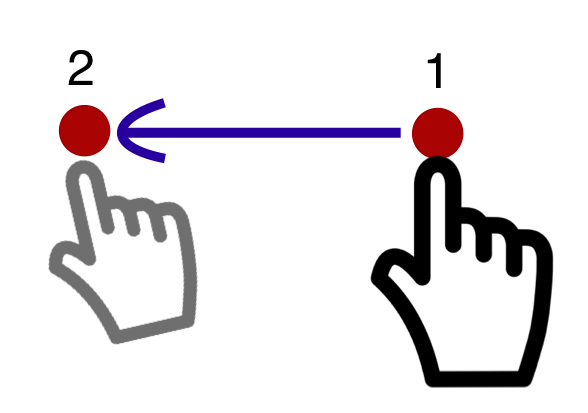
Figure 1. A **path-based gesture** where pointer movement is only allowed in a straight line from the start-point to the end-point. If the user strays from the straight directional path, the gesture is not recognized, has no effect, or is aborted.
If going through an intermediate point (usually near the start of the gesture) affects its meaning, then it is a **path-based gesture**. The user engages a pointer (starting point), carries out a movement that goes through at least one intermediate-point before disengaging the pointer (end point). The intermediate point defines the gesture as requiring a specific path, even if the complete path is not defined.
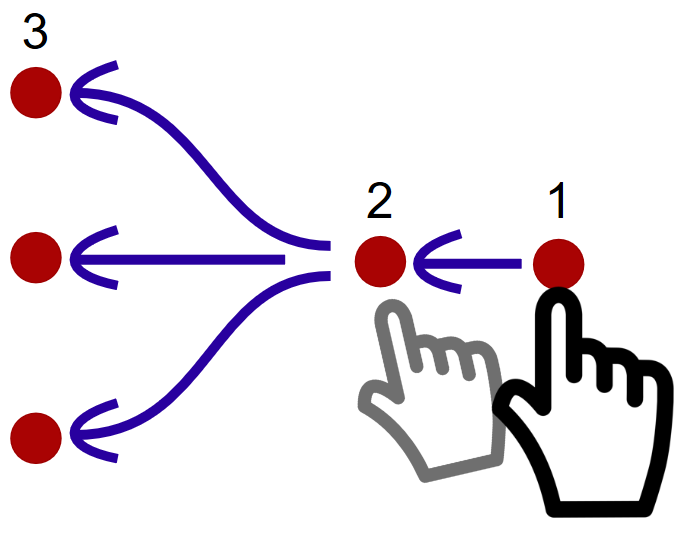
Figure 2. A **path-based gesture** involves starting a pointer movement that goes through at least one intermediate point before the end-point. The end-point may be a continuation, or allow for various movements.
Examples of path-based gestures include swiping, sliders and carousels dependent on the direction of interaction, and other gestures which trace a prescribed path such as drawing a specific shape. Such paths may be drawn with a finger or stylus on a touchscreen, graphics tablet, or trackpad, or with a mouse, joystick, or similar pointer device.
### The difference between Pointer Gestures and Dragging
Dragging is a movement where the user picks up an object with a pointer (such as mouse cursor or a finger) and moves it to some other position. This movement from start point to end point does not require the user to follow any particular path or direction. Dragging is therefore not path-based. In contrast, a path-based pointer gesture requires the traversal of an intermediate point, which is a technical way of expressing that the directionality and possibly speed of the gesture communicates a particular command to the system. New in WCAG 2.2: Dragging motions are covered in [Success Criterion 2.5.7: Dragging Movements](https://www.w3.org/WAI/WCAG22/Understanding/dragging-movements)
.
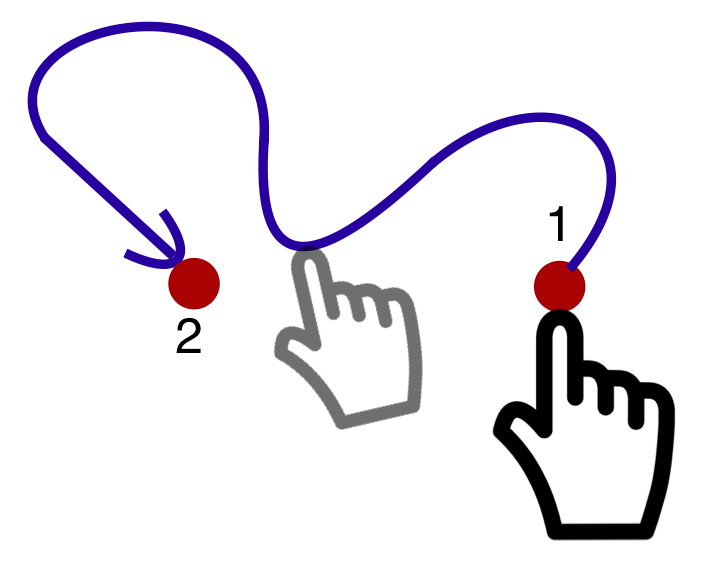
Figure 3. A **free-form gesture** does **not** require any particular path before the end-point, only the start and (optionally) the end point matter. This is **not path-based**
### Challenges for people with disabilities
Note
Any movement of a pointer could be difficult or impossible to use for someone who cannot perform precise movements, therefore alternative forms of interaction are always recommended. This success criterion is scoped to _path-based gestures_ as it may be difficult or impossible to provide an alternative for _free-form gestures_.
Examples of **multipoint** gestures include a two-finger pinch zoom, a split tap where one finger rests on the screen and a second finger taps, or a two- or three-finger tap or swipe. Users may find it difficult or impossible to accomplish these if they type and point with a single finger or stick.
Authors must ensure that their content can be operated without multipoint or path-based gestures. Multipoint or path-based gestures can be used so long as the functionality can also be operated by another method, such as a tap, click, double tap, double click, long press, or click & hold.
This success criterion applies to gestures in the author-provided content, not gestures defined by the operating system, user agent, or assistive technology. Examples of operating system gestures would be swiping down to see system notifications and gestures for built-in assistive technologies (AT). Examples of user agent-implemented gestures would be horizontal swiping implemented by browsers for navigating within the page history, or vertical swiping to scroll page content.
There are times when a component requires a path-based gesture for touch screen devices but not with a mouse. Taking an example of a generic slider:
* **Using a mouse:** If the user clicks on the thumb control of the slider and moves vertically, the slider will respond by moving to the right or left, even if the movement is mostly upwards. There will be no page scrolling as a result of the vertical movement as long as they drag with focus on the slider. Therefore, the slider does not require a path-based gesture with mouse pointer.
* **Using a touch-screen:** If the user puts their finger on the thumb control of the slider and moves upwards more than sideways, the slider may not respond because the browser takes control of the swipe and interprets it as a scroll, and will move the page up and down. Moving left or right on the slider thumb engages the slider and then the user can vary their vertical movement. This implementation has the 3-point requirement to work with a finger on a touch screen device so is a path-based gesture.
As touch screen devices can apply default gestures it is important to test with them if you are unsure whether a particular component does require a path-based gesture.
Browsers on a touch screen device generally provide some default gestures that impact whether a path-based gesture is needed. For example, a web browser on a touch-screen devices might detect a vertical gesture and scroll the page. If a user places their finger on a slider thumb and moves up (to scroll down) that might not activate the slider (depending on implementation). If the user moves horizontally first then the slider could capture that gesture and ignore vertical movement, resulting in a path-based gesture. If you include touch-screen devices as accessibility supported then these types of interaction need testing with a touch screen as using a mouse in a similar way would not trigger the same browser behavior.
This success criterion does not require all functionality to be available through pointing devices, but if it is available to pointer devices then it should not require path-based gestures. While content authors generally need to provide keyboard commands or other non-pointer mechanisms that perform actions equivalent to complex gestures (see Success Criterion 2.1.1 Keyboard), this is not sufficient to conform to this success criterion. That is because some users rely entirely on pointing devices, or find simple pointer inputs much easier to perform and understand than alternatives. For example, a user relying on a head-pointer would find clicking a control to be much more convenient than activating an on-screen keyboard to emulate a keyboard shortcut, and a person who has difficulty memorizing a series of keys (or gestures) may find it much easier to simply click on a labeled control. Therefore, if one or more pointer-based mechanisms are supported, then their benefits should be afforded to users through simple, single-point actions alone.
Single pointer operations include taps and clicks, double-taps and double-clicks, long presses, swiping, dragging, and path-based gestures. Gestures such as "pinch to zoom" or two-finger swipes are _multipoint_ gestures, as they require two or more pointer inputs - in this case, two fingers on a touchscreen.
An exception is made for functionality that is inherently and necessarily based on complex paths or multipoint gestures. For example, entering your signature may be inherently path-based (although acknowledging something or confirming your identity need not be).
This success criterion _does not apply_ to gestures that involve dragging in any direction because only the start and end points matter in a dragging operation. However, such gestures do require fine motor control. Authors are encouraged to provide non-dragging methods, for instance, a drag and drop operation could also be achieved by selecting an item (with a tap or keyboard interaction) and then selecting its destination as a second step.
Benefits
--------
* Users who cannot (accurately) perform path-based pointer gestures - on a touchscreen, or with a mouse - will have alternative means for operating the content.
* Users who cannot perform multi-pointer gestures on a touchscreen (for instance, because they are operating the touchscreen with an alternative input such as a head pointer) will have a single-pointer alternative for operating the content.
* Users who may not understand the custom gesture interaction intended by the author will be able to rely on simple, frequently used gestures to interact. This can be especially beneficial for users with cognitive or learning disabilities.
Examples
--------
* A website includes a map view that supports the pinch gesture to zoom into the map content. User interface controls offer the operation using plus and minus buttons to zoom in and out.
* A website includes a map view that supports the pinch gesture to zoom into the map content. As an single-pointer alternative, the map also allows users to double-tap, hold, and then move the pointer up or down to zoom in or out.
* A news site has a horizontal content slider with hidden news teasers that can moved into the viewport via a fast horizontal swipe/flicking motion. It also offers forward and backward arrow buttons for single-point activation to navigate to adjacent slider content.
* A kanban widget with several vertical areas representing states in a defined process allows the user to right- or left-swipe elements to move them to an adjacent silo. The user can also accomplish this by selecting the element with a single tap or click, and then activating an arrow button to move the selected element.
* A custom slider requires movement in a strict left/right direction when operated by dragging the thumb control. Buttons on both sides of the slider increment and decrement the selected value and update the thumb position.
Techniques
----------
Each numbered item in this section represents a technique or combination of techniques that the Accessibility Guidelines Working Group deems sufficient for meeting this success criterion. A technique may go beyond the minimum requirement of the criterion. There may be other ways of meeting the criterion not covered by these techniques. For information on using other techniques, see [Understanding Techniques for WCAG Success Criteria](https://www.w3.org/WAI/WCAG22/Understanding/understanding-techniques)
, particularly the "Other Techniques" section.
### Sufficient Techniques
* [G215: Providing controls to achieve the same result as path based or multipoint gestures](https://www.w3.org/WAI/WCAG22/Techniques/general/G215)
* [G216: Providing single point activation for a control slider](https://www.w3.org/WAI/WCAG22/Techniques/general/G216)
### Failures
The following are common mistakes that are considered failures of this success criterion by the Accessibility Guidelines Working Group.
* [F105: Failure of Success Criterion 2.5.1 due to providing functionality via a path-based gesture without simple pointer alternative](https://www.w3.org/WAI/WCAG22/Techniques/failures/F105)
Key Terms
---------
essential
if removed, would fundamentally change the information or functionality of the content, **and** information and functionality cannot be achieved in another way that would conform
functionality
[processes](https://www.w3.org/WAI/WCAG22/Understanding/pointer-gestures.html#dfn-process)
and outcomes achievable through user action
process
series of user actions where each action is required in order to complete an activity
single pointer
an input modality that only targets a single point on the page/screen at a time – such as a mouse, single finger on a touch screen, or stylus.
Note
Single pointer interactions include clicks, double clicks, taps, dragging motions, and single-finger swipe gestures. In contrast, multipoint interactions involve the use of two or more pointers at the same time, such as two-finger interactions on a touchscreen, or the simultaneous use of a mouse and stylus.
[Back to Top](https://www.w3.org/WAI/WCAG22/Understanding/pointer-gestures.html#top)
---
# Understanding Guideline 1.2: Time-based Media | WAI | W3C
[Skip to content](https://www.w3.org/WAI/WCAG22/Understanding/time-based-media.html#main)
Understanding [Guideline 1.2](https://w3.org/TR/WCAG22#time-based-media)
: Time-based Media
===========================================================================================
Guideline
---------
Provide alternatives for time-based media.
Intent
------
The purpose of this guideline is to provide access to time-based and synchronized media. This includes media that is:
* audio-only
* video-only
* audio-video
* audio and/or video combined with interaction
Media can be **live** or **prerecorded**. The success criteria names tell you if a success criterion applies to **live** or **prerecorded** media.
To make it easy for authors to quickly determine which success criteria apply to their content, the type of media each success criterion applies to is included in the name of the criterion.
For **audio-only** or **video-only** media, you only need to apply the success criteria that include "**audio-only**" or "**video-only**" in their name, except that at Level AAA, [1.2.8 Media Alternative (Prerecorded)](https://www.w3.org/WAI/WCAG22/Understanding/media-alternative-prerecorded)
also applies to **video-only** media. If your media is _not_ **audio-only** or **video-only**, then _all_ of the other of the success criteria apply.
Synchronized media is defined in the glossary as:
> audio or video synchronized with another format for presenting information and/or with time-based interactive components, unless the media is a media alternative for text that is clearly labeled as such.
Note that an audio file accompanied by interaction is covered here, as is a video-only file that involves interaction. These are covered because interaction must take place at a particular time. Having a text transcript that said, "for more information, click now," would not be very helpful since the reader would have no idea when the audio said, "now." As a result, synchronized captions would be needed.
Sometimes, there is so much dialogue that audio description cannot fit into existing pauses in the dialogue. The option at Level A to provide an alternative for time-based media instead of audio description for synchronized media would allow access to all of the information in the synchronized media. This option also allows access to the visual information in non-visual form when audio description is not provided for some other reason.
For synchronized media that includes interaction, interactive elements (for example, links) could be embedded in the alternative for time-based media.
This guideline also includes (at Level AAA) sign language interpretation for synchronized media as well as an approach called extended audio description. In extended audio description, the video is frozen periodically to allow more audio description to take place than is possible in the existing pauses in the dialogue. This is a case where higher-level Success Criteria build upon the requirements of lower-level Success Criterion with the intention of having cumulative, progressively stronger, requirements.
Text alternatives and equivalents match the language of the content
-------------------------------------------------------------------
Text alternatives and equivalents should match the human language of the original content (normally the default human language of the page). The [5.2 Conformance Requirements](https://www.w3.org/TR/WCAG22/#conformance-reqs)
section, through the defined terms used there, states that success criteria be met through accessibility-supported ways (5.2.4), where the technology is used in the human language of the content. Where an alternative version is used (5.2.1), it is defined as something that provides all of the same information and functionality in the same human language.
For time-based media, that normally means that where the spoken language of the media is (for example) Spanish, the language used in captions, audio descriptions, and media alternatives will also be Spanish.
Success Criteria for this Guideline
-----------------------------------
* [1.2.1 Audio-only and Video-only (Prerecorded)](https://www.w3.org/WAI/WCAG22/Understanding/audio-only-and-video-only-prerecorded)
* [1.2.2 Captions (Prerecorded)](https://www.w3.org/WAI/WCAG22/Understanding/captions-prerecorded)
* [1.2.3 Audio Description or Media Alternative (Prerecorded)](https://www.w3.org/WAI/WCAG22/Understanding/audio-description-or-media-alternative-prerecorded)
* [1.2.4 Captions (Live)](https://www.w3.org/WAI/WCAG22/Understanding/captions-live)
* [1.2.5 Audio Description (Prerecorded)](https://www.w3.org/WAI/WCAG22/Understanding/audio-description-prerecorded)
* [1.2.6 Sign Language (Prerecorded)](https://www.w3.org/WAI/WCAG22/Understanding/sign-language-prerecorded)
* [1.2.7 Extended Audio Description (Prerecorded)](https://www.w3.org/WAI/WCAG22/Understanding/extended-audio-description-prerecorded)
* [1.2.8 Media Alternative (Prerecorded)](https://www.w3.org/WAI/WCAG22/Understanding/media-alternative-prerecorded)
* [1.2.9 Audio-only (Live)](https://www.w3.org/WAI/WCAG22/Understanding/audio-only-live)
[Back to Top](https://www.w3.org/WAI/WCAG22/Understanding/time-based-media.html#top)
---
# Understanding Success Criterion 2.5.2: Pointer Cancellation | WAI | W3C
[Skip to content](https://www.w3.org/WAI/WCAG22/Understanding/pointer-cancellation.html#main)
Understanding [SC 2.5.2](https://w3.org/TR/WCAG22#pointer-cancellation)
: Pointer Cancellation (Level A)
========================================================================================================
In Brief
--------
Goal
Reduce accidental activation of controls by mouse or touch.
What to do
Make pointer cancellation predictable and consistent.
Why it's important
Make it easier for anyone to recover from something they didn’t mean to do.
Success Criterion (SC)
----------------------
For [functionality](https://www.w3.org/WAI/WCAG22/Understanding/pointer-cancellation.html#dfn-functionality)
that can be operated using a [single pointer](https://www.w3.org/WAI/WCAG22/Understanding/pointer-cancellation.html#dfn-single-pointer)
, at least one of the following is true:
No Down-Event
The [down-event](https://www.w3.org/WAI/WCAG22/Understanding/pointer-cancellation.html#dfn-down-event)
of the pointer is not used to execute any part of the function;
Abort or Undo
Completion of the function is on the [up-event](https://www.w3.org/WAI/WCAG22/Understanding/pointer-cancellation.html#dfn-up-event)
, and a [mechanism](https://www.w3.org/WAI/WCAG22/Understanding/pointer-cancellation.html#dfn-mechanism)
is available to abort the function before completion or to undo the function after completion;
Up Reversal
The up-event reverses any outcome of the preceding down-event;
Essential
Completing the function on the down-event is [essential](https://www.w3.org/WAI/WCAG22/Understanding/pointer-cancellation.html#dfn-essential)
.
Note 1
Functions that emulate a keyboard or numeric keypad key press are considered essential.
Note 2
This requirement applies to web content that interprets pointer actions (i.e., this does not apply to actions that are required to operate the user agent or assistive technology).
Intent
------
The intent of this success criterion is to make it easier for users to prevent accidental or erroneous pointer input. People with various disabilities can inadvertently initiate touch or mouse events with unwanted results. Each of the following subsections roughly aligns with the bullets of this Success Criterion, and outlines a means of allowing users to cancel pointer operations.
### Up-Event activation or completion
The most accessible way to incorporate pointer cancellation is to make activation occur on the up-event.
Up-event activation refers to the activation of a target when the pointer is released. In a touchscreen interaction, when the finger touches a target, the up-event activation only occurs when the finger is lifted while still being within the target boundary. Similarly in mouse interaction, the up-event occurs when the mouse button is released while the cursor is still within the boundary of the initial target set when the mouse button was pressed.
Authors can reduce the problem of users inadvertently triggering an action by using generic platform activation/click events that activate functionality on the up-event. For example, the `click` event in JavaScript triggers on release of the primary mouse button, and is an example of an implicit up-event. Despite its name, the `click` event is device-independent and also works for touch and keyboard interaction.
The preference for up-events is implicit in the success criterion wording of the first bullet: The down-event of the pointer is not used to execute any part of the function. Authors meet the first bullet by using only the up-event.
### Up-Event Abort or Undo
Where the interaction is equivalent to a simple "click", up-event activation has a built-in ability to cancel. There is a distinction between when someone touches a screen and when they remove their finger. Similarly, in mouse interaction, there is a difference between pressing and releasing the mouse button. When activation occurs only as the pointer is released, users have the opportunity to Abort (cancel) the activation. Users who have difficulty accurately using a mouse or touchscreen benefit greatly from this basic behavior. They normally receive visual feedback when an item is pressed. If they discover they have selected the wrong item, they can cancel the action by moving their pointer or finger away from the target before releasing.
For more complex interactions, such as drag and drop, the down- and up-events may initiate and end a series of actions to complete a process. For example, with drag and drop, the item may be:
1. selected with a press (down-event),
2. moved to a new location, while still being depressed, and
3. released (up-event) to conclude the drop action.
In such a complex action, the need for an Abort or Undo function increases. Designers may elect to confirm the move through something like a confirmation dialog or an undo button, giving the user the ability to Undo the process just completed. Alternatively, the ability to Abort the action can be achieved if, before completing step 3, the user returns the selected item to its original location and concludes the process there. If other parts of the screen disallow a move, the user can conclude the drag and drop there, effectively nullifying the operation.
### Up Reversal
In other interactions, the down-event may trigger a behavior which can be reversed when the up-event concludes. Examples of this include press-and-hold actions such as where a transient popup appears (or a video plays) when the user presses on an object (down-event), but the popup (or video) disappears as soon as the user releases the pointer (up-event). Since the up-event reverses the preceding down event, the user is returned to their prior point, and has effectively cancelled the operation.
### Down-Event
Completing the function on the down-event is only permitted when it is essential that the up-event not be used.
The most prevalent essential down-event activation occurs in keyboard emulation. On a physical keyboard, keys by default activate on the down-event -- a letter appears when the key is pressed. If a software keyboard emulator tried to override this expected behavior by making letters appear when the key is released, the behavior would be unexpected and would adversely affect expected interaction.
Note that a keyboard has a built-in Backspace or Delete button, which effectively provides an Undo option. Undo is not a requirement of the down-event Essential exception; however, providing an easy way for users to undo any action is a recommended practice (and may be a functional necessity), even where it is not a requirement of this success criterion.
Other examples where the timing of an activation is essential and requires the down-event would be:
* An activity that emulates a physical on-press trigger, such as when playing an on-screen piano keyboard. Activation on the up-event would significantly alter the desired behavior.
* A program for shooting skeets where waiting for the "up" event would invalidate the precise timing necessary for the activation.
Benefits
--------
* Makes it easier for all users to recover from hitting the wrong target.
* Helps people with visual disabilities, cognitive limitations, and motor impairments by reducing the chance that a control will be accidentally activated or an action will occur unexpectedly, and also ensures that where complex controls are activated, a means of Undoing or Aborting the action is available.
* Individuals who are unable to detect changes of context are less likely to become disoriented while navigating a site.
Examples
--------
* For interface elements that have a single tap or long press as input, the corresponding event is triggered when the finger is lifted inside that element.
* A drag-and-drop interface allows users to sort vertically stacked cards by picking up one card with the pointer (down-event), move it to a new position, and insert it at the new location when the pointer is released (up-event). Releasing the pointer outside the drop target area reverts the action, i.e., it moves the card back to the old position before the interaction started.
Techniques
----------
Each numbered item in this section represents a technique or combination of techniques that the Accessibility Guidelines Working Group deems sufficient for meeting this success criterion. A technique may go beyond the minimum requirement of the criterion. There may be other ways of meeting the criterion not covered by these techniques. For information on using other techniques, see [Understanding Techniques for WCAG Success Criteria](https://www.w3.org/WAI/WCAG22/Understanding/understanding-techniques)
, particularly the "Other Techniques" section.
### Sufficient Techniques
* [G210: Ensuring that drag-and-drop actions can be cancelled](https://www.w3.org/WAI/WCAG22/Techniques/general/G210)
* [G212: Using native controls to ensure functionality is triggered on the up-event.](https://www.w3.org/WAI/WCAG22/Techniques/general/G212)
* Touch events are only triggered when touch is removed from a control (Potential future technique)
### Failures
The following are common mistakes that are considered failures of this success criterion by the Accessibility Guidelines Working Group.
* [F101: Failure of Success Criterion 2.5.2 due to activating a control on the down-event](https://www.w3.org/WAI/WCAG22/Techniques/failures/F101)
Key Terms
---------
assistive technology
hardware and/or software that acts as a [user agent](https://www.w3.org/WAI/WCAG22/Understanding/pointer-cancellation.html#dfn-user-agent)
, or along with a mainstream user agent, to provide functionality to meet the requirements of users with disabilities that go beyond those offered by mainstream user agents
Note 1
Functionality provided by assistive technology includes alternative presentations (e.g., as synthesized speech or magnified content), alternative input methods (e.g., voice), additional navigation or orientation mechanisms, and content transformations (e.g., to make tables more accessible).
Note 2
Assistive technologies often communicate data and messages with mainstream user agents by using and monitoring APIs.
Note 3
The distinction between mainstream user agents and assistive technologies is not absolute. Many mainstream user agents provide some features to assist individuals with disabilities. The basic difference is that mainstream user agents target broad and diverse audiences that usually include people with and without disabilities. Assistive technologies target narrowly defined populations of users with specific disabilities. The assistance provided by an assistive technology is more specific and appropriate to the needs of its target users. The mainstream user agent may provide important functionality to assistive technologies like retrieving web content from program objects or parsing markup into identifiable bundles.
conformance
satisfying all the requirements of a given standard, guideline or specification
down-event
platform event that occurs when the trigger stimulus of a pointer is depressed
The down-event may have different names on different platforms, such as "touchstart" or "mousedown".
essential
if removed, would fundamentally change the information or functionality of the content, **and** information and functionality cannot be achieved in another way that would conform
functionality
[processes](https://www.w3.org/WAI/WCAG22/Understanding/pointer-cancellation.html#dfn-process)
and outcomes achievable through user action
mechanism
[process](https://www.w3.org/WAI/WCAG22/Understanding/pointer-cancellation.html#dfn-process)
or technique for achieving a result
Note 1
The mechanism may be explicitly provided in the content, or may be [relied upon](https://www.w3.org/WAI/WCAG22/Understanding/pointer-cancellation.html#dfn-relied-upon)
to be provided by either the platform or by [user agents](https://www.w3.org/WAI/WCAG22/Understanding/pointer-cancellation.html#dfn-user-agent)
, including [assistive technologies](https://www.w3.org/WAI/WCAG22/Understanding/pointer-cancellation.html#dfn-assistive-technology)
.
Note 2
The mechanism needs to meet all success criteria for the conformance level claimed.
process
series of user actions where each action is required in order to complete an activity
relied upon
the content would not [conform](https://www.w3.org/WAI/WCAG22/Understanding/pointer-cancellation.html#dfn-conformance)
if that [technology](https://www.w3.org/WAI/WCAG22/Understanding/pointer-cancellation.html#dfn-technology)
is turned off or is not supported
single pointer
an input modality that only targets a single point on the page/screen at a time – such as a mouse, single finger on a touch screen, or stylus.
Note
Single pointer interactions include clicks, double clicks, taps, dragging motions, and single-finger swipe gestures. In contrast, multipoint interactions involve the use of two or more pointers at the same time, such as two-finger interactions on a touchscreen, or the simultaneous use of a mouse and stylus.
technology
[mechanism](https://www.w3.org/WAI/WCAG22/Understanding/pointer-cancellation.html#dfn-mechanism)
for encoding instructions to be rendered, played or executed by [user agents](https://www.w3.org/WAI/WCAG22/Understanding/pointer-cancellation.html#dfn-user-agent)
Note 1
As used in these guidelines "web technology" and the word "technology" (when used alone) both refer to web content technologies.
Note 2
Web content technologies may include markup languages, data formats, or programming languages that authors may use alone or in combination to create end-user experiences that range from static web pages to synchronized media presentations to dynamic Web applications.
up-event
platform event that occurs when the trigger stimulus of a pointer is released
The up-event may have different names on different platforms, such as "touchend" or "mouseup".
user agent
any software that retrieves and presents web content for users
[Back to Top](https://www.w3.org/WAI/WCAG22/Understanding/pointer-cancellation.html#top)
---
# Understanding Success Criterion 2.5.8: Target Size (Minimum) | WAI | W3C
[Skip to content](https://www.w3.org/WAI/WCAG22/Understanding/target-size-minimum.html#main)
Understanding [SC 2.5.8](https://w3.org/TR/WCAG22#target-size-minimum)
: Target Size (Minimum) (Level AA)
=========================================================================================================
In Brief
--------
Goal
Make controls easier to activate.
What to do
Ensure targets meet a minimum size or have sufficient spacing around them.
Why it's important
Some people with physical impairments cannot click small buttons that are close together.
Success Criterion (SC)
----------------------
The size of the [target](https://www.w3.org/WAI/WCAG22/Understanding/target-size-minimum.html#dfn-target)
for [pointer inputs](https://www.w3.org/WAI/WCAG22/Understanding/target-size-minimum.html#dfn-pointer-input)
is at least 24 by 24 [CSS pixels](https://www.w3.org/WAI/WCAG22/Understanding/target-size-minimum.html#dfn-css-pixel)
, except when:
Spacing
Undersized targets (those less than 24 by 24 CSS pixels) are positioned so that if a 24 CSS pixel diameter circle is centered on the [bounding box](https://www.w3.org/WAI/WCAG22/Understanding/target-size-minimum.html#dfn-minimum-bounding-box)
of each, the circles do not intersect another target or the circle for another undersized target;
Equivalent
The function can be achieved through a different control on the same page that meets this criterion;
Inline
The target is in a sentence or its size is otherwise constrained by the line-height of non-target text;
User Agent Control
The size of the target is determined by the [user agent](https://www.w3.org/WAI/WCAG22/Understanding/target-size-minimum.html#dfn-user-agent)
and is not modified by the author;
Essential
A particular [presentation](https://www.w3.org/WAI/WCAG22/Understanding/target-size-minimum.html#dfn-presentation)
of the target is [essential](https://www.w3.org/WAI/WCAG22/Understanding/target-size-minimum.html#dfn-essential)
or is legally required for the information being conveyed.
Note 1
Targets that allow for values to be selected spatially based on position within the target are considered one target for the purpose of the success criterion. Examples include sliders, color pickers displaying a gradient of colors, or editable areas where you position the cursor.
Note 2
For inline targets the line-height should be interpreted as perpendicular to the flow of text. For example, in a language displayed vertically, the line-height would be horizontal.
Intent
------
The intent of this success criterion is to help ensure targets can be easily activated without accidentally activating an adjacent target. Users with dexterity limitations and those who have difficulty with fine motor movement find it difficult to accurately activate small targets when there are other targets that are too close. Providing sufficient size, or sufficient spacing between targets, will reduce the likelihood of accidentally activating the wrong control.
Disabilities addressed by this requirement include hand tremors, spasticity, and quadriplegia. Some people with disabilities use specialized input devices instead of a computer mouse or trackpad. Typically these types of input device do not provide as much accuracy as mainstream pointing devices. Meeting this requirement also ensures that touchscreen interfaces are easier to use.
Note
This success criterion defines a _minimum size_ and, if this can't be met, a _minimum spacing_. It is still possible to have very small, and difficult to activate, targets and meet the requirements of this Success Criterion, provided that the targets don't have any adjacent targets that are too close. However, using larger target sizes will help many people use targets more easily. _As a best practice_ it is recommended to at least meet the _minimum size_ requirement of the Success Criterion, regardless of spacing. For important links/controls, consider aiming for the stricter [2.5.5 Target Size (Enhanced)](https://www.w3.org/WAI/WCAG22/Understanding/target-size-enhanced.html)
.
### Exceptions
The requirement is for targets to be at least 24 by 24 CSS pixels in size. There are five exceptions:
* **Spacing:** Undersized targets (those less than 24 by 24 CSS pixels) are positioned so that if a 24 CSS pixel diameter circle is centered on the [bounding box](https://www.w3.org/WAI/WCAG22/Understanding/target-size-minimum.html#dfn-minimum-bounding-box)
of each, the circles do not intersect another target or the circle for another undersized target.
* **Equivalent:** In cases where a target does not have a size equivalent to 24 by 24 CSS pixels, but there is another control that can achieve the underlying function that _does_ meet the requirements of this success criterion, the target can be excepted based on the "Equivalent" exception.
* **Inline:** The success criterion does not apply to inline targets in sentences, or where the size of the target is constrained by the line-height of non-target text. This exception is allowed because text reflow based on viewport size makes it impossible for authors to anticipate where links may be positioned relative to one another. Applying this success criterion when multiple links are embedded in blocks of smaller text often results in an undesirable design. It is more important to set the line height to a value that improves readability.
* **User agent control:** Browsers have default renderings of some controls, such as the days of the month calendar in an ``. As long as the author has not modified the user agent default size, the target size for a User agent control is excepted.
* **Essential:** If the size and spacing of the targets is fundamental to the information being conveyed, the Essential exception applies. For example, in digital maps, the position of pins is analogous to the position of places shown on the map. If there are many pins close together, the spacing between pins and neighboring pins will often be below 24 CSS pixels. It is essential to show the pins at the correct map location, therefore the Essential exception applies. A similar example is an interactive data visualization where targets are necessarily dense. Another example is where jurisdictions legally require online forms to replicate paper forms, which can impose constraints on the size of targets. In such jurisdictions, any legal requirement to replicate small targets can be considered essential. When the "Essential" exception is applicable, authors are strongly encouraged to provide equivalent functionality through alternative means to the extent practical.
### Size requirement
For a target to be "at least 24 by 24 CSS pixels", it must be conceptually possible to draw a solid 24 by 24 CSS pixel square, aligned to the horizontal and vertical axis such that the square is completely within the target (does not extend outside the target's area).
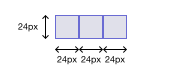
Figure 1. Where targets are at least a 24 by 24 CSS pixel square, they meet the size requirement of the criterion and pass (image shown to scale - [see the scalable original version](https://www.w3.org/WAI/WCAG22/Understanding/img/target-size-basic.svg)
)
The 24 by 24px square has to be aligned with the page, although the target itself could be skewed.
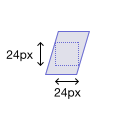
Figure 2. So long as there is a solid 24 by 24px square within the target, it meets the size requirement of the criterion and passes (image shown to scale - [see the scalable original version](https://www.w3.org/WAI/WCAG22/Understanding/img/target-size-skewed.svg)
)
If a target is not large enough to allow for a 24 by 24px square to be drawn inside it, it is considered _undersized_, and does not pass the size requirement of the success criterion. However, if it has sufficient space around it without adjacent targets, it may still pass the criterion thanks to the spacing exception (below).
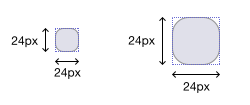
Figure 3. The rounded corners do not leave sufficient space to draw a 24 by 24px square inside the target, making the target _undersized_. Depending on the spacing to other targets, it may still pass if it has sufficient clearance (image shown at 1:1 and 2:1 scale - [see the scalable original version](https://www.w3.org/WAI/WCAG22/Understanding/img/target-size-undersized-rounded.svg)
)
The requirement is independent of the zoom factor of the page; when users zoom in, the CSS pixel size of elements does not change. This means that authors cannot meet it by claiming that the target will have enough spacing or sufficient size if the user zooms into the page.
The requirement does not apply to targets while they are obscured by content displayed as a result of a user interaction or scripted behavior of content, for example:
* interacting with a combobox shows a dropdown list of suggestions
* activating a button displays a modal dialog
* content displays a cookie banner after page load
* content displays a "Take a survey" dialog after some period of user inactivity
The requirement does however apply to targets in any new content that appears on top of other content.
While the success criterion primarily helps touch users by providing target sizing to prevent accidental triggering of adjacent targets, it is also useful for mouse or pen users. It reduces the chances of erroneous activation due to either a tremor or reduced precision, whether because of reduced fine motor control or input imprecision.
### Spacing
When the minimum size for a target is not met, spacing can at least improve the user experience. There is less chance of accidentally activating a neighboring target if a target is not immediately adjacent to another. Touchscreen devices and user agents generally have internal heuristics to identify which link or control is closest to a user's touch interaction - this means that sufficient spacing between targets can work as effectively as a larger target size itself.
When a target is smaller than 24 by 24 CSS pixels, it is _undersized_. In this case, we check if it at least has sufficient _spacing_ by drawing an imaginary 24 CSS pixel diameter circle over the undersized target, centered on the target's [bounding box](https://www.w3.org/WAI/WCAG22/Understanding/target-size-minimum.html#dfn-minimum-bounding-box)
. For rectangular targets, the bounding box coincides with the target itself – thus, the circle is placed on the center of the target. If the target is _not_ rectangular – for instance, if the target is clipped, has rounded corners, or if it's a more complex clickable SVG shape – we need to first determine the bounding box, and then find the box's center. Note that for concave shapes, the center of the bounding box may be outside of the target itself. Now, we center the circle on the center of the bounding box.
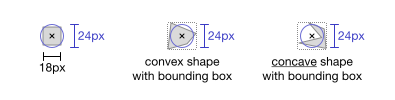
Figure 4. For a square/rectangular target, the 24 CSS pixel diameter circle is centered on the target itself. For convex and concave targets, it is centered on the bounding box of the shape. Note the concave target, where in this case the center of the bounding box is outside of the actual target (image shown to scale - [see the scalable original version](https://www.w3.org/WAI/WCAG22/Understanding/img/target-size-bounding-boxes.svg)
)
We repeat this process for all adjacent undersized targets. To determine if an undersized target has sufficient spacing (to pass this Success Criterion's spacing exception), we check that the 24 CSS pixel diameter circle of the target does not intersect another target or the circle of any other adjacent undersized targets.
The following example shows three versions of a horizontal row of six icon-based buttons:
* In the top row, the dimensions of each target are 24 by 24 CSS pixels, passing this success criterion.
* In the second row, the same targets are only 20 by 20 CSS pixels, but have a 4 CSS pixel space between them – as the target size is below 24 by 24 CSS pixels, these need to be evaluated against the Success Criterion's spacing exception, and they pass.
* In the last row, the targets are again 20 by 20 CSS pixels, but have no space between them – these fail the spacing exception. This is because the imaginary 24 CSS pixel diameter circles over the targets would intersect.
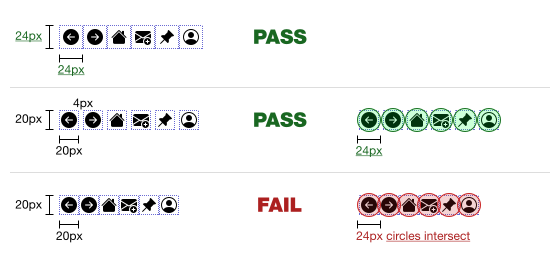
Figure 5. Three rows of targets, illustrating two ways of meeting this success criterion and one way of failing it (image shown to scale - [see the scalable original version](https://www.w3.org/WAI/WCAG22/Understanding/img/target-spacing-toolbar.svg)
)
The next two illustrations show sets of buttons which are only 16 CSS pixels tall. In the first set, there are no targets immediately above or below the buttons, so they pass. In the second illustration, there are further buttons, and they have been stacked on top of one another, resulting in a fail.

Figure 6. While the height of the targets is only 16 CSS pixels, the lack of adjacent targets above and below means that the targets pass this success criterion (image shown to scale - [see the scalable original version](https://www.w3.org/WAI/WCAG22/Understanding/img/target-text-buttons-single-row.svg)
)

Figure 7. Two rows of buttons, both with a height of only 16 CSS pixels. The rows are close, with only a 1 CSS pixel gap between them. This means that the 24 CSS pixel spacing circles of the targets in one row will _intersect_ the targets (and their circles, depending on their respective widths) in the other line, thus failing the success criterion. Image shown to scale - [see the scalable original version](https://www.w3.org/WAI/WCAG22/Understanding/img/target-text-buttons-two-rows.svg)
.
The following two illustrations show how menu items can be adjusted to properly meet this requirement. In the first illustration, the About us menu has been activated, showing that each of the menu item targets has a 24 CSS pixel height (text and padding), and so passes. In the second illustration, the same menu is expanded, but the menu items only achieve 18 CSS pixels in height, and so fail.
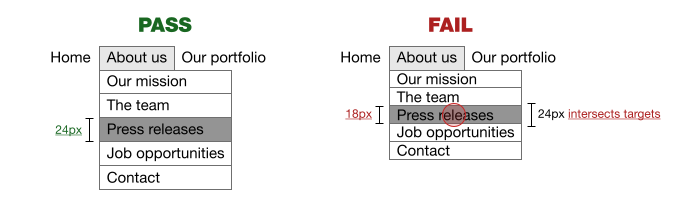
Figure 8. The menu items with a height of 24 CSS pixels pass. For the menu items that are only 18 CSS pixels high, the 24 CSS pixel spacing circles of the targets in one row will intersect the adjacent menu item targets and circles, and fail (image shown to scale - [see the scalable original version](https://www.w3.org/WAI/WCAG22/Understanding/img/target-dropdown.svg)
)
The following example has one large target (an image that links to a new page related to that image) and a very small second target (a control with a magnifier icon to open a zoomed-in preview, possibly in a modal, of the image).
In the top row, the small target overlaps - or, to be more technically accurate, _clips_ - the large target. The small target itself has a size of 24 by 24 CSS pixels, so passes. In the second row, we see that if the second target is any smaller – in this case 16 by 16 CSS pixels – it fails the criterion, as the imaginary circle with a 24 CSS pixel diameter we draw over the small target will intersect the large target itself.
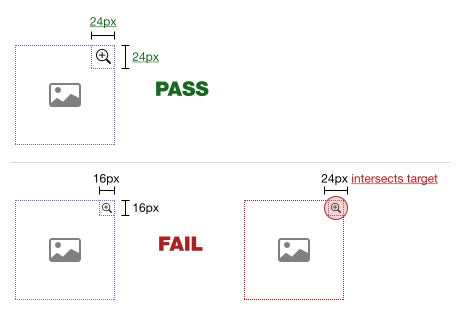
Figure 9. The 24 by 24 CSS pixel small target passes, while the 16 by 16 CSS pixel small target fails, since the 24 CSS pixel diameter circle used for undersized targets intersect the large target (image shown to scale - [see the scalable original version](https://www.w3.org/WAI/WCAG22/Understanding/img/target-large-small-clipping.svg)
)
In the following example, we have the same two targets – a large target and a small target. This time, the small target touches/abuts the large target. If the small target is smaller than 24 by 24 CSS pixels, the imaginary circle with a 24 CSS pixel diameter we draw over the small target will intersect the large target itself, failing the requirement. The undersized target must be spaced further away from the large target until its circle doesn't intersect the large target.
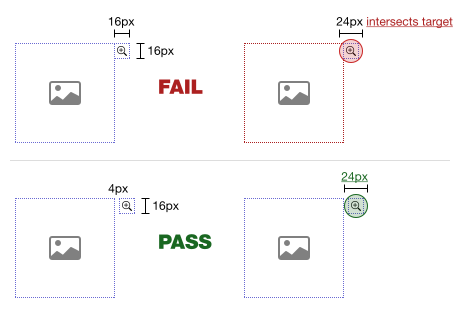
Figure 10. In the first row, the 16 by 16 CSS pixel target touching/abutting the large target fails, as its 24 CSS pixel diameter circle used for undersized targets intersects the large target. In the second row we see that the only way the undersized target can pass is by adding a 4 CSS pixel spacing gap between the targets (image shown to scale - [see the scalable original version](https://www.w3.org/WAI/WCAG22/Understanding/img/target-large-small-touching.svg)
)
Note
Users with different disabilities have different needs for control sizes. It can be beneficial to provide an option to increase the active target area without increasing the visible target size. Another option is to provide a mechanism to control the density of layout and thereby change target size or spacing, or both. This can be beneficial for a wide range of users. For example, users with visual field loss may prefer a more condensed layout with smaller sized controls while users with other forms of low vision may prefer large controls.
### User agent control
This success criterion has an exception for the size of targets determined by a user agent and not modified by the author. An example of this kind of target is a browser's scrollbars. If a scrollbar's dimensions have been modified by the author then there must be a passing amount of spacing between the scrollbar and the content of the page. The following example shows a passing and a failing design.
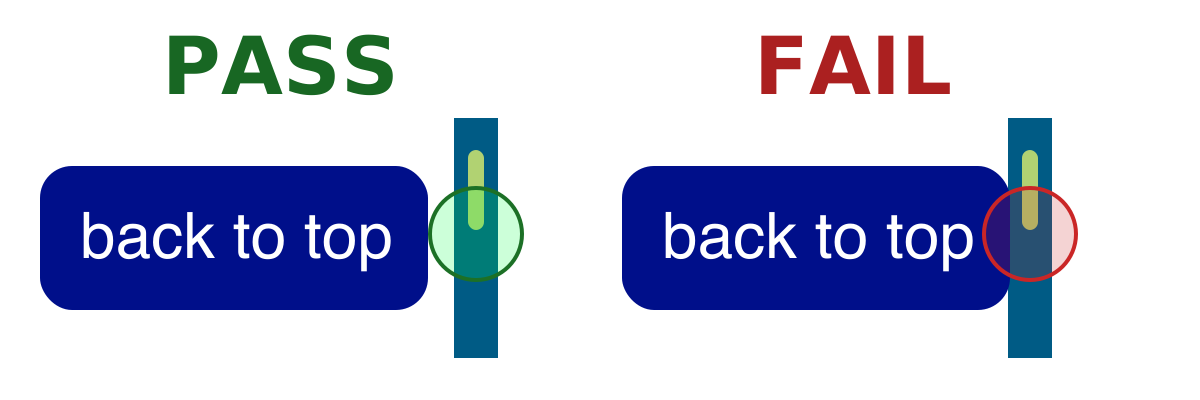
Figure 11. The passing example has enough space between the link and the scrollbar for a 24 CSS pixel diameter circle, placed over the scrollbar, to not overlap the link. The failing example has no space between the link and the scrollbar, which fails the criterion because the 24 CSS pixel diameter circle overlaps the link. (Image shown to scale - [see the scalable original version](https://www.w3.org/WAI/WCAG22/Understanding/img/target-custom-scrollbar-spacing.svg)
)
Benefits
--------
Having targets with sufficient size - or at least sufficient target spacing - can help all users who may have difficulty in confidently targeting or operating small controls. Users who benefit include, but are not limited to:
* People who use a mobile device where the touch screen is the primary mode of interaction;
* People using mouse, stylus or touch input who have mobility impairments such as hand tremors;
* People using a device in environments where they are exposed to shaking such as public transportation;
* Mouse users who have difficulty with fine motor movements;
* People who access a device using one hand;
* People with large fingers, or who are operating the device with only a part of their finger or knuckle.
Examples
--------
* Three buttons are on-screen and the target size of each button is 24 by 24 CSS pixels. Since the target size itself is 24 by 24 CSS pixels, no additional spacing is required, the success criterion passes.
* A row of buttons, each of which has a horizontal width of more than 24 CSS pixels, a height of only 20 CSS pixels, and vertical margin of 4 CSS pixels above and below the row of buttons. Since there is sufficient spacing both above and below the row of buttons, the success criterion passes.
* Links within a paragraph of text have varying target dimensions. Links within paragraphs of text do not need to meet the 24 by 24 CSS pixels requirements, so the success criterion passes.
Related Resources
-----------------
Resources are for information purposes only, no endorsement implied.
* [Target size study for one-handed thumb use on small touchscreen devices](https://dl.acm.org/doi/10.1145/1152215.1152260)
Techniques
----------
Each numbered item in this section represents a technique or combination of techniques that the Accessibility Guidelines Working Group deems sufficient for meeting this success criterion. A technique may go beyond the minimum requirement of the criterion. There may be other ways of meeting the criterion not covered by these techniques. For information on using other techniques, see [Understanding Techniques for WCAG Success Criteria](https://www.w3.org/WAI/WCAG22/Understanding/understanding-techniques)
, particularly the "Other Techniques" section.
### Sufficient Techniques
* [C42: Using min-height and min-width on target container to ensure sufficient target spacing](https://www.w3.org/WAI/WCAG22/Techniques/css/C42)
Key Terms
---------
assistive technology
hardware and/or software that acts as a [user agent](https://www.w3.org/WAI/WCAG22/Understanding/target-size-minimum.html#dfn-user-agent)
, or along with a mainstream user agent, to provide functionality to meet the requirements of users with disabilities that go beyond those offered by mainstream user agents
Note 1
Functionality provided by assistive technology includes alternative presentations (e.g., as synthesized speech or magnified content), alternative input methods (e.g., voice), additional navigation or orientation mechanisms, and content transformations (e.g., to make tables more accessible).
Note 2
Assistive technologies often communicate data and messages with mainstream user agents by using and monitoring APIs.
Note 3
The distinction between mainstream user agents and assistive technologies is not absolute. Many mainstream user agents provide some features to assist individuals with disabilities. The basic difference is that mainstream user agents target broad and diverse audiences that usually include people with and without disabilities. Assistive technologies target narrowly defined populations of users with specific disabilities. The assistance provided by an assistive technology is more specific and appropriate to the needs of its target users. The mainstream user agent may provide important functionality to assistive technologies like retrieving web content from program objects or parsing markup into identifiable bundles.
blocks of text
more than one sentence of text
content
information and sensory experience to be communicated to the user by means of a [user agent](https://www.w3.org/WAI/WCAG22/Understanding/target-size-minimum.html#dfn-user-agent)
, including code or markup that defines the content's [structure](https://www.w3.org/WAI/WCAG22/Understanding/target-size-minimum.html#dfn-structure)
, [presentation](https://www.w3.org/WAI/WCAG22/Understanding/target-size-minimum.html#dfn-presentation)
, and interactions
CSS pixel
visual angle of about 0.0213 degrees
A CSS pixel is the canonical unit of measure for all lengths and measurements in CSS. This unit is density-independent, and distinct from actual hardware pixels present in a display. User agents and operating systems should ensure that a CSS pixel is set as closely as possible to the [CSS Values and Units Module Level 3 reference pixel](https://www.w3.org/TR/css3-values/#reference-pixel)
\[[css3-values](https://www.w3.org/TR/css-values-3/)\
\], which takes into account the physical dimensions of the display and the assumed viewing distance (factors that cannot be determined by content authors).
essential
if removed, would fundamentally change the information or functionality of the content, **and** information and functionality cannot be achieved in another way that would conform
minimum bounding box
the smallest enclosing rectangle aligned to the horizontal axis within which all the points of a shape lie. For components which wrap onto multiple lines as part of a sentence or [block of text](https://www.w3.org/WAI/WCAG22/Understanding/target-size-minimum.html#dfn-blocks-of-text)
(such as hypertext links), the bounding box is based on how the component would appear on a single line.
pointer input
input from a device that can target a specific coordinate (or set of coordinates) on a screen, such as a mouse, pen, or touch contact
Note
See the [Pointer Events definition for "pointer"](https://www.w3.org/TR/pointerevents/#dfn-pointer)
\[\[pointerevents\]\].
presentation
rendering of the [content](https://www.w3.org/WAI/WCAG22/Understanding/target-size-minimum.html#dfn-content)
in a form to be perceived by users
structure
* The way the parts of a [web page](https://www.w3.org/WAI/WCAG22/Understanding/target-size-minimum.html#dfn-web-page)
are organized in relation to each other; and
* The way a collection of [web pages](https://www.w3.org/WAI/WCAG22/Understanding/target-size-minimum.html#dfn-web-page)
is organized
target
region of the display that will accept a pointer action, such as the interactive area of a [user interface component](https://www.w3.org/WAI/WCAG22/Understanding/target-size-minimum.html#dfn-user-interface-component)
Note
If two or more targets are overlapping, the overlapping area should not be included in the measurement of the target size, except when the overlapping targets perform the same action or open the same page.
user agent
any software that retrieves and presents web content for users
user interface component
a part of the content that is perceived by users as a single control for a distinct function
Note 1
Multiple user interface components may be implemented as a single programmatic element. "Components" here is not tied to programming techniques, but rather to what the user perceives as separate controls.
Note 2
User interface components include form elements and links as well as components generated by scripts.
Note 3
What is meant by "component" or "user interface component" here is also sometimes called "user interface element".
web page
a non-embedded resource obtained from a single URI using HTTP plus any other resources that are used in the rendering or intended to be rendered together with it by a [user agent](https://www.w3.org/WAI/WCAG22/Understanding/target-size-minimum.html#dfn-user-agent)
Note 1
Although any "other resources" would be rendered together with the primary resource, they would not necessarily be rendered simultaneously with each other.
Note 2
For the purposes of conformance with these guidelines, a resource must be "non-embedded" within the scope of conformance to be considered a web page.
[Back to Top](https://www.w3.org/WAI/WCAG22/Understanding/target-size-minimum.html#top)
---
# Understanding Success Criterion 3.3.6: Error Prevention (All) | WAI | W3C
[Skip to content](https://www.w3.org/WAI/WCAG22/Understanding/error-prevention-all.html#main)
Understanding [SC 3.3.6](https://w3.org/TR/WCAG22#error-prevention-all)
: Error Prevention (All) (Level AAA)
============================================================================================================
In Brief
--------
Goal
Users can avoid submitting incorrect information.
What to do
Provide ways for users to confirm, correct, or reverse any submissions.
Why it's important
People with disabilities may be more likely to make mistakes, or not notice them.
Success Criterion (SC)
----------------------
For [web pages](https://www.w3.org/WAI/WCAG22/Understanding/error-prevention-all.html#dfn-web-page)
that require the user to submit information, at least one of the following is true:
Reversible
Submissions are reversible.
Checked
Data entered by the user is checked for [input errors](https://www.w3.org/WAI/WCAG22/Understanding/error-prevention-all.html#dfn-input-error)
and the user is provided an opportunity to correct them.
Confirmed
A [mechanism](https://www.w3.org/WAI/WCAG22/Understanding/error-prevention-all.html#dfn-mechanism)
is available for reviewing, confirming, and correcting information before finalizing the submission.
Intent
------
The intent of this success criterion is to help users with disabilities avoid consequences that may result from making a mistake when submitting form data. This criterion builds on [Success Criterion 3.3.4](https://www.w3.org/WAI/WCAG22/Understanding/error-prevention-legal-financial-data)
in that it applies to all forms that require users to submit information.
Users with disabilities may be more likely to make mistakes and may have more difficulty detecting or recovering from mistakes. People with reading disabilities may transpose numbers and letters, and those with motor disabilities may hit keys by mistake. Providing the ability to reverse actions allows users to correct a mistake. Providing the ability to review and correct information gives the user an opportunity to detect a mistake before taking an action.
Benefits
--------
* Providing safeguards to avoid consequences resulting from mistakes helps users with all disabilities who may be more likely to make mistakes.
Techniques
----------
Each numbered item in this section represents a technique or combination of techniques that the Accessibility Guidelines Working Group deems sufficient for meeting this success criterion. A technique may go beyond the minimum requirement of the criterion. There may be other ways of meeting the criterion not covered by these techniques. For information on using other techniques, see [Understanding Techniques for WCAG Success Criteria](https://www.w3.org/WAI/WCAG22/Understanding/understanding-techniques)
, particularly the "Other Techniques" section.
### Sufficient Techniques
* Following the [sufficient techniques for Success Criterion 3.3.4](https://www.w3.org/WAI/WCAG22/Understanding/error-prevention-legal-financial-data#techniques)
for all forms that require the user to submit information
Key Terms
---------
assistive technology
hardware and/or software that acts as a [user agent](https://www.w3.org/WAI/WCAG22/Understanding/error-prevention-all.html#dfn-user-agent)
, or along with a mainstream user agent, to provide functionality to meet the requirements of users with disabilities that go beyond those offered by mainstream user agents
Note 1
Functionality provided by assistive technology includes alternative presentations (e.g., as synthesized speech or magnified content), alternative input methods (e.g., voice), additional navigation or orientation mechanisms, and content transformations (e.g., to make tables more accessible).
Note 2
Assistive technologies often communicate data and messages with mainstream user agents by using and monitoring APIs.
Note 3
The distinction between mainstream user agents and assistive technologies is not absolute. Many mainstream user agents provide some features to assist individuals with disabilities. The basic difference is that mainstream user agents target broad and diverse audiences that usually include people with and without disabilities. Assistive technologies target narrowly defined populations of users with specific disabilities. The assistance provided by an assistive technology is more specific and appropriate to the needs of its target users. The mainstream user agent may provide important functionality to assistive technologies like retrieving web content from program objects or parsing markup into identifiable bundles.
conformance
satisfying all the requirements of a given standard, guideline or specification
input error
information provided by the user that is not accepted
Note
This includes:
1. Information that is required by the [web page](https://www.w3.org/WAI/WCAG22/Understanding/error-prevention-all.html#dfn-web-page)
but omitted by the user
2. Information that is provided by the user but that falls outside the required data format or values
mechanism
[process](https://www.w3.org/WAI/WCAG22/Understanding/error-prevention-all.html#dfn-process)
or technique for achieving a result
Note 1
The mechanism may be explicitly provided in the content, or may be [relied upon](https://www.w3.org/WAI/WCAG22/Understanding/error-prevention-all.html#dfn-relied-upon)
to be provided by either the platform or by [user agents](https://www.w3.org/WAI/WCAG22/Understanding/error-prevention-all.html#dfn-user-agent)
, including [assistive technologies](https://www.w3.org/WAI/WCAG22/Understanding/error-prevention-all.html#dfn-assistive-technology)
.
Note 2
The mechanism needs to meet all success criteria for the conformance level claimed.
process
series of user actions where each action is required in order to complete an activity
relied upon
the content would not [conform](https://www.w3.org/WAI/WCAG22/Understanding/error-prevention-all.html#dfn-conformance)
if that [technology](https://www.w3.org/WAI/WCAG22/Understanding/error-prevention-all.html#dfn-technology)
is turned off or is not supported
technology
[mechanism](https://www.w3.org/WAI/WCAG22/Understanding/error-prevention-all.html#dfn-mechanism)
for encoding instructions to be rendered, played or executed by [user agents](https://www.w3.org/WAI/WCAG22/Understanding/error-prevention-all.html#dfn-user-agent)
Note 1
As used in these guidelines "web technology" and the word "technology" (when used alone) both refer to web content technologies.
Note 2
Web content technologies may include markup languages, data formats, or programming languages that authors may use alone or in combination to create end-user experiences that range from static web pages to synchronized media presentations to dynamic Web applications.
user agent
any software that retrieves and presents web content for users
web page
a non-embedded resource obtained from a single URI using HTTP plus any other resources that are used in the rendering or intended to be rendered together with it by a [user agent](https://www.w3.org/WAI/WCAG22/Understanding/error-prevention-all.html#dfn-user-agent)
Note 1
Although any "other resources" would be rendered together with the primary resource, they would not necessarily be rendered simultaneously with each other.
Note 2
For the purposes of conformance with these guidelines, a resource must be "non-embedded" within the scope of conformance to be considered a web page.
[Back to Top](https://www.w3.org/WAI/WCAG22/Understanding/error-prevention-all.html#top)
---
# Understanding Success Criterion 1.2.4: Captions (Live) | WAI | W3C
[Skip to content](https://www.w3.org/WAI/WCAG22/Understanding/captions-live.html#main)
Understanding [SC 1.2.4](https://w3.org/TR/WCAG22#captions-live)
: Captions (Live) (Level AA)
=============================================================================================
In Brief
--------
Goal
Live videos have captions.
What to do
Provide synchronized text for audio content in real-time videos.
Why it's important
People who are deaf or hard of hearing can understand audio in real-time video content.
Success Criterion (SC)
----------------------
[Captions](https://www.w3.org/WAI/WCAG22/Understanding/captions-live.html#dfn-captions)
are provided for all [live](https://www.w3.org/WAI/WCAG22/Understanding/captions-live.html#dfn-live)
[audio](https://www.w3.org/WAI/WCAG22/Understanding/captions-live.html#dfn-audio)
content in [synchronized media](https://www.w3.org/WAI/WCAG22/Understanding/captions-live.html#dfn-synchronized-media)
.
Intent
------
The intent of this success criterion is to enable people who are deaf or hard of hearing to watch _real-time_ presentations. Captions provide the part of the content available via the audio track. Captions not only include dialogue, but also identify who is speaking and notate sound effects and other significant audio.
This success criterion was intended to apply to broadcast of synchronized media and is not intended to require that two-way multimedia calls between two or more individuals through web apps must be captioned regardless of the needs of users. Responsibility for providing captions would fall to the content providers (the callers) or the “host” caller, and not the application.
Benefits
--------
* People who are deaf or have a hearing loss can access the auditory information in the synchronized media content through captions.
Examples
--------
A web cast
A news organization provides a live, captioned web cast.
A music web cast
An orchestra provides Communication Access Realtime Translation (CART) captioning of each real-time web performance. The CART service captures lyrics and dialog as well as identifies non-vocal music by title, movement, composer, and any information that will help the user comprehend the nature of the audio.
Related Resources
-----------------
Resources are for information purposes only, no endorsement implied.
* See [1.2.2: Captions (Prerecorded)](https://www.w3.org/WAI/WCAG22/Understanding/captions-prerecorded)
.
Techniques
----------
Each numbered item in this section represents a technique or combination of techniques that the Accessibility Guidelines Working Group deems sufficient for meeting this success criterion. A technique may go beyond the minimum requirement of the criterion. There may be other ways of meeting the criterion not covered by these techniques. For information on using other techniques, see [Understanding Techniques for WCAG Success Criteria](https://www.w3.org/WAI/WCAG22/Understanding/understanding-techniques)
, particularly the "Other Techniques" section.
### Sufficient Techniques
* [G9: Creating captions for live synchronized media](https://www.w3.org/WAI/WCAG22/Techniques/general/G9)
**AND** [G93: Providing open (always visible) captions](https://www.w3.org/WAI/WCAG22/Techniques/general/G93)
* [G9: Creating captions for live synchronized media](https://www.w3.org/WAI/WCAG22/Techniques/general/G9)
**AND** [G87: Providing closed captions](https://www.w3.org/WAI/WCAG22/Techniques/general/G87)
using one of the following techniques:
* [SM11: Providing captions through synchronized text streams in SMIL 1.0](https://www.w3.org/WAI/WCAG22/Techniques/smil/SM11)
* [SM12: Providing captions through synchronized text streams in SMIL 2.0](https://www.w3.org/WAI/WCAG22/Techniques/smil/SM12)
* Using any readily available media format that has a video player that supports closed captioning
Note
Captions may be generated using real-time text translation service.
Key Terms
---------
ASCII art
picture created by a spatial arrangement of characters or glyphs (typically from the 95 printable characters defined by ASCII)
assistive technology
hardware and/or software that acts as a [user agent](https://www.w3.org/WAI/WCAG22/Understanding/captions-live.html#dfn-user-agent)
, or along with a mainstream user agent, to provide functionality to meet the requirements of users with disabilities that go beyond those offered by mainstream user agents
Note 1
Functionality provided by assistive technology includes alternative presentations (e.g., as synthesized speech or magnified content), alternative input methods (e.g., voice), additional navigation or orientation mechanisms, and content transformations (e.g., to make tables more accessible).
Note 2
Assistive technologies often communicate data and messages with mainstream user agents by using and monitoring APIs.
Note 3
The distinction between mainstream user agents and assistive technologies is not absolute. Many mainstream user agents provide some features to assist individuals with disabilities. The basic difference is that mainstream user agents target broad and diverse audiences that usually include people with and without disabilities. Assistive technologies target narrowly defined populations of users with specific disabilities. The assistance provided by an assistive technology is more specific and appropriate to the needs of its target users. The mainstream user agent may provide important functionality to assistive technologies like retrieving web content from program objects or parsing markup into identifiable bundles.
audio
the technology of sound reproduction
Note
Audio can be created synthetically (including speech synthesis), recorded from real world sounds, or both.
audio description
narration added to the soundtrack to describe important visual details that cannot be understood from the main soundtrack alone
Note 1
Audio description of [video](https://www.w3.org/WAI/WCAG22/Understanding/captions-live.html#dfn-video)
provides information about actions, characters, scene changes, on-screen text, and other visual content.
Note 2
In standard audio description, narration is added during existing pauses in dialogue. (See also [extended audio description](https://www.w3.org/WAI/WCAG22/Understanding/captions-live.html#dfn-extended-audio-description)
.)
Note 3
Where all of the [video](https://www.w3.org/WAI/WCAG22/Understanding/captions-live.html#dfn-video)
information is already provided in existing [audio](https://www.w3.org/WAI/WCAG22/Understanding/captions-live.html#dfn-audio)
, no additional audio description is necessary.
Note 4
Also called "video description" and "descriptive narration."
captions
synchronized visual and/or [text alternative](https://www.w3.org/WAI/WCAG22/Understanding/captions-live.html#dfn-text-alternative)
for both speech and non-speech audio information needed to understand the media content
Note 1
Captions are similar to dialogue-only subtitles except captions convey not only the content of spoken dialogue, but also equivalents for non-dialogue audio information needed to understand the program content, including sound effects, music, laughter, speaker identification and location.
Note 2
Closed Captions are equivalents that can be turned on and off with some players.
Note 3
Open Captions are any captions that cannot be turned off. For example, if the captions are visual equivalent [images of text](https://www.w3.org/WAI/WCAG22/Understanding/captions-live.html#dfn-image-of-text)
embedded in [video](https://www.w3.org/WAI/WCAG22/Understanding/captions-live.html#dfn-video)
.
Note 4
Captions should not obscure or obstruct relevant information in the video.
Note 5
In some countries, captions are called subtitles.
Note 6
[Audio descriptions](https://www.w3.org/WAI/WCAG22/Understanding/captions-live.html#dfn-audio-description)
can be, but do not need to be, captioned since they are descriptions of information that is already presented visually.
extended audio description
audio description that is added to an audiovisual presentation by pausing the [video](https://www.w3.org/WAI/WCAG22/Understanding/captions-live.html#dfn-video)
so that there is time to add additional description
Note
This technique is only used when the sense of the [video](https://www.w3.org/WAI/WCAG22/Understanding/captions-live.html#dfn-video)
would be lost without the additional [audio description](https://www.w3.org/WAI/WCAG22/Understanding/captions-live.html#dfn-audio-description)
and the pauses between dialogue/narration are too short.
human language
language that is spoken, written or signed (through visual or tactile means) to communicate with humans
Note
See also [sign language](https://www.w3.org/WAI/WCAG22/Understanding/captions-live.html#dfn-sign-language)
.
image of text
text that has been rendered in a non-text form (e.g., an image) in order to achieve a particular visual effect
Note
This does not include text that is part of a picture that contains significant other visual content.
live
information captured from a real-world event and transmitted to the receiver with no more than a broadcast delay
Note 1
A broadcast delay is a short (usually automated) delay, for example used in order to give the broadcaster time to cue or censor the audio (or video) feed, but not sufficient to allow significant editing.
Note 2
If information is completely computer generated, it is not live.
media alternative for text
media that presents no more information than is already presented in text (directly or via text alternatives)
Note
A media alternative for text is provided for those who benefit from alternate representations of text. Media alternatives for text may be audio-only, video-only (including sign-language video), or audio-video.
non-text content
any content that is not a sequence of characters that can be [programmatically determined](https://www.w3.org/WAI/WCAG22/Understanding/captions-live.html#dfn-programmatically-determined)
or where the sequence is not expressing something in [human language](https://www.w3.org/WAI/WCAG22/Understanding/captions-live.html#dfn-human-language)
Note
This includes [ASCII art](https://www.w3.org/WAI/WCAG22/Understanding/captions-live.html#dfn-ascii-art)
(which is a pattern of characters), emoticons, leetspeak (which uses character substitution), and images representing text
programmatically determined
determined by software from author-supplied data provided in a way that different [user agents](https://www.w3.org/WAI/WCAG22/Understanding/captions-live.html#dfn-user-agent)
, including [assistive technologies](https://www.w3.org/WAI/WCAG22/Understanding/captions-live.html#dfn-assistive-technology)
, can extract and present this information to users in different modalities
sign language
a language using combinations of movements of the hands and arms, facial expressions, or body positions to convey meaning
synchronized media
[audio](https://www.w3.org/WAI/WCAG22/Understanding/captions-live.html#dfn-audio)
or [video](https://www.w3.org/WAI/WCAG22/Understanding/captions-live.html#dfn-video)
synchronized with another format for presenting information and/or with time-based interactive components, unless the media is a [media alternative for text](https://www.w3.org/WAI/WCAG22/Understanding/captions-live.html#dfn-media-alternative-for-text)
that is clearly labeled as such
text
sequence of characters that can be [programmatically determined](https://www.w3.org/WAI/WCAG22/Understanding/captions-live.html#dfn-programmatically-determined)
, where the sequence is expressing something in [human language](https://www.w3.org/WAI/WCAG22/Understanding/captions-live.html#dfn-human-language)
text alternative
[Text](https://www.w3.org/WAI/WCAG22/Understanding/captions-live.html#dfn-text)
that is programmatically associated with [non-text content](https://www.w3.org/WAI/WCAG22/Understanding/captions-live.html#dfn-non-text-content)
or referred to from text that is programmatically associated with non-text content. Programmatically associated text is text whose location can be [programmatically determined](https://www.w3.org/WAI/WCAG22/Understanding/captions-live.html#dfn-programmatically-determined)
from the non-text content.
Note
Refer to [Understanding Text Alternatives](https://www.w3.org/WAI/WCAG21/Understanding/conformance#text-alternatives)
for more information.
user agent
any software that retrieves and presents web content for users
video
the technology of moving or sequenced pictures or images
Note
Video can be made up of animated or photographic images, or both.
[Back to Top](https://www.w3.org/WAI/WCAG22/Understanding/captions-live.html#top)
---
# Understanding Success Criterion 2.5.4: Motion Actuation | WAI | W3C
[Skip to content](https://www.w3.org/WAI/WCAG22/Understanding/motion-actuation.html#main)
Understanding [SC 2.5.4](https://w3.org/TR/WCAG22#motion-actuation)
: Motion Actuation (Level A)
================================================================================================
In Brief
--------
Goal
Content is not dependent on a user's ability to move a device.
What to do
Don't rely solely on device motion to control page content.
Why it's important
Some people cannot hold or move a device steadily.
Success Criterion (SC)
----------------------
[Functionality](https://www.w3.org/WAI/WCAG22/Understanding/motion-actuation.html#dfn-functionality)
that can be operated by device motion or user motion can also be operated by [user interface components](https://www.w3.org/WAI/WCAG22/Understanding/motion-actuation.html#dfn-user-interface-component)
and responding to the motion can be disabled to prevent accidental actuation, except when:
Supported Interface
The motion is used to operate functionality through an [accessibility supported](https://www.w3.org/WAI/WCAG22/Understanding/motion-actuation.html#dfn-accessibility-supported)
interface;
Essential
The motion is [essential](https://www.w3.org/WAI/WCAG22/Understanding/motion-actuation.html#dfn-essential)
for the function and doing so would invalidate the activity.
Intent
------
The intent of this success criterion is to ensure that functions triggered by moving a device (for example, shaking or tilting) or by gesturing towards the device (so that sensors like a camera can pick up and interpret the gesturing), can also be operated by more conventional user interface components.
Note
This criterion concerns content that interprets motion such as explicit eye, face, or hand gestures to a camera, or tilting and shaking a device, as an input. It does not cover the movement of users through space as registered by geolocation sensors or beacons, or events observed by the device other than intentional input gestures and movements by the user. The "Supported Interface" exception directly exempts incidental user motion – such as the movement necessary to type on/operate a keyboard, move/click a mouse, the hand and finger movements used to operate a touchscreen, or any movement necessary to operate assistive technology.
Devices often have sensors that can act as inputs, such as accelerometer and gyroscope sensors on a phone or tablet device. These sensors can allow the user to control something by simply changing the orientation or moving the device in particular ways. In other situations, web content can interpret user gestures via the camera or other sensors to actuate functions. For example, shaking the device might issue an "Undo" command, or a gentle hand wave might be used to move forward or backward in a sequence of pages. Some users with disabilities are not able to operate these device sensors (either not at all, or not precisely enough) because the device is on a fixed mount (perhaps a wheelchair) or due to motor impairments. Therefore, functionality offered through motion must also be available by another mechanism.
In addition, some users may accidentally activate sensors due to tremors or other motor impairments. The user must have the ability to turn off motion actuation to prevent such accidental triggering of functions. Applications may be able to meet this requirement by supporting operating system settings which allow the user to disable motion detection at the system level.
There is an exception where motion is essential for the function or not using motions or gestures would invalidate the activity. Some applications are specifically created to use device sensor data. Examples of content that are exempt from this requirement include a pedometer that relies on device motion to count steps.
Benefits
--------
* This success criterion helps people who may be unable to perform particular motions (such as tilting, shaking, or gesturing) because the device may be mounted or users may be physically unable to perform the necessary movement. This success criterion ensures that users can still operate all functionality by other means such as touch or via assistive technologies.
* Other users will benefit in situations where they are unable to move their devices.
Examples
--------
* A user can choose an application setting which turns off Shake to Undo and other motion-activated features.
* After text is input in a field, shaking a device shows a dialog offering users to undo the input. A cancel button next to the text field offers the same functionality.
* A user can tilt a device to advance to the next or a previous page. Buttons are also provided to perform the same function.
* A user can move or pan a device to change the view in an interactive photo. A control is also available to perform these same functions.
* A user can gesture towards the device to navigate content. Controls are also available to navigate.
Related Resources
-----------------
Resources are for information purposes only, no endorsement implied.
* [Detecting device orientation](https://developer.mozilla.org/en-US/docs/Web/API/Detecting_device_orientation)
* [DeviceMotionEvent](https://developer.mozilla.org/en-US/docs/Web/API/DeviceMotionEvent)
Techniques
----------
Each numbered item in this section represents a technique or combination of techniques that the Accessibility Guidelines Working Group deems sufficient for meeting this success criterion. A technique may go beyond the minimum requirement of the criterion. There may be other ways of meeting the criterion not covered by these techniques. For information on using other techniques, see [Understanding Techniques for WCAG Success Criteria](https://www.w3.org/WAI/WCAG22/Understanding/understanding-techniques)
, particularly the "Other Techniques" section.
### Sufficient Techniques
* [G213: Provide conventional controls and an application setting for motion activated input](https://www.w3.org/WAI/WCAG22/Techniques/general/G213)
* GXXX: Supporting system level features which allow the user to disable motion actuation
### Failures
The following are common mistakes that are considered failures of this success criterion by the Accessibility Guidelines Working Group.
* [F106: Failure due to inability to deactivate motion actuation](https://www.w3.org/WAI/WCAG22/Techniques/failures/F106)
* FXXX: Failure of Success Criterion 2.5.4 due to disrupting or disabling system level features which allow the user to disable motion actuation
Key Terms
---------
accessibility supported
supported by users' [assistive technologies](https://www.w3.org/WAI/WCAG22/Understanding/motion-actuation.html#dfn-assistive-technology)
as well as the accessibility features in browsers and other [user agents](https://www.w3.org/WAI/WCAG22/Understanding/motion-actuation.html#dfn-user-agent)
To qualify as an accessibility-supported use of a web content technology (or feature of a technology), both 1 and 2 must be satisfied for a web content technology (or feature):
1. **The way that the [web content technology](https://www.w3.org/WAI/WCAG22/Understanding/motion-actuation.html#dfn-technology)
is used must be supported by users' assistive technology (AT).** This means that the way that the technology is used has been tested for interoperability with users' assistive technology in the [human language(s)](https://www.w3.org/WAI/WCAG22/Understanding/motion-actuation.html#dfn-human-language)
of the content,
**AND**
2. **The web content technology must have accessibility-supported user agents that are available to users.** This means that at least one of the following four statements is true:
1. The technology is supported natively in widely-distributed user agents that are also accessibility supported (such as HTML and CSS);
**OR**
2. The technology is supported in a widely-distributed plug-in that is also accessibility supported;
**OR**
3. The content is available in a closed environment, such as a university or corporate network, where the user agent required by the technology and used by the organization is also accessibility supported;
**OR**
4. The user agent(s) that support the technology are accessibility supported and are available for download or purchase in a way that:
* does not cost a person with a disability any more than a person without a disability **and**
* is as easy to find and obtain for a person with a disability as it is for a person without disabilities.
Note 1
The Accessibility Guidelines Working Group and the W3C do not specify which or how much support by assistive technologies there must be for a particular use of a web technology in order for it to be classified as accessibility supported. (See [Level of Assistive Technology Support Needed for "Accessibility Support"](https://www.w3.org/WAI/WCAG21/Understanding/conformance#support-level)
.)
Note 2
Web technologies can be used in ways that are not accessibility supported as long as they are not [relied upon](https://www.w3.org/WAI/WCAG22/Understanding/motion-actuation.html#dfn-relied-upon)
and the page as a whole meets the conformance requirements, including [Conformance Requirement 4](https://www.w3.org/TR/WCAG22/#cc4)
and [Conformance Requirement 5](https://www.w3.org/TR/WCAG22/#cc5)
.
Note 3
When a [web technology](https://www.w3.org/WAI/WCAG22/Understanding/motion-actuation.html#dfn-technology)
is used in a way that is "accessibility supported," it does not imply that the entire technology or all uses of the technology are supported. Most technologies, including HTML, lack support for at least one feature or use. Pages conform to WCAG only if the uses of the technology that are accessibility supported can be relied upon to meet WCAG requirements.
Note 4
When citing web content technologies that have multiple versions, the version(s) supported should be specified.
Note 5
One way for authors to locate uses of a technology that are accessibility supported would be to consult compilations of uses that are documented to be accessibility supported. (See [Understanding Accessibility-Supported Web Technology Uses](https://www.w3.org/WAI/WCAG21/Understanding/conformance#documented-lists)
.) Authors, companies, technology vendors, or others may document accessibility-supported ways of using web content technologies. However, all ways of using technologies in the documentation would need to meet the definition of accessibility-supported Web content technologies above.
assistive technology
hardware and/or software that acts as a [user agent](https://www.w3.org/WAI/WCAG22/Understanding/motion-actuation.html#dfn-user-agent)
, or along with a mainstream user agent, to provide functionality to meet the requirements of users with disabilities that go beyond those offered by mainstream user agents
Note 1
Functionality provided by assistive technology includes alternative presentations (e.g., as synthesized speech or magnified content), alternative input methods (e.g., voice), additional navigation or orientation mechanisms, and content transformations (e.g., to make tables more accessible).
Note 2
Assistive technologies often communicate data and messages with mainstream user agents by using and monitoring APIs.
Note 3
The distinction between mainstream user agents and assistive technologies is not absolute. Many mainstream user agents provide some features to assist individuals with disabilities. The basic difference is that mainstream user agents target broad and diverse audiences that usually include people with and without disabilities. Assistive technologies target narrowly defined populations of users with specific disabilities. The assistance provided by an assistive technology is more specific and appropriate to the needs of its target users. The mainstream user agent may provide important functionality to assistive technologies like retrieving web content from program objects or parsing markup into identifiable bundles.
conformance
satisfying all the requirements of a given standard, guideline or specification
essential
if removed, would fundamentally change the information or functionality of the content, **and** information and functionality cannot be achieved in another way that would conform
functionality
[processes](https://www.w3.org/WAI/WCAG22/Understanding/motion-actuation.html#dfn-process)
and outcomes achievable through user action
human language
language that is spoken, written or signed (through visual or tactile means) to communicate with humans
Note
See also [sign language](https://www.w3.org/WAI/WCAG22/Understanding/motion-actuation.html#dfn-sign-language)
.
mechanism
[process](https://www.w3.org/WAI/WCAG22/Understanding/motion-actuation.html#dfn-process)
or technique for achieving a result
Note 1
The mechanism may be explicitly provided in the content, or may be [relied upon](https://www.w3.org/WAI/WCAG22/Understanding/motion-actuation.html#dfn-relied-upon)
to be provided by either the platform or by [user agents](https://www.w3.org/WAI/WCAG22/Understanding/motion-actuation.html#dfn-user-agent)
, including [assistive technologies](https://www.w3.org/WAI/WCAG22/Understanding/motion-actuation.html#dfn-assistive-technology)
.
Note 2
The mechanism needs to meet all success criteria for the conformance level claimed.
process
series of user actions where each action is required in order to complete an activity
relied upon
the content would not [conform](https://www.w3.org/WAI/WCAG22/Understanding/motion-actuation.html#dfn-conformance)
if that [technology](https://www.w3.org/WAI/WCAG22/Understanding/motion-actuation.html#dfn-technology)
is turned off or is not supported
sign language
a language using combinations of movements of the hands and arms, facial expressions, or body positions to convey meaning
technology
[mechanism](https://www.w3.org/WAI/WCAG22/Understanding/motion-actuation.html#dfn-mechanism)
for encoding instructions to be rendered, played or executed by [user agents](https://www.w3.org/WAI/WCAG22/Understanding/motion-actuation.html#dfn-user-agent)
Note 1
As used in these guidelines "web technology" and the word "technology" (when used alone) both refer to web content technologies.
Note 2
Web content technologies may include markup languages, data formats, or programming languages that authors may use alone or in combination to create end-user experiences that range from static web pages to synchronized media presentations to dynamic Web applications.
user agent
any software that retrieves and presents web content for users
user interface component
a part of the content that is perceived by users as a single control for a distinct function
Note 1
Multiple user interface components may be implemented as a single programmatic element. "Components" here is not tied to programming techniques, but rather to what the user perceives as separate controls.
Note 2
User interface components include form elements and links as well as components generated by scripts.
Note 3
What is meant by "component" or "user interface component" here is also sometimes called "user interface element".
Test Rules
----------
The following are Test Rules for certain aspects of this Success Criterion. It is not necessary to use these particular Test Rules to check for conformance with WCAG, but they are defined and approved test methods. For information on using Test Rules, see [Understanding Test Rules for WCAG Success Criteria](https://www.w3.org/WAI/WCAG22/Understanding/understanding-act-rules.html)
.
* [Device motion based changes to the content can also be created from the user interface](https://www.w3.org/WAI/standards-guidelines/act/rules/7677a9/proposed/)
* [Device motion based changes to the content can be disabled](https://www.w3.org/WAI/standards-guidelines/act/rules/c249d5/proposed/)
[Back to Top](https://www.w3.org/WAI/WCAG22/Understanding/motion-actuation.html#top)
---
# Understanding Success Criterion 3.2.4: Consistent Identification | WAI | W3C
[Skip to content](https://www.w3.org/WAI/WCAG22/Understanding/consistent-identification.html#main)
Understanding [SC 3.2.4](https://w3.org/TR/WCAG22#consistent-identification)
: Consistent Identification (Level AA)
===================================================================================================================
In Brief
--------
Goal
Actions are more predictable across pages.
What to do
Identify repeating functions consistently.
Why it's important
Consistently identified actions are especially important to people with disabilities.
Success Criterion (SC)
----------------------
Components that have the [same functionality](https://www.w3.org/WAI/WCAG22/Understanding/consistent-identification.html#dfn-same-functionality)
within a [set of web pages](https://www.w3.org/WAI/WCAG22/Understanding/consistent-identification.html#dfn-set-of-web-pages)
are identified consistently.
Intent
------
The intent of this success criterion is to ensure consistent identification of functional components that appear repeatedly within a set of web pages. A strategy that people who use screen readers use when operating a website is to rely heavily on their familiarity with functions that may appear on different web pages. If identical functions have different labels (or, more generally, a different [accessible name](https://www.w3.org/TR/accname/#dfn-accessible-name)
) on different web pages, the site will be considerably more difficult to use. It may also be confusing and increase the cognitive load for people with cognitive limitations. Therefore, consistent labeling will help.
This consistency extends to the text alternatives. If icons or other non-text items have the same functionality, then their text alternatives should be consistent as well.
If there are two components on a web page that both have the same functionality as a component on another page in a set of web pages, then all 3 must be consistent. Hence the two on the same page will be consistent.
While it is desirable and best practice always to be consistent within a single web page, 3.2.4 only addresses consistency within a set of web pages where something is repeated on more than one page in the set.
Benefits
--------
* People who learn functionality on one page on a site can find the desired functions on other pages if they are present.
* When non-text content is used in a consistent way to identify components with the same functionality, people with difficulty reading text or detecting text alternatives can interact with the web without depending on text alternatives.
* People who depend on text alternatives can have a more predictable experience. They can also search for the component if it has a consistent label on different pages.
Examples
--------
Example 1: Document Icon
A document icon is used to indicate document download throughout a site. The text alternative for the icon always begins with the word “Download," followed by a shortened form of the document title. Using different text alternatives to identify document names for different documents is a consistent use of text alternatives.
Example 2: Check Mark
A check mark icon functions as "approved", on one page but as "included" on another. Since they serve different functions, they have different text alternatives.
Example 3: Consistent references to other pages
A website publishes articles on-line. Each article spans multiple web pages and each page contains a link to the first page, the next page and the previous page of the article. If the references to the next page read "page 2", "page 3", "page 4" etcetera, the labels are not the same but they are consistent. Therefore, these references are not failures of this success criterion.
Example 4: Icons with similar functions
An e-commerce application uses a printer icon that allows the user to print receipts and invoices. In one part of the application, the printer icon is labeled "Print receipt" and is used to print receipts, while in another part it is labeled "Print invoice" and is used to print invoices. The labeling is consistent ("Print x"), but the labels are different to reflect the different functions of the icons. Therefore, this example does not fail the success criterion.
Example 5: Save icon
A common "save" icon is used through out the site where page save function is provided on multiple web pages.
Example 6: Icon and adjacent link to same destination
An icon with alt text and a link are next to each other and go to the same location. The best practice would be to group them into one link as per [H2: Combining adjacent image and text links for the same resource](https://www.w3.org/WAI/WCAG22/Techniques/html/H2)
. However if they are visually positioned one above the other but separated in the source, this may not be possible. To meet the Success Criterion, the link text for these two links need only be consistent, not identical. But best practice is to have identical text so that when users encounter the second one, it is clear that it goes to the same place as the first.
Example 7: Example of a Failure
A submit "search" button on one web page and a "find" button on another web page both have a field to enter a term and list topics in the website related to the term submitted. In this case, the buttons have the same functionality but are not labeled consistently.
Example 8: Failure primarily impacting assistive technology users
Two buttons with the same functionality visually have the same text, but have been given different `aria-label="..."` accessible names. For users of assistive technologies, these two buttons will be announced differently and inconsistently.
Techniques
----------
Each numbered item in this section represents a technique or combination of techniques that the Accessibility Guidelines Working Group deems sufficient for meeting this success criterion. A technique may go beyond the minimum requirement of the criterion. There may be other ways of meeting the criterion not covered by these techniques. For information on using other techniques, see [Understanding Techniques for WCAG Success Criteria](https://www.w3.org/WAI/WCAG22/Understanding/understanding-techniques)
, particularly the "Other Techniques" section.
### Sufficient Techniques
* [G197: Using labels, names, and text alternatives consistently for content that has the same functionality](https://www.w3.org/WAI/WCAG22/Techniques/general/G197)
**AND** following the [sufficient techniques for Success Criterion 1.1.1](https://www.w3.org/WAI/WCAG22/Understanding/non-text-content#techniques)
and [sufficient techniques for Success Criterion 4.1.2](https://www.w3.org/WAI/WCAG22/Understanding/name-role-value#techniques)
for providing labels, names, and text alternatives
Note
Text alternatives that are "consistent" are not always "identical." For instance, you may have a graphical arrow at the bottom of a web page that links to the next web page. The text alternative may say "Go to page 4." Naturally, it would not be appropriate to repeat this exact text alternative on the next web page. It would be more appropriate to say "Go to page 5". Although these text alternatives would not be identical, they would be consistent, and therefore would satisfy this success criterion.
A single non-text-content-item may be used to serve different functions. In such cases, different text alternatives are necessary and should be used. Examples can be commonly found with the use of icons such as check marks, cross marks, and traffic signs. Their functions can be different depending on the context of the web page. A check mark icon may function as "approved", "completed", or "included", to name a few, depending on the situation. Using "check mark" as text alternative across all web pages does not help users understand the function of the icon. Different text alternatives can be used when the same non-text content serves multiple functions.
### Failures
The following are common mistakes that are considered failures of this success criterion by the Accessibility Guidelines Working Group.
* [F31: Failure of Success Criterion 3.2.4 due to using two different labels for the same function on different web pages within a set of web pages](https://www.w3.org/WAI/WCAG22/Techniques/failures/F31)
Key Terms
---------
assistive technology
hardware and/or software that acts as a [user agent](https://www.w3.org/WAI/WCAG22/Understanding/consistent-identification.html#dfn-user-agent)
, or along with a mainstream user agent, to provide functionality to meet the requirements of users with disabilities that go beyond those offered by mainstream user agents
Note 1
Functionality provided by assistive technology includes alternative presentations (e.g., as synthesized speech or magnified content), alternative input methods (e.g., voice), additional navigation or orientation mechanisms, and content transformations (e.g., to make tables more accessible).
Note 2
Assistive technologies often communicate data and messages with mainstream user agents by using and monitoring APIs.
Note 3
The distinction between mainstream user agents and assistive technologies is not absolute. Many mainstream user agents provide some features to assist individuals with disabilities. The basic difference is that mainstream user agents target broad and diverse audiences that usually include people with and without disabilities. Assistive technologies target narrowly defined populations of users with specific disabilities. The assistance provided by an assistive technology is more specific and appropriate to the needs of its target users. The mainstream user agent may provide important functionality to assistive technologies like retrieving web content from program objects or parsing markup into identifiable bundles.
same functionality
same result when used
set of web pages
collection of [web pages](https://www.w3.org/WAI/WCAG22/Understanding/consistent-identification.html#dfn-web-page)
that share a common purpose and that are created by the same author, group or organization
Note
Different language versions would be considered different sets of web pages.
user agent
any software that retrieves and presents web content for users
web page
a non-embedded resource obtained from a single URI using HTTP plus any other resources that are used in the rendering or intended to be rendered together with it by a [user agent](https://www.w3.org/WAI/WCAG22/Understanding/consistent-identification.html#dfn-user-agent)
Note 1
Although any "other resources" would be rendered together with the primary resource, they would not necessarily be rendered simultaneously with each other.
Note 2
For the purposes of conformance with these guidelines, a resource must be "non-embedded" within the scope of conformance to be considered a web page.
[Back to Top](https://www.w3.org/WAI/WCAG22/Understanding/consistent-identification.html#top)
---
# Understanding Success Criterion 1.2.9: Audio-only (Live) | WAI | W3C
[Skip to content](https://www.w3.org/WAI/WCAG22/Understanding/audio-only-live.html#main)
Understanding [SC 1.2.9](https://w3.org/TR/WCAG22#audio-only-live)
: Audio-only (Live) (Level AAA)
==================================================================================================
In Brief
--------
Goal
Live audio can be understood by more people.
What to do
Provide a text equivalent for live audio-only content.
Why it's important
People who cannot hear or understand real-time audio can read an equivalent.
Success Criterion (SC)
----------------------
An [alternative for time-based media](https://www.w3.org/WAI/WCAG22/Understanding/audio-only-live.html#dfn-alternative-for-time-based-media)
that presents equivalent information for [live](https://www.w3.org/WAI/WCAG22/Understanding/audio-only-live.html#dfn-live)
[audio-only](https://www.w3.org/WAI/WCAG22/Understanding/audio-only-live.html#dfn-audio-only)
content is provided.
Intent
------
The intent of this success criterion is to make information conveyed by live audio, such as web-based audio conferencing, live speeches and radio Webcasts, accessible through the use of a text alternative. A live text caption service will enable live audio to be accessible to people who are deaf or hard of hearing, or who cannot otherwise hear the audio. Such services use a trained human operator who listens in to what is being said and uses a special keyboard to enter the text with only a small delay. They are able to capture a live event with a high degree of fidelity, and also to insert notes on any non spoken audio which is essential to understanding the event. A transcript is sometimes a possibility if the live audio is following a set script; but a live caption service is preferred because it plays out at the same pace as the audio itself, and can adapt to any deviations from the script that might occur.
Using untrained operators, or providing a transcript which differs markedly from what actually happens would not be considered meeting this success criterion.
This success criterion was intended to apply to broadcast of audio and is not intended to require that two-way audio calls between two or more individuals through web apps must be captioned regardless of the needs of users. Responsibility for providing captions would fall to the content providers (the callers) or the “host” caller, and not the application.
Examples
--------
* A public relations firm uses web-based caption services to cover live events; the output from the service is incorporated in a sub frame of the web page which includes the streaming audio control.
* A live radio play of a fringe theatre group is being broadcast to the web. As the actors stick largely to a set script, and the budget for the program is small, the producers provide a link (with the playwright's permission) to the script of the play.
* A streaming audio server uses a technology which can also accommodate text and graphics, such as HTML. A stenographer is used to create live captions at an event, and these are mixed on the fly to produce live captions in the media stream which can be viewed by the media player.
* A CEO is to give a press release by telephone to the media in response to a breaking news story, the audio is being recorded and streamed over the internet, but due to time constraints a web captioning service cannot be set up in time. As the press release is a set statement which the CEO will be reading out, the company simultaneously provides the transcript of the release.
Related Resources
-----------------
Resources are for information purposes only, no endorsement implied.
* [WebAIM Real time captioning resource](https://webaim.org/techniques/captions/realtime)
* [uiAccess list of transcription services](http://www.uiaccess.com/transcripts/transcript_services.html)
* [Transcripts on the Web: Getting people to your podcasts and videos](http://www.uiaccess.com/transcripts/transcripts_on_the_web.html)
Techniques
----------
Each numbered item in this section represents a technique or combination of techniques that the Accessibility Guidelines Working Group deems sufficient for meeting this success criterion. A technique may go beyond the minimum requirement of the criterion. There may be other ways of meeting the criterion not covered by these techniques. For information on using other techniques, see [Understanding Techniques for WCAG Success Criteria](https://www.w3.org/WAI/WCAG22/Understanding/understanding-techniques)
, particularly the "Other Techniques" section.
### Sufficient Techniques
* [G151: Providing a link to a text transcript of a prepared statement or script if the script is followed](https://www.w3.org/WAI/WCAG22/Techniques/general/G151)
* [G150: Providing text based alternatives for live audio-only content](https://www.w3.org/WAI/WCAG22/Techniques/general/G150)
* [G157: Incorporating a live audio captioning service into a web page](https://www.w3.org/WAI/WCAG22/Techniques/general/G157)
Key Terms
---------
alternative for time-based media
document including correctly sequenced text descriptions of time-based visual and auditory information and providing a means for achieving the outcomes of any time-based interaction
Note
A screenplay used to create the synchronized media content would meet this definition only if it was corrected to accurately represent the final synchronized media after editing.
audio
the technology of sound reproduction
Note
Audio can be created synthetically (including speech synthesis), recorded from real world sounds, or both.
audio-only
a time-based presentation that contains only [audio](https://www.w3.org/WAI/WCAG22/Understanding/audio-only-live.html#dfn-audio)
(no [video](https://www.w3.org/WAI/WCAG22/Understanding/audio-only-live.html#dfn-video)
and no interaction)
live
information captured from a real-world event and transmitted to the receiver with no more than a broadcast delay
Note 1
A broadcast delay is a short (usually automated) delay, for example used in order to give the broadcaster time to cue or censor the audio (or video) feed, but not sufficient to allow significant editing.
Note 2
If information is completely computer generated, it is not live.
video
the technology of moving or sequenced pictures or images
Note
Video can be made up of animated or photographic images, or both.
[Back to Top](https://www.w3.org/WAI/WCAG22/Understanding/audio-only-live.html#top)
---
# Understanding Success Criterion 2.5.7: Dragging Movements | WAI | W3C
[Skip to content](https://www.w3.org/WAI/WCAG22/Understanding/dragging-movements.html#main)
Understanding [SC 2.5.7](https://w3.org/TR/WCAG22#dragging-movements)
: Dragging Movements (Level AA)
=====================================================================================================
In Brief
--------
Goal
Don’t rely on dragging for user actions.
What to do
For any action that involves dragging, provide a simple pointer alternative.
Why it's important
Some people cannot use a mouse to drag items.
Success Criterion (SC)
----------------------
All [functionality](https://www.w3.org/WAI/WCAG22/Understanding/dragging-movements.html#dfn-functionality)
that uses a [dragging movement](https://www.w3.org/WAI/WCAG22/Understanding/dragging-movements.html#dfn-dragging-movement)
for operation can be achieved by a [single pointer](https://www.w3.org/WAI/WCAG22/Understanding/dragging-movements.html#dfn-single-pointer)
without dragging, unless dragging is [essential](https://www.w3.org/WAI/WCAG22/Understanding/dragging-movements.html#dfn-essential)
or the functionality is determined by the [user agent](https://www.w3.org/WAI/WCAG22/Understanding/dragging-movements.html#dfn-user-agent)
and not modified by the author.
Note
This requirement applies to web content that interprets pointer actions (i.e., this does not apply to actions that are required to operate the user agent or assistive technology).
Intent
------
The intent of this success criterion is to ensure functionality that uses a dragging movement has another [single pointer](https://www.w3.org/WAI/WCAG22/Understanding/dragging-movements.html#dfn-single-pointer)
mode of operation without the need for the dexterity required to drag elements.
Some people cannot perform dragging movements in a precise manner. Others use a specialized or adapted input device, such as a trackball, head pointer, eye-gaze system, or speech-controlled mouse emulator, which may make dragging cumbersome and error-prone.
When an interface implements functionality that uses dragging movements, users perform four discrete actions:
1. tap or click to establish a starting point, then
2. press and hold that contact while...
3. performing a repositioning of the pointer, before...
4. releasing the pointer at the end point.
Not all users can accurately press and hold that contact while also repositioning the pointer. An alternative method must be provided so that users with mobility impairments who use a pointer (mouse, pen, or touch contact) can use the functionality.
This requirement is separate from keyboard accessibility because people using a touch screen device may not use a physical keyboard. Keyboard specific interactions such as tabbing or arrow keys may not be possible when encountering a drag and drop control. Note, however, that providing a text input can be an acceptable single-pointer alternative to dragging. For example, an input beside a slider could allow any user to enter a precise value for the slider. In such a situation, the on-screen keyboard that appears for touch users offers a single-pointer means of entering an alphanumeric value.
This criterion does not apply to scrolling enabled by the user agent. Scrolling a page is not in scope, nor is using a technique such as CSS `overflow` to make a section of content scrollable.
### Relationship to other requirements
Success Criteria 2.1.1 Keyboard and 2.1.3 Keyboard (No Exception) require dragging features to be keyboard accessible. However, achieving keyboard equivalence for a dragging operation does not automatically meet this success criterion. It is possible to create an interface that works with dragging and keyboard controls that does not work using only clicks or taps. While many designs can be created for a dragging alternative which address both keyboard accessibility and operability by single pointer operation, the two requirements should be assessed independently.
This success criterion applies to dragging movements as opposed to pointer gestures, which are covered in [Success Criterion 2.5.1 Pointer Gestures](https://www.w3.org/WAI/WCAG22/Understanding/pointer-gestures)
. Pointer gestures include directional path-based as well as multi-point gestures. In contrast, for dragging movements, only the start and end point of the movement matters, not the actual path.
Additional examples are selection rectangles that set the first x/y rectangle coordinate at the pointer position via a pointer down-event, and the second x/y coordinate, after a dragging movement, at the next up-event. A similar example is a connecting line drawn between two different items on the screen, as in an allocation test where users are required to draw a line between questions and corresponding answers. In these cases, the dragging movement requires an alternative way to accomplish the same action that does not rely on the dragging movement. For example, two separate single tap or click actions may define the rectangle coordinates or the start and end points of a connecting line.
### Alternatives for dragging movements on the same page
Where functionality can be executed via dragging movements and an equivalent option exists that allows for single-pointer access without dragging, this success criterion is passed. It does not have to be the same component, so long as the functionality is equivalent. An example is a color wheel where a color can be changed by dragging an indicator. In addition, text fields for the numerical input of color values allow the definition of a color without requiring dragging movements. (Note that a text input is considered device agnostic; although the purpose is to enter characters, text entry can take place through voice, pointer or keyboard.)
### Distinguishing dragging movements from path-based pointer gestures
Dragging movements covered in this success criterion are pointer interactions where only the start- and endpoints matter. Once the pointer engages with a target, the direction of the dragging movement does not factor into the interaction until the pointer disengages the target. Since the dragging movement does not have an intermediate point, the dragging movement can go in any direction. Path-based gestures are covered in [Success Criterion 2.5.1 Pointer Gestures](https://www.w3.org/WAI/WCAG22/Understanding/pointer-gestures.html)
.
Benefits
--------
* Users who struggle with performing dragging movements can still operate an interface with a pointer interface.
Examples
--------
* A map allows users to drag the view of the map around, and the map has up/down/left/right buttons to move the view as well.
* A sortable list of elements may, after tapping or clicking on a list element, provide adjacent controls for moving the element up or down in the list by simply tapping or clicking on those controls.
* A task board that allows users to drag and drop items between columns also provides an additional pop-up menu after tapping or clicking on items for moving the selected element to another column by tapping or clicking on pop-up menu entries.
* A radial control widget (color wheel) where the value can be set by dragging the marker for the currently selected color to another position, also allows picking another color value by tapping or clicking on another place in the color wheel.
* A linear slider control widget, where the value can be set by dragging the visual indicator (thumb) showing the current value, allows tapping or clicking on any point of the slider track to change the value and set the thumb to that position.
* A widget where you can drag a gift to one person in a photo of a group of people also has a menu alternative where users can select the person that should receive the gift from the menu.
Techniques
----------
Each numbered item in this section represents a technique or combination of techniques that the Accessibility Guidelines Working Group deems sufficient for meeting this success criterion. A technique may go beyond the minimum requirement of the criterion. There may be other ways of meeting the criterion not covered by these techniques. For information on using other techniques, see [Understanding Techniques for WCAG Success Criteria](https://www.w3.org/WAI/WCAG22/Understanding/understanding-techniques)
, particularly the "Other Techniques" section.
### Sufficient Techniques
* [G219: Ensuring that an alternative is available for dragging movements that operate on content](https://www.w3.org/WAI/WCAG22/Techniques/general/G219)
### Failures
The following are common mistakes that are considered failures of this success criterion by the Accessibility Guidelines Working Group.
* [F108: Failure of Success Criterion 2.5.7 Dragging Movements due to not providing a single pointer method that does not require a dragging movement](https://www.w3.org/WAI/WCAG22/Techniques/failures/F108)
Key Terms
---------
assistive technology
hardware and/or software that acts as a [user agent](https://www.w3.org/WAI/WCAG22/Understanding/dragging-movements.html#dfn-user-agent)
, or along with a mainstream user agent, to provide functionality to meet the requirements of users with disabilities that go beyond those offered by mainstream user agents
Note 1
Functionality provided by assistive technology includes alternative presentations (e.g., as synthesized speech or magnified content), alternative input methods (e.g., voice), additional navigation or orientation mechanisms, and content transformations (e.g., to make tables more accessible).
Note 2
Assistive technologies often communicate data and messages with mainstream user agents by using and monitoring APIs.
Note 3
The distinction between mainstream user agents and assistive technologies is not absolute. Many mainstream user agents provide some features to assist individuals with disabilities. The basic difference is that mainstream user agents target broad and diverse audiences that usually include people with and without disabilities. Assistive technologies target narrowly defined populations of users with specific disabilities. The assistance provided by an assistive technology is more specific and appropriate to the needs of its target users. The mainstream user agent may provide important functionality to assistive technologies like retrieving web content from program objects or parsing markup into identifiable bundles.
down-event
platform event that occurs when the trigger stimulus of a pointer is depressed
The down-event may have different names on different platforms, such as "touchstart" or "mousedown".
dragging movement
an operation where the pointer engages with an element on the [down-event](https://www.w3.org/WAI/WCAG22/Understanding/dragging-movements.html#dfn-down-event)
and the element (or a representation of its position) follows the pointer until an [up-event](https://www.w3.org/WAI/WCAG22/Understanding/dragging-movements.html#dfn-up-event)
Note
Examples of draggable elements include list items, text elements, and images.
essential
if removed, would fundamentally change the information or functionality of the content, **and** information and functionality cannot be achieved in another way that would conform
functionality
[processes](https://www.w3.org/WAI/WCAG22/Understanding/dragging-movements.html#dfn-process)
and outcomes achievable through user action
process
series of user actions where each action is required in order to complete an activity
single pointer
an input modality that only targets a single point on the page/screen at a time – such as a mouse, single finger on a touch screen, or stylus.
Note
Single pointer interactions include clicks, double clicks, taps, dragging motions, and single-finger swipe gestures. In contrast, multipoint interactions involve the use of two or more pointers at the same time, such as two-finger interactions on a touchscreen, or the simultaneous use of a mouse and stylus.
up-event
platform event that occurs when the trigger stimulus of a pointer is released
The up-event may have different names on different platforms, such as "touchend" or "mouseup".
user agent
any software that retrieves and presents web content for users
[Back to Top](https://www.w3.org/WAI/WCAG22/Understanding/dragging-movements.html#top)
---
# Understanding Success Criterion 2.3.1: Three Flashes or Below Threshold | WAI | W3C
[Skip to content](https://www.w3.org/WAI/WCAG22/Understanding/three-flashes-or-below-threshold.html#main)
Understanding [SC 2.3.1](https://w3.org/TR/WCAG22#three-flashes-or-below-threshold)
: Three Flashes or Below Threshold (Level A)
================================================================================================================================
In Brief
--------
Goal
Content does not trigger seizures.
What to do
Avoid content that flashes, or keep it under thresholds.
Why it's important
Flashing content can cause migraines, dizziness, nausea, and seizures.
Success Criterion (SC)
----------------------
[Web pages](https://www.w3.org/WAI/WCAG22/Understanding/three-flashes-or-below-threshold.html#dfn-web-page)
do not contain anything that flashes more than three times in any one second period, or the [flash](https://www.w3.org/WAI/WCAG22/Understanding/three-flashes-or-below-threshold.html#dfn-flash)
is below the [general flash and red flash thresholds](https://www.w3.org/WAI/WCAG22/Understanding/three-flashes-or-below-threshold.html#dfn-general-flash-and-red-flash-thresholds)
.
Note
Since any content that does not meet this success criterion can interfere with a user's ability to use the whole page, all content on the web page (whether it is used to meet other success criteria or not) must meet this success criterion. See [Conformance Requirement 5: Non-Interference](https://www.w3.org/TR/WCAG22/#cc5)
.
Intent
------
The intent of this success criterion is to allow users to access the full content of a site without inducing seizures due to photosensitivity.
Individuals who have photosensitive seizure disorders can have a seizure triggered by content that flashes at certain frequencies for more than a few flashes. People are even more sensitive to red flashing than to other colors, so a special test is provided for saturated red flashing. These guidelines were originally based on guidelines for the broadcasting industry as adapted for desktop monitors, where content is viewed from a closer distance (using a larger angle of vision).
Flashing can be caused by the display, the computer rendering the image or by the content being rendered. The author has no control of the first two. They can be addressed by the design and speed of the display and computer. The intent of this criterion is to ensure that flicker that violates the flash thresholds is not caused by the content itself. For example, the content could contain a video clip or animated image of a series of strobe flashes, or close-ups of rapid-fire explosions.
This success criterion replaces a much more restrictive criterion in WCAG 1.0 that did not allow any flashing (even of a single pixel) within a broad frequency range (3 to 50 Hz). This success criterion is based on existing specifications in use in the UK and by others for television broadcast and has been adapted for computer display viewing. In WCAG 2.0, a 1024 x 768 screen was used as the reference screen resolution for the evaluation. The 341 x 256 pixel block represents a 10 degree viewport at a typical viewing distance. (The 10 degree field is taken from the original specifications and represents the central vision portion of the eye, where people are most susceptible to photo stimuli.)
With the proliferation of devices of varying screen sizes (from small handhelds to large living room displays), as well as the adoption of [CSS pixels](https://www.w3.org/WAI/WCAG22/Understanding/three-flashes-or-below-threshold.html#dfn-css-pixel)
as a density-independent unit of measurement, the prior assessment criteria may seem outdated. However, an image of a consistent size uses up relatively the same percentage of a user's visual field on any device. On a large screen, the image takes up less size, but the large screen takes up a larger part of the visual field. On a mobile screen, the image may take up most or all of the screen; however, the mobile screen itself takes up a smaller portion of the user's visual field. So the same dimension of the flashing content, represented in CSS pixels can still provide a consistent means of assessment. Substituting CSS pixels for the original pixel block means that the combined area of flashing becomes 341 x 256 CSS pixels, or a flashing area of 87,296 CSS pixels.
Content should be analyzed at the largest scale at which a user may view the content, and at the standard zoom level of the user agent. For example, with a video that may play in an area of a web page and also at full screen, the video should be analyzed for risks at full screen.
Where video content is provided in color spaces other than sRGB, the version provided with the highest dynamic range should be tested. In such cases the industry standard definition of a general flash is a change in luminance of 20 cd/m2 or more where the darker image is below 160 cd/m2. ([ITU-R BT.1702](https://www.itu.int/rec/R-REC-BT.1702/)
.) This is applicable for standard dynamic range (SDR) and high dynamic range (HDR) content. For HDR content when the darker state is 160 cd/m2 or more, a general flash is one where the Michelson contrast is 1/17 or greater — where the Michelson contrast is calculated as (LHigh - LLow) / (LHigh + LLow), and where LHigh and LLow are the luminance of the high and low luminance states, respectively.
For short clips that might be looped (such as GIF animations), the content should be analyzed while looping.
Note
The specification cannot account for the actual viewing distance that a person chooses. Users that are closer to their screens than the idealized viewing distance will be affected by flashing areas that normatively pass. The same problem applies to users who rely on zoom or screen magnification. Conversely, users who are further away from the screen than the idealized distance should be able to tolerate flashing areas that are larger than the threshold.
The combined area of flashes occurring concurrently and contiguously means the total area that is actually flashing at the same time. It is calculated by adding up the contiguous area that is flashing simultaneously within any 10 degree angle of view.
Note
The terms "blinking" and "flashing" can sometimes refer to the same content.
* "Blinking" refers to content that causes a distraction problem. Blinking can be allowed for a short time as long as it stops (or can be stopped)
* "Flashing" refers to content that can trigger a seizure (if it is more than 3 per second and large and bright enough). This cannot be allowed even for a second or it could cause a seizure. And turning the flash off is also not an option since the seizure could occur faster than most users could turn it off.
* Blinking usually does not occur at speeds of 3 per second or more, but it can. If blinking occurs faster than 3 per second, it would also be considered a flash.
Note (new in WCAG 2.2)
The new working definition in the field for **"pair of opposing transitions involving a saturated red"** is a pair of opposing transitions where, one transition is either to or from a state with a value R/(R + G + B) that is greater than or equal to 0.8, and the difference between states is more than 0.2 (unitless) in the CIE 1976 UCS chromaticity diagram. \[ISO 9241-391\]
The chromaticity difference is calculated as:
* `SQRT( (u'1 - u'2)^2 + (v'1 - v'2)^2 )`
where u'1 and v'1 are chromaticity coordinates of State 1 and u'2 and v'2 are chromaticity coordinates of State 2. The 1976 UCS chromaticity coordinates of u' and v' are calculated as:
* `u' = 4 * X / (X + 15 * Y + 3 * Z)`
* `v' = 9 * Y / (X + 15 * Y + 3 * Z)`
where X, Y, and Z are the tristimulus values of a color in the CIE XYZ colorspace, which can be calculated as:
* `X = 0.4124564 * R + 0.3575761 * G + 0.1804375 * B`
* `Y = 0.2126729 * R + 0.7151522 * G + 0.0721750 * B`
* `Z = 0.0193339 * R + 0.1191920 * G + 0.9503041 * B`
where R, G, & B are values that range from 0-1 as specified in “relative luminance” definition.
Benefits
--------
* Individuals who have seizures when viewing flashing material will be able to view all of the material on a site without having a seizure and without having to miss the full experience of the content by being limited to text alternatives. This includes people with photosensitive epilepsy as well as other photosensitive seizure disorders.
Examples
--------
* A website has video of muzzle flash of machine gun fire, but limits the size of the flashing image to a small portion of the screen below the flash threshold size.
* A movie with a scene involving very bright lightning flashes is edited so that the lightning only flashes three times in any one second period.
Related Resources
-----------------
Resources are for information purposes only, no endorsement implied.
* [Harding FPA Web Site](https://www.hardingfpa.com/)
* [Trace Center Photosensitive Epilepsy Analysis Tool (PEAT)](https://trace.umd.edu/peat/)
* [Information about Photosensitive Seizure Disorders](https://trace.umd.edu/information-about-photosensitive-seizure-disorders/)
* [Epilepsy Action](https://www.epilepsy.org.uk/)
* [Epilepsy Foundation - Photosensitivity and Seizures](http://www.epilepsy.com/learn/triggers-seizures/photosensitivity-and-seizures)
Techniques
----------
Each numbered item in this section represents a technique or combination of techniques that the Accessibility Guidelines Working Group deems sufficient for meeting this success criterion. A technique may go beyond the minimum requirement of the criterion. There may be other ways of meeting the criterion not covered by these techniques. For information on using other techniques, see [Understanding Techniques for WCAG Success Criteria](https://www.w3.org/WAI/WCAG22/Understanding/understanding-techniques)
, particularly the "Other Techniques" section.
### Sufficient Techniques
* [G19: Ensuring that no component of the content flashes more than three times in any 1-second period](https://www.w3.org/WAI/WCAG22/Techniques/general/G19)
* [G176: Keeping the flashing area small enough](https://www.w3.org/WAI/WCAG22/Techniques/general/G176)
* [G15: Using a tool to ensure that content does not violate the general flash threshold or red flash threshold](https://www.w3.org/WAI/WCAG22/Techniques/general/G15)
Key Terms
---------
assistive technology
hardware and/or software that acts as a [user agent](https://www.w3.org/WAI/WCAG22/Understanding/three-flashes-or-below-threshold.html#dfn-user-agent)
, or along with a mainstream user agent, to provide functionality to meet the requirements of users with disabilities that go beyond those offered by mainstream user agents
Note 1
Functionality provided by assistive technology includes alternative presentations (e.g., as synthesized speech or magnified content), alternative input methods (e.g., voice), additional navigation or orientation mechanisms, and content transformations (e.g., to make tables more accessible).
Note 2
Assistive technologies often communicate data and messages with mainstream user agents by using and monitoring APIs.
Note 3
The distinction between mainstream user agents and assistive technologies is not absolute. Many mainstream user agents provide some features to assist individuals with disabilities. The basic difference is that mainstream user agents target broad and diverse audiences that usually include people with and without disabilities. Assistive technologies target narrowly defined populations of users with specific disabilities. The assistance provided by an assistive technology is more specific and appropriate to the needs of its target users. The mainstream user agent may provide important functionality to assistive technologies like retrieving web content from program objects or parsing markup into identifiable bundles.
blinking
switch back and forth between two visual states in a way that is meant to draw attention
Note
See also [flash](https://www.w3.org/WAI/WCAG22/Understanding/three-flashes-or-below-threshold.html#dfn-flash)
. It is possible for something to be large enough and blink brightly enough at the right frequency to be also classified as a flash.
CSS pixel
visual angle of about 0.0213 degrees
A CSS pixel is the canonical unit of measure for all lengths and measurements in CSS. This unit is density-independent, and distinct from actual hardware pixels present in a display. User agents and operating systems should ensure that a CSS pixel is set as closely as possible to the [CSS Values and Units Module Level 3 reference pixel](https://www.w3.org/TR/css3-values/#reference-pixel)
\[[css3-values](https://www.w3.org/TR/css-values-3/)\
\], which takes into account the physical dimensions of the display and the assumed viewing distance (factors that cannot be determined by content authors).
flash
a pair of opposing changes in [relative luminance](https://www.w3.org/WAI/WCAG22/Understanding/three-flashes-or-below-threshold.html#dfn-relative-luminance)
that can cause seizures in some people if it is large enough and in the right frequency range
Note 1
See [general flash and red flash thresholds](https://www.w3.org/WAI/WCAG22/Understanding/three-flashes-or-below-threshold.html#dfn-general-flash-and-red-flash-thresholds)
for information about types of flash that are not allowed.
Note 2
See also [blinking](https://www.w3.org/WAI/WCAG22/Understanding/three-flashes-or-below-threshold.html#dfn-blinking)
.
general flash and red flash thresholds
a [flash](https://www.w3.org/WAI/WCAG22/Understanding/three-flashes-or-below-threshold.html#dfn-flash)
or rapidly changing image sequence is below the threshold (i.e., content **passes**) if any of the following are true:
* there are no more than three **general flashes** and / or no more than three **red flashes** within any one-second period; or
* the combined area of flashes occurring concurrently occupies no more than a total of .006 steradians within any 10 degree visual field on the screen (25% of any 10 degree visual field on the screen) at typical viewing distance
where:
* A **general flash** is defined as a pair of opposing changes in [relative luminance](https://www.w3.org/WAI/WCAG22/Understanding/three-flashes-or-below-threshold.html#dfn-relative-luminance)
of 10% or more of the maximum relative luminance (1.0) where the relative luminance of the darker image is below 0.80; and where "a pair of opposing changes" is an increase followed by a decrease, or a decrease followed by an increase, and
* A **red flash** is defined as any pair of opposing transitions involving a saturated red
_Exception:_ Flashing that is a fine, balanced, pattern such as white noise or an alternating checkerboard pattern with "squares" smaller than 0.1 degree (of visual field at typical viewing distance) on a side does not violate the thresholds.
Note 1
For general software or web content, using a 341 x 256 pixel rectangle anywhere on the displayed screen area when the content is viewed at 1024 x 768 pixels will provide a good estimate of a 10 degree visual field for standard screen sizes and viewing distances (e.g., 15-17 inch screen at 22-26 inches). This resolution of 75 - 85 ppi is known to be lower, and thus more conservative than the nominal CSS pixel resolution of 96 ppi in CSS specifications. Higher resolutions displays showing the same rendering of the content yield smaller and safer images so it is lower resolutions that are used to define the thresholds.
Note 2
A transition is the change in relative luminance (or relative luminance/color for red flashing) between adjacent peaks and valleys in a plot of relative luminance (or relative luminance/color for red flashing) measurement against time. A flash consists of two opposing transitions.
Note 3
The new working definition in the field for **"pair of opposing transitions involving a saturated red"** (from WCAG 2.2) is a pair of opposing transitions where, one transition is either to or from a state with a value R/(R + G + B) that is greater than or equal to 0.8, and the difference between states is more than 0.2 (unitless) in the CIE 1976 UCS chromaticity diagram. \[[ISO\_9241-391](https://www.iso.org/standard/56350.html)\
\]
Note 4
Tools are available that will carry out analysis from video screen capture. However, no tool is necessary to evaluate for this condition if flashing is less than or equal to 3 flashes in any one second. Content automatically passes (see #1 and #2 above).
relative luminance
the relative brightness of any point in a colorspace, normalized to 0 for darkest black and 1 for lightest white
Note 1
For the sRGB colorspace, the relative luminance of a color is defined as L = 0.2126 \* **R** + 0.7152 \* **G** + 0.0722 \* **B** where **R**, **G** and **B** are defined as:
* if RsRGB <= 0.04045 then **R** = RsRGB/12.92 else **R** = ((RsRGB+0.055)/1.055) ^ 2.4
* if GsRGB <= 0.04045 then **G** = GsRGB/12.92 else **G** = ((GsRGB+0.055)/1.055) ^ 2.4
* if BsRGB <= 0.04045 then **B** = BsRGB/12.92 else **B** = ((BsRGB+0.055)/1.055) ^ 2.4
and RsRGB, GsRGB, and BsRGB are defined as:
* RsRGB = R8bit/255
* GsRGB = G8bit/255
* BsRGB = B8bit/255
The "^" character is the exponentiation operator. (Formula taken from \[[SRGB](https://webstore.iec.ch/publication/6169)\
\].)
Note 2
Before May 2021 the value of 0.04045 in the definition was different (0.03928). It was taken from an older version of the specification and has been updated. It has no practical effect on the calculations in the context of these guidelines.
Note 3
Almost all systems used today to view web content assume sRGB encoding. Unless it is known that another color space will be used to process and display the content, authors should evaluate using sRGB colorspace. If using other color spaces, see [Understanding Success Criterion 1.4.3](https://www.w3.org/WAI/WCAG22/Understanding/contrast-minimum)
.
Note 4
If dithering occurs after delivery, then the source color value is used. For colors that are dithered at the source, the average values of the colors that are dithered should be used (average R, average G, and average B).
Note 5
Tools are available that automatically do the calculations when testing contrast and flash.
Note 6
A [separate page giving the relative luminance definition using MathML](https://www.w3.org/WAI/WCAG22/Understanding/relative-luminance.html)
to display the formulas is available.
user agent
any software that retrieves and presents web content for users
web page
a non-embedded resource obtained from a single URI using HTTP plus any other resources that are used in the rendering or intended to be rendered together with it by a [user agent](https://www.w3.org/WAI/WCAG22/Understanding/three-flashes-or-below-threshold.html#dfn-user-agent)
Note 1
Although any "other resources" would be rendered together with the primary resource, they would not necessarily be rendered simultaneously with each other.
Note 2
For the purposes of conformance with these guidelines, a resource must be "non-embedded" within the scope of conformance to be considered a web page.
[Back to Top](https://www.w3.org/WAI/WCAG22/Understanding/three-flashes-or-below-threshold.html#top)
---
# Understanding Success Criterion 3.2.3: Consistent Navigation | WAI | W3C
[Skip to content](https://www.w3.org/WAI/WCAG22/Understanding/consistent-navigation.html#main)
Understanding [SC 3.2.3](https://w3.org/TR/WCAG22#consistent-navigation)
: Consistent Navigation (Level AA)
===========================================================================================================
In Brief
--------
Goal
Content can be navigated more predictably.
What to do
Consistently order navigation that repeats across multiple pages.
Why it's important
Content that behaves predictably is especially important to people with disabilities.
Success Criterion (SC)
----------------------
Navigational mechanisms that are repeated on multiple [web pages](https://www.w3.org/WAI/WCAG22/Understanding/consistent-navigation.html#dfn-web-page)
within a [set of web pages](https://www.w3.org/WAI/WCAG22/Understanding/consistent-navigation.html#dfn-set-of-web-pages)
occur in the [same relative order](https://www.w3.org/WAI/WCAG22/Understanding/consistent-navigation.html#dfn-same-relative-order)
each time they are repeated, unless a change is initiated by the user.
Intent
------
The intent of this success criterion is to encourage the use of consistent presentation and layout for users who interact with repeated content within a set of web pages and need to locate specific information or functionality more than once. Individuals with low vision who use screen magnification to display a small portion of the screen at a time often use visual cues and page boundaries to quickly locate repeated content. Presenting repeated content in the same order is also important for visual users who use spatial memory or visual cues within the design to locate repeated content.
It is important to note that the use of the phrase "same order" in this section is not meant to imply that sub-navigation menus cannot be used or that blocks of secondary navigation or page structure cannot be used. Instead, this success criterion is intended to assist users who interact with repeated content across web pages to be able to predict the location of the content they are looking for and find it more quickly when they encounter it again.
Users may initiate a change in the order by using adaptive user agents or by setting preferences so that the information is presented in a way that is most useful to them.
Benefits
--------
* Ensuring that repeated components occur in the same order on each page of a site helps users become comfortable that they will able to predict where they can find things on each page. This helps users with **cognitive limitations**, users with **low vision**, users with **intellectual disabilities**, and also those who are **blind**.
Examples
--------
A consistently located control
A search field is the last item on every web page in a site. Users can quickly locate the search function.
An expanding navigation menu
A navigation menu includes a list of seven items with links to the main sections of a site. When a user selects one of these items, a list of sub-navigation items is inserted into the top-level navigation menu.
Consistently positioned skip navigation controls
A "skip navigation" (or "skip to main content") link is included as the first link on every page in a website. The link allows users to quickly bypass heading information and navigational content and begin interacting with the main content of a page.
Skip to navigation link
Navigational content is consistently located at the end of each page in a set of web pages. A "skip to navigation" link is consistently located at the beginning of each page so that keyboard users can easily locate it when needed.
Related Resources
-----------------
Resources are for information purposes only, no endorsement implied.
* Detweiler, M.C. and Omanson, R.C. (1996), Ameritech Web Page User Interface Standards and Design Guidelines.
* [IBM: User experience design - Navigation](https://www.ibm.com/able/toolkit/design/ux/navigation/)
.
Techniques
----------
Each numbered item in this section represents a technique or combination of techniques that the Accessibility Guidelines Working Group deems sufficient for meeting this success criterion. A technique may go beyond the minimum requirement of the criterion. There may be other ways of meeting the criterion not covered by these techniques. For information on using other techniques, see [Understanding Techniques for WCAG Success Criteria](https://www.w3.org/WAI/WCAG22/Understanding/understanding-techniques)
, particularly the "Other Techniques" section.
### Sufficient Techniques
* [G61: Presenting repeated components in the same relative order each time they appear](https://www.w3.org/WAI/WCAG22/Techniques/general/G61)
### Advisory Techniques
Although not required for conformance, the following additional techniques should be considered in order to make content more accessible. Not all techniques can be used or would be effective in all situations.
* [PDF14: Providing running headers and footers in PDF documents](https://www.w3.org/WAI/WCAG22/Techniques/pdf/PDF14)
* [PDF17: Specifying consistent page numbering for PDF documents](https://www.w3.org/WAI/WCAG22/Techniques/pdf/PDF17)
### Failures
The following are common mistakes that are considered failures of this success criterion by the Accessibility Guidelines Working Group.
* [F66: Failure of Success Criterion 3.2.3 due to presenting navigation links in a different relative order on different pages](https://www.w3.org/WAI/WCAG22/Techniques/failures/F66)
Key Terms
---------
assistive technology
hardware and/or software that acts as a [user agent](https://www.w3.org/WAI/WCAG22/Understanding/consistent-navigation.html#dfn-user-agent)
, or along with a mainstream user agent, to provide functionality to meet the requirements of users with disabilities that go beyond those offered by mainstream user agents
Note 1
Functionality provided by assistive technology includes alternative presentations (e.g., as synthesized speech or magnified content), alternative input methods (e.g., voice), additional navigation or orientation mechanisms, and content transformations (e.g., to make tables more accessible).
Note 2
Assistive technologies often communicate data and messages with mainstream user agents by using and monitoring APIs.
Note 3
The distinction between mainstream user agents and assistive technologies is not absolute. Many mainstream user agents provide some features to assist individuals with disabilities. The basic difference is that mainstream user agents target broad and diverse audiences that usually include people with and without disabilities. Assistive technologies target narrowly defined populations of users with specific disabilities. The assistance provided by an assistive technology is more specific and appropriate to the needs of its target users. The mainstream user agent may provide important functionality to assistive technologies like retrieving web content from program objects or parsing markup into identifiable bundles.
same relative order
same position relative to other items
Note
Items are considered to be in the same relative order even if other items are inserted or removed from the original order. For example, expanding navigation menus may insert an additional level of detail or a secondary navigation section may be inserted into the reading order.
set of web pages
collection of [web pages](https://www.w3.org/WAI/WCAG22/Understanding/consistent-navigation.html#dfn-web-page)
that share a common purpose and that are created by the same author, group or organization
Note
Different language versions would be considered different sets of web pages.
user agent
any software that retrieves and presents web content for users
web page
a non-embedded resource obtained from a single URI using HTTP plus any other resources that are used in the rendering or intended to be rendered together with it by a [user agent](https://www.w3.org/WAI/WCAG22/Understanding/consistent-navigation.html#dfn-user-agent)
Note 1
Although any "other resources" would be rendered together with the primary resource, they would not necessarily be rendered simultaneously with each other.
Note 2
For the purposes of conformance with these guidelines, a resource must be "non-embedded" within the scope of conformance to be considered a web page.
[Back to Top](https://www.w3.org/WAI/WCAG22/Understanding/consistent-navigation.html#top)
---
# Understanding Success Criterion 3.3.7: Redundant Entry | WAI | W3C
[Skip to content](https://www.w3.org/WAI/WCAG22/Understanding/redundant-entry.html#main)
Understanding [SC 3.3.7](https://w3.org/TR/WCAG22#redundant-entry)
: Redundant Entry (Level A)
==============================================================================================
In Brief
--------
Goal
Make it easier for users to complete multi-step processes.
What to do
Don't ask for the same information twice in the same activity.
Why it's important
Some people with cognitive disabilities have difficulty remembering what they entered before.
Success Criterion (SC)
----------------------
Information previously entered by or provided to the user that is required to be entered again in the same [process](https://www.w3.org/WAI/WCAG22/Understanding/redundant-entry.html#dfn-process)
is either:
* auto-populated, or
* available for the user to select.
Except when:
* re-entering the information is [essential](https://www.w3.org/WAI/WCAG22/Understanding/redundant-entry.html#dfn-essential)
,
* the information is required to ensure the security of the content, or
* previously entered information is no longer valid.
Intent
------
The intent of this success criterion is to ensure that users can successfully complete multi-step processes. It reduces cognitive effort where information is asked for more than once during a process. It also reduces the need to recall information provided in a previous step.
Information that is required to be remembered for input can pose a significant barrier to users with cognitive or memory difficulties. All users experience a natural gradual mental fatigue as they proceed through steps in a process. This fatigue is accelerated by the stress of recalling information from short-term working memory. Users with learning, and cognitive disabilities are highly susceptible to mental fatigue.
Requiring people to recall information previously entered can cause them to give up or re-enter the same information incorrectly. The autocomplete feature of browsers is not considered sufficient because it is the content (the website) that needs to provide the stored information for a redundant entry, or avoid asking for the same information again.
This success criterion does not add a requirement to store information between sessions. A [process](https://www.w3.org/WAI/WCAG22/Understanding/redundant-entry.html#dfn-process)
is defined on the basis of an activity and is not applicable when a user returns after closing a session or navigating away. However, a process can run across different domains, so if a check-out process includes a 3rd party payment provider, that would be in scope.
The term "available to select" is not prescriptive. The term allows authors to develop techniques where auto-population is not possible. It can include allowing the user to:
* select and populate a field, including from a drop-down;
* select text from the page and copy it into an input;
* tick a checkbox to populate inputs with the same values as previously entered (e.g., my billing address is the same as my shipping address).
Data which is "available to select" would need to be on the same page. Ideally, it would be visible by default and closely associated with the input where the data is required. However, it could be elsewhere on a page, including within a show/hide component.
This success criterion does not apply if data is provided by the user with a different method, such as uploading a resume in a document format.
This success criterion does not impact [Accessible Authentication (Minimum)](https://www.w3.org/WAI/WCAG22/Understanding/accessible-authentication-minimum.html)
, for which allowing auto-filling of passwords is a sufficient technique. In that case the filling is performed by the user's browser. Redundant Entry is asking for the website content to make the previous entry available, but not between sessions or for essential purposes such as asking for a password.
This criterion does not include requirements or exceptions specific to privacy or personally identifiable information (PII), but when implementing techniques such as auto-population, authors should ensure data protection when storing information even temporarily during a process. It is possible to eliminate redundant entry in ways that do not introduce additional privacy risks, but it is also possible that a poor implementation (for meeting this criterion) could leak additional PII.
### Exceptions
There are exceptions for:
* Essential uses of input re-entry for things like memory games which would be invalidated if the previous answers were supplied.
* Security measures such as preventing a password string from being shown or copied. When creating a password, it should be a unique and complex string and therefore cannot be validated by the author. If the system requires the user to manually create a password that is not displayed, having users re-validate their new string is allowed as an exception.
* When the previously entered information is no longer valid, it can be requested that the user enter that information again.
Benefits
--------
* Users with cognitive disabilities experience short-term, working memory difficulty. Not having to repeatedly remember particular information reduces stress and the likelihood of mistakes.
* Users who experience difficulty forming new memories, recalling information, and other functions related to cognition can complete processes without having to unnecessarily rely on their memory.
* Users with mobility impairments, for example using switch control or voice input, benefit from a reduced need for text entry.
Examples
--------
* A form requests the user’s corporate identification number (ID) in the first step of a process to purchase a new computer. In the 3rd step the user is asked to confirm that the computer will belong to the user (rather than a colleague), and re-shows the ID. It allows the user to change the ID, but defaults to the previously entered one.
* A form on an e-commerce website allows the user to confirm that the billing address and delivery address are the same address.
* A user submits a checkout form with an incorrect credit card number in it. The page updates, showing an error message. Submitted information, such as credit card number, is not cleared from the form.
* A search results page pre-fills the search input with the previously entered search term in the same process.
Related Resources
-----------------
Resources are for information purposes only, no endorsement implied.
* [Cognitive Accessibility Gap Analysis Topic 3: Entering Data, Error Prevention, & Recovery](https://www.w3.org/TR/coga-gap-analysis/#table3)
* [Making Content Usable for People with Cognitive and Learning Disabilities 4.5.4 Design Forms to Prevent Mistakes](https://www.w3.org/TR/coga-usable/#design-forms-to-prevent-mistakes-pattern)
Techniques
----------
Each numbered item in this section represents a technique or combination of techniques that the Accessibility Guidelines Working Group deems sufficient for meeting this success criterion. A technique may go beyond the minimum requirement of the criterion. There may be other ways of meeting the criterion not covered by these techniques. For information on using other techniques, see [Understanding Techniques for WCAG Success Criteria](https://www.w3.org/WAI/WCAG22/Understanding/understanding-techniques)
, particularly the "Other Techniques" section.
### Sufficient Techniques
* [G221: Provide data from a previous step in a process](https://www.w3.org/WAI/WCAG22/Techniques/general/G221)
* Not requesting the same information twice (Potential future technique)
Key Terms
---------
essential
if removed, would fundamentally change the information or functionality of the content, **and** information and functionality cannot be achieved in another way that would conform
process
series of user actions where each action is required in order to complete an activity
[Back to Top](https://www.w3.org/WAI/WCAG22/Understanding/redundant-entry.html#top)
---
# Understanding Success Criterion 3.1.6: Pronunciation | WAI | W3C
[Skip to content](https://www.w3.org/WAI/WCAG22/Understanding/pronunciation.html#main)
Understanding [SC 3.1.6](https://w3.org/TR/WCAG22#pronunciation)
: Pronunciation (Level AAA)
============================================================================================
In Brief
--------
Goal
Users can identify the pronunciation of ambiguous words.
What to do
Indicate how to pronounce a word, where its meaning is otherwise unclear.
Why it's important
Some people, including those with cognitive disabilities, may not understand the meaning of content.
Success Criterion (SC)
----------------------
A [mechanism](https://www.w3.org/WAI/WCAG22/Understanding/pronunciation.html#dfn-mechanism)
is available for identifying specific pronunciation of words where meaning of the words, in context, is ambiguous without knowing the pronunciation.
Intent
------
The intent of this success criterion is to help people who are blind, people who have low vision, and people with reading disabilities to understand content in cases where meaning depends on pronunciation. Often words or characters have different meanings, each with its own pronunciation. The meaning of such words or characters can usually be determined from the context of the sentence. However, for more complex or ambiguous sentences, or for some languages, the meaning of the word cannot be easily determined or determined at all without knowing the pronunciation. When the sentence is read aloud and the screen reader reads the word using the wrong pronunciation, it can be even more difficult to understand than when read visually. When words are ambiguous or indeterminate unless the pronunciation is known, then providing some means of determining the pronunciation is needed.
For example, in the English language heteronyms are words that are spelled the same but have different pronunciations and meanings, such as the words desert (abandon) and desert (arid region). If the proper pronunciation can be determined from the context of the sentence, then nothing is required. If it cannot then some mechanism for determining the proper pronunciation would be required. Additionally, in some languages certain characters can be pronounced in different ways. In Japanese, for example, there are characters like Han characters (kanji) that have multiple pronunciations. Screen readers may speak the characters incorrectly without the information on pronunciation. When read incorrectly, the content will not make sense to users.
Benefits
--------
This success criterion may help people who:
* have difficulty decoding words
* have difficulty using context to aid understanding
* use technologies that read the words aloud
Examples
--------
Giving the reading of a person's name
Web content in Japanese provides kana (Japanese phonetic syllabary characters) written next to Han characters (kanji) show the pronunciation of a person's name. The kana is provided to users in parentheses right after the word. Giving the reading of the words written in Han characters (kanji) allows both sighted users and screen readers to read/pronounce the words correctly. Note that screen readers will speak the word twice: the Han characters (kanji) that can be pronounced in a wrong way are read first and then kana is spoken in order to provide the correct reading.
Showing the reading of the words by ruby element
Web content using HTML provides kana (phonetic syllabary characters) written above the characters to show the reading (pronunciation) of the words by using the ruby element.
Providing sound files of the pronunciation
A document includes some words whose meaning cannot be determined without knowing the correct pronunciation. Each word is linked to a sound file that gives the correct pronunciation. Users can select these links to find out how to pronounce the words.
Including pronunciation information in the glossary
A web page includes a glossary section. Some items in the glossary include pronunciation information as well as definitions. Words in the content whose meaning cannot be determined without knowing their pronunciation are linked to the appropriate entries in the glossary.
Text that includes pronunciation information for characters shared by several languages but pronounced differently in each language
A Japanese university website includes several short phrases quoted from scholarly texts in Chinese and Korean. The quotations are written using the same script as the Japanese text. Pronunciation information is provided to show the correct reading of the Chinese and Korean characters.
Note
For Japanese, the ruby element is used for showing the "reading" rather than "pronunciation."
Techniques
----------
Each numbered item in this section represents a technique or combination of techniques that the Accessibility Guidelines Working Group deems sufficient for meeting this success criterion. A technique may go beyond the minimum requirement of the criterion. There may be other ways of meeting the criterion not covered by these techniques. For information on using other techniques, see [Understanding Techniques for WCAG Success Criteria](https://www.w3.org/WAI/WCAG22/Understanding/understanding-techniques)
, particularly the "Other Techniques" section.
### Sufficient Techniques
* [G120: Providing the pronunciation immediately following the word](https://www.w3.org/WAI/WCAG22/Techniques/general/G120)
* [G121: Linking to pronunciations](https://www.w3.org/WAI/WCAG22/Techniques/general/G121)
* [G62: Providing a glossary](https://www.w3.org/WAI/WCAG22/Techniques/general/G62)
that includes pronunciation information for words that have a unique pronunciation in the content and have meaning that depends on pronunciation
* [G163: Using standard diacritical marks that can be turned off](https://www.w3.org/WAI/WCAG22/Techniques/general/G163)
* [H62: Using the ruby element](https://www.w3.org/WAI/WCAG22/Techniques/html/H62)
Key Terms
---------
assistive technology
hardware and/or software that acts as a [user agent](https://www.w3.org/WAI/WCAG22/Understanding/pronunciation.html#dfn-user-agent)
, or along with a mainstream user agent, to provide functionality to meet the requirements of users with disabilities that go beyond those offered by mainstream user agents
Note 1
Functionality provided by assistive technology includes alternative presentations (e.g., as synthesized speech or magnified content), alternative input methods (e.g., voice), additional navigation or orientation mechanisms, and content transformations (e.g., to make tables more accessible).
Note 2
Assistive technologies often communicate data and messages with mainstream user agents by using and monitoring APIs.
Note 3
The distinction between mainstream user agents and assistive technologies is not absolute. Many mainstream user agents provide some features to assist individuals with disabilities. The basic difference is that mainstream user agents target broad and diverse audiences that usually include people with and without disabilities. Assistive technologies target narrowly defined populations of users with specific disabilities. The assistance provided by an assistive technology is more specific and appropriate to the needs of its target users. The mainstream user agent may provide important functionality to assistive technologies like retrieving web content from program objects or parsing markup into identifiable bundles.
conformance
satisfying all the requirements of a given standard, guideline or specification
mechanism
[process](https://www.w3.org/WAI/WCAG22/Understanding/pronunciation.html#dfn-process)
or technique for achieving a result
Note 1
The mechanism may be explicitly provided in the content, or may be [relied upon](https://www.w3.org/WAI/WCAG22/Understanding/pronunciation.html#dfn-relied-upon)
to be provided by either the platform or by [user agents](https://www.w3.org/WAI/WCAG22/Understanding/pronunciation.html#dfn-user-agent)
, including [assistive technologies](https://www.w3.org/WAI/WCAG22/Understanding/pronunciation.html#dfn-assistive-technology)
.
Note 2
The mechanism needs to meet all success criteria for the conformance level claimed.
process
series of user actions where each action is required in order to complete an activity
relied upon
the content would not [conform](https://www.w3.org/WAI/WCAG22/Understanding/pronunciation.html#dfn-conformance)
if that [technology](https://www.w3.org/WAI/WCAG22/Understanding/pronunciation.html#dfn-technology)
is turned off or is not supported
technology
[mechanism](https://www.w3.org/WAI/WCAG22/Understanding/pronunciation.html#dfn-mechanism)
for encoding instructions to be rendered, played or executed by [user agents](https://www.w3.org/WAI/WCAG22/Understanding/pronunciation.html#dfn-user-agent)
Note 1
As used in these guidelines "web technology" and the word "technology" (when used alone) both refer to web content technologies.
Note 2
Web content technologies may include markup languages, data formats, or programming languages that authors may use alone or in combination to create end-user experiences that range from static web pages to synchronized media presentations to dynamic Web applications.
user agent
any software that retrieves and presents web content for users
[Back to Top](https://www.w3.org/WAI/WCAG22/Understanding/pronunciation.html#top)
---
# Understanding Success Criterion 3.2.6: Consistent Help | WAI | W3C
[Skip to content](https://www.w3.org/WAI/WCAG22/Understanding/consistent-help.html#main)
Understanding [SC 3.2.6](https://w3.org/TR/WCAG22#consistent-help)
: Consistent Help (Level A)
==============================================================================================
In Brief
--------
Goal
Make it easier to find help and support.
What to do
Put help in the same place when it is on multiple pages.
Why it's important
People who need help can find it more easily if it's in the same place.
Success Criterion (SC)
----------------------
If a [web page](https://www.w3.org/WAI/WCAG22/Understanding/consistent-help.html#dfn-web-page)
contains any of the following help [mechanisms](https://www.w3.org/WAI/WCAG22/Understanding/consistent-help.html#dfn-mechanism)
, and those mechanisms are repeated on multiple web pages within a [set of web pages](https://www.w3.org/WAI/WCAG22/Understanding/consistent-help.html#dfn-set-of-web-pages)
, they occur in the same order relative to other page content, unless a change is initiated by the user:
* Human contact details;
* Human contact mechanism;
* Self-help option;
* A fully automated contact mechanism.
Note 1
Help mechanisms may be provided directly on the page, or may be provided via a direct link to a different page containing the information.
Note 2
For this success criterion, "the same order relative to other page content" can be thought of as how the content is ordered when the page is serialized. The visual position of a help mechanism is likely to be consistent across pages for the same page variation (e.g., CSS break-point). The user can initiate a change, such as changing the page's zoom or orientation, which may trigger a different page variation. This criterion is concerned with relative order across pages displayed in the same page variation (e.g., same zoom level and orientation).
### Errata
* Harmonizing occurrences of "breakpoint" to be one word
[View all errata](https://www.w3.org/WAI/WCAG22/errata/)
Intent
------
The intent of this success criterion is to ensure users can find help for completing tasks on a website, when it is available. When the placement of the help mechanism is kept consistent across a set of pages, users looking for help will find it easier to identify. This is distinct from interface-level help, such as contextual help, features like spell checkers, and instructional text in a form.
Locating the help mechanism in a consistent location across pages makes it easier for users to find it. For example, when a mechanism or link is located in the header of one web page, it will be easier to find if it is in the header of other pages. The help mechanism, such as a contact phone number, may be provided directly on the page, or it may also be a direct link to a contact page. Regardless of which approach is used, the mechanism must be located in the same relative order on each page within the set of pages.
When testing this Success Criterion, it is the help item which is relative to the rest of the content. When testing a page, other content that is present across the set of web pages and is before the help item should be before the help item on this page. Items which are after the help item on other pages should be after the help item on this page.
If the help item is visually in a different location, but in the same serial order, that is not helpful from a user's point of view, but it would not fail this criterion.
When having problems completing a task on a website (or part of a website, what we call a [set of web pages](https://www.w3.org/WAI/WCAG22/Understanding/consistent-help.html#dfn-set-of-web-pages)
), people with some types of disabilities may not be able to work through the issue without further help. Issues could include difficulty: completing a form, or finding a document or page which provides information required to complete a task.
Without help, some users may abandon the task. They may also fail to correctly complete a task, or they may require assistance from people who do not necessarily keep private information secure.
While it is recommended to consistently implement a help mechanism across a set of web pages, this criterion specifically pertains to pages that do include such a mechanism. Therefore, the absence of a help mechanism on certain pages within a set does not constitute a violation.
### Limitations and Exceptions
It is not the intent of this success criterion to require authors to provide help or access to help. The Criterion only requires that _when_ one of the listed forms of help is available across multiple pages that it be in a consistent location. It does not require authors to provide help information on PDFs or other static documents that may be available for viewing/download from the web pages. PDFs and other static documents are not considered part of the "[set of web pages](https://www.w3.org/WAI/WCAG22/Understanding/consistent-help.html#dfn-set-of-web-pages)
" from which they are downloaded.
It is also not the intent of this success criterion to require a human be available at all times. Ideally, if the human contact is not available during certain hours or certain days then information would be provided so the user can tell when it will be available.
This success criterion only requires help mechanisms to be consistent _within_ a particular [set of web pages](https://www.w3.org/WAI/WCAG22/Understanding/consistent-help.html#dfn-set-of-web-pages)
. Some complex websites consist of multiple different sets of web pages with different purposes. For example, a web-based spreadsheet application might have one set of pages for editing spreadsheets and a separate set of pages for marketing the application. This success criterion would allow the different sets of web pages to use different help mechanism locations. However, it is best if help mechanisms are located as consistently as possible even among different related sets of web pages.
This success criterion contains an exception when "a change is initiated by the user." This exception is intended to cover cases where a user performs an action with the intent of changing the display or layout of a page, such as changing the zoom level, orientation, or viewport size. Help mechanism locations may change in response to such a user-initiated change; as the criterion's second note clarifies, "this criterion is concerned with relative order across pages displayed in the same page variation (e.g., same zoom level and orientation)."
This exception allows the location in a smaller viewport to be different than in a larger viewport. However, it is best if the mechanism or link is consistent across a set of web pages. A consistent location, both visually and programmatically, is the most usable.
This exception is _not_ intended to treat every action that a user might initiate as a "change"; to qualify for the exception, the user must be initiating an action that would reasonably be expected to change the relative order of components within a page. For example, merely navigating between pages within a set of web pages is not a "change initiated by the user" for the purposes of this exception. Similarly, logging into or out of a page would not typically qualify, unless logging in would present the user with a distinct [set of web pages](https://www.w3.org/WAI/WCAG22/Understanding/consistent-help.html#dfn-set-of-web-pages)
.
### Help Mechanisms
Typical help mechanisms include:
* Human contact details such as a phone number, email address, hours of operation.
* Human contact mechanism such as a messaging system, chat client, contact form, social media channel.
* Self-help option such as an up-to-date Frequently Asked Questions, How Do I page, Support page.
* A fully automated contact mechanism such as a chatbot.
The order of the types of help listed in the success criterion does not imply priority.
### Support for people with cognitive and learning disabilities
This section is not required by the Consistent Help success criterion, but provides advice related to [Making Content Usable for People with Cognitive and Learning Disabilities](https://www.w3.org/TR/coga-usable/#support-user-story)
.
The human contact details enable users to connect with the organization or the part of the organization that can assist with the content. For example, an online jobs / recruitment portal may provide a contact method for the team that supports the recruitment portal and not a catch-all for the entire company. Each layer of contact added prolongs the time before the user will receive help.
The human contact mechanism enables a person to express what they are looking for using their own words. For some with cognitive disabilities, this may be the best way for them to find an answer to their problem.
For pages for which no human support is available it helps if a self-help option says that no human support is available. Self-help options can go beyond allowing the user to search within the site. Contextual help is still recommended (see [Success Criterion 3.3.5](https://www.w3.org/WAI/WCAG22/Understanding/help)
for more information), but a self-help option provides a single location that makes it easier for people with cognitive disabilities to understand what help is available without having to hunt for it. While some people may easily be able to identify that no support would be available for a particular type of website, this may not be apparent to some users with disabilities.
Chatbots can work for many people, and particularly for people with cognitive disabilities if they:
* recognize misspelled words,
* provide human contact details if the chatbot is unable to provide a satisfactory response after 3 attempts, and
* can be dismissed with a single interaction, and recalled using a link or button.
This criterion does not require that a site provide a help mechanism. However, when help is available:
* People who may have difficulty locating help are more likely to find it and complete their task.
* Users that experience cognitive fatigue or cognitive shut down will be able to reserve their energy for the task, instead of using it to find support.
* Enabling users (especially those with cognitive disabilities) to find solutions while expressing their question using their own words (for example by interacting with a chatbot) increases their chances of success for completing a task.
Self help methods beyond the site, such as using internet search to find the contact information for an organization, can be too difficult. Further, the user's disability may make it more difficult to find the help available (such as a "contact us" link, phone number, or support page) if the information is not consistently present within a few interactions (e.g., displayed in the header, or via a menu). In addition, for some users with disabilities, struggling to complete a task on a site may cause additional cognitive challenges when searching for help within the site.
When a user is quickly able to find help, they are able to complete the task even if they encounter challenges.
Benefits
--------
* People who may have difficulty locating help are more likely to find it when it is consistently located.
Examples
--------
* On-line job application: Some of the application questions may be hard for new job seekers to understand even after reading the contextual help. For example, the form may request their identification number, but they may have several and not know which one to enter. Consistently located contact information will enable them to use phone or email so they can get an answer to their question.
* Medical appointment scheduling form: When the service a patient is trying to book is not easily findable within the interface, they may need human help. A consistently located messaging option (chat client) enables them to quickly interact with a staff person that can help, without requiring them to manage a second interface.
* Finding a specific policy or procedure: An employee who needs to complete a work task may have difficulty locating the specific policy or procedure document on their employer's website. A consistently located "How Do I" page may include the information that enables them to independently complete this task.
Related Resources
-----------------
Resources are for information purposes only, no endorsement implied.
* [Cognitive Accessibility Gap Analysis Topic 6: Familiar Interface](https://www.w3.org/TR/coga-gap-analysis/#table6)
* [Making Content Usable for People with Cognitive and Learning Disabilities 4.8.5 Make it Easy to Find Help and Give Feedback](https://www.w3.org/TR/coga-usable/#make-it-easy-to-find-help-and-give-feedback-pattern)
Techniques
----------
Each numbered item in this section represents a technique or combination of techniques that the Accessibility Guidelines Working Group deems sufficient for meeting this success criterion. A technique may go beyond the minimum requirement of the criterion. There may be other ways of meeting the criterion not covered by these techniques. For information on using other techniques, see [Understanding Techniques for WCAG Success Criteria](https://www.w3.org/WAI/WCAG22/Understanding/understanding-techniques)
, particularly the "Other Techniques" section.
### Sufficient Techniques
* [G220: Provide a contact-us link in a consistent location](https://www.w3.org/WAI/WCAG22/Techniques/general/G220)
### Failures
The following are common mistakes that are considered failures of this success criterion by the Accessibility Guidelines Working Group.
* Inconsistent Help Location
Key Terms
---------
assistive technology
hardware and/or software that acts as a [user agent](https://www.w3.org/WAI/WCAG22/Understanding/consistent-help.html#dfn-user-agent)
, or along with a mainstream user agent, to provide functionality to meet the requirements of users with disabilities that go beyond those offered by mainstream user agents
Note 1
Functionality provided by assistive technology includes alternative presentations (e.g., as synthesized speech or magnified content), alternative input methods (e.g., voice), additional navigation or orientation mechanisms, and content transformations (e.g., to make tables more accessible).
Note 2
Assistive technologies often communicate data and messages with mainstream user agents by using and monitoring APIs.
Note 3
The distinction between mainstream user agents and assistive technologies is not absolute. Many mainstream user agents provide some features to assist individuals with disabilities. The basic difference is that mainstream user agents target broad and diverse audiences that usually include people with and without disabilities. Assistive technologies target narrowly defined populations of users with specific disabilities. The assistance provided by an assistive technology is more specific and appropriate to the needs of its target users. The mainstream user agent may provide important functionality to assistive technologies like retrieving web content from program objects or parsing markup into identifiable bundles.
conformance
satisfying all the requirements of a given standard, guideline or specification
mechanism
[process](https://www.w3.org/WAI/WCAG22/Understanding/consistent-help.html#dfn-process)
or technique for achieving a result
Note 1
The mechanism may be explicitly provided in the content, or may be [relied upon](https://www.w3.org/WAI/WCAG22/Understanding/consistent-help.html#dfn-relied-upon)
to be provided by either the platform or by [user agents](https://www.w3.org/WAI/WCAG22/Understanding/consistent-help.html#dfn-user-agent)
, including [assistive technologies](https://www.w3.org/WAI/WCAG22/Understanding/consistent-help.html#dfn-assistive-technology)
.
Note 2
The mechanism needs to meet all success criteria for the conformance level claimed.
process
series of user actions where each action is required in order to complete an activity
relied upon
the content would not [conform](https://www.w3.org/WAI/WCAG22/Understanding/consistent-help.html#dfn-conformance)
if that [technology](https://www.w3.org/WAI/WCAG22/Understanding/consistent-help.html#dfn-technology)
is turned off or is not supported
set of web pages
collection of [web pages](https://www.w3.org/WAI/WCAG22/Understanding/consistent-help.html#dfn-web-page)
that share a common purpose and that are created by the same author, group or organization
Note
Different language versions would be considered different sets of web pages.
technology
[mechanism](https://www.w3.org/WAI/WCAG22/Understanding/consistent-help.html#dfn-mechanism)
for encoding instructions to be rendered, played or executed by [user agents](https://www.w3.org/WAI/WCAG22/Understanding/consistent-help.html#dfn-user-agent)
Note 1
As used in these guidelines "web technology" and the word "technology" (when used alone) both refer to web content technologies.
Note 2
Web content technologies may include markup languages, data formats, or programming languages that authors may use alone or in combination to create end-user experiences that range from static web pages to synchronized media presentations to dynamic Web applications.
user agent
any software that retrieves and presents web content for users
web page
a non-embedded resource obtained from a single URI using HTTP plus any other resources that are used in the rendering or intended to be rendered together with it by a [user agent](https://www.w3.org/WAI/WCAG22/Understanding/consistent-help.html#dfn-user-agent)
Note 1
Although any "other resources" would be rendered together with the primary resource, they would not necessarily be rendered simultaneously with each other.
Note 2
For the purposes of conformance with these guidelines, a resource must be "non-embedded" within the scope of conformance to be considered a web page.
[Back to Top](https://www.w3.org/WAI/WCAG22/Understanding/consistent-help.html#top)
---
# Understanding Success Criterion 2.4.6: Headings and Labels | WAI | W3C
[Skip to content](https://www.w3.org/WAI/WCAG22/Understanding/headings-and-labels.html#main)
Understanding [SC 2.4.6](https://w3.org/TR/WCAG22#headings-and-labels)
: Headings and Labels (Level AA)
=======================================================================================================
In Brief
--------
Goal
A page's content is described in headings and labels
What to do
Provide descriptive headings and labels
Why it's important
People can orient themselves, especially those with cognitive or visual disabilities.
Success Criterion (SC)
----------------------
Headings and [labels](https://www.w3.org/WAI/WCAG22/Understanding/headings-and-labels.html#dfn-label)
describe topic or purpose.
Intent
------
The intent of this success criterion is to help users understand what information is contained in web pages and how that information is organized. When headings are clear and descriptive, users can find the information they seek more easily, and they can understand the relationships between different parts of the content more easily. Descriptive labels help users identify specific components within the content.
Labels and headings do not need to be lengthy. A word, or even a single character, may suffice if it provides an appropriate cue to finding and navigating content.
Labels of form controls are usually text-based. In some cases, images can serve as descriptive labels without additional text. In these cases, authors should ensure that the image and its use as a label (in context) are widely understood.
Note that the same image can be interpreted differently in different contexts. However, it can still be considered descriptive if its use is commonly understood in each context. For example, when accompanying a text field, a loupe or magnifying glass icon with text alternative of "Search" is commonly interpreted as indicating the field is for entering and submitting a search query.
Placed on or near another image, a loupe or magnifying glass icon is commonly interpreted as a means to view a magnified version of the image (for instance, acting as a mechanism to zoom into the image, or opening a full-sized image in a new window).
This success criterion requires that if headings or labels are provided, they be descriptive. This success criterion does not require headings or labels; labels for inputs are covered separately by [3.3.2 Labels or Instructions](https://www.w3.org/WAI/WCAG22/Understanding/labels-or-instructions)
. This success criterion also does not require that content acting as a heading or label be correctly marked up or identified — that aspect is covered separately by [1.3.1: Info and Relationships](https://www.w3.org/WAI/WCAG22/Understanding/info-and-relationships)
. It is possible for content to pass this success criterion (providing descriptive content that acts as headings or labels) while failing Success Criterion 1.3.1 (if the headings or labels aren't correctly marked up/identified). Conversely, it is also possible for content to pass Success Criterion 1.3.1 (with headings or labels correctly marked up or identified), while failing this success criterion (if those headings or labels are inaccurate or insufficiently clear).
Further, in the case of labels, this success criterion does not take into consideration whether or not alternative methods of providing an accessible name for form controls and inputs have been used — that aspect is covered separately by [4.1.2: Name, Role and Value](https://www.w3.org/WAI/WCAG22/Understanding/name-role-value)
. It is possible for controls and inputs to have an appropriate accessible name (e.g. using `aria-label="…"`) and therefore pass Success Criterion 4.1.2, but to still fail this success criterion (if the label is inaccurate or insufficiently clear or descriptive).
This success criterion does not require the use of labels; however, it does require that if labels are present, they must be accurate and sufficiently clear or descriptive. Please see [3.3.2: Labels or Instructions](https://www.w3.org/WAI/WCAG22/Understanding/labels-or-instructions)
for more information on the use of labels.
Benefits
--------
* Descriptive headings are especially helpful for users who have disabilities that make reading slow and for people with limited short-term memory. These people benefit when section titles make it possible to predict what each section contains.
* Form input controls with labels that clearly and accurately describe the content that is expected to be entered helps users know how to successfully complete the form.
* When headings and labels are also correctly marked up and identified in accordance with [1.3.1: Info and Relationships](https://www.w3.org/WAI/WCAG22/Understanding/info-and-relationships)
, this success criterion helps people who use screen readers by ensuring that labels and headings are clearer when presented in a different format — for example, in an automatically generated list of headings, a table of contents, or when jumping from heading to heading within a page.
Examples
--------
A news site
The home page of a news site lists the headlines for the top stories of the hour. Under each heading are the first 35 words of the story and a link to the full article. Each headline gives a clear and accurate idea of the article's subject.
A guide on how to write well
A guide on writing contains the following section titles: How To Write Well, Cut Out Useless Words, Identify Unnecessary Words, and so on. The section headings are clear and concise and the structure of the information is accurately reflected in the structure of the headings.
Consistent headings in different articles
A website contains papers from a conference. Submissions to the conference are required to have the following organization: Summary, Introduction, \[other sections unique to this article\], Conclusion, Author Biography, Glossary, and Bibliography. The title of each web page clearly identifies the article it contains, creating a useful balance between the uniqueness of the articles and the consistency of the section headings.
A form asking for the name of the user
A form asks for the name of the user. It consists of two input fields to ask for the first and last name. The first field is labeled First name, the second is labeled Last name.
A search field labeled by a magnifying glass icon
A search text input is followed by a button containing a magnifying glass icon that activates the search function. The icon has the string "search" as programmatically determinable label.
Related Resources
-----------------
Resources are for information purposes only, no endorsement implied.
* [How Users Read on the Web](https://www.nngroup.com/articles/how-users-read-on-the-web/)
A study showing that most users scan web pages rather than reading them word by word.
* [Applying Writing Guidelines to Web Pages](https://www.nngroup.com/articles/applying-writing-guidelines-web-pages/)
A report on the effects of making websites concise, easy to scan, and objective.
Techniques
----------
Each numbered item in this section represents a technique or combination of techniques that the Accessibility Guidelines Working Group deems sufficient for meeting this success criterion. A technique may go beyond the minimum requirement of the criterion. There may be other ways of meeting the criterion not covered by these techniques. For information on using other techniques, see [Understanding Techniques for WCAG Success Criteria](https://www.w3.org/WAI/WCAG22/Understanding/understanding-techniques)
, particularly the "Other Techniques" section.
### Sufficient Techniques
* [G130: Providing descriptive headings](https://www.w3.org/WAI/WCAG22/Techniques/general/G130)
* [G131: Providing descriptive labels](https://www.w3.org/WAI/WCAG22/Techniques/general/G131)
Note
Headings and labels must be programmatically determined, per [Success Criterion 1.3.1](https://www.w3.org/WAI/WCAG22/Understanding/info-and-relationships)
.
Key Terms
---------
ASCII art
picture created by a spatial arrangement of characters or glyphs (typically from the 95 printable characters defined by ASCII)
assistive technology
hardware and/or software that acts as a [user agent](https://www.w3.org/WAI/WCAG22/Understanding/headings-and-labels.html#dfn-user-agent)
, or along with a mainstream user agent, to provide functionality to meet the requirements of users with disabilities that go beyond those offered by mainstream user agents
Note 1
Functionality provided by assistive technology includes alternative presentations (e.g., as synthesized speech or magnified content), alternative input methods (e.g., voice), additional navigation or orientation mechanisms, and content transformations (e.g., to make tables more accessible).
Note 2
Assistive technologies often communicate data and messages with mainstream user agents by using and monitoring APIs.
Note 3
The distinction between mainstream user agents and assistive technologies is not absolute. Many mainstream user agents provide some features to assist individuals with disabilities. The basic difference is that mainstream user agents target broad and diverse audiences that usually include people with and without disabilities. Assistive technologies target narrowly defined populations of users with specific disabilities. The assistance provided by an assistive technology is more specific and appropriate to the needs of its target users. The mainstream user agent may provide important functionality to assistive technologies like retrieving web content from program objects or parsing markup into identifiable bundles.
content
information and sensory experience to be communicated to the user by means of a [user agent](https://www.w3.org/WAI/WCAG22/Understanding/headings-and-labels.html#dfn-user-agent)
, including code or markup that defines the content's [structure](https://www.w3.org/WAI/WCAG22/Understanding/headings-and-labels.html#dfn-structure)
, [presentation](https://www.w3.org/WAI/WCAG22/Understanding/headings-and-labels.html#dfn-presentation)
, and interactions
human language
language that is spoken, written or signed (through visual or tactile means) to communicate with humans
Note
See also [sign language](https://www.w3.org/WAI/WCAG22/Understanding/headings-and-labels.html#dfn-sign-language)
.
label
[text](https://www.w3.org/WAI/WCAG22/Understanding/headings-and-labels.html#dfn-text)
or other component with a [text alternative](https://www.w3.org/WAI/WCAG22/Understanding/headings-and-labels.html#dfn-text-alternative)
that is presented to a user to identify a component within web [content](https://www.w3.org/WAI/WCAG22/Understanding/headings-and-labels.html#dfn-content)
Note 1
A label is presented to all users whereas the [name](https://www.w3.org/WAI/WCAG22/Understanding/headings-and-labels.html#dfn-name)
may be hidden and only exposed by assistive technology. In many (but not all) cases the name and the label are the same.
Note 2
The term label is not limited to the label element in HTML.
name
text by which software can identify a component within web content to the user
Note 1
The name may be hidden and only exposed by assistive technology, whereas a [label](https://www.w3.org/WAI/WCAG22/Understanding/headings-and-labels.html#dfn-label)
is presented to all users. In many (but not all) cases, the label and the name are the same.
Note 2
This is unrelated to the name attribute in HTML.
non-text content
any content that is not a sequence of characters that can be [programmatically determined](https://www.w3.org/WAI/WCAG22/Understanding/headings-and-labels.html#dfn-programmatically-determined)
or where the sequence is not expressing something in [human language](https://www.w3.org/WAI/WCAG22/Understanding/headings-and-labels.html#dfn-human-language)
Note
This includes [ASCII art](https://www.w3.org/WAI/WCAG22/Understanding/headings-and-labels.html#dfn-ascii-art)
(which is a pattern of characters), emoticons, leetspeak (which uses character substitution), and images representing text
presentation
rendering of the [content](https://www.w3.org/WAI/WCAG22/Understanding/headings-and-labels.html#dfn-content)
in a form to be perceived by users
programmatically determined
determined by software from author-supplied data provided in a way that different [user agents](https://www.w3.org/WAI/WCAG22/Understanding/headings-and-labels.html#dfn-user-agent)
, including [assistive technologies](https://www.w3.org/WAI/WCAG22/Understanding/headings-and-labels.html#dfn-assistive-technology)
, can extract and present this information to users in different modalities
sign language
a language using combinations of movements of the hands and arms, facial expressions, or body positions to convey meaning
structure
* The way the parts of a [web page](https://www.w3.org/WAI/WCAG22/Understanding/headings-and-labels.html#dfn-web-page)
are organized in relation to each other; and
* The way a collection of [web pages](https://www.w3.org/WAI/WCAG22/Understanding/headings-and-labels.html#dfn-web-page)
is organized
text
sequence of characters that can be [programmatically determined](https://www.w3.org/WAI/WCAG22/Understanding/headings-and-labels.html#dfn-programmatically-determined)
, where the sequence is expressing something in [human language](https://www.w3.org/WAI/WCAG22/Understanding/headings-and-labels.html#dfn-human-language)
text alternative
[Text](https://www.w3.org/WAI/WCAG22/Understanding/headings-and-labels.html#dfn-text)
that is programmatically associated with [non-text content](https://www.w3.org/WAI/WCAG22/Understanding/headings-and-labels.html#dfn-non-text-content)
or referred to from text that is programmatically associated with non-text content. Programmatically associated text is text whose location can be [programmatically determined](https://www.w3.org/WAI/WCAG22/Understanding/headings-and-labels.html#dfn-programmatically-determined)
from the non-text content.
Note
Refer to [Understanding Text Alternatives](https://www.w3.org/WAI/WCAG21/Understanding/conformance#text-alternatives)
for more information.
user agent
any software that retrieves and presents web content for users
web page
a non-embedded resource obtained from a single URI using HTTP plus any other resources that are used in the rendering or intended to be rendered together with it by a [user agent](https://www.w3.org/WAI/WCAG22/Understanding/headings-and-labels.html#dfn-user-agent)
Note 1
Although any "other resources" would be rendered together with the primary resource, they would not necessarily be rendered simultaneously with each other.
Note 2
For the purposes of conformance with these guidelines, a resource must be "non-embedded" within the scope of conformance to be considered a web page.
Test Rules
----------
The following are Test Rules for certain aspects of this Success Criterion. It is not necessary to use these particular Test Rules to check for conformance with WCAG, but they are defined and approved test methods. For information on using Test Rules, see [Understanding Test Rules for WCAG Success Criteria](https://www.w3.org/WAI/WCAG22/Understanding/understanding-act-rules.html)
.
* [Form field label is descriptive](https://www.w3.org/WAI/standards-guidelines/act/rules/cc0f0a/proposed/)
* [Heading is descriptive](https://www.w3.org/WAI/standards-guidelines/act/rules/b49b2e/proposed/)
[Back to Top](https://www.w3.org/WAI/WCAG22/Understanding/headings-and-labels.html#top)
---
# Understanding Success Criterion 3.2.1: On Focus | WAI | W3C
[Skip to content](https://www.w3.org/WAI/WCAG22/Understanding/on-focus.html#main)
Understanding [SC 3.2.1](https://w3.org/TR/WCAG22#on-focus)
: On Focus (Level A)
================================================================================
In Brief
--------
Goal
Content can be navigated more predictably.
What to do
Do not change a user's context when items get focus.
Why it's important
Content that behaves predictably is especially important to people with disabilities.
Success Criterion (SC)
----------------------
When any [user interface component](https://www.w3.org/WAI/WCAG22/Understanding/on-focus.html#dfn-user-interface-component)
receives focus, it does not initiate a [change of context](https://www.w3.org/WAI/WCAG22/Understanding/on-focus.html#dfn-changes-of-context)
.
Intent
------
The intent of this success criterion is to ensure that functionality is predictable as visitors navigate their way through a document. Any component that is able to trigger an event when it receives focus must not change the context. Examples of changing context when a component receives focus include, but are not limited to:
* forms submitted automatically when a component receives focus;
* new windows launched when a component receives focus;
* focus is changed to another component when that component receives focus;
Focus may be moved to a control either via the keyboard (e.g. tabbing to a control) or the mouse (e.g. clicking on a text field). Moving the mouse over a control does not move the focus unless scripting implements this behavior. Note that for some types of controls, clicking on a control may also activate the control (e.g. button), which may, in turn, initiate a change in context.
Note
What is meant by "component" here is also sometimes called "user interface element" or "user interface component".
Benefits
--------
* This success criterion helps people with visual disabilities, cognitive limitations, and motor impairments by reducing the chance that a change of context will occur unexpectedly.
Examples
--------
Example 1: A dropdown menu
A dropdown menu on a page allows users to choose between jump destinations. If the person uses the keyboard to move down to a choice and activates it (with a spacebar or enter key) it will jump to a new page. However, if the person moves down to a choice and either hits the escape or the tab key to move out of the pulldown menu – it does not jump to a new screen as the focus shifts out of the dropdown menu.
Example of a Failure: A help dialog
When a field receives focus, a help dialog window describing the field and providing options opens. As a keyboard user tabs through the web page, the dialog opens, moving the keyboard focus away from the control every time the user attempts to tab past the field.
Techniques
----------
Each numbered item in this section represents a technique or combination of techniques that the Accessibility Guidelines Working Group deems sufficient for meeting this success criterion. A technique may go beyond the minimum requirement of the criterion. There may be other ways of meeting the criterion not covered by these techniques. For information on using other techniques, see [Understanding Techniques for WCAG Success Criteria](https://www.w3.org/WAI/WCAG22/Understanding/understanding-techniques)
, particularly the "Other Techniques" section.
### Sufficient Techniques
* [G107: Using "activate" rather than "focus" as a trigger for changes of context](https://www.w3.org/WAI/WCAG22/Techniques/general/G107)
Note
A change of content is not always a [change of context](https://www.w3.org/WAI/WCAG22/Understanding/on-focus.html#dfn-changes-of-context)
. This success criterion is automatically met if changes in content are not also changes of context.
### Advisory Techniques
Although not required for conformance, the following additional techniques should be considered in order to make content more accessible. Not all techniques can be used or would be effective in all situations.
* [G200: Opening new windows and tabs from a link only when necessary](https://www.w3.org/WAI/WCAG22/Techniques/general/G200)
* [G201: Giving users advanced warning when opening a new window](https://www.w3.org/WAI/WCAG22/Techniques/general/G201)
### Failures
The following are common mistakes that are considered failures of this success criterion by the Accessibility Guidelines Working Group.
* [F55: Failure of Success Criteria 2.1.1, 2.4.7, 2.4.13, and 3.2.1 due to using script to remove focus when focus is received](https://www.w3.org/WAI/WCAG22/Techniques/failures/F55)
Key Terms
---------
assistive technology
hardware and/or software that acts as a [user agent](https://www.w3.org/WAI/WCAG22/Understanding/on-focus.html#dfn-user-agent)
, or along with a mainstream user agent, to provide functionality to meet the requirements of users with disabilities that go beyond those offered by mainstream user agents
Note 1
Functionality provided by assistive technology includes alternative presentations (e.g., as synthesized speech or magnified content), alternative input methods (e.g., voice), additional navigation or orientation mechanisms, and content transformations (e.g., to make tables more accessible).
Note 2
Assistive technologies often communicate data and messages with mainstream user agents by using and monitoring APIs.
Note 3
The distinction between mainstream user agents and assistive technologies is not absolute. Many mainstream user agents provide some features to assist individuals with disabilities. The basic difference is that mainstream user agents target broad and diverse audiences that usually include people with and without disabilities. Assistive technologies target narrowly defined populations of users with specific disabilities. The assistance provided by an assistive technology is more specific and appropriate to the needs of its target users. The mainstream user agent may provide important functionality to assistive technologies like retrieving web content from program objects or parsing markup into identifiable bundles.
changes of context
major changes that, if made without user awareness, can disorient users who are not able to view the entire page simultaneously
Changes in context include changes of:
* [user agent](https://www.w3.org/WAI/WCAG22/Understanding/on-focus.html#dfn-user-agent)
;
* [viewport](https://www.w3.org/WAI/WCAG22/Understanding/on-focus.html#dfn-viewport)
;
* focus;
* [content](https://www.w3.org/WAI/WCAG22/Understanding/on-focus.html#dfn-content)
that changes the meaning of the [web page](https://www.w3.org/WAI/WCAG22/Understanding/on-focus.html#dfn-web-page)
Note
A change of content is not always a change of context. Changes in content, such as an expanding outline, dynamic menu, or a tab control do not necessarily change the context, unless they also change one of the above (e.g., focus).
content
information and sensory experience to be communicated to the user by means of a [user agent](https://www.w3.org/WAI/WCAG22/Understanding/on-focus.html#dfn-user-agent)
, including code or markup that defines the content's [structure](https://www.w3.org/WAI/WCAG22/Understanding/on-focus.html#dfn-structure)
, [presentation](https://www.w3.org/WAI/WCAG22/Understanding/on-focus.html#dfn-presentation)
, and interactions
presentation
rendering of the [content](https://www.w3.org/WAI/WCAG22/Understanding/on-focus.html#dfn-content)
in a form to be perceived by users
structure
* The way the parts of a [web page](https://www.w3.org/WAI/WCAG22/Understanding/on-focus.html#dfn-web-page)
are organized in relation to each other; and
* The way a collection of [web pages](https://www.w3.org/WAI/WCAG22/Understanding/on-focus.html#dfn-web-page)
is organized
user agent
any software that retrieves and presents web content for users
user interface component
a part of the content that is perceived by users as a single control for a distinct function
Note 1
Multiple user interface components may be implemented as a single programmatic element. "Components" here is not tied to programming techniques, but rather to what the user perceives as separate controls.
Note 2
User interface components include form elements and links as well as components generated by scripts.
Note 3
What is meant by "component" or "user interface component" here is also sometimes called "user interface element".
viewport
object in which the [user agent](https://www.w3.org/WAI/WCAG22/Understanding/on-focus.html#dfn-user-agent)
presents content
Note 1
The user agent presents content through one or more viewports. Viewports include windows, frames, loudspeakers, and virtual magnifying glasses. A viewport may contain another viewport (e.g., nested frames). Interface components created by the user agent such as prompts, menus, and alerts are not viewports.
Note 2
This definition is based on [User Agent Accessibility Guidelines 1.0 Glossary](https://www.w3.org/TR/WAI-USERAGENT/glossary.html)
\[[UAAG10](https://www.w3.org/TR/UAAG10/)\
\].
web page
a non-embedded resource obtained from a single URI using HTTP plus any other resources that are used in the rendering or intended to be rendered together with it by a [user agent](https://www.w3.org/WAI/WCAG22/Understanding/on-focus.html#dfn-user-agent)
Note 1
Although any "other resources" would be rendered together with the primary resource, they would not necessarily be rendered simultaneously with each other.
Note 2
For the purposes of conformance with these guidelines, a resource must be "non-embedded" within the scope of conformance to be considered a web page.
[Back to Top](https://www.w3.org/WAI/WCAG22/Understanding/on-focus.html#top)
---
# Understanding Success Criterion 2.4.11: Focus Not Obscured (Minimum) | WAI | W3C
[Skip to content](https://www.w3.org/WAI/WCAG22/Understanding/focus-not-obscured-minimum.html#main)
Understanding [SC 2.4.11](https://w3.org/TR/WCAG22#focus-not-obscured-minimum)
: Focus Not Obscured (Minimum) (Level AA)
========================================================================================================================
In Brief
--------
Goal
Keep the focused item visible.
What to do
Ensure when an item gets keyboard focus, it is at least partially visible.
Why it's important
People who can't use a mouse need to see what has keyboard focus.
Success Criterion (SC)
----------------------
When a [user interface component](https://www.w3.org/WAI/WCAG22/Understanding/focus-not-obscured-minimum.html#dfn-user-interface-component)
receives keyboard focus, the component is not entirely hidden due to author-created content.
Note 1
Where content in a configurable interface can be repositioned by the user, then only the initial positions of user-movable content are considered for testing and conformance of this success criterion.
Note 2
Content opened by the _user_ may obscure the component receiving focus. If the user can reveal the focused component without advancing the keyboard focus, the component with focus is not considered visually hidden due to author-created content.
Intent
------
The intent of this success criterion is to ensure that the item receiving keyboard focus is always partially visible in the user's viewport. For sighted people who rely on a keyboard (or on a device that operates through the keyboard interface, such as a switch or voice input), knowing the current point of focus is critical. The component with focus signals the interaction point on the page. Where users cannot see the item with focus, they may not know how to proceed, or may even think the system has become unresponsive.
In recognition of the complex responsive designs common today, this AA criterion allows for the component receiving focus to be _partially_ obscured by other author-created content. A partly obscured component can still be very visible, although the more of it that is obscured, the less easy it is to see. For that reason, authors should attempt to design interactions to reduce the degree and frequency with which the item receiving focus is partly obscured. For best visibility, _none_ of the component receiving focus should be obscured. This preferred outcome is covered by the AAA criterion [Focus Not Obscured (Enhanced)](https://www.w3.org/WAI/WCAG22/Understanding/focus-not-obscured-enhanced.html)
.
Typical types of content that can overlap focused items are sticky footers, sticky headers, and non-modal dialogs. As a user tabs through the page, these layers of content can obscure the item receiving focus, along with its focus indicator.
A notification implemented as sticky content, such as a cookie banner, will fail this success criterion if it entirely obscures a component receiving focus. Ways of passing include making the banner modal so the user has to dismiss the banner before navigating through the page, or using [scroll padding](https://www.w3.org/TR/css-scroll-snap/#propdef-scroll-padding)
so the banner does not overlap other content. Notifications that do not require user action could also meet this criterion by closing on loss of focus.
Another form of obscuring can occur where light boxes or other semi-opaque effects overlap the item with focus. While less than 100 percent opacity is not causing the component to be entirely obscured, such semi-opaque overlaps may cause a failure of [1.4.11 Non-text Contrast](https://www.w3.org/WAI/WCAG22/understanding/non-text-contrast.html)
. When a focus indicator can be covered by a semi-opaque component, the ability of the focus indicator to pass 1.4.11 should be evaluated (and pass) while the focus indicator is under the semi-opaque component. The intention in both situations is that the component receiving focus should never be obscured to the point a user cannot tell which item has focus.
Note
This criterion evaluates the focused _component_, rather than the focus _indicator_. The component itself does not include the focus indicator when checking that "the component is not entirely hidden" - unless the focus indicator is inside the component, or focus is indicated by a change to the component itself. Although users benefit from both the component and the focus indicator (if external to the component) not being obscured when tracking the focus, for the purposes of this criterion only checking the component provides a clearer metric. However, if the focus indicator is fully obscured, it would likely fail [2.4.7 Focus Visible](https://www.w3.org/WAI/WCAG22/Understanding/focus-visible)
.
### User-movable content
This SC contains a note regarding content that can be repositioned. If users can move content regions, then they can potentially position the movable content such that it obscures other content that may receive focus. In such a case, the author is only responsible for ensuring that the movable content _in its initial position_ does not obscure the item receiving focus.
This note is intended to accommodate a common interaction in complex applications such as authoring tools, where the main editing region (also called a canvas) can be enhanced by displaying toolbars or other panels, which can be repositioned around the canvas. It is possible to design such toolbars so they do _not_ obscure focus. Authors are encouraged to do so, as well as pursue techniques which ensure equitable keyboard use of such toolbars. However, in recognition of the complexities involved in responsive design as well as in supporting the ability to transform the text size and spacing of content, only the starting position of such movable panels is assessed.
### User-opened content
This SC contains a note regarding content that is opened or disclosed by the user. One example of such content is a menu button opened by a user that opens a list of choices over pre-existing content on the screen. Such content can obscure other information on the screen, but it does not obscure an item receiving keyboard focus, because the new content doesn't stay open through a change of focus. However, authors may create user-opened content that is intentionally designed to persist until closed by the user, such as a chat window. Such persistent content has the potential to fail Focus Not Obscured (Minimum). Various types are described in this section. All can be designed so that they pass this success criterion.
This section only applies to content that the user actively discloses. Content pre-positioned by the author (such as a sticky footer), or content that appears without direct user initiation, such as system warnings, must not prevent the item receiving focus from being immediately visible in the viewport. Also, this note is not intended to apply to disclosures that are by convention non-persistent. As discussed in the following sub-section, an open dropdown that does not close when no longer focused is not following this convention.
#### Non-persistent opened information
A number of components on the web open (or disclose) additional content (on activation or on focus) intended for immediate user interaction or information. This new content is often on top of other content, obscuring it. Examples of such components are menu items, select element items, combobox lists (and other dropdown items), date picker calendars, and tooltips. The common trait of all these components is that they are not expected to persist after being acted on or once they are no longer the primary point of user interaction. Such non-persistent disclosures do not fail this SC since they do not obscure the item with focus. However, if an author allows such components to **persist** after the user has 1) activated one of the opened items or 2) moved the focus away from the triggering item and the additional content, it is at risk of failing this criterion by obscuring the item with focus.
#### User openable, persistent disclosures
Some disclosure patterns provide a mechanism for the user to open additional content that remains open until intentionally closed by the user. Accordions are a simple example of such a pattern. Chatbots and expandable side navigation are more complex examples. All of these patterns can be implemented so they are not at risk of failing this SC. Some possible approaches are:
* **When the additional content appears, it displaces existing content.** An accordion is an example of this. When an accordion is opened, the disclosed content shifts existing content further down the page. Since the new content does not obscure existing content, it cannot obscure the item with focus.
* **When the additional content appears, existing content reflows.** The pop-out sidebar on the [WCAG standard](https://www.w3.org/TR/WCAG22/)
is an example of this pattern. When the side menu is activated, it opens a new section of information along the left side of the page. The main content area is reduced horizontally to accommodate the new content, and the existing content reflows to fit in the thinner space. As a result, there is no overlapping content between the two sections; the item receiving focus, whether in the left navigation or in the main content, will not be obscured by the other section.
* **When the additional content is opened, it takes focus and the tab ring is constrained to the new content until it is dismissed.** This modality is somewhat like a dialog, in that a user cannot navigate beyond the opened content by keyboard without dismissing it first (typically by pressing Esc). However, unlike in a modal dialog, in some implementations a pointer user may be able to interact with content outside the opened section without dismissing it. Since this pattern potentially creates an inequitable experience between keyboard and pointer users, it should be used cautiously. That said, it does prevent the opened content from obscuring the keyboard focus in the main content, and thus should pass this SC. This is described and demonstrated in a short video in the Knowbility article in the reference section, under the section heading [Keep keyboard focus in the slide-out navigation until it's closed](https://knowbility.org/blog/2020/accessible-slide-menus#keep-keyboard-focus-in-the-slide-out-navigation-until-its-closed)
.
* **The disclosure expands into an area of the page containing no other content.** Many pages are designed with wide margins, providing significant white space into which new content can be opened. Many chatbots and toast notifications are designed to 'slide up' into the right unpopulated side of a page. Where authors are careful to ensure content is not obscured at each breakpoint in a responsive design, no obscuring of other operable content need occur.
* **When focus leaves the additional content, the additional content is automatically hidden or collapsed, or the content can be hidden or collapsed by use of a dedicated keyboard command (for example, the Escape key**.) This is very similar to patterns discussed previously under Non-persistent opened information. A distinguishing factor can be that the user's last point of interaction in the disclosure is preserved (it persists) even though it may be hidden until a user returns. Some trees and side navigation patterns behave this way.
In recognition of more complex interfaces and user needs there is a note: Content opened by the user may obscure the component receiving focus. If the user can bring the item with focus into view using a method without having to navigate back to the user-opened content to dismiss it, this criterion would be passed. For example, keyboard actions that may allow the item with focus to be revealed include:
* using the Escape key to dismiss the obscuring content;
* using keys to scroll the content in the viewport to reveal the item with focus;
* issuing a key to move between overlays.
For example:
* A user opens a chat interface, which is a popover non-modal dialog. This results in some content of the underlying page being fully obscured. The user navigates away from the chat interface by use of the tab key, focusing onto a link that has been fully obscured by the dialog. The user presses the Escape key to close the chat interface, which un-obscures the link.
* A user expands a fixed-position page feedback component at the bottom of a web page. They then use their keyboard to navigate to a link that's fully obscured by the expanded component and press the down arrow or space key on their keyboard to scroll the content on the page, un-obscuring the link.
* A user opens a web-based multi-user authoring application. An overlay appears displaying a list of people who have contributed to the document. The user tabs through the list of contributors and activates one of them. The application displays a new overlay, which obscures the first one, that displays that person's recent contributions. The user presses the F6 key to toggle the stacking order of the two overlays.
### Modal dialogs
A properly constructed modal dialog will always pass this SC. Even if it appears directly on top of an item with focus, the dialog takes focus on appearance, and thus the item receiving focus -- the dialog or one of its components -- is visible. A properly constructed modal maintains that focus and prevents interaction outside the modal until it is dismissed.
A dialog-like overlay that does not take focus on appearance and does not either constrain interaction to the overlay or dismiss itself on loss of focus (thus allowing focus to exit into the content behind it) will be at risk of failing this SC, where it is positioned such that it can obscure other focusable items.
Benefits
--------
* Sighted users who rely on a keyboard interface to operate the page will be able to see the component which gets keyboard focus. Such users include those who rely on a keyboard or on devices which use the keyboard interface, including speech input, sip-and-puff software, onscreen keyboards, scanning software, and a variety of assistive technologies and alternate keyboards.
* People with limited or low vision, who may primarily user a pointer for screen orientation and repositioning, nonetheless benefit from a visible indication of the current point of keyboard interaction, especially where magnification reduces the overall viewing portion of the screen.
* People with attention limitations, short term memory limitations, or limitations in executive processes benefit by being able to discover where the focus is located.
Examples
--------
* A page has a sticky footer (attached to the bottom of the viewport). When tabbing down the page the focused item is not completely visually obscured by the footer because content in the viewport scrolls up to always display the item with keyboard focus using [scroll padding](https://www.w3.org/TR/css-scroll-snap/#propdef-scroll-padding)
.
* A page has a full-width cookie approval dialog. The dialog is modal, preventing access to the other controls in the page until it has been dismissed. Focus is not obscured because the major portion of the cookie approval dialog remains on screen (until selections are made and submitted), and so the major portion of the keyboard focus indicator remains visible.
* A notification is implemented as a sticky header and the keyboard focus is moved to the notification so at least part of the focus indicator is in view. The notification disappears when it loses focus so it does not obscure any other controls, and part of the prior keyboard focus indicator is visible.
Related Resources
-----------------
Resources are for information purposes only, no endorsement implied.
* [Let's Focus on Slide-Out Navigation](https://knowbility.org/blog/2020/accessible-slide-menus)
Techniques
----------
Each numbered item in this section represents a technique or combination of techniques that the Accessibility Guidelines Working Group deems sufficient for meeting this success criterion. A technique may go beyond the minimum requirement of the criterion. There may be other ways of meeting the criterion not covered by these techniques. For information on using other techniques, see [Understanding Techniques for WCAG Success Criteria](https://www.w3.org/WAI/WCAG22/Understanding/understanding-techniques)
, particularly the "Other Techniques" section.
### Sufficient Techniques
* [C43: Using CSS scroll-padding to un-obscure content](https://www.w3.org/WAI/WCAG22/Techniques/css/C43)
### Failures
The following are common mistakes that are considered failures of this success criterion by the Accessibility Guidelines Working Group.
* [F110: Failure of Success Criterion 2.4.11 Focus Not Obscured (Minimum) due to a sticky footer or header completely hiding focused elements](https://www.w3.org/WAI/WCAG22/Techniques/failures/F110)
Key Terms
---------
user interface component
a part of the content that is perceived by users as a single control for a distinct function
Note 1
Multiple user interface components may be implemented as a single programmatic element. "Components" here is not tied to programming techniques, but rather to what the user perceives as separate controls.
Note 2
User interface components include form elements and links as well as components generated by scripts.
Note 3
What is meant by "component" or "user interface component" here is also sometimes called "user interface element".
[Back to Top](https://www.w3.org/WAI/WCAG22/Understanding/focus-not-obscured-minimum.html#top)
---
# Understanding Success Criterion 1.2.7: Extended Audio Description (Prerecorded) | WAI | W3C
[Skip to content](https://www.w3.org/WAI/WCAG22/Understanding/extended-audio-description-prerecorded.html#main)
Understanding [SC 1.2.7](https://w3.org/TR/WCAG22#extended-audio-description-prerecorded)
: Extended Audio Description (Prerecorded) (Level AAA)
================================================================================================================================================
In Brief
--------
Goal
Videos can be played with more detailed audio descriptions.
What to do
Provide extended spoken descriptions of the visual content in videos.
Why it's important
People who are blind or who cannot understand the visual content can have it described to them while playing videos.
Success Criterion (SC)
----------------------
Where pauses in foreground audio are insufficient to allow [audio descriptions](https://www.w3.org/WAI/WCAG22/Understanding/extended-audio-description-prerecorded.html#dfn-audio-description)
to convey the sense of the video, [extended audio description](https://www.w3.org/WAI/WCAG22/Understanding/extended-audio-description-prerecorded.html#dfn-extended-audio-description)
is provided for all [prerecorded](https://www.w3.org/WAI/WCAG22/Understanding/extended-audio-description-prerecorded.html#dfn-prerecorded)
[video](https://www.w3.org/WAI/WCAG22/Understanding/extended-audio-description-prerecorded.html#dfn-video)
content in [synchronized media](https://www.w3.org/WAI/WCAG22/Understanding/extended-audio-description-prerecorded.html#dfn-synchronized-media)
.
Intent
------
The intent of this success criterion is to provide people who are blind or visually impaired access to a synchronized media presentation beyond that which can be provided by standard audio description. This is done by periodically freezing the synchronized media presentation and playing additional audio description. The synchronized media presentation is then resumed.
Because it disrupts viewing for those who do not need the additional description, techniques that allow you to turn the feature on and off are often provided. Alternately, versions with and without the additional description can be provided.
Benefits
--------
* People who are blind, people with low vision who cannot see the screen, as well as those with cognitive limitations who have difficulty interpreting visually what is happening, often use audio description of the visual information. However, if there is too much dialogue the audio description is insufficient. Extended audio description can provide the additional information needed to understand the video.
Examples
--------
* _Example 1. Video of a lecture._ A physics professor is giving a lecture. The professor makes freehand sketches on the whiteboard, speaking rapidly while drawing. As soon as discussion on one problem is finished, the professor erases the drawing and makes another sketch while continuing to speak and gesture. The video is paused between problems, and extended audio description of the professor's drawings and gestures is provided; the video is then resumed.
Related Resources
-----------------
Resources are for information purposes only, no endorsement implied.
* [Synchronized Multimedia Integration Language (SMIL) 1.0](https://www.w3.org/TR/REC-smil/)
* [Synchronized Multimedia Integration Language (SMIL) 2.0](https://www.w3.org/TR/SMIL/)
* [Accessibility Features of SMIL](https://www.w3.org/TR/SMIL-access/)
* [GBH - Integrate audio descriptions into multimedia presentations using SMIL](https://www.wgbh.org/foundation/services/ncam/tools-resources/accessible-digital-media-guidelines-guideline-h-multimedia)
* [Standard Techniques in Audio Description](http://joeclark.org/access/description/ad-principles.html)
Techniques
----------
Each numbered item in this section represents a technique or combination of techniques that the Accessibility Guidelines Working Group deems sufficient for meeting this success criterion. A technique may go beyond the minimum requirement of the criterion. There may be other ways of meeting the criterion not covered by these techniques. For information on using other techniques, see [Understanding Techniques for WCAG Success Criteria](https://www.w3.org/WAI/WCAG22/Understanding/understanding-techniques)
, particularly the "Other Techniques" section.
### Sufficient Techniques
* [G8: Providing a movie with extended audio descriptions](https://www.w3.org/WAI/WCAG22/Techniques/general/G8)
using one of the following techniques:
* [SM1: Adding extended audio description in SMIL 1.0](https://www.w3.org/WAI/WCAG22/Techniques/smil/SM1)
* [SM2: Adding extended audio description in SMIL 2.0](https://www.w3.org/WAI/WCAG22/Techniques/smil/SM2)
### Advisory Techniques
Although not required for conformance, the following additional techniques should be considered in order to make content more accessible. Not all techniques can be used or would be effective in all situations.
* [H96: Using the track element to provide audio descriptions](https://www.w3.org/WAI/WCAG22/Techniques/html/H96)
Key Terms
---------
audio
the technology of sound reproduction
Note
Audio can be created synthetically (including speech synthesis), recorded from real world sounds, or both.
audio description
narration added to the soundtrack to describe important visual details that cannot be understood from the main soundtrack alone
Note 1
Audio description of [video](https://www.w3.org/WAI/WCAG22/Understanding/extended-audio-description-prerecorded.html#dfn-video)
provides information about actions, characters, scene changes, on-screen text, and other visual content.
Note 2
In standard audio description, narration is added during existing pauses in dialogue. (See also [extended audio description](https://www.w3.org/WAI/WCAG22/Understanding/extended-audio-description-prerecorded.html#dfn-extended-audio-description)
.)
Note 3
Where all of the [video](https://www.w3.org/WAI/WCAG22/Understanding/extended-audio-description-prerecorded.html#dfn-video)
information is already provided in existing [audio](https://www.w3.org/WAI/WCAG22/Understanding/extended-audio-description-prerecorded.html#dfn-audio)
, no additional audio description is necessary.
Note 4
Also called "video description" and "descriptive narration."
extended audio description
audio description that is added to an audiovisual presentation by pausing the [video](https://www.w3.org/WAI/WCAG22/Understanding/extended-audio-description-prerecorded.html#dfn-video)
so that there is time to add additional description
Note
This technique is only used when the sense of the [video](https://www.w3.org/WAI/WCAG22/Understanding/extended-audio-description-prerecorded.html#dfn-video)
would be lost without the additional [audio description](https://www.w3.org/WAI/WCAG22/Understanding/extended-audio-description-prerecorded.html#dfn-audio-description)
and the pauses between dialogue/narration are too short.
live
information captured from a real-world event and transmitted to the receiver with no more than a broadcast delay
Note 1
A broadcast delay is a short (usually automated) delay, for example used in order to give the broadcaster time to cue or censor the audio (or video) feed, but not sufficient to allow significant editing.
Note 2
If information is completely computer generated, it is not live.
media alternative for text
media that presents no more information than is already presented in text (directly or via text alternatives)
Note
A media alternative for text is provided for those who benefit from alternate representations of text. Media alternatives for text may be audio-only, video-only (including sign-language video), or audio-video.
prerecorded
information that is not [live](https://www.w3.org/WAI/WCAG22/Understanding/extended-audio-description-prerecorded.html#dfn-live)
synchronized media
[audio](https://www.w3.org/WAI/WCAG22/Understanding/extended-audio-description-prerecorded.html#dfn-audio)
or [video](https://www.w3.org/WAI/WCAG22/Understanding/extended-audio-description-prerecorded.html#dfn-video)
synchronized with another format for presenting information and/or with time-based interactive components, unless the media is a [media alternative for text](https://www.w3.org/WAI/WCAG22/Understanding/extended-audio-description-prerecorded.html#dfn-media-alternative-for-text)
that is clearly labeled as such
video
the technology of moving or sequenced pictures or images
Note
Video can be made up of animated or photographic images, or both.
[Back to Top](https://www.w3.org/WAI/WCAG22/Understanding/extended-audio-description-prerecorded.html#top)
---
# Understanding Guideline 1.1: Text Alternatives | WAI | W3C
[Skip to content](https://www.w3.org/WAI/WCAG22/Understanding/text-alternatives.html#main)
Understanding [Guideline 1.1](https://w3.org/TR/WCAG22#text-alternatives)
: Text Alternatives
=============================================================================================
Guideline
---------
Provide text alternatives for any non-text content so that it can be changed into other forms people need, such as large print, braille, speech, symbols or simpler language.
Intent
------
The purpose of this guideline is to ensure that all non-text content is also available in [text](https://www.w3.org/WAI/WCAG22/Understanding/text-alternatives.html#dfn-text)
. "Text" refers to electronic text, not an image of text. Electronic text has the unique advantage that it is presentation neutral. That is, it can be rendered visually, auditorily, tactilely, or by any combination. As a result, information rendered in electronic text can be presented in whatever form best meets the needs of the user. It can also be easily enlarged, spoken aloud so that it is easier for people with reading disabilities to understand, or rendered in whatever tactile form best meets the needs of a user.
Note
While changing the content into symbols includes changing it into graphic symbols for people with developmental disorders and speech comprehension difficulties, it is not limited to this use of symbols.
Text alternatives and equivalents match the language of the content
-------------------------------------------------------------------
Text alternatives and equivalents should match the human language of the original content (normally the default human language of the page). The [5.2 Conformance Requirements](https://www.w3.org/TR/WCAG22/#conformance-reqs)
section, through the defined terms used there, states that success criteria be met through accessibility-supported ways (5.2.4), where the technology is used “in the human language of the content.” Where an alternative version is used (5.2.1), it is defined as something that “provides all of the same information and functionality in the same human language.”
Success Criteria for this Guideline
-----------------------------------
* [1.1.1 Non-text Content](https://www.w3.org/WAI/WCAG22/Understanding/non-text-content)
Key Terms
---------
assistive technology
hardware and/or software that acts as a [user agent](https://www.w3.org/WAI/WCAG22/Understanding/text-alternatives.html#dfn-user-agent)
, or along with a mainstream user agent, to provide functionality to meet the requirements of users with disabilities that go beyond those offered by mainstream user agents
Note 1
Functionality provided by assistive technology includes alternative presentations (e.g., as synthesized speech or magnified content), alternative input methods (e.g., voice), additional navigation or orientation mechanisms, and content transformations (e.g., to make tables more accessible).
Note 2
Assistive technologies often communicate data and messages with mainstream user agents by using and monitoring APIs.
Note 3
The distinction between mainstream user agents and assistive technologies is not absolute. Many mainstream user agents provide some features to assist individuals with disabilities. The basic difference is that mainstream user agents target broad and diverse audiences that usually include people with and without disabilities. Assistive technologies target narrowly defined populations of users with specific disabilities. The assistance provided by an assistive technology is more specific and appropriate to the needs of its target users. The mainstream user agent may provide important functionality to assistive technologies like retrieving web content from program objects or parsing markup into identifiable bundles.
human language
language that is spoken, written or signed (through visual or tactile means) to communicate with humans
Note
See also [sign language](https://www.w3.org/WAI/WCAG22/Understanding/text-alternatives.html#dfn-sign-language)
.
programmatically determined
determined by software from author-supplied data provided in a way that different [user agents](https://www.w3.org/WAI/WCAG22/Understanding/text-alternatives.html#dfn-user-agent)
, including [assistive technologies](https://www.w3.org/WAI/WCAG22/Understanding/text-alternatives.html#dfn-assistive-technology)
, can extract and present this information to users in different modalities
sign language
a language using combinations of movements of the hands and arms, facial expressions, or body positions to convey meaning
text
sequence of characters that can be [programmatically determined](https://www.w3.org/WAI/WCAG22/Understanding/text-alternatives.html#dfn-programmatically-determined)
, where the sequence is expressing something in [human language](https://www.w3.org/WAI/WCAG22/Understanding/text-alternatives.html#dfn-human-language)
user agent
any software that retrieves and presents web content for users
[Back to Top](https://www.w3.org/WAI/WCAG22/Understanding/text-alternatives.html#top)
---
# Understanding Success Criterion 1.4.7: Low or No Background Audio | WAI | W3C
[Skip to content](https://www.w3.org/WAI/WCAG22/Understanding/low-or-no-background-audio.html#main)
Understanding [SC 1.4.7](https://w3.org/TR/WCAG22#low-or-no-background-audio)
: Low or No Background Audio (Level AAA)
======================================================================================================================
In Brief
--------
Goal
Prerecorded speech is not disrupted by background sound.
What to do
Avoid or lessen background sound, or let users turn it off.
Why it's important
People who are hard of hearing may have difficulty distinguishing speech from music and other sounds.
Success Criterion (SC)
----------------------
For [prerecorded](https://www.w3.org/WAI/WCAG22/Understanding/low-or-no-background-audio.html#dfn-prerecorded)
[audio-only](https://www.w3.org/WAI/WCAG22/Understanding/low-or-no-background-audio.html#dfn-audio-only)
content that (1) contains primarily speech in the foreground, (2) is not an audio [CAPTCHA](https://www.w3.org/WAI/WCAG22/Understanding/low-or-no-background-audio.html#dfn-captcha)
or audio logo, and (3) is not vocalization intended to be primarily musical expression such as singing or rapping, at least one of the following is true:
No Background
The audio does not contain background sounds.
Turn Off
The background sounds can be turned off.
20 dB
The background sounds are at least 20 decibels lower than the foreground speech content, with the exception of occasional sounds that last for only one or two seconds.
Note
Per the definition of "decibel," background sound that meets this requirement will be approximately four times quieter than the foreground speech content.
Intent
------
The intent of this success criterion is to ensure that any non-speech sounds are low enough that a user who is hard of hearing can separate the speech from background sounds or other noise foreground speech content.
The value of 20 dB was chosen based on Large area assistive listening systems (ALS): Review and recommendations \[[LAALS](https://www.w3.org/WAI/WCAG22/Understanding/low-or-no-background-audio.html#LAALS)\
\] and In-the-ear measurements of interference in hearing aids from digital wireless telephones \[[HEARING-AID-INT](https://www.w3.org/WAI/WCAG22/Understanding/low-or-no-background-audio.html#HEARING-AID-INT)\
\]
Benefits
--------
* People who are hard of hearing often have great difficulty separating speech from background sound.
Related Resources
-----------------
Resources are for information purposes only, no endorsement implied.
* [About Decibels](https://ds.gpii.net/content/about-decibels-db)
Techniques
----------
Each numbered item in this section represents a technique or combination of techniques that the Accessibility Guidelines Working Group deems sufficient for meeting this success criterion. A technique may go beyond the minimum requirement of the criterion. There may be other ways of meeting the criterion not covered by these techniques. For information on using other techniques, see [Understanding Techniques for WCAG Success Criteria](https://www.w3.org/WAI/WCAG22/Understanding/understanding-techniques)
, particularly the "Other Techniques" section.
### Sufficient Techniques
* [G56: Mixing audio files so that non-speech sounds are at least 20 decibels lower than the speech audio content](https://www.w3.org/WAI/WCAG22/Techniques/general/G56)
Key Terms
---------
audio
the technology of sound reproduction
Note
Audio can be created synthetically (including speech synthesis), recorded from real world sounds, or both.
audio-only
a time-based presentation that contains only [audio](https://www.w3.org/WAI/WCAG22/Understanding/low-or-no-background-audio.html#dfn-audio)
(no [video](https://www.w3.org/WAI/WCAG22/Understanding/low-or-no-background-audio.html#dfn-video)
and no interaction)
CAPTCHA
initialism for "Completely Automated Public Turing test to tell Computers and Humans Apart"
Note 1
CAPTCHA tests often involve asking the user to type in text that is displayed in an obscured image or audio file.
Note 2
A Turing test is any system of tests designed to differentiate a human from a computer. It is named after famed computer scientist Alan Turing. The term was coined by researchers at Carnegie Mellon University.
live
information captured from a real-world event and transmitted to the receiver with no more than a broadcast delay
Note 1
A broadcast delay is a short (usually automated) delay, for example used in order to give the broadcaster time to cue or censor the audio (or video) feed, but not sufficient to allow significant editing.
Note 2
If information is completely computer generated, it is not live.
prerecorded
information that is not [live](https://www.w3.org/WAI/WCAG22/Understanding/low-or-no-background-audio.html#dfn-live)
video
the technology of moving or sequenced pictures or images
Note
Video can be made up of animated or photographic images, or both.
References
----------
HEARING-AID-INT
Levitt, H., Kozma-Spytek, L., & Harkins, J. (2005). In-the-ear measurements of interference in hearing aids from digital wireless telephones. Seminars in Hearing, 26(2), 87.
LAALS
Bakke, M. H., Levitt, H., Ross, M., & Erickson, F. (1999). Large area assistive listening systems (ALS): Review and recommendations (PDF) (Final Report. NARIC Accession Number: O16430). Jackson Heights, NY: Lexington School for the Deaf/Center for the Deaf Rehabilitation Research Engineering Center on Hearing Enhancement.
[Back to Top](https://www.w3.org/WAI/WCAG22/Understanding/low-or-no-background-audio.html#top)
---
# Understanding Guideline 3.3: Input Assistance | WAI | W3C
[Skip to content](https://www.w3.org/WAI/WCAG22/Understanding/input-assistance.html#main)
Understanding [Guideline 3.3](https://w3.org/TR/WCAG22#input-assistance)
: Input Assistance
===========================================================================================
Guideline
---------
Help users avoid and correct mistakes.
Intent
------
Everyone makes mistakes. However, people with some disabilities have more difficulty creating error-free input. In addition, it may be harder for them to detect that they have made an error. Typical error indication methods may not be obvious to them because of a limited field of view, limited color perception, or use of assistive technology. This guideline seeks to reduce the number of serious or irreversible errors that are made, increase the likelihood that all errors will be noticed by the user, and help users understand what they should do to correct an error.
Success Criteria for this Guideline
-----------------------------------
* [3.3.1 Error Identification](https://www.w3.org/WAI/WCAG22/Understanding/error-identification)
* [3.3.2 Labels or Instructions](https://www.w3.org/WAI/WCAG22/Understanding/labels-or-instructions)
* [3.3.3 Error Suggestion](https://www.w3.org/WAI/WCAG22/Understanding/error-suggestion)
* [3.3.4 Error Prevention (Legal, Financial, Data)](https://www.w3.org/WAI/WCAG22/Understanding/error-prevention-legal-financial-data)
* [3.3.5 Help](https://www.w3.org/WAI/WCAG22/Understanding/help)
* [3.3.6 Error Prevention (All)](https://www.w3.org/WAI/WCAG22/Understanding/error-prevention-all)
* [3.3.7 Redundant Entry](https://www.w3.org/WAI/WCAG22/Understanding/redundant-entry)
* [3.3.8 Accessible Authentication (Minimum)](https://www.w3.org/WAI/WCAG22/Understanding/accessible-authentication-minimum)
* [3.3.9 Accessible Authentication (Enhanced)](https://www.w3.org/WAI/WCAG22/Understanding/accessible-authentication-enhanced)
[Back to Top](https://www.w3.org/WAI/WCAG22/Understanding/input-assistance.html#top)
---
# Understanding Success Criterion 3.1.2: Language of Parts | WAI | W3C
[Skip to content](https://www.w3.org/WAI/WCAG22/Understanding/language-of-parts.html#main)
Understanding [SC 3.1.2](https://w3.org/TR/WCAG22#language-of-parts)
: Language of Parts (Level AA)
===================================================================================================
In Brief
--------
Goal
Assistive technology can identify the languages used within a page.
What to do
Indicate when words are in a different language.
Why it's important
People using assistive technology get information in the correct language.
Success Criterion (SC)
----------------------
The [human language](https://www.w3.org/WAI/WCAG22/Understanding/language-of-parts.html#dfn-human-language)
of each passage or phrase in the content can be [programmatically determined](https://www.w3.org/WAI/WCAG22/Understanding/language-of-parts.html#dfn-programmatically-determined)
except for proper names, technical terms, words of indeterminate language, and words or phrases that have become part of the vernacular of the immediately surrounding [text](https://www.w3.org/WAI/WCAG22/Understanding/language-of-parts.html#dfn-text)
.
Intent
------
The intent of this success criterion is to ensure that user agents can correctly present phrases, passages, and in some cases words written in multiple languages. This makes it possible for user agents and assistive technologies to present content according to the presentation and pronunciation rules for that language. This applies to graphical browsers as well as screen readers, braille displays, and other voice browsers.
Both assistive technologies and conventional user agents can render text more accurately if the language of each passage of text is identified. Screen readers can use the pronunciation rules of the language of the text. Visual browsers can display characters and scripts in appropriate ways. This is especially important when switching between languages that read from left to right and languages that read from right to left, or when text is rendered in a language that uses a different alphabet. Users with disabilities who know all the languages used in the web page will be better able to understand the content when each passage is rendered appropriately.
When no other language has been specified for a phrase or passage of text, its human language is the default human language of the web page (see [Success Criterion 3.1.1](https://www.w3.org/WAI/WCAG22/Understanding/language-of-page)
). So the human language of all content in single language documents can be programmatically determined.
Individual words or phrases in one language can become part of another language. For example, "rendezvous" is a French word that has been adopted in English, appears in English dictionaries, and is properly pronounced by English screen readers. Hence a passage of English text may contain the word "rendezvous" without specifying that its human language is French and still satisfy this success criterion. Frequently, when the human language of text appears to be changing for a single word, that word has become part of the language of the surrounding text. Because this is so common in some languages, single words should be considered part of the language of the surrounding text unless it is clear that a change in language was intended. If there is doubt whether a change in language is intended, consider whether the word would be pronounced the same (except for accent or intonation) in the language of the immediately surrounding text.
Most professions require frequent use of technical terms which may originate from a foreign language. Such terms are usually not translated to all languages. The universal nature of technical terms also facilitate communication between professionals.
Some common examples of technical terms include: Homo sapiens, Alpha Centauri, hertz, and habeas corpus.
Identifying changes in language is important for a number of reasons:
* It allows braille translation software to follow changes in language, e.g., substitute control codes for accented characters, and insert control codes necessary to prevent erroneous creation of Grade 2 braille contractions.
* Speech synthesizers that support multiple languages will be able to speak the text in the appropriate accent with proper pronunciation. If changes are not marked, the synthesizer will try its best to speak the words in the default language it works in. Thus, the French word for car, "voiture" would be pronounced "voyture" by a speech synthesizer that uses English as its default language.
* Marking changes in language can benefit future developments in technology, for example users who are unable to translate between languages themselves will be able to use machines to translate unfamiliar languages.
* Marking changes in language can also assist user agents in providing definitions using a dictionary.
Benefits
--------
This success criterion helps:
* people who use screen readers or other technologies that convert text into synthetic speech;
* people who find it difficult to read written material with fluency and accuracy, such as recognizing characters and alphabets, decoding words, and understanding words and phrases;
* people with certain cognitive, language and learning disabilities who use text-to-speech software;
* people who rely on captions to recognize language changes in the soundtrack of synchronized media content.
Examples
--------
### A German phrase in an English sentence
In the sentence, "He maintained that the DDR (German Democratic Republic) was just a 'Treppenwitz der Weltgeschichte'," the German phrase 'Treppenwitz der Weltgeschichte' is marked as German. Depending on the markup language, English may either be marked as the language for the entire document except where specified, or marked at the paragraph level. When a screen reader encounters the German phrase, it changes pronunciation rules from English to German to pronounce the word correctly.
### Alternative language links
An HTML web page includes links to versions of the page in other languages (e.g., Deutsch, Français, Nederlands, Catalan, etc.). The text of each link is the name of the language, in that language. The language of each link is indicated via a `lang` attribute.
### "Podcast" used in a French sentence
Because "podcast" is part of the vernacular of the immediately surrounding text in the following excerpt, "À l'occasion de l'exposition "Energie éternelle. 1500 ans d'art indien", le Palais des Beaux-Arts de Bruxelles a lancé son premier podcast. Vous pouvez télécharger ce podcast au format M4A et MP3", no indication of language change is required.
### The element's content and attribute values are in different languages
This example assumes that the page's default content is in English. The link's `title` attribute is in English, but the nested `span` element that contains the word Español has a `lang="es"` attribute.
Español
Related Resources
-----------------
Resources are for information purposes only, no endorsement implied.
* [HTML - The `lang` and `xml:lang` attributes](https://html.spec.whatwg.org/multipage/dom.html#attr-lang)
.
* [Language tags in HTML and XML](https://www.w3.org/International/articles/language-tags/index.en)
.
* [Authoring HTML: Language declarations](https://www.w3.org/TR/i18n-html-tech-lang/)
.
* [Declaring language in HTML](https://www.w3.org/International/questions/qa-html-language-declarations)
Techniques
----------
Each numbered item in this section represents a technique or combination of techniques that the Accessibility Guidelines Working Group deems sufficient for meeting this success criterion. A technique may go beyond the minimum requirement of the criterion. There may be other ways of meeting the criterion not covered by these techniques. For information on using other techniques, see [Understanding Techniques for WCAG Success Criteria](https://www.w3.org/WAI/WCAG22/Understanding/understanding-techniques)
, particularly the "Other Techniques" section.
### Sufficient Techniques
* [H58: Using language attributes to identify changes in the human language](https://www.w3.org/WAI/WCAG22/Techniques/html/H58)
* [PDF19: Specifying the language for a passage or phrase with the Lang entry in PDF documents](https://www.w3.org/WAI/WCAG22/Techniques/pdf/PDF19)
Key Terms
---------
assistive technology
hardware and/or software that acts as a [user agent](https://www.w3.org/WAI/WCAG22/Understanding/language-of-parts.html#dfn-user-agent)
, or along with a mainstream user agent, to provide functionality to meet the requirements of users with disabilities that go beyond those offered by mainstream user agents
Note 1
Functionality provided by assistive technology includes alternative presentations (e.g., as synthesized speech or magnified content), alternative input methods (e.g., voice), additional navigation or orientation mechanisms, and content transformations (e.g., to make tables more accessible).
Note 2
Assistive technologies often communicate data and messages with mainstream user agents by using and monitoring APIs.
Note 3
The distinction between mainstream user agents and assistive technologies is not absolute. Many mainstream user agents provide some features to assist individuals with disabilities. The basic difference is that mainstream user agents target broad and diverse audiences that usually include people with and without disabilities. Assistive technologies target narrowly defined populations of users with specific disabilities. The assistance provided by an assistive technology is more specific and appropriate to the needs of its target users. The mainstream user agent may provide important functionality to assistive technologies like retrieving web content from program objects or parsing markup into identifiable bundles.
human language
language that is spoken, written or signed (through visual or tactile means) to communicate with humans
Note
See also [sign language](https://www.w3.org/WAI/WCAG22/Understanding/language-of-parts.html#dfn-sign-language)
.
programmatically determined
determined by software from author-supplied data provided in a way that different [user agents](https://www.w3.org/WAI/WCAG22/Understanding/language-of-parts.html#dfn-user-agent)
, including [assistive technologies](https://www.w3.org/WAI/WCAG22/Understanding/language-of-parts.html#dfn-assistive-technology)
, can extract and present this information to users in different modalities
sign language
a language using combinations of movements of the hands and arms, facial expressions, or body positions to convey meaning
text
sequence of characters that can be [programmatically determined](https://www.w3.org/WAI/WCAG22/Understanding/language-of-parts.html#dfn-programmatically-determined)
, where the sequence is expressing something in [human language](https://www.w3.org/WAI/WCAG22/Understanding/language-of-parts.html#dfn-human-language)
user agent
any software that retrieves and presents web content for users
Test Rules
----------
The following are Test Rules for certain aspects of this Success Criterion. It is not necessary to use these particular Test Rules to check for conformance with WCAG, but they are defined and approved test methods. For information on using Test Rules, see [Understanding Test Rules for WCAG Success Criteria](https://www.w3.org/WAI/WCAG22/Understanding/understanding-act-rules.html)
.
* [Element with lang attribute has valid language tag](https://www.w3.org/WAI/standards-guidelines/act/rules/de46e4/)
* [HTML element language subtag matches language](https://www.w3.org/WAI/standards-guidelines/act/rules/off6ek/proposed/)
[Back to Top](https://www.w3.org/WAI/WCAG22/Understanding/language-of-parts.html#top)
---
# Understanding Success Criterion 3.1.1: Language of Page | WAI | W3C
[Skip to content](https://www.w3.org/WAI/WCAG22/Understanding/language-of-page.html#main)
Understanding [SC 3.1.1](https://w3.org/TR/WCAG22#language-of-page)
: Language of Page (Level A)
================================================================================================
In Brief
--------
Goal
Assistive technology can determine the language of a page.
What to do
Indicate the predominant language on a page.
Why it's important
People using assistive technology get information in the correct language.
Success Criterion (SC)
----------------------
The default [human language](https://www.w3.org/WAI/WCAG22/Understanding/language-of-page.html#dfn-human-language)
of each [web page](https://www.w3.org/WAI/WCAG22/Understanding/language-of-page.html#dfn-web-page)
can be [programmatically determined](https://www.w3.org/WAI/WCAG22/Understanding/language-of-page.html#dfn-programmatically-determined)
.
Intent
------
The intent of this success criterion is to ensure that content developers provide information in the web page that user agents need to present text and other linguistic content correctly. Both assistive technologies and conventional user agents can render text more accurately when the language of the web page is identified. Screen readers can load the correct pronunciation rules. Visual browsers can display characters and scripts correctly. Media players can show captions correctly. As a result, users with disabilities will be better able to understand the content.
The default human language of the web page is the default text-processing language as discussed in [Internationalization Best Practices: Specifying Language in XHTML & HTML Content](https://www.w3.org/International/techniques/authoring-html#gslang)
. When a web page uses several languages, the default text-processing language is the language which is used most. (If several languages are used equally, the first language used should be chosen as the default human language.)
Note
For multilingual sites targeting Conformance Level A, the Working Group strongly encourages developers to follow Success Criterion 3.1.2 as well even though that is a Level AA success criterion.
Benefits
--------
This success criterion helps:
* people who use screen readers or other technologies that convert text into synthetic speech;
* people who find it difficult to read written material with fluency and accuracy, such as recognizing characters and alphabets or decoding words;
* people with certain cognitive, language and learning disabilities who use text-to-speech software
* people who rely on captions for synchronized media.
Examples
--------
Example 1. A web page with content in two languages
A web page produced in Germany and written in HTML includes content in both German and English, but most of the content is in German. The default human language is identified as German (de) by the lang attribute on the html element.
Related Resources
-----------------
Resources are for information purposes only, no endorsement implied.
* [Internationalization Best Practices: Specifying Language in XHTML & HTML Content](https://www.w3.org/International/techniques/authoring-html#gslang)
* [Declaring language in HTML](https://www.w3.org/International/questions/qa-html-language-declarations)
Techniques
----------
Each numbered item in this section represents a technique or combination of techniques that the Accessibility Guidelines Working Group deems sufficient for meeting this success criterion. A technique may go beyond the minimum requirement of the criterion. There may be other ways of meeting the criterion not covered by these techniques. For information on using other techniques, see [Understanding Techniques for WCAG Success Criteria](https://www.w3.org/WAI/WCAG22/Understanding/understanding-techniques)
, particularly the "Other Techniques" section.
### Sufficient Techniques
* [H57: Using the language attribute on the HTML element](https://www.w3.org/WAI/WCAG22/Techniques/html/H57)
* [PDF16: Setting the default language using the /Lang entry in the document catalog of a PDF document](https://www.w3.org/WAI/WCAG22/Techniques/pdf/PDF16)
* [PDF19: Specifying the language for a passage or phrase with the Lang entry in PDF documents](https://www.w3.org/WAI/WCAG22/Techniques/pdf/PDF19)
### Advisory Techniques
Although not required for conformance, the following additional techniques should be considered in order to make content more accessible. Not all techniques can be used or would be effective in all situations.
* [SVR5: Specifying the default language in the HTTP header](https://www.w3.org/WAI/WCAG22/Techniques/server-side-script/SVR5)
Key Terms
---------
assistive technology
hardware and/or software that acts as a [user agent](https://www.w3.org/WAI/WCAG22/Understanding/language-of-page.html#dfn-user-agent)
, or along with a mainstream user agent, to provide functionality to meet the requirements of users with disabilities that go beyond those offered by mainstream user agents
Note 1
Functionality provided by assistive technology includes alternative presentations (e.g., as synthesized speech or magnified content), alternative input methods (e.g., voice), additional navigation or orientation mechanisms, and content transformations (e.g., to make tables more accessible).
Note 2
Assistive technologies often communicate data and messages with mainstream user agents by using and monitoring APIs.
Note 3
The distinction between mainstream user agents and assistive technologies is not absolute. Many mainstream user agents provide some features to assist individuals with disabilities. The basic difference is that mainstream user agents target broad and diverse audiences that usually include people with and without disabilities. Assistive technologies target narrowly defined populations of users with specific disabilities. The assistance provided by an assistive technology is more specific and appropriate to the needs of its target users. The mainstream user agent may provide important functionality to assistive technologies like retrieving web content from program objects or parsing markup into identifiable bundles.
human language
language that is spoken, written or signed (through visual or tactile means) to communicate with humans
Note
See also [sign language](https://www.w3.org/WAI/WCAG22/Understanding/language-of-page.html#dfn-sign-language)
.
programmatically determined
determined by software from author-supplied data provided in a way that different [user agents](https://www.w3.org/WAI/WCAG22/Understanding/language-of-page.html#dfn-user-agent)
, including [assistive technologies](https://www.w3.org/WAI/WCAG22/Understanding/language-of-page.html#dfn-assistive-technology)
, can extract and present this information to users in different modalities
sign language
a language using combinations of movements of the hands and arms, facial expressions, or body positions to convey meaning
user agent
any software that retrieves and presents web content for users
web page
a non-embedded resource obtained from a single URI using HTTP plus any other resources that are used in the rendering or intended to be rendered together with it by a [user agent](https://www.w3.org/WAI/WCAG22/Understanding/language-of-page.html#dfn-user-agent)
Note 1
Although any "other resources" would be rendered together with the primary resource, they would not necessarily be rendered simultaneously with each other.
Note 2
For the purposes of conformance with these guidelines, a resource must be "non-embedded" within the scope of conformance to be considered a web page.
Test Rules
----------
The following are Test Rules for certain aspects of this Success Criterion. It is not necessary to use these particular Test Rules to check for conformance with WCAG, but they are defined and approved test methods. For information on using Test Rules, see [Understanding Test Rules for WCAG Success Criteria](https://www.w3.org/WAI/WCAG22/Understanding/understanding-act-rules.html)
.
* [HTML page has lang attribute](https://www.w3.org/WAI/standards-guidelines/act/rules/b5c3f8/)
* [HTML page lang attribute has valid language tag](https://www.w3.org/WAI/standards-guidelines/act/rules/bf051a/)
* [HTML page lang and xml:lang attributes have matching values](https://www.w3.org/WAI/standards-guidelines/act/rules/5b7ae0/proposed/)
* [HTML page language subtag matches default language](https://www.w3.org/WAI/standards-guidelines/act/rules/ucwvc8/proposed/)
[Back to Top](https://www.w3.org/WAI/WCAG22/Understanding/language-of-page.html#top)
---
# Understanding Success Criterion 2.2.6: Timeouts | WAI | W3C
[Skip to content](https://www.w3.org/WAI/WCAG22/Understanding/timeouts.html#main)
Understanding [SC 2.2.6](https://w3.org/TR/WCAG22#timeouts)
: Timeouts (Level AAA)
==================================================================================
In Brief
--------
Goal
Users do not lose data due to unknown timeouts.
Author task
Tell users how long their session can be inactive before they may lose information.
Why it's important
People with disabilities may need more time to complete actions.
Success Criterion (SC)
----------------------
Users are warned of the duration of any [user inactivity](https://www.w3.org/WAI/WCAG22/Understanding/timeouts.html#dfn-user-inactivity)
that could cause data loss, unless the data is preserved for more than 20 hours when the user does not take any actions.
Note
Privacy regulations may require explicit user consent before user identification has been authenticated and before user data is preserved. In cases where the user is a minor, explicit consent may not be solicited in most jurisdictions, countries or regions. Consultation with privacy professionals and legal counsel is advised when considering data preservation as an approach to satisfy this success criterion.
Intent
------
The intent of this success criterion is to ensure that when a timeout is used, users know what duration of inactivity will cause the page to time out and result in lost data. The use of timed events can present significant barriers for users with cognitive disabilities, as these users may require more time to read content or to perform functions, such as completing an online form.
During the completion of an online process, such as to reserve a hotel room or purchase a plane ticket, a user with a cognitive impairment may become overwhelmed with lengthy instructions and data input required to complete the process. The user may not be able to complete the process in one sitting and may need to take a break. Users should be able to leave a process without losing their current place within the process, and without losing information that has already been entered. If users cannot take a break and check their work, many will often be unable to complete a task correctly.
This success criterion works in tandem with Success Criterion 2.2.1 Timing Adjustable, but is specifically focused on notification of timeouts related to user inactivity.
The best way to conform to this success criterion is to keep the user data for at least 20 hours. This enables the user with disabilities and the aging community to start and finish a task, taking breaks as needed. However, when it is not practical to save the user data the author must warn the user about the duration of inactivity which will result in a timeout. Timeouts should be displayed to the user once at the beginning of the related task or process and not at each step.
This success criterion only applies to timeouts that are within the content provider's knowledge or control. For example, if the user closes a web browser or device and loses content in an open page that has not yet been submitted, the success criterion has not been violated.
Examples of privacy regulations mentioned in the success criterion note, and related compliance standards, are PCI DSS (Payment Card Industry Data Security Standard) and HIPAA (Health Insurance Portability and Accountability Act of 1996).
Benefits
--------
This success criterion helps users by ensuring they are notified about timeouts related to inactivity.
When a user knows how much time they are allowed for a task, they will know whether they can take a needed break and resume their work without needing to start again. This enables many users to complete tasks online that they otherwise could not do. If a situation exists where a timeout is necessary, the user is warned at the start of the task about the length of inactivity that would generate a timeout. The user can then decide if they can manage this task or not in the given time, or if they need to prepare materials in advance of starting a process. This will reduce the frustration of losing work due to a timeout.
This success criterion helps people with many different cognitive disabilities, including people with:
* language-related disabilities;
* memory-related disabilities;
* focus-and-attention-related disabilities; and
* disabilities that affect executive function and decision making.
Examples
--------
* While making a purchase on an e-commerce website, the information input by the user is stored for more than 20 hours. This helps ensure that if they need to stop working for a while that they are more likely to be able to continue the purchase when they return.
* A web application allowing people to file tax returns provides a notice that the application will time out for security purposes. The notice indicates that a lack of activity for a continuous period of time that is greater than an hour will trigger initiate the time out process.
* An online contact form does not implement any type of time out process. Information entered into the contact form can be submitted at any time and would only be lost if the user closes their browser window.
Related Resources
-----------------
Resources are for information purposes only, no endorsement implied.
* [User Needs Table 3: Entering data, error prevention & recovery](https://rawgit.com/w3c/coga/master/gap-analysis/table.html)
* [SSA Best Practices Library: Timeouts](https://www.ssa.gov/accessibility/bpl/bps/forms/timeout/default.htm)
Techniques
----------
Each numbered item in this section represents a technique or combination of techniques that the Accessibility Guidelines Working Group deems sufficient for meeting this success criterion. A technique may go beyond the minimum requirement of the criterion. There may be other ways of meeting the criterion not covered by these techniques. For information on using other techniques, see [Understanding Techniques for WCAG Success Criteria](https://www.w3.org/WAI/WCAG22/Understanding/understanding-techniques)
, particularly the "Other Techniques" section.
### Sufficient Techniques
* Setting a session timeout to occur following at least 20 hours of inactivity
* Storing user data for more than 20 hours
* Providing a warning of the duration of user inactivity at the start of a process
Key Terms
---------
user inactivity
any continuous period of time where no user actions occur
The method of tracking will be determined by the website or application.
[Back to Top](https://www.w3.org/WAI/WCAG22/Understanding/timeouts.html#top)
---
# Understanding Success Criterion 3.3.5: Help | WAI | W3C
[Skip to content](https://www.w3.org/WAI/WCAG22/Understanding/help.html#main)
Understanding [SC 3.3.5](https://w3.org/TR/WCAG22#help)
: Help (Level AAA)
==========================================================================
In Brief
--------
Goal
Users can avoid making mistakes.
What to do
Provide help to users on the function currently being performed.
Why it's important
People with cognitive or other disabilities can complete their tasks more easily.
Success Criterion (SC)
----------------------
[Context-sensitive help](https://www.w3.org/WAI/WCAG22/Understanding/help.html#dfn-context-sensitive-help)
is available.
Intent
------
The intent of this success criterion is to help users avoid making mistakes. Some users with disabilities may be more likely to make mistakes than users without disabilities. Using context-sensitive help, users find out how to perform an operation without losing track of what they are doing.
Context-sensitive help only needs to be provided when the label is not sufficient to describe all functionality. The existence of context-sensitive help should be obvious to the user and they should be able to obtain it whenever they require it.
The content author may provide the help text, or the user agent may provide the help text based on technology-specific, programmatically determined information.
Benefits
--------
* Assistance for text input helps individuals with writing disabilities and people with reading and intellectual disabilities who often have difficulty writing text in forms or other places that need text input.
* Additionally, these kinds of assistance help people who are aging and have the same difficulty in text input and/or mouse operation.
Examples
--------
on-line job application
Some of the questions may be hard for new job seekers to understand. A help link next to each question provides instructions and explanations for each question.
Techniques
----------
Each numbered item in this section represents a technique or combination of techniques that the Accessibility Guidelines Working Group deems sufficient for meeting this success criterion. A technique may go beyond the minimum requirement of the criterion. There may be other ways of meeting the criterion not covered by these techniques. For information on using other techniques, see [Understanding Techniques for WCAG Success Criteria](https://www.w3.org/WAI/WCAG22/Understanding/understanding-techniques)
, particularly the "Other Techniques" section.
### Sufficient Techniques
Select the situation below that matches your content. Each situation includes techniques or combinations of techniques that are known and documented to be sufficient for that situation.
#### Situation A: If a form requires text input:
* [G71: Providing a help link on every web page](https://www.w3.org/WAI/WCAG22/Techniques/general/G71)
* [G193: Providing help by an assistant in the web page](https://www.w3.org/WAI/WCAG22/Techniques/general/G193)
* [G194: Providing spell checking and suggestions for text input](https://www.w3.org/WAI/WCAG22/Techniques/general/G194)
* [G184: Providing text instructions at the beginning of a form or set of fields that describes the necessary input](https://www.w3.org/WAI/WCAG22/Techniques/general/G184)
#### Situation B: If a form requires text input in an expected data format:
* [G89: Providing expected data format and example](https://www.w3.org/WAI/WCAG22/Techniques/general/G89)
* [G184: Providing text instructions at the beginning of a form or set of fields that describes the necessary input](https://www.w3.org/WAI/WCAG22/Techniques/general/G184)
### Advisory Techniques
Although not required for conformance, the following additional techniques should be considered in order to make content more accessible. Not all techniques can be used or would be effective in all situations.
* [H89: Using the title attribute to provide context-sensitive help](https://www.w3.org/WAI/WCAG22/Techniques/html/H89)
Key Terms
---------
context-sensitive help
help text that provides information related to the function currently being performed
Note
Clear labels can act as context-sensitive help.
[Back to Top](https://www.w3.org/WAI/WCAG22/Understanding/help.html#top)
---
# Understanding Guideline 2.3: Seizures and Physical Reactions | WAI | W3C
[Skip to content](https://www.w3.org/WAI/WCAG22/Understanding/seizures-and-physical-reactions.html#main)
Understanding [Guideline 2.3](https://w3.org/TR/WCAG22#seizures-and-physical-reactions)
: Seizures and Physical Reactions
=========================================================================================================================
Guideline
---------
Do not design content in a way that is known to cause seizures or physical reactions.
Intent
------
Some people with seizure disorders can have a seizure triggered by flashing visual content. Most people are unaware that they have this disorder until it strikes. In 1997, a cartoon on television in Japan sent over 700 children to the hospital, including about 500 who had seizures. Warnings do not work well because they are often missed, especially by children who may in fact not be able to read them.
The objective of this guideline is to ensure that content that is marked as conforming to WCAG 2 avoids the types of flash that are most likely to cause seizure when viewed even for a second or two.
Success Criteria for this Guideline
-----------------------------------
* [2.3.1 Three Flashes or Below Threshold](https://www.w3.org/WAI/WCAG22/Understanding/three-flashes-or-below-threshold)
* [2.3.2 Three Flashes](https://www.w3.org/WAI/WCAG22/Understanding/three-flashes)
* [2.3.3 Animation from Interactions](https://www.w3.org/WAI/WCAG22/Understanding/animation-from-interactions)
[Back to Top](https://www.w3.org/WAI/WCAG22/Understanding/seizures-and-physical-reactions.html#top)
---
# Understanding Success Criterion 3.1.5: Reading Level | WAI | W3C
[Skip to content](https://www.w3.org/WAI/WCAG22/Understanding/reading-level.html#main)
Understanding [SC 3.1.5](https://w3.org/TR/WCAG22#reading-level)
: Reading Level (Level AAA)
============================================================================================
In Brief
--------
Goal
Users can get a simplified version of complex information.
What to do
When text information becomes complex, create a more easily understood version.
Why it's important
More people, especially those with cognitive disabilities, can understand the meaning of content.
Success Criterion (SC)
----------------------
When text requires reading ability more advanced than the [lower secondary education level](https://www.w3.org/WAI/WCAG22/Understanding/reading-level.html#dfn-lower-secondary-education-level)
after removal of proper names and titles, [supplemental content](https://www.w3.org/WAI/WCAG22/Understanding/reading-level.html#dfn-supplemental-content)
, or a version that does not require reading ability more advanced than the lower secondary education level, is available.
Intent
------
Content should be written as clearly and simply as possible. The intent of this Success Criterion is:
* to ensure that additional content is available to aid the understanding of difficult or complex text;
* to establish a testable measure indicating when such additional content is required.
This success criterion helps people with reading disabilities while also allowing authors to publish difficult or complex web content. Text difficulty is described in terms of the level of education required to read the text. Education levels are defined according to the International Standard Classification of Education \[[UNESCO](https://unesdoc.unesco.org/ark:/48223/pf0000219109)\
\], which was created to allow international comparison among systems of education.
Difficult or complex text may be appropriate for most members of the intended audience (that is, most of the people for whom the content has been created). But there are people with disabilities, including reading disabilities, even among highly educated users with specialized knowledge of the subject matter. It may be possible to accommodate these users by making the text more readable. If the text cannot be made more readable, then supplemental content is needed. Supplemental content is required when text demands reading ability more advanced than the lower secondary education level—that is, more than nine years of school. Such text presents severe obstacles to people with reading disabilities and is considered difficult even for people without disabilities who have completed upper secondary education.
Reading disabilities such as dyslexia make it difficult to recognize written or printed words and associate them with the correct sounds. This is called "decoding" the text. Decoding must be automatic in order for people to read fluently. The act of decoding text word by word consumes much of the mental energy that most people are able to use for understanding what they read. Text that uses short, common words and short sentences is easier to decode and usually requires less advanced reading ability than text that uses long sentences and long or unfamiliar words.
The education level required to read text content (also called "readability") is measured by analyzing selected passages of text from the web page. If the web page includes text written for different purposes or different styles are used, the selected passages include samples of the types of content in the web page and the different styles in which the content is written. (In many cases, the web page contains only one kind of text content—e.g., technical documentation, a legal notice, marketing material, etc.—and all the content uses the same style.)
Educators can also measure the education level required to read text content. For example, qualified teachers can evaluate text according to local education standards to determine if it requires reading ability beyond what is expected for students in the last year of lower secondary education.
Because people's names, the names of cities or other proper names cannot be changed to shorter names with fewer syllables, and because doing so or just referring to everyone by pronouns can make sentences harder to understand, the success criterion specifies that proper names can be ignored or removed from the text before assessing whether it meets the reading ability requirement. Titles refer to the name of documents, books, movies, etc. Titles are removed or ignored for the analysis because changing the words in titles might make the titles easier to read but would make it impossible to understand the item to which the title refers. This would make it harder to read and understand the content. (e.g., a book, academic paper, article, etc.). Therefore, titles are also exempted specifically.
When a web page contains multiple languages, a readability result should be calculated for each language that constitutes at least 5% of the content and that is used in full sentences or paragraphs (not just individual words or phrases). The overall readability of the page should be judged on the language that yields the worst readability results.
The readability of content may also be determined by applying a readability formula to the selected passage. Many (though not all) readability formulas base their calculations on passages of 100 words. Such formulas have been developed for many languages. The number of words in the passage is counted and the length of the words is determined by counting either the number of syllables or the number of characters. Most readability formulas also count the number and length of sentences. The average length of words and sentences in the content is then used to calculate a readability score. (Some languages, such as Japanese, may include multiple scripts within the same passage. Readability formulas for these languages may use the number and length of such "runs" in their calculations.) The result may be presented as a number (for example, on a scale from 0-100) or as a grade level. These results can then be interpreted using the education levels described in the International Standard Classification of Education. Readability formulas are available for at least some languages when running the spell checkers in popular software if you specify in the options of this engine that you want to have the statistics when it has finished checking your documents.
### Levels of education
Primary education
First 6 years of school
Lower secondary education
7-9 years of school
Upper secondary education
10-12 years of school
Advanced education
More than 12 years of school
Adapted from [International Standard Classification of Education (UNESCO)](https://uis.unesco.org/en/topic/international-standard-classification-education-isced)
.
Note
According to the Open Society Mental Health Initiative, the concept of Easy to Read cannot be universal, and it will not be possible to write a text that will suit the abilities of all people with literacy and comprehension problems. Using the clearest and simplest language appropriate is highly desirable, but the Accessibility Guidelines Working Group could not find a way to test whether this had been achieved. The use of reading level is a way to introduce testability into a success criterion that encourages clear writing. Supplementary content can be a powerful technique for people with some classes of cognitive disability.
Benefits
--------
This success criterion may help people who:
* Have difficulty comprehending and interpreting written language (e.g., articles, instructions, or newspapers in text or braille), for the purpose of obtaining general knowledge or specific information
Examples
--------
A scientific journal including readable summaries of complex research articles
A scientific journal includes articles written in highly technical language aimed at specialists in the field. The journal's Table of Contents page includes a plain-language summary of each article. The summaries are intended for a general audience with eight years of school. The metadata for the journal uses the Dublin Core specification to identify the education level of the articles' intended audience as "advanced," and the education level of the intended audience for the summaries as "lower secondary education."
Medical information for members of the public
A medical school operates a website that explains recent medical and scientific discoveries. The articles on the site are written for people without medical training. Each article uses the Dublin Core metadata specification to identify the education level of the intended audience as "lower secondary education" and includes the Flesch Reading Ease score for the article. A link on each page displays the education level and other metadata. No supplemental content is required because people who read at the lower secondary education level can read the articles.
An e-learning application
An on-line course about Spanish cultural history includes a unit on Moorish architecture. The unit includes text written for students with different reading abilities. Photographs and drawings of buildings illustrate architectural concepts and styles. Graphic organizers are used to illustrate complex relationships, and an audio version using synthetic speech is available. The metadata for each version describes the academic level of the content and includes a readability score based on formulas developed for Spanish-language text. The learning application uses this metadata and metadata about the students to provide versions of instructional content that match the needs of individual students.
Science information that requires a reading ability at the lower secondary education level
The text below (116 words total) requires a reading ability of grade 4.2 in the United States according to the Flesch-Kincaid formula. In the US, grade 4.2 is at the primary education level.
Science is about testing — and about looking closely. Some scientists use microscopes to take a close look. We're going to use a simple piece of paper.
Here's what you do: Print this page and cut out the square to make a "window" one inch square. (It's easiest to fold the page in half before you cut.)
Choose something interesting: a tree trunk, a leaf, flower, the soil surface, or a slice of soil from a shovel.
Put your window over the thing and look at it closely. Take your time — this is not a race.
To help you see more details, draw a picture of what's inside your square.
Now let's think about what you've found.
(Source: Howard Hughes Medical Institute "CoolScience for Kids" Project)
Related Resources
-----------------
Resources are for information purposes only, no endorsement implied.
* The [Plain Language Association International](https://plainlanguagenetwork.org/)
(PLAIN) website provides many useful resources to help writers produce documents that communicate clearly in a variety of cultural and rhetorical contexts.
* [The US Government's plain language website](https://www.plainlanguage.gov/)
provides general information about plain language as well as information about use of plain language in US Government documents, including legal requirements
* [The Plain English Campaign website](https://www.plainenglish.co.uk/)
provides useful information and guidance for authors writing in English.
* [Juicy Studio's Readability Test](https://juicystudio.com/services/readability.php)
analyzes the readability of all rendered content.
* [Entry for Audience Education Level. Using Dublin Core – Dublin Core Qualifiers](https://www.dublincore.org/specifications/dublin-core/usageguide/qualifiers/)
* [IMS Learner Information Packaging Model Information Specification, Table 6.3 "accessibility" learner information data structure detailed description](https://www.imsglobal.org/profiles/lipinfo01.html#tab6.3)
* [Leesbaar Nederlands](https://www.leesbaarnederlands.nl/)
("Readable Dutch") contains guidelines for writing text that is accessible for people with a reading disability. These guidelines address language, content and design.
* [European Easy-to-Read Guidelines](https://www.inclusion-europe.eu/)
* [Flesch-Kincaid Readability Test](https://en.wikipedia.org/wiki/Flesch%E2%80%93Kincaid_readability_tests)
Techniques
----------
Each numbered item in this section represents a technique or combination of techniques that the Accessibility Guidelines Working Group deems sufficient for meeting this success criterion. A technique may go beyond the minimum requirement of the criterion. There may be other ways of meeting the criterion not covered by these techniques. For information on using other techniques, see [Understanding Techniques for WCAG Success Criteria](https://www.w3.org/WAI/WCAG22/Understanding/understanding-techniques)
, particularly the "Other Techniques" section.
### Sufficient Techniques
* [G86: Providing a text summary that can be understood by people with lower secondary education level reading ability](https://www.w3.org/WAI/WCAG22/Techniques/general/G86)
* [G103: Providing visual illustrations, pictures, and symbols to help explain ideas, events, and processes](https://www.w3.org/WAI/WCAG22/Techniques/general/G103)
* [G79: Providing a spoken version of the text](https://www.w3.org/WAI/WCAG22/Techniques/general/G79)
* [G153: Making the text easier to read](https://www.w3.org/WAI/WCAG22/Techniques/general/G153)
* [G160: Providing sign language versions of information, ideas, and processes that must be understood in order to use the content](https://www.w3.org/WAI/WCAG22/Techniques/general/G160)
Note
Different sites may address this success criterion in different ways. An audio version of the content may be helpful to some users. For some people who are deaf, a sign language version of the page may be easier to understand than a written language version since sign language may be their first language. Some sites may decide to do both or other combinations. No technique will help all users who have difficulty. So different techniques are provided as sufficient techniques here for authors trying to make their sites more accessible. Any numbered technique or combination above can be used by a particular site and it is considered sufficient by the Working Group.
Key Terms
---------
assistive technology
hardware and/or software that acts as a [user agent](https://www.w3.org/WAI/WCAG22/Understanding/reading-level.html#dfn-user-agent)
, or along with a mainstream user agent, to provide functionality to meet the requirements of users with disabilities that go beyond those offered by mainstream user agents
Note 1
Functionality provided by assistive technology includes alternative presentations (e.g., as synthesized speech or magnified content), alternative input methods (e.g., voice), additional navigation or orientation mechanisms, and content transformations (e.g., to make tables more accessible).
Note 2
Assistive technologies often communicate data and messages with mainstream user agents by using and monitoring APIs.
Note 3
The distinction between mainstream user agents and assistive technologies is not absolute. Many mainstream user agents provide some features to assist individuals with disabilities. The basic difference is that mainstream user agents target broad and diverse audiences that usually include people with and without disabilities. Assistive technologies target narrowly defined populations of users with specific disabilities. The assistance provided by an assistive technology is more specific and appropriate to the needs of its target users. The mainstream user agent may provide important functionality to assistive technologies like retrieving web content from program objects or parsing markup into identifiable bundles.
content
information and sensory experience to be communicated to the user by means of a [user agent](https://www.w3.org/WAI/WCAG22/Understanding/reading-level.html#dfn-user-agent)
, including code or markup that defines the content's [structure](https://www.w3.org/WAI/WCAG22/Understanding/reading-level.html#dfn-structure)
, [presentation](https://www.w3.org/WAI/WCAG22/Understanding/reading-level.html#dfn-presentation)
, and interactions
lower secondary education level
the two or three year period of education that begins after completion of six years of school and ends nine years after the beginning of [primary education](https://www.w3.org/WAI/WCAG22/Understanding/reading-level.html#dfn-primary-education-level)
Note
This definition is based on the International Standard Classification of Education \[[UNESCO](https://unesdoc.unesco.org/ark:/48223/pf0000219109)\
\].
presentation
rendering of the [content](https://www.w3.org/WAI/WCAG22/Understanding/reading-level.html#dfn-content)
in a form to be perceived by users
primary education level
six year time period that begins between the ages of five and seven, possibly without any previous education
Note
This definition is based on the International Standard Classification of Education \[[UNESCO](https://unesdoc.unesco.org/ark:/48223/pf0000219109)\
\].
process
series of user actions where each action is required in order to complete an activity
structure
* The way the parts of a [web page](https://www.w3.org/WAI/WCAG22/Understanding/reading-level.html#dfn-web-page)
are organized in relation to each other; and
* The way a collection of [web pages](https://www.w3.org/WAI/WCAG22/Understanding/reading-level.html#dfn-web-page)
is organized
supplemental content
additional [content](https://www.w3.org/WAI/WCAG22/Understanding/reading-level.html#dfn-content)
that illustrates or clarifies the primary content
user agent
any software that retrieves and presents web content for users
web page
a non-embedded resource obtained from a single URI using HTTP plus any other resources that are used in the rendering or intended to be rendered together with it by a [user agent](https://www.w3.org/WAI/WCAG22/Understanding/reading-level.html#dfn-user-agent)
Note 1
Although any "other resources" would be rendered together with the primary resource, they would not necessarily be rendered simultaneously with each other.
Note 2
For the purposes of conformance with these guidelines, a resource must be "non-embedded" within the scope of conformance to be considered a web page.
[Back to Top](https://www.w3.org/WAI/WCAG22/Understanding/reading-level.html#top)
---
# Understanding Success Criterion 2.4.3: Focus Order | WAI | W3C
[Skip to content](https://www.w3.org/WAI/WCAG22/Understanding/focus-order.html#main)
Understanding [SC 2.4.3](https://w3.org/TR/WCAG22#focus-order)
: Focus Order (Level A)
======================================================================================
In Brief
--------
Goal
Keyboard users navigate content in a correct order.
What to do
Elements receive focus in an order that preserves meaning.
Why it's important
Navigating a site or application with only the keyboard will make sense.
Success Criterion (SC)
----------------------
If a [web page](https://www.w3.org/WAI/WCAG22/Understanding/focus-order.html#dfn-web-page)
can be [navigated sequentially](https://www.w3.org/WAI/WCAG22/Understanding/focus-order.html#dfn-navigated-sequentially)
and the navigation sequences affect meaning or operation, focusable components receive focus in an order that preserves meaning and operability.
Intent
------
The intent of this success criterion is to ensure that when users navigate sequentially through content, they encounter information in an order that is consistent with the meaning of the content and can be operated from the keyboard. This reduces confusion by letting users form a consistent mental model of the content. There may be different orders that reflect logical relationships in the content. For example, moving through components in a table one row at a time or one column at a time both reflect the logical relationships in the content. Either order may satisfy this success criterion.
The way that sequential navigation order is determined in web content is defined by the technology of the content. For example, simple HTML defines sequential navigation via the notion of tabbing order. Dynamic HTML may modify the navigation sequence using scripting along with the addition of a `tabindex` attribute to allow focus to additional elements. If no scripting or `tabindex` attributes are used, the navigation order is the order that components appear in the content stream. (See [Focus in the HTML Living Standard](https://html.spec.whatwg.org/multipage/interaction.html#focus)
).
An example of keyboard navigation that is not the sequential navigation addressed by this success criterion is using arrow key navigation to traverse a tree component. The user can use the up and down arrow keys to move from tree node to tree node. Pressing the right arrow key may expand a node, then using the down arrow key, will move into the newly expanded nodes. This navigation sequence follows the expected sequence for a tree control - as additional items get expanded or collapsed, they are added or removed from the navigation sequence.
The focus order may not be identical to the programmatically determined reading order (see [Success Criterion 1.3.2](https://www.w3.org/WAI/WCAG22/Understanding/meaningful-sequence.html)
) as long as the user can still understand and operate the web page. Since there may be several possible logical reading orders for the content, the focus order may match any of them. However, when the order of a particular presentation differs from the programmatically determined reading order, users of one of these presentations may find it difficult to understand or operate the web page. Authors should carefully consider all these users as they design their web pages.
For example, a screen reader user interacts with the programmatically determined reading order, while a sighted keyboard user interacts with the visual presentation of the web page. Care should be taken so that the focus order makes sense to both of these sets of users and does not appear to either of them to jump around randomly.
Focus order needs to allow the user to navigate focusable elements in a logical order, and that order needs to preserve any meaning or operation that the page is conveying. Focus order does not necessarily need to follow the visual layout of the web page, as long as the order in which elements receive focus is logical, and the hierarchy and relationship of content implied by the visual presentation is preserved. For instance, in a two-column layout, the assumption in western left-to-right systems may be that focus moves through the elements in the left-hand column first, from the top to the bottom of the column, and then proceed to the right-hand column. However, if the two columns are independent of each other, and meaning/operation are not affected, it is not a failure if elements in the right-hand column receive focus first, followed by the elements in the left-hand column. As a best practice, though, make sure the focus order reinforces the reading order implied by the visual layout.
Note
This requirement does not specify what should or should not receive focus, but rather assesses the order in which elements receive focus. This success criterion does not prohibit making non-operable content (e.g., static text) focusable, or programmatically moving focus to such content. However, it is a failure of Focus Order if items receive focus in an order that impedes the meaning or operation of content, or creates confusing or illogical focus orders — for example, a control appearing to receive focus multiple times due to the use of nested focusable elements.
As a best practice, avoid having focusable elements which cannot be operated or actioned, as these are likely to make operation tedious for keyboard users.
For clarity:
* Focusable components need to receive focus in an order that preserves meaning and operability.
* Focus order does not necessarily need to follow the visual presentation or layout.
* If there is more than one order that preserves meaning and operability, only one of them needs to be provided.
* Static/non-interactive elements can receive focus, as long as they don't impede operation of the content, or result in confusing or illogical focus order.
Benefits
--------
These techniques benefit keyboard users who navigate documents sequentially and expect the focus order to be consistent with the sequential reading order.
* People with mobility impairments who must rely on keyboard access for operating a page benefit from a logical, usable focus order.
* People with disabilities that make reading difficult can become disoriented when tabbing takes focus someplace unexpected. They benefit from a logical focus order.
* People with visual impairments can become disoriented when tabbing takes focus someplace unexpected or when they cannot easily find the content surrounding an interactive element.
* Only a small portion of the page may be visible to an individual using a screen magnifier at a high level of magnification. Such a user may interpret a field in the wrong context if the focus order is not logical.
Examples
--------
* On a web page that contains a tree of interactive controls, the user can use the up and down arrow keys to move from tree node to tree node. Pressing the right arrow key expands a node, then using the down arrow key moves into the newly expanded nodes.
* A web page implements non-modal dialogs. When the trigger button is activated, a dialog opens. The interactive elements in the dialog are inserted in the focus order immediately after the button. When the dialog is open, the focus order goes from the button to the elements of the dialog, then to the interactive element following the button. When the dialog is closed, the focus order goes from the button to the following element.
* A web page implements modal dialogs. When the trigger button is activated, a dialog opens and focus is set within the dialog. As long as the dialog is open, all web page content outside the dialog becomes inert and cannot receive focus (though, depending on implementation, the focus cycle might still include user agent controls). When the dialog is dismissed, focus returns to the button or the element following the button.
* An HTML web page is created with the left hand navigation occurring in the HTML after the main body content, and styled with CSS to appear on the left hand side of the page. This is done to allow focus to move to the main body content first without requiring `tabindex` attributes or JavaScript.
Note
While this example passes the Success Criterion, it is not necessarily true that all CSS positioning would. More complex positioning examples may or may not preserve meaning and operability
* The following example **fails to meet the Success Criterion**:
A company's website includes a form that collects marketing data and allows users to subscribe to several newsletters published by the company. The section of the form for collecting marketing data includes fields such as name, street address, city, state or province, and postal code. Another section of the form includes several checkboxes so that users can indicate newsletters they want to receive. However, the tab order for the form skips between fields in different sections of the form, so that focus moves from the name field to a checkbox, then to the street address, then to another checkbox.
Techniques
----------
Each numbered item in this section represents a technique or combination of techniques that the Accessibility Guidelines Working Group deems sufficient for meeting this success criterion. A technique may go beyond the minimum requirement of the criterion. There may be other ways of meeting the criterion not covered by these techniques. For information on using other techniques, see [Understanding Techniques for WCAG Success Criteria](https://www.w3.org/WAI/WCAG22/Understanding/understanding-techniques)
, particularly the "Other Techniques" section.
### Sufficient Techniques
* [G59: Placing the interactive elements in an order that follows sequences and relationships within the content](https://www.w3.org/WAI/WCAG22/Techniques/general/G59)
* Giving focus to elements in an order that follows sequences and relationships within the content using one of the following techniques:
* [C27: Making the DOM order match the visual order](https://www.w3.org/WAI/WCAG22/Techniques/css/C27)
* [PDF3: Ensuring correct tab and reading order in PDF documents](https://www.w3.org/WAI/WCAG22/Techniques/pdf/PDF3)
* Changing a web page dynamically using one of the following techniques:
* [SCR26: Inserting dynamic content into the Document Object Model immediately following its trigger element](https://www.w3.org/WAI/WCAG22/Techniques/client-side-script/SCR26)
* [H102: Creating modal dialogs with the HTML dialog element](https://www.w3.org/WAI/WCAG22/Techniques/html/H102)
* [SCR27: Reordering page sections using the Document Object Model](https://www.w3.org/WAI/WCAG22/Techniques/client-side-script/SCR27)
### Failures
The following are common mistakes that are considered failures of this success criterion by the Accessibility Guidelines Working Group.
* [F44: Failure of Success Criterion 2.4.3 due to using tabindex to create a tab order that does not preserve meaning and operability](https://www.w3.org/WAI/WCAG22/Techniques/failures/F44)
* [F85: Failure of Success Criterion 2.4.3 due to using dialogs or menus that are not adjacent to their trigger control in the sequential navigation order](https://www.w3.org/WAI/WCAG22/Techniques/failures/F85)
Key Terms
---------
assistive technology
hardware and/or software that acts as a [user agent](https://www.w3.org/WAI/WCAG22/Understanding/focus-order.html#dfn-user-agent)
, or along with a mainstream user agent, to provide functionality to meet the requirements of users with disabilities that go beyond those offered by mainstream user agents
Note 1
Functionality provided by assistive technology includes alternative presentations (e.g., as synthesized speech or magnified content), alternative input methods (e.g., voice), additional navigation or orientation mechanisms, and content transformations (e.g., to make tables more accessible).
Note 2
Assistive technologies often communicate data and messages with mainstream user agents by using and monitoring APIs.
Note 3
The distinction between mainstream user agents and assistive technologies is not absolute. Many mainstream user agents provide some features to assist individuals with disabilities. The basic difference is that mainstream user agents target broad and diverse audiences that usually include people with and without disabilities. Assistive technologies target narrowly defined populations of users with specific disabilities. The assistance provided by an assistive technology is more specific and appropriate to the needs of its target users. The mainstream user agent may provide important functionality to assistive technologies like retrieving web content from program objects or parsing markup into identifiable bundles.
keyboard interface
interface used by software to obtain keystroke input
Note 1
A keyboard interface allows users to provide keystroke input to programs even if the native technology does not contain a keyboard.
Note 2
Operation of the application (or parts of the application) through a keyboard-operated mouse emulator, such as MouseKeys, does not qualify as operation through a keyboard interface because operation of the program is through its pointing device interface, not through its keyboard interface.
navigated sequentially
navigated in the order defined for advancing focus (from one element to the next) using a [keyboard interface](https://www.w3.org/WAI/WCAG22/Understanding/focus-order.html#dfn-keyboard-interface)
user agent
any software that retrieves and presents web content for users
web page
a non-embedded resource obtained from a single URI using HTTP plus any other resources that are used in the rendering or intended to be rendered together with it by a [user agent](https://www.w3.org/WAI/WCAG22/Understanding/focus-order.html#dfn-user-agent)
Note 1
Although any "other resources" would be rendered together with the primary resource, they would not necessarily be rendered simultaneously with each other.
Note 2
For the purposes of conformance with these guidelines, a resource must be "non-embedded" within the scope of conformance to be considered a web page.
[Back to Top](https://www.w3.org/WAI/WCAG22/Understanding/focus-order.html#top)
---
# Understanding Success Criterion 3.1.3: Unusual Words | WAI | W3C
[Skip to content](https://www.w3.org/WAI/WCAG22/Understanding/unusual-words.html#main)
Understanding [SC 3.1.3](https://w3.org/TR/WCAG22#unusual-words)
: Unusual Words (Level AAA)
============================================================================================
In Brief
--------
Goal
Users can identify and learn what unusual words mean.
What to do
Provide definitions for technical jargon and unusual terms.
Why it's important
More people, especially those with cognitive disabilities, can understand the meaning of content.
Success Criterion (SC)
----------------------
A [mechanism](https://www.w3.org/WAI/WCAG22/Understanding/unusual-words.html#dfn-mechanism)
is available for identifying specific definitions of words or phrases [used in an unusual or restricted way](https://www.w3.org/WAI/WCAG22/Understanding/unusual-words.html#dfn-used-in-an-unusual-or-restricted-way)
, including [idioms](https://www.w3.org/WAI/WCAG22/Understanding/unusual-words.html#dfn-idiom)
and [jargon](https://www.w3.org/WAI/WCAG22/Understanding/unusual-words.html#dfn-jargon)
.
Intent
------
Certain disabilities make it difficult to understand non-literal word usage and specialized words or usage. Certain disabilities make it difficult to understand figurative language or specialized usage. Providing such mechanisms is vital for these audiences. Specialized information intended for non-specialist readers is encouraged to satisfy this Success Criterion, even when claiming only Single-A or Double-A conformance.
Benefits
--------
This success criterion may help people with cognitive, language and learning disabilities who:
* have difficulty decoding words
* have difficulty understanding words and phrases
* have difficulty using context to aid understanding
It would also help people with visual disabilities who:
* lose context when zoomed-in with a screen magnifier
Examples
--------
Text that includes a definition for a word used in an unusual way
Organize the list or "cascade" of dictionaries and other resources so that the definition search will find the intended definitions instead of displaying definitions from other sources in the "cascade." (The "cascade" lists the dictionaries and other reference materials in the order most likely to bring up the right definition. This controls the order to follow when searching for definitions.)
Including definitions in the glossary
WCAG 2 uses the word "text" in a specific way. Thus, when the word "text" is used within WCAG 2 it is linked to the definition of "text" provided in a glossary within the same web page.
The specific definition of a word is provided at the bottom of the page
The internal link from the word to the corresponding definition is also provided within the page.
Related Resources
-----------------
Resources are for information purposes only, no endorsement implied.
Note
The inclusion of a product or vendor name in the list below does not constitute an endorsement by the Accessibility Guidelines Working Group or the Web Accessibility Initiative of the World Wide Web Consortium. This list is provided simply for convenience and to give users an idea of what resources may be available
* Free bilingual dictionaries for a number of languages are available from the [Freedict.org website](http://www.freedict.org/)
. The dictionaries are of uneven quality and size as noted on the site. Retrieved 9 April 2005.
* [The WorldStar Free Dictionaries, Translators and Search Engines](http://www.stars21.com/index.html?lang=en&pname=african)
site provides access to free on-line dictionaries and search engines in many languages. Retrieved 18 November 2005.
* More dictionaries are at [your dictionary](http://www.yourdictionary.com/)
, [freelang.com](http://www.freelang.com/)
(in English, Spanish and French!) and many other places.
Techniques
----------
Each numbered item in this section represents a technique or combination of techniques that the Accessibility Guidelines Working Group deems sufficient for meeting this success criterion. A technique may go beyond the minimum requirement of the criterion. There may be other ways of meeting the criterion not covered by these techniques. For information on using other techniques, see [Understanding Techniques for WCAG Success Criteria](https://www.w3.org/WAI/WCAG22/Understanding/understanding-techniques)
, particularly the "Other Techniques" section.
### Sufficient Techniques
Select the situation below that matches your content. Each situation includes techniques or combinations of techniques that are known and documented to be sufficient for that situation.
#### Situation A: If the word or phrase has a unique meaning within the web page:
* [G101: Providing the definition of a word or phrase used in an unusual or restricted way](https://www.w3.org/WAI/WCAG22/Techniques/general/G101)
for the first occurrence of the word or phrase in a web page using one of the following techniques:
* [G55: Linking to definitions](https://www.w3.org/WAI/WCAG22/Techniques/general/G55)
:
* [H40: Using description lists](https://www.w3.org/WAI/WCAG22/Techniques/html/H40)
* [G112: Using inline definitions](https://www.w3.org/WAI/WCAG22/Techniques/general/G112)
:
* [H54: Using the dfn element to identify the defining instance of a word or phrase](https://www.w3.org/WAI/WCAG22/Techniques/html/H54)
* [G101: Providing the definition of a word or phrase used in an unusual or restricted way](https://www.w3.org/WAI/WCAG22/Techniques/general/G101)
for each occurrence of the word or phrase in a web page using one of the following techniques:
* [G55: Linking to definitions](https://www.w3.org/WAI/WCAG22/Techniques/general/G55)
:
* [H40: Using description lists](https://www.w3.org/WAI/WCAG22/Techniques/html/H40)
* [G62: Providing a glossary](https://www.w3.org/WAI/WCAG22/Techniques/general/G62)
* [G70: Providing a function to search an online dictionary](https://www.w3.org/WAI/WCAG22/Techniques/general/G70)
#### Situation B: If the word or phrase means different things within the same web page:
* [G101: Providing the definition of a word or phrase used in an unusual or restricted way](https://www.w3.org/WAI/WCAG22/Techniques/general/G101)
for each occurrence of the word or phrase in a web page using one of the following techniques:
* [G55: Linking to definitions](https://www.w3.org/WAI/WCAG22/Techniques/general/G55)
:
* [H40: Using description lists](https://www.w3.org/WAI/WCAG22/Techniques/html/H40)
* [G112: Using inline definitions](https://www.w3.org/WAI/WCAG22/Techniques/general/G112)
:
* [H54: Using the dfn element to identify the defining instance of a word or phrase](https://www.w3.org/WAI/WCAG22/Techniques/html/H54)
Key Terms
---------
assistive technology
hardware and/or software that acts as a [user agent](https://www.w3.org/WAI/WCAG22/Understanding/unusual-words.html#dfn-user-agent)
, or along with a mainstream user agent, to provide functionality to meet the requirements of users with disabilities that go beyond those offered by mainstream user agents
Note 1
Functionality provided by assistive technology includes alternative presentations (e.g., as synthesized speech or magnified content), alternative input methods (e.g., voice), additional navigation or orientation mechanisms, and content transformations (e.g., to make tables more accessible).
Note 2
Assistive technologies often communicate data and messages with mainstream user agents by using and monitoring APIs.
Note 3
The distinction between mainstream user agents and assistive technologies is not absolute. Many mainstream user agents provide some features to assist individuals with disabilities. The basic difference is that mainstream user agents target broad and diverse audiences that usually include people with and without disabilities. Assistive technologies target narrowly defined populations of users with specific disabilities. The assistance provided by an assistive technology is more specific and appropriate to the needs of its target users. The mainstream user agent may provide important functionality to assistive technologies like retrieving web content from program objects or parsing markup into identifiable bundles.
conformance
satisfying all the requirements of a given standard, guideline or specification
idiom
phrase whose meaning cannot be deduced from the meaning of the individual words and the specific words cannot be changed without losing the meaning
Note
Idioms cannot be translated directly, word for word, without losing their (cultural or language-dependent) meaning.
jargon
words used in a particular way by people in a particular field
mechanism
[process](https://www.w3.org/WAI/WCAG22/Understanding/unusual-words.html#dfn-process)
or technique for achieving a result
Note 1
The mechanism may be explicitly provided in the content, or may be [relied upon](https://www.w3.org/WAI/WCAG22/Understanding/unusual-words.html#dfn-relied-upon)
to be provided by either the platform or by [user agents](https://www.w3.org/WAI/WCAG22/Understanding/unusual-words.html#dfn-user-agent)
, including [assistive technologies](https://www.w3.org/WAI/WCAG22/Understanding/unusual-words.html#dfn-assistive-technology)
.
Note 2
The mechanism needs to meet all success criteria for the conformance level claimed.
process
series of user actions where each action is required in order to complete an activity
relied upon
the content would not [conform](https://www.w3.org/WAI/WCAG22/Understanding/unusual-words.html#dfn-conformance)
if that [technology](https://www.w3.org/WAI/WCAG22/Understanding/unusual-words.html#dfn-technology)
is turned off or is not supported
technology
[mechanism](https://www.w3.org/WAI/WCAG22/Understanding/unusual-words.html#dfn-mechanism)
for encoding instructions to be rendered, played or executed by [user agents](https://www.w3.org/WAI/WCAG22/Understanding/unusual-words.html#dfn-user-agent)
Note 1
As used in these guidelines "web technology" and the word "technology" (when used alone) both refer to web content technologies.
Note 2
Web content technologies may include markup languages, data formats, or programming languages that authors may use alone or in combination to create end-user experiences that range from static web pages to synchronized media presentations to dynamic Web applications.
used in an unusual or restricted way
words used in such a way that requires users to know exactly which definition to apply in order to understand the content correctly
user agent
any software that retrieves and presents web content for users
[Back to Top](https://www.w3.org/WAI/WCAG22/Understanding/unusual-words.html#top)
---
# Understanding Success Criterion 3.1.4: Abbreviations | WAI | W3C
[Skip to content](https://www.w3.org/WAI/WCAG22/Understanding/abbreviations.html#main)
Understanding [SC 3.1.4](https://w3.org/TR/WCAG22#abbreviations)
: Abbreviations (Level AAA)
============================================================================================
In Brief
--------
Goal
Users can identify and learn what abbreviations mean.
What to do
Provide the expanded form of abbreviations to users.
Why it's important
Some people, including those with cognitive disabilities, may not understand the shortened form of words.
Success Criterion (SC)
----------------------
A [mechanism](https://www.w3.org/WAI/WCAG22/Understanding/abbreviations.html#dfn-mechanism)
for identifying the expanded form or meaning of [abbreviations](https://www.w3.org/WAI/WCAG22/Understanding/abbreviations.html#dfn-abbreviation)
is available.
Intent
------
The intent of this success criterion is to ensure that users can access the expanded form of abbreviations.
Benefits
--------
This success criterion may help people who:
* have difficulty decoding words;
* rely on screen magnifiers (magnification may reduce contextual cues);
* have limited memory;
* have difficulty using context to aid understanding.
Abbreviations may confuse some readers in different ways:
* Some abbreviations do not look like normal words and cannot be pronounced according to the usual rules of the language. For example, the English word "room" is abbreviated as "rm," which does not correspond to any English word or phoneme. The user has to know that "rm" is an abbreviation for the word "room" in order to say it correctly.
* Sometimes, the same abbreviation means different things in different contexts. For example, in the English sentence "Dr. Johnson lives on Boswell Dr.," the first "Dr." is an abbreviation for "Doctor" and the second instance is an abbreviation for the word "Drive" (a word that means "street"). Users must be able to understand the context in order to know what the abbreviations mean.
* Some acronyms spell common words but are used in different ways. For example, "JAWS" is an acronym for a screen reader whose full name is "Job Access with Speech." It is also a common English word referring to the part of the mouth that holds the teeth. The acronym is used differently than the common word.
* Some acronyms sound like common words but are spelled differently. For example, the acronym for Synchronized Multimedia Integration Language, S M I L, is pronounced like the English word "smile."
It would also help people with visual disabilities who:
* Lose context when zoomed-in with a screen magnifier
Examples
--------
An abbreviation whose expansion is provided the first time the abbreviation appears in the content
The name, "World Wide Web Consortium," appears as the first heading on the organization's home page. The abbreviation, "W3C," is enclosed in parentheses in the same heading.
A dictionary search form
A website includes a search form provided by an on-line acronym service. Users enter an acronym and the form returns a list of possible expansions from the sources that it searched.
A medical website
A medical website provides information for both doctors and patients. The site includes a set of cascading dictionaries; a very specialized medical dictionary is first, followed by a second medical dictionary for the general public. The cascade also includes a list of acronyms and abbreviations that are unique to the site, and finally there is a standard dictionary as well. The standard dictionary at the end of the list provides definitions for most words in the text. The specialized medical dictionary yields definitions of unusual medical terms. Definitions for words that appear in more than one dictionary are listed in the order of the cascade. The meaning of acronyms and abbreviations is provided by the list of acronyms and abbreviations.
Expanded forms of Abbreviations
The expanded form of each abbreviation is available in a programmatically determinable manner. User agents that speak the text can use the expanded form to announce the abbreviation. Other user agents might make the expanded form available as a tooltip or as contextual help for the abbreviation.
Related Resources
-----------------
Resources are for information purposes only, no endorsement implied.
* [Acronym finder](http://www.acronymfinder.com/)
- You can search with the exact acronym, the beginning of the acronym, wildcards and reverse lookup.
* [Abbreviations.com](http://www.abbreviations.com/)
.
Techniques
----------
Each numbered item in this section represents a technique or combination of techniques that the Accessibility Guidelines Working Group deems sufficient for meeting this success criterion. A technique may go beyond the minimum requirement of the criterion. There may be other ways of meeting the criterion not covered by these techniques. For information on using other techniques, see [Understanding Techniques for WCAG Success Criteria](https://www.w3.org/WAI/WCAG22/Understanding/understanding-techniques)
, particularly the "Other Techniques" section.
### Sufficient Techniques
Select the situation below that matches your content. Each situation includes techniques or combinations of techniques that are known and documented to be sufficient for that situation.
#### Situation A: If the abbreviation has only one meaning within the web page:
* [G102: Providing the expansion or explanation of an abbreviation](https://www.w3.org/WAI/WCAG22/Techniques/general/G102)
for the first occurrence of the abbreviation in a web page using one of the following techniques:
* [G97: Providing the first use of an abbreviation immediately before or after the expanded form](https://www.w3.org/WAI/WCAG22/Techniques/general/G97)
* [G55: Linking to definitions](https://www.w3.org/WAI/WCAG22/Techniques/general/G55)
* [PDF8: Providing definitions for abbreviations via an E entry for a structure element](https://www.w3.org/WAI/WCAG22/Techniques/pdf/PDF8)
* [G102: Providing the expansion or explanation of an abbreviation](https://www.w3.org/WAI/WCAG22/Techniques/general/G102)
for all occurrences of the abbreviation in a web page using one of the following techniques:
* [G55: Linking to definitions](https://www.w3.org/WAI/WCAG22/Techniques/general/G55)
* [G62: Providing a glossary](https://www.w3.org/WAI/WCAG22/Techniques/general/G62)
* [G70: Providing a function to search an online dictionary](https://www.w3.org/WAI/WCAG22/Techniques/general/G70)
* [PDF8: Providing definitions for abbreviations via an E entry for a structure element](https://www.w3.org/WAI/WCAG22/Techniques/pdf/PDF8)
#### Situation B: If the abbreviation means different things within the same web page:
* [G102: Providing the expansion or explanation of an abbreviation](https://www.w3.org/WAI/WCAG22/Techniques/general/G102)
for all occurrences of abbreviations in a web page using one of the following techniques:
* [G55: Linking to definitions](https://www.w3.org/WAI/WCAG22/Techniques/general/G55)
* [PDF8: Providing definitions for abbreviations via an E entry for a structure element](https://www.w3.org/WAI/WCAG22/Techniques/pdf/PDF8)
### Advisory Techniques
Although not required for conformance, the following additional techniques should be considered in order to make content more accessible. Not all techniques can be used or would be effective in all situations.
* [H28: Providing definitions for abbreviations by using the abbr element](https://www.w3.org/WAI/WCAG22/Techniques/html/H28)
Key Terms
---------
abbreviation
shortened form of a word, phrase, or name where the abbreviation has not become part of the language
Note 1
This includes initialisms and acronyms where:
1. **initialisms** are shortened forms of a name or phrase made from the initial letters of words or syllables contained in that name or phrase
Note 2
Not defined in all languages.
2. **acronyms** are abbreviated forms made from the initial letters or parts of other words (in a name or phrase) which may be pronounced as a word
Note 3
Some companies have adopted what used to be an initialism as their company name. In these cases, the new name of the company is the letters (for example, Ecma) and the word is no longer considered an abbreviation.
assistive technology
hardware and/or software that acts as a [user agent](https://www.w3.org/WAI/WCAG22/Understanding/abbreviations.html#dfn-user-agent)
, or along with a mainstream user agent, to provide functionality to meet the requirements of users with disabilities that go beyond those offered by mainstream user agents
Note 1
Functionality provided by assistive technology includes alternative presentations (e.g., as synthesized speech or magnified content), alternative input methods (e.g., voice), additional navigation or orientation mechanisms, and content transformations (e.g., to make tables more accessible).
Note 2
Assistive technologies often communicate data and messages with mainstream user agents by using and monitoring APIs.
Note 3
The distinction between mainstream user agents and assistive technologies is not absolute. Many mainstream user agents provide some features to assist individuals with disabilities. The basic difference is that mainstream user agents target broad and diverse audiences that usually include people with and without disabilities. Assistive technologies target narrowly defined populations of users with specific disabilities. The assistance provided by an assistive technology is more specific and appropriate to the needs of its target users. The mainstream user agent may provide important functionality to assistive technologies like retrieving web content from program objects or parsing markup into identifiable bundles.
conformance
satisfying all the requirements of a given standard, guideline or specification
mechanism
[process](https://www.w3.org/WAI/WCAG22/Understanding/abbreviations.html#dfn-process)
or technique for achieving a result
Note 1
The mechanism may be explicitly provided in the content, or may be [relied upon](https://www.w3.org/WAI/WCAG22/Understanding/abbreviations.html#dfn-relied-upon)
to be provided by either the platform or by [user agents](https://www.w3.org/WAI/WCAG22/Understanding/abbreviations.html#dfn-user-agent)
, including [assistive technologies](https://www.w3.org/WAI/WCAG22/Understanding/abbreviations.html#dfn-assistive-technology)
.
Note 2
The mechanism needs to meet all success criteria for the conformance level claimed.
process
series of user actions where each action is required in order to complete an activity
relied upon
the content would not [conform](https://www.w3.org/WAI/WCAG22/Understanding/abbreviations.html#dfn-conformance)
if that [technology](https://www.w3.org/WAI/WCAG22/Understanding/abbreviations.html#dfn-technology)
is turned off or is not supported
technology
[mechanism](https://www.w3.org/WAI/WCAG22/Understanding/abbreviations.html#dfn-mechanism)
for encoding instructions to be rendered, played or executed by [user agents](https://www.w3.org/WAI/WCAG22/Understanding/abbreviations.html#dfn-user-agent)
Note 1
As used in these guidelines "web technology" and the word "technology" (when used alone) both refer to web content technologies.
Note 2
Web content technologies may include markup languages, data formats, or programming languages that authors may use alone or in combination to create end-user experiences that range from static web pages to synchronized media presentations to dynamic Web applications.
user agent
any software that retrieves and presents web content for users
[Back to Top](https://www.w3.org/WAI/WCAG22/Understanding/abbreviations.html#top)
---
# Understanding Success Criterion 3.3.9: Accessible Authentication (Enhanced) | WAI | W3C
[Skip to content](https://www.w3.org/WAI/WCAG22/Understanding/accessible-authentication-enhanced.html#main)
Understanding [SC 3.3.9](https://w3.org/TR/WCAG22#accessible-authentication-enhanced)
: Accessible Authentication (Enhanced) (Level AAA)
========================================================================================================================================
In Brief
--------
Goal
Make logins possible with less mental effort.
What to do
Don't make people recognize objects or user-supplied images and media to login.
Why it's important
Some people with cognitive disabilities can't do puzzles, including identifying objects and non-text information they previously supplied.
Success Criterion (SC)
----------------------
A [cognitive function test](https://www.w3.org/WAI/WCAG22/Understanding/accessible-authentication-enhanced.html#dfn-cognitive-function-test)
(such as remembering a password or solving a puzzle) is not required for any step in an authentication [process](https://www.w3.org/WAI/WCAG22/Understanding/accessible-authentication-enhanced.html#dfn-process)
unless that step provides at least one of the following:
Alternative
Another authentication method that does not rely on a cognitive function test.
Mechanism
A [mechanism](https://www.w3.org/WAI/WCAG22/Understanding/accessible-authentication-enhanced.html#dfn-mechanism)
is available to assist the user in completing the cognitive function test.
Intent
------
The purpose of this success criterion is to ensure there is an accessible, easy-to-use, and secure method to log in, access content, and undertake tasks. This criterion is the same as [Accessible Authentication (Minimum)](https://www.w3.org/WAI/WCAG22/Understanding/accessible-authentication-minimum)
but without the exceptions for objects and user-provided content.
Any required step of the authentication process:
* cannot display a selection of images, videos, or audio clips, where users must choose which image they provided;
* cannot display a selection of images, where users must choose the images which contain a specific object, such as a car.
Benefits
--------
The benefits of this success criterion are the same as [Accessible Authentication (Minimum)](https://www.w3.org/WAI/WCAG22/Understanding/accessible-authentication-minimum.html#benefits)
.
People with cognitive issues relating to memory, reading (for example, dyslexia), numbers (for example, dyscalculia), or perception-processing limitations will be able to authenticate irrespective of the level of their cognitive abilities.
Examples
--------
The examples of this success criterion are very similar to the [Accessible Authentication (Minimum)](https://www.w3.org/WAI/WCAG22/Understanding/accessible-authentication-minimum.html#examples)
examples.
* A website uses a properly marked up username (or email) and password fields as the login authentication (meeting [Success Criterion 1.3.5 Input Purpose](https://www.w3.org/WAI/WCAG22/Understanding/identify-input-purpose)
and [Success Criterion 4.1.2: Name, Role, Value](https://www.w3.org/WAI/WCAG22/Understanding/name-role-value)
). The user's browser or integrated third-party password manager extension can identify the purpose of the inputs and automatically fill in the username and password.
* A website does not block paste functionality. The user is able to use a third-party password manager to store credentials, copy them, and paste them directly into a login form.
* A website uses WebAuthn so the user can authenticate with their device instead of username/password. The user's device could use any available modality. Common methods on laptops and phones are facial-scan, fingerprint, and PIN (Personal Identification Number). The website is not enforcing any particular use; it is assumed a user will set up a method that suits them.
* A website offers the ability to login with a third-party provider using the OAuth method.
* A website that requires two-factor authentication allows for multiple options for the 2nd factor, including a USB-based method where the user simply presses a button to enter a time-based token.
* A website that requires two-factor authentication displays a QR code which can be scanned by an app on a user's device to confirm identity.
* A website that requires two-factor authentication sends a notification to a user's device. The user must use their device's authentication mechanism (for example, user-defined PIN, fingerprint, facial recognition) to confirm identity.
Related Resources
-----------------
Resources are for information purposes only, no endorsement implied.
* [Cognitive Accessibility Gap Analysis Topic 1: Authentication and Safety](https://www.w3.org/TR/coga-gap-analysis/#table1)
* [Cognitive Accessibility Issue Papers 4. Web Security and Privacy Technologies](https://w3c.github.io/coga/issue-papers/#web-security-and-privacy-technologies)
and [Web Security and Privacy Technologies](https://w3c.github.io/coga/issue-papers/privacy-security.html)
* [Making Content Usable for People with Cognitive and Learning Disabilities 4.7.1 Provide a Login that Does Not Rely on Memory or Other Cognitive Skills](https://www.w3.org/TR/coga-usable/#provide-a-login-that-does-not-rely-on-memory-or-other-cognitive-skills-pattern)
* [Security and Privacy Technologies issue paper from the Cognitive Task Force](https://rawgit.com/w3c/coga/master/issue-papers/privacy-security.html)
.
* [WebAuthN specification](https://www.w3.org/TR/webauthn/)
.
* [Web Authentication API on MDN](https://developer.mozilla.org/en-US/docs/Web/API/Web_Authentication_API)
.
* [WebAuthN Demo site](https://webauthn.io/)
.
* [OAuth on Wikipedia](https://en.wikipedia.org/wiki/OAuth)
.
* ["Let them paste passwords", from the UK's National Cyber Security Centre (archived)](https://webarchive.nationalarchives.gov.uk/ukgwa/20240306114738/https://www.ncsc.gov.uk/blog-post/let-them-paste-passwords)
* [NIST SP 800-63 Digital Identity Guidelines (Second Public Draft of Revision 4) / SP 800-63B Authentication & Authenticator Management](https://pages.nist.gov/800-63-4/sp800-63b.html)
Techniques
----------
Each numbered item in this section represents a technique or combination of techniques that the Accessibility Guidelines Working Group deems sufficient for meeting this success criterion. A technique may go beyond the minimum requirement of the criterion. There may be other ways of meeting the criterion not covered by these techniques. For information on using other techniques, see [Understanding Techniques for WCAG Success Criteria](https://www.w3.org/WAI/WCAG22/Understanding/understanding-techniques)
, particularly the "Other Techniques" section.
### Sufficient Techniques
* [G218: Email link authentication](https://www.w3.org/WAI/WCAG22/Techniques/general/G218)
* [H100: Providing properly marked up email and password inputs](https://www.w3.org/WAI/WCAG22/Techniques/html/H100)
* Providing WebAuthn as an alternative to username/password (Potential future technique)
* Providing a third-party login using OAuth (Potential future technique)
* Using two techniques to provide two-factor authentication (Potential future technique)
### Failures
The following are common mistakes that are considered failures of this success criterion by the Accessibility Guidelines Working Group.
* [F109: Failure of Success Criterion 3.3.8 and 3.3.9 due to preventing password or code re-entry in the same format](https://www.w3.org/WAI/WCAG22/Techniques/failures/F109)
Key Terms
---------
assistive technology
hardware and/or software that acts as a [user agent](https://www.w3.org/WAI/WCAG22/Understanding/accessible-authentication-enhanced.html#dfn-user-agent)
, or along with a mainstream user agent, to provide functionality to meet the requirements of users with disabilities that go beyond those offered by mainstream user agents
Note 1
Functionality provided by assistive technology includes alternative presentations (e.g., as synthesized speech or magnified content), alternative input methods (e.g., voice), additional navigation or orientation mechanisms, and content transformations (e.g., to make tables more accessible).
Note 2
Assistive technologies often communicate data and messages with mainstream user agents by using and monitoring APIs.
Note 3
The distinction between mainstream user agents and assistive technologies is not absolute. Many mainstream user agents provide some features to assist individuals with disabilities. The basic difference is that mainstream user agents target broad and diverse audiences that usually include people with and without disabilities. Assistive technologies target narrowly defined populations of users with specific disabilities. The assistance provided by an assistive technology is more specific and appropriate to the needs of its target users. The mainstream user agent may provide important functionality to assistive technologies like retrieving web content from program objects or parsing markup into identifiable bundles.
cognitive function test
A task that requires the user to remember, manipulate, or transcribe information. Examples include, but are not limited to:
* memorization, such as remembering a username, password, set of characters, images, or patterns. The common identifiers name, e-mail, and phone number are not considered cognitive function tests as they are personal to the user and consistent across websites;
* transcription, such as typing in characters;
* use of correct spelling;
* performance of calculations;
* solving of puzzles.
conformance
satisfying all the requirements of a given standard, guideline or specification
mechanism
[process](https://www.w3.org/WAI/WCAG22/Understanding/accessible-authentication-enhanced.html#dfn-process)
or technique for achieving a result
Note 1
The mechanism may be explicitly provided in the content, or may be [relied upon](https://www.w3.org/WAI/WCAG22/Understanding/accessible-authentication-enhanced.html#dfn-relied-upon)
to be provided by either the platform or by [user agents](https://www.w3.org/WAI/WCAG22/Understanding/accessible-authentication-enhanced.html#dfn-user-agent)
, including [assistive technologies](https://www.w3.org/WAI/WCAG22/Understanding/accessible-authentication-enhanced.html#dfn-assistive-technology)
.
Note 2
The mechanism needs to meet all success criteria for the conformance level claimed.
process
series of user actions where each action is required in order to complete an activity
relied upon
the content would not [conform](https://www.w3.org/WAI/WCAG22/Understanding/accessible-authentication-enhanced.html#dfn-conformance)
if that [technology](https://www.w3.org/WAI/WCAG22/Understanding/accessible-authentication-enhanced.html#dfn-technology)
is turned off or is not supported
technology
[mechanism](https://www.w3.org/WAI/WCAG22/Understanding/accessible-authentication-enhanced.html#dfn-mechanism)
for encoding instructions to be rendered, played or executed by [user agents](https://www.w3.org/WAI/WCAG22/Understanding/accessible-authentication-enhanced.html#dfn-user-agent)
Note 1
As used in these guidelines "web technology" and the word "technology" (when used alone) both refer to web content technologies.
Note 2
Web content technologies may include markup languages, data formats, or programming languages that authors may use alone or in combination to create end-user experiences that range from static web pages to synchronized media presentations to dynamic Web applications.
user agent
any software that retrieves and presents web content for users
[Back to Top](https://www.w3.org/WAI/WCAG22/Understanding/accessible-authentication-enhanced.html#top)
---
# Understanding Success Criterion 1.2.6: Sign Language (Prerecorded) | WAI | W3C
[Skip to content](https://www.w3.org/WAI/WCAG22/Understanding/sign-language-prerecorded.html#main)
Understanding [SC 1.2.6](https://w3.org/TR/WCAG22#sign-language-prerecorded)
: Sign Language (Prerecorded) (Level AAA)
======================================================================================================================
In Brief
--------
Goal
Videos can be accompanied by sign language.
What to do
Provide sign language interpretation for audio content in existing videos.
Why it's important
People who are deaf or hard of hearing have more ways to understand multimedia content.
Success Criterion (SC)
----------------------
[Sign language interpretation](https://www.w3.org/WAI/WCAG22/Understanding/sign-language-prerecorded.html#dfn-sign-language-interpretation)
is provided for all [prerecorded](https://www.w3.org/WAI/WCAG22/Understanding/sign-language-prerecorded.html#dfn-prerecorded)
[audio](https://www.w3.org/WAI/WCAG22/Understanding/sign-language-prerecorded.html#dfn-audio)
content in [synchronized media](https://www.w3.org/WAI/WCAG22/Understanding/sign-language-prerecorded.html#dfn-synchronized-media)
.
Intent
------
The intent of this success criterion is to enable people who are deaf or hard of hearing and who are fluent in a sign language to understand the content of the audio track of synchronized media presentations. Written text, such as that found in captions, is often a second language. Because sign language provides the ability to provide intonation, emotion and other audio information that is reflected in sign language interpretation, but not in captions, sign language interpretation provides richer and more equivalent access to synchronized media. People who communicate extensively in sign language are also faster in sign language and synchronized media is a time-based presentation.
Benefits
--------
* People whose human language is a sign language sometimes have limited reading ability. These individuals may not be able to read and comprehend the captions and thus require a sign language interpretation to gain access to the synchronized media content.
Examples
--------
* **Example 1.** A corporation is making an important announcement to all of its employees. The announcement will be held in the main headquarters and later streamed to the web. A sign language interpreter is provided at the announcement location for the employees that are present in the meeting room. For the web version of the announcement, the sign language interpreter is shown/superimposed in the corner of the display.
* **Example 2.** A university is providing an online version of a particular lecture by creating a synchronized media presentation of the professor delivering the lecture. The presentation includes video of the professor speaking and demonstrating a science experiment. A sign language interpretation of the lecture is created after the lecture and presented on the web with the synchronized media version.
Related Resources
-----------------
Resources are for information purposes only, no endorsement implied.
* [Sign Languages](https://www.w3.org/WAI/media/av/sign-languages/)
, in [Making Audio and Video Media Accessible](https://www.w3.org/WAI/media/av/)
, W3C Web Accessibility Initiative (WAI)
* [Synchronized Multimedia Integration Language (SMIL) 1.0](https://www.w3.org/TR/REC-smil/)
* [Synchronized Multimedia Integration Language (SMIL 2.0)](https://www.w3.org/TR/SMIL/)
* [Accessibility Features of SMIL](https://www.w3.org/TR/SMIL-access/)
* [GBH - Integrate audio descriptions into multimedia presentations using SMIL](https://www.wgbh.org/foundation/services/ncam/tools-resources/accessible-digital-media-guidelines-guideline-h-multimedia)
* [National Institute on Deafness and other Communication Disorders](https://www.nidcd.nih.gov/health/american-sign-language)
: Information on American Sign Language
* [Techniques for filming sign language interpreters](http://www.sign-lang.uni-hamburg.de/signingbooks/sbrc/grid/d71/guide12.htm)
* [Royal National Institute for Deaf People (RNID)](http://www.actiononhearingloss.org.uk/)
Techniques
----------
Each numbered item in this section represents a technique or combination of techniques that the Accessibility Guidelines Working Group deems sufficient for meeting this success criterion. A technique may go beyond the minimum requirement of the criterion. There may be other ways of meeting the criterion not covered by these techniques. For information on using other techniques, see [Understanding Techniques for WCAG Success Criteria](https://www.w3.org/WAI/WCAG22/Understanding/understanding-techniques)
, particularly the "Other Techniques" section.
### Sufficient Techniques
* [G54: Including a sign language interpreter in the video stream](https://www.w3.org/WAI/WCAG22/Techniques/general/G54)
* [G81: Providing a synchronized video of the sign language interpreter that can be displayed in a different viewport or overlaid on the image by the player](https://www.w3.org/WAI/WCAG22/Techniques/general/G81)
using one of the following techniques:
* [SM13: Providing sign language interpretation through synchronized video streams in SMIL 1.0](https://www.w3.org/WAI/WCAG22/Techniques/smil/SM13)
* [SM14: Providing sign language interpretation through synchronized video streams in SMIL 2.0](https://www.w3.org/WAI/WCAG22/Techniques/smil/SM14)
Key Terms
---------
audio
the technology of sound reproduction
Note
Audio can be created synthetically (including speech synthesis), recorded from real world sounds, or both.
live
information captured from a real-world event and transmitted to the receiver with no more than a broadcast delay
Note 1
A broadcast delay is a short (usually automated) delay, for example used in order to give the broadcaster time to cue or censor the audio (or video) feed, but not sufficient to allow significant editing.
Note 2
If information is completely computer generated, it is not live.
media alternative for text
media that presents no more information than is already presented in text (directly or via text alternatives)
Note
A media alternative for text is provided for those who benefit from alternate representations of text. Media alternatives for text may be audio-only, video-only (including sign-language video), or audio-video.
prerecorded
information that is not [live](https://www.w3.org/WAI/WCAG22/Understanding/sign-language-prerecorded.html#dfn-live)
sign language
a language using combinations of movements of the hands and arms, facial expressions, or body positions to convey meaning
sign language interpretation
translation of one language, generally a spoken language, into a [sign language](https://www.w3.org/WAI/WCAG22/Understanding/sign-language-prerecorded.html#dfn-sign-language)
Note
True sign languages are independent languages that are unrelated to the spoken language(s) of the same country or region.
synchronized media
[audio](https://www.w3.org/WAI/WCAG22/Understanding/sign-language-prerecorded.html#dfn-audio)
or [video](https://www.w3.org/WAI/WCAG22/Understanding/sign-language-prerecorded.html#dfn-video)
synchronized with another format for presenting information and/or with time-based interactive components, unless the media is a [media alternative for text](https://www.w3.org/WAI/WCAG22/Understanding/sign-language-prerecorded.html#dfn-media-alternative-for-text)
that is clearly labeled as such
video
the technology of moving or sequenced pictures or images
Note
Video can be made up of animated or photographic images, or both.
[Back to Top](https://www.w3.org/WAI/WCAG22/Understanding/sign-language-prerecorded.html#top)
---
# Understanding Success Criterion 1.3.6: Identify Purpose | WAI | W3C
[Skip to content](https://www.w3.org/WAI/WCAG22/Understanding/identify-purpose.html#main)
Understanding [SC 1.3.6](https://w3.org/TR/WCAG22#identify-purpose)
: Identify Purpose (Level AAA)
==================================================================================================
In Brief
--------
Goal
It is easier to operate and navigate content.
What to do
Use code to indicate the meaning of all controls and other key information, where available.
Why it's important
Some people with cognitive disabilities may not understand a control's purpose from the name alone.
Success Criterion (SC)
----------------------
In content implemented using markup languages, the purpose of [user interface components](https://www.w3.org/WAI/WCAG22/Understanding/identify-purpose.html#dfn-user-interface-component)
, icons, and [regions](https://www.w3.org/WAI/WCAG22/Understanding/identify-purpose.html#dfn-region)
can be [programmatically determined](https://www.w3.org/WAI/WCAG22/Understanding/identify-purpose.html#dfn-programmatically-determined)
.
Intent
------
The intent of this success criterion is to ensure that the purpose of many elements on a page can be programmatically determined, so that user agents can extract and present that purpose to users using different modalities.
Many users with limited vocabularies rely on familiar terms or symbols in order to use the web. However, what is familiar to one user may not be familiar to another. When authors indicate the purpose, users can take advantage of personalization and user preferences to load a set of symbols or vocabulary familiar to them.
This success criterion requires the author to programmatically associate the purpose of icons, regions and components (such as buttons, links, and fields) so that user agents can determine the purpose of each and adapt indicators or terminology to make them understandable for the user. It is achieved by adding semantics or metadata that provide this context. It is similar to adding role information (as required by 4.1.2) but instead of providing information about what the UI component is (such as an image) it provides information about what the component represents (such as a link to the home page).
Identifying regions of the page allows people to remove or highlight regions with their user agent.
Products for people who are non-vocal often use symbols to help users communicate. These symbols are in fact people's language. Unfortunately, many of these symbols are both subject to copyright and not interoperable. That means end users can only use one device, and cannot use content, apps, or assistive technologies that have not been made by a single company.
This Success Criterion enables symbols to be interoperable so that symbol users can understand different content that was not just made by one company. When users' symbols are mapped to the same nodes, then user agents can load the user-understandable symbol. People can then buy the symbols and use them across different devices or applications. (Note that the symbols would still be proprietary, but they could then be interoperable.)
Benefits
--------
People who benefit have many different cognitive disabilities including:
* Memory
* Focus and attention
* Language-related
* Executive function and decision making.
Meeting this success criterion helps users who need extra support or a familiar interface, including the need for:
* Symbols and graphics with which users are familiar
* Fewer features and less cognitive overload
* Keyboard shortcuts
Examples
--------
* A website uses [ARIA landmarks](https://www.w3.org/WAI/ARIA/apg/practices/landmark-regions/)
to identify the regions of the page, and users can hide areas that do not have a role of `main`.
* The links in the navigation of a website are marked up so that users can add their own icons.
* Icons on a website are marked up so that users can substitute their own icon sets into the page.
Related Resources
-----------------
Resources are for information purposes only, no endorsement implied.
* [Making Content Usable for People with Cognitive and Learning Disabilities](https://www.w3.org/TR/coga-usable/)
* An [WAI-Adapt Overview, enabling users to adapt content presentation](https://www.w3.org/WAI/adapt/)
* [Personalization and User Preferences](https://w3c.github.io/coga/issue-papers/#personalization-and-user-preferences)
* [The coga.personalisation project](https://github.com/ayelet-seeman/coga.personalisation/)
Techniques
----------
Each numbered item in this section represents a technique or combination of techniques that the Accessibility Guidelines Working Group deems sufficient for meeting this success criterion. A technique may go beyond the minimum requirement of the criterion. There may be other ways of meeting the criterion not covered by these techniques. For information on using other techniques, see [Understanding Techniques for WCAG Success Criteria](https://www.w3.org/WAI/WCAG22/Understanding/understanding-techniques)
, particularly the "Other Techniques" section.
### Sufficient Techniques
* Programmatically indicating the purpose of icons, regions and user interface components
* [ARIA11: Using ARIA landmarks to identify regions of a page](https://www.w3.org/WAI/WCAG22/Techniques/aria/ARIA11)
* Using microdata to markup user interface components (future link)
### Advisory Techniques
Although not required for conformance, the following additional techniques should be considered in order to make content more accessible. Not all techniques can be used or would be effective in all situations.
* Enabling user agents to find the version of the content that best fits their needs
* Using semantics to identify important features (e.g., `coga-simplification="simplest"`)
* Using `aria-invalid` and `aria-required`
Key Terms
---------
assistive technology
hardware and/or software that acts as a [user agent](https://www.w3.org/WAI/WCAG22/Understanding/identify-purpose.html#dfn-user-agent)
, or along with a mainstream user agent, to provide functionality to meet the requirements of users with disabilities that go beyond those offered by mainstream user agents
Note 1
Functionality provided by assistive technology includes alternative presentations (e.g., as synthesized speech or magnified content), alternative input methods (e.g., voice), additional navigation or orientation mechanisms, and content transformations (e.g., to make tables more accessible).
Note 2
Assistive technologies often communicate data and messages with mainstream user agents by using and monitoring APIs.
Note 3
The distinction between mainstream user agents and assistive technologies is not absolute. Many mainstream user agents provide some features to assist individuals with disabilities. The basic difference is that mainstream user agents target broad and diverse audiences that usually include people with and without disabilities. Assistive technologies target narrowly defined populations of users with specific disabilities. The assistance provided by an assistive technology is more specific and appropriate to the needs of its target users. The mainstream user agent may provide important functionality to assistive technologies like retrieving web content from program objects or parsing markup into identifiable bundles.
programmatically determined
determined by software from author-supplied data provided in a way that different [user agents](https://www.w3.org/WAI/WCAG22/Understanding/identify-purpose.html#dfn-user-agent)
, including [assistive technologies](https://www.w3.org/WAI/WCAG22/Understanding/identify-purpose.html#dfn-assistive-technology)
, can extract and present this information to users in different modalities
region
perceivable, [programmatically determined](https://www.w3.org/WAI/WCAG22/Understanding/identify-purpose.html#dfn-programmatically-determined)
[section](https://www.w3.org/WAI/WCAG22/Understanding/identify-purpose.html#dfn-section)
of content
Note
In HTML, any area designated with a landmark role would be a region.
section
a self-contained portion of written content that deals with one or more related topics or thoughts
Note
A section may consist of one or more paragraphs and include graphics, tables, lists and sub-sections.
user agent
any software that retrieves and presents web content for users
user interface component
a part of the content that is perceived by users as a single control for a distinct function
Note 1
Multiple user interface components may be implemented as a single programmatic element. "Components" here is not tied to programming techniques, but rather to what the user perceives as separate controls.
Note 2
User interface components include form elements and links as well as components generated by scripts.
Note 3
What is meant by "component" or "user interface component" here is also sometimes called "user interface element".
[Back to Top](https://www.w3.org/WAI/WCAG22/Understanding/identify-purpose.html#top)
---
# Understanding Success Criterion 2.1.2: No Keyboard Trap | WAI | W3C
[Skip to content](https://www.w3.org/WAI/WCAG22/Understanding/no-keyboard-trap.html#main)
Understanding [SC 2.1.2](https://w3.org/TR/WCAG22#no-keyboard-trap)
: No Keyboard Trap (Level A)
================================================================================================
In Brief
--------
Goal
Keyboard users don't get stuck.
What to do
Ensure users always know how to navigate away from components.
Why it's important
People who rely on the keyboard often have no other means to navigate.
Success Criterion (SC)
----------------------
If keyboard focus can be moved to a component of the page using a [keyboard interface](https://www.w3.org/WAI/WCAG22/Understanding/no-keyboard-trap.html#dfn-keyboard-interface)
, then focus can be moved away from that component using only a keyboard interface, and, if it requires more than unmodified arrow or tab keys or other standard exit methods, the user is advised of the method for moving focus away.
Note
Since any content that does not meet this success criterion can interfere with a user's ability to use the whole page, all content on the web page (whether it is used to meet other success criteria or not) must meet this success criterion. See [Conformance Requirement 5: Non-Interference](https://www.w3.org/TR/WCAG22/#cc5)
.
Intent
------
The intent of this success criterion is to ensure that that content does not "trap" keyboard focus within subsections of content on a web page. This is a common problem when multiple formats are combined within a page and rendered using plug-ins or embedded applications.
There may be times when the functionality of the web page restricts the focus to a subsection of the content, as long as the user knows how to leave that state and "untrap" the focus.
Benefits
--------
* People who rely on a keyboard or keyboard interface to use the web including people who are blind and people with physical disabilities.
Examples
--------
A calendar widget
A calendar widget allows users to add, remove or update items in their calendar using the keyboard. The controls in the widget are part of the tab order within the web page, allowing users to tab through the controls in the widget as well as to any links or controls that follow.
A puzzle applet
Once a user tabs into an applet, further tabs and other keystrokes are handled by the applet. Instructions describing the keystroke used to exit the applet are provided prior to the applet as well as within the applet itself.
A modal dialog box
A web application brings up a dialog box. At the bottom of the dialog are two buttons, Cancel and OK. When the dialog has been opened, all web page content outside the dialog becomes inert and cannot receive focus (though, depending on implementation, the focus cycle might still include user agent controls). The dialog is dismissed by activating the Cancel button or the OK button.
Techniques
----------
Each numbered item in this section represents a technique or combination of techniques that the Accessibility Guidelines Working Group deems sufficient for meeting this success criterion. A technique may go beyond the minimum requirement of the criterion. There may be other ways of meeting the criterion not covered by these techniques. For information on using other techniques, see [Understanding Techniques for WCAG Success Criteria](https://www.w3.org/WAI/WCAG22/Understanding/understanding-techniques)
, particularly the "Other Techniques" section.
### Sufficient Techniques
* [G21: Ensuring that users are not trapped in content](https://www.w3.org/WAI/WCAG22/Techniques/general/G21)
### Failures
The following are common mistakes that are considered failures of this success criterion by the Accessibility Guidelines Working Group.
* [F10: Failure of Success Criterion 2.1.2 and Conformance Requirement 5 due to combining multiple content formats in a way that traps users inside one format type](https://www.w3.org/WAI/WCAG22/Techniques/failures/F10)
Key Terms
---------
keyboard interface
interface used by software to obtain keystroke input
Note 1
A keyboard interface allows users to provide keystroke input to programs even if the native technology does not contain a keyboard.
Note 2
Operation of the application (or parts of the application) through a keyboard-operated mouse emulator, such as MouseKeys, does not qualify as operation through a keyboard interface because operation of the program is through its pointing device interface, not through its keyboard interface.
Test Rules
----------
The following are Test Rules for certain aspects of this Success Criterion. It is not necessary to use these particular Test Rules to check for conformance with WCAG, but they are defined and approved test methods. For information on using Test Rules, see [Understanding Test Rules for WCAG Success Criteria](https://www.w3.org/WAI/WCAG22/Understanding/understanding-act-rules.html)
.
* [Focusable element has no keyboard trap](https://www.w3.org/WAI/standards-guidelines/act/rules/80af7b/proposed/)
[Back to Top](https://www.w3.org/WAI/WCAG22/Understanding/no-keyboard-trap.html#top)
---
# User Agent Accessibility Guidelines 1.0
[](https://www.w3.org/)
User Agent Accessibility Guidelines 1.0
=======================================
W3C Recommendation 17 December 2002
-----------------------------------
This version:
[http://www.w3.org/TR/2002/REC-UAAG10-20021217/](https://www.w3.org/TR/2002/REC-UAAG10-20021217/)
Latest version:
[http://www.w3.org/TR/UAAG10/](https://www.w3.org/TR/UAAG10/)
Previous version:
[http://www.w3.org/TR/2002/PR-UAAG10-20021016/](https://www.w3.org/TR/2002/PR-UAAG10-20021016/)
Editors:
Ian Jacobs, [W3C](https://www.w3.org/)
Jon Gunderson, [University of Illinois at Urbana-Champaign](http://www.uiuc.edu/)
Eric Hansen, [Educational Testing Service](http://www.ets.org/)
Authors and Contributors:
See [acknowledgements](https://www.w3.org/TR/UAAG10/acks.html#Acknowledgments)
.
Please refer to the [**errata**](https://www.w3.org/WAI/UA/UAAG-errata)
for this document, which may include some normative corrections.
This document is also available in these non-normative packages: [single HTML](https://www.w3.org/TR/UAAG10/uaag10.html)
\[427K\] ([gzipped](https://www.w3.org/TR/UAAG10/uaag10.html.gz)
\[88K\]), [gzip tar file of HTML](https://www.w3.org/TR/UAAG10/uaag10.tgz)
\[215K\], and [zip archive of HTML](https://www.w3.org/TR/UAAG10/uaag10.zip)
\[226K\].
See also [**translations**](https://www.w3.org/WAI/UA/UAAG-translations)
of this document.
[Copyright](https://www.w3.org/Consortium/Legal/ipr-notice-20000612#Copyright)
© 1999 - 2002 [W3C](https://www.w3.org/)
® ( [MIT](http://www.lcs.mit.edu/)
, [INRIA](http://www.inria.fr/)
, [Keio](http://www.keio.ac.jp/)
), All Rights Reserved. W3C [liability](https://www.w3.org/Consortium/Legal/ipr-notice-20000612#Legal_Disclaimer)
, [trademark](https://www.w3.org/Consortium/Legal/ipr-notice-20000612#W3C_Trademarks)
, [document use](https://www.w3.org/Consortium/Legal/copyright-documents-19990405)
and [software licensing](https://www.w3.org/Consortium/Legal/copyright-software-19980720)
rules apply.
* * *
Abstract
--------
This document provides guidelines for designing [user agents](https://www.w3.org/TR/UAAG10/glossary.html#def-user-agent "Definition of User agent")
that lower barriers to Web accessibility for people with disabilities (visual, hearing, physical, cognitive, and neurological). User agents include HTML browsers and other types of software that retrieve and render [Web content](https://www.w3.org/TR/UAAG10/glossary.html#def-content "Definition of Content")
. A user agent that [conforms](https://www.w3.org/TR/UAAG10/conformance.html#Conformance)
to these guidelines will promote accessibility through its own user interface and through other internal facilities, including its ability to communicate with other technologies (especially [assistive technologies](https://www.w3.org/TR/UAAG10/glossary.html#def-assistive-technology "Definition of Assistive technology")
). Furthermore, all users, not just users with disabilities, should find conforming user agents to be more usable.
In addition to helping developers of HTML browsers and media players, this document will also benefit developers of assistive technologies because it explains what types of information and control an assistive technology may expect from a conforming user agent. Technologies not addressed directly by this document (e.g., technologies for braille rendering) will be essential to ensuring Web access for some users with disabilities.
Status of this document
-----------------------
_This section describes the status of this document at the time of its publication. Other documents may supersede this document. The latest status of this document series is maintained at the W3C._
This is the 17 December 2002 Recommendation of "User Agent Accessibility Guidelines 1.0." This document has been reviewed by W3C Members, the disability community, software developers, and other W3C groups and interested parties, and has been endorsed by the Director as a W3C Recommendation. It is a stable document and may be used as reference material or cited as a normative reference from another document. W3C's role in making the Recommendation is to draw attention to the specification and to promote its widespread deployment. This enhances the functionality and interoperability of the Web.
This document was produced by the [User Agent Accessibility Guidelines Working Group](https://www.w3.org/WAI/UA/)
(UAWG). The goals of the UAWG are described in [UAWG charter](https://www.w3.org/WAI/UA/charter-20011218)
. The complete [list of changes](https://www.w3.org/WAI/UA/wai-ua-wd-changes)
to this document is available on the Web.
The UAWG also provides additional resources to support this document (e.g., [Frequently Asked Questions (FAQ) about UAAG 1.0](https://www.w3.org/2002/10/uaag10-faq/)
, implementation reports, and test suites). Please consult the [UAWG](https://www.w3.org/WAI/UA/)
home page for more information.
Patent disclosures relevant to this specification may be found on the Working Group's [patent disclosure page](https://www.w3.org/WAI/UA/disclosures)
in conformance with W3C policy.
The list of [errata](https://www.w3.org/WAI/UA/UAAG-errata)
for this document is available at http://www.w3.org/WAI/UA/UAAG-errata. Please report errors in this document to [wai-uaag-editor@w3.org](mailto:wai-uaag-editor@w3.org)
.
Please send other comments about this document to the public mailing list [w3c-wai-ua@w3.org](mailto:w3c-wai-ua@w3.org)
; [public archives](http://lists.w3.org/Archives/Public/w3c-wai-ua/)
are available.
The English version of this document is the authoritative version. [Translations](https://www.w3.org/WAI/UA/UAAG-translations)
into other languages may be available at http://www.w3.org/WAI/UA/UAAG-translations.
This document is part of a series of accessibility documents published by the [Web Accessibility Initiative (WAI)](https://www.w3.org/WAI/)
of the World Wide Web Consortium (W3C). WAI Accessibility Guidelines are produced as part of the [WAI Technical Activity](https://www.w3.org/WAI/Technical/Activity)
.
A [list of current W3C Recommendations and other technical documents](https://www.w3.org/TR/)
can be found at the W3C Web site.
Table of contents
-----------------
* [Abstract](https://www.w3.org/TR/UAAG10/cover.html#abstract)
* [Status of this document](https://www.w3.org/TR/UAAG10/cover.html#status)
* [1\. Introduction](https://www.w3.org/TR/UAAG10/intro.html#introduction)
* [1.1 Relation to WAI accessibility guidelines](https://www.w3.org/TR/UAAG10/intro.html#context)
* [1.2 Target user agents](https://www.w3.org/TR/UAAG10/intro.html#target)
* [1.3 Known limitations of this document](https://www.w3.org/TR/UAAG10/intro.html#limitations)
* [1.4 Relation to general software design guidelines and other specifications](https://www.w3.org/TR/UAAG10/intro.html#general-design)
* [1.5 Security considerations](https://www.w3.org/TR/UAAG10/intro.html#security-considerations)
* [1.6 User control](https://www.w3.org/TR/UAAG10/intro.html#user-control)
* [2\. The user agent accessibility guidelines](https://www.w3.org/TR/UAAG10/guidelines.html#Guidelines)
* [1\. Support input and output device-independence](https://www.w3.org/TR/UAAG10/guidelines.html#gl-device-independence)
* [2\. Ensure user access to all content](https://www.w3.org/TR/UAAG10/guidelines.html#gl-content-access)
* [3\. Allow configuration not to render some content that may reduce accessibility](https://www.w3.org/TR/UAAG10/guidelines.html#gl-feature-on-off)
* [4\. Ensure user control of rendering](https://www.w3.org/TR/UAAG10/guidelines.html#gl-user-control-styles)
* [5\. Ensure user control of user interface behavior](https://www.w3.org/TR/UAAG10/guidelines.html#gl-user-control-ui)
* [6\. Implement interoperable application programming interfaces](https://www.w3.org/TR/UAAG10/guidelines.html#gl-accessible-interface)
* [7\. Observe operating environment conventions](https://www.w3.org/TR/UAAG10/guidelines.html#gl-conventions)
* [8\. Implement specifications that benefit accessibility](https://www.w3.org/TR/UAAG10/guidelines.html#gl-implement-access-features)
* [9\. Provide navigation mechanisms](https://www.w3.org/TR/UAAG10/guidelines.html#gl-navigation)
* [10\. Orient the user](https://www.w3.org/TR/UAAG10/guidelines.html#gl-orientation)
* [11\. Allow configuration and customization](https://www.w3.org/TR/UAAG10/guidelines.html#gl-configuration)
* [12\. Provide accessible user agent documentation and help](https://www.w3.org/TR/UAAG10/guidelines.html#gl-documentation)
* [3\. Conformance](https://www.w3.org/TR/UAAG10/conformance.html#Conformance)
* [3.1 Conformance profiles](https://www.w3.org/TR/UAAG10/conformance.html#conformance-profiles)
* [3.2 Conformance claims](https://www.w3.org/TR/UAAG10/conformance.html#conformance-claims)
* [3.3 UAAG 1.0 requirements in other specifications](https://www.w3.org/TR/UAAG10/conformance.html#include-uaag-reqs)
* [4\. Glossary](https://www.w3.org/TR/UAAG10/glossary.html#terms)
* [5\. References](https://www.w3.org/TR/UAAG10/references.html#References)
* [5.1 How to refer to this document](https://www.w3.org/TR/UAAG10/references.html#this-doc-ref)
* [5.2 Normative references](https://www.w3.org/TR/UAAG10/references.html#Normative-ref)
* [5.3 Informative references](https://www.w3.org/TR/UAAG10/references.html#Informative-ref)
* [6\. Acknowledgments](https://www.w3.org/TR/UAAG10/acks.html#Acknowledgments)
**Note:** With a user agent that implements HTML 4 [\[HTML4\]](https://www.w3.org/TR/UAAG10/references.html#ref-HTML4 "Link to reference HTML4")
access keys, readers may navigate directly to the table of contents via the "c" character. Users may have to use additional keyboard strokes depending on their operating environment.
* * *
---
# Understanding Success Criterion 1.3.3: Sensory Characteristics | WAI | W3C
[Skip to content](https://www.w3.org/WAI/WCAG22/Understanding/sensory-characteristics.html#main)
Understanding [SC 1.3.3](https://w3.org/TR/WCAG22#sensory-characteristics)
: Sensory Characteristics (Level A)
==============================================================================================================
In Brief
--------
Goal
Instructions are understandable by more people.
What to do
Describe controls by name, not just by appearance or location.
Why it's important
People who are blind or have low vision need non-visual instructions.
Success Criterion (SC)
----------------------
Instructions provided for understanding and operating content do not rely solely on sensory characteristics of components such as shape, color, size, visual location, orientation, or sound.
Note
For requirements related to color, refer to [Guideline 1.4](https://www.w3.org/TR/WCAG22/#distinguishable)
.
Intent
------
The intent of this success criterion is to ensure that all users can access instructions for using the content, even when they cannot perceive shape or size or use information about spatial location or orientation. Some content relies on knowledge of the shape or position of objects that are not available from the structure of the content (for example, "round button" or "button to the right"). Some users with disabilities are not able to perceive shape or position due to the nature of the assistive technologies they use. This success criterion requires that additional information be provided to clarify instructions that are dependent on this kind of information.
Providing information using shape and/or location, however, is an effective method for many users including those with cognitive limitations. This provision should not discourage those types of cues as long as the information is also provided in other ways.
In some languages, it is commonly understood that "above" refers to the content previous to that point in the content and "below" refers to the content after that point. In such languages, if the content being referenced is in the appropriate place in the reading order and the references are unambiguous, statements such as "choose one of the links below" or "all of the above" would conform to this success criterion.
WCAG was designed to apply only to controls that were displayed on a web page. The intent was to avoid describing controls solely via references to visual or auditory cues. When applying this to instructions for operating physical hardware controls (e.g. a web kiosk with dedicated content), tactile cues on the hardware might be described (e.g. the arrow shaped key, the round key on the right side). This success criterion is not intended to prevent the use of tactile cues in instructions.
Benefits
--------
* People who are blind and people who have low vision may not be able to understand instructions if they rely only on a description of the shape and/or location of content. Providing additional information in any instructions other than shape and/or location will allow users to understand the instructions even if they cannot perceive shape and/or location.
Examples
--------
Example 1: Instructions for interpreting a schedule of competitive events references colored icons in different shapes to indicate the venue for each event
A table presents a list of times across the top row and a list of events in the first vertical column and instructions are provided under the table: "Events marked with a blue diamond are played on field A and events marked with a green circle are played on field B." The instructions rely on color and shape only and result in a failure of this criterion.
Example 2: An online multi-page survey
An online multi-page survey uses a link implemented as a green arrow icon placed in the lower right hand corner of the content to move from one survey page to the next. The arrow is clearly labeled with "Next" and the instructions state, "To move to the next section of the survey, select the green arrow icon labeled 'Next' in the lower right corner below the last survey question." The instruction uses positioning and color to help identify the icon; the instruction does not rely on these sensory characteristics since it also refers to the label, so it passes this criterion.
Techniques
----------
Each numbered item in this section represents a technique or combination of techniques that the Accessibility Guidelines Working Group deems sufficient for meeting this success criterion. A technique may go beyond the minimum requirement of the criterion. There may be other ways of meeting the criterion not covered by these techniques. For information on using other techniques, see [Understanding Techniques for WCAG Success Criteria](https://www.w3.org/WAI/WCAG22/Understanding/understanding-techniques)
, particularly the "Other Techniques" section.
### Sufficient Techniques
* [G96: Providing textual identification of items that otherwise rely only on sensory information to be understood](https://www.w3.org/WAI/WCAG22/Techniques/general/G96)
### Failures
The following are common mistakes that are considered failures of this success criterion by the Accessibility Guidelines Working Group.
* [F14: Failure of Success Criterion 1.3.3 due to identifying content only by its shape or location](https://www.w3.org/WAI/WCAG22/Techniques/failures/F14)
* [F26: Failure of Success Criterion 1.3.3 due to using a graphical symbol alone to convey information](https://www.w3.org/WAI/WCAG22/Techniques/failures/F26)
Test Rules
----------
The following are Test Rules for certain aspects of this Success Criterion. It is not necessary to use these particular Test Rules to check for conformance with WCAG, but they are defined and approved test methods. For information on using Test Rules, see [Understanding Test Rules for WCAG Success Criteria](https://www.w3.org/WAI/WCAG22/Understanding/understanding-act-rules.html)
.
* [Content has alternative for visual reference](https://www.w3.org/WAI/standards-guidelines/act/rules/9bd38c/proposed/)
[Back to Top](https://www.w3.org/WAI/WCAG22/Understanding/sensory-characteristics.html#top)
---
# Understanding Guideline 2.2: Enough Time | WAI | W3C
[Skip to content](https://www.w3.org/WAI/WCAG22/Understanding/enough-time.html#main)
Understanding [Guideline 2.2](https://w3.org/TR/WCAG22#enough-time)
: Enough Time
=================================================================================
Guideline
---------
Provide users enough time to read and use content.
Intent
------
Many users who have disabilities need more time to complete tasks than the majority of users: they may take longer to physically respond, they may take longer to read things, they may have low vision and take longer to find things or to read them, or they may be accessing content through an assistive technology that requires more time. This guideline focuses on ensuring that users are able to complete the tasks required by the content with their own individual response times. The primary approaches deal with eliminating time constraints or providing users enough additional time to allow them to complete their tasks. Exceptions are provided for those cases where this is not possible.
Success Criteria for this Guideline
-----------------------------------
* [2.2.1 Timing Adjustable](https://www.w3.org/WAI/WCAG22/Understanding/timing-adjustable)
* [2.2.2 Pause, Stop, Hide](https://www.w3.org/WAI/WCAG22/Understanding/pause-stop-hide)
* [2.2.3 No Timing](https://www.w3.org/WAI/WCAG22/Understanding/no-timing)
* [2.2.4 Interruptions](https://www.w3.org/WAI/WCAG22/Understanding/interruptions)
* [2.2.5 Re-authenticating](https://www.w3.org/WAI/WCAG22/Understanding/re-authenticating)
* [2.2.6 Timeouts](https://www.w3.org/WAI/WCAG22/Understanding/timeouts)
[Back to Top](https://www.w3.org/WAI/WCAG22/Understanding/enough-time.html#top)
---
# Understanding Success Criterion 2.2.3: No Timing | WAI | W3C
[Skip to content](https://www.w3.org/WAI/WCAG22/Understanding/no-timing.html#main)
Understanding [SC 2.2.3](https://w3.org/TR/WCAG22#no-timing)
: No Timing (Level AAA)
====================================================================================
In Brief
--------
Goal
Users do not face time limits.
What to do
Do not use time limits, except for video and live events.
Why it's important
People with disabilities often need more time to complete actions.
Success Criterion (SC)
----------------------
Timing is not an [essential](https://www.w3.org/WAI/WCAG22/Understanding/no-timing.html#dfn-essential)
part of the event or activity presented by the content, except for non-interactive [synchronized media](https://www.w3.org/WAI/WCAG22/Understanding/no-timing.html#dfn-synchronized-media)
and [real-time events](https://www.w3.org/WAI/WCAG22/Understanding/no-timing.html#dfn-real-time-event)
.
Intent
------
The intent of this success criterion is to minimize the occurrence of content that requires timed interaction. This enables people with blindness, low vision, cognitive limitations, or motor impairments to interact with content. This differs from the Level A success criterion in that the only exception is for real-time events.
Note
Video only, such as sign language, is covered in [Guideline 1.1](https://www.w3.org/WAI/WCAG22/Understanding/text-alternatives)
.
Benefits
--------
* People with physical disabilities often need more time to react, to type and to complete activities. People with low vision need more time to locate things on screen and to read. People who are blind and using screen readers may need more time to understand screen layouts, to find information and to operate controls. People who have cognitive or language limitations need more time to read and to understand. People who are deaf and communicate in sign language may need more time to read information printed in text (which may be a second language for some).
* In circumstances where a sign-language interpreter may be relating audio content to a user who is deaf, control over time limits is also important.
Examples
--------
A test is designed so that time to complete the test does not affect the scoring
Rather than calibrating an on-line test using a time limit, the test is calibrated based on scores when users have no time limits.
A game is designed so that users take turns rather than competing in real-time
One party can pause the game without invalidating the competitive aspect of it.
Techniques
----------
Each numbered item in this section represents a technique or combination of techniques that the Accessibility Guidelines Working Group deems sufficient for meeting this success criterion. A technique may go beyond the minimum requirement of the criterion. There may be other ways of meeting the criterion not covered by these techniques. For information on using other techniques, see [Understanding Techniques for WCAG Success Criteria](https://www.w3.org/WAI/WCAG22/Understanding/understanding-techniques)
, particularly the "Other Techniques" section.
### Sufficient Techniques
* [G5: Allowing users to complete an activity without any time limit](https://www.w3.org/WAI/WCAG22/Techniques/general/G5)
Key Terms
---------
audio
the technology of sound reproduction
Note
Audio can be created synthetically (including speech synthesis), recorded from real world sounds, or both.
essential
if removed, would fundamentally change the information or functionality of the content, **and** information and functionality cannot be achieved in another way that would conform
media alternative for text
media that presents no more information than is already presented in text (directly or via text alternatives)
Note
A media alternative for text is provided for those who benefit from alternate representations of text. Media alternatives for text may be audio-only, video-only (including sign-language video), or audio-video.
real-time event
event that a) occurs at the same time as the viewing and b) is not completely generated by the content
synchronized media
[audio](https://www.w3.org/WAI/WCAG22/Understanding/no-timing.html#dfn-audio)
or [video](https://www.w3.org/WAI/WCAG22/Understanding/no-timing.html#dfn-video)
synchronized with another format for presenting information and/or with time-based interactive components, unless the media is a [media alternative for text](https://www.w3.org/WAI/WCAG22/Understanding/no-timing.html#dfn-media-alternative-for-text)
that is clearly labeled as such
video
the technology of moving or sequenced pictures or images
Note
Video can be made up of animated or photographic images, or both.
[Back to Top](https://www.w3.org/WAI/WCAG22/Understanding/no-timing.html#top)
---
# Understanding Success Criterion 3.3.4: Error Prevention (Legal, Financial, Data) | WAI | W3C
[Skip to content](https://www.w3.org/WAI/WCAG22/Understanding/error-prevention-legal-financial-data.html#main)
Understanding [SC 3.3.4](https://w3.org/TR/WCAG22#error-prevention-legal-financial-data)
: Error Prevention (Legal, Financial, Data) (Level AA)
===============================================================================================================================================
In Brief
--------
Goal
Users can avoid submitting incorrect important information.
What to do
Provide ways for users to confirm, correct, or reverse important submissions.
Why it's important
People with disabilities may be more likely to make mistakes, or not notice them.
Success Criterion (SC)
----------------------
For [web pages](https://www.w3.org/WAI/WCAG22/Understanding/error-prevention-legal-financial-data.html#dfn-web-page)
that cause [legal commitments](https://www.w3.org/WAI/WCAG22/Understanding/error-prevention-legal-financial-data.html#dfn-legal-commitments)
or financial transactions for the user to occur, that modify or delete [user-controllable](https://www.w3.org/WAI/WCAG22/Understanding/error-prevention-legal-financial-data.html#dfn-user-controllable)
data in data storage systems, or that submit user test responses, at least one of the following is true:
Reversible
Submissions are reversible.
Checked
Data entered by the user is checked for [input errors](https://www.w3.org/WAI/WCAG22/Understanding/error-prevention-legal-financial-data.html#dfn-input-error)
and the user is provided an opportunity to correct them.
Confirmed
A [mechanism](https://www.w3.org/WAI/WCAG22/Understanding/error-prevention-legal-financial-data.html#dfn-mechanism)
is available for reviewing, confirming, and correcting information before finalizing the submission.
Intent
------
The intent of this success criterion is to help users with disabilities avoid serious consequences as the result of a mistake when performing an action that cannot be reversed. For example, purchasing non-refundable airline tickets or submitting an order to purchase stock in a brokerage account are financial transactions with serious consequences. If users have made a mistake on the date of air travel, they could end up with a ticket for the wrong day that cannot be exchanged. If users made a mistake on the number of stock shares to be purchased, they could end up purchasing more stock than intended. Both of these types of mistakes involve transactions that take place immediately and cannot be altered afterwards, and can be very costly. Likewise, it may be an unrecoverable error if users unintentionally modify or delete data stored in a database that they later need to access, such as their entire travel profile in a travel services website. When referring to modification or deletion of 'user controllable' data, the intent is to prevent mass loss of data such as deleting a file or record. It is not the intent to require a confirmation for each save command or the simple creation or editing of documents, records or other data.
Users with disabilities may be more likely to make mistakes. People with reading disabilities may transpose numbers and letters, and those with motor disabilities may hit keys by mistake. Providing the ability to reverse actions allows users to correct a mistake that could result in serious consequences. Providing the ability to review and correct information gives the user an opportunity to detect a mistake before taking an action that has serious consequences.
User-controllable data is user-viewable data that the user can change and/or delete through an intentional action. Examples of the user controlling such data would be updating the phone number and address for the user's account, or deleting a record of past invoices from a website. It does not refer such things as internet logs and search engine monitoring data that the user can't view or interact with directly.
Benefits
--------
* Providing safeguards to avoid serious consequences resulting from mistakes helps users with all disabilities who may be more likely to make mistakes.
Examples
--------
Order confirmation
A web retailer offers on-line shopping for customers. When an order is submitted, the order information—including items ordered, quantity of each ordered item, shipping address, and payment method—are displayed so that the user can inspect the order for correctness. The user can either confirm the order or make changes.
Stock sale
A financial services website lets users buy and sell stock online. When a user submits an order to buy or sell stock, the system checks to see whether or not the market is open. If it is after hours, the user is alerted that the transaction will be an after-hours transaction, is told about the risks of trading outside of regular market hours, and given the opportunity to cancel or confirm the order.
Techniques
----------
Each numbered item in this section represents a technique or combination of techniques that the Accessibility Guidelines Working Group deems sufficient for meeting this success criterion. A technique may go beyond the minimum requirement of the criterion. There may be other ways of meeting the criterion not covered by these techniques. For information on using other techniques, see [Understanding Techniques for WCAG Success Criteria](https://www.w3.org/WAI/WCAG22/Understanding/understanding-techniques)
, particularly the "Other Techniques" section.
### Sufficient Techniques
Select the situation below that matches your content. Each situation includes techniques or combinations of techniques that are known and documented to be sufficient for that situation.
#### Situation A: If an application causes a legal transaction to occur, such as making a purchase or submitting an income tax return:
* [G164: Providing a stated time within which an online request (or transaction) may be amended or canceled by the user after making the request](https://www.w3.org/WAI/WCAG22/Techniques/general/G164)
* [G98: Providing the ability for the user to review and correct answers before submitting](https://www.w3.org/WAI/WCAG22/Techniques/general/G98)
* [G155: Providing a checkbox in addition to a submit button](https://www.w3.org/WAI/WCAG22/Techniques/general/G155)
#### Situation B: If an action causes information to be deleted:
* [G99: Providing the ability to recover deleted information](https://www.w3.org/WAI/WCAG22/Techniques/general/G99)
* [G168: Requesting confirmation to continue with selected action](https://www.w3.org/WAI/WCAG22/Techniques/general/G168)
* [G155: Providing a checkbox in addition to a submit button](https://www.w3.org/WAI/WCAG22/Techniques/general/G155)
#### Situation C: If the web page includes a testing application
* [G98: Providing the ability for the user to review and correct answers before submitting](https://www.w3.org/WAI/WCAG22/Techniques/general/G98)
* [G168: Requesting confirmation to continue with selected action](https://www.w3.org/WAI/WCAG22/Techniques/general/G168)
### Advisory Techniques
Although not required for conformance, the following additional techniques should be considered in order to make content more accessible. Not all techniques can be used or would be effective in all situations.
* [SCR18: Providing client-side validation and alert](https://www.w3.org/WAI/WCAG22/Techniques/client-side-script/SCR18)
* [G199: Providing success feedback when data is submitted successfully](https://www.w3.org/WAI/WCAG22/Techniques/general/G199)
Key Terms
---------
assistive technology
hardware and/or software that acts as a [user agent](https://www.w3.org/WAI/WCAG22/Understanding/error-prevention-legal-financial-data.html#dfn-user-agent)
, or along with a mainstream user agent, to provide functionality to meet the requirements of users with disabilities that go beyond those offered by mainstream user agents
Note 1
Functionality provided by assistive technology includes alternative presentations (e.g., as synthesized speech or magnified content), alternative input methods (e.g., voice), additional navigation or orientation mechanisms, and content transformations (e.g., to make tables more accessible).
Note 2
Assistive technologies often communicate data and messages with mainstream user agents by using and monitoring APIs.
Note 3
The distinction between mainstream user agents and assistive technologies is not absolute. Many mainstream user agents provide some features to assist individuals with disabilities. The basic difference is that mainstream user agents target broad and diverse audiences that usually include people with and without disabilities. Assistive technologies target narrowly defined populations of users with specific disabilities. The assistance provided by an assistive technology is more specific and appropriate to the needs of its target users. The mainstream user agent may provide important functionality to assistive technologies like retrieving web content from program objects or parsing markup into identifiable bundles.
conformance
satisfying all the requirements of a given standard, guideline or specification
input error
information provided by the user that is not accepted
Note
This includes:
1. Information that is required by the [web page](https://www.w3.org/WAI/WCAG22/Understanding/error-prevention-legal-financial-data.html#dfn-web-page)
but omitted by the user
2. Information that is provided by the user but that falls outside the required data format or values
legal commitments
transactions where the person incurs a legally binding obligation or benefit
mechanism
[process](https://www.w3.org/WAI/WCAG22/Understanding/error-prevention-legal-financial-data.html#dfn-process)
or technique for achieving a result
Note 1
The mechanism may be explicitly provided in the content, or may be [relied upon](https://www.w3.org/WAI/WCAG22/Understanding/error-prevention-legal-financial-data.html#dfn-relied-upon)
to be provided by either the platform or by [user agents](https://www.w3.org/WAI/WCAG22/Understanding/error-prevention-legal-financial-data.html#dfn-user-agent)
, including [assistive technologies](https://www.w3.org/WAI/WCAG22/Understanding/error-prevention-legal-financial-data.html#dfn-assistive-technology)
.
Note 2
The mechanism needs to meet all success criteria for the conformance level claimed.
process
series of user actions where each action is required in order to complete an activity
relied upon
the content would not [conform](https://www.w3.org/WAI/WCAG22/Understanding/error-prevention-legal-financial-data.html#dfn-conformance)
if that [technology](https://www.w3.org/WAI/WCAG22/Understanding/error-prevention-legal-financial-data.html#dfn-technology)
is turned off or is not supported
technology
[mechanism](https://www.w3.org/WAI/WCAG22/Understanding/error-prevention-legal-financial-data.html#dfn-mechanism)
for encoding instructions to be rendered, played or executed by [user agents](https://www.w3.org/WAI/WCAG22/Understanding/error-prevention-legal-financial-data.html#dfn-user-agent)
Note 1
As used in these guidelines "web technology" and the word "technology" (when used alone) both refer to web content technologies.
Note 2
Web content technologies may include markup languages, data formats, or programming languages that authors may use alone or in combination to create end-user experiences that range from static web pages to synchronized media presentations to dynamic Web applications.
user agent
any software that retrieves and presents web content for users
user-controllable
data that is intended to be accessed by users
Note
This does not refer to such things as Internet logs and search engine monitoring data.
web page
a non-embedded resource obtained from a single URI using HTTP plus any other resources that are used in the rendering or intended to be rendered together with it by a [user agent](https://www.w3.org/WAI/WCAG22/Understanding/error-prevention-legal-financial-data.html#dfn-user-agent)
Note 1
Although any "other resources" would be rendered together with the primary resource, they would not necessarily be rendered simultaneously with each other.
Note 2
For the purposes of conformance with these guidelines, a resource must be "non-embedded" within the scope of conformance to be considered a web page.
[Back to Top](https://www.w3.org/WAI/WCAG22/Understanding/error-prevention-legal-financial-data.html#top)
---
# Understanding Success Criterion 1.3.5: Identify Input Purpose | WAI | W3C
[Skip to content](https://www.w3.org/WAI/WCAG22/Understanding/identify-input-purpose.html#main)
Understanding [SC 1.3.5](https://w3.org/TR/WCAG22#identify-input-purpose)
: Identify Input Purpose (Level AA)
=============================================================================================================
In Brief
--------
Goal
It is easier to fill out forms.
What to do
Use code to indicate the purpose of common inputs, where technology allows.
Why it's important
Some people with cognitive disabilities may not understand the input's purpose from the label alone.
Success Criterion (SC)
----------------------
The purpose of each input field collecting information about the user can be [programmatically determined](https://www.w3.org/WAI/WCAG22/Understanding/identify-input-purpose.html#dfn-programmatically-determined)
when:
* The input field serves a purpose identified in the [Input Purposes for user interface components section](https://www.w3.org/TR/WCAG22/#input-purposes)
; and
* The content is implemented using technologies with support for identifying the expected meaning for form input data.
Intent
------
The intent of this success criterion is to ensure that the purpose of a form input collecting information about the user can be programmatically determined, so that user agents can extract and present this purpose to users using different modalities. The ability to programmatically declare the specific kind of data expected in a particular field makes filling out forms easier, especially for people with certain cognitive disabilities.
Appropriate visible labels and instruction can help users understand the purpose of form input fields, but users may benefit from having fields that collect specific types of information be rendered in an unambiguous, consistent, and possibly customized way for different modalities - either through defaults in their user agent, or through the aid of assistive technologies.
For some input fields, the `type` attribute already offers a way to broadly specify the intention of the input field, for example, ``, ``, or ``. However, these are only very broad categories, describing the type of input, but not necessarily its purpose, especially as it relates to user-specific input fields. As an example, `type="email"` indicates that the field is for an email address but does not clarify if the purpose is for entering the user's email address or some other person's email.
This success criterion defines the types of user interface component input purposes, found in [Section 7 of the WCAG 2.1 Recommendation](https://www.w3.org/TR/WCAG21/#input-purposes)
, that must be programmatically identifiable. When these user input purposes are present, and if the technology supports doing so, the field purpose must be programmatically identifiable.
The HTML `autocomplete` attribute only accepts a certain number of specific well-defined fixed values. This allows a more fine-grained definition or identification of purpose than the type attribute, for example, by allowing the author to specify a specific type of name: Name (`autocomplete="name"`), Given Name (`autocomplete="given-name"`), Family Name (`autocomplete="family-name"`), as well as Username (`autocomplete="username"`), and Nickname (`autocomplete="nickname"`).
By adopting and repurposing this predefined taxonomy of definitions, user agents and assistive technologies can now present the purpose of the inputs to users in different modalities. For example, assistive technologies may display familiar icons next to input fields to help users who have difficulties reading. An icon of a birthday cake may be shown in front of an input field with `autocomplete="bday"`, or the icon of a telephone in front of an input field with `autocomplete="tel"`.
In addition to repurposing this taxonomy, when the autocomplete attribute technique is used to meet this Success Criterion, browsers and other user agents can suggest and 'autofill' the right content by autocompleting these fields based on past user input stored in the browser. By defining more granular definitions of common input purposes, for example “Birthday” (`autocomplete="bday"`), browsers can store personalized values for each of these fields (the user's birthday date). The user is relieved of having to type the information and can instead confirm or, if needed, change the value of the field, a significant benefit for users with memory issues, dyslexia, and other disabilities. Because the `autocomplete` values are independent of language, users that may not be familiar with the text used to visually identify user input fields (the label) can still have that purpose consistently identified to them due to the fixed taxonomy of terms.
If an input field accepts two different types of input purpose (as in combined user name/user email fields) and the technology used does not allow multiple purpose values to be defined, it is valid to provide either one or the other value or leave out the designation of input purpose altogether.
When the user agent and assistive technology support for other metadata formats matures, metadata schemes like the [WAI-Adapt: Symbols Module](https://www.w3.org/TR/adapt-symbols/)
may be used in addition or instead of the HTML autocomplete attribute to identify the purpose of input fields. They can also support automated adaptations that identify and match author-provided input labels to defined vocabularies or symbols that are used instead for labelling inputs.
Note
The term input is used here as a generic way to refer to form controls that accept user input. For instance, in HTML, it is not limited to the `` element, but also covers other controls such as `