# Table of Contents
- [欢迎 | DataImpulse](#-dataimpulse)
- [代理 | DataImpulse](#-dataimpulse)
- [Welcome | DataImpulse](#welcome-dataimpulse)
- [协议 | DataImpulse](#-dataimpulse)
- [连接类型 | DataImpulse](#-dataimpulse)
- [连接主机 | DataImpulse](#-dataimpulse)
- [定位 | DataImpulse](#-dataimpulse)
- [国家 | DataImpulse](#-dataimpulse)
- [线程 | DataImpulse](#-dataimpulse)
- [目标过滤器 | DataImpulse](#-dataimpulse)
- [UDP | DataImpulse](#udp-dataimpulse)
- [参数 | DataImpulse](#-dataimpulse)
- [被屏蔽的网站 | DataImpulse](#-dataimpulse)
- [Geohash 定向 | DataImpulse](#geohash-dataimpulse)
- [端口访问 | DataImpulse](#-dataimpulse)
- [认证方法 | DataImpulse](#-dataimpulse)
- [流量限制 | DataImpulse](#-dataimpulse)
- [用户名/密码认证 | DataImpulse](#-dataimpulse)
- [IP 白名单 | DataImpulse](#ip-dataimpulse)
- [城市 | DataImpulse](#-dataimpulse)
- [默认定位 | DataImpulse](#-dataimpulse)
- [排除国家 | DataImpulse](#-dataimpulse)
- [州 | DataImpulse](#-dataimpulse)
- [会话间隔 | DataImpulse](#-dataimpulse)
- [ZIP | DataImpulse](#zip-dataimpulse)
- [ASN | DataImpulse](#asn-dataimpulse)
- [排除 ASN | DataImpulse](#-asn-dataimpulse)
- [会话 ID | DataImpulse](#-id-dataimpulse)
- [Geohash | DataImpulse](#geohash-dataimpulse)
- [匿名 | DataImpulse](#-dataimpulse)
- [错误 | DataImpulse](#-dataimpulse)
- [经销商 | DataImpulse](#-dataimpulse)
- [管理 SSL 证书 | DataImpulse](#-ssl-dataimpulse)
- [联盟计划 | DataImpulse](#-dataimpulse)
- [Unknown](#unknown)
- [Unknown](#unknown)
- [自定义 DNS 主机 | DataImpulse](#-dns-dataimpulse)
- [存款计算更新 | DataImpulse](#-dataimpulse)
- [子用户的目标过滤器 | DataImpulse](#-dataimpulse)
- [自动充值 | DataImpulse](#-dataimpulse)
- [Unknown](#unknown)
- [Unknown](#unknown)
- [Unknown](#unknown)
- [Unknown](#unknown)
- [Unknown](#unknown)
- [Unknown](#unknown)
- [Unknown](#unknown)
- [Unknown](#unknown)
- [Unknown](#unknown)
- [Unknown](#unknown)
- [Unknown](#unknown)
- [Unknown](#unknown)
- [Unknown](#unknown)
- [Unknown](#unknown)
- [Unknown](#unknown)
- [Unknown](#unknown)
- [Unknown](#unknown)
- [Unknown](#unknown)
- [Unknown](#unknown)
- [Unknown](#unknown)
- [Unknown](#unknown)
- [2FA | DataImpulse](#2fa-dataimpulse)
- [Unknown](#unknown)
- [Unknown](#unknown)
- [Unknown](#unknown)
- [支付方式 | DataImpulse](#-dataimpulse)
- [Unknown](#unknown)
- [Unknown](#unknown)
- [Unknown](#unknown)
- [Unknown](#unknown)
- [如果您丢失了 2FA 凭据,如何恢复您的账户 | DataImpulse](#-2fa-dataimpulse)
- [团队管理 | DataImpulse](#-dataimpulse)
- [支持 | DataImpulse](#-dataimpulse)
- [活跃会话管理 | DataImpulse](#-dataimpulse)
- [Telegram 通知 | DataImpulse](#telegram-dataimpulse)
- [账户安全最佳实践 | DataImpulse](#-dataimpulse)
- [Unknown](#unknown)
- [Bienvenido | DataImpulse](#bienvenido-dataimpulse)
- [Unknown](#unknown)
- [Proxies | DataImpulse](#proxies-dataimpulse)
- [Hosts de conexión | DataImpulse](#hosts-de-conexi-n-dataimpulse)
- [Tipos de conexiones | DataImpulse](#tipos-de-conexiones-dataimpulse)
- [Segmentación | DataImpulse](#segmentaci-n-dataimpulse)
- [Protocolos | DataImpulse](#protocolos-dataimpulse)
- [Errores | DataImpulse](#errores-dataimpulse)
- [Límite de tráfico | DataImpulse](#l-mite-de-tr-fico-dataimpulse)
- [Autenticación user:pass | DataImpulse](#autenticaci-n-user-pass-dataimpulse)
- [Sitios web bloqueados | DataImpulse](#sitios-web-bloqueados-dataimpulse)
- [Métodos de autenticación | DataImpulse](#m-todos-de-autenticaci-n-dataimpulse)
- [Acceso a puertos | DataImpulse](#acceso-a-puertos-dataimpulse)
- [Lista blanca de IPs | DataImpulse](#lista-blanca-de-ips-dataimpulse)
- [Segmentación predeterminada | DataImpulse](#segmentaci-n-predeterminada-dataimpulse)
- [Programa de afiliados | DataImpulse](#programa-de-afiliados-dataimpulse)
- [Revendedores | DataImpulse](#revendedores-dataimpulse)
- [Gestionar certificados SSL | DataImpulse](#gestionar-certificados-ssl-dataimpulse)
- [Filtros de segmentación | DataImpulse](#filtros-de-segmentaci-n-dataimpulse)
- [Recarga automática | DataImpulse](#recarga-autom-tica-dataimpulse)
- [Host DNS personalizado | DataImpulse](#host-dns-personalizado-dataimpulse)
- [UDP | DataImpulse](#udp-dataimpulse)
- [Hilos | DataImpulse](#hilos-dataimpulse)
- [Métodos de pago | DataImpulse](#m-todos-de-pago-dataimpulse)
- [Actualización del cálculo del depósito | DataImpulse](#actualizaci-n-del-c-lculo-del-dep-sito-dataimpulse)
- [Support | DataImpulse](#support-dataimpulse)
- [Filtros de segmentación para subusuarios | DataImpulse](#filtros-de-segmentaci-n-para-subusuarios-dataimpulse)
- [Soporte | DataImpulse](#soporte-dataimpulse)
- [Gestión de sesiones activas | DataImpulse](#gesti-n-de-sesiones-activas-dataimpulse)
- [Auto-recharge | DataImpulse](#auto-recharge-dataimpulse)
- [Mejores prácticas de seguridad de la cuenta | DataImpulse](#mejores-pr-cticas-de-seguridad-de-la-cuenta-dataimpulse)
- [Notificaciones de Telegram | DataImpulse](#notificaciones-de-telegram-dataimpulse)
- [Errors | DataImpulse](#errors-dataimpulse)
- [Payment Methods | DataImpulse](#payment-methods-dataimpulse)
- [Traffic Limit | DataImpulse](#traffic-limit-dataimpulse)
- [Port access | DataImpulse](#port-access-dataimpulse)
- [Affiliate Program | DataImpulse](#affiliate-program-dataimpulse)
- [2FA | DataImpulse](#2fa-dataimpulse)
- [Blocked Websites | DataImpulse](#blocked-websites-dataimpulse)
- [Authentication methods | DataImpulse](#authentication-methods-dataimpulse)
- [Recuperación de tu cuenta si pierdes tus credenciales de 2FA | DataImpulse](#recuperaci-n-de-tu-cuenta-si-pierdes-tus-credenciales-de-2fa-dataimpulse)
- [Segmentación por Geohash | DataImpulse](#segmentaci-n-por-geohash-dataimpulse)
- [Whitelist IPs | DataImpulse](#whitelist-ips-dataimpulse)
- [País | DataImpulse](#pa-s-dataimpulse)
- [User:pass authentication | DataImpulse](#user-pass-authentication-dataimpulse)
- [Parámetros | DataImpulse](#par-metros-dataimpulse)
- [Gestión del equipo | DataImpulse](#gesti-n-del-equipo-dataimpulse)
- [Default Targeting | DataImpulse](#default-targeting-dataimpulse)
- [Deposit Calculation Update | DataImpulse](#deposit-calculation-update-dataimpulse)
- [Targeting | DataImpulse](#targeting-dataimpulse)
- [ASN | DataImpulse](#asn-dataimpulse)
- [Código postal | DataImpulse](#c-digo-postal-dataimpulse)
- [Excluir país | DataImpulse](#excluir-pa-s-dataimpulse)
- [Excluir ASN | DataImpulse](#excluir-asn-dataimpulse)
- [Recovering your account if you lose your 2FA credentials | DataImpulse](#recovering-your-account-if-you-lose-your-2fa-credentials-dataimpulse)
- [2FA | DataImpulse](#2fa-dataimpulse)
- [Team Management | DataImpulse](#team-management-dataimpulse)
- [Account security best practices | DataImpulse](#account-security-best-practices-dataimpulse)
- [Estado | DataImpulse](#estado-dataimpulse)
- [Active Session management | DataImpulse](#active-session-management-dataimpulse)
- [Anónimo | DataImpulse](#an-nimo-dataimpulse)
- [Ciudad | DataImpulse](#ciudad-dataimpulse)
- [Id de sesión | DataImpulse](#id-de-sesi-n-dataimpulse)
- [Target Filters | DataImpulse](#target-filters-dataimpulse)
- [Geohash Targeting | DataImpulse](#geohash-targeting-dataimpulse)
- [Intervalo de sesión | DataImpulse](#intervalo-de-sesi-n-dataimpulse)
- [Connection Hosts | DataImpulse](#connection-hosts-dataimpulse)
- [Proxies | DataImpulse](#proxies-dataimpulse)
- [Protocols | DataImpulse](#protocols-dataimpulse)
- [Resellers | DataImpulse](#resellers-dataimpulse)
- [Exclude Country | DataImpulse](#exclude-country-dataimpulse)
- [ASN | DataImpulse](#asn-dataimpulse)
- [ZIP | DataImpulse](#zip-dataimpulse)
- [Session Interval | DataImpulse](#session-interval-dataimpulse)
- [Telegram Notifications | DataImpulse](#telegram-notifications-dataimpulse)
- [Manage SSL Certificates | DataImpulse](#manage-ssl-certificates-dataimpulse)
- [Types of connections | DataImpulse](#types-of-connections-dataimpulse)
- [City | DataImpulse](#city-dataimpulse)
- [Exclude ASN | DataImpulse](#exclude-asn-dataimpulse)
- [State | DataImpulse](#state-dataimpulse)
- [Country | DataImpulse](#country-dataimpulse)
- [Anonymous | DataImpulse](#anonymous-dataimpulse)
- [Session Id | DataImpulse](#session-id-dataimpulse)
- [UDP | DataImpulse](#udp-dataimpulse)
- [Custom DNS host | DataImpulse](#custom-dns-host-dataimpulse)
- [Target Filters for sub-users | DataImpulse](#target-filters-for-sub-users-dataimpulse)
- [Geohash | DataImpulse](#geohash-dataimpulse)
- [Parameters | DataImpulse](#parameters-dataimpulse)
- [Threads | DataImpulse](#threads-dataimpulse)
- [Geohash | DataImpulse](#geohash-dataimpulse)
- [Unknown](#unknown)
- [Unknown](#unknown)
- [Unknown](#unknown)
- [Unknown](#unknown)
- [Unknown](#unknown)
- [Unknown](#unknown)
- [Unknown](#unknown)
- [Unknown](#unknown)
- [Unknown](#unknown)
- [Unknown](#unknown)
- [Unknown](#unknown)
- [Unknown](#unknown)
- [Unknown](#unknown)
- [Unknown](#unknown)
- [Unknown](#unknown)
- [Unknown](#unknown)
- [Unknown](#unknown)
- [Unknown](#unknown)
- [Unknown](#unknown)
- [Unknown](#unknown)
- [Unknown](#unknown)
- [Unknown](#unknown)
- [Unknown](#unknown)
- [Unknown](#unknown)
- [Unknown](#unknown)
- [Unknown](#unknown)
- [Unknown](#unknown)
- [Unknown](#unknown)
- [Unknown](#unknown)
- [Unknown](#unknown)
- [Unknown](#unknown)
- [Unknown](#unknown)
- [Unknown](#unknown)
- [Unknown](#unknown)
- [Unknown](#unknown)
- [Unknown](#unknown)
- [Unknown](#unknown)
- [Unknown](#unknown)
- [Unknown](#unknown)
- [Unknown](#unknown)
- [Unknown](#unknown)
- [Unknown](#unknown)
- [Unknown](#unknown)
- [Unknown](#unknown)
- [Unknown](#unknown)
- [Unknown](#unknown)
- [Unknown](#unknown)
- [Unknown](#unknown)
- [Unknown](#unknown)
- [Unknown](#unknown)
- [Unknown](#unknown)
- [Unknown](#unknown)
- [Unknown](#unknown)
- [Unknown](#unknown)
- [Unknown](#unknown)
- [Unknown](#unknown)
- [Unknown](#unknown)
- [Unknown](#unknown)
- [Unknown](#unknown)
- [Unknown](#unknown)
- [Unknown](#unknown)
- [Unknown](#unknown)
- [Unknown](#unknown)
- [Unknown](#unknown)
- [Unknown](#unknown)
- [Unknown](#unknown)
- [Unknown](#unknown)
- [Unknown](#unknown)
- [Unknown](#unknown)
- [Unknown](#unknown)
- [Unknown](#unknown)
- [Unknown](#unknown)
- [Unknown](#unknown)
- [Unknown](#unknown)
- [Unknown](#unknown)
- [Unknown](#unknown)
- [Unknown](#unknown)
- [Unknown](#unknown)
- [Unknown](#unknown)
- [Unknown](#unknown)
- [Unknown](#unknown)
- [Unknown](#unknown)
- [Unknown](#unknown)
- [Unknown](#unknown)
- [Unknown](#unknown)
- [Unknown](#unknown)
- [Unknown](#unknown)
---
# 欢迎 | DataImpulse
For the complete documentation index, see [llms.txt](https://docs.dataimpulse.com/llms.txt)
. This page is also available as [Markdown](https://docs.dataimpulse.com/dataimpulse-documentation-zh-cn/readme.md)
.
欢迎阅读 DataImpulse 文档。
在这里,您可以找到开始使用我们的代理所需的一切。
如果您需要帮助,或者找不到您要寻找的内容,请随时通过以下方式联系我们 [support@dataimpulse.com](mailto:support@dataimpulse.com)
或通过我们在 [网站上的 24/7 在线聊天。](https://dataimpulse.com/)
**DataImpulse 入门指南**
本视频将引导您了解使用 DataImpulse 所需的一切。
更多详情,请查看我们全面的博客文章 [DataImpulse 入门分步指南](https://dataimpulse.com/blog/step-by-step-guide-to-getting-started-with-dataimpulse/)
.
### 立即开始[](https://docs.dataimpulse.com/dataimpulse-documentation-zh-cn#li-ji-kai-shi)
[](https://docs.dataimpulse.com/dataimpulse-documentation-zh-cn/ji-fei/zi-dong-chong-zhi)
**自动充值**
无需担心余额
[](https://docs.dataimpulse.com/dataimpulse-documentation-zh-cn/dai-li/can-shu)
**参数**
请求示例
[](https://docs.dataimpulse.com/dataimpulse-documentation-zh-cn/ren-zheng-fang-fa/ip-bai-ming-dan)
**IP 白名单**
无需登录名和密码即可发起请求
[下一页代理](https://docs.dataimpulse.com/dataimpulse-documentation-zh-cn/dai-li)
最后更新于 6个月前
---
# 代理 | DataImpulse
For the complete documentation index, see [llms.txt](https://docs.dataimpulse.com/llms.txt)
. This page is also available as [Markdown](https://docs.dataimpulse.com/dataimpulse-documentation-zh-cn/dai-li.md)
.
我们提供:
* [住宅代理](https://dataimpulse.com/residential-proxies/)
* [移动代理](https://dataimpulse.com/mobile-proxies/)
* [数据中心代理](https://dataimpulse.com/datacenter-proxies/)
* [高级住宅代理](https://dataimpulse.com/premium-residential-proxies/)
[上一页欢迎](https://docs.dataimpulse.com/dataimpulse-documentation-zh-cn)
[下一页连接类型](https://docs.dataimpulse.com/dataimpulse-documentation-zh-cn/dai-li/lian-jie-lei-xing)
最后更新于 1年前
---
# Welcome | DataImpulse
For the complete documentation index, see [llms.txt](https://docs.dataimpulse.com/llms.txt)
. This page is also available as [Markdown](https://docs.dataimpulse.com/readme.md)
.
Welcome to the DataImpulse documentation.
Here, you’ll find everything you need to get started with our proxies.
If you need assistance or can’t find what you’re looking for, don’t hesitate to contact us at [support@dataimpulse.com](mailto:support@dataimpulse.com)
or through our 24/7 live chat on the [website.](https://dataimpulse.com/)
**Getting Started with DataImpulse**
This video will guide you to everything you need about using DataImpulse.
For more details, check out our comprehensive blog post [Step-by-Step Guide to Getting Started with DataImpulse](https://dataimpulse.com/blog/step-by-step-guide-to-getting-started-with-dataimpulse/)
.
### Jump right in[](https://docs.dataimpulse.com/#jump-right-in)
[](https://docs.dataimpulse.com/billing/auto-recharge)
**Auto-recharge**
Don't worry about balance
[](https://docs.dataimpulse.com/proxies/parameters)
**Parameteres**
Examples of requests
[](https://docs.dataimpulse.com/authentication-methods/whitelist-ips)
**Whitelist Ips**
Make requests without login and password
[NextProxies](https://docs.dataimpulse.com/proxies)
Last updated 6 months ago
---
# 协议 | DataImpulse
For the complete documentation index, see [llms.txt](https://docs.dataimpulse.com/llms.txt)
. This page is also available as [Markdown](https://docs.dataimpulse.com/dataimpulse-documentation-zh-cn/dai-li/xie-yi.md)
.
### HTTP/ HTTPS[](https://docs.dataimpulse.com/dataimpulse-documentation-zh-cn/dai-li/xie-yi#http-https)
HTTP 轮换代理的示例:
复制
curl -x "http://login:password@gw.dataimpulse.com:823" https://api.ipify.org/
HTTP 粘性代理示例:
复制
curl -x "http://login:password@gw.dataimpulse.com:10000" https://api.ipify.org/
对于粘性连接,您可以使用端口范围 10000 到 20000
### SOCKS5[](https://docs.dataimpulse.com/dataimpulse-documentation-zh-cn/dai-li/xie-yi#socks5)
SOCKS5 轮换代理的示例:
复制
curl -x "socks5://login:password@gw.dataimpulse.com:824" https://api.ipify.org/
SOCKS5 粘性代理示例:
复制
curl -x "socks5://login:password@gw.dataimpulse.com:10000" https://api.ipify.org/
关于选择最佳代理协议的博客文章:
[在 HTTP 和 SOCKS 代理之间进行选择:如何做出正确决策](https://dataimpulse.com/blog/choosing-between-http-and-socks-proxies-how-to-make-the-right-decision/)
[上一页连接类型](https://docs.dataimpulse.com/dataimpulse-documentation-zh-cn/dai-li/lian-jie-lei-xing)
[下一页连接主机](https://docs.dataimpulse.com/dataimpulse-documentation-zh-cn/dai-li/lian-jie-zhu-ji)
最后更新于 2年前
* [HTTP/ HTTPS](https://docs.dataimpulse.com/dataimpulse-documentation-zh-cn/dai-li/xie-yi#http-https)
* [SOCKS5](https://docs.dataimpulse.com/dataimpulse-documentation-zh-cn/dai-li/xie-yi#socks5)
---
# 连接类型 | DataImpulse
For the complete documentation index, see [llms.txt](https://docs.dataimpulse.com/llms.txt)
. This page is also available as [Markdown](https://docs.dataimpulse.com/dataimpulse-documentation-zh-cn/dai-li/lian-jie-lei-xing.md)
.
### 轮换[](https://docs.dataimpulse.com/dataimpulse-documentation-zh-cn/dai-li/lian-jie-lei-xing#lun-huan)
每次新请求时,IP 地址会自动更换。
您应使用:
用于 HTTP/HTTPS
**823** 端口
用于 SOCKS5
**824** 端口

* * *
### **粘性**[](https://docs.dataimpulse.com/dataimpulse-documentation-zh-cn/dai-li/lian-jie-lei-xing#nian-xing)
粘性代理基于端口。IP 地址在一段时间内绑定到特定端口。
粘性代理的轮换间隔可以从 1 到 120 分钟不等,平均持续时间为 30 分钟。
对于粘性连接,您可以使用从 **10000** 到 **20000**.
HTTP 粘性代理示例:
SOCKS5 粘性代理示例:
如果未为粘性连接指定轮换间隔或将其设置为 "0",默认间隔为 30 分钟。
* * *

关于选择最佳代理类型的博客文章:
[轮换代理还是粘性代理:如何选择合适的选项](https://dataimpulse.com/blog/rotating-or-sticky-proxies-how-to-make-the-right-choice/)
[上一页代理](https://docs.dataimpulse.com/dataimpulse-documentation-zh-cn/dai-li)
[下一页协议](https://docs.dataimpulse.com/dataimpulse-documentation-zh-cn/dai-li/xie-yi)
最后更新于 1年前
* [轮换](https://docs.dataimpulse.com/dataimpulse-documentation-zh-cn/dai-li/lian-jie-lei-xing#lun-huan)
* [粘性](https://docs.dataimpulse.com/dataimpulse-documentation-zh-cn/dai-li/lian-jie-lei-xing#nian-xing)
复制
curl -x "http://login:password@gw.dataimpulse.com:10000" https://api.ipify.org/
复制
curl -x "socks5://login:password@gw.dataimpulse.com:10000" https://api.ipify.org/
---
# 连接主机 | DataImpulse
For the complete documentation index, see [llms.txt](https://docs.dataimpulse.com/llms.txt)
. This page is also available as [Markdown](https://docs.dataimpulse.com/dataimpulse-documentation-zh-cn/dai-li/lian-jie-zhu-ji.md)
.
### DNS 主机名[](https://docs.dataimpulse.com/dataimpulse-documentation-zh-cn/dai-li/lian-jie-zhu-ji#dns-zhu-ji-ming)
`gw.dataimpulse.com` - 使用 DNS 主机名连接时,离您最近的主机将自动执行您的请求。
### IP 主机名[](https://docs.dataimpulse.com/dataimpulse-documentation-zh-cn/dai-li/lian-jie-zhu-ji#ip-zhu-ji-ming)
您也可以使用 IP 地址连接 - `74.81.81.81` 。在这种情况下,您的连接将根据您选择的国家/地区自动路由到最佳可用服务器。
我们建议使用 DNS 格式以获得更好的稳定性,因为 IP 地址可能会更改,您需要定期监控并更新它们。

[上一页协议](https://docs.dataimpulse.com/dataimpulse-documentation-zh-cn/dai-li/xie-yi)
[下一页定位](https://docs.dataimpulse.com/dataimpulse-documentation-zh-cn/dai-li/ding-wei)
最后更新于 5个月前
* [DNS 主机名](https://docs.dataimpulse.com/dataimpulse-documentation-zh-cn/dai-li/lian-jie-zhu-ji#dns-zhu-ji-ming)
* [IP 主机名](https://docs.dataimpulse.com/dataimpulse-documentation-zh-cn/dai-li/lian-jie-zhu-ji#ip-zhu-ji-ming)
---
# 定位 | DataImpulse
For the complete documentation index, see [llms.txt](https://docs.dataimpulse.com/llms.txt)
. This page is also available as [Markdown](https://docs.dataimpulse.com/dataimpulse-documentation-zh-cn/dai-li/ding-wei.md)
.
我们为 DataImpulse 的代理网络提供三种定向选项:
1. [**默认定向**:](https://docs.dataimpulse.com/dataimpulse-documentation-zh-cn/dai-li/ding-wei/mo-ren-ding-wei)
这包括国家选择/排除和 ASN 排除。这些选项已包含在基础代理价格中,不会额外收费。
2. [**目标筛选**:](https://docs.dataimpulse.com/dataimpulse-documentation-zh-cn/dai-li/ding-wei/mu-biao-guolqi)
此高级定向选项包括按州、城市、ZIP 代码和 ASN 进行选择。 通过这些筛选路由的流量按标准费率的两倍计费。
3. [**Geohash 定向**:](https://docs.dataimpulse.com/dataimpulse-documentation-zh-cn/dai-li/ding-wei/geohash-targeting)
通过 geohash 针对地图上的特定区域,可选国家、ASN 和最小地理池。 通过 Geohash 定向路由的流量按标准费率的两倍计费。
通过目标筛选(州、城市、ZIP 代码和 ASN)以及 Geohash 定向路由的流量按标准费率的两倍计费。
**默认定向**
国家(选择/排除)
排除 ASN
**目标筛选**
州 城市 ZIP ASN
**Geohash 定向**
Geohash 国家 ASN 最小地理池
如果当前没有可用于特定城市/州/ZIP/ASN 或 geohash 的 IP,您将收到 `503 NO_RAY` 响应代码。在这种情况下,请尝试其他定向设置。
[上一页连接主机](https://docs.dataimpulse.com/dataimpulse-documentation-zh-cn/dai-li/lian-jie-zhu-ji)
[下一页默认定位](https://docs.dataimpulse.com/dataimpulse-documentation-zh-cn/dai-li/ding-wei/mo-ren-ding-wei)
最后更新于 2年前
---
# 国家 | DataImpulse
For the complete documentation index, see [llms.txt](https://docs.dataimpulse.com/llms.txt)
. This page is also available as [Markdown](https://docs.dataimpulse.com/dataimpulse-documentation-zh-cn/dai-li/can-shu/guo-jia.md)
.
`cr` - 指定应从其发送请求的国家/地区。
**例如:**
如果您想选择 **Germany** 作为国家,您的代码如下所示:
复制
curl -x "http://login__cr.de:password@gw.dataimpulse.com:823" https://api.ipify.org/
如果您想选择 **两个国家**,例如 Germany 和 Australia,使用以下代码:
复制
curl -x "http://login__cr.de,au:password@gw.dataimpulse.com:823" https://api.ipify.org/
[上一页参数](https://docs.dataimpulse.com/dataimpulse-documentation-zh-cn/dai-li/can-shu)
[下一页排除国家](https://docs.dataimpulse.com/dataimpulse-documentation-zh-cn/dai-li/can-shu/pai-chu-guo-jia)
最后更新于 2年前
---
# 线程 | DataImpulse
For the complete documentation index, see [llms.txt](https://docs.dataimpulse.com/llms.txt)
. This page is also available as [Markdown](https://docs.dataimpulse.com/dataimpulse-documentation-zh-cn/dai-li/xian-cheng.md)
.
每个计划的线程限制为 2000 个。线程表示到代理的活动连接。如果达到最大并发连接数,服务将返回错误 `407 THREADS_EXHAUSTED` .
如果您需要提高此限制,请联系我的 Support 团队。
出于安全原因,用户需要在其提升请求获得批准之前完成 KYC 验证。
[上一页Geohash](https://docs.dataimpulse.com/dataimpulse-documentation-zh-cn/dai-li/can-shu/geohash)
[下一页UDP](https://docs.dataimpulse.com/dataimpulse-documentation-zh-cn/dai-li/udp)
最后更新于 1年前
---
# 目标过滤器 | DataImpulse
For the complete documentation index, see [llms.txt](https://docs.dataimpulse.com/llms.txt)
. This page is also available as [Markdown](https://docs.dataimpulse.com/dataimpulse-documentation-zh-cn/dai-li/ding-wei/mu-biao-guolqi.md)
.
此高级定位选项包括州(State)、城市(City)、邮政编码(ZIP code)和 ASN 选择。
* [州(State)](https://docs.dataimpulse.com/dataimpulse-documentation-zh-cn/dai-li/can-shu/zhou)
* [城市(City)](https://docs.dataimpulse.com/dataimpulse-documentation-zh-cn/dai-li/can-shu/cheng-shi)
* [邮政编码(ZIP)](https://docs.dataimpulse.com/dataimpulse-documentation-zh-cn/dai-li/can-shu/zip)
* [ASN](https://docs.dataimpulse.com/dataimpulse-documentation-zh-cn/dai-li/can-shu/asn)
通过这些过滤器路由的流量按标准费率的两倍计费。

[上一页默认定位](https://docs.dataimpulse.com/dataimpulse-documentation-zh-cn/dai-li/ding-wei/mo-ren-ding-wei)
[下一页Geohash 定向](https://docs.dataimpulse.com/dataimpulse-documentation-zh-cn/dai-li/ding-wei/geohash-targeting)
最后更新于 2年前
---
# UDP | DataImpulse
For the complete documentation index, see [llms.txt](https://docs.dataimpulse.com/llms.txt)
. This page is also available as [Markdown](https://docs.dataimpulse.com/dataimpulse-documentation-zh-cn/dai-li/udp.md)
.
我们支持 UDP 连接;默认对所有用户禁用。
要启用它,您需要:
* 提供您用例的详细说明。
* 提供公司信息(如适用)。
* 完成 KYC 验证。
每个请求将单独审查以确保合规并防止滥用。
未完成 KYC 的请求将不予考虑。
[上一页线程](https://docs.dataimpulse.com/dataimpulse-documentation-zh-cn/dai-li/xian-cheng)
[下一页认证方法](https://docs.dataimpulse.com/dataimpulse-documentation-zh-cn/ren-zheng-fang-fa)
最后更新于 1年前
---
# 参数 | DataImpulse
For the complete documentation index, see [llms.txt](https://docs.dataimpulse.com/llms.txt)
. This page is also available as [Markdown](https://docs.dataimpulse.com/dataimpulse-documentation-zh-cn/dai-li/can-shu.md)
.
参数可以通过仪表板设置,也可以手动设置。
1. **在仪表板中设置**:转到计划页面的 "Proxy Configuration" 部分,以指定请求所需的参数。
2. **手动配置**:您可以在登录信息后使用分隔符 “\_\_” 直接添加参数。 每个键及其值应以点分隔,不同参数之间应以分号分隔。
格式应如下所示: `key1.value1,value2;key2.value1,value2`.
**例如:**
如果您想选择 **Germany** 作为国家,您的代码如下所示:
复制
curl -x "http://login__cr.de:password@gw.dataimpulse.com:823" https://api.ipify.org/
如果您想选择 **两个国家**,例如 Germany 和 Australia,使用以下代码:
复制
curl -x "http://login__cr.de,au:password@gw.dataimpulse.com:823" https://api.ipify.org/
[上一页Geohash 定向](https://docs.dataimpulse.com/dataimpulse-documentation-zh-cn/dai-li/ding-wei/geohash-targeting)
[下一页国家](https://docs.dataimpulse.com/dataimpulse-documentation-zh-cn/dai-li/can-shu/guo-jia)
最后更新于 8个月前
---
# 被屏蔽的网站 | DataImpulse
For the complete documentation index, see [llms.txt](https://docs.dataimpulse.com/llms.txt)
. This page is also available as [Markdown](https://docs.dataimpulse.com/dataimpulse-documentation-zh-cn/bei-ping-bi-de-wang-zhan.md)
.
截至 2023 年 12 月,我们会屏蔽某些网站以确保我们的代理安全。其中一些网站在您完成身份验证后即可解封,在某些情况下,还需要达到一定的消费金额。请参阅以下要求。
### 当前被屏蔽的网站[](https://docs.dataimpulse.com/dataimpulse-documentation-zh-cn/bei-ping-bi-de-wang-zhan#dang-qian-bei-ping-bi-de-wang-zhan)
* 所有政府网站
* 银行和支付网站(请参阅被屏蔽网站完整列表 [这里](https://docs.google.com/spreadsheets/d/18RwU3srsbO2PzQxrPxjN2cVLkrV6ZKrdRERlz3k2MKU/edit?usp=sharing)
)
* Ticketswap 服务
* HealthEquity
* SopranoVillas
* 流量变现平台(GetGrass、NodePay、Gradient 等)
* VFS global https://visa.vfsglobal.com/
* mspapis.com
* Greenshades.com、GreenEmployee.com、GreenshadesOnline.com、Downloadmyform.com
* DDS 托管
* 4chan.org
* openstreetmap.org、osm.org
* Moviestarplanet
* rolimons.com
* fool.com
* torbox.app
* happyrail.com
* treinreiswinkel.nl
* mobiledirect.ro
* Coinstash 加密货币交易所
* fishao.net
### 解封如何运作[](https://docs.dataimpulse.com/dataimpulse-documentation-zh-cn/bei-ping-bi-de-wang-zhan#jie-feng-ru-he-yun-zuo)
我们会根据您的验证状态和消费金额审核解封请求。您的账户建立的信任度越高,我们就能解封越多。
#### 步骤 1:身份验证[](https://docs.dataimpulse.com/dataimpulse-documentation-zh-cn/bei-ping-bi-de-wang-zhan#bu-zhou-1-shen-fen-yan-zheng)
一旦您在 DataImpulse 上确认身份,我们可以考虑解封特定 **.gov** 域名,前提是您提出请求。
每个域名都会单独审核,因此您需要向我们的支持团队提交您需要的准确域名。
#### 步骤 2:身份验证 + 消费满 $100[](https://docs.dataimpulse.com/dataimpulse-documentation-zh-cn/bei-ping-bi-de-wang-zhan#bu-zhou-2-shen-fen-yan-zheng--xiao-fei-man-100)
在您确认身份并消费超过 $100 后,我们可以一次性开放所有 **.gov** 网站。届时您将不再需要每次都单独请求解封域名。
#### 步骤 3:身份验证 + 消费满 $1,000[](https://docs.dataimpulse.com/dataimpulse-documentation-zh-cn/bei-ping-bi-de-wang-zhan#bu-zhou-3-shen-fen-yan-zheng--xiao-fei-man-1000)
在您确认身份并消费超过 $1,000 后,我们可以考虑解封 **银行和支付网站。**
银行和支付网站仅会为商业用途开放。我们不会为个人用途解封它们。
### 企业账户[](https://docs.dataimpulse.com/dataimpulse-documentation-zh-cn/bei-ping-bi-de-wang-zhan#qi-ye-zhang-hu)
如果您代表一家公司,我们可以仅根据身份验证考虑解封网站,无需最低消费金额。企业请求在我们的审核流程中会获得更高的信任级别。
### 如何申请解封[](https://docs.dataimpulse.com/dataimpulse-documentation-zh-cn/bei-ping-bi-de-wang-zhan#ru-he-shen-qing-jie-feng)
如需申请网站解封,请通过以下方式联系我们: [support@dataimpulse.com](mailto:support@dataimpulse.com)
并提供:
* 您需要开放的准确网站。
* 对您的使用场景进行清晰描述,并尽可能提供更多细节。
出于安全原因,所有用户在解封请求获批前都必须完成 KYC 验证。
[上一页端口访问](https://docs.dataimpulse.com/dataimpulse-documentation-zh-cn/duan-kou-fang-wen)
[下一页流量限制](https://docs.dataimpulse.com/dataimpulse-documentation-zh-cn/liu-liang-xian-zhi)
最后更新于 27天前
本站使用 cookie 来提供服务并分析流量。浏览本站,即表示您接受[隐私政策](https://dataimpulse.com/privacy-policy/)
。
接受拒绝
---
# Geohash 定向 | DataImpulse
For the complete documentation index, see [llms.txt](https://docs.dataimpulse.com/llms.txt)
. This page is also available as [Markdown](https://docs.dataimpulse.com/dataimpulse-documentation-zh-cn/dai-li/ding-wei/geohash-targeting.md)
.
Geohash 定位让你可以获取地图上特定区域的 IP,例如某个城市的单个街区,而不是整个国家或城市。
通过 Geohash 定位路由的流量按标准费率的两倍计费。
高级住宅池:无额外费用。Geohash 定位已包含在基础价格中。
#### 什么是 geohash[](https://docs.dataimpulse.com/dataimpulse-documentation-zh-cn/dai-li/ding-wei/geohash-targeting#shen-me-shi-geohash)
geohash 是地图上一个方形区域的简短代码:代码越长,区域越小。DataImpulse 支持最多 5 个字符的 geohash。
Geohash
区域
`d`
北美和南美的大部分地区
`dr`
美国东北部
`dr5`
纽约及其周边地区
`dr5ru`
纽约曼哈顿中城
geohash 使用数字 `0`–`9` 和字母 `b`–`z`,除了 `i`, `l` 和 `o`。字母 `a` 不使用。
要查找你所在区域的代码,请使用任意 geohash 地图:放大到你需要的区域,并复制其方块的代码。
#### 如何在 Dashboard 中设置 Geohash 定位[](https://docs.dataimpulse.com/dataimpulse-documentation-zh-cn/dai-li/ding-wei/geohash-targeting#ru-he-zai-dashboard-zhong-she-zhi-geohash-ding-wei)
1. 打开你的套餐并向下滚动到 **代理配置**.
2. 选择 **Geohash 定位**.
3. 在 **Geohash** 字段中输入代码,例如 `dr5ru`.
4. 可选地,设置 **国家**, **ASN** 和 **最小 Geo 池** (见下文)。
5. 点击 **保存配置**,然后 **确认并保存更改**.
geohash 会被添加到你在 **基础 URL 示例** 中的代理登录名以及 **代理列表**:
复制
curl -x "http://login__geohash.dr5ru:password@gw.dataimpulse.com:823" https://api.ipify.org/
只有在你点击 **保存配置** 并确认后,设置才会生效。
#### 字段[](https://docs.dataimpulse.com/dataimpulse-documentation-zh-cn/dai-li/ding-wei/geohash-targeting#zi-duan)
字段
必填
说明
**Geohash**
是
目标区域,最多 5 个字符。
**国家**
否
列表仅显示你的 geohash 内的国家及可用 IP 数量。当你的区域跨越边界时使用它:一个 geohash 方块可能覆盖多个国家,而这可以确保每个 IP 都位于你需要的国家。
**ASN**
否
定位你所在区域内的特定提供商。一个 **国家** 必须选择它才能使用 ASN。
**最小 Geo 池**
否
在输入 geohash 后解锁。默认情况下,你只会获得方块内的 IP。输入你需要的 IP 数量,我们会逐步扩大搜索范围到方块周围的区域,直到至少达到该数量——如有需要,最多扩展到整个国家。仅限整数。
**例如:** 该 `dr5ru` 方块大约有 1,500 个 IP。如果你的任务需要轮换至少 5,000 个不同的 IP,请将 **最小 Geo 池** 设置为 `5000`。然后部分 IP 将来自邻近区域,例如布鲁克林(`dr5qv`).
轮换间隔、匿名过滤器和排除 ASN 与 Geohash 定位的工作方式与其他定位选项相同。
#### 如何检查你的 IP 所在位置[](https://docs.dataimpulse.com/dataimpulse-documentation-zh-cn/dai-li/ding-wei/geohash-targeting#ru-he-jian-cha-ni-de-ip-suo-zai-wei-zhi)
添加 `Accept-X-Proxy-Headers` 代理头到你的请求中。代理响应将包含出口 IP、其国家、城市和 geohash:
复制
curl -x "http://login__geohash.dr5ru:password@gw.dataimpulse.com:823" \\
--proxy-header "Accept-X-Proxy-Headers: X-Proxy-IP, X-Proxy-Country, X-Proxy-City, X-Proxy-Geohash" \\
-s -D - -o /dev/null https://api.ipify.org/
响应:
复制
HTTP/1.1 200 OK
X-Proxy-IP: 48.45.161.37
X-Proxy-Country: US
X-Proxy-City: New York
X-Proxy-Geohash: dr5ru-US
你也可以使用任何 IP 地理定位服务检查 IP。
#### 错误[](https://docs.dataimpulse.com/dataimpulse-documentation-zh-cn/dai-li/ding-wei/geohash-targeting#cuo-wu)
响应
原因及处理方法
`407 COUNTRY_REQUERIED`
ASN 在未设置国家的情况下被设置。请选择一个 **国家** 或者将其添加到 geohash 中,例如 `geohash.dr5ru-us;asn.7922`.
`503 NO_RAY`
没有可用于这些设置的 IP。使用更短的 geohash,设置 **最小 Geo 池**,或移除其他过滤器。
无效的 geohash 不会返回错误:它会被忽略,请求将不带 geohash 定位发送。
要在代码中手动设置 Geohash 定位,请参见 [Geohash](https://docs.dataimpulse.com/dataimpulse-documentation-zh-cn/dai-li/can-shu/geohash)
参数。
[上一页目标过滤器](https://docs.dataimpulse.com/dataimpulse-documentation-zh-cn/dai-li/ding-wei/mu-biao-guolqi)
[下一页参数](https://docs.dataimpulse.com/dataimpulse-documentation-zh-cn/dai-li/can-shu)
最后更新于 2天前
---
# 端口访问 | DataImpulse
For the complete documentation index, see [llms.txt](https://docs.dataimpulse.com/llms.txt)
. This page is also available as [Markdown](https://docs.dataimpulse.com/dataimpulse-documentation-zh-cn/duan-kou-fang-wen.md)
.
### 默认访问[](https://docs.dataimpulse.com/dataimpulse-documentation-zh-cn/duan-kou-fang-wen#mo-ren-fang-wen)
使用这些代理,以下端口默认可访问:
* `80`
* `443`
* `5228`
* `53`
* `5060`
* `8080`
* `8090`
* `8443`
* `853`
* `8888`
#### 受限端口[](https://docs.dataimpulse.com/dataimpulse-documentation-zh-cn/duan-kou-fang-wen#shou-xian-duan-kou)
受限端口包括 SMTP、IMAP 以及其他各种与邮件和消息传递相关的端口。
* * *
### 解封端口的流程[](https://docs.dataimpulse.com/dataimpulse-documentation-zh-cn/duan-kou-fang-wen#jie-feng-duan-kou-de-liu-cheng)
如需申请解除端口封锁,请通过以下方式联系我们: [support@dataimpulse.com](mailto:support@dataimpulse.com)
并提供以下信息:
* 请指定需要开放的端口。
* 请清楚描述此端口的使用场景——尽可能提供详细信息。
* 请包含您打算通过此端口访问的具体目标。
出于安全考虑,在您的解除封锁请求获批前,用户可能需要完成 KYC 验证。
[上一页IP 白名单](https://docs.dataimpulse.com/dataimpulse-documentation-zh-cn/ren-zheng-fang-fa/ip-bai-ming-dan)
[下一页被屏蔽的网站](https://docs.dataimpulse.com/dataimpulse-documentation-zh-cn/bei-ping-bi-de-wang-zhan)
最后更新于 4个月前
---
# 认证方法 | DataImpulse
For the complete documentation index, see [llms.txt](https://docs.dataimpulse.com/llms.txt)
. This page is also available as [Markdown](https://docs.dataimpulse.com/dataimpulse-documentation-zh-cn/ren-zheng-fang-fa.md)
.
我们支持通过以下方式进行代理身份验证:
* [用户名和密码](https://docs.dataimpulse.com/dataimpulse-documentation-zh-cn/ren-zheng-fang-fa/yong-hu-ming-mi-ma-ren-zheng)
* [基于 IP 的白名单](https://docs.dataimpulse.com/dataimpulse-documentation-zh-cn/ren-zheng-fang-fa/ip-bai-ming-dan)
[上一页UDP](https://docs.dataimpulse.com/dataimpulse-documentation-zh-cn/dai-li/udp)
[下一页用户名/密码认证](https://docs.dataimpulse.com/dataimpulse-documentation-zh-cn/ren-zheng-fang-fa/yong-hu-ming-mi-ma-ren-zheng)
最后更新于 2年前
---
# 流量限制 | DataImpulse
For the complete documentation index, see [llms.txt](https://docs.dataimpulse.com/llms.txt)
. This page is also available as [Markdown](https://docs.dataimpulse.com/dataimpulse-documentation-zh-cn/liu-liang-xian-zhi.md)
.
#### 如何设置[](https://docs.dataimpulse.com/dataimpulse-documentation-zh-cn/liu-liang-xian-zhi#ru-he-she-zhi)
1. 打开你的计划并转到 **资源 → 管理流量限制**.
2. 选择一个 **周期**:1 小时、24 小时、7 天或 30 天。
3. 输入 **流量限制** (以 GB 为单位,仅限整数)。
4. 选择一个 **操作** 用于达到限制时:
* **邮件通知**:你会收到一封邮件,而计划会继续运行。
* **暂停使用**:计划会停止运行,直到再次有流量可用。
* **暂停使用并邮件通知**:计划会停止运行,并且你会收到一封邮件。
5. 点击 **保存配置**.
要移除限制,请点击 **清除配置**.
#### 周期的工作方式:滚动窗口[](https://docs.dataimpulse.com/dataimpulse-documentation-zh-cn/liu-liang-xian-zhi#zhou-qi-de-gong-zuo-fang-shi-gun-dong-chuang-kou)
该限制基于滚动窗口,而不是按日历计算。它不会在固定时间重置(例如午夜或每月 1 日)。在任何时刻,我们都会统计你在 **过去** 1 小时 / 24 小时 / 7 天 / 30 天内的使用量,起点为当前时刻。
你使用的每 1 GB,会在你使用后的正好一个周期后恢复。
**示例:** 每 24 小时限额 5 GB,并启用暂停使用。
当
过去 24 小时内已使用
状态
周一 09:00,你使用了 2 GB
2 GB
运行中,剩余 3 GB
周一 15:00,你使用了 3 GB
5 GB
已暂停
周二 09:00
3 GB(周一 09:00 的 2 GB 已过期)
运行中,可用 2 GB
周二 15:00
0 GB
完整 5 GB 可用
如果你一次性用完全部限额,那么完整限额会在一个周期后恢复。
**为什么使用滚动窗口:** 对于日历式限制,你可以在 23:59 用完全部限额,然后又在 00:01 再次使用。使用滚动窗口时,在任意长度的周期内,你都不可能超过自己的限额。
#### 当达到限制时[](https://docs.dataimpulse.com/dataimpulse-documentation-zh-cn/liu-liang-xian-zhi#dang-da-dao-xian-zhi-shi)
* **暂停使用:** 请求会返回错误 `USER_RATE_LIMIT_EXCEEDED`。随着流量恢复,计划会自动重新开始运行。如果你需要更快恢复访问,请提高限制或清除配置。
* **邮件通知:** 不会停止任何操作。该邮件只会告诉你已达到限制。
#### 补充说明[](https://docs.dataimpulse.com/dataimpulse-documentation-zh-cn/liu-liang-xian-zhi#bu-chong-shuo-ming)
* 该限制仅适用于一个计划,不是你的整个账户。
* 更改会在大约 1 分钟内生效。
* 该限制不会增加流量。如果你的计划余额先用完,计划仍然会停止运行。
[上一页被屏蔽的网站](https://docs.dataimpulse.com/dataimpulse-documentation-zh-cn/bei-ping-bi-de-wang-zhan)
[下一页错误](https://docs.dataimpulse.com/dataimpulse-documentation-zh-cn/cuo-wu)
本站使用 cookie 来提供服务并分析流量。浏览本站,即表示您接受[隐私政策](https://dataimpulse.com/privacy-policy/)
。
接受拒绝
---
# 用户名/密码认证 | DataImpulse
For the complete documentation index, see [llms.txt](https://docs.dataimpulse.com/llms.txt)
. This page is also available as [Markdown](https://docs.dataimpulse.com/dataimpulse-documentation-zh-cn/ren-zheng-fang-fa/yong-hu-ming-mi-ma-ren-zheng.md)
.
在您购买计划后,代理登录名和密码将自动在 **Proxy Access** 部分生成。

您可以通过点击刷新图标来重置密码
[上一页认证方法](https://docs.dataimpulse.com/dataimpulse-documentation-zh-cn/ren-zheng-fang-fa)
[下一页IP 白名单](https://docs.dataimpulse.com/dataimpulse-documentation-zh-cn/ren-zheng-fang-fa/ip-bai-ming-dan)
最后更新于 2年前
---
# IP 白名单 | DataImpulse
For the complete documentation index, see [llms.txt](https://docs.dataimpulse.com/llms.txt)
. This page is also available as [Markdown](https://docs.dataimpulse.com/dataimpulse-documentation-zh-cn/ren-zheng-fang-fa/ip-bai-ming-dan.md)
.
Whitelist IPs 功能允许用户添加和管理 IP 地址,使其无需在每次额外请求时使用登录名和密码即可轻松访问我们的代理。
同一个 IP 地址不能同时添加到多个套餐中。

[上一页用户名/密码认证](https://docs.dataimpulse.com/dataimpulse-documentation-zh-cn/ren-zheng-fang-fa/yong-hu-ming-mi-ma-ren-zheng)
[下一页端口访问](https://docs.dataimpulse.com/dataimpulse-documentation-zh-cn/duan-kou-fang-wen)
最后更新于 5个月前
本站使用 cookie 来提供服务并分析流量。浏览本站,即表示您接受[隐私政策](https://dataimpulse.com/privacy-policy/)
。
接受拒绝
---
# 城市 | DataImpulse
For the complete documentation index, see [llms.txt](https://docs.dataimpulse.com/llms.txt)
. This page is also available as [Markdown](https://docs.dataimpulse.com/dataimpulse-documentation-zh-cn/dai-li/can-shu/cheng-shi.md)
.
添加一个 `城市` 参数以缩小到城市级别的定位。
例如, `cr.es;city.madrid,barcelona` 表示来自马德里、巴塞罗那和西班牙的代理将处理该查询。
以下是一些国家和城市参数有效组合的示例:
`cr.de;city.berlin`
`cr.br;city.salvador`
**代码示例**
在此示例中,针对 gw.dataimpulse.com 的查询将从位于德国柏林的 IP 地址执行:
复制
curl -x "http://login__cr.de;city.berlin:password@gw.dataimpulse.com:823" https://api.ipify.org/
我们无法保证在任何特定时间都能提供来自某个特定城市的代理。但大多数受欢迎的城市都有良好覆盖。
重要的是要注意,选择国家是指定城市、州、邮编和 ASN 定位的强制要求。
* * *
您现在可以使用 `nocity` 参数排除特定州。
**示例:** 要定位德国但排除柏林,请使用:
`cr.de;nocity.berlin`
通过 `nocity` 参数路由的流量,以及 `城市` 参数按标准费率的两倍计费。
[上一页ZIP](https://docs.dataimpulse.com/dataimpulse-documentation-zh-cn/dai-li/can-shu/zip)
[下一页匿名](https://docs.dataimpulse.com/dataimpulse-documentation-zh-cn/dai-li/can-shu/ni-ming)
最后更新于 1年前
---
# 默认定位 | DataImpulse
For the complete documentation index, see [llms.txt](https://docs.dataimpulse.com/llms.txt)
. This page is also available as [Markdown](https://docs.dataimpulse.com/dataimpulse-documentation-zh-cn/dai-li/ding-wei/mo-ren-ding-wei.md)
.
此定向包括国家选择/排除和 ASN 排除。
默认定向已包含在基础代理价格中,不会另外收费。

如果您通过仪表板设置参数,请点击 `**Save Configuration**` 按钮。若不点击此按钮,所选参数将不会应用。
如果您想在代码中手动设置参数,需要在用户名后使用特殊参数:
* `__cr` — 用于 **选择应发送请求的国家。** 从中发送请求的国家。
* `__noasn` — 用于 **排除特定的 ASN** .
**例如:**
如果您想选择 **Germany** 作为国家,您的代码如下所示:
复制
curl -x "http://login__cr.de:password@gw.dataimpulse.com:823" https://api.ipify.org/
[上一页定位](https://docs.dataimpulse.com/dataimpulse-documentation-zh-cn/dai-li/ding-wei)
[下一页目标过滤器](https://docs.dataimpulse.com/dataimpulse-documentation-zh-cn/dai-li/ding-wei/mu-biao-guolqi)
最后更新于 8个月前
---
# 排除国家 | DataImpulse
For the complete documentation index, see [llms.txt](https://docs.dataimpulse.com/llms.txt)
. This page is also available as [Markdown](https://docs.dataimpulse.com/dataimpulse-documentation-zh-cn/dai-li/can-shu/pai-chu-guo-jia.md)
.
`nocr` 当选择“所有国家”时,可从代理配置中排除特定国家。
如果您想排除 **Germany** 作为国家,您的代码将如下所示:
复制
curl -x "http://login__nocr.de:password@gw.dataimpulse.com:823" https://api.ipify.org/
[上一页国家](https://docs.dataimpulse.com/dataimpulse-documentation-zh-cn/dai-li/can-shu/guo-jia)
[下一页排除 ASN](https://docs.dataimpulse.com/dataimpulse-documentation-zh-cn/dai-li/can-shu/pai-chu-asn)
最后更新于 2年前
---
# 州 | DataImpulse
For the complete documentation index, see [llms.txt](https://docs.dataimpulse.com/llms.txt)
. This page is also available as [Markdown](https://docs.dataimpulse.com/dataimpulse-documentation-zh-cn/dai-li/can-shu/zhou.md)
.
要指定来自特定美国州的代理,包括 `state` 在授权字符串中。例如, `__cr.us;state.arizona`.
点击 [here](https://docs.google.com/spreadsheets/d/17vybtGjgb83uGLTFzuXIYEvuP0_LD95wwPAQCRScERg)
以获取完整的美国各州列表。
**代码示例**
在此示例中,对 gw.dataimpulse.com 的查询是从美国亚利桑那州的 IP 地址执行的:
复制
curl -x "http://login__cr.us;state.arizona:password@gw.dataimpulse.com:823" https://api.ipify.org/
重要的是要注意,选择国家是指定城市、州、邮编和 ASN 定位的强制要求。
* * *
您现在可以使用 `nostate` 参数排除特定州。
**示例:** 要定位美国但排除加利福尼亚,请使用:
`cr.us;nostate.california`
通过 `nostate` 参数路由的流量,以及 `state` 参数按标准费率的两倍计费。
[上一页排除 ASN](https://docs.dataimpulse.com/dataimpulse-documentation-zh-cn/dai-li/can-shu/pai-chu-asn)
[下一页ASN](https://docs.dataimpulse.com/dataimpulse-documentation-zh-cn/dai-li/can-shu/asn)
最后更新于 1年前
---
# 会话间隔 | DataImpulse
For the complete documentation index, see [llms.txt](https://docs.dataimpulse.com/llms.txt)
. This page is also available as [Markdown](https://docs.dataimpulse.com/dataimpulse-documentation-zh-cn/dai-li/can-shu/hui-hua-jian-ge.md)
.
`sessttl` - 为粘性代理设置 IP 轮换的间隔,值以分钟为单位。
粘性代理配置允许您控制 IP 地址轮换的频率。您可以通过在登录后添加 `sessttl` 参数来设置 IP 轮换的间隔,值以分钟为单位。
**例如**,如果您希望 IP 地址每分钟更换一次,可以使用以下格式: `sessttl.1`
如果您希望 IP 地址每小时更换一次,值将为 `sessttl.60`
如果所选的 IP 地址不可用,系统将自动用另一个可用的 IP 地址替换它。
您也可以通过在登录后添加参数同时指定国家和 IP 轮换频率。
**例如**,如果您想使用来自法国的 IP 地址并设置每小时轮换一次,可以使用以下格式: `cr.fr;sessttl.60`
复制
curl -x "http://login__cr.fr;sessttl.60:password@gw.dataimpulse.com:10000" https://api.ipify.org/
在此示例中,"cr.fr" 代表法国,"sessttl.60" 表示 60 分钟的轮换频率。
[上一页会话 ID](https://docs.dataimpulse.com/dataimpulse-documentation-zh-cn/dai-li/can-shu/hui-hua-id)
[下一页Geohash](https://docs.dataimpulse.com/dataimpulse-documentation-zh-cn/dai-li/can-shu/geohash)
最后更新于 1年前
---
# ZIP | DataImpulse
For the complete documentation index, see [llms.txt](https://docs.dataimpulse.com/llms.txt)
. This page is also available as [Markdown](https://docs.dataimpulse.com/dataimpulse-documentation-zh-cn/dai-li/can-shu/zip.md)
.
要使用邮政编码连接代理,请在用户名中添加并指定 `zip` 参数,并在用户名中使用五位数邮政编码,与 `cr` 国家代码参数结合使用。
以下是一些国家和 zip 参数的有效组合示例:
`cr.us;zip.85032`
`cr.fr;zip.75001`
**代码示例**
在此示例中,对 gw.dataimpulse.com 的查询是从美国纽约的某个 IP 地址执行的:
复制
curl -x "http://login__cr.us;zip.10001:password@gw.dataimpulse.com:823" https://api.ipify.org/
重要的是要注意,选择国家是指定城市、州、邮编和 ASN 定位的强制要求。
* * *
现在您可以使用以下方式排除特定的邮政编码: `nozip` 参数排除特定州。
**示例:** 要定位德国但排除邮编 10115,请使用:
`cr.de;nozip.10115`
通过 `nozip` 参数路由的流量,以及 `zip` 参数按标准费率的两倍计费。
[上一页ASN](https://docs.dataimpulse.com/dataimpulse-documentation-zh-cn/dai-li/can-shu/asn)
[下一页城市](https://docs.dataimpulse.com/dataimpulse-documentation-zh-cn/dai-li/can-shu/cheng-shi)
最后更新于 1年前
---
# ASN | DataImpulse
For the complete documentation index, see [llms.txt](https://docs.dataimpulse.com/llms.txt)
. This page is also available as [Markdown](https://docs.dataimpulse.com/dataimpulse-documentation-zh-cn/dai-li/can-shu/asn.md)
.
我们的代理支持按 ASN 编号定位,这意味着您可以选择来自特定运营商的代理。您需要在请求中输入所需的 `asn` 参数,并与 `cr` 国家代码参数结合使用。
下面是针对 Play 的示例,其在波兰的 ASN 编号为 39603:
`cr.pl;asn.39603`
复制
curl -x "http://login__cr.pl;asn.39603:password@gw.dataimpulse.com:823" https://api.ipify.org/
重要的是要注意,选择国家是指定城市、州、邮编和 ASN 定位的强制要求。
[上一页州](https://docs.dataimpulse.com/dataimpulse-documentation-zh-cn/dai-li/can-shu/zhou)
[下一页ZIP](https://docs.dataimpulse.com/dataimpulse-documentation-zh-cn/dai-li/can-shu/zip)
最后更新于 2年前
---
# 排除 ASN | DataImpulse
For the complete documentation index, see [llms.txt](https://docs.dataimpulse.com/llms.txt)
. This page is also available as [Markdown](https://docs.dataimpulse.com/dataimpulse-documentation-zh-cn/dai-li/can-shu/pai-chu-asn.md)
.
`noasn` - 从响应中排除 ASN 代理 IP。
**例如:**
如果你想排除 `AS20947`,你的代码将如下所示:
复制
curl -x "http://login__noasn.20947:password@gw.dataimpulse.com:823" https://api.ipify.org/
[上一页排除国家](https://docs.dataimpulse.com/dataimpulse-documentation-zh-cn/dai-li/can-shu/pai-chu-guo-jia)
[下一页州](https://docs.dataimpulse.com/dataimpulse-documentation-zh-cn/dai-li/can-shu/zhou)
最后更新于 2个月前
---
# 会话 ID | DataImpulse
For the complete documentation index, see [llms.txt](https://docs.dataimpulse.com/llms.txt)
. This page is also available as [Markdown](https://docs.dataimpulse.com/dataimpulse-documentation-zh-cn/dai-li/can-shu/hui-hua-id.md)
.
`sessid` - 连接到特定 IP 地址 30 分钟。对于 `sessid`的值可以是任何字符串或数字。
这不是 Sticky 代理的替代品,而是在你想要在平均 30 分钟内连接到特定 IP 地址时的另一种选择。
真实用户提供住宅 IP,如果您使用的 IP 提供者离线,您的 IP 将自动替换为另一个可用的 IP。
**示例:**
复制
curl -x "http://login__cr.au;sessid.123:password@gw.dataimpulse.com:823" https://api.ipify.org/
使用 `__cr.au;sessid.123` 表示客户端希望连接到在澳大利亚标记为 123 的 IP 地址(例如,IP 154.6.151.212)。
复制
curl -x "http://login__cr.au;sessid.45:password@gw.dataimpulse.com:823" https://api.ipify.org/
类似地, `cr.au;sessid.45` 表示客户端请求位于澳大利亚并标记为 45 的 IP 地址(例如,IP 38.55.106.76)。
当您通过连接到代理时 `__cr.au;sessid.123` 在整个 30 分钟期间您将始终被分配到 IP 地址 154.6.151.212。同样,使用连接时 `__cr.au;sessid.45` 将导致分配到 IP 地址 38.55.106.76。
确保在设置中将端口指定为 Socks5 的 824 或 HTTPS 的 823。
[上一页匿名](https://docs.dataimpulse.com/dataimpulse-documentation-zh-cn/dai-li/can-shu/ni-ming)
[下一页会话间隔](https://docs.dataimpulse.com/dataimpulse-documentation-zh-cn/dai-li/can-shu/hui-hua-jian-ge)
最后更新于 1年前
---
# Geohash | DataImpulse
For the complete documentation index, see [llms.txt](https://docs.dataimpulse.com/llms.txt)
. This page is also available as [Markdown](https://docs.dataimpulse.com/dataimpulse-documentation-zh-cn/dai-li/can-shu/geohash.md)
.
`geohash` — 通过其 geohash 代码(最多 5 个字符)定位地图上的特定区域。
例如, `geohash.dr5ru` 表示该请求将从纽约曼哈顿中城的一个 IP 发送。
**代码示例**
复制
curl -x "http://login__geohash.dr5ru:password@gw.dataimpulse.com:823" https://api.ipify.org/
#### 国家[](https://docs.dataimpulse.com/dataimpulse-documentation-zh-cn/dai-li/can-shu/geohash#guo-jia)
要使所有 IP 保持在同一个国家,请在 geohash 后用连字符添加其代码:
`geohash.dr5ru-us`
复制
curl -x "http://login__geohash.dr5ru-us:password@gw.dataimpulse.com:823" https://api.ipify.org/
连字符后只能添加一个国家。若要使用多个国家,请改用 `cr` 参数来设置:
`cr.ca,us;geohash.9`
如果两者都设置了, `cr` 参数优先于连字符后的国家。未知的国家代码将被忽略,geohash 仍会生效。
#### 最小 Geo 池[](https://docs.dataimpulse.com/dataimpulse-documentation-zh-cn/dai-li/can-shu/geohash#zui-xiao-geo-chi)
`mingeopool` — 您所需的最少 IP 数量。默认情况下,您只会获得 geohash 方格内的 IP;如果没有可用 IP,请求将返回 `503 NO_RAY`.
使用 `mingeopool`,我们会逐步将搜索范围扩展到方格周围,直到至少有这么多 IP——如有需要,甚至扩展到整个国家。
`geohash.dr5ru-us;mingeopool.5000`
复制
curl -x "http://login__geohash.dr5ru-us;mingeopool.5000:password@gw.dataimpulse.com:823" https://api.ipify.org/
该值必须是整数。其他任何值都会被忽略,并且只会使用方格内的 IP。
#### ASN[](https://docs.dataimpulse.com/dataimpulse-documentation-zh-cn/dai-li/can-shu/geohash#asn)
您可以将 geohash 与 `asn` 参数结合使用。ASN 定位需要指定国家:
`geohash.dr5ru-us;asn.7922`
所有参数组合:
`cr.ca,us;geohash.9;asn.7922,11492;mingeopool.7`
#### 请求头中的 Geohash[](https://docs.dataimpulse.com/dataimpulse-documentation-zh-cn/dai-li/can-shu/geohash#qing-qiu-tou-zhong-de-geohash)
您也可以在 `sec-ch-geohash` 头部中传递 geohash,而不是放在登录信息里。此方式适用于 HTTP 和 HTTPS 连接,但不适用于 SOCKS5。对于 HTTPS,请将其作为代理头发送(`--proxy-header` 在 curl 中)。
* 该头部需要带国家:请在连字符后添加国家代码(`dr5ru-us`),或者在登录信息中设置 `cr` 参数。没有国家代码时,该头部会被忽略。
* 如果登录信息中也包含 geohash,则登录信息优先。
* 在请求到达目标网站之前,该头部会被移除。
#### 有效的 geohash 代码[](https://docs.dataimpulse.com/dataimpulse-documentation-zh-cn/dai-li/can-shu/geohash#you-xiao-de-geohash-dai-ma)
geohash 使用数字 `0`–`9` 和字母 `b`–`z`,除了 `i`, `l` 和 `o` (大小写均可)。
* 如果 geohash 长于 5 个字符,则只使用前 5 个。所有字符仍必须是有效字符。
* 无效的 geohash,或长度超过 12 个字符的 geohash,都会被忽略:请求会在没有 geohash 定位的情况下发送,且不会按双倍费率计费。Dashboard 会为您检查代码;手动输入的代码不会被检查,因此请务必再次核对。
geohash 会替换您 Dashboard 设置中保存的州、城市和 ZIP 代码。如果您添加了 `州`, `城市` 或 `ZIP` 参数到同一个登录信息中,它们会与 geohash 组合,通常会导致没有匹配的 IP(`503 NO_RAY`)。不要将它们组合使用。
通过 `geohash` 参数路由的流量按标准费率的两倍计费。Premium Residential Pool:无额外费用。
[上一页会话间隔](https://docs.dataimpulse.com/dataimpulse-documentation-zh-cn/dai-li/can-shu/hui-hua-jian-ge)
[下一页线程](https://docs.dataimpulse.com/dataimpulse-documentation-zh-cn/dai-li/xian-cheng)
最后更新于 4天前
复制
curl -x "http://login:password@gw.dataimpulse.com:823" \
--proxy-header "sec-ch-geohash: dr5ru-us" https://api.ipify.org/
---
# 匿名 | DataImpulse
For the complete documentation index, see [llms.txt](https://docs.dataimpulse.com/llms.txt)
. This page is also available as [Markdown](https://docs.dataimpulse.com/dataimpulse-documentation-zh-cn/dai-li/can-shu/ni-ming.md)
.
`匿名` - 仅对匿名代理使用此参数。 启用此选项后,您将仅从我们的池中接收到更多匿名代理。
请注意,与标准配置相比,此选项可能会减少池的规模。
**代码示例:**
复制
curl -x "http://login__anon.1:password@gw.dataimpulse.com:823" https://api.ipify.org/
[上一页城市](https://docs.dataimpulse.com/dataimpulse-documentation-zh-cn/dai-li/can-shu/cheng-shi)
[下一页会话 ID](https://docs.dataimpulse.com/dataimpulse-documentation-zh-cn/dai-li/can-shu/hui-hua-id)
最后更新于 8个月前
---
# 错误 | DataImpulse
For the complete documentation index, see [llms.txt](https://docs.dataimpulse.com/llms.txt)
. This page is also available as [Markdown](https://docs.dataimpulse.com/dataimpulse-documentation-zh-cn/cuo-wu.md)
.
使用 HTTP 代理时,在使用服务后,错误会显示在代理服务器的响应中。使用 SOCKS5 时,在创建连接和认证时,错误会通过状态码显示。所有错误都可以在账户仪表板上查看。
**HTTP 错误列表:**
`400 错误请求` - 向代理服务器发出的 CONNECT 请求创建不正确。 `403 PORT_BLOCKED` - 连接尝试发往被封锁的端口。 `403 SITE_PERMANENTLY_BLOCKED` - 指定网站的访问已被永久封锁。 `403 HOST_BLOCKED` - 指定网站的访问已由用户在当前套餐设置中封锁。 `407 NO_USER` - 用户的套餐不存在。 `407 TRAFFIC_EXHAUSTED` - 已超出套餐的流量限制。 `407 THREADS_EXHAUSTED` - 已超出套餐的线程限制。 `USER_RATE_LIMIT_EXCEEDED` - 已达到为套餐周期设置的流量限制。参见 [流量限制](https://docs.dataimpulse.com/dataimpulse-documentation-zh-cn/liu-liang-xian-zhi)
. `407 PORT_NOT_ALLOWED` - 当前套餐设置不允许使用粘性会话端口。 `407 USER_BLOCKED` - 用户当前套餐已被封锁。 `500 INTERNAL_SERVER_ERROR` - 服务器遇到意外情况,无法完成请求。 `502 NO_HOST_CONNECTION` - 与 CONNECT 请求中指定的主机没有连接。 `503 NO_RAY` - 根据请求中指定的目标参数,没有可用的代理。
**SOCKS5 错误列表:**
对于以下错误: `NO_USER`, `REQUESTS_EXHAUSTED`, `TRAFFIC_EXHAUSTED`, `THREADS_EXHAUSTED` 当尝试连接到代理服务器时,将返回 Denied 状态的认证失败响应。 对于以下错误: `PORT_BLOCKED`, `NO_RAY`, `NO_HOST_CONNECTION` 认证将通过,随后如果尝试进行 UDP 连接,代理连接将被重置,连接将被断开。
`UDP_BIND_FAILED` – 无法绑定本地 UDP 端口,导致无法建立 UDP 连接。此错误类似于 `502 NO_HOST_CONNECTION`,但发生在使用 UDP 协议时。
有关这些错误的更多详细信息可在我们的博客中找到: [代理错误:类型、原因和解决方案](https://dataimpulse.com/blog/proxy-errors-types-causes-and-solutions/)
[上一页流量限制](https://docs.dataimpulse.com/dataimpulse-documentation-zh-cn/liu-liang-xian-zhi)
[下一页经销商](https://docs.dataimpulse.com/dataimpulse-documentation-zh-cn/jing-xiao-shang)
最后更新于 1年前
---
# 经销商 | DataImpulse
For the complete documentation index, see [llms.txt](https://docs.dataimpulse.com/llms.txt)
. This page is also available as [Markdown](https://docs.dataimpulse.com/dataimpulse-documentation-zh-cn/jing-xiao-shang.md)
.
要成为 DataImpulse 的经销商,只需在我们的 [Dashboard](https://app.dataimpulse.com/)
.
通过我们安全的合作伙伴 iDenfy 填写 Know Your Customer (KYC) 表格 以验证您的身份并确保符合我们平台的政策。之后,签署 Reseller Agreement 以激活您的经销商身份。
在您的账户设置完成后,前往 Resellers 部分存入至少 $50 以激活您的经销商身份。
Reseller API 可在 [here](https://documenter.getpostman.com/view/6095389/2s9YC7UC2x)
。如果您需要尚未实现的特定端点,请联系您的 Support Team 以获取帮助。
[上一页错误](https://docs.dataimpulse.com/dataimpulse-documentation-zh-cn/cuo-wu)
[下一页自定义 DNS 主机](https://docs.dataimpulse.com/dataimpulse-documentation-zh-cn/jing-xiao-shang/zi-ding-yi-dns-zhu-ji)
最后更新于 1年前
---
# 管理 SSL 证书 | DataImpulse
For the complete documentation index, see [llms.txt](https://docs.dataimpulse.com/llms.txt)
. This page is also available as [Markdown](https://docs.dataimpulse.com/dataimpulse-documentation-zh-cn/jing-xiao-shang/guan-li-ssl-zheng-shu.md)
.
使用此功能管理自定义域名的 SSL 证书。通过上传您的公钥和私钥,您可以为用户确保证安全的 HTTPS 连接并解决任何与证书相关的错误。
只需添加您的域名、上传所需的密钥,然后单击 "Add"。
您的证书将在 5 分钟内生效。
[上一页自定义 DNS 主机](https://docs.dataimpulse.com/dataimpulse-documentation-zh-cn/jing-xiao-shang/zi-ding-yi-dns-zhu-ji)
[下一页存款计算更新](https://docs.dataimpulse.com/dataimpulse-documentation-zh-cn/jing-xiao-shang/cun-kuan-ji-suan-geng-xin)
最后更新于 2年前
---
# 联盟计划 | DataImpulse
For the complete documentation index, see [llms.txt](https://docs.dataimpulse.com/llms.txt)
. This page is also available as [Markdown](https://docs.dataimpulse.com/dataimpulse-documentation-zh-cn/lian-meng-ji-hua.md)
.
我们为所有客户提供推荐计划,可通过 affiliate 页面访问。有人使用你的推荐链接注册时,你将获得其订单的 15%。当你的推荐收益达到 $100 时,你可以以 Bitcoin、USDT TRC20 或 Wire Transfer 提取,或将其转换到你的 Plan / Reseller 余额。
推荐收益在支付前会被保留 30 天以进行验证,提款请求在审核通过后 48 小时内支付。已退款的订单会从已产生的销售中扣除。如果某笔已获得推荐收益的订单随后被退款,该金额将从下次付款中扣除。
如果我们的系统检测到欺诈行为,我们保留拒绝支付的权利。
**可用余额:** 可用于支付的推荐收益金额。
**被保留余额:** 临时保留 30 天以便验证的推荐收益。
**已支付总额:** 已支付给你的所有推荐收益的累计总额。
你可以在此找到逐步指南 [here](https://dataimpulse.com/blog/dataimpulse-affiliate-program/)
.
请勿在付费搜索广告中使用 DataImpulse 商标,因为这违反我们的政策。如果我们发现你违反此规则,我们将封锁你的账户。
[上一页子用户的目标过滤器](https://docs.dataimpulse.com/dataimpulse-documentation-zh-cn/jing-xiao-shang/zi-yong-hu-de-mu-biao-guolqi)
[下一页支付方式](https://docs.dataimpulse.com/dataimpulse-documentation-zh-cn/ji-fei/zhi-fu-fang-shi)
最后更新于 9个月前
---
# Unknown
\> For the complete documentation index, see \[llms.txt\](https://docs.dataimpulse.com/llms.txt). Markdown versions of documentation pages are available by appending \`.md\` to page URLs; this page is available as \[Markdown\](https://docs.dataimpulse.com/dataimpulse-documentation-zh-cn/dai-li.md). # 代理 完整的 DataImpulse 代理文档。了解代理类型、连接方式,以及住宅、移动和数据中心 IP 配置的最佳实践。 我们提供: \* \[住宅代理\](https://dataimpulse.com/residential-proxies/) \* \[移动代理\](https://dataimpulse.com/mobile-proxies/) \* \[数据中心代理\](https://dataimpulse.com/datacenter-proxies/) \* \[高级住宅代理\](https://dataimpulse.com/premium-residential-proxies/) --- # Agent Instructions This documentation is published with GitBook. GitBook is the documentation platform designed so that both humans and AI agents can read, navigate, and reason over technical content effectively. Learn more at gitbook.com. ## Querying This Documentation If you need additional information that is not directly available in this page, you can query the documentation by asking a question. Perform an HTTP GET request on the following URL with the \`ask\` and \`goal\` query parameters: \`\`\` GET https://docs.dataimpulse.com/dataimpulse-documentation-zh-cn/dai-li.md?ask=&goal= \`\`\` \`ask\` is the immediate question: it should be specific, self-contained, and written in natural language. \`goal\` is what the user is ultimately trying to achieve, the reason they need the answer. Sharing it helps GitBook give you a better, more relevant answer. A goal is most helpful when it describes the outcome the user wants rather than restating the question. For example, with \`ask=how do I create an API token\`, a goal like \`automate deployments from our CI pipeline\` lets GitBook tailor the answer to that use case. The response will contain a direct answer to the question and relevant excerpts and sources from the documentation. Use this mechanism when the answer is not explicitly present in the current page, you need clarification or additional context, or you want to retrieve related documentation sections.
---
# Unknown
\# DataImpulse ## 🇺🇸 English - \[Welcome\](https://docs.dataimpulse.com/readme.md) - \[Proxies\](https://docs.dataimpulse.com/proxies.md): Complete DataImpulse proxy documentation. Explore proxy types, connection methods, and best practices for residential, mobile, and datacenter IP configurations. - \[Types of connections\](https://docs.dataimpulse.com/proxies/types-of-connections.md): We offer two types of proxy connections: Rotating and Sticky. - \[Protocols\](https://docs.dataimpulse.com/proxies/protocols.md): The proxies support HTTP, HTTPS, and SOCKS5 protocols. - \[Connection Hosts\](https://docs.dataimpulse.com/proxies/connection-hosts.md): To connect proxies, you have two options for hostnames: - \[Targeting\](https://docs.dataimpulse.com/proxies/targeting.md): Master DataImpulse proxy targeting options. Configure country, city, ASN, session type, and more parameters to target the exact location you need. - \[Default Targeting\](https://docs.dataimpulse.com/proxies/targeting/default-targeting.md): Understand DataImpulse default proxy targeting behavior. Learn what location and parameters are used when no specific targeting is set in your proxy request. - \[Target Filters\](https://docs.dataimpulse.com/proxies/targeting/target-filters.md): Configure advanced target filters for DataImpulse proxies. Refine your proxy selection by country, city, ASN, and more for precise geo-targeting results. - \[Geohash Targeting\](https://docs.dataimpulse.com/proxies/targeting/geohash-targeting.md): Target a specific area on the map by geohash. Set it up in the Dashboard or with the geohash parameter in your proxy login. - \[Parameters\](https://docs.dataimpulse.com/proxies/parameters.md): Full reference of DataImpulse proxy parameters. Learn how to configure country, session, anonymity, ASN exclusion, and other targeting options via URL. - \[Country\](https://docs.dataimpulse.com/proxies/parameters/country.md): Use the country parameter with DataImpulse proxies to target a specific country. Full documentation on country codes, usage examples, and targeting behavior. - \[Exclude Country\](https://docs.dataimpulse.com/proxies/parameters/exclude-country.md): Learn how to use the exclude-country parameter in DataImpulse proxies to filter out specific countries from your proxy pool for more targeted IP selection. - \[Exclude ASN\](https://docs.dataimpulse.com/proxies/parameters/exclude-asn.md): Learn how to use the exclude-ASN parameter in DataImpulse proxies. Filter out specific autonomous systems from your proxy pool for better IP quality control. - \[State\](https://docs.dataimpulse.com/proxies/parameters/state.md): Traffic routed through this parameter is billed at double the standard rate - \[ASN\](https://docs.dataimpulse.com/proxies/parameters/asn.md): Traffic routed through this parameter is billed at double the standard rate - \[ZIP\](https://docs.dataimpulse.com/proxies/parameters/zip.md): Traffic routed through this parameter is billed at double the standard rate - \[City\](https://docs.dataimpulse.com/proxies/parameters/city.md): Traffic routed through this parameter is billed at double the standard rate - \[Anonymous\](https://docs.dataimpulse.com/proxies/parameters/anonymous.md): Learn how to use the anonymous parameter with DataImpulse proxies to request high-anonymity IPs that hide proxy usage from target servers. Full guide inside. - \[Session Id\](https://docs.dataimpulse.com/proxies/parameters/session-id.md): Learn how to use the session-id parameter with DataImpulse proxies to maintain sticky sessions and keep the same IP across multiple consecutive requests. - \[Session Interval\](https://docs.dataimpulse.com/proxies/parameters/session-interval.md): Understand the session-interval parameter in DataImpulse proxies. Control how frequently your IP rotates to balance anonymity and session continuity. - \[Geohash\](https://docs.dataimpulse.com/proxies/parameters/geohash.md): Traffic routed through this parameter is billed at double the standard rate - \[Threads\](https://docs.dataimpulse.com/proxies/threads.md): Learn how concurrent threads work with DataImpulse proxies. Understand thread limits, parallel connections, and how to optimize throughput for your use case. - \[UDP\](https://docs.dataimpulse.com/proxies/udp.md): Learn about UDP proxy support in DataImpulse. Understand use cases, configuration options, and limitations of UDP protocol for proxy connections. - \[Authentication methods\](https://docs.dataimpulse.com/authentication-methods.md): Explore all DataImpulse proxy authentication methods: username/password and IP whitelisting. Choose the right method for your use case and setup. - \[User:pass authentication\](https://docs.dataimpulse.com/authentication-methods/user-pass-authentication.md): Learn how to use username and password authentication with DataImpulse proxies. Generate credentials and connect in seconds from any device or app. - \[Whitelist IPs\](https://docs.dataimpulse.com/authentication-methods/whitelist-ips.md): Set up IP whitelisting for DataImpulse proxy authentication. Allow specific IPs to connect without credentials for seamless and secure proxy access. - \[Port access\](https://docs.dataimpulse.com/port-access.md): Learn about DataImpulse proxy port access configuration. Understand which ports are available and how to connect using HTTP, HTTPS, and SOCKS5 protocols. - \[Blocked Websites\](https://docs.dataimpulse.com/blocked-websites.md): DataImpulse blocked websites list: domains inaccessible via proxy servers to maintain network security, stability, and abuse prevention. - \[Traffic Limit\](https://docs.dataimpulse.com/traffic-limit.md): Set the maximum traffic a proxy plan can use within a chosen period. Control spending and share plans without the risk of overuse. - \[Errors\](https://docs.dataimpulse.com/errors.md): Troubleshoot DataImpulse proxy errors with our comprehensive error code reference. Understand what each error means and how to resolve connection issues fast. - \[Resellers\](https://docs.dataimpulse.com/resellers.md): DataImpulse reseller program documentation. Learn how to set up a white-label proxy business, manage sub-users, and configure your reseller account. - \[Custom DNS host\](https://docs.dataimpulse.com/resellers/custom-dns-host.md): Set a custom DNS host for your DataImpulse reseller business. Learn how to configure a branded proxy endpoint for your white-label proxy service customers. - \[Manage SSL Certificates\](https://docs.dataimpulse.com/resellers/manage-ssl-certificates.md): Learn how to manage SSL certificates for your DataImpulse reseller domain. Secure your white-label proxy endpoints with custom HTTPS certificate configuration. - \[Deposit Calculation Update\](https://docs.dataimpulse.com/resellers/deposit-calculation-update.md): Understand the DataImpulse reseller deposit calculation update. Learn how deposits are computed for your sub-users and how billing works for resellers. - \[Target Filters for sub-users\](https://docs.dataimpulse.com/resellers/target-filters-for-sub-users.md): Configure proxy targeting filters for sub-users in your DataImpulse reseller account. Control which countries and parameters each sub-user can access. - \[Affiliate Program\](https://docs.dataimpulse.com/affiliate-program.md): Learn how the DataImpulse affiliate program works. Earn commissions by referring customers. Find out about payouts, tracking, and how to get started. - \[Payment Methods\](https://docs.dataimpulse.com/billing/payment-methods.md): DataImpulse offers several ways to top up your balance and purchase plans. Available methods can vary by region. - \[Auto-recharge\](https://docs.dataimpulse.com/billing/auto-recharge.md): Set up auto-recharge for your DataImpulse account. Never run out of proxy traffic — configure automatic top-ups based on your balance threshold. - \[Team Management\](https://docs.dataimpulse.com/dashboard/team-management.md): Invite your teammates to your DataImpulse account and give each of them the right level of access. Everyone gets their own login, so you never have to share your password. - \[2FA\](https://docs.dataimpulse.com/dashboard/2fa.md): Two-factor authentication on your DataImpulse account. Step-by-step guide to securing your proxy dashboard with 2FA for enhanced account safety. - \[Recovering your account if you lose your 2FA credentials\](https://docs.dataimpulse.com/dashboard/2fa/recovering-your-account-if-you-lose-your-2fa-credentials.md) - \[Account security best practices\](https://docs.dataimpulse.com/dashboard/account-security-best-practices.md) - \[Active Session management\](https://docs.dataimpulse.com/dashboard/active-session-management.md): This feature allows you to monitor unauthorized access and manage your active connections in real-time. - \[Telegram Notifications\](https://docs.dataimpulse.com/dashboard/telegram-notifications.md): This feature allows you to receive real-time notifications directly to your mobile device or desktop Telegram app, duplicating the critical updates usually sent via email. - \[Support\](https://docs.dataimpulse.com/support.md): Have a Question? Our support team is available 24/7. --- # Agent Instructions This documentation is published with GitBook. GitBook is the documentation platform designed so that both humans and AI agents can read, navigate, and reason over technical content effectively. Learn more at gitbook.com. ## Querying This Documentation This site has an agentic ask interface you may use to query the documentation dynamically by asking a question. Perform an HTTP GET request on the following URL with the \`ask\` and \`goal\` query parameters: \`\`\` GET https://docs.dataimpulse.com/index.md?ask=&goal= \`\`\` \`ask\` is the immediate question: it should be specific, self-contained, and written in natural language. \`goal\` is what the user is ultimately trying to achieve, the reason they need the answer. Sharing it helps GitBook give you a better, more relevant answer. A goal is most helpful when it describes the outcome the user wants rather than restating the question. For example, with \`ask=how do I create an API token\`, a goal like \`automate deployments from our CI pipeline\` lets GitBook tailor the answer to that use case. The response will contain a direct answer to the question and relevant excerpts and sources from the documentation.
---
# 自定义 DNS 主机 | DataImpulse
For the complete documentation index, see [llms.txt](https://docs.dataimpulse.com/llms.txt)
. This page is also available as [Markdown](https://docs.dataimpulse.com/dataimpulse-documentation-zh-cn/jing-xiao-shang/zi-ding-yi-dns-zhu-ji.md)
.
如果您希望在隐藏 DataImpulse 主机的同时转售我们的代理,您也可以配置您自己的域名。
有关如何设置自定义 DNS 主机的详细说明,请点击 [here](https://dataimpulse.com/tutorials/how-to-set-up-proxies-in-reselling-dataimpulse/)
.
[上一页经销商](https://docs.dataimpulse.com/dataimpulse-documentation-zh-cn/jing-xiao-shang)
[下一页管理 SSL 证书](https://docs.dataimpulse.com/dataimpulse-documentation-zh-cn/jing-xiao-shang/guan-li-ssl-zheng-shu)
最后更新于 2年前
---
# 存款计算更新 | DataImpulse
For the complete documentation index, see [llms.txt](https://docs.dataimpulse.com/llms.txt)
. This page is also available as [Markdown](https://docs.dataimpulse.com/dataimpulse-documentation-zh-cn/jing-xiao-shang/cun-kuan-ji-suan-geng-xin.md)
.
我们引入了基于系数的系统,以准确管理不同代理池的押金。
此前,押金计算仅适用于住宅池。随着 Mobile 和 Datacenter 池的加入,现已实施以下系数:
Residential: x1
Datacenter: x0.5
Mobile: x2
Premium Residential: x5
**押金流程**
押金流程保持不变:
存入 $50 可获得 50 GB 流量。
自定义定价继续按先前定义的方式运行。
**子用户分配**
当转销商向其子用户分配流量时,余额按以下逻辑扣除:
_**Residential Pool:**_
请求:10 GB
扣除:从转销商余额中扣除 $10 GB
_**Datacenter Pool:**_
请求:10 GB
扣除:从转销商余额中扣除 $5 GB
_**Mobile Pool:**_
请求:10 GB
扣除:从转销商余额中扣除 $20 GB
_**Residential Premium Pool:**_
请求:10 GB
扣除:从转销商余额中扣除 $50 GB
[上一页管理 SSL 证书](https://docs.dataimpulse.com/dataimpulse-documentation-zh-cn/jing-xiao-shang/guan-li-ssl-zheng-shu)
[下一页子用户的目标过滤器](https://docs.dataimpulse.com/dataimpulse-documentation-zh-cn/jing-xiao-shang/zi-yong-hu-de-mu-biao-guolqi)
最后更新于 1年前
---
# 子用户的目标过滤器 | DataImpulse
For the complete documentation index, see [llms.txt](https://docs.dataimpulse.com/llms.txt)
. This page is also available as [Markdown](https://docs.dataimpulse.com/dataimpulse-documentation-zh-cn/jing-xiao-shang/zi-yong-hu-de-mu-biao-guolqi.md)
.
对于经销商及其子用户,可在国家、州/省、城市、ASN 或邮政编码等级选择位置。
仅在指定国家时,才能配置州/省、城市、ASN 或邮政编码。
使用州/省、城市、ASN 或邮政编码参数的连接按标准费率的两倍计费。
**高级住宅池**:无需额外费用。目标过滤器包含在基础价格中。
[上一页存款计算更新](https://docs.dataimpulse.com/dataimpulse-documentation-zh-cn/jing-xiao-shang/cun-kuan-ji-suan-geng-xin)
[下一页联盟计划](https://docs.dataimpulse.com/dataimpulse-documentation-zh-cn/lian-meng-ji-hua)
最后更新于 1年前
---
# 自动充值 | DataImpulse
For the complete documentation index, see [llms.txt](https://docs.dataimpulse.com/llms.txt)
. This page is also available as [Markdown](https://docs.dataimpulse.com/dataimpulse-documentation-zh-cn/ji-fei/zi-dong-chong-zhi.md)
.
自动充值订阅功能允许您为账户流量设置特定阈值。
如果流量低于该阈值,系统将自动为指定流量金额创建新订单并向您的信用卡收费。这样,您无需手动充值即可确保账户始终有足够的流量。自动充值订阅支持信用卡和 PayPal 支付方式。
**重要说明:** 使用 FastSpring 支付提供商时,总订阅金额将在订阅时立即扣除,这与 Stripe 不同,后者是在达到您选择的数据限制后才收费。
有关设置自动充值的详细说明,请参阅此 [教程](https://dataimpulse.com/blog/how-to-use-dataimpulses-auto-charge-feature/)
.
[上一页支付方式](https://docs.dataimpulse.com/dataimpulse-documentation-zh-cn/ji-fei/zhi-fu-fang-shi)
[下一页团队管理](https://docs.dataimpulse.com/dataimpulse-documentation-zh-cn/yi-biao-pan/tuan-dui-guan-li)
最后更新于 8个月前
---
# Unknown
\> For the complete documentation index, see \[llms.txt\](https://docs.dataimpulse.com/llms.txt). Markdown versions of documentation pages are available by appending \`.md\` to page URLs; this page is available as \[Markdown\](https://docs.dataimpulse.com/dataimpulse-documentation-zh-cn/dai-li/xie-yi.md). # 协议 这些代理支持 HTTP、HTTPS 和 SOCKS5 协议。 ### HTTP/ HTTPS HTTP 轮换代理的示例: \`\`\` curl -x "http://login:password@gw.dataimpulse.com:823" https://api.ipify.org/ \`\`\` HTTP 粘性代理示例: \`\`\` curl -x "http://login:password@gw.dataimpulse.com:10000" https://api.ipify.org/ \`\`\` {% hint style="info" %} 对于粘性连接,您可以使用端口范围 10000 到 20000 {% endhint %} ### SOCKS5 SOCKS5 轮换代理的示例: \`\`\` curl -x "socks5://login:password@gw.dataimpulse.com:824" https://api.ipify.org/ \`\`\` SOCKS5 粘性代理示例: \`\`\` curl -x "socks5://login:password@gw.dataimpulse.com:10000" https://api.ipify.org/ \`\`\` 关于选择最佳代理协议的博客文章: \[在 HTTP 和 SOCKS 代理之间进行选择:如何做出正确决策\](https://dataimpulse.com/blog/choosing-between-http-and-socks-proxies-how-to-make-the-right-decision/) --- # Agent Instructions This documentation is published with GitBook. GitBook is the documentation platform designed so that both humans and AI agents can read, navigate, and reason over technical content effectively. Learn more at gitbook.com. ## Querying This Documentation If you need additional information that is not directly available in this page, you can query the documentation by asking a question. Perform an HTTP GET request on the following URL with the \`ask\` and \`goal\` query parameters: \`\`\` GET https://docs.dataimpulse.com/dataimpulse-documentation-zh-cn/dai-li/xie-yi.md?ask=&goal= \`\`\` \`ask\` is the immediate question: it should be specific, self-contained, and written in natural language. \`goal\` is what the user is ultimately trying to achieve, the reason they need the answer. Sharing it helps GitBook give you a better, more relevant answer. A goal is most helpful when it describes the outcome the user wants rather than restating the question. For example, with \`ask=how do I create an API token\`, a goal like \`automate deployments from our CI pipeline\` lets GitBook tailor the answer to that use case. The response will contain a direct answer to the question and relevant excerpts and sources from the documentation. Use this mechanism when the answer is not explicitly present in the current page, you need clarification or additional context, or you want to retrieve related documentation sections.
---
# Unknown
\> For the complete documentation index, see \[llms.txt\](https://docs.dataimpulse.com/llms.txt). Markdown versions of documentation pages are available by appending \`.md\` to page URLs; this page is available as \[Markdown\](https://docs.dataimpulse.com/dataimpulse-documentation-zh-cn/dai-li/can-shu/pai-chu-guo-jia.md). # 排除国家 了解如何在 DataImpulse 代理中使用 exclude-country 参数,从代理池中筛选掉特定国家,以实现更有针对性的 IP 选择。 \`nocr\` 当选择“所有国家”时,可从代理配置中排除特定国家。 如果您想排除 \*\*Germany\*\* 作为国家,您的代码将如下所示:
curl -x "http://login__nocr.de:password@gw.dataimpulse.com:823" https://api.ipify.org/
\--- # Agent Instructions This documentation is published with GitBook. GitBook is the documentation platform designed so that both humans and AI agents can read, navigate, and reason over technical content effectively. Learn more at gitbook.com. ## Querying This Documentation If you need additional information that is not directly available in this page, you can query the documentation by asking a question. Perform an HTTP GET request on the following URL with the \`ask\` and \`goal\` query parameters: \`\`\` GET https://docs.dataimpulse.com/dataimpulse-documentation-zh-cn/dai-li/can-shu/pai-chu-guo-jia.md?ask=&goal= \`\`\` \`ask\` is the immediate question: it should be specific, self-contained, and written in natural language. \`goal\` is what the user is ultimately trying to achieve, the reason they need the answer. Sharing it helps GitBook give you a better, more relevant answer. A goal is most helpful when it describes the outcome the user wants rather than restating the question. For example, with \`ask=how do I create an API token\`, a goal like \`automate deployments from our CI pipeline\` lets GitBook tailor the answer to that use case. The response will contain a direct answer to the question and relevant excerpts and sources from the documentation. Use this mechanism when the answer is not explicitly present in the current page, you need clarification or additional context, or you want to retrieve related documentation sections.
---
# Unknown
\> For the complete documentation index, see \[llms.txt\](https://docs.dataimpulse.com/llms.txt). Markdown versions of documentation pages are available by appending \`.md\` to page URLs; this page is available as \[Markdown\](https://docs.dataimpulse.com/dataimpulse-documentation-zh-cn/readme.md). # 欢迎 欢迎阅读 DataImpulse 文档。 在这里,您可以找到开始使用我们的代理所需的一切。 如果您需要帮助,或者找不到您要寻找的内容,请随时通过以下方式联系我们 或通过我们在 \[网站上的 24/7 在线聊天。\](https://dataimpulse.com/) \*\*DataImpulse 入门指南\*\* 本视频将引导您了解使用 DataImpulse 所需的一切。 {% embed url="" %} 更多详情,请查看我们全面的博客文章 \[DataImpulse 入门分步指南\](https://dataimpulse.com/blog/step-by-step-guide-to-getting-started-with-dataimpulse/). ### 立即开始
| | | | | |
| --- | --- | --- | --- | --- |
| **自动充值** | 无需担心余额 | | | [自动充值](https://docs.dataimpulse.com/dataimpulse-documentation-zh-cn/ji-fei/zi-dong-chong-zhi.md) |
| **参数** | 请求示例 | | | [参数](https://docs.dataimpulse.com/dataimpulse-documentation-zh-cn/dai-li/can-shu.md) |
| **IP 白名单** | 无需登录名和密码即可发起请求 | | | [IP 白名单](https://docs.dataimpulse.com/dataimpulse-documentation-zh-cn/ren-zheng-fang-fa/ip-bai-ming-dan.md) |
\--- # Agent Instructions This documentation is published with GitBook. GitBook is the documentation platform designed so that both humans and AI agents can read, navigate, and reason over technical content effectively. Learn more at gitbook.com. ## Querying This Documentation If you need additional information that is not directly available in this page, you can query the documentation by asking a question. Perform an HTTP GET request on the following URL with the \`ask\` and \`goal\` query parameters: \`\`\` GET https://docs.dataimpulse.com/dataimpulse-documentation-zh-cn/readme.md?ask=&goal= \`\`\` \`ask\` is the immediate question: it should be specific, self-contained, and written in natural language. \`goal\` is what the user is ultimately trying to achieve, the reason they need the answer. Sharing it helps GitBook give you a better, more relevant answer. A goal is most helpful when it describes the outcome the user wants rather than restating the question. For example, with \`ask=how do I create an API token\`, a goal like \`automate deployments from our CI pipeline\` lets GitBook tailor the answer to that use case. The response will contain a direct answer to the question and relevant excerpts and sources from the documentation. Use this mechanism when the answer is not explicitly present in the current page, you need clarification or additional context, or you want to retrieve related documentation sections.
---
# Unknown
\> For the complete documentation index, see \[llms.txt\](https://docs.dataimpulse.com/llms.txt). Markdown versions of documentation pages are available by appending \`.md\` to page URLs; this page is available as \[Markdown\](https://docs.dataimpulse.com/dataimpulse-documentation-zh-cn/dai-li/lian-jie-zhu-ji.md). # 连接主机 要连接代理,您有两种主机名选择: ### DNS 主机名 \`gw.dataimpulse.com\` - 使用 DNS 主机名连接时,离您最近的主机将自动执行您的请求。 ### IP 主机名 您也可以使用 IP 地址连接 - \`74.81.81.81\` 。在这种情况下,您的连接将根据您选择的国家/地区自动路由到最佳可用服务器。 {% hint style="info" %} 我们建议使用 DNS 格式以获得更好的稳定性,因为 IP 地址可能会更改,您需要定期监控并更新它们。 {% endhint %}

\--- # Agent Instructions This documentation is published with GitBook. GitBook is the documentation platform designed so that both humans and AI agents can read, navigate, and reason over technical content effectively. Learn more at gitbook.com. ## Querying This Documentation If you need additional information that is not directly available in this page, you can query the documentation by asking a question. Perform an HTTP GET request on the following URL with the \`ask\` and \`goal\` query parameters: \`\`\` GET https://docs.dataimpulse.com/dataimpulse-documentation-zh-cn/dai-li/lian-jie-zhu-ji.md?ask=&goal= \`\`\` \`ask\` is the immediate question: it should be specific, self-contained, and written in natural language. \`goal\` is what the user is ultimately trying to achieve, the reason they need the answer. Sharing it helps GitBook give you a better, more relevant answer. A goal is most helpful when it describes the outcome the user wants rather than restating the question. For example, with \`ask=how do I create an API token\`, a goal like \`automate deployments from our CI pipeline\` lets GitBook tailor the answer to that use case. The response will contain a direct answer to the question and relevant excerpts and sources from the documentation. Use this mechanism when the answer is not explicitly present in the current page, you need clarification or additional context, or you want to retrieve related documentation sections.
---
# Unknown
\> For the complete documentation index, see \[llms.txt\](https://docs.dataimpulse.com/llms.txt). Markdown versions of documentation pages are available by appending \`.md\` to page URLs; this page is available as \[Markdown\](https://docs.dataimpulse.com/dataimpulse-documentation-zh-cn/dai-li/can-shu/zhou.md). # 州 通过此参数路由的流量按标准费率的两倍计费 要指定来自特定美国州的代理,包括 \`state\` 在授权字符串中。例如, \`\_\_cr.us;state.arizona\`. 点击 \[here\](https://docs.google.com/spreadsheets/d/17vybtGjgb83uGLTFzuXIYEvuP0\_LD95wwPAQCRScERg) 以获取完整的美国各州列表。 \*\*代码示例\*\* 在此示例中,对 gw\\.dataimpulse.com 的查询是从美国亚利桑那州的 IP 地址执行的: \`\`\` curl -x "http://login\_\_cr.us;state.arizona:password@gw.dataimpulse.com:823" https://api.ipify.org/ \`\`\` {% hint style="info" %} 重要的是要注意,选择国家是指定城市、州、邮编和 ASN 定位的强制要求。 {% endhint %} \*\*\* 您现在可以使用 \`nostate\` 参数排除特定州。 \*\*示例:\*\* 要定位美国但排除加利福尼亚,请使用: \`cr.us;nostate.california\` {% hint style="info" %} 通过 \`nostate\` 参数路由的流量,以及 \`state\` 参数按标准费率的两倍计费。 {% endhint %} --- # Agent Instructions This documentation is published with GitBook. GitBook is the documentation platform designed so that both humans and AI agents can read, navigate, and reason over technical content effectively. Learn more at gitbook.com. ## Querying This Documentation If you need additional information that is not directly available in this page, you can query the documentation by asking a question. Perform an HTTP GET request on the following URL with the \`ask\` and \`goal\` query parameters: \`\`\` GET https://docs.dataimpulse.com/dataimpulse-documentation-zh-cn/dai-li/can-shu/zhou.md?ask=&goal= \`\`\` \`ask\` is the immediate question: it should be specific, self-contained, and written in natural language. \`goal\` is what the user is ultimately trying to achieve, the reason they need the answer. Sharing it helps GitBook give you a better, more relevant answer. A goal is most helpful when it describes the outcome the user wants rather than restating the question. For example, with \`ask=how do I create an API token\`, a goal like \`automate deployments from our CI pipeline\` lets GitBook tailor the answer to that use case. The response will contain a direct answer to the question and relevant excerpts and sources from the documentation. Use this mechanism when the answer is not explicitly present in the current page, you need clarification or additional context, or you want to retrieve related documentation sections.
---
# Unknown
\> For the complete documentation index, see \[llms.txt\](https://docs.dataimpulse.com/llms.txt). Markdown versions of documentation pages are available by appending \`.md\` to page URLs; this page is available as \[Markdown\](https://docs.dataimpulse.com/dataimpulse-documentation-zh-cn/dai-li/can-shu/guo-jia.md). # 国家 在 DataImpulse 代理中使用 country 参数来定位特定国家。提供国家代码、使用示例和定位行为的完整文档。 \`cr\` - 指定应从其发送请求的国家/地区。
\*\*例如:\*\* 如果您想选择 \*\*Germany\*\* 作为国家,您的代码如下所示: \`\`\`bash curl -x "http://login\_\_cr.de:password@gw.dataimpulse.com:823" https://api.ipify.org/ \`\`\` 如果您想选择 \*\*两个国家\*\*,例如 Germany 和 Australia,使用以下代码: \`\`\`bash curl -x "http://login\_\_cr.de,au:password@gw.dataimpulse.com:823" https://api.ipify.org/ \`\`\` --- # Agent Instructions This documentation is published with GitBook. GitBook is the documentation platform designed so that both humans and AI agents can read, navigate, and reason over technical content effectively. Learn more at gitbook.com. ## Querying This Documentation If you need additional information that is not directly available in this page, you can query the documentation by asking a question. Perform an HTTP GET request on the following URL with the \`ask\` and \`goal\` query parameters: \`\`\` GET https://docs.dataimpulse.com/dataimpulse-documentation-zh-cn/dai-li/can-shu/guo-jia.md?ask=&goal= \`\`\` \`ask\` is the immediate question: it should be specific, self-contained, and written in natural language. \`goal\` is what the user is ultimately trying to achieve, the reason they need the answer. Sharing it helps GitBook give you a better, more relevant answer. A goal is most helpful when it describes the outcome the user wants rather than restating the question. For example, with \`ask=how do I create an API token\`, a goal like \`automate deployments from our CI pipeline\` lets GitBook tailor the answer to that use case. The response will contain a direct answer to the question and relevant excerpts and sources from the documentation. Use this mechanism when the answer is not explicitly present in the current page, you need clarification or additional context, or you want to retrieve related documentation sections.
---
# Unknown
\> For the complete documentation index, see \[llms.txt\](https://docs.dataimpulse.com/llms.txt). Markdown versions of documentation pages are available by appending \`.md\` to page URLs; this page is available as \[Markdown\](https://docs.dataimpulse.com/dataimpulse-documentation-zh-cn/dai-li/ding-wei.md). # 定位 全面掌握 DataImpulse 代理定位选项。配置国家、城市、ASN、会话类型及更多参数,以精确定位到您需要的位置。 我们为 DataImpulse 的代理网络提供三种定向选项: 1. \[\*\*默认定向\*\*:\](/dataimpulse-documentation-zh-cn/dai-li/ding-wei/mo-ren-ding-wei.md)\\ 这包括国家选择/排除和 ASN 排除。这些选项已包含在基础代理价格中,不会额外收费。 2. \[\*\*目标筛选\*\*:\](/dataimpulse-documentation-zh-cn/dai-li/ding-wei/mu-biao-guolqi.md)\\ 此高级定向选项包括按州、城市、ZIP 代码和 ASN 进行选择。\\ 通过这些筛选路由的流量按标准费率的两倍计费。 3. \[\*\*Geohash 定向\*\*:\](/dataimpulse-documentation-zh-cn/dai-li/ding-wei/geohash-targeting.md)\\ 通过 geohash 针对地图上的特定区域,可选国家、ASN 和最小地理池。\\ 通过 Geohash 定向路由的流量按标准费率的两倍计费。 {% hint style="info" %} 通过目标筛选(州、城市、ZIP 代码和 ASN)以及 Geohash 定向路由的流量按标准费率的两倍计费。 {% endhint %}
| | | |
| --- | --- | --- |
| **默认定向** | 国家(选择/排除) | 排除 ASN |
| **目标筛选** | 州
城市
ZIP
ASN | |
| **Geohash 定向** | Geohash
国家
ASN
最小地理池 | |
如果当前没有可用于特定城市/州/ZIP/ASN 或 geohash 的 IP,您将收到 \`503 NO\_RAY\` 响应代码。在这种情况下,请尝试其他定向设置。 --- # Agent Instructions This documentation is published with GitBook. GitBook is the documentation platform designed so that both humans and AI agents can read, navigate, and reason over technical content effectively. Learn more at gitbook.com. ## Querying This Documentation If you need additional information that is not directly available in this page, you can query the documentation by asking a question. Perform an HTTP GET request on the following URL with the \`ask\` and \`goal\` query parameters: \`\`\` GET https://docs.dataimpulse.com/dataimpulse-documentation-zh-cn/dai-li/ding-wei.md?ask=&goal= \`\`\` \`ask\` is the immediate question: it should be specific, self-contained, and written in natural language. \`goal\` is what the user is ultimately trying to achieve, the reason they need the answer. Sharing it helps GitBook give you a better, more relevant answer. A goal is most helpful when it describes the outcome the user wants rather than restating the question. For example, with \`ask=how do I create an API token\`, a goal like \`automate deployments from our CI pipeline\` lets GitBook tailor the answer to that use case. The response will contain a direct answer to the question and relevant excerpts and sources from the documentation. Use this mechanism when the answer is not explicitly present in the current page, you need clarification or additional context, or you want to retrieve related documentation sections.
---
# Unknown
\> For the complete documentation index, see \[llms.txt\](https://docs.dataimpulse.com/llms.txt). Markdown versions of documentation pages are available by appending \`.md\` to page URLs; this page is available as \[Markdown\](https://docs.dataimpulse.com/dataimpulse-documentation-zh-cn/dai-li/lian-jie-lei-xing.md). # 连接类型 我们提供两种代理连接类型:轮换和粘性。 ### 轮换 每次新请求时,IP 地址会自动更换。 您应使用:
| | | | |
| --- | --- | --- | --- |
| 用于 HTTP/HTTPS | **823** 端口 | | |
| 用于 SOCKS5 | **824** 端口 | | |

\*\*\* ### \*\*粘性\*\* 粘性代理基于端口。IP 地址在一段时间内绑定到特定端口。 粘性代理的轮换间隔可以从 1 到 120 分钟不等,平均持续时间为 30 分钟。 对于粘性连接,您可以使用从 \*\*10000\*\* 到 \*\*20000\*\*. HTTP 粘性代理示例: \`\`\` curl -x "http://login:password@gw.dataimpulse.com:10000" https://api.ipify.org/ \`\`\` SOCKS5 粘性代理示例: \`\`\` curl -x "socks5://login:password@gw.dataimpulse.com:10000" https://api.ipify.org/ \`\`\` {% hint style="info" %} 如果未为粘性连接指定轮换间隔或将其设置为 "0",默认间隔为 30 分钟。 {% endhint %} \*\*\*

关于选择最佳代理类型的博客文章: \[轮换代理还是粘性代理:如何选择合适的选项\](https://dataimpulse.com/blog/rotating-or-sticky-proxies-how-to-make-the-right-choice/)
\--- # Agent Instructions This documentation is published with GitBook. GitBook is the documentation platform designed so that both humans and AI agents can read, navigate, and reason over technical content effectively. Learn more at gitbook.com. ## Querying This Documentation If you need additional information that is not directly available in this page, you can query the documentation by asking a question. Perform an HTTP GET request on the following URL with the \`ask\` and \`goal\` query parameters: \`\`\` GET https://docs.dataimpulse.com/dataimpulse-documentation-zh-cn/dai-li/lian-jie-lei-xing.md?ask=&goal= \`\`\` \`ask\` is the immediate question: it should be specific, self-contained, and written in natural language. \`goal\` is what the user is ultimately trying to achieve, the reason they need the answer. Sharing it helps GitBook give you a better, more relevant answer. A goal is most helpful when it describes the outcome the user wants rather than restating the question. For example, with \`ask=how do I create an API token\`, a goal like \`automate deployments from our CI pipeline\` lets GitBook tailor the answer to that use case. The response will contain a direct answer to the question and relevant excerpts and sources from the documentation. Use this mechanism when the answer is not explicitly present in the current page, you need clarification or additional context, or you want to retrieve related documentation sections.
---
# Unknown
\> For the complete documentation index, see \[llms.txt\](https://docs.dataimpulse.com/llms.txt). Markdown versions of documentation pages are available by appending \`.md\` to page URLs; this page is available as \[Markdown\](https://docs.dataimpulse.com/dataimpulse-documentation-zh-cn/dai-li/can-shu/hui-hua-jian-ge.md). # 会话间隔 了解 DataImpulse 代理中的 session-interval 参数。控制您的 IP 轮换频率,以平衡匿名性与会话连续性。 \`sessttl\` - 为粘性代理设置 IP 轮换的间隔,值以分钟为单位。
粘性代理配置允许您控制 IP 地址轮换的频率。您可以通过在登录后添加 \`sessttl\` 参数来设置 IP 轮换的间隔,值以分钟为单位。 \\ \*\*例如\*\*,如果您希望 IP 地址每分钟更换一次,可以使用以下格式: \`sessttl.1\` 如果您希望 IP 地址每小时更换一次,值将为 \`sessttl.60\` {% hint style="info" %} 如果所选的 IP 地址不可用,系统将自动用另一个可用的 IP 地址替换它。 {% endhint %} 您也可以通过在登录后添加参数同时指定国家和 IP 轮换频率。 \*\*例如\*\*,如果您想使用来自法国的 IP 地址并设置每小时轮换一次,可以使用以下格式: \`cr.fr;sessttl.60\` \`\`\` curl -x "http://login\_\_cr.fr;sessttl.60:password@gw.dataimpulse.com:10000" https://api.ipify.org/ \`\`\` \\ 在此示例中,"cr.fr" 代表法国,"sessttl.60" 表示 60 分钟的轮换频率。
\--- # Agent Instructions This documentation is published with GitBook. GitBook is the documentation platform designed so that both humans and AI agents can read, navigate, and reason over technical content effectively. Learn more at gitbook.com. ## Querying This Documentation If you need additional information that is not directly available in this page, you can query the documentation by asking a question. Perform an HTTP GET request on the following URL with the \`ask\` and \`goal\` query parameters: \`\`\` GET https://docs.dataimpulse.com/dataimpulse-documentation-zh-cn/dai-li/can-shu/hui-hua-jian-ge.md?ask=&goal= \`\`\` \`ask\` is the immediate question: it should be specific, self-contained, and written in natural language. \`goal\` is what the user is ultimately trying to achieve, the reason they need the answer. Sharing it helps GitBook give you a better, more relevant answer. A goal is most helpful when it describes the outcome the user wants rather than restating the question. For example, with \`ask=how do I create an API token\`, a goal like \`automate deployments from our CI pipeline\` lets GitBook tailor the answer to that use case. The response will contain a direct answer to the question and relevant excerpts and sources from the documentation. Use this mechanism when the answer is not explicitly present in the current page, you need clarification or additional context, or you want to retrieve related documentation sections.
---
# Unknown
\> For the complete documentation index, see \[llms.txt\](https://docs.dataimpulse.com/llms.txt). Markdown versions of documentation pages are available by appending \`.md\` to page URLs; this page is available as \[Markdown\](https://docs.dataimpulse.com/dataimpulse-documentation-zh-cn/dai-li/ding-wei/mo-ren-ding-wei.md). # 默认定位 了解 DataImpulse 的默认代理定位行为。掌握在您的代理请求中未设置特定定位时使用的位置和参数。 此定向包括国家选择/排除和 ASN 排除。 {% hint style="info" %} 默认定向已包含在基础代理价格中,不会另外收费。 {% endhint %}

如果您通过仪表板设置参数,请点击 \*\*\`Save Configuration\`\*\* 按钮。若不点击此按钮,所选参数将不会应用。 如果您想在代码中手动设置参数,需要在用户名后使用特殊参数: \* \`\_\_cr\` — 用于 \*\*选择应发送请求的国家。\*\* 从中发送请求的国家。 \* \`\_\_noasn\` — 用于 \*\*排除特定的 ASN\*\* . \*\*例如:\*\* 如果您想选择 \*\*Germany\*\* 作为国家,您的代码如下所示: \`\`\`bash curl -x "http://login\_\_cr.de:password@gw.dataimpulse.com:823" https://api.ipify.org/ \`\`\` --- # Agent Instructions This documentation is published with GitBook. GitBook is the documentation platform designed so that both humans and AI agents can read, navigate, and reason over technical content effectively. Learn more at gitbook.com. ## Querying This Documentation If you need additional information that is not directly available in this page, you can query the documentation by asking a question. Perform an HTTP GET request on the following URL with the \`ask\` and \`goal\` query parameters: \`\`\` GET https://docs.dataimpulse.com/dataimpulse-documentation-zh-cn/dai-li/ding-wei/mo-ren-ding-wei.md?ask=&goal= \`\`\` \`ask\` is the immediate question: it should be specific, self-contained, and written in natural language. \`goal\` is what the user is ultimately trying to achieve, the reason they need the answer. Sharing it helps GitBook give you a better, more relevant answer. A goal is most helpful when it describes the outcome the user wants rather than restating the question. For example, with \`ask=how do I create an API token\`, a goal like \`automate deployments from our CI pipeline\` lets GitBook tailor the answer to that use case. The response will contain a direct answer to the question and relevant excerpts and sources from the documentation. Use this mechanism when the answer is not explicitly present in the current page, you need clarification or additional context, or you want to retrieve related documentation sections.
---
# Unknown
\> For the complete documentation index, see \[llms.txt\](https://docs.dataimpulse.com/llms.txt). Markdown versions of documentation pages are available by appending \`.md\` to page URLs; this page is available as \[Markdown\](https://docs.dataimpulse.com/dataimpulse-documentation-zh-cn/dai-li/can-shu/zip.md). # ZIP 通过此参数路由的流量按标准费率的两倍计费 要使用邮政编码连接代理,请在用户名中添加并指定 \`zip\` 参数,并在用户名中使用五位数邮政编码,与 \`cr\` 国家代码参数结合使用。 以下是一些国家和 zip 参数的有效组合示例: \`cr.us;zip.85032\` \`cr.fr;zip.75001\` \*\*代码示例\*\* 在此示例中,对 gw\\.dataimpulse.com 的查询是从美国纽约的某个 IP 地址执行的: \`\`\` curl -x "http://login\_\_cr.us;zip.10001:password@gw.dataimpulse.com:823" https://api.ipify.org/ \`\`\` {% hint style="info" %} 重要的是要注意,选择国家是指定城市、州、邮编和 ASN 定位的强制要求。 {% endhint %} \*\*\* 现在您可以使用以下方式排除特定的邮政编码: \`nozip\` 参数排除特定州。 \*\*示例:\*\* 要定位德国但排除邮编 10115,请使用: \`cr.de;nozip.10115\` {% hint style="info" %} 通过 \`nozip\` 参数路由的流量,以及 \`zip\` 参数按标准费率的两倍计费。 {% endhint %} --- # Agent Instructions This documentation is published with GitBook. GitBook is the documentation platform designed so that both humans and AI agents can read, navigate, and reason over technical content effectively. Learn more at gitbook.com. ## Querying This Documentation If you need additional information that is not directly available in this page, you can query the documentation by asking a question. Perform an HTTP GET request on the following URL with the \`ask\` and \`goal\` query parameters: \`\`\` GET https://docs.dataimpulse.com/dataimpulse-documentation-zh-cn/dai-li/can-shu/zip.md?ask=&goal= \`\`\` \`ask\` is the immediate question: it should be specific, self-contained, and written in natural language. \`goal\` is what the user is ultimately trying to achieve, the reason they need the answer. Sharing it helps GitBook give you a better, more relevant answer. A goal is most helpful when it describes the outcome the user wants rather than restating the question. For example, with \`ask=how do I create an API token\`, a goal like \`automate deployments from our CI pipeline\` lets GitBook tailor the answer to that use case. The response will contain a direct answer to the question and relevant excerpts and sources from the documentation. Use this mechanism when the answer is not explicitly present in the current page, you need clarification or additional context, or you want to retrieve related documentation sections.
---
# Unknown
\> For the complete documentation index, see \[llms.txt\](https://docs.dataimpulse.com/llms.txt). Markdown versions of documentation pages are available by appending \`.md\` to page URLs; this page is available as \[Markdown\](https://docs.dataimpulse.com/dataimpulse-documentation-zh-cn/dai-li/can-shu/asn.md). # ASN 通过此参数路由的流量按标准费率的两倍计费 \\ 我们的代理支持按 ASN 编号定位,这意味着您可以选择来自特定运营商的代理。您需要在请求中输入所需的 \`asn\` 参数,并与 \`cr\` 国家代码参数结合使用。 下面是针对 Play 的示例,其在波兰的 ASN 编号为 39603: \`cr.pl;asn.39603\` \`\`\` curl -x "http://login\_\_cr.pl;asn.39603:password@gw.dataimpulse.com:823" https://api.ipify.org/ \`\`\` {% hint style="info" %} 重要的是要注意,选择国家是指定城市、州、邮编和 ASN 定位的强制要求。 {% endhint %} --- # Agent Instructions This documentation is published with GitBook. GitBook is the documentation platform designed so that both humans and AI agents can read, navigate, and reason over technical content effectively. Learn more at gitbook.com. ## Querying This Documentation If you need additional information that is not directly available in this page, you can query the documentation by asking a question. Perform an HTTP GET request on the following URL with the \`ask\` and \`goal\` query parameters: \`\`\` GET https://docs.dataimpulse.com/dataimpulse-documentation-zh-cn/dai-li/can-shu/asn.md?ask=&goal= \`\`\` \`ask\` is the immediate question: it should be specific, self-contained, and written in natural language. \`goal\` is what the user is ultimately trying to achieve, the reason they need the answer. Sharing it helps GitBook give you a better, more relevant answer. A goal is most helpful when it describes the outcome the user wants rather than restating the question. For example, with \`ask=how do I create an API token\`, a goal like \`automate deployments from our CI pipeline\` lets GitBook tailor the answer to that use case. The response will contain a direct answer to the question and relevant excerpts and sources from the documentation. Use this mechanism when the answer is not explicitly present in the current page, you need clarification or additional context, or you want to retrieve related documentation sections.
---
# Unknown
\> For the complete documentation index, see \[llms.txt\](https://docs.dataimpulse.com/llms.txt). Markdown versions of documentation pages are available by appending \`.md\` to page URLs; this page is available as \[Markdown\](https://docs.dataimpulse.com/dataimpulse-documentation-zh-cn/dai-li/can-shu/pai-chu-asn.md). # 排除 ASN 了解如何在 DataImpulse 代理中使用 exclude-ASN 参数。从代理池中筛选掉特定自治系统,以更好地控制 IP 质量。 \`noasn\` - 从响应中排除 ASN 代理 IP。
\*\*例如:\*\* 如果你想排除 \`AS20947\`,你的代码将如下所示: \`\`\`bash curl -x "http://login\_\_noasn.20947:password@gw.dataimpulse.com:823" https://api.ipify.org/ \`\`\` --- # Agent Instructions This documentation is published with GitBook. GitBook is the documentation platform designed so that both humans and AI agents can read, navigate, and reason over technical content effectively. Learn more at gitbook.com. ## Querying This Documentation If you need additional information that is not directly available in this page, you can query the documentation by asking a question. Perform an HTTP GET request on the following URL with the \`ask\` and \`goal\` query parameters: \`\`\` GET https://docs.dataimpulse.com/dataimpulse-documentation-zh-cn/dai-li/can-shu/pai-chu-asn.md?ask=&goal= \`\`\` \`ask\` is the immediate question: it should be specific, self-contained, and written in natural language. \`goal\` is what the user is ultimately trying to achieve, the reason they need the answer. Sharing it helps GitBook give you a better, more relevant answer. A goal is most helpful when it describes the outcome the user wants rather than restating the question. For example, with \`ask=how do I create an API token\`, a goal like \`automate deployments from our CI pipeline\` lets GitBook tailor the answer to that use case. The response will contain a direct answer to the question and relevant excerpts and sources from the documentation. Use this mechanism when the answer is not explicitly present in the current page, you need clarification or additional context, or you want to retrieve related documentation sections.
---
# Unknown
\> For the complete documentation index, see \[llms.txt\](https://docs.dataimpulse.com/llms.txt). Markdown versions of documentation pages are available by appending \`.md\` to page URLs; this page is available as \[Markdown\](https://docs.dataimpulse.com/dataimpulse-documentation-zh-cn/dai-li/can-shu/ni-ming.md). # 匿名 了解如何在 DataImpulse 代理中使用 anonymous 参数,以请求高匿名性 IP,从而向目标服务器隐藏代理使用。完整指南见内。 \`匿名\` - 仅对匿名代理使用此参数。\\ 启用此选项后,您将仅从我们的池中接收到更多匿名代理。 {% hint style="info" %} 请注意,与标准配置相比,此选项可能会减少池的规模。 {% endhint %} \*\*代码示例:\*\* \`\`\` curl -x "http://login\_\_anon.1:password@gw.dataimpulse.com:823" https://api.ipify.org/ \`\`\` --- # Agent Instructions This documentation is published with GitBook. GitBook is the documentation platform designed so that both humans and AI agents can read, navigate, and reason over technical content effectively. Learn more at gitbook.com. ## Querying This Documentation If you need additional information that is not directly available in this page, you can query the documentation by asking a question. Perform an HTTP GET request on the following URL with the \`ask\` and \`goal\` query parameters: \`\`\` GET https://docs.dataimpulse.com/dataimpulse-documentation-zh-cn/dai-li/can-shu/ni-ming.md?ask=&goal= \`\`\` \`ask\` is the immediate question: it should be specific, self-contained, and written in natural language. \`goal\` is what the user is ultimately trying to achieve, the reason they need the answer. Sharing it helps GitBook give you a better, more relevant answer. A goal is most helpful when it describes the outcome the user wants rather than restating the question. For example, with \`ask=how do I create an API token\`, a goal like \`automate deployments from our CI pipeline\` lets GitBook tailor the answer to that use case. The response will contain a direct answer to the question and relevant excerpts and sources from the documentation. Use this mechanism when the answer is not explicitly present in the current page, you need clarification or additional context, or you want to retrieve related documentation sections.
---
# Unknown
\> For the complete documentation index, see \[llms.txt\](https://docs.dataimpulse.com/llms.txt). Markdown versions of documentation pages are available by appending \`.md\` to page URLs; this page is available as \[Markdown\](https://docs.dataimpulse.com/dataimpulse-documentation-zh-cn/dai-li/xian-cheng.md). # 线程 了解并发线程如何与 DataImpulse 代理协同工作。掌握线程限制、并行连接,以及如何针对您的使用场景优化吞吐量。 每个计划的线程限制为 2000 个。线程表示到代理的活动连接。如果达到最大并发连接数,服务将返回错误 \`407 THREADS\_EXHAUSTED\` . 如果您需要提高此限制,请联系我的 Support 团队。 {% hint style="info" %} 出于安全原因,用户需要在其提升请求获得批准之前完成 KYC 验证。 {% endhint %} --- # Agent Instructions This documentation is published with GitBook. GitBook is the documentation platform designed so that both humans and AI agents can read, navigate, and reason over technical content effectively. Learn more at gitbook.com. ## Querying This Documentation If you need additional information that is not directly available in this page, you can query the documentation by asking a question. Perform an HTTP GET request on the following URL with the \`ask\` and \`goal\` query parameters: \`\`\` GET https://docs.dataimpulse.com/dataimpulse-documentation-zh-cn/dai-li/xian-cheng.md?ask=&goal= \`\`\` \`ask\` is the immediate question: it should be specific, self-contained, and written in natural language. \`goal\` is what the user is ultimately trying to achieve, the reason they need the answer. Sharing it helps GitBook give you a better, more relevant answer. A goal is most helpful when it describes the outcome the user wants rather than restating the question. For example, with \`ask=how do I create an API token\`, a goal like \`automate deployments from our CI pipeline\` lets GitBook tailor the answer to that use case. The response will contain a direct answer to the question and relevant excerpts and sources from the documentation. Use this mechanism when the answer is not explicitly present in the current page, you need clarification or additional context, or you want to retrieve related documentation sections.
---
# Unknown
\> For the complete documentation index, see \[llms.txt\](https://docs.dataimpulse.com/llms.txt). Markdown versions of documentation pages are available by appending \`.md\` to page URLs; this page is available as \[Markdown\](https://docs.dataimpulse.com/dataimpulse-documentation-zh-cn/dai-li/udp.md). # UDP 了解 DataImpulse 中 UDP 代理支持。掌握用例、配置选项以及 UDP 协议用于代理连接时的限制。 我们支持 UDP 连接;默认对所有用户禁用。 要启用它,您需要: \* 提供您用例的详细说明。 \* 提供公司信息(如适用)。 \* 完成 KYC 验证。 每个请求将单独审查以确保合规并防止滥用。 {% hint style="info" %} 未完成 KYC 的请求将不予考虑。 {% endhint %} --- # Agent Instructions This documentation is published with GitBook. GitBook is the documentation platform designed so that both humans and AI agents can read, navigate, and reason over technical content effectively. Learn more at gitbook.com. ## Querying This Documentation If you need additional information that is not directly available in this page, you can query the documentation by asking a question. Perform an HTTP GET request on the following URL with the \`ask\` and \`goal\` query parameters: \`\`\` GET https://docs.dataimpulse.com/dataimpulse-documentation-zh-cn/dai-li/udp.md?ask=&goal= \`\`\` \`ask\` is the immediate question: it should be specific, self-contained, and written in natural language. \`goal\` is what the user is ultimately trying to achieve, the reason they need the answer. Sharing it helps GitBook give you a better, more relevant answer. A goal is most helpful when it describes the outcome the user wants rather than restating the question. For example, with \`ask=how do I create an API token\`, a goal like \`automate deployments from our CI pipeline\` lets GitBook tailor the answer to that use case. The response will contain a direct answer to the question and relevant excerpts and sources from the documentation. Use this mechanism when the answer is not explicitly present in the current page, you need clarification or additional context, or you want to retrieve related documentation sections.
---
# Unknown
\> For the complete documentation index, see \[llms.txt\](https://docs.dataimpulse.com/llms.txt). Markdown versions of documentation pages are available by appending \`.md\` to page URLs; this page is available as \[Markdown\](https://docs.dataimpulse.com/dataimpulse-documentation-zh-cn/dai-li/can-shu/hui-hua-id.md). # 会话 ID 了解如何在 DataImpulse 代理中使用 session-id 参数,以保持粘性会话,并在多次连续请求中保持相同 IP。 \`sessid\` - 连接到特定 IP 地址 30 分钟。对于 \`sessid\`的值可以是任何字符串或数字。 这不是 Sticky 代理的替代品,而是在你想要在平均 30 分钟内连接到特定 IP 地址时的另一种选择。 {% hint style="info" %} 真实用户提供住宅 IP,如果您使用的 IP 提供者离线,您的 IP 将自动替换为另一个可用的 IP。 {% endhint %} \*\*示例:\*\* \`\`\` curl -x "http://login\_\_cr.au;sessid.123:password@gw.dataimpulse.com:823" https://api.ipify.org/ \`\`\` 使用 \`\_\_cr.au;sessid.123\` 表示客户端希望连接到在澳大利亚标记为 123 的 IP 地址(例如,IP 154.6.151.212)。 \`\`\` curl -x "http://login\_\_cr.au;sessid.45:password@gw.dataimpulse.com:823" https://api.ipify.org/ \`\`\` 类似地, \`cr.au;sessid.45\` 表示客户端请求位于澳大利亚并标记为 45 的 IP 地址(例如,IP 38.55.106.76)。 当您通过连接到代理时 \`\_\_cr.au;sessid.123\` 在整个 30 分钟期间您将始终被分配到 IP 地址 154.6.151.212。同样,使用连接时 \`\_\_cr.au;sessid.45\` 将导致分配到 IP 地址 38.55.106.76。 {% hint style="info" %} 确保在设置中将端口指定为 Socks5 的 824 或 HTTPS 的 823。 {% endhint %}
\--- # Agent Instructions This documentation is published with GitBook. GitBook is the documentation platform designed so that both humans and AI agents can read, navigate, and reason over technical content effectively. Learn more at gitbook.com. ## Querying This Documentation If you need additional information that is not directly available in this page, you can query the documentation by asking a question. Perform an HTTP GET request on the following URL with the \`ask\` and \`goal\` query parameters: \`\`\` GET https://docs.dataimpulse.com/dataimpulse-documentation-zh-cn/dai-li/can-shu/hui-hua-id.md?ask=&goal= \`\`\` \`ask\` is the immediate question: it should be specific, self-contained, and written in natural language. \`goal\` is what the user is ultimately trying to achieve, the reason they need the answer. Sharing it helps GitBook give you a better, more relevant answer. A goal is most helpful when it describes the outcome the user wants rather than restating the question. For example, with \`ask=how do I create an API token\`, a goal like \`automate deployments from our CI pipeline\` lets GitBook tailor the answer to that use case. The response will contain a direct answer to the question and relevant excerpts and sources from the documentation. Use this mechanism when the answer is not explicitly present in the current page, you need clarification or additional context, or you want to retrieve related documentation sections.
---
# Unknown
\> For the complete documentation index, see \[llms.txt\](https://docs.dataimpulse.com/llms.txt). Markdown versions of documentation pages are available by appending \`.md\` to page URLs; this page is available as \[Markdown\](https://docs.dataimpulse.com/dataimpulse-documentation-zh-cn/dai-li/can-shu/geohash.md). # Geohash 通过此参数路由的流量按标准费率的两倍计费 \`geohash\` — 通过其 geohash 代码(最多 5 个字符)定位地图上的特定区域。 例如, \`geohash.dr5ru\` 表示该请求将从纽约曼哈顿中城的一个 IP 发送。 \*\*代码示例\*\* \`\`\` curl -x "http://login\_\_geohash.dr5ru:password@gw.dataimpulse.com:823" https://api.ipify.org/ \`\`\` #### 国家 要使所有 IP 保持在同一个国家,请在 geohash 后用连字符添加其代码: \`geohash.dr5ru-us\` \`\`\` curl -x "http://login\_\_geohash.dr5ru-us:password@gw.dataimpulse.com:823" https://api.ipify.org/ \`\`\` 连字符后只能添加一个国家。若要使用多个国家,请改用 \`cr\` 参数来设置: \`cr.ca,us;geohash.9\` 如果两者都设置了, \`cr\` 参数优先于连字符后的国家。未知的国家代码将被忽略,geohash 仍会生效。 #### 最小 Geo 池 \`mingeopool\` — 您所需的最少 IP 数量。默认情况下,您只会获得 geohash 方格内的 IP;如果没有可用 IP,请求将返回 \`503 NO\_RAY\`. 使用 \`mingeopool\`,我们会逐步将搜索范围扩展到方格周围,直到至少有这么多 IP——如有需要,甚至扩展到整个国家。 \`geohash.dr5ru-us;mingeopool.5000\` \`\`\` curl -x "http://login\_\_geohash.dr5ru-us;mingeopool.5000:password@gw.dataimpulse.com:823" https://api.ipify.org/ \`\`\` 该值必须是整数。其他任何值都会被忽略,并且只会使用方格内的 IP。 #### ASN 您可以将 geohash 与 \`asn\` 参数结合使用。ASN 定位需要指定国家: \`geohash.dr5ru-us;asn.7922\` 所有参数组合: \`cr.ca,us;geohash.9;asn.7922,11492;mingeopool.7\` #### 请求头中的 Geohash 您也可以在 \`sec-ch-geohash\` 头部中传递 geohash,而不是放在登录信息里。此方式适用于 HTTP 和 HTTPS 连接,但不适用于 SOCKS5。对于 HTTPS,请将其作为代理头发送(\`--proxy-header\` 在 curl 中)。 \`\`\` curl -x "http://login:password@gw.dataimpulse.com:823" \\ --proxy-header "sec-ch-geohash: dr5ru-us" https://api.ipify.org/ \`\`\` \* 该头部需要带国家:请在连字符后添加国家代码(\`dr5ru-us\`),或者在登录信息中设置 \`cr\` 参数。没有国家代码时,该头部会被忽略。 \* 如果登录信息中也包含 geohash,则登录信息优先。 \* 在请求到达目标网站之前,该头部会被移除。 #### 有效的 geohash 代码 geohash 使用数字 \`0\`–\`9\` 和字母 \`b\`–\`z\`,除了 \`i\`, \`l\` 和 \`o\` (大小写均可)。 \* 如果 geohash 长于 5 个字符,则只使用前 5 个。所有字符仍必须是有效字符。 \* 无效的 geohash,或长度超过 12 个字符的 geohash,都会被忽略:请求会在没有 geohash 定位的情况下发送,且不会按双倍费率计费。Dashboard 会为您检查代码;手动输入的代码不会被检查,因此请务必再次核对。 {% hint style="info" %} geohash 会替换您 Dashboard 设置中保存的州、城市和 ZIP 代码。如果您添加了 \`州\`, \`城市\` 或 \`ZIP\` 参数到同一个登录信息中,它们会与 geohash 组合,通常会导致没有匹配的 IP(\`503 NO\_RAY\`)。不要将它们组合使用。 {% endhint %} {% hint style="info" %} 通过 \`geohash\` 参数路由的流量按标准费率的两倍计费。Premium Residential Pool:无额外费用。 {% endhint %} --- # Agent Instructions This documentation is published with GitBook. GitBook is the documentation platform designed so that both humans and AI agents can read, navigate, and reason over technical content effectively. Learn more at gitbook.com. ## Querying This Documentation If you need additional information that is not directly available in this page, you can query the documentation by asking a question. Perform an HTTP GET request on the following URL with the \`ask\` and \`goal\` query parameters: \`\`\` GET https://docs.dataimpulse.com/dataimpulse-documentation-zh-cn/dai-li/can-shu/geohash.md?ask=&goal= \`\`\` \`ask\` is the immediate question: it should be specific, self-contained, and written in natural language. \`goal\` is what the user is ultimately trying to achieve, the reason they need the answer. Sharing it helps GitBook give you a better, more relevant answer. A goal is most helpful when it describes the outcome the user wants rather than restating the question. For example, with \`ask=how do I create an API token\`, a goal like \`automate deployments from our CI pipeline\` lets GitBook tailor the answer to that use case. The response will contain a direct answer to the question and relevant excerpts and sources from the documentation. Use this mechanism when the answer is not explicitly present in the current page, you need clarification or additional context, or you want to retrieve related documentation sections.
---
# Unknown
\> For the complete documentation index, see \[llms.txt\](https://docs.dataimpulse.com/llms.txt). Markdown versions of documentation pages are available by appending \`.md\` to page URLs; this page is available as \[Markdown\](https://docs.dataimpulse.com/dataimpulse-documentation-zh-cn/duan-kou-fang-wen.md). # 端口访问 了解 DataImpulse 代理端口访问配置。掌握哪些端口可用,以及如何使用 HTTP、HTTPS 和 SOCKS5 协议进行连接。 ### 默认访问 使用这些代理,以下端口默认可访问: \* \`80\` \* \`443\` \* \`5228\` \* \`53\` \* \`5060\` \* \`8080\` \* \`8090\` \* \`8443\` \* \`853\` \* \`8888\` #### 受限端口 受限端口包括 SMTP、IMAP 以及其他各种与邮件和消息传递相关的端口。 \*\*\* ### 解封端口的流程 如需申请解除端口封锁,请通过以下方式联系我们: 并提供以下信息: \* 请指定需要开放的端口。 \* 请清楚描述此端口的使用场景——尽可能提供详细信息。 \* 请包含您打算通过此端口访问的具体目标。 出于安全考虑,在您的解除封锁请求获批前,用户可能需要完成 KYC 验证。 --- # Agent Instructions This documentation is published with GitBook. GitBook is the documentation platform designed so that both humans and AI agents can read, navigate, and reason over technical content effectively. Learn more at gitbook.com. ## Querying This Documentation If you need additional information that is not directly available in this page, you can query the documentation by asking a question. Perform an HTTP GET request on the following URL with the \`ask\` and \`goal\` query parameters: \`\`\` GET https://docs.dataimpulse.com/dataimpulse-documentation-zh-cn/duan-kou-fang-wen.md?ask=&goal= \`\`\` \`ask\` is the immediate question: it should be specific, self-contained, and written in natural language. \`goal\` is what the user is ultimately trying to achieve, the reason they need the answer. Sharing it helps GitBook give you a better, more relevant answer. A goal is most helpful when it describes the outcome the user wants rather than restating the question. For example, with \`ask=how do I create an API token\`, a goal like \`automate deployments from our CI pipeline\` lets GitBook tailor the answer to that use case. The response will contain a direct answer to the question and relevant excerpts and sources from the documentation. Use this mechanism when the answer is not explicitly present in the current page, you need clarification or additional context, or you want to retrieve related documentation sections.
---
# Unknown
\> For the complete documentation index, see \[llms.txt\](https://docs.dataimpulse.com/llms.txt). Markdown versions of documentation pages are available by appending \`.md\` to page URLs; this page is available as \[Markdown\](https://docs.dataimpulse.com/dataimpulse-documentation-zh-cn/dai-li/ding-wei/mu-biao-guolqi.md). # 目标过滤器 为 DataImpulse 代理配置高级目标过滤器。按国家、城市、ASN 等细化代理选择,以获得精确的地理定位结果。 此高级定位选项包括州(State)、城市(City)、邮政编码(ZIP code)和 ASN 选择。 \* \[州(State)\](/dataimpulse-documentation-zh-cn/dai-li/can-shu/zhou.md) \* \[城市(City)\](/dataimpulse-documentation-zh-cn/dai-li/can-shu/cheng-shi.md) \* \[邮政编码(ZIP)\](/dataimpulse-documentation-zh-cn/dai-li/can-shu/zip.md) \* \[ASN\](/dataimpulse-documentation-zh-cn/dai-li/can-shu/asn.md) {% hint style="info" %} 通过这些过滤器路由的流量按标准费率的两倍计费。 {% endhint %}

\--- # Agent Instructions This documentation is published with GitBook. GitBook is the documentation platform designed so that both humans and AI agents can read, navigate, and reason over technical content effectively. Learn more at gitbook.com. ## Querying This Documentation If you need additional information that is not directly available in this page, you can query the documentation by asking a question. Perform an HTTP GET request on the following URL with the \`ask\` and \`goal\` query parameters: \`\`\` GET https://docs.dataimpulse.com/dataimpulse-documentation-zh-cn/dai-li/ding-wei/mu-biao-guolqi.md?ask=&goal= \`\`\` \`ask\` is the immediate question: it should be specific, self-contained, and written in natural language. \`goal\` is what the user is ultimately trying to achieve, the reason they need the answer. Sharing it helps GitBook give you a better, more relevant answer. A goal is most helpful when it describes the outcome the user wants rather than restating the question. For example, with \`ask=how do I create an API token\`, a goal like \`automate deployments from our CI pipeline\` lets GitBook tailor the answer to that use case. The response will contain a direct answer to the question and relevant excerpts and sources from the documentation. Use this mechanism when the answer is not explicitly present in the current page, you need clarification or additional context, or you want to retrieve related documentation sections.
---
# Unknown
\> For the complete documentation index, see \[llms.txt\](https://docs.dataimpulse.com/llms.txt). Markdown versions of documentation pages are available by appending \`.md\` to page URLs; this page is available as \[Markdown\](https://docs.dataimpulse.com/dataimpulse-documentation-zh-cn/ren-zheng-fang-fa.md). # 认证方法 探索所有 DataImpulse 代理认证方法:用户名/密码和 IP 白名单。为您的使用场景和设置选择合适的方法。 我们支持通过以下方式进行代理身份验证: \* \[ 用户名和密码\](/dataimpulse-documentation-zh-cn/ren-zheng-fang-fa/yong-hu-ming-mi-ma-ren-zheng.md) \* \[基于 IP 的白名单\](/dataimpulse-documentation-zh-cn/ren-zheng-fang-fa/ip-bai-ming-dan.md) --- # Agent Instructions This documentation is published with GitBook. GitBook is the documentation platform designed so that both humans and AI agents can read, navigate, and reason over technical content effectively. Learn more at gitbook.com. ## Querying This Documentation If you need additional information that is not directly available in this page, you can query the documentation by asking a question. Perform an HTTP GET request on the following URL with the \`ask\` and \`goal\` query parameters: \`\`\` GET https://docs.dataimpulse.com/dataimpulse-documentation-zh-cn/ren-zheng-fang-fa.md?ask=&goal= \`\`\` \`ask\` is the immediate question: it should be specific, self-contained, and written in natural language. \`goal\` is what the user is ultimately trying to achieve, the reason they need the answer. Sharing it helps GitBook give you a better, more relevant answer. A goal is most helpful when it describes the outcome the user wants rather than restating the question. For example, with \`ask=how do I create an API token\`, a goal like \`automate deployments from our CI pipeline\` lets GitBook tailor the answer to that use case. The response will contain a direct answer to the question and relevant excerpts and sources from the documentation. Use this mechanism when the answer is not explicitly present in the current page, you need clarification or additional context, or you want to retrieve related documentation sections.
---
# 2FA | DataImpulse
For the complete documentation index, see [llms.txt](https://docs.dataimpulse.com/llms.txt)
. This page is also available as [Markdown](https://docs.dataimpulse.com/dataimpulse-documentation-zh-cn/yi-biao-pan/2fa.md)
.
#### 双因素认证(2FA)[](https://docs.dataimpulse.com/dataimpulse-documentation-zh-cn/yi-biao-pan/2fa#shuang-yin-su-ren-zheng-2fa)
所有用户账户都必须启用双因素认证(2FA),作为额外的安全控制,以降低未经授权访问的风险。它默认通过基于电子邮件的验证启用,且无法禁用。
**配置和支持的方法**
双因素认证可在您的 DataImpulse 仪表板的个人资料中进行配置 [安全设置](https://app.dataimpulse.com/account/security)
.
支持以下认证方法:
* 身份验证器应用程序(临时生成的代码)
* 基于电子邮件的验证 - 默认启用

您可以随时在电子邮件和身份验证器应用程序之间切换您的 2FA 方法,但 2FA 本身无法关闭——这两种方法中始终会有一种保持启用。
请注意: **2FA 仅适用于标准的电子邮件/密码登录**。它确实 **不** 在通过以下方式登录时适用 **Google 或 LinkedIn**.
[上一页团队管理](https://docs.dataimpulse.com/dataimpulse-documentation-zh-cn/yi-biao-pan/tuan-dui-guan-li)
[下一页如果您丢失了 2FA 凭据,如何恢复您的账户](https://docs.dataimpulse.com/dataimpulse-documentation-zh-cn/yi-biao-pan/2fa/ru-guo-nin-diu-shi-le-2fa-ping-ju-ru-he-hui-fu-nin-de-zhang-hu)
最后更新于 5个月前
---
# Unknown
\> For the complete documentation index, see \[llms.txt\](https://docs.dataimpulse.com/llms.txt). Markdown versions of documentation pages are available by appending \`.md\` to page URLs; this page is available as \[Markdown\](https://docs.dataimpulse.com/dataimpulse-documentation-zh-cn/dai-li/can-shu.md). # 参数 DataImpulse 代理参数完整参考。了解如何通过 URL 配置国家、会话、匿名性、ASN 排除以及其他定位选项。 参数可以通过仪表板设置,也可以手动设置。 1. \*\*在仪表板中设置\*\*:转到计划页面的 "Proxy Configuration" 部分,以指定请求所需的参数。 2. \*\*手动配置\*\*:您可以在登录信息后使用分隔符 “\\\_\\\_” 直接添加参数。\\ 每个键及其值应以点分隔,不同参数之间应以分号分隔。 格式应如下所示: \`key1.value1,value2;key2.value1,value2\`. \*\*例如:\*\* 如果您想选择 \*\*Germany\*\* 作为国家,您的代码如下所示: \`\`\`bash curl -x "http://login\_\_cr.de:password@gw.dataimpulse.com:823" https://api.ipify.org/ \`\`\` 如果您想选择 \*\*两个国家\*\*,例如 Germany 和 Australia,使用以下代码: \`\`\`bash curl -x "http://login\_\_cr.de,au:password@gw.dataimpulse.com:823" https://api.ipify.org/ \`\`\` --- # Agent Instructions This documentation is published with GitBook. GitBook is the documentation platform designed so that both humans and AI agents can read, navigate, and reason over technical content effectively. Learn more at gitbook.com. ## Querying This Documentation If you need additional information that is not directly available in this page, you can query the documentation by asking a question. Perform an HTTP GET request on the following URL with the \`ask\` and \`goal\` query parameters: \`\`\` GET https://docs.dataimpulse.com/dataimpulse-documentation-zh-cn/dai-li/can-shu.md?ask=&goal= \`\`\` \`ask\` is the immediate question: it should be specific, self-contained, and written in natural language. \`goal\` is what the user is ultimately trying to achieve, the reason they need the answer. Sharing it helps GitBook give you a better, more relevant answer. A goal is most helpful when it describes the outcome the user wants rather than restating the question. For example, with \`ask=how do I create an API token\`, a goal like \`automate deployments from our CI pipeline\` lets GitBook tailor the answer to that use case. The response will contain a direct answer to the question and relevant excerpts and sources from the documentation. Use this mechanism when the answer is not explicitly present in the current page, you need clarification or additional context, or you want to retrieve related documentation sections.
---
# Unknown
\> For the complete documentation index, see \[llms.txt\](https://docs.dataimpulse.com/llms.txt). Markdown versions of documentation pages are available by appending \`.md\` to page URLs; this page is available as \[Markdown\](https://docs.dataimpulse.com/dataimpulse-documentation-zh-cn/dai-li/ding-wei/geohash-targeting.md). # Geohash 定向 通过 geohash 在地图上定位特定区域。可在 仪表板 中设置,或在代理登录中使用 geohash 参数进行设置。 Geohash 定位让你可以获取地图上特定区域的 IP,例如某个城市的单个街区,而不是整个国家或城市。 {% embed url="" %} {% hint style="warning" %} 通过 Geohash 定位路由的流量按标准费率的两倍计费。 高级住宅池:无额外费用。Geohash 定位已包含在基础价格中。 {% endhint %} #### 什么是 geohash geohash 是地图上一个方形区域的简短代码:代码越长,区域越小。DataImpulse 支持最多 5 个字符的 geohash。 | Geohash | 区域 | | ------- | ----------- | | \`d\` | 北美和南美的大部分地区 | | \`dr\` | 美国东北部 | | \`dr5\` | 纽约及其周边地区 | | \`dr5ru\` | 纽约曼哈顿中城 | geohash 使用数字 \`0\`–\`9\` 和字母 \`b\`–\`z\`,除了 \`i\`, \`l\` 和 \`o\`。字母 \`a\` 不使用。 要查找你所在区域的代码,请使用任意 geohash 地图:放大到你需要的区域,并复制其方块的代码。 #### 如何在 Dashboard 中设置 Geohash 定位 1. 打开你的套餐并向下滚动到 \*\*代理配置\*\*. 2. 选择 \*\*Geohash 定位\*\*. 3. 在 \*\*Geohash\*\* 字段中输入代码,例如 \`dr5ru\`. 4. 可选地,设置 \*\*国家\*\*, \*\*ASN\*\* 和 \*\*最小 Geo 池\*\* (见下文)。 5. 点击 \*\*保存配置\*\*,然后 \*\*确认并保存更改\*\*. geohash 会被添加到你在 \*\*基础 URL 示例\*\* 中的代理登录名以及 \*\*代理列表\*\*: \`\`\` curl -x "http://login\_\_geohash.dr5ru:password@gw.dataimpulse.com:823" https://api.ipify.org/ \`\`\` {% hint style="info" %} 只有在你点击 \*\*保存配置\*\* 并确认后,设置才会生效。 {% endhint %} #### 字段 | 字段 | 必填 | 说明 | | ------------ | -- | --------------------------------------------------------------------------------------------------- | | \*\*Geohash\*\* | 是 | 目标区域,最多 5 个字符。 | | \*\*国家\*\* | 否 | 列表仅显示你的 geohash 内的国家及可用 IP 数量。当你的区域跨越边界时使用它:一个 geohash 方块可能覆盖多个国家,而这可以确保每个 IP 都位于你需要的国家。 | | \*\*ASN\*\* | 否 | 定位你所在区域内的特定提供商。一个 \*\*国家\*\* 必须选择它才能使用 ASN。 | | \*\*最小 Geo 池\*\* | 否 | 在输入 geohash 后解锁。默认情况下,你只会获得方块内的 IP。输入你需要的 IP 数量,我们会逐步扩大搜索范围到方块周围的区域,直到至少达到该数量——如有需要,最多扩展到整个国家。仅限整数。 | \*\*例如:\*\* 该 \`dr5ru\` 方块大约有 1,500 个 IP。如果你的任务需要轮换至少 5,000 个不同的 IP,请将 \*\*最小 Geo 池\*\* 设置为 \`5000\`。然后部分 IP 将来自邻近区域,例如布鲁克林(\`dr5qv\`). 轮换间隔、匿名过滤器和排除 ASN 与 Geohash 定位的工作方式与其他定位选项相同。 #### 如何检查你的 IP 所在位置 添加 \`Accept-X-Proxy-Headers\` 代理头到你的请求中。代理响应将包含出口 IP、其国家、城市和 geohash: \`\`\` curl -x "http://login\_\_geohash.dr5ru:password@gw.dataimpulse.com:823" \\\\ --proxy-header "Accept-X-Proxy-Headers: X-Proxy-IP, X-Proxy-Country, X-Proxy-City, X-Proxy-Geohash" \\\\ -s -D - -o /dev/null https://api.ipify.org/ \`\`\` 响应: \`\`\` HTTP/1.1 200 OK X-Proxy-IP: 48.45.161.37 X-Proxy-Country: US X-Proxy-City: New York X-Proxy-Geohash: dr5ru-US \`\`\` 你也可以使用任何 IP 地理定位服务检查 IP。 #### 错误 | 响应 | 原因及处理方法 | | ----------------------- | -------------------------------------------------------------------------------- | | \`407 COUNTRY\_REQUERIED\` | ASN 在未设置国家的情况下被设置。请选择一个 \*\*国家\*\* 或者将其添加到 geohash 中,例如 \`geohash.dr5ru-us;asn.7922\`. | | \`503 NO\_RAY\` | 没有可用于这些设置的 IP。使用更短的 geohash,设置 \*\*最小 Geo 池\*\*,或移除其他过滤器。 | 无效的 geohash 不会返回错误:它会被忽略,请求将不带 geohash 定位发送。 要在代码中手动设置 Geohash 定位,请参见 \[Geohash\](/dataimpulse-documentation-zh-cn/dai-li/can-shu/geohash.md) 参数。 --- # Agent Instructions This documentation is published with GitBook. GitBook is the documentation platform designed so that both humans and AI agents can read, navigate, and reason over technical content effectively. Learn more at gitbook.com. ## Querying This Documentation If you need additional information that is not directly available in this page, you can query the documentation by asking a question. Perform an HTTP GET request on the following URL with the \`ask\` and \`goal\` query parameters: \`\`\` GET https://docs.dataimpulse.com/dataimpulse-documentation-zh-cn/dai-li/ding-wei/geohash-targeting.md?ask=&goal= \`\`\` \`ask\` is the immediate question: it should be specific, self-contained, and written in natural language. \`goal\` is what the user is ultimately trying to achieve, the reason they need the answer. Sharing it helps GitBook give you a better, more relevant answer. A goal is most helpful when it describes the outcome the user wants rather than restating the question. For example, with \`ask=how do I create an API token\`, a goal like \`automate deployments from our CI pipeline\` lets GitBook tailor the answer to that use case. The response will contain a direct answer to the question and relevant excerpts and sources from the documentation. Use this mechanism when the answer is not explicitly present in the current page, you need clarification or additional context, or you want to retrieve related documentation sections.
---
# Unknown
\> For the complete documentation index, see \[llms.txt\](https://docs.dataimpulse.com/llms.txt). Markdown versions of documentation pages are available by appending \`.md\` to page URLs; this page is available as \[Markdown\](https://docs.dataimpulse.com/dataimpulse-documentation-zh-cn/bei-ping-bi-de-wang-zhan.md). # 被屏蔽的网站 DataImpulse 被屏蔽的网站列表:为维护网络安全、稳定性和防止滥用,无法通过代理服务器访问的域名。 截至 2023 年 12 月,我们会屏蔽某些网站以确保我们的代理安全。其中一些网站在您完成身份验证后即可解封,在某些情况下,还需要达到一定的消费金额。请参阅以下要求。 ### 当前被屏蔽的网站 \* 所有政府网站 \* 银行和支付网站(请参阅被屏蔽网站完整列表 \[这里\](https://docs.google.com/spreadsheets/d/18RwU3srsbO2PzQxrPxjN2cVLkrV6ZKrdRERlz3k2MKU/edit?usp=sharing)) \* Ticketswap 服务 \* HealthEquity \* SopranoVillas \* 流量变现平台(GetGrass、NodePay、Gradient 等) \* VFS global \* mspapis.com \* Greenshades.com、GreenEmployee.com、GreenshadesOnline.com、Downloadmyform.com \* DDS 托管 \* 4chan.org \* openstreetmap.org、osm.org \* Moviestarplanet \* rolimons.com \* fool.com \* torbox.app \* happyrail.com \* treinreiswinkel.nl \* mobiledirect.ro \* Coinstash 加密货币交易所 \* fishao.net ### 解封如何运作 我们会根据您的验证状态和消费金额审核解封请求。您的账户建立的信任度越高,我们就能解封越多。 #### 步骤 1:身份验证 一旦您在 DataImpulse 上确认身份,我们可以考虑解封特定 \*\*.gov\*\* 域名,前提是您提出请求。 每个域名都会单独审核,因此您需要向我们的支持团队提交您需要的准确域名。 #### 步骤 2:身份验证 + 消费满 $100 在您确认身份并消费超过 $100 后,我们可以一次性开放所有 \*\*.gov\*\* 网站。届时您将不再需要每次都单独请求解封域名。 #### 步骤 3:身份验证 + 消费满 $1,000 在您确认身份并消费超过 $1,000 后,我们可以考虑解封 \*\*银行和支付网站。\*\* {% hint style="info" %} 银行和支付网站仅会为商业用途开放。我们不会为个人用途解封它们。 {% endhint %} ### 企业账户 如果您代表一家公司,我们可以仅根据身份验证考虑解封网站,无需最低消费金额。企业请求在我们的审核流程中会获得更高的信任级别。 ### 如何申请解封 如需申请网站解封,请通过以下方式联系我们: 并提供: \* 您需要开放的准确网站。 \* 对您的使用场景进行清晰描述,并尽可能提供更多细节。 {% hint style="info" %} 出于安全原因,所有用户在解封请求获批前都必须完成 KYC 验证。 {% endhint %} --- # Agent Instructions This documentation is published with GitBook. GitBook is the documentation platform designed so that both humans and AI agents can read, navigate, and reason over technical content effectively. Learn more at gitbook.com. ## Querying This Documentation If you need additional information that is not directly available in this page, you can query the documentation by asking a question. Perform an HTTP GET request on the following URL with the \`ask\` and \`goal\` query parameters: \`\`\` GET https://docs.dataimpulse.com/dataimpulse-documentation-zh-cn/bei-ping-bi-de-wang-zhan.md?ask=&goal= \`\`\` \`ask\` is the immediate question: it should be specific, self-contained, and written in natural language. \`goal\` is what the user is ultimately trying to achieve, the reason they need the answer. Sharing it helps GitBook give you a better, more relevant answer. A goal is most helpful when it describes the outcome the user wants rather than restating the question. For example, with \`ask=how do I create an API token\`, a goal like \`automate deployments from our CI pipeline\` lets GitBook tailor the answer to that use case. The response will contain a direct answer to the question and relevant excerpts and sources from the documentation. Use this mechanism when the answer is not explicitly present in the current page, you need clarification or additional context, or you want to retrieve related documentation sections.
---
# 支付方式 | DataImpulse
For the complete documentation index, see [llms.txt](https://docs.dataimpulse.com/llms.txt)
. This page is also available as [Markdown](https://docs.dataimpulse.com/dataimpulse-documentation-zh-cn/ji-fei/zhi-fu-fang-shi.md)
.
### 传统支付[](https://docs.dataimpulse.com/dataimpulse-documentation-zh-cn/ji-fei/zhi-fu-fang-shi#chuan-tong-zhi-fu)
* **信用卡和借记卡**:支持 Visa、Mastercard 以及其他主要国际卡。
* **Apple Pay 和 Google Pay**:通过移动钱包快速支付。可用性取决于您的所在地。
* **支付宝**:在受支持的地区可用。
* **UPIpay:** 在受支持的地区可用。
* **QRIS:** 在受支持的地区可用。
* **PIX:** 面向巴西用户提供,付款以 BRL 进行。 请注意,每笔交易的最高金额限制为等值 2500 美元。
* **PayPal:** 默认情况下无法使用 PayPal,且对大多数用户受限;需要通过我们的支持团队手动申请,并经过验证流程,DataImpulse 保留自行决定拒绝访问的权利。
### 加密货币[](https://docs.dataimpulse.com/dataimpulse-documentation-zh-cn/ji-fei/zhi-fu-fang-shi#jia-mi-huo-bi)
您可以通过我们集成的支付提供商 CoinGate,使用常见的加密资产为您的余额充值。
**注意费用:** 发送付款时,务必考虑所有网络和交易所提现费用。
**不足支付:** 如果您发送的金额低于发票声明总额,交易将不会自动完成。在这种情况下,您需要直接联系 CoinGate 支持团队来解决问题并找回您的资金。
7 天退款政策不适用于加密货币付款。
### 电汇[](https://docs.dataimpulse.com/dataimpulse-documentation-zh-cn/ji-fei/zhi-fu-fang-shi#dian-hui)
电汇适用于企业客户和大额付款。请联系我们的支持团队,我们将为您生成银行发票。
当您选择此方式时,请在您的请求中提供以下信息:
* **法定实体全称**
* **注册地址**
* **增值税号/税号**
* **存款金额**
### 关键信息[](https://docs.dataimpulse.com/dataimpulse-documentation-zh-cn/ji-fei/zhi-fu-fang-shi#guan-jian-xin-xi)
* **入门套餐**:适用于 `$5`.
* **最低充值:** 套餐的最低充值金额为 50 美元。
* [**自动续充**:](https://docs.dataimpulse.com/dataimpulse-documentation-zh-cn/ji-fei/zi-dong-chong-zhi)
当您的余额达到设定阈值时,您可以启用自动购买流量。
* **费用**:任何支付系统费用均由客户承担。这包括银行手续费和区块链网络费用。
* **发票**:您可以在 [**支付**](https://app.dataimpulse.com/account/payments)
仪表板的该部分查看交易记录并下载 PDF 发票。
* **自定义请求:** 如果您需要特定的付款文件或适用于您会计部门的自定义格式发票,请联系我们的 [支持团队](https://docs.dataimpulse.com/dataimpulse-documentation-zh-cn/zhi-chi)
。我们将审核您的请求,并在可能的情况下生成所需文件。
[上一页联盟计划](https://docs.dataimpulse.com/dataimpulse-documentation-zh-cn/lian-meng-ji-hua)
[下一页自动充值](https://docs.dataimpulse.com/dataimpulse-documentation-zh-cn/ji-fei/zi-dong-chong-zhi)
最后更新于 6个月前
* [传统支付](https://docs.dataimpulse.com/dataimpulse-documentation-zh-cn/ji-fei/zhi-fu-fang-shi#chuan-tong-zhi-fu)
* [加密货币](https://docs.dataimpulse.com/dataimpulse-documentation-zh-cn/ji-fei/zhi-fu-fang-shi#jia-mi-huo-bi)
* [电汇](https://docs.dataimpulse.com/dataimpulse-documentation-zh-cn/ji-fei/zhi-fu-fang-shi#dian-hui)
* [关键信息](https://docs.dataimpulse.com/dataimpulse-documentation-zh-cn/ji-fei/zhi-fu-fang-shi#guan-jian-xin-xi)
---
# Unknown
\> For the complete documentation index, see \[llms.txt\](https://docs.dataimpulse.com/llms.txt). Markdown versions of documentation pages are available by appending \`.md\` to page URLs; this page is available as \[Markdown\](https://docs.dataimpulse.com/dataimpulse-documentation-zh-cn/liu-liang-xian-zhi.md). # 流量限制 设置代理套餐在所选期间内可使用的最大流量。控制支出,并在无超额使用风险的情况下共享套餐。 #### 如何设置 1. 打开你的计划并转到 \*\*资源 → 管理流量限制\*\*. 2. 选择一个 \*\*周期\*\*:1 小时、24 小时、7 天或 30 天。 3. 输入 \*\*流量限制\*\* (以 GB 为单位,仅限整数)。 4. 选择一个 \*\*操作\*\* 用于达到限制时: \* \*\*邮件通知\*\*:你会收到一封邮件,而计划会继续运行。 \* \*\*暂停使用\*\*:计划会停止运行,直到再次有流量可用。 \* \*\*暂停使用并邮件通知\*\*:计划会停止运行,并且你会收到一封邮件。 5. 点击 \*\*保存配置\*\*. 要移除限制,请点击 \*\*清除配置\*\*. #### 周期的工作方式:滚动窗口 该限制基于滚动窗口,而不是按日历计算。它不会在固定时间重置(例如午夜或每月 1 日)。在任何时刻,我们都会统计你在 \*\*过去\*\* 1 小时 / 24 小时 / 7 天 / 30 天内的使用量,起点为当前时刻。 {% hint style="info" %} 你使用的每 1 GB,会在你使用后的正好一个周期后恢复。 {% endhint %} \*\*示例:\*\* 每 24 小时限额 5 GB,并启用暂停使用。 | 当 | 过去 24 小时内已使用 | 状态 | | ------------------ | ------------------------- | ----------- | | 周一 09:00,你使用了 2 GB | 2 GB | 运行中,剩余 3 GB | | 周一 15:00,你使用了 3 GB | 5 GB | 已暂停 | | 周二 09:00 | 3 GB(周一 09:00 的 2 GB 已过期) | 运行中,可用 2 GB | | 周二 15:00 | 0 GB | 完整 5 GB 可用 | 如果你一次性用完全部限额,那么完整限额会在一个周期后恢复。 \*\*为什么使用滚动窗口:\*\* 对于日历式限制,你可以在 23:59 用完全部限额,然后又在 00:01 再次使用。使用滚动窗口时,在任意长度的周期内,你都不可能超过自己的限额。 #### 当达到限制时 \* \*\*暂停使用:\*\* 请求会返回错误 \`USER\_RATE\_LIMIT\_EXCEEDED\`。随着流量恢复,计划会自动重新开始运行。如果你需要更快恢复访问,请提高限制或清除配置。 \* \*\*邮件通知:\*\* 不会停止任何操作。该邮件只会告诉你已达到限制。 #### 补充说明 \* 该限制仅适用于一个计划,不是你的整个账户。 \* 更改会在大约 1 分钟内生效。 \* 该限制不会增加流量。如果你的计划余额先用完,计划仍然会停止运行。 --- # Agent Instructions This documentation is published with GitBook. GitBook is the documentation platform designed so that both humans and AI agents can read, navigate, and reason over technical content effectively. Learn more at gitbook.com. ## Querying This Documentation If you need additional information that is not directly available in this page, you can query the documentation by asking a question. Perform an HTTP GET request on the following URL with the \`ask\` and \`goal\` query parameters: \`\`\` GET https://docs.dataimpulse.com/dataimpulse-documentation-zh-cn/liu-liang-xian-zhi.md?ask=&goal= \`\`\` \`ask\` is the immediate question: it should be specific, self-contained, and written in natural language. \`goal\` is what the user is ultimately trying to achieve, the reason they need the answer. Sharing it helps GitBook give you a better, more relevant answer. A goal is most helpful when it describes the outcome the user wants rather than restating the question. For example, with \`ask=how do I create an API token\`, a goal like \`automate deployments from our CI pipeline\` lets GitBook tailor the answer to that use case. The response will contain a direct answer to the question and relevant excerpts and sources from the documentation. Use this mechanism when the answer is not explicitly present in the current page, you need clarification or additional context, or you want to retrieve related documentation sections.
---
# Unknown
\> For the complete documentation index, see \[llms.txt\](https://docs.dataimpulse.com/llms.txt). Markdown versions of documentation pages are available by appending \`.md\` to page URLs; this page is available as \[Markdown\](https://docs.dataimpulse.com/dataimpulse-documentation-zh-cn/ren-zheng-fang-fa/yong-hu-ming-mi-ma-ren-zheng.md). # 用户名/密码认证 了解如何在 DataImpulse 代理中使用用户名和密码认证。几秒内即可从任何设备或应用生成凭据并连接。 在您购买计划后,代理登录名和密码将自动在 \*\*Proxy Access\*\* 部分生成。
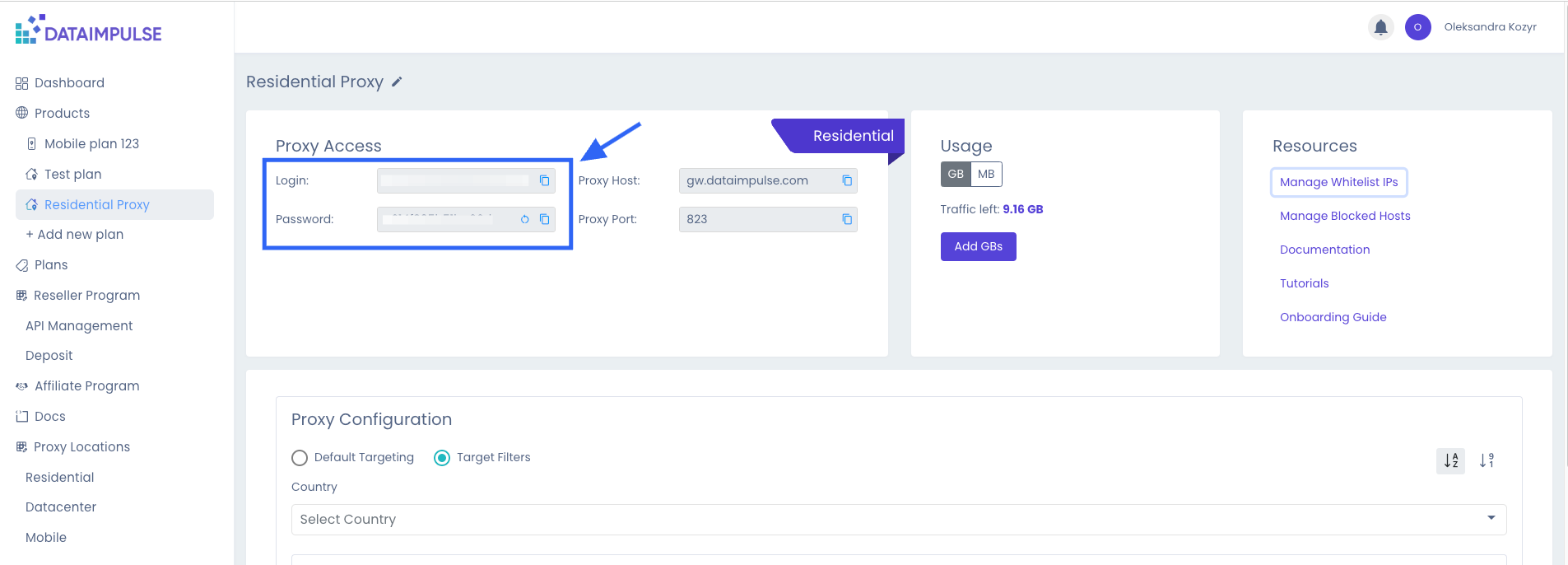
您可以通过点击刷新图标来重置密码 --- # Agent Instructions This documentation is published with GitBook. GitBook is the documentation platform designed so that both humans and AI agents can read, navigate, and reason over technical content effectively. Learn more at gitbook.com. ## Querying This Documentation If you need additional information that is not directly available in this page, you can query the documentation by asking a question. Perform an HTTP GET request on the following URL with the \`ask\` and \`goal\` query parameters: \`\`\` GET https://docs.dataimpulse.com/dataimpulse-documentation-zh-cn/ren-zheng-fang-fa/yong-hu-ming-mi-ma-ren-zheng.md?ask=&goal= \`\`\` \`ask\` is the immediate question: it should be specific, self-contained, and written in natural language. \`goal\` is what the user is ultimately trying to achieve, the reason they need the answer. Sharing it helps GitBook give you a better, more relevant answer. A goal is most helpful when it describes the outcome the user wants rather than restating the question. For example, with \`ask=how do I create an API token\`, a goal like \`automate deployments from our CI pipeline\` lets GitBook tailor the answer to that use case. The response will contain a direct answer to the question and relevant excerpts and sources from the documentation. Use this mechanism when the answer is not explicitly present in the current page, you need clarification or additional context, or you want to retrieve related documentation sections.
---
# Unknown
\> For the complete documentation index, see \[llms.txt\](https://docs.dataimpulse.com/llms.txt). Markdown versions of documentation pages are available by appending \`.md\` to page URLs; this page is available as \[Markdown\](https://docs.dataimpulse.com/dataimpulse-documentation-zh-cn/ren-zheng-fang-fa/ip-bai-ming-dan.md). # IP 白名单 为 DataImpulse 代理认证设置 IP 白名单。允许特定 IP 在无需凭据的情况下连接,实现无缝且安全的代理访问。 Whitelist IPs 功能允许用户添加和管理 IP 地址,使其无需在每次额外请求时使用登录名和密码即可轻松访问我们的代理。 {% hint style="info" %} 同一个 IP 地址不能同时添加到多个套餐中。 {% endhint %}

\--- # Agent Instructions This documentation is published with GitBook. GitBook is the documentation platform designed so that both humans and AI agents can read, navigate, and reason over technical content effectively. Learn more at gitbook.com. ## Querying This Documentation If you need additional information that is not directly available in this page, you can query the documentation by asking a question. Perform an HTTP GET request on the following URL with the \`ask\` and \`goal\` query parameters: \`\`\` GET https://docs.dataimpulse.com/dataimpulse-documentation-zh-cn/ren-zheng-fang-fa/ip-bai-ming-dan.md?ask=&goal= \`\`\` \`ask\` is the immediate question: it should be specific, self-contained, and written in natural language. \`goal\` is what the user is ultimately trying to achieve, the reason they need the answer. Sharing it helps GitBook give you a better, more relevant answer. A goal is most helpful when it describes the outcome the user wants rather than restating the question. For example, with \`ask=how do I create an API token\`, a goal like \`automate deployments from our CI pipeline\` lets GitBook tailor the answer to that use case. The response will contain a direct answer to the question and relevant excerpts and sources from the documentation. Use this mechanism when the answer is not explicitly present in the current page, you need clarification or additional context, or you want to retrieve related documentation sections.
---
# Unknown
\> For the complete documentation index, see \[llms.txt\](https://docs.dataimpulse.com/llms.txt). Markdown versions of documentation pages are available by appending \`.md\` to page URLs; this page is available as \[Markdown\](https://docs.dataimpulse.com/dataimpulse-documentation-zh-cn/dai-li/can-shu/cheng-shi.md). # 城市 通过此参数路由的流量按标准费率的两倍计费 添加一个 \`城市\` 参数以缩小到城市级别的定位。 例如, \`cr.es;city.madrid,barcelona\` 表示来自马德里、巴塞罗那和西班牙的代理将处理该查询。 以下是一些国家和城市参数有效组合的示例: \`cr.de;city.berlin\` \`cr.br;city.salvador\` \*\*代码示例\*\* 在此示例中,针对 gw\\.dataimpulse.com 的查询将从位于德国柏林的 IP 地址执行: \`\`\` curl -x "http://login\_\_cr.de;city.berlin:password@gw.dataimpulse.com:823" https://api.ipify.org/ \`\`\` 我们无法保证在任何特定时间都能提供来自某个特定城市的代理。但大多数受欢迎的城市都有良好覆盖。 {% hint style="info" %} 重要的是要注意,选择国家是指定城市、州、邮编和 ASN 定位的强制要求。 {% endhint %} \*\*\* 您现在可以使用 \`nocity\` 参数排除特定州。 \*\*示例:\*\* 要定位德国但排除柏林,请使用: \`cr.de;nocity.berlin\` {% hint style="info" %} 通过 \`nocity\` 参数路由的流量,以及 \`城市\` 参数按标准费率的两倍计费。 {% endhint %} --- # Agent Instructions This documentation is published with GitBook. GitBook is the documentation platform designed so that both humans and AI agents can read, navigate, and reason over technical content effectively. Learn more at gitbook.com. ## Querying This Documentation If you need additional information that is not directly available in this page, you can query the documentation by asking a question. Perform an HTTP GET request on the following URL with the \`ask\` and \`goal\` query parameters: \`\`\` GET https://docs.dataimpulse.com/dataimpulse-documentation-zh-cn/dai-li/can-shu/cheng-shi.md?ask=&goal= \`\`\` \`ask\` is the immediate question: it should be specific, self-contained, and written in natural language. \`goal\` is what the user is ultimately trying to achieve, the reason they need the answer. Sharing it helps GitBook give you a better, more relevant answer. A goal is most helpful when it describes the outcome the user wants rather than restating the question. For example, with \`ask=how do I create an API token\`, a goal like \`automate deployments from our CI pipeline\` lets GitBook tailor the answer to that use case. The response will contain a direct answer to the question and relevant excerpts and sources from the documentation. Use this mechanism when the answer is not explicitly present in the current page, you need clarification or additional context, or you want to retrieve related documentation sections.
---
# 如果您丢失了 2FA 凭据,如何恢复您的账户 | DataImpulse
For the complete documentation index, see [llms.txt](https://docs.dataimpulse.com/llms.txt)
. This page is also available as [Markdown](https://docs.dataimpulse.com/dataimpulse-documentation-zh-cn/yi-biao-pan/2fa/ru-guo-nin-diu-shi-le-2fa-ping-ju-ru-he-hui-fu-nin-de-zhang-hu.md)
.
**当您需要本指南时**
如果符合以下情况,请使用本指南:
* 您丢失了安装有验证器应用的设备
* 您已无法访问用于基于电子邮件的 2FA 的电子邮件地址
* 您认为您的账户已被入侵(出现了意外的密码更改、无法识别的登录,或在未经您操作的情况下启用了 2FA)
**如何申请恢复**
电子邮件 [**support@dataimpulse.com**](mailto:support@dataimpulse.com)
使用与您的账户关联的电子邮件地址,并在主题行中写明 _账户恢复 - 重置 2FA_.
出于安全考虑,在验证期间我们将暂时暂停您的账户访问权限。这可以保护您的数据和余额免受进一步的未授权活动影响。
为帮助我们验证您的身份,请提供:
* 您账户上的电子邮件地址
* 您最近一次付款所使用银行卡的后 4 位数字
* 您通常登录时使用的 IP 地址
如果您无法提供这些信息,我们将无法验证该账户属于您,也无法恢复访问权限。
**验证之后会发生什么**
一旦我们确认了您的身份,我们的团队将:
1. 重置您账户的密码
2. 禁用 2FA,以便您可以重新登录
3. 终止所有设备上的活跃会话
登录后,您需要再次设置 2FA——这是继续使用您的账户的必需步骤。我们强烈建议使用验证器应用(TOTP)而不是基于电子邮件的验证码,因为如果您的收件箱遭到入侵,它的抗风险能力更强。
**需要多长时间**
大多数恢复请求会在一个工作日内完成审核(不包括周末和公共假日,因为每个案例都会单独审核)。涉及疑似账户入侵的案例在我们调查期间可能需要更长时间。
DataImpulse 支持绝不会向您索要密码、完整的支付卡号或 2FA 代码。如果有人索要这些信息——即使是声称来自 DataImpulse 的人——那也是钓鱼尝试。请将可疑消息转发至 support@dataimpulse.com。
[上一页2FA](https://docs.dataimpulse.com/dataimpulse-documentation-zh-cn/yi-biao-pan/2fa)
[下一页账户安全最佳实践](https://docs.dataimpulse.com/dataimpulse-documentation-zh-cn/yi-biao-pan/zhang-hu-an-quan-zui-jia-shi-jian)
最后更新于 5个月前
---
# 团队管理 | DataImpulse
For the complete documentation index, see [llms.txt](https://docs.dataimpulse.com/llms.txt)
. This page is also available as [Markdown](https://docs.dataimpulse.com/dataimpulse-documentation-zh-cn/yi-biao-pan/tuan-dui-guan-li.md)
.
与 **团队**,多个用户可以在一个 DataImpulse 账号中协作。每位队友使用自己的邮箱和密码登录,并且只能看到其角色允许的内容。例如,你的开发者可以使用代理,但看不到你的付款信息;你的会计可以支付发票,但看不到代理凭证。
你可以在 **个人资料 → 团队**.
#### 角色[](https://docs.dataimpulse.com/dataimpulse-documentation-zh-cn/yi-biao-pan/tuan-dui-guan-li#jue-se)
当你邀请某人时,你会选择三种角色之一。之后可以再更改。
角色
适用对象
可以做什么
**管理员**
管理者、共同所有者
完全访问权限,包括计费、分销商区域和团队管理。
**账务**
财务、会计
充值、付款、发票和联盟返佣,以及使用统计。没有代理凭证,没有团队管理权限。
**开发者**
工程师、爬虫团队成员
代理访问、代理配置、API 和子用户。没有计费、没有付款、没有团队管理权限。
创建该账号的人是 **所有者**。所有者拥有完全访问权限,且不能从团队中移除。所有者不会显示在团队成员列表中。
你可以有多个管理员。管理员拥有与所有者相同的访问权限,但账号本身仍归所有者所有。
#### 邀请团队成员[](https://docs.dataimpulse.com/dataimpulse-documentation-zh-cn/yi-biao-pan/tuan-dui-guan-li#yao-qing-tuan-dui-cheng-yuan)
1. 点击右上角你的姓名并选择 **个人资料**.
2. 打开 **团队** 选项卡。
3. 点击 **邀请团队成员**.
4. 输入你队友的 **邮箱**.
5. 选择一个 **角色**:管理员、账务或开发者。
6. 点击 **发送邀请**.
你的队友会在列表中显示为 **待注册** ,状态为 **邀请已发送**。改变主意了?点击 **取消** 邀请旁边的按钮。
**重要:已拥有 DataImpulse 账号的邮箱不能加入团队。**
如果你的队友已经有自己的 DataImpulse 账号,那么他们不能使用该邮箱成为团队成员。请改用另一个尚未在 DataImpulse 注册的邮箱邀请他们。
如果这样仍然不行, [联系我们的支持团队](https://docs.dataimpulse.com/dataimpulse-documentation-zh-cn/zhi-chi)
,我们会帮你处理。
只有所有者和管理员才能看到团队选项卡并邀请他人。
#### 你的队友如何加入[](https://docs.dataimpulse.com/dataimpulse-documentation-zh-cn/yi-biao-pan/tuan-dui-guan-li#ni-de-dui-you-ru-he-jia-ru)
1. 你的队友会收到一封主题为 **邀请你加入 DataImpulse 团队**的邮件。邮件中会显示是谁邀请了他们、团队名称和他们的角色。
2. 他们点击 **加入团队**。该链接有效期为 **48 小时**.
3. 在 **加入团队** 页面上,他们会看到要加入的团队和自己的角色。他们输入自己的 **全名**,创建 **密码**,确认自己是人类,然后点击 **开始使用**。他们也可以点击 **拒绝邀请** ,如果他们不想加入。
4. 每位团队成员都需要双重验证。每次登录时,他们都要输入发送到其邮箱的 **6 位验证码** 。
一旦加入,他们在你的列表中的状态就会变为 **已激活**.
#### 团队成员状态[](https://docs.dataimpulse.com/dataimpulse-documentation-zh-cn/yi-biao-pan/tuan-dui-guan-li#tuan-dui-cheng-yuan-zhuang-tai)
状态
含义
**邀请已发送**
邀请正在送达。你的队友还没有创建登录信息。
**已激活**
你的队友已经加入,并可使用自己的登录信息登录。
#### 更改角色[](https://docs.dataimpulse.com/dataimpulse-documentation-zh-cn/yi-biao-pan/tuan-dui-guan-li#geng-gai-jue-se)
1. 在 **团队** 选项卡中,打开 **角色** 队友旁边的下拉菜单。
2. 选择新角色。
3. 点击 **更改角色** 以确认。
他们的访问权限会随新角色而改变。
#### 移除团队成员[](https://docs.dataimpulse.com/dataimpulse-documentation-zh-cn/yi-biao-pan/tuan-dui-guan-li#yi-chu-tuan-dui-cheng-yuan)
1. 在 **团队** 选项卡中,点击 **移除** 队友旁边的按钮。
2. 点击 **移除** 以确认。
他们会立即退出登录,并且无法再打开你的仪表盘。如果需要,你之后可以再次邀请他们。
#### 谁能做什么[](https://docs.dataimpulse.com/dataimpulse-documentation-zh-cn/yi-biao-pan/tuan-dui-guan-li#shui-neng-zuo-shen-me)
你可以随时在仪表盘中查看此表:打开 **个人资料 → 团队** 并展开 **角色和权限** 页面底部。
✅ 允许 · — 不可用
**主仪表盘**
部分
所有者
管理员
账务
开发者
仪表盘(使用情况)
✅
✅
✅
✅
套餐(列表)
✅
✅
✅
✅
编辑套餐名称
✅
✅
—
✅
代理访问(凭证)
✅
✅
—
✅
代理配置
✅
✅
—
✅
添加新套餐
✅
✅
✅
—
添加 GB / 充值
✅
✅
✅
—
付款(历史记录、发票)
✅
✅
✅
—
联盟推广(推荐与返佣)
✅
✅
✅
—
团队(管理)
✅
✅
—
—
集成
✅
✅
—
—
代理位置
✅
✅
—
✅
文档
✅
✅
—
✅
个人资料 / 安全
✅
✅
✅
✅
**分销商区域** (仅适用于 [分销商计划](https://docs.dataimpulse.com/dataimpulse-documentation-zh-cn/jing-xiao-shang)
)
部分
所有者
管理员
账务
开发者
API 管理
✅
✅
—
✅
子用户
✅
✅
—
✅
充值(分销商余额)
✅
✅
✅
—
概览(流量转移)
✅
✅
✅
✅
#### 须知[](https://docs.dataimpulse.com/dataimpulse-documentation-zh-cn/yi-biao-pan/tuan-dui-guan-li#xu-zhi)
* **不共享密码。** 每位队友都有自己的登录信息。有人离开时,只需将其移除,其他团队成员无需做任何更改。
* **一个账号,一个余额。** 套餐、流量和付款都属于你的账号。队友不会获得单独的套餐或余额。
* **团队成员不是子用户。** 分销商计划中的子用户是你的客户,他们可以获得代理访问权限。团队成员是在你的仪表盘中工作的人员。
* **删除账号或更改所有者的邮箱** 需通过我们的支持团队处理。
* * *
对团队设置有疑问? [联系支持](https://docs.dataimpulse.com/dataimpulse-documentation-zh-cn/zhi-chi)
,我们全天候 24/7 提供服务。
[上一页自动充值](https://docs.dataimpulse.com/dataimpulse-documentation-zh-cn/ji-fei/zi-dong-chong-zhi)
[下一页2FA](https://docs.dataimpulse.com/dataimpulse-documentation-zh-cn/yi-biao-pan/2fa)
最后更新于 8天前
---
# 支持 | DataImpulse
For the complete documentation index, see [llms.txt](https://docs.dataimpulse.com/llms.txt)
. This page is also available as [Markdown](https://docs.dataimpulse.com/dataimpulse-documentation-zh-cn/zhi-chi.md)
.
有问题吗? **我们的支持团队全天候 24/7 提供服务**.
您可以通过以下方式之一联系我们的支持团队:
* **在线聊天**: 通过本文件右下角的在线聊天小组件或我们的 [网站](https://dataimpulse.com/)
。在线聊天非常适合快速提问或提交错误报告。
* **电子邮件**: 请联系 [support@dataimpulse.com](mailto:support@dataimpulse.com)
用于非紧急问题或建议。
* **Telegram**: 请联系 [@di\_support\_team](https://www.telegram.me/di_support_team)
用于任何紧急问题。
[上一页Telegram 通知](https://docs.dataimpulse.com/dataimpulse-documentation-zh-cn/yi-biao-pan/telegram-tong-zhi)
最后更新于 3个月前
---
# 活跃会话管理 | DataImpulse
For the complete documentation index, see [llms.txt](https://docs.dataimpulse.com/llms.txt)
. This page is also available as [Markdown](https://docs.dataimpulse.com/dataimpulse-documentation-zh-cn/yi-biao-pan/huo-yue-hui-hua-guan-li.md)
.
#### 监控您的活动[](https://docs.dataimpulse.com/dataimpulse-documentation-zh-cn/yi-biao-pan/huo-yue-hui-hua-guan-li#jian-kong-nin-de-huo-dong)
在 [安全设置选项卡](https://app.dataimpulse.com/account/security)
中,在“活动会话”部分,您可以查看每个连接的详细信息:
* 设备类型:标识操作系统和设备类型(例如,Desktop · Mac OS X)。
* 浏览器:显示使用的网页浏览器(例如,Chrome)。
* IP 地址:显示连接的具体网络地址。
* 最后活动:提供最近活动的时间戳。
* 位置:检测会话的地理来源(例如,The Netherlands)。
* 状态:绿色的“Current”徽章表示您当前正在使用的设备。
#### 终止会话[](https://docs.dataimpulse.com/dataimpulse-documentation-zh-cn/yi-biao-pan/huo-yue-hui-hua-guan-li#zhong-zhi-hui-hua)
如果您发现可疑登录或只是想从所有其他设备登出(例如,在使用公共计算机后),您可以使用“Terminate all”功能。
1. 导航到“安全设置”选项卡。
2. 向下滚动到“活动会话”区域。
3. 点击位于此部分右上角的红色“Terminate all”按钮。
4. 结果:除当前会话外,所有现有会话将立即被登出,需重新登录(如果启用,还需输入 2FA 代码)以恢复访问权限。
* * *
为获得最大安全性,我们建议在同一菜单中启用 2FA(两步验证),为每次登录尝试添加额外的保护层。
[上一页账户安全最佳实践](https://docs.dataimpulse.com/dataimpulse-documentation-zh-cn/yi-biao-pan/zhang-hu-an-quan-zui-jia-shi-jian)
[下一页Telegram 通知](https://docs.dataimpulse.com/dataimpulse-documentation-zh-cn/yi-biao-pan/telegram-tong-zhi)
最后更新于 8个月前
---
# Telegram 通知 | DataImpulse
For the complete documentation index, see [llms.txt](https://docs.dataimpulse.com/llms.txt)
. This page is also available as [Markdown](https://docs.dataimpulse.com/dataimpulse-documentation-zh-cn/yi-biao-pan/telegram-tong-zhi.md)
.
#### 我会收到哪些通知?[](https://docs.dataimpulse.com/dataimpulse-documentation-zh-cn/yi-biao-pan/telegram-tong-zhi#wo-hui-shou-dao-na-xie-tong-zhi)
启用 Telegram 集成后,您将收到:
* 余额提醒
* 重要公告
#### 如何启用 Telegram 通知[](https://docs.dataimpulse.com/dataimpulse-documentation-zh-cn/yi-biao-pan/telegram-tong-zhi#ru-he-qi-yong-telegram-tong-zhi)
1. 登录到您的 DataImpulse 仪表板。
2. 转到账户设置(点击右上角的个人资料/图标)。
3. 转到 [集成 选项卡](https://app.dataimpulse.com/account/integrations)
.
4. 在“在 Telegram 中接收即时提醒”部分,点击 Connect Telegram 按钮。
5. 您将被重定向到官方 Telegram 机器人。在您的 Telegram 应用中点击 Start 将您的账户关联起来。
6. 关联后,您的 Telegram 用户名将显示在仪表板中,确认已连接。
#### 如何禁用 Telegram 通知[](https://docs.dataimpulse.com/dataimpulse-documentation-zh-cn/yi-biao-pan/telegram-tong-zhi#ru-he-jin-yong-telegram-tong-zhi)
如果您希望停止通过 Telegram 接收提醒:
1. 返回账户设置中的 Integrations 选项卡。
2. 找到红色的 Disconnect Telegram 按钮。
3. 点击该按钮以撤销访问权限。
4. _可选:_ 您也可以直接在 Telegram 应用内停止或屏蔽该机器人。
* * *
### 常见问题[](https://docs.dataimpulse.com/dataimpulse-documentation-zh-cn/yi-biao-pan/telegram-tong-zhi#chang-jian-wen-ti)
**这是免费的吗?** 是的,Telegram 集成包含在所有计划中,无需额外费用。
**我还会收到电子邮件吗?** 会的,Telegram 通知作为便捷的重复通知,确保当您无法查看电子邮件时不会错过重要更新。
可用的通知类型可能因账户设置而异。
[上一页活跃会话管理](https://docs.dataimpulse.com/dataimpulse-documentation-zh-cn/yi-biao-pan/huo-yue-hui-hua-guan-li)
[下一页支持](https://docs.dataimpulse.com/dataimpulse-documentation-zh-cn/zhi-chi)
最后更新于 8个月前
---
# 账户安全最佳实践 | DataImpulse
For the complete documentation index, see [llms.txt](https://docs.dataimpulse.com/llms.txt)
. This page is also available as [Markdown](https://docs.dataimpulse.com/dataimpulse-documentation-zh-cn/yi-biao-pan/zhang-hu-an-quan-zui-jia-shi-jian.md)
.
您的 DataImpulse 账户——包括其余额、账单详情和代理凭据——受您选择的密码和 2FA 方式保护。妥善保管它们是您的责任。
**密码卫生**
* 使用一个 **强且独一无二的密码** 用于 DataImpulse:至少 8 个字符,并混合字母、数字和符号。不要重复使用其他服务的密码。
* 使用一个 **密码管理器** (1Password、Bitwarden、LastPass 或类似工具)来安全地存储和生成凭据。
* **切勿分享您的密码**.
**双因素认证**
* 启用 **2FA** 。请参阅 [双因素认证 (2FA)](https://docs.dataimpulse.com/dataimpulse-documentation-zh-cn/yi-biao-pan/2fa)
了解设置步骤。
* 优先选择 **身份验证器应用(TOTP)** 而不是基于电子邮件的代码——如果您的邮箱被入侵,电子邮件会更容易受到攻击。
* **切勿分享 2FA 代码** 给任何人,包括 DataImpulse 支持团队。
* 如果您更换手机或电子邮件地址,请在 **之前** 更新您的 2FA 设置,以免失去对先前方式的访问。
**保护您账户上的电子邮件**
如果您的收件箱被入侵,攻击者可以拦截密码重置和基于电子邮件的 2FA 代码。请在电子邮件服务提供商本身启用 2FA,并留意任何无法识别的登录提醒。
**警惕钓鱼攻击**
DataImpulse 支持团队 **绝不会** 向您索要密码、完整的支付卡号或 2FA 代码。如果有人要求这些信息——即使对方声称来自 DataImpulse——那也是钓鱼尝试。请将可疑消息转发至 support@dataimpulse.com。
**如果您怀疑发生了安全泄露,该怎么做**
如果您注意到无法识别的登录、意外的密码更改或陌生的支付活动,请立即联系 [support@dataimpulse.com](mailto:support@dataimpulse.com)
。
**您的责任**
您选择的密码和 2FA 方式是账户安全的第一道防线。我们会保护我们的基础设施,但弱密码、重复使用的密码或共享密码,是我们无法替您弥补的。如果未经授权的访问源于被猜测、泄露或交给他人的凭据,我们可能无法恢复账户或撤销损失。
[上一页如果您丢失了 2FA 凭据,如何恢复您的账户](https://docs.dataimpulse.com/dataimpulse-documentation-zh-cn/yi-biao-pan/2fa/ru-guo-nin-diu-shi-le-2fa-ping-ju-ru-he-hui-fu-nin-de-zhang-hu)
[下一页活跃会话管理](https://docs.dataimpulse.com/dataimpulse-documentation-zh-cn/yi-biao-pan/huo-yue-hui-hua-guan-li)
最后更新于 5个月前
---
# Unknown
\> For the complete documentation index, see \[llms.txt\](https://docs.dataimpulse.com/llms.txt). Markdown versions of documentation pages are available by appending \`.md\` to page URLs; this page is available as \[Markdown\](https://docs.dataimpulse.com/readme.md). # Welcome Welcome to the DataImpulse documentation. Here, you’ll find everything you need to get started with our proxies. If you need assistance or can’t find what you’re looking for, don’t hesitate to contact us at or through our 24/7 live chat on the \[website.\](https://dataimpulse.com/) \*\*Getting Started with DataImpulse\*\* This video will guide you to everything you need about using DataImpulse. {% embed url="" %} For more details, check out our comprehensive blog post \[Step-by-Step Guide to Getting Started with DataImpulse\](https://dataimpulse.com/blog/step-by-step-guide-to-getting-started-with-dataimpulse/). ### Jump right in
| | | | | |
| --- | --- | --- | --- | --- |
| **Auto-recharge** | Don't worry about balance | | | [Auto-recharge](https://docs.dataimpulse.com/billing/auto-recharge.md) |
| **Parameteres** | Examples of requests | | | [Parameters](https://docs.dataimpulse.com/proxies/parameters.md) |
| **Whitelist Ips** | Make requests without login and password | | | [Whitelist IPs](https://docs.dataimpulse.com/authentication-methods/whitelist-ips.md) |
\--- # Agent Instructions This documentation is published with GitBook. GitBook is the documentation platform designed so that both humans and AI agents can read, navigate, and reason over technical content effectively. Learn more at gitbook.com. ## Querying This Documentation If you need additional information that is not directly available in this page, you can query the documentation by asking a question. Perform an HTTP GET request on the following URL with the \`ask\` and \`goal\` query parameters: \`\`\` GET https://docs.dataimpulse.com/readme.md?ask=&goal= \`\`\` \`ask\` is the immediate question: it should be specific, self-contained, and written in natural language. \`goal\` is what the user is ultimately trying to achieve, the reason they need the answer. Sharing it helps GitBook give you a better, more relevant answer. A goal is most helpful when it describes the outcome the user wants rather than restating the question. For example, with \`ask=how do I create an API token\`, a goal like \`automate deployments from our CI pipeline\` lets GitBook tailor the answer to that use case. The response will contain a direct answer to the question and relevant excerpts and sources from the documentation. Use this mechanism when the answer is not explicitly present in the current page, you need clarification or additional context, or you want to retrieve related documentation sections.
---
# Bienvenido | DataImpulse
For the complete documentation index, see [llms.txt](https://docs.dataimpulse.com/llms.txt)
. This page is also available as [Markdown](https://docs.dataimpulse.com/dataimpulse-documentation-es/readme.md)
.
Bienvenido a la documentación de DataImpulse.
Aquí encontrarás todo lo que necesitas para comenzar a usar nuestros proxies.
Si necesitas ayuda o no encuentras lo que buscas, no dudes en contactarnos en [support@dataimpulse.com](mailto:support@dataimpulse.com)
o a través de nuestro chat en vivo 24/7 en el [sitio web.](https://dataimpulse.com/)
**Comenzando con DataImpulse**
Este video te guiará por todo lo que necesitas saber sobre el uso de DataImpulse.
Para más detalles, consulta nuestra completa publicación del blog [Guía paso a paso para comenzar con DataImpulse](https://dataimpulse.com/blog/step-by-step-guide-to-getting-started-with-dataimpulse/)
.
### Empieza de inmediato[](https://docs.dataimpulse.com/dataimpulse-documentation-es#empieza-de-inmediato)
[](https://docs.dataimpulse.com/dataimpulse-documentation-es/facturacion/recarga-automatica)
**Recarga automática**
No te preocupes por el saldo
[](https://docs.dataimpulse.com/dataimpulse-documentation-es/proxies/parametros)
**Parámetros**
Ejemplos de solicitudes
[](https://docs.dataimpulse.com/dataimpulse-documentation-es/metodos-de-autenticacion/lista-blanca-de-ips)
**Lista blanca de IPs**
Realiza solicitudes sin inicio de sesión ni contraseña
[SiguienteProxies](https://docs.dataimpulse.com/dataimpulse-documentation-es/proxies)
Última actualización hace 6 meses
---
# Unknown
\> For the complete documentation index, see \[llms.txt\](https://docs.dataimpulse.com/llms.txt). Markdown versions of documentation pages are available by appending \`.md\` to page URLs; this page is available as \[Markdown\](https://docs.dataimpulse.com/dataimpulse-documentation-zh-cn/cuo-wu.md). # 错误 使用我们全面的错误代码参考来排查 DataImpulse 代理错误。了解每个错误的含义,并快速解决连接问题。 使用 HTTP 代理时,在使用服务后,错误会显示在代理服务器的响应中。使用 SOCKS5 时,在创建连接和认证时,错误会通过状态码显示。所有错误都可以在账户仪表板上查看。 \*\*HTTP 错误列表:\*\* \`400 错误请求\` - 向代理服务器发出的 CONNECT 请求创建不正确。\\ \`403 PORT\_BLOCKED\` - 连接尝试发往被封锁的端口。\\ \`403 SITE\_PERMANENTLY\_BLOCKED\` - 指定网站的访问已被永久封锁。\\ \`403 HOST\_BLOCKED\` - 指定网站的访问已由用户在当前套餐设置中封锁。\\ \`407 NO\_USER\` - 用户的套餐不存在。\\ \`407 TRAFFIC\_EXHAUSTED\` - 已超出套餐的流量限制。\\ \`407 THREADS\_EXHAUSTED\` - 已超出套餐的线程限制。\\ \`USER\_RATE\_LIMIT\_EXCEEDED\` - 已达到为套餐周期设置的流量限制。参见 \[流量限制\](/dataimpulse-documentation-zh-cn/liu-liang-xian-zhi.md).\\ \`407 PORT\_NOT\_ALLOWED\` - 当前套餐设置不允许使用粘性会话端口。\\ \`407 USER\_BLOCKED\` - 用户当前套餐已被封锁。\\ \`500 INTERNAL\_SERVER\_ERROR\` - 服务器遇到意外情况,无法完成请求。\\ \`502 NO\_HOST\_CONNECTION\` - 与 CONNECT 请求中指定的主机没有连接。\\ \`503 NO\_RAY\` - 根据请求中指定的目标参数,没有可用的代理。\\
\*\*SOCKS5 错误列表:\*\* 对于以下错误: \`NO\_USER\`, \`REQUESTS\_EXHAUSTED\`, \`TRAFFIC\_EXHAUSTED\`, \`THREADS\_EXHAUSTED\` 当尝试连接到代理服务器时,将返回 Denied 状态的认证失败响应。\\ \\ 对于以下错误: \`PORT\_BLOCKED\`, \`NO\_RAY\`, \`NO\_HOST\_CONNECTION\` 认证将通过,随后如果尝试进行 UDP 连接,代理连接将被重置,连接将被断开。 \`UDP\_BIND\_FAILED\` – 无法绑定本地 UDP 端口,导致无法建立 UDP 连接。此错误类似于 \`502 NO\_HOST\_CONNECTION\`,但发生在使用 UDP 协议时。 有关这些错误的更多详细信息可在我们的博客中找到: \[代理错误:类型、原因和解决方案\](https://dataimpulse.com/blog/proxy-errors-types-causes-and-solutions/) --- # Agent Instructions This documentation is published with GitBook. GitBook is the documentation platform designed so that both humans and AI agents can read, navigate, and reason over technical content effectively. Learn more at gitbook.com. ## Querying This Documentation If you need additional information that is not directly available in this page, you can query the documentation by asking a question. Perform an HTTP GET request on the following URL with the \`ask\` and \`goal\` query parameters: \`\`\` GET https://docs.dataimpulse.com/dataimpulse-documentation-zh-cn/cuo-wu.md?ask=&goal= \`\`\` \`ask\` is the immediate question: it should be specific, self-contained, and written in natural language. \`goal\` is what the user is ultimately trying to achieve, the reason they need the answer. Sharing it helps GitBook give you a better, more relevant answer. A goal is most helpful when it describes the outcome the user wants rather than restating the question. For example, with \`ask=how do I create an API token\`, a goal like \`automate deployments from our CI pipeline\` lets GitBook tailor the answer to that use case. The response will contain a direct answer to the question and relevant excerpts and sources from the documentation. Use this mechanism when the answer is not explicitly present in the current page, you need clarification or additional context, or you want to retrieve related documentation sections.
---
# Proxies | DataImpulse
For the complete documentation index, see [llms.txt](https://docs.dataimpulse.com/llms.txt)
. This page is also available as [Markdown](https://docs.dataimpulse.com/dataimpulse-documentation-es/proxies.md)
.
Ofrecemos:
* [Proxies residenciales](https://dataimpulse.com/residential-proxies/)
* [Proxies móviles](https://dataimpulse.com/mobile-proxies/)
* [Proxies de centros de datos](https://dataimpulse.com/datacenter-proxies/)
* [Proxies residenciales premium](https://dataimpulse.com/premium-residential-proxies/)
[AnteriorBienvenido](https://docs.dataimpulse.com/dataimpulse-documentation-es)
[SiguienteTipos de conexiones](https://docs.dataimpulse.com/dataimpulse-documentation-es/proxies/tipos-de-conexiones)
Última actualización hace 1 año
---
# Hosts de conexión | DataImpulse
For the complete documentation index, see [llms.txt](https://docs.dataimpulse.com/llms.txt)
. This page is also available as [Markdown](https://docs.dataimpulse.com/dataimpulse-documentation-es/proxies/hosts-de-conexion.md)
.
### Nombre de host DNS[](https://docs.dataimpulse.com/dataimpulse-documentation-es/proxies/hosts-de-conexion#nombre-de-host-dns)
`gw.dataimpulse.com` - Al usar el nombre de host DNS para la conexión, el host más cercano a usted ejecutará automáticamente sus solicitudes.
### Nombre de host IP[](https://docs.dataimpulse.com/dataimpulse-documentation-es/proxies/hosts-de-conexion#nombre-de-host-ip)
También puede conectarse usando la dirección IP - `74.81.81.81` . En este caso, su conexión se enrutará automáticamente a través del mejor servidor disponible según el país que haya seleccionado.
Recomendamos usar el formato DNS para una mejor estabilidad, ya que las direcciones IP pueden cambiar, lo que requiere que las supervise y actualice regularmente.

[AnteriorProtocolos](https://docs.dataimpulse.com/dataimpulse-documentation-es/proxies/protocolos)
[SiguienteSegmentación](https://docs.dataimpulse.com/dataimpulse-documentation-es/proxies/segmentacion)
Última actualización hace 5 meses
* [Nombre de host DNS](https://docs.dataimpulse.com/dataimpulse-documentation-es/proxies/hosts-de-conexion#nombre-de-host-dns)
* [Nombre de host IP](https://docs.dataimpulse.com/dataimpulse-documentation-es/proxies/hosts-de-conexion#nombre-de-host-ip)
---
# Tipos de conexiones | DataImpulse
For the complete documentation index, see [llms.txt](https://docs.dataimpulse.com/llms.txt)
. This page is also available as [Markdown](https://docs.dataimpulse.com/dataimpulse-documentation-es/proxies/tipos-de-conexiones.md)
.
### Rotativo[](https://docs.dataimpulse.com/dataimpulse-documentation-es/proxies/tipos-de-conexiones#rotativo)
La dirección IP cambia automáticamente con cada nueva solicitud.
Deberías usar:
Para HTTP/HTTPS
**823** PUERTO
Para SOCKS5
**824** PUERTO

* * *
### **Sticky**[](https://docs.dataimpulse.com/dataimpulse-documentation-es/proxies/tipos-de-conexiones#sticky)
Los proxies sticky están basados en puertos. Las direcciones IP están vinculadas a un puerto específico por un período de tiempo.
El intervalo de rotación para los proxies sticky puede variar de 1 a 120 minutos, siendo la duración media de 30 minutos.
Para conexiones sticky, puedes usar puertos desde **10000** hasta **20000**.
Un ejemplo del proxy HTTP sticky:
Un ejemplo del proxy SOCKS5 sticky:
Si no se especifica un Intervalo de Rotación para una conexión Sticky o se establece en "0", el intervalo por defecto será de 30 minutos.
* * *

Artículo del blog sobre cómo seleccionar el mejor tipo de proxy:
[Proxies Rotativos o Sticky: Cómo elegir la opción correcta](https://dataimpulse.com/blog/rotating-or-sticky-proxies-how-to-make-the-right-choice/)
[AnteriorProxies](https://docs.dataimpulse.com/dataimpulse-documentation-es/proxies)
[SiguienteProtocolos](https://docs.dataimpulse.com/dataimpulse-documentation-es/proxies/protocolos)
Última actualización hace 1 año
* [Rotativo](https://docs.dataimpulse.com/dataimpulse-documentation-es/proxies/tipos-de-conexiones#rotativo)
* [Sticky](https://docs.dataimpulse.com/dataimpulse-documentation-es/proxies/tipos-de-conexiones#sticky)
Copiar
curl -x "http://login:password@gw.dataimpulse.com:10000" https://api.ipify.org/
Copiar
curl -x "socks5://login:password@gw.dataimpulse.com:10000" https://api.ipify.org/
---
# Segmentación | DataImpulse
For the complete documentation index, see [llms.txt](https://docs.dataimpulse.com/llms.txt)
. This page is also available as [Markdown](https://docs.dataimpulse.com/dataimpulse-documentation-es/proxies/segmentacion.md)
.
Ofrecemos tres tipos de opciones de segmentación para la red proxy de DataImpulse:
1. [**Segmentación predeterminada**:](https://docs.dataimpulse.com/dataimpulse-documentation-es/proxies/segmentacion/segmentacion-predeterminada)
Esto incluye la selección/exclusión de país y la exclusión de ASN. Estas opciones ya están incluidas en el precio base del proxy y no se facturan adicionalmente.
2. [**Filtros de segmentación**:](https://docs.dataimpulse.com/dataimpulse-documentation-es/proxies/segmentacion/filtros-de-segmentacion)
Esta opción avanzada de segmentación incluye la selección por estado, ciudad, código postal y ASN. El tráfico enrutado a través de estos filtros se factura al doble de la tarifa estándar.
3. [**Segmentación por Geohash**:](https://docs.dataimpulse.com/dataimpulse-documentation-es/proxies/segmentacion/geohash-targeting)
Dirija el tráfico a un área específica en el mapa mediante geohash, con país, ASN y grupo geográfico mínimo opcionales. El tráfico enrutado a través de la Segmentación por Geohash se factura al doble de la tarifa estándar.
El tráfico enrutado a través del Filtro de segmentación (estado, ciudad, código postal y ASN) y a través de la Segmentación por Geohash se factura al doble de la tarifa estándar.
**Segmentación predeterminada**
País (seleccionar/excluir)
excluir ASN
**Filtros de segmentación**
Estado Ciudad Código postal ASN
**Segmentación por Geohash**
Geohash País ASN Grupo geográfico mínimo
Si actualmente no hay IP disponibles para una ciudad/estado/código postal/ASN o geohash específicos, recibirá un `503 NO_RAY` código de respuesta. En tales casos, pruebe con otras opciones de segmentación.
[AnteriorHosts de conexión](https://docs.dataimpulse.com/dataimpulse-documentation-es/proxies/hosts-de-conexion)
[SiguienteSegmentación predeterminada](https://docs.dataimpulse.com/dataimpulse-documentation-es/proxies/segmentacion/segmentacion-predeterminada)
Última actualización hace 2 años
---
# Protocolos | DataImpulse
For the complete documentation index, see [llms.txt](https://docs.dataimpulse.com/llms.txt)
. This page is also available as [Markdown](https://docs.dataimpulse.com/dataimpulse-documentation-es/proxies/protocolos.md)
.
### HTTP/ HTTPS[](https://docs.dataimpulse.com/dataimpulse-documentation-es/proxies/protocolos#http-https)
Un ejemplo del proxy rotativo HTTP:
Copiar
curl -x "http://login:password@gw.dataimpulse.com:823" https://api.ipify.org/
Un ejemplo del proxy HTTP sticky:
Copiar
curl -x "http://login:password@gw.dataimpulse.com:10000" https://api.ipify.org/
Para conexiones persistentes (sticky), puedes usar puertos del 10000 al 20000
### SOCKS5[](https://docs.dataimpulse.com/dataimpulse-documentation-es/proxies/protocolos#socks5)
Un ejemplo del proxy rotativo SOCKS5:
Copiar
curl -x "socks5://login:password@gw.dataimpulse.com:824" https://api.ipify.org/
Un ejemplo del proxy SOCKS5 sticky:
Copiar
curl -x "socks5://login:password@gw.dataimpulse.com:10000" https://api.ipify.org/
Artículo del blog sobre cómo elegir el mejor protocolo de proxy:
[Elegir entre proxies HTTP y SOCKS: cómo tomar la decisión correcta](https://dataimpulse.com/blog/choosing-between-http-and-socks-proxies-how-to-make-the-right-decision/)
[AnteriorTipos de conexiones](https://docs.dataimpulse.com/dataimpulse-documentation-es/proxies/tipos-de-conexiones)
[SiguienteHosts de conexión](https://docs.dataimpulse.com/dataimpulse-documentation-es/proxies/hosts-de-conexion)
Última actualización hace 2 años
* [HTTP/ HTTPS](https://docs.dataimpulse.com/dataimpulse-documentation-es/proxies/protocolos#http-https)
* [SOCKS5](https://docs.dataimpulse.com/dataimpulse-documentation-es/proxies/protocolos#socks5)
---
# Errores | DataImpulse
For the complete documentation index, see [llms.txt](https://docs.dataimpulse.com/llms.txt)
. This page is also available as [Markdown](https://docs.dataimpulse.com/dataimpulse-documentation-es/errores.md)
.
Cuando se usa HTTP Proxy, los errores se muestran en la respuesta del servidor proxy después de usar el servicio. Cuando se usa SOCKS5, los errores se muestran mediante códigos de estado al crear una conexión y autenticarse. Todos los errores se pueden consultar en el panel de la cuenta.
**La lista de errores HTTP:**
`400 Solicitud incorrecta` - La solicitud CONNECT al servidor proxy se creó incorrectamente. `403 PORT_BLOCKED` - El intento de conexión se realiza a los puertos bloqueados. `403 SITE_PERMANENTLY_BLOCKED` - El acceso al sitio especificado ha sido bloqueado permanentemente. `403 HOST_BLOCKED` - El acceso al sitio especificado ha sido bloqueado por el usuario en la configuración del plan actual. `407 NO_USER` - El plan del usuario no existe. `407 TRAFFIC_EXHAUSTED` - Se ha superado el límite de tráfico del plan. `407 THREADS_EXHAUSTED` - Se ha superado el límite de hilos del plan. `USER_RATE_LIMIT_EXCEEDED` - Se ha alcanzado el límite de tráfico establecido para el período del plan. Consulta [Límite de tráfico](https://docs.dataimpulse.com/dataimpulse-documentation-es/limite-de-trafico)
. `407 PORT_NOT_ALLOWED` - El puerto utilizado para sesiones persistentes no está permitido por la configuración actual del plan. `407 USER_BLOCKED` - El plan actual del usuario ha sido bloqueado. `500 INTERNAL_SERVER_ERROR` - El servidor encontró una condición inesperada que le impidió cumplir con la solicitud. `502 NO_HOST_CONNECTION` - No hay conexión con el host especificado en la solicitud CONNECT. `503 NO_RAY` - No hay proxies disponibles según los parámetros de segmentación especificados en la solicitud.
**La lista de errores SOCKS5:**
Para errores como `NO_USER`, `REQUESTS_EXHAUSTED`, `TRAFFIC_EXHAUSTED`, `THREADS_EXHAUSTED` se devolverá una respuesta de autenticación fallida con el estado Denied cuando haya un intento de conectarse a un servidor proxy Para errores como `PORT_BLOCKED`, `NO_RAY`, `NO_HOST_CONNECTION` la autenticación se aprobará, tras lo cual, la conexión proxy se restablecerá. Si hay un intento de conexión UDP, la conexión se interrumpirá.
`UDP_BIND_FAILED` – No se pudo vincular un puerto UDP local, lo que impide establecer la conexión UDP. Este error es similar a `502 NO_HOST_CONNECTION`, pero ocurre al usar el protocolo UDP.
Más detalles relacionados con los errores se pueden encontrar en nuestro blog: [Errores de proxy: tipos, causas y soluciones](https://dataimpulse.com/blog/proxy-errors-types-causes-and-solutions/)
[AnteriorLímite de tráfico](https://docs.dataimpulse.com/dataimpulse-documentation-es/limite-de-trafico)
[SiguienteRevendedores](https://docs.dataimpulse.com/dataimpulse-documentation-es/revendedores)
Última actualización hace 1 año
---
# Límite de tráfico | DataImpulse
For the complete documentation index, see [llms.txt](https://docs.dataimpulse.com/llms.txt)
. This page is also available as [Markdown](https://docs.dataimpulse.com/dataimpulse-documentation-es/limite-de-trafico.md)
.
#### Cómo configurarlo[](https://docs.dataimpulse.com/dataimpulse-documentation-es/limite-de-trafico#como-configurarlo)
1. Abre tu plan y ve a **Recursos → Administrar límite de tráfico**.
2. Elige un **Período**: 1 hora, 24 horas, 7 días o 30 días.
3. Ingresa el **Límite de tráfico** en GB (solo números enteros).
4. Elige una **Acción** para cuando se alcance el límite:
* **Notificación por correo electrónico**: recibes un correo electrónico, y el plan sigue funcionando.
* **Suspender uso**: el plan deja de funcionar hasta que vuelva a haber tráfico disponible.
* **Suspender uso y notificación por correo electrónico**: el plan deja de funcionar, y recibes un correo electrónico.
5. Haz clic en **Guardar configuración**.
Para eliminar el límite, haz clic en **Borrar configuración**.
#### Cómo funciona el período: ventana deslizante[](https://docs.dataimpulse.com/dataimpulse-documentation-es/limite-de-trafico#como-funciona-el-periodo-ventana-deslizante)
El límite funciona con una ventana deslizante, no con un calendario. Nunca se reinicia a una hora fija (como medianoche o el 1.º del mes). En cualquier momento, contamos tu uso de la **última** 1 hora / 24 horas / 7 días / 30 días, a partir del momento actual.
Cada GB que usas vuelve exactamente un período después de haberlo usado.
**Ejemplo:** límite de 5 GB por 24 horas, con Suspender uso.
Cuando
Usado en las últimas 24 horas
Estado
Lun 09:00, usas 2 GB
2 GB
Funcionando, quedan 3 GB
Lun 15:00, usas 3 GB
5 GB
En pausa
Mar 09:00
3 GB (los 2 GB de Lun 09:00 quedaron fuera)
Funcionando, 2 GB disponibles
Mar 15:00
0 GB
5 GB completos disponibles
Si usas todo tu límite de una vez, el límite completo vuelve un período después.
**Por qué una ventana deslizante:** con un límite de calendario, podrías usar el límite completo a las 23:59 y otra vez a las 00:01. Con una ventana deslizante, nunca puedes superar tu límite en ningún período de esa duración.
#### Cuando se alcanza el límite[](https://docs.dataimpulse.com/dataimpulse-documentation-es/limite-de-trafico#cuando-se-alcanza-el-limite)
* **Suspender uso:** las solicitudes devuelven el error `USER_RATE_LIMIT_EXCEEDED`. El plan vuelve a funcionar por sí solo a medida que regresa el tráfico. Si necesitas acceso antes, aumenta el límite o borra la configuración.
* **Notificación por correo electrónico:** nada se detiene. El correo electrónico solo te indica que se alcanzó el límite.
#### Es bueno saber[](https://docs.dataimpulse.com/dataimpulse-documentation-es/limite-de-trafico#es-bueno-saber)
* El límite se aplica a un plan, no a toda tu cuenta.
* Los cambios surten efecto en aproximadamente 1 minuto.
* El límite no añade tráfico. Si el saldo de tu plan se agota primero, el plan se detiene de todos modos.
[AnteriorSitios web bloqueados](https://docs.dataimpulse.com/dataimpulse-documentation-es/sitios-web-bloqueados)
[SiguienteErrores](https://docs.dataimpulse.com/dataimpulse-documentation-es/errores)
---
# Autenticación user:pass | DataImpulse
For the complete documentation index, see [llms.txt](https://docs.dataimpulse.com/llms.txt)
. This page is also available as [Markdown](https://docs.dataimpulse.com/dataimpulse-documentation-es/metodos-de-autenticacion/autenticacion-user-pass.md)
.
Después de que compres un plan, un inicio de sesión y una contraseña de proxy se generarán automáticamente en el **Proxy Access** sección.

Tienes la opción de restablecer la contraseña haciendo clic en el icono de refrescar
[AnteriorMétodos de autenticación](https://docs.dataimpulse.com/dataimpulse-documentation-es/metodos-de-autenticacion)
[SiguienteLista blanca de IPs](https://docs.dataimpulse.com/dataimpulse-documentation-es/metodos-de-autenticacion/lista-blanca-de-ips)
Última actualización hace 2 años
---
# Sitios web bloqueados | DataImpulse
For the complete documentation index, see [llms.txt](https://docs.dataimpulse.com/llms.txt)
. This page is also available as [Markdown](https://docs.dataimpulse.com/dataimpulse-documentation-es/sitios-web-bloqueados.md)
.
A partir de diciembre de 2023, estamos bloqueando ciertos sitios web para garantizar la seguridad de nuestros proxies. Algunos de estos pueden desbloquearse una vez que complete la verificación de identidad y, en algunos casos, alcance un cierto nivel de gasto. Consulte los requisitos a continuación.
### Sitios web actualmente bloqueados[](https://docs.dataimpulse.com/dataimpulse-documentation-es/sitios-web-bloqueados#sitios-web-actualmente-bloqueados)
* Todos los sitios web gubernamentales
* Sitios web de banca y pagos (consulte la lista completa de sitios web bloqueados [aquí](https://docs.google.com/spreadsheets/d/18RwU3srsbO2PzQxrPxjN2cVLkrV6ZKrdRERlz3k2MKU/edit?usp=sharing)
)
* Servicio Ticketswap
* HealthEquity
* SopranoVillas
* Plataformas de monetización de tráfico (GetGrass, NodePay, Gradient, etc.)
* VFS global https://visa.vfsglobal.com/
* mspapis.com
* Greenshades.com, GreenEmployee.com, GreenshadesOnline.com, Downloadmyform.com
* alojamiento DDS
* 4chan.org
* openstreetmap.org, osm.org
* Moviestarplanet
* rolimons.com
* fool.com
* torbox.app
* happyrail.com
* treinreiswinkel.nl
* mobiledirect.ro
* casa de cambio de criptomonedas Coinstash
* fishao.net
### Cómo funciona el desbloqueo[](https://docs.dataimpulse.com/dataimpulse-documentation-es/sitios-web-bloqueados#como-funciona-el-desbloqueo)
Revisamos las solicitudes de desbloqueo según su estado de verificación y nivel de gasto. Cuanta más confianza genere su cuenta, más podremos abrir.
#### Paso 1: Verificación de identidad[](https://docs.dataimpulse.com/dataimpulse-documentation-es/sitios-web-bloqueados#paso-1-verificacion-de-identidad)
Una vez que confirme su identidad en DataImpulse, podemos considerar desbloquear sitios específicos **.gov** bajo solicitud.
Cada dominio se revisa individualmente, por lo que deberá enviar a nuestro equipo de soporte los dominios exactos que necesita.
#### Paso 2: Verificación de identidad + $100 gastados[](https://docs.dataimpulse.com/dataimpulse-documentation-es/sitios-web-bloqueados#paso-2-verificacion-de-identidad--usd100-gastados)
Después de confirmar su identidad y gastar más de $100, podemos abrir todos los **.gov** sitios web a la vez. Ya no necesitará solicitar dominios individuales cada vez.
#### Paso 3: Verificación de identidad + $1,000 gastados[](https://docs.dataimpulse.com/dataimpulse-documentation-es/sitios-web-bloqueados#paso-3-verificacion-de-identidad--usd1-000-gastados)
Después de confirmar su identidad y gastar más de $1,000, podemos considerar desbloquear **sitios web de banca y pagos.**
Los sitios web de banca y pagos se abren solo para casos de uso comercial. No los desbloqueamos para uso personal.
### Cuentas corporativas[](https://docs.dataimpulse.com/dataimpulse-documentation-es/sitios-web-bloqueados#cuentas-corporativas)
Si representa a una empresa, podemos considerar desbloquear sitios web solo con la verificación de identidad, sin requerir un gasto mínimo. Las solicitudes corporativas reciben un mayor nivel de confianza durante nuestro proceso de revisión.
### Cómo solicitar un desbloqueo[](https://docs.dataimpulse.com/dataimpulse-documentation-es/sitios-web-bloqueados#como-solicitar-un-desbloqueo)
Para solicitar el desbloqueo de un sitio web, contáctenos en [support@dataimpulse.com](mailto:support@dataimpulse.com)
e incluya:
* El sitio web exacto que necesita abrir.
* Una descripción clara de su caso de uso, con tantos detalles como sea posible.
Por motivos de seguridad, todos los usuarios deben completar la verificación KYC antes de que se pueda aprobar una solicitud de desbloqueo.
[AnteriorAcceso a puertos](https://docs.dataimpulse.com/dataimpulse-documentation-es/acceso-a-puertos)
[SiguienteLímite de tráfico](https://docs.dataimpulse.com/dataimpulse-documentation-es/limite-de-trafico)
Última actualización hace 27 días
* [Sitios web actualmente bloqueados](https://docs.dataimpulse.com/dataimpulse-documentation-es/sitios-web-bloqueados#sitios-web-actualmente-bloqueados)
* [Cómo funciona el desbloqueo](https://docs.dataimpulse.com/dataimpulse-documentation-es/sitios-web-bloqueados#como-funciona-el-desbloqueo)
* [Cuentas corporativas](https://docs.dataimpulse.com/dataimpulse-documentation-es/sitios-web-bloqueados#cuentas-corporativas)
* [Cómo solicitar un desbloqueo](https://docs.dataimpulse.com/dataimpulse-documentation-es/sitios-web-bloqueados#como-solicitar-un-desbloqueo)
---
# Métodos de autenticación | DataImpulse
For the complete documentation index, see [llms.txt](https://docs.dataimpulse.com/llms.txt)
. This page is also available as [Markdown](https://docs.dataimpulse.com/dataimpulse-documentation-es/metodos-de-autenticacion.md)
.
Admitimos la autenticación de proxy mediante:
* [Nombre de usuario y contraseña](https://docs.dataimpulse.com/dataimpulse-documentation-es/metodos-de-autenticacion/autenticacion-user-pass)
* [Lista blanca basada en IP](https://docs.dataimpulse.com/dataimpulse-documentation-es/metodos-de-autenticacion/lista-blanca-de-ips)
[AnteriorUDP](https://docs.dataimpulse.com/dataimpulse-documentation-es/proxies/udp)
[SiguienteAutenticación user:pass](https://docs.dataimpulse.com/dataimpulse-documentation-es/metodos-de-autenticacion/autenticacion-user-pass)
Última actualización hace 2 años
---
# Acceso a puertos | DataImpulse
For the complete documentation index, see [llms.txt](https://docs.dataimpulse.com/llms.txt)
. This page is also available as [Markdown](https://docs.dataimpulse.com/dataimpulse-documentation-es/acceso-a-puertos.md)
.
### Acceso predeterminado[](https://docs.dataimpulse.com/dataimpulse-documentation-es/acceso-a-puertos#acceso-predeterminado)
Con los proxies, los siguientes puertos están accesibles de forma predeterminada:
* `80`
* `443`
* `5228`
* `53`
* `5060`
* `8080`
* `8090`
* `8443`
* `853`
* `8888`
#### Puertos restringidos[](https://docs.dataimpulse.com/dataimpulse-documentation-es/acceso-a-puertos#puertos-restringidos)
Los puertos restringidos incluyen SMTP, IMAP y otros puertos relacionados con el correo y la mensajería.
* * *
### Procedimiento para desbloquear un puerto[](https://docs.dataimpulse.com/dataimpulse-documentation-es/acceso-a-puertos#procedimiento-para-desbloquear-un-puerto)
Para solicitar el desbloqueo de un puerto, contáctenos en [support@dataimpulse.com](mailto:support@dataimpulse.com)
y proporcione la siguiente información:
* Especifique el puerto que necesita ser abierto.
* Describa claramente el caso de uso de este puerto: proporcione tantos detalles como sea posible.
* Incluya el destino específico al que desea acceder a través de este puerto.
Por motivos de seguridad, es posible que los usuarios deban completar la verificación KYC antes de que se apruebe su solicitud de desbloqueo.
[AnteriorLista blanca de IPs](https://docs.dataimpulse.com/dataimpulse-documentation-es/metodos-de-autenticacion/lista-blanca-de-ips)
[SiguienteSitios web bloqueados](https://docs.dataimpulse.com/dataimpulse-documentation-es/sitios-web-bloqueados)
Última actualización hace 4 meses
* [Acceso predeterminado](https://docs.dataimpulse.com/dataimpulse-documentation-es/acceso-a-puertos#acceso-predeterminado)
* [Procedimiento para desbloquear un puerto](https://docs.dataimpulse.com/dataimpulse-documentation-es/acceso-a-puertos#procedimiento-para-desbloquear-un-puerto)
---
# Lista blanca de IPs | DataImpulse
For the complete documentation index, see [llms.txt](https://docs.dataimpulse.com/llms.txt)
. This page is also available as [Markdown](https://docs.dataimpulse.com/dataimpulse-documentation-es/metodos-de-autenticacion/lista-blanca-de-ips.md)
.
La función de IPs en lista blanca permite a los usuarios agregar y administrar direcciones IP para acceder a nuestros proxies fácilmente sin usar el inicio de sesión y la contraseña en cada solicitud adicional.
La misma dirección IP no puede agregarse a varios planes al mismo tiempo.

[AnteriorAutenticación user:pass](https://docs.dataimpulse.com/dataimpulse-documentation-es/metodos-de-autenticacion/autenticacion-user-pass)
[SiguienteAcceso a puertos](https://docs.dataimpulse.com/dataimpulse-documentation-es/acceso-a-puertos)
Última actualización hace 5 meses
---
# Segmentación predeterminada | DataImpulse
For the complete documentation index, see [llms.txt](https://docs.dataimpulse.com/llms.txt)
. This page is also available as [Markdown](https://docs.dataimpulse.com/dataimpulse-documentation-es/proxies/segmentacion/segmentacion-predeterminada.md)
.
Esta segmentación incluye la selección/exclusión de País y la exclusión de ASN.
La Segmentación predeterminada ya está incluida en el precio base del proxy y no se factura adicionalmente.

Si configura parámetros a través del Panel, haga clic en el `**Guardar configuración**` botón. Los parámetros seleccionados no se aplicarán si no hace clic en este botón.
Si desea establecer los parámetros manualmente en el código, debe usar parámetros especiales después del nombre de usuario:
* `__cr` — usado para **seleccionar el país** desde el cual debe enviarse la solicitud.
* `__noasn` — usado para **excluir ASN específicos** .
**Por ejemplo:**
Si quieres seleccionar **Germany** como país, tu código se vería así:
[AnteriorSegmentación](https://docs.dataimpulse.com/dataimpulse-documentation-es/proxies/segmentacion)
[SiguienteFiltros de segmentación](https://docs.dataimpulse.com/dataimpulse-documentation-es/proxies/segmentacion/filtros-de-segmentacion)
Última actualización hace 8 meses
Copiar
curl -x "http://login__cr.de:password@gw.dataimpulse.com:823" https://api.ipify.org/
---
# Programa de afiliados | DataImpulse
For the complete documentation index, see [llms.txt](https://docs.dataimpulse.com/llms.txt)
. This page is also available as [Markdown](https://docs.dataimpulse.com/dataimpulse-documentation-es/programa-de-afiliados.md)
.
Ofrecemos un programa de referidos para todos los clientes, accesible a través de la página de afiliados. Cuando alguien se registra usando tu enlace de referido, ganas el 15% de su pedido. Puedes retirar tus ganancias de referidos en Bitcoin, USDT TRC20 o Transferencia bancaria una vez que alcances $100, o convertirlas en el saldo de tu Plan / Revendedor.
Las ganancias por referidos se retienen durante 30 días para verificación antes de ser pagadas dentro de las 48 horas posteriores a una solicitud de retiro. Los pedidos reembolsados se deducen de las ventas generadas. Si se ha recibido una ganancia por referido por un pedido que luego se reembolsa, el monto se restará del siguiente pago.
Nos reservamos el derecho de rechazar el pago si nuestro sistema detecta actividad fraudulenta.
**Saldo activo:** La cantidad de ganancias por referidos que están disponibles para pago.
**Saldo retenido:** Ganancias por referidos que se mantienen temporalmente durante 30 días para verificación.
**Suma total pagada:** La suma acumulada de todas las ganancias por referidos pagadas a ti.
Puedes encontrar una guía paso a paso [aquí](https://dataimpulse.com/blog/dataimpulse-affiliate-program/)
.
Por favor, no uses la marca DataImpulse en anuncios de búsqueda pagados, ya que viola nuestra política. Si descubrimos que has incumplido esta regla, bloquearemos tu cuenta.
[AnteriorFiltros de segmentación para subusuarios](https://docs.dataimpulse.com/dataimpulse-documentation-es/revendedores/filtros-de-segmentacion-para-subusuarios)
[SiguienteMétodos de pago](https://docs.dataimpulse.com/dataimpulse-documentation-es/facturacion/metodos-de-pago)
Última actualización hace 9 meses
---
# Revendedores | DataImpulse
For the complete documentation index, see [llms.txt](https://docs.dataimpulse.com/llms.txt)
. This page is also available as [Markdown](https://docs.dataimpulse.com/dataimpulse-documentation-es/revendedores.md)
.
Para convertirse en revendedor de DataImpulse, simplemente cree una cuenta en nuestro [Dashboard](https://app.dataimpulse.com/)
.
Complete el formulario Know Your Customer (KYC) a través de nuestro socio seguro iDenfy para verificar su identidad y garantizar el cumplimiento de las políticas de nuestra plataforma. Después de eso, firme el Reseller Agreement para activar su condición de revendedor.
Después de configurar su cuenta, vaya a la sección Resellers para hacer un depósito de al menos $50 y activar su condición de revendedor.
La Reseller API está disponible [aquí](https://documenter.getpostman.com/view/6095389/2s9YC7UC2x)
. Si necesita endpoints específicos que aún no se han implementado, comuníquese con nuestro Support Team para obtener ayuda.
[AnteriorErrores](https://docs.dataimpulse.com/dataimpulse-documentation-es/errores)
[SiguienteHost DNS personalizado](https://docs.dataimpulse.com/dataimpulse-documentation-es/revendedores/host-dns-personalizado)
Última actualización hace 1 año
---
# Gestionar certificados SSL | DataImpulse
For the complete documentation index, see [llms.txt](https://docs.dataimpulse.com/llms.txt)
. This page is also available as [Markdown](https://docs.dataimpulse.com/dataimpulse-documentation-es/revendedores/gestionar-certificados-ssl.md)
.
Use esta función para administrar certificados SSL para sus dominios personalizados. Al subir sus claves pública y privada, puede garantizar conexiones HTTPS seguras para sus usuarios y resolver cualquier error relacionado con certificados.
Simplemente agregue su dominio, suba las claves necesarias y haga clic en "Add".
Su certificado se activará dentro de 5 minutos.
[AnteriorHost DNS personalizado](https://docs.dataimpulse.com/dataimpulse-documentation-es/revendedores/host-dns-personalizado)
[SiguienteActualización del cálculo del depósito](https://docs.dataimpulse.com/dataimpulse-documentation-es/revendedores/actualizacion-del-calculo-del-deposito)
Última actualización hace 2 años
---
# Filtros de segmentación | DataImpulse
For the complete documentation index, see [llms.txt](https://docs.dataimpulse.com/llms.txt)
. This page is also available as [Markdown](https://docs.dataimpulse.com/dataimpulse-documentation-es/proxies/segmentacion/filtros-de-segmentacion.md)
.
Esta opción avanzada de segmentación incluye la selección de State, City, ZIP code y ASN.
* [State](https://docs.dataimpulse.com/dataimpulse-documentation-es/proxies/parametros/estado)
* [City](https://docs.dataimpulse.com/dataimpulse-documentation-es/proxies/parametros/ciudad)
* [ZIP](https://docs.dataimpulse.com/dataimpulse-documentation-es/proxies/parametros/codigo-postal)
* [ASN](https://docs.dataimpulse.com/dataimpulse-documentation-es/proxies/parametros/asn)
El tráfico dirigido a través de estos filtros se factura al doble de la tarifa estándar.

[AnteriorSegmentación predeterminada](https://docs.dataimpulse.com/dataimpulse-documentation-es/proxies/segmentacion/segmentacion-predeterminada)
[SiguienteSegmentación por Geohash](https://docs.dataimpulse.com/dataimpulse-documentation-es/proxies/segmentacion/geohash-targeting)
Última actualización hace 2 años
---
# Recarga automática | DataImpulse
For the complete documentation index, see [llms.txt](https://docs.dataimpulse.com/llms.txt)
. This page is also available as [Markdown](https://docs.dataimpulse.com/dataimpulse-documentation-es/facturacion/recarga-automatica.md)
.
La función de Suscripción de Recarga Automática le permite establecer un cierto umbral para el tráfico en su cuenta.
Si el tráfico cae por debajo de este umbral, el sistema creará automáticamente un nuevo pedido por una cantidad especificada de tráfico y lo cobrará a su tarjeta de crédito. De este modo, puede asegurarse de que su cuenta siempre tenga suficiente tráfico sin necesidad de recargarla manualmente. La Suscripción de Recarga Automática está disponible con los métodos de pago tarjeta de crédito y PayPal.
**Nota importante:** Con el proveedor de pagos FastSpring, el importe total de la suscripción se cobrará inmediatamente al suscribirse, a diferencia de Stripe, que cobra una vez que alcanza el límite de datos seleccionado.
Para obtener instrucciones detalladas sobre cómo configurar la Recarga Automática, consulte este [tutorial](https://dataimpulse.com/blog/how-to-use-dataimpulses-auto-charge-feature/)
.
[AnteriorMétodos de pago](https://docs.dataimpulse.com/dataimpulse-documentation-es/facturacion/metodos-de-pago)
[SiguienteGestión del equipo](https://docs.dataimpulse.com/dataimpulse-documentation-es/panel-de-control/gestion-del-equipo)
Última actualización hace 8 meses
---
# Host DNS personalizado | DataImpulse
For the complete documentation index, see [llms.txt](https://docs.dataimpulse.com/llms.txt)
. This page is also available as [Markdown](https://docs.dataimpulse.com/dataimpulse-documentation-es/revendedores/host-dns-personalizado.md)
.
Puede configurar su propio dominio si desea revender nuestros proxies manteniendo invisible el host de DataImpulse.
Para instrucciones detalladas sobre cómo configurar un host DNS personalizado, por favor haga clic [aquí](https://dataimpulse.com/tutorials/how-to-set-up-proxies-in-reselling-dataimpulse/)
.
[AnteriorRevendedores](https://docs.dataimpulse.com/dataimpulse-documentation-es/revendedores)
[SiguienteGestionar certificados SSL](https://docs.dataimpulse.com/dataimpulse-documentation-es/revendedores/gestionar-certificados-ssl)
Última actualización hace 2 años
---
# UDP | DataImpulse
For the complete documentation index, see [llms.txt](https://docs.dataimpulse.com/llms.txt)
. This page is also available as [Markdown](https://docs.dataimpulse.com/dataimpulse-documentation-es/proxies/udp.md)
.
Admitimos conexiones UDP; está deshabilitado por defecto para todos los usuarios.
Para habilitarlo, debes:
* Proporcionar una descripción detallada de tu caso de uso.
* Incluir información de la empresa (si corresponde).
* Completar la verificación KYC.
Cada solicitud se revisa individualmente para garantizar el cumplimiento y prevenir el uso indebido.
Las solicitudes sin KYC completado no serán consideradas.
[AnteriorHilos](https://docs.dataimpulse.com/dataimpulse-documentation-es/proxies/hilos)
[SiguienteMétodos de autenticación](https://docs.dataimpulse.com/dataimpulse-documentation-es/metodos-de-autenticacion)
Última actualización hace 1 año
---
# Hilos | DataImpulse
For the complete documentation index, see [llms.txt](https://docs.dataimpulse.com/llms.txt)
. This page is also available as [Markdown](https://docs.dataimpulse.com/dataimpulse-documentation-es/proxies/hilos.md)
.
Cada plan tiene un límite de 2000 hilos. Un hilo representa una conexión activa a un proxy. Si se alcanza el número máximo de conexiones simultáneas, el servicio devolverá un error `407 THREADS_EXHAUSTED` .
Si necesita aumentar este límite, póngase en contacto con nuestro equipo de Soporte.
Por motivos de seguridad, los usuarios deben completar la verificación KYC antes de que se apruebe su solicitud de incremento.
[AnteriorGeohash](https://docs.dataimpulse.com/dataimpulse-documentation-es/proxies/parametros/geohash)
[SiguienteUDP](https://docs.dataimpulse.com/dataimpulse-documentation-es/proxies/udp)
Última actualización hace 1 año
---
# Métodos de pago | DataImpulse
For the complete documentation index, see [llms.txt](https://docs.dataimpulse.com/llms.txt)
. This page is also available as [Markdown](https://docs.dataimpulse.com/dataimpulse-documentation-es/facturacion/metodos-de-pago.md)
.
### Pagos tradicionales[](https://docs.dataimpulse.com/dataimpulse-documentation-es/facturacion/metodos-de-pago#pagos-tradicionales)
* **Tarjetas de crédito y débito**: Se aceptan Visa, Mastercard y otras principales tarjetas internacionales.
* **Apple Pay y Google Pay**: Pago rápido mediante carteras móviles. La disponibilidad depende de tu ubicación.
* **Alipay**: Disponible en las regiones compatibles.
* **UPIpay:** Disponible en las regiones compatibles.
* **QRIS:** Disponible en las regiones compatibles.
* **PIX:** Disponible para usuarios en Brasil, con pagos realizados en BRL. Ten en cuenta que el importe máximo por transacción está limitado al equivalente de $2500.
* **PayPal:** El acceso a PayPal no está disponible de forma predeterminada y está restringido para la mayoría de los usuarios, por lo que requiere una solicitud manual a través de nuestro Equipo de soporte y un proceso de verificación en el que DataImpulse se reserva el derecho de denegar el acceso a su entera discreción.
### Criptomonedas[](https://docs.dataimpulse.com/dataimpulse-documentation-es/facturacion/metodos-de-pago#criptomonedas)
Puedes recargar tu saldo con criptomonedas populares a través de nuestro proveedor de pagos integrado, CoinGate.
**Ten en cuenta las comisiones:** Es fundamental tener en cuenta todas las comisiones de red y de retiro del exchange al enviar tu pago.
**Pagos insuficientes:** Si envías un importe inferior al total de la factura declarado, la transacción no se completará automáticamente. En este caso, deberás contactar directamente con el soporte de CoinGate para resolver el problema y localizar tus fondos.
La política de reembolso de 7 días no se aplica a los pagos con criptomonedas.
### Transferencia bancaria[](https://docs.dataimpulse.com/dataimpulse-documentation-es/facturacion/metodos-de-pago#transferencia-bancaria)
Las transferencias bancarias están disponibles para clientes corporativos y pagos grandes. Ponte en contacto con nuestro Equipo de soporte y generaremos una factura bancaria para ti.
Cuando elijas este método, proporciona la siguiente información en tu solicitud:
* **Nombre legal completo de la entidad**
* **Dirección registrada**
* **ID de IVA/Impuestos**
* **Importe del depósito**
### Información clave de pago[](https://docs.dataimpulse.com/dataimpulse-documentation-es/facturacion/metodos-de-pago#informacion-clave-de-pago)
* **Plan Intro**: Disponible para `$5`.
* **Depósito mínimo:** La recarga mínima para los planes es de $50.
* [**Recarga automática**:](https://docs.dataimpulse.com/dataimpulse-documentation-es/facturacion/recarga-automatica)
Puedes habilitar compras automáticas de tráfico cuando tu saldo alcance un umbral establecido.
* **Comisiones**: Cualquier comisión del sistema de pago corre a cargo del cliente. Esto incluye comisiones bancarias y comisiones de la red blockchain.
* **Facturas**: Puedes revisar el historial de transacciones y descargar facturas en PDF en la [**Pagos**](https://app.dataimpulse.com/account/payments)
sección de tu panel.
* **Solicitudes personalizadas:** Si necesitas documentos de pago específicos o facturas con formato personalizado para tu departamento de contabilidad, ponte en contacto con nuestro [Equipo de soporte](https://docs.dataimpulse.com/dataimpulse-documentation-es/soporte)
. Revisaremos tu solicitud y generaremos los documentos necesarios siempre que sea posible.
[AnteriorPrograma de afiliados](https://docs.dataimpulse.com/dataimpulse-documentation-es/programa-de-afiliados)
[SiguienteRecarga automática](https://docs.dataimpulse.com/dataimpulse-documentation-es/facturacion/recarga-automatica)
Última actualización hace 6 meses
* [Pagos tradicionales](https://docs.dataimpulse.com/dataimpulse-documentation-es/facturacion/metodos-de-pago#pagos-tradicionales)
* [Criptomonedas](https://docs.dataimpulse.com/dataimpulse-documentation-es/facturacion/metodos-de-pago#criptomonedas)
* [Transferencia bancaria](https://docs.dataimpulse.com/dataimpulse-documentation-es/facturacion/metodos-de-pago#transferencia-bancaria)
* [Información clave de pago](https://docs.dataimpulse.com/dataimpulse-documentation-es/facturacion/metodos-de-pago#informacion-clave-de-pago)
---
# Actualización del cálculo del depósito | DataImpulse
For the complete documentation index, see [llms.txt](https://docs.dataimpulse.com/llms.txt)
. This page is also available as [Markdown](https://docs.dataimpulse.com/dataimpulse-documentation-es/revendedores/actualizacion-del-calculo-del-deposito.md)
.
Hemos introducido un sistema basado en coeficientes para gestionar con precisión los depósitos entre diferentes pools proxy.
Anteriormente, los cálculos de depósito solo se aplicaban al pool residencial. Con la adición de los pools Mobile y Datacenter, ahora están en vigor los siguientes coeficientes:
Residential: x1
Datacenter: x0.5
Mobile: x2
Premium Residential: x5
**Proceso de depósito**
El proceso de depósito permanece sin cambios:
Un depósito de $50 proporciona 50 GB de tráfico.
La fijación de precios personalizada continúa funcionando como se definió previamente.
**Asignación a subusuarios**
Cuando los revendedores asignan tráfico a sus subusuarios, el saldo se deduce según la siguiente lógica:
_**Residential Pool:**_
Request: 10 GB
Deduction: $10 GB from reseller balance
_**Datacenter Pool:**_
Request: 10 GB
Deduction: $5 GB from reseller balance
_**Mobile Pool:**_
Request: 10 GB
Deduction: $20 GB from reseller balance
_**Residential Premium Pool:**_
Request: 10 GB
Deduction: $50 GB from reseller balance
[AnteriorGestionar certificados SSL](https://docs.dataimpulse.com/dataimpulse-documentation-es/revendedores/gestionar-certificados-ssl)
[SiguienteFiltros de segmentación para subusuarios](https://docs.dataimpulse.com/dataimpulse-documentation-es/revendedores/filtros-de-segmentacion-para-subusuarios)
Última actualización hace 1 año
---
# Support | DataImpulse
For the complete documentation index, see [llms.txt](https://docs.dataimpulse.com/llms.txt)
. This page is also available as [Markdown](https://docs.dataimpulse.com/support.md)
.
Have a Question? **Our support team is available 24/7**.
You can reach out to our support team using one of the following methods:
* **Live Chat**: Start a conversation using the live chat widget at the bottom right corner of this documentation or our [website](https://dataimpulse.com/)
. Live chat is ideal for quick questions or bug reports.
* **Email**: Contact us at [support@dataimpulse.com](mailto:support@dataimpulse.com)
for non-urgent questions or suggestions.
* **Telegram**: Contact us at [@di\_support\_team](https://www.telegram.me/di_support_team)
for any urgent questions.
[PreviousTelegram Notifications](https://docs.dataimpulse.com/dashboard/telegram-notifications)
Last updated 3 months ago
---
# Filtros de segmentación para subusuarios | DataImpulse
For the complete documentation index, see [llms.txt](https://docs.dataimpulse.com/llms.txt)
. This page is also available as [Markdown](https://docs.dataimpulse.com/dataimpulse-documentation-es/revendedores/filtros-de-segmentacion-para-subusuarios.md)
.
Para revendedores y sus subusuarios, la selección de ubicación está disponible a nivel de país, estado, ciudad, ASN o código postal.
Estado, ciudad, ASN o código postal solo se pueden configurar cuando se especifica un país.
Las conexiones que utilizan parámetros de estado, ciudad, ASN o código postal se facturan al doble de la tarifa estándar.
**Pool residencial premium**: No hay cargos adicionales. Los filtros de destino están incluidos en el precio base.
[AnteriorActualización del cálculo del depósito](https://docs.dataimpulse.com/dataimpulse-documentation-es/revendedores/actualizacion-del-calculo-del-deposito)
[SiguientePrograma de afiliados](https://docs.dataimpulse.com/dataimpulse-documentation-es/programa-de-afiliados)
Última actualización hace 1 año
---
# Soporte | DataImpulse
For the complete documentation index, see [llms.txt](https://docs.dataimpulse.com/llms.txt)
. This page is also available as [Markdown](https://docs.dataimpulse.com/dataimpulse-documentation-es/soporte.md)
.
¿Tienes una pregunta? **Nuestro equipo de soporte está disponible 24/7**.
Puedes ponerte en contacto con nuestro equipo de soporte utilizando uno de los siguientes métodos:
* **Chat en vivo**: Inicia una conversación usando el widget de chat en vivo en la esquina inferior derecha de esta documentación o en nuestro [sitio web](https://dataimpulse.com/)
. El chat en vivo es ideal para preguntas rápidas o informes de errores.
* **Correo electrónico**: Contáctanos en [support@dataimpulse.com](mailto:support@dataimpulse.com)
para preguntas o sugerencias no urgentes.
* **Telegram**: Contáctanos en [@di\_support\_team](https://www.telegram.me/di_support_team)
para cualquier pregunta urgente.
[AnteriorNotificaciones de Telegram](https://docs.dataimpulse.com/dataimpulse-documentation-es/panel-de-control/notificaciones-de-telegram)
Última actualización hace 3 meses
---
# Gestión de sesiones activas | DataImpulse
For the complete documentation index, see [llms.txt](https://docs.dataimpulse.com/llms.txt)
. This page is also available as [Markdown](https://docs.dataimpulse.com/dataimpulse-documentation-es/panel-de-control/gestion-de-sesiones-activas.md)
.
#### Supervisar su actividad[](https://docs.dataimpulse.com/dataimpulse-documentation-es/panel-de-control/gestion-de-sesiones-activas#supervisar-su-actividad)
En la [pestaña Configuración de seguridad](https://app.dataimpulse.com/account/security)
, en la sección Sesiones activas, puede ver detalles de cada conexión:
* Tipo de dispositivo: Identifica el sistema operativo y el tipo de dispositivo (por ejemplo, Desktop · Mac OS X).
* Navegador: Muestra qué navegador web se utilizó (por ejemplo, Chrome).
* Dirección IP: Muestra la dirección de red específica de la conexión.
* Última vez visto: Proporciona una marca de tiempo de la actividad más reciente.
* Ubicación: Detecta el origen geográfico de la sesión (por ejemplo, The Netherlands).
* Estado: Una insignia verde "Current" identifica el dispositivo que está utilizando en este momento.
#### Finalizar sesiones[](https://docs.dataimpulse.com/dataimpulse-documentation-es/panel-de-control/gestion-de-sesiones-activas#finalizar-sesiones)
Si detecta un inicio de sesión sospechoso o simplemente desea cerrar sesión en todos los demás dispositivos (por ejemplo, después de usar un equipo público), puede usar la función Terminate all.
1. Vaya a la pestaña Configuración de seguridad.
2. Desplácese hacia abajo hasta el área Sesiones activas.
3. Haga clic en el botón rojo Terminate all ubicado en la esquina superior derecha de esta sección.
4. Resultado: Todas las sesiones existentes, excepto la actual, se cerrarán de inmediato, requiriendo un nuevo inicio de sesión (y código 2FA, si está habilitado) para volver a obtener acceso.
* * *
Para máxima seguridad, recomendamos habilitar 2FA (Two-Factor Authentication) en este mismo menú para añadir una capa adicional de protección a cada intento de inicio de sesión.
[AnteriorMejores prácticas de seguridad de la cuenta](https://docs.dataimpulse.com/dataimpulse-documentation-es/panel-de-control/mejores-practicas-de-seguridad-de-la-cuenta)
[SiguienteNotificaciones de Telegram](https://docs.dataimpulse.com/dataimpulse-documentation-es/panel-de-control/notificaciones-de-telegram)
Última actualización hace 8 meses
---
# Auto-recharge | DataImpulse
For the complete documentation index, see [llms.txt](https://docs.dataimpulse.com/llms.txt)
. This page is also available as [Markdown](https://docs.dataimpulse.com/billing/auto-recharge.md)
.
The Auto-recharge Subscription feature allows you to set a certain threshold for the traffic on your account.
If the traffic falls below this threshold, the system will automatically create a new order for a specified amount of traffic and charge it to your credit card. This way, you can ensure that your account always has enough traffic without needing to top it up manually. The Auto-recharge Subscription is available with a credit card and PayPal payment method.
**Important Note:** With the FastSpring payment provider, the total subscription amount will be charged immediately upon subscribing, unlike Stripe, which charges once you reach your selected data limit.
For detailed instructions on setting up Auto-recharge, please refer to this [tutorial](https://dataimpulse.com/blog/how-to-use-dataimpulses-auto-charge-feature/)
.
[PreviousPayment Methods](https://docs.dataimpulse.com/billing/payment-methods)
[NextTeam Management](https://docs.dataimpulse.com/dashboard/team-management)
Last updated 8 months ago
---
# Mejores prácticas de seguridad de la cuenta | DataImpulse
For the complete documentation index, see [llms.txt](https://docs.dataimpulse.com/llms.txt)
. This page is also available as [Markdown](https://docs.dataimpulse.com/dataimpulse-documentation-es/panel-de-control/mejores-practicas-de-seguridad-de-la-cuenta.md)
.
Tu cuenta de DataImpulse —incluidos su saldo, los detalles de facturación y las credenciales de proxy— está protegida por la contraseña y el método de 2FA que elijas. Mantenerlos seguros es tu responsabilidad.
**Higiene de contraseñas**
* Usa una **contraseña fuerte y única** para DataImpulse: al menos 8 caracteres con una mezcla de letras, números y símbolos. No reutilices contraseñas de otros servicios.
* Usa una **gestor de contraseñas** (1Password, Bitwarden, LastPass o similar) para almacenar y generar credenciales de forma segura.
* **Nunca compartas tu contraseña**.
**Autenticación de dos factores**
* Activa **2FA** . Consulta [Autenticación de dos factores (2FA)](https://docs.dataimpulse.com/dataimpulse-documentation-es/panel-de-control/2fa)
para ver los pasos de configuración.
* Prefiere una **aplicación autenticadora (TOTP)** en lugar de códigos basados en correo electrónico: el correo electrónico es más vulnerable si se compromete tu bandeja de entrada.
* **Nunca compartas códigos de 2FA** con nadie, incluido el soporte de DataImpulse.
* Si cambias de teléfono o de dirección de correo electrónico, actualiza tus ajustes de 2FA **antes de** perder el acceso al método anterior.
**Protege el correo electrónico de tu cuenta**
Si se compromete tu bandeja de entrada, un atacante puede interceptar restablecimientos de contraseña y códigos de 2FA basados en correo electrónico. Activa 2FA en el propio proveedor de correo electrónico y presta atención a cualquier alerta de inicio de sesión no reconocida.
**Ten cuidado con el phishing**
El soporte de DataImpulse **nunca** te pedirá tu contraseña, el número completo de tu tarjeta de pago ni códigos de 2FA. Si alguien pide estos datos —incluso si dice ser de DataImpulse—, se trata de un intento de phishing. Reenvía los mensajes sospechosos a support@dataimpulse.com.
**Qué hacer si sospechas de una brecha**
Si notas inicios de sesión no reconocidos, cambios de contraseña inesperados o actividad de pago desconocida, contacta con [support@dataimpulse.com](mailto:support@dataimpulse.com)
de inmediato.
**Tu responsabilidad**
La contraseña y el método de 2FA que elijas son la primera línea de la seguridad de tu cuenta. Protegemos nuestra infraestructura, pero una contraseña débil, reutilizada o compartida es algo que no podemos compensar por nuestra parte. Si un acceso no autorizado se produce a partir de credenciales que fueron adivinadas, filtradas o entregadas a otra persona, es posible que no podamos recuperar la cuenta ni revertir el daño.
[AnteriorRecuperación de tu cuenta si pierdes tus credenciales de 2FA](https://docs.dataimpulse.com/dataimpulse-documentation-es/panel-de-control/2fa/recuperacion-de-tu-cuenta-si-pierdes-tus-credenciales-de-2fa)
[SiguienteGestión de sesiones activas](https://docs.dataimpulse.com/dataimpulse-documentation-es/panel-de-control/gestion-de-sesiones-activas)
Última actualización hace 5 meses
---
# Notificaciones de Telegram | DataImpulse
For the complete documentation index, see [llms.txt](https://docs.dataimpulse.com/llms.txt)
. This page is also available as [Markdown](https://docs.dataimpulse.com/dataimpulse-documentation-es/panel-de-control/notificaciones-de-telegram.md)
.
#### ¿Qué notificaciones recibiré?[](https://docs.dataimpulse.com/dataimpulse-documentation-es/panel-de-control/notificaciones-de-telegram#que-notificaciones-recibire)
Al habilitar la integración con Telegram, recibirás:
* Alertas de saldo
* Anuncios importantes
#### Cómo habilitar las notificaciones de Telegram[](https://docs.dataimpulse.com/dataimpulse-documentation-es/panel-de-control/notificaciones-de-telegram#como-habilitar-las-notificaciones-de-telegram)
1. Inicia sesión en tu panel de DataImpulse.
2. Ve a Configuración de la cuenta (haz clic en tu perfil/icono en la esquina superior derecha).
3. Ve a la [pestaña Integraciones](https://app.dataimpulse.com/account/integrations)
.
4. En la sección "Get Instant Alerts in Telegram", haz clic en el botón Connect Telegram.
5. Serás redirigido al bot oficial de Telegram. Haz clic en Start en tu aplicación de Telegram para vincular tu cuenta.
6. Una vez vinculada, tu nombre de usuario de Telegram aparecerá en el panel, confirmando la conexión.
#### Cómo deshabilitar las notificaciones de Telegram[](https://docs.dataimpulse.com/dataimpulse-documentation-es/panel-de-control/notificaciones-de-telegram#como-deshabilitar-las-notificaciones-de-telegram)
Si deseas dejar de recibir alertas vía Telegram:
1. Vuelve a la pestaña Integraciones en la configuración de tu cuenta.
2. Localiza el botón rojo Disconnect Telegram.
3. Haz clic en el botón para revocar el acceso.
4. _Opcional:_ También puedes detener o bloquear el bot directamente desde la aplicación de Telegram.
* * *
### Preguntas frecuentes[](https://docs.dataimpulse.com/dataimpulse-documentation-es/panel-de-control/notificaciones-de-telegram#preguntas-frecuentes)
**¿Es gratis?** Sí, la integración con Telegram está incluida en todos los planes sin costo adicional.
**¿Seguiré recibiendo correos electrónicos?** Sí, las notificaciones de Telegram actúan como duplicado para tu conveniencia, asegurando que no te pierdas actualizaciones críticas si no estás revisando tu correo.
Los tipos de notificación disponibles pueden variar según la configuración de la cuenta.
[AnteriorGestión de sesiones activas](https://docs.dataimpulse.com/dataimpulse-documentation-es/panel-de-control/gestion-de-sesiones-activas)
[SiguienteSoporte](https://docs.dataimpulse.com/dataimpulse-documentation-es/soporte)
Última actualización hace 8 meses
---
# Errors | DataImpulse
For the complete documentation index, see [llms.txt](https://docs.dataimpulse.com/llms.txt)
. This page is also available as [Markdown](https://docs.dataimpulse.com/errors.md)
.
When using HTTP Proxy, errors are shown in the response of the proxy server after using the service. When using SOCKS5, errors are shown by status codes when creating a connection and authenticating. All the errors can be checked on the account dashboard.
**The list of HTTP errors:**
`400 Bad Request` - CONNECT request to the proxy server was created incorrectly. `403 PORT_BLOCKED` - The connection attempt is made to the blocked ports. `403 SITE_PERMANENTLY_BLOCKED` - The access to the specified site has been permanently blocked. `403 HOST_BLOCKED` - The access to the specified site has been blocked by user in the current plan settings. `407 NO_USER` - The user’s plan doesn’t exist. `407 TRAFFIC_EXHAUSTED` - The traffic limit of the plan is exceeded. `407 THREADS_EXHAUSTED` - The threads limit of the plan is exceeded. `USER_RATE_LIMIT_EXCEEDED` - The traffic limit set for the plan's period has been reached. See [Traffic Limit](https://docs.dataimpulse.com/traffic-limit)
. `407 PORT_NOT_ALLOWED` - Used sticky sessions port is not allowed by current plan settings. `407 USER_BLOCKED` - The user’s current plan has been blocked. `500 INTERNAL_SERVER_ERROR` - The server encountered an unexpected condition that prevented it from fulfilling the request. `502 NO_HOST_CONNECTION` - There is no connection to the host specified in the CONNECT request. `503 NO_RAY` - There are no proxies available based on the targeting parameters specified in the request.
**The list of SOCKS5 errors:**
For such errors as `NO_USER`, `REQUESTS_EXHAUSTED`, `TRAFFIC_EXHAUSTED`, `THREADS_EXHAUSTED` an unsuccessful authentication response will be returned with the Denied status when there was an attempt to connect to a proxy server For such errors as `PORT_BLOCKED`, `NO_RAY`, `NO_HOST_CONNECTION` authentication will be passed, after which, the proxy connection will be reset I there is an attempt of the UDP connection, the connection will be dropped.
`UDP_BIND_FAILED` – Failed to bind a local UDP port, preventing the UDP connection from being established. This error is similar to `502 NO_HOST_CONNECTION`, but occurs when using the UDP protocol.
More details relevant to the errors can be found on our blog: [Proxy Errors: Types, Causes, and Solutions](https://dataimpulse.com/blog/proxy-errors-types-causes-and-solutions/)
[PreviousTraffic Limit](https://docs.dataimpulse.com/traffic-limit)
[NextResellers](https://docs.dataimpulse.com/resellers)
Last updated 1 year ago
---
# Payment Methods | DataImpulse
For the complete documentation index, see [llms.txt](https://docs.dataimpulse.com/llms.txt)
. This page is also available as [Markdown](https://docs.dataimpulse.com/billing/payment-methods.md)
.
### Traditional Payments[](https://docs.dataimpulse.com/billing/payment-methods#traditional-payments)
* **Credit and debit cards**: Visa, Mastercard, and other major international cards are supported.
* **Apple Pay and Google Pay**: Fast payment through mobile wallets. Availability depends on your location.
* **Alipay**: Available in supported regions.
* **UPIpay:** Available in supported regions.
* **QRIS:** Available in supported regions.
* **PIX:** Available for users in Brazil, with payments made in BRL. Please note that the maximum amount per transaction is limited to the equivalent of $2500.
* **PayPal:** PayPal access is not available by default and is restricted to most users, requiring a manual request through our Support Team and a verification process where DataImpulse reserves the right to deny access at our sole discretion.
### Cryptocurrencies[](https://docs.dataimpulse.com/billing/payment-methods#cryptocurrencies)
You can top up your balance with popular crypto assets through our integrated payment provider, CoinGate.
**Mind the Fees:** It is critical to account for all network and exchange withdrawal fees when sending your payment.
**Underpayments:** If you send an amount less than the declared invoice total, the transaction will not complete automatically. In this case, you will need to contact CoinGate Support directly to resolve the issue and locate your funds.
The 7-day refund policy does not apply to cryptocurrency payments.
### Wire Transfer[](https://docs.dataimpulse.com/billing/payment-methods#wire-transfer)
Wire transfers are available for corporate clients and large payments. Please contact our Support Team, and we will generate a bank invoice for you.
When you choose this method, please provide the following information in your request:
* **Full Legal Entity Name**
* **Registered Address**
* **VAT/Tax ID**
* **Deposit Amount**
### Key Payment Information[](https://docs.dataimpulse.com/billing/payment-methods#key-payment-information)
* **Intro plan**: Available for `$5`.
* **Minimum deposit:** The minimum top-up for plans is $50.
* [**Auto-recharge**:](https://docs.dataimpulse.com/billing/auto-recharge)
You can enable automatic traffic purchases when your balance reaches a set threshold.
* **Fees**: Any payment system fees are paid by the client. This includes bank commissions and blockchain network fees.
* **Invoices**: You can review transaction history and download PDF invoices in the [**Payments**](https://app.dataimpulse.com/account/payments)
section of your dashboard.
* **Custom Requests:** If you require specific payment documents or custom-formatted invoices for your accounting department, please contact our [Support Team](https://docs.dataimpulse.com/support)
. We will review your request and generate the necessary documents whenever possible.
[PreviousAffiliate Program](https://docs.dataimpulse.com/affiliate-program)
[NextAuto-recharge](https://docs.dataimpulse.com/billing/auto-recharge)
Last updated 6 months ago
* [Traditional Payments](https://docs.dataimpulse.com/billing/payment-methods#traditional-payments)
* [Cryptocurrencies](https://docs.dataimpulse.com/billing/payment-methods#cryptocurrencies)
* [Wire Transfer](https://docs.dataimpulse.com/billing/payment-methods#wire-transfer)
* [Key Payment Information](https://docs.dataimpulse.com/billing/payment-methods#key-payment-information)
---
# Traffic Limit | DataImpulse
For the complete documentation index, see [llms.txt](https://docs.dataimpulse.com/llms.txt)
. This page is also available as [Markdown](https://docs.dataimpulse.com/traffic-limit.md)
.
#### How to set it up[](https://docs.dataimpulse.com/traffic-limit#how-to-set-it-up)
1. Open your plan and go to **Resources → Manage Traffic Limit**.
2. Choose a **Period**: 1 hour, 24 hours, 7 days or 30 days.
3. Enter the **Traffic limit** in GB (whole numbers only).
4. Choose an **Action** for when the limit is reached:
* **Email notification**: you get an email, and the plan keeps working.
* **Suspend Usage**: the plan stops working until traffic becomes available again.
* **Suspend Usage & Email Notification**: the plan stops working, and you get an email.
5. Click **Save Configuration**.
To remove the limit, click **Clear Configuration**.
#### How the period works: rolling window[](https://docs.dataimpulse.com/traffic-limit#how-the-period-works-rolling-window)
The limit works on a rolling window, not a calendar. It never resets at a fixed time (like midnight or the 1st of the month). At any moment, we count your usage for the **last** 1 hour / 24 hours / 7 days / 30 days, starting from the current moment.
Each GB you use comes back exactly one period after you used it.
**Example:** limit of 5 GB per 24 hours, with Suspend Usage.
When
Used in the last 24 hours
Status
Mon 09:00, you use 2 GB
2 GB
Working, 3 GB left
Mon 15:00, you use 3 GB
5 GB
Paused
Tue 09:00
3 GB (the 2 GB from Mon 09:00 dropped out)
Working, 2 GB available
Tue 15:00
0 GB
Full 5 GB available
If you use your whole limit at once, the full limit comes back one period later.
**Why a rolling window:** with a calendar limit, you could use the full limit at 23:59 and again at 00:01. With a rolling window, you can never go over your limit in any period of that length.
#### When the limit is reached[](https://docs.dataimpulse.com/traffic-limit#when-the-limit-is-reached)
* **Suspend Usage:** requests return the error `USER_RATE_LIMIT_EXCEEDED`. The plan starts working again on its own as traffic comes back. If you need access sooner, raise the limit or clear the configuration.
* **Email notification:** nothing stops. The email only tells you that the limit was reached.
#### Good to know[](https://docs.dataimpulse.com/traffic-limit#good-to-know)
* The limit applies to one plan, not your whole account.
* Changes take effect within about 1 minute.
* The limit doesn't add traffic. If your plan balance runs out first, the plan stops anyway.
[PreviousBlocked Websites](https://docs.dataimpulse.com/blocked-websites)
[NextErrors](https://docs.dataimpulse.com/errors)
---
# Port access | DataImpulse
For the complete documentation index, see [llms.txt](https://docs.dataimpulse.com/llms.txt)
. This page is also available as [Markdown](https://docs.dataimpulse.com/port-access.md)
.
### Default access[](https://docs.dataimpulse.com/port-access#default-access)
With the proxies, the following ports are accessible by default:
* `80`
* `443`
* `5228`
* `53`
* `5060`
* `8080`
* `8090`
* `8443`
* `853`
* `8888`
#### Restricted ports[](https://docs.dataimpulse.com/port-access#restricted-ports)
Restricted ports include SMTP, IMAP, and various other ports related to mailing and messaging.
* * *
### Procedure for Unblocking a Port[](https://docs.dataimpulse.com/port-access#procedure-for-unblocking-a-port)
To request a port unblock, please contact us at [support@dataimpulse.com](mailto:support@dataimpulse.com)
and provide the following information:
* Specify the port that needs to be opened.
* Clearly describe the use case for this port—provide as many details as possible.
* Include the specific target you intend to access through this port.
For security purposes, users may need to complete KYC verification before their unblocking request is approved.
[PreviousWhitelist IPs](https://docs.dataimpulse.com/authentication-methods/whitelist-ips)
[NextBlocked Websites](https://docs.dataimpulse.com/blocked-websites)
Last updated 4 months ago
* [Default access](https://docs.dataimpulse.com/port-access#default-access)
* [Procedure for Unblocking a Port](https://docs.dataimpulse.com/port-access#procedure-for-unblocking-a-port)
---
# Affiliate Program | DataImpulse
For the complete documentation index, see [llms.txt](https://docs.dataimpulse.com/llms.txt)
. This page is also available as [Markdown](https://docs.dataimpulse.com/affiliate-program.md)
.
We offer a referral program to all clients, accessible through the affiliate page. When someone registers using your referral link, you earn 15% of their order. You can withdraw your referral earnings in Bitcoin, USDT TRC20, or Wire Transfer once you reach $100, or convert them into your Plan / Reseller balance.
Referral earnings are held for 30 days for verification before being paid out within 48 hours of a withdrawal request. Refunded orders are deducted from generated sales. If a referral earning has been received for an order that is later refunded, the amount will be subtracted from the following payout.
We reserve the right to decline payout if our system detects fraudulent activity.
**Active balance:** The amount of referral earnings that are available for payout.
**Holded balance:** Referral earnings that are temporarily held for 30 days for verification.
**Total payout sum:** The cumulative sum of all referral earnings paid to you.
You can find a step-by-step guide [here](https://dataimpulse.com/blog/dataimpulse-affiliate-program/)
.
Please do not use the DataImpulse trademark in paid search advertisements, as it violates our policy. If we discover that you have violated this rule, we will block your account.
[PreviousTarget Filters for sub-users](https://docs.dataimpulse.com/resellers/target-filters-for-sub-users)
[NextPayment Methods](https://docs.dataimpulse.com/billing/payment-methods)
Last updated 9 months ago
---
# 2FA | DataImpulse
For the complete documentation index, see [llms.txt](https://docs.dataimpulse.com/llms.txt)
. This page is also available as [Markdown](https://docs.dataimpulse.com/dataimpulse-documentation-es/panel-de-control/2fa.md)
.
#### Autenticación de dos factores (2FA)[](https://docs.dataimpulse.com/dataimpulse-documentation-es/panel-de-control/2fa#autenticacion-de-dos-factores-2fa)
La autenticación de dos factores (2FA) es obligatoria para todas las cuentas de usuario como un control de seguridad adicional para reducir el riesgo de acceso no autorizado. Está habilitada de forma predeterminada mediante verificación por correo electrónico y no se puede desactivar.
**Configuración y métodos compatibles**
La autenticación de dos factores se puede configurar en el panel de DataImpulse en el perfil [configuración de seguridad](https://app.dataimpulse.com/account/security)
.
Los siguientes métodos de autenticación son compatibles:
* Aplicación autenticadora (un código generado temporalmente)
* Verificación por correo electrónico - habilitada de forma predeterminada

Puede cambiar su método de 2FA entre el correo electrónico y una aplicación autenticadora en cualquier momento, pero el 2FA en sí no se puede desactivar: uno de los dos métodos siempre permanece activo.
Tenga en cuenta: **El 2FA se aplica solo al inicio de sesión estándar con correo electrónico/contraseña**. Lo hace **no** aplica al iniciar sesión a través de **Google o LinkedIn**.
[AnteriorGestión del equipo](https://docs.dataimpulse.com/dataimpulse-documentation-es/panel-de-control/gestion-del-equipo)
[SiguienteRecuperación de tu cuenta si pierdes tus credenciales de 2FA](https://docs.dataimpulse.com/dataimpulse-documentation-es/panel-de-control/2fa/recuperacion-de-tu-cuenta-si-pierdes-tus-credenciales-de-2fa)
Última actualización hace 5 meses
---
# Blocked Websites | DataImpulse
For the complete documentation index, see [llms.txt](https://docs.dataimpulse.com/llms.txt)
. This page is also available as [Markdown](https://docs.dataimpulse.com/blocked-websites.md)
.
As of December 2023, we are blocking certain websites to ensure the safety of our proxies. Some of these can be unblocked once you complete identity verification and, in some cases, reach a certain spending level. See the requirements below.
### Currently blocked websites[](https://docs.dataimpulse.com/blocked-websites#currently-blocked-websites)
* All government websites
* Banking and payment websites (refer to the complete list of blocked websites [here](https://docs.google.com/spreadsheets/d/18RwU3srsbO2PzQxrPxjN2cVLkrV6ZKrdRERlz3k2MKU/edit?usp=sharing)
)
* Ticketswap service
* HealthEquity
* SopranoVillas
* Traffic Monetization Platforms (GetGrass, NodePay, Gradient, etc.)
* VFS global https://visa.vfsglobal.com/
* mspapis.com
* Greenshades.com, GreenEmployee.com, GreenshadesOnline.com, Downloadmyform.com
* DDS hosting
* 4chan.org
* openstreetmap.org, osm.org
* Moviestarplanet
* rolimons.com
* fool.com
* torbox.app
* happyrail.com
* treinreiswinkel.nl
* mobiledirect.ro
* Coinstash crypto exchange
* fishao.net
### How unblocking works[](https://docs.dataimpulse.com/blocked-websites#how-unblocking-works)
We review unblocking requests based on your verification status and spending level. The more trust your account builds, the more we can open.
#### Step 1: Identity verification[](https://docs.dataimpulse.com/blocked-websites#step-1-identity-verification)
Once you confirm your identity on DataImpulse, we can consider unblocking specific **.gov** domains on request.
Each domain is reviewed individually, so you'll need to submit the exact domains you need to our support team.
#### Step 2: Identity verification + $100 spent[](https://docs.dataimpulse.com/blocked-websites#step-2-identity-verification--usd100-spent)
After confirming your identity and spending over $100, we can open all **.gov** websites at once. You will no longer need to request individual domains each time.
#### Step 3: Identity verification + $1,000 spent[](https://docs.dataimpulse.com/blocked-websites#step-3-identity-verification--usd1-000-spent)
After confirming your identity and spending over $1,000, we can consider unblocking **banking and payment websites.**
Banking and payment websites are opened for business use cases only. We do not unblock them for personal use.
### Corporate accounts[](https://docs.dataimpulse.com/blocked-websites#corporate-accounts)
If you represent a company, we may consider unblocking websites upon identity verification alone, with no minimum spending required. Corporate requests receive a higher level of trust during our review process.
### How to request an unblock[](https://docs.dataimpulse.com/blocked-websites#how-to-request-an-unblock)
To request a website unblock, contact us at [support@dataimpulse.com](mailto:support@dataimpulse.com)
and include:
* The exact website you need opened.
* A clear description of your use case, with as many details as possible.
For security purposes, all users must complete KYC verification before an unblocking request can be approved.
[PreviousPort access](https://docs.dataimpulse.com/port-access)
[NextTraffic Limit](https://docs.dataimpulse.com/traffic-limit)
Last updated 27 days ago
* [Currently blocked websites](https://docs.dataimpulse.com/blocked-websites#currently-blocked-websites)
* [How unblocking works](https://docs.dataimpulse.com/blocked-websites#how-unblocking-works)
* [Corporate accounts](https://docs.dataimpulse.com/blocked-websites#corporate-accounts)
* [How to request an unblock](https://docs.dataimpulse.com/blocked-websites#how-to-request-an-unblock)
---
# Authentication methods | DataImpulse
For the complete documentation index, see [llms.txt](https://docs.dataimpulse.com/llms.txt)
. This page is also available as [Markdown](https://docs.dataimpulse.com/authentication-methods.md)
.
We support proxy authentication via:
* [Username and password](https://docs.dataimpulse.com/authentication-methods/user-pass-authentication)
* [IP-based whitelisting](https://docs.dataimpulse.com/authentication-methods/whitelist-ips)
[PreviousUDP](https://docs.dataimpulse.com/proxies/udp)
[NextUser:pass authentication](https://docs.dataimpulse.com/authentication-methods/user-pass-authentication)
Last updated 2 years ago
---
# Recuperación de tu cuenta si pierdes tus credenciales de 2FA | DataImpulse
For the complete documentation index, see [llms.txt](https://docs.dataimpulse.com/llms.txt)
. This page is also available as [Markdown](https://docs.dataimpulse.com/dataimpulse-documentation-es/panel-de-control/2fa/recuperacion-de-tu-cuenta-si-pierdes-tus-credenciales-de-2fa.md)
.
**Cuando necesita esta guía**
Utilice esta guía si:
* Ha perdido el dispositivo con su aplicación autenticadora
* Ya no tiene acceso a la dirección de correo electrónico utilizada para la 2FA basada en correo electrónico
* Cree que su cuenta ha sido comprometida (un cambio de contraseña inesperado, inicios de sesión no reconocidos o la 2FA se habilitó sin su acción)
**Cómo solicitar la recuperación**
Correo electrónico [**support@dataimpulse.com**](mailto:support@dataimpulse.com)
desde la dirección de correo electrónico asociada con su cuenta, usando la línea de asunto _Recuperación de cuenta - restablecimiento de 2FA_.
Por seguridad, suspenderemos temporalmente el acceso a su cuenta durante la verificación. Esto protege sus datos y su saldo de cualquier actividad no autorizada adicional.
Para ayudarnos a verificar su identidad, incluya:
* La dirección de correo electrónico de su cuenta
* Los últimos 4 dígitos de la tarjeta utilizada para su pago más reciente
* La dirección IP desde la que suele iniciar sesión
Si no puede proporcionar esta información, no podremos verificar que la cuenta le pertenece ni restaurar el acceso.
**Qué ocurre después de la verificación**
Una vez que hayamos confirmado su identidad, nuestro equipo hará lo siguiente:
1. Restablecer la contraseña de su cuenta
2. Deshabilitar 2FA para que pueda iniciar sesión de nuevo
3. Finalizar todas las sesiones activas en todos los dispositivos
Después de iniciar sesión, tendrá que configurar 2FA de nuevo; esto es obligatorio para seguir usando su cuenta. Recomendamos encarecidamente una aplicación autenticadora (TOTP) en lugar de códigos basados en correo electrónico, ya que es más resistente si alguna vez se compromete su bandeja de entrada.
**Cuánto tiempo tarda**
La mayoría de las solicitudes de recuperación se revisan en el plazo de un día hábil (excluyendo fines de semana y días festivos, ya que cada caso se revisa individualmente). Los casos que impliquen una sospecha de compromiso de la cuenta pueden tardar más mientras investigamos.
El soporte de DataImpulse nunca le pedirá su contraseña, el número completo de su tarjeta de pago ni códigos de 2FA. Si alguien solicita estos datos, incluso alguien que afirme ser de DataImpulse, se trata de un intento de phishing. Reenvíe los mensajes sospechosos a support@dataimpulse.com.
[Anterior2FA](https://docs.dataimpulse.com/dataimpulse-documentation-es/panel-de-control/2fa)
[SiguienteMejores prácticas de seguridad de la cuenta](https://docs.dataimpulse.com/dataimpulse-documentation-es/panel-de-control/mejores-practicas-de-seguridad-de-la-cuenta)
Última actualización hace 5 meses
---
# Segmentación por Geohash | DataImpulse
For the complete documentation index, see [llms.txt](https://docs.dataimpulse.com/llms.txt)
. This page is also available as [Markdown](https://docs.dataimpulse.com/dataimpulse-documentation-es/proxies/segmentacion/geohash-targeting.md)
.
La segmentación por geohash te permite obtener IPs de un área específica en el mapa, como un solo barrio de una ciudad, en lugar de un país o ciudad completos.
El tráfico enrutado a través de la segmentación por geohash se factura al doble de la tarifa estándar.
Pool residencial Premium: sin cargos adicionales. La segmentación por geohash está incluida en el precio base.
#### Qué es un geohash[](https://docs.dataimpulse.com/dataimpulse-documentation-es/proxies/segmentacion/geohash-targeting#que-es-un-geohash)
Un geohash es un código corto para un área cuadrada en el mapa: cuanto más largo es el código, más pequeña es el área. DataImpulse admite geohashes de hasta 5 caracteres.
Geohash
Área
`d`
Una gran parte de América del Norte y del Sur
`dr`
El noreste de EE. UU.
`dr5`
Nueva York y sus alrededores
`dr5ru`
Midtown Manhattan, Nueva York
Un geohash usa los dígitos `0`–`9` y las letras `b`–`z`, excepto `i`, `l` y `o`. La letra `a` no se usa.
Para encontrar el código de tu área, usa cualquier mapa de geohash: acerca el zoom al área que necesitas y copia el código de su cuadrado.
#### Cómo configurar Geohash Targeting en el Dashboard[](https://docs.dataimpulse.com/dataimpulse-documentation-es/proxies/segmentacion/geohash-targeting#como-configurar-geohash-targeting-en-el-dashboard)
1. Abre tu plan y desplázate hasta **Configuración del proxy**.
2. Selecciona **Geohash Targeting**.
3. Introduce el código en el **Geohash** campo, por ejemplo `dr5ru`.
4. Opcionalmente, configura **País**, **ASN** y **Pool geográfico mínimo** (ver abajo).
5. Haz clic en **Guardar configuración**, luego **Confirmar y guardar cambios**.
El geohash se añade a tu inicio de sesión de proxy en el **Ejemplo básico de URL** y en la **Lista de proxies**:
Los ajustes se aplican solo después de que hagas clic en **Guardar configuración** y confirmes.
#### Campos[](https://docs.dataimpulse.com/dataimpulse-documentation-es/proxies/segmentacion/geohash-targeting#campos)
Campo
Obligatorio
Descripción
**Geohash**
Sí
El área a la que segmentar, hasta 5 caracteres.
**País**
No
La lista muestra solo los países dentro de tu geohash, con el número de IPs disponibles. Úsala cuando tu área cruce una frontera: un cuadrado de geohash puede abarcar más de un país, y esto mantiene cada IP en el país que necesitas.
**ASN**
No
Segmenta un proveedor específico dentro de tu área. Un **País** debe seleccionarse para usar ASN.
**Pool geográfico mínimo**
No
Se desbloquea después de que introduzcas un geohash. De forma predeterminada, solo obtienes IPs del interior del cuadrado. Introduce la cantidad de IPs que necesitas, y ampliaremos la búsqueda paso a paso al área alrededor del cuadrado hasta que haya al menos esa cantidad — si es necesario, hasta todo el país. Solo números enteros.
**Ejemplo:** el `dr5ru` cuadrado tiene aproximadamente 1.500 IPs. Si tu tarea necesita rotar al menos 5.000 IPs diferentes, configura **Pool geográfico mínimo** a `5000`. Entonces algunas de las IPs vendrán de áreas vecinas, por ejemplo Brooklyn (`dr5qv`).
El intervalo de rotación, el filtro anónimo y Exclude ASN funcionan con Geohash Targeting de la misma manera que con otras opciones de segmentación.
#### Cómo comprobar dónde está tu IP[](https://docs.dataimpulse.com/dataimpulse-documentation-es/proxies/segmentacion/geohash-targeting#como-comprobar-donde-esta-tu-ip)
Añade el `Accept-X-Proxy-Headers` encabezado de proxy a tu solicitud. La respuesta del proxy incluirá la IP de salida, su país, ciudad y geohash:
Respuesta:
También puedes comprobar la IP con cualquier servicio de geolocalización de IP.
#### Errores[](https://docs.dataimpulse.com/dataimpulse-documentation-es/proxies/segmentacion/geohash-targeting#errores)
Respuesta
Motivo y qué hacer
`407 COUNTRY_REQUERIED`
ASN está configurado sin un país. Selecciona un **País** o añádelo al geohash, por ejemplo `geohash.dr5ru-us;asn.7922`.
`503 NO_RAY`
No hay IPs disponibles para esta configuración. Usa un geohash más corto, configura **Pool geográfico mínimo**, o elimina otros filtros.
Un geohash no válido no devuelve un error: se ignora y la solicitud se envía sin segmentación por geohash.
Para configurar manualmente Geohash Targeting en tu código, consulta el [Geohash](https://docs.dataimpulse.com/dataimpulse-documentation-es/proxies/parametros/geohash)
parámetro.
[AnteriorFiltros de segmentación](https://docs.dataimpulse.com/dataimpulse-documentation-es/proxies/segmentacion/filtros-de-segmentacion)
[SiguienteParámetros](https://docs.dataimpulse.com/dataimpulse-documentation-es/proxies/parametros)
Última actualización hace 2 días
Copiar
curl -x "http://login__geohash.dr5ru:password@gw.dataimpulse.com:823" https://api.ipify.org/
Copiar
curl -x "http://login__geohash.dr5ru:password@gw.dataimpulse.com:823" \
--proxy-header "Accept-X-Proxy-Headers: X-Proxy-IP, X-Proxy-Country, X-Proxy-City, X-Proxy-Geohash" \
-s -D - -o /dev/null https://api.ipify.org/
Copiar
HTTP/1.1 200 OK
X-Proxy-IP: 48.45.161.37
X-Proxy-Country: US
X-Proxy-City: New York
X-Proxy-Geohash: dr5ru-US
---
# Whitelist IPs | DataImpulse
For the complete documentation index, see [llms.txt](https://docs.dataimpulse.com/llms.txt)
. This page is also available as [Markdown](https://docs.dataimpulse.com/authentication-methods/whitelist-ips.md)
.
The Whitelist IPs feature allows users to add and manage IP addresses to access our proxies easily without using the login and password upon each additional request.
The same IP address cannot be added to multiple plans at the same time.

[PreviousUser:pass authentication](https://docs.dataimpulse.com/authentication-methods/user-pass-authentication)
[NextPort access](https://docs.dataimpulse.com/port-access)
Last updated 5 months ago
---
# País | DataImpulse
For the complete documentation index, see [llms.txt](https://docs.dataimpulse.com/llms.txt)
. This page is also available as [Markdown](https://docs.dataimpulse.com/dataimpulse-documentation-es/proxies/parametros/pais.md)
.
`cr` - Especifique el país desde el cual debe enviarse la solicitud.
**Por ejemplo:**
Si quieres seleccionar **Germany** como país, tu código se vería así:
Copiar
curl -x "http://login__cr.de:password@gw.dataimpulse.com:823" https://api.ipify.org/
Si quieres seleccionar **dos países**, como Germany y Australia, usa el siguiente código:
Copiar
curl -x "http://login__cr.de,au:password@gw.dataimpulse.com:823" https://api.ipify.org/
[AnteriorParámetros](https://docs.dataimpulse.com/dataimpulse-documentation-es/proxies/parametros)
[SiguienteExcluir país](https://docs.dataimpulse.com/dataimpulse-documentation-es/proxies/parametros/excluir-pais)
Última actualización hace 2 años
---
# User:pass authentication | DataImpulse
For the complete documentation index, see [llms.txt](https://docs.dataimpulse.com/llms.txt)
. This page is also available as [Markdown](https://docs.dataimpulse.com/authentication-methods/user-pass-authentication.md)
.
After you purchase a plan, a proxy login and password will be automatically generated in the **Proxy Access** section.

You have the option to reset the password by clicking on the refresh icon
[PreviousAuthentication methods](https://docs.dataimpulse.com/authentication-methods)
[NextWhitelist IPs](https://docs.dataimpulse.com/authentication-methods/whitelist-ips)
Last updated 2 years ago
---
# Parámetros | DataImpulse
For the complete documentation index, see [llms.txt](https://docs.dataimpulse.com/llms.txt)
. This page is also available as [Markdown](https://docs.dataimpulse.com/dataimpulse-documentation-es/proxies/parametros.md)
.
Los parámetros se pueden configurar ya sea a través del Dashboard o manualmente.
1. **Configuración en el Dashboard**: Ve a la sección "Proxy Configuration" en la página del plan para especificar los parámetros deseados para tus solicitudes.
2. **Configuración manual**: Puedes añadir parámetros directamente después de tu información de inicio de sesión usando el delimitador “\_\_”. Cada clave y sus valores deben estar separados por un punto, y un punto y coma debe separar diferentes parámetros.
El formato debería verse así: `key1.value1,value2;key2.value1,value2`.
**Por ejemplo:**
Si quieres seleccionar **Germany** como país, tu código se vería así:
Copiar
curl -x "http://login__cr.de:password@gw.dataimpulse.com:823" https://api.ipify.org/
Si quieres seleccionar **dos países**, como Germany y Australia, usa el siguiente código:
Copiar
curl -x "http://login__cr.de,au:password@gw.dataimpulse.com:823" https://api.ipify.org/
[AnteriorSegmentación por Geohash](https://docs.dataimpulse.com/dataimpulse-documentation-es/proxies/segmentacion/geohash-targeting)
[SiguientePaís](https://docs.dataimpulse.com/dataimpulse-documentation-es/proxies/parametros/pais)
Última actualización hace 8 meses
---
# Gestión del equipo | DataImpulse
For the complete documentation index, see [llms.txt](https://docs.dataimpulse.com/llms.txt)
. This page is also available as [Markdown](https://docs.dataimpulse.com/dataimpulse-documentation-es/panel-de-control/gestion-del-equipo.md)
.
Con **Equipo**, varias personas pueden trabajar en una sola cuenta de DataImpulse. Cada compañero de equipo inicia sesión con su propio correo electrónico y contraseña, y solo ve lo que permite su rol. Por ejemplo, tu desarrollador puede trabajar con proxies pero nunca ve tus pagos, y tu contable puede pagar facturas pero nunca ve las credenciales de proxy.
Lo encontrarás en **Perfil → Equipo**.
#### Roles[](https://docs.dataimpulse.com/dataimpulse-documentation-es/panel-de-control/gestion-del-equipo#roles)
Cuando invitas a alguien, eliges uno de tres roles. Puedes cambiarlo más tarde.
Rol
Para quién es
Qué pueden hacer
**Administrador**
Gerentes, copropietarios
Acceso completo, incluyendo facturación, el área de revendedores y la gestión del equipo.
**Facturación**
Finanzas, contabilidad
Recargas, pagos, facturas y pagos a afiliados, además de estadísticas de uso. Sin credenciales de proxy, sin gestión del equipo.
**Desarrollador**
Ingenieros, miembros del equipo de scraping
Acceso a proxies, configuración de proxies, la API y SubUsers. Sin facturación, sin pagos, sin gestión del equipo.
La persona que creó la cuenta es el **Propietario**. El Propietario tiene acceso completo y no puede ser eliminado del equipo. El Propietario no aparece en la lista de miembros del equipo.
Puedes tener más de un Administrador. Los Administradores tienen el mismo acceso que el Propietario, pero la cuenta sigue perteneciendo al Propietario.
#### Invitar a un miembro del equipo[](https://docs.dataimpulse.com/dataimpulse-documentation-es/panel-de-control/gestion-del-equipo#invitar-a-un-miembro-del-equipo)
1. Haz clic en tu nombre en la esquina superior derecha y elige **Perfil**.
2. Abre la **Equipo** pestaña.
3. Haz clic en **Invitar a un miembro del equipo**.
4. Introduce el **Correo electrónico**.
5. Elige un **Rol**: Administrador, Facturación o Desarrollador.
6. Haz clic en **Enviar invitación**.
Tu compañero de equipo aparece en la lista como **Pendiente de registro** con el estado **Invitación enviada**. ¿Cambiaste de opinión? Haz clic en **Cancelar** junto a la invitación.
**Importante: un correo electrónico que ya tiene una cuenta de DataImpulse no puede unirse a un equipo.**
Si tu compañero de equipo ya tiene su propia cuenta de DataImpulse, no puede convertirse en miembro del equipo con ese correo electrónico. Invítalo con otra dirección de correo electrónico, una que no esté registrada en DataImpulse.
Si eso no funciona, [contacta con nuestro equipo de soporte](https://docs.dataimpulse.com/dataimpulse-documentation-es/soporte)
y te ayudaremos a resolverlo.
Solo el Propietario y los Administradores pueden ver la pestaña Equipo e invitar a personas.
#### Cómo se une tu compañero de equipo[](https://docs.dataimpulse.com/dataimpulse-documentation-es/panel-de-control/gestion-del-equipo#como-se-une-tu-companero-de-equipo)
1. Tu compañero de equipo recibe un correo electrónico titulado **Te han invitado a unirte a un equipo de DataImpulse**. Muestra quién los invitó, el nombre del equipo y su rol.
2. Hacen clic en **Unirse al equipo**. El enlace es válido durante **48 horas**.
3. En la **página Unirse al equipo, ven el equipo al que se unen y su rol. Introducen su** Nombre completo **Nombre completo**, crean una **Contraseña**, confirman que son humanos y hacen clic en **Empezar**. También pueden hacer clic en **Rechazar invitación** si no quieren unirse.
4. La autenticación de dos factores es obligatoria para cada miembro del equipo. Cada vez que inician sesión, introducen el **código de 6 dígitos** que enviamos a su correo electrónico.
Una vez que se hayan unido, su estado en tu lista cambia a **Activo**.
#### Estados de los miembros del equipo[](https://docs.dataimpulse.com/dataimpulse-documentation-es/panel-de-control/gestion-del-equipo#estados-de-los-miembros-del-equipo)
Estado
Qué significa
**Invitación enviada**
La invitación está en camino. Tu compañero de equipo aún no ha creado su acceso.
**Activo**
Tu compañero de equipo se ha unido y puede iniciar sesión con su propio acceso.
#### Cambiar un rol[](https://docs.dataimpulse.com/dataimpulse-documentation-es/panel-de-control/gestion-del-equipo#cambiar-un-rol)
1. En la **Equipo** pestaña, abre el **Rol** menú desplegable junto al compañero de equipo.
2. Elige el nuevo rol.
3. Haz clic en **Cambiar rol** para confirmar.
Su acceso cambia para ajustarse al nuevo rol.
#### Eliminar a un miembro del equipo[](https://docs.dataimpulse.com/dataimpulse-documentation-es/panel-de-control/gestion-del-equipo#eliminar-a-un-miembro-del-equipo)
1. En la **Equipo** pestaña, haz clic en **Eliminar** junto al compañero de equipo.
2. Haz clic en **Eliminar** para confirmar.
Se cerrará su sesión de inmediato y ya no podrán abrir tu panel. Puedes volver a invitarlos más tarde si lo necesitas.
#### Quién puede hacer qué[](https://docs.dataimpulse.com/dataimpulse-documentation-es/panel-de-control/gestion-del-equipo#quien-puede-hacer-que)
Puedes ver siempre esta tabla en el panel: abre **Perfil → Equipo** y despliega **Roles y permisos** en la parte inferior de la página.
✅ permitido · — no disponible
**Panel principal**
Sección
Propietario
Administrador
Facturación
Desarrollador
Panel de control (uso)
✅
✅
✅
✅
Planes (lista)
✅
✅
✅
✅
Editar nombre del plan
✅
✅
—
✅
Acceso a proxies (credenciales)
✅
✅
—
✅
Configuración de proxies
✅
✅
—
✅
Añadir nuevo plan
✅
✅
✅
—
Añadir GB / Añadir fondos
✅
✅
✅
—
Pagos (historial, facturas)
✅
✅
✅
—
Afiliados (referidos y pagos)
✅
✅
✅
—
Equipo (gestión)
✅
✅
—
—
Integraciones
✅
✅
—
—
Ubicaciones de proxies
✅
✅
—
✅
Documentación
✅
✅
—
✅
Perfil propio / Seguridad
✅
✅
✅
✅
**Área de revendedores** (solo para cuentas en el [programa de revendedores](https://docs.dataimpulse.com/dataimpulse-documentation-es/revendedores)
)
Sección
Propietario
Administrador
Facturación
Desarrollador
Gestión de API
✅
✅
—
✅
SubUsers
✅
✅
—
✅
Depósito (saldo de revendedor)
✅
✅
✅
—
Resumen (transferencias de tráfico)
✅
✅
✅
✅
#### Información útil[](https://docs.dataimpulse.com/dataimpulse-documentation-es/panel-de-control/gestion-del-equipo#informacion-util)
* **No hay contraseñas compartidas.** Cada compañero de equipo tiene su propio acceso. Cuando alguien se va, elimínalo y el resto del equipo no necesita cambiar nada.
* **Una cuenta, un saldo.** Los planes, el tráfico y los pagos pertenecen a tu cuenta. Los compañeros de equipo no obtienen planes ni saldos separados.
* **Los miembros del equipo no son SubUsers.** Los SubUsers del programa de revendedores son tus clientes que obtienen acceso a proxies. Los miembros del equipo son personas que trabajan en tu panel.
* **Eliminar la cuenta o cambiar el correo electrónico del Propietario** se realiza a través de nuestro equipo de soporte.
* * *
¿Tienes alguna pregunta sobre la configuración de tu equipo? [Contacta con soporte](https://docs.dataimpulse.com/dataimpulse-documentation-es/soporte)
, estamos disponibles 24/7.
[AnteriorRecarga automática](https://docs.dataimpulse.com/dataimpulse-documentation-es/facturacion/recarga-automatica)
[Siguiente2FA](https://docs.dataimpulse.com/dataimpulse-documentation-es/panel-de-control/2fa)
Última actualización hace 8 días
---
# Default Targeting | DataImpulse
For the complete documentation index, see [llms.txt](https://docs.dataimpulse.com/llms.txt)
. This page is also available as [Markdown](https://docs.dataimpulse.com/proxies/targeting/default-targeting.md)
.
This targeting includes Country selection/exclusion and ASN exclusion.
Default Targeting is already included in the base proxy price and is not billed additionally.

If you set parameters through the Dashboard, please click the `**Save Configuration**` button. The selected parameters will not be applied if you don’t click this button.
If you want to set the parameters manually in the code, you need to use special parameters after the username:
* `__cr` — used to **select the country** from which the request should be sent.
* `__noasn` — used to **exclude specific ASN** .
**For example:**
If you want to select **Germany** as the country, your code would look like this:
[PreviousTargeting](https://docs.dataimpulse.com/proxies/targeting)
[NextTarget Filters](https://docs.dataimpulse.com/proxies/targeting/target-filters)
Last updated 8 months ago
Copy
curl -x "http://login__cr.de:password@gw.dataimpulse.com:823" https://api.ipify.org/
---
# Deposit Calculation Update | DataImpulse
For the complete documentation index, see [llms.txt](https://docs.dataimpulse.com/llms.txt)
. This page is also available as [Markdown](https://docs.dataimpulse.com/resellers/deposit-calculation-update.md)
.
We've introduced a coefficient-based system for accurately managing deposits across different proxy pools.
Previously, deposit calculations were only applied to the residential pool. With the addition of Mobile and Datacenter pools, the following coefficients are now in place:
Residential: x1
Datacenter: x0.5
Mobile: x2
Premium Residential: x5
**Deposit Process**
The deposit process remains unchanged:
A $50 deposit provides 50 GB of traffic.
Custom pricing continues to function as previously defined.
**Sub-User Allocation**
When resellers allocate traffic to their sub-users, the balance is deducted based on the following logic:
_**Residential Pool:**_
Request: 10 GB
Deduction: $10 GB from reseller balance
_**Datacenter Pool:**_
Request: 10 GB
Deduction: $5 GB from reseller balance
_**Mobile Pool:**_
Request: 10 GB
Deduction: $20 GB from reseller balance
_**Residential Premium Pool:**_
Request: 10 GB
Deduction: $50 GB from reseller balance
[PreviousManage SSL Certificates](https://docs.dataimpulse.com/resellers/manage-ssl-certificates)
[NextTarget Filters for sub-users](https://docs.dataimpulse.com/resellers/target-filters-for-sub-users)
Last updated 1 year ago
---
# Targeting | DataImpulse
For the complete documentation index, see [llms.txt](https://docs.dataimpulse.com/llms.txt)
. This page is also available as [Markdown](https://docs.dataimpulse.com/proxies/targeting.md)
.
We offer three types of targeting options for DataImpulse’s proxy network:
1. [**Default Targeting**:](https://docs.dataimpulse.com/proxies/targeting/default-targeting)
This includes country selection/exclusion and ASN exclusion. These options are already included in the base proxy price and are not billed additionally.
2. [**Target Filters**:](https://docs.dataimpulse.com/proxies/targeting/target-filters)
This advanced targeting option includes selection by state, city, ZIP code, and ASN. Traffic routed through these filters is billed at double the standard rate.
3. [**Geohash Targeting**:](https://docs.dataimpulse.com/proxies/targeting/geohash-targeting)
Target a specific area on the map by geohash, with optional country, ASN and minimum geo pool. Traffic routed through Geohash Targeting is billed at double the standard rate.
Traffic routed through the Target Filter (state, city, ZIP code, and ASN) and through Geohash Targeting is billed at double the standard rate.
**Default Targeting**
Country (select/exclude)
exclude ASN
**Target Filters**
State City ZIP ASN
**Geohash Targeting**
Geohash Country ASN Minimum Geo Pool
If no IPs are currently available for a specific city/state/ZIP/ASN or geohash, you will receive a `503 NO_RAY` response code. Please try other targeting settings in such cases.
[PreviousConnection Hosts](https://docs.dataimpulse.com/proxies/connection-hosts)
[NextDefault Targeting](https://docs.dataimpulse.com/proxies/targeting/default-targeting)
Last updated 2 years ago
---
# ASN | DataImpulse
For the complete documentation index, see [llms.txt](https://docs.dataimpulse.com/llms.txt)
. This page is also available as [Markdown](https://docs.dataimpulse.com/dataimpulse-documentation-es/proxies/parametros/asn.md)
.
Nuestros proxies admiten la segmentación por número ASN, lo que significa que puedes elegir proxies de transportistas específicos. Debes introducir el `asn` parámetro en tu solicitud, combinado con el `cr` parámetro de código de país.
A continuación se muestra el ejemplo para Play, cuyo número ASN en Polonia es 39603:
`cr.pl;asn.39603`
Copiar
curl -x "http://login__cr.pl;asn.39603:password@gw.dataimpulse.com:823" https://api.ipify.org/
Es importante señalar que seleccionar un país es obligatorio para especificar la ciudad, el estado, el código ZIP y la orientación por ASN.
[AnteriorEstado](https://docs.dataimpulse.com/dataimpulse-documentation-es/proxies/parametros/estado)
[SiguienteCódigo postal](https://docs.dataimpulse.com/dataimpulse-documentation-es/proxies/parametros/codigo-postal)
Última actualización hace 2 años
---
# Código postal | DataImpulse
For the complete documentation index, see [llms.txt](https://docs.dataimpulse.com/llms.txt)
. This page is also available as [Markdown](https://docs.dataimpulse.com/dataimpulse-documentation-es/proxies/parametros/codigo-postal.md)
.
Para conectarse a un proxy usando un código ZIP, agregue y especifique el `zip` parámetro con un código ZIP de cinco dígitos en el nombre de usuario, combinado con el `cr` parámetro de código de país.
Aquí hay algunos ejemplos de combinaciones válidas de parámetros country y zip:
`cr.us;zip.85032`
`cr.fr;zip.75001`
**Ejemplo de código**
En este ejemplo, se realiza una consulta a gw.dataimpulse.com desde una dirección IP de Nueva York, EE. UU.:
Copiar
curl -x "http://login__cr.us;zip.10001:password@gw.dataimpulse.com:823" https://api.ipify.org/
Es importante señalar que seleccionar un país es obligatorio para especificar la ciudad, el estado, el código ZIP y la orientación por ASN.
* * *
Ahora puede excluir códigos ZIP específicos usando el `nozip` parámetro.
**Ejemplo:** Para orientar a Alemania pero excluir el código ZIP 10115, use:
`cr.de;nozip.10115`
El tráfico enrutado a través del `nozip` parameter, as well as `zip` parameter is billed at double the standard rate.
[AnteriorASN](https://docs.dataimpulse.com/dataimpulse-documentation-es/proxies/parametros/asn)
[SiguienteCiudad](https://docs.dataimpulse.com/dataimpulse-documentation-es/proxies/parametros/ciudad)
Última actualización hace 1 año
---
# Excluir país | DataImpulse
For the complete documentation index, see [llms.txt](https://docs.dataimpulse.com/llms.txt)
. This page is also available as [Markdown](https://docs.dataimpulse.com/dataimpulse-documentation-es/proxies/parametros/excluir-pais.md)
.
`nocr` \- excluir países específicos de tus configuraciones de proxy cuando se selecciona "All Countries".
Si quieres excluir **Germany** como país, tu código sería así:
Copiar
curl -x "http://login__nocr.de:password@gw.dataimpulse.com:823" https://api.ipify.org/
[AnteriorPaís](https://docs.dataimpulse.com/dataimpulse-documentation-es/proxies/parametros/pais)
[SiguienteExcluir ASN](https://docs.dataimpulse.com/dataimpulse-documentation-es/proxies/parametros/excluir-asn)
Última actualización hace 2 años
---
# Excluir ASN | DataImpulse
For the complete documentation index, see [llms.txt](https://docs.dataimpulse.com/llms.txt)
. This page is also available as [Markdown](https://docs.dataimpulse.com/dataimpulse-documentation-es/proxies/parametros/excluir-asn.md)
.
`noasn` - Excluya las IPs proxy ASN de la respuesta.
**Por ejemplo:**
Si desea excluir `AS20947`, su código se vería así:
Copiar
curl -x "http://login__noasn.20947:password@gw.dataimpulse.com:823" https://api.ipify.org/
[AnteriorExcluir país](https://docs.dataimpulse.com/dataimpulse-documentation-es/proxies/parametros/excluir-pais)
[SiguienteEstado](https://docs.dataimpulse.com/dataimpulse-documentation-es/proxies/parametros/estado)
Última actualización hace 2 meses
---
# Recovering your account if you lose your 2FA credentials | DataImpulse
For the complete documentation index, see [llms.txt](https://docs.dataimpulse.com/llms.txt)
. This page is also available as [Markdown](https://docs.dataimpulse.com/dashboard/2fa/recovering-your-account-if-you-lose-your-2fa-credentials.md)
.
**When you need this guide**
Use this guide if:
* You've lost the device with your authenticator app
* You no longer have access to the email address used for email-based 2FA
* You believe your account has been compromised (an unexpected password change, unrecognized sign-ins, or 2FA was enabled without your action)
**How to request recovery**
Email [**support@dataimpulse.com**](mailto:support@dataimpulse.com)
from the email address associated with your account, using the subject line _Account recovery - 2FA reset_.
For security, we will temporarily suspend your account access during verification. This protects your data and balance from any further unauthorized activity.
To help us verify your identity, please include:
* The email address on your account
* The last 4 digits of the card used for your most recent payment
* The IP address from which you typically sign in
If you can't provide this information, we won't be able to verify that the account belongs to you and won't be able to restore access.
**What happens after verification**
Once we've confirmed your identity, our team will:
1. Reset the password on your account
2. Disable 2FA so you can sign in again
3. End all active sessions across devices
After signing in, you'll need to set up 2FA again - this is mandatory to keep using your account. We strongly recommend an authenticator app (TOTP) over email-based codes, as it's more resilient if your inbox is ever compromised.
**How long it takes**
Most recovery requests are reviewed within one business day (excluding weekends and public holidays, as each case is reviewed individually). Cases involving suspected account compromise may take longer while we investigate.
DataImpulse support will never ask for your password, full payment card number, or 2FA codes. If anyone asks for these - even someone claiming to be from DataImpulse - it's a phishing attempt. Forward suspicious messages to support@dataimpulse.com.
[Previous2FA](https://docs.dataimpulse.com/dashboard/2fa)
[NextAccount security best practices](https://docs.dataimpulse.com/dashboard/account-security-best-practices)
Last updated 5 months ago
---
# 2FA | DataImpulse
For the complete documentation index, see [llms.txt](https://docs.dataimpulse.com/llms.txt)
. This page is also available as [Markdown](https://docs.dataimpulse.com/dashboard/2fa.md)
.
#### Two-Factor Authentication (2FA)[](https://docs.dataimpulse.com/dashboard/2fa#two-factor-authentication-2fa)
Two-factor authentication (2FA) is mandatory for all user accounts as an additional security control to reduce the risk of unauthorized access. It is enabled by default using email-based verification and cannot be disabled.
**Configuration and Supported Methods**
Two-factor authentication can be configured on your DataImpulse dashboard in the profile [security settings](https://app.dataimpulse.com/account/security)
.
The following authentication methods are supported:
* Authenticator application (a temporarily generated code)
* Email-based verification - enabled by default

You can switch your 2FA method between email and an authenticator app at any time, but 2FA itself cannot be turned off - one of the two methods always stays active.
Please note: **2FA applies only to standard email/password login**. It does **not** apply when signing in via **Google or LinkedIn**.
[PreviousTeam Management](https://docs.dataimpulse.com/dashboard/team-management)
[NextRecovering your account if you lose your 2FA credentials](https://docs.dataimpulse.com/dashboard/2fa/recovering-your-account-if-you-lose-your-2fa-credentials)
Last updated 5 months ago
---
# Team Management | DataImpulse
For the complete documentation index, see [llms.txt](https://docs.dataimpulse.com/llms.txt)
. This page is also available as [Markdown](https://docs.dataimpulse.com/dashboard/team-management.md)
.
With **Team**, several people can work in one DataImpulse account. Each teammate signs in with their own email and password, and sees only what their role allows. For example, your developer can work with proxies but never sees your payments, and your accountant can pay invoices but never sees proxy credentials.
You'll find it under **Profile → Team**.
#### Roles[](https://docs.dataimpulse.com/dashboard/team-management#roles)
When you invite someone, you choose one of three roles. You can change it later.
Role
Who it's for
What they can do
**Admin**
Managers, co-owners
Full access, including billing, the reseller area and team management.
**Billing**
Finance, accounting
Top-ups, payments, invoices and affiliate payouts, plus usage stats. No proxy credentials, no team management.
**Developer**
Engineers, scraping team members
Proxy access, proxy configuration, the API and SubUsers. No billing, no payments, no team management.
The person who created the account is the **Owner**. The Owner has full access and can't be removed from the team. The Owner isn't shown in the list of team members.
You can have more than one Admin. Admins have the same access as the Owner, but the account itself still belongs to the Owner.
#### Invite a team member[](https://docs.dataimpulse.com/dashboard/team-management#invite-a-team-member)
1. Click your name in the top-right corner and choose **Profile**.
2. Open the **Team** tab.
3. Click **Invite team member**.
4. Enter your teammate's **Email**.
5. Choose a **Role**: Admin, Billing or Developer.
6. Click **Send invite**.
Your teammate appears in the list as **Pending registration** with the status **Invitation Sent**. Changed your mind? Click **Cancel** next to the invitation.
**Important: an email that already has a DataImpulse account can't join a team.**
If your teammate already has their own DataImpulse account, they can't become a team member with that email. Invite them with a different email address instead, one that isn't registered with DataImpulse.
If that doesn't work, [contact our support team](https://docs.dataimpulse.com/support)
and we'll help you sort it out.
Only the Owner and Admins can see the Team tab and invite people.
#### How your teammate joins[](https://docs.dataimpulse.com/dashboard/team-management#how-your-teammate-joins)
1. Your teammate gets an email titled **You are invited to join a DataImpulse team**. It shows who invited them, the team name and their role.
2. They click **Join the Team**. The link is valid for **48 hours**.
3. On the **Join Team** page, they see the team they're joining and their role. They enter their **Full name**, create a **Password**, confirm they are human and click **Get Started**. They can also click **Decline invitation** if they don't want to join.
4. Two-factor authentication is required for every team member. Each time they sign in, they enter the **6-digit code** we send to their email.
Once they've joined, their status in your list changes to **Active**.
#### Team member statuses[](https://docs.dataimpulse.com/dashboard/team-management#team-member-statuses)
Status
What it means
**Invitation Sent**
The invitation is on its way. Your teammate hasn't created their login yet.
**Active**
Your teammate has joined and can sign in with their own login.
#### Change a role[](https://docs.dataimpulse.com/dashboard/team-management#change-a-role)
1. In the **Team** tab, open the **Role** dropdown next to the teammate.
2. Choose the new role.
3. Click **Change role** to confirm.
Their access changes to match the new role.
#### Remove a team member[](https://docs.dataimpulse.com/dashboard/team-management#remove-a-team-member)
1. In the **Team** tab, click **Remove** next to the teammate.
2. Click **Remove** to confirm.
They are signed out right away and can no longer open your dashboard. You can invite them again later if you need to.
#### Who can do what[](https://docs.dataimpulse.com/dashboard/team-management#who-can-do-what)
You can always see this table in the dashboard: open **Profile → Team** and expand **Roles and permissions** at the bottom of the page.
✅ allowed · — not available
**Main dashboard**
Section
Owner
Admin
Billing
Developer
Dashboard (Usage)
✅
✅
✅
✅
Plans (list)
✅
✅
✅
✅
Edit plan name
✅
✅
—
✅
Proxy Access (credentials)
✅
✅
—
✅
Proxy Configuration
✅
✅
—
✅
Add new plan
✅
✅
✅
—
Add GBs / Add Funds
✅
✅
✅
—
Payments (history, invoices)
✅
✅
✅
—
Affiliate (referrals & payouts)
✅
✅
✅
—
Team (management)
✅
✅
—
—
Integrations
✅
✅
—
—
Proxy Locations
✅
✅
—
✅
Docs
✅
✅
—
✅
Own Profile / Security
✅
✅
✅
✅
**Reseller area** (only for accounts in the [Reseller program](https://docs.dataimpulse.com/resellers)
)
Section
Owner
Admin
Billing
Developer
API Management
✅
✅
—
✅
SubUsers
✅
✅
—
✅
Deposit (reseller balance)
✅
✅
✅
—
Overview (Traffic Transfers)
✅
✅
✅
✅
#### Good to know[](https://docs.dataimpulse.com/dashboard/team-management#good-to-know)
* **No shared passwords.** Every teammate has their own login. When someone leaves, remove them, and the rest of the team doesn't need to change anything.
* **One account, one balance.** Plans, traffic and payments belong to your account. Teammates don't get separate plans or balances.
* **Team members are not SubUsers.** SubUsers in the Reseller program are your customers who get proxy access. Team members are people who work in your dashboard.
* **Deleting the account or changing the Owner's email** is done through our support team.
* * *
Have a question about your team setup? [Contact support](https://docs.dataimpulse.com/support)
, we're available 24/7.
[PreviousAuto-recharge](https://docs.dataimpulse.com/billing/auto-recharge)
[Next2FA](https://docs.dataimpulse.com/dashboard/2fa)
Last updated 8 days ago
---
# Account security best practices | DataImpulse
For the complete documentation index, see [llms.txt](https://docs.dataimpulse.com/llms.txt)
. This page is also available as [Markdown](https://docs.dataimpulse.com/dashboard/account-security-best-practices.md)
.
Your DataImpulse account - including its balance, billing details, and proxy credentials - is protected by the password and 2FA method you choose. Keeping them safe is your responsibility.
**Password hygiene**
* Use a **strong, unique password** for DataImpulse: at least 8 characters with a mix of letters, numbers, and symbols. Don't reuse passwords from other services.
* Use a **password manager** (1Password, Bitwarden, LastPass, or similar) to store and generate credentials safely.
* **Never share your password**.
**Two-factor authentication**
* Enable **2FA** . See [Two-Factor Authentication (2FA)](https://docs.dataimpulse.com/dashboard/2fa)
for setup steps.
* Prefer an **authenticator app (TOTP)** over email-based codes - email is more vulnerable if your inbox is compromised.
* **Never share 2FA codes** with anyone, including DataImpulse support.
* If you change your phone or email address, update your 2FA settings **before** losing access to the previous method.
**Protect the email on your account**
If your inbox is compromised, an attacker can intercept password resets and email-based 2FA codes. Enable 2FA on the email provider itself, and watch for any unrecognized sign-in alerts.
**Watch out for phishing**
DataImpulse support will **never** ask for your password, full payment card number, or 2FA codes. If anyone asks for these - even someone claiming to be from DataImpulse - it's a phishing attempt. Forward suspicious messages to support@dataimpulse.com.
**What to do if you suspect a breach**
If you notice unrecognized sign-ins, unexpected password changes, or unfamiliar payment activity, contact [support@dataimpulse.com](mailto:support@dataimpulse.com)
immediately.
**Your responsibility**
The password and 2FA method you choose are the front line of your account's security. We protect our infrastructure but a weak, reused, or shared password is something we can't compensate for from our side. If unauthorized access results from credentials that were guessed, leaked, or handed to someone else, we may not be able to recover the account or reverse the damage.
[PreviousRecovering your account if you lose your 2FA credentials](https://docs.dataimpulse.com/dashboard/2fa/recovering-your-account-if-you-lose-your-2fa-credentials)
[NextActive Session management](https://docs.dataimpulse.com/dashboard/active-session-management)
Last updated 5 months ago
---
# Estado | DataImpulse
For the complete documentation index, see [llms.txt](https://docs.dataimpulse.com/llms.txt)
. This page is also available as [Markdown](https://docs.dataimpulse.com/dataimpulse-documentation-es/proxies/parametros/estado.md)
.
Para especificar un proxy de un estado específico de EE. UU., incluida la `state` en la cadena de autorización. Por ejemplo, `__cr.us;state.arizona`.
Haga clic [aquí](https://docs.google.com/spreadsheets/d/17vybtGjgb83uGLTFzuXIYEvuP0_LD95wwPAQCRScERg)
para obtener una lista completa de los estados de EE. UU.
**Ejemplo de código**
En este ejemplo, se realiza una consulta a gw.dataimpulse.com desde una dirección IP de Arizona, EE. UU.:
Copiar
curl -x "http://login__cr.us;state.arizona:password@gw.dataimpulse.com:823" https://api.ipify.org/
Es importante señalar que seleccionar un país es obligatorio para especificar la ciudad, el estado, el código ZIP y la orientación por ASN.
* * *
Ahora puede excluir estados específicos usando el `nostate` parámetro.
**Ejemplo:** Para orientar a EE. UU. pero excluir California, use:
`cr.us;nostate.california`
El tráfico enrutado a través del `nostate` parameter, as well as `state` parameter is billed at double the standard rate.
[AnteriorExcluir ASN](https://docs.dataimpulse.com/dataimpulse-documentation-es/proxies/parametros/excluir-asn)
[SiguienteASN](https://docs.dataimpulse.com/dataimpulse-documentation-es/proxies/parametros/asn)
Última actualización hace 1 año
---
# Active Session management | DataImpulse
For the complete documentation index, see [llms.txt](https://docs.dataimpulse.com/llms.txt)
. This page is also available as [Markdown](https://docs.dataimpulse.com/dashboard/active-session-management.md)
.
#### Monitoring Your Activity[](https://docs.dataimpulse.com/dashboard/active-session-management#monitoring-your-activity)
In the [Security Settings tab](https://app.dataimpulse.com/account/security)
, under the Active sessions section, you can view details for each connection:
* Device Type: Identifies the operating system and device type (e.g., Desktop · Mac OS X).
* Browser: Displays which web browser was used (e.g., Chrome).
* IP Address: Shows the specific network address of the connection.
* Last Seen: Provides a timestamp of the most recent activity.
* Location: Detects the geographic origin of the session (e.g., The Netherlands).
* Status: A green "Current" badge identifies the device you are using right now.
#### Terminating Sessions[](https://docs.dataimpulse.com/dashboard/active-session-management#terminating-sessions)
If you notice a suspicious login or simply want to log out from all other devices (for example, after using a public computer), you can use the Terminate all function.
1. Navigate to the Security Settings tab.
2. Scroll down to the Active sessions area.
3. Click the red Terminate all button located at the top right of this section.
4. Result: All existing sessions, except for your current one, will be immediately logged out, requiring a new login (and 2FA code, if enabled) to regain access.
* * *
For maximum security, we recommend enabling 2FA (Two-Factor Authentication) in this same menu to add an extra layer of protection to every sign-in attempt.
[PreviousAccount security best practices](https://docs.dataimpulse.com/dashboard/account-security-best-practices)
[NextTelegram Notifications](https://docs.dataimpulse.com/dashboard/telegram-notifications)
Last updated 8 months ago
---
# Anónimo | DataImpulse
For the complete documentation index, see [llms.txt](https://docs.dataimpulse.com/llms.txt)
. This page is also available as [Markdown](https://docs.dataimpulse.com/dataimpulse-documentation-es/proxies/parametros/anonimo.md)
.
`anon` - Use este parámetro solo para proxies anónimos. Después de habilitar esta opción, recibirá exclusivamente proxies más anónimos de nuestro pool.
Tenga en cuenta que esta opción puede reducir el tamaño del pool en comparación con la configuración estándar.
**Ejemplo de código:**
Copiar
curl -x "http://login__anon.1:password@gw.dataimpulse.com:823" https://api.ipify.org/
[AnteriorCiudad](https://docs.dataimpulse.com/dataimpulse-documentation-es/proxies/parametros/ciudad)
[SiguienteId de sesión](https://docs.dataimpulse.com/dataimpulse-documentation-es/proxies/parametros/id-de-sesion)
Última actualización hace 8 meses
---
# Ciudad | DataImpulse
For the complete documentation index, see [llms.txt](https://docs.dataimpulse.com/llms.txt)
. This page is also available as [Markdown](https://docs.dataimpulse.com/dataimpulse-documentation-es/proxies/parametros/ciudad.md)
.
Agregar un `ciudad` parámetro para limitar la segmentación a nivel de ciudad.
Por ejemplo, `cr.es;city.madrid,barcelona` significa que una proxy desde Madrid, Barcelona y España manejará la consulta.
Aquí hay algunos ejemplos de combinaciones válidas de parámetros de país y ciudad:
`cr.de;city.berlin`
`cr.br;city.salvador`
**Ejemplo de código**
En este ejemplo, una consulta a gw.dataimpulse.com se realiza desde una dirección IP de Berlín, Alemania:
Copiar
curl -x "http://login__cr.de;city.berlin:password@gw.dataimpulse.com:823" https://api.ipify.org/
No podemos garantizar la disponibilidad de proxies de una ciudad específica en un momento dado. Sin embargo, la mayoría de las ciudades populares están bien cubiertas.
Es importante señalar que seleccionar un país es obligatorio para especificar la ciudad, el estado, el código ZIP y la orientación por ASN.
* * *
Ahora puede excluir ciudades específicas usando el `nocity` parámetro.
**Ejemplo:** Para orientar a Alemania pero excluir Berlín, use:
`cr.de;nocity.berlin`
El tráfico enrutado a través del `nocity` parameter, as well as `ciudad` parameter is billed at double the standard rate.
[AnteriorCódigo postal](https://docs.dataimpulse.com/dataimpulse-documentation-es/proxies/parametros/codigo-postal)
[SiguienteAnónimo](https://docs.dataimpulse.com/dataimpulse-documentation-es/proxies/parametros/anonimo)
Última actualización hace 1 año
---
# Id de sesión | DataImpulse
For the complete documentation index, see [llms.txt](https://docs.dataimpulse.com/llms.txt)
. This page is also available as [Markdown](https://docs.dataimpulse.com/dataimpulse-documentation-es/proxies/parametros/id-de-sesion.md)
.
`sessid` - Conéctese a una dirección IP específica durante 30 minutos. El valor para `sessid`puede ser cualquier cadena o número.
No es un reemplazo de los proxies Sticky, sino una alternativa cuando desea conectarse a una dirección IP específica durante un promedio de 30 minutos.
Personas reales proporcionan IPs residenciales, y si el proveedor de IP que está utilizando se desconecta, su IP será reemplazada automáticamente por otra disponible.
**Ejemplo:**
Copiar
curl -x "http://login__cr.au;sessid.123:password@gw.dataimpulse.com:823" https://api.ipify.org/
Usando `__cr.au;sessid.123` significa que el cliente desea conectarse a una dirección IP etiquetada como 123 en Australia (p. ej., IP 154.6.151.212).
Copiar
curl -x "http://login__cr.au;sessid.45:password@gw.dataimpulse.com:823" https://api.ipify.org/
De manera similar, `cr.au;sessid.45` indica la solicitud del cliente para una dirección IP etiquetada como 45 en Australia (p. ej., IP 38.55.106.76).
Cuando se conecta al proxy mediante `__cr.au;sessid.123` se le asignará de forma consistente la dirección IP 154.6.151.212 durante toda la duración de 30 minutos. Del mismo modo, al conectarse con `__cr.au;sessid.45` se asignará la dirección IP 38.55.106.76.
Asegúrese de que el puerto esté especificado en la configuración como 824 para Socks5 o 823 para HTTPS.
[AnteriorAnónimo](https://docs.dataimpulse.com/dataimpulse-documentation-es/proxies/parametros/anonimo)
[SiguienteIntervalo de sesión](https://docs.dataimpulse.com/dataimpulse-documentation-es/proxies/parametros/intervalo-de-sesion)
Última actualización hace 1 año
---
# Target Filters | DataImpulse
For the complete documentation index, see [llms.txt](https://docs.dataimpulse.com/llms.txt)
. This page is also available as [Markdown](https://docs.dataimpulse.com/proxies/targeting/target-filters.md)
.
This advanced targeting option includes State, City, ZIP code, and ASN selection.
* [State](https://docs.dataimpulse.com/proxies/parameters/state)
* [City](https://docs.dataimpulse.com/proxies/parameters/city)
* [ZIP](https://docs.dataimpulse.com/proxies/parameters/zip)
* [ASN](https://docs.dataimpulse.com/proxies/parameters/asn)
Traffic routed through these filters is billed at double the standard rate.

[PreviousDefault Targeting](https://docs.dataimpulse.com/proxies/targeting/default-targeting)
[NextGeohash Targeting](https://docs.dataimpulse.com/proxies/targeting/geohash-targeting)
Last updated 2 years ago
---
# Geohash Targeting | DataImpulse
For the complete documentation index, see [llms.txt](https://docs.dataimpulse.com/llms.txt)
. This page is also available as [Markdown](https://docs.dataimpulse.com/proxies/targeting/geohash-targeting.md)
.
Geohash Targeting lets you get IPs from a specific area on the map, such as a single neighborhood of a city, instead of a whole country or city.
Traffic routed through Geohash Targeting is billed at double the standard rate.
Premium Residential Pool: no additional charges. Geohash Targeting is included in the base price.
#### What is a geohash[](https://docs.dataimpulse.com/proxies/targeting/geohash-targeting#what-is-a-geohash)
A geohash is a short code for a square area on the map: the longer the code, the smaller the area. DataImpulse supports geohashes of up to 5 characters.
Geohash
Area
`d`
A large part of North and South America
`dr`
The northeastern US
`dr5`
New York and its surroundings
`dr5ru`
Midtown Manhattan, New York
A geohash uses the digits `0`–`9` and the letters `b`–`z`, except `i`, `l` and `o`. The letter `a` is not used.
To find the code for your area, use any geohash map: zoom in to the area you need and copy the code of its square.
#### How to set up Geohash Targeting in the Dashboard[](https://docs.dataimpulse.com/proxies/targeting/geohash-targeting#how-to-set-up-geohash-targeting-in-the-dashboard)
1. Open your plan and scroll down to **Proxy Configuration**.
2. Select **Geohash Targeting**.
3. Enter the code in the **Geohash** field, for example `dr5ru`.
4. Optionally, set **Country**, **ASN** and **Minimum Geo Pool** (see below).
5. Click **Save configuration**, then **Confirm and save changes**.
The geohash is added to your proxy login in the **Basic URL example** and in the **Proxy List**:
The settings are applied only after you click **Save configuration** and confirm.
#### Fields[](https://docs.dataimpulse.com/proxies/targeting/geohash-targeting#fields)
Field
Required
Description
**Geohash**
Yes
The area to target, up to 5 characters.
**Country**
No
The list shows only the countries inside your geohash, with the number of available IPs. Use it when your area crosses a border: a geohash square can cover more than one country, and this keeps every IP in the country you need.
**ASN**
No
Target a specific provider inside your area. A **Country** must be selected to use ASN.
**Minimum Geo Pool**
No
Unlocks after you enter a geohash. By default, you only get IPs from inside the square. Enter the number of IPs you need, and we'll expand the search step by step to the area around the square until there are at least that many — if needed, up to the whole country. Whole numbers only.
**Example:** the `dr5ru` square has about 1,500 IPs. If your task needs to rotate through at least 5,000 different IPs, set **Minimum Geo Pool** to `5000`. Some of the IPs will then come from neighboring areas, for example Brooklyn (`dr5qv`).
Rotation interval, Anonymous filter and Exclude ASN work with Geohash Targeting the same way as with other targeting options.
#### How to check where your IP is[](https://docs.dataimpulse.com/proxies/targeting/geohash-targeting#how-to-check-where-your-ip-is)
Add the `Accept-X-Proxy-Headers` proxy header to your request. The proxy response will include the exit IP, its country, city and geohash:
Response:
You can also check the IP with any IP geolocation service.
#### Errors[](https://docs.dataimpulse.com/proxies/targeting/geohash-targeting#errors)
Response
Reason and what to do
`407 COUNTRY_REQUERIED`
ASN is set without a country. Select a **Country** or add it to the geohash, for example `geohash.dr5ru-us;asn.7922`.
`503 NO_RAY`
No IPs are available for these settings. Use a shorter geohash, set **Minimum Geo Pool**, or remove other filters.
An invalid geohash doesn't return an error: it is ignored, and the request is sent without geohash targeting.
To set Geohash Targeting manually in your code, see the [Geohash](https://docs.dataimpulse.com/proxies/parameters/geohash)
parameter.
[PreviousTarget Filters](https://docs.dataimpulse.com/proxies/targeting/target-filters)
[NextParameters](https://docs.dataimpulse.com/proxies/parameters)
Last updated 2 days ago
Copy
curl -x "http://login__geohash.dr5ru:password@gw.dataimpulse.com:823" https://api.ipify.org/
Copy
curl -x "http://login__geohash.dr5ru:password@gw.dataimpulse.com:823" \
--proxy-header "Accept-X-Proxy-Headers: X-Proxy-IP, X-Proxy-Country, X-Proxy-City, X-Proxy-Geohash" \
-s -D - -o /dev/null https://api.ipify.org/
Copy
HTTP/1.1 200 OK
X-Proxy-IP: 48.45.161.37
X-Proxy-Country: US
X-Proxy-City: New York
X-Proxy-Geohash: dr5ru-US
---
# Intervalo de sesión | DataImpulse
For the complete documentation index, see [llms.txt](https://docs.dataimpulse.com/llms.txt)
. This page is also available as [Markdown](https://docs.dataimpulse.com/dataimpulse-documentation-es/proxies/parametros/intervalo-de-sesion.md)
.
`sessttl` - Establece el intervalo para la rotación de IP para proxies sticky, especificando el valor en minutos.
La configuración de Sticky Proxy te permite controlar la frecuencia de rotación de direcciones IP. Puedes establecer el intervalo para la rotación de IP agregando el `sessttl` parámetro después del login, especificando el valor en minutos.
**Por ejemplo**, si quieres que la dirección IP cambie cada minuto, puedes usar el siguiente formato: `sessttl.1`
Si deseas que la dirección IP cambie cada hora, el valor sería `sessttl.60`
Si la dirección IP seleccionada deja de estar disponible, el sistema la reemplazará automáticamente por otra dirección IP activa.
También puedes especificar tanto el país como la frecuencia de rotación de IP agregando parámetros después del login.
**Por ejemplo**, si quieres usar una dirección IP de Francia con una frecuencia de rotación cada hora, puedes usar el siguiente formato: `cr.fr;sessttl.60`
Copiar
curl -x "http://login__cr.fr;sessttl.60:password@gw.dataimpulse.com:10000" https://api.ipify.org/
En este ejemplo, "cr.fr" representa Francia, y "sessttl.60" indica una frecuencia de rotación de 60 minutos.
[AnteriorId de sesión](https://docs.dataimpulse.com/dataimpulse-documentation-es/proxies/parametros/id-de-sesion)
[SiguienteGeohash](https://docs.dataimpulse.com/dataimpulse-documentation-es/proxies/parametros/geohash)
Última actualización hace 1 año
---
# Connection Hosts | DataImpulse
For the complete documentation index, see [llms.txt](https://docs.dataimpulse.com/llms.txt)
. This page is also available as [Markdown](https://docs.dataimpulse.com/proxies/connection-hosts.md)
.
### DNS Hostname[](https://docs.dataimpulse.com/proxies/connection-hosts#dns-hostname)
`gw.dataimpulse.com` - Using the DNS hostname for connection, the host closest to you will automatically execute your requests.
### IP Hostname[](https://docs.dataimpulse.com/proxies/connection-hosts#ip-hostname)
You can also connect using the IP address - `74.81.81.81` . In this case, your connection will be automatically routed through the best available server based on your selected country.
We recommend using the DNS format for better stability, as IP addresses can change, requiring you to monitor and update them regularly.

[PreviousProtocols](https://docs.dataimpulse.com/proxies/protocols)
[NextTargeting](https://docs.dataimpulse.com/proxies/targeting)
Last updated 5 months ago
* [DNS Hostname](https://docs.dataimpulse.com/proxies/connection-hosts#dns-hostname)
* [IP Hostname](https://docs.dataimpulse.com/proxies/connection-hosts#ip-hostname)
---
# Proxies | DataImpulse
For the complete documentation index, see [llms.txt](https://docs.dataimpulse.com/llms.txt)
. This page is also available as [Markdown](https://docs.dataimpulse.com/proxies.md)
.
We provide:
* [Residential Proxies](https://dataimpulse.com/residential-proxies/)
* [Mobile Proxies](https://dataimpulse.com/mobile-proxies/)
* [Datacenter Proxies](https://dataimpulse.com/datacenter-proxies/)
* [Premium Residential Proxies](https://dataimpulse.com/premium-residential-proxies/)
[PreviousWelcome](https://docs.dataimpulse.com/)
[NextTypes of connections](https://docs.dataimpulse.com/proxies/types-of-connections)
Last updated 1 year ago
---
# Protocols | DataImpulse
For the complete documentation index, see [llms.txt](https://docs.dataimpulse.com/llms.txt)
. This page is also available as [Markdown](https://docs.dataimpulse.com/proxies/protocols.md)
.
### HTTP/ HTTPS[](https://docs.dataimpulse.com/proxies/protocols#http-https)
An example of the HTTP rotating proxy:
Copy
curl -x "http://login:password@gw.dataimpulse.com:823" https://api.ipify.org/
An example of the HTTP sticky proxy:
Copy
curl -x "http://login:password@gw.dataimpulse.com:10000" https://api.ipify.org/
For sticky connections, you can use ports from 10000 to 20000
### SOCKS5[](https://docs.dataimpulse.com/proxies/protocols#socks5)
An example of the SOCKS5 rotating proxy:
Copy
curl -x "socks5://login:password@gw.dataimpulse.com:824" https://api.ipify.org/
An example of the SOCKS5 sticky proxy:
Copy
curl -x "socks5://login:password@gw.dataimpulse.com:10000" https://api.ipify.org/
Blog article on choosing the best proxy protocol:
[Choosing Between HTTP and SOCKS Proxies: How to Make the Right Decision](https://dataimpulse.com/blog/choosing-between-http-and-socks-proxies-how-to-make-the-right-decision/)
[PreviousTypes of connections](https://docs.dataimpulse.com/proxies/types-of-connections)
[NextConnection Hosts](https://docs.dataimpulse.com/proxies/connection-hosts)
Last updated 2 years ago
* [HTTP/ HTTPS](https://docs.dataimpulse.com/proxies/protocols#http-https)
* [SOCKS5](https://docs.dataimpulse.com/proxies/protocols#socks5)
---
# Resellers | DataImpulse
For the complete documentation index, see [llms.txt](https://docs.dataimpulse.com/llms.txt)
. This page is also available as [Markdown](https://docs.dataimpulse.com/resellers.md)
.
To become a DataImpulse reseller, simply create an account in our [Dashboard](https://app.dataimpulse.com/)
.
Fill out the Know Your Customer (KYC) form through our secure partner iDenfy to verify your identity and ensure compliance with our platform’s policies. After that, sign the Reseller Agreement to activate your reseller status.
After your account is set up, go to the Resellers section to make a deposit of at least $50 to activate your reseller status.
The Reseller API is available [here](https://documenter.getpostman.com/view/6095389/2s9YC7UC2x)
. If you need specific endpoints that have yet to be implemented, please contact our Support Team for assistance.
[PreviousErrors](https://docs.dataimpulse.com/errors)
[NextCustom DNS host](https://docs.dataimpulse.com/resellers/custom-dns-host)
Last updated 1 year ago
---
# Exclude Country | DataImpulse
For the complete documentation index, see [llms.txt](https://docs.dataimpulse.com/llms.txt)
. This page is also available as [Markdown](https://docs.dataimpulse.com/proxies/parameters/exclude-country.md)
.
`nocr` \- exclude specific countries from your proxy configurations when "All Countries" is selected.
If you want to exclude **Germany** as the country, your code would look like this:
Copy
curl -x "http://login__nocr.de:password@gw.dataimpulse.com:823" https://api.ipify.org/
[PreviousCountry](https://docs.dataimpulse.com/proxies/parameters/country)
[NextExclude ASN](https://docs.dataimpulse.com/proxies/parameters/exclude-asn)
Last updated 2 years ago
---
# ASN | DataImpulse
For the complete documentation index, see [llms.txt](https://docs.dataimpulse.com/llms.txt)
. This page is also available as [Markdown](https://docs.dataimpulse.com/proxies/parameters/asn.md)
.
Our proxies support targeting by ASN number, meaning you can choose proxies from specific carriers. You have to enter the required `asn` parameter in your request, combined with the `cr` country code parameter.
Below is the example for Play, its ASN number in Poland being 39603:
`cr.pl;asn.39603`
Copy
curl -x "http://login__cr.pl;asn.39603:password@gw.dataimpulse.com:823" https://api.ipify.org/
It's important to note that selecting a country is mandatory to specify city, state, ZIP code, and ASN targeting.
[PreviousState](https://docs.dataimpulse.com/proxies/parameters/state)
[NextZIP](https://docs.dataimpulse.com/proxies/parameters/zip)
Last updated 2 years ago
---
# ZIP | DataImpulse
For the complete documentation index, see [llms.txt](https://docs.dataimpulse.com/llms.txt)
. This page is also available as [Markdown](https://docs.dataimpulse.com/proxies/parameters/zip.md)
.
To connect to a proxy using a ZIP code, add and specify the `zip` parameter with a five-digit ZIP code in the username, combined with the `cr` country code parameter.
Here are a few examples of valid combinations of country and zip parameters:
`cr.us;zip.85032`
`cr.fr;zip.75001`
**Code example**
In this example, a query to gw.dataimpulse.com is performed from an IP address from New York, USA:
Copy
curl -x "http://login__cr.us;zip.10001:password@gw.dataimpulse.com:823" https://api.ipify.org/
It's important to note that selecting a country is mandatory to specify city, state, ZIP code, and ASN targeting.
* * *
You can now exclude specific ZIP codes using the `nozip` parameter.
**Example:** To target Germany but exclude ZIP code 10115, use:
`cr.de;nozip.10115`
Traffic routed through the `nozip` parameter, as well as `zip` parameter is billed at double the standard rate.
[PreviousASN](https://docs.dataimpulse.com/proxies/parameters/asn)
[NextCity](https://docs.dataimpulse.com/proxies/parameters/city)
Last updated 1 year ago
---
# Session Interval | DataImpulse
For the complete documentation index, see [llms.txt](https://docs.dataimpulse.com/llms.txt)
. This page is also available as [Markdown](https://docs.dataimpulse.com/proxies/parameters/session-interval.md)
.
`sessttl` - Set the interval for IP rotation for sticky proxies, specifying the value in minutes.
The Sticky Proxy configuration allows you to control the frequency of IP address rotation. You can set the interval for IP rotation by adding the `sessttl` parameter after the login, specifying the value in minutes.
**For example**, if you want the IP address to change every minute, you can use the following format: `sessttl.1`
If you want the IP address to change every hour, the value would be `sessttl.60`
If the selected IP address becomes unavailable, the system will automatically replace it with another active IP address.
You can also specify both the country and the IP rotation frequency by adding parameters after the login.
**For example**, if you want to use an IP address from France with a rotation frequency of every hour, you can use the following format: `cr.fr;sessttl.60`
Copy
curl -x "http://login__cr.fr;sessttl.60:password@gw.dataimpulse.com:10000" https://api.ipify.org/
In this example, "cr.fr" represents France, and "sessttl.60" indicates a rotation frequency of 60 minutes.
[PreviousSession Id](https://docs.dataimpulse.com/proxies/parameters/session-id)
[NextGeohash](https://docs.dataimpulse.com/proxies/parameters/geohash)
Last updated 1 year ago
---
# Telegram Notifications | DataImpulse
For the complete documentation index, see [llms.txt](https://docs.dataimpulse.com/llms.txt)
. This page is also available as [Markdown](https://docs.dataimpulse.com/dashboard/telegram-notifications.md)
.
#### What notifications will I receive?[](https://docs.dataimpulse.com/dashboard/telegram-notifications#what-notifications-will-i-receive)
By enabling the Telegram integration, you will receive:
* Balance Alerts
* Important Announcements
#### How to Enable Telegram Notifications[](https://docs.dataimpulse.com/dashboard/telegram-notifications#how-to-enable-telegram-notifications)
1. Log in to your DataImpulse dashboard.
2. Navigate to the Account Settings (click on your profile/icon in the top right corner).
3. Go to the [Integrations tab](https://app.dataimpulse.com/account/integrations)
.
4. In the "Get Instant Alerts in Telegram" section, click the Connect Telegram button.
5. You will be redirected to the official Telegram bot. Click Start in your Telegram app to link your account.
6. Once linked, your Telegram username will appear in the dashboard, confirming the connection.
#### How to Disable Telegram Notifications[](https://docs.dataimpulse.com/dashboard/telegram-notifications#how-to-disable-telegram-notifications)
If you wish to stop receiving alerts via Telegram:
1. Go back to the Integrations tab in your account settings.
2. Locate the red Disconnect Telegram button.
3. Click the button to revoke access.
4. _Optional:_ You can also stop or block the bot directly within the Telegram app.
* * *
### FAQ[](https://docs.dataimpulse.com/dashboard/telegram-notifications#faq)
**Is it free?** Yes, Telegram integration is included in all plans at no additional cost.
**Will I still receive emails?** Yes, Telegram notifications act as a duplicate for your convenience, ensuring you don't miss critical updates if you are away from your email.
Available notification types can vary by account setup.
[PreviousActive Session management](https://docs.dataimpulse.com/dashboard/active-session-management)
[NextSupport](https://docs.dataimpulse.com/support)
Last updated 8 months ago
---
# Manage SSL Certificates | DataImpulse
For the complete documentation index, see [llms.txt](https://docs.dataimpulse.com/llms.txt)
. This page is also available as [Markdown](https://docs.dataimpulse.com/resellers/manage-ssl-certificates.md)
.
Use this feature to manage SSL certificates for your custom domains. By uploading your public and private keys, you can ensure secure HTTPS connections for your users and resolve any certificate-related errors.
Simply add your domain, upload the necessary keys, and click "Add".
Your certificate will be activated within 5 minutes.
[PreviousCustom DNS host](https://docs.dataimpulse.com/resellers/custom-dns-host)
[NextDeposit Calculation Update](https://docs.dataimpulse.com/resellers/deposit-calculation-update)
Last updated 2 years ago
---
# Types of connections | DataImpulse
For the complete documentation index, see [llms.txt](https://docs.dataimpulse.com/llms.txt)
. This page is also available as [Markdown](https://docs.dataimpulse.com/proxies/types-of-connections.md)
.
### Rotating[](https://docs.dataimpulse.com/proxies/types-of-connections#rotating)
The IP address changes automatically with each new request.
You should use:
For HTTP/HTTPS
**823** PORT
For SOCKS5
**824** PORT

* * *
### **Sticky**[](https://docs.dataimpulse.com/proxies/types-of-connections#sticky)
Sticky proxies are port-based. IP addresses are bound to a specific port for a period of time.
The rotation interval for sticky proxies can range from 1 to 120 minutes, with the average duration being 30 minutes.
For sticky connections, you can use ports from **10000** to **20000**.
An example of the HTTP sticky proxy:
An example of the SOCKS5 sticky proxy:
If no Rotation Interval is specified for a Sticky connection or is set to "0", the default interval will be 30 minutes.
* * *

Blog article on selecting the best proxy type:
[Rotating or Sticky Proxies: How to Choose the Right Option](https://dataimpulse.com/blog/rotating-or-sticky-proxies-how-to-make-the-right-choice/)
[PreviousProxies](https://docs.dataimpulse.com/proxies)
[NextProtocols](https://docs.dataimpulse.com/proxies/protocols)
Last updated 1 year ago
* [Rotating](https://docs.dataimpulse.com/proxies/types-of-connections#rotating)
* [Sticky](https://docs.dataimpulse.com/proxies/types-of-connections#sticky)
Copy
curl -x "http://login:password@gw.dataimpulse.com:10000" https://api.ipify.org/
Copy
curl -x "socks5://login:password@gw.dataimpulse.com:10000" https://api.ipify.org/
---
# City | DataImpulse
For the complete documentation index, see [llms.txt](https://docs.dataimpulse.com/llms.txt)
. This page is also available as [Markdown](https://docs.dataimpulse.com/proxies/parameters/city.md)
.
Add a `city` parameter to narrow down to city-level targeting.
For example, `cr.es;city.madrid,barcelona` means that a proxy from Madrid, Barcelona, and Spain will handle the query.
Here are a few examples of valid combinations of country and city parameters:
`cr.de;city.berlin`
`cr.br;city.salvador`
**Code example**
In this example, a query to gw.dataimpulse.com is performed from an IP address from Berlin, Germany:
Copy
curl -x "http://login__cr.de;city.berlin:password@gw.dataimpulse.com:823" https://api.ipify.org/
We cannot guarantee the availability of proxies from a specific city at any given time. However, most popular cities are well covered.
It's important to note that selecting a country is mandatory to specify city, state, ZIP code, and ASN targeting.
* * *
You can now exclude specific cities using the `nocity` parameter.
**Example:** To target Germany but exclude Berlin, use:
`cr.de;nocity.berlin`
Traffic routed through the `nocity` parameter, as well as `city` parameter is billed at double the standard rate.
[PreviousZIP](https://docs.dataimpulse.com/proxies/parameters/zip)
[NextAnonymous](https://docs.dataimpulse.com/proxies/parameters/anonymous)
Last updated 1 year ago
---
# Exclude ASN | DataImpulse
For the complete documentation index, see [llms.txt](https://docs.dataimpulse.com/llms.txt)
. This page is also available as [Markdown](https://docs.dataimpulse.com/proxies/parameters/exclude-asn.md)
.
`noasn` - Exclude the ASN proxy IPs from the response.
**For example:**
If you want to exclude `AS20947`, your code would look like this:
Copy
curl -x "http://login__noasn.20947:password@gw.dataimpulse.com:823" https://api.ipify.org/
[PreviousExclude Country](https://docs.dataimpulse.com/proxies/parameters/exclude-country)
[NextState](https://docs.dataimpulse.com/proxies/parameters/state)
Last updated 2 months ago
---
# State | DataImpulse
For the complete documentation index, see [llms.txt](https://docs.dataimpulse.com/llms.txt)
. This page is also available as [Markdown](https://docs.dataimpulse.com/proxies/parameters/state.md)
.
To specify a proxy from a particular US state, including the `state` in the authorization string. For example, `__cr.us;state.arizona`.
Click [here](https://docs.google.com/spreadsheets/d/17vybtGjgb83uGLTFzuXIYEvuP0_LD95wwPAQCRScERg)
for a full list of US states.
**Code example**
In this example, a query to gw.dataimpulse.com is performed from an IP address from Arizona, USA:
Copy
curl -x "http://login__cr.us;state.arizona:password@gw.dataimpulse.com:823" https://api.ipify.org/
It's important to note that selecting a country is mandatory to specify city, state, ZIP code, and ASN targeting.
* * *
You can now exclude specific states using the `nostate` parameter.
**Example:** To target the USA but exclude California, use:
`cr.us;nostate.california`
Traffic routed through the `nostate` parameter, as well as `state` parameter is billed at double the standard rate.
[PreviousExclude ASN](https://docs.dataimpulse.com/proxies/parameters/exclude-asn)
[NextASN](https://docs.dataimpulse.com/proxies/parameters/asn)
Last updated 1 year ago
---
# Country | DataImpulse
For the complete documentation index, see [llms.txt](https://docs.dataimpulse.com/llms.txt)
. This page is also available as [Markdown](https://docs.dataimpulse.com/proxies/parameters/country.md)
.
`cr` - Specify the country from which the request should be sent.
**For example:**
If you want to select **Germany** as the country, your code would look like this:
Copy
curl -x "http://login__cr.de:password@gw.dataimpulse.com:823" https://api.ipify.org/
If you want to select **two countries**, such as Germany and Australia, use the following code:
Copy
curl -x "http://login__cr.de,au:password@gw.dataimpulse.com:823" https://api.ipify.org/
[PreviousParameters](https://docs.dataimpulse.com/proxies/parameters)
[NextExclude Country](https://docs.dataimpulse.com/proxies/parameters/exclude-country)
Last updated 2 years ago
---
# Anonymous | DataImpulse
For the complete documentation index, see [llms.txt](https://docs.dataimpulse.com/llms.txt)
. This page is also available as [Markdown](https://docs.dataimpulse.com/proxies/parameters/anonymous.md)
.
`anon` - Use this parameter only for anonymous proxies. After enabling this option, you will exclusively receive more anonymous proxies from our pool.
Please be aware that this option may reduce pool size compared to the standard configuration.
**Code example:**
Copy
curl -x "http://login__anon.1:password@gw.dataimpulse.com:823" https://api.ipify.org/
[PreviousCity](https://docs.dataimpulse.com/proxies/parameters/city)
[NextSession Id](https://docs.dataimpulse.com/proxies/parameters/session-id)
Last updated 8 months ago
---
# Session Id | DataImpulse
For the complete documentation index, see [llms.txt](https://docs.dataimpulse.com/llms.txt)
. This page is also available as [Markdown](https://docs.dataimpulse.com/proxies/parameters/session-id.md)
.
`sessid` - Connect to a specific IP address for 30 minutes. The value for `sessid`can be any string or number.
It's not a replacement for Sticky proxies, but rather an alternative when you want to connect to a specific IP address for an average of 30 minutes.
Real people provide residential IPs, and if the IP provider you are using goes offline, your IP will be automatically replaced with another available one.
**Example:**
Copy
curl -x "http://login__cr.au;sessid.123:password@gw.dataimpulse.com:823" https://api.ipify.org/
Using `__cr.au;sessid.123` signifies that the client wants to connect to an IP address labeled as 123 in Australia (e.g., IP 154.6.151.212).
Copy
curl -x "http://login__cr.au;sessid.45:password@gw.dataimpulse.com:823" https://api.ipify.org/
Similarly, `cr.au;sessid.45` indicates the client's request for an IP address labeled as 45 in Australia (e.g., IP 38.55.106.76).
When you connect to the proxy via `__cr.au;sessid.123` you will consistently be assigned the IP address 154.6.151.212 for the entire 30-minute duration. Likewise, connecting with `__cr.au;sessid.45` will result in the IP address 38.55.106.76 being assigned.
Ensure that the port is specified in the settings as 824 for Socks5 or 823 for HTTPS.
[PreviousAnonymous](https://docs.dataimpulse.com/proxies/parameters/anonymous)
[NextSession Interval](https://docs.dataimpulse.com/proxies/parameters/session-interval)
Last updated 1 year ago
---
# UDP | DataImpulse
For the complete documentation index, see [llms.txt](https://docs.dataimpulse.com/llms.txt)
. This page is also available as [Markdown](https://docs.dataimpulse.com/proxies/udp.md)
.
We support UDP connections; it is disabled by default for all users.
To enable it, you need to:
* Provide a detailed description of your use case.
* Include company information (if applicable).
* Complete KYC verification.
Each request is reviewed individually to ensure compliance and prevent misuse.
Requests without completed KYC will not be considered.
[PreviousThreads](https://docs.dataimpulse.com/proxies/threads)
[NextAuthentication methods](https://docs.dataimpulse.com/authentication-methods)
Last updated 1 year ago
---
# Custom DNS host | DataImpulse
For the complete documentation index, see [llms.txt](https://docs.dataimpulse.com/llms.txt)
. This page is also available as [Markdown](https://docs.dataimpulse.com/resellers/custom-dns-host.md)
.
You can configure your own domain instead if you wish to resell our proxies while keeping DataImpulse’s host invisible.
For detailed instructions on how to set up a custom DNS host, please click [here](https://dataimpulse.com/tutorials/how-to-set-up-proxies-in-reselling-dataimpulse/)
.
[PreviousResellers](https://docs.dataimpulse.com/resellers)
[NextManage SSL Certificates](https://docs.dataimpulse.com/resellers/manage-ssl-certificates)
Last updated 2 years ago
---
# Target Filters for sub-users | DataImpulse
For the complete documentation index, see [llms.txt](https://docs.dataimpulse.com/llms.txt)
. This page is also available as [Markdown](https://docs.dataimpulse.com/resellers/target-filters-for-sub-users.md)
.
For resellers and their sub-users, location selection is available at the country, state, city, ASN, or ZIP level.
State, city, ASN, or ZIP can only be configured when a country is specified.
Connections using State, city, ASN, or ZIP parameters are billed at double the standard rate.
**Premium Residential Pool**: No additional charges. Target filters are included in the base price.
[PreviousDeposit Calculation Update](https://docs.dataimpulse.com/resellers/deposit-calculation-update)
[NextAffiliate Program](https://docs.dataimpulse.com/affiliate-program)
Last updated 1 year ago
---
# Geohash | DataImpulse
For the complete documentation index, see [llms.txt](https://docs.dataimpulse.com/llms.txt)
. This page is also available as [Markdown](https://docs.dataimpulse.com/dataimpulse-documentation-es/proxies/parametros/geohash.md)
.
`geohash` — dirige un área específica en el mapa por su código geohash (hasta 5 caracteres).
Por ejemplo, `geohash.dr5ru` significa que la solicitud se enviará desde una IP en Midtown Manhattan, Nueva York.
**Ejemplo de código**
Copiar
curl -x "http://login__geohash.dr5ru:password@gw.dataimpulse.com:823" https://api.ipify.org/
#### País[](https://docs.dataimpulse.com/dataimpulse-documentation-es/proxies/parametros/geohash#pais)
Para mantener todas las IPs en un solo país, añade su código al geohash después de un guion:
`geohash.dr5ru-us`
Copiar
curl -x "http://login__geohash.dr5ru-us:password@gw.dataimpulse.com:823" https://api.ipify.org/
Solo se puede añadir un país después del guion. Para usar varios países, configúralos con el `cr` parámetro en su lugar:
`cr.ca,us;geohash.9`
Si ambos están configurados, el `cr` parámetro tiene prioridad sobre el país después del guion. Se ignora un código de país desconocido y el geohash sigue aplicándose.
#### Mínimo de Geo Pool[](https://docs.dataimpulse.com/dataimpulse-documentation-es/proxies/parametros/geohash#minimo-de-geo-pool)
`mingeopool` — el número mínimo de IPs que necesitas. De forma predeterminada, solo obtienes IPs del interior del cuadrado geohash y, si no hay ninguna disponible, la solicitud devuelve `503 NO_RAY`.
Con `mingeopool`, ampliamos la búsqueda paso a paso al área alrededor del cuadrado hasta que haya al menos esta cantidad de IPs — si es necesario, hasta todo el país.
`geohash.dr5ru-us;mingeopool.5000`
Copiar
curl -x "http://login__geohash.dr5ru-us;mingeopool.5000:password@gw.dataimpulse.com:823" https://api.ipify.org/
El valor debe ser un número entero. Cualquier otro valor se ignora, y solo se usan IPs del interior del cuadrado.
#### ASN[](https://docs.dataimpulse.com/dataimpulse-documentation-es/proxies/parametros/geohash#asn)
Puedes combinar un geohash con el `asn` parámetro. Se requiere un país para la segmentación por ASN:
`geohash.dr5ru-us;asn.7922`
Todos los parámetros juntos:
`cr.ca,us;geohash.9;asn.7922,11492;mingeopool.7`
#### Geohash en un encabezado de solicitud[](https://docs.dataimpulse.com/dataimpulse-documentation-es/proxies/parametros/geohash#geohash-en-un-encabezado-de-solicitud)
También puedes pasar el geohash en el `sec-ch-geohash` encabezado en lugar del login. Esto funciona para conexiones HTTP y HTTPS, pero no para SOCKS5. Para HTTPS, envíalo como un encabezado de proxy (`--proxy-header` en curl).
* El encabezado necesita un país: añádelo después de un guion (`dr5ru-us`) o configura el `cr` parámetro en tu login. Sin un país, el encabezado se ignora.
* Si el login también contiene un geohash, el login tiene prioridad.
* El encabezado se elimina antes de que la solicitud llegue al sitio web de destino.
#### Códigos geohash válidos[](https://docs.dataimpulse.com/dataimpulse-documentation-es/proxies/parametros/geohash#codigos-geohash-validos)
Un geohash usa los dígitos `0`–`9` y las letras `b`–`z`, excepto `i`, `l` y `o` (en mayúsculas o minúsculas).
* Si un geohash tiene más de 5 caracteres, solo se usan los primeros 5. Todos los caracteres deben seguir siendo válidos.
* Un geohash inválido, o uno de más de 12 caracteres, se ignora: la solicitud se envía sin segmentación por geohash y no se cobra al doble de la tarifa. El Dashboard comprueba el código por ti; un código introducido manualmente no se comprueba, así que revísalo bien.
Un geohash reemplaza el state, city y ZIP code guardados en la configuración de tu Dashboard. Si añades los `state`, `city` o `zip` parámetros al mismo login, se combinan con el geohash, lo que normalmente no deja IPs coincidentes (`503 NO_RAY`). No los combines.
El tráfico enrutado a través del `geohash` parámetro se cobra al doble de la tarifa estándar. Premium Residential Pool: sin cargos adicionales.
[AnteriorIntervalo de sesión](https://docs.dataimpulse.com/dataimpulse-documentation-es/proxies/parametros/intervalo-de-sesion)
[SiguienteHilos](https://docs.dataimpulse.com/dataimpulse-documentation-es/proxies/hilos)
Última actualización hace 4 días
Copiar
curl -x "http://login:password@gw.dataimpulse.com:823" \\
--proxy-header "sec-ch-geohash: dr5ru-us" https://api.ipify.org/
---
# Parameters | DataImpulse
For the complete documentation index, see [llms.txt](https://docs.dataimpulse.com/llms.txt)
. This page is also available as [Markdown](https://docs.dataimpulse.com/proxies/parameters.md)
.
Parameters can be set either through the Dashboard or manually.
1. **Setting in the Dashboard**: Go to the "Proxy Configuration" section on the plan page to specify the desired parameters for your requests.
2. **Manual Configuration**: You can add parameters directly after your login information using the delimiter “\_\_”. Each key and its values should be separated by a dot, and a semicolon should separate different parameters.
The format should look like this: `key1.value1,value2;key2.value1,value2`.
**For example:**
If you want to select **Germany** as the country, your code would look like this:
Copy
curl -x "http://login__cr.de:password@gw.dataimpulse.com:823" https://api.ipify.org/
If you want to select **two countries**, such as Germany and Australia, use the following code:
Copy
curl -x "http://login__cr.de,au:password@gw.dataimpulse.com:823" https://api.ipify.org/
[PreviousGeohash Targeting](https://docs.dataimpulse.com/proxies/targeting/geohash-targeting)
[NextCountry](https://docs.dataimpulse.com/proxies/parameters/country)
Last updated 8 months ago
---
# Threads | DataImpulse
For the complete documentation index, see [llms.txt](https://docs.dataimpulse.com/llms.txt)
. This page is also available as [Markdown](https://docs.dataimpulse.com/proxies/threads.md)
.
Each plan has a limit of 2000 threads. A thread represents an active connection to a proxy. If the maximum number of simultaneous connections is reached, the service will return an error `407 THREADS_EXHAUSTED` .
If you need to increase this limit, please contact our Support team.
For security purposes, users need to complete KYC verification before their increasing request is approved.
[PreviousGeohash](https://docs.dataimpulse.com/proxies/parameters/geohash)
[NextUDP](https://docs.dataimpulse.com/proxies/udp)
Last updated 1 year ago
---
# Geohash | DataImpulse
For the complete documentation index, see [llms.txt](https://docs.dataimpulse.com/llms.txt)
. This page is also available as [Markdown](https://docs.dataimpulse.com/proxies/parameters/geohash.md)
.
`geohash` — target a specific area on the map by its geohash code (up to 5 characters).
For example, `geohash.dr5ru` means that the request will be sent from an IP in Midtown Manhattan, New York.
**Code example**
Copy
curl -x "http://login__geohash.dr5ru:password@gw.dataimpulse.com:823" https://api.ipify.org/
#### Country[](https://docs.dataimpulse.com/proxies/parameters/geohash#country)
To keep all IPs in one country, add its code to the geohash after a hyphen:
`geohash.dr5ru-us`
Copy
curl -x "http://login__geohash.dr5ru-us:password@gw.dataimpulse.com:823" https://api.ipify.org/
Only one country can be added after the hyphen. To use several countries, set them with the `cr` parameter instead:
`cr.ca,us;geohash.9`
If both are set, the `cr` parameter takes priority over the country after the hyphen. An unknown country code is ignored, and the geohash is still applied.
#### Minimum Geo Pool[](https://docs.dataimpulse.com/proxies/parameters/geohash#minimum-geo-pool)
`mingeopool` — the minimum number of IPs you need. By default, you only get IPs from inside the geohash square, and if none are available, the request returns `503 NO_RAY`.
With `mingeopool`, we expand the search step by step to the area around the square until there are at least this many IPs — if needed, up to the whole country.
`geohash.dr5ru-us;mingeopool.5000`
Copy
curl -x "http://login__geohash.dr5ru-us;mingeopool.5000:password@gw.dataimpulse.com:823" https://api.ipify.org/
The value must be a whole number. Any other value is ignored, and only IPs from inside the square are used.
#### ASN[](https://docs.dataimpulse.com/proxies/parameters/geohash#asn)
You can combine a geohash with the `asn` parameter. A country is required for ASN targeting:
`geohash.dr5ru-us;asn.7922`
All parameters together:
`cr.ca,us;geohash.9;asn.7922,11492;mingeopool.7`
#### Geohash in a request header[](https://docs.dataimpulse.com/proxies/parameters/geohash#geohash-in-a-request-header)
You can also pass the geohash in the `sec-ch-geohash` header instead of the login. This works for HTTP and HTTPS connections, but not for SOCKS5. For HTTPS, send it as a proxy header (`--proxy-header` in curl).
* The header needs a country: add it after a hyphen (`dr5ru-us`) or set the `cr` parameter in your login. Without a country, the header is ignored.
* If the login also contains a geohash, the login takes priority.
* The header is removed before the request reaches the target website.
#### Valid geohash codes[](https://docs.dataimpulse.com/proxies/parameters/geohash#valid-geohash-codes)
A geohash uses the digits `0`–`9` and the letters `b`–`z`, except `i`, `l` and `o` (upper or lower case).
* If a geohash is longer than 5 characters, only the first 5 are used. All characters must still be valid.
* An invalid geohash, or one longer than 12 characters, is ignored: the request is sent without geohash targeting and is not billed at double the rate. The Dashboard checks the code for you; a code entered manually is not checked, so double-check it.
A geohash replaces the state, city and ZIP code saved in your Dashboard settings. If you add the `state`, `city` or `zip` parameters to the same login, they are combined with the geohash, which usually leaves no matching IPs (`503 NO_RAY`). Don't combine them.
Traffic routed through the `geohash` parameter is billed at double the standard rate. Premium Residential Pool: no additional charges.
[PreviousSession Interval](https://docs.dataimpulse.com/proxies/parameters/session-interval)
[NextThreads](https://docs.dataimpulse.com/proxies/threads)
Last updated 4 days ago
Copy
curl -x "http://login:password@gw.dataimpulse.com:823" \
--proxy-header "sec-ch-geohash: dr5ru-us" https://api.ipify.org/
---
# Unknown
\> For the complete documentation index, see \[llms.txt\](https://docs.dataimpulse.com/llms.txt). Markdown versions of documentation pages are available by appending \`.md\` to page URLs; this page is available as \[Markdown\](https://docs.dataimpulse.com/dataimpulse-documentation-zh-cn/jing-xiao-shang.md). # 经销商 DataImpulse 经销商计划文档。了解如何搭建白标代理业务、管理子用户以及配置您的经销商账户。 要成为 DataImpulse 的经销商,只需在我们的 \[Dashboard\](https://app.dataimpulse.com/). 通过我们安全的合作伙伴 iDenfy 填写 Know Your Customer (KYC) 表格 以验证您的身份并确保符合我们平台的政策。之后,签署 Reseller Agreement 以激活您的经销商身份。 在您的账户设置完成后,前往 Resellers 部分存入至少 $50 以激活您的经销商身份。 Reseller API 可在 \[here\](https://documenter.getpostman.com/view/6095389/2s9YC7UC2x)。如果您需要尚未实现的特定端点,请联系您的 Support Team 以获取帮助。 --- # Agent Instructions This documentation is published with GitBook. GitBook is the documentation platform designed so that both humans and AI agents can read, navigate, and reason over technical content effectively. Learn more at gitbook.com. ## Querying This Documentation If you need additional information that is not directly available in this page, you can query the documentation by asking a question. Perform an HTTP GET request on the following URL with the \`ask\` and \`goal\` query parameters: \`\`\` GET https://docs.dataimpulse.com/dataimpulse-documentation-zh-cn/jing-xiao-shang.md?ask=&goal= \`\`\` \`ask\` is the immediate question: it should be specific, self-contained, and written in natural language. \`goal\` is what the user is ultimately trying to achieve, the reason they need the answer. Sharing it helps GitBook give you a better, more relevant answer. A goal is most helpful when it describes the outcome the user wants rather than restating the question. For example, with \`ask=how do I create an API token\`, a goal like \`automate deployments from our CI pipeline\` lets GitBook tailor the answer to that use case. The response will contain a direct answer to the question and relevant excerpts and sources from the documentation. Use this mechanism when the answer is not explicitly present in the current page, you need clarification or additional context, or you want to retrieve related documentation sections.
---
# Unknown
\> For the complete documentation index, see \[llms.txt\](https://docs.dataimpulse.com/llms.txt). Markdown versions of documentation pages are available by appending \`.md\` to page URLs; this page is available as \[Markdown\](https://docs.dataimpulse.com/dataimpulse-documentation-zh-cn/jing-xiao-shang/guan-li-ssl-zheng-shu.md). # 管理 SSL 证书 了解如何管理您 DataImpulse 经销商域名的 SSL 证书。使用自定义 HTTPS 证书配置保护您的白标代理端点。 使用此功能管理自定义域名的 SSL 证书。通过上传您的公钥和私钥,您可以为用户确保证安全的 HTTPS 连接并解决任何与证书相关的错误。 只需添加您的域名、上传所需的密钥,然后单击 "Add"。 您的证书将在 5 分钟内生效。 --- # Agent Instructions This documentation is published with GitBook. GitBook is the documentation platform designed so that both humans and AI agents can read, navigate, and reason over technical content effectively. Learn more at gitbook.com. ## Querying This Documentation If you need additional information that is not directly available in this page, you can query the documentation by asking a question. Perform an HTTP GET request on the following URL with the \`ask\` and \`goal\` query parameters: \`\`\` GET https://docs.dataimpulse.com/dataimpulse-documentation-zh-cn/jing-xiao-shang/guan-li-ssl-zheng-shu.md?ask=&goal= \`\`\` \`ask\` is the immediate question: it should be specific, self-contained, and written in natural language. \`goal\` is what the user is ultimately trying to achieve, the reason they need the answer. Sharing it helps GitBook give you a better, more relevant answer. A goal is most helpful when it describes the outcome the user wants rather than restating the question. For example, with \`ask=how do I create an API token\`, a goal like \`automate deployments from our CI pipeline\` lets GitBook tailor the answer to that use case. The response will contain a direct answer to the question and relevant excerpts and sources from the documentation. Use this mechanism when the answer is not explicitly present in the current page, you need clarification or additional context, or you want to retrieve related documentation sections.
---
# Unknown
\> For the complete documentation index, see \[llms.txt\](https://docs.dataimpulse.com/llms.txt). Markdown versions of documentation pages are available by appending \`.md\` to page URLs; this page is available as \[Markdown\](https://docs.dataimpulse.com/dataimpulse-documentation-zh-cn/lian-meng-ji-hua.md). # 联盟计划 了解 DataImpulse 联盟计划的运作方式。通过推荐客户赚取佣金。了解付款、追踪以及如何开始使用。 我们为所有客户提供推荐计划,可通过 affiliate 页面访问。有人使用你的推荐链接注册时,你将获得其订单的 15%。当你的推荐收益达到 $100 时,你可以以 Bitcoin、USDT TRC20 或 Wire Transfer 提取,或将其转换到你的 Plan / Reseller 余额。 推荐收益在支付前会被保留 30 天以进行验证,提款请求在审核通过后 48 小时内支付。已退款的订单会从已产生的销售中扣除。如果某笔已获得推荐收益的订单随后被退款,该金额将从下次付款中扣除。 如果我们的系统检测到欺诈行为,我们保留拒绝支付的权利。 \*\*可用余额:\*\* 可用于支付的推荐收益金额。 \*\*被保留余额:\*\* 临时保留 30 天以便验证的推荐收益。 \*\*已支付总额:\*\* 已支付给你的所有推荐收益的累计总额。 你可以在此找到逐步指南 \[here\](https://dataimpulse.com/blog/dataimpulse-affiliate-program/). {% hint style="info" %} 请勿在付费搜索广告中使用 DataImpulse 商标,因为这违反我们的政策。如果我们发现你违反此规则,我们将封锁你的账户。 {% endhint %} --- # Agent Instructions This documentation is published with GitBook. GitBook is the documentation platform designed so that both humans and AI agents can read, navigate, and reason over technical content effectively. Learn more at gitbook.com. ## Querying This Documentation If you need additional information that is not directly available in this page, you can query the documentation by asking a question. Perform an HTTP GET request on the following URL with the \`ask\` and \`goal\` query parameters: \`\`\` GET https://docs.dataimpulse.com/dataimpulse-documentation-zh-cn/lian-meng-ji-hua.md?ask=&goal= \`\`\` \`ask\` is the immediate question: it should be specific, self-contained, and written in natural language. \`goal\` is what the user is ultimately trying to achieve, the reason they need the answer. Sharing it helps GitBook give you a better, more relevant answer. A goal is most helpful when it describes the outcome the user wants rather than restating the question. For example, with \`ask=how do I create an API token\`, a goal like \`automate deployments from our CI pipeline\` lets GitBook tailor the answer to that use case. The response will contain a direct answer to the question and relevant excerpts and sources from the documentation. Use this mechanism when the answer is not explicitly present in the current page, you need clarification or additional context, or you want to retrieve related documentation sections.
---
# Unknown
\> For the complete documentation index, see \[llms.txt\](https://docs.dataimpulse.com/llms.txt). Markdown versions of documentation pages are available by appending \`.md\` to page URLs; this page is available as \[Markdown\](https://docs.dataimpulse.com/dataimpulse-documentation-zh-cn/jing-xiao-shang/zi-ding-yi-dns-zhu-ji.md). # 自定义 DNS 主机 为您的 DataImpulse 经销商业务设置自定义 DNS 主机。了解如何为白标代理服务客户配置品牌化的代理端点。 如果您希望在隐藏 DataImpulse 主机的同时转售我们的代理,您也可以配置您自己的域名。 有关如何设置自定义 DNS 主机的详细说明,请点击 \[here\](https://dataimpulse.com/tutorials/how-to-set-up-proxies-in-reselling-dataimpulse/). --- # Agent Instructions This documentation is published with GitBook. GitBook is the documentation platform designed so that both humans and AI agents can read, navigate, and reason over technical content effectively. Learn more at gitbook.com. ## Querying This Documentation If you need additional information that is not directly available in this page, you can query the documentation by asking a question. Perform an HTTP GET request on the following URL with the \`ask\` and \`goal\` query parameters: \`\`\` GET https://docs.dataimpulse.com/dataimpulse-documentation-zh-cn/jing-xiao-shang/zi-ding-yi-dns-zhu-ji.md?ask=&goal= \`\`\` \`ask\` is the immediate question: it should be specific, self-contained, and written in natural language. \`goal\` is what the user is ultimately trying to achieve, the reason they need the answer. Sharing it helps GitBook give you a better, more relevant answer. A goal is most helpful when it describes the outcome the user wants rather than restating the question. For example, with \`ask=how do I create an API token\`, a goal like \`automate deployments from our CI pipeline\` lets GitBook tailor the answer to that use case. The response will contain a direct answer to the question and relevant excerpts and sources from the documentation. Use this mechanism when the answer is not explicitly present in the current page, you need clarification or additional context, or you want to retrieve related documentation sections.
---
# Unknown
\> For the complete documentation index, see \[llms.txt\](https://docs.dataimpulse.com/llms.txt). Markdown versions of documentation pages are available by appending \`.md\` to page URLs; this page is available as \[Markdown\](https://docs.dataimpulse.com/dataimpulse-documentation-zh-cn/jing-xiao-shang/cun-kuan-ji-suan-geng-xin.md). # 存款计算更新 了解 DataImpulse 经销商存款计算更新。掌握如何为您的子用户计算存款,以及经销商的计费方式。 我们引入了基于系数的系统,以准确管理不同代理池的押金。 此前,押金计算仅适用于住宅池。随着 Mobile 和 Datacenter 池的加入,现已实施以下系数: Residential: x1 Datacenter: x0.5 Mobile: x2 Premium Residential: x5 \*\*押金流程\*\* 押金流程保持不变: 存入 $50 可获得 50 GB 流量。 自定义定价继续按先前定义的方式运行。 \*\*子用户分配\*\* 当转销商向其子用户分配流量时,余额按以下逻辑扣除: \*\*\*Residential Pool:\*\*\* 请求:10 GB 扣除:从转销商余额中扣除 $10 GB \*\*\*Datacenter Pool:\*\*\* 请求:10 GB 扣除:从转销商余额中扣除 $5 GB \*\*\*Mobile Pool:\*\*\* 请求:10 GB 扣除:从转销商余额中扣除 $20 GB \*\*\*Residential Premium Pool:\*\*\* 请求:10 GB 扣除:从转销商余额中扣除 $50 GB
\--- # Agent Instructions This documentation is published with GitBook. GitBook is the documentation platform designed so that both humans and AI agents can read, navigate, and reason over technical content effectively. Learn more at gitbook.com. ## Querying This Documentation If you need additional information that is not directly available in this page, you can query the documentation by asking a question. Perform an HTTP GET request on the following URL with the \`ask\` and \`goal\` query parameters: \`\`\` GET https://docs.dataimpulse.com/dataimpulse-documentation-zh-cn/jing-xiao-shang/cun-kuan-ji-suan-geng-xin.md?ask=&goal= \`\`\` \`ask\` is the immediate question: it should be specific, self-contained, and written in natural language. \`goal\` is what the user is ultimately trying to achieve, the reason they need the answer. Sharing it helps GitBook give you a better, more relevant answer. A goal is most helpful when it describes the outcome the user wants rather than restating the question. For example, with \`ask=how do I create an API token\`, a goal like \`automate deployments from our CI pipeline\` lets GitBook tailor the answer to that use case. The response will contain a direct answer to the question and relevant excerpts and sources from the documentation. Use this mechanism when the answer is not explicitly present in the current page, you need clarification or additional context, or you want to retrieve related documentation sections.
---
# Unknown
\> For the complete documentation index, see \[llms.txt\](https://docs.dataimpulse.com/llms.txt). Markdown versions of documentation pages are available by appending \`.md\` to page URLs; this page is available as \[Markdown\](https://docs.dataimpulse.com/dataimpulse-documentation-zh-cn/jing-xiao-shang/zi-yong-hu-de-mu-biao-guolqi.md). # 子用户的目标过滤器 在您的 DataImpulse 经销商账户中为子用户配置代理目标过滤器。控制每个子用户可以访问的国家和参数。 对于经销商及其子用户,可在国家、州/省、城市、ASN 或邮政编码等级选择位置。 仅在指定国家时,才能配置州/省、城市、ASN 或邮政编码。 {% hint style="info" %} 使用州/省、城市、ASN 或邮政编码参数的连接按标准费率的两倍计费。 {% endhint %} {% hint style="info" %} \*\*高级住宅池\*\*:无需额外费用。目标过滤器包含在基础价格中。 {% endhint %} --- # Agent Instructions This documentation is published with GitBook. GitBook is the documentation platform designed so that both humans and AI agents can read, navigate, and reason over technical content effectively. Learn more at gitbook.com. ## Querying This Documentation If you need additional information that is not directly available in this page, you can query the documentation by asking a question. Perform an HTTP GET request on the following URL with the \`ask\` and \`goal\` query parameters: \`\`\` GET https://docs.dataimpulse.com/dataimpulse-documentation-zh-cn/jing-xiao-shang/zi-yong-hu-de-mu-biao-guolqi.md?ask=&goal= \`\`\` \`ask\` is the immediate question: it should be specific, self-contained, and written in natural language. \`goal\` is what the user is ultimately trying to achieve, the reason they need the answer. Sharing it helps GitBook give you a better, more relevant answer. A goal is most helpful when it describes the outcome the user wants rather than restating the question. For example, with \`ask=how do I create an API token\`, a goal like \`automate deployments from our CI pipeline\` lets GitBook tailor the answer to that use case. The response will contain a direct answer to the question and relevant excerpts and sources from the documentation. Use this mechanism when the answer is not explicitly present in the current page, you need clarification or additional context, or you want to retrieve related documentation sections.
---
# Unknown
\> For the complete documentation index, see \[llms.txt\](https://docs.dataimpulse.com/llms.txt). Markdown versions of documentation pages are available by appending \`.md\` to page URLs; this page is available as \[Markdown\](https://docs.dataimpulse.com/dataimpulse-documentation-zh-cn/ji-fei/zi-dong-chong-zhi.md). # 自动充值 为您的 DataImpulse 账户设置自动充值。再也不用担心代理流量耗尽——根据您的余额阈值配置自动补充。 自动充值订阅功能允许您为账户流量设置特定阈值。 如果流量低于该阈值,系统将自动为指定流量金额创建新订单并向您的信用卡收费。这样,您无需手动充值即可确保账户始终有足够的流量。自动充值订阅支持信用卡和 PayPal 支付方式。 \*\*重要说明:\*\* 使用 FastSpring 支付提供商时,总订阅金额将在订阅时立即扣除,这与 Stripe 不同,后者是在达到您选择的数据限制后才收费。 有关设置自动充值的详细说明,请参阅此 \[教程\](https://dataimpulse.com/blog/how-to-use-dataimpulses-auto-charge-feature/). {% embed url="" %} --- # Agent Instructions This documentation is published with GitBook. GitBook is the documentation platform designed so that both humans and AI agents can read, navigate, and reason over technical content effectively. Learn more at gitbook.com. ## Querying This Documentation If you need additional information that is not directly available in this page, you can query the documentation by asking a question. Perform an HTTP GET request on the following URL with the \`ask\` and \`goal\` query parameters: \`\`\` GET https://docs.dataimpulse.com/dataimpulse-documentation-zh-cn/ji-fei/zi-dong-chong-zhi.md?ask=&goal= \`\`\` \`ask\` is the immediate question: it should be specific, self-contained, and written in natural language. \`goal\` is what the user is ultimately trying to achieve, the reason they need the answer. Sharing it helps GitBook give you a better, more relevant answer. A goal is most helpful when it describes the outcome the user wants rather than restating the question. For example, with \`ask=how do I create an API token\`, a goal like \`automate deployments from our CI pipeline\` lets GitBook tailor the answer to that use case. The response will contain a direct answer to the question and relevant excerpts and sources from the documentation. Use this mechanism when the answer is not explicitly present in the current page, you need clarification or additional context, or you want to retrieve related documentation sections.
---
# Unknown
\> For the complete documentation index, see \[llms.txt\](https://docs.dataimpulse.com/llms.txt). Markdown versions of documentation pages are available by appending \`.md\` to page URLs; this page is available as \[Markdown\](https://docs.dataimpulse.com/dataimpulse-documentation-zh-cn/yi-biao-pan/2fa.md). # 2FA 为您的 DataImpulse 账户启用双重身份验证。逐步指南,帮助您通过 2FA 保护代理仪表盘,增强账户安全性。 #### 双因素认证(2FA) 所有用户账户都必须启用双因素认证(2FA),作为额外的安全控制,以降低未经授权访问的风险。它默认通过基于电子邮件的验证启用,且无法禁用。 \*\*配置和支持的方法\*\* 双因素认证可在您的 DataImpulse 仪表板的个人资料中进行配置 \[安全设置\](https://app.dataimpulse.com/account/security). 支持以下认证方法: \* 身份验证器应用程序(临时生成的代码) \* 基于电子邮件的验证 - 默认启用

您可以随时在电子邮件和身份验证器应用程序之间切换您的 2FA 方法,但 2FA 本身无法关闭——这两种方法中始终会有一种保持启用。 {% hint style="info" %} 请注意: \*\*2FA 仅适用于标准的电子邮件/密码登录\*\*。它确实 \*\*不\*\* 在通过以下方式登录时适用 \*\*Google 或 LinkedIn\*\*. {% endhint %} {% embed url="" %} --- # Agent Instructions This documentation is published with GitBook. GitBook is the documentation platform designed so that both humans and AI agents can read, navigate, and reason over technical content effectively. Learn more at gitbook.com. ## Querying This Documentation If you need additional information that is not directly available in this page, you can query the documentation by asking a question. Perform an HTTP GET request on the following URL with the \`ask\` and \`goal\` query parameters: \`\`\` GET https://docs.dataimpulse.com/dataimpulse-documentation-zh-cn/yi-biao-pan/2fa.md?ask=&goal= \`\`\` \`ask\` is the immediate question: it should be specific, self-contained, and written in natural language. \`goal\` is what the user is ultimately trying to achieve, the reason they need the answer. Sharing it helps GitBook give you a better, more relevant answer. A goal is most helpful when it describes the outcome the user wants rather than restating the question. For example, with \`ask=how do I create an API token\`, a goal like \`automate deployments from our CI pipeline\` lets GitBook tailor the answer to that use case. The response will contain a direct answer to the question and relevant excerpts and sources from the documentation. Use this mechanism when the answer is not explicitly present in the current page, you need clarification or additional context, or you want to retrieve related documentation sections.
---
# Unknown
\> For the complete documentation index, see \[llms.txt\](https://docs.dataimpulse.com/llms.txt). Markdown versions of documentation pages are available by appending \`.md\` to page URLs; this page is available as \[Markdown\](https://docs.dataimpulse.com/dataimpulse-documentation-zh-cn/ji-fei/zhi-fu-fang-shi.md). # 支付方式 DataImpulse 提供多种方式为您的余额充值并购买套餐。可用方式可能因地区而异。 ### 传统支付 \* \*\*信用卡和借记卡\*\*:支持 Visa、Mastercard 以及其他主要国际卡。 \* \*\*Apple Pay 和 Google Pay\*\*:通过移动钱包快速支付。可用性取决于您的所在地。 \* \*\*支付宝\*\*:在受支持的地区可用。 \* \*\*UPIpay:\*\* 在受支持的地区可用。 \* \*\*QRIS:\*\* 在受支持的地区可用。 \* \*\*PIX:\*\* 面向巴西用户提供,付款以 BRL 进行。\\ 请注意,每笔交易的最高金额限制为等值 2500 美元。 \* \*\*PayPal:\*\* 默认情况下无法使用 PayPal,且对大多数用户受限;需要通过我们的支持团队手动申请,并经过验证流程,DataImpulse 保留自行决定拒绝访问的权利。 ### 加密货币 您可以通过我们集成的支付提供商 CoinGate,使用常见的加密资产为您的余额充值。 \*\*注意费用:\*\* 发送付款时,务必考虑所有网络和交易所提现费用。 \*\*不足支付:\*\* 如果您发送的金额低于发票声明总额,交易将不会自动完成。在这种情况下,您需要直接联系 CoinGate 支持团队来解决问题并找回您的资金。 {% hint style="warning" %} 7 天退款政策不适用于加密货币付款。 {% endhint %} ### 电汇 电汇适用于企业客户和大额付款。请联系我们的支持团队,我们将为您生成银行发票。 当您选择此方式时,请在您的请求中提供以下信息: \* \*\*法定实体全称\*\* \* \*\*注册地址\*\* \* \*\*增值税号/税号\*\* \* \*\*存款金额\*\* ### 关键信息 \* \*\*入门套餐\*\*:适用于 \`$5\`. \* \*\*最低充值:\*\* 套餐的最低充值金额为 50 美元。 \* \[\*\*自动续充\*\*:\](/dataimpulse-documentation-zh-cn/ji-fei/zi-dong-chong-zhi.md) 当您的余额达到设定阈值时,您可以启用自动购买流量。 \* \*\*费用\*\*:任何支付系统费用均由客户承担。这包括银行手续费和区块链网络费用。 \* \*\*发票\*\*:您可以在 \[\*\*支付\*\*\](https://app.dataimpulse.com/account/payments) 仪表板的该部分查看交易记录并下载 PDF 发票。 \* \*\*自定义请求:\*\* 如果您需要特定的付款文件或适用于您会计部门的自定义格式发票,请联系我们的 \[支持团队\](/dataimpulse-documentation-zh-cn/zhi-chi.md)。我们将审核您的请求,并在可能的情况下生成所需文件。 --- # Agent Instructions This documentation is published with GitBook. GitBook is the documentation platform designed so that both humans and AI agents can read, navigate, and reason over technical content effectively. Learn more at gitbook.com. ## Querying This Documentation If you need additional information that is not directly available in this page, you can query the documentation by asking a question. Perform an HTTP GET request on the following URL with the \`ask\` and \`goal\` query parameters: \`\`\` GET https://docs.dataimpulse.com/dataimpulse-documentation-zh-cn/ji-fei/zhi-fu-fang-shi.md?ask=&goal= \`\`\` \`ask\` is the immediate question: it should be specific, self-contained, and written in natural language. \`goal\` is what the user is ultimately trying to achieve, the reason they need the answer. Sharing it helps GitBook give you a better, more relevant answer. A goal is most helpful when it describes the outcome the user wants rather than restating the question. For example, with \`ask=how do I create an API token\`, a goal like \`automate deployments from our CI pipeline\` lets GitBook tailor the answer to that use case. The response will contain a direct answer to the question and relevant excerpts and sources from the documentation. Use this mechanism when the answer is not explicitly present in the current page, you need clarification or additional context, or you want to retrieve related documentation sections.
---
# Unknown
\> For the complete documentation index, see \[llms.txt\](https://docs.dataimpulse.com/llms.txt). Markdown versions of documentation pages are available by appending \`.md\` to page URLs; this page is available as \[Markdown\](https://docs.dataimpulse.com/dataimpulse-documentation-zh-cn/yi-biao-pan/2fa/ru-guo-nin-diu-shi-le-2fa-ping-ju-ru-he-hui-fu-nin-de-zhang-hu.md). # 如果您丢失了 2FA 凭据,如何恢复您的账户 \*\*当您需要本指南时\*\* 如果符合以下情况,请使用本指南: \* 您丢失了安装有验证器应用的设备 \* 您已无法访问用于基于电子邮件的 2FA 的电子邮件地址 \* 您认为您的账户已被入侵(出现了意外的密码更改、无法识别的登录,或在未经您操作的情况下启用了 2FA) \*\*如何申请恢复\*\* 电子邮件 \[\*\*support@dataimpulse.com\*\*\](mailto:support@dataimpulse.com) 使用与您的账户关联的电子邮件地址,并在主题行中写明 \*账户恢复 - 重置 2FA\*. {% hint style="info" %} 出于安全考虑,在验证期间我们将暂时暂停您的账户访问权限。这可以保护您的数据和余额免受进一步的未授权活动影响。 {% endhint %} 为帮助我们验证您的身份,请提供: \* 您账户上的电子邮件地址 \* 您最近一次付款所使用银行卡的后 4 位数字 \* 您通常登录时使用的 IP 地址 {% hint style="warning" %} 如果您无法提供这些信息,我们将无法验证该账户属于您,也无法恢复访问权限。 {% endhint %} \*\*验证之后会发生什么\*\* 一旦我们确认了您的身份,我们的团队将: 1. 重置您账户的密码 2. 禁用 2FA,以便您可以重新登录 3. 终止所有设备上的活跃会话 登录后,您需要再次设置 2FA——这是继续使用您的账户的必需步骤。我们强烈建议使用验证器应用(TOTP)而不是基于电子邮件的验证码,因为如果您的收件箱遭到入侵,它的抗风险能力更强。 \*\*需要多长时间\*\* 大多数恢复请求会在一个工作日内完成审核(不包括周末和公共假日,因为每个案例都会单独审核)。涉及疑似账户入侵的案例在我们调查期间可能需要更长时间。 {% hint style="warning" %} DataImpulse 支持绝不会向您索要密码、完整的支付卡号或 2FA 代码。如果有人索要这些信息——即使是声称来自 DataImpulse 的人——那也是钓鱼尝试。请将可疑消息转发至 。 {% endhint %} --- # Agent Instructions This documentation is published with GitBook. GitBook is the documentation platform designed so that both humans and AI agents can read, navigate, and reason over technical content effectively. Learn more at gitbook.com. ## Querying This Documentation If you need additional information that is not directly available in this page, you can query the documentation by asking a question. Perform an HTTP GET request on the following URL with the \`ask\` and \`goal\` query parameters: \`\`\` GET https://docs.dataimpulse.com/dataimpulse-documentation-zh-cn/yi-biao-pan/2fa/ru-guo-nin-diu-shi-le-2fa-ping-ju-ru-he-hui-fu-nin-de-zhang-hu.md?ask=&goal= \`\`\` \`ask\` is the immediate question: it should be specific, self-contained, and written in natural language. \`goal\` is what the user is ultimately trying to achieve, the reason they need the answer. Sharing it helps GitBook give you a better, more relevant answer. A goal is most helpful when it describes the outcome the user wants rather than restating the question. For example, with \`ask=how do I create an API token\`, a goal like \`automate deployments from our CI pipeline\` lets GitBook tailor the answer to that use case. The response will contain a direct answer to the question and relevant excerpts and sources from the documentation. Use this mechanism when the answer is not explicitly present in the current page, you need clarification or additional context, or you want to retrieve related documentation sections.
---
# Unknown
\> For the complete documentation index, see \[llms.txt\](https://docs.dataimpulse.com/llms.txt). Markdown versions of documentation pages are available by appending \`.md\` to page URLs; this page is available as \[Markdown\](https://docs.dataimpulse.com/dataimpulse-documentation-zh-cn/yi-biao-pan/tuan-dui-guan-li.md). # 团队管理 邀请你的队友加入你的 DataImpulse 账户,并为每个人分配合适的访问权限。每个人都有自己的登录信息,因此你无需共享密码。 与 \*\*团队\*\*,多个用户可以在一个 DataImpulse 账号中协作。每位队友使用自己的邮箱和密码登录,并且只能看到其角色允许的内容。例如,你的开发者可以使用代理,但看不到你的付款信息;你的会计可以支付发票,但看不到代理凭证。 你可以在 \*\*个人资料 → 团队\*\*. {% embed url="" %} #### 角色 当你邀请某人时,你会选择三种角色之一。之后可以再更改。 | 角色 | 适用对象 | 可以做什么 | | ------- | ---------- | -------------------------------------- | | \*\*管理员\*\* | 管理者、共同所有者 | 完全访问权限,包括计费、分销商区域和团队管理。 | | \*\*账务\*\* | 财务、会计 | 充值、付款、发票和联盟返佣,以及使用统计。没有代理凭证,没有团队管理权限。 | | \*\*开发者\*\* | 工程师、爬虫团队成员 | 代理访问、代理配置、API 和子用户。没有计费、没有付款、没有团队管理权限。 | 创建该账号的人是 \*\*所有者\*\*。所有者拥有完全访问权限,且不能从团队中移除。所有者不会显示在团队成员列表中。 {% hint style="info" %} 你可以有多个管理员。管理员拥有与所有者相同的访问权限,但账号本身仍归所有者所有。 {% endhint %} #### 邀请团队成员 1. 点击右上角你的姓名并选择 \*\*个人资料\*\*. 2. 打开 \*\*团队\*\* 选项卡。 3. 点击 \*\*邀请团队成员\*\*. 4. 输入你队友的 \*\*邮箱\*\*. 5. 选择一个 \*\*角色\*\*:管理员、账务或开发者。 6. 点击 \*\*发送邀请\*\*. 你的队友会在列表中显示为 \*\*待注册\*\* ,状态为 \*\*邀请已发送\*\*。改变主意了?点击 \*\*取消\*\* 邀请旁边的按钮。 {% hint style="warning" %} \*\*重要:已拥有 DataImpulse 账号的邮箱不能加入团队。\*\* 如果你的队友已经有自己的 DataImpulse 账号,那么他们不能使用该邮箱成为团队成员。请改用另一个尚未在 DataImpulse 注册的邮箱邀请他们。 如果这样仍然不行, \[联系我们的支持团队\](/dataimpulse-documentation-zh-cn/zhi-chi.md) ,我们会帮你处理。 {% endhint %} {% hint style="info" %} 只有所有者和管理员才能看到团队选项卡并邀请他人。 {% endhint %} #### 你的队友如何加入 1. 你的队友会收到一封主题为 \*\*邀请你加入 DataImpulse 团队\*\*的邮件。邮件中会显示是谁邀请了他们、团队名称和他们的角色。 2. 他们点击 \*\*加入团队\*\*。该链接有效期为 \*\*48 小时\*\*. 3. 在 \*\*加入团队\*\* 页面上,他们会看到要加入的团队和自己的角色。他们输入自己的 \*\*全名\*\*,创建 \*\*密码\*\*,确认自己是人类,然后点击 \*\*开始使用\*\*。他们也可以点击 \*\*拒绝邀请\*\* ,如果他们不想加入。 4. 每位团队成员都需要双重验证。每次登录时,他们都要输入发送到其邮箱的 \*\*6 位验证码\*\* 。 一旦加入,他们在你的列表中的状态就会变为 \*\*已激活\*\*. #### 团队成员状态 | 状态 | 含义 | | --------- | ----------------------- | | \*\*邀请已发送\*\* | 邀请正在送达。你的队友还没有创建登录信息。 | | \*\*已激活\*\* | 你的队友已经加入,并可使用自己的登录信息登录。 | #### 更改角色 1. 在 \*\*团队\*\* 选项卡中,打开 \*\*角色\*\* 队友旁边的下拉菜单。 2. 选择新角色。 3. 点击 \*\*更改角色\*\* 以确认。 他们的访问权限会随新角色而改变。 #### 移除团队成员 1. 在 \*\*团队\*\* 选项卡中,点击 \*\*移除\*\* 队友旁边的按钮。 2. 点击 \*\*移除\*\* 以确认。 他们会立即退出登录,并且无法再打开你的仪表盘。如果需要,你之后可以再次邀请他们。 #### 谁能做什么 你可以随时在仪表盘中查看此表:打开 \*\*个人资料 → 团队\*\* 并展开 \*\*角色和权限\*\* 页面底部。 ✅ 允许 · — 不可用 \*\*主仪表盘\*\* | 部分 | 所有者 | 管理员 | 账务 | 开发者 | | ----------- | :-: | :-: | :-: | :-: | | 仪表盘(使用情况) | ✅ | ✅ | ✅ | ✅ | | 套餐(列表) | ✅ | ✅ | ✅ | ✅ | | 编辑套餐名称 | ✅ | ✅ | — | ✅ | | 代理访问(凭证) | ✅ | ✅ | — | ✅ | | 代理配置 | ✅ | ✅ | — | ✅ | | 添加新套餐 | ✅ | ✅ | ✅ | — | | 添加 GB / 充值 | ✅ | ✅ | ✅ | — | | 付款(历史记录、发票) | ✅ | ✅ | ✅ | — | | 联盟推广(推荐与返佣) | ✅ | ✅ | ✅ | — | | 团队(管理) | ✅ | ✅ | — | — | | 集成 | ✅ | ✅ | — | — | | 代理位置 | ✅ | ✅ | — | ✅ | | 文档 | ✅ | ✅ | — | ✅ | | 个人资料 / 安全 | ✅ | ✅ | ✅ | ✅ | \*\*分销商区域\*\* (仅适用于 \[分销商计划\](/dataimpulse-documentation-zh-cn/jing-xiao-shang.md)) | 部分 | 所有者 | 管理员 | 账务 | 开发者 | | --------- | :-: | :-: | :-: | :-: | | API 管理 | ✅ | ✅ | — | ✅ | | 子用户 | ✅ | ✅ | — | ✅ | | 充值(分销商余额) | ✅ | ✅ | ✅ | — | | 概览(流量转移) | ✅ | ✅ | ✅ | ✅ | #### 须知 \* \*\*不共享密码。\*\* 每位队友都有自己的登录信息。有人离开时,只需将其移除,其他团队成员无需做任何更改。 \* \*\*一个账号,一个余额。\*\* 套餐、流量和付款都属于你的账号。队友不会获得单独的套餐或余额。 \* \*\*团队成员不是子用户。\*\* 分销商计划中的子用户是你的客户,他们可以获得代理访问权限。团队成员是在你的仪表盘中工作的人员。 \* \*\*删除账号或更改所有者的邮箱\*\* 需通过我们的支持团队处理。 \*\*\* 对团队设置有疑问? \[联系支持\](/dataimpulse-documentation-zh-cn/zhi-chi.md),我们全天候 24/7 提供服务。 --- # Agent Instructions This documentation is published with GitBook. GitBook is the documentation platform designed so that both humans and AI agents can read, navigate, and reason over technical content effectively. Learn more at gitbook.com. ## Querying This Documentation If you need additional information that is not directly available in this page, you can query the documentation by asking a question. Perform an HTTP GET request on the following URL with the \`ask\` and \`goal\` query parameters: \`\`\` GET https://docs.dataimpulse.com/dataimpulse-documentation-zh-cn/yi-biao-pan/tuan-dui-guan-li.md?ask=&goal= \`\`\` \`ask\` is the immediate question: it should be specific, self-contained, and written in natural language. \`goal\` is what the user is ultimately trying to achieve, the reason they need the answer. Sharing it helps GitBook give you a better, more relevant answer. A goal is most helpful when it describes the outcome the user wants rather than restating the question. For example, with \`ask=how do I create an API token\`, a goal like \`automate deployments from our CI pipeline\` lets GitBook tailor the answer to that use case. The response will contain a direct answer to the question and relevant excerpts and sources from the documentation. Use this mechanism when the answer is not explicitly present in the current page, you need clarification or additional context, or you want to retrieve related documentation sections.
---
# Unknown
\> For the complete documentation index, see \[llms.txt\](https://docs.dataimpulse.com/llms.txt). Markdown versions of documentation pages are available by appending \`.md\` to page URLs; this page is available as \[Markdown\](https://docs.dataimpulse.com/proxies/parameters.md). # Parameters Full reference of DataImpulse proxy parameters. Learn how to configure country, session, anonymity, ASN exclusion, and other targeting options via URL. Parameters can be set either through the Dashboard or manually. 1. \*\*Setting in the Dashboard\*\*: Go to the "Proxy Configuration" section on the plan page to specify the desired parameters for your requests. 2. \*\*Manual Configuration\*\*: You can add parameters directly after your login information using the delimiter “\\\_\\\_”. \\ Each key and its values should be separated by a dot, and a semicolon should separate different parameters. The format should look like this: \`key1.value1,value2;key2.value1,value2\`. \*\*For example:\*\* If you want to select \*\*Germany\*\* as the country, your code would look like this: \`\`\`bash curl -x "http://login\_\_cr.de:password@gw.dataimpulse.com:823" https://api.ipify.org/ \`\`\` If you want to select \*\*two countries\*\*, such as Germany and Australia, use the following code: \`\`\`bash curl -x "http://login\_\_cr.de,au:password@gw.dataimpulse.com:823" https://api.ipify.org/ \`\`\` --- # Agent Instructions This documentation is published with GitBook. GitBook is the documentation platform designed so that both humans and AI agents can read, navigate, and reason over technical content effectively. Learn more at gitbook.com. ## Querying This Documentation If you need additional information that is not directly available in this page, you can query the documentation by asking a question. Perform an HTTP GET request on the following URL with the \`ask\` and \`goal\` query parameters: \`\`\` GET https://docs.dataimpulse.com/proxies/parameters.md?ask=&goal= \`\`\` \`ask\` is the immediate question: it should be specific, self-contained, and written in natural language. \`goal\` is what the user is ultimately trying to achieve, the reason they need the answer. Sharing it helps GitBook give you a better, more relevant answer. A goal is most helpful when it describes the outcome the user wants rather than restating the question. For example, with \`ask=how do I create an API token\`, a goal like \`automate deployments from our CI pipeline\` lets GitBook tailor the answer to that use case. The response will contain a direct answer to the question and relevant excerpts and sources from the documentation. Use this mechanism when the answer is not explicitly present in the current page, you need clarification or additional context, or you want to retrieve related documentation sections.
---
# Unknown
\> For the complete documentation index, see \[llms.txt\](https://docs.dataimpulse.com/llms.txt). Markdown versions of documentation pages are available by appending \`.md\` to page URLs; this page is available as \[Markdown\](https://docs.dataimpulse.com/dataimpulse-documentation-zh-cn/zhi-chi.md). # 支持 有问题吗?我们的支持团队全天候 24/7 在线。 有问题吗? \*\*我们的支持团队全天候 24/7 提供服务\*\*. 您可以通过以下方式之一联系我们的支持团队: \* \*\*在线聊天\*\*: 通过本文件右下角的在线聊天小组件或我们的 \[网站\](https://dataimpulse.com/)。在线聊天非常适合快速提问或提交错误报告。 \* \*\*电子邮件\*\*: 请联系 用于非紧急问题或建议。 \* \*\*Telegram\*\*: 请联系 \[@di\\\_support\\\_team\](https://www.telegram.me/di\_support\_team) 用于任何紧急问题。 --- # Agent Instructions This documentation is published with GitBook. GitBook is the documentation platform designed so that both humans and AI agents can read, navigate, and reason over technical content effectively. Learn more at gitbook.com. ## Querying This Documentation If you need additional information that is not directly available in this page, you can query the documentation by asking a question. Perform an HTTP GET request on the following URL with the \`ask\` and \`goal\` query parameters: \`\`\` GET https://docs.dataimpulse.com/dataimpulse-documentation-zh-cn/zhi-chi.md?ask=&goal= \`\`\` \`ask\` is the immediate question: it should be specific, self-contained, and written in natural language. \`goal\` is what the user is ultimately trying to achieve, the reason they need the answer. Sharing it helps GitBook give you a better, more relevant answer. A goal is most helpful when it describes the outcome the user wants rather than restating the question. For example, with \`ask=how do I create an API token\`, a goal like \`automate deployments from our CI pipeline\` lets GitBook tailor the answer to that use case. The response will contain a direct answer to the question and relevant excerpts and sources from the documentation. Use this mechanism when the answer is not explicitly present in the current page, you need clarification or additional context, or you want to retrieve related documentation sections.
---
# Unknown
\> For the complete documentation index, see \[llms.txt\](https://docs.dataimpulse.com/llms.txt). Markdown versions of documentation pages are available by appending \`.md\` to page URLs; this page is available as \[Markdown\](https://docs.dataimpulse.com/dataimpulse-documentation-zh-cn/yi-biao-pan/zhang-hu-an-quan-zui-jia-shi-jian.md). # 账户安全最佳实践 您的 DataImpulse 账户——包括其余额、账单详情和代理凭据——受您选择的密码和 2FA 方式保护。妥善保管它们是您的责任。 \*\*密码卫生\*\* \* 使用一个 \*\*强且独一无二的密码\*\* 用于 DataImpulse:至少 8 个字符,并混合字母、数字和符号。不要重复使用其他服务的密码。 \* 使用一个 \*\*密码管理器\*\* (1Password、Bitwarden、LastPass 或类似工具)来安全地存储和生成凭据。 \* \*\*切勿分享您的密码\*\*. \*\*双因素认证\*\* \* 启用 \*\*2FA\*\* 。请参阅 \[双因素认证 (2FA)\](/dataimpulse-documentation-zh-cn/yi-biao-pan/2fa.md) 了解设置步骤。 \* 优先选择 \*\*身份验证器应用(TOTP)\*\* 而不是基于电子邮件的代码——如果您的邮箱被入侵,电子邮件会更容易受到攻击。 \* \*\*切勿分享 2FA 代码\*\* 给任何人,包括 DataImpulse 支持团队。 \* 如果您更换手机或电子邮件地址,请在 \*\*之前\*\* 更新您的 2FA 设置,以免失去对先前方式的访问。 \*\*保护您账户上的电子邮件\*\* 如果您的收件箱被入侵,攻击者可以拦截密码重置和基于电子邮件的 2FA 代码。请在电子邮件服务提供商本身启用 2FA,并留意任何无法识别的登录提醒。 \*\*警惕钓鱼攻击\*\* {% hint style="warning" %} DataImpulse 支持团队 \*\*绝不会\*\* 向您索要密码、完整的支付卡号或 2FA 代码。如果有人要求这些信息——即使对方声称来自 DataImpulse——那也是钓鱼尝试。请将可疑消息转发至 。 {% endhint %} \*\*如果您怀疑发生了安全泄露,该怎么做\*\* 如果您注意到无法识别的登录、意外的密码更改或陌生的支付活动,请立即联系 。 \*\*您的责任\*\* 您选择的密码和 2FA 方式是账户安全的第一道防线。我们会保护我们的基础设施,但弱密码、重复使用的密码或共享密码,是我们无法替您弥补的。如果未经授权的访问源于被猜测、泄露或交给他人的凭据,我们可能无法恢复账户或撤销损失。 --- # Agent Instructions This documentation is published with GitBook. GitBook is the documentation platform designed so that both humans and AI agents can read, navigate, and reason over technical content effectively. Learn more at gitbook.com. ## Querying This Documentation If you need additional information that is not directly available in this page, you can query the documentation by asking a question. Perform an HTTP GET request on the following URL with the \`ask\` and \`goal\` query parameters: \`\`\` GET https://docs.dataimpulse.com/dataimpulse-documentation-zh-cn/yi-biao-pan/zhang-hu-an-quan-zui-jia-shi-jian.md?ask=&goal= \`\`\` \`ask\` is the immediate question: it should be specific, self-contained, and written in natural language. \`goal\` is what the user is ultimately trying to achieve, the reason they need the answer. Sharing it helps GitBook give you a better, more relevant answer. A goal is most helpful when it describes the outcome the user wants rather than restating the question. For example, with \`ask=how do I create an API token\`, a goal like \`automate deployments from our CI pipeline\` lets GitBook tailor the answer to that use case. The response will contain a direct answer to the question and relevant excerpts and sources from the documentation. Use this mechanism when the answer is not explicitly present in the current page, you need clarification or additional context, or you want to retrieve related documentation sections.
---
# Unknown
\> For the complete documentation index, see \[llms.txt\](https://docs.dataimpulse.com/llms.txt). Markdown versions of documentation pages are available by appending \`.md\` to page URLs; this page is available as \[Markdown\](https://docs.dataimpulse.com/dataimpulse-documentation-zh-cn/yi-biao-pan/huo-yue-hui-hua-guan-li.md). # 活跃会话管理 此功能允许您监控未经授权的访问,并实时管理您的活跃连接。 #### 监控您的活动 在 \[安全设置选项卡\](https://app.dataimpulse.com/account/security)中,在“活动会话”部分,您可以查看每个连接的详细信息: \* 设备类型:标识操作系统和设备类型(例如,Desktop · Mac OS X)。 \* 浏览器:显示使用的网页浏览器(例如,Chrome)。 \* IP 地址:显示连接的具体网络地址。 \* 最后活动:提供最近活动的时间戳。 \* 位置:检测会话的地理来源(例如,The Netherlands)。 \* 状态:绿色的“Current”徽章表示您当前正在使用的设备。 #### 终止会话 如果您发现可疑登录或只是想从所有其他设备登出(例如,在使用公共计算机后),您可以使用“Terminate all”功能。 1. 导航到“安全设置”选项卡。 2. 向下滚动到“活动会话”区域。 3. 点击位于此部分右上角的红色“Terminate all”按钮。 4. 结果:除当前会话外,所有现有会话将立即被登出,需重新登录(如果启用,还需输入 2FA 代码)以恢复访问权限。 \*\*\* {% hint style="warning" %} 为获得最大安全性,我们建议在同一菜单中启用 2FA(两步验证),为每次登录尝试添加额外的保护层。 {% endhint %} --- # Agent Instructions This documentation is published with GitBook. GitBook is the documentation platform designed so that both humans and AI agents can read, navigate, and reason over technical content effectively. Learn more at gitbook.com. ## Querying This Documentation If you need additional information that is not directly available in this page, you can query the documentation by asking a question. Perform an HTTP GET request on the following URL with the \`ask\` and \`goal\` query parameters: \`\`\` GET https://docs.dataimpulse.com/dataimpulse-documentation-zh-cn/yi-biao-pan/huo-yue-hui-hua-guan-li.md?ask=&goal= \`\`\` \`ask\` is the immediate question: it should be specific, self-contained, and written in natural language. \`goal\` is what the user is ultimately trying to achieve, the reason they need the answer. Sharing it helps GitBook give you a better, more relevant answer. A goal is most helpful when it describes the outcome the user wants rather than restating the question. For example, with \`ask=how do I create an API token\`, a goal like \`automate deployments from our CI pipeline\` lets GitBook tailor the answer to that use case. The response will contain a direct answer to the question and relevant excerpts and sources from the documentation. Use this mechanism when the answer is not explicitly present in the current page, you need clarification or additional context, or you want to retrieve related documentation sections.
---
# Unknown
\> For the complete documentation index, see \[llms.txt\](https://docs.dataimpulse.com/llms.txt). Markdown versions of documentation pages are available by appending \`.md\` to page URLs; this page is available as \[Markdown\](https://docs.dataimpulse.com/dataimpulse-documentation-es/proxies.md). # Proxies Documentación completa de proxies de DataImpulse. Explora los tipos de proxies, los métodos de conexión y las mejores prácticas para configuraciones de IP residenciales, móviles y de centros de datos. Ofrecemos: \* \[Proxies residenciales\](https://dataimpulse.com/residential-proxies/) \* \[Proxies móviles\](https://dataimpulse.com/mobile-proxies/) \* \[Proxies de centros de datos\](https://dataimpulse.com/datacenter-proxies/) \* \[Proxies residenciales premium\](https://dataimpulse.com/premium-residential-proxies/) --- # Agent Instructions This documentation is published with GitBook. GitBook is the documentation platform designed so that both humans and AI agents can read, navigate, and reason over technical content effectively. Learn more at gitbook.com. ## Querying This Documentation If you need additional information that is not directly available in this page, you can query the documentation by asking a question. Perform an HTTP GET request on the following URL with the \`ask\` and \`goal\` query parameters: \`\`\` GET https://docs.dataimpulse.com/dataimpulse-documentation-es/proxies.md?ask=&goal= \`\`\` \`ask\` is the immediate question: it should be specific, self-contained, and written in natural language. \`goal\` is what the user is ultimately trying to achieve, the reason they need the answer. Sharing it helps GitBook give you a better, more relevant answer. A goal is most helpful when it describes the outcome the user wants rather than restating the question. For example, with \`ask=how do I create an API token\`, a goal like \`automate deployments from our CI pipeline\` lets GitBook tailor the answer to that use case. The response will contain a direct answer to the question and relevant excerpts and sources from the documentation. Use this mechanism when the answer is not explicitly present in the current page, you need clarification or additional context, or you want to retrieve related documentation sections.
---
# Unknown
\> For the complete documentation index, see \[llms.txt\](https://docs.dataimpulse.com/llms.txt). Markdown versions of documentation pages are available by appending \`.md\` to page URLs; this page is available as \[Markdown\](https://docs.dataimpulse.com/dataimpulse-documentation-es/proxies/tipos-de-conexiones.md). # Tipos de conexiones Ofrecemos dos tipos de conexiones de proxy: Rotating y Sticky. ### Rotativo La dirección IP cambia automáticamente con cada nueva solicitud. Deberías usar:
| | | | |
| --- | --- | --- | --- |
| Para HTTP/HTTPS | **823** PUERTO | | |
| Para SOCKS5 | **824** PUERTO | | |
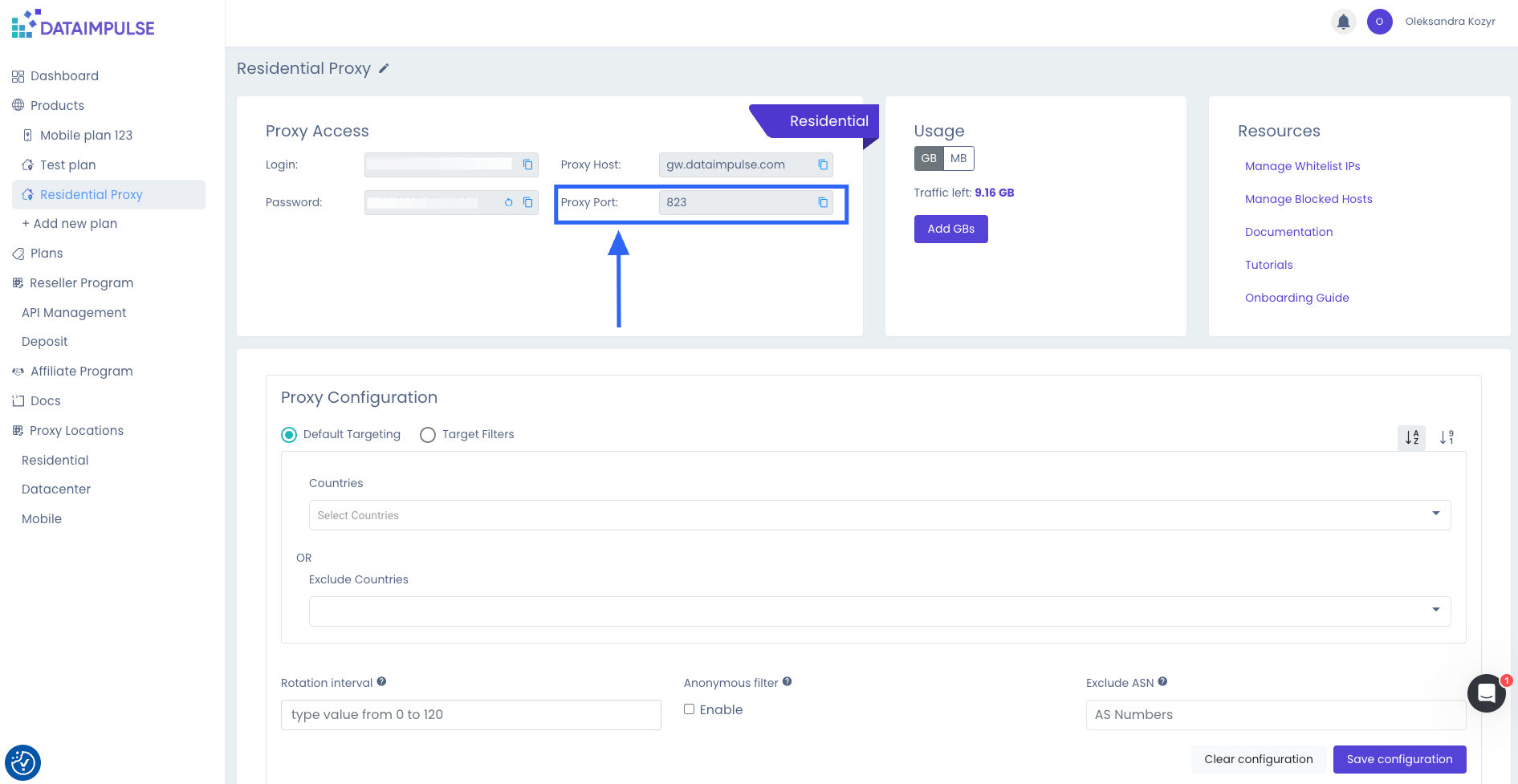
\*\*\* ### \*\*Sticky\*\* Los proxies sticky están basados en puertos. Las direcciones IP están vinculadas a un puerto específico por un período de tiempo. El intervalo de rotación para los proxies sticky puede variar de 1 a 120 minutos, siendo la duración media de 30 minutos. Para conexiones sticky, puedes usar puertos desde \*\*10000\*\* hasta \*\*20000\*\*. Un ejemplo del proxy HTTP sticky: \`\`\` curl -x "http://login:password@gw.dataimpulse.com:10000" https://api.ipify.org/ \`\`\` Un ejemplo del proxy SOCKS5 sticky: \`\`\` curl -x "socks5://login:password@gw.dataimpulse.com:10000" https://api.ipify.org/ \`\`\` {% hint style="info" %} Si no se especifica un Intervalo de Rotación para una conexión Sticky o se establece en "0", el intervalo por defecto será de 30 minutos. {% endhint %} \*\*\*
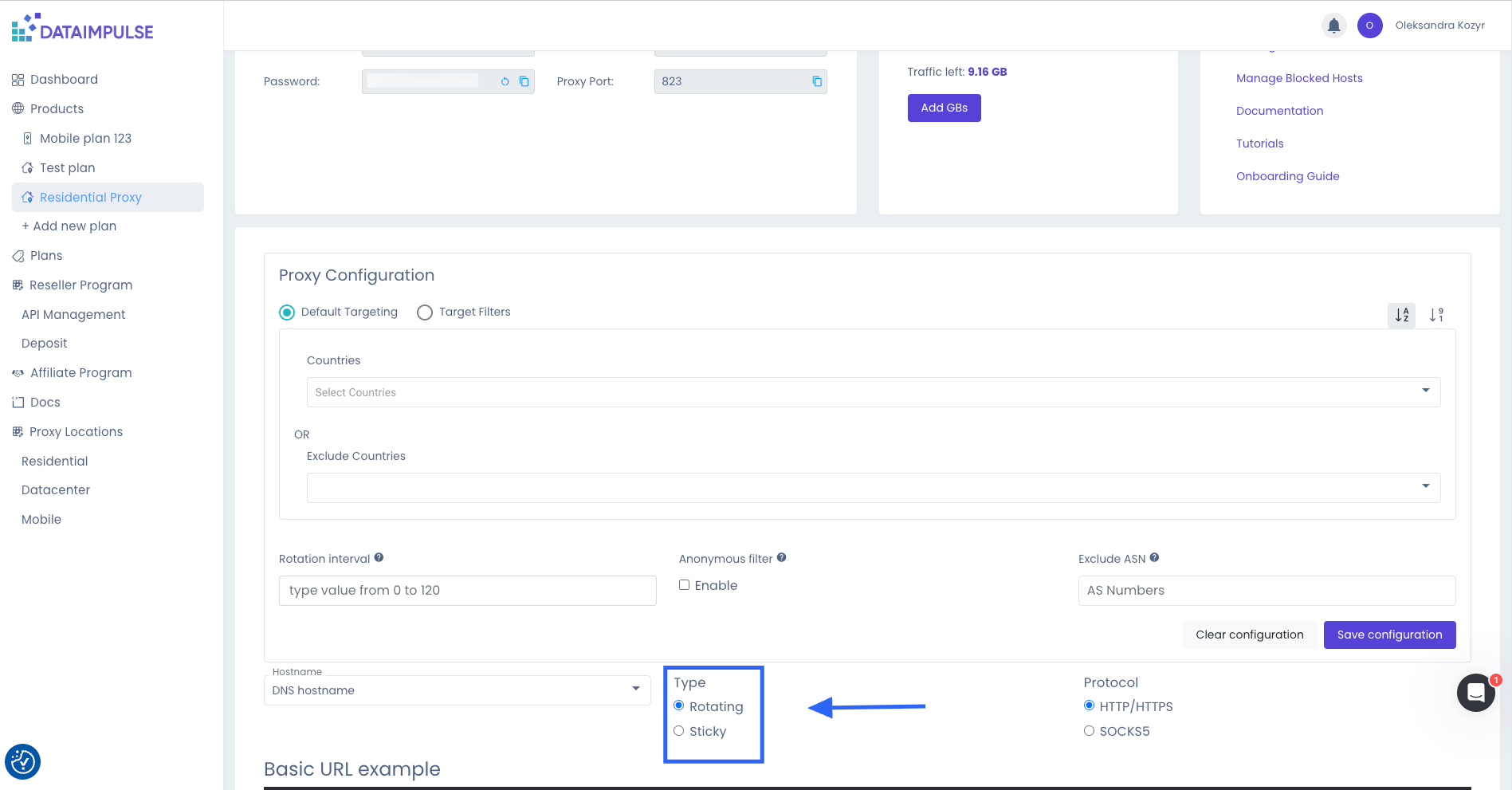
Artículo del blog sobre cómo seleccionar el mejor tipo de proxy: \[Proxies Rotativos o Sticky: Cómo elegir la opción correcta\](https://dataimpulse.com/blog/rotating-or-sticky-proxies-how-to-make-the-right-choice/)
\--- # Agent Instructions This documentation is published with GitBook. GitBook is the documentation platform designed so that both humans and AI agents can read, navigate, and reason over technical content effectively. Learn more at gitbook.com. ## Querying This Documentation If you need additional information that is not directly available in this page, you can query the documentation by asking a question. Perform an HTTP GET request on the following URL with the \`ask\` and \`goal\` query parameters: \`\`\` GET https://docs.dataimpulse.com/dataimpulse-documentation-es/proxies/tipos-de-conexiones.md?ask=&goal= \`\`\` \`ask\` is the immediate question: it should be specific, self-contained, and written in natural language. \`goal\` is what the user is ultimately trying to achieve, the reason they need the answer. Sharing it helps GitBook give you a better, more relevant answer. A goal is most helpful when it describes the outcome the user wants rather than restating the question. For example, with \`ask=how do I create an API token\`, a goal like \`automate deployments from our CI pipeline\` lets GitBook tailor the answer to that use case. The response will contain a direct answer to the question and relevant excerpts and sources from the documentation. Use this mechanism when the answer is not explicitly present in the current page, you need clarification or additional context, or you want to retrieve related documentation sections.
---
# Unknown
\> For the complete documentation index, see \[llms.txt\](https://docs.dataimpulse.com/llms.txt). Markdown versions of documentation pages are available by appending \`.md\` to page URLs; this page is available as \[Markdown\](https://docs.dataimpulse.com/dataimpulse-documentation-es/proxies/hosts-de-conexion.md). # Hosts de conexión Para conectar los proxies, tienes dos opciones para los nombres de host: ### Nombre de host DNS \`gw.dataimpulse.com\` - Al usar el nombre de host DNS para la conexión, el host más cercano a usted ejecutará automáticamente sus solicitudes. ### Nombre de host IP También puede conectarse usando la dirección IP - \`74.81.81.81\` . En este caso, su conexión se enrutará automáticamente a través del mejor servidor disponible según el país que haya seleccionado. {% hint style="info" %} Recomendamos usar el formato DNS para una mejor estabilidad, ya que las direcciones IP pueden cambiar, lo que requiere que las supervise y actualice regularmente. {% endhint %}

\--- # Agent Instructions This documentation is published with GitBook. GitBook is the documentation platform designed so that both humans and AI agents can read, navigate, and reason over technical content effectively. Learn more at gitbook.com. ## Querying This Documentation If you need additional information that is not directly available in this page, you can query the documentation by asking a question. Perform an HTTP GET request on the following URL with the \`ask\` and \`goal\` query parameters: \`\`\` GET https://docs.dataimpulse.com/dataimpulse-documentation-es/proxies/hosts-de-conexion.md?ask=&goal= \`\`\` \`ask\` is the immediate question: it should be specific, self-contained, and written in natural language. \`goal\` is what the user is ultimately trying to achieve, the reason they need the answer. Sharing it helps GitBook give you a better, more relevant answer. A goal is most helpful when it describes the outcome the user wants rather than restating the question. For example, with \`ask=how do I create an API token\`, a goal like \`automate deployments from our CI pipeline\` lets GitBook tailor the answer to that use case. The response will contain a direct answer to the question and relevant excerpts and sources from the documentation. Use this mechanism when the answer is not explicitly present in the current page, you need clarification or additional context, or you want to retrieve related documentation sections.
---
# Unknown
\> For the complete documentation index, see \[llms.txt\](https://docs.dataimpulse.com/llms.txt). Markdown versions of documentation pages are available by appending \`.md\` to page URLs; this page is available as \[Markdown\](https://docs.dataimpulse.com/dataimpulse-documentation-es/proxies/protocolos.md). # Protocolos Los proxies admiten los protocolos HTTP, HTTPS y SOCKS5. ### HTTP/ HTTPS Un ejemplo del proxy rotativo HTTP: \`\`\` curl -x "http://login:password@gw.dataimpulse.com:823" https://api.ipify.org/ \`\`\` Un ejemplo del proxy HTTP sticky: \`\`\` curl -x "http://login:password@gw.dataimpulse.com:10000" https://api.ipify.org/ \`\`\` {% hint style="info" %} Para conexiones persistentes (sticky), puedes usar puertos del 10000 al 20000 {% endhint %} ### SOCKS5 Un ejemplo del proxy rotativo SOCKS5: \`\`\` curl -x "socks5://login:password@gw.dataimpulse.com:824" https://api.ipify.org/ \`\`\` Un ejemplo del proxy SOCKS5 sticky: \`\`\` curl -x "socks5://login:password@gw.dataimpulse.com:10000" https://api.ipify.org/ \`\`\` Artículo del blog sobre cómo elegir el mejor protocolo de proxy: \[Elegir entre proxies HTTP y SOCKS: cómo tomar la decisión correcta\](https://dataimpulse.com/blog/choosing-between-http-and-socks-proxies-how-to-make-the-right-decision/) --- # Agent Instructions This documentation is published with GitBook. GitBook is the documentation platform designed so that both humans and AI agents can read, navigate, and reason over technical content effectively. Learn more at gitbook.com. ## Querying This Documentation If you need additional information that is not directly available in this page, you can query the documentation by asking a question. Perform an HTTP GET request on the following URL with the \`ask\` and \`goal\` query parameters: \`\`\` GET https://docs.dataimpulse.com/dataimpulse-documentation-es/proxies/protocolos.md?ask=&goal= \`\`\` \`ask\` is the immediate question: it should be specific, self-contained, and written in natural language. \`goal\` is what the user is ultimately trying to achieve, the reason they need the answer. Sharing it helps GitBook give you a better, more relevant answer. A goal is most helpful when it describes the outcome the user wants rather than restating the question. For example, with \`ask=how do I create an API token\`, a goal like \`automate deployments from our CI pipeline\` lets GitBook tailor the answer to that use case. The response will contain a direct answer to the question and relevant excerpts and sources from the documentation. Use this mechanism when the answer is not explicitly present in the current page, you need clarification or additional context, or you want to retrieve related documentation sections.
---
# Unknown
\> For the complete documentation index, see \[llms.txt\](https://docs.dataimpulse.com/llms.txt). Markdown versions of documentation pages are available by appending \`.md\` to page URLs; this page is available as \[Markdown\](https://docs.dataimpulse.com/dataimpulse-documentation-es/proxies/segmentacion.md). # Segmentación Domina las opciones de segmentación de proxies de DataImpulse. Configura país, ciudad, ASN, tipo de sesión y más parámetros para apuntar a la ubicación exacta que necesitas. Ofrecemos tres tipos de opciones de segmentación para la red proxy de DataImpulse: 1. \[\*\*Segmentación predeterminada\*\*:\](/dataimpulse-documentation-es/proxies/segmentacion/segmentacion-predeterminada.md)\\ Esto incluye la selección/exclusión de país y la exclusión de ASN. Estas opciones ya están incluidas en el precio base del proxy y no se facturan adicionalmente. 2. \[\*\*Filtros de segmentación\*\*:\](/dataimpulse-documentation-es/proxies/segmentacion/filtros-de-segmentacion.md)\\ Esta opción avanzada de segmentación incluye la selección por estado, ciudad, código postal y ASN.\\ El tráfico enrutado a través de estos filtros se factura al doble de la tarifa estándar. 3. \[\*\*Segmentación por Geohash\*\*:\](/dataimpulse-documentation-es/proxies/segmentacion/geohash-targeting.md)\\ Dirija el tráfico a un área específica en el mapa mediante geohash, con país, ASN y grupo geográfico mínimo opcionales.\\ El tráfico enrutado a través de la Segmentación por Geohash se factura al doble de la tarifa estándar. {% hint style="info" %} El tráfico enrutado a través del Filtro de segmentación (estado, ciudad, código postal y ASN) y a través de la Segmentación por Geohash se factura al doble de la tarifa estándar. {% endhint %}
| | | |
| --- | --- | --- |
| **Segmentación predeterminada** | País (seleccionar/excluir) | excluir ASN |
| **Filtros de segmentación** | Estado
Ciudad
Código postal
ASN | |
| **Segmentación por Geohash** | Geohash
País
ASN
Grupo geográfico mínimo | |
Si actualmente no hay IP disponibles para una ciudad/estado/código postal/ASN o geohash específicos, recibirá un \`503 NO\_RAY\` código de respuesta. En tales casos, pruebe con otras opciones de segmentación. --- # Agent Instructions This documentation is published with GitBook. GitBook is the documentation platform designed so that both humans and AI agents can read, navigate, and reason over technical content effectively. Learn more at gitbook.com. ## Querying This Documentation If you need additional information that is not directly available in this page, you can query the documentation by asking a question. Perform an HTTP GET request on the following URL with the \`ask\` and \`goal\` query parameters: \`\`\` GET https://docs.dataimpulse.com/dataimpulse-documentation-es/proxies/segmentacion.md?ask=&goal= \`\`\` \`ask\` is the immediate question: it should be specific, self-contained, and written in natural language. \`goal\` is what the user is ultimately trying to achieve, the reason they need the answer. Sharing it helps GitBook give you a better, more relevant answer. A goal is most helpful when it describes the outcome the user wants rather than restating the question. For example, with \`ask=how do I create an API token\`, a goal like \`automate deployments from our CI pipeline\` lets GitBook tailor the answer to that use case. The response will contain a direct answer to the question and relevant excerpts and sources from the documentation. Use this mechanism when the answer is not explicitly present in the current page, you need clarification or additional context, or you want to retrieve related documentation sections.
---
# Unknown
\> For the complete documentation index, see \[llms.txt\](https://docs.dataimpulse.com/llms.txt). Markdown versions of documentation pages are available by appending \`.md\` to page URLs; this page is available as \[Markdown\](https://docs.dataimpulse.com/port-access.md). # Port access Learn about DataImpulse proxy port access configuration. Understand which ports are available and how to connect using HTTP, HTTPS, and SOCKS5 protocols. ### Default access With the proxies, the following ports are accessible by default: \* \`80\` \* \`443\` \* \`5228\` \* \`53\` \* \`5060\` \* \`8080\` \* \`8090\` \* \`8443\` \* \`853\` \* \`8888\` #### Restricted ports Restricted ports include SMTP, IMAP, and various other ports related to mailing and messaging. \*\*\* ### Procedure for Unblocking a Port To request a port unblock, please contact us at and provide the following information: \* Specify the port that needs to be opened. \* Clearly describe the use case for this port—provide as many details as possible. \* Include the specific target you intend to access through this port. For security purposes, users may need to complete KYC verification before their unblocking request is approved. --- # Agent Instructions This documentation is published with GitBook. GitBook is the documentation platform designed so that both humans and AI agents can read, navigate, and reason over technical content effectively. Learn more at gitbook.com. ## Querying This Documentation If you need additional information that is not directly available in this page, you can query the documentation by asking a question. Perform an HTTP GET request on the following URL with the \`ask\` and \`goal\` query parameters: \`\`\` GET https://docs.dataimpulse.com/port-access.md?ask=&goal= \`\`\` \`ask\` is the immediate question: it should be specific, self-contained, and written in natural language. \`goal\` is what the user is ultimately trying to achieve, the reason they need the answer. Sharing it helps GitBook give you a better, more relevant answer. A goal is most helpful when it describes the outcome the user wants rather than restating the question. For example, with \`ask=how do I create an API token\`, a goal like \`automate deployments from our CI pipeline\` lets GitBook tailor the answer to that use case. The response will contain a direct answer to the question and relevant excerpts and sources from the documentation. Use this mechanism when the answer is not explicitly present in the current page, you need clarification or additional context, or you want to retrieve related documentation sections.
---
# Unknown
\> For the complete documentation index, see \[llms.txt\](https://docs.dataimpulse.com/llms.txt). Markdown versions of documentation pages are available by appending \`.md\` to page URLs; this page is available as \[Markdown\](https://docs.dataimpulse.com/affiliate-program.md). # Affiliate Program Learn how the DataImpulse affiliate program works. Earn commissions by referring customers. Find out about payouts, tracking, and how to get started. We offer a referral program to all clients, accessible through the affiliate page. When someone registers using your referral link, you earn 15% of their order. You can withdraw your referral earnings in Bitcoin, USDT TRC20, or Wire Transfer once you reach $100, or convert them into your Plan / Reseller balance. Referral earnings are held for 30 days for verification before being paid out within 48 hours of a withdrawal request. Refunded orders are deducted from generated sales. If a referral earning has been received for an order that is later refunded, the amount will be subtracted from the following payout. We reserve the right to decline payout if our system detects fraudulent activity. \*\*Active balance:\*\* The amount of referral earnings that are available for payout. \*\*Holded balance:\*\* Referral earnings that are temporarily held for 30 days for verification. \*\*Total payout sum:\*\* The cumulative sum of all referral earnings paid to you. You can find a step-by-step guide \[here\](https://dataimpulse.com/blog/dataimpulse-affiliate-program/). {% hint style="info" %} Please do not use the DataImpulse trademark in paid search advertisements, as it violates our policy. If we discover that you have violated this rule, we will block your account. {% endhint %} --- # Agent Instructions This documentation is published with GitBook. GitBook is the documentation platform designed so that both humans and AI agents can read, navigate, and reason over technical content effectively. Learn more at gitbook.com. ## Querying This Documentation If you need additional information that is not directly available in this page, you can query the documentation by asking a question. Perform an HTTP GET request on the following URL with the \`ask\` and \`goal\` query parameters: \`\`\` GET https://docs.dataimpulse.com/affiliate-program.md?ask=&goal= \`\`\` \`ask\` is the immediate question: it should be specific, self-contained, and written in natural language. \`goal\` is what the user is ultimately trying to achieve, the reason they need the answer. Sharing it helps GitBook give you a better, more relevant answer. A goal is most helpful when it describes the outcome the user wants rather than restating the question. For example, with \`ask=how do I create an API token\`, a goal like \`automate deployments from our CI pipeline\` lets GitBook tailor the answer to that use case. The response will contain a direct answer to the question and relevant excerpts and sources from the documentation. Use this mechanism when the answer is not explicitly present in the current page, you need clarification or additional context, or you want to retrieve related documentation sections.
---
# Unknown
\> For the complete documentation index, see \[llms.txt\](https://docs.dataimpulse.com/llms.txt). Markdown versions of documentation pages are available by appending \`.md\` to page URLs; this page is available as \[Markdown\](https://docs.dataimpulse.com/proxies.md). # Proxies Complete DataImpulse proxy documentation. Explore proxy types, connection methods, and best practices for residential, mobile, and datacenter IP configurations. We provide: \* \[Residential Proxies\](https://dataimpulse.com/residential-proxies/) \* \[Mobile Proxies\](https://dataimpulse.com/mobile-proxies/) \* \[Datacenter Proxies\](https://dataimpulse.com/datacenter-proxies/) \* \[Premium Residential Proxies\](https://dataimpulse.com/premium-residential-proxies/) --- # Agent Instructions This documentation is published with GitBook. GitBook is the documentation platform designed so that both humans and AI agents can read, navigate, and reason over technical content effectively. Learn more at gitbook.com. ## Querying This Documentation If you need additional information that is not directly available in this page, you can query the documentation by asking a question. Perform an HTTP GET request on the following URL with the \`ask\` and \`goal\` query parameters: \`\`\` GET https://docs.dataimpulse.com/proxies.md?ask=&goal= \`\`\` \`ask\` is the immediate question: it should be specific, self-contained, and written in natural language. \`goal\` is what the user is ultimately trying to achieve, the reason they need the answer. Sharing it helps GitBook give you a better, more relevant answer. A goal is most helpful when it describes the outcome the user wants rather than restating the question. For example, with \`ask=how do I create an API token\`, a goal like \`automate deployments from our CI pipeline\` lets GitBook tailor the answer to that use case. The response will contain a direct answer to the question and relevant excerpts and sources from the documentation. Use this mechanism when the answer is not explicitly present in the current page, you need clarification or additional context, or you want to retrieve related documentation sections.
---
# Unknown
\> For the complete documentation index, see \[llms.txt\](https://docs.dataimpulse.com/llms.txt). Markdown versions of documentation pages are available by appending \`.md\` to page URLs; this page is available as \[Markdown\](https://docs.dataimpulse.com/proxies/protocols.md). # Protocols The proxies support HTTP, HTTPS, and SOCKS5 protocols. ### HTTP/ HTTPS An example of the HTTP rotating proxy: \`\`\` curl -x "http://login:password@gw.dataimpulse.com:823" https://api.ipify.org/ \`\`\` An example of the HTTP sticky proxy: \`\`\` curl -x "http://login:password@gw.dataimpulse.com:10000" https://api.ipify.org/ \`\`\` {% hint style="info" %} For sticky connections, you can use ports from 10000 to 20000 {% endhint %} ### SOCKS5 An example of the SOCKS5 rotating proxy: \`\`\` curl -x "socks5://login:password@gw.dataimpulse.com:824" https://api.ipify.org/ \`\`\` An example of the SOCKS5 sticky proxy: \`\`\` curl -x "socks5://login:password@gw.dataimpulse.com:10000" https://api.ipify.org/ \`\`\` Blog article on choosing the best proxy protocol: \[Choosing Between HTTP and SOCKS Proxies: How to Make the Right Decision\](https://dataimpulse.com/blog/choosing-between-http-and-socks-proxies-how-to-make-the-right-decision/) --- # Agent Instructions This documentation is published with GitBook. GitBook is the documentation platform designed so that both humans and AI agents can read, navigate, and reason over technical content effectively. Learn more at gitbook.com. ## Querying This Documentation If you need additional information that is not directly available in this page, you can query the documentation by asking a question. Perform an HTTP GET request on the following URL with the \`ask\` and \`goal\` query parameters: \`\`\` GET https://docs.dataimpulse.com/proxies/protocols.md?ask=&goal= \`\`\` \`ask\` is the immediate question: it should be specific, self-contained, and written in natural language. \`goal\` is what the user is ultimately trying to achieve, the reason they need the answer. Sharing it helps GitBook give you a better, more relevant answer. A goal is most helpful when it describes the outcome the user wants rather than restating the question. For example, with \`ask=how do I create an API token\`, a goal like \`automate deployments from our CI pipeline\` lets GitBook tailor the answer to that use case. The response will contain a direct answer to the question and relevant excerpts and sources from the documentation. Use this mechanism when the answer is not explicitly present in the current page, you need clarification or additional context, or you want to retrieve related documentation sections.
---
# Unknown
\> For the complete documentation index, see \[llms.txt\](https://docs.dataimpulse.com/llms.txt). Markdown versions of documentation pages are available by appending \`.md\` to page URLs; this page is available as \[Markdown\](https://docs.dataimpulse.com/resellers.md). # Resellers DataImpulse reseller program documentation. Learn how to set up a white-label proxy business, manage sub-users, and configure your reseller account. To become a DataImpulse reseller, simply create an account in our \[Dashboard\](https://app.dataimpulse.com/). Fill out the Know Your Customer (KYC) form through our secure partner iDenfy to verify your identity and ensure compliance with our platform’s policies. After that, sign the Reseller Agreement to activate your reseller status. After your account is set up, go to the Resellers section to make a deposit of at least $50 to activate your reseller status. The Reseller API is available \[here\](https://documenter.getpostman.com/view/6095389/2s9YC7UC2x). If you need specific endpoints that have yet to be implemented, please contact our Support Team for assistance. --- # Agent Instructions This documentation is published with GitBook. GitBook is the documentation platform designed so that both humans and AI agents can read, navigate, and reason over technical content effectively. Learn more at gitbook.com. ## Querying This Documentation If you need additional information that is not directly available in this page, you can query the documentation by asking a question. Perform an HTTP GET request on the following URL with the \`ask\` and \`goal\` query parameters: \`\`\` GET https://docs.dataimpulse.com/resellers.md?ask=&goal= \`\`\` \`ask\` is the immediate question: it should be specific, self-contained, and written in natural language. \`goal\` is what the user is ultimately trying to achieve, the reason they need the answer. Sharing it helps GitBook give you a better, more relevant answer. A goal is most helpful when it describes the outcome the user wants rather than restating the question. For example, with \`ask=how do I create an API token\`, a goal like \`automate deployments from our CI pipeline\` lets GitBook tailor the answer to that use case. The response will contain a direct answer to the question and relevant excerpts and sources from the documentation. Use this mechanism when the answer is not explicitly present in the current page, you need clarification or additional context, or you want to retrieve related documentation sections.
---
# Unknown
\> For the complete documentation index, see \[llms.txt\](https://docs.dataimpulse.com/llms.txt). Markdown versions of documentation pages are available by appending \`.md\` to page URLs; this page is available as \[Markdown\](https://docs.dataimpulse.com/dashboard/telegram-notifications.md). # Telegram Notifications This feature allows you to receive real-time notifications directly to your mobile device or desktop Telegram app, duplicating the critical updates usually sent via email. #### What notifications will I receive? By enabling the Telegram integration, you will receive: \* Balance Alerts \* Important Announcements #### How to Enable Telegram Notifications 1. Log in to your DataImpulse dashboard. 2. Navigate to the Account Settings (click on your profile/icon in the top right corner). 3. Go to the \[Integrations tab\](https://app.dataimpulse.com/account/integrations). 4. In the "Get Instant Alerts in Telegram" section, click the Connect Telegram button. 5. You will be redirected to the official Telegram bot. Click Start in your Telegram app to link your account. 6. Once linked, your Telegram username will appear in the dashboard, confirming the connection. #### How to Disable Telegram Notifications If you wish to stop receiving alerts via Telegram: 1. Go back to the Integrations tab in your account settings. 2. Locate the red Disconnect Telegram button. 3. Click the button to revoke access. 4. \*Optional:\* You can also stop or block the bot directly within the Telegram app. \*\*\* ### FAQ \*\*Is it free?\*\*\\ Yes, Telegram integration is included in all plans at no additional cost. \*\*Will I still receive emails?\*\*\\ Yes, Telegram notifications act as a duplicate for your convenience, ensuring you don't miss critical updates if you are away from your email. {% hint style="info" %} Available notification types can vary by account setup. {% endhint %} --- # Agent Instructions This documentation is published with GitBook. GitBook is the documentation platform designed so that both humans and AI agents can read, navigate, and reason over technical content effectively. Learn more at gitbook.com. ## Querying This Documentation If you need additional information that is not directly available in this page, you can query the documentation by asking a question. Perform an HTTP GET request on the following URL with the \`ask\` and \`goal\` query parameters: \`\`\` GET https://docs.dataimpulse.com/dashboard/telegram-notifications.md?ask=&goal= \`\`\` \`ask\` is the immediate question: it should be specific, self-contained, and written in natural language. \`goal\` is what the user is ultimately trying to achieve, the reason they need the answer. Sharing it helps GitBook give you a better, more relevant answer. A goal is most helpful when it describes the outcome the user wants rather than restating the question. For example, with \`ask=how do I create an API token\`, a goal like \`automate deployments from our CI pipeline\` lets GitBook tailor the answer to that use case. The response will contain a direct answer to the question and relevant excerpts and sources from the documentation. Use this mechanism when the answer is not explicitly present in the current page, you need clarification or additional context, or you want to retrieve related documentation sections.
---
# Unknown
\> For the complete documentation index, see \[llms.txt\](https://docs.dataimpulse.com/llms.txt). Markdown versions of documentation pages are available by appending \`.md\` to page URLs; this page is available as \[Markdown\](https://docs.dataimpulse.com/dataimpulse-documentation-es/proxies/parametros/intervalo-de-sesion.md). # Intervalo de sesión Comprende el parámetro session-interval en los proxies de DataImpulse. Controla con qué frecuencia rota tu IP para equilibrar anonimato y continuidad de la sesión. \`sessttl\` - Establece el intervalo para la rotación de IP para proxies sticky, especificando el valor en minutos.
La configuración de Sticky Proxy te permite controlar la frecuencia de rotación de direcciones IP. Puedes establecer el intervalo para la rotación de IP agregando el \`sessttl\` parámetro después del login, especificando el valor en minutos. \\ \*\*Por ejemplo\*\*, si quieres que la dirección IP cambie cada minuto, puedes usar el siguiente formato: \`sessttl.1\` Si deseas que la dirección IP cambie cada hora, el valor sería \`sessttl.60\` {% hint style="info" %} Si la dirección IP seleccionada deja de estar disponible, el sistema la reemplazará automáticamente por otra dirección IP activa. {% endhint %} También puedes especificar tanto el país como la frecuencia de rotación de IP agregando parámetros después del login. \*\*Por ejemplo\*\*, si quieres usar una dirección IP de Francia con una frecuencia de rotación cada hora, puedes usar el siguiente formato: \`cr.fr;sessttl.60\` \`\`\` curl -x "http://login\_\_cr.fr;sessttl.60:password@gw.dataimpulse.com:10000" https://api.ipify.org/ \`\`\` \\ En este ejemplo, "cr.fr" representa Francia, y "sessttl.60" indica una frecuencia de rotación de 60 minutos.
\--- # Agent Instructions This documentation is published with GitBook. GitBook is the documentation platform designed so that both humans and AI agents can read, navigate, and reason over technical content effectively. Learn more at gitbook.com. ## Querying This Documentation If you need additional information that is not directly available in this page, you can query the documentation by asking a question. Perform an HTTP GET request on the following URL with the \`ask\` and \`goal\` query parameters: \`\`\` GET https://docs.dataimpulse.com/dataimpulse-documentation-es/proxies/parametros/intervalo-de-sesion.md?ask=&goal= \`\`\` \`ask\` is the immediate question: it should be specific, self-contained, and written in natural language. \`goal\` is what the user is ultimately trying to achieve, the reason they need the answer. Sharing it helps GitBook give you a better, more relevant answer. A goal is most helpful when it describes the outcome the user wants rather than restating the question. For example, with \`ask=how do I create an API token\`, a goal like \`automate deployments from our CI pipeline\` lets GitBook tailor the answer to that use case. The response will contain a direct answer to the question and relevant excerpts and sources from the documentation. Use this mechanism when the answer is not explicitly present in the current page, you need clarification or additional context, or you want to retrieve related documentation sections.
---
# Unknown
\> For the complete documentation index, see \[llms.txt\](https://docs.dataimpulse.com/llms.txt). Markdown versions of documentation pages are available by appending \`.md\` to page URLs; this page is available as \[Markdown\](https://docs.dataimpulse.com/proxies/connection-hosts.md). # Connection Hosts To connect proxies, you have two options for hostnames: ### DNS Hostname \`gw.dataimpulse.com\` - Using the DNS hostname for connection, the host closest to you will automatically execute your requests. ### IP Hostname You can also connect using the IP address - \`74.81.81.81\` . In this case, your connection will be automatically routed through the best available server based on your selected country. {% hint style="info" %} We recommend using the DNS format for better stability, as IP addresses can change, requiring you to monitor and update them regularly. {% endhint %}

\--- # Agent Instructions This documentation is published with GitBook. GitBook is the documentation platform designed so that both humans and AI agents can read, navigate, and reason over technical content effectively. Learn more at gitbook.com. ## Querying This Documentation If you need additional information that is not directly available in this page, you can query the documentation by asking a question. Perform an HTTP GET request on the following URL with the \`ask\` and \`goal\` query parameters: \`\`\` GET https://docs.dataimpulse.com/proxies/connection-hosts.md?ask=&goal= \`\`\` \`ask\` is the immediate question: it should be specific, self-contained, and written in natural language. \`goal\` is what the user is ultimately trying to achieve, the reason they need the answer. Sharing it helps GitBook give you a better, more relevant answer. A goal is most helpful when it describes the outcome the user wants rather than restating the question. For example, with \`ask=how do I create an API token\`, a goal like \`automate deployments from our CI pipeline\` lets GitBook tailor the answer to that use case. The response will contain a direct answer to the question and relevant excerpts and sources from the documentation. Use this mechanism when the answer is not explicitly present in the current page, you need clarification or additional context, or you want to retrieve related documentation sections.
---
# Unknown
\> For the complete documentation index, see \[llms.txt\](https://docs.dataimpulse.com/llms.txt). Markdown versions of documentation pages are available by appending \`.md\` to page URLs; this page is available as \[Markdown\](https://docs.dataimpulse.com/proxies/types-of-connections.md). # Types of connections We offer two types of proxy connections: Rotating and Sticky. ### Rotating The IP address changes automatically with each new request. You should use:
| | | | |
| --- | --- | --- | --- |
| For HTTP/HTTPS | **823** PORT | | |
| For SOCKS5 | **824** PORT | | |

\*\*\* ### \*\*Sticky\*\* Sticky proxies are port-based. IP addresses are bound to a specific port for a period of time. The rotation interval for sticky proxies can range from 1 to 120 minutes, with the average duration being 30 minutes. For sticky connections, you can use ports from \*\*10000\*\* to \*\*20000\*\*. An example of the HTTP sticky proxy: \`\`\` curl -x "http://login:password@gw.dataimpulse.com:10000" https://api.ipify.org/ \`\`\` An example of the SOCKS5 sticky proxy: \`\`\` curl -x "socks5://login:password@gw.dataimpulse.com:10000" https://api.ipify.org/ \`\`\` {% hint style="info" %} If no Rotation Interval is specified for a Sticky connection or is set to "0", the default interval will be 30 minutes. {% endhint %} \*\*\*

Blog article on selecting the best proxy type: \[Rotating or Sticky Proxies: How to Choose the Right Option\](https://dataimpulse.com/blog/rotating-or-sticky-proxies-how-to-make-the-right-choice/)
\--- # Agent Instructions This documentation is published with GitBook. GitBook is the documentation platform designed so that both humans and AI agents can read, navigate, and reason over technical content effectively. Learn more at gitbook.com. ## Querying This Documentation If you need additional information that is not directly available in this page, you can query the documentation by asking a question. Perform an HTTP GET request on the following URL with the \`ask\` and \`goal\` query parameters: \`\`\` GET https://docs.dataimpulse.com/proxies/types-of-connections.md?ask=&goal= \`\`\` \`ask\` is the immediate question: it should be specific, self-contained, and written in natural language. \`goal\` is what the user is ultimately trying to achieve, the reason they need the answer. Sharing it helps GitBook give you a better, more relevant answer. A goal is most helpful when it describes the outcome the user wants rather than restating the question. For example, with \`ask=how do I create an API token\`, a goal like \`automate deployments from our CI pipeline\` lets GitBook tailor the answer to that use case. The response will contain a direct answer to the question and relevant excerpts and sources from the documentation. Use this mechanism when the answer is not explicitly present in the current page, you need clarification or additional context, or you want to retrieve related documentation sections.
---
# Unknown
\> For the complete documentation index, see \[llms.txt\](https://docs.dataimpulse.com/llms.txt). Markdown versions of documentation pages are available by appending \`.md\` to page URLs; this page is available as \[Markdown\](https://docs.dataimpulse.com/dataimpulse-documentation-es/panel-de-control/gestion-del-equipo.md). # Gestión del equipo Invita a tus compañeros de equipo a tu cuenta de DataImpulse y otórgales a cada uno el nivel de acceso adecuado. Cada uno obtiene su propio inicio de sesión, por lo que nunca tienes que compartir tu contraseña. Con \*\*Equipo\*\*, varias personas pueden trabajar en una sola cuenta de DataImpulse. Cada compañero de equipo inicia sesión con su propio correo electrónico y contraseña, y solo ve lo que permite su rol. Por ejemplo, tu desarrollador puede trabajar con proxies pero nunca ve tus pagos, y tu contable puede pagar facturas pero nunca ve las credenciales de proxy. Lo encontrarás en \*\*Perfil → Equipo\*\*. {% embed url="" %} #### Roles Cuando invitas a alguien, eliges uno de tres roles. Puedes cambiarlo más tarde. | Rol | Para quién es | Qué pueden hacer | | ----------------- | ------------------------------------------- | -------------------------------------------------------------------------------------------------------------------------------- | | \*\*Administrador\*\* | Gerentes, copropietarios | Acceso completo, incluyendo facturación, el área de revendedores y la gestión del equipo. | | \*\*Facturación\*\* | Finanzas, contabilidad | Recargas, pagos, facturas y pagos a afiliados, además de estadísticas de uso. Sin credenciales de proxy, sin gestión del equipo. | | \*\*Desarrollador\*\* | Ingenieros, miembros del equipo de scraping | Acceso a proxies, configuración de proxies, la API y SubUsers. Sin facturación, sin pagos, sin gestión del equipo. | La persona que creó la cuenta es el \*\*Propietario\*\*. El Propietario tiene acceso completo y no puede ser eliminado del equipo. El Propietario no aparece en la lista de miembros del equipo. {% hint style="info" %} Puedes tener más de un Administrador. Los Administradores tienen el mismo acceso que el Propietario, pero la cuenta sigue perteneciendo al Propietario. {% endhint %} #### Invitar a un miembro del equipo 1. Haz clic en tu nombre en la esquina superior derecha y elige \*\*Perfil\*\*. 2. Abre la \*\*Equipo\*\* pestaña. 3. Haz clic en \*\*Invitar a un miembro del equipo\*\*. 4. Introduce el \*\*Correo electrónico\*\*. 5. Elige un \*\*Rol\*\*: Administrador, Facturación o Desarrollador. 6. Haz clic en \*\*Enviar invitación\*\*. Tu compañero de equipo aparece en la lista como \*\*Pendiente de registro\*\* con el estado \*\*Invitación enviada\*\*. ¿Cambiaste de opinión? Haz clic en \*\*Cancelar\*\* junto a la invitación. {% hint style="warning" %} \*\*Importante: un correo electrónico que ya tiene una cuenta de DataImpulse no puede unirse a un equipo.\*\* Si tu compañero de equipo ya tiene su propia cuenta de DataImpulse, no puede convertirse en miembro del equipo con ese correo electrónico. Invítalo con otra dirección de correo electrónico, una que no esté registrada en DataImpulse. Si eso no funciona, \[contacta con nuestro equipo de soporte\](/dataimpulse-documentation-es/soporte.md) y te ayudaremos a resolverlo. {% endhint %} {% hint style="info" %} Solo el Propietario y los Administradores pueden ver la pestaña Equipo e invitar a personas. {% endhint %} #### Cómo se une tu compañero de equipo 1. Tu compañero de equipo recibe un correo electrónico titulado \*\*Te han invitado a unirte a un equipo de DataImpulse\*\*. Muestra quién los invitó, el nombre del equipo y su rol. 2. Hacen clic en \*\*Unirse al equipo\*\*. El enlace es válido durante \*\*48 horas\*\*. 3. En la \*\*página Unirse al equipo, ven el equipo al que se unen y su rol. Introducen su\*\* Nombre completo \*\*Nombre completo\*\*, crean una \*\*Contraseña\*\*, confirman que son humanos y hacen clic en \*\*Empezar\*\*. También pueden hacer clic en \*\*Rechazar invitación\*\* si no quieren unirse. 4. La autenticación de dos factores es obligatoria para cada miembro del equipo. Cada vez que inician sesión, introducen el \*\*código de 6 dígitos\*\* que enviamos a su correo electrónico. Una vez que se hayan unido, su estado en tu lista cambia a \*\*Activo\*\*. #### Estados de los miembros del equipo | Estado | Qué significa | | ---------------------- | -------------------------------------------------------------------------------- | | \*\*Invitación enviada\*\* | La invitación está en camino. Tu compañero de equipo aún no ha creado su acceso. | | \*\*Activo\*\* | Tu compañero de equipo se ha unido y puede iniciar sesión con su propio acceso. | #### Cambiar un rol 1. En la \*\*Equipo\*\* pestaña, abre el \*\*Rol\*\* menú desplegable junto al compañero de equipo. 2. Elige el nuevo rol. 3. Haz clic en \*\*Cambiar rol\*\* para confirmar. Su acceso cambia para ajustarse al nuevo rol. #### Eliminar a un miembro del equipo 1. En la \*\*Equipo\*\* pestaña, haz clic en \*\*Eliminar\*\* junto al compañero de equipo. 2. Haz clic en \*\*Eliminar\*\* para confirmar. Se cerrará su sesión de inmediato y ya no podrán abrir tu panel. Puedes volver a invitarlos más tarde si lo necesitas. #### Quién puede hacer qué Puedes ver siempre esta tabla en el panel: abre \*\*Perfil → Equipo\*\* y despliega \*\*Roles y permisos\*\* en la parte inferior de la página. ✅ permitido · — no disponible \*\*Panel principal\*\* | Sección | Propietario | Administrador | Facturación | Desarrollador | | ------------------------------- | :---------: | :-----------: | :---------: | :-----------: | | Panel de control (uso) | ✅ | ✅ | ✅ | ✅ | | Planes (lista) | ✅ | ✅ | ✅ | ✅ | | Editar nombre del plan | ✅ | ✅ | — | ✅ | | Acceso a proxies (credenciales) | ✅ | ✅ | — | ✅ | | Configuración de proxies | ✅ | ✅ | — | ✅ | | Añadir nuevo plan | ✅ | ✅ | ✅ | — | | Añadir GB / Añadir fondos | ✅ | ✅ | ✅ | — | | Pagos (historial, facturas) | ✅ | ✅ | ✅ | — | | Afiliados (referidos y pagos) | ✅ | ✅ | ✅ | — | | Equipo (gestión) | ✅ | ✅ | — | — | | Integraciones | ✅ | ✅ | — | — | | Ubicaciones de proxies | ✅ | ✅ | — | ✅ | | Documentación | ✅ | ✅ | — | ✅ | | Perfil propio / Seguridad | ✅ | ✅ | ✅ | ✅ | \*\*Área de revendedores\*\* (solo para cuentas en el \[programa de revendedores\](/dataimpulse-documentation-es/revendedores.md)) | Sección | Propietario | Administrador | Facturación | Desarrollador | | ----------------------------------- | :---------: | :-----------: | :---------: | :-----------: | | Gestión de API | ✅ | ✅ | — | ✅ | | SubUsers | ✅ | ✅ | — | ✅ | | Depósito (saldo de revendedor) | ✅ | ✅ | ✅ | — | | Resumen (transferencias de tráfico) | ✅ | ✅ | ✅ | ✅ | #### Información útil \* \*\*No hay contraseñas compartidas.\*\* Cada compañero de equipo tiene su propio acceso. Cuando alguien se va, elimínalo y el resto del equipo no necesita cambiar nada. \* \*\*Una cuenta, un saldo.\*\* Los planes, el tráfico y los pagos pertenecen a tu cuenta. Los compañeros de equipo no obtienen planes ni saldos separados. \* \*\*Los miembros del equipo no son SubUsers.\*\* Los SubUsers del programa de revendedores son tus clientes que obtienen acceso a proxies. Los miembros del equipo son personas que trabajan en tu panel. \* \*\*Eliminar la cuenta o cambiar el correo electrónico del Propietario\*\* se realiza a través de nuestro equipo de soporte. \*\*\* ¿Tienes alguna pregunta sobre la configuración de tu equipo? \[Contacta con soporte\](/dataimpulse-documentation-es/soporte.md), estamos disponibles 24/7. --- # Agent Instructions This documentation is published with GitBook. GitBook is the documentation platform designed so that both humans and AI agents can read, navigate, and reason over technical content effectively. Learn more at gitbook.com. ## Querying This Documentation If you need additional information that is not directly available in this page, you can query the documentation by asking a question. Perform an HTTP GET request on the following URL with the \`ask\` and \`goal\` query parameters: \`\`\` GET https://docs.dataimpulse.com/dataimpulse-documentation-es/panel-de-control/gestion-del-equipo.md?ask=&goal= \`\`\` \`ask\` is the immediate question: it should be specific, self-contained, and written in natural language. \`goal\` is what the user is ultimately trying to achieve, the reason they need the answer. Sharing it helps GitBook give you a better, more relevant answer. A goal is most helpful when it describes the outcome the user wants rather than restating the question. For example, with \`ask=how do I create an API token\`, a goal like \`automate deployments from our CI pipeline\` lets GitBook tailor the answer to that use case. The response will contain a direct answer to the question and relevant excerpts and sources from the documentation. Use this mechanism when the answer is not explicitly present in the current page, you need clarification or additional context, or you want to retrieve related documentation sections.
---
# Unknown
\> For the complete documentation index, see \[llms.txt\](https://docs.dataimpulse.com/llms.txt). Markdown versions of documentation pages are available by appending \`.md\` to page URLs; this page is available as \[Markdown\](https://docs.dataimpulse.com/resellers/manage-ssl-certificates.md). # Manage SSL Certificates Learn how to manage SSL certificates for your DataImpulse reseller domain. Secure your white-label proxy endpoints with custom HTTPS certificate configuration. Use this feature to manage SSL certificates for your custom domains. By uploading your public and private keys, you can ensure secure HTTPS connections for your users and resolve any certificate-related errors. Simply add your domain, upload the necessary keys, and click "Add". Your certificate will be activated within 5 minutes. --- # Agent Instructions This documentation is published with GitBook. GitBook is the documentation platform designed so that both humans and AI agents can read, navigate, and reason over technical content effectively. Learn more at gitbook.com. ## Querying This Documentation If you need additional information that is not directly available in this page, you can query the documentation by asking a question. Perform an HTTP GET request on the following URL with the \`ask\` and \`goal\` query parameters: \`\`\` GET https://docs.dataimpulse.com/resellers/manage-ssl-certificates.md?ask=&goal= \`\`\` \`ask\` is the immediate question: it should be specific, self-contained, and written in natural language. \`goal\` is what the user is ultimately trying to achieve, the reason they need the answer. Sharing it helps GitBook give you a better, more relevant answer. A goal is most helpful when it describes the outcome the user wants rather than restating the question. For example, with \`ask=how do I create an API token\`, a goal like \`automate deployments from our CI pipeline\` lets GitBook tailor the answer to that use case. The response will contain a direct answer to the question and relevant excerpts and sources from the documentation. Use this mechanism when the answer is not explicitly present in the current page, you need clarification or additional context, or you want to retrieve related documentation sections.
---
# Unknown
\> For the complete documentation index, see \[llms.txt\](https://docs.dataimpulse.com/llms.txt). Markdown versions of documentation pages are available by appending \`.md\` to page URLs; this page is available as \[Markdown\](https://docs.dataimpulse.com/proxies/threads.md). # Threads Learn how concurrent threads work with DataImpulse proxies. Understand thread limits, parallel connections, and how to optimize throughput for your use case. Each plan has a limit of 2000 threads. A thread represents an active connection to a proxy. If the maximum number of simultaneous connections is reached, the service will return an error \`407 THREADS\_EXHAUSTED\` . If you need to increase this limit, please contact our Support team. {% hint style="info" %} For security purposes, users need to complete KYC verification before their increasing request is approved. {% endhint %} --- # Agent Instructions This documentation is published with GitBook. GitBook is the documentation platform designed so that both humans and AI agents can read, navigate, and reason over technical content effectively. Learn more at gitbook.com. ## Querying This Documentation If you need additional information that is not directly available in this page, you can query the documentation by asking a question. Perform an HTTP GET request on the following URL with the \`ask\` and \`goal\` query parameters: \`\`\` GET https://docs.dataimpulse.com/proxies/threads.md?ask=&goal= \`\`\` \`ask\` is the immediate question: it should be specific, self-contained, and written in natural language. \`goal\` is what the user is ultimately trying to achieve, the reason they need the answer. Sharing it helps GitBook give you a better, more relevant answer. A goal is most helpful when it describes the outcome the user wants rather than restating the question. For example, with \`ask=how do I create an API token\`, a goal like \`automate deployments from our CI pipeline\` lets GitBook tailor the answer to that use case. The response will contain a direct answer to the question and relevant excerpts and sources from the documentation. Use this mechanism when the answer is not explicitly present in the current page, you need clarification or additional context, or you want to retrieve related documentation sections.
---
# Unknown
\> For the complete documentation index, see \[llms.txt\](https://docs.dataimpulse.com/llms.txt). Markdown versions of documentation pages are available by appending \`.md\` to page URLs; this page is available as \[Markdown\](https://docs.dataimpulse.com/proxies/udp.md). # UDP Learn about UDP proxy support in DataImpulse. Understand use cases, configuration options, and limitations of UDP protocol for proxy connections. We support UDP connections; it is disabled by default for all users. To enable it, you need to: \* Provide a detailed description of your use case. \* Include company information (if applicable). \* Complete KYC verification. Each request is reviewed individually to ensure compliance and prevent misuse. {% hint style="info" %} Requests without completed KYC will not be considered. {% endhint %} --- # Agent Instructions This documentation is published with GitBook. GitBook is the documentation platform designed so that both humans and AI agents can read, navigate, and reason over technical content effectively. Learn more at gitbook.com. ## Querying This Documentation If you need additional information that is not directly available in this page, you can query the documentation by asking a question. Perform an HTTP GET request on the following URL with the \`ask\` and \`goal\` query parameters: \`\`\` GET https://docs.dataimpulse.com/proxies/udp.md?ask=&goal= \`\`\` \`ask\` is the immediate question: it should be specific, self-contained, and written in natural language. \`goal\` is what the user is ultimately trying to achieve, the reason they need the answer. Sharing it helps GitBook give you a better, more relevant answer. A goal is most helpful when it describes the outcome the user wants rather than restating the question. For example, with \`ask=how do I create an API token\`, a goal like \`automate deployments from our CI pipeline\` lets GitBook tailor the answer to that use case. The response will contain a direct answer to the question and relevant excerpts and sources from the documentation. Use this mechanism when the answer is not explicitly present in the current page, you need clarification or additional context, or you want to retrieve related documentation sections.
---
# Unknown
\> For the complete documentation index, see \[llms.txt\](https://docs.dataimpulse.com/llms.txt). Markdown versions of documentation pages are available by appending \`.md\` to page URLs; this page is available as \[Markdown\](https://docs.dataimpulse.com/resellers/target-filters-for-sub-users.md). # Target Filters for sub-users Configure proxy targeting filters for sub-users in your DataImpulse reseller account. Control which countries and parameters each sub-user can access. For resellers and their sub-users, location selection is available at the country, state, city, ASN, or ZIP level. State, city, ASN, or ZIP can only be configured when a country is specified. {% hint style="info" %} Connections using State, city, ASN, or ZIP parameters are billed at double the standard rate. {% endhint %} {% hint style="info" %} \*\*Premium Residential Pool\*\*: No additional charges. Target filters are included in the base price. {% endhint %} --- # Agent Instructions This documentation is published with GitBook. GitBook is the documentation platform designed so that both humans and AI agents can read, navigate, and reason over technical content effectively. Learn more at gitbook.com. ## Querying This Documentation If you need additional information that is not directly available in this page, you can query the documentation by asking a question. Perform an HTTP GET request on the following URL with the \`ask\` and \`goal\` query parameters: \`\`\` GET https://docs.dataimpulse.com/resellers/target-filters-for-sub-users.md?ask=&goal= \`\`\` \`ask\` is the immediate question: it should be specific, self-contained, and written in natural language. \`goal\` is what the user is ultimately trying to achieve, the reason they need the answer. Sharing it helps GitBook give you a better, more relevant answer. A goal is most helpful when it describes the outcome the user wants rather than restating the question. For example, with \`ask=how do I create an API token\`, a goal like \`automate deployments from our CI pipeline\` lets GitBook tailor the answer to that use case. The response will contain a direct answer to the question and relevant excerpts and sources from the documentation. Use this mechanism when the answer is not explicitly present in the current page, you need clarification or additional context, or you want to retrieve related documentation sections.
---
# Unknown
\> For the complete documentation index, see \[llms.txt\](https://docs.dataimpulse.com/llms.txt). Markdown versions of documentation pages are available by appending \`.md\` to page URLs; this page is available as \[Markdown\](https://docs.dataimpulse.com/resellers/custom-dns-host.md). # Custom DNS host Set a custom DNS host for your DataImpulse reseller business. Learn how to configure a branded proxy endpoint for your white-label proxy service customers. You can configure your own domain instead if you wish to resell our proxies while keeping DataImpulse’s host invisible. For detailed instructions on how to set up a custom DNS host, please click \[here\](https://dataimpulse.com/tutorials/how-to-set-up-proxies-in-reselling-dataimpulse/). --- # Agent Instructions This documentation is published with GitBook. GitBook is the documentation platform designed so that both humans and AI agents can read, navigate, and reason over technical content effectively. Learn more at gitbook.com. ## Querying This Documentation If you need additional information that is not directly available in this page, you can query the documentation by asking a question. Perform an HTTP GET request on the following URL with the \`ask\` and \`goal\` query parameters: \`\`\` GET https://docs.dataimpulse.com/resellers/custom-dns-host.md?ask=&goal= \`\`\` \`ask\` is the immediate question: it should be specific, self-contained, and written in natural language. \`goal\` is what the user is ultimately trying to achieve, the reason they need the answer. Sharing it helps GitBook give you a better, more relevant answer. A goal is most helpful when it describes the outcome the user wants rather than restating the question. For example, with \`ask=how do I create an API token\`, a goal like \`automate deployments from our CI pipeline\` lets GitBook tailor the answer to that use case. The response will contain a direct answer to the question and relevant excerpts and sources from the documentation. Use this mechanism when the answer is not explicitly present in the current page, you need clarification or additional context, or you want to retrieve related documentation sections.
---
# Unknown
\> For the complete documentation index, see \[llms.txt\](https://docs.dataimpulse.com/llms.txt). Markdown versions of documentation pages are available by appending \`.md\` to page URLs; this page is available as \[Markdown\](https://docs.dataimpulse.com/dataimpulse-documentation-es/proxies/parametros/asn.md). # ASN El tráfico enrutado a través de este parámetro se factura al doble de la tarifa estándar \\ Nuestros proxies admiten la segmentación por número ASN, lo que significa que puedes elegir proxies de transportistas específicos. Debes introducir el \`asn\` parámetro en tu solicitud, combinado con el \`cr\` parámetro de código de país. A continuación se muestra el ejemplo para Play, cuyo número ASN en Polonia es 39603: \`cr.pl;asn.39603\` \`\`\` curl -x "http://login\_\_cr.pl;asn.39603:password@gw.dataimpulse.com:823" https://api.ipify.org/ \`\`\` {% hint style="info" %} Es importante señalar que seleccionar un país es obligatorio para especificar la ciudad, el estado, el código ZIP y la orientación por ASN. {% endhint %} --- # Agent Instructions This documentation is published with GitBook. GitBook is the documentation platform designed so that both humans and AI agents can read, navigate, and reason over technical content effectively. Learn more at gitbook.com. ## Querying This Documentation If you need additional information that is not directly available in this page, you can query the documentation by asking a question. Perform an HTTP GET request on the following URL with the \`ask\` and \`goal\` query parameters: \`\`\` GET https://docs.dataimpulse.com/dataimpulse-documentation-es/proxies/parametros/asn.md?ask=&goal= \`\`\` \`ask\` is the immediate question: it should be specific, self-contained, and written in natural language. \`goal\` is what the user is ultimately trying to achieve, the reason they need the answer. Sharing it helps GitBook give you a better, more relevant answer. A goal is most helpful when it describes the outcome the user wants rather than restating the question. For example, with \`ask=how do I create an API token\`, a goal like \`automate deployments from our CI pipeline\` lets GitBook tailor the answer to that use case. The response will contain a direct answer to the question and relevant excerpts and sources from the documentation. Use this mechanism when the answer is not explicitly present in the current page, you need clarification or additional context, or you want to retrieve related documentation sections.
---
# Unknown
\> For the complete documentation index, see \[llms.txt\](https://docs.dataimpulse.com/llms.txt). Markdown versions of documentation pages are available by appending \`.md\` to page URLs; this page is available as \[Markdown\](https://docs.dataimpulse.com/dataimpulse-documentation-es/proxies/parametros/geohash.md). # Geohash El tráfico encaminado a través de este parámetro se factura al doble de la tarifa estándar \`geohash\` — dirige un área específica en el mapa por su código geohash (hasta 5 caracteres). Por ejemplo, \`geohash.dr5ru\` significa que la solicitud se enviará desde una IP en Midtown Manhattan, Nueva York. \*\*Ejemplo de código\*\* \`\`\` curl -x "http://login\_\_geohash.dr5ru:password@gw.dataimpulse.com:823" https://api.ipify.org/ \`\`\` #### País Para mantener todas las IPs en un solo país, añade su código al geohash después de un guion: \`geohash.dr5ru-us\` \`\`\` curl -x "http://login\_\_geohash.dr5ru-us:password@gw.dataimpulse.com:823" https://api.ipify.org/ \`\`\` Solo se puede añadir un país después del guion. Para usar varios países, configúralos con el \`cr\` parámetro en su lugar: \`cr.ca,us;geohash.9\` Si ambos están configurados, el \`cr\` parámetro tiene prioridad sobre el país después del guion. Se ignora un código de país desconocido y el geohash sigue aplicándose. #### Mínimo de Geo Pool \`mingeopool\` — el número mínimo de IPs que necesitas. De forma predeterminada, solo obtienes IPs del interior del cuadrado geohash y, si no hay ninguna disponible, la solicitud devuelve \`503 NO\_RAY\`. Con \`mingeopool\`, ampliamos la búsqueda paso a paso al área alrededor del cuadrado hasta que haya al menos esta cantidad de IPs — si es necesario, hasta todo el país. \`geohash.dr5ru-us;mingeopool.5000\` \`\`\` curl -x "http://login\_\_geohash.dr5ru-us;mingeopool.5000:password@gw.dataimpulse.com:823" https://api.ipify.org/ \`\`\` El valor debe ser un número entero. Cualquier otro valor se ignora, y solo se usan IPs del interior del cuadrado. #### ASN Puedes combinar un geohash con el \`asn\` parámetro. Se requiere un país para la segmentación por ASN: \`geohash.dr5ru-us;asn.7922\` Todos los parámetros juntos: \`cr.ca,us;geohash.9;asn.7922,11492;mingeopool.7\` #### Geohash en un encabezado de solicitud También puedes pasar el geohash en el \`sec-ch-geohash\` encabezado en lugar del login. Esto funciona para conexiones HTTP y HTTPS, pero no para SOCKS5. Para HTTPS, envíalo como un encabezado de proxy (\`--proxy-header\` en curl). \`\`\` curl -x "http://login:password@gw.dataimpulse.com:823" \\\\ --proxy-header "sec-ch-geohash: dr5ru-us" https://api.ipify.org/ \`\`\` \* El encabezado necesita un país: añádelo después de un guion (\`dr5ru-us\`) o configura el \`cr\` parámetro en tu login. Sin un país, el encabezado se ignora. \* Si el login también contiene un geohash, el login tiene prioridad. \* El encabezado se elimina antes de que la solicitud llegue al sitio web de destino. #### Códigos geohash válidos Un geohash usa los dígitos \`0\`–\`9\` y las letras \`b\`–\`z\`, excepto \`i\`, \`l\` y \`o\` (en mayúsculas o minúsculas). \* Si un geohash tiene más de 5 caracteres, solo se usan los primeros 5. Todos los caracteres deben seguir siendo válidos. \* Un geohash inválido, o uno de más de 12 caracteres, se ignora: la solicitud se envía sin segmentación por geohash y no se cobra al doble de la tarifa. El Dashboard comprueba el código por ti; un código introducido manualmente no se comprueba, así que revísalo bien. {% hint style="info" %} Un geohash reemplaza el state, city y ZIP code guardados en la configuración de tu Dashboard. Si añades los \`state\`, \`city\` o \`zip\` parámetros al mismo login, se combinan con el geohash, lo que normalmente no deja IPs coincidentes (\`503 NO\_RAY\`). No los combines. {% endhint %} {% hint style="info" %} El tráfico enrutado a través del \`geohash\` parámetro se cobra al doble de la tarifa estándar. Premium Residential Pool: sin cargos adicionales. {% endhint %} --- # Agent Instructions This documentation is published with GitBook. GitBook is the documentation platform designed so that both humans and AI agents can read, navigate, and reason over technical content effectively. Learn more at gitbook.com. ## Querying This Documentation If you need additional information that is not directly available in this page, you can query the documentation by asking a question. Perform an HTTP GET request on the following URL with the \`ask\` and \`goal\` query parameters: \`\`\` GET https://docs.dataimpulse.com/dataimpulse-documentation-es/proxies/parametros/geohash.md?ask=&goal= \`\`\` \`ask\` is the immediate question: it should be specific, self-contained, and written in natural language. \`goal\` is what the user is ultimately trying to achieve, the reason they need the answer. Sharing it helps GitBook give you a better, more relevant answer. A goal is most helpful when it describes the outcome the user wants rather than restating the question. For example, with \`ask=how do I create an API token\`, a goal like \`automate deployments from our CI pipeline\` lets GitBook tailor the answer to that use case. The response will contain a direct answer to the question and relevant excerpts and sources from the documentation. Use this mechanism when the answer is not explicitly present in the current page, you need clarification or additional context, or you want to retrieve related documentation sections.
---
# Unknown
\> For the complete documentation index, see \[llms.txt\](https://docs.dataimpulse.com/llms.txt). Markdown versions of documentation pages are available by appending \`.md\` to page URLs; this page is available as \[Markdown\](https://docs.dataimpulse.com/dashboard/account-security-best-practices.md). # Account security best practices Your DataImpulse account - including its balance, billing details, and proxy credentials - is protected by the password and 2FA method you choose. Keeping them safe is your responsibility. \*\*Password hygiene\*\* \* Use a \*\*strong, unique password\*\* for DataImpulse: at least 8 characters with a mix of letters, numbers, and symbols. Don't reuse passwords from other services. \* Use a \*\*password manager\*\* (1Password, Bitwarden, LastPass, or similar) to store and generate credentials safely. \* \*\*Never share your password\*\*. \*\*Two-factor authentication\*\* \* Enable \*\*2FA\*\* . See \[Two-Factor Authentication (2FA)\](/dashboard/2fa.md) for setup steps. \* Prefer an \*\*authenticator app (TOTP)\*\* over email-based codes - email is more vulnerable if your inbox is compromised. \* \*\*Never share 2FA codes\*\* with anyone, including DataImpulse support. \* If you change your phone or email address, update your 2FA settings \*\*before\*\* losing access to the previous method. \*\*Protect the email on your account\*\* If your inbox is compromised, an attacker can intercept password resets and email-based 2FA codes. Enable 2FA on the email provider itself, and watch for any unrecognized sign-in alerts. \*\*Watch out for phishing\*\* {% hint style="warning" %} DataImpulse support will \*\*never\*\* ask for your password, full payment card number, or 2FA codes. If anyone asks for these - even someone claiming to be from DataImpulse - it's a phishing attempt. Forward suspicious messages to . {% endhint %} \*\*What to do if you suspect a breach\*\* If you notice unrecognized sign-ins, unexpected password changes, or unfamiliar payment activity, contact immediately. \*\*Your responsibility\*\* The password and 2FA method you choose are the front line of your account's security. We protect our infrastructure but a weak, reused, or shared password is something we can't compensate for from our side. If unauthorized access results from credentials that were guessed, leaked, or handed to someone else, we may not be able to recover the account or reverse the damage. --- # Agent Instructions This documentation is published with GitBook. GitBook is the documentation platform designed so that both humans and AI agents can read, navigate, and reason over technical content effectively. Learn more at gitbook.com. ## Querying This Documentation If you need additional information that is not directly available in this page, you can query the documentation by asking a question. Perform an HTTP GET request on the following URL with the \`ask\` and \`goal\` query parameters: \`\`\` GET https://docs.dataimpulse.com/dashboard/account-security-best-practices.md?ask=&goal= \`\`\` \`ask\` is the immediate question: it should be specific, self-contained, and written in natural language. \`goal\` is what the user is ultimately trying to achieve, the reason they need the answer. Sharing it helps GitBook give you a better, more relevant answer. A goal is most helpful when it describes the outcome the user wants rather than restating the question. For example, with \`ask=how do I create an API token\`, a goal like \`automate deployments from our CI pipeline\` lets GitBook tailor the answer to that use case. The response will contain a direct answer to the question and relevant excerpts and sources from the documentation. Use this mechanism when the answer is not explicitly present in the current page, you need clarification or additional context, or you want to retrieve related documentation sections.
---
# Unknown
\> For the complete documentation index, see \[llms.txt\](https://docs.dataimpulse.com/llms.txt). Markdown versions of documentation pages are available by appending \`.md\` to page URLs; this page is available as \[Markdown\](https://docs.dataimpulse.com/dataimpulse-documentation-es/proxies/parametros/excluir-pais.md). # Excluir país Aprende a usar el parámetro exclude-country en los proxies de DataImpulse para filtrar países específicos de tu grupo de proxies y lograr una selección de IP más precisa. \`nocr\` - excluir países específicos de tus configuraciones de proxy cuando se selecciona "All Countries". Si quieres excluir \*\*Germany\*\* como país, tu código sería así:
curl -x "http://login__nocr.de:password@gw.dataimpulse.com:823" https://api.ipify.org/
\--- # Agent Instructions This documentation is published with GitBook. GitBook is the documentation platform designed so that both humans and AI agents can read, navigate, and reason over technical content effectively. Learn more at gitbook.com. ## Querying This Documentation If you need additional information that is not directly available in this page, you can query the documentation by asking a question. Perform an HTTP GET request on the following URL with the \`ask\` and \`goal\` query parameters: \`\`\` GET https://docs.dataimpulse.com/dataimpulse-documentation-es/proxies/parametros/excluir-pais.md?ask=&goal= \`\`\` \`ask\` is the immediate question: it should be specific, self-contained, and written in natural language. \`goal\` is what the user is ultimately trying to achieve, the reason they need the answer. Sharing it helps GitBook give you a better, more relevant answer. A goal is most helpful when it describes the outcome the user wants rather than restating the question. For example, with \`ask=how do I create an API token\`, a goal like \`automate deployments from our CI pipeline\` lets GitBook tailor the answer to that use case. The response will contain a direct answer to the question and relevant excerpts and sources from the documentation. Use this mechanism when the answer is not explicitly present in the current page, you need clarification or additional context, or you want to retrieve related documentation sections.
---
# Unknown
\> For the complete documentation index, see \[llms.txt\](https://docs.dataimpulse.com/llms.txt). Markdown versions of documentation pages are available by appending \`.md\` to page URLs; this page is available as \[Markdown\](https://docs.dataimpulse.com/dashboard/active-session-management.md). # Active Session management This feature allows you to monitor unauthorized access and manage your active connections in real-time. #### Monitoring Your Activity In the \[Security Settings tab\](https://app.dataimpulse.com/account/security), under the Active sessions section, you can view details for each connection: \* Device Type: Identifies the operating system and device type (e.g., Desktop · Mac OS X). \* Browser: Displays which web browser was used (e.g., Chrome). \* IP Address: Shows the specific network address of the connection. \* Last Seen: Provides a timestamp of the most recent activity. \* Location: Detects the geographic origin of the session (e.g., The Netherlands). \* Status: A green "Current" badge identifies the device you are using right now. #### Terminating Sessions If you notice a suspicious login or simply want to log out from all other devices (for example, after using a public computer), you can use the Terminate all function. 1. Navigate to the Security Settings tab. 2. Scroll down to the Active sessions area. 3. Click the red Terminate all button located at the top right of this section. 4. Result: All existing sessions, except for your current one, will be immediately logged out, requiring a new login (and 2FA code, if enabled) to regain access. \*\*\* {% hint style="warning" %} For maximum security, we recommend enabling 2FA (Two-Factor Authentication) in this same menu to add an extra layer of protection to every sign-in attempt. {% endhint %} --- # Agent Instructions This documentation is published with GitBook. GitBook is the documentation platform designed so that both humans and AI agents can read, navigate, and reason over technical content effectively. Learn more at gitbook.com. ## Querying This Documentation If you need additional information that is not directly available in this page, you can query the documentation by asking a question. Perform an HTTP GET request on the following URL with the \`ask\` and \`goal\` query parameters: \`\`\` GET https://docs.dataimpulse.com/dashboard/active-session-management.md?ask=&goal= \`\`\` \`ask\` is the immediate question: it should be specific, self-contained, and written in natural language. \`goal\` is what the user is ultimately trying to achieve, the reason they need the answer. Sharing it helps GitBook give you a better, more relevant answer. A goal is most helpful when it describes the outcome the user wants rather than restating the question. For example, with \`ask=how do I create an API token\`, a goal like \`automate deployments from our CI pipeline\` lets GitBook tailor the answer to that use case. The response will contain a direct answer to the question and relevant excerpts and sources from the documentation. Use this mechanism when the answer is not explicitly present in the current page, you need clarification or additional context, or you want to retrieve related documentation sections.
---
# Unknown
\> For the complete documentation index, see \[llms.txt\](https://docs.dataimpulse.com/llms.txt). Markdown versions of documentation pages are available by appending \`.md\` to page URLs; this page is available as \[Markdown\](https://docs.dataimpulse.com/dashboard/2fa.md). # 2FA Two-factor authentication on your DataImpulse account. Step-by-step guide to securing your proxy dashboard with 2FA for enhanced account safety. #### Two-Factor Authentication (2FA) Two-factor authentication (2FA) is mandatory for all user accounts as an additional security control to reduce the risk of unauthorized access. It is enabled by default using email-based verification and cannot be disabled. \*\*Configuration and Supported Methods\*\* Two-factor authentication can be configured on your DataImpulse dashboard in the profile \[security settings\](https://app.dataimpulse.com/account/security). The following authentication methods are supported: \* Authenticator application (a temporarily generated code) \* Email-based verification - enabled by default
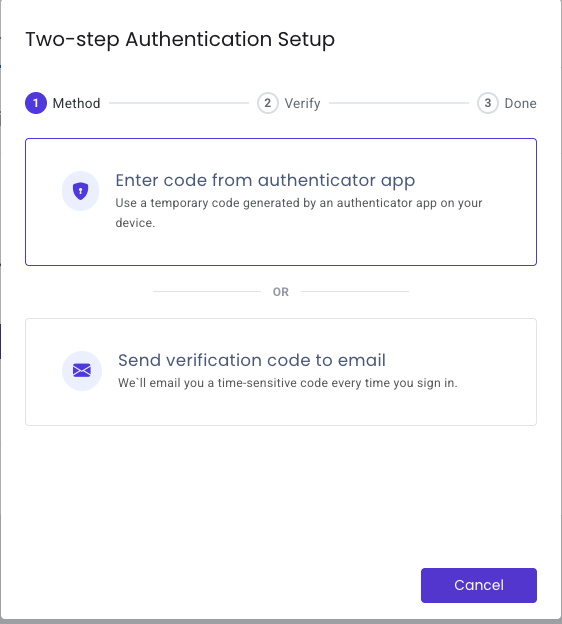
You can switch your 2FA method between email and an authenticator app at any time, but 2FA itself cannot be turned off - one of the two methods always stays active. {% hint style="info" %} Please note: \*\*2FA applies only to standard email/password login\*\*. It does \*\*not\*\* apply when signing in via \*\*Google or LinkedIn\*\*. {% endhint %} {% embed url="" %} --- # Agent Instructions This documentation is published with GitBook. GitBook is the documentation platform designed so that both humans and AI agents can read, navigate, and reason over technical content effectively. Learn more at gitbook.com. ## Querying This Documentation If you need additional information that is not directly available in this page, you can query the documentation by asking a question. Perform an HTTP GET request on the following URL with the \`ask\` and \`goal\` query parameters: \`\`\` GET https://docs.dataimpulse.com/dashboard/2fa.md?ask=&goal= \`\`\` \`ask\` is the immediate question: it should be specific, self-contained, and written in natural language. \`goal\` is what the user is ultimately trying to achieve, the reason they need the answer. Sharing it helps GitBook give you a better, more relevant answer. A goal is most helpful when it describes the outcome the user wants rather than restating the question. For example, with \`ask=how do I create an API token\`, a goal like \`automate deployments from our CI pipeline\` lets GitBook tailor the answer to that use case. The response will contain a direct answer to the question and relevant excerpts and sources from the documentation. Use this mechanism when the answer is not explicitly present in the current page, you need clarification or additional context, or you want to retrieve related documentation sections.
---
# Unknown
\> For the complete documentation index, see \[llms.txt\](https://docs.dataimpulse.com/llms.txt). Markdown versions of documentation pages are available by appending \`.md\` to page URLs; this page is available as \[Markdown\](https://docs.dataimpulse.com/dataimpulse-documentation-es/proxies/parametros/codigo-postal.md). # Código postal El tráfico enrutado a través de este parámetro se factura al doble de la tarifa estándar Para conectarse a un proxy usando un código ZIP, agregue y especifique el \`zip\` parámetro con un código ZIP de cinco dígitos en el nombre de usuario, combinado con el \`cr\` parámetro de código de país. Aquí hay algunos ejemplos de combinaciones válidas de parámetros country y zip: \`cr.us;zip.85032\` \`cr.fr;zip.75001\` \*\*Ejemplo de código\*\* En este ejemplo, se realiza una consulta a gw\\.dataimpulse.com desde una dirección IP de Nueva York, EE. UU.: \`\`\` curl -x "http://login\_\_cr.us;zip.10001:password@gw.dataimpulse.com:823" https://api.ipify.org/ \`\`\` {% hint style="info" %} Es importante señalar que seleccionar un país es obligatorio para especificar la ciudad, el estado, el código ZIP y la orientación por ASN. {% endhint %} \*\*\* Ahora puede excluir códigos ZIP específicos usando el \`nozip\` parámetro. \*\*Ejemplo:\*\* Para orientar a Alemania pero excluir el código ZIP 10115, use: \`cr.de;nozip.10115\` {% hint style="info" %} El tráfico enrutado a través del \`nozip\` parameter, as well as \`zip\` parameter is billed at double the standard rate. {% endhint %} --- # Agent Instructions This documentation is published with GitBook. GitBook is the documentation platform designed so that both humans and AI agents can read, navigate, and reason over technical content effectively. Learn more at gitbook.com. ## Querying This Documentation If you need additional information that is not directly available in this page, you can query the documentation by asking a question. Perform an HTTP GET request on the following URL with the \`ask\` and \`goal\` query parameters: \`\`\` GET https://docs.dataimpulse.com/dataimpulse-documentation-es/proxies/parametros/codigo-postal.md?ask=&goal= \`\`\` \`ask\` is the immediate question: it should be specific, self-contained, and written in natural language. \`goal\` is what the user is ultimately trying to achieve, the reason they need the answer. Sharing it helps GitBook give you a better, more relevant answer. A goal is most helpful when it describes the outcome the user wants rather than restating the question. For example, with \`ask=how do I create an API token\`, a goal like \`automate deployments from our CI pipeline\` lets GitBook tailor the answer to that use case. The response will contain a direct answer to the question and relevant excerpts and sources from the documentation. Use this mechanism when the answer is not explicitly present in the current page, you need clarification or additional context, or you want to retrieve related documentation sections.
---
# Unknown
\> For the complete documentation index, see \[llms.txt\](https://docs.dataimpulse.com/llms.txt). Markdown versions of documentation pages are available by appending \`.md\` to page URLs; this page is available as \[Markdown\](https://docs.dataimpulse.com/dataimpulse-documentation-es/proxies/parametros/excluir-asn.md). # Excluir ASN Aprende a usar el parámetro exclude-ASN en los proxies de DataImpulse. Filtra sistemas autónomos específicos de tu grupo de proxies para un mejor control de la calidad de IP. \`noasn\` - Excluya las IPs proxy ASN de la respuesta.
\*\*Por ejemplo:\*\* Si desea excluir \`AS20947\`, su código se vería así: \`\`\`bash curl -x "http://login\_\_noasn.20947:password@gw.dataimpulse.com:823" https://api.ipify.org/ \`\`\` --- # Agent Instructions This documentation is published with GitBook. GitBook is the documentation platform designed so that both humans and AI agents can read, navigate, and reason over technical content effectively. Learn more at gitbook.com. ## Querying This Documentation If you need additional information that is not directly available in this page, you can query the documentation by asking a question. Perform an HTTP GET request on the following URL with the \`ask\` and \`goal\` query parameters: \`\`\` GET https://docs.dataimpulse.com/dataimpulse-documentation-es/proxies/parametros/excluir-asn.md?ask=&goal= \`\`\` \`ask\` is the immediate question: it should be specific, self-contained, and written in natural language. \`goal\` is what the user is ultimately trying to achieve, the reason they need the answer. Sharing it helps GitBook give you a better, more relevant answer. A goal is most helpful when it describes the outcome the user wants rather than restating the question. For example, with \`ask=how do I create an API token\`, a goal like \`automate deployments from our CI pipeline\` lets GitBook tailor the answer to that use case. The response will contain a direct answer to the question and relevant excerpts and sources from the documentation. Use this mechanism when the answer is not explicitly present in the current page, you need clarification or additional context, or you want to retrieve related documentation sections.
---
# Unknown
\> For the complete documentation index, see \[llms.txt\](https://docs.dataimpulse.com/llms.txt). Markdown versions of documentation pages are available by appending \`.md\` to page URLs; this page is available as \[Markdown\](https://docs.dataimpulse.com/dataimpulse-documentation-es/proxies/parametros/estado.md). # Estado El tráfico enrutado a través de este parámetro se factura al doble de la tarifa estándar Para especificar un proxy de un estado específico de EE. UU., incluida la \`state\` en la cadena de autorización. Por ejemplo, \`\_\_cr.us;state.arizona\`. Haga clic \[aquí\](https://docs.google.com/spreadsheets/d/17vybtGjgb83uGLTFzuXIYEvuP0\_LD95wwPAQCRScERg) para obtener una lista completa de los estados de EE. UU. \*\*Ejemplo de código\*\* En este ejemplo, se realiza una consulta a gw\\.dataimpulse.com desde una dirección IP de Arizona, EE. UU.: \`\`\` curl -x "http://login\_\_cr.us;state.arizona:password@gw.dataimpulse.com:823" https://api.ipify.org/ \`\`\` {% hint style="info" %} Es importante señalar que seleccionar un país es obligatorio para especificar la ciudad, el estado, el código ZIP y la orientación por ASN. {% endhint %} \*\*\* Ahora puede excluir estados específicos usando el \`nostate\` parámetro. \*\*Ejemplo:\*\* Para orientar a EE. UU. pero excluir California, use: \`cr.us;nostate.california\` {% hint style="info" %} El tráfico enrutado a través del \`nostate\` parameter, as well as \`state\` parameter is billed at double the standard rate. {% endhint %} --- # Agent Instructions This documentation is published with GitBook. GitBook is the documentation platform designed so that both humans and AI agents can read, navigate, and reason over technical content effectively. Learn more at gitbook.com. ## Querying This Documentation If you need additional information that is not directly available in this page, you can query the documentation by asking a question. Perform an HTTP GET request on the following URL with the \`ask\` and \`goal\` query parameters: \`\`\` GET https://docs.dataimpulse.com/dataimpulse-documentation-es/proxies/parametros/estado.md?ask=&goal= \`\`\` \`ask\` is the immediate question: it should be specific, self-contained, and written in natural language. \`goal\` is what the user is ultimately trying to achieve, the reason they need the answer. Sharing it helps GitBook give you a better, more relevant answer. A goal is most helpful when it describes the outcome the user wants rather than restating the question. For example, with \`ask=how do I create an API token\`, a goal like \`automate deployments from our CI pipeline\` lets GitBook tailor the answer to that use case. The response will contain a direct answer to the question and relevant excerpts and sources from the documentation. Use this mechanism when the answer is not explicitly present in the current page, you need clarification or additional context, or you want to retrieve related documentation sections.
---
# Unknown
\> For the complete documentation index, see \[llms.txt\](https://docs.dataimpulse.com/llms.txt). Markdown versions of documentation pages are available by appending \`.md\` to page URLs; this page is available as \[Markdown\](https://docs.dataimpulse.com/dashboard/2fa/recovering-your-account-if-you-lose-your-2fa-credentials.md). # Recovering your account if you lose your 2FA credentials \*\*When you need this guide\*\* Use this guide if: \* You've lost the device with your authenticator app \* You no longer have access to the email address used for email-based 2FA \* You believe your account has been compromised (an unexpected password change, unrecognized sign-ins, or 2FA was enabled without your action) \*\*How to request recovery\*\* Email \[\*\*support@dataimpulse.com\*\*\](mailto:support@dataimpulse.com) from the email address associated with your account, using the subject line \*Account recovery - 2FA reset\*. {% hint style="info" %} For security, we will temporarily suspend your account access during verification. This protects your data and balance from any further unauthorized activity. {% endhint %} To help us verify your identity, please include: \* The email address on your account \* The last 4 digits of the card used for your most recent payment \* The IP address from which you typically sign in {% hint style="warning" %} If you can't provide this information, we won't be able to verify that the account belongs to you and won't be able to restore access. {% endhint %} \*\*What happens after verification\*\* Once we've confirmed your identity, our team will: 1. Reset the password on your account 2. Disable 2FA so you can sign in again 3. End all active sessions across devices After signing in, you'll need to set up 2FA again - this is mandatory to keep using your account. We strongly recommend an authenticator app (TOTP) over email-based codes, as it's more resilient if your inbox is ever compromised. \*\*How long it takes\*\* Most recovery requests are reviewed within one business day (excluding weekends and public holidays, as each case is reviewed individually). Cases involving suspected account compromise may take longer while we investigate. {% hint style="warning" %} DataImpulse support will never ask for your password, full payment card number, or 2FA codes. If anyone asks for these - even someone claiming to be from DataImpulse - it's a phishing attempt. Forward suspicious messages to . {% endhint %} --- # Agent Instructions This documentation is published with GitBook. GitBook is the documentation platform designed so that both humans and AI agents can read, navigate, and reason over technical content effectively. Learn more at gitbook.com. ## Querying This Documentation If you need additional information that is not directly available in this page, you can query the documentation by asking a question. Perform an HTTP GET request on the following URL with the \`ask\` and \`goal\` query parameters: \`\`\` GET https://docs.dataimpulse.com/dashboard/2fa/recovering-your-account-if-you-lose-your-2fa-credentials.md?ask=&goal= \`\`\` \`ask\` is the immediate question: it should be specific, self-contained, and written in natural language. \`goal\` is what the user is ultimately trying to achieve, the reason they need the answer. Sharing it helps GitBook give you a better, more relevant answer. A goal is most helpful when it describes the outcome the user wants rather than restating the question. For example, with \`ask=how do I create an API token\`, a goal like \`automate deployments from our CI pipeline\` lets GitBook tailor the answer to that use case. The response will contain a direct answer to the question and relevant excerpts and sources from the documentation. Use this mechanism when the answer is not explicitly present in the current page, you need clarification or additional context, or you want to retrieve related documentation sections.
---
# Unknown
\> For the complete documentation index, see \[llms.txt\](https://docs.dataimpulse.com/llms.txt). Markdown versions of documentation pages are available by appending \`.md\` to page URLs; this page is available as \[Markdown\](https://docs.dataimpulse.com/dataimpulse-documentation-es/proxies/parametros/ciudad.md). # Ciudad El tráfico enrutado a través de este parámetro se factura al doble de la tarifa estándar Agregar un \`ciudad\` parámetro para limitar la segmentación a nivel de ciudad. Por ejemplo, \`cr.es;city.madrid,barcelona\` significa que una proxy desde Madrid, Barcelona y España manejará la consulta. Aquí hay algunos ejemplos de combinaciones válidas de parámetros de país y ciudad: \`cr.de;city.berlin\` \`cr.br;city.salvador\` \*\*Ejemplo de código\*\* En este ejemplo, una consulta a gw\\.dataimpulse.com se realiza desde una dirección IP de Berlín, Alemania: \`\`\` curl -x "http://login\_\_cr.de;city.berlin:password@gw.dataimpulse.com:823" https://api.ipify.org/ \`\`\` No podemos garantizar la disponibilidad de proxies de una ciudad específica en un momento dado. Sin embargo, la mayoría de las ciudades populares están bien cubiertas. {% hint style="info" %} Es importante señalar que seleccionar un país es obligatorio para especificar la ciudad, el estado, el código ZIP y la orientación por ASN. {% endhint %} \*\*\* Ahora puede excluir ciudades específicas usando el \`nocity\` parámetro. \*\*Ejemplo:\*\* Para orientar a Alemania pero excluir Berlín, use: \`cr.de;nocity.berlin\` {% hint style="info" %} El tráfico enrutado a través del \`nocity\` parameter, as well as \`ciudad\` parameter is billed at double the standard rate. {% endhint %} --- # Agent Instructions This documentation is published with GitBook. GitBook is the documentation platform designed so that both humans and AI agents can read, navigate, and reason over technical content effectively. Learn more at gitbook.com. ## Querying This Documentation If you need additional information that is not directly available in this page, you can query the documentation by asking a question. Perform an HTTP GET request on the following URL with the \`ask\` and \`goal\` query parameters: \`\`\` GET https://docs.dataimpulse.com/dataimpulse-documentation-es/proxies/parametros/ciudad.md?ask=&goal= \`\`\` \`ask\` is the immediate question: it should be specific, self-contained, and written in natural language. \`goal\` is what the user is ultimately trying to achieve, the reason they need the answer. Sharing it helps GitBook give you a better, more relevant answer. A goal is most helpful when it describes the outcome the user wants rather than restating the question. For example, with \`ask=how do I create an API token\`, a goal like \`automate deployments from our CI pipeline\` lets GitBook tailor the answer to that use case. The response will contain a direct answer to the question and relevant excerpts and sources from the documentation. Use this mechanism when the answer is not explicitly present in the current page, you need clarification or additional context, or you want to retrieve related documentation sections.
---
# Unknown
\> For the complete documentation index, see \[llms.txt\](https://docs.dataimpulse.com/llms.txt). Markdown versions of documentation pages are available by appending \`.md\` to page URLs; this page is available as \[Markdown\](https://docs.dataimpulse.com/dataimpulse-documentation-es/proxies/parametros/id-de-sesion.md). # Id de sesión Aprende a usar el parámetro session-id con los proxies de DataImpulse para mantener sesiones sticky y conservar la misma IP en varias solicitudes consecutivas. \`sessid\` - Conéctese a una dirección IP específica durante 30 minutos. El valor para \`sessid\`puede ser cualquier cadena o número. No es un reemplazo de los proxies Sticky, sino una alternativa cuando desea conectarse a una dirección IP específica durante un promedio de 30 minutos. {% hint style="info" %} Personas reales proporcionan IPs residenciales, y si el proveedor de IP que está utilizando se desconecta, su IP será reemplazada automáticamente por otra disponible. {% endhint %} \*\*Ejemplo:\*\* \`\`\` curl -x "http://login\_\_cr.au;sessid.123:password@gw.dataimpulse.com:823" https://api.ipify.org/ \`\`\` Usando \`\_\_cr.au;sessid.123\` significa que el cliente desea conectarse a una dirección IP etiquetada como 123 en Australia (p. ej., IP 154.6.151.212). \`\`\` curl -x "http://login\_\_cr.au;sessid.45:password@gw.dataimpulse.com:823" https://api.ipify.org/ \`\`\` De manera similar, \`cr.au;sessid.45\` indica la solicitud del cliente para una dirección IP etiquetada como 45 en Australia (p. ej., IP 38.55.106.76). Cuando se conecta al proxy mediante \`\_\_cr.au;sessid.123\` se le asignará de forma consistente la dirección IP 154.6.151.212 durante toda la duración de 30 minutos. Del mismo modo, al conectarse con \`\_\_cr.au;sessid.45\` se asignará la dirección IP 38.55.106.76. {% hint style="info" %} Asegúrese de que el puerto esté especificado en la configuración como 824 para Socks5 o 823 para HTTPS. {% endhint %}
\--- # Agent Instructions This documentation is published with GitBook. GitBook is the documentation platform designed so that both humans and AI agents can read, navigate, and reason over technical content effectively. Learn more at gitbook.com. ## Querying This Documentation If you need additional information that is not directly available in this page, you can query the documentation by asking a question. Perform an HTTP GET request on the following URL with the \`ask\` and \`goal\` query parameters: \`\`\` GET https://docs.dataimpulse.com/dataimpulse-documentation-es/proxies/parametros/id-de-sesion.md?ask=&goal= \`\`\` \`ask\` is the immediate question: it should be specific, self-contained, and written in natural language. \`goal\` is what the user is ultimately trying to achieve, the reason they need the answer. Sharing it helps GitBook give you a better, more relevant answer. A goal is most helpful when it describes the outcome the user wants rather than restating the question. For example, with \`ask=how do I create an API token\`, a goal like \`automate deployments from our CI pipeline\` lets GitBook tailor the answer to that use case. The response will contain a direct answer to the question and relevant excerpts and sources from the documentation. Use this mechanism when the answer is not explicitly present in the current page, you need clarification or additional context, or you want to retrieve related documentation sections.
---
# Unknown
\> For the complete documentation index, see \[llms.txt\](https://docs.dataimpulse.com/llms.txt). Markdown versions of documentation pages are available by appending \`.md\` to page URLs; this page is available as \[Markdown\](https://docs.dataimpulse.com/traffic-limit.md). # Traffic Limit Set the maximum traffic a proxy plan can use within a chosen period. Control spending and share plans without the risk of overuse. #### How to set it up 1. Open your plan and go to \*\*Resources → Manage Traffic Limit\*\*. 2. Choose a \*\*Period\*\*: 1 hour, 24 hours, 7 days or 30 days. 3. Enter the \*\*Traffic limit\*\* in GB (whole numbers only). 4. Choose an \*\*Action\*\* for when the limit is reached: \* \*\*Email notification\*\*: you get an email, and the plan keeps working. \* \*\*Suspend Usage\*\*: the plan stops working until traffic becomes available again. \* \*\*Suspend Usage & Email Notification\*\*: the plan stops working, and you get an email. 5. Click \*\*Save Configuration\*\*. To remove the limit, click \*\*Clear Configuration\*\*. #### How the period works: rolling window The limit works on a rolling window, not a calendar. It never resets at a fixed time (like midnight or the 1st of the month). At any moment, we count your usage for the \*\*last\*\* 1 hour / 24 hours / 7 days / 30 days, starting from the current moment. {% hint style="info" %} Each GB you use comes back exactly one period after you used it. {% endhint %} \*\*Example:\*\* limit of 5 GB per 24 hours, with Suspend Usage. | When | Used in the last 24 hours | Status | | ----------------------- | ------------------------------------------ | ----------------------- | | Mon 09:00, you use 2 GB | 2 GB | Working, 3 GB left | | Mon 15:00, you use 3 GB | 5 GB | Paused | | Tue 09:00 | 3 GB (the 2 GB from Mon 09:00 dropped out) | Working, 2 GB available | | Tue 15:00 | 0 GB | Full 5 GB available | If you use your whole limit at once, the full limit comes back one period later. \*\*Why a rolling window:\*\* with a calendar limit, you could use the full limit at 23:59 and again at 00:01. With a rolling window, you can never go over your limit in any period of that length. #### When the limit is reached \* \*\*Suspend Usage:\*\* requests return the error \`USER\_RATE\_LIMIT\_EXCEEDED\`. The plan starts working again on its own as traffic comes back. If you need access sooner, raise the limit or clear the configuration. \* \*\*Email notification:\*\* nothing stops. The email only tells you that the limit was reached. #### Good to know \* The limit applies to one plan, not your whole account. \* Changes take effect within about 1 minute. \* The limit doesn't add traffic. If your plan balance runs out first, the plan stops anyway. --- # Agent Instructions This documentation is published with GitBook. GitBook is the documentation platform designed so that both humans and AI agents can read, navigate, and reason over technical content effectively. Learn more at gitbook.com. ## Querying This Documentation If you need additional information that is not directly available in this page, you can query the documentation by asking a question. Perform an HTTP GET request on the following URL with the \`ask\` and \`goal\` query parameters: \`\`\` GET https://docs.dataimpulse.com/traffic-limit.md?ask=&goal= \`\`\` \`ask\` is the immediate question: it should be specific, self-contained, and written in natural language. \`goal\` is what the user is ultimately trying to achieve, the reason they need the answer. Sharing it helps GitBook give you a better, more relevant answer. A goal is most helpful when it describes the outcome the user wants rather than restating the question. For example, with \`ask=how do I create an API token\`, a goal like \`automate deployments from our CI pipeline\` lets GitBook tailor the answer to that use case. The response will contain a direct answer to the question and relevant excerpts and sources from the documentation. Use this mechanism when the answer is not explicitly present in the current page, you need clarification or additional context, or you want to retrieve related documentation sections.
---
# Unknown
\> For the complete documentation index, see \[llms.txt\](https://docs.dataimpulse.com/llms.txt). Markdown versions of documentation pages are available by appending \`.md\` to page URLs; this page is available as \[Markdown\](https://docs.dataimpulse.com/errors.md). # Errors Troubleshoot DataImpulse proxy errors with our comprehensive error code reference. Understand what each error means and how to resolve connection issues fast. When using HTTP Proxy, errors are shown in the response of the proxy server after using the service. When using SOCKS5, errors are shown by status codes when creating a connection and authenticating. All the errors can be checked on the account dashboard. \*\*The list of HTTP errors:\*\* \`400 Bad Request\` - CONNECT request to the proxy server was created incorrectly.\\ \`403 PORT\_BLOCKED\` - The connection attempt is made to the blocked ports.\\ \`403 SITE\_PERMANENTLY\_BLOCKED\` - The access to the specified site has been permanently blocked.\\ \`403 HOST\_BLOCKED\` - The access to the specified site has been blocked by user in the current plan settings.\\ \`407 NO\_USER\` - The user’s plan doesn’t exist.\\ \`407 TRAFFIC\_EXHAUSTED\` - The traffic limit of the plan is exceeded.\\ \`407 THREADS\_EXHAUSTED\` - The threads limit of the plan is exceeded.\\ \`USER\_RATE\_LIMIT\_EXCEEDED\` - The traffic limit set for the plan's period has been reached. See \[Traffic Limit\](/traffic-limit.md).\\ \`407 PORT\_NOT\_ALLOWED\` - Used sticky sessions port is not allowed by current plan settings.\\ \`407 USER\_BLOCKED\` - The user’s current plan has been blocked.\\ \`500 INTERNAL\_SERVER\_ERROR\` - The server encountered an unexpected condition that prevented it from fulfilling the request.\\ \`502 NO\_HOST\_CONNECTION\` - There is no connection to the host specified in the CONNECT request.\\ \`503 NO\_RAY\` - There are no proxies available based on the targeting parameters specified in the request.\\
\*\*The list of SOCKS5 errors:\*\* For such errors as \`NO\_USER\`, \`REQUESTS\_EXHAUSTED\`, \`TRAFFIC\_EXHAUSTED\`, \`THREADS\_EXHAUSTED\` an unsuccessful authentication response will be returned with the Denied status when there was an attempt to connect to a proxy server\\ \\ For such errors as \`PORT\_BLOCKED\`, \`NO\_RAY\`, \`NO\_HOST\_CONNECTION\` authentication will be passed, after which, the proxy connection will be reset I there is an attempt of the UDP connection, the connection will be dropped. \`UDP\_BIND\_FAILED\` – Failed to bind a local UDP port, preventing the UDP connection from being established. This error is similar to \`502 NO\_HOST\_CONNECTION\`, but occurs when using the UDP protocol. More details relevant to the errors can be found on our blog: \[Proxy Errors: Types, Causes, and Solutions\](https://dataimpulse.com/blog/proxy-errors-types-causes-and-solutions/) --- # Agent Instructions This documentation is published with GitBook. GitBook is the documentation platform designed so that both humans and AI agents can read, navigate, and reason over technical content effectively. Learn more at gitbook.com. ## Querying This Documentation If you need additional information that is not directly available in this page, you can query the documentation by asking a question. Perform an HTTP GET request on the following URL with the \`ask\` and \`goal\` query parameters: \`\`\` GET https://docs.dataimpulse.com/errors.md?ask=&goal= \`\`\` \`ask\` is the immediate question: it should be specific, self-contained, and written in natural language. \`goal\` is what the user is ultimately trying to achieve, the reason they need the answer. Sharing it helps GitBook give you a better, more relevant answer. A goal is most helpful when it describes the outcome the user wants rather than restating the question. For example, with \`ask=how do I create an API token\`, a goal like \`automate deployments from our CI pipeline\` lets GitBook tailor the answer to that use case. The response will contain a direct answer to the question and relevant excerpts and sources from the documentation. Use this mechanism when the answer is not explicitly present in the current page, you need clarification or additional context, or you want to retrieve related documentation sections.
---
# Unknown
\> For the complete documentation index, see \[llms.txt\](https://docs.dataimpulse.com/llms.txt). Markdown versions of documentation pages are available by appending \`.md\` to page URLs; this page is available as \[Markdown\](https://docs.dataimpulse.com/billing/payment-methods.md). # Payment Methods DataImpulse offers several ways to top up your balance and purchase plans. Available methods can vary by region. ### Traditional Payments \* \*\*Credit and debit cards\*\*: Visa, Mastercard, and other major international cards are supported. \* \*\*Apple Pay and Google Pay\*\*: Fast payment through mobile wallets. Availability depends on your location. \* \*\*Alipay\*\*: Available in supported regions. \* \*\*UPIpay:\*\* Available in supported regions. \* \*\*QRIS:\*\* Available in supported regions. \* \*\*PIX:\*\* Available for users in Brazil, with payments made in BRL.\\ Please note that the maximum amount per transaction is limited to the equivalent of $2500. \* \*\*PayPal:\*\* PayPal access is not available by default and is restricted to most users, requiring a manual request through our Support Team and a verification process where DataImpulse reserves the right to deny access at our sole discretion. ### Cryptocurrencies You can top up your balance with popular crypto assets through our integrated payment provider, CoinGate. \*\*Mind the Fees:\*\* It is critical to account for all network and exchange withdrawal fees when sending your payment. \*\*Underpayments:\*\* If you send an amount less than the declared invoice total, the transaction will not complete automatically. In this case, you will need to contact CoinGate Support directly to resolve the issue and locate your funds. {% hint style="warning" %} The 7-day refund policy does not apply to cryptocurrency payments. {% endhint %} ### Wire Transfer Wire transfers are available for corporate clients and large payments. Please contact our Support Team, and we will generate a bank invoice for you. When you choose this method, please provide the following information in your request: \* \*\*Full Legal Entity Name\*\* \* \*\*Registered Address\*\* \* \*\*VAT/Tax ID\*\* \* \*\*Deposit Amount\*\* ### Key Payment Information \* \*\*Intro plan\*\*: Available for \`$5\`. \* \*\*Minimum deposit:\*\* The minimum top-up for plans is $50. \* \[\*\*Auto-recharge\*\*:\](/billing/auto-recharge.md) You can enable automatic traffic purchases when your balance reaches a set threshold. \* \*\*Fees\*\*: Any payment system fees are paid by the client. This includes bank commissions and blockchain network fees. \* \*\*Invoices\*\*: You can review transaction history and download PDF invoices in the \[\*\*Payments\*\*\](https://app.dataimpulse.com/account/payments) section of your dashboard. \* \*\*Custom Requests:\*\* If you require specific payment documents or custom-formatted invoices for your accounting department, please contact our \[Support Team\](/support.md). We will review your request and generate the necessary documents whenever possible. --- # Agent Instructions This documentation is published with GitBook. GitBook is the documentation platform designed so that both humans and AI agents can read, navigate, and reason over technical content effectively. Learn more at gitbook.com. ## Querying This Documentation If you need additional information that is not directly available in this page, you can query the documentation by asking a question. Perform an HTTP GET request on the following URL with the \`ask\` and \`goal\` query parameters: \`\`\` GET https://docs.dataimpulse.com/billing/payment-methods.md?ask=&goal= \`\`\` \`ask\` is the immediate question: it should be specific, self-contained, and written in natural language. \`goal\` is what the user is ultimately trying to achieve, the reason they need the answer. Sharing it helps GitBook give you a better, more relevant answer. A goal is most helpful when it describes the outcome the user wants rather than restating the question. For example, with \`ask=how do I create an API token\`, a goal like \`automate deployments from our CI pipeline\` lets GitBook tailor the answer to that use case. The response will contain a direct answer to the question and relevant excerpts and sources from the documentation. Use this mechanism when the answer is not explicitly present in the current page, you need clarification or additional context, or you want to retrieve related documentation sections.
---
# Unknown
\> For the complete documentation index, see \[llms.txt\](https://docs.dataimpulse.com/llms.txt). Markdown versions of documentation pages are available by appending \`.md\` to page URLs; this page is available as \[Markdown\](https://docs.dataimpulse.com/authentication-methods.md). # Authentication methods Explore all DataImpulse proxy authentication methods: username/password and IP whitelisting. Choose the right method for your use case and setup. We support proxy authentication via: \* \[ Username and password\](/authentication-methods/user-pass-authentication.md) \* \[IP-based whitelisting\](/authentication-methods/whitelist-ips.md) --- # Agent Instructions This documentation is published with GitBook. GitBook is the documentation platform designed so that both humans and AI agents can read, navigate, and reason over technical content effectively. Learn more at gitbook.com. ## Querying This Documentation If you need additional information that is not directly available in this page, you can query the documentation by asking a question. Perform an HTTP GET request on the following URL with the \`ask\` and \`goal\` query parameters: \`\`\` GET https://docs.dataimpulse.com/authentication-methods.md?ask=&goal= \`\`\` \`ask\` is the immediate question: it should be specific, self-contained, and written in natural language. \`goal\` is what the user is ultimately trying to achieve, the reason they need the answer. Sharing it helps GitBook give you a better, more relevant answer. A goal is most helpful when it describes the outcome the user wants rather than restating the question. For example, with \`ask=how do I create an API token\`, a goal like \`automate deployments from our CI pipeline\` lets GitBook tailor the answer to that use case. The response will contain a direct answer to the question and relevant excerpts and sources from the documentation. Use this mechanism when the answer is not explicitly present in the current page, you need clarification or additional context, or you want to retrieve related documentation sections.
---
# Unknown
\> For the complete documentation index, see \[llms.txt\](https://docs.dataimpulse.com/llms.txt). Markdown versions of documentation pages are available by appending \`.md\` to page URLs; this page is available as \[Markdown\](https://docs.dataimpulse.com/dataimpulse-documentation-es/proxies/segmentacion/geohash-targeting.md). # Segmentación por Geohash Dirige una zona específica del mapa mediante geohash. Configúralo en el Dashboard o con el parámetro geohash en tu inicio de sesión de proxy. La segmentación por geohash te permite obtener IPs de un área específica en el mapa, como un solo barrio de una ciudad, en lugar de un país o ciudad completos. {% embed url="" %} {% hint style="warning" %} El tráfico enrutado a través de la segmentación por geohash se factura al doble de la tarifa estándar. Pool residencial Premium: sin cargos adicionales. La segmentación por geohash está incluida en el precio base. {% endhint %} #### Qué es un geohash Un geohash es un código corto para un área cuadrada en el mapa: cuanto más largo es el código, más pequeña es el área. DataImpulse admite geohashes de hasta 5 caracteres. | Geohash | Área | | ------- | --------------------------------------------- | | \`d\` | Una gran parte de América del Norte y del Sur | | \`dr\` | El noreste de EE. UU. | | \`dr5\` | Nueva York y sus alrededores | | \`dr5ru\` | Midtown Manhattan, Nueva York | Un geohash usa los dígitos \`0\`–\`9\` y las letras \`b\`–\`z\`, excepto \`i\`, \`l\` y \`o\`. La letra \`a\` no se usa. Para encontrar el código de tu área, usa cualquier mapa de geohash: acerca el zoom al área que necesitas y copia el código de su cuadrado. #### Cómo configurar Geohash Targeting en el Dashboard 1. Abre tu plan y desplázate hasta \*\*Configuración del proxy\*\*. 2. Selecciona \*\*Geohash Targeting\*\*. 3. Introduce el código en el \*\*Geohash\*\* campo, por ejemplo \`dr5ru\`. 4. Opcionalmente, configura \*\*País\*\*, \*\*ASN\*\* y \*\*Pool geográfico mínimo\*\* (ver abajo). 5. Haz clic en \*\*Guardar configuración\*\*, luego \*\*Confirmar y guardar cambios\*\*. El geohash se añade a tu inicio de sesión de proxy en el \*\*Ejemplo básico de URL\*\* y en la \*\*Lista de proxies\*\*: \`\`\` curl -x "http://login\_\_geohash.dr5ru:password@gw.dataimpulse.com:823" https://api.ipify.org/ \`\`\` {% hint style="info" %} Los ajustes se aplican solo después de que hagas clic en \*\*Guardar configuración\*\* y confirmes. {% endhint %} #### Campos | Campo | Obligatorio | Descripción | | -------------------------- | ----------- | --------------------------------------------------------------------------------------------------------------------------------------------------------------------------------------------------------------------------------------------------------------------------------------------------------------------------------------------- | | \*\*Geohash\*\* | Sí | El área a la que segmentar, hasta 5 caracteres. | | \*\*País\*\* | No | La lista muestra solo los países dentro de tu geohash, con el número de IPs disponibles. Úsala cuando tu área cruce una frontera: un cuadrado de geohash puede abarcar más de un país, y esto mantiene cada IP en el país que necesitas. | | \*\*ASN\*\* | No | Segmenta un proveedor específico dentro de tu área. Un \*\*País\*\* debe seleccionarse para usar ASN. | | \*\*Pool geográfico mínimo\*\* | No | Se desbloquea después de que introduzcas un geohash. De forma predeterminada, solo obtienes IPs del interior del cuadrado. Introduce la cantidad de IPs que necesitas, y ampliaremos la búsqueda paso a paso al área alrededor del cuadrado hasta que haya al menos esa cantidad — si es necesario, hasta todo el país. Solo números enteros. | \*\*Ejemplo:\*\* el \`dr5ru\` cuadrado tiene aproximadamente 1.500 IPs. Si tu tarea necesita rotar al menos 5.000 IPs diferentes, configura \*\*Pool geográfico mínimo\*\* a \`5000\`. Entonces algunas de las IPs vendrán de áreas vecinas, por ejemplo Brooklyn (\`dr5qv\`). El intervalo de rotación, el filtro anónimo y Exclude ASN funcionan con Geohash Targeting de la misma manera que con otras opciones de segmentación. #### Cómo comprobar dónde está tu IP Añade el \`Accept-X-Proxy-Headers\` encabezado de proxy a tu solicitud. La respuesta del proxy incluirá la IP de salida, su país, ciudad y geohash: \`\`\` curl -x "http://login\_\_geohash.dr5ru:password@gw.dataimpulse.com:823" \\ --proxy-header "Accept-X-Proxy-Headers: X-Proxy-IP, X-Proxy-Country, X-Proxy-City, X-Proxy-Geohash" \\ -s -D - -o /dev/null https://api.ipify.org/ \`\`\` Respuesta: \`\`\` HTTP/1.1 200 OK X-Proxy-IP: 48.45.161.37 X-Proxy-Country: US X-Proxy-City: New York X-Proxy-Geohash: dr5ru-US \`\`\` También puedes comprobar la IP con cualquier servicio de geolocalización de IP. #### Errores | Respuesta | Motivo y qué hacer | | ----------------------- | ---------------------------------------------------------------------------------------------------------------------------------------- | | \`407 COUNTRY\_REQUERIED\` | ASN está configurado sin un país. Selecciona un \*\*País\*\* o añádelo al geohash, por ejemplo \`geohash.dr5ru-us;asn.7922\`. | | \`503 NO\_RAY\` | No hay IPs disponibles para esta configuración. Usa un geohash más corto, configura \*\*Pool geográfico mínimo\*\*, o elimina otros filtros. | Un geohash no válido no devuelve un error: se ignora y la solicitud se envía sin segmentación por geohash. Para configurar manualmente Geohash Targeting en tu código, consulta el \[Geohash\](/dataimpulse-documentation-es/proxies/parametros/geohash.md) parámetro. --- # Agent Instructions This documentation is published with GitBook. GitBook is the documentation platform designed so that both humans and AI agents can read, navigate, and reason over technical content effectively. Learn more at gitbook.com. ## Querying This Documentation If you need additional information that is not directly available in this page, you can query the documentation by asking a question. Perform an HTTP GET request on the following URL with the \`ask\` and \`goal\` query parameters: \`\`\` GET https://docs.dataimpulse.com/dataimpulse-documentation-es/proxies/segmentacion/geohash-targeting.md?ask=&goal= \`\`\` \`ask\` is the immediate question: it should be specific, self-contained, and written in natural language. \`goal\` is what the user is ultimately trying to achieve, the reason they need the answer. Sharing it helps GitBook give you a better, more relevant answer. A goal is most helpful when it describes the outcome the user wants rather than restating the question. For example, with \`ask=how do I create an API token\`, a goal like \`automate deployments from our CI pipeline\` lets GitBook tailor the answer to that use case. The response will contain a direct answer to the question and relevant excerpts and sources from the documentation. Use this mechanism when the answer is not explicitly present in the current page, you need clarification or additional context, or you want to retrieve related documentation sections.
---
# Unknown
\> For the complete documentation index, see \[llms.txt\](https://docs.dataimpulse.com/llms.txt). Markdown versions of documentation pages are available by appending \`.md\` to page URLs; this page is available as \[Markdown\](https://docs.dataimpulse.com/dataimpulse-documentation-es/panel-de-control/notificaciones-de-telegram.md). # Notificaciones de Telegram Esta función te permite recibir notificaciones en tiempo real directamente en tu dispositivo móvil o en la aplicación de escritorio de Telegram, duplicando las actualizaciones críticas que normalmente se envían por correo electrónico. #### ¿Qué notificaciones recibiré? Al habilitar la integración con Telegram, recibirás: \* Alertas de saldo \* Anuncios importantes #### Cómo habilitar las notificaciones de Telegram 1. Inicia sesión en tu panel de DataImpulse. 2. Ve a Configuración de la cuenta (haz clic en tu perfil/icono en la esquina superior derecha). 3. Ve a la \[pestaña Integraciones\](https://app.dataimpulse.com/account/integrations). 4. En la sección "Get Instant Alerts in Telegram", haz clic en el botón Connect Telegram. 5. Serás redirigido al bot oficial de Telegram. Haz clic en Start en tu aplicación de Telegram para vincular tu cuenta. 6. Una vez vinculada, tu nombre de usuario de Telegram aparecerá en el panel, confirmando la conexión. #### Cómo deshabilitar las notificaciones de Telegram Si deseas dejar de recibir alertas vía Telegram: 1. Vuelve a la pestaña Integraciones en la configuración de tu cuenta. 2. Localiza el botón rojo Disconnect Telegram. 3. Haz clic en el botón para revocar el acceso. 4. \*Opcional:\* También puedes detener o bloquear el bot directamente desde la aplicación de Telegram. \*\*\* ### Preguntas frecuentes \*\*¿Es gratis?\*\*\\ Sí, la integración con Telegram está incluida en todos los planes sin costo adicional. \*\*¿Seguiré recibiendo correos electrónicos?\*\*\\ Sí, las notificaciones de Telegram actúan como duplicado para tu conveniencia, asegurando que no te pierdas actualizaciones críticas si no estás revisando tu correo. {% hint style="info" %} Los tipos de notificación disponibles pueden variar según la configuración de la cuenta. {% endhint %} --- # Agent Instructions This documentation is published with GitBook. GitBook is the documentation platform designed so that both humans and AI agents can read, navigate, and reason over technical content effectively. Learn more at gitbook.com. ## Querying This Documentation If you need additional information that is not directly available in this page, you can query the documentation by asking a question. Perform an HTTP GET request on the following URL with the \`ask\` and \`goal\` query parameters: \`\`\` GET https://docs.dataimpulse.com/dataimpulse-documentation-es/panel-de-control/notificaciones-de-telegram.md?ask=&goal= \`\`\` \`ask\` is the immediate question: it should be specific, self-contained, and written in natural language. \`goal\` is what the user is ultimately trying to achieve, the reason they need the answer. Sharing it helps GitBook give you a better, more relevant answer. A goal is most helpful when it describes the outcome the user wants rather than restating the question. For example, with \`ask=how do I create an API token\`, a goal like \`automate deployments from our CI pipeline\` lets GitBook tailor the answer to that use case. The response will contain a direct answer to the question and relevant excerpts and sources from the documentation. Use this mechanism when the answer is not explicitly present in the current page, you need clarification or additional context, or you want to retrieve related documentation sections.
---
# Unknown
\> For the complete documentation index, see \[llms.txt\](https://docs.dataimpulse.com/llms.txt). Markdown versions of documentation pages are available by appending \`.md\` to page URLs; this page is available as \[Markdown\](https://docs.dataimpulse.com/blocked-websites.md). # Blocked Websites DataImpulse blocked websites list: domains inaccessible via proxy servers to maintain network security, stability, and abuse prevention. As of December 2023, we are blocking certain websites to ensure the safety of our proxies. Some of these can be unblocked once you complete identity verification and, in some cases, reach a certain spending level. See the requirements below. ### Currently blocked websites \* All government websites \* Banking and payment websites (refer to the complete list of blocked websites \[here\](https://docs.google.com/spreadsheets/d/18RwU3srsbO2PzQxrPxjN2cVLkrV6ZKrdRERlz3k2MKU/edit?usp=sharing)) \* Ticketswap service \* HealthEquity \* SopranoVillas \* Traffic Monetization Platforms (GetGrass, NodePay, Gradient, etc.) \* VFS global \* mspapis.com \* Greenshades.com, GreenEmployee.com, GreenshadesOnline.com, Downloadmyform.com \* DDS hosting \* 4chan.org \* openstreetmap.org, osm.org \* Moviestarplanet \* rolimons.com \* fool.com \* torbox.app \* happyrail.com \* treinreiswinkel.nl \* mobiledirect.ro \* Coinstash crypto exchange \* fishao.net ### How unblocking works We review unblocking requests based on your verification status and spending level. The more trust your account builds, the more we can open. #### Step 1: Identity verification Once you confirm your identity on DataImpulse, we can consider unblocking specific \*\*.gov\*\* domains on request. Each domain is reviewed individually, so you'll need to submit the exact domains you need to our support team. #### Step 2: Identity verification + $100 spent After confirming your identity and spending over $100, we can open all \*\*.gov\*\* websites at once. You will no longer need to request individual domains each time. #### Step 3: Identity verification + $1,000 spent After confirming your identity and spending over $1,000, we can consider unblocking \*\*banking and payment websites.\*\* {% hint style="info" %} Banking and payment websites are opened for business use cases only. We do not unblock them for personal use. {% endhint %} ### Corporate accounts If you represent a company, we may consider unblocking websites upon identity verification alone, with no minimum spending required. Corporate requests receive a higher level of trust during our review process. ### How to request an unblock To request a website unblock, contact us at and include: \* The exact website you need opened. \* A clear description of your use case, with as many details as possible. {% hint style="info" %} For security purposes, all users must complete KYC verification before an unblocking request can be approved. {% endhint %} --- # Agent Instructions This documentation is published with GitBook. GitBook is the documentation platform designed so that both humans and AI agents can read, navigate, and reason over technical content effectively. Learn more at gitbook.com. ## Querying This Documentation If you need additional information that is not directly available in this page, you can query the documentation by asking a question. Perform an HTTP GET request on the following URL with the \`ask\` and \`goal\` query parameters: \`\`\` GET https://docs.dataimpulse.com/blocked-websites.md?ask=&goal= \`\`\` \`ask\` is the immediate question: it should be specific, self-contained, and written in natural language. \`goal\` is what the user is ultimately trying to achieve, the reason they need the answer. Sharing it helps GitBook give you a better, more relevant answer. A goal is most helpful when it describes the outcome the user wants rather than restating the question. For example, with \`ask=how do I create an API token\`, a goal like \`automate deployments from our CI pipeline\` lets GitBook tailor the answer to that use case. The response will contain a direct answer to the question and relevant excerpts and sources from the documentation. Use this mechanism when the answer is not explicitly present in the current page, you need clarification or additional context, or you want to retrieve related documentation sections.
---
# Unknown
\> For the complete documentation index, see \[llms.txt\](https://docs.dataimpulse.com/llms.txt). Markdown versions of documentation pages are available by appending \`.md\` to page URLs; this page is available as \[Markdown\](https://docs.dataimpulse.com/dataimpulse-documentation-es/panel-de-control/2fa.md). # 2FA Autenticación de dos factores en tu cuenta de DataImpulse. Guía paso a paso para proteger tu panel de proxies con 2FA para una mayor seguridad de la cuenta. #### Autenticación de dos factores (2FA) La autenticación de dos factores (2FA) es obligatoria para todas las cuentas de usuario como un control de seguridad adicional para reducir el riesgo de acceso no autorizado. Está habilitada de forma predeterminada mediante verificación por correo electrónico y no se puede desactivar. \*\*Configuración y métodos compatibles\*\* La autenticación de dos factores se puede configurar en el panel de DataImpulse en el perfil \[configuración de seguridad\](https://app.dataimpulse.com/account/security). Los siguientes métodos de autenticación son compatibles: \* Aplicación autenticadora (un código generado temporalmente) \* Verificación por correo electrónico - habilitada de forma predeterminada

Puede cambiar su método de 2FA entre el correo electrónico y una aplicación autenticadora en cualquier momento, pero el 2FA en sí no se puede desactivar: uno de los dos métodos siempre permanece activo. {% hint style="info" %} Tenga en cuenta: \*\*El 2FA se aplica solo al inicio de sesión estándar con correo electrónico/contraseña\*\*. Lo hace \*\*no\*\* aplica al iniciar sesión a través de \*\*Google o LinkedIn\*\*. {% endhint %} {% embed url="" %} --- # Agent Instructions This documentation is published with GitBook. GitBook is the documentation platform designed so that both humans and AI agents can read, navigate, and reason over technical content effectively. Learn more at gitbook.com. ## Querying This Documentation If you need additional information that is not directly available in this page, you can query the documentation by asking a question. Perform an HTTP GET request on the following URL with the \`ask\` and \`goal\` query parameters: \`\`\` GET https://docs.dataimpulse.com/dataimpulse-documentation-es/panel-de-control/2fa.md?ask=&goal= \`\`\` \`ask\` is the immediate question: it should be specific, self-contained, and written in natural language. \`goal\` is what the user is ultimately trying to achieve, the reason they need the answer. Sharing it helps GitBook give you a better, more relevant answer. A goal is most helpful when it describes the outcome the user wants rather than restating the question. For example, with \`ask=how do I create an API token\`, a goal like \`automate deployments from our CI pipeline\` lets GitBook tailor the answer to that use case. The response will contain a direct answer to the question and relevant excerpts and sources from the documentation. Use this mechanism when the answer is not explicitly present in the current page, you need clarification or additional context, or you want to retrieve related documentation sections.
---
# Unknown
\> For the complete documentation index, see \[llms.txt\](https://docs.dataimpulse.com/llms.txt). Markdown versions of documentation pages are available by appending \`.md\` to page URLs; this page is available as \[Markdown\](https://docs.dataimpulse.com/dataimpulse-documentation-es/panel-de-control/2fa/recuperacion-de-tu-cuenta-si-pierdes-tus-credenciales-de-2fa.md). # Recuperación de tu cuenta si pierdes tus credenciales de 2FA \*\*Cuando necesita esta guía\*\* Utilice esta guía si: \* Ha perdido el dispositivo con su aplicación autenticadora \* Ya no tiene acceso a la dirección de correo electrónico utilizada para la 2FA basada en correo electrónico \* Cree que su cuenta ha sido comprometida (un cambio de contraseña inesperado, inicios de sesión no reconocidos o la 2FA se habilitó sin su acción) \*\*Cómo solicitar la recuperación\*\* Correo electrónico \[\*\*support@dataimpulse.com\*\*\](mailto:support@dataimpulse.com) desde la dirección de correo electrónico asociada con su cuenta, usando la línea de asunto \*Recuperación de cuenta - restablecimiento de 2FA\*. {% hint style="info" %} Por seguridad, suspenderemos temporalmente el acceso a su cuenta durante la verificación. Esto protege sus datos y su saldo de cualquier actividad no autorizada adicional. {% endhint %} Para ayudarnos a verificar su identidad, incluya: \* La dirección de correo electrónico de su cuenta \* Los últimos 4 dígitos de la tarjeta utilizada para su pago más reciente \* La dirección IP desde la que suele iniciar sesión {% hint style="warning" %} Si no puede proporcionar esta información, no podremos verificar que la cuenta le pertenece ni restaurar el acceso. {% endhint %} \*\*Qué ocurre después de la verificación\*\* Una vez que hayamos confirmado su identidad, nuestro equipo hará lo siguiente: 1. Restablecer la contraseña de su cuenta 2. Deshabilitar 2FA para que pueda iniciar sesión de nuevo 3. Finalizar todas las sesiones activas en todos los dispositivos Después de iniciar sesión, tendrá que configurar 2FA de nuevo; esto es obligatorio para seguir usando su cuenta. Recomendamos encarecidamente una aplicación autenticadora (TOTP) en lugar de códigos basados en correo electrónico, ya que es más resistente si alguna vez se compromete su bandeja de entrada. \*\*Cuánto tiempo tarda\*\* La mayoría de las solicitudes de recuperación se revisan en el plazo de un día hábil (excluyendo fines de semana y días festivos, ya que cada caso se revisa individualmente). Los casos que impliquen una sospecha de compromiso de la cuenta pueden tardar más mientras investigamos. {% hint style="warning" %} El soporte de DataImpulse nunca le pedirá su contraseña, el número completo de su tarjeta de pago ni códigos de 2FA. Si alguien solicita estos datos, incluso alguien que afirme ser de DataImpulse, se trata de un intento de phishing. Reenvíe los mensajes sospechosos a . {% endhint %} --- # Agent Instructions This documentation is published with GitBook. GitBook is the documentation platform designed so that both humans and AI agents can read, navigate, and reason over technical content effectively. Learn more at gitbook.com. ## Querying This Documentation If you need additional information that is not directly available in this page, you can query the documentation by asking a question. Perform an HTTP GET request on the following URL with the \`ask\` and \`goal\` query parameters: \`\`\` GET https://docs.dataimpulse.com/dataimpulse-documentation-es/panel-de-control/2fa/recuperacion-de-tu-cuenta-si-pierdes-tus-credenciales-de-2fa.md?ask=&goal= \`\`\` \`ask\` is the immediate question: it should be specific, self-contained, and written in natural language. \`goal\` is what the user is ultimately trying to achieve, the reason they need the answer. Sharing it helps GitBook give you a better, more relevant answer. A goal is most helpful when it describes the outcome the user wants rather than restating the question. For example, with \`ask=how do I create an API token\`, a goal like \`automate deployments from our CI pipeline\` lets GitBook tailor the answer to that use case. The response will contain a direct answer to the question and relevant excerpts and sources from the documentation. Use this mechanism when the answer is not explicitly present in the current page, you need clarification or additional context, or you want to retrieve related documentation sections.
---
# Unknown
\> For the complete documentation index, see \[llms.txt\](https://docs.dataimpulse.com/llms.txt). Markdown versions of documentation pages are available by appending \`.md\` to page URLs; this page is available as \[Markdown\](https://docs.dataimpulse.com/authentication-methods/user-pass-authentication.md). # User:pass authentication Learn how to use username and password authentication with DataImpulse proxies. Generate credentials and connect in seconds from any device or app. After you purchase a plan, a proxy login and password will be automatically generated in the \*\*Proxy Access\*\* section.

You have the option to reset the password by clicking on the refresh icon --- # Agent Instructions This documentation is published with GitBook. GitBook is the documentation platform designed so that both humans and AI agents can read, navigate, and reason over technical content effectively. Learn more at gitbook.com. ## Querying This Documentation If you need additional information that is not directly available in this page, you can query the documentation by asking a question. Perform an HTTP GET request on the following URL with the \`ask\` and \`goal\` query parameters: \`\`\` GET https://docs.dataimpulse.com/authentication-methods/user-pass-authentication.md?ask=&goal= \`\`\` \`ask\` is the immediate question: it should be specific, self-contained, and written in natural language. \`goal\` is what the user is ultimately trying to achieve, the reason they need the answer. Sharing it helps GitBook give you a better, more relevant answer. A goal is most helpful when it describes the outcome the user wants rather than restating the question. For example, with \`ask=how do I create an API token\`, a goal like \`automate deployments from our CI pipeline\` lets GitBook tailor the answer to that use case. The response will contain a direct answer to the question and relevant excerpts and sources from the documentation. Use this mechanism when the answer is not explicitly present in the current page, you need clarification or additional context, or you want to retrieve related documentation sections.
---
# Unknown
\> For the complete documentation index, see \[llms.txt\](https://docs.dataimpulse.com/llms.txt). Markdown versions of documentation pages are available by appending \`.md\` to page URLs; this page is available as \[Markdown\](https://docs.dataimpulse.com/dataimpulse-documentation-es/errores.md). # Errores Soluciona errores de proxy de DataImpulse con nuestra completa referencia de códigos de error. Entiende qué significa cada error y cómo resolver los problemas de conexión rápidamente. Cuando se usa HTTP Proxy, los errores se muestran en la respuesta del servidor proxy después de usar el servicio. Cuando se usa SOCKS5, los errores se muestran mediante códigos de estado al crear una conexión y autenticarse. Todos los errores se pueden consultar en el panel de la cuenta. \*\*La lista de errores HTTP:\*\* \`400 Solicitud incorrecta\` - La solicitud CONNECT al servidor proxy se creó incorrectamente.\\ \`403 PORT\_BLOCKED\` - El intento de conexión se realiza a los puertos bloqueados.\\ \`403 SITE\_PERMANENTLY\_BLOCKED\` - El acceso al sitio especificado ha sido bloqueado permanentemente.\\ \`403 HOST\_BLOCKED\` - El acceso al sitio especificado ha sido bloqueado por el usuario en la configuración del plan actual.\\ \`407 NO\_USER\` - El plan del usuario no existe.\\ \`407 TRAFFIC\_EXHAUSTED\` - Se ha superado el límite de tráfico del plan.\\ \`407 THREADS\_EXHAUSTED\` - Se ha superado el límite de hilos del plan.\\ \`USER\_RATE\_LIMIT\_EXCEEDED\` - Se ha alcanzado el límite de tráfico establecido para el período del plan. Consulta \[Límite de tráfico\](/dataimpulse-documentation-es/limite-de-trafico.md).\\ \`407 PORT\_NOT\_ALLOWED\` - El puerto utilizado para sesiones persistentes no está permitido por la configuración actual del plan.\\ \`407 USER\_BLOCKED\` - El plan actual del usuario ha sido bloqueado.\\ \`500 INTERNAL\_SERVER\_ERROR\` - El servidor encontró una condición inesperada que le impidió cumplir con la solicitud.\\ \`502 NO\_HOST\_CONNECTION\` - No hay conexión con el host especificado en la solicitud CONNECT.\\ \`503 NO\_RAY\` - No hay proxies disponibles según los parámetros de segmentación especificados en la solicitud.\\
\*\*La lista de errores SOCKS5:\*\* Para errores como \`NO\_USER\`, \`REQUESTS\_EXHAUSTED\`, \`TRAFFIC\_EXHAUSTED\`, \`THREADS\_EXHAUSTED\` se devolverá una respuesta de autenticación fallida con el estado Denied cuando haya un intento de conectarse a un servidor proxy\\ \\ Para errores como \`PORT\_BLOCKED\`, \`NO\_RAY\`, \`NO\_HOST\_CONNECTION\` la autenticación se aprobará, tras lo cual, la conexión proxy se restablecerá. Si hay un intento de conexión UDP, la conexión se interrumpirá. \`UDP\_BIND\_FAILED\` – No se pudo vincular un puerto UDP local, lo que impide establecer la conexión UDP. Este error es similar a \`502 NO\_HOST\_CONNECTION\`, pero ocurre al usar el protocolo UDP. Más detalles relacionados con los errores se pueden encontrar en nuestro blog: \[Errores de proxy: tipos, causas y soluciones\](https://dataimpulse.com/blog/proxy-errors-types-causes-and-solutions/) --- # Agent Instructions This documentation is published with GitBook. GitBook is the documentation platform designed so that both humans and AI agents can read, navigate, and reason over technical content effectively. Learn more at gitbook.com. ## Querying This Documentation If you need additional information that is not directly available in this page, you can query the documentation by asking a question. Perform an HTTP GET request on the following URL with the \`ask\` and \`goal\` query parameters: \`\`\` GET https://docs.dataimpulse.com/dataimpulse-documentation-es/errores.md?ask=&goal= \`\`\` \`ask\` is the immediate question: it should be specific, self-contained, and written in natural language. \`goal\` is what the user is ultimately trying to achieve, the reason they need the answer. Sharing it helps GitBook give you a better, more relevant answer. A goal is most helpful when it describes the outcome the user wants rather than restating the question. For example, with \`ask=how do I create an API token\`, a goal like \`automate deployments from our CI pipeline\` lets GitBook tailor the answer to that use case. The response will contain a direct answer to the question and relevant excerpts and sources from the documentation. Use this mechanism when the answer is not explicitly present in the current page, you need clarification or additional context, or you want to retrieve related documentation sections.
---
# Unknown
\> For the complete documentation index, see \[llms.txt\](https://docs.dataimpulse.com/llms.txt). Markdown versions of documentation pages are available by appending \`.md\` to page URLs; this page is available as \[Markdown\](https://docs.dataimpulse.com/dataimpulse-documentation-es/proxies/parametros.md). # Parámetros Referencia completa de los parámetros de proxy de DataImpulse. Aprende cómo configurar país, sesión, anonimato, exclusión de ASN y otras opciones de segmentación mediante la URL. Los parámetros se pueden configurar ya sea a través del Dashboard o manualmente. 1. \*\*Configuración en el Dashboard\*\*: Ve a la sección "Proxy Configuration" en la página del plan para especificar los parámetros deseados para tus solicitudes. 2. \*\*Configuración manual\*\*: Puedes añadir parámetros directamente después de tu información de inicio de sesión usando el delimitador “\\\_\\\_”. \\ Cada clave y sus valores deben estar separados por un punto, y un punto y coma debe separar diferentes parámetros. El formato debería verse así: \`key1.value1,value2;key2.value1,value2\`. \*\*Por ejemplo:\*\* Si quieres seleccionar \*\*Germany\*\* como país, tu código se vería así: \`\`\`bash curl -x "http://login\_\_cr.de:password@gw.dataimpulse.com:823" https://api.ipify.org/ \`\`\` Si quieres seleccionar \*\*dos países\*\*, como Germany y Australia, usa el siguiente código: \`\`\`bash curl -x "http://login\_\_cr.de,au:password@gw.dataimpulse.com:823" https://api.ipify.org/ \`\`\` --- # Agent Instructions This documentation is published with GitBook. GitBook is the documentation platform designed so that both humans and AI agents can read, navigate, and reason over technical content effectively. Learn more at gitbook.com. ## Querying This Documentation If you need additional information that is not directly available in this page, you can query the documentation by asking a question. Perform an HTTP GET request on the following URL with the \`ask\` and \`goal\` query parameters: \`\`\` GET https://docs.dataimpulse.com/dataimpulse-documentation-es/proxies/parametros.md?ask=&goal= \`\`\` \`ask\` is the immediate question: it should be specific, self-contained, and written in natural language. \`goal\` is what the user is ultimately trying to achieve, the reason they need the answer. Sharing it helps GitBook give you a better, more relevant answer. A goal is most helpful when it describes the outcome the user wants rather than restating the question. For example, with \`ask=how do I create an API token\`, a goal like \`automate deployments from our CI pipeline\` lets GitBook tailor the answer to that use case. The response will contain a direct answer to the question and relevant excerpts and sources from the documentation. Use this mechanism when the answer is not explicitly present in the current page, you need clarification or additional context, or you want to retrieve related documentation sections.
---
# Unknown
\> For the complete documentation index, see \[llms.txt\](https://docs.dataimpulse.com/llms.txt). Markdown versions of documentation pages are available by appending \`.md\` to page URLs; this page is available as \[Markdown\](https://docs.dataimpulse.com/dataimpulse-documentation-es/proxies/parametros/anonimo.md). # Anónimo Aprende a usar el parámetro anonymous con los proxies de DataImpulse para solicitar IPs de alta anonimidad que oculten el uso del proxy a los servidores de destino. Guía completa dentro. \`anon\` - Use este parámetro solo para proxies anónimos.\\ Después de habilitar esta opción, recibirá exclusivamente proxies más anónimos de nuestro pool. {% hint style="info" %} Tenga en cuenta que esta opción puede reducir el tamaño del pool en comparación con la configuración estándar. {% endhint %} \*\*Ejemplo de código:\*\* \`\`\` curl -x "http://login\_\_anon.1:password@gw.dataimpulse.com:823" https://api.ipify.org/ \`\`\` --- # Agent Instructions This documentation is published with GitBook. GitBook is the documentation platform designed so that both humans and AI agents can read, navigate, and reason over technical content effectively. Learn more at gitbook.com. ## Querying This Documentation If you need additional information that is not directly available in this page, you can query the documentation by asking a question. Perform an HTTP GET request on the following URL with the \`ask\` and \`goal\` query parameters: \`\`\` GET https://docs.dataimpulse.com/dataimpulse-documentation-es/proxies/parametros/anonimo.md?ask=&goal= \`\`\` \`ask\` is the immediate question: it should be specific, self-contained, and written in natural language. \`goal\` is what the user is ultimately trying to achieve, the reason they need the answer. Sharing it helps GitBook give you a better, more relevant answer. A goal is most helpful when it describes the outcome the user wants rather than restating the question. For example, with \`ask=how do I create an API token\`, a goal like \`automate deployments from our CI pipeline\` lets GitBook tailor the answer to that use case. The response will contain a direct answer to the question and relevant excerpts and sources from the documentation. Use this mechanism when the answer is not explicitly present in the current page, you need clarification or additional context, or you want to retrieve related documentation sections.
---
# Unknown
\> For the complete documentation index, see \[llms.txt\](https://docs.dataimpulse.com/llms.txt). Markdown versions of documentation pages are available by appending \`.md\` to page URLs; this page is available as \[Markdown\](https://docs.dataimpulse.com/dataimpulse-documentation-es/metodos-de-autenticacion.md). # Métodos de autenticación Explora todos los métodos de autenticación de proxy de DataImpulse: nombre de usuario/contraseña y lista blanca de IPs. Elige el método adecuado para tu caso de uso y configuración. Admitimos la autenticación de proxy mediante: \* \[ Nombre de usuario y contraseña\](/dataimpulse-documentation-es/metodos-de-autenticacion/autenticacion-user-pass.md) \* \[Lista blanca basada en IP\](/dataimpulse-documentation-es/metodos-de-autenticacion/lista-blanca-de-ips.md) --- # Agent Instructions This documentation is published with GitBook. GitBook is the documentation platform designed so that both humans and AI agents can read, navigate, and reason over technical content effectively. Learn more at gitbook.com. ## Querying This Documentation If you need additional information that is not directly available in this page, you can query the documentation by asking a question. Perform an HTTP GET request on the following URL with the \`ask\` and \`goal\` query parameters: \`\`\` GET https://docs.dataimpulse.com/dataimpulse-documentation-es/metodos-de-autenticacion.md?ask=&goal= \`\`\` \`ask\` is the immediate question: it should be specific, self-contained, and written in natural language. \`goal\` is what the user is ultimately trying to achieve, the reason they need the answer. Sharing it helps GitBook give you a better, more relevant answer. A goal is most helpful when it describes the outcome the user wants rather than restating the question. For example, with \`ask=how do I create an API token\`, a goal like \`automate deployments from our CI pipeline\` lets GitBook tailor the answer to that use case. The response will contain a direct answer to the question and relevant excerpts and sources from the documentation. Use this mechanism when the answer is not explicitly present in the current page, you need clarification or additional context, or you want to retrieve related documentation sections.
---
# Unknown
\> For the complete documentation index, see \[llms.txt\](https://docs.dataimpulse.com/llms.txt). Markdown versions of documentation pages are available by appending \`.md\` to page URLs; this page is available as \[Markdown\](https://docs.dataimpulse.com/dataimpulse-documentation-es/metodos-de-autenticacion/autenticacion-user-pass.md). # Autenticación user:pass Aprende a usar la autenticación mediante nombre de usuario y contraseña con los proxies de DataImpulse. Genera credenciales y conéctate en segundos desde cualquier dispositivo o aplicación. Después de que compres un plan, un inicio de sesión y una contraseña de proxy se generarán automáticamente en el \*\*Proxy Access\*\* sección.

Tienes la opción de restablecer la contraseña haciendo clic en el icono de refrescar --- # Agent Instructions This documentation is published with GitBook. GitBook is the documentation platform designed so that both humans and AI agents can read, navigate, and reason over technical content effectively. Learn more at gitbook.com. ## Querying This Documentation If you need additional information that is not directly available in this page, you can query the documentation by asking a question. Perform an HTTP GET request on the following URL with the \`ask\` and \`goal\` query parameters: \`\`\` GET https://docs.dataimpulse.com/dataimpulse-documentation-es/metodos-de-autenticacion/autenticacion-user-pass.md?ask=&goal= \`\`\` \`ask\` is the immediate question: it should be specific, self-contained, and written in natural language. \`goal\` is what the user is ultimately trying to achieve, the reason they need the answer. Sharing it helps GitBook give you a better, more relevant answer. A goal is most helpful when it describes the outcome the user wants rather than restating the question. For example, with \`ask=how do I create an API token\`, a goal like \`automate deployments from our CI pipeline\` lets GitBook tailor the answer to that use case. The response will contain a direct answer to the question and relevant excerpts and sources from the documentation. Use this mechanism when the answer is not explicitly present in the current page, you need clarification or additional context, or you want to retrieve related documentation sections.
---
# Unknown
\> For the complete documentation index, see \[llms.txt\](https://docs.dataimpulse.com/llms.txt). Markdown versions of documentation pages are available by appending \`.md\` to page URLs; this page is available as \[Markdown\](https://docs.dataimpulse.com/dataimpulse-documentation-es/acceso-a-puertos.md). # Acceso a puertos Aprende sobre la configuración del acceso a puertos de proxy de DataImpulse. Comprende qué puertos están disponibles y cómo conectar usando los protocolos HTTP, HTTPS y SOCKS5. ### Acceso predeterminado Con los proxies, los siguientes puertos están accesibles de forma predeterminada: \* \`80\` \* \`443\` \* \`5228\` \* \`53\` \* \`5060\` \* \`8080\` \* \`8090\` \* \`8443\` \* \`853\` \* \`8888\` #### Puertos restringidos Los puertos restringidos incluyen SMTP, IMAP y otros puertos relacionados con el correo y la mensajería. \*\*\* ### Procedimiento para desbloquear un puerto Para solicitar el desbloqueo de un puerto, contáctenos en y proporcione la siguiente información: \* Especifique el puerto que necesita ser abierto. \* Describa claramente el caso de uso de este puerto: proporcione tantos detalles como sea posible. \* Incluya el destino específico al que desea acceder a través de este puerto. Por motivos de seguridad, es posible que los usuarios deban completar la verificación KYC antes de que se apruebe su solicitud de desbloqueo. --- # Agent Instructions This documentation is published with GitBook. GitBook is the documentation platform designed so that both humans and AI agents can read, navigate, and reason over technical content effectively. Learn more at gitbook.com. ## Querying This Documentation If you need additional information that is not directly available in this page, you can query the documentation by asking a question. Perform an HTTP GET request on the following URL with the \`ask\` and \`goal\` query parameters: \`\`\` GET https://docs.dataimpulse.com/dataimpulse-documentation-es/acceso-a-puertos.md?ask=&goal= \`\`\` \`ask\` is the immediate question: it should be specific, self-contained, and written in natural language. \`goal\` is what the user is ultimately trying to achieve, the reason they need the answer. Sharing it helps GitBook give you a better, more relevant answer. A goal is most helpful when it describes the outcome the user wants rather than restating the question. For example, with \`ask=how do I create an API token\`, a goal like \`automate deployments from our CI pipeline\` lets GitBook tailor the answer to that use case. The response will contain a direct answer to the question and relevant excerpts and sources from the documentation. Use this mechanism when the answer is not explicitly present in the current page, you need clarification or additional context, or you want to retrieve related documentation sections.
---
# Unknown
\> For the complete documentation index, see \[llms.txt\](https://docs.dataimpulse.com/llms.txt). Markdown versions of documentation pages are available by appending \`.md\` to page URLs; this page is available as \[Markdown\](https://docs.dataimpulse.com/dataimpulse-documentation-es/sitios-web-bloqueados.md). # Sitios web bloqueados Lista de sitios web bloqueados de DataImpulse: dominios inaccesibles a través de servidores proxy para mantener la seguridad, la estabilidad de la red y la prevención de abusos. A partir de diciembre de 2023, estamos bloqueando ciertos sitios web para garantizar la seguridad de nuestros proxies. Algunos de estos pueden desbloquearse una vez que complete la verificación de identidad y, en algunos casos, alcance un cierto nivel de gasto. Consulte los requisitos a continuación. ### Sitios web actualmente bloqueados \* Todos los sitios web gubernamentales \* Sitios web de banca y pagos (consulte la lista completa de sitios web bloqueados \[aquí\](https://docs.google.com/spreadsheets/d/18RwU3srsbO2PzQxrPxjN2cVLkrV6ZKrdRERlz3k2MKU/edit?usp=sharing)) \* Servicio Ticketswap \* HealthEquity \* SopranoVillas \* Plataformas de monetización de tráfico (GetGrass, NodePay, Gradient, etc.) \* VFS global \* mspapis.com \* Greenshades.com, GreenEmployee.com, GreenshadesOnline.com, Downloadmyform.com \* alojamiento DDS \* 4chan.org \* openstreetmap.org, osm.org \* Moviestarplanet \* rolimons.com \* fool.com \* torbox.app \* happyrail.com \* treinreiswinkel.nl \* mobiledirect.ro \* casa de cambio de criptomonedas Coinstash \* fishao.net ### Cómo funciona el desbloqueo Revisamos las solicitudes de desbloqueo según su estado de verificación y nivel de gasto. Cuanta más confianza genere su cuenta, más podremos abrir. #### Paso 1: Verificación de identidad Una vez que confirme su identidad en DataImpulse, podemos considerar desbloquear sitios específicos \*\*.gov\*\* bajo solicitud. Cada dominio se revisa individualmente, por lo que deberá enviar a nuestro equipo de soporte los dominios exactos que necesita. #### Paso 2: Verificación de identidad + $100 gastados Después de confirmar su identidad y gastar más de $100, podemos abrir todos los \*\*.gov\*\* sitios web a la vez. Ya no necesitará solicitar dominios individuales cada vez. #### Paso 3: Verificación de identidad + $1,000 gastados Después de confirmar su identidad y gastar más de $1,000, podemos considerar desbloquear \*\*sitios web de banca y pagos.\*\* {% hint style="info" %} Los sitios web de banca y pagos se abren solo para casos de uso comercial. No los desbloqueamos para uso personal. {% endhint %} ### Cuentas corporativas Si representa a una empresa, podemos considerar desbloquear sitios web solo con la verificación de identidad, sin requerir un gasto mínimo. Las solicitudes corporativas reciben un mayor nivel de confianza durante nuestro proceso de revisión. ### Cómo solicitar un desbloqueo Para solicitar el desbloqueo de un sitio web, contáctenos en e incluya: \* El sitio web exacto que necesita abrir. \* Una descripción clara de su caso de uso, con tantos detalles como sea posible. {% hint style="info" %} Por motivos de seguridad, todos los usuarios deben completar la verificación KYC antes de que se pueda aprobar una solicitud de desbloqueo. {% endhint %} --- # Agent Instructions This documentation is published with GitBook. GitBook is the documentation platform designed so that both humans and AI agents can read, navigate, and reason over technical content effectively. Learn more at gitbook.com. ## Querying This Documentation If you need additional information that is not directly available in this page, you can query the documentation by asking a question. Perform an HTTP GET request on the following URL with the \`ask\` and \`goal\` query parameters: \`\`\` GET https://docs.dataimpulse.com/dataimpulse-documentation-es/sitios-web-bloqueados.md?ask=&goal= \`\`\` \`ask\` is the immediate question: it should be specific, self-contained, and written in natural language. \`goal\` is what the user is ultimately trying to achieve, the reason they need the answer. Sharing it helps GitBook give you a better, more relevant answer. A goal is most helpful when it describes the outcome the user wants rather than restating the question. For example, with \`ask=how do I create an API token\`, a goal like \`automate deployments from our CI pipeline\` lets GitBook tailor the answer to that use case. The response will contain a direct answer to the question and relevant excerpts and sources from the documentation. Use this mechanism when the answer is not explicitly present in the current page, you need clarification or additional context, or you want to retrieve related documentation sections.
---
# Unknown
\> For the complete documentation index, see \[llms.txt\](https://docs.dataimpulse.com/llms.txt). Markdown versions of documentation pages are available by appending \`.md\` to page URLs; this page is available as \[Markdown\](https://docs.dataimpulse.com/dataimpulse-documentation-es/proxies/segmentacion/filtros-de-segmentacion.md). # Filtros de segmentación Configura filtros de destino avanzados para proxies de DataImpulse. Refina tu selección de proxy por país, ciudad, ASN y más para obtener resultados precisos de geosegmentación. Esta opción avanzada de segmentación incluye la selección de State, City, ZIP code y ASN. \* \[State\](/dataimpulse-documentation-es/proxies/parametros/estado.md) \* \[City\](/dataimpulse-documentation-es/proxies/parametros/ciudad.md) \* \[ZIP\](/dataimpulse-documentation-es/proxies/parametros/codigo-postal.md) \* \[ASN\](/dataimpulse-documentation-es/proxies/parametros/asn.md) {% hint style="info" %} El tráfico dirigido a través de estos filtros se factura al doble de la tarifa estándar. {% endhint %}

\--- # Agent Instructions This documentation is published with GitBook. GitBook is the documentation platform designed so that both humans and AI agents can read, navigate, and reason over technical content effectively. Learn more at gitbook.com. ## Querying This Documentation If you need additional information that is not directly available in this page, you can query the documentation by asking a question. Perform an HTTP GET request on the following URL with the \`ask\` and \`goal\` query parameters: \`\`\` GET https://docs.dataimpulse.com/dataimpulse-documentation-es/proxies/segmentacion/filtros-de-segmentacion.md?ask=&goal= \`\`\` \`ask\` is the immediate question: it should be specific, self-contained, and written in natural language. \`goal\` is what the user is ultimately trying to achieve, the reason they need the answer. Sharing it helps GitBook give you a better, more relevant answer. A goal is most helpful when it describes the outcome the user wants rather than restating the question. For example, with \`ask=how do I create an API token\`, a goal like \`automate deployments from our CI pipeline\` lets GitBook tailor the answer to that use case. The response will contain a direct answer to the question and relevant excerpts and sources from the documentation. Use this mechanism when the answer is not explicitly present in the current page, you need clarification or additional context, or you want to retrieve related documentation sections.
---
# Unknown
\> For the complete documentation index, see \[llms.txt\](https://docs.dataimpulse.com/llms.txt). Markdown versions of documentation pages are available by appending \`.md\` to page URLs; this page is available as \[Markdown\](https://docs.dataimpulse.com/dataimpulse-documentation-es/limite-de-trafico.md). # Límite de tráfico Establece el tráfico máximo que un plan de proxy puede usar dentro de un período elegido. Controla el gasto y comparte planes sin riesgo de uso excesivo. #### Cómo configurarlo 1. Abre tu plan y ve a \*\*Recursos → Administrar límite de tráfico\*\*. 2. Elige un \*\*Período\*\*: 1 hora, 24 horas, 7 días o 30 días. 3. Ingresa el \*\*Límite de tráfico\*\* en GB (solo números enteros). 4. Elige una \*\*Acción\*\* para cuando se alcance el límite: \* \*\*Notificación por correo electrónico\*\*: recibes un correo electrónico, y el plan sigue funcionando. \* \*\*Suspender uso\*\*: el plan deja de funcionar hasta que vuelva a haber tráfico disponible. \* \*\*Suspender uso y notificación por correo electrónico\*\*: el plan deja de funcionar, y recibes un correo electrónico. 5. Haz clic en \*\*Guardar configuración\*\*. Para eliminar el límite, haz clic en \*\*Borrar configuración\*\*. #### Cómo funciona el período: ventana deslizante El límite funciona con una ventana deslizante, no con un calendario. Nunca se reinicia a una hora fija (como medianoche o el 1.º del mes). En cualquier momento, contamos tu uso de la \*\*última\*\* 1 hora / 24 horas / 7 días / 30 días, a partir del momento actual. {% hint style="info" %} Cada GB que usas vuelve exactamente un período después de haberlo usado. {% endhint %} \*\*Ejemplo:\*\* límite de 5 GB por 24 horas, con Suspender uso. | Cuando | Usado en las últimas 24 horas | Estado | | -------------------- | ------------------------------------------- | ----------------------------- | | Lun 09:00, usas 2 GB | 2 GB | Funcionando, quedan 3 GB | | Lun 15:00, usas 3 GB | 5 GB | En pausa | | Mar 09:00 | 3 GB (los 2 GB de Lun 09:00 quedaron fuera) | Funcionando, 2 GB disponibles | | Mar 15:00 | 0 GB | 5 GB completos disponibles | Si usas todo tu límite de una vez, el límite completo vuelve un período después. \*\*Por qué una ventana deslizante:\*\* con un límite de calendario, podrías usar el límite completo a las 23:59 y otra vez a las 00:01. Con una ventana deslizante, nunca puedes superar tu límite en ningún período de esa duración. #### Cuando se alcanza el límite \* \*\*Suspender uso:\*\* las solicitudes devuelven el error \`USER\_RATE\_LIMIT\_EXCEEDED\`. El plan vuelve a funcionar por sí solo a medida que regresa el tráfico. Si necesitas acceso antes, aumenta el límite o borra la configuración. \* \*\*Notificación por correo electrónico:\*\* nada se detiene. El correo electrónico solo te indica que se alcanzó el límite. #### Es bueno saber \* El límite se aplica a un plan, no a toda tu cuenta. \* Los cambios surten efecto en aproximadamente 1 minuto. \* El límite no añade tráfico. Si el saldo de tu plan se agota primero, el plan se detiene de todos modos. --- # Agent Instructions This documentation is published with GitBook. GitBook is the documentation platform designed so that both humans and AI agents can read, navigate, and reason over technical content effectively. Learn more at gitbook.com. ## Querying This Documentation If you need additional information that is not directly available in this page, you can query the documentation by asking a question. Perform an HTTP GET request on the following URL with the \`ask\` and \`goal\` query parameters: \`\`\` GET https://docs.dataimpulse.com/dataimpulse-documentation-es/limite-de-trafico.md?ask=&goal= \`\`\` \`ask\` is the immediate question: it should be specific, self-contained, and written in natural language. \`goal\` is what the user is ultimately trying to achieve, the reason they need the answer. Sharing it helps GitBook give you a better, more relevant answer. A goal is most helpful when it describes the outcome the user wants rather than restating the question. For example, with \`ask=how do I create an API token\`, a goal like \`automate deployments from our CI pipeline\` lets GitBook tailor the answer to that use case. The response will contain a direct answer to the question and relevant excerpts and sources from the documentation. Use this mechanism when the answer is not explicitly present in the current page, you need clarification or additional context, or you want to retrieve related documentation sections.
---
# Unknown
\> For the complete documentation index, see \[llms.txt\](https://docs.dataimpulse.com/llms.txt). Markdown versions of documentation pages are available by appending \`.md\` to page URLs; this page is available as \[Markdown\](https://docs.dataimpulse.com/dataimpulse-documentation-es/proxies/parametros/pais.md). # País Usa el parámetro country con los proxies de DataImpulse para apuntar a un país específico. Documentación completa sobre códigos de país, ejemplos de uso y comportamiento de segmentación. \`cr\` - Especifique el país desde el cual debe enviarse la solicitud.
\*\*Por ejemplo:\*\* Si quieres seleccionar \*\*Germany\*\* como país, tu código se vería así: \`\`\`bash curl -x "http://login\_\_cr.de:password@gw.dataimpulse.com:823" https://api.ipify.org/ \`\`\` Si quieres seleccionar \*\*dos países\*\*, como Germany y Australia, usa el siguiente código: \`\`\`bash curl -x "http://login\_\_cr.de,au:password@gw.dataimpulse.com:823" https://api.ipify.org/ \`\`\` --- # Agent Instructions This documentation is published with GitBook. GitBook is the documentation platform designed so that both humans and AI agents can read, navigate, and reason over technical content effectively. Learn more at gitbook.com. ## Querying This Documentation If you need additional information that is not directly available in this page, you can query the documentation by asking a question. Perform an HTTP GET request on the following URL with the \`ask\` and \`goal\` query parameters: \`\`\` GET https://docs.dataimpulse.com/dataimpulse-documentation-es/proxies/parametros/pais.md?ask=&goal= \`\`\` \`ask\` is the immediate question: it should be specific, self-contained, and written in natural language. \`goal\` is what the user is ultimately trying to achieve, the reason they need the answer. Sharing it helps GitBook give you a better, more relevant answer. A goal is most helpful when it describes the outcome the user wants rather than restating the question. For example, with \`ask=how do I create an API token\`, a goal like \`automate deployments from our CI pipeline\` lets GitBook tailor the answer to that use case. The response will contain a direct answer to the question and relevant excerpts and sources from the documentation. Use this mechanism when the answer is not explicitly present in the current page, you need clarification or additional context, or you want to retrieve related documentation sections.
---
# Unknown
\> For the complete documentation index, see \[llms.txt\](https://docs.dataimpulse.com/llms.txt). Markdown versions of documentation pages are available by appending \`.md\` to page URLs; this page is available as \[Markdown\](https://docs.dataimpulse.com/dataimpulse-documentation-es/revendedores.md). # Revendedores Documentación del programa de revendedores de DataImpulse. Aprende a configurar un negocio de proxies de marca blanca, gestionar subusuarios y configurar tu cuenta de revendedor. Para convertirse en revendedor de DataImpulse, simplemente cree una cuenta en nuestro \[Dashboard\](https://app.dataimpulse.com/). Complete el formulario Know Your Customer (KYC) a través de nuestro socio seguro iDenfy para verificar su identidad y garantizar el cumplimiento de las políticas de nuestra plataforma. Después de eso, firme el Reseller Agreement para activar su condición de revendedor. Después de configurar su cuenta, vaya a la sección Resellers para hacer un depósito de al menos $50 y activar su condición de revendedor. La Reseller API está disponible \[aquí\](https://documenter.getpostman.com/view/6095389/2s9YC7UC2x). Si necesita endpoints específicos que aún no se han implementado, comuníquese con nuestro Support Team para obtener ayuda. --- # Agent Instructions This documentation is published with GitBook. GitBook is the documentation platform designed so that both humans and AI agents can read, navigate, and reason over technical content effectively. Learn more at gitbook.com. ## Querying This Documentation If you need additional information that is not directly available in this page, you can query the documentation by asking a question. Perform an HTTP GET request on the following URL with the \`ask\` and \`goal\` query parameters: \`\`\` GET https://docs.dataimpulse.com/dataimpulse-documentation-es/revendedores.md?ask=&goal= \`\`\` \`ask\` is the immediate question: it should be specific, self-contained, and written in natural language. \`goal\` is what the user is ultimately trying to achieve, the reason they need the answer. Sharing it helps GitBook give you a better, more relevant answer. A goal is most helpful when it describes the outcome the user wants rather than restating the question. For example, with \`ask=how do I create an API token\`, a goal like \`automate deployments from our CI pipeline\` lets GitBook tailor the answer to that use case. The response will contain a direct answer to the question and relevant excerpts and sources from the documentation. Use this mechanism when the answer is not explicitly present in the current page, you need clarification or additional context, or you want to retrieve related documentation sections.
---
# Unknown
\> For the complete documentation index, see \[llms.txt\](https://docs.dataimpulse.com/llms.txt). Markdown versions of documentation pages are available by appending \`.md\` to page URLs; this page is available as \[Markdown\](https://docs.dataimpulse.com/dataimpulse-documentation-es/revendedores/gestionar-certificados-ssl.md). # Gestionar certificados SSL Aprende a gestionar certificados SSL para tu dominio de revendedor de DataImpulse. Protege tus endpoints de proxy de marca blanca con una configuración personalizada de certificados HTTPS. Use esta función para administrar certificados SSL para sus dominios personalizados. Al subir sus claves pública y privada, puede garantizar conexiones HTTPS seguras para sus usuarios y resolver cualquier error relacionado con certificados. Simplemente agregue su dominio, suba las claves necesarias y haga clic en "Add". Su certificado se activará dentro de 5 minutos. --- # Agent Instructions This documentation is published with GitBook. GitBook is the documentation platform designed so that both humans and AI agents can read, navigate, and reason over technical content effectively. Learn more at gitbook.com. ## Querying This Documentation If you need additional information that is not directly available in this page, you can query the documentation by asking a question. Perform an HTTP GET request on the following URL with the \`ask\` and \`goal\` query parameters: \`\`\` GET https://docs.dataimpulse.com/dataimpulse-documentation-es/revendedores/gestionar-certificados-ssl.md?ask=&goal= \`\`\` \`ask\` is the immediate question: it should be specific, self-contained, and written in natural language. \`goal\` is what the user is ultimately trying to achieve, the reason they need the answer. Sharing it helps GitBook give you a better, more relevant answer. A goal is most helpful when it describes the outcome the user wants rather than restating the question. For example, with \`ask=how do I create an API token\`, a goal like \`automate deployments from our CI pipeline\` lets GitBook tailor the answer to that use case. The response will contain a direct answer to the question and relevant excerpts and sources from the documentation. Use this mechanism when the answer is not explicitly present in the current page, you need clarification or additional context, or you want to retrieve related documentation sections.
---
# Unknown
\> For the complete documentation index, see \[llms.txt\](https://docs.dataimpulse.com/llms.txt). Markdown versions of documentation pages are available by appending \`.md\` to page URLs; this page is available as \[Markdown\](https://docs.dataimpulse.com/dataimpulse-documentation-es/programa-de-afiliados.md). # Programa de afiliados Aprende cómo funciona el programa de afiliados de DataImpulse. Gana comisiones por referir clientes. Descubre los pagos, el seguimiento y cómo empezar. Ofrecemos un programa de referidos para todos los clientes, accesible a través de la página de afiliados. Cuando alguien se registra usando tu enlace de referido, ganas el 15% de su pedido. Puedes retirar tus ganancias de referidos en Bitcoin, USDT TRC20 o Transferencia bancaria una vez que alcances $100, o convertirlas en el saldo de tu Plan / Revendedor. Las ganancias por referidos se retienen durante 30 días para verificación antes de ser pagadas dentro de las 48 horas posteriores a una solicitud de retiro. Los pedidos reembolsados se deducen de las ventas generadas. Si se ha recibido una ganancia por referido por un pedido que luego se reembolsa, el monto se restará del siguiente pago. Nos reservamos el derecho de rechazar el pago si nuestro sistema detecta actividad fraudulenta. \*\*Saldo activo:\*\* La cantidad de ganancias por referidos que están disponibles para pago. \*\*Saldo retenido:\*\* Ganancias por referidos que se mantienen temporalmente durante 30 días para verificación. \*\*Suma total pagada:\*\* La suma acumulada de todas las ganancias por referidos pagadas a ti. Puedes encontrar una guía paso a paso \[aquí\](https://dataimpulse.com/blog/dataimpulse-affiliate-program/). {% hint style="info" %} Por favor, no uses la marca DataImpulse en anuncios de búsqueda pagados, ya que viola nuestra política. Si descubrimos que has incumplido esta regla, bloquearemos tu cuenta. {% endhint %} --- # Agent Instructions This documentation is published with GitBook. GitBook is the documentation platform designed so that both humans and AI agents can read, navigate, and reason over technical content effectively. Learn more at gitbook.com. ## Querying This Documentation If you need additional information that is not directly available in this page, you can query the documentation by asking a question. Perform an HTTP GET request on the following URL with the \`ask\` and \`goal\` query parameters: \`\`\` GET https://docs.dataimpulse.com/dataimpulse-documentation-es/programa-de-afiliados.md?ask=&goal= \`\`\` \`ask\` is the immediate question: it should be specific, self-contained, and written in natural language. \`goal\` is what the user is ultimately trying to achieve, the reason they need the answer. Sharing it helps GitBook give you a better, more relevant answer. A goal is most helpful when it describes the outcome the user wants rather than restating the question. For example, with \`ask=how do I create an API token\`, a goal like \`automate deployments from our CI pipeline\` lets GitBook tailor the answer to that use case. The response will contain a direct answer to the question and relevant excerpts and sources from the documentation. Use this mechanism when the answer is not explicitly present in the current page, you need clarification or additional context, or you want to retrieve related documentation sections.
---
# Unknown
\> For the complete documentation index, see \[llms.txt\](https://docs.dataimpulse.com/llms.txt). Markdown versions of documentation pages are available by appending \`.md\` to page URLs; this page is available as \[Markdown\](https://docs.dataimpulse.com/dataimpulse-documentation-es/facturacion/recarga-automatica.md). # Recarga automática Configura la recarga automática para tu cuenta de DataImpulse. Nunca te quedes sin tráfico de proxy: configura recargas automáticas según tu umbral de saldo. La función de Suscripción de Recarga Automática le permite establecer un cierto umbral para el tráfico en su cuenta. Si el tráfico cae por debajo de este umbral, el sistema creará automáticamente un nuevo pedido por una cantidad especificada de tráfico y lo cobrará a su tarjeta de crédito. De este modo, puede asegurarse de que su cuenta siempre tenga suficiente tráfico sin necesidad de recargarla manualmente. La Suscripción de Recarga Automática está disponible con los métodos de pago tarjeta de crédito y PayPal. \*\*Nota importante:\*\* Con el proveedor de pagos FastSpring, el importe total de la suscripción se cobrará inmediatamente al suscribirse, a diferencia de Stripe, que cobra una vez que alcanza el límite de datos seleccionado. Para obtener instrucciones detalladas sobre cómo configurar la Recarga Automática, consulte este \[tutorial\](https://dataimpulse.com/blog/how-to-use-dataimpulses-auto-charge-feature/). {% embed url="" %} --- # Agent Instructions This documentation is published with GitBook. GitBook is the documentation platform designed so that both humans and AI agents can read, navigate, and reason over technical content effectively. Learn more at gitbook.com. ## Querying This Documentation If you need additional information that is not directly available in this page, you can query the documentation by asking a question. Perform an HTTP GET request on the following URL with the \`ask\` and \`goal\` query parameters: \`\`\` GET https://docs.dataimpulse.com/dataimpulse-documentation-es/facturacion/recarga-automatica.md?ask=&goal= \`\`\` \`ask\` is the immediate question: it should be specific, self-contained, and written in natural language. \`goal\` is what the user is ultimately trying to achieve, the reason they need the answer. Sharing it helps GitBook give you a better, more relevant answer. A goal is most helpful when it describes the outcome the user wants rather than restating the question. For example, with \`ask=how do I create an API token\`, a goal like \`automate deployments from our CI pipeline\` lets GitBook tailor the answer to that use case. The response will contain a direct answer to the question and relevant excerpts and sources from the documentation. Use this mechanism when the answer is not explicitly present in the current page, you need clarification or additional context, or you want to retrieve related documentation sections.
---
# Unknown
\> For the complete documentation index, see \[llms.txt\](https://docs.dataimpulse.com/llms.txt). Markdown versions of documentation pages are available by appending \`.md\` to page URLs; this page is available as \[Markdown\](https://docs.dataimpulse.com/support.md). # Support Have a Question? Our support team is available 24/7. Have a Question? \*\*Our support team is available 24/7\*\*. You can reach out to our support team using one of the following methods: \* \*\*Live Chat\*\*: Start a conversation using the live chat widget at the bottom right corner of this documentation or our \[website\](https://dataimpulse.com/). Live chat is ideal for quick questions or bug reports. \* \*\*Email\*\*: Contact us at for non-urgent questions or suggestions. \* \*\*Telegram\*\*: Contact us at \[@di\\\_support\\\_team\](https://www.telegram.me/di\_support\_team) for any urgent questions. --- # Agent Instructions This documentation is published with GitBook. GitBook is the documentation platform designed so that both humans and AI agents can read, navigate, and reason over technical content effectively. Learn more at gitbook.com. ## Querying This Documentation If you need additional information that is not directly available in this page, you can query the documentation by asking a question. Perform an HTTP GET request on the following URL with the \`ask\` and \`goal\` query parameters: \`\`\` GET https://docs.dataimpulse.com/support.md?ask=&goal= \`\`\` \`ask\` is the immediate question: it should be specific, self-contained, and written in natural language. \`goal\` is what the user is ultimately trying to achieve, the reason they need the answer. Sharing it helps GitBook give you a better, more relevant answer. A goal is most helpful when it describes the outcome the user wants rather than restating the question. For example, with \`ask=how do I create an API token\`, a goal like \`automate deployments from our CI pipeline\` lets GitBook tailor the answer to that use case. The response will contain a direct answer to the question and relevant excerpts and sources from the documentation. Use this mechanism when the answer is not explicitly present in the current page, you need clarification or additional context, or you want to retrieve related documentation sections.
---
# Unknown
\> For the complete documentation index, see \[llms.txt\](https://docs.dataimpulse.com/llms.txt). Markdown versions of documentation pages are available by appending \`.md\` to page URLs; this page is available as \[Markdown\](https://docs.dataimpulse.com/dataimpulse-documentation-es/facturacion/metodos-de-pago.md). # Métodos de pago DataImpulse ofrece varias formas de recargar tu saldo y comprar planes. Los métodos disponibles pueden variar según la región. ### Pagos tradicionales \* \*\*Tarjetas de crédito y débito\*\*: Se aceptan Visa, Mastercard y otras principales tarjetas internacionales. \* \*\*Apple Pay y Google Pay\*\*: Pago rápido mediante carteras móviles. La disponibilidad depende de tu ubicación. \* \*\*Alipay\*\*: Disponible en las regiones compatibles. \* \*\*UPIpay:\*\* Disponible en las regiones compatibles. \* \*\*QRIS:\*\* Disponible en las regiones compatibles. \* \*\*PIX:\*\* Disponible para usuarios en Brasil, con pagos realizados en BRL.\\ Ten en cuenta que el importe máximo por transacción está limitado al equivalente de $2500. \* \*\*PayPal:\*\* El acceso a PayPal no está disponible de forma predeterminada y está restringido para la mayoría de los usuarios, por lo que requiere una solicitud manual a través de nuestro Equipo de soporte y un proceso de verificación en el que DataImpulse se reserva el derecho de denegar el acceso a su entera discreción. ### Criptomonedas Puedes recargar tu saldo con criptomonedas populares a través de nuestro proveedor de pagos integrado, CoinGate. \*\*Ten en cuenta las comisiones:\*\* Es fundamental tener en cuenta todas las comisiones de red y de retiro del exchange al enviar tu pago. \*\*Pagos insuficientes:\*\* Si envías un importe inferior al total de la factura declarado, la transacción no se completará automáticamente. En este caso, deberás contactar directamente con el soporte de CoinGate para resolver el problema y localizar tus fondos. {% hint style="warning" %} La política de reembolso de 7 días no se aplica a los pagos con criptomonedas. {% endhint %} ### Transferencia bancaria Las transferencias bancarias están disponibles para clientes corporativos y pagos grandes. Ponte en contacto con nuestro Equipo de soporte y generaremos una factura bancaria para ti. Cuando elijas este método, proporciona la siguiente información en tu solicitud: \* \*\*Nombre legal completo de la entidad\*\* \* \*\*Dirección registrada\*\* \* \*\*ID de IVA/Impuestos\*\* \* \*\*Importe del depósito\*\* ### Información clave de pago \* \*\*Plan Intro\*\*: Disponible para \`$5\`. \* \*\*Depósito mínimo:\*\* La recarga mínima para los planes es de $50. \* \[\*\*Recarga automática\*\*:\](/dataimpulse-documentation-es/facturacion/recarga-automatica.md) Puedes habilitar compras automáticas de tráfico cuando tu saldo alcance un umbral establecido. \* \*\*Comisiones\*\*: Cualquier comisión del sistema de pago corre a cargo del cliente. Esto incluye comisiones bancarias y comisiones de la red blockchain. \* \*\*Facturas\*\*: Puedes revisar el historial de transacciones y descargar facturas en PDF en la \[\*\*Pagos\*\*\](https://app.dataimpulse.com/account/payments) sección de tu panel. \* \*\*Solicitudes personalizadas:\*\* Si necesitas documentos de pago específicos o facturas con formato personalizado para tu departamento de contabilidad, ponte en contacto con nuestro \[Equipo de soporte\](/dataimpulse-documentation-es/soporte.md). Revisaremos tu solicitud y generaremos los documentos necesarios siempre que sea posible. --- # Agent Instructions This documentation is published with GitBook. GitBook is the documentation platform designed so that both humans and AI agents can read, navigate, and reason over technical content effectively. Learn more at gitbook.com. ## Querying This Documentation If you need additional information that is not directly available in this page, you can query the documentation by asking a question. Perform an HTTP GET request on the following URL with the \`ask\` and \`goal\` query parameters: \`\`\` GET https://docs.dataimpulse.com/dataimpulse-documentation-es/facturacion/metodos-de-pago.md?ask=&goal= \`\`\` \`ask\` is the immediate question: it should be specific, self-contained, and written in natural language. \`goal\` is what the user is ultimately trying to achieve, the reason they need the answer. Sharing it helps GitBook give you a better, more relevant answer. A goal is most helpful when it describes the outcome the user wants rather than restating the question. For example, with \`ask=how do I create an API token\`, a goal like \`automate deployments from our CI pipeline\` lets GitBook tailor the answer to that use case. The response will contain a direct answer to the question and relevant excerpts and sources from the documentation. Use this mechanism when the answer is not explicitly present in the current page, you need clarification or additional context, or you want to retrieve related documentation sections.
---
# Unknown
\> For the complete documentation index, see \[llms.txt\](https://docs.dataimpulse.com/llms.txt). Markdown versions of documentation pages are available by appending \`.md\` to page URLs; this page is available as \[Markdown\](https://docs.dataimpulse.com/dataimpulse-documentation-es/revendedores/host-dns-personalizado.md). # Host DNS personalizado Establece un host DNS personalizado para tu negocio de revendedor de DataImpulse. Aprende a configurar un endpoint de proxy con tu marca para los clientes de tu servicio de proxy de marca blanca. Puede configurar su propio dominio si desea revender nuestros proxies manteniendo invisible el host de DataImpulse. Para instrucciones detalladas sobre cómo configurar un host DNS personalizado, por favor haga clic \[aquí\](https://dataimpulse.com/tutorials/how-to-set-up-proxies-in-reselling-dataimpulse/). --- # Agent Instructions This documentation is published with GitBook. GitBook is the documentation platform designed so that both humans and AI agents can read, navigate, and reason over technical content effectively. Learn more at gitbook.com. ## Querying This Documentation If you need additional information that is not directly available in this page, you can query the documentation by asking a question. Perform an HTTP GET request on the following URL with the \`ask\` and \`goal\` query parameters: \`\`\` GET https://docs.dataimpulse.com/dataimpulse-documentation-es/revendedores/host-dns-personalizado.md?ask=&goal= \`\`\` \`ask\` is the immediate question: it should be specific, self-contained, and written in natural language. \`goal\` is what the user is ultimately trying to achieve, the reason they need the answer. Sharing it helps GitBook give you a better, more relevant answer. A goal is most helpful when it describes the outcome the user wants rather than restating the question. For example, with \`ask=how do I create an API token\`, a goal like \`automate deployments from our CI pipeline\` lets GitBook tailor the answer to that use case. The response will contain a direct answer to the question and relevant excerpts and sources from the documentation. Use this mechanism when the answer is not explicitly present in the current page, you need clarification or additional context, or you want to retrieve related documentation sections.
---
# Unknown
\> For the complete documentation index, see \[llms.txt\](https://docs.dataimpulse.com/llms.txt). Markdown versions of documentation pages are available by appending \`.md\` to page URLs; this page is available as \[Markdown\](https://docs.dataimpulse.com/dataimpulse-documentation-es/metodos-de-autenticacion/lista-blanca-de-ips.md). # Lista blanca de IPs Configura la lista blanca de IPs para la autenticación de proxies de DataImpulse. Permite que IPs específicas se conecten sin credenciales para un acceso a proxies fluido y seguro. La función de IPs en lista blanca permite a los usuarios agregar y administrar direcciones IP para acceder a nuestros proxies fácilmente sin usar el inicio de sesión y la contraseña en cada solicitud adicional. {% hint style="info" %} La misma dirección IP no puede agregarse a varios planes al mismo tiempo. {% endhint %}

\--- # Agent Instructions This documentation is published with GitBook. GitBook is the documentation platform designed so that both humans and AI agents can read, navigate, and reason over technical content effectively. Learn more at gitbook.com. ## Querying This Documentation If you need additional information that is not directly available in this page, you can query the documentation by asking a question. Perform an HTTP GET request on the following URL with the \`ask\` and \`goal\` query parameters: \`\`\` GET https://docs.dataimpulse.com/dataimpulse-documentation-es/metodos-de-autenticacion/lista-blanca-de-ips.md?ask=&goal= \`\`\` \`ask\` is the immediate question: it should be specific, self-contained, and written in natural language. \`goal\` is what the user is ultimately trying to achieve, the reason they need the answer. Sharing it helps GitBook give you a better, more relevant answer. A goal is most helpful when it describes the outcome the user wants rather than restating the question. For example, with \`ask=how do I create an API token\`, a goal like \`automate deployments from our CI pipeline\` lets GitBook tailor the answer to that use case. The response will contain a direct answer to the question and relevant excerpts and sources from the documentation. Use this mechanism when the answer is not explicitly present in the current page, you need clarification or additional context, or you want to retrieve related documentation sections.
---
# Unknown
\> For the complete documentation index, see \[llms.txt\](https://docs.dataimpulse.com/llms.txt). Markdown versions of documentation pages are available by appending \`.md\` to page URLs; this page is available as \[Markdown\](https://docs.dataimpulse.com/dataimpulse-documentation-es/proxies/udp.md). # UDP Aprende sobre la compatibilidad con proxies UDP en DataImpulse. Comprende los casos de uso, las opciones de configuración y las limitaciones del protocolo UDP para conexiones de proxy. Admitimos conexiones UDP; está deshabilitado por defecto para todos los usuarios. Para habilitarlo, debes: \* Proporcionar una descripción detallada de tu caso de uso. \* Incluir información de la empresa (si corresponde). \* Completar la verificación KYC. Cada solicitud se revisa individualmente para garantizar el cumplimiento y prevenir el uso indebido. {% hint style="info" %} Las solicitudes sin KYC completado no serán consideradas. {% endhint %} --- # Agent Instructions This documentation is published with GitBook. GitBook is the documentation platform designed so that both humans and AI agents can read, navigate, and reason over technical content effectively. Learn more at gitbook.com. ## Querying This Documentation If you need additional information that is not directly available in this page, you can query the documentation by asking a question. Perform an HTTP GET request on the following URL with the \`ask\` and \`goal\` query parameters: \`\`\` GET https://docs.dataimpulse.com/dataimpulse-documentation-es/proxies/udp.md?ask=&goal= \`\`\` \`ask\` is the immediate question: it should be specific, self-contained, and written in natural language. \`goal\` is what the user is ultimately trying to achieve, the reason they need the answer. Sharing it helps GitBook give you a better, more relevant answer. A goal is most helpful when it describes the outcome the user wants rather than restating the question. For example, with \`ask=how do I create an API token\`, a goal like \`automate deployments from our CI pipeline\` lets GitBook tailor the answer to that use case. The response will contain a direct answer to the question and relevant excerpts and sources from the documentation. Use this mechanism when the answer is not explicitly present in the current page, you need clarification or additional context, or you want to retrieve related documentation sections.
---
# Unknown
\> For the complete documentation index, see \[llms.txt\](https://docs.dataimpulse.com/llms.txt). Markdown versions of documentation pages are available by appending \`.md\` to page URLs; this page is available as \[Markdown\](https://docs.dataimpulse.com/dataimpulse-documentation-es/proxies/segmentacion/segmentacion-predeterminada.md). # Segmentación predeterminada Comprende el comportamiento predeterminado de segmentación de proxies de DataImpulse. Aprende qué ubicación y parámetros se usan cuando no se establece una segmentación específica en tu solicitud de proxy. Esta segmentación incluye la selección/exclusión de País y la exclusión de ASN. {% hint style="info" %} La Segmentación predeterminada ya está incluida en el precio base del proxy y no se factura adicionalmente. {% endhint %}

Si configura parámetros a través del Panel, haga clic en el \*\*\`Guardar configuración\`\*\* botón. Los parámetros seleccionados no se aplicarán si no hace clic en este botón. Si desea establecer los parámetros manualmente en el código, debe usar parámetros especiales después del nombre de usuario: \* \`\_\_cr\` — usado para \*\*seleccionar el país\*\* desde el cual debe enviarse la solicitud. \* \`\_\_noasn\` — usado para \*\*excluir ASN específicos\*\* . \*\*Por ejemplo:\*\* Si quieres seleccionar \*\*Germany\*\* como país, tu código se vería así: \`\`\`bash curl -x "http://login\_\_cr.de:password@gw.dataimpulse.com:823" https://api.ipify.org/ \`\`\` --- # Agent Instructions This documentation is published with GitBook. GitBook is the documentation platform designed so that both humans and AI agents can read, navigate, and reason over technical content effectively. Learn more at gitbook.com. ## Querying This Documentation If you need additional information that is not directly available in this page, you can query the documentation by asking a question. Perform an HTTP GET request on the following URL with the \`ask\` and \`goal\` query parameters: \`\`\` GET https://docs.dataimpulse.com/dataimpulse-documentation-es/proxies/segmentacion/segmentacion-predeterminada.md?ask=&goal= \`\`\` \`ask\` is the immediate question: it should be specific, self-contained, and written in natural language. \`goal\` is what the user is ultimately trying to achieve, the reason they need the answer. Sharing it helps GitBook give you a better, more relevant answer. A goal is most helpful when it describes the outcome the user wants rather than restating the question. For example, with \`ask=how do I create an API token\`, a goal like \`automate deployments from our CI pipeline\` lets GitBook tailor the answer to that use case. The response will contain a direct answer to the question and relevant excerpts and sources from the documentation. Use this mechanism when the answer is not explicitly present in the current page, you need clarification or additional context, or you want to retrieve related documentation sections.
---
# Unknown
\> For the complete documentation index, see \[llms.txt\](https://docs.dataimpulse.com/llms.txt). Markdown versions of documentation pages are available by appending \`.md\` to page URLs; this page is available as \[Markdown\](https://docs.dataimpulse.com/dataimpulse-documentation-es/proxies/hilos.md). # Hilos Aprende cómo funcionan los hilos concurrentes con los proxies de DataImpulse. Comprende los límites de hilos, las conexiones paralelas y cómo optimizar el rendimiento para tu caso de uso. Cada plan tiene un límite de 2000 hilos. Un hilo representa una conexión activa a un proxy. Si se alcanza el número máximo de conexiones simultáneas, el servicio devolverá un error \`407 THREADS\_EXHAUSTED\` . Si necesita aumentar este límite, póngase en contacto con nuestro equipo de Soporte. {% hint style="info" %} Por motivos de seguridad, los usuarios deben completar la verificación KYC antes de que se apruebe su solicitud de incremento. {% endhint %} --- # Agent Instructions This documentation is published with GitBook. GitBook is the documentation platform designed so that both humans and AI agents can read, navigate, and reason over technical content effectively. Learn more at gitbook.com. ## Querying This Documentation If you need additional information that is not directly available in this page, you can query the documentation by asking a question. Perform an HTTP GET request on the following URL with the \`ask\` and \`goal\` query parameters: \`\`\` GET https://docs.dataimpulse.com/dataimpulse-documentation-es/proxies/hilos.md?ask=&goal= \`\`\` \`ask\` is the immediate question: it should be specific, self-contained, and written in natural language. \`goal\` is what the user is ultimately trying to achieve, the reason they need the answer. Sharing it helps GitBook give you a better, more relevant answer. A goal is most helpful when it describes the outcome the user wants rather than restating the question. For example, with \`ask=how do I create an API token\`, a goal like \`automate deployments from our CI pipeline\` lets GitBook tailor the answer to that use case. The response will contain a direct answer to the question and relevant excerpts and sources from the documentation. Use this mechanism when the answer is not explicitly present in the current page, you need clarification or additional context, or you want to retrieve related documentation sections.
---
# Unknown
\> For the complete documentation index, see \[llms.txt\](https://docs.dataimpulse.com/llms.txt). Markdown versions of documentation pages are available by appending \`.md\` to page URLs; this page is available as \[Markdown\](https://docs.dataimpulse.com/dataimpulse-documentation-es/readme.md). # Bienvenido Bienvenido a la documentación de DataImpulse. Aquí encontrarás todo lo que necesitas para comenzar a usar nuestros proxies. Si necesitas ayuda o no encuentras lo que buscas, no dudes en contactarnos en o a través de nuestro chat en vivo 24/7 en el \[sitio web.\](https://dataimpulse.com/) \*\*Comenzando con DataImpulse\*\* Este video te guiará por todo lo que necesitas saber sobre el uso de DataImpulse. {% embed url="" %} Para más detalles, consulta nuestra completa publicación del blog \[Guía paso a paso para comenzar con DataImpulse\](https://dataimpulse.com/blog/step-by-step-guide-to-getting-started-with-dataimpulse/). ### Empieza de inmediato
| | | | | |
| --- | --- | --- | --- | --- |
| **Recarga automática** | No te preocupes por el saldo | | | [Recarga automática](https://docs.dataimpulse.com/dataimpulse-documentation-es/facturacion/recarga-automatica.md) |
| **Parámetros** | Ejemplos de solicitudes | | | [Parámetros](https://docs.dataimpulse.com/dataimpulse-documentation-es/proxies/parametros.md) |
| **Lista blanca de IPs** | Realiza solicitudes sin inicio de sesión ni contraseña | | | [Lista blanca de IPs](https://docs.dataimpulse.com/dataimpulse-documentation-es/metodos-de-autenticacion/lista-blanca-de-ips.md) |
\--- # Agent Instructions This documentation is published with GitBook. GitBook is the documentation platform designed so that both humans and AI agents can read, navigate, and reason over technical content effectively. Learn more at gitbook.com. ## Querying This Documentation If you need additional information that is not directly available in this page, you can query the documentation by asking a question. Perform an HTTP GET request on the following URL with the \`ask\` and \`goal\` query parameters: \`\`\` GET https://docs.dataimpulse.com/dataimpulse-documentation-es/readme.md?ask=&goal= \`\`\` \`ask\` is the immediate question: it should be specific, self-contained, and written in natural language. \`goal\` is what the user is ultimately trying to achieve, the reason they need the answer. Sharing it helps GitBook give you a better, more relevant answer. A goal is most helpful when it describes the outcome the user wants rather than restating the question. For example, with \`ask=how do I create an API token\`, a goal like \`automate deployments from our CI pipeline\` lets GitBook tailor the answer to that use case. The response will contain a direct answer to the question and relevant excerpts and sources from the documentation. Use this mechanism when the answer is not explicitly present in the current page, you need clarification or additional context, or you want to retrieve related documentation sections.
---
# Unknown
\> For the complete documentation index, see \[llms.txt\](https://docs.dataimpulse.com/llms.txt). Markdown versions of documentation pages are available by appending \`.md\` to page URLs; this page is available as \[Markdown\](https://docs.dataimpulse.com/dataimpulse-documentation-es/soporte.md). # Soporte ¿Tienes alguna pregunta? Nuestro equipo de soporte está disponible 24/7. ¿Tienes una pregunta? \*\*Nuestro equipo de soporte está disponible 24/7\*\*. Puedes ponerte en contacto con nuestro equipo de soporte utilizando uno de los siguientes métodos: \* \*\*Chat en vivo\*\*: Inicia una conversación usando el widget de chat en vivo en la esquina inferior derecha de esta documentación o en nuestro \[sitio web\](https://dataimpulse.com/). El chat en vivo es ideal para preguntas rápidas o informes de errores. \* \*\*Correo electrónico\*\*: Contáctanos en para preguntas o sugerencias no urgentes. \* \*\*Telegram\*\*: Contáctanos en \[@di\\\_support\\\_team\](https://www.telegram.me/di\_support\_team) para cualquier pregunta urgente. --- # Agent Instructions This documentation is published with GitBook. GitBook is the documentation platform designed so that both humans and AI agents can read, navigate, and reason over technical content effectively. Learn more at gitbook.com. ## Querying This Documentation If you need additional information that is not directly available in this page, you can query the documentation by asking a question. Perform an HTTP GET request on the following URL with the \`ask\` and \`goal\` query parameters: \`\`\` GET https://docs.dataimpulse.com/dataimpulse-documentation-es/soporte.md?ask=&goal= \`\`\` \`ask\` is the immediate question: it should be specific, self-contained, and written in natural language. \`goal\` is what the user is ultimately trying to achieve, the reason they need the answer. Sharing it helps GitBook give you a better, more relevant answer. A goal is most helpful when it describes the outcome the user wants rather than restating the question. For example, with \`ask=how do I create an API token\`, a goal like \`automate deployments from our CI pipeline\` lets GitBook tailor the answer to that use case. The response will contain a direct answer to the question and relevant excerpts and sources from the documentation. Use this mechanism when the answer is not explicitly present in the current page, you need clarification or additional context, or you want to retrieve related documentation sections.
---
# Unknown
\> For the complete documentation index, see \[llms.txt\](https://docs.dataimpulse.com/llms.txt). Markdown versions of documentation pages are available by appending \`.md\` to page URLs; this page is available as \[Markdown\](https://docs.dataimpulse.com/dataimpulse-documentation-es/revendedores/filtros-de-segmentacion-para-subusuarios.md). # Filtros de segmentación para subusuarios Configura filtros de segmentación de proxy para subusuarios en tu cuenta de revendedor de DataImpulse. Controla a qué países y parámetros puede acceder cada subusuario. Para revendedores y sus subusuarios, la selección de ubicación está disponible a nivel de país, estado, ciudad, ASN o código postal. Estado, ciudad, ASN o código postal solo se pueden configurar cuando se especifica un país. {% hint style="info" %} Las conexiones que utilizan parámetros de estado, ciudad, ASN o código postal se facturan al doble de la tarifa estándar. {% endhint %} {% hint style="info" %} \*\*Pool residencial premium\*\*: No hay cargos adicionales. Los filtros de destino están incluidos en el precio base. {% endhint %} --- # Agent Instructions This documentation is published with GitBook. GitBook is the documentation platform designed so that both humans and AI agents can read, navigate, and reason over technical content effectively. Learn more at gitbook.com. ## Querying This Documentation If you need additional information that is not directly available in this page, you can query the documentation by asking a question. Perform an HTTP GET request on the following URL with the \`ask\` and \`goal\` query parameters: \`\`\` GET https://docs.dataimpulse.com/dataimpulse-documentation-es/revendedores/filtros-de-segmentacion-para-subusuarios.md?ask=&goal= \`\`\` \`ask\` is the immediate question: it should be specific, self-contained, and written in natural language. \`goal\` is what the user is ultimately trying to achieve, the reason they need the answer. Sharing it helps GitBook give you a better, more relevant answer. A goal is most helpful when it describes the outcome the user wants rather than restating the question. For example, with \`ask=how do I create an API token\`, a goal like \`automate deployments from our CI pipeline\` lets GitBook tailor the answer to that use case. The response will contain a direct answer to the question and relevant excerpts and sources from the documentation. Use this mechanism when the answer is not explicitly present in the current page, you need clarification or additional context, or you want to retrieve related documentation sections.
---
# Unknown
\> For the complete documentation index, see \[llms.txt\](https://docs.dataimpulse.com/llms.txt). Markdown versions of documentation pages are available by appending \`.md\` to page URLs; this page is available as \[Markdown\](https://docs.dataimpulse.com/authentication-methods/whitelist-ips.md). # Whitelist IPs Set up IP whitelisting for DataImpulse proxy authentication. Allow specific IPs to connect without credentials for seamless and secure proxy access. The Whitelist IPs feature allows users to add and manage IP addresses to access our proxies easily without using the login and password upon each additional request. {% hint style="info" %} The same IP address cannot be added to multiple plans at the same time. {% endhint %}

\--- # Agent Instructions This documentation is published with GitBook. GitBook is the documentation platform designed so that both humans and AI agents can read, navigate, and reason over technical content effectively. Learn more at gitbook.com. ## Querying This Documentation If you need additional information that is not directly available in this page, you can query the documentation by asking a question. Perform an HTTP GET request on the following URL with the \`ask\` and \`goal\` query parameters: \`\`\` GET https://docs.dataimpulse.com/authentication-methods/whitelist-ips.md?ask=&goal= \`\`\` \`ask\` is the immediate question: it should be specific, self-contained, and written in natural language. \`goal\` is what the user is ultimately trying to achieve, the reason they need the answer. Sharing it helps GitBook give you a better, more relevant answer. A goal is most helpful when it describes the outcome the user wants rather than restating the question. For example, with \`ask=how do I create an API token\`, a goal like \`automate deployments from our CI pipeline\` lets GitBook tailor the answer to that use case. The response will contain a direct answer to the question and relevant excerpts and sources from the documentation. Use this mechanism when the answer is not explicitly present in the current page, you need clarification or additional context, or you want to retrieve related documentation sections.
---
# Unknown
\> For the complete documentation index, see \[llms.txt\](https://docs.dataimpulse.com/llms.txt). Markdown versions of documentation pages are available by appending \`.md\` to page URLs; this page is available as \[Markdown\](https://docs.dataimpulse.com/dataimpulse-documentation-es/panel-de-control/mejores-practicas-de-seguridad-de-la-cuenta.md). # Mejores prácticas de seguridad de la cuenta Tu cuenta de DataImpulse —incluidos su saldo, los detalles de facturación y las credenciales de proxy— está protegida por la contraseña y el método de 2FA que elijas. Mantenerlos seguros es tu responsabilidad. \*\*Higiene de contraseñas\*\* \* Usa una \*\*contraseña fuerte y única\*\* para DataImpulse: al menos 8 caracteres con una mezcla de letras, números y símbolos. No reutilices contraseñas de otros servicios. \* Usa una \*\*gestor de contraseñas\*\* (1Password, Bitwarden, LastPass o similar) para almacenar y generar credenciales de forma segura. \* \*\*Nunca compartas tu contraseña\*\*. \*\*Autenticación de dos factores\*\* \* Activa \*\*2FA\*\* . Consulta \[Autenticación de dos factores (2FA)\](/dataimpulse-documentation-es/panel-de-control/2fa.md) para ver los pasos de configuración. \* Prefiere una \*\*aplicación autenticadora (TOTP)\*\* en lugar de códigos basados en correo electrónico: el correo electrónico es más vulnerable si se compromete tu bandeja de entrada. \* \*\*Nunca compartas códigos de 2FA\*\* con nadie, incluido el soporte de DataImpulse. \* Si cambias de teléfono o de dirección de correo electrónico, actualiza tus ajustes de 2FA \*\*antes de\*\* perder el acceso al método anterior. \*\*Protege el correo electrónico de tu cuenta\*\* Si se compromete tu bandeja de entrada, un atacante puede interceptar restablecimientos de contraseña y códigos de 2FA basados en correo electrónico. Activa 2FA en el propio proveedor de correo electrónico y presta atención a cualquier alerta de inicio de sesión no reconocida. \*\*Ten cuidado con el phishing\*\* {% hint style="warning" %} El soporte de DataImpulse \*\*nunca\*\* te pedirá tu contraseña, el número completo de tu tarjeta de pago ni códigos de 2FA. Si alguien pide estos datos —incluso si dice ser de DataImpulse—, se trata de un intento de phishing. Reenvía los mensajes sospechosos a . {% endhint %} \*\*Qué hacer si sospechas de una brecha\*\* Si notas inicios de sesión no reconocidos, cambios de contraseña inesperados o actividad de pago desconocida, contacta con de inmediato. \*\*Tu responsabilidad\*\* La contraseña y el método de 2FA que elijas son la primera línea de la seguridad de tu cuenta. Protegemos nuestra infraestructura, pero una contraseña débil, reutilizada o compartida es algo que no podemos compensar por nuestra parte. Si un acceso no autorizado se produce a partir de credenciales que fueron adivinadas, filtradas o entregadas a otra persona, es posible que no podamos recuperar la cuenta ni revertir el daño. --- # Agent Instructions This documentation is published with GitBook. GitBook is the documentation platform designed so that both humans and AI agents can read, navigate, and reason over technical content effectively. Learn more at gitbook.com. ## Querying This Documentation If you need additional information that is not directly available in this page, you can query the documentation by asking a question. Perform an HTTP GET request on the following URL with the \`ask\` and \`goal\` query parameters: \`\`\` GET https://docs.dataimpulse.com/dataimpulse-documentation-es/panel-de-control/mejores-practicas-de-seguridad-de-la-cuenta.md?ask=&goal= \`\`\` \`ask\` is the immediate question: it should be specific, self-contained, and written in natural language. \`goal\` is what the user is ultimately trying to achieve, the reason they need the answer. Sharing it helps GitBook give you a better, more relevant answer. A goal is most helpful when it describes the outcome the user wants rather than restating the question. For example, with \`ask=how do I create an API token\`, a goal like \`automate deployments from our CI pipeline\` lets GitBook tailor the answer to that use case. The response will contain a direct answer to the question and relevant excerpts and sources from the documentation. Use this mechanism when the answer is not explicitly present in the current page, you need clarification or additional context, or you want to retrieve related documentation sections.
---
# Unknown
\> For the complete documentation index, see \[llms.txt\](https://docs.dataimpulse.com/llms.txt). Markdown versions of documentation pages are available by appending \`.md\` to page URLs; this page is available as \[Markdown\](https://docs.dataimpulse.com/dataimpulse-documentation-es/panel-de-control/gestion-de-sesiones-activas.md). # Gestión de sesiones activas Esta función te permite supervisar accesos no autorizados y gestionar tus conexiones activas en tiempo real. #### Supervisar su actividad En la \[pestaña Configuración de seguridad\](https://app.dataimpulse.com/account/security), en la sección Sesiones activas, puede ver detalles de cada conexión: \* Tipo de dispositivo: Identifica el sistema operativo y el tipo de dispositivo (por ejemplo, Desktop · Mac OS X). \* Navegador: Muestra qué navegador web se utilizó (por ejemplo, Chrome). \* Dirección IP: Muestra la dirección de red específica de la conexión. \* Última vez visto: Proporciona una marca de tiempo de la actividad más reciente. \* Ubicación: Detecta el origen geográfico de la sesión (por ejemplo, The Netherlands). \* Estado: Una insignia verde "Current" identifica el dispositivo que está utilizando en este momento. #### Finalizar sesiones Si detecta un inicio de sesión sospechoso o simplemente desea cerrar sesión en todos los demás dispositivos (por ejemplo, después de usar un equipo público), puede usar la función Terminate all. 1. Vaya a la pestaña Configuración de seguridad. 2. Desplácese hacia abajo hasta el área Sesiones activas. 3. Haga clic en el botón rojo Terminate all ubicado en la esquina superior derecha de esta sección. 4. Resultado: Todas las sesiones existentes, excepto la actual, se cerrarán de inmediato, requiriendo un nuevo inicio de sesión (y código 2FA, si está habilitado) para volver a obtener acceso. \*\*\* {% hint style="warning" %} Para máxima seguridad, recomendamos habilitar 2FA (Two-Factor Authentication) en este mismo menú para añadir una capa adicional de protección a cada intento de inicio de sesión. {% endhint %} --- # Agent Instructions This documentation is published with GitBook. GitBook is the documentation platform designed so that both humans and AI agents can read, navigate, and reason over technical content effectively. Learn more at gitbook.com. ## Querying This Documentation If you need additional information that is not directly available in this page, you can query the documentation by asking a question. Perform an HTTP GET request on the following URL with the \`ask\` and \`goal\` query parameters: \`\`\` GET https://docs.dataimpulse.com/dataimpulse-documentation-es/panel-de-control/gestion-de-sesiones-activas.md?ask=&goal= \`\`\` \`ask\` is the immediate question: it should be specific, self-contained, and written in natural language. \`goal\` is what the user is ultimately trying to achieve, the reason they need the answer. Sharing it helps GitBook give you a better, more relevant answer. A goal is most helpful when it describes the outcome the user wants rather than restating the question. For example, with \`ask=how do I create an API token\`, a goal like \`automate deployments from our CI pipeline\` lets GitBook tailor the answer to that use case. The response will contain a direct answer to the question and relevant excerpts and sources from the documentation. Use this mechanism when the answer is not explicitly present in the current page, you need clarification or additional context, or you want to retrieve related documentation sections.
---
# Unknown
\> For the complete documentation index, see \[llms.txt\](https://docs.dataimpulse.com/llms.txt). Markdown versions of documentation pages are available by appending \`.md\` to page URLs; this page is available as \[Markdown\](https://docs.dataimpulse.com/billing/auto-recharge.md). # Auto-recharge Set up auto-recharge for your DataImpulse account. Never run out of proxy traffic — configure automatic top-ups based on your balance threshold. The Auto-recharge Subscription feature allows you to set a certain threshold for the traffic on your account. If the traffic falls below this threshold, the system will automatically create a new order for a specified amount of traffic and charge it to your credit card. This way, you can ensure that your account always has enough traffic without needing to top it up manually. The Auto-recharge Subscription is available with a credit card and PayPal payment method. \*\*Important Note:\*\* With the FastSpring payment provider, the total subscription amount will be charged immediately upon subscribing, unlike Stripe, which charges once you reach your selected data limit. For detailed instructions on setting up Auto-recharge, please refer to this \[tutorial\](https://dataimpulse.com/blog/how-to-use-dataimpulses-auto-charge-feature/). {% embed url="" %} --- # Agent Instructions This documentation is published with GitBook. GitBook is the documentation platform designed so that both humans and AI agents can read, navigate, and reason over technical content effectively. Learn more at gitbook.com. ## Querying This Documentation If you need additional information that is not directly available in this page, you can query the documentation by asking a question. Perform an HTTP GET request on the following URL with the \`ask\` and \`goal\` query parameters: \`\`\` GET https://docs.dataimpulse.com/billing/auto-recharge.md?ask=&goal= \`\`\` \`ask\` is the immediate question: it should be specific, self-contained, and written in natural language. \`goal\` is what the user is ultimately trying to achieve, the reason they need the answer. Sharing it helps GitBook give you a better, more relevant answer. A goal is most helpful when it describes the outcome the user wants rather than restating the question. For example, with \`ask=how do I create an API token\`, a goal like \`automate deployments from our CI pipeline\` lets GitBook tailor the answer to that use case. The response will contain a direct answer to the question and relevant excerpts and sources from the documentation. Use this mechanism when the answer is not explicitly present in the current page, you need clarification or additional context, or you want to retrieve related documentation sections.
---
# Unknown
\> For the complete documentation index, see \[llms.txt\](https://docs.dataimpulse.com/llms.txt). Markdown versions of documentation pages are available by appending \`.md\` to page URLs; this page is available as \[Markdown\](https://docs.dataimpulse.com/dataimpulse-documentation-zh-cn/yi-biao-pan/telegram-tong-zhi.md). # Telegram 通知 此功能可让您直接在手机设备或桌面 Telegram 应用中接收实时通知,并同步通常通过电子邮件发送的重要更新。 #### 我会收到哪些通知? 启用 Telegram 集成后,您将收到: \* 余额提醒 \* 重要公告 #### 如何启用 Telegram 通知 1. 登录到您的 DataImpulse 仪表板。 2. 转到账户设置(点击右上角的个人资料/图标)。 3. 转到 \[集成 选项卡\](https://app.dataimpulse.com/account/integrations). 4. 在“在 Telegram 中接收即时提醒”部分,点击 Connect Telegram 按钮。 5. 您将被重定向到官方 Telegram 机器人。在您的 Telegram 应用中点击 Start 将您的账户关联起来。 6. 关联后,您的 Telegram 用户名将显示在仪表板中,确认已连接。 #### 如何禁用 Telegram 通知 如果您希望停止通过 Telegram 接收提醒: 1. 返回账户设置中的 Integrations 选项卡。 2. 找到红色的 Disconnect Telegram 按钮。 3. 点击该按钮以撤销访问权限。 4. \*可选:\* 您也可以直接在 Telegram 应用内停止或屏蔽该机器人。 \*\*\* ### 常见问题 \*\*这是免费的吗?\*\*\\ 是的,Telegram 集成包含在所有计划中,无需额外费用。 \*\*我还会收到电子邮件吗?\*\*\\ 会的,Telegram 通知作为便捷的重复通知,确保当您无法查看电子邮件时不会错过重要更新。 {% hint style="info" %} 可用的通知类型可能因账户设置而异。 {% endhint %} --- # Agent Instructions This documentation is published with GitBook. GitBook is the documentation platform designed so that both humans and AI agents can read, navigate, and reason over technical content effectively. Learn more at gitbook.com. ## Querying This Documentation If you need additional information that is not directly available in this page, you can query the documentation by asking a question. Perform an HTTP GET request on the following URL with the \`ask\` and \`goal\` query parameters: \`\`\` GET https://docs.dataimpulse.com/dataimpulse-documentation-zh-cn/yi-biao-pan/telegram-tong-zhi.md?ask=&goal= \`\`\` \`ask\` is the immediate question: it should be specific, self-contained, and written in natural language. \`goal\` is what the user is ultimately trying to achieve, the reason they need the answer. Sharing it helps GitBook give you a better, more relevant answer. A goal is most helpful when it describes the outcome the user wants rather than restating the question. For example, with \`ask=how do I create an API token\`, a goal like \`automate deployments from our CI pipeline\` lets GitBook tailor the answer to that use case. The response will contain a direct answer to the question and relevant excerpts and sources from the documentation. Use this mechanism when the answer is not explicitly present in the current page, you need clarification or additional context, or you want to retrieve related documentation sections.
---
# Unknown
\> For the complete documentation index, see \[llms.txt\](https://docs.dataimpulse.com/llms.txt). Markdown versions of documentation pages are available by appending \`.md\` to page URLs; this page is available as \[Markdown\](https://docs.dataimpulse.com/dataimpulse-documentation-es/revendedores/actualizacion-del-calculo-del-deposito.md). # Actualización del cálculo del depósito Comprende la actualización del cálculo del depósito para revendedores de DataImpulse. Aprende cómo se calculan los depósitos para tus subusuarios y cómo funciona la facturación para revendedores. Hemos introducido un sistema basado en coeficientes para gestionar con precisión los depósitos entre diferentes pools proxy. Anteriormente, los cálculos de depósito solo se aplicaban al pool residencial. Con la adición de los pools Mobile y Datacenter, ahora están en vigor los siguientes coeficientes: Residential: x1 Datacenter: x0.5 Mobile: x2 Premium Residential: x5 \*\*Proceso de depósito\*\* El proceso de depósito permanece sin cambios: Un depósito de $50 proporciona 50 GB de tráfico. La fijación de precios personalizada continúa funcionando como se definió previamente. \*\*Asignación a subusuarios\*\* Cuando los revendedores asignan tráfico a sus subusuarios, el saldo se deduce según la siguiente lógica: \*\*\*Residential Pool:\*\*\* Request: 10 GB Deduction: $10 GB from reseller balance \*\*\*Datacenter Pool:\*\*\* Request: 10 GB Deduction: $5 GB from reseller balance \*\*\*Mobile Pool:\*\*\* Request: 10 GB Deduction: $20 GB from reseller balance \*\*\*Residential Premium Pool:\*\*\* Request: 10 GB Deduction: $50 GB from reseller balance
\--- # Agent Instructions This documentation is published with GitBook. GitBook is the documentation platform designed so that both humans and AI agents can read, navigate, and reason over technical content effectively. Learn more at gitbook.com. ## Querying This Documentation If you need additional information that is not directly available in this page, you can query the documentation by asking a question. Perform an HTTP GET request on the following URL with the \`ask\` and \`goal\` query parameters: \`\`\` GET https://docs.dataimpulse.com/dataimpulse-documentation-es/revendedores/actualizacion-del-calculo-del-deposito.md?ask=&goal= \`\`\` \`ask\` is the immediate question: it should be specific, self-contained, and written in natural language. \`goal\` is what the user is ultimately trying to achieve, the reason they need the answer. Sharing it helps GitBook give you a better, more relevant answer. A goal is most helpful when it describes the outcome the user wants rather than restating the question. For example, with \`ask=how do I create an API token\`, a goal like \`automate deployments from our CI pipeline\` lets GitBook tailor the answer to that use case. The response will contain a direct answer to the question and relevant excerpts and sources from the documentation. Use this mechanism when the answer is not explicitly present in the current page, you need clarification or additional context, or you want to retrieve related documentation sections.
---