# Table of Contents
- [Getting started](#getting-started)
- [Welcome](#welcome)
- [Configuration](#configuration)
- [Embedding using iframes](#embedding-using-iframes)
- [Browser Support](#browser-support)
- [Displaying your custom map created with your Digital Membership Pro](#displaying-your-custom-map-created-with-your-digital-membership-pro)
- [Detailed example](#detailed-example)
- [Release Notes](#release-notes)
- [Integrating with Wordpress blogs](#integrating-with-wordpress-blogs)
- [Integrating with WIX.com](#integrating-with-wix-com)
- [Resources](#resources)
- [Embed Strategic Intelligence | World Economic Forum](#embed-strategic-intelligence-world-economic-forum)
---
# Getting started
[Skip to Content](https://widget.intelligence.weforum.org/getting-started#nextra-skip-nav)
Learn more about how you can create and embed customised transformation maps and participate in World Economic Forum virtual events by clicking [here](https://digital-members.weforum.org/intelligence?utm_campaign=widget-docs)
Getting Started
Copy page
Getting started
===============
Let’s have a look at the widget. You can see it embedded in this documentation below (this is actually the widget, not just an image).
The widget shows a map of the topic that you have selected to show, and allows for the browsing of that topics most recent articles and videos. It is designed to be embedded either within the content itself or in a side bar, and can adapt how it looks depending on how much space you give it.
The widget and the transformation map will automatically adjust to the user’s language and we currently support English, French, German, Portuguese, Spanish, Chinese (simplified), Japanese, Korean, Hindi and Arabic. Where the user’s locale is set to a different language, the widget will default to English.
A user can interact with the widget as you can above, and if they click any of the ‘view more’ buttons, or the outer most topics on the map, they will be taken to the [Strategic Intelligence](https://intelligence.weforum.org/)
website. Please note that we will pass UTM campaign parameters to the Strategic Intelligence website for our own analytics purposes. These include your website’s domain name, your API key and the page on your website on which the widget was embedded.
Obtaining an API key[](https://widget.intelligence.weforum.org/getting-started#obtaining-an-api-key)
-----------------------------------------------------------------------------------------------------
Before you can use the widget, you’ll need to apply for an API key which you will pass as a parameter when you instantiate the widget. Please do not try to copy the API key we use for example purposes on this website. It will not function correctly for your website. Instead, use the form below to request an API key in order to identify yourself. We aim to reply within a few business days. Please carefully note the application criteria before applying for a key. We receive many requests for keys and may not respond to requests which do not meet the criteria below:
* Your website must run securely using HTTPS with a valid certificate
* Your website must not be a conceptual prototype or be partially complete
* Your website must not spam or aim to mislead users
* Please try to submit your key request from an email address with the same domain name as the website where you intend to host the widget, wherever possible
* Please note there may be a delay whilst we vet your submission prior to processing your API key
When entering your website URL, please feel free to use wildcards or comma separate different properties. For example, `*.mysite.org` or `this.mysite.org, that.mysite.org` or even `live.mysite.org, staging.mysite.org, production.mysite.org`. We will also automatically whitelist `localhost` to allow traffic from local development environments, so there is no need to add that explicitly.
Your domain:
Your email address:
Apply
Once you receive an API key from us, you will pass it to the widget as a parameter, as explained on our [Configuration](https://widget.intelligence.weforum.org/configure)
page.
Installation[](https://widget.intelligence.weforum.org/getting-started#installation)
-------------------------------------------------------------------------------------
We use the newer, and more secure webcomponents technology for the widget and have included some basic instructions on how to use this below. However, we recognise that many platforms such as WIX.com and Wordpress tend to offer the option to embed via an iframe. If you would like further information on how to embed the widget as an iframe, please see our [dedicated page](https://widget.intelligence.weforum.org/embedding-using-iframes)
.
> Please note that if you want to add multiple widgets to the same page, you will need to use the iframe version for now. The web component version will not behave as expected if there are multiple widgets on the same page.
For webcomponents users/developers, you can follow these instructions to get started.
1. Include script tag linking to the widget in the header of your website:
` `
2. Add web component to your page
``
There are a lot more parameters that you can pass, but this is the most basic required ones. We have created special forms to help you customise your widget as an iframe [here](https://widget.intelligence.weforum.org/embedding-using-iframes)
.
Guidelines[](https://widget.intelligence.weforum.org/getting-started#guidelines)
---------------------------------------------------------------------------------
* If you intend to wrap the widget with a heading of some kind which refers to the World Economic Forum, we would kindly appreciate it if you could refer to us as “World Economic Forum” rather than “WEF”. In general, there is no need though as the widget itself includes the World Economic Forum’s logo to identify the source.
* Because there are three different layouts of the widget, we would encourage you to try different variations and see what works for you and your site! In general, the narrow mode is good for having in the sidebar, next to for example an article, to allow the reader to link back to our page to explore the topic in more detail. The normal mode goes well between content, for example to allow a reader to explore the topic more between paragraphs of your content. The wide mode is great a covering the entire width of your page, and really allowing the reader to immerse themselves into the topic you want to highlight.
Last updated on January 12, 2026
[Welcome](https://widget.intelligence.weforum.org/ "Welcome")
[Configuration](https://widget.intelligence.weforum.org/configuration "Configuration")
* * *
---
# Welcome
[Skip to Content](https://widget.intelligence.weforum.org/#nextra-skip-nav)
Learn more about how you can create and embed customised transformation maps and participate in World Economic Forum virtual events by clicking [here](https://digital-members.weforum.org/intelligence?utm_campaign=widget-docs)
Welcome
Copy page
Welcome
=======
Welcome to the documentation on the Interactive Strategic Intelligence widget which describes how to embed our widget in your website.
[Strategic Intelligence](https://intelligence.weforum.org/)
enables you to explore and monitor the issues and forces driving transformational change across economies, industries and systems. Watch [our video](https://youtu.be/16vVIzxprzw)
for more details.
The Strategic Intelligence widget allows you to embed a contextual component alongside content in your website which provides a visual snippet of the most relevant transformation map to your users. Interacting with the widget will allow you to explore a topic of your choosing and its content, and can redirect you to the Strategic Intelligence website and where the user can explore the topic further.
To learn how to embed the Strategic Intelligence widget, proceed to our [Getting Started](https://widget.intelligence.weforum.org/getting-started)
page.
License[](https://widget.intelligence.weforum.org/#license)
------------------------------------------------------------
* Embedding the widget does not imply or represent any kind of membership, partnership or relationship with the World Economic Forum and we ask that you avoid such language on the page(s) on which you embed.
* The World Economic Forum reserves the right to disable your API Key if misused.
The Strategic Intelligence widget library is licensed under The MIT License and is Copyright (c) 2020 Serendipity AI Limited.
**MIT License**
Permission is hereby granted, free of charge, to any person obtaining a copy of this software and associated documentation files (the “Software”), to deal in the Software without restriction, including without limitation the rights to use, copy, modify, merge, publish, distribute, sublicense, and/or sell copies of the Software, and to permit persons to whom the Software is furnished to do so, subject to the following conditions:
The above copyright notice and this permission notice shall be included in all copies or substantial portions of the Software.
THE SOFTWARE IS PROVIDED “AS IS”, WITHOUT WARRANTY OF ANY KIND, EXPRESS OR IMPLIED, INCLUDING BUT NOT LIMITED TO THE WARRANTIES OF MERCHANTABILITY, FITNESS FOR A PARTICULAR PURPOSE AND NONINFRINGEMENT. IN NO EVENT SHALL THE AUTHORS OR COPYRIGHT HOLDERS BE LIABLE FOR ANY CLAIM, DAMAGES OR OTHER LIABILITY, WHETHER IN AN ACTION OF CONTRACT, TORT OR OTHERWISE, ARISING FROM, OUT OF OR IN CONNECTION WITH THE SOFTWARE OR THE USE OR OTHER DEALINGS IN THE SOFTWARE.
Last updated on January 12, 2026
[Getting Started](https://widget.intelligence.weforum.org/getting-started "Getting Started")
* * *
---
# Configuration
[Skip to Content](https://widget.intelligence.weforum.org/configuration#nextra-skip-nav)
Learn more about how you can create and embed customised transformation maps and participate in World Economic Forum virtual events by clicking [here](https://digital-members.weforum.org/intelligence?utm_campaign=widget-docs)
Configuration
Copy page
Configuration
=============
The following parameters are accepted by the widget. Note that the apikey and topicid are the only required parameters.
| Argument | Description | Note |
| --- | --- | --- |
| `apikey` | API key to authenticate your website | Required. See our [Getting Started](https://widget.intelligence.weforum.org/getting-started)
page for details on how to get one. Note: please do not try to copy the API key we use for example purposes on this website. It will not function correctly for your website. |
| `topicid` | ID of a topic | Required. The transformation map correpsonding to that topic that you want to display. The `topicid` can be found for any given topic by examining the URL at [https://intelligence.weforum.org](https://intelligence.weforum.org/)
and you will find they correspond to the following format: [https://intelligence.weforum.org/topics/topicID](https://intelligence.weforum.org/topics/topicID)
, for example [https://intelligence.weforum.org/topics/a1Gb00000015HiiEAE](https://intelligence.weforum.org/topics/a1Gb00000015HiiEAE)
. In this example, `a1Gb00000015HiiEAE` is the `topicid` and hence can be passed as a parameter to the widget as follows: `topicid="a1Gb00000015HiiEAE"` |
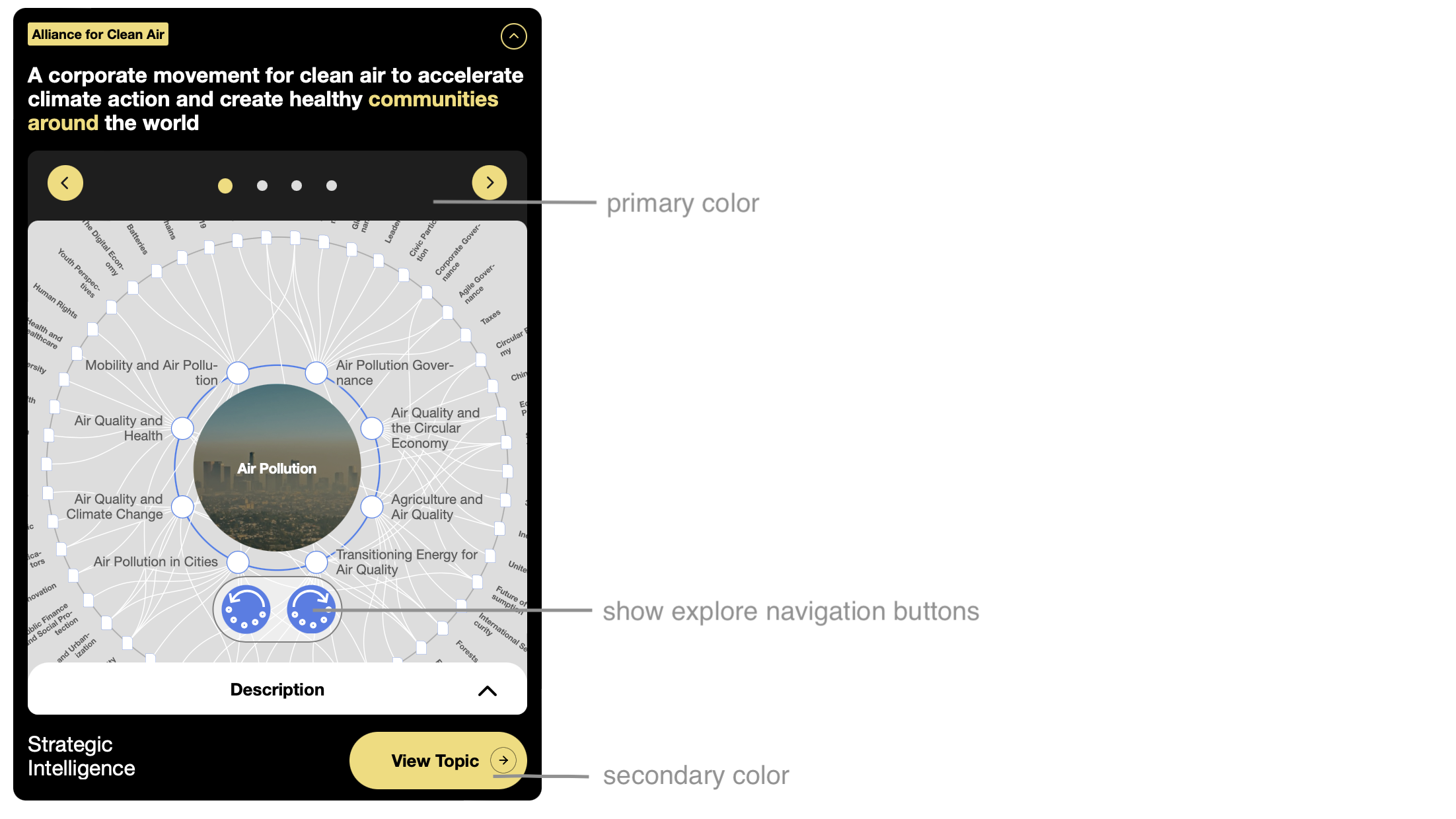
| `labeltext` | The text in the widget label | This is the text that goes in the upper label of the widget. See the relating image to see where the label is located. This expects a normal string, e.g. labeltext=“I am label text” |
| `headertext` | The text in the widget header | This is the text in the main label of the widget. See the relating image to see where the header is located. This expects a normal string, e.g. headertext=“I am header text” |
| `buttontext` | The text in the collapsed widget button | This is the text in the collapsed versions button. This expects a normal string, e.g. buttontext=“I am button text” |
| `iscollapsable` | Choose whether the widget can be collapsed | Not supported in the iframe version! This decides whether the widget can be collapsed or not. This defaults to be be false. This expects a boolean as a string, e.g. iscollapsable=“true” |
| `isinitialisedcollapsed` | Choose whether the widget should be collapsed initially | Not supported in the iframe versions! This decides whether the widget will be collapsed initially or not. This defaults to false. If iscollapsable=“false”, the value passed here will be ignored. This expects a boolean as a string, e.g. isinitialisedcollapsed=“true” |
| `positionofwordstohighlight` | The words in the title to highlight | This value gives the option to highlight certain words in the header text, if wanted. It is 0 indexed, meaning that the first word is counted as 0, the second as 1 etc. This expects an array passed as a string, e.g. positionofwordstohighlight=“\[0,3,4\]“ |
| `initialindex` | The index of the first page to show | This represents the first page that will be shows when the widget loads. This value is 0 indexed, meaning that the first slide (with the map on it) it number 0. This value defaults to 0. It expects a number passed as a string, e.g. initialindex=“2”. The permitted values are, “0”, “1”, “2”, “3” |
| `showexplorenavigationbuttons` | Choose whether the widget shows navigation buttons on the transformation map | This represents whether you want the exploration buttons for navigating the transformation to show or now. The map can still be navigated by clicking on it. This value defaults to true. This value expects a boolean passed as a string, e.g. showexplorenavigationbuttons=“false” |
| `language` | Choose which language the content should be in | This will set the language of the topic map, and headers/ text seen in the widget. It does not guarantee that the articles presented will only be in this language however. Supported languages are “en”, “pt”, “zh”, “es”, “ja”, “ar”, “fr”, “de”, “hi” and “ko”. Defaults to “en” |
| `mode` | Choose which mode to show the widget it | This value can either be “auto”, narrow”, “normal” or “wide”. It defaults to “auto”. If set to auto mode, it will decide itself which mode to put itself into, depending on how much width it is given. This value expects a string, e.g. mode=“wide” |
| `wrappercolor` | The colour you want the wrapper to be | This value must be a valid colour, e.g. wrappercolor=“red” or wrappercolor=“#ffffff”. See the relating image to see which colour is being referred to here |
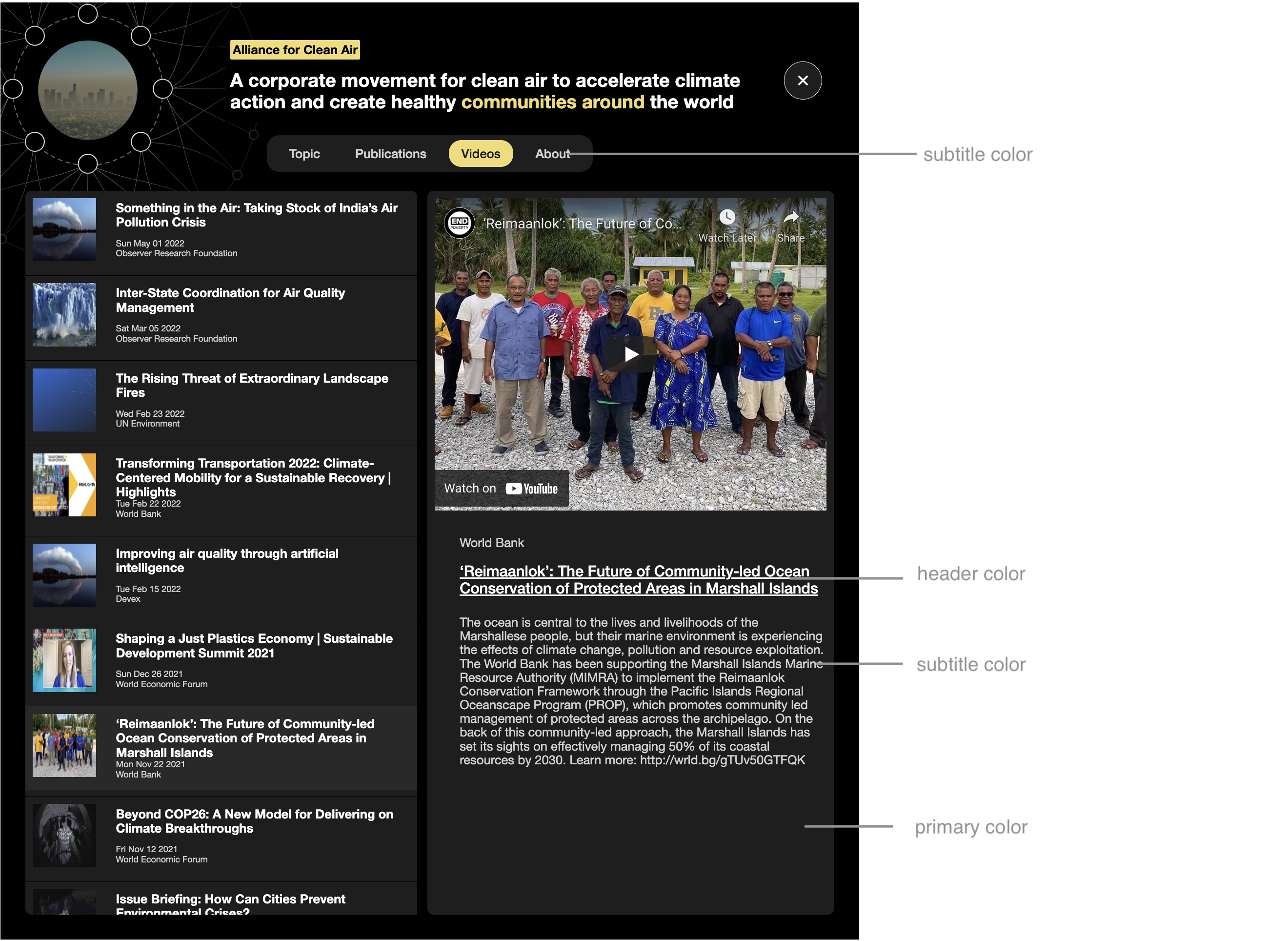
| `primarycolor` | The colour you want as the primary colour | This value must be a valid colour, e.g. primarycolor=“red” or primarycolor=“#ffffff”. See the relating image to see which colour is being referred to here |
| `secondarycolor` | The colour you want as the secondary colour | This value must be a valid colour, e.g. secondarycolor=“red” or secondarycolor=“#ffffff”. See the relating image to see which colour is being referred to here |
| `tertiarycolor` | The colour you want as the tertiary colour | This value must be a valid colour, e.g. tertiarycolor=“red” or tertiarycolor=“#ffffff”. See the relating image to see which colour is being referred to here |
| `headercolor` | The colour you want as the header colour | This value must be a valid colour, e.g. headercolor=“red” or headercolor=“#ffffff”. See the relating image to see which colour is being referred to here |
| `subtitlecolor` | The colour you want as the subtitle colour | This value must be a valid colour, e.g. subtitlecolor=“red” or subtitlecolor=“#ffffff”. See the relating image to see which colour is being referred to here |
| `fontfamilysrc` | The place where your fonts can be downloaded from. Currently only supports woff2 | This value must be the string from where your fonts can be downloaded. We currently only support the use of one woff2 font. The fonts will default to Helvetica Neue. This expects a string pointing to the fonts, e.g. fontfamilysrc=“[https://fonts.gstatic.com/s/roboto/v30/KFOkCnqEu92Fr1MmgVxFIzIXKMnyrYk.woff2](https://fonts.gstatic.com/s/roboto/v30/KFOkCnqEu92Fr1MmgVxFIzIXKMnyrYk.woff2)
” |
| `hideframe` | Toggle between the framed and frameless version of the widget | This is a boolean value. Defaults to `false`. This option can only be enabled with specific API tokens that provide this feature; if not requested, then this parameter will revert to the default value. |
Styles[](https://widget.intelligence.weforum.org/configuration#styles)
-----------------------------------------------------------------------
The styles of the widget can be altered quite considerably using the parameters above. Here is an index of the different parameters.
Last updated on January 12, 2026
[Getting Started](https://widget.intelligence.weforum.org/getting-started "Getting Started")
[Browser Support](https://widget.intelligence.weforum.org/browser-support "Browser Support")
* * *
---
# Embedding using iframes
[Skip to Content](https://widget.intelligence.weforum.org/embedding-using-iframes#nextra-skip-nav)
Learn more about how you can create and embed customised transformation maps and participate in World Economic Forum virtual events by clicking [here](https://digital-members.weforum.org/intelligence?utm_campaign=widget-docs)
Embedding Using iframes
Copy page
Embedding using iframes
=======================
Although we use the newer, and more secure [webcomponents](https://www.webcomponents.org/)
technology for the widget, we have an [iframe](https://www.w3schools.com/tags/tag_iframe.asp)
wrapper available which can help users who are using legacy platforms that do not yet support webcomponents. You can see how the iframed widget looks below (this is actually an iframe, not just an image):
To embed the iframe version of the widget, you just need to enter your API key and the ID of the topic.
If you need an API key, please visit the [Getting Started](https://widget.intelligence.weforum.org/getting-started)
page.
Configuring the iFrame[](https://widget.intelligence.weforum.org/embedding-using-iframes#configuring-the-iframe)
-----------------------------------------------------------------------------------------------------------------
### Basic version[](https://widget.intelligence.weforum.org/embedding-using-iframes#basic-version)
If you want to build the basic version of the iframe, there is a form to help you generate it below. This is ideal if you simply want to add the SI map to your website without changing anything about it. If you want to see all the possible parameters you can change, have a look at the advanced version bellow.
> The `topicid` can be found for any given topic by examining the URL at [https://intelligence.weforum.org](https://intelligence.weforum.org/)
> . Here, you will find they correspond to the following format: `https://intelligence.weforum.org/topics/[topicId]`, for example [https://intelligence.weforum.org/topics/a1Gb00000015HiiEAE](https://intelligence.weforum.org/topics/a1Gb00000015HiiEAE)
> . In this example, `a1Gb00000015HiiEAE` is the `topicid` and has to be passed as a parameter to the widget as follows: `topicid="a1Gb00000015HiiEAE"`
API Key
Topic ID
You topic id is found in the url of the topic on Strategic Intelligence e.g. [https://intelligence.weforum.org/topics/a1G0X000006O06IUAS](https://intelligence.weforum.org/topics/a1G0X000006O06IUAS)
Generate embed code
With the basic configurations from above and depending on your topic, your widget will look something like this:
### Advanced version[](https://widget.intelligence.weforum.org/embedding-using-iframes#advanced-version)
This form shows you all the different parameters that the widget supports. Use this to fully customise the widget to fit your needs!
> The `topicid` can be found for any given topic by examining the URL at [https://intelligence.weforum.org](https://intelligence.weforum.org/)
> . Here, you will find they correspond to the following format: `https://intelligence.weforum.org/topics/[topicID]`, for example [https://intelligence.weforum.org/topics/a1Gb00000015HiiEAE](https://intelligence.weforum.org/topics/a1Gb00000015HiiEAE)
> . In this example, `a1Gb00000015HiiEAE` is the `topicid` and has to be passed as a parameter to the widget as follows: `topicid="a1Gb00000015HiiEAE"`
API Key
Topic ID
You topic id is found in the url of the topic on Strategic Intelligence e.g. [https://intelligence.weforum.org/topics/a1G0X000006O06IUAS](https://intelligence.weforum.org/topics/a1G0X000006O06IUAS)
Label Text
Header Text
Button Text
Position of Words to Highlight
Initial Index
Show explore navigation buttons
Yes
No
Language
EnglishPortugueseChineseSpanishJapaneseArabicFrenchGermanHindiKorean
Mode
Narrow
Normal
Wide
Font Family Source
Wrapper Color
Wrapper Color
Secondary Color
Tertiary Color
Header Color
Subtitle Color
Generate embed code
Guidelines[](https://widget.intelligence.weforum.org/embedding-using-iframes#guidelines)
-----------------------------------------------------------------------------------------
* If you intend to wrap the widget with a heading of some kind which refers to the World Economic Forum, we would kindly appreciate it if you could refer to us as “World Economic Forum” rather than “WEF”. In general, there is no need though as the widget itself includes the World Economic Forum’s logo to identify the source.
* Because there are three different layouts of the widget, we would encourage you to try different variations and see what works for you and your site! In general, the narrow mode is good for having in the sidebar, next to for example an article, to allow the reader to link back to our page to explore the topic in more detail. The normal mode goes well between content, for example to allow a reader to explore the topic more between paragraphs of your content. The wide mode is great a covering the entire width of your page, and really allowing the reader to immerse themselves into the topic you want to highlight.
Last updated on January 12, 2026
[Browser Support](https://widget.intelligence.weforum.org/browser-support "Browser Support")
[Integrating with Wix](https://widget.intelligence.weforum.org/integrating-with-wix "Integrating with Wix")
* * *
---
# Browser Support
[Skip to Content](https://widget.intelligence.weforum.org/browser-support#nextra-skip-nav)
Learn more about how you can create and embed customised transformation maps and participate in World Economic Forum virtual events by clicking [here](https://digital-members.weforum.org/intelligence?utm_campaign=widget-docs)
Browser Support
Copy page
Browser Support
===============
### Overview[](https://widget.intelligence.weforum.org/browser-support#overview)
The widget currently covers approximately 86% of browsers in use today, and you can see [the list](https://browserl.ist/?q=%3E1%25%2C+IE+11%2C+not+dead)
here.
In the event that a user browsing your website uses a different browser, the widget will simply emit no HTML, and hence you should plan to handle this scenario gracefully.
The widget automatically includes the necessary polyfills to support the above in its bundle.
### Things to watch[](https://widget.intelligence.weforum.org/browser-support#things-to-watch)
The widget occasionally emits minimal logging in to the browser’s console log. If a required parameter is either not passed or incorrect, an error will be logged to the console. If an optional parameter is incorrect, a warning will be logged to the console.
Last updated on January 12, 2026
[Configuration](https://widget.intelligence.weforum.org/configuration "Configuration")
[Embedding Using iframes](https://widget.intelligence.weforum.org/embedding-using-iframes "Embedding Using iframes")
* * *
---
# Displaying your custom map created with your Digital Membership Pro
[Skip to Content](https://widget.intelligence.weforum.org/displaying-your-own-map#nextra-skip-nav)
Learn more about how you can create and embed customised transformation maps and participate in World Economic Forum virtual events by clicking [here](https://digital-members.weforum.org/intelligence?utm_campaign=widget-docs)
Displaying Your Own Map
Copy page
Displaying your custom map created with your Digital Membership Pro
===================================================================
Tutorial[](https://widget.intelligence.weforum.org/displaying-your-own-map#tutorial)
-------------------------------------------------------------------------------------
If you become a Digital Member Pro by joining via our [Digital Member’s Portal](https://digital-members.weforum.org/intelligence?utm_campaign=widget-docs)
you can create your own customised maps and then surface them on your website or intranet using the widget. Please note that this feature is not available with Digital Membership or Public access. Here’s a summary of how to do it:
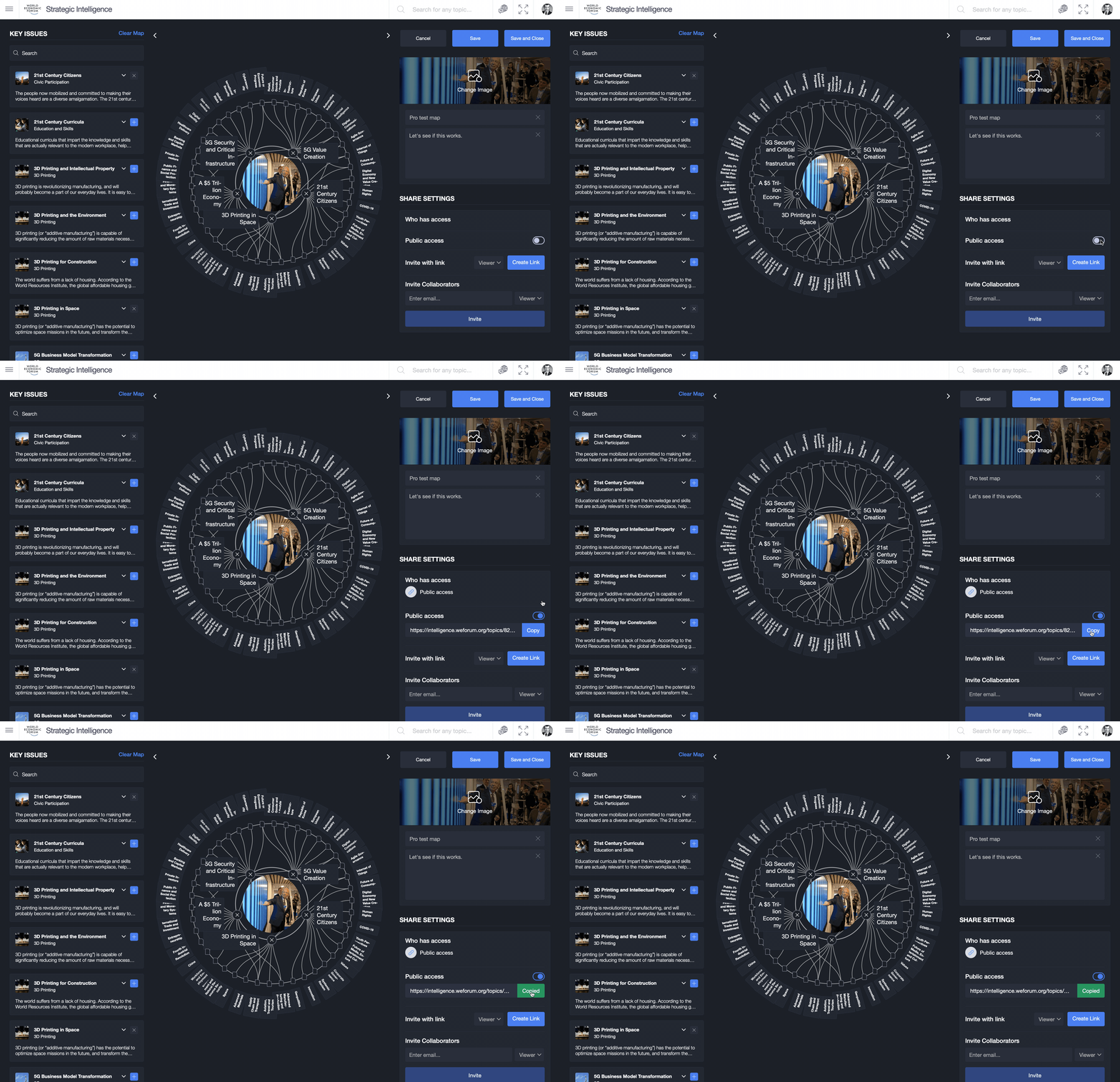
* When editing your custom map using [Strategic Intelligence](https://intelligence.weforum.org/)
you need to set Public access to `ON`. You can do this using the toggle switch in the bottom right hand corner when editing a custom map.
* Use the button displayed to copy the Public Access URL.
* From your Public Access URL, extract the map ID. For example, if the URL is `https://intelligence.weforum.org/topics/6502ddc3770c4d999e45b8b9df450696` then the map ID is `"6502ddc3770c4d999e45b8b9df450696"`. It’s the mixture of numbers and letters after `/topics`.
* Follow the instructions for setting up the widget. You can start with the [Getting Started page](https://widget.intelligence.weforum.org/getting-started)
and use either the webcomponents or iFrame implementation.
* As description on the [Configuration](https://widget.intelligence.weforum.org/configure)
page, set the `topicid` parameter equal to that of your map ID. For example, `topicid="6502ddc3770c4d999e45b8b9df450696"`. You’ll need to set the `apiKey` parameter as usual.
* With that, you should be all set and when you load the widget, you should see your own custom map displayed.
Watch how it’s done[](https://widget.intelligence.weforum.org/displaying-your-own-map#watch-how-its-done)
----------------------------------------------------------------------------------------------------------
We’ve provided a quick visual overview of how to enable Public Access and copy the URL in the video below. Please note you must have Digital Membership Pro to see these settings.
Last updated on January 12, 2026
[Integrating with WordPress](https://widget.intelligence.weforum.org/integrating-with-wordpress "Integrating with WordPress")
[Detailed Example](https://widget.intelligence.weforum.org/detailed-example "Detailed Example")
* * *
---
# Detailed example
[Skip to Content](https://widget.intelligence.weforum.org/detailed-example#nextra-skip-nav)
Learn more about how you can create and embed customised transformation maps and participate in World Economic Forum virtual events by clicking [here](https://digital-members.weforum.org/intelligence?utm_campaign=widget-docs)
Detailed Example
Copy page
Detailed example
================
Here’s how it all looks when you put it together:
` `
Last updated on January 12, 2026
[Displaying Your Own Map](https://widget.intelligence.weforum.org/displaying-your-own-map "Displaying Your Own Map")
[Resources](https://widget.intelligence.weforum.org/resources "Resources")
* * *
---
# Release Notes
[Skip to Content](https://widget.intelligence.weforum.org/release-notes#nextra-skip-nav)
Learn more about how you can create and embed customised transformation maps and participate in World Economic Forum virtual events by clicking [here](https://digital-members.weforum.org/intelligence?utm_campaign=widget-docs)
Release Notes
Copy page
Version 1.0.0 (September 2022)[](https://widget.intelligence.weforum.org/release-notes#version-100-september-2022)
-------------------------------------------------------------------------------------------------------------------
The release of the Interactive Strategic Intelligence Widget.
Last updated on January 12, 2026
[Resources](https://widget.intelligence.weforum.org/resources "Resources")
* * *
---
# Integrating with Wordpress blogs
[Skip to Content](https://widget.intelligence.weforum.org/integrating-with-wordpress#nextra-skip-nav)
Learn more about how you can create and embed customised transformation maps and participate in World Economic Forum virtual events by clicking [here](https://digital-members.weforum.org/intelligence?utm_campaign=widget-docs)
Integrating with WordPress
Copy page
Integrating with Wordpress blogs
================================
Tutorial[](https://widget.intelligence.weforum.org/integrating-with-wordpress#tutorial)
----------------------------------------------------------------------------------------
Wordpress is a popular blogging service. You can integrate the widget into your Wordpress site using the [iframe](https://widget.intelligence.weforum.org/embedding-using-iframes)
approach.
* To get started, you must firstly have applied for and received an API key from us. You can do that [here](https://widget.intelligence.weforum.org/getting-started)
.
* Follow the instructions and use our generator to build the embed code for an iframe. You can find that [here](https://widget.intelligence.weforum.org/embedding-using-iframes)
. Copy the embed code to the clipboard.
* In blog entry add a block (represented with a “plus” symbol) of type “Custom HTML”. You can find it easily by searching for “HTML”.
* Click the “HTML Code” tab and copy and paste in the embed code you copied to the clipboard.
* Click Update to save your post.
* Click Preview to preview your post.
* You should now see the widget appearing in your website.
Watch how it’s done[](https://widget.intelligence.weforum.org/integrating-with-wordpress#watch-how-its-done)
-------------------------------------------------------------------------------------------------------------
We’ve provided a quick visual overview of how you do this below.
Last updated on January 12, 2026
[Integrating with Wix](https://widget.intelligence.weforum.org/integrating-with-wix "Integrating with Wix")
[Displaying Your Own Map](https://widget.intelligence.weforum.org/displaying-your-own-map "Displaying Your Own Map")
* * *
---
# Integrating with WIX.com
[Skip to Content](https://widget.intelligence.weforum.org/integrating-with-wix#nextra-skip-nav)
Learn more about how you can create and embed customised transformation maps and participate in World Economic Forum virtual events by clicking [here](https://digital-members.weforum.org/intelligence?utm_campaign=widget-docs)
Integrating with Wix
Copy page
Integrating with WIX.com
========================
Tutorial[](https://widget.intelligence.weforum.org/integrating-with-wix#tutorial)
----------------------------------------------------------------------------------
WIX is a popular service which helps non-technical users build a website. You can integrate the widget into your WIX.com site using either the [webcomponents](https://www.webcomponents.org/)
approach or [iframe](https://widget.intelligence.weforum.org/embedding-using-iframes)
approach, but the latter is easier and does not need you to enable “dev mode”.
* To get started, you must firstly have applied for and received an API key from us. You can do that [here](https://widget.intelligence.weforum.org/getting-started)
.
* Follow the instructions and use our generator to build the embed code for an iframe. You can find that [here](https://widget.intelligence.weforum.org/embedding-using-iframes)
. Copy the embed code to the clipboard.
* In your WIX.com site editor, edit your site and use the “Add” functionality (represented with a “plus” symbol) to add an “HTML iframe” component. You can find it on the selection of components under the “more” grouping.
* Click the “Enter code” button that appears just above the iframe window WIX has added to your website.
* Copy and paste your embed code you generated using this documentation in to the box which says “Add your code here”.
* Close the modal.
* You should now see the widget appearing in your website. You can move it to wherever is most appropriate on your website.
Watch how it’s done[](https://widget.intelligence.weforum.org/integrating-with-wix#watch-how-its-done)
-------------------------------------------------------------------------------------------------------
We’ve provided a quick visual overview of how you do this below.
Last updated on January 12, 2026
[Embedding Using iframes](https://widget.intelligence.weforum.org/embedding-using-iframes "Embedding Using iframes")
[Integrating with WordPress](https://widget.intelligence.weforum.org/integrating-with-wordpress "Integrating with WordPress")
* * *
---
# Resources
[Skip to Content](https://widget.intelligence.weforum.org/resources#nextra-skip-nav)
Learn more about how you can create and embed customised transformation maps and participate in World Economic Forum virtual events by clicking [here](https://digital-members.weforum.org/intelligence?utm_campaign=widget-docs)
Resources
Copy page
Resources
=========
For support and further enquiries, please contact us at:
> [intelligence@weforum.org](mailto:intelligence@weforum.org)
Visit Strategic intelligence
* On the web at [https://intelligence.weforum.org](https://intelligence.weforum.org/)
* On your [Apple device](https://apps.apple.com/gb/app/strategic-iq/id1454211238)
* On your Android device in the [Google Play](https://play.google.com/store/apps/details?id=org.weforum.intelligence)
or [Huawei](hiapp://com.huawei.appmarket?activityName=activityUri%7Cappdetail.activity¶ms=%7B%22params%22:%5B%7B%22name%22:%22uri%22,%22type%22:%22String%22,%22value%22:%22app%7CC100941449%22%7D%5D%7D&channelId=123412)
stores
Learn more about Strategic Intelligence by watching our video:
Last updated on January 12, 2026
[Detailed Example](https://widget.intelligence.weforum.org/detailed-example "Detailed Example")
[Release Notes](https://widget.intelligence.weforum.org/release-notes "Release Notes")
* * *
---
# Embed Strategic Intelligence | World Economic Forum
[Skip to Content](https://widget.intelligence.weforum.org/configure#nextra-skip-nav)
Learn more about how you can create and embed customised transformation maps and participate in World Economic Forum virtual events by clicking [here](https://digital-members.weforum.org/intelligence?utm_campaign=widget-docs)
404
===
This page could not be found.
-----------------------------
* * *
---